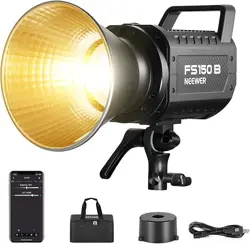
Bi-color LED Video Light
Instruction Manual
- 01 -
Safety Information Safety Information
Before using the product for the first time, please read the
following precautions, ensure the product is complete and in
good condition. Please refrain from using damaged spare parts.
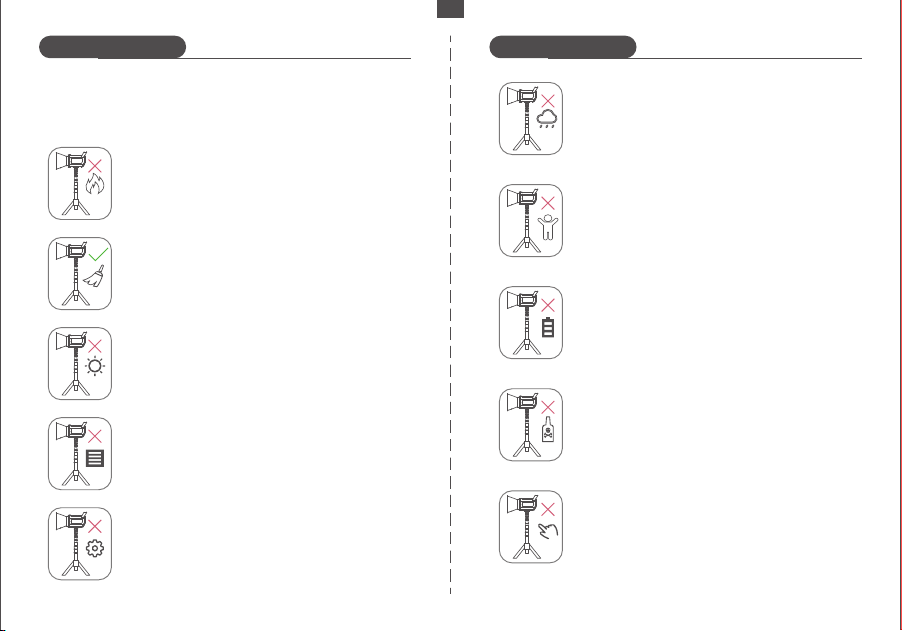
Avoid placing flammable materials near the
studio light.
Use a hair dryer with brush attachment or clean,
soft paper to remove dust and moisture.
Avoid prolonged exposure to and avoid storing
the product in direct sunlight.
Ensure the ventilation holes are not blocked
during use and avoid covering them at any
time.
Refrain from attempting to disassemble or repair
the unit yourself.
Avoid using the product in rainy, wet conditions,
or other unfavorable weather conditions.
Keep the product out of the reach of children
and pets.
Prior to maintenance, ensure the power is
turned off and disconnected. Turn off the
power when installing or removing accessories.
Do not use chemicals or liquids to clean the
light. Avoid immersing any part of the machine
in liquid.
The studio light may become hot during use,
so refrain from touching it with bare hands.
EN
- 02 -
Product Overview
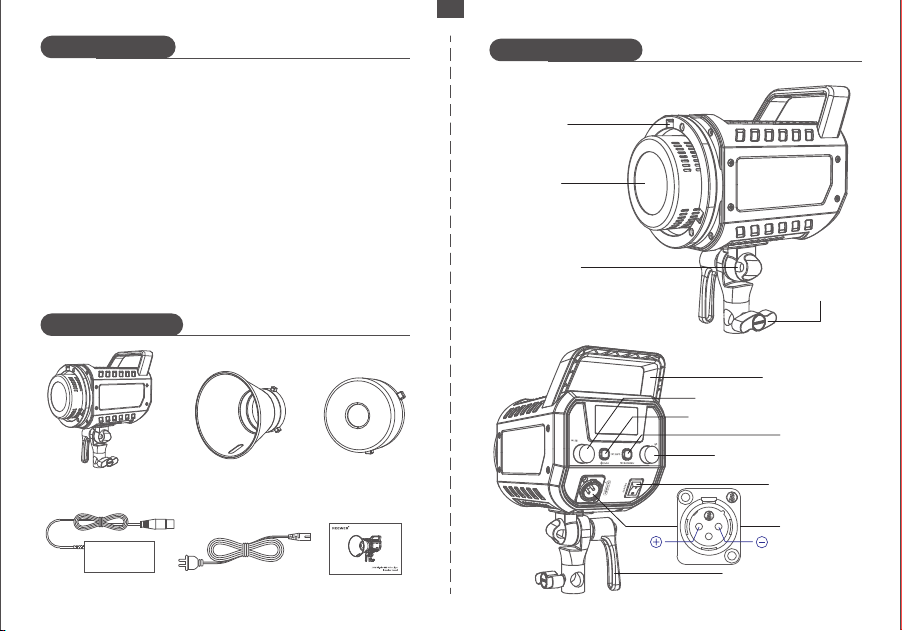
Product illustration
Package Contents
High brightness light source with an advanced optical design
and standard scale reflector, providing illumination up to
72,000lx at 1m, which is ample brightness for your various
lighting requirements.
Wide color temperature range from 2700K to 6500K, allowing for
seamless switching between warm and cold color temperatures,
without the need for the use of color filters.
Built-in 12 common special effects scenes with customizable
settings. Users can easily simulate a variety of scenes and achieve
dynamic effects without the need for complex lighting control.
Improved aesthetic design combining plastic with aluminium
alloy, for increased strength and reduced weight, creating a
compact and portable product.
1 x Reflector
1 x Studio Light
1 x Power Adapter 1 x Power Cord 1 x User Manual
1 x Protective Cover
Light Cover
Mounting Hole
LED Beads
Soft Umbrella
Mounting Hole
Angle Adjustment Lever
CCT/FX Adjustment Knob
Brightness Adjustment Knob
Carrying Handle
ON/OFF Button
Communication Mode Button
MODE Button
Power Socket
Stand
Attachment
Knob
EN
1 2
3
- 03 -
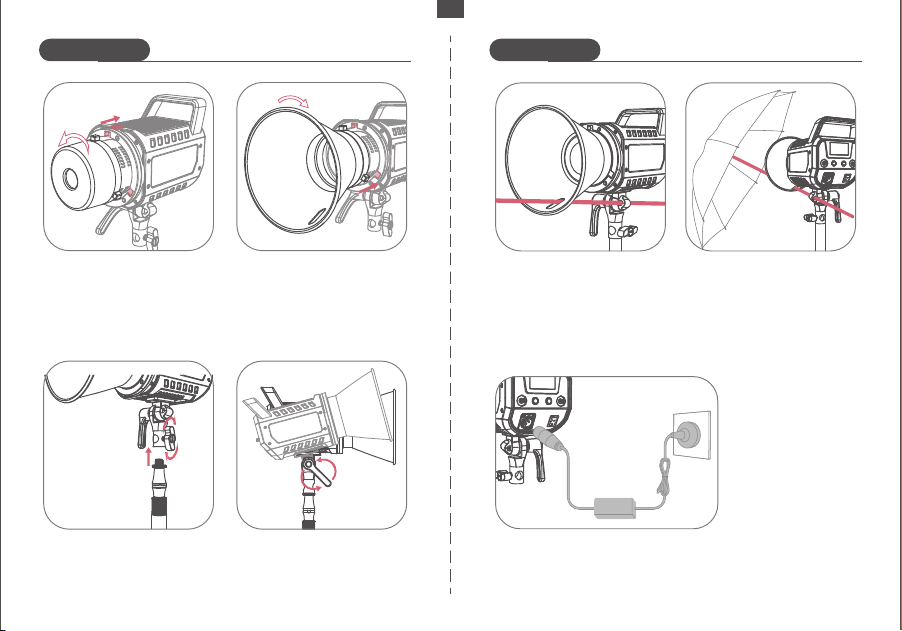
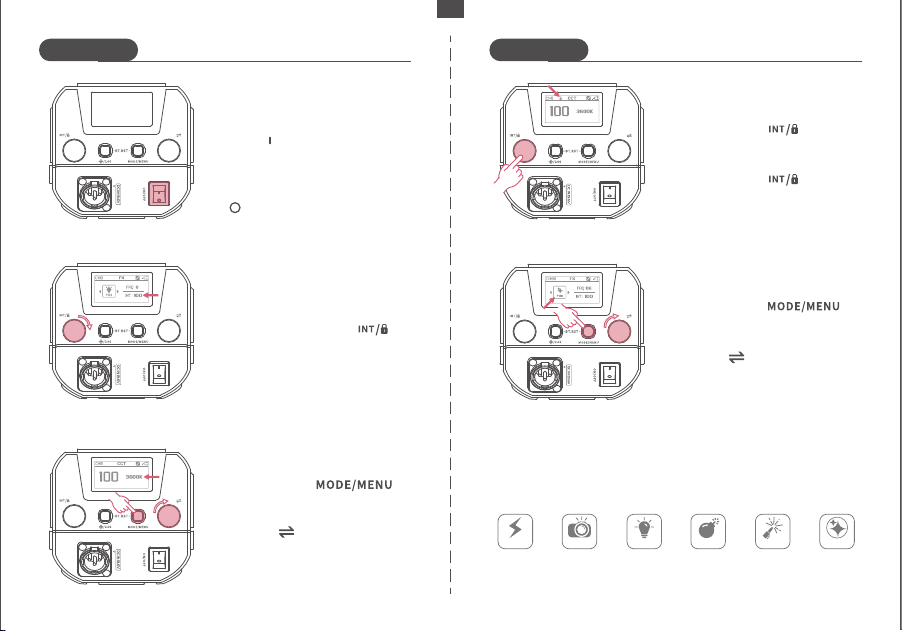
⑤ If using a soft umbrella (not
included in the accessories),
open it and insert the umbrella
stem through the gap to
accommodate the reflector, as
well as the soft umbrella hole.
⑥ Ensure the soft umbrella is
set at the right angle.
Note: The soft umbrella is
not included and should be
purchased separately.
⑦ Connect the studio
light to power using
the provided power
cable and adapter.
How to Install How to Install
③ Place the light stand into
the adapter base and tighten
the "stand attachment knob"
clockwise to secure it.
④ Loosen the "angle
adjustment lever" by turning
it counterclockwise. Adjust
the angle of the studio light
to suit your requirements
② Insert the reflector's metal
tab into the hole on the studio
light and rotate it clockwise
until it is tightly secured.
① Pull the light cover latch
back and rotate the cover
counterclockwise until the
latch aligns with the hole
in the light body. Remove
the cover.
※ Alternatively, you can power the studio light with a V-port
battery using the V-Mount battery box (relevant accessories
need to be purchased separately).
EN
- 04 -
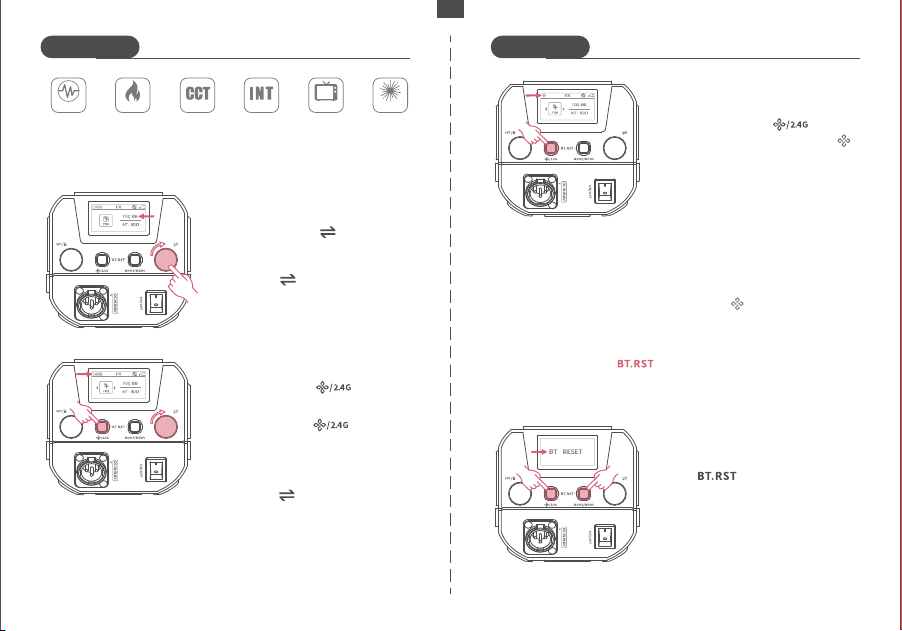
After powering on, set the switch
to the " " position to turn the
studio light on.
Return the switch to the position
" " to turn off the studio light.
Turning On/Off:
In any mode, turn the " "
knob to adjust the brightness
from 0 to 100%.
Brightness Adjustment:
Long press the " " knob to
lock the device and its controls.
Long press the " " knob
again to unlock.
Operation Lock:
Color Temperature Adjustment:
Short press the " "
button to enter CCT mode.
Turn the " " knob to adjust the
color temperature from 2700K to
6500K. After setting the tempera-
ture, press any button to exit.
Short press the " "
button to enter FX mode.
Turn the " " knob to select one
of the special effect scenes from
FX F01 to F12.
Special Scene Effects:
Scene Effects Types:
Lightning Paparazzi Defective
Bulb
Explosion Welding
Color
Temperature
Flash
How to Use How to Use
F01
F02
F03
F04
F05
F06
EN
- 05 -
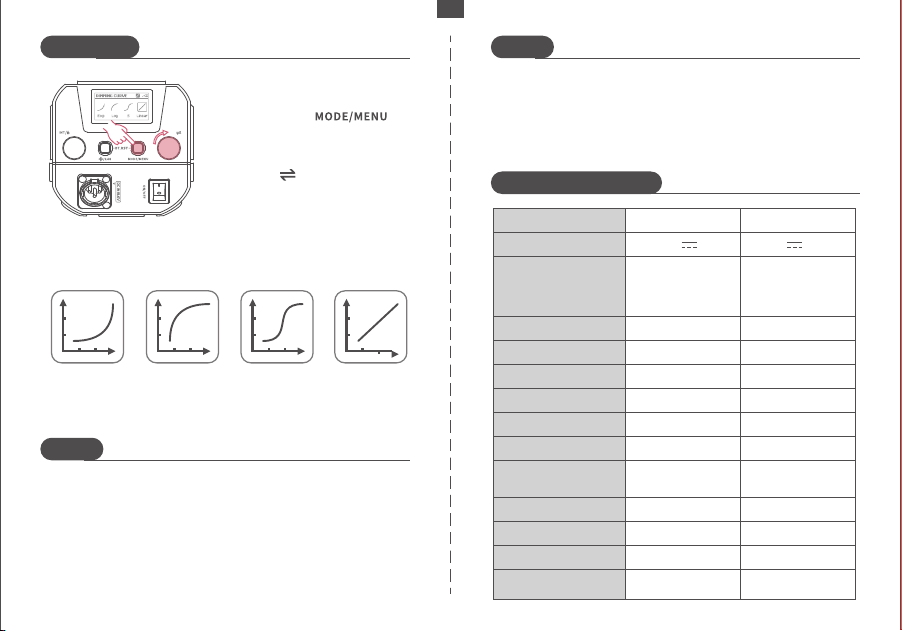
Connect your smartphone's
Bluetooth through the "NEEWER"
app and use it to control the LED
lights. Refer to the "APP prompt
card" for instructions. Scan the
QR code on the APP guide page
to access the app.
※ Press and hold the " " buttons simultaneously to reset the
Infinity connection before connecting the APP.
Turn the " " knob to select a
channel from 0 to 99. Press any
button to exit.
In Infinity mode, press and hold
the " " buttons
simultaneously to enter the
Bluetooth reset interface.
Long press the " " button
and the "CH" icon on the screen
will flash to indicate channel
selection.
How to Use How to Use
Short press the " " button
to switch to 2.4G mode.
2.4G Mode:
FireworkCandle
Color
Temperature
Pulse
Color
Temperature
Cycle
Brightness
Cycle
TV Screen
Frequency Adjustment:
Short press the " " knob to
select "FRQ".
Turn the " " knob to adjust the
frequency from 01 to 10. Press
any button to exit.
Bluetooth Reset:
When "BT RESET" appears, the
reset is successful.
Infinity Mode:
To activate the Infinity mode,
simply press the " " button
briefly. Upon activation, the " "
icon will start flashing.
When the " " icon stops flashing,
it indicates a successful Bluetooth
connection has been made.
※ In 2.4G mode, when multiple LEDs are set to the same channel
(e.g., CH88), adjusting one light will automatically synchronize the
settings with the others on the same channel.
F07
F08 F09 F10 F11 F12
EN
- 05 -
EN
How to Use
Notes
Notes
Product Specifications
1. Avoid dropping, bumping, or subjecting the product to
strong impacts to prevent damage.
2. Refrain from looking directly into the light, as it may cause
visual impairment.
3. Keep the product away from flammable and explosive
materials.
4. Do not use the product in rainy or humid environments.
Dimming Curve Types:
Exponential
type
logarithmic
type
S type line type
Turn the " " knob to select one
of the modes. Press any button to
exit.
Long press the " "
button to enter the dimming
curve mode.
Dimming Curve:
5. Avoid touching the product with wet hands.
6. Turn off the power when the product is not in use.
7. If the product will not be used for an extended period,
store it in a well-ventilated and dry place away from heat
and magnetic fields.
Product Model
Adapter Input Voltage
FS150B
DC 19.6V 8A
Maximum Illumination
(with Reflector)
Frequency
Scene Effects
Frequency Range
0~100
2700-6500K
00~99
97+
98+
130W
Brightness Range
Channel Range
CRI
TLCI
Power
V Port Battery Input
Voltage
DC 12V-16.8V
(Use the V-port
battery to connect a
three-hole adapter)
1~10
12
80000 Lux/1m
FS230B
DC 20V 13A
0~100
2700-6500K
00~99
97+
98+
230W
DC 12V-29.4V
(Use the V-port
battery to connect a
three-hole adapter)
1~10
12
110000 Lux/1m
Color Temperature Range
2402MHz ~ 2480MHz 2402MHz ~ 2480MHz
Maximum radio-
frequency power
1.27dBm
1.27dBm

