CONTACT US: For Service or Support, contact Equinox directly at 1.877.497.3726 or 480.551.7800
OR send an email at: ProductSupport@equinoxpayments.com OR contact your Equinox Sales representative directly.
FCC STATEMENTS — FCC ID: COL-LUXE6700X1
This device complies with Part 15 of FCC Rules. Operaon is
subject to the following two condions:
1) This device may not cause harmful interference, and
2) This device must accept any interference received, including
interference that may cause undesired operation.
This equipment complies with FCC radiation exposure limits set
forth for an uncontrolled environment. This equipment should
be installed and operated with a minimum distance of 20cm
between the radiator & your body. This transmier must not
be co-located or operang in conjuncon with any other
antenna or transmier.
• Reorient or relocate the receiving antenna.
• Increase separaon between the equipment & receiver.
• Connect the equipment into an outlet on a circuit dierent
from that to which the receiver is connected.
The device for operaon in the band 5150–5250 MHz is only for
indoor use to reduce the potenal for harmful interference to
co-channel mobile satellite systems. For devices with detacha-
ble antenna(s), the maximum antenna gain permied for devic-
es in the bands 5250-5350 MHz and 5470-5725 MHz shall be
such that the equipment sll complies with the e.i.r.p. limit.
ISED STATEMENTS — IC: 2279B-LUXE6700X1
This device contains license-exempt transmitter(s)/receiver(s)
Canada’s license-exempt RSS(s). Operation is subject to the
following two conditions:
1) This device may not cause interference.
2)
that may cause undesired operaon of the device.
NOTICE: Follow ALL steps on page 2 to correctly connect & power the Luxe 6700x device. Improper installation may cause serious
damage to the device, resulting in possible repairs at the owner’s expense. If you are unsure or have any questions, contact an
Equinox Payments
®
Customer Support Specialist directly at 1.877.497.3726 or ProductSupport@equinoxpayments.com.
The Luxe device must be used within the operang condions,
electrical supply requirements, environmental condions and
connecon requirements as specied below:
•
installed in locaons where there is danger of explosion.
• Only use the AC Power Adapter and cables supplied by
Equinox Payments
®
. Using non-compliant cable/power
adapter may damage the device.
• Do not use if visibly damaged. Do not disassemble.
• Do not expose to temperatures below -10 °C or above
60 °C storage (not powered).
• Intended operating humidity range is 5% to 95% rh (non-condensing).
• This device is not designed or cered to be used in a am-
mable atmosphere where there is a risk of explosion.
• Keep out of reach of children or pets.
• Do not incinerate or crush.
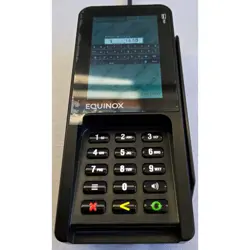
LUXE
®
6700x
EQUINOX PAYMENTS
INSTALLATION
* Contents may not match exactly as shown. ** Must order bundle separately & may arrive separately.
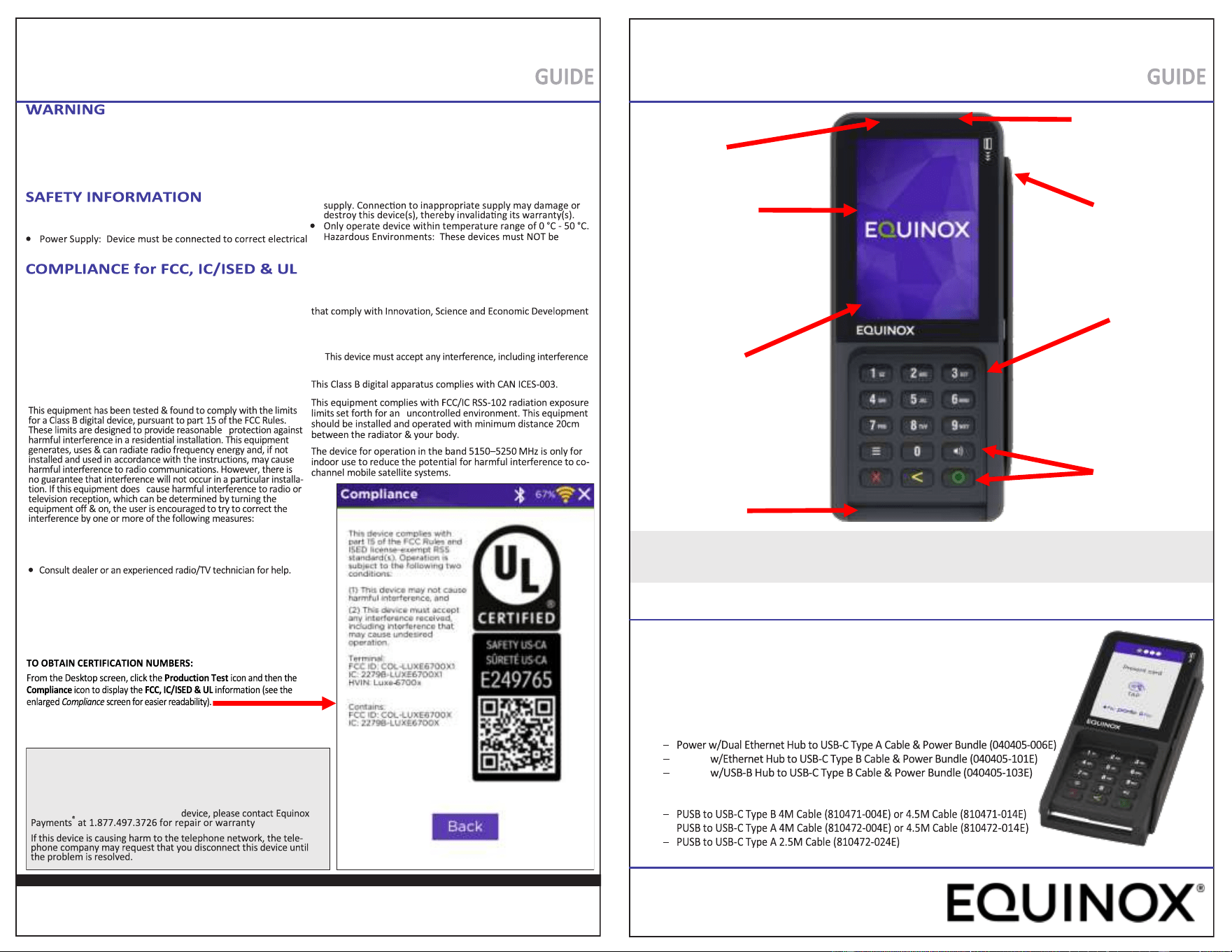
Audio Jack
Audio Speaker
Smartcard Reader
Magnec Stripe Reader
(MSR) supports
Track 1, 2, 3
Durable, In-Mold
Decorated Plasc
Keytops
3.5” bright LCD multi-
sensory touchscreen
with chemically
strengthened glass
© 2026 Equinox Payments, all rights reserved. Equinox Payments and the Equinox Payments logo are registered trademarks of Equinox Payments.
Informaon within this guide may not match the Luxe device and its accessories exactly and thus are subject to change. Rev A | 05/2026
SHIPPING CONTENTS*
Tacle 12+3 Key
320x480 wide viewing
angle display supports
Signature Capture using
Finger or passive Stylus
• Luxe 6700x Device
• Installaon Guide
• Equinox Screen Wipe
• Communicaons & Power Bundle opons**
− Power w/Ethernet Hub to USB-C Type A Cable & Power Bundle (040405-001E)
− Power w/USB-B Hub to USB-C Type A Cable & Power Bundle (040405-003E)
Power
Power
− Power w/Dual Ethernet Hub to USB-C Type B Cable & Power Bundle
(040405-106E)
−
NOTE: The Compliance screen displays the FCC, IC/ISED & UL
cercaon numbers applicable to the LUXE 6700x device.
LUXE
®
6700x
EQUINOX PAYMENTS
INSTALLATION
940680- 001E
940680-001E
WARNING
Changes or modicaons to the equipment that are not expressly
approved by the responsible party for compliance could void the
user’s authority to operate the equipment.
If trouble is experienced with this
informaon.
LUXE
®
6700x INSTALLATION GUIDE
● DEVICE DOES NOT START/POWER ON: Ensure device is plugged into a dedicated power source. Check the Power
Cable connector to ensure it is plugged in properly. Ensure all other Equinox supplied cables are secure & connected.
Check connected screws.
●
Check connected screws and ghten if necessary.
● DEVICE FAILS TO PROCESS A TRANSACTION: Check the Magnec Card Reader & Smart Card Reader to ensure:
● DEVICE COMMUNICATION NOT RESPONDING: Check all cable connecons to ensure proper connecvity.
● KEYPAD DOES NOT RESPOND: Press a key and check the display to see if the correct character appears.
If problem persists, see RETURN DEVICE FOR SERVICE bullet below.
● RETURN DEVICE FOR SERVICE: If you do need to return a device to Equinox, click on the link to access the REPAIR form
(hps://www.equinoxpayments.com/repair/ ).
Equinox Payments
®
9045 E. Pima Center Pkwy, Suite 1, Scosdale, AZ 85258, USA | Tel: +1.877.497.3726 or +1.480.551.7800 | Fax: +1.480.551.7811 | www.equinoxpayments.com 940680-001E Rev A | 05/2026
Reset Buon
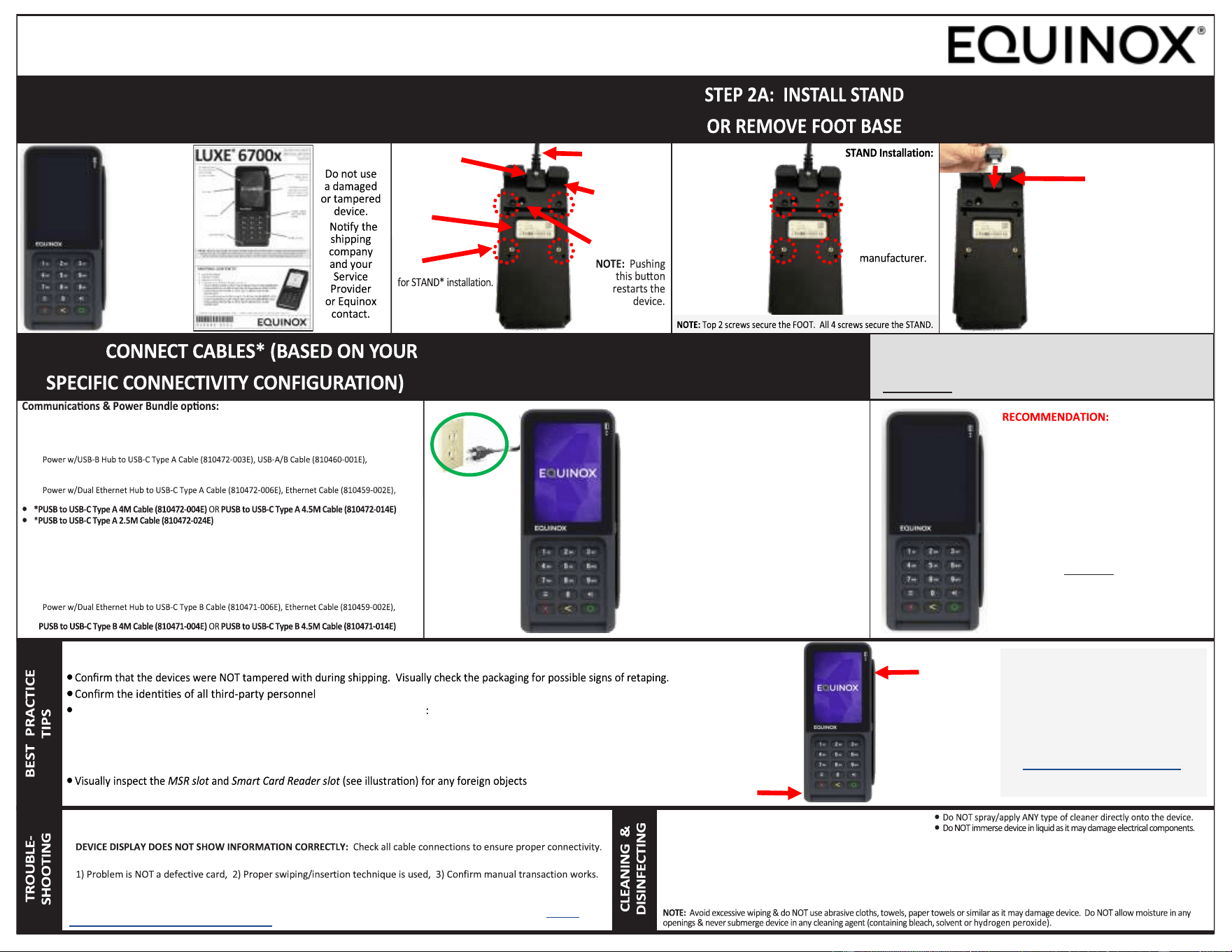
STEP 1: UNPACK & INSPECT EQUIPMENT
(SAVE SHIPPING MATERIALS)
STEP 2: TURN DEVICE OVER &
LOCATE PORTS & RESET BUTTON
STEP 3: INSERT the USB-C
CABLE into the USB-C PORT
4 Mounting Holes
*STAND sold separately
(contact STAND manufac-
turer directly).
STEP 4:
Disconnect POWER before
proceeding.
1. Disconnect the power source.
2. Turn the device over.
3. Extract the USB-C cable from the
USB-C port.
4. Remove the old device.
5. Install the new device and follow
the main Steps 1-5 from above.
Connect
Power
WARNING:
1. Do NOT connect the device to the Power
source until ALL cables and peripherals
are attached.
2. Power Supply: Device must be connected
to correct electrical supply. Connection to
inappropriate supply may damage or de-
stroy this device(s), thereby invalidating
its warranty(s).
3. Do NOT plug the Power Supply into an
outdoor outlet or operate device outdoors.
4. Disconnecting the Power or Restarting the
device during a transaction may cause
unstored data files to be lost.
WARNING:
NOTE:
Communications
& Power Cables
are ordered
separately
(see the
CONNECT
CABLES
section below).
To ensure the Security & Compliance of the Luxe 6700x (as suggested by the PCI Security Standards Council), it is highly
recommended that the Merchant monitor their terminal environment each day:
Visually check there are NO external physical damage(s) to the device
− Inspect device for signs of case separaon
− Verify NO holes are drilled into the device (these may be covered with new sckers)
− Verify NO additional cables are protruding from the device and/or any other associated equipment
− Ensure Keypad is rmly in place
− Physically check to ensure no foreign object is obstrucng, hampering or prevenng the sliding or inseron of a card
For addional guidance
about skimming prevenon,
refer to the
Skimming Prevenon:
Best Pracces for Merchants
document available at:
www.pcisecuritystandards.org.
• *Power w/Ethernet Hub to USB-C Type A Cable & Power Bundle (040405-001E)
− Power w/Ethernet Hub to USB-C Type A Cable (810472-001E), Ethernet Cable (810459-002E),
Power Supply (870088-001E) & Power Cable (810003-001)
• *Power w/USB-B Hub to USB-C Type A Cable Bundle (040405-003E)
−
Power Supply (870088-001E) & Power Cable (810003-001)
• *Power w/Dual Ethernet Hub to USB-C Type A Cable & Power Bundle (040405-006E)
−
Power Supply (870088-001E) & Power Cable (810003-001)
• *Power w/Ethernet Hub to USB-C Type B Cable & Power Bundle (040405-101E)
− Power w/Ethernet Hub to USB-C Type B Cable (810471-001E), Ethernet Cable (810459-002E),
Power Supply (870088-001E) & Power Cable (810003-001)
• *Power w/USB-B Hub to USB-C Type B Cable & Power Bundle (040405-103E)
− Power w/USB-B Hub to USB-C Type B Cable (810471-003E), USB-A/B Cable (810460-001E),
Power Supply (870088-001E) & Power Cable (810003-001)
• *Power w/Dual Ethernet Hub to USB-C Type B Cable & Power Bundle (040405-106E)
−
Power Supply (870088-001E) & Power Cable (810003-001)
• *
*Use only Equinox supplied CABLES
1. Remove the 4
screws before
installing the
STAND plate.
2. Follow the
instructions
provided by
the STAND
3. Tighten all 4
screws to
ensure device
is secured.
USB-C Cable:
1. Insert the appropriate cable
for your environment into
the USB-C Port.
2. Tighten the screw to ensure
the cable remains connected
to the device.
USB-C Port
Label
FOOT Removal:
1. Unscrew the
top 2 screws
(near the
RESET buon)
using a small
Philips screw-
driver (not
provided).
2. Place the
device on the
counter and
operate as
intended.
Pre-Installed
Foot
Connected
Cable Shown
USB-C Port
Smart Card
Reader Slot
MSR Slot
STEP 5: TURN DEVICE OVER, REMOVE FILM
and CONNECT POWER SOURCE
DISCONNECT POWER SOURCE
BEFORE REPLACING THE LUXE 6700x
To CLEAN: Apply dislled water/mild cleaner onto a so, lint free cloth. Gently wipe the device with the moistened cloth.
NOTE: Avoid excessive wiping & do NOT use abrasive cloths, towels, paper towels or similar as it may damage device.
To DISINFECT: Use a 70% Isopropyl Alcohol Wipe & gently wipe hard, nonporous outside surface of the device (e.g., display, key-
pad or other exterior surfaces). Wipe surface with a dry, lint-free cloth to remove any remaining moisture or residue from device.
WARNING:
• Do NOT use industrial strength or an abrasive cleaner
(e.g., bleach, aerosol spray or solvent) as it may damage
or scratch the device/screen.
• Do NOT spray water/cleaner into MSR/Smart Card Reader slots
or ports as it may damage electrical components.