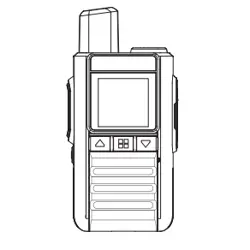
QPD!IBOEIFME!SBEJP
TIY.U4QSP
VTFS!NBOVBM
Getting to Know Your Radio
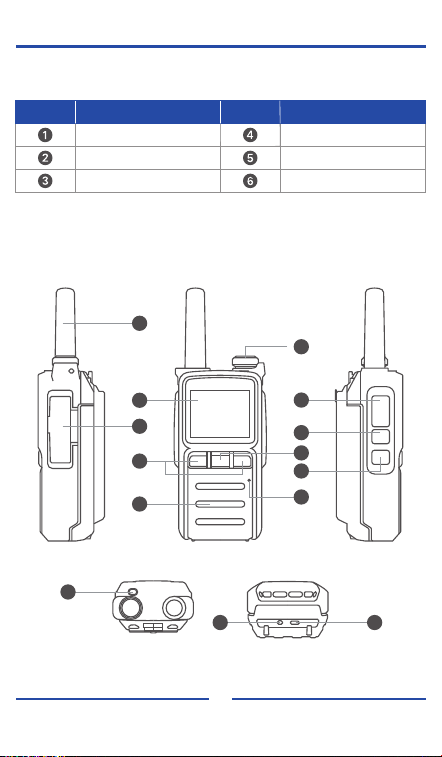
Packing List
Radio Antenna
Battery
Charger Hand Strap
Belt Clip
No. Item No. Item
12
5
6
:
21
22
23
24 25
7
8
9
3
2
4
13
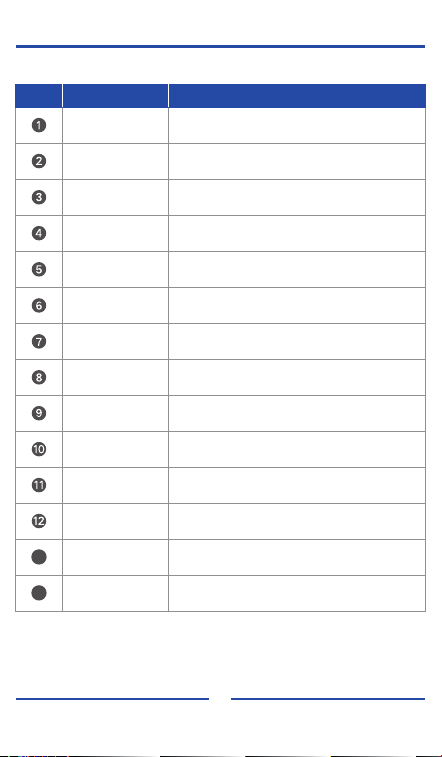
No. Item Function
Antenna
Accessory Jack
Power / Volume
Knob
Display
Menu / OK Key
Navigation Key
Microphone
Speaker
PTT Key
Confirm Key
Back Key
Status Indicator
Charging Indicator
Charging Port
Transmits and receives signals
Connects accessories such as earpiece or
microphone
Turn the radio on/off and adjust volume
Shows the radio operating status
Enter menu / confirm selection
Select menu options
Voice input
Outputs received audio
Press to transmit
Enter next menu / confirm selection
Return to previous menu / exit menu
Indicates transmit/receive status
Shows battery charging status
Connect charger to charge the battery
24
25
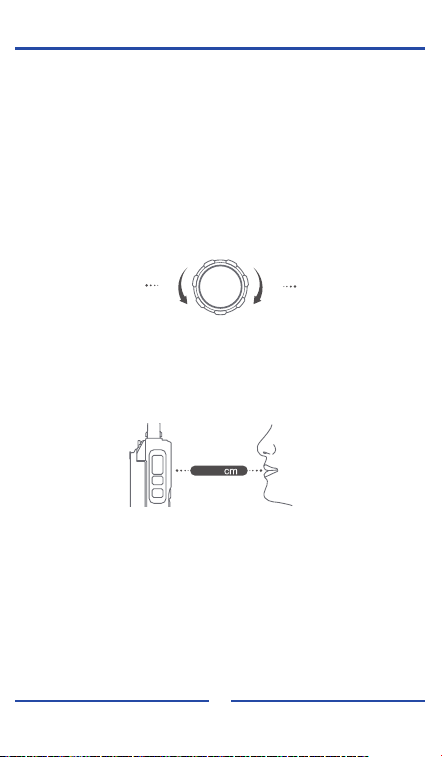
1. Power On / Power Off
To power on the radio, rotate the Power/Volume knob clockwise.
The screen will light up when the radio is powered on.
To power off the radio, rotate the Power/Volume knob counterclockwise until it
clicks.
4. Function Operation
This radio provides multiple functions organized in the menu.
(1) Press the Menu key to enter the function list.
(2) Press the Navigation key to select a function.
(3) If the function contains sub-menus, press the Confirm key to enter the next
level.
(4) Continue selecting options using the Navigation key.
(5) Press the Confirm key to confirm the setting.
(6) Press the Back key to return or exit the menu.
3. Making a Call
Press and hold the PTT key, then speak into the microphone to transmit.
Release the PTT key after speaking to receive.
For best communication quality, hold the radio in an upright position and keep the
microphone about 3–4 cm away from your mouth.
2. Volume Adjustment
Rotate the Power/Volume knob clockwise to increase the volume.
Rotate the Power/Volume knob counterclockwise to decrease the volume.
Basic Operations
14
4 5
Power Off
Decrease the Volume
Power On
Increase the Volume
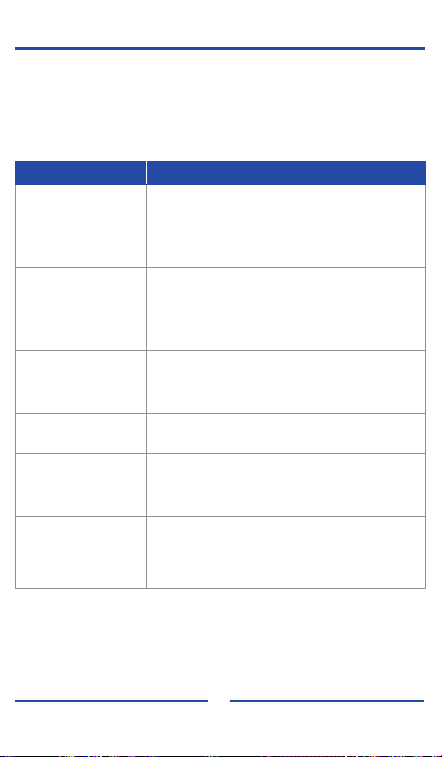
Troubleshooting Guide
Before confirming that the radio is faulty, please check the following items.
If the problem cannot be resolved, or if you encounter other faults, please contact
your dealer for technical support.
The battery may be depleted. Replace with a
charged battery or recharge the battery.
The battery may not be installed correctly. Remove
and reinstall the battery.
15
Radio cannot power on
The battery has reached the end of its service life.
Replace the battery.
The battery may not be fully charged. Fully charge
the battery before use.
Short operating time
after charging
SIM card failure, poor signal, or out of service
coverage. Replace the SIM card or move to an
area with better signal. If indoors, move closer to a
window.
No response or noise
when receiving
Indicator lights during
reception but no sound
from the speaker
Make sure the volume level is set high enough.
Poor signal reception
The network signal in the current location may be
weak, or the network may be congested during
peak hours.
Keys do not respond Check whether any key is stuck.
Problem Possible Cause & Solution
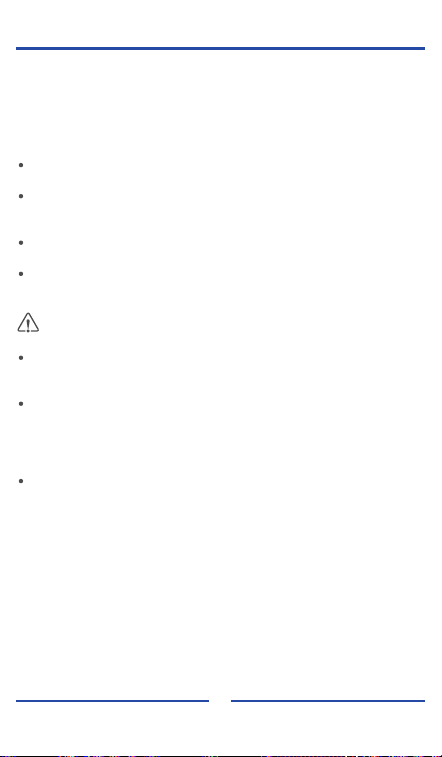
Cleaning and Maintenance
To ensure optimal performance and extend the service life of the product, please
follow the instructions below for daily cleaning and maintenance.
Before cleaning, power off the radio and remove the battery.
Do not use sharp or hard objects to pierce or scratch the product.
Do not store the product in environments containing corrosive electronic
substances.
During use, do not pull the antenna by hand.
When no accessories are connected, keep the accessory port cover closed.
Regularly use a clean, dry, lint-free cloth or a soft brush to remove dust from the
surface of the radio and the battery contacts.
If the keys or housing become dirty, clean them with a neutral detergent and a
lint-free cloth.
Do not use chemicals such as stain remover, alcohol, spray cleaners, or
oil-based agents to avoid damage to the surface.
After cleaning, ensure the product is completely dry before use.
16

FCC STATEMENT
Note: This equipment has been tested and found to comply with the limits for a
Class B digital device, pursuant to part 15 of the FCC Rules. These limits are
designed to provide reasonable protection against harmful interference in a
residential installation.
This equipment generates, uses, and can radiate radio frequency energy and, if
not installed and used in accordance with the instructions, may cause harmful
interference to radio communications. However, there is no guarantee that
interference will not occur in a particular installation.
If this equipment does cause harmful interference to radio or television reception,
which can be determined by turning the equipment off and on, the user is
encouraged to try to correct the interference by one or more of the following
measures:
-Reorient or relocate the receiving antenna.
-Increase the separation between the equipment and receiver.
-Connect the equipment into an outlet on a circuit different from that to which the
receiver is connected.
-Consult the dealer or an experienced radio/TV technician for help.
This device complies with part 15 of the FCC Rules. Operation is subject to the
condition that this device does not cause harmful interference.
This device complies with part 15 of the FCC Rules. Operation is subject to the
following two conditions: (1) This device may not cause harmful interference,
and (2) This device must accept any interference received, including
interference that may cause undesired operation.
FCC RF Exposure and Separation Distance
This radio complies with IEEE and ICNIRP exposure limits for
occupational/controlled RF exposure environment at operating duty factors of up
to 50% and is authorized by the FCC for Occupational Use Only. An appropriate
warning label is affixed to all units. In order to comply with RF exposure
requirements, a minimum distance of 2.5 cm must be maintained when held-to-
face, and body-worn operations are restricted to the approved original
accessories (belt clip), a minimum distance of 0 cm. Do not use this device when
antenna shows obvious damages.
WARNING: MODIFICATION OF THIS DEVICE TO RECEIVE CELLULAR
RADIOTELEPHONE SERVICE SIGNALS IS PROHIBITED UNDER FCC
RULES AND FEDERAL LAW.
EU STATEMENT
We declare that the radio is compliance with Radio equipment Directive (RED)
2014/53/EU. The full text of the EU declaration of conformity is available at the
following internet address: xxxxxx
The device in the environment with the temperature between 0-40℃ and
operating under 2000m, otherwise, it may damage your radio.
For this device, Head SAR and Body SAR was performed with the device
configured in the positions according to EN 50566:2017/A1:2023 & EN IEC/IEEE
62209-1528:2021, and face-up SAR was performed with the device 25mm from
the phantom, and Body SAR was performed with the device 0mm from the
phantom. Body SAR was also performed with the headset and belt clip attached
and without.
CAUTION:
RISK OF EXPLOSION IF BATTERY IS REPLACED BY AN INCORRECT TYPE.
DISPOSE OF USED BATTERIES ACCORDING TO THE INSTRUCTIONS.
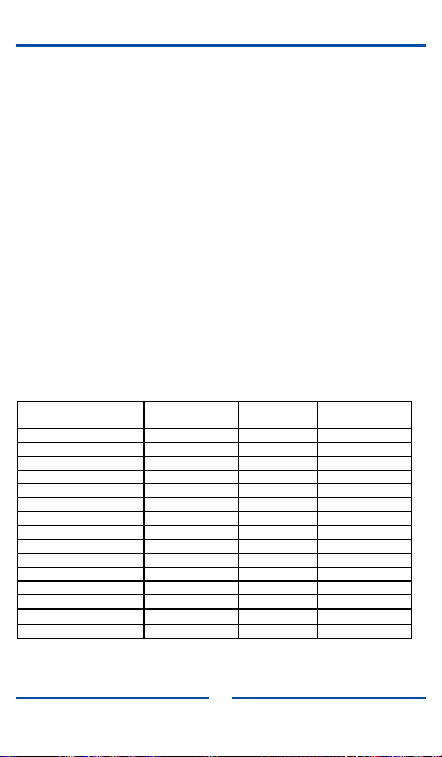
US Version
Operating
Mode
Frequency
(MHz)
Antenna
Gain (dBi)
Max Output
Power (dBm)
LTE Band 2 1850-1910 2 23.15
LTE Band 4 1710-1755 2 23.02
LTE Band 5 824-849 2 23.28
LTE Band 7 2500-2570 2 23.53
LTE Band 12 699-716 2 24.16
LTE Band 13 777-778 2 23.31
LTE Band 17 704-716 2 23.59
LTE Band 38 2570-2620 2 23.90
LTE Band 40 2305-2315 2 22.72
LTE Band 40 2350-2360 2 22.44
LTE Band 41 2496-2690 2 23.75
LTE Band 66 2110-2200 2 22.63
BT 2.4G BR/EDR 2402-2480 1.25 0.769
BT 2.4G Ble 1&2M 2402-2480 1.25
-0.613
WIFI 2.4G 2412-2462 1.11 9.37

Standby