At a Glance
Front & Back
Handle Wireless Microphones (×2)
Top Panel Back Panel
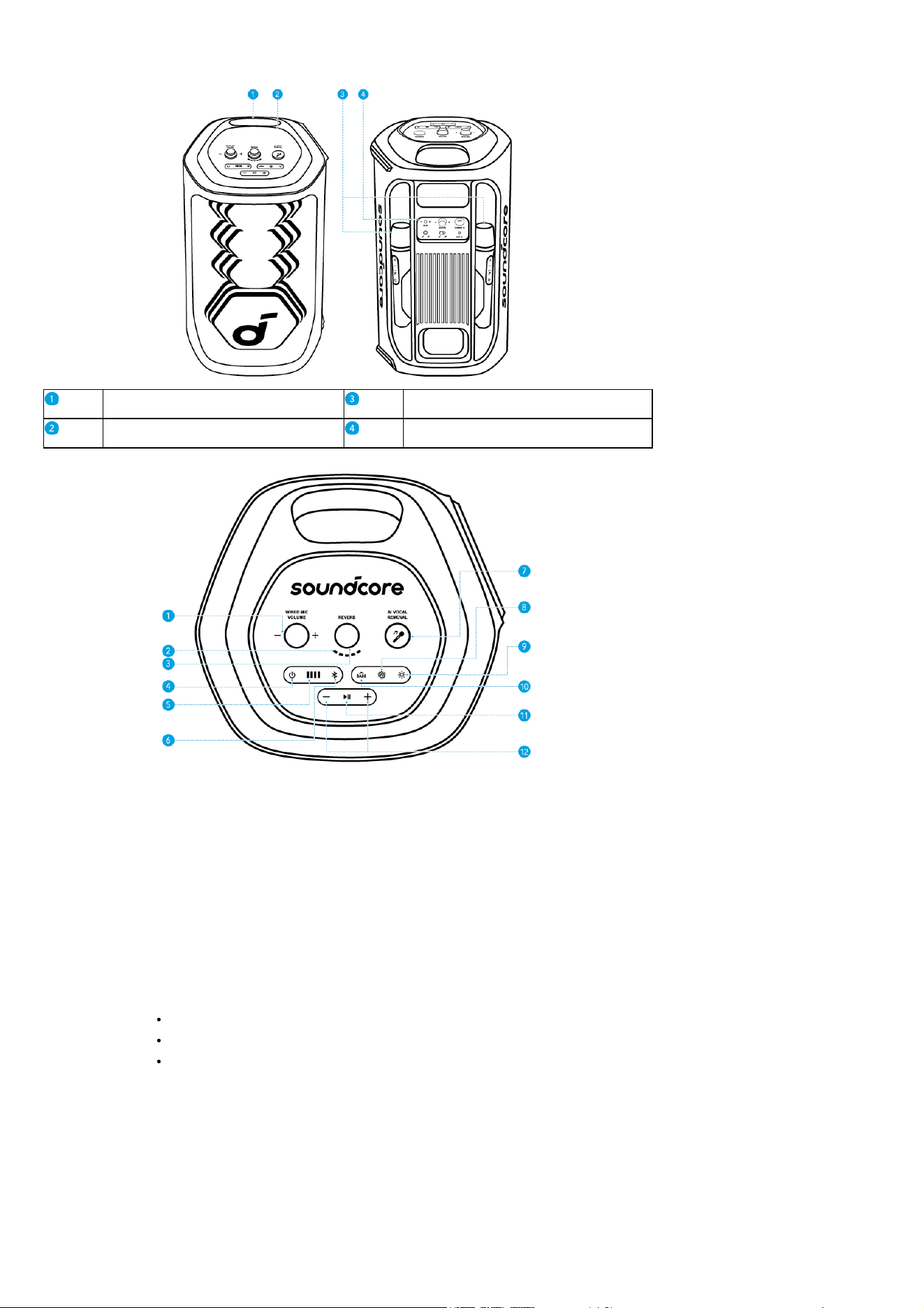
Top Panel
1. Wired Mic Volume Control: Adjust the volume of your wired microphone.
2. Reverb Control: Rotate clockwise / counterclockwise to increase / decrease the amount of reverb applied to your microphone or audio source.
3. Reverb Level Indication: Display the current reverb applied to your microphone or audio source.
4. Power Button: Power on or off the device.
5. Battery Indicator: Display the battery level of the device.
6. Bluetooth Button: Press to enter Bluetooth pairing mode.
7. AI Vocal Removal: Press to remove the original vocals from the song, leaving only the accompaniment. Press again to restore the vocals.
8. AuraCast Button: Press to enable AuraCast feature.
9. LightShow Button: Press to turn the light effect on or off.
10. BassUp Button: Press to enhance the low frequency of the audio source.
11. Play/Pause Button:
Press once to play / pause the audio source.
Press twice to skip to the next track.
Press three times to skip to the previous track.
12. Volume Up and Volume Down Buttons: Press to turn up or down the volume of audio source.
Back Panel
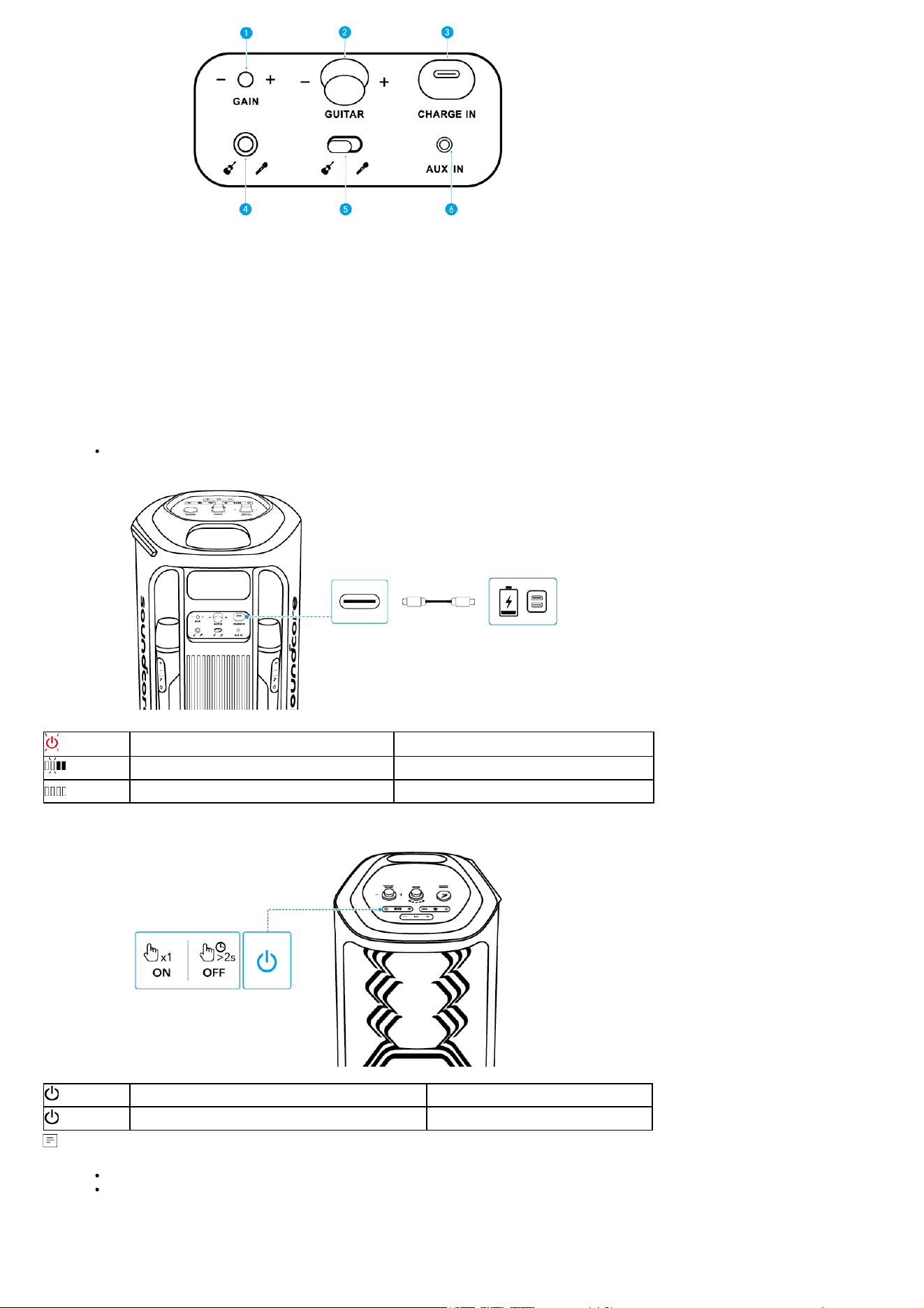
1. Gain (Guitar): Adjust gain of the connected guitar.
2. Guitar Volume Control: Rotate clockwise / counterclockwise to increase / decrease the volume of the connected guitar.
3. USB-C Charging Port: Plug in the provided C-C cable to charge the device.
4. Guitar / Microphone Socket (6.5mm): Connect to a guitar or wired microphone.
5. Input Switch Toggle: Switch to the connected guitar or microphone input.
6. AUX IN: Connect to an external audio device through a 3.5 mm audio cable (not supplied).
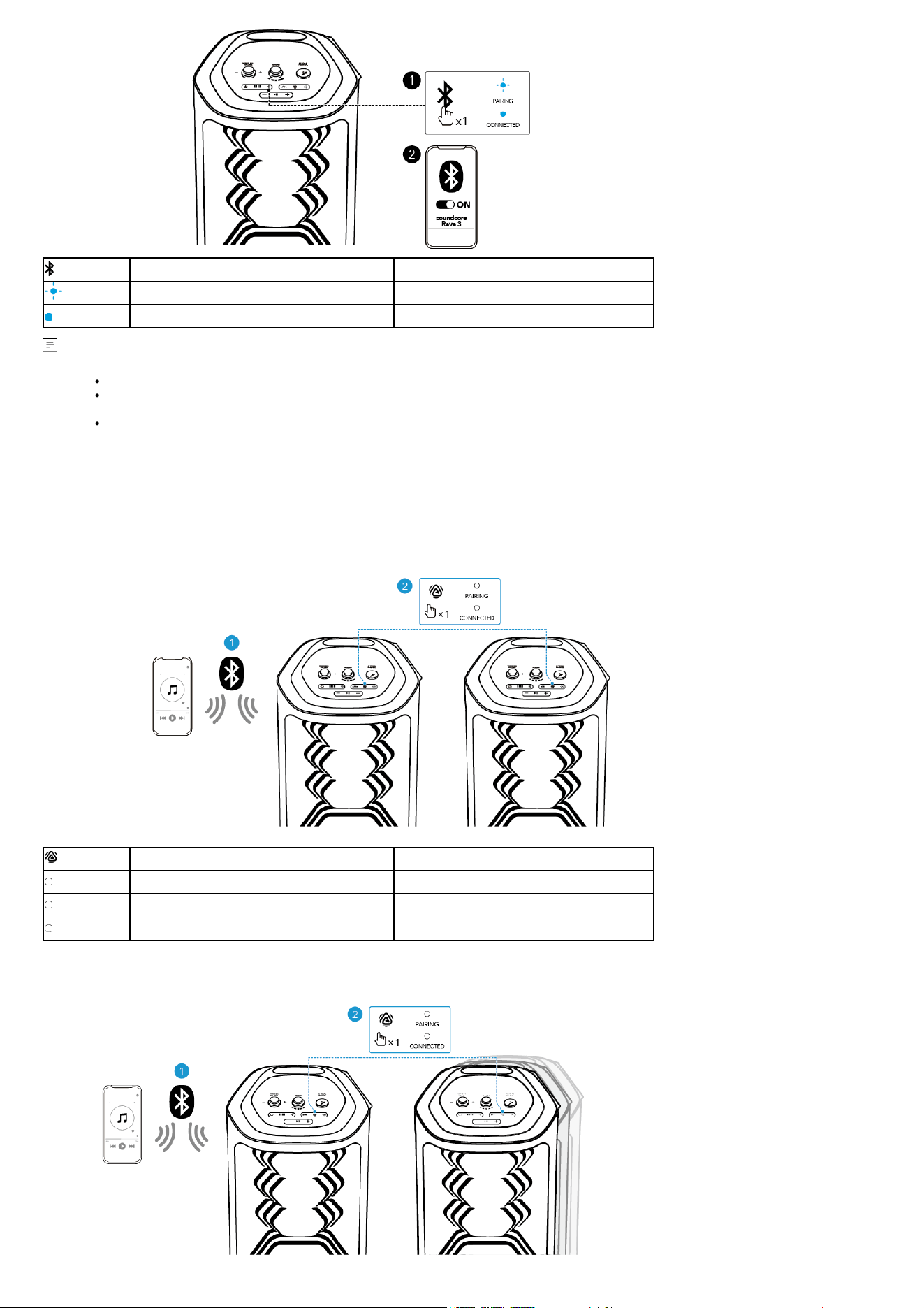
Charging
Charging Your Speaker
Use a certified C-C cable and charger to prevent any damage.
Flashing Red Low Battery
Flashing White Being Charged
Steady White Fully Charged
Powering On/Off
Press Once Power On
Press and Hold for 2 Seconds Power Off
This speaker will power off automatically after 20 minutes of no audio input.
You can also set an auto-power-off time in the soundcore app.
Using Your Speaker
Bluetooth Mode
Press the Bluetooth button to enter Bluetooth pairing mode, then select "soundcore Rave 3" from your device's Bluetooth list to connect.
Press Enter Bluetooth Pairing Mode
Flashing Blue Bluetooth Pairing
Steady Blue Bluetooth Connected
To re-enter Bluetooth pairing mode, press the Bluetooth button once.
This speaker can only play music on one mobile device at a time. To play from another connected device, pause the device that's currently active
first.
Each time you power on your speaker, it will automatically connect to your last connected device if available within the Bluetooth range. If not,
press the Bluetooth button to enter Bluetooth pairing mode.
TWS (True Wireless Stereo) Mode
Two identical soundcore speakers can pair with each other for stereo sound. Both speakers can play the same audio (one as the left channel and the other as
the right channel).
With one speaker connected to a smartphone or tablet, press the AuraCast button simultaneously on both speakers to enter TWS pairing mode powered by
AuraCast technology.
Upon successful pairing, you will hear a sound prompt. Then double press the AuraCast button on either speaker to assign the left and right audio channels.
channels.
Press Once Enter / Exit TWS Pairing Mode
Steady White TWS Pairing
Steady White (Speaker 1)
TWS Connected
Steady White (Speaker 2)
AuraCast
With one speaker connected to a smartphone, press the AuraCast button on up to 10 soundcore speakers with AuraCast function to synchronize audio and
light.
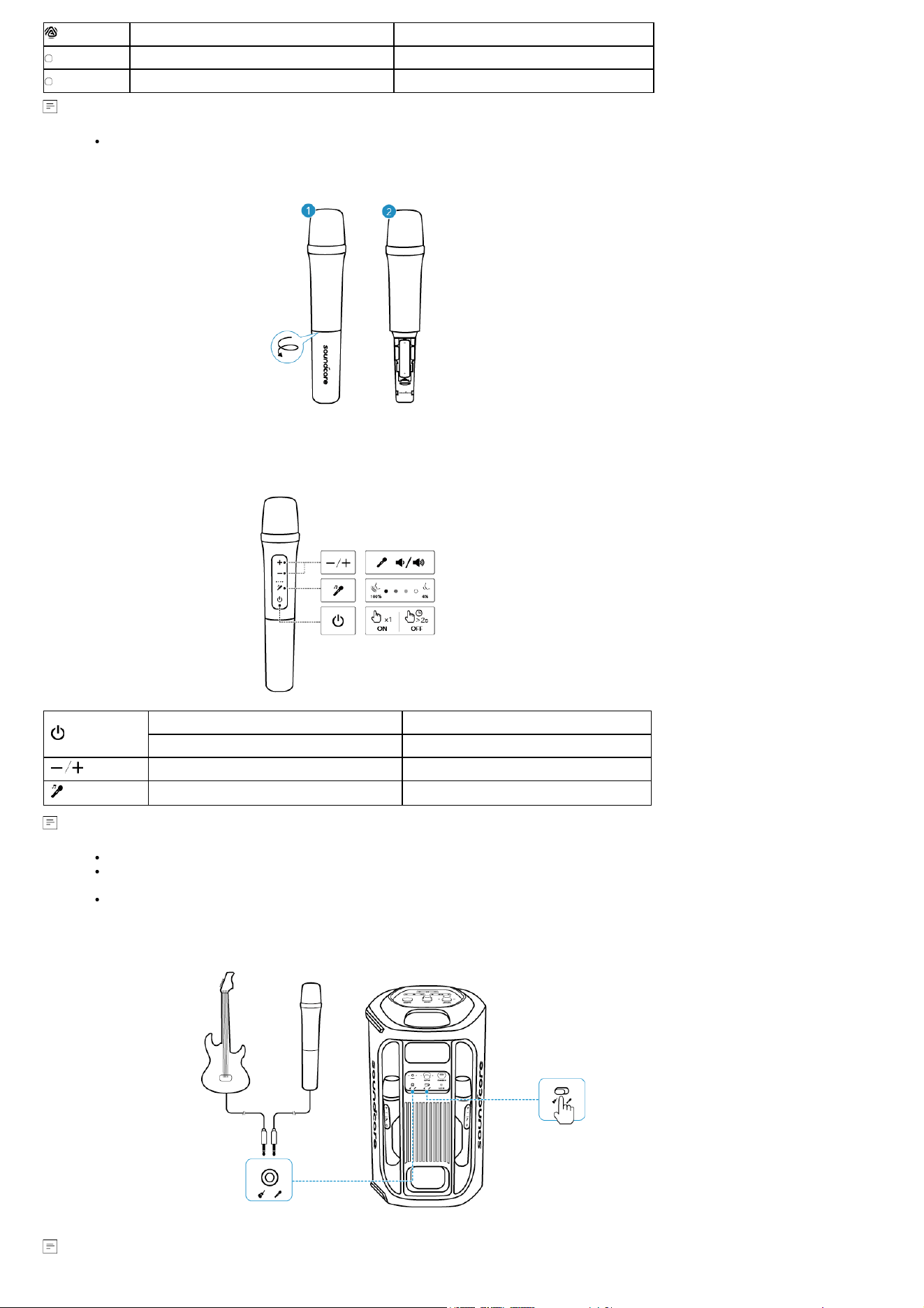
Press Once Enter / Exit AuraCast Pairing Mode
Steady White AuraCast Pairing
Steady White AuraCast Connected
When you enable or disable the AuraCast feature, you will hear a notification sound.
Using the Wireless Microphones
1. Unscrew the battery cover.
2. Install two AA batteries.
Press Once Power On
Press and Hold for 2 Seconds Power Off
Press Mic Volume Up / Down
Press Adjust Vocal Removal Level
Once you power on the wireless microphones, they will automatically connect to the speaker.
The AI VOCAL REMOVAL button on the speaker can remove the original vocal from a song with just one press. While the AI Vocal Removal button
on the wireless microphone allows for adjustable vocal retention, ranging from 4% to 100%.
Once the vocal removal level is set on the microphone, the speaker will remember this setting even after restarting. This ensures that when you
activate the vocal removal feature on the speaker, the vocal removal effect will match the level set on the microphone.
Guitar / Wired Microphone Connection
Connect a microphone or guitar to the speaker through 6.5mm audio cables (not suppplied).
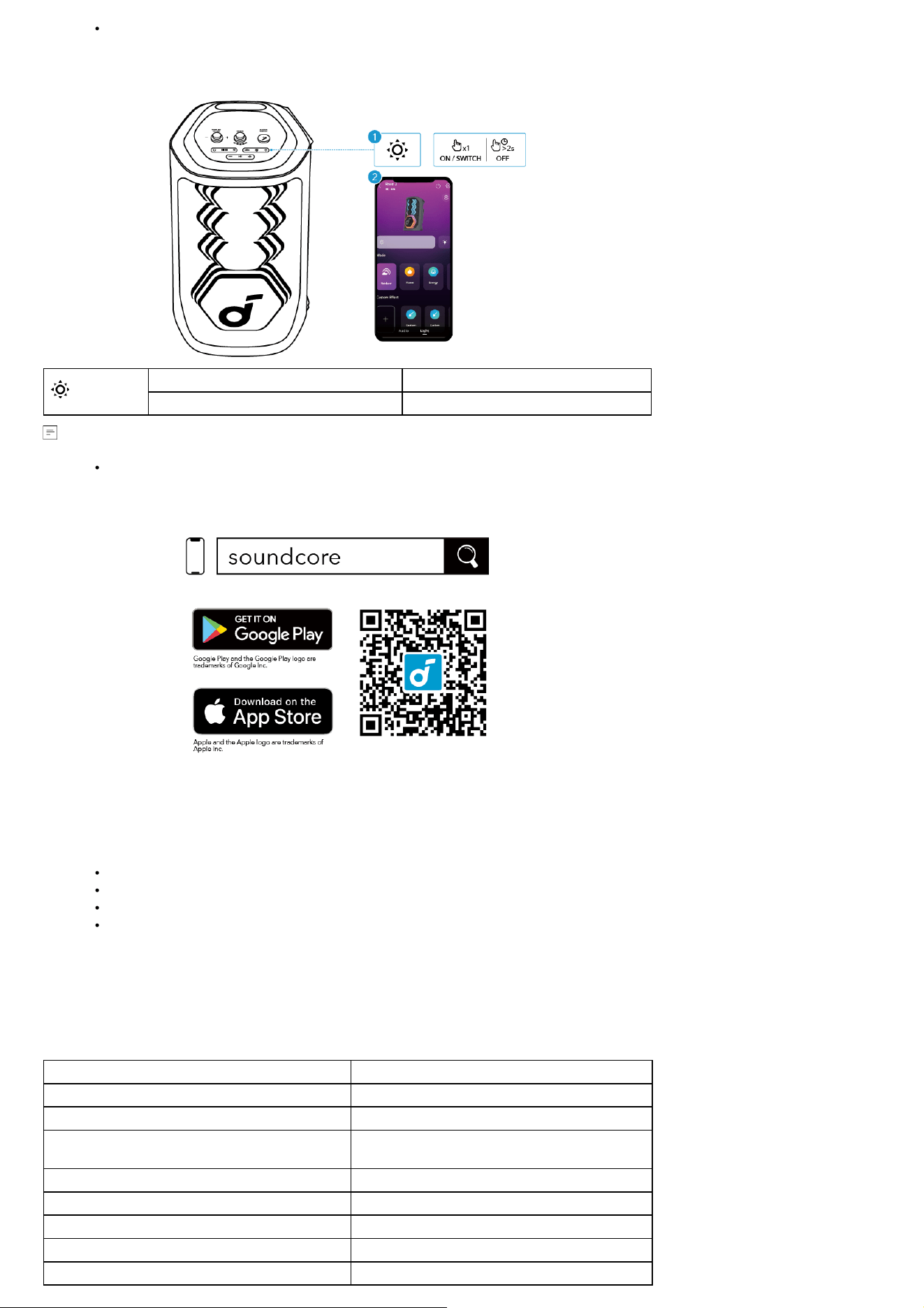
After connecting a microphone or guitar to the speaker, make sure to set the toggle switch to the correct sound input.
LightShow
The LED lights change with the rhythm of the music.
Press Once or Press Again Turn Light On / Switch Light Effect
Press and Hold for 2 Seconds Turn Off
You can also select your preferred light effect, or customize its pattern and brightness in the soundcore app.
soundcore App
Download the soundcore app to enhance your experience.
Product information: Check the product name and software version, or read the user manual.
Firmware update: You will be informed once a new version of firmware is detected when you connect the speaker with the app.
Battery status: Indicates the remaining battery level of your speaker.
Volume control: Adjust the volume level via the app without pressing the buttons on the speaker.
EQ settings: There are various preset EQ settings you can choose from in the app to optimize your experience while enjoying different music genres.
soundcore Signature: Standard EQ mode optimized for well-balanced sound.
Voice: Voices stand out more clearly from other ambient sounds.
Treble Boost: High frequencies are enhanced.
Balanced: No enhancement for high-frequency and low-frequency sounds.
Set auto-power-off time: Set an auto-power-off time. The speaker will automatically power off when the time is up.
Voice prompt: Mute or restore the voice prompt while powering on/off.
Reset
Press and hold the Bluetooth button and volume up button simultaneously for 8 seconds to reset the speaker.
Specifications
Charge Input
5V⎓3A
Battery Capacity 4900mAH/7.3V
Audio Output Power 160W
Speaker Driver
6.5″ Woofer
2.5″ Full-Range ×3
Frequency Response 45Hz-20kHz
Charging Time 6H
Play Time (varies by volume level and music content) Up to 12H
Bluetooth Version 5.3
Bluetooth Range 50m

Compliance Information
Hereby, Anker Innovations Limited declares that this device is in compliance with The Product Security and Telecommunications Infrastructure (Security
Requirements for Relevant Connectable Products) Regulations 2023. For the Statement of Compliance, visit the website:
https://uk.soundcore.com/pages/psti-related.
Note: The 'x' of SN Code: xxxxxxxxxxxxxxxx is a variable, see below table.
Variable 'x' Range of variable Content
Seventh 0-9 or A-F
Denotes the hardware version which is not effected on the
safety compliance.
Eighth 8,9,A,B,C...
Denotes the year, 8 means 2018, 9 means 2019, A means 2020,
B means 2021, C means 2022, and so on.
Ninth and tenth 01,02,03...
Denotes weeks, 01 means the first week in this year, 02 means
the secondary week in this year, and so on.
Eleventh 1-7
Denotes date, 1 means Monday, 2 means Tuesday..., 7 means
Sunday and so on.
The last five 00001-99999 Denotes serial No.
Cautions for Batteries
1. Always purchase the correct size and grade of battery most suitable for the intended use.
2. Replace all batteries of a set at the same time. Taking care not to mix old and new ones, or batteries of different types.
3. Clean the battery contacts and also those of the device prior to battery installation.
4. Ensure the batteries are installed correctly with regard to polarity (+and -).
5. Remove batteries from equipment that is not to be used for an extended period of time.
6. Remove used batteries promptly.
7. Always replace the whole set of batteries at one time, taking care not to mix old and new ones or batteries of different types. When batteries of
different brand or type are used together, or new and old batteries are used together, some batteries may be over-discharged due to a difference
of voltage or capacity. This can result in venting, leakage, and rupture and may cause personal injury.
Précautions pour les piles
1. Achetez toujours la taille et le type de pile les plus appropriés pour l'utilisation prévue.
2. Remplacez toutes les piles d'un ensemble en même temps. Veillez à ne pas mélanger les anciennes et les nouvelles, ou des piles de types
différents.
3. Nettoyez les contacts des piles ainsi que ceux de l'appareil avant l'installation des piles.
4. Assurez-vous que les piles sont installées correctement en respectant la polarité (+ et -).
5. Retirez les piles des appareils qui ne seront pas utilisés pendant une période prolongée.
6. Retirez rapidement les piles usagées.
7. Remplacez toujours l'ensemble complet de piles en une seule fois, en veillant à ne pas mélanger les anciennes et les nouvelles, ou des piles de
types différents. Lorsque des piles de marques ou de types différents sont utilisées ensemble, ou lorsque des piles neuves et anciennes sont
utilisées ensemble, certaines piles peuvent être déchargées de manière excessive en raison d'une différence de tension ou de capacité. Cela
peut entraîner une ventilation, des fuites et une rupture, et peut causer des blessures personnelles.
RSS Statement
This device complies with RSS-247 of Industry Canada.
Operation is subject to the condition that this device does not cause harmful interference.
Déclaration RSS
Cet appareil est conforme à la norme RSS-247 d'Industrie Canada. Le fonctionnement est soumis à la condition que cet appareil ne cause pas d'interférences
nuisibles.