
5
模头戴式游戏耳机使用说明书
Wireless Over-Ear Gaming Bluetooth Headphones User Manual
Wireless Over-Ear Gaming Bluetooth Headphones
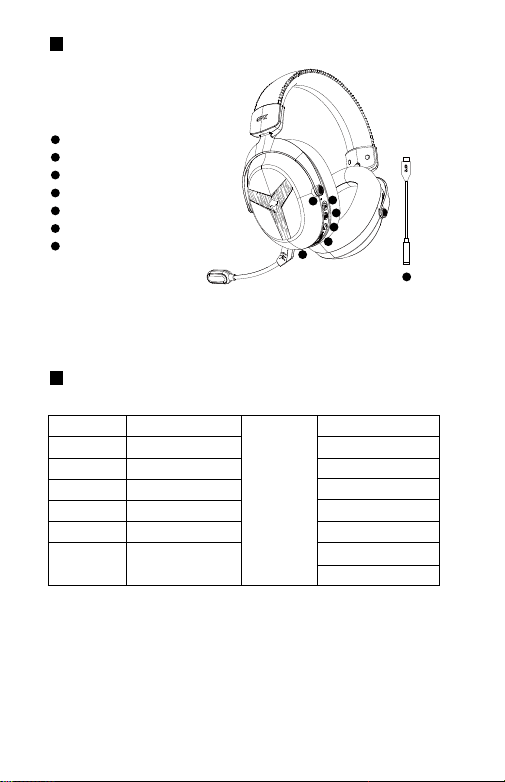
Product Description
Product Specifications / List
�
LED Status Indicator
�
Power Switch
�
Microphone On/Off Switch
�
BT (Bluetooth) Mode Key
�
Volume Up/Down Knob
�
Type-C Charging Port, 3.5mm Headphone Jack
�
USB Audio DAC Sound Card
�
�
�
�
�
�
�
Equipment Name
Charging Port
Detailed List
Headphone
Dimensions
Headphone
Weight
Headphone
Battery Capacity
Charging Time
Charging Voltage
Type-C Port
���mm*��.�mm*���mm
Approx. ��� ± �% g
(including transmitter)
����mAh
Approximately � hours
DC �V
manual �Pcs
�.�mm Headphone cable �Pcs
Type-C Charging Cable �Pcs
Detachable Microphone �Pcs
USB Audio DAC Sound card �Pcs
Certificate of Conformity �Pcs
earphone �Pcs
Wireless Over-Ear Gaming
Bluetooth Headphones
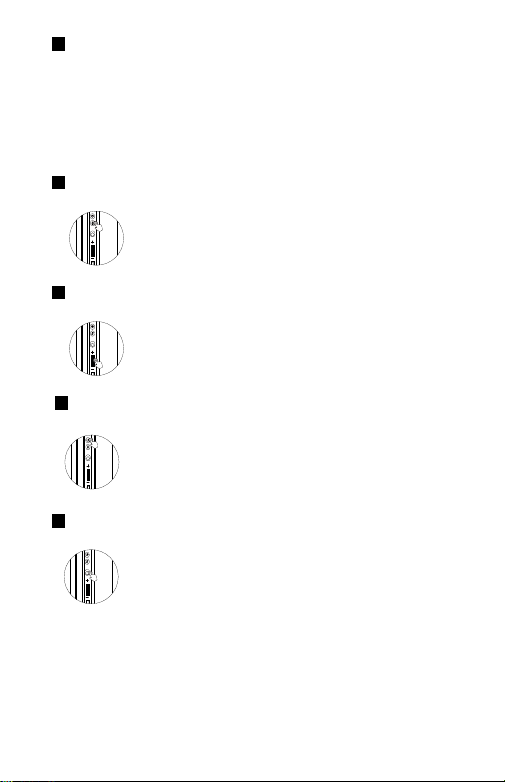
Power On: Long-press the "Power Button" for 3 seconds to turn on; the blue light will illuminate for 1 second, and the
device will begin searching for a signal.
Power Off: Long-press the "Power Button" for 3 seconds to power off; the red light will flash three times.
Automatically powers off after 5 minutes in an unpaired state.
When charging while powered on, the earbuds will not automatically shut down; you must manually force them off.
When 3.5mm headphones are plugged in while the device is powered on, the headphones automatically power off.
Power On/Off
Volume Adjustment
In Gaming, Music, or Call Mode:
Slide towards the "+" sign to increase the volume.
Slide towards the "‒" sign to decrease the volume.
BT
Wireless Connection Mode Switching
The toggle switch enables BT mode.
BT
One-Touch Mute Button:
Short press to toggle the microphone on/off.
BT
Play/Pause/Answer/Decline
BT
Answer/Hang Up/Play/Pause: Short press the Power button; Reject: Double-press the
Power button.
While music is playing: Short-press the Power button to pause the music; short-press the
Power button again to resume playback.
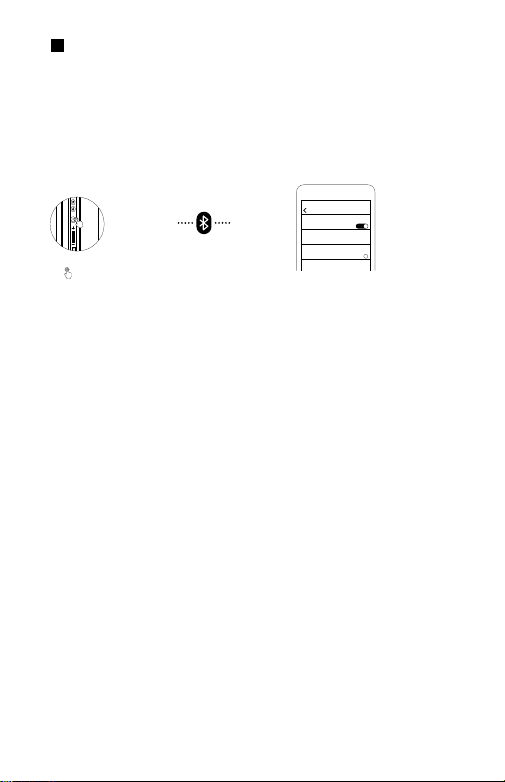
BT (Bluetooth) Mode Key
设置
蓝牙
我的设备
EPZ GM55
蓝牙
!
After powering on, turn the "BT (Bluetooth) Mode Key" to enter Bluetooth mode. The blue indicator
light will flash rapidly, indicating that the earphones are in Bluetooth pairing mode. Turn on the
Bluetooth search function of the device, locate "EPZ GM55," and select to connect and pair. Once the
pairing is successful, the blue indicator light will remain steadily lit.
Introduction to Five Connection Modes
① Bluetooth Mode
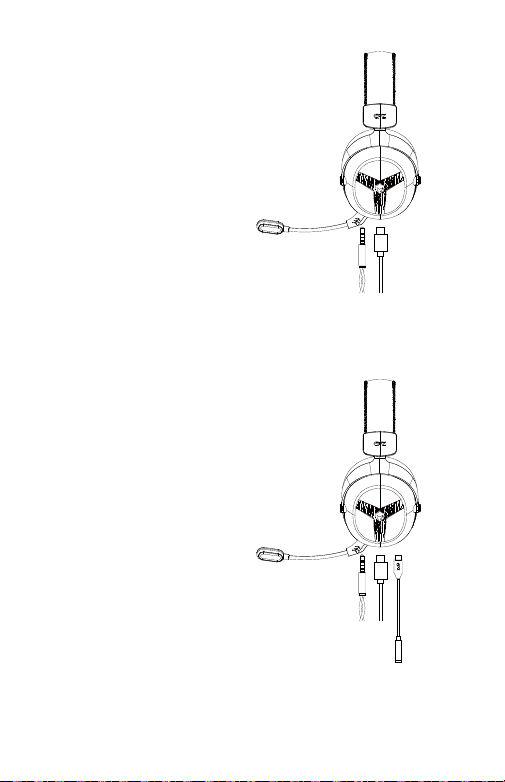
① When powered off, plug in the Type-C to
3.5mm audio cable to switch the headphones
into wired mode;
② With the device powered on, connecting the
Type-C to 3.5mm audio cable automatically
powers off the headphones, switching them into
wired mode.
① While the device is powered off, connect a
Type-C to 3.5mm audio adapter cable to the USB
Audio DAC, then connect your headphones to
enter the USB Audio DAC operating mode;
② While the device is powered on, connect the
Type-C to 3.5mm audio cable to the USB Audio
DAC; then, connect your headphones. The
headphones will automatically power off and
enter the USB Audio DAC operating mode.
③ USB Audio DAC Sound Card Connection Mode
② 3.5mm Wired Connection Mode

Prompt
1. Please read this instruction manual carefully before using the product and keep it properly.
2. For first-time use, please fully charge this product
3. If the product is not used for an extended period (more than 3 months), please charge it
4. You must choose charging cables and power adapters produced by reputable
manufacturers and certified by a third-party authoritative organisation
5. Wearing in a dry environment may cause a momentary tingling sensation in the ears due to
static electricity, which is not related to the quality of the product.
6. Listening to music with headphones at high volumes for extended periods may damage
your hearing.
Warning
*Do not disassemble, repair, or modify the headphones for any reason, as this may cause fire
or completely damage this product.
*Do not place the device in environments with temperatures that are too low or too high
(below 0°C or above 45°C).
*Do not use this product during thunderstorms, as lightning may cause the device to
malfunction and increase the risk of electric shock.
*Avoid contact between the product and liquids.
*Comply with local or national regulations; do not use this device while driving.
*This device is not a toy and may contain small parts; do not use this product at high volume
for extended periods.
*Do not place the headphones in fire or in a hot oven, as this may cause explosion or leakage
of flammable liquids or gases.
*Do not use fast charge or super fast charge adapters to charge, to avoid causing overheating
and fire.
*This device has a built-in battery that cannot be removed or replaced; do not disassemble or
modify the battery yourself.
*请勿以任何理由拆开,维修或改装耳机,否则可能引起火甚至彻底损坏本产品。
*请勿将设备置于温度过低或过高(0℃以下或者45℃以上)的环境中。
*请勿在暴雷天气下使用本产品,雷暴可能引起设备的使用异常,并增加触电的危险。
*请避免产品与液体接触。
*遵守所在地区或国家的相关规定,驾车时请勿使用本设备。
*本设备并非玩具,可能包含部分小零件,请勿长时间用高音量使用本产品。
*请勿将耳机放入火中或热烤箱中,可能会导致爆炸或易燃液体或气体泄漏。
*请勿将使用快充或者超快充的充电头充电,以免造成发热起火。
*该设备内置电池,不能拆卸或更换,请勿自行拆卸或改装电池。
警告

Product Name:Wireless Over-Ear Gaming
Bluetooth Headphones model:
GM55
Speaker Size:Ø 53mm
impedance:32Ω±15%
Sensitivity:110±3dB@1kHz
Frequency Response Range:20Hz-20kHz Product
Dimensions:166mm*89.5mm*203mm Product
Dimensions:Approx. 290 ± 5% g
(including transmitter)
Headphone Charging Time:Approximately 6 hours
Charging Voltage::DC 5 V
Charging Port:Type-C Port
Protocol Support:Compliant with Bluetooth V6.0
+ BR + EDR )
Call Duration:Approx. 95 hours (at 100% volume)
Connected Standby Time:Bluetooth Mode:
Approx. 270 hours
Music Playback Battery Life:
Bluetooth Mode: Approx. 110 hours(100% Volume)
Battery Capacity:2000mAh
Charging Time:Approximately 6 hours
Operating Band:2.4-2.483GHz
Received Power:-85dBm
Wireless Transmitter Transmission Distance:10 meters (360°)
Headphone Operating Current:
Tested Bluetooth mode 18mA
(Test conditions: Music mode, 100% volume)
1.My headphones won't turn on. How can I fix this?
Please check if the earphones have power. If they are out of power, please charge them before use.
2.How do I resolve the issue where an Android phone successfully connects to headphones but fails to play
music?
Once the headphones have successfully connected to your mobile phone, tap the icon located to the right
of the connected device's name; upon entering the settings, ensure that the "Media Audio" option is enabled.
3.If your Android phone successfully connects to headphones but you are unable to make calls, how can you
resolve this issue?
Once the headphones have successfully connected to your mobile phone, tap the icon to the right of the
connected device's name; upon entering the settings, ensure that the "Phone Audio" option is enabled.
4.The Bluetooth connection is unstable and keeps cutting in and out. How can I resolve this?
(1)Please minimize the distance between the headphones and the mobile phone, and avoid physical
obstacles;
(2)Please stay away from environments with strong interference(Wi-Fi/GPRS);
(3)Please ensure that the mobile phone antenna is not obstructed.
5.Why do some features differ from the specifications outlined in the user manual when using third-party
music playback software?
(1)Differences in headphone functionality arise from definitional distinctions between mobile applications
and third-party software;
(2)We recommend using the built-in music player provided by your mobile phone's operating system.
*The specifications and parameters represent laboratory test data and may vary
depending on device settings, environmental conditions, usage scenarios, and
numerous other factors.
FAQ

This device complies with part 15 of the FCC Rules. Operation is subject to the
following two conditions: (1) This device may not cause harmful interference, and (2)
this device must accept any interference received, including interference that may cause
undesired operation.
Any Changes or modifications not expressly approved by the party responsible for
compliance could void the user's authority to operate the equipment.
Note: This equipment has been tested and found to comply with the limits for a Class B
digital device, pursuant to part 15 of the FCC Rules. These limits are designed to
provide reasonable protection against harmful interference in a residential installation.
This equipment generates uses and can radiate radio frequency energy and, if not
installed and used in accordance with the instructions, may cause harmful interference
to radio communications. However, there is no guarantee that interference will not
occur in a particular installation. If this equipment does cause harmful interference to
radio or television reception, which can be determined by turning the equipment off and
on, the user is encouraged to try to correct the interference by one or more of the
following measures:
-Reorient or relocate the receiving antenna.
-Increase the separation between the equipment and receiver.
-Connect the equipment into an outlet on a circuit different from that to which the
receiver is connected.
-Consult the dealer or an experienced radio/TV technician for help.
FCC Radiation Exposure statement
The device has been evaluated to meet general RF exposure requirement. The
device can be used in portable exposure condition without restriction.