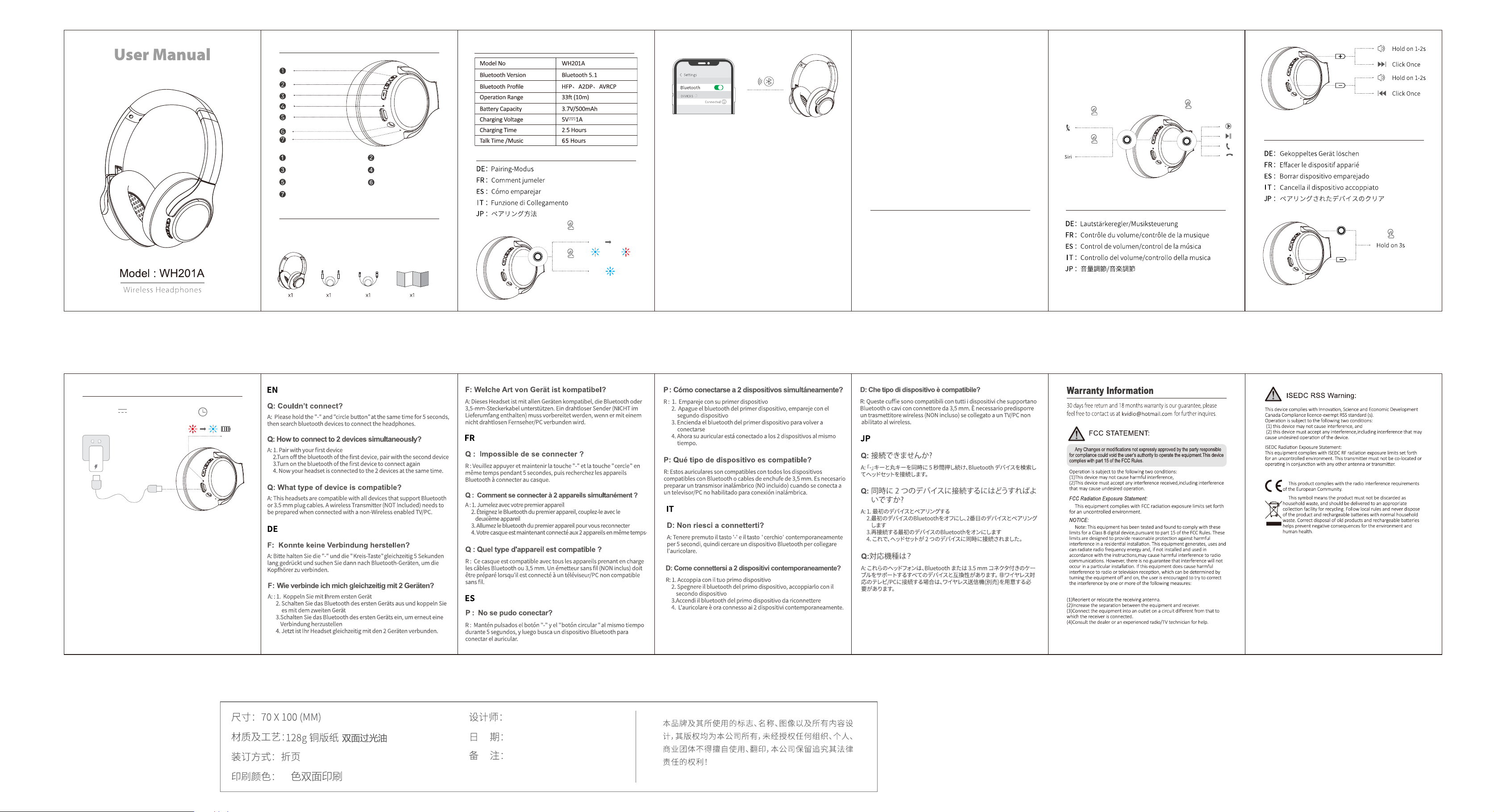
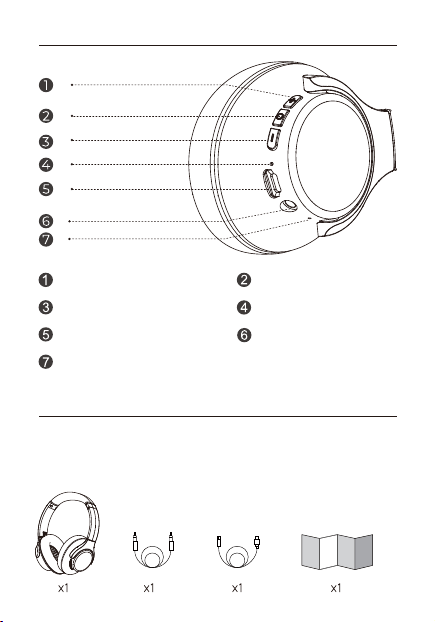
Diagram
Package List
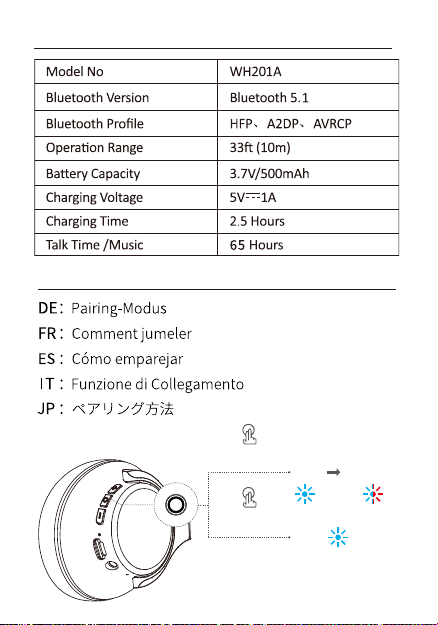
Specification
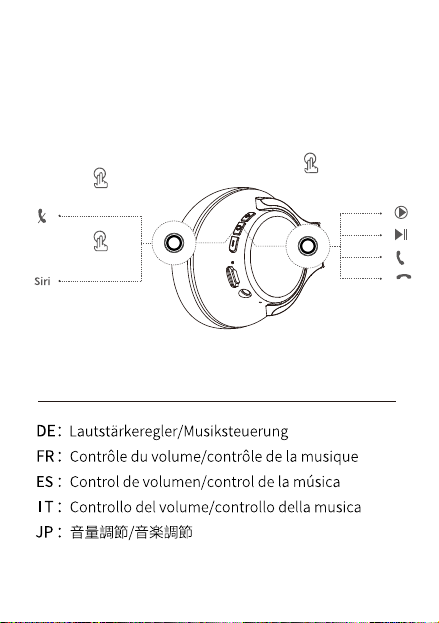
Click Once
Hold on �s
Double Click
�
EN
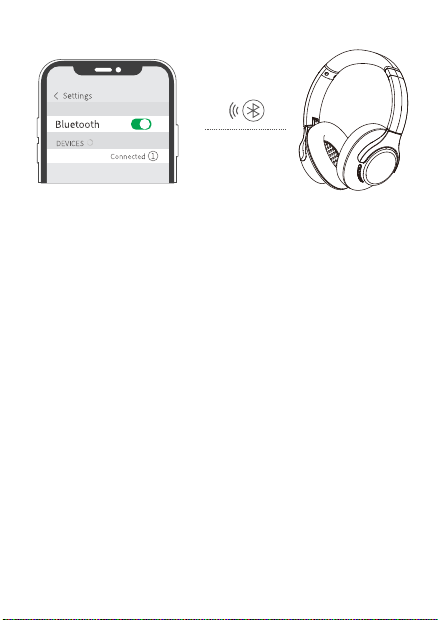
When the headset is power off, press and hold the
Multi-function Button until the indicator flashes blue
and red alternately to enter the pairing mode. Turn on
the Bluetooth of the mobile phone and find "WH���A"
to connect.
DE
Halten Sie bei ausgeschaltetem Kopfhörer die
Multifunktion-staste gedrückt, bis die Anzeigeleuchte
abwechselnd blau und. rot blinkt, um den Pairing-Mo-
dus zu aktivieren. Aktivieren Sie Bluetooth auf Ihrem
Telefon und suchen Sie "WH���A", um eine
Verbindung herzustellen.
FR
Avec le casque hors tension, appuyez et maintenez le
bouton multi-fonction jusqu'à que I'indicateur se met à
clignoter alternativement en bleu et rouge pourentrer
en mode d'appariement. Activez Bluetooth sur votre
télephone et recherchez "WH���A", pour vous
connecter.
ES
Con los auriculares apagados, mantenga pulsado el
boton le multifuncion hasta que la luz indicadora
parpadee en azul y rojo alternativamente para entrar
en el modo de emparejamiento. Active el Bluetooth en
su teléfono y busque "WH���A" para conectarse.
Play/Pause/Answer/Hang up/Reject/Redial
DE
Abspielen / Anhalten / Anruf Annehmen/ Anrufau-
flegen/ Anruf abweisen/Wiederwahl
FR
Lecture/Pause/Réponse à l'appel/Raccrochage de
l'appel/Refus de l'appel/Rappel
ES
Reproducir / Pausa /Responder Una Llamada / Colgar
Una Llamada / Rechazar Una Llamada / Rellamada
IT
Riproduzione/pausa/risposta alla chiamata/aggancio
alla chiamata/rifiuto della chiamata/richiamata
JP
再生/一時停止/通話に応答/電話を切る/通話を拒否/コ
ールバック
IT
Con le cuffie spente, tieni premuto il pulsante
multifunzione finché Vindicatore non lampeggia
alternativamente in blue rosso per accedere alla
modalità di accoppiare. Attiva il Bluetooth sul tuo
telefonoe trova "WH���A" per connetterti.
JP
ヘッドホンをパワ一オフにする状態で、LEDインジケ一
タが青と赤を交互に点滅するまで、マルチフアンクシ
ョンボタンを長押ししてください。そして、スマホの
bluetoothをオンにして、「WH���A」とペアリングし
て.
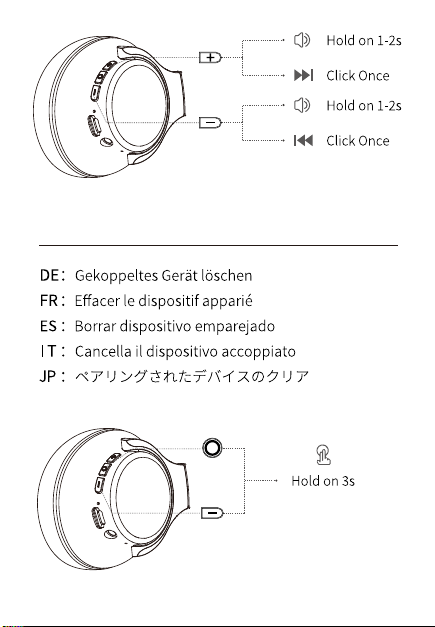
Volume Control/Music Control
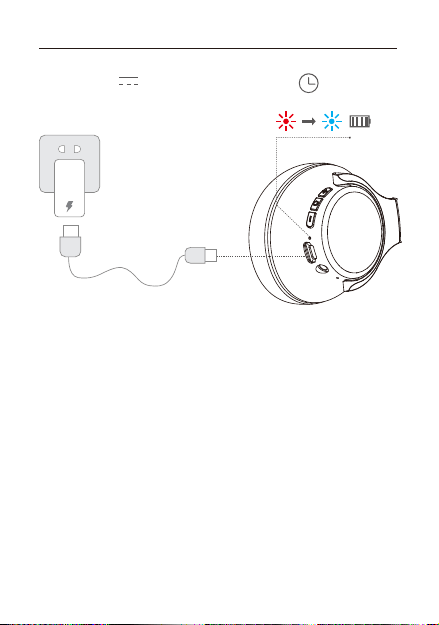
Clear Paired Device
�.�H
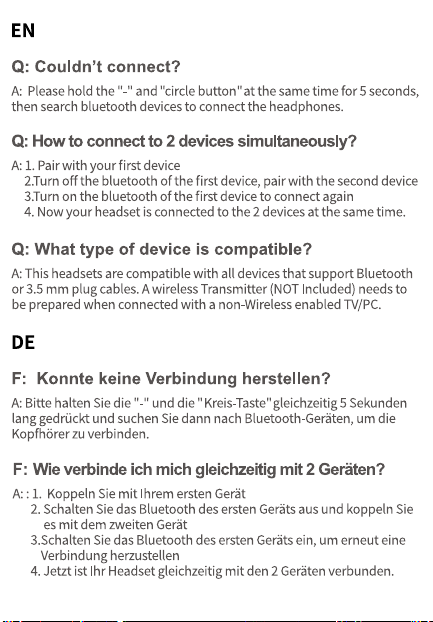
Charge the Headphones
Output: �V �A
How to Pair
四
2022.10.26
<�m(�.�ft)
Step�:
Bluetooth
Hold on �s
PairingON
OFF
Hold on �s
Step�:
+
-
Wiress Headphones ×1
3.5mm Audio Cable ×1
User Manual ×1
Charging Cable ×1
Multi-Function Button
LED Indicator
3.5mm Audio Interface
Type-C Charging Interface
Microphone
Volume Down/Previous Track
Volume Up/Next Track
WH���A
Diagram
Package List
Specification
Click Once
Hold on �s
Double Click
�
EN
When the headset is power off, press and hold the
Multi-function Button until the indicator flashes blue
and red alternately to enter the pairing mode. Turn on
the Bluetooth of the mobile phone and find "WH���A"
to connect.
DE
Halten Sie bei ausgeschaltetem Kopfhörer die
Multifunktion-staste gedrückt, bis die Anzeigeleuchte
abwechselnd blau und. rot blinkt, um den Pairing-Mo-
dus zu aktivieren. Aktivieren Sie Bluetooth auf Ihrem
Telefon und suchen Sie "WH���A", um eine
Verbindung herzustellen.
FR
Avec le casque hors tension, appuyez et maintenez le
bouton multi-fonction jusqu'à que I'indicateur se met à
clignoter alternativement en bleu et rouge pourentrer
en mode d'appariement. Activez Bluetooth sur votre
télephone et recherchez "WH���A", pour vous
connecter.
ES
Con los auriculares apagados, mantenga pulsado el
boton le multifuncion hasta que la luz indicadora
parpadee en azul y rojo alternativamente para entrar
en el modo de emparejamiento. Active el Bluetooth en
su teléfono y busque "WH���A" para conectarse.
Play/Pause/Answer/Hang up/Reject/Redial
DE
Abspielen / Anhalten / Anruf Annehmen/ Anrufau-
flegen/ Anruf abweisen/Wiederwahl
FR
Lecture/Pause/Réponse à l'appel/Raccrochage de
l'appel/Refus de l'appel/Rappel
ES
Reproducir / Pausa /Responder Una Llamada / Colgar
Una Llamada / Rechazar Una Llamada / Rellamada
IT
Riproduzione/pausa/risposta alla chiamata/aggancio
alla chiamata/rifiuto della chiamata/richiamata
JP
再生/一時停止/通話に応答/電話を切る/通話を拒否/コ
ールバック
IT
Con le cuffie spente, tieni premuto il pulsante
multifunzione finché Vindicatore non lampeggia
alternativamente in blue rosso per accedere alla
modalità di accoppiare. Attiva il Bluetooth sul tuo
telefonoe trova "WH���A" per connetterti.
JP
ヘッドホンをパワ一オフにする状態で、LEDインジケ一
タが青と赤を交互に点滅するまで、マルチフアンクシ
ョンボタンを長押ししてください。そして、スマホの
bluetoothをオンにして、「WH���A」とペアリングし
て.
Volume Control/Music Control
Clear Paired Device
�.�H
Charge the Headphones
Output: �V �A
How to Pair
四
2022.10.26
<�m(�.�ft)
Step�:
Bluetooth
Hold on �s
PairingON
OFF
Hold on �s
Step�:
+
-
Wiress Headphones ×1
3.5mm Audio Cable ×1
User Manual ×1
Charging Cable ×1
Multi-Function Button
LED Indicator
3.5mm Audio Interface
Type-C Charging Interface
Microphone
Volume Down/Previous Track
Volume Up/Next Track
WH���A
Diagram
Package List
Specification
Click Once
Hold on �s
Double Click
�
EN
When the headset is power off, press and hold the
Multi-function Button until the indicator flashes blue
and red alternately to enter the pairing mode. Turn on
the Bluetooth of the mobile phone and find "WH���A"
to connect.
DE
Halten Sie bei ausgeschaltetem Kopfhörer die
Multifunktion-staste gedrückt, bis die Anzeigeleuchte
abwechselnd blau und. rot blinkt, um den Pairing-Mo-
dus zu aktivieren. Aktivieren Sie Bluetooth auf Ihrem
Telefon und suchen Sie "WH���A", um eine
Verbindung herzustellen.
FR
Avec le casque hors tension, appuyez et maintenez le
bouton multi-fonction jusqu'à que I'indicateur se met à
clignoter alternativement en bleu et rouge pourentrer
en mode d'appariement. Activez Bluetooth sur votre
télephone et recherchez "WH���A", pour vous
connecter.
ES
Con los auriculares apagados, mantenga pulsado el
boton le multifuncion hasta que la luz indicadora
parpadee en azul y rojo alternativamente para entrar
en el modo de emparejamiento. Active el Bluetooth en
su teléfono y busque "WH���A" para conectarse.
Play/Pause/Answer/Hang up/Reject/Redial
DE
Abspielen / Anhalten / Anruf Annehmen/ Anrufau-
flegen/ Anruf abweisen/Wiederwahl
FR
Lecture/Pause/Réponse à l'appel/Raccrochage de
l'appel/Refus de l'appel/Rappel
ES
Reproducir / Pausa /Responder Una Llamada / Colgar
Una Llamada / Rechazar Una Llamada / Rellamada
IT
Riproduzione/pausa/risposta alla chiamata/aggancio
alla chiamata/rifiuto della chiamata/richiamata
JP
再生/一時停止/通話に応答/電話を切る/通話を拒否/コ
ールバック
IT
Con le cuffie spente, tieni premuto il pulsante
multifunzione finché Vindicatore non lampeggia
alternativamente in blue rosso per accedere alla
modalità di accoppiare. Attiva il Bluetooth sul tuo
telefonoe trova "WH���A" per connetterti.
JP
ヘッドホンをパワ一オフにする状態で、LEDインジケ一
タが青と赤を交互に点滅するまで、マルチフアンクシ
ョンボタンを長押ししてください。そして、スマホの
bluetoothをオンにして、「WH���A」とペアリングし
て.
Volume Control/Music Control
Clear Paired Device
�.�H
Charge the Headphones
Output: �V �A
How to Pair
四
2022.10.26
<�m(�.�ft)
Step�:
Bluetooth
Hold on �s
PairingON
OFF
Hold on �s
Step�:
+
-
Wiress Headphones ×1
3.5mm Audio Cable ×1
User Manual ×1
Charging Cable ×1
Multi-Function Button
LED Indicator
3.5mm Audio Interface
Type-C Charging Interface
Microphone
Volume Down/Previous Track
Volume Up/Next Track
WH���A
Diagram
Package List
Specification
Click Once
Hold on �s
Double Click
�
EN
When the headset is power off, press and hold the
Multi-function Button until the indicator flashes blue
and red alternately to enter the pairing mode. Turn on
the Bluetooth of the mobile phone and find "WH���A"
to connect.
DE
Halten Sie bei ausgeschaltetem Kopfhörer die
Multifunktion-staste gedrückt, bis die Anzeigeleuchte
abwechselnd blau und. rot blinkt, um den Pairing-Mo-
dus zu aktivieren. Aktivieren Sie Bluetooth auf Ihrem
Telefon und suchen Sie "WH���A", um eine
Verbindung herzustellen.
FR
Avec le casque hors tension, appuyez et maintenez le
bouton multi-fonction jusqu'à que I'indicateur se met à
clignoter alternativement en bleu et rouge pourentrer
en mode d'appariement. Activez Bluetooth sur votre
télephone et recherchez "WH���A", pour vous
connecter.
ES
Con los auriculares apagados, mantenga pulsado el
boton le multifuncion hasta que la luz indicadora
parpadee en azul y rojo alternativamente para entrar
en el modo de emparejamiento. Active el Bluetooth en
su teléfono y busque "WH���A" para conectarse.
Play/Pause/Answer/Hang up/Reject/Redial
DE
Abspielen / Anhalten / Anruf Annehmen/ Anrufau-
flegen/ Anruf abweisen/Wiederwahl
FR
Lecture/Pause/Réponse à l'appel/Raccrochage de
l'appel/Refus de l'appel/Rappel
ES
Reproducir / Pausa /Responder Una Llamada / Colgar
Una Llamada / Rechazar Una Llamada / Rellamada
IT
Riproduzione/pausa/risposta alla chiamata/aggancio
alla chiamata/rifiuto della chiamata/richiamata
JP
再生/一時停止/通話に応答/電話を切る/通話を拒否/コ
ールバック
IT
Con le cuffie spente, tieni premuto il pulsante
multifunzione finché Vindicatore non lampeggia
alternativamente in blue rosso per accedere alla
modalità di accoppiare. Attiva il Bluetooth sul tuo
telefonoe trova "WH���A" per connetterti.
JP
ヘッドホンをパワ一オフにする状態で、LEDインジケ一
タが青と赤を交互に点滅するまで、マルチフアンクシ
ョンボタンを長押ししてください。そして、スマホの
bluetoothをオンにして、「WH���A」とペアリングし
て.
Volume Control/Music Control
Clear Paired Device
�.�H
Charge the Headphones
Output: �V �A
How to Pair
四
2022.10.26
<�m(�.�ft)
Step�:
Bluetooth
Hold on �s
PairingON
OFF
Hold on �s
Step�:
+
-
Wiress Headphones ×1
3.5mm Audio Cable ×1
User Manual ×1
Charging Cable ×1
Multi-Function Button
LED Indicator
3.5mm Audio Interface
Type-C Charging Interface
Microphone
Volume Down/Previous Track
Volume Up/Next Track
WH���A

Diagram
Package List
Specification
Click Once
Hold on �s
Double Click
�
EN
When the headset is power off, press and hold the
Multi-function Button until the indicator flashes blue
and red alternately to enter the pairing mode. Turn on
the Bluetooth of the mobile phone and find "WH���A"
to connect.
DE
Halten Sie bei ausgeschaltetem Kopfhörer die
Multifunktion-staste gedrückt, bis die Anzeigeleuchte
abwechselnd blau und. rot blinkt, um den Pairing-Mo-
dus zu aktivieren. Aktivieren Sie Bluetooth auf Ihrem
Telefon und suchen Sie "WH���A", um eine
Verbindung herzustellen.
FR
Avec le casque hors tension, appuyez et maintenez le
bouton multi-fonction jusqu'à que I'indicateur se met à
clignoter alternativement en bleu et rouge pourentrer
en mode d'appariement. Activez Bluetooth sur votre
télephone et recherchez "WH���A", pour vous
connecter.
ES
Con los auriculares apagados, mantenga pulsado el
boton le multifuncion hasta que la luz indicadora
parpadee en azul y rojo alternativamente para entrar
en el modo de emparejamiento. Active el Bluetooth en
su teléfono y busque "WH���A" para conectarse.
Play/Pause/Answer/Hang up/Reject/Redial
DE
Abspielen / Anhalten / Anruf Annehmen/ Anrufau-
flegen/ Anruf abweisen/Wiederwahl
FR
Lecture/Pause/Réponse à l'appel/Raccrochage de
l'appel/Refus de l'appel/Rappel
ES
Reproducir / Pausa /Responder Una Llamada / Colgar
Una Llamada / Rechazar Una Llamada / Rellamada
IT
Riproduzione/pausa/risposta alla chiamata/aggancio
alla chiamata/rifiuto della chiamata/richiamata
JP
再生/一時停止/通話に応答/電話を切る/通話を拒否/コ
ールバック
IT
Con le cuffie spente, tieni premuto il pulsante
multifunzione finché Vindicatore non lampeggia
alternativamente in blue rosso per accedere alla
modalità di accoppiare. Attiva il Bluetooth sul tuo
telefonoe trova "WH���A" per connetterti.
JP
ヘッドホンをパワ一オフにする状態で、LEDインジケ一
タが青と赤を交互に点滅するまで、マルチフアンクシ
ョンボタンを長押ししてください。そして、スマホの
bluetoothをオンにして、「WH���A」とペアリングし
て.
Volume Control/Music Control
Clear Paired Device
�.�H
Charge the Headphones
Output: �V �A
How to Pair
四
2022.10.26
<�m(�.�ft)
Step�:
Bluetooth
Hold on �s
PairingON
OFF
Hold on �s
Step�:
+
-
Wiress Headphones ×1
3.5mm Audio Cable ×1
User Manual ×1
Charging Cable ×1
Multi-Function Button
LED Indicator
3.5mm Audio Interface
Type-C Charging Interface
Microphone
Volume Down/Previous Track
Volume Up/Next Track
WH���A
Diagram
Package List
Specification
Click Once
Hold on �s
Double Click
�
EN
When the headset is power off, press and hold the
Multi-function Button until the indicator flashes blue
and red alternately to enter the pairing mode. Turn on
the Bluetooth of the mobile phone and find "WH���A"
to connect.
DE
Halten Sie bei ausgeschaltetem Kopfhörer die
Multifunktion-staste gedrückt, bis die Anzeigeleuchte
abwechselnd blau und. rot blinkt, um den Pairing-Mo-
dus zu aktivieren. Aktivieren Sie Bluetooth auf Ihrem
Telefon und suchen Sie "WH���A", um eine
Verbindung herzustellen.
FR
Avec le casque hors tension, appuyez et maintenez le
bouton multi-fonction jusqu'à que I'indicateur se met à
clignoter alternativement en bleu et rouge pourentrer
en mode d'appariement. Activez Bluetooth sur votre
télephone et recherchez "WH���A", pour vous
connecter.
ES
Con los auriculares apagados, mantenga pulsado el
boton le multifuncion hasta que la luz indicadora
parpadee en azul y rojo alternativamente para entrar
en el modo de emparejamiento. Active el Bluetooth en
su teléfono y busque "WH���A" para conectarse.
Play/Pause/Answer/Hang up/Reject/Redial
DE
Abspielen / Anhalten / Anruf Annehmen/ Anrufau-
flegen/ Anruf abweisen/Wiederwahl
FR
Lecture/Pause/Réponse à l'appel/Raccrochage de
l'appel/Refus de l'appel/Rappel
ES
Reproducir / Pausa /Responder Una Llamada / Colgar
Una Llamada / Rechazar Una Llamada / Rellamada
IT
Riproduzione/pausa/risposta alla chiamata/aggancio
alla chiamata/rifiuto della chiamata/richiamata
JP
再生/一時停止/通話に応答/電話を切る/通話を拒否/コ
ールバック
IT
Con le cuffie spente, tieni premuto il pulsante
multifunzione finché Vindicatore non lampeggia
alternativamente in blue rosso per accedere alla
modalità di accoppiare. Attiva il Bluetooth sul tuo
telefonoe trova "WH���A" per connetterti.
JP
ヘッドホンをパワ一オフにする状態で、LEDインジケ一
タが青と赤を交互に点滅するまで、マルチフアンクシ
ョンボタンを長押ししてください。そして、スマホの
bluetoothをオンにして、「WH���A」とペアリングし
て.
Volume Control/Music Control
Clear Paired Device
�.�H
Charge the Headphones
Output: �V �A
How to Pair
四
2022.10.26
<�m(�.�ft)
Step�:
Bluetooth
Hold on �s
PairingON
OFF
Hold on �s
Step�:
+
-
Wiress Headphones ×1
3.5mm Audio Cable ×1
User Manual ×1
Charging Cable ×1
Multi-Function Button
LED Indicator
3.5mm Audio Interface
Type-C Charging Interface
Microphone
Volume Down/Previous Track
Volume Up/Next Track
WH���A
Diagram
Package List
Specification
Click Once
Hold on �s
Double Click
�
EN
When the headset is power off, press and hold the
Multi-function Button until the indicator flashes blue
and red alternately to enter the pairing mode. Turn on
the Bluetooth of the mobile phone and find "WH���A"
to connect.
DE
Halten Sie bei ausgeschaltetem Kopfhörer die
Multifunktion-staste gedrückt, bis die Anzeigeleuchte
abwechselnd blau und. rot blinkt, um den Pairing-Mo-
dus zu aktivieren. Aktivieren Sie Bluetooth auf Ihrem
Telefon und suchen Sie "WH���A", um eine
Verbindung herzustellen.
FR
Avec le casque hors tension, appuyez et maintenez le
bouton multi-fonction jusqu'à que I'indicateur se met à
clignoter alternativement en bleu et rouge pourentrer
en mode d'appariement. Activez Bluetooth sur votre
télephone et recherchez "WH���A", pour vous
connecter.
ES
Con los auriculares apagados, mantenga pulsado el
boton le multifuncion hasta que la luz indicadora
parpadee en azul y rojo alternativamente para entrar
en el modo de emparejamiento. Active el Bluetooth en
su teléfono y busque "WH���A" para conectarse.
Play/Pause/Answer/Hang up/Reject/Redial
DE
Abspielen / Anhalten / Anruf Annehmen/ Anrufau-
flegen/ Anruf abweisen/Wiederwahl
FR
Lecture/Pause/Réponse à l'appel/Raccrochage de
l'appel/Refus de l'appel/Rappel
ES
Reproducir / Pausa /Responder Una Llamada / Colgar
Una Llamada / Rechazar Una Llamada / Rellamada
IT
Riproduzione/pausa/risposta alla chiamata/aggancio
alla chiamata/rifiuto della chiamata/richiamata
JP
再生/一時停止/通話に応答/電話を切る/通話を拒否/コ
ールバック
IT
Con le cuffie spente, tieni premuto il pulsante
multifunzione finché Vindicatore non lampeggia
alternativamente in blue rosso per accedere alla
modalità di accoppiare. Attiva il Bluetooth sul tuo
telefonoe trova "WH���A" per connetterti.
JP
ヘッドホンをパワ一オフにする状態で、LEDインジケ一
タが青と赤を交互に点滅するまで、マルチフアンクシ
ョンボタンを長押ししてください。そして、スマホの
bluetoothをオンにして、「WH���A」とペアリングし
て.
Volume Control/Music Control
Clear Paired Device
�.�H
Charge the Headphones
Output: �V �A
How to Pair
四
2022.10.26
<�m(�.�ft)
Step�:
Bluetooth
Hold on �s
PairingON
OFF
Hold on �s
Step�:
+
-
Wiress Headphones ×1
3.5mm Audio Cable ×1
User Manual ×1
Charging Cable ×1
Multi-Function Button
LED Indicator
3.5mm Audio Interface
Type-C Charging Interface
Microphone
Volume Down/Previous Track
Volume Up/Next Track
WH���A
Diagram
Package List
Specification
Click Once
Hold on �s
Double Click
�
EN
When the headset is power off, press and hold the
Multi-function Button until the indicator flashes blue
and red alternately to enter the pairing mode. Turn on
the Bluetooth of the mobile phone and find "WH���A"
to connect.
DE
Halten Sie bei ausgeschaltetem Kopfhörer die
Multifunktion-staste gedrückt, bis die Anzeigeleuchte
abwechselnd blau und. rot blinkt, um den Pairing-Mo-
dus zu aktivieren. Aktivieren Sie Bluetooth auf Ihrem
Telefon und suchen Sie "WH���A", um eine
Verbindung herzustellen.
FR
Avec le casque hors tension, appuyez et maintenez le
bouton multi-fonction jusqu'à que I'indicateur se met à
clignoter alternativement en bleu et rouge pourentrer
en mode d'appariement. Activez Bluetooth sur votre
télephone et recherchez "WH���A", pour vous
connecter.
ES
Con los auriculares apagados, mantenga pulsado el
boton le multifuncion hasta que la luz indicadora
parpadee en azul y rojo alternativamente para entrar
en el modo de emparejamiento. Active el Bluetooth en
su teléfono y busque "WH���A" para conectarse.
Play/Pause/Answer/Hang up/Reject/Redial
DE
Abspielen / Anhalten / Anruf Annehmen/ Anrufau-
flegen/ Anruf abweisen/Wiederwahl
FR
Lecture/Pause/Réponse à l'appel/Raccrochage de
l'appel/Refus de l'appel/Rappel
ES
Reproducir / Pausa /Responder Una Llamada / Colgar
Una Llamada / Rechazar Una Llamada / Rellamada
IT
Riproduzione/pausa/risposta alla chiamata/aggancio
alla chiamata/rifiuto della chiamata/richiamata
JP
再生/一時停止/通話に応答/電話を切る/通話を拒否/コ
ールバック
IT
Con le cuffie spente, tieni premuto il pulsante
multifunzione finché Vindicatore non lampeggia
alternativamente in blue rosso per accedere alla
modalità di accoppiare. Attiva il Bluetooth sul tuo
telefonoe trova "WH���A" per connetterti.
JP
ヘッドホンをパワ一オフにする状態で、LEDインジケ一
タが青と赤を交互に点滅するまで、マルチフアンクシ
ョンボタンを長押ししてください。そして、スマホの
bluetoothをオンにして、「WH���A」とペアリングし
て.
Volume Control/Music Control
Clear Paired Device
�.�H
Charge the Headphones
Output: �V �A
How to Pair
四
2022.10.26
<�m(�.�ft)
Step�:
Bluetooth
Hold on �s
PairingON
OFF
Hold on �s
Step�:
+
-
Wiress Headphones ×1
3.5mm Audio Cable ×1
User Manual ×1
Charging Cable ×1
Multi-Function Button
LED Indicator
3.5mm Audio Interface
Type-C Charging Interface
Microphone
Volume Down/Previous Track
Volume Up/Next Track
WH���A
Diagram
Package List
Specification
Click Once
Hold on �s
Double Click
�
EN
When the headset is power off, press and hold the
Multi-function Button until the indicator flashes blue
and red alternately to enter the pairing mode. Turn on
the Bluetooth of the mobile phone and find "WH���A"
to connect.
DE
Halten Sie bei ausgeschaltetem Kopfhörer die
Multifunktion-staste gedrückt, bis die Anzeigeleuchte
abwechselnd blau und. rot blinkt, um den Pairing-Mo-
dus zu aktivieren. Aktivieren Sie Bluetooth auf Ihrem
Telefon und suchen Sie "WH���A", um eine
Verbindung herzustellen.
FR
Avec le casque hors tension, appuyez et maintenez le
bouton multi-fonction jusqu'à que I'indicateur se met à
clignoter alternativement en bleu et rouge pourentrer
en mode d'appariement. Activez Bluetooth sur votre
télephone et recherchez "WH���A", pour vous
connecter.
ES
Con los auriculares apagados, mantenga pulsado el
boton le multifuncion hasta que la luz indicadora
parpadee en azul y rojo alternativamente para entrar
en el modo de emparejamiento. Active el Bluetooth en
su teléfono y busque "WH���A" para conectarse.
Play/Pause/Answer/Hang up/Reject/Redial
DE
Abspielen / Anhalten / Anruf Annehmen/ Anrufau-
flegen/ Anruf abweisen/Wiederwahl
FR
Lecture/Pause/Réponse à l'appel/Raccrochage de
l'appel/Refus de l'appel/Rappel
ES
Reproducir / Pausa /Responder Una Llamada / Colgar
Una Llamada / Rechazar Una Llamada / Rellamada
IT
Riproduzione/pausa/risposta alla chiamata/aggancio
alla chiamata/rifiuto della chiamata/richiamata
JP
再生/一時停止/通話に応答/電話を切る/通話を拒否/コ
ールバック
IT
Con le cuffie spente, tieni premuto il pulsante
multifunzione finché Vindicatore non lampeggia
alternativamente in blue rosso per accedere alla
modalità di accoppiare. Attiva il Bluetooth sul tuo
telefonoe trova "WH���A" per connetterti.
JP
ヘッドホンをパワ一オフにする状態で、LEDインジケ一
タが青と赤を交互に点滅するまで、マルチフアンクシ
ョンボタンを長押ししてください。そして、スマホの
bluetoothをオンにして、「WH���A」とペアリングし
て.
Volume Control/Music Control
Clear Paired Device
�.�H
Charge the Headphones
Output: �V �A
How to Pair
四
2022.10.26
<�m(�.�ft)
Step�:
Bluetooth
Hold on �s
PairingON
OFF
Hold on �s
Step�:
+
-
Wiress Headphones ×1
3.5mm Audio Cable ×1
User Manual ×1
Charging Cable ×1
Multi-Function Button
LED Indicator
3.5mm Audio Interface
Type-C Charging Interface
Microphone
Volume Down/Previous Track
Volume Up/Next Track
WH���A
Diagram
Package List
Specification
Click Once
Hold on �s
Double Click
�
EN
When the headset is power off, press and hold the
Multi-function Button until the indicator flashes blue
and red alternately to enter the pairing mode. Turn on
the Bluetooth of the mobile phone and find "WH���A"
to connect.
DE
Halten Sie bei ausgeschaltetem Kopfhörer die
Multifunktion-staste gedrückt, bis die Anzeigeleuchte
abwechselnd blau und. rot blinkt, um den Pairing-Mo-
dus zu aktivieren. Aktivieren Sie Bluetooth auf Ihrem
Telefon und suchen Sie "WH���A", um eine
Verbindung herzustellen.
FR
Avec le casque hors tension, appuyez et maintenez le
bouton multi-fonction jusqu'à que I'indicateur se met à
clignoter alternativement en bleu et rouge pourentrer
en mode d'appariement. Activez Bluetooth sur votre
télephone et recherchez "WH���A", pour vous
connecter.
ES
Con los auriculares apagados, mantenga pulsado el
boton le multifuncion hasta que la luz indicadora
parpadee en azul y rojo alternativamente para entrar
en el modo de emparejamiento. Active el Bluetooth en
su teléfono y busque "WH���A" para conectarse.
Play/Pause/Answer/Hang up/Reject/Redial
DE
Abspielen / Anhalten / Anruf Annehmen/ Anrufau-
flegen/ Anruf abweisen/Wiederwahl
FR
Lecture/Pause/Réponse à l'appel/Raccrochage de
l'appel/Refus de l'appel/Rappel
ES
Reproducir / Pausa /Responder Una Llamada / Colgar
Una Llamada / Rechazar Una Llamada / Rellamada
IT
Riproduzione/pausa/risposta alla chiamata/aggancio
alla chiamata/rifiuto della chiamata/richiamata
JP
再生/一時停止/通話に応答/電話を切る/通話を拒否/コ
ールバック
IT
Con le cuffie spente, tieni premuto il pulsante
multifunzione finché Vindicatore non lampeggia
alternativamente in blue rosso per accedere alla
modalità di accoppiare. Attiva il Bluetooth sul tuo
telefonoe trova "WH���A" per connetterti.
JP
ヘッドホンをパワ一オフにする状態で、LEDインジケ一
タが青と赤を交互に点滅するまで、マルチフアンクシ
ョンボタンを長押ししてください。そして、スマホの
bluetoothをオンにして、「WH���A」とペアリングし
て.
Volume Control/Music Control
Clear Paired Device
�.�H
Charge the Headphones
Output: �V �A
How to Pair
四
2022.10.26
<�m(�.�ft)
Step�:
Bluetooth
Hold on �s
PairingON
OFF
Hold on �s
Step�:
+
-
Wiress Headphones ×1
3.5mm Audio Cable ×1
User Manual ×1
Charging Cable ×1
Multi-Function Button
LED Indicator
3.5mm Audio Interface
Type-C Charging Interface
Microphone
Volume Down/Previous Track
Volume Up/Next Track
WH���A
Diagram
Package List
Specification
Click Once
Hold on �s
Double Click
�
EN
When the headset is power off, press and hold the
Multi-function Button until the indicator flashes blue
and red alternately to enter the pairing mode. Turn on
the Bluetooth of the mobile phone and find "WH���A"
to connect.
DE
Halten Sie bei ausgeschaltetem Kopfhörer die
Multifunktion-staste gedrückt, bis die Anzeigeleuchte
abwechselnd blau und. rot blinkt, um den Pairing-Mo-
dus zu aktivieren. Aktivieren Sie Bluetooth auf Ihrem
Telefon und suchen Sie "WH���A", um eine
Verbindung herzustellen.
FR
Avec le casque hors tension, appuyez et maintenez le
bouton multi-fonction jusqu'à que I'indicateur se met à
clignoter alternativement en bleu et rouge pourentrer
en mode d'appariement. Activez Bluetooth sur votre
télephone et recherchez "WH���A", pour vous
connecter.
ES
Con los auriculares apagados, mantenga pulsado el
boton le multifuncion hasta que la luz indicadora
parpadee en azul y rojo alternativamente para entrar
en el modo de emparejamiento. Active el Bluetooth en
su teléfono y busque "WH���A" para conectarse.
Play/Pause/Answer/Hang up/Reject/Redial
DE
Abspielen / Anhalten / Anruf Annehmen/ Anrufau-
flegen/ Anruf abweisen/Wiederwahl
FR
Lecture/Pause/Réponse à l'appel/Raccrochage de
l'appel/Refus de l'appel/Rappel
ES
Reproducir / Pausa /Responder Una Llamada / Colgar
Una Llamada / Rechazar Una Llamada / Rellamada
IT
Riproduzione/pausa/risposta alla chiamata/aggancio
alla chiamata/rifiuto della chiamata/richiamata
JP
再生/一時停止/通話に応答/電話を切る/通話を拒否/コ
ールバック
IT
Con le cuffie spente, tieni premuto il pulsante
multifunzione finché Vindicatore non lampeggia
alternativamente in blue rosso per accedere alla
modalità di accoppiare. Attiva il Bluetooth sul tuo
telefonoe trova "WH���A" per connetterti.
JP
ヘッドホンをパワ一オフにする状態で、LEDインジケ一
タが青と赤を交互に点滅するまで、マルチフアンクシ
ョンボタンを長押ししてください。そして、スマホの
bluetoothをオンにして、「WH���A」とペアリングし
て.
Volume Control/Music Control
Clear Paired Device
�.�H
Charge the Headphones
Output: �V �A
How to Pair
四
2022.10.26
<�m(�.�ft)
Step�:
Bluetooth
Hold on �s
PairingON
OFF
Hold on �s
Step�:
+
-
Wiress Headphones ×1
3.5mm Audio Cable ×1
User Manual ×1
Charging Cable ×1
Multi-Function Button
LED Indicator
3.5mm Audio Interface
Type-C Charging Interface
Microphone
Volume Down/Previous Track
Volume Up/Next Track
WH���A
Diagram
Package List
Specification
Click Once
Hold on �s
Double Click
�
EN
When the headset is power off, press and hold the
Multi-function Button until the indicator flashes blue
and red alternately to enter the pairing mode. Turn on
the Bluetooth of the mobile phone and find "WH���A"
to connect.
DE
Halten Sie bei ausgeschaltetem Kopfhörer die
Multifunktion-staste gedrückt, bis die Anzeigeleuchte
abwechselnd blau und. rot blinkt, um den Pairing-Mo-
dus zu aktivieren. Aktivieren Sie Bluetooth auf Ihrem
Telefon und suchen Sie "WH���A", um eine
Verbindung herzustellen.
FR
Avec le casque hors tension, appuyez et maintenez le
bouton multi-fonction jusqu'à que I'indicateur se met à
clignoter alternativement en bleu et rouge pourentrer
en mode d'appariement. Activez Bluetooth sur votre
télephone et recherchez "WH���A", pour vous
connecter.
ES
Con los auriculares apagados, mantenga pulsado el
boton le multifuncion hasta que la luz indicadora
parpadee en azul y rojo alternativamente para entrar
en el modo de emparejamiento. Active el Bluetooth en
su teléfono y busque "WH���A" para conectarse.
Play/Pause/Answer/Hang up/Reject/Redial
DE
Abspielen / Anhalten / Anruf Annehmen/ Anrufau-
flegen/ Anruf abweisen/Wiederwahl
FR
Lecture/Pause/Réponse à l'appel/Raccrochage de
l'appel/Refus de l'appel/Rappel
ES
Reproducir / Pausa /Responder Una Llamada / Colgar
Una Llamada / Rechazar Una Llamada / Rellamada
IT
Riproduzione/pausa/risposta alla chiamata/aggancio
alla chiamata/rifiuto della chiamata/richiamata
JP
再生/一時停止/通話に応答/電話を切る/通話を拒否/コ
ールバック
IT
Con le cuffie spente, tieni premuto il pulsante
multifunzione finché Vindicatore non lampeggia
alternativamente in blue rosso per accedere alla
modalità di accoppiare. Attiva il Bluetooth sul tuo
telefonoe trova "WH���A" per connetterti.
JP
ヘッドホンをパワ一オフにする状態で、LEDインジケ一
タが青と赤を交互に点滅するまで、マルチフアンクシ
ョンボタンを長押ししてください。そして、スマホの
bluetoothをオンにして、「WH���A」とペアリングし
て.
Volume Control/Music Control
Clear Paired Device
�.�H
Charge the Headphones
Output: �V �A
How to Pair
四
2022.10.26
<�m(�.�ft)
Step�:
Bluetooth
Hold on �s
PairingON
OFF
Hold on �s
Step�:
+
-
Wiress Headphones ×1
3.5mm Audio Cable ×1
User Manual ×1
Charging Cable ×1
Multi-Function Button
LED Indicator
3.5mm Audio Interface
Type-C Charging Interface
Microphone
Volume Down/Previous Track
Volume Up/Next Track
WH���A
Diagram
Package List
Specification
Click Once
Hold on �s
Double Click
�
EN
When the headset is power off, press and hold the
Multi-function Button until the indicator flashes blue
and red alternately to enter the pairing mode. Turn on
the Bluetooth of the mobile phone and find "WH���A"
to connect.
DE
Halten Sie bei ausgeschaltetem Kopfhörer die
Multifunktion-staste gedrückt, bis die Anzeigeleuchte
abwechselnd blau und. rot blinkt, um den Pairing-Mo-
dus zu aktivieren. Aktivieren Sie Bluetooth auf Ihrem
Telefon und suchen Sie "WH���A", um eine
Verbindung herzustellen.
FR
Avec le casque hors tension, appuyez et maintenez le
bouton multi-fonction jusqu'à que I'indicateur se met à
clignoter alternativement en bleu et rouge pourentrer
en mode d'appariement. Activez Bluetooth sur votre
télephone et recherchez "WH���A", pour vous
connecter.
ES
Con los auriculares apagados, mantenga pulsado el
boton le multifuncion hasta que la luz indicadora
parpadee en azul y rojo alternativamente para entrar
en el modo de emparejamiento. Active el Bluetooth en
su teléfono y busque "WH���A" para conectarse.
Play/Pause/Answer/Hang up/Reject/Redial
DE
Abspielen / Anhalten / Anruf Annehmen/ Anrufau-
flegen/ Anruf abweisen/Wiederwahl
FR
Lecture/Pause/Réponse à l'appel/Raccrochage de
l'appel/Refus de l'appel/Rappel
ES
Reproducir / Pausa /Responder Una Llamada / Colgar
Una Llamada / Rechazar Una Llamada / Rellamada
IT
Riproduzione/pausa/risposta alla chiamata/aggancio
alla chiamata/rifiuto della chiamata/richiamata
JP
再生/一時停止/通話に応答/電話を切る/通話を拒否/コ
ールバック
IT
Con le cuffie spente, tieni premuto il pulsante
multifunzione finché Vindicatore non lampeggia
alternativamente in blue rosso per accedere alla
modalità di accoppiare. Attiva il Bluetooth sul tuo
telefonoe trova "WH���A" per connetterti.
JP
ヘッドホンをパワ一オフにする状態で、LEDインジケ一
タが青と赤を交互に点滅するまで、マルチフアンクシ
ョンボタンを長押ししてください。そして、スマホの
bluetoothをオンにして、「WH���A」とペアリングし
て.
Volume Control/Music Control
Clear Paired Device
�.�H
Charge the Headphones
Output: �V �A
How to Pair
四
2022.10.26
<�m(�.�ft)
Step�:
Bluetooth
Hold on �s
PairingON
OFF
Hold on �s
Step�:
+
-
Wiress Headphones ×1
3.5mm Audio Cable ×1
User Manual ×1
Charging Cable ×1
Multi-Function Button
LED Indicator
3.5mm Audio Interface
Type-C Charging Interface
Microphone
Volume Down/Previous Track
Volume Up/Next Track
WH���A
Diagram
Package List
Specification
Click Once
Hold on �s
Double Click
�
EN
When the headset is power off, press and hold the
Multi-function Button until the indicator flashes blue
and red alternately to enter the pairing mode. Turn on
the Bluetooth of the mobile phone and find "WH���A"
to connect.
DE
Halten Sie bei ausgeschaltetem Kopfhörer die
Multifunktion-staste gedrückt, bis die Anzeigeleuchte
abwechselnd blau und. rot blinkt, um den Pairing-Mo-
dus zu aktivieren. Aktivieren Sie Bluetooth auf Ihrem
Telefon und suchen Sie "WH���A", um eine
Verbindung herzustellen.
FR
Avec le casque hors tension, appuyez et maintenez le
bouton multi-fonction jusqu'à que I'indicateur se met à
clignoter alternativement en bleu et rouge pourentrer
en mode d'appariement. Activez Bluetooth sur votre
télephone et recherchez "WH���A", pour vous
connecter.
ES
Con los auriculares apagados, mantenga pulsado el
boton le multifuncion hasta que la luz indicadora
parpadee en azul y rojo alternativamente para entrar
en el modo de emparejamiento. Active el Bluetooth en
su teléfono y busque "WH���A" para conectarse.
Play/Pause/Answer/Hang up/Reject/Redial
DE
Abspielen / Anhalten / Anruf Annehmen/ Anrufau-
flegen/ Anruf abweisen/Wiederwahl
FR
Lecture/Pause/Réponse à l'appel/Raccrochage de
l'appel/Refus de l'appel/Rappel
ES
Reproducir / Pausa /Responder Una Llamada / Colgar
Una Llamada / Rechazar Una Llamada / Rellamada
IT
Riproduzione/pausa/risposta alla chiamata/aggancio
alla chiamata/rifiuto della chiamata/richiamata
JP
再生/一時停止/通話に応答/電話を切る/通話を拒否/コ
ールバック
IT
Con le cuffie spente, tieni premuto il pulsante
multifunzione finché Vindicatore non lampeggia
alternativamente in blue rosso per accedere alla
modalità di accoppiare. Attiva il Bluetooth sul tuo
telefonoe trova "WH���A" per connetterti.
JP
ヘッドホンをパワ一オフにする状態で、LEDインジケ一
タが青と赤を交互に点滅するまで、マルチフアンクシ
ョンボタンを長押ししてください。そして、スマホの
bluetoothをオンにして、「WH���A」とペアリングし
て.
Volume Control/Music Control
Clear Paired Device
�.�H
Charge the Headphones
Output: �V �A
How to Pair
四
2022.10.26
<�m(�.�ft)
Step�:
Bluetooth
Hold on �s
PairingON
OFF
Hold on �s
Step�:
+
-
Wiress Headphones ×1
3.5mm Audio Cable ×1
User Manual ×1
Charging Cable ×1
Multi-Function Button
LED Indicator
3.5mm Audio Interface
Type-C Charging Interface
Microphone
Volume Down/Previous Track
Volume Up/Next Track
WH���A