
Quick Start Guide
📦
Package Contents
�. Power On/Off
Power On: Short press the power button for �-� seconds
Power Off: Long press for �-� seconds, or auto-shutdown
after � minutes of inactivity
�.Download the App
Search for "wiichee" in the App Store (iOS)
or Google Play (Android)
Or scan the QR code to download
📱
Quick Configuration
🎯
Your First Measurement
🔍
LED Indicator Reference
☎
Limited Warranty Statement
⚠️ Important Notes
📞
Technical Support
Start Your Measurement Journey!
Wiichee M�
Step �:Create Account
➀Open the Wiichee app,
tap the Profile Icon in the
top-left corner
➁Choose registration
method: Phone number
or Email
➂Complete registration
and log in
Step �:Connect Device
➀Press the power button to turn on the device (wait �-�
seconds),When the indicator flashes blue, the device is
ready to pair
➀Tap "Start
Measurement" →
"Path Measurement"
➁ Set Starting Point:
Place the device at
the starting position
and wait for the
prompt "Starting
point captured"
➂Move to the next
measurement point;
wait for "Point
captured"
confirmation
➃Continue to
additional points, or
tap the yellow button
to complete the
Thank you for choosing the Wiichee Smart Measurement
Device. This Limited Warranty is provided by Hangzhou
Bampony Co.,Ltd. ("Wiichee") and applies to purchases
made through authorized channels.
☎
Limited Warranty Statement
�. Exclusions & Limitations
This Limited Warranty does NOT cover:
�.� Consumables and normal wear: Cosmetic damage,
scratches, dents, or normal aging of exterior surfaces.
�.� Accidental damage: Damage caused by drops,
impacts, crushing, liquid exposure, foreign object
intrusion, or electrical surges.
�.� Misuse and abuse: Damage resulting from failure to
follow operating instructions, improper maintenance, or
use outside specified environmental conditions (extreme
temperature, humidity, dust, corrosive environments).
�.� Unauthorized modifications: Damage from
disassembly, repair, or modification by non-authorized
personnel.
�.� Third-party accessories: Defects or damage caused
by use of non-Wiichee certified accessories or power
adapters.
�.� Loss of data: Wiichee is not responsible for data loss
or recovery costs.
�.� Force majeure: Damage from natural disasters, acts
of God, or other uncontrollable events.
�.� No proof of purchase: Claims without valid proof of
purchase or with altered/illegible serial numbers.
☎
Limited Warranty Statement
Measurement Status
Charging Status
�. The lower corner of the device corresponding to the indicator
light is the measurement reference point. Align it with the target
position each time you place the device; otherwise, accuracy
will be affected.
�. During measurement, the moving speed of the device should
not be too fast (recommended ≤ � m/s). Pause briefly at corners
to ensure accurate point capture.
�. Hold the device gently and steadily during measurement. Do
not flip the device, and avoid severe collision or shaking, which
may cause measurement errors.
�. Battery charging temperature requirement: �℃~��℃.
Charging in an environment below �℃ or above ��℃ is
abnormal and will shorten the service life of the battery.
🆘 Troubleshooting
Connection Issues
Q:Device won't connect via Bluetooth?
A:Ensure Bluetooth is enabled on your phone; restart device and
app;keep within �� meters range.
Measurement Issues
Q: Why is the measurement inaccurate?
A: Avoid bumping or hitting the device during measurement.
B: Do not rotate the device rapidly.
C: Do not measure continuously for more than �� seconds per
segment. Place the device promptly when the yellow dot flashes.
·Official Website:: www.wiichee.com
·Email Support: wiichee@bampony.com
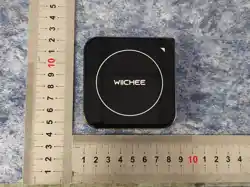
Please verify that the package contains the following items:
WIichee host × � USB Charging Cable × �
Carrying Case × � Quick Start Card × �
�.Charge to Activate
Use the included USB cable to charge the device
Charging Indicators: Red flashing = Charging; Green solid
= Fully charged
🔋
First-Time Setup
Red flashing Charging
Solid green Charging complete
Rapid red flashing Charging
Blue flashing
Device on,awaiting Bluetooth connection
Solid blue Bluetooth connected
Solid red
Ready to measure; place at starting point
Solid green
Measurement point successfully captured
Green flashing
Measurement in progress
Yellow flashing
Timeout warning; place device immediately
Red flashing
Measurement timeout or error
�.Warranty Coverage & Period
Wiichee warrants that the product shall be free from defects
in materials and workmanship under normal use for a
period of twelve (��) months from the date of original retail
purchase ("Warranty Period").
Remedies: During the Warranty Period, Wiichee will, at its
sole discretion, either:
Repair the defective product using new or refurbished
parts; or Replace the defective product with a new or
refurbished product; or Refund the original purchase price
upon return of the defective product.
Important: All remedies are subject to verification of the
defect by Wiichee or its authorized service center. Returns
or exchanges must include the product, all accessories,
original packaging, and any promotional items.
➁In the app
, t
ap
"Connect Device" and
select your device
(default name: WIICHEE;
customizable in "My
Account > Device Info")
➂ Once connected, the
indicator will show solid
blue
Congratulations! You now have the essential knowledge to
operate your Wiichee Smart Measurement Device. As the
world's first measurement device integrating motion-sens-
ing technology, it brings unprecedented convenience and
precision to your work.
Begin your first measurement and experience the power of
intelligent measurement today!
For advanced features, please refer to the complete User
Manual or contact our Technical Support team.
Scan the code to get more help
Hangzhou Bampony Co.,Ltd.
�.Disclaimer
�.� Wiichee is not liable for indirect, incidental, or consequential
damages. This warranty is in lieu of all other warranties, express or
implied.
�.� Contact Support: Reach Wiichee Customer Service via in-app
support, email, or official website
Verification: Provide proof of purchase and defect description
RMA Authorization: Obtain Return Merchandise Authorization if
return is required
Shipping: Customer responsible for shipping costs to service center;
Wiichee covers return shipping for valid warranty claims
FCC Statement
Any Changes or modifications not expressly approved by the party responsible for
compliance could void the user’s authority to operate the equipment.
This device complies with part 15 of the FCC Rules. Operation is subject to the
following two conditions:
(1) This device may not cause harmful interference, and
(2) This device must accept any interference received, including
interference that may cause undesired operation.
RF warning
The device has been evaluated to meet general RF exposure requirment. The
device can be used in portable exposure condition without restriction.
Note : This equipment has been tested and found to comply with the limits for a
Class B digital device, pursuant to part 15 of the FCC Rules. These limits are
designed to provide reasonable protection against harmful interference in a
residential installation. This equipment generates,uses and can radiate radio
frequency energy and, if not installed and used in accordance with the
instructions, may cause harmful interference to radio communications. However,
there is no guarantee that interference will not occur in a particular installation. If
this equipment does cause harmful interference to radio or television reception,
which can be determined by turning the equipment off and on, the user is
encouraged to try to correct the interference by one or more of the following
measures:
—Reorient or relocate the receiving antenna.
—Increase the separation between the equipment and receiver.
—Connect the equipment into an outlet on a circuit different from that to which
the receiver is connected.
—Consult the dealer or an experienced radio/TV technician for help.
1 2
3 4