中文
GB
LUNCHBOX
Revision 1

1
Read these instructions.
Keep these instructions.
Heed all warnings
Follow all instructions
Do not use this apparatus near water.
Clean only with dry cloth.
Do not block any ventilation openings. Install in accordance
with the instructions.
Do not install near any heat sources such as radiators, heat
registers, stoves or other apparatus (including ampliers) that
produce heat.
Do not defect the safety purpose of the polarized or grounding-
type plug. A polarized plug has two blades with one wider than
the other. A grounding type plug has two blades and a third
grounding prong. The wide blade or the third prong are provid-
ed for your safety. If the provided plug does not t into your out-
let, consult an electrician for replacement of the obsolete outlet
– USA version only.
Protect the power cord from being walked on or pinched par-
ticularly at plug, convenience receptacles, and the point where
they exit from the apparatus.
I
mportant Safety Instructions
1.
2.
3.
4.
5.
6.
7.
8.
9.
10.

2
GB
Only use attachments/accessories specified by the manufac-
turer.
Use only with the cart, stand, tripod, bracket, or table specied
by the manufacturer, or sold with the apparatus. When a cart is
used, use caution when moving the cart/apparatus combination
to avoid injury from tip-over.
Unplug this apparatus during lightning storms or when unused
for long periods of time.
Refer all servicing to qualied service personnel. Servicing is
required when the apparatus has been damaged in any way,
such as power-supply cord or plug is damaged, liquid has been
spilled or objects have fallen into the apparatus, the apparatus
has been exposed to rain or moisture, does not operate nor-
mally, or has been dropped.
To reduce the risk of re or electric shock, Do not expose this
appliance to Rain or Moisture.
The Shock Hazard Marking and Associated Graphical Symbol
is provided on the bottom panel of unit.
Apparatus shall not be exposed to dripping or splashing and no
objects lled with liquids, shall be placed on the apparatus.
For outdoors use, to avoid electric shock, use battery only dur-
ing a raining day or the weather is wet.
11.
12.
13.
14.
15.
16.
17.
18.
3
4
GB
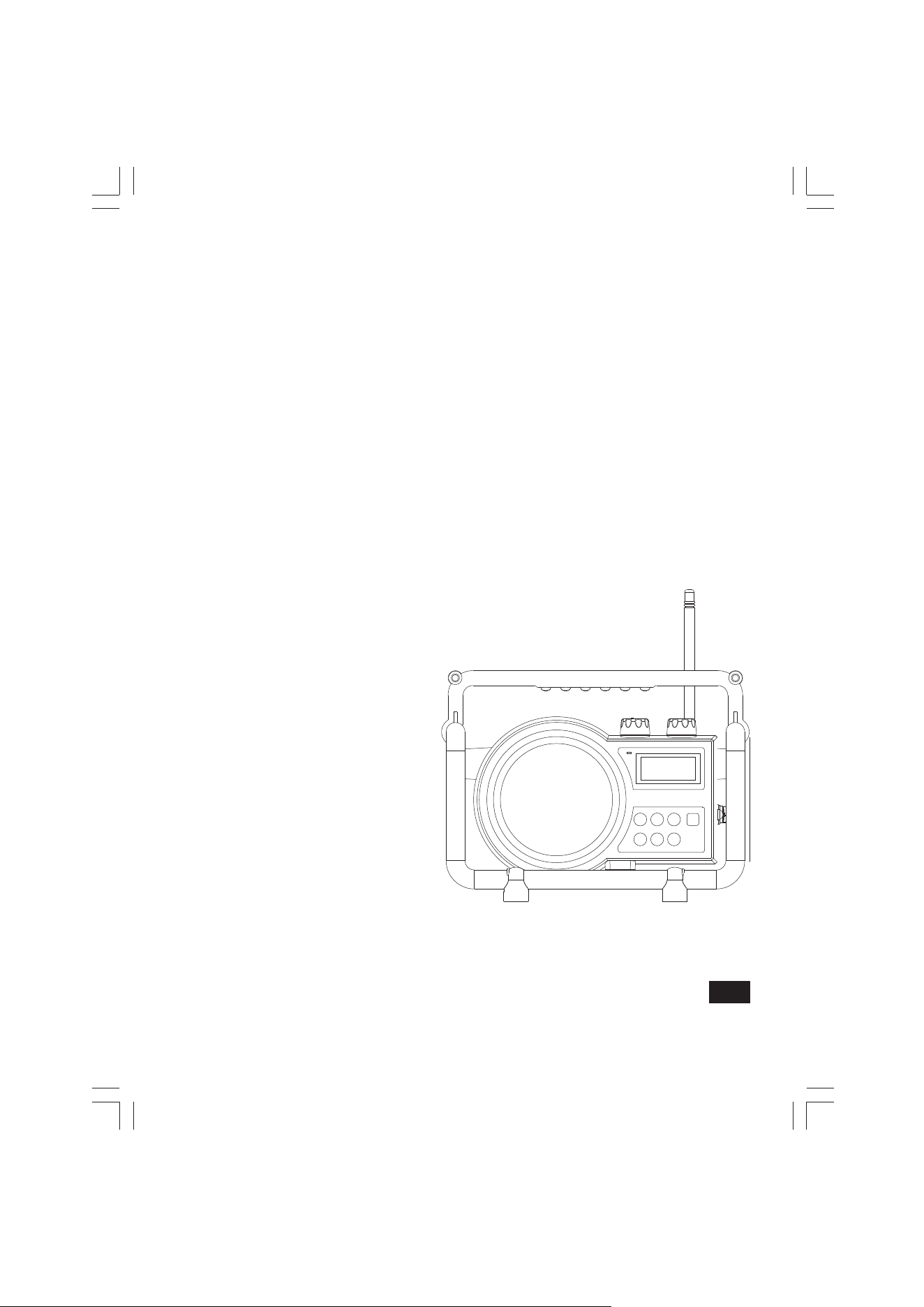
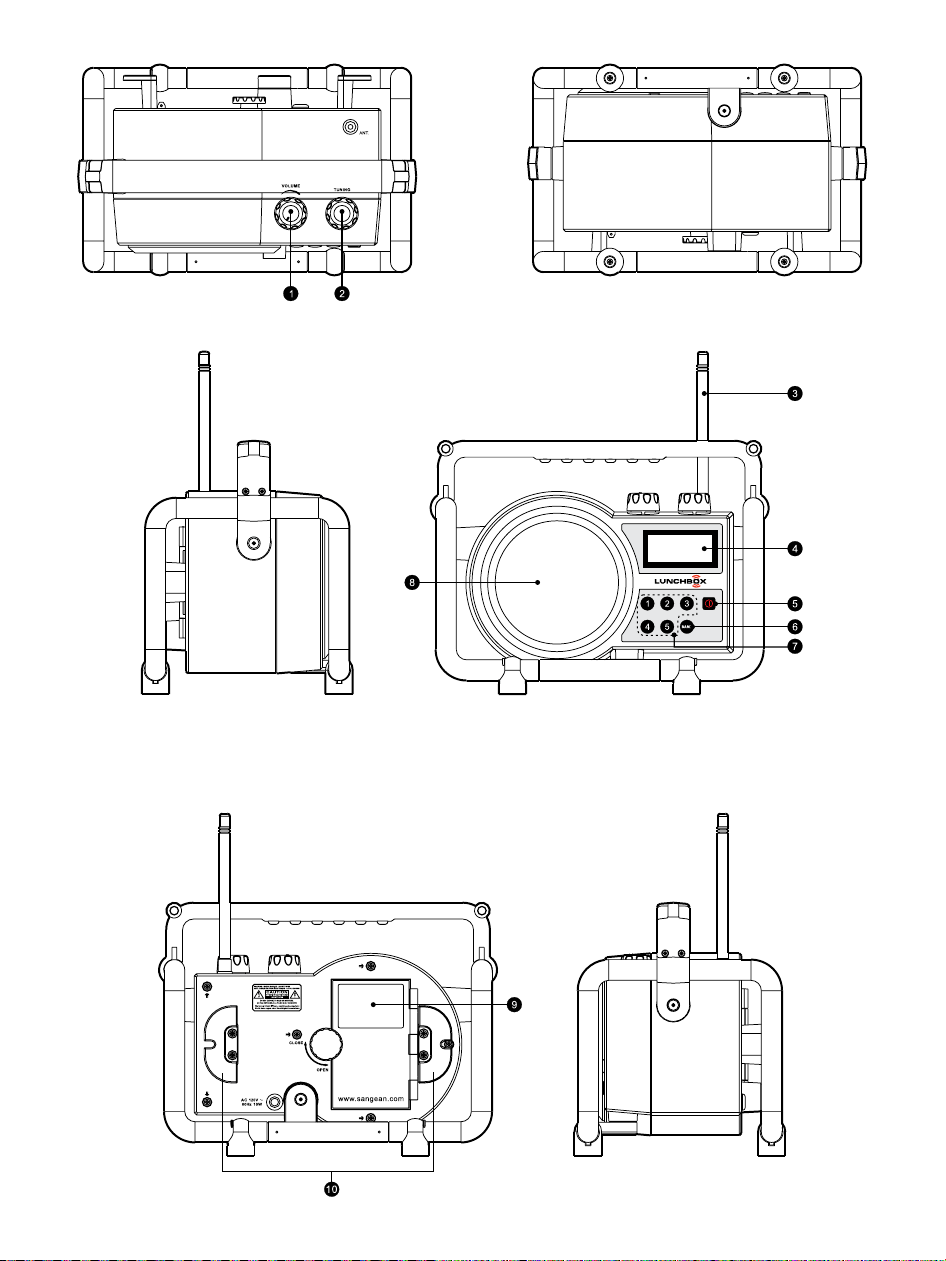
Controls
Volume Control
Tuning Control
FM antenna
LCD display
Power On / Off
Band Selection
Preset Station
Speaker
Battery Compartment
AC power cord storage
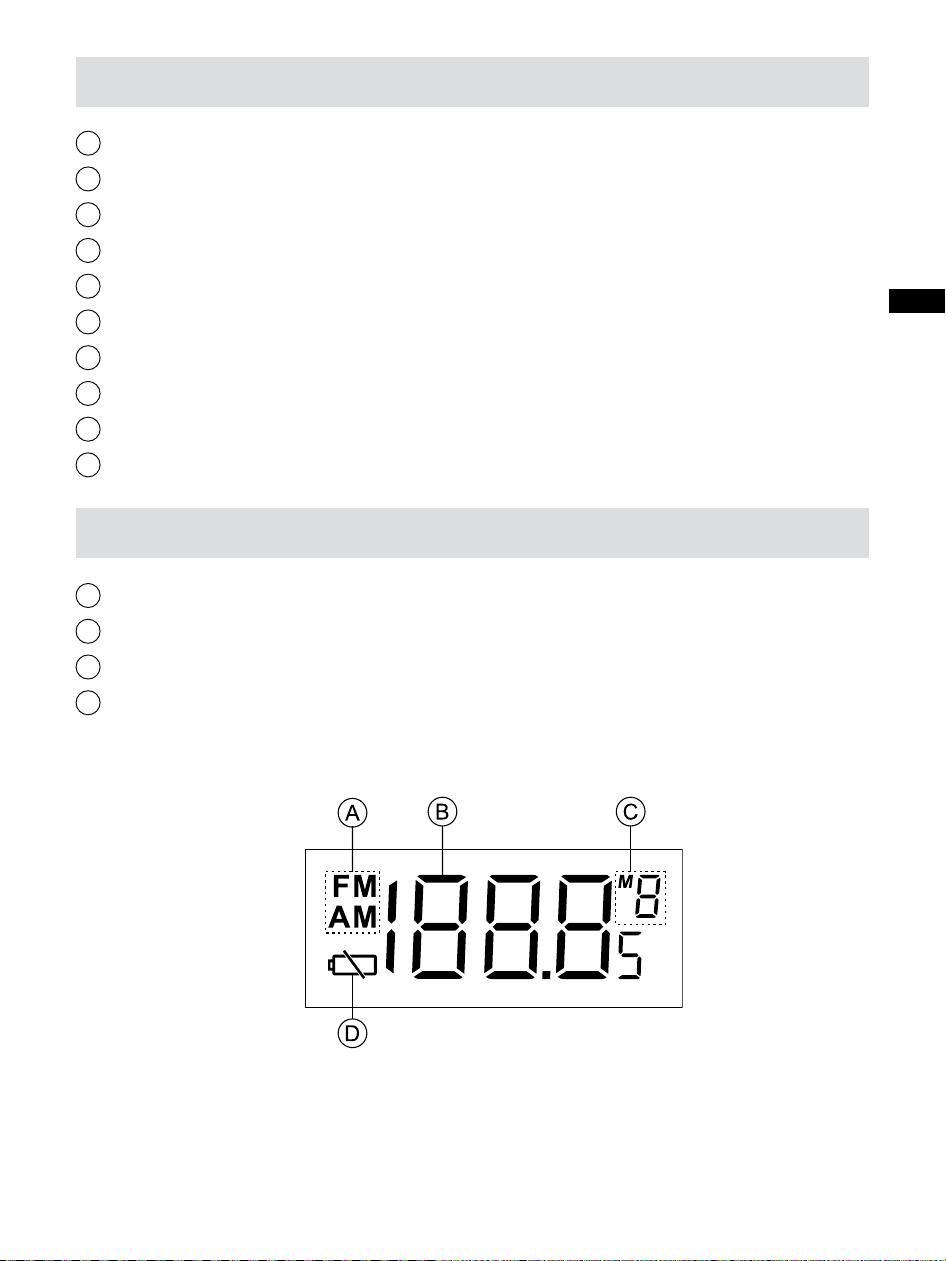
LCD Display
Band Indicator
Frequency
Preset Stations
Low Battery Indicator
2
1
3
5
7
10
9
4
6
8
D
C
B
A
5
Power the radio
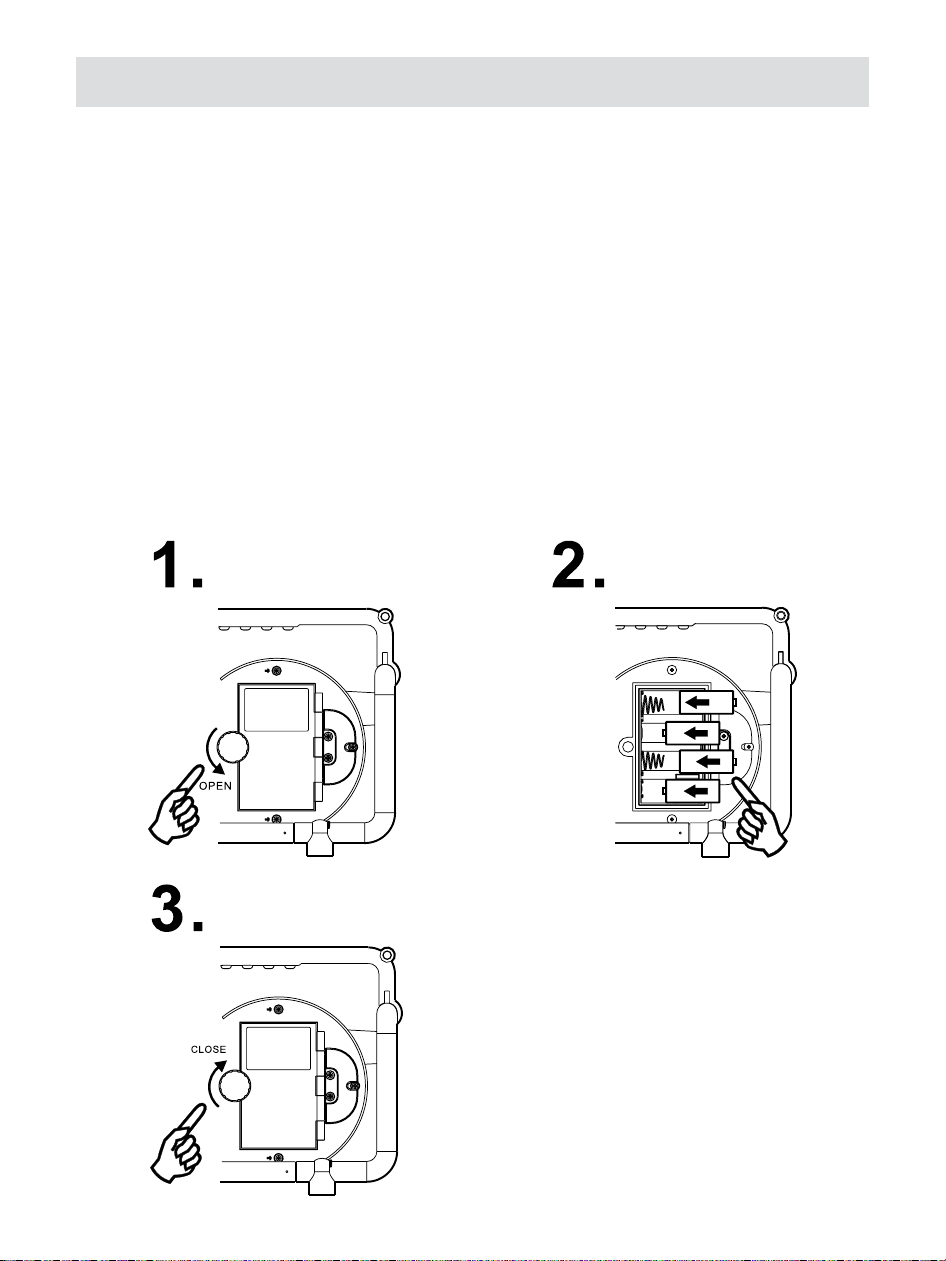
1. Battery operation
Installing the batteries, rst turn battery cover xture anti-clockwise
to loosen and pull down the battery cover. Insert 4 x C size (UM-2)
battery into the compartment. Ensure the battery is inserted in ac-
cordance with the diagram shown.
Close the battery cover and fasten the xture by turning clockwise.
If the radio is not to be used for any extended period of time, it is
recommended that the battery is removed from the radio.

6
GB
2. AC operation
Before you plug the AC power cord into the AC socket, be sure the
voltage is correct. If you have batteries in the radio and use the AC
power cord, the batteries will automatically be disconnected.
AC power storage is designed to store the cord when the radio is
not in use.
3. Operating the radio
This radio is equipped with two tuning methods – Manual tuning
and Memory presets recall.
Manual Tuning
1. Press the Power button to turn on the radio.
2. Select the required waveband by pressing the Band button.
3. Be sure to screw in the rubber FM antenna properly to get best
reception. For AM (MW) band, rotate the radio to get best signal.
4. Rotate the Tuning Control knob will change the frequency in the
following increments
FM: 50 or 100 kHz
MW (AM): 9 or 10 kHz
5. Rotate the Volume Control knob to get required sound level.
6. To turn off the radio, press the Power button. Display will show
OFF.

7
Memory presets recall
Storing stations in preset memories There are 5 memory presets
for each waveband.
1. Press the Power button to turn on the radio.
2. Tune to the required station using Tuning Control.
3. Press and hold down the required preset until the radio beeps.
The preset number will appear in the display and the station will
be stored under chosen preset button.
4. Repeat this procedure for the remaining presets.
5. Stations stored in preset memories can be overwritten by following
above procedures.
Recalling stations from preset memories
1. Press the Power button to turn on the radio.
2. Select the required waveband.
3. Momentarily press the required Preset button, the preset number
and station frequency will appear in the display.
Display backlight
When radio is switched on, press any button except Power button
will illuminate the LCD display for approx. 15 seconds.

8
GB
Setting tuning step
Tuning step in some countries are different from where you pur-
chase the radio. If you buy the radio in Europe and intend to use in
Northern America or some Latin American countries, you may have
to adjust tuning step so the radio may continue to serve you well.
1. When the radio is switched off, press and hold BAND button
3 seconds until software version 'PXX' shown on the display.
2. Continue pressing BAND button until FM tuning step option shown
on the display. Then rotate the Tuning control rotary to select
50 kHz or 100 kHz FM step. Press Band button to confirm the
selection. Now the display will show AM tuning step option.
3. Rotate the Tuning control rotary to select 9 kHz or 10 kHz AM step.
Press Band button to conrm the setting. Then the tuning step
setting is completed.
Clear the preset stations
Whenever is necessary, you can clear all the preset stations.
When radio is off, press Preset button 5 for more than 2 seconds
to clear all the preset stations. Radio will be reset to original factory
set status.

9
Specications
Frequency Coverage:
FM 87.50 – 108 MHz
AM (MW) 520 – 1710 kHz (10 kHz)
522 – 1710 kHz (9 kHz)
AC Power:
AC 120V/60Hz/10W (USA)
AC 230V/50Hz/10W (Europe)
Batteries: 4 x UM-2 (C Size)
Output Power:
2 Watt 10% T.H.D. @ 100 Hz @ DC battery 6V
5 Watt 10% T.H.D. @ 100 Hz @ AC 230V or 110V