Customer Service:
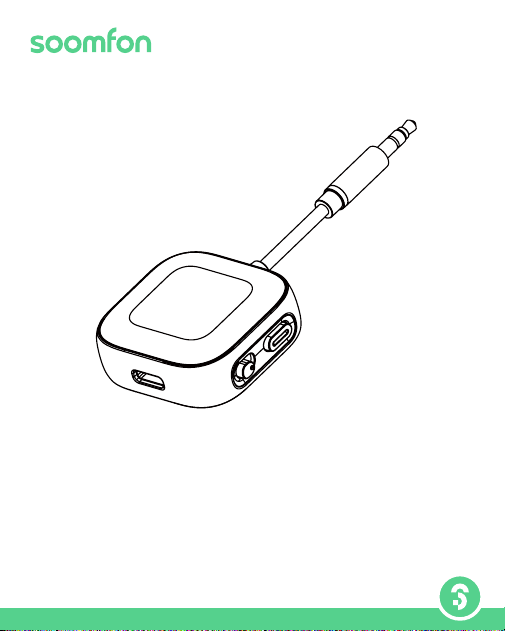
Thank you for purchasing the BT35 Wireless Audio Adapter! We are committed to
providing innovative products and exceptional customer service to ensure your
satisfaction.
Warranty: Enjoy a 24-month warranty for peace of mind.
User Manual
for 2-IN-1 Wireless Audio Adapter
Model: BT35
V 1.01
Email: [email protected]

-1
Contents
User Guide ( EN ) --------------------------------------------------4-10
取扱説明書( JP ) -----------------------------------------------------11-17
Benutzerhandbuch ( DE ) -------------------------------------18-24
Guida utente (IT) --------------------------------------------------25-31
Manual de Usuario (FR ) --------------------------------------32-38
Guía del Usuario (ES) --------------------------------------------39-45
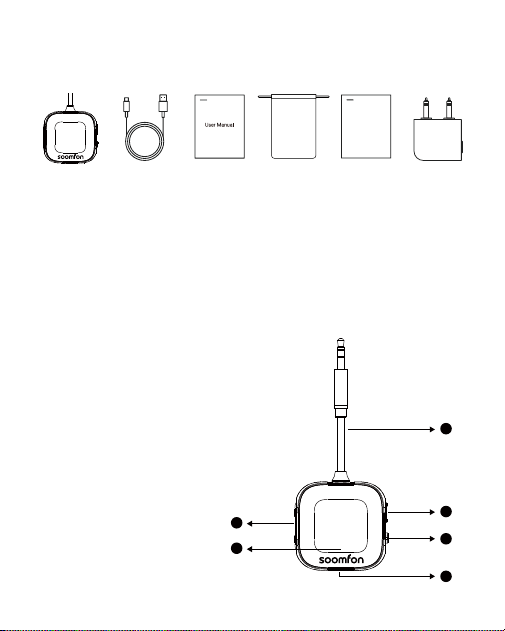
Packing list
-2
Product Diagram:
1 2 3 4 5 6
EN
JP
JP:梱包内容 | DE:Lieferumfang | IT:Contenuto della confezione |
FR:Liste du paquet | ES:Lista de Paquetes
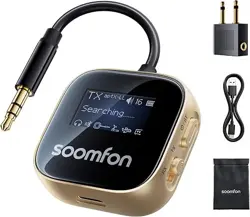
1. Bluetooth transceiver *1
2. Usb c charging cable *1
3. User manual *1
① Multi-function Button (Refer to the "Button Operations" for details)
② TX/RX Mode Switch
③ Volume Increase/Decrease Button
④ 3.5mm Audio Cable
⑤ USB-C Charging Port
⑥ LED Power/Volume/Pairing Status Display
①多機能ボタン
(詳細は「ボタン操作」を参照)
②TX/RXモード切替スイッチ
③音量上げ/下げボタン
④3.5mmオーディオケーブル
⑤USB-C充電ポート
⑥LED電源/音量/ペアリング
状態表示
4. Carrying bag *1
5. Guide card *1
6. Dual 3.5 mm adapter * 1
4
1
2
3
6
5
Guide Card

-3
DE
① Multifunktionstaste (siehe „Tastenfunktionen“ für Details)
② TX/RX-Modusschalter
③ Lautstärke + / − Taste
④ 3,5-mm-Audioanschluss
⑤ USB-C-Ladeanschluss
⑥ LED-Anzeige für Strom / Lautstärke / Kopplungsstatus
IT
① Pulsante multifunzione
(fare riferimento a “Funzioni dei pulsanti” per i dettagli)
② Interruttore modalità TX/RX
③ Pulsante aumento/diminuzione volume
④ Porta audio da 3,5 mm
⑤ Porta di ricarica USB-C
⑥ Indicatore LED di alimentazione / volume / stato di associazione
ES
① Botón Multifuncional
(Consulte las "Operaciones del Botón" para más detalles)
② Interruptor de Modo TX/ RX
③ Volumen AbajoVolumen Arriba
④ Puerto de Carga USB-C
⑤ Puerto de Audio de 3,5 mm
⑥ Pantalla LED de Estado de Energía/Volumen/ Jumelage
FR
① Bouton Multifonction
(Veuillez vous référer à la section "Opérations des Boutons"
pour plus de détails)
② Commutateur de Mode TX/RX
③ Volume Bas/ Volume Haut
④ Port Audio 3,5 mm
⑤ Port de Chargement USB-C
⑥ Affichage du Statut LED de I'Alimentation/ Volume/ Association
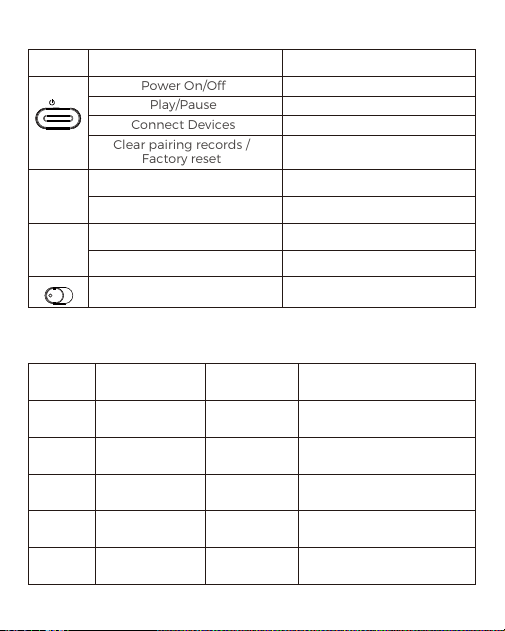
EN:Button Operations
Comparison of Encoder Formats and Parameters
-4
/
BT
Button Function
Power On/Off
Play/Pause
Connect Devices
Clear pairing records /
Factory reset
Select Upwards
Volume Up
Short Press
Press
Select Downward
Volume Down
Short Press
Press
Select TX/RX Mode
Slide
Long Press
Short Press
Short Press
Press quickly 5 times
Operation
+
-
TX RX
Encoder Delay parameter Mode support Note
SBC 150 - 220 ms TX/RX
Standard Bluetooth codec,
with relatively high latency.
AAC 90 - 150 ms RX
Ideal for Apple devices:
outperforms SBC in audio
and latency on iOS.
aptX 70 - 130 ms TX/RX
A significant improvement
over SBC.
aptX HD 70 - 130 ms TX/RX
Enhances wireless audio for
high-fidelity music.
aptX LL ≤40ms TX
Far below the threshold of
human hearing—ideal for
movies and games.

Codec Output (Single vs Dual)
Connect with 1 Headset
Connect with 2 Headsets
-5
Formats Supported
(Bluetooth Adapter)
aptX HD/aptX-LL
/aptx/SBC
Format Supported
(Headset)
Final Output
Formats
aptX LL aptX LL
aptX HD aptX HD
aptX aptX
SBC SBC
Formats Supported
(Bluetooth Adapter)
aptX HD/aptX-LL
/aptx/SBC
The 1st Headset
Supports Formats
The 2nd Headset
Supports Formats
Final Output
Format
aptX LL aptX LL aptX
aptX HD aptX
aptX/SBC aptX LL
aptX LL/SBC
aptX LL/aptX
aptX
SBC
aptX
SBC
SBC
SBC
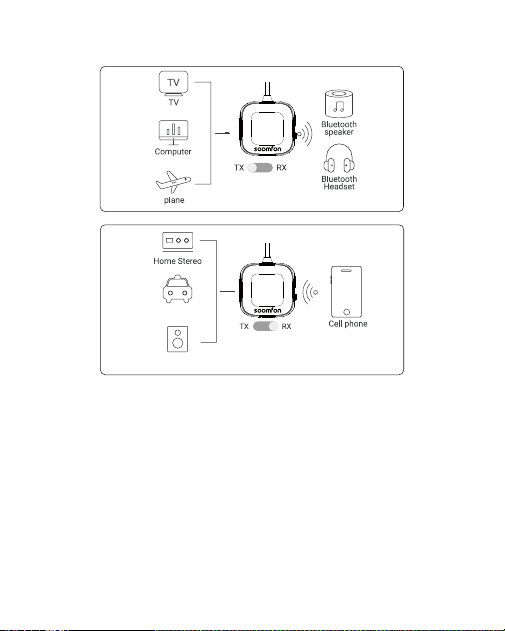
-6
Transmitter Mode (TX)
Enables Bluetooth headphones or speakers to connect with
non-Bluetooth devices such as TVs, airplanes, and treadmills.
Receiver Mode (RX)
Enables wireless audio transmission from your phone or computer to
non-Bluetooth receiving devices, such as car stereos, wired headphones,
and home stereos.
Transmitter/Receiver (TX/RX) Mode Functions
Car Without
Bluetooth
Speaker Without
Bluetooth
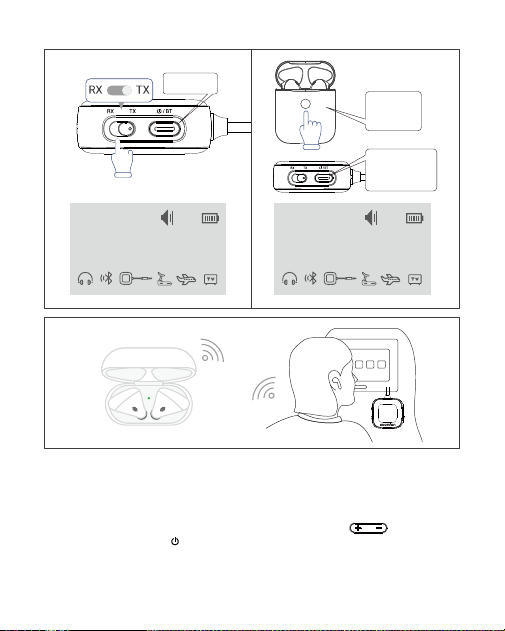
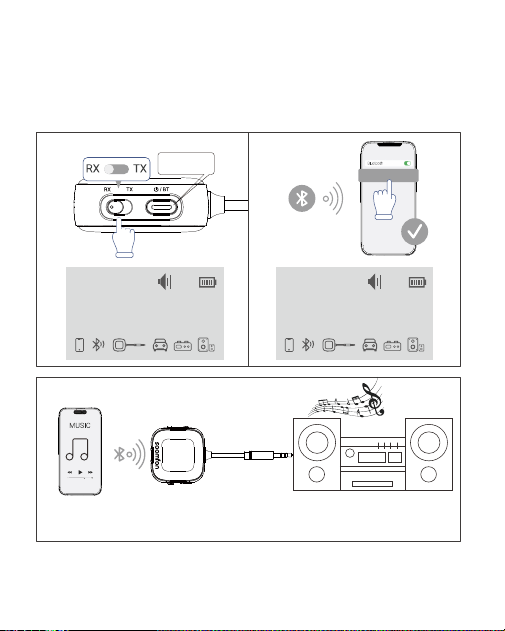
Pairing the 1st Bluetooth Device:
1. Turn on the BT35 and switch to TX mode.
2. Set your Bluetooth device (headphones, speakers, etc.) to pairing mode.
3. Once the device appears on the screen, use the " " buttons to
select it, then press " " to confirm.
4. Connect the BT35 to your audio source via the 3.5mm jack.
-7
/
BT
How to use as a Bluetooth Transmitter (TX) ?
3
1 2
Set to TX mode
Long press
to power on
When your device
is displayed,
press the pairing
bu�on briefly
Turn on your
Bluetooth
headset to
pairing mode
TX
aptX-LL
Searching.......
16
TX
aptX-LL
AirPods
16
Pairing the 2nd Bluetooth Device:
1. Turn on the second device and set it to pairing mode.
2. Double-click the multifunction button to enter search mode, then
repeat steps 3-4 to complete the connection.
-8
Connect the BT35 to your audio source via the 3.5mm jack to stream
music wirelessly.
How to use as a Bluetooth Receiver (RX) ?
3
1 2
BT35
Set to RX mode
Long press
to power on
Turn on Bluetooth
on your phone and
connect to BT35
RX
Connecting...
BT35
16
aptX
RX
iPhone 15
16
aptX

Pairing the 1st Bluetooth Device:
1. Turn on the BT35 and switch to RX mode.
2. Enable Bluetooth on your device (phone, tablet, etc.) and select "BT35"
from the list.
3. Connect the BT35 to your audio device via the 3.5mm jack.
Pairing the 2nd Device:
Repeat step 2 for the second device.
Note: Only one device can play audio at a time. To switch, pause playback
on the current device before playing from the other.
Troubleshooting
Pairing Issues?
1. BT35 is NOT suitable for use with musical instruments, karaoke, or live
music. It does not support Dolby Audio.
2. Select the correct mode (TX/RX). Initial pairing may take longer; keep
the BT35 as close as possible to your headphones.
3. In TX mode, the memory function may NOT work with headphones
using proprietary protocols (e.g., AirPods prioritize connecting to iPhone
or iPad devices over others).
4. NOT compatible with devices requiring PIN code pairing.
5. NO microphone; cannot be used for calls.
6.Quikly press the “ ” button 5 times quickly to clear pairing history.
7. Individual volume adjustment for each earbud is NOT available when
using this product.
8. NOT compatible with Alexa, Echo Dot, Xbox, or PlayStation consoles.
Audio Delay?
BT35 supports aptX LL low-latency technology. aptX LL is an audio
decoding format that enables low-latency transmission. To achieve
low-latency performance, ensure your headphones also support aptX LL
technology. If your headphones do not support aptX LL low-latency
functionality, playback will default to the SBC format.
-9
/
BT

Unstable Connection?
1. Check if the battery is low.
2. Ensure the device is within a 10-meter range to avoid signal weakening.
3. Keep a distance from signal transmission devices such as routers.
Screen Turns Off?
The LCD screen turns off after 2mins of inactivity to conserve power. Press
any button to turn it back on.
Customer Service
Contact us:
Official Website: https://soomfon.com/
Email: [email protected]
WhatsApp: +852 69435863
Warnings
Before using this product, carefully review all safety instructions. Incorrect
usage may damage the product or its components. For optimal
functionality and safety, follow these guidelines:
1. Do not use the product in damp or submerged environments.
2. Avoid using near heaters or high-temperature conditions.
3. Keep the product away from intense direct sunlight.
4. Keep the product out of reach of children and pets.
5. Unauthorized disassembly may void the warranty.
6. If the battery is ingested or inserted into any body part, seek immediate
medical attention.
-10
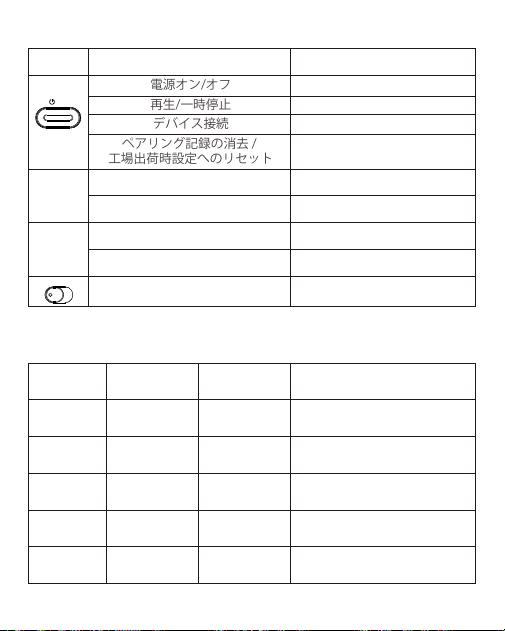
JP: ボタン操作
エンコーダ形式とパラメータの比較
-11
/
BT
ボタン 機能
電源オン/オフ
再生/一時停止
デバイス接続
ペアリング記録の消去/
工場出荷時設定へのリセット
上を選択
音量を上げる
ショートプレス
プレス
下方向を選択
音量ダウン
ショートプレス
プレス
TX/RXモード選択
スライド
長押し
短押し
短押し
5回素早く押す
操作
+
-
TXRX
エンコーダー 遅延パラメータ モードサポート 注記
SBC
150-220ms
TX/RX
標準的なBluetoothコーデック
で、比較的高い遅延を伴う。
AAC
90-150ms
RX
Appleデバイスに最適:iOS環境
においてオーディオ性能とレイ
テンシーでSBCを上回る
aptX
70-130ms
TX/RX
SBCに比べて大幅な改善。
aptXHD
70-130ms
TX/RX
ワイヤレスオーディオを高音
質音楽用に強化します。
aptXLL
≤40ms
TX
人間の聴覚の限界をはるかに
下回る低周波数域映画やゲ
ームに最適。

コーデック出力(シングル対デュアル)
1つのヘッドセットで接続
2つのヘッドセットを接続する
-12
対応フォーマット
(Bluetoothアダプター)
aptX HD/aptX-LL/
aptx/SBC
対応フォーマット
(ヘッドセット)
最終フォーマット出力
aptX LL aptX LL
aptX HD aptX HD
aptX aptX
SBC SBC
対応フォーマット
(Bluetoothアダプター)
aptX HD/aptX-LL
/aptx/SBC
第1世代ヘッドセッ
トがサポートする
フォーマット
第2世代ヘッドセッ
ト対応フォーマット
最終フォー
マット出力
aptX LL aptX LL aptX
aptX HD aptX
aptX/SBC aptX LL
aptX LL/SBC
aptX LL/aptX
aptX
SBC
aptX
SBC
SBC
SBC
-13
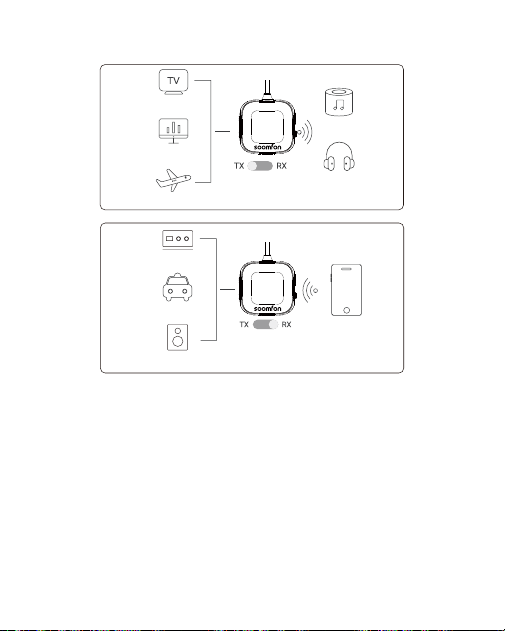
送信モード(TX)
Bluetoothヘッドフォンやスピーカーが、テレビ、飛行機、トレッドミルなどの非
Bluetoothデバイスと接続できるようにします。
受信モード(RX)
スマートフォンやコンピューターから、カーオーディオ、有線ヘッドホン、ホームオー
ディオシステムなど、Bluetooth非対応の受信機器へワイヤレスでオーディオを送信
できます。
送信機/受信機(TX/RX)モード機能
テレビ
Bluetooth
スピーカー
Bluetooth
ヘ ッド セット
パソコン
飛行機
ホームステレオ
Bluetooth
非対応の車
携帯電話
Bluetooth非対応
のスピーカー
-14
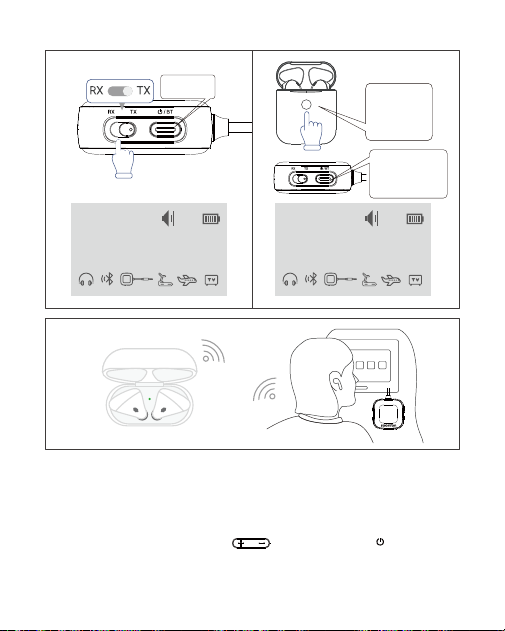
1台目のBluetoothデバイスのペアリング:
1.BT35の電源を入れ、送信モードに切り替えます。
2.ペアリングモードに設定したBluetoothデバイス(ヘッドホン、スピーカーなど)
を準備します。
3.デバイスが画面に表示されたら、「」ボタンで選択し、「」を押して確
定します。
4.3.5mmジャックでBT35をオーディオソースに接続します。
/
BT
Bluetooth送信機(TX)として使用する方法?
3
1 2
Set to TX mode
長押しして
電源オン
デバイスが表示
されたら、ペアリ
ングボタンを短
く押してくだ さ い
Bluetooth
ヘ ッド セット
をペアリング
モードにして
くだ さい
TX
aptX-LL
Searching.......
16
TX
aptX-LL
AirPods
16
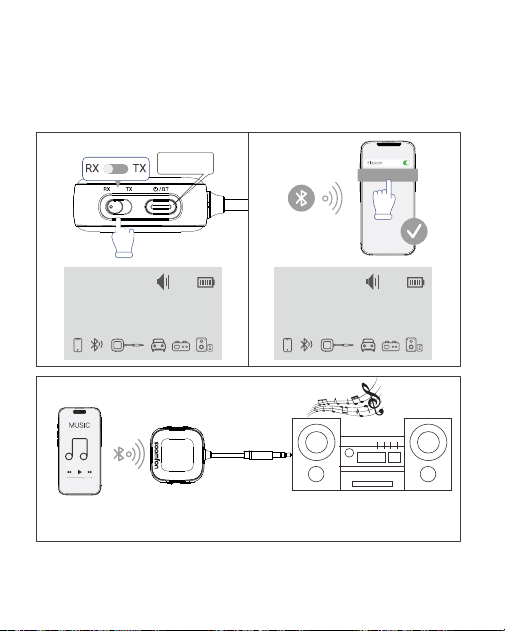
-15
2台目のBluetoothデバイスのペアリング:
1.2台目のデバイスを起動し、ペアリングモードに設定します。
2.多機能ボタンをダブルクリックして検索モードに入り、手順3〜4を繰り返して接続
を完了します。
Bluetoothレシーバー(RX)として使用するには?
BT35 をオーディオ再生デバイスのオーディオ入力に接続すると、
ワイヤレスで音楽を聴くことができます。
RX
Connecting...
BT35
16
aptX
RX
iPhone 15
16
aptX
3
1 2
BT35
Set to RX mode
長押しして
電源オン
スマートフォンで
Bluetoothをオンにし
て、BT35に接続して
くだ さい

-16
/
BT
1台目のBluetoothデバイスのペアリング:
1. BT35の電 源を入れ 、受信モードに切り替えます。
2. お使いのデバイス(スマートフォン、タブレットなど)でBluetoothを有効にし、リス
トから「BT35」を 選 択 し ま す 。
3. 3.5mmジャックを介してBT35をオーディオ機器に接続します。
2台目のデバイスのペアリング:
2番目のデバイスについても手順2を繰り返してください。
注:同時にオーディオを再生できるデバイスは1台のみです。切り替えるには、現在の
デバイスの再生を一時停止してから、別のデバイスで再生を開始してください。
トラブルシューティング
ペアリング の 問 題 ?
1.BT35は楽器、カラオケ、ライブ音楽での使用には適していません。ドルビーオー
ディオには対応していません。
2.正しいモード(TX/RX)を選択してください。初回ペアリングには時間がかかる場合
があります。BT35をヘッドホンにできるだけ近づけてください。
3.TXモードでは、独自プロトコルを使用するヘッドホン(例:AirPodsはiPhoneやiPad
デバイスを優先して接続します)ではメモリ機能が動作しない場合があります。
4.PINコードペアリングが必要なデバイスとは互換性がありません。
5.マイク非搭載のため通話には使用できません。
6.「」ボタンを素早く5回押すとペアリング履歴を消去できます。
7.本製品使用時、左右イヤピースの個別音量調整はできません。
8.Alexa、EchoDot、Xbox、PlayStationコンソールとは互換性がありません。
音声遅延?
BT35はaptXLL低遅延技術に対応しています。aptXLLは低遅延伝送を可能にする
オーディオデコードフォーマットです。低遅延性能を実現するには、お使いのヘッドホ
ンもaptXLL技術に対応していることを確認してください。ヘッドホンがaptXLL低遅
延機能に対応していない場合、再生はデフォルトでSBCフォーマットになります。

-17
接続が不安定ですか?
1.バッテリーの残量が少ないかどうかを確認してください。
2.信号の弱まりを防ぐため、デバイスが10メートル圏内にあることを確認してください。
3.ルーターなどの信号送信機器から距離を保ってください。
画面が消える?
LCD画面は、2分間操作がないと省電力のため自動的に消灯します。いずれかのボタン
を押すと再表示されます。
カスタマーサービス
お問い合わせ先:
公式ウェブサイト:https://soomfon.com/
WhatsApp:+852 69435863
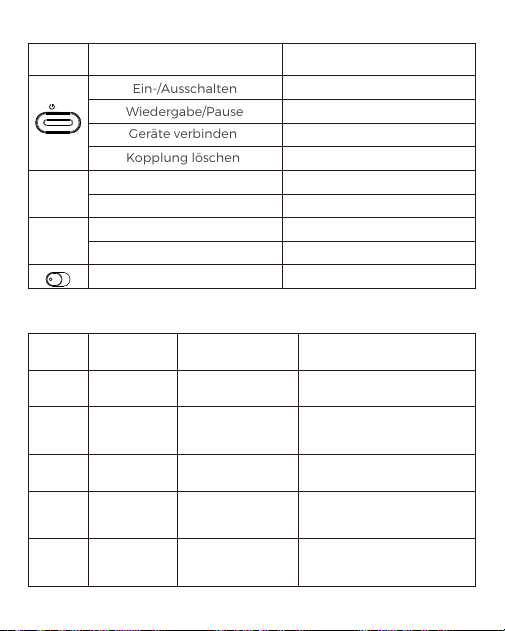
DE: Tastenfunktionen
Codec-Formate und Parameter
-18
Codec Latenz
Modusunterstützung
Hinweis
SBC 150 - 220 ms TX/RX
Standard-Bluetooth-Codec
mit relativ hoher Latenz.
AAC 90 - 150 ms RX
Ideal für Apple-Geräte; bietet
unter iOS bessere Klangqualität
und geringere Latenz als SBC.
aptX 70 - 130 ms TX/RX
Deutlich verbesserte
Leistung im
aptX HD 70 - 130 ms TX/RX
Optimiert für kabellose
Audioübertragung in hoher
Klangqualität.
aptX LL ≤40ms TX
Deutlich unter der
Wahrnehmungsschwelle des
Menschen – ideal für Filme
und Spiele.
/
BT
Tasten Funktion
Ein-/Ausschalten
Wiedergabe/Pause
Geräte verbinden
Kopplung löschen
Nach oben auswählen
Lautstärke +
Kurzes Drücken
Kurzes Drücken
Nach unten auswählen
Lautstärke -
Kurzes Drücken
Kurzes Drücken
TX/RX-Modus auswählen Schieben
Langes Drücken
Kurzes Drücken
Kurzes Drücken
5 Mal schnell drücken
Bedienung
+
-
TX RX

Codec-Ausgabe (Einzel- vs. Dualverbindung)
Verbindung mit 1 Headset
Verbindung mit 2 Headsets
-19
Unterstützte Formate
(Bluetooth-Adapter)
aptX HD/aptX-LL
/aptx/SBC
Unterstütztes Format
(Headset)
Endgültiges
Ausgabeformat
aptX LL aptX LL
aptX HD aptX HD
aptX aptX
SBC SBC
Unterstützte Formate
(Bluetooth-Adapter)
aptX HD/aptX-LL
/aptx/SBC
Vom 1. Headset
unterstützte Formate
Vom 2. Headset
unterstützte Formate
Endgültiges
Ausgabeformat
aptX LL aptX LL aptX
aptX HD aptX
aptX/SBC aptX LL
aptX LL/SBC
aptX LL/aptX
aptX
SBC
aptX
SBC
SBC
SBC
-20
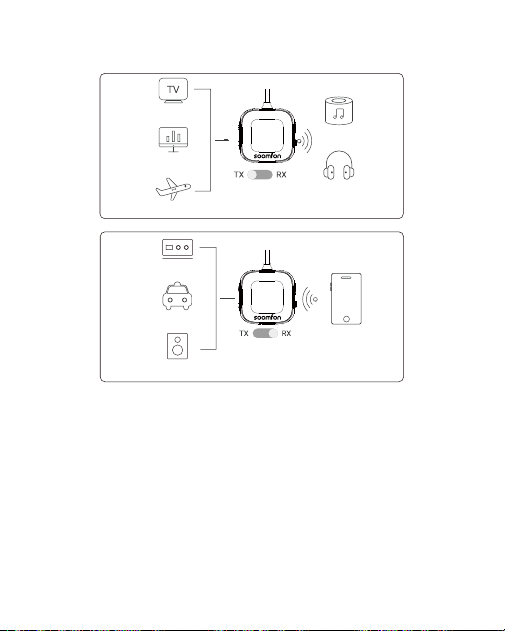
Sender-Modus (TX)
Ermöglicht die Verbindung von Bluetooth-Kopfhörern oder
-Lautsprechern mit Geräten ohne Bluetooth, wie z. B. Fernsehern,
Flugzeugen oder Laufbändern.
Empfänger-Modus (RX)
Ermöglicht die drahtlose Audioübertragung von Ihrem Smartphone
oder Tablet an Geräte ohne Bluetooth, wie z. B. Autoradios, kabelgebun-
dene Kopfhörer oder Heimstereoanlagen.
Funktionen des Sender-/Empfänger-Modus (TX/RX)
TV
Bluetooth
Lautsprecher
Bluetooth
Kopfhörer
Computer
Flugzeug
Heim-Stereoanlage
AutoohneBluetooth
Smartphone/Handy
Lautsprecherohne
Bluetooth
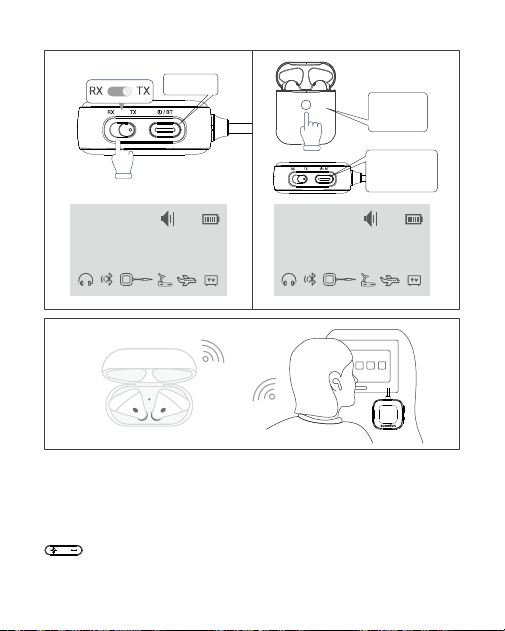
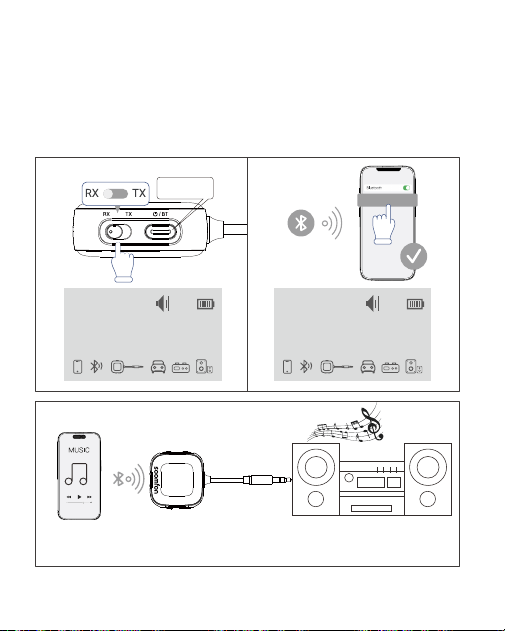
Kopplung des 1. Bluetooth-Geräts:
1. Schalten Sie den BT35 ein und stellen Sie ihn auf den TX-Modus.
2. Versetzen Sie Ihr Bluetooth-Gerät (Kopfhörer, Lautsprecher usw.) in den
Kopplungsmodus.
3. Sobald das Gerät auf dem Bildschirm erscheint, wählen Sie es mit den
Tasten aus und drücken Sie anschließend die Multifunktionstaste
zur Bestätigung.
4. Verbinden Sie den BT35 über die 3,5-mm-Buchse mit Ihrer Audioquelle.
-21
Verwendung des Geräts als Bluetooth-Sender (TX)
3
1 2
Auf TX-Modus einstellen
Lange drücken
zum Einschalten
Wenn das Gerät
angezeigt wird, kurz
die Pairing-Taste
drücken.
Headset in den
Bluetooth-
Kopplungsmodus
versetzen.
TX
aptX-LL
Searching.......
16
TX
aptX-LL
AirPods
16
Kopplung des 2. Bluetooth-Geräts:
1. Schalten Sie das zweite Gerät ein und versetzen Sie es in den
Kopplungsmodus.
2. Doppelklicken Sie auf die Multifunktionstaste, um den Suchmodus zu
starten, und wiederholen Sie anschließend die Schritte 3–4, um die
Verbindung abzuschließen.
-22
Verwendung als Bluetooth-Empfänger (RX)
Verbinden Sie den BT35 über die 3,5-mm-Buchse mit Ihrem Audiogerät,
um Musik drahtlos zu übertragen.
RX
Connecting...
BT35
16
aptX
RX
iPhone 15
16
aptX
3
1 2
BT35
Auf RX-Modus einstellen
Lange drücken
zum Einschalten
Bluetooth auf dem
Telefon ak�vieren
und mit BT35
verbinden

Kopplung des 1. Bluetooth-Geräts:
1. Schalten Sie den BT35 ein und stellen Sie ihn auf den RX-Modus.
2. Aktivieren Sie Bluetooth auf Ihrem Gerät (Smartphone, Tablet usw.) und
wählen Sie „BT35“ aus der Liste aus.
3. Verbinden Sie den BT35 über die 3,5-mm-Buchse mit Ihrem Audiogerät.
Kopplung des 2. Geräts:
Wiederholen Sie Schritt 2 für das zweite Gerät.
Hinweis: Es kann jeweils nur ein Gerät Audio wiedergeben. Um zu
wechseln, pausieren Sie die Wiedergabe auf dem aktuellen Gerät, bevor
Sie die Wiedergabe auf dem anderen starten.
Fehlerbehebung
Probleme beim Koppeln?
1. Der BT35 ist NICHT geeignet für Musikinstrumente, Karaoke oder
Live-Musik. Dolby Audio wird NICHT unterstützt.
2. Wählen Sie den richtigen Modus (TX/RX). Die erste Kopplung kann
länger dauern; halten Sie den BT35 möglichst nah an Ihren Kopfhörern.
3. Im TX-Modus funktioniert die Speicherfunktion möglicherweise NICHT
mit Kopfhörern, die proprietäre Protokolle verwenden (z. B. AirPods, die
sich bevorzugt mit iPhone- oder iPad-Geräten verbinden).
4. NICHT kompatibel mit Geräten, die eine Kopplung mit PIN-Code
erfordern.
5. KEIN Mikrofon vorhanden; kann NICHT für Anrufe verwendet werden.
6. Drücken Sie die Multifunktionstaste 5-mal schnell hintereinander, um
den Kopplungsverlauf zu löschen.
7. Eine individuelle Lautstärkeregelung für jedes Ohrhörer-Element ist
NICHT verfügbar, wenn dieses Produkt verwendet wird.
8. NICHT kompatibel mit Alexa, Echo Dot, Xbox oder
PlayStation-Konsolen.
-23

Audioverzögerung?
Der BT35 unterstützt die aptX LL-Low-Latency-Technologie. aptX LL ist ein
Audio-Codec, der eine Übertragung mit geringer Latenz ermöglicht. Um
eine niedrige Latenz zu erreichen, stellen Sie sicher, dass Ihre Kopfhörer
ebenfalls aptX LL unterstützen. Wenn Ihre Kopfhörer aptX LL NICHT
unterstützen, wird die Wiedergabe automatisch auf das SBC-Format
umgestellt.
Instabile Verbindung?
1. Prüfen Sie, ob der Akku schwach ist.
2. Stellen Sie sicher, dass sich das Gerät innerhalb einer Reichweite von 10
Metern befindet, um Signalverluste zu vermeiden.
3. Halten Sie Abstand zu Signalübertragungsgeräten wie Routern.
Bildschirm schaltet sich aus?
Der LCD-Bildschirm schaltet sich nach 2 Minuten Inaktivität automatisch
aus, um Energie zu sparen. Drücken Sie eine beliebige Taste, um ihn
wieder einzuschalten.
Kundendienst
Kontaktieren Sie uns:
Offizielle Website: https://soomfon.com/
E-Mail: [email protected]
WhatsApp: +852 69435863
-24
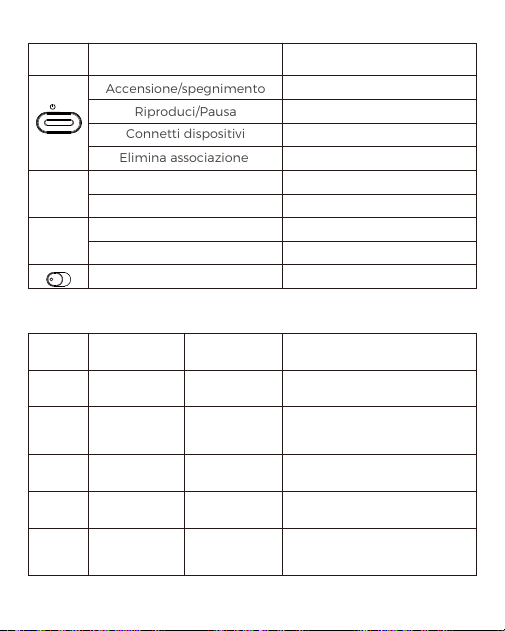
IT: Funzioni dei pulsanti
Confronto tra formati di codifica e parametri
-25
Codec Latenza
Modalità
supportate
Nota
SBC 150 - 220 ms TX/RX
Codec Bluetooth standard con
latenza relativamente elevata.
AAC 90 - 150 ms RX
Ideale per dispositivi Apple; su
iOS offre migliore qualità audio
e minore latenza rispetto a SBC.
aptX 70 - 130 ms TX/RX
Miglioramento significativo
rispetto a SBC.
aptX HD 70 - 130 ms TX/RX
Migliora l'audio wireless per
musica ad alta fedeltà.
aptX LL ≤40ms TX
Ben al di sotto della soglia di
percezione umana
— ideale per film e giochi.
/
BT
Chiavi Funzione
Accensione/spegnimento
Riproduci/Pausa
Connetti dispositivi
Elimina associazione
Seleziona su
Volume +
Pressione breve
Pressione breve
Seleziona Giù
Volume -
Pressione breve
Pressione breve
Selezionare la modalità TX/RX Spingere
Pressione prolungata
Pressione breve
Pressione breve
Premere 5 volte rapidamente
Servizio
+
-
TX RX

Uscita codec (Connessione singola vs doppia)
Connessione con 1 headset
Connessione con 2 headset
-26
Formati supportati
(Adattatore Bluetooth)
aptX HD/aptX-LL
/aptx/SBC
Formato supportato
(Headset)
Formato di
uscita finale
aptX LL aptX LL
aptX HD aptX HD
aptX aptX
SBC SBC
Formati supportati
(Adattatore Bluetooth)
aptX HD/aptX-LL
/aptx/SBC
Formati supportati
dal 1° headset
Formati supportati
dal 2° headset
Formato di
uscita finale
aptX LL aptX LL aptX
aptX HD aptX
aptX/SBC aptX LL
aptX LL/SBC
aptX LL/aptX
aptX
SBC
aptX
SBC
SBC
SBC
-27
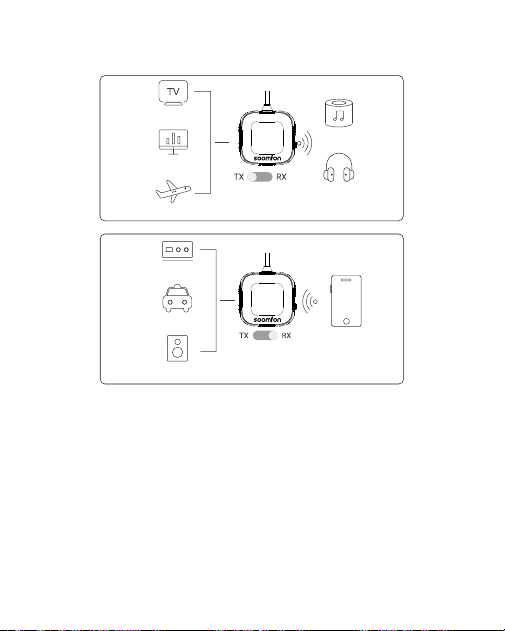
Modalità Trasmettitore (TX)
Consente di collegare cuffie o altoparlanti Bluetooth a dispositivi senza
Bluetooth, come TV, aerei e tapis roulant.
Modalità Ricevitore (RX)
Consente di trasmettere l’audio in modalità wireless dal telefono o dal
computer a dispositivi audio senza Bluetooth, come autoradio, cuffie
cablate e sistemi stereo domestici.
Funzioni della modalità Trasmettitore/Ricevitore (TX/RX)
TV
Computer
Aereo
Altoparlante
Bluetooth
CuffieBluetooth
Impiantostereo
domestico
Smartphone
/Cellulare
AutosenzaBluetooth
Altoparlante
senzaBluetooth
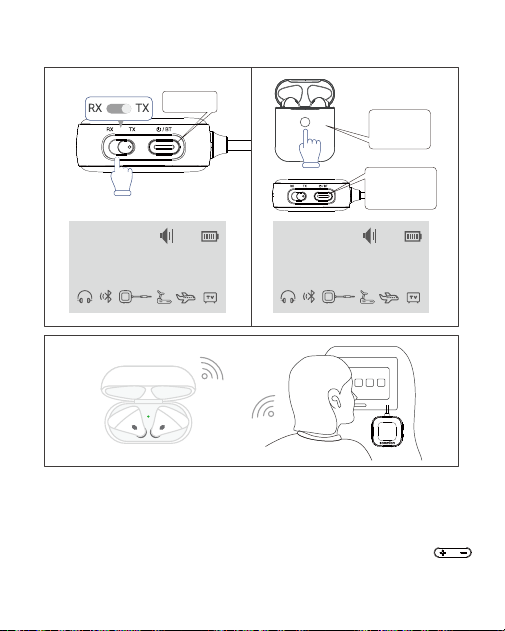
Associazione del 1° dispositivo Bluetooth:
1. Accendere il BT35 e impostarlo in modalità TX.
2. Impostare il dispositivo Bluetooth (cuffie, altoparlanti, ecc.) in modalità
di associazione.
3. Quando il dispositivo appare sullo schermo, utilizzare i pulsanti
per selezionarlo, quindi premere il pulsante multifunzione per
confermare.
4. Collegare il BT35 alla sorgente audio tramite il jack da 3,5 mm.
-28
Come utilizzare il dispositivo come trasmettitore
Bluetooth (TX)
3
1 2
Impostare in modalità TX
Tenere premuto
per accendere
Quando il disposi�vo
appare, premere
brevemente il
pulsante di pairing.
Me�ere il headset
in modalità di
accoppiamento
Bluetooth.
TX
aptX-LL
Searching.......
16
TX
aptX-LL
AirPods
16
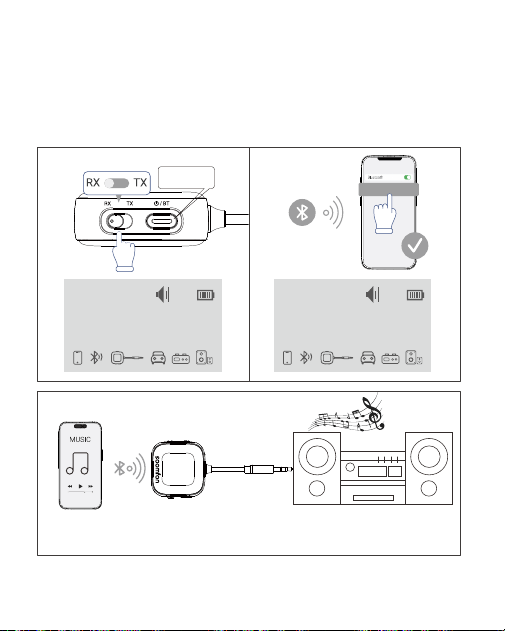
Associazione del 2° dispositivo Bluetooth:
1. Accendere il secondo dispositivo e impostarlo in modalità di
associazione.
2. Fare doppio clic sul pulsante multifunzione per entrare in modalità di
ricerca, quindi ripetere i passaggi 3–4 per completare la connessione.
-29
Come utilizzare il dispositivo come ricevitore Bluetooth (RX)
Collegare il BT35 al disposi�vo audio tramite il jack da 3,5 mm per
trasme�ere musica in modalità wireless.
RX
Connecting...
BT35
16
aptX
RX
iPhone 15
16
aptX
3
1 2
BT35
Impostare la modalità RX
Tenere premuto
per accendere
A�vare il Bluetooth
sul telefono e
conne�ersi a BT35

Associazione del 1° dispositivo Bluetooth:
1. Accendere il BT35 e impostarlo in modalità RX.
2. Attivare il Bluetooth sul dispositivo (telefono, tablet, ecc.) e selezionare
“BT35” dall’elenco.
3. Collegare il BT35 al dispositivo audio tramite il jack da 3,5 mm.
Associazione del 2° dispositivo:
Ripetere il passaggio 2 per il secondo dispositivo.
Nota: solo un dispositivo può riprodurre l’audio alla volta. Per passare da
un dispositivo all’altro, mettere in pausa la riproduzione sul dispositivo
attuale prima di avviare quella sull’ altro.
Risoluzione dei problemi
Problemi di associazione?
1. Il BT35 NON è adatto per strumenti musicali, karaoke o musica dal vivo.
NON supporta Dolby Audio.
2. Selezionare la modalità corretta (TX/RX). La prima associazione
potrebbe richiedere più tempo; mantenere il BT35 il più vicino possibile
alle cuffie.
3. In modalità TX, la funzione di memoria potrebbe NON funzionare con
cuffie che utilizzano protocolli proprietari (ad es. AirPods, che danno
priorità alla connessione con iPhone o iPad).
4. NON compatibile con dispositivi che richiedono l’associazione tramite
codice PIN.
5. NESSUN microfono; NON può essere utilizzato per le chiamate.
6. Premere rapidamente il pulsante multifunzione 5 volte per cancellare
la cronologia di associazione.
7. La regolazione del volume individuale per ciascun auricolare NON è
disponibile quando si utilizza questo prodotto.
8. NON compatibile con Alexa, Echo Dot, Xbox o console PlayStation.
-30

Ritardo audio?
Il BT35 supporta la tecnologia aptX LL a bassa latenza. aptX LL è un codec
audio che consente una trasmissione con bassa latenza. Per ottenere
prestazioni a bassa latenza, assicurarsi che anche le cuffie supportino la
tecnologia aptX LL. Se le cuffie NON supportano aptX LL, la riproduzione
passerà automaticamente al formato SBC.
Connessione instabile?
1. Verificare se la batteria è scarica.
2. Assicurarsi che il dispositivo si trovi entro un raggio di 10 metri per
evitare l’indebolimento del segnale.
3. Tenere distanza da dispositivi di trasmissione del segnale come router.
Lo schermo si spegne?
Lo schermo LCD si spegne automaticamente dopo 2 minuti di inattività
per risparmiare energia. Premere qualsiasi pulsante per riaccenderlo.
Servizio Clienti
Contattaci:
Sito ufficiale: https://soomfon.com/
Email: [email protected]
WhatsApp: +852 69435863
-31
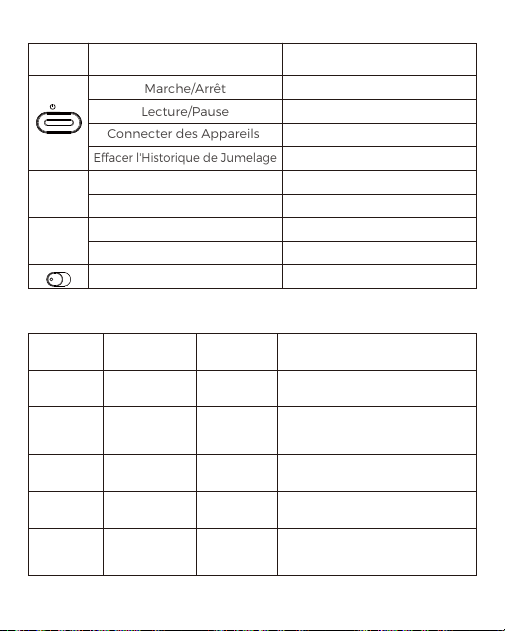
FR: Opérations des Boutons
Comparaison des formats et paramètres d'encodeur
-32
Encodeur
Paramètre
de retard
Support
de mode
Note
SBC 150 - 220 ms TX/RX
Codec Bluetooth standard, avec
une latence relativement élevée.
AAC 90 - 150 ms RX
Idéal pour les appareils Apple :
dépasse SBC en audio et en
latence sur iOS.
aptX 70 - 130 ms TX/RX
Une amélioration significative
par rapport au SBC.
aptX HD 70 - 130 ms TX/RX
Améliore l'audio sans fil pour la
musique haute fidélité.
aptX LL ≤40ms TX
Bien en dessous du seuil de
l'audition humaine, idéal pour
les films et les jeux.
/
BT
Bouton Fonction
Marche/Arrêt
Lecture/Pause
Connecter des Appareils
Effacer l'Historique de Jumelage
Sélection Vers le Haut
Augmentez le Volume
Presse Courte
Presse
Sélection Vers le Bas
Baissez le Volume
Presse Courte
Presse
Sélectionner le Mode TX/RX Basculer gauche et droite
Appui Long
Appui Court
Appui Court
Appuyez Rapidement 5 Fois
Opération
+
-
TX RX

Sortie codec (Single vs Double)
Se connecter avec 1 casque
Se connecter avec 2 casques
-33
Formats pris en charge
(adaptateur Bluetooth)
aptX HD/aptX-LL
/aptx/SBC
Format pris en charge
(Casque)
Formats de
sortie finale
aptX LL aptX LL
aptX HD aptX HD
aptX aptX
SBC SBC
Formats pris en
charge
(adaptateur Bluetooth)
aptX HD/aptX-LL
/aptx/SBC
Le premier casque
prend en
charge les formats
Le 2ème casque
prend en charge
les formats
Format de
sortie finale
aptX LL aptX LL aptX
aptX HD aptX
aptX/SBC aptX LL
aptX LL/SBC
aptX LL/aptX
aptX
SBC
aptX
SBC
SBC
SBC
-34
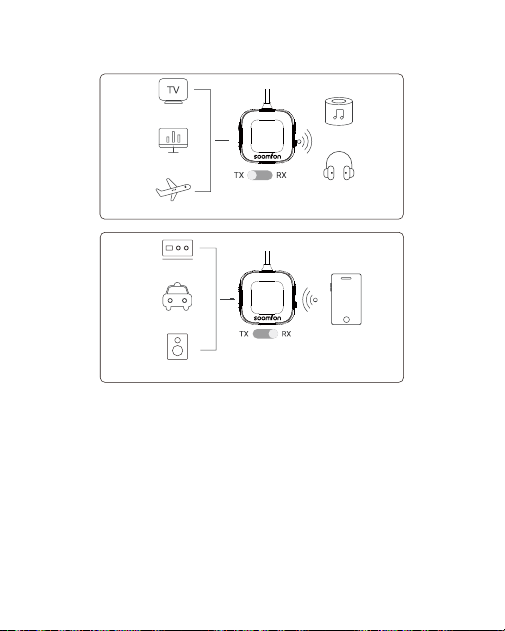
Mode Émetteur (TX)
Permet aux écouteurs ou haut-parleurs Bluetooth de se connecter à des
appareils non Bluetooth tels que des téléviseurs, des PC et des tapis de
course.
Mode Récepteur (RX)
Permet la transmission audio sans fil depuis votre téléphone ou votre
ordinateur vers des appareils de réception non Bluetooth, tels que des
autoradios, des écouteurs filaires et des chaînes stéréo domestiques.
Fonctions du Mode Émetteur/Récepteur (TX/RX)
TV
Avion
Home Stereo
Voiture sans
Bluetooth
Haut-parleur
sans Bluetooth
Téléphone
portable
Ordinateur
Haut-parleur
Bluetooth
Casque Bluetooth
/
BT
Couplage du 1er Appareil Bluetooth:
1. Allumez le BT35 et passez-le en mode TX.
2. Activez le mode de couplage sur votre appareil Bluetooth tel qu'un
casque ou des enceintes (reportez-vous au manuel de l'appareil).
3. Après un court instant, votre appareil Bluetooth apparaîtra à l'écran.
Utilisez les boutons " " pour sélectionner l'appareil (si plusieurs
appareils sont répertoriés), puis appuyez sur " " pour confirmer la
connexion.
4. Connectez le BT35 à l'appareil de sortie audio
à l'aide de la prise jack 3,5mm.
-35
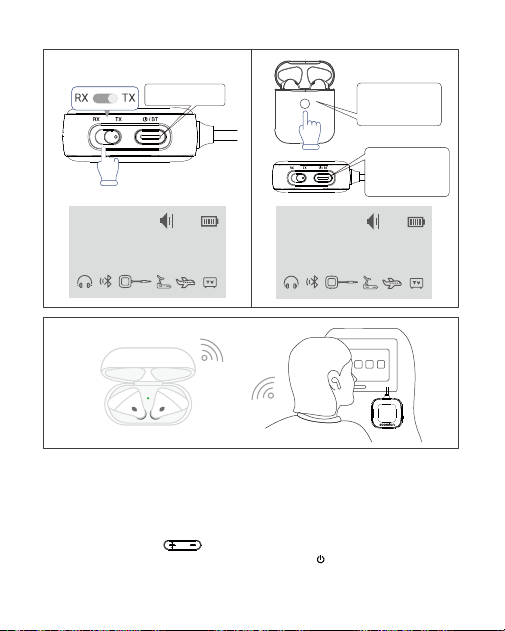
Comment Utiliser Comme Émetteur Bluetooth (TX) ?
TX
aptX-LL
Searching.......
16
3
1 2
Appui long pour la
mise sous tension
Passez en mode TX
Lorsque votre
appareil est affiché,
appuyez brièvement
sur le bouton
d'appairage
Allumez votre
oreille�e Bluetooth
en mode
d'appairage
TX
aptX-LL
AirPods
16
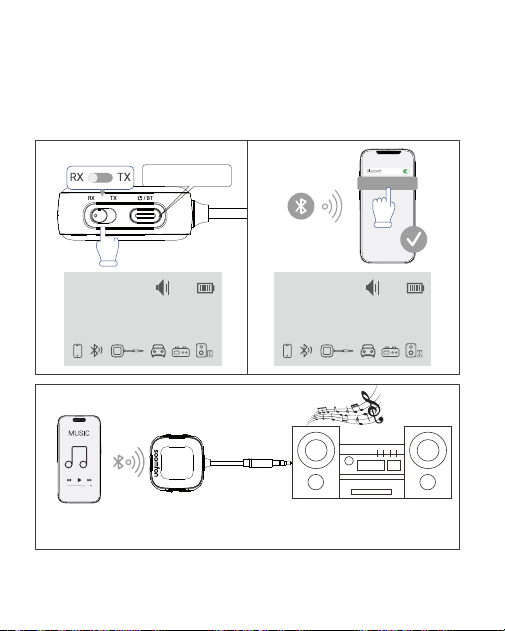
Couplage du 2e Appareil Bluetooth:
1. Allumez le deuxième appareil Bluetooth pour passer en mode de couplage.
2. Double-cliquez sur le bouton multifonction pour passer en mode de
recherche et répétez les étapes de connexion pour le premier appareil afin
de terminer la connexion.
-36
Comment Utiliser Comme Récepteur Bluetooth (RX) ?
Branchez le BT35 sur l'entrée audio de votre appareil de lecture audio
pour écouter de la musique sans fil.
RX
Connecting...
BT35
16
aptX
RX
iPhone 15
16
aptX
3
1 2
BT35
Appuyez longuement
pour allumer
Régler sur le mode RX
Ac�vez le Bluetooth
sur votre téléphone
et connectez-vous
au BT35

Dépannage
Problèmes de jumelage ?
1. BT35 ne convient PAS à l'utilisation avec des instruments de musique,
du karaoké ou de la musique en direct. Il ne prend pas en charge Dolby
Audio.
2. Sélectionnez le mode correct (TX/RX). Le couplage initial peut prendre
plus de temps; Gardez le BT35 le plus près possible de vos casques.
3. En mode TX, la fonction mémoire peut NE PAS fonctionner avec des
casques utilisant des protocoles propriétaires (par exemple, les AirPods
donnent la priorité à la connexion à des appareils iPhone ou iPad par
rapport à d'autres).
4. PAS compatible avec les appareils nécessitant l'appariement de codes
PIN.
5. PAS de microphone; Il ne peut pas être utilisé pour les appels.
6.Quikly appuyez sur le bouton « » 5 fois rapidement pour effacer
l'historique de l'appariement.
7. Le réglage du volume individuel pour chaque écouteur n'est PAS
disponible lors de l'utilisation de ce produit.
8. PAS compatible avec les consoles Alexa, Echo Dot, Xbox ou PlayStation.
/
BT
Couplage du 1er Appareil Bluetooth:
1. Allumez le BT35 et passez-le en mode RX.
2. Activez le Bluetooth sur votre téléphone et sélectionnez "BT35" dans la
liste.
3. Connectez le BT35 à l'appareil de lecture audio à l'aide de la prise jack
3,5mm.
Couplage du 2e Appareil:
Répétez la deuxième étape du processus de connexion du premier
appareil.
Nota: Seul un appareil peut lire l'audio à la fois. Pour commuter, mettez
en pause la lecture sur l'appareil actuel avant de lire à partir de l'autre.
-37

Délai audio ?
Le BT35 prend en charge la technologie aptX LL à faible latence. aptX LL
est un format de décodage audio qui permet une transmission à faible
latence. Pour obtenir des performances à faible latence, assurez-vous que
vos casques prennent également en charge la technologie aptX LL. Si vos
casques ne prennent pas en charge la fonctionnalité aptX LL à faible
latence, la lecture sera au format SBC par défaut.
Connexion instable ?
1. Vérifiez si la batterie est faible.
2. Assurez-vous que l'appareil se trouve à moins de 10mètres de distance
pour éviter l'affaiblissement du signal.
3. Restez à distance des appareils de transmission de signaux tels que les
routeurs.
L'écran s'éteint ?
L'écran LCD s'éteint après 2 minutes d'inactivité pour économiser
l'énergie. Appuyez sur n'importe quel bouton pour le rallumer.
Service à la clientèle
Contactez-nous :
Site Officiel: https://soomfon.com/
Courriel: [email protected]om
WhatsApp: +852 69435863
-38
ES: Operaciones con Botones
Comparación de Formatos y Parámetros de Codificación
-39
Codificador
Parámetro
de Retardo
Soporte
de Modo
Nota
SBC 150 - 220 ms TX/RX
Códec Bluetooth estándar con
latencia relativamente alta.
AAC 90 - 150 ms RX
Ideal para dispositivos Apple:
supera al SBC en audio y
latencia en iOS.
aptX 70 - 130 ms TX/RX
Una mejora significativa
respecto al SBC.
aptX HD 70 - 130 ms TX/RX
Mejora el audio inalámbrico
para música de alta fidelidad.
aptX LL ≤40ms TX
Muy por debajo del umbral
auditivo humano: ideal para
películas y videojuegos.
/
BT
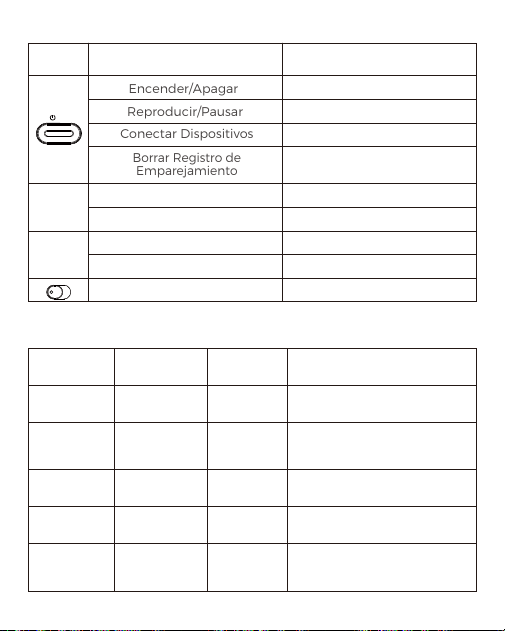
Botón Función
Encender/Apagar
Reproducir/Pausar
Conectar Dispositivos
Borrar Registro de
Emparejamiento
Selección Ascendente
Subir Volumen
Pulsación Breve
Presionar
Selección Descendente
Bajar Volumen
Pulsación Breve
Presionar
Seleccionar Modo TX/RX Deslizar
Pulsación prolongada
Pulsación Breve
Pulsación Breve
Pulsación Rápida 5 Veces
Operación
+
-
TX RX

Salida de Códec (Individual vs Doble)
Conexión con 1 Auricular
Conexión con 2 Auriculares
-40
Formatos Admitidos
(Adaptador Bluetooth)
aptX HD/aptX-LL
/aptx/SBC
Formatos Admitidos
(Auriculares)
Formatos de
Salida Finales
aptX LL aptX LL
aptX HD aptX HD
aptX aptX
SBC SBC
Formatos Admitidos
(Adaptador Bluetooth)
aptX HD/aptX-LL
/aptx/SBC
Formatos que admite
el 1.er auricular
Formatos que admite
el 2.º auricular
Formato de
Salida Final
aptX LL aptX LL aptX
aptX HD aptX
aptX/SBC aptX LL
aptX LL/SBC
aptX LL/aptX
aptX
SBC
aptX
SBC
SBC
SBC
-41
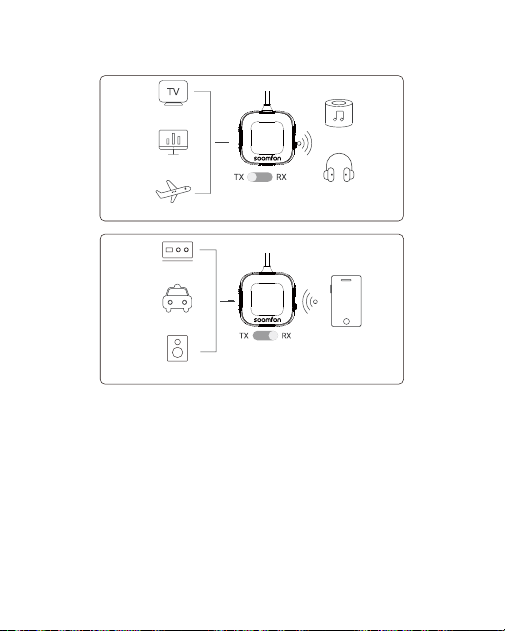
Modo Transmisor (TX)
Permite que los auriculares o altavoces Bluetooth se conecten con
dispositivos que no sean Bluetooth, como televisores, PC y cintas de
correr.
Modo Receptor (RX)
Permite la transmisión inalámbrica de audio desde el teléfono o la
computadora a dispositivos que no sean receptores Bluetooth, como
equipos de sonido para automóviles, auriculares con cable y equipos de
sonido para el hogar.
Funciones del Modo Transmisor/Receptor (TX/RX)
TV
Avión
Ordenador
Altavoz
Bluetooth
Auriculares
Bluetooth
Equipo de Música
Doméstico
Coche sin
Bluetooth
Altavoz sin
Bluetooth
Teléfono Móvil
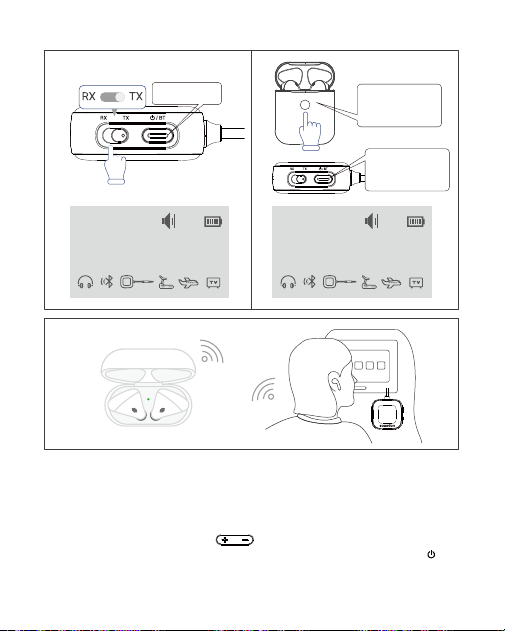
Emparejamiento del Primer Dispositivo Bluetooth:
1. Encienda el BT35 y cámbielo al modo TX.
2. Active el modo de emparejamiento en su dispositivo Bluetooth, como
auriculares o altavoces (consulte el manual del dispositivo).
3. Después de un breve momento, su dispositivo Bluetooth aparecerá en la
pantalla. Utilice los botones " " para seleccionar el dispositivo (si
aparecen varios dispositivos en la lista) y, a continuación, pulse " "
para confirmar la conexión.
4. Conecte el BT35 al dispositivo de salida de audio
mediante el conector de 3,5 mm.
/
BT
-42
¿Cómo Usar Como Transmisor Bluetooth (TX)?
TX
aptX-LL
Searching.......
16
TX
aptX-LL
AirPods
16
3
1 2
Pulsación larga
para encender
Poner en modo TX
Cuando aparezca tu
disposi�vo, pulsa
brevemente el botón
de emparejamiento
Encienda el
auricular Bluetooth
en modo de
emparejamiento
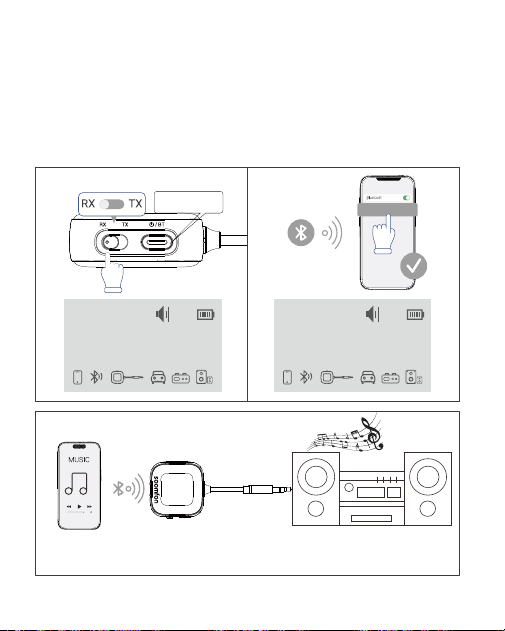
Emparejamiento del Segundo Dispositivo Bluetooth:
1. Encienda el segundo dispositivo Bluetooth para entrar en el modo de
emparejamiento.
2. Haga doble clic en el botón multifunción para entrar en el modo de
búsqueda y repita los pasos de conexión para el primer dispositivo para
completar la conexión.
-43
¿Cómo Usar Como Receptor Bluetooth (RX)?
Conecte el BT35 a la entrada de audio de su disposi�vo de reproducción
de audio para escuchar música de forma inalámbrica.
RX
Connecting...
BT35
16
aptX
RX
iPhone 15
16
aptX
3
1 2
BT35
Pulsación larga
para encender
Seleccione el modo RX
Enciende el Bluetooth
de tu teléfono y
conéctalo al BT35

Solución de problemas
¿Problemas de emparejamiento?
1. El BT35 NO es adecuado para su uso con instrumentos musicales,
karaoke o música en directo. No es compatible con Dolby Audio.
2. Seleccione el modo correcto (TX/RX). El emparejamiento inicial puede
tardar más; mantenga el BT35 lo más cerca posible de sus auriculares.
3. En modo TX, es posible que la función de memoria NO funcione con
auriculares que utilicen protocolos propietarios (por ejemplo, los AirPods
priorizan la conexión con dispositivos iPhone o iPad sobre otros).
4. NO es compatible con dispositivos que requieran un código PIN para
el emparejamiento.
5. NO tiene micrófono; no se puede utilizar para llamadas.
6. Presione rápidamente el botón “ ” 5 veces seguidas para borrar el
historial de emparejamiento.
7. NO es posible ajustar el volumen de cada auricular de forma individual
al usar este producto.
8. NO es compatible con Alexa, Echo Dot, consolas Xbox o PlayStation.
/
BT
Emparejamiento del Primer Dispositivo Bluetooth:
1. Encienda el BT35 y cámbielo al modo RX.
2. Habilite el Bluetooth en su teléfono y seleccione "BT35" de la lista.
3. Conecte el BT35 al dispositivo de reproducción de audio mediante el
conector de 3,5 mm.
Emparejamiento del Segundo Dispositivo:
Repita el segundo paso del proceso de conexión del primer dispositivo.
Nota: Solo un teléfono puede reproducir audio a la vez. Para reproducir
audio desde el segundo teléfono, primero debe pausar la reproducción
en el primer teléfono.
-44

¿Retraso de audio?
El BT35 es compatible con la tecnología de baja latencia aptX LL. aptX LL
es un formato de decodificación de audio que permite una transmisión
de baja latencia. Para lograr un rendimiento de baja latencia, asegúrese
de que sus auriculares también sean compatibles con la tecnología aptX
LL. Si sus auriculares no son compatibles con la funcionalidad de baja
latencia aptX LL, la reproducción utilizará por defecto el formato SBC.
¿Conexión inestable?
1. Compruebe si la batería está baja.
2. Asegúrese de que el dispositivo se encuentre dentro de un rango de 10
metros para evitar el debilitamiento de la señal.
3. Manténgase alejado de dispositivos de transmisión de señal, como
enrutadores.
¿La pantalla se apaga?
La pantalla LCD se apaga después de 2 minutos de inactividad para
ahorrar energía. Presione cualquier botón para volver a encenderla.
Servicio de atención al cliente
Contáctenos:
Sitio Web Oficial: https://soomfon.com/
Correo Electrónico: support@soomfon.com
WhatsApp: +852 69435863
-45