1
Connect the baby monitor
1
Connect the baby monitor (cont’d)
2
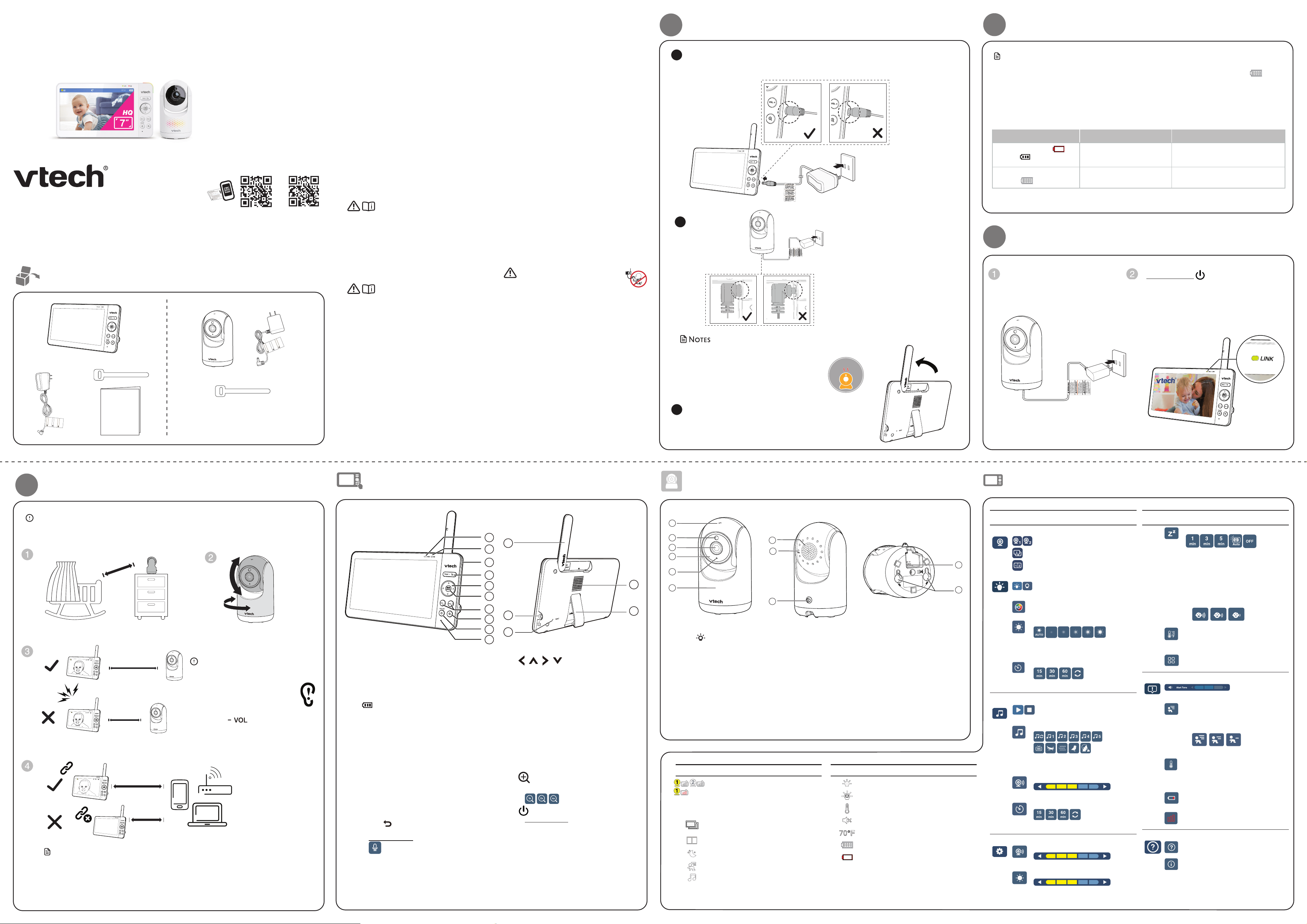
Power on or off the baby monitor
Connect the baby unit to a power
supply to turn it on. Disconnect the
baby unit to turn it off.
Press and hold to power on or off your
parent unit.
Once you power on both your baby unit
and parent unit, your parent unit displays
images from the baby unit, and the LINK
LED light turns on.
• Peel off the lens/screen protector before use.
• The baby unit may get warm during use. This is
normal.
For optimum reception, always raise the parent unit
antenna.
Connect the parent unit and baby unit to the supplied adapters and mains supply.
The parent unit will turn on automatically after connecting to the power socket.
1
2
3
WARM
WARM
NOTESNOTE
Notes
• Before using the baby monitor for the first time, charge the parent unit battery for 12 hours.
When the parent unit battery is fully charged, the battery icon segments become solid .
• It takes longer to charge the battery when the parent unit is turned on. To shorten the charging
time, turn the parent unit off while charging.
• The standby time varies depending on the sensitivity level you set, your actual use and the age of
the battery.
The battery icon indicates the battery status (see the following table).
Battery indicators Battery status Action
The screen displays .
The red light flashes.
The battery has very little
charge and may be used for
only a short time.
Charge
without interruption
(about
30 minutes).
The battery icon segments
are solid .
The battery is fully charged. To keep the battery charged, connect
it to AC power when in use.
Main
Menu
Sub-
menu
Options
Monitoring mode (For Advanced HQ Max Twin only)
• View baby units in Single mode.
• View baby units in Patrol mode
(switch view every 10 seconds).
• View baby units in Split screen.
Night light
On/Off
• Toggle the night light on or off.
Color
• Select one of the 10 night light colors.
Brightness
• Adjust the night light brightness.
• Set the brightness to AUTO adaptive
ambience.
Timer
• Set the timer to turn the night light off
after 15, 30 or 60 minutes, or always on.
Melodies and soothing sounds
Play/Stop
• Toggle between play and stop.
Library
• Select to play all melodies, or play one
of the five melodies or five soothing
sounds.
Camera Volume
• Adjusts baby unit speaker volume.
Timer
• Set the timer to stop playing after 15, 30
or 60 minutes, or play non-stop.
General settings
Camera Volume
• Adjusts baby unit speaker volume.
Screen Brightness
• Adjusts parent unit screen brightness.
Main
Menu
Sub-
menu
Options
Screen Off Timer
• Turn the screen off timer OFF, or set
the screen to turn off after 1, 3 or 5
minutes when no sound is detected.
• Select AUTO to set the Sound Sensitivity
level for the screen to auto turn on
when a sound level is detected that is
higher than the set level. The screen will
turn off after 50 seconds of no sound
detection.
Temperature Format
• Set the temperature display format
between Celsius or Fahrenheit.
Other
• Reset settings
Alerts Settings
• Adjusts the alert tone volume level.
Motion Detect
• Turn the motion detection alert on/off.
• Adjust Motion Sensitivity level for
waking the parent unit screen.
Low Medium High
Temperature
• Turn the temperature alert on/off.
• Select the temperature alert maximum
and minimum temperature limits.
Low Battery
• Toggle the low battery alert on or off.
Lost Link
• Toggle the lost link alert on or off.
Help and info
Help
• Support Information
System Info
• System Information
Parent unit icons
Overview - Baby unit
1
Night Light Control Key
• Tap to turn on/off the night light.
2 Light Sensor
3 Camera lens
4 Infrared LEDs
• Allows you to see clearly in a dark
environment.
5 Microphone
6 Night light
7 Speaker
8 PAIR key
• The parent unit and baby unit
provided are already paired.
9 Temperature sensor
10 Power jack
11 Slots for wall mounting
Overview - Parent unit
Low Medium High
Advanced HQ Max
Advanced HQ Max Twin
7” High-Quality
Pan & Tilt Video Monitor
Quick start guide
Go to www.vtechbabycare.com
to register your product for
enhanced warranty support and the
latest VTech product news.
Congratulations
on purchasing your new VTech product.
Before using this baby monitor, please read the Important safety instructions.
What’s in the box
Quick start guide
Strangulation
Hazard
Keep this cord out of reach of children.
The cord needs to be at least three feet
away from the child at all times. Do not
use with an extension cord. Do not
remove this tag.
Éloignez ce cordon des enfants. Le
cordon doit se trouver à au moins trois
pieds d’un enfant et ce, en tout temps.
N’utilisez pas de rallonge. Ne retirez pas
cette étiquette.
Mantenga este cable fuera de la alcance
de los niños. Este cable debe estar por
lo menos tres pies fuera de la alcance
del niño en todo momento. No lo use
con una extensión inalámbrica. No quite
esta etiqueta.
Risque
d’étranglement
Riesgo de
estrangulación
Strangulation
Hazard
Keep this cord out of reach of children.
The cord needs to be at least three feet
away from the child at all times. Do not
use with an extension cord. Do not
remove this tag.
Éloignez ce cordon des enfants. Le
cordon doit se trouver à au moins trois
pieds d’un enfant et ce, en tout temps.
N’utilisez pas de rallonge. Ne retirez pas
cette étiquette.
Mantenga este cable fuera de la alcance
de los niños. Este cable debe estar por
lo menos tres pies fuera de la alcance
del niño en todo momento. No lo use
con una extensión inalámbrica. No quite
esta etiqueta.
Risque
d’étranglement
Riesgo de
estrangulación
1 set for Advanced HQ Max
2 sets for Advanced HQ Max Twin
The applied nameplate is located at the bottom of the baby unit base.
When in use, basic safety precautions should always be followed
to reduce the risk of fire, electric shock and injury, including the
following:
1. Follow all warnings and instructions marked on the product.
2. Adult setup is required.
3. CAUTION: Do not install the baby unit at a height above 6.5
feet (2 meters).
4. This product is intended as an aid. It is not a substitute for
responsible and proper adult supervision and should not be
used as such.
5. This product is not intended for use as a medical monitor.
6. Do not use this product near water, for example, near to a
bath, sink, swimming pool or shower.
7. CAUTION: Use only the internal, non-user replaceable battery
fitted to the parent unit. There may be a risk of explosion if a
wrong type of battery is used for the parent unit. The battery
cannot be subjected to high or low extreme temperature
and low air pressure at high altitude during use, storage or
transportation. Disposal of batteries in fire or a hot oven, me-
chanically crushing or cutting the battery can result in an ex-
plosion. Subjecting products or batteries to an extremely high
temperature environment can result in explosion or leakage of
flammable liquids, or gas. Products or batteries subjected to
extremely low air pressures may result in explosion or leakage
of flammable liquids, or gas. Dispose of used batteries accord-
ing to the information in The RBRC seal.
8. Use only the power adapters supplied with this product.
Incorrect power adapter polarity or voltage can seriously dam-
age the product.
Power adapter information:
Baby Unit Output: 5V DC 1A
VTech Telecommunications Ltd.
Model: VT05EUS05100
-OR-
Jiangxi Jian Aohai Technology Co., Ltd.
Model: A318-050100W-US2
Parent Unit Output: 5V DC 2A
VTech Telecommunications Ltd.
Model: VT07EUS05200
-OR-
Jiangxi Jian Aohai Technology Co., Ltd.
Model: A938-050200W-US1
Rechargeable battery information:
3.7V 5000mAh, 18.5Wh Lithium-ion battery
Zhuhai Great Power Energy Co., Ltd.
Model: GSP806090-5Ah-3.7V-1S1P
9. The power adapter is intended to be correctly oriented in a
vertical or floor mount position. The prongs are not designed
to hold the plug in place if it is plugged into a ceiling, un-
der-the-table or cabinet outlet.
10. For pluggable equipment, the socket-outlet (power adapter)
should be installed near the equipment and should be easily
accessible.
11. Unplug this product from the wall outlet before cleaning.
Do not use liquid or aerosol cleaners. Use a damp cloth for
cleaning.
12. Do not modify the power adapters or replace with other
third-party adapters.
13. Do not allow anything to rest on the power cords. Do not
install this product where the cords may be walked on or
damaged.
14. The product should only be operated from a power source
indicated on the power adapter label or marking. If you are
unsure of the type of power supply in your home, consult your
dealer or electricity supply provider.
15. Do not overload wall outlets or use an extension cord.
16. Do not place this product on an unstable table, shelf, stand or
other unstable surfaces.
17. This product should not be placed in any area where proper
ventilation is not provided. Any slots or openings in the back
or bottom of this product are provided for ventilation. To
protect from overheating, openings must not be blocked
by placing the product on a soft surface such as a bed, sofa
or rug. This product should never be placed near or over a
radiator or heat source.
18. Never insert any objects through any apertures or slots in the
product as this can be dangerous and cause damage to the bat-
tery or other internal parts. Never spill any liquids on the product.
19. To reduce the risk of electric shock, do not disassemble this
product, but take it to an authorized service facility. Disas-
sembling or removing parts of the product other than battery
replacement via a battery door (if applicable) may expose
dangerous voltages or other risks.
20. You should test the sound reception every time you turn on
the units or move one of the components.
21. Periodically examine all components for damage.
22. There is a very low risk of privacy loss when using certain elec-
tronic devices, such as baby monitors, cordless telephones,
etc. To protect your privacy, make sure the product has never
been used before purchase, reset the baby monitor period-
ically by powering off and then powering on the units, and
power off the baby monitor if you are not intending to use it
for some time.
23. Children should be supervised to ensure that they do not play
with the product.
24. The small parts of this monitor can be swallowed by babies or
small children. Keep these parts out of reach of children.
25. The product is not intended for use by persons (including
children) with reduced physical, sensory or mental capabili-
ties, or lack of experience and knowledge, unless they have
been given supervision or instruction concerning use of the
appliance by a person responsible for their safety.
SAVE THESE INSTRUCTIONS
Cautions
• Use and store the product at a temperature between 32
o
F
(0
o
C) and 104
o
F (40
o
C).
• Mishandling batteries can cause burn, fire or explosion
hazards.
• Batteries should not be exposed to excessive heat such as
bright sunshine or fire.
• Do not expose the product to extreme cold, heat or direct
sunlight. Do not place the product close to a heating source.
• Warning—Strangulation Hazard—Children
have STRANGLED in cords. Keep this cord out of
the reach of children (more than 3 ft (0.9m) away).
Do not remove warning label on the adapter cord.
• Never place the camera unit(s) inside the baby’s crib or
playpen. Never cover the camera unit(s) or parent unit with
anything such as a towel or a blanket.
• Other electronic products can cause interference to your
parent unit and baby unit. Try installing your baby unit as
far away as possible from the following electronic devices:
wireless routers, radios, mobile telephones, intercoms, room
monitors, televisions, personal computers, kitchen appliances
(e.g. microwave ovens) and cordless telephones.
Precautions for users of implanted cardiac pacemakers
Cardiac pacemakers (applies only to digital cordless devices):
Wireless Technology Research, LLC (WTR), an independent
research entity, led a multidisciplinary evaluation of the
interference between portable wireless devices and implanted
cardiac pacemakers. Supported by the U.S. Food and Drug
Administration, WTR recommends to physicians that:
Pacemaker patients
• Should keep wireless devices at least six inches from the
pacemaker.
• Should NOT place wireless devices directly over the
pacemaker, such as in a breast pocket, when it is turned ON.
WTR’s evaluation did not identify any risk to bystanders with
pacemakers from other persons using wireless devices.
Electromagnetic elds (EMF)
This VTech product complies with all standards regarding
electromagnetic fields (EMF). If handled properly and according
to the instructions in this user’s manual, the product is safe to be
used based on scientific evidence available today.
Important safety instructions
Status icons
Direct mode
Parent unit and baby unit are connected to
each other directly.
Signal strength is indicated by the signal icon(s)
on the right.
The red bar(s) indicates no connection.
Baby unit 1 and 2 are being viewed in Patrol
mode (For Advanced HQ Max Twin only).
Baby unit 1 and 2 are being viewed in Split
mode (For Advanced HQ Max Twin only).
Night vision is turned on.
Motion detection alert is turned on.
Melodies and soothing sounds are playing.
Status icons
Night light is turned on.
Auto night light brightness is activated.
Temperature alert is turned on.
Parent unit is muted.
Temperature measured at baby unit.
Battery level indicator
Low battery indicator
1
2
8
6
7
9
10
11
4
5
3
1
2
8
6
7
9
10
11
4
5
3
1
2
8
6
7
9
10
11
4
5
3
3
Positioning the baby monitor
Caution
• For hearing protection, make sure the
parent unit is more than 3 feet (1 meter)
away from the baby unit.
If you hear any feedback noise
from the parent unit, move the
parent unit further away from the
baby unit until the noise stops. You can
also press on the parent unit to
lower or mute the noise.
NOTESNOTE
Note
• To avoid interference from other electronic devices, place your baby
monitor at least 3 feet (1 meter) away from devices such as wireless
routers, microwave ovens, mobile phones and computers.
Caution
• Keep the baby unit out of the reach of your baby. Never place or mount the baby unit inside the
baby’s cot or playpen.
>
3ft (1m)
≥
<
3ft (1m)
3ft (1m)
﹏﹏﹏﹏﹏﹏
﹏﹏﹏﹏﹏﹏
﹏﹏﹏﹏﹏﹏﹏﹏
﹏﹏﹏﹏﹏﹏﹏﹏
﹏﹏﹏﹏﹏﹏﹏﹏
﹏﹏﹏﹏﹏﹏﹏﹏﹏﹏
﹏﹏﹏﹏﹏﹏﹏﹏﹏﹏
﹏﹏﹏﹏﹏﹏﹏﹏﹏﹏
﹏﹏﹏
﹏﹏﹏
﹏﹏﹏﹏
﹏﹏﹏﹏
﹏﹏﹏﹏
﹏﹏﹏﹏﹏
﹏﹏﹏﹏﹏
﹏﹏﹏﹏﹏
1 LINK LED light
• On when the parent unit is linked to the
baby unit.
• Flashes when the link to the baby unit
is lost.
2
LED light
• On when the parent unit is connected
to AC power, and the battery is
charging.
• Flashes when the parent unit battery is
low and needs to be charged.
3 3- level sound indicator light
The lights indicate different sound levels
detected from the baby unit.
• Green light: low sound level.
• Green and amber lights: moderate
sound level.
• Green, amber, and red lights: high
sound level.
4
TALK /
• Press and hold to talk to the baby unit.
is displayed on screen while the
button is pressed.
• While in a sub-menu, press to exit.
5
|
|
|
Arrow keys
• Press to navigate leftward, upward,
rightward or downward, within the
main menu and sub-menus.
• Press to move the baby unit camera
leftward, rightward, upward or
downward.
6 MENU/SELECT
• Press to enter the main menu.
• While in a menu, press to confirm a
selection, or save a setting.
7 - VOL/ VOL +
• Increase or decrease parent unit
volume.
8
Zoom
• Press to zoom in/out to different levels.
9
Power
|
LCD OFF
• Press and hold to turn on/off the power.
• Press to turn on/off the LCD screen.
10 Microphone
11 Antenna
12 Power jack
13 RESET
• Force reboot the parent unit.
14 Speaker
15 Stand
2
1
3
4
5
6
7
8
9
10
14
15
13
12
11
S
m
Advanced HQ Max
Advanced HQ Max
Twin
Model No.: 346800
< 1 m
> 1
m
>3ft (1m)
<3ft (1m)
Model No.: 346700
For more support, email
support@vtechbabycare.com
or scan the QR code below for
product information.
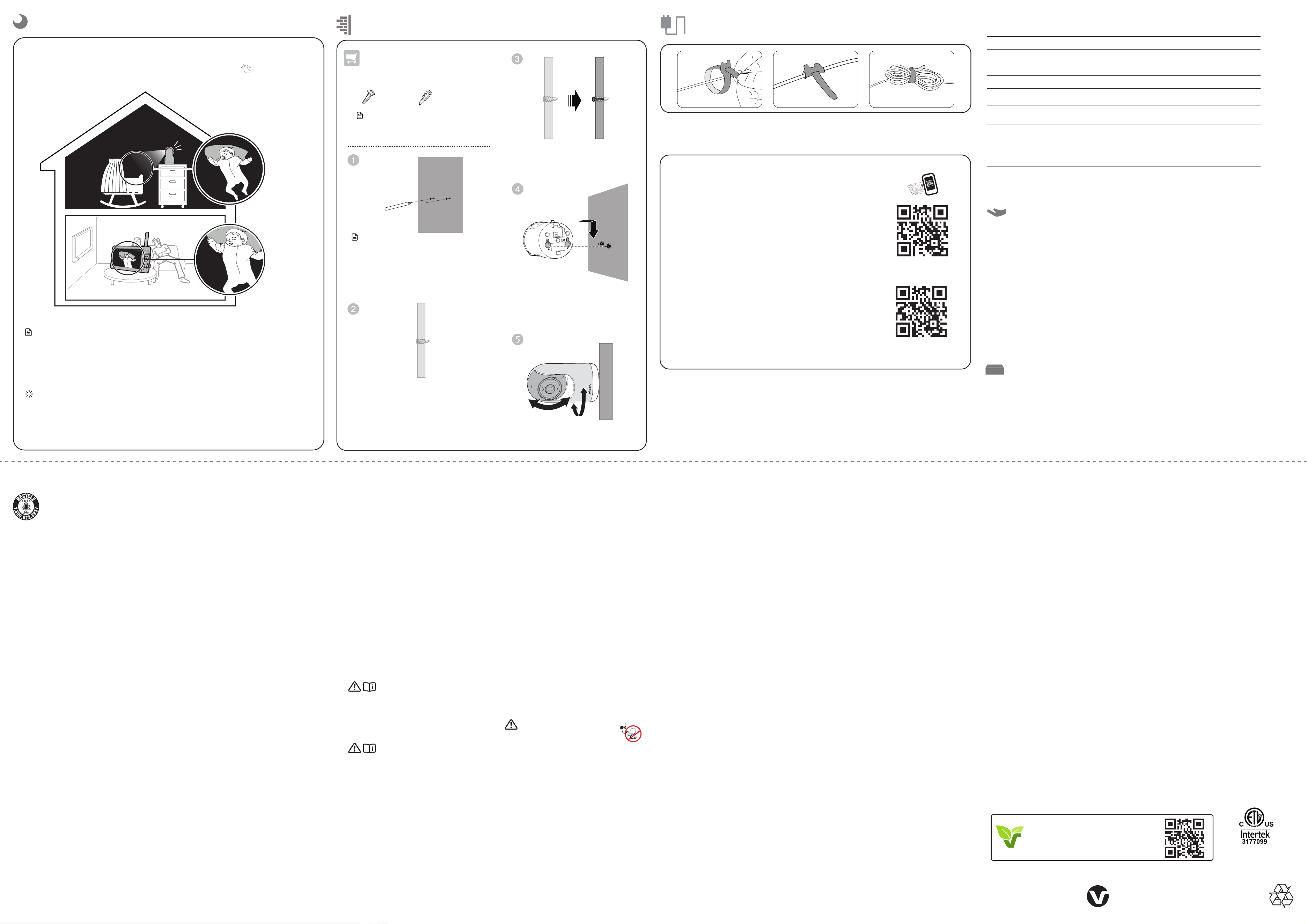
mount the baby unit (optional)
Night vision
Notes
• A click sound from the baby unit is normal and occurs when your unit adapts to the environment
lighting conditions.
• To achieve accurate and high quality video, your baby unit is equipped with an Infrared cut-off
filter lens that optimizes color accuracy in bright, day-time environments. When the environment
turns dark at night, this filter lens is withdrawn to enhance night vision quality. The brief click
sound you hear is from the filter lens activating/deactivating as the unit switches from day to
night vision (and vice versa).
Tip
• Depending on the surroundings and other interfering factors, for example, lighting, objects, colors
and backgrounds, the image quality may vary. Adjust the baby unit angle or place the baby unit at a
higher location to prevent glare and a blurred display.
The baby unit has infrared LEDs that allow you to see your baby clearly at night or in a
dark room. When the baby unit detects low light levels, the infrared LEDs are switched on
automatically. The images from the baby unit are in black and white, and appears on the
parent unit screen.
Use a pencil and mark the position of two
holes to be drilled, making sure they are the
same distance apart as the wall mount holes
under the baby unit base
NOTESNOTE
Note
• Check for reception strength and camera
angle before drilling the holes.
Not Included
You will need to purchase the following
items separately to mount your baby unit:
2 screws
2 anchors
Adjust the camera angle.
Drill two holes in the wall. If you drill the holes
into a stud, go to step 3.
-OR-
If you drill the holes into an object other than
a stud, insert the wall anchors into the holes.
Tap gently on the ends with a hammer until
the wall anchors are flush with the wall.
Insert the screws into the holes and
tighten the screws until only 6.5 mm of
the screws are exposed.
Align the wall mount holes on the
baby unit with the screws on the wall.
Slide the baby unit down until it locks
into place.
NOTESNOTE
• The screw types and anchors you need
depend on the composition of the wall.
To keep this product working well and looking good, follow these guidelines:
• Avoid placing near heating appliances and devices that generate electrical noise (for example, motors
or fluorescent lamps).
• DO NOT expose to direct sunlight or moisture.
• Avoid dropping the product or treating it roughly.
• Clean with a soft damp cloth.
• Clean the USB charging port of dust, dirt, and lint regularly.
• DO NOT immerse the parent unit or the baby unit in water and do not clean under running water.
• DO NOT use solvents, household cleaning sprays, or liquid cleaners.
• Make sure the parent unit and the baby unit are dry before reconnecting to the mains supply.
When you are not going to use the video monitor for some time, store the parent unit, the baby unit
and the adapters in a cool, dry place.
Storage
Technical specications
General product care
Frequency control Crystal controlled PLL synthesizer
Transmit frequency Baby unit: 2405 - 2475MHz
Parent unit: 2407.5 - 2475 MHz
Maximum power used by the transmitter: 0.1W (100mW)
Channels 32
LCD 7” Color LCD (IPS 1024 x 600 pixels)
Nominal effective range Maximum power allowed by FCC and IC. Actual operating range may
vary according to environmental conditions at the time of use.
Power requirements Parent unit: 3.7V 5000mAh, 18.5Wh Lithium-ion battery
Baby unit power adapter:
Output: 5V DC @ 1A
Parent unit power adapter:
Output: 5V DC @ 2A
FCC and IC regulations
FCC Part 15
NOTE: This equipment has been tested and found to comply with the requirements for a Class B digital device under Part 15 of
the Federal Communications Commission (FCC) rules. These requirements are intended to provide reasonable protection against
harmful interference in a residential installation. This equipment generates, uses and can radiate radio frequency energy and, if not
installed and used in accordance with the instructions, may cause harmful interference to radio communications. However, there is
no guarantee that interference will not occur in a particular installation. If this equipment does cause harmful interference to radio
or television reception, which can be determined by turning the equipment off and on, the user is encouraged to try to correct the
interference by one or more of the following measures:
• Reorient or relocate the receiving antenna.
• Increase the separation between the equipment and receiver.
• Connect the equipment into an outlet on a circuit different from that to which the receiver is connected.
• Consult the dealer or an experienced radio/TV technician for help.
WARNING: Changes or modifications to this equipment not expressly approved by the party responsible for compliance could void
the user’s authority to operate the equipment.
This device complies with Part 15 of the FCC rules. Operation is subject to the following two conditions: (1) this device may not cause
harmful interference, and (2) this device must accept any interference received, including interference that may cause undesired
operation.
To ensure safety of users, the FCC has established criteria for the amount of radio frequency energy that can be safely absorbed by a
user or bystander according to the intended usage of the product. This product has been tested and found to comply with the FCC
criteria. The baby unit shall be installed and used such that parts of all persons’ body are maintained at a distance of approximately 8 in
(20 cm) or more. The transmitter and antenna of the parent unit shall be held at least 1 in (2.5 cm) from your face.
This Class B digital apparatus complies with Canadian requirement:
CAN ICES-3 (B)/NMB-3(B)
Industry Canada
This device contains licence-exempt transmitter(s)/receiver(s) that comply with Innovation, Science and Economic Development Canada’s
licence-exempt RSS(s). Operation is subject to the following two conditions: (1) This device may not cause interference. (2) This device must
accept any interference, including interference that may cause undesired operation of the device.
The term ‘’IC:‘’ before the certification/registration number only signifies that the Industry Canada technical specifications were met.
This product meets the applicable Innovation, Science and Economic Development Canada technical specifications.
RF radiation exposure statement
The product complies with FCC RF radiation exposure limits set forth for an uncontrolled environment. The baby unit should be
installed and operated with a minimum distance of 8 in (20 cm) between the baby unit and all persons’ body. Use of other accessories
may not ensure compliance with FCC RF exposure guidelines. This equipment complies also with Industry Canada RSS-102 with respect
to Canada’s Health Code 6 for Exposure of Humans to RF Fields.
La plaque signalétique appliquée est située au bas du socle de l’unité
du bébé.
Lorsque vous utilisez votre appareil, vous devriez toujours suivre
certaines mesures de précaution de base afin de réduire les risques
d’incendie, d’électrocution et de blessures corporelles, dont ceux qui
suivent:
1. Observez toutes les instructions et mises en garde inscrites sur
l’appareil.
2. L’installation par un adulte est requise.
3. MISE EN GARDE: N’installez pas l’unité du bébé à une hauteur
supérieure à 2 mètres.
4. Ce produit a été conçu pour être un dispositif d’appoint
seulement. Il n’est pas le remplacement d’une supervision
responsable et adéquate par un adulte et ne devrait pas être
utilisé comme telle.
5. Ce produit n’est pas conçu pour être utilisé en tant que moniteur
médical.
6. N’utilisez pas cet appareil près de l’eau ni de toute autre source
d’humidité, par exemple, près d’une baignoire, cuve à lessive,
évier de cuisine, dans un sous-sol humide ni près d’une piscine,
dans un soussol humide ou une douche.
7. MISE EN GARDE: N’utilisez que la pile fournie. Il peut y avoir
un risque d’explosion si un mauvais type de pile est utilisé
pour le dispositif apaisant. La pile ne peut pas être soumise a
des températures extrêmes élevées ou basses et a une faible
pression atmosphérique a haute altitude pendant son utilisation,
son entreposage ou son transport. Le fait de jeter la pile dans
au feu ou dans un four chaud, ou d’écraser ou de couper
mécaniquement la pile peut entrainer une explosion. Le fait de
laisser la pile dans un environnement a température extrêmement
élevée peut entrainer une explosion ou une fuite de liquide
ou de gaz inflammable. Une pile soumise a une pression d’air
extrêmement basse peut provoquer une explosion ou une fuite
de liquide ou de gaz inflammable. Mettez au rebut la pile usagée
conformément aux informations figurant dans la section Le sceau
RBRC.
8. N’utilisez que les adaptateurs inclus avec ce produit. L’utilisation
d’un adaptateur dont la polarité ou la tension serait inadéquate
risque d’endommager sérieusement le produit et mettre votre
sécurité en péril.
Informations sur les adaptateurs électriques :
Sortie : 5 V CC 1A.
VTech Telecommunications Ltd. Modèle : VT05EUS05100
-Ou-
Jiangxi Jian Aohai Technology Co., Ltd.
Modèle : A318-050100W-US2
Sortie : 5 V CC 2A
VTech Telecommunications Ltd. Modèle : VT07EUS05200
-Ou-
Jiangxi Jian Aohai Technology Co., Ltd.
Modèle : A938-050200W-US1
Informations sur les piles rechargeables :
3.7V 5000mAh, 18.5Wh Lithium-ion batterie
Zhuhai Great Power Energy Co., Ltd.
Modèle : GSP806090-5Ah-3.7V-1S1P
9. Lorsqu’ils sont branchés dans une prise de courant, les adaptateurs
secteur ont été conçus pour être orientés correctement, soit à la
verticale ou au plancher. Les broches n’ont pas été conçues pour
supporter le poids du bloc d’alimentation et le maintenir en place
si celuici est branché dans une prise au plafond, sous une table ou
dans un meuble.
10. Pour les appareils raccordés, la prise de courant (de l’adaptateur
secteur) doit être installée près de l’équipement et doit être
facilement accessible.
11. Débranchez ce produit de la prise de courant avant de procéder
au nettoyage. N’utilisez pas de nettoyants en aérosols. Utilisez un
chiffon humide pour le nettoyer.
12. Ne coupez pas les cordons d’alimentation pour remplacer les
fiches, car ceci peut présenter un danger potentiel.
13. Ne laissez aucun objet reposer ni appuyer sur le cordon
d’alimentation. N’installez pas cet appareil dans un endroit où l’on
risque d’écraser le cordon d’alimentation ou de le piétiner.
14. Ne faites fonctionner cet appareil qu’avec le type d’alimentation
indiqué sur l’étiquette. Si vous ne connaissez pas le type
d’alimentation que vous possédez à votre domicile, consultez
votre marchand ou votre compagnie locale d’électricité.
15. L’équipement doit être fourni à partir d’un acquiescement gauche
identifié d’USB aux conditions de la source d’énergie limitée.
16. Ne surchargez pas les prises de courant murales ni les rallonges
électriques.
17. Ne placez pas cet appareil sur un chariot, meuble, trépied,
support de montage ni table chancelants.
18. Les trous et ouvertures du boîtier, situés à l’arrière de l’appareil
ou sous celui-ci, servent à aérer l’appareil. Pour l’empêcher de
surchauffer, ne bloquez sous aucun prétexte ces ouvertures et
n’empêchez pas l’aération adéquate de l’appareil en le plaçant sur
un lit, divan, tapis ou toute autre surface similaire. De même, ne le
positionnez pas à proximité ni au-dessus d’une source de chaleur
ou d’un calorifère. De plus, ne placez pas l’appareil dans un
endroit avant de vous assurer qu’il y ait une bonne circulation d’air.
19. N’enfoncez jamais d’objets à travers les ouvertures de cet appareil,
car ils pourraient entrer en contact avec des points de tension
dangereux ou causer des courts-circuits qui peuvent dégénérer
en incendies ou en risques d’électrocution. Ne renversez jamais de
liquide dans ce produit.
20. Afin de réduire les risques d’électrocution, ne démontez pas cet
appareil, mais apportez-le dans un centre de service autorisé.
L’ouverture du boîtier ou le retrait de toutes pièces que contient
cet appareil, à l’exception de l’accès autorisé à certaines portes
ou ouvertures, risque de vous exposer à des points de tension
dangereux ou d’autres dangers. Un remontage incorrect peut par
la suite présenter des risques d’électrocution.
21. Vous devriez tester la réception chaque fois que vous mettez
l’appareil en fonction.
22. Examinez les composantes afin de vérifier si celles-ci ne sont pas
endommagées.
23. Il existe un très faible risque de perte de confidentialité avec
certains appareils électroniques (autres écoute-bébés, téléphones
sans fils etc.). Pour l’éviter, s’assurer que le produit n’a jamais
été utilisé avant l’achat, réinitialiser l’unité de façon périodique,
éteindre l’écoute-bébé quand il n’est pas en cours d’utilisation.
24. Les enfants devraient être supervisés afin de vous assurer qu’ils ne
jouent pas avec l’appareil.
25. Les petites pièces de ce moniteur peuvent être avalées par les
bébés ou les petits enfants. Veuillez tenir ces pièces hors de
portée des enfants.
26. Le produit n’est pas conçu pour être utilisé par des personnes
(incluant des enfants) aux capacités physiques, sensorielles
ou mentales réduites ou qui manquent d’expérience et de
connaissances, à moins qu’on leur ait donné suffisamment
de supervision ou d’instructions relativement à l’utilisation de
l’appareil par une personne responsable de leur sécurité.
CONSERVEZ CES INSTRUCTIONS
Mises en garde
• Utilisez et entreposez le produit à une température entre 0˚ C
(32˚F) et 40˚C (104˚ F).
• Risque de brûlure, risque d’incendie, risque d’explosion associé à
une mauvaise manipulation de la batterie.
• N’exposez pas cet appareil à des froids ou des chaleurs extrêmes,
ainsi qu’à la lumière directe du soleil. Ne l’installez pas près d’une
source de chauffage.
• Avertissement - Risque de strangulation -
Les enfants se sont ÉTRANGLÉS dans des cordons.
Gardez ce cordon hors de portée des enfants (à
plus de 0,9 m). N’enlevez pas cette étiquette.
• Ne jamais placer le moniteur à l’intérieur du berceau ou du parc
de bébé. Ne jamais couvrir le moniteur ou l’unité (s) portative avec
un article tel une serviette ou une couverture.
• D’autres produits électroniques peuvent causer des interférences
auprès de votre caméra IP. Essayez d’installer votre caméra IP
le plus loin possible de ces dispositifs électroniques : routeurs
sans fil, radios, téléphones cellulaires, interphones, moniteurs de
pièces, téléviseurs, ordinateurs personnels, appareils électriques
de cuisine et téléphones sans fil.
Stimulateurs cardiaques implantés dans l’organisme
Les simulateurs cardiaques (ne s’applique qu’aux dispositifs
numériques sans fil):
L’organisme ‘Wireless Technology Research, LLC (WTR)’, une firme de
recherche indépendante, a mené une évaluation pluridisciplinaire des
interférences entre les téléphones sans fil portatifs et les stimulateurs
cardiaques implantés dans l’organisme. Appuyée par l’Administration
des aliments et drogues (FDA) des États-Unis, la firme WTR
recommande aux médecins:
Avis aux détenteurs de stimulateurs cardiaques
• Vous devriez maintenir les dispositifs sans fil à au moins six pouces
du simulateur cardiaque.
• Ils ne doivent PAS placer le téléphone sans fil directement sur
le stimulateur cardiaque, tel que dans une poche de chemise,
lorsque celui-ci est en marche.
L’étude effectuée par l’organisme WRS n’a pas identifié de risque
pour les détenteurs de simulateurs cardiaques causés par les gens qui
utilisent dispositifs sans fil à proximité de ceux-ci.
Champs électromagnétiques (EMF)
Ce produit de VTech est conforme à toutes les normes se rapportant
aux champs électromagnétiques (EMF) standard. Si vous le
manipulez correctement en suivant les instructions de ce guide, son
utilisation sera sécuritaire pendant de nombreuses années, selon les
meilleures évidences scientifiques dont nous disposons aujourd’hui.
California Energy Commission battery
charging testing mode
This video monitor meets the California Energy Commission (CEC) regulations for energy consumption. Your video monitor is set up to
comply with the energy-conserving standards right out of the box.
Follow the instructions to install and charge the battery. The CEC battery charging testing mode is activated while charging.
Even if the parent unit is paired to camera units, the CEC battery charging testing mode is activated while it is powered off and
charging.
For cETL compliance only
What does this limited warranty cover?
The manufacturer of this VTech Product warrants to the
holder of a valid proof of purchase (“Consumer” or “you”)
that the Product and all accessories provided in the sales
package (“Product”) are free from defects in material
and workmanship, pursuant to the following terms and
conditions, when installed and used normally and in
accordance with the Product operating instructions. This
limited warranty extends only to the Consumer for Products
purchased and used in the United States of America and
Canada.
What will VTech do if the Product is not free from defects
in materials and workmanship during the limited warranty
period (“Materially Defective Product”)?
During the limited warranty period, VTech’s authorized service
representative will replace at VTech’s option, without charge,
a Materially Defective Product. If we choose to replace
the Product, we may replace it with a new or refurbished
Product of the same or similar design. We will retain
defective parts, modules, or equipment. Replacement of the
Product, at VTech’s option, is your exclusive remedy. VTech
will return the replacement Products to you in working
condition. You should expect the replacement to take
approximately 30 days.
How long is the limited warranty period?
The limited warranty period for the Product extends for ONE
(1) YEAR from the date of purchase (90 days on products
purchased as Refurbished*). This limited warranty also
applies to the replacement Product for a period of either (a)
90 days from the date the replacement Product is shipped
to you or (b) the time remaining on the original one-year
warranty (90-day limited warranty on products that are
purchased as Refurbished*); whichever is longer.
*Refurbished products purchased from our online store
carry a 90-day replacement warranty.
What is not covered by this limited warranty?
This limited warranty does not cover:
1. Product that has been subjected to misuse, accident,
shipping or other physical damage, improper installation,
abnormal operation or handling, neglect, inundation, fire,
water or other liquid intrusion; or
2. Product that has been damaged due to repair, alteration
or modification by anyone other than an authorized
service representative of VTech; or
3. Product to the extent that the problem experienced is
caused by signal conditions, network reliability, or cable or
antenna systems; or
4. Product to the extent that the problem is caused by use
with non-VTech accessories; or
5. Product whose warranty/quality stickers, product serial
number plates or electronic serial numbers have been
removed, altered or rendered illegible; or
6. Product purchased, used, serviced, or shipped for repair
from outside the United States of America or Canada, or
used for commercial or institutional purposes (including
but not limited to Products used for rental purposes); or
7. Product returned without a valid proof of purchase (see
item 2 below); or
8. Charges for installation or set up, adjustment of customer
controls, and installation or repair of systems outside the
unit.
How do you get warranty service?
To obtain warranty service in the USA, please visit our
website at www.vtechbabycare.com or call 1 (800) 595-
9511. In Canada, go to www.vtechcanada.com or call
1 (800) 267-7377.
NOTE: Before calling for service, please review the user’s
manual - a check of the Product’s controls and features may
save you a service call.
Except as provided by applicable law, you assume the risk
of loss or damage during transit and transportation and are
responsible for delivery or handling charges incurred in the
transport of the Product(s) to the service location. VTech
will return replaced Product under this limited warranty.
Transportation, delivery or handling charges are prepaid.
VTech assumes no risk for damage or loss of the Product in
transit.
What must you return with the Product to get warranty
service?
1. Return the entire original package and contents including
the Product to the VTech service location along with a
description of the malfunction or difficulty; and
2. Include a “valid proof of purchase” (sales receipt)
identifying the Product purchased (Product model) and
the date of purchase or receipt; and
3. Provide your name, complete and correct mailing
address, and telephone number.
Other limitations
This warranty is the complete and exclusive agreement
between you and VTech. It supersedes all other written or
oral communications related to this Product. VTech provides
no other warranties for this Product. The warranty exclusively
describes all of VTech’s responsibilities regarding the Product.
There are no other express warranties. No one is authorized
to make modifications to this limited warranty and you should
not rely on any such modification. State/Provincial Law Rights:
This warranty gives you specific legal rights, and you may also
have other rights, which vary from state to state or province
to province.
Limitations: Implied warranties, including those of fitness
for a particular purpose and merchantability (an unwritten
warranty that the Product is fit for ordinary use) are limited
to one year from the date of purchase. Some states/
provinces do not allow limitations on how long an implied
warranty lasts, so the above limitation may not apply to you.
In no event shall VTech be liable for any indirect, special,
incidental, consequential, or similar damages (including,
but not limited to lost profits or revenue, inability to use
the Product or other associated equipment, the cost of
substitute equipment, and claims by third parties) resulting
from the use of this Product. Some states/provinces
do not allow the exclusion or limitation of incidental or
consequential damages, so the above limitation or exclusion
may not apply to you.
Please retain your original sales receipt as proof
of purchase.
Limited warranty
The RBRC seal on the lithium-ion battery indicates that VTech Communications, Inc. is voluntarily participating in an
industry program to collect and recycle these batteries at the end of their useful lives, when taken out of service within
the United States and Canada. The program provides a convenient alternative to placing used lithium-ion batteries into
the trash or municipal waste, which may be illegal in your area.
VTech’s participation makes it easy for you to drop off the spent product at local retailers participating in the program
or at authorized VTech product service centers. Please call 1 (800) 8 BATTERY
®
for information on Li-ion battery recycling and disposal
bans/restrictions in your area. VTech’s involvement in this program is part of its commitment to protecting our environment and
conserving natural resources.
The RBRC Seal and 1 (800) 8 BATTERY
®
are registered trademarks of Call2recycle, Inc.
The RBRC seal
Need help?
S
m
For instructions and guides to make the best use of your baby
monitor, and for the latest information and support, check out our
online help topics and FAQs. The online help page will also be
updated periodically to reflect product system updates.
Use your smartphone or mobile phone to access our online help.
• Go to https://help.vtechphones.com/346700 or
https://help.vtechphones.com/346800; OR
• Scan the QR code on the right. Launch the camera app or
QR code scanner app on your smartphone or tablet. Hold
the device’s camera up to the QR code and frame it. Tap the
notification to be redirected to the online help page.
- If the QR code is not clearly displayed, adjust your camera’s
focus by moving your device closer or further away until the
image is clear.
If you would like to contact us, visit
https://help.vtechphones.com/cs.
You can also call our Customer Support at 1 (800) 595-9511 [in US]
or 1 (800) 267-7377 [in Canada] for help.
Advanced HQ Max online help
(Model no. 346700)
Advanced HQ Max Twin online help
(Model no. 346800)
CABLE MANAGEMENT
1 2 3
Specifications are subject to change without notice.
© 2025 VTech Communications, Inc.
All rights reserved. 02/25. 346700_346800_US_QSG_V2
Disclaimer and Limitation of Liability
VTech Communications, Inc. and its suppliers assume no responsibility for any damage or loss resulting
from the use of this user’s manual. VTech Communications, Inc. and its suppliers assume no responsibility
for any loss or claims by third parties that may arise through the use of this product.
Company: VTech Communications, Inc.
Address: 9020 SW Washington Square Road - Ste 555 Tigard, OR 97223, United States
Phone: 1 (800) 595-9511 in the U.S. or 1 (800) 267-7377 in Canada
UL STD.
62368-1
CERTIFIED TO
CSA STD.
C22.2 NO.62368-1
CONFORMS TO
Product Recycling
Recycle this product when you are done with it.
For more information, scan the QR code
or visit www.vtechbabycare.com.