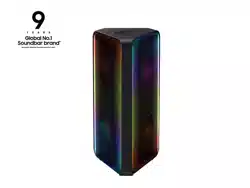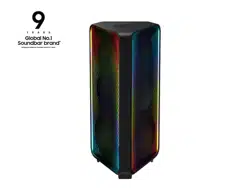
MX-ST50B
FULL MANUAL
Imagine the possibilities
Thank you for purchasing this Samsung product.
To receive more complete service, please register
your product at www.samsung.com/register
ENG - ii
SAFETY INFORMATION
SAFETY WARNINGS
TO REDUCE THE RISK OF ELECTRIC SHOCK, DO
NOT REMOVE THE COVER (OR BACK).
NO USER-SERVICEABLE PARTS ARE INSIDE.
REFER SERVICING TO QUALIFIED SERVICE
PERSONNEL.
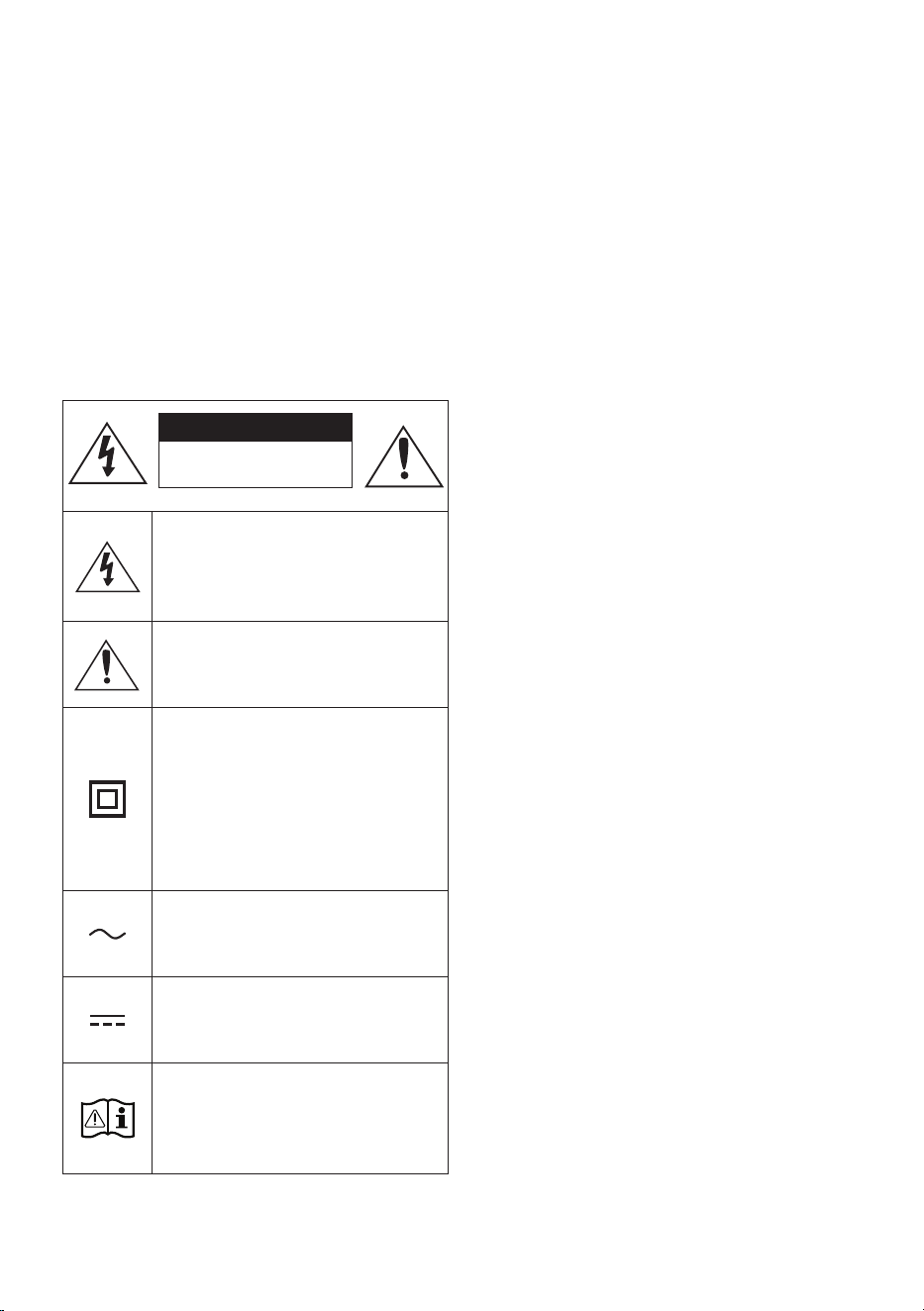
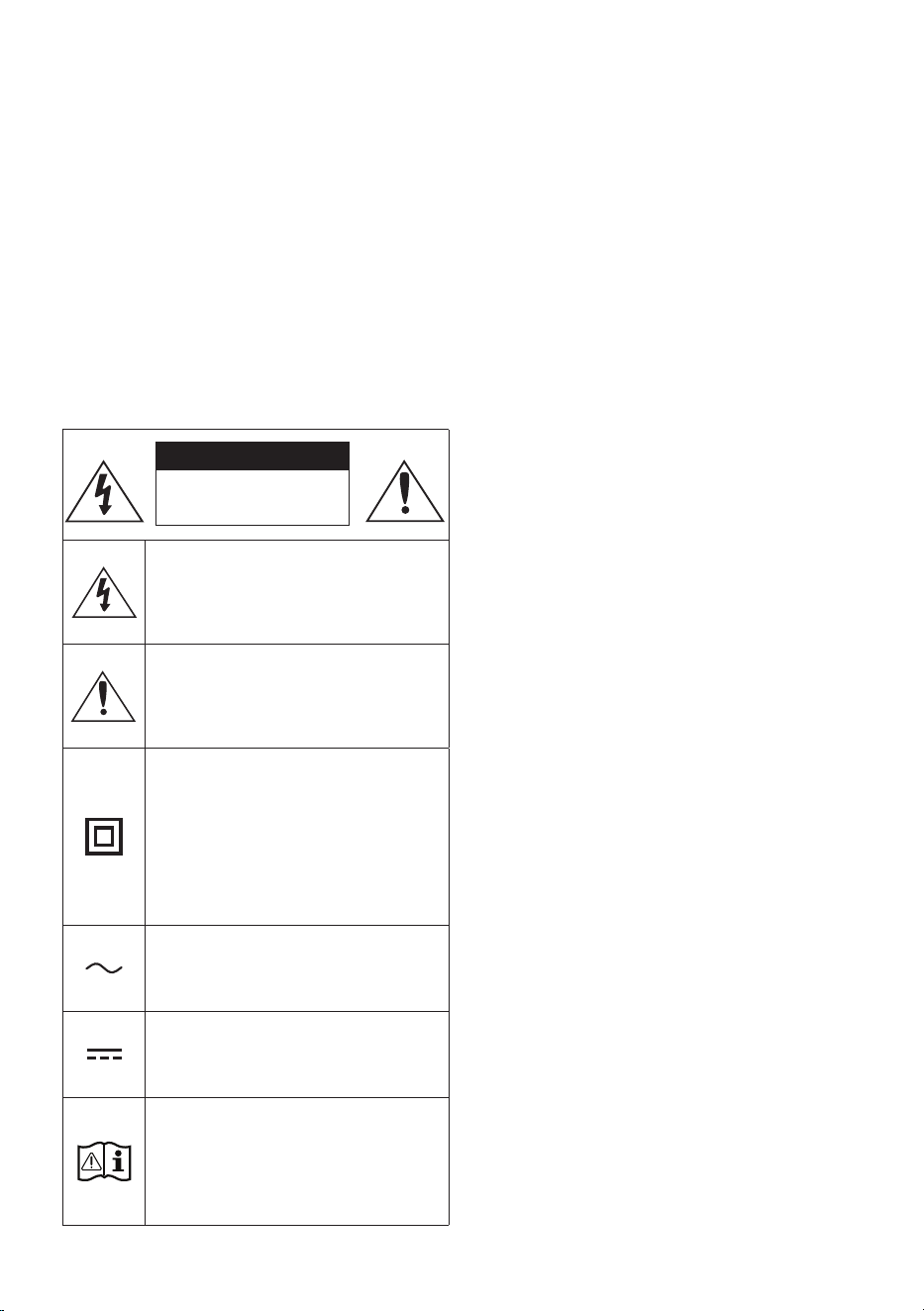
Refer to the table below for an explanation of
symbols which may be on your Samsung product.
CAUTION
RISK OF ELECTRIC SHOCK.
DO NOT OPEN.
This symbol indicates that high voltage
is present inside. It is dangerous to
make any kind of contact with any
internal part of this product.
This symbol indicates that this product
comes with important literature
concerning operation and maintenance.
Class II product : This symbol indicates
that a safety connection to electrical
earth (ground) is not required.
If this symbol is not present on a
product with a power cord, the product
MUST have a reliable connection to
protective earth (ground).
AC voltage : This symbol indicates that
the rated voltage marked with the
symbol is AC voltage.
DC voltage : This symbol indicates that
the rated voltage marked with the
symbol is DC voltage.
Caution. Consult Instructions for use :
This symbol instructs the user to
consult the user manual for further
safety related information.
WARNING
• To reduce the risk of re or electric shock, do
not expose this appliance to rain or moisture.
• This product contains chemicals known to the
State of California to cause cancer and birth
defects or other reproductive harm.
• The battery (battery or batteries or battery
pack) shall not be exposed to excessive heat
such as sunshine, re or the like.
CAUTION
• TO PREVENT ELECTRIC SHOCK, MATCH WIDE
BLADE OF PLUG TO WIDE SLOT, FULLY
INSERT.
• This apparatus shall always be connected to a
AC outlet with a protective grounding
connection.
• To disconnect the apparatus from the mains,
the plug must be pulled out from the mains
socket, therefore the mains plug shall be
readily operable.
• Do not expose this apparatus to dripping or
splashing. Do not put objects lled with
liquids, such as vases, on the apparatus.
• To turn this apparatus off completely, you
must pull the power plug out of the wall
socket. Consequently, the power plug must
be easily and readily accessible at all times.
ENG - iii
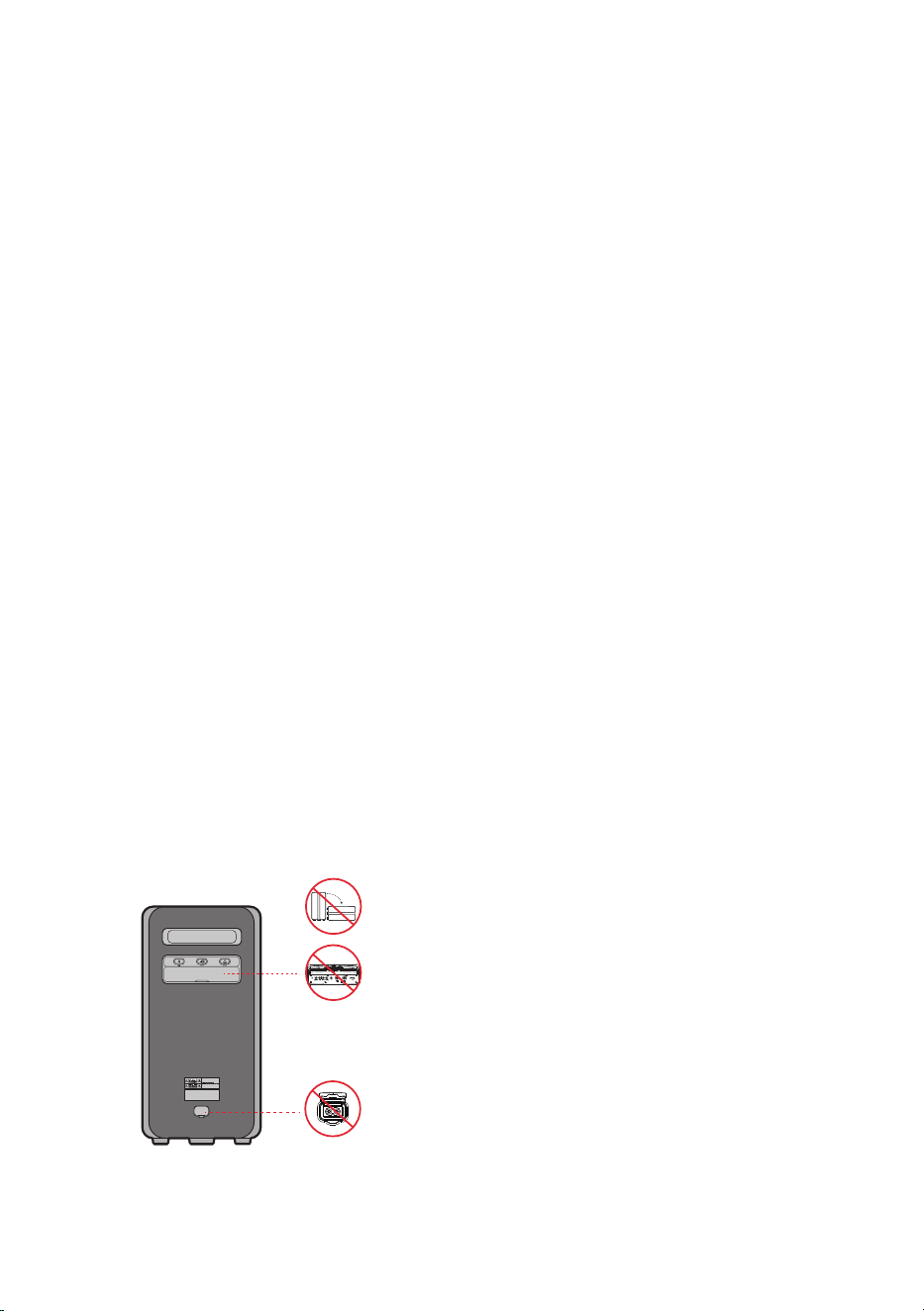
To avoid deterioration of water resistant
Check the following and use the unit correctly.
• Deformation or damage from dropping the
unit or subjecting it to mechanical shock may
cause deterioration of the water resistant.
• This unit does not have a design that is
resistant to water pressure. Use of the unit in
a location where high water pressure is
applied, such as in the shower, may cause a
malfunction.
• Do not pour high-temperature water or blow
hot air from a hair dryer or any other
applicance on the unit directly. Also never use
the unit in a place subject to high
temperatures, such as in a sauna or near a
heat source.
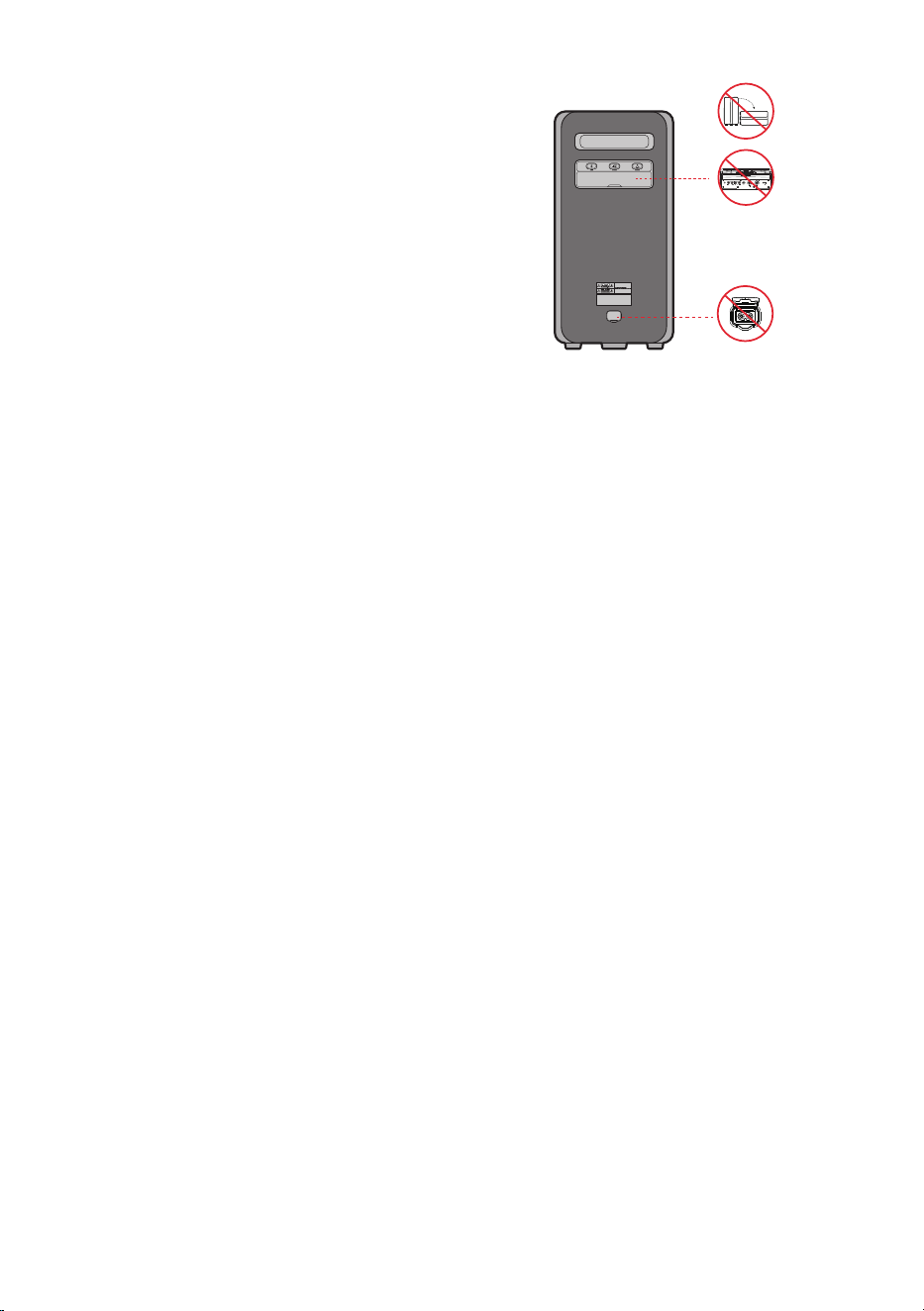
• Handle the cap with care. Port cover and AC
plug cover plays a very important role in
maintenance of the water resistant. When
using the unit, make sure that the cap is
closed completely. When closing the cap, be
careful not to allow foreign objects inside. If
the cap is not closed completely the water
resistant may deteriorate and may cause a
malfunction of the unit as a result of water
entering the unit.
• IPX5 cannot be met when any JACK or AC
power is plugged in.
• The product cannot be dumped to ensure it is
water resistant.
POWER
ECHOVOL
USB
(5V 2.1A)
AUX 1
MIC
ENG - iv
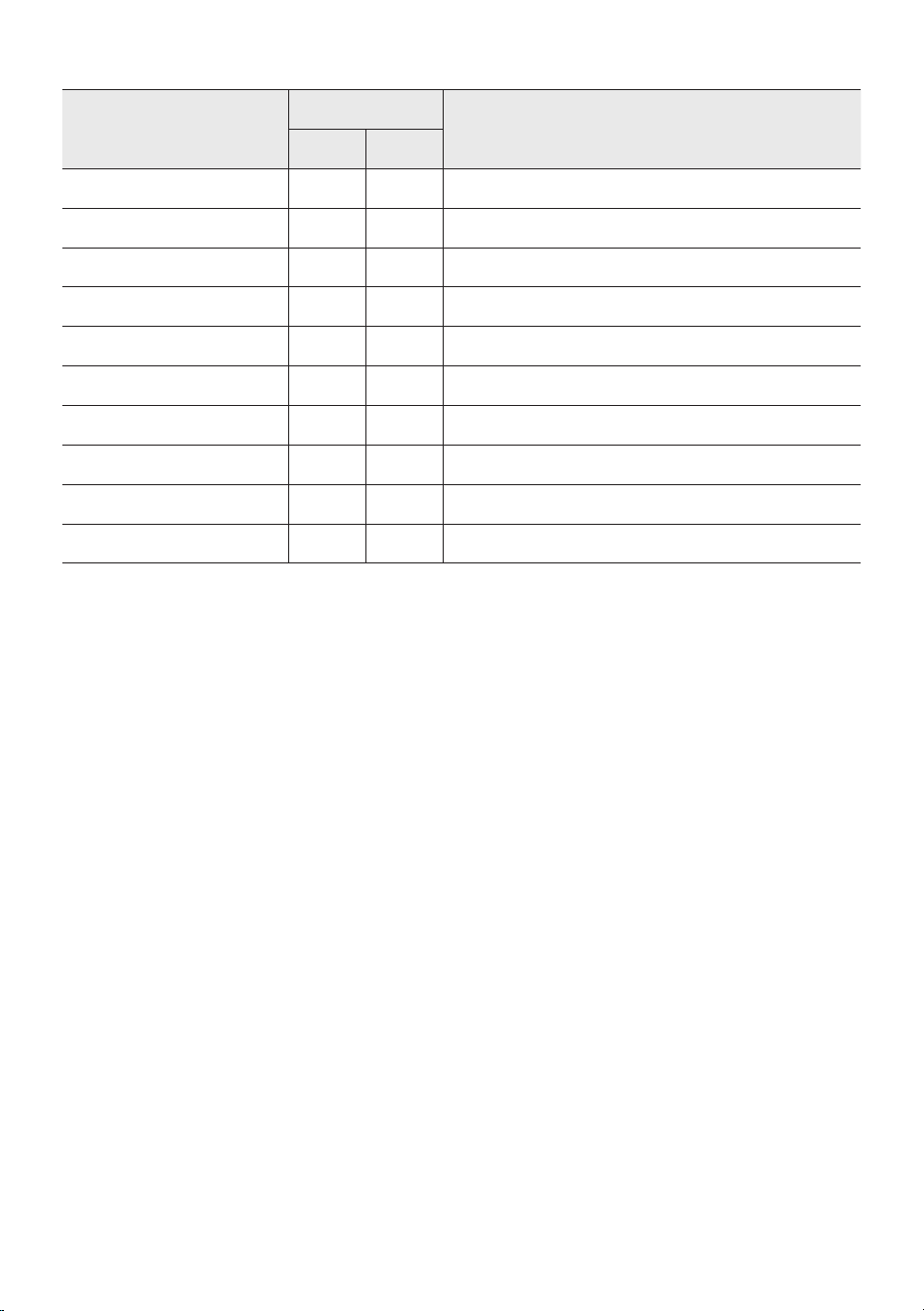
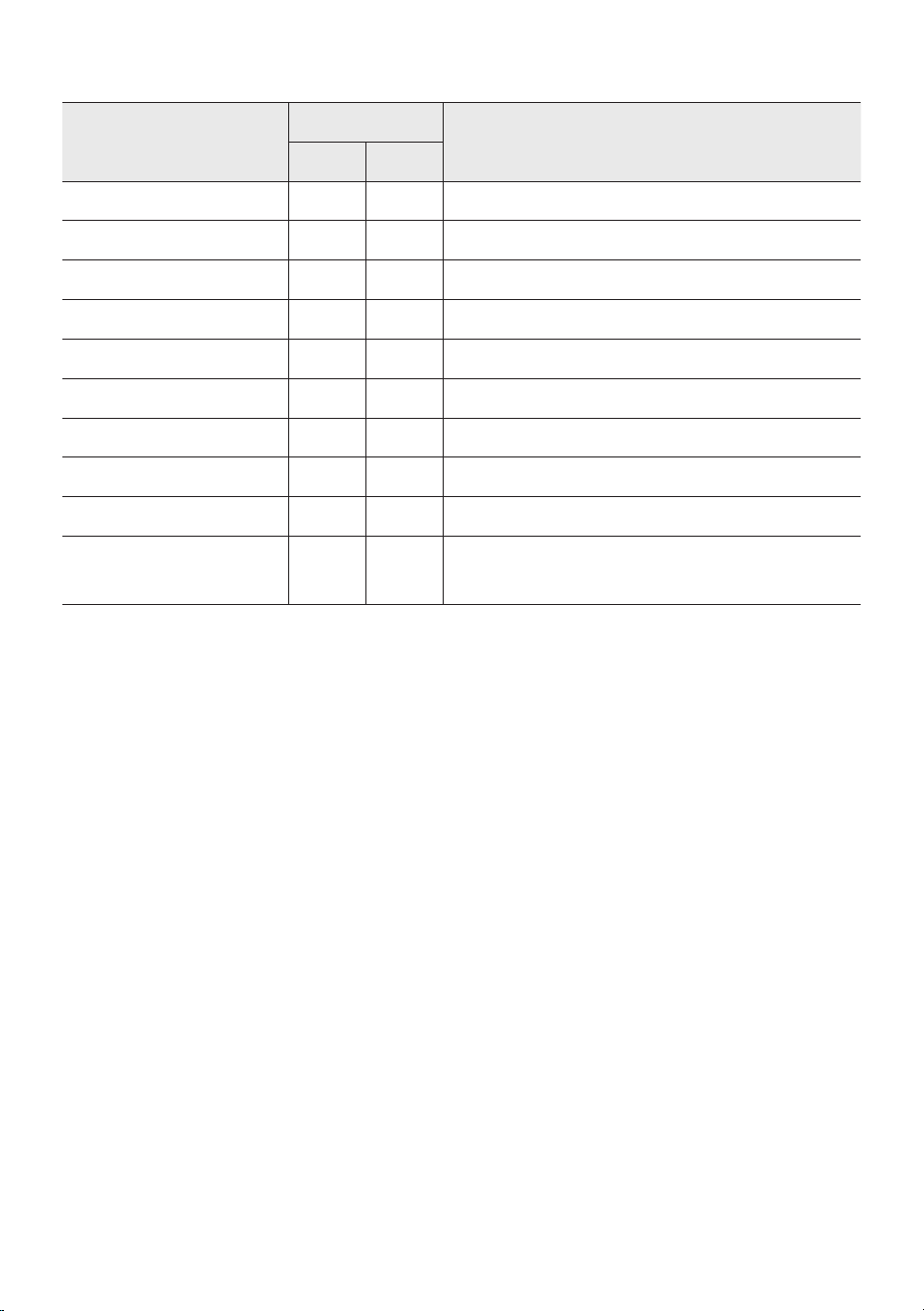
• The Sound Tower provides durability by IPX5.
Protection against solids
IP
Protection against water
0 5
No requirements X X No requirements
No protection 0 0 No protection
Solids> 50 mm 1 1 Vertically falling water
Solids> 12 mm 2 2 Vertically water-enclosure tilted 15°
Solids> 2.5 mm 3 3 Sprayed water 60° from vertical
Solids> 1.0 mm 4 4 Splashed water from all directions
Dust Protected 5 5 Hosing jets from all directions
Dust tight 6 6 Strong hosing jets from all directions
- 7 Temporary Immersion: 1m for 30 minutes
- 8 Immersion: manufacture dened depth and time

ENG - v
PRECAUTIONS
1. Ensure that the AC power supply in your
house complies with the power
requirements listed on the identication
sticker located on the rear of your product.
Install your product horizontally, on a
suitable base (furniture), with enough space
around it for ventilation (7~10 cm). Make sure
the ventilation slots are not covered. Do not
place the unit on ampliers or other
equipment which may become hot. This unit
is designed for continuous use.
To fully turn off the unit, disconnect the AC
plug from the wall outlet. Unplug the unit if
you intend to leave it unused for a long
period of time.
2. During thunderstorms, disconnect the AC
plug from the wall outlet. Voltage peaks due
to lightning could damage the unit.
3. Do not expose the unit to direct sunlight or
other heat sources. This could lead to
overheating and cause the unit to
malfunction.
4. Protect the product from moisture (i.e.
vases), and excess heat (e.g. a replace) or
equipment creating strong magnetic or
electric elds. Unplug the power cable from
the AC wall socket if the unit malfunctions.
Your product is not intended for industrial
use. It is for personal use only. Condensation
may occur if your product has been stored in
cold temperatures. If transporting the unit
during the winter, wait approximately
2 hours until the unit has reached room
temperature before using.
5. The battery used with this product contains
chemicals that are harmful to the
environment. Do not dispose of the battery
in the general household trash. Do not
expose the battery to excess heat, direct
sunlight, or re. Do not short circuit,
disassemble, or overheat the battery.
CAUTION: Danger of explosion if the battery
is replaced incorrectly. Replace only with the
same or equivalent type.
Others
• As the battery is manufactured only for this
product, do not use the battery for other
electronic appliances or other purposes.
• When discarding a dead battery, put it into a
battery collection box for recycling.
• Do not disassemble the battery.
• To protect the battery, the battery cannot be
charged when the temperature is lower than
3 °C or higher than 42 °C.
• When the battery level is low, recharge it. If
the level of the battery remains low for a long
period of time, it can cause the performance
of the battery to degrade.
• Do not apply heat to the battery and do not
put the battery in a re.
• Do not disassemble the battery.
• To protect the battery, the Sound Tower may
not operate when the temperature is lower
than -17 °C or higher than 57 °C.
ENG - vi
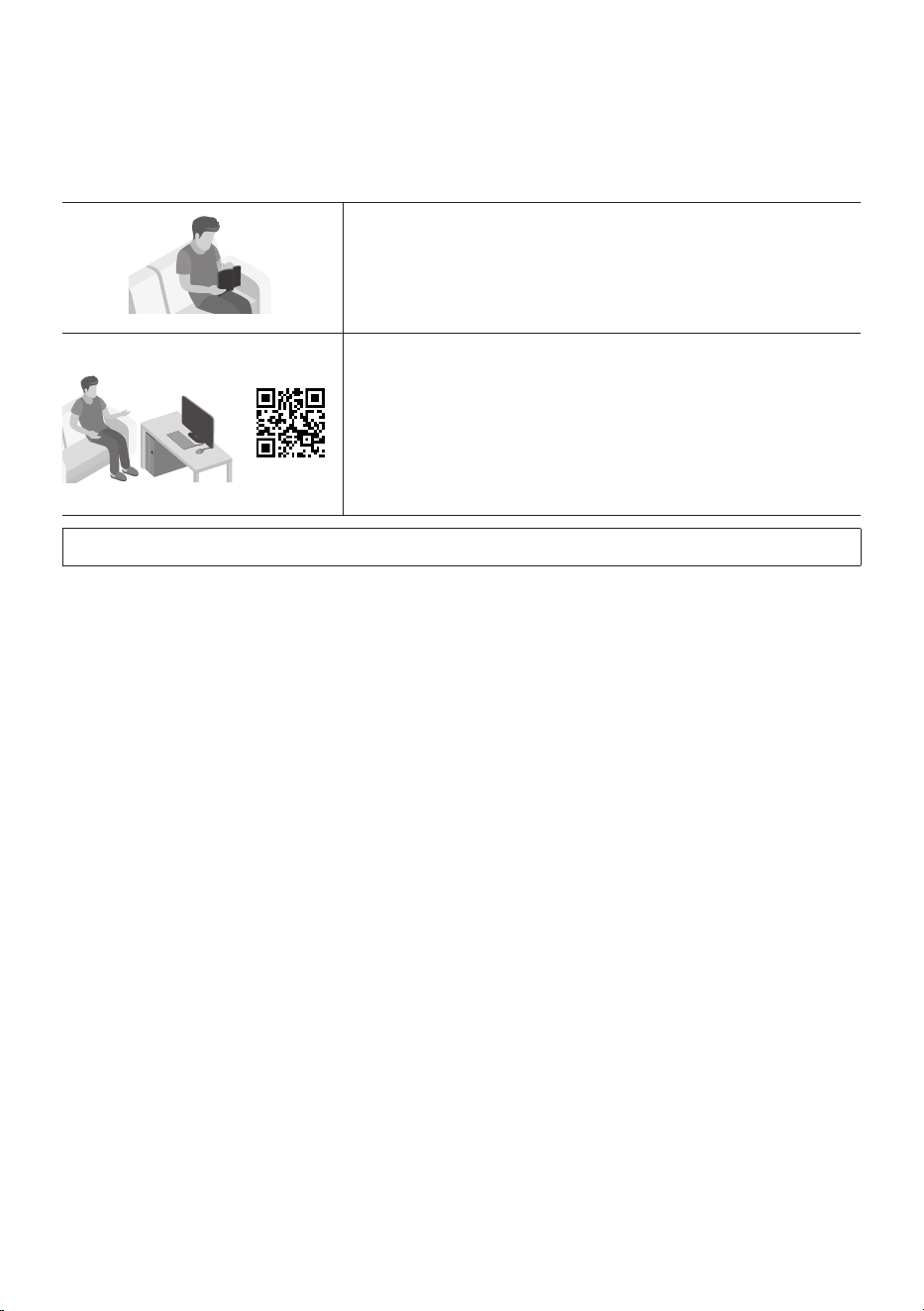
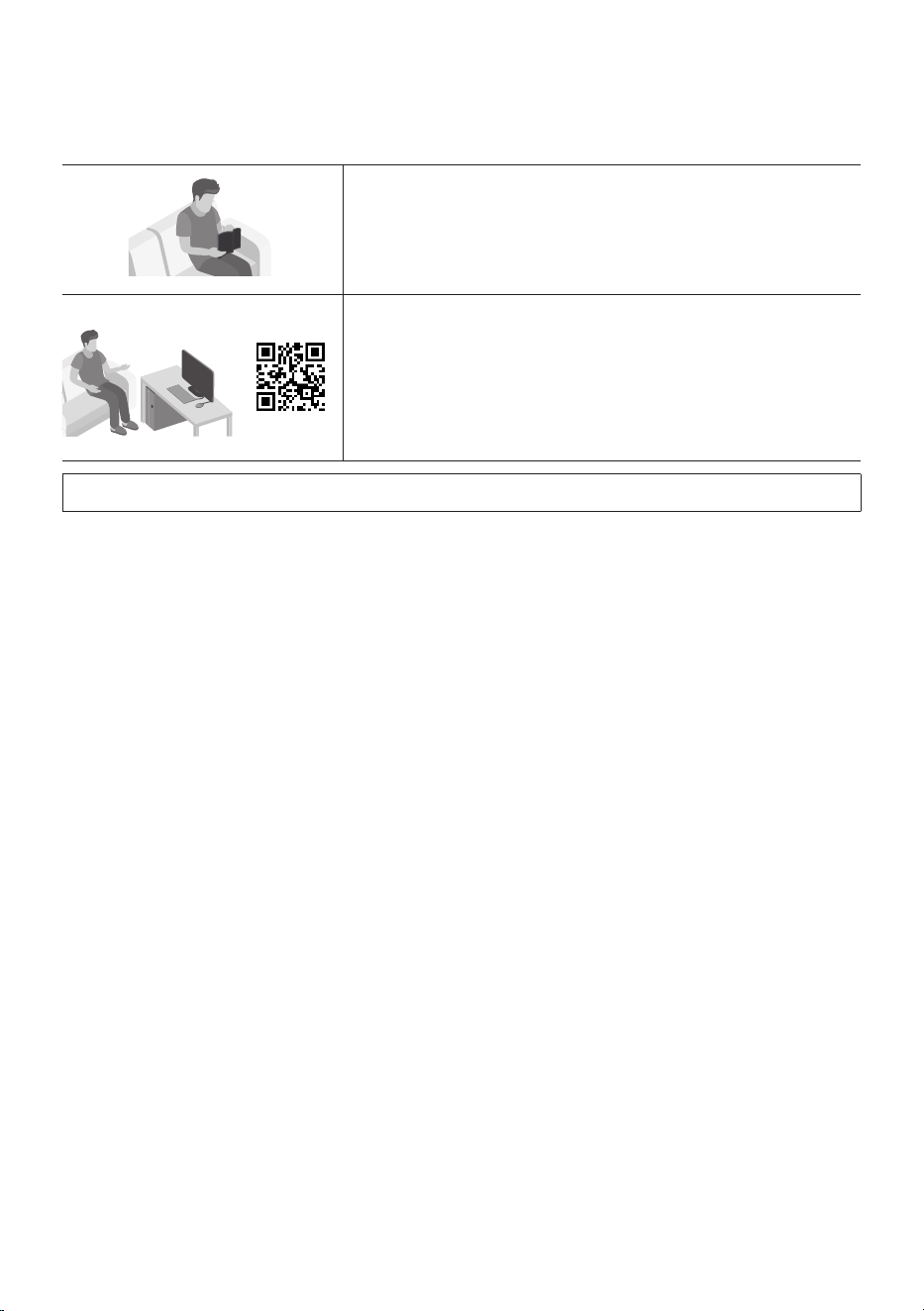
ABOUT THIS MANUAL
The user manual has two parts: this simple paper USER MANUAL and a detailed FULL MANUAL you can
download.
USER MANUAL
See this manual for safety instructions, product installation,
components, connections, and product specications.
FULL MANUAL
You can access the FULL MANUAL on Samsung’s on-line
customer support centre by scanning the QR code on the left.
To see the manual on your PC or mobile device, download the
manual in document format from Samsung’s website.
(https://www.samsung.com/us/support/downloads/)
Design and specications are subject to change without prior notice.

ENG - vii
CONTENTS
01 Checking the Components 2
Inserting Batteries before using the Remote Control
(AAA batteries X 2) ------------------------- 2
02 Product Overview 3
Top Panel of the Sound Tower ------------------------- 3
Rear Panel of the Sound Tower ------------------------- 4
03 Connecting the Sound Tower 6
Connecting Electrical Power
-------------------------
6
How to use Audio Group
-------------------------
7
04 Connecting an External Device 13
Connecting using an Analogue Audio (AUX) Cable
-------------------------
13
Connecting a mobile device via Bluetooth
-------------------------
14
Connecting the Samsung TV via Bluetooth
-------------------------
17
05 Connecting a USB Storage Device 18
Software Update
-------------------------
19
Connecting an External Microphone
-------------------------
20
06 Using the Remote Control 21
How to Use the Remote Control
-------------------------
21
How to use Sound Mode
-------------------------
24
How to use the DJ Effect
-------------------------
24

ENG - viii
07 Using the Samsung Sound Tower App 26
Install Samsung Sound Tower App
-------------------------
26
Launching the Samsung Sound Tower App
-------------------------
26
08 Troubleshooting 27
09 LICENCE 28
10 Open Source LICENCE Notice 29
11 Important Notes About Service 29
12 SpecicationsandGuide 30
Specications
-------------------------
30
ENG - 2
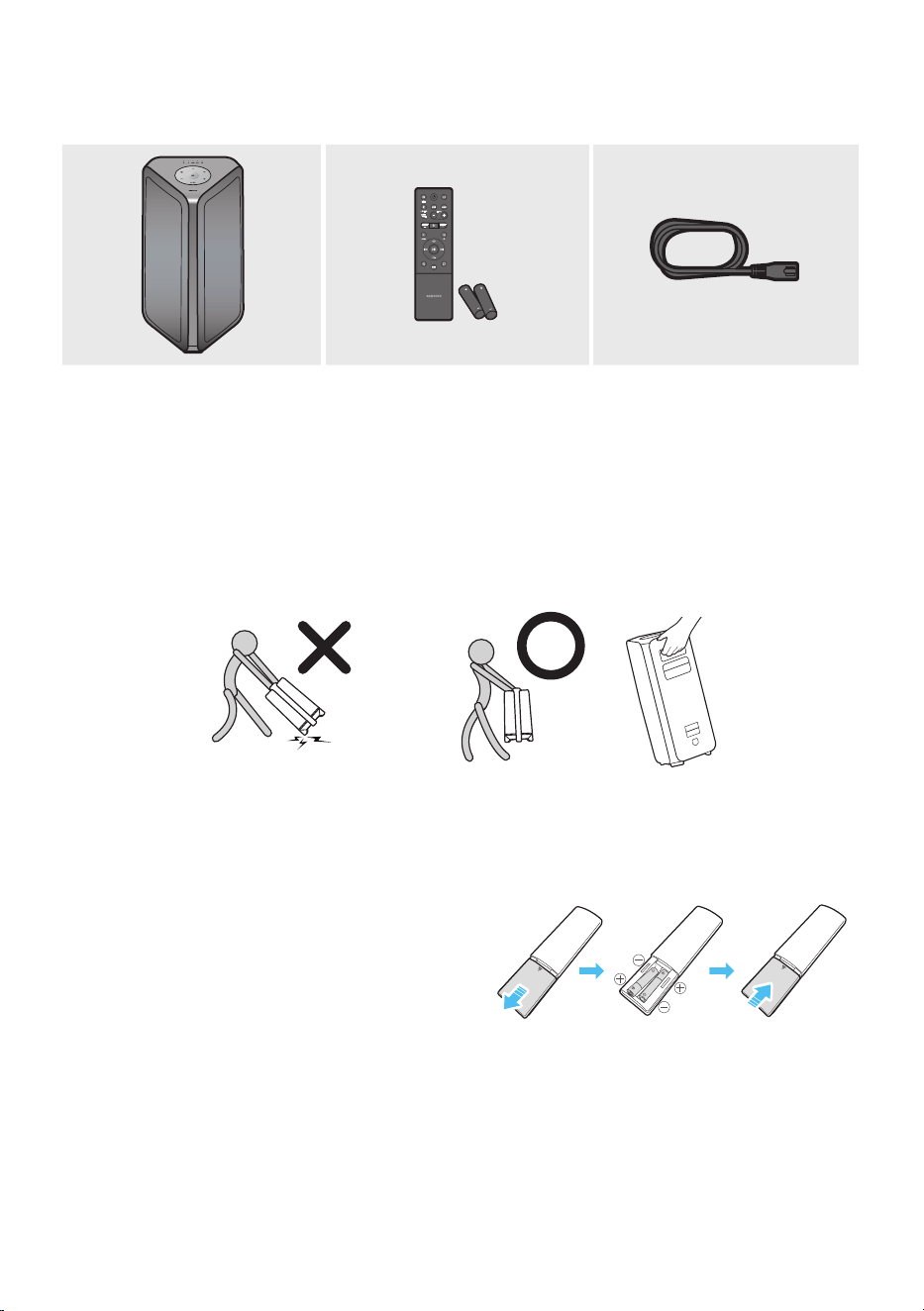
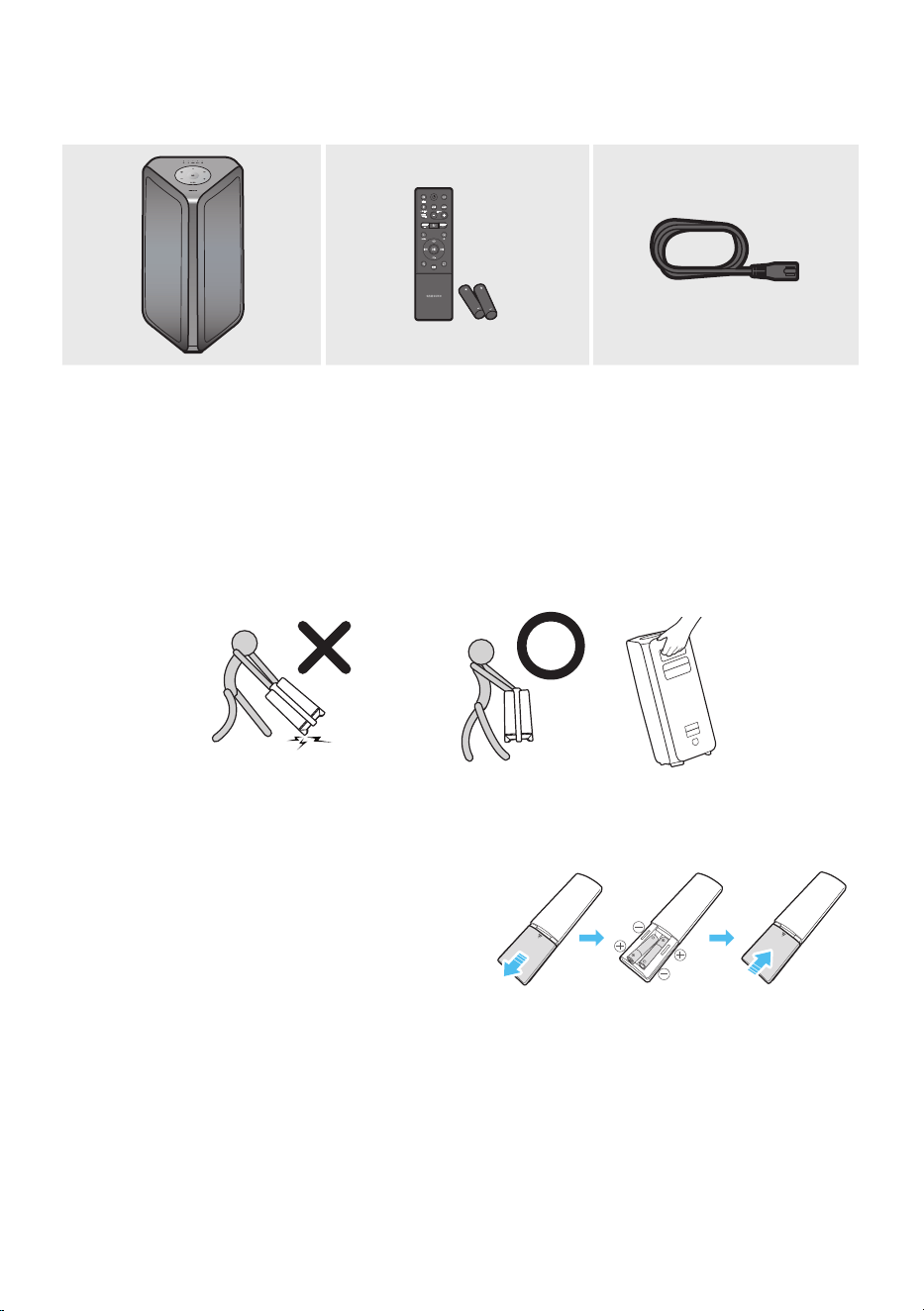
01 CHECKING THE COMPONENTS
Sound Tower Main Unit Remote Control / Batteries Power Cord
• For more information about the power supply and power consumption, refer to the label attached
to the product. (Label: Rear of the Sound Tower Main Unit)
• To purchase additional components or optional cables, contact a Samsung Service Centre or
Samsung Customer Care.
• When moving the product, do not drag or pull the product from the ground. Lift the product when
moving the product.
• Design and specications are subject to change without prior notice.
Inserting Batteries before using the Remote Control
(AAA batteries X 2)
Slide the battery cover in the direction of the arrow
until it is completely removed. Insert 2 AAA
batteries (1.5V) oriented so that their polarity is
correct. Slide the battery cover back into position.
ENG - 3
02 PRODUCT OVERVIEW
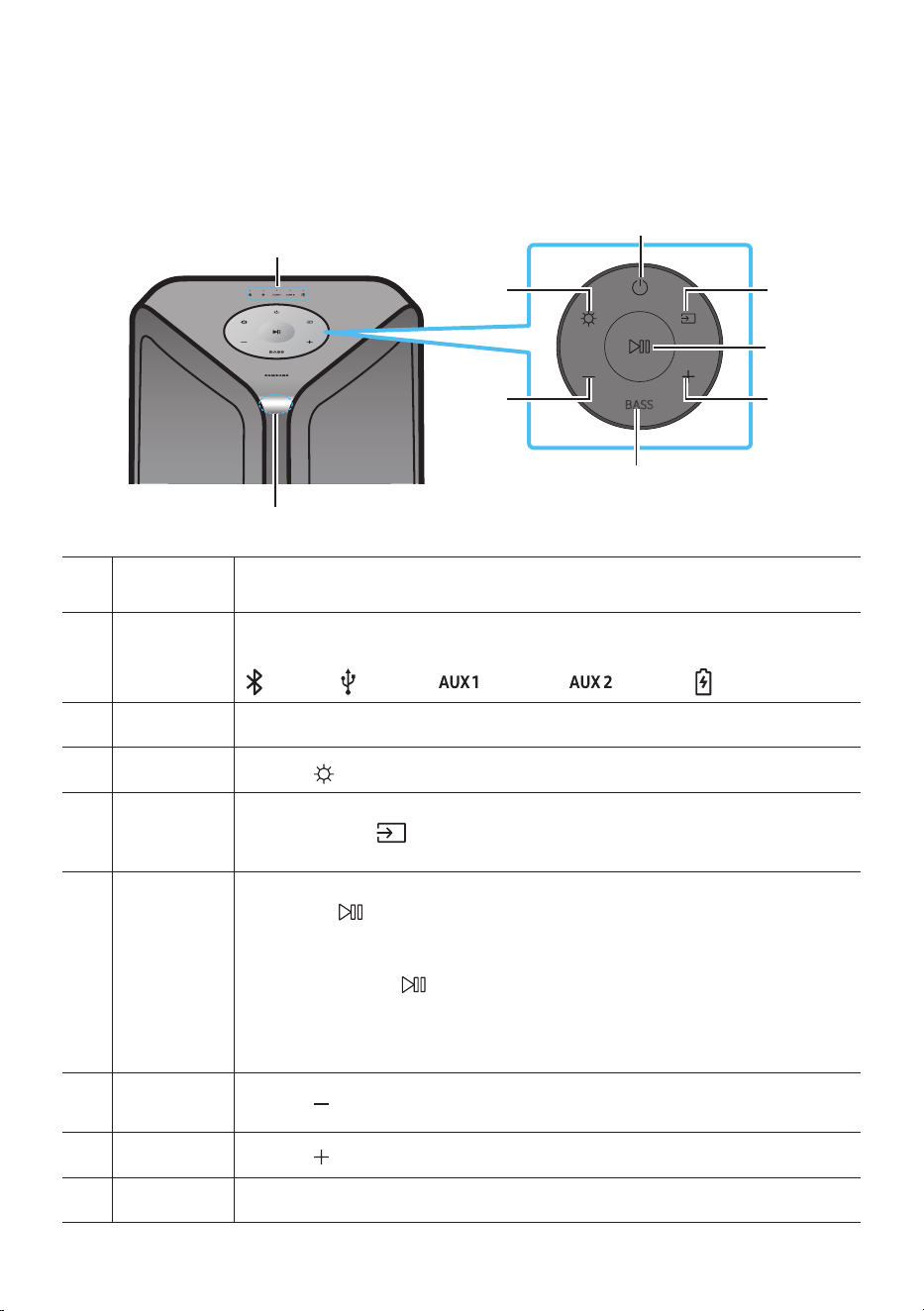
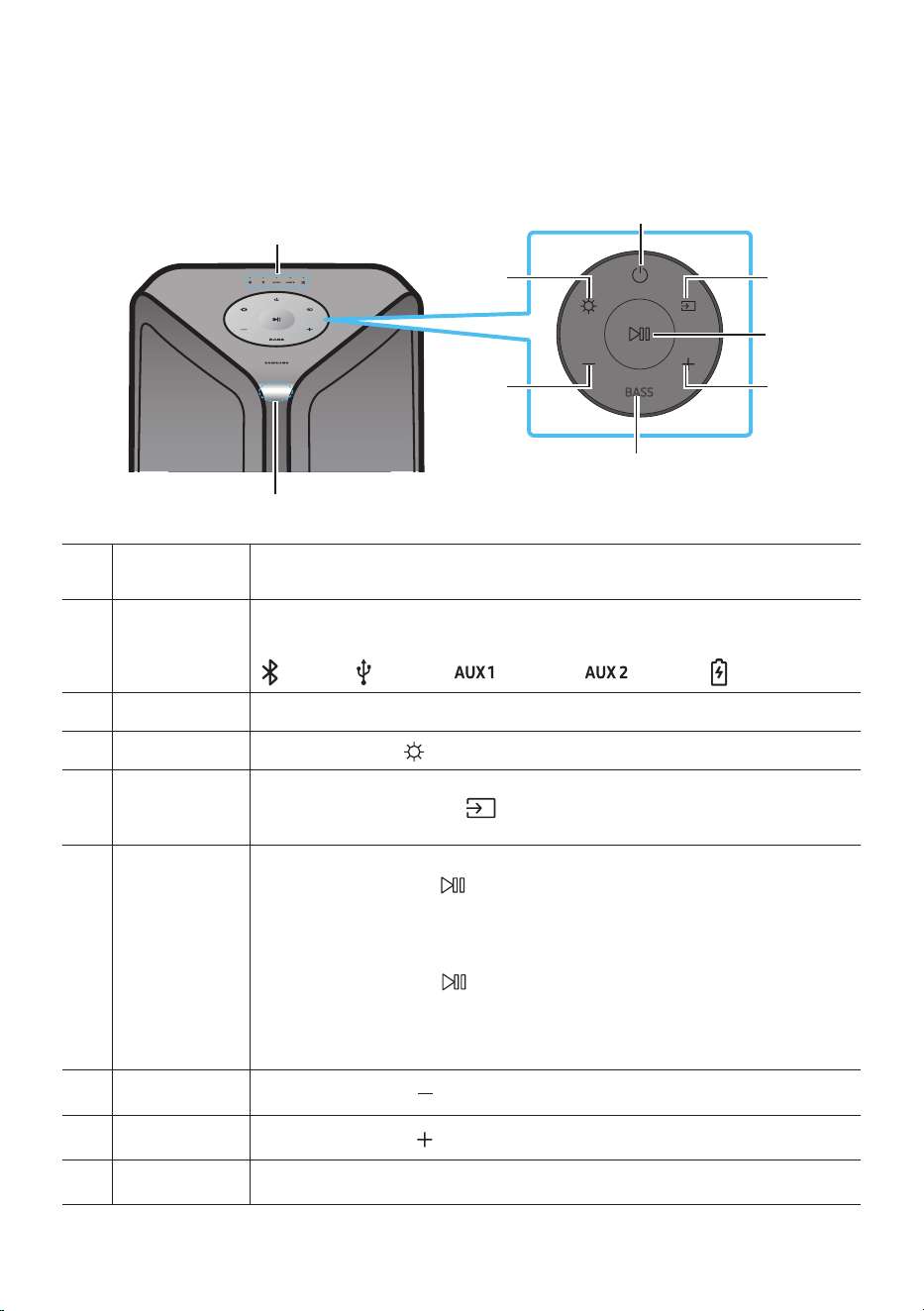
Top Panel of the Sound Tower
BASS
Remote
Sensor
When operating the Sound Tower system, please aim the front of the remote control at
the remote sensor.
LED Indicator
Displays operating messages or current source of the Sound Tower system.
The information sources represented by each LED are as follows:
(BT) (USB) (AUX1) (AUX2) (Power/Battery)
Power Turns the Sound Tower on and off.
Light
Press the
(Light) button to turn the Lighting Mode on.
Source
Press to select a source connected to the Sound Tower.
Press and hold the (Source)
button for more than 5 seconds
to enter the
“SEARCHING TV” mode.
Play/Pause
• Play/Pause
Press the button to pause a music le temporarily.
When you press the button again, the music le plays.
• Demo play
Press and hold the
button for more than 5 seconds to start the Demo play while
the system is turned on. 5 LEDS ashing simultaneously and it plays demo music for
90 seconds.
– Please be careful as it may play louder than the set volume.
Volume down Press the (Volume down) button to lower the volume.
Volume up
Press the (Volume up) button to raise the volume.
BASS Press the BASS button to use the powerful bass sound.
ENG - 4
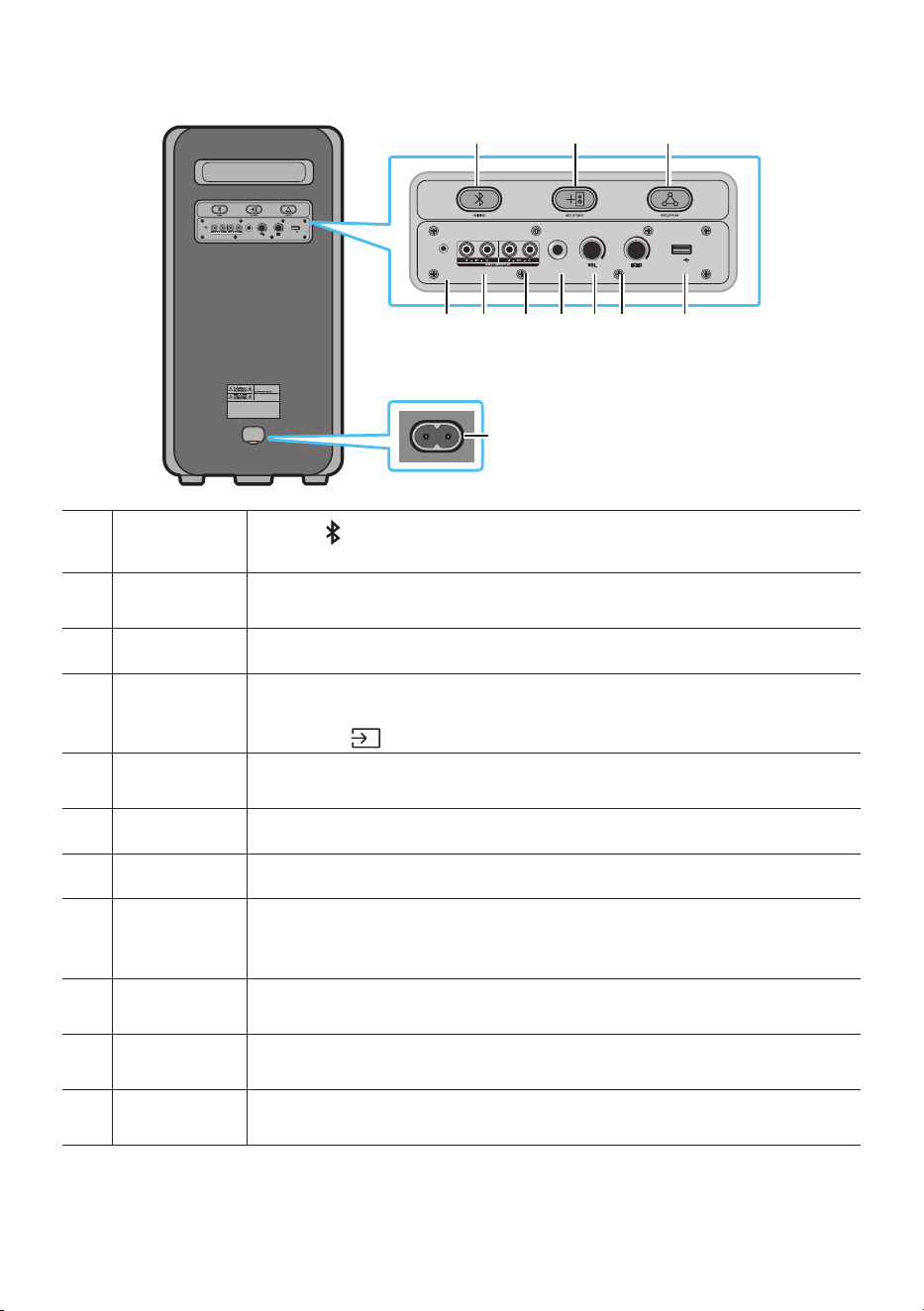
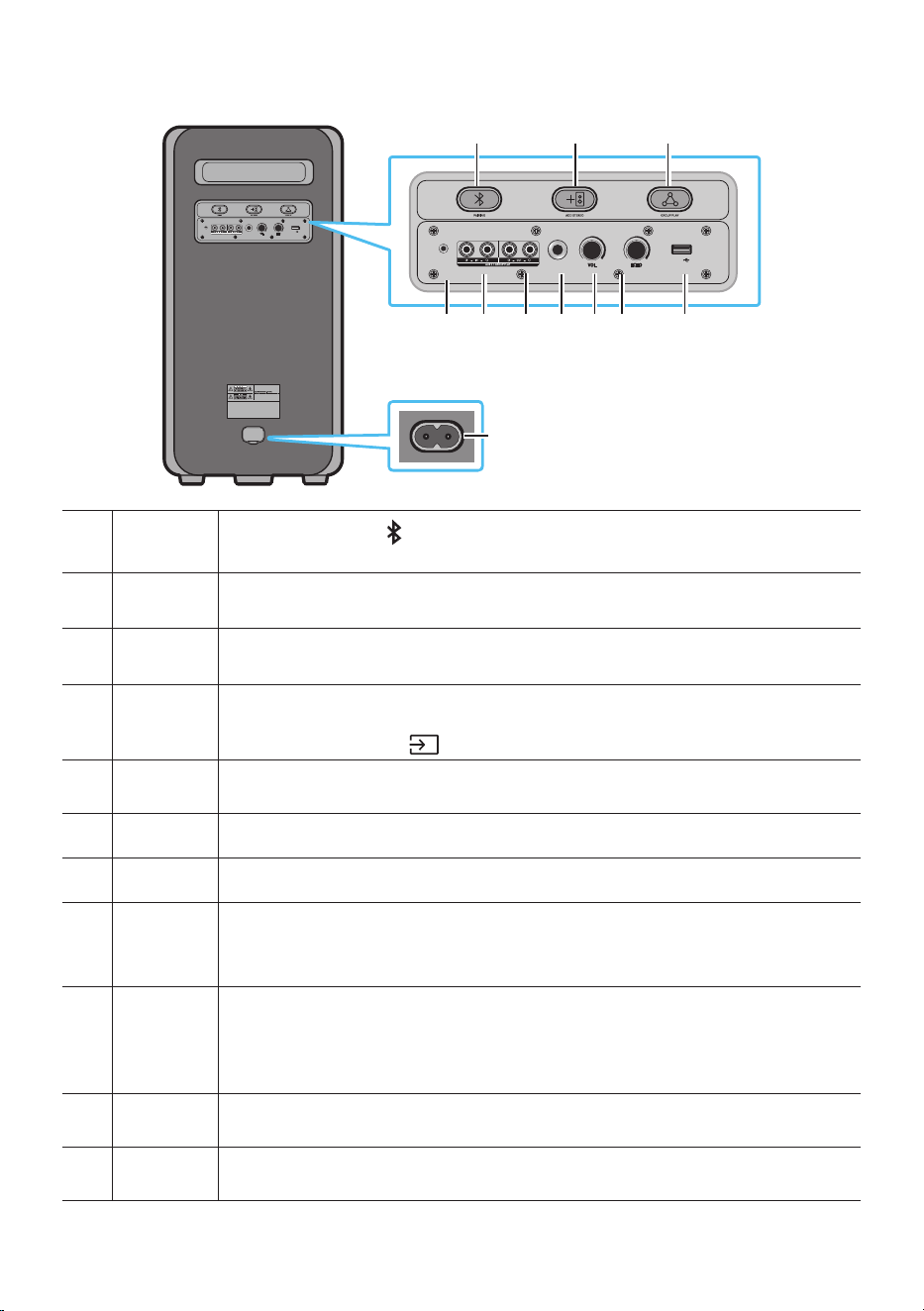
Rear Panel of the Sound Tower
POWER
ECHOVOL
USB
(5V 2.1A)
AUX 1
MIC
ECHOVOL
USB
(5V 2.1A)
AUX 1
MIC
Bluetooth
PAIRING
Press the PAIRING button to enter pairing mode, "PAIRING" LED on the rear plane
will be fast blink.
ADD STEREO
Press the ADD STEREO button to connect to another same model Sound Tower
wirelessly.
GROUP PLAY Press the GROUP PLAY button to connect up to ten Sound Tower systems wirelessly.
USB
Connect a USB device to the USB ports on the main unit.
If you connect your cell phone to the USB port, you can charge it.
• Press the (Source) button to select USB.
ECHO
You can give an echo effect to the sound from a connected microphone (MIC) by
adjusting the ECHO knob.
VOL Use the VOL knob to adjust the volume of a connected microphone (MIC).
MIC Connect your microphone to the MIC jack.
GROUP PLAY
OUT
Terminals
Use an Audio Cable (not supplied) to connect GROUP PLAY (OUT) terminals on the
main unit to Audio In on an external analogue output device.
GROUP PLAY
IN Terminals
Use an Audio Cable (not supplied) to connect AUX2(IN) terminals on the main unit to
Audio Out on an external analogue output device.
AUX1
Use an Audio (AUX) Cable (not supplied) to connect AUX1 jack on the main unit to
Audio Out on an external device.
Power
Connect the power cord to the Power jack and connect the other end of the power
cord to a wall socket to supply electrical power to the Sound Tower.
ENG - 5
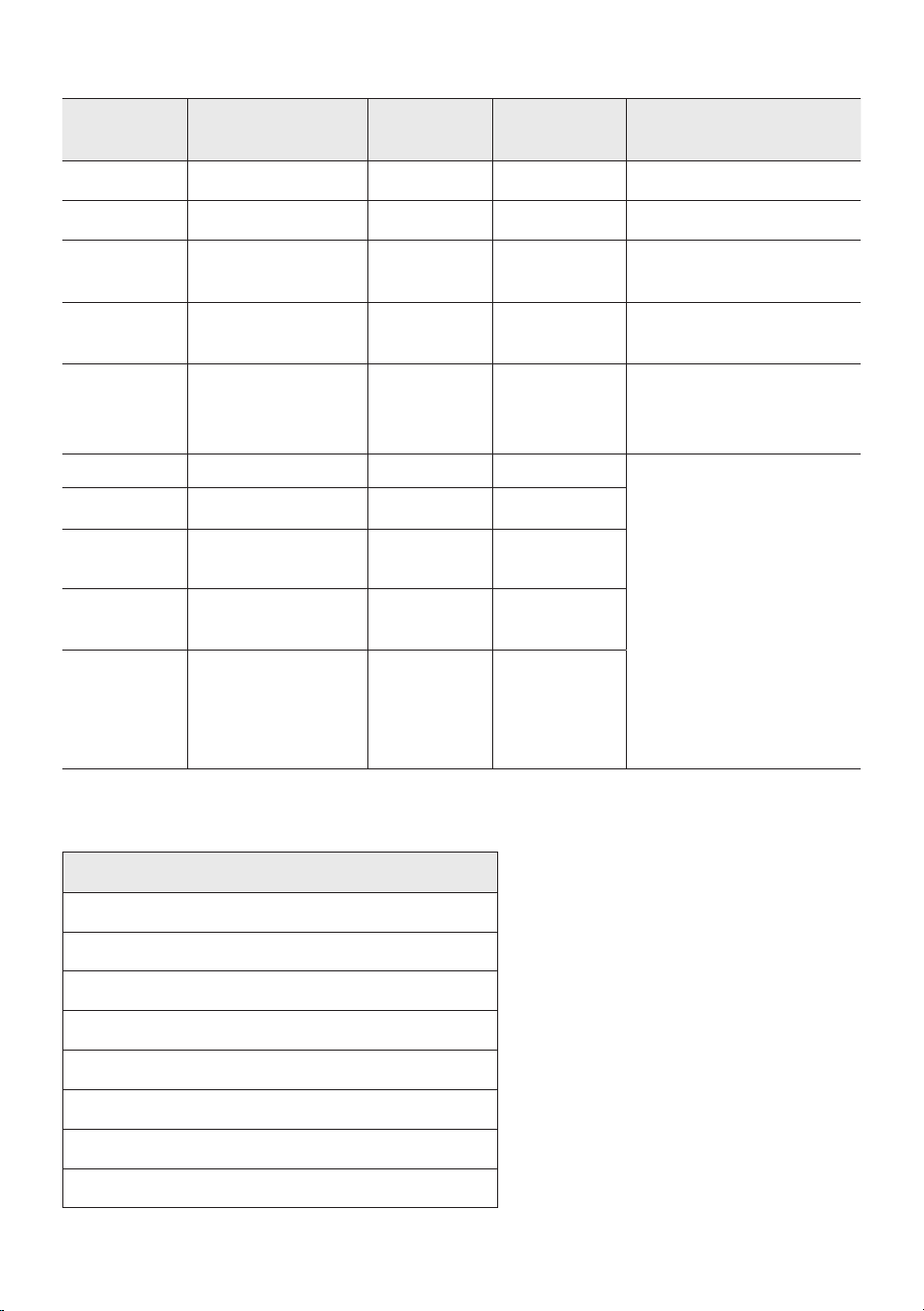
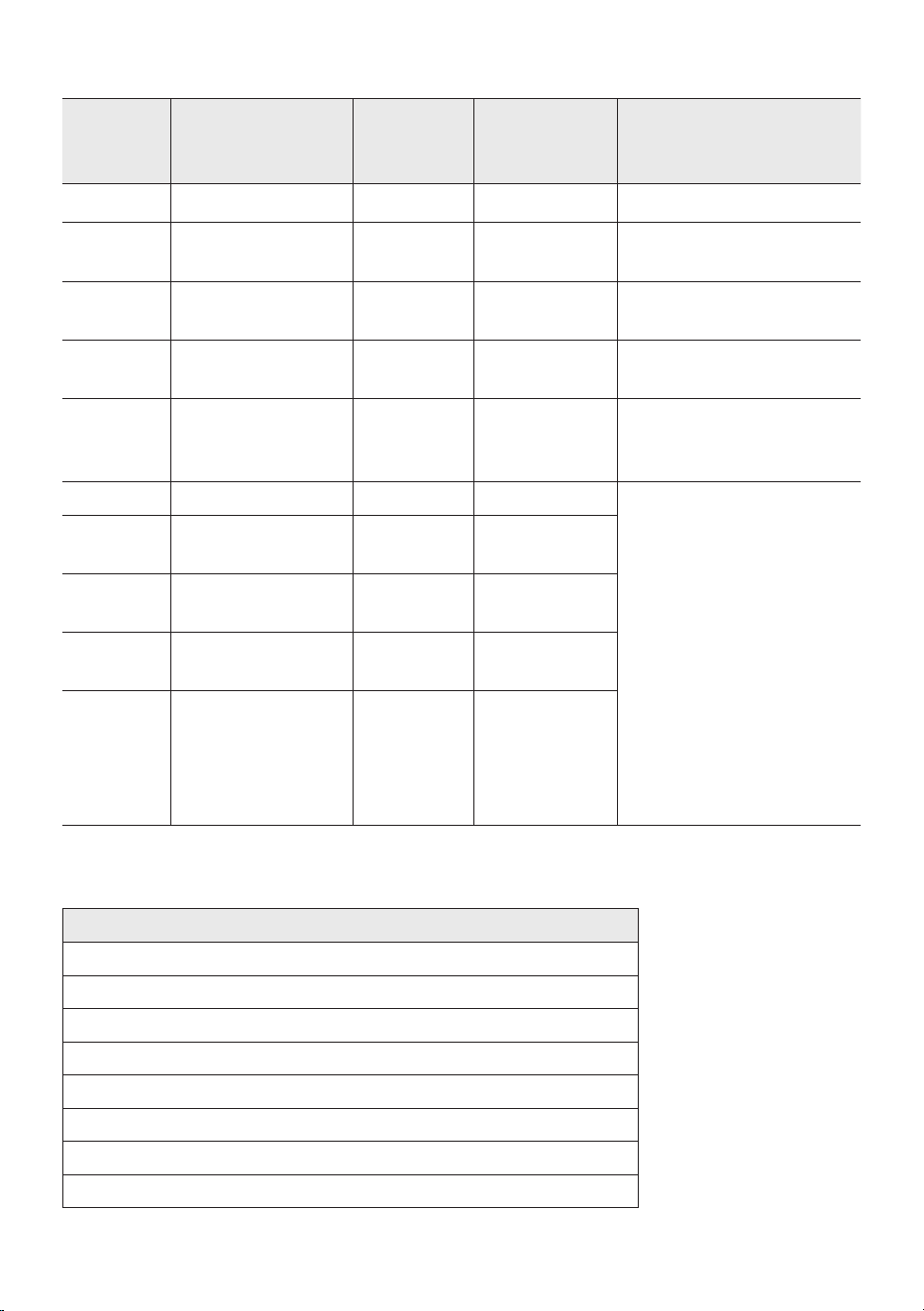
Charge LED State of the Sound Tower:
Sound
Tower state
Charging state
Charge LED
(AC Mode)
Charge LED
(DC Mode)
Remark
Off Fully charged Off(black) Off (black)
Off Charging Green blinks N/A
Off Not in charging Off (black) Off (black)
The AC cable is not
inserted.
Stand by Fully charged Blue on N/A
There is no standby mode
in DC mode.
Stand by Charging Green blinks N/A
The charging LED is the
same as when Sound
Tower is shut down.
On Fully charged Blue on Blue on
When turned on, Sound
Tower mainly reects the
current battery state.
On Charging Green blinks N/A
On
Not in charging and
30%~98%power
Green on Green on
On
Not in charging and
5% ~ 29% power
Red on Red on
On
Not in charging and
below 5% power
Red on
Power off
after Light
bar orange
blink once
In DC mode shutdown, the entire system power will be turned off. So in the off state, compared with AC
mode, the following functions are not supported.
Feature
Wake up via bluetooth
Shop mode
Power Off Setting
Customer Reset
Power on via IR
Battery Charge
AUI on/off
UI feedback of LED lighting bar(front) on/off
ENG - 6
03 CONNECTING THE SOUND TOWER
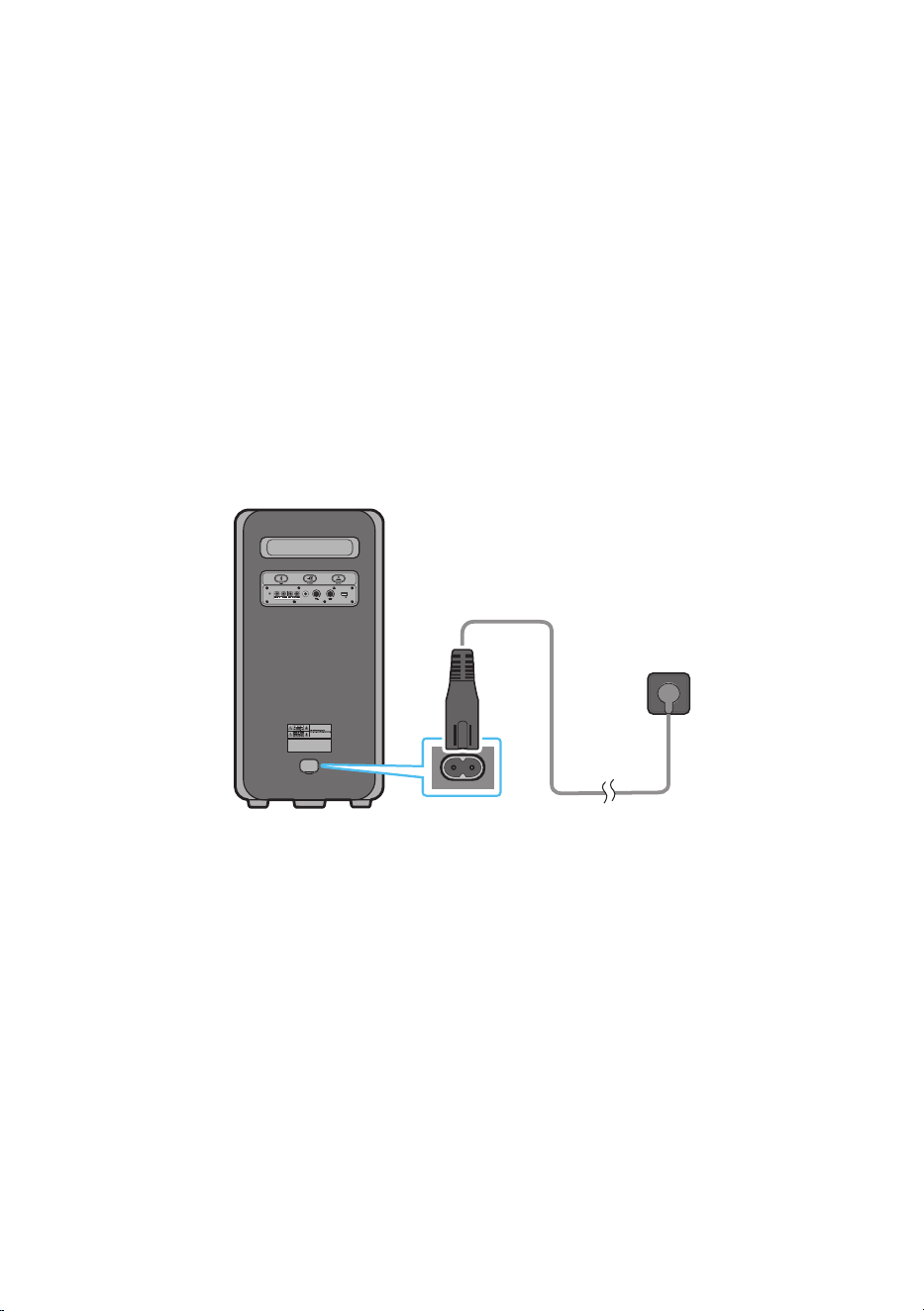
Connecting Electrical Power
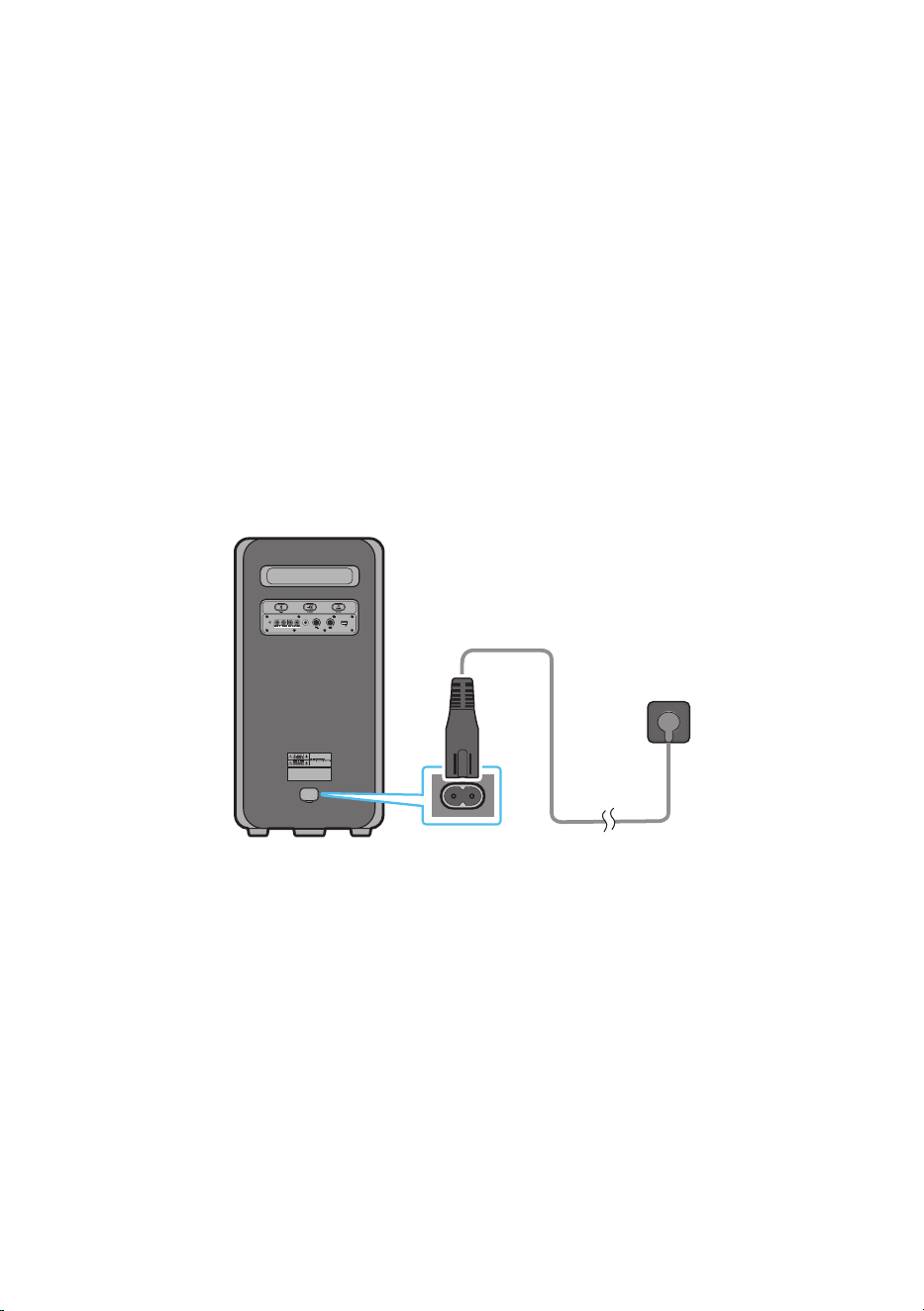
Use the power cord to connect the Sound Tower to an electrical outlet in the following order:
Connect the power cord to the Sound Tower and then to a wall socket.
See the illustrations below.
• When the AC cord is pressed in, the built-in battery will be charged automatically until the battery
is fully charged. The LED indicator on the top panel will show the current charging state
(refer to page ENG - 4).
• When you unplug the set to run on battery, the volume level drops dramatically.
• For more information about the required electrical power and power consumption, refer to the
label attached to the product. (Label: Rear of the Sound Tower)
Rear of Sound Tower
POWER
ECHOVOL
USB
(5V 2.1A)
AUX 1
MIC
Connecting
Electrical Power
ENG - 7
How to use Audio Group
You can connect multiple audio systems in a group to create a party environment and produce higher
sound output. Set one Sound Tower as the HOST and any music played on it will be shared among any
other Sound Tower systems in the Audio group.
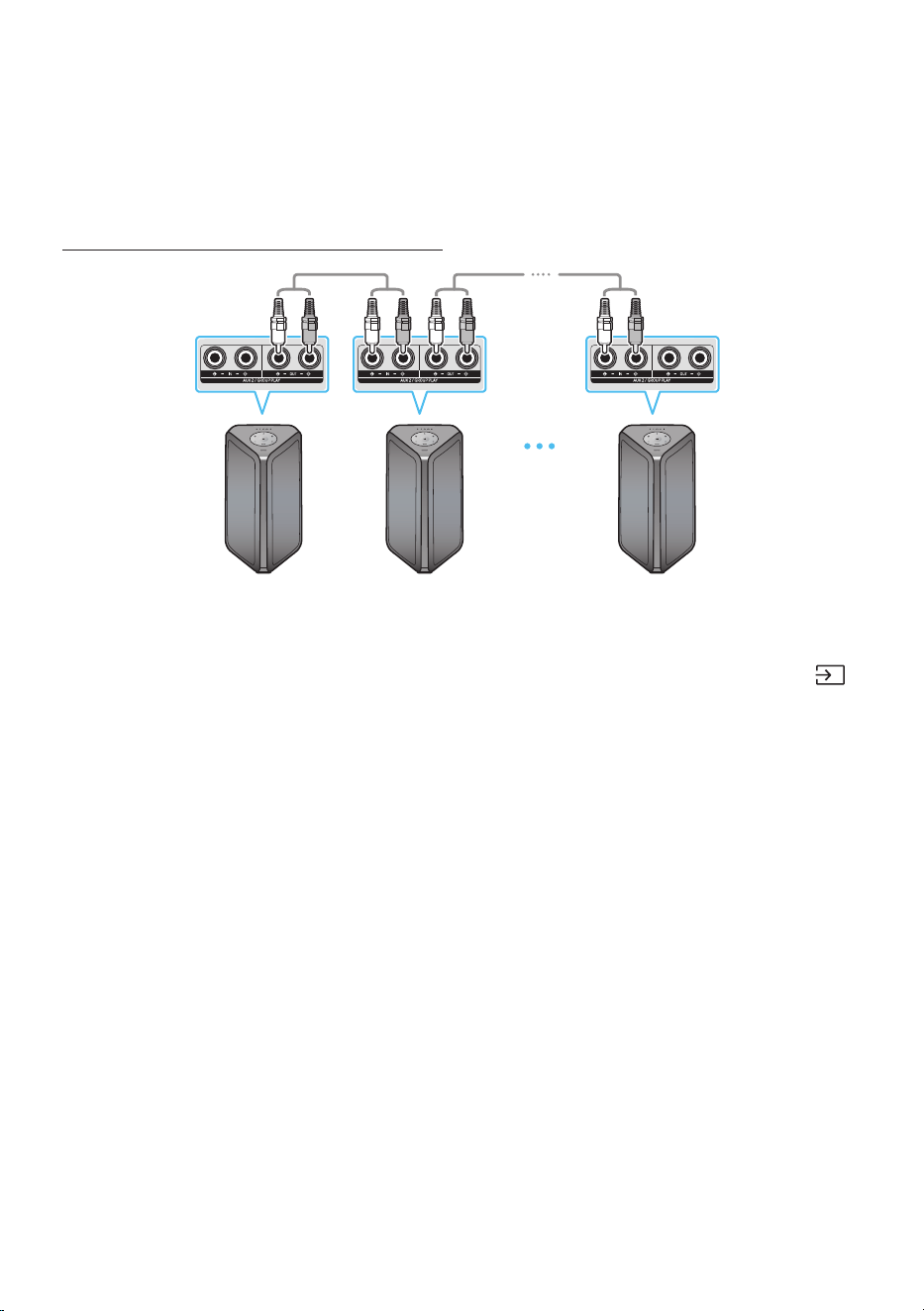
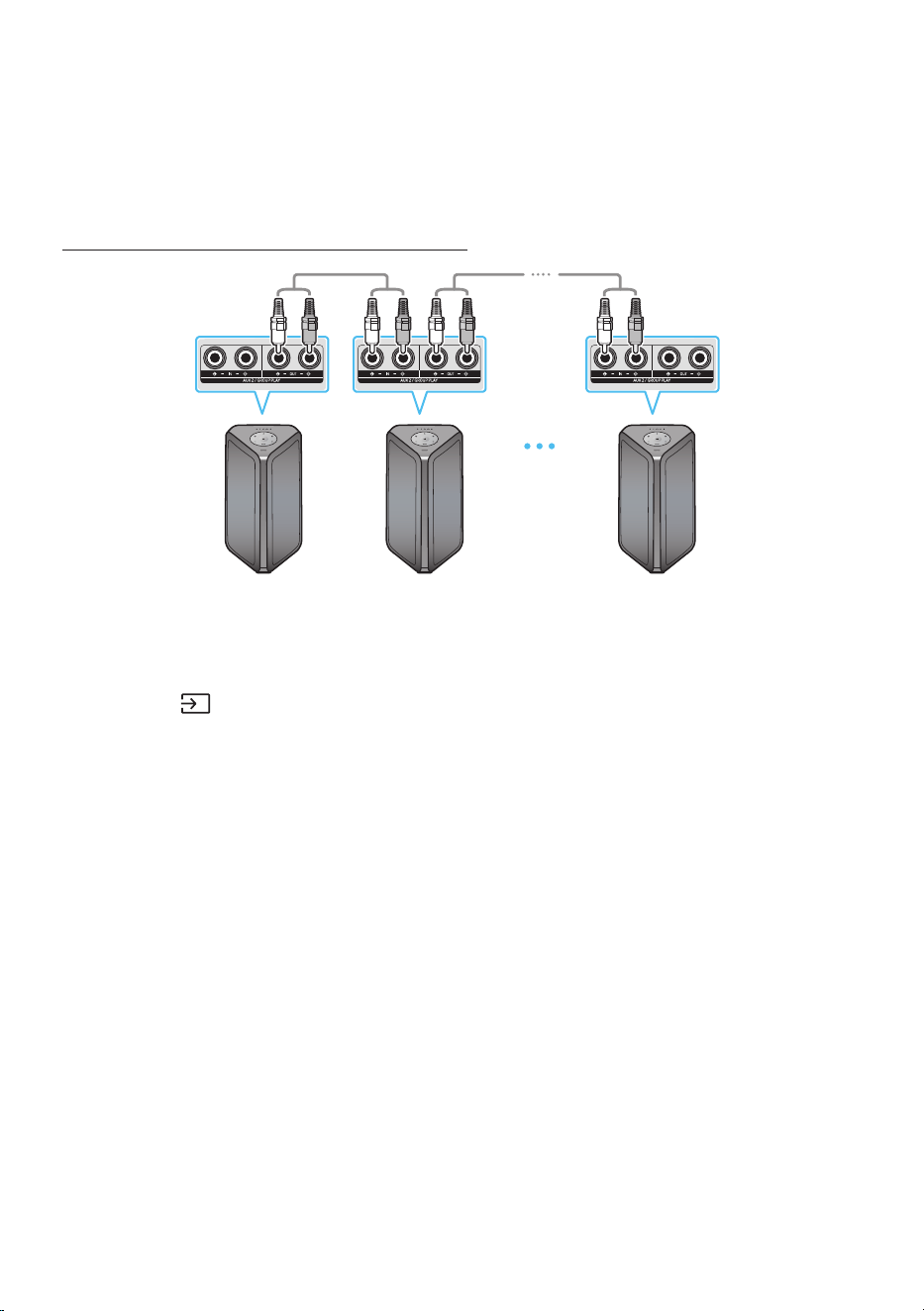
Connecting the wired Group Play mode
1st
Sound Tower HOST
2nd
Sound Tower
Last
Sound Tower
Continue the
connection until
the last Sound
Tower
Set up Group Play by connecting all the systems using audio cables (not supplied). Use the AUX or
(Source) button to change the source to AUX2 for every Sound Tower system except the 1st (or HOST)
Sound Tower system.
NOTES
• The 1st Sound Tower HOST can play music from any source.
• Depending on the length or characteristics of the cable, there may be a difference in operating
distance.
ENG - 8
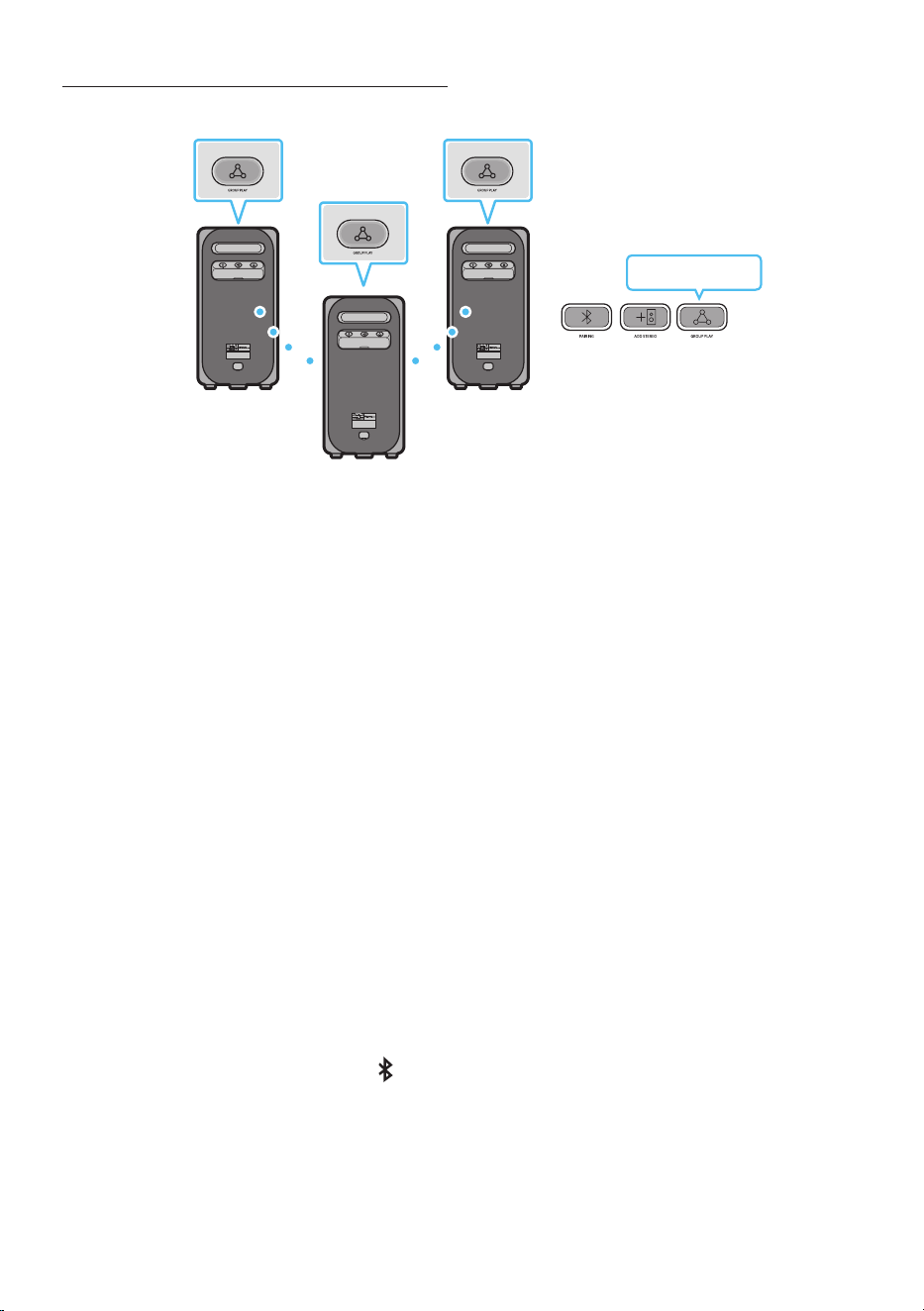
Connecting the wireless Group Play mode
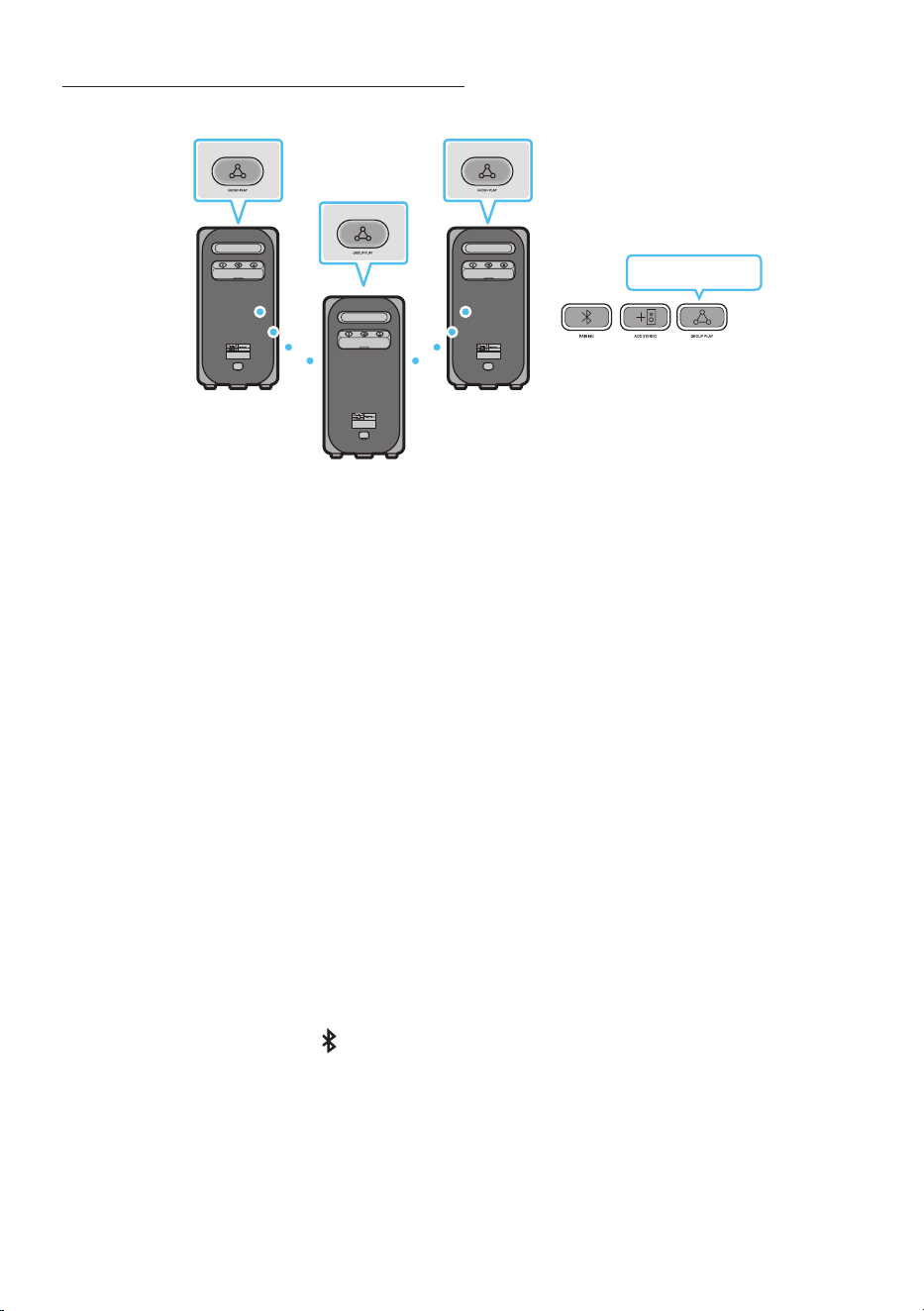
You can connect up to ten Sound Tower systems with the wireless Group Play function.
HOST
SUB 1
SUB 2
POWERPOWER
POWER
Greenashing
Press the GROUP PLAY button on the HOST Sound Tower system, After “GROUP LED” solw blinks
10 seconds, ”GROUP PLAY”LED will be fast blink (30s).
Press the GROUP PLAY button on the 2nd Sound Tower system (SUB 1).”GROUP PLAY”LED will be
blink.And then SUB1 will be connected with HOST,”GROUP PLAY”LED of SUB1 and HOST will stop
blinking and turn on.
Press the GROUP PLAY button on the 3rd Sound Tower system (SUB 2). Tone prompt instead the
GROUP PLAY button on the system stops blinking.
4. If you want to add more Sound Tower systems, repeat step 3.
5. Play music on the HOST Sound Tower. Sound outputs from all the connected systems.
NOTES
• In Group play mode, “HOST” Sound Tower (Figure 1) can connect to the Samsung TV. After the
connection is successful, the Group play mode automatically exits.
• The wireless Group Play connection is available for MX-ST90B/MX-ST50B/MX-ST40B.
• Environmental conditions or other factors with connected devices may have effect on playback
quality.
• If the red LED is on the GROUP PLAY button, an error has occurred in the wireless Group Play
connection. Try step 1 to step 5 again.
• The ADD STEREO button and PAIRING button on the SUB Sound Tower systems are not available
while in wireless Group Play mode.
• The ADD STEREO button on the HOST Sound Tower system is not available while in wireless Group
Play mode.
• Long press “GROUP PLAY” in BT Source state to enter Group mode as “HOST”.
ENG - 9
• All SUB units must be connected one by one. For example, after HOST is connected, press GROUP
PLAY button on SUB 1 to connect, and after SUB 1 is connected, you should connect SUB 2 and SUB
3 one by one sequentially.
• While using Group Play, currently connected Bluetooth devices are disconnected and Bluetooth
connection is disabled.
• Bluetooth devices can search and connect with the HOST Sound Tower only.
• When in Group Play mode, the SUB cannot connect to a Bluetooth device.
• If you power off and then power on the Sound Tower or select any source other than BT on a SUB
unit, in Group Play mode, the Group Play mode is disconnected.
• This product does not support aptX audio stream with Wireless Group Play mode.
Disconnecting the wireless Group Play mode
1. Press and hold the GROUP PLAY button over 5 seconds (HOST or SUB) after Group Play is
connected or press the GROUP PLAY button (HOST or SUB) before Group Play is connected.
• Tone prompt instead and the LED above the GROUP PLAY button is off.
2. If you select any source other than BT on the SUB units or turn off the HOST Sound Tower, the
Group Play mode is disconnected.
• If the disconnection is made from the HOST Sound Tower, Group Play is disconnected.
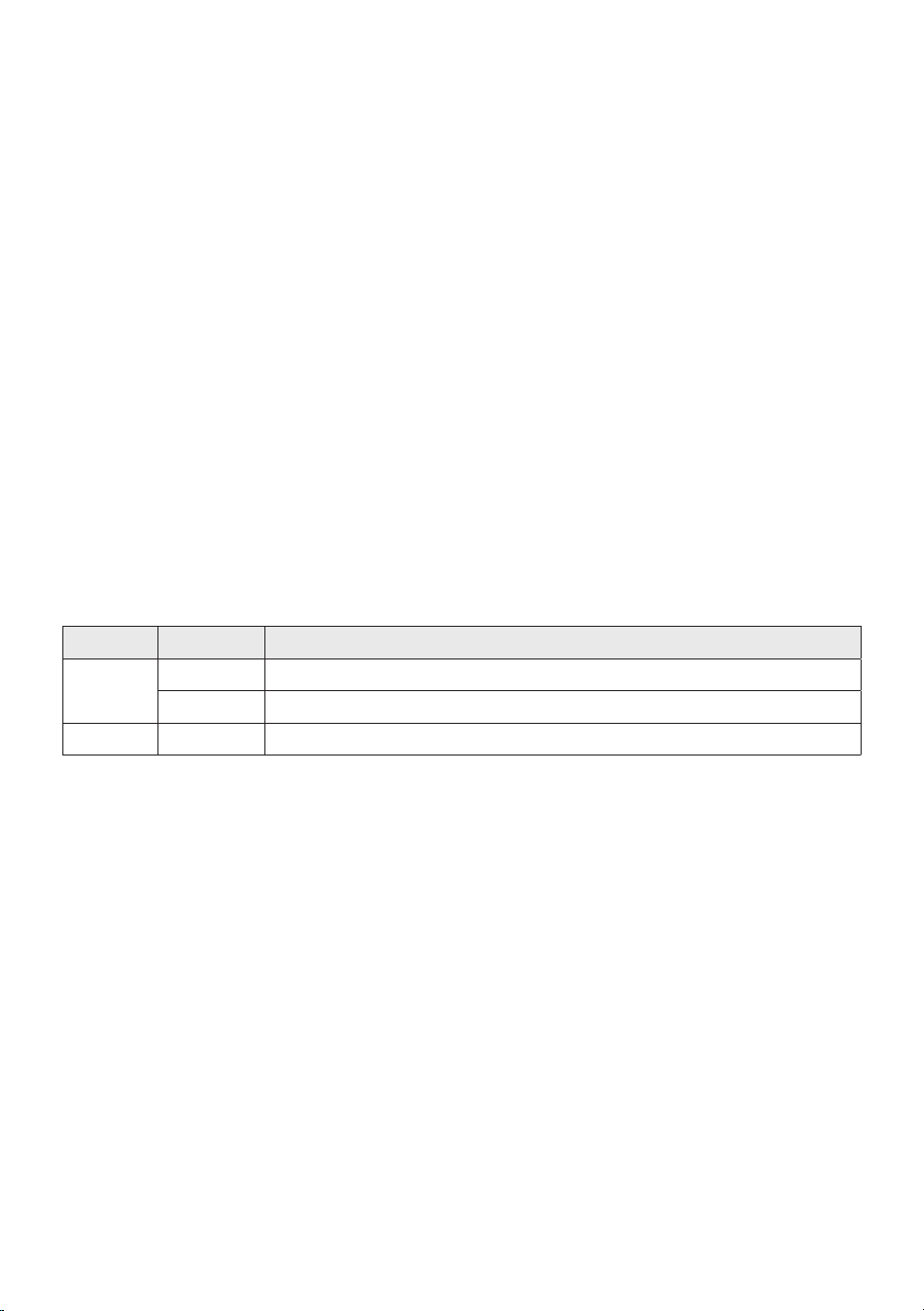
LED Indications
LED STATE Description
Green
Blink Waiting for a wireless Group Play connection.
Solid The wireless Group Play connection was successful.
Red Solid There is an error with the wireless Group Play connection.
NOTE
• In wireless connection, Playback quality can be unstable depending on Bluetooth environment.
For better play, please keep the device in wired Group Play mode.
• The rst bluetooth connection should be within 1m.
ENG - 10
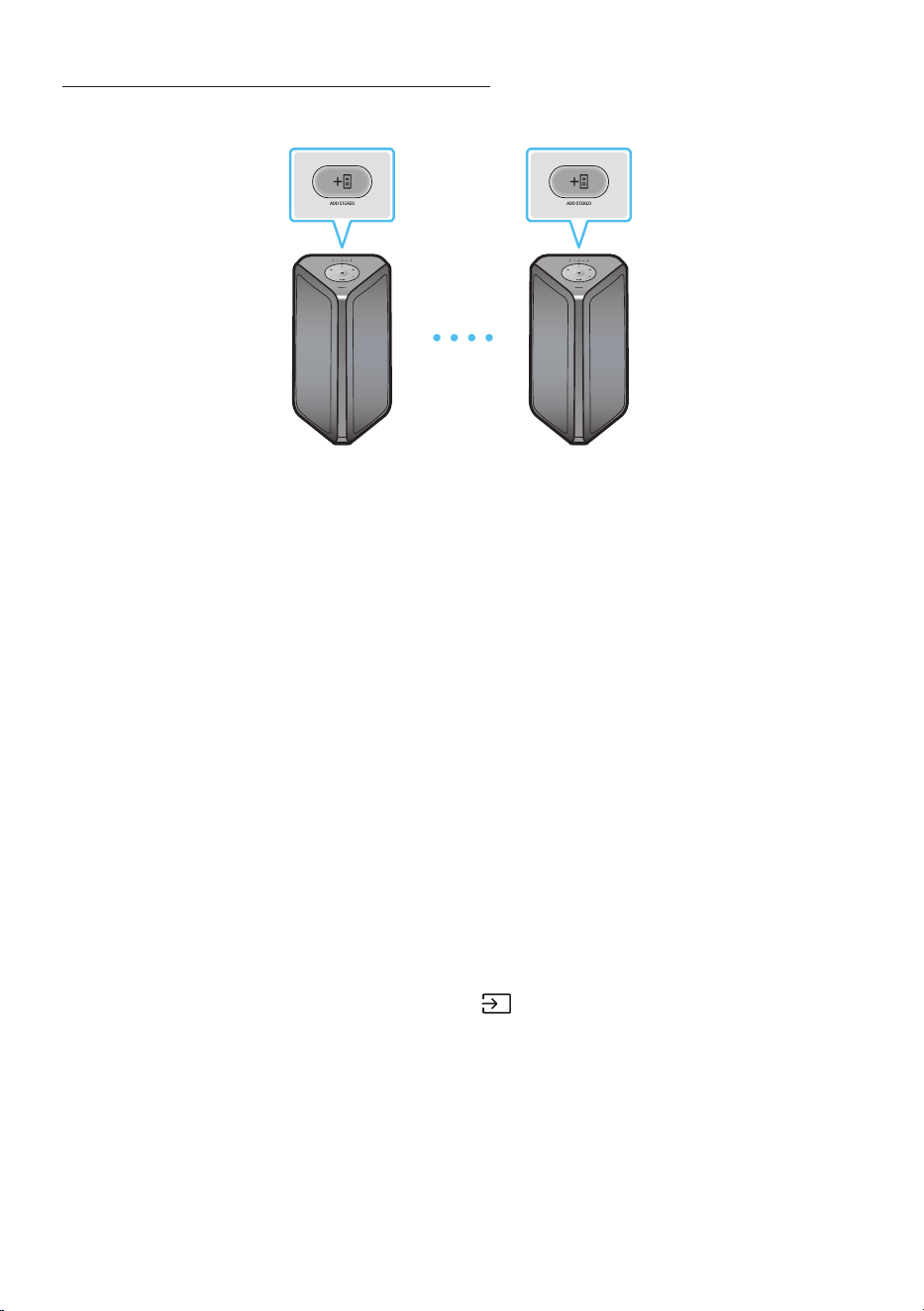
Using a Smartphone and Stereo Group mode
Connect two Sound Tower and use them with your smartphone to enjoy stereo sound.
Left Sound Tower
(MAIN)
Right Sound Tower
(SUB)
Press the ADD STEREO button on the left Sound Tower system. The LED blinks on the ADD
STEREO button.
Press the ADD STEREO button on the right Sound Tower system. The LED blinks on the ADD
STEREO button.
3. When the connection is made, tone prompt. Back plane ADD LED Green Indicator Steady on.
• The MAIN Sound Tower system outputs left channel sound and the SUB Sound Tower system
outputs right channel sound. Press the ADD STEREO button on the MAIN or SUB Sound Tower
to change the sound channel of the Sound Tower.
4. Play music by connecting your smartphone to the MAIN Sound Tower and Bluetooth.
Sound is output from both Sound Tower.
NOTES
• To use the Stereo Group mode, both Sound Tower systems must be the same model.
• Environmental conditions or other factors with connected devices may have effect on playback
quality.
• If the red LED is on the ADD STEREO, an error has occured in the Stereo Group connection. Try step
1 and step 3 again.
• Remote Controller, BT PAIRING, GROUP PLAY and (Source) buttons on the SUB Sound Tower
systems are disabled while in Stereo Group mode.
• The GROUP PLAY button on the MAIN Sound Tower system is not available while in Stereo Group
mode.
ENG - 11
• In mode other than “BT” (ex. USB, AUX mode), music is played only in MAIN Sound Tower and music
is not played in SUB Sound Tower.
• The lighting colours between MAIN Sound Tower and SUB Sound Tower may vary.
• This product does not support aptX audio stream with Stereo Group mode.
• If you try to connect a Bluetooth device while Stereo Group is connecting, the Stereo Group mode
may fail.
Terminate the Stereo Group mode
Press the ADD STEREO button (MAIN or SUB) for at least 5 seconds while the Stereo Group is
connected.
• Tone prompt and the LED above the ADD STEREO button is off.
LED Indications
LED STATE Description
Green
Blink Waiting for a Stereo Group connection.
Solid The Stereo Group connection is successful.
Red Solid There is an error with the Stereo Group connection.
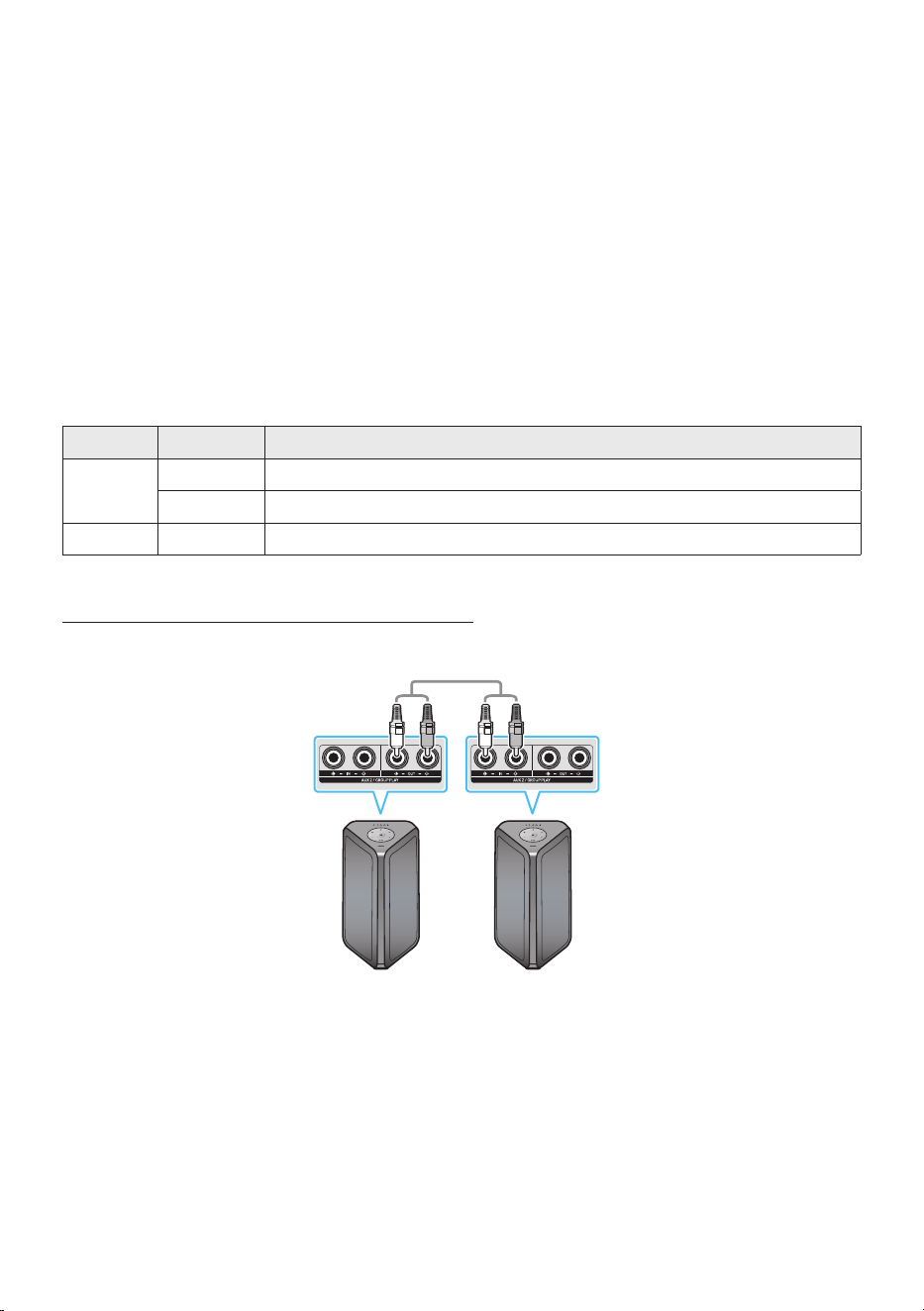
Using Samsung TV and Stereo Group mode
Connect two Sound Tower by wire and use them with Samsung TV to enjoy stereo sound.
Left Sound Tower
(MAIN)
Right Sound Tower
(SUB)
Connect the RCA cable to the AUX2 OUT on the MAIN and AUX2 IN on the SUB as shown by using
the RCA cable (not supplied).
In “BT” mode, press the “AUX” button on the MAIN Sound Tower remote control for at least 5
seconds. The LED blinks on the ADD STEREO button.
3. When the connection is complete, the “ADD STEREO” LED turn on and then the current output.
Tone prompt instead.

ENG - 12
4. When the connection is complete, the SUB top panel “AUX2” LED turn on.
• The MAIN Sound Tower outputs the left channel sound and the SUB Sound Tower outputs the
right channel sound. Press the ADD STEREO button on the MAIN or SUB Sound Tower to
change the sound channel of the Sound Tower.
5. Connect a TV and MAIN Sound Tower via Bluetooth to play music. Sound is output from both
Sound Tower.
NOTES
• To use Stereo Group mode, both Sound Tower must be the same model.
• A red light on the LED on the ADD STEREO button indicates an error in the Stereo Group
connection. Try Step 1 to 5 again.
• In Stereo Group mode, the remote control, BT PAIRING, GROUP PLAY, and (Source) buttons on
the SUB Sound Tower are disabled.
• The GROUP PLAY button on the MAIN Sound Tower is not available in Stereo Group mode.
• If Samsung TV supports a simple connection, the connection pop-up is automatically displayed on
the TV, and if you select “Yes”, it connects to the TV. If there is a previous connection history
between Samsung TV and Sound Tower, it will be connected to Samsung TV without pop-up. For a
simple connection to Samsung TV, refer to page 17.
• The lighting colours may vary between the MAIN Sound Tower and the SUB Sound Tower.
Terminating the Stereo Group mode connection
Press the ADD STEREO button (MAIN or SUB) for at least 5 seconds after the Stereo Group is
connected.
• “OFF-STEREO MODE” tone prompt and the LED on the ADD STEREO button turns off.
ENG - 13
04 CONNECTING AN EXTERNAL DEVICE
Connect to an external device via a wired or wireless network to play the external device’s sound
through the Sound Tower.
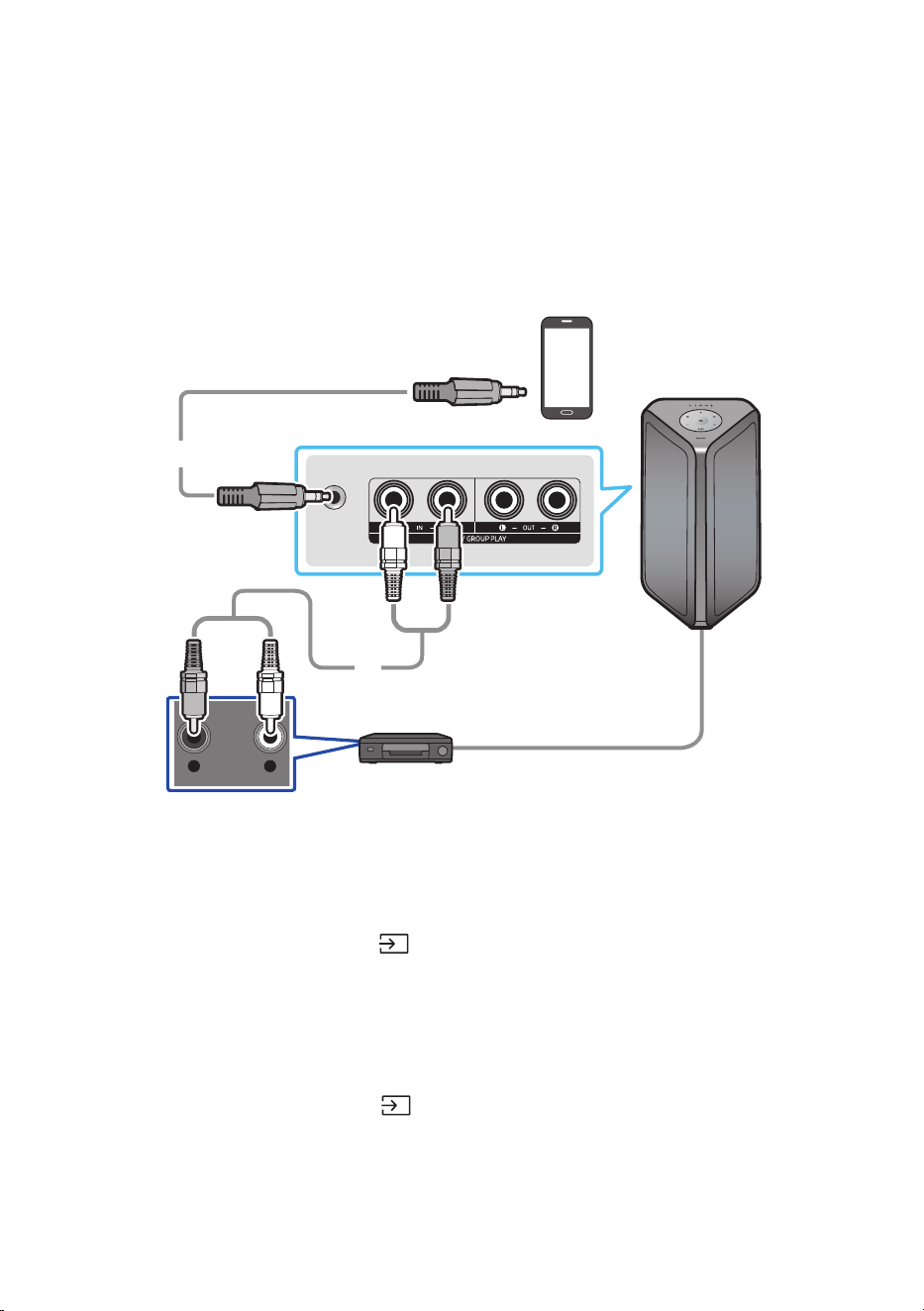
Connecting using an Analogue Audio (AUX) Cable
AUX 1
- AUDIO -
R L
Mobile device / MP3 / PMP
BD / DVD player / Set-top box / Game console
3.5mm
stereo cable (not supplied)
Audio (AUX) Cable (not supplied)
Rear of the Sound Tower
3.5mm stereo Cable (AUX1)
1. Connect AUX1 jack on the main unit to the AUDIO OUT jack of the Source Device using an 3.5mm
stereo cable.
2. Select “AUX1” mode by pressing the (Source) button on the top panel or on the remote control.
• You can also select a source using AUX button on the remote control.
Audio Cable (AUX2)
1. Connect AUX2 (IN) terminals on the main unit to the AUDIO OUT terminals of the Source Device
using an audio cable.
2. Select “AUX2” mode by pressing the (Source) button on the top panel or on the remote
control.
• You can also select a source using AUX button on the remote control.
ENG - 14
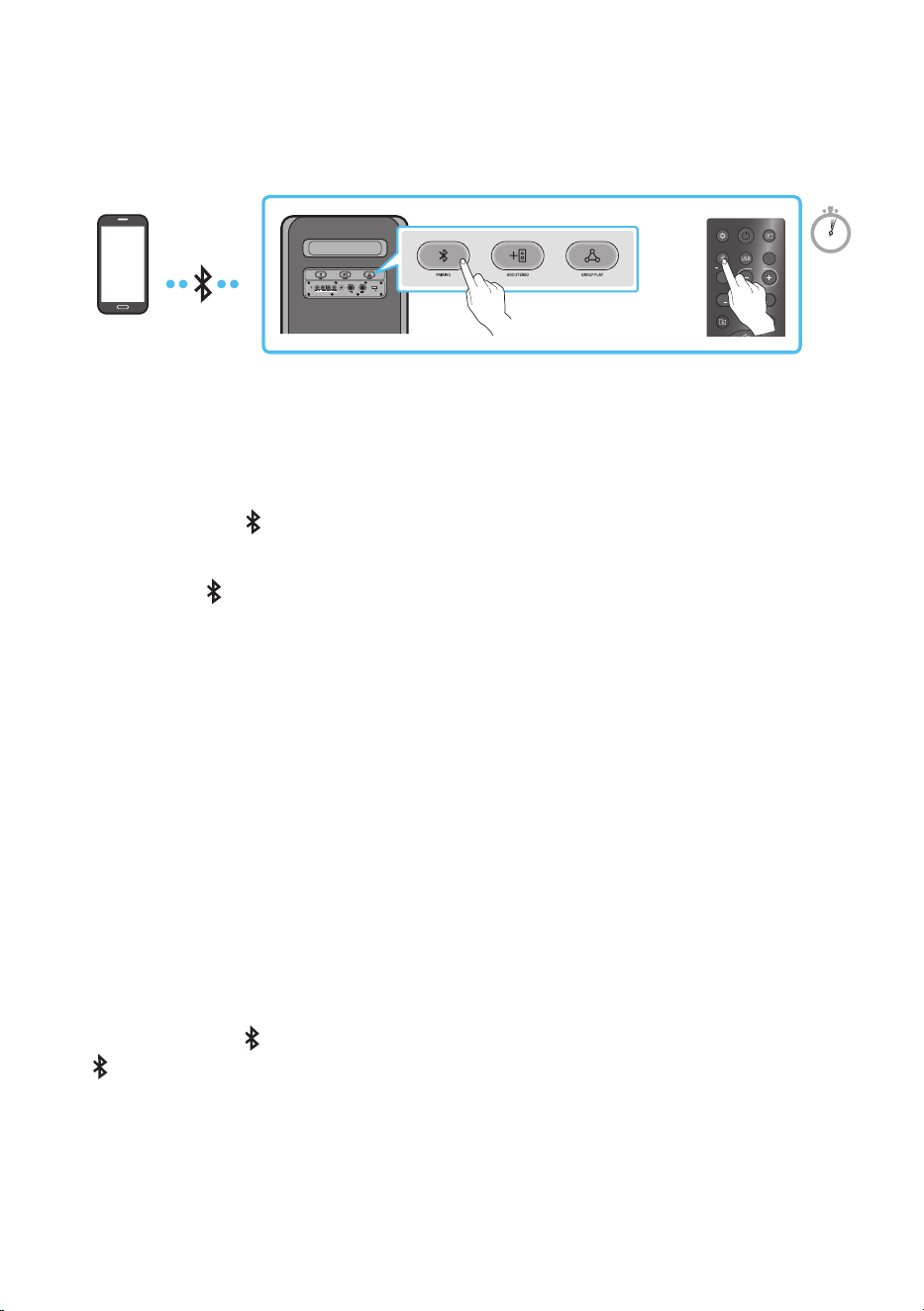
Connecting a mobile device via Bluetooth
When a mobile device is connected using Bluetooth, you can hear stereo sound without the hassle of
cabling.
ECHOVOL
USB
(5V 2.1A)
AUX 1
MIC
LIGHT
PAIRING
TEMPO
USB
AUX
EFFECT
DOWN
UP
EFFECT
DJ
SOUND
MODE
Bluetooth
device
OR
5 Sec
* In battery mode, when the Sound Tower is power off, Bluetooth connection and the party audio app are
not available.
The initial connection
1. Press and hold the PAIRING button on the remote control for more than 5 seconds to enter the
“BT PAIRING” mode.
(OR)
Press the PAIRING button on the rear panel.
2. On your device, select “[AV] MX-ST5B Series” from the list that appears.
• After the device is connected. The third light on the top panel blinks three times cyan, and the
bluetooth light on the rear panel is steady on.
3. Play music les from the device connected via Bluetooth through the Sound Tower.
If the device fails to connect
• Sound tower will play voice prompt via bluetooth disconnected.
• If a previously connected Sound Tower listing (e.g. “[AV] MX-ST5B Series”) appears in the list, delete
it.
• Then repeat steps 1 and 2.
What is the difference between BT READY and BT PAIRING?
• BT READY : In this mode, you can use the previously connected TV or mobile device to connect to
Sound Tower.
• BT PAIRING : In this mode, you can connect a new device to the Sound Tower.
(Press and hold the PAIRING button on the remote control for more than 5 seconds or press the
PAIRING button on the rear of the Sound Tower to enter the “BT PAIRING” mode.)
ENG - 15
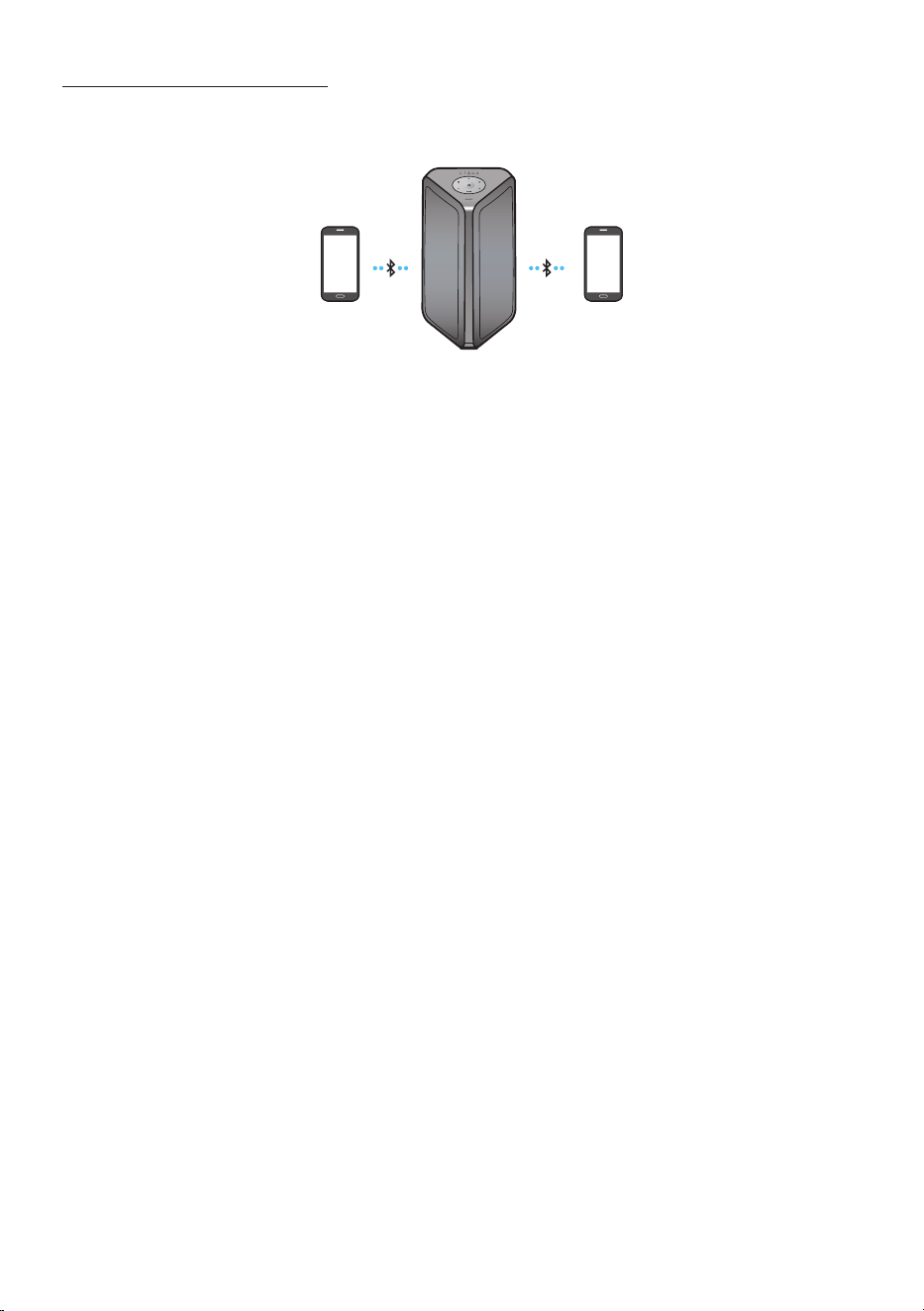
Bluetooth Multi connection
Sound Tower supports up-to two simultaneous Bluetooth device connections. Sound Tower can play
music through one of the connected Bluetooth devices without disconnecting the second device.
Bluetooth device 1 Bluetooth device 2
1. Connect Sound Tower to the rst device and the second device respectively for the rst time.
(See page 14)
2. Music can be played on only one of the two connected devices, and when the music is played on
the other device, the music on the playing device is paused.
NOTES
• If you want to connect Sound Tower to a third device, you can disconnect Sound Tower from one of
the two currently connected devices and then connect Sound Tower to the third device.
(Device include Samsung TV)
• With the Sound Tower and two devices currently connected, when pairing to a new Bluetooth
device, the devices currently connected maybe disconnected.
• You can connect to two Bluetooth devices at the same time.
• If asked for a PIN code when connecting a Bluetooth device, enter <0000>.
• Environmental conditions or other factors with connected devices may have effect on playback
quality.
• The Sound Tower automatically turns off after 18 minutes with no command input in the ready
state.
• The Sound Tower may not perform Bluetooth search or connection correctly under the following
circumstances:
– If there is a strong electrical eld around the Sound Tower.
– If several Bluetooth devices are simultaneously paired with the Sound Tower.
– If the Bluetooth device is turned off, not in place, or malfunctions.
• Electronic devices may cause radio interference. Devices that generate electromagnetic waves
must be kept away from the Sound Tower main unit - e.g., microwaves, wireless LAN devices, etc.
• Bluetooth Multi connection may not be supported depending on the connected device’s
specications.
• Removable/detachable Bluetooth devices (Ex:Dongle etc..) ,windows phone, laptops, TV, etc. do not
support Bluetooth Multi connection.
• After Bluetooth Multi connection pairing, there may be a slight delay before music starts playing
depending on the Bluetooth devices.

ENG - 16
• If you move too far out of range from the Sound Tower without rst disconnecting your Bluetooth
device, it may take a few minutes to connect other Bluetooth devices. If you turn the Sound Tower
off and back on, you can connect other Bluetooth devices without waiting.
LED Indications
LED STATE Description
Blue
Fast Blink BT PAIRING mode
Blink BT READY mode
Solid A Bluetooth device is connected.
Using Bluetooth Power On
When the Sound Tower is turned off, you can connect your smart device via a Bluetooth connection to
turn it on. Battery status cannot use Bluetooth power on.
1. Press and hold the BASS button on the remote control or on the top panel to set the Bluetooth
Power On function on. Lighting bar will be blink white once.
2. When the Sound Tower is off, connect your smart device via Bluetooth. (For information on
Bluetooth connections, refer to your smart device’s manual.)
3. When the connection is complete, the Sound Tower turns itself on automatically in Bluetooth
mode.
• Select the desired music to play from your smart device.
NOTE
• Each time you press and hold the BASS button for 5 seconds. LED lighting bar will be blink white once
and status switched:
BLUETOOTHPOWER-ON→BLUETOOTHPOWER-OFF
ENG - 17
Connecting the Samsung TV via Bluetooth
If Sound Tower connected with Samsung TV via Bluetooth, Sound Tower can be controlled by TV UI.
(Volume +/-, Mute On/Off and Power On/Off)
LIGHT
PAIRING
TEMPO
USB
AUX
EFFECT EFFECT
DJ
SOUND
MODE
OR
Top Panel of the Sound Tower
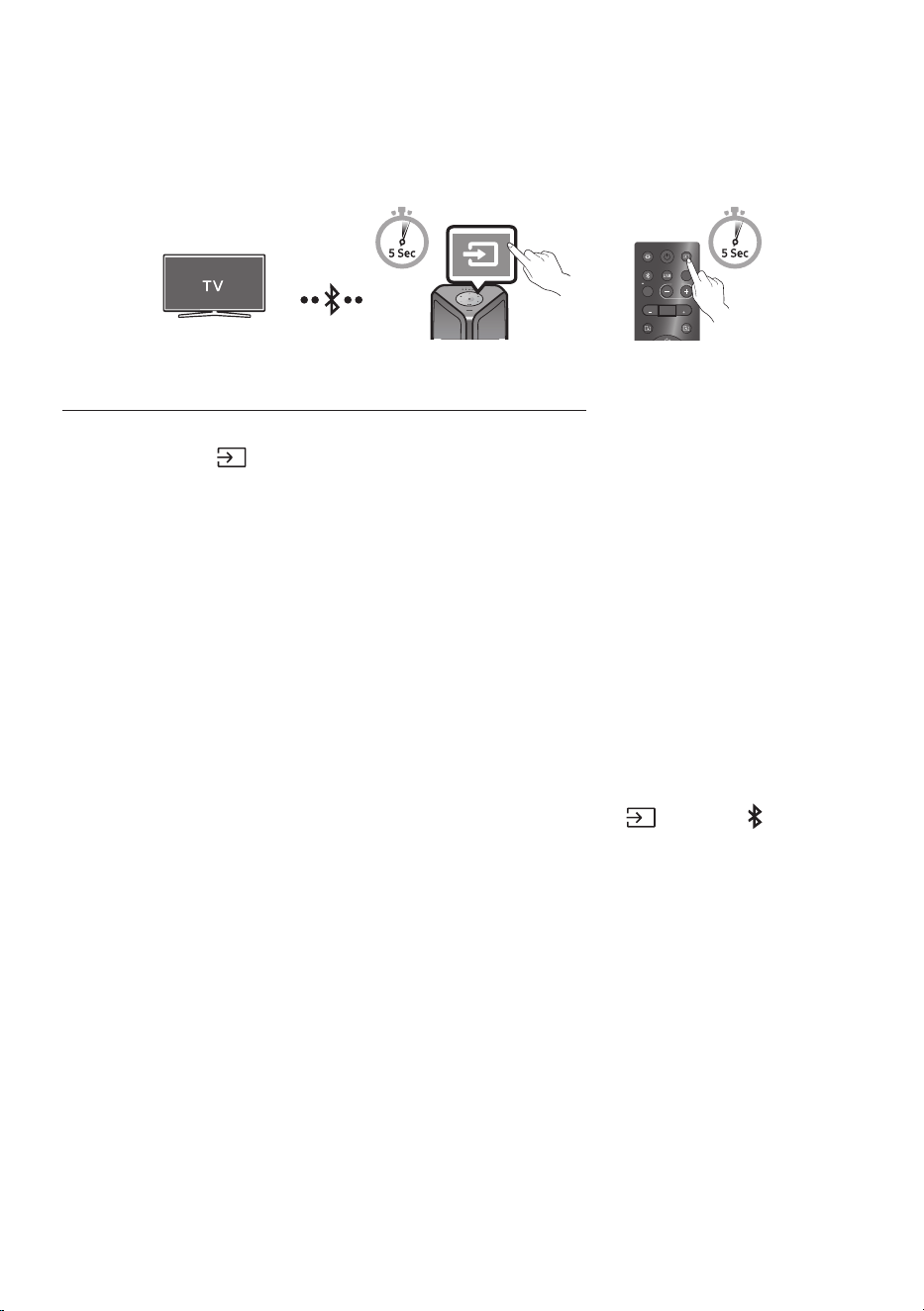
Easy connect with Samsung TV (SEARCHING TV mode)
Sound Tower has “SEARCHING TV” mode for easy connect with Samsung TV.
1. Press and hold (Source) bottom for more than 5 seconds on remote control or top panel then
Sound Tower will start to search Samsung TV. Lighting bar will blink white once and then blink
cyan, The back plane “PAIRING” LED will be slow blink. (Or, when the wired Stereo Group mode
connection is complete, the “SEARCHING TV” mode is automatically activated.)
2. If Samsung TV support easy connection, connection popup will be displayed on TV.
If Samsung TV has connected with Sound Tower before, Samsung TV will be connected without
popup.
3. If Sound Tower can not nd any Samsung TV within 5 minutes, Sound Tower will terminate
“SEARCHING TV” mode and turn to “BT PAIRING” mode. If nd any Samsung TV, Sound Tower will
request connection to those TV.
NOTES
• While in wireless Group Play mode, searching TV is not available.
• To stop searching Samsung TV, turn off the Sound Tower or press the (Source) or PAIRING
button.
• Sound Tower does not support multi connection if Samsung TV is connected.
• While Samsung TV is connected, Sound mode is PARTY and SOUND MODE button is not available.
• While Samsung TV is connected, Sound Tower APP can not connect with Sound Tower.
• Connection popup may not be displayed according to TV spec.
• You can select and connect directly from the Bluetooth speaker list on your TV when the
connection pop-up does not appear on your TV.
• When the Sound Tower is connected to your TV by Bluetooth connection, the video on the TV and
audio from the Sound Tower may not be synchronised because the distance between the Sound
Tower and the TV is too far. It is recommended to move the Sound Tower closer to your TV within 1
meter.
ENG - 18
05 CONNECTING A USB STORAGE DEVICE
You can play music les located on USB storage devices through the Sound Tower.
POWER
ECHOVOL
USB
(5V 2.1A)
AUX 1
MIC
USB
(5V 2.1A)
LIGHT
PAIRING
TEMPO
USB
AUX
EFFECT EFFECT
DJ
SOUND
MODE
USB storage
device
(not supplied)
Rear of the Sound Tower
OR
white LED on
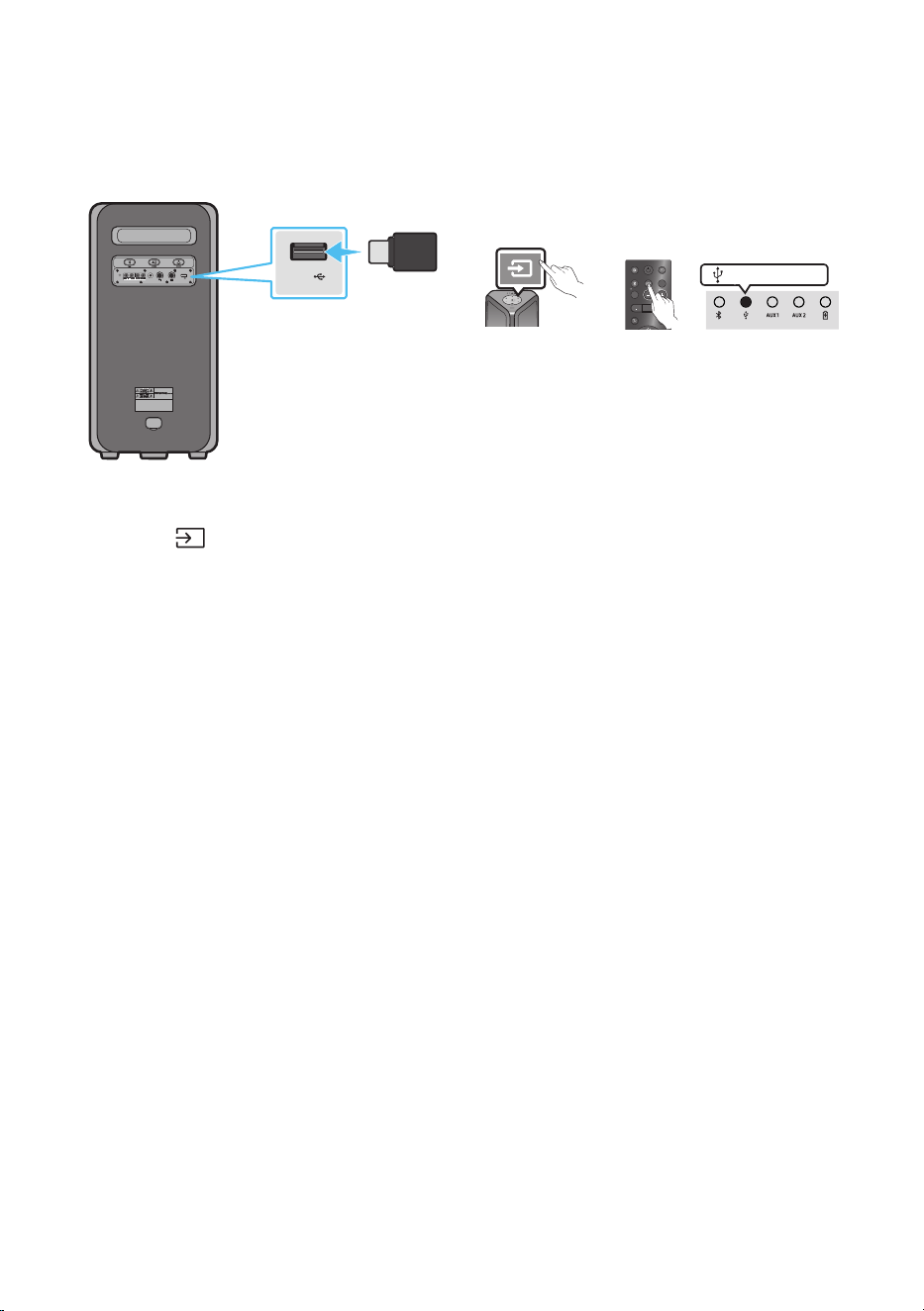
1. Connect a USB storage device to the USB jacks on your Sound Tower.
2. Press the (Source) button on the top panel or on the remote control, and then select “USB”.
• You can also select a source using USB button on the remote control.
3. The second USB indicator on the top panel is steady on.
4. Play music les from the USB storage device through the Sound Tower.
• The Sound Tower automatically turns off (Auto Power Down) if USB device is not connected,
playback stopped, or there is no input for more than 18 minutes.
NOTES
• This product only supports USB storage devices that are formatted in the FAT and FAT32 le
system.
• This product does not support HDD storage or storage on mobile devices.
• A maximum of 999 les can be played per USB storage device.
• A maximum of 256 folders can be read per USB storage device.
ENG - 19
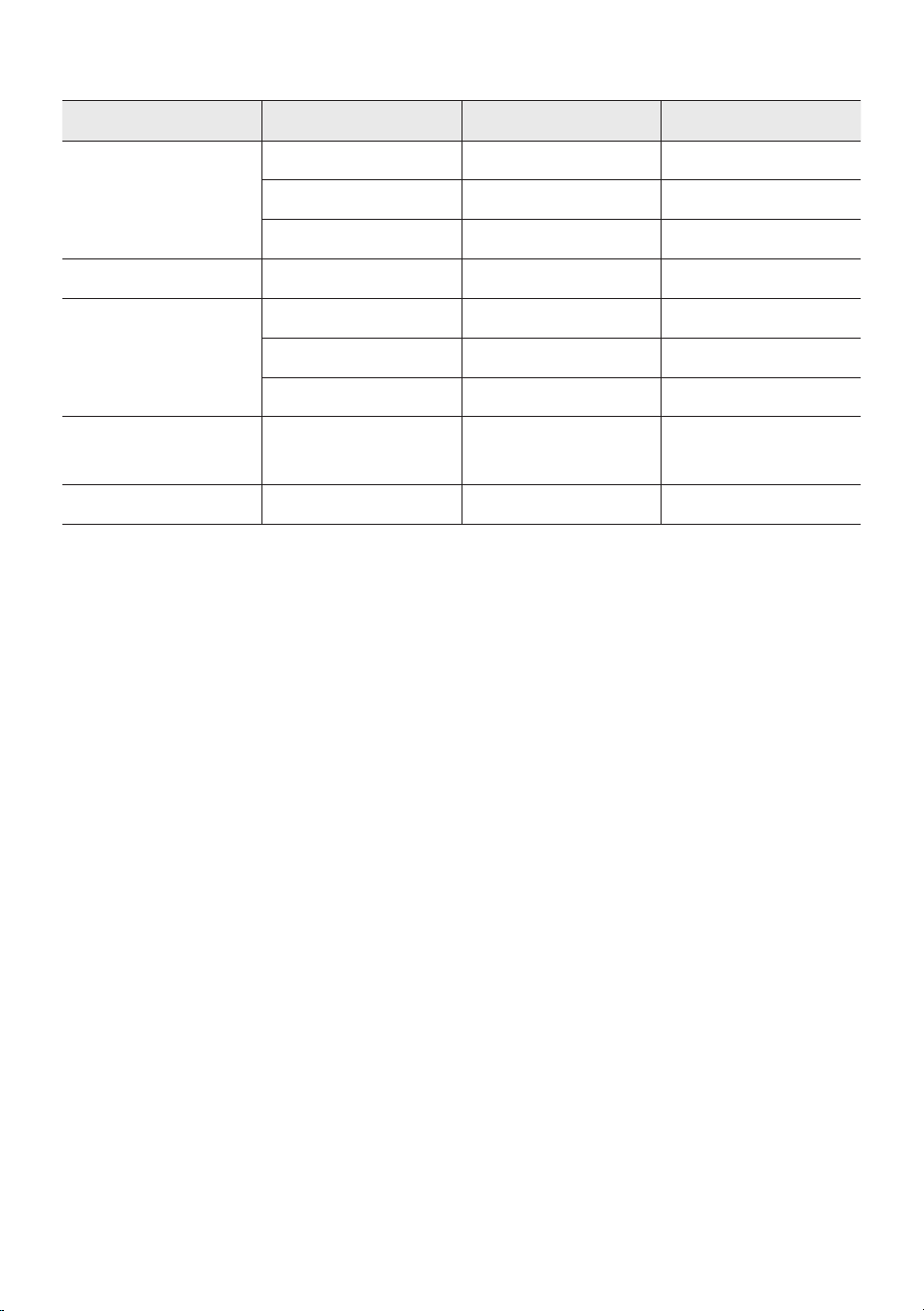
Supported Audio Formats
File Extension Audio Codec Sampling Rate Bit Rate
*.mp3
MPEG 1 Layer3 32 kHz ~ 48 kHz 32 kbps ~ 320 kbps
MPEG 2 Layer3 16 kHz ~ 24 kHz 8 kbps ~ 160 kbps
MPEG 2.5 Layer3 8 kHz ~ 12 kHz 8 kbps ~ 160 kbps
*.wma WMA7/8/9 8 kHz ~ 48 kHz 32 kbps ~ 320 kbps
*.aac
AAC 8 kHz ~ 96 kHz < 1728 kbps
A AC-LC 8 kHz ~ 96 kHz < 1728 kbps
HE-AAC 8 kHz ~ 96 kHz < 1728 kbps
*.wav
PCM/LPCM/
IMA_ADPCM
8 kHz ~ 192 kHz < 5 Mbps
*ac - 8 kHz ~ 192 kHz < 5 Mbps
NOTES
• This product does not support WMA Professional codec.
• The above table shows supported sampling rates and bit rates. Files in formats that are not
supported will not play.
• A AC les only support the ADTS native format.
Software Update
SamsungmayofferupdatesfortheSoundTower’ssystemrmwareinthefuture.
If an update is offered, you can update the rmware by connecting a USB device with the rmware
update stored on it to the USB port on your Sound Tower. For more information about how to download
update les, go to the Samsung Electronics website at www.samsung.com/us/support/.
Then, enter or select the model number of your Sound Tower, select the Software & Apps option, and
then Downloads. Note that the option names can vary.
ENG - 20
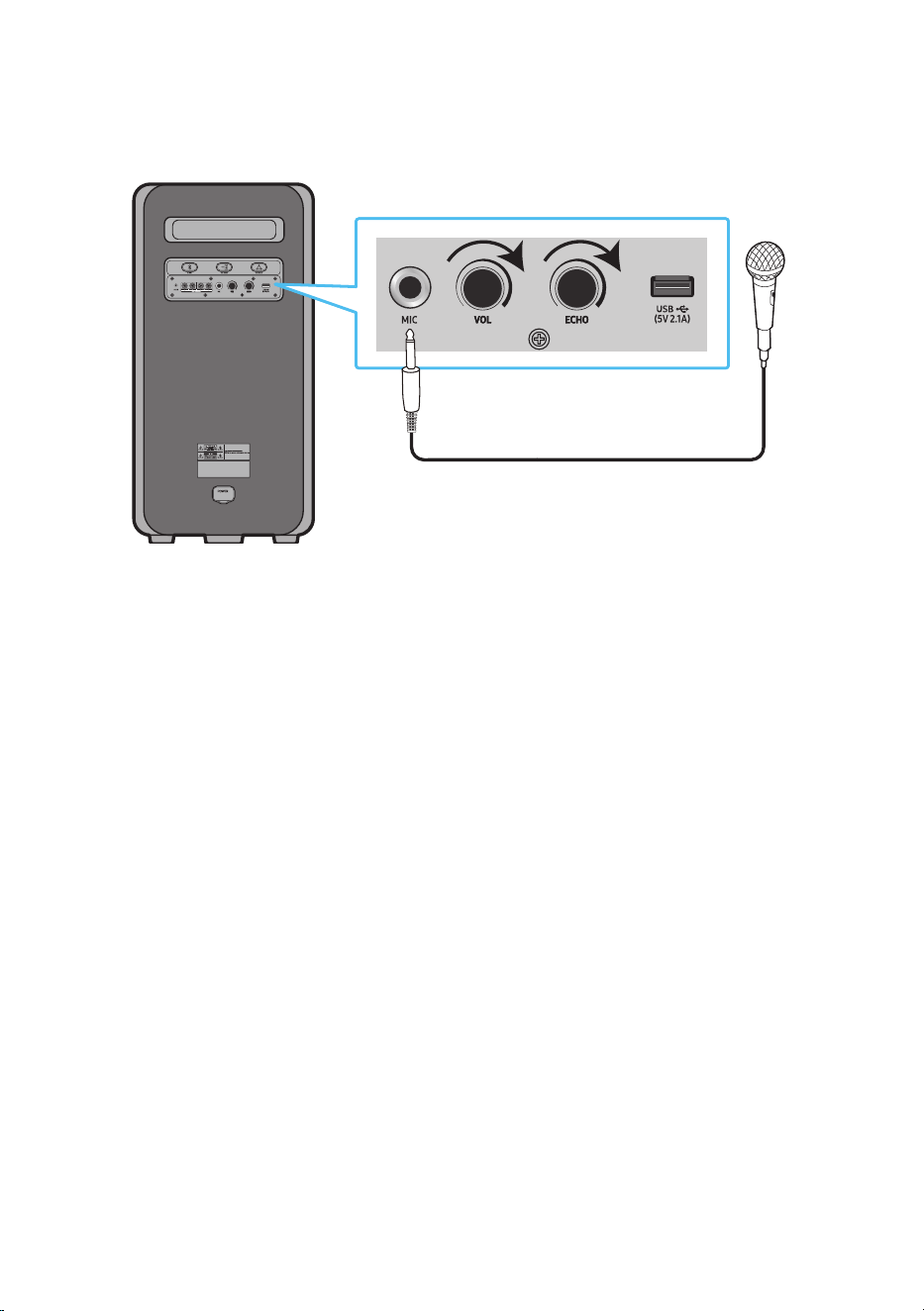
Connecting an External Microphone
You can output your voice from the system by connecting a dynamic microphone with a normal plug
(not supplied).
MAXMIN MAXMIN
1. Turn the MIC LEVEL knob to MIN to reduce the microphone volume level.
2. Connect an optional microphone to the MIC jack on the unit.
3. Adjust the volume using the MIC “VOL” knob.
4. Adjust the Effect of the echo using the MIC “ECHO” knob.
5. Speak or sing into the connected microphone.
NOTES
• When using the wireless Group mode or stereo mode function, sound from the microphone is only
output from the system to which the microphone is connected.
• When Sound Tower is in battery mode, the MIC sound level will be lower.
ENG - 21
06 USING THE REMOTE CONTROL
How to Use the Remote Control
LIGHT
PAIRING
TEMPO
USB
AUX
EFFECT
DOWN
UP
BASS
EFFECT
DJ
SOUND
MODE
* To reduce battery drain, the product
does not turn on when press the power
button of remote control while the
battery is in use.
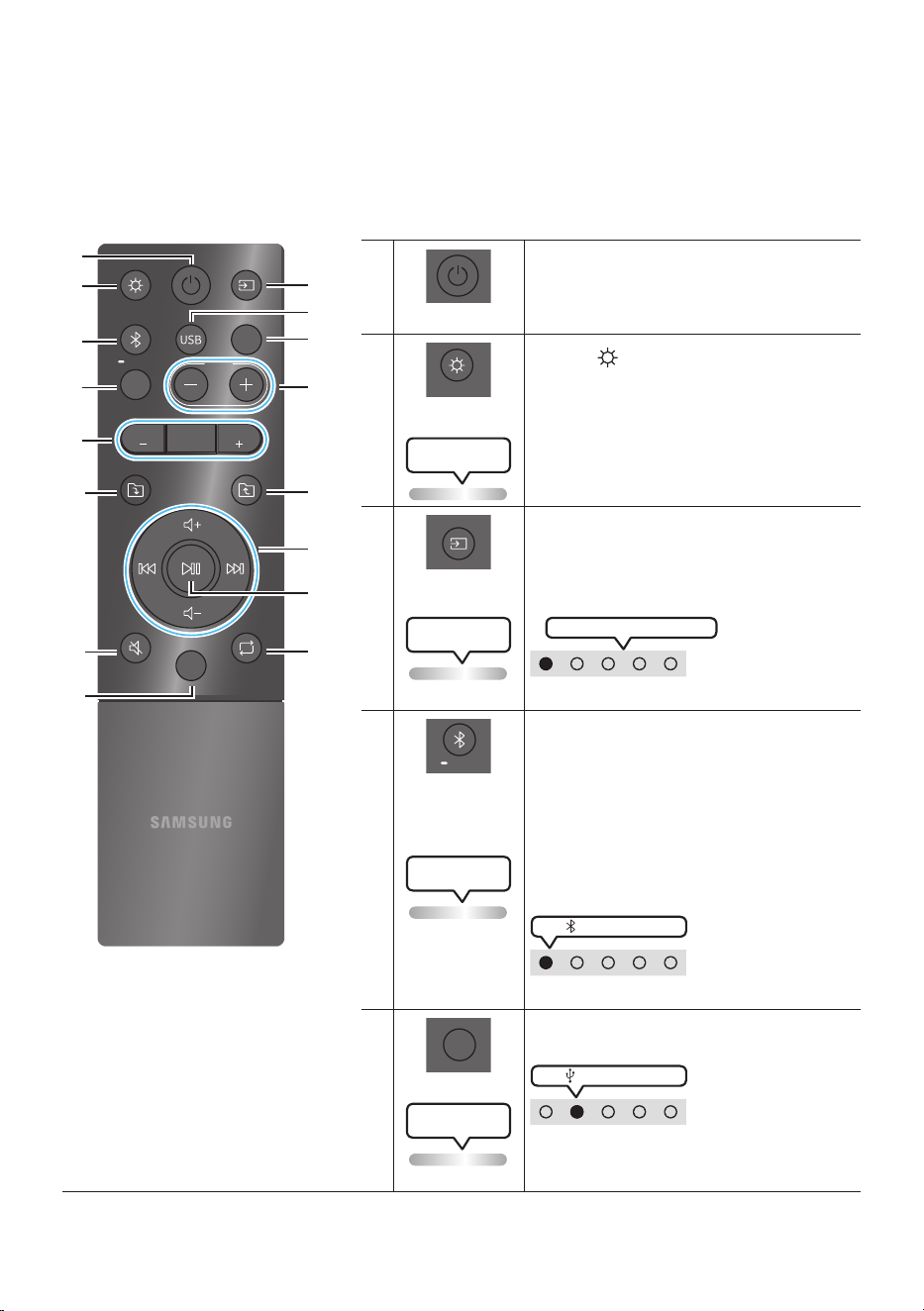
Power
DOWN
UP
BASS
EFFECT
EFFECT
DJ
LIGHT
PAIRING
TEMPO
USB
AUX
SOUND
MODE
Turn the Sound Tower on and off.
LIGHT
DOWN
UP
BASS
EFFECT
EFFECT
DJ
LIGHT
PAIRING
TEMPO
USB
AUX
SOUND
MODE
Press the (LIGHT) button to turn the
Lighting Mode on.
(Only during music playback is effective)
Press the button repeatedly to cycle through
the available light modes: AMBIENT, PARTY,
DANCE, THUNDERBOLT, STAR or OFF.
Lighting LED
white blink x1
Source
DOWN
UP
BASS
EFFECT
EFFECT
DJ
LIGHT
PAIRING
TEMPO
USB
AUX
SOUND
MODE
Press to select a source connected to the
Sound Tower.
Press the button repeatedly to cycle through
the available sources: BT, USB, AUX1 or AUX2 .
Lighting LED
white blink x1
White LED moves to right on
LED indicator on the top of the product
Bluetooth
PAIRING
DOWN
UP
BASS
EFFECT
EFFECT
DJ
LIGHT
PAIRING
TEMPO
USB
AUX
SOUND
MODE
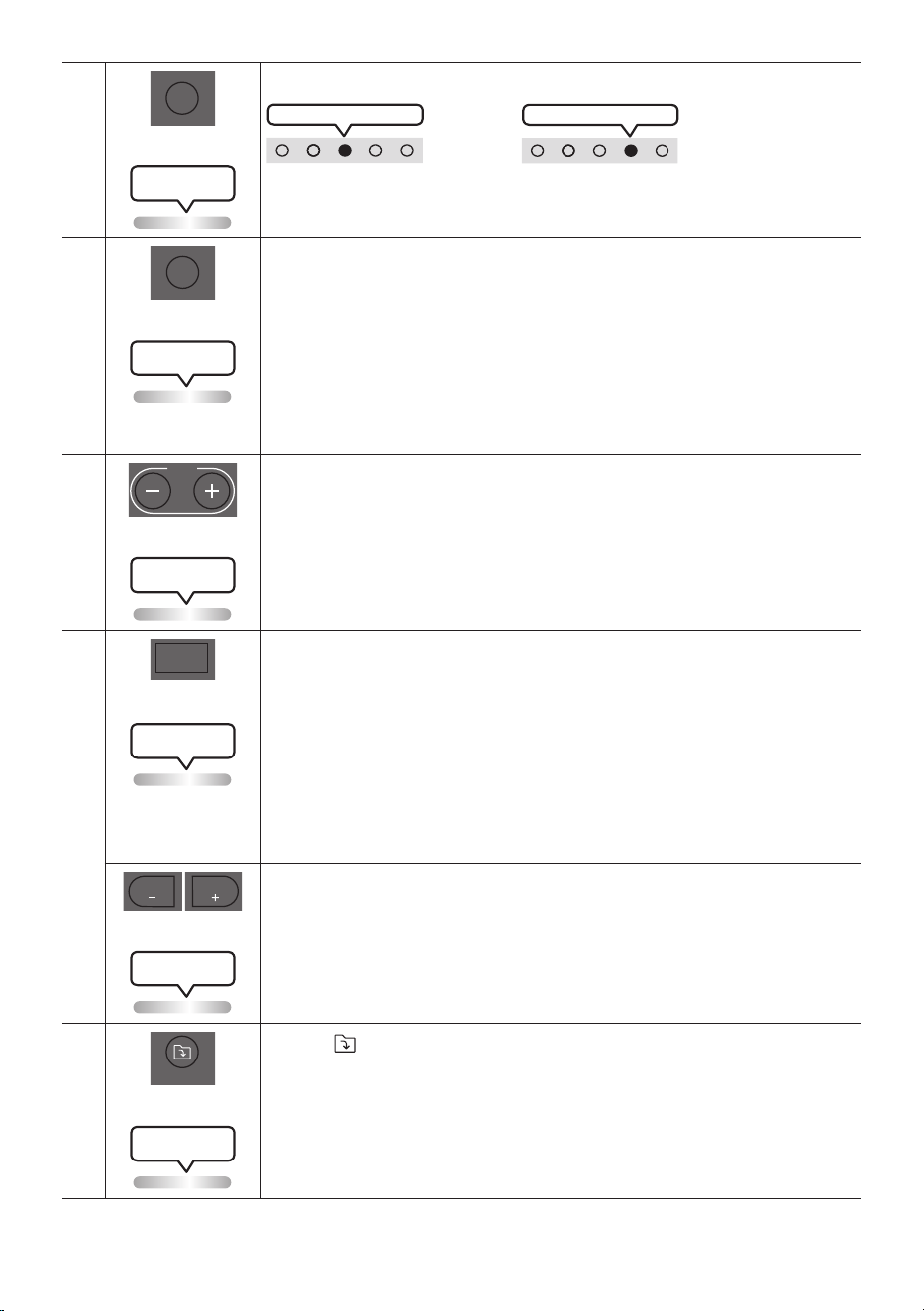
Press to select a source connected directly to
"BT" mode.
Press and hold the button for more than
5 seconds to enter the "BT PAIRING" mode.
You can connect the Sound Tower to a new
Bluetooth device in this mode by selecting the
Sound Tower from the Bluetooth device's
search list.
Lighting LED
Cyanashes
white LED on
LED indicator on the top of the product
USB
DOWN
UP
BASS
EFFECT
EFFECT
DJ
LIGHT
PAIRING
TEMPO
USB
AUX
SOUND
MODE
Press to select the USB source connected to
the Sound Tower.
white LED on
LED indicator on the top of the product
Lighting LED
white blink x1
ENG - 22
AUX
DOWN
UP
BASS
EFFECT
EFFECT
DJ
LIGHT
PAIRING
TEMPO
USB
AUX
SOUND
MODE
Press to select the AUX1 or AUX2 sources connected to the Sound Tower.
AUX2 white LED on
OR
AUX1 white LED on
LED indicator on the top of the product
Lighting LED
white blink x1
SOUND MODE
DOWN
UP
BASS
EFFECT
EFFECT
DJ
LIGHT
PAIRING
TEMPO
USB
AUX
SOUND
MODE
Press the button repeatedly to cycle through the available sound effects: PARTY,
STANDARD, HIPHOP, EDM, ROCK, LATIN, HOUSE or REGGAE.
• PARTY: Term for more upbeat music effect ,like a party
• Standard: Term for raw musical effects, like no EQ.
• HIPHOP: term for Dynamic dance and music.
• EDM: A more “generalized concept” genre than electronic music.
• ROCK: Band music.
• LATIN: Term for the music of many South American countries.
• HOUSE: Fast beat dance music played on electronic instruments.
Lighting LED
white blink x1
TEMPO +, -
DOWN
UP
BASS
EFFECT
EFFECT
DJ
LIGHT
PAIRING
TEMPO
USB
AUX
SOUND
MODE
Press the TEMPO + or TEMPO - buttons to change the tempo of the music up or down.
• This function only works in the USB mode.
Lighting LED
white blink x1
DJ
DOWN
UP
BASS
EFFECT
EFFECT
DJ
LIGHT
PAIRING
TEMPO
USB
AUX
SOUND
MODE
This function lets you turn on the DJ effect function.
Press the button repeatedly to cycle through the available DJ sound effects:
NOISE, FILTER, CRUSH, CHORUS, WAHWAH or OFF.
• NOISE: Mixing white noise into the original sound.
• FILTER: Filter out the sound of some frequencies.
• CRUSH: Make the original sound sharp.
• CHORUS: Separate the original sound into several track and delay them
separately,then mix again. Create a chorus effect.
• WAHWAH: WAHWAH effect created by enhancing some specic frequencies of
original sound.
Lighting LED
white blink x1
EFFECT +, -
DOWN
UP
BASS
EFFECT
EFFECT
DJ
LIGHT
PAIRING
TEMPO
USB
AUX
SOUND
MODE
DOWN
UP
BASS
EFFECT
EFFECT
DJ
LIGHT
PAIRING
TEMPO
USB
AUX
SOUND
MODE
Press the EFFECT + or EFFECT - buttons to change the level of the each DJ sound
effect up or down.
Effect value default is 5, can be changed to – 15 ~ 0 ~ +15.
Lighting LED
white blink x1
Folder DOWN
DOWN
UP
BASS
EFFECT
EFFECT
DJ
LIGHT
PAIRING
TEMPO
USB
AUX
SOUND
MODE
Press the (DOWN) button to move to the next folder in the USB device.
Lighting LED
white blink x1
ENG - 23
Folder UP
DOWN
UP
BASS
EFFECT
EFFECT
DJ
LIGHT
PAIRING
TEMPO
USB
AUX
SOUND
MODE
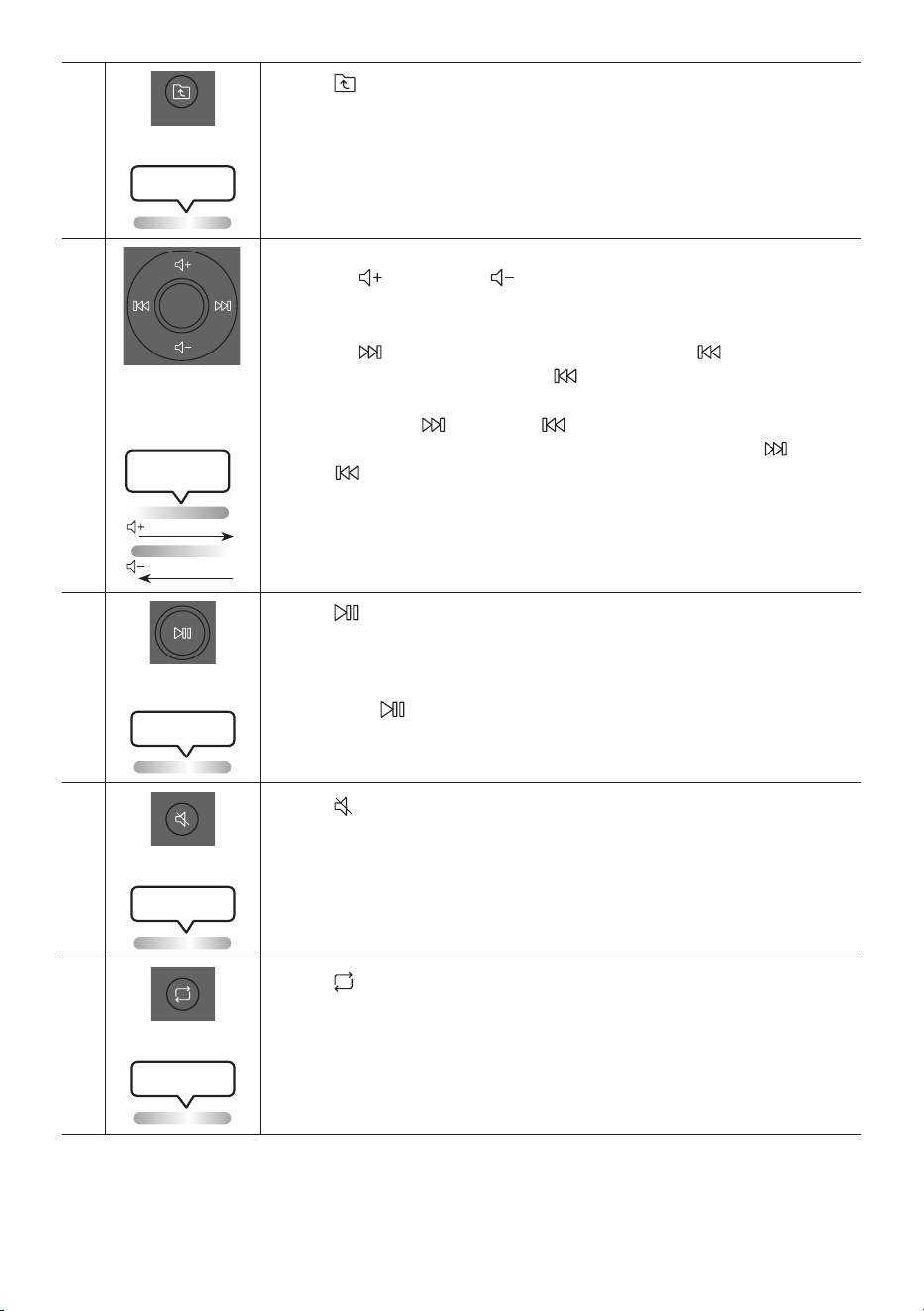
Press the (UP) button to move to the previous folder in the USB device.
Lighting LED
white blink x1
Volume up,
Volume down /
Skip
• Volume up, Volume down
Press the (Volume up) or (Volume down) to adjust the volume level up or
down.
• Music Skip
Press the button to select the next music le. Press the button once to
play the current music again. Pass the button twice to select the previous
music le.
Press and hold the button or the button for more than 3 seconds in USB
play mode to search forward or search backward. Press and hold the button
or the button for more than 3 seconds again to get back to normal play.
Lighting LED
White Flashes
From down to up
From top to bottom
Play / Pause
Press the button to pause a music le temporarily.
When you press the button again, the music le plays.
• Auto Power Down Function
To turn off Auto Power Down function while the unit is in AUX1, AUX2 mode, press
and hold the button for more than 5 seconds. Lighting bar will be blink white
once.
Lighting LED
white blink x1
Mute
DOWN
UP
BASS
EFFECT
EFFECT
DJ
LIGHT
PAIRING
TEMPO
USB
AUX
SOUND
MODE
Press the (Mute) button to mute the sound.
Press it again to unmute the sound.
Lighting LED
white blink x1
Repeat
DOWN
UP
BASS
EFFECT
EFFECT
DJ
LIGHT
PAIRING
TEMPO
USB
AUX
SOUND
MODE
Press the (Repeat) button to use the Repeat function in “USB” mode.
Press the button repeatedly to cycle through the available repeat functions:
ONE, FOLDER, ALL, RANDOM or OFF.
Lighting LED
white blink x1
ENG - 24
BASS
DOWN
UP
BASS
EFFECT
EFFECT
DJ
LIGHT
PAIRING
TEMPO
USB
AUX
SOUND
MODE
Press the BASS button to use the powerful bass sound.
Press it again to return to the normal sound.
Press and hold the BASS button for more than 5 seconds to turn on or off the
BLUETOOTH POWER function.
Lighting LED
white blink x1
※
Not available
Lighting LED
Pink Flashes
From middle to end
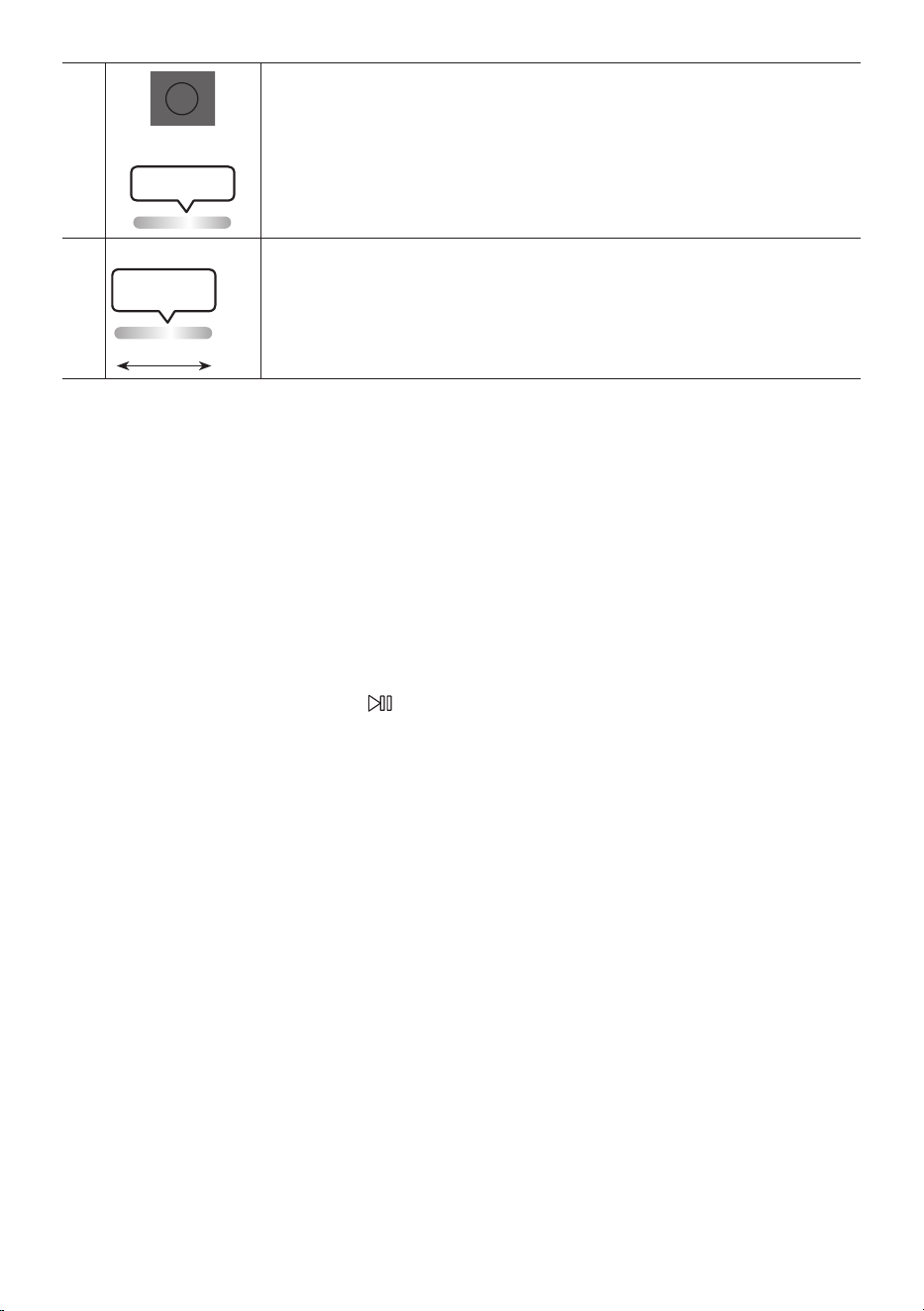
The remote control button function is not available in the current source.
How to use Sound Mode
Your Sound Tower provides predened equalizer settings that are optimized for particular music
genres.
1. Press the SOUND MODE button on the Remote control.
2. Each time you press the SOUND MODE button, the Sound Tower cycles through the available
sound effects: PARTY, STANDARD, HIPHOP, EDM, ROCK, LATIN, HOUSE or REGGAE.
NOTES
• Default sound mode is PARTY.
• When turned off, press and hold the button on product or remote control for more than 5 seconds
to turn on in the default Sound Mode setting.
How to use the DJ Effect
The DJ Effect function lets you add DJ sound effects to your music. The level of each effect is
adjustable.
1. Press the DJ button on the Remote control.
2. Each time you press the DJ button, the Sound Tower cycles through the available DJ Effects:
• NOISE: Create white noise and mixed with the original sound through the lter and output.
• FILTER : Creates an effect similar to the sound of only treble or bass.
• CRUSH: Creates an effect that makes the original sound sharper.
• CHORUS : Creates an effect similar to a singing chorus.
• WAHWAH : Creates a ‘Wah~ Wah~’ effect.
• DJ EFFECT OFF : Turns off the DJ Effect.
3. Press the EFFECT + or EFFECT - buttons to raise or lower the level of each of the DJ sound effects
from -15 to +15.

ENG - 25
NOTE
• When turned off, press and hold the button on product or remote control for more than 5
seconds to turn on in the default DJ Effect setting.
ENG - 26
07 USING THE SAMSUNG SOUND TOWER
APP
Install Samsung Sound Tower App
To control this product with your Smart Device and the Samsung Sound Tower app, download the
Samsung Sound Tower App from the Google Play Store or Apple App Store, and install it on your
Smart Device.
NOTES
• The Samsung Sound Tower app is compatible with Android mobile phone devices running Android
OS 6.0 or later.
• The Samsung Sound Tower app is compatible with Apple mobile devices running iOS 10.0 or later.
Market search : Samsung Sound Tower
Launching the Samsung Sound Tower App
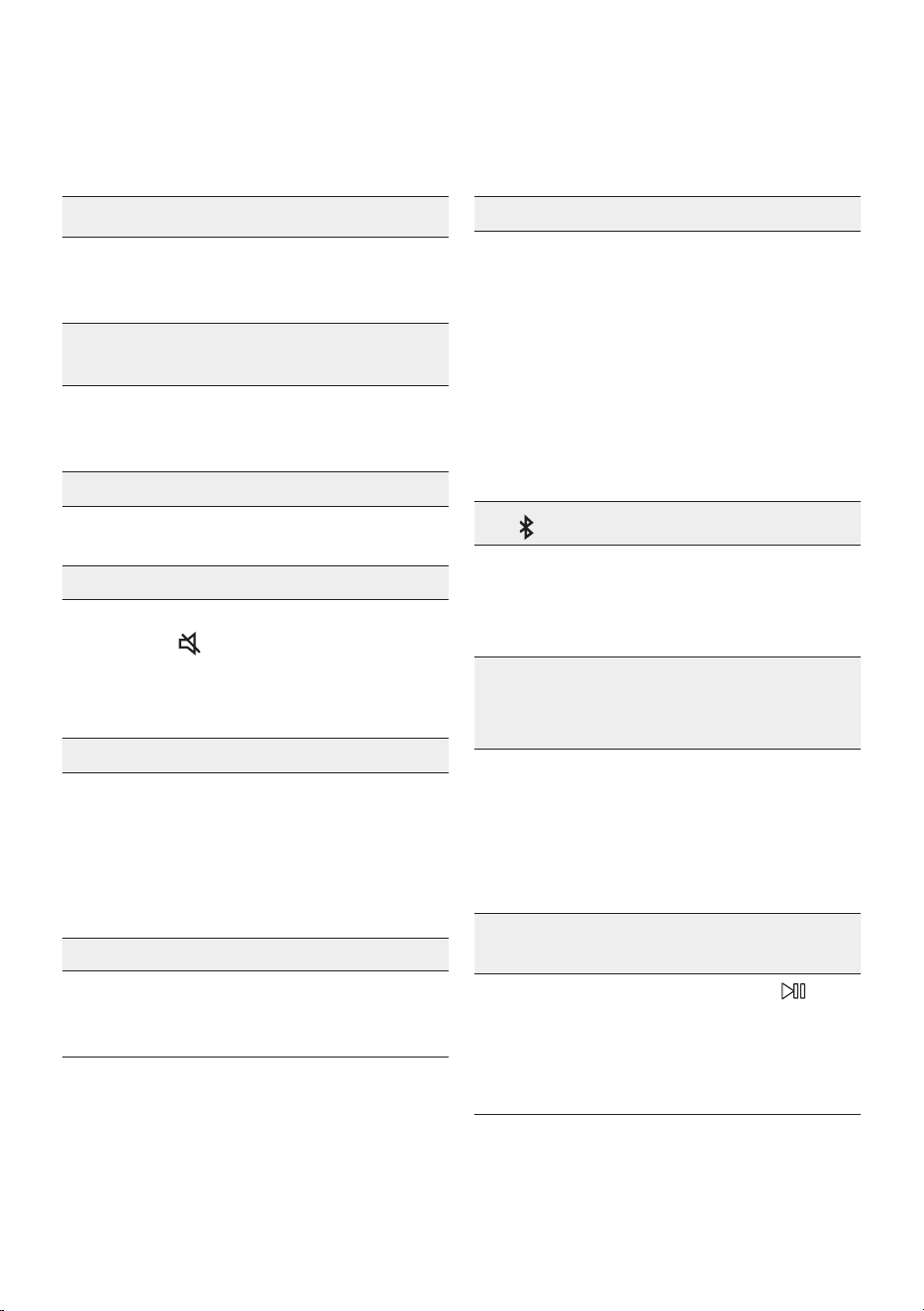
To launch and use the Samsung Sound Tower app, touch the Samsung Sound Tower icon on your smart
device, and then follow the directions on the screen.
Samsung
Multiroom
Samsung Sound Tower
Samsung Sound Tower
ENG - 27
08 TROUBLESHOOTING
Before seeking assistance, check the following.
The unit will not turn on.
; The battery may be fully discharged.
Please connect the power plug and try to
turn it on.
A function does not work when the button is
pressed.
Is there static electricity in the air?
; Disconnect the power plug and connect it
again.
Sound dropouts occur in BT mode.
; See the Bluetooth connection sections on
page 14.
Sound is not produced.
Is the Mute function on?
; Press the (Mute) button to cancel the
mute function.
Is the volume set to minimum?
; Adjust the Volume.
The remote control does not work.
Are the batteries drained?
; Replace them with new batteries.
Is the distance between the remote control
and Sound Tower main unit too far?
; Move the remote control closer to the
Sound Tower main unit.
Stereo Group connection is not working.
Is the system in wireless Group Play mode?
; Disconnect the wireless Group Play mode
and try Stereo Group connection again.
It cannot make a Bluetooth connection.
Is the system connected to another system in
wireless Group Play mode or Stereo Group
mode?
; Try Bluetooth connection again after
disconnecting the wireless Group Play or
Stereo Group connection.
Are the two Bluetooth devices already
connected?
; Try Bluetooth connection again after
disconnecting other Bluetooth connections.
The PAIRING button is not working.
Is the system in wireless Group Play mode or
Stereo Group mode?
; Try again after disconnecting the wireless
Group Play or Stereo Group connection.
I want to switch the HOST (MAIN) system to
the other in wireless Group Play or Stereo
Group connection.
; Disconnect Group Play mode, press the
Speaker which you want make to HOST
rst, aand after it use Group LED to judge
instead connect the others one by one.
; With Stereo Group mode, MAIN is xed.
You can not change others as MAIN.
I want to play AUX1 or AUX2 more than 8 hours
without control input.
; Press and hold the remote control
button for more than 5 seconds in AUX1 or
AUX2 mode to disable Auto Power Down
Function. Change from ON-AUTO POWER
DOWN to OFF-AUTO POWER DOWN.
ENG - 28
I can’t connect a SUB to Group play.
; After 1 hour, the HOST will block any
additional SUB from being added.
Press the GROUP PLAY button on HOST,
the SUB can be reconnected.
It cannot make a “Wireless/Wired Group/Add
Stereo/Bluetooth” connection.
Is the distance between systems too far?
; It is recommended to make a “Wireless/
Wired Group/Add Stereo/Bluetooth” pairing
within 1 meter from the system.
; The recommended operating distance
between Sound Tower systems is closer than
10 meters.
09 LICENCE
The Bluetooth® word mark and logos are
registered trademarks owned by the Bluetooth
SIG, Inc. and any use of such marks by Samsung
Electronics Co., Ltd. is under licence. Other
trademarks and trade names are those of their
respective owners.
Qualcomm aptX is a product of Qualcomm
Technologies, Inc. and/or its subsidiaries.
Qualcomm is a trademark of Qualcomm
Incorporated, registered in the United States and
other countries. aptX is a trademark of Qualcomm
Technologies International, Ltd., registered in the
United States and other countries.
[ENERGY STAR]
ENERGYSTARqualiedmodelonly
– Your Samsung product is ENERGY STAR
qualied in its factory default setting.
Change to certain features, settings and
functionality in this product can change the
power consumption, possibly beyond the
limits required for ENERGY STAR
qualication.
– Environmental Protection Agency and
Department of Energy. ENERGY STAR is a
joint program of the Government agencies,
designed to promote energy efcient
products and practices.
Refer to www.energystar.gov for more
information of the ENERGY STAR Program.
ENERGYSTARqualiedmodelonly
(Applicable to Thin Client models only)
As an ENERGY STAR® Partner, SAMSUNG has
determined that this product meets the
ENERGY STAR® guidelines for energy
efciency.
– The ENERGY STAR Program has been to
reduced greenhouse gas emissions and
save energy through voluntary labeling.
– Power management setting of this product
have been enabled by default, and have
various timing setting from 1 minutes to 5
hours.
– The product can wake with a button press
on the chassis from sleep mode.
ENERGYSTARqualiedmodelonly(Theother
models)
– As an ENERGY STAR Partner, Samsung has
determined that this product or product
models meets the ENERGY STAR guideline
for energy efciency.

ENG - 29
10 OPEN SOURCE
LICENCE NOTICE
To send inquiries and requests for questions
regarding open sources, contact Samsung Open
Source (http://opensource.samsung.com)
11 IMPORTANT
NOTES ABOUT
SERVICE
Figures and illustrations in this User Manual are
provided for reference only and may differ from
actual product appearance.
ENG - 30
12 SPECIFICATIONS AND GUIDE
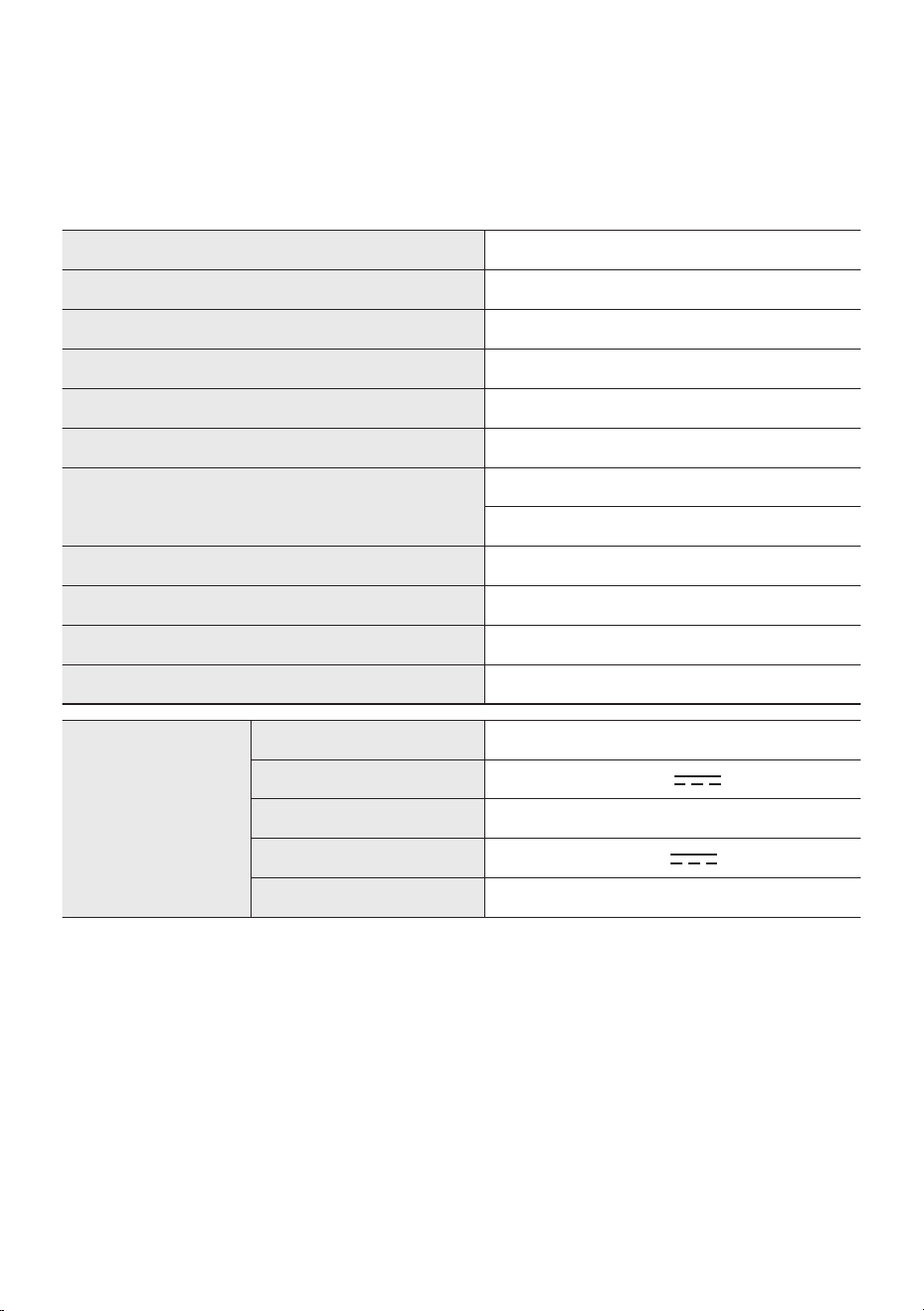
Specications
Model Name MX-ST50B
USB 5V/2.1A
Weight 11.94kg
Dimensions (W x H x D) 329×665×301mm
Operating Temperature Range +5°C to +35°C
Operating Humidity Range 10 % ~ 75 %
AMPLIFIER Rated Output power
Power cord plug-in 240W
Battery 90W
Overall Power Consumption 65W
Battery Type Lithium-ion 72Wh
Battery play time up to 18hrs
Battery charge time <3.5hrs
Li-ion Rechargeable
Battery
Battery Model EB-T24C-00, 2INR19/65-4
Nominal Voltage 7.34 V
Rate Capacity 9800 mAh, 71.93 Wh
Limited Charge Voltage 8.4 V
Typical Capacity 10000 mAh, 73.40 Wh
NOTES
• Samsung Electronics Co., Ltd reserves the right to change the specications without notice.
• Weight and dimensions are approximate.
• Battery Play time and Battery charge time vary with use conditions.
• In an extremely cold or hot environment, charging stops for safety. To resolve these issues,
disconnect the AC power cord and connect it again in an operating temperature between 5°C and
35°C.
FRA - ii
INFORMATIONS RELATIVES À LA SÉCURITÉ
AVERTISSEMENTS
POUR ÉVITER LES RISQUES DE CHOC
ÉLECTRIQUE, NE DÉMONTEZ PAS LE CAPOT.
L’APPAREIL NE CONTIENT PAS DE PIÈCES
RÉPARABLES PAR L’UTILISATEUR ; S’ADRESSER
À UN SERVICE APRÈS-VENTE QUALIFIÉ.
Reportez-vous au tableau ci-dessous pour une
explication des symboles pouvant gurer sur
votre produit Samsung.
ATTENTION
RISQUE DE CHOC
ÉLECTRIQUE. NE PAS
OUVRIR
Ce symbole indique que ce produit est
alimenté par haute tension. Il est
dangereux de toucher la moindre pièce
située à l'intérieur de ce produit.
Ce symbole indique qu'une
documentation importante relative au
fonctionnement et à l'entretien est
fournie avec le produit.
Produit de classeII: ce symbole indique
qu'aucun branchement de sécurité à la
terre (prise de terre) n'est requis.
Si ce symbole n'est pas présent sur un
produit avec un cordon d'alimentation,
le produit DOIT avoir une connexion de
protection able à la terre.
Tension CA : ce symbole indique que la
tension nominale indiquée par le
symbole est une tension CA.
Tension CC : ce symbole indique que la
tension nominale indiquée par le
symbole est une tension CC.
Mise en garde, Consulter le mode
d'emploi: ce symbole avertit l'utilisateur
qu'il doit consulter le manuel
d'utilisation pour en savoir plus sur les
informations relatives à la sécurité.
AVERTISSEMENT
• An de diminuer les risques d’incendie ou de
choc électrique, n’exposez pas cet appareil à
la pluie ou à l’ humidité.
• Ce produit contient des produits chimiques
qui peuvent, selon l’État de Californie, être
cancérigènes ou causer des anomalies
congénitales ou des troubles génésiques.
• La batterie (concerne toute batterie interne,
pile ou batterie externe) ne doit pas être
exposée à une chaleur excessive, par exemple
aux rayons du soleil, au feu ou autre.
ATTENTION
• POUR PRÉVENIR LES CHOCS ÉLECTRIQUES,
BRANCHEZ LA FICHE AU FOND, EN
PRENANT SOIN D’INSÉRER LA TIGE LARGE
DANS LA FENTE LARGE.
• Cet appareil doit toujours être branché à une
prise terre.
• Pour déconnecter l’appareil du circuit
principal, la prise doit être débranchée de la
prise principale ; il est de ce fait nécessaire
que la prise principale soit facile d’accès.
• Évitez toute projection d’eau sur l’appareil.
Ne posez jamais d’objet contenant un liquide
(ex : un vase) dessus.
• Pour éteindre complètement l’appareil, vous
devez retirer le cordon d’alimentation de la
prise murale. Par conséquent, le cordon
d’alimentation doit être facilement accessible
à tout moment.
FRA - iii
Consignes pour ne pas compromettre
l’étanchéité
Lisez les consignes ci-dessous et respectez-les
lors de l’utilisation de l’unité.
• Toute déformation ou tout dommage suite à
une chute ou à un choc peut compromettre
l’étanchéité de l’unité.
• Cette unité ne résiste pas à l’eau sous
pression.L’utilisation de l’unité dans un endroit
soumis à de l’eau sous pression, comme dans
une douche, peut entraîner un
dysfonctionnement.
• Ne pas soumettre directement l’unité à de
l’eau très chaude ou à de l’air chaud propulsé
par un sèche-cheveux ou tout autre appareil.
• Ne jamais utiliser l’unité à un endroit soumis à
des températures élevées, tel qu’un sauna, ou
proche d’une source de chaleur.
• Manipuler le capot avec précaution. Les
caches des connecteurs et de la prise
d’alimentation jouent un rôle très important
dans la préservation de l’étanchéité. Lors de
l’utilisation de l’unité, s’assurer que le capot
est complètement fermé. Lors de la
fermeture du capot, veiller à ne pas laisser de
corps étranger à l’intérieur. Si le capot n’est
pas complètement fermé, l’étanchéité peut
être compromise et entraîner un
dysfonctionnement de l’unité dû à la
pénétration d’eau à l’intérieur.
• La classe de protection IPX5 ne peut pas être
garantie quand un connecteur ou la prise
d’alimentation CA est utilisé(e).
• Le produit ne doit pas être mis dans l’eau an
de tester son étanchéité.
POWER
ECHOVOL
USB
(5V 2.1A)
AUX 1
MIC
FRA - iv
• La Sound Tower offre le niveau de robustesse de la classe IPX5.
Protection contre les
solides
IP
Protection contre l’eau
0 5
Pas d’exigences X X Pas d’exigences
Pas de protection 0 0 Pas de protection
Solides > 50 mm 1 1 Écoulement d’eau vertical
Solides > 12 mm 2 2 Écoulement d’eau vertical, boîtier incliné à 15°
Solides > 2,5 mm 3 3 Projection d’eau à 60° de la verticale
Solides > 1,0 mm 4 4 Projection d’eau de toutes les directions
Protégé de la poussière 5 5 Jets d’eau de toutes les directions
Hermétique à la poussière 6 6 Jets d’eau puissants de toutes les directions
- 7 Immersion temporaire : à 1 m pendant 30 minutes
- 8
Immersion : profondeur et durée dénies par le
fabricant

FRA - v
PRÉCAUTIONS
1. Assurez-vous que l'alimentation CA de votre
maison est conforme aux critères
d'alimentation indiqués sur l'étiquette
d'identication située à l'arrière de votre
produit. Posez votre produit à plat sur un
meuble stable en veillant à laisser un espace
de 7 à 10 cm autour de l’appareil an
d’assurer une ventilation correcte de celui-ci.
Faites attention à ne pas obstruer les orices
de ventilation. Ne posez pas l’ensemble sur
un amplicateur ou un autre appareil
susceptible de chauffer. Cet ensemble est
conçu pour une utilisation en continu. Pour
entièrement éteindre l’appareil, débranchez
la che CA de la prise murale. Débranchez
l’appareil si vous envisagez de ne pas l’utiliser
durant une longue période.
2. En cas d’orage, débranchez la che de
l’appareil de la prise murale. Les surtensions
occasionnées par l’orage pourraient
endommager votre appareil.
3. N’exposez pas l’ensemble aux rayons directs
du soleil ou à toute autre source de chaleur.
Ceci pourrait entraîner une surchauffe et un
dysfonctionnement de l’appareil.
4. Protégez le produit de l’humidité (comme les
vases) et d’une chaleur excessive (comme
une cheminée) ou de tout équipement
capable de créer des champs magnétiques
ou électriques. Débranchez le câble
d’alimentation en cas de dysfonctionnement.
Votre produit n’est pas prévu pour un usage
industriel. Ce produit ne peut être utilisé qu’à
des ns personnelles. Une condensation
peut se former si le produit ou un disque a
été stocké à basse température.
Si vous devez transporter l’ensemble
pendant l’hiver, attendez environ 2 heures
que l’appareil ait atteint la température de la
pièce avant de l’utiliser.
5. Les piles utilisées dans ce produit peuvent
contenir des produits ch miques dangereux
pour l’environnement. Ne jetez pas les piles
dans votre poubelle habituelle. Ne vous
débarrassez pas des piles en les faisant brûler.
Ne court-circuitez pas, ne désassemblez pas
ni ne faites pas surchauffer les batteries.
ATTENTION : Le remplacement incorrect de
la batterie entraîne un risque d’explosion. Ne
la remplacez que par une batterie du même
type.
Autres
• La batterie est fabriquée spéciquement
pour ce produit, par conséquent il ne faut pas
l’utiliser avec un autre appareil électronique
ou à d’autre ns.
• Lorsque la batterie est épuisée, il faut la jeter
dans un conteneur adéquat an qu’elle soit
recyclée.
• Ne pas démonter la batterie.
• An de protéger le moteur et la batterie,
celle-ci doit être chargée quand la
température se situe entre 3 °C et 42 °C.
• Lorsque le niveau de la batterie est faible,
recharger celle-ci.Si la batterie reste à un
niveau faible pendant une période prolongée,
ses performances peuvent se dégrader.
• Ne pas exposer la batterie à la chaleur et ne
pas la jeter au feu.
• Ne pas démonter la batterie.
• An de protéger le moteur et la batterie, la
Sound Tower doit être utilisée quand la
température se situe entre -17 °C et 57 °C.
FRA - vi
À PROPOS DE CE MANUEL
Le manuel d’utilisateur est composé de deux parties : ce MANUEL D’UTILISATEUR sur papier et un
MANUEL COMPLET détaillé à télécharger.
MANUEL D’UTILISATEUR
Consultez ce manuel pour en savoir plus sur les consignes de
sécurité, l’installation du produit, les connexions et les
spécications du produit.
MANUEL COMPLET
Vous pouvez accéder au MANUEL COMPLET sur le centre
d’assistance clientèle en ligne de Samsung ou en scannant le
code QR. Pour consulter le manuel sur votre PC ou appareil
mobile, téléchargez-le au format document depuis le site Web
de Samsung. (http://www.samsung.com/support)
La présentation et les spécications peuvent faire l'objet de modications sans préavis.

FRA - vii
SOMMAIRE
01 Vericationdescomposants 2
Insertion des piles avant d’utiliser la Télécommande (2 piles AAA) ------------------------- 2
02 Présentation du produit 3
Panneau supérieur de Sound Tower ------------------------- 3
Panneau arrière de Sound Tower ------------------------- 4
03 Connexion de Sound Tower 6
Branchement de l’alimentation électrique
-------------------------
6
Comment utiliser l’Audio Groupe
-------------------------
7
04 Connexion d’un appareil externe 13
Connexion à l’aide d’un câble audio analogique (AUX)
-------------------------
13
Connexion d’un appareil mobile via Bluetooth
-------------------------
14
Connecter le télévision Samsung via Bluetooth
-------------------------
17
05 Connexion d'un périphérique de stockage USB 18
Mise à jour du logiciel
-------------------------
19
Connexion d'un microphone externe
-------------------------
20
06 Utilisation de la télécommande 21
Comment utiliser la télécommande Alimentation
-------------------------
21
Comment utiliser le Mode Son
-------------------------
24
Comment utiliser l'effet DJ
-------------------------
24

FRA - viii
07 Utilisation de l'application Samsung Sound Tower 26
Installer l'application Samsung Sound Tower
-------------------------
26
Lancement de l'application Samsung Sound Tower
-------------------------
26
08 Dépannage 27
09 Licence 28
10 Avis de Licence Libre 29
11 Remarque Importante à Propos du Service 29
12 SpécicationsetGuide 30
Spécications
-------------------------
30
FRA - 2
01 VERIFICATION DES COMPOSANTS
Unité principale Sound Tower Télécommande/Piles Câble d’alimentation
• Pour plus d’informations sur l’alimentation et la consommation électrique, reportez-vous à
l’étiquette du produit. (Étiquette : Arrière de l’unité principale Sound Tower)
• Pour acheter des composants supplémentaires ou des câbles facultatifs, contactez un centre de
service Samsung ou le service clientèle Samsung.
• Ne pas faire glisser ou tirer le produit hors du sol lorsque vous le déplacez. Soulever le produit pour
le déplacer.
• La présentation et les spécications peuvent faire l’objet de modications sans préavis.
Insertion des piles avant d’utiliser la Télécommande (2 piles AAA)
Faire glisser le couvercle du compartiment à piles
dans le sens de la èche jusqu'à ce qu'il soit
complètement retiré. Insérer 2 piles AAA (1,5V) en
respectant la polarité. Replacer le couvercle du
compartiment à piles .
FRA - 3
02 PRÉSENTATION DU PRODUIT
Panneau supérieur de Sound Tower
BASS
Capteur de
télécommande
Pour faire fonctionner e système Sound Tower, pointer l'avant de la télécommande
vers le capteur de la télécommande.
Voyant LED
Afche les messages de fonctionnement ou l'état actuel du système Sound Tower.
Les sources sont représentées par les voyants LED de la manière suivante :
(BT) (USB) (AUX1) (AUX2)
(Alimentation/Batterie)
Alimentation Active et désactive la fonction Sound Tower.
Lumière Appuyer sur la touche
(Lumière) pour activer le mode d'éclairage.
Source
Appuyer pour sélectionner une source connectée à Sound Tower.
Maintenez appuyée la touche
(Source) pendant plus de 5 secondes pour entrer
dans le mode « SEARCHING TV ».
Lecture/Pause
• Lecture/Pause
Appuyer sur la touche pour mettre temporairement un chier musical en
pause.
En appuyant de nouveau sur la touche, le chier musical est lu.
• Lecture de la démo
Appuyez sur la touche pendant plus de 5 secondes alors que le système est
allumé pour démarrer la Démo.Les 5 voyants LED clignotent en même temps et
une musique de démo est jouée pendant 90 secondes.
– Veuillez être prudent, car il peut jouer plus fort que le niveau du volume.
Volume bas Appuyer sur le bouton (Volume bas) pour régler le niveau de volume plus bas.
Volume fort
Appuyez sur la touche (Volume fort) pour augmenter le volume.
BASS Appuyez sur le bouton BASS pour utiliser la puissance des basses.
FRA - 4
Panneau arrière de Sound Tower
POWER
ECHOVOL
USB
(5V 2.1A)
AUX 1
MIC
ECHOVOL
USB
(5V 2.1A)
AUX 1
MIC
Bluetooth
PAIRING
Appuyez sur le bouton PAIRING pour entrer en mode appairage, la LED "PAIRING" sur le
plan arrière clignotera rapidement.
ADD
STEREO
Appuyez sur la touche ADD STEREO pour connecter sans l une autre Sound Tower du
même modèle.
GROUP
PLAY
Appuyer sur le bouton GROUP PLAY pour se connecter sans l à un maximum de dix
systèmes Sound Tower maximum.
USB
Connecter un périphérique USB aux ports USB de l'unité principale.
En connectant votre téléphone portable au port USB, vous pouvez le recharger.
• Appuyer sur la touche
(Source) pour sélectionner USB.
ECHO
Vous pouvez donner un effet d'écho au son d'un microphone connecté (MIC) en ajustant la
touche ECHO.
VOL Utiliser le bouton VOL de l’unité principale pour régler le volume du micro (MIC).
MIC Connecter votre micro à la prise jack MIC.
Terminaux
de GROUP
PLAY OUT
Utiliser un câble audio (non fourni) pour connecter les bornes GROUP PLAY (OUT) de
l'unité principale à l'entrée audio d'un périphérique de sortie analogique externe.
Terminaux
de AUX2/
GROUP
PLAY IN
Utiliser un câble audio (non fourni) pour connecter les bornes AUX2 (IN) de l'unité
principale à la sortie audio sur une sortie analogique externe.
AUX1
Utiliser un câble audio (AUX) (non fourni) pour connecter la prise AUX1 de l'unité
principale à la sortie audio d'un appareil externe.
Alimentation
Connecter le cordon d'alimentation à la prise Alimentation et brancher l'autre extrémité
du cordon d'alimentation à une prise murale pour alimenter le Sound Tower en électricité.
FRA - 5
État du voyant LED de charge de la Sound Tower :
État de la
Sound
Tower
État de charge
Voyant LED
de charge
(mode AC)
Voyant LED de
charge (mode
DC)
Remarque
Éteinte Charge complète Éteint (noir) Éteint (noir)
Éteinte En charge
Vert
clignotant
N/A
Éteinte Pas en charge Éteint (noir) Éteint (noir)
Le câble AC n’est pas
branché.
Veille Charge complète Bleu allumé N/A
Il n’y a pas de mode veille en
mode DC.
Veille En charge
Vert
clignotant
N/A
Le voyant LED de charge est
le même que lorsque la
Sound Tower est éteinte.
Allumée Charge complète Bleu allumé Bleu allumé
Lorsque la Sound Tower est
allumée, elle reète
globalement l’état de charge
de la batterie.
Allumée En charge
Vert
clignotant
N/A
Allumée
Pas en charge et
niveau 30 % à 98 %
Vert allumé Vert allumé
Allumée
Pas en charge et
niveau 5 % à 29 %
Rouge
allumé
Rouge allumé
Allumée
Pas en charge et
niveau inférieur à 5 %
Rouge
allumé
Mise hors tension
après que la
barre lumineuse
orange clignote
une fois
Lors de l’arrêt en mode CC, l’ensemble du système d’alimentation est mis hors tension. Dans ce cas, par
rapport au mode CA, les fonctions suivantes ne sont pas prises en charge.
Fonction
Sortie de veille via Bluetooth
Mode démo
Conguration de l’extinction
Réinitialisation par le client
Mise sous tension par IR
Recharge de la batterie
On/Off AUI
On/Off réaction de l’interface via le bandeau de voyants LED (à l’avant)
FRA - 6
03 CONNEXION DE SOUND TOWER
Branchement de l’alimentation électrique
Utiliser le cordon d’alimentation pour brancher le Sound Tower à une prise électrique dans l’ordre suivant :
Brancher le cordon d’alimentation sur le Sound Tower, puis sur une prise murale.
Voir les illustrations ci-dessous.
• Lorsque le cordon d’alimentation secteur est branché, la batterie intégrée se recharge
automatiquement jusqu’à la recharge complète. Le voyant LED sur le panneau supérieur indique
l’état de charge actuel (voir page FRA - 4)
• Lorsque le cordon est débranché pour une utilisation sur batterie, le volume sonore baisse
fortement.
• Pour plus d’informations sur l’alimentation et la consommation électriques requises, reportez-vous
à l’étiquette collée sur le produit. (Étiquette : Arrière du Sound Tower)
Arrière de Sound Tower
POWER
ECHOVOL
USB
(5V 2.1A)
AUX 1
MIC
Branchement de
l’alimentation électrique
FRA - 7
Comment utiliser l’Audio Groupe
Il est possible de connecter plusieurs systèmes audio dans un groupe pour créer un environnement de
fête et produire un son plus puissant. Mettez en place une Sound Tower tant que l’HOST et toute
musique y jouée sera partagée entre tous les autres systèmes Sound Tower du groupe Audio.
Connexion du mode Group Play avec câble
1ème Sound Tower
HOST
2e Sound Tower Dernier Sound
Tower
Poursuivre la
connexion
jusqu’au dernier
Sound Tower
Congurez Group Play en connectant tous les systèmes à l'aide de câbles audio (non fournis). Utilisez la
touche AUX ou
(Source) pour changer la source à AUX2 pour tous les systèmes Sound Tower sauf le
premier système Sound Tower (ou HOST).
REMARQUES
• Le 1ème Sound Tower HOST peut jouer la musique de toute source.
• Selon la longueur ou les caractéristiques du câble, il peut y avoir une différence de distance de
détection.
FRA - 8
ConnexiondumodeGroupPlaysansle
Il est possible de connecter jusqu’à dix systèmes Sound Tower par la fonction Group Play sans l.
HOST
SUB 1
SUB 2
POWERPOWER
POWER
Clignote en vert
Appuyez sur la touche GROUP PLAY du système Sound Tower HOST. Le voyant LED « GROUP PLAY
» clignote pendant 10 secondes, puis le voyant LED « GROUP PLAY » clignote rapidement (pendant
30 s).
Appuyez sur la touche GROUP PLAY sur le 2e système Sound Tower (SUB 1). Le voyant LED
« GROUP PLAY » se met à clignoter. Ensuite, le SUB1 se connecte au système HOST, le voyant LED
« GROUP PLAY » de SUB1 et du système HOST s’arrêtent de clignoter et restent allumés.
Appuyer sur la touche GROUP PLAY du 3ème système Sound Tower (SUB 2). Un signal sonore est
émis et le voyant de la touche GROUP PLAY du système s’arrête de clignoter.
4. Pour ajouter d’autres systèmes Sound Tower, répéter l’étape 3.
5. Jouez la musique sur l’HOST Sound Tower. Le son émet de tous les systèmes liés.
REMARQUES
• En mode Group Play, la Sound Tower hôte (« HOST », gure 1) peut se connecter à la TV Samsung.
Une fois la connexion établie, le mode Group Play se désactive automatiquement.
• La connexion sans l Group Play est disponible sur les modèles MX-ST90B/MX-ST50B/MX-ST40B.
• Les conditions ambiantes ou d’autres facteurs liés aux périphériques connectés peuvent avoir un
effet sur la qualité de lecture.
• Si la LED rouge se trouve sur le bouton GROUP PLAY, une erreur s’est produite dans la connexion
sans l Group Play. Recommencez les étapes 1 à 5.
• Le bouton ADD STEREO et le bouton PAIRING sur les systèmes de SUB Sound Tower ne sont pas
disponibles alors qu’en mode Group Play sans l.
• Le bouton ADD STEREO sur le système HOST Sound Tower n’est pas disponible alors qu’en mode
Group Play sans l.
• Appuyez longtemps sur « GROUP PLAY » alors que la source est BT pour accéder au système HOST.
FRA - 9
• Toutes les unités SUB doivent être connectées une par une. Par exemple, une fois qu’HOST est
connecté, appuyez sur le bouton GROUP PLAY sur SUB 1 pour vous connecter, et après que SUB 1
est connecté, vous devez séquentiellement connecter SUB 2 et SUB 3 un par un.
• Lors de l’utilisation de Group Play, les périphériques Bluetooth connectés actuellement sont
déconnectés et la connexion Bluetooth est désactivée.
• Les périphériques Bluetooth peuvent rechercher et se connecter uniquement à la HOST Sound
Tower.
• En mode Group Play, les SUB ne peuvent pas se connecter au périphérique Bluetooth.
• Si vous éteignez puis rallumez la Sound Tower ou sélectionnez une source autre que BT sur une
unité SUB, en mode Group Play, le mode Group Play est déconnecté.
• Ce produit ne prend pas en charge le ux audio aptX avec le mode Group Play sans l.
DéconnexiondumodeGroupPlaysansl.
1. Appuyer sur la touche GROUP PLAY et la maintenir enfoncée pendant 5 secondes (HOST ou SUB)
après le mode Group Play connecté ou appuyer sur la touche GROUP PLAY (HOST ou SUB) avant le
mode Group Play connecté.
• Un signal sonore est émis et le voyant LED au-dessus de la touche GROUP PLAY s’éteint.
2. Si vous sélectionnez une source autre que BT sur les unités SUB ou éteignez l’HOST Sound Tower, le
mode Group Play est déconnecté.
• Si la déconnexion est effectuée à partir de la HOST Sound Tower, la Group Play est
déconnectée.
Indications par LED
LED ÉTAT Description
Vert
Clignotement En attente d’une connexion Group Play sans l.
On La connexion sans l Group Play a réussi.
Rouge On Une erreur a eu lieu lors de la connexion sans l Group Play.
REMARQUE
• Dans une connexion sans l, la qualité de lecture peut être instable selon l'environnement
Bluetooth.
Pour une meilleure lecture, veuillez garder l'appareil en mode Group Play câblé.
• La première connexion Bluetooth doit se faire à 1 m de distance maximum.
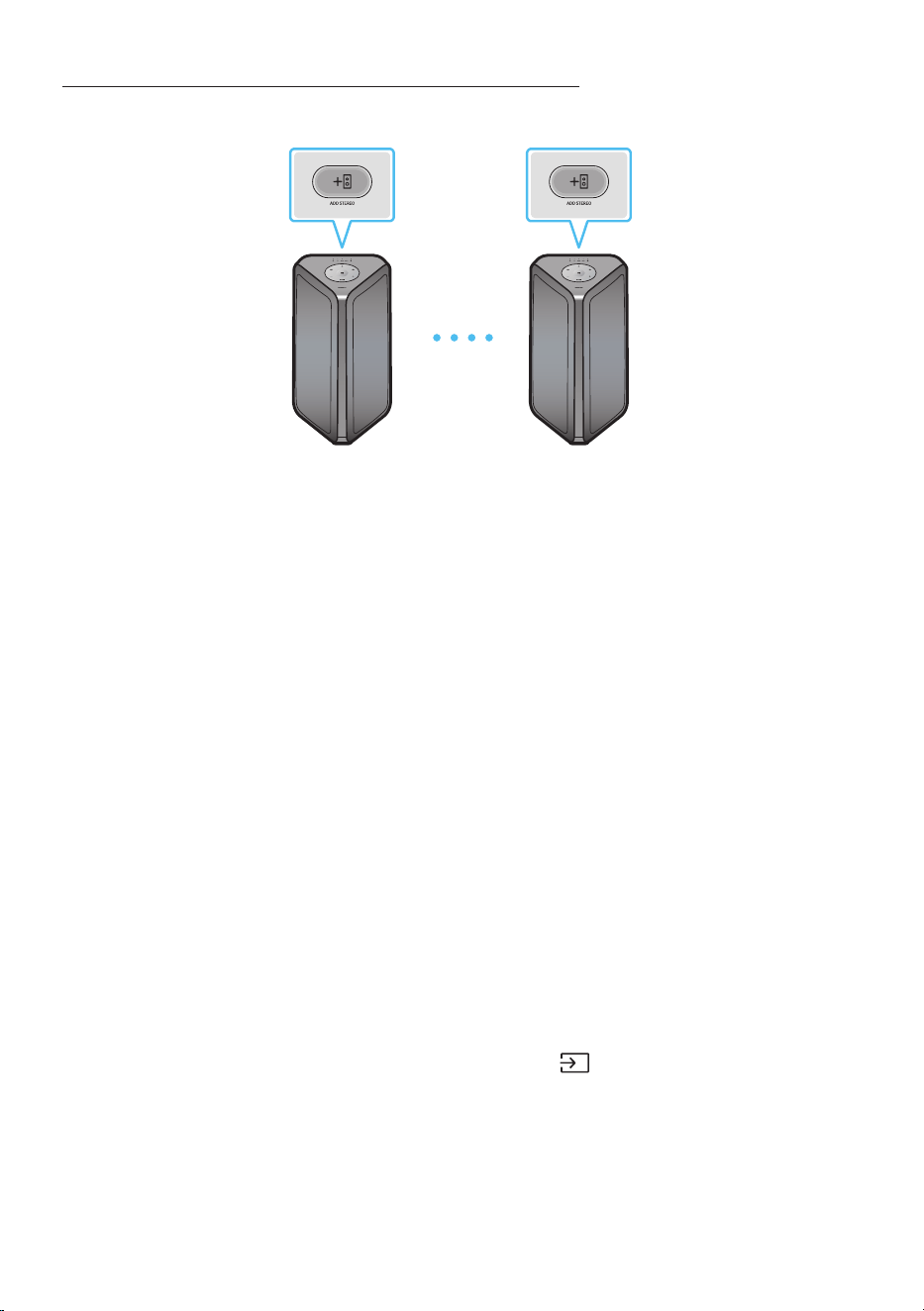
FRA - 10
En utilisant un Smartphone et le mode Groupe Stereo
Connectez les deux Sound Tower et les utilisez avec votre smartphone pour proter du son stéréo.
Sound Tower (MAIN)
gauche
Sound Tower (SUB)
droite
Appuyer sur le bouton ADD STEREO du système Sound Tower de gauche. Le voyant LED de la
touche ADD STEREO clignote.
Appuyer sur le bouton ADD STEREO du sysytème Sound Tower droit. Le voyant LED de la touche
ADD STEREO clignote.
3. Lorsque la connexion est établie, un signal sonore est émis.Le voyant LED ADD STEREO du fond de
panier s’allume en vert.
• Le système MAIN Sound Tower émet le son du canal gauche et le système SUB Sound Tower
émet le son du canal droit. Appuyez sur le bouton ADD STEREO sur la MAIN ou SUB Sound
Tower pour changer le canal de son de la Sound Tower.
3. Jouez la musique en connectant son smartphone à la MAIN Sound Tower et le Bluetooth. Le son
émet à partir des deux Sound Tower.
REMARQUES
• Pour utiliser le mode Groupe Stereo, les deux systèmes Sound Tower doivent être du même
modèle.
• Les conditions ambiantes ou d'autres facteurs liés aux périphériques connectés peuvent avoir un
effet sur la qualité de lecture.
• Si la LED rouge est sur le bouton ADD STEREO, une erreur s’est produite dans la connexion du
Groupe Stereo. Répéter l’étape 1 et l’étape 3.
• Le Télécommande, les boutons BT PAIRING, GROUP PLAY et
(Source) sur les systèmes SUB
Sound Tower sont désactivés lorsqu’en mode Groupe Stereo.
• Le bouton GROUP PLAY sur le système MAIN Sound Tower n’est pas disponible lorsqu’en mode
Groupe Stereo.
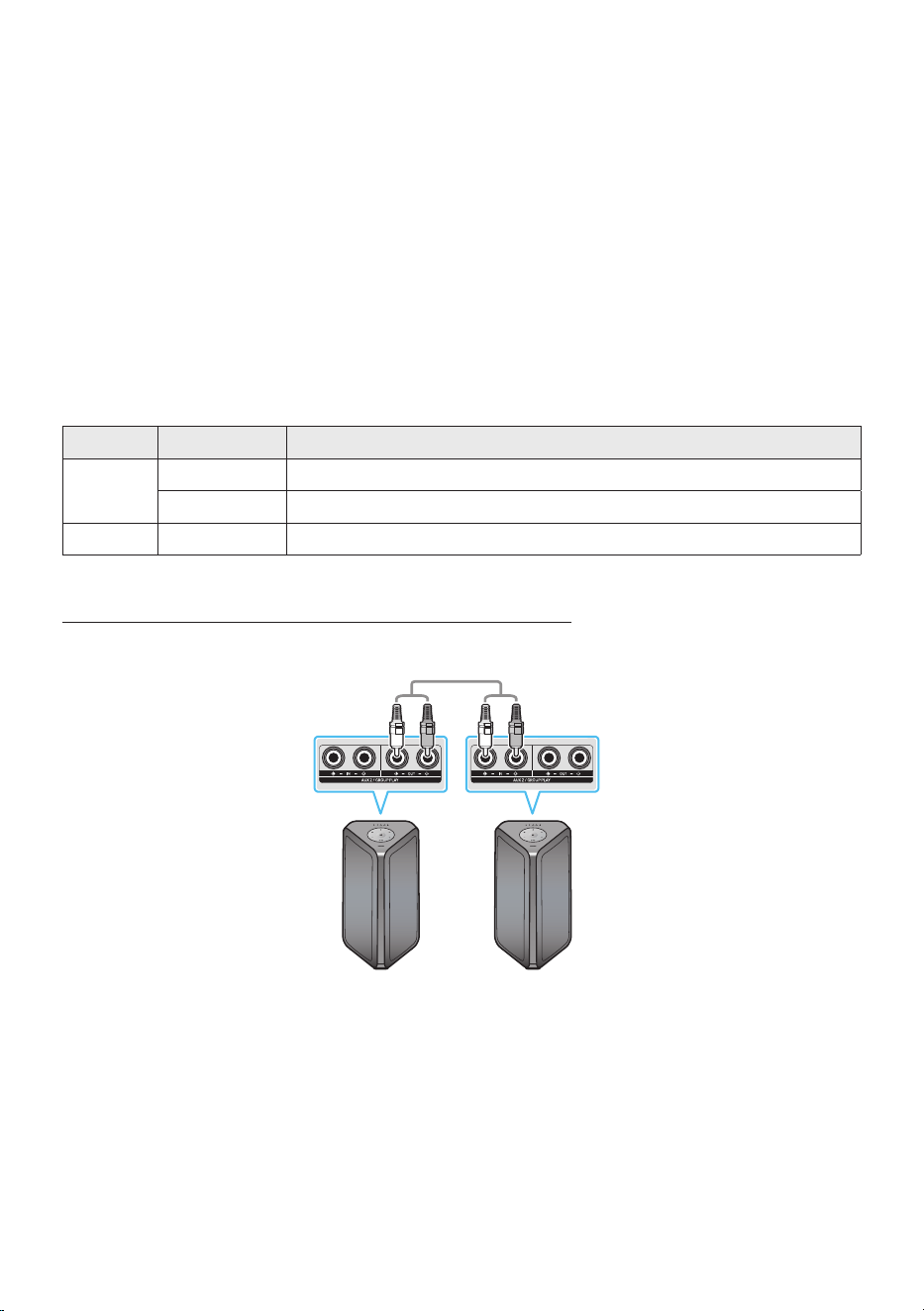
FRA - 11
• En mode autre que « BT » (par exemple, mode USB, AUX), la musique est jouée uniquement dans la
MAIN Sound Tower et la musique n'est pas lue dans la SUB Sound Tower.
• Les couleurs d'éclairage entre la MAIN Sound Tower et la SUB Sound Tower peuvent varier.
• Ce produit ne prend pas en charge aptX le ux audio avec Stereo mode de Groupe.
• Si vous essayez d vous connecter à un périphérique Bluetooth pendant que le groupe Stereo est en
cours de connexion, le mode groupe Stereo peut échouer.
MettrenàlaStereomodedeGroupe
Appuyez sur le bouton ADD STEREO (MAIN ou SUB) pour au moins 5 secondes après de la connexion du
Groupe Stereo.
• Un signal sonore est émis et le voyant LED au-dessus de la touche ADD STEREO s’éteint.
Indications par LED
LED ÉTAT Description
Vert
Clignotement En attente d’une connexion Groupe Stereo.
On La connexion du groupe Stereo a réussi.
Rouge On Une erreur a eu lieu lors de la connexion du groupe Stereo.
En utilisant la TV Samsung et le mode Groupe Stereo
Connectez les deux Sound Tower par l et utilisez-les avec TV Samsung pour proter du son stéréo.
Sound Tower
(MAIN) gauche
Sound Tower (SUB)
droite
Connectez le câble RCA à AUX2 OUT sur MAIN et AUX2 IN sur le SUB comme indiqué en utilisant le
câble RCA (non fourni).
En mode « BT », appuyez sur le bouton « AUX » de la télécommande de MAIN Sound Tower
pendant au moins 5 secondes. Le voyant LED de la touche ADD STEREO clignote.
3. Lorsque la connexion est établie, le voyant LED « ADD STEREO » s’allume et le système émet la
source sonore. Un signal sonore est émis.

FRA - 12
4. Une fois la connexion établie, le voyant LED « AUX2 » sur le panneau supérieur du SUB s’allume.
• La MAIN Sound Tower émet le son du canal gauche et la SUB Sound Tower émet le son du canal
droit. Appuyez sur le bouton ADD STEREO de la MAIN ou SUB Sound Tower pour changer le
canal de son de la Sound Tower.
5. Connectez un TV et la MAIN Sound Tower via Bluetooth pour jouer la musique. Le son est émis par
les deux Sound Tower.
REMARQUES
• Pour utiliser le mode Groupe Stereo, les deux Sound Tower doivent être du même modèle.
• Un voyant rouge sur la LED du bouton ADD STEREO indique une erreur dans la connexion du
Groupe Stereo. Essayez à nouveau les Étapes 1 à 5.
• En mode Groupe Stereo, la télécommande, les boutons BT PAIRING, GROUP PLAY et
(Source)
de la SUB Sound Tower sont désactivés.
• Le bouton GROUP PLAY de la MAIN Sound Tower n'est pas disponible en mode Groupe Stereo.
• Si la TV Samsung soutient une connexion simple, la fenêtre contextuelle de connexion s'afche
automatiquement sur la TV et si vous sélectionnez « Oui », il se connecte à la TV. S'il existe un
historique de connexion précédente entre la TV Samsung et la Sound Tower, il sera connecté à TV
Samsung sans fenêtre contextuelle. Pour une connexion simple à TV Samsung, reportez-vous à la
page 16.
• Les couleurs d'éclairage peuvent varier entre la MAIN Sound Tower et la SUB Sound Tower.
MettrenàlaconnexionenmodeGroupeStereo
Appuyez sur le bouton ADD STEREO (MAIN ou SUB) pendant au moins 5 secondes après la connexion
du Groupe Stereo.
• Le signal sonore de « OFF-STEREO MODE » est émis et le voyant LED de la touche ADD STEREO
s’éteint.
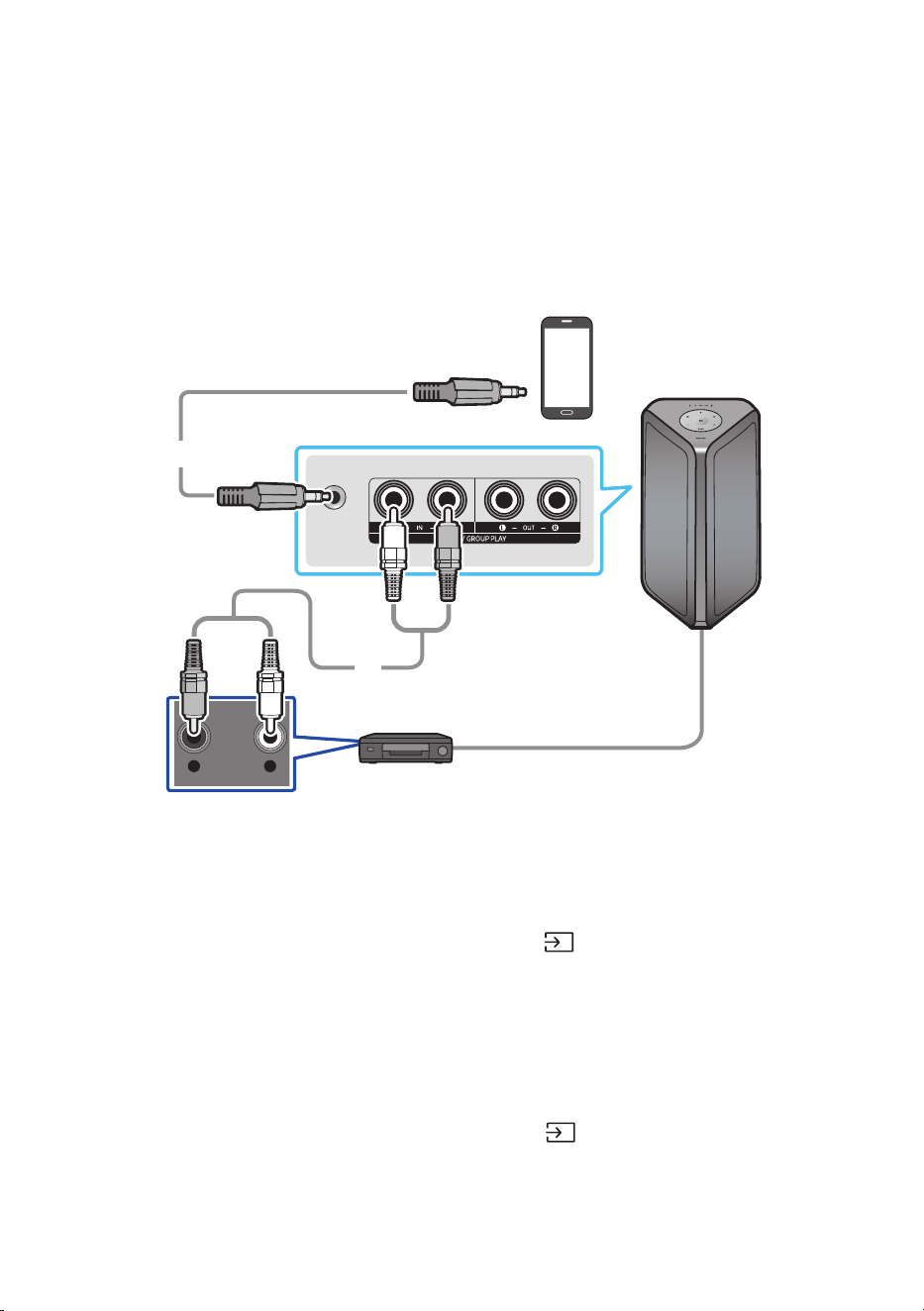
FRA - 13
04 CONNEXION D’UN APPAREIL EXTERNE
Il est possible de se connecter à un appareil externe via un réseau câblé ou sans l pour écouter le son
de l’appareil externe avec le système Sound Tower.
Connexion à l’aide d’un câble audio analogique (AUX)
AUX 1
- AUDIO -
R L
Appareil mobile / MP3 / PMP
BD / Lecteur DVD / Set-top box / Console de jeu
Câble stéréo 3,5 mm
(non fourni)
Câble audio (AUX) (non fourni)
Arrière du Sound Tower
Câble stéréo 3,5 mm (AUX1)
1. Connecter la prise AUX1 de l’unité principale à la prise AUDIO OUT du périphérique source à l’aide
d’un câble stéréo de 3,5 mm.
2. Sélectionner le mode «AUX1» en appuyant sur la touche (Source) du panneau supérieur ou de
la télécommande.
• Vous pouvez également sélectionner une source à l’aide de la touche AUX de la télécommande.
Câble audio (AUX2)
1. Connecter les bornes AUX2 (IN) de l’unité principale aux bornes AUDIO OUT du périphérique
source à l’aide d’un câble audio.
2. Sélectionner le mode «AUX2» en appuyant sur la touche (Source) du panneau supérieur ou
de la télécommande.
• Vous pouvez également sélectionner une source à l’aide de la touche AUX de la télécommande.
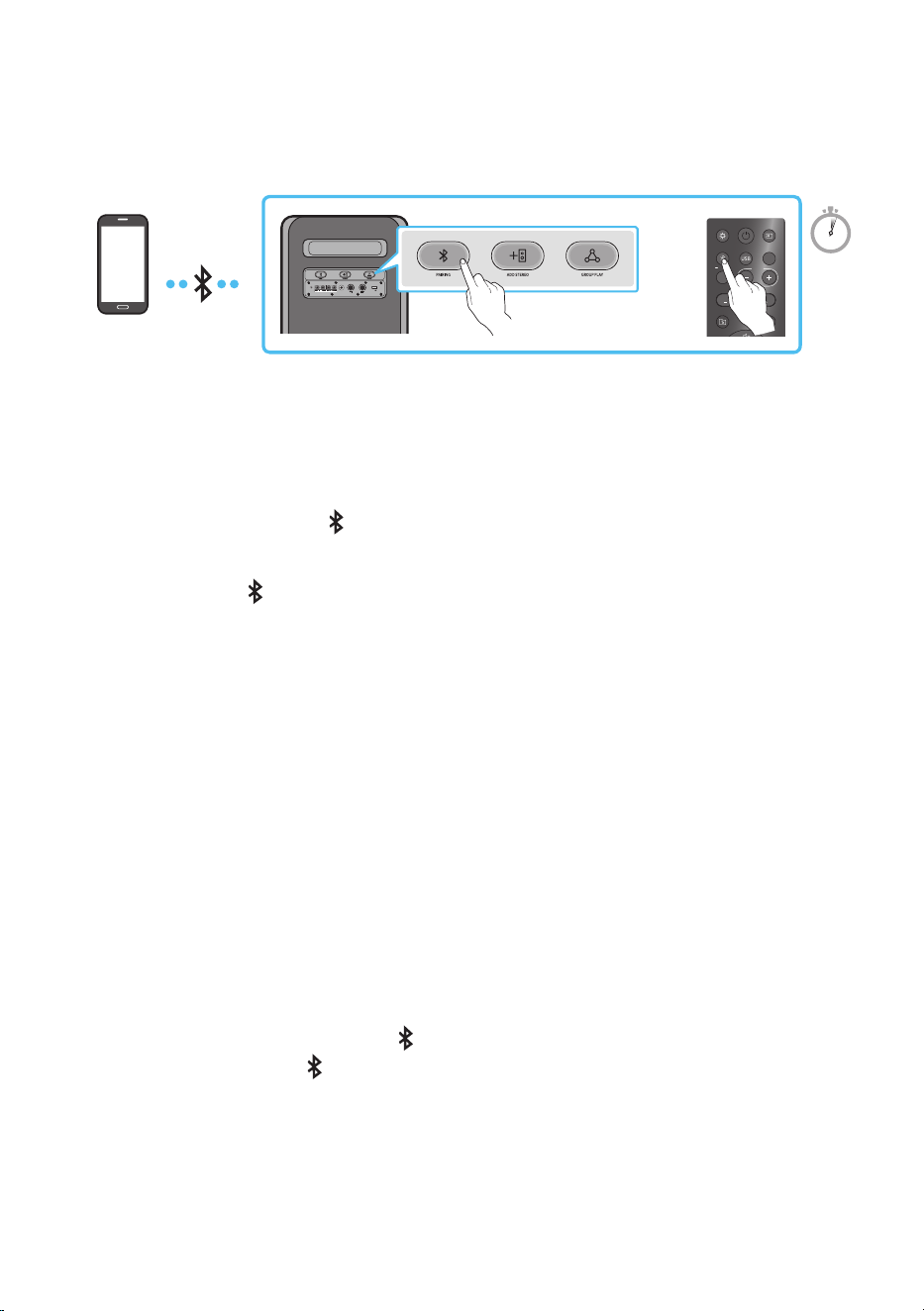
FRA - 14
Connexion d’un appareil mobile via Bluetooth
Lorsqu'un appareil mobile est connecté à l'aide du Bluetooth, il est possible d'entendre un son stéréo
sans les inconvénients d'un câblage.
ECHOVOL
USB
(5V 2.1A)
AUX 1
MIC
LIGHT
PAIRING
TEMPO
USB
AUX
EFFECT
DOWN
UP
EFFECT
DJ
SOUND
MODE
Périphérique
Bluetooth
OU
5 Sec
* En mode batterie, quand la Sound Tower est éteinte, la connexion Bluetooth et l’application Party Audio
ne sont pas disponibles.
La connexion initiale
1. Maintenez appuyée la touche PAIRING pendant plus de 5 secondes pour entrer dans le mode
«BT PAIRING ».
(OU)
Appuyez sur la PAIRING bouton sur le panneau arrière.
2. Sur votre appareil, sélectionner «[AV] MX-ST5B Series» dans la liste qui apparaît.
• Une fois l’appareil connecté,le troisième voyant du panneau supérieur clignote trois fois en cyan
et le voyant Bluetooth du panneau arrière reste allumé.
3. Lecture de chiers musicaux à partir de l’appareil connecté via Bluetooth grâce au Sound Tower.
Si l’appareil ne parvient pas à se connecter
• La Sound Tower émet un message vocal indiquant que la connexion Bluetooth a échoué.
• Si une liste des Sound Tower précédemment connectés (par exemple «[AV] MX-ST5B Series»)
apparaît dans la liste, supprimez-la.
• Répéter ensuite les étapes 1 et 2.
Quelle est la différence entre BT READY et BT PAIRING ?
• BT READY : dans ce mode, vous pouvez utiliser le téléviseur ou l’appareil mobile précédemment
connecté pour le connecter à la Sound Tower.
• BT PAIRING : Ce mode vous permet de connecter un nouvel appareil au Sound Tower.
(Appuyez sur la touche et maintenez-le PAIRING bouton sur la télécommande pendant plus de 5
secondes ou appuyez sur la PAIRING bouton sur l’arrière de la Sound Tower pour entrer dans le
«BT PAIRING» mode.)
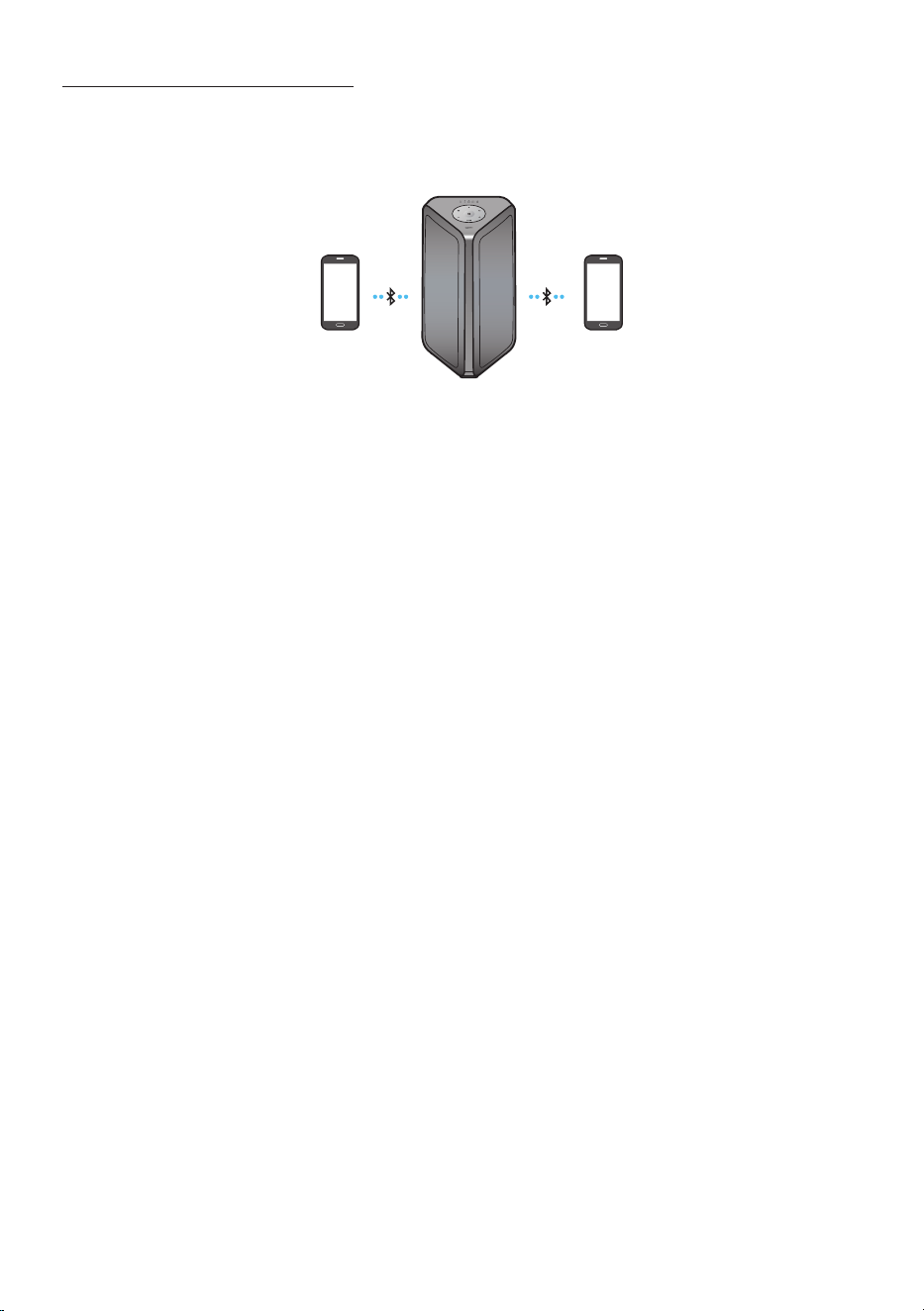
FRA - 15
Connexion multiple Bluetooth
Sound Tower prend en charge jusqu'à deux connexions simultanées d'appareils Bluetooth. Sound Tower
peut jouer de la musique via l'un des appareils Bluetooth connectés sans déconnecter le second
appareil.
Appareil Bluetooth 1 Appareil Bluetooth 2
1. Connectez pour la première fois Sound Tower au premier appareil et au second appareil
respectivement. (voir page 14)
2. La musique ne peut être jouée que sur l'un des deux appareils connectés, et lorsque la musique est
jouée sur l'autre appareil, la musique sur l'appareil de lecture est mise en pause.
REMARQUES
• Si vous souhaitez connecter Sound Tower à un troisième appareil, vous pouvez déconnecter Sound
Tower de l’un des deux appareils actuellement connectés, puis connecter Sound Tower au troisième
appareil. (Appareil qui peut être une TV Samsung)
• Si le Sound Tower et les deux appareils sont connectés, lors du couplage avec un nouvel appareil
Bluetooth, les appareils connectés peuvent être déconnectés.
• Vous pouvez vous connecter à deux appareils Bluetooth en même temps.
• Si un code PIN vous est demandé lors de la connexion d'un appareil Bluetooth, entrer <0000>.
• Les conditions ambiantes ou d'autres facteurs liés aux périphériques connectés peuvent avoir un
effet sur la qualité de lecture.
• Le Sound Tower s'éteint automatiquement au bout de 20 minutes sans qu'aucune commande n'ait
été saisie à l'état prêt.
• Il se peut que Sound Tower n'effectue pas correctement la recherche ou la connexion Bluetooth
dans les circonstances suivantes :
– S'il y a un fort champ électrique autour du Sound Tower.
– Si plusieurs appareils Bluetooth sont appairés simultanément avec l'audio Sound Tower.
– Si le périphérique Bluetooth est éteint, n'est pas en place ou fonctionne mal.
• Les appareils électroniques peuvent causer des interférences radio. Les appareils qui génèrent des
ondes électromagnétiques doivent être tenus éloignés de l'unité principale Sound Tower - par
exemple, les micro-ondes, les appareils LAN sans l, etc.
FRA - 16
• Il se peut que la Connexion multiple Bluetooth ne soit pas prise en charge en fonction des
spécications de l'appareil connecté.
• Les périphériques Bluetooth amovibles (ex : dongles, etc.), les téléphones windows, les ordinateurs
portables, les téléviseurs, etc., ne supportent pas la connexion Bluetooth Multi.
• Après le couplage de la connexion Bluetooth Multi, il peut y avoir un léger délai avant que la
musique ne commence à être lue selon les périphériques Bluetooth.
• Si vous vous éloignez trop de la portée du Sound Tower sans déconnecter votre périphérique
Bluetooth, la connexion d'autres périphériques Bluetooth peut prendre quelques minutes. Si vous
éteignez et rallumez votre Sound Tower, vous pouvez connecter vos périphériques.
Indications par LED
LED ÉTAT Description
Bleu
Clignotement rapide Mode BT PAIRING
Clignotement Mode BT READY
On Un périphérique Bluetooth est connecté.
Utilisation de la Mise sous tension Bluetooth (Bluetooth Power On)
Lorsque la fonction Sound Tower est désactivée, il est possible de connecter votre appareil intelligent
au produit via une connexion Bluetooth pour l’allumer. L’état de la batterie ne permet pas d’utiliser une
connexion Bluetooth active.
1. Appuyer et maintenir enfoncée la touche BASS de la télécommande ou du panneau supérieur pour
activer la fonction Mise sous tension Bluetooth. Le bandeau lumineux clignote une fois en blanc.
2. Lorsque la fonction Sound Tower est désactivée, connecter votre appareil intelligent au produit via
Bluetooth. (Pour plus d’informations sur les connexions Bluetooth, reportez-vous au manuel de
votre appareil intelligent).
3. Une fois la connexion établie, Sound Tower s’allume automatiquement en mode Bluetooth.
• Sélectionner la musique que vous souhaitez écouter à partir de votre appareil intelligent.
REMARQUE
• Chaque fois que vous appuyez sur le bouton BASS pendant 5 secondes, le bandeau de voyants LED
clignote une fois en blanc et l’état change ainsi :
BLUETOOTHPOWER-ON→BLUETOOTHPOWER-OFF
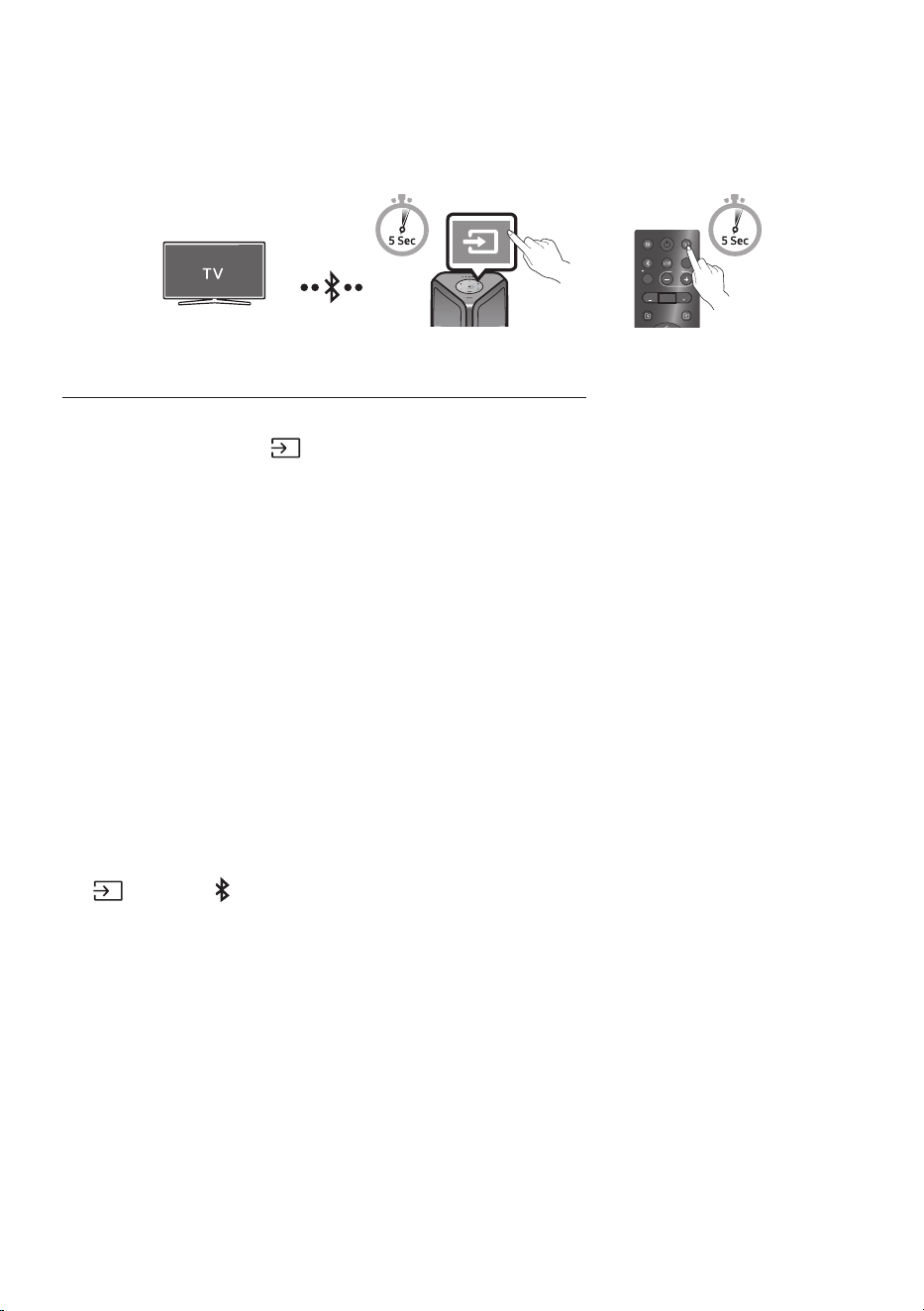
FRA - 17
Connecter le télévision Samsung via Bluetooth
Si Sound Tower est connecté à Samsung TV via Bluetooth, Sound Tower peut être contrôlé par
l'interface utilisateur de la télévision. (Volume +/-, mise en sourdine et mise sous tension)
LIGHT
PAIRING
TEMPO
USB
AUX
EFFECT EFFECT
DJ
SOUND
MODE
OU
Panneau supérieur de la Sound Tower
Easy connect with Samsung TV (SEARCHING TV mode)
Sound Tower has “SEARCHING TV” mode for easy connect with Samsung TV.
1. Appuyez sur le bouton (Source) pendant plus de 5 secondes sur la télécommande ou sur le
panneau supérieur. La Sound Tower commence à rechercher la TV Samsung. Le bandeau lumineux
clignote une fois en blanc, puis en cyan. Le voyant LED « PAIRING » du fond de panier clignote
lentement.
(Ou, lorsque la connexion du mode laire Groupe Stereo est terminée, le mode « SEARCHING TV » est
automatiquement activé.)
2. Si les télévisions Samsung prennent en charge la connexion facile, une fenêtre contextuelle de
connexion s’afchera sur la télévision. Si Samsung TV s’est déjà connecté avec Sound Tower
auparavant, Samsung TV sera connecté sans fenêtre contextuelle.
3. Si Sound Tower ne trouve aucun Samsung TV dans les 5 minutes, Sound Tower terminera le mode
«SEARCHING TV» et se mettra en mode «BT PAIRING». Si vous trouvez un Samsung TV, Sound
Tower demandera la connexion à ce télévision.
REMARQUES
• En mode de Group Play sans l, la recherche sur la télévision n’est pas disponible.
• Pour arrêter la recherche sur la télévision Samsung, éteindre Sound Tower ou appuyer sur le bouton
(Source) ou PAIRING.
• Sound Tower ne supporte pas la multi-connexion si le Samsung TV est connecté.
• Lorsque la Samsung TV est connectée, le mode sonore est PARTY et le bouton SOUND MODE n’est
pas disponible.
• Tant que Samsung TV est connecté, Sound Tower APP ne peut pas se connecter avec Sound Tower.
• La fenêtre contextuelle de connexion ne peut pas être afchée selon les spécications de la télévision.
• Vous pouvez sélectionner et vous connecter directement à partir de la liste des haut-parleurs Bluetooth
sur votre téléviseur lorsque la fenêtre contextuelle de connexion n’apparaît pas sur votre télévision.
• Lorsque Sound Tower est connecté à votre téléviseur par connexion Bluetooth, la vidéo du téléviseur et
l’audio de Sound Tower peuvent ne pas être synchronisées car la distance entre Sound Tower et le
téléviseur est trop grande. Il est recommandé de rapprocher le Sound Tower de votre téléviseur à moins
d’un mètre de votre téléviseur.
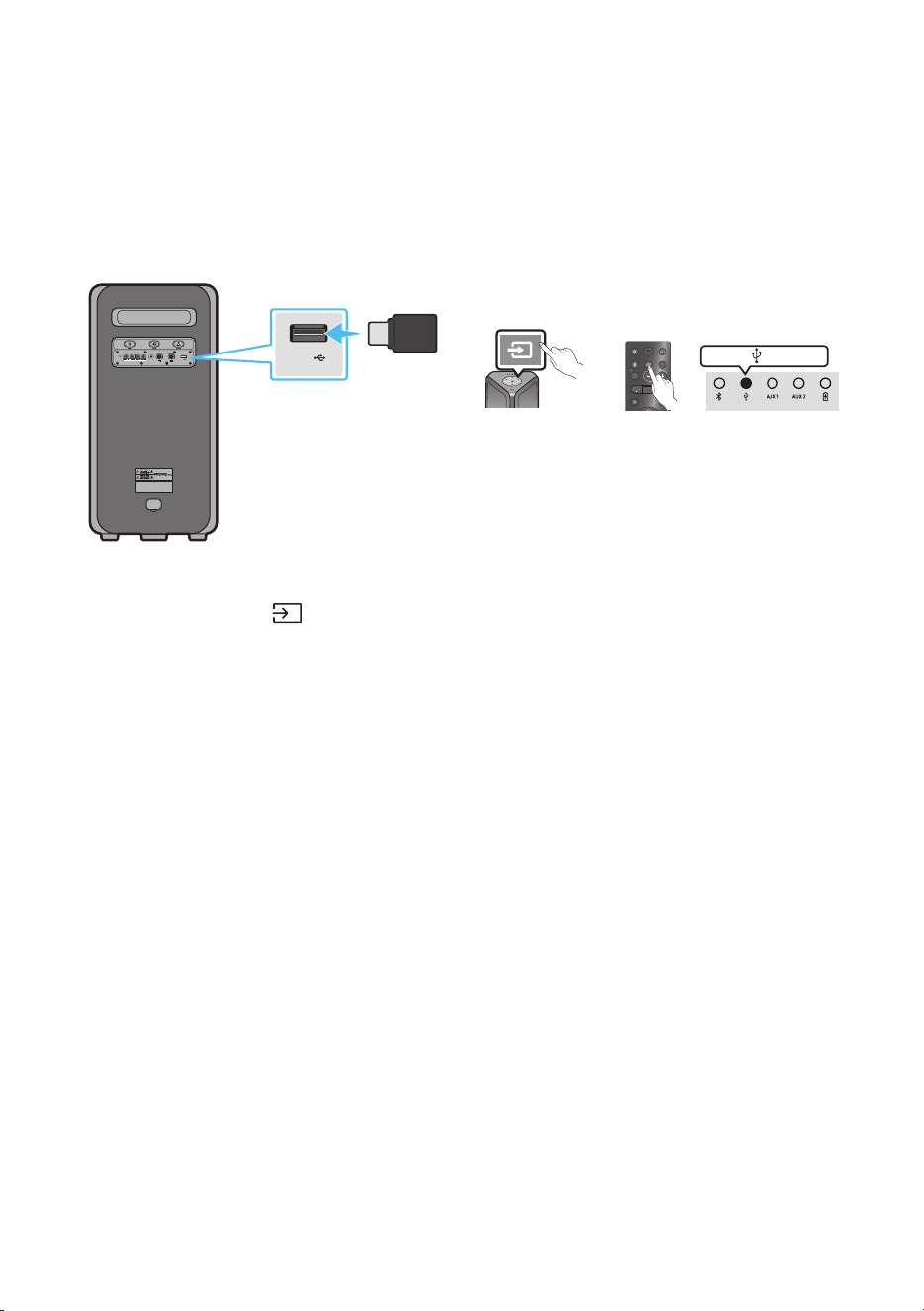
FRA - 18
05 CONNEXION D'UN PÉRIPHÉRIQUE DE
STOCKAGE USB
Il est possible de lire des chiers musicaux situés sur des périphériques de stockage USB grâce au
système Sound Tower.
POWER
ECHOVOL
USB
(5V 2.1A)
AUX 1
MIC
USB
(5V 2.1A)
LIGHT
PAIRING
TEMPO
USB
AUX
EFFECT EFFECT
DJ
SOUND
MODE
Périphérique de
stockage USB
(non fourni)
Arrière du Sound Tower
OU
Voyant LED allumé en blanc
1. Connecter un périphérique de stockage USB aux ports USB1 ou USB2 de votre Sound Tower.
2. Appuyer sur la touche
(Source) du panneau supérieur ou de la télécommande, puis
sélectionner «USB».
• Il est également possible de sélectionner une source à l'aide de la touche USB de la
télécommande.
3. Le deuxième voyant (USB) du panneau supérieur s’allume
4. Lecture de chiers musicaux à partir du périphérique de stockage USB grâce au système Sound
Tower.
• Le Sound Tower s’éteint automatiquement (Mise hors tension automatique) si le périphérique
USB n'est pas connecté, si la lecture est arrêtée ou s’il n’y a pas de saisie pendant plus de
20minutes.
REMARQUES
• Ce produit ne prend en charge que les périphériques de stockage USB formatés dans le système de
chiers FAT et FAT32.
• Ce produit ne prend pas en charge le stockage des disques durs et des appareils mobiles.
• Un maximum de 999 chiers peuvent être lus par périphérique de stockage USB.
• Un maximum de 256 dossiers peuvent être lus par périphérique de stockage USB.
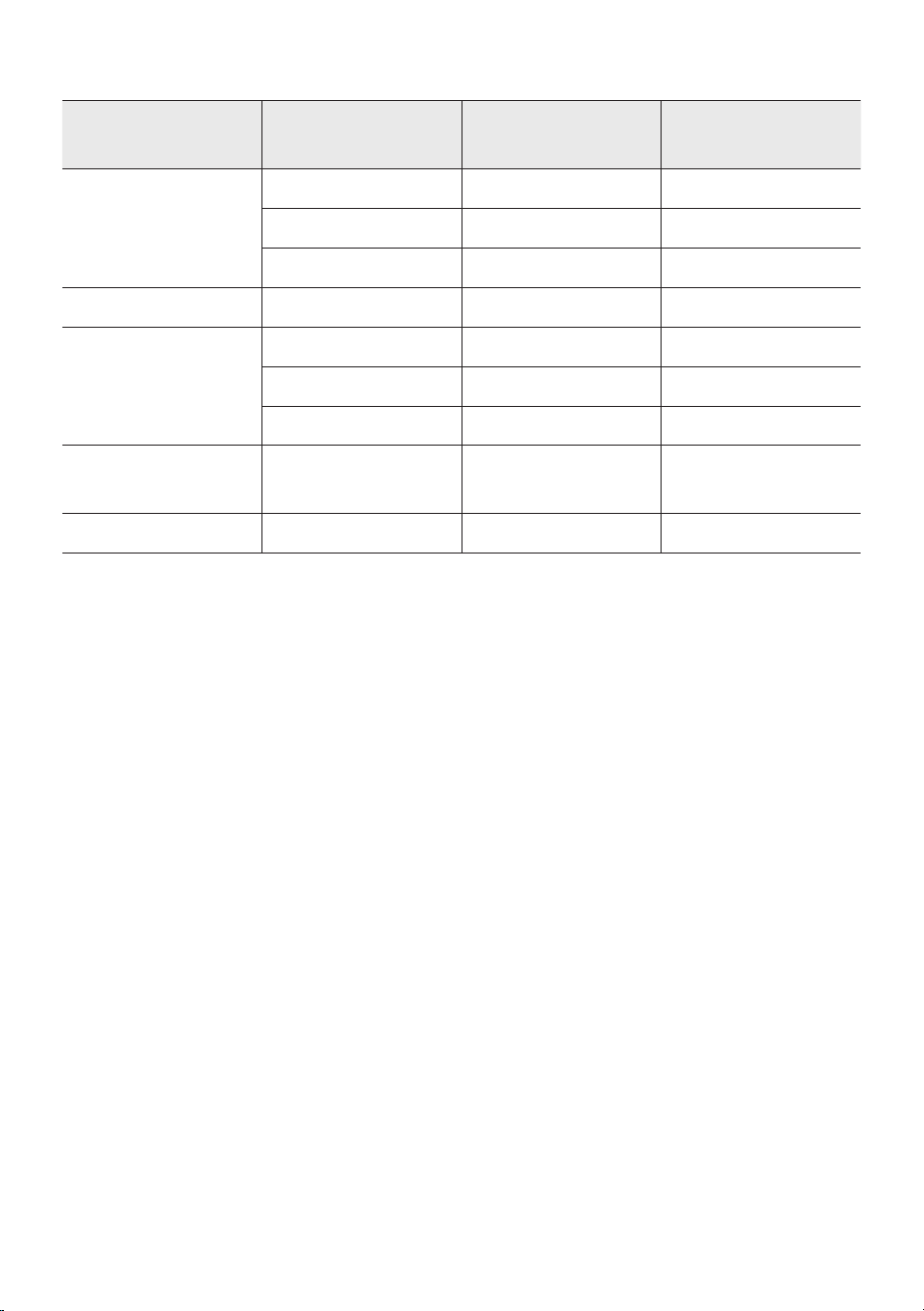
FRA - 19
Formats audio pris en charge
Codec audio Codec audio
Fréquence
d'échantillonnage
Débit binaire
*.mp3
MPEG 1 Layer3 32 kHz ~ 48 kHz 32 kbps ~ 320 kbps
MPEG 2 Layer3 16 kHz ~ 24 kHz 8 kbps ~ 160 kbps
MPEG 2.5 Layer3 8 kHz ~ 12 kHz 8 kbps ~ 160 kbps
*.wma WMA7/8/9 8 kHz ~ 48 kHz 32 kbps ~ 320 kbps
*.aac
AAC 8 kHz ~ 96 kHz < 1728 kbps
A AC-LC 8 kHz ~ 96 kHz < 1728 kbps
HE-AAC 8 kHz ~ 96 kHz < 1728 kbps
*.wav
PCM/LPCM/
IMA_ADPCM
8 kHz ~ 192 kHz < 5 Mbps
*ac - 8 kHz ~ 192 kHz < 5 Mbps
REMARQUES
• Ce produit ne supporte pas le codec WMA Professional.
• Le tableau ci-dessus montre les taux d'échantillonnage et les débits binaires pris en charge. Les
chiers dans des formats qui ne sont pas pris en charge ne seront pas lus.
• Les chiers A AC ne supportent que le format natif ADTS.
Mise à jour du logiciel
SamsungpeutoffrirdesmisesàjourpourlermwaredusystèmedeSoundToweràl'avenir.
Si une mise à jour est proposée, il est possible de mettre à jour le rmware en connectant un
périphérique USB avec la mise à jour du rmware stockée sur celui-ci au port USB de votre Sound
Tower. Pour plus d'informations sur la façon de télécharger les chiers de mise à jour, rendez-vous sur le
site Web de Samsung à l'adresse www.samsung.com→Support.
Ensuite, entrer ou sélectionner le numéro de modèle de votre Sound Tower, sélectionner l'option
Software & Apps, puis Downloads. Notez que les noms des options peuvent varier.
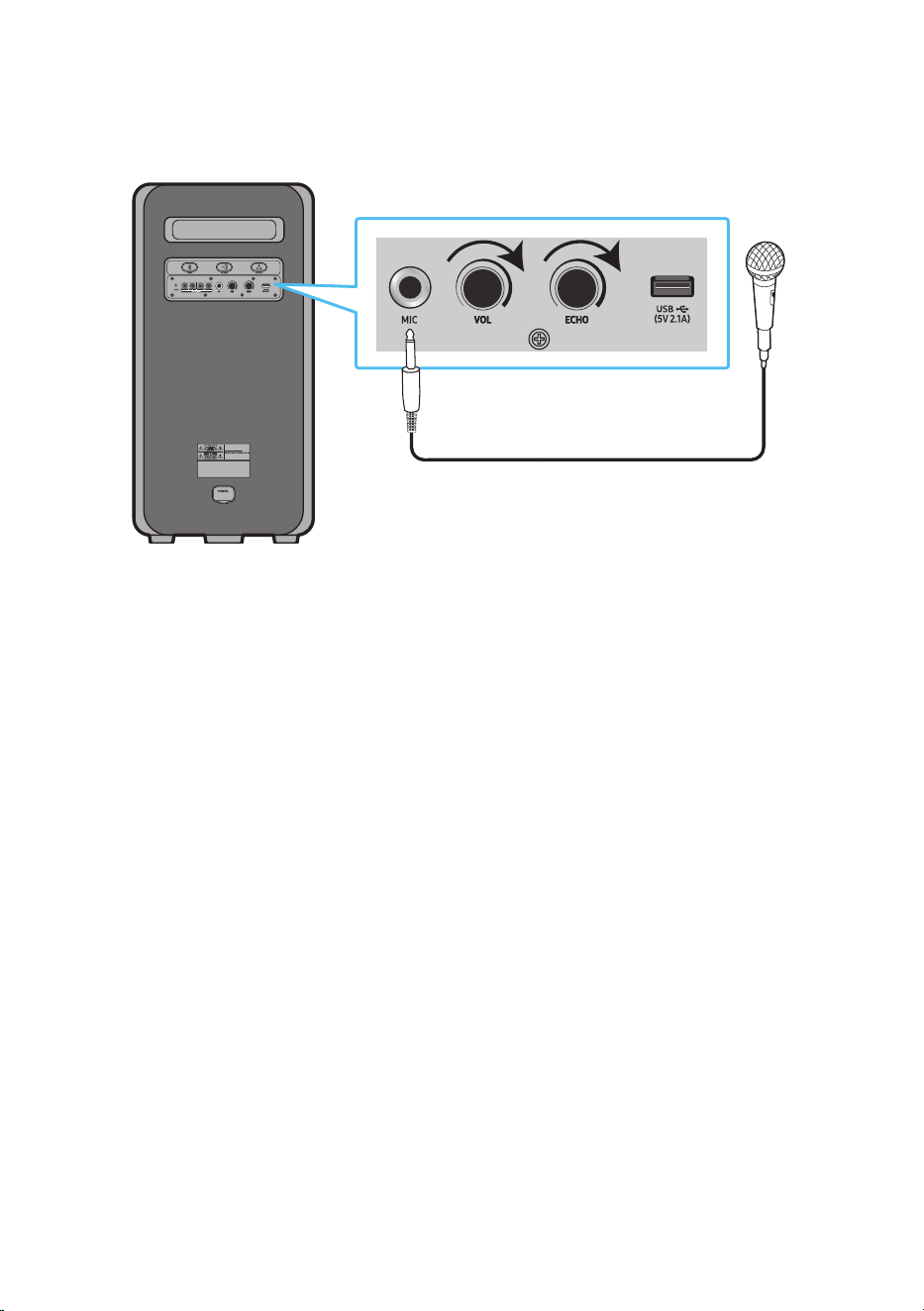
FRA - 20
Connexion d'un microphone externe
Le son de votre voix peut être émis par le système en connectant un microphone dynamique disposant
d'un connecteur classique (non fourni).
MAXMIN MAXMIN
1. Tournez le bouton MIC LEVEL jusqu'à MIN pour réduire le volume du microphone.
2. Connectez un microphone, en option, à la prise MIC de l'unité.
3. Réglez le volume à l'aide du bouton MIC «VOL».
4. Réglez l'effet d'écho à l'aide du bouton MIC «ECHO».
5. Parlez ou chantez dans le microphone connecté.
REMARQUES
• Lors de l'utilisation du mode Groupe sans l ou de la fonction mode stéréo, le son du microphone
n'est émis que par le système auquel ce dernier est connecté.
• Quand la Sound Tower fonctionne sur batterie, le son de MIC est moins fort.
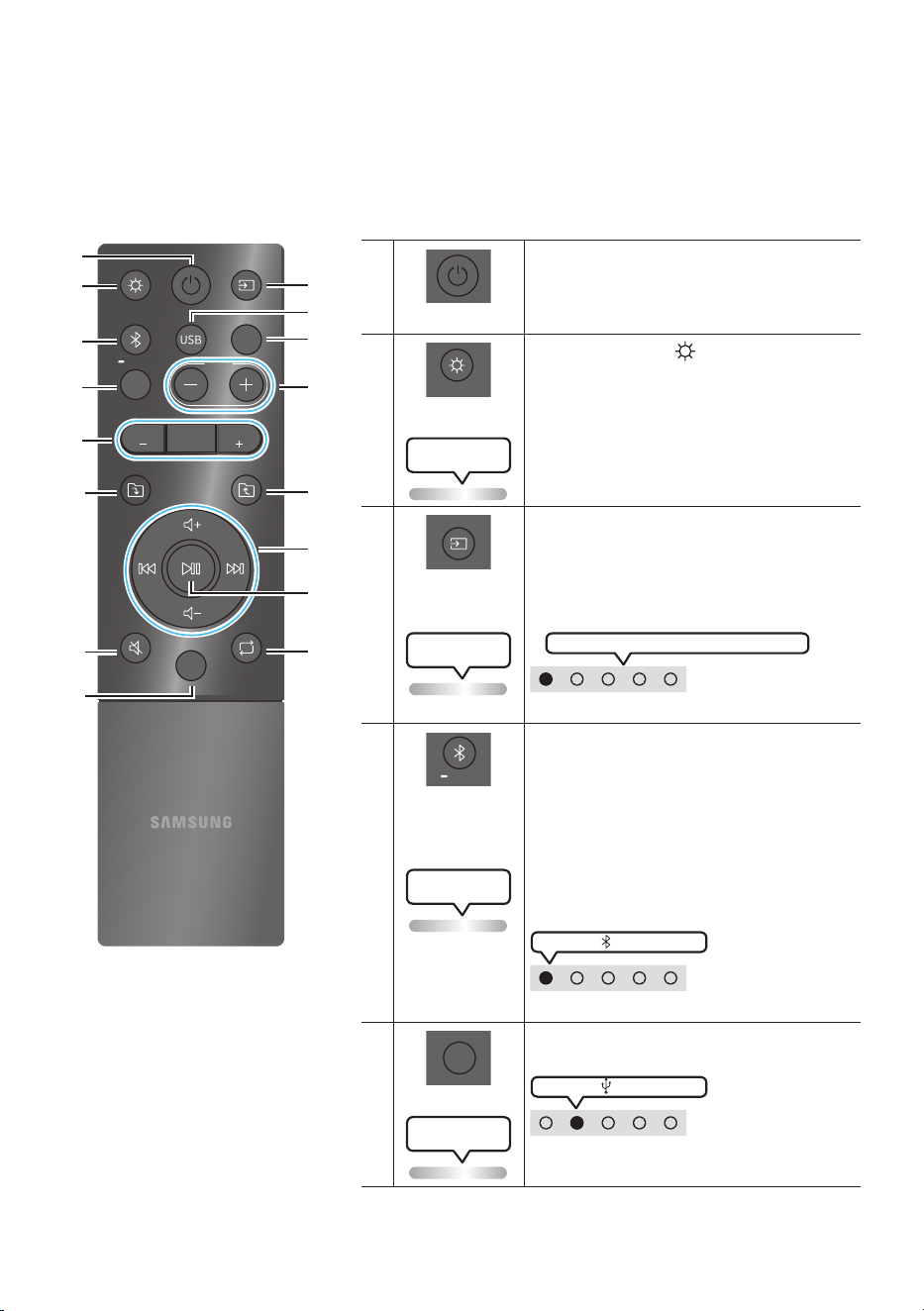
FRA - 21
06 UTILISATION DE LA TÉLÉCOMMANDE
Comment utiliser la télécommande Alimentation
LIGHT
PAIRING
TEMPO
USB
AUX
EFFECT
DOWN
UP
BASS
EFFECT
DJ
SOUND
MODE
* Pour réduire la décharge de la batterie,
le produit ne s'allume pas si vous
appuyez sur le bouton d'alimentation
de la télécommande alors que le
produit est sur batterie.
Alimentation
DOWN
UP
BASS
EFFECT
EFFECT
DJ
LIGHT
PAIRING
TEMPO
USB
AUX
SOUND
MODE
Active et désactive le Sound Tower.
LIGHT
DOWN
UP
BASS
EFFECT
EFFECT
DJ
LIGHT
PAIRING
TEMPO
USB
AUX
SOUND
MODE
Appuyez sur le bouton
(LIGHT) pour activer le
mode d'éclairage.
(Uniquement pendant la lecture de musique)
A chaque pression sur la touche, le mode
d'éclairage souhaité est sélectionné en choisissant
AMBIENT, PARTY, DANCE, THUNDERBOLT,
STAR ou OFF.
Le voyant LED
clignote en blanc 1x
Source
DOWN
UP
BASS
EFFECT
EFFECT
DJ
LIGHT
PAIRING
TEMPO
USB
AUX
SOUND
MODE
Appuyer sur pour sélectionner une source
connectée au Sound Tower.
Chaque fois que vous appuyez sur la touche pour
sélectionner une source souhaitée en choisissant
BT, USB, AUX1 ou AUX2
Le voyant LED
clignote en blanc 1x
Le voyant LED blanc se déplace vers la droite
Voyant LED en haut du produit.
Bluetooth
PAIRING
DOWN
UP
BASS
EFFECT
EFFECT
DJ
LIGHT
PAIRING
TEMPO
USB
AUX
SOUND
MODE
Appuyer sur pour sélectionner une source
directement en mode «BT».
Maintenez appuyée la touche pendant plus de
5 secondes pour entrer dans le mode « BT
PAIRING ».
Il est possible de connecter le Sound Tower à
un nouveau périphérique Bluetooth dans ce
mode en sélectionnant le Sound Tower dans la
liste de recherche du périphérique Bluetooth.
Le voyant LED
clignote en cyan
Voyant LED allumé en blanc
Voyant LED en haut du produit.
USB
DOWN
UP
BASS
EFFECT
EFFECT
DJ
LIGHT
PAIRING
TEMPO
USB
AUX
SOUND
MODE
Appuyer pour sélectionner les sources USB
connectées au Sound Tower.
Voyant LED allumé en blanc
Voyant LED en haut du produit.
Le voyant LED
clignote en blanc 1x
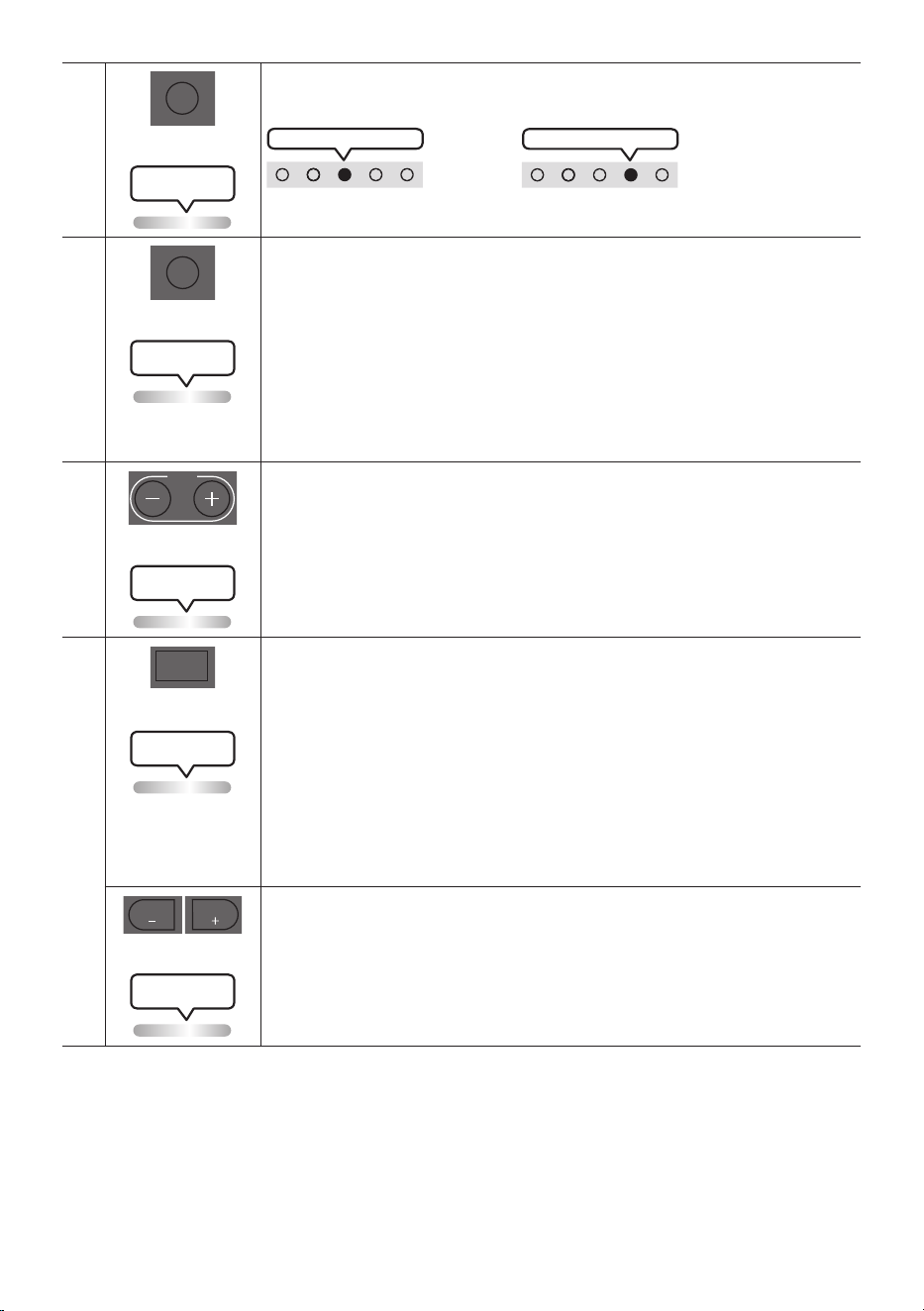
FRA - 22
AUX
DOWN
UP
BASS
EFFECT
EFFECT
DJ
LIGHT
PAIRING
TEMPO
USB
AUX
SOUND
MODE
Appuyer sur pour sélectionner les sources AUX1 ou AUX2 connectées au Sound
Tower.
Voyant LED AUX2 allumé en blanc
ou
Voyant LED AUX1 allumé en blanc
Voyant LED en haut du produit.
Le voyant LED
clignote en blanc 1x
SOUND MODE
DOWN
UP
BASS
EFFECT
EFFECT
DJ
LIGHT
PAIRING
TEMPO
USB
AUX
SOUND
MODE
A chaque pression sur la touche, on sélectionne l'effet sonore souhaité parmi PARTY,
STANDARD, HIPHOP, EDM, ROCK, LATIN, HOUSE ou REGGAE.
• PARTY: effets sonores pour une musique plus entraînante, comme pour une fête
• Standard: effets sonores neutres, comme sans égaliseur.
• HIPHOP: effets dynamiques pour la musique et la danse.
• EDM: pour des styles de musique électronique de type «dance».
• ROCK: pour la musique de groupes rock.
• LATIN: pour la musique des pays latino-américains.
• HOUSE: pour la musique dance rapide jouée sur des instruments électroniques.
Le voyant LED
clignote en blanc 1x
TEMPO +, -
DOWN
UP
BASS
EFFECT
EFFECT
DJ
LIGHT
PAIRING
TEMPO
USB
AUX
SOUND
MODE
Appuyer sur les boutons TEMPO + ou TEMPO - pour changer le tempo de la musique
vers le haut ou le bas.
• La fonction est uniquement disponible dans les modes USB.
Le voyant LED
clignote en blanc 1x
DJ
DOWN
UP
BASS
EFFECT
EFFECT
DJ
LIGHT
PAIRING
TEMPO
USB
AUX
SOUND
MODE
Cette fonction permet d'activer la fonction d'effet DJ.
A chaque pression sur la touche, on sélectionne l'effet sonore DJ désiré en choisissant
NOISE, FILTER , CRUSH, CHORUS, WAHWAH ou OFF.
• NOISE: pour mixer du bruit blanc avec le son d’origine.
• FILTER: pour exclure certaines fréquences du son.
• CRUSH: pour rendre le son plus clair.
• CHORUS: pour séparer le son d’origine en différentes pistes, les désynchroniser,
puis les remixer. Crée l’effet d’un chœur.
• WAHWAH: pour créer un effet WAHWAH en ampliant certaines fréquences du son
d’origine.
Le voyant LED
clignote en blanc 1x
EFFECT +, -
DOWN
UP
BASS
EFFECT
EFFECT
DJ
LIGHT
PAIRING
TEMPO
USB
AUX
SOUND
MODE
DOWN
UP
BASS
EFFECT
EFFECT
DJ
LIGHT
PAIRING
TEMPO
USB
AUX
SOUND
MODE
Appuyer sur les boutons EFFECT + ou EFFECT - pour changer le niveau de chaque
effet sonore DJ vers le haut ou le bas. La valeur par défaut des effets est de 5, mais
elle peut varier sur l'échelle –15 ~ 0 ~ +15.
Le voyant LED
clignote en blanc 1x
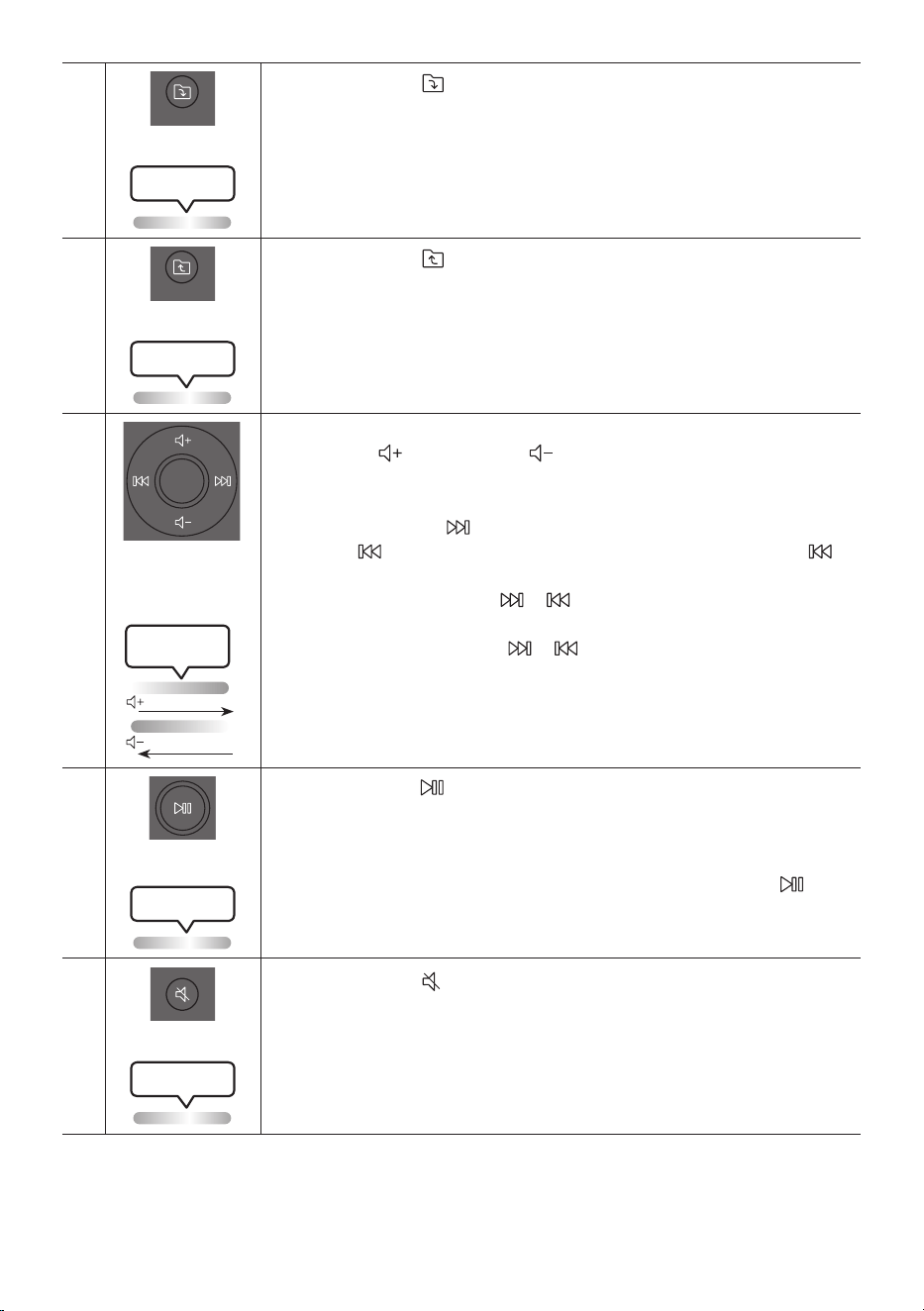
FRA - 23
Dossier DOWN
DOWN
UP
BASS
EFFECT
EFFECT
DJ
LIGHT
PAIRING
TEMPO
USB
AUX
SOUND
MODE
Appuyer sur le bouton
(DOWN) pour passer au dossier suivant du périphérique
USB.
Le voyant LED
clignote en blanc 1x
Dossier UP
DOWN
UP
BASS
EFFECT
EFFECT
DJ
LIGHT
PAIRING
TEMPO
USB
AUX
SOUND
MODE
Appuyer sur le bouton
(UP) pour passer au dossier précédent du périphérique
USB.
Le voyant LED
clignote en blanc 1x
Volume haut,
Volume bas /
Passer
• Volume haut, Volume bas
Appuyer sur
(Volume haut) ou
(Volume bas) pour régler le niveau de
volume haut ou bas.
• Passer la musique
Appuyez sur la touche pour sélectionner le titre suivant.Appuyez une fois sur
la touche pour réécouter le titre actuel. Appuyez deux fois sur la touche
pour sélectionner le titre précédent.
Maintenez enfoncée la touche ou pendant plus de 3 secondes en mode de
lecture USB pour effectuer une recherche vers l’avant ou vers l’arrière. Maintenez
de nouveau enfoncée la touche ou pendant plus de 3 secondes pour
revenir en mode de lecture normale.
Lighting LED
White Flashes
Augmenter
Baisser
Lecture / Pause
Appuyer sur la touche pour interrompre temporairement un chier musical.
Lorsque vous appuyer de nouveau sur la touche, le chier musical est lu.
• Fonction Auto Power Down
Pour désactiver la fonction Auto Power Down (Mise hors tension automatique)
lorsque l’unité est en mode AUX1, AUX2, maintenez enfoncée la touche
pendant plus de 5 secondes. Le bandeau lumineux clignote une fois en blanc.
Le voyant LED
clignote en blanc 1x
Mute
DOWN
UP
BASS
EFFECT
EFFECT
DJ
LIGHT
PAIRING
TEMPO
USB
AUX
SOUND
MODE
Appuyer sur le bouton
(Muet) pour couper le son.
Appuyer de nouveau sur cette touche pour rétablir le son.
Le voyant LED
clignote en blanc 1x
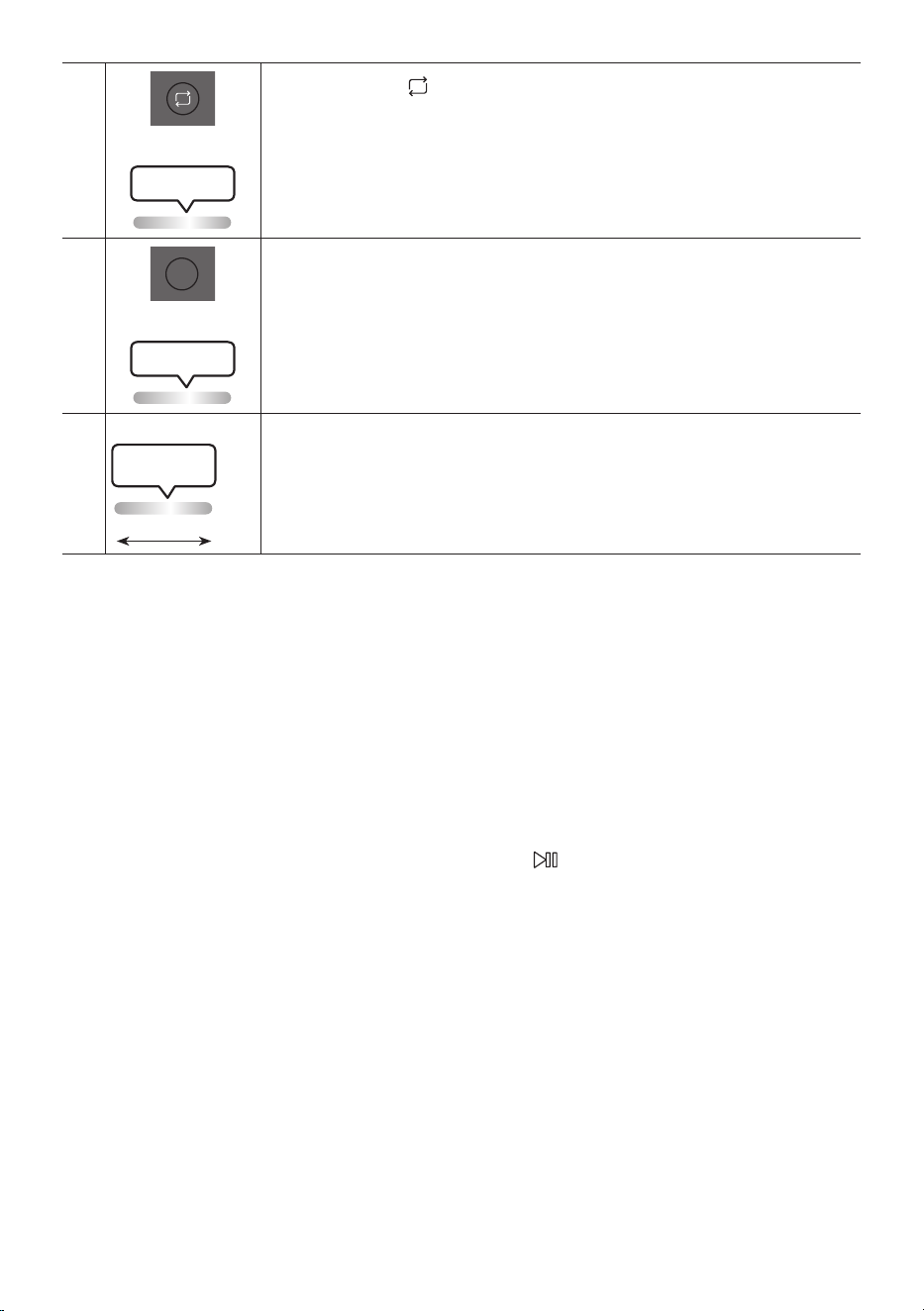
FRA - 24
Répéter
DOWN
UP
BASS
EFFECT
EFFECT
DJ
LIGHT
PAIRING
TEMPO
USB
AUX
SOUND
MODE
Appuyer sur la touche
(Répéter) pour utiliser la fonction Repeat en mode «USB1».
A chaque pression sur la touche, il est possible de sélectionner la fonction de répétition
désirée en choisissant ONE, FOLDER, ALL, RANDOM ou OFF.
Le voyant LED
clignote en blanc 1x
BASS
DOWN
UP
BASS
EFFECT
EFFECT
DJ
LIGHT
PAIRING
TEMPO
USB
AUX
SOUND
MODE
Appuyer sur le bouton BASS pour utiliser le son de basse puissant.
Appuyer de nouveau sur cette touche pour revenir au son normal.
Maintenez appuyée la touche BASS pendant plus de 5 secondes pour activer ou
désactiver la fonction BLUETOOTH POWER.
Le voyant LED
clignote en blanc 1x
※
Non disponible
Le voyant LED
clignote en rose
Du centre vers l’extrémité
La fonction du bouton de la télécommande n'est pas disponible avec la source
actuelle.
Comment utiliser le Mode Son
Votre Sound Tower fournit des réglages d'égaliseur prédénis qui sont optimisés pour un genre musical
particulier.
1. Appuyer sur le bouton SOUND MODE de la télécommande.
2. A chaque pression sur la touche SOUND MODE pour sélectionner l'effet sonore désiré en
choisissant PARTY, STANDARD, HIPHOP, EDM, ROCK, LATIN, HOUSE ou REGGAE.
REMARQUES
• La valeur par défaut du mode sonore est PARTY.
• Quand l’appareil est éteint, maintenez appuyée la touche sur le produit ou la télécommande
pendant plus de 5 secondes pour allumer avec le réglage par défaut Mode Sonore.
Comment utiliser l'effet DJ
La fonction DJ Effect permet d'activer l'effet sonore DJ Effect. Le niveau de chaque effet est réglable.
1. Appuyer sur la touche DJ de la télécommande.
2. Dès que vous appuyez sur la touche DJ, le Sound Tower navigue dans les effets DJ disponibles :
• NOISE : Créer du bruit blanc et mixé avec le son original à travers le ltre et la sortie.
• FILTER : Crée un effet similaire au son des aigus ou des basses uniquement.
• CRUSH : Crée un effet qui rend le son original plus aigu.
• CHORUS : Crée un effet similaire à un chœur chantant.
• WAHWAH : Crée un effet'Wah~ Wah~ Wah~'.

FRA - 25
• DJ EFFECT OFF : Désactive l'effet DJ.
3. Appuyez sur les touches EFFECT + ou EFFECT - pour augmenter ou diminuer les niveau de chaque
effet sonore DJ de -15 à +15.
REMARQUE
• Quand l’appareil est éteint, maintenez appuyée la touche sur le produit ou la télécommande
pendant plus de 5 secondes pour allumer avec le réglage par défaut effet DJ.
FRA - 26
07 UTILISATION DE L'APPLICATION
SAMSUNG SOUND TOWER
Installer l'application Samsung Sound Tower
Pour contrôler ce produit avec votre Smart Device et l'application Samsung Sound Tower, télécharger
l'application Samsung Sound Tower depuis Google Play Store ou Apple App Store, et l'installer sur votre
Smart Device.
REMARQUES
• L'application Samsung Sound Tower est compatible avec les téléphones mobiles Android
fonctionnant sous Android OS 6.0 ou ultérieur.
• L'application Samsung Sound Tower est compatible avec les appareils mobiles Apple fonctionnant
sous iOS 10.0 ou supérieur.
Recherche de marché : Samsung Sound Tower
Lancement de l'application Samsung Sound Tower
Pour lancer et utiliser l'application Samsung Sound Tower, touchez l'icône Samsung Sound Tower sur
votre appareil intelligent, puis suivre les instructions à l'écran.
Samsung
Multiroom
Samsung Sound Tower
Samsung Sound Tower
FRA - 27
08 DÉPANNAGE
Avant de demander de l’aide, vérier ce qui suit.
L'appareil ne s'allume pas.
; La batterie est peut-être complètement
déchargée. Veuillez brancher la prise
d’alimentation et essayez de mettre en
marche l’unité.
Une fonction ne fonctionne pas lorsque vous
appuyez sur la touche.
Y a-t-il de l'électricité statique dans l'air ?
; Débrancher la che d'alimentation et la
rebrancher.
Les pertes de son se produisent en mode BT.
; Voir les sections Connexion Bluetooth à la
page 14.
Le son n'est pas produit.
La fonction Muet est-elle activée ?
; Appuyer sur la touche (Muet) pour
annuler la fonction mute.
Le volume est-il réglé au minimum ?
; Régler le volume.
La télécommande ne fonctionne pas.
Les piles sont déchargées ?
; Remplacer les piles par des piles neuves.
La distance entre la télécommande et l'unité
principale Sound Tower est-elle trop grande ?
; Rapprocher la télécommande de l'unité
principale Sound Tower.
La connexion du groupe Stereo ne fonctionne
pas.
Lesystèmeest-ilenmodeGroupPlaysansl?
; Déconnecter le mode de Group Play sans l
et réessayer la connexion de Groupe Stereo.
Impossible d’ établir de connexion Bluetooth.
Le système est-il connecté à un autre système
enmodesanslGroupPlayouenmode
Groupe Stereo ?
; Essayer à nouveau la connexion Bluetooth
après avoir déconnecté la connexion sans
l Group Play ou de Groupe Stereo.
Les deux appareils Bluetooth sont-ils déjà
connectés ?
; Essayer à nouveau la connexion Bluetooth
après avoir déconnecté les autres connexions
Bluetooth.
Le bouton PAIRING ne fonctionne pas.
Lesystèmeest-ilenmodeGroupPlaysansl
ou en mode Groupe Stereo?
; Essayer de nouveau après avoir déconnecté
la connexion sans l de Group Play ou de
Groupe Stereo.
Je souhaite commuter le système HOST
(MAIN)àl'autreenmodeGroupPlaysansl
ou de connexion Groupe Stereo.
; Désactivez le mode Group Play, puis appuyez
d'abord sur l'enceinte dont vous voulez faire
le système HOST, et utilisez ensuite la touche
à voyant LED Group Play pour connecter les
autres systèmes l'un après l'autre.
; Avec le mode Groupe Stereo, MAIN est xe.
Vous ne pouvez pas changer les autres en
tant que MAIN.
Je veux lire AUX1 ou AUX2 plus de 8 heures
sans saisie de commande.
; Maintenez enfoncé le bouton de la
télécommande pendant plus de 5 secondes
en mode AUX1 ou AUX2 pour désactiver la
fonction d’extinction automatique Auto
Power Down.Passez de ON-AUTO POWER
DOWN à OFF-AUTO POWER DOWN.
FRA - 28
Je ne peux pas connecter un SUB à Group Play.
; Après 1 heure, l’HOST bloquera touts SUB
supplémentaires d’être ajouté. Appuyez sur
la touche GROUP PLAY sur le système
HOST an de connecter le SUB.
Impossibled'établiruneconnexion«Sansl/
Groupecâblé/Groupecâblé/Stéréo/Bluetooth».
La distance entre les systèmes est-elle trop
grande ?
; Il est recommandé d'effectuer un appairage
«Sans l/Groupe câblé/Groupe câblé/Stéréo/
Bluetooth» à moins de 1 mètre du système.
; Il est recommandé que la distance de
fonctionnement entre les systèmes Sound
Tower soit inférieure à 10 mètres.
09 LICENCE
The Bluetooth® word mark and logos are
registered trademarks owned by the Bluetooth
SIG, Inc. and any use of such marks by Samsung
Electronics Co., Ltd. is under license. Other
trademarks and trade names are those of their
respective owners.
Qualcomm aptX is a product of Qualcomm
Technologies, Inc. and/or its subsidiaries.
Qualcomm is a trademark of Qualcomm
Incorporated, registered in the United States and
other countries. aptX is a trademark of Qualcomm
Technologies International, Ltd., registered in the
United States and other countries.
[ENERGY STAR]
ENERGYSTARqualiedmodelonly
– Your Samsung product is ENERGY STAR
qualied in its factory default setting.
Change to certain features, settings and
functionality in this product can change the
power consumption, possibly beyond the
limits required for ENERGY STAR
qualication.
– Environmental Protection Agency and
Department of Energy. ENERGY STAR is a
joint program of the Government agencies,
designed to promote energy efcient
products and practices.
Refer to www.energystar.gov for more
information of the ENERGY STAR Program.
ENERGYSTARqualiedmodelonly
(Applicable to Thin Client models only)
As an ENERGY STAR® Partner, SAMSUNG
has determined that this product meets
the ENERGY STAR® guidelines for energy
efciency.
– The ENERGY STAR Program has been to
reduced greenhouse gas emissions and
save energy through voluntary labeling.
– Power management setting of this product
have been enabled by default, and have
various timing setting from 1 minutes to
5 hours.
– The product can wake with a button press
on the chassis from sleep mode.
ENERGYSTARqualiedmodelonly(Theother
models)
– As an ENERGY STAR Partner, Samsung has
determined that this product or product
models meets the ENERGY STAR guideline
for energy efciency.

FRA - 29
10 AVIS DE LICENCE
LIBRE
Pour envoyer des questions et des demandes
concernant des logiciels libres, contactez
Samsung Open Source
(http://opensource.samsung.com)
11 REMARQUE
IMPORTANTE À
PROPOS DU
SERVICE
Les gures et les illustrations du présent Manuel
d’utilisation sont fournies à titre de référence
uniquement et peuvent différer de l’apparence du
produit réel.
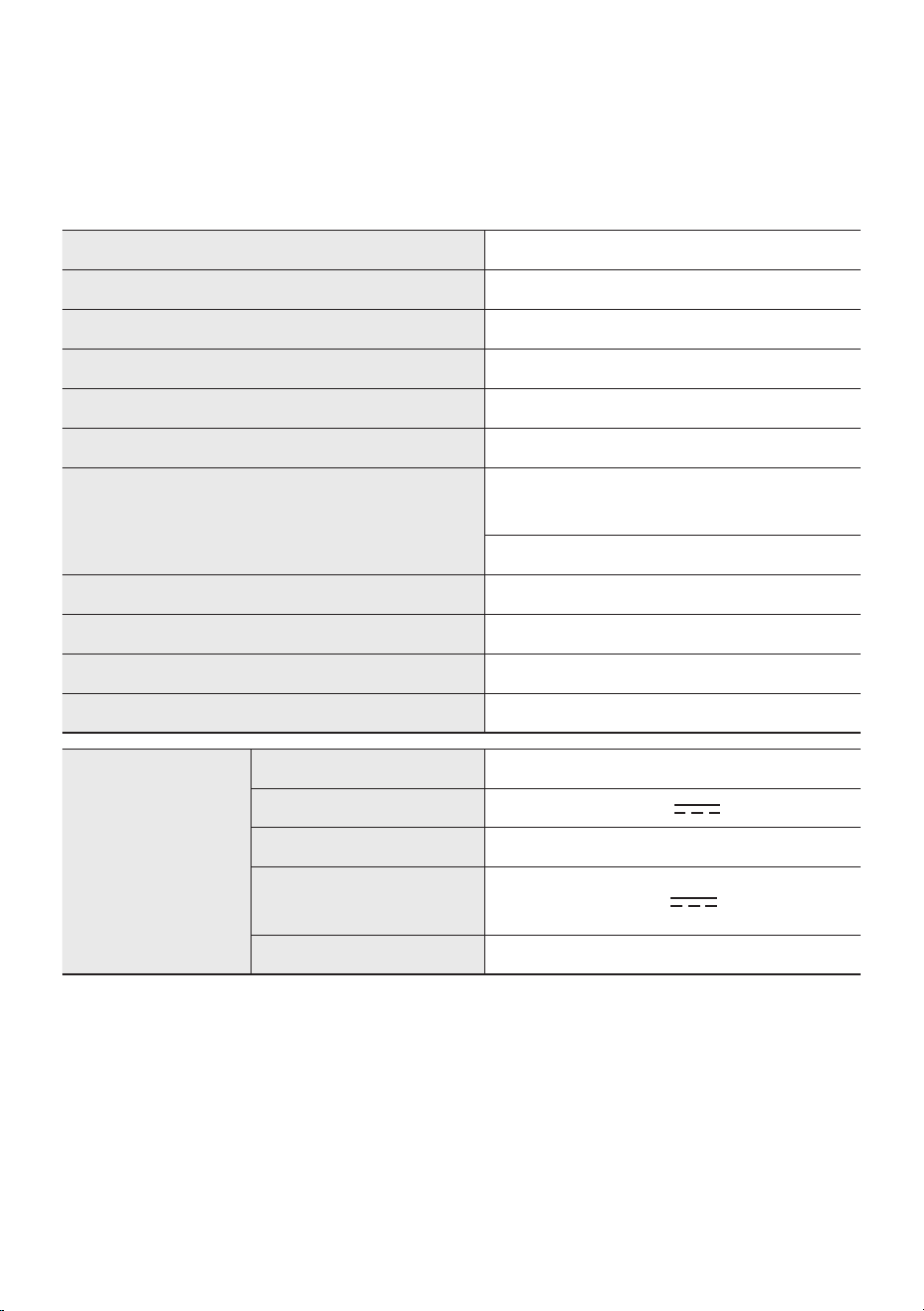
FRA - 30
12 SPÉCIFICATIONS ET GUIDE
Spécications
Nom du modèle MX-ST50B
USB 5V/2,1A
Poids 11,94 kg
Dimensions (L x H x P) 329 × 665 × 301 mm
Plage de températures en fonctionnement +5°C à +35°C
Plage d’humidité en fonctionnement 10 % ~ 75 %
AMPLIFICATEUR Puissance de sortie nominale
Cordon d’alimentation
branché
240W
Sur batterie 90W
Consommation d’énergie globale 65W
Type de batterie
Lithium-ion 72Wh
Durée de lecture sur batterie
up to 18hrs
Durée de recharge de la batterie <3,5hrs
Batterie lithium-ion
rechargeable
Modèle de batterie EB-T24C-00, 2INR19/65-4
Tension nominale 7,34 V
Capacité nominale 9800 mAh, 71,93 Wh
Tension de recharge
limitée
8,4 V
Capacité type 10000 mAh, 73,40 Wh
REMARQUES
• Samsung Electronics Co., Ltd se réserve le droit de modier les caractéristiques sans préavis.
• Le poids et les dimensions sont approximatifs.
• La durée de lecture sur batterie et la durée de recharge de la batterie varient avec les conditions
d’utilisation.
• Dans un environnement extrêmement chaud ou froid, la recharge s’arrête pour des raisons de
sécurité. An d’éviter ce problème, débranchez le cordon d’alimentation CA, puis rebranchez-le à
une température de fonctionnement comprise entre 5 °C et 35 °C.
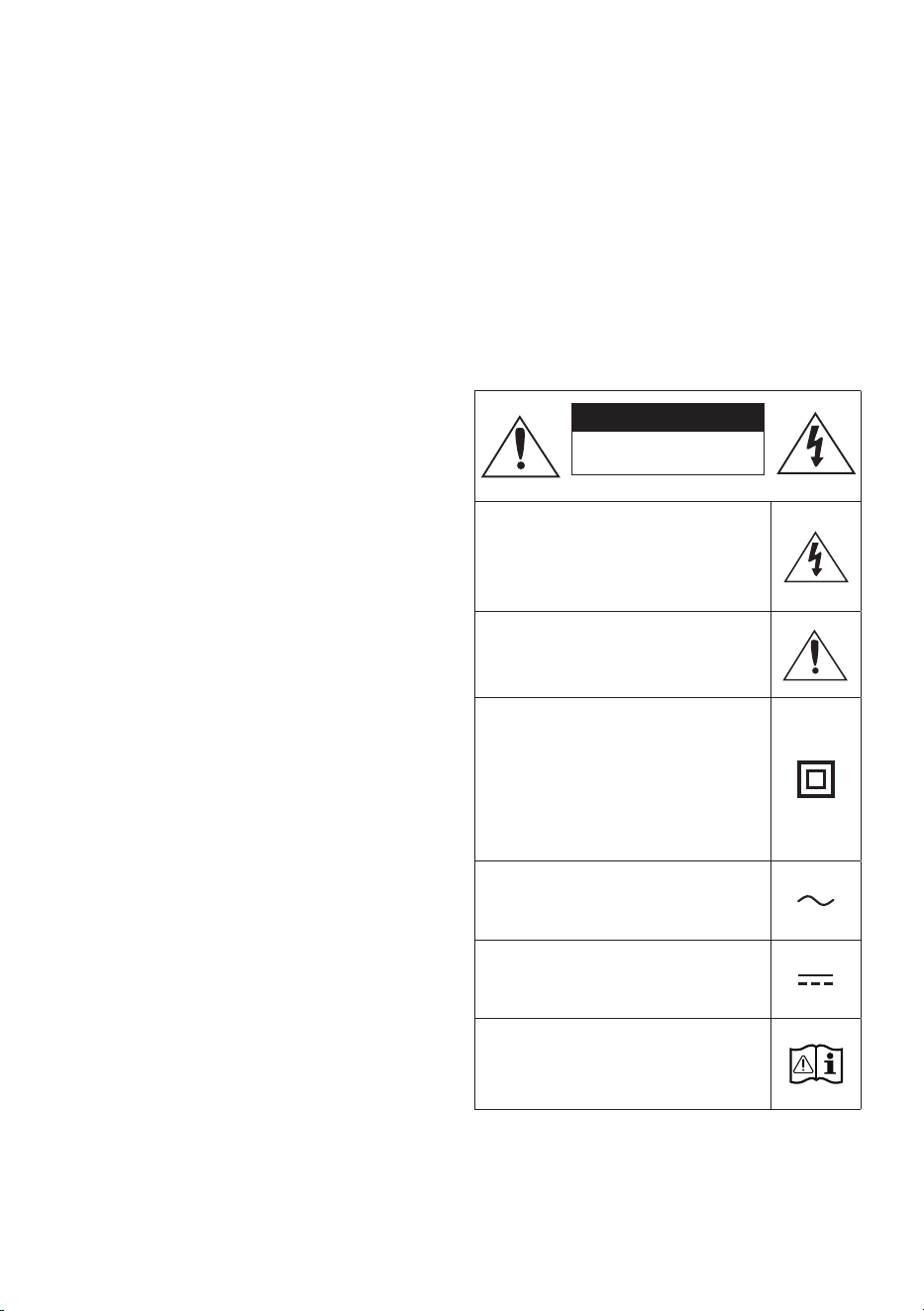
ii - ARA
ةمسلا تامولعم
ةمسلا تاريذحت
ةلازإب مقت ،ةيبرهك ةمدصل ضرعتلا رطاخم ليلقتل
.)يفلخلا ءاطغلا وأ( ءاطغلا
امنإو .لخادلاب اهتنايص مدختسملل نكمي ءازجأ دجوت ف
.لهؤا ةنايصلا يفظو ةنايصلا ةيلمع كرت ىجر
ُ
ي
نوكت دق لا زومرلا حيضوتل هاندأ حضوا لودجلا عجار
.Samsung نم كجت نم ع ةدو جوم
هيبنت
ةيبرهك ةمدصب ةباصا رطخ
حتفت .
اب ژاتلو هک دهد یم ناشن امش هب تمع نیا
نأ رطخلا نمف .دراد دوجو هاگتسد لخاد رد
نم لكش يأب جتنا اذهب خاد ءزج يأ سمت
.لاكشا
تاداشرإ مضت مت دق هنأ إ زمرلا اذه شي
اذه عم ةنايصلاو ليغشتلاب قلعتت ةمهم
.جتنا
ه نأ إ ز مر لا اذ ه ش ي :II ةئفلا نم جتنم
ضراب ءابرهكلل نمآ لاصتا بلطتي
.)ضيرأتلا(
د
وزم جتنم ع دوجوم غ زمرلا اذه ناك اذإ
جتنا عتمتي نأ بجيف ،ابرهك رايت كلسب
.)ضيرأت( ةيقاو ضرأب نومأم لاصتاب
رادقم نأ إ زمرلا اذه شي :ددا رايتلا دهج
رايت دهج وه زمرلاب موسوا ددحا دهجلا
.دد م
نأ إ زمرلا اذه شي :رمتسا رايتلا دهج
دهج وه زمرلاب موسوا ددحا دهجلا رادقم
.رمتسم رايت
اذه دشري :مادختسا تاداشرإ عجار ،هيبنت
مادختسا ليلد إ عوجرلل مدختسا زمرلا
.ةمسلاب ةقلعتا تامولعلا نم ديز
ريذحت
ةمدصل ضرعتلا وأ قيرحلا بوشن رطخ نم دحلل •
.ةبوطرلا وأ راطمل زاهجلا اذه ضرعت ،ةيبرهك
ةيو ةفورعم ةيئايميك داوم ع جتنا اذه يوتحي •
راأ وأ ةيقلخ بويعو ناطلا ببست اهنأب اينروفيلاك
.باجنا ع ىرخأ
تايراطبلا وأ ةيراطبلا( ةيراطبلا ضرعتت أ بجي •
ةعشأ لثم ةدئازلا ةرارحلل )تايراطبلا ةعومجم وأ
.كلذ هباش ام وأ رانلا وأ سمشلا
هيبنت
ةقباطمب مق ،ةيبرهكلا تامدصلا عوقو نود ةلوليحلل •
مث ةضيرعلا ةحتفلا عم سباقلل ةضيرعلا ةرفشلا
.اهلاخدإ مكحأ
رايتلا ذخأمب ا
ً
مود
ً
صتم زاهجلا اذه نوكي نأ يغبني •
.ةيقاو
ٍ
ضرأ ةلصو دوجو عم ددا
بحس بجي ،يئرلا رهكلا رايتلا نع زاهجلا لصفل •
يغبني اذلو يئرلا رهكلا رايتلا سبقم نم سباقلا
.ليغشتلل ا
ً
زهاج يئرلا رهكلا رايتلا سباق نوكي نأ
.اهرثانت وأ لئاوسلا تارطقل زاهجلا اذه ضرع
ُ
ت •
.زاهجلا ع روهزلا ةينآك ،لئاوسلاب ةئيلم ءايشأ عضت
سباق بحس بجي ،ا
ً
مامت زاهجلا اذه ليغشت فاقي •
نأ بجي ،اذهلو .يرادجلا سبقا نم رهكلا رايتلا
ا
ً
حاتمو
ً
هس رهكلا رايتلا سباق إ لوصولا نوكي
.ا
ً
م ئاد
ءاملا ةمواقم روهدت بنجتل
.حيحص لكشب ةدحولا مدختساو ي امم ققحت
ةدحولا طوقس نع جتانلا فلتلا وأ هوشتلا يدؤي دق •
ع اهتردق روهدت إ ةيكيناكيم ةمدصل اهضيرعت وأ
.ءاا ةمواقم
يدؤي دق .ءاا طغضل مواقم غ ةدحولا هذه ميمصت •
،عفترم ءام طغض هب دجوي ناكم ةدحولا مادختسا
.للخ ثودح إ ، مامحلا لثم
نخاسلا ءاوهلا خفنت وأ ةيلاع ةرارح ةجردب ءاا بصت •
.ةابم ةدحولا ع هباش ام وأ رعشلا ففجم نم
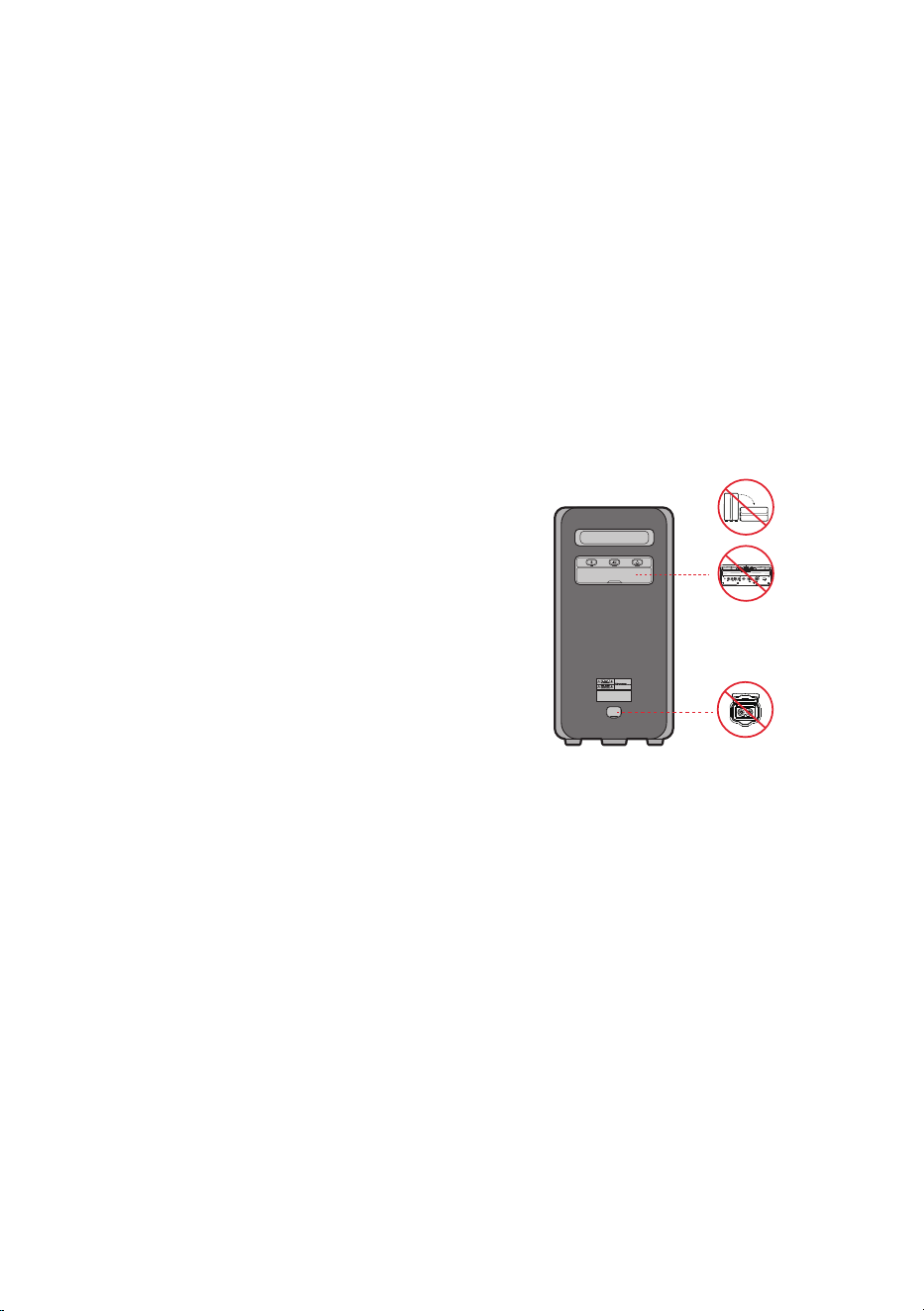
iii - ARA
ةرارح تاجردل ضرعم ناكم ا
ً
دبأ ةدحولا مدختست
.ةرارح ردصم نم برقلاب وأ انواسلا لثم ،ةيلاع
ءاطغو ذفنا ءاطغ يدؤي .رذحب ءاطغلا عم لماعت •
ةظفاحا ةياغلل ا
ً
مهم ا
ً
رود AC ددا رايتلا سبقم
قغإ نم دكأت ،ةدحولا مادختسا دنع .ءاا ةمواقم ع
مدع ع صرحا ،ءاطغلا قغإ دنع .ا
ً
مامت ءاطغلا
قغإ متي مل اذإ .لوخدلاب ةبيرغلا ماسجل حامسلا
دقو ءاا ةمواقم ىوتسم روهدتي دقف ،ا
ً
مامت ءاطغلا
إ ءاا لوخد ةجيتن ةدحولا للخ ثودح ببستي
.ةدحولا
ليصوت دنع IPX5 ءاا ةمواقم رايعمب ءافولا نكمي •
.AC ددا رايتلاو سبقا ةقاط
.ءاملل مواقم هنأ نم دكأتلل ءااب جتنا رمغ بنجت •
POWER
ECHOVOL
USB
(5V 2.1A)
AUX 1
MIC
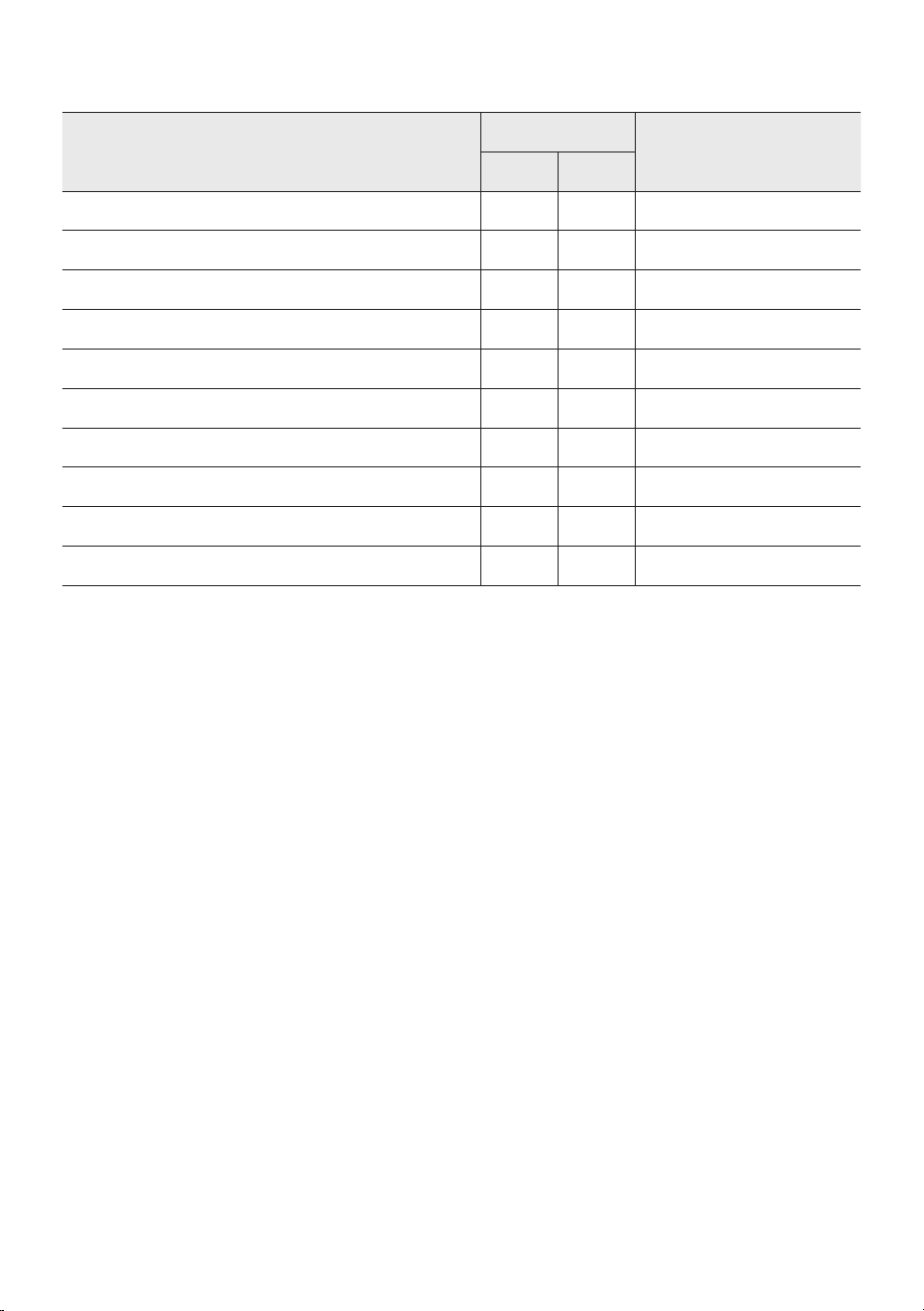
iv - ARA
.IPX5 رايعم ع
ً
ءانب ةناتم Sound Tower رفوي •
ةبلصلا داوملا دض ةيامحلا
IP
ءاملا دض ةيامحلا
05
تابلطتم دجوت XXتابلطتم دجوت
ةيامح 00ةيامح
م م 50 >ةبلصلا داوا11ا
ً
يدومع ةطقاستا هايا
م م 12 >ةبلصلا داوا22ة جرد 15 رادقمب ا
ً
يدومع ةلئاا هايا ةيواح
م م 2.5 >ةبلصلا داوا33أر لا ع ضو لا نم ة جرد 60 ةيوازب ءاا شر
م م 1.0 >ةبلصلا داوا44تاهاجتا عيمج نم هايا شر
رابغلا نم يمحم55تاهاجتا عيمج نم ميطارخلا تاثافن
رابغلا دض ماكحإب دودسم66تاهاجتا عيمج نم ةيوقلا ميطارخلا تاثافن
-7ةقيقد 30 ةد م 1 :تقؤا رمغلا
-8عينصتلل نيددحا تقولاو قمعلا :رمغلا

v - ARA
تاطايتحا
عم قفاوتي كلم ددا رايتلا ةقاط ردصم نأ دكأت . 1
دوجوا فيرعتلا قصلمب ةجرد
ُ
ا ةقاطلا تابلطتم
.كجتن فسلا بناجلاب
بسانم حطس ع ،يقفأ لكشب جتنا بيكب مق
7 ةيوهتلا فوتل هلوح ةيفاك ةحاسم كرت عم ،)ثاثأ(
.ةيوهتلا تاحتف ةيطغت مدع نم دكأت .مس 10 إ
لا ةزهجا نم اهغ وأ تاكا ع ةدحولا عضت
ةدحولا هذه ميمصت مت اهترارح ةجرد عفترت امبر
ةدحولا ليغشت فاقي .رمتسم لكشب مادختسل
ذفنم نم ددا رايتلا سباق لصفا ،لماك لكشب
رهكلا رايتلا لصفا .طئاحلاب دوجوا رهكلا رايتلا
ةفل اهمادختسا مدع ةبغرلا ةلاح ةدحولا نع
.ةليوط
رايتلا سباق لصفا ،ةيدعرلا فصاوعلا بوبه دنع . 2
نكما نم .طئاحلاب دوجوا ءابرهكلا ذفنم نم ددا
.ةدحولا فتإ إ رهكلا دهجلا عافترا يدؤي نأ
كلذ غ وأ ابا سمشلا ءوض إ ةدحولا ضرعت . 3
ةدا يز إ كلذ يدؤ ي نأ نكم ا نم .ةرارح لا ردا صم نم
لطعت ببستي دق امم بك لكشب ةرارحلا ةجرد
.ةدحولا
،)روهزلا ةينآ( ةبوطرلا نم جتنملل ةيامحلا رفو . 4
تاجم ردصت لا تادعا وأ )ةأفدا( ةدئازلا ةرارحلاو
رايتلا لبك لصفا .ةيوق ةيبرهك وأ ةيسيطانغم
.زاهجلا لطعت ةلاح ددا رايتلا ردصم نم رهكلا
.يعانصلا مادختسل ممصم غ كب صاخلا جتنا
.طقف ةيصخشلا ضارغل جتنا اذه مادختسا متي
جتنا نيزخت ةلاح فثاكت ثدحي نأ نكما نم
ةدحولا لقن ةلاح .ةضفخنم ةرارح تاجرد
ح ا
ً
بيرقت تعاس ةد رظتنا ،ءاتشلا لصف لخ
ل ب ق ة فر غ لا ةرار ح ة جرد إ ةد حو لا ةرار ح ة جرد ل ص ت
.مادختسا
داوم ع جتنا اذه عم ةمدختسا تايراطبلا يوتحت . 5
تايراطبلا نم صلختت .ةئيبلاب ةم ةيئايميك
رظحي .ةيداعلا ةيلا تمها ةلس اهئاقلإب
ضرعت .اهقرح قيرط نع تايراطبلا نم صلختلا
.ةدئازلا ةرارحلا وأ كفلا وأ ق رئاودل تايراطبلا
لادبتسا مت اذإ راجفنا ثودحب لامتحا كانه : هيبنت
اهلادبتساب مق .ةحيحص غ ةقيرطب ةيراطبلا
.لثامم عون نم وأ عونلا سفن نم تايراطبب
ىرخأ تارابتعا
بجيف ،طقف جتنا اذهل ةعونصم ةيراطبلا ن ا
ً
رظن •
ضارغ وأ ىرخا ةينوكلا ةزهجل اهمادختسا مدع
.ىرخأ
قودنص اهعض ،ةغرافلا ةيراطبلا نم صلختلا دنع •
.اهريودت ةداع تايراطبلا عيمجت
.ةيراطبلا كفب مقت •
امدنع ةيراطبلا نحش بنجت ،ةيراطبلاو كرحا ةيامحل •
ن م عأ وأ ة يو ئ م تا جرد 3 نم لقأ ةرارحلا ةجرد نوك ت
.ةيوئم ةجرد 42
.اهنحش دعأ ،ا
ً
ضفخنم ةيراطبلا ىوتسم نوكي امدنع •
نم ةليوط ةفل ا
ً
ضفخنم ةيراطبلا ىوتسم لظ اذإ
.ةيراطبلا ءادأ روهدت كلذ ببستي دقف ،تقولا
.رانلا اهعضو وأ ةيراطبلا خست بنجت •
.ةيراطبلا كفب مقت •
Sound Tower لمعي دق ،ةيراطبلاو كرحا ةيامحل •
وأ ة يو ئ م تا جرد -17 نم لقأ ةرارحلا ةجرد نوك ت امدنع
.ة يو ئ م ة جرد 57 نم عأ
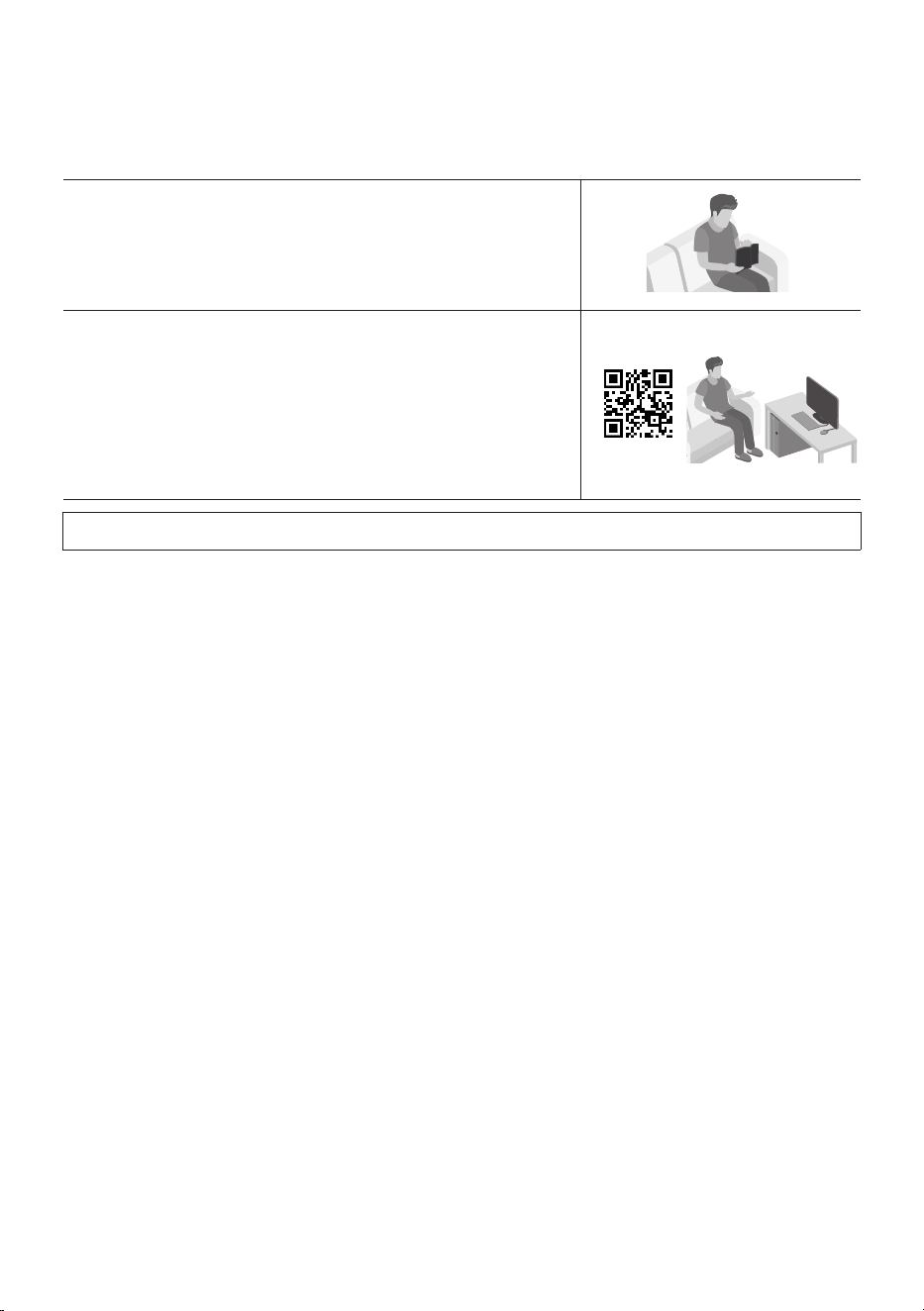
vi - ARA
ليلدلا اذه نع ةذب
ُ
ن
.هليت كنكمي يذلا يصفتلا لماكلا ليلدلاو مدختسا ليلد ىعد
ُ
ي طيسبلا ءزجلا اذه :نيأزج نم مدختسا ليلد فلأتي
مدختسملا ليلد
،تانوكاو ،جتنا بيكرتو ،ةمسلا تاميلعت ع عطل ليلدلا اذه أرقا
.جتنا تافصاومو ،تيصوتلاو
لماكلا ليلدلا
ع Samsung ءمع معد زكرم نم لماكلا ليلدلا لوصولا كنكمي
خشلا رتويبمكلا ع ليلدلا ضرعلو .QR زمر حسم لخ نم تننا
عقوم نم دنتسم قيسنتب ليلدلا ليتب مقف ،كتصاخ لومحا فتاهلا وأ
.بيولا ع Samsung
)/https://www.samsung.com/us/support/downloads(
.قبسم راعشإ نود يغتلل ةضرع تافصاواو ميمصتلا

vii - ARA
CONTENTS
2 تانوكملا نم ققحتلا 01
دع
ُ
ب نع مكحتلا ةدحو مادختسا لبق تايراطبلا لاخدإ
2 ------------------------- )AAA عون نم ناتيراطب(
3 زاهجلا ع ةماع ةرظن 02
3 ------------------------- Sound Tower ةيولعلا ةحوللا
4 ------------------------- Sound Tower ةيفلخلا ةحوللا
6 Sound Tower ليصوت 03
6
-------------------------
ةيئابرهكلا ةقاطلا ليصوت
7
-------------------------
ةيتوص ةزهجأ ةعومجم مادختسا ةيفيك
13 يجراخ زاهجب ليصوتلا 04
13
-------------------------
)AUX( يرظانت لباك مادختساب ليصوتلا
14
-------------------------
ثوتولبلا ع لومحم زاهجب ليصوتلا
17
-------------------------
ثوتولبلا ع Samsung نويزفلت لاصتا
18 USB نيزخت زاهج ليصوت 05
19
-------------------------
جمانلا ثيدحت
20
-------------------------
يجراخ نوفوركيم ليصوت
21 دع
ُ
ب نع مكحتلا ةدحو مادختسا 06
21
-------------------------
دع
ُ
ب نع مكحتلا ةدحو مادختسا ةقيرط
24
-------------------------
توصلا عضو مادختسا ةيفيك
25
-------------------------
هيج يد ثأت مادختسا ةقيرط

viii - ARA
26 Samsung Sound Tower قيبطت مادختسا 07
26
-------------------------
Samsung Sound Tower قيبطت تيبثت
26
-------------------------
Samsung Sound Tower قيبطت ليغشت ءدب
27 اهلحو تكشملا فاشتكا 08
28 صيخرتلا 09
29 حوتفملا ردصملا صيخرت راطخإ 10
29 ةمدخلا لوح ةمهم تاراطخإ 11
30 ليلدلاو تافصاوملا 12
30
-------------------------
تافصاوا
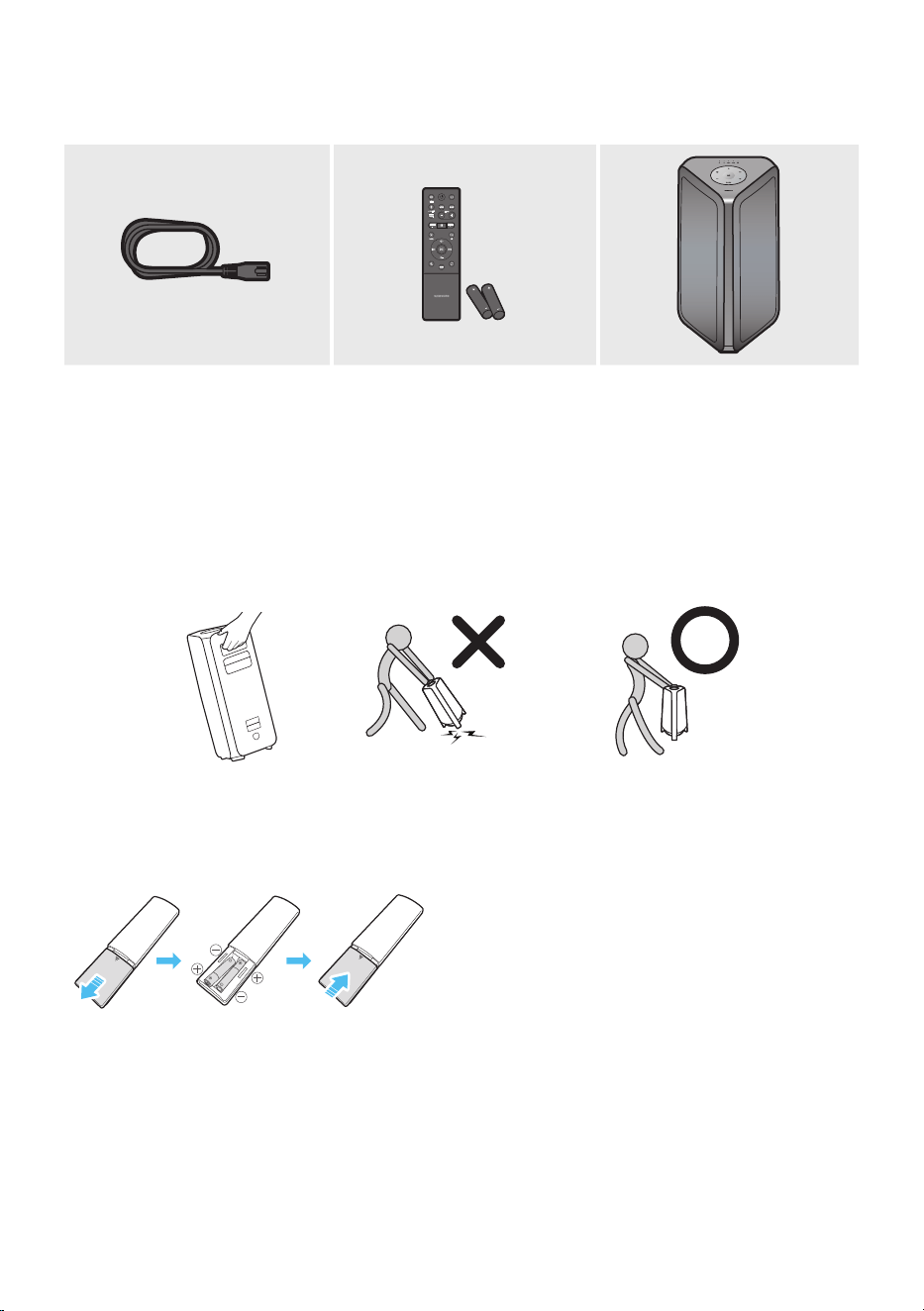
2 - ARA
تانوكملا نم ققحتلا 01
Sound Tower ةيسيئرلا ةدحولاتايراطبلا / دع
ُ
ب نع مكحتلا ةدحوةقاطلا كلس
ةدحولا فلخ :قصلا( .زاهجلا ع تبثا قصلا إ عجرا ،ةقاطلا كهتساو ةقاطلا ردصم لوح تامولعا نم ديزملل •
)Sound Tower ةيسيئرلا
.Samsung ء م ع ة مد خ ز كر م ب وأ Samsung ةمدخ زكرمب لصتا ،ةيرايتخا تباك وأ ةيفاضإ تانوكم ءال •
.هكيرحت دنع زاهجلا عفرا .ضرا ع هبحست وأ هرجت ،زاهجلا كيرحت دنع •
.قبسم راعشإ نود يغتلل ةضرع تافصاواو ميمصتلا •
دع
ُ
ب نع مكحتلا ةدحو مادختسا لبق تايراطبلا لاخدإ
)AAA عون نم ناتيراطب(
ح مهسلا هاجتا قلم لكشب ةيراطبلا ءاطغ بحسا
ظافحلا عم )تلوف AAA )1.5يراطب ل
ِ
خدأ .ا
ً
مامت هعت
ةيراطبلا ءاطغ بحسا .ميلس لكشب بطقلا هيجوت ع
.ىرخأ ةرم هعضوم إ هديعتل قلم لكشب
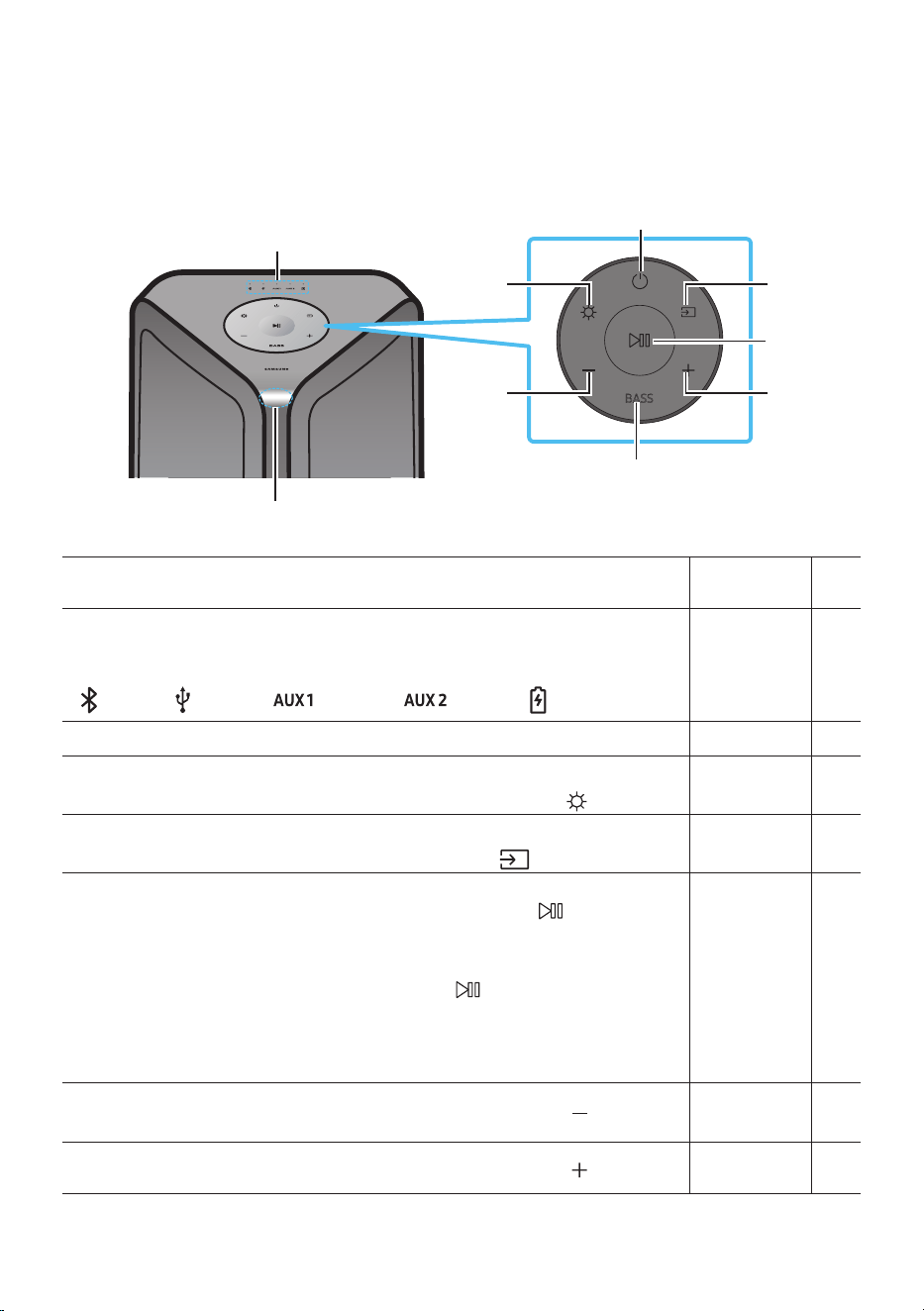
3 - ARA
زاهجلا ع ةماع ةرظن 02
Sound Tower ةيولعلا ةحوللا
BASS
نع رعشتسم
دع
ُ
ب
رعشتسا ةهجاوم دع
ُ
ب نع مكحتلا ةدحو ةمدقم نوكت نأ بجي ،Sound Tower ماظن ليغشت دنع
.دع
ُ
ب نع
LED رشؤم
.Sound Tower ماظنل احلا ردصا وأ ليغشتلا لئاسر ضرعي
:ي امك يه LED لك اهلثمي لا تامولعا رداصم
)BT( )USB( )AUX1( )AUX2( )ةيراطبلا/ةقاطلا(
ةقاطلا.Sound Tower فاقيإو ليغشتل
ةءاضا
.ةءاضا عضو ليغشتل )ةءاضإ(
رزلا ع طغضا
ردصملا
.Sound Tower ل
صو
ُ
ي ا
ً
ردصم راتختل طغضا
.”SEARCHING TV“ عضو إ لوخدلل
ٍ
ناو ث 5 ن م ك
)ردصملا( رزلا ع رارمتساب طغضا
/ليغشتلا
تقؤملا فاقيا
تقؤملا فاقيا /ليغشتلا •
.ا
ً
تقؤم يقيسوم فلم فاقي رز لا ع طغضا
.يقيسوا فلا ليغشت متي ،ىرخأ ةرم رزلا ع طغضت امدنع
يئاقلتلا ليغشتلا •
Demo ليغشت ءدبل
ٍ
ناوث 5 نع ديزت ةد دع
ُ
ب نع مكحتلا زاهج
رز لا ع رار م ت سا ع م ط غ ضا
ةد ةيبيرجتلا ىقيسوا ليغشت متيو دحاو تقو LED تاؤ م 5 ضموي .ماظنلا ليغشت ءانثأ
.ةيناث 90
.عا توصلا ىوتسم نم عأ ليغشتلا توص نوكي دقف ؛رذحلا ي
خوت ىجري –
ىوتسم ضفخ
توصلا
.توصلا ىوتسم ضفخل )توصلا ىوتسم ضفخ( رزلا ع طغ ضا
ىوتسم عفر
توصلا
.توصلا ىوتسم عفرل )توصلا ىوتسم عفر( رزلا ع طغ ضا
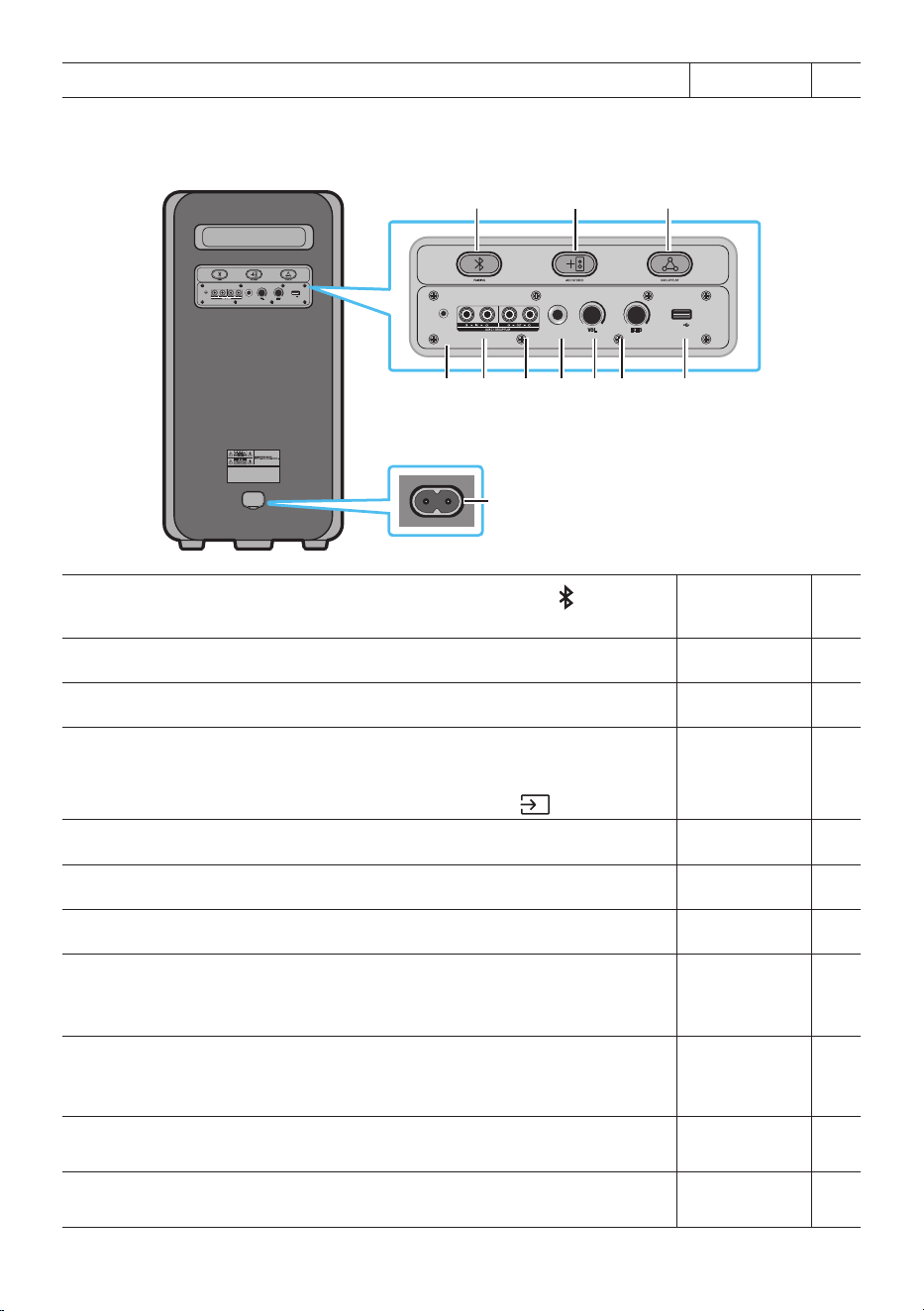
4 - ARA
ريهجلا.يوقلا هجلا توص مادختس BASS رزلا ع طغضا
Sound Tower ةيفلخلا ةحوللا
POWER
ECHOVOL
USB
(5V 2.1A)
AUX 1
MIC
ECHOVOL
USB
(5V 2.1A)
AUX 1
MIC
نار تقا
ثوتولبلاب
"PAIRING" ـ ب صا خ لا LED ؤم ضمويس ،ناقا عضو إ لوخدلل PAIRING رز لا ع طغضا
.ةعب ةيفلخلا ةحوللا ع
ADD STEREO.زار ط لا س ف ن هل ر خآ Sound Tower ـب ا
ً
يكلس لاصتل ADD STEREO رز لا ع طغضا
GROUP PLAY.ا
يكلس Sound Tower ةمظنأ ةع إ لصي امب ليصوتلل GROUP PLAY رزلا ع طغ ضا
USB
.ةيسيئرلا ةدحولا ع نيدوجوا USB ذفنمب USB زا هج ل
ّ
صو
.هنحش كناكمإب هنإف ،USB ذفنمب لومحا كفتاه ليصوتب تمق اذإ
.USB ديدحتل )ردصملا( رز لا ع طغ ضا •
ECHO . ECHO رز ليدعت قيرط نع )MIC( لصتم نوفوركيم نم توصلل ىدص ثأت ءاطعإ كنكمي
VOL.)MIC( لصتا نوفوركيا توص ليدعتل VOL رز مدختسا
MIC.MIC سبقمب ننوفوركيا ليصوتب مق
جرخ فارطأ
GROUP PLAY
OUT
ةيسيئرلا ةدحولا ع ةدوجوا GROUP PLAY )OUT( فارطأ ليصوتل )دوزم غ( توص لباك مدختسا
.يجراخ يرظانت جرخ زاهج ع دوجوا توصلا لخدب
ةيفرطلا تادحولا
GROUP PLAY
IN
جرخب ةيسيئرلا ةدحولا ع ةدوجوا AUX2 )IN( فارطأ ليصوتل )دوزم غ( توص لباك مدختسا
.يجراخ يرظانت جرخ زاهج ع دوجوا توصلا
AUX1
توصلا جرخب ةيسيئرلا ةدحولا ع دوجوا AUX1 سبقم ليصوتل )دوزم غ( توص لباك مدختسا
.يجراخ زاهج ع دوجوا
ةقاطلا
ديول طئاحلا سبقمب ةقاطلا كلس نم رخا فرطلا ل
ّ
صوو ةقاطلا سبقمب ةقاطلا كلس ل
ّ
صو
.ةيئابرهكلا ةقاطلاب S ound Tower
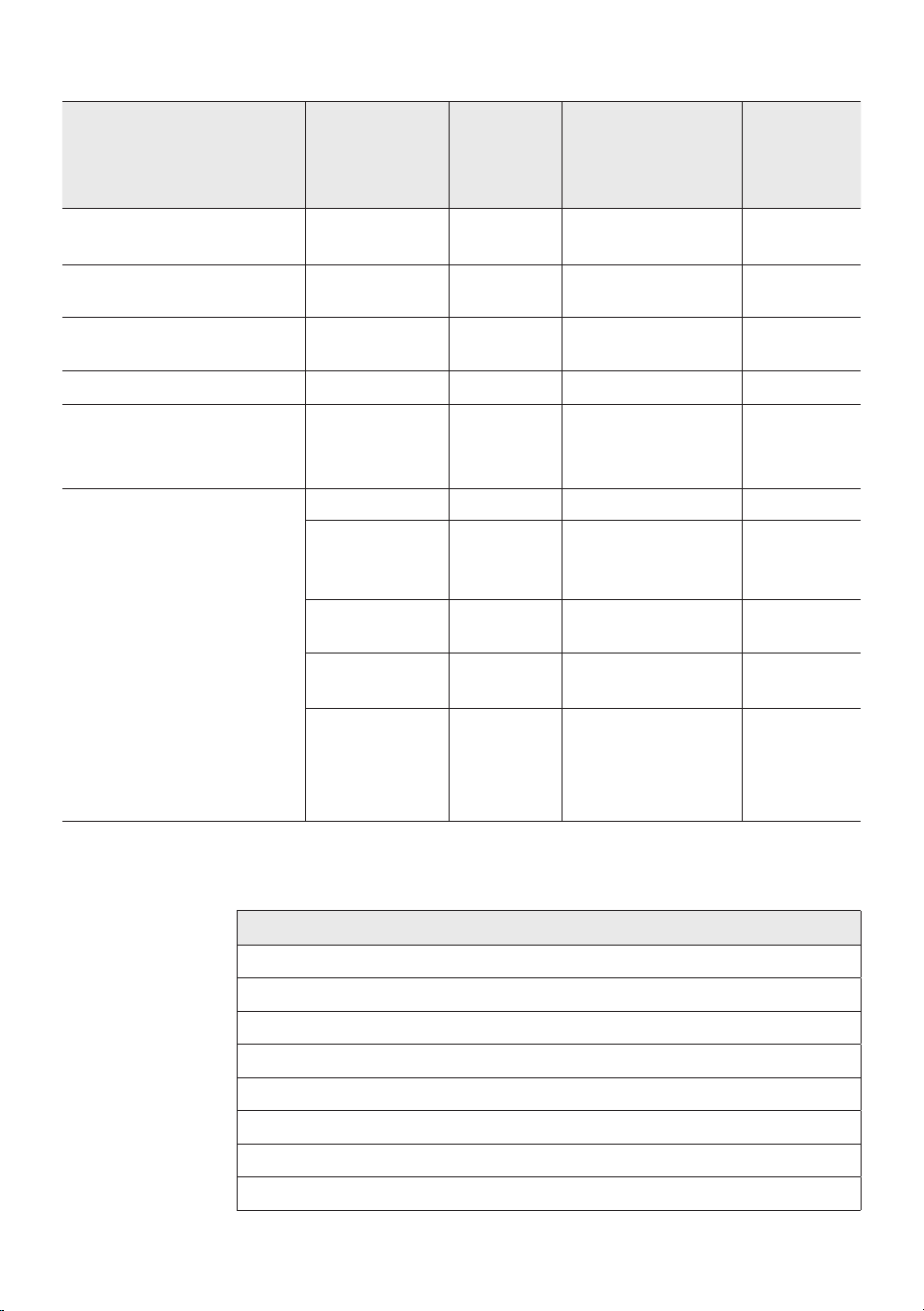
5 - ARA
:Sound Tower ـل نحشلا LED ؤم ةلاح
Sound ةلاح
Tower
نحشلا ةلاح
LED رشؤم
صاخلا
نحشلاب
)AC زار ط(
LED رشؤم
نحشلاب صاخلا
)DC زارط(
ةظحم
فاقيإ
ليغشتلا
نحشلا لامتكا)دوسأ( فقوت)دوسأ( فقوت
فاقيإ
ليغشتلا
نحش
نوللاب ضيمو
خا
حاتم غ
فاقيإ
ليغشتلا
نحشي )دوسأ( فقوت)دوسأ( فقوت.جرد م غ AC لبك
دادعتسانحشلا لامتكاقرزأ ءو ضحاتم غ
.DC زارط دادعتسا عضو دجوي
دادعتسانحش
نوللاب ضيمو
خا
حاتم غ
نحشلاب صاخلا LED ؤم
ليغشت فاقيإ ؤم سفن وه
.Sound Tower
ليغشتنحشلا لامتكاقرزأ ءو ضقرزأ ءو ض
،Sound Tower ليغشت دنع
ةلاح اسأ
ٍ
لكشب سكعي هنإف
.ةيلاحلا ةيراطبلا
ليغشتنحش
ض ي مو
نوللاب
خا
حاتم غ
ليغشت
ةقاطلا ةبسنو نحشي
98% إ 30% نم
خأ ءوضخأ ءوض
ليغشت
ةقاطلا ةبسنو نحشي
29% إ 5% نم
رمحأ ءوضرمحأ ءوض
ليغشت
ةقاطلا ةبسنو نحشي
5% ن م لقأ
رمحأ ءوض
ليغشتلا فاقيإ
طي ضيمو دعب
اقتلا ءوضلا
ةدحاو ةرم
فاقيإ ةلاح كلذل .لماكلاب ماظنلا ةقاط ليغشت فاقيإ متيس ،)DC( رمتسا رايتلا عضوب ليغشتلا فاقيإ عضو
.ةيلاتلا فئاظولا معد متي ،)AC( ددا رايتلا عضوب
ً
ةنراقم ،ليغشتلا
تازيملا
قوستلا عضو
ليغشتلا فاقيإ دادعإ
ليمعلا يعت ةداعإ
IR ع ليغشتلا
ةيراطبلا نحش
AUI ليغشت فاقيإ/ليغشت
)يماما( LED ةءاضإ طي ليغشت فاقيإ/ليغشت صوصخب مدختسا ةهجاو تاظحم
UI feedback of LED lighting bar)front( on/off
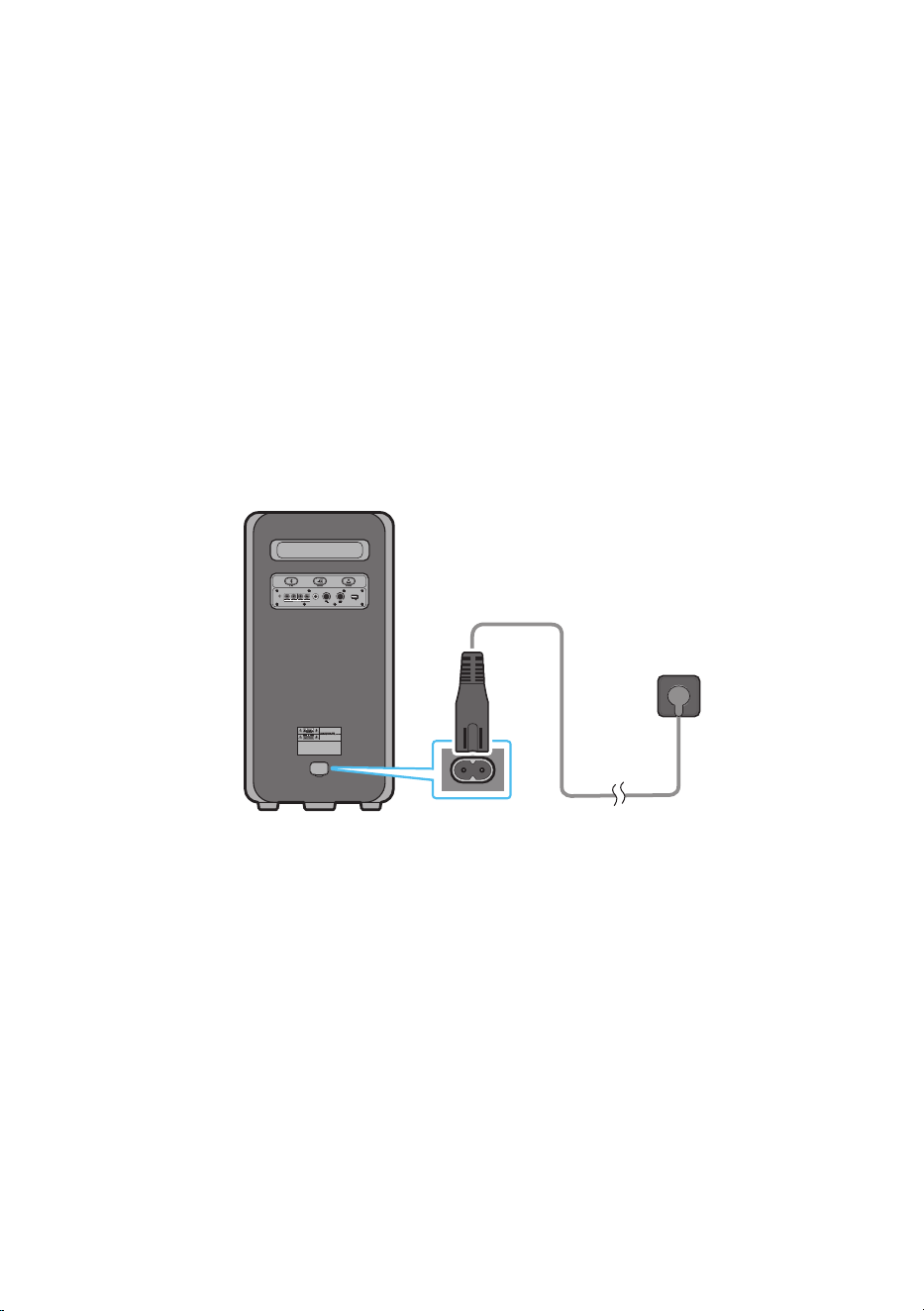
6 - ARA
SOUND TOWER ليصوت 03
ةيئابرهكلا ةقاطلا ليصوت
:اتلا بيتلاب ةيئابرهك ةقاط ذفنمب So und Tower ليصوتل ةقاطلا كلس مدختسا
.طئاحلا سبقمب مث Sound Tower ةقاطلا كلس ل
ّ
صو
.ةيلاتلا ةيحيضوتلا موسرلا رظنا
ؤم رهظ
ُ
يس .لماكلاب ةيراطبلا نحش متي ح ا
ً
يئاقلت ةجمدا ةيراطبلا نحش متيس ،ددا رايتلا كلس لاخدإ دنع •
)4 - ةيبرعلا ةغللا ةحفص عجار( ةيلاحلا نحشلا ةلاح ةيولعلا ةحوللا ع دوجوا LED
.بك لكشب توصلا ىوتسم ضفخني ،ةيراطبلاب ليغشتلل زاهجلا لصف دنع •
.زاهجلا ع تبثا قصلا إ عجرا ،ةقاطلا كهتسا كلذكو ةبولطا ةيئابرهكلا ةقاطلا لوح تامولعا نم ديزملل •
)Sound Tower فلخ :قصلا(
Sound Tower يفلخلا بناجلا
POWER
ECHOVOL
USB
(5V 2.1A)
AUX 1
MIC
ةيئابرهكلا ةقاطلا ليصوت
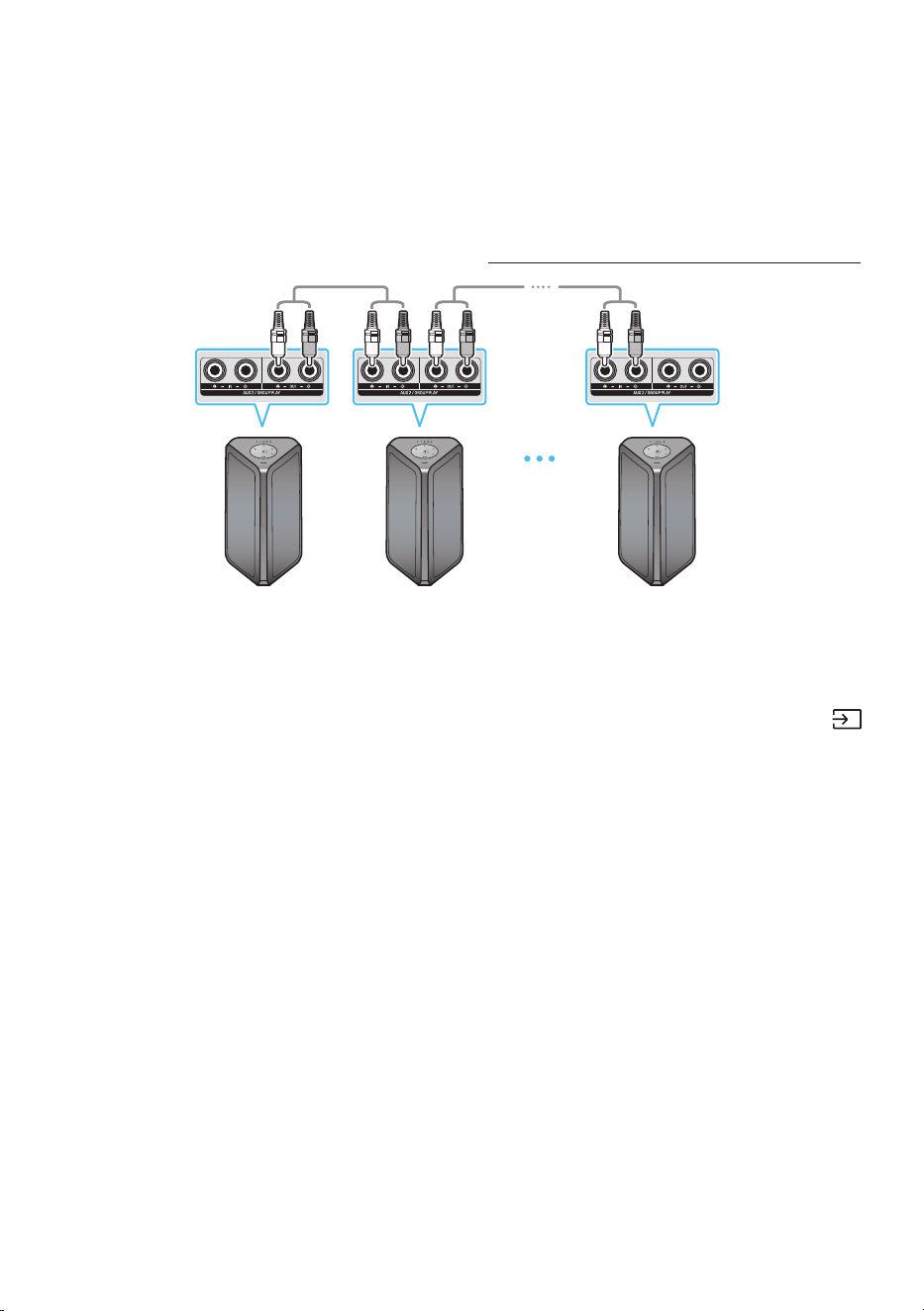
7 - ARA
ةيتوص ةزهجأ ةعومجم مادختسا ةيفيك
.عأ توص جرخ جاتنإو ةلفح ةئيب قلخل ةعومجم ةددعتم ةيتوص ةمظنأ ليصوت كنكمي
نم ةزهجأ ةيأ ب اهيف تفزع تايقيسوم ةيأ ةكراشم متيس و HOST ـ ك د حاو Sound Tower تيبثتب مق
.تايعمسلا ةعومجم يرخا Sound Tower
ا
ي كل س Group Play عضو ليغشتل ليصوتلا
Sound Tower HOST
يلوا
Sound Tower
يناثلا
ريخا Sound Tower
ىتح ليصوتلا عبات
Sound Tower
ريخا
وأ AUX رزلا مدختسا .)ةدوزم غ( توصلا تباك مادختساب ةمظنا لك ليصوت ع Group Play عضو دادعإب مق
لوا Sound Tower ماظن ءانثتساب Sound Tower ماظ ن لك عم كلذو ،AUX2 إ ردصا يغتل )ردصملا(
.)HOST وأ(
تاظحم
.رد ص م يأ نم ي ق ي سو ا فزع ت وا Sound Tower HOST نأ نكمي •
.هصئاصخو لباكلا لوطل ا
ً
عبت ؛ليغشتلا ةحاسم فتخا كانه نوكي دق •
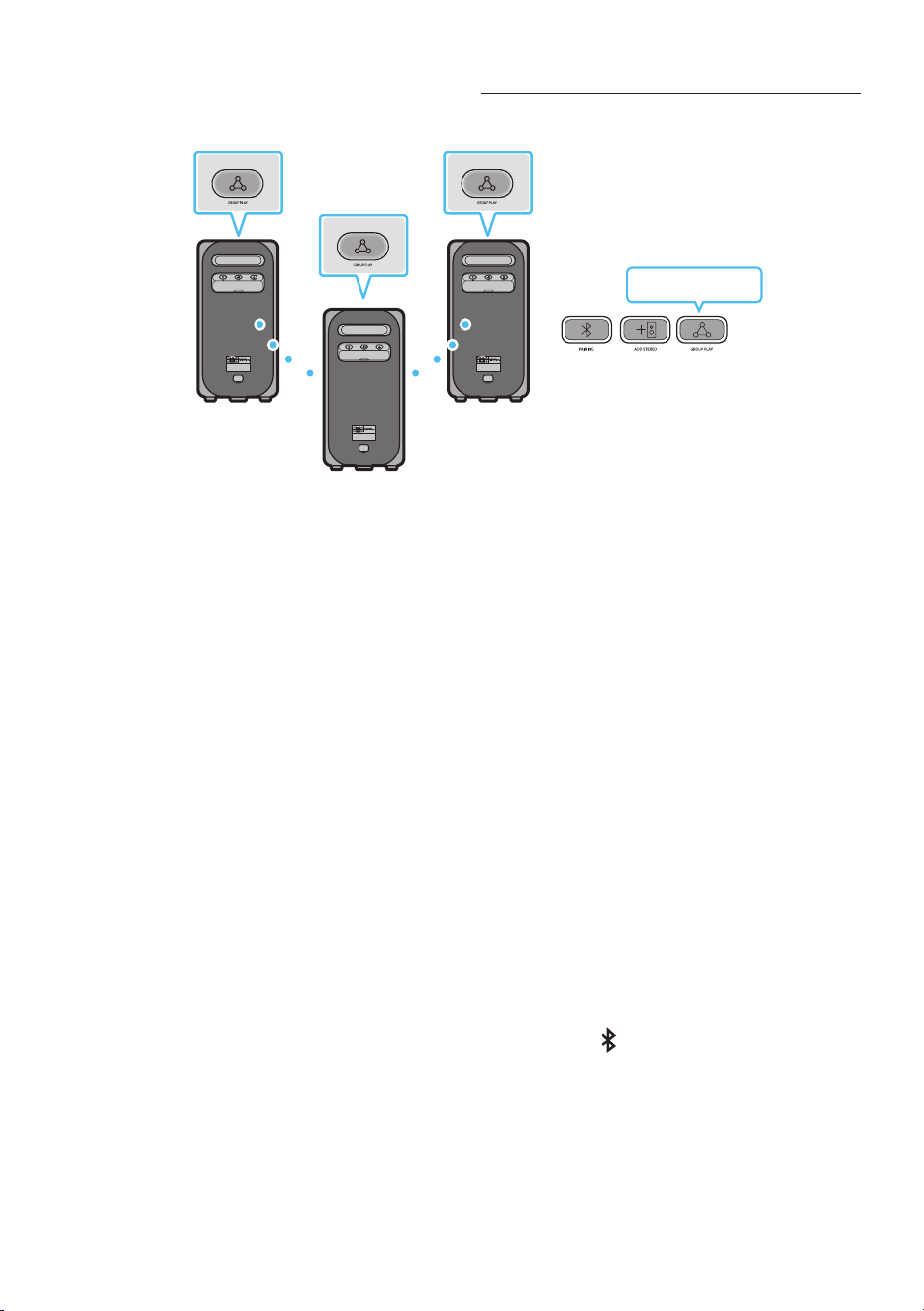
8 - ARA
ا
ي كل س Group Play عضو ليغشتل ليصوتلا
.ا
يكلس ليغشت Group Play ةفيظو ع ا
يكلس Sound Tower ةمظنأ ةع إ لصي امب ليصوتلا كنكمي
HOST
SUB 1
SUB 2
POWERPOWER
POWER
خأ ضيمو
،
ٍ
ناو ث 10 ةد ءطبب "LED ؤم" ضمويس اهدعب ، HOST ـ ل Sound Tower ماظن ع GROUP PLAY رزلا ع طغ ضا
.)ةيناث 30( ةعب LED "GROUP PLAY" ؤم ضمو ي مث
LED "GROUP PLAY" ؤم ضموي س ”.)SUB 1( ا ثلا Sound Tower ماظن ع GROUP PLAY رز لا ع طغضا
.لمعيو ضيمولا نع HOST فقوتيسو SUB1 ن م LED "GROUP PLAY" و ،HOST ـ ب SUB1 لصتيس كلذ دعب
.)SUB 2( ثلاثلا Sound Tower ماظن ع GROUP PLAY رزلا ع طغضا
.ضيمولا نع ماظنلا ع دوجوا GROUP PLAY رز فقوتي نأ نم
ً
دب ةمغن ردصت
.3 ةوطخلا ررك ،تفح Sound Tower ةمظنأ نم ديزا ةفاضإ
َ
تدرأ اذإ . 4
.اهب ةلصتا ةزهجا عيمج نم توصلا جرخي .HOST Sound Tower ع ىيقيسوا فيزعتب مق . 5
تاظحم
.Samsung نويزفلتب )1 لكشلا( HOST”Sound Tower“ ليصوت نكمي ،Group Play عضو •
.Group Play عضو نم ا
ً
يئاقلت جورخلا متي ،لاصتا حاجن دعب
.MX-ST90B / MX-ST50B / MX-ST40B ـل Group Play لسلا لاصتا رفوتي •
.ليغشتلا ةدوج ع ةلصتا ةزهجاب ةطبترا لماوعلا نم اهغ وأ ةيئيبلا فورظلا رثؤت دق •
لسلا ليصوتلا ثدح دق
ً
أطخ كانه نأ عي اذهف ،GROUP PLAY رزلا ع دو جوا رمحا وضلا ؤا ءاضأ اذإ •
.ىر خأ ةر م 5 إ 1 نم تاو طخلا ب
ّ
رج .Group Play ةفيظول
Group Play طمن نوكي امدنع نيرفوتم اسيل SUB Sound Tower ةزه جأ ع PAIRING رز و ADD STEREO رز •
.لسلا
.لسلا Group Play طمن نوكي امدنع HOST Sound Tower زاهج ع ارفوتم سيل ADD STEREO رز •
.”HOST“ ـك Group mode إ لوخدلل BT Source ةلاح ”GROUP PLAY“ ع رارمتسا عم طغضا •
رز ع طغضلاب مق ،HOST لاصتا متي ام دعب ،ثم .يرخا ولت ةدحاو ةلصتم SUB تادحو عيمج نوكي نأ بجي •
ير خا و لت ةد حاو SUB 3و SUB 2 لاصتا كل يغبني ،SUB 1 لاصتا متي ام دعبو ،لاصتل SUB 1 ع GROUP PLAY
9 - ARA
.عباتتلاب
رز ع طغضلاب مق ،HOST لاصتا متي ام دعب ،ثم .يرخا ولت ةدحاو ةلصتم SUB تادحو عيمج نوكي نأ بجي •
ير خا و لت ةد حاو SUB 3و SUB 2 لاصتا كل يغبني ،SUB 1 لاصتا متي ام دعبو ،لاصتل SUB 1 ع GROUP PLAY
.عباتتلاب
ليصوتلا ليطعت عم ا
يلاح ةلصتاو ثوتولبلا ةمب ةموعدا ةزهجا ل
َ
صف
ُ
ت ،Group Play ةفيظو مادختسا دنع
.ثوتولبلاب
.طقف HOST Sound Tower ـب لصتت و ثحبت ثوت ولب ةزهجأ نأ نكمي
.ثوت ولب زاهجب لصتت SUB نأ نكم ي ،Group Play طمن نوكي امدنع
،SUB ةد حو ع BT غ رداصم ةيأ رايتخاب ميقت وأ Sound Tower ةقاط ليغشتب ميقت مثو ةقاطلا فاقيإب ميقت امدنع
.Group Play طمن عاطقنا متي ،Group Play طمن
.ا
يكلس Group Play ليصوت عضو نوكي امدنع aptX توصلا قفدت معدي زاهجلا اذه
ا
يكلس Group Play عضو ليغشت فاقيإ
وأ ،Group Play عضو ليغشت دعب )SUB وأ HOST(
ِ
ناو ث 5 ن ع ديز ت ةد GROUP PLAY رزلا ع رارمتساب طغضا . 1
.Group Play عضو ليغشت لبق )SUB وأ HOST( GROUP PLAY رزلا ع طغضا
.GROUP PLAY رز عأ دو جو ا LED ؤم ئفطنيو ،
ً
دب ةمغن ردصت •
طمن عاطقنا متي ،HOST Sound Tower فاقيإب ميقت وأ SUB تاد حو ع BT غ رداصم ةيأ رايتخاب ميقت امدنع . 2
.Group Play
.Group Play عاطقنا متي ،HOST Sound Tower نع عاطقنا متي امدنع •
يئوضلا رشؤملا تد
رشؤملا
يئوضلا
ةلاحلافصولا
خأ
ضماو.ا
يكلس Group Play عضو ليغشت راظتنا
تباث.حاجنب ا
يكلس Group Play عضو ليغشت مت
ر م حأتباث.ا
يكلس Group Play عضو ليغشت دنع أطخ ثدح
ةظحم
.ثوتولبلا ةئيبل ا
ً
عبت ةرقتسم غ ليغشت ةدوج نوكت دق ،ا
يكلس ليصوتلا •
.ا
يكلس Group Play ليغشت عضو زاهجلا ع ظافحلا ىجر
ُ
ي ،لضفأ ليغشتل
. م 1 دودح Bluetooth لاصتا لوأ نو كي نأ بج ي •
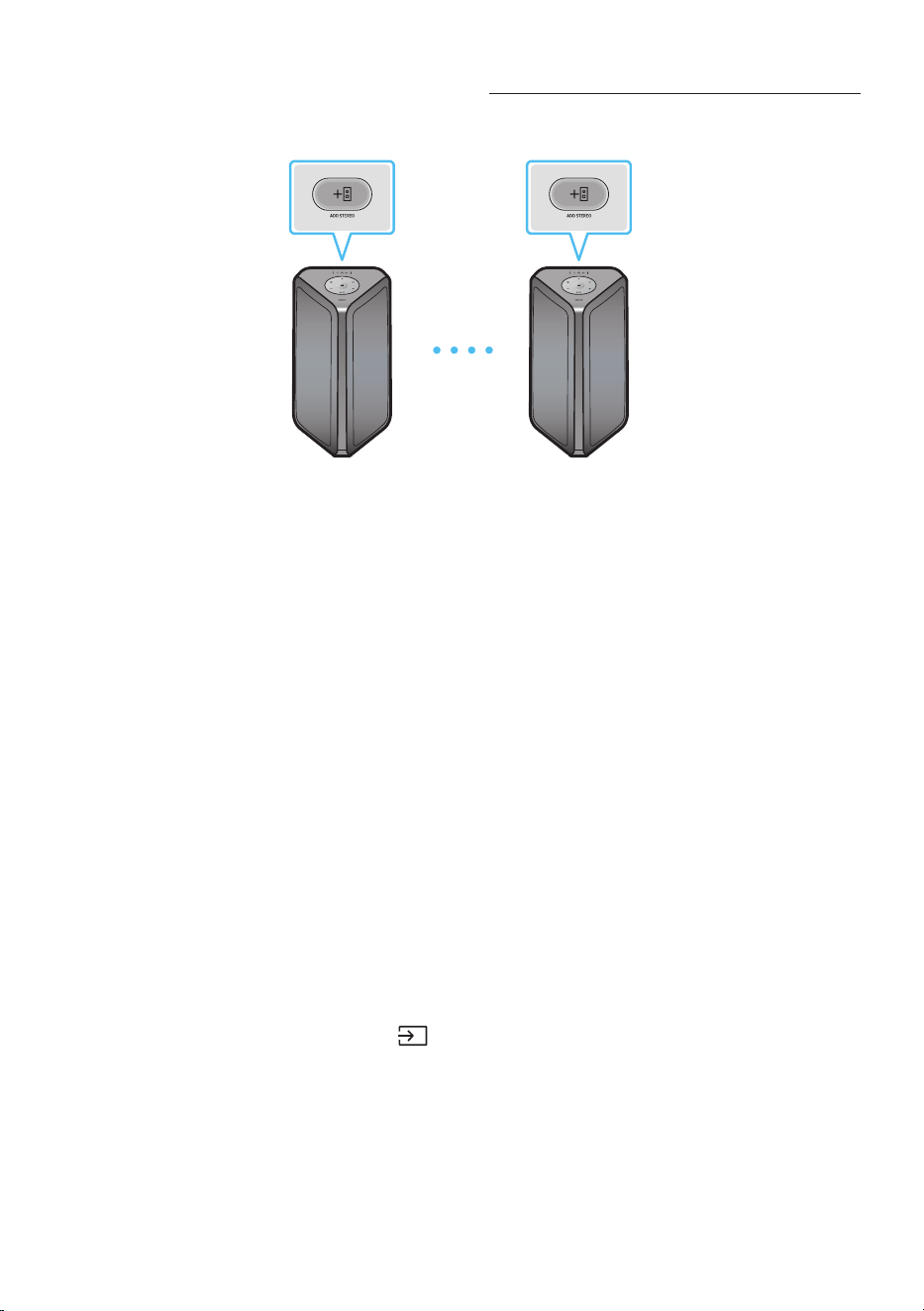
10 - ARA
Stereo ةعومجم طمن و يكذ فتاه مادختسا
.ويتسا توصب عتمتلل كب صاخلا ذلا فتاهلاب امهمادختسا و Sound Tower نم نثإ لاصتاب مق
يرسيلا Sound Tower
)MAIN(
ينميلا Sound Tower
)SUB(
. يا Sound Tower ماظن ع ADD STEREO رزلا ع طغ ضا
.ADD STEREO رز ع دو جو ا LED ؤم ض موي
.نميا Sound Tower ماظن ع ADD STEREO رزلا ع طغض
.ADD STEREO رز ع دو جو ا LED ؤم ض موي
.ةززعا ةينوكلا ةحوللا ع رارمتساب خا LED ؤم ءي .ةمغن ردصت ،لاصتا متي امدنع . 3
.ميلا ةانقلا توص SUB Sound Tower زاهج جرخي و ييلا ةانقلا توص MAIN Sound Tower زاهج جرخي •
Sound ـل توصلا ةانق يغتل ةبسنلاب SUB Sound Tower وأ MAIN ع ADD STEREO رز ع طغضلاب مق
.Tower
ن ع تو ص لا جر خ ي .ثو ت و ل ب و MAIN Sound Tower ـب كب صاخلا ذلا فتاهلا لاصتا قيرطب يقيسوا فيتب مق . 4
.Sound Tower ك
تاظحم
.ليدوا سفن نم Sound Tower ا
َ
ماظن نوكي نأ بجي ،Stereo ةعومجم عضو مادختس •
.ليغشتلا ةدوج ع ةلصتا ةزهجاب ةطبترا لماوعلا نم اهغ وأ ةيئيبلا فورظلا رثؤت دق •
ب
ّ
ر ج .Stereo ةعومجم ةلصو ثدح
ً
أطخ كانه نأ عي اذهف ،ADD STEREO ع دوجوا وضلا ؤا ءاضأ اذإ •
.ىر خأ ةرم 3 إ 1 نم تاوط خلا
امدنع SUB Sound Tower ةز ه جأ ع )ردصملا( و GROUP PLAY ،BT PAIRING ،مكحتلا زاهج رارزا روهظ متي •
.Stereo ةعومجم طمن نوكت
.Stereo ةعومجم طمن نوكي امدنع ادوجوم سيل MAIN Sound Tower زاهج ع GROUP PLAY رز •
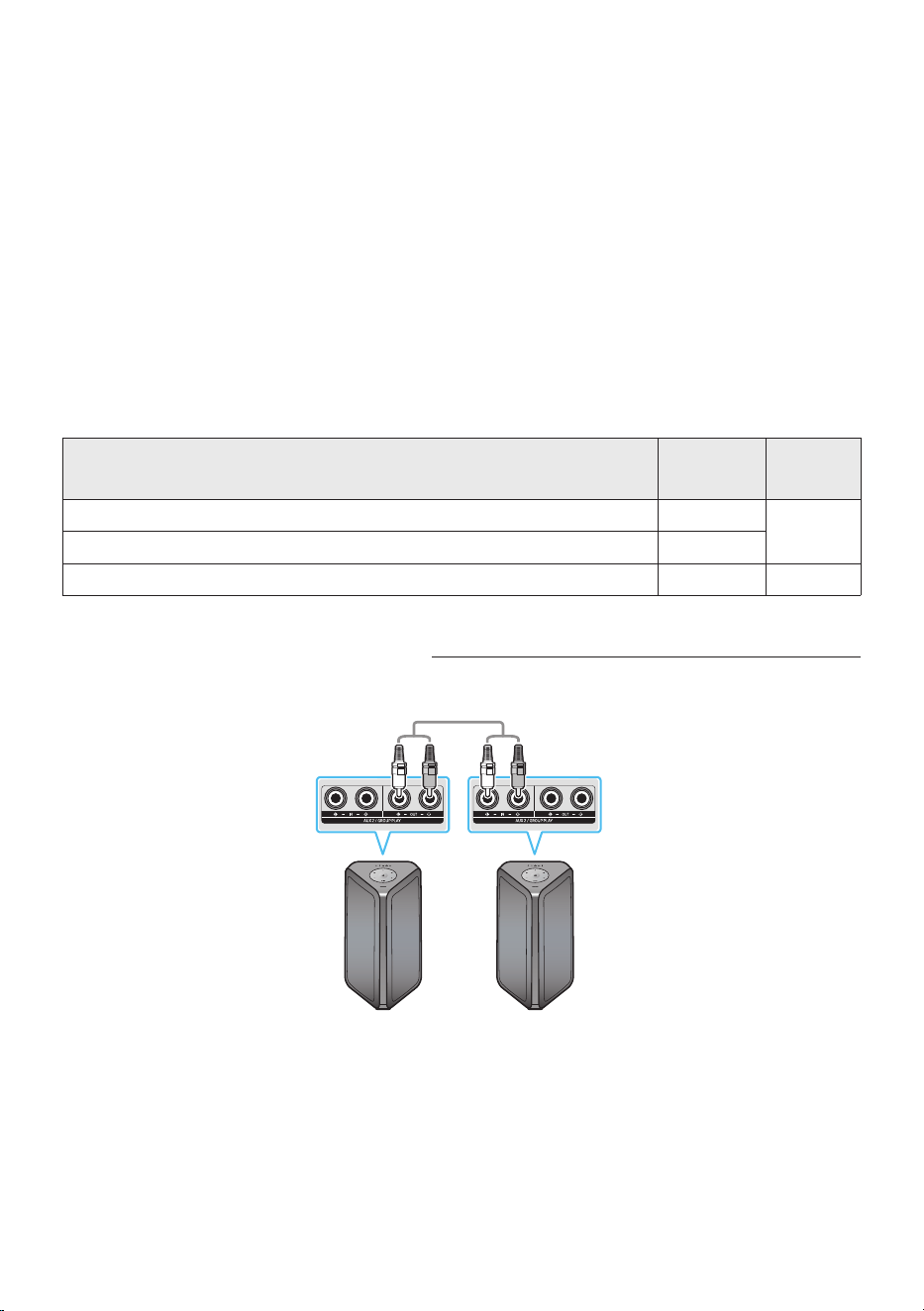
11 - ARA
فيزعت متي و MAIN Sound Tower طقف يقيسوا فييزت متي ،)AUX ،USB ط من ثم( "BT" غ ط م ن و •
.SUB Sound Tower يقيسوا
.SUB Sound Tower و MAIN Sound Tower ب ةءاضا ناولأ فلتخت نأ نكمي •
.Stereo ةعومجم عضو مادختسا دنع aptX توصلا قفدت معدي زاهجلا اذه •
ةعومجم عضو ل
غش
ُ
ي دقف ،Stereo ةعومجم عضو ليغشت دنع ثوتولبلا ةمب موعدم زاهجب ليصوتلا
َ
تبرج اذإ •
.Stereo
Stereo ةعومجم عضو ءاهنإ
.Stereo ةعومجم لاصتا متي ام دعب لقا ع ناوث 5 ة فل )SUB وأ MAIN( ADD STEREO رز طغضب مق
. ADD STEREO رز عأ دو جو ا LED ؤم ئفطنيو ،ةمغن ردصت • •
يئوضلا رشؤملا تد
رشؤملا
يئوضلا
ةلاحلافصولا
خأ
ضماو.Stereo ةعومجم ليغشت راظتناب
تباث.Stereo ةعومجم عضو ليغشت مت
ر م حأتباث.Stereo ةعومجم عضو ليغشت دنع أطخ ثدح
Stereo ةعومجم طمن و غنسمس نويزفلت مادختسا
.ويتسا توصب عتمتلل ةبسنلاب غنسمس نويزفلتب امهمدختسا و ةيكلسلا قيرطب S ound Towe r نم نثإ لاصتاب مق
Sound Tower
)MAIN( يرسيلا
ينميلا Sound Tower
)SUB(
)ر فو ي مل ( RCA كلس مادختساب يري امك SUB ع AUX2 IN و MAIN ع AUX2 OUT ـ ب RCA كلس لاصتاب مق
.ل قا ع ناو ث 5 ةفل MAIN Sound Tower ـل مكحتلا زاهج ع "AUX" رز ط غض ب مق ،"BT" طم ن و
.ADD STEREO رز ع دو جو ا LED ؤم ضموي
.ةمغن ردصت .رايتلا جرخي مث ةحوللا ع ADD STEREO” LED“ ؤم ءي ،لاصتا فقوتي امدنع . 3

12 - ARA
.ةيولعلا SUB ةحولب AUX 2” LED“ ؤم ءي ،لاصتا متي امدعب . 4
.ميلا ةانقلا توص SUB Sound Tower جرخي و ييلا ةانقلا توص MAIN Sound Tower جرخي •
ـل توصلا ةانق يغتل ةبسنلاب SUB Sound Tower ع وأ MAIN ع ADD STEREO رز طغضب مق
.Sound Tower
ك نع توصلا جرخي .يقيسوا فييل ةبسنلاب ثوت ولب قيرطب MAIN Sound Tower و نويزفلتلا لاصتاب مق . 5
.Sound Tower
تاظحم
.ليدوا سفن Sound Tower نم لك نوك ي نأ بجي ،Stereo ةعومجم طمن مادختس ةبسنلاب و •
5 إ 1 ةو طخلا لوا ح .Stereo ةعومجم لاصتا أطخلا إ ADD STEREO رز ع LED تبثا رمحا ءوضلا شي •
.ىرخأ ةرم
ةز ه جأ ع )ردصملا( و GROUP PLAY ،BT PAIRING ،مكحتلا زاهج رارزا روهظ متي ،Stereo ةعومجم طمن و •
.SUB Sound Tower
.Stereo ةعومجم طمن ادوجوم سيل MAIN Sound Tower ع GROUP PLAY رز •
ه نإ "معن"راتخت كنأول و ،نويزفلتلا ع ايلآ قثبنا لاصتا روهظ متي ،طيسبلا لاصتا غنسمس نويزفلت معدي ول •
نويزفلتب لصتي هنإف ،Sound Tower و غنسمس نويزفلت ب قباس لاصتا لجس كانه نأ ول .نويزفلتلاب لصتي
.17 ةحفص إ ةعجاراب مق ،غنسمس نويزفلتب طيسبلا لاصتل ةبسنلابو .قثبنا نودب غنسمس
.SUB Sound Tower و MAIN Sound Tower ب ةءاضا ناولأ فلتخت نأ نكمي •
Stereo ةعومجم طمن لاصتا ءاهنإ
.Stereo ةعومجم لاصتا مت ام دعب لقا ع ناوث 5 ة فل )SUB وأ MAIN( ADD STEREO رز ع طغضلاب مق
.ADD STEREO رز ع دو جو ا LED ؤم ئفطنيو ”OFF-STEREO MODE“ ة م غن رد ص ت •
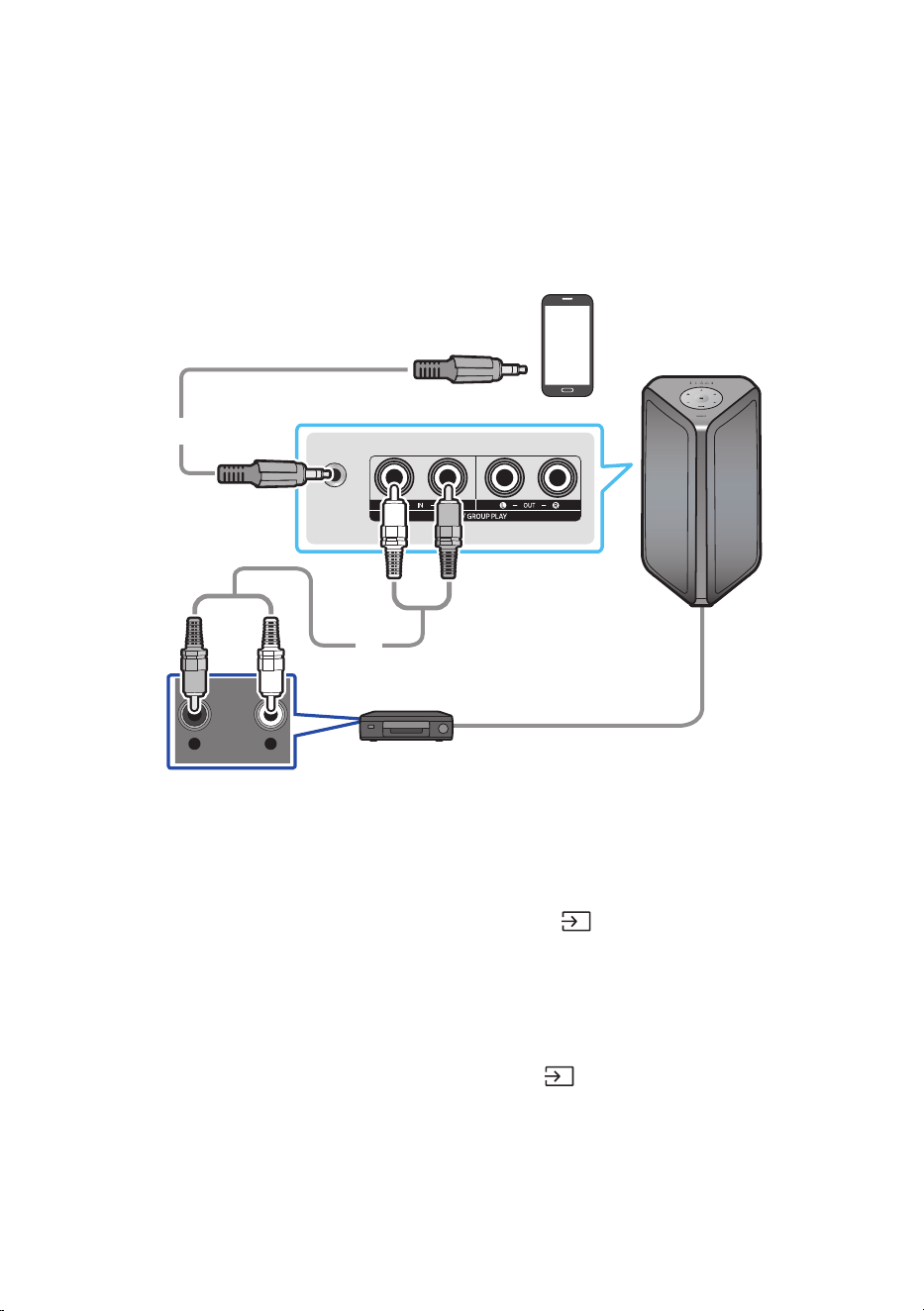
13 - ARA
يجراخ زاهجب ليصوتلا 04
.Sound Tower ع يجراخلا زاهجلا توص ليغشتل ةيكلس وأ ةيكلس ةكبش ع ا
يجراخ ا
ً
زاهج ل
ّ
صو
)AUX( يرظانت لباك مادختساب ليصوتلا
AUX 1
- AUDIO -
R L
PMP/ MP3 لومحم زاهج
باعلأ زاهج /ريفشت كف زاهج DVD/ لغشم / BD
م م 3.5 ويريتس لباك
)دوزم ريغ(
)دوز م ري غ( )AUX( توص لبا ك
Sound Towerل يفلخلا بناجلا
)AUX1( مم 3.5 ويريتس لباك
مادختساب ردصا زاهجلا توصلا جرخ سبقمب ةيسيئرلا ةدحولا ع دوجوا AUX1 سبقم لصو . 1
.م م 3.5 ويتس لباك
.دع
ُ
ب نع مكحتلا ةدحو ع وأ ةيولعلا ةحوللا ع دوجوا )ردصملا(
رزلا ع طغضلاب ”AUX1“ ع ضو دد ح . 2
.دع
ُ
ب نع مكحتلا ةدحو ع نم AUX رزلا مادختساب ردصم ديدحت ا
ً
ضيأ كنكمي •
)AUX2( توص لباك
.توص لباك مادختساب ردصا زاهجلا توصلا جرخ فارطأب ةيسيئرلا ةدحولا ع دوجوا AUX2 )IN( فار طأ ل
ّ
صو . 1
.دع
ُ
ب نع مكحتلا ةدحو ع وأ ةيولعلا ةحوللا ع دوجوا )ردصملا( رزلا ع طغضلاب ”AUX2“ عضولا ددح . 2
.دع
ُ
ب نع مكحتلا ةدحو ع نم AUX رزلا مادختساب ردصم ديدحت ا
ً
ضيأ كنكمي •
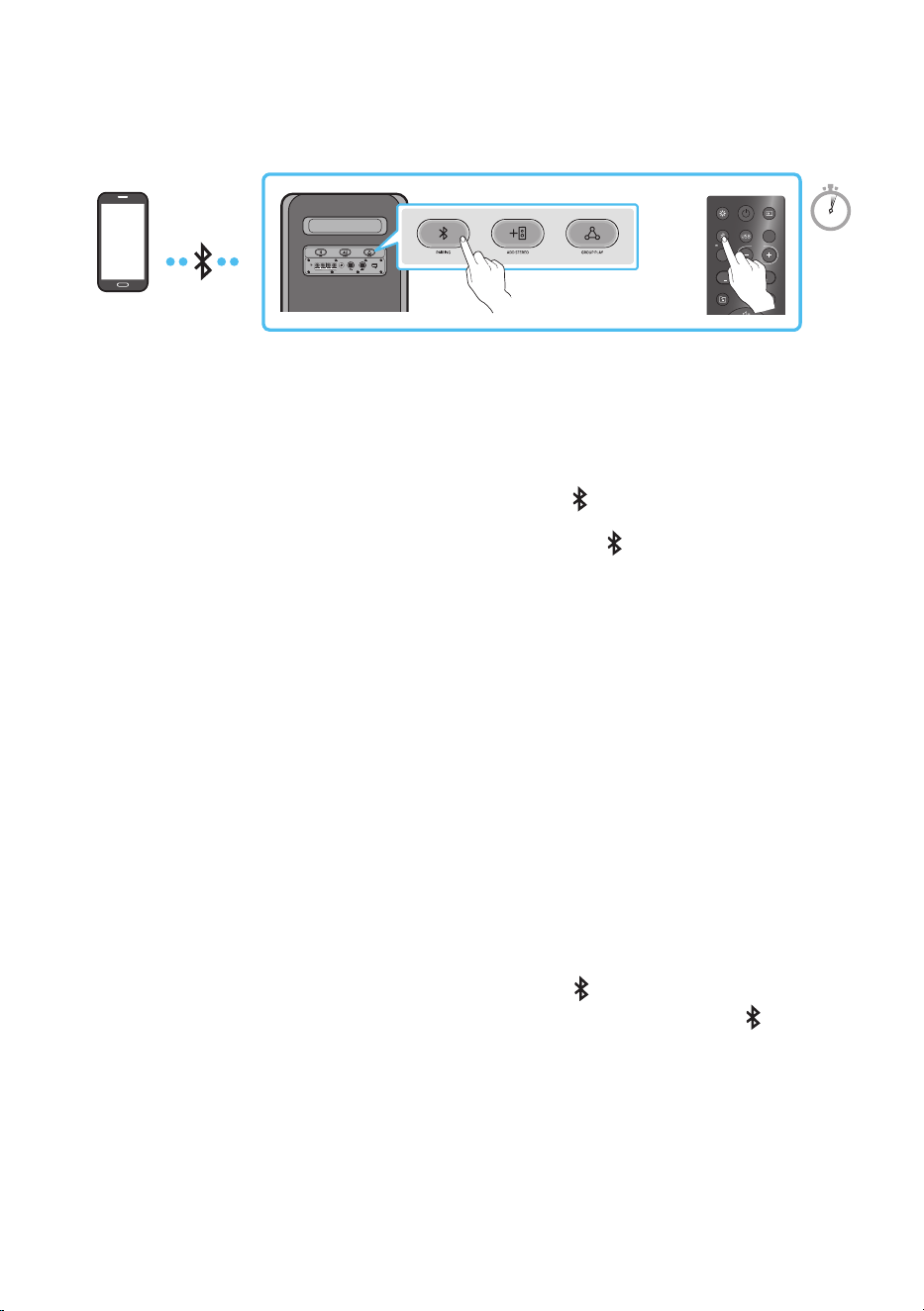
14 - ARA
ثوتولبلا ربع لومحم زاهجب ليصوتلا
.تباكلا كجعزت نأ نود ويتس توص عامس كنكمي ،ثوتولبلا مادختساب لومحم زاهج ليصوت دنع
ECHOVOL
USB
(5V 2.1A)
AUX 1
MIC
LIGHT
PAIRING
TEMPO
USB
AUX
EFFECT
DOWN
UP
EFFECT
DJ
SOUND
MODE
ةزيمب معدم زاهج
ثوتولبلا
وأ
5 Sec
.Party Audio قيبطتو Bluetooth لاصتا رفوتي ،Sound Tower ليغشت فاقيإ دنع ،ةيراطبلا عضو *
يل
وا ليصوتلا
.”BT PAIRING“ عضو إ لو خد ل ل
ٍ
ناو ث 5 ن م ك PAIRING رزلا ع رارمتساب طغضا . 1
)وأ(
.ةيفلخلا ةحوللا ع دوجوا PAIRING رزلا ع طغضا
.رهظت لا ةمئاقلا نم ”Series [AV] MX-ST5B” ددح ،كزاهج ع نم . 2
ءوض لظيو ،يوامسلا نوللاب تارم ثث ةيولعلا ةحوللا ع دوجوا ثلاثلا حابصا ضموي ،زاهجلا لصف دعب •
.تباث لكشب ةيفلخلا ةحوللا ع دوجوا ثوتولبلا
.Sound Tower قيرط نع ثوتولبلا ع لصتا زاهجلا نم ةيقيسوا تافلا ل
ّ
غش . 3
زاهجلا ليصوت لشف ةلاح يف
.Bluetooth ـلا لصف ع ةيتوص ةمغن ليغشتب Sound Tower موقي فوس •
.هفذحاف ،ةمئاقلا )”Series [AV] MX-ST5B” ل ث م( ا
ً
ق ب س م
ٌ
ل
ص
َ
و
ُ
م Sound Tower مسا رهظ اذإ •
.2و 1 توطخلا ررك مث •
؟BT PAIRINGو BT READY نيتفيظولا نيب قرفلا ام
.Sound Tower ـب لاصتل ا
ً
قبسم لصتا لومحا زاهجلا وأ نويزفلتلا مادختسا كنكمي ،عضولا اذه : BT READY •
.Sound Tower ديدج زاهج ليصوت كنكمي ،عضولا اذه : BT PAIRING •
رز لا ع ط غ ضا وأ ،
ٍ
ناو ث 5 نم لوطأ ةد دع
ُ
ب نع مكحتلا زاهج ع دوجوا PAIRING رزلا ع رارمتساب طغضا(
).”BT PAIRING“ ع ضو لو خد ل ل Sound Tower ماظنل ةيفلخلا ةحوللا ع دوجوا PAIRING
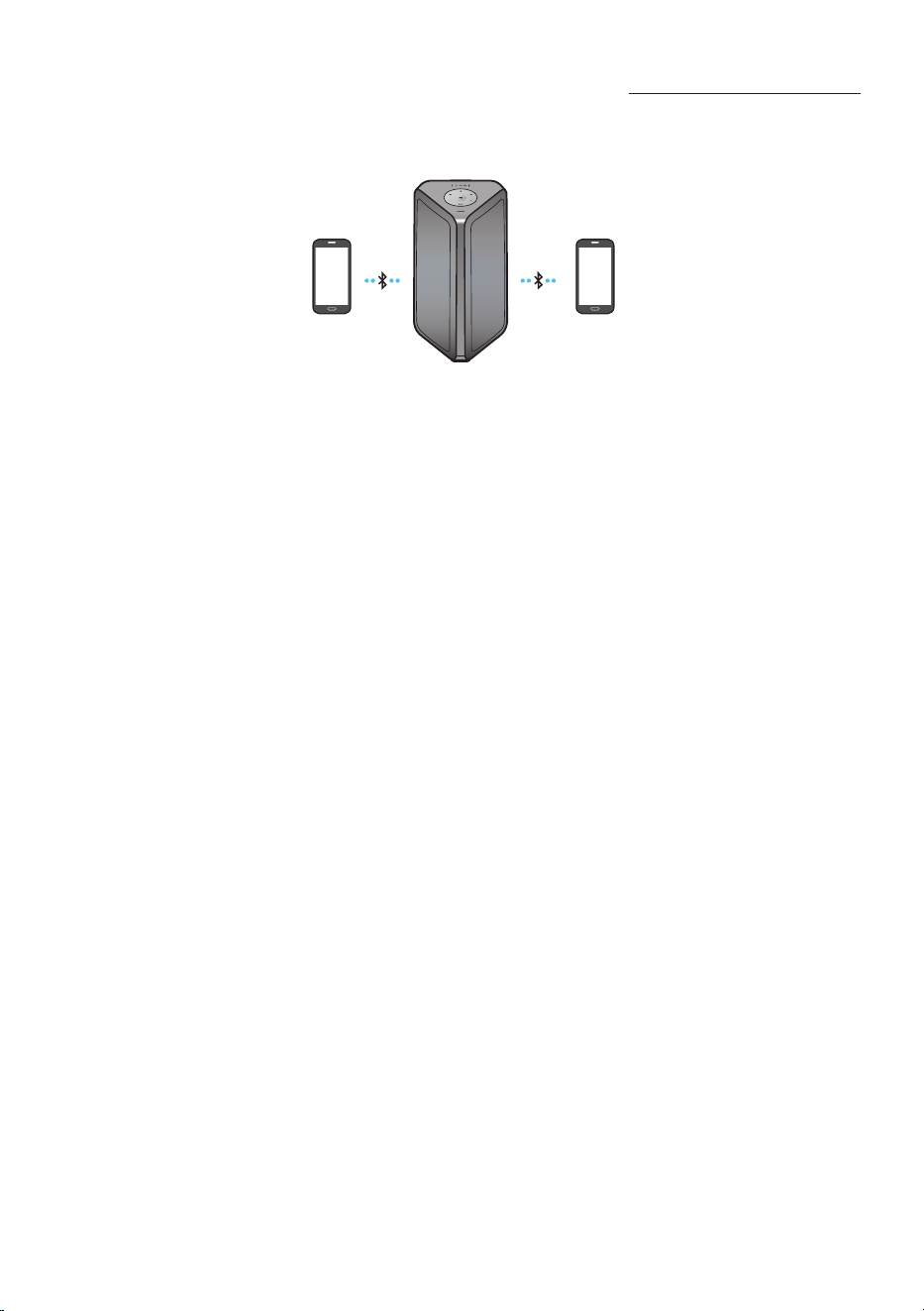
15 - ARA
ثوتولبلاب ددعتملا ليصوتلا
نأ Sound Tower ماظنل نكمي .تقولا سفن ثوتولبلاب ةمعدا ةزهجا تيصوت نم نثا ح Sound Tower معدي
.رخا زاهجلا لصف إ ةجاحلا نود نيزاهجلا نيذه دحأ ع ىقيسوا لغشي
ةزيمب معدم زاهج
1 ثوتولبلا
ةزيمب معدم زاهج
2 ثوتولبلا
)14 ةحفص رظنا( .ةرم لوأ اوتلا ع اثلا مث لوا زاهجلاب Sound Tower ماظ ن ل
ّ
صو . 1
فقوتت ،رخا زاهجلا ع ىقيسوا ليغشت دنعو ،طقف لصوا نيزاهجلا نيذه دحأ ع ىقيسوا ليغشت نكمي . 2
.ا
ً
تقؤم ا
ً
يلاح لغشا زاهجلا ع ىقيسوا
تاظحم
ل
ّ
صو مث ا
ً
يلاح لصوا نيزاهجلا دحأ نم Sound Tower لصف كنكمي ،ثلاث زاهجب Sound Tower ليصوت ديرت تنك اذإ •
)Samsung نويزفلت ةزهجا لمشت( .ثلاثلا زاهجلاب Sound Tower
معدم ديدج زاهج نارقإ دنع ا
ّ
يلاح ةلصتا ةزهجا لصف متي نأ نكمي ،احلا تقولا نيزاهجب Sound Tower ليصوت ءانثأ •
.ثوتولبلاب
.تقولا سفن ثوتولبلاب ةمعدا ةزهجا نم نثا ح ليصوت كنكمي •
.>0000< زمرلا لخدأ ،ثوتولبلاب موعدم زاهجب ليصوتلا دنع PIN زمر لاخدإ كنم بل
ُ
ط اذإ •
.ليغشتلا ةدوج ع ةلصتا ةزهجاب ةطبترا لماوعلا نم اهغ وأ ةيئيبلا فورظلا رثؤت دق •
.دادعتسا عضو رماوأ يأ لاخدإ متي مل اذإ ةقيقد 18 رورم دعب ا
يئاقلت ليغشتلا نع Sound Tower فقوتي •
:ةيلاتلا فورظلا لظ حيحص لكشب ثوتولبلاب ليصوتلاو ثحبلا
ِ
تايلمع Sound Tower يدؤ ي دق •
.Sound Tower لوح يوق ابرهك لاجم رفوت ةلاح –
.Sound Tower عم نمام لكشب ثوتولبلاب ةموعدا ةزهجا نم ديدعلا ناقا ةلاح –
.هب لاطعأ ثودح وأ هناكم يغت وأ ثوتولبلاب موعدا زاهجلا ليغشت فاقيإ ةلاح –
ةيسيطانغمورهك تاجوم اهنم ثعبنت لا ةزهجاب ظافتحا بجي .لس لخادت ثودح ةينوكلا ةزهجا ببستت دق •
.Sound Tower ةيسيئرلا ةدحولا نع ا
ً
ديعب -اهغو ةيكلسلا ةزهجأو فيووركيا ةزهجأ لثم-
.هليصوت متي يذلا زاهجلا تافصاو ا
ً
عبت ا
ً
موعدم ثوتولبلاب ددعتا ليصوتلا عضو نوكي دق •
ليغشت ماظنب فتاهو, .)اهغو لجنود ةزهجأ لثم( لصفلل ةلباقلا /ةلازل ةلباقلا ثوتولبلا ةمب ةموعدا ةزهجا •
.ثوتولبلاب ددعتا ليصوتلا معدت اهغو نويزفلتلاو ةلومحا رتويبمكلا ةزهجأو windows
ةموعدا ةزهجل ا
ً
عبت ؛ىقيسوا ليغشت ءدب لبق فيفط خأت ثدحي دق ،ثوتولبلاب ددعتا ليصوتلا ناقا دعب •
.ثوتولبلاب

16 - ARA
ُ
رما قرغتسي دقف ،
ً
وأ ثوتولبلاب موعدا زاهجلا لصف نود Sound Tower ليغشت قاطن نع ا
دج ا
ً
ديعب
َ
تكرحت اذإ •
ليصوت كنكمي ،ه
َ
تلغش مث Sound Tower ليغشت تفقوأ اذإ .ثوتولبلاب ةموعدا ىرخا ةزهجا ليصوتل قئاقد عضب
.راظتنا إ ةجاحلا نود ثوتولبلاب ةموعدم ىرخأ ةزهجأ
يئوضلا رشؤملا تد
رشؤملا
يئوضلا
ةلاحلافصولا
قرزأ
عي ضيموBT PAIRING عضو
ضماوBT READY عضو
تباث.ثوتولبلاب موعدم زاهج ليصوت مت
)ثوتولبلا ليغشت( Bluetooth Power On مادختسا
.هليغشتو ثوتولبلاب ليصوتلا ع ذلا كزاهج ليصوت كنكمي ،S ound Tower ليغشت فاقيإ دنع
.Bluetooth ليغشت ةقاط مادختسا ةيراطبلا ةلاحل نكمي
ليغشت ةفيظو ليغشتل ةيولعلا ةحوللا ع وأ ،دع
ُ
ب نع مكحتلا ةدحو ع دوجوا BASS رزلا ع رارمتساب طغضا . 1
.ةدحاو ةرم ضيبا نوللاب ةءاضا طي ضمويس .ثوتولبلا
لوح تامولعا نم ديزملل(( .ثوتولبلا ع ذلا كزاهج ليصوت كنكمي ،Sound Tower ليغشت فاقيإ دنع . 2
.)كب صاخلا ذلا فتاهلا ليلد إ عجرا ،ثوتولبلاب تيصوتلا
.ثوتولبلا عضو ا
يئاقلت هسفن Sound Tower لغشي ،لاصتا مامتإ دنع . 3
.ذلا كزاهج نم اهليغشت بغرت لا ىقيسوا ددح •
ةظحم
ليدبت متيو ةدحاو ةرم ضيبا نوللاب LED ةءاضإ طي ضمويس ،
ٍ
ناوث 5 ةد BASS رزلا ع رارمتسا عم طغضت ةرم لك •
:ةلاحلا
BLUETOOTH POWER-ON → BLUETOOTH POWER-OFF
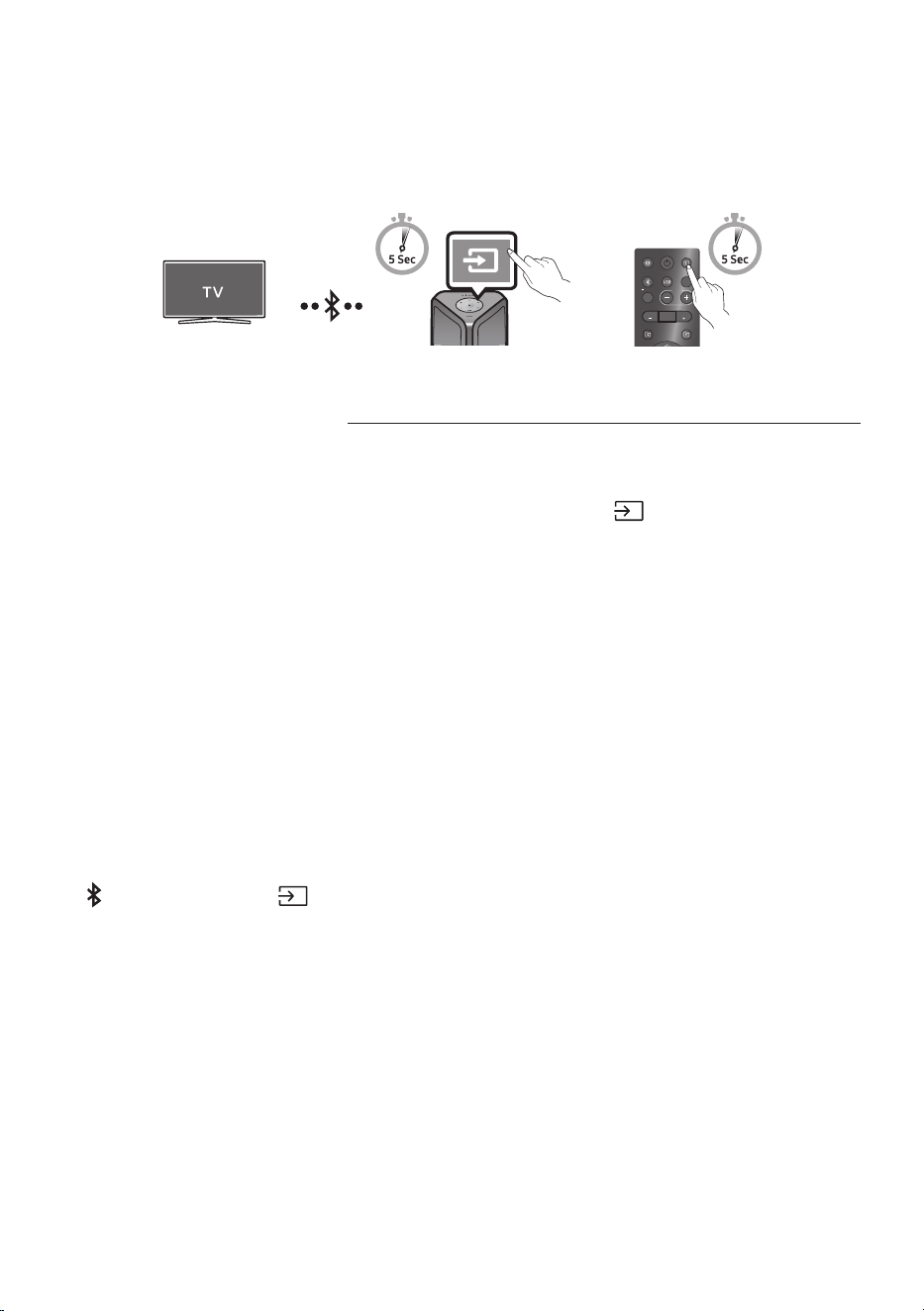
17 - ARA
ثوتولبلا ربع Samsung نويزفلت لاصتا
ةهجاو ع Sound Tower مكحتلا نكمي هنإف ،ثوتولبلا ع غنوسماس نويزفلتب Sound Tower ماظن لصتا اذإ
)ليغشت فاقيإ /ليغشت ،توصلا متك فاقيإ /ليغشت ،توصلا ىوتسم -/+( .نويزفلتلاب ةصاخلا مدختسا
LIGHT
PAIRING
TEMPO
USB
AUX
EFFECT EFFECT
DJ
SOUND
MODE
وأ
Sound Tower ـل ةيولعلا ةحوللا
)SEARCHING TV عضو( غنوسماس نويزفلتب لهسلا لاصتا
غنوسماس نويزفلتب لاصتا مدختس
ُ
ي يذلا ”SEARCHING TV“ عضو ع هلامتشاب Sound Tower ماظن متي
.ةلوهسب
أدبيس ،ةيولعلا ةحوللا وأ دع
ُ
ب نع مكحتلا ةدحو ع
ٍ
ناوث 5 ن م ك )ردصملا( رز ع رارمتسا عم طغضا . 1
مث ةدحاو ةرم ضيبا نوللاب ةءاضا طي ضمويس .Samsung نويزفلت نع ثحبلا Sound Tower اهدعب
.ءطبب ةززعا ةينوكلا ةحوللا ع "PAIRING" ـ ب صا خ لا LED ؤم ضمويسو ،يوامسلا نوللاب ضموي
).ايلآ "SEARCHING TV" طمن ليغشت متي ،لسللا Stereo ةعومجم طمن لاصتا متي امدنع ،وأ((
ع رهظتس لاصتاب ةصاخلا ةقثبنا ةذفانلا نإف ،لهسلا لاصتا ةيناكمإب ا
ً
موعدم غنوسماس نويزفلت ناك اذإ . 2
غنوسماس نويزفلت نإف ،لبق نم Sound Tower ماظنب
ً
صتم غنوسماس نويزفلت كانه ناك اذإ .نويزفلتلا ةشاش
.ةقثبنا ةذفانلا رهظت نأ نود لصتيس
”SEARCHING TV“ عضو ي
ِ
هن
ُ
يس هنإف ،قئاقد 5 لخ غنوسماس نويزفلت يأ ع Sound Tower ماظن عي مل اذإ . 3
اذهب لاصتا بلطيس هنإف ،غنوسماس نويزفلت ع Sound Tower ع اذإ ا مأ .”BT PAIRING“ عضولا إ لقتنيو
.نويزفلتلا
تاظحم
.لسلا Group Play عضو نويزفلت نع ثحبلا نكمي •
. PAIRING رز لا وأ
)ردصملا(
ع ط غ ضا وأ Sound Tower ماظن ف
ِ
قوأ ،غنوسماس نويزفلت نع ثحبلا فاقي •
.غنوسماس نويزفلتب لاصتا ةلاح ددعتا لاصتا Sound Tower ماظن معدي •
.ا
ً
حا ت م SOUND MODE رز لا نو ك ي و PARTY عضولا توصلا نوكي ،غنوسماس نويزفلتب لاصتا ءانثأ •
.Sound Tower ماظنب لصتي نأ Sound Tower قيبطتل نكمي ،غنوسماس نويزفلتب لاصتا ءانثأ •
.لاصتل ةقثبنا ةذفانلا رهظت دق ،نويزفلتلا تافصاو ا
ً
قفو •
ةذفانلا رهظت امدنع كيدل نويزفلتلا ةدوجوا ثوتولبلا تاعامس ةمئاق نم ةابم لاصتاو ديدحتلا نكمي •
.نويزفلتلا ةشاش ع لاصتل ةقثبنا
جراخلا توصلاو نويزفلتلا نم جراخلا ويديفلا ب نمالا متي دق ،ثوتولبلاب ليصوتلا ع نويزفلتب Sound Tower ليصوت دنع •
Sound Tower كيرحتب حصن
ُ
ي اذل .بك لكشب نويزفلتلاو Sound Tower ب ةلصافلا ةفاسا لوط ببسب Sound Tower نم
.دحاو م دودح نوكتل نويزفلتلا نم برقلاب
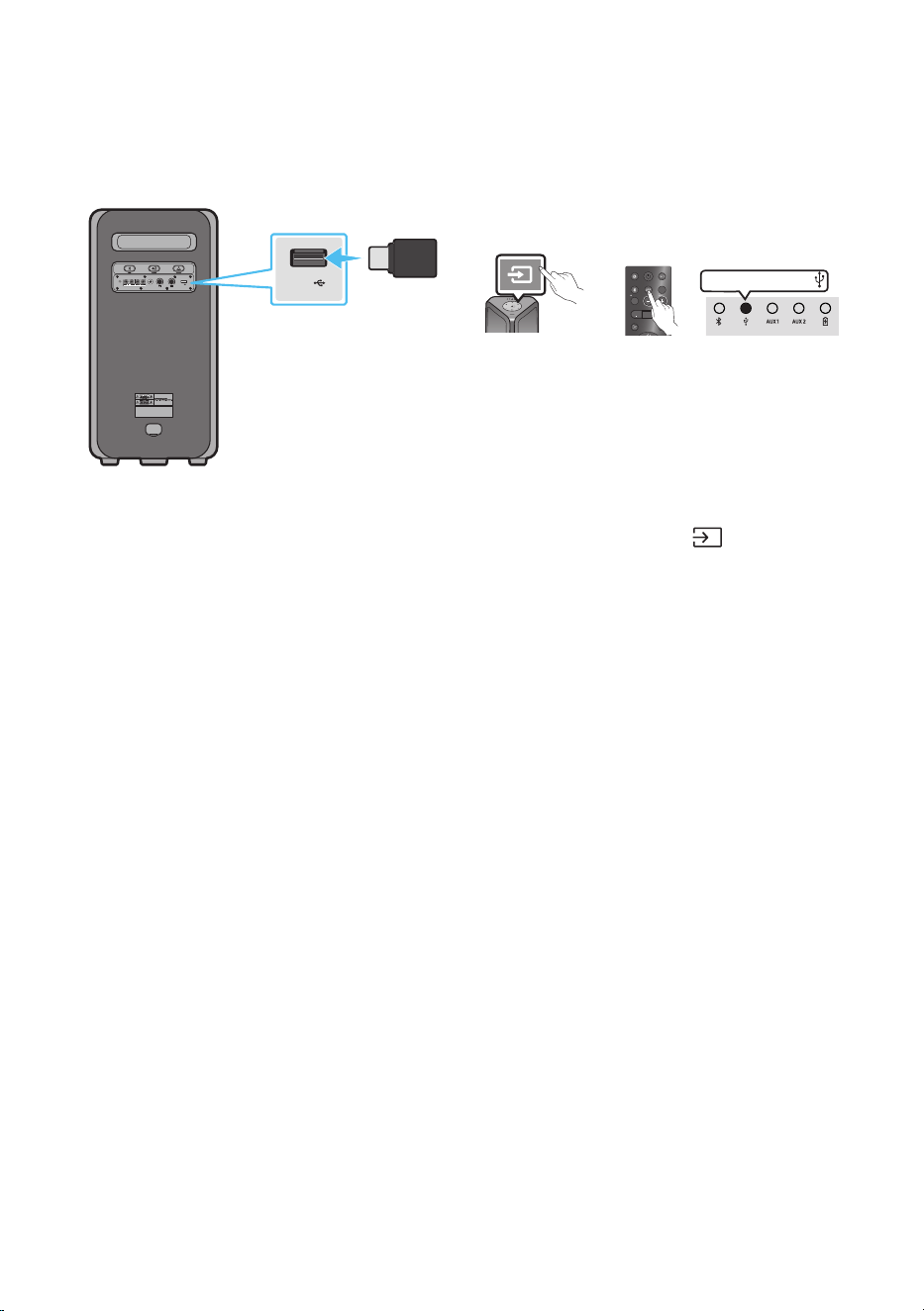
18 - ARA
USB نيزخت زاهج ليصوت 05
.Sound Tower ع USB نيزخت ةزهجأ ع ةدوجوا ىقيسوا تافلم ليغشت كنكمي
POWER
ECHOVOL
USB
(5V 2.1A)
AUX 1
MIC
USB
(5V 2.1A)
LIGHT
PAIRING
TEMPO
USB
AUX
EFFECT EFFECT
DJ
SOUND
MODE
USB نيزخت زاهج
)دوزم ريغ(
Sound Towerل يفلخلا بناجلا
وأ
ضيبا نوللاب LED رشؤ م ءي ضي
.Sound Tower ع دوجوا USB سبقاب USB نيزخ ت زاه ج ل
ّ
صو . 1
.”USB“ ددح مث ،دع
ُ
ب نع مكحتلا ةدحو ع وأ ةيولعلا ةحوللا ع دوجوا )ردصملا( رزلا ع ط غضا . 2
.دع
ُ
ب نع مكحتلا ةدحو ع نم USB رزلا مادختساب ردصم ديدحت ا
ً
ضيأ كنكمي •
.)USB ؤم( ةيولعلا ةحوللا ع اثلا ؤا ءي . 3
.Sound Tower ع USB نيزخت زاهج ع ةدوجوا ىقيسوا تافلم ليغشت كنكمي . 4
ن ع ف قو ت وأ ،USB زاهج ليصوت متي مل اذإ )Auto Power Down( ا
يئاقلت ليغشتلا نع Sound Tower فقوتي •
.ةقيقد 20 نم ك توصلل لاخدإ ثدحي مل وأ ،ليغشتلا
تاظحم
.FAT32و FAT تافلا ماظنب اهقيسنت مت لا USB نيزخ ت ةز هجأ إ زاهجلا اذه م عدي •
.ةلومحا ةزهجا ع نيزختلا وأ HDD نيزخت زاهجلا اذه معدي •
.USB نيزخت زاهج لكل قأ دحب ا
فلم 999 ليغشت نكمي •
.USB نيزخت زاهج لكل قأ دحب ا
فلم 256 ةءارق نكمي •
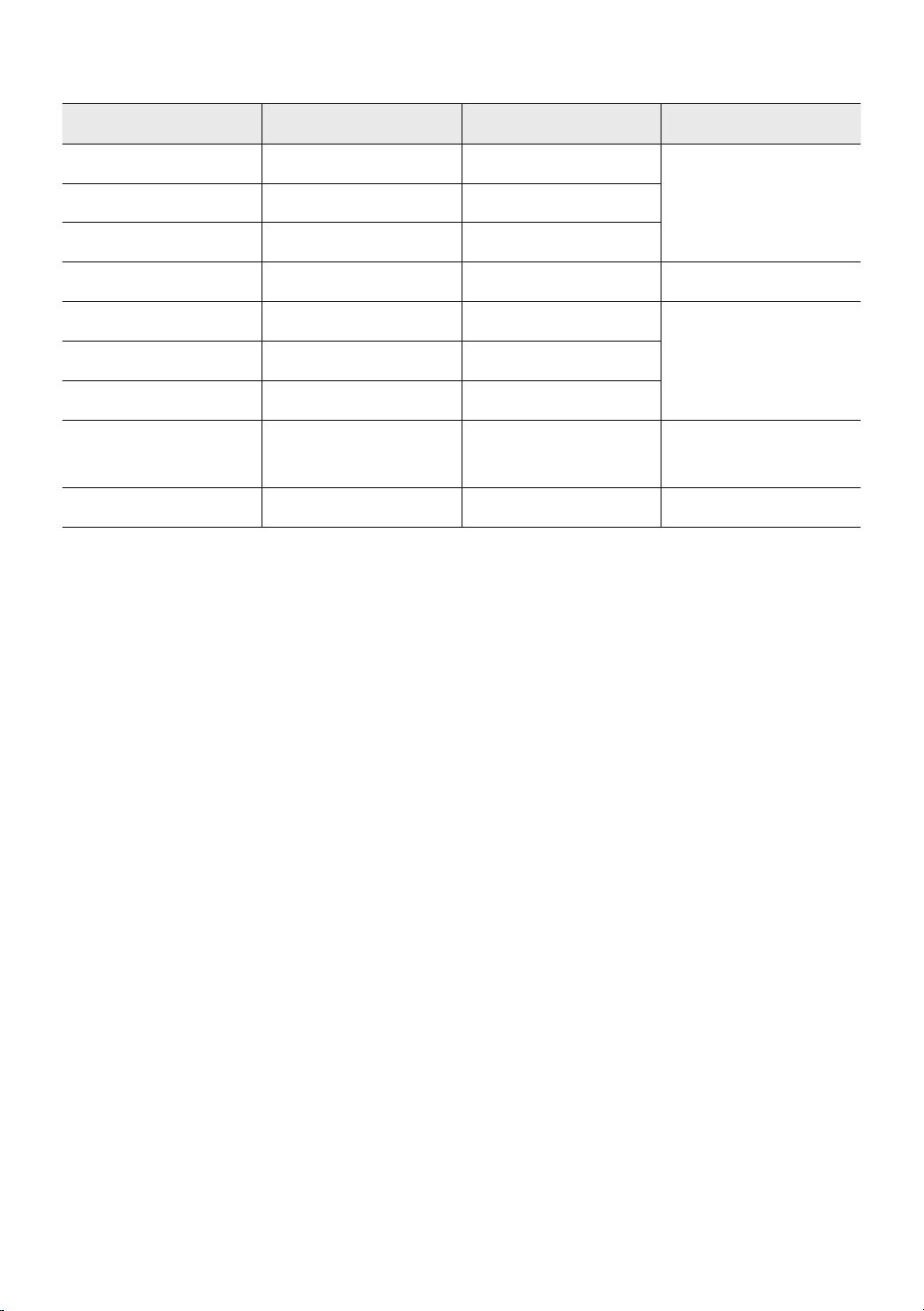
19 - ARA
ةموعدملا توصلا تاقيسنت
فلملا دادتمايتوصلا زيمرتلا جمانربليلحتلا لدعمت
ِ
بلا لدعم
mp3.*
MPEG 1 Layer3زترهوليك 48 إ 32ةيناث/تبوليك 320 إ 32
MPEG 2 Layer3زترهوليك 24 إ 16ةيناث/تبوليك 160 إ 8
MPEG 2.5 Layer3زترهوليك 12 إ 8ةيناث/تبوليك 160 إ 8
wma.*WMA7/8/9زترهوليك 48 إ 8ةيناث/تبوليك 320 إ 32
aac.*
AACزترهوليك 96 إ 8ةيناث/تبوليك 1728 <
AAC-LCزترهوليك 96 إ 8ةيناث/تبوليك 1728 <
HE-AACزترهوليك 96 إ 8ةيناث/تبوليك 1728 <
wav.*
/PCM/LPCM
IMA_ADPCM
زترهوليك 192 إ 8ةيناث/تباجيم 5 <
ac*-زترهوليك 192 إ 8ةيناث/تباجيم 5 <
تاظحم
.WMA احا ملا جمانرب زاهجلا اذه معدي •
حلصت ةموعدم غ تاقيسنتب لا تافلا .ةموعدا تبلا تدعمو ليلحتلا تدعم هعأ حضوا لودجلا ضرعي •
.ليغشتلل
. صا ADTS قيسنت طقف معدت A AC تافلم •
جمانربلا ثيدحت
.لبقتسملا يف Sound Tower ماظنل تباثلا جمانربلل تاثيدحت Samsung رفوت دق
ذفنمب تباثلا جمانلا ثيدحت نزخا USB زاهج ليصوت قرط نع تباثلا جمانلا ثيدحت كنكمي ،ثيدحتلا رفوت ةلاح
وكلا عقوا إ لقتنا ،ثيدحتلا تافلم ليت ةيفيك لوح تامولعا نم ديزملل .كب صاخلا Sound Tower ع U SB
.www.samsung.com/us/support/ ع Samsung Electronics ةكل
نأ ظح ."تيتلا" مث "تاقيبطتلاو جمالا" رايخلا ددحو ،كب صاخلا Sound Tower ليدو م مقر ددح وأ لخدأ ،ك لذ دعب
.ةروكذا نع فلتخت دق تارايخلا ءامسأ
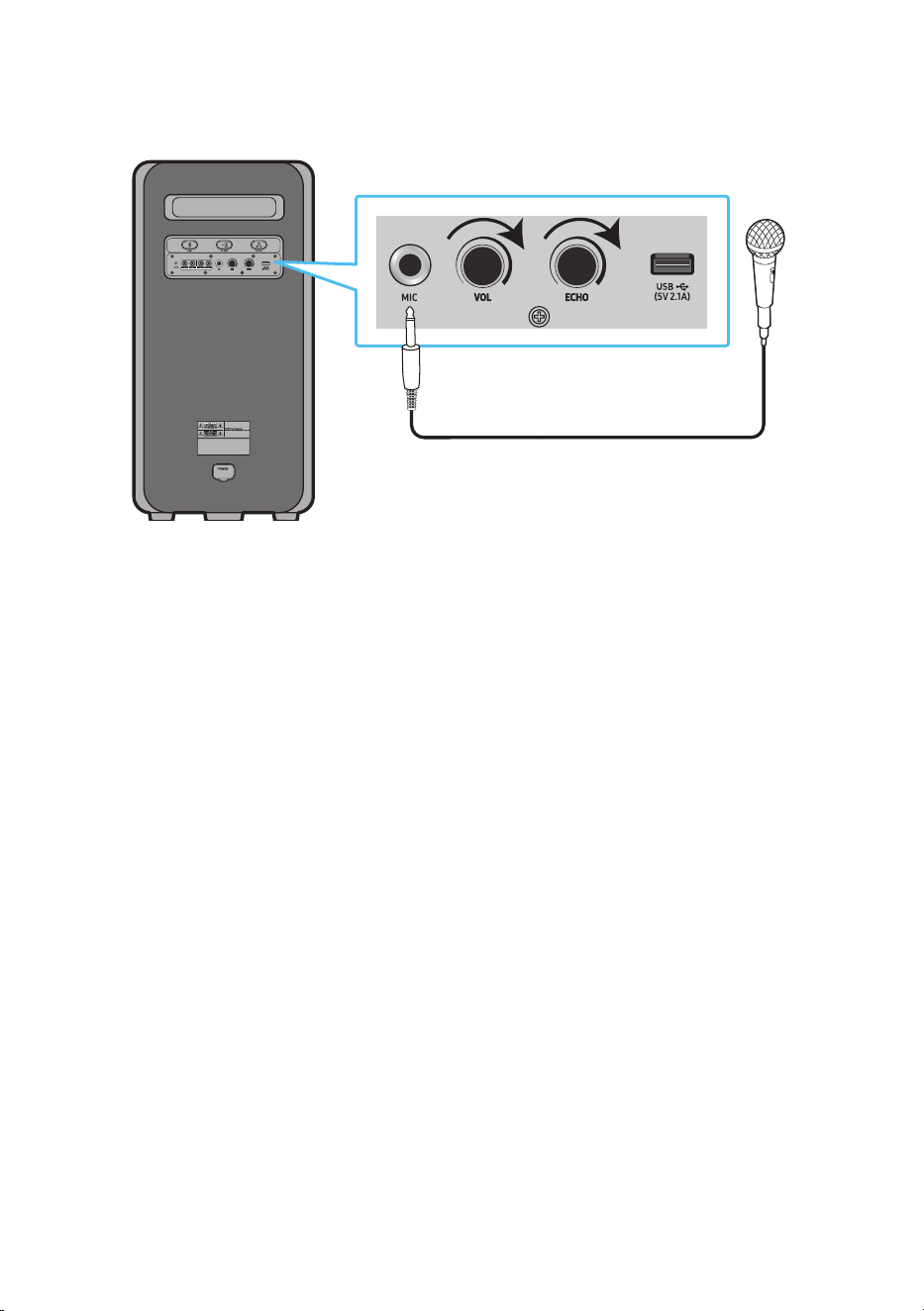
20 - ARA
يجراخ نوفوركيم ليصوت
.)قفرم غ( يداع سباقب يمانيد نوفوركيم ليصوت قيرط نع ماظنلا نم كتوص جارخإ كنكمي
MAXMIN MAXMIN
.نوفوركيا توص ىوتسم ليلقتل MIN إ MIC LEVEL ردأ . 1
.ةدحولا ع MIC سبقمب يرايتخا نوفوركيم ليصوتب مق . 2
.MICVOL رزلا مادختساب توصلا ىوتسم طبضا . 3
.MICECHO رزلا مادختساب ىدصلا ثأت طبضا . 4
.لصتا نوفوركيا ءانغلاب مق وأ ثدحت . 5
تاظحم
يذلا ماظنلا نم طقف نوفوركيا نم توصلا جرخي ،ويسا عضو ةفيظو وأ لسلا Group عضو مادختسا دنع •
.نوفوركيا هب لصتي
.لفساب نوكي MIC توص عارذ نإف ،ةيراطبلا عضو Sound Tower نوكي امدنع •
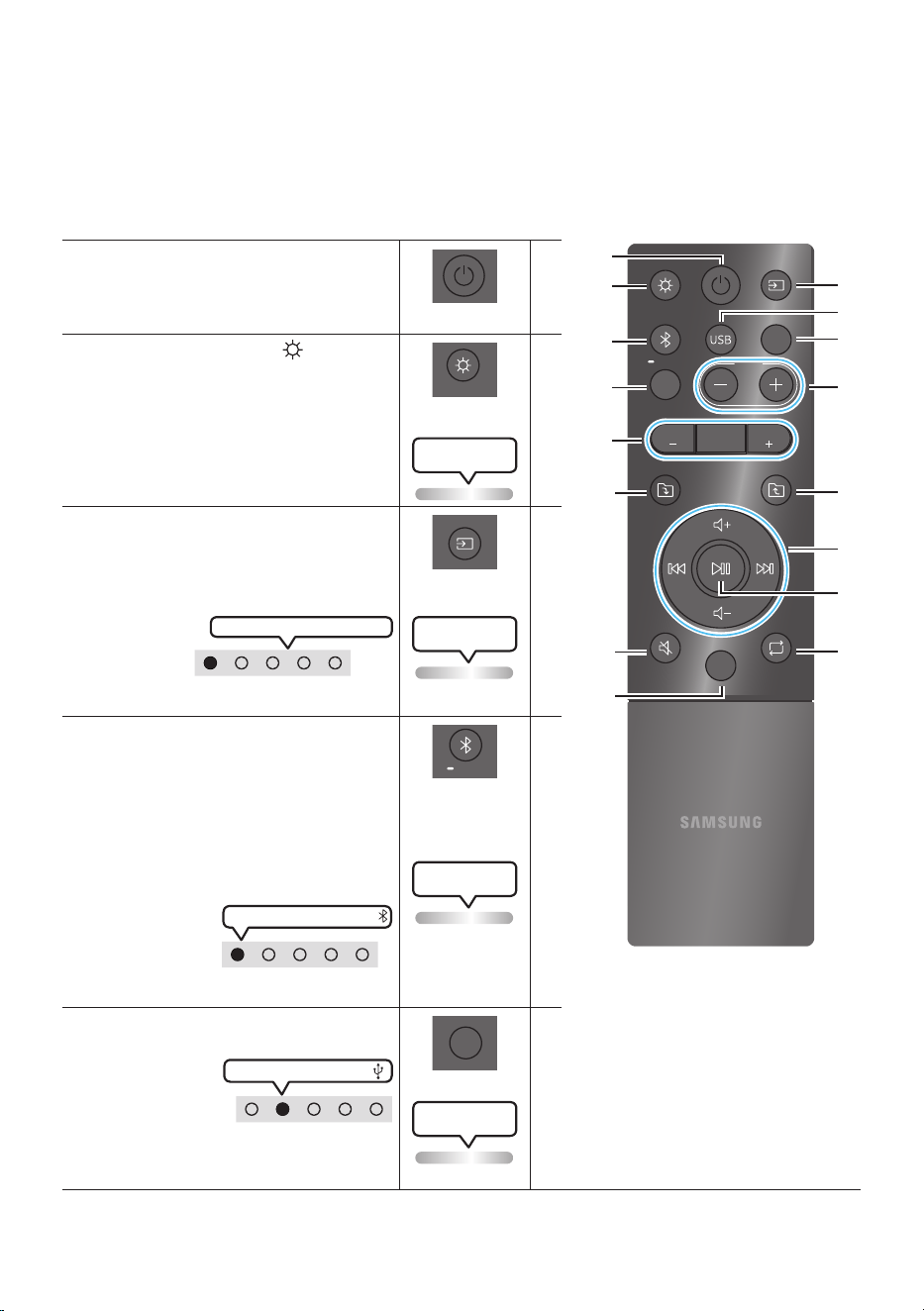
21 - ARA
دع
ُ
ب نع مكحتلا ةدحو مادختسا 06
دع
ُ
ب نع مكحتلا ةدحو مادختسا ةقيرط
LIGHT
PAIRING
TEMPO
USB
AUX
EFFECT
DOWN
UP
BASS
EFFECT
DJ
SOUND
MODE
جتنا ليغشت متي ،ةيراطبلا فاتسا ليلقتل *
نع مكحتلا ةدحوب ةقاطلا رز ع طغضلا دنع
.ةيراطبلا مادختسا ءانثأ دع
ُ
ب
ةقاطلا
DOWN
UP
BASS
EFFECT
EFFECT
DJ
LIGHT
PAIRING
TEMPO
USB
AUX
SOUND
MODE
.هليغشت فقوأ مث Sound Tower ل
ّ
غش
LIGHT
DOWN
UP
BASS
EFFECT
EFFECT
DJ
LIGHT
PAIRING
TEMPO
USB
AUX
SOUND
MODE
.ةءاضا عضو ليغشتل )LIGHT( رزلا ع طغ ضا
)ىقيسوا ليغشت دنع طقف(
ةءاضا عاضوأ ع ريرمتل رزلا ع طغضلا ررك
DANCE ,PARTY ,AMBIEN T,STAR :ةحاتا
.OFF وأ ,THUNDERBOLT
نوللاب LED رشؤم ضموي
ةدحاو ةرم ضيبا
ردصملا
DOWN
UP
BASS
EFFECT
EFFECT
DJ
LIGHT
PAIRING
TEMPO
USB
AUX
SOUND
MODE
.Sound Tower ل
صو
ُ
ي ا
ً
ردصم راتختل طغضا
:ةحاتا ةءاضا عاضوأ ع ريرمتل رزلا ع طغضلا رركا
. AUX2 وأ AUX1 ,USB ,BT
نوللاب LED رشؤم ضموي
ةدحاو ةرم ضيبا
ن يم ي لا إ ض يبا LED رشؤم كرحتي
.جتنا نم يولعلا ءزجلا LED ؤ م
ثوتولبلا
PAIRING
DOWN
UP
BASS
EFFECT
EFFECT
DJ
LIGHT
PAIRING
TEMPO
USB
AUX
SOUND
MODE
."BT" عضوب ةابم
ُ
ل
صو
ُ
ي ا
ً
ردصم راتختل طغضا
لوخدلل
ٍ
ناوث 5 نع ديزت ةد رزلا ع رارمتساب طغضا
."BT PAIRING" ع ضو إ
نع ليدوا اذه ثوتولبلا ةمب موعدم ديدج زاهجب
ليصوت كنكمي Sound Tower ديدحت قيرط
ةمب موعدا زاهجلاب ةصاخلا ثحبلا ةمئاق نم.
Sound Tower .ثوتولبلا
LED رشؤم ضموي
يوامسلا نوللاب
ضيبا نوللاب LED رشؤ م ءي ضي
.جتنا نم يولعلا ءزجلا LED ؤ م
USB
DOWN
UP
BASS
EFFECT
EFFECT
DJ
LIGHT
PAIRING
TEMPO
USB
AUX
SOUND
MODE
.Sound Tower لصتا USB ردصا ديدحتل طغضا
ضيبا نوللاب LED رشؤم ءيضي
.جتنا نم يولعلا ءزجلا LED ؤ م
نوللاب LED رشؤم ضموي
ةدحاو ةرم ضيبا
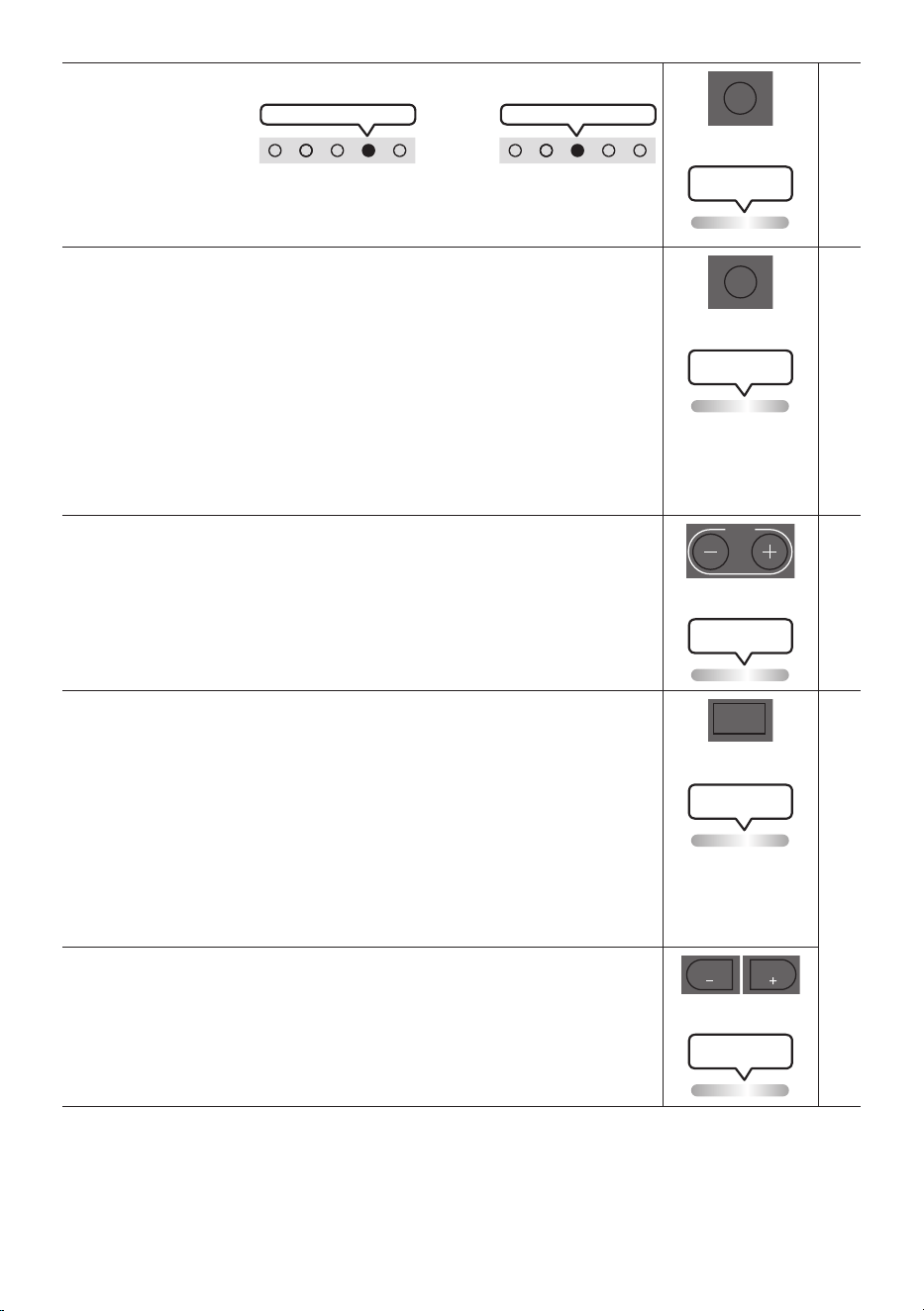
22 - ARA
AUX
DOWN
UP
BASS
EFFECT
EFFECT
DJ
LIGHT
PAIRING
TEMPO
USB
AUX
SOUND
MODE
.Sound Tower لصتا AUX2 وأ AUX1 ردصا ديدحتل طغضا
ضيبا نوللاب LED رشؤ م ءي ضي AUX2
وأ
ضيبا نوللاب LED رشؤ م ءي ضي AUX1
.جتنا نم يولعلا ءزجلا LED ؤ م
نوللاب LED رشؤم ضموي
ةدحاو ةرم ضيبا
SOUND MODE
DOWN
UP
BASS
EFFECT
EFFECT
DJ
LIGHT
PAIRING
TEMPO
USB
AUX
SOUND
MODE
EDM ,HIPHOP ,STANDARD ,PARTY, :ةحاتا توصلا تاثأت ع ريرمتلل رزلا ع طغضلا ررك
.REGGAE وأ HOUSE ,LATIN ,ROCK
لاثا ليبس ع ةلفحك ،لئافتا يقيسوا ثأتلا نم ديز حلطصم :PARTY •
.توصلا لداعم دوجو مدع لثم ،ماخلا ةيقيسوا تارثؤا إ شي حلطصم :يسايق •
.ىقيسواو يمانيدلا صقرلل حلطصم :HIPHOP •
.ةينوكلا ىقيسوا نم كأ ”ماع موهفم“ عون :EDM •
.ةيقيسوا ةقرفلا :ROCK •
.ةيبونجلا اكيرمأ نادلب نم ديدعلا ىقيسوم إ شي حلطصم :LATIN •
.ةينوكلا تا ع اهفزع متي ةصقارلا ىقيسوملل عي عاقيإ :HOUSE •
نوللاب LED رشؤم ضموي
ةدحاو ةرم ضيبا
- ,+ TEMPO
DOWN
UP
BASS
EFFECT
EFFECT
DJ
LIGHT
PAIRING
TEMPO
USB
AUX
SOUND
MODE
.اهضفخ وأ اهتدايزب ىقيسوا عاقيإ ةع يغتل TEMPO - وأ TEMPO + رز لا ع طغ ضا •
.USB عضولا طقف ةفيظولا هذه لمعت •
نوللاب LED رشؤم ضموي
ةدحاو ةرم ضيبا
DJ
DOWN
UP
BASS
EFFECT
EFFECT
DJ
LIGHT
PAIRING
TEMPO
USB
AUX
SOUND
MODE
.هيج يد ثأت ةفيظو ليغشت ةفيظولا هذه كل حيتت
:ةحاتا )هيج يد( DJ توص تاثأت ع ريرمتلل رزلا ع طغضلا ررك
.OFF وأ WAHWAH ,CHORUS ,CRUSH FILTER ,NOISE
.صا توصلاب ضيبا جيجضلا طلخ :NOISE •
.تاددلا ضعب توص ةيفصت :FILTER •
.ا
ً
داح صا توصلا لعج :CRUSH •
.ىرخأ ةرم اهطلخ مث ،لصفنم لكشب اهخأتو تاراسم ةدع إ صا توصلا لصف :CHORUS •
.ةقوجلا ثأت ءاشنإ
.صا توصلل ةددحا تاددلا ضعب سحت نع جتانلا WAHWAH ثأ ت :WAHWAH •
نوللاب LED رشؤم ضموي
ةدحاو ةرم ضيبا
- ,+ EFFECT
DOWN
UP
BASS
EFFECT
EFFECT
DJ
LIGHT
PAIRING
TEMPO
USB
AUX
SOUND
MODE
DOWN
UP
BASS
EFFECT
EFFECT
DJ
LIGHT
PAIRING
TEMPO
USB
AUX
SOUND
MODE
وأ ه تدا يز ب )ه ي ج يد( DJ توص ثأت نم لك ىوتسم يغتل EFFECT - وأ EFFECT + رزلا ع طغ ضا
.هليلقت
.+15 ~ 0 ~ 15 - إ اهيغت نكميو ،5 يه ثأتلل ةيضافا ةميقلا
نوللاب LED رشؤم ضموي
ةدحاو ةرم ضيبا
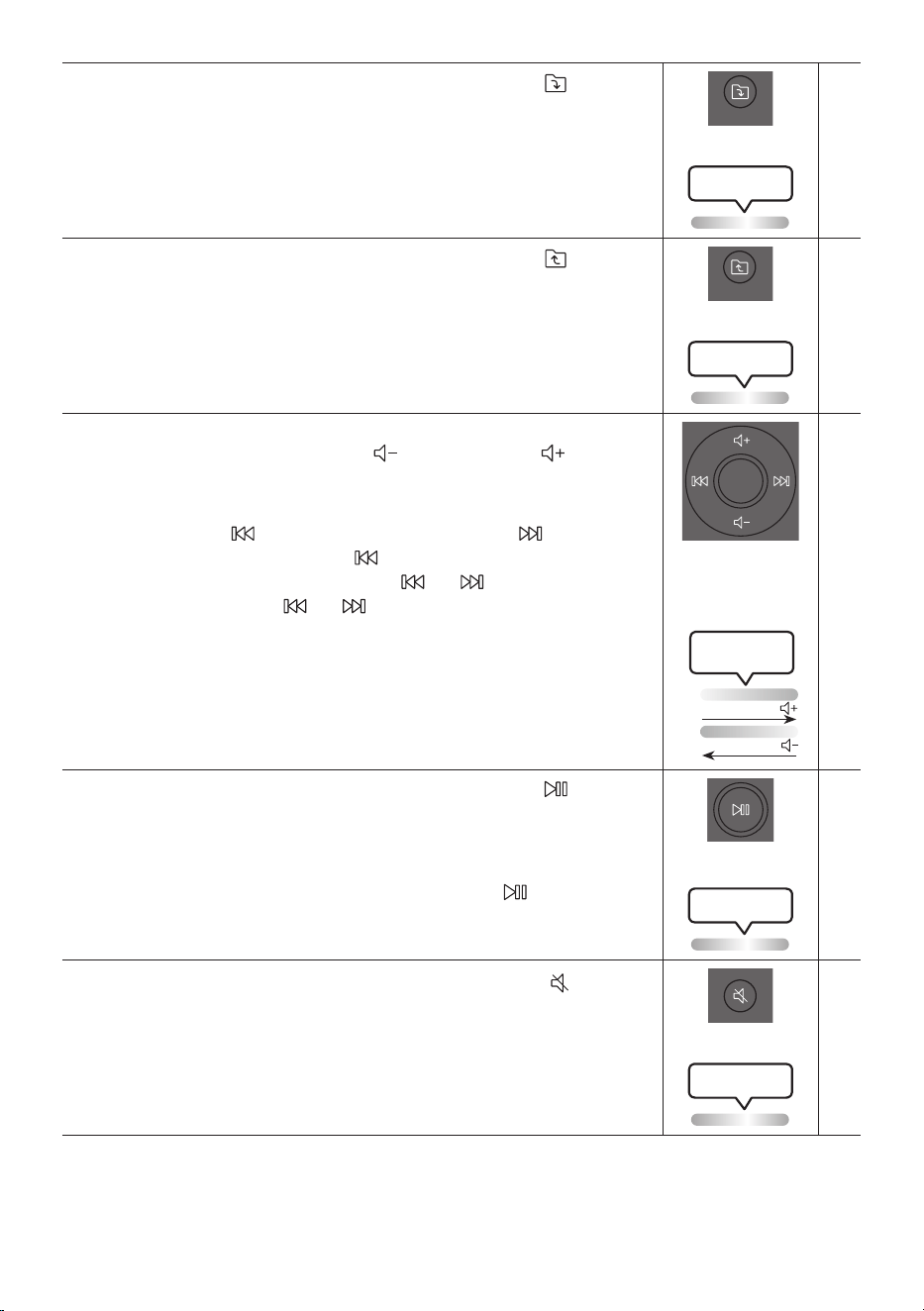
23 - ARA
DOWN دلجملا
DOWN
UP
BASS
EFFECT
EFFECT
DJ
LIGHT
PAIRING
TEMPO
USB
AUX
SOUND
MODE
.USB زاهج اتلا دلجا إ لاقتنل )DOWN( رزلا ع طغضا
نوللاب LED رشؤم ضموي
ةدحاو ةرم ضيبا
UP دلجملا
DOWN
UP
BASS
EFFECT
EFFECT
DJ
LIGHT
PAIRING
TEMPO
USB
AUX
SOUND
MODE
.USB زاهج قباسلا دلجا إ لاقتنل )UP( رزلا ع طغ ضا
نوللاب LED رشؤم ضموي
ةدحاو ةرم ضيبا
,توصلا ىوتسم عفر
/توصلا ىوتسم ضفخ
Skip / يطخت
توصلا ىوتسم ضفخ ،توصلا ىوتسم عفر •
ضفخ وأ عفر طبضل )توصلا ىوتسم ضفخ( وأ )توصلا ىوتسم عفر( ع طغضا
.توصلا ىوتسم
ىقيسوملا ي
طخت •
ليغشتل ةدحاو ةرم رزلا ع طغضا .اتلا ىقيسوا فلم ديدحتل رز لا ع طغضا
.قباسلا ىقيسوا فلم ديدحتل ترم رزلا ع طغضا .ىرخأ ةرم ةددحا ىقيسوا
ما ما إ ثح ب ل ل USB ليغشت عضو
ٍ
ناوث 3 ن م ك رز لا وأ رزلا ع رارمتساب طغضا
إ ةدو ع ل ل ىر خأ ةر م
ٍ
ناو ث 3 ن م ك رز لا وأ رزلا ع رارمتساب طغضا .فلخلا إ ثحبلا وأ
.يداعلا ليغشتلا
LED رشؤم ضموي
ضيبا نوللاب
عأ إ لف سأ ن م
لفسا إ عا نم
تقؤم فاقيإ/ليغشت
.ا
ً
تقؤم ىقيسوم فلم فاقي رز لا ع طغضا
.يقيسوا فلا ليغشت متي ،ىرخأ ةرم رزلا ع طغضت امدنع
ا
يئاقلت ليغشتلا فاقيإ ةفيظو •
طغضا ،AUX2وأ AUX1 عضو ةدحولا نوكت امنيب ا
يئاقلت ليغشتلا فاقيإ ةفيظو فاقي
.ةدحاو ةرم ضيبا نوللاب ةءاضا طي ضمويس .
ٍ
ناوث 5 ن ع د يز ت ةد رزلا ع رارمتساب
نوللاب LED رشؤم ضموي
ةدحاو ةرم ضيبا
توصلا متك
DOWN
UP
BASS
EFFECT
EFFECT
DJ
LIGHT
PAIRING
TEMPO
USB
AUX
SOUND
MODE
.توصلا متكل )توصلا متاك( رزلا ع طغضا
.توصلا متك ءاغل ىرخأ ةرم طغضا
نوللاب LED رشؤم ضموي
ةدحاو ةرم ضيبا
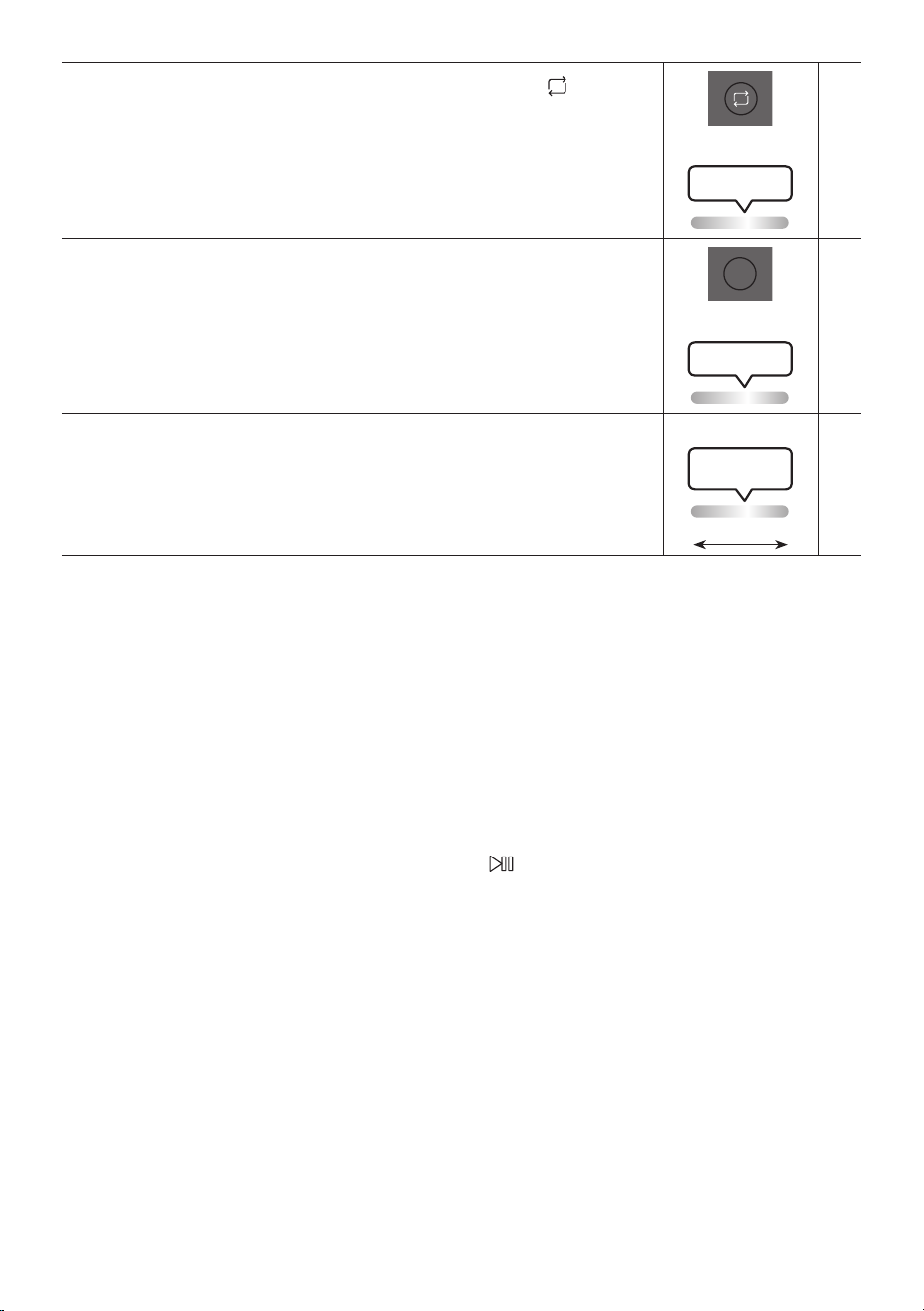
24 - ARA
رار كت
DOWN
UP
BASS
EFFECT
EFFECT
DJ
LIGHT
PAIRING
TEMPO
USB
AUX
SOUND
MODE
.”USB“ عضولا راركتلا ةفيظو مادختس )راركت( رزلا ع طغ ضا
.OFF وأ RANDOM ,ALL ,FOLDER ,ONE :ةحاتا راركتلا فئاظو ع ريرمتلل رزلا ع طغضلا ررك
نوللاب LED رشؤم ضموي
ةدحاو ةرم ضيبا
BASS
DOWN
UP
BASS
EFFECT
EFFECT
DJ
LIGHT
PAIRING
TEMPO
USB
AUX
SOUND
MODE
.يوقلا هجلا توص مادختس BASS رزلا ع طغضا
.يداعلا توصلا إ ةدوعلل ىرخأ ةرم طغضا
BLUETOOTH ةفيظو ليغشت فاقيإ وأ ليغشتل
ٍ
ناوث 5 ن م ك BASS رزلا ع رارمتساب طغضا
.POWER
نوللاب LED رشؤم ضموي
ةدحاو ةرم ضيبا
※
رفوتم ريغ
LED رشؤم ضموي
يدرولا نوللاب
ةياهنلا إ طسولا نم
.احلا ردصا ةحاتم غ دعب نع مكحتلا ةدحو رز ةفيظو
توصلا عضو مادختسا ةيفيك
.ةنيعم ىقيسوم عاون اهنيسحت متي لا لداعملل ا
ً
قبسم ةددحم تادادعإ Sound Tower رفوي
.دع
ُ
ب نع مكحتلا ةدحو ع SOUND MODE رزلا ع طغضا . 1
:ةيلاتلا توصلا تاثأت Sound Tower ضر عي ،SOUND MODE رزلا ع اهيف طغضت ةرم لك . 2
.REGGAE وأ HOUSE ,LATIN ,ROCK ,EDM ,HIPHOP ,STANDARD ,PARTY
تاظحم
.PARTY وه افا توصلا عضو •
ليغشتلل
ٍ
ناوث 5 نم ك دع
ُ
ب نع مكحتلا ةدحو وأ زاهجلا ع رزلا ع رارمتساب طغضا ،ليغشتلا فاقيإ لاح •
.افا توصلا عضو دادعإ

25 - ARA
هيج يد ريثأت مادختسا ةقيرط
.ثأت لك ىوتسم ليدعت نكمي .ىقيسوملل هيج يد توص تاثأت ةفاضإ هيج يد ثأت ةفيظو كل حيتت
.دع
ُ
ب نع مكحتلا ةدحو ع DJ رزلا ع ط غضا . 1
:ةحاتا هيج يد تاثأت ع Sound Tower ررم ي ،DJ رزلا ع اهيف طغضت ةرم لك . 2
.جرخلاو ةيفصتلا ع صا توصلاب ةجوزمم ءاضيب ءاضوض ءاشنإ :NOISE •
.طقف هج وأ ةقبطلا اع توصل ا
ً
هباشم ا
ً
ثأت ني :FILTER •
.ةدح كأ صا توصلا لعجي ا
ً
ثأت ني :CRUSH •
.انغلا س
َ
روكلل ا
ً
هباشم ا
ً
ثأت ني :CHORUS •
."~هاو ~هاو"
َ
ثأ ت ن ي :WAHWAH •
.هيج يد ثأت ليغشت فقوي :DJ EFFECT OFF •
.+15 إ -15 نم هيج يد توص تا ثأت نم لك ىوت سم ضفخ وأ عفرل EFFECT - وأ EFFECT + رزلا ع طغ ضا . 3
ةظحم
نم ك دع
ُ
ب نع مكحتلا ةدحو وأ زاهجلا ع رزلا ع رارمتساب طغضا ،ليغشتلا فاقيإ لاح •
.افا هيج يد ثأت عضو دادعإ ليغشتلل
ٍ
ناوث 5
26 - ARA
SAMSUNG SOUND TOWER قيبطت مادختسا 07
Samsung Sound Tower قيبطت تيبثت
قيبطت
ْ
ل
ز
َ
ن ،Samsung Sound Tower قيبطتو ذلا كزاهج مادختساب زاهجلا اذه مكحتلل
.ذلا كزاهج ع هتبثو ،Apple App ر جت م وأ Google Play رج ت م ن م Samsung Sound Tower
تاظحم
ليغشتلا ماظن اهيلع تبثاو Android لومحا فتاهلا ةزهجأ عم Samsung Sound Tower قيبطت قفاوتي •
.ثد حأ و ه ا م وأ 6.0 راد صا Android
iOS ليغشتلا ماظن اهيلع تبثاو Apple لومحا فتاهلا ةزهجأ عم Samsung Sound Tower قيبطت قفاوتي •
.ثد حأ وه ا م وأ 10.0 رادصا
Samsung Giga Party Audio
Samsung Sound Tower قيبطت ليغشت ءدب
مث ،ذلا كفتاه ع Samsung Sound Tower زمر سا ،همادختساو Samsung Sound Tower قيبطت ليغشت ءدبل
.ةشاشلا ع رهظت لا تاهيجوتلا عبتا
Samsung
Multiroom
Samsung Sou nd Tower
Samsung Sound Tower
27 - ARA
اهلحو تكشملا فاشتكا 08
:ي امم ققحت ،ةدعاسا بلط لبق
.لمعت ةدحولا
سباق ليصوت ىجر
ُ
ي .ا
ً
مامت ةغراف ةيراطبلا نوكت دق :
.هليغشت ةلواحمو ابرهكلا رايتلا
.رزلا ع طغضلا دنع لمعت ةفيظولا
؟ءاوهلا يف ةنكاس ءابرهك دجوت له
.ىرخأ ةرم هل
ّ
صوو ةقاطلا سباق لصفا :
.BT عضو يف توصلل برست ثدحي
ثوتولبلاب ليصوتلاب ةصاخلا ماسقا رظنا :
.14 ةحفص
.توص رد صي
؟ليغشتلا ديق توصلا متك ةفيظو له
ءاغل )توصلا متك( رزلا ع طغضا :
.توصلا متك ةفيظو
؟ىندا دح لا ع توصلا ىوتس م ط بض م ت له
.توصلا ىوتسم طبضا :
.ل معت دع
ُ
ب ن ع م كح تلا ةد حو
؟ةغراف تايراطبلا له
.ةديدج تايراطبب اهلدبتسا :
ةدحولاو دع
ُ
ب نع مكحتلا ةدحو نيب ةفاسملا له
؟ا
دج ةدي عب Sound Tower ةيسيئرلا
برقأ نوكتل دع
ُ
ب نع مكحتلا ةدحو ك
ّ
رح :
.Sound Tower ةيسيئرلا ةدحولل
.ل مع ي Stereo ةعومجم لاصتا
؟ا
يكلس Group Play ليغشت عضو ع ماظنلا له
ا
يكلس Group Play عضو ليغشت فقوأ :
.ا
ً
ددجم Stereo ةعومجم ليصوت ب
ّ
رجو
.ثوتولبلاب ليصوتلا ءارجإ نكمي
ليغشت عضو يف رخآ ماظنب لصتم ماظنلا له
؟Stereo ةعومجم عضو وأ ا
يكلس Group Play
فاقيإ دعب ىرخأ ةرم ثوتولبلاب ليصوتلا ب
ّ
رج :
ع ضو وأ ا
ي ك ل س Group Play عضو ليغشت
.Stereo ةعومجم ليصوت
نصتم ثوتولبلا ةزيمب ناموعدملا نازاهجلا له
؟لعفلاب
لصف دعب ىرخأ ةرم ثوتولبلاب ليصوتلا ب
ّ
رج :
.ثوتولبلاب ىرخا تيصوتلا
.لمعي PAIRING رزلا
وأ ا
يكل س Group Play ليغشت عضو يف ماظنلا له
؟Stereo ةعومجم عضو
عضو ليغشت فاقيإ دعب ىرخأ ةرم ب
ّ
رج :
ليصوت عضو وأ ا
يكلس Group Play
.Stereo ةعومجم
يف رخا إ )MAIN( HOST زاهج رييغت يف بغرأ انأ
.يكلسلا Stereo ةعو مجم وأ Group Play لاصتا
ع طغضاو ،Group Play عضو لصفا :
م ث ،
ً
وأ ا ه ل HOST ليغشت ديرت لا ةعامسلا
نيرخا ليصوتل Group LED ؤم مدختسا
.ك لذ ن م
ً
د ب
.Stereo ةعومجم طمن عم ،MAIN بيبثت مت :
.MAIN ـك نيرخا يغت كنكمي
نود تاعاس 8 نم رثك AUX2 وأ AUX1 لغشأ نأ ديرأ
.لخدلا يف مكحتلا
د يز ت ةد رزلا ع رارم تسا عم طغضا :
ليطعتل AUX2 وأ AUX1 ع ضو
ٍ
ناو ث 5 نع
نم يغتلاب مق .Auto Power Down ةفيظو
إ ON-AUTO POWER DOWN
.OFF-AUTO POWER DOWN
28 - ARA
.Group play ـب SUB لاصتا عيطتسا انأ
SUB عنمب HOST ميقيس ،1 ةعاس دعب :
.ةفاضا نم ةيفاضا
،HOST ع GROUP PLAY رز لا ع طغضا
.SUB ليصوت ةداعإ نكمي اهدعب
ةعومجم /يكلس" ربع ليصوتلا ءارجإ نكمي
."ثوتولبلا/Stereo ةفاضإ/ةيكلس
؟ا
دج ةليوط ةمظنا نيب ةلصافلا ةفاسملا له
ةعومجم /لس" ناقا ءارجإ دنع وي :
نوكي نأ "ثوتولبلا/Stereo ةفاضإ/ ةيكلس
.ماظنلا نم دحاو م قاطن
ةمظنأ لصفت لا اهب وا ليغشتلا ةفاسم :
.را ت مأ 10 ن م ل قأ يه Sound Tower
صيخرتلا 09
The Bluetooth® word mark and logos are
registered trademarks owned by the Bluetooth
SIG, Inc. and any use of such marks by Samsung
Electronics Co., Ltd. is under license. Other
trademarks and trade names are those of their
.respective owners
Qualcomm aptX is a product of Qualcomm
.Technologies, Inc. and/or its subsidiaries
Qualcomm is a trademark of Qualcomm
Incorporated, registered in the United States and
other countries. aptX is a trademark of Qualcomm
Technologies International, Ltd., registered in the
.United States and other countries
]ENERGY STAR[
ENERGY STAR qualied model only
Your Samsung product is ENERGY STAR –
qualied in its factory default setting.
Change to certain features, settings and
functionality in this product can change
the power consumption, possibly beyond
the limits required for ENERGY STAR
.qualication
Environmental Protection Agency and –
Department of Energy. ENERGY STAR is a
joint program of the Government agencies,
designed to promote energy efcient
.products and practices
Refer to www.energystar.gov for more
.information of the ENERGY STAR Program
ENERGY STAR qualied model only
)Applicable to Thin Client models only(
As an ENERGY STAR® Partner, SAMSUNG
has determined that this product meets
the ENERGY STAR® guidelines for energy
.efciency
The ENERGY STAR Program has been to –
reduced greenhouse gas emissions and
.save energy through voluntary labeling
Power management setting of this product –
have been enabled by default, and have
various timing setting from 1 minutes to 5
.hours
The product can wake with a button press –
.on the chassis from sleep mode
ENERGY STAR qualied model only (The other
)models
As an ENERGY STAR Partner, Samsung has –
determined that this product or product
models meets the ENERGY STAR guideline
.for energy efciency

29 - ARA
صيخرت راطخإ 10
حوتفملا ردصملا
رداصاب ةقلعتا ةلئسا تابلطو تاراسفتسا لاسر
Samsung Open Source ـب لصتا ،ةحوتفا
)http://opensource.samsung.com(
لوح ةمهم تاراطخإ 11
ةمدخلا
ليلد ةدراولا ةيحيضوتلا موسرلاو لاكشا فوت مت
لكشلا نع فلتخت دقو ،طقف اهيلإ عوجرلل اذه مدختسا
.زاهجلل عفلا
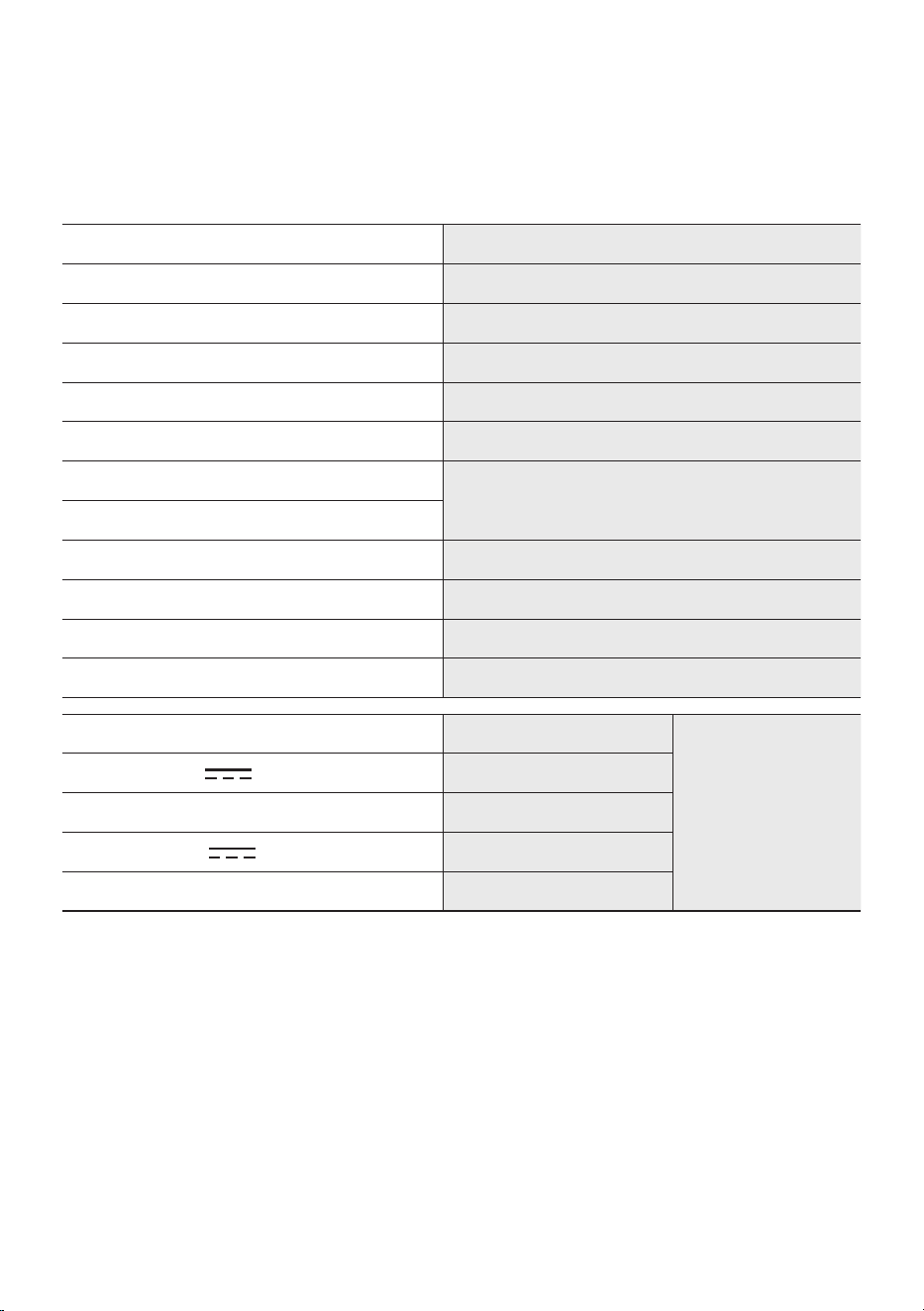
30 - ARA
ليلدلاو تافصاوملا 12
تافصاوملا
زارطلا مساMX-ST50B
USB5V/2.1A
نزولام ج ك 11.94
)قمعلا × عافترا × ضرعلا( داعبام ل م 301×665×329
ليغشتلل ةبسانا ةرارحلا ةجرد
ةيوئم ةجرد +35 إ ة يو ئ م تا جرد +5 نم
ليغشتلل ةبسانا ةبوطرلا ةجرد75 % إ 10 %
كا
جرخلا ةقاط لدعم
ةقاطلا كلس ليصوتتاو 240
ةيراطبلاتاو 90
امجا ةقاطلا كهتساتاو 65
ةيراطبلا عونة عا س / تاو 72 نويأ مويثيل
ةيراطبلا ليغشت ةدمةعاس 18 إ لصي ام
ةيراطبلا نحش ةدمةعاس 3.5<
ةلباق نويأ مويثيل ةيراطب
نحشلا ةداع
ةيراطبلا جذومن2INR19/65-4 ,EB-T24C-00
يمسا دهجلا 7.34 V
ةعسلا رادقم9800 mAh ,71.93 Wh
دودحا نحشلا دهج 8.4 V
ةيجذومنلا ةعسلا10000 mAh ,73.40 Wh
تاظحم
.راعشإ نود تافصاوا يغت اهقحب Samsung Electronics Co., Ltd ةك ظفتحت •
.ةيبيرقت ماقرأ يه داعباو نزولا •
.مادختسا فورظ فتخاب ةيراطبلا نحش تقوو ةيراطبلا ليغشت تقو فلتخي •
رايتلا ةقاط كلس لصفا ،تكشا هذه لحل .ةمسلا لجأ نم نحشلا فقوتي ،ةرارحلا وأ ةدولا ةديدش ةئيبلا •
ة جرد 95 و تياهنرهف ةجرد 41( ة يو ئ م ةجرد 35 و ة يو ئ م تا جرد 5 ب حوات ليغشت ةرارح ةجرد هليصوت دعأو ددا
.)تياهنرهف
© 2022 Samsung Electronics Co., Ltd. All rights reserved.
Contact SAMSUNG WORLD WIDE
If you have any questions or comments relating to Samsung products, please contact the SAMSUNG customer
care Centre.
Country
Samsung Service Centre
Web Site
`
Middle East
EGYPT
08000-7267864
16580
WHATSAPP 010 000 16580
www.samsung.com/eg/
support
IRAN
021-8255 [CE]
021-42132 [HHP]
www.samsung.com/iran/
support
ISRAEL
*6963
www.samsung.com/il/
support/
PALESTINE
1800-792447
www.samsung.com/ps/
support/
SAUDI
ARABIA
8002474357 (800 24/7 HELP)
From Inside Saudi Arabia
+966112614718 From outside
Saudi Arabia (May Call Charges
will be applied)
www.samsung.com/
sa_en/support (English)
www.samsung.com/sa/
support (Arabic)
PAKISTAN
0800-SAMSUNG (7267864)
www.samsung.com/pk/
support
U.A.E
800-SAMSUNG
(800 - 726 7864)
www.samsung.com/ae/
support (English)
www.samsung.com/
ae_ar/support (Arabic)
OMAN 800-SAM CS (800-72627)
KUWAIT 183-CALL (183-2255)
BAHRAIN 8000-GSAM (8000-4726)
QATAR 800-CALL (800-2255)
TURKEY 444 77 11
www.samsung.com/tr/
support
JORDAN
0800-22273
06-577-7444
WHATSAPP +962-79-777-7421
www.samsung.com/
levant/supportLEBANON
1598
WHATSAPP +962-79-777-7421
IRAQ
80010080
WHATSAPP +962-79-777-7421
ALGERIA
3004
www.samsung.com/n_
africa/support
TUNISIA
80 100 012
MOROCCO 080 100 22 55
Country
Samsung Service Centre
Web Site
`
Africa
SOUTH AFRICA 0860 SAMSUNG (726 7864)
www.samsung.com/za/
support
NAMIBIA 08197267864
www.samsung.com/
africa_en/support
ZAMBIA 3434
MAURITIUS 800 5050
REUNION 0262 50 88 80
www.samsung.com/
africa_fr/support
MOZAMBIQUE 847267864
www.samsung.com/
africa_pt/support
NIGERIA 0800-726-7864
www.samsung.com/
africa_en/support
GHANA 0800-100-077
COTE D’IVOIRE 8000-00-77
www.samsung.com/
africa_fr/support
SENEGAL 800-00-0077
CAMEROON 67095-0077
KENYA 0800 545 545
www.samsung.com/
africa_en/support
UGANDA 0800 300 300
TANZANIA 0800 780 089
SUDAN 1969
www.samsung.com/eg/
support