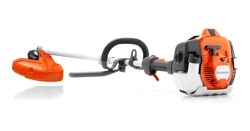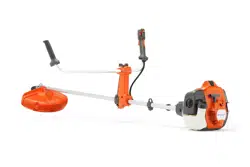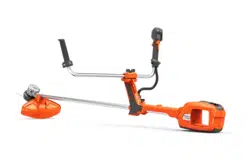
520iRX
EN Operator's manual 2-26
Contents
Introduction..................................................................... 2
Safety..............................................................................4
Safety instructions for assembly................................... 11
Safety instructions for maintenance..............................12
Assembly...................................................................... 12
Operation...................................................................... 15
Maintenance................................................................. 19
Troubleshooting............................................................ 21
Transportation, storage and disposal........................... 22
Technical data.............................................................. 23
Accessories.................................................................. 24
Declaration of Conformity............................................. 25
Introduction
Product description
This product is a battery operated grass trimmer/
brushcutter with an electrical motor.
Work is constantly in progress to increase your safety
and efficiency during operation. Speak to your servicing
dealer for more information.
Intended use
The product can be used with a grass blade or a trimmer
head to cut different types of vegetation. Do not use
the product for other tasks than grass trimming and
grass clearing. Use a grass blade or trimmer head to
cut grass.
Note: National or local regulations may regulate the
use. Comply to given regulations.
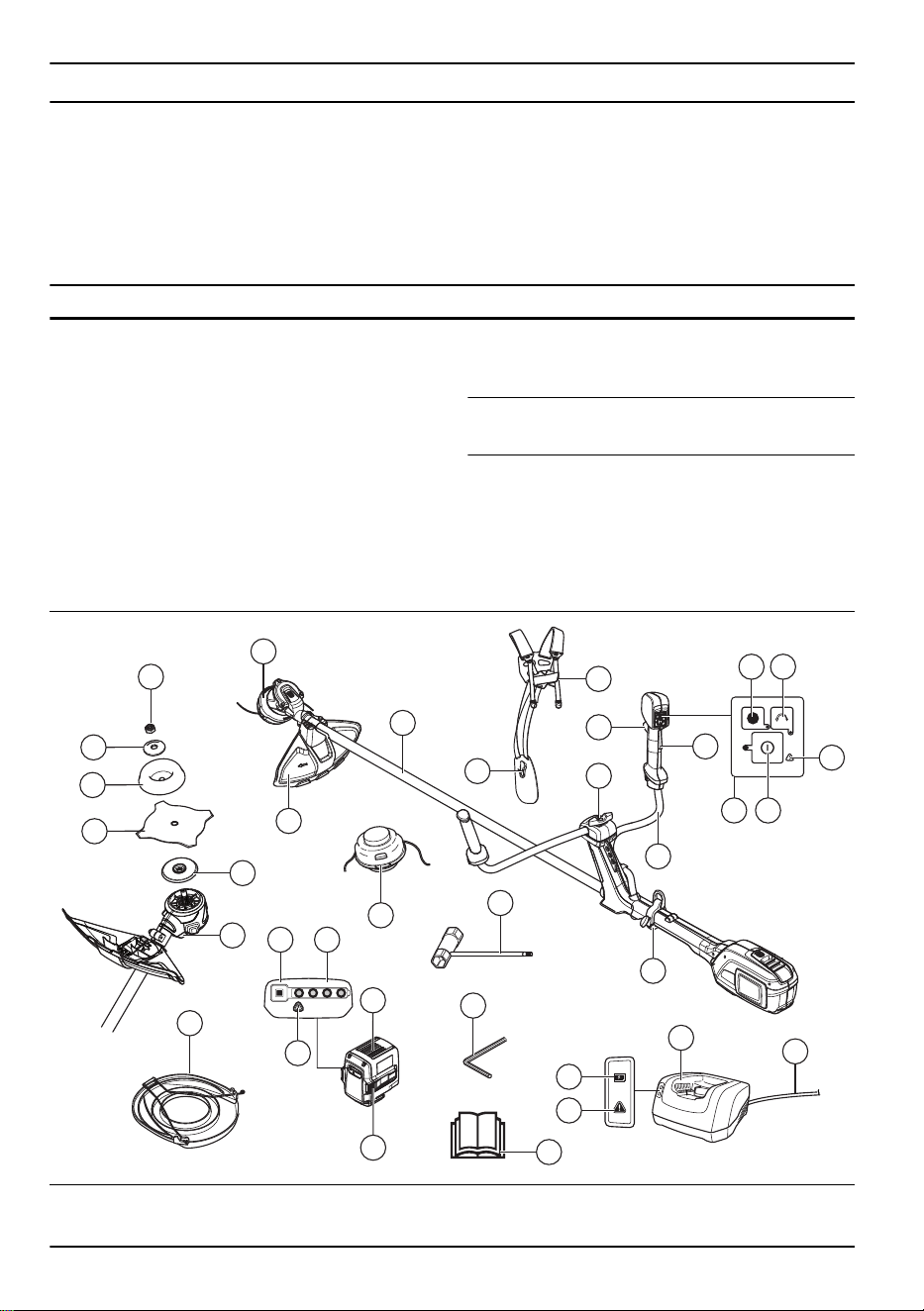
Product overview
3
29
28
27
26
30
22
21
25
13
24 23
20
16
15
17
17
32
13
8
5
9
4
7
14
10
6
19
18
1
2
31
11 12
33
1. Trimmer head 2. Cutting attachment guard
2 757 - 009 - 31.05.2024
3. Shaft
4. Harness quick release
5. Harness, hip pad
6. Handle adjustment
7. Handlebar
8. Power trigger
9. Power trigger lockout
10. Keypad
11. SavE button
12. Rotation direction button
13. Warning indicator (error LED)
14. Start and stop button
15. Cord
16. Battery charger
17. Power on and warning indicator (error LED)
18. 4 mm hex key
19. Socket wrench
20. Trimmer head
21. Battery release buttons
22. Battery
23. Battery status
24. Battery indicator button
25. Transport guard
26. Hole for locking pin 4 mm hex key
27. Drive disc
28. Blade
29. Support cup
30. Support flange
31. Locknut
32. Operator's manual
33. Loop hanger
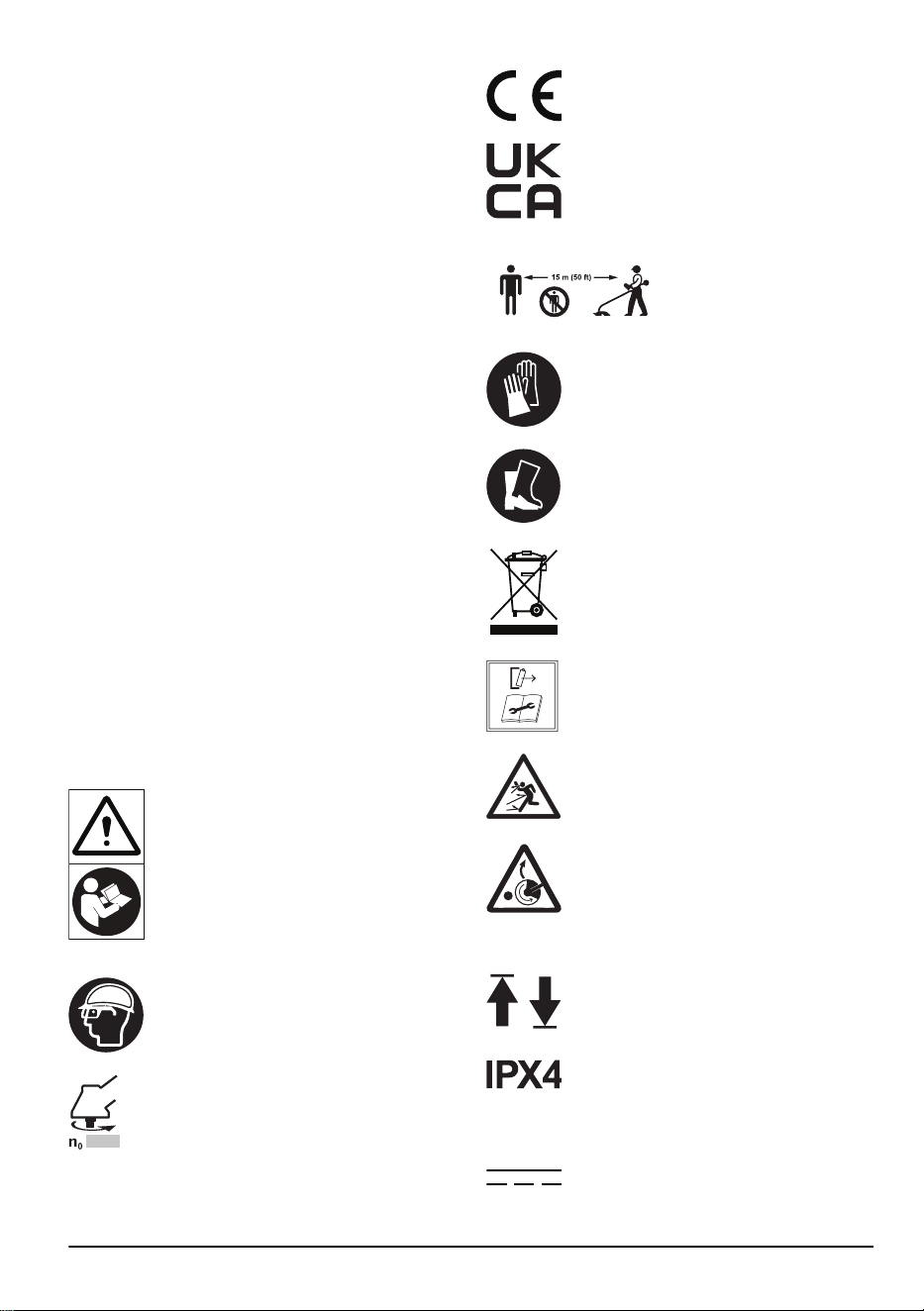
Symbols on the product
WARNING! This product can be
dangerous! Careless or incorrect use can
result in serious injury to the operator
or others. It is very important that you
read and understand the contents of
the operator's manual. Please read the
operator’s manual carefully and make
sure you understand the instructions
before the product is used.
Use approved helmet and eye protection.
Maximum speed or no-load speed.
The product agrees with the applicable
EC directives.
This product conforms to the applicable
UK regulations.
Keep a minimum distance of
15 m to persons and animals
during operation of the prod-
uct.
Use approved protective gloves.
Use heavy-duty slip-resistant boots.
Symbols on the product or its packaging
indicate that this product cannot be
handled as domestic waste. This product
must be deposited at an appropriate
recycling facility.
Disconnect battery before maintenance.
The product can cause objects to eject,
which can cause injury.
Risk of blade thrust if the cutting
equipment touches an object that it does
not immediately cut. The product can cut
off body parts. Keep a minimum of 15 m
distance to persons and animals during
operation of the product.
The arrows show the limit for the handle
position.
Protected against splashing water.
Direct current.
757 - 009 - 31.05.2024 3
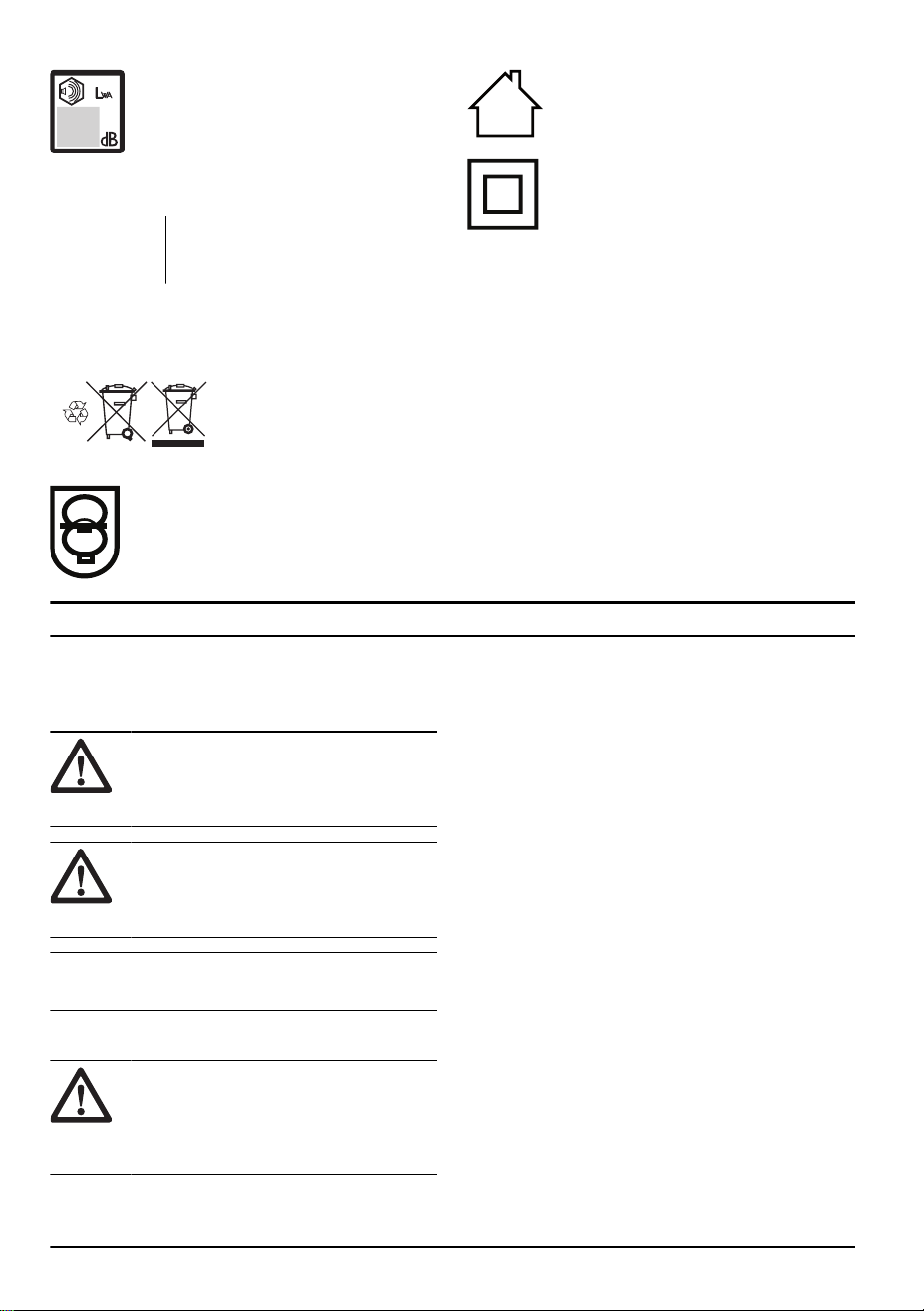
Noise emission to the environment label
as per EU (also including New South
Wales legislation) and UK directives
and regulations. The guaranteed sound
power level of the product is specified in
Technical data on page 23
and on the
label
yyyywwxxxx The rating plate shows the serial
number. yyyy is the production year,
ww is the production week.
Symbols on the battery and/or on the
battery charger
Recycle this product at a recy-
cling station for electrical and
electronic equipment. (Applies
to Europe only)
Fail-safe transformer.
Use and keep the battery charger indoors
only.
Double insulation.
Product damage
We are not responsible for damages to our product if:
• the product is incorrectly repaired.
• the product is repaired with parts that are not
from the manufacturer or not approved by the
manufacturer.
• the product has an accessory that is not from the
manufacturer or not approved by the manufacturer.
• the product is not repaired at an approved service
center or by an approved authority.
Safety
Safety definitions
Warnings, cautions and notes are used to point out
specially important parts of the manual.
WARNING: Used if there is a risk of
injury or death for the operator or bystanders
if the instructions in the manual are not
obeyed.
CAUTION: Used if there is a risk of
damage to the product, other materials or
the adjacent area if the instructions in the
manual are not obeyed.
Note: Used to give more information that is necessary
in a given situation.
General machine safety warnings
WARNING: Read all safety warnings,
instructions, illustrations and specifications
provided with this machine. Failure to follow
all instructions listed below may result in
electric shock, fire and/or serious injury.
• Save all warnings and instructions for future
reference. The term "machine" in the warnings refers
to your mains-operated (corded) machine or battery-
operated (cordless) machine.
Work area safety
• Keep work area clean and well lit. Cluttered or dark
areas invite accidents.
• Do not operate machines in explosive atmospheres,
such as in the presence of flammable liquids, gases
or dust.Machines create sparks which may ignite the
dust or fumes.
• Keep children and bystanders away while operating
a machine. Distractions can cause you to lose
control.
Electrical safety
• Machine plugs must match the outlet. Never modify
the plug in any way. Do not use any adapter plugs
with earthed (grounded) machines. Unmodified plugs
and matching outlets will reduce risk of electric
shock.
• Avoid body contact with earthed or grounded
surfaces, such as pipes, radiators, ranges and
refrigerators. There is an increased risk of electric
shock if your body is earthed or grounded.
• Do not expose machines to rain or wet conditions.
Water entering a machine will increase the risk of
electric shock.
4 757 - 009 - 31.05.2024

• Do not abuse the cord. Never use the cord for
carrying, pulling or unplugging the machine. Keep
cord away from heat, oil, sharp edges or moving
parts. Damaged or entangled cords increase the risk
of electric shock.
• When operating a machine outdoors, use an
extension cord suitable for outdoor use. Use of a
cord suitable for outdoor use reduces the risk of
electric shock.
• If operating a machine in a damp location is
unavoidable, use a residual current device (RCD)
protected supply. Use of a RCD reduces the risk of
electric shock.
Personal safety
• Stay alert, watch what you are doing and use
common sense when operating a machine. Do not
use a machine while you are tired or under the
influence of drugs, alcohol or medication. A moment
of inattention while operating machines may result in
serious personal injury.
• Use personal protective equipment. Always wear
eye protection. Protective equipment such as dust
mask, non-skid safety shoes, hard hat or hearing
protection used for appropriate conditions will reduce
personal injuries.
• Prevent unintentional starting. Ensure the switch is
in the off-position before connecting to power source
and/or battery pack, picking up or carrying the tool.
Carrying machines with your finger on the switch or
energising machines that have the switch on invites
accidents.
• Remove any adjusting key or wrench before turning
the machine on. A wrench or a key left attached to
a rotating part of the machine may result in personal
injury.
• Do not overreach. Keep proper footing and balance
at all times. This enables better control of the
machine in unexpected situations.
• Dress properly. Do not wear loose clothing or
jewellery. Keep your hair and clothing away from
moving parts. Loose clothes, jewellery or long hair
can be caught in moving parts.
• If devices are provided for the connection of dust
extraction and collection facilities, ensure these are
connected and properly used. Use of dust collection
can reduce dust-related hazards.
• Do not let familiarity gained from frequent use of
tools allow you to become complacent and ignore
tool safety principles. A careless action can cause
severe injury within a fraction of a second.
Machine use and care
• Do not force the machine. Use the correct machine
for your application. The correct machine will do the
job better and safer at the rate for which it was
designed.
• Do not use the machine if the switch does not turn
it on and off. Any machine that cannot be controlled
with the switch is dangerous and must be repaired.
•
Disconnect the plug from the power source and/or
remove the battery pack, if detachable, from the
machine before making any adjustments, changing
accessories, or storing machines. Such preventive
safety measures reduce the risk of starting the
machine accidentally.
• Store idle machines out of the reach of children and
do not allow persons unfamiliar with the machines
or these instructions to operate the machines.
Machines are dangerous in the hands of untrained
users.
• Maintain machines and accessories. Check for
misalignment or binding of moving parts, breakage
of parts and any other condition that may affect
the machines´s operation. If damaged, have the
machine repaired before use. Many accidents are
caused by poorly maintained machines.
• Keep cutting tools sharp and clean. Properly
maintained cutting tools with sharp cutting edges are
less likely to bind and are easier to control.
• Use the machine, accessories and tool bits etc.
in accordance with these instructions, taking into
account the working conditions and the work to
be performed. Use of the machine for operations
different from those intended could result in a
hazardous situation.
• Keep handles and grasping surfaces dry, clean
and free from oil and grease. Slippery handles and
grasping surfaces do not allow for safe handling and
control of the tool in unexpected situations.
Battery tool use and care
• Recharge only with the charger specified by the
manufacturer. A charger that is suitable for one type
of battery pack may create a risk of fire when used
with another battery pack.
• Use power tools only with specifically designated
battery packs. Use of any other battery packs may
create a risk of injury and fire.
• When battery pack is not in use, keep it away from
other metal objects, like paper clips, coins, keys,
nails, screws or other small metal objects, that can
make a connection from one terminal to another.
Shorting the battery terminals together may cause
burns or a fire.
• Under abusive conditions, liquid may be ejected from
the battery; avoid contact. If contact accidentally
occurs, flush with water. If liquid contacts eyes,
additionally seek medical help. Liquid ejected from
the battery may cause irritations or burns.
• Do not use a battery pack or tool that is damaged or
modified. Damaged or modified batteries may exhibit
unpredictable behaviour resulting in fire, explosion or
risk of injury.
• Do not expose a battery pack or tool to fire
or excessive temperature. Exposure to fire or
temperature above 130 °C may cause explosion.
• Follow all charging instructions and do not charge
the battery pack or tool outside the temperature
range specified in the instructions. Charging
757 - 009 - 31.05.2024
5

improperly or at temperatures outside the specified
range may damage the battery and increase the risk
of fire.
Service
• Have your machine serviced by a qualified repair
person using only identical replacement parts. This
will ensure that the safety of the machine is
maintained.
• Never service damaged battery packs. Service of
battery packs should only be performed by the
manufacturer or authorized service providers.
Grass trimmer, brush cutter and brush saw
safety warnings
• Do not use the machine in bad weather conditions,
especially when there is a risk of lightning. This
decreases the risk of being struck by lightning.
• Thoroughly inspect the area for wildlife where the
machine is to be used. Wildlife may be injured by the
machine during operation.
• Thoroughly inspect the area where the machine is to
be used and remove all stones, sticks, wires, bones,
and other foreign objects. Thrown objects can cause
personal injury.
• Before using the machine, always visually inspect
to see that the cutter or blade and the cutter or
blade assembly are not damaged. Damaged parts
increase the risk of injury.
• Follow instructions for changing accessories.
Improperly tightened blade securing nuts or bolts
may either damage the blade or result in it becoming
detached.
• The rated rotational speed of the cutter must be at
least equal to the maximum rotational speed marked
on the machine. Cutters running faster than their
rated rotational speed can break and fly apart.
• Wear eye, ear, head and hand protection. Adequate
protective equipment will reduce personal injury by
flying debris or accidental contact with the cutting
line or blade.
• While operating the machine, always wear safety
footwear. Do not operate themachine when barefoot
or wearing open sandals. This reduces the chance of
injury to the feet from contact with a moving cutter,
line or blade
• While operating the machine, always wear long
trousers. Exposed skin increases the likelihood of
injury from thrown objects.
• Keep bystanders away while operating the machine.
Thrown debris can result in serious personal injury.
• Always use two hands when operating the machine.
Holding the machine with both hands will avoid loss
of control.
• Hold the machine by the insulated gripping surfaces
only, because the cutting line or blade may contact
hidden wiring. Cutting line or blades contacting
a "live" wire may make exposed metal parts of
the machine "live" and could give the operator an
electric shock.
• Always keep proper footing and operate the machine
only when standing on the ground. Slippery or
unstable surfaces may cause a loss of balance or
control of the machine.
• Do not operate the machine on excessively steep
slopes. This reduces the risk of loss of control,
slipping and falling which may result in personal
injury.
• When working on slopes, always be sure of your
footing, always work across the face of slopes, never
up or down and exercise extreme caution when
changing direction. This reduces the risk of loss
of control, slipping and falling which may result in
personal injury.
• Keep all parts of the body away from the cutter, line
or blade when the machine is operating. Before you
start the machine, make sure the cutter, line or blade
is not contacting anything. A moment of inattention
while operating the machine may result in injury to
yourself or others.
• Do not operate the machine above waist height. This
helps prevent unintended cutter or blade contact and
enables better control of the machine in unexpected
situations.
• When cutting brush or saplings that are under
tension, be alert for spring back. When the tension
in the wood fibres is released, the brush or sapling
may strike the operator and/or throw the machine out
of control.
• Use extreme caution when cutting brush and
saplings. The slender material may catch the blade
and be whipped toward you or pull you off balance.
• Maintain control of the machine and do not touch
cutters, lines or blades and other hazardous moving
parts while they are still in motion. This reduces the
risk of injury from moving parts.
• When clearing jammed materialor servicing the
machine, make sure the switch is off and the
battery pack is removed. Unexpected starting of the
machine while clearing jammed material or servicing
may result in serious personal injury.
• Carry the machine with the machine switched off
and away from your body. Proper handling of the
machine will reduce the likelihood of accidental
contact with a moving cutter, line or blade.
• When transporting or storing the machine, always
fit the cover on metal blades. Proper handling of
the machine will reduce the likelihood of accidental
contact with the blade.
• Only use replacement cutters, lines, cutting heads
and blades specified by the manufacturer. Incorrect
replacement parts may increase the risk of breakage
and injury.
• When clearing jammed material or servicing the
machine, make sure the switch is off and the battery
pack is removed.Unexpected starting of the machine
while clearing jammed material or servicing may
result in serious personal injury.
6
757 - 009 - 31.05.2024

Blade thrust causes and related warnings
• Blade thrust is a sudden sideways, forward or
backward motion of the machine, which may occur
when the blade jams or catches on an object such
as a sapling or a tree stump. It can be violent
enough to cause the machine and/or operator to be
propelled in any direction, and possibly lose control
of the machine. Blade thrust and its related hazards
can be avoided by taking proper precautions as
given below.
• Maintain a firm grip with both hands on the machine
and position your arms to resist blade thrust.
Position your body to the left side of the machine.
Blade thrust can increase the risk of injury due to the
machine moving unexpectedly. Blade thrust can be
controlled by the operator if proper precautions are
taken.
• If the blade binds, or when interrupting a cut for
any reason, switch the machine off and hold the
machine motionless in the material until the blade
comes to a complete stop. While the blade is
binding, never attempt to remove the machine from
the material or pull the machine backward while the
blade is in motion, otherwise blade thrust may occur.
Investigate and take corrective actions to eliminate
the cause of blade binding.
• Do not use blunt or damaged blades. Blunt or
damaged blades increase the risk of jamming or
catching on an object, resulting in blade thrust.
• Always maintain good visibility of the material being
cut. Blade thrust is more likely to occur in areas
where it is difficult to see the material being cut.
• If you are approached by another person while
operating the machine, switch the machine off.
There is an increased risk of injury to other persons
being struck by the moving blade in the event of
blade thrust.
Other general safety information
• Deactivate the product before you move to another
area. Always remove the battery when passing the
product to another person.
• Never put the product down unless you have
deactivated it and removed the battery. Do not leave
the product unsupervised when it is switched on.
• The cutting tool does not stop immediately after the
product is turned off.
• The blade should be completely stopped once the
trigger switch has returned to the initial position.
• Before using the product and after any impact,
check for signs of wear or damage and repair as
necessary.
• If anything jams in the cutting attachment while
you operate the product, stop and deactivate the
product. Make sure that the cutting attachment stops
completely. Remove the battery before you clean,
inspect or repair the product and/or the cutting
equipment.
• Do a check of the product before use. Refer
to,
Safety devices on the product on page 9
and
To examine the product before operation on
page 15
. Do not use a defective product. Do the
safety checks, maintenance and service instructions
described in this manual.
• Faulty cutting attachment can increase the risk of
accidents.
• Check the gear for dirt and cracks. Clean off grass
and leaves from the gear using a brush. Gloves
should be worn when necessary.
• Always ensure that ventilation openings are kept
clear of debris.
• Check that the trimmer head is completely attached
to the trimmer.
• All covers, guards and handles must be fitted before
starting.
• Check that the product is in perfect working order.
Check that all nuts and screws are tight.
• Check that the trimmer head and trimmer guard are
not damaged or cracked. Replace the trimmer head
or trimmer guard if it has been exposed to impact or
are cracked. Always use the recommended guard for
the cutting attachment you are using. See chapter on
Technical data.
• This product is a dangerous tool if you are not
careful or if you use the product incorrectly. This
product can cause serious injury or death to the
operator or others.
• This appliance is not intended for use by persons
(including children) with reduced physical, sensory
or mental capabilities, or lack of experience and
knowledge, unless they have been given supervision
or instruction concerning use of the appliance by a
person responsible for their safety. Children should
be supervised to ensure that they do not play with
the appliance.
• Never allow children to use or be in the vicinity of the
machine. Since the machine is easy to start, children
may be able to start it if they are not kept under
full surveillance. This can mean a risk of serious
personal injury. Therefore disconnect the battery
when the machine is not under close supervision.
• Never allow children or other persons not trained in
the use of the product and/or the battery to use or
service it.
• National or local regulations may regulate the use.
Comply to given regulations.
• Store the equipment in a lockable area so that it is
out of reach of children and unauthorized persons.
• The transport guard must always be used for storage
and transport.
• Keep hands and feet away from the cutting area
at all times and especially when switching on the
motor.
• Keep your hands and feet away from the cutting
attachment until it has stopped completely when the
product is deactivated.
757 - 009 - 31.05.2024
7

• Do not remove the cut material, or let other persons
remove cut material, while the product is activated
or the cutting equipment rotates, as this can result in
serious injury.
• Keep in mind that it is you, the operator that is
responsible for not exposing people or their property
to accidents or hazards.
• Under no circumstances may the design of the
product be modified without the permission of the
manufacturer. Always use original accessories. Non-
authorized modifications and/or accessories can
result in serious personal injury or the death of
the operator or others. Your warranty may not
cover damage or liability caused by the use of non-
authorized accessories or replacement parts.
• The only accessories you can operate with this
product are the cutting attachments recommended
in the technical data chapter.
• Never use a product that has been modified in any
way from its original specification
• Never use a product that is faulty. Carry out the
safety checks, maintenance and service instructions
described in this manual. Some maintenance and
service measures must be carried out by trained
and qualified specialists. See instructions under the
Maintenance heading.
• Working in bad weather is tiring and often brings
added risk. Due to the added risk, it is not
recommended to use the machine in very bad
weather, for instance in dense fog, heavy rain,
strong winds, intense cold, risk of lightning, etc
• Never work from a ladder, stool or any other raised
position that is not fully secured.
• Store Idle Appliances Indoors – When not in use,
appliances should be stored indoors
• It is not possible to cover every conceivable situation
you can face. Always exercise care and use your
common sense. Avoid all situations which you
consider to be beyond your capability. If you still feel
uncertain about operating procedures after reading
these instructions, you should consult an expert
before continuing.
• Ensure that no people or animals come closer than
15 meters while you work. When several operators
are working in the same area the safety distance
should be at least 15 metres. Otherwise there is
a risk of serious personal injury. Stop the product
immediately if anyone approaches. Never swing the
product around without first checking behind you to
make sure that no one is within the safety zone.
• If anything jams in the cutting attachment while
you operate the product, stop and deactivate the
product. Make sure that the cutting attachment stops
completely. Remove the battery before you clean,
inspect or repair the product and/or the cutting
equipment.
• Ensure that people, animals or other things can
not affect your control of the product or that they
do not come in contact with the cutting attachment
or loose objects that are thrown out by the cutting
attachment. However, do not use the product unless
you are able to call for help in the event of an
accident.
• Make sure that you can move and stand safely.
Check the area around you for possible obstacles
(roots, rocks, branches, ditches, etcetera) in case
you have to move suddenly. Take great care when
you work on sloping ground.
• Walk, never run.
• Inspect the working area. Remove all loose objects,
such as stones, broken glass, nails, steel wire, string
etc. that could be thrown out or become wrapped
around the cutter or cutter guard.
• Watch out for stumps of branches that can be thrown
out when you cut. Do not cut to close to the ground
where stones and other objects can be thrown out.
• Make sure that no clothes or parts of the body
come in contact with the cutting attachment when
the product is activated. Keep the product below
waist level.
• Watch out for thrown objects. Always wear approved
eye protection. Never lean over the cut-ting
attachment guard. Stones, rubbish, etc., can be
thrown up into the eyes which can cause blindness
or serious injury.
• Listen out for warning signals or shouts when
you wear hearing protection. Always remove your
hearing protection as soon as the product stops.
• If any unwanted vibrations occur, tap out new line to
give the line the correct length to stop the vibrations.
• If the product starts vibrating abnormally, stop the
product and remove the battery.
• Overexposure to vibration can lead to circulatory
damage or nerve damage in persons who have
poor circulation. Speak to your physician if you
experience symptoms of overexposure to vibration.
Such symptoms include numbness, loss of feeling,
tingling, pricking, pain, loss of strength, changes
in skin color or condition. These symptoms usually
show in the fingers, hands or wrists.
• Always hold the product with both hands. Hold the
product on the right side of your body.
Personal protective equipment
WARNING:
Read the warning
instructions that follow before you use the
product.
• Always use approved personal protective equipment
when you use the product. Personal protective
equipment cannot fully prevent injury but it
decreases the degree of injury if an accident does
occur. Let your dealer help you select the correct
equipment.
• Use a helmet if the trees in the work area have a
height of more than 2 m/6.5 ft.
• Use approved hearing protection.
8
757 - 009 - 31.05.2024
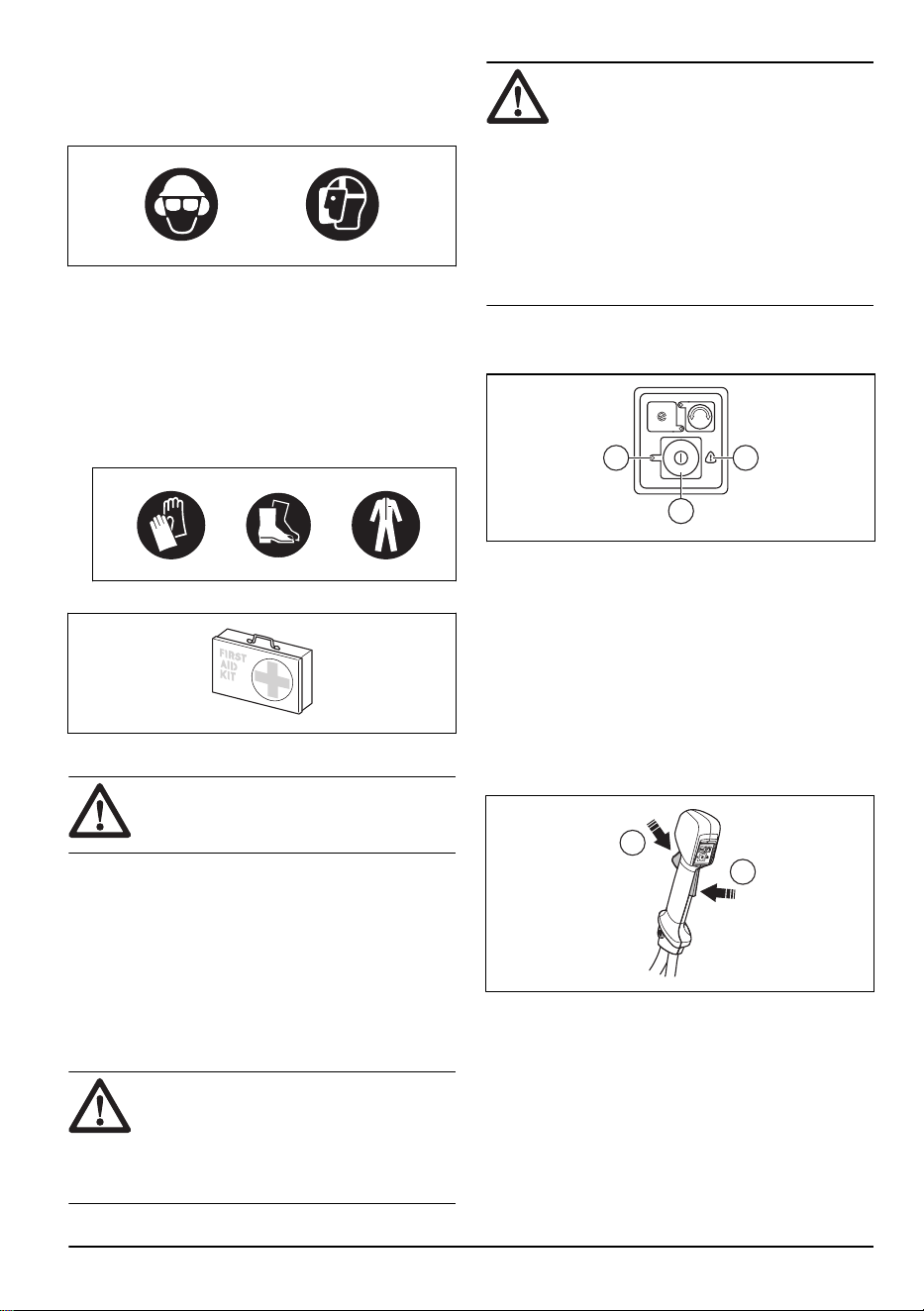
• Always use approved protective googles that comply
with ANSI Z87.1 standard in the USA or EN 166 in
EU countries.Use visor for face protection. Visor is
not enough to protect the eyes.
+
• Use gloves when it is necessary, for example when
you attach, examine or clean the cutting equipment.
• Use protective boots with steel toe-cap and non-slip
soles.
• Use clothing made of a strong fabric. Always use
heavy, long pants and long sleeves. Do not use
loose clothing that can catch on twigs and branches.
Do not use jewelry, short pants or sandals. Do not
go with bare feet. Put your hair up safely above
shoulder level.
• Keep first aid equipment near.
Safety devices on the product
WARNING:
Read the warning
instructions that follow before you use the
product.
In this section the product’s safety features, its purpose
and how checks and maintenance should be carried
out to ensure that it operates correctly. See instructions
under the heading
Product overview on page 2
to find
where these parts are located on your product.
The life span of the product can be reduced and the risk
of accidents can increase if product maintenance is not
carried out correctly and if service and/or repairs are not
carried out professionally. If you need further information
please contact your nearest servicing dealer.
WARNING:
Never use a product with
damaged safety components. The product's
safety equipment must be inspected and
maintained as described in this section.
If your product fails any of these checks,
contact your service agent to get it repaired.
CAUTION: All servicing and repair work
on the machine requires special training.
This is especially true of the machine′s
safety equipment. If your machine fails
any of the checks described below you
must contact your service agent. When
you buy any of our products we guarantee
the availability of professional repairs and
service. If the retailer who sells your
machine is not a servicing dealer, ask him
for the address of your nearest service
agent.
To do a check of the keypad
1. Press and hold the start/stop button (A).
A
B C
a) The product is switched on when the LED (B) is
lit.
b) The product is switched off when the LED (B) is
out.
2. See
Troubleshooting on page 21
if the warning
indicator (C) is lit or flashes.
To do a check of the power trigger lockout
The power trigger lockout is designed to prevent
accidental operation. When you release the handle, the
power trigger and the power trigger lockout both move
back to their original positions.
A
B
757 - 009 - 31.05.2024
9
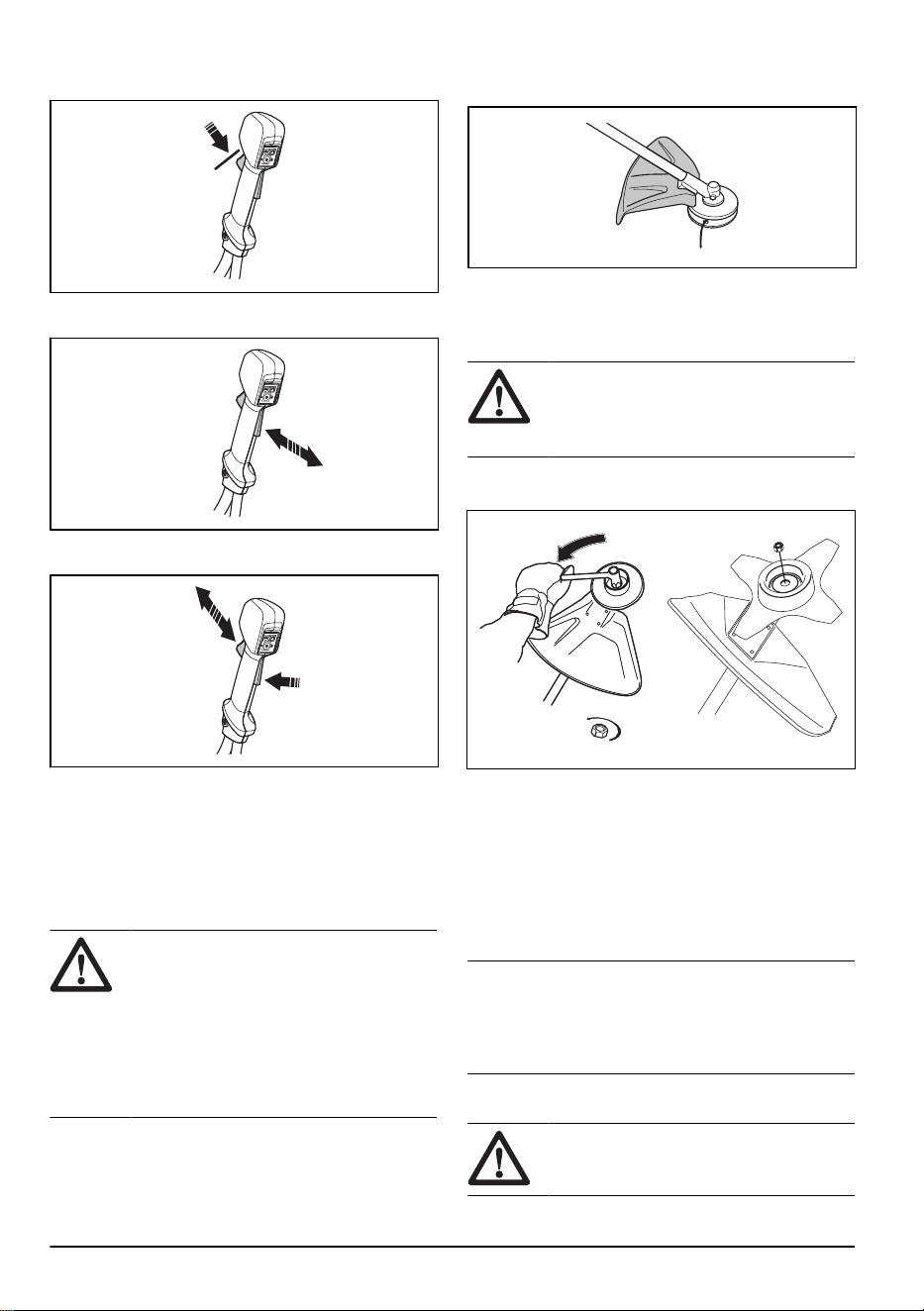
1. Make sure that the power trigger is locked when the
lock is in its original position.
2. Press the power trigger and make sure it returns to
its original position when you release it.
3. Make sure that the power trigger and the lock moves
freely and that the return spring works properly.
4. Start the product, see
To start the product on page
16
.
5. Apply full throttle.
6. Release the power trigger and make sure that the
cutting attachment stops and remains still.
To do a check of the cutting attachment guard
WARNING:
Do not use a cutting
attachment without an approved and
correctly attached cutting attachment guard.
Always use the recommended cutting
attachment guard for the cutting attachment
that you use, see
Approved accessories on
page 24
. If an incorrect or faulty cutting
attachment guard is attached this can cause
serious personal injury.
The cutting attachment guard stops objects that ejects in
the direction of the operator. It also prevents injuries that
occur if you touch the cutting attachment.
1. Stop the product and remove the battery.
2. Do a visual check for damages, for example cracks.
3. Replace the cutting attachment guard if it is
damaged.
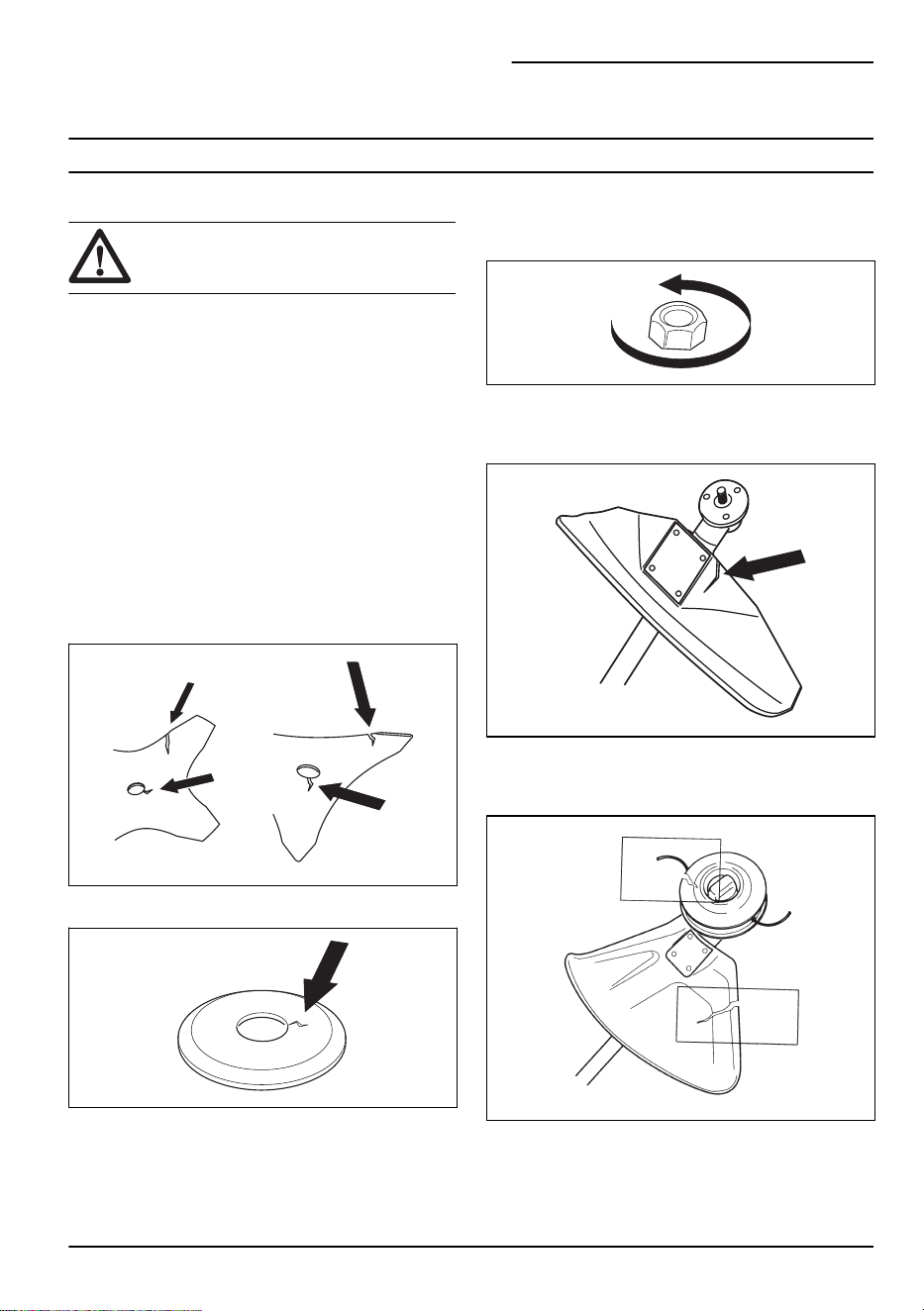
To attach and remove the locknut
WARNING: Stop the product and
remove the battery, use protective gloves
and be careful around the sharp edges of
the cutting attachment.
A locknut is used to attach some types of cutting
attachments. The locknut has a left thread.
• To attach, tighten the locknut in the opposite
direction to the direction of rotation of the cutting
attachment.
• To remove the locknut, undo the lock nut in the
same direction as the cutting attachment rotates.
• To loose and tighten the locknut, use a socket
spanner with a long shaft. The arrow in the picture
shows the area where you should operate the socket
spanner.
Note:
Make sure that you can not turn the locknut by
hand. Replace the nut if the nylon lining does not have
a resistance of a minimum of 1.5 Nm. The nut should
be replaced after it has been put on approximately 10
times.
To do a check of the quick release function
WARNING: Do not use a harness with
a defective quick release function.
10 757 - 009 - 31.05.2024
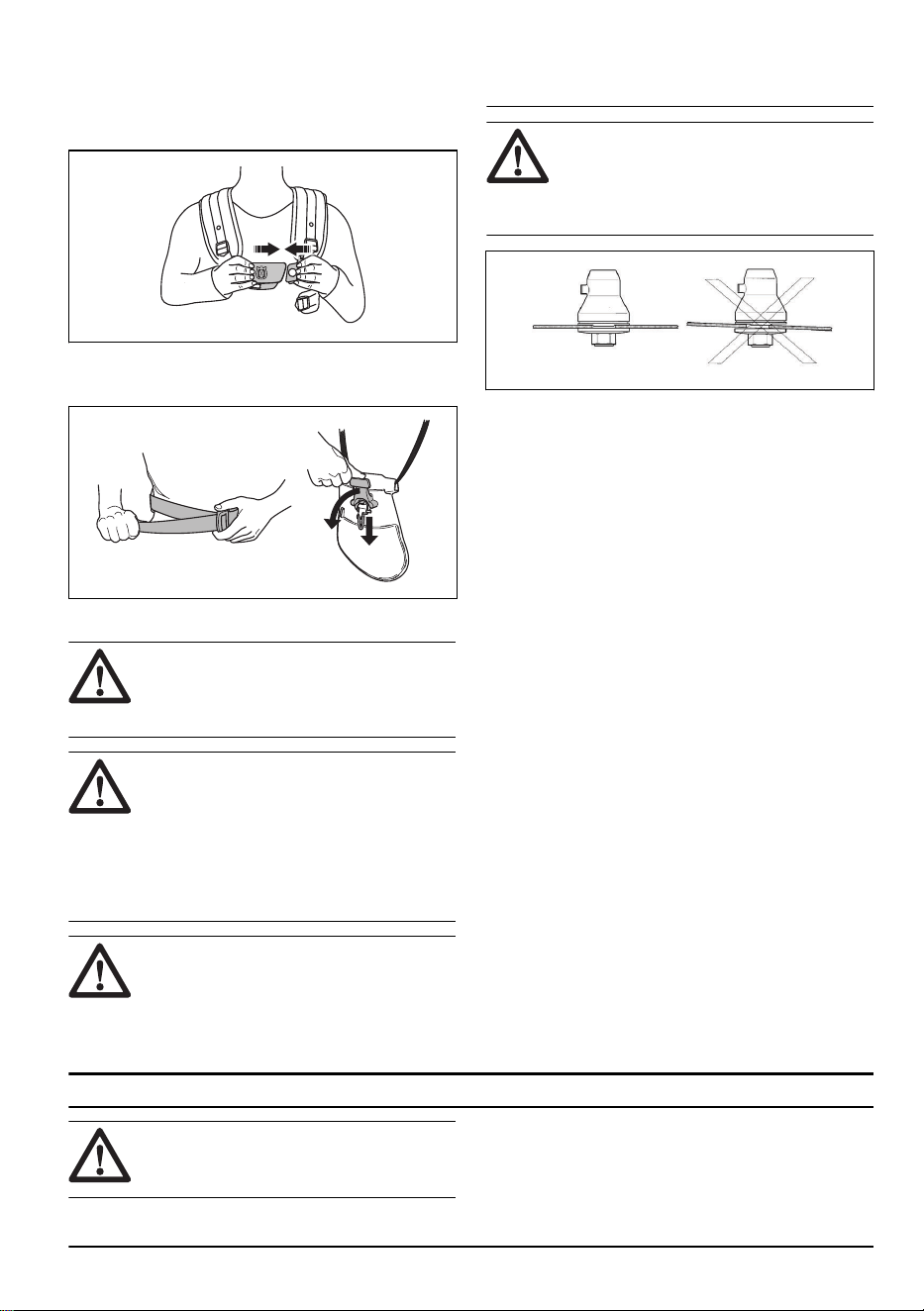
1. Stop the motor.
2. Do a visual check for damage for example, cracks.
3. Release and attach the quick release mechanism to
make sure that it operates correctly.
4. If the harness has a hip pad and a hip strap,
make sure that the quick release function operates
correctly.
Cutting attachment
WARNING: Remove the battery and
make sure that the cutting attachment stops
completely before you work on any part of
the cutting attachment.
WARNING: Use correct cutting
attachment. Only use the cutting attachment
with the guards we recommend, refer
to
Approved accessories on page 24
.
Make sure that the cutting attachment is
sharpened correctly. A cutting attachment
that is not sharpened correctly increases the
risk of blade thrust.
WARNING: An incorrectly sharpened
or damaged blade increases the risk of
accidents. Keep the teeth of the blade
correctly sharpened. Follow the instructions
and use the recommended file gauge.
WARNING: A coasting blade can
cause injury while it continues to spin after
the switch has been released. Need to
maintain proper control until the blade has
completely stopped rotating.
Wear protective gloves when the cutting attachment is
handled.
• Use the grass blade to cut coarse grass.
• Use the trimmer head to trim grass.
• Check the cutting attachment for damage or cracks.
Replace a damaged cutting attachment.
Trimmer head
• Always use the correct trimmer head, cutting
attachments and always use the recommended
trimmer line. Refer to
Approved accessories on page
24
and the assembly in the end of the Manual.
• Make sure that the cutter on the trimmer guard is not
damaged.
• Make sure that the trimmer line is wound tightly
and equally around the drum to prevent unusual
vibrations from the product. Different cord lengths
can result in vibrations that are not necessary. Tap
the trimmer head to get correct length on the cord.
To increase the life of the cord it can be soaked in water
for 2 days or more before assembly. This will make the
cord more resistant.
Grass blade
• Use correctly sharpened blades. An incorrectly
sharpened or damaged blade increases the risk of
injury.
• Use correctly set blades. Correct blade set is 1 mm.
An incorrectly set blade increases the risk of injury
and damage.
• To sharpen and set the blade correctly, refer to the
instructions that come with the blade.
Safety instructions for assembly
WARNING: Read, understand and
obey these instructions carefully before you
use the product.
• Remove the battery from the product before you
assemble the product.
• Use approved protective gloves.
757 - 009 - 31.05.2024 11
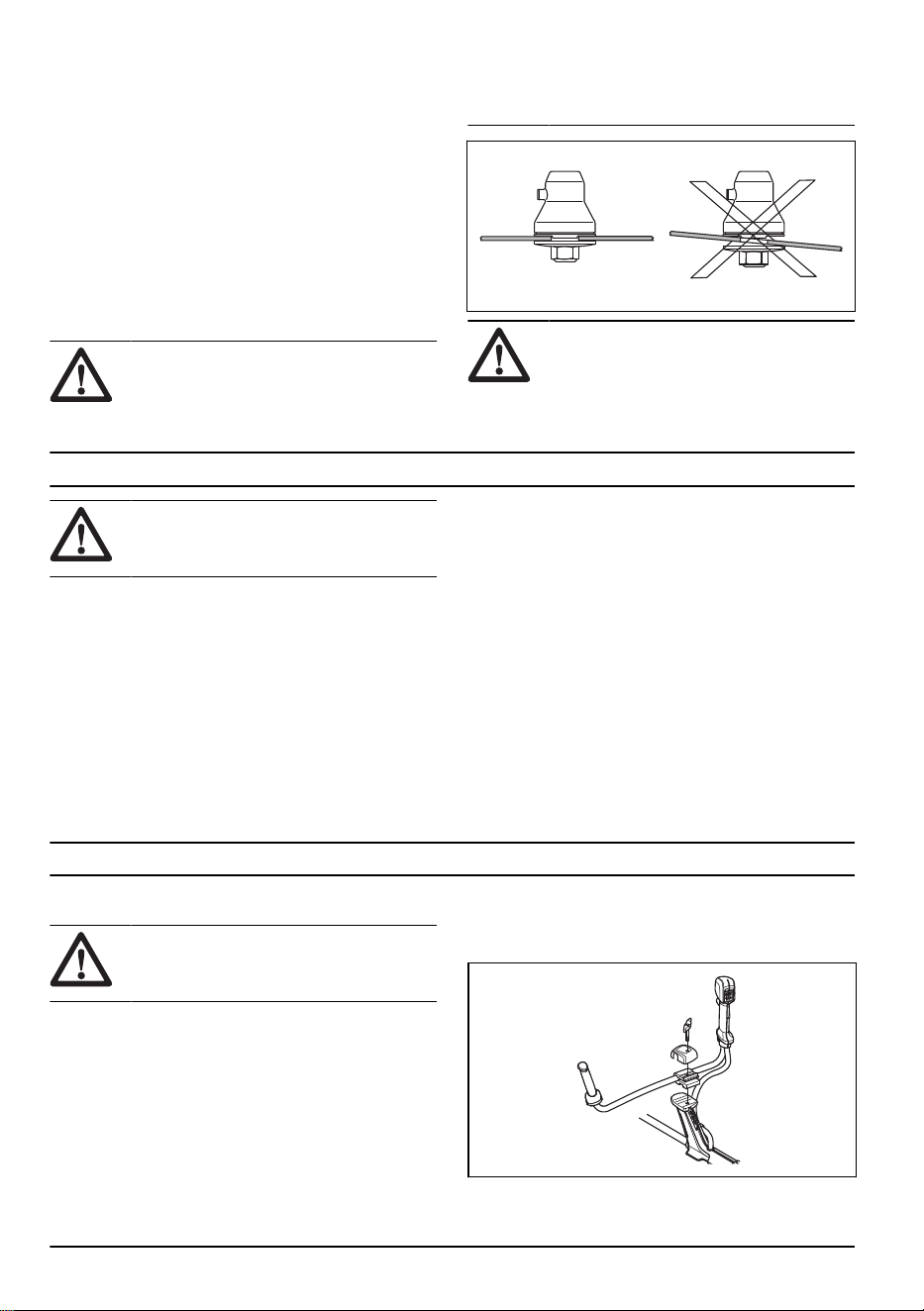
• A defective or incorrect guard can cause injury. Do
not use a cutting attachment that does not have an
approved guard attached.
• Make sure that you assemble the cover and shaft
correct before you start the product.
• The drive disc and support flange must engage
correctly in the centre hole of the cutting attachment.
A cutting attachment that is attached incorrectly can
cause injury or death.
• To operate the product safely and prevent injury
to the operator or other persons, the product must
always be attached correctly to the harness.
Assembly of blades and trimmer heads
WARNING: When you install the
cutting attachment it is very important that
the raised section on the drive disc/support
flange engages correctly in the centre hole
of the cutting attachment. If the cutting
attachment is install incorrectly it can result
in serious and/or fatal personal injury.
WARNING: Never use a cutting
attachment without an approved guard. See
the chapter on Technical data. If an incorrect
or faulty guard is fitted this can cause
serious personal injury.
Safety instructions for maintenance
WARNING: Read the warning
instructions that follow before you do
maintenance on the product.
• Remove the battery before you do maintenance,
other checks or assemble the product.
• The operator must only do the maintenance and
servicing shown in this operator's manual. Turn to
your servicing dealer for maintenance and servicing
of a larger extension.
• Do not clean the battery or the battery charger with
water. Strong detergent can cause damage to the
plastic.
• If you do not do maintenance, it decreases the
life cycle of the product and increases the risk of
accidents.
• Special training is necessary for all servicing and
repair work, especially for the safety devices on the
product. If not all checks in this operator's manual
are approved after you have done maintenance, turn
to your servicing dealer. We guarantee that there are
professional repairs and servicing available for your
product.
• Keep the teeth of the blade correctly sharpened.
Obey our recommendations. Also refer to the
instructions on the blade package.
• Only use original spare parts.
• Always use heavy duty gloves when you repair the
cutting attachment. The blades are very sharp and
can easily cause injuries.
Assembly
Introduction
WARNING: Read and understand the
safety chapter before you assemble the
product.
To assemble the handlebar
1. Remove the knob and attach the handlebar as given
in the illustration.
2. Tighten the knob lightly.
12 757 - 009 - 31.05.2024
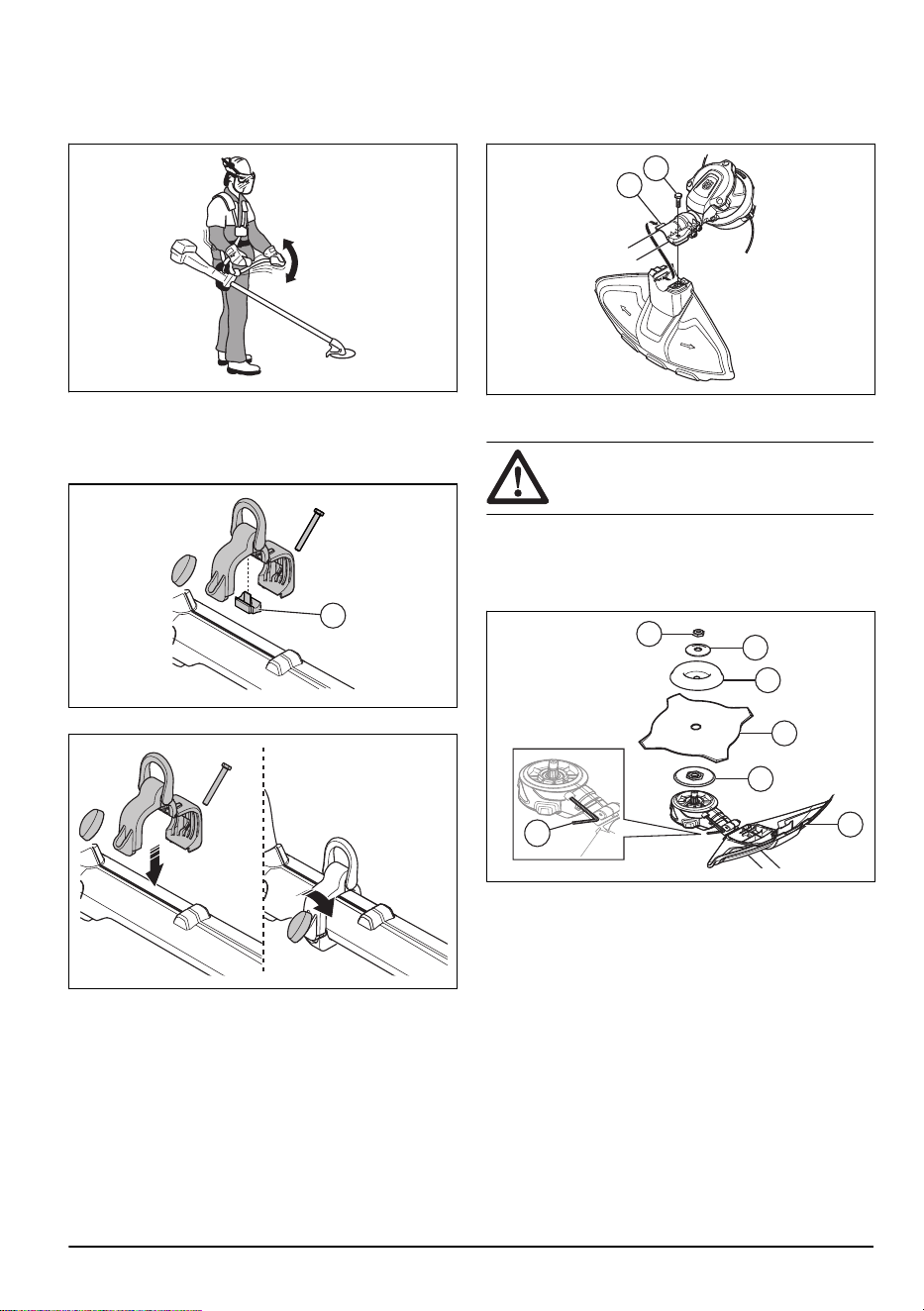
3. Put on the harness and hang the product from the
suspension point.
4. Adjust the handle to put the product in a good work
position.
5. Tighten the knob fully.
To assemble the loop hanger
1. Push the lock piece (A) into the loop hanger.
A
2. Put the loop hanger on the shaft.
3. Connect the ends of the loop hanger.
4. Install the bolt.
5. Put the knob on the bolt.
6. Tighten the knob.
To assemble the trimmer guard
1. Install the correct trimmer guard for the trimmer
head, refer to
Accessories on page 24
.
2. Hang the trimmer guard on the hook on the plate
holder (A).
3. Bend the trimmer guard around the shaft and attach
it with the bolt (B) on the opposite side of the shaft.
A
B
To assemble the blade
CAUTION: Only use the approved
blade guard for the blades. Refer to .
1. Put the gear of the product on a flat surface to make
sure that the blade is assembled correctly.
2. Attach the blade guard (A) onto the shaft, refer to
To
assemble the trimmer guard on page 13
.
A
B
D
E
F
G
C
3. Install the drive disc (B) on the output shaft.
4. Turn the output shaft until one of the holes in the
drive disc aligns with the related hole in the gear
housing.
5. Tighten the locking bolt (C) with the hex key to lock
the shaft.
6. Put the blade (D) and support cup (E) on the output
shaft.
7. Put the cup washer (F) on the output shaft.
757 - 009 - 31.05.2024
13
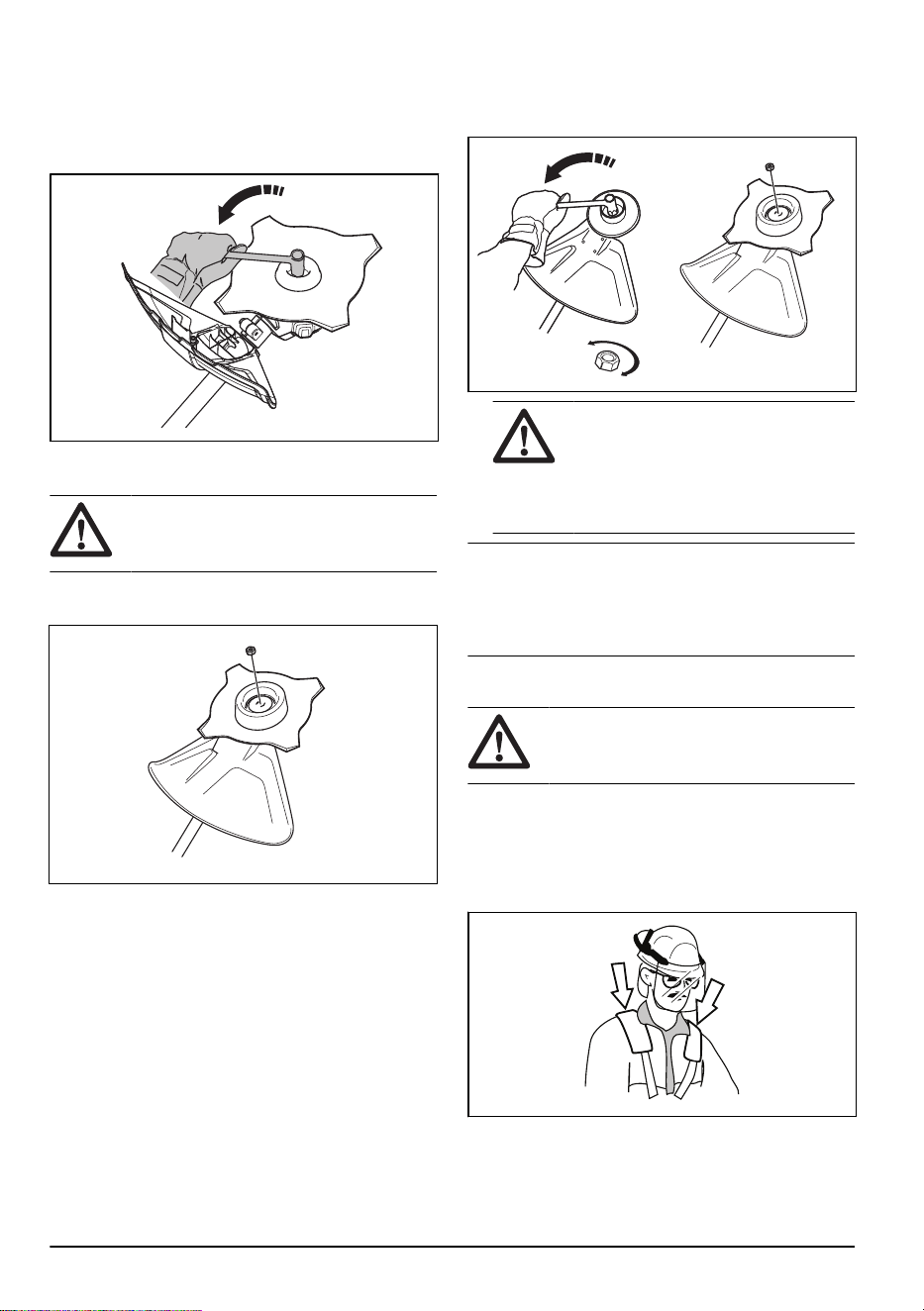
8. Install the locknut (G). Hold the shaft of the wrench
near the blade guard as much as possible. To
tighten the locknut, you must turn the wrench
counterclockwise which is the opposite direction of
rotation. Tighten the locknut to a torque of 35-50 Nm
(3.5-5 kpm).
To attach and remove the locknut
WARNING: Stop the engine, use
protective gloves and be careful around the
sharp edges of the cutting attachment.
A locknut is used to attach some types of cutting
attachments. The locknut has a left thread.
• To attach, tighten the locknut in the opposite
direction to the direction of rotation of the cutting
attachment.
• To remove the locknut, undo the locknut in the same
direction as the cutting attachment rotates.
• To loose and tighten the locknut, use a socket
spanner with a long shaft. The arrow in the picture
shows the area where you should operate the socket
spanner.
WARNING: When you loose and
tighten the locknut there is a risk of
injury from the teeth of the saw blade.
You should therefore always ensure that
your hand is shielded by the blade guard
when you do this.
Note: Make sure that you can not turn the locknut by
hand. Replace the nut if the nylon lining does not have
a resistance of a minimum of 1.5 Nm. The nut should
be replaced after it has been put on approximately 10
times.
To adjust the harness
WARNING:
The product must always
be correctly attached to the harness. Do not
use a damaged harness.
1. Put on the harness.
2. Connect the product to the harness.
3. Adjust the harness for the best work position.
4. Adjust the side straps to make the product weigh
equally on your shoulders.
5. Adjust the harness until the cutting attachment is
parallel to the ground.
14
757 - 009 - 31.05.2024
6. Let the cutting attachment lightly touch the ground.
Adjust the harness clamp to balance the product
correctly.
Note: If you use a grass blade, it must balance
approximately 10 cm /4 in above the ground.
Operation
Introduction
WARNING: Read and understand the
safety chapter before you use the product.
To examine the product before
operation
• Examine the motor for dirt and cracks. Use a brush
to remove grass and leaves from the engine. Wear
protective gloves when necessary.
• Make sure that the trimmer head is fully attached to
the product.
• Do the safety inspections, maintenance and
servicing that are given in this manual.
• Make sure that the product is not damaged. Examine
that all nuts and screws are tight.
• Make sure that there are no cracks on the blade.
Cracks usually occur when you make too sharp
corners at the bottom of the teeth while you sharpen
the blade. Cracks can also occur if you use the blade
with blunt teeth. Replace the blade if it is damaged.
• Examine the support flange for cracks. Replace the
support flange if it is damaged.
• Make sure that the locking force on the locknut is not
decreased. The locknut must have a locking force at
a minimum of 1.5 Nm. The tightening torque of the
locknut must be between 35-50 Nm.
• Examine the blade guard for damages or cracks.
Replace the blade guard if it has been hit or if it has
cracks. Do not use the product without a guard or a
defective guard.
• Examine the trimmer head and cutting attachment
guard for damages or cracks. Replace the trimmer
head and cutting attachment guard if they have been
hit or if they have cracks.
• Make sure that all covers, guards, handles and the
cutting equipment are correctly attached and not
damaged before you start the product.
757 - 009 - 31.05.2024
15
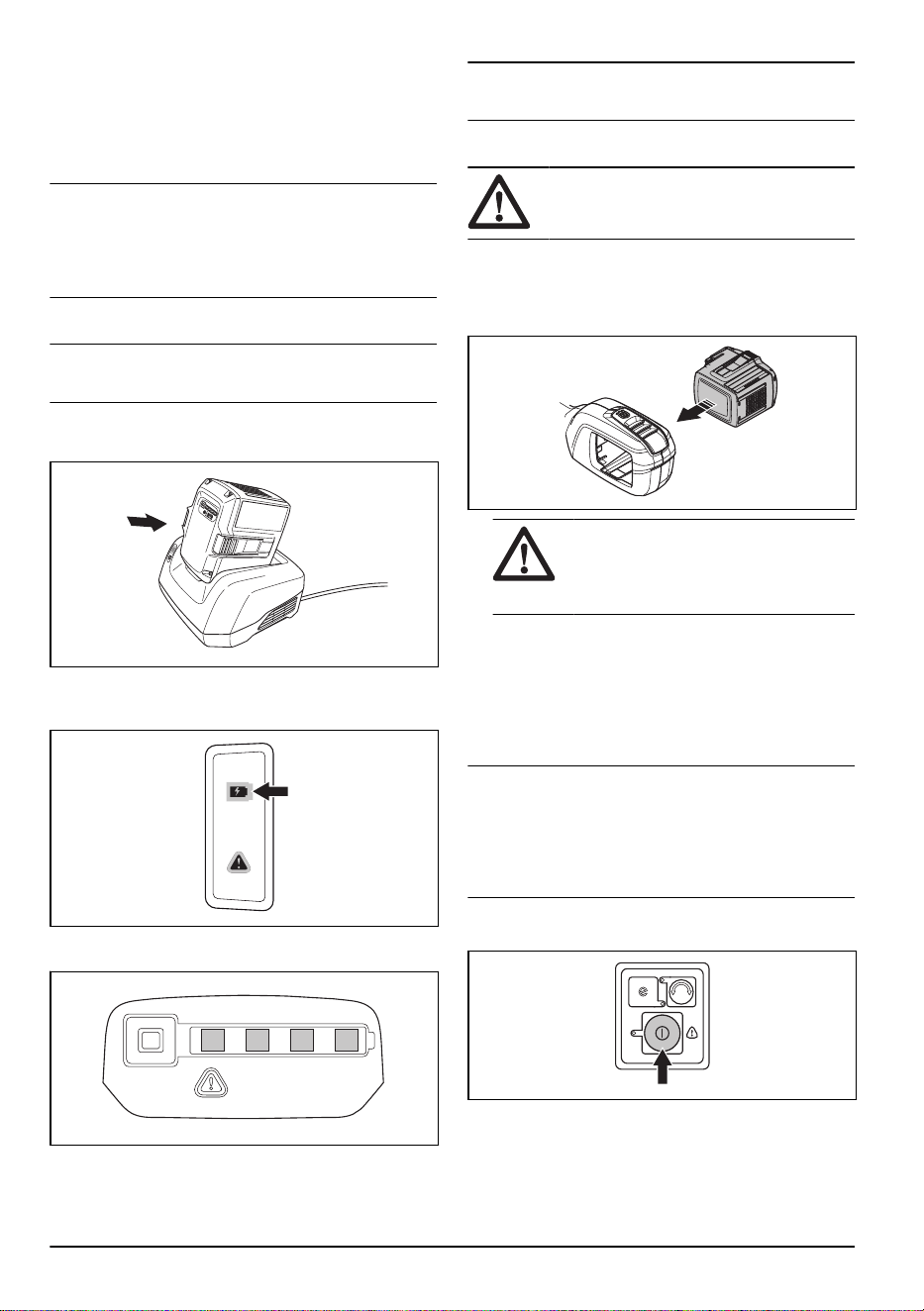
To connect the battery charger
1. Connect the battery charger to the voltage and
frequency that is specified on the rating plate.
2. Put the plug in a grounded socket outlet. The LED
on the battery charger flashes green one time.
Note: The battery does not charge if the battery
temperature is more than 50 °C/122 °F. If the
temperature is more than 50 °C/122 °F, the battery
charger makes the battery become cool before the
battery charges.
To charge the battery
Note: Charge the battery if it is the first time that you
use it. A new battery is only 30% charged.
1. Make sure that the battery is dry.
2. Put the battery in the battery charger.
3. Make sure that the green charging light on the
battery charger comes on. That means that the
battery is connected correctly to the battery charger.
4. When all LEDs on the battery come on, the battery is
fully charged.
5. To disconnect the battery charger from the mains
socket, pull the plug. Do not pull the cable.
6. Remove the battery from the battery charger.
Note:
Refer to the battery and battery charger
manuals for more information.
To connect the battery to the product
WARNING: Only use Husqvarna
original batteries with the product.
1. Make sure that the battery is fully charged.
2. Push the battery into the battery holder of the
product. The battery locks into position when you
hear a click.
CAUTION: If the battery does not
move easily into the battery holder, the
battery is not installed correctly. This can
cause damage to the product.
3. Make sure that the battery is installed correctly.
Battery information
Refer to the operator's manual of the battery for
information about how to use the battery.
To start the product
Note:
The product identifies the cutting attachment
when the cutting attachment is changed, is started and
the throttle is pressed. The product stops and the LED
flashes until the throttle is released and moves back to
its initial position. The cutting attachment is at this time
identified and prepared for operation.
1. Press and hold the start button until the green LED is
lit.
2. Use the power trigger to control the speed.
16
757 - 009 - 31.05.2024
To operate the product
Automatic shutdown function
The product has an automatic shutdown function that
stops the product if the product is not used. The green
LED for start/stop indication goes off and the product
stops after 120 seconds.
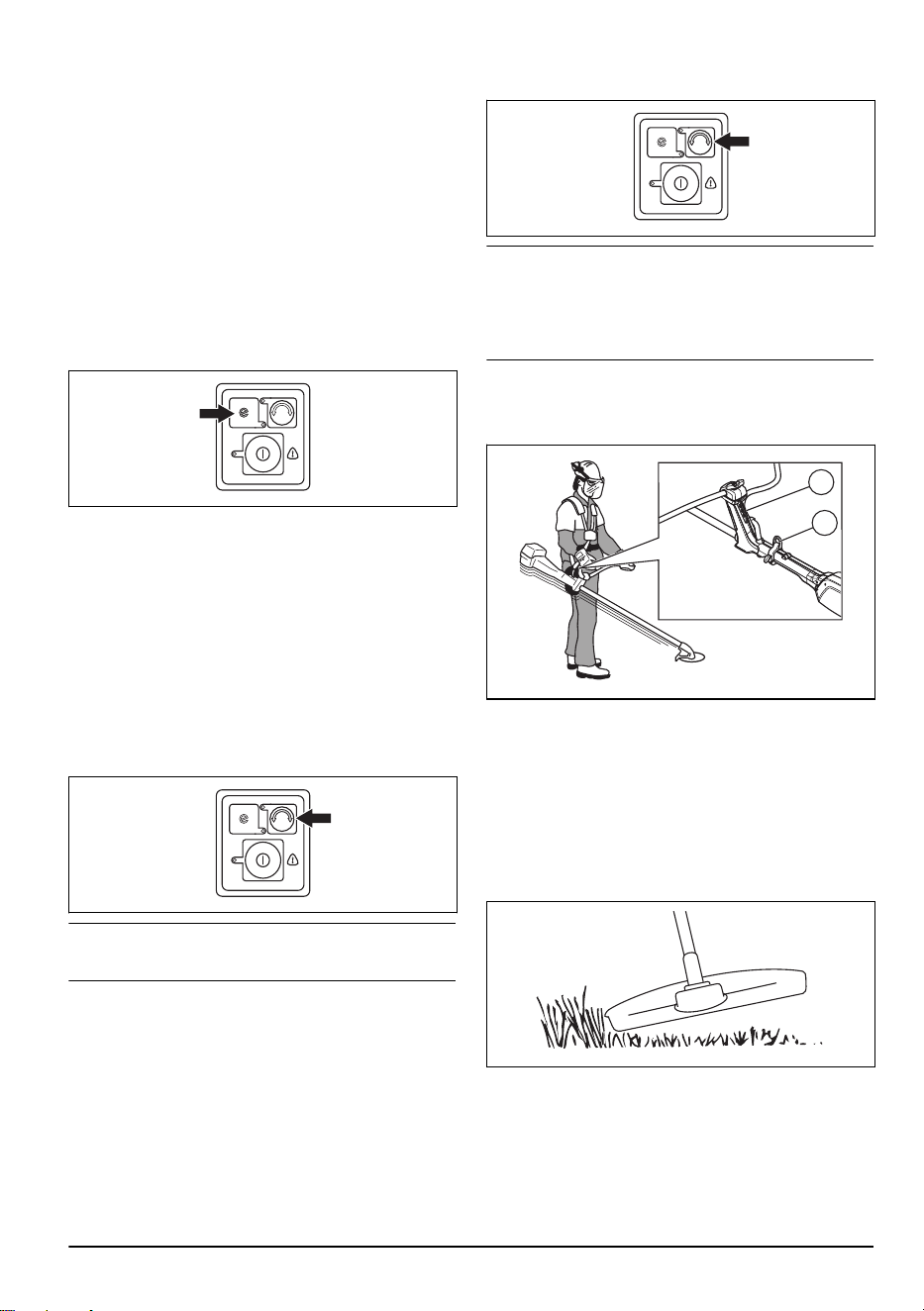
To start the SavE function
The product has a power saving function. The SavE
function gives the longest operation time from the
battery.
1. Push the SavE button to start the function. The
green LED comes on to show that the function is
on.
2. Push the SavE button again to stop the SavE
function.
To change the operation direction of the
trimmer head
It is possible to change the operation direction of the
trimmer head. This can be done at full speed or at stop
position. In the factory, the trimmer head is set to turn
clockwise. The green LED is off when the trimmer head
turns clockwise.
1. Push the operation direction button to make the
trimmer head turn counterclockwise. The green LED
is on when the trimmer head turns counterclockwise.
Note:
It is easier to tap out the trimmer line to make it
longer when the trimmer head turns clockwise.
To loosen cut material from the grass blade/grass cutter
If a grass blade/grass cutter is used, the rotation
direction is counterclockwise. A green LED shows that
the grass blade/grass cutter rotates counterclockwise.
Change rotation direction to clockwise to loosen the cut
material from the grass blade/grass cutter.
1. Push the rotation direction button to change the
rotation direction.
Note: When the rotation direction is changed to
clockwise, cut material is loosened from the grass blade/
grass cutter. The speed of the grass blade/grass cutter
decreases for a short period of time before it rotates
counterclockwise again.
To balance the product
• Connect the harness to the support hook (A) or the
loop hanger (B) on the product.
B
A
• Keep the cutting attachment parallel to the ground.
• The product is correctly balanced when the blade is
at cutting height near the ground.
To trim grass with a trimmer head
To trim the grass
1. Hold the trimmer head immediately above the
ground at an angle. Do not push the trimmer line
into the grass.
2. Decrease the length of the trimmer line by 10-12
cm / 4-4.75 in.
3. Decrease the engine speed to decrease the risk of
damage to plants.
757 - 009 - 31.05.2024
17
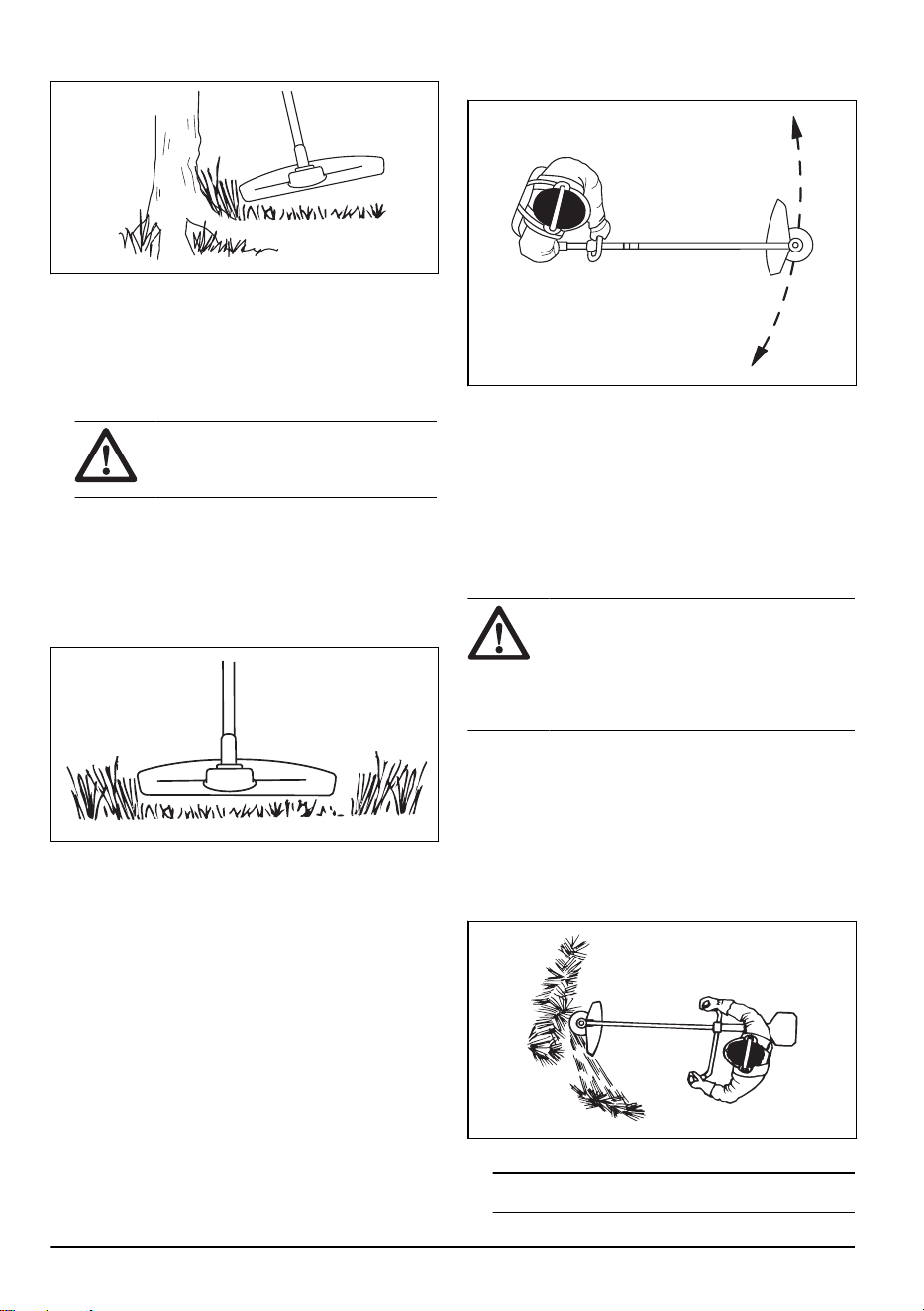
4. Use 80 % throttle when you cut grass near objects.
To clear grass
1. Keep the trimmer head above the ground.
2. Tilt the trimmer head.
3. Cut with the end of the trimmer line around objects in
the work area.
CAUTION: Cut grass. Other objects
that are hit by the trimmer line, increases
the wear on the trimmer line.
4. Use 80% speed when you cut and clear vegetation.
This decreases the wear on the trimmer head and
trimmer line.
To cut the grass
1. Make sure that the trimmer line is parallel to the
ground when you cut the grass.
2. Do not push the trimmer head to the ground. This
can cause damage to the product.
3. Move the product from side to side when you cut
grass. Use full speed.
To sweep the grass
The airflow from the rotating trimmer line can be used to
remove cut grass from an area.
1. Hold the trimmer head and the trimmer line parallel
to the ground and above the ground.
2. Apply full throttle.
3. Move the trimmer head from side to side and sweep
the grass.
WARNING: Clean the trimmer head
cover each time you assemble new trimmer
line to prevent unbalance and vibrations in
the handles. Also do a check of the other
parts of the trimmer head and clean it if
necessary.
To clear grass with a grass blade
1. Keep your feet apart during operation of the product.
Make sure feet are tightly against the ground.
2. Put the support cup lightly on the ground. This
prevents the blade from touching the ground.
3. Use a sideway movement from right to left for a clear
stroke. Use the left side of the blade (between 8 and
12 o'clock) to cut.
4. Angle the blade to the left when you clear grass.
Note:
The grass collects easily in a line.
18 757 - 009 - 31.05.2024
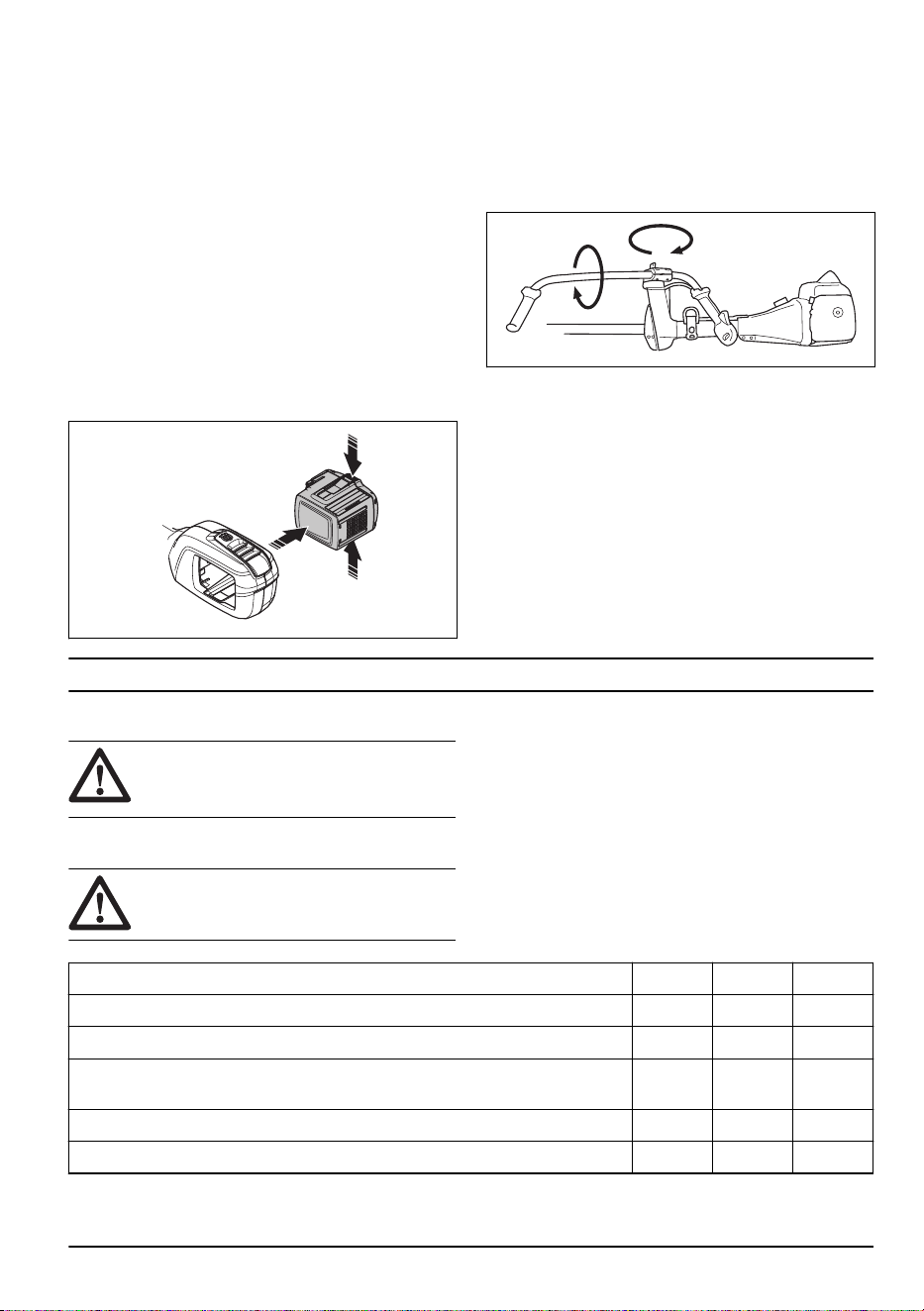
5. Use a sideway movement from left to right for the
return stroke.
6. Do the work rhythmically.
7. Move forward and keep feet tightly against the
ground.
8. Stop the engine.
9. Remove the product from the clip on the harness.
10. Put the product on the ground.
11. Collect the cut material.
To stop the product
1. Release the power trigger or the power trigger
lockout.
2. Push the start/stop button until the green LED is off.
3. Push the release buttons on the battery and pull the
battery out.
To set the handlebar in transport
position
1. Loosen the knob.
2. Turn the handlebar clockwise until the throttle handle
touches the battery.
3. Turn the handlebar around the shaft.
4. Tighten the knob.
Maintenance
Introduction
WARNING: Read and understand the
safety chapter before you do maintenance
on the product.
Maintenance schedule
WARNING: Remove the battery before
you do maintenance.
The following is a list of the maintenance steps that you
must do on the product. See
Maintenance on page 19
for more information.
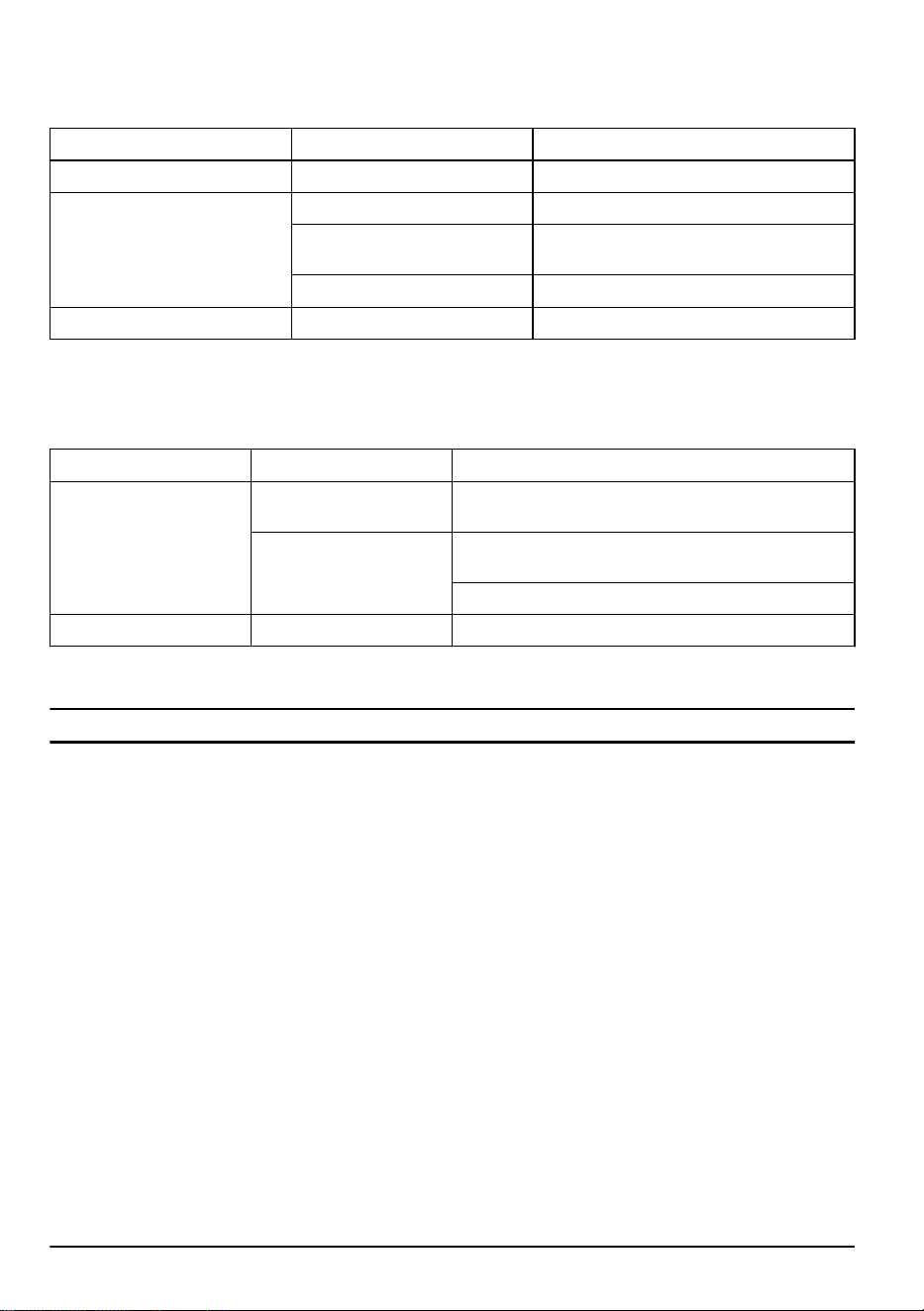
Maintenance Daily Weekly Monthly
Clean the external parts of the product with a dry cloth. Do not use water. X
Examine that the start and stop button works correctly and is not damaged. X
Make sure that the power trigger and the power trigger lockout function correctly
from a safety point of view.
X
Make sure that all controls work and are not damaged. X
Keep the handles dry, clean and free from oil and grease. X
757 - 009 - 31.05.2024 19
Maintenance Daily Weekly Monthly
Make sure that the cutting attachment is not damaged. Replace the cutting
attachment if it is damaged.
X
Make sure that the cutting attachment guard is not damaged. Replace the cut-
ting attachment guard if it is damaged.
X
Make sure that the screws and nuts are tight. X
Make sure that the battery release buttons on the battery works and locks the
battery in the product.
X
Examine that the battery charger is not damaged and function correctly. X
Make sure that the battery is not damaged. X
Make sure that the battery is charged. X
Make sure that the battery charger is not damaged. X
Examine all cables, couplings and connections. Make sure they are not dam-
aged and free from dirt.
X
Do a check of the connections between the battery and the product. Do a check
of the connection between the battery and the battery charger.
X
To examine the battery and the battery
charger
1. Examine the battery for damages, for example
cracks.
2. Examine the battery charger for damages, for
example cracks.
3. Make sure that the connection cord of the battery
charger is not damaged and that there are no cracks
in it.
To clean the product, the battery and
the battery charger
1. Clean the product with a dry cloth after use.
2. Clean the battery and battery charger with a dry
cloth. Keep the battery guide tracks clean.
3. Make sure that the terminals on the battery and the
battery charger are clean before the battery is put in
the battery charger or the product.
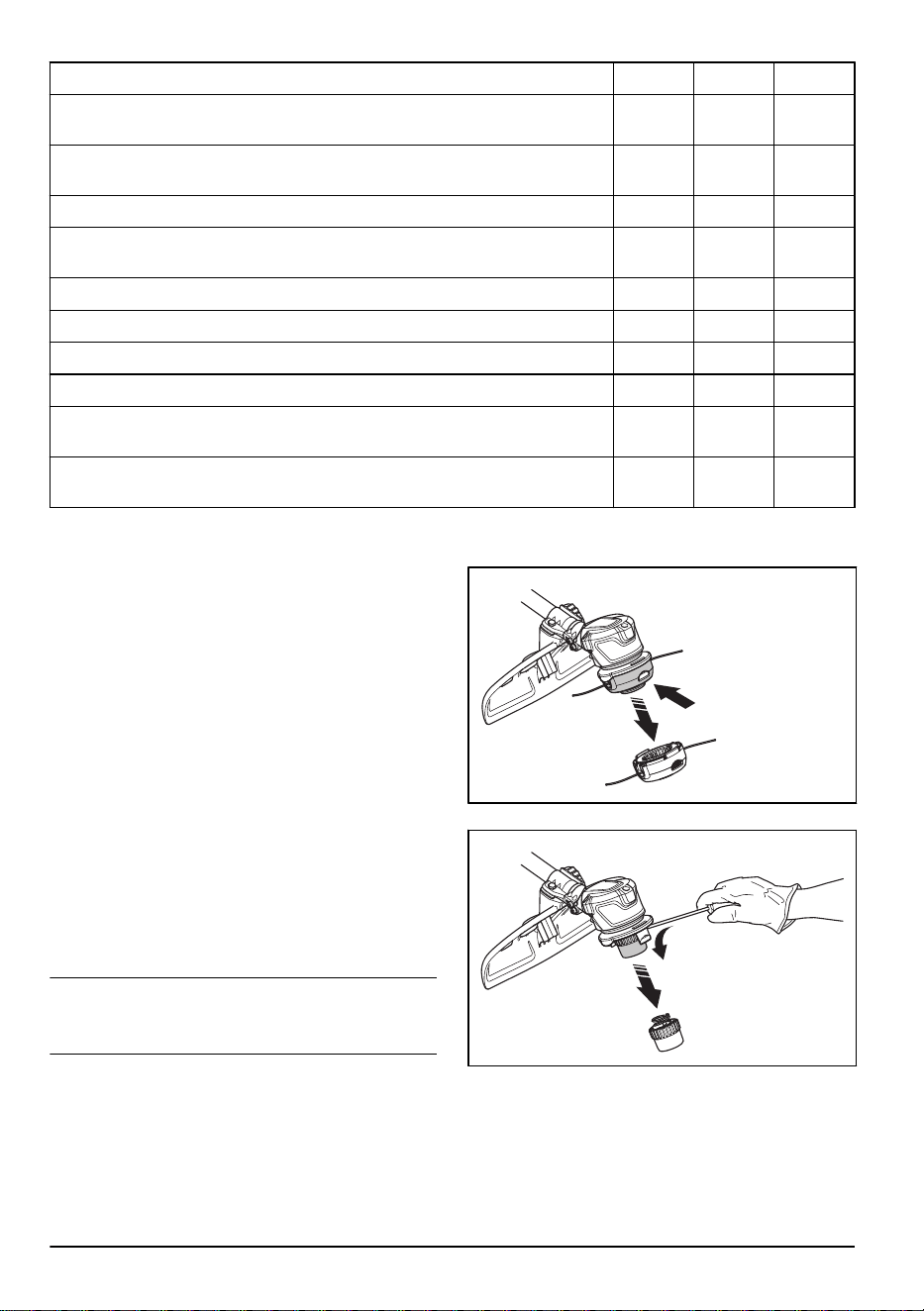
To replace the trimmer head
Note: To increase the life of the cord it can be soaked
in water for a couple of days before it is assembled. This
will make the cord tougher.
1. Press the snap-in clips on the trimmer head and
remove the trimmer head and trimmer line.
2. Pull out the line chute assembly.
20 757 - 009 - 31.05.2024
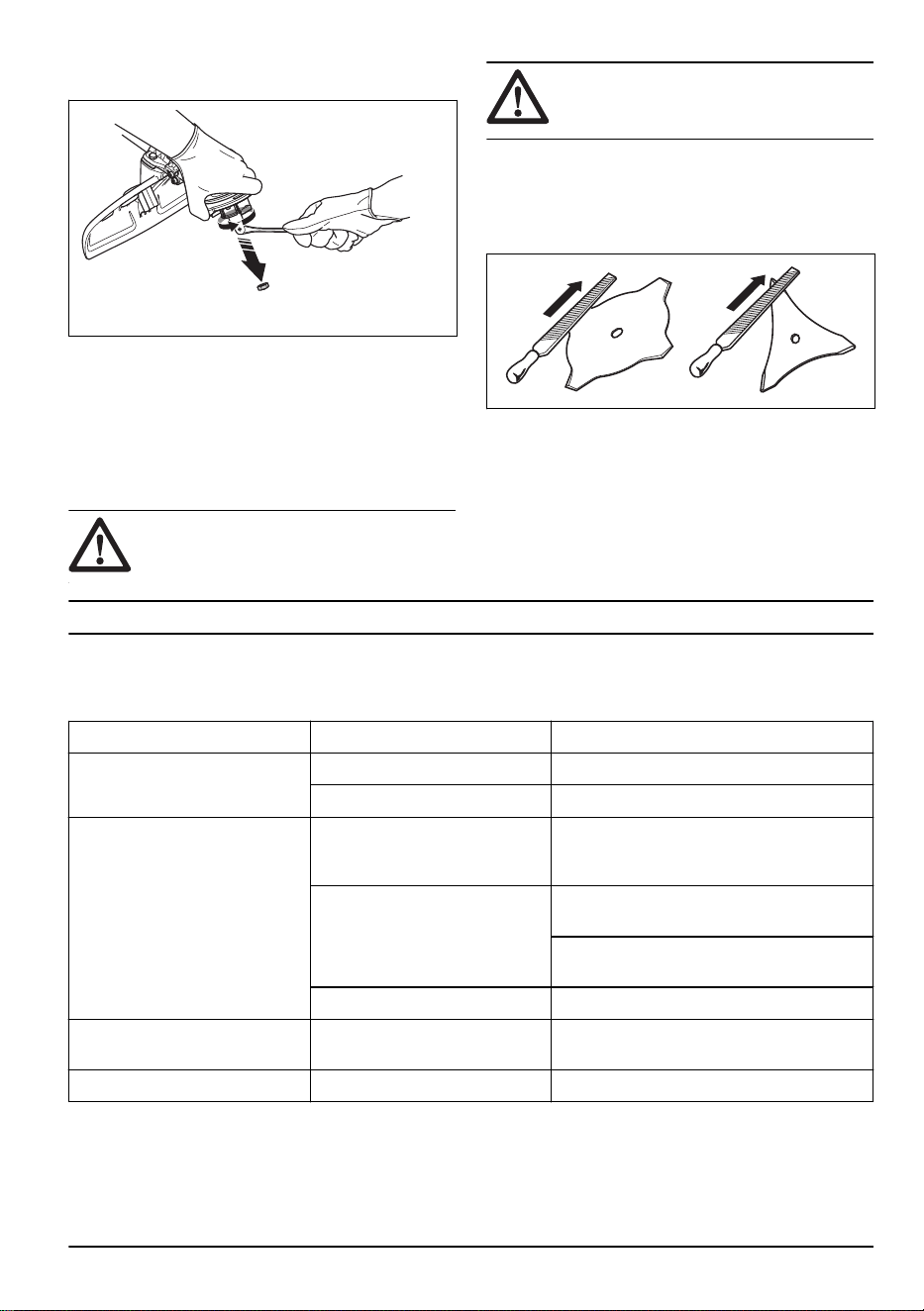
3. Remove the nut that holds the trimmer head and the
drive disc.
4. Replace the trimmer head.
5. Install the nut.
6. Install the line chute assembly.
7. Install the trimmer head.
To sharpen the grass knife and grass
blade
WARNING: Stop the product. Use
protective gloves.
WARNING: Always discard a blade
that is damaged. Do not try to make a bent
or twisted blade straight and use it again.
• To sharpen the grass knife or grass blade correctly,
refer to the instructions that come with the cutting
attachment.
• Sharpen all edges equally to keep the balance.
• Use a single-cut flat file.
Troubleshooting
Keypad
LED display Possible faults Possible action
Green activate LED flashing. Low battery voltage. Charge the battery.
Identifying the cutting tool. Release the throttle.
Red error LED flashing. The power trigger and the acti-
vate button are pressed at the
same time.
Release the power trigger and the product is
active.
Overload. The cutting attachment is jammed. deacti-
vate the product.
Remove the battery. Clean the cutting at-
tachment from unwanted materials.
Temperature deviation. Let the product cool down.
The product does not start. Dirt in the battery connectors. Clean the battery connectors with com-
pressed air or a soft brush.
Error LED is lit with red light. The product needs servicing. Contact your servicing agent.
757 - 009 - 31.05.2024 21
Battery
Problem Possible faults Possible solution
Green LED flashes. Low battery voltage. Charge the battery.
Red error LED flashes. The battery is empty. Charge the battery.
Temperature deviation. Use the battery in temperatures between
-10°C (14°F) and 40°C (104°F).
Overvoltage. Remove the battery from the battery charger.
Red error LED comes on. Cell difference is to much (1V). Speak to your servicing dealer.
Battery charger
LED display
Possible faults Possible action
Error LED flashes Temperature deviation. Use the battery charger in temperatures between 5°C
(14°F) and 40°C (104°F).
Overvoltage. Make sure that the mains voltage is the same as the
shown voltage value on the rating plate on the product.
Remove the battery from the battery charger.
Error LED comes on Speak to your service agent.
Transportation, storage and disposal
Transportation and storage
• The supplied Li-ion batteries obey the Dangerous
Goods Legislation requirements.
• Obey the special requirement on package and labels
for commercial transportation, including by third
parties and forwarding agents.
• Speak to a person with special training in dangerous
material before you send the product. Obey all
applicable national regulations.
• Use tape on open contacts when you put the battery
in a package. Put the battery in the package tightly
to prevent movement.
• Remove the battery for storage or transportation.
• Put the battery and the battery charger in a space
that is dry and free from moisture and frost.
• Do not keep the battery in an area where static
electricity can occur. Do not keep the battery in a
metal box.
• Put the battery in storage where the temperature is
between 5°C/41°F and 25°C/77°F and away from
open sunlight.
• Put the battery charger in storage where the
temperature is between 5 °C/41 °F and 45°C/113°F
and away from open sunlight.
• Use the battery charger only when the surrounding
temperature is between 5°C/41°F and 40°C/104°F.
• Charge the battery 30% to 50% before you put it in
storage for long periods.
• Put the battery charger in storage in a space that is
closed and dry.
• Keep the battery away from the battery charger
during storage. Do not let children and other not
approved persons to touch the equipment. Keep the
equipment in a space that you can lock.
• Clean the product and do a full servicing before you
put the product in storage for a long time.
• Use the transportation guard on the product to
prevent injuries or damage on the product during
transportation and storage.
• Attach the product safely during transportation.
22 757 - 009 - 31.05.2024
Disposal of the battery, battery charger
and product
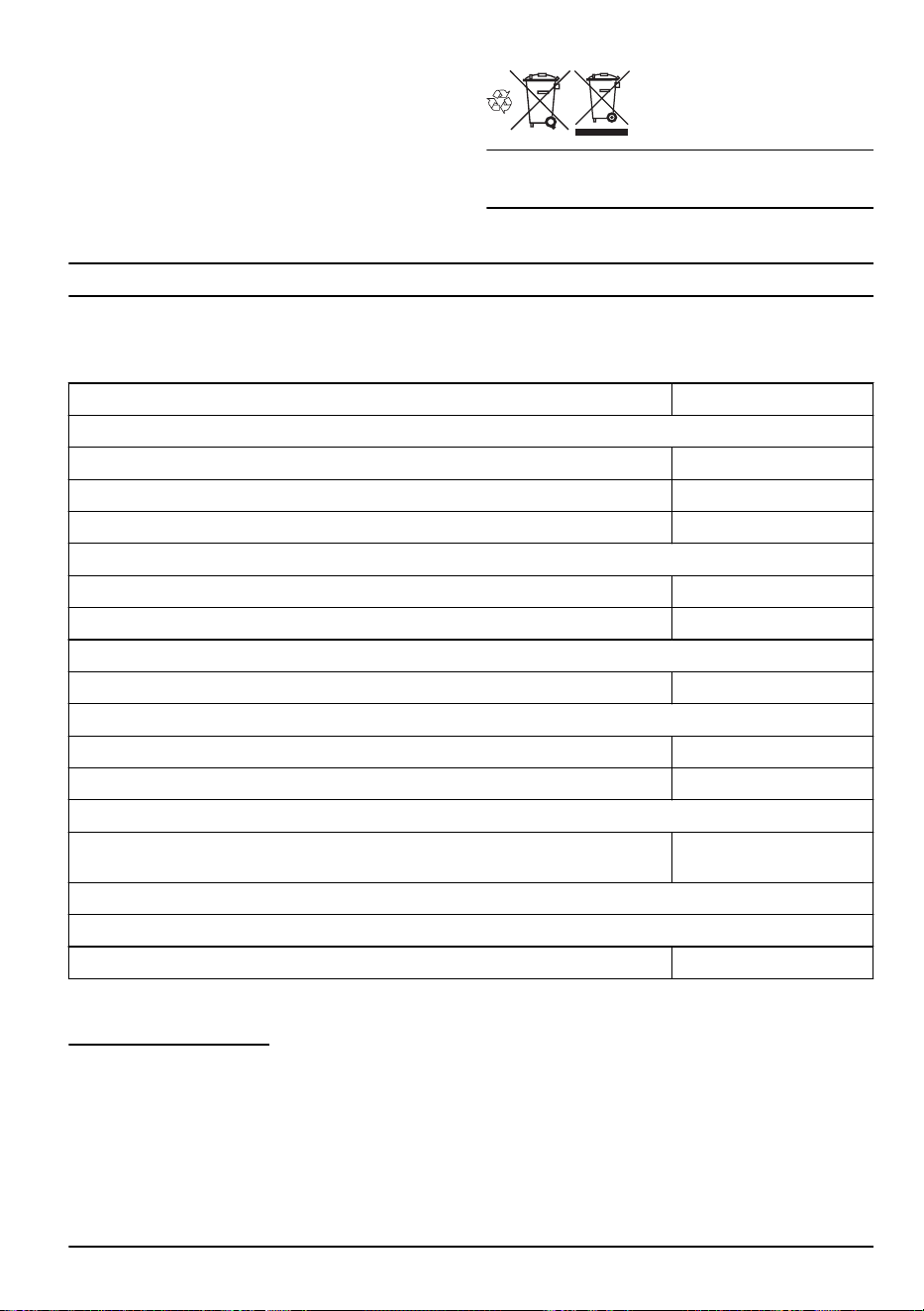
The symbol below means that the product is not
domestic waste. Recycle it at a recycling station
for electrical and electronic equipment. This helps to
prevent damage to the environment and to persons.
Speak to local authorities, domestic waste service or
your dealer for more information.
Note: The symbol shows on the product or package of
the product.
Technical data
Technical data
520iRX
Motor
Motor type BLDC (brushless) 36 V
Speed of output shaft, rpm 5500
Cutting width, mm 400
Weight
Weight without battery, kg 3.8
Weight with battery, kg 5.1
Water protection level
IPX4
1
Yes
Noise emissions
2
Sound power level, measured dB (A) 86
Sound power level, guaranteed L
WA
dB (A) 89
Noise levels
3
Equivalent sound pressure level at the operator's ear, measured according to EN ISO
60335-2-91 and ISO 22868, dB (A):
80
Vibration levels
4
Vibration levels at handles, measured according to ISO 22867, m/s
2
Equipped with trimmer head (original), left/right 1.2/0.7
1
The Husqvarna Handheld Battery products marked with IPX4 fulfils these requirements on product approval
level
2
Noise emissions in the environment measured as sound power (L
WA
) in conformity with EC directive 2000/14/
EC. The difference between guaranteed and measured sound power is that the guaranteed sound power also
includes dispersion in the measurement result and the variations between different machines of the same
model according to Directive 2000/14/EC.
3
Reported data for equivalent sound pressure level for the product has a typical statistical dispersion (standard
deviation) of 3 dB (A).
4
Reported data for vibration level has a typical statistical dispersion (standard deviation) of 2 m/s
2
.
757 - 009 - 31.05.2024 23
520iRX
Equipped with grass blade (original), left/right 3.1/2.1
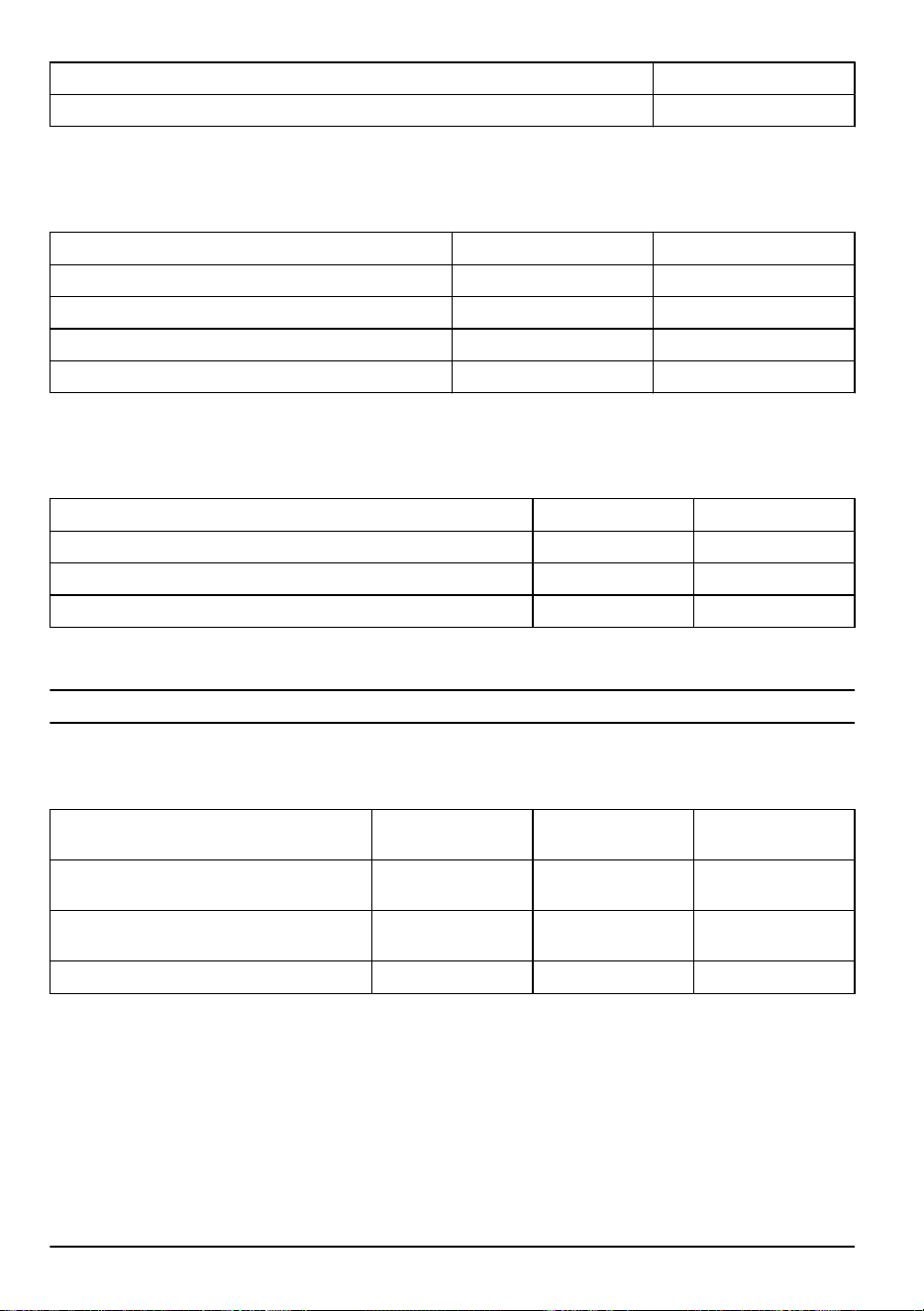
Approved batteries
Battery BLi200 40-B220X
Type Lithium-ion Lithium-ion
Battery capacity, Ah 5.2 6.0
Nominal voltage, V 36 36
Weight, kg (lb) 1.3 (2.9) 1.4 (3.1)
Approved battery chargers
Battery charger
QC330 QC500
Input voltage, V 100-240 100-240
Frequency, Hz 50-60 50-60
Power, W 330 500
Accessories
Approved accessories
Approved accessory
Type Cutting attachment
guard, No
Article number
Trimmer head T25B (Ø 2.0 mm - Ø
2.4 mm Whisper line)
577 01 83-03
Grass blade/Grass cutter Grass blade 255-4 (Ø
255 4-teeth)
577 01 83-03
Loop hanger 590 28 23-01
24 757 - 009 - 31.05.2024
Declaration of Conformity
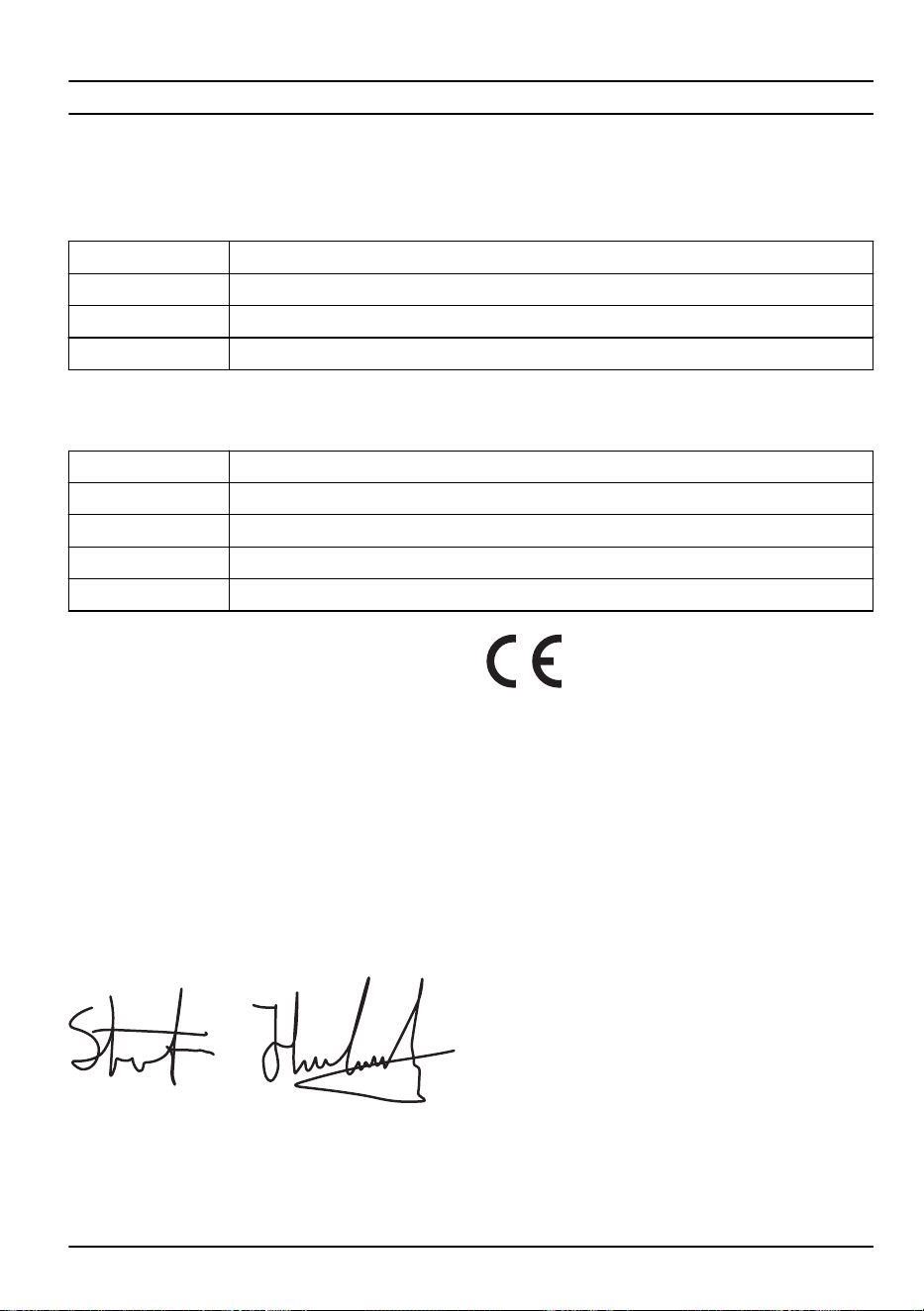
EU Declaration of conformity
We, Husqvarna AB, SE-561 82 Huskvarna, Sweden, tel:
+46-36-146500, declare on our sole responsibility that
the product:
Description Battery-operated Grass Trimmer
Brand Husqvarna
Type / Model 520iRX
Identification Serial numbers dating from 2023 and onwards
complies fully with the following EU directives and
regulations:
Directive/Regulation Description
2006/42/EC "relating to machinery"
2014/30/EMC ”relating to electromagnetic compatibility”
2011/65/EU “relating to restriction of hazardous substances”
2000/14/EC "relating to outdoor noise"
and that the following standards and/or technical
specifications are applied: EN 62841-1:2015+A11:2022,
IEC 62841-4-4:2020, EN ISO 11806-1: 2022, EN ISO
11806-1: 2022, EN 55014-1:2017+A11:2020 (Emission),
EN 55014-2:1997+A1:2001+A2:2008 (Immunity), EN
IEC 63000:2018.
SMP Svensk Maskinprovning AB, Box 4053, SE-904
32 Umeå, Sweden has performed a voluntary type
examination according to annex IX of 2006/42/EC.
Certificate no. SEC/24/2592
Notified body 0404, SMP Svensk Maskinprovning AB
has also verified compliance with annex VI of the
council's directive 2000/14/EC.
For information relating to noise emission, refer to
Technical data on page 23
.
Huskvarna, 2024-05-25
Stefan Holmberg, R&D Director, Technology
Management, Husqvarna AB
Responsible for technical documentation
757 - 009 - 31.05.2024 25
Declaration of conformity
We, Husqvarna AB, SE-561 82 Huskvarna, Sweden, tel:
+46-36-146500, declare on our sole responsibility that
the product:
Description Battery-operated Grass Trimmer
Brand Husqvarna
Type / Model 520iRX
Identification Serial numbers dating from 2023 and onwards
complies fully with the following UK regulations:
Regulations
The Supply of Machinery (Safety) Regulations 2008
Electromagnetic Compatibility Regulations 2016
The Restriction of the Use of Certain Hazardous Substances in Electrical and Electronic Equipment Regulations
2012
The Noise Emission in the Environment by Equipment for use Outdoors Regulations 2001
and that the following standards and/or technical
specifications are applied: EN 62841-1:2015+A11:2022,
IEC 62841-4-4:2020, EN ISO 11806-1: 2022, EN ISO
11806-1: 2022, EN 55014-1:2017+A11:2020 (Emission),
EN 55014-2:1997+A1:2001+A2:2008 (Immunity), EN
IEC 63000:2018.
Approved body: 0888, HORIBA MIRA Certification Ltd.
Watling Street, Nuneaton, Warwickshire, CV10 0TU,
UK has certified conformity with the Outdoor Noise
Regulations of 2001, conformity assessment procedure:
Schedule 9.
For information relating to noise emissions, refer to
Technical data on page 23
.
Huskvarna, 2024-05-25
Stefan Holmberg, R&D Director, Technology
Management, Husqvarna AB
Responsible for technical documentation
UK Importer:
Husqvarna UK Ltd
Preston Road, Co. Durham
DL5 6UP
26 757 - 009 - 31.05.2024

757 - 009 - 31.05.2024 27

www.husqvarna.com
Original instructions
1143939-26
2024-06-09