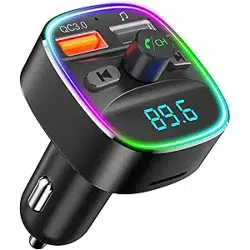
QC 3.0
2.4A
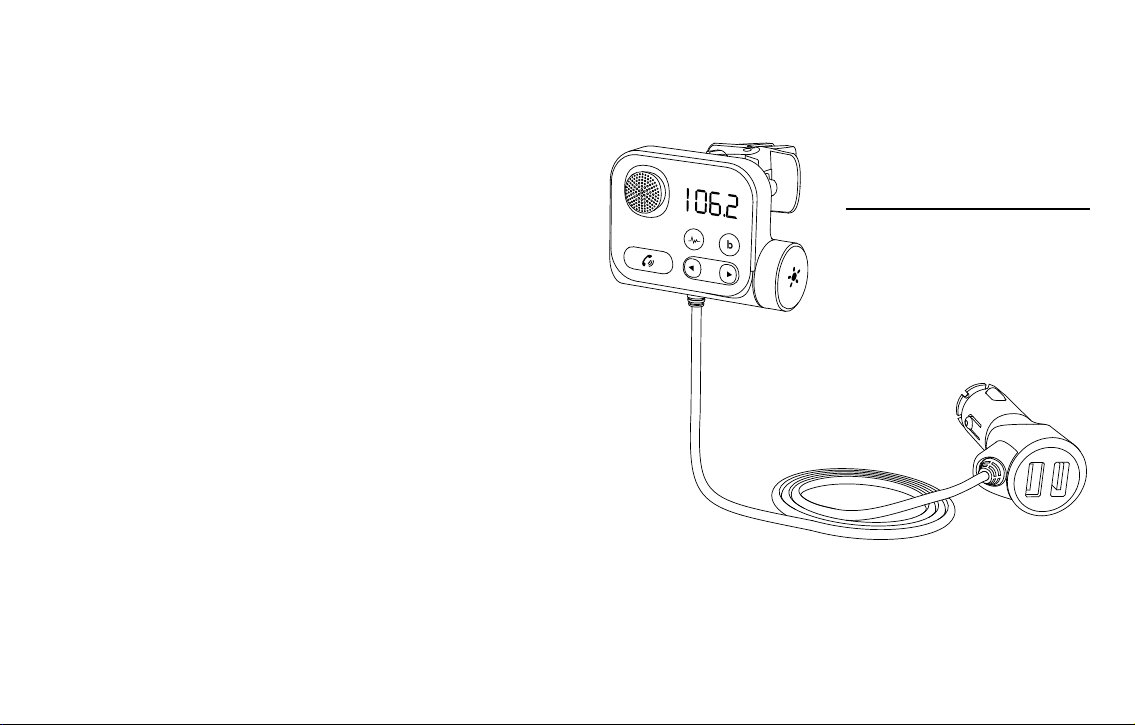
KM21
FM Transmitter
- Ensure high quality talking
while freeway driving
+ With QC3.0 fast charging
+ With 2.4A charging
User Manual
Welcome to Nulaxy,
if you have any questions, please just send
it to s upport@n ulaxy.com
We'll respond within 24-48 hours.
www.nulaxy.com
- 01 -
English
--------------------
Deutsche --------------------
Italiano --------------------
Español --------------------
Français --------------------
01-09
10-19
20-29
30-39
40-50
Contents
UK/US/CA
QC 3.0
2.4A
1
4
8
2
7
5
9
10
3
6

- 02 - - 03 -
Features
• Adjust the local channel to the car radio channel to be consistent, which can realize SD
card music transmission to car speakers and solve the battery life charging of mobile
phones and other smart devices. Bluetooth hands-free call function can be realized
through car audio by connecting Bluetooth with mobile phones. Turning on the noise
canceling button during high-speed operation can eliminate road noise, wind noise,
environmental noise, etc., and realize your high-denition call experience.
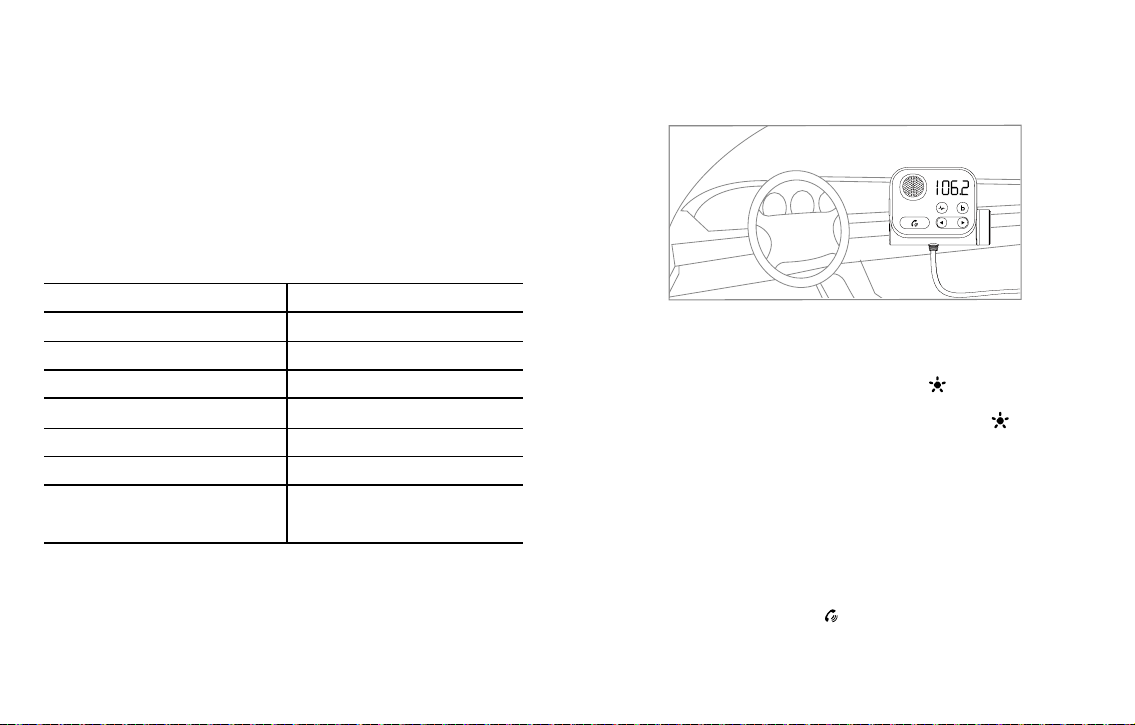
Product installation
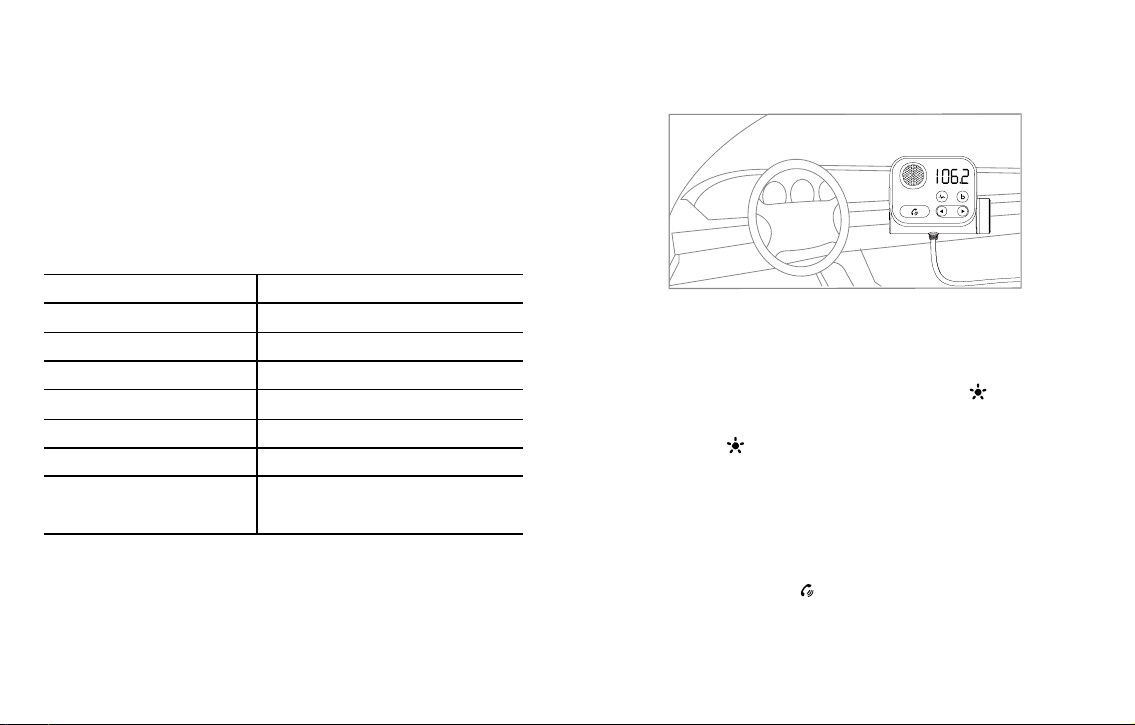
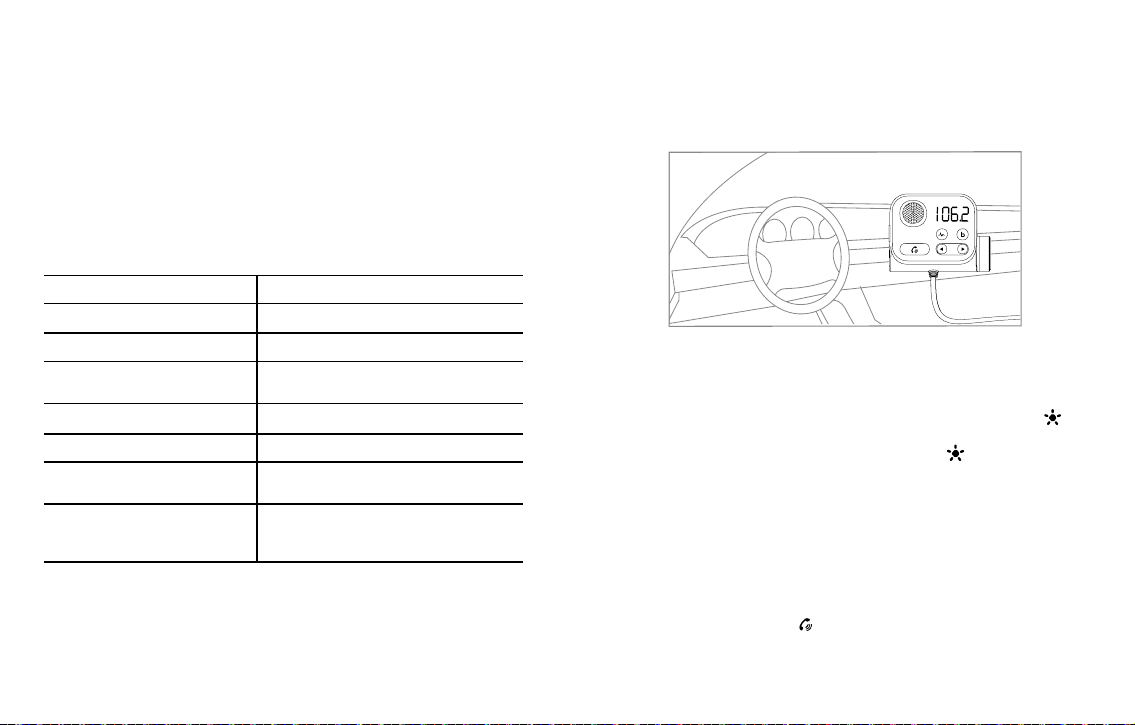
1. Put the threaded knob on the end of the air outlet bracket.
2. Insert the set of air outlet bracket into the round hole at the back of the main unit.
3. Tighten the thread.
4. Open the air outlet bracket and insert it into the car air-conditioning air outlet grille,
tighten the screws to the best strength, adjust the angle of the machine, and then use it.
Parameter
Wireless version V5.0
Product name KM21
Effective distanc 5m
Memory card format and capacity Micro SD card, support 64G
FM frequency range 87.5-108.0MHZ(UK) ;88.1-107.9MHz (US&CA)
Compatible audio format MP3.WMA.WAV.FLAC, APE
Compatible with Bluetooth protocol A2DP/AVRCP/HSP/HFP
Orange fast charging port
supports QC3.0 Protocol (DC 3.6-6.5V/3A,
6.5-9V/2A, 9-12V/1.5A)
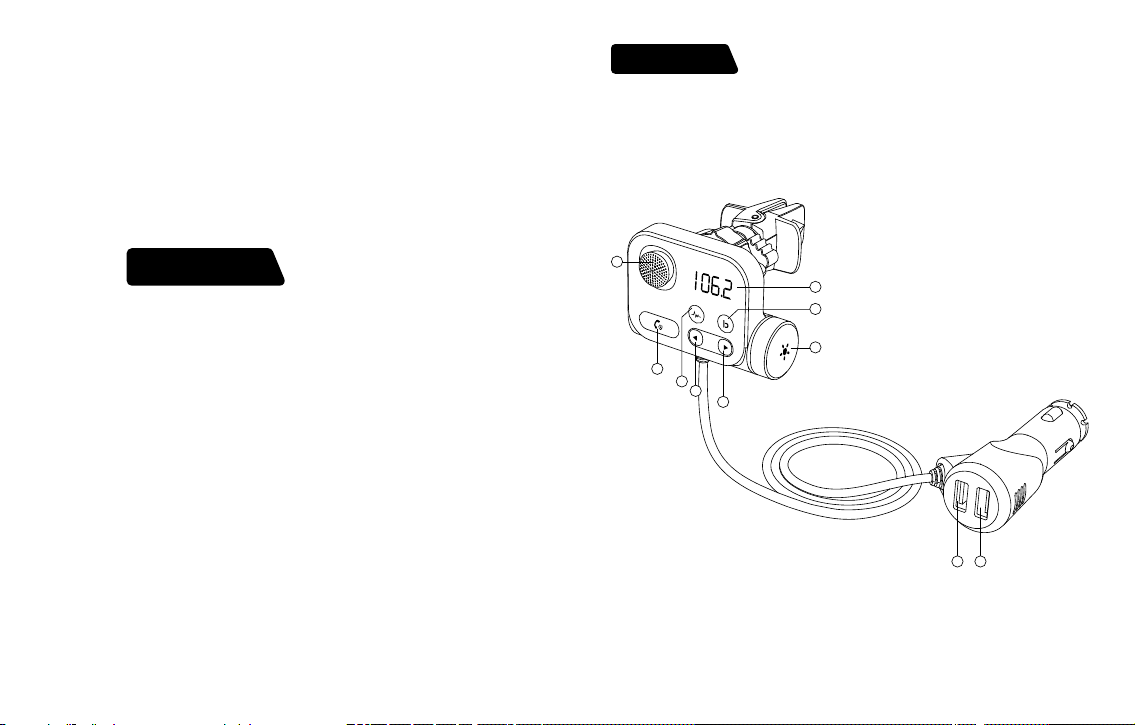
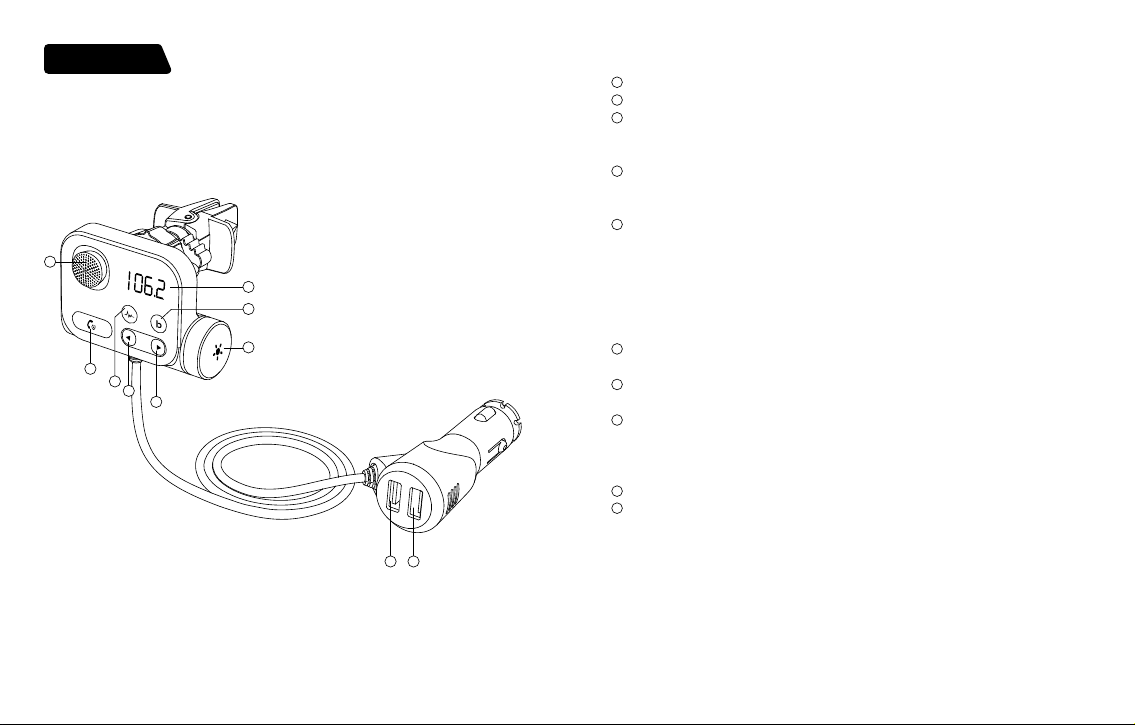
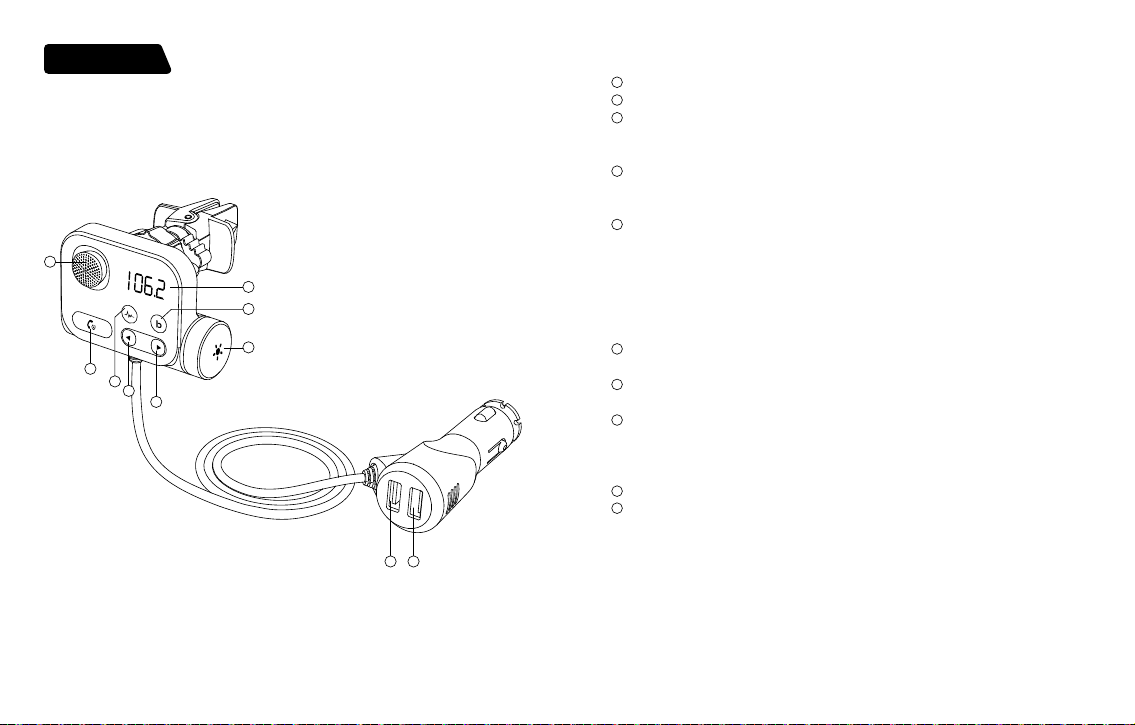
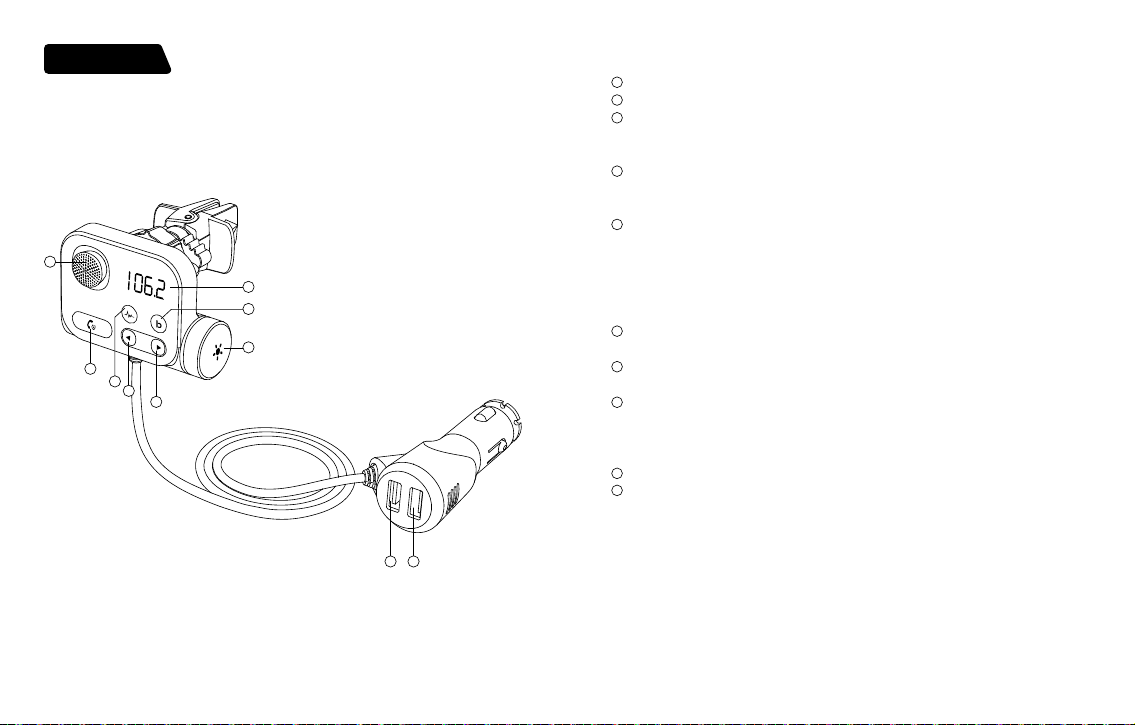
Product Diagram
Packaging accessories
1
Microphone
2
The display screen
3
Combination function
a.Noise canceling button
b. Long press for 3S to tap to start Siri&google
4
Combination function
a. Bass booster button
b. Long press 3S to Switch audio source
5
Phone buttons: play/pause/answer/hang up/Adjust FM frequency
* Music mode: short press to play/pause
*I ncoming call mode: short press to answer; long press: reject
* During a call: short press to hang up; long press: transfer to a private call
* Long press 2S: enter FM mode
6
Music mode: previous song
long press Songs fast back
7
Music mode: next song
long press Songs fast forward
8
press to turn off the ambient light
Press and hold for 3 seconds to shut down
Knob:*turn left to volume V-, turn right to volume V+
*enter FM mode: rotate CH- to the left and CH+ to the right
9
QC3.0 fast charging port (DC3.5-6.5V/3A, 6.5-9V/2A, 9-12V/1.5A)
10
2.4A charging port
• FM transmitter*1
• Instruction manual*1
• Air outlet bracket*1
• 3.5MM audio cable*1
• 4A fuse*1
- 04 - - 05 -
Power on/off
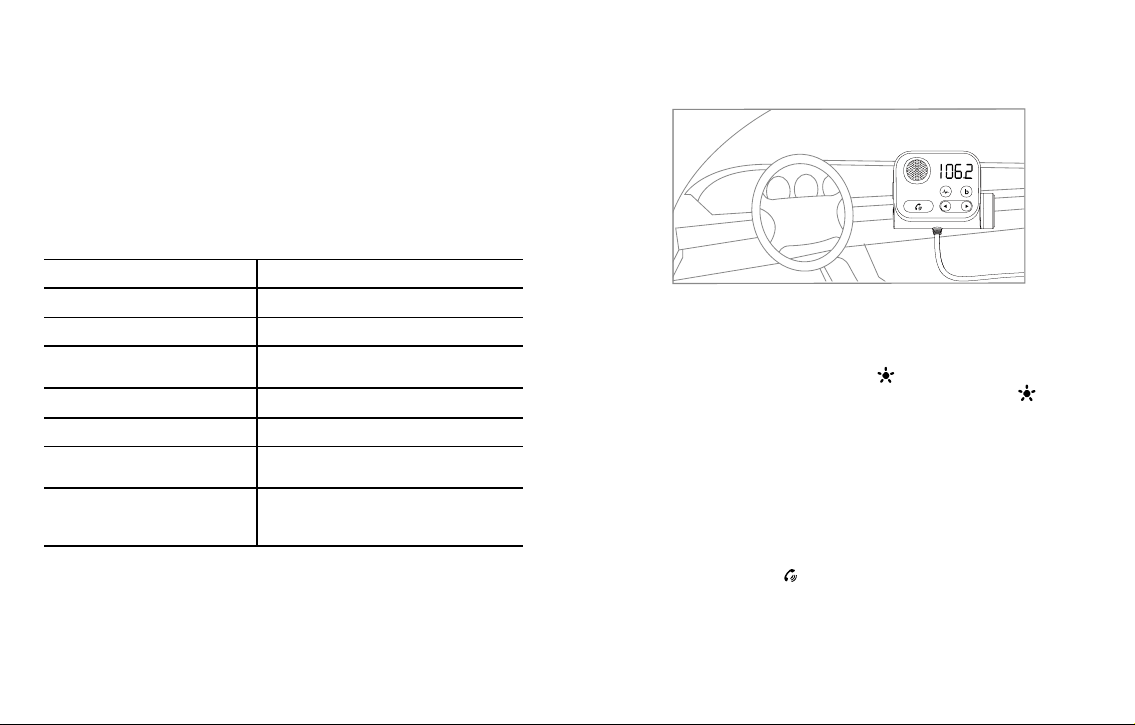
Screen display
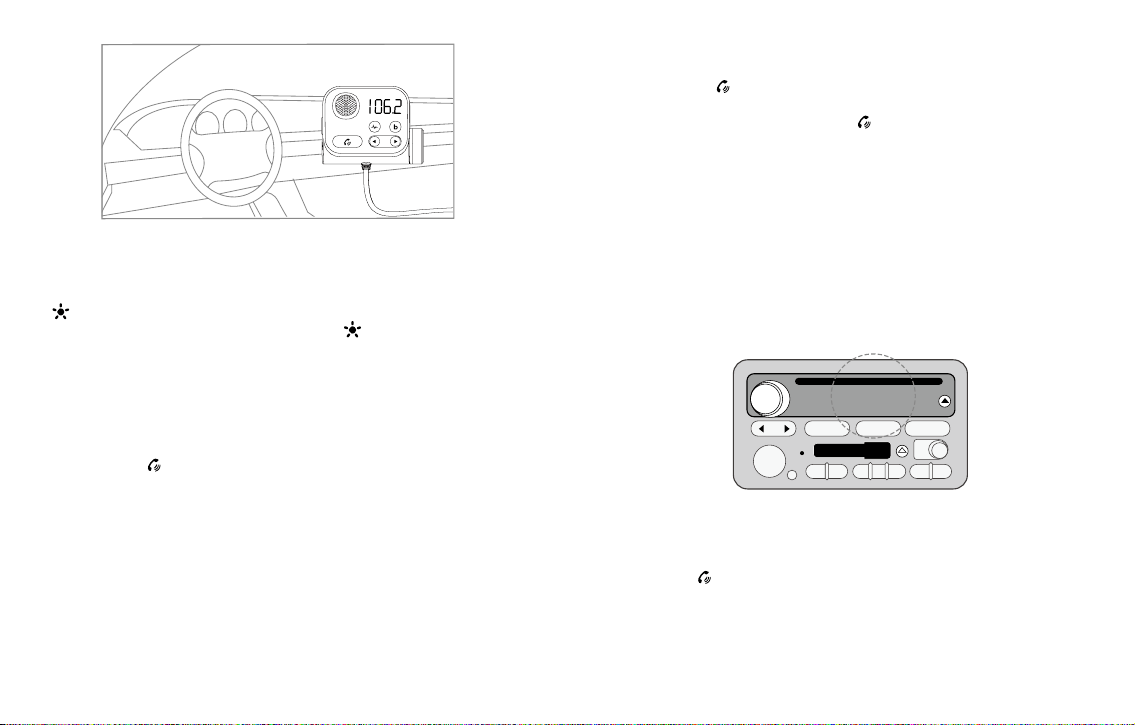
Turn on: Insert the KM21 into the cigarette lighter hole of the car. After the car is started, the
orange display will automatically turn on and ash once per second. If it is off, long press the
"
" button for 3 seconds to turn on KM21.
Shutdown: Cut off the power to shut down or long press "
" for 3 seconds to shut down
when there is power.
Note: Even if the KM21 is turned off, the charging port can still work normally.
1. After power on, the orange display shows bt and frequency ashing alternately.
2. After the pairing is successful, the screen displays bt will be on.
3. Long press the "
" button to enter the frequency modulation mode (display digital
frequency).
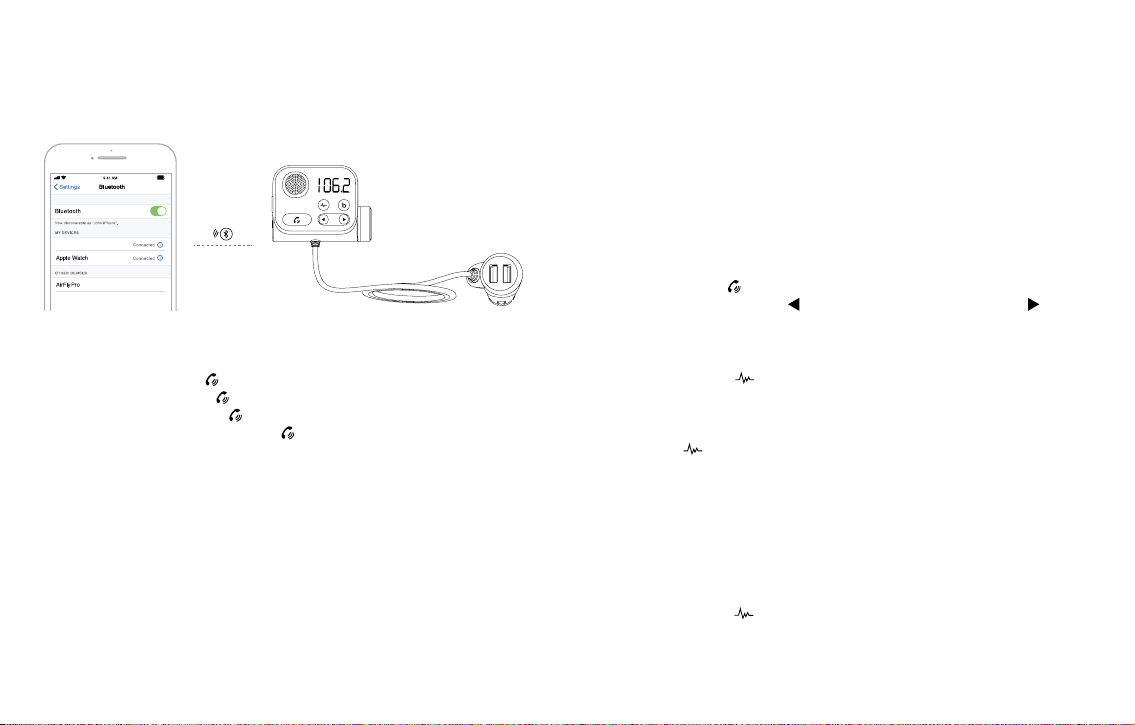
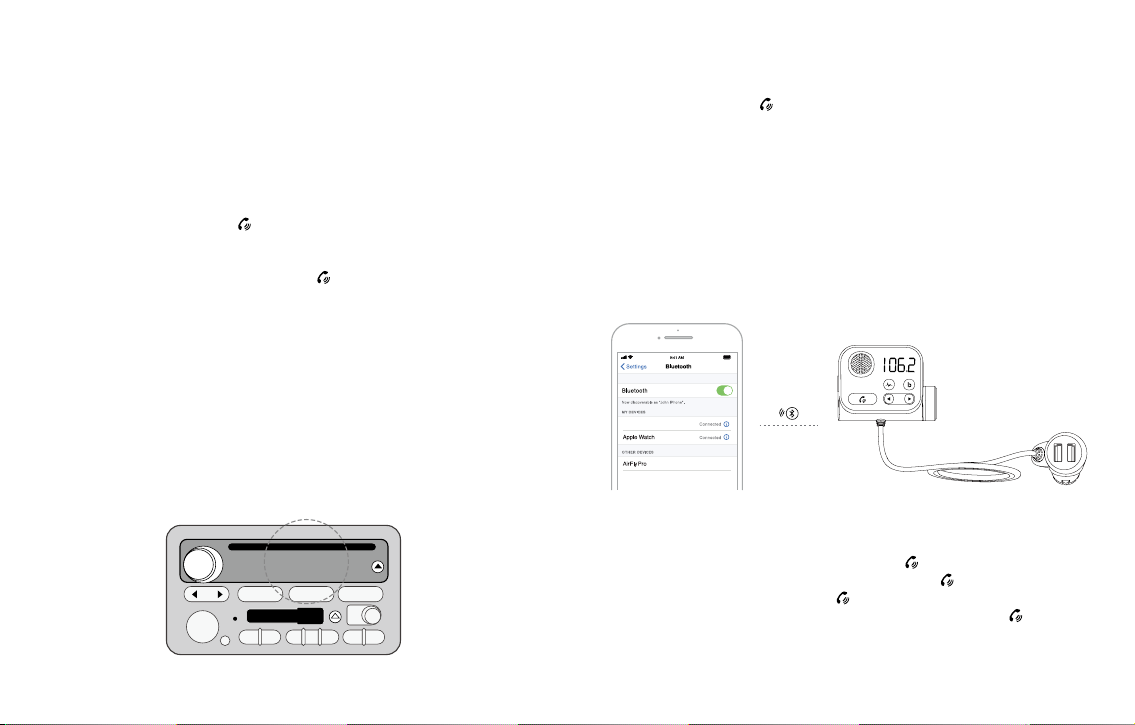
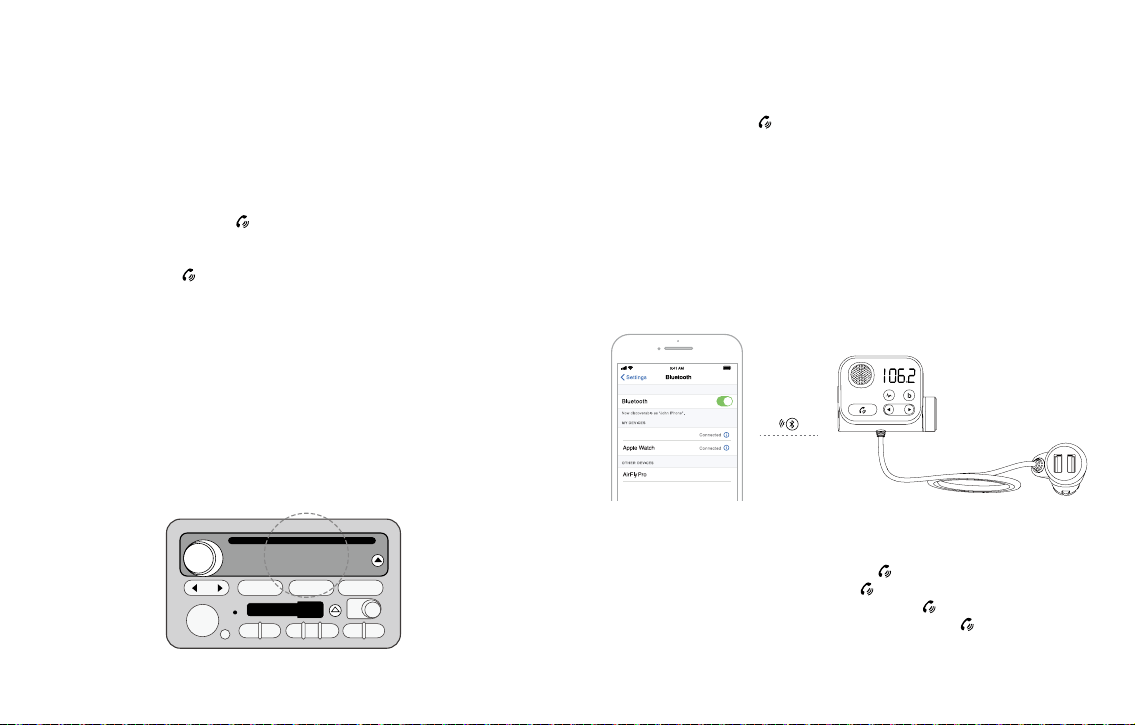
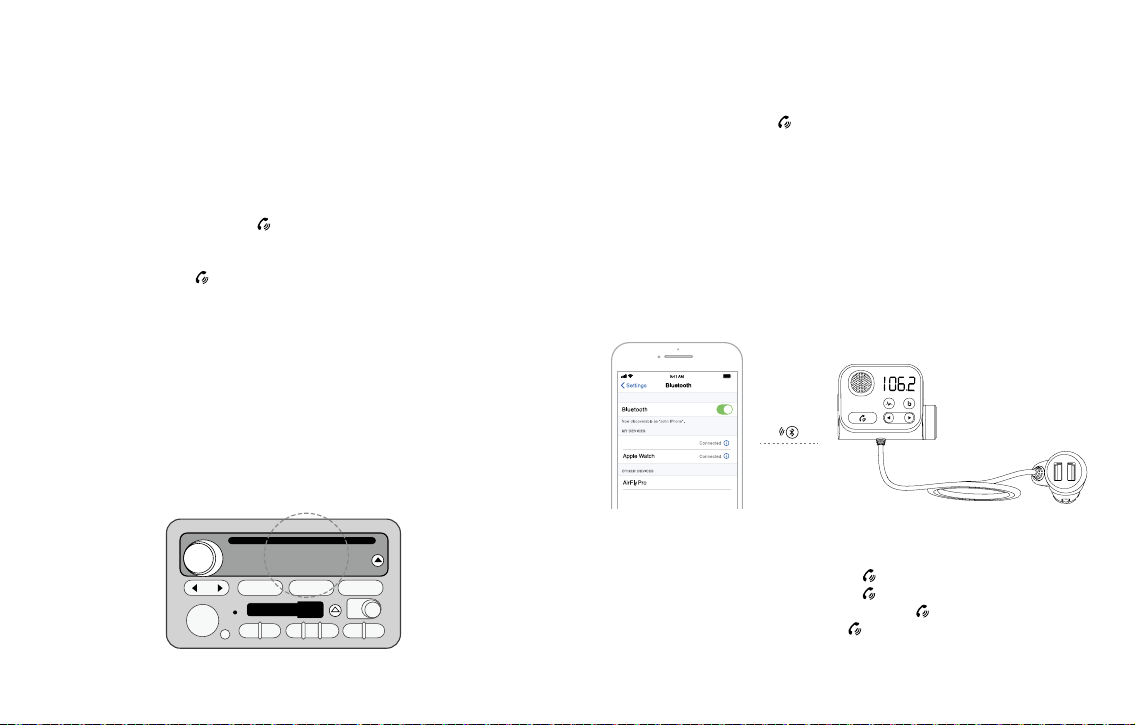
1.1. Turn the car radio to a blank frequency point (that is, a channel without any
broadcasting). The reference is: clear rustling,
1.2. Long press the "
" button, the number ashes to enter the FM mode, turn the knob
left and right to increase or decrease the frequency, and adjust to the same frequency
as the car radio, such as: FM88.8. Click the "
" button again or wait 3 seconds to exit
the FM mode mode.
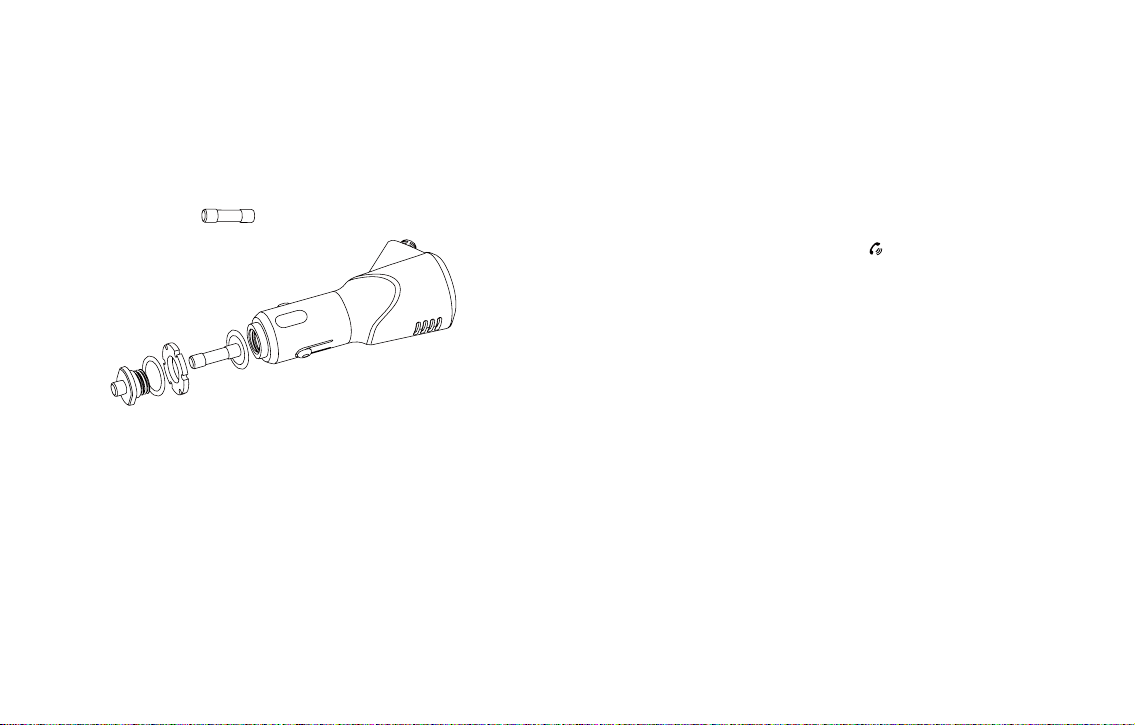
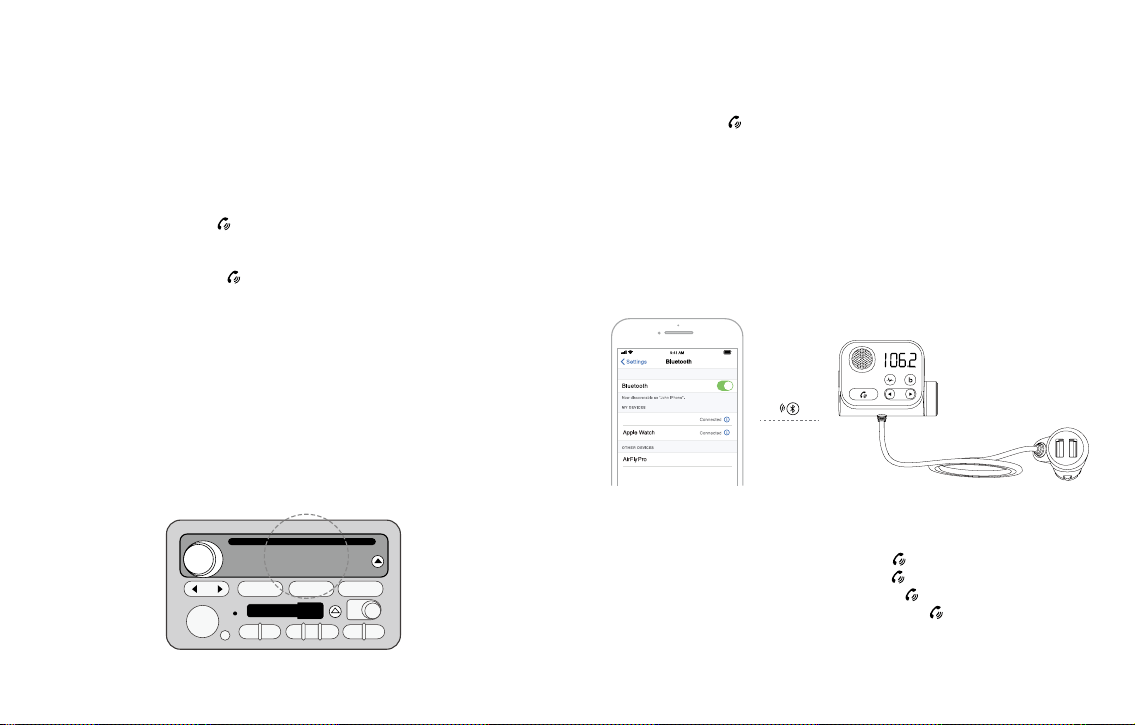
1.3. Bluetooth connection:
A. After power on, the KM21 screen displays HI, and then displays the current car battery
voltage.After 2 seconds, it enters the bt state, which means it enters the pairing state,
waiting for pairing.
B. Turn on the bluetooth of the smart device, search for "KM21", then connect, after
connecting, the screen displays bt long on, and you can play music via bluetooth. Usually
the connection will be automatically paired but sometimes it will ask you to enter a
password. If prompted, enter the initial password "0000".
(When used for the second time, KM21 will connect to the last device connected last time.)
(1). Find a blank frequency in your car radio (to ensure the sound quality of the device,
please rst select a blank channel with no local broadcast programs).
(2). Long press "
" to enter FM mode
.
In FM mode: Left-hand knob button CH
Turn the knob to the right key CH+.
In music mode: Left-hand knob button volume V
Turn the knob to the right button volume V+.
User's guidance
1. FM and Bluetooth pairing
Note: In order to let you enjoy higher-quality music, you need to adjust the blank frequency
of KM21 to be the same as that of the car (non-local broadcast channel) when using it for the
rst time. Every time you use it, please make sure that the frequency between the transmitter
and your car is the same (not the local broadcast channel).
13 45 6
PLAY NEXT
REY
FWD
SIDE
AM FM TAPE CD AUX
2
2:11
106.2 FM
- 06 - - 07 -
(3). Enter Bluetooth pairing mode.
Turn on the phone’s Bluetooth, search for the Bluetooth name: KM21, click connect, open the
music player, and click play to play Bluetooth music in the car.
(4).
2. Bluetooth hands-free function
A. Answer the call: Click the " " button.
B. Hang up the call: Click the "
" button.
C. Reject the call: long press the "
" button for 2 seconds.
D. Switch private calls: Press and hold the "
" button for 2 seconds during the call.
3. Music function (please make sure the connection is successful before
use)
3.1.1 Audio source: Bluetooth/TF card.
3.1.2 Music sound effect: default stereo sound effect playback.
3.1.3 File mode: Insert a Micro SD card containing MP3 / WMA / APE / FLAC / WAV / APE
les into the transmitter, and the transmitter will automatically start playing the les.
When there is an incoming call, this device will automatically switch to the call.
A. Bluetooth mode: Refer to the instructions of the smart device. Such as phone. After
the Bluetooth connection is successful, the music on the smart device can be played
and synchronized to the car's built-in speaker.
B. TF card mode: plug in TF, "KM21" will automatically recognize and play the music inside.
Note: To ensure a better experience of the product, when using this product, please
select only one audio source.
3.2. Audio source selection
A. Used between Bluetooth and TF card, it will recognize the last connected device to
play by default.
B. Auto play option via TF card: plug and play.
C. After power off or restart, KM21 will enter the previous play mode (automatically play
music in TF card mode, and manual play in Bluetooth mode is required.
3.3. Audio playback operation
A. Play/Pause: Click
.
B. Previous/Next: Short press "
" to play the previous song, short press " " to the
next song.
4. High-speed noise canceling button
4.1. During a call, click " "the button to enter the high-speed noise cancellation mode,
and there will be a Dingdong voice prompt. When talking with the other party, the
noise in the car environment will be suppressed, so that the person who answers the
call can enjoy a clear and interference-free call experience.
4.2. Click the"
" button again to exit the high-speed noise cancellation mode.
5. QC3.0 charging port description
5.1. The output power is 18W, compatible with FCP/QC3.0/QC2.0/BC1.2/DCP, etc.
5.2. Smart devices that support QC3.0 fast charge, meet QC3.0 fast charge protocol:
DC3.6-6.5V/3A, 6.5-9V/2A, 9-12V/1.5A.
6. Activate the voice assistant function
6.1 Support Siri and Google Assistant voice assistant wake-up.
6.2 Press and hold the"
" button for 2 seconds to wake up under Bluetooth connection.
KM21
<1m
QC 3.0
2.4A
- 08 - - 09 -
7. How to ensure high-quality calls when driving on the highway
7.1 Adjust the direction of the KM21 until he is directly facing the driver.
7.2 Press the button during the call, (when you hear the Dingdong tone, turn on the road
noise reduction mode).
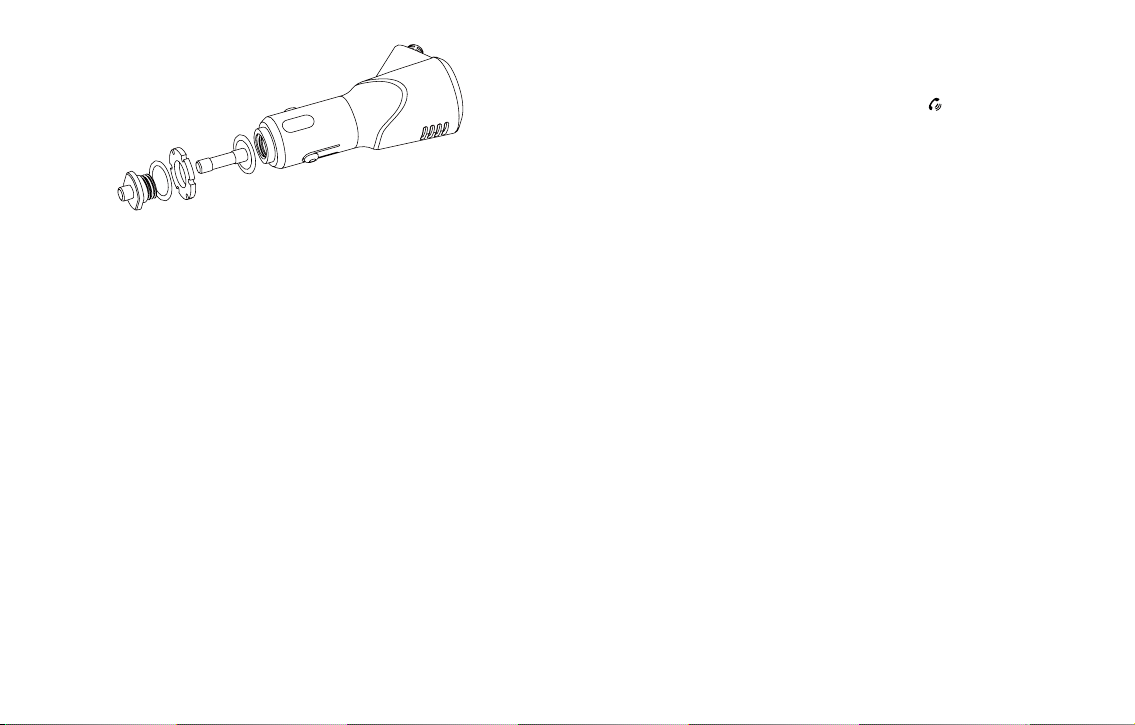
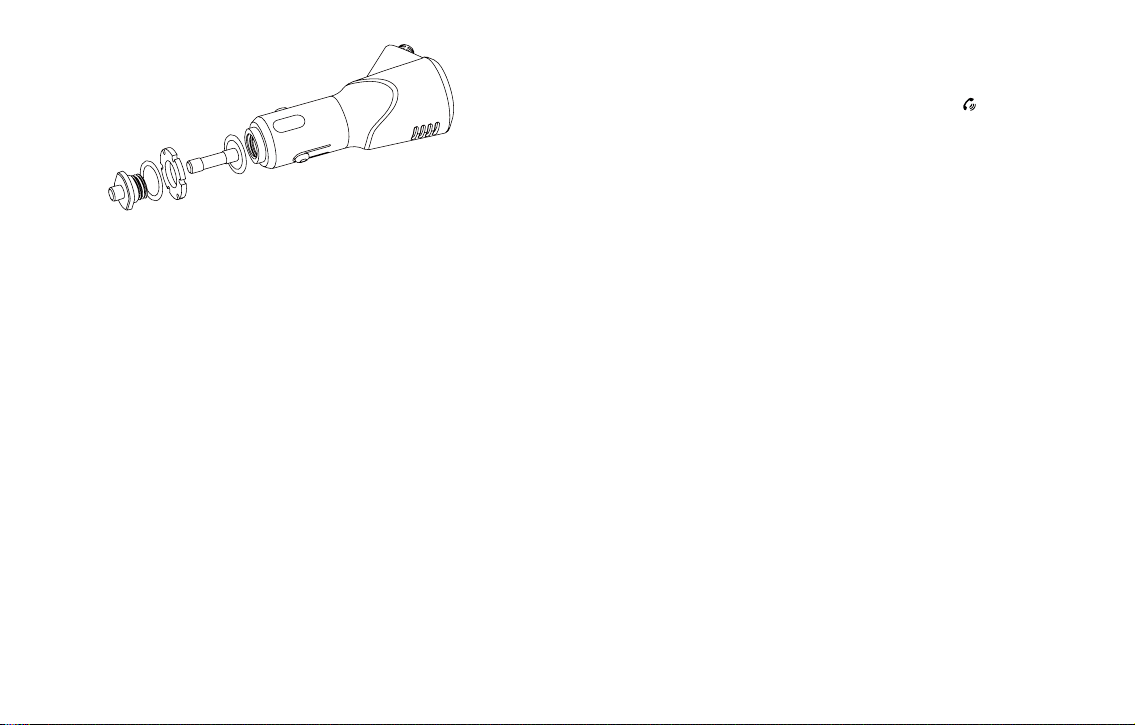
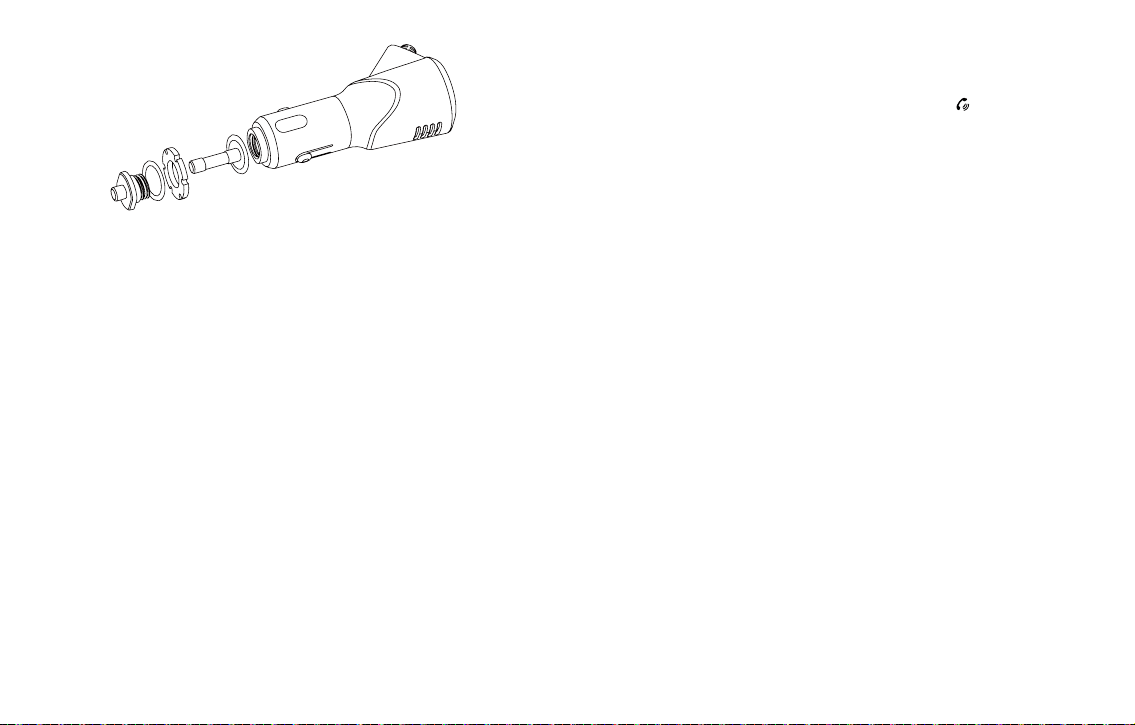
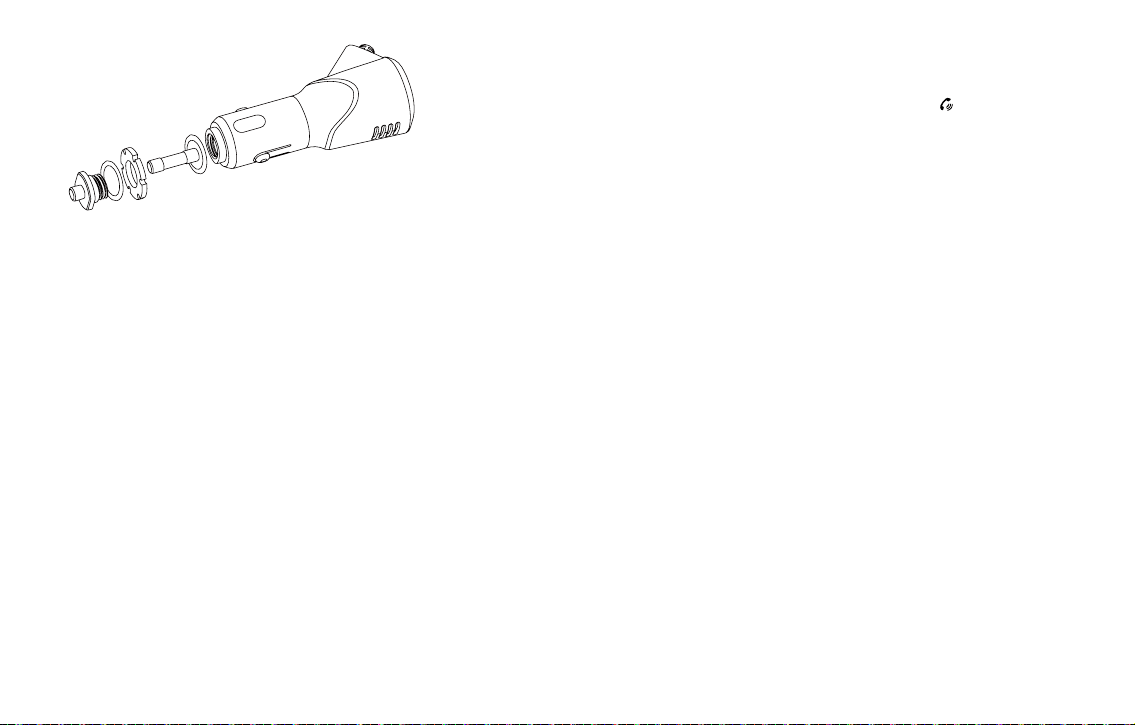
8. Schematic diagram of fuse replacement
* Highly developed security.
* Innovative fuse tube design and replaceable.
* It can protect your car and car charger in case of overcurrent.
* Comes with a spare fuse
.
9. Detailed accessories
• Metal washers
• Fuse
• Rubber gasket
• Metal tip screws
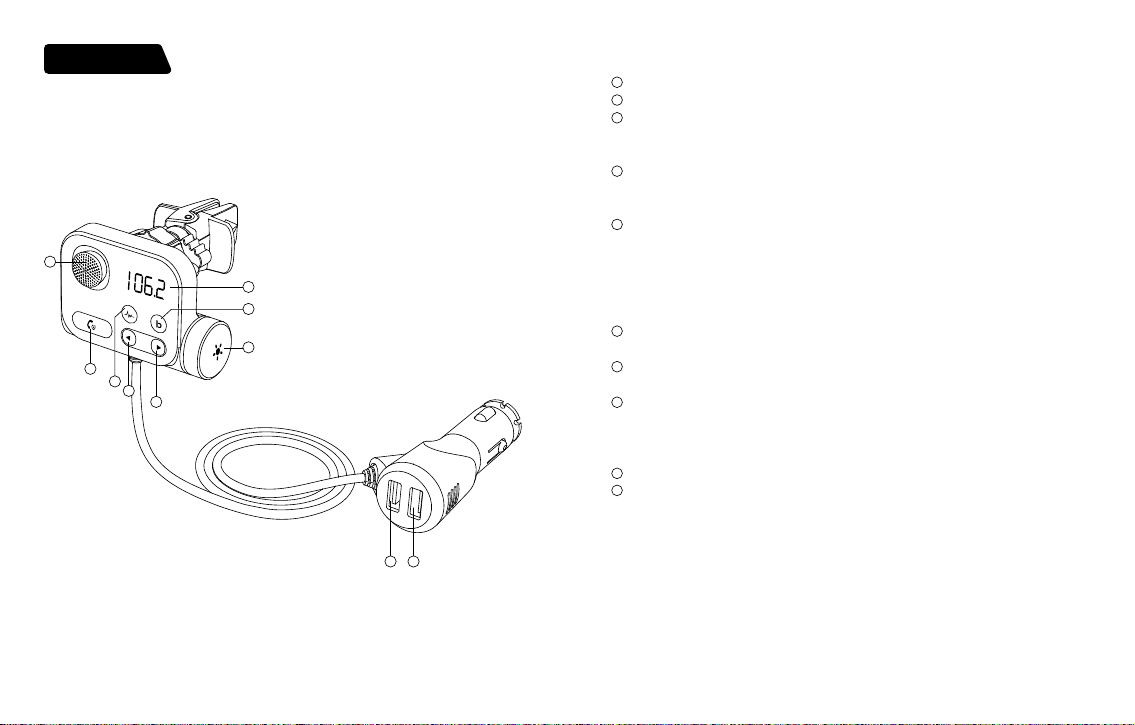
How to install the fuse?
1. Rotate the screw on the bottom of the Bluetooth FM transmitter counterclockwise.
2. Insert the fuse into the screw hole with the metal tip, the metal on the edge of the fuse
will be attached to the metal tip.
3. Assemble the rubber gasket.
4. Assemble the metal gasket.
5. Turn the screw clockwise to the bottom of the Bluetooth FM transmitter.
10. Frequently Asked Questions (Block Diagram)
10.1. Noise issues.
Solution:
A. Reduce the volume of the speaker by one third and increase the volume of the smart
device.
B. Signal interference. Please switch to another empty white frequency point.
C. Plug and unplug the machine again to restore the initial state and work again.
10.2. The other party cannot hear you during a call.
Reason 1: The dialing method is wrong.
solve:
A. When a call comes in, click the phone button "
" to answer the call through the speaker
in the car.
B. Activate the phone speaker to answer the call
.
Reason 2: The call volume is low.
solve:
A. Increase the volume of the phone.
B. The volume of the other party is too low during the call, just ask the other party to
increase the volume.
Reason 3: The microphone is broken.
Suggestion: Contact customer service for help.
Friendly reminder:
After receiving the product, do not rush to insert the product into the cigarette lighter
jack of the car. After starting the car, rst turn on the idle FM radio, and patiently select
a blank channel with no local programs on the car radio. The standard is a slight rustle.
Then insert the product into the cigarette lighter jack and adjust the FM frequency of
the product to be the same as the FM frequency of the car. At this time, the car radio
will be very quiet and there will be no static electricity interference. (If it is still not quiet,
please try to nd a new blank channel again), and nally connect to your phone via
wireless. When they are successfully paired, you can listen to songs on your phone and
make hands-free calls on your phone.
- 10 - - 11 -
DE
QC 3.0
2.4A
1
4
8
2
7
5
9
10
3
6
Diagramm des Produkts
Verpackungszubehör
1
Mikrofon
2
Der Bildschirm
3
Kombinationsfunktion
a.Taste zur Geräuschunterdrückung
b.3S lang drücken, um zu tippen, um Siri&google zu starten
4
Kombinationsfunktion
a. Bass-Booster-Taste
b. Halten Sie 3S lang gedrückt, um die Audioquelle zu wechseln
5
Telefontasten: Wiedergabe/Pause/Antwort/Auegen/FM-Frequenz anpassen
*Musikmodus: Kurz drücken, um abzuspielen/anzuhalten
*Modus für eingehende Anrufe: Zum Annehmen kurz drücken; lange drücken: ablehnen
*Während eines Anrufs: Kurz drücken, um aufzulegen; lange drücken: an einen
Privatanruf übergeben
*Lange 2S drücken: UKW-Modus aufrufen
6
Musikmodus: vorheriges Lied
lange drücken Songs schnell zurück
7
Musikmodus: nächstes Lied
langes Drücken Songs schneller Vorlauf
8
drücken, um das Umgebungslicht auszuschalten
Zum Herunterfahren 3 Sekunden gedrückt halten
Knopf:* links drehen auf Lautstärke V-, rechts drehen auf Lautstärke V+
*FM-Modus aktivieren: CH- nach links und CH+ nach rechts drehen
9
QC3.0 Schnellladeanschluss (DC3,5-6,5V/3A, 6,5-9V/2A, 9-12V/1,5A)
10
2.4A Ladeanschluss
• FM-Sender*1
• Bedienungsanleitung*1
• Luftauslasshalterung*1
• 3,5-MM-Audiokabel*1
• 4A Sicherung*1
- 12 - - 13 -
Merkmale
• Passen Sie den lokalen Kanal an den Autoradiokanal an, um konsistent zu sein, wodurch
SD-Kartenmusik realisiert werden kann Übertragung an Autolautsprecher und lösen
die Akkulaufzeit von Mobiltelefonen und anderen intelligenten Geräte. Die Bluetooth-
Freisprechfunktion kann über das Autoradio realisiert werden, indem Bluetooth
angeschlossen wird mit Handys. Das Einschalten der Geräuschunterdrückungstaste
während des Hochgeschwindigkeitsbetriebs kann dies beseitigen Straßengeräusche,
Windgeräusche, Umgebungsgeräusche usw. und realisieren Sie Ihr High-Denition-
Anruferlebnis.
Produktinstallation
1. Setzen Sie den Gewindeknopf auf das Ende der Luftauslasshalterung.
2. Setzen Sie den Satz Luftauslasshalterungen in das runde Loch an der Rückseite des
Hauptgeräts ein.
3. Ziehen Sie das Gewinde fest
Parameter
Drahtlose Version V5.0
Produktname KM21
Effektiver Abstand 5m
Speicherkartenformat und -kapazität Micro SD-Karte, unterstützt 64G
FM-Frequenzbereich 87,5-108,0 MHz
Kompatibles Audioformat MP3.WMA.WAV.FLAC, APE
Kompatibel mit Bluetooth-Protokoll A2DP/AVRCP/HSP/HFP
Oranger Schnellladeanschluss
unterstützt das QC3.0-Protokoll (DC 3,6-
6,5V/3A, 6,5-9V/2A, 9-12V/1,5A) + 2,4A USB-
A-Ladeanschluss
Einschalten / Ausschalten
Einschalten: Stecken Sie den KM21 in das Zigarettenanzünderloch des Autos. Nach dem S
tarten des Fahrzeugs schaltet sich das orangefarbene Display automatisch ein und blinkt
einmal pro Sekunde. Wenn es ausgeschaltet ist, halten Sie die Taste "
" 3 Sekunden lang
gedrückt, um das KM21 einzuschalten.
Herunterfahren: Unterbrechen Sie die Stromversorgung zum
.
Herunterfahren oder drücken
Sie 3 Sekunden lang "
" zum Herunterfahren, wenn Strom vorhanden ist
Hinweis: Auch wenn das KM21 ausgeschaltet ist, kann der Ladeanschluss normal funktionieren.
Bildschirmanzeige
1. Nach dem Einschalten zeigt das orange Display abwechselnd bt und Frequenz an.
2. Nachdem das Pairing erfolgreich war, zeigt der Bildschirm bt an
3. Drücken Sie lange auf die Taste "
" , um in den Frequenzmodulationsmodus zu
gelangen (Anzeige der Digitalfrequenz)
4. Öffnen Sie die Luftauslasshalterung und setzen Sie sie in das Luftauslassgitter der
Autoklimaanlage ein, ziehen Sie die Schrauben auf die beste Stärke, stellen Sie den
Winkel der Maschine ein und verwenden Sie sie dann.
- 14 - - 15 -
13 45 6
PLAY NEXT
REY
FWD
SIDE
AM FM TAPE CD AUX
2
2:11
106.2 FM
(1). Suchen Sie eine leere Frequenz in Ihrem Autoradio (um die Klangqualität des Geräts zu
gewährleisten, bitte zuerst Wählen Sie einen leeren Kanal ohne lokale Sendeprogramme)
(2). Drücken Sie lange auf " " , um in den FM-Modus zu gelangen
Im FM-Modus: Linker Drehknopf CH-
Drehknopf nach rechts drehen Taste CH+
Im Musikmodus: Lautstärke der linken Drehknopftaste V-
Drehen Sie den Knopf auf die rechte Tastenlautstärke V+
(3). Aktivieren Sie den Bluetooth-Kopplungsmodus Schalten Sie das Bluetooth des Telefons
ein, suchen Sie nach dem Bluetooth-Namen: KM21, klicken Sie auf Verbinden, öffnen
Sie das Musik-Player und klicken Sie auf Wiedergabe, um Bluetooth-Musik im Auto
abzuspielen.
(4).
2. Bluetooth-Freisprechfunktion
A. Anruf annehmen: Klicken Sie auf die Schaltäche " " .
B. Beenden Sie den Anruf: Klicken Sie auf die Schaltäche "
" .
C. Anruf abweisen: Halten Sie die Taste "
" 2 Sekunden lang gedrückt.
D. Private Anrufe umschalten: Halten Sie während des Anrufs die Taste "
" 2
Sekunden lang gedrückt.
KM21
<1m
QC 3.0
2.4A
Benutzeranleitung
1. UKW- und Bluetooth-Kopplung
Hinweis: Damit Sie Musik in höherer Qualität genießen können, müssen Sie die Leerfrequenz
des KM21 bei der ersten Verwendung auf die des Fahrzeugs (nicht-lokaler Sendekanal)
einstellen. Jedes Mal Wenn Sie es verwenden, stellen Sie bitte sicher, dass die Frequenz
zwischen dem Sender und Ihrem Auto gleich ist (nicht der lokale Sendekanal).
1.1. Drehen Sie das Autoradio auf einen leeren Frequenzpunkt (d. h. einen Kanal ohne
Sendung). Der Hinweis ist: deutliches Rascheln,
1.2. Drücken Sie lange auf die Taste "
" button, die Zahl blinkt, um in den FM-Modus zu
gelangen, drehen Sie den Knopf nach links und rechts, um die Frequenz zu erhöhen
oder zu verringern, und stellen Sie die gleiche Frequenz wie das Autoradio ein, zals:
FM88.8. Klicken Sie erneut auf die Schaltäche "
" oder warten Sie 3 Sekunden, um
den FM-Modus zu verlassen
1.3. Bluetooth-Verbindung:
A. Nach dem Einschalten zeigt der KM21-Bildschirm HI und dann die aktuelle
Autobatteriespannung an.Nach 2 Sekunden wechselt es in den BT-Zustand, was
bedeutet, dass es in den Pairing-Zustand wechselt und auf das Pairing wartet
B. Schalten Sie das Bluetooth des Smart-Geräts ein, suchen Sie nach "KM21", verbinden Sie
sich dann, nachdem Sie die Verbindung hergestellt haben, zeigt der Bildschirm lange an
und Sie können Musik über Bluetooth abspielen. Normalerweise wird die Verbindung
automatisch gepaart, aber manchmal werden Sie aufgefordert, ein Passwort einzugeben.
Geben Sie bei Aufforderung das Anfangspasswort "0000" ein.
(Bei der zweiten Verwendung verbindet sich KM21 mit dem zuletzt verbundenen Gerät.)

- 16 - - 17 -
3. Musikfunktion (bitte stellen Sie vor der Verwendung sicher, dass die
Verbindung erfolgreich ist)
3.1.1 Audioquelle: Bluetooth/TF-Karte.
3.1.2 Musik-Soundeffekt: Standard-Stereo-Soundeffekt-Wiedergabe.
3.1.3 Dateimodus: Legen Sie eine Micro-SD-Karte mit MP3- / WMA- / APE- / FLAC-
/ WAV- / APE-Dateien in Sender und der Sender beginnt automatisch mit der
Wiedergabe der Dateien. Wenn es einen gibt eingehenden Anruf, schaltet dieses
Gerät automatisch auf den Anruf um.
A. Bluetooth-Modus: Lesen Sie die Anweisungen des Smart-Geräts. Wie zum Beispiel
Telefon. Nach erfolgreicher Bluetooth-Verbindung kann die Musik auf dem Smart-
Gerät abgespielt und mit dem eingebauten Lautsprecher des Autos synchronisiert
werden.
B. TF-Kartenmodus: TF einstecken, "KM21" erkennt die Musik automatisch und spielt sie
ab.
Hinweis: Um eine bessere Erfahrung mit dem Produkt zu gewährleisten, wählen Sie bei der
Verwendung dieses Produkts bitte nur eines aus Audio quelle.
3.2. Auswahl der Audioquelle
A. Wird zwischen Bluetooth und TF-Karte verwendet, erkennt es standardmäßig das
zuletzt verbundene Gerät zum Abspielen.
B. Autoplay-Option über TF-Karte: Plug-and-Play.
C. Nach dem Ausschalten oder Neustart wechselt KM21 in den vorherigen.
Wiedergabemodus (automatische Wiedergabe von Musik im TF-Kartenmodus und
manuelle Wiedergabe im Bluetooth-Modus erforderlich).
3.3. Audiowiedergabebetrieb
A. Wiedergabe/Pause: Klicken Sie auf
.
B. Zurück/Weiter: Drücken Sie kurz "
" , um das vorherige Lied abzuspielen, drücken
Sie kurz "
" , um zum nächsten Lied zu gelangen.
4. Hochgeschwindigkeits-Geräuschunterdrückungstaste
4.1. Klicken Sie während eines Anrufs auf die Schaltäche " ", um in den
Hochgeschwindigkeits-Geräuschunterdrückungsmodus zu wechseln, und es wird eine
Dingdong-Sprachansage angezeigt. Beim Gespräch mit dem Gesprächspartner werden
die Geräusche in der Fahrzeugumgebung unterdrückt, sodass die Person, die den Anruf
entgegennimmt, ein klares und störungsfreies Gesprächserlebnis genießen kann.
4.2. Klicken Sie erneut auf die Schaltäche"
" ,um den Hochgeschwindigkeits-
Geräuschunterdrückungsmodus zu verlassenBeschreibung des Ladeanschlusses.
5. QC3.0
5.1. Die Ausgangsleistung beträgt 18 W, kompatibel mit FCP/QC3.0/QC2.0/BC1.2/DCP usw.
5.2. Intelligente Geräte, die QC3.0-Schnellladung unterstützen, erfüllen das QC3.0-
Schnellladeprotokoll: DC3,6-6,5V/3A, 6,5-9V/2A, 9-12V/1,5A.
6. Aktivieren Sie die Sprachassistentenfunktion
6.1 Unterstützt das Aufwachen des Sprachassistenten von Siri und Google Assistant
6.2 Halten Sie die Taste"
" 2 Sekunden lang gedrückt, um unter der Bluetooth-
Verbindung aufzuwachen.
7. So stellen Sie beim Fahren auf der Autobahn qualitativ hochwertige
Anrufe sicher
7.1 Passen Sie die Richtung des BT97 an, bis er direkt zum Fahrer zeigt.
7.2 Drücken Sie während des Anrufs die Taste (wenn Sie den Dingdong-Ton hören,
schalten Sie den Modus zur Reduzierung von Straßengeräuschen ein).
8. Schematische Darstellung des Sicherungswechsels
* Hochentwickelte Sicherheit.
* Innovatives Sicherungsrohr-Design und austauschbar.
* Es kann Ihr Auto und Ihr Autoladegerät bei Überstrom schützen.
* Kommt mit einer Ersatzsicherung
.
- 18 - - 19 -
10.2. Der andere Teilnehmer kann Sie während eines Anrufs nicht hören.
Grund 1: Die Wahlmethode ist falsch
lösen:
A. Wenn ein Anruf eingeht, klicken Sie auf die Telefontaste "
" , um den Anruf über den
Lautsprecher im Auto anzunehmen
B. Aktivieren Sie den Telefonlautsprecher, um den Anruf anzunehmen.
Grund 2: Das Anrufvolumen ist gering
lösen:
A. Erhöhen Sie die Lautstärke des Telefons.
B. Die Lautstärke des Gesprächspartners ist während des Gesprächs zu niedrig. Bitten Sie
den Gesprächspartner einfach, die Lautstärke zu erhöhen Volumen.
Grund 3: Das Mikrofon ist kaputt
Vorschlag: Wenden Sie sich an den Kundendienst, um Hilfe zu erhalten.
Freundliche Erinnerung:
Beeilen Sie sich nach Erhalt des Produkts nicht, das Produkt in die Zigarettenanzünderbuchse
des Autos einzuführen.
Schalten Sie nach dem Starten des Autos zuerst das UKW-Radio im Leerlauf ein und
wählen Sie geduldig einen leeren Kanal ohne lokale Programme im Autoradio. Der
Standard ist ein leichtes Rascheln. Legen Sie dann das Produkt in die Zigarette ein
Zigarettenanzünderbuchse und stellen Sie die FM-Frequenz des Produkts so ein, dass sie
der FM-Frequenz des Autos entspricht. Zu diesem Zeitpunkt ist das Autoradio sehr leise
und es treten keine Störungen durch statische Elektrizität auf. (Wenn es istimmer noch
nicht leise, bitte versuchen Sie erneut, einen neuen leeren Kanal zu nden) und verbinden
Sie sich schließlich über mit Ihrem Telefon kabellos. Wenn sie erfolgreich gekoppelt sind,
können Sie Songs auf Ihrem Telefon anhören und machen Freisprechen auf Ihrem Telefon.
9. Detailliertes Zubehör
• Metallscheiben
• Sicherung
• Gummidichtung
• Metallspitzenschrauben
Wie installiere ich die Sicherung?
1. Drehen Sie die Schraube an der Unterseite des Bluetooth-FM-Senders gegen den
Uhrzeigersinn.
2. Setzen Sie die Sicherung mit der Metallspitze in das Schraubenloch ein, das Metall am
Rand der Sicherung wird an der Metallspitze befestigt.
3. Montieren Sie die Gummidichtung.
4. Montieren Sie die Metalldichtung.
5. Drehen Sie die Schraube im Uhrzeigersinn zur Unterseite des Bluetooth-FM-Senders.
10. Häug gestellte Fragen (Blockdiagramm)
10.1. Lärmprobleme
Lösung:
A. Reduzieren Sie die Lautstärke des Lautsprechers um ein Drittel und erhöhen Sie die
Lautstärke des Smart-Geräts.
B. Signalstörungen. Bitte wechseln Sie zu einem anderen leeren weißen Frequenzpunkt.
C. Schließen Sie das Gerät an und ziehen Sie es wieder ab, um den Ausgangszustand
wiederherzustellen und wieder zu arbeiten.
- 20 - - 21 -
IT
QC 3.0
2.4A
1
4
8
2
7
5
9
10
3
6
Product Diagram
Accessori per imballaggio
1
Microfono
2
Lo schermo del display
3
Funzione di combinazione
a. Pulsante di eliminazione del rumore
b. Premi a lungo per 3S per toccare per avviare Siri&google
4
Funzione di combinazione
un. Pulsante di potenziamento dei bassi
b. Premere a lungo 3S per cambiare sorgente audio
5
Pulsanti del telefono: riproduci/pausa/risposta/riaggancia/regola la frequenza FM
*Modalità musica: premere brevemente per riprodurre/mettere in pausa
*Modalità chiamata in arrivo: premere brevemente per rispondere; pressione lunga:
riutare
*Durante una chiamata: premere brevemente per riagganciare; pressione lunga:
trasferimento a una chiamata privata
*Premere a lungo 2S: entra in modalità FM
6
Modalità musica: brano precedente
premere a lungo Canzoni indietro veloce
7
Modalità musica: brano successivo
premere a lungo Canzoni avanti veloce
8
premere per spegnere la luce ambientale
Tenere premuto per 3 secondi per spegnere
Manopola:*gira a sinistra per volume V-, gira a destra per volume V+
*entra in modalità FM: ruota CH- a sinistra e CH+ a destra
9
Porta di ricarica rapida QC3.0 (DC3.5-6.5V/3A, 6.5-9V/2A, 9-12V/1.5A)
10
Porta di ricarica 2.4A
• Trasmettitore FM*1
• Manuale di istruzioni*1
• Staffa uscita aria*1
• Cavo audio da 3,5 mm*1
• Fusibile 4A*1
- 22 - - 23 -
Caratteristiche
• Regola il canale locale sul canale dell'autoradio per essere coerente, il che può realizzare
la musica della scheda SD trasmissione agli altoparlanti dell'auto e risoluzione della
carica della batteria di telefoni cellulari e altri smart dispositivi. La funzione di chiamata in
vivavoce Bluetooth può essere realizzata tramite l'audio dell'auto collegando Bluetooth
con i telefoni cellulari. L'attivazione del pulsante di eliminazione del rumore durante il
funzionamento ad alta velocità può eliminare rumore della strada, rumore del vento,
rumore ambientale, ecc. E realizza la tua esperienza di chiamata ad alta denizione.
Installazione del prodotto
1. Mettere la manopola lettata all'estremità della staffa di uscita dell'aria.
2. Inserire il set di staffe per l'uscita dell'aria nel foro rotondo sul retro dell'unità principale.
3. Stringere il lo
Parametro
Versione wireless V5.0
Nome del prodotto KM21
Distanza effettiva 5m
Formato e capacità della scheda di
memoria
scheda Micro SD, supporto 64G
Gamma di frequenza FM 87,5-108,0 MHZ
Formato audio compatibile MP3.WMA.WAV.FLAC, APE
Compatibile con il protocollo
Bluetooth
A2DP/AVRCP/HSP/HFP
Porta di ricarica rapida arancione
supporta il protocollo QC3.0 (DC 3.6-6.5V/3A,
6.5-9V/2A, 9-12V/1.5A) + 2.4A USB A Charge
port
Accensione/spegnimento
Visualizzazione dello schermo
Accensione: inserire il KM21 nel foro dell'accendisigari dell'auto. Dopo che l'auto è stata
avviata, il display arancione si accenderà automaticamente e lampeggerà una volta al
secondo. Se è spento, premere a lungo il pulsante "
" per 3 secondi per accendere KM21
Spegnimento: interrompere l'alimentazione per spegnere o premere a lungo "
" per 3
secondi per spegnere quando c'è alimentazione.
Nota: anche se il KM21 è spento, la porta di ricarica può continuare a funzionare
normalmente.
1. Dopo l'accensione, il display arancione mostra bt e la frequenza lampeggiano
alternativamente.
2. Dopo che l'accoppiamento è andato a buon ne, lo schermo visualizza bt sarà acceso
3. Premere a lungo il pulsante "
" per accedere alla modalità di modulazione di
frequenza (visualizzazione della frequenza digitale).
4. Aprire la staffa di uscita dell'aria e inserirla nella griglia di uscita dell'aria dell'aria
condizionata dell'auto, serrare ilavvita alla massima forza, regola l'angolazione
della macchina e poi usala..
- 24 - - 25 -
1. Associazione FM e Bluetooth
Nota: per poter ascoltare musica di qualità superiore, è necessario regolare la frequenza
vuota di KM21 in modo che sia uguale a quella dell'auto (canale di trasmissione non locale)
quando lo si utilizza per la prima volta. Ogni voltalo usi, assicurati che la frequenza tra il
trasmettitore e la tua auto sia la stessa (non il canale di trasmissione locale).
1.1. Porta l'autoradio su un punto di frequenza vuoto (cioè un canale senza alcuna
trasmissione). Il riferimento è: fruscio chiaro,
1.2. Premere a lungo il pulsante "
" , il numero lampeggia per accedere alla modalità
FM, ruotare la manopola a sinistra e a destra per aumentare o diminuire la frequenza
e regolare sulla stessa frequenza dell'autoradio, ad esempio come: FM88.8. Fare
nuovamente clic sul pulsante "
" o attendere 3 secondi per uscire dalla modalità FM.
1.3. Connessione Bluetooth:
A. Dopo l'accensione, lo schermo del KM21 visualizza HI, quindi visualizza la tensione attuale
della batteria dell'auto.Dopo 2 secondi, entra nello stato bt, il che signica che entra nello
stato di accoppiamento, in attesa dell'accoppiamento
B. Accendi il bluetooth del dispositivo intelligente, cerca "KM21", quindi connetti, dopo la
connessione, lo schermo viene visualizzato a lungo acceso e puoi riprodurre musica
tramite bluetooth. Di solito la connessione verrà accoppiata automaticamente ma a
volte ti verrà chiesto di inserire una password. Se richiesto, inserire la password iniziale
"0000".
(Se utilizzato per la seconda volta, KM21 si collegherà all'ultimo dispositivo connesso l'ultima
volta.)
13 45 6
PLAY NEXT
REY
FWD
SIDE
AM FM TAPE CD AUX
2
2:11
106.2 FM
(1). Trova una frequenza vuota nell'autoradio (per garantire la qualità del suono del
dispositivo, per favore prima selezionare un canale vuoto senza programmi di
trasmissione locale)
(2). Premere a lungo "
" per accedere alla modalità FM
In modalità FM: pulsante manopola sinistra CH-
Ruotare la manopola verso destra tasto CH+
In modalità musica: volume pulsante manopola sinistra V-
Ruotare la manopola al tasto destro volume V+
(3). Accedi alla modalità di associazione Bluetooth
Accendi il Bluetooth del telefono, cerca il nome Bluetooth: KM21, fai clic su Connetti, apri il
lettore musicale e fare clic su Riproduci per riprodurre la musica Bluetooth nell'auto.
(4).
2. Funzione vivavoce Bluetooth
A. Rispondere alla chiamata: fare clic sul pulsante " " .
B. Riagganciare la chiamata: fare clic sul pulsante "
" .
C. Riutare la chiamata: premere a lungo il pulsante "
" per 2 secondi.
D. Cambiare le chiamate private: tenere premuto il tasto "
" per 2 secondi durante la
chiamata.
KM21
<1m
QC 3.0
2.4A
Guida per l'utente

- 26 - - 27 -
3. Funzione musicale (assicurarsi che la connessione sia avvenuta
correttamente prima dell'uso)
3.1.1 Sorgente audio: Bluetooth/scheda TF
3.1.2 Effetti sonori musicali: riproduzione degli effetti sonori stereo predeniti
3.1.3 Modalità le: inserire una scheda Micro SD contenente le MP3 / WMA / APE /
FLAC / WAV / APE in il trasmettitore e il trasmettitore inizierà automaticamente
a riprodurre i le. Quando c'è un chiamata in arrivo, questo dispositivo passerà
automaticamente alla chiamata.
A. Modalità Bluetooth: fare riferimento alle istruzioni del dispositivo intelligente. Come
il telefono. Dopo che la connessione Bluetooth è riuscita, la musica sul dispositivo
intelligente può essere riprodotta e sincronizzata con l'altoparlante integrato
dell'auto Modalità scheda.
B. TF: collega TF, "KM21" riconoscerà e riprodurrà automaticamente la musica all'interno.
Nota: per garantire una migliore esperienza del prodotto, quando si utilizza questo prodotto,
selezionarne solo uno Sorgente Audio.
3.2. Selezione della sorgente audio
A. Utilizzato tra Bluetooth e scheda TF, riconoscerà l'ultimo dispositivo connesso per
giocare per impostazione predenita.
B. Opzione di riproduzione automatica tramite scheda TF: plug and play.
C. Dopo lo spegnimento o il riavvio, KM21 entrerà nella modalità di riproduzione precedente
(riproduce automaticamente la musica in modalità scheda TF ed è richiesta la riproduzione
manuale in modalità Bluetooth
3.3. Operazione di riproduzione audio
A. Riproduci/Pausa: fare clic su
.
B. Precedente/Successivo: premere brevemente "
" per riprodurre il brano
precedente, premere brevemente "
" per passare al brano successivo.
4. Pulsante di eliminazione del rumore ad alta velocità
4.1. Durante una chiamata, " "fare clic sul pulsante per accedere alla modalità di
cancellazione del rumore ad alta velocità e verrà visualizzato un messaggio vocale
Dingdong. Quando si parla con l'altra parte, il rumore nell'ambiente dell'auto verrà
soppresso, in modo che la persona che risponde alla chiamata possa godere di
un'esperienza di chiamata chiara e senza interferenze.
4.2. Fare nuovamente clic sul pulsante"
" per uscire dalla modalità di cancellazione
del rumore ad alta velocità.
5. Descrizione della porta di ricarica QC3.0
5.1. La potenza di uscita è 18 W, compatibile con FCP/QC3.0/QC2.0/BC1.2/DCP, ecc.
5.2. I dispositivi intelligenti che supportano la ricarica rapida QC3.0, soddisfano il
protocollo di ricarica rapida QC3.0: DC3.6-6.5V/3A, 6.5-9V/2A, 9-12V/1.5A.
6. Attiva la funzione di assistente vocale
6.1 Supporta la riattivazione dell'assistente vocale Siri e Google Assistant.
6.2 Tenere premuto il pulsante"
" per 2 secondi per svegliarsi con la connessione
Bluetooth.
7. Come garantire chiamate di alta qualità durante la guida in autostrada
7.1 Regolare la direzione del BT97 nché non si trova direttamente di fronte al conducente.
7.2 Premere il pulsante durante la chiamata, (quando si sente il tono Dingdong, attivare
la modalità di riduzione del rumore stradale)
8. Schema schematico della sostituzione del fusibile
* Sicurezza altamente sviluppata
* Design innovativo del tubo del fusibile e sostituibile
* Può proteggere la tua auto e il caricabatterie per auto in caso di sovracorrente.
* Viene fornito con un fusibile di ricambio
.
- 28 - - 29 -
Come installare il fusibile?
1. Ruotare la vite sul fondo del trasmettitore FM Bluetooth in senso antiorario.
2. Inserire il fusibile nel foro della vite con la punta metallica, il metallo sul bordo del fusibile
sarà attaccato alla punta di metallo.
3. Assemblare la guarnizione in gomma.
4. Assemblare la guarnizione metallica.
5. Ruotare la vite in senso orario no alla parte inferiore del trasmettitore FM Bluetooth.
10. Domande frequenti (diagramma a blocchi)
10.1. Problemi di rumore
Soluzione:
A. Riduci il volume dell'altoparlante di un terzo e aumenta il volume del dispositivo
intelligente
B. Interferenza del segnale. Si prega di passare a un altro punto di frequenza bianco vuoto
C. Collegare e scollegare nuovamente la macchina per ripristinare lo stato iniziale e lavorare
di nuovo
10.2. L'interlocutore non può sentirti durante una chiamata
Motivo 1: il metodo di composizione è sbagliato
risolvere:
A. Quando arriva una chiamata, fare clic sul pulsante del telefono "
" per rispondere alla
chiamata tramite l'altoparlante dell'auto
B. Attiva l'altoparlante del telefono per rispondere alla chiamata
Motivo 2: il volume della chiamata è basso
risolvere:
A. Aumentare il volume del telefono.
B. Il volume dell'interlocutore è troppo basso durante la chiamata, basta chiedere
all'interlocutore di aumentare ilvolume.
Motivo 3: il microfono è rotto
Suggerimento: contattare il servizio clienti per assistenza
Ricordo amichevole:
Dopo aver ricevuto il prodotto, non avere fretta di inserire il prodotto nella presa
accendisigari dell'auto.
Dopo aver avviato l'auto, accendi prima la radio FM inattiva e seleziona pazientemente un
canale vuoto senza locale programmi dell'autoradio. Lo standard è un leggero fruscio. Quindi
inserire il prodotto nella sigaretta presa più leggera e regolare la frequenza FM del prodotto
in modo che corrisponda alla frequenza FM dell'auto.
A questo punto, l'autoradio sarà molto silenziosa e non ci saranno interferenze di elettricità
statica. (Se è ancora non è tranquillo, prova a trovare di nuovo un nuovo canale vuoto) e
inne connettiti al tuo telefono tramite senza li. Quando sono accoppiati con successo, puoi
ascoltare le canzoni sul tuo telefono e fare chiamate in vivavoce sul telefono.
9. Accessori dettagliati
• Rondelle in metallo
• Fusibile
• Guarnizione in gomma
• Viti con punta in metallo
- 30 - - 31 -
ES
QC 3.0
2.4A
1
4
8
2
7
5
9
10
3
6
Product Diagram
Accesorios de embalaje
1
Micrófono
2
La pantalla de visualización
3
Función de combinación
a. Botón de cancelación de ruido
b. Mantenga presionado para 3S para tocar para iniciar Siri y Google
4
Función de combinación
una. Botón de refuerzo de graves
b. Mantenga presionado 3S para cambiar la fuente de audio
5
Botones de teléfono: reproducir / pausar / responder / colgar / ajustar la frecuencia de FM
* Modo de música: presione brevemente para reproducir / pausar
* Modo de llamada entrante: presione brevemente para responder; pulsación larga:
rechazar
* Durante una llamada: presione brevemente para colgar; pulsación larga: transferir a una
llamada privada
* Pulsación larga 2S: entra en modo FM
6
Modo de música: canción anterior
pulsación larga Canciones retroceso rápido
7
Modo de música: siguiente canción
pulsación larga Canciones de avance rápido
8
presione para apagar la luz ambiental
Mantenga pulsado durante 3 segundos para apagar
Perilla: * gire a la izquierda al volumen V-, gire a la derecha al volumen V +
* ingrese al modo FM: gire CH- hacia la izquierda y CH + hacia la derecha
9
Puerto de carga rápida QC3.0 (DC3.5-6.5V / 3A, 6.5-9V / 2A, 9-12V / 1.5A)
10
Puerto de carga 2.4A
• Transmisor FM * 1
• Manual de instrucciones * 1
• Soporte de salida de aire * 1
• Cable de audio de 3,5 mm * 1
• Fusible de 4 A * 1
- 32 - - 33 -
Características
• Ajuste el canal local al canal de radio del automóvil para que sea consistente, lo
que puede realizar música de la tarjeta SD Transmisión a los altavoces del coche y
resuelve la carga de la batería de teléfonos móviles y otros dispositivos inteligentes.
dispositivos. La función de llamada manos libres Bluetooth se puede realizar a través
del audio del automóvil conectando Bluetooth con teléfonos móviles. Activar el botón
de cancelación de ruido durante el funcionamiento a alta velocidad puede eliminar
ruido de la carretera, ruido del viento, ruido ambiental, etc., y realice su experiencia de
llamada de alta denición.
Instalación del producto
1. Coloque la perilla roscada en el extremo del soporte de salida de aire.
2. Inserte el juego de soporte de salida de aire en el oricio redondo en la parte posterior
Parámetro
Versión inalámbrica V5.0
Nombre del producto KM21
Distancia efectiva 5m
Formato y capacidad de la tarjeta
de memoria
tarjeta Micro SD, compatible con 64G
Rango de frecuencia FM 87,5-108,0 MHZ
Formato de audio compatible MP3.WMA.WAV.FLAC, APE
Compatible con el protocolo
Bluetooth
A2DP / AVRCP / HSP / HFP
Puerto de carga rápida naranja
admite el protocolo QC3.0 (DC 3.6-6.5V / 3A,
6.5-9V / 2A, 9-12V / 1.5A) + puerto de carga
USB A de 2.4A
Encendido / apagado
Visualización de la pantalla
Encender: Inserte el KM21 en el oricio del encendedor de cigarrillos del automóvil. Después
de que se enciende el automóvil, la pantalla naranja se encenderá automáticamente y
parpadeará una vez por segundo. Si está apagado, mantenga presionado el botón"
"
durante 3 segundos para encender el KM21 .
Apagado: corte la energía para apagar o mantenga presionado"
" durante 3 segundos
para apagarlo cuando haya energía.
Nota: Incluso si el KM21 está apagado, el puerto de carga aún puede funcionar normalmente.
1. Después de encender, la pantalla naranja muestra bt y frecuencia parpadeando
alternativamente.
2. Después de que el emparejamiento sea exitoso, la pantalla muestra bt estará encendido.
3. Mantenga presionado el botón "
" para ingresar al modo de modulación de frecuencia
(muestra la frecuencia digital).
de la unidad principal.
3. Apriete el hilo
4. Abra el soporte de salida de aire e insértelo en la rejilla de salida de aire del aire
acondicionado del automóvil, apriete eltornillos a la mejor resistencia, ajuste el ángulo
de la máquina y luego úselo.
- 34 - - 35 -
1. Emparejamiento de FM y Bluetooth
Nota: Para que pueda disfrutar de música de mayor calidad, debe ajustar la frecuencia
en blanco del KM21 para que sea la misma que la del automóvil (canal de transmisión
no local) cuando lo use por primera vez. Cada vezlo usa, asegúrese de que la frecuencia
entre el transmisor y su automóvil sea la misma (no el canal de transmisión local).
1.1. Gire la radio del automóvil a un punto de frecuencia en blanco (es decir, un canal sin
transmisión). La referencia es: crujido claro,
1.2. Mantenga presionado el botón "
" , el número parpadea para ingresar al modo
FM, gire la perilla hacia la izquierda y hacia la derecha para aumentar o disminuir la
frecuencia y ajustar a la misma frecuencia que la radio del automóvil, como: FM88.8.
Haga clic en el botón "
" nuevamente o espere 3 segundos para salir del modo FM.
1.3. Conexión bluetooth:
A. Después de encenderlo, la pantalla del KM21 muestra HI y luego muestra el voltaje actual
de la batería del automóvil. Después de 2 segundos, ingresa al estado bt, lo que signica
que ingresa al estado de emparejamiento, esperando el emparejamiento.
B. Encienda el bluetooth del dispositivo inteligente, busque "KM21", luego conéctese,
después de conectarse, la pantalla muestra bt long on y puede reproducir música
a través de bluetooth. Por lo general, la conexión se emparejará automáticamente,
pero a veces le pedirá que ingrese una contraseña. Si se le solicita, ingrese la
contraseña inicial "0000".
(Cuando se usa por segunda vez, KM21 se conectará al último dispositivo conectado la
última vez).
(1). Encuentre una frecuencia en blanco en la radio de su automóvil (para garantizar
la calidad del sonido del dispositivo, primero seleccione un canal en blanco sin
programas de transmisión local).
(2). Mantenga presionado "
" para ingresar al modo FM.
En modo FM: botón de mando izquierdo CH-
Gire el mando a la derecha CH +
En el modo de música: volumen del botón del mando izquierdo V-
Gire la perilla al botón derecho volumen V +
(3). Ingrese al modo de emparejamiento de Bluetooth
Encienda el Bluetooth del teléfono, busque el nombre de Bluetooth: KM21, haga clic en
conectar, abra el reproductor de música y haga clic en reproducir para reproducir música
Bluetooth en el automóvil.
(4).
13 45 6
PLAY NEXT
REY
FWD
SIDE
AM FM TAPE CD AUX
2
2:11
106.2 FM
2. Función manos libres Bluetooth
A. Responder la llamada: Haga clic en el botón " ".
B. Cuelgue la llamada: haga clic en el botón "
".
C. Rechazar la llamada: mantenga presionado el botón "
" durante 2 segundos.
D. Cambiar llamadas privadas: Mantenga presionado el botón "
" durante 2
segundos durante la llamada.
KM21
<1m
QC 3.0
2.4A
Orientación del usuario

- 36 - - 37 -
3. Función de música (asegúrese de que la conexión sea correcta antes
de usarla)
3.1.1 Fuente de audio: tarjeta Bluetooth / TF.
3.1.2 Efecto de sonido de música: reproducción de efecto de sonido estéreo predeterminado.
3.1.3 Modo de archivo: inserte una tarjeta Micro SD que contenga archivos MP3 / WMA
/ APE / FLAC / WAV / APE el transmisor, y el transmisor comenzará a reproducir
los archivos automáticamente. Cuando hay un llamada entrante, este dispositivo
cambiará automáticamente a la llamada.
A. Modo Bluetooth: consulte las instrucciones del dispositivo inteligente. Como el
teléfono. Una vez que la conexión Bluetooth se realiza correctamente, la música del
dispositivo inteligente se puede reproducir y sincronizar con el altavoz integrado del
automóvil. Modo de tarjeta.
B. TF: conecte TF, "KM21" reconocerá y reproducirá automáticamente la música en el
interior.
Nota: Para garantizar una mejor experiencia del producto, cuando utilice este producto,
seleccione solo uno fuente de audio.
3.2. Selección de fuente de audio
A. Utilizado entre Bluetooth y la tarjeta TF, reconocerá el último dispositivo conectado
para jugar de forma predeterminada.
B. Opción de reproducción automática mediante tarjeta TF: plug and play.
C. Después de apagar o reiniciar, KM21 ingresará al modo de reproducción anterior
(reproducirá música automáticamente en el modo de tarjeta TF y se requiere la
reproducción manual en el modo Bluetooth.
3.3. Operación de reproducción de audio
A. Reproducir / Pausar: haga clic en
.
B. Anterior / Siguiente: presione brevemente "
" para reproducir la canción anterior,
presione brevemente "
" para la siguiente canción.
4. Botón de cancelación de ruido de alta velocidad
4.1. Durante una llamada, haga clic " "en el botón para ingresar al modo de
cancelación de ruido de alta velocidad, y habrá un mensaje de voz Dingdong. Al
hablar con la otra persona, se suprimirá el ruido en el entorno del automóvil, de
modo que la persona que conteste la llamada pueda disfrutar de una experiencia de
llamada clara y sin interferencias.
4.2. Haga clic en el botón"
" nuevamente para salir del modo de cancelación de ruido
de alta velocidad Descripción del puerto de carga .
5. QC3.0
5.1. La potencia de salida es de 18 W, compatible con FCP / QC3.0 / QC2.0 / BC1.2 / DCP,
etc.
5.2. Los dispositivos inteligentes que admiten la carga rápida QC3.0 cumplen con el
protocolo de carga rápida QC3.0: DC3.6-6.5V / 3A, 6.5-9V / 2A, 9-12V / 1.5A.
6. Active la función de asistente de voz
6.1 Admite la activación del asistente de voz de Siri y Google Assistant
.
6.2 Mantenga presionado el botón "
" durante 2 segundos para despertar con la
conexión Bluetooth.
7. Cómo garantizar llamadas de alta calidad al conducir por la carretera
7.1 Ajuste la dirección del BT97 hasta que esté directamente frente al conductor.
7.2 Presione el botón durante la llamada (cuando escuche el tono Dingdong, active el
modo de reducción de ruido de la carretera).
8. Diagrama esquemático de sustitución de fusibles
* Seguridad altamente desarrollada.
* Diseño de tubo de fusible innovador y reemplazable.
* Puede proteger su automóvil y el cargador de automóvil en caso de sobrecorriente.
* Viene con un fusible de repuesto
.
- 38 - - 39 -
10. Preguntas frecuentes (diagrama de bloques)
10.1. Problemas de ruido
Solución:
A. Reduzca el volumen del altavoz en un tercio y aumente el volumen del dispositivo
inteligente.
B. Interferencia de señal. Cambie a otro punto de frecuencia blanco vacío.
C. Enchufe y desenchufe la máquina nuevamente para restaurar el estado inicial y trabajar
nuevamente.
9. Accesorios detallados
• Arandelas de metal
• Fusible
• Junta de goma
• tornillos de punta de meta
Cómo instalar el fusible?
1. Gire el tornillo en la parte inferior del transmisor FM Bluetooth en sentido antihorario.
2. Inserte el fusible en el oricio del tornillo con la punta de metal, el metal en el borde del
fusible será unido a la punta de metal.
3. Monte la junta de goma.
4. Ensamble la junta de metal.
5. Gire el tornillo en el sentido de las agujas del reloj hasta la parte inferior del transmisor
FM Bluetooth.
10.2. La otra persona no puede escucharlo durante una llamada.
Razón 1: el método de marcación es incorrecto.
resolver:
A. Cuando reciba una llamada, haga clic en el botón de teléfono "
" para responder la
llamada a través del altavoz del automóvil.
B. Activar el altavoz del teléfono para responder a la llamada.
Razón 2: el volumen de la llamada es bajo.
resolver:
A. Aumente el volumen del teléfono.
B. El volumen de la otra parte es demasiado bajo durante la llamada, solo pídale a la otra
parte que aumente elvolumen.
Razón 3: el micrófono está roto.
Sugerencia: póngase en contacto con el servicio de atención al cliente para obtener ayuda.
Recordatorio amistoso:
Después de recibir el producto, no se apresure a insertar el producto en el conector del
encendedor de cigarrillos del automóvil.
Después de arrancar el automóvil, primero encienda la radio FM inactiva y seleccione
pacientemente un canal en blanco sin local. programas en la radio del coche. El estándar es
un ligero susurro. Luego inserte el producto en el cigarrillo. conector más ligero y ajuste la
frecuencia FM del producto para que sea la misma que la frecuencia FM del automóvil.
En este momento, la radio del automóvil estará muy silenciosa y no habrá interferencia de
electricidad estática. (Si esto esaún no está en silencio, intente encontrar un nuevo canal en
blanco nuevamente), y nalmente conéctese a su teléfono a través de inalámbrico. Cuando
se emparejan correctamente, puede escuchar canciones en su teléfono y hacerllamadas
manos libres en su teléfono.
- 40 - - 41 -
FR
QC 3.0
2.4A
1
4
8
2
7
5
9
10
3
6
Product Diagram
Accessoires d'emballage
1
Microphone
2
L'écran d'afchage
3
fonction de combinaison
a. Bouton de suppression du bruit
b. Appuyez longuement sur 3S pour appuyer pour démarrer Siri et Google
4
Fonction de combinaison
une. Bouton d'amplication des basses
b. Appuyez longuement sur 3S pour changer de source audio
5
Boutons du téléphone: lecture/pause/réponse/raccrocher/ajuster la fréquence FM
* Mode musique: appuyez brièvement pour lire/mettre en pause
*Mode d'appel entrant: appuyez brièvement pour répondre; appui long : rejeter
*Pendant un appel : appui court pour raccrocher ; appui long : transfert vers un appel
privé
*Appuyez longuement sur 2S: entrez en mode FM
6
Mode musique : chanson précédente
appui long retour rapide des morceaux
7
Mode musique: chanson suivante
appuyez longuement sur les chansons avance rapide
8
appuyez pour éteindre la lumière ambiante
Appuyez et maintenez pendant 3 secondes pour éteindre
Bouton:*tournez à gauche au volume V-, tournez à droite au volume V+
*Entrez en mode FM: faites pivoter CH- vers la gauche et CH+ vers la droite
9
Port de charge rapide QC3.0 (DC3.5-6.5V/3A, 6.5-9V/2A, 9-12V/1.5A)
10
Port de charge 2.4A
• Émetteur FM * 1
• Manuel d'instructions * 1
• Support de sortie d'air * 1
• Câble audio 3,5MM*1
• Fusible 4A*1
- 42 - - 43 -
Caractéristiques
• Ajustez le canal local au canal de l'autoradio pour qu'il soit cohérent, ce qui permet
de réaliser de la musique sur carte SD transmission aux haut-parleurs de voiture et
résoudre la charge de la durée de vie de la batterie des téléphones mobiles et autres
smart dispositifs. La fonction d'appel mains libres Bluetooth peut être réalisée via
l'audio de voiture en connectant Bluetooth avec les téléphones portables. L'activation
du bouton de réduction du bruit pendant le fonctionnement à grande vitesse peut
éliminer bruit de la route, bruit du vent, bruit environnemental, etc., et réalisez votre
expérience d'appel haute dénition.
Installation du produit
1. Placez le bouton leté à l'extrémité du support de sortie d'air.
2. Insérez le jeu de supports de sortie d'air dans le trou rond à l'arrière de l'unité principale.
Paramètre
Version sans l V5.0
Nom du produit KM21
Distance effective 5m
Format et capacité de la carte mémoire carte Micro SD, prise en charge de 64G
Gamme de fréquences FM 87,5-108,0MHZ
Formats audio compatibles MP3.WMA.WAV.FLAC, APE
Compatible avec le protocole Bluetooth A2DP/AVRCP/HSP/HFP
Port de charge rapide orange
prend en charge le protocole QC3.0 (DC
3.6-6.5V/3A, 6.5-9V/2A, 9-12V/1.5A) +
2.4A USB A Port de charge
Marche / arrêt
Écran d'afchage
Allumez : Insérez le KM21 dans le trou de l'allume-cigare de la voiture. Une fois la voiture
démarrée, l'afchage orange s'allumera automatiquement et clignotera une fois par
seconde. S'il est éteint, appuyez longuement sur le bouton"
" pendant 3 secondes
pour allumer KM21 .
Arrêt: coupez l'alimentation pour éteindre ou appuyez longuement sur "
" pendant 3
secondes pour éteindre lorsqu'il y a du courant.
Remarque : même si le KM21 est éteint, le port de charge peut toujours fonctionner
normalement.
1. Après la mise sous tension, l'écran orange indique bt et la fréquence clignotent
alternativement.
2. Une fois l'appairage réussi, l'écran afche bt sera activé.
3. Appuyez longuement sur le bouton "
" pour entrer dans le mode de modulation de
fréquence (afchage de la fréquence numérique).
3. Serrez le l
4. Ouvrez le support de sortie d'air et insérez-le dans la grille de sortie d'air de la
climatisation de la voiture, serrez levis à la meilleure résistance, ajustez l'angle de
la machine, puis utilisez-la.
- 44 - - 45 -
(1). Trouvez une fréquence vierge dans votre autoradio (pour assurer la qualité sonore
de l'appareil, veuillez d'abord sélectionnez une chaîne vierge sans programmes de
diffusion locale).
(2). Appuyez longuement sur "
" pour entrer en mode FM.
En mode FM : Bouton rotatif gauche CH-
Tourner le bouton vers la droite touche CH+
En mode musique : bouton gauche bouton volume V-
Tournez le bouton vers la droite bouton volume V+
(3). Entrer en mode d'appairage Bluetooth
Activez le Bluetooth du téléphone, recherchez le nom Bluetooth :KM21, cliquez sur Connecter,
ouvrez le lecteur de musique et cliquez sur Lecture pour lire de la musique Bluetooth dans la
voiture.
(4).
13 45 6
PLAY NEXT
REY
FWD
SIDE
AM FM TAPE CD AUX
2
2:11
106.2 FM
2. Fonction mains libres Bluetooth
A. Répondre à l'appel : Cliquez sur le bouton " " .
B. Raccrocher l'appel : Cliquez sur le bouton "
" .
C. Rejeter l'appel: appuyez longuement sur le bouton "
" pendant 2 secondes.
D. Switch private calls: Press and hold the "
" pendant 2 secondes pendant l'appel.
KM21
<1m
QC 3.0
2.4A
Guide de l'utilisateur
1. Couplage FM et Bluetooth
Remarque: an de vous permettre de proter d'une musique de meilleure qualité, vous
devez régler la fréquence vierge de KM21 pour qu'elle soit la même que celle de la voiture
(chaîne de diffusion non locale) lors de sa première utilisation. À chaque fois vous l'utilisez,
veuillez vous assurer que la fréquence entre l'émetteur et votre voiture est la même (pas la
chaîne de diffusion locale).
1.1. Réglez l'autoradio sur un point de fréquence vierge (c'est-à-dire un canal sans aucune
diffusion). La référence est : bruissement clair,
1.2. Appuyez longuement sur le bouton "
" , le numéro clignote pour entrer dans le mode
FM, tournez le bouton à gauche et à droite pour augmenter ou diminuer la fréquence
et régler sur la même fréquence que l'autoradio, comme comme : FM88.8. Cliquez à
nouveau sur le bouton "
" ou attendez 3 secondes pour quitter le mode FM.
1.3. Connexion Bluetooth :
A. Après la mise sous tension, l'écran KM21 afche HI, puis afche la tension actuelle de la
batterie de la voiture. Après 2 secondes, il entre dans l'état bt, ce qui signie qu'il entre
dans l'état d'appairage, en attente d'appairage
B. Activez le Bluetooth de l'appareil intelligent, recherchez "KM21", puis connectez-vous,
après la connexion, l'écran afche bt long on, et vous pouvez jouer de la musique via
Bluetooth. Habituellement, la connexion sera automatiquement appariée, mais il vous
sera parfois demandé de saisir un mot de passe. Si vous y êtes invité, saisissez le mot de
passe initial «0000».
(Lorsqu'il est utilisé pour la deuxième fois, le KM21 se connectera au dernier appareil
connecté la dernière fois.)

- 46 - - 47 -
3. Fonction musicale (veuillez vous assurer que la connexion est réussie
avant utilisation)
3.1.1 Source audio : carte Bluetooth/TF.
3.1.2 Effet sonore musical: lecture d'effet sonore stéréo par défaut.
3.1.3 Mode chier : Insérez une carte Micro SD contenant des chiers MP3 / WMA / APE /
FLAC / WAV / APE dans l'émetteur, et l'émetteur commencera automatiquement à
lire les chiers. Quand il y a unappel entrant, cet appareil passera automatiquement
à l'appel.
A. Mode Bluetooth : reportez-vous aux instructions de l'appareil intelligent. Tels que
le téléphone. Une fois la connexion Bluetooth établie, la musique de l'appareil
intelligent peut être lue et synchronisée avec le haut-parleur intégré de la voiture
Mode carte.
B. TF: branchez TF, "KM21" reconnaîtra et jouera automatiquement la musique à
l'intérieur.
Remarque: Pour garantir une meilleure expérience du produit, lors de l'utilisation de ce
produit, veuillez sélectionner un seul source audio.
3.2. Sélection de la source audio
A. Utilisé entre Bluetooth et la carte TF, il reconnaîtra le dernier appareil connecté pour
jouer par défaut.
B. Option de lecture automatique via une carte TF: plug and play.
C. Après la mise hors tension ou le redémarrage, le KM21 entrera dans le mode de lecture
précédent (lire automatiquement de la musique en mode carte TF et une lecture
manuelle en mode Bluetooth est requise.
3.3. Opération de lecture audio
A. Lecture/Pause: cliquez sur
.
B. Précédent/Suivant: appuyez brièvement sur "
" pour lire la chanson précédente,
appuyez brièvement sur "
" pour passer à la chanson suivante.
4. Bouton de suppression du bruit à grande vitesse
4.1. Pendant un appel, cliquez sur " " le bouton pour entrer dans le mode de
suppression du bruit à grande vitesse, et il y aura une invite vocale Dingdong.
Lorsque vous parlez avec l'autre partie, le bruit dans l'environnement de la voiture
sera supprimé, de sorte que la personne qui répond à l'appel puisse proter d'une
expérience d'appel claire et sans interférence.
4.2. Cliquez à nouveau sur le bouton "
" pour quitter le mode de suppression du bruit
à grande vitesse.
5. Description du port de charge QC3.0
5.1. La puissance de sortie est de 18 W, compatible avec FCP/QC3.0/QC2.0/BC1.2/DCP,
etc.
5.2. Les appareils intelligents prenant en charge la charge rapide QC3.0, répondent au
protocole de charge rapide QC3.0: DC3.6-6.5V/3A, 6.5-9V/2A, 9-12V/1.5A.
6. Activer la fonction d'assistant vocal
6.1 Prise en charge du réveil de l'assistant vocal Siri et Google Assistant.
6.2 Appuyez et maintenez enfoncé le bouton"
" pendant 2 secondes pour vous
réveiller sous connexion Bluetooth
.
7. Comment assurer des appels de haute qualité lorsque vous conduisez
sur l'autoroute
7.1 Ajuster la direction du BT97 jusqu'à ce qu'il soit directement face au conducteur.
7.2 Appuyez sur le bouton pendant l'appel (lorsque vous entendez la tonalité Dingdong,
activez le mode de réduction du bruit de la route).
8. Schéma de principe du remplacement du fusible
* Sécurité très développée.
* Conception innovante du tube fusible et remplaçable.
* Il peut protéger votre voiture et votre chargeur de voiture en cas de surintensité.
* Livré avec un fusible de rechange
.
- 48 - - 49 -
Comment installer le fusible ?
1. Tournez la vis au bas de l'émetteur FM Bluetooth dans le sens inverse des aiguilles d'une
montre.
2. Insérez le fusible dans le trou de vis avec la pointe en métal, le métal sur le bord du
fusible sera attaché à la pointe en métal.
3. Assemblez le joint en caoutchouc.
4. Assemblez le joint métallique.
5. Tournez la vis dans le sens des aiguilles d'une montre vers le bas de l'émetteur FM
Bluetooth.
10. Foire aux questions (schéma fonctionnel)
10.1. Problèmes de bruit
Solution:
A. Réduisez le volume du haut-parleur d'un tiers et augmentez le volume de l'appareil
intelligent.
B. Interférence de signal. Veuillez passer à un autre point de fréquence blanc vide.
C. Branchez et débranchez à nouveau la machine pour restaurer l'état initial et retravailler.
9. Accessoires détaillés
• Rondelles métalliques
• Fusible
• Joint en caoutchouc
• Vis à pointe métallique
10.2. L'autre partie ne peut pas vous entendre pendant un appel.
Raison 1 : la méthode de numérotation est erronée.
résoudre:
A. Lorsqu'un appel arrive, cliquez sur le bouton du téléphone "
" pour répondre à l'appel
via le haut-parleur de la voiture.
B. Activer le haut-parleur du téléphone pour répondre à l'appel.
Raison 2 : le volume d'appel est faible.
résoudre:
A. Augmentez le volume du téléphone.
B. Le volume de l'autre partie est trop faible pendant l'appel, demandez simplement à l'autre
partie d'augmenter le le volume.
Raison 3 : Le microphone est cassé.
Suggestion: Contactez le service client pour obtenir de l'aide.
Petit rappel:
Après avoir reçu le produit, ne vous précipitez pas pour insérer le produit dans la prise
allume-cigare de la voiture.
Après avoir démarré la voiture, allumez d'abord la radio FM inactive et sélectionnez
patiemment un canal vierge sans local programmes sur l'autoradio. La norme est un léger
bruissement. Insérez ensuite le produit dans la cigarette prise allume-cigare et ajustez la
fréquence FM du produit pour qu'elle soit la même que la fréquence FM de la voiture.
À ce stade, l'autoradio sera très silencieux et il n'y aura aucune interférence d'électricité
statique. (Si c'est toujours pas silencieux, essayez à nouveau de trouver un nouveau canal
vierge), et enn connectez-vous à votre téléphone via sans l. Lorsqu'ils sont jumelés avec
succès, vous pouvez écouter des chansons sur votre téléphone et créer appels mains libres
sur votre téléphone.

- 50 -
FCC STATEMENT
Any Changes or modications not expressly approved by the party responsible for
compliance could void the user’s authority to operate the equipment.
This device complies with part 15 of the FCC Rules. Operation is subject to the following
two conditions: (1) This device may not cause harmful interference, and (2) this device
must accept any interference received, including interference that may cause undesired
operation.
FCC Radiation Exposure Statement:
This equipment complies with FCC radiation exposure limits set forth for an uncontrolled
environment.This equipment should be installed and operated with minimum distance
20cm between the radiator& your body
.
Correct Disposal of This Product
(Waste Electrical& Electronic Equipment)
This Marking shown on the product or its literature, indicate that it should not
be disposed with other household wastes at the end of its working life.
To prevent possible harm to the environment or human health from uncontrolled waste
disposal, please separate this from other types of wastes and recycle it responsibly to
promote the sustainable reuse of material resources Household user should contact
either the retailer where they purchased this product or their local government ofce, for
details of where and hew they can take this item for environmentally safe recycling.
Business users should contact their supplier and check the terms and conditions
of the purchase contact This product should not be mixed with other commercial
wastes for disposal.