1
GM4 Floor Heating Thermostat User Manual
Introduction
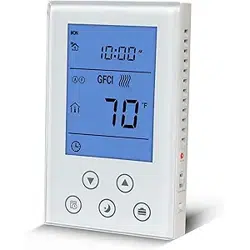
GM4 is a new intelligent heating thermostat for floor warming. It detects the indoor temperature and
displays the corresponding value. This device automatically regulates the heating output on 120V/240V in
accordance with the set point and the room temperature. The clock controls the 7-day user schedule. It is
accurate and sensitive with high reliability and high performance.
Parameters
Installation
Power Supply
120VAC/240VAC 50/60Hz
Self-consumption
<2W
Installation Way
120V electrical box, deep
Dimension
120mm ×76mm
Outer Shell
Tempered glass +PC Alloy
Wiring
Wiring +Terminals
GFCI
Class A 5mA
Output Load
15Amp., resistive
Maximum Power
120VAC/ 1800W , 240VAC/ 3600W
Accuracy
±0.1℃(1℉)
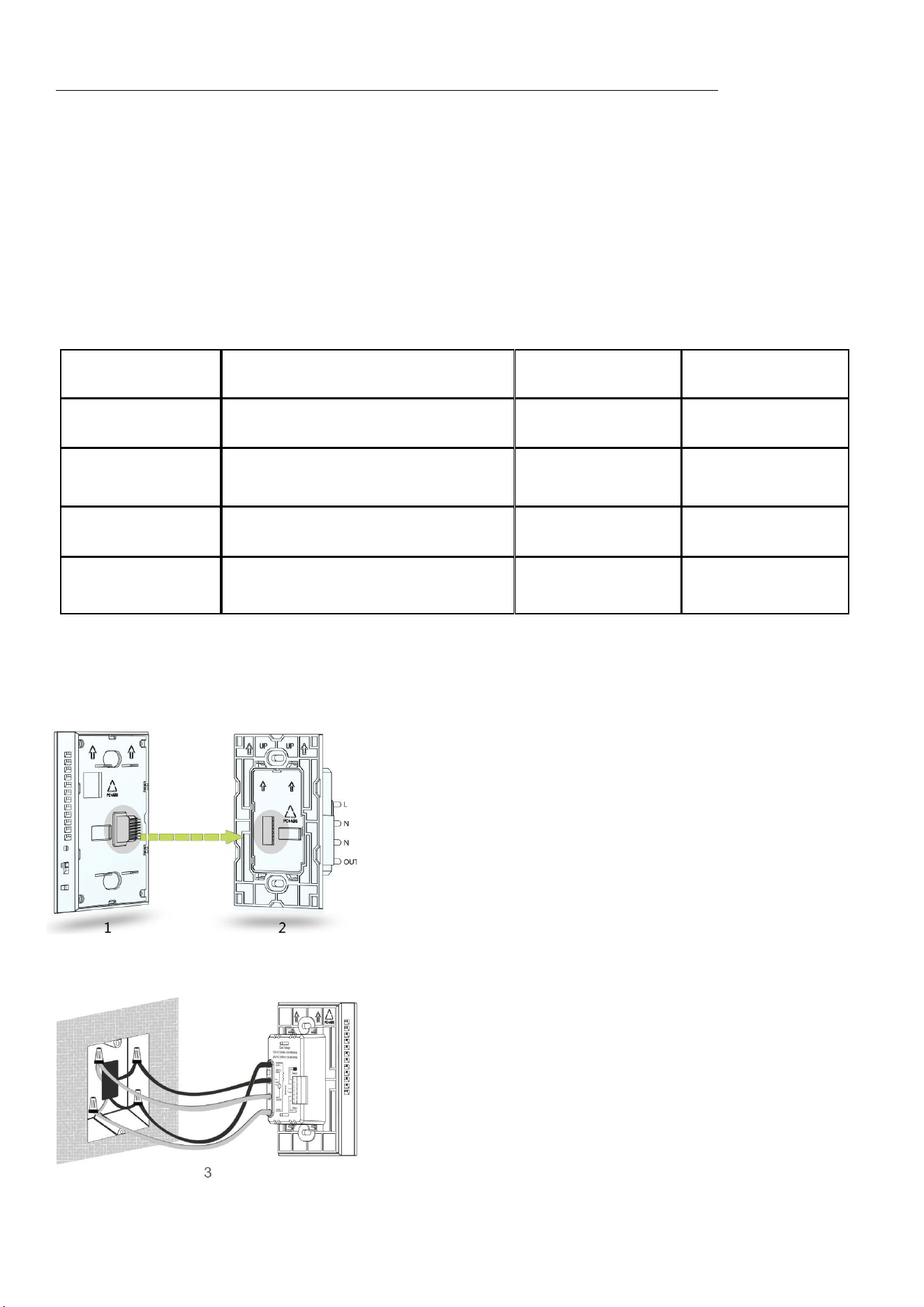
Use a screwdriver to separate the control panel and
power board of the thermostat, as figure 1 and figure
2 shown.
Choose the proper installation location. Installation
height is about 41/2 to 5 feet above the floor. For
indoor use only.
Do not install close to a heat source, such as hot
water pipe, heating pipe, wall-mounted light fixture or
in direct sunlight.
Connect the power wires to Line 1(L) & Line 2(N)
wires of the power board, using the connectors
provided, as shown on figure 3.
Connect the floor heating load wires to the Load 1 &
Load 2 wires of the power board, using the
connectors, as shown on figure 3.
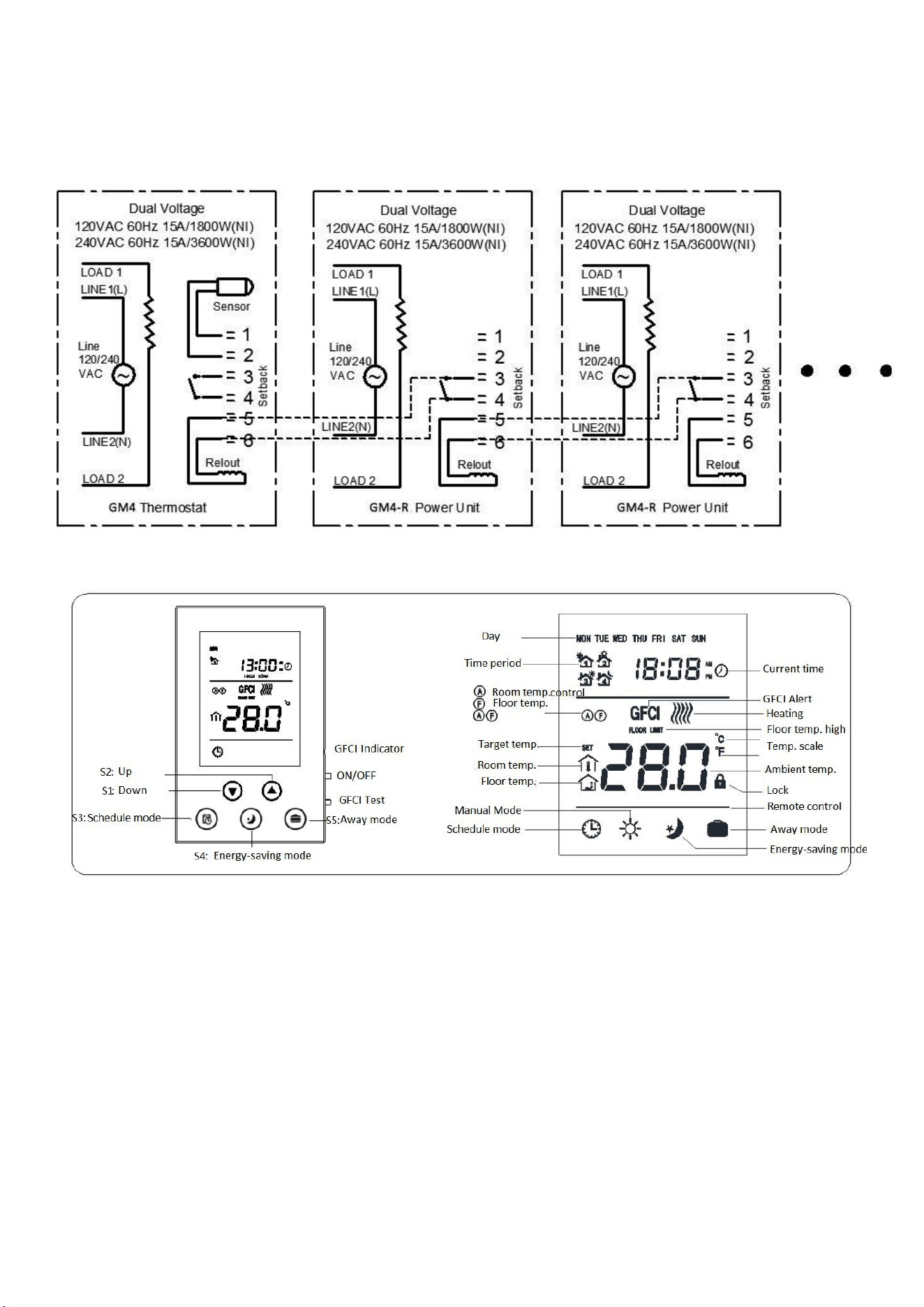
Connect the floor sensor wire into terminals 1 & 2
behind the power board and tighten the screws with
the screwdriver provided in the box.
If needed, connect an auxiliary power module into
terminals 5 & 6 of the thermostat for remote control.
See drawing below.
Install the power board into the electrical box with
the 2 screws provided, and then clip & fasten the
front control panel into place with the bottom screw.
2
Wiring Diagram
Buttons and Display
Operation Instruction
ON/OFF settings
ON: From the OFF display, slide the ON/OFF side switch up to turn the unit on.
OFF:From the ON display, slide the ON/OFF switch down to turn the unit off. It will display OFF.
GFCI Test
When the thermostat is under normal working status, press GFCI button on the side of the thermostat, then the screen
displays GFCI and the thermostat will stop working, GFCI indicator light is ON.
Turn off the thermostat and then turn it on again, the GFCI icon will disappear.
Note: GFCI is used to protect the installer from getting shcoked. After installation, please test and see if the GFCI function
is OK or not.
3
1. Make sure that the thermostat is under heating mode. Adjusting the target temperature is needed to trigger the
thermostat to start heating.
2. Press GFCI button to test. The screen displays GFCI and the GFCI indicator light is on and the thermostat stops heating. If
any of this case is not happened, please contact the supplier for a replacement.
Local Time Setting
During OFF mode, press S3 to set time and the icon which is blinking is adjustable. Press S1 or S2 to adjust and setting
value and press S4 to switch to the next setting item. After finishing, press S4 to confirm or wait for 5seconds to return
back to main interface. During setting, press S3 to return back to the main interface quickly.
Working Mode Setting
1. Schedule mode: during normal display, press S3 to switch to schedule mode, the screen displays ;
2. Energy-saving mode: during normal display, press S4 to switch to energy-saving mode, the screen displays
3. Away mode: during normal display, press S5 to switch to away mode, the screen displays
4. Manual mode: during normal display, press S1 or S2 to switch to manual mode, the screen displays
Mode setting
1. Schedule mode setting: There are 3kinds of schedule mode for setting: 7days programmable, 5+2 programmable, 6+1
programmable.
During normal display, press S3 for 5seconds to enter into the schedule setting interface. Then press S3 again to switch
among 7:0, 5:2, 6:1. After selecting the schedule mode, then press S4 to confirm.The icon blinking is settable. Press S3 to
select the Week Day. During setting, press S1 or S2 to adjust the value. Then press S4 to confirm and switch to the next
item. After finishing, press S3 to save the settings and return back to main interface or wait for 5seconds without doing
anything to save the settings.
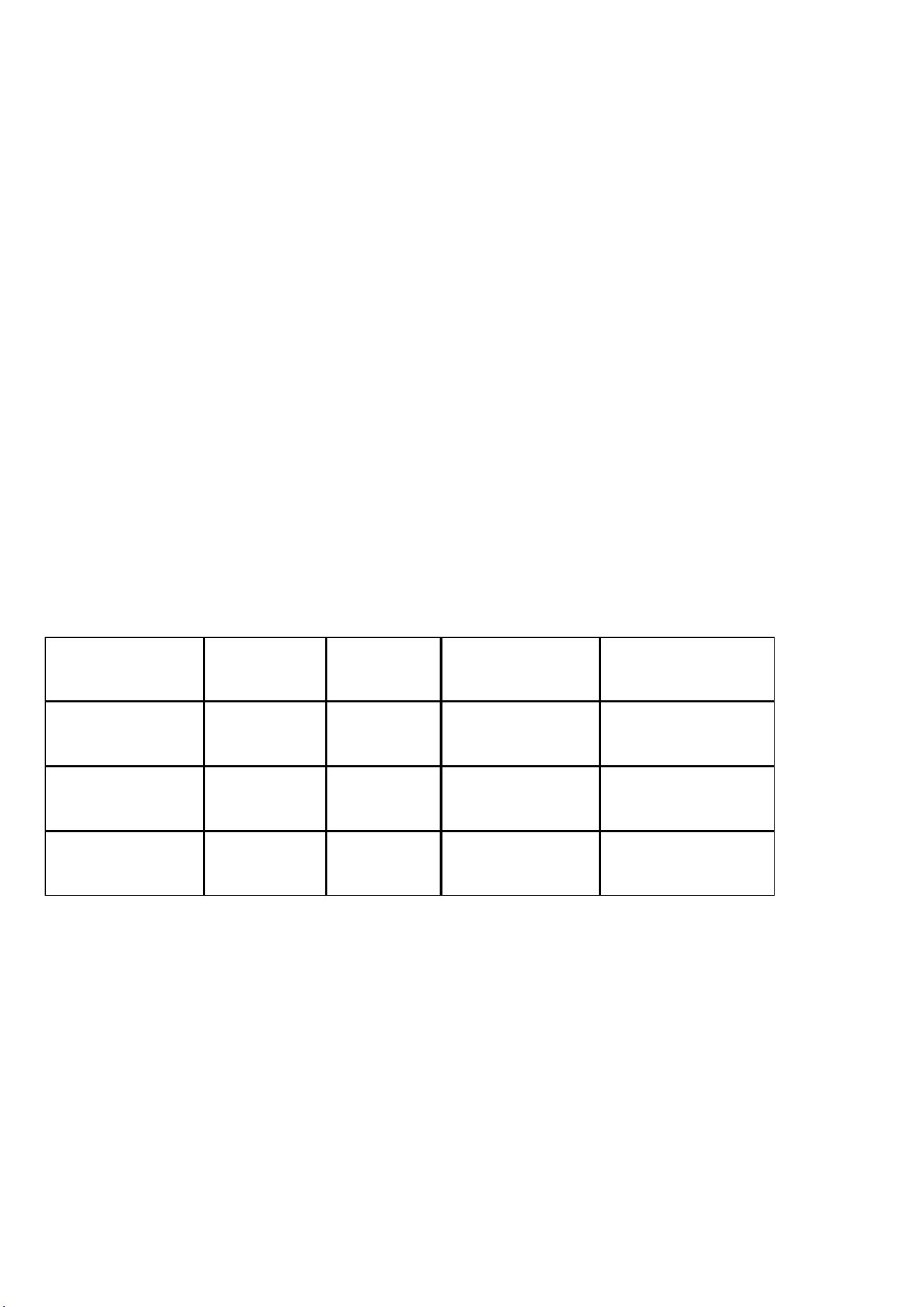
Default setting as below:
Period
1
2
3
4
Mon.--Fri. start time
5:00
7:00
17:00
22:00
Sat.--Sun. start time
5:00
9:00
17:00
22:00
Target temp
28℃(82℉)
24℃(75℉)
28℃(82℉)
24℃(75℉)
2. Energy saving mode: during normal display, press S4 to set. Press S1 or S2 to adjust the value and then press S4 to save
the settings and return back to main interface.
3. Away mode: During normal display, press S5 for 3seconds to set.Press S1 or S2 to adjust the value and then press S5 to
save the settings and return back to main interface.
4. Manual mode: During normal display, press S1 or S2 to enter into manual mode setting interface an adjust the value by
pressing S1 or S2 and then press S4 to save the settings and return back to main interface.
Check temperature
During normal display, press S4 and S5 at the same time to switch and display the ambient and floor temperature.

4
Lock keys
Under normal display, press S1 and S2 at the same time to lock the keys. The screen displays . After setting, it is invalid
to press any button.
Control methods
: Indoor temperature detected from floor
: Room temperature detected by the temperature sensor built-in
The thermostat takes the room temperature as the current indoor temperature and floor temperature is for floor
high temperature protection inspection.
:Floor temperature icon
:Room temperature icon
There are 3 ways to control the thermostat: The thermostat takes floor temperature as its current room temperature; The
thermostat takes the temperature detected by sensor built-in it as its current room temperature; The thermostat takes
the temperature detected by sensor built-in it as its current room temperature and the floor temperature as a inpection
item to protect the floor.
When the room temperature is below the target temperature, the thermostat will start heating and the screen displays
When the room temperature is equal to or above the target temperature, the thermostat will stop heating and the icon
disappears.
High temperature protection
When the thermostat take the floor temperature as the inspection item, once the floor temperature is above 45℃(113℉),
the screen displays “ FLOOR LIMIT ” , and the thermostat will enter into high temperature protection mode, and the
thermostat stops heating.
When the floor temperature is below 40℃(104℉), “FLOOR LIMIT” icon disappears and if the target temperature is
higher than the room temperature, the thermostat will start heating.
Remote control
When there is signal detected on the terminal of Setback, the thermostat will enter into remote mode.
When the room temperature is below the target temperature set on the remote side, the thermostat will start heating,
and the screen displays
and at the same time, there is output signal on terminal Relout.
When the room temperature is above the target temperature set on the remote side, the thermostat will stop heating, and
the screen displays
and at the same time, there is NO output signal on terminal Relout.
Sensor failure
If there is failure in the sensor, the screen displays “ EEE” at the temperature display area and the thermostat stops
heating.
℃ and ℉scale switch
Under OFF mode, press S3 and S4 at the same time to switch the scale between ℃ and℉.
5
Hidden menu
During OFF mode, press S3 and S5 at the same time to enter into secret menu. After entering into the hidden menu, press
S4 to switch to the next option to set.
No.
Parameter
Default setti
ng
Setting range
Note
P1
High temperature protection
temperature
45℃
(113℉)
OF/ 45~95℃
(113~203℉)
OF: Turn off floor temp. protection
P2
Room temperature calibration
0(00)
-9.5℃~9.5℃
(-16~16℉)
P3
temperature setback value
2℃(04℉)
0.5~10℃
(1~18℉)
P4
Button sound volume
3
OF/1~9
OF: OFF 1~9: volume level
P5
backlight brightness
NO
NO/OF
ON: always on OF: backlight off if no operation
P6
control method
A-F
A-F/Air/Flo
Air: temp. detected by built-in sensor is the room temp.
Flo: temp. detected by floor sensor is the room temp.
P7
Time format
24
12/24
12: 12hours format
24: 24hours format
P8
Floor temp. calibration
0(00)
-9.5~9.5℃(-16
~16℉)
P9
floor temp. control setback
value
1.5℃(03℉)
0.5~10℃(01~1
8℉)
P10
floor protection temp.
setback value
5.0℃(09℉)
0.5~10℃(01~1
8℉)
P11
Target room temperature
During remote control mode
16.5℃(62℉
)
5~37℃(41~99
℉)
P12
Reset to factory default
53
0~99
change to 55 and press S3 to reset to factory default.

6
P13
Room temperature increasing
speed during heating
5
0~99
5 means 5*30s=150s, it means the thermostat increase t
he room temperature every 150s till the actual room te
mperature.
P14
℃/℉
OF
OC/OF
OC:℃ OF: ℉
P15
GFCI detecting level
NOR
NOR, 1, 2, 3, O
FF
NOR: Once detected, the thermostat will alarm GFCI.
1,2,3: Delay to alam GFCI
OFF: Turn off GFCI.

