
E S S E N T I A L S FOR LIFE
User
Manual
MODEL
GGSFC108TGW
V1.1 | 0725
Circulation Fan

2
Welcome
Congratulations on purchasing
your new Circulation Fan!
The Sôlt brand is proudly
distributed within Australia
by Residentia Group Pty Ltd.
Please refer to the warranty card at the rear of this manual
for information regarding your product’s parts and labour
warranty, or visit us online at www.residentia.group
At Residentia Group, we are customer obsessed and our
Support Team are there to ensure you get the most out
of your appliance. Should you want to learn more about your
Circulation Fan features, and importantly taking care
of your appliance when cleaning, our Support Team are here
to help.
You can use our online Support Centre at anytime by visiting
http://support.residentiagroup.com.au, or you can contact us
via calling us on 1300 11 HELP (4357).
It is important that you read through the following use and
care manual thoroughly to familiarise yourself with the
installation and operation requirements of your appliance to
ensure optimum performance.
Again, thank you for choosing an Sôlt appliance and we look
forward to being of service to you.
Kind Regards,
The Residentia Team
Residentia Group
—
Head Office.
165 Barkly Ave
Burnley
Victoria 3121
Australia
—
ACN.
600 546 656
—
Online.
residentia.group
Sôlt
—
Online.
www.solt.house
—
Instagram.
/solt.house
—
Facebook.
/solt.appliances

Contents 3 Welcome
4 Safety Instructions
5 Your Circulation Fan
6 Assembly Instructions
7 Operating Instructions
8 Remote Control Instructions
9 Cleaning and Maintenance
10 Technical Specifications
12 Purchase Details
14 Warranty Information
Sôlt recommends the use of original spare parts. When contacting our customer service team, please ensure
that you have the following information at hand (which can be found on your appliances’ rating plate).
— Model Number
— Serial Number
T . 1300 11 4357 | E. support@residentiagroup.com.au
Customer Care

4
Safety Instructions
CONDITIONS OF USE
• Domestic use only: This appliance is intended for
indoor household use only. It is not intended for
commercial, industrial or outdoor use. It is not
intended for use in a recreational vehicle.
• Purpose: Do not use this appliance for anything
other than its intended purpose. Other uses are not
recommended and may cause fire, electric shock or
personal injury.
• Attachments: The use of attachments is not
recommended by the appliance manufacturer and
distributor as they may be hazardous.
• Improper use: Damage due to improper use, or
repairs made by unqualified personnel will void your
warranty. We assume no liability for any eventual
damages caused by misuse of the product or non-
compliance with these instructions.
SAFETY INSTRUCTIONS
• Before using the appliance, carefully read the
instructions in this manual.
• The manufacturer is not responsible if an incorrect
installation and use causes injuries and damages.
• Always keep the instructions with your appliance for
future reference.
WARNING: To prevent any damages to your and others’
life or property, you have to follow the safety notes.
INSTRUCTIONS FOR SAFE OPERATION
• Indoor and household use only.
• Never insert fingers, pencils, or any other object
through the grille when fan is running.
• Disconnect fan when moving from one location
to another.
• Be sure fan is on a stable surface when operating
to avoid overturning.
• DO NOT use fan near a window, rain may create
electrical hazard.
• Ensure that the fan is switched off from the supply
mains before removing the guard.
WHEN THE FAN IS ASSEMBLED
• Once assembled, the fan’s blade guard must remain
securely in place and must not be removed.
• Always unplug the fan before cleaning.
• Do not disassemble or open the blade guard to clean
the blades.
CHILDREN & VULNERABLE PEOPLE SAFETY
WARNING: Risk of suffocation, injury or
permanent disability.
• This appliance is not intended for use by persons
(including children) with reduced physical, sensory
or mental capabilities, or lack of experience and
knowledge, unless they have been given supervision
or instruction concerning use of the appliance by a
person responsible for their safety.
• Children should be supervised to ensure that they do
not play with the appliance.
• Keep all packaging away from children.
INSTALLATION
• Remove all the packaging.
• Do not install or use a damaged appliance.
• Once the fan is assembled, the rotor blade guard
shall not be taken off anymore
ELECTRICAL CONNECTION
WARNING: Caution, risk of fire and electrical shock!
• If the supply cord is damaged, it must be replaced
by manufacturer or its service agent or a similarly
qualified person in order to avoid a hazard.
• To protect against the risk of electrical shock, do not
immerse the unit, cord or plug in water or other liquid.
• Only use the original power supply unit provided with
this fan.
CARE & CLEANING
WARNING: Risk of injury or damage to the appliance.
• Prior to cleaning, unplug the fan.
• Do not disassemble or open the blade guard to clean
the blades.
• When the appliance is not in use and before cleaning,
unplug the appliance from the outlet.
• Clean the appliance with a damp soft cloth to wipe
the fan housing and blade guard.
• Only use neutral detergents.
• Do not use abrasive products, abrasive cleaning pads,
solvents or metal objects.
• The rotor guard shall not be dissembled/opened to
clean the rotor blades.
PRODUCT DISPOSAL
• Disconnect the appliance from the mains supply.
• Cut off the mains cable and discard it.
5
Your Circulation Fan
Note: The images in this user manual are for explanatory purposes only.
Your Circulation Fan may appear slightly different.
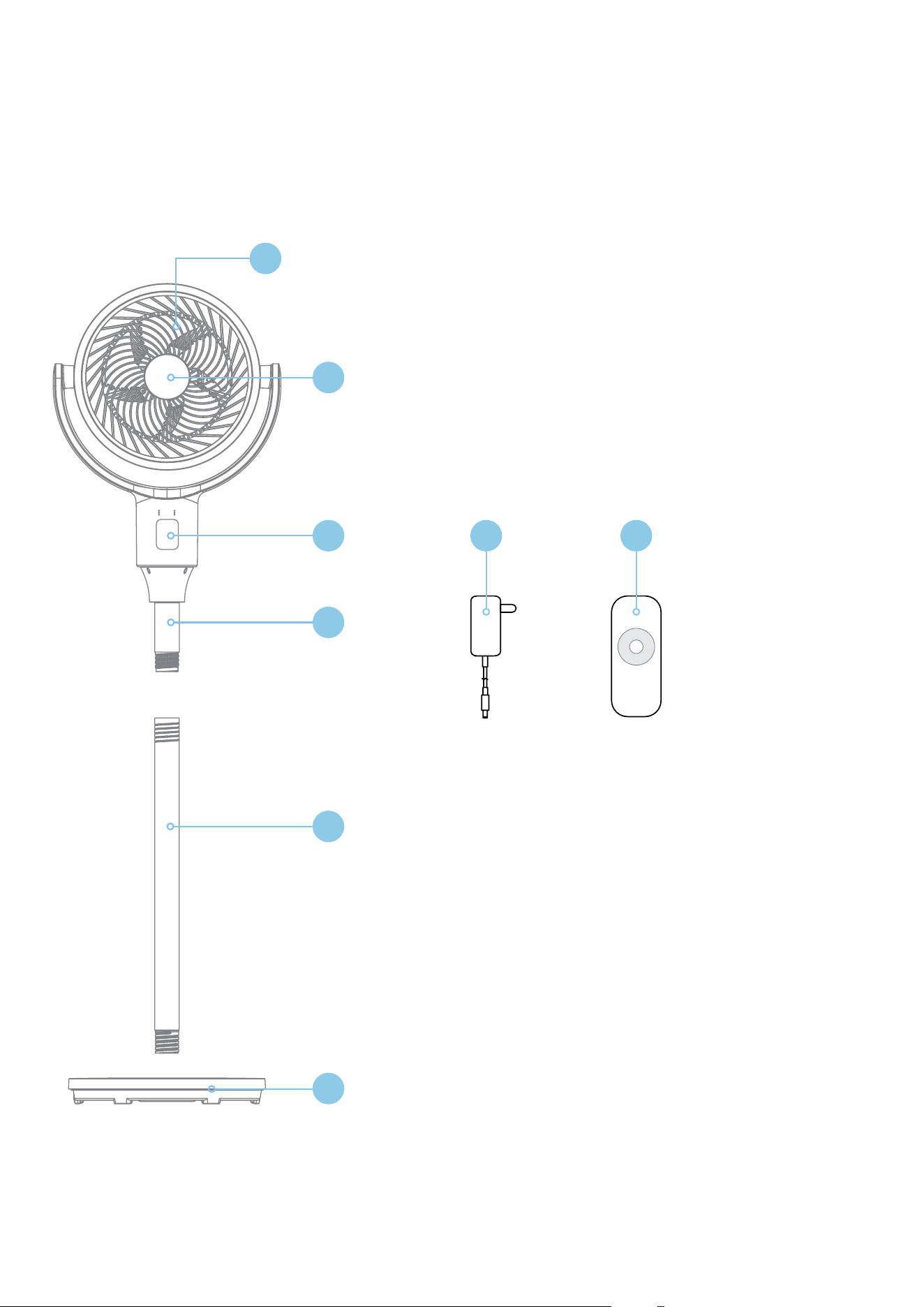
YOUR CIRCULATION FAN LEGEND
1. Built-in PP Antibacterial Filter Rear Grille
2. Aromatherapy Cover
3. LED Digital Controls
4. Attaching Pole
5. Main Pole
6. Base
7. Adapter
8. Remote Control
1
3
2
4
5
6
7 8
6
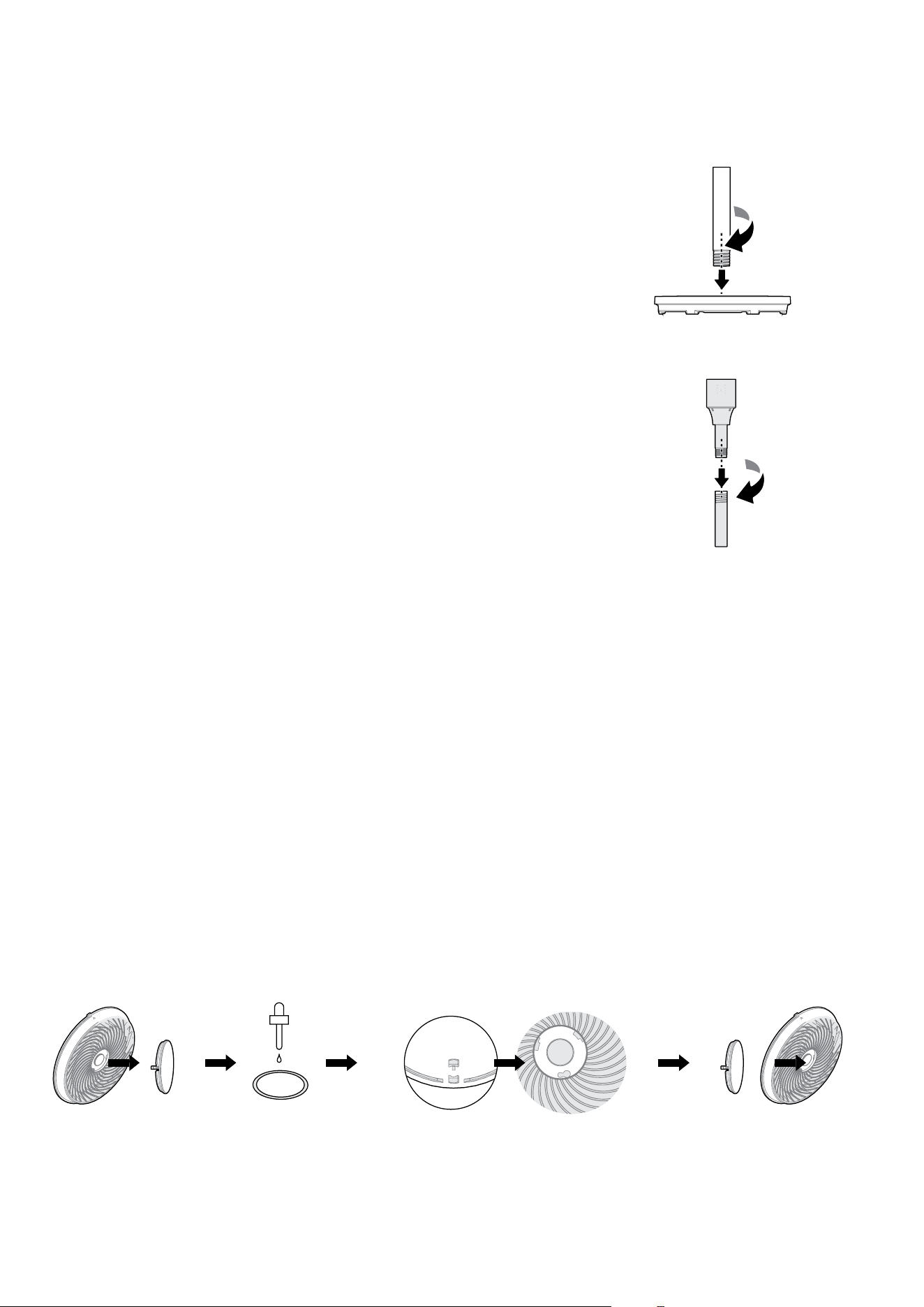
INSTALL THE BASE POLE
• Take the Main Pole and align it with the Base.
• Gently insert the threaded end of the Main Pole into the
corresponding opening on the Base.
• Rotate the Main Pole clockwise until it is fully tightened
and feels secure.
TIP: Make sure the Main Pole is upright and stable before proceeding.
CONNECT THE ATTACHING POLE
• Take the Attaching Pole and align it with the top of the Main Pole
you installed in the earlier steps.
• Insert the Attaching Pole into the Main Pole.
• Rotate the Attaching Pole clockwise until it is fully tightened
and feels secure.
TIP: If the pole does not insert smoothly, realign and try again
—do not force it.
ADD AROMATHERAPY (OPTIONAL)
Enhance your environment by adding scent to the airflow.
To use the aromatherapy function:
• Locate the aromatherapy cover at the centre of the fan’s front grille.
• Twist the cover counter-clockwise to open.
• You’ll see a small cotton pad in the centre.
• Add 2–3 drops of your chosen essential oil or fragrance oil onto the
cotton pad.
• Re-align the cover using the alignment mark.
• Press the cover back into place and rotate it clockwise to secure.
IMPORTANT:
• Do not oversaturate the cotton pad.
• Use only oils intended for diffusion (e.g., lavender, eucalyptus, citrus).
• Essential oils are not included with this product and must be
purchased separately.
• Keep oils away from children and avoid skin contact. Clean up spills
immediately.
Assembly Instructions
Open Add essential oils Fix cover back
into place
To re-align the cover, insert the large
circular hole according to the alignment
mark first, and then rotate it clockwise.
7
Operating Instructions
Idle Shutdown Function
After connecting to power and entering standby mode, if the fan remains inactive, it will automatically power off
after 15 hours of non-operation.
Note: The images in this user manual are for explanatory purposes only.
Your Circulation Fan may appear slightly different.
LED DIGITAL CONTROLS
PRESS 3 SEC. PRESS 3 SEC.
35.3±0.1
29.6±0.1
30°
60°
135°
30°
60°
135°
30°
60°
135°
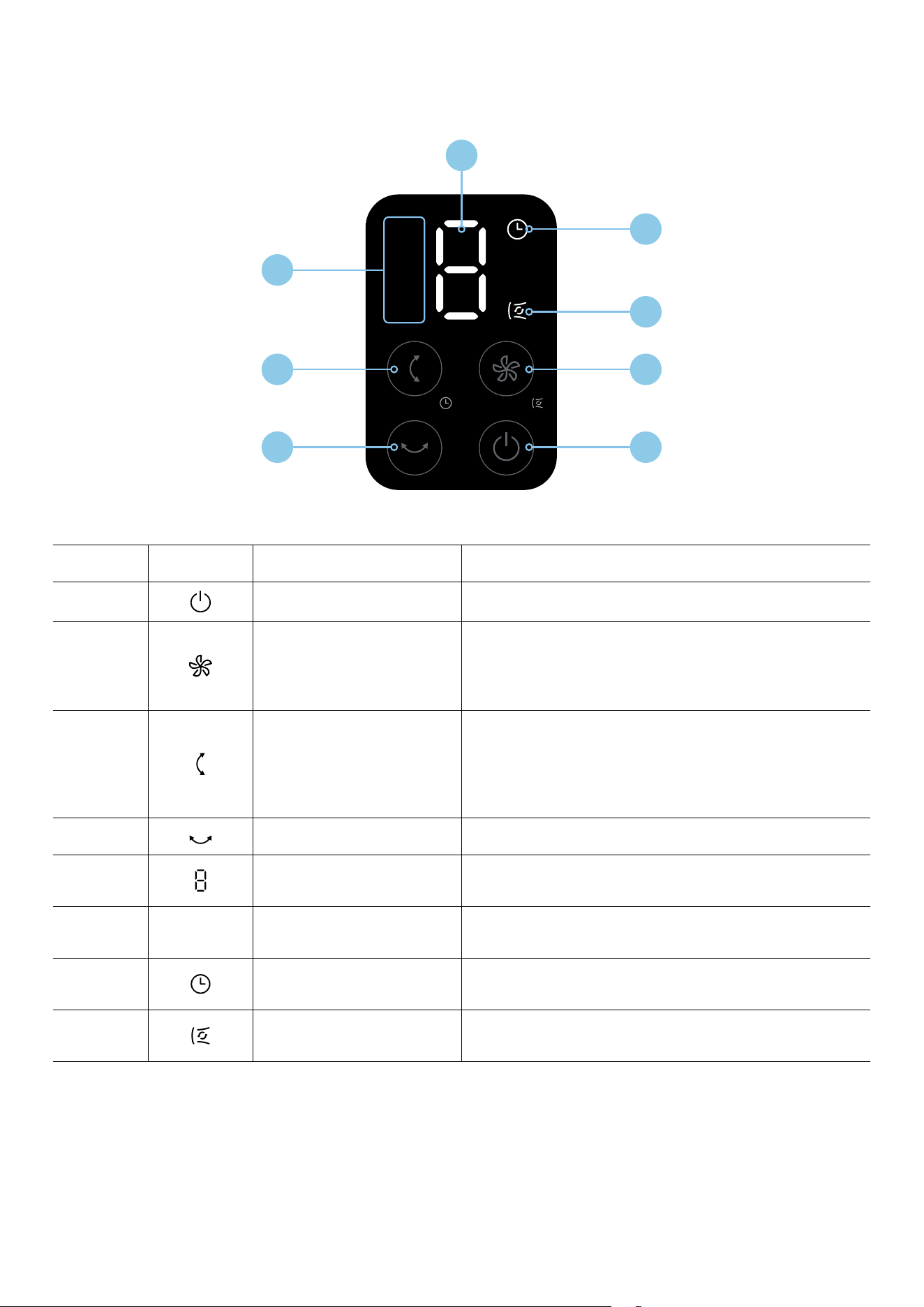
KEY ICON BUTTON / INDICATOR FUNCTION
1
Power Button Press once to turn the fan on or standby.
2
Wind Speed Button
Press to cycle through the wind speeds, 1 to 9.
Press for 3 seconds to enter or exit Air Circulation
Mode where the air is distributed more evenly.
3
Vertical Oscillation Tilt
Press to adjust tilt oscillation angle, 30°, 60°, 135° or off.
Press for 3 seconds to set the Timer Function.
Press repeatedly to cycle between 0h to 9h.
Wait 3 seconds to confirm your setting.
4
Horizontal Oscillation Press to enable or disable 85° side-to-side oscillation.
5
LED Display
The LED display will show the current wind
speed level or timer setting.
6 30° 60° 135° Vertical Tilt Angle Indicator
These will light up showing the selected tilt angle
when the vertical oscillation tilt is active.
7
Timer Function Indicator This will light up indicating the Timer Function is active.
8
Air Circulation
Mode Indicator
This will light up indicating the
Air Circulation Mode function is active.
1
3
6
2
8
7
5
4
8
Remote Control Instructions
ENVIRONMENTAL NOTE
Batteries contain harmful substances such as heavy metals, acids, and alkalis, which can pose risks to human health
and the environment.
Please dispose of used batteries properly by following local recycling regulations.
Note: The images in this user manual are for explanatory purposes only.
Your Circulation Fan may appear slightly different.
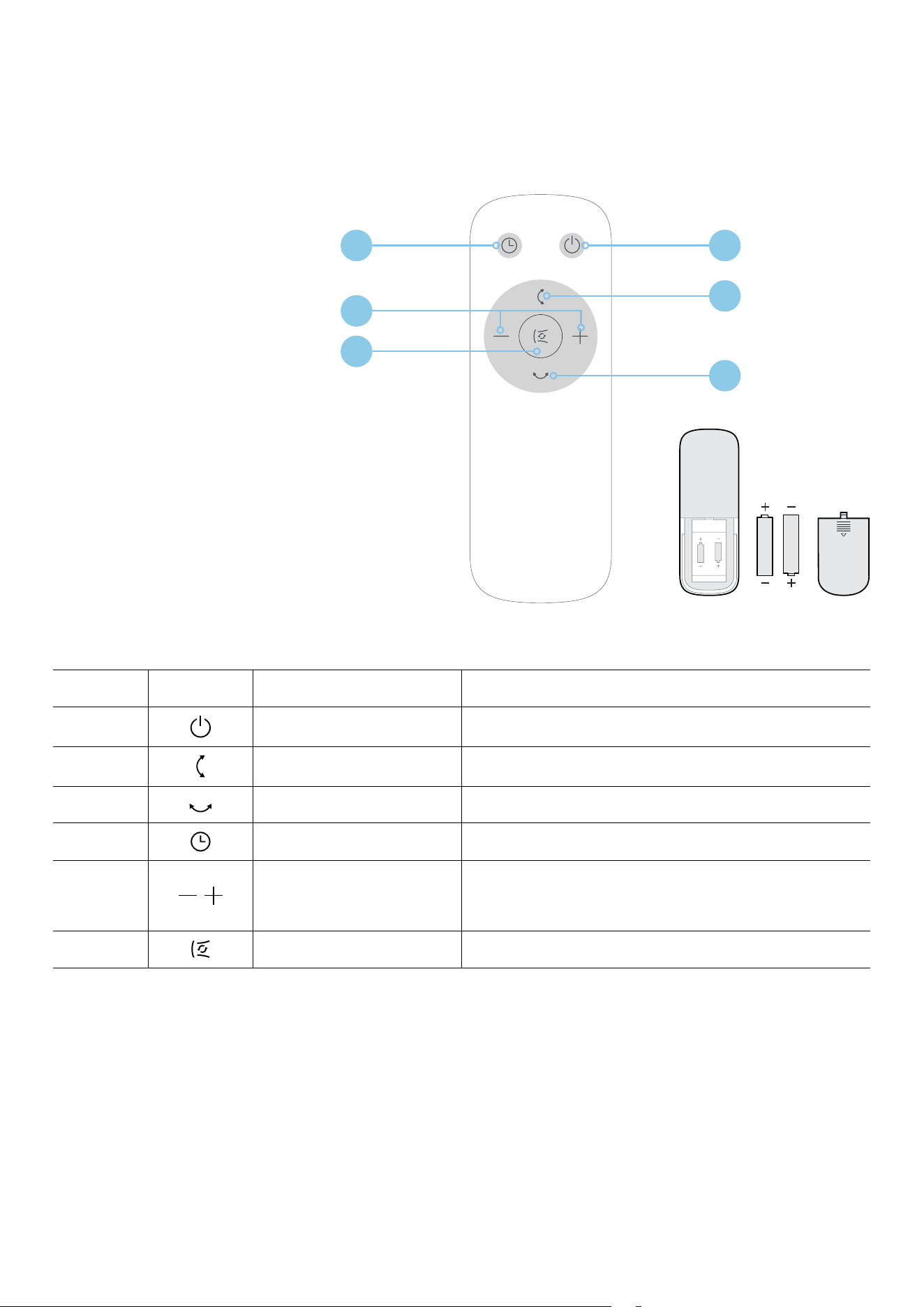
REMOTE CONTROL
The remote control works effectively
within a distance of 5 meters from
the front of the product and within
a 30° angle from the centreline.
BATTERY SAFETY & INSTALLATION
• Use only AAA size manganese
or alkaline batteries.
• Do not use rechargeable batteries
(e.g., Ni-Cd, Ni-MH).
• Do not mix old and new batteries,
or different battery types
(e.g., alkaline, standard carbon-zinc,
or rechargeable).
KEY ICON BUTTON FUNCTION
1
Power Button Press once to turn the fan on or standby.
2
Vertical Oscillation Tilt Press to adjust tilt oscillation angle, 30°, 60°, 135° or off.
3
Horizontal Oscillation Press to enable or disable 85° side-to-side oscillation.
4
Timer Function Press to activate the Timer Function.
5
Increase / Decrease
Adjustment Buttons
Press these buttons to adjust
the wind speeds (1 to 9), air circulation speed,
or the Timer Function (0h to 9h).
6
Air Circulation Mode Press to activate the Air Circulation Mode function.
14
5
6
2
3

9
Cleaning and Maintenance
To ensure safe operation and prolong the life of your
appliance, follow these cleaning and maintenance
guidelines carefully:
BEFORE CLEANING
• Always unplug the power supply before beginning
any cleaning or maintenance.
• After turning off the fan, wait at least 2 minutes to
allow internal components to cool and discharge
before cleaning.
CLEANING INSTRUCTIONS
• Never rinse the appliance directly with water. Water
exposure may damage internal components and
pose an electric shock hazard.
• Use a soft, lint-free cloth dampened with a small
amount of mild, neutral detergent to gently clean the
exterior surface.
• After cleaning, use a dry cloth to thoroughly wipe
down all surfaces to remove any remaining moisture.
• Do not use abrasive cleaners, solvents, or chemicals
such as gasoline, alcohol, or bleach, as these may
damage the finish or internal parts.
AFTER CLEANING
• Ensure the appliance is completely dry before
plugging it in or storing it.
• Do not operate the fan while wet.
IMPORTANT:
• Do not disassemble or modify the appliance under
any circumstances. This may lead to malfunction,
electrical hazards, or void your warranty.
• To maintain optimal performance, regularly inspect
and clean the fan to prevent dust build-up and ensure
efficient airflow.
10
Technical Specifications
Below outlines the technical specifications for your Circulation Fan.
Model GGSFC108TGW
Dimensions (W × D × H mm) 300 × 360 × 1080 mm
Rated Voltage 24V
Rated Power 24W
Max Noise Rating 59dB(A)
Below outlines the technical specifications for the Adapter.
Input 100-240V ~50/60Hz 1.5A
Output 24V
1.5A

11
This page
is intentionally
left blank

12
For future reference, please record the following information which can be found
on the rating plate and the date of purchase which can be found on your sales invoice.
STORE DETAILS
STORE NAME
|
ADDRESS
|
TELEPHONE
|
PURCHASE DATE
|
PRODUCT DETAILS
MODEL NO.
|
SERIAL NO.*
|
Purchase Details

13
Attach your receipt
to this page

14
Warranty Information
WARRANTY TERMS & CONDITIONS
CIRCULATION FANS
This document sets out the terms and conditions of the
product warranties for Residentia Group Appliances.
It is an important document. Please keep it with your
proof of purchase documents in a safe place for future
reference should you require service for your Appliance.
1. IN THIS WARRANTY
(a) ‘acceptable quality’ as referred to in clause 10 of
this warranty has the same meaning referred to in
the ACL;
(b) ‘ACL’ means Trade Practices Amendment (Australian
Consumer Law) Act (No.2) 2010;
(c) ‘Appliance’ means any Residentia Group product
purchased by you accompanied by this document;
(d) ‘ASR’ means Residentia Group authorised service
representative;
(e) ‘Residentia Group’ means Residentia Group Pty Ltd
of 165 Barkly Ave, Burnley VIC 3121, ACN 600
546 656 in respect of Appliances purchased in
Australia;
(f ) ‘major failure’ as referred to in clause 10 of this
warranty has the same meaning referred to
in the ACL and includes a situation when an
Appliance cannot be repaired or it is uneconomic
for Residentia Group, at its discretion, to repair an
Appliance during the Warranty Period;
(g) ‘Warranty Period’ means:
(i) where the Appliance is used for personal,
domestic or household use (i.e. normal
single family use) as set out in the instruction
manual, the Appliance is warranted against
manufacturing defects for 24 months,
following the date of original purchase of the
Appliance;
(h) ‘you’ means the purchaser of the Appliance not
having purchased the Appliance for re-sale, and
‘your’ has a corresponding meaning.
2. This warranty only applies to Appliances
purchased and used in Australia and is in addition
to (and does not exclude, restrict, or modify in
any way) any non-excludable statutory warranties
in Australia.
3. During the Warranty Period Residentia Group or
its ASR will, at no extra charge if your Appliance
is readily accessible for service, without special
equipment and subject to these terms and
conditions, repair or replace any parts which it
considers to be defective. Residentia Group or its
ASR may use remanufactured parts to repair your
Appliance. You agree that any replaced Appliances
or parts become the property of Residentia Group.
This warranty does not apply to light globes,
batteries, filters, seals or similar perishable parts.
4. Parts and Appliances not supplied by Residentia
Group are not covered by this warranty.

15
5. You will bear the cost of transportation, travel and
delivery of the Appliance to and from Residentia
Group or its ASR. If you reside outside of the service
area, you will bear the cost of:
(a) travel of an authorised representative;
(b) transportation and delivery of the Appliance
to and from Residentia Group or its ASR, in all
instances, unless the Appliance is transported
by Residentia Group or its ASR, the Appliance is
transported at the owner’s cost and risk while in
transit to and from Residentia Group or its ASR.
6. Proof of purchase is required before you can make
a claim under this warranty.
7. You may not make a claim under this warranty
unless the defect claimed is due to faulty or
defective parts or workmanship. Residentia Group
is not liable in the following situations (which are
not exhaustive):
(a) the Appliance is damaged by:
(i) accident
(ii) misuse or abuse, including failure to properly
maintain or service
(iii) normal wear and tear
(iv) power surges, electrical storm damage or
incorrect power supply
(v) incomplete or improper installation
(vi) incorrect, improper or inappropriate
operation
(vii) insect or vermin infestation
(viii) failure to comply with any additional
instructions supplied with the Appliance;
(b) the Appliance is modified without authority from
Residentia Group in writing;
(c) the Appliance’s serial number or warranty seal has
been removed or defaced;
(d) the Appliance was serviced or repaired by anyone
other than Residentia Group, an authorised
repairer or ASR.
8. This warranty, the contract to which it relates
and the relationship between you and Residentia
Group are governed by the law applicable where
the Appliance was purchased.
9. To the extent permitted by law, Residentia Group
excludes all warranties and liabilities (other than
as contained in this document) including liability
for any loss or damage whether direct or indirect
arising from your purchase, use or non use of the
Appliance.
10. For Appliances and services provided by Residentia
Group in Australia, the Appliances come with a
guarantee by Residentia Group that cannot be
excluded under the Australian Consumer Law.
You are entitled to a replacement or refund for a
major failure and for compensation for any other
reasonably foreseeable loss or damage. You are
also entitled to have the Appliance repaired or
replaced if the Appliance fails to be of acceptable
quality and the failure does not amount to a major
failure. The benefits to you given by this warranty
are in addition to your other rights and remedies
under a law in relation to the Appliances or
services to which the warranty relates.
11. At all times during the Warranty Period, Residentia
Group shall, at its discretion, determine whether
repair, replacement or refund will apply if an
Appliance has a valid warranty claim applicable to
it.
12. Missing parts are not covered by warranty.
Residentia Group reserves the right to assess each
request for missing parts in a case by case basis.
Any parts that are not reported missing in the first
week after purchase will not provide free of charge.
13. To enquire about claiming under this warranty,
please follow these steps:
(a) carefully check the operating instructions,
user manual and the terms of this warranty;
(b) have the model and serial number of the
Appliance available;
(c) have the proof of purchase
(e.g. an invoice) available;
(d) telephone the numbers shown below.
14. You accept that if you make a warranty claim,
Residentia Group and its ASR may exchange
information in relation to you to enable Residentia
Group to meet its obligations under this warranty.
IMPORTANT
Before calling for service, please ensure that the steps in
point 13 have been followed.
Telephone contacts
► Service: Please call 1300 11 HELP (4357)
► Spare Parts: Please call 1300 11 SPARE (7727)
Our goods come with guarantees that cannot be excluded under the Australian
Consumer Law. You are entitled to a replacement or refund for a major failure and
for compensation for any other reasonably foreseeable loss or damage. You are also
entitled to have the goods repaired or replaced if the goods fail to be of acceptable
quality and the failure does not amount to a major failure.
The Australian Consumer
Law requires the inclusion
of the following statement
with this warranty:

T. 1300 11 4357
E. support@residentiagroup.com.au
www.solt.house
E S S E N T I A L S FOR LIFE
An initiative by
Residentia Group