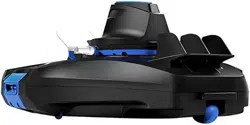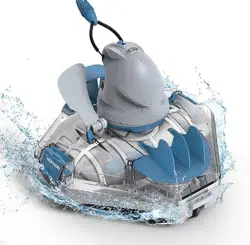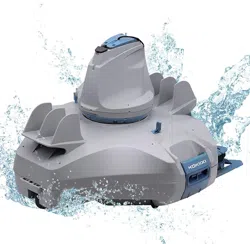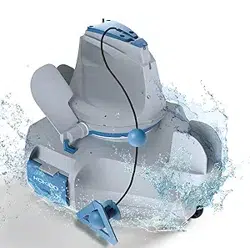
USER MANUAL
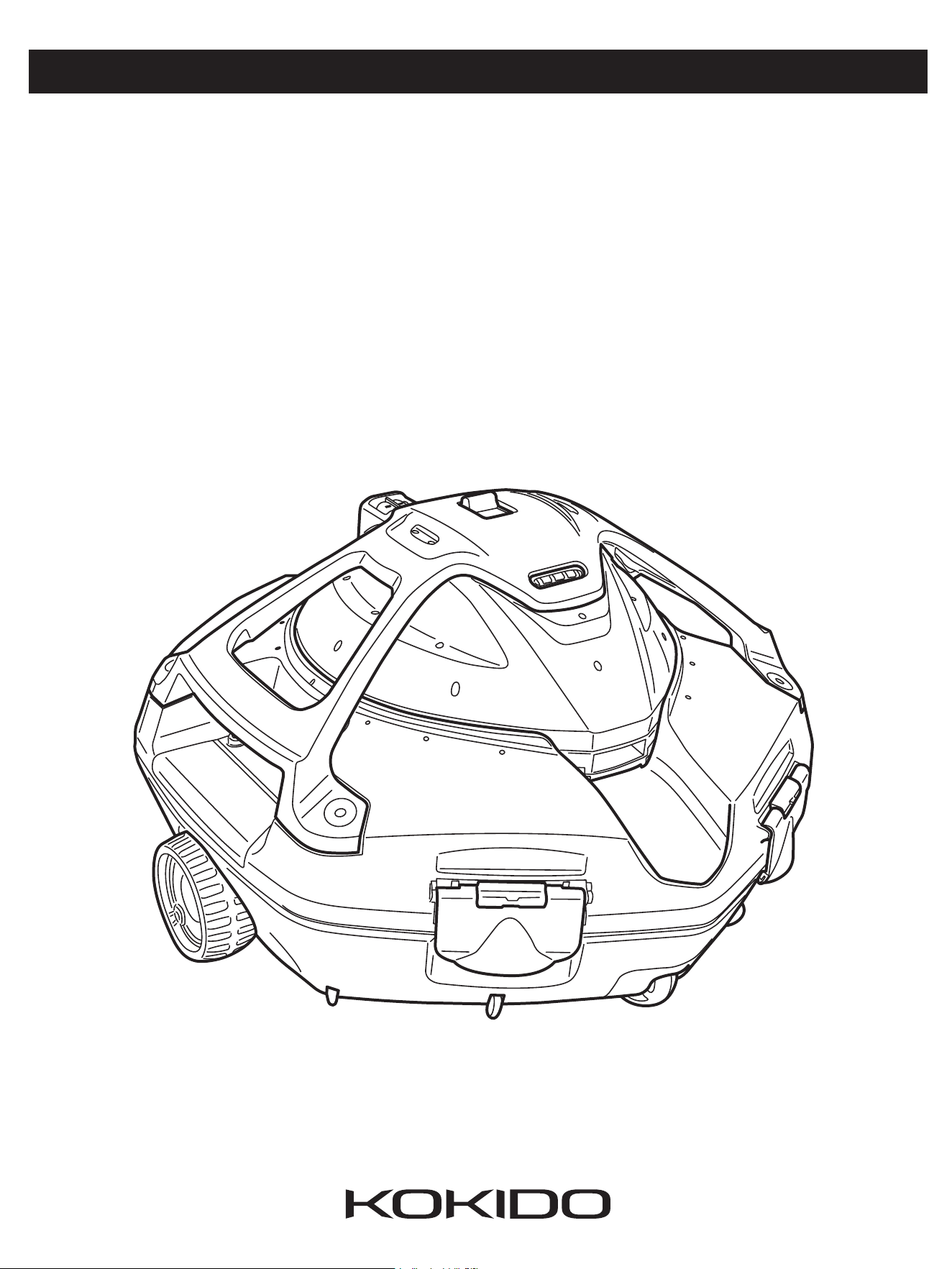
xtrovac 420
Pool Vacuum Cleaner
ENGLISH
1
SAFETY WARNINGS & INSTRUCTIONS
Information contained in this Instruction Manual will help you operate the item safely, protect
yourself and others from hazards, and prevent damage to the device and other property.
SAVE THESE INSTRUCTIONS
WARNING!
- This is not a TOY. Children should be kept out of reach from this robot and its
accessories.
- Never allow children to operate this product.
- This appliance is not intended for use by persons with reduced physical,
sensory, mental capabilities, or a lack of experience and knowledge, unless
they are given supervision or instructions concerning the safe use of the
appliance and understand the hazards involved by a person responsible for
their safety.
- Children must not play with this product.
- Cleaning and maintenance of the robot must not be carried out by children.
- Make sure the robot is fully immersed in the pool before initiating operation.
The minimum water level required to operate the robot must cover the entire
robot. Operating the robot when it is not immersed correctly could damage
the unit and void the warranty.
- Maximum operating depth in water is 3 meters ( 9.8 ft ).
- Operating water temperature: 5˚C ( 41˚F ) – 35˚C ( 95˚F ).
- Detachable supply unit ( external adaptor ).
- The robot should only be charged with the external adaptor (already attached
to the charging connector ) delivered with this product.
- Connect the external adaptor to a power source through a residential current
device ( RCD ) / a ground fault circuit interrupter ( GFCI ). If in doubt, consult a
qualied electrician.
- Do not use this robot if any damage is detected.
- Replace damaged parts with ones that are certied by the distributor or
manufacturer.
- Disconnect the robot from the supply mains and make sure the robot is
OFF prior to carrying out regular maintenance – such as cleaning the lter
Remark: Depending on the model you own, accessories/ parts
shown in this manual are not necessarily included in every model.
Product/parts in photos/drawings may vary with the model purchased. Check the
spare parts drawing to understand the parts included in your model purchased.

ENGLISH
2
compartment and charging port.
- Do not attempt to replace the installed rechargeable Li-ion battery pack.
- DO NOT handle the robot, external adaptor, and charging connector while it
is charging with wet limbs and without shoes.
- Ensure that children do not attempt to access the robot while it is operating.
- It is not advisable to enter the pool when the robot is working to avoid damage
to the robot.
- DO NOT use this robot without an intact lter cover in place, otherwise your
warranty will be voided as a result.
- Suction entrapment hazard: This robot generates suction. Do not allow hair,
body, and any loose parts of your clothing to make contact with the suction
hole of the robot during its operation.
- Never insert body parts, clothing, and other objects into the openings and
moving parts of the robot.
- DO NOT use this robot to pick up any toxic substance, ammable, and
combustible liquids ( i.e. gasoline ) in the presence of explosive or ammable
fumes.
- Under no circumstances should you disassemble the robot to replace its
internal components by yourself. Doing so would void the warranty, expose
yourself to potential hazards, and possibly damage the device and other
properties.
- Never insert ngers or any object to touch the impeller.
- The built-in battery must be removed by a skilled technician before it is
scrapped.
- This robot contains a battery that are only to be removed by skilled persons.
- The robot must be disconnected from the supply mains as the battery is
removed.
- For details regarding battery recycling/disposal, refer to the section “BATTERY
DISPOSAL” in this manual and contact your local authorities for more
information.
- The battery must be disposed safely in accordance with local ordinances or
regulations.
- External adaptor and charging connector:
· Never use the external adaptor and charging connector for anything other
than charging the battery of the robot that is supplied in the same pack.
· The external adaptor and charging connector should not be used outdoors,
nor should it be exposed to rain, humidity, and any liquid or heat.

ENGLISH
3
· The transformer ( or external adaptor ) is to be located outside zone 1.
· Keep the external adaptor and charging connector out of reach of children.
· Never use the external adaptor and charging connector if any damage is
detected.
· DO NOT handle the external adaptor and charging connector with wet
hands.
· Keep the external adaptor disconnected from power when it is not in use.
· Never attempt to pry open the external adaptor and charging connector.
· If the supply cord of the external adaptor is damaged, the external adaptor
must be replaced by the manufacturer or its service agent to prevent hazards
of any kind.
· Make sure the robot is completely dry before charging.
CAUTION!
- This robot is designed for underwater use only; it is not an all-purpose vacuum cleaner. DO NOT attempt to use
it to clean anything other than your pool.
- Use only the original accessories delivered with this product.
- DO NOT use this robot right after pool-shocking. It is recommended to rst leave the pool circulating for at least
24 - 48 hours.
- If you are planning on using the robot in a saltwater pool, make sure all salt are dissolved before deploying the
robot.
- DO NOT use this robot with another automatic cleaner/cleaner simultaneously in the pool.
- Remove hard, sharp objects from the pool before deploying the robot to avoid damages to the robot and its
lter.
- To avoid damages to the external adaptor and charging connector, do not attempt to carry the robot by the cord
of external adaptor / charging connector or pull the cord to disconnect it from the power source and charging
connector.
- Charge the robot indoors in a clean, dry area with good ventilation and away from sunlight.
- DO NOT leave the robot charged for over 10 hours.
- If the robot will not be used for an extended period, detach it from the charging connector and use a damp
cloth to clean and dry the robot and its accessories. Make sure to charge the robot to about 30% to 50% of the
battery capacity before it is stored. Store it in a well-ventilated area away from sunlight, heat, ignition sources,
pool chemicals, and children. Recharge the robot every three months.
- All actions concerning the disassembly of the robot ( ie. battery disposal ) should only be carried out by an
authorized technician.
Above warnings and cautions are not intended to incorporate all possible
instances for risks and / or severe injuries. Pool / spa owners should always
exercise extra caution and common sense when utilizing the product.
ENGLISH
4
HOW THE ROBOT WORKS
The robot has a water-propelling nozzles at the top of the robot. Water is rst sucked in through
the suction mouth at the bottom of the robot, which then goes through the lter and is dis-
charged via the propelling nozzle. Water jetting from the nozzle propels the robot forward. Once
the robot stops against an obstacle such as the pool wall, it changes to jet the water on opposite
nozzle, allowing the robot to move in the opposite direction. The robot moves in a generally
straight pattern in one direction and in an arc pattern in the other direction. The robot vacuums
the pool bottom as it moves, collecting debris in its compartment.
GETTING STARTED
Charging The Battery
IMPORTANT NOTE: Fully charge the robot ( about 6 hrs ) before using it for the
rst time.
WARNING!
- Use only the original external adaptor and charging connector provided.
- Make sure the robot and the charging port are clean and dry before set-up
and charging.
( TIPS: Use a cotton bud to dry the charging port and charging pads inside.)
- The charging pads are waterproof. However, remnants of water in the port
and around the pads could result in natural occurrence of stains ( a byproduct
of chemical reaction between water and electric currents ). Otherwise, the
stains can be removed by light scrubbing with a cotton bud soaked with juice
of lemon or vinegar.
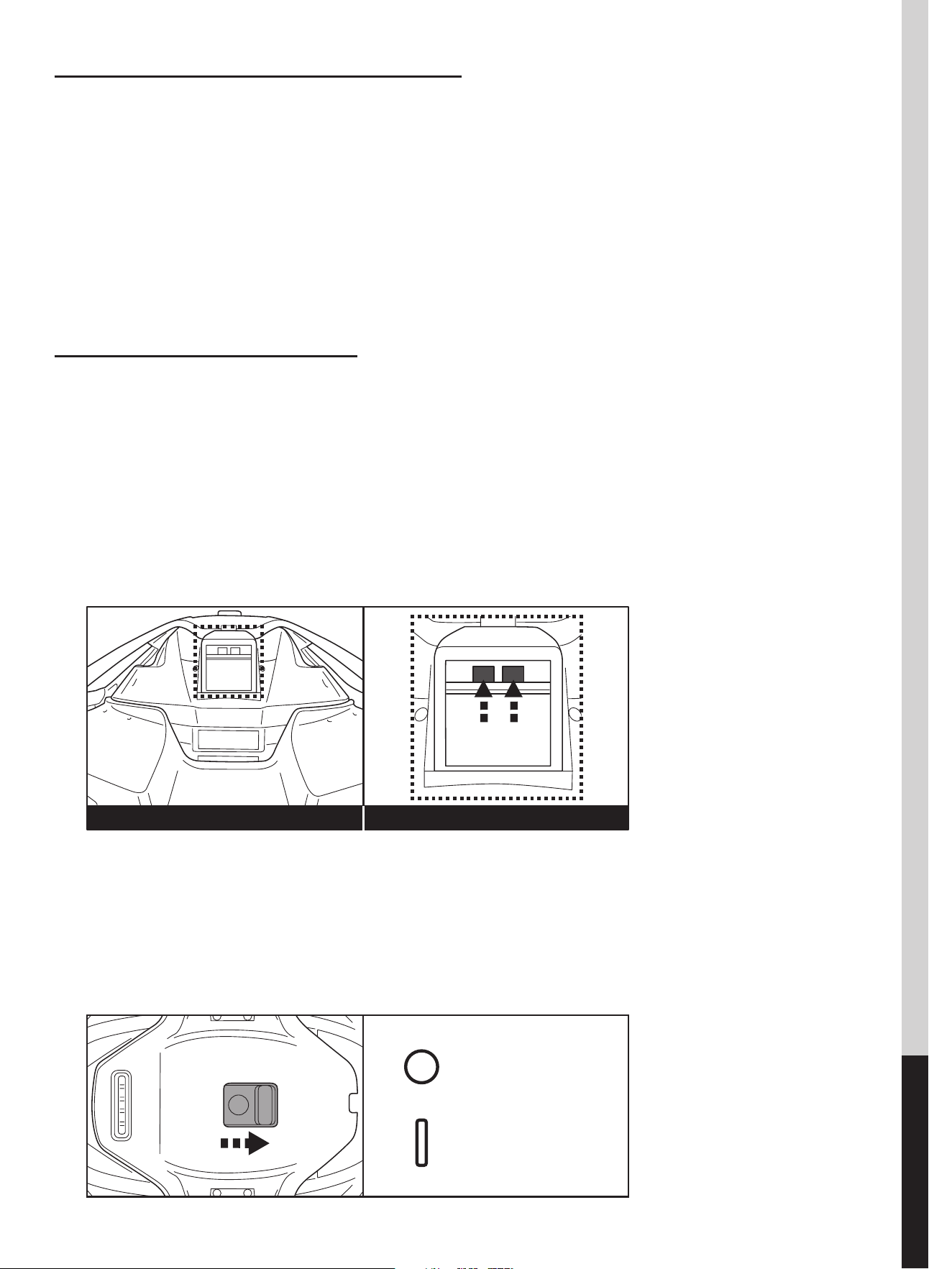
1. Place the unit on a at surface. Slide the switch to the OFF position.
Charging padsCharging port
OFF
ON
ENGLISH
5
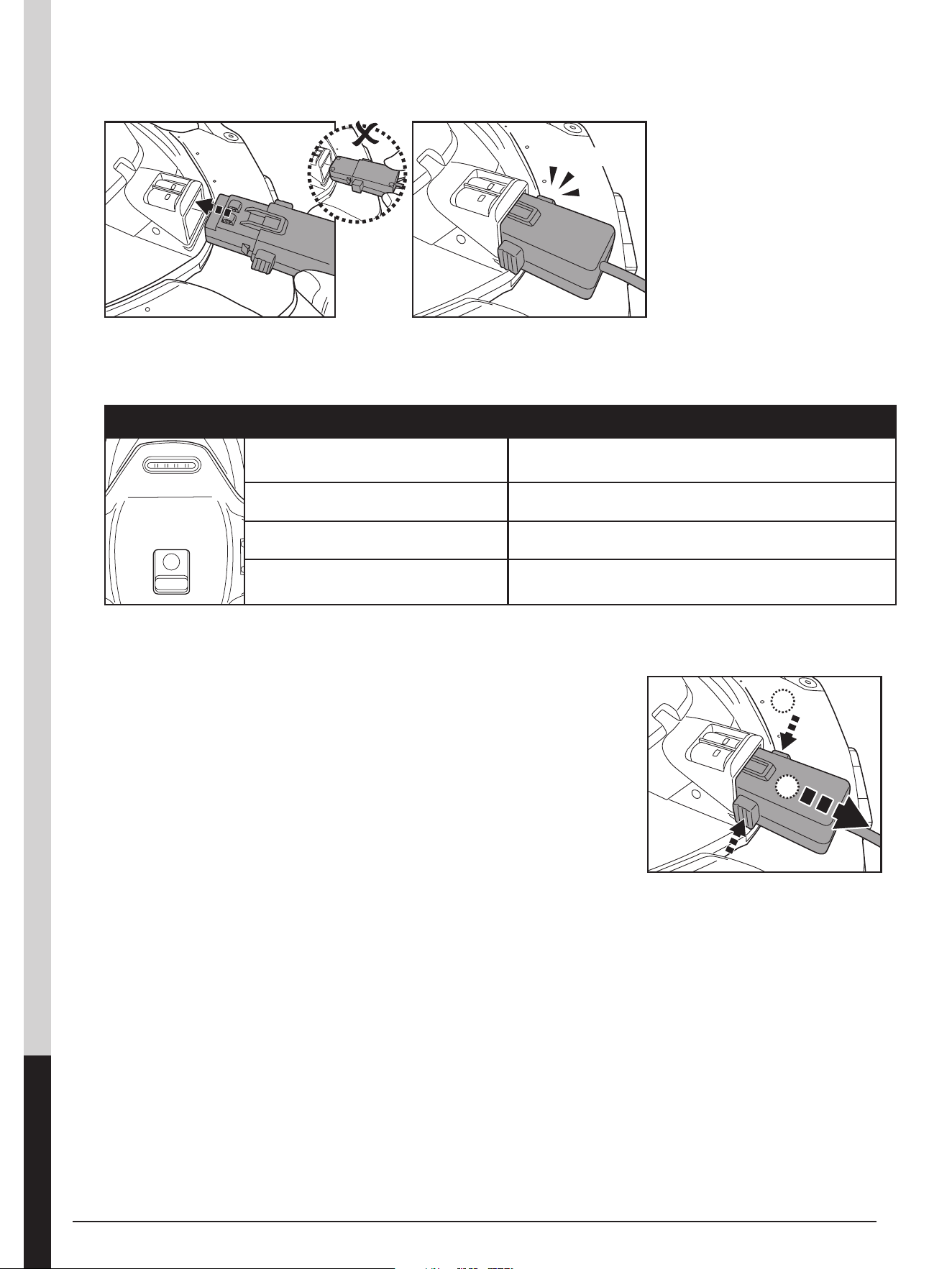
2. Align and insert the charging connector to the charging port. WARNING!
Ensure both the charging connector and charging port are clean and dry before
charging them. TIP: Use a cotton bud to dry the charging port and pads.
3. Connect the external adaptor to the power source. The indicator lights on the
the robot turns red and ash once the charging begins. The indicator lights
turn green when the robot is charged.
· Immediately disconnect the external adaptor from the power source if you
detect any of the following:
- Oensive or unusual odor
- Excessive heat
- Deformation, cracks, leaks
- Smoke
4. When charging is complete, disconnect the external
adaptor from the power source and unplug the
charging connector from the unit.
Normally the robot can operate up to 75 minutes on a full charge.
NOTE: Clean the debris compartment regularly. Excessive debris inside the
debris compartment increases the burden to the motor operation and shortens
the operating duration as a result.
NOTE: Rechargeable lithium-ion battery is classied as a consumable item. It
has a limited life and will gradually lose its capacity to hold a charge. Therefore,
the running time of the robot will gradually reduce after repeated charging and
discharging throughout its product life.
Once the lifespan of the battery reaches its end, refer to section “BATTERY
DISPOSAL” for instructions regarding battery disposal.
NOTE: Let the robot rest for around 30 to 40 minutes before charging it again.
Charging light color indication
Running LEDs in blue
Means power is on. Slide the switch to the OFF
position while charging.
Running LEDs in red Charging properly
All LEDs are ashing in green Charged.
All LEDs are ashing in red
Wrong adaptor is used. Should use the adaptor
provided with the robot
1.
2.
Click
ENGLISH
6
Set-Up Before Use
Adjustment of Trajectory
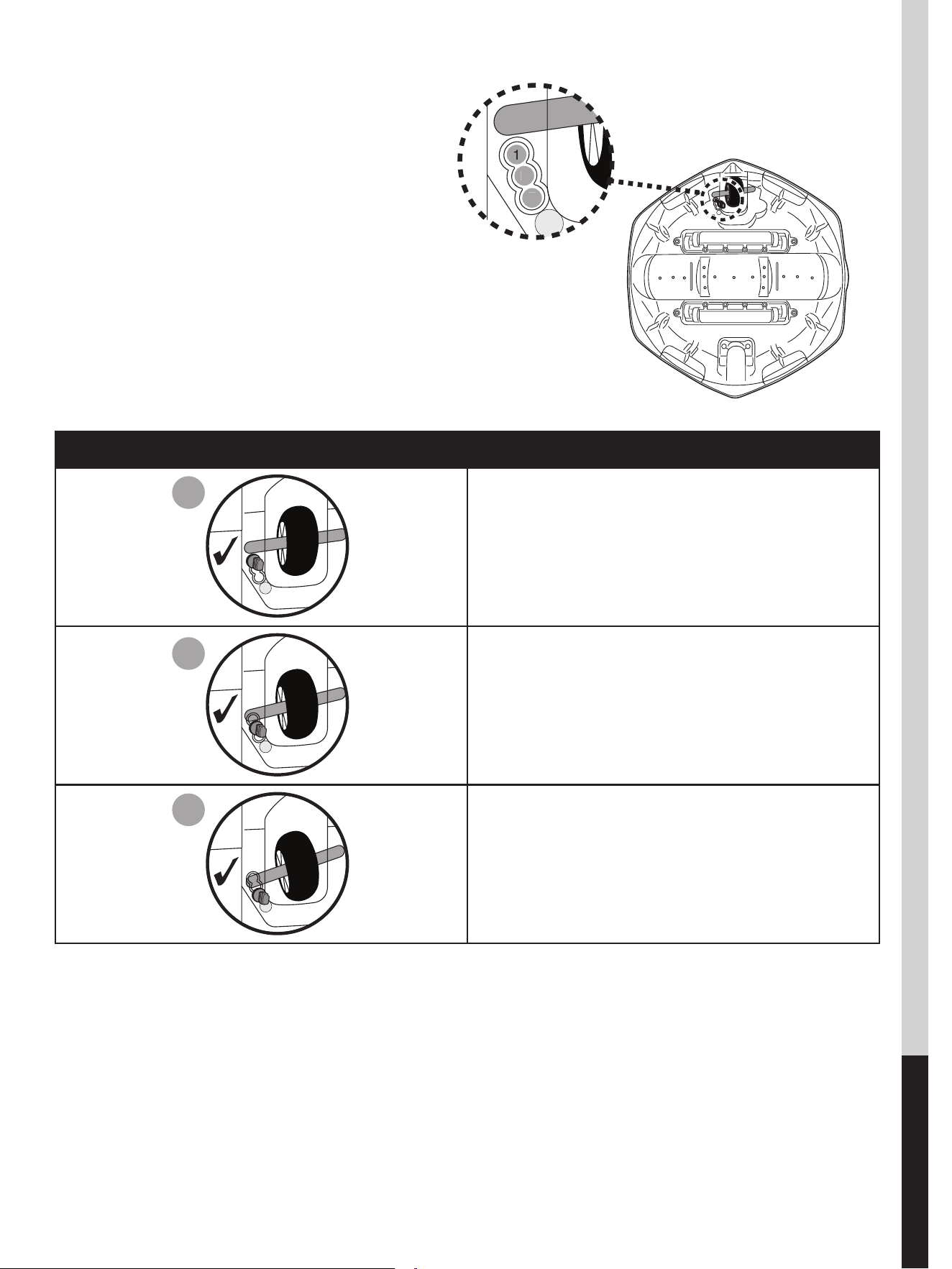
Locking Pin
The trajectory of the robot is dependent on the
position of the pin that xes the axle to a certain
angle.
Recommended settings:
NOTE: Wheel axle should be positioned
above the locking pin.
Pool Preparation
- If there are stones, roots or metal corrosion in contact with the underside of the liner, discard them prior to using the
robot. If necessary, seek assistance from a qualied professional.
- If the liner is brittle, damaged or wrinkled, contact a qualied professional to perform the necessary repairs or perform
a liner replacement prior to using the robot.
- Remove any pool ladder from the pool as it may obstruct the movement of the robot.
- If you are using a saltwater pool, make sure all salt are dissolved before placing the robot into the water.
Pin location Pool size
For pools where the shortest
length is 3 meters or above.
If the robot does not cover the
entire pool with either pin
position 1 or 3, try below setting.
If the situation persists, deploy
the robot from a dierent location.
For pools where the shortest
length is 3 meters or below.
(Factory setting)
1
2
3
1
2
3
1
2
3
ENGLISH
7
OPERATION
WARNING!
• Make sure the robot is o.
• Make sure lter cover is in place.
• Ensure the charging connector is detached before deploying the robot in
the pool.
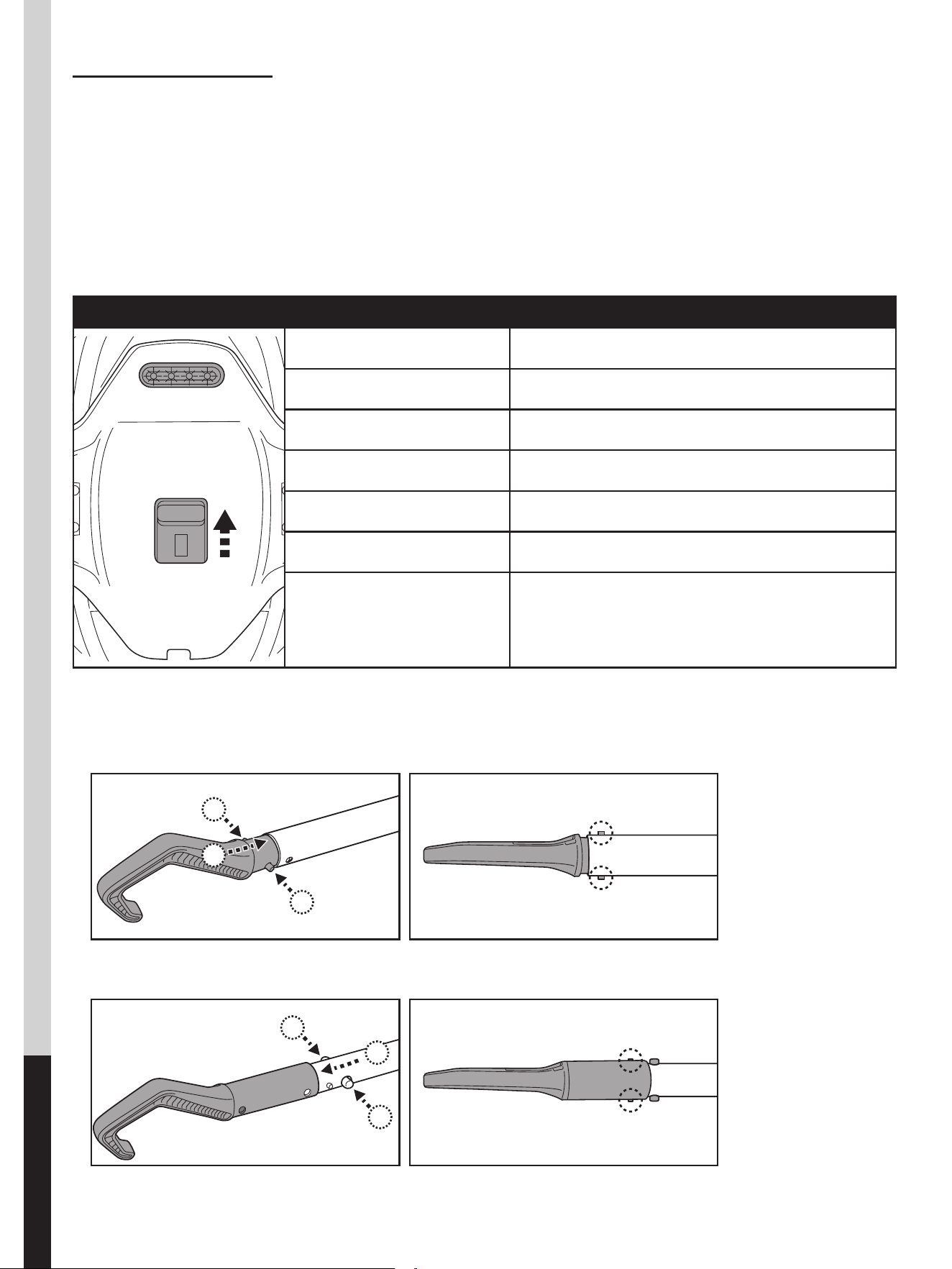
1. Bring the robot to the side of your pool. Slide the power switch to “ON” and all indicator lights will illuminate in blue.
Immerse entire robot into water and all indicator lights will change to be green.
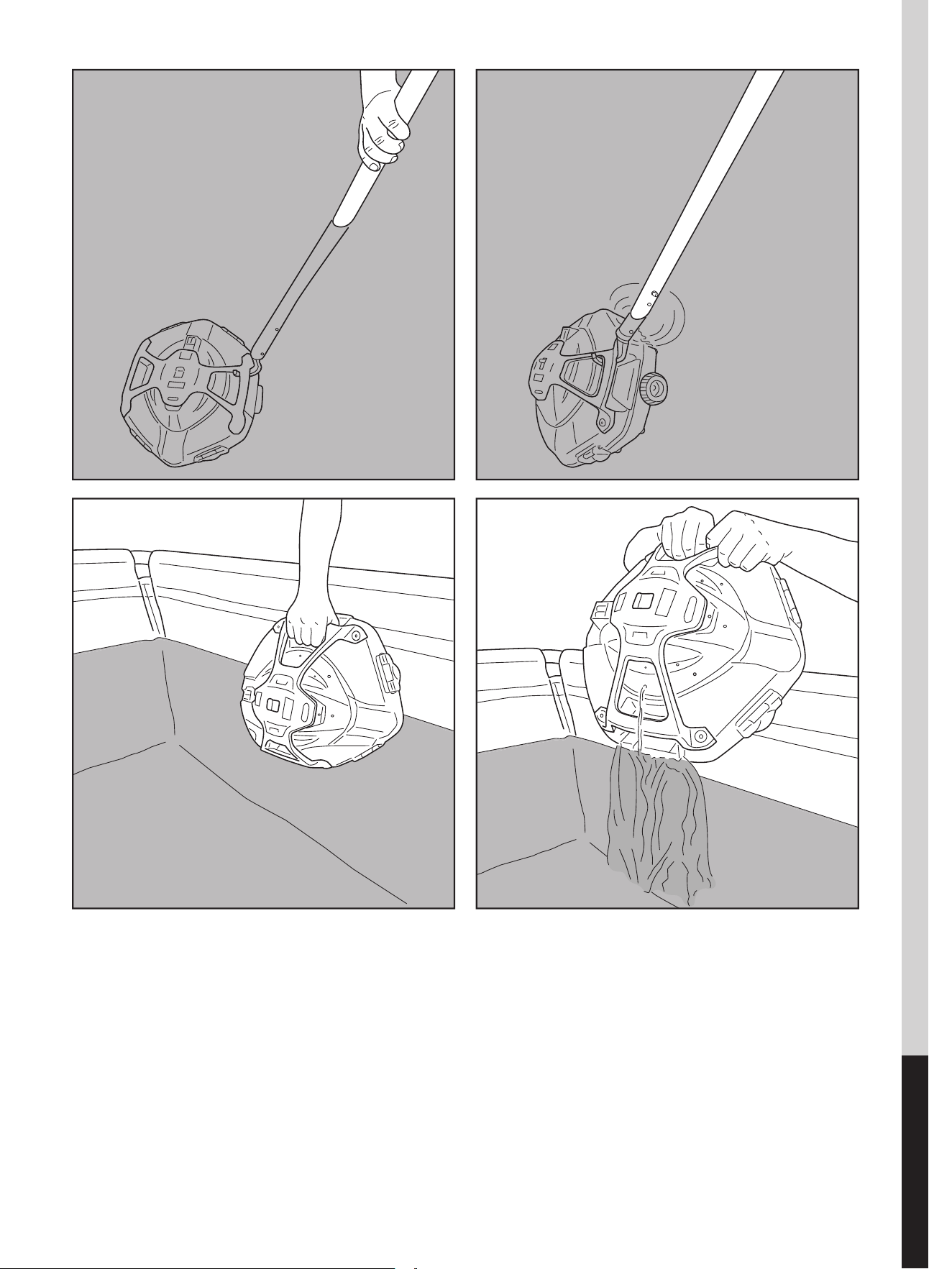
2. To retrieve the robot from the pool, attach the hook to a telescopic pole ( not provided ) and use it to retrieve the
robot, if you are unable to retrieve with your hands.
( for EU & US only )
( for Australia / New Zealand only )
Operating light color indication
4 blue LEDs Power on (ready for operation).
4 green LEDs Start to operate within 3-5 seconds.
3 green LEDs left About 50-55 minutes left.
2 green LEDs left About 20-25 minutes left.
1 green LED left About 3-5 minutes of usage remains.
1 green LED starting to ash About 2 -3 minutes to stop.
4 red LEDs
Impeller is clogged. Remove the robot from the
pool and switch it o. Open and turn over the
cover to locate the impeller in the middle. Remove
the debris from the impeller.
1.
1.
2.
3.
3.
3.
3.
1.
1.
2.
ENGLISH
8
3. Slide the power switch OFF. Rinse the robot with fresh water after every use. DO NOT use any detergent.
4. Dry the charging port and pads thoroughly ( TIPS: Use cotton bud to dry them )
NOTE: To ensure the most ecient cleaning, when your pool is quite dirty, it is recommended to empty the debris
compart- ment after the rst 30min of operation, or whenever the robot’s movement has slowed down noticeably.
Then return the robot ( with an emptied debris compartment ) to the pool, and let it run through the remaining of its
cycle.
1. 2.
3. 4.
ENGLISH
9
EMPTYING THE DEBRIS COMPARTMENT
WARNING! Using the robot without its lter cover in place will VOID
your warranty.
In order to maximize the cleaning eciency, clean the debris compartment and
the lter cover before and after each use.
CAUTION! Before cleaning the debris compartment, make sure the robot is OFF.
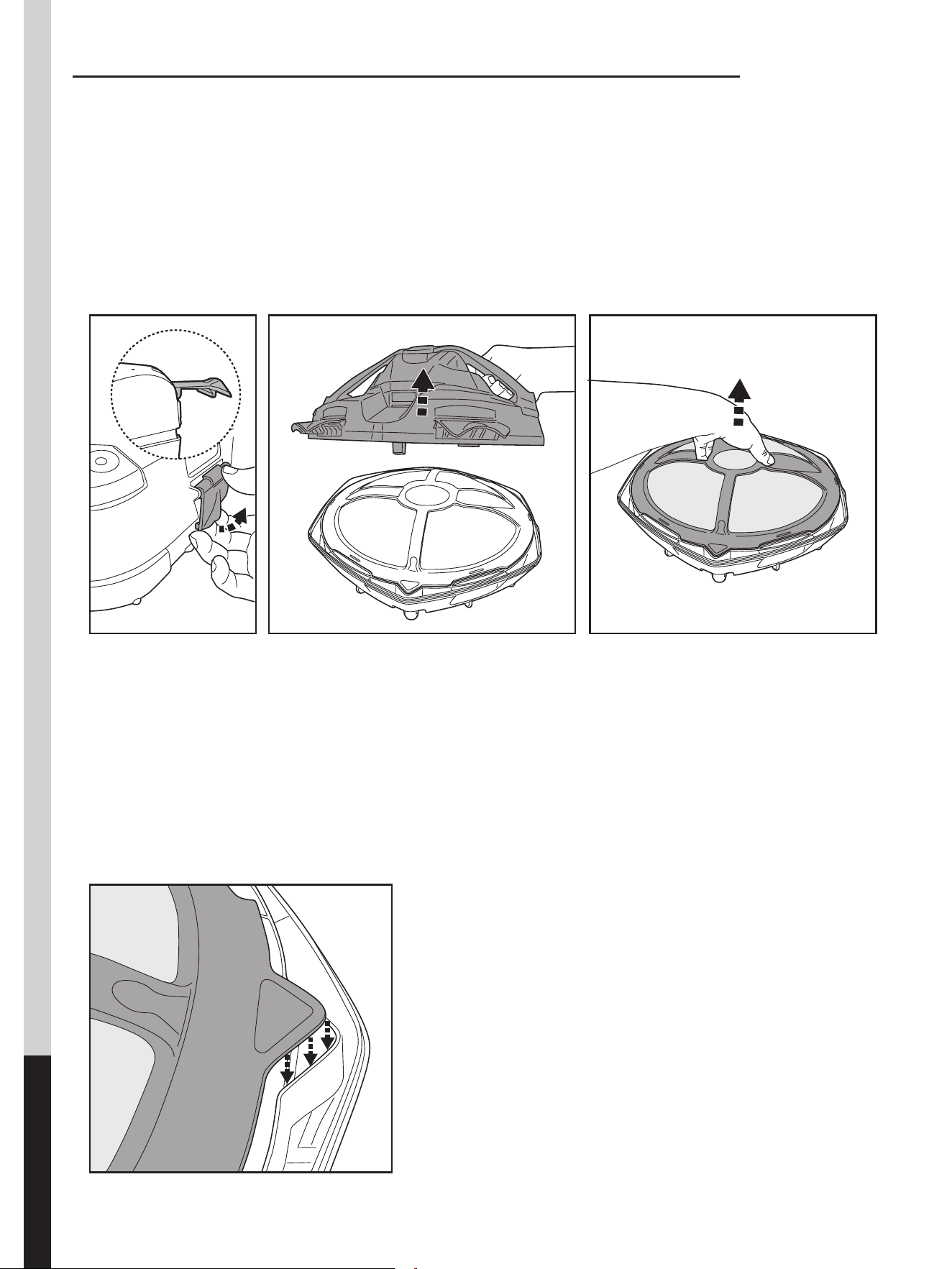
1. Place the cleaner on a at and sturdy surface. Pry open the side clips to release the top cover from the base. Remove the
top cover from the base to expose the lter cover.
2. Detach the lter cover and remove the debris from the compartment. It is recommended to clean the lter cover net
with splashing water. If brushing is deemed necessary, use only a soft brush to clean it carefully and gently to avoid
damages.
3. After cleaning, align and put the lter cover back to the base.
ENGLISH
10
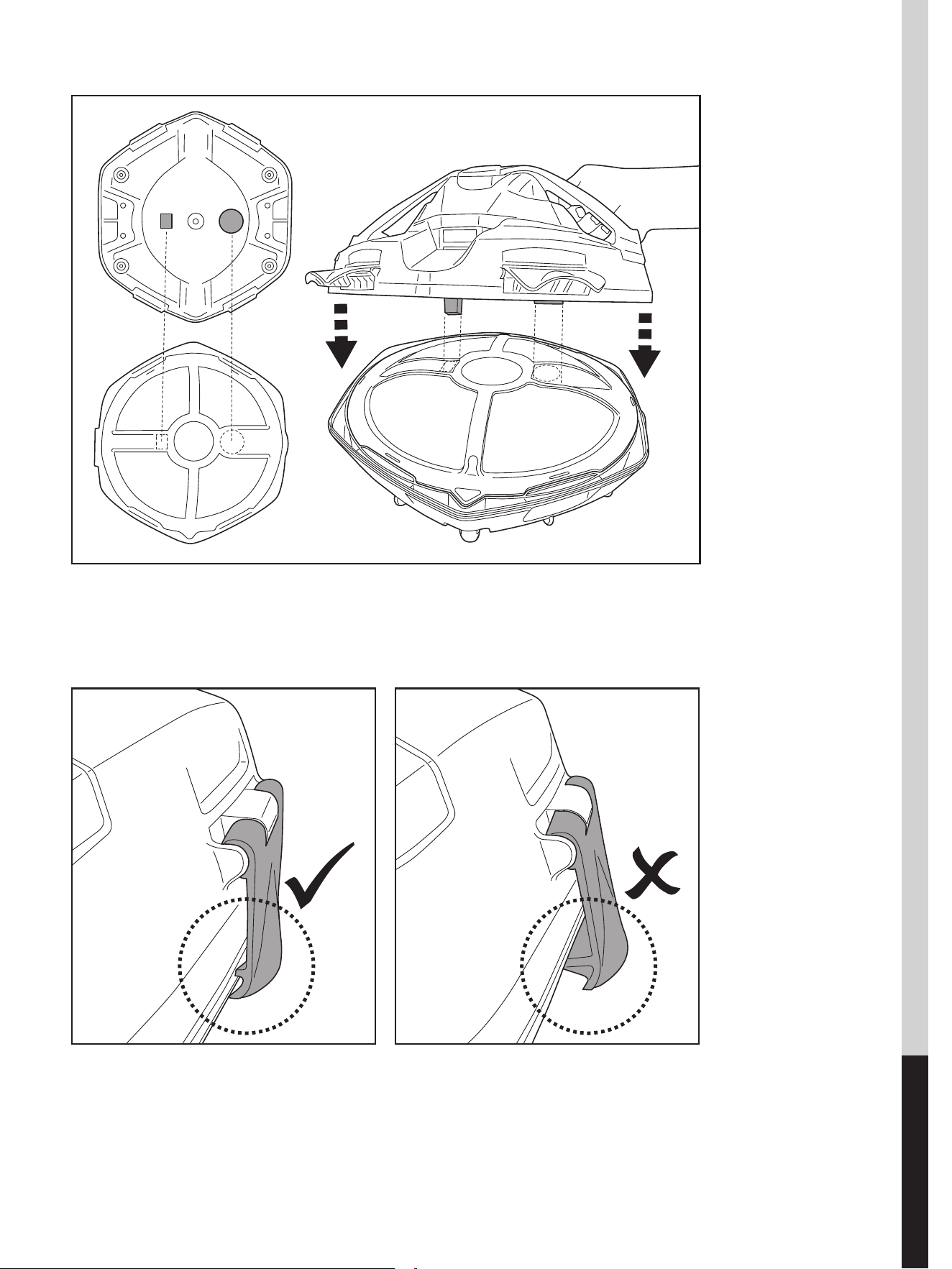
4. Align the top cover to the base as shown.
Note: There is only one direction in alignment.
5. Press on all side clips until they are secured to the base. A“click” sound will conrm the top cover is secured to the base.
TIPS: Before redeploying the robot to the pool, ensure the top cover is secured to the base.

ENGLISH
11
MAINTENANCE & STORAGE
NOTE:
1) Be sure to clean and dry the areas around the charging port after every use to avoid the forming of stains (
byproduct of a natural chemical reaction between electric current and water ). Otherwise, the stains can be
removed by light scrubbing with a cotton bud soaked with juice of lemon or vinegar.
2) Battery discharges on its own during storage. Make sure to fully charge the robot before storage.
3) You must recharge the battery at least once every three months when it is not in use.
· Unplug the external adaptor from the socket and the charging connector from the robot.
· Detach accessories from the robot. If necessary, rinse the robot and accessories with fresh water. DO NOT use
detergent.
· Be sure to drain the water from the robot before storage.
· Use a damp cloth to clean and dry the robot and its accessories.
· Store them in a well-ventilated area away from sunlight, heat, ignition sources, pool chemicals and from
children. Ambient temperature for storage should be 10˚C – 25˚C ( 50˚F – 77˚F ). NOTE: A higher storage
temperature may reduce the battery life.
WARNING! Under no circumstances should you disassemble the robot to
replace its internal components by yourself. Doing so would void the warranty,
expose yourself to potential hazards, and possibly damage the device and other
properties.
CAUTION!
· Excessive heat can damage the battery and reduce the lifespan of your robot as a result.
· Consult your dealer regarding battery replacement if the following happens:
- Battery does not charge fully.
- Battery operation time is noticeably reduced. Observe and record the run times of the rst few operations (on
a full charge). Use these run times as a reference point for comparison with run times in the future.
· The battery must be removed from the robot before it is scrapped.
· The robot must be disconnected from the supply mains when the battery is being removed.
· The battery is to be disposed safely in accordance with local ordinances or regulations.
NOTE: Incorrect maintenance may reduce the battery life and aect its capacity as a result.
BATTERY DISPOSAL ( To be carried out by an authorized technician )
Your robot is equipped with a maintenance - free rechargeable lithium-ion battery pack, which must be disposed
of properly. Recycling is required; please contact your local authority for more information.
WARNING! Never attempt to disassemble a battery pack.
· Remove all personal items such as rings, bracelets, necklaces and watches
when the battery pack is unwired from the robot.
• A battery can produce a short circuit current high enough to weld a ring ( or
similar item ) to metal, causing a severe burn in the process.
• Wear complete eye protection, gloves and protective clothing when the
battery pack is being removed.
• Avoid touching the wires altogether and avoid contact between them and
any metal items, which could cause sparking and/or short circuit the battery.
• Never smoke or allow a spark or ame in the vicinity of the battery or the
robot.
• Do not expose the battery to re or intense heat as this may result in an
explosion.
CAUTION!
If a battery leak occurs, avoid any contact with the leaking uids and place the damaged battery in a plastic bag.
- If leaking uids come in contact with skin and clothing, wash immediately with plenty of soap and water.
- If leaking uids come in contact with eyes, do not rub eyes, immediately ush eyes with cool running water for
at least 15 minutes and do not rub them. Seek medical attention as soon as possible.
ENGLISH
12
How to remove the battery pack for battery disposal ( To
be done by authorized technician)
Recommended tools (not included): Screwdriver.
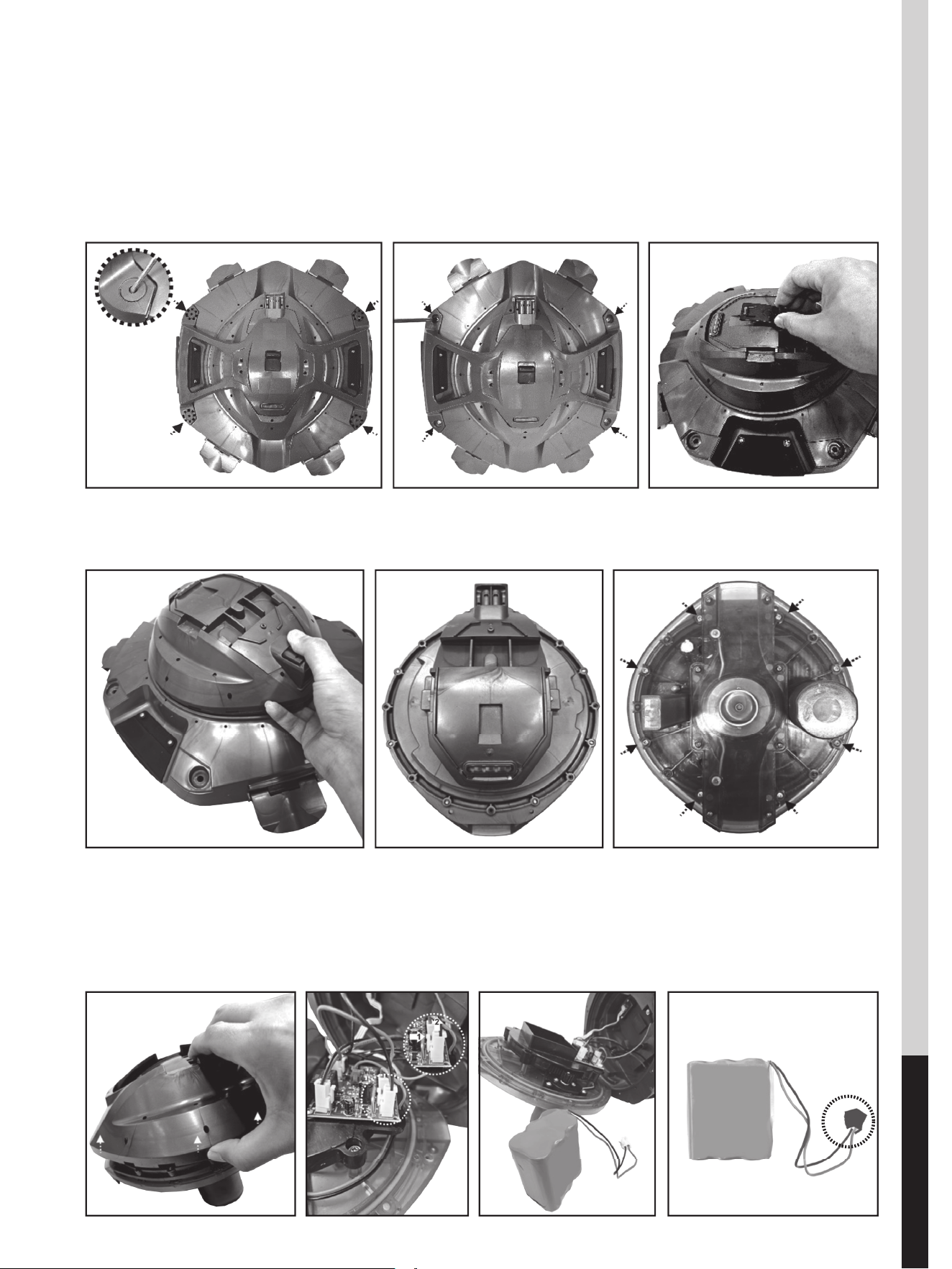
1) Follow section “EMPTYING THE DEBRIS COMPARTMENT” to release the top
cover. Pry open the screw covers and then unfasten the screws to release the
frame. Remove the sliding switch from the top.
2) Lift and remove the core unit. Turn it over to expose the screws on its bottom.
Unfasten the screws as pointed.
3) Pry open the cover of core unit to expose the PCBA. TO detach the battery
connection wire, press on the clip of the connector to pull it out. Remove
the battery pack and wrap the connector immediately with insulating tape in
order to avoid any short circuit caused by the contact of both wire terminals.
ENGLISH
13
Problem Possible Cause Solution
Robot does
not start
working
under water
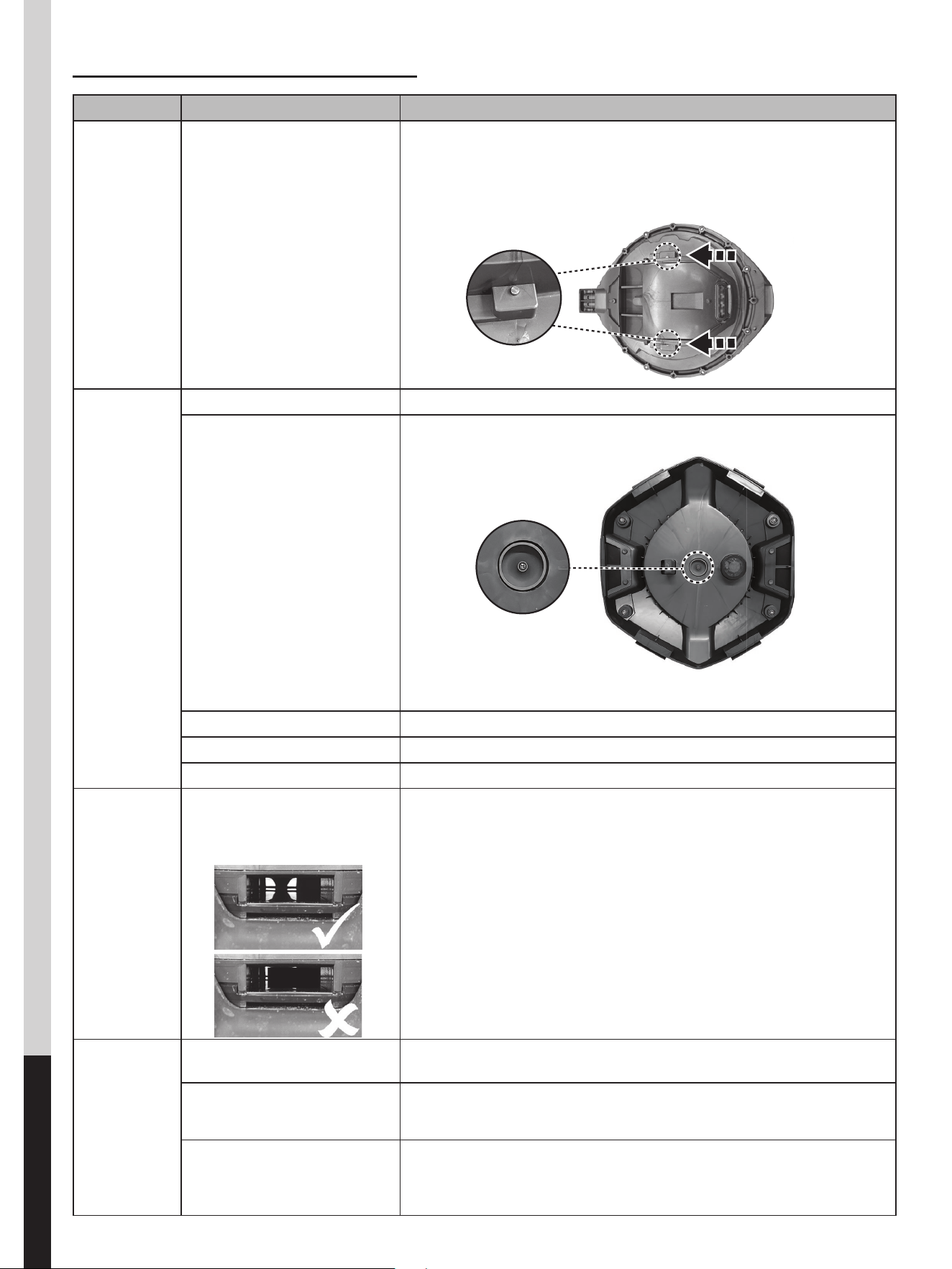
Stained water sensors
Clean the water sensor.
Follow “How to remove the battery pack for battery disposal “ section
to remove the core cover to expose the water sensor (as indicated in
below diagram) on both side. Use a cotton bud soaked with juice of
lemon or vinegar to clean and remove the stains.
Robot does
not capture
the debris
Battery is running out Charge the robot again.
Impeller is jammed
Power o the robot and inspect the hole under the cover to see if the
impeller is jammed by large debris. If necessary, contact your dealer for
further instructions.
WARNING! Make sure the robot is o before the unit is serviced.
Suction mouth is clogged Remove clogged objects from the suction mouth.
Impeller is broken Contact your dealer for replacement.
Debris compartment is full Clean both debris compartment and lter cover.
Robot does
not return
oppositely
when stops
against the
pool wall
The disk inside the water
propelling nozzle is jammed
by ne sand or debris
Visual inspection at the nozzle
Backwash the system by running water through the nozzles. This can
help dislodge any trapped particles from the disk. If the issue persists,
using a small brush, such as a baby bottle nipple brush, can help clean
out any remaining debris.
Robot
stopped
moving in the
middle / not
close to the
pool
Robot stopped by obstacle or
large creases in the pool liner
Check to see that if there is anything obstructing the cleaner. Remove
the obstacle.
Robot is hindered by suction
from the main drain of pool
oor
Turn o the ltration system as instructed in ltration manual.
Robot’s movement to the
pool wall is hindered by the
water ow from pool water
return
If this situation persists, turn o the ltration system..
TROUBLESHOOTING
ENGLISH
14
Problem Possible Cause Solution
Robot does not cover
the entire pool
Debris compartment is full Clean the debris compartment.
Operation time is shorter as expected Clean the lter compartment and recharge the robot for 6 hrs.
Moving direction is interrupted by water
circulation generated by ltration system
Turn o the ltration system (as instructed in ltration manual) at least 15 minutes
before robot operation.
Wheel is jammed Check and remove debris from the wheel.
Position of locking pin is not set properly Follow instruction to adjust the locking pin position.
Algae renders the pool oor slippery
which results in the robot going in circles
Scrub the pool bottom and robot wheels to remove the algae.
Robot moves along
the pool wall
Position of locking pin is not set
properly
Follow instructions to adjust locking pin setting.
Robot moves slowly
or does not move
at all
Debris compartment is full or lter
cover is clogged
Clean the debris compartment. Flush the screen with water to remove small
particles. If brushing is deemed necessary, use a soft brush to clean the screen
gently. Note: make sure that the lter cover is in place before next operation.
Suction mouth is clogged Remove clogged objects from the suction mouth.
Impeller is jammed
Power o the robot and inspect the hole under the cover to see if the impeller
is jammed by large debris. If necessary, contact your dealer for further
instructions.
WARNING! Make sure the robot is o before the unit is serviced.
Debris escapes from
the robot
Suction mouth’s ap (at robot bottom)
is damaged
Suction mouth’s ap works like a door to prevent the debris from escaping
from the debris compartment. Contact dealer for replacement parts and
instruction.
Debris clogged at suction mouth and
prevents the ap to close
Remove clogged debris from the suction mouth.
Debris leaks outside
at the lter cover
Filter cover net is damaged Replace with a new lter cover from your dealer.
Duration of cleaning
cycle is shorter than
advertised
Battery is not fully charged
Charge the robot for at least 6 hrs. NOTE: if any stains are found on the
charging pads, remove them by using a cotton bud soaked with lemon juice
or vinegar.
Robot cannot be
charged / recharged
Battery is damaged
Contact dealer for battery replacement.
WARNING! DO NOT replace the battery by yourself. This could result
in severe or fatal injuries and the warranty will be voided as a result.
Charging connector is not completely
connected with the robot
Make sure that the charging connector is connected with the robot properly
and completely. Refer to instruction manual.
External adaptor is out of order
Contact dealer for replacement.
WARNING! Using the wrong external adaptor will result in damaging
the robot / battery and voiding the warranty as a result.
Environmental Programmes, WEEE European Directive
Please respect the European Union regulations and help to protect the environment.
Return non-working electrical equipment to a facility appointed by your municipality that properly
recycles electrical and electronic equipment. Do not dispose them in unsorted waste bins. For items
containing removable batteries, remove batteries before disposing of the product.
All rights reserved. No part of this document may be reproduced or transmitted in any form or by any
means, electronic, mechanical, photocopying, recording, or otherwise, without prior written permission
of Kokido Development Ltd. (L-23001014)
SAVE THESE INSTRUCTIONS
Support Email: [email protected]
Toll-Free Voicemail: (866) 683-7672
Download Instruction Manual & Videos:
QR Code:
https://shop.kokido.com/pages/support-xtrovac-420
Manufacturer: Kokido Development Limited. Unit 1319, Sunbeam Centre,
27 Shing Yip Street, Kwun Tong, Kowloon, HK
RC048BRXUSXXAMZ Made in China
We reserve the right to change all or part of the
features of the articles or contents of this document,
without prior notice.
International patents pending