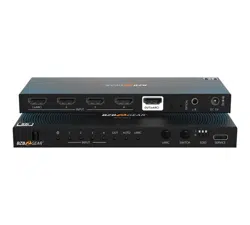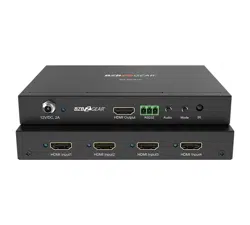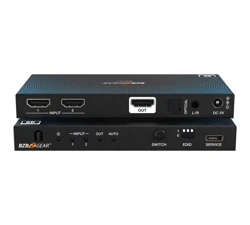
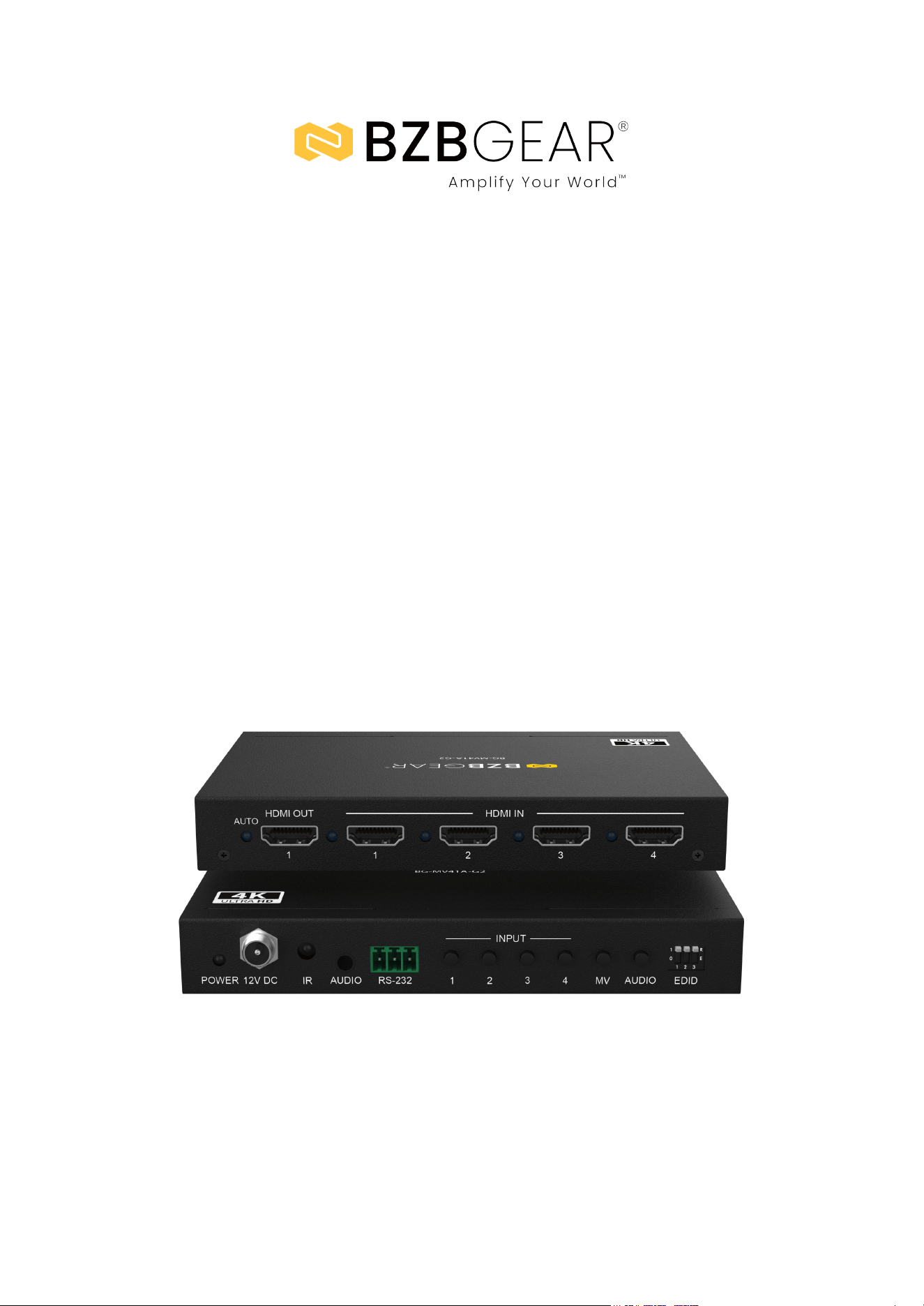
BG-MV41A-G2
4K@30Hz HDMI 4x1 Quad Multi-Viewer & Seamless Switcher with
PIP, Audio De-Embedding, and 8 Display Modes
User Manual

BZBGEAR BG-MV41A-G2 PRODUCT MANUAL
Address: 830 National Drive #140, Sacramento, CA 95834, USA · Tel: +1(888)499-9906 · Email: support@bzbgear.com 2

BZBGEAR BG-MV41A-G2 PRODUCT MANUAL
Table of Contents
Statement 4
Safety Precaution 4
Introduction 5
Features 5
Packing List 5
Specifications 6
Operation Controls and Functions 7
RS-232 Commands 9
IR Remote Guide 12
Connection Diagram 13
Troubleshooting 14
Tech Support 15
Limited Product Warranty Terms 15
Mission Statement 16
Copyright 16
Address: 830 National Drive #140, Sacramento, CA 95834, USA · Tel: +1(888)499-9906 · Email: support@bzbgear.com 3

BZBGEAR BG-MV41A-G2 PRODUCT MANUAL
Statement
Please read these instructions carefully before connecting, operating, or configuring this
product. Please save this manual for future reference.
Safety Precaution
● To prevent damaging this product, avoid heavy pressure, strong vibration, or immersion
during transportation, storage, and installation.
● The housing of this product is made of organic materials. Do not expose to any liquid,
gas, or solids which may corrode the shell.
● Do not expose the product to rain or moisture.
● To prevent the risk of electric shock, do not open the case. Installation and maintenance
should only be carried out by qualified technicians.
● Do not use the product beyond the specified temperature, humidity, or power supply
specifications.
● This product does not contain parts that can be maintained or repaired by users.
Damage caused by dismantling the product without authorization from BZBGEAR is not
covered under the warranty policy.
● Installation and use of this product must strictly comply with local electrical safety
standards.
Address: 830 National Drive #140, Sacramento, CA 95834, USA · Tel: +1(888)499-9906 · Email: support@bzbgear.com 4

BZBGEAR BG-MV41A-G2 PRODUCT MANUAL
Introduction
The BG-MV41A-G2 is a high-performance 4x1 HDMI quad multi-viewer designed to
display up to four HDMI input sources simultaneously on a single screen with
seamless switching and flexible display options. Supporting resolutions up to
4K@30Hz and 10.2Gbps video bandwidth, this multi-viewer is fully compliant with
HDMI 1.4b and HDCP 1.4 standards. Users can choose from eight versatile
multi-view modes—including single view, picture-in-picture (PIP), picture-by-picture
(PBP), triple-view, and quad-view - making it ideal for monitoring, control rooms,
and content presentations.
Audio can be independently selected and output via the built-in analog port,
supporting formats like LPCM, Dolby Digital, Dolby Digital Plus, and DTS. With
support for both auto and manual input switching, seamless transitions in single-
and multi-view modes, and on-screen display (OSD) in multi-view, the
BG-MV41A-G2 offers both performance and control flexibility. The unit is easily
managed via front panel buttons, IR remote, or RS-232 commands, and features
advanced EDID management in a compact form factor ideal for professional AV
installations.
Features
● Compliant with HDCP 1.4 and HDMI 1.4b standards
● Supports video bandwidth up to 10.2Gbps
● Input and output resolutions up to 4K@30Hz
● Seamless switching in both single-view and multi-view display modes
● Auto and manual input switching supported
● Multi-view functionality with up to 8 display modes:
- SINGLE, PIP, PBP (1), PBP (2), Triple (1), Triple (2), Quad (1), Quad (2)
● Combine multiple HDMI inputs on a single UHD display in real time
● Supports LPCM, Dolby Digital (DD), Dolby Digital Plus (DD+), and DTS audio formats
● Audio de-embedding via analog stereo output
● Independent audio source selection
● On-screen display (OSD) for multi-view layouts
● Control options include front panel buttons, IR remote, and RS-232 commands
● Advanced EDID management for optimal compatibility
● Compact, space-saving design for flexible integration
Packing List
● 1× BG-MV41A-G2 Multiviewer
● 1× 12V/DC, 2A Power Supply
● 1× User Manual
● 1× Remote control
Address: 830 National Drive #140, Sacramento, CA 95834, USA · Tel: +1(888)499-9906 · Email: support@bzbgear.com 5
BZBGEAR BG-MV41A-G2 PRODUCT MANUAL
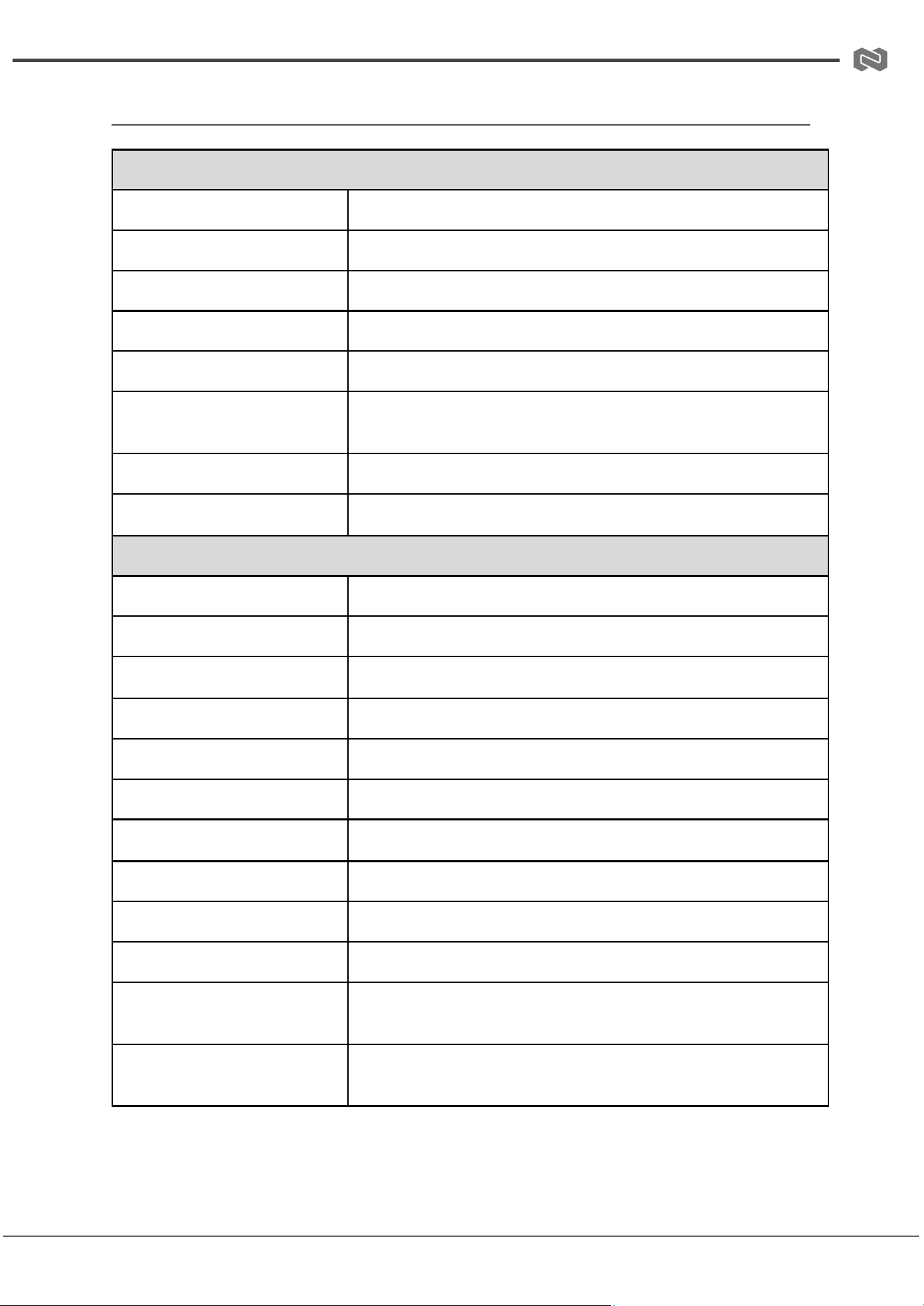
Specifications
Technical
Signal Inputs/Output
3840x2160@30 MAX
HDMI Input/Output Connector
Type A 19 pin
Operating Frequency
50/60Hz
Vertical Frequency Range
50/60Hz
Video Amplifier Bandwidth
10.2Gbps
Resolutions
480i60Hz, 480p60Hz, 576i50Hz, 576p50Hz, 720p50/60Hz,
1080i50/60Hz, 1080p24/25/30/50/60Hz, 2160p30Hz
Input Resolution
720p, 1080p, 1200p, 2160p
Output Resolution
720p, 1080p, 1200p, 2160p
Mechanical
Dimensions (W x D x H)
5.8in x 4.1in x 0.85in / 148.5mm x 103mm x 21.5mm
Weight
0.75 lbs [342g]
Chassis Material
Metal
Color
Black
Operating Temperature
32°F to 158°F / 0°C to +70°C
Operating Humidity
10% to 85% RH (no condensation)
Storage Temperature
14°F to 176°F / -10°C to +80°C
Storage Humidity
5% to 90% RH (no condensation)
External Power Supply
12V DC @ 2A
Power Consumption (max)
10 W
Regulatory Approvals (Main
Unit)
FCC, CE
Regulatory Approvals (Power
Supply)
UL, CE, FCC, REACH, RoHS
Address: 830 National Drive #140, Sacramento, CA 95834, USA · Tel: +1(888)499-9906 · Email: support@bzbgear.com 6
BZBGEAR BG-MV41A-G2 PRODUCT MANUAL
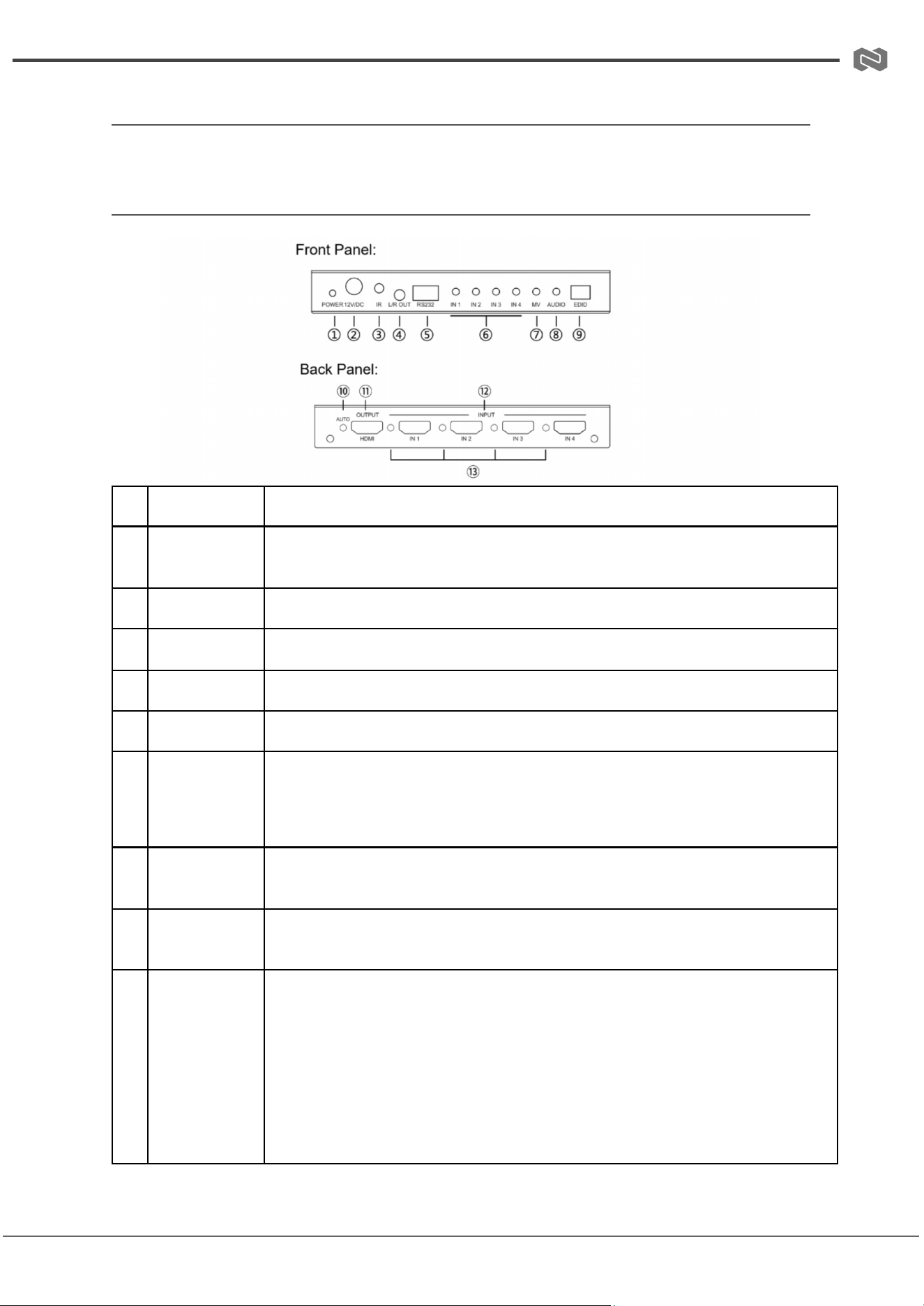
Operation Controls and Functions
Front and Rear Panel
#
Label
Description
1
POWER LED
When the device is powered on, the power LED is blue.
2
12V/DC
12V/DC power input port.
3
IR
IR signal receiving window.
4
L/R OUT
PCM 2.0 analog audio output port.
5
RS232
Connects to a PC or control system for serial update and command control.
6
IN 1/2/3/4
Switch Button
Single-view mode: Press IN 1/2/3/4 to switch to the corresponding input
channel.
Multi-view mode: IN 1/2/3/4 corresponds to window 1/2/3/4. Pressing IN 1
cycles sources in window 1; IN 2/3/4 work similarly.
7
MV Button
Press to cycle through 8 display modes: SINGLE, PIP, PBP (1), PBP (2), Triple
(1), Triple (2), Quad (1), Quad (2).
8
AUDIO Button
In multi-view mode, press to cycle through the audio of the four input sources.
9
EDID DIP
Switch
Used for EDID setting.
• 111 - Copy OUT port sink EDID
• 110 - 4K@30Hz, Audio 2.0ch PCM
• 101 - 4K@30Hz, Audio 5.1ch PCM
• 100 - 1080P, Audio 2.0ch PCM
• 011 - 1080P, Audio 5.1ch PCM
• 010 - 1920x1200, 2.0ch
• 001 - 1920x1200, 5.1ch
• 000 - Defined by RS-232 command
Address: 830 National Drive #140, Sacramento, CA 95834, USA · Tel: +1(888)499-9906 · Email: support@bzbgear.com 7
BZBGEAR BG-MV41A-G2 PRODUCT MANUAL
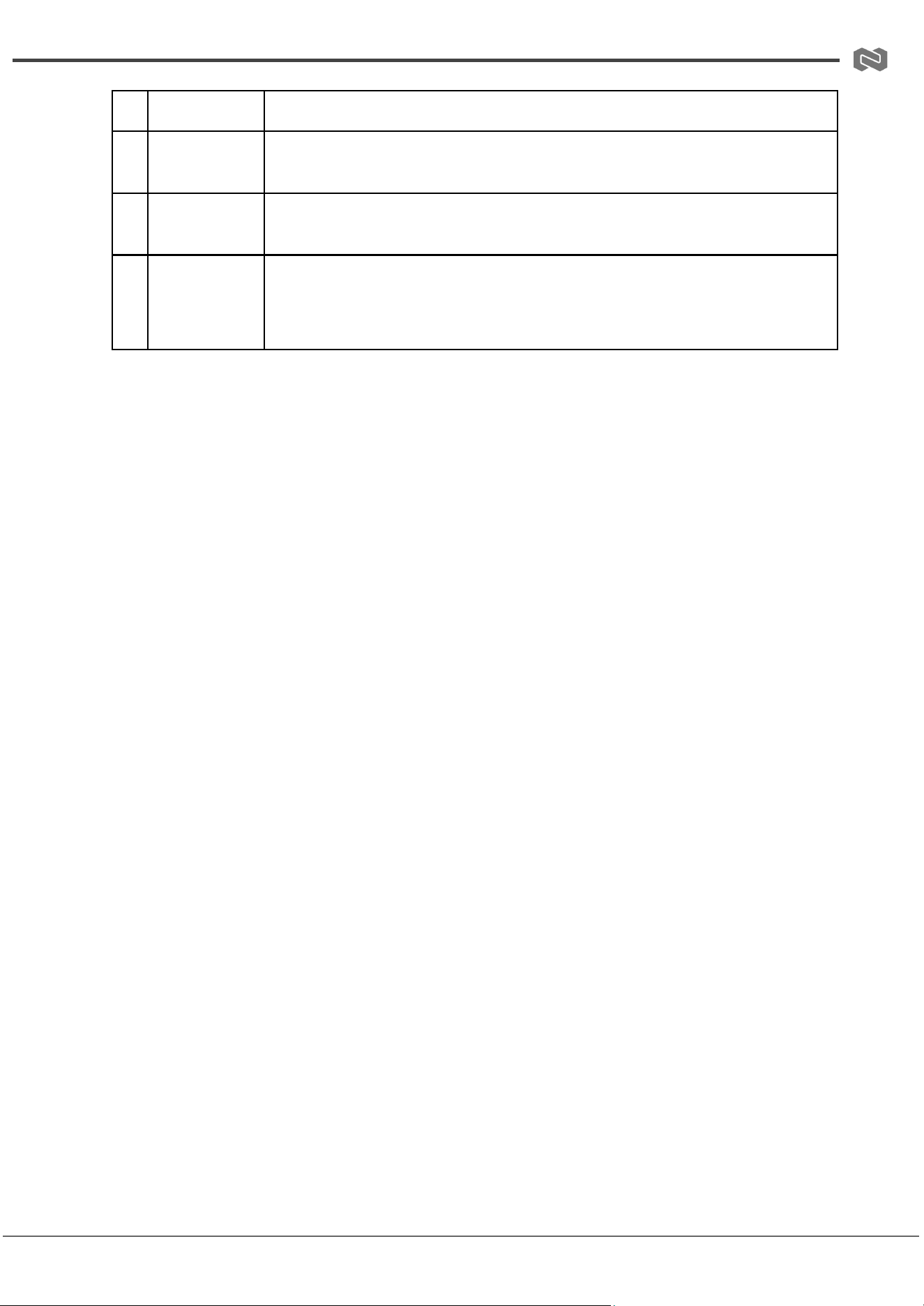
10
AUTO LED
When auto switching mode is enabled, the blue LED will be on.
11
OUTPUT
HDMI signal output port; connect to display device such as TV or monitor via
HDMI.
12
INPUT
HDMI signal input ports; connect to source devices such as DVD or PS5 via
HDMI.
13
INPUT LED
Single-view mode: Blue LED is on when the corresponding IN 1/2/3/4 is
selected.
Multi-view mode: Blue LED is on when the corresponding input is selected as
the audio source.
Address: 830 National Drive #140, Sacramento, CA 95834, USA · Tel: +1(888)499-9906 · Email: support@bzbgear.com 8
BZBGEAR BG-MV41A-G2 PRODUCT MANUAL
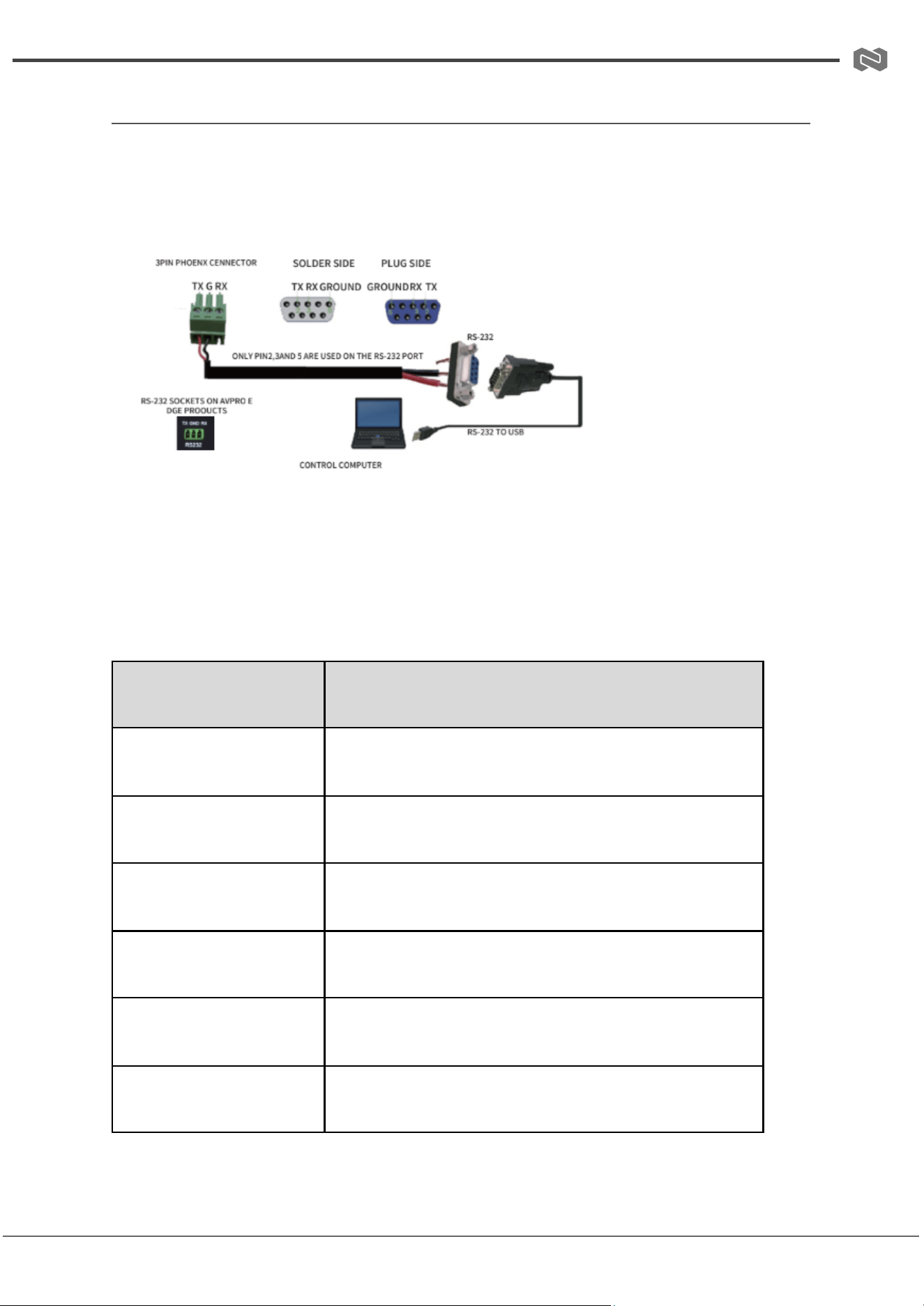
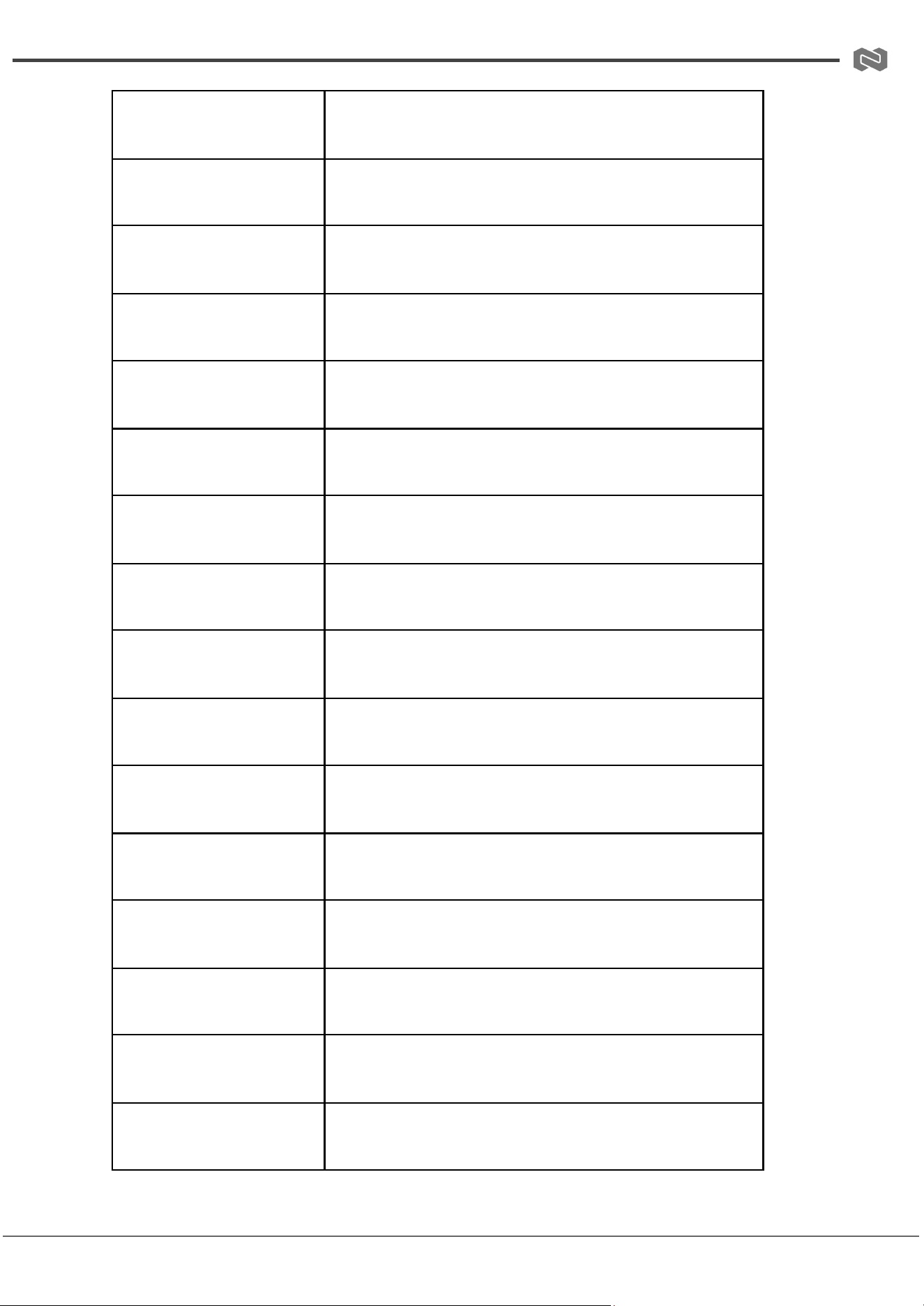
RS-232 Commands
The matrix can be controlled using RS-232 commands, which are required for certain
switching and format configurations that are not accessible through other control methods.
We recommend using the MyUART app, as it provides a simple and user-friendly interface
for sending commands to the device. The connection diagram is shown below:
To ensure proper communication, configure the RS-232 settings as follows:
● Baud Rate: 115200
● Data Bits: 8
● Parity: None
● Stop Bits: 1
ASCII Command
Command Functional Description
EZH
List all commands
EZSTA
Show system status
EZS POWER Z
Set system power on/off (Z:0~1)
EZG POWER
Get system power state
EZS REBOOT
Reboot the system
EZS RESET
Reset to factory defaults
Address: 830 National Drive #140, Sacramento, CA 95834, USA · Tel: +1(888)499-9906 · Email: support@bzbgear.com 9
BZBGEAR BG-MV41A-G2 PRODUCT MANUAL
EZS OUT RES Z
Set output resolution (Z:1~4)
EZG OUT RES
Get output resolution
EZS IN EDID Z
Set input EDID (Z:1~7)
EZG IN EDID
Get input EDID
EZS AUTO SWITCH Z
Enable/Disable auto switch (Z:0~1)
EZG AUTO SWITCH
Get auto switch state
EZS OUT IN Z
Set input to output (Z:1~4)
EZG OUT IN
Get output input source
EZS MULTIVIEW Z
Set Multi-viewer mode (Z:1~5)
EZG MULTIVIEW
Get Multi-viewer mode
EZG WIN X IN Y
Select one input for the current multiview mode
(X:14)(Y:14)
EZG WIN X IN
Get window selected source (X:0~4)
EZS WIN BORDER Z
Set the border of the windows (Z:0~1)
EZG WIN BORDER
Get the border of windows
EZS WIN OSD Z
Set window OSD (Z:0~1)
EZG WIN OSD
Get window OSD
Address: 830 National Drive #140, Sacramento, CA 95834, USA · Tel: +1(888)499-9906 · Email: support@bzbgear.com 10
BZBGEAR BG-MV41A-G2 PRODUCT MANUAL
EZS PIP LOCATION Z
Set PIP window location (Z:1~4)
EZG PIP LOCATION
Get PIP window location
EZS PIP SIZE Z
Set PIP size (Z:1~3)
EZG PIP SIZE
Get PIP window size
EZS PBP MODE Z
Set PBP window mode (Z:1~2)
EZG PBP MODE
Get PBP window mode
EZS PBP ASPECT Z
Set PBP window aspect ratio (Z:1~2)
EZG PBP ASPECT
Get PBP window aspect ratio
EZS TRIPLE MODE Z
Set triple window mode (Z:1~2)
EZG TRIPLE MODE
Get triple window mode
EZS TRIPLE ASPECT Z
Set triple window aspect ratio (Z:1~2)
EZG TRIPLE ASPECT
Get triple window aspect ratio
EZS QUAD MODE Z
Set quad window mode (Z:1~2)
EZG QUAD MODE
Get quad window mode
EZS QUAD ASPECT Z
Set quad window aspect ratio (Z:1~2)
EZG QUAD ASPECT
Get quad window aspect ratio
Address: 830 National Drive #140, Sacramento, CA 95834, USA · Tel: +1(888)499-9906 · Email: support@bzbgear.com 11
BZBGEAR BG-MV41A-G2 PRODUCT MANUAL
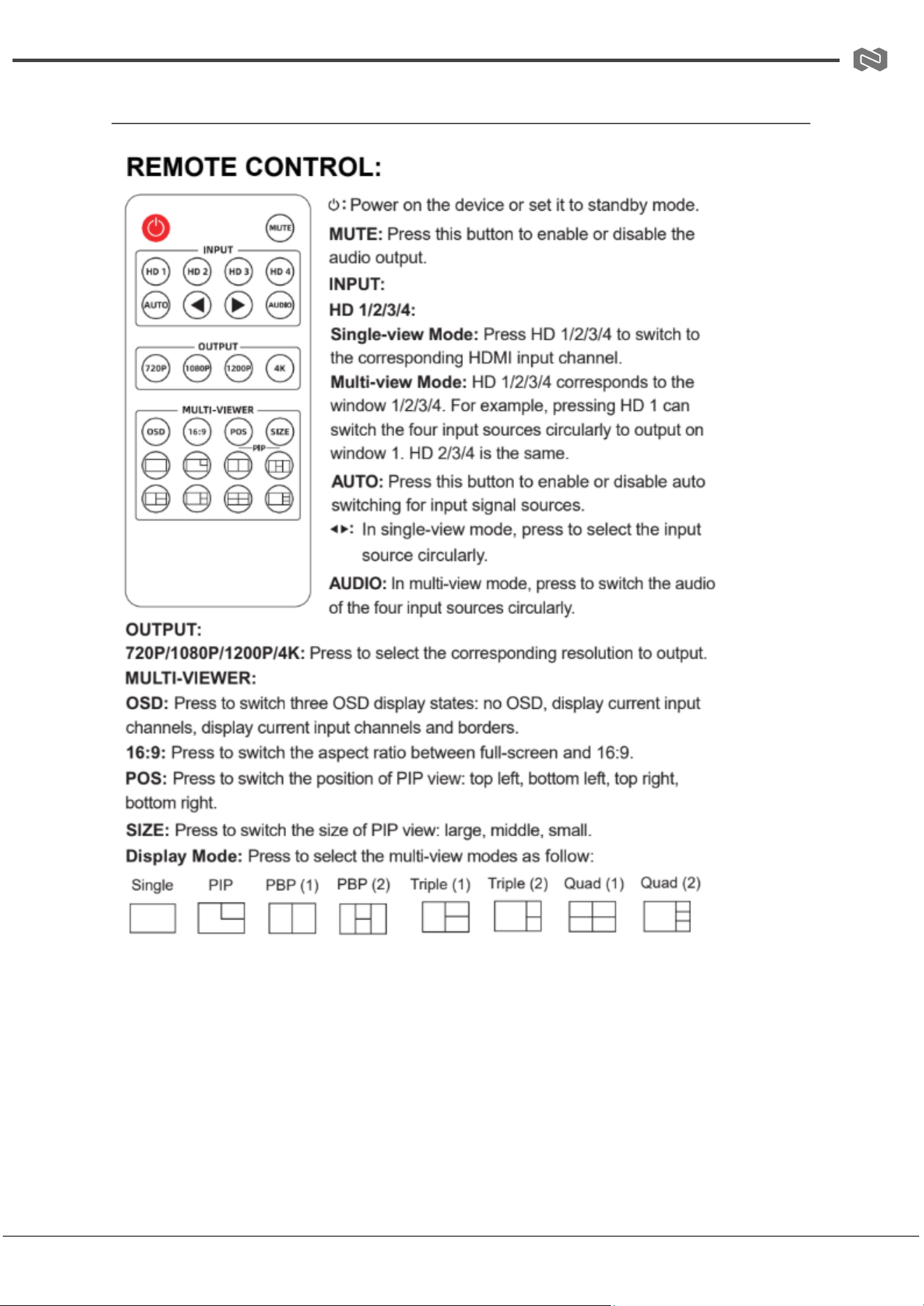
IR Remote Guide
Address: 830 National Drive #140, Sacramento, CA 95834, USA · Tel: +1(888)499-9906 · Email: support@bzbgear.com 12
BZBGEAR BG-MV41A-G2 PRODUCT MANUAL
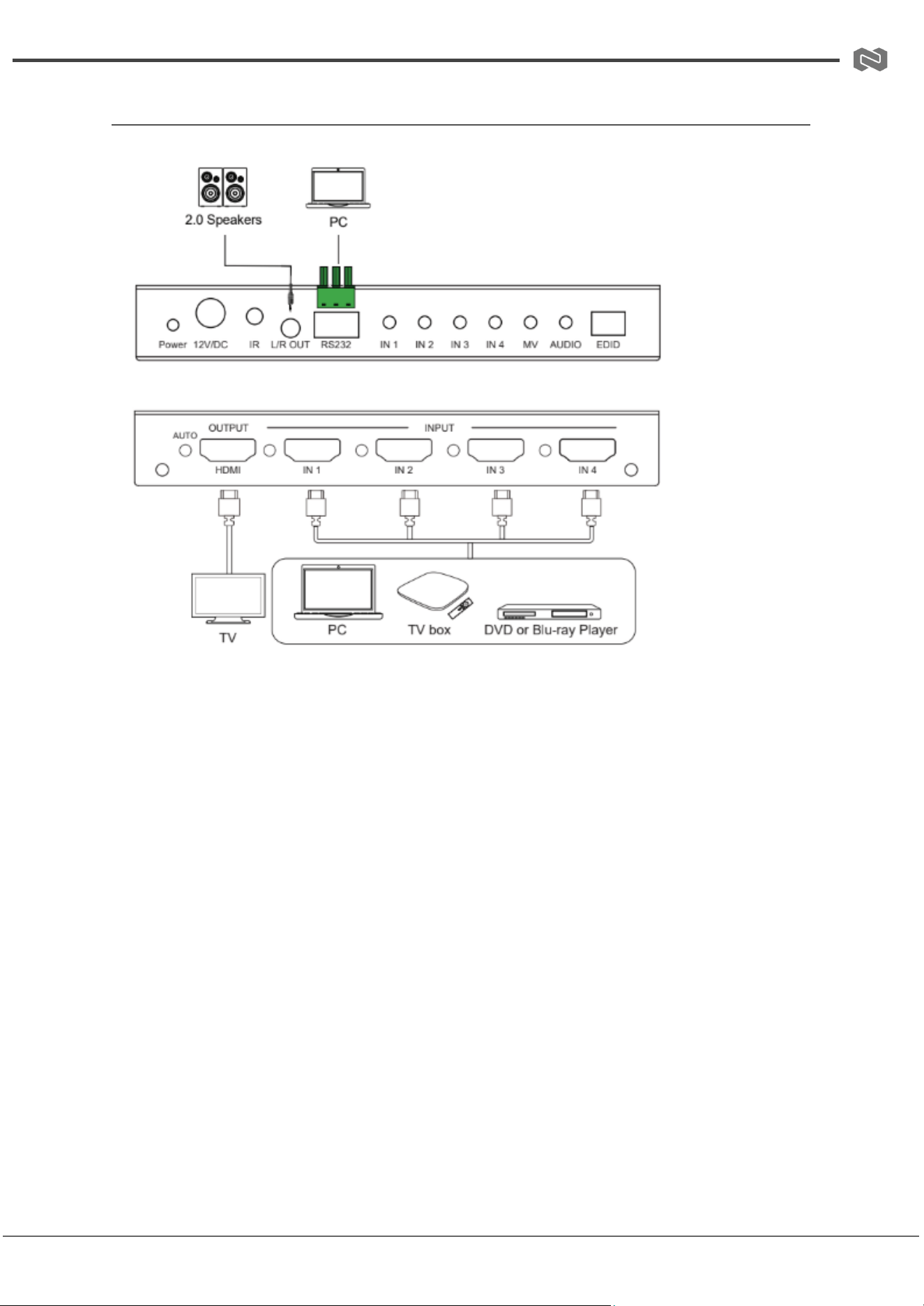
Connection Diagram
Address: 830 National Drive #140, Sacramento, CA 95834, USA · Tel: +1(888)499-9906 · Email: support@bzbgear.com 13
BZBGEAR BG-MV41A-G2 PRODUCT MANUAL
Troubleshooting
Problems
Causes
Solutions
No Power / All LED off
Power supply not connected,
connected fully, or wrong power
supply.
Check if the power supply is
connected correctly and the
output voltage value is within
recommended specifications.
No sound or sound issues
The HDMI connection is faulty,
the audio format is not
supported by the displays, or
the source player is set to
another port for audio output
Check if the HDMI cables are
connected correctly.
Check if the audio format is
supported by the display and
that a user has not changed the
supported audio format on the
player`s audio output. Ensure
output settings from the HDMI
source device as set correctly.
No picture or picture flickers
The HDMI cable may be faulty
or the category cable quality is
faulty.
Check if the HDMI
and category cable connections
are correct and undamaged.
Change to another good
working HDMI cable or category
cable (CAT6 or better cable is
recommended).
Address: 830 National Drive #140, Sacramento, CA 95834, USA · Tel: +1(888)499-9906 · Email: support@bzbgear.com 14

BZBGEAR BG-MV41A-G2 PRODUCT MANUAL
Tech Support
Have technical questions? We may have answered them already!
Please visit BZBGEAR’s support page (bzbgear.com/support) for helpful information and
tips regarding our products. Here you will find our Knowledge Base
(bzbgear.com/knowledge-base) with detailed tutorials, quick start guides, and step-by-step
troubleshooting instructions. Or explore our YouTube channel, BZB TV
(youtube.com/c/BZBTVchannel), for help setting up, configuring, and other helpful how-to
videos about our gear.
Need more in-depth support? Connect with one of our technical specialists directly:
Phone
1.888.499.9906
Email
support@bzbgear.com
Live Chat
bzbgear.com
Limited Product Warranty Terms
Pro Line: 5-year warranty from the date of purchase for AV/Broadcasting products bought
on or after August 1, 2024.
Essential Line: 3-year warranty from the date of purchase for AV/Broadcasting products
bought on or after August 1, 2024.
Cables: Lifetime Limited Product Warranty.
For complete warranty information, please visit bzbgear.com/warranty.
For questions, please call 1.888.499.9906 or email support@bzbgear.com.
Address: 830 National Drive #140, Sacramento, CA 95834, USA · Tel: +1(888)499-9906 · Email: support@bzbgear.com 15

BZBGEAR BG-MV41A-G2 PRODUCT MANUAL
Mission Statement
BZBGEAR is a breakthrough manufacturer of high-quality, innovative audiovisual equipment
ranging from AVoIP, professional broadcasting, conferencing, home theater, to live
streaming solutions. We pride ourselves on unparalleled customer support and services.
Our team offers system design consultation, and highly reviewed technical support for all
the products in our catalog. BZBGEAR delivers quality products designed with users in
mind.
Copyright
All the contents in this manual and its copyright are owned by BZBGEAR. No one is allowed
to imitate, copy, or translate this manual without BZBGEAR’s permission. This manual
contains no guarantee, standpoint expression or other implies in any form. Product
specification and information in this manual is for reference only and subject to change
without notice.
All rights reserved. No reproducing is allowed without acknowledgement.
Address: 830 National Drive #140, Sacramento, CA 95834, USA · Tel: +1(888)499-9906 · Email: support@bzbgear.com 16