www.fossibot.com
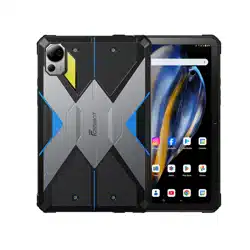
DT2
User Manual
Manufacturer:Shenzhen Qichang Intelligent Technology Co., Ltd
Address:Room 510, 5th Floor, Building 7, Yunli Smart Park, No.7
Changfa Middle Road, Yangmei Community, Bantian Street,
Longgang District, Shenzhen China
For more information, please visit our
website or E-mail:
www.fossibot.com
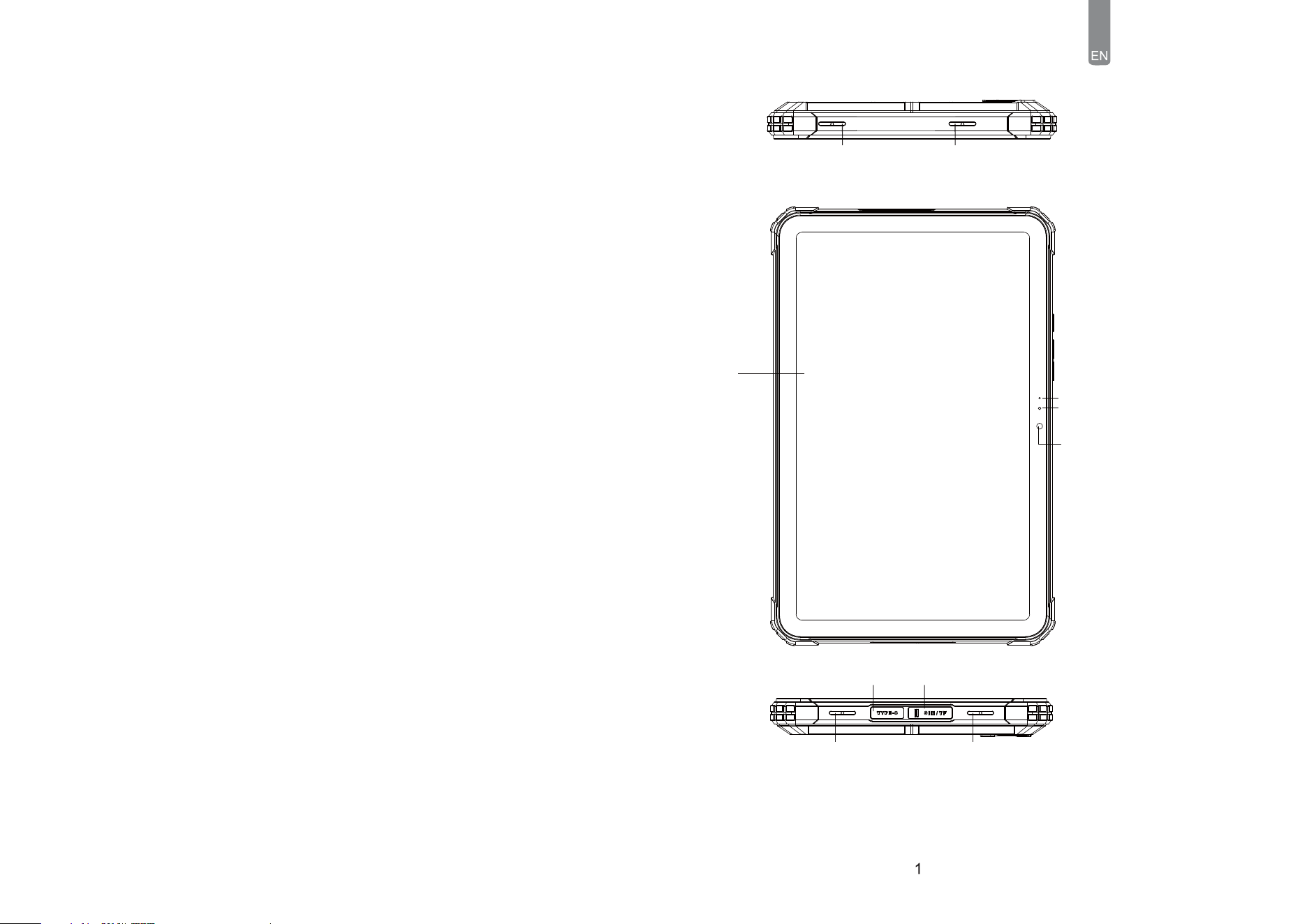
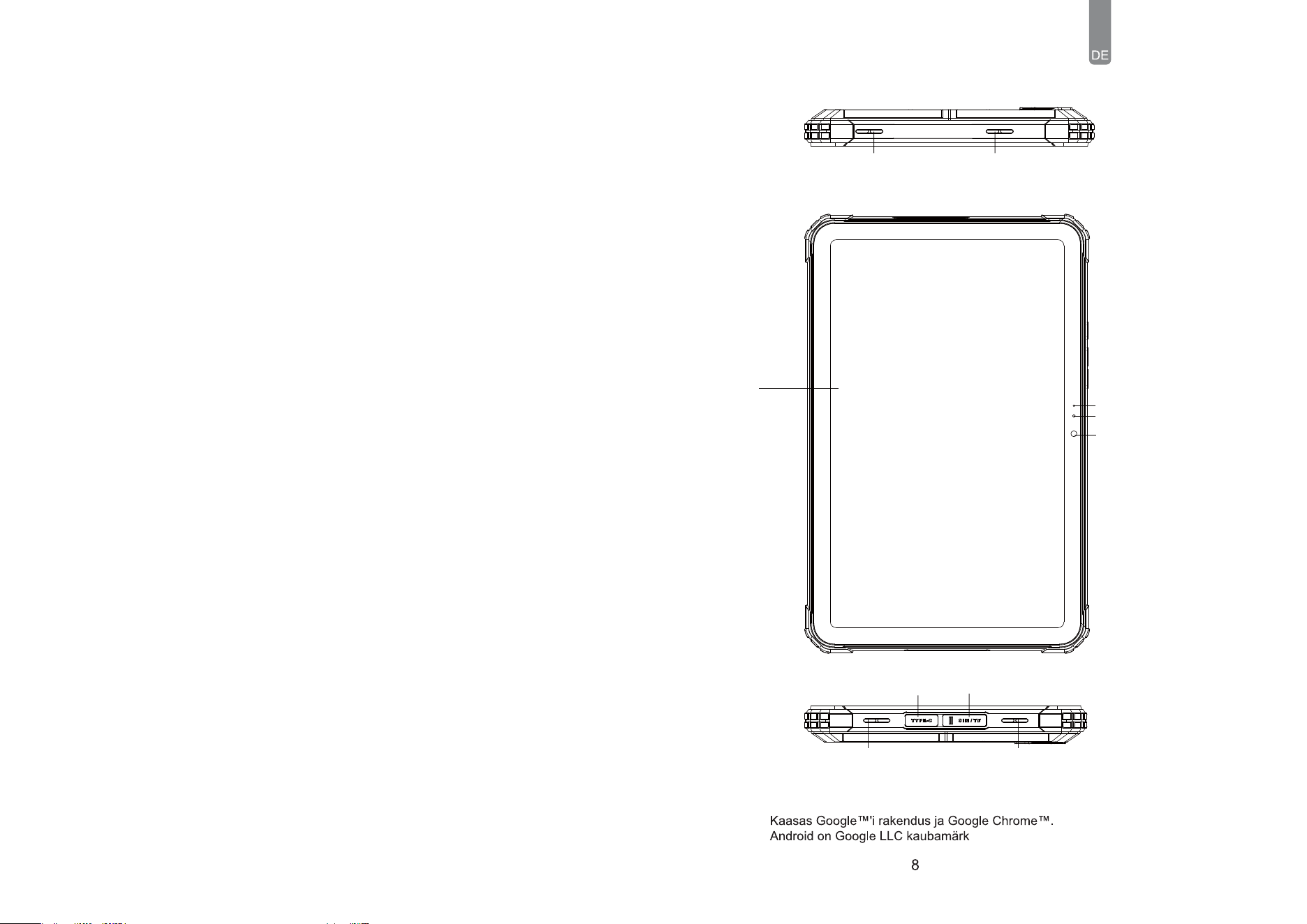
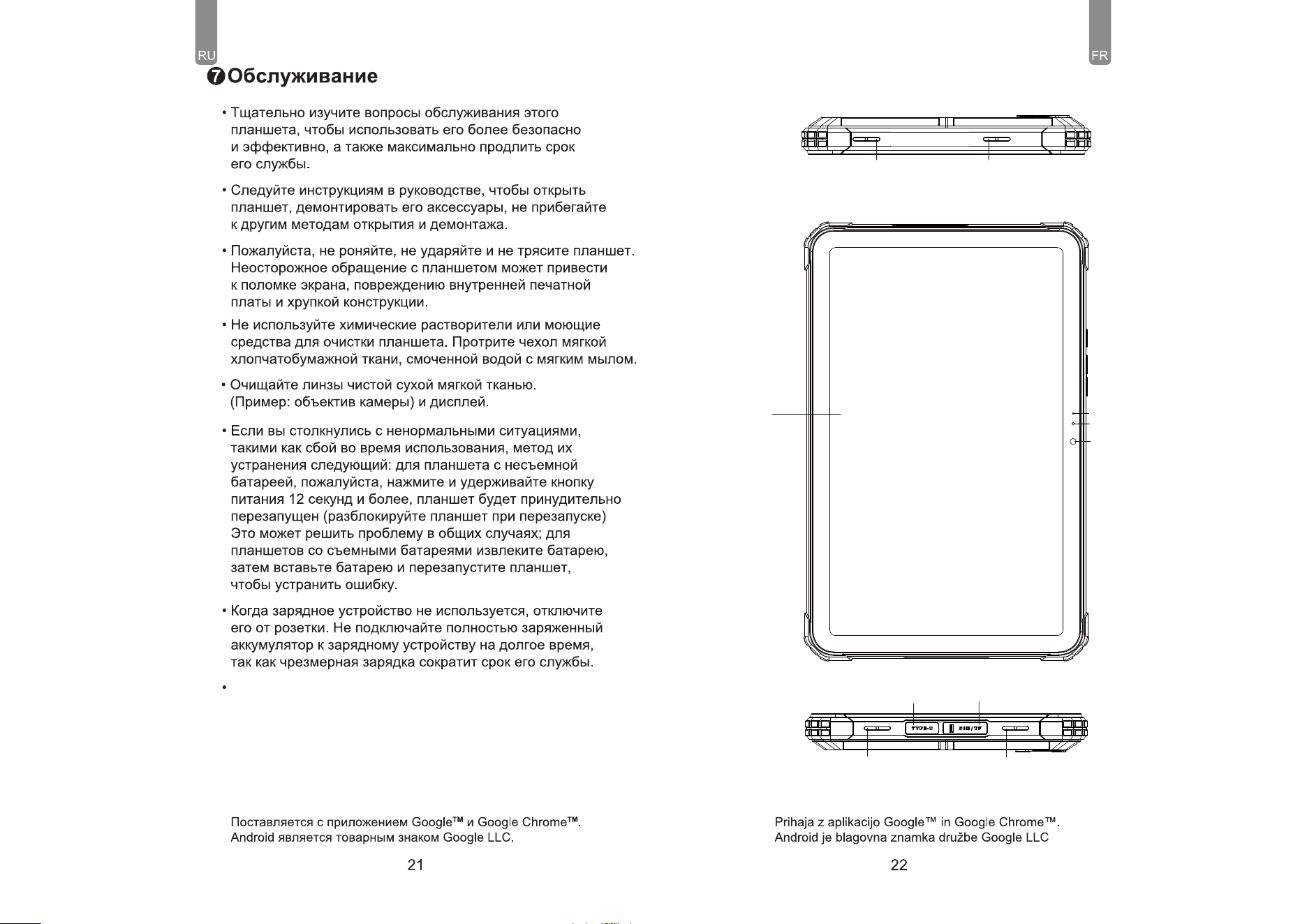
3-Color
Indicator Ligit
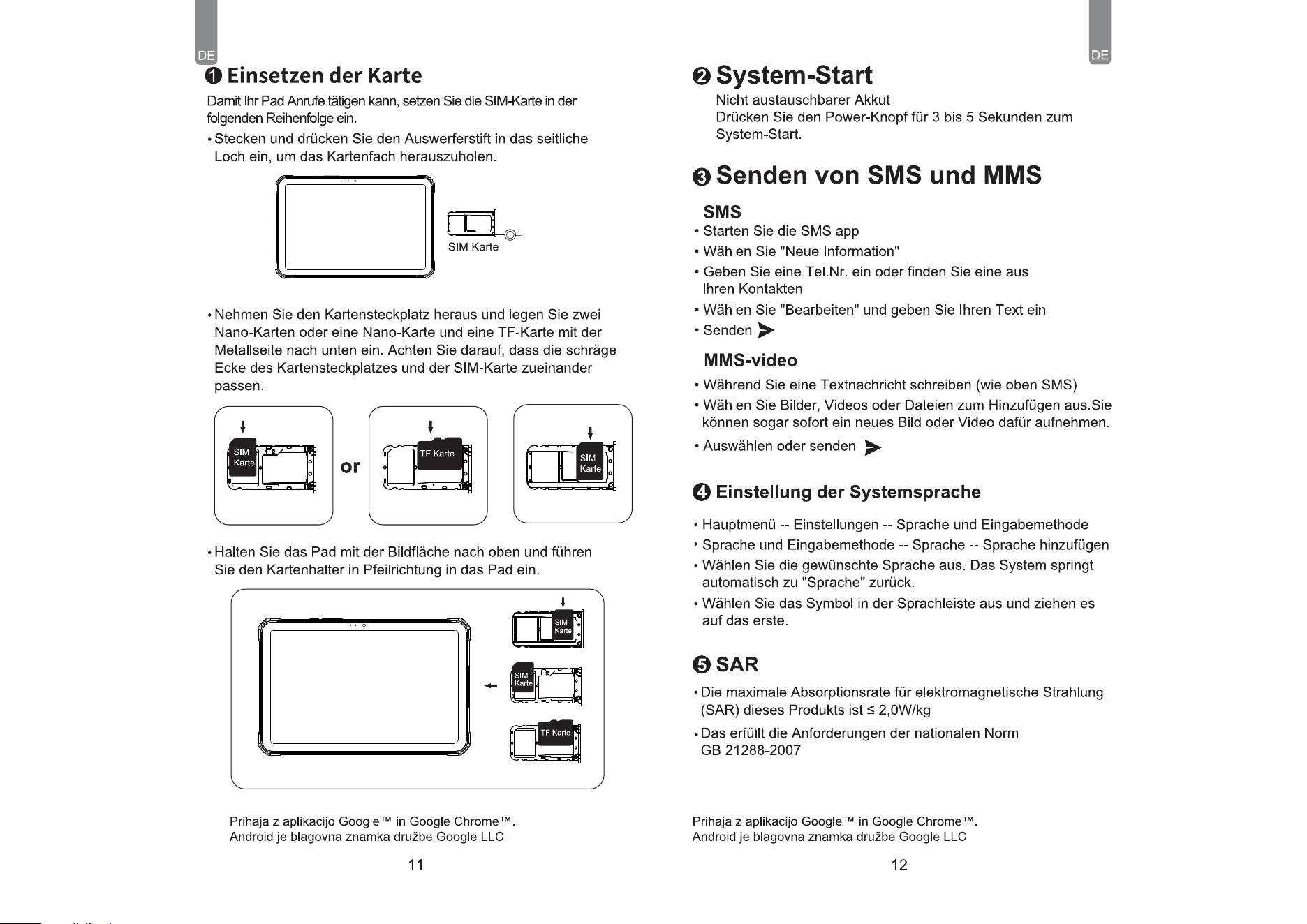
L-sensor
Front Camera
Screen
Comes with the Google
TM
app and Google Chrome
TM
.
Android is a trademark of Google LLC.
Speaker Sound HoleSpeaker Sound Hole
Type-C Port SIM/TF card
Speaker Sound HoleSpeaker Sound Hole
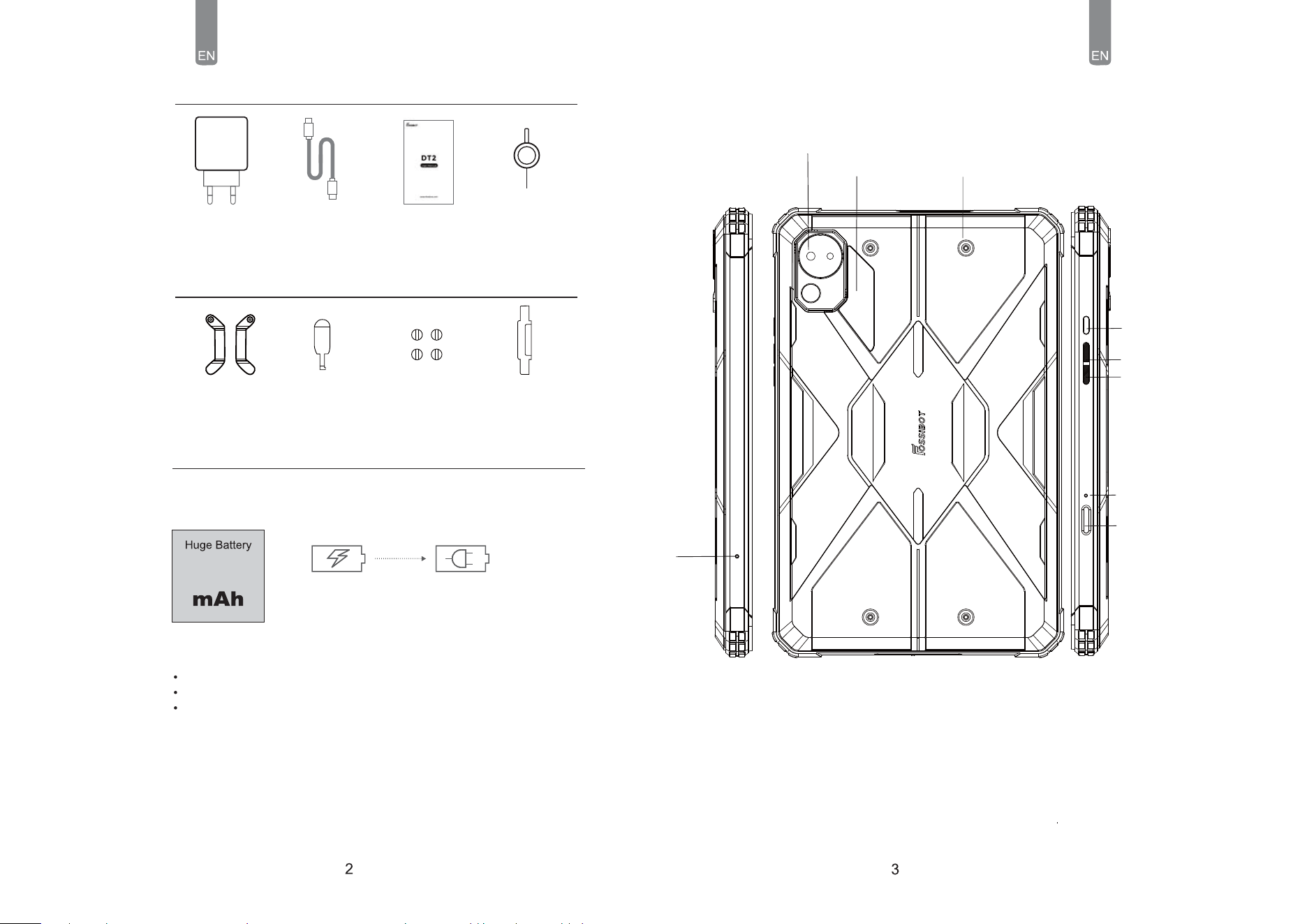
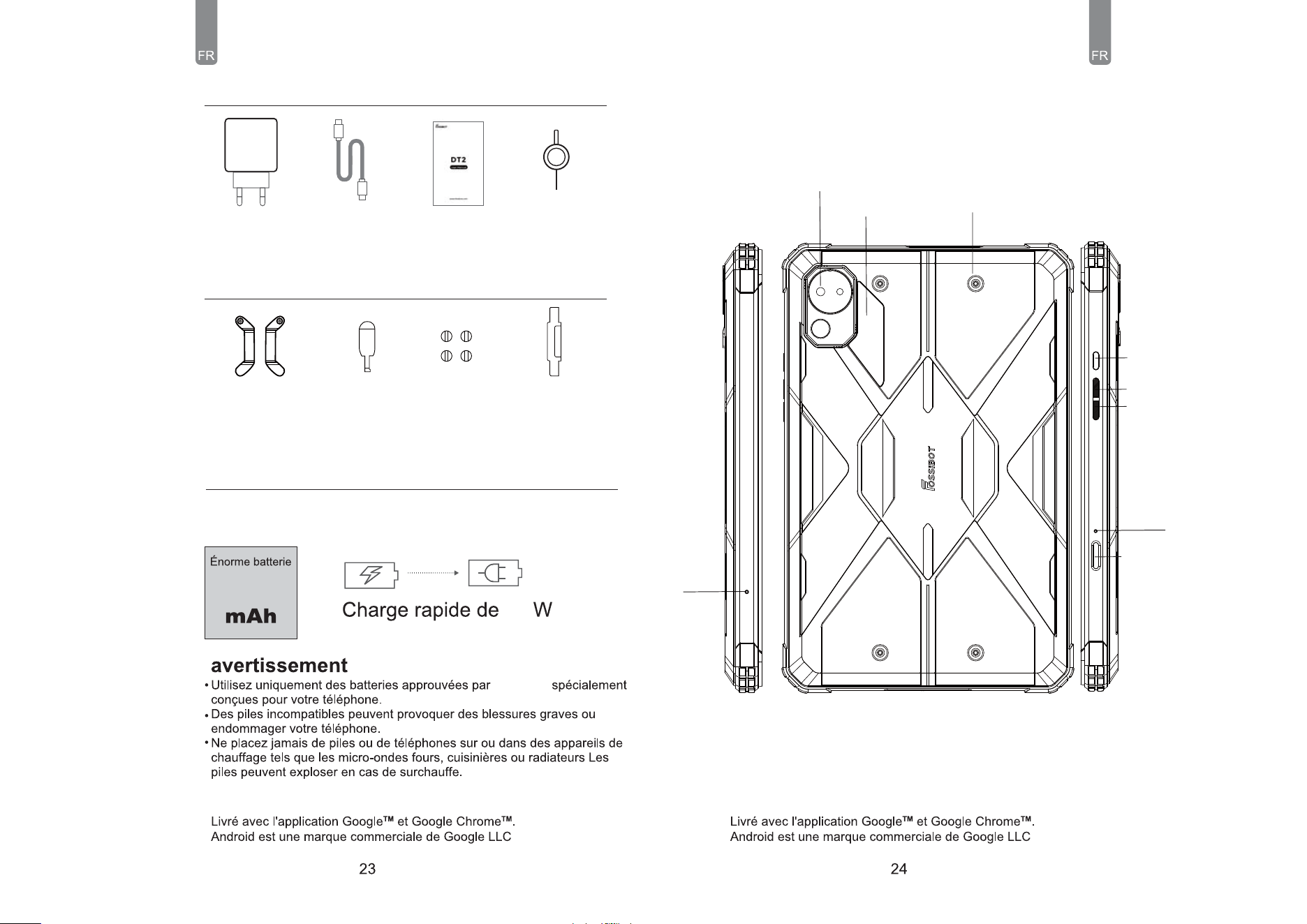
21560
66W Fast Charging
DT2 includes an internal battery. You can track your battery status
with the icon showed on the top right of the screen.
Warning
Use only FOSSiBOT-approved batteries specifically designed for you phone.
Incompatible batteries can cause serious injuries or damage to your phone.
Never place batteries or phones on or in heating devices such as microwave
ovens, stoves, or radiators. Batteries may explode when overheated.
Battery
User Manual/
Warranty Card/
Battery Warning
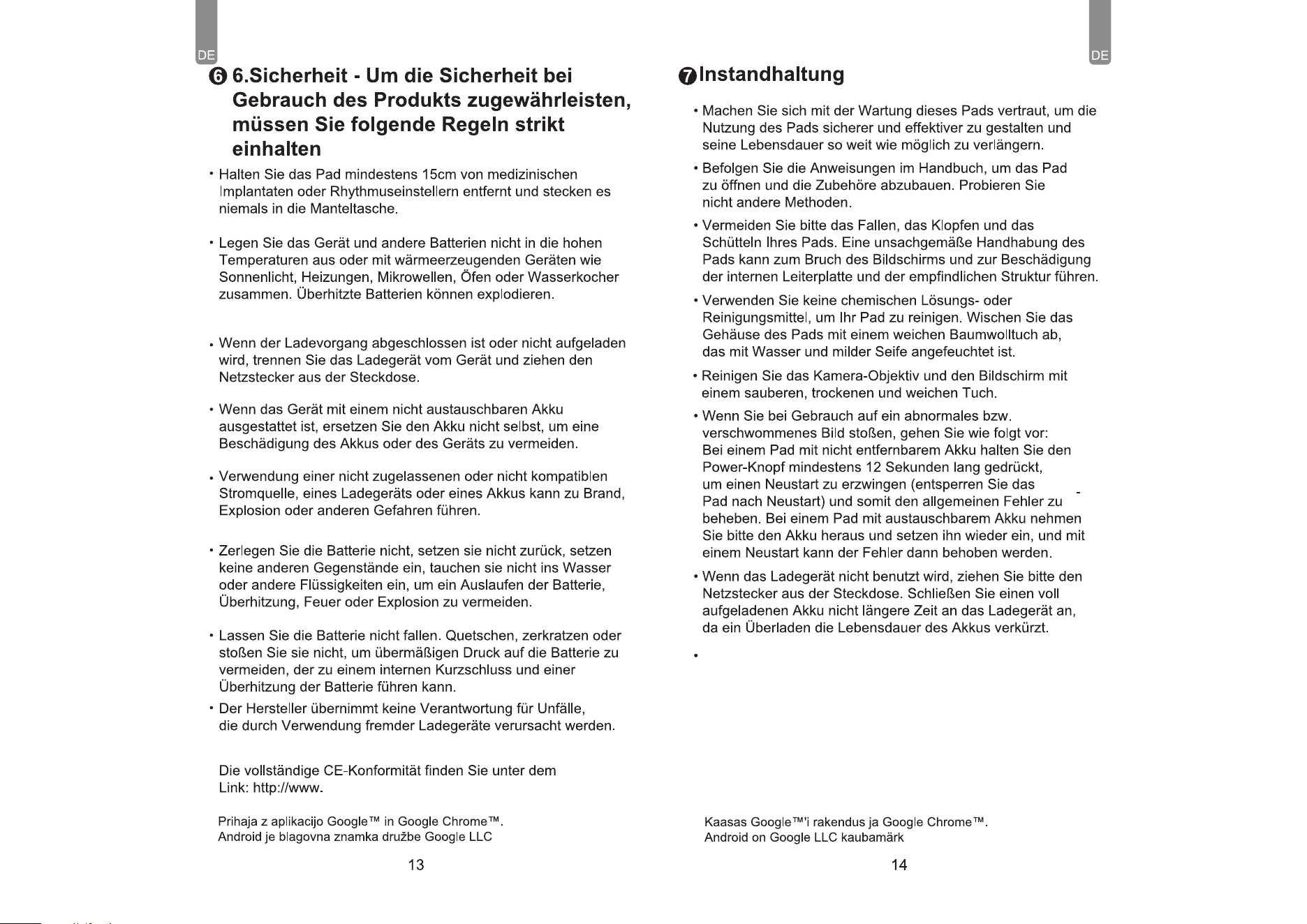
Sim Card Ejector
Quick Charger
Accessories
Type-C Cable
Comes with the Google
TM
app and Google Chrome
TM
.
Android is a trademark of Google LLC.
Comes with the Google
TM
app and Google Chrome
TM
.
Android is a trademark of Google LLC.
Gift products
Leather Hand Belt
4 PCS/set Screw
1X Screwdriver
2pcs/set
Hardware Hook
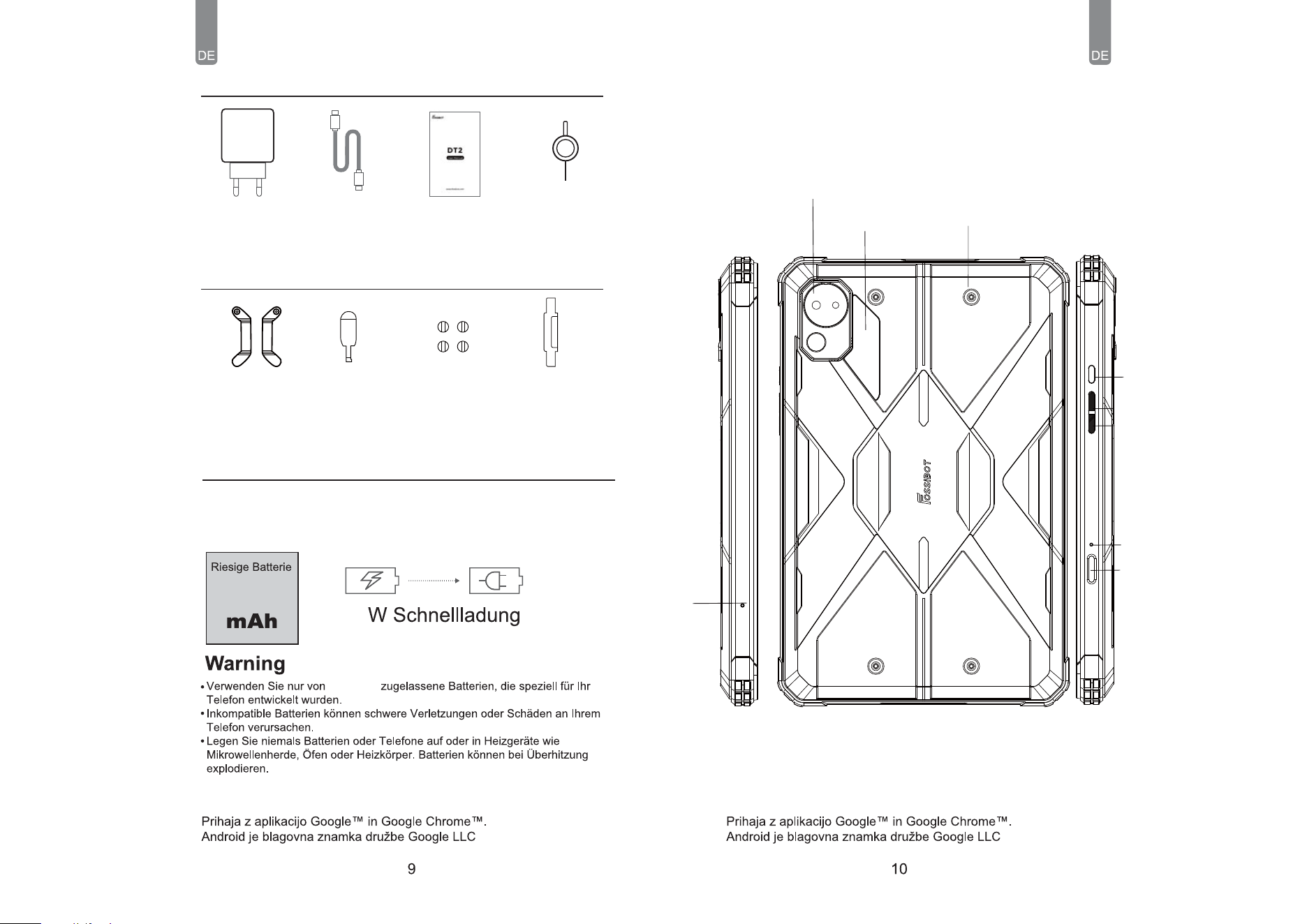
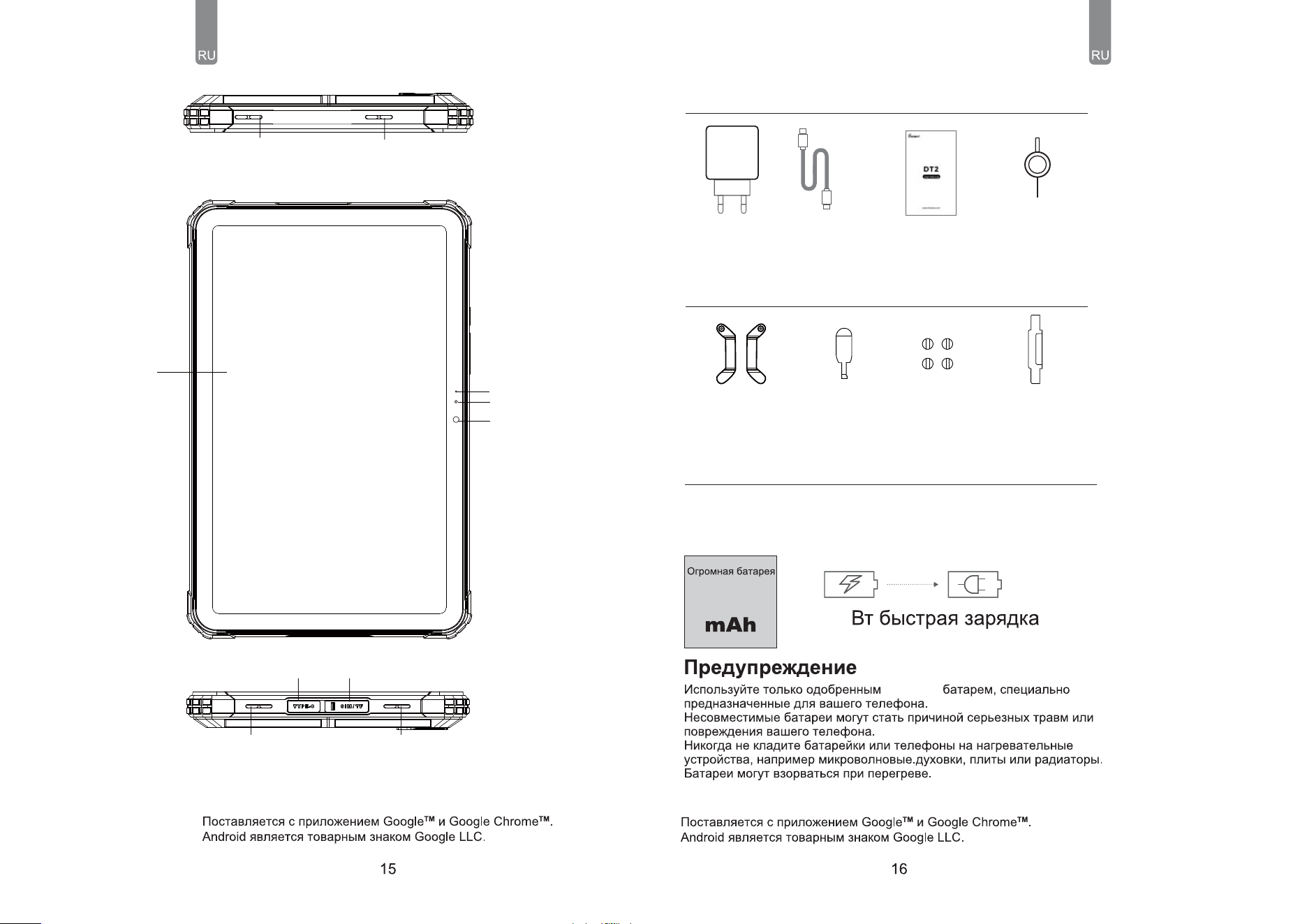
Air
Hole
Power
Flashlight
Screw
Camera
Volume+
Volume-
Microphone
Fingerprint
ID
Comes with the Google
TM
app and Google Chrome
TM
.
Android is a trademark of Google LLC.
Comes with the Google
TM
app and Google Chrome
TM
.
Android is a trademark of Google LLC.
SIM Card
TF Card
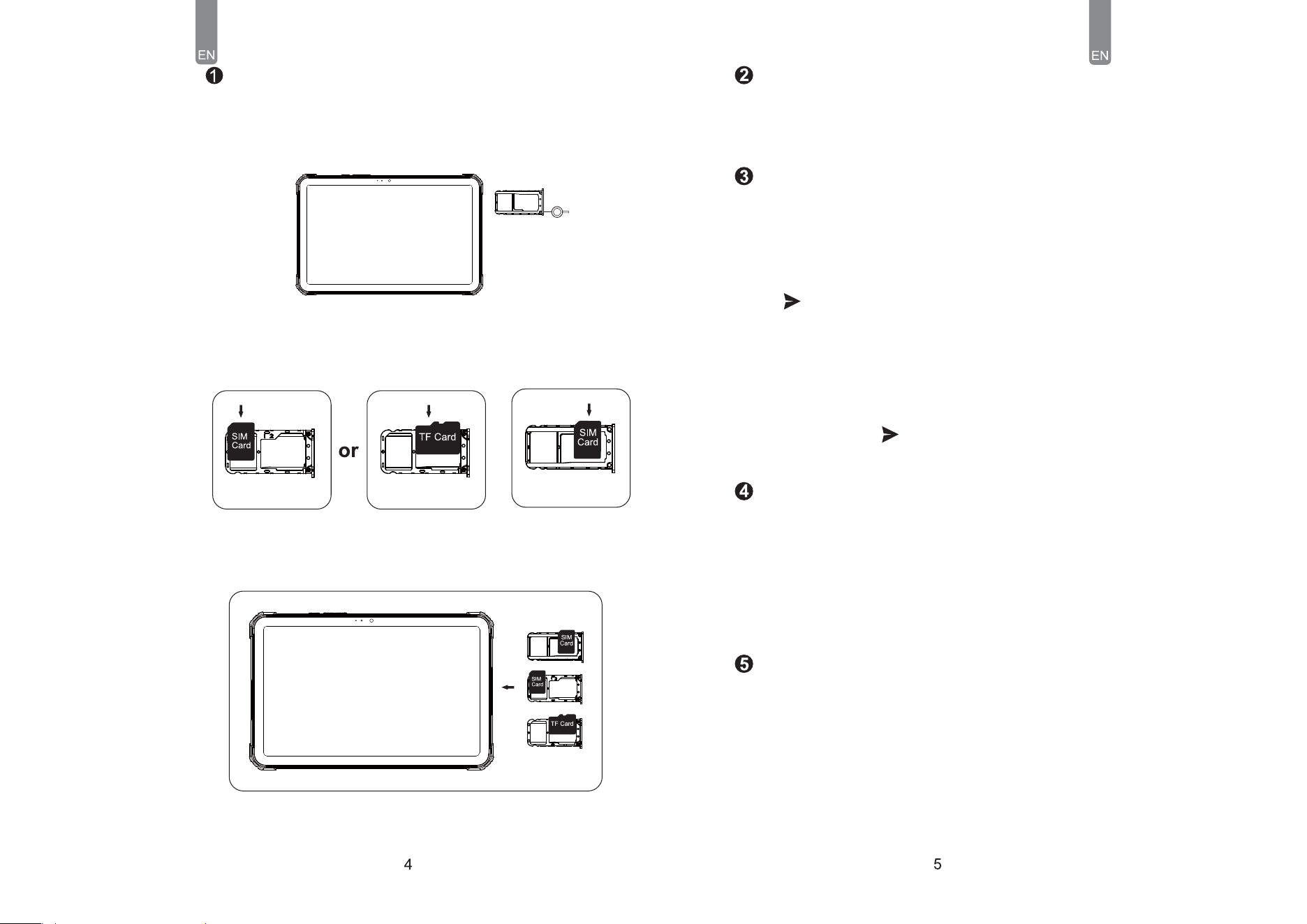
How to insert the card
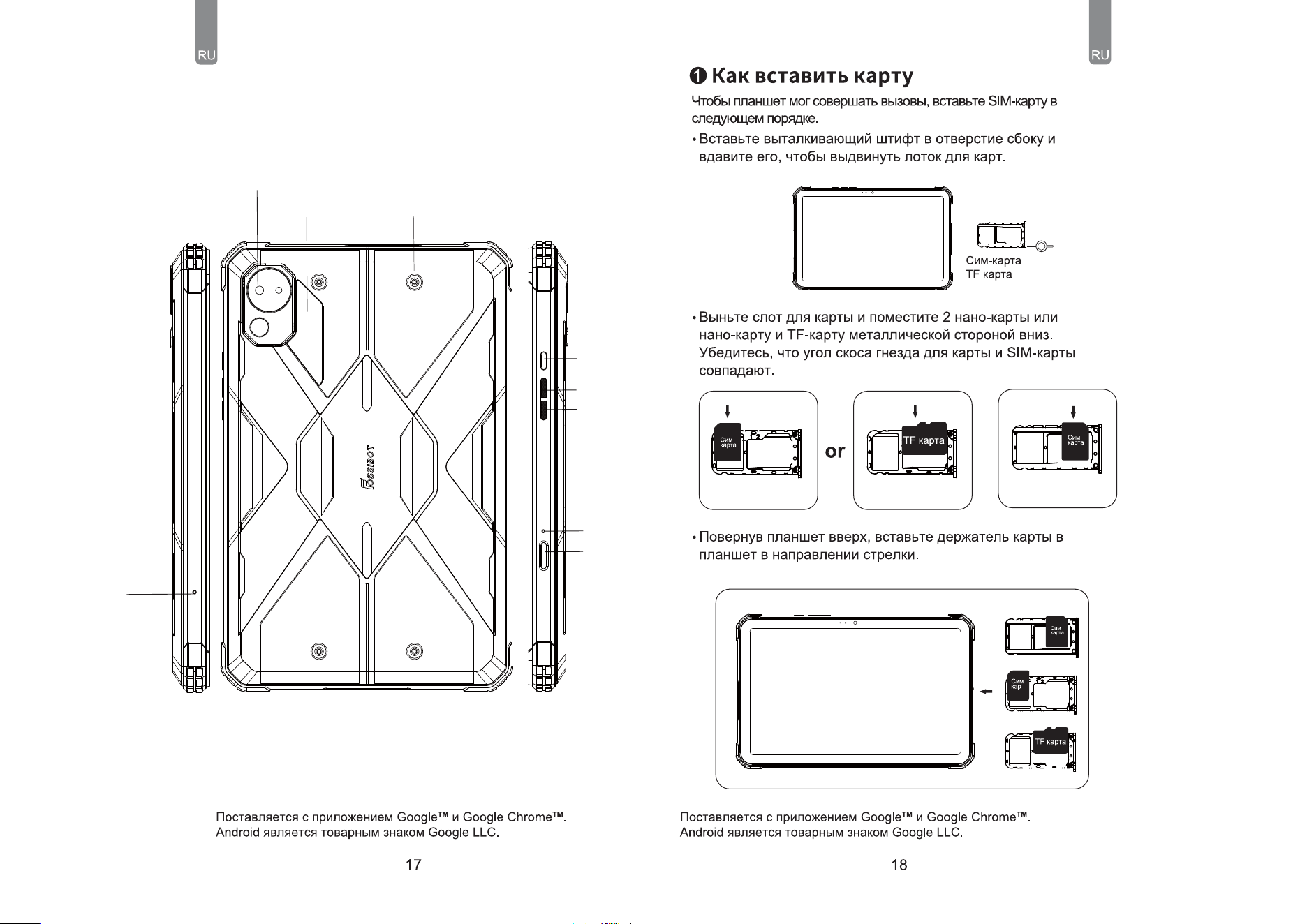
To make sure your pad is able to make calls, insert the SlM card in
thefollowing order.
● lnsert and press the ejector pin into the hole in the side to popthe
card tray.
● Take out the card slot and place 2 Nano cards or a Nano cardand TF
card with the metal side facing down.Ensure the bevelangle of the
card slot and the SIM match.
● With the pad facing up, insert the cardholder into the pad in the
direction of the arrow.
● Open the SMS app
● Select New Information
● Enter a phone number or browse your contacts
● Select Edit Information and enter your text
● Send
Non-removable battery
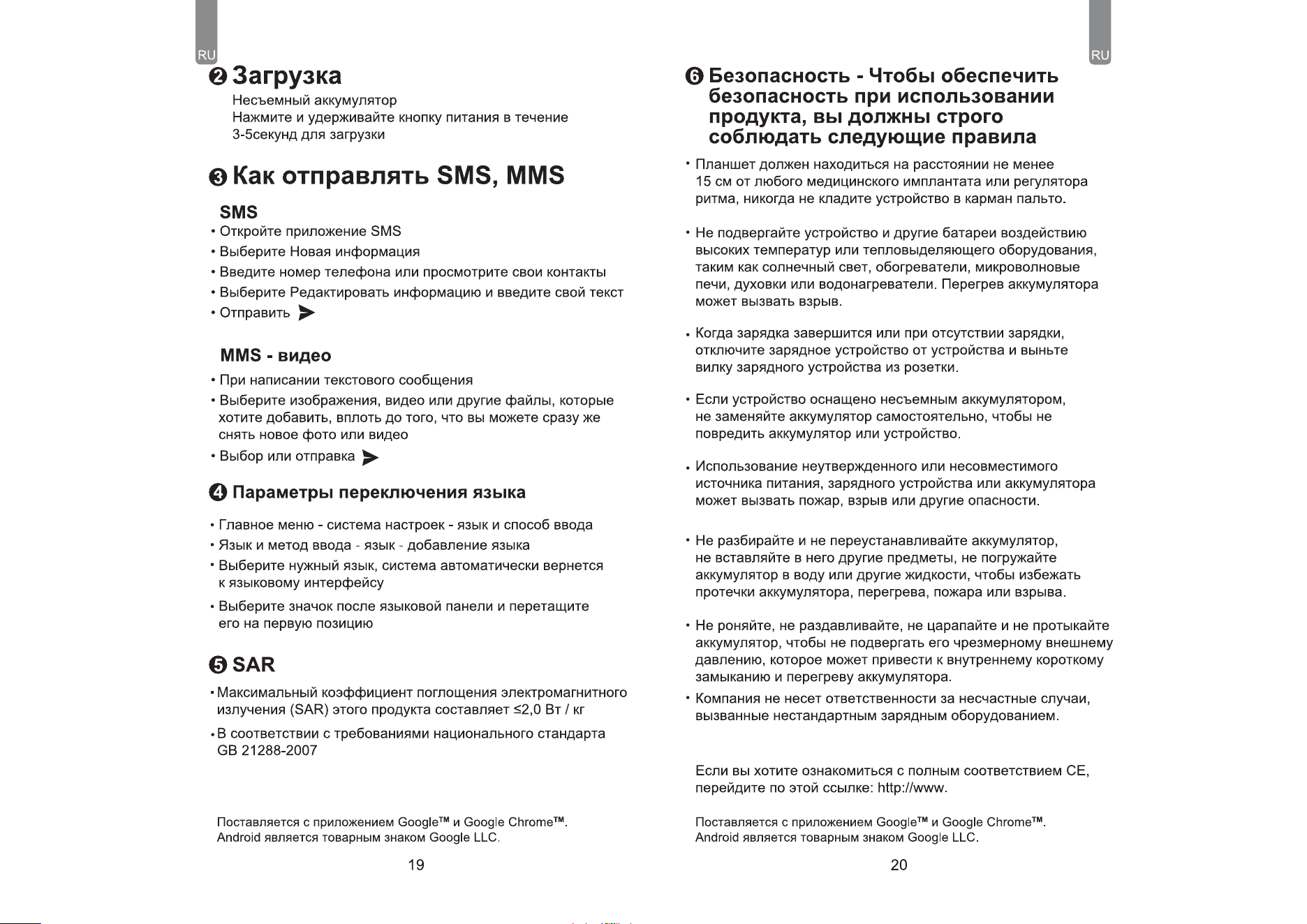
Press the power button for 3-5 seconds to boot
SMS
● When writing a text message
Select images, videos, or other files you want to add,even
you can take a new picture or video right away
● Selecting or sending
MMS-video
● Main menu--settings system--language and input
method--Language and input method--language--language
adding
● Select the language you need, the system will automatically
● Jump back to the language interface
● Select the icon after the language bar and drag it to the first
one
Language switching settings
● The maximum electromagnetic radiation absorption ratio
(SAR)of this product is s2.0W/kg
● In line with the requirements of the national standard
GB21288-2007
EN62209-1:2016; EN 62209-2:2010;
EN 62479:2010;EN 50360:2017;EN 50566:2017;
SAR
How to send SMS, MMS
How to boot
Comes with the Google
TM
app and Google Chrome
TM
.
Android is a trademark of Google LLC.
Comes with the Google
TM
app and Google Chrome
TM
.
Android is a trademark of Google LLC.
● The pad should be at least 15cm away from any medical
implant or rhythm adjuster and never put the device in
yourcoat pocket .
● Do not expose the device and other batteries together
withhigh temperatures or heat-generating equipment such
assunlight, heaters, microwave ovens, ovens, or water heater,
Overheating of the battery can cause an explosion.
● When charging is complete or not charging, disconnect the
charger from the device and unplug the charger from the
outlet.
● If the device is equipped with a non-removable battery, do
notreplace the battery by yourself to avoid damaging the
batteryor the device.
● Use of an unapproved or incompatible power source.charger,
or battery may cause fire, explosion, or otherhazards.
● Do not disassemble or reset the battery, insert other objects.
immerse in water or other liquids to avoid battery leakage,
overheating, fire or explosion.
● Do not drop, crush, scratch, or puncture the battery to avoid
subjecting the battery to excessive external pressure, Which may
result in internal short-circuit and overheating of the battery.
● The company does not bear responsibility for accident scaused
by non-standard related charging equipment.
lf you want to read the full CE compliance, please check this
link: www.fossibot.com
● Thoroughly understand the maintenance of this pad to use the
pad more safely and effectively, and extend the service life of the
pad as much as possible.
● Please follow the instructions in the manual to open the pad,
disassemble the accessories, and do not try other.
● Please avoid dropping, knocking, or shaking your pad. Rough
handling of the pad can cause the screen to rupture, damaging
the internal circuit board and the delicate structure.
● Do not use chemical solvents or detergents to clean yourpad.
Wipe the pad case with a soft cotton cloth dampenedwith water
and mild soap.
● Clean the lens with a clean, dry, soft cloth. (Example:camera
lens) and display.
● When the charger is not in use, please unplug it from thepower
outlet. Do not connect the battery that has been fullycharged to
the charger for a long time, as overcharging will shorten the
battery life.
● This machine's standard package (Package box-Pad-UserManu-
al-USB Cable-Charger-SIM card pin-1x Leather hand belt-4pcs/set
screw-1x screwdriver-2pcs/set Hardware hook)
Safety - In order to ensure safety during
use of the product, you must strictly
abide by the following rules
Maintenance
3-farbig
Indikator Ligit
L-Sensor
Vordere Kamera
Bildschirm
Typ-C-Anschluss SIM/TF-Karte
-BVUTQSFDIFS
4DIBMMMPDI
-BVUTQSFDIFS
4DIBMMMPDI
Lautsprecher
-Schallloch
Lautsprecher
-Schallloch
66
21560
'044J#05
Luftloch
Leistung
Taschenlampe
Kamera
Lautstärke+
Lautstärke-
Mikrofon
Entsperren
von
Fingerabdrücken
DT2 enthält eine interne Batterie. Sie können Ihren Batteriestatus mit
dem Symbol oben rechts auf dem Bildschirm verfolgen.
Battery
Bedienungsanleitung/
Garantiekarte/
Batteriewarnung
Sim Card Ejector
Schnellladegerät
Zubehör
Kabel Typ C
Geschenkartikel
Ledergürtel
4 PCS/Satz
Schraube
1X Schraubendreher2Stück/Satz
Hardware-Haken
Schraube
fossibot.com
Das Standardpaket dieser Maschine (Paket Box-Pad-UserManu-
al-USB Kabel-Ladegerät-SIM-Karte Pin-1x Leder Hand Gürtel-4pcs/-
Satz Schraube-1x Schraubendreher-2pcs/set Hardware Haken)
66
21560
FOSSiBOT
ɰɜɟɬɚ
ɂɧɞɢɤɚɬɨɪ
/ɫɟɧɫɨɪ
ɉɟɪɟɞɧɹɹ
ɤɚɦɟɪɚ
ɗɤɪɚɧ
ĻŚŜŞŞŔśŌ$ 4*.5'ŖŌŜŞŌ
ijŎşŖŚŎŚő
ŚŞŎőŜŝŞŔőŐŔřŌŘŔŖŌ
ijŎşŖŚŎŚő
ŚŞŎőŜŝŞŔőŐŔřŌŘŔŖŌ
ijŎşŖŚŎŚő
ŚŞŎőŜŝŞŔőŐŔřŌŘŔŖŌ
ijŎşŖŚŎŚő
ŚŞŎőŜŝŞŔőŐŔřŌŘŔŖŌ
В состав DT2 входит внутренняя батарея. Вы можете отслеживать
состояние батареи, используя значок, показанный в правом
верхнем углу экрана.
Ȼɚɬɚɪɟɹ
Руководство пользователя /
Гарантийная карта /
Аккумуляторное
предупреждение.
ɋɤɚɱɚɬɶ
Sim Card
ȼɢɧɬ
ɉɪɢɥɨɠɟɧɢɟ
Ʉɚɛɟɥɶɬɢɩɚ&
ɉɨɞɚɪɤɢ
Ʉɨɠɚɧɵɣɪɟɦɟɧɶ
ɲɬ
ɋɬɚɰɢɨɧɚɪɧɵɣ
ɜɢɧɬ
Ɉɬɜɺɪɬɤɚ;ɲɬɤɨɦɩɥɟɤɬ
ɉɹɬɢɤɥɚɜɧɵɣɤɪɸɤ
ȼɨɡɞɭɲɧɨɟ
ɨɬɜɟɪɫɬɢɟ
ȼɥɚɫɬɶ
Ɏɨɧɚɪɢɤ
Ʉɚɦɟɪɚ
Ƚɪɨɦɤɨɫɬɶ
Ɉɛɴɟɦ
Ɉɬɩɟɱɚɬɤɢ
ɩɚɥɶɰɟɜ
ɪɚɡɛɥɨɤɢɪɨɜɚɧɵ
ȼɢɧɬ
Ɇɢɤɪɨɮɨɧ
fossibot.com
Indicateur lumineux
à 3 couleurs
Capteur L
Caméra Frontale
Filtrer
1PSUEF5ZQF$
$BSUF4*.5'
0SJDF4POPSF
EV)BVU1BSMFVS
0SJDF4POPSF
EV)BVU1BSMFVS
Orifice Sonore
du Haut-Parleur
0SJDF4POPSF
EV)BVU1BSMFVS
ɋɬɚɧɞɚɪɬɧɚɹɭɩɚɤɨɜɤɚɦɚɲɢɧɵɭɩɚɤɨɜɨɱɧɚɹɤɨɪɨɛɤɚ3DG
Ɋɭɤɨɜɨɞɫɬɜɨɩɨɥɶɡɨɜɚɬɟɥɹ86%ɤɚɛɟɥɶɧɨɟɡɚɪɹɞɧɨɟ
ɭɫɬɪɨɣɫɬɜɨ6,0ɤɚɪɬɚɲɬɵɪɶ[ɤɨɠɚɧɵɣɪɟɦɟɲɨɤSFV
ɤɨɦɩɥɟɤɬɜɢɧɬɨɜ[ɨɬɜɟɪɬɤɚSFVɤɨɦɩɥɟɤɬ
ɚɩɩɚɪɚɬɧɵɣɤɪɸɤ
66
21560
FOSSiBOT
Trou d'air
Pouvoir
Caméra
Appareils Photo
Volume+
Volume-
Microphone
DT2 include batterie interne. È possibile monitorare lo stato della batteria
utilizzando l'icona visualizzata nell'angolo in alto a destra dello schermo.
Batterie
User Manual/
Warranty Card/
Battery Warning
Sim Card Ejector
Quick Charger
Annexes
Type-C Cable
Cadeaux
Bracelet en cuir
4 pièces / vis
de fixation
1x tournevis
2pcs / Set
Crochets de matériel
Circa
ID
d'empreinte
digitale