
en Table of contents
You can find additional information and explanations online.
Scan the QR code on the title page.
Table of contentsTable of contents
INFORMATION FOR USE
1 Safety ........................................................................ 2
2 Preventing material damage .................................. 5
3 Environmental protection and saving energy ...... 5
4 Familiarising yourself with your appliance .......... 6
5 Operating modes ..................................................... 7
6 Accessories ............................................................. 9
7 Before using for the first time .............................. 10
8 Basic operation ..................................................... 11
9 Rapid heating ......................................................... 12
10 Time-setting options ........................................... 13
11 Dishes ................................................................... 14
12 Favourites ............................................................ 15
13 Childproof lock .................................................... 16
14 Basic settings ...................................................... 16
15 HomeConnect ................................................... 17
16 Cleaning and servicing ...................................... 19
17 "Pyrolytic self-cleaning" cleaning function ..... 21
18 Cleaning aid ........................................................ 22
19 Drying .................................................................. 22
20 Appliance door .................................................... 23
21 Rails ..................................................................... 26
22 Troubleshooting ................................................. 28
23 Disposal ............................................................... 30
24 Customer Service ............................................... 30
25 Information regarding Free and Open Source
Software ............................................................... 31
26 Declaration of Conformity .................................. 31
27 How it works ........................................................ 32
28 INSTALLATION INSTRUCTIONS ....................... 40
28.1 General installation instructions .................... 40
Safety 1 Safety
Observe the following safety instructions.
1.1 General information
¡ Read this instruction manual carefully.
¡ Keep the instruction manual and the product
information safe for future reference or for
the next owner.
¡ Do not connect the appliance if it has been
damaged in transit.
1.2 Intended use
This appliance is designed only to be built into
kitchen units. Read the special installation in-
structions.
Only a licensed professional may connect ap-
pliances without plugs. Damage caused by in-
correct connection is not covered under the
warranty.
Only use this appliance:
¡ To prepare meals and drinks.
¡ in private households and in enclosed
spaces in a domestic environment.
¡ Up to an altitude of 4000m above sea level.
1.3 Restriction on user group
This appliance may be used by children aged
8 or over and by people who have reduced
physical, sensory or mental abilities or inad-
equate experience and/or knowledge,
provided that they are supervised or have
been instructed on how to use the appliance
safely and have understood the resulting
dangers.
Do not let children play with the appliance.
Children must not perform cleaning or user
maintenance unless they are at least 15 years
old and are being supervised.
Keep children under the age of 8 years away
from the appliance and power cable.
1.4 Safe use
Always place accessories in the cooking com-
partment the right way round.
"Accessories", Page9
2

Safety en
WARNING‒Risk of fire!
Combustible objects that are left in the cook-
ing compartment may catch fire.
Never store combustible objects in the cook-
ing compartment.
If smoke is emitted, the appliance must be
switched off or the plug must be pulled out
and the door must be held closed in order to
stifle any flames.
Loose food remnants, fat and meat juices may
catch fire.
Before using the appliance, remove the
worst of the food residues and remnants
from the cooking compartment, heating ele-
ments and accessories.
Opening the appliance door creates a draught.
Greaseproof paper may come into contact with
the heating element and catch fire.
Never place greaseproof paper loosely over
accessories when preheating the appliance
and while cooking.
Always cut greaseproof paper to size and
use a plate or baking tin to hold it down.
WARNING‒Risk of burns!
The appliance and its parts that can be
touched become hot during use.
Caution should be exercised here in order to
avoid touching heating elements.
Young children under 8 years of age must
be kept away from the appliance.
Accessories and cookware get very hot.
Always use oven gloves to remove ac-
cessories or cookware from the cooking
compartment.
When the cooking compartment is hot, any al-
coholic vapours inside may catch fire. The ap-
pliance door may spring open. Hot steam and
jets of flame may escape.
Only use small quantities of drinks with a
high alcohol content in food.
Do not heat spirits (≥ 15% vol.) when undi-
luted (e.g. for marinating or pouring over
food).
Open the appliance door carefully.
The telescopic shelves become hot when the
appliance is in use.
Allow hot telescopic shelves to cool down
before touching them.
Only touch hot telescopic shelves with oven
gloves.
WARNING‒Risk ofscalding!
The accessible parts of the appliance become
hot during operation.
Never touch these hot parts.
Keep children at a safe distance.
Hot steam may escape when you open the ap-
pliance door. Steam may not be visible, de-
pending on the temperature.
Open the appliance door carefully.
Keep children at a safe distance.
If there is water in the cooking compartment
when it is hot, this may create hot steam.
Never pour water into the cooking compart-
ment when the cooking compartment is hot.
WARNING‒Risk of injury!
Scratched glass in the appliance door may de-
velop into a crack.
Do not use any harsh or abrasive cleaners
or sharp metal scrapers to clean the glass
on the oven door, as they may scratch the
surface.
The appliance and its parts that can be
touched may have sharp edges.
Take care when handling and cleaning them.
If possible, wear protective gloves.
The hinges on the appliance door move when
the door is opened and closed, which could
trap your fingers.
Keep your hands away from the hinges.
Components inside the appliance door may
have sharp edges.
Wear protective gloves.
Alcoholic vapours may catch fire in the hot
cooking compartment, and the appliance door
may spring open and may fall off. The door
panels may shatter and fragment.
"Preventing material damage", Page5
Only use small quantities of drinks with a
high alcohol content in food.
Do not heat spirits (≥ 15% vol.) when undi-
luted (e.g. for marinating or pouring over
food).
Open the appliance door carefully.
WARNING‒Risk of electric shock!
Improper repairs are dangerous.
Repairs to the appliance should only be car-
ried out by trained specialist staff.
Only use genuine spare parts when repairing
the appliance.
If the power cord or the appliance power
cable of this appliance is damaged, it must
be replaced with a special power cord or
special appliance power cable, which is
3

en Safety
available from the manufacturer or its Cus-
tomer Service.
If the power cord of this appliance is dam-
aged, it must be replaced by trained special-
ist staff.
If the insulation of the power cord is damaged,
this is dangerous.
Never let the power cord come into contact
with hot appliance parts or heat sources.
Never let the power cord come into contact
with sharp points or edges.
Never kink, crush or modify the power cord.
An ingress of moisture can cause an electric
shock.
Do not use steam- or high-pressure cleaners
to clean the appliance.
If the appliance or the power cord is damaged,
this is dangerous.
Never operate a damaged appliance.
Never pull on the power cord to unplug the
appliance. Always unplug the appliance at
the mains.
If the appliance or the power cord is dam-
aged, immediately unplug the power cord or
switch off the fuse in the fuse box.
Call customer service.
Page30
Once the appliance has been installed, the
openings in the back panel of the appliance
must not be accessible to children.
Read the special installation instructions.
WARNING‒Risk of suffocation!
Children may put packaging material over their
heads or wrap themselves up in it and suffoc-
ate.
Keep packaging material away from chil-
dren.
Do not let children play with packaging ma-
terial.
Children may breathe in or swallow small
parts, causing them to suffocate.
Keep small parts away from children.
Do not let children play with small parts.
1.5 Cleaning function
WARNING‒Risk of fire!
Loose food remnants, fat and meat juices may
catch fire when the cleaning function is in pro-
gress.
Before you start the cleaning function, al-
ways remove coarse dirt from the cooking
compartment.
Never clean accessories at the same time.
The outside of the appliance gets very hot
when the cleaning function is in progress.
Never hang combustible objects, e.g. tea
towels, on the door handle.
Leave the front of the appliance clear.
Keep children at a safe distance.
If the door seal is damaged, a large amount of
heat is generated around the door.
Do not scrub or remove the seal.
Never operate the appliance if the seal is
damaged or missing.
WARNING‒Risk of serious harm to
health!
The appliance gets very hot when the cleaning
function is in progress. The non-stick coating
on baking trays and tins is destroyed and nox-
ious gases are released.
Never clean non-stick baking trays or baking
tins using the cleaning function.
Never clean accessories at the same time.
WARNING‒Risk of harm to health!
The cleaning function heats up the cooking
compartment to a very high temperature so
that food left over from roasting, grilling and
baking will burn off. This process releases va-
pours, which can irritate mucous membranes.
Keep the kitchen well ventilated while the
cleaning function is running.
Do not remain in the room for long periods.
Keep children and pets away.
WARNING‒Risk of burns!
The cooking compartment gets very hot when
the cleaning function is in progress.
Never open the appliance door.
Allow the appliance to cool down.
Keep children at a safe distance.
The outside of the appliance gets very hot
when the cleaning function is in progress.
Never touch the appliance door.
Allow the appliance to cool down.
Keep children at a safe distance.
4

Preventing material damage en
Preventing material damage2 Preventing material damage
2.1 General
ATTENTION
Alcoholic vapours may catch fire in the hot cooking
compartment and cause permanent damage to the ap-
pliance. The appliance door may spring open due to an
explosion and it may fall off. The door panels may shat-
ter and fragment. Due to the resulting negative pres-
sure, the cooking compartment may become consider-
ably deformed inwards.
Do not heat spirits (≥ 15% vol.) when undiluted (e.g.
for marinating or pouring over food).
If there is water on the cooking compartment floor when
operating the appliance at temperatures above 120°C,
this will damage the enamel.
Do not use the appliance if there is water on the
cooking compartment floor.
Wipe away any water on the cooking compartment
floor before operation.
Objects on the cooking compartment floor at over
50°C will cause heat to build up. The baking and roast-
ing times will no longer be correct and the enamel will
be damaged.
Do not place any accessories, greaseproof paper or
foil of any kind on the cooking compartment floor.
Only place cookware on the cooking compartment
floor if a temperature under 50°C has been set.
When the cooking compartment is hot, any water inside
it will create steam. The change in temperature may
cause damage.
Never pour water into the cooking compartment when
it is still hot.
Never place cookware containing water on the cook-
ing compartment floor.
The prolonged presence of moisture in the cooking
compartment leads to corrosion.
Allow the cooking compartment to dry after use.
Do not keep moist food in the cooking compartment
for a long time with the door closed.
Do not store food in the cooking compartment.
Take care not to trap anything in the appliance door.
Fruit juice dripping from the baking tray leaves stains
that cannot be removed.
When baking very juicy fruit flans, do not pack too
much on the baking tray.
If possible, use the deeper universal pan.
Using oven cleaner in a hot cooking compartment dam-
ages the enamel.
Never use oven cleaner in the cooking compartment
when it is still warm.
Remove all food remnants from the cooking compart-
ment and the appliance door before you next heat up
the appliance.
If the seal is very dirty, the appliance door will no longer
close properly during operation. This may damage the
front of adjacent kitchen units.
Keep the seal clean at all times.
Never operate the appliance if the seal is damaged or
missing.
Sitting or placing objects on the appliance door may
damage it.
Do not place, hang or support objects on the appli-
ance door.
Do not place cookware or accessories on the appli-
ance door.
With certain models, accessories may scratch the door
pane when closing the appliance door.
Always push accessories fully into the cooking com-
partment.
If aluminium foil comes into contact with the door pane,
it could cause permanent discolouration.
Do not allow aluminium foil in the cooking compart-
ment to come into contact with the door pane.
Environmental protection and saving energy3 Environmental protection and saving energy
3.1 Disposing of packaging
The packaging materials are environmentally compatible
and can be recycled.
Sort the individual components by type and dispose
of them separately.
3.2 Saving energy
If you follow these instructions, your appliance will use
less power.
Only preheat the appliance if the recipe or the recom-
mended settings tell you to do so.
"How it works", Page32
Not preheating the appliance can reduce the energy
used by up to 20%.
Use dark-coloured, black-coated or enamelled baking
tins.
These types of baking tin absorb the heat particularly
well.
Open the appliance door as little as possible during op-
eration.
This maintains the temperature in the cooking com-
partment and eliminates the need for the appliance to
reheat.
When baking multiple dishes, do so in succession or in
parallel.
The cooking compartment is heated after baking the
first dish. This reduces the baking time for the sub-
sequent cakes.
For longer cooking times, you can switch the appliance
off 10minutes before the cooking time ends.
There is sufficient residual heat to finish cooking the
dish.
Remove any accessories that are not being used from
the cooking compartment.
5
en Familiarising yourself with your appliance
Accessories that are not being used do not need to
be heated.
Allow frozen food to defrost before cooking.
This saves the energy that would otherwise be re-
quired to defrost it.
Switch off the display in the basic settings.
"Basic settings", Page16
Energy is saved when the display is switched off.
Note: In accordance with the EU Ecodesign Directive
2023/826, this appliance is in a different state when
switched off. This is referred to below as low power
mode.
Even when the main function is not active, the appliance
needs energy for:
Detecting operation of the touch keys
Monitoring door opening
Editing the time (without display)
By definition, therefore, there is neither an “off” nor a
“standby” mode, which is why the term low power mode
is used. EN IEC 60350-1:2023 must be used to meas-
ure low power mode.
Familiarising yourself with your appliance4 Familiarising yourself with your appliance
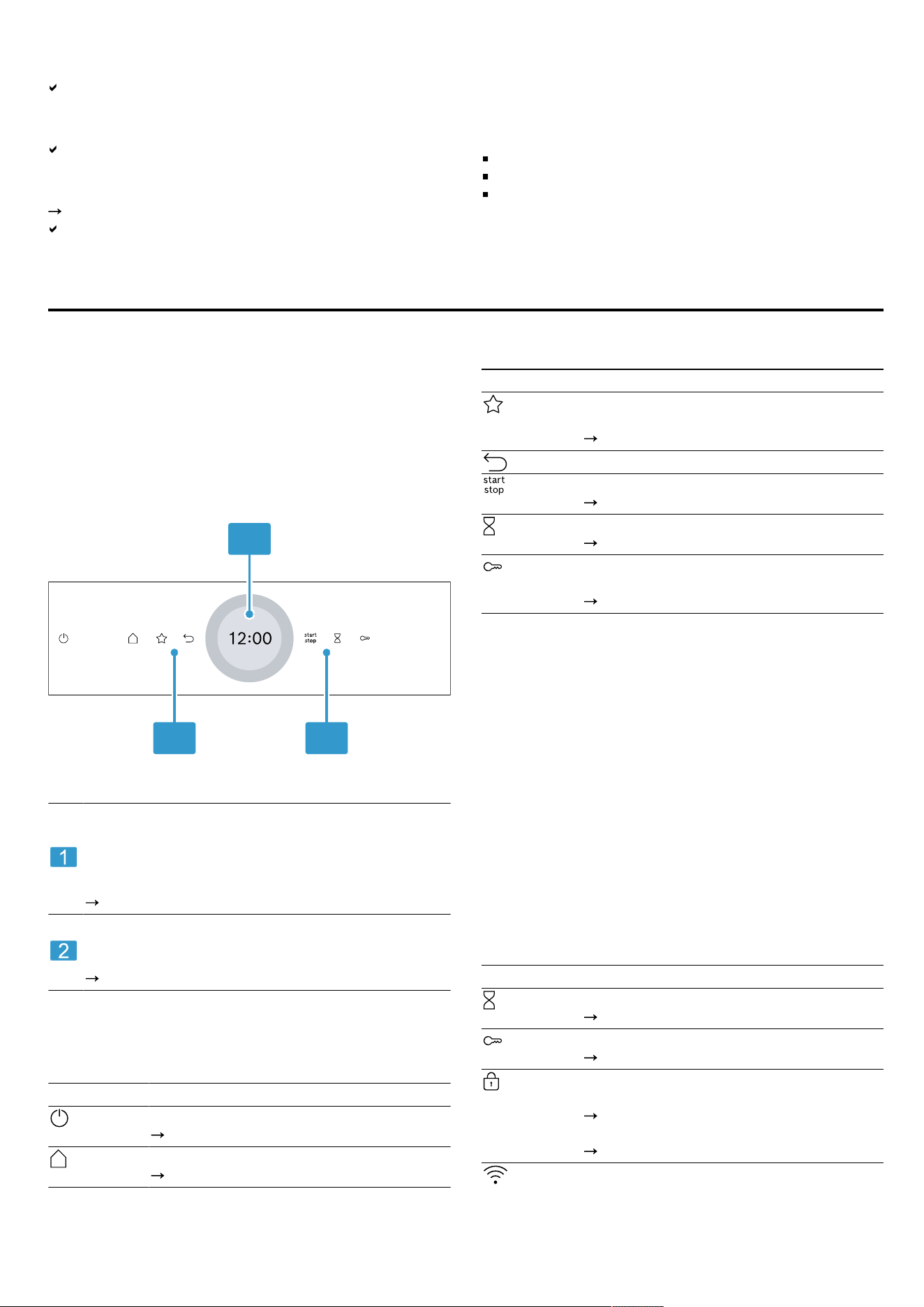
4.1 Control panel
You can use the control panel to configure all functions
of your appliance and to obtain information about the
operating status.
On certain models, specific details such as colour and
shape may differ from those pictured.
1
2 2
Display with setting ring
You can use the digital setting ring to set the appli-
ance via the display.
You will see the current setting values, options or
relevant information.
"Display", Page6
Buttons
You can use the buttons to directly set various
functions.
"Buttons", Page6
4.2 Buttons
You can use the buttons to directly select various func-
tions.
Button Function
Switch the appliance on or off.
"Basic operation", Page11
Open the "Operating modes" menu.
"Operating modes", Page7
Button Function
Select the favourites operating mode dir-
ectly.
"Favourites", Page15
Go back one setting.
Start or pause operation.
"Basic operation", Page11
Select the timer.
"Setting the timer", Page14
Press and hold for approx. 4seconds to
activate the childproof lock.
"Childproof lock", Page16
4.3 Display
The display is divided into different areas.
Digital setting ring
You can use the digital setting ring on the display to
change the setting values.
When you reach the minimum or maximum value avail-
able, this value remains on the display. If required, use
the setting ring to turn the value back again.
Finely tuned setting values
To fine-tune the setting values, e.g. to set a time to the
precise minute, press and hold the corresponding area
in the setting ring for around 1-2 seconds. The finely
tined setting values are shown in dots.
Status indicator
Status information is shown at the top of the display.
Symbol Meaning
Timer is activated.
"Setting the timer", Page14
Childproof lock is activated.
"Childproof lock", Page16
The appliance door is locked due to the
cleaning function or childproof lock.
"Pyrolytic self-cleaning cleaning func-
tion", Page21
"Basic settings", Page16
Wi-Fi signal strength for HomeConnect.
The more lines of the symbol are filled,
the better the signal.
6
Operating modes en
Symbol Meaning
If the symbol is struck through , there is
no Wi-Fi signal.
If there is an "x" at the symbol , there is
no connection to the HomeConnect
server.
"HomeConnect ", Page17
Remote start with HomeConnect is activ-
ated.
"HomeConnect ", Page17
Remote diagnostics with HomeConnect
for maintenance is activated.
"HomeConnect ", Page17
Settings area
The settings area is in the centre of the display.
You can see current options and settings that have
already been made in the settings area.
The menu and other setting options are arranged hori-
zontally. Selection lists for functions are vertically ar-
ranged. Swipe over the display to scroll in the settings
area. To select a function, press the function on the dis-
play.
"Setting the operating mode", Page11
Possible symbols in the settings area
Symbol Meaning
Confirm the setting value.
Reset the setting value.
Change the setting value while the appli-
ance is in operation.
Note: A blue marking "new" or a blue dot on a function
indicates that a new function, a new favourite or an up-
date was downloaded to your appliance using the
HomeConnect app.
4.4 Cooking compartment
Various functions in the cooking compartment provide
support when operating your appliance.
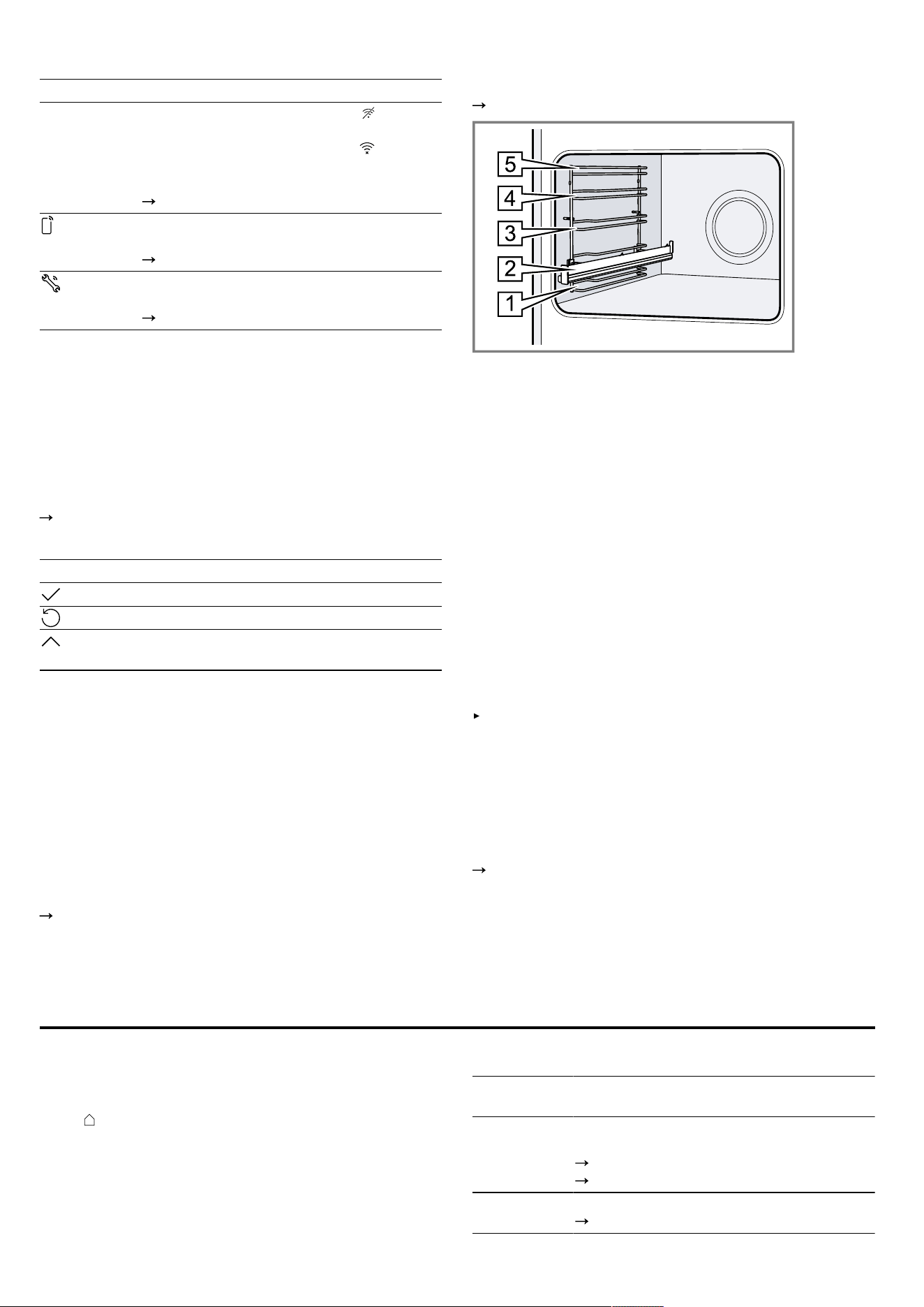
Shelf supports
The shelf supports in the cooking compartment enable
you to place accessories at different heights.
"Accessories", Page9
Your appliance has 5 shelf positions. The shelf positions
are numbered from bottom to top.
The shelf supports are equipped with pull-out rails on
one or more levels, depending on the appliance type.
You can remove the shelf supports, e.g. for cleaning.
"Rails", Page26
Lighting
One or more oven lights illuminate the cooking compart-
ment.
When you open the appliance door, the light in the
cooking compartment switches on. If the appliance door
remains open for longer than around 18 minutes, the
light switches off again.
For most operating modes, the lighting is switched on
during operation. The lighting switches off again when
the operation ends.
Cooling fan
The cooling fan switches on and off depending on the
appliance's temperature. The hot air escapes above the
door.
ATTENTION
Covering the ventilation slots will cause the appliance to
overheat.
Do not cover the ventilation slots.
To cool down the appliance and remove residual mois-
ture from the cooking compartment, the cooling fan runs
for a certain time after operation.
Note: You can change the run-on time in the basic set-
tings. If you frequently prepare very moist food or keep
it warm in the cooking compartment, set a longer run-on
time.
"Basic settings", Page16
Appliance door
If you open the appliance door during operation, the op-
eration stops. If you close the appliance door, operation
resumes automatically.
Operating modes5 Operating modes
This is where you can find an overview of your appli-
ance's operating modes and main functions.
Press to open the menu.
Operating
mode
Use
Types of
heating
Select finely tuned types of heating for the
optimal preparation of your food.
"Types of heating", Page8
"Basic operation", Page11
Favourites Use your own saved settings.
"Favourites", Page15
7
en Operating modes
Operating
mode
Use
Dishes Use programmed, recommended settings
for various types of food.
"Dishes", Page14
Cleaning Select the cleaning function for the cook-
ing compartment.
"Pyrolytic self-cleaning cleaning func-
tion", Page21
"Cleaning aid", Page22
"Drying", Page22
Operating
mode
Use
Basic set-
tings
Adjust the basic settings.
"Basic settings", Page16
HomeConnect
With HomeConnect, you can connect and remotely con-
trol the oven with a mobile device, and use the full func-
tionality of the appliance.
Depending on the appliance type, additional or more
comprehensive functions are available for your appli-
ance with the HomeConnect app. You can find more in-
formation about this in the app.
"HomeConnect ", Page17
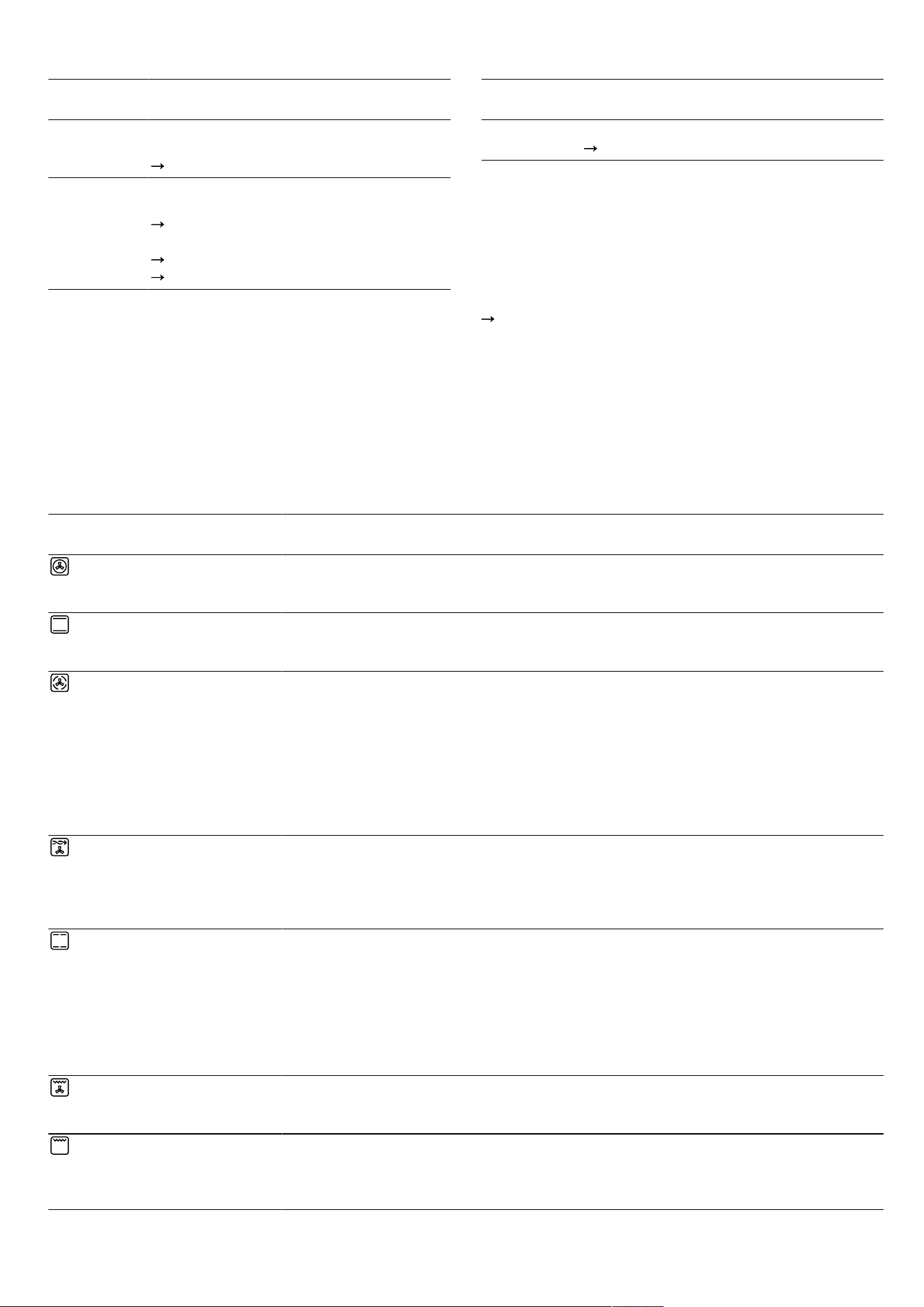
5.1 Types of heating
To ensure that you always find the right type of heating to cook your food, we explain the differences and applica-
tions below.
The symbols for each type of heating help you to remember them.
When you select a type of heating, the appliance suggests a suitable temperature or setting. You can use these val-
ues or change them within the specified range.
For temperature settings above 275°C and grill setting3, the appliance reduces the temperature to approx. 275°C
or grill setting1 after approx. 40minutes.
Symbol Type of heating Temperature
range
What it's used for and how it works
4D hot air 30 - 275°C Bake or roast on one or more levels.
The fan distributes the heat from the ring-shaped heating element
in the back wall evenly around the cooking compartment.
Top/bottom heating 30 - 300°C Traditionally bake or roast on one level. This type of heating is es-
pecially good for cakes with moist toppings.
The heat is emitted evenly from above and below.
Hot air gentle 125 - 250 °C Cook selected dishes gently on one level without preheating.
The fan distributes the heat from the ring-shaped heating element
in the back wall evenly around the cooking compartment.
The food is cooked in phases using residual heat. Always keep
the appliance door closed when cooking. If you open the appli-
ance door even briefly, the appliance will continue to heat without
utilising any residual heat.
This type of heating is used to determine the energy consumption
in air recirculation mode and the energy efficiency class.
Air Fry 30 - 300 °C Cook until crispy, on one level with little fat. Especially suitable for
food that is usually fried in oil, e.g. chips.
The fan circulates heat from the grill element around the food at
high speed. The exhaust air is extracted more intensively from of
the cooking compartment.
Top/bottom heating
gentle
150 - 250 °C Gently cook selected dishes.
Heat is emitted from above and below.
The food is cooked in phases using residual heat. Always keep
the appliance door closed when cooking. If you open the appli-
ance door even briefly, the appliance will continue to heat without
utilising any residual heat.
This type of heating is used to measure the energy consumption
in the conventional mode.
Circulated air grilling 30 - 300°C Roast poultry, whole fish or larger pieces of meat.
The grill element and the fan switch on and off alternately. The fan
circulates the hot air around the food.
Full-surface grill Grill settings:
1 = low
2 = medium
3 = high
Grill flat items such as steak and sausages, or make toast. Gratin-
ate food.
The entire area below the grill element becomes hot.
8
Accessories en
Symbol Type of heating Temperature
range
What it's used for and how it works
Centre-area grill Grill settings:
1 = low
2 = medium
3 = high
Grill small quantities such as steak and sausages, or make toast.
Gratinate small quantities of food.
The central area below the grill element becomes hot.
Pizza setting 30 - 275°C Cook pizza or food that requires a lot of heat from below.
The bottom heating element and the ring-shaped heating element
in the back wall heat the cooking compartment.
Low-temperature
cooking
70 - 120°C Slowly and gently cook seared, tender pieces of meat in un-
covered cookware.
The heat is emitted evenly from above and below at a low temper-
ature.
Defrost 30 - 60°C Gently defrost frozen food.
Bottom heating 30 - 250°C Final baking or cooking food in a bain marie.
The heat is emitted from below.
Keeping warm 50 - 100°C Keep cooked food warm.
Plate warming 30 - 90°C Preheat cookware.
5.2 Temperature
With most types of heating , you can read the current
temperature in the cooking compartment from ap-
prox.30°C and the set temperature side-by-side on the
display during heating, e.g.120|210°C.
When you are preheating the appliance, the optimal
time to place the food in the cooking compartment is as
soon as the displayed temperature in the cooking com-
partment and the set temperature are the same.
Note: Due to thermal inertia, the temperature that is dis-
played may differ slightly from the actual temperature in-
side the cooking compartment.
Residual heat indicator
When the appliance is switched off, a red line around
the control ring indicates the residual heat in the cook-
ing compartment. The further the temperature drops, the
darker the ring. The ring goes out completely at approx.
60°C.
Accessories6 Accessories
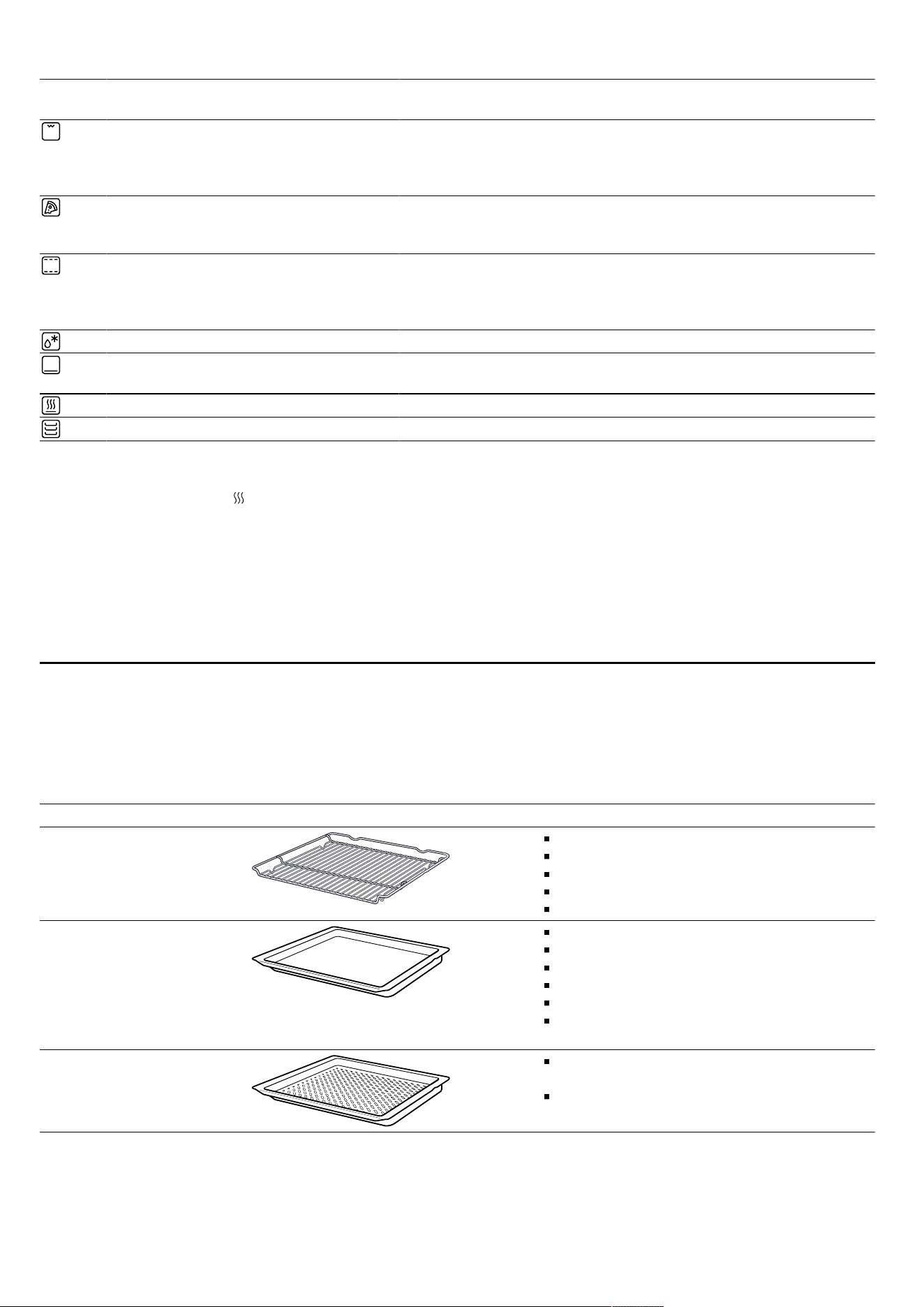
Use original accessories. These have been made especially for your appliance.
Note: Accessories may become deformed if they get hot. Deformation has no effect on function. As the accessory
cools down, it will regain its original shape.
The accessories supplied may differ depending on the appliance model.
Accessories Use
Wire rack Cake tins
Ovenproof dishes
Cookware
Meat, e.g. roasting joints or steak
Frozen meals
Universal pan Moist cakes
Baked items
Bread
Large roasts
Frozen meals
Catch dripping liquids, e.g. fat when grilling
food on the wire rack.
Air Fry & Grill Tray,
enamelled, perforated
Bake until crispy, for food that is usually
fried in oil, e.g. chips.
Grilling food.
6.1 Locking function
The locking function prevents the accessories from tilt-
ing when they are pulled out.
You can pull out the accessories approximately halfway
without them tipping. The accessories must be inserted
into the cooking compartment correctly for the tilt pro-
tection to work properly.
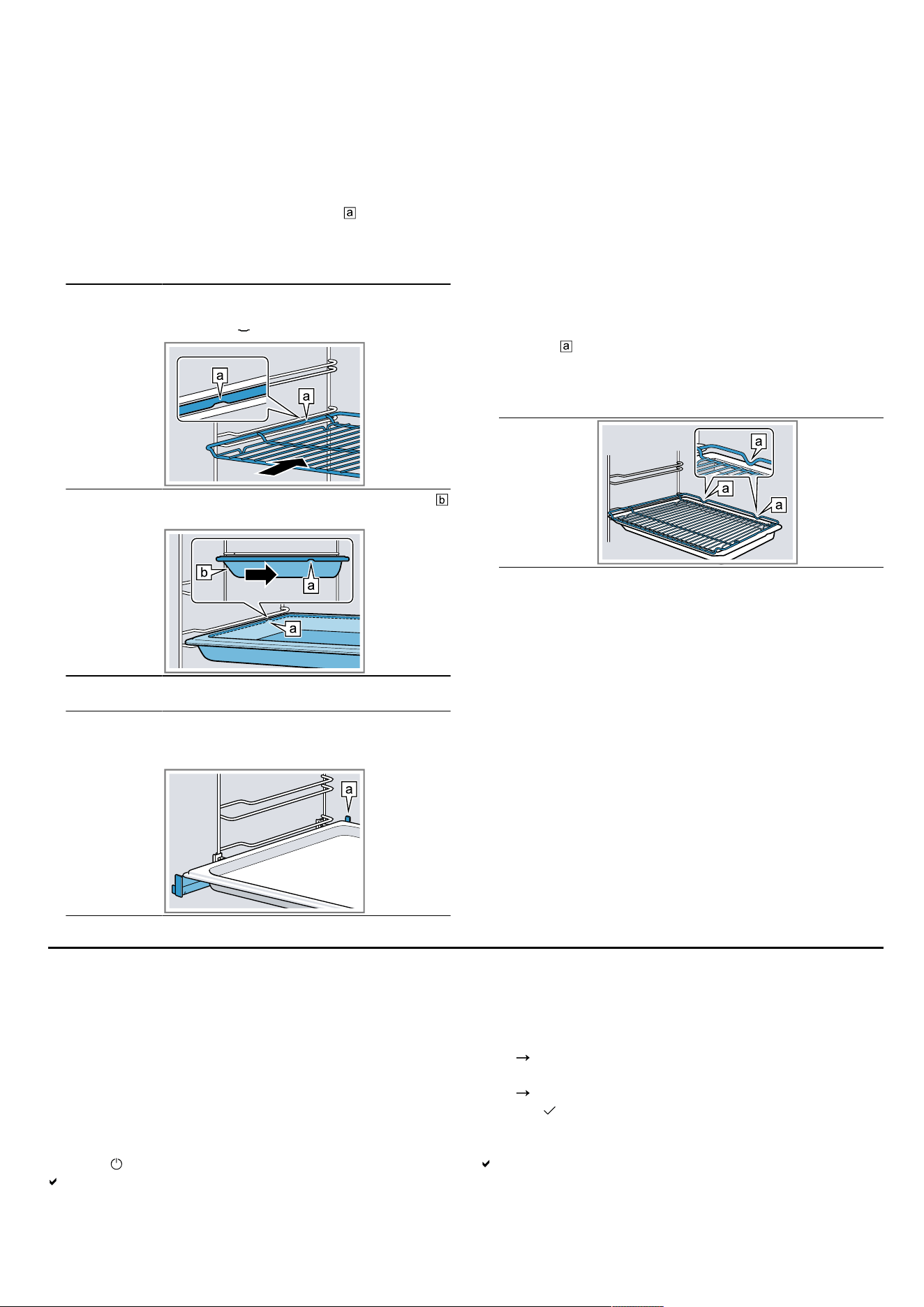
9
en Before using for the first time
6.2 Sliding accessories into the cooking
compartment
Always slide the accessory into the cooking compart-
ment the right way round. This is the only way to ensure
that accessories can be pulled out approximately
halfway without tipping.
1.
Turn the accessories so that the notch is at the rear
and is facing downwards.
2.
Insert the accessory between the two guide rods for a
shelf position.
Wire rack Insert the wire rack with the open side
facing the appliance door and the
curved lip facing downwards.
Tray
E.g. univer-
sal pan or
baking tray
Slide the tray in with the sloping edge
towards the appliance door.
Place the accessories on the inserted pull-out rails.
Wire rack or
baking tray
Place the accessory so that it is inser-
ted on the rear stop of the pull-out sys-
tem.
PUSH
Note: Depending on the appliance type, the pull-out
rails lock in place when they are fully pushed in or
pulled out. Gently release the pull-out rails from their
position.
3.
Push the accessory all the way in, making sure that it
does not touch the appliance door.
Note: Take any accessories that you will not be using
out of the cooking compartment while the appliance is
in operation.
Combining accessories
You can combine the wire rack with the universal pan to
catch any liquid that drips down.
1.
Place the wire rack on the universal pan so that both
spacers are on the rear edge of the universal pan.
2.
Insert the universal pan between the two guide rods
for a shelf position. In so doing, the wire rack is on
top of the upper guide rod.
Wire rack
on universal
pan
6.3 Other accessories
You can purchase other accessories from our customer
service, specialist retailers or online.
You will find a comprehensive range of products for
your appliance in our brochures and online:
www.bosch-home.com
Accessories are appliance-specific. When purchasing
accessories, always quote the exact product number (E
no.) of your appliance.
You can find out which accessories are available for
your appliance in our online shop or from our customer
service.
Before using for the first time7 Before using for the first time
Configure the settings for initial start-up. Clean the appli-
ance and accessories.
7.1 Performing initial start-up
After connecting the appliance to the power supply, you
must configure the settings for its initial start-up. It may
take a few minutes for the settings to appear on the dis-
play.
1.
Press to switch the appliance on.
The first setting appears.
2.
To change the setting as required, press a value in
the list or change the value using the setting ring.
Possible settings:
– Language
– HomeConnect
"HomeConnect ", Page17
– Time
"Setting the time", Page17
3.
Press and switch to the next setting.
4.
Work through the settings and make changes as re-
quired.
After the last setting, a message appears on the dis-
play confirming that the initial start-up is complete.
5.
To check the appliance before heating for the first
time, open and close the appliance door once.
10

Basic operation en
7.2 Cleaning the appliance before using it
for the first time
Before using the appliance to cook food for the first
time, you must clean the cooking compartment and ac-
cessories.
1.
Remove the product information and the accessories
from the cooking compartment. Remove any leftover
packaging, such as polystyrene pellets, and any ad-
hesive tape that is in or on the appliance.
2.
Wipe the smooth surfaces in the cooking compart-
ment with a soft, damp cloth.
3.
Press to switch the appliance on.
4.
Apply the following settings:
Type of heating 4Dhot air
Temperature Maximum
Cooking time 1hour
"Basic operation", Page11
5.
Start the operation.
Ventilate the kitchen while the appliance is heating.
When the time has elapsed, a signal sounds. A mes-
sage appears on the display confirming that the oper-
ation has finished.
6.
Press to switch the appliance off.
7.
Once the appliance has cooled down, clean the
smooth surfaces in the cooking compartment with a
detergent solution and a dish cloth.
8.
Clean the accessories thoroughly using a detergent
solution and a dish cloth or soft brush.
Basic operation8 Basic operation
8.1 Switching on the appliance
Press to switch the appliance on.
The display shows the menu.
8.2 Switching off the appliance
Switch your appliance off when you are not using it. The
appliance will switch itself off automatically if it is not
used for a certain period of time.
Press to switch the appliance off.
The appliance switches off. Any functions currently in
progress are cancelled.
The time or residual heat indicator appears on the
display.
8.3 Starting the operation
You must start each operation.
ATTENTION
If there is water on the cooking compartment floor when
operating the appliance at temperatures above 120°C,
this will damage the enamel.
Do not use the appliance if there is water on the
cooking compartment floor.
Wipe away any water on the cooking compartment
floor before operation.
Press to start the operation.
The settings appear on the display.
8.4 Interrupting the operation
You can interrupt the operation and then continue again.
1.
To interrupt the operation, press .
2.
Press again to resume the operation.
8.5 Setting the operating mode
After you have switched on the appliance, the menu ap-
pears on the display.
1.
To scroll through the various selection options, swipe
to the left or right on the display.
Swipe right or left to scroll through the menu and
other setting options.
Swipe down or up to scroll through selection lists.
2.
To select a function, press the function on the display.
Depending on the function, possible setting values or
other tiles are available for selection.
3.
To go back to a setting if necessary, press .
4.
To change the setting values, use the digital setting
ring:
Swipe over the setting ring clockwise or anticlock-
wise, as required.
Or press a specific position on the setting ring.
Or, as soon as the setting ring is pressed, press
the symbol that appears and enter the value dir-
ectly via the number field.
5.
Use to confirm the setting.
6.
Press to start the operation.
7.
If the operation is ended:
If required, you can select other settings and restart
the operation.
When the food is ready, use to switch the appli-
ance off.
Note: You can save your settings as "Favourites" and
use these again.
"Favourites", Page15
8.6 Setting the type of heating and the
temperature
1.
Press "Types of heating" in the menu.
2.
Press the type of heating that you want to use.
3.
Press the temperature in °C or, depending on the
type of heating, the setting.
4.
Use the setting ring to set the temperature.
5.
Press on the display to confirm the set temperat-
ure.
If required, you can implement additional settings:
–
"Rapid heating", Page12
–
"Time-setting options", Page13
6.
Press to start the operation.
The appliance starts heating.
The setting values and how long the appliance has
already been in operation are shown on the display.
7.
If the operation is ended:
If required, you can select other settings and restart
the operation.
11

en Rapid heating
When the food is ready, use to switch the appli-
ance off.
Note: The most suitable type of heating for your food
can be found in the description of the type of heating.
"Types of heating", Page8
Changing the type of heating
When you change the type of heating, the other settings
are also reset.
1.
Press .
2.
Press .
3.
Press the type of heating that you want to use.
4.
Reset the operation and use to start.
Changing the temperature
Once the operation has started, you can change the
temperature at any time.
1.
Press on the display.
2.
Press the temperature.
3.
Change the temperature with the setting ring.
4.
To confirm the change, press on the display.
The change is applied.
8.7 Displaying information
In most cases, you can call up information about the
function that you have just started. The appliance auto-
matically displays certain information, e.g. to ask you to
do/confirm something or to issue a warning.
1.
Press "Info".
Information is displayed for a few seconds.
2.
To scroll through lots of content in the message,
swipe over the display.
3.
If necessary, use to exit the message.
8.8 Keeping warm over an extended period
You can use your appliance to keep meals warm for up
to 24 hours without changing the behaviour of the appli-
ance. Use the time functions and change the basic set-
tings.
Note: If you open the appliance door during operation,
the appliance stops heating. When you close the appli-
ance door, the appliance continues to heat again. To
ensure that the behaviour of the appliance is not
changed during operation, only open the appliance door
once the set time has elapsed.
1.
Change the basic settings.
"Basic settings", Page16
Change the "Lighting" basic setting to "Always off".
Change the "Clock display" basic setting to "On".
Change the "Signal tone" basic setting to "Very
short duration".
This will ensure that the light in the cooking compart-
ment is always off while the appliance is in operation
and when you open the appliance door. The clock
display does not change. The duration of the signal
tone is reduced at the end of the operation.
2.
Set the required operating mode.
"Setting the operating mode", Page11
"Setting the type of heating and the temperature",
Page11
3.
Set the required cooking time depending on the oper-
ating mode.
"Setting the cooking time", Page13
"Time-setting options", Page13
4.
Use "End time" to set the time at which the operation
should end.
"Setting the end time", Page13
"Time-setting options", Page13
5.
Place the food in the cooking compartment before
the appliance starts to heat.
6.
Press to start the operation.
The display shows the time remaining until the opera-
tion starts. The appliance is in standby mode.
Once the start time has been reached, the appliance
starts heating and the cooking time starts counting
down.
7.
When the operation has ended, remove the food from
the cooking compartment. The appliance automatic-
ally switches off completely after approximately 15 to
20minutes.
Note: If required, change the different basic settings
again.
Rapid heating9 Rapid heating
To save time, rapid heating can shorten the preheat-
ing time for set temperatures over 100°C.
Rapid heating is possible for the following types of heat-
ing:
4Dhot air
Top/bottom heating
9.1 Setting rapid heating
To ensure an even cooking result, do not place the food
in the cooking compartment until rapid heating has
come to an end.
Note: Do not set a cooking time until rapid heating has
come to an end.
1.
Set a suitable type of heating and a temperature of at
least 100°C.
Rapid heating automatically switches on at temperat-
ures of 200°C and above.
2.
Press "Rapid heating".
The symbol lights up red.
3.
Press to start the operation.
Rapid heating starts.
Once rapid heating has ended, a signal sounds. The
symbol changes back to white.
4.
Place the food in the cooking compartment.
Cancelling rapid heating
1.
Press on the display.
2.
Press "Rapid heating".
The symbol changes back to white.
12

Time-setting options en
Time-setting options10 Time-setting options
For an operation, you can set the cooking time and the
time at which the operation should be finished. The
timer runs independently of the operation.
Time-setting
option
Use
Cooking time If you set a cooking time, the appli-
ance stops heating automatically once
this time has elapsed.
End time Along with the cooking time, you can
set the time at which you want the op-
eration to end. The appliance starts up
automatically so that the operation fin-
ishes at the required time.
Timer You can set the timer to run independ-
ently of the appliance during operation.
It does not affect the appliance.
10.1 Setting the cooking time
You can set the cooking time for the operation up to
24hours.
Requirement: An operating mode and temperature or
level have been set.
1.
Press "Cooking time".
2.
To set the cooking time, press the relevant time
value, e.g. hour display "h" or minute display "m".
The selected value is marked in blue.
3.
Use the setting ring to set the cooking time.
If required, use to reset the setting value.
4.
To confirm the set cooking time, press on the dis-
play.
5.
Press to start the operation.
The appliance starts to heat and the time counts
down.
When the time has elapsed, a signal sounds. A mes-
sage appears on the display confirming that the oper-
ation has finished.
6.
Once the cooking time has elapsed:
If required, you can select other settings and restart
the operation.
When the food is ready, use to switch the appli-
ance off.
Changing the cooking time
You can change the cooking time at any time.
1.
Press to pause the operation.
2.
Press the cooking time .
3.
Use the setting ring to change the cooking time.
4.
To confirm the change, press on the display.
5.
Press to start the operation.
Cancelling the cooking time
You can cancel the cooking time at any time.
1.
Press to pause the operation.
2.
Press the cooking time .
3.
Reset the cooking time using .
Note: For operating modes that always require a
cooking time, the appliance resets the cooking time
to the preset value.
4.
To confirm the change, press on the display.
5.
Press to start the operation.
10.2 Setting the end time
You can delay the time at which the cooking time for the
operation is due to end by up to 24 hours.
Notes
To achieve good cooking results, do not delay the
time once the operation has already started.
Food will spoil if you leave it in the cooking compart-
ment for too long.
Requirements
An operating mode and temperature or level have
been set.
A cooking time is set.
1.
Press "End time".
2.
To set the time, press the hour display or the minute
display.
The selected value is marked in blue.
3.
Use the setting ring to delay the time.
If required, use to reset the setting value.
4.
To confirm the set time, press on the display.
5.
Press to start the operation.
The display shows the time remaining until the opera-
tion starts. The appliance is in standby mode.
Once the start time has been reached, the appliance
starts heating and the cooking time starts counting
down.
When the time has elapsed, a signal tone sounds. A
notification appears on the display confirming that the
operation has finished.
6.
Once the cooking time has elapsed:
If required, you can select other settings and restart
the operation.
When the food is ready, use to switch the appli-
ance off.
Changing the end time
To achieve good cooking results, only change the set
time before the operation starts and before the cooking
time starts counting down.
1.
Press to pause the operation.
2.
Press the end time .
3.
Use the setting ring to change the end time.
4.
To confirm the change, press on the display.
5.
Press to start the operation.
Cancelling the end time
You can delete the set end time at any time.
1.
Press to pause the operation.
2.
Press the end time .
3.
Use to reset the end time.
Note: For operating modes that always require a
cooking time, the appliance resets the time at which
the cooking time ends to the next possible time.
4.
To confirm the change, press on the display.
5.
Press to start the operation.
13

en Dishes
10.3 Setting the timer
The timer runs independently during the operation. You
can set the timer for up to 24hours. The timer has its
own signal so that you can tell whether it is the timer or
a cooking time that has elapsed.
Requirement: If the appliance is switched off, press the
display first. The button lights up.
1.
Press .
2.
To set the timer, press the relevant time value on the
display, e.g. minute display "m" or second display "s".
The selected value is marked in blue.
3.
Set the timer using the setting ring.
To fine-tune the setting values, e.g. to set a time to
the precise second, press and hold the corres-
ponding area in the setting ring for around 1-2
seconds. The finely tined setting values are shown
in dots.
If required, use to reset the setting value.
4.
To start the timer, press on the display.
The timer counts down.
The timer remains visible on the display if the appli-
ance is switched off.
When the appliance is switched on, the display
shows the settings for the current operation. The
timer is displayed in the status display.
Once the timer has elapsed, a signal sounds. A noti-
fication appears on the display confirming that the
timer has finished.
Changing the timer
You can change the timer at any time.
1.
If the timer is running in the background, use to se-
lect the timer beforehand.
2.
Press .
3.
Change the timer using the setting ring.
4.
Press to confirm.
Cancelling the timer
You can cancel the timer at any time.
1.
If the timer is running in the background, use to se-
lect the timer beforehand.
2.
Press .
3.
Reset the timer using .Reset the timer using .
Dishes11 Dishes
The "Dishes" operating mode helps you to use your ap-
pliance to prepare different meals by selecting the op-
timum settings automatically.
11.1 Cookware for dishes
The cooking result depends on the composition of the
meat and the size of cookware.
You should therefore use heat-resistant cookware that is
suitable for temperatures up to 300°C. Glass or glass
ceramic cookware is best. The joint should cover ap-
prox.2/3 of the cookware base.
Cookware made from the following material is not suit-
able:
Bright, shiny aluminium
Unglazed clay
Plastic or plastic handles
11.2 Setting options for the dishes
To cook the dishes perfectly, the appliance uses differ-
ent settings depending on the dish.
The display shows you the settings that are used. You
can adjust certain settings. Follow the instructions on
the display.
Note: The cooking result depends on the quality and
composition of the food. Use fresh and, ideally, chilled
food. Use frozen food straight from the freezer.
Tips and information about the settings
If you set a dish, the display shows relevant information
for this dish, e.g.:
Suitable shelf position
Suitable accessory or cookware
Added liquid
Time for turning or stirring
When this time is reached, a signal sounds.
To call up the information, press "Info". Some mes-
sages are displayed automatically.
Programmes
The optimum type of heating, temperature and cooking
time are preset for programmes.
To achieve an optimal cooking result, you must also set
the weight, thickness or the cooking level. You can set
the weight only in the intended range.
Unless otherwise indicated, set the total weight for your
dish.
Recommended settings
For the recommended settings, the optimum type of
heating is preset as a fixed value.
You can adjust the preset temperature and the cooking
time.
11.3 Overview of the dishes
You can find out which individual dishes are available to
you on the appliance when you call up the operating
mode.
The selection of dishes depends on the features of your
appliance.
The dishes are sorted by category and food.
Note: In the basic settings, you can regionally specialise
the displayed dishes.
"Basic settings", Page16
Category Food
Cakes Cakes in tins
14

Favourites en
Category Food
Cakes on a baking tray
Small baked items
Biscuits
Bread,
bread rolls
Bread
Bread rolls
Pizza, sa-
voury cakes
Pizza
Savoury cakes, quiche
Bakes,
soufflés
Bake, savoury, fresh, cooked ingredients
Potato gratin, raw ingredients, 4cm deep
Fresh lasagne
Lasagne, chilled
Bake, sweet, fresh
Fruit crumble
Soufflés in individual moulds
Yorkshire pudding
Poultry Chicken
Duck, goose
Turkey
Meat Pork
Beef
Veal
Lamb
Game
Meat dishes
Fish. Fish, whole
Fish fillet
Frozen
products
Pizza
Bakes
Potato products
Poultry, fish
Bread rolls
Side dishes,
vegetables
Potatoes
Vegetables
11.4 Setting a dish
1.
Press "Dishes" in the menu.
2.
Press the required category.
3.
Press the required food.
4.
Press the required dish.
The settings for the dish appear on the display.
5.
Adjust the settings if required.
You can adjust only certain settings depending on the
dish.
"Setting options for the dishes", Page14
6.
For information about the accessory and shelf posi-
tion, for example, press "Info".
7.
Press to start the operation.
The appliance starts to heat and the time counts
down.
Once the dish is ready, a signal sounds. The appli-
ance stops heating.
8.
Once the cooking time has elapsed:
If required, you can select other settings and restart
the operation.
When the food is ready, use to switch the appli-
ance off.
11.5 Automatic switch-off function
The automatic switch-off function for the dishes al-
lows you to bake and fry without any stress.
When the operation has finished, the appliance automat-
ically stops heating.
To achieve an optimum cooking result, remove your
dish from the cooking compartment once the operation
has finished.
Favourites12 Favourites
In the "Favourites", you can save your settings and use
these again.
Note: Depending on the appliance type/software status,
you must first download this function to your appliance.
You can find more information in the HomeConnect
app.
12.1 Saving favourites
You can save up to 30 different operating modes as
your favourites.
If you set an operating mode, at the end of the selec-
tion list, press "Save as favourites".
To rename a favourite, you must use the HomeCon-
nect app. When your appliance is connected, follow
the instructions in the app.
12.2 Selecting favourites
If you have saved favourites, you can use these to set
the operation.
1.
Press "Favourites" in the menu.
Or select the favourites directly using the button.
2.
Press the required favourites.
3.
If required, you can change the settings.
4.
Press to start the operation.
The setting values are shown on the display.
Note
Observe the instructions for the various operating
modes:
12.3 Changing favourites
You can change, sort or delete your saved favourites at
any time.
1.
To sort or rename the favourites, you must use the
HomeConnect app. When your appliance is connec-
ted, follow the instructions in the app.
2.
To change the setting values on the appliance, press
"Favourites" in the menu.
Or select the favourites directly using the button.
3.
Press the required favourites.
4.
At the end of the selection list, press "Edit favourite"
5.
Change the setting values.
6.
Confirm the change.
15
en Childproof lock
Deleting favourites
1.
To delete a favourite, press "Favourites" in the menu.
Or select the favourites directly using the button.
2.
Press the required favourites.
3.
At the end of the selection list, press "Delete favour-
ite"
4.
Confirm the deletion.
Childproof lock13 Childproof lock
You can secure your appliance to prevent children from
accidentally switching it on or changing the settings.
13.1 Activating the childproof lock
The childproof lock can be activated regardless of
whether the appliance is on or off.
Press and hold for approx. 4seconds to activate
the childproof lock.
A confirmation message appears on the display.
The control panel is locked. The appliance can only
be switched off using .
When the appliance is switched on, lights up.
When the appliance is switched off, does not light
up.
13.2 Deactivating the childproof lock
You can deactivate the childproof lock at any time.
1.
Press anywhere on the display.
2.
To deactivate the childproof lock:
Follow the instructions on the display so that the
graphic on the ring fills up completely.
Alternatively, press and hold for approximately
4seconds.
A confirmation message appears on the display.
Basic settings14 Basic settings
You can configure the basic settings for your appliance
to meet your needs.
14.1 Overview of the basic settings
Here you can find an overview of the basic settings and
factory settings. The basic settings depend on the fea-
tures of your appliance.
You can find more information about the individual basic
settings on the display using "Info".
Basic settings Selection
Language See selection on the appliance.
HomeConnect Connect the oven to a mobile device
and remotely control it.
"HomeConnect ", Page17
Clock Time in 24-hour format.
Display Selection
Brightness Levels 1, 2, 3, 4 and 5
1
Clock display On for a limited time
On (this setting increases energy
consumption)
Off
1
Clock type Digital
1
Analogue
Alignment Align the display horizontally and
vertically.
Tone Selection
Button tone On
1
Off
Tone Selection
Signal tone Very short duration (once)
Short duration (approx.5seconds)
Medium duration
(approx.10seconds)
1
Long duration (approx.30seconds)
Appliance set-
tings
Selection
Fan run-on time Minimum
Recommended
1
Long
Very long
Pull-out system Not retrofitted (if shelf supports and
a single set of pull-out rails are
fitted)
1
Retrofitted (if 2 or 3 sets of pull-out
rails are fitted)
Lighting When cooking and when the door is
opened
1
Only when the door is opened
Always off
Personalisa-
tion
Selection
Brand logo Display
1
Do not display
Operation after
switch-on
Main menu
1
Types of heating
Dishes
Favourites
1
Factory setting (may vary according to model)
16
HomeConnect en
Personalisa-
tion
Selection
Elapsed cook-
ing time
Do not display
Display
1
Regional
dishes
All
1
European dishes
British dishes
Dishes All
1
No pork
Kosher only
Childproof lock Door lock + keylock
Keylock only
1
Deactivated
Automatic
rapid heating
off
On
1
Factory set-
tings
Selection
Factory set-
tings
Restore
Info Display
Appliance in-
formation
Display technical information about the
appliance.
14.2 Changing the basic settings
1.
Press "Basic settings" in the menu.
2.
Press the required basic settings area.
3.
Press the required basic setting.
4.
Press to select the required basic setting.
The change is applied directly for most basic set-
tings.
5.
To change additional basic settings, use to go
back and select a different basic setting.
6.
To exit the basic settings, use to go back to the
main menu or switch off the appliance using .
The changes are saved.
Note: Your changes to the basic settings will be re-
tained even after a power failure.
14.3 Setting the time
1.
Press "Basic settings" in the menu.
2.
Press "Time".
3.
To set the time, press the hour display or the minute
display.
The selected value is marked in blue.
4.
Use the setting ring to set the time.
The minutes are counted in 5-minute increments.
To set it to the precise minute, press and hold the
corresponding area in the setting ring for around
1-2 seconds. The minutes are shown in dots. Use
the setting ring to set the minutes.
5.
To exit the basic settings, use to go back to the
main menu or switch off the appliance using .
The time is saved.
HomeConnect 15 HomeConnect
This appliance is network-capable. Connecting your ap-
pliance to a mobile device lets you control its functions
via the HomeConnect app, adjust its basic settings and
monitor its operating status.
The HomeConnect services are not available in every
country. The availability of the HomeConnect function
depends on the availability of the HomeConnect ser-
vices in your country. You can find information about
this at:
www.home-connect.com
.
The HomeConnect app guides you through the entire
login process. Follow the instructions, noting the inform-
ation in the HomeConnect app.
Notes
Please note the safety precautions in this instruction
manual and make sure that they are also observed
when operating the appliance via the HomeConnect
app.
"Safety", Page2
Operating the appliance on the appliance itself al-
ways takes priority. During this time it is not possible
to operate the appliance using the HomeConnect
app.
In networked standby mode, the appliance requires a
maximum of2W.
15.1 Setting up HomeConnect
Requirements
The appliance is connected to the power supply and
is switched on.
You have a mobile device with a current version of
the iOS or Android operating system, e.g. a smart-
phone.
The appliance is receiving signals from the WLAN
home network (Wi-Fi) at its installation location.
The mobile device and the appliance are within range
of your home network's Wi-Fi signal.
1.
Scan the following QR code.
You can install the HomeConnect app and connect
your appliance via the QR code.
2.
Follow the instructions in the HomeConnect app.
15.2 HomeConnect settings
You can adjust the HomeConnect settings and network settings in your appliance's basic settings.
1
Factory setting (may vary according to model)
17

en HomeConnect
Which settings the display shows will depend on whether HomeConnect has been set up and whether the appliance
is connected to your home network.
Basic setting Possible settings Explanation
Home Connect assist-
ant
Start the assistant
Disconnect
You can connect your appliance to the Home Connect app via
the Home Connect assistant.
Note: If you are using the Home Connect assistant for the first
time, only the "Start assistant" setting is available.
Wi-Fi On
Off
You can use the Wi-Fi to switch off the network connection for
your appliance. When you have connected successfully once,
you can deactivate the Wi-Fi and not lose your detailed data. As
soon as you activate Wi-Fi again, the appliance connects auto-
matically.
Note: In networked standby mode, the appliance requires a
maximum of 2W.
Remote control status Monitoring
Manual remote start
Permanent remote start
During monitoring, you can only view the operating status of the
appliance in the app.
If you convert from monitoring or permanent remote start to
manual remote start, you must activate the remote start each
time. You can open the appliance door within 15 minutes of
having activated remote start. Remote start will not be deactiv-
ated by this. Once 15 minutes have elapsed, opening the appli-
ance door will deactivate manual remote start.
For permanent remote start, you can start and operate the ap-
pliance remotely at any time. If you often operate the appliance
remotely, it is helpful to set the remote start to "Permanent".
15.3 Operating the appliance with the
HomeConnect app
You can use the HomeConnect app to set and start the
appliance remotely.
WARNING‒Risk of fire!
Combustible objects that are left in the cooking com-
partment may catch fire.
Never store combustible objects in the cooking com-
partment.
If smoke is emitted, the appliance must be switched
off or the plug must be pulled out and the door must
be held closed in order to stifle any flames.
Requirements
The appliance is switched off.
The appliance is connected to the home network and
to the HomeConnectapp.
In order to be able to set the appliance via the app,
the manual or permanent remote start must be selec-
ted in the "Remote control status" basic setting.
1.
To activate manual remote start, press .
You only have to confirm on the oven if you are
switching from monitoring or permanent remote start
to manual remote start.
With permanent remote start, you do not need to con-
firm on the oven.
2.
Configure a setting in the HomeConnectapp and
send it to the appliance.
Notes
When you start the oven using the controls on the
appliance itself, the remote start function is activ-
ated automatically. You can use the HomeCon-
nectapp to adjust the settings or start a new pro-
gramme.
You can open the appliance door within 15
minutes of having activated remote start. Remote
start will not be deactivated by this. Once 15
minutes have elapsed, opening the appliance door
will deactivate manual remote start.
15.4 Software update
Your appliance's software can be updated using the
software update function, e.g. for the purposes of optim-
isation, troubleshooting or security updates. This may
lead to minor changes of visualizations and operation in
the display.
To do this, you must be a registered HomeCon-
nectuser, have installed the app on your mobile device
and be connected to the HomeConnectserver.
As soon as a software update is available, you will be
informed via the HomeConnectapp and will be able to
start the software update via the app. Once the update
has been successfully downloaded, you can start in-
stalling it via the HomeConnectapp if you are in your
home network (Wi-Fi). The HomeConnectapp informs
you once installation is successful.
Notes
The software update consists of two steps.
– The first step is the download.
– The second step is the installation on your appli-
ance.
You can continue to use your appliance as normal
while updates are downloading. Depending on your
personal settings in the app, software updates can
also be set to download automatically.
Installation takes a few minutes. You cannot use your
appliance during installation.
We recommend that you install security updates as
soon as possible.
18
Cleaning and servicing en
15.5 Remote diagnostics
Customer Service can use Remote Diagnostics to ac-
cess your appliance if you contact them, have your ap-
pliance connected to the HomeConnect server and if
Remote Diagnostics is available in the country in which
you are using the appliance.
Tip: For further information and details about the avail-
ability of Remote Diagnostics in your country, please
visit the service/support section of your local website:
www.home-connect.com
.
15.6 Data protection
Please see the information on data protection.
The first time your appliance is registered on a home
network connected to the Internet, your appliance will
transmit the following types of data to the HomeCon-
nect server (initial registration):
Unique appliance identification (consisting of appli-
ance codes as well as the MAC address of the in-
stalled Wi-Fi communication module).
Security certificate of the Wi-Fi communication mod-
ule (to ensure a secure data connection).
The current software and hardware version of your
appliance.
Status of any previous resetting to factory settings.
This initial registration prepares the HomeConnect func-
tions for use and is only required when you want to use
the HomeConnect functions for the first time.
Note: Please note that the HomeConnect functions can
only be utilised with the HomeConnect app. Information
on data protection can be retrieved in the HomeCon-
nect app.
Cleaning and servicing16 Cleaning and servicing
To keep your appliance working efficiently for a long
time, it is important to clean and maintain it carefully.
16.1 Cleaning products
In order to avoid damaging the various oven surfaces
on the appliance, do not use unsuitable cleaning
products.
WARNING‒Risk of electric shock!
An ingress of moisture can cause an electric shock.
Do not use steam- or high-pressure cleaners to clean
the appliance.
ATTENTION
Unsuitable cleaning agents damage the surfaces of the
appliance.
Do not use harsh or abrasive cleaning products.
Do not use cleaning products with a high alcohol con-
tent.
Do not use hard scouring pads or cleaning sponges.
Do not use any special cleaners for cleaning the ap-
pliance while it is hot.
Using oven cleaner in a hot cooking compartment dam-
ages the enamel.
Never use oven cleaner in the cooking compartment
when it is still warm.
Remove all food remnants from the cooking compart-
ment and the appliance door before you next heat up
the appliance.
If different cleaning agents are mixed together, there
may be a chemical reaction between these.
Do not mix cleaning agents.
Completely remove any cleaning agent residue.
Salt contained in new sponge cloths may damage sur-
faces.
Wash new sponge cloths thoroughly before use.
Suitable cleaning agents
Only use cleaning agents that are suitable for the different surfaces on your appliance.
Follow the instructions on cleaning the appliance.
"Cleaning the appliance", Page20
Appliance front
Surface Suitable cleaning agents Information
Stainless steel Hot soapy water
Special stainless steel
cleaning products suit-
able for hot surfaces
To prevent corrosion, remove any patches of limescale, grease,
starch or albumin (e.g. egg white) from stainless steel surfaces imme-
diately.
Apply a thin layer of the stainless steel cleaning product.
Plastic or painted
surfaces
Hot soapy water Do not use glass cleaner or a glass scraper.
To avoid permanent stains, immediately remove any descaling agent
that gets onto the surface.
Glass Hot soapy water Do not use glass cleaner or a glass scraper.
19
en Cleaning and servicing
Appliance door
Range Suitable cleaning agents Information
Door panels Hot soapy water
Oven cleaner
stainless steel scourer
Do not use a glass scraper.
Tip: Remove the door panels in order to clean them thoroughly.
"Appliance door", Page23
Stainless steel in-
terior door frame
Stainless steel cleaner Discolouration can be removed using stainless steel cleaner.
Do not use stainless steel care products.
Door handle Hot soapy water To avoid permanent stains, immediately remove any descaling agent
that gets onto the surface.
Cooking compartment
Range Suitable cleaning agents Information
Enamel surfaces Hot soapy water
Vinegar solution
Oven cleaner
stainless steel scourer
Soak any heavily soiled areas and use a brush or stainless steel
scourer.
Leave the appliance door open to dry the cooking compartment after
cleaning it.
Notes
It is best to use the cleaning function.
"Pyrolytic self-cleaning cleaning function", Page21
Enamel burns at very high temperatures, causing minor discoloura-
tion. The functionality of your appliance is not affected by this.
The edges of thin trays cannot be completely enamelled and may
be rough. This does not impair the corrosion protection.
Food residues leave a white coating on the enamel surfaces. The
coating does not pose a health risk. The functionality of your appli-
ance is not affected by this. You can remove residues with lemon
juice.
Shelf supports Hot soapy water
stainless steel scourer
Soak any heavily soiled areas and use a brush or stainless steel
scourer.
Note: To clean thoroughly, detach the shelf supports.
"Rails", Page26
Pull-out system Hot soapy water Use a brush to remove heavy soiling.
Clean the pull-out rails while they are pushed in so that you do not re-
move the lubricant.
Do not clean in the dishwasher.
Note: To clean thoroughly, detach the pull-out system.
"Rails", Page26
Accessories Hot soapy water
Oven cleaner
stainless steel scourer
Soak any heavily soiled areas and use a brush or stainless steel
scourer.
Enamelled accessories are dishwasher-safe.
16.2 Cleaning the appliance
In order to avoid damaging the appliance, you must
clean your appliance only as specified, and with suitable
cleaning products.
WARNING‒Risk of burns!
The appliance and its parts that can be touched be-
come hot during use.
Caution should be exercised here in order to avoid
touching heating elements.
Young children under 8 years of age must be kept
away from the appliance.
WARNING‒Risk of fire!
Loose food remnants, fat and meat juices may catch
fire.
Before using the appliance, remove the worst of the
food residues and remnants from the cooking com-
partment, heating elements and accessories.
Requirement: Read the information on cleaning
products.
"Cleaning products", Page19
1.
Clean the appliance using hot soapy water and a dish
cloth.
For some surfaces, you can use alternative clean-
ing agents.
"Suitable cleaning agents", Page19
2.
Dry with a soft cloth.
20
Pyrolytic self-cleaning cleaning function en
Pyrolytic self-cleaning cleaning function17 "Pyrolytic self-cleaning" cleaning function
With the "Pyrolytic self-cleaning" cleaning function, the
cooking compartment is cleaned virtually automatically.
Use the cleaning function to clean the cooking compart-
ment every two to three months. You can use the clean-
ing function more often, if required.
The cleaning function requires approx.3.9-4.8 kilowatt
hours.
17.1 Preparing the appliance for the cleaning
function
To achieve a good cleaning result and prevent damage,
prepare the appliance carefully.
WARNING‒Risk of fire!
Combustible objects that are left in the cooking com-
partment may catch fire.
Never store combustible objects in the cooking com-
partment.
If smoke is emitted, the appliance must be switched
off or the plug must be pulled out and the door must
be held closed in order to stifle any flames.
Loose food remnants, fat and meat juices may catch fire
when the cleaning function is in progress.
Before you start the cleaning function, always remove
coarse dirt from the cooking compartment.
Never clean accessories at the same time.
The outside of the appliance gets very hot when the
cleaning function is in progress.
Never hang combustible objects, e.g. tea towels, on
the door handle.
Leave the front of the appliance clear.
Keep children at a safe distance.
If the door seal is damaged, a large amount of heat is
generated around the door.
Do not scrub or remove the seal.
Never operate the appliance if the seal is damaged or
missing.
1.
Remove accessories and cookware from the cooking
compartment.
You can also clean the shelf supports along with the
pull-out rails.
Tip: Also remove the shelf supports to save energy
and achieve a better cleaning result in the cooking
compartment.
"Rails", Page26
2.
Remove coarse dirt from the cooking compartment
and from the shelf supports.
Coarse dirt may burn on, making it difficult to remove.
3.
Use a detergent solution and a soft cloth to clean the
surfaces at the edges of the cooking compartment
around the door seal.
Do not remove or scrub the door seal.
Use oven cleaner to remove stubborn dirt from the in-
ner door pane.
4.
Remove any objects from the cooking compartment.
The cooking compartment must be empty except for
the shelf supports.
17.2 Setting the cleaning function
Ventilate the kitchen while the cleaning function is run-
ning.
WARNING‒Risk of harm to health!
The cleaning function heats up the cooking compart-
ment to a very high temperature so that food left over
from roasting, grilling and baking will burn off. This pro-
cess releases vapours, which can irritate mucous mem-
branes.
Keep the kitchen well ventilated while the cleaning
function is running.
Do not remain in the room for long periods.
Keep children and pets away.
WARNING‒Risk of burns!
The cooking compartment gets very hot when the clean-
ing function is in progress.
Never open the appliance door.
Allow the appliance to cool down.
Keep children at a safe distance.
The outside of the appliance gets very hot when the
cleaning function is in progress.
Never touch the appliance door.
Allow the appliance to cool down.
Keep children at a safe distance.
Note: The oven light does not light up while the cleaning
function is running.
Requirement: .
"Preparing the appliance for the cleaning function",
Page21
1.
Press "Cleaning" in the menu.
2.
Press "Pyrolytic self-cleaning".
3.
Press "Level" and use the setting ring to set the clean-
ing setting.
Cleaning set-
ting
Cleaning level Duration in hours
1 Low Approx. 2:15
2 High Approx. 2:30
The duration cannot be changed.
You can delay the time at which the operation should
be ready.
"Setting the end time", Page13
4.
To confirm the set cleaning setting, press on the
display.
5.
Press .
A notification stating that you should carry out the ne-
cessary preparatory work for the cleaning function
appears on the display.
6.
Confirm the message.
The cleaning function starts and the duration counts
down.
For your safety, the appliance door locks once a cer-
tain temperature is reached in the cooking compart-
ment. appears on the display.
A signal tone sounds when the cleaning function has
finished. A message appears on the display confirm-
ing that the operation has finished.
7.
Press to switch the appliance off.
8.
.
"Preparing the appliance after the cleaning func-
tion", Page22
21

en Cleaning aid
Cancelling the cleaning function
You can no longer stop or change the cleaning function
once it has started.
To cancel the cleaning function, press to switch the
appliance off.
17.3 Preparing the appliance after the
cleaning function
1.
Allow the appliance to cool down.
2.
Wipe off any ash that has been left behind in the
cooking compartment, on the shelf supports and
around the appliance door.
"Cleaning and servicing", Page19
3.
Slide the pull-out rails out and in several times.
While the cleaning function is running, the rails may
become discoloured. This discolouration does not
compromise the functionality of the appliance.
4.
Remove white residues with lemon juice.
Note: White residues on the enamel surfaces may be
caused by heavy soiling. These food residues are
harmless. The deposits do not compromise the func-
tionality of the appliance.
Note: While the cleaning function is running, the frame
on the inside of the appliance door or other parts of the
door that are made of stainless steel become discol-
oured. This discolouration does not compromise the
functionality of the appliance. The discolouration can be
removed using a stainless steel cleaner.
Cleaning aid18 Cleaning aid
The cleaning aid is a quick alternative for occasionally
cleaning the cooking compartment. The cleaning aid
softens dirt by evaporating the soapy water. It is then
easier to remove the dirt.
18.1 Setting the cleaning aid
WARNING‒Risk ofscalding!
If there is water in the cooking compartment when it is
hot, this may create hot steam.
Never pour water into the cooking compartment when
the cooking compartment is hot.
Note: The oven light does not come on while the clean-
ing aid is running.
Requirement: The cooking compartment must have
cooled down completely.
1.
Remove any accessories from the cooking compart-
ment.
2.
ATTENTION‒Distilled water in the cooking compart-
ment leads to corrosion.
Do not use distilled water.
Mix 0.4litres water with a drop of washing-up liquid
and pour into the centre of the cooking compartment
floor.
3.
Press "Cleaning" in the menu.
4.
Press "Cleaning aid".
The duration cannot be changed.
5.
Press .
A notification stating that you should carry out the ne-
cessary preparatory work for the cleaning aid ap-
pears on the display.
6.
Confirm the message.
The cleaning aid starts and the duration counts down.
Once the cleaning aid has ended, a signal tone
sounds. A message appears on the display confirm-
ing that the operation has finished.
7.
Press to switch the appliance off.
8.
.
"Cleaning the cooking compartment after using the
cleaning aid", Page22
18.2 Cleaning the cooking compartment
after using the cleaning aid
ATTENTION
The prolonged presence of moisture in the cooking
compartment leads to corrosion.
After using the cleaning assistance, wipe the cooking
compartment and allow it to dry completely.
1.
Allow the appliance to cool down.
2.
Wipe out the remaining water in the cooking compart-
ment using an absorbent sponge cloth.
3.
Clean the smooth enamel surfaces in the cooking
compartment with a dish cloth or a soft brush. Re-
move stubborn food remnants using a stainless steel
scouring pad.
4.
Remove limescale with a cloth soaked in vinegar, and
wipe this away with clean water.
5.
Dry the cooking compartment with a soft cloth.
6.
To dry the cooking compartment completely, leave
the appliance door open for approx.1hour or use the
drying function.
"Setting the drying process", Page23
Drying19 Drying
To prevent residual moisture, dry the cooking compart-
ment after using the cleaning aid.
ATTENTION
If there is water on the cooking compartment floor when
operating the appliance at temperatures above 120°C,
this will damage the enamel.
Do not use the appliance if there is water on the
cooking compartment floor.
Wipe away any water on the cooking compartment
floor before operation.
19.1 Drying the cooking compartment
You can leave the cooking compartment to dry or use
the drying function.
1.
Allow the appliance to cool down.
22
Appliance door en
2.
Remove any dirt from the cooking compartment.
3.
Wipe away any water in the cooking compartment.
4.
Dry the cooking compartment.
To dry the cooking compartment, leave the appli-
ance door open for 1hour.
To use the drying function, set "Drying function".
"Setting the drying process", Page23
Setting the drying process
Requirement:
"Drying the cooking compartment", Page22
1.
Press "Cleaning" in the menu.
2.
Press "Drying function".
The duration cannot be changed.
3.
Press .
A notification stating that you should carry out the ne-
cessary preparatory work for the drying appears on
the display.
4.
Confirm the message.
The drying process starts and the duration counts
down.
Once the drying has ended, a signal tone sounds. A
message appears on the display confirming that the
operation has finished.
5.
Press to switch the appliance off.
6.
To dry the cooking compartment completely, leave
the appliance door open for 1 to 2minutes.
Appliance door20 Appliance door
To clean the appliance door thoroughly, you can disas-
semble the appliance door.
Note: Further information:
20.1 Detaching the appliance door
Note: The door handles are different depending on the
appliance type.
1.
Open the appliance door fully .
2.
Open the locking levers on the left- and right-hand
hinges.
Locking levers opened
The hinge is now secured
and cannot snap shut.
Locking levers closed
The appliance door is se-
cured and cannot be de-
tached.
The locking levers are open. The hinges are now se-
cured and cannot snap shut.
3.
Close the appliance door fully . Grab hold of the ap-
pliance door with both hands (on the left and right)
and pull it upwards and out .
4.
Carefully place the appliance door on a level surface.
20.2 Attaching the appliance door
1.
Note: Ensure that the appliance door slides onto the
hinges without any resistance.
23
en Appliance door
2.
Use both hands to slide the appliance door on as far
as it will go.
3.
Open the appliance door fully.
4.
Close the locking levers on the left- and right-hand
hinges.
The locking levers are closed. The appliance door is
secured and cannot be detached.
5.
Close the appliance door.
20.3 Removing the door panes
WARNING‒Risk of injury!
The hinges on the appliance door move when the door
is opened and closed, which could trap your fingers.
Keep your hands away from the hinges.
Components inside the appliance door may have sharp
edges.
Wear protective gloves.
Note: Depending on the appliance type, the appliance
has a metal strip for opening.
1.
Open the appliance door fully.
2.
Open the locking levers on the left- and right-hand
hinges
The locking levers are open. The hinges are now se-
cured and cannot snap shut.
3.
Close the appliance door fully.
4.
Press on the left- and right-hand pressure surface
until it audibly clicks.
5.
Push the two sliding caps upwards in the direction of
the arrow .
6.
Remove the inner panel upwards at an angle and set
it down carefully on a flat surface.
7.
Depending on the appliance type, open the left- and
right-hand metal strip in the direction of the arrow .
8.
Pull the first and second intermediate panels upwards
and out at an angle, and set them down carefully on
a flat surface.
24
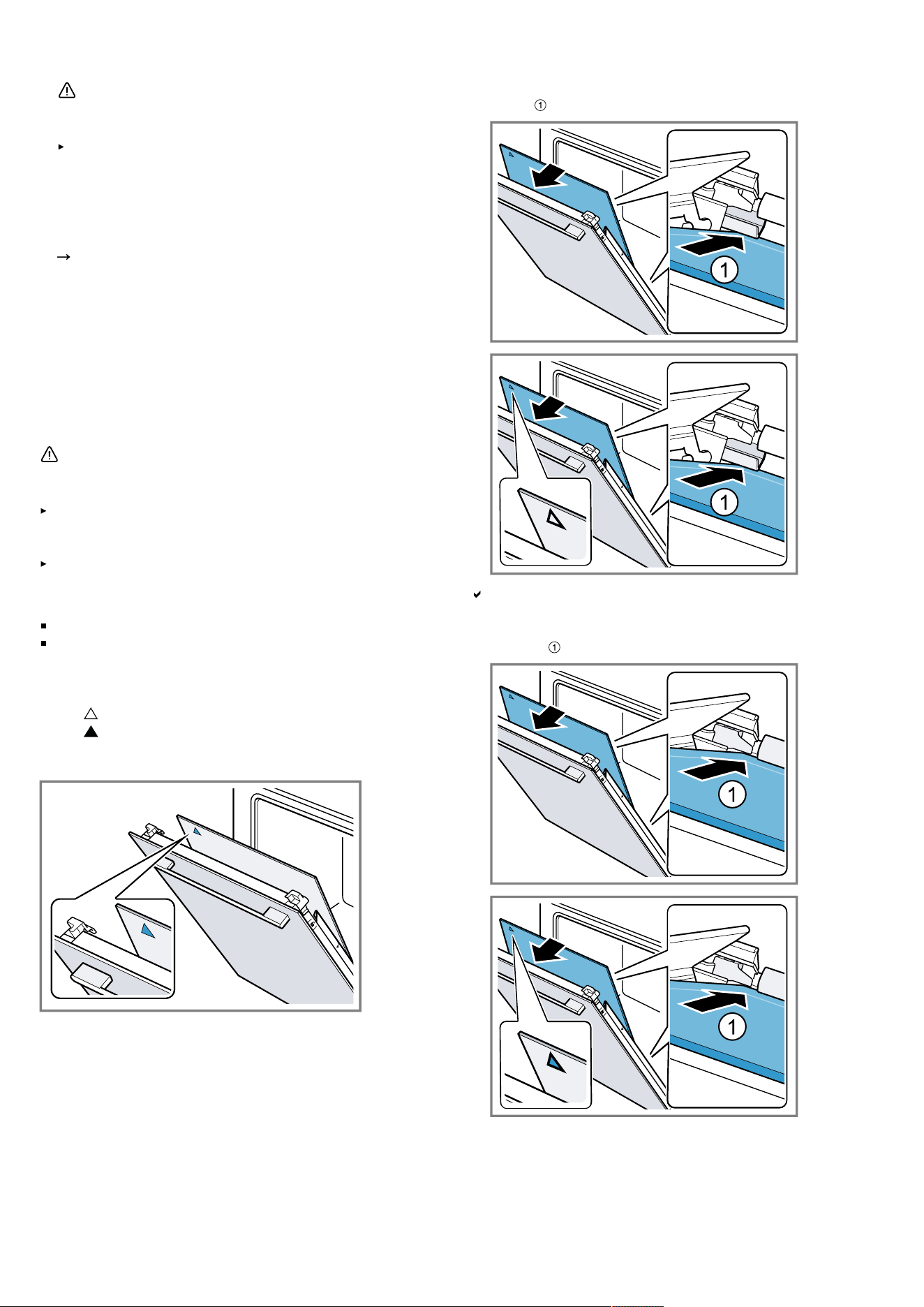
Appliance door en
9.
WARNING‒Risk of injury!
Scratched glass in the appliance door may develop
into a crack.
Do not use any harsh or abrasive cleaners or
sharp metal scrapers to clean the glass on the
oven door, as they may scratch the surface.
Clean the removed door panels on both sides with
glass cleaner and a soft cloth.
10.
Clean the appliance door.
"Suitable cleaning agents", Page19
11.
Dry the door panels and refit them.
Note: While the cleaning function is running, the frame
on the inside of the appliance door or other parts of the
door that are made of stainless steel become discol-
oured. This discolouration does not compromise the
functionality of the appliance. The discolouration can be
removed using a stainless steel cleaner.
20.4 Fitting the door panes
WARNING‒Risk of injury!
The hinges on the appliance door move when the door
is opened and closed, which could trap your fingers.
Keep your hands away from the hinges.
Components inside the appliance door may have sharp
edges.
Wear protective gloves.
Note
Depending on the appliance type, the appliance has
one metal strip for opening,
or two different intermediate panels.
The intermediate panels are marked with a triangle sym-
bol.
First, install the intermediate panel with an unfilled tri-
angle , then the intermediate panel with a filled tri-
angle .
Ensure that the arrow is on the top left on the intermedi-
ate panels.
1.
Slide the first intermediate panel into the lowest re-
tainer and fit it at the top.
The intermediate pane is automatically positioned by
the rotational movement of the spacer.
2.
Slide the second intermediate panel into the central
retainer and fit it at the top.
25
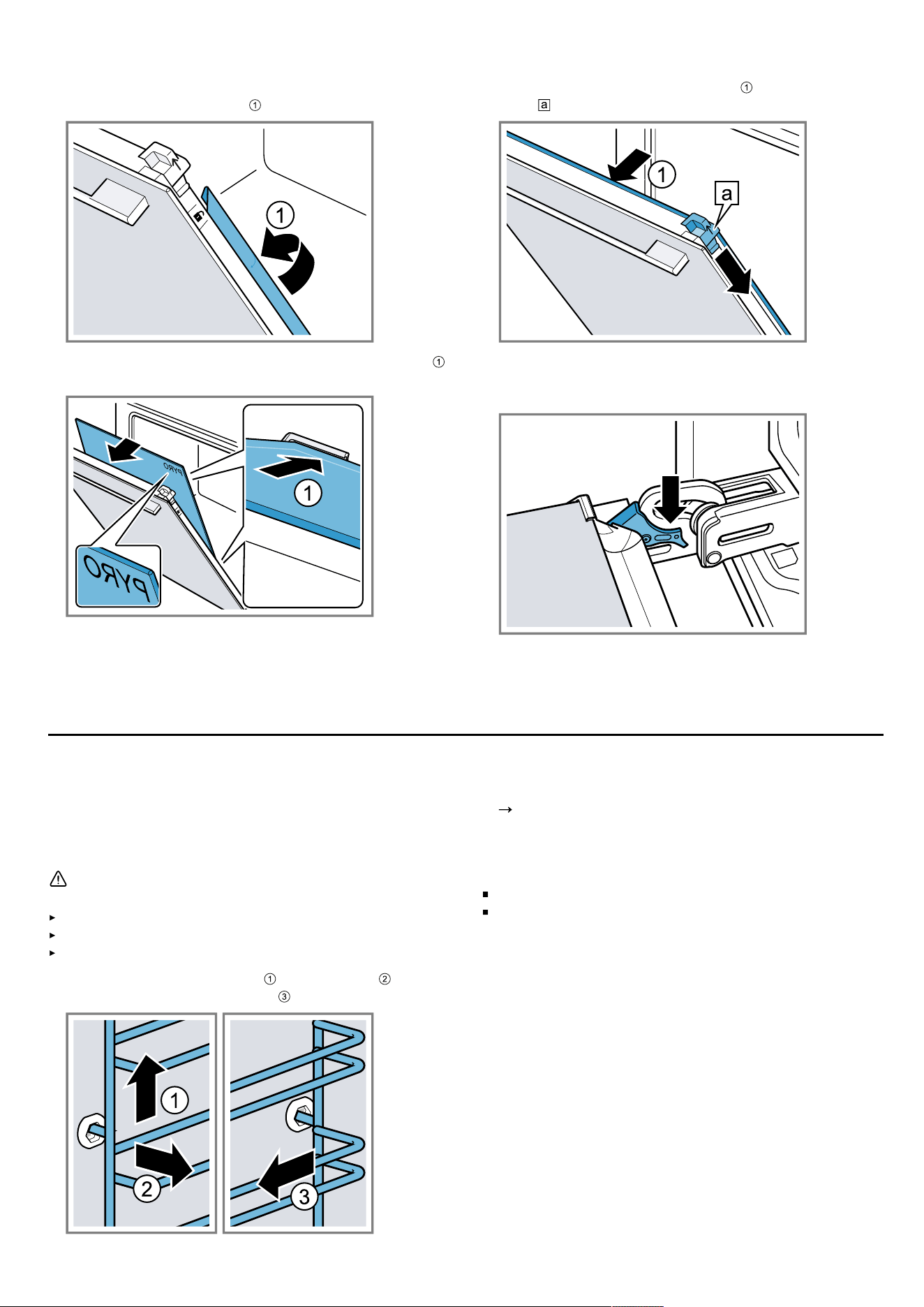
en Rails
3.
Depending on the appliance type, close the metal
strip on the left and right. .
4.
Slide the inner panel into the retainer at the bottom
and fit it at the top.
The lettering "Pyro" must be legible at the top, as
shown in the picture.
5.
Push the inner panel in at the top . Push the sliding
caps downwards in the direction of the arrow.
6.
Open the appliance door fully.
7.
Close the locking levers on the left- and right-hand
hinges
8.
Close the appliance door.
Note: Do not use the cooking compartment again until
the door panes have been correctly fitted.
Rails21 Rails
To thoroughly clean the rails and the cooking compart-
ment, or to replace the rails, you can remove the rails.
21.1 Detaching the rails
WARNING‒Risk of burns!
The shelf supports get very hot
Never touch the shelf supports when hot.
Always allow the appliance to cool down.
Keep children at a safe distance.
1.
Lift the rail forwards slightly and detach it .
2.
Pull the whole rail to the front and remove it.
3.
Clean the rail.
"Cleaning products", Page19
21.2 Attaching the rails
Notes
The rails only fit on the right or left.
For both rails, ensure that the curved rods are at the
front.
26
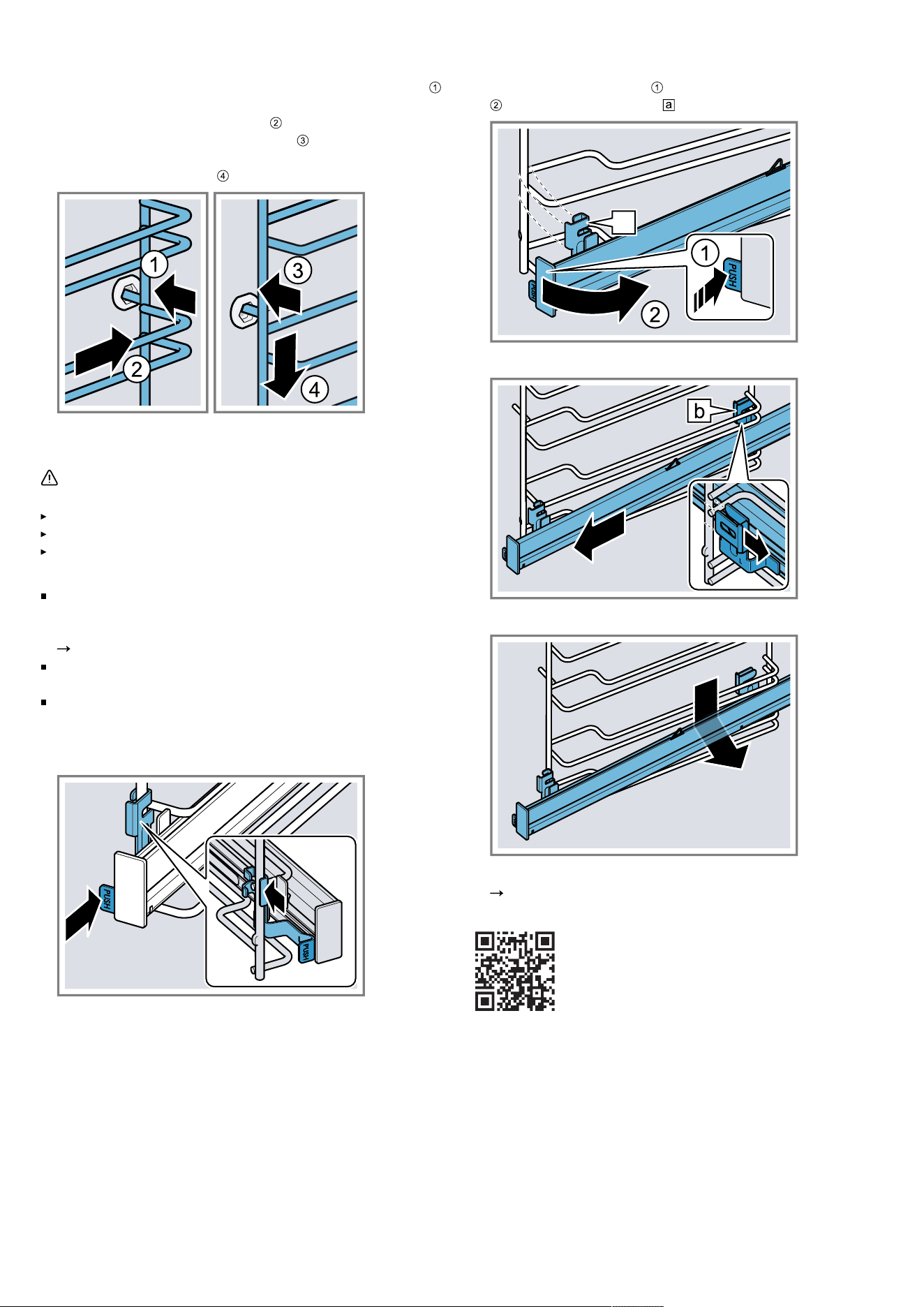
Rails en
1.
First, push the rail into the middle of the rear socket
until the rail rests against the cooking compartment
wall, and then push this back .
2.
Push the rail into the front socket until the rail also
rests against the cooking compartment wall, and then
press this downwards .
21.3 Removing the pull-out rail
WARNING‒Risk of burns!
The shelf supports get very hot
Never touch the shelf supports when hot.
Always allow the appliance to cool down.
Keep children at a safe distance.
Notes
Depending on the appliance type, you must change
the basic settings for the telescopic rails for appli-
ances with rails and pull-out rails.
"Basic settings", Page16
The pull-out rails can be installed at any level as re-
quired.
If necessary, you can equip all levels with a pull-out
rail.
1.
Push on the side of the tab marked PUSH behind the
rail, and push the rail to the rear.
2.
Press and hold PUSH and swing the rail outwards
until the front retainer is detached.
a
3.
Pull the rail out towards the front.
4.
Remove the pull-out rail.
5.
Clean the pull-out rail.
"Cleaning products", Page19
Note: Further information:
21.4 Attaching the pull-out rail
Note: The pull-out rails only fit on the right or left. Make
sure when you fit them that you can pull them out to-
wards the front.
27
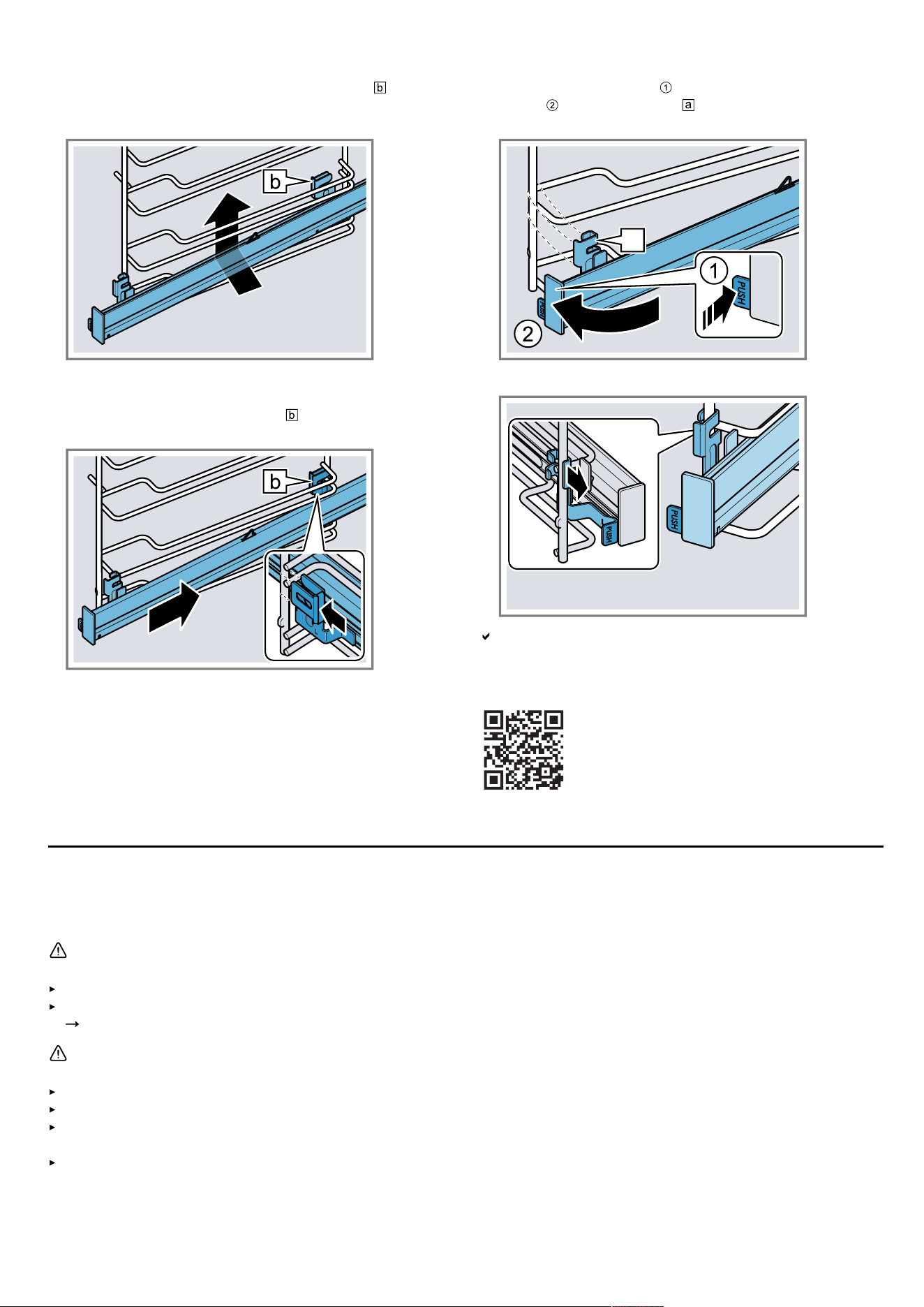
en Troubleshooting
1.
Guide the pull-out rail with the rear retainer from be-
low behind the two guide rods for the required shelf
position and keep it horizontal.
2.
Guide the rail lengthways to the rear to the guide
rods, and slide both retainers onto each lower rod. In
doing so, use the rear retainer to grip the vertical
rod.
3.
Press and hold PUSH and swing the pull-out rail in-
wards until the retainer is attached in the lower
rod.
a
4.
Release the PUSH tab.
The retainer clicks into place.
5.
Pull the pull-out rail out as far as it will go and slide it
back in.
Note: Further information:
Troubleshooting22 Troubleshooting
You can rectify minor faults on your appliance yourself. Read the troubleshooting information before contacting after-
sales service. This will avoid unnecessary costs.
WARNING‒Risk of injury!
Improper repairs are dangerous.
Repairs to the appliance should only be carried out by trained specialist staff.
If the appliance is defective, call Customer Service.
"Customer Service", Page30
WARNING‒Risk of electric shock!
Improper repairs are dangerous.
Repairs to the appliance should only be carried out by trained specialist staff.
Only use genuine spare parts when repairing the appliance.
If the power cord or the appliance power cable of this appliance is damaged, it must be replaced with a special
power cord or special appliance power cable, which is available from the manufacturer or its Customer Service.
If the power cord of this appliance is damaged, it must be replaced by trained specialist staff.
28
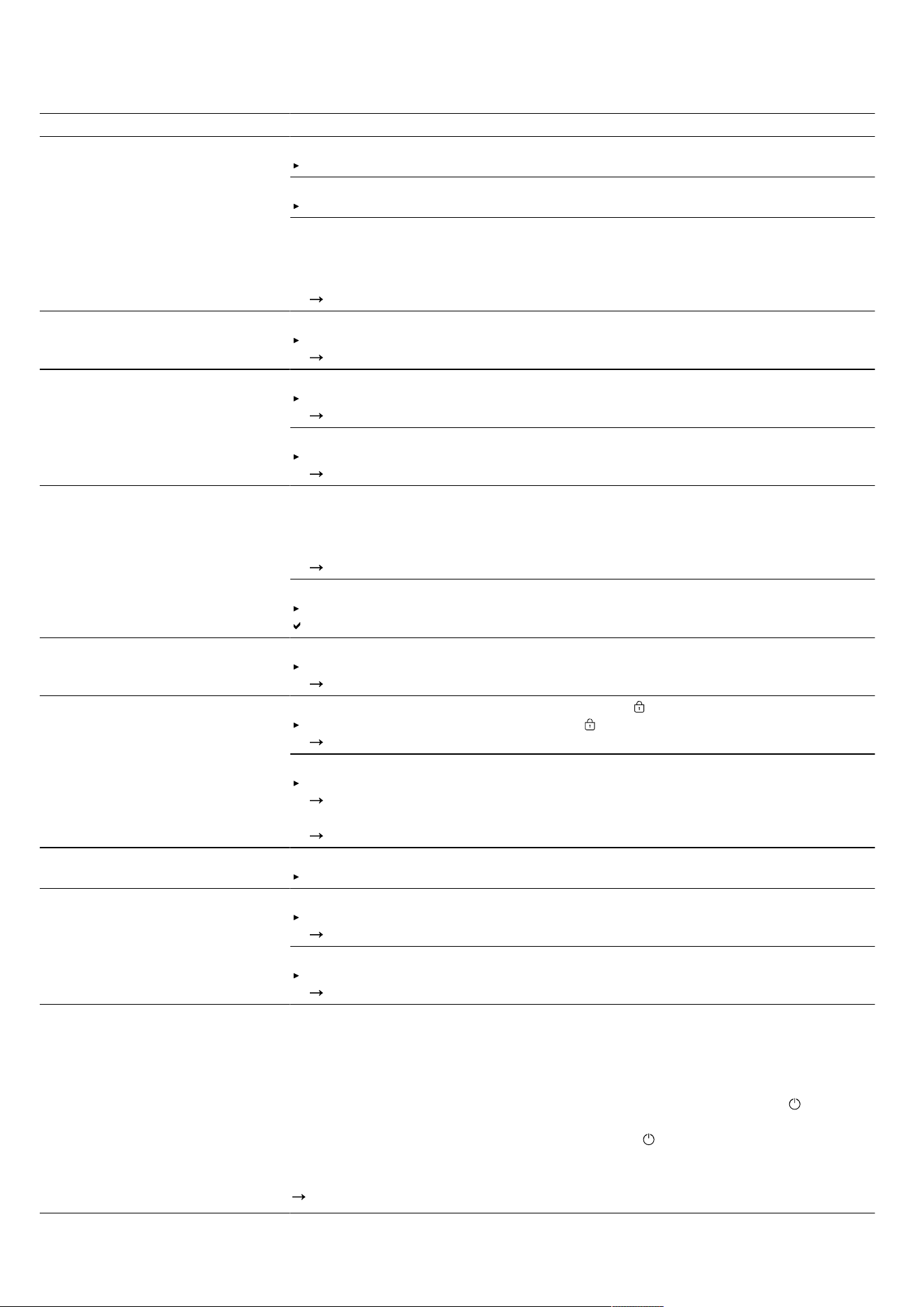
Troubleshooting en
22.1 Malfunctions
Fault Cause and troubleshooting
The appliance is not working. The circuit breaker in the fuse box has tripped.
Check the circuit breaker in the fuse box.
There has been a power cut.
Check whether the lighting in your room or other appliances are working.
Electronics fault
1.
Disconnect the appliance from the power supply for at least 30 seconds by
switching off the fuse.
2.
Reset the basic settings to the factory settings.
"Basic settings", Page16
"Sprache Deutsch" appears in the
display.
There has been a power cut.
Configure the initial configuration settings.
"Performing initial start-up", Page10
The operation does not start or is
interrupted.
Different causes are possible.
Check the notifications that appear on the display.
"Displaying information", Page12
Malfunction
Call .
"Customer Service", Page30
Appliance does not heat up. Demo mode is switched on.
1.
Briefly disconnect the appliance from the power supply by switching the circuit
breaker in the fuse box off and then on again.
2.
Switch off demo mode in the basic settings within approx.5minutes.
"Changing the basic settings", Page17
There has been a power cut.
Open and close the appliance door once after a power failure.
The appliance is checked and is ready to use.
The time is not displayed when
the appliance is switched off.
Basic setting has been changed.
Change the basic setting for the time display.
"Basic settings", Page16
Appliance door cannot be
opened.
The cleaning function locks the appliance door; lights up in the display.
Allow the appliance to cool down until goes out in the display.
"Pyrolytic self-cleaning cleaning function", Page21
The childproof lock locks the appliance door.
Deactivate the childproof lock using the setting ring.
"Childproof lock", Page16
You can switch off the lock in the basic settings.
"Basic settings", Page16
HomeConnect is not working
properly.
Different causes are possible.
Go to
www.home-connect.com
.
The interior lighting does not
work.
Basic setting has been changed.
Change the basic setting for the lighting.
"Basic settings", Page16
The LED light is defective.
Call .
"Customer Service", Page30
Maximum operating time
reached.
To prevent an unwanted permanent operation, the appliance automatically stops
heating after several hours if the settings are unchanged. A message appears in
the display.
The point at which the maximum operating time is reached is determined by the
corresponding settings for an operating mode.
1.
To continue operation, switch the appliance off and on again using . Reset
and start the operation.
2.
If you do not need to use the appliance, press to switch it off.
Tip: To prevent the appliance from switching off when you do not want it to, set a
cooking time.
"Time-setting options", Page13
29
en Disposal
Fault Cause and troubleshooting
Error code made up of letters
and numbers appears on the dis-
play, e.g. E0111.
The electronics have detected a fault.
1.
Switch the appliance off and on again.
If the fault was a one-off, the message disappears.
2.
If the message appears again, call the after-sales service. Please specify the
exact error message when calling.
"Customer Service", Page30
The cooking result is not satis-
factory.
Settings were unsuitable.
Adjustment values, e.g. temperature or cooking time, depend on the recipe,
quantity and food.
Next time, set lower or higher values.
Tip: A lot of other information about the preparation, corresponding adjustment
values and recipes can be found in the HomeConnect app or on our website
www.bosch-home.com
.
The result of the cleaning function
is not satisfactory.
The cooking compartment was too dirty.
Remove coarse dirt from the cooking compartment before using the cleaning
function.
Take the shelf supports out of the cooking compartment to save energy and
achieve a better cleaning result in the cooking compartment.
Pay attention to the cleaning and care of your appliance.
"Cleaning and servicing", Page19
Disposal23 Disposal
23.1 Disposing of old appliance
Valuable raw materials can be reused by recycling.
1.
Unplug the appliance from the mains.
2.
Cut through the power cord.
3.
Dispose of the appliance in an environmentally
friendly manner.
Information about current disposal methods are avail-
able from your specialist dealer or local authority.
This appliance is labelled in accordance
with European Directive 2012/19/EU
concerning used electrical and elec-
tronic appliances (waste electrical and
electronic equipment - WEEE).
The guideline determines the framework
for the return and recycling of used ap-
pliances as applicable throughout the
EU.
Customer Service24 Customer Service
Detailed information about the warranty period and the
warranty conditions in your country is available via the
QR code on the enclosed document on service con-
tacts and warranty conditions, from our customer ser-
vice or on our website.
If you contact Customer Service, you will require the
product number (E-Nr.), the production number (FD)
and the consecutive numbering (Z-Nr.) of your appli-
ance.
You can find the contact details for our customer ser-
vice via the QR code on the enclosed document on ser-
vice contacts and warranty conditions or on our website.
This product contains light sources from energy effi-
ciency class G. These light sources are available as a
spare part and should only be replaced by trained spe-
cialist staff.
24.1 Product number (E-Nr.), production
number (FD) and consecutive numbering (Z-
Nr.)
You can find the product number (E-Nr.), the production
number (FD) and the consecutive numbering (Z-Nr.) on
the appliance's rating plate.
You will see the rating plate with these numbers if you
open the appliance door.
Make a note of your appliance's details and the Cus-
tomer Service telephone number to find them again
quickly.
30
Information regarding Free and Open Source Software en
You can also display the appliance information in the
basic settings.
"Basic settings", Page16
Information regarding Free and Open Source Software25 Information regarding Free and Open Source Software
This product includes software components that are li-
censed by the copyright holders as free or open source
software.
The applicable licence information is stored on your
home appliance. You can also access the applicable li-
cence information via your HomeConnect app: "Profile
-> Legal information -> Licence Information".
1
You can
download the licence information on the brand product
website. (Please search on the product website for your
appliance model and additional documents). Alternat-
ively, you can request the relevant information from oss-
[email protected] or BSH Hausgeräte GmbH, Carl-
Wery-Str. 34, 81739 Munich, Germany.
The source code will be made available to you on re-
quest.
Please send your request to [email protected] or
BSH Hausgeräte GmbH, Carl-Wery-Str.34, 81739 Mu-
nich, Germany.
Subject: „OSSREQUEST“
The cost of performing your request will be charged to
you. This offer is valid for three years from the date of
purchase or at least as long as we offer support and
spare parts for the relevant appliance.
Declaration of Conformity26 Declaration of Conformity
BSH Hausgeräte GmbH hereby declares that the appliance with Home Connect functionality conforms to the essen-
tial requirements and other relevant provisions of Directive 2014/53/EU.
A detailed RED Declaration of Conformity can be found online at
www.bosch-home.com
among the additional docu-
ments on the product page for your appliance.
2.4 GHz band (2400–2483.5MHz): Max. 100mW
5 GHz band (5150–5350MHz + 5470–5725MHz): max. 200mW
BE BG CZ DK DE EE IE EL ES
FR HR IT CY LI LV LT LU HU
MT NL AT PL PT RO SI SK FI
SE NO CH TR IS UK (NI)
5GHz WLAN (Wi-Fi): For indoor use only.
AL BA MD ME MK RS UK UA
5GHz WLAN (Wi-Fi): For indoor use only.
26.1 Statement of Compliance for Great
Britain
Product type
This statement of compliance covers the products de-
scribed in this information for use whose model identi-
fier group is seen on the title page. The full model identi-
fier is made up of the characters before the slash in the
product number (E no.) which can be found on the rat-
ing plate. Alternatively, you can also find the model iden-
tifier in the first line of the UK Energy Label.
Name and address of manufacturer
BSH Hausgeräte GmbH, Carl-Wery-Strasse 34, 81739
München, Germany
This statement of compliance is prepared by the manu-
facturer.
The manufacturer, BSH Hausgeräte GmbH deems that it
has complied with
provision 5.1-1 of ETSI EN 303 645 v2.1.1 and,
where relevant, provision 5.1-2 of ETSI EN 303 645
v2.1.1;
provision 5.2-1 of ETSI EN 303 645 v2.1.1;
provision 5.3-13 of ETSI EN 303 645 v2.1.1.
Support period
BSH Hausgeräte GmbH will provide security updates
that are necessary to maintain the main functions free of
charge until at least 28/02/2034.
1
Depending on the appliance specifications
31
en How it works
How it works27 How it works
Here, you can find the ideal settings for various types of
food as well as the best accessories and cookware. We
have perfectly tailored these recommendations to your
appliance.
Tip: A lot of other information about the preparation,
corresponding adjustment values and recipes can be
found in the HomeConnect app or on our website
www.bosch-home.com
.
27.1 General cooking tips
Take note of the following information when cooking all
types of food.
The temperature and cooking time depend on the
amount of food and the recipe. Settings ranges are
specified for this reason. Try using the lower values to
start with.
The setting values apply to food placed in the cook-
ing compartment while the cooking compartment is
still cold. If you want to preheat anyway, do not place
accessories into the cooking compartment until it has
finished preheating.
Remove any accessories that are not being used
from the cooking compartment.
ATTENTION
Acidic food may damage the wire rack
Do not place acidic food, such as fruit or food with an
acidic marinade directly on the wire rack.
Information for those allergic to nickel
In rare cases, small amounts of nickel may pass into the
food.
You can buy suitable accessories from customer ser-
vice, from specialist retailers or online.
"Other accessories", Page10
27.2 Baking tips
Dark-coloured metal baking tins are most suitable for
baking cakes, bread and other baked goods.
Use wide, shallow cookware for bakes and gratins.
Food takes longer to cook in deep, narrow cookware
and it browns more on top.
Silicone moulds are not suitable.
If you are cooking bakes directly in the universal pan,
place the universal pan into the cooking compartment
at level2.
The setting values for bread dough apply to both
dough placed on a baking tray and dough placed in
a loaf tin.
ATTENTION
When the cooking compartment is hot, any water inside
it will create steam. The change in temperature may
cause damage.
Never pour water into the cooking compartment when
it is still hot.
Never place cookware containing water on the cook-
ing compartment floor.
Shelf positions
If you are using the 4Dhot air type of heating, you can
choose between shelf positions 1, 2, 3 and 4. You will
obtain the best results if you use the following shelf pos-
itions.
Baking on one level Height
Tall baked items and tins/dishes on
the wire rack
2
Shallow baked items/baking tray 3
Baking on two or more levels Height
2levels
Universal pan
Baking tray
3
1
2levels
Baking tins/dishes on 2 wire racks
3
1
3levels
Baking tray
Universal pan
Baking tray
5
3
1
4levels
4 wire racks with greaseproof pa-
per
5
3
2
1
Use the 4Dhot air heating function.
Note: Items that are placed in the appliance on baking
trays or in baking tins/dishes at the same time will not
necessarily be ready at the same time.
27.3 Roasting, braising and grilling tips
The recommended settings are for fridge-temperature
food and unstuffed, oven-ready poultry.
Place the poultry onto the cookware breast-side or
skin-side down.
Turn roasting joints, grilled items or whole fish after
approx. ½ to ⅔ of the specified time.
Roasting on the wire rack
Food roasted on the wire rack will become very crispy
on all sides. You can roast large poultry, for example, or
multiple individual pieces at the same time.
Roast pieces of a similar weight and thickness. The
grilled food will brown evenly and will remain succu-
lent and juicy.
Place the food to be roasted directly on the wire rack.
To catch any liquids that drip down, place the univer-
sal pan, with the wire rack inside it, into the cooking
compartment at the specified shelf height.
Add up to ½litre of water to the universal pan, de-
pending on the size and type of food that you want to
roast.
You can make a sauce from the juices that are collec-
ted. This also means that less smoke is produced
and the cooking compartment does not become as
dirty.
Roasting in cookware
If you cover the cookware when you cook your food,
this will keep the cooking compartment cleaner.
32
How it works en
General information about roasting in cookware
Use heat-resistant, ovenproof cookware.
Place the cookware on the wire rack.
Glass cookware is best.
Follow the manufacturer's instructions for your roast-
ing dishes.
Roasting in uncovered cookware
Use a deep roasting dish.
If you do not have any suitable cookware, you can
use the universal pan.
Roasting in covered cookware
Use a suitable lid that seals well.
When roasting meat, there should be at least 3cm
between the food and the lid. The meat may expand.
WARNING‒Risk ofscalding!
Very hot steam may escape when the lid is opened after
cooking. Steam may not be visible, depending on the
temperature.
Lift the lid in such a way that the hot steam can es-
cape away from you.
Keep children away from the appliance.
Grilling
Grill food if you want it to be crispy.
The "Grill" type of heating is good for cooking thinner
pieces of poultry, meat and fish such as steaks, drum-
sticks and burgers. It is also excellent for toasting
bread.
Circulated air grilling is very well suited to cooking
whole poultry and fish, as well as meat, e.g. roast pork
with crackling.
When grilling several food items, choose pieces that
are of a similar weight and thickness. The grilled food
will brown evenly and will remain succulent and juicy.
Place the food to be grilled directly onto the wire
rack.
To catch any liquids that drip down, place the univer-
sal pan into the cooking compartment at least one
level below the wire rack.
Notes
The grill element switches on and off continuously.
This is normal. The grill setting that you use determ-
ines how frequently this occurs.
Smoke may be produced when grilling.
27.4 Cooking instructions for ready meals
The cooking result greatly depends on the quality of
the food. Pre-browning and irregularities may already
be present in the food before cooking.
Do not use frozen products that are covered with a
thick layer of ice. Remove any ice on the food.
Take ready meals out of the packaging.
If you are warming or cooking the ready meal in
cookware, make sure that the cookware is heat-resist-
ant.
Distribute foods that are in the form of separate
pieces, such as bread rolls and potato products, so
that they are spread out flat and evenly on the ac-
cessory. Leave a little space between the individual
pieces.
Follow the manufacturer's instructions on the pack-
aging.
27.5 List of foods
Recommended settings for a variety of foods, sorted
into food categories.
Recommended settings for various types of food
Food Accessory/cookware Height Type of
heating
Temperature in
°C/grill setting
Cooking time in
mins
Sponge cake, delicate Ring-shaped tin
or
Loaf tin
2 150-170 60-80
Sponge cake, 2levels Ring-shaped tin
or
Loaf tin
3+1 140-160 60-80
Fruit tart or cheesecake with
shortcrust pastry base
Springform cake tin,
diameter 26 cm
2 170-190 55-80
Sponge flan, 6 eggs Springform cake tin Ø
28 cm
2 150-170
1
30-50
Sponge flan, 6 eggs Springform cake tin Ø
28 cm
2 150-160 50-60
Shortcrust tart with moist topping Universal pan 3 160-180 55-75
Yeast cake with moist topping Universal pan 3 180-190 30-40
Swiss roll Baking tray 3 180-190
1
10-15
Muffins Muffin tray 3 170-190 15-20
Small yeast cakes Baking tray 3 160-180 25-35
Biscuits Baking tray 3 140-160 15-30
1
Preheat the appliance.
33
en How it works
Food Accessory/cookware Height Type of
heating
Temperature in
°C/grill setting
Cooking time in
mins
Biscuits, 2levels Universal pan
+
Baking tray
3+1 140-160 15-30
Biscuits, 3levels x 2
Baking tray
+
Universal pan
5+3+1 140-160 15-30
Bread, 750g Universal pan
or
Loaf tin
2 1. 210-220
2. 180-190
1
1. 10-15
2. 25-35
Bread, 1500g Universal pan
or
Loaf tin
2 1. 210-220
2. 180-190
1
1. 10-15
2. 40-50
Bread, 1500g Universal pan
or
Loaf tin
2 200-210 35-45
Flatbread Universal pan 3 250-270 20-25
Bread rolls, fresh Baking tray 3 180-190 20-30
Pizza, fresh, on a baking tray Baking tray 3 180-200 20-30
Pizza, fresh, on a baking tray,
2levels
Universal pan
+
Baking tray
3+1 180-190 35-45
Pizza, fresh, thin-crust, on a pizza
tray
Pizza tray 2 220-230 20-30
Börek Universal pan 1 200-220
1
20-30
Quiche Dark coated quiche
tin
3 190-210 30-40
Tarte flambée Universal pan 3 260-270
1
10-15
Bake, savoury, cooked ingredi-
ents
Ovenproof dish 2 200-220 30-60
Potato gratin, raw ingredients,
4cm deep
Ovenproof dish 2 160-190 50-70
Chicken, 1.3kg, unstuffed Wire rack 2 200-220 60-70
Small chicken portions, 250g
each
Wire rack 3 220-230 30-35
Goose, unstuffed, 3kg Wire rack 2 160-180 120-150
Joint of pork without rind, e.g.
neck, 1.5kg
Uncovered cookware 2 180-190 110-130
Joint of pork without rind, e.g.
neck, 1.5kg
Uncovered cookware 2 190-200 120-140
Fillet of beef, medium, 1kg Wire rack 2 210-220 40-50
Pot-roasted beef, 1.5 kg Covered cookware 2 200-220 130-160
Pot-roasted beef, 1.5 kg Covered cookware 2 200-220 140-160
Sirloin, medium, 1.5kg Wire rack 2 220-230 60-70
Burger, 3–4cm thick Wire rack 4 3 25-30
2
Leg of lamb, boned, medium,
1.5kg
Uncovered cookware 2 170-190 50-80
Fish, grilled, whole, 300g, e.g.
trout
3
Wire rack 2 170-180 20-30
1
Preheat the appliance.
2
Turn the dish 2/3 of the way through the cooking time.
3
Slide the universal pan underneath the wire rack.
34
How it works en
Yoghurt
Use your appliance to make yoghurt.
Making yoghurt
1.
Remove the accessories and shelves from the cook-
ing compartment.
2.
Heat 1litre of whole milk (3.5% fat) to 90°C on the
hob and then leave it to cool down to 40°C.
It is sufficient to heat UHT milk to 40°C.
3.
Mix 150g of chilled yoghurt into the milk.
4.
Pour the mixture into small containers, e.g. cups or
small jars.
5.
Cover the containers with film, e.g. cling film.
6.
Place the containers on the cooking compartment
floor.
7.
Use the recommended settings when configuring the
appliance settings.
8.
After making the yoghurt, leave it to cool in the refri-
gerator for at least 12hours.
Recommended settings for desserts and compote
Food Accessory/cookware Height Type of
heating
Temperature in
°C
Cooking time in
mins
Yoghurt Individual moulds Cooking
compart-
ment floor
40-45 8–9 hrs
27.6 Special cooking methods and other
applications
Information and recommended settings for special
cooking methods and other applications, e.g. low-tem-
perature cooking.
Low-temperature cooking
For all prime cuts which are to be cooked rare or "à
point". When slow cooking at low temperatures, meat
and poultry remain juicy and tender.
Low-temperature cooking poultry or meat
Note: When using the low-temperature cooking type of
heating, you cannot delay the start of the programme by
setting an end time.
Requirement: The cooking compartment is cold.
1.
Use fresh, hygienically perfect meat. Pieces without
bones and without a lot of connective tissue are most
suitable.
2.
Place the cookware onto the wire rack at level 2 in
the cooking compartment.
3.
Preheat the cooking compartment and cookware for
approx. 15minutes.
4.
Sear the meat on all sides on the hob at a very high
heat.
5.
Immediately place the meat into the pre-warmed
cookware in the cooking compartment.
To ensure that the temperature in the cooking com-
partment remains constant, keep the cooking com-
partment door closed during low-temperature cook-
ing.
Tips for low-temperature cooking
Here you will find tips for achieving good results when
low-temperature cooking food.
Issue Tip
You want to cook a
duck breast at a low
temperature.
Place the cold duck breast into
a pan.
Sear the skin side first.
Cook the duck breast at low
temperature.
After low-temperature cooking,
grill the duck breast for 3 to
5minutes until crispy.
You want to serve
your low-temperature
cooked meat as hot
as possible.
Preheat the serving plate.
Make sure that the accompa-
nying sauces are very hot
when you serve them.
Recommended settings for low-temperature cooking
Food Accessory/cook-
ware
Height Searing
time in
mins
Type of heating Temperature
in °C
Cooking
time in
mins
Duck breast, medium
rare, 300g each
Uncovered cook-
ware
2 6-8 90
1
45-60
Fillet of pork, whole Uncovered cook-
ware
2 4-6 80
1
45-70
Fillet of beef, 1kg Uncovered cook-
ware
2 4-6 80
1
90-120
Veal medallions, 4cm
thick
Uncovered cook-
ware
2 4 80
1
30-50
Saddle of lamb, boned,
200g each
Uncovered cook-
ware
2 4 80
1
30-45
1
Preheat the appliance.
35

en How it works
Air Fry
Cook food with Air Fry until crispy and with little fat. Air
Fry is particularly suitable for meals that are normally
fried in oil.
Cooking tips for Air Fry
Observe this information when cooking food with Air
Fry.
Only one level can be used when cooking with Air
Fry.
You can achieve the crispiest results using the
enamelled Air Fry tray. The perforated surface en-
ables extremely good air circulation around the food.
If the Air Fry tray is not included with the appliance as
standard, you can obtain the Air Fry tray as an op-
tional accessory.
Do not preheat the oven.
Do not use greaseproof paper. The air must circulate
in the cooking compartment.
Do not defrost frozen food.
Cover the Air Fry tray or the universal pan evenly with
the food. If possible, only distribute the food on the
accessory in a single layer.
Insert the accessory into the cooking compartment at
level 3. If you use the Air Fry tray, you can insert an
empty universal pan at level 1 to protect against dirt.
Turn the food halfway through cooking. If you are
cooking larger quantities, turn the food twice.
Tip: Do not season the food until after you have cooked
it. This makes the food crispier.
Breaded vegetables are also suitable for cooking with
Air Fry. To save fat, use a sprayer to spray the coating
with oil. This forms a crispy crust with little fat.
Recommended settings for Air Fry
Food Accessory/cookware Height Type of
heating
Temperature in
°C
Cooking time in
mins
Chips Air Fry tray
or
Universal pan
3 180-200 15-20
Potato pockets, filled Air Fry tray
or
Universal pan
3 180-200 15-20
Potato rösti, frozen Air Fry tray
or
Universal pan
3 180-200 15-20
Chicken goujons, nuggets, frozen Air Fry tray
or
Universal pan
3 180-200 8-12
Fish fingers Air Fry tray
or
Universal pan
3 180-200 10-20
Broccoli, breaded Air Fry tray
or
Universal pan
3 180-200 10-20
27.7 Meals and tips for cooking for Great
Britain
Recommended settings for meals with British cooking
habits.
Also follow the instructions in the individual sections.
This section contains only special additional information
relating to British meals and cooking habits.
Baking
Recommended settings for baking on one level
Food Accessory/cookware Height Type of
heating
Temperature in
°C
Cooking time in
mins
Victoria sponge cake x 2
20cmdiameter cake
tin
2 160-170
1
20-25
Rich fruit cake Deep, 23cmdia-
meter tin
2 140-160 120-180
Rich fruit cake Deep, 23cmdia-
meter tin
2 130-150 150-180
Fruit pie 20cmdiameter plate
or
2 160-170 55-70
1
Preheat the appliance.
36
How it works en
Food Accessory/cookware Height Type of
heating
Temperature in
°C
Cooking time in
mins
Pie tin
Fruit pie 20cmdiameter plate
or
Pie tin
2 170-190 60-75
Bread or white bread Loaf tin, 1 x 900g or
2 x 450g
2 180-190
1
20-30
Bread or white bread Loaf tin, 1 x 900g or
2 x 450g
2 190-200 40-50
Scones Baking sheet on wire
rack
3 180-190
1
10-14
Biscuits Baking sheet on wire
rack
3 140-160
1
10-25
Small cakes 12-cup-tin 3 140-160
2
20-30
Pavlova Baking sheet on wire
rack
3 90-100
1
120-180
Yorkshire pudding 12-cup-tin 3 200-220
1
15-25
Recommended settings for baking on several levels
Food Accessory/cookware Height Type of
heating
Temperature in
°C
Cooking time in
mins
Victoria sponge cake, 2 levels x 4
20cmdiameter cake
tin
3+1 160-170
1
20-25
Biscuits, 2 levels x 2
Baking sheet on wire
rack
3+1 140-160
1
15-30
Biscuits, 3 levels x 3
Baking sheet on wire
rack
5+3+1 140-160
1
15-30
Grilling
Recommended settings for meat
Food Accessory/cookware Height Type of
heating
Temperature in
°C/grill setting
Cooking time in
mins
Pork, Bacon rashers
3
Wire rack 3 3
4
1. 4-5
2. 3-4
5
Pork, Sausages, thickness 2-4cm Wire rack 3 3
6
10-20
7
Pork, Belly Wire rack 2 200-220 30+25
Pork, Gammon joint Wire rack 2 180-200 30+25
Recommended settings for poultry
Food Accessory/cookware Height Type of
heating
Temperature in
°C
Cooking time in
mins
Chicken, whole
3
Wire rack 2 200-220 20+15
1
Preheat the appliance.
2
Preheat the appliance for five minutes. Do not use the rapid heating function.
3
Slide the universal pan underneath the wire rack.
4
Preheat the appliance for 5 minutes.
5
Turn the food occasionally.
6
Preheat the appliance for 3 minutes.
7
Turn the food several times.
37

en How it works
Roasting and braising
Cooking tips for roasting and braising
Follow this information when frying or braising poultry or
meat.
Calculating the cooking time, e.g. 20+35:
To calculate the cooking time, assume 20minutes
per 500g of meat. Then add an extra 35minutes to
that figure.
For 1.5kg, the cooking time would therefore be
95minutes.
Cooking time range, e.g. 10-15:
Your food will be ready within the specified range of
time (in minutes).
Recommended settings for meat
Food Accessory/cookware Height Type of
heating
Temperature in
°C/grill setting
Cooking time in
mins
Beef, Top side, Top rump Wire rack 2 160-170 30+25
Lamb, Leg, bone-in Wire rack 2 160-170 25+25
Pork, Belly Wire rack 2 170-180 30+25
Recommended settings for poultry
Food Accessory/cookware Height Type of
heating
Temperature in
°C
Cooking time in
mins
Chicken, whole
1
Wire rack 2 170-180 25+15
Turkey, crown Wire rack 2 150-160 20+15
Turkey, whole, 4-8kg Wire rack 2 150-160 12+12
2
Recommended settings for bakes
Food Accessory/cookware Height Type of
heating
Temperature in
°C
Cooking time in
mins
Diced meat, e.g. beef, pork, lamb,
500g meat
Covered cookware 2 140 100-120
Diced meat, e.g. beef, pork, lamb,
500g meat
Covered cookware 2 140
3
100-120
Recommended settings for complete meals
Food Accessory/cookware Height Type of
heating
Temperature in
°C
Cooking time in
mins
Complete meal with Chicken
1
x 2
Wire rack
4+1 180 Chicken:
(25+15) + 20
27.8 Test dishes
The information in this section is provided for test insti-
tutes to facilitate testing of the appliance in accordance
with EN 60350‑1.
Baking
The setting values apply to food that is placed into a
cold cooking compartment.
Take note of the information on preheating in the re-
commended settings tables. These setting values ap-
ply without rapid heat-up.
For baking, use the lower of the temperatures indic-
ated first.
Items that are placed in the appliance on baking trays
or in baking tins/dishes at the same time will not ne-
cessarily be ready at the same time.
Shelf positions when baking on 2levels:
– Universal pan: Shelf position3
Baking tray: Shelf position1
– Baking tins on the wire rack:
First wire rack: Shelf position3
Second wire rack: Shelf position 1
Shelf positions when baking on 3levels:
– Baking tray: Shelf position5
– Universal pan: Shelf position3
– Baking tray: Shelf position1
Hot water sponge cake
– When baking on 2levels, place the springform tins
at diagonally opposite corners of the wire racks.
– As an alternative to a pan support, you can also
use the Air Fry baking tray offered by us.
1
Slide the universal pan underneath the wire rack.
2
Turn the food after approx. one hour.
3
Preheat the appliance.
38
How it works en
Recommended settings for baking
Food Accessory/cookware Height Type of
heating
Temperature in
°C
Cooking time in
mins
Shortbread Baking tray 3 140-150
1
25-40
Shortbread Baking tray 3 140-150
1
25-40
Shortbread, 2 levels Universal pan
+
Baking tray
3+1 140-150
1
30-40
Shortbread, 3 levels x 2
Baking tray
+
Universal pan
5+3+1 130-140
1
35-55
Small cakes Baking tray 3 160
1
20-30
Small cakes Baking tray 3 150
1
25-35
Small cakes Baking tray 3 160
2
20-30
Small cakes, 2 levels Universal pan
+
Baking tray
3+1 150
1
25-35
Small cakes, 3 levels x 2
Baking tray
+
Universal pan
5+3+1 140
1
35-45
Hot water sponge cake Springform cake tin,
diameter 26 cm
2 160-170
3
25-35
Hot water sponge cake Springform cake tin,
diameter 26 cm
2 150-160
3
30-40
Hot water sponge cake, 2 levels x 2
Springform cake tin,
diameter 26 cm
3+1 150-170
3
30-50
Apple pie, x 2 x 2
Springform cake tin,
diameter 20 cm
2 180-190
2
75-90
Grilling
Recommended settings for grilling
Food Accessory/cookware Height Type of
heating
Temperature in
°C/grill setting
Cooking time in
mins
Toasting bread Wire rack 5 3
2
4-6
1
Preheat the appliance for five minutes. Do not use the rapid heating function.
2
Do not preheat the appliance.
3
Preheat the appliance. Do not use the rapid heating function.
39
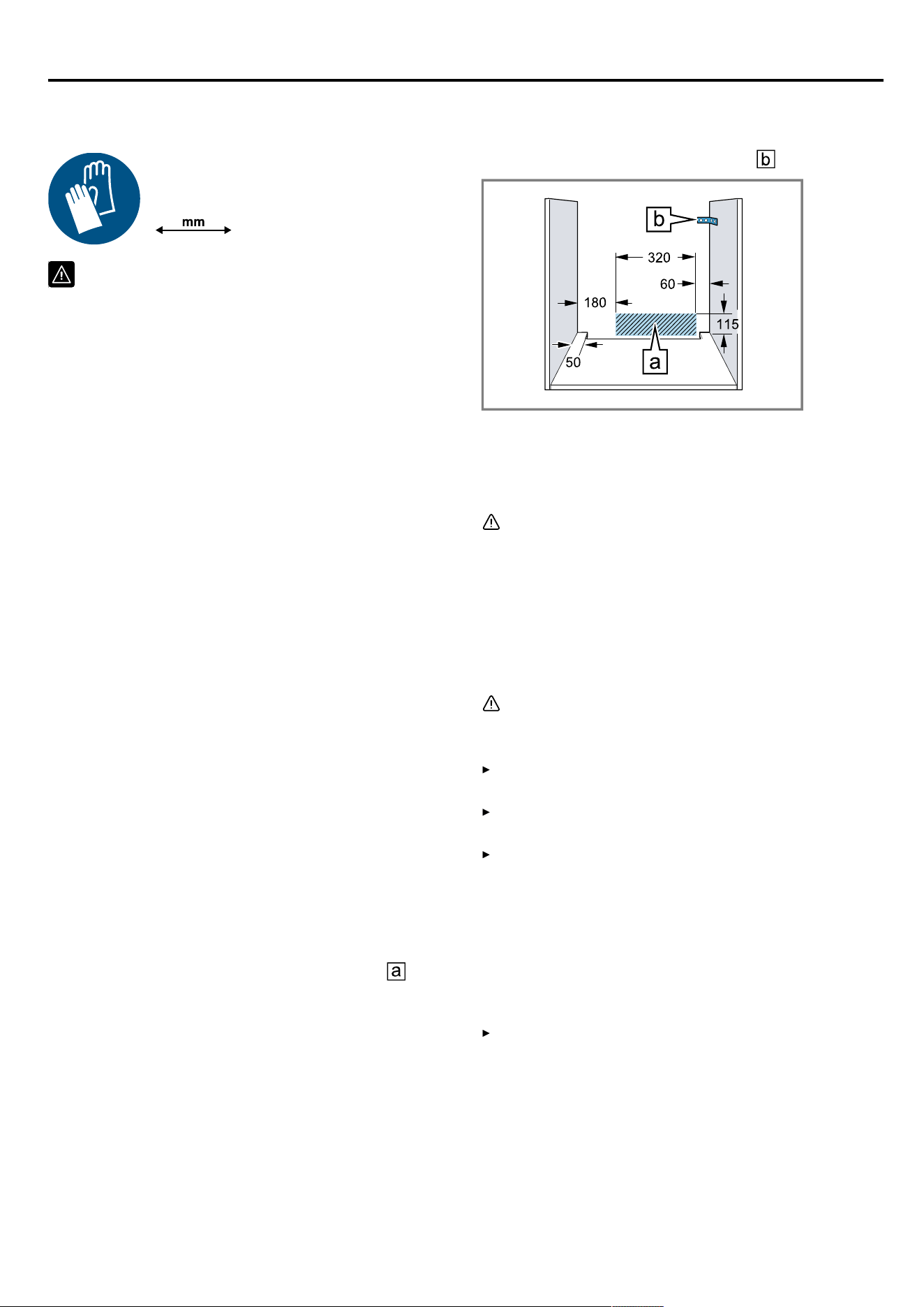
en Installation instructions
Installation instructions28 Installation instructions
Observe this information when installing the appliance.
28.1 General installation instructions
Follow these instructions before you start in-
stalling the appliance.
¡ The safe operation of this appliance can only
be guaranteed if it has been installed to a
professional standard in accordance with
these installation instructions. The installer
shall be liable for damages incurred as a
result of incorrect installation.
¡ Do not use the door handle for the transport
or installation.
¡ Check the appliance for damage after un-
packing it. Do not connect the appliance if it
has been damaged in transit.
¡ Before starting up the appliance, remove any
packaging material and adhesive film from
the cooking compartment and the door.
¡ Proceed in accordance with the installation
sheets for installing accessories.
¡ Fitted units must be heat-resistant up to
95°C, and adjacent unit fronts up to 70°C.
¡ Do not install the appliance behind a decor-
ative door or the door of a kitchen unit.
There is a risk of overheating.
¡ Cut-out work on the units should be carried
out before installing the appliance. Remove
any shavings. Otherwise, the correct opera-
tion of electrical components may be ad-
versely affected.
¡ Position the appliance on a horizontal sur-
face.
¡ The mains socket for the appliance must
either be located in the hatched area or
outside of the area where the appliance is in-
stalled.
1
1.
Any unsecured units must be secured to the
wall using a standard bracket .
¡ Wear protective gloves so that you do not
cut yourself. Parts that are accessible during
installation may have sharp edges.
¡ Dimensions of the figures in mm.
WARNING‒Risk of electric shock!
Once the appliance has been installed, the
openings in the back panel of the appliance
must not be accessible to children, not even
through the drawers and kitchen cabinets un-
derneath. This must be ensured through the in-
stallation. In the case of an island unit, a
closed back panel is required.
WARNING‒Risk of fire!
It is dangerous to use an extended power cord
and non-approved adapters.
Do not use extension cables or multiple
socket strips.
Only use adapters and power cords ap-
proved by the manufacturer.
If the power cord is too short and a longer
one is not available, please contact an elec-
trician to have the domestic installation ad-
apted.
ATTENTION
Carrying the appliance by the door handle
could break it. The door handle cannot sup-
port the weight of the appliance.
Do not carry or hold the appliance by the
door handle.
40
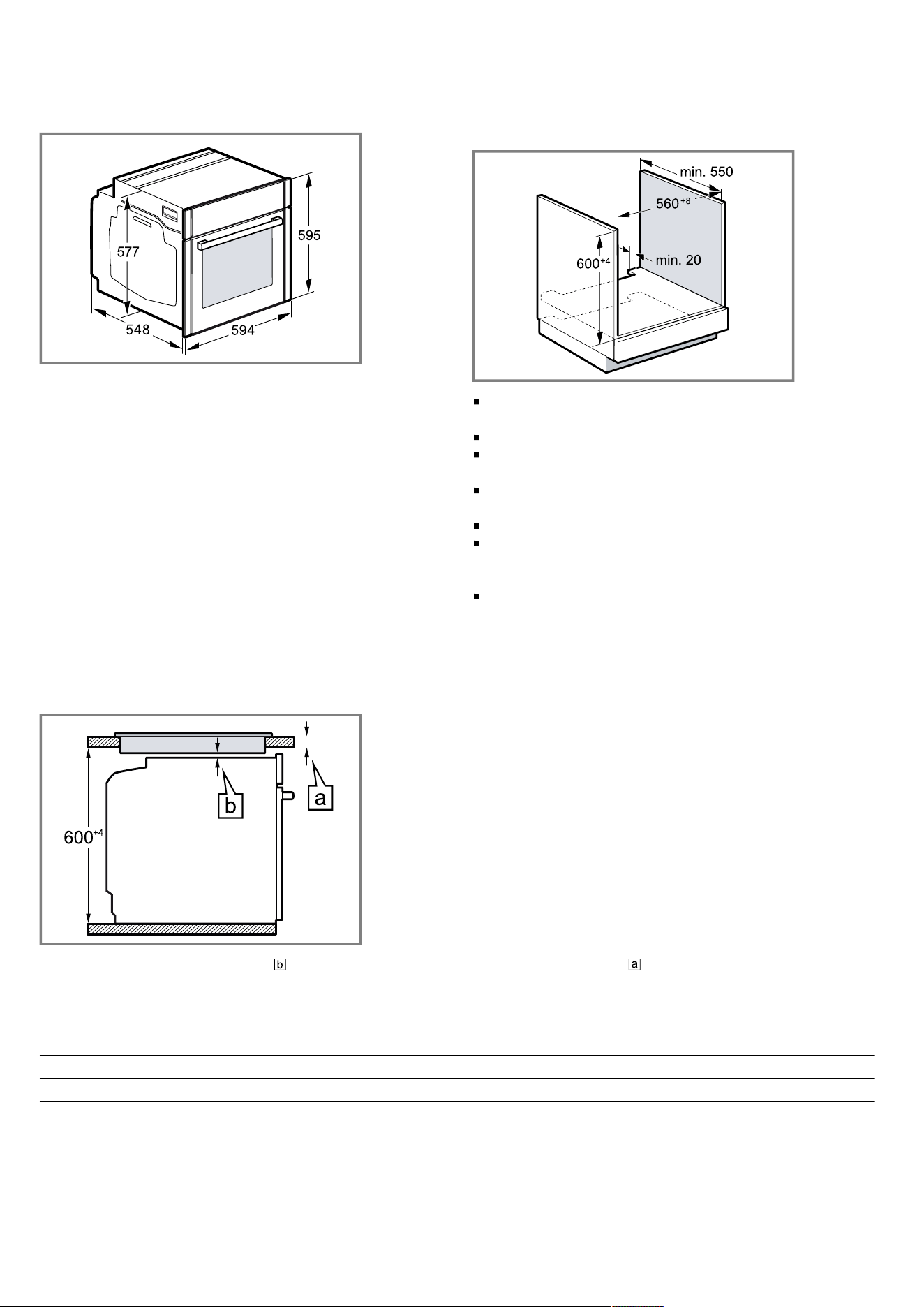
Installation instructions en
28.2 Appliance dimensions
You will find the dimensions of the appliance here
28.3 Installation below a worktop
Observe the installation dimensions and the installation
instructions when installing below a worktop.
To ventilate the appliance, the intermediate floor must
have a ventilation cut-out.
The worktop must be secured to the fitted unit.
Observe any available installation instructions for the
hob.
Observe different national installation instructions for
the hob.
Observe the worktop depth of min. 600 mm.
When installing under a gas hob, ensure that the ap-
pliance does not come into contact with the gas con-
nection of the gas hob.
If necessary, call a qualified specialist for gas installa-
tion.
28.4 Installation underneath a hob
If the appliance is installed under a hob, the following minimum dimensions must be adhered to (including substruc-
ture, if applicable).
The minimum worktop thickness a is based on the required minimum clearance .
Hob type a raised in mm a flush in mm b in mm
Induction hob 37 38 5
Full-surface induction hob 47 48 5
Gas hob 27 38 5
1
Electric hob 27 30 2
1
Observe different national installation instructions for the hob.
41
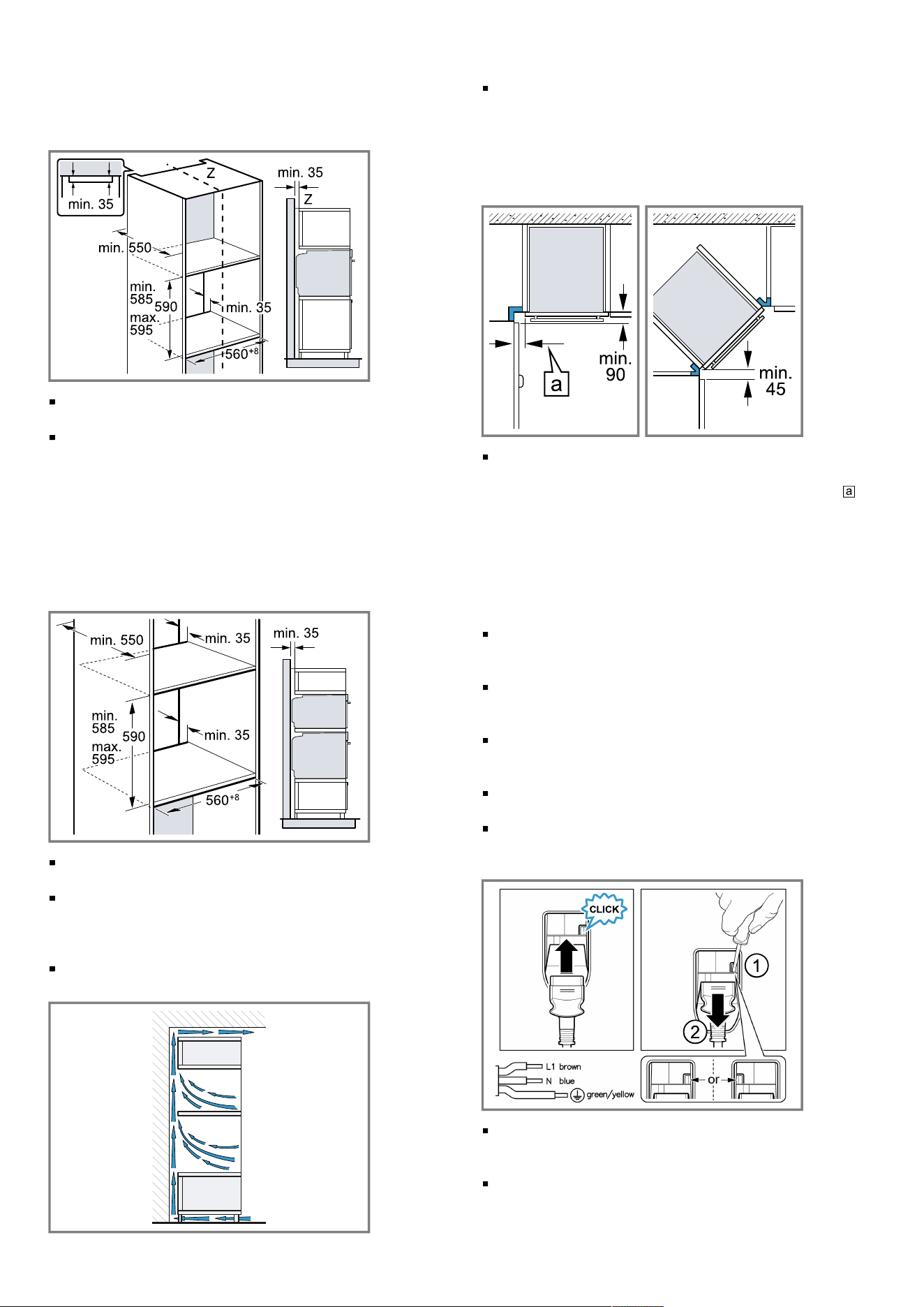
en Installation instructions
28.5 Installation in a tall unit
Observe the installation dimensions and the installation
instructions when installing in a tall unit.
To ventilate the appliance, the intermediate floors
must have a ventilation cut-out.
Only fit the appliance up to a height which allows ac-
cessories to be easily removed.
28.6 Installing two appliances on top of each
other
Your appliance can also be installed above or below an-
other appliance. Observe the installation dimensions
and the installation instructions when installing appli-
ances on top of each other.
To ventilate the appliances, the intermediate floor
must have a ventilation cut-out.
To ensure sufficient ventilation of the two appliances,
there must be a ventilation opening of at least
200cm² in the base area. To do this, trim the base
panel or fit a ventilation grille.
Ensure that air exchange is guaranteed in accord-
ance with the diagram.
Only fit appliances up to a height that allows ac-
cessories to be easily removed.
28.7 Corner installation
Observe the installation dimensions and the installation
instructions when installing in a corner.
To ensure that the appliance door can be opened,
you must take the minimum dimensions into consider-
ation when installing in a corner. The dimension is
dependent on the thickness of the unit front and the
handle.
28.8 Electrical connection
In order to safely connect the appliance to the electrical
system, follow these instructions.
The appliance corresponds to protection class I and
must only be operated with a protective earth connec-
tion.
The fuse protection must correspond to the power rat-
ing specified on the appliance's rating plate and to
the local regulations.
The appliance must be disconnected from the power
supply whenever installation work is being carried
out.
The appliance must only be connected using the
power cable provided.
The power cable must be plugged in at the rear of
the appliance until you hear a clicking sound. A 3 m
power cable can be obtained from customer service.
The power cable must only be replaced with a cable
from the original manufacturer. This is available from
after-sales service.
Contact protection must be guaranteed by the install-
ation.
42
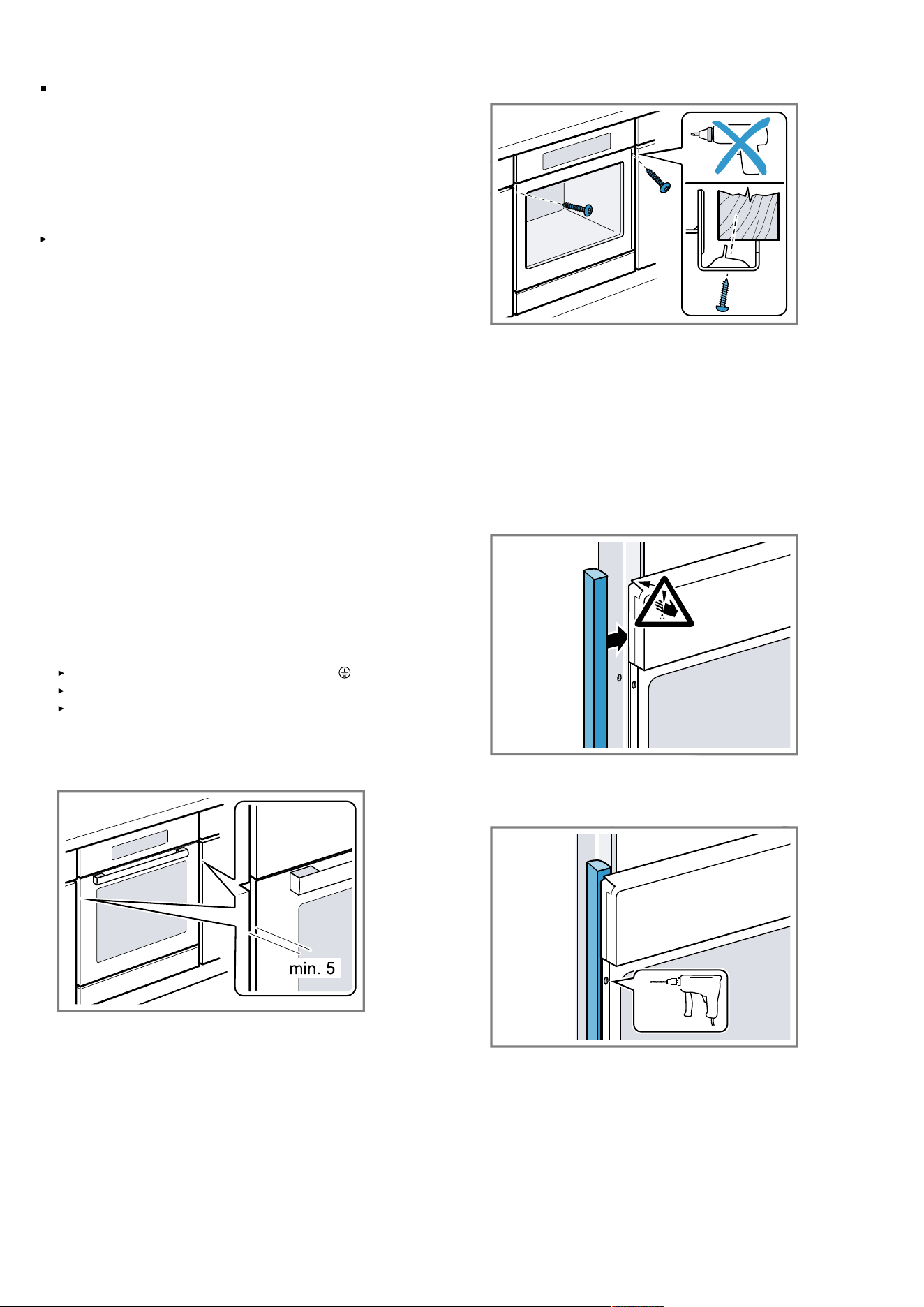
Installation instructions en
If the display on the appliance remains dark, it has
not been connected correctly. Disconnect the appli-
ance from the mains and check the connection.
Electrically connect the appliance with the
protective contact plug
Note: The appliance must only be connected to a pro-
tective contact socket that has been correctly installed.
Insert the plug into the protective contact socket.
When the appliance is installed, the mains plug of the
power cord must be freely accessible. If free access
is not possible, an isolating switch must be integrated
into the permanent electrical installation according to
the installation regulations.
Electrically connecting an appliance without a
protective contact plug
Note: Only licensed specialists may connect the appli-
ance. Damage caused by incorrect connection is not
covered under the warranty.
An isolating switch must be integrated into the perman-
ent electrical installation according to the installation
regulations.
1.
Identify the phase and neutral conductors in the
socket.
The appliance may be damaged if it is not connected
correctly.
2.
Connect the hob in accordance with the connection
diagram.
See the rating plate for the voltage.
3.
Connect the wires of the mains power cable accord-
ing to the colour coding:
Green/yellow = Protective conductor
Blue = Neutral conductor
Brown = Phase (external conductor)
28.9 Installing the appliance
1.
Slide the appliance in fully and centre it.
2.
Screw the appliance into place.
Note: The gap between the worktop and the appliance
must not be closed by additional battens.
Thermal insulation strips must not be fitted to the side
panels of the surround unit.
28.10 For handleless kitchens with vertical
bar handle strips:
1.
Attach a suitable filling piece on both sides in order
to cover any sharp edges and to guarantee safe in-
stallation.
2.
Secure the filling piece to the unit.
3.
Pre-drill the filling piece and the unit to establish a
screw connection.
43
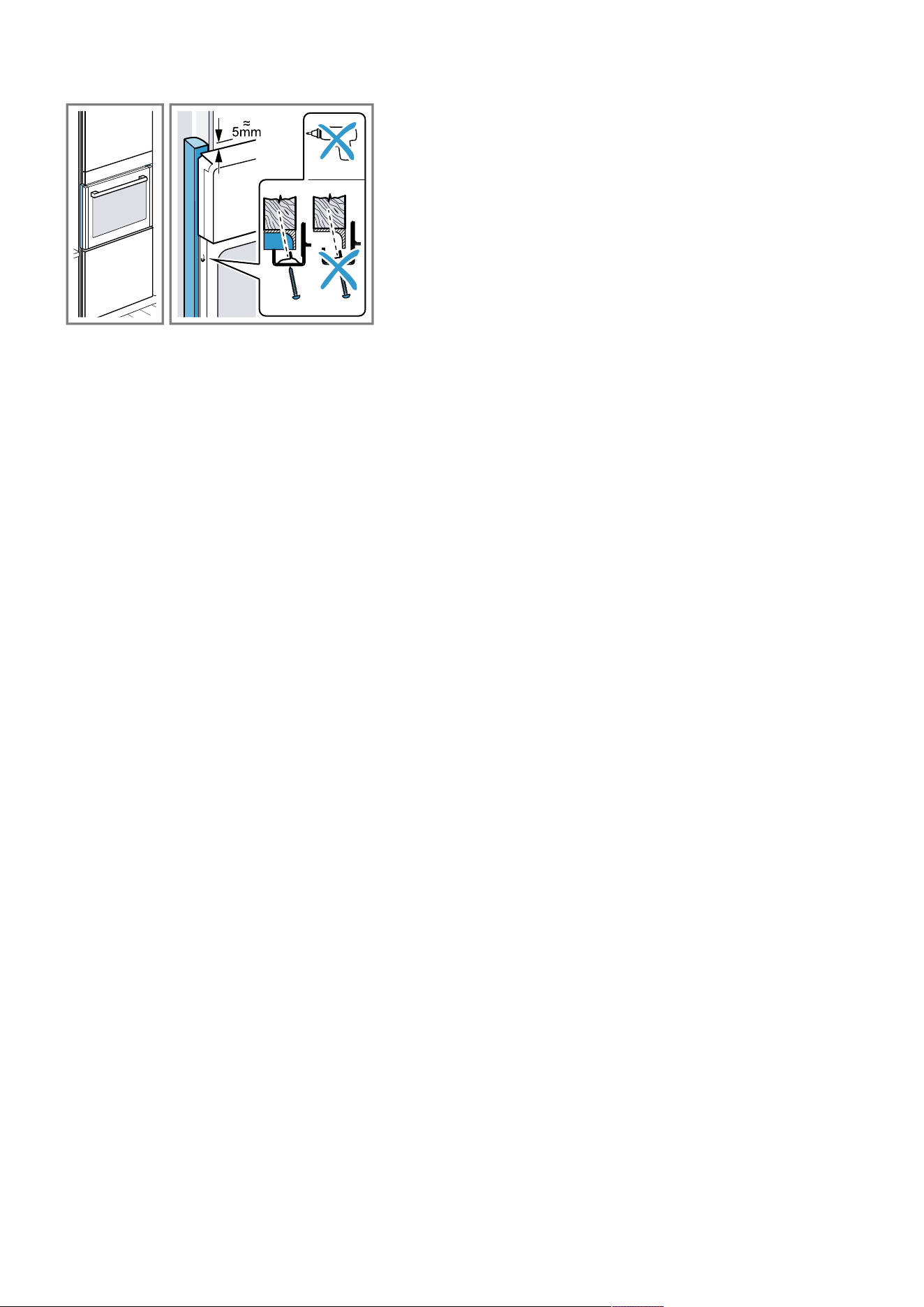
en Installation instructions
4.
Secure the appliance using a suitable screw.
28.11 Removing the appliance
1.
Disconnect the appliance from the power supply.
2.
Undo the fastening screws.
3.
Lift the appliance slightly and pull it out completely.
44



Thank you for buying a
Bosch Home Appliance!
Register your new device on MyBosch now and profit directly from:
• Expert tips & tricks for your appliance
• Warranty extension options
• Discounts for accessories & spare-parts
• Digital manual and all appliance data at hand
• Easy access to Bosch Home Appliances Service
Free and easy registration – also on mobile phones:
www.bosch-home.com/welcome
Looking for help?
You'll find it here.
Expert advice for your Bosch home appliances, help with problems
or a repair from Bosch experts.
Find out everything about the many ways Bosch can support you:
www.bosch-home.com/service
Contact data of all countries are listed in the attached service directory.
BSH Hausgeräte GmbH
Carl-Wery-Straße 34
81739 München, GERMANY
www.bosch-home.com
A Bosch Company
*9001681591*
9001681591 (050722) REG25
en