REV G DATE: 06/28/2023
USER MANUALS\20-91211_REVEAL_USER MANUAL_NR(H)(L)DVS_AMBIENT_SVC_C’TOP_CASE
SCC P/N
20-91211
REVEAL® COUNTERTOP, DRY (AMBIENT) MERCHANDISERS
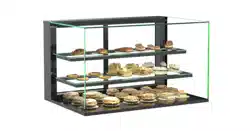
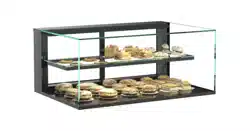
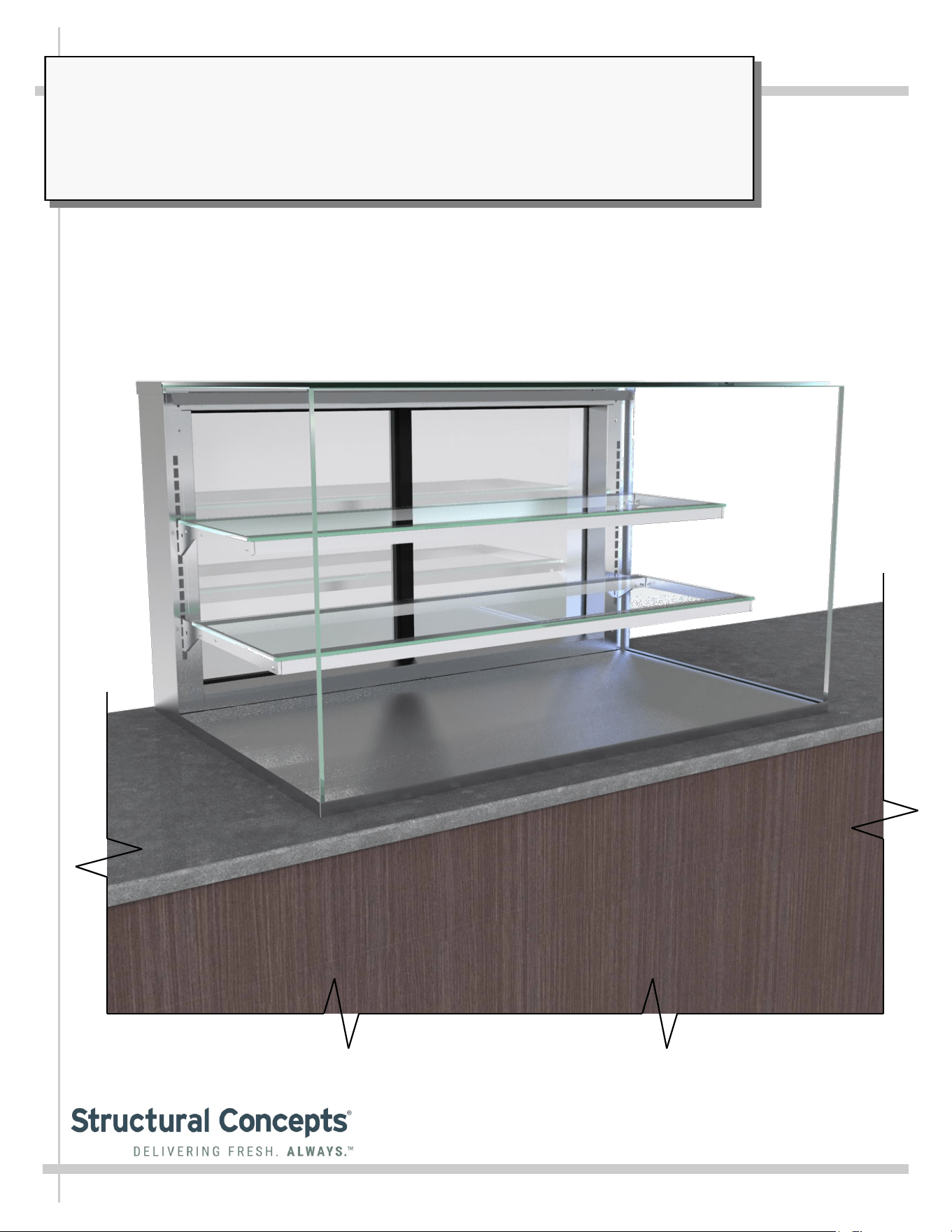
> SERVICE MODELS (SHOWN)
> REAR SLIDING/REMOVABLE DOORS
> ADJUSTABLE GLASS SHELVES
> CAUTION! DO NOT PUSH OR PULL ON GLASS ENCLOSURE!
> ONLY USE UPRIGHTS (AT EACH END OF CASE) TO PUSH OR PULL CASE INTO POSITION!
Model NR4835DSV Shown Above
--- Model NR4827DSV Shown Atop Customer Countertop ---
Reveal
READ AND SAVE THESE INSTRUCTIONS
®
USER
MANUAL
Structural Concepts Corp. ∙ 888 E. Porter Rd ∙ Muskegon, MI 49441 Phone: 231.798.8888 Fax: 231.798.4960 ∙ www.structuralconcepts.com
2
TABLE OF CONTENTS
TABLE OF CONTENTS …………………………………………………………………………………...…...
OVERVIEW / COMPLIANCE / LAMP REPLACEMENT / ELECTRICAL HAZARD WARNING /
WIRING DIAGRAM ……………………………………………………………………..……………...
WEIGHT LOAD ON GLASS - PREVENTING SAGGING / SEALING COUNTER-MOUNTED UNITS..
REVEAL® COUNTERTOP DRY (AMBIENT) SERVICE & SELF-SERVICE MODEL
APPLICABILITY & DIMENSIONS ……………...…………………………………………………...
INSTALLATION: COMPONENT REMOVAL / REMOVAL OF CASE FROM PALLET AND ONTO
COUNTER ...…………………………………………………………………………………………….
INSTALLATION, CONT’D: COMPONENT PLACEMENT / PLUG / LIGHTS / COUNTER
ATTACHMENT …………………………………………………………………………………………
INSTALLATION, CONT’D: SHELVING ASSEMBLY COMPONENTS …………………………………..
CASE DESIGN: GLASS ENCLOSURE / GLASS SHELVING AND BRACKETRY .…………………...
CASE DESIGN, CONT’D: PLUG & CORD / LED LIGHTS & SWITCH FIXTURES / REAR SLIDING
DOORS ………………………………………………………………………………………………….
CLEANING SCHEDULE (TO BE PERFORMED BY STORE PERSONNEL) ..…....…...…………...….
TROUBLESHOOTING (TO BE PERFORMED BY STORE PERSONNEL) .………..………………......
TROUBLESHOOTING (TO BE PERFORMED BY TRAINED SERVICE PROVIDERS ONLY) ……….
SERIAL LABEL INFORMATION & LOCATION ..…………………………….……...…....……………..…
TECHNICAL SERVICE CONTACT INFORMATION / WARRANTY INFORMATION…………………..
2
3
4
5
6
7
8
9
10
11
12
13
14
15
3
OVERVIEW / COMPLIANCE / LAMP REPLACEMENT / ELEC. HAZARD WARNING / WIRING DIAGRAM
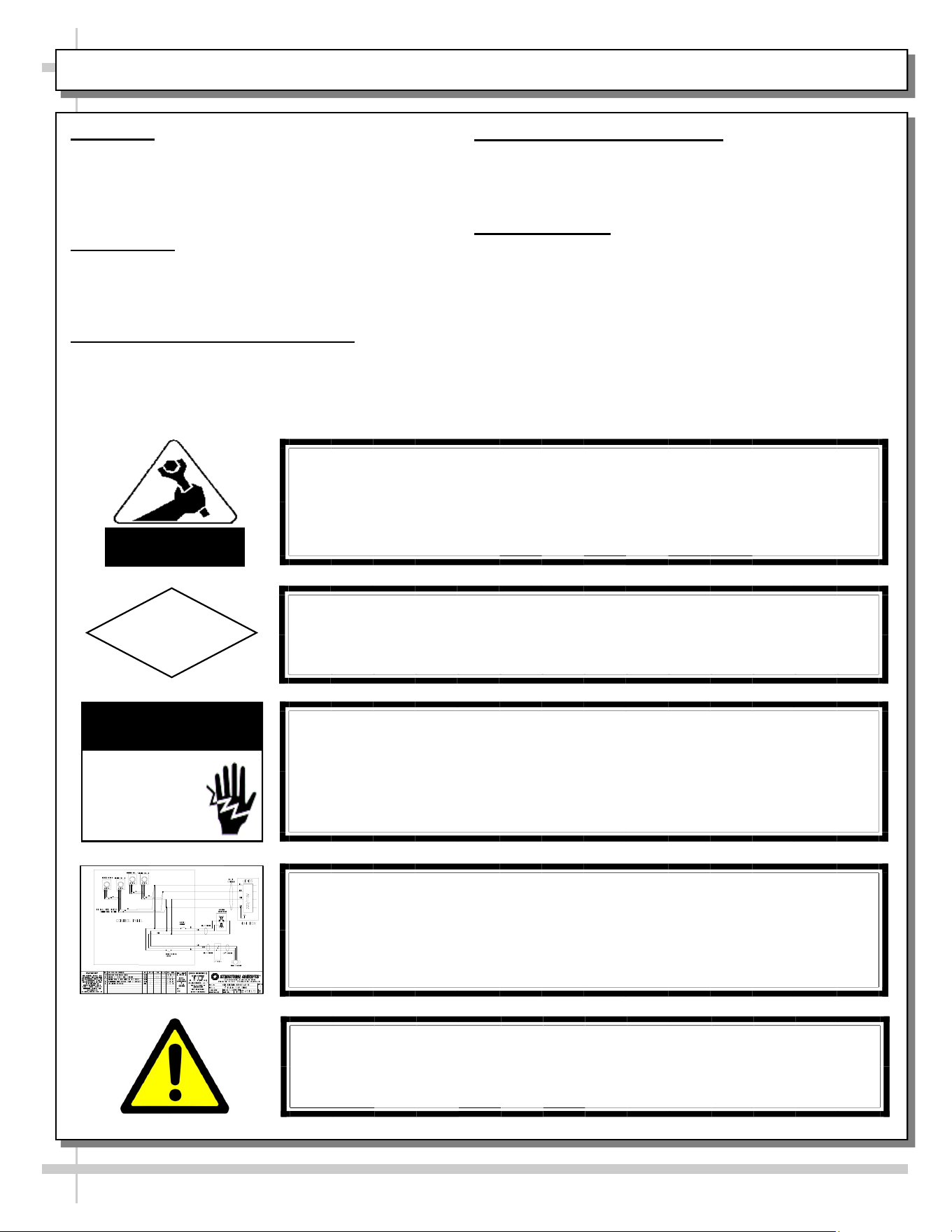
WARNING
Risk of electric shock. Disconnect power before servicing unit.
CAUTION! More than one source of electrical supply is
employed with units that have separate circuits.
Disconnect ALL ELECTRICAL SOURCES before servicing.
WARNING
ELECTRICAL
HAZARD
OVERVIEW
• Cases should be installed and operated according
to this operating manual’s instructions to insure
proper performance.
• Improper use will void warranty.
COMPLIANCE
• Performance issues when in violation of applicable
NEC, federal, state and local electrical codes are
not covered by warranty.
LAMP REPLACEMENT PRECAUTIONS
• Following lamp replacement guidelines can prevent
damage to unit. Please read carefully!
ELECTRICAL HAZARD WARNING
• Please read the electrical hazard warning in this
document carefully as it can prevent injury or death.
• Please read carefully!
WIRING DIAGRAM
• Each case has its own wiring diagram folded and in its
own packet.
• Wiring diagram placement may vary (near ballast box,
field wiring box, raceway cover, or other related
location).
COMPLIANCE
This equipment MUST be installed in compliance with
all applicable NEC, federal, state and local
electrical codes.
ATTENTION
CONTRACTORS
CAUTION! LAMP REPLACEMENT PRECAUTIONS
LED lamps reflect specific size, shape and overall design.
Any replacements must meet factory specifications.
CAUTION
WIRING DIAGRAM FORMAT & LOCATION
• Each case has its own wiring diagram folded & in its own packet.
• Wiring diagram placement may vary; it may be placed near field
wiring box, raceway, or other related location.
WARNING: This product can expose you to chemicals, including
Urethane (Ethyl Carbamate), which are known to the state of
California to cause cancer and birth defects or other reproductive
harm. For more information go to P65Warnings.ca.gov.
4
WEIGHT LOAD ON GLASS - PREVENTING SAGGING / SEALING COUNTER-MOUNTED UNITS
WEIGHT LOAD ON GLASS / PREVENTING SAGGING
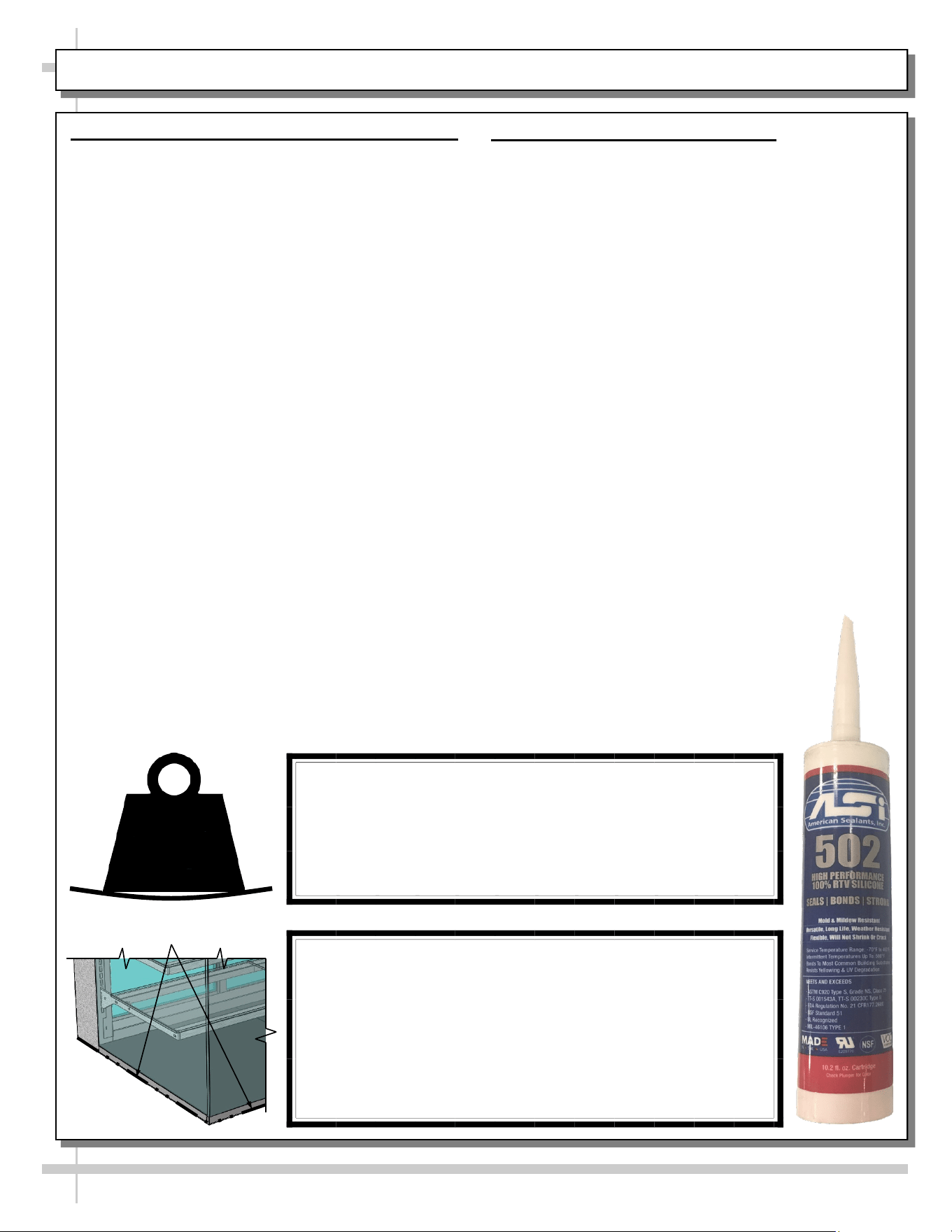
• Caution! To prevent sagging or breakage of glass, do not
exceed 5 LB (2.3 KG) weight load per top glass section
(between vertical supports).
• To prevent scratching or marring, do not place ANY items on
glass.
SEALING COUNTER-MOUNTED UNITS
• Proper sealing of lower edge of case to counter
prevents accumulation of dust, residue and liquids as
well as insect harborage.
• For sanitation purposes, counter-mounted units must
be sealed to counter with silicone that meets or
exceeds food grade NSF/ANSI Standard 51.
• Prior to proceeding, thoroughly clean both counter and
underside of base support to assure a secure seal.
CAUTION!
• To prevent sagging or breakage, do not exceed 5 LBS
(2.3 KG) weight load per top glass section (between
vertical supports).
• To prevent scratching or marring, do not place ANY
items on glass.
5
LBS
SEALING COUNTER-MOUNTED UNITS TO COUNTER
• To assure a secure seal, thoroughly clean both coun-
ter and lower edge of case prior to proceeding.
• Apply a thin, UNINTERRUPTED bead of silicone
sealant along lower edge of case to counter after
case has been properly positioned on counter.
• Silicone must meet or exceed food grade NSF/ANSI
Standard 51.
Lower Edge of Case
5
REVEAL® COUNTERTOP DRY (AMBIENT) SVC & SELF-SERVICE MODEL APPLICABILITY & DIM’S
Service Models Display Height Case Depth x Length
NR3613DSV 13 5/8”DH 32 5/8”D x 35 3/4”L
NR3620DSV 20 3/8”DH 32 5/8”D x 35 3/4”L
NR3627DSV 27 7/8”DH 32 5/8”D x 35 3/4”L
NR3635DSV 35 3/8”DH 32 5/8”D x 35 3/4”L
NR4813DSV 13 5/8”DH 32 5/8”D x 47 3/4”L
NR4820DSV 20 3/8”DH 32 5/8”D x 47 3/4”L
NR4827DSV 27 7/8”DH 32 5/8”D x 47 3/4”L
NR4835DSV 35 3/8”DH 32 5/8”D x 47 3/4”L
6
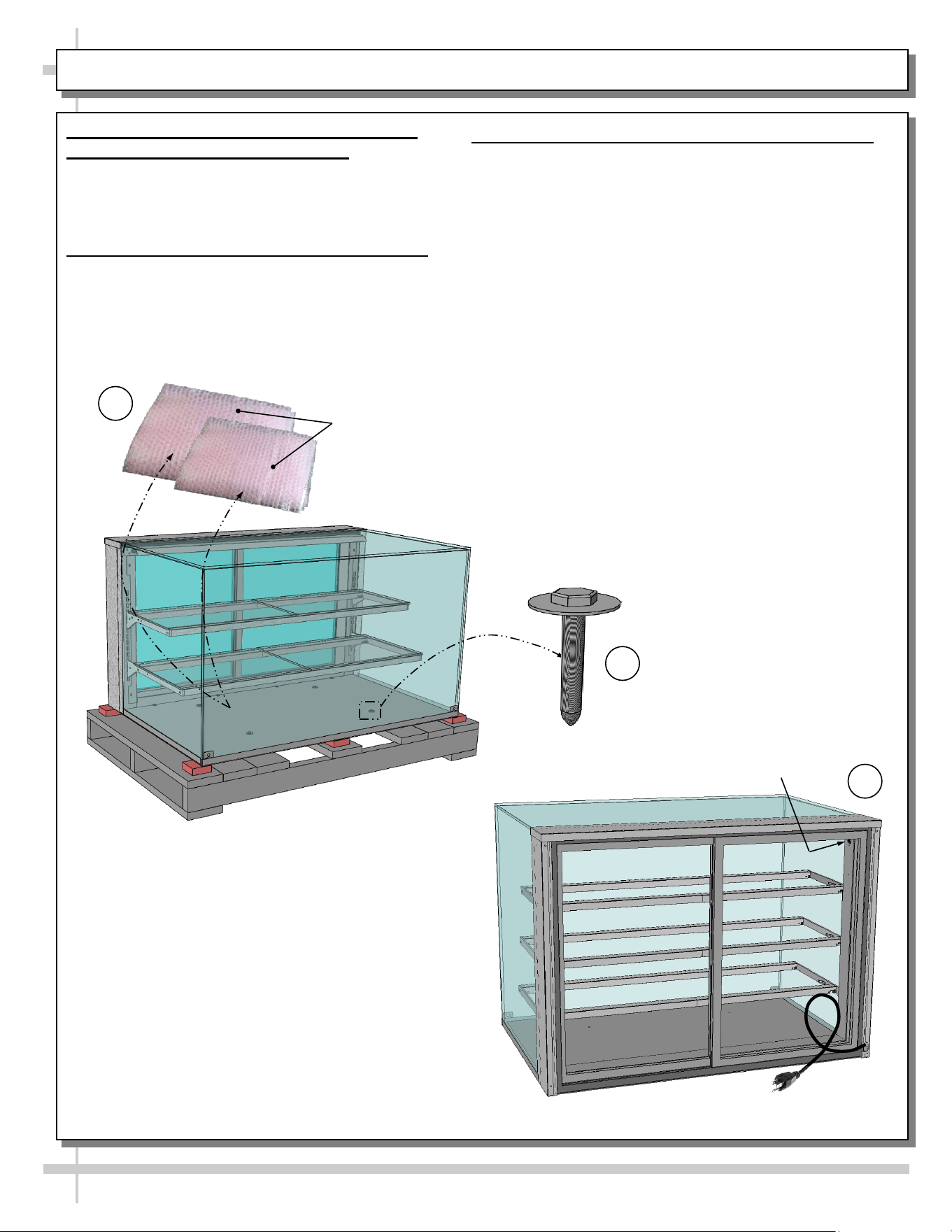
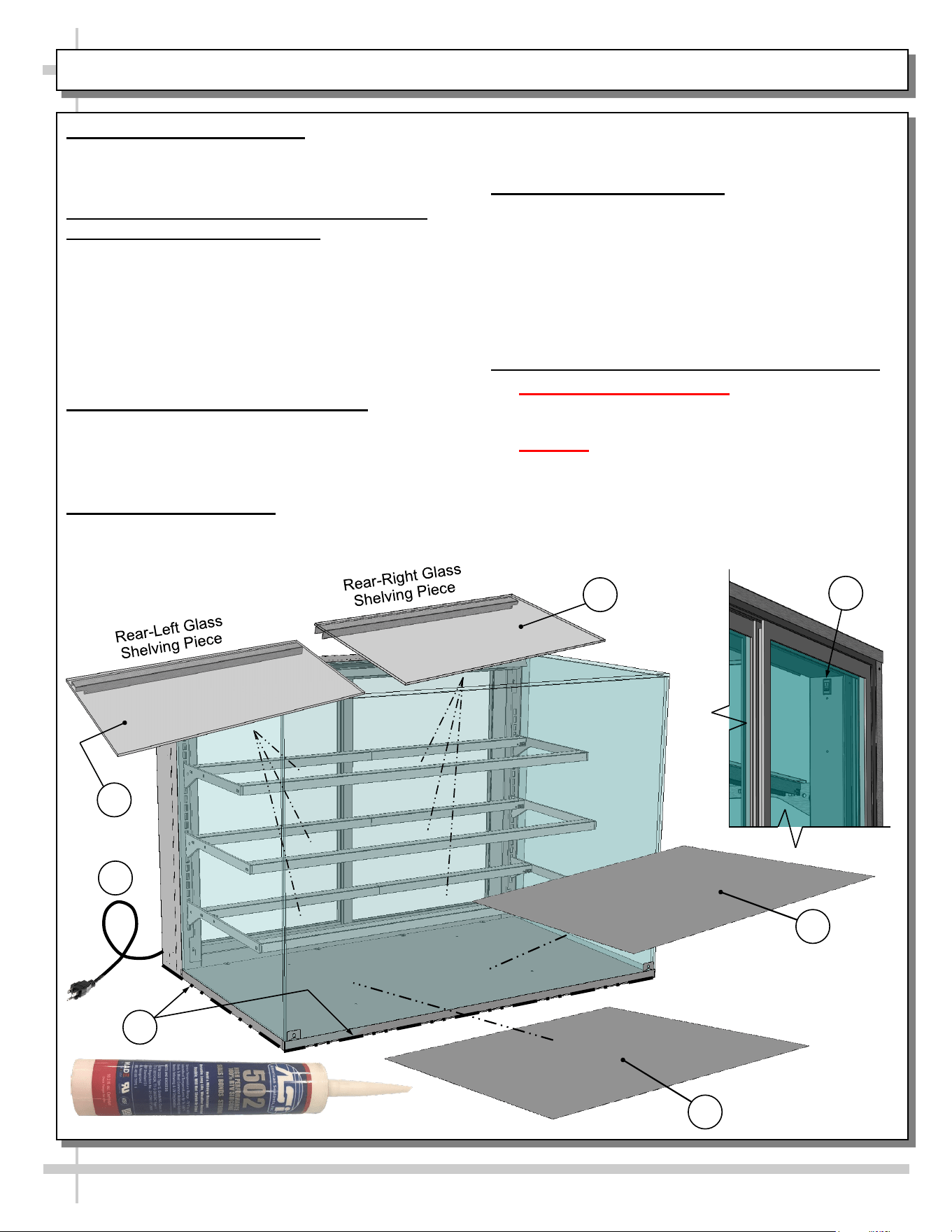
1. Remove Bubble-Wrapped Decks and
Glass (For Shelving) From Case
• Carefully remove bubble-wrapped decks and
glass shelving pieces from case.
• Place in a secure location away from foot traffic.
2. Remove Lag Bolts From Support Base
• Remove four (4) lag bolts from support base
(that holds case to pallet).
• Discard or recycle.
INSTALLATION: COMPONENT REMOVAL / REMOVAL OF CASE FROM PALLET & ONTO COUNTER
Light Switch
Bubble-Wrapped
Decks and Glass
Shelving Pieces
1
3
3. Remove Case From Pallet / Set On Counter
• Caution! 4 people may be required for this task!
• Lift case up and off pallet’s rubber shipping blocks
and carefully place on counter.
• See next page for instructions on sealing case to
counter.
--- Model NR4827DSV ---
--- Model NR4835DSV ---
2
Lag Bolt (Typ.)
Enlarged For
Illustrative Purposes
7
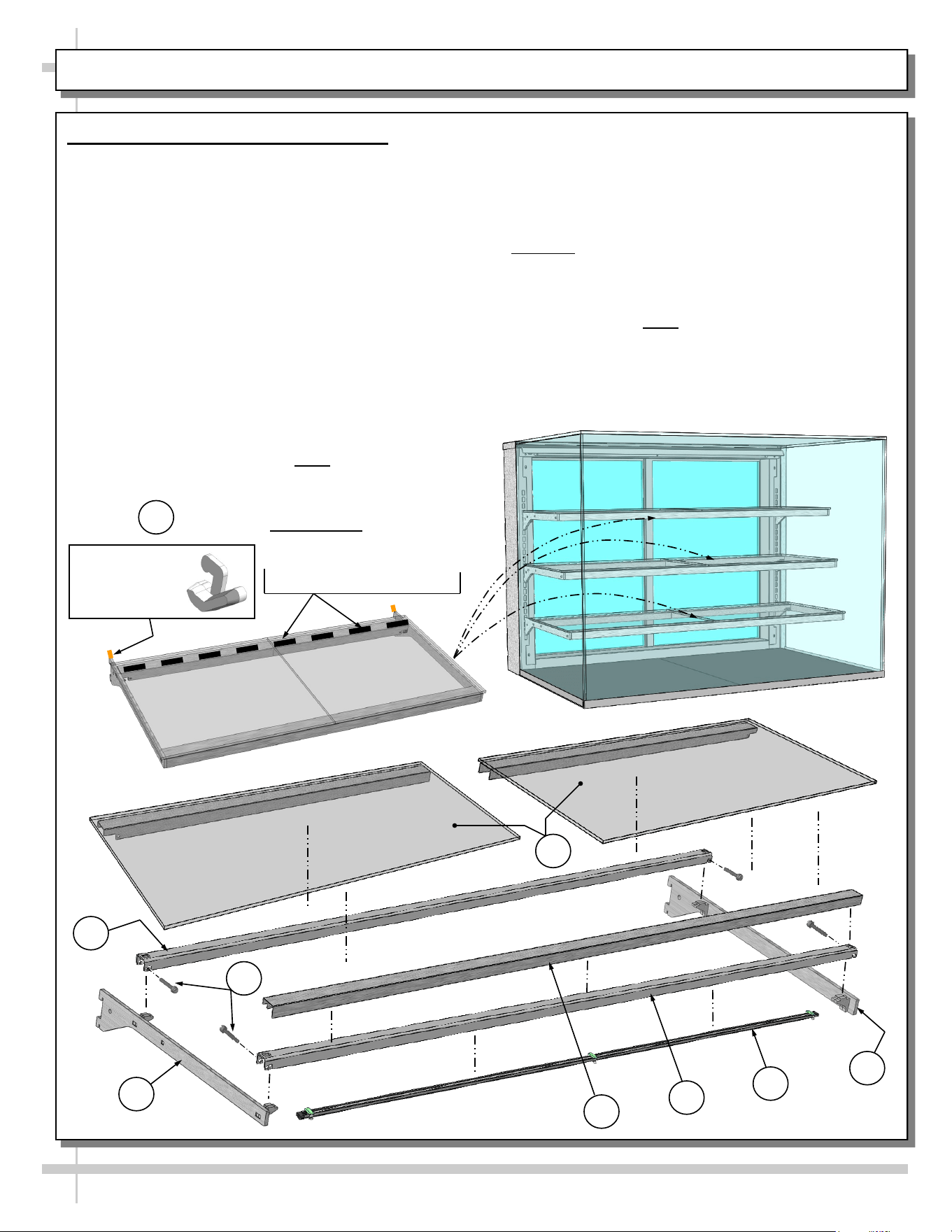
4. Place Decks Inside Case
• Remove decks from bubble-wrap; place in case.
• See illustration below.
5. Remove Glass From Bubble-Wrap and
Place On Shelving Bracketry
• Remove glass (for shelves) from its bubble-wrap.
Place them on shelving bracketry.
• Caution! Glass pieces ARE NOT IDENTICAL!
Notches on underside metal covers determine
placement in case (as illustrated below).
• See next page for complete illustrative breakdown
of shelving bracketry and glass shelving pieces.
6. Plug Case Into Approved Outlet
• Plug is located at case rear.
• Plug case into approved outlet.
• Case will energize.
7. Turn On Light Switch
• Switch location shown in illustration at right.
• LED lights should immediately come on.
INSTALLATION, CONT’D: COMPONENT PLACEMENT / PLUG / LIGHTS / COUNTER ATTACHMENT
• If LED lights do not immediately illuminate, see
TROUBLESHOOTING section in this manual.
8. Sealing Unit To Counter
• Thoroughly clean counter and underside of base.
• Seal unit to countertop with silicone that meets or
exceeds food grade NSF/ANSI Standard 51:
• Apply thin, UNINTERRUPTED bead of silicone
sealant along lower edge of case to prevent
accumulation of dust, residue and liquids as well
to prevent insect harborage.
9. Attaching Unit To Counter With Lag Bolts
• Earthquake Hazard Zones: Case may ALSO
be bolted to counter with lag bolts (or other
secure fasteners).
• Caution! Only trained service providers
should perform such attachment procedures.
• If code requirements allow, the SAME lag bolts
that held case’s support base to pallet may also
be used to secure case to counter.
• See previous page for illustrations.
6
4
--- Model NR4835DSV ---
3
7
5
8
5
8
INSTALLATION, CONT’D: SHELVING ASSEMBLY COMPONENTS
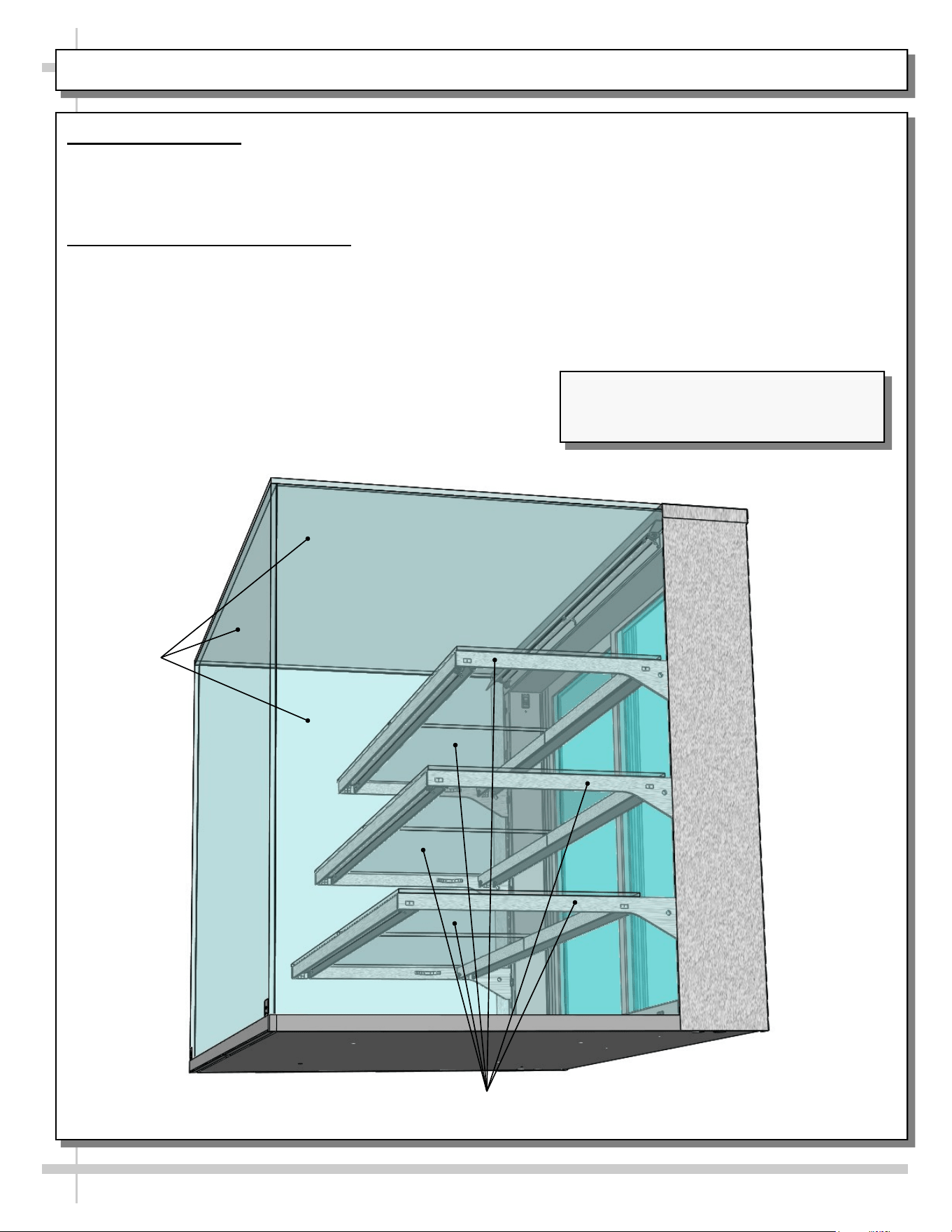
10. Shelving Assembly Components
• Check that glass shelving is in proper position
before placing product in case
• Shelves may be adjusted vertically or entirely
removed from merchandiser.
• Metal shelving brackets ARE NOT able to be
angled. They are at a fixed 90° position.
• There are 12 components comprising each
shelf assembly:
A. Right bracket (with hooks to attach to slots in
upright)
B. LED light with magnets
C. Front shelf support rail (LED light attaches to
its inner cavity via magnets)
D. Cover (rests atop front shelf support rail)
E. Left bracket (hooks to attach to slots in upright)
F. Nylon thumb screws (4 per shelf) secures
shelving during shipment. Note: Remove (using
pliers, if necessary) and discard thumbscrews
after case is installed so shelves can be
disassembled (to clean or service).
G. Rear shelf support rail
H. Left and right glass shelf/cover assemblies (glass
is affixed to covers with 2-sided tape from factory).
Caution! Glass pieces ARE NOT IDENTICAL!
Notches on underside metal covers determine
placement in case.
I. Nylon retainer clips (2 per shelf) secure brackets
during shipment. Note: To adjust or remove
shelves, you must remove retainers; pliers may
be required to accomplish this task.
Glass Shelving
Glass Shelving
E
A
B
C
D
G
From Factory: Transparent
2-Sided Tape Holds
Glass To Top Of Rear
Shelf Support Rail
H
Right Glass
Shelving Piece
Left Glass
Shelving Piece
Nylon Retainer
Clip (Typ.)
I
F
9
CASE DESIGN: GLASS ENCLOSURE / GLASS SHELVING AND BRACKETRY
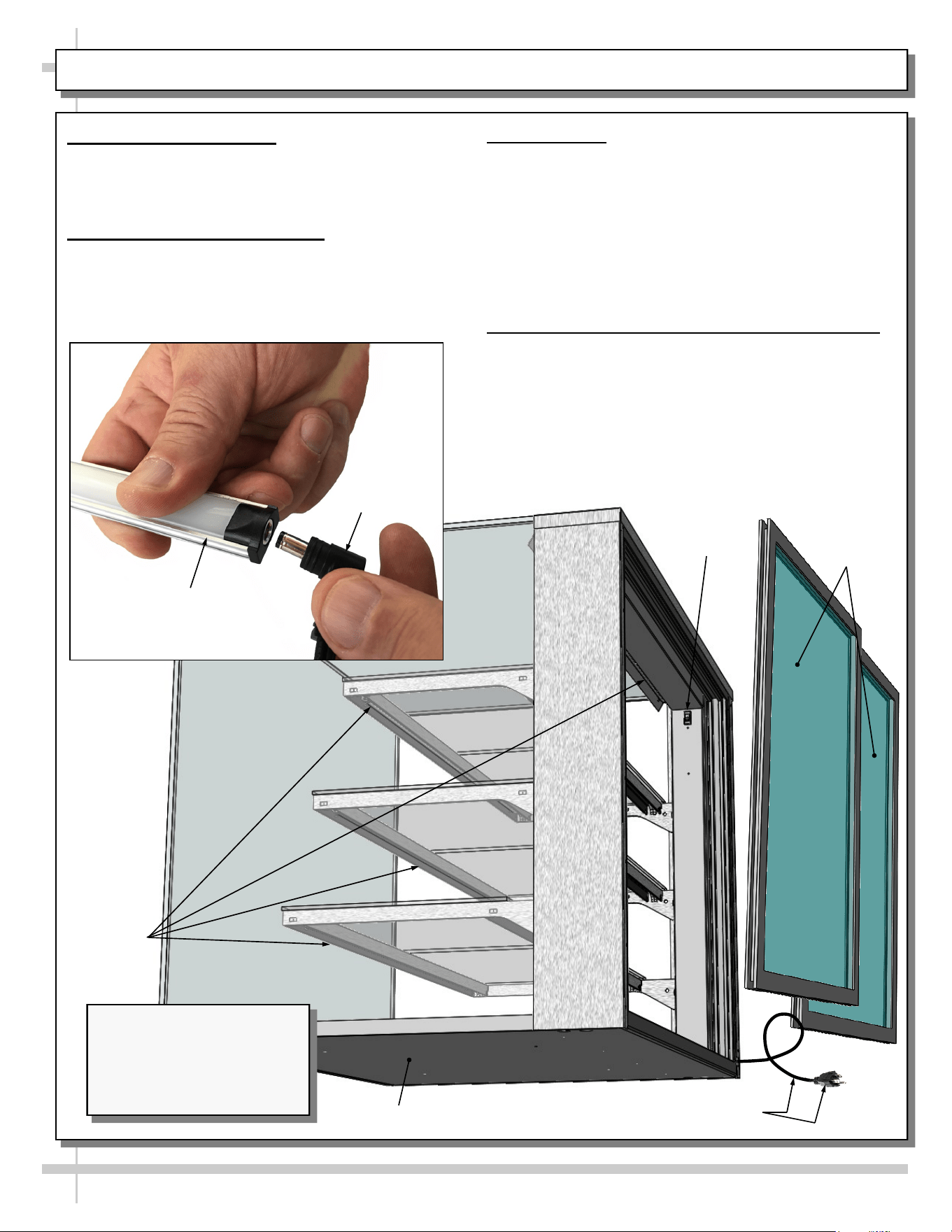
1. Glass Enclosure
• CAUTION! DO NOT PUSH OR PULL ON GLASS ENCLOSURE!
• ONLY USE UPRIGHTS (AT EACH END OF CASE) TO PUSH OR PULL CASE INTO POSITION!
• See illustration below.
2. Glass Shelving and Bracketry
• Glass shelving is adjustable.
• Each shelf has its own glass.
• Caution! If glass must be removed for cleaning purposes, handle with extreme care.
• Service case is illustrated below. Self-service case reflects similar design.
Glass Shelving / Bracketry
Glass
Enclosure
Model NR4835DSV Countertop Unit
(Shown) May Not Exactly Reflect Every
Feature or Option of Your Particular Case.
10
CASE DESIGN, CONT’D: PLUG & CORD / LED LIGHTS & SWITCH FIXTURES / REAR SLIDING DOORS
3. Power Cord and Plug
• Power cord and plug (for LED lights) is at case
rear (shown below).
• Caution! You must plugged in an approved outlet!
4. LED Light Switch Location
• Light switch is in column cover (accessible by
sliding open door at case rear).
• See illustrations below-right.
LED
Lights In
Shelving
And
Header
Model NR4835DSV
Countertop Unit (Shown) May
Not Exactly Reflect Every
Feature or Option of Your
Particular Case.
Support Base
LED Light
Switch
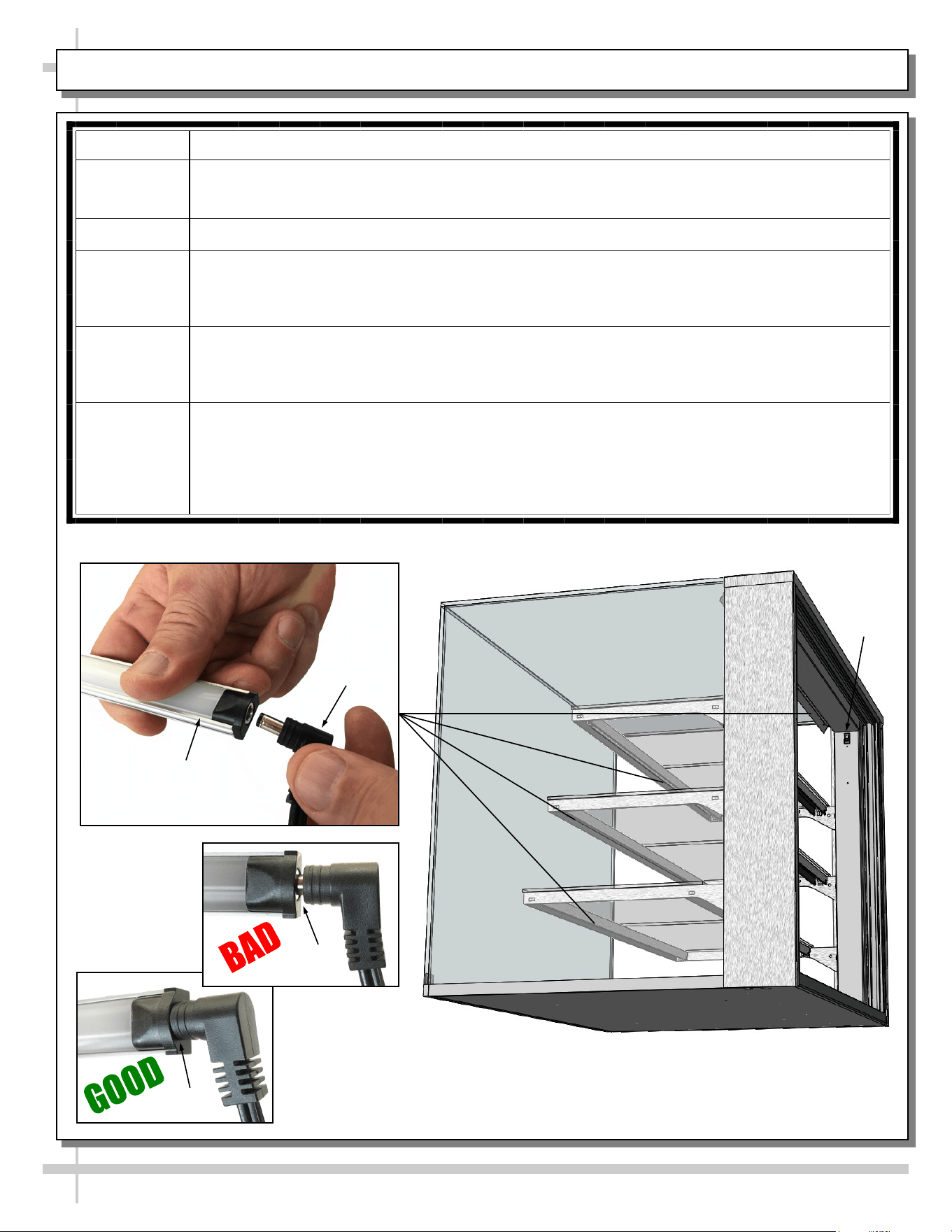
5. LED Lights
• LED lights are located at both header and
shelving of case (as shown below).
• Check that ALL of the light plugs are properly
connected to the LED light.
• Plug must be inserted ALL THE WAY into the
LED light orifice (with no gap) to work properly.
• See TROUBLESHOOTING section in manual
if LED lights malfunction.
6. Rear Sliding Door Removal / Replacement
• To remove rear sliding doors, move doors toward
center of case.
• Individually lift each door up toward the top of the
case; pivot the bottom of the door out.
• Return doors to case in reverse order they were
removed.
Rear Sliding
Doors
Plug & Cord
LED Light
Plug
11
CLEANING SCHEDULE (TO BE PERFORMED BY STORE PERSONNEL)
FREQ. INSTRUCTIONS
Daily Glass Surfaces: Clean side/top glass enclosure (and glass shelves) with household or
commercial glass cleaner.
Daily Rear Sliding Door Exterior Glass: Clean with household or commercial glass cleaner.
Clean out rear door track with moist cloth.
Daily Decks: Wipe off decks with moist cloth dipped in mild soap and water solution.
12
TROUBLESHOOTING (TO BE PERFORMED BY STORE PERSONNEL)
CONDITION TROUBLESHOOTING
Case Lights
Not Working
Check that light switch is in the ON position.
• See illustration below for light switch location at case rear.
If case is not hard-wired, check that power cord is properly connected to wall outlet.
Check that ALL of the light plugs are properly connected to the LED light.
• Plug must be inserted ALL THE WAY into the LED light orifice (with no gap).
• See illustrations below-left.
Power may not be reaching the case.
• Contact store management to have trained service provider perform troubleshooting.
• Troubleshooting to be performed by trained service providers only is on next page.
If case light still do not come on, it may need to be replaced.
• Contact Structural Concepts’ Technical Service Department for replacement light
(see TECHNICAL SERVICE section of this manual for contact information).
• To replace, disconnect plug from existing LED light. Disconnect LED light from its
brackets. Replace with new LED light. Insert plug ALL THE WAY into LED light orifice.
No Gap
Gap
LED Light
Plug
Light
Switch
13
CONDITION TROUBLESHOOTING
Case Lights Are
Not Working
See TROUBLESHOOTING (TO BE PERFORMED BY STORE PERSONNEL)
section in manual (previous sheet) for most common troubleshooting solutions.
Check power.
• If power is not supplied to the case, facility may have faulty power distribution.
• If power is supplied to the case but lights are not energized, case’s power supply
may be faulty.
TROUBLESHOOTING (TO BE PERFORMED BY TRAINED SERVICE PROVIDERS ONLY)
14
SERIAL LABEL LOCATION & INFO LISTED / TECH INFO & SERVICE - AMBIENT/HEATED CASES ONLY
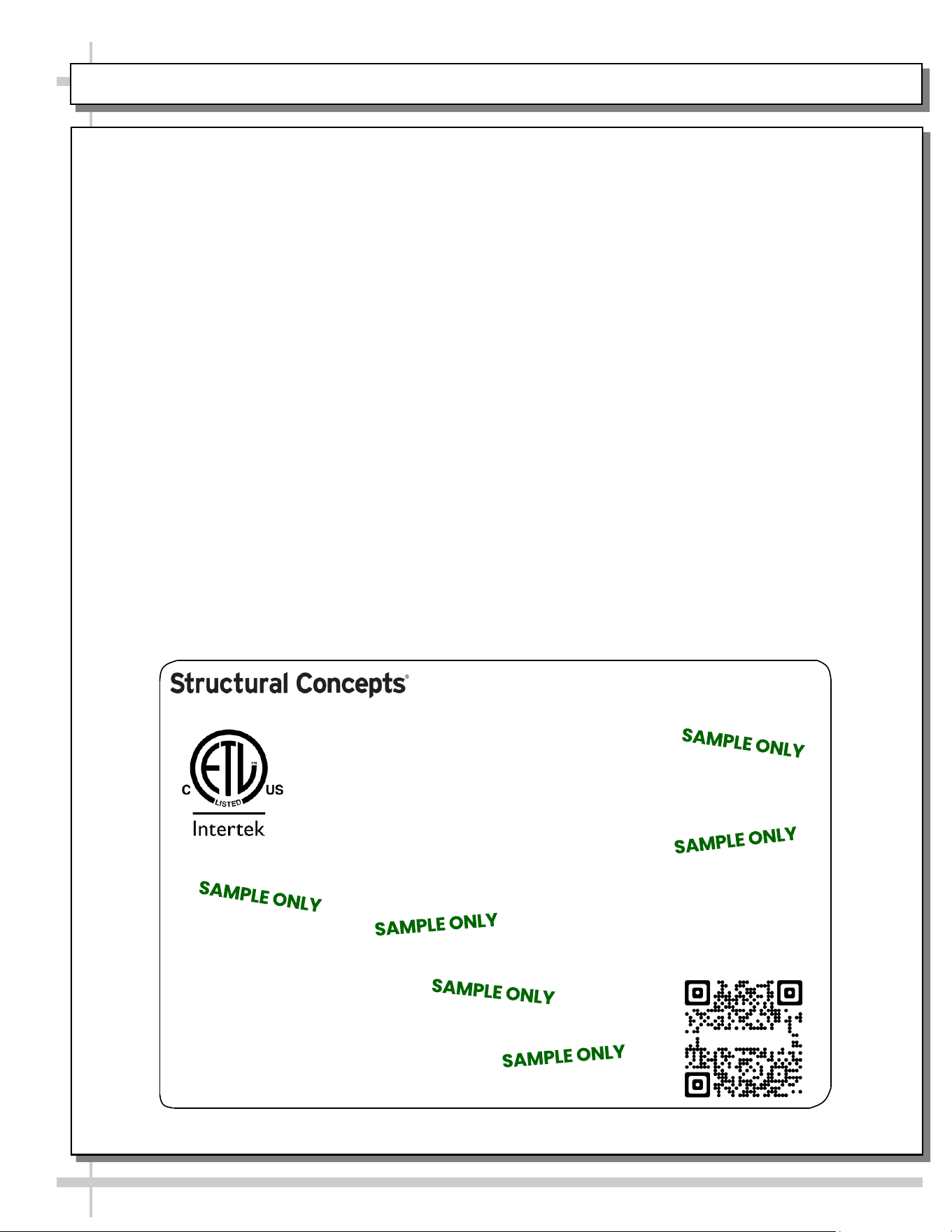
--- Sample Serial Label For Ambient/Heated Cases ---
MODEL NRS3648RXV-SAMPLE
SERIAL NO. 12345X30DZ098765
888 E. Porter Rd - Muskegon, MI 49441
3048256
Conforms to UL Std. 65
CERTIFIED TO CAN/CSA
STD C22.2 NO 120
120 VOLTS 60HZ
FOR PARTS OR SERVICE CALL
STRUCTURAL CONCEPTS
AT 1-800-433-9489
SINGLE PHASE 1.84 AMPS
Serial Label Location & Information Listed /
Technical Information & Service
• Serial labels are affixed at a wide range of places
(on the header, at case rear, behind panels or
toe-kicks, on electrical boxes, etc.).
• Serial labels contain electrical information as well
as regulatory standards to which the case
conforms.
• Sample serial label shown below.
• For additional technical information and service, see
the TECHNICAL SERVICE page in this manual for
instructions on contacting Structural Concepts’
Technical Service Department.
Sample QR Code
SCAN FOR PRODUCT LITERATURE
Reveal
STRUCTURAL CONCEPTS TECHNICAL SERVICE CONTACT INFORMATION & LIMITED WARRANTY
15
TECH SERVICE/WARRANTY CONTACT INFO:
1 (800) 433-9490 / EXTENSION 1
DAYS/HOURS AVAILABLE:
MONDAY - FRIDAY (CLOSED HOLIDAYS)
8:00 a.m. TO 5:00 p.m. EST
YOU MUST HAVE THE FOLLOWING INFO AVAILABLE
BEFORE CONTACTING STRUCTURAL CONCEPTS:
SERIAL NO. / MODEL NO. / STORE NO. / STORE
ADDRESS / DETAILS (PHOTOS, LEAK LOCATIONS,
DAMAGE, STORE’S AMBIENT CONDITIONS, ETC.)
To Access The Limited Warranty To Your
Case, Follow These Instructions:
> If Viewing This Document on Smart Phone,
Tablet or Computer, Select/Click On The QR
Code at Right.
> If Viewing This Document In Print (Hard
Copy), Scan The QR Code at Right With Your
Smart Phone or Tablet.