RUIZU X52 User Manual
Customer Service: ruizuservice@hotmail.com
This device complies with part 15 of the FCC Rules. Operation is subject to the following two conditions: (1) This
device may not cause harmful interference, and (2) this device must accept any interference received, including
interference that may cause undesired operation.
Note: This equipment has been tested and found to comply with the limits for a Class B digital device, pursuant to part
15 of the FCC Rules. These limits are designed to provide reasonable protection against harmful interference in a
residential installation. This equipment generates, uses and can radiate radio frequency energy and, if not installed
and used in accordance with the instructions, may cause harmful interference to radio communications. However,
there is no guarantee that interference will not occur in a particular installation. If this equipment does cause harmful
interference to radio or television reception, which can be ermined by turning the equipment off and on, the user is
encouraged to try to correct the interference by one or more of the following measures:
—Reorient or relocate the receiving antenna.

—Increase the separation between the equipment and receiver.
—Connect the equipment into an outlet on a circuit different from that to which the receiver is connected.
—Consult the dealer or an experienced radio/TV technician for help.

English User manual ----------------------------------- 1 ~ 12
日本語ユーザーマニュアル
--------------------------- 11 ~ 35
English & Japanese content
Button control
.................................................
1
1.Power On/Off
...............................................
2
2.Main interface
..............................................
2
3.Volume Adjustment
......................................
2
4.Fast Rewind/Forward
...................................
3
5.Last song/Next song
.....................................
3
6.Screen lock/unlock
.......................................
3
7.Return
...........................................................
3
8.Charge the player
.........................................
3
Music
...............................................................
4
Video
................................................................
5
Bluetooth
.........................................................
6
FM Radio
..........................................................
7
Pedometer
.......................................................
8
Recordings
.......................................................
9
Ebook
.............................................................
10
Pictures
..........................................................
10
Tools
...............................................................
10
Set
..................................................................
11

Specification
..................................................
12
外観及びボタン
.........................................
13
1.電源オン/オフ
...............................................
14
2.ホームメニュー
................................................
14
3.VOL+/-スイッチ
.............................................
14
4.早送り早戻し
..............................................
14
5.前の曲/次の曲
............................................
15
6.画面をロック/ロック解除
............................
15
7.BACK
...........................................................
15
8.充電ステップとファイルを転送する
.................
16
音楽
...............................................................
17
動画
...............................................................
20
Bluetooth 機能
..............................................
22
FM ラジオ
.......................................................
25
歩数計
...........................................................
26
録音
...............................................................
27

電子ブック
......................................................
29
画像
...............................................................
30
アラームモード
...................................................
31
設定
...............................................................
32
型番とスペック
...........................................
35
1
Buttons & Controls

2
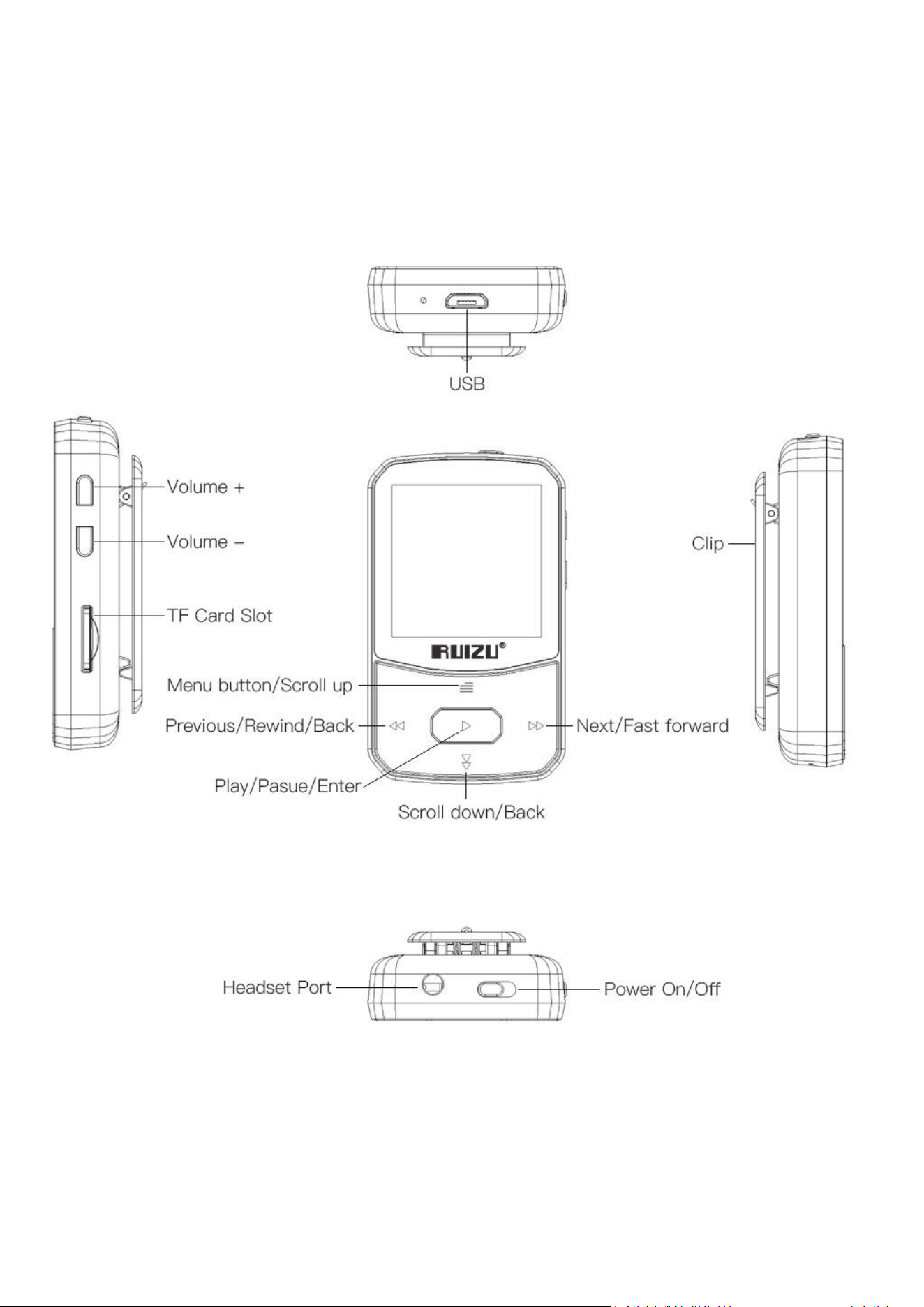
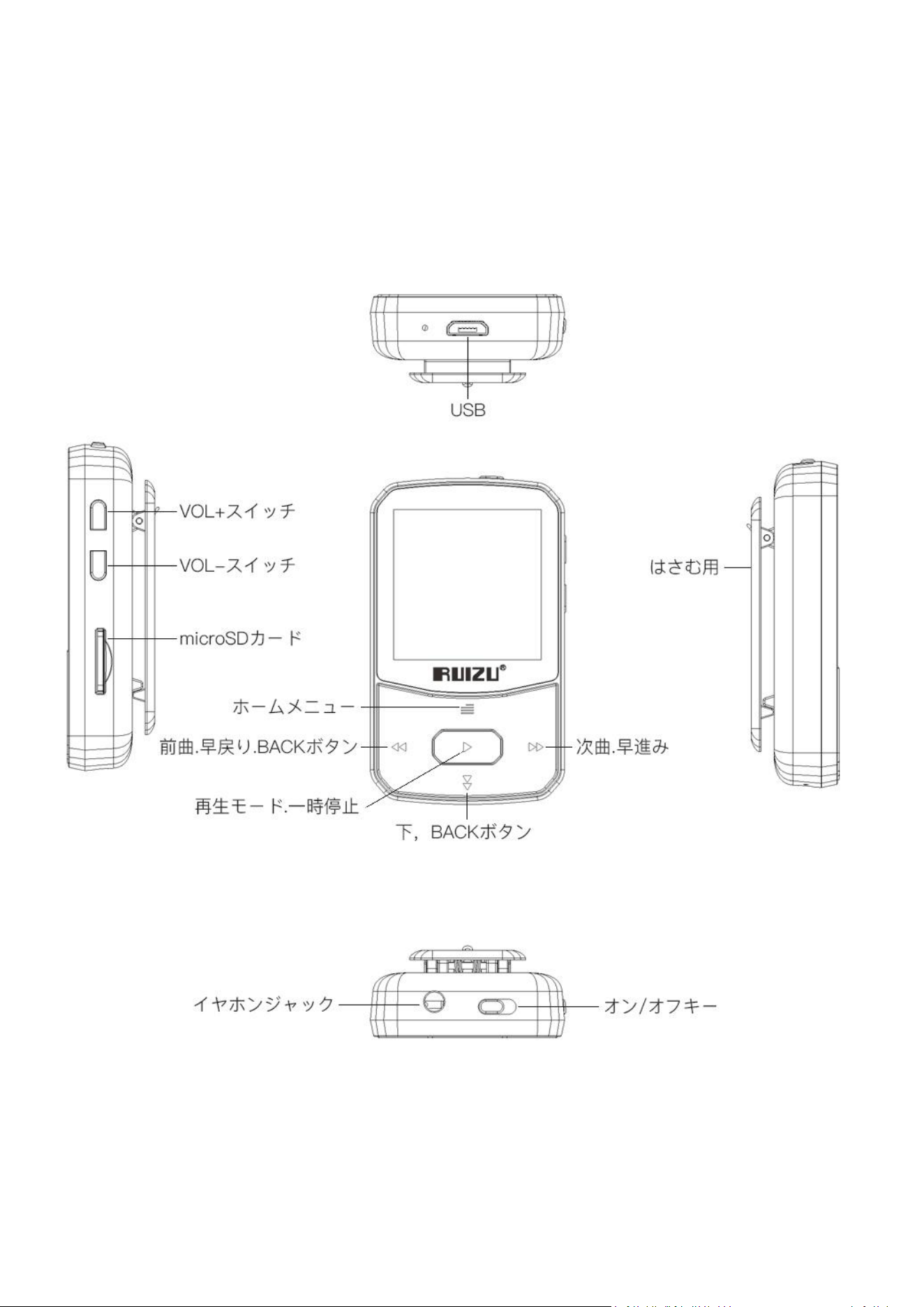
1. Power On/Off
Power On: Push the power key to the right
side turn on the mp3 player
Power Off:
1).When the mp3 player power on,hold the
center button(play button) will turn off the
device, hold the center button(play
button)again to power on.
2).Push the power key to the left side power
off.
2.Main interface
On it main menu each time you click the
button / , it will bring you to one of its
11 different functions, including “Music”,
“Video”, “Bluetooth”,“FM Radio”,
“Pedometer”,“Recordings”,“E-book”,“Picture”,“
Tools”,“Set”, “Folder View”.
Click the button ▶ enter to the function you
have selected.
3.Volume Adjustment
Under any interface click the volume button
3
“+” or “-” to turn up or turn down the volume.
4.Fast Rewind/Forward
While it’s on Music/Video playing interface
Hold button / for fast rewind /
forward.
5.Last song /Next song
While it’s on Music/Video/Picture playing
interface, click button / to go to the
previous/next file.
6. Screen Lock/unlock
Hold the button to lock the screen. Repeat
to unlock.
7.Return
While on music/Video/E-book playing
interfaces, click the button back to previous
menu, then press the button
continually to return to the main interface. In
other interfaces, press the button to
return.
8.Charge the Player
1).By USB cable

4
Connect the mp3 player with computer by the
USB cable can both be used for data transfer
and charging the player.
2).By connecting to charger(Not included)
Please note: The specifications of the charger
must meet the following requirements or any
accident or failure happened will be regarded
as man-made damage.
Input: AC100-240V 50/60Hz Max:100mA
Output: DC5.0-5.5V 500mA-800mA
Music
Click
▶
button with “Music” on main interface
access to its function. On the “Music” menu
click / to choose the option on the
menu, and click
▶
to confirm.
1)Volume Adjustment
Click the Volume +/- to turn up / down the
volume.
2)Fast Rewind/Forward
While it’s on Music playing interface Hold
button / to play fast rewind /
forward.

5
3)Last song /Next song
While it’s on music playing interface, click
button / to play the previous/next song.
4)Play setting
On the Music playing interface, click the “ ”
button enter to the playing settings menu.
Play mode:
Repeat
Repeat off: Turn off repeat function.
Repeat 1: Repeat play the audio currently
playing.
Repeat all: Play all of your audios and repeat.
Shuffle: Turn on/off shuffle mode.
Sound Settings
Equalizer/Variable Speed Play/Volume limit.
Add to playlist
Remove from Playlist
Delete : Delete the music
Bookmark
Video
On the main menu after select the “Video”
click
▶
button access to the video menu.On

6
the “Video” menu click / to select the
option on the menu, and click
▶
to confirm.
Remark: This player can only support the AMV
format in 128*128, you should convert video
files by format conversion software first.
Video play setting: on the video playing
interface click the button access to video
play setting,a related list will show as below
Brightness
Repeat
Delete video
Update Playlist
Bluetooth
Press
▶
button with “Bluetooth” on main
interface to access to its function. And the
mp3 player will auto search the Bluetooth
device around (remark: please turn on your
Bluetooth device before you search the
Bluetooth device).
On the Bluetooth menu a related list will show
as follows:
Bluetooth switch control: Turn on/off

7
Bluetooth function.
Search for device: Searching nearby Bluetooth
device.
Device List: View paired Bluetooth devices.
How to connect the mp3 player with
Bluetooth device.
1. Turn on your Bluetooth device before you
search the Bluetooth device
2. Press
▶
button with “Bluetooth” on main
interface to access to its function. And the
mp3 player will auto search the Bluetooth
device around, the Bluetooth device will listed
on the mp3 player after search success.
Choose the Bluetooth device and click the
▶
start connect.
3. After connect the mp3 player with
Bluetooth device go back to main menu and
enter to “Music”function , and playing music.
FM Radio
Select "FM Radio" on main menu, click button
▶
access to FM Radio,a related list will show
as: “Presets”, “Manual Tune”, “Auto tune”,

8
“FM Recording”.Click / to select each
option, and click
▶
button to confirm.
Note: Wired headphones are required as
antenna for FM radio function.
On the FM radio playing interface,click the
▶
button enter to the settings menu. A
related list will show including:
Start FM radio recording
Radio background
Save to preset
Clear Preset
Auto tune
Tuner Region
FM Recording
Pedometer
Select "Pedometer" on main interface, click
button
▶
to access to its function, then a
related list will show:
Start step:
S: step counts
D: distance traveled

9
C: calories burned
S: walking speed
T: elapsed time
Click button
▶
or button and choose
"Yes"/"No" to save the record.
Personal info: set your step length.
History: View up to 7 history records.
Clear history: Clear one of your history
records.
Recordings
Select "Recordings" on main interface, click
button
▶
access to recordings , then a related
list will show as:
Start Voice Recording
Recordings library
Storage(only available with card inserted)
Record Format
Record Settings
Click button
▶
or to select each option, and
click
▶
button to confirm.

10
Ebook
Click
▶
button with “Ebook” on main interface
access to its function. On the “E-book” menu
click
▶
or to choose the TXT article on the
menu, and click
▶
to confirm.
When read the TXT article, click
▶
button will
auto play, click again to stop.
Please kindly note this player only can
recognize the article in TXT format.
Pictures
Click
▶
button with “Pictures” on main
interface access to picture menu. On the
“picture” menu click
▶
or to choose the
picture files listed on the menu and click
▶
to
confirm.
Tools
Select "Tools" on main interface, click button
▶
access to tools , then a related list will show
as:
Calendar
Stopwatch
Alarm

11
Click
▶
or to select each option, and click
▶
button to confirm.
Set
Touch
▶
button with “Set” on main interface
access to its function. And then a related list
will show as follows:
Shutdown settings
Display
Language
Date and time
Information
Format device
Default settings
Click
▶
or to select each option, and click
▶
button to confirm.
12
Specification
Screen
1.5’’ TFT screen
Weight
25 g
Dimension
60mm×40mm×11mm
Flash Memory
8GB
TF Card
Support expandable up to
128GB
Audio Format
MP3/WAV/APE/WMA/FLAC
etc.
USB port
Micro USB 2.0 (Support USB
3.0)
Video format
128*128 AMV (converted
video )
Picture format
JPEG BMP GIF
Recording format
MP3/WAV
Recording distance
5~8 meters
Battery
Built-in Li battery
Charging time
2 ~3 hours
13
外見とボタン
1.電源オン/オフ

14
オン:電源ボタン右にしましたらオンに表示され
ます。
オフ:電源ボタン左にしましたらオフし表示されま
す
2.ホームメニュー
:
ホームメニューで / 短く押すと
音楽、ビデオ、Bluetooth、FM ラジオ、歩数計、
録音、電子ブック、写真、ツール、設定、ファイル
プレビューを選んでできます、▶押しすると選んで
できます。
3.VOL+/-スイッチ
音量を調節します。
4. 早送り早戻し
音楽、ビデオ再生中で と 押したまますると再
生中の曲や動画の早送り早戻しをします。
5.前の曲/次の曲:

15
音楽やビデオ、ファイルプレビューなど状態で と
短く押すと前の曲/次の曲を選択できます。
6.画面をロック/ロック解除
本機が動作しているときは、 を押長く押して画
面の電源を切り、もう一度 を押して画面の電
源を入れます。
7. BACK
音楽再生中/ビデオ放送中/FM ラジオ再生中/
電子ブックを見るとき/画像再生などに を押し
て前のメニューに戻れます。そして を押してホーム
メニューに戻れます。ほかの画面で直接 を使っ
て前のメニューに戻ります。
8.充電ステップとファイルを転送する
1)コンピューターと USB ケーブルを使用して充電
する

16
2)USB ケーブルはデータ転送用で、充電器と連
続して充電するの
も適用です。
*特にご注意:使用される充電器の仕様は以
下の標準を満たすべきです。そうでなければ意外
や保証が生じる場合は当社が人為の破壊とみ
なします
注意:入力:
AC100-240V 50/60Hz Max:100mA
出力: DC5.0-5.5V 500mA-800mA
PC ファイルを転送する:USB データケーブルをコ
ンピューター PC と連続し、コンピュータのハードディ
スクに転送する音楽などの関連ファイルをコピー
し、プレーヤー容量ディスクに変えて、ペーストして
データが転送できますも適用です。
17
音楽
ホームメニューで“ / ”をクリックして、音楽のメニ
ューを選びます。“▶”をクリックして、すべての曲、
Resume、アーティスト、アルバム、ジャンル、プライ
リスト、再生リストを作りますなどの機能を付けま
す。“ / ”を放送曲を選びます。それから“▶”を
クリックして、その曲に入ります、放送が始まりま
す。
1)VOL+/-スイッチに音量を調節します。
2)音楽再生中で と 長く押すと早送り/巻き
戻しを操作できます。
3)音楽再生中で と 短く押すと前の曲/次
の曲を選択できます。
4)音楽再生中で, をクリックして、設置デ
ーブル(放送モデル、音設置、プレイリスト追加、

18
プレイリスト削減、不要項目削除 )が出てきま
す。
再生モード:このオプションを選び、再生ボタンを
押して入ると、次から音楽を再生/リピート/シャ
ッフル/リピート設定が表示されます。
サウンド設定:“イコライザー”,“シフト配信”,
“音量限制”。
プレイリストに追加:再生中の音楽をこの再生
リストに加えます(三つのプレイリストの一)。
プレイリストから削除:このリストに加えている音
楽を削除します。
削除: mp3 プレーヤーから曲を削除します。
ブックマーク:再生ボタンを押して、この機能に入
ると、ブックマーク追加、ブックマークへの移動、ブ
ックマーク削除が表示されます。
19
動画
ホームメニューで“ / ”をクリックして、動画のメニ
ューを選びます。▶を押してすべての動画を見えま
す。 好きな動画は / を移動して選んで出来
ます、▶をクリックして放送始めます。
放送中で VOL+/-スイッチに音量を調節します。
をクリックして前のメニューに戻ります。 をクリッ
クしてホームメニューに表示されます。
フォルダビューで▶をクリックしてそして / を押し
て放送欲しいファイルを選んで▶を押して放送始
めます。
放送中、 と ”をクリックして、放送対象を選び
ます。“ ”を長く押して、早進みができ、“ ”を長
く押して、早戻りができます。“▶”をクリックして、
一時止まります。“ ”をクリックして、前のメニュー

20
に戻ります。 をクリックしてホームメニューに戻りま
す。
放送中、“ ”をクリックして、動画設置出来ます、
明るさ/重複放送/動画を削除/プレイリスト更新
の機能が出てきます。 / で必要な機能を選
択して、“▶”をクリックして入ります。“ ”をクリッ
クして、放送画面に戻ります。 をクリックしてホ
ームメニューに戻ります。
Bluetooth 機能
ホームメニューで Bluetooth を選んで、“▶”をクリッ
クして、入ります。入る前に先に Bluetooth のイヤ
ホンあるいはスピーカーをオンにします。入ったら、
“Bluetooth のオンオフ制御”、“検索デバイス” 、
“デバイスのリスト”が見えます。“ / ”は選択キ
ーで、“▶”は確認キーです。入ったら Bluetooth は

21
自動的に検索します。
Bluetooth のオンオフ: / でオン/オフを選択
して、“▶”で確認します。
デバイス検索:“▶”をクリックして、自動的に
Bluetooth のイヤホンあるいはスピーカーの検索に
入ります。
デバイスのリスト:検索されたデバイスはすべてリ
ストに表示されます。対象デバイスを選んで、“▶”
を使って、確認します。
Bluetooth デバイスとの接続方法:
1. Bluetooth のイヤホンあるいはスピーカーをオンに
します
2.Bluetooth の画面に入って、Bluetooth をオンに
します。“▶”を移動して、デバイス検索をクリック
します。それから“▶”を確認して、合うデバイスが

22
自動的にリストされます。
3.Bluetooth がつながったら、ホームメニューで音楽
の画面に戻ります。Bluetooth のイヤホンあるいは
スピーカーが一回つながり、今度使用時、
Bluetooth のスイッチを入れるだけで、自動的にデ
バイスを認識します、音楽再生を始めます。
FM ラジオ
ホームインターフェイスの状態で、 / をクリックし
て、FM ラジオを選択し、▶(再生ボタン)を押
して入ります。FM ラジオ機能メニューはプリセット
/ユーザラジオ/手動チューニング/自動チューニング
/FM 録音など選びます。 / をクリックして選
んで出来ます。▶を押して機能使えます。
プリセット:プリセットラジオを選んで、“▶”をクリ
ックして、すぐすでに受け取ったラジオ放送局が見

23
えます。
自動チューニング:自動チューニングを選んで、
“▶”をクリックして、自動的にラジオ放送局を検
索します。
手動チューニング:手動チューニングを選んで、
“▶”をクリックして、手動検索に入ります。“ / ”
を使って、ラジオ放送局を検索します。
FM 録音:FM 録音で▶をクリックして、全ての
録音ファイル見つけます。
ラジオチャンネルを再生して、 ボタン短押しする
と、以下のオプションが表示されます: FM ラジ
オ録音を開始/プリセットに保存/プリセットをクリ
ア/自動チューニング/周波数範囲/ FM 録音/バ
ックグラウンドオペレーション
歩数計

24
ホームメニューで / をクリックして歩数計を選び
まして、“▶”を押して使い始めいます。
歩数計メニューで“▶”をクリックしてここでは歩数
計算開始、歩数計を使う間に を押して「ステッ
プを保存するか」の質問があります、削除や保存
操作出来ます。
個人情報:ユーザー情報をクリックして を押し
て歩数の長さを設置出来ます。
歴史記録:歴史記録あります。
記録削除:記録削除出来ます。
録音
ホームメニューで / をクリックして録音を選べま
す。▶を押したらメニューに入ります、録音メニュー
で以下のオプションが表示されます: 音声録音
を開始、録音ライブラリ、録音フォーマット、録音

25
設置
。
/ をクリックして選べます、▶をクリック
して入ります
音声録音を開始:このオプションを選択してか
ら、 ▶を短押しすると、録音する画面に入りま
す。録音中で ▶をクリックして、一時停止できま
す、もう一度 ▶をクリックして、続けます。 をク
リックして画面で保存と削除操作出来ます。
録音ライブラリ:録音メニューで / をクリックし
て録音ライブラリを押して,“▶”を押して入りま
す。すべての録音ファイルはここで見つけます、必
要なファイルをクリックして“▶”を押したら放送出
来ます,VOL+/-スイッチに音量を調節します。
録音は WAV / MP3 の形式にて保存できます,
/ クリックすると選べます,“▶”をクリックして
保存出来ます。
26
録音設置:録音ビットレート設置です。MP3 書
式:32kbps,64kbps,128kbps,192kbps。
WAV 書式:512kbps,768kbps,1024kbps,
1536kbps。“ / ”で対象ビットレートを選んで、
“▶”をクリックして、保存できます。
電子ブック
ホームメニューで電子ブック機能を選び、“▶”をク
リックして、電子ブックのファイルの画面に入りま
す。それから“▶”をクリックして、読み始まります。
ページアップ/ダウン:“ / ”を短く押すとペー
ジアップ/ダウンを切り替えます。電子ブックメニュ
ーで▶をクリックして自動再生できます。
電子ブックを読んでいる時、 “ ”を押して、自動
放送時間設置/削除電子ブック/ブックマーク選
択/ブックマーク削除/ブックマーク追加/ページ選
27
択の機能が出てきます。“ / ”で必要な機能
を選んで、“▶”をクリックして、保存出来ます。
在
图
片播放界面中,短按“ ”
键进
入
图
片播
放
设
置界面,有亮度/背光
计时
器/幻灯片放
映
设
置/
删
除
图
片/更新播放列表,短按
/
键选择
,再短按“▶”
键进
入。
画像
ホームメニューで“ / ”を使って、“画像メニューを
選びます。それから“▶”をクリックして、写真のフ
ォルダに入ります。“▶”をクリックして、対象写真
を選びます。また“ / ”を使って、写真を上り下
りします。
写真鑑賞している時、 を押して明るさ/バックラ
イトタイマー/バックライトタイマー/画像を削除/再
生リストを作りますの機能が出てきます。“ / ”

28
で必要な機能を選んで、“▶”をクリックして、入り
ます。
アラームモード
ホームメニューで“ / ”を使って、アラームモードメニュ
ーを選びます。それから“▶”をクリックして、アラー
ムモードに入ります。それでストップ・ウォッチ、カレ
ンダー、アラームを表示されます。
“
/
”を使
って、
▶を押して選んで出来ます。
設定
ホームメニューで設定を選びまして、“▶”をクリック
して設置画面に入りました、 / をクリックして
必要な設定出来ます。
電源オフ設定:定時にオフと省電オフを含めて
定時にオフ:デバイスが運行中、設定された時
間に自動的に電源を消すことを設けます。設定

29
範囲は 1~99 分です。
省電力オフ:アイドル状態{放送なし/操作な
し)で、デバイスが自動的に電源を消す時間を
設けます。オフ(オン)3/5/10/20 分の選択があ
ります。“ / ”を使って、対象時間を選びます。
それから“▶”をクリックして、保存します。
表示設定:ブライトネスとバックライトタイマーの
設置をします。 / を押して明るさを簡単に調
整出来ます、バックライトタイマー:10 秒、20
秒、30 秒、常にオン、多種のオプションがありま
す。“ / ”を使って、時間を選らびます。それか
ら、“▶”をクリックして、保存します。
スクリーンセーバー:デジタル時計なし
Language/言語:28 言語を選べます。
日付と時間: 時間形試の設定出来ます(1

30
2時間、24時間)“ ”ボタンを押すと時間
設置“ / ”ボタンを押すと具体的な時間設
置設定した後,時間設置は+/-ボタンを使って
設置できます“▶”を押すと保存します。
情報:プレーヤー情報及びディスク容量をご覧に
なれます。
デバイスをフォーマット:フォーマットされた後、プレ
ーヤーのすべて
のデータを消去します。(謹んでご操作くださ
い)
工場出荷時の設定:“▶”をクリックして、「は
い」と「いいえ」の選択画面が出てきます。「はい」
をクリックして、工場出荷時の状態に戻ります。
「いいえ」をクリックして、設定から退出します。
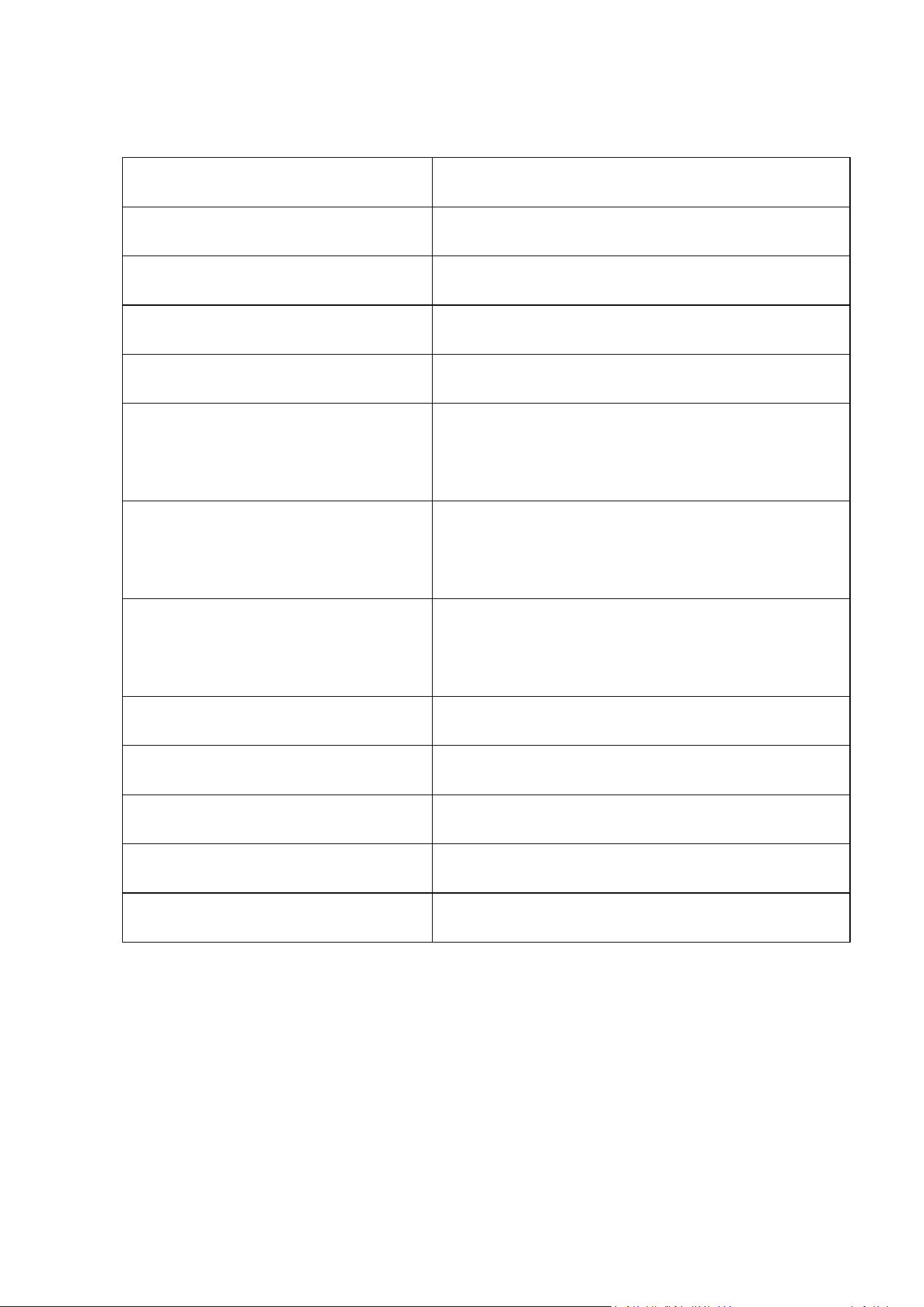
型番とスペック:
31
スクリーン
1.5’’ TFT screen
重量
25 g
サイズ
60mm×40mm×11mm
容量
8GB
microSD
カード
支持扩展内存最大
128GB
オーディオフォー
マット
MP3/WAV/APE/WMA/FLAC
etc.
USB 接口
Micro USB 2.0 (Support USB
3.0)
プレーヤーフォー
マット
128*128 AMV (视频转换器
转换 )
画像フォーマット
JPEG BMP GIF
録音フォーマット
MP3/WAV
録音距離
5~8
米
電池
内置锂离子电池
充電時間
2 ~3 小时