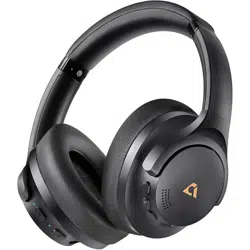

1Mii Y8 Headphones User Guide
Connect/Pair:
1.What devices are 1Mii Y8 headphones
compatible with?
Compatible with any Bluetooth device such
as mobile phones, tablets, laptops, etc.
2.How to connect to a mobile phone?
1)When 1Mii Y8 headphones is turned off,
press and hold the power button for 5
seconds to enter the pairing state directly
(the indicator light flashes red and blue);
2)Turn on the Bluetooth function of the
mobile phone and find the model "Y8" to
connect.
3.Why can't it turn on?
Recommended to charge for half an hour
first. When the charging cable is connected,
check whether the charging indicator light
is always red to ensure that 1Mii Y8
headphones is charging. If the problem
persists, please try to contact after-sales
service.
4.How to confirm that 1Mii Y8
headphones have been successfully
paired?
After pairing successfully, 1Mii Y8
headphones will have a voice prompt and
the switch indicator light will stay on for 2
seconds and then flash every 5 seconds.
5.What should I do when 1Mii Y8
headphones cannot be paired?
1)Try restarting 1Mii Y8 headphones and
the device, make sure the Bluetooth
function is turned on and within the pairing
range of 1 meter;
2)If necessary, reset 1Mii Y8 headphones
(press and hold the "volume +" and

"volume-" buttons for 5 seconds at the
same time);
3)After resetting, 1Mii Y8 headphones will
automatically enter the pairing state and
the indicator light will flash red and blue;
4)Delete the original device name "Y8" in
the device list, and search for device name
"Y8" again to connect.
ANC:
1.How to turn on the ANC function?
When 1Mii Y8 headphones is turned on,
click the ANC button to switch the ANC
ON/Transparent Mode/ANC OFF. Press and
hold the ANC button for 2 seconds to
directly turn on or off the noise reduction
function, Skip transparency mode.
2.What is Transparency Mode?
Transparency Mode allows external sound
to enter the headphones, allowing you to
hear the surrounding environment while
enjoying music, and is suitable for use in
outdoor scenes.
3.What is the noise reduction depth?
40dB.
4.How can I use the ANC function only
without connecting any device?
When 1Mii Y8 headphones is turned on
(press and hold the power button for 1
second, the red and blue lights flash), then
press the ANC button to use it.
Call:
1.Does 1Mii Y8 support voice calls?
1Mii Y8 headphones have a built-in
microphone and support voice calls. Just
one tap to answer/reject/hang up the call.
2.How do I mute the microphone?
Press the ANC button 3 times quickly to

turn the microphone mute on and off.
3.Why is the call volume so low?
1)Check whether the device is connected
correctly;
2)Make sure the call audio and media audio
are connected and turned on;
3)Try to adjust the volume using the
volume button on the phone or 1Mii Y8
headphones;
LDAC:
1.What devices are LDAC compatible
with?
LDAC is compatible with Android devices.
Not compatible with IOS devices.
2.When using the LDAC function, please
follow the steps below to set up your
device for your listening experience:
After connecting to 1Mii Y8 headphones,
please enter the Bluetooth function, find
the connected Bluetooth device "Y8", then
enter the settings interface, find LDAC
playback quality/audio quality, finally select
"Compatible audio and connection
quality".
Charging:
1.When 1Mii Y8 headphones are not
charging, the following troubleshooting
tips may help:
1)USB charging cable may be defective, you
can replace it;
2)Please dry the charging cable. Water may
cause a short circuit and prevent charging;
3)Recommended to use a 5V, 1A adapter;
4)If the problem persists, please contact
after-sales team.
2.How do I know when 1Mii Y8
headphones needs to be charged?
When 1Mii Y8 headphones is low on power,

the LED light will flash red and emit a
low-battery tone. If 1Mii Y8 headphones is
connected to the phone and the battery
level is less than 20%, it is recommended to
charge it immediately.
3.Can I continue to use 1Mii Y8
headphones while charging?
No, but 1Mii Y8 headphones supports two
hours of battery life with five minutes of
charging.
4.How long does it take to fully charge
1Mii Y8 headphones?
It takes about 2 hours to charge to more
than 90%. It is recommended to charge to
90% to avoid overcharging. It takes about 1
hour to fully charge until the charging
indicator goes off.
Battery Life:
1.How long can 1Mii Y8 headphones be
used in ANC OFF and Bluetooth mode?
In ANC OFF mode, you can enjoy up to 75
hours of music playback time. Note: Test
data at 60% volume in 1Mii Acoustic
Laboratory
2.How long can 1Mii Y8 headphones be
used in ANC ON and Bluetooth mode?
In ANC ON mode, you can enjoy up to 55
hours of music playback time. Note: Test
data at 60% volume in 1Mii Acoustic
Laboratory
3.How long can you use the ANC
function without connecting to a device
in wireless mode?
It can be used for 2 hours, and the
headphones will automatically shut down
after 2 hours.
Connection Distance:

1.Why does the Bluetooth connection
drop?
Make sure 1Mii Y8 headphones is fully
charged and the distance between the
headphones and the device is within the
Bluetooth effective range. If the connection
is frequently disconnected, try resetting
1Mii Y8 headphones and the device and
check for interference sources.
2.Is the connection unstable during use?
Under normal use conditions, 1Mii Y8
headphones connection is usually stable,
but occasional connection problems may
occur in environments with strong signal
interference (such as traffic lights, wireless
cameras, etc.).
3.How to ensure the best Bluetooth
connection stability when using 1Mii Y8
headphones?
Avoid connecting to other Bluetooth
devices at the same time and keep 1Mii Y8
headphones and the device at a proper
distance to improve the connection
stability.
Wired Connection:
1.How to play audio in wired mode?
Make sure 1Mii Y8 headphones has power
and plug in the included 3.5-3.5mm audio
cable to use.
Reset:
1.How to reset Y8?
Press and hold the "volume+" and
"volume-" buttons for 5 seconds to
reset(indicator will flash purple 3 times),
then enter Bluetooth pairing
mode(indicator will flash red and blue).
Voice Assistant:
1.How to activate the voice assistant?

Short press the "Pause/Play" button twice.
Use on Airplanes:
1.How to use 1Mii Y8 headphones on an
airplane?
1)You can use a 3.5mm audio cable to
connect 1Mii Y8 headphones;
2)You can purchase a Bluetooth airplane
adapter to connect 1Mii Y8 headphones by
Bluetooth;
3)when using it on an airplane without a
stereo output interface, you need to
purchase an adapter plug.
Multipoint Connection:
1.Do 1Mii Y8 headphones support
multi-point connection?
No.
Product Parameters:
Bluetooth
Version
5.3
Bluetooth
Protocol
Supporta2dp\avctp\avdtp
\avrcp\hfp\spp\smp\att\g
ap\gatt\rfcomm\sdp\l2cap
Speaker Size
40mm
Speaker
Power
20mW
Frequency
Response
20Hz-40KHz