English
EN
User Manual
Before operating this appliance, please read this manual carefully
and retain it for future reference.
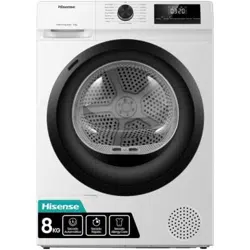
HDF8I10HB
Thank you very much for choosing our company's products.
Please correctly install and use this product, and do not use this product to dry
items that are not suitable for drying in a clothes dryer.
The images in the manual are for illustration purposes only. The appearance,
printing, etc. shall be subject to the actual product.
Our company emphasizes technology updates. In order to enhance the overall
performance of this appliance, we will make technical changes to it without further
notice. Your understanding is appreciated.
This product is for household use only.
The following symbols in this manual are indicated as follows:
Information, suggestions, prompts, or advice
WARNING - GENERAL HAZARD
WARNING - ELECTRIC SHOCK HAZARD
WARNING - BURN HAZARD
WARNING - FIRE HAZARD
Please read the user manual carefully.
3
CONTENTS
INTRODUCTION
PREPARATION
BEFORE FIRST
USE
WASHING
STEPS
CLEANING AND
MAINTENANCE
TROUBLE-
SHOOTING
MISCELLANE-
OUS
4 SAFETY PRECAUTIONS
25 BEFORE THE FIRST USE
13 PRODUCT DESCRIPTION
14 Specifications
15 Installation and connection
15 Packing/Packaging
16 Installation location
16 Adjustable foot
17 Installation clearance
19 Stacking installation
20 Changing the door opening direction
22 Connect drain hose
23 Drying rack
24 Transportation after installation
26 CONNECT TO THE POWER MAINS
28 THE FIRST USE
29 PROGRAMS AND FUNCTIONS
30 Program table
32 Additional settings and functions
33 Additional functions
35 Function selection table
37 Smart networking
38 Start the program
38 End of the program
39 MAINTENANCE & CLEANING
39 Cleaning the filter
40 Clean the heat pump filter
41 Empty the condensate box
42 Add water to the steam function and clean the filter
42 Clean the door seal
42 Clean the enclosure
43 TROUBLESHOOTING
45 FAULT CODES AND TROUBLESHOOTING
46 SERVICE
46 USAGE RECOMMENDATIONS
47 WASTE DISPOSAL
48 PROGRAM TABLE
4
SAFETY PRECAUTIONS
Please read the manual carefully before using
this appliance.
Do not use this appliance if you have not understood or
read this manual.
This manual is applicable to multiple models. Therefore,
this manual may include functions that are not covered by
this model.
Failure to follow the instructions or improper operation
may damage clothing or the appliance, or cause injury to
you. Please place the manual near the appliance for easy
access.
To reduce the risk of explosion, fire, death, electric shock,
injury or scalding to persons when using this product, follow
basic precautions, including the following.
This appliance is not intended for use by persons (including
children) with reduced physical, sensory or mental capabilities, or
lack of experience and knowledge, unless they have been given
supervision or instruction concerning use of the appliance by a
person responsible for their safety.
Children should be supervised to ensure that they do not play with
the appliance.
If the supply cord is damaged, it must be replaced by the
manufacturer, its service agent or similarly qualified persons in order
toavoid a hazard.
The tumble dryer is not to be used if industrial chemicals have been
used for cleaning.
The lint trap has to be cleaned frequently.
The lint must not to be allowed to accumulate around the tumble
dryer.

5
For appliances with ventilation openings in the base, a carpet must
not obstruct the openings.
The maximum capacity in some cycles for dry clothes to be used is
Dry (10kg).
The recommended maximum capacity may vary among different
programs. For best drying results, refer to the Program Table.
Do not dry unwashed items in the tumble dryer.
Items that have been soiled with substances such as cooking oil,
acetone, alcohol, petrol, kerosene, spot removers, turpentine, waxes
and wax removers should be washed in hot water with an extra
amount of detergent before being dried in the tumble dryer.
Items such as foam rubber (latex foam), shower caps, waterproof
textiles, rubber backed articles and clothes or pillows fitted with foam
rubber pads should not be dried in the tumble dryer.
Fabric softeners, or similar products, should be used as specified by
the fabric softener instructions.
Remove all objects from pockets such as lighters and matches.
Fill steam generators only with liquids specified by the manufacturer.
WARNING: Never stop a tumble dryer before the end of the drying
cycle unless all items are quickly removed and spread out so that
the heat is dissipated.
WARNING: The appliance must not be supplied through an external
switching device, such as a timer, or connected to a circuit that is
regularly switched on and off by a utility.
Exhaust air must not be discharged into a flue that is used for
exhausting fumes from appliances burning gas or other fuels.
The appliance must not be installed behind a lockable door, a sliding
door or a door with a hinge on the opposite side to that of the tumble
dryer, in such a way that a full opening of the tumble dryer door is
restricted.

6
That adequate ventilation has to be provided to avoid the back flow
of gases into the room from appliances burning other fuels, including
open fires.
ELECTRICAL SAFETY
This appliance is for household use only.
If the appliance is used
for commercial, for-profit, or purposes beyond the normal scope of
household use, or if the user is not a consumer, the warranty period
shall be the shortest warranty period required by relevant laws.
This appliance complies with relevant safety standards.
Before connecting the appliance to the power supply, please
wait at least 2 hours to ensure it reaches room temperature.
This appliance must be repaired by an authorized service
center, and only spare parts recognized by the authorized
manufacturer shall be used.
Any repairs and maintenance related to safety or performance
should be conducted by trained professionals.
Do not attempt to repair this appliance yourself. Repairs by
unprofessional personnel may cause personal injury or more
serious malfunctions. Please consult your local service center
and always use original spare parts.
Before connecting the appliance to the power supply , ensure that
the electric voltage specified on the rating plate matches the Voltage
of your socket.
Do not attempt to operate the appliance if it is damaged,
malfunctioning, partially disassembled, or has missing or damaged
parts, including damaged wires or plugs.
Do not bend the power cord excessively or place heavy objects on it.
Ensure that the mains cable is not kinked or trapped, and it does not
come into contact with heat sources or sharp edges.
Do not use multiple outlets, extended power cords, or dual adapters
on the appliance. Do not use an extended cord to connect the
appliance to the power supply.

7
Do not spray cleaning solution inside or outside the appliance.
In case of flooding, please disconnect the power plug and contact
the after-sales service center.
Do not connect the appliance to the electrical socket of an electric
shaver or hair dryer.
Do not connect the appliance to an electrical outlet specifically
designed for low-load appliances.
This appliance must be earthed via the power cord. In the event of
malfunction or breakdown, grounding will reduce the risk of electric
shock by providing a path of least resistance for electric current.
Improper connection of the equipment-grounding conductor can
result in risk of electric shock. Check with a qualified electrician or
service personnel if you are in doubt as to whether the appliance is
properly grounded.
This appliance is equipped with a power cord having an equipment-
grounding earthing pin and a grounding power plug. The power plug
must be plugged into an appropriate outlet socket that is installed
and grounded in accordance with all local codes and ordinances.
INSTALLATION
Before using the appliance, be sure to remove the packaging
(sponge, polystyrene foam, etc.) attached to the bottom of the
appliance.
Please install the appliance correctly according to the instructions
and connect the water and electricity (see "Installation and
connection"). The connection of water and electricity should be
carried out by fully trained technicians or professionals.
Installing a dryer on top of a washing machine at least requires two
people.
Do not install this appliance in places where door opening is
restricted.
Always use the pipe or hose provided with the appliance.

8
The appliance may not be in contact with a wall or adjacent furniture.
Please install the appliance in a room with adequate ventilation
and a temperature between 10°C and 25°C.
Do not install the
appliance in an area where the temperature may drop to 5°C
below, otherwise, the parts may be damaged when water freezes.
Place the appliance on a sturdy flat surface. If the appliance is
installed on a high platform, it must be secured to prevent it from
tipping over.
Keep the bottom and surrounding area of the appliance free of
flammable materials such as threads, paper, rags, chemicals, etc.
This appliance must not be stored or used in any outdoor locations.
Avoid lint accumulation near the appliance. For appliance with vents
at the bottom, please ensure that the vents are not blocked by
carpet.
Do not block the air outlet,
and do not place the appliance on a
long-fiber carpet to avoid obstructing air circulation.
Do not install the appliance near heaters or any flammable items.
Do not install the appliance in places where gas leakage may occur
or where the air contains dust particles.
Please ensure good ventilation conditions to avoid the gas
generated by this appliance from flowing back into the room, thereby
causing a fire.
USAGE
After the installation is complete, please let the appliance stand
for 24 hours before using it. If the appliance needs to be laid down
during transportation or maintenance, please face the appliance and
tilt it to the left side horizontally.
Inspect the appliance to see if it has been damaged during
transportation. Never operate the appliance in a damaged
condition.
The dryer uses a heat pump system to heat the air.
9
If the condensate tube is blocked or clogged, then tumble dryer
operation is stopped.
Clean the dryer filters after each drying cycle. If you have removed
the filters, replace them before the next drying cycle.
Do not use wet hands to touch the power plug or operate the
appliance.
The system consists of a compressor and a heat exchanger.
When the dryer is started, compressor operation (the sound of
flowing liquid) or flow of refrigerant may be louder as long as the
compressor operates. This is not a sign of malfunction and it will not
affect useful life of the dryer. In time and with use of the dryer this
noise will become quieter.
Do not drink or prepare food with the condensed water/ distilled
water. It can cause health problems to people and pets.
Never attempt to operate the appliance if it is damaged,
malfunctioning, partially disassembled, or has missing or broken
parts, including a damaged cord or plug.
BURN HAZARD
If you open the dryer door during the drying process, the clothes
may be very hot and there is a risk of burning.
FIRE HAZARD
This appliance is only for drying clothes washed with water. Do not
dry clothes washed or cleaned with industrial cleaners, chemicals,
flammable cleaners, or similar substances (such as gasoline,
trichloroethylene, etc.); otherwise, it may cause an explosion.
Do not attempt to separate any panels or disassemble the
appliance.
Do not use sharp objects like pins, knives, or fingernails to press the
button.
After the program is finished, unplug the power plug.
Never
unplug an appliance by pulling on the power cord. Always firmly
grasp the power plug and pull it directly out from the socket.

10
Because the appliance is heavy, you may injure yourself trying to lift
it. Do not lift the appliance yourself; your hands may be cut by the its
sharp edges.
Do not grasp the appliance by its protruding parts. The protruding
parts on the appliance may break when lifting or pushing the
appliance.
Do not dry clothes with large buttons or other heavy metal items.
Make sure all pockets of clothes to be dried are empty. To prevent
odors and mold, leave the door open and let the drum air dry after
the drying cycle.
Do not leave metal objects in the drum for a long time.
The door glass may break due to strong impact, so be careful when
using the appliance.
Please put the clothes completely into the drum so that the clothes
do not get caught in the door.
Unplug the power cord from the electrical outlet when the appliance
is not in use.
Do not put animals (such as pets) into the appliance.
Oil-affected items can ignite spontaneously, especially when
exposed to heat sources such as in a tumble dryer. The items
become warm, causing an oxidation reaction in the oil. Oxidation
creates heat. If the heat cannot escape, the items can become hot
enough to catch fire. Piling, stacking or storing oil-affected items can
prevent heat from escaping and so create a fire hazard.
If it is unavoidable that fabrics that contain vegetable or cooking
oil or have been contaminated by hair care products be placed in
a tumble dryer they should first be washed in hot water with extra
detergent - this will reduce, but not eliminate the hazard.
Do not use any solvents or cleaning agents that may damage the
appliance (please refer to the recommendations and instructions of
the relevant cleaning agent manufacturer).
11
Do not use this appliance to dry unwashed clothing (except for
certain drying care programs).
BURN HAZARD
During the drying process, the door may become hot. Be careful to
avoid burns. Do not let children play near the door. Do not touch the
door glass during the operation of the appliance.
The back of the appliance may become very hot during operation.
Do not touch the back of the appliance until it has completely cooled
down.
Turn off the power during the drying process or take the clothes out
of the appliance immediately after the drying is complete. Leaving
the dried clothes in the appliance may cause a fire. After the drying
is complete, please take out the clothes immediately and hang or lay
them flat to cool as soon as possible.
The dryer is protected with an automatic switch-off system in case of
overheating. This system wiIl switch off the dryer if the temperature
is too high.
Never reach into the appliance while it is operating. Wait until the
drum has completely stopped.
Do not push down on the door, when the appliance door is open.
If the net filter is clogged, the overheating automatic switch- off
system may be activated. Clean the filter, wait for the dryer to cool
down, and try running it again. If the dryer still fails to start, call a
service technician.
WARNING
In the appliance enclosure or in the built-in structure, keep
ventilation openings clear of obstruction.
WARNING
The appliance contains refrigerant which although it is
environmentally friendly, is flammable R290. Failure to dispose of it
properly may result in a fire or poisoning dispose of the appliance
properly and do not damage the pipes in the refrigerant circuit.

12
Always ensure that the condensate tank is drained before moving
the appliance or storing it in an unheated room during the winter.
WARNING
Do not damage the refrigerant circuit.
CHILD SAFETY
Before you close the appliance door and run the program, please
ensure that there is only clothing in the drum. Make sure that no
children climb into the appliance and close the door from the inside.
Do not let the appliance door stay open. Children may hang on the
door or climb inside the appliance, causing damage or injury.
Keep all packaging materials in a place out of the reach of children,
as these may be dangerous.
Do not let children under 3years old approach the appliance if
they are not supervised at all times.
After understanding the safe use of the appliance and the dangers
caused by improper use, children aged 8 years and above, as well
as people with reduced physical, sensory, or mental abilities, or lack
of experience and knowledge, can use this appliance, but they need
to be supervised.
Children must not clean the appliance or perform any maintenance
on it without supervision.
SERVICE
The user shall be responsible for the repair costs of damage caused
by improper connection, improper installation and use, or repair
by unauthorized personnel, as such damage is not included in the
warranty.
The warranty does not include
consumables, slight color
deviations, increased noise due to appliance aging (which does
not affect the functionality of the appliance), and cosmetic defects
of parts (which do not affect the functionality and safety of the
appliance).
13
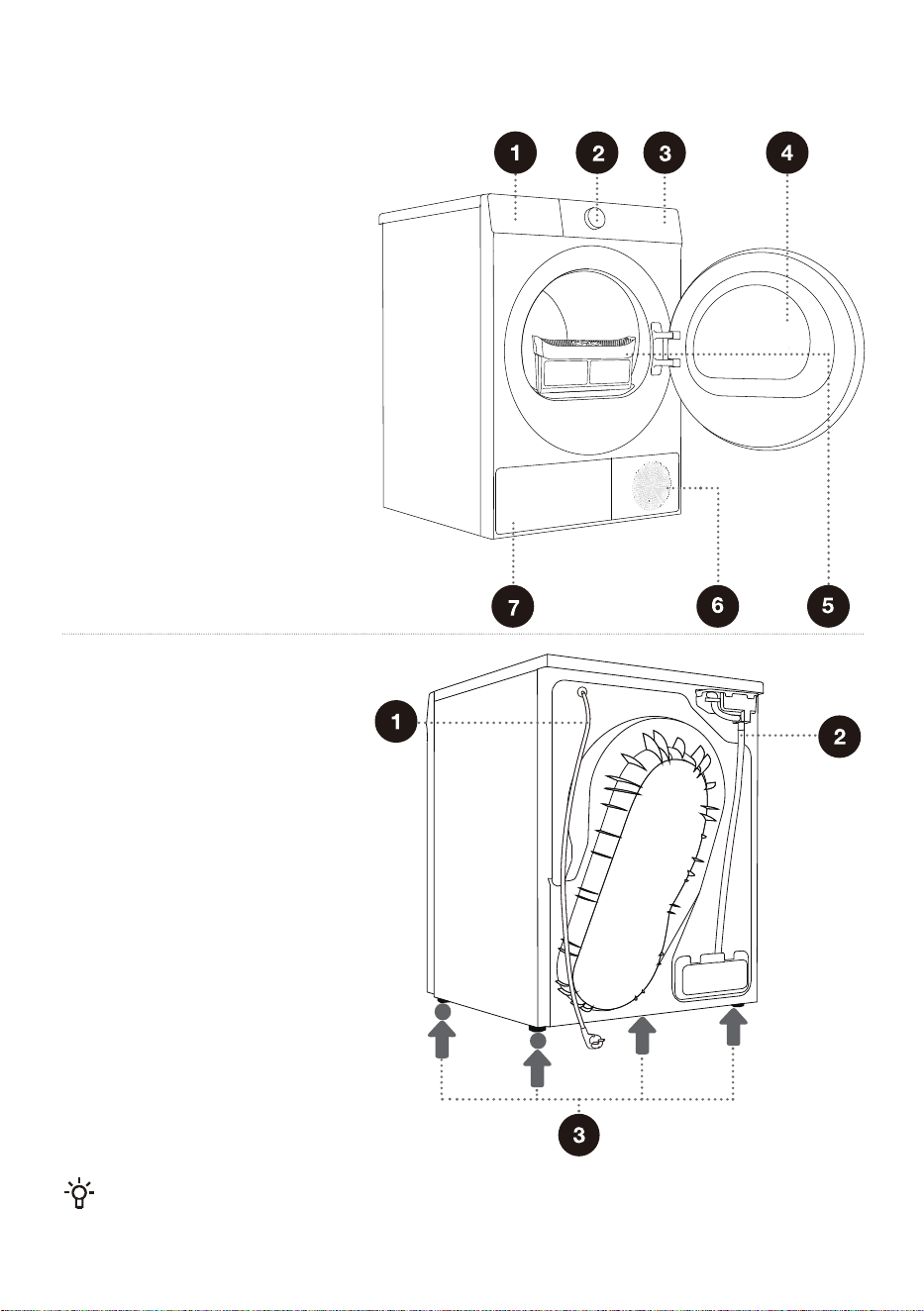
PRODUCT DESCRIPTION
Front
1 Condensate box
2 Knob
3 Control panel
4 Door
5 Filter
6 Air vent
7 Heat exchanger door cover
Back
1 Power cord
2 Condensate discharge hose
3 Adjustable feet
The illustrations in this manual are for demonstration purposes only. Due to product improvements
and series expansion, the product appearance, color, and functional components you receive may
differ from the illustrations in this manual. Please refer to the actual product.
14
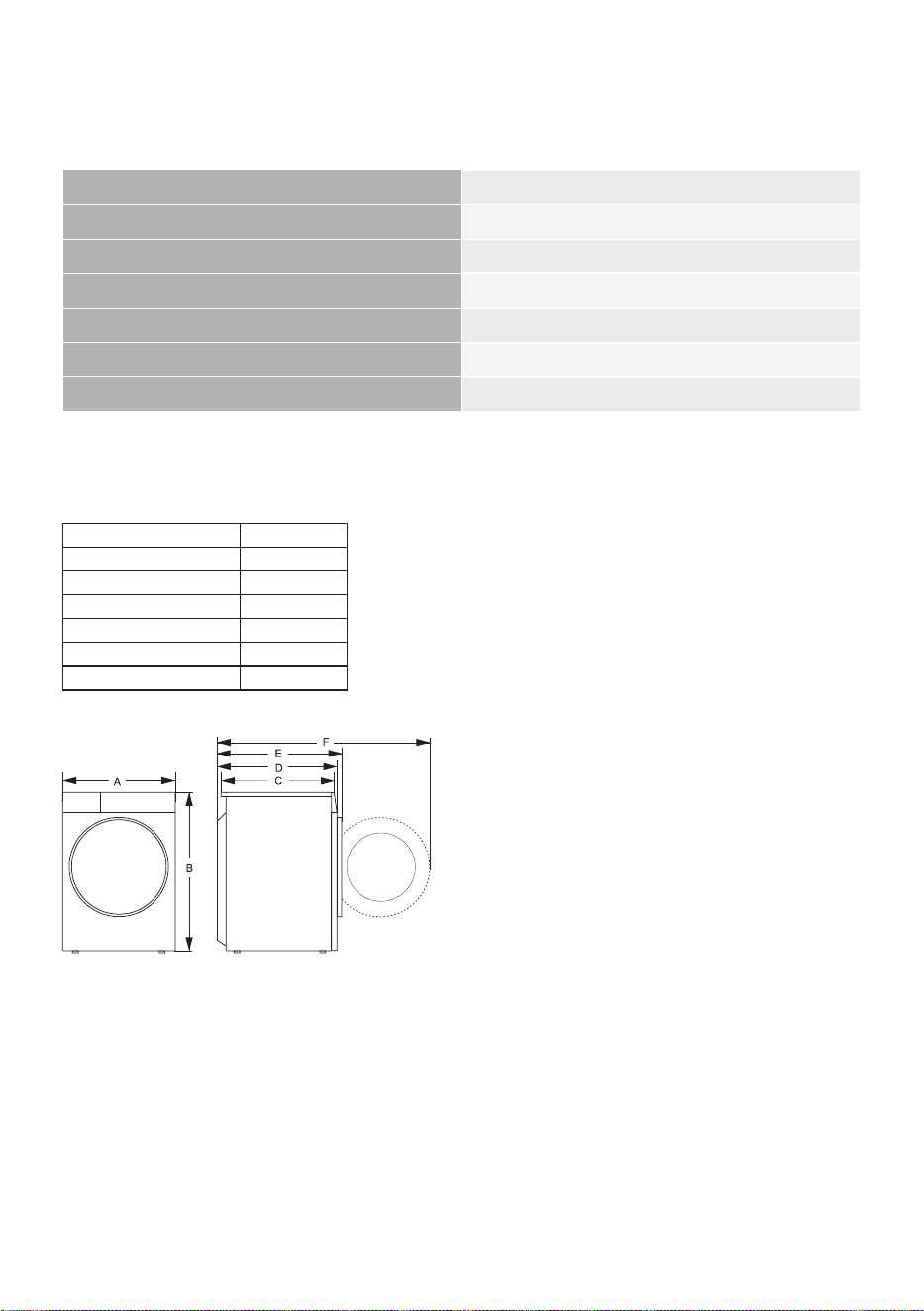
SPECIFICATIONS
(depending on the model)
Maximum load
10kg
Net weight
57kg
Rated voltage
220-240V~
Rated frequency
50Hz
Rated power
750W
Refrigerant type
R290
Refrigerant capacity
150g
Size (mm)
Index Size (mm)
A 595
B
845
C
615
D
640
E
680
F
1150
15
INSTALLATION AND CONNECTION
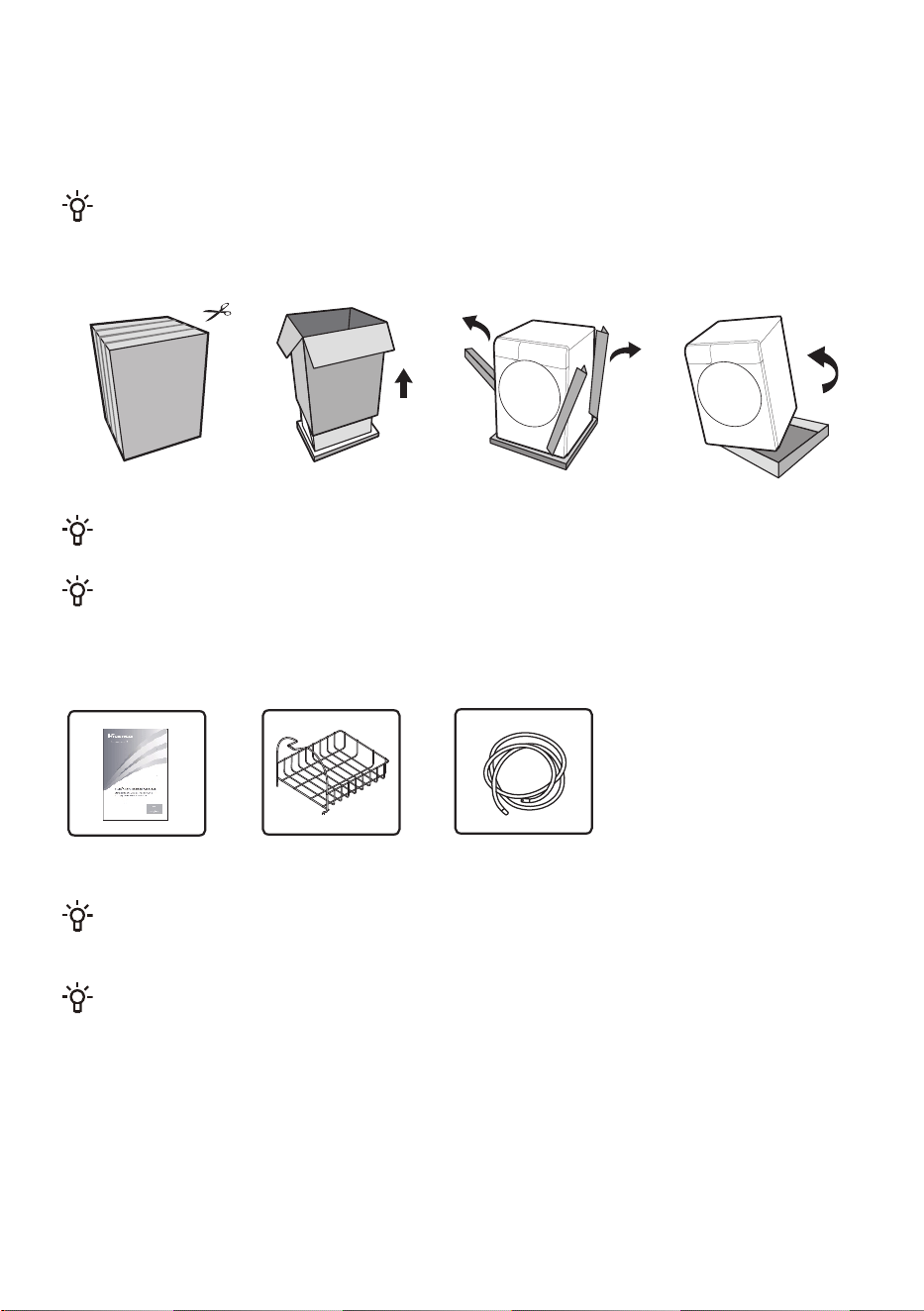
PACKING/PACKAGING
Please first remove all packaging and foam, especially the foam base. When unpacking the
device, please do not use sharp objects to damage it. Keep packaging materials (plastic bags, other
plastic parts, etc.) out of reach of children.
The process of packing the machine is just the opposite of unpacking above.
Please check the device for any damage. If damaged, do not use it, and immediately contact
after-sales service.
The accessories included with this appliance include one or more of the following:
Instructions Drying rack Drain pipe
Different models have different configurations, and the accessories included with this device are
subject to the actual configuration of the model.
For your safety and extended product life, use only authorized components. The manufacturer is
not responsible for product malfunction or accidents caused by the use of unauthorized components or
parts.
16
INSTALLATION LOCATION
Please place the appliance on a solid surface and keep it steady. The flat surface should be kept
clean and dry; otherwise, the appliance may slip. Also, clean the bottom of the adjustable foot.
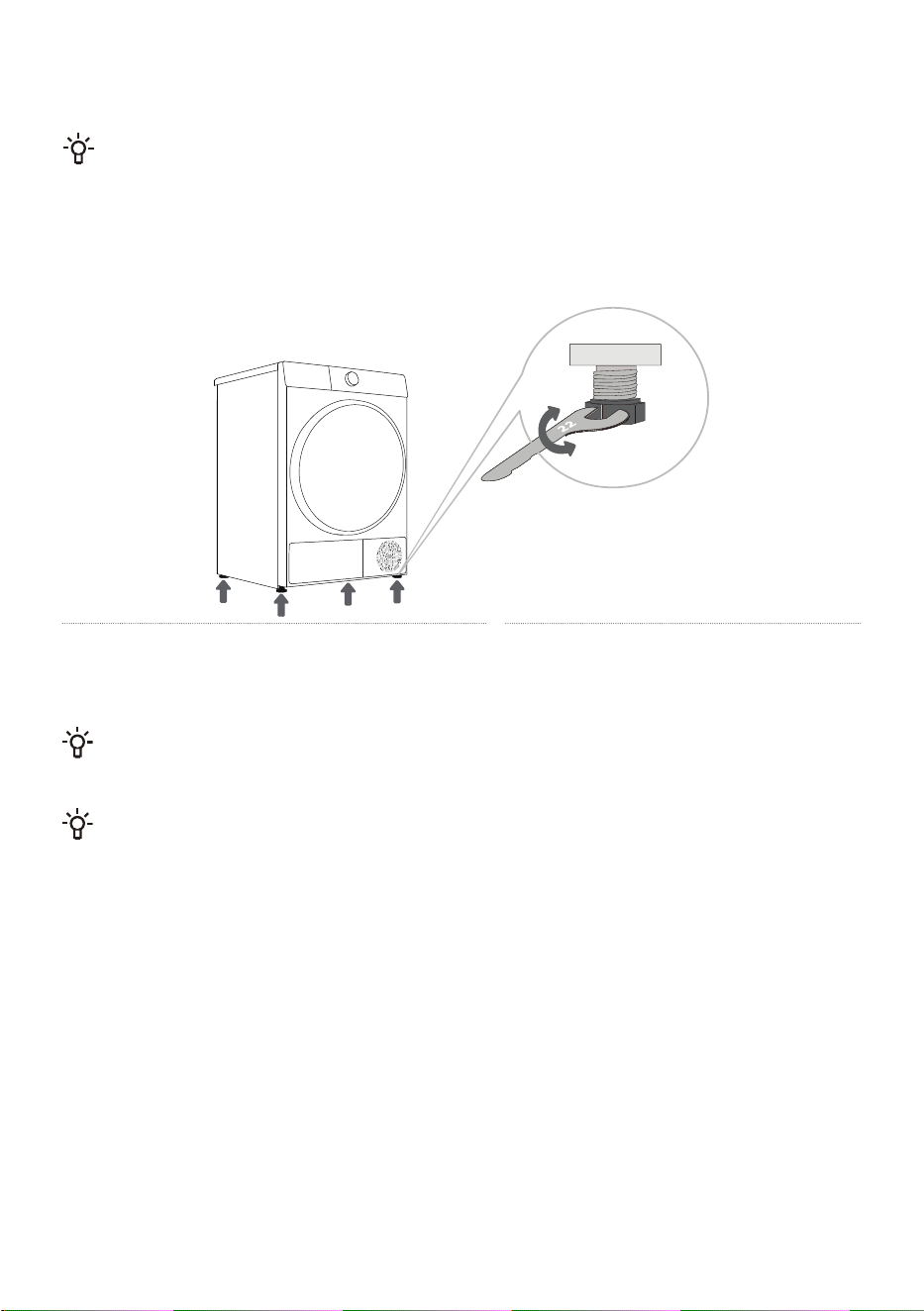
ADJUSTABLE FOOT
Use a level and a 22mm wrench for adjustment.
1
Level the appliance by turning the four
adjustable feet. The adjustable feet allow 1 cm
height adjustment.
2
After adjusting the height, tighten the
lock nut counterclockwise with the
wrench (as shown in the figure).
Incorrect levelling of the dryer with the adjustable legs may cause vibration, appliance sliding
across the room, and loud operation. Incorrect levelling of the dryer shall not be subject to warranty.
Sometimes, unusual or louder noise may appear during appliance operation; these are mostly the
result of improper installation.
17
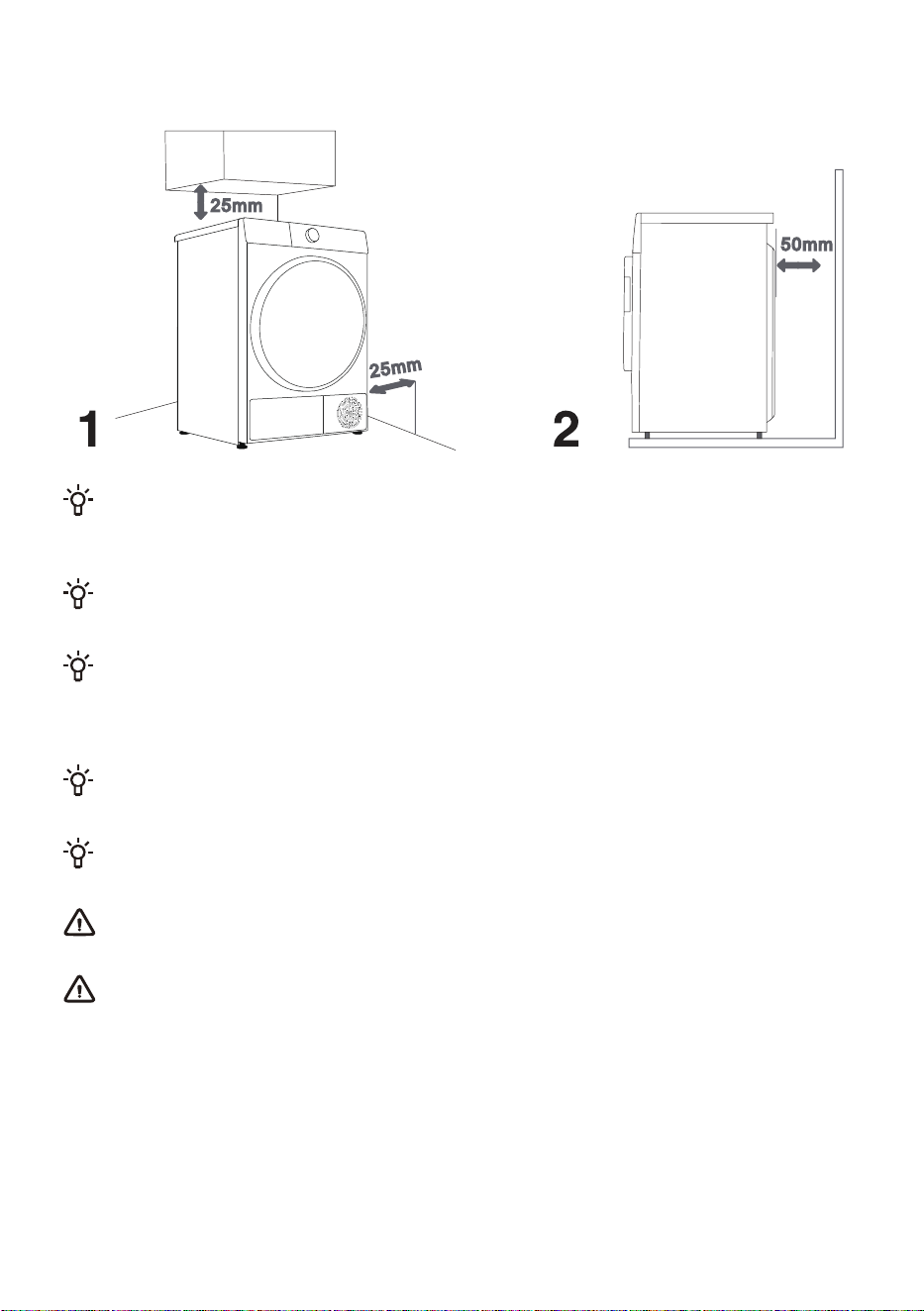
INSTALLATION CLEARANCE
The dryer may not be in contact with a wall or adjacent furniture. For optimum dryer operation,we
recommend observing the clearance from the walls as indicated in the figure. In case of failure to heed
the required minimum clearance, the dryer may overheat.
Vents on the back wall and the air exhaust opening on the front side of the dryer should never be
obstructed.
The room in which you will install the dryer should be sufficiently ventilated, with a temperature
between 10°C and 25°C. Dryer operation at a lower environment temperature may result in
condensate accumulation in the dryer interior. Do not place the dryer into a place where there is
danger of freezing. Frozen water in the condensate tank and pump may damage the dryer.
The dryer emits heat. Therefore, do not place it in a very small room, as the drying process may
take longer due to limited amount of available air.
Lighting in the room should be sufficient to allow reading the information on the display unit on the
control panel.
Do not place the dryer behind lockable or sliding door, or door with a hinge on the opposite side
of the dryer door hinge. Install the dryer in such way that the door can always be freely opened.
Do not place the dryer on a carpet with long fibres as this may impede air circulation.
18
After installation, wait for 24 hours without moving the appliance before using it for the first time. If
the dryer has to be laid down on one of the sides during transport or servicing, place it with its left side,
viewing from the appliance front, downwards.
19
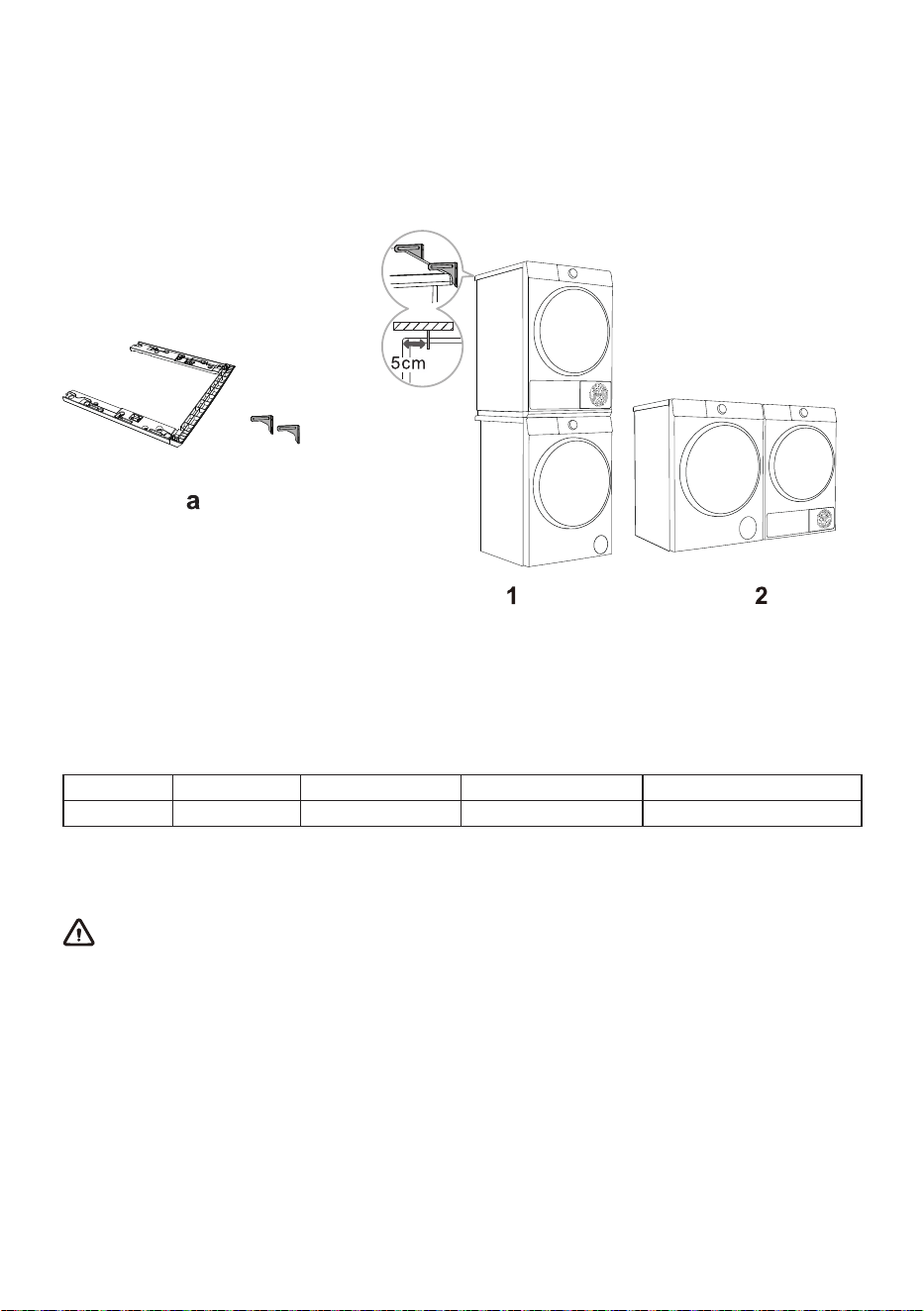
STACKING INSTALLATION
This dryer must be stacked with a washing machine of the same brand using a stacking kit of the same
brand(see Figure 1). You can contact aftersales for purchase figure a, and install it according to user
manual.
Alternatively, the dryer can be placed next to the washing machine (figure 2).
Stacking Brackets Wall fixed support
Stacking brackets (accessories)
Please use original accessories. You can refer to the following recommendations for purchasing
stacking brackets.
Dryer series Dryer depth(D) Washing machine series Washing machine depth(D) Matching Stacking Brackets
8I 640mm 8I 600mm HPSS8I
At least two persons are required to install the tumble dryer on top of a washing machine.
20
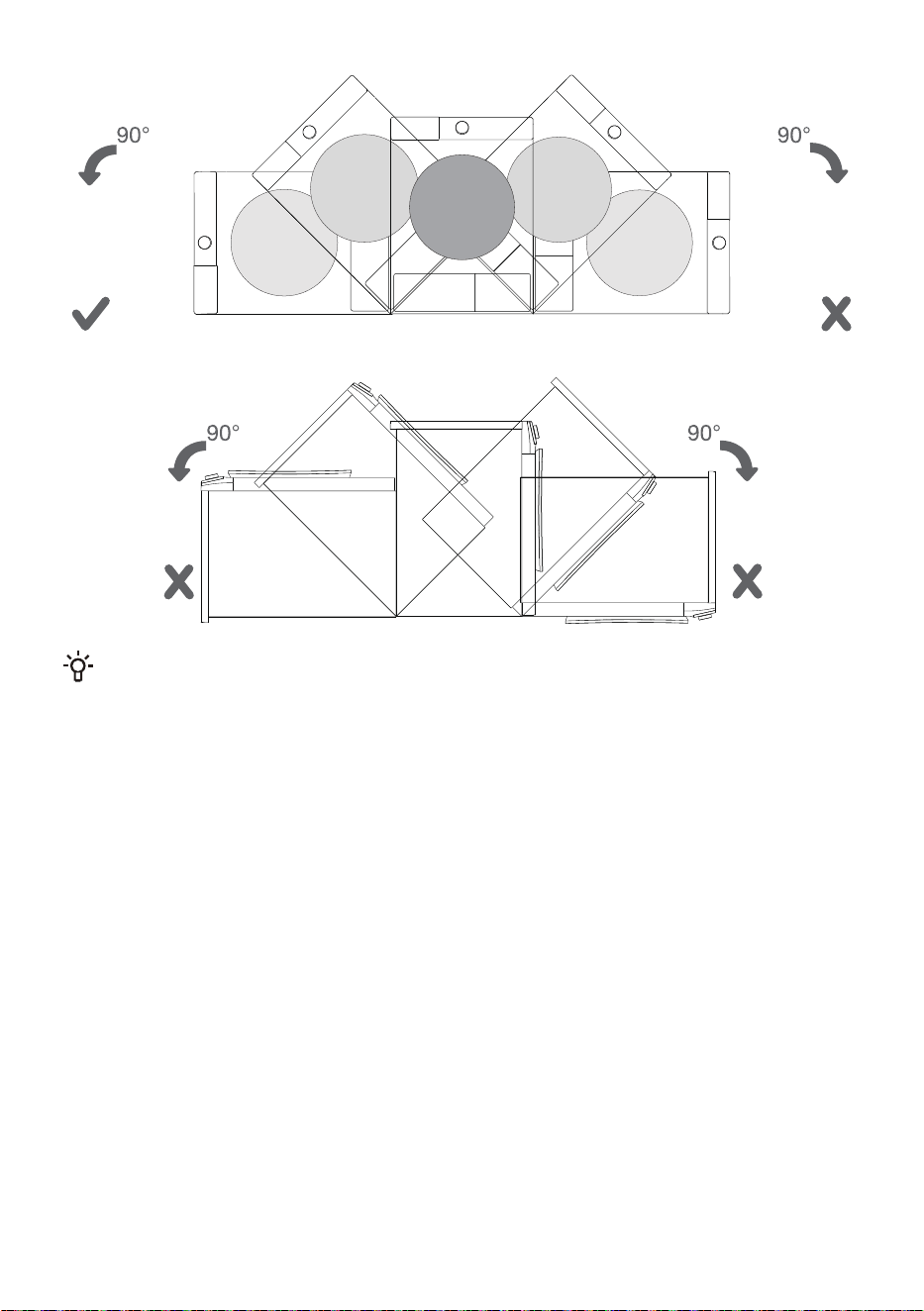
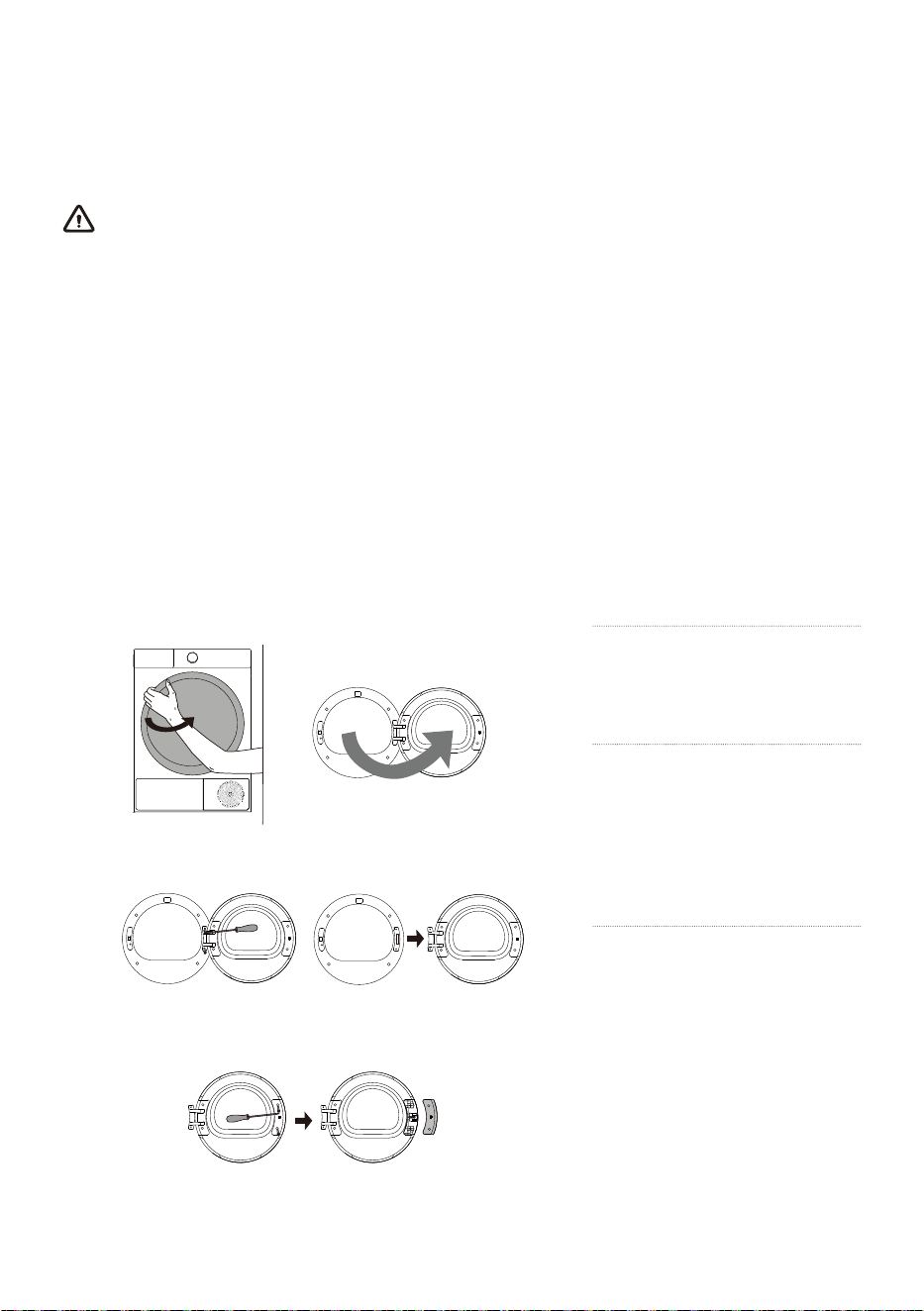
CHANGING THE DOOR OPENING DIRECTION
For easier operation, you can change the door opening direction. The steps are as follows (taking the
example of changing from opening the door from the left side to opening the door from the right side).
WARNING
Support the door with a stool or box that fits under the door, or have an assistant support the weight of
the door.
Avoid dropping the door.
Unplug the appliance or turn off power at the main circuit breaker before beginning door reversal.
Always reverse the door BEFORE stacking the appliance on top of the washer.
Do not reverse the door while the appliance is stacked on a washing machine.
Before removing the hinge screws, have an assistant support the weight of the door. The door could
fall on the floor due to the weight of the door.
For safety reasons, two or more people need to work together to reverse the door.
The appearance of the screws varies and the screws must be inserted differently depending on the
position. Make sure that you've selected the correct screw before tightening.
1
Fully open the door.
2
Unscrew the two fastening
screws of the door hinge
with a phillips screwdriver (or 8
mm socket spanner) to remove
the whole door body.
3
Unscrew the two screws of
the door hook cover plate
with a phillips screwdriver, and
remove the whole door hook
cover plate (including the door
hook).
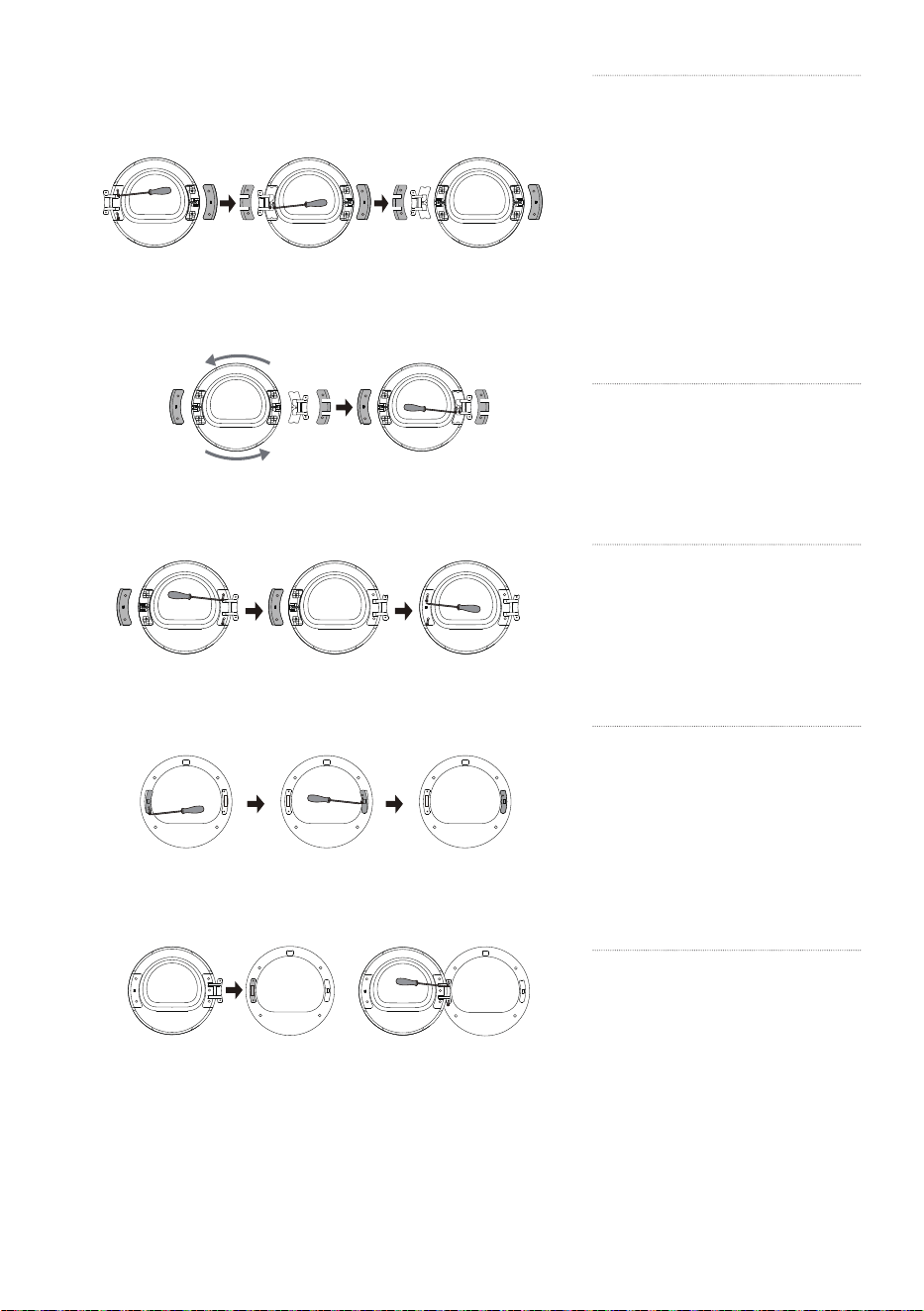
21
4
Unscrew the two screws
of the hinge cover plate,
pull it out horizontally with a little
force, and then remove the two
screws (stainless steel pan head
screws) on the reinforcing iron
plate. And press the door body
with one hand, grasp the hinge
with the other hand, lift it up little
by little, and slowly remove the
hinge from the positioning pin.
If necessary, use a flat head
screwdriver to pry it.
5
Rotate the hinge assembly
180° to the other side,
install the hinge assembly on the
stud and press it tightly, and then
tighten the two screws in the
middle.
6
Rotate the hinge cover
plate and the door hook
cover plate 180° respectively and
install them at the corresponding
positions on the other side of the
inner frame, and then tighten the
screws.
7
Remove the door lock screw
of front assembly pull down
the door lock vertically by hand,
take it down and rotate it 180° to
the other side. Then install it to
the hole of front assembly, pull it
down to clamp it, and tighten the
screws. Now, the reversing of
door lock is completed.
8
Finally, install the door
hinge on the front assembly,
tighten the two screws, and close
the door. At present, the door
reversing (from left opening to
right opening) is completed.
22
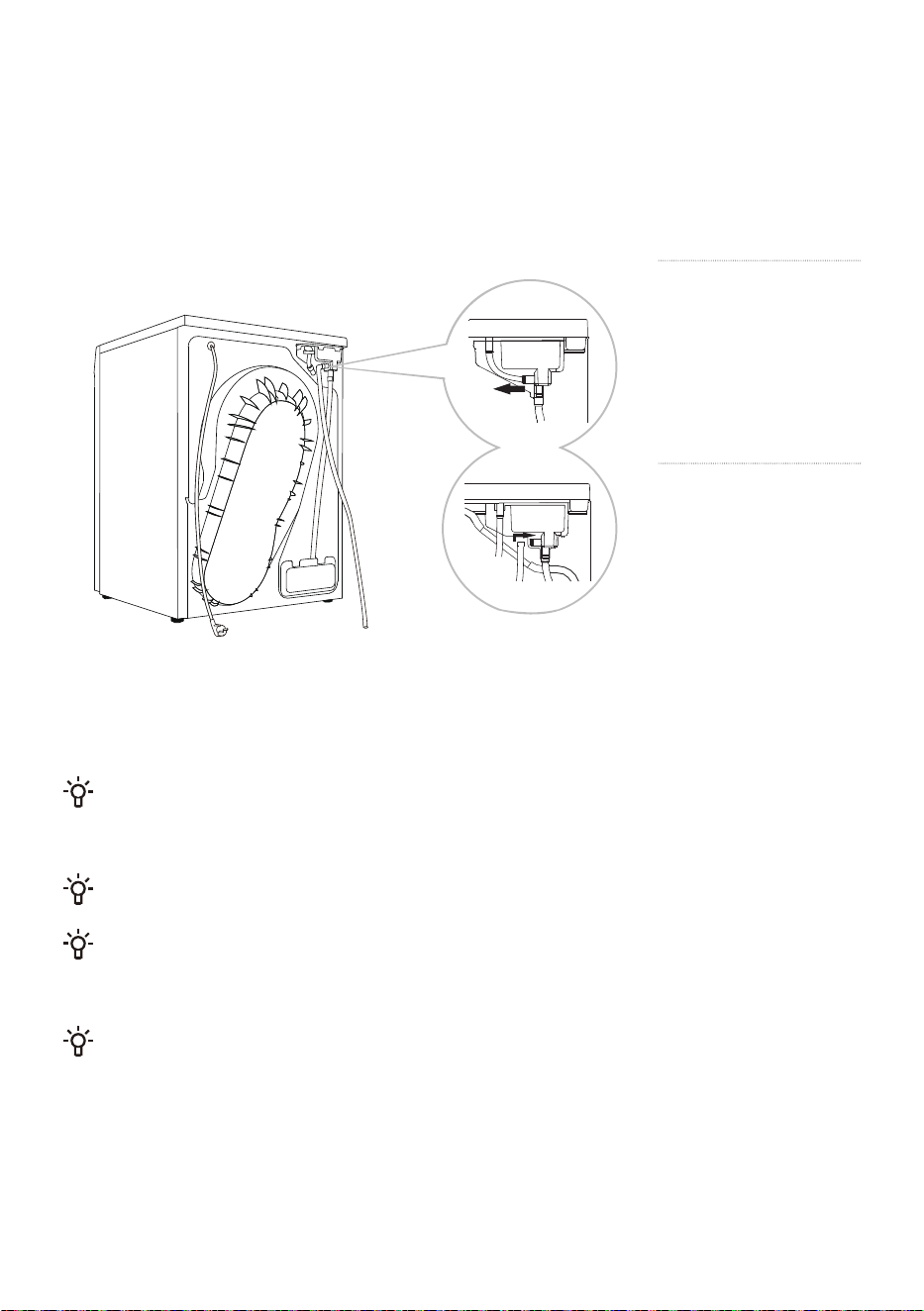
CONNECT DRAIN HOSE
If the appliance is not connected to a drain hose, the water extracted from the clothes by the
condenser will accumulate in the condensate box, which needs to be emptied after each program. If
the installation location of the appliance is close to the drain outlet, or if the dryer is stacked on top of
the washing machine, you can install the drain hose included in the package to drain the water directly
into the drain outlet.
Connecting tube
Drain hose
1
Unplug the
connecting tube
at the back of the
appliance's condensate
box and hang it on the
back of the appliance.
2
Install the drain
hose in the
accessories to this
position (as shown in the
figure), please confirm
that the installation
connector is firmly
inserted, and insert the
other end of the drain
hose into the drain
outlet.
If you decide to place the condensate drain hose into the drain outlet, make sure the drain hose
is installed correctly. After the drain hose is installed in place, the condensate water can be discharged
directly, without the need to empty the condensate box after each use.
Please use the drain hose provided with this appliance.
Do not twist or compress the drain hose, otherwise it will affect normal drainage. The height of the
drain hose must not exceed the height of the machine body; otherwise, the water cannot be drained. If
the drain hose is too long, please cut off the excess portion.
Do not place the drain outlet in stagnant water; this may cause backflow.
23
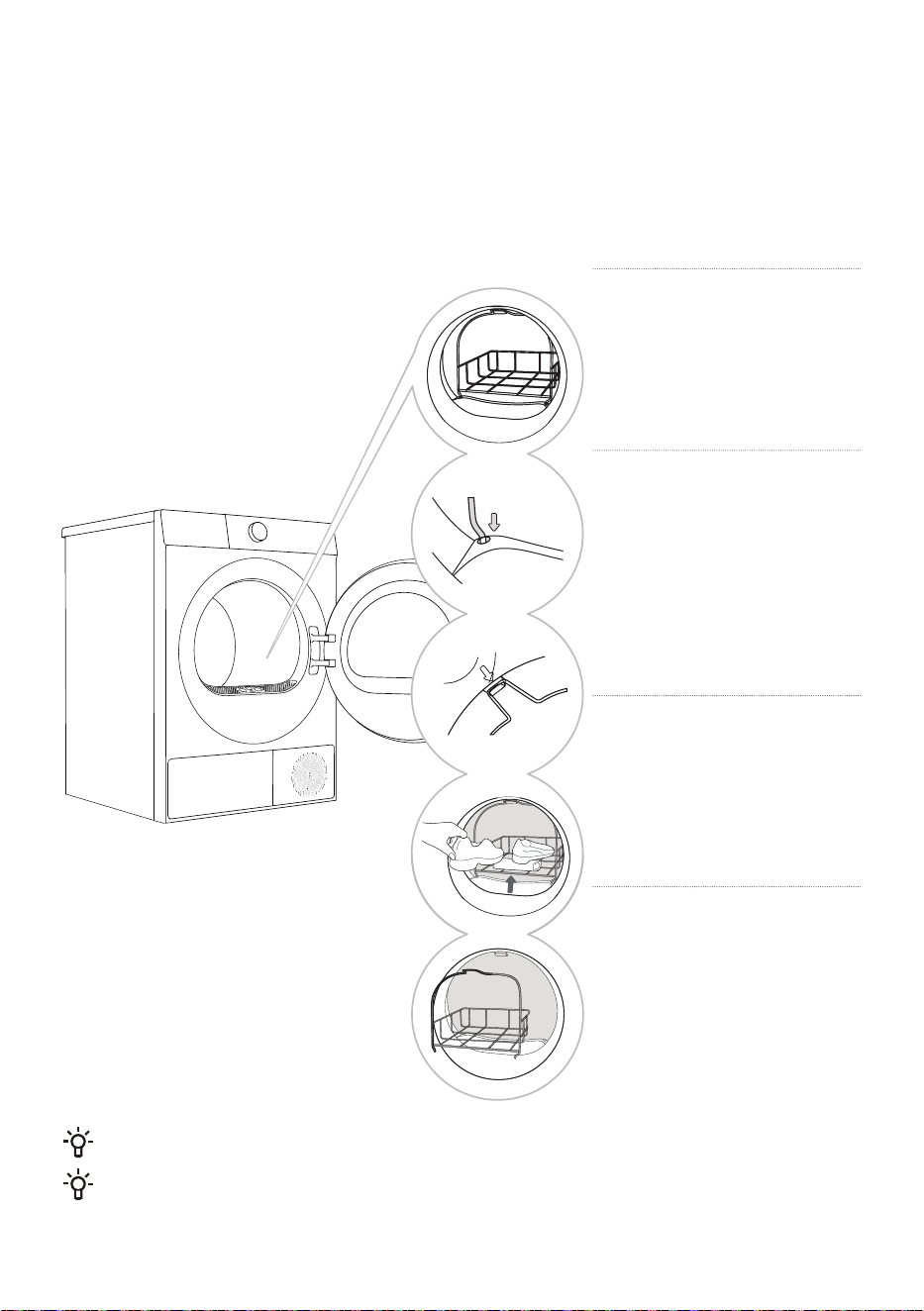
DRYING RACK (Some models have it; the specific model
shall prevail)
Before drying clothes for the first time, please remove the drying rack and other packaging materials
from the drum. When you need to use the drying rack to dry special garments, please install the drying
rack in place according to the following steps.
1
Open the door and insert
the drying rack.
2
Tilt the drying rack at a
certain angle, with the lower
end caught in the two holes
of the filter and the upper end
hooked into the slot of the front
support (as shown in the figure).
3
Drying rack can be used
for drying sports shoes,
slippers or other items that are
not suitable for turning over.
4
After drying, take out the
drying rack, and close the
door.
Before drying, sports shoes or slippers should be wrung out to prevent dripping.
The drying rack will remain stationary while the drum is rotating. Therefore, please ensure that the
clothes in the drying rack do not come into contact with the drum, otherwise the clothes and the dryer
may be damaged.
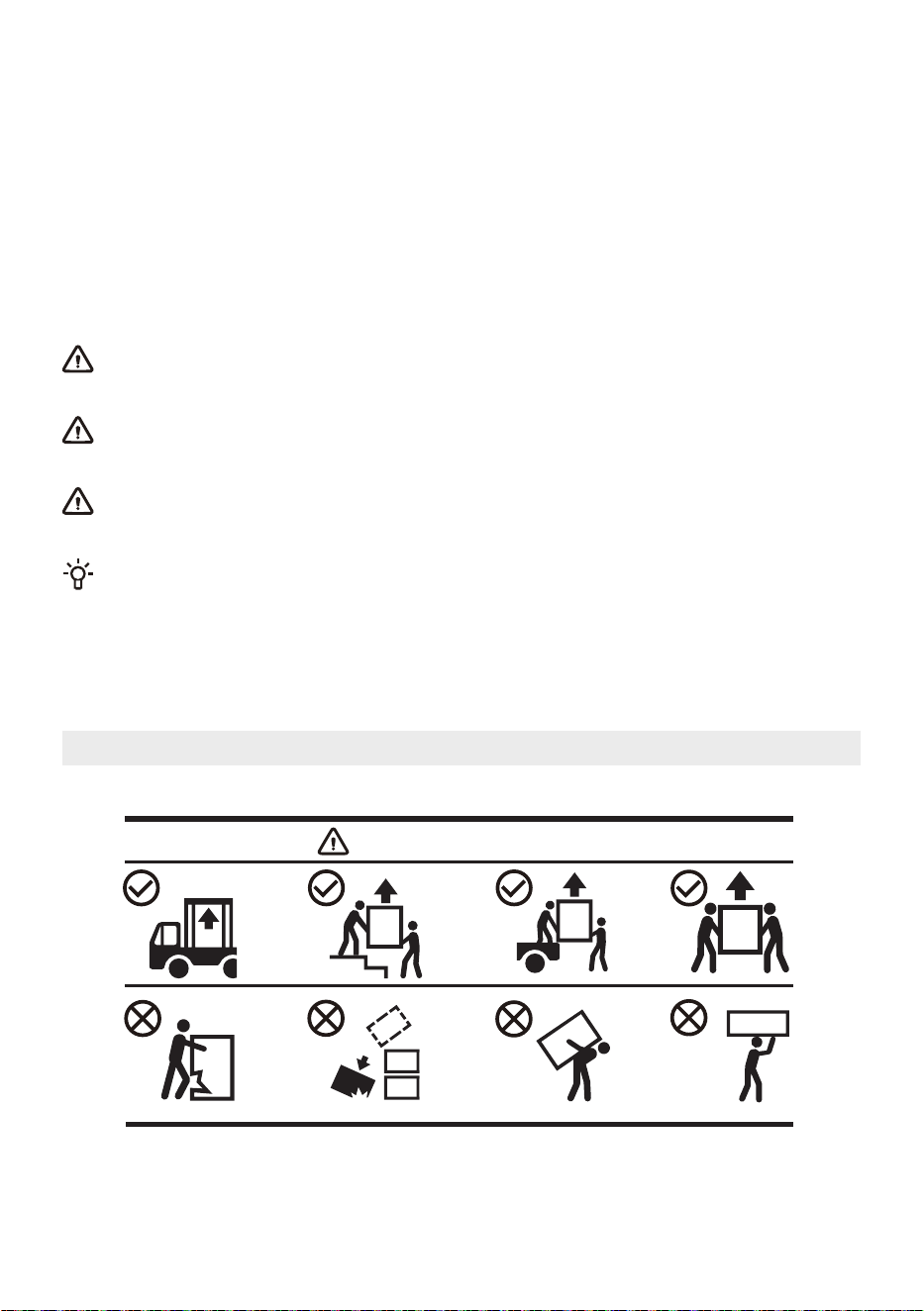
24
TRANSPORTATION AFTER INSTALLATION
If you need to transport an installed appliance, first unplug the power plug, detach the drain hose, and
ensure the door is closed properly.
After each drying program, a small amount of condensation may remain in the appliance. Start the
appliance, select any program, and run it for about half a minute to drain the accumulated water to
prevent damage to the appliance during transportation. If it is not possible to transport the appliance
upright, please tilt it to the left.
Pack all packaging materials (plastic bags, other plastic parts, etc.).
The appliance is heavy; please use at least two people to move it. When transporting, do not hold
protruding parts such as the door, top cover, etc., to prevent them from falling off or being damaged.
After transport, let the appliance sit for at least 2 hours before connecting it to the power supply.
The device should be installed and connected by trained technicians.
Read the instructions carefully before reconnecting the appliance. Damage caused by improper
connection or use is not covered by the warranty.
If the appliance was not transported according to the instructions, it should be allowed to rest
for at least 24hours before connecting it to the power supply. Failure to do so may lead to heat pump
failure, and such failures are not covered by the warranty. Be careful not to damage the cooling
system; please refer to "Installation and connection".
Transport and Handling Method
Handling Method
25
BEFORE THE FIRST USE
The first use
Before using this product for the first time, please ensure that the appliance is not connected to the
power supply. Then, open the door and clean the drum with a soft damp cloth.
Do not use solvents or cleaning agents that may damage the appliance (please follow the
recommendations and warnings provided by the cleaning agent manufacturer).
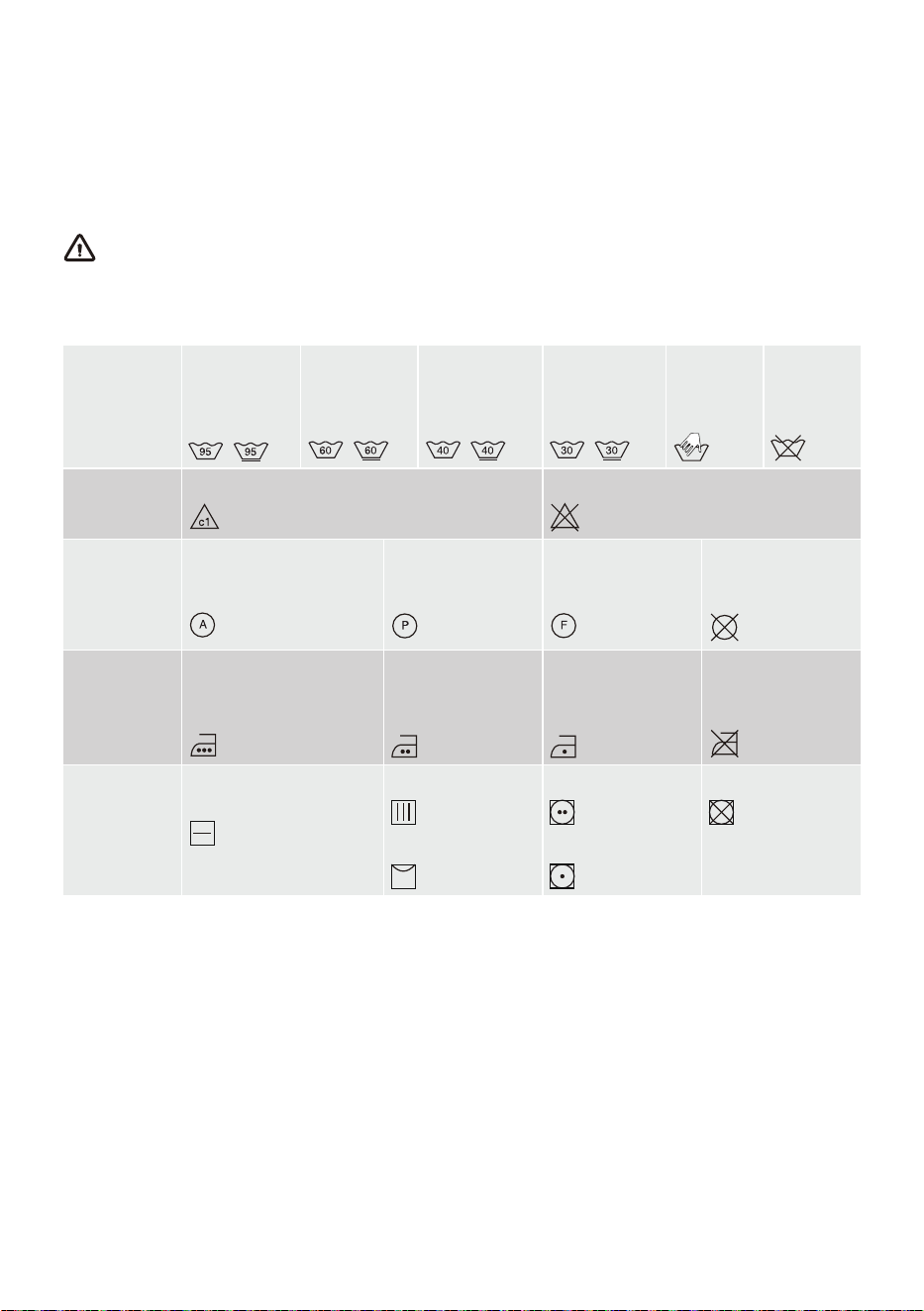
Pay attention to clothing labels
Washing
Maximum
water
temperature
95°C
Maximum
water
temperature
60°C
Maximum
water
temperature
40°C
Maximum
water
temperature
30°C
Hand
wash only
Do not
wash
Rinsing
Rinse in cold water
Do not rinse
Dry cleaning
It can be dry cleaned,
detergent is not limited
Dry clean with
petroleum solvents
R11 and R113
Dry clean with
kerosene, pure
alcohol and R113
Do not dry clean
Ironing
Maximum ironing
temperature 200°C
Maximum ironing
temperature
150°C
Maximum ironing
temperature
110°C
Do not iron
Drying
Dry flat (placed on a flat
surface)
Drip dry
Line dry
High heat
Low heat
Do not dry
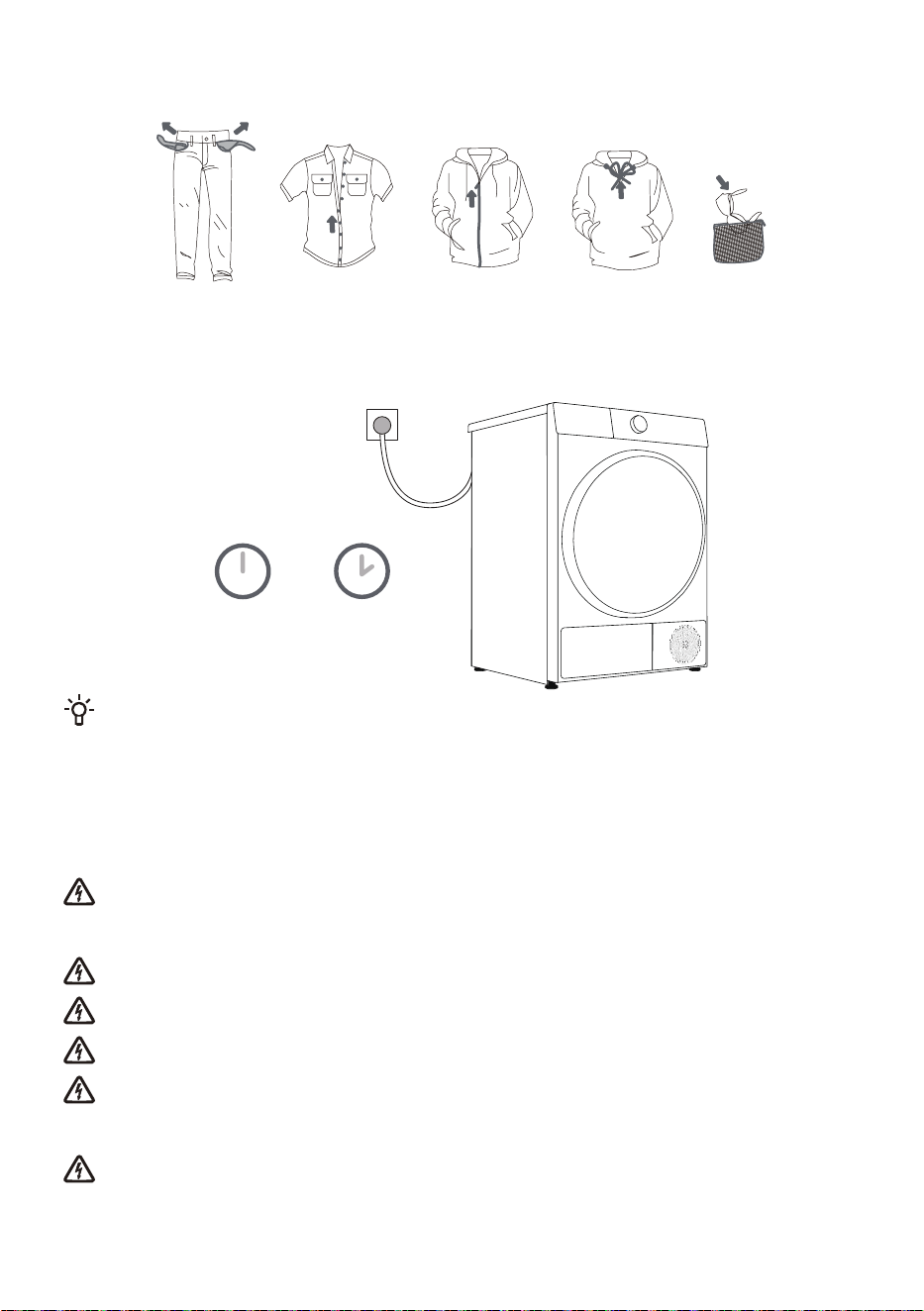
Preparation for drying
1. Classify clothing according to its type and thickness, and refer to the requirements on the clothing
labels.
2. Empty clothing pockets; remove any metal items that could damage clothing and appliance; button
up and turn clothing with buttons or embroidery inside out; Zip up your clothing; if the clothing has
drawstrings, please tie them.
3. Place sensitive clothing and small, lightweight clothing into a dedicated mesh laundry bag and dry
them with other clothing.
4. For clothes with pilling surfaces or long pile fabrics, please turn them over before drying.
5. It is not recommended to use a dryer to dry delicate fabrics, as they may be damaged during
drying. To avoid damage, please do not put the following types of clothing into the dryer:
• Leather clothing and other leather products.
• Clothing that has undergone waxing treatment or requires special care.
• Clothing with a large amount of wool, plastic, or metal decoration.
26
• Clothing with sequins.
• Clothing with metal accessories that are prone to rusting.
CONNECT TO THE POWER MAINS
2 hours
After installation, the appliance must remain on a stable surface for at least 2 hours before
connecting to the power supply.
This appliance is connected to a grounded power socket, and there should be no obstructions between
the appliance and the socket. The power socket should have compliant grounding protection. Ensure
that the power supply is consistent with the power requirements of the appliance. For basic information
about the appliance, please refer to the nameplate.
It is recommended to use overvoltage protection devices to protect this appliance from
lightning strikes.
Do not use an extension cord to connect the appliance to the power supply.
Do not connect the appliance to a power outlet designated for light-load appliances.
Please do not plug or unplug the appliance with wet hands.
The repair and maintenance of this appliance should be handled by professionally trained
personnel.
Only personnel authorized by the manufacturer can replace a damaged power cord.
27
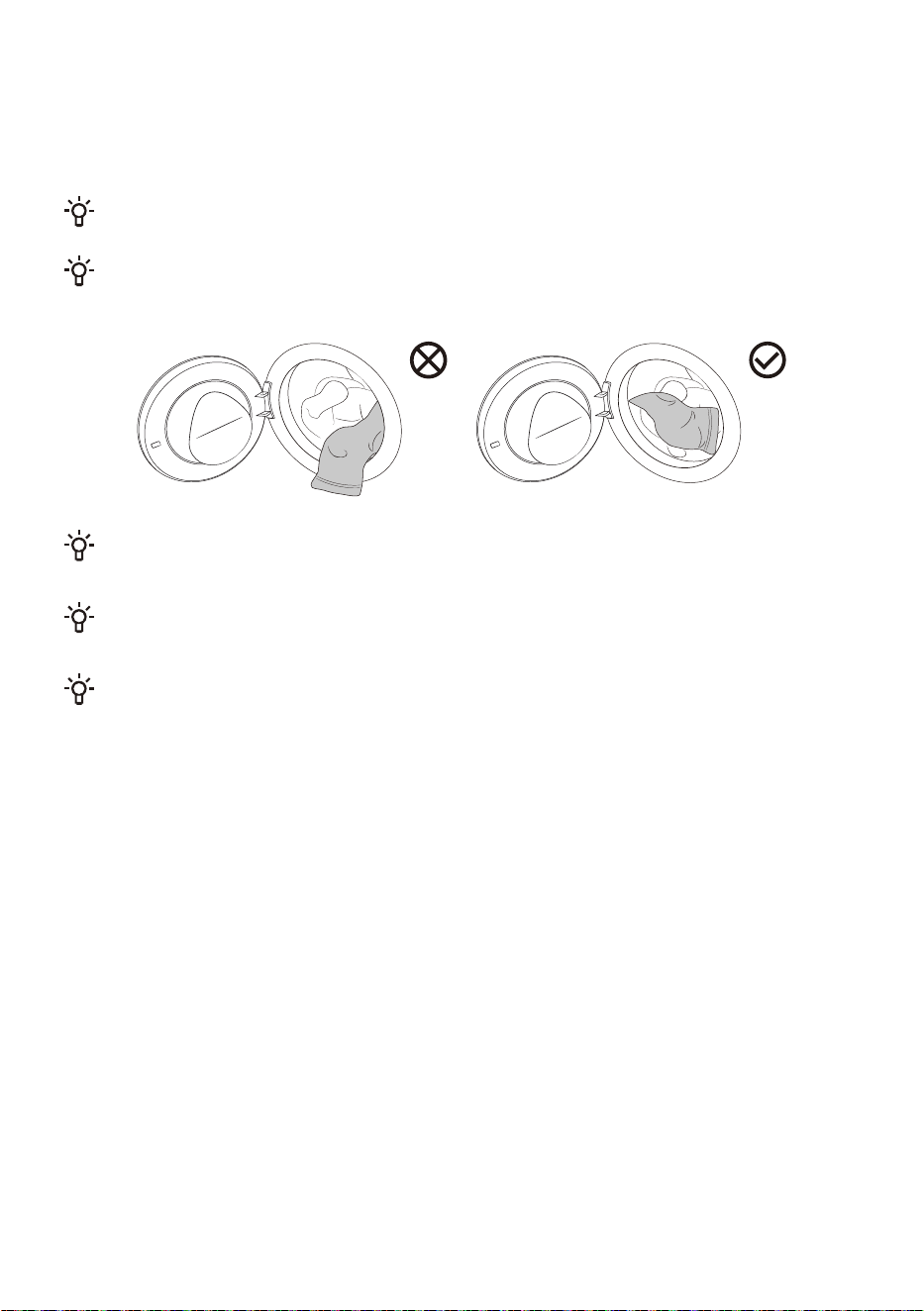
PUT IN THE CLOTHES TO BE DRIED
Open the machine door, confirm there is no foreign matter in the drum, and loosely place the clothes
into the drum.
Close the machine door and hear a "click" sound, indicating that the machine door is closed tightly.
Do not overload the drum! Refer to the "Program Table" for the maximum load. If the drum is too
full, the clothes will be more wrinkled and may not dry effectively.
Please completely put the clothes into the drum to prevent the clothes from getting caught in the
door.
While the dryer is operating, you can easily open the door to add or remove clothes. After closing
the door, press the Start/Pause button to resume operation.
Do not put clothing into a dryer without wringing or spinning it (recommended minimum drying
speed of 800 RPM).
When drying larger items (bedding, quilts, etc.), be sure to shake out the clothing before placing it
in the dryer.
28
THE FIRST USE
Tap " " to power on and enter the startup navigation.
Configure Language and WLAN according to the startup navigation and actual needs of the user, and
complete the Operating tips.
Language
Set the language; the default is English. Rotate the main knob to make your selection, then tap " " to
confirm your selection and proceed to the next step.
WLAN
The appliance will be connected to the network, and follow the prompts to complete the WLAN
connection of the appliance.
Press and hold " " to proceed to the next step.
If you don’t need to connect to the network, press and hold " " to skip.
Operating tips
Interface operation guide, continuously tap " " to switch between operation guide interfaces, and
enter the main interface upon completion.
29
PROGRAMS AND FUNCTIONS
Main Interface
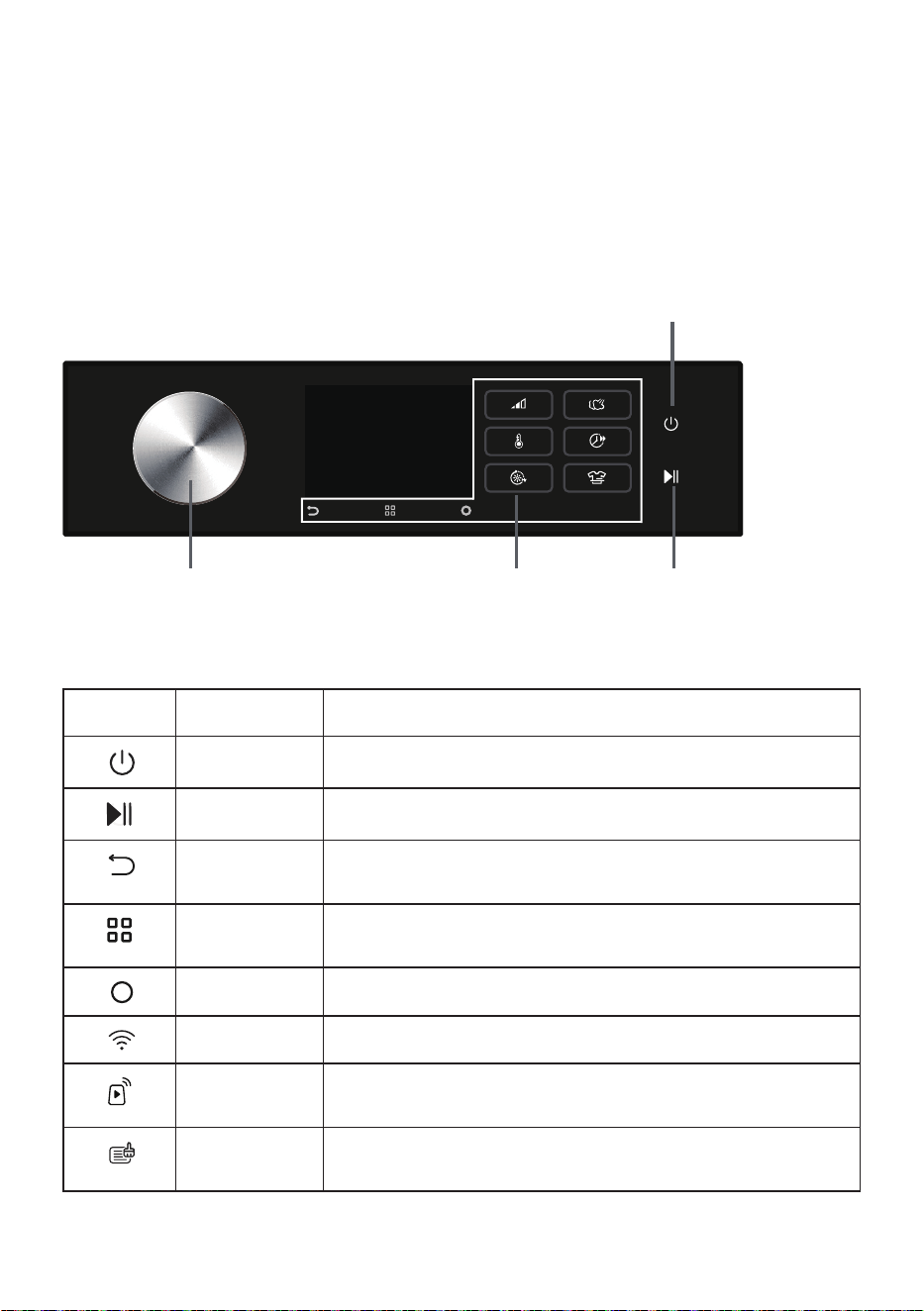
This appliance adopts the control method of touching the function buttons + rotating the main knob.
The Power, Start/Pause, Back, Options, Confirmation button, and other function buttons are operated
by touching the buttons; program selection is done by rotating the main knob; additional functions and
other settings are managed by rotating the main knob + touching the function buttons.
Please refer to the actual situation for the final display Power
Main Knob
Function Buttons Start/Pause
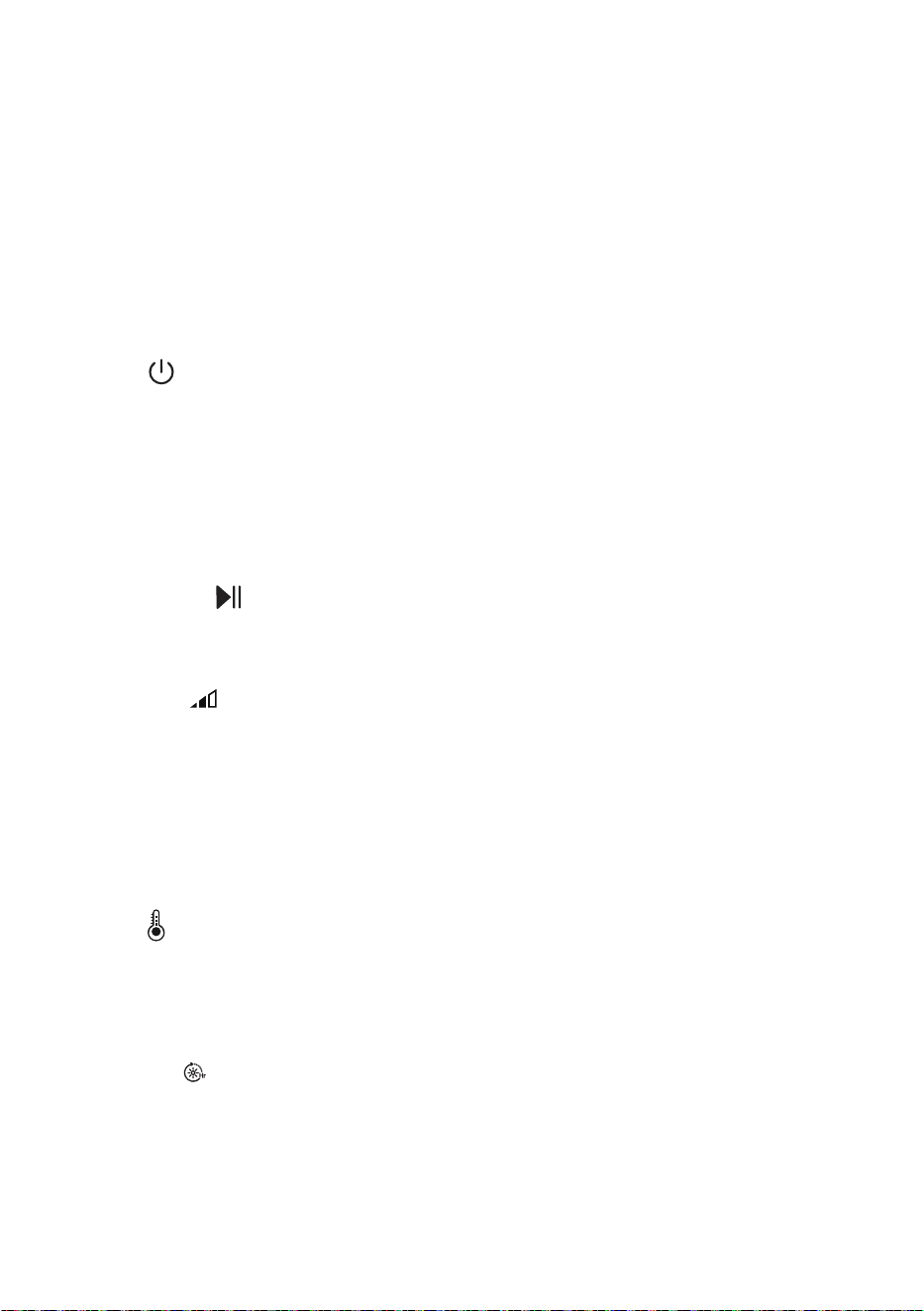
Icon description
Icon Name Description
Power It is used to turn on/turn off the appliance power.
Start/Pause It is used to start/pause the program.
Back Tap to return to the previous interface; long press to return to the
main interface.
Options Tap to enter the selection of additional functions; long press to
enter the system function settings.
Confirm It is used to confirm the current selection.
WLAN When the device is connected to the network, this icon is displayed.
Remote Control This icon is displayed when the Remote Control function is turned
on.
Evaporator
cleaning icon.
When this icon is on, it means the appliance has been run 20 times
and the evaporator needs to be cleaned.
30
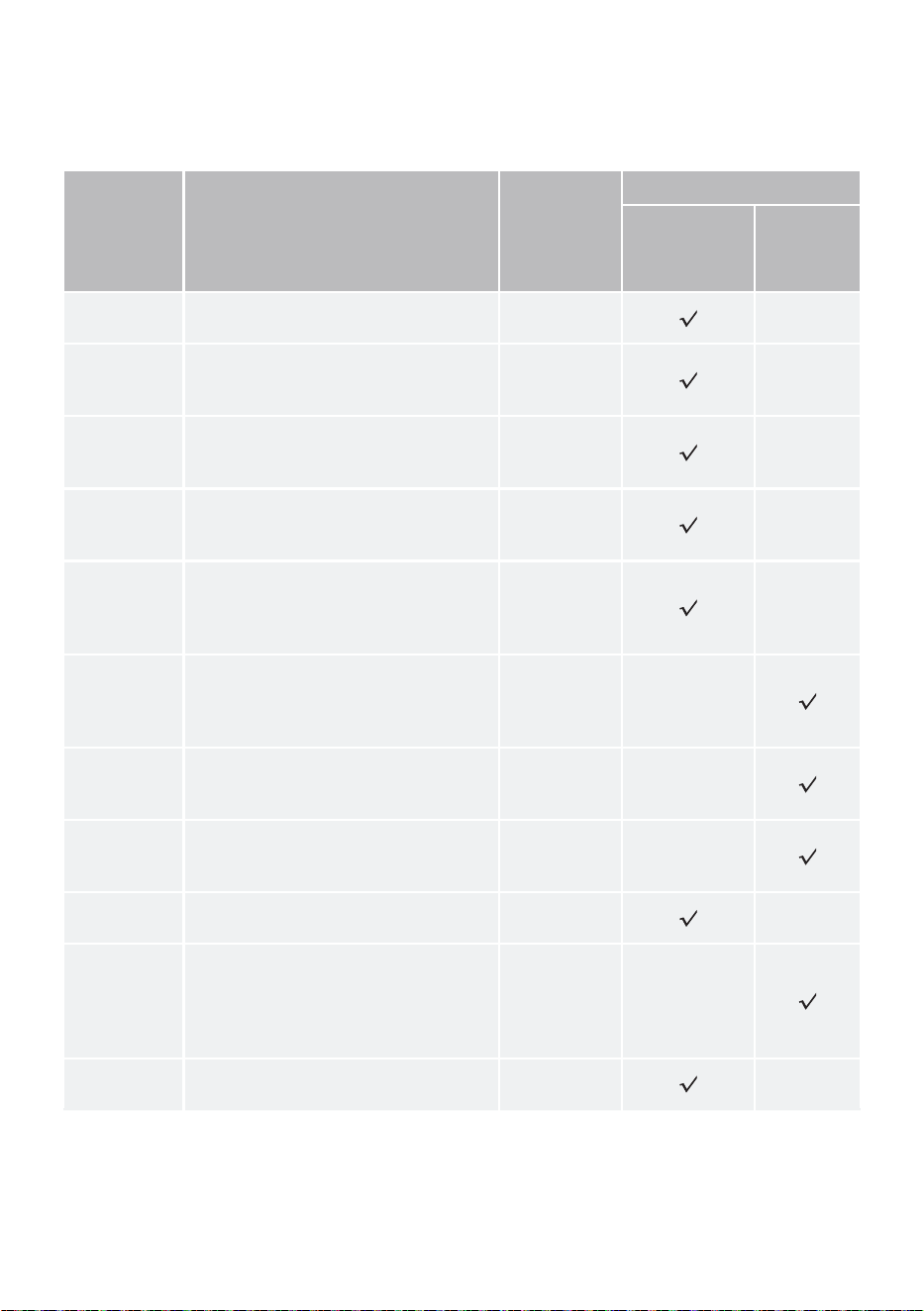
PROGRAM TABLE
Turn the main knob to select the appropriate program (depending on the type of clothing and desired
degree of dryness). During operation, the main knob will not turn automatically.
Program Program description
Maximum
load (kg)
Stop method
Stop when
the clothes
are dry
Timed
drying
Cotton
This program is suitable for drying
thicker, non-sensitive cotton clothing.
10
Auto
This program is suitable for drying
non-sensitive cotton garments of
approximately the same thickness.
5
Quick 29'
This program is suitable for quick
drying of lightweight chemical fiber
clothing.
1
Down
This program is suitable for drying
textiles filled with down (pillows, down
comforters, jackets, etc.).
2
Bedding
This program is designed with a
reverse anti-tangle function for large
garments and is suitable for drying
large items such as bedding sets.
2.5
Refresh
This program is a dry clothing care
program that makes your clothes fresh
again. When using this program, the
heating function is turned off.
/
Time Dry
This program is a timer program with
a drying function that can dry or warm
clothing.
/
Allergy Care
This program is suitable for drying
clothes that need to remove allergens
such as mites.
/
Synthetics
This program is suitable for drying
clothing made of synthetic fibers.
5
Wool-Rack
This program is suitable for softening
or fluffing wool and silk garments
(refer to the garment label for drying
requirements). It is recommended to
use a drying rack for drying.
/
Baby Care
This program is suitable for drying
infant and toddler clothing.
2
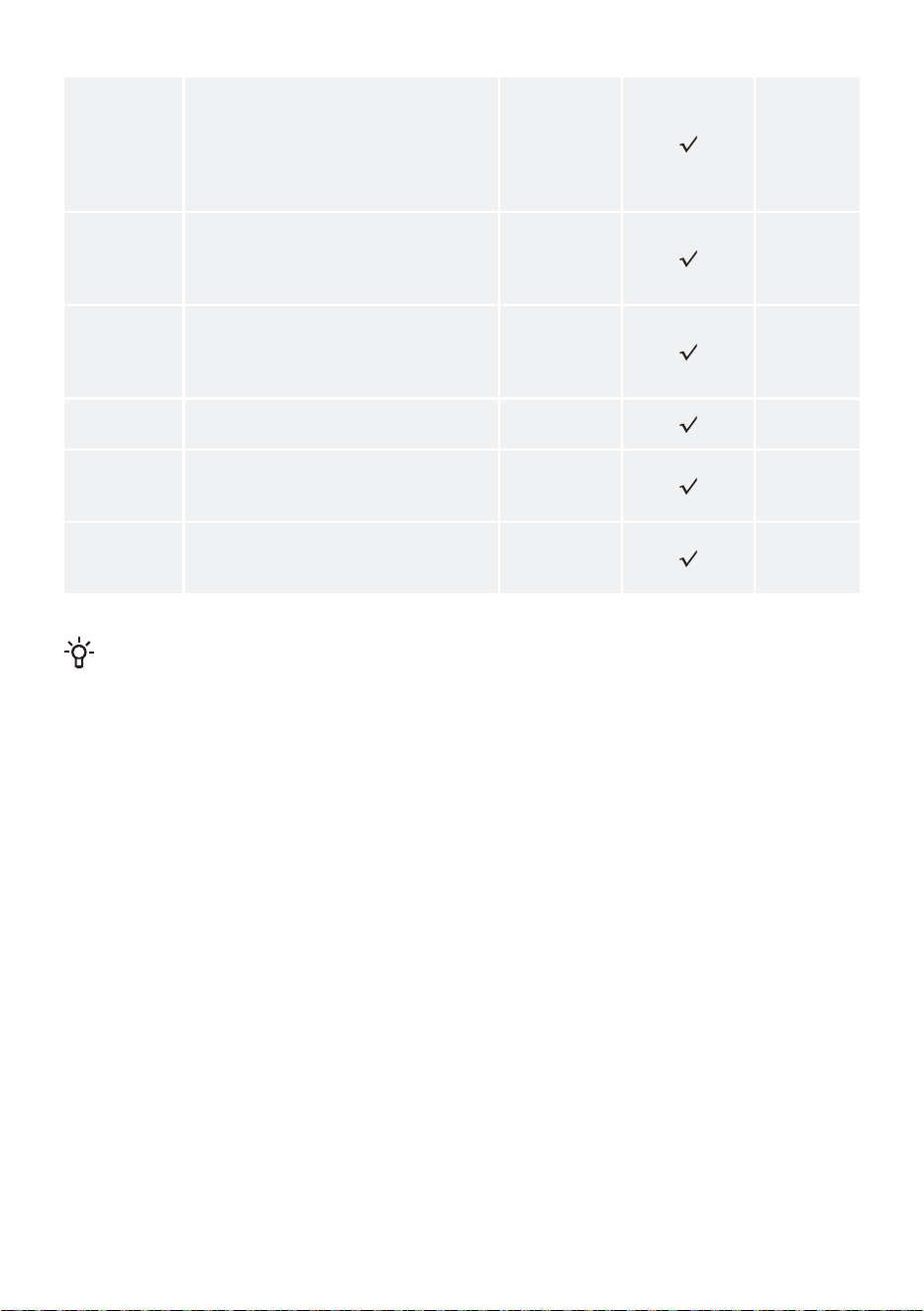
31
Delicates
This program is suitable for drying
delicate synthetic fiber garments. The
garments may be slightly damp at the
end of the program. It is recommended
to put the clothes in a special mesh
bag for drying.
1
Sportswear
This program is suitable for drying
garments containing films and
sportswear made of mixed materials,
breathable fabrics, etc.
2
Power Speed
59'
This program is suitable for drying
daily clothes such as synthetic fibers
or blended fabrics in a short period of
time.
4
Shirts
This program is suitable for drying
shirts.
2
Pets
This program is suitable for drying
clothes that have pet hair on them
after washing and spinning.
4
Towels
This program is suitable for drying
non-sensitive clothing (fleece, kitchen
wiping cloths, etc.).
4
Energy effi
ciency test program:Cotton+Cupboard+Low.
If your clothing has not reached the expected drying level, please use another function or select
a more suitable drying program.
32
ADDITIONAL SETTINGS AND FUNCTIONS
After powering up, the display will show the default program and settings. If you wish to use the default
settings, tap the "Start/Pause" button to initiate the program.
Users can select appropriate programs and parameters and add additional functions as needed.
After tapping the "Start/Pause" button to initiate, certain preset functions cannot be altered. If you
need to change the settings, long press the "Power" button to shut down, then restart to reselect the
program and function.
Before starting the program, select the program using the main knob and tap the function button
to set Dry Level, Temp., Time Dry, Steam, Quicker, Anti Crease functions. Different programs have
different optional additional functions and gear selection ranges.
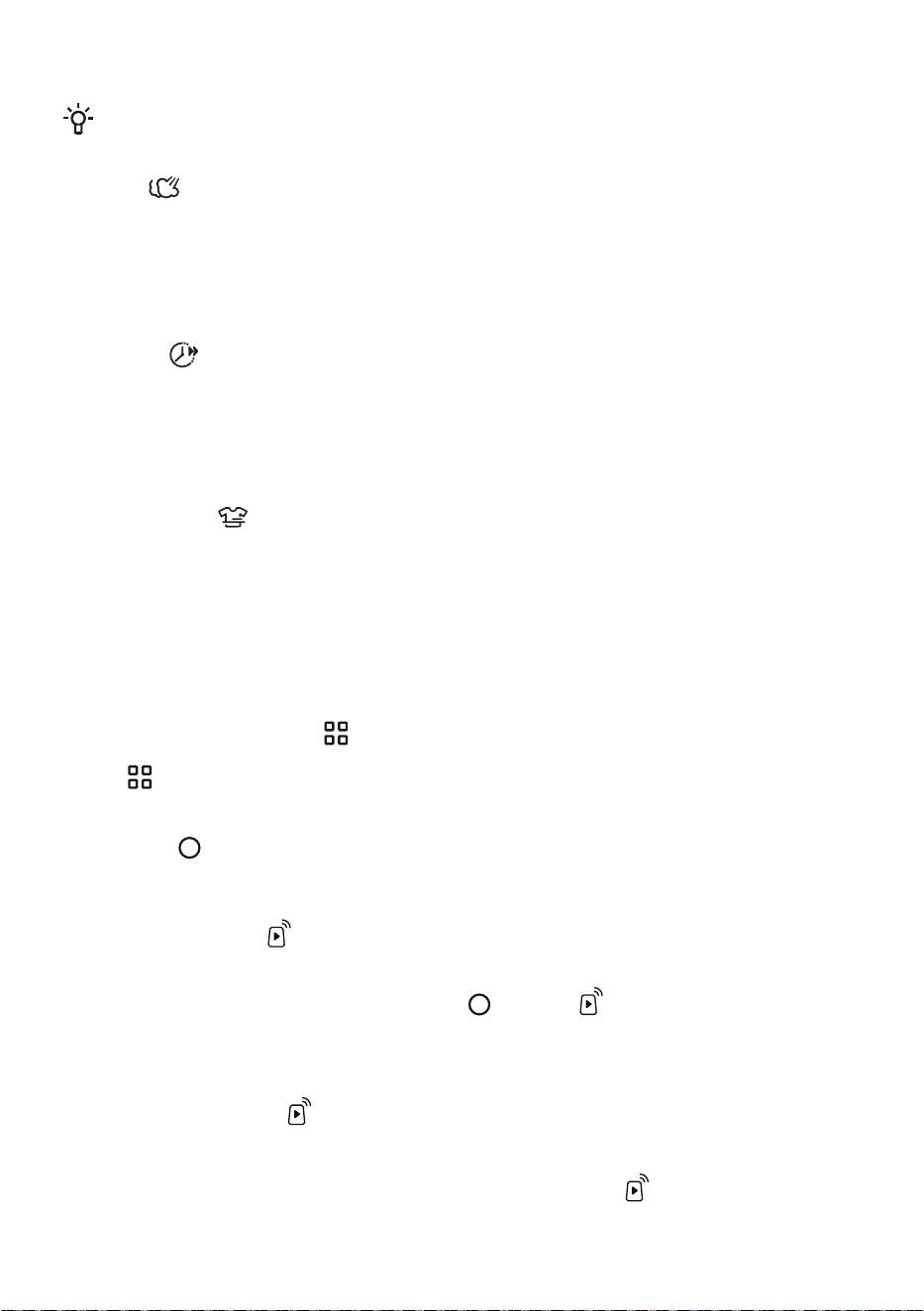
Power
It is used to turn on/turn off the appliance power.
During program operation, if you need to shut it down, press and hold the "Power" button to turn it off.
When the program is running, if no operation is performed for a period of time, the appliance will
automatically turn off the screen and enter the energy-saving state. Turn the main knob or tap any
button to wake the screen. In standby mode or when the program ends, if you do not perform any
operation for a period of time, the appliance will automatically turn off the screen. If no operation is
performed for a period of time after the screen is turned off, the appliance will automatically shut down.
In the alarm state, the appliance will not turn off the screen.
Start/Pause
It is used to start/pause the program.
If the door is not closed, an alarm will be displayed on the screen after the appliance is started.
Dry Level
This function is used for selecting the dryness level of the "Stop when the clothes are dry" programs.
Tap this option to set the drying level before starting the program. Tap continuously to cycle through the
set levels. The dryness level can be selected as follows: Extra Dry/Iron/Cupboard. Different programs
can set different dryness levels.
"Extra Dry": It is for drying garments to a condition suitable for storage.
"Iron": It means that the garments retain a small amount of moisture after drying, allowing for further
ironing.
"Cupboard": Dried clothes can be ready to wear immediately.
Temp.
It is used for selecting the drying temperature of the "Stop when the clothes are dry" programs.
Tap this option to set the drying temperature before starting the program. Tap continuously to cycle
through the set gears. The temperature can be selected as follows:
Cool/Low/Middle/High. Different drying temperatures can be set for different programs.
Time Dry
This function is used to select the drying time for the timed drying program. You can choose the
appropriate drying time based on the type and quantity of clothing.
Tap this option to set the drying time before starting the program. Continuously tap to cycle through the
settings. The drying time can be selected as follows: 30/60/90/120/150/180/210/240/270min. Please
select a suitable drying time. If the drying time is too short, the clothes cannot be completely dried.
Different programs can be set to different drying times.
33
Refresh is a dry clothing care program. The optional care time range is: 5/10/15min.
If your clothes are not as dry as you expect, you can increase the drying time or use a "Stop when
the clothes are dry" program to dry them.
Steam
This function can generate steam spray, suitable for reducing or eliminating wrinkles in small amounts
of clothing, making garments more comfortable (when the amount of clothing is large, the wrinkle
removal effect will significantly weaken).
Before starting the program, tap this option to turn on/turn off the Steamfunction.
After turning on this function, Dry Level and Temp. settings are adjusted automatically.
Quicker
This function can reduce the program's drying time and speed up the drying process.
Before starting the program, tap this option to turn on /turn off the "Quicker" function. Quick 29´ and
Power Speed 59' have this function by default and cannot be canceled. This function cannot be
selected for timed drying programs.
After enabling this function, the program's drying temperature will be adjusted automatically.
Anti Crease
This function activates Anti Crease mode, which intermittently rotates the inner drum after the program
ends to prevent wrinkles from forming when clothes are not taken out for a long time. After selecting
the program, tap this option, the icon lights up, and the Anti Crease mode is automatically entered after
the program ends.
During the operation of the Anti Crease mode, turn the main knob or tap any button to end this
function. If no operation is performed, the program will automatically end after a maximum of 12 hours
by default.
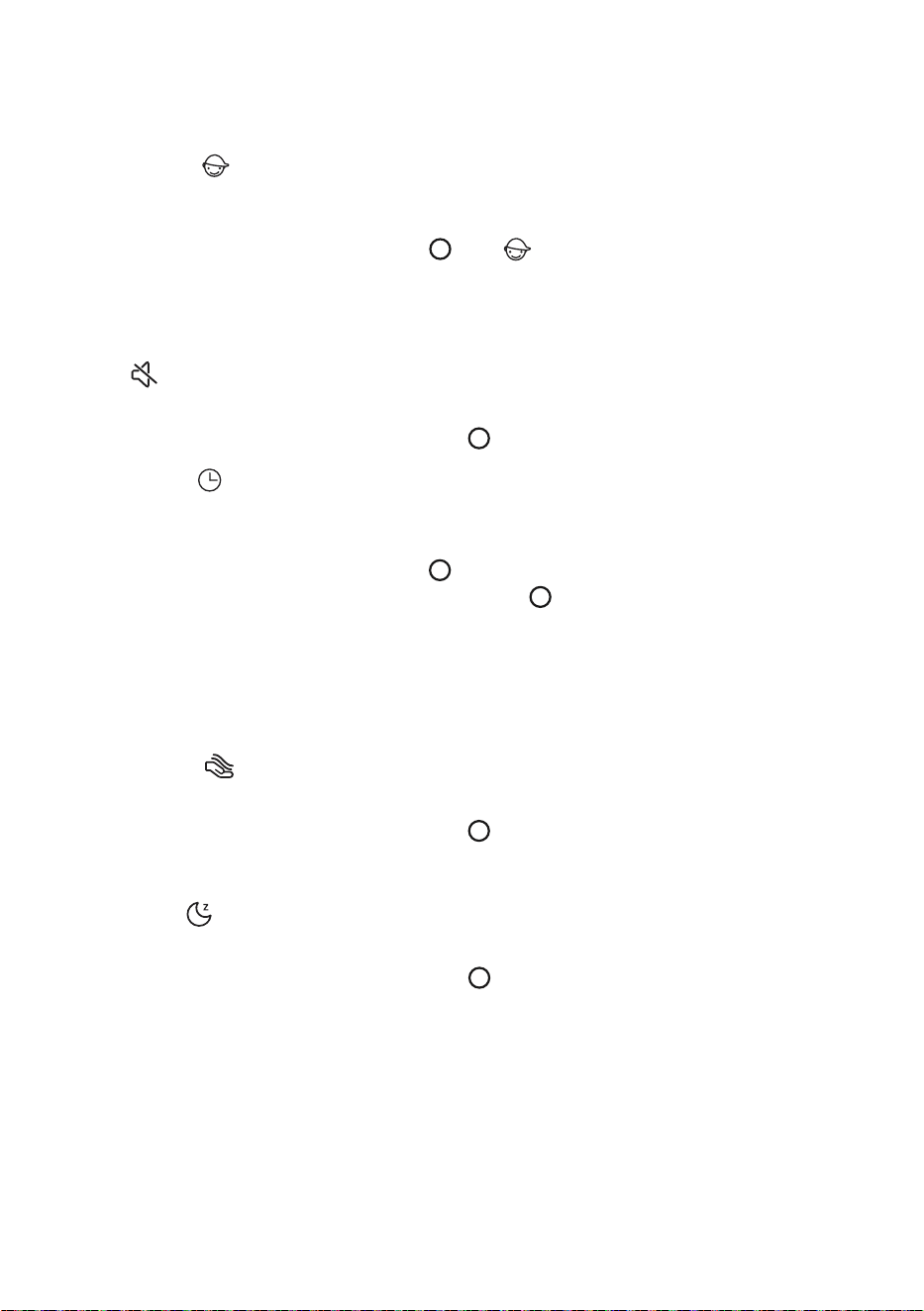
Additional functions
Tap " " to enter the additional functions settings interface:
Before starting the program, users can set additional functions such as Remote Control, Child Lock,
Mute, Delay End, Gentle Dry, Night Dry, etc. as needed. Turn the main knob to select additional
functions, tap " " to confirm your selection, and tap again to cancel your selection. The corresponding
icon is lit to indicate that this function is enabled. Different programs have different additional functions
that can be selected.
Remote Control
This function can activate/deactivate the remote control module of the appliance.
Turn the main knob to select this function, then tap " ", and the " " icon will light up, activating the
Remote Control function. You can perform the same operation to deactivate the Remote Control.
Before activating the Remote Control function, check and ensure that WLAN function is turned on
and connected normally, and the door is properly closed. When the WLAN function is activated and
connected properly, but the " " icon on the screen is not illuminated, you can check the status or
configure the program parameters and function items (depending on the permissions of the specific
model) using your mobile phone, but you cannot start the program remotely.
When the WLAN function is activated and connected normally, and the " " icon is illuminated on the
screen, you can configure the program parameters and function items through your mobile phone, and
you can remotely initiate the program.
34
After enabling Remote Control mode, if there is no activity on the entire machine and the App for
a period of time, it will enter Energy Saving mode, and it will automatically shut down if there is no
activity for 7 days.
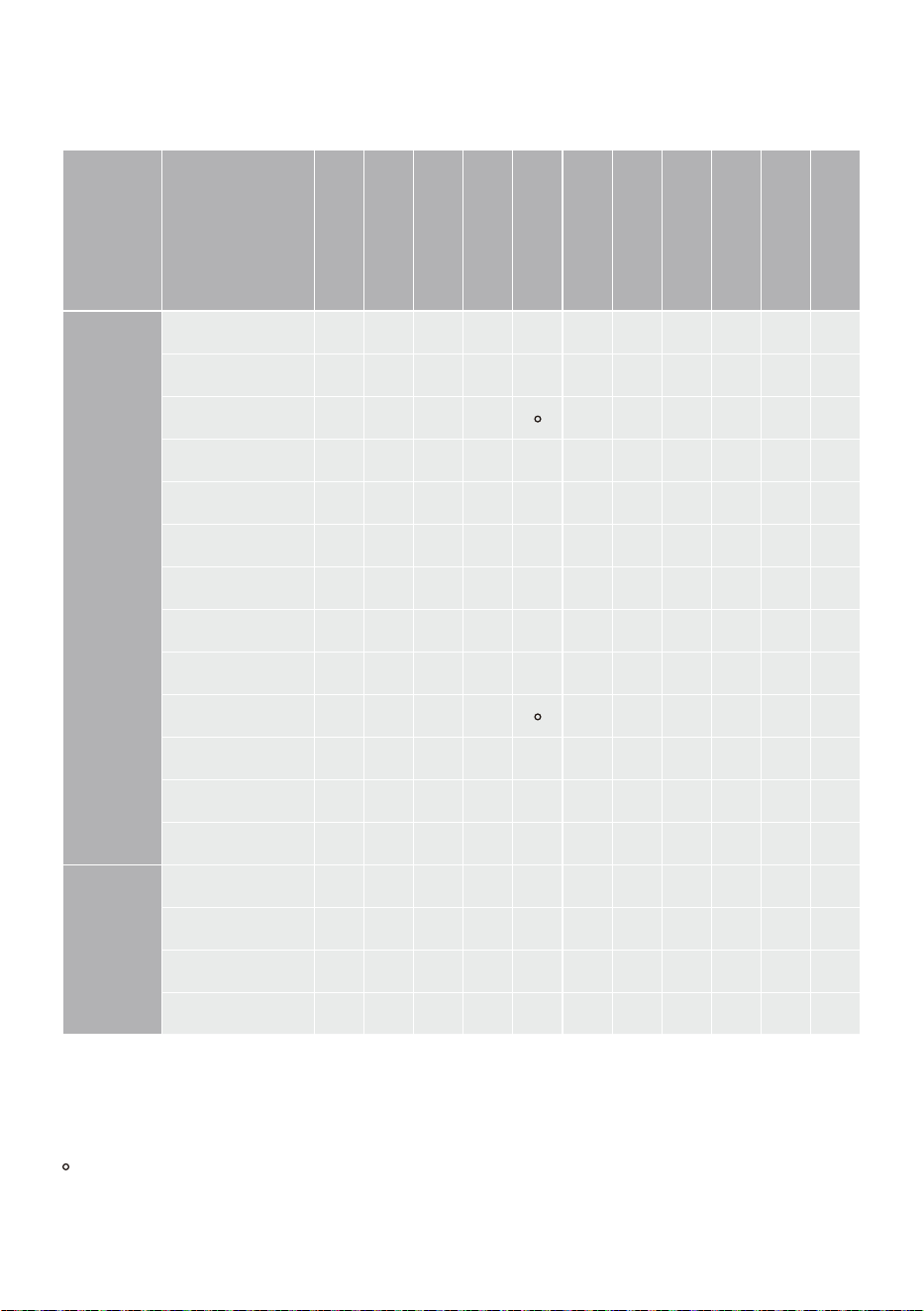
Child Lock
To prevent children from operating the appliance by mistake and external interference with the
program, this appliance has a Child Lock function.
Turn the main knob to select this function, tap " ", the " " icon lights up, and the Child Lock
function is activated. The same operation can be used to disable the Child Lock function.
After the Child Lock function is turned on, all buttons except the Power button are locked. When the
program ends or the appliance is shut down and restarted, the Child Lock function setting remains
unchanged.
Mute
This function shields other sounds except the alarm sound and reduces noise.
Turn the main knob to select this function, then tap " " to turn on/turn off.
Delay End
This function allows you to schedule drying clothes at your convenience. Please select the program
and function, and then proceed to make a reservation for that function.
Turn the main knob to select this function, tap " " to enter the reservation time selection interface,
turn the main knob to choose the reservation end time, tap " ", the reservation time will be
illuminated, and then tap the "Start/Pause" button to initiate the reservation.
After the reservation is set, if you change the program and reset parameters and functions (except for
the Anti Crease function) before the function activates, the reservation will be automatically canceled.
The reservation time is the end time of the program, including the entire program running time, so
the reservation time must be greater than the program running time, and the maximum time cannot
exceed 24 hours.
Gentle Dry
This function can provide drying care at a relatively low temperature, nurturing your clothes.
Turn the main knob to select this function, then tap " " to turn on/turn off.
This function can be selected before starting the Shirts, Synthetics, and Delicates programs.
After this function is turned on, the Quicker function and the High gear in Temp. cannot be selected.
Night Dry
This function can reduce drying noise, making it suitable for drying clothes at night.
Turn the main knob to select this function, then tap " " to turn on/turn off.
When this function is turned on, the Mute function is automatically turned on, and the Quicker function
and the High gear in Temp. cannot be selected.
Washer-Dryer link
This function can achieve the intelligent interconnection of washing machine and dryer. Before use, the
washing machine and dryer need to be connected to the Internet and bound to the same network on
the App side.
This function is applicable to some programs.
35
FUNCTION SELECTION TABLE
Program
Dry Level
Temp.
Time Dry
Steam
Quicker
Anti Crease
Child Lock
Mute
Delay End
Gentle Dry
Night Dry
SMART
END
Cotton • • - • • • • • • - •
Auto • • - • • • • • • - •
Quick 29´ - - - -
• • • • - -
Down • - - - - • • • • - -
Bedding • • - - • • • • • - •
Synthetics • • - • • • • • • • •
Baby Care • • - • • • • • • - -
Delicates • - - - - • • • • • -
Sportswear • • - • • • • • • - -
Power Speed 59' - - - -
• • • • - -
Shirts • • - • • • • • • • -
Pets • • - - • • • • • - -
Towels • • - - • • • • • - •
TIME DRY
Refresh - - • - - • • • • - -
Time Dry - - • - - • • • • - -
Allergy Care - - • - - • • • • - -
Wool-rack - - • - - • • • • - -
• The function is optional.
- The Function is not optional.
The function is included by default and cannot be canceled.
36
System Function Settings
Press and hold "
" to enter the system function settings interface:
Before starting the program, users can select WLAN, APP and Pairing, Language, User Program,
Drum Light, System, and other system function settings as needed. Turn the main knob to select the
function option and tap "
" to confirm the selection. The corresponding icon is lit to indicate that this
function is enabled.
WLAN
Turn the main knob to select this option, tap " " to turn on/turn off the appliance's WLAN function,
and long press " " to configure the appliance to connect to the WLAN.
Network configuration steps:
1. Turn on the power, long press " ", and rotate the main knob to select "WLAN".
2. Long press " " to initiate network configuration, and the screen will display "Connecting".
3. Next, follow the APP prompts. After the connection is successful, the screen will display the network
configuration successful interface.
4. If not, you can repeat the operation from the first step.
After the appliance is successfully connected to the network and paired, it can be remotely controlled
through the App on the mobile phone.
APP and Pairing
This function must be used when the "WLAN" function is enabled and the connection is stable.
Turn the main knob to select this option, then tap " " to access the "User adding" and "Unpair"
settings interface.
Language
Turn the main knob to select this option, then tap " " to access the "Language" settings interface.
After turning the main knob to select the language, tap " " to confirm your selection.
User Program
Users can set the programs displayed on the home page.
Turn the main knob to select this option, then tap " " to access the "User Program" settings interface.
Turn the main knob to select a program, tap " " to cancel the selection, and tap it again to confirm
your selection.
The "Cotton" program cannot be removed from the home page.
Drum Light
This option can manually turn on/off the Drum Light.
After the Drum Light is turned on, it will automatically illuminate when the door is opened, when the
appliance is powered on, during program pauses, when the program ends, or while the program is
running by rotating the main knob or touching any button.
37
System
This option allows access to the settings interfaces for "System Update", "Reset", "Demo", "Operating
Tips", "Software Licenses", and others.
After the "Demo" mode is turned on, the program cannot be started. To exit "Demo" mode, press
and hold " " to access the system settings, turn the main knob to select "System", tap " ", turn the
main knob to select "Demo", and tap " " to disable it.
SMART NETWORKING
Enter the "Settings" interface of your smartphone or tablet PC, enable Bluetooth and wireless
connections, and connect to a wireless network.
Note:
This appliance supports 2.4 GHz Wi-Fi.
When the Wi-Fi function is activated, the energy consumption of the appliance will increase. However,
the Wi-Fi power is less than 2W, so it has no impact on the energy efficiency rating of the appliance.
Download
On your smartphone or tablet PC device APP store (Google Play store, Apple App store) to find
ConnectLife application, download and install it.
Note:
To improve performance and experience, the application may be updated without notice.
Log in
You need to log in to ConnectLife with your account first. If you don’t have a ConnectLife account, you
need to create a new account. Please refer to the application usage instructions for details.
Note:
If you already have a Google account, you can use your Google account to log in directly.
Appliance Networking
1. Open ConnectLife on your smartphone or tablet PC.
2. Bind your appliance on ConnectLife as follows:
A. Click the"+" on the "Home" interface, and select"Add device" or "Scan".
B. Select "TUMBLE DRYER" or click "Scan QR/BAR code" or "Manual entry" below.
C. Manual enter the device's "AUID/SN". If you can't find it, click " " to view instructions.
D. Click "SET UP APPLICATION".
E. Read the instructions and operate the appliance to the "Connecting" status, and then click
"NEXT".
F. At this time, APP begins searching for devices. You can select the device you want to connect
to the network from the search list; if no device is found, please check whether your Bluetooth is
turned on. Please keep Bluetooth turned on at all times, and click "NEXT".
G. Select your home Wi-Fi, enter the password, and then click "CONNECT". The device starts
networking and binding.
H. After the binding is successful, you can set the device name and room.
I. Now you can remotely control the device through the APP.
38
Unpair
1. Unpair on the appliance:
A. Check and verify that the "WLAN" function is enabled and connected properly.
B. Long press " " to enter the system function settings interface.
C. Turn the main knob to select "APP and Pairing" and tap " " to confirm your selection.
D. Turn the main knob to select "Unpair" and tap " " to confirm your selection.
E. Select "SURE" and tap " " to disconnect all bindings.
2. Unbind on the smart device:
A. Select and tap the device you wish to unbind on the "Devices" page.
B. Tap "Settings" to enter the settings page.
C. Tap "Remove Device" to unbind the device on the ConnectLife app.
Data Delete
Press and hold "
" to enter the system settings. Turn the main knob to select "System", then tap " ".
Next, turn the main knob to select "Reset" and tap " ". Follow the prompts displayed on the screen to
initiate the system reset. Please note that after the system reset, all data stored on the user's device will
be deleted.
START THE PROGRAM
Select the program and function parameters, then tap the Start/Pause button to initiate the program.
While the program is running, the display will show the remaining time and other relevant information;
The remaining time indicated by the program may differ from the actual running time. Due to
factors such as clothing type and quantity, drying grade, and ambient temperature, the device will
automatically adjust the actual drying time.
END OF THE PROGRAM
When the program ends, the device emits a prompt sound, and the display shows the end interface.
The end interface displays the power consumption and running time of this program. You can press
the Power button to shut down.
In standby mode or when the program ends, if you do not perform any operation for a period of time,
the appliance will automatically turn off the screen. If no operation is performed for a period of time
after the screen is turned off, the appliance will automatically shut down.
After the program ends, please turn off the power, unplug the power cord from the outlet, open the
door, and take the clothes out of the drum.
39
MAINTENANCE & CLEANING
Regular maintenance can extend the device's lifespan. Before maintenance, please be sure to
disconnect the power supply.
Children are not allowed to clean or perform any maintenance work on this device without
supervision.
The dryer is equipped with a filtration system made up of several filters that prevent impurities from
entering the heat exchanger system.
The device must not be operated if the filter is not installed in place or the filter is damaged, as
excessive accumulation of fabric fibers may cause the device to malfunction or fail.
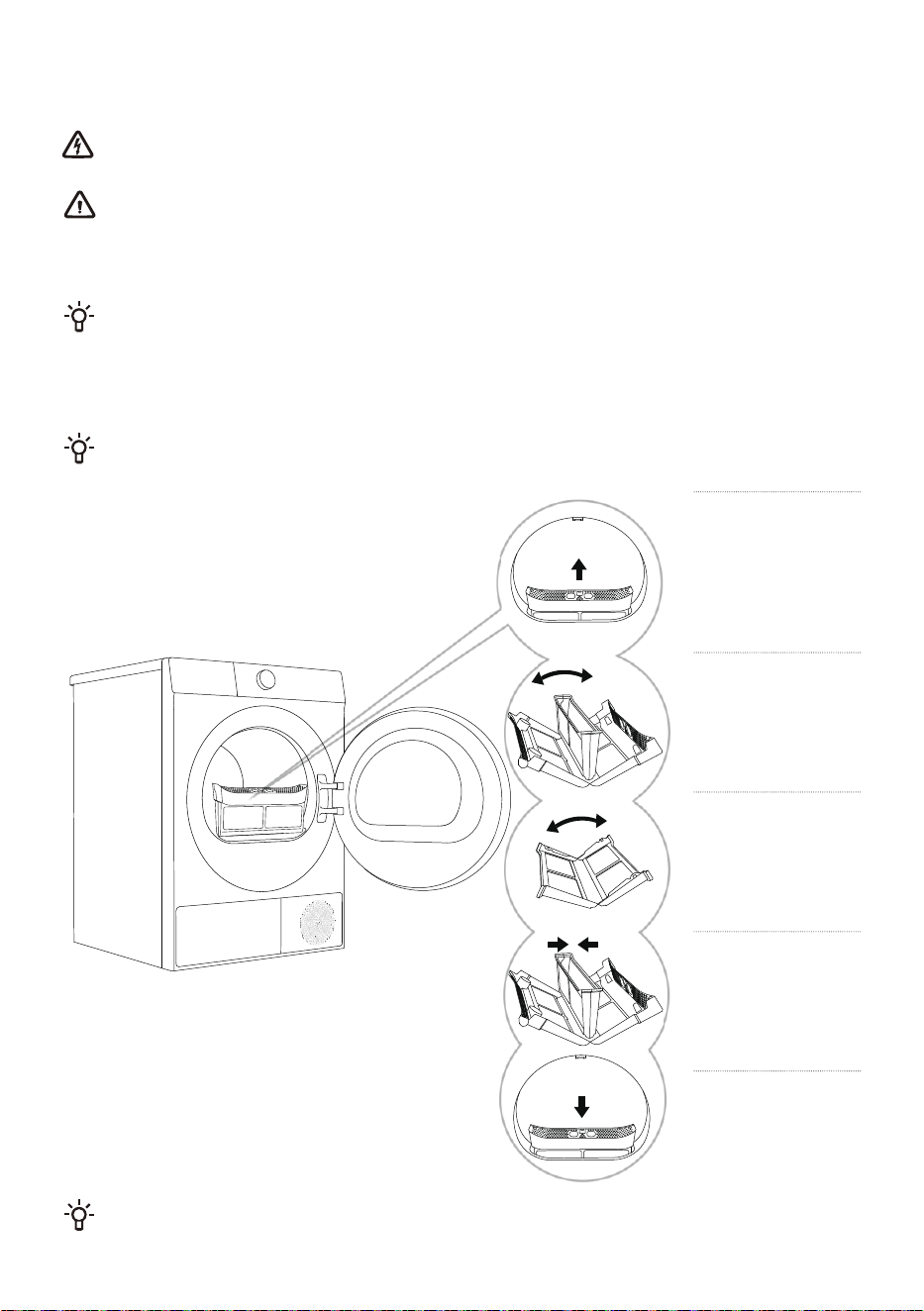
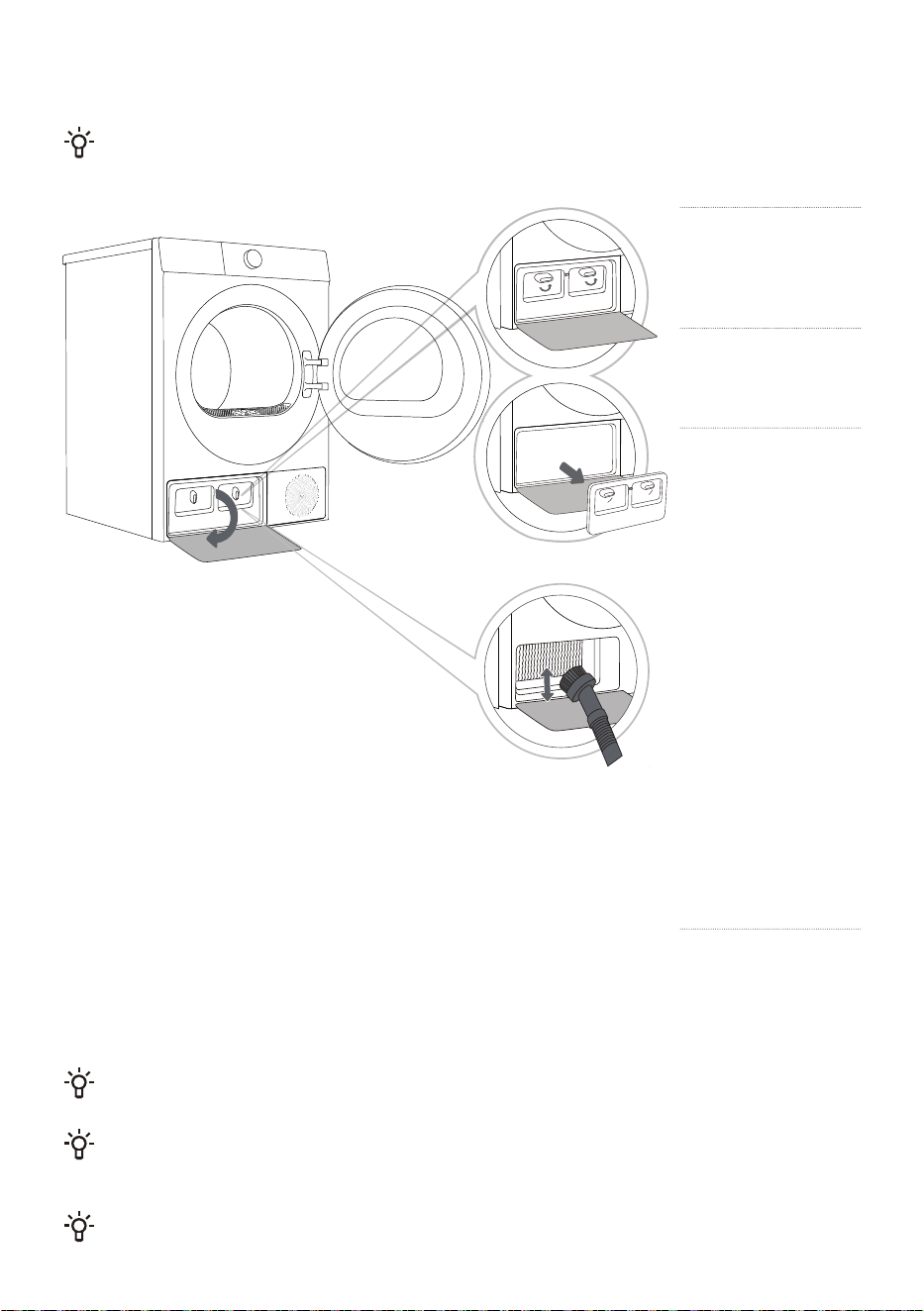
CLEANING THE FILTER
Please clean the filter after each use.
1
Take out filter.
2
Open filter.
3
Open and
gently remove
the lint, fibers, and
thread ends from
the two filters.
4
Reassemble
the filter and
clean the debris
on the door seal if
necessary.
5
Reinstall the
filter.
Please be careful not to get your fingers caught in the filter cover.
40
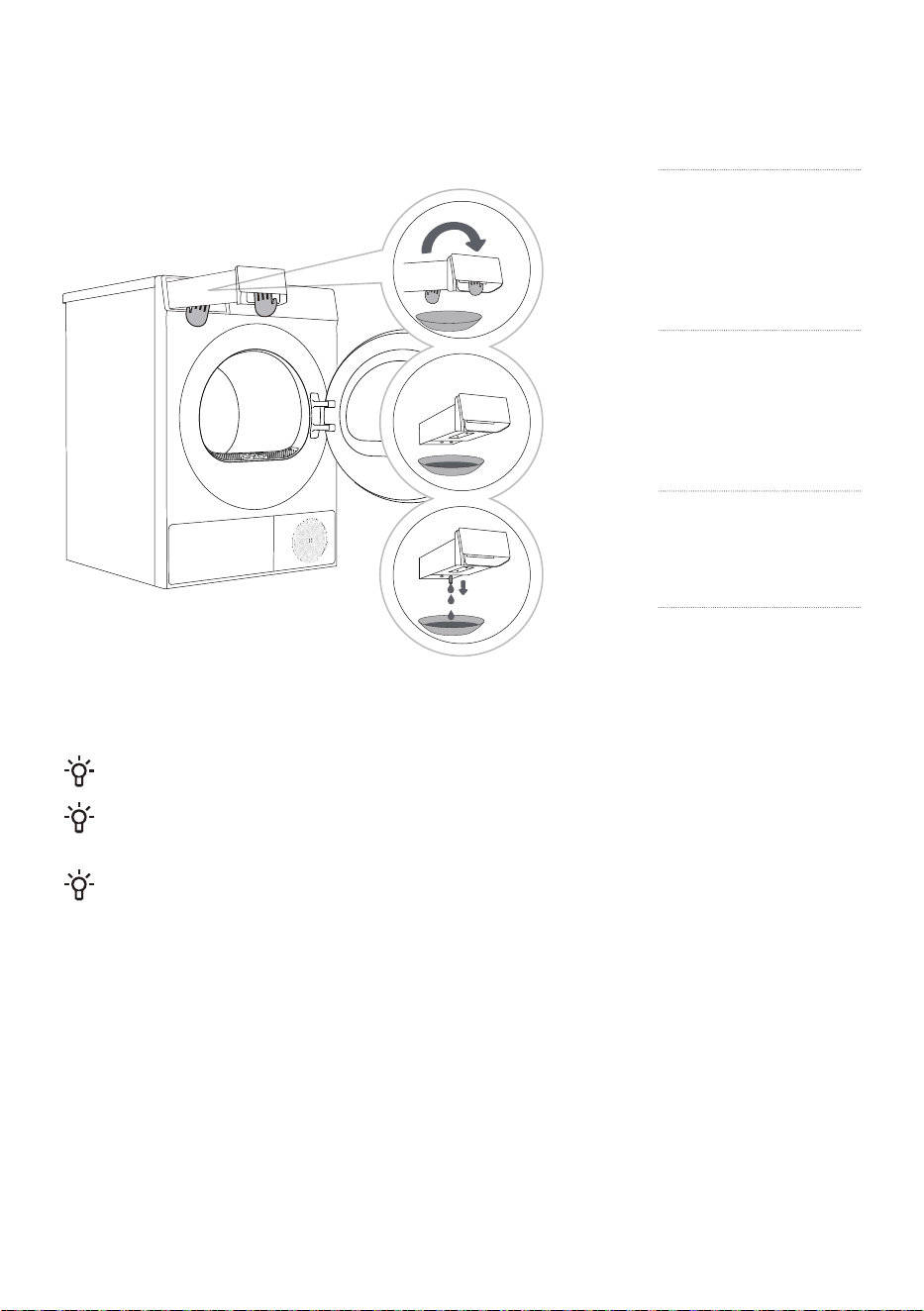
CLEAN THE HEAT PUMP FILTER
When cleaning the filter, water may spill out. It is recommended to place an absorbent cloth on
the floor.
1
Press the heat
exchanger door
cover buckle on the
lower left to open the
door cover.
2
Turn the locking
knob on the
inner door cover to
the unlocked position.
3
If after using
for a period of
time, there is dust on
the heat exchanger,
please use a vacuum
cleaner, soft brush, or
other tools to remove
the dust. The heat
exchanger can be
seen after removing
the heat pump filter.
Lightly brush the
metal pieces with the
brush, and the brush
can only be moved
from top to bottom.
Excessive force may
damage or bend
the metal sheet. Do
not touch the heat
exchanger directly
with your hands to
avoid injury.
4
Install the inner
door cover to its
original position and
lock the knob, close
the heat exchanger
door cover.
Do not touch the internal metal parts of the heat exchanger with your bare hands to avoid
scratches. Wear suitable protective gloves when cleaning the heat exchanger.
Improper cleaning of the heat exchanger metal sheets may cause permanent damage to the
device. Do not press the metal sheet with hard objects (such as the plastic tube of a vacuum cleaner,
etc.).
It is recommended to clean the heat exchanger at least once every 20drying programs.
41
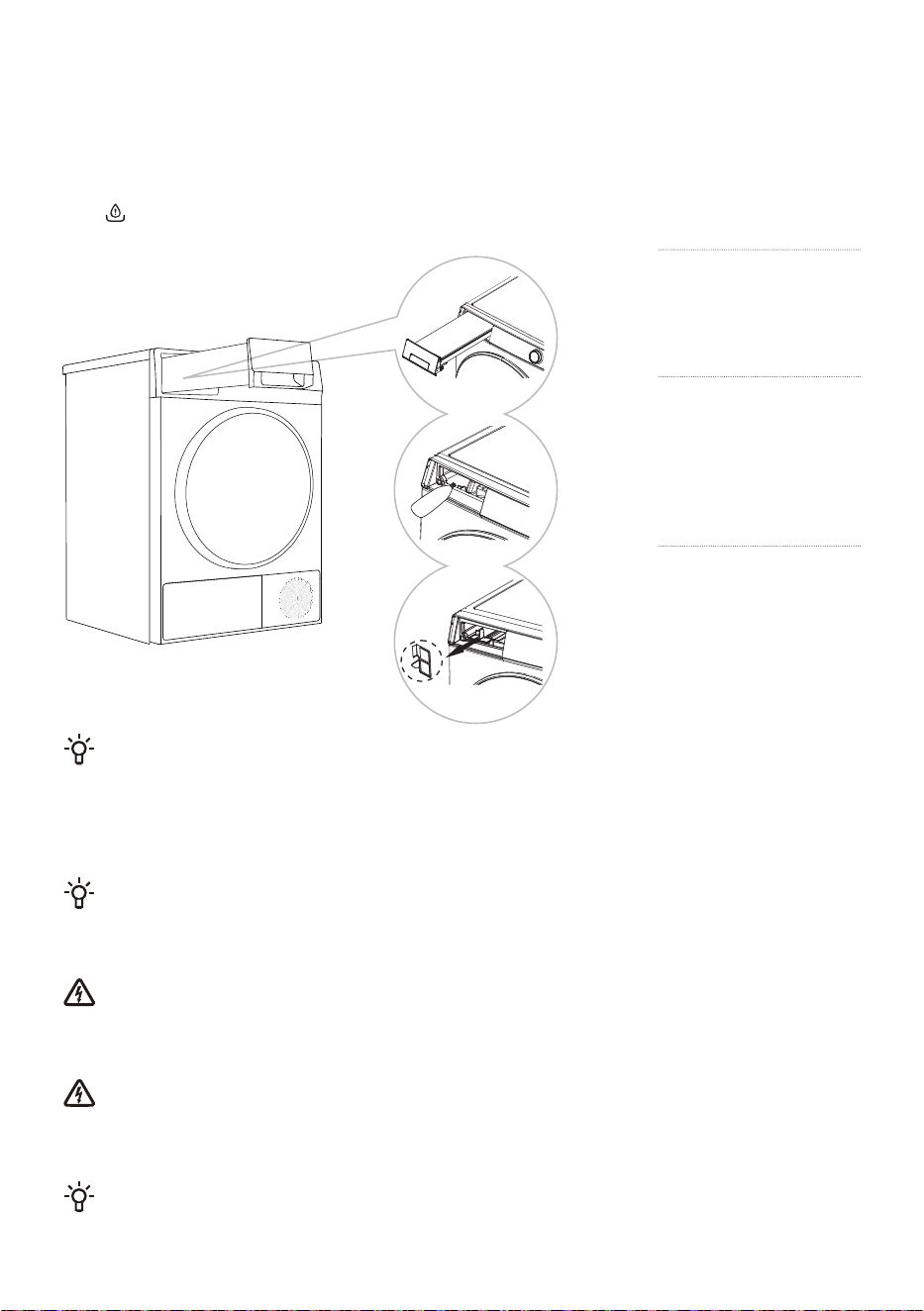
EMPTY THE CONDENSATE BOX
If the condensate box is full, the drying program will automatically pause. Please follow the steps
below to empty the condensate box.
1
Pull out the
condensate box
(using both hands, as
shown in the figure).
2
Turn the
condensate box
upside down over a
basin, sink, or any
suitable container.
3
Empty condensate
box.
4
Reinstall the
condensate box
back to its original
position.
Empty the condensate box after each drying cycle.
The water discharged from the condensate box is not for drinking. After sufficient filtering, it can
be used for ironing.
Do not add chemicals or fragrances to the condensate box.
42
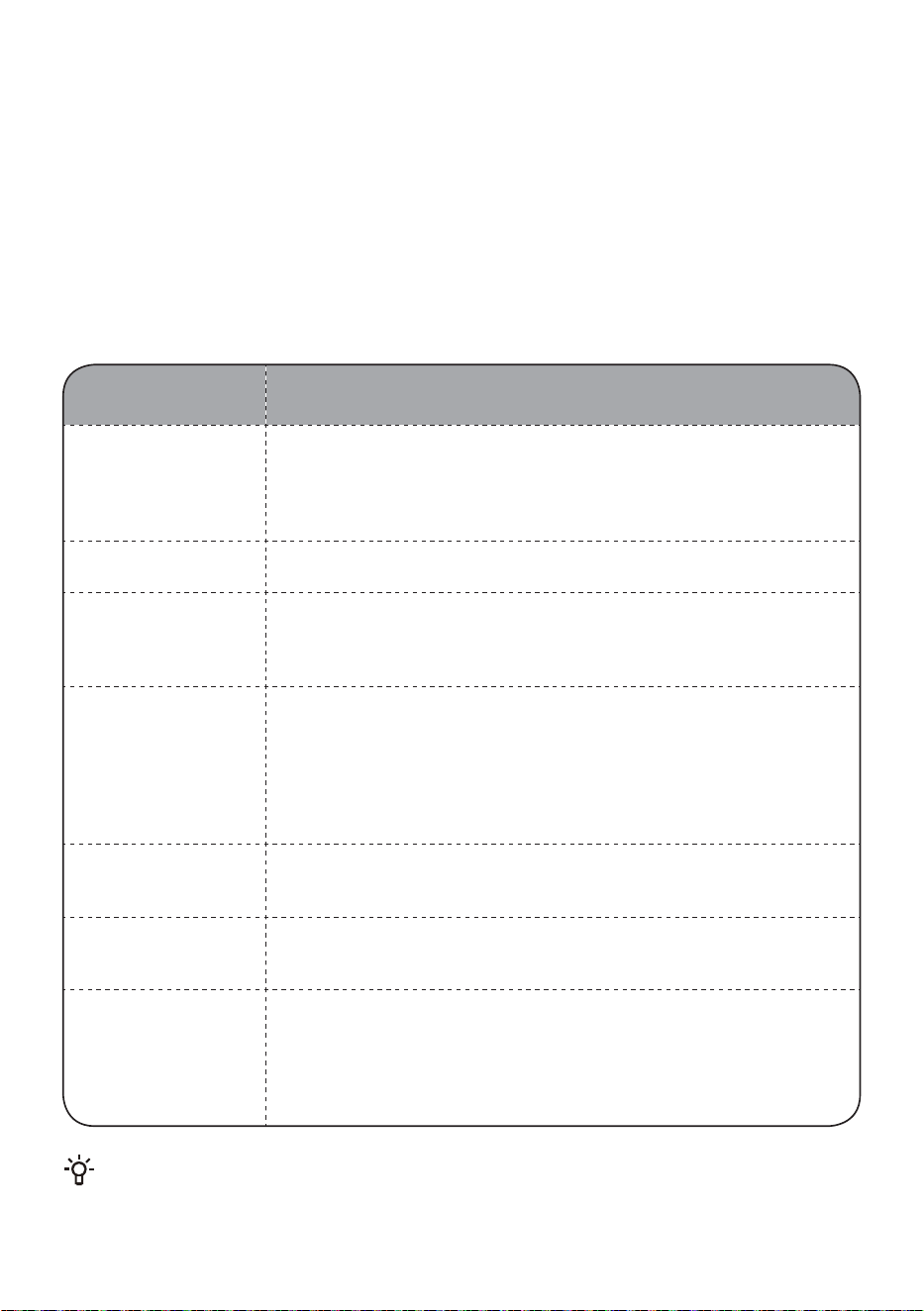
ADD WATER TO THE STEAM FUNCTION AND CLEAN
THE FILTER
When using the program with the Steam function, you need to ensure that there is enough water in the
water tank to form steam. Please add pure water (about 500ml) for the first use. If the water shortage
icon " " appears, please use a pointed container to add pure water as follows.
1
Pull out the
condensate box.
2
Use a pointed
container to inject
pure water into the water
tank, approximately
500ml.
3
Reach in with your
fingers to grasp
the water tank filter at
the bottom, remove it,
clean it, and reinstall it in
place.
The condensate box filter may be clogged with impurities after long-term use; it is recommended
to clean it once a month.
CLEAN THE DOOR SEAL
Check the door seal regularly; clean it with a damp cloth if necessary.
After use, slightly open the door for ventilation and drying.
CLEAN THE ENCLOSURE
Before cleaning the enclosure, please be sure to disconnect the device from the power
supply.
Clean the device outer shell and panel with a soft damp cloth. Then wipe them dry with a soft dry cloth.
Do not use solvents, abrasive cleaners, or cleaning agents that may damage the device (please
follow the recommendations and warnings provided by the cleaning agent manufacturer).
Wipe the drum door with a damp cloth, and then wipe dry with a soft dry cloth.
Do not use too much water to clean the device.
43
TROUBLESHOOTING
The device is equipped with various automatic safety functions, ensuring that faults can be detected
promptly and effective safety countermeasures can be initiated.
These faults are usually minor and can be eliminated in a very short time.
When the device cannot operate normally, the display will show abnormal information. Please refer to
the warning content and take appropriate actions.
If the fault persists after you have handled it yourself according to the recommended
processing method, please contact after-sales service.
If the user performs maintenance by themselves or hires non-manufacturer after-sales personnel, all
consequences will be assumed by the user.
Fault
phenomenon
Recommended handling methods
The device cannot
be powered on
Check the power connection.
Check whether the Start/Pause button is pressed.
Check whether the door is closed correctly.
Check whether a fuse has blown, a circuit breaker has tripped, or a
power outage has occurred.
The device cannot
start
Check whether the program settings are correct.
Check whether there are any clothing items in the drum.
Drying time is too
long
Check whether the program settings are correct.
Check whether there is too much clothing tangled into a bunch.
Check the filter for cleanliness.
Some programs have a cooling process after drying.
Poor drying effect
Check whether the clothes have been washed and spinned.
Check whether the program settings are correct.
Check whether the amount of clothing is too much.
Check whether the clothing is sorted correctly and whether the
clothing that dries easily is mixed with the clothing that dries slowly.
Check whether there are too many heavy garments.
Check whether the filter is clean.
The remaining time
on the display stops
or jumps
The remaining time may vary depending on the type of clothing,
weight, moisture, and surrounding environment; this is a normal
phenomenon.
Wrinkled clothing
The drying time of the clothes is too long; try shortening the drying
time.
Leaving clothing in the dryer for too long after the program has ended.
The program running
time displayed
on the device is
different from the
actual program
running time
For programs that stop automatically when clothes are dry, the drying
duration displayed is calculated according to standard environment,
initial laundry moisture, load mass and type. The drying time is
automatically adjusted for any change in conditions. The difference
between the actual time and the display time is normal, which
ensures the best drying effect.
Faults or problems caused by external factors (such as lightning strikes, power grid failures,
natural disasters, etc.) are not covered by the warranty.
44
Fault
phenomenon
Recommended handling methods
The appliance is too
loud
Look for coins, loose buttons, nails, and other objects and remove
them immediately.
Check the lint filter. Remove any items stuck inside the lint filter.
Make sure the dryer is level and standing firmly on the floor.
The dryer may hum due to air moving through the drum and fan.This
is normal.
Clothes are
shrinking
Garment care instructions are not being followed. Use a low or no
heat setting.
Lint is left on clothes
Lint filter has not been cleaned properly.
Clothes have not been sorted properly.
Some fabrics cause more lint and should be dried separately from
fabrics that lint attaches easily.
Tissue, paper, etc., has been left in pockets.
The appliance has
an odour
The smell is caused by rubber material that is attached to the
appliance inside. This kind of smell is a rubber's own smell and
disappears automatically after using the appliance several times.
When washing the clothes, use the detergent in accordance with the
manufacturers recommendations. If you use the detergent excessively
not according to the recommendations, undissolved detergent may
accumulate on the clothes and cause an odour.
You can smell odours from the clothes if the clothes were left in the
appliance after drying or in the washing machine after washing.
Unload the clothes promptly at the end of the drying or washing cycle.
Ensure you can smell same odour in the washing machine. If so,
clean the tub of the washing machine referring to the washing
machine user manual.
Always take care of both lint filters clean. If any residues were
left in the lint filter after drying, it may cause odours. And also
dry the lint filter completely after cleaning.
The appliance is
powered on and
started directly after
power failure, but
does not work
When the program is suspended, the set functions cannot be
changed, If the program or function needs to be changed during
operation, or the power is off during operation and the power
needs to be powered on again, select the requirred program and
function, and finally start it.

45
FAULT CODES AND TROUBLESHOOTING
When the device does not operate normally and the display shows the following code, it may not be a
fault. Please refer to the content in the fault code and take the corresponding measures.
Some fault codes are only applicable to certain models. The actual alarm display is subject to the
actual model.
Problem /
Fault
Description Solution
F50/F51 Abnormal sensor
Please contact after-sales service.
F21
Abnormal display panel
and the power board
Switch off the appliance, and restart it. Press the
"start/pause" button again
If the abnormality is not removed, please contact
after-sales service.
F22
Abnormal display the
motor control board and
the power board
Switch off the appliance, and restart it. Press the
"start/pause" button again
If the abnormality is not removed, please contact
after-sales service.

46
SERVICE
Before calling a repair technician
When you contact the service center, please first state your device model.
Information such as model, code/ID, model and serial number are displayed on the nameplate of the
device.
In case of defects, only use spare parts approved by the authorized manufacturer.
Repairs or any warranty claims resulting from incorrect connection or use of the device are not
covered by the warranty. In this case, the maintenance costs shall be borne by the user.
USAGE RECOMMENDATIONS
The most economical way of drying is to dry the recommended amount of laundry in each batch (see
PROGRAMME TABLE).
Drying laundry made of particularly delicate fabrics that may be deformed is not recommended.
Use of conditioner in the washing cycle is not necessary as the laundry is soft and smooth after
drying in the dryer. Drying time will be shorter and power consumption will be lower if the garments
are thorourghly wrung or spun before drying. By selecting the appropriate drying programme, you will
avoid over-drying your laundry and problems with ironing or shrinkage of fabric
Regular cleaning of the filters will lead to optimum drying time and minimum power consumption.
When drying smaller amounts of laundry or individual garments, the sensor may not perceive the
actual level of moisture in the laundry. In such cases, it is recommended to dry smaller items or
amounts with programmes for dryer laundry or with the timed programme.

47
WASTE DISPOSAL
The packaging is made of environmentally friendly materials and can be
recycled, reused, processed, or destroyed without causing harm to the
environment. For this purpose, the packaging materials are marked with
appropriate labels.
This icon on the product or its packaging indicates that this product cannot be
disposed of as household waste. Please dispose of this product at a collection
point for the recycling of electrical and electronic equipment.
When the device reaches the end of its life and needs to be scrapped, please
remove all power cords, destroy the door locks and switches to prevent the
door from locking.
Children or small animals may be trapped in it and cause danger.
Ensure this product is handled correctly and avoid inappropriate waste
disposal measures for this product, as this helps prevent potential negative
impacts on the environment and human health. For more information on
product recycling, please contact your local municipal department, your
household waste disposal service center, or the store where you purchased the
product.
48
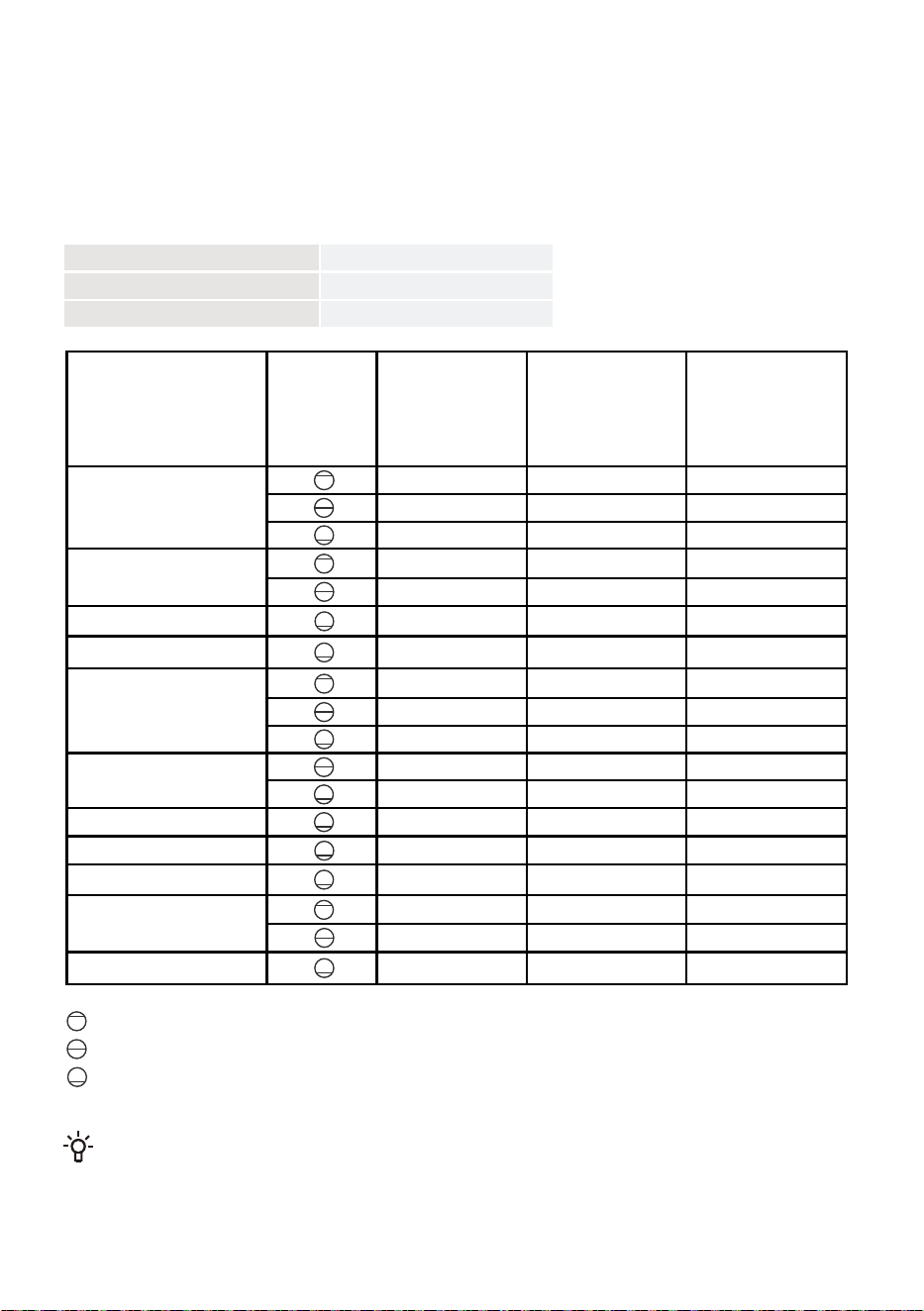
PROGRAM TABLE
Programme Instructions
The table indicates the power consumption and time values for drying of a test batch of laundry with
various loads and after washing machine spinning.
The following requirements apply to the consumption values specified below.
Inlet air temperature room temperature
Inlet air humidity 50–60%
Drying temperature Normal
Due to deviations in terms of type and amount of laundry, spinning, power supply oscillation, and
environment temperature and humidity, the values measured at the user may differ from the one stated
in the table.
We reserve the right to any changes and errors in the instructions for use.
Program Amount Spinning
(rpm)
Program
consumption
approximately
(kWh)*
Program
duration
approximately
(h:min)*
Auto
Bedding
Baby Care
Shirt
Cotton
Synthetics
Delicates
Quick29'
Sportswear
Towels
Power Speed 59'
1000
1400
1400
1400
1400
1000
1000
1000
1400
1400
1000
1000
1000
1400
1000
1400
1400
1400
1.05
0.78
0.51
1.02
0.58
0.72
0.31
1.48
0.98
0.70
0.65
0.46
0.38
0.21
0.54
1.15
0.51
0.48
2:27
1:50
1:10
2:05
1:20
1:48
0:50
3:28
2:10
1:45
1:45
1:10
0:55
0:29
1:20
2:30
1:10
0:59
Full load
Partial load
Small load
X0806****