1:2
注意标贴
80g双胶纸
技术要求
A
X08135744
21
洗衣机研发部
2431788
魏 爽
.2024.8.20
刘 松 2024.8.20
冯 超 2024.8.20
程木聪 2024.8.20
崔维明 2024.8.20
1.印刷纸张尺寸为350×280 mm,80g双胶纸黑,白印刷,要求内容正确,清楚;
2.颜色及整体效果必须经过研发部确认后方能生产,产品检验已封样件为准;
3.未注公差按GB/T 1804-m;
4.
符合Q/HKB J 16001《零部件及原材料中有害化学物质含量规定》要求。
X08135744
1:1
美工稿见下页
干衣机简易快
速指南
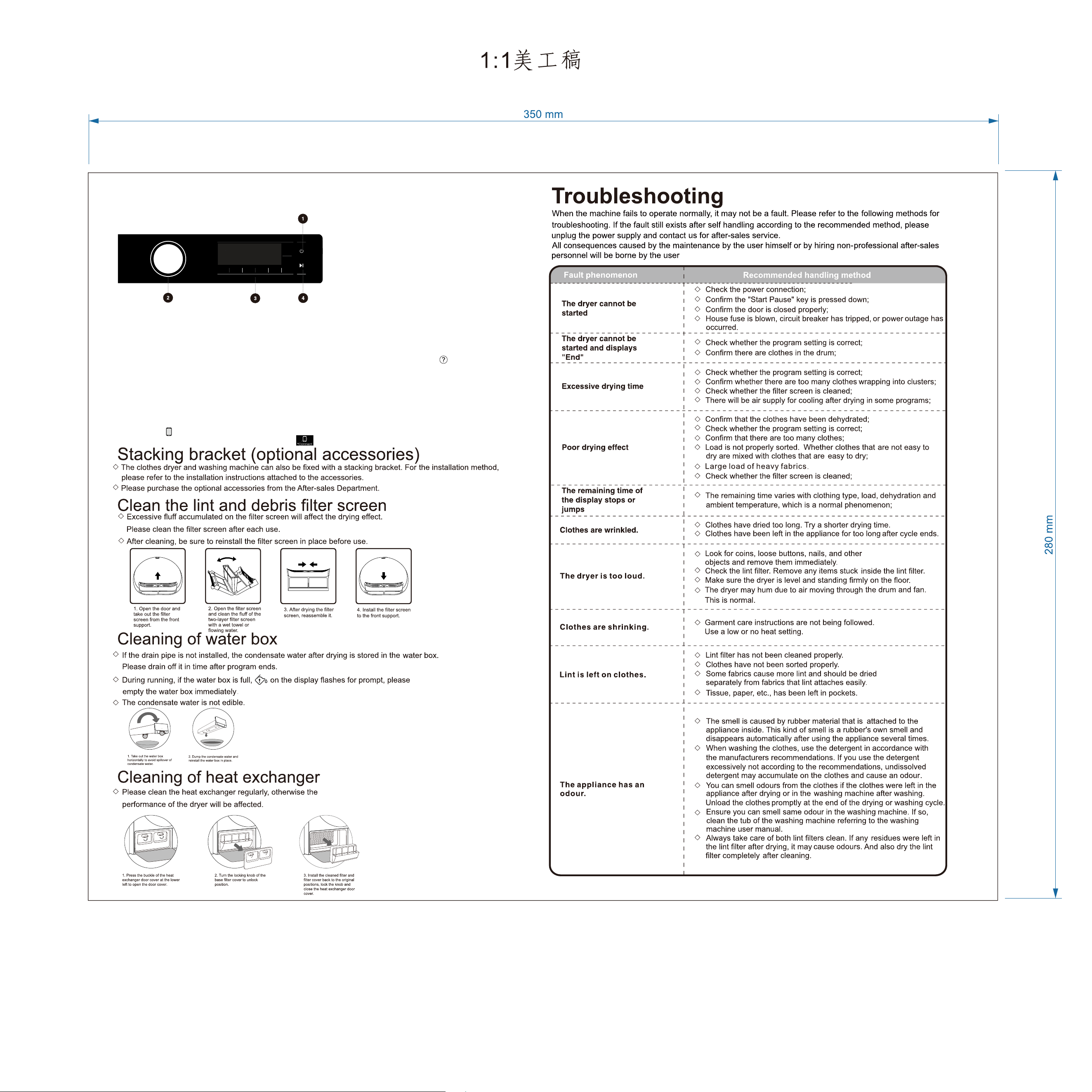
Brief installation guide to dryer
Control unit
Wi-Fi connection
1. Open ConnectLife on your smartphone or tablet PC;
2. Bind your device on ConnectLife as follows:
A.Click "Start here Add appliances" in "Home" page, or click "Add appliances" in "Devices" page, or click "+".
B.Select "Washing Machine" or click"Scan QR/BAR code" or "Manual entry" below.
C.Scan the QR/BAR code on the device or enter the AUID/SN manually. If you can not find it, click for instructions.
D.Click "SET UP APPLICATION"
E.Read the instructions, operate the device into the Networking and Binding state, and click "NEXT".
F.At this time, the app starts to search for devices, and you can select the device to be connected to the network from the search
list; If it is not found, check your bluetooth whether turn on. Bluetooth should be keep it on at all time. And then click "NEXT".
G.Select your home Wi-Fi, enter the password, Then click the "CONNECT". The appliance will start networking and binding.
H.After binding successfully, you can set the device name and room.
I.Now, the device can be control remotely by APP.
1.
Press the Power button. Press and hold
for 3 seconds to power off.
2.
Select a cycle.
3.
Select desired option function.
4.
Press Start / Pause.
*When the " " display light on the display window is not on, you cannot remotely control the machine through the
mobile phone.To enable this function, press the "
" button on the dashboard.
If you have any question in use, please contact 1 800 447 367 (AU) or 0800 444 736 (NZ)
2431788-X08135744A