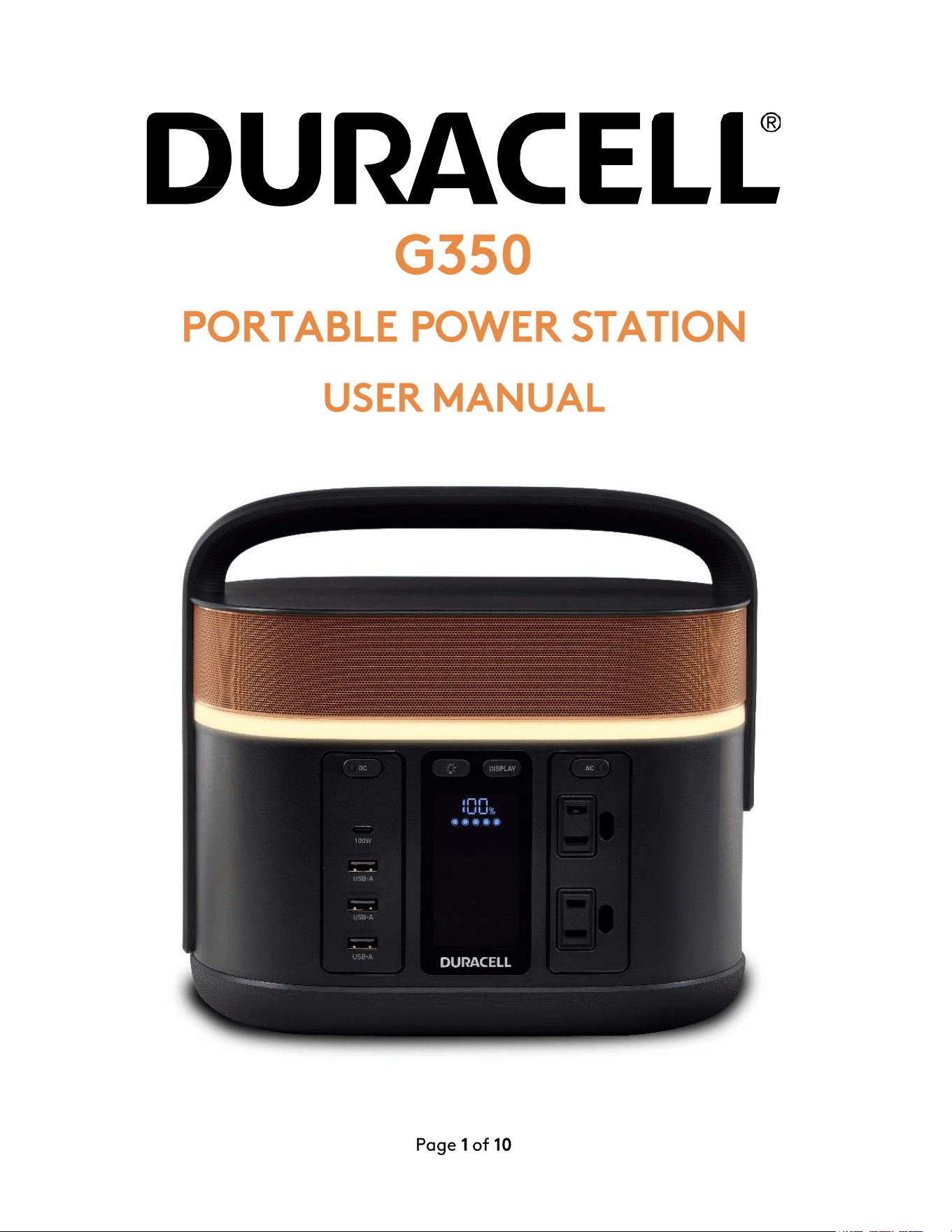
G350
PORTABLE POWER STATION
USER
MANUAL
DU
CELt
Page 1
of
10
IMPORTANT
SAFETY
INFORMATION
1.
Read
all
the
instructions
before
using
the
G350
Portable
Power
Station.
2.
To
reduce
the
risk
of
injury,
close
supervision
is
necessary
when
the
G350 is
used
near
children.
3. Do
not
expose
the
G350
to
rain
or
snow.
4. Use
only
recommended
Duracell
accessories
and
charging
cables.
5. Do
not
expose
the
G350
to
fire
or
excessive
temperature.
Any
such
exposure
to
fire
or
temperature
above
140°F (60°C)
may
cause
an
explosion.
Do
not
use
near
flammable
gases
or
fumes.
6.
Do
not
use
the
G350
with
damaged
wires
or
plugs.
It
may
cause
an
electric
shock.
7. Do
not
use
the
G350
if it
is
damaged
or
modified.
Damage
or
modification
of
the
G350,
including
the
lithium-ion
battery
pack
within
the
G350,
may
exhibit
unpredictable
behavior
resulting
in
fire,
explosion,
or
risk
of
injury.
8.
Make
sure
to
use
the
G350
in
a
ventilated
environment.
Do
not
restrict
the
ventilation
of
the
G350
in
any
way
during
usage.
9.
During
storage
keep
the
G350
in a
dry
and
ventilated
place
to
avoid
moisture
and
electric
shock.
10. The
G350
unit
has
no
serviceable
parts.
11.
Do
not
disassemble,
repair,
or
modify
the
G350
or
the
battery
pack.
It
may
cause
fire,
explosion,
injury,
and
unpredictable
risks.
12. Do
not
remove
power
cables
by
pulling
on
the
cable
itself,
as
it
may
fray
and
cause
a
short
circuit.
Cables
should
be
properly
removed
by
holding
their
connectors
and
pulling.
13. AC
output
is a
pure
sine
wave
AC
waveform.
See
the
caution
statement
on
the
next
page
before
connecting
the
appliances
to
the
G350
Unit.
14. Please
visit
www.duracell.com
or
call
Duracell
Consumer
Relations
at
800-551-2355
if
you
experience
any
problems
with
the
G350.
If
instructions
are
not
followed,
it
can
cause
hospitalization,
serious
injury,
or
death.
Serious
injuries
include
blindness,
burns,
electric
shock,
etc.,
leading
to
complications.
Page 2
of
10
WARNING
AND
HAZARD
TYPES
ELECTRIC
SHOCK
HAZARD
Do
not
subject
the
G350
Unit
to
mechanical
shock.
Keep
away
from
children.
The
G350
generates
the
same
potentially
lethal
120V
AC
voltage
as a
standard
household
wall
outlet.
To
reduce
the
risk
of
fire
or
electric
shock,
do
not
open
the
enclosure
or
expose
the
G350
to
rain
or
moisture.
Do
not
insert
foreign
objects
into
the
AC
connection
or
the
ventilation
holes.
All
AC
plugs
must
be
properly
inserted
and
avoid
using
damaged
cables.
Do
not
operate
outside
of
its
operating
temperature
range
of
4°C
to
40°C.
FIRE
HAZARD
Do
not
burn
or
incinerate
this
G350
or
battery
pack.
Exposing
the
G350
unit
to
heat
or
fire
may
cause
an
explosion,
resulting
to
personal
injury
or
damage.
Do
not
use
near
flammable
gases
or
fumes
or
apparatus
that
produces
large
amounts
of
heat.
APPLIANCE
CAUTIONS
The
G350's
AC
output
is a
350W
120V/60Hz
pure
sine
wave,
intended
for
powering
low
Power
devices
and
portable
electronic
devices.
The
AC
output
can
also
be
used
for
small
fans
and
lights
and
charging
of
other
portable
electronic
devices
such
as
laptops,
tablets,
and
mobile
phones.
Devices
rated
more
than
350W
(e.g.
Toaster,
Coffee
Maker,
Hair
Dryer
etc)
will
not
function.
DO
NOT
plug
small
appliances
into
the
G350's
AC
receptacle
to
directly
recharge
their
nickel-metal
hydride
batteries.
FCC STATEMENT
This
device
complies
with
Par
15
of
the
FCC Rules
and
Class B
Digital
Device
limits
which
provide
protection
against
interference
in
a
residential
installation.
Operation
is
subject
to
the
following
two
conditions:
1.
This
device
may
not
cause
harmful
interference.
2. This
device
must
accept
any
interference
received,
including
interference
that
may
cause
undesired
operation.
This
device
generates,
uses,
and
can
radiate
radio
frequency
energy
and,
if
not
installed
and
used
in
accordance
with
the
instructions,
may
cause
interference
to
radio/TV
communications
for
which
the
manufacturer
is
not
responsible.
Should
interference
occur,
correct
by
connecting
the
device
to
another
outlet
on
a
different
circuit.
For
more
information
regarding
our
product
line,
customer
service,
and
warranty
information
please
contact
Duracell
Consumer
Relations
at
800-551-2355
or
visit
our
website:
www
.duracell.com
Page
3
of
10
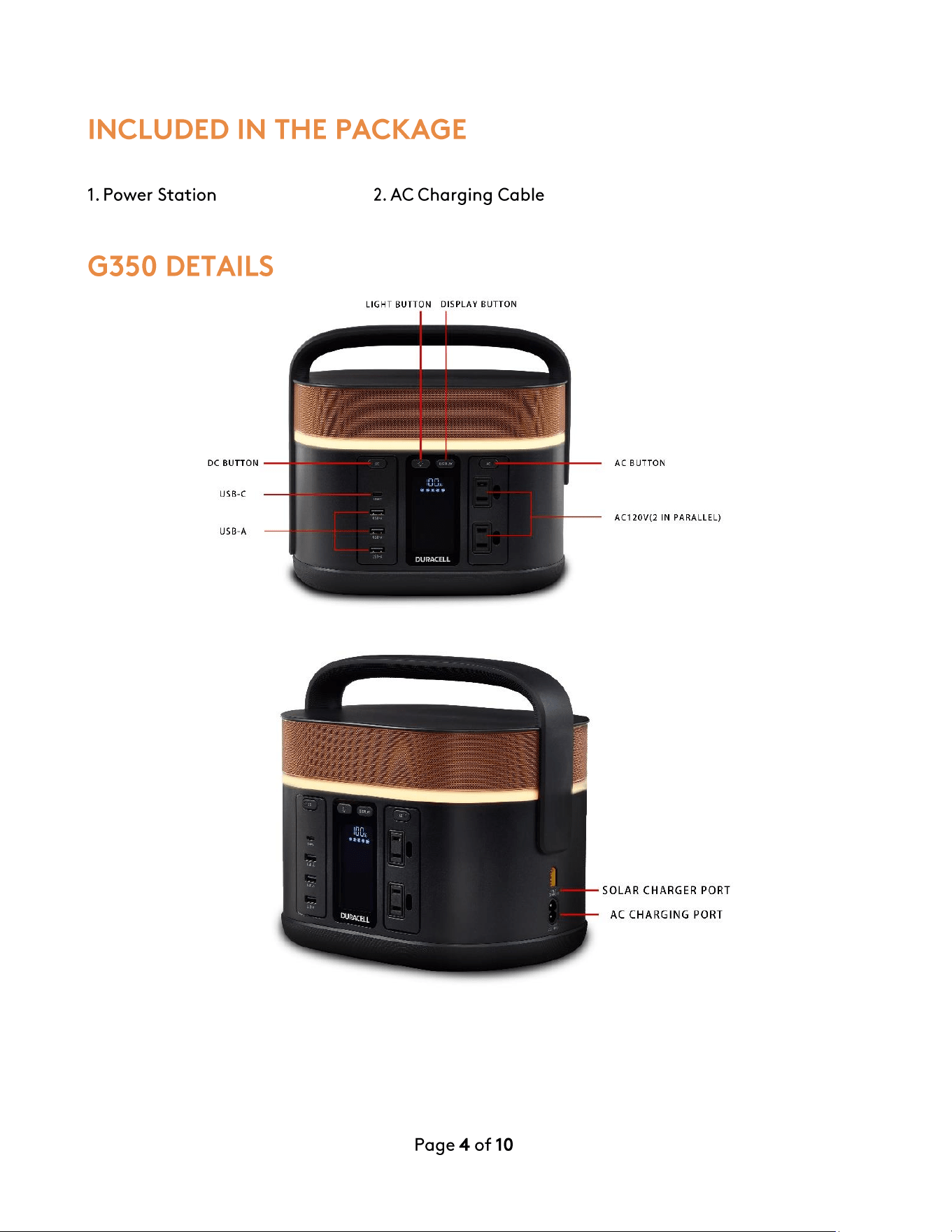
INCLUDED IN THE PACKAGE
1.
Power Station
2.
AC
Charging Cable
G350
DETAILS
LI
GHT
B
UTT
ON
OI
SPLAY
B
UTT
ON
DC
BU
TT
ON
USB
-C
USB- A
Page 4 of
10
AC
BUTTON
AC120V (2 IN
PARAL
L
EL
)
SOLAR
CHARGER
PORT
AC
CHA
RG
ING P
ORT
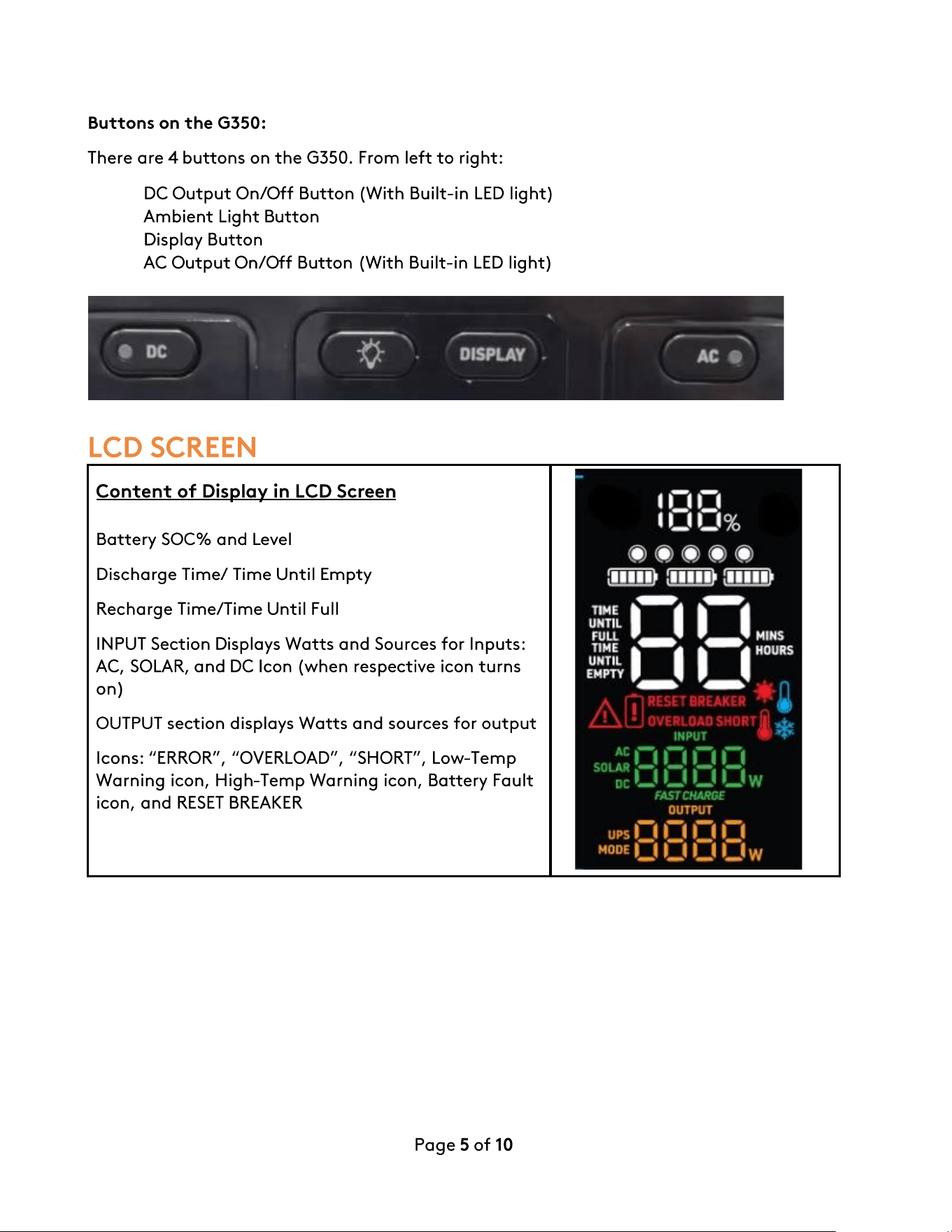
Buttons
on
the
G350:
There
are
4
buttons
on
the
G350. From
left
to
right:
•
DC
Output
On/Off
Button
(With
Built-in
LED
light)
•
Ambient
Light
Button
•
Display
Button
•
AC
Output
On/Off
Button
(With
Built-in
LED
light)
LCD SCREEN
Content
of
Display in LCD Screen
Battery
SOC%
and
Level
Discharge
Time/
Time
Until
Empty
Recharge
Time/Time
Until
Full
INPUT Section Displays
Watts
and
Sources
for
Inputs:
AC, SOLAR,
and
DC Icon
(when
respective icon
turns
on)
OUTPUT
section
displays
Watts
and
sources
for
output
Icons: "ERROR", "OVERLOAD", "SHORT",
Low-Temp
Warning
icon,
High-Temp
Warning
icon,
Battery
Fault
icon,
and
RESET
BREAKER
Page 5
of
10
CHARGING YOUR G350
Before
using
or
storing
the
Unit,
please
connect
the
charger
cable
to
the
AC
Input
Port
and
fully
charge
the
Unit.
The LCD
screen
will
display
the
charge
status
and
getting
to
100%
could
take
up
to
3-5
hours
depending
on
the
initial
battery
level.
If
charging
from
the
car,
connect
the
compatible
CLA
to
XT-60
car
charger
cable
(Car
charger
cable
not
included)
to
your
vehicle's
CLA
socket
(Cigarette
lighter
port)
and
to
the
Unit's
XT-60
DC
Input
Port.
The
car
battery
may
not
be
able
to
charge
the
Unit
properly
from
the
Vehicle's
CLA
socket
when
the
Vehicle's
Engine
is
turned
OFF.
If
charging
from
Duracell's
G-Solar
Panel (sold
separately),
connect
it
to
the
XT-60
DC
input
using
the
Anderson
to
XT-60
accessory
converter
provided
along
with
the
G-Solar.
The
maximum
Input
power
allowed
for
solar
charging
is
180W
and
the
maximum
voltage
is
30V.
USING YOUR G350
1.
Press
any
power
button
to
turn
on
the
G350.
The LCD screen
will
light
up
and
the
battery
level
indicator
will
display.
2.
For
all
ports,
press
the
power
button
of
the
ports
you
wish
to
use (DC,
Light,
or
AC120V).
3.
The
LED
light
on
the
button
will
be
lit
up,
indicating
that
the
ports
are
on
and
ready
to
use.
4.
Connect
your
device
to
the
desired
port/outlet.
Page 6
of
10
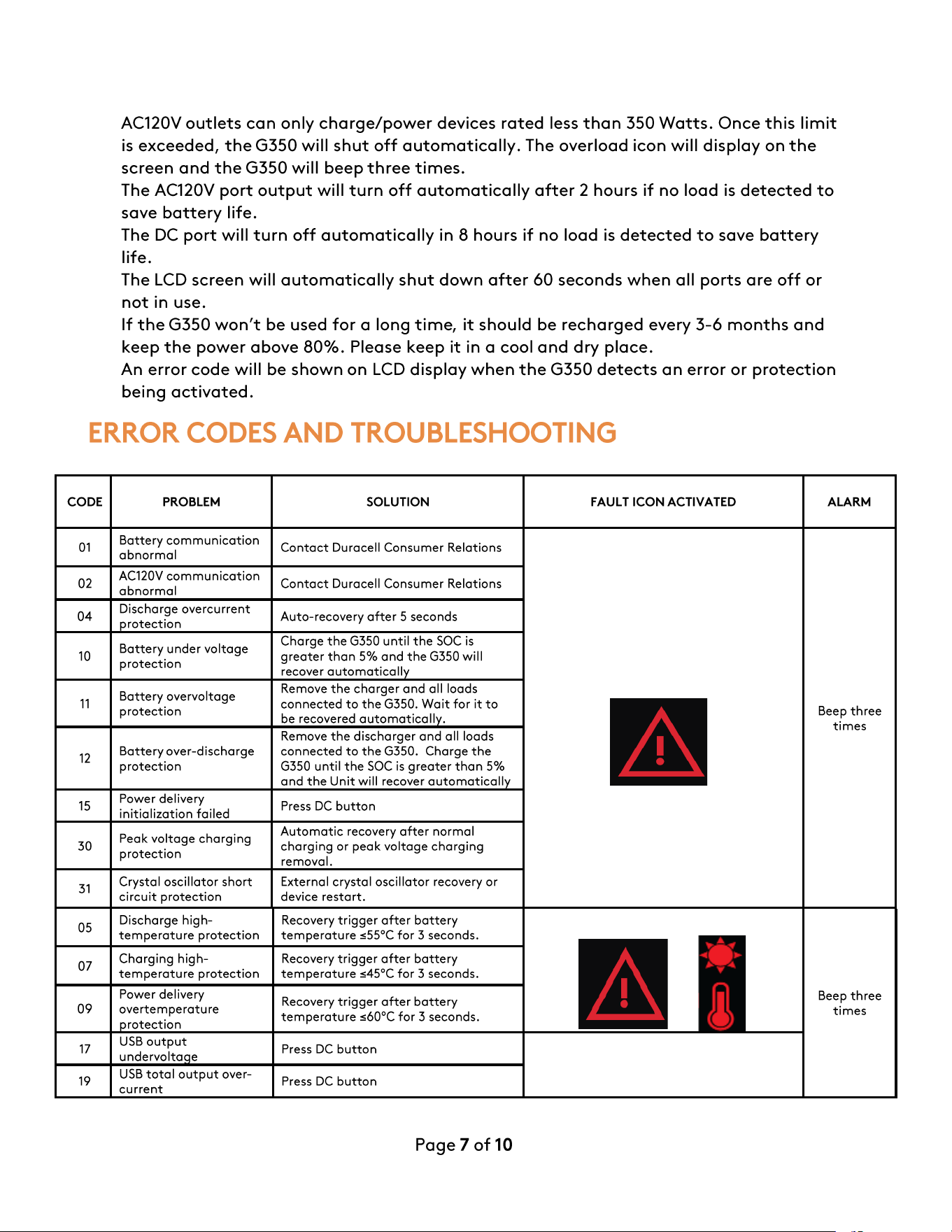
5.
AC120V
outlets
can
only
charge/power
devices
rated
less
than
350
Watts.
Once
this
limit
is
exceeded,
the
G350 will
shut
off
automatically.
The
overload
icon will
display
on
the
screen
and
the
G350 will
beep
three
times.
6.
The
AC120V
port
output
will
turn
off
automatically
after
2
hours
if
no
load
is
detected
to
save
battery
life.
7.
The
DC
port
will
turn
off
automatically
in 8
hours
if
no
load
is
detected
to
save
battery
life.
8.
The
LCD
screen
will
automatically
shut
down
after
60
seconds
when
all
ports
are
off
or
not
in
use.
9.
If
the
G350
won't
be
used
for
a long
time,
it
should
be
recharged
every
3-6
months
and
keep
the
power
above
80%.
Please
keep
it
in
a cool
and
dry
place.
10.
An
error
code
will
be
shown
on
LCD
display
when
the
G350
detects
an
error
or
protection
being
activated.
ERROR CODES
AND
TROUBLESHOOTING
CODE PROBLEM SOLUTION
FAULT
ICON
ACTIVATED
ALARM
01
Battery
communication
abnormal
Contact
Duracell
Consumer
Relations
Beep
three
times
02
AC120V
communication
abnormal
Contact
Duracell
Consumer
Relations
04
Discharge
overcurrent
rotection
Auto-recovery
after
5
seconds
10
Battery
under
voltage
protection
Charge
the
G350 until
the
SOC
is
greater
than
5%
and
the
G350 will
recover
automaticall
11
Battery
overvoltage
protection
Remove
the
charger
and
all loads
connected
to
the
G350.
Wait
for it
to
be recovered
automaticall
.
12
Battery
over-discharge
protection
Remove
the
discharger
and
all
loads
connected
to
the
G350.
Charge
the
G350 until
the
SOC
is
greater
than
5%
and
the
Unit will recover
automaticall
15
Power delivery
initialization failed
Press
DC
button
30
Peak
voltage
charging
protection
Automatic
recovery
after
normal
charging
or
peak
voltage
charging
removal.
31
Crystal oscillator
short
circuit
protection
External
crystal
oscillator recovery
or
device
restart.
05
Discharge high-
temperature
protection
Recovery
trigger
after
battery
temperature
:s55°C for 3
seconds.
Beep
three
times
07
Charging
high-
temperature
protection
Recovery
trigger
after
battery
temperature
:s45°C for 3
seconds.
09
Power delivery
overtemperature
rotection
Recovery
trigger
after
battery
temperature
:s60°C for 3
seconds.
17
USB
output
undervolta
e
Press
DC
button
19
USB
total
output
over-
current
Press
DC
button
Page
7
of
10
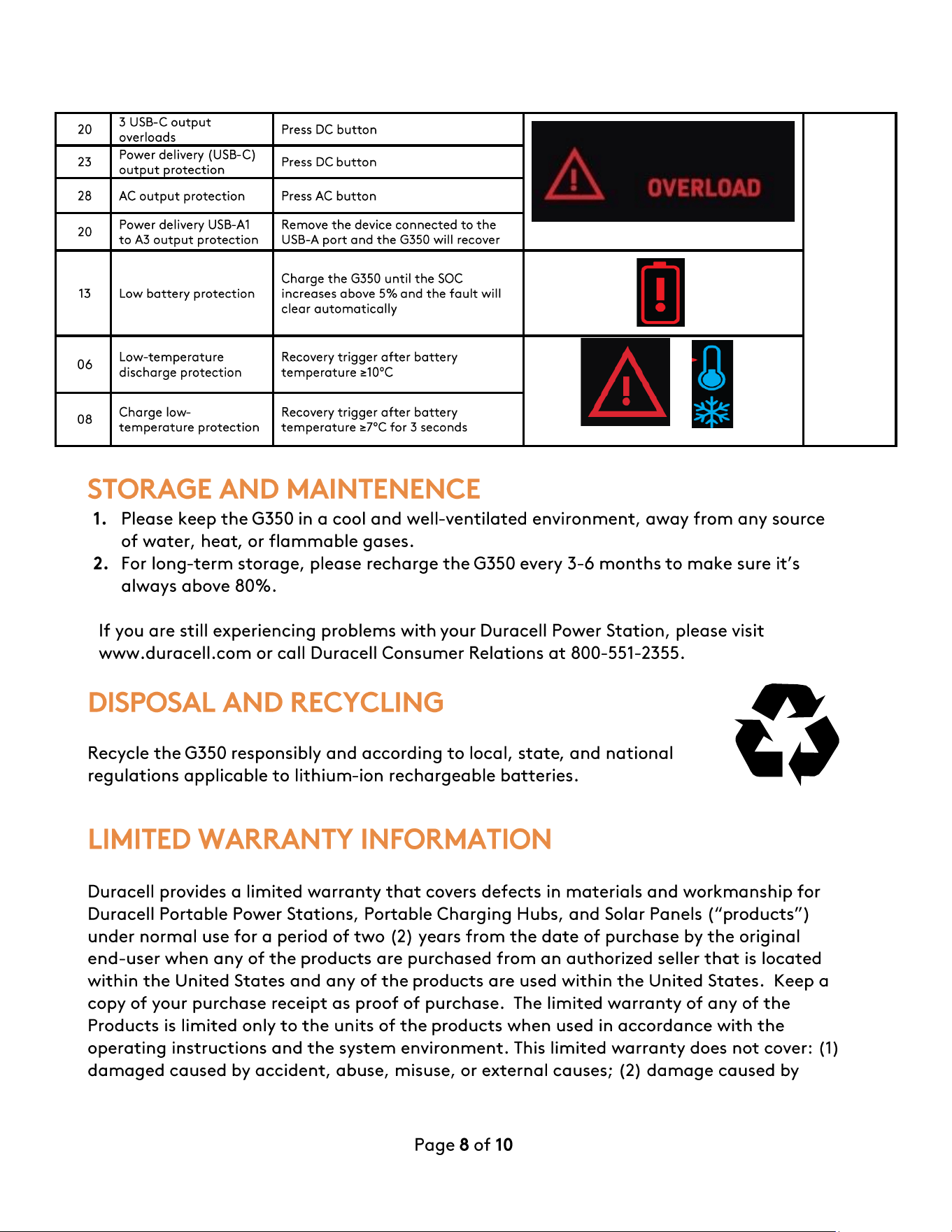
20
3 USB-C
output
overloads
Press
DC
button
23
Power delivery (USB-C)
out
ut
rotection
Press
DC
button
28
AC
output
protection
Press
AC
button
20
Power delivery
USB-A1
to
A3
output
protection
Remove
the
device
connected
to
the
USB-A
port
and
the
G350 will recover
13
Low
battery
protection
Charge
the
G350 until
the
SOC
increases
above
5%
and
the
fault
will
clear
automatically
06
Low-temperature
discharge
protection
Recovery
trigger
ofter
battery
temperature
;e10°C
08
Charge
low-
temperature
protection
Recovery
trigger
ofter
battery
temperature
;e7°C
for 3
seconds
STORAGE
AND
MAINTENENCE
1. Please
keep
the
G350
in
a
cool
and
well-ventilated
environment,
away
from
any
source
of
water,
heat,
or
flammable
gases.
2. For
long-term
storage,
please
recharge
the
G350
every
3-6
months
to
make
sure
it's
always
above
80%.
If
you
are
still
experiencing
problems
with
your
Duracell
Power
Station,
please
visit
www.duracell.com
or
call
Duracell
Consumer
Relations
at
800-551-2355.
DISPOSAL
AND
RECYCLING
Recycle
the
G350
responsibly
and
according
to
local,
state,
and
national
regulations
applicable
to
lithium-ion
rechargeable
batteries.
LIMITED WARRANTY INFORMATION
Duracell
provides
a
limited
warranty
that
covers
defects
in
materials
and
workmanship
for
Duracell
Portable
Power
Stations,
Portable
Charging
Hubs,
and
Solar
Panels
("products")
under
normal
use
for
a
period
of
two
(2)
years
from
the
date
of
purchase
by
the
original
end-user
when
any
of
the
products
are
purchased
from
an
authorized
seller
that
is
located
within
the
United
States
and
any
of
the
products
are
used
within
the
United
States.
Keep
a
copy
of
your
purchase
receipt
as
proof
of
purchase.
The
limited
warranty
of
any
of
the
Products
is
limited
only
to
the
units
of
the
products
when
used
in
accordance
with
the
operating
instructions
and
the
system
environment.
This
limited
warranty
does
not
cover:
(1)
damaged
caused
by
accident,
abuse,
misuse,
or
external
causes;
(2)
damage
caused
by
Page
8
of
10
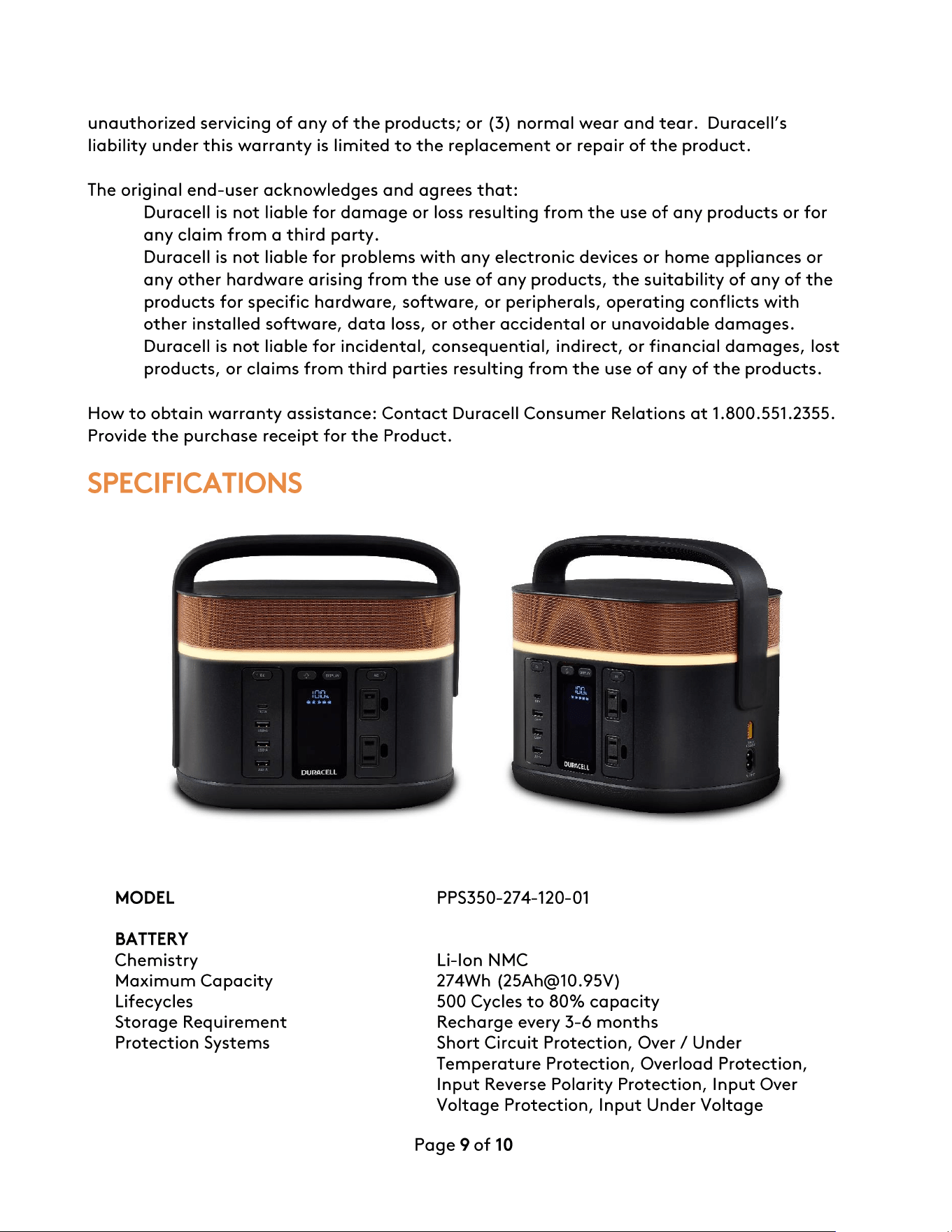
unauthorized
servicing
of
any
of
the
products;
or
(3)
normal
wear
and
tear.
Duracell's
liability
under
this
warranty
is
limited
to
the
replacement
or
repair
of
the
product.
The original
end-user
acknowledges
and
agrees
that:
•
Duracell
is
not
liable
for
damage
or
loss
resulting
from
the
use
of
any
products
or
for
any
claim
from
a
third
party.
•
Duracell
is
not
liable
for
problems
with
any
electronic
devices
or
home
appliances
or
any
other
hardware
arising
from
the
use
of
any
products,
the
suitability
of
any
of
the
products
for
specific
hardware,
software,
or
peripherals,
operating
conflicts
with
other
installed
software,
data
loss,
or
other
accidental
or
unavoidable
damages.
•
Duracell
is
not
liable
for
incidental,
consequential,
indirect,
or
financial
damages,
lost
products,
or
claims
from
third
parties
resulting
from
the
use
of
any
of
the
products.
How
to
obtain
warranty
assistance:
Contact
Duracell
Consumer
Relations
at
1.800.551.2355.
Provide
the
purchase
receipt
for
the
Product.
SPECIFICATIONS
MODEL
PPS350-274-120-01
BATTERY
Chemistry
Li-Ion
NMC
Maximum
Capacity
274Wh ([email protected])
Lifecycles
500
Cycles
to
80%
capacity
Storage
Requirement
Recharge
every
3-6
months
Protection
Systems
Short
Circuit
Protection,
Over/
Under
Temperature
Protection,
Overload
Protection,
Input
Reverse Polarity
Protection,
Input
Over
Voltage
Protection,
Input
Under
Voltage
Page
9
of
10
.
?
Protection
,
Battery
Under
and
Overvoltage
Protection.
CHARGE TIME
AC
input
4.5
hrs.
Solar Panel
(Duracell
G-Solar
Panel
100W)
5-8hrs.
(Full Sun)
GENERAL
Weight
4.2±0.1kg (9.26±0.22Ibs)
Dimensions(L
*W*H)
252*182*234mm
(9.9*7.2*9.2
inches)
Discharging
Temperature
-14
to
104°F (-10
to
40
°C}
Charging
Temperature
39 .2
to
104°F
(4
to
40
°C}
Storage
Temperature
42
to
85°F (6
to
29°C)
Certifications
FCC/DOE/ETL/RoHS/Prop-65/TSCA/PFAS
Warranty
24
Months
FREQUENTLY
ASKED
QUESTIONS
0
1
What
battery
does
my
G350 use?
It
uses
high performance lithium-ion
cells
.
2.
What
devices
can
my
G350 power?
With
350W continuous power,
the
Unit can power a wide range
of
electronic
devices
and Low
wattage
home appliances.
We
recommend checking
the
rated power
of
equipment
to
be
connected
to
this
Unit
to
make
sure
the
sum
of
all
of
them
do
not
exceed
350W
.
3.
How
long will myG350 keep
my
devices running?
That
will
depend
on
the
power
consumption
of
each
connected
device. The
LCD
screen
will
indicate
the
remaining
run
time
based
on
the
connected
load
.
4.
How
to
store
my
G350?
Before storing, please
turn
off
the
Unit
first and then store
it
in a dry, ventilated place
at
room temperature (42-85°F) .
Do
not place
it
near
water
sources
.
For
long-term
storage, recharge every
3-6
months
to
ensure
the
battery
is
always above
80%
to
protect
the
battery
life
.
5.
Can I recharge
my
G350 while using it?
Yes,
the
G350 can be charged and
used
at
the
same time,
but
it
will extend
the
recharge
time
.
6.
Can
my
G350 be used as
an
Uninterrupted Power Supply (UPS)?
No,
the
G350
is
not designed
to
be
used
as
a
UPS.
7.
Can I bring
myG350
on a plane?
Check
with
the
airline.
Page
10
of
10