
©COPYRIGHT AVPRO GLOBAL HOLDINGS 2023 - 2222 E 52ND STREET N SIOUX FALLS, SD 57104 ~ 1.877.866.5112
1
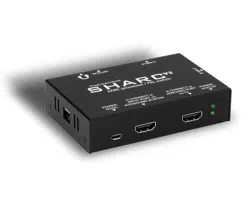
SHARC-V2
User Manual
8K eARC Audio Processor

Thenaudio is proud to introduce SHARC-V2, a smart eARC processor with 8K / FRL-6 /
48Gbps dual-port input switch with CEC control and advanced audio processing circuitry.
The following three key areas have been addressed in SHARC-V2:
• INPUT PORTS: Added two FRL-6, 48Gbps input ports with a smart CEC control zone.
• CEC ZONE 2: Improved second CEC zone used for the connected audio system to
further increase compatibility
• ANALOG OUTPUT: Improved analog output quality.
Each point has been extensively discussed with customers over the past year and it
has helped us to target eorts. For details, we have listed below these three points and
highlighted them in more detail.
Features
• Two HDMI 2.1 48Gbps FRL6 inputs
• Video support for all formats up to 48Gbps FRL6 from any HDMI source
• Audio support for Dolby Atmos, DTS:X
Introduction
©COPYRIGHT AVPRO GLOBAL HOLDINGS 2023 - 2222 E 52ND STREET N SIOUX FALLS, SD 57104 ~ 1.877.866.5112
2

CONNECTION GUIDE:
1. Connect SHARC port 3) to the TV eARC/ARC port.
2. Connect SHARC port 4) to one of the INPUT ports of the sound system (it is a
common mistake to connect to the output of the sound system which is typically
labeled “ARC”).
3. Connect the USB micro cable between the included power supply and the
POWER 5V/DC input on SHARC.
4. Optional: Connect source devices, such as Xbox or PS5, to the input ports
labeled port 1) and port 2)
5. Set the TV into eARC mode and select PASSTHROUGH or AUTO -mode to retain
multi-channel audio. PCM-setting on TV will always result to only stereo PCM
and sometimes basic DD bitstream.
6. Optional: enable TV per-input bitstream support to enable Atmos/
multichannel-PCM (typically Sound->Additional Setting->bitstream or similar
menu). Default only allows stereo.
7. Make sure the LED indicator light is solid green (eARC active) or slowly blinking
(ARC active). eARC connection is required for all lossless audio.
It is necessary to configure the TV to enable the eARC connection. Sometimes this
is referred to as generic HDMI ARC -setting and the eARC operation specifically is
selected under the ARC detailed settings.
It is often the case that TVs default to sub-standard video capabilities to make sure
customer always gets at least some picture visible. There are often settings such as
“input plus” or “deep color” or alternative settings that must be enabled typically
per input port to allow the maximum video and audio capabilities to flow to the TV.
Make sure all such settings are corretly enabled by consulting the TV manual.
©COPYRIGHT AVPRO GLOBAL HOLDINGS 2023 - 2222 E 52ND STREET N SIOUX FALLS, SD 57104 ~ 1.877.866.5112
3

INDICATOR LED LIGHTS:
The two LED lights are multifunctional indicators. TOP LED indicates that the input
port 1) is selected and is passed through to the TV. BOTTOM LED indicates that the
input port 2) is selected and passed through to the TV.
Simultaneously the LED can be stable color indicating an active eARC connection.
A blinking LED light indicates an active ARC connection.
For most all setups you need to find settings on the TV to have a stable LED light
indicating an eARC connection. Only eARC connection can support lossless audio
such as MAT Atmos, TrueHD, DTS:X and uncompressed 7.1 PCM.
©COPYRIGHT AVPRO GLOBAL HOLDINGS 2023 - 2222 E 52ND STREET N SIOUX FALLS, SD 57104 ~ 1.877.866.5112
4

INDICATOR LED LIGHTS:
There are several advanced options to control the flow of the video and audio and
these settings can be changed using the DIP switches. There are four DIP switches:
DIP #1: MAT ATMOS MODE
Some TVs automatically convert all audio into Dolby MAT format. In case the
connected sound system does not understand MAT formats, the audio will be
rendered mute. To control this there are two settings:
DIP #1 in UP position: All ATMOS formats ok [default]
DIP #1 in DOWN position: Convert MAT formats
DIP #2: eARC STREAM CORRECTION
Some TVs incorrectly mark speaker placement as 7.1 for all PCM multichannel audio.
This results in surround speakers lost in 5.1 sound systems. DIP #2 controls this:
DIP #2 in UP position: According to the TV stream [default]
DIP #2 in DOWN position: Correct for 5.1 systems
DIP #3: CEC WAKEUP option
DIP #3 in UP position: Type 1 [default]
DIP #3 in DOWN position: Type 2
DIP #4: FRL-5 LIMIT
SHARC-V2 supports FRL-6, 48Gbps signaling which is above and beyond what
next-gen consoles like PS5 or Xbox use today. FRL-6 is a very demanding format
for cabling and many times FRL-5 achieves the exact same thing especially if the
content is not anywhere near the 48Gbps link.
DIP #4 in UP position: Follow the source FRL level [default]
DIP #4 in UP position:Limit to FRL-5 to simplify cabling
©COPYRIGHT AVPRO GLOBAL HOLDINGS 2023 - 2222 E 52ND STREET N SIOUX FALLS, SD 57104 ~ 1.877.866.5112
5

Troubleshooting
1. The most common issue is that the port 4) is connected to the output port on AVR.
Make sure the port 4) connects to one of the input ports on the sound system.
2. Check indicator LED status corresponds to the desired operation.
3. Disconnect any connection between the TV and the output port of the AVR/
receiver/soundbar. This is an advanced setup and can create a potentially
unsupported CEC loop. Contact Thenaudio for help with this.
4. Some TV models require a CEC reset to reload the changed CEC network
parameters.
5. Analog audio output requires TV to be set as PCM.
©COPYRIGHT AVPRO GLOBAL HOLDINGS 2023 - 2222 E 52ND STREET N SIOUX FALLS, SD 57104 ~ 1.877.866.5112
6

©COPYRIGHT AVPRO GLOBAL HOLDINGS 2023 - 2222 E 52ND STREET N SIOUX FALLS, SD 57104 ~ 1.877.866.5112
7
Thank you for choosing Then Audio!
Please contact us with any questions, we are
happily at your service!
CONTACT support@thenaudio.com
IF YOU HAVE ANY QUESTIONS ABOUT OPERATING THIS PRODUCT
ZONE2-PRO is a brand new, one of a kind device in the entire world.
We greatly appreciate all kinds of feedback to help perfect this
product. For the latest firmware and manual visit
www.avproedge.com
©COPYRIGHT AVPRO GLOBAL HOLDINGS 2023 - 2222 E 52ND STREET N SIOUX FALLS, SD 57104 ~ 1.877.866.5112
8