
AC70
Portable Power Station
User Manual
Please Read This Manual Before Use And Follow Its Guidance.
Keep This Manual For Future Reference.
Warning
1. Charge the unit before first use.
2. Do not use solar panels with open circuit voltage higher than 58V. Solar input
voltage range for the unit is 12V-58VDC.
3. Charge the unit immediately when the SoC drops below 5%. If the SoC drops to 0,
power off the unit and charge it for at least 30 minutes before restarting.
4. The unit is for off-grid use only. Do not connect its AC output to the grid.
5. If not used for more than 3 months, charge the unit to 40%-60% SoC and store it
with the power off. For optimum battery life, discharge and charge the unit every 3
months.

Thank You
Thank you for making BLUETTI a part of your family.
From the very beginning, BLUETTI has tried to stay true to a sustainable future through
green energy storage solutions while delivering an exceptional eco-friendly experience for
our homes and our world.
That's why BLUETTI makes its presence in 100+ countries and is trusted by millions of
customers across the globe.
Copyright © 2023 ShenzhenPowerOakNewenerCo., Ltd. All rights reserved.
No part of this document may be reproduced or transmitted in any form or by
any means without the prior written consent of ShenzhenPowerOakNewener
Co., Ltd.
Notice
BLUETTI's products, services, and features are subject to the agreed-upon terms
and conditions during purchase. Please note that some products, services, or
features described in this manual may not be available under your purchase
contract. Unless otherwise specified in the contract, BLUETTI makes no
representations or warranties of any kind, express or implied, with respect to
the contents of this manual.
The contents of this manual are subject to change without notice. Please get
the latest version from: https://www.bluettipower.com/pages/user-guides
If you have any questions or concerns about this manual, please contact
BLUETTI support for further assistance.
France
Germany
Netherlands

Safety Instructions
Packing List
Product Overview
Power ON/OFF
LCD Screen
Charging
Discharging
Settings
BLUETTI App
Specifications
Troubleshooting
Contents
1
2
3
4
5
6
7
8
9
10
11
Appx. 1 Estimating Operation Time
Appx. 2 FAQs
Appx. 3 FCC Statement
Appx. 4 IC Caution
Appx. 5 Consignes de sécurité
05
09
11
12
12
14
16
16
18
18
20
21
22
23
24
25

1. Safety Instructions
Read this manual for instructions on the proper use and safety information for the
product. The safety instructions provided herein are for illustrative purposes that include
but are not limited to those listed in this manual. Actual operation shall comply with all
applicable safety standards. If you have any questions, feel free to contact BLUETTI
support or your local BLUETTI dealers.
1.1 Statement
To ensure a safe operation, it's crucial to observe and adhere to the following conditions:
• Always operate or store the product in the conditions specified in this manual.
• Avoid unauthorized disassembly, component replacement, or modification of software codes.
BLUETTI shall not be liable for damages resulting from the following circumstances:
•
Force majeure events such as earthquakes, fires, storms, floods, or mudslides.
• Damage caused by the customer's own transportation.
• Damage resulting from inadequate storage conditions as specified in the manual.
• Damage caused by customer negligence, improper operation, or intentional actions.
• System or hardware damage caused by third parties or customers, including but not
limited to improper handling and installation not in accordance with the instructions in
this manual.
• Usage of the product with devices that require a high-performance Uninterruptible
Power Supply (UPS), including but not limited to data servers, workstations, medical
equipment, and other similar devices.
WARNING - When using this product, basic precautions should always be followed,
including the following:
a. Read all the instructions before using the product.
b. To reduce the risk of injury, close supervision is necessary when the product is used near
children.
c. Do not put fingers or hands into the product. And do not insert foreign objects into
any ports of the product.
d. Use of an attachment not recommended or sold by the manufacturer may result in a
risk of fire, electric shock, or injury to persons.
e. To reduce the risk of damage to the electric plug and cord, pull the plug rather than
1.2 General Requirements
INSTRUCTIONS PERTAINING TO RISK OF FIRE, ELECTRIC SHOCK, OR INJURY TO PERSONS
IMPORTANT SAFETY INSTRUCTIONS
JUST POWER ON 05

the cord when disconnecting the product.
f. Do not use a battery pack or appliance that is damaged or modified, as they may
exhibit unpredictable behavior resulting in fire, explosion, or personal injury.
g. Do not operate the product with a damaged cord or plug, or a damaged output cable.
h. DO NOT attempt to replace the internal battery or any other component of the
product by anyone other than authorized personnel. There are no end-user serviceable
components. Do not disassemble the product, take it to a qualified service person when
service or repair is required. Incorrect reassembly may result in a risk of fire or electric
shock.
i. To reduce the risk of electric shock, unplug the product from the outlet before
attempting any instructed servicing.
j. WARNING - RISK OF EXPLOSIVE GASES. To reduce the risk of battery explosion, follow
these instructions and those published by the battery manufacturer and manufacturer
of any equipment you intend to use in the vicinity of the battery. Review cautionary
markings on these products and engines.
k. PERSONAL PRECAUTIONS
1) Wear complete eye protection and clothing protection. Avoid touching eyes while
working near the battery.
2) NEVER smoke or allow a spark or flame in the vicinity of the battery or engine.
3) Be extra cautious to reduce the risk of dropping a metal tool onto the battery. It might
spark or short-circuit the battery or other electrical parts which may cause an explosion.
l. When charging the internal battery, work in a well ventilated area and do not restrict
ventilation in any way.
m. Under abusive conditions, liquid may be ejected from the battery; avoid contact. If
contact accidentally occurs, flush with water. If liquid contacts eyes, additionally seek
medical help. Liquid ejected from the battery may cause irritation or burns.
n. Do not expose the product to fire or excessive temperature. Exposure to fire or
temperature above 130°C may cause an explosion.
o. Have servicing performed by a qualified repair person using only identical replacement
parts. This will ensure that safety is maintained.
p. DO NOT operate in wet conditions. If the product becomes wet, please thoroughly dry
it before using.
q. Please ensure proper ventilation while in use and do not obstruct fan openings.
Inadequate ventilation may cause permanent damage to the product.
r. DO NOT stack anything on top of the product while in storage or use. DO NOT move
the product while operating as vibrations and sudden impacts may lead to poor
connections to the hardware inside.
JUST POWER ON06

1.3 Grounding Instructions
This product must be grounded. If it should malfunction or break down, grounding
provides a path of least resistance for electric current to reduce the risk of electric shock.
This product is equipped with a cord having an equipment-grounding conductor and a
grounding plug. The plug must be plugged into an outlet that is properly installed and
grounded in accordance with all local codes and ordinances.
WARNING
Improper connection of the equipment-grounding conductor can result in a risk of
electric shock. Check with a qualified electrician if you are in doubt as to whether the
product is properly grounded. Do not modify the plug provided with the product - if it
does not fit the outlet, have a proper outlet installed by a qualified electrician.
1.4 Storage Instructions
a. When the SoC drops to 5%, please charge the product immediately.
b. Before storing the product, charge it to 40% to 60% SoC to keep it in optimal condition.
In addition, power off the unit and disconnect all electrical connections from it.
c. Store the product in a cool and dry place, keeping it away from flammable or combustible
materials and gases.
d. The product can be safely stored within a temperature range of -20℃ to 40℃ (-4℉ to
104℉). However, if the storage duration exceeds one month, it's recommended to
maintain an ideal storage temperature of around 30℃ (86℉).
e. Fully cycle the product every 3 months to maintain the battery's health. It's NOT
recommended to store the unit for extended periods of time, as it may affect its performance
and overall lifespan.
s. In case of fire, use only a dry powder fire extinguisher appropriate for the product.
t. WARNING - RISK OF ELECTRIC SHOCK. Never use the product to supply power tools to
cut or access live parts or live wirings, or materials that may contain live parts or live
wirings inside, such as building walls, etc.
u. To avoid contact with any liquids, do not use this product in the rain or high humidity.
JUST POWER ON 07

• Shut down immediately.
• Charge within 48 hours.
• Keep it at an ambient temperature of 5℃ to 35℃ (41℉ to 95℉) for 24 hours before
charging. It's recommended to charge the product via an AC source. If charging via
solar energy, ensure that your solar system provides an output of more than 100W.
BLUETTI shall not be liable for any equipment damage caused by the violation of the
above instructions.
SAVE THESE INSTRUCTIONS
The symbol displayed is intended to remind you to read the instructions in the
literature accompanying the product before operation and maintenance.
• Connect the product to a socket-outlet that has an earthing connection using the
power cord provided.
• The socket-outlet should be installed near the product and easily accessible for safety
purposes.
• NEVER dispose of a battery by throwing it into fire or a hot oven, or by mechanically
crushing or cutting it, as these may cause it to explode.
• Avoid leaving batteries in extremely high-temperature environments, as this can result
in an explosion or the leakage of flammable liquid or gas.
• The battery subjected to extremely low air pressure may result in an explosion or the
leakage of flammable liquid or gas.
• Attention should be drawn to the environmental aspects of battery disposal.
• Please refer to the information on the exterior bottom enclosure for electrical and safety
information before installing or operating the apparatus.
If the SoC drops to 0 (during storage or upon startup), take the following actions to
safely restart the product:
JUST POWER ON08
2. Packing List
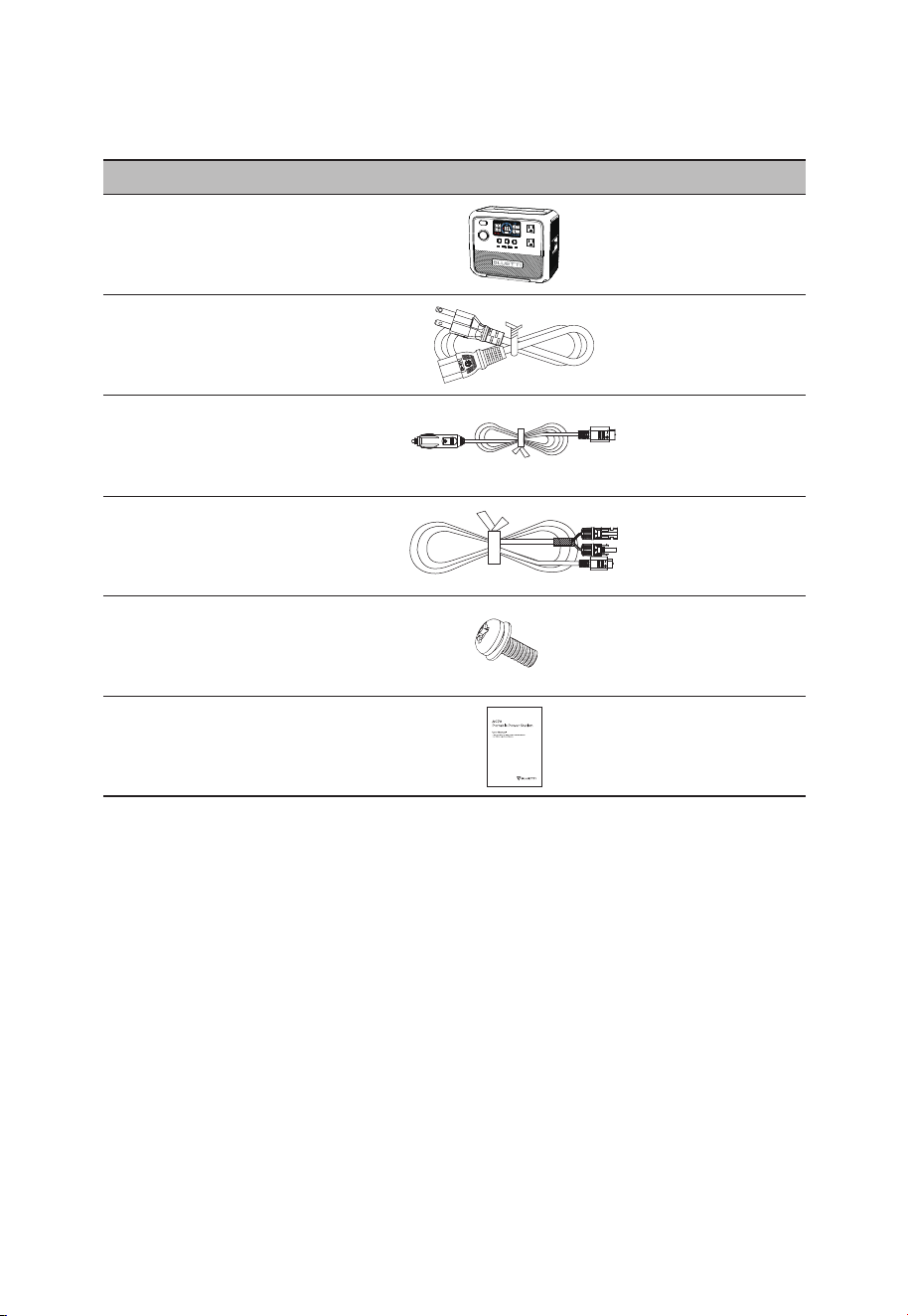
Item Picture Qty.
Portable Power Station
1
AC Charging Cable
1
Car Charging Cable
1
Solar Charging Cable
1
Standard Packaging
Grounding Screw
(M5×10)
1
User Manual
1
JUST POWER ON 09
JUST POWER ON10
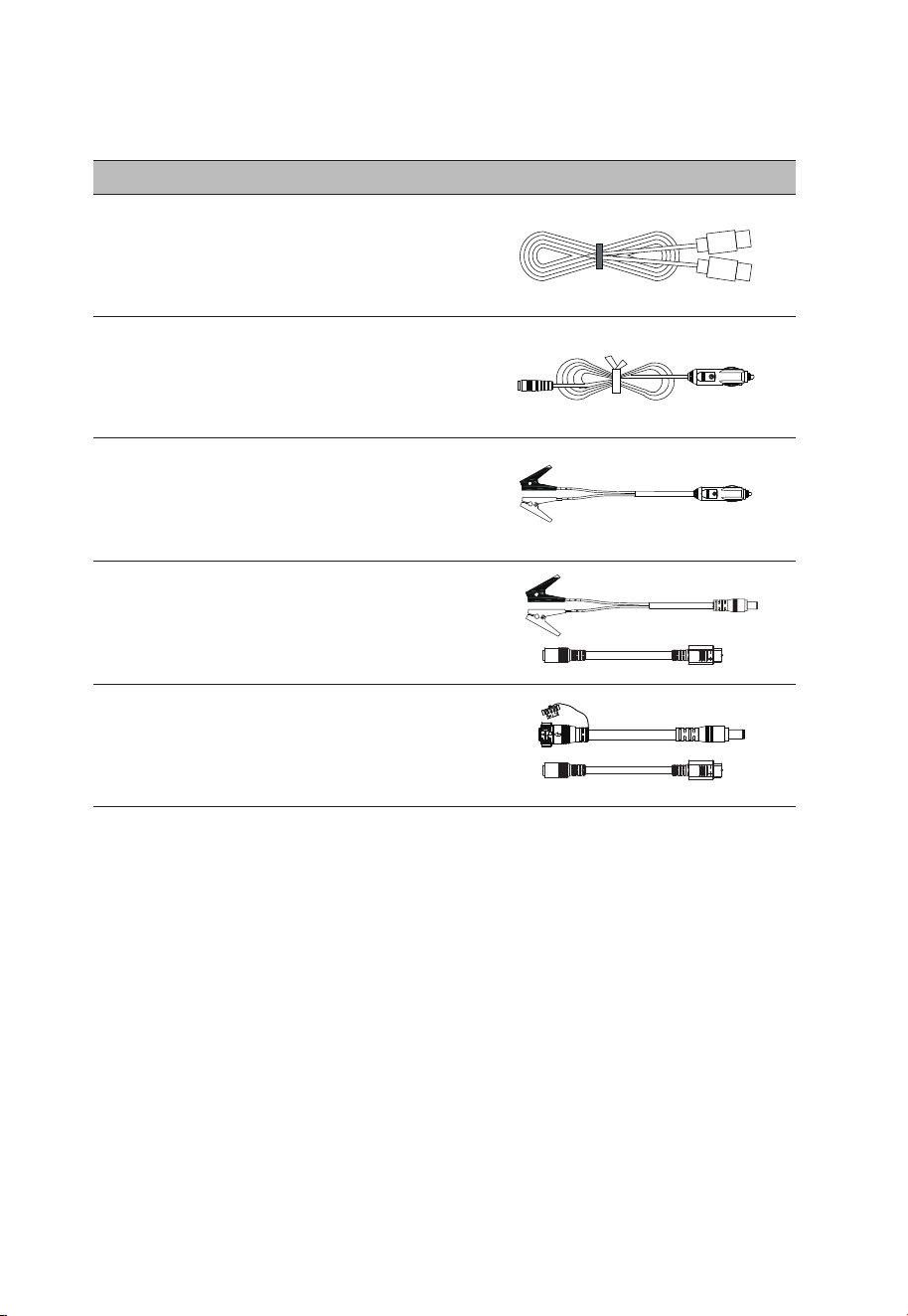
Optional Accessories
(Available on official BLUETTI website)
Item Picture
USB-C to USB-C Cable
(Output)
Cigarette Lighter to DC5521 Cable
(For 12V devices with DC5521 port,
such as routers, cameras, etc.)
Lead-acid Battery Charger
(Charge a 12V/10A lead-acid battery via AC70.
For gasoline vehicle batteries only.)
Lead-acid Battery Charging Cable Kit
(Charge the AC70 via a lead-acid battery.)
Battery Connection Cable Kit
(Charge the AC70 via an expansion
battery in Power Bank mode.)
3. Product Overview
Meet the AC70 portable power station - the ultimate companion for your travel and
adventure needs. With a 1000W pure sine wave inverter and 768Wh LiFePO
4
battery, it
offers ample power for all your outing gadgets like phones, laptops, car refrigerators, and
air conditioners. When you require even more power, it boasts the innovative Power
Lifting mode to tackle higher resistive demands of up to 2000W, perfect for hairdryers,
kettles, and other heating appliances. Thanks to Turbo Charging technology, you can
enjoy the convenience of an 80% charge in just 45 minutes, and a full charge in 1.5 hours.
Whether you're embarking on outdoor adventures, road trips, or camping trips with
friends, the AC70 is built to accompany you every step of the way. So, go ahead and
embrace your travel plans with confidence, knowing that the AC70 will provide reliable
power whenever you need it.
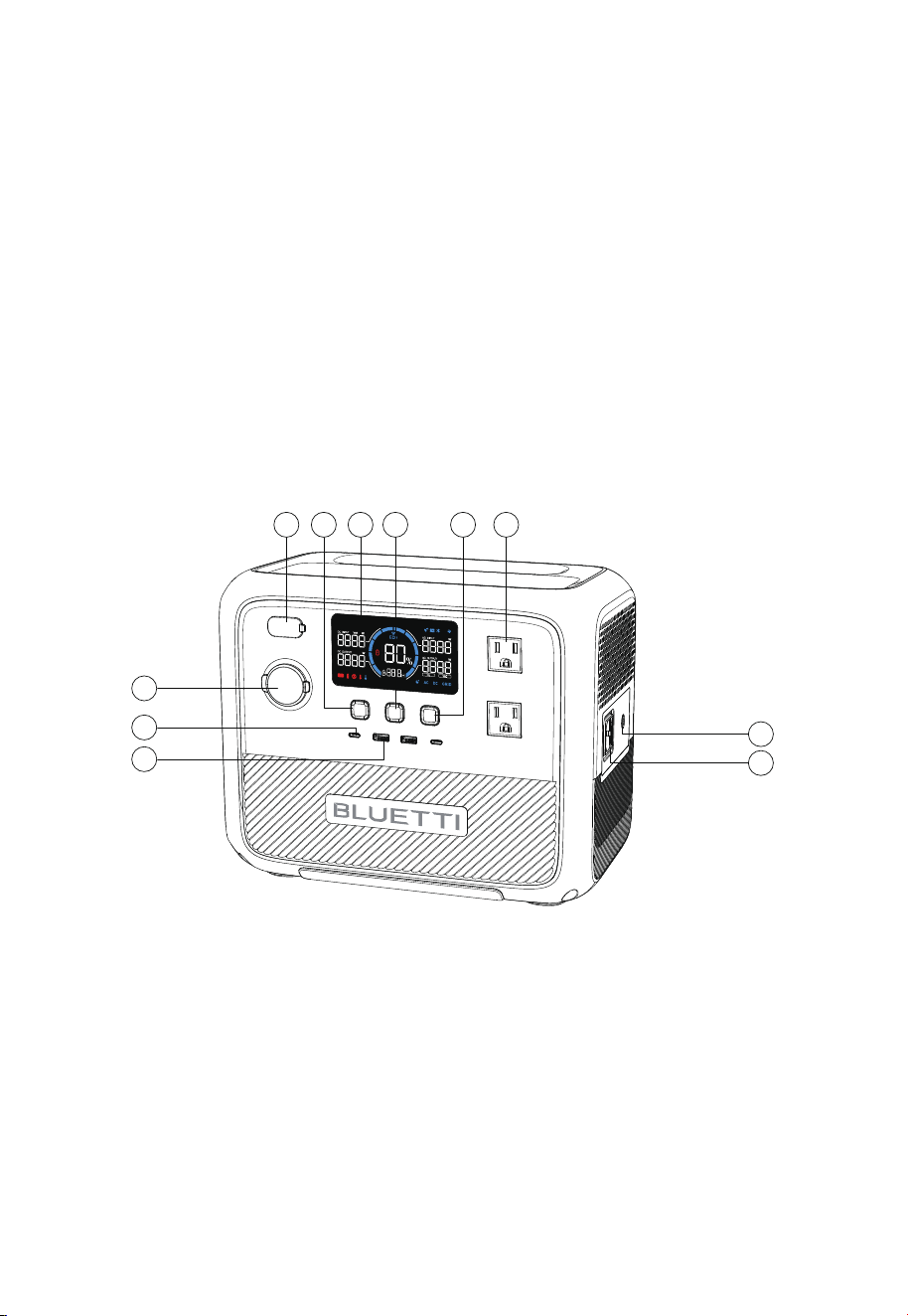
DC Input
DC Power Button
LCD Screen
Power Button
AC Power Button
AC Output
Grounding Pole
AC Input
USB-A Port
USB-C Port
Cigarette Lighter Port
①
②
③
④
⑤
⑥
⑦
⑧
⑨
⑩
⑪
1 3 4 652
11
7
8
9
10
JUST POWER ON 11
①
②
③
④
⑤
⑥
⑦
⑧
⑨
⑩
⑪
⑫
⑬
⑭
⑮
⑯
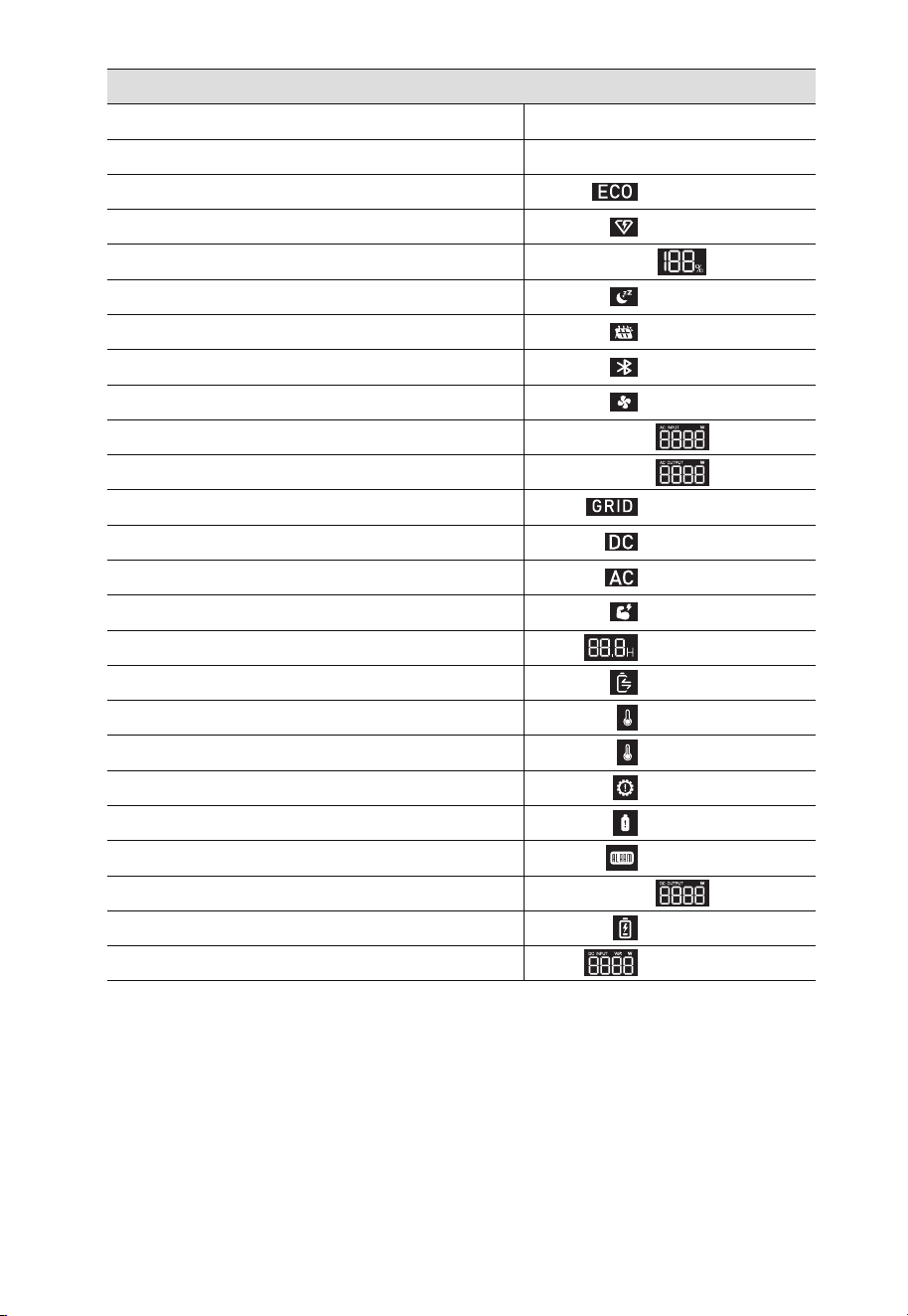
ECO Mode
Turbo Charging
Battery Capacity (SoC)
Silent Charging
DC Input
Bluetooth Connection
Fan
AC Input Power
AC Output Power
Grid Connection
DC Output
AC Output
Power Lifting Mode
Charge / Discharge Remaining Time
Charge / Discharge Status
Low Temperature Alert
5. LCD Screen
4. Power ON/OFF
High Temperature Alert
Overload Alert
Overcurrent Alert
Fault Alert
DC Output Power
Low Voltage Alert
DC Input Power
⑰
⑱
⑲
⑳
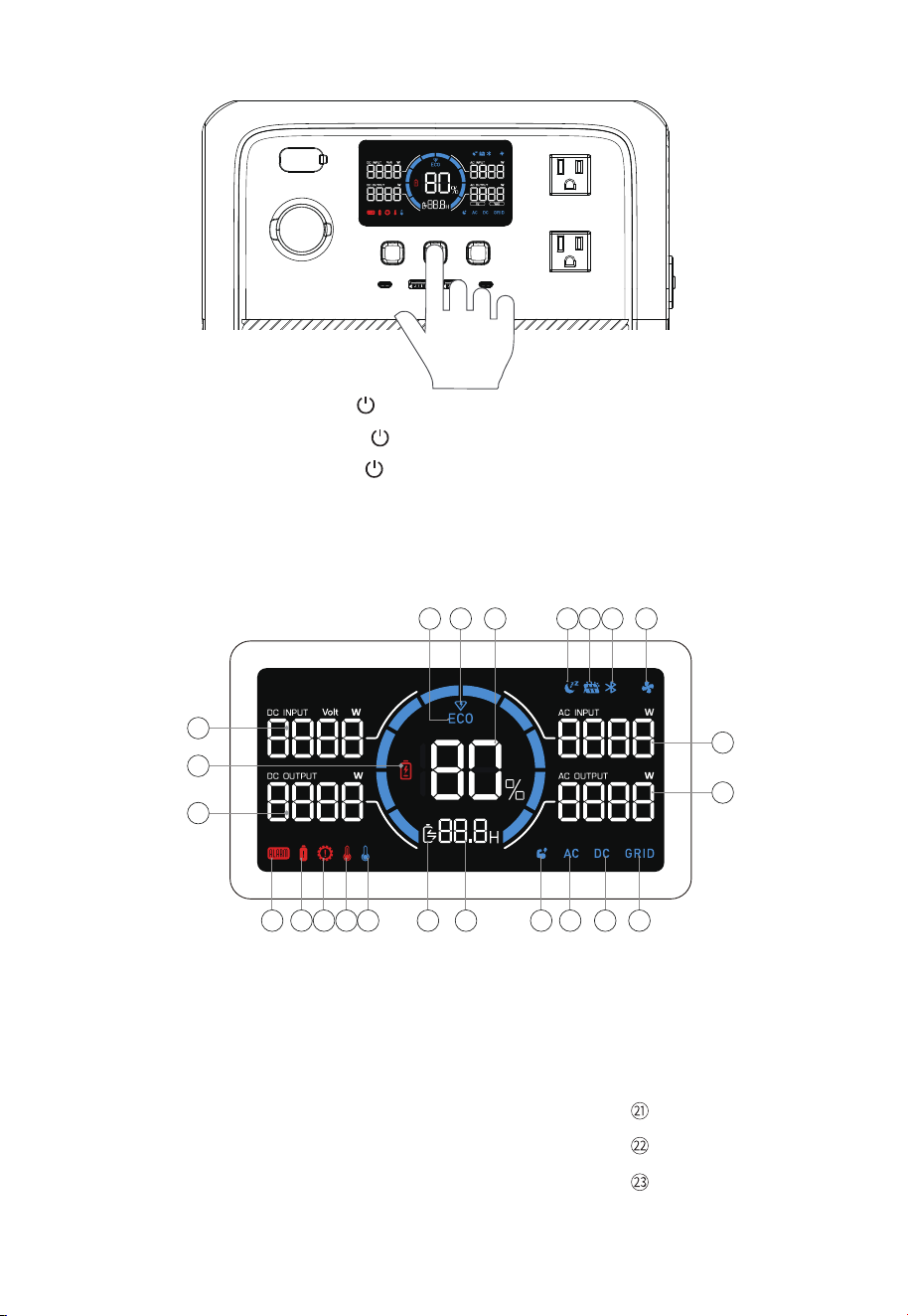
• Power ON: Press and hold the for about 2 seconds to turn AC70 on.
When the AC70 is on, press the again to turn on / off the LCD screen.
• Power OFF: Press and hold the for 2 seconds to turn off the unit.
• AC ON / OFF: When the AC70 is on, press the AC power button to turn it on / off.
• DC ON / OFF: When the AC70 is on, press the DC power button to turn it on / off.
1
2 3 4 5 6 7
21
23
22
1011121314151617181920
8
9
JUST POWER ON12
LCD Instructions
Startup
Shutdown
ECO Mode enabled
Turbo Charging enabled
State of Charge
Silent Charging enabled
DC input
Bluetooth connected
Fan on or abnormal
AC input power
AC output power
AC input
DC output enabled
AC output enabled
LCD lights up
LCD lights off
displays
displays
displays
displays
displays
displays or flashes
displays
displays
displays
displays
displays
displays
displays
displays
displays
displays
displays
displays
displays
Power Lifting Mode enabled
Remaining charge / discharge time (hour)
Charging or discharging
Abnormal temperature
Connected device(s) overheating
Overload
Overcurrent
Error code report
DC output power
Battery low (below 5%)
DC input power
JUST POWER ON 13
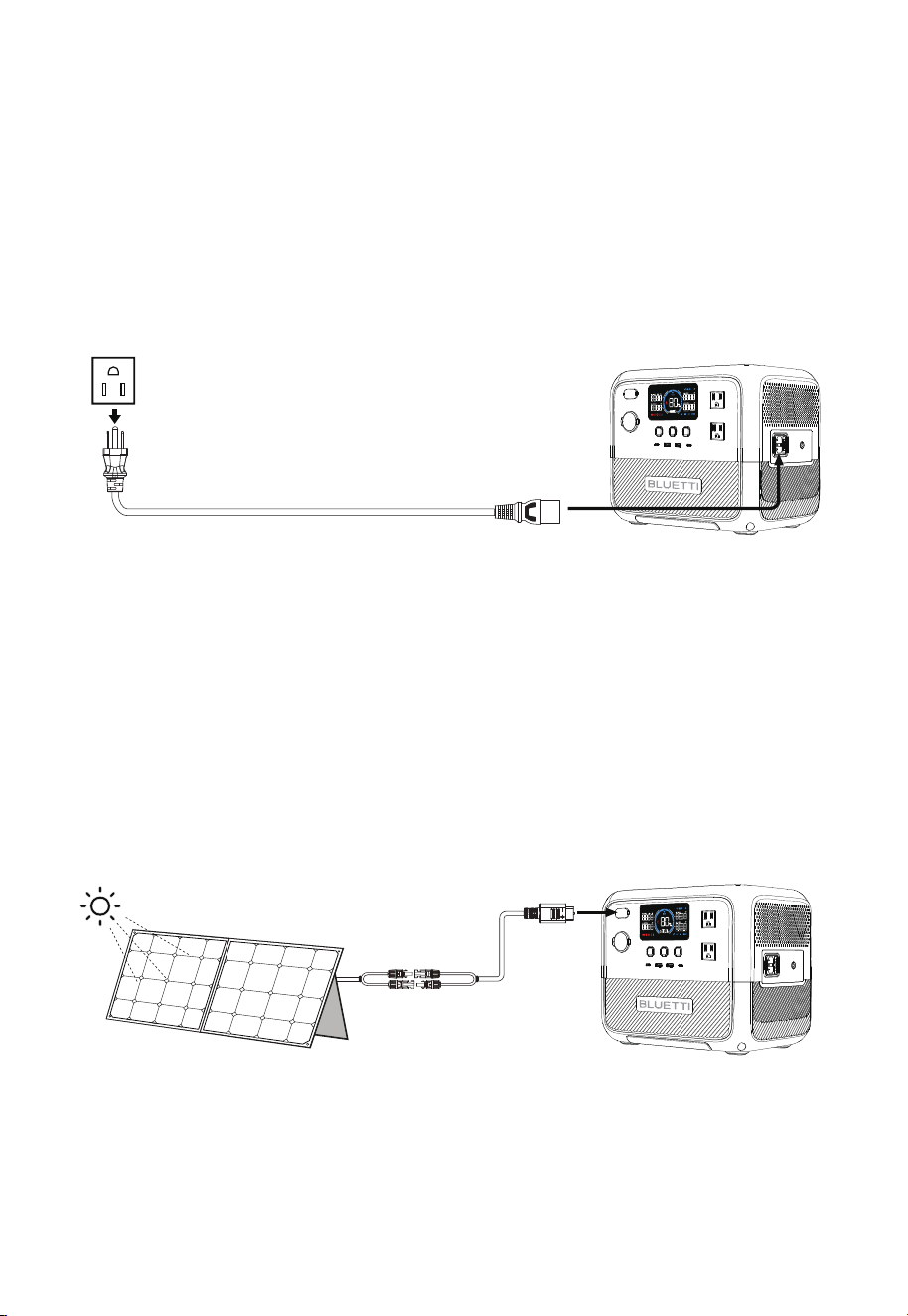
6.2 Solar Charging
Connect the solar panels (in series or parallel) to AC70 via the solar charging cable. When
receiving a continuous input of 500W, the AC70 will automatically stop charging within 2
hours. However, please be aware that the charging time may vary based on weather
conditions, sunlight intensity, panel orientation, and other variables.
Note: Make sure your solar panels meet the following requirements:
Voc: 12V-58V Current: 10A Max. Power: 500W Max.
6.1 AC Charging
Plug the AC70 into a standard wall outlet and start charging. Once it's fully charged, the
AC70 automatically stops charging to prevent overcharging. For a fast charge, you can
enable Turbo Charging in the BLUETTI App, which allows for an 80% capacity in just 45
minutes at an ambient temperature of 25℃ (77 ℉).
AC70 supports four charging methods: AC, solar, car, and generator.
6. Charging
JUST POWER ON14
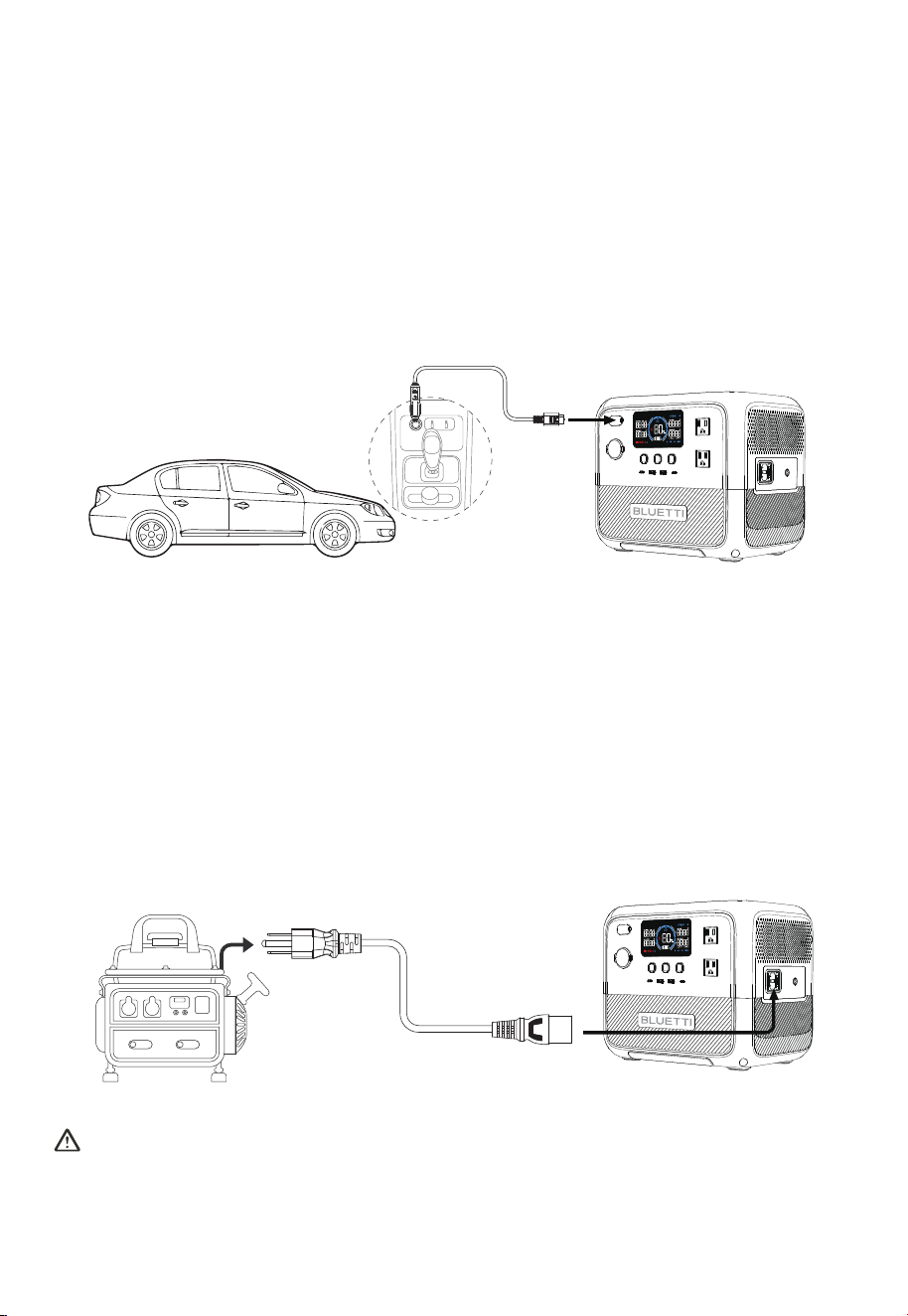
6.3 Car Charging
Connect the AC70 to the vehicle's 12V / 24V cigarette lighter port via the car charging
cable. The AC70 also automatically stops charging when it's fully charged. On average, it
takes about 7-9 hours to refill the AC70 using a 12V port and 4-5 hours with a 24V port at
an ambient temperature of 25℃ (77 ℉).
Note: Make sure your vehicle meets the following conditions for charging:
• The vehicle is capable of supplying power.
• The vehicle's engine is running during the charging process.
6.4 Generator Charging
Connect the AC70 to a generator via the AC charging cable. Under optimal conditions, it
takes approximately 2 hours to reach a full charge at an ambient temperature of 25℃ (77 ℉).
Note: Make sure your generator meets the following conditions for charging:
• The generator boasts a stable power output that exceeds the charging requirement of
the AC70.
• The generator delivers a pure sine wave AC output with voltage and frequency that
meet AC70's specifications.
For stable and efficient charging, avoid using unreliable power sources like wind
turbines. Also, it's not recommended to run your devices with AC70 while it's charging
with a generator.
JUST POWER ON 15

7. Discharging
8.1 Setting Mode
When the screen is on and the AC output is off, press and hold the AC and DC power
buttons for about 2 seconds till the frequency indicator flashes to enter Setting Mode.
Press and hold the AC and DC power buttons at the same time to exit Setting Mode.
Note: If you do not perform any operation in 1 minute, the AC70 will automatically exit
Setting Mode and no changes will be saved.
The AC70 offers the convenience of adjusting its settings either via physical buttons or
BLUETTI App. With the buttons located on the device itself, you have direct control over
various settings such as ECO Mode, output frequency, charging modes, and other
functionalities. Additionally, by using the BLUETTI App, you can access a user-friendly
interface on your phone to conveniently monitor and control the AC70.
8. Settings
7.1 AC Discharging
Item Specifications Compatible Loads
7.2 DC Discharging
Cigarette
Lighter Port
2 × USB-C Port
12V / 10A
5 / 9 / 12 / 15 / 20V, 3A; 20V, 5A
Mobile phones, laptops, etc.
120V
50Hz / 60Hz
Appliances up to 1000W power.
e.g., air conditioners, refrigerators
2 × AC Outlet
Item Specifications Compatible Loads
2 × USB-A Port 5V / 2.4A
12V DC appliances up to 120W power.
e.g., car refrigerator, air conditioner
Mobile phones and other small loads.
Note: Do not apply AC70 to loads higher than 1000W, as this may cause damage to AC70 and your devices.
Note: To ensure optimal performance, avoid short-circuiting the ports and keep them dry during
use or storage. Additionally, do not block or cover the ports while ensuring proper ventilation.
JUST POWER ON16

8.3 Frequency Switching
The current output frequency (50Hz / 60Hz) is displayed in the lower right corner of the
screen. In the Setting Mode, press the AC power button to switch the frequency options
based on your requirements.
8.2 ECO Mode
ECO Mode is a power-saving mode that is enabled by default. When operating on ECO
Mode, the AC / DC output will automatically turn off if the AC70 is bearing low (less than
40W or the set power) or no load for a while.
Note: When connecting a small power device, disable the ECO Mode for a successful
and uninterrupted charge experience.
In the Setting Mode, press the DC power button to enable or disable the ECO Mode.
You'll see the icon displayed on the screen when it's enabled.
8.5 AC Charging Mode
The AC70 supports 3 AC charging modes - Standard, Turbo, and Silent to fit your specific
needs. In the Setting Mode, press the button to switch the options. Please refer to the
below table for useful instructions.
8.4 Power Lifting Mode
Power Lifting Mode allows AC70 to handle high-power resistive loads up to 2000W,
which is disabled by default. In the Setting Mode, press and hold the AC power button to
enable or disable it. You'll see the icon displays on the screen when it's enabled.
This mode is particularly useful when using the AC70 with demanding heating devices
such as kettles, electric blankets, and hairdryers. If the screen reads "OVERLOAD" while
operating such devices, activating Power Lifting mode allows the AC70 to tackle these
tasks effectively.
Note: The resistive loads should have a power rating between 1000W and 2000W.
Although the AC70 can handle higher power demands, its actual operating power
remains at 1000W.
AC Charging Mode Instructions
Mode
Standard
Turbo
2 hours
Recharging Time
80% charge in 45 minutes;
full charge in 1.5 hours
Note
Silent
4 hours
More friendly to AC70's battery.
Comes in handy when recharging
time is a priority.
Offers a quiet, low-power operation
for long battery life.
JUST POWER ON 17
For more details, please refer to BLUETTI APP INSTRUCTIONS.
9. BLUETTI App
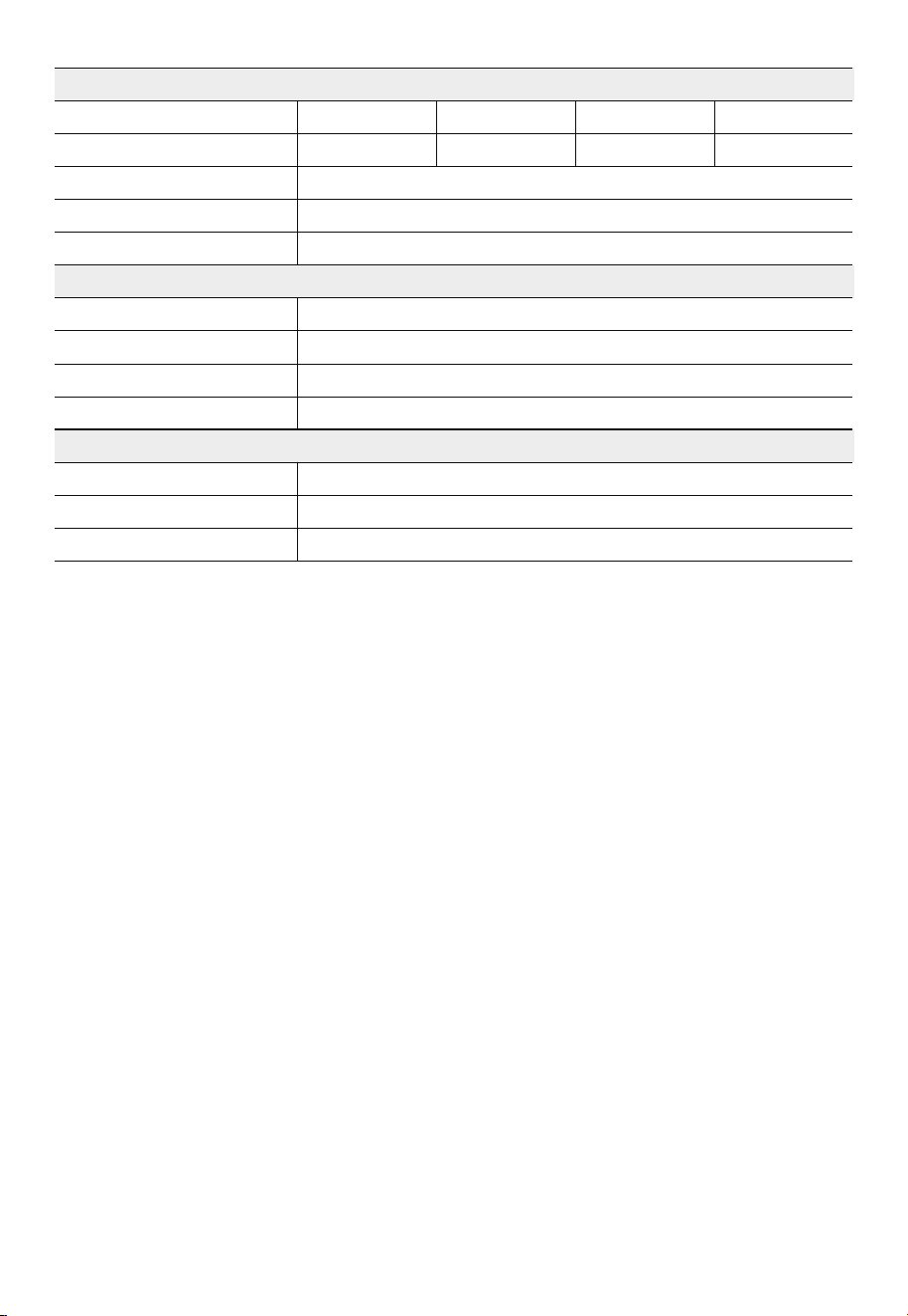
10. Specifications
Country / Region
Battery Capacity
Cell Type
AC + DC Input
Net Weight
Dimensions (L*W*H)
Charging Temperature
Discharging Temperature
Storage Temperature
Working Humidity
768Wh / 24Ah
LiFePO
4
1000W Max.
10.2kg / 22.5lbs
314mm × 209.5mm × 255.8mm / 12.4in × 8.2in × 10.1in
0°C-40°C / 32°F-104°F
-20°C-40°C / -4°F-104°F
-20°C-40°C /-4°F-104°F
10%-90%
Power
Voltage
Current
Frequency
1000W in total
50Hz / 60Hz
Cigarette Lighter Port
USB-A *2
USB-C *2
12VDC / 10A
5VDC / 2.4A
5 / 9 / 12 / 15 / 20VDC, 3A; 20VDC, 5A
Model AC70
JP
US CN EU / UK / AU
100VAC
10A
120VAC
8.3A
220VAC
4.5A
230VAC
4.3A
AC Output
DC Output
Scan the QR code below or search "BLUETTI" in the App Store or Google Play to download
the BLUETTI App.
JUST POWER ON18
50Hz / 60Hz
850W Max. (0%-80% in 45 minutes @ 10℃-40℃ / 50°F-104°F)
Voltage
Max. Current
Frequency
UPS
Power
100VAC
9A
120VAC
9A
220VAC
6A
230VAC
6A
AC Input
XT60PM-M
500W Max.
10A Max.
12V-58VDC
DC Input
Max. Transmission Frequency
Max. RF Transmission Power
Receiver Sensitivity
125kbps
+12dBm
-99dBm / 1Mbps
Bluetooth 5.0 / 5.1
Switching time ≤20ms
Interface
Power
Current
Voltage
JUST POWER ON 19

Error Code Error Description
Inverter overload
Temperature protection
Inverter short circuit
Output failure
Fan failure
PV overvoltage
E001
E002
E003
E004
E016
E033
E065
Troubleshooting
In the Setting Mode, press and hold the DC power button until an error code appears on
the screen. Please refer to the table below for helpful guidance.
11. Troubleshooting
Check if the power consumption of your devices
is too high. Reduce the load if necessary.
Check if the power consumption of your devices
is too high. Reduce the load if necessary.
Cigarette lighter output
short circuit
Check if any of your devices are overheating.
Allow them to cool down before use.
Check if any of your electrical devices are causing
a short circuit. Disconnect and resolve the issue.
The output voltage is abnormal. Inspect the
machine for any malfunctions or irregularities.
Check if the fan is blocked, unplugged, or not
functioning properly. Ensure proper ventilation.
Make sure the PV input voltage is within the
range of 12V-58VDC.
Charging temperature too high
Charging temperature too low
Discharging temperature too high
Discharging temperature too low
Grid overvoltage
Grid undervoltage
Grid overfrequency
Grid underfrequency
Grid oscillation
/
E085
E086
E087
E088
E113
E114
E115
E116
E117
Others
Wait for the device connected to the cigarette
lighter port to cool down.
Wait for the unit to cool down before charging.
Make sure the unit is placed in an ambient
temperature of 0℃-40℃ (32°F-104°F).
Wait for the unit to cool down before
discharging.
Make sure the unit is placed in an ambient
temperature of 0℃-40℃ (32°F-104°F).
Check if the grid voltage is too high. Contact
your local power provider if necessary.
Check if the grid voltage is too low. Contact your
local power provider if necessary.
Check if the grid frequency is too high. Contact
your local power provider if necessary.
Check if the grid frequency is too low. Contact
your local power provider if necessary.
Disconnect the grid input and contact BLUETTI
support for further assistance.
Please contact BLUETTI support for assistance.
Cigarette lighter output
overtemperature
E068
JUST POWER ON20

To estimate the operation time of the AC70, consider the load you're applying:
• For high-power loads (above 300W):
Operation time = Battery Capacity (Wh) x DoD x η ÷ Load Power
• For small-power loads (below 300W):
Operation time = Battery Capacity (Wh) x DoD x η ÷ (Load Power + Self-consumption of
AC70)
Note: DoD refers to depth of discharge. AC70 works at 90% DoD for longer battery life.
η is the conversion efficiency of the inverter, typically over 85% for AC70.
The self-consumption of AC70 is approximately 15W.
E.g. If you have a 40W refrigerator, you can run it for about 10.7 hours.
Operation time = 768Wh × 90% × 85% ÷ (40W + 15W) ≈ 10.7 hours.
Please keep in mind that the estimated operation time provided is for only purposes and
may vary based on actual usage conditions. Factors such as low temperature and
excessive loads can significantly affect the battery capacity, leading to a reduction in the
average operation time.
Appx. 1 Estimating Operation Time
JUST POWER ON 21

Appx. 2 FAQs
Q1:
A:
Q2:
A:
Q3:
A:
Q4:
A:
Q5:
A:
How do I know whether my devices will work well with this product?
Please evaluate the total constant load of your devices. If it doesn't exceed the Max.
output power of AC70 (1000W), you can use this power station to run your devices.
Note: Some devices with built-in motor or compressor may start at 2-4 times the
rated power, which can easily overload the AC70.
Can I use third-party solar panels to charge this product?
Yes, you can. However, make sure your solar panels have an open circuit voltage of
12V-58V and are equipped with MC4 connectors. It's also important not to mix
different types of solar panels.
Can it charge and discharge at the same time?
Yes. It supports pass-through charging. The AC70 comes with the premium LiFePO
4
battery and proprietary Battery Management System to ensure that it can charge
and discharge at the same time.
What is ECO Mode and can I turn it off?
ECO Mode helps save power, and you can turn it on or off on the screen. When
operating on ECO Mode, the AC / DC output will automatically turn off if the AC70 is
bearing low or no load for a while. You can set the power threshold of AC output and
DC output to 10W-30W / 5W-10W, respectively, for 1, 2, 3, or 4 hours.
Why is the charging power often too low?
AC70 has a built-in intelligent BMS that automatically adjusts the charging power in
response to the battery temperature and SoC, thus protecting the battery and
extending its service life.
JUST POWER ON22

This device complies with part 15 of the FCC Rules. Operation is subject to the following
two conditions:
(1) This device may not cause harmful interference.
(2) This device must accept any interference received, including interference that may
cause undesired operation.
This equipment has been tested and found to comply with the limits for a Class B digital
device, pursuant to part 15 of the FCC Rules. These limits are designed to provide
reasonable protection against harmful interference in a residential installation. This
equipment generates, uses and can radiate radio frequency energy and, if not installed
and used in accordance with the instructions, may cause harmful interference to radio
communications. However, there is no guarantee that interference will not occur in a
particular installation. If this equipment does cause harmful interference to radio or
television reception, which can be determined by turning the equipment off and on, the
user is encouraged to try to correct the interference by one or more of the following
measures:
- Reorient or relocate the receiving antenna.
- Increase the separation between the equipment and receiver.
- Connect the equipment into an outlet on a circuit different from that to which the
receiver is connected.
- Consult the dealer or an experienced radio / TV technician for help.
FCC Caution: Any changes or modifications not expressly approved by the party
responsible for compliance could void the user's authority to operate this equipment.
IMPORTANT NOTE: FCC Radiation Exposure Statement
This equipment complies with FCC radiation exposure limits set forth for an uncontrolled
environment. This equipment should be installed and operated with a minimum
distance of 20cm between the radiator & your body.
Appx. 3 FCC Statement
JUST POWER ON 23

This device contains licence-exempt transmitter(s) / receiver(s) that comply with
Innovation, Science and Economic Development Canada’s licence-exempt RSS(s).
Operation is subject to the following two conditions:
(1) This device may not cause interference.
(2) This device must accept any interference, including interference that may cause
undesired operation of the device.
RF exposure statement: The equipment complies with IC Radiation exposure limits set
forth for uncontrolled environments. This equipment should be installed and operated
with a minimum distance of 20cm between the radiator and your body.
CAN ICES-3 (B)/NMB-3(B) (Canada)
This Class B digital apparatus complies with Canadian ICES-003.
Appx. 4 IC Caution
JUST POWER ON24

Appx. 5 Consignes de sécurité
Lisez ce manuel pour savoir comment utiliser correctement le produit et connaître les
consignes de sécurité correspondantes. Les exigences en matière de sécurité sont
fournies à titre d'exemple et comprennent, sans s'y limiter, les exigences énumérées
dans le présent manuel. Le fonctionnement réel doit être conforme à toutes les normes
de sécurité applicables. Si vous avez des questions, n'hésitez pas à contacter l'équipe de
support BLUETTI ou votre revendeur local.
1) Déclaration
Pour garantir un fonctionnement sûr, il est essentiel de respecter les conditions suivantes:
• Utilisez ou stockez toujours le produit dans les conditions spécifiées dans ce manuel.
• Évitez tout démontage, tout remplacement des composants ou toute modification des
codes logiciels non autorisés.
BLUETTI n'est pas responsable des dommages résultant des circonstances suivantes:
•
Les cas de force majeure tels que les tremblements de terre, les incendies, les
tempêtes, les inondations ou les coulées de boue.
• Les dommages causés par le transport du client.
• Les dommages résultant de conditions de stockage inadéquates telles que spécifiées
dans le manuel.
• Les dommages causés par la négligence du client, une mauvaise utilisation ou des
actions intentionnelles.
• Les dommages occasionnés au système ou au matériel par des tiers ou des clients, y
compris, mais sans s'y limiter, une manipulation ou une installation non conforme aux
consignes du présent manuel.
• L'utilisation du produit avec des appareils nécessitant une alimentation sans interruption
(ASI) de haute performance, y compris, mais sans s'y limiter, les serveurs de données, les
stations de travail, les équipements médicaux et d'autres appareils similaires.
AVERTISSEMENT–Les précautions de base suivantes doivent toujours être prises lorsque
vous utilisez ce produit:
a. Lisez l'ensemble des consignes avant toute utilisation du produit.
b. Pour réduire le risque de blessure, une surveillance étroite est nécessaire lorsque vous
utilisez le produit à proximité d'enfants.
c. Ne placez pas vos doigts ou vos mains à l'intérieur du produit. N'insérez pas de corps
étrangers dans les ports du produit.
2) Exigences générales
CONSIGNES RELATIVES AU RISQUE D'INCENDIE, D'ÉLECTROCUTION OU DE BLESSURE
CONSIGNES DE SÉCURITÉ IMPORTANTES
JUST POWER ON 25

d. L'utilisation d'un accessoire non recommandé ou vendu par le fabricant peut entraîner
un risque d'incendie, d'électrocution ou de blessure.
e. Pour réduire le risque d'endommagement de la fiche et du câble électriques, tirez au
niveau de la fiche plutôt que sur le cordon lors du débranchement.
f. N'utilisez pas un bloc-batterie ou un appareil endommagé ou modifié, car ils peuvent
présenter un comportement imprévisible entraînant un risque d'incendie, d'explosion ou
de blessure.
g. N'utilisez pas le produit avec un câble ou une fiche endommagés, ou un câble de sortie
endommagé.
h. SEUL du personnel autorisé peut remplacer la batterie interne ou tout autre composant
du produit. Aucun composant ne peut être réparé par l'utilisateur final. Ne démontez pas
le produit par vous-même, adressez-vous à un technicien qualifié pour tout service de
réparation ou d'entretien. Un réassemblage incorrect peut entraîner un risque d'incendie
ou d'électrocution.
i. Pour réduire le risque d'électrocution, débranchez le produit de la prise avant de
procéder à toute opération d'entretien prévue dans les consignes.
j. AVERTISSEMENT – RISQUE DE GAZ EXPLOSIFS. Pour réduire le risque d'explosion de la
batterie, suivez ces consignes ainsi que les consignes du fabricant de la batterie et du
fabricant de tout équipement que vous avez l'intention d'utiliser à proximité de la batterie.
Examinez les mises en garde apposées sur ces produits et sur les moteurs.
k. PRÉCAUTIONS PERSONNELLES
1)Protégez-vous complètement et portez des vêtements et des lunettes de protection.
Évitez tout contact avec les yeux lorsque vous travaillez à proximité de la batterie.
2)Ne fumez JAMAIS et ne produisez JAMAIS d'étincelles ou de flammes à proximité de la
batterie ou du moteur.
3)Travaillez avec une extrême prudence et évitez toute chute d'outil métallique sur la
batterie. Cela pourrait provoquer une étincelle ou un court-circuit de la batterie ou d'autres
pièces électriques, entraînant par conséquent un risque d'explosion.
l. Lorsque vous chargez la batterie interne, travaillez dans un endroit bien ventilé et ne
limitez en rien la ventilation.
m. Dans des conditions abusives, du liquide peut être éjecté de la batterie, évitez tout
contact. En cas de contact accidentel, rincez à l'eau. Si le liquide entre en contact avec les
yeux, consultez immédiatement un médecin. Le liquide éjecté de la batterie peut provo-
quer des irritations ou des brûlures.
n. N'exposez pas le produit au feu ou à une température excessive. L'exposition au feu ou à
une température supérieure à 130°C peut entraîner un risque d'explosion.
o. Confiez l'entretien du produit à un réparateur qualifié qui utilisera uniquement des
pièces de rechange identiques, de manière à assurer une sécurité continue.
JUST POWER ON26

3) Consignes de mise à la terre
Ce produit doit être mis à la terre. En cas de dysfonctionnement ou de panne, la mise à
la terre fournit un chemin de moindre résistance pour le courant électrique afin de
réduire le risque d'électrocution. Ce produit est équipé d'un câble muni d'un conducteur de
mise à la terre et d'une fiche de mise à la terre. La fiche doit être branchée dans une prise
correctement installée et mise à la terre conformément à tous les codes et règlements
locaux.
AVERTISSEMENT
Une mauvaise connexion du conducteur de mise à la terre de l'équipement peut
entraîner un risque d'électrocution. Vérifiez auprès d'un électricien qualifié en cas de
doutes quant à la mise à la terre de l'appareil. Ne modifiez pas la fiche fournie avec le
produit. Si elle n'est pas adaptée à la prise, faites installer une prise adéquate par un
électricien qualifié.
4) Consignes de stockage
a. Lorsque le SoC atteint 5%, veuillez charger le produit immédiatement.
b. Avant de stocker le produit, veuillez le charger de manière à ce que le SoC soit compris
entre 40% et 60% afin de préserver l'état optimal du produit. De plus, éteignez le
produit et débranchez toutes les raccordements électriques de celui-ci.
c. Stockez le produit dans un endroit frais et sec, à l'écart des matériaux et des gaz
inflammables ou combustibles.
p. N'utilisez PAS le produit dans des conditions humides. Si le produit est mouillé, veuillez
le sécher soigneusement avant de l'utiliser.
q. Veuillez assurer une ventilation adéquate pendant l'utilisation et ne pas obstruer les
ouvertures du ventilateur. Une ventilation inadéquate peut causer des dommages
permanents sur le produit.
r. NE placez RIEN sur la surface supérieure du produit lors de l'utilisation ou du stockage.
NE déplacez PAS le produit pendant son fonctionnement, car les vibrations et les chocs
soudains peuvent conduire à de mauvaises connexions avec le matériel à l'intérieur.
s. En cas d'incendie, seul un extincteur à base de poudre sèche est adapté au produit.
t. AVERTISSEMENT – RISQUE DE CHOC ÉLECTRIQUE. N'utilisez jamais le produit pour
alimenter des outils électriques dans le but de couper ou d'accéder à des pièces ou des
câbles sous tension, ou à des matériaux pouvant contenir des pièces ou des câbles sous
tension, tels que les murs d'un bâtiment, etc.
u. Pour éviter tout contact avec des liquides, n'utilisez pas ce produit par temps de pluie ou
dans des environnements à forte humidité.
JUST POWER ON 27

• Mettez-le immédiatement hors tension.
• Chargez-le dans les 48heures.
• Placez-le à une température ambiante comprise entre 5℃ et 35℃ (entre 41℉ et 95℉)
pendant 24heures avant de le charger. Il est recommandé de charger le produit via
une source CA. Si vous le chargez à l'aide de l'énergie solaire, assurez-vous que votre
système solaire fournit une puissance supérieure à 100W.
BLUETTI n'est pas responsable des dommages causés à l'équipement en raison du
non-respect des consignes ci-dessus.
CONSERVEZ CES CONSIGNES
Le symbole représenté vous rappelle de lire les consignes figurant dans la
documentation accompagnant le produit avant toute utilisation ou tout entretien.
• Branchez le produit sur une prise de courant avec mise à la terre à l'aide du câble
d'alimentation fourni.
• La prise de courant doit être installée à proximité du produit et facilement accessible
pour des raisons de sécurité.
• Concernant l'élimination, ne JAMAIS procéder aux actions suivantes pour cause de
risque d'explosion: ne jamais placer une batterie au feu ou dans un four chaud et ne
jamais écraser ou couper mécaniquement une batterie.
• Évitez de placer les batteries dans des environnements à très haute température, car
cela peut entraîner une explosion ou une fuite de liquide ou de gaz inflammable.
• Les batteries soumises à une pression d'air extrêmement basse peuvent entraîner une
explosion ou une fuite de liquide ou de gaz inflammable.
• Il convient d'attirer l'attention sur les critères environnementaux quant à l'élimination
des batteries.
• Avant toute installation ou utilisation de l'appareil, veuillez vous référer aux informations
figurant sur le dessous extérieur de l'appareil pour obtenir des informations sur les
caractéristiques électriques et la sécurité.
Si le SoC chute à 0 (pendant le stockage ou au démarrage), prenez les mesures
suivantes pour redémarrer le produit en toute sécurité:
d. Le produit peut être stocké en toute sécurité à une température comprise entre -20℃
et 40 ℃ (entre -4℉ et 104℉). Toutefois, si la durée de stockage dépasse un mois, il est
recommandé de maintenir une température de stockage idéale d'environ 30℃ (86℉).
Afin de maintenir le produit en bon état, veuillez décharger et charger complètement
l'appareil au moins une fois tous les 3mois. l n'est PAS recommandé de stocker l'appareil
pendant des périodes prolongées, car cela peut altérer les performances et la durée de
vie générale du produit.
JUST POWER ON28
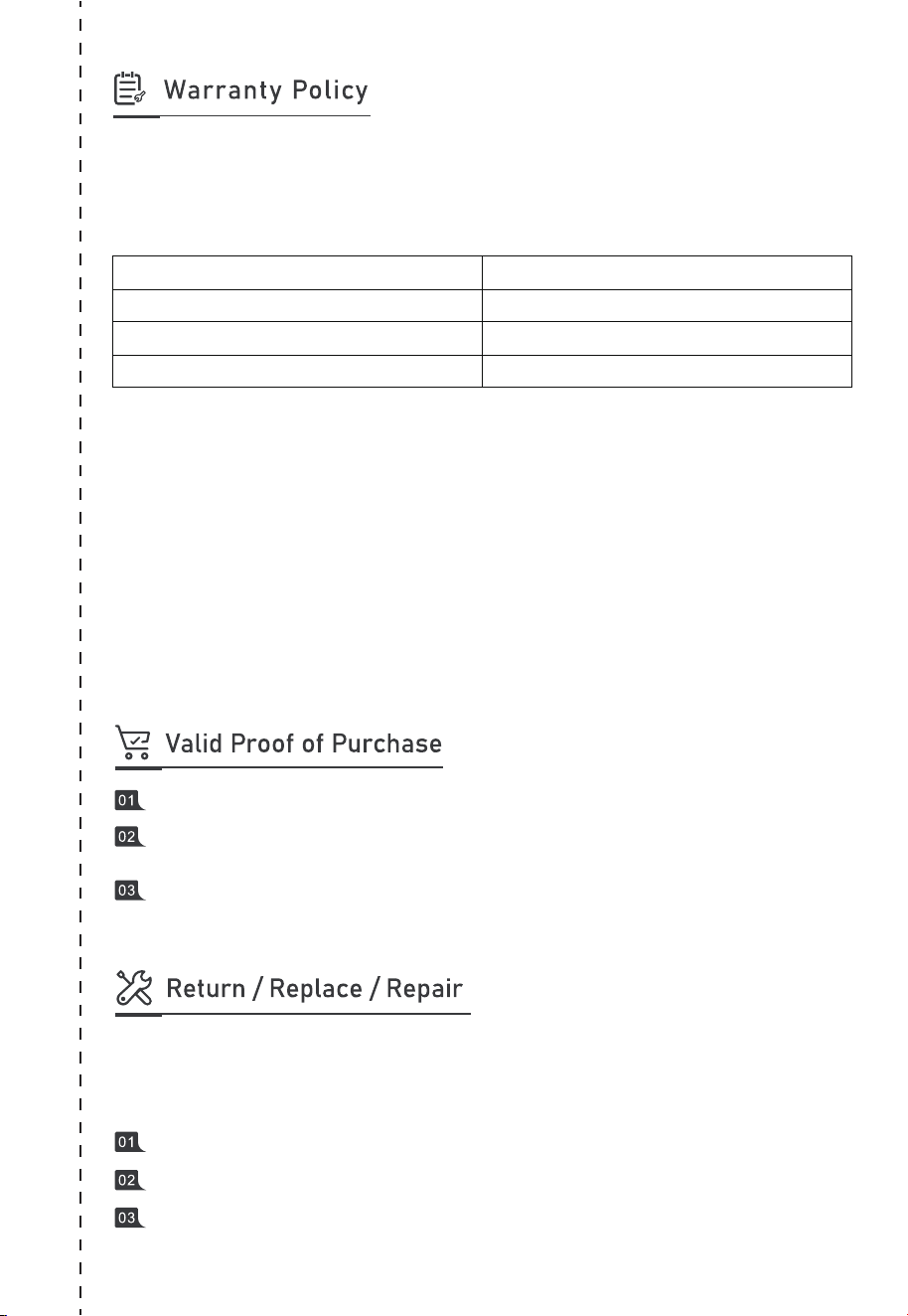
Thank you for choosing BLUETTI. Please read the terms and conditions and fill in
the warranty card. This card, together with your proof of purchase, entitles you to
the service of the product under the terms of this warranty.
The warranty period starts from the date of product receipt.
* Only applies to products purchased directly from the official BLUETTI website. If you
purchased the product from other channels, the warranty is valid for 24 months.
However, you can register for BLUETTI VIP on the official website to get a free warranty
extension.
The warranty does not cover:
• Issues arising after the warranty period has expired;
• Damage resulting from improper use, maintenance, or storage, contrary to the
user manual;
• Unauthorized disassembly, repair, or modifications;
• Damage caused by force majeure events.
Item
Main unit (including batteries)
Solar panel
Accessories (adapter/cable/others)
Warranty Period
60 months*
12 months
12 months
Order number of the product purchased through authorized platform.
Invoice or order confirmation email, which includes product description, price,
and sales channel.
To claim the warranty, provide multiple purchase proofs, such as receipts,
shipping confirmation, product S/N, and photos or videos of the fault or issue.
BLUETTI warrants the product against defects materials and workmanship in normal use.
During this warranty period, any defective parts or the entire product will be repaired or
replaced at our discretion.
Contact us to obtain a return authorization first, or we may reject your return.
Return the product to the address provided. We'll cover the shipping cost.
Upon confirming receipt of the defective product, we'll proceed with the
replacement in 7-10 business days.
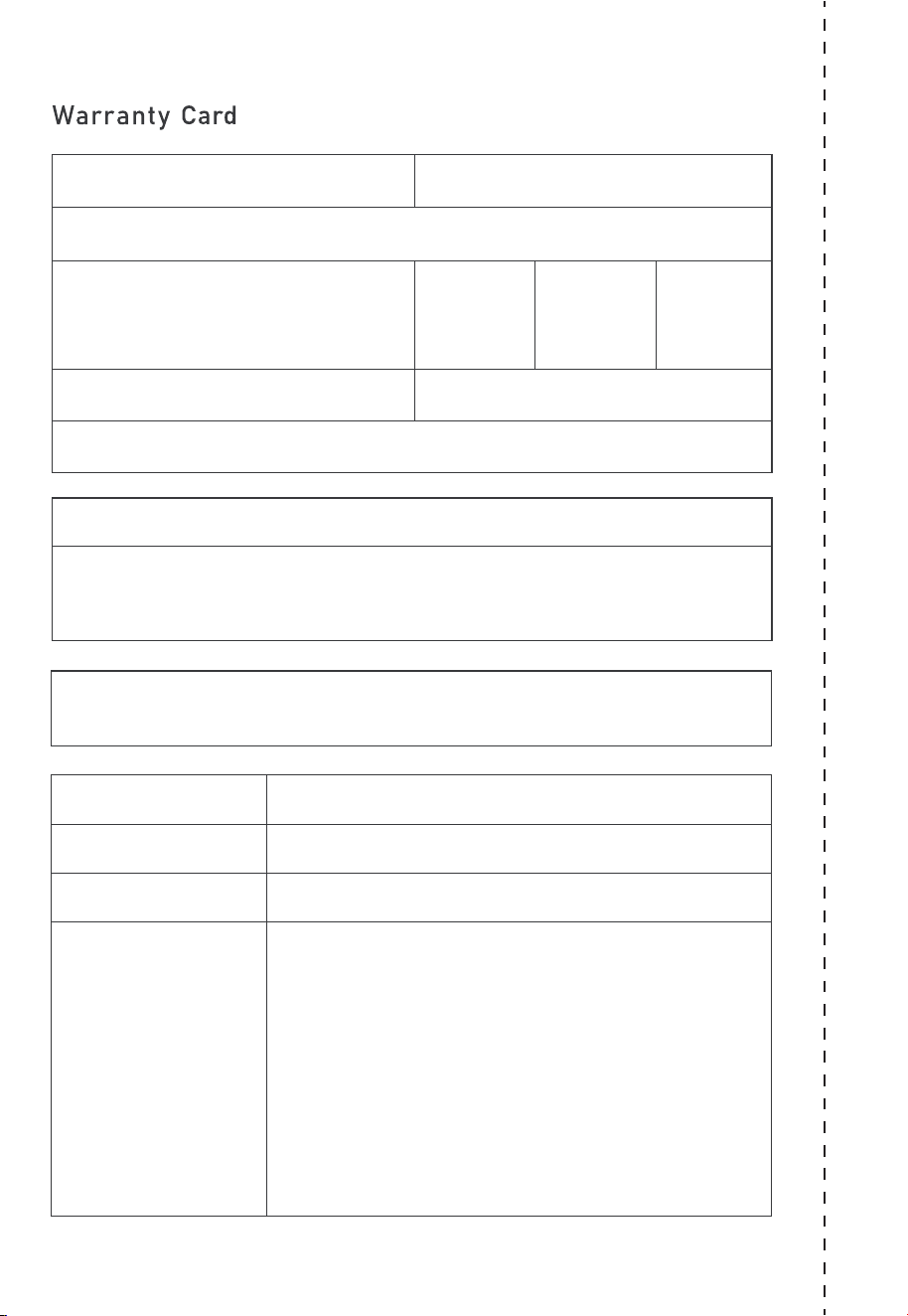
Customer: Date:
Company (optional):
Address:
Phone:
Email Address:
Purchase From:
Receptionist:
Model:
S/N:
Purchase Date:
Problem Description:
RMA #:
Fax:
City: State: Zip:
@ BLUETTI Support
@ BLUETTI Official
@bluetti.inc@ bluetti_inc @bluetti_official service@
bluettipower.com
For more information, please visit:
Web: https://www.bluettipower.com
SHENZHEN POWEROAK NEWENER CO., LTD.
Add: F19, BLD No.1, Kaidaer, Tongsha Rd No.168, Xili Street,
Nanshan, Shenzhen, China
USA Agent
Company: BLUETTI POWEROAK INC
Add: 6185SVALLEYVIEWBLVDSTEDLASVEGAS
NEVADA89118UnitedStates
FRN: 0033559824
Customer Service
Tel: 800-200-2980 (Monday to Sunday 9:00-17:00)
Email: sale@bluettipower.com (Pre-sales),
service@bluettipower.com (After-sales)
P/N:17.0303.0600-01A1
Certificate
Inspector:
QC: