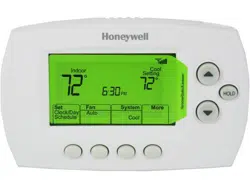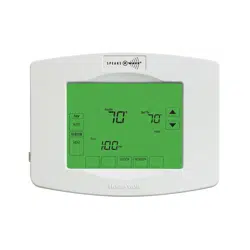
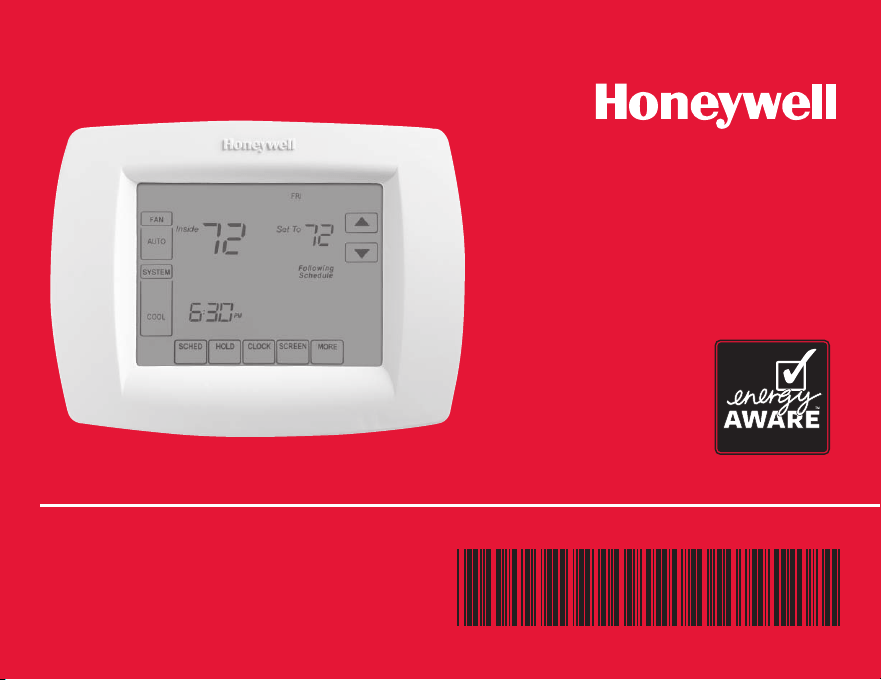
Operating Manual
VisionPRO
®
TH8000 Series
Touchscreen Programmable Thermostat
69-1894EFS-03
69-1894EFS—03
ENGLISH
Read and save these instructions.
Need Help?
For assistance with this product please visit
http://yourhome.honeywell.com
or call Honeywell Customer Care toll-free at
1-800-468-1502
® U.S. Registered Trademark.
US Patent No. 6595430, D509151 and other patents pending.
Copyright © 2011 Honeywell International Inc. All rights reserved.
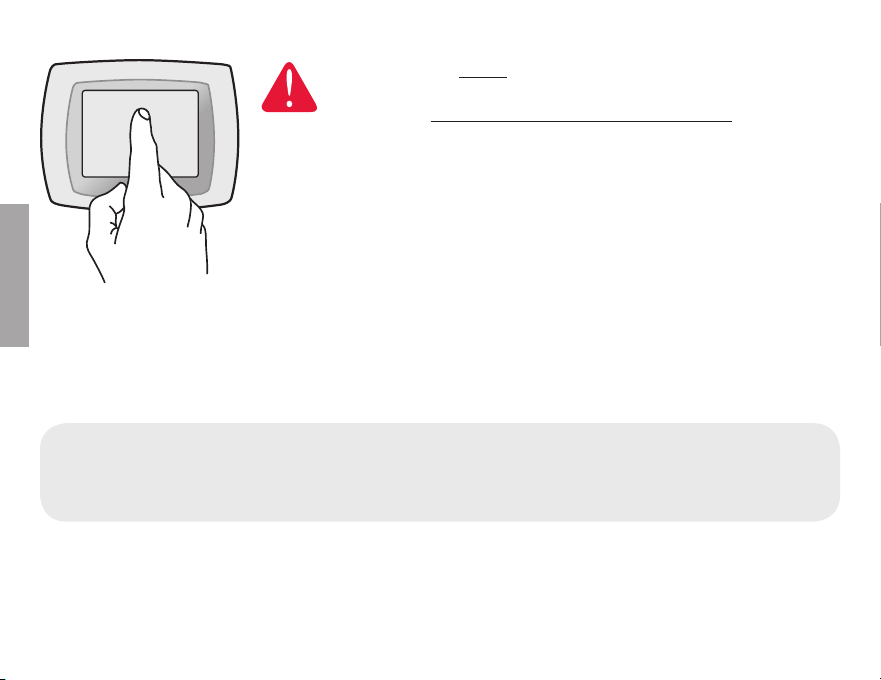
BE CAREFUL! Never use sharp instruments, such as a pencil
or pen, to press touchscreen keys. To prevent damage to the
thermostat, always press keys with your fingertip.
This thermostat contains a Lithium battery which may contain Perchlorate material.
Perchlorate Material—special handling may apply,
See www.dtsc.ca.gov/hazardouswaste/perchlorate
This manual covers the following models
TH8110U: For 1 Heat/1 Cool systems
TH8320U: For up to 3 Heat/2 Cool systems
TH8321U: For up to 3 Heat/2 Cool systems with dehumidification
(Pull thermostat from wallplate and turn over to find model number)
M29343
1
69-1894EFS—03
ENGLISH
About your new thermostat
Thermostat features .............................. 2
Programming at a glance ..................... 3
Quick reference to controls .................. 4
Quick reference to status display ........ 5
Programming & Operation
Clock setting.......................................... 6
Fan setting ............................................. 7
System setting ....................................... 8
Using program schedules ..................... 9
Program schedule overrides .............. 12
Vacation hold ....................................... 14
Special features ................................... 15
Screen lock .......................................... 16
Screen cleaning ................................... 17
Humidity display & control .................. 18
Appendices
Battery replacement ............................ 20
Advanced functions ............................ 21
In case of difficulty .............................. 26
Optional remote sensors .................... 28
Limited warranty .................................. 29
This thermostat is ready to go!
Your new thermostat is pre-
programmed and ready to go.
See page 3 to check settings.
Table of contents
CAUTION: EQUIPMENT DAMAGE
HAZARD. To prevent possible
compressor damage, do not oper-
ate cooling system when outdoor
8)14)6%896)-7&)03;¶±Å©²±Åª¯
VisionPRO
®
TH8000 Series

Operating Manual
2
About your new thermostat
69-1894EFS—03
ENGLISH
Congratulations! You’ve just purchased the world’s most advanced, easy-to-use ther-
mostat. It has been designed to give you many years of reliable service and touch-
screen climate control.
Features
W ¸®(%=463+6%17',)(90)71%<-1->)'31*368%2()'3231=¯
W 61',%-6463+6%11-2+»97849008,)61378%8*6318,);%00837)87',)(90)7¯
W 2)6+=®7%:-2+7)88-2+7*361%<-191'3787%:-2+7¯
W 2)®839',8)14'3286303:)66-()7463+6%17',)(90)%8%2=8-1)¯
W 6)'-7)'31*368'328630/))478)14)6%896);-8,-2²l3*8,)0):)0=397)8¯
W ,%2+)°',)'/6)1-2()670)8=39/23;;,)2837)6:-')366)40%')*-08)67
batteries and other critical components.
W %6+)839',7'6))2(-740%=;-8,&%'/0-+,8-7)%7=836)%(Ê):)2-28,)(%6/¯
W )0)'813()07(-740%=%2('3286307911)6,91-(-8=¯
W )0)'813()07%''3113(%8)348-32%0398(33636-2(3366)138)7)27367¯

VisionPRO
®
TH8000 Series
3
About your new thermostat
69-1894EFS—03
ENGLISH
3962);8,)61378%8-746)®463+6%11)(%2(6)%(=83+3¯9787)88,)8-1)%2((%=¯
,)2',)'/8,)7)88-2+7&)03;%2(',%2+)-*2))()(»
1. Set clock ........................................................................................................See page 6
2. Select fan setting: Preset to Auto ..............................................................See page 7
3. Select system setting: Preset to Heat ......................................................See page 8
4. Program schedules: Preset to energy-saving levels
while you’re at work or asleep (assumes you
wake at 6 am, leave at 8 am, return at 6 pm
and go to bed at 10 pm) .......................................................................See pages 10-13
ONE-TOUCH TEMP CONTROL: You can override the program schedule at any time,
and manually adjust the temperature (see pages 12-14).
This thermostat is ready to go!
Operating Manual
4
69-1894EFS—03
ENGLISH
SCHED HOLD CLOCK SCREEN MORE
MON
TUE WED THU FRI SAT SUN
AM
FAN
AUTO
SYSTEM
HEAT
Following
Schedule
Inside
Set To
OK TO PICK MULTIPLE DAYS
70
6:01
70
M29344
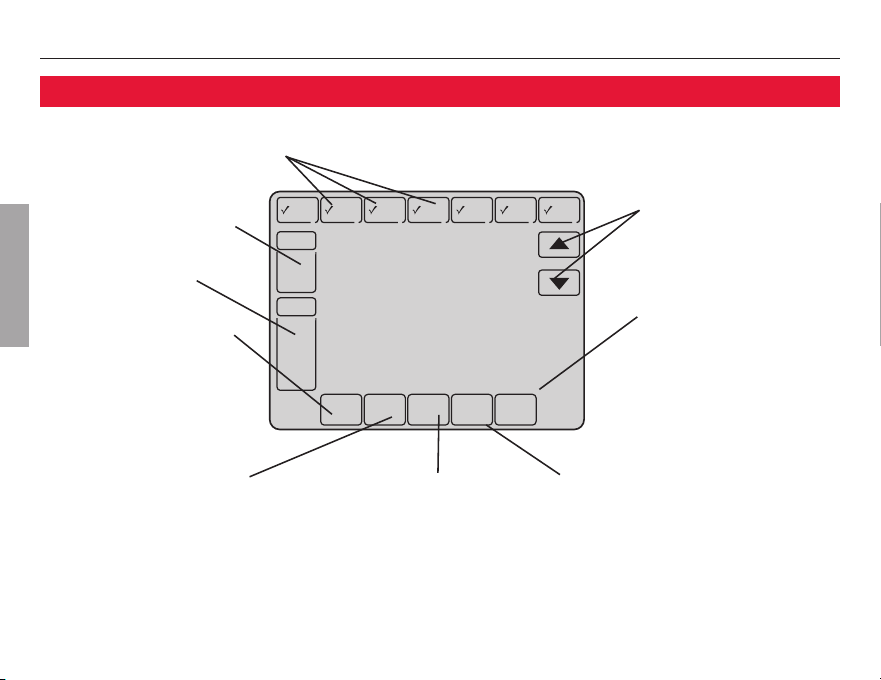
Press day(s) to set program schedule (see page 11)
Press to select fan
operation (see page 7)
Press to select system
type (see page 8)
Press to set program
schedule (see page 11)
Press to adjust
temperature settings
(see pages 11-14)
Press for more options
(select models only)
Press to override
program schedule
(see pages 12-14)
Press to set clock
(see page 6)
Press to lock keypad for 30
seconds to clean screen
(see page 17)
Quick reference to controls
VisionPRO
®
TH8000 Series
5
69-1894EFS—03
ENGLISH
SCHED HOLD CLOCK SCREEN MORE
WED
AM
FAN
AUTO
SYSTEM
HEAT
Following
Schedule
Inside
Set To
Recovery
70
6:01
70
M29345
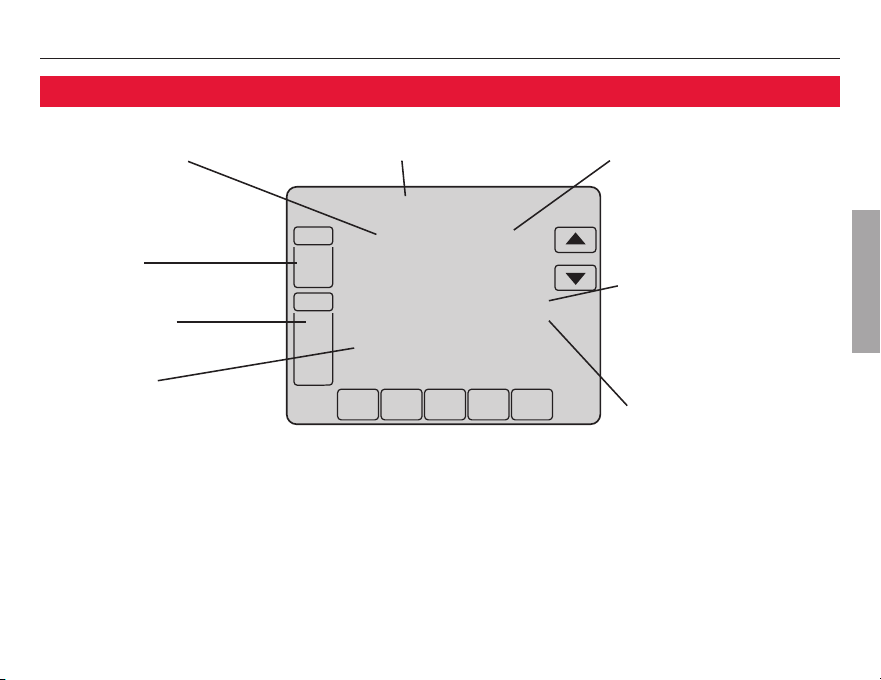
Current inside temperature Current day of week Temperature setting
Program schedule on
(does not display
when off)
Fan setting
Other display messages:
W Cool On: Cooling system is activated
W Heat On: Heating system is activated
W Aux Heat On:9<-0-%6=,)%8-2+7=78)1-7%'8-:%8)(
Quick reference to status display
System setting
Current time
Adaptive Intelligent
Recovery in effect
(see page 15)
Operating Manual
6
69-1894EFS—03
ENGLISH
DONE CANCEL
AM
6:02
M29347
SCHED HOLD CLOCK SCREEN MORE
AM
6:01
M29346
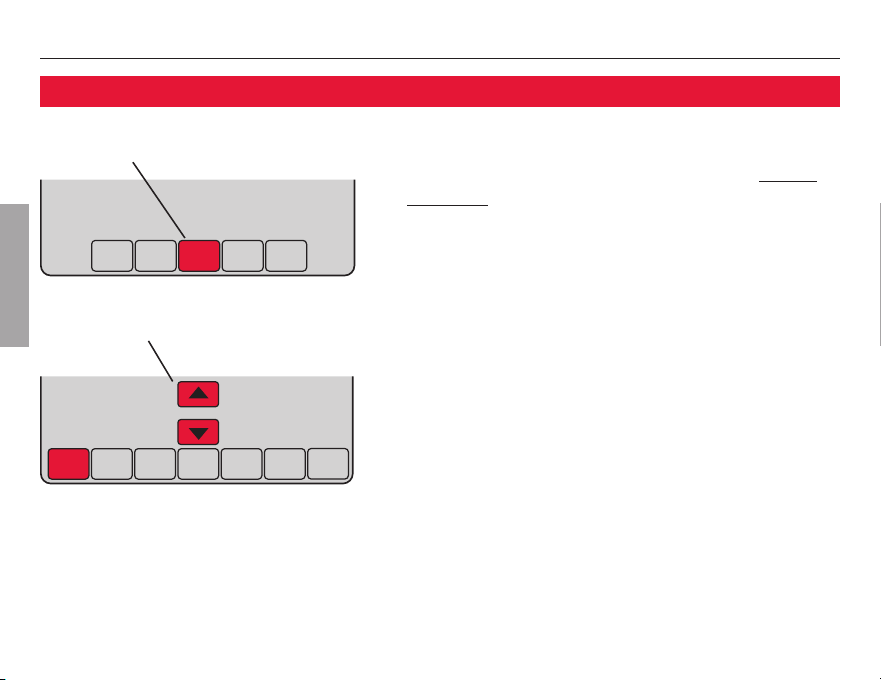
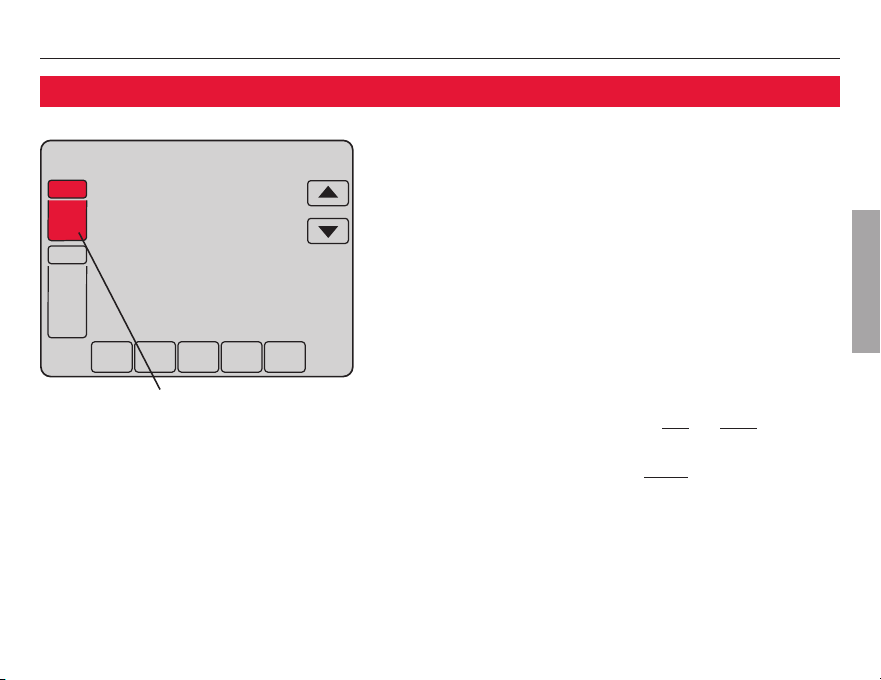
To set the current time display, press CLOCK,
then press
Vor Wto adjust the time. Press
and hold Vor Wto advance the time more
quickly.
Press DONE837%:)§)<-8©3646)77CANCEL to
)<-8;-8,398',%2+-2+8,)8-1)ª¯
Note: The real-time clock should never require
adjustment since it automatically updates for
daylight savings time, and stores all date/time
information.
Note: To change the current week day display, see
page 22.
Press CLOCK
Adjust time, then press DONE
Clock setting
VisionPRO
®
TH8000 Series
7
69-1894EFS—03
ENGLISH
SCHED HOLD CLOCK SCREEN MORE
WED
AM
SYSTEM
HEAT
Following
Schedule
Inside
Set To
70
6:01
70
FAN
AUTO
M29348
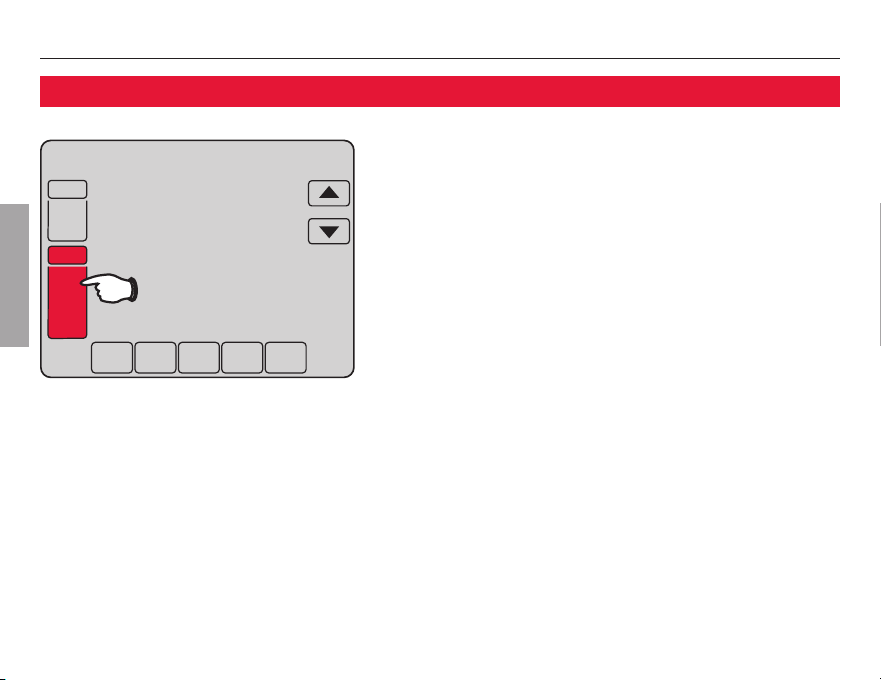
Press FAN to select fan operation, then press
DONE.
W On: Fan is always on.
W Auto: Fan runs only when the heating or
cooling system is on.
W Circ: Fan runs randomly, about 35% of the
time, not counting any run time with the
heating or cooling system.
You can press FAN to override the fan settings
you’ve programmed for different time periods
(see page 11). If you select On or Circ, the
setting you select will remain active until you
press FAN again to select Auto (see page 27
for more information).
Press FAN
Fan setting
Note: If a fan schedule is programmed,
“Auto” will run the fan schedule.
Operating Manual
8
69-1894EFS—03
ENGLISH
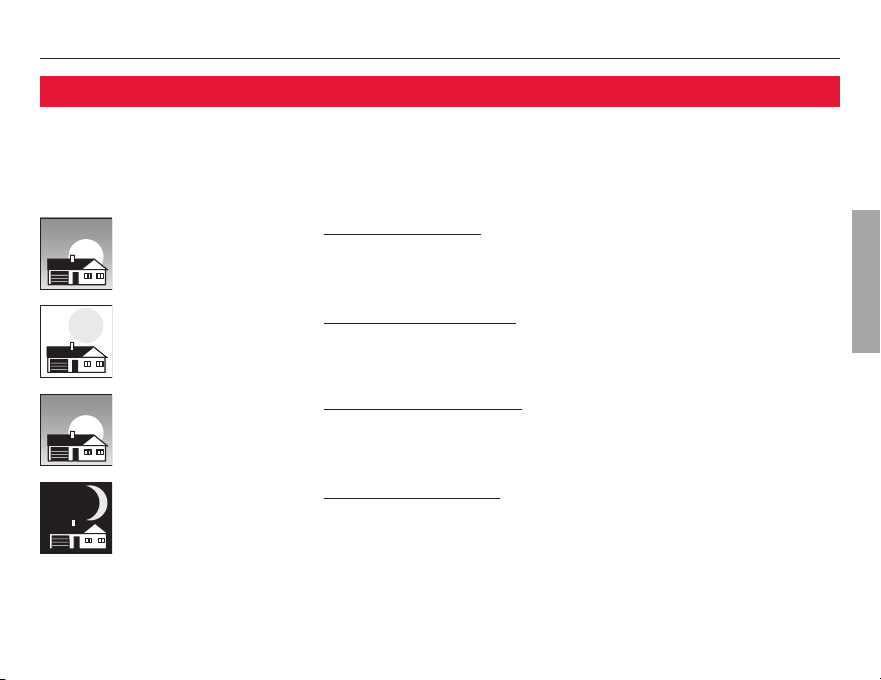
Press the SYSTEM button to select, then press
DONE.
W Heat: Thermostat controls only the
heating system.
W Cool: Thermostat controls only the
cooling system.
W Off: Heating and cooling systems are off.
W Auto: Thermostat automatically selects
heating or cooling depending on the
indoor temperature.
**
W Em Heat (only for heat pumps with
%9<-0-%6=,)%8ª»,)61378%8'3286307
1)6+)2'=%2(9<-0-%6=)%8¯
Compressor is locked out.**
** Select models only
System setting
SCHED HOLD CLOCK SCREEN MORE
WED
AM
Following
Schedule
Inside
Set To
70
6:01
70
FAN
AUTO
SYSTEM
HEAT
M29349
VisionPRO
®
TH8000 Series
9
69-1894EFS—03
ENGLISH
Save money by setting program schedules
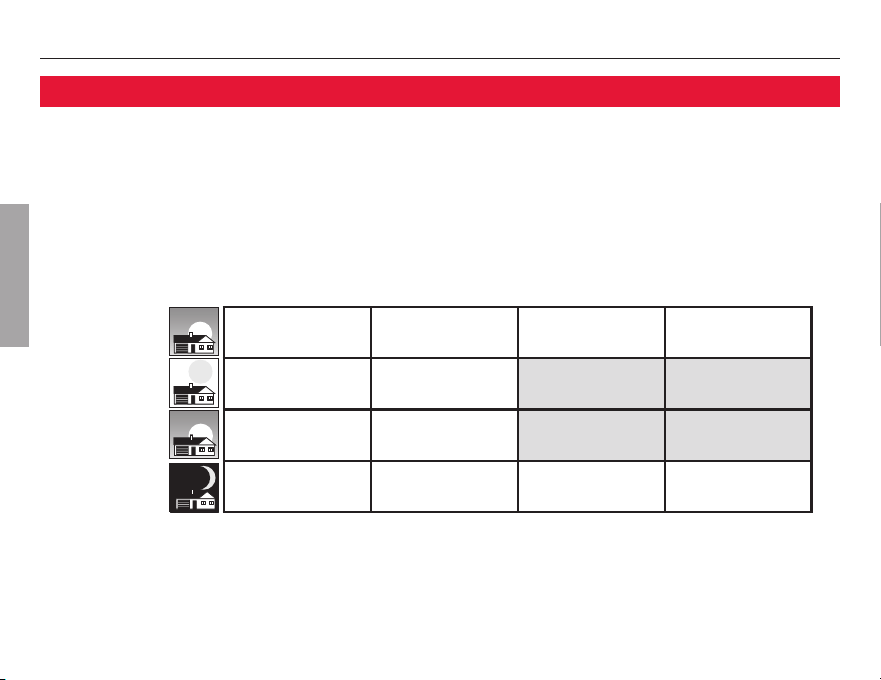
8¨7)%7=83463+6%1=3967=78)1*361%<-191)2)6+=7%:-2+7¯39'%2463+6%1*396
time periods each day, with different settings for weekdays and weekends.
Set to the time you awaken and the temperature you want
during the morning, until you leave for the day.
Set to the time you leave home and the temperature you
want while you are away (usually an energy-saving level).
Set to the time you return home and the temperature you
want during the evening, until bedtime.
Set to the time you go to bed and the temperature you want
overnight (usually an energy-saving level).
WAKE
·»±±%1
l
LEAVE
¹»±±%1
l
RETURN
·»±±41
l
SLEEP
²±»±±41
l
Operating Manual
10
69-1894EFS—03
ENGLISH
This thermostat is pre-set with energy-saving program settings. We recommend these
7)88-2+77-2')8,)='%26)(9')=396,)%8-2+°'330-2+)<4)27)7&=%719',%7´´¦¯
©))2)<84%+)83%(.9788-1)7%2(8)14)6%896)73*)%',8-1)4)6-3(¯ª
Wake
©·»±±%1ª
Leave
©¹»±±%1ª
Return
©·»±±41ª
Sleep
©²±»±±41ª
Cool (Mon-Fri)Heat (Mon-Fri) Heat (Sat-Sun) Cool (Sat-Sun)
l
l
l
l
l
l
l
[Or cancel period]
l
[Or cancel period]
l
l
l
[Or cancel period]
l
[Or cancel period]
l
l
l
l
Energy-saving settings for maximum cost savings
VisionPRO
®
TH8000 Series
11
69-1894EFS—03
ENGLISH
SCHED HOLD CLOCK SCREEN MORE
M29350
DONE WAKE LEAVE RETURN SLEEPEDIT CANCEL
M29351
DONE WAKE LEAVE RETURN SLEEP CANCEL
MON
TUE WED THU FRI SAT SUN
AM
CANCEL
PERIOD
HEAT
COOL
OK TO PICK MULTIPLE DAYS
70
6:00
78
FAN
AUTO
M29352
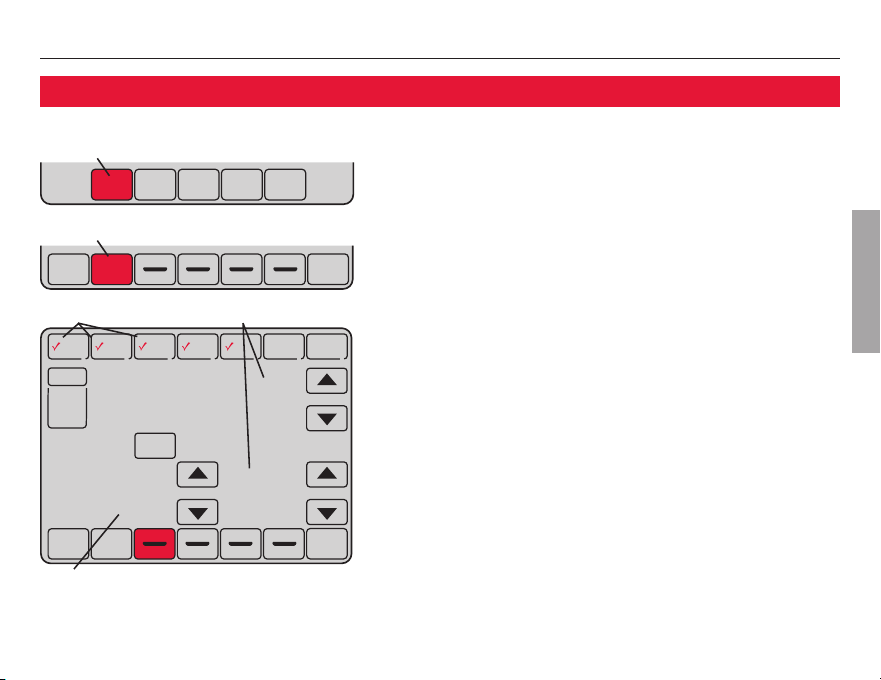
To adjust program schedules
1. Press SCHED, then EDIT.
2. Press day buttons (MON-SUN) to select
day(s).
3. Press
Vor Wto set Wake time for selected
day(s).
4. Press
Vor Wto set Heat and Cool
temperature for this time period.
5. Press other time periods (LEAVE, RETURN,
SLEEP) to set time and temperatures for
each.
6. Press DONE837%:)§)<-8©3646)77CANCEL
83)<-8;-8,3987%:-2+',%2+)7ª¯
Note: You can press CANCEL PERIOD to eliminate any
unwanted time period.
Note: Press FAN to customize fan settings for any
time period (see page 7).
Set time for program
period to start
Press EDIT
Select day(s) Set heat/cool levels
Press SCHED
Operating Manual
12
69-1894EFS—03
ENGLISH
Heat On
SCHED HOLD CLOCK SCREEN MORE
CANCEL
WED
Inside
Hold Temperature
Until
Set To
73
AM
8:00
70
FAN
AUTO
SYSTEM
HEAT
M29353
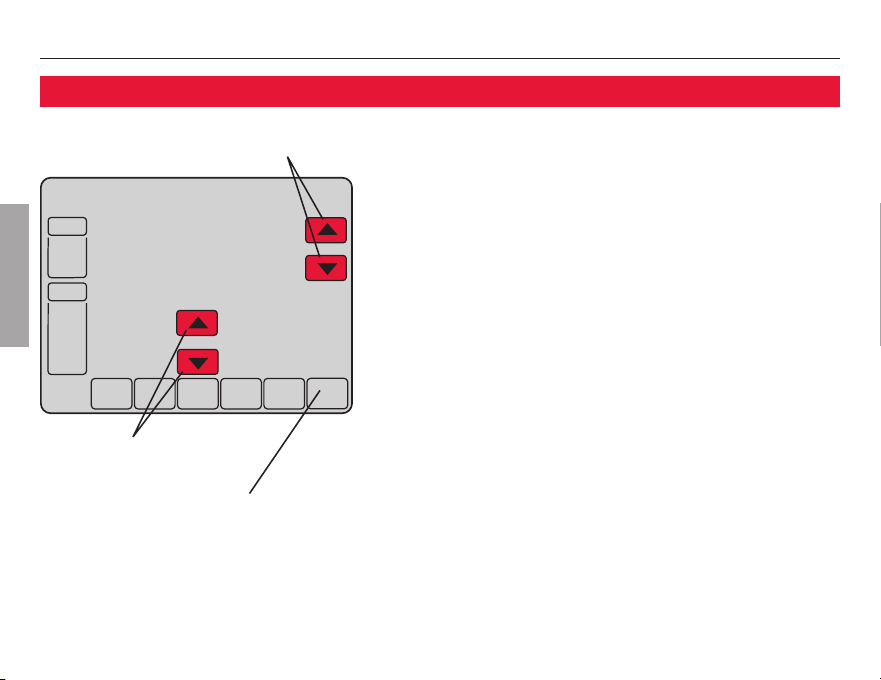
Program schedule override (temporary)
Press Vor Wto immediately adjust the tem-
perature. This will temporarily override the
temperature setting for the current time period.
The new temperature will be maintained only
928-08,)8-1)=397)8¯,)28,)8-1)6)<4-6)7
the program schedule will resume and set the
temperature to the level you’ve programmed
for the current time period.
To cancel the temporary setting at any time,
press CANCEL (or SCHED). The program schedule
will resume.
Adjust temperature
Press to set timer
Press CANCEL (or SCHED) to
resume program schedule
VisionPRO
®
TH8000 Series
13
69-1894EFS—03
ENGLISH
Heat On
SCHED HOLD CLOCK SCREEN MORE
CANCEL
WED
AM
Inside
Set To
Permanent
Hold
73
8:00
70
FAN
AUTO
SYSTEM
HEAT
M29354
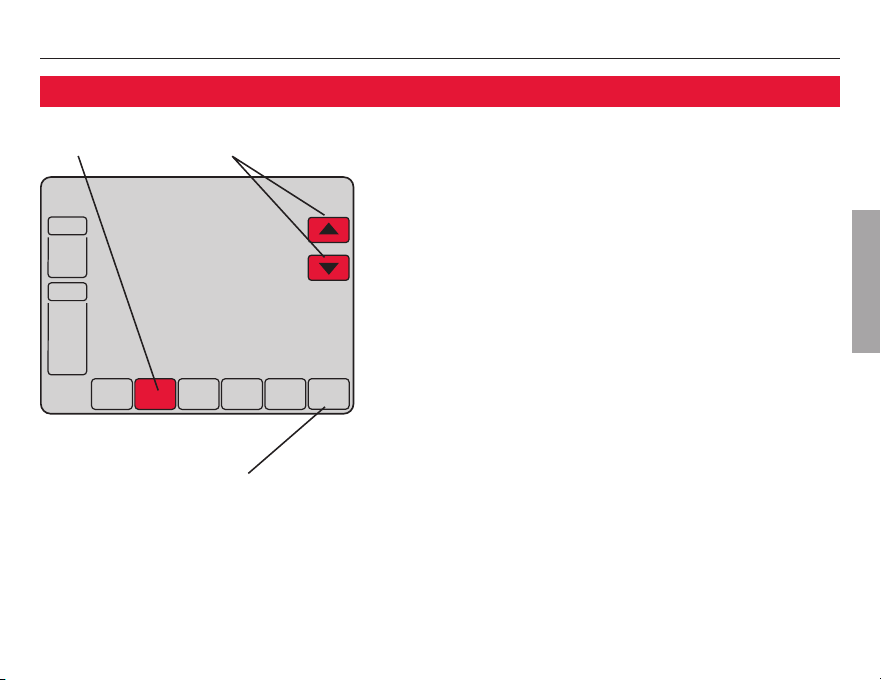
Program schedule override (permanent)
Press HOLD Adjust temperature
Press HOLD to permanently adjust the
temperature. This will turn off the program
schedule.
Whatever temperature you set will be
maintained 24 hours a day until you manually
change it or press CANCEL (or SCHED) to cancel
“Hold” and resume the program schedule.
Press CANCEL (or SCHED) to
resume program schedule
Operating Manual
14
69-1894EFS—03
ENGLISH
SCHED HOLD CLOCK SCREEN MORE
CANCEL
AM
Inside
Hold Temperature
Until
Set To
55
6:00
70
FAN
AUTO
SYSTEM
HEAT
M29355
SCHED HOLD CLOCK SCREEN MORE
CANCEL
DAYS
Hold Temperature
Until
14
SYSTEM
HEAT
M29356
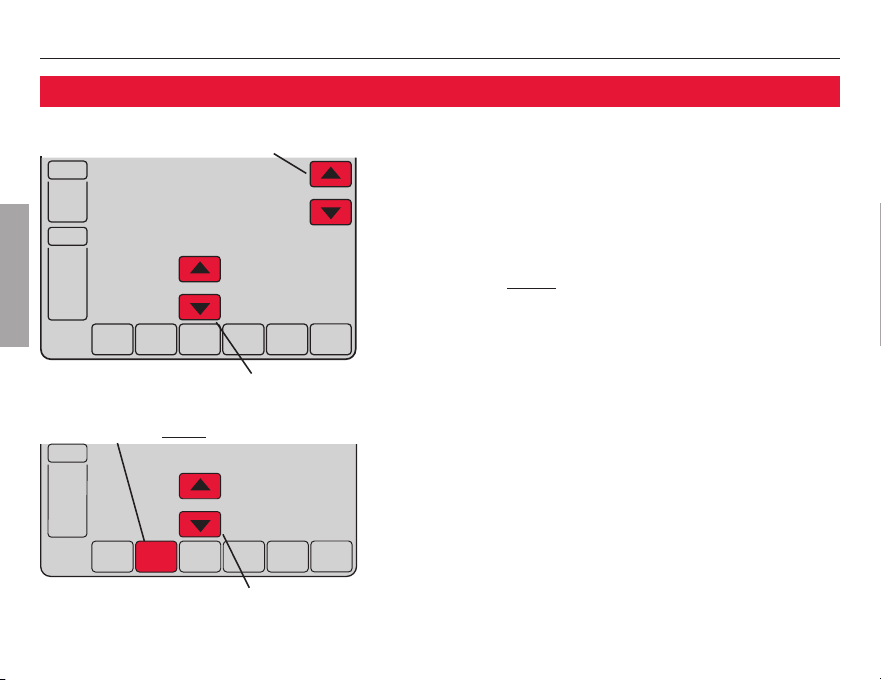
Vacation hold
This feature can suspend the program sched-
90)*36)<8)2()(4)6-3(73*8-1)¯
Press
Vor W to set the temperature you want,
then press
Vor W to set the time of day you
want the schedule to resume when you return.
Press HOLD twice, then press
Vor W to select
the number of days.
Whatever temperature you set will be main-
tained 24 hours a day for the number of days
you select. After this number of days have
elapsed, the previously programmed schedule
will resume at the time you set.
*=396)8962)%60-)68,%2)<4)'8)(46)77
CANCEL (or SCHED) to cancel “Hold” and resume
the program schedule.
1. Set temperature
2. Press to set time for
schedule to resume
3. Press HOLD twice
4. Press to select number of days

VisionPRO
®
TH8000 Series
15
69-1894EFS—03
ENGLISH
Special features
Auto Changeover: When set to Auto, the thermostat automatically selects heating or
cooling depending on the indoor temperature.
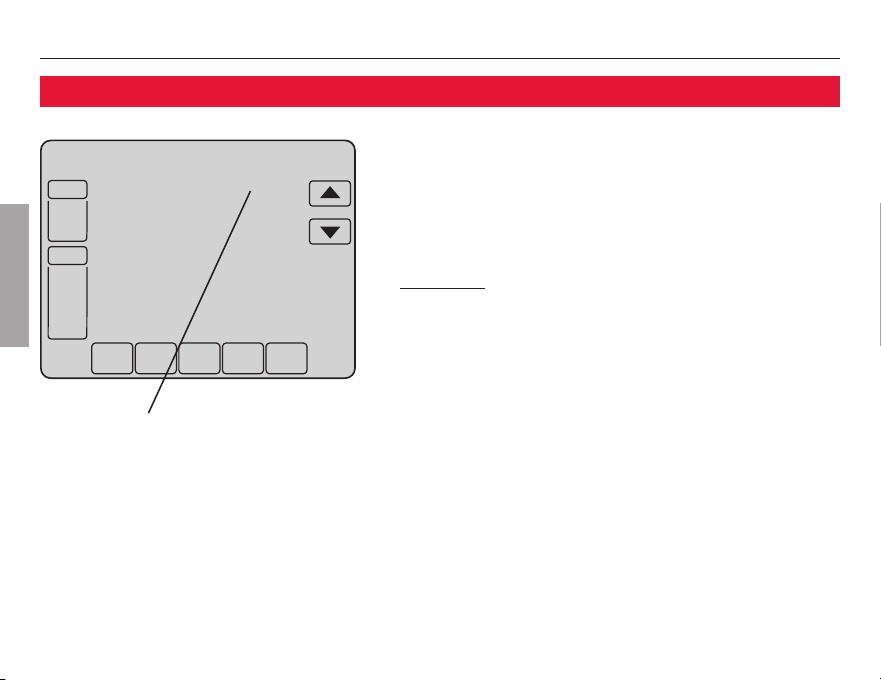
Adaptive Intelligent Recovery: This feature allows the thermostat to “learn” how
long the furnace and air conditioner take to reach programmed temperature settings,
738,)8)14)6%896)-76)%',)(%88,)8-1)=397)8¯36)<%140)»)88,)%/)8-1)83
·%1%2(8,)8)14)6%896)83¸±l¯,),)%8;-00'31)32before 6 am, so the tempera-
896)-7¸±l&=8,)8-1)=39;%/)%8·¯,)1)77%+)L)'3:)6=Z-7(-740%=)(;,)28,)
system is activated before a scheduled time period.
Compressor Protection: This feature forces the compressor to wait a few minutes
before restarting, to prevent equipment damage. During the wait time, the message
“Wait” is displayed on screen.
Operating Manual
16
69-1894EFS—03
ENGLISH
M29357
SCHED HOLD CLOCK SCREEN MORE
WED
PM
Following
Schedule
Inside
Set To
SCREEN LOCKED
70
6:00
70
FAN
AUTO
SYSTEM
HEAT
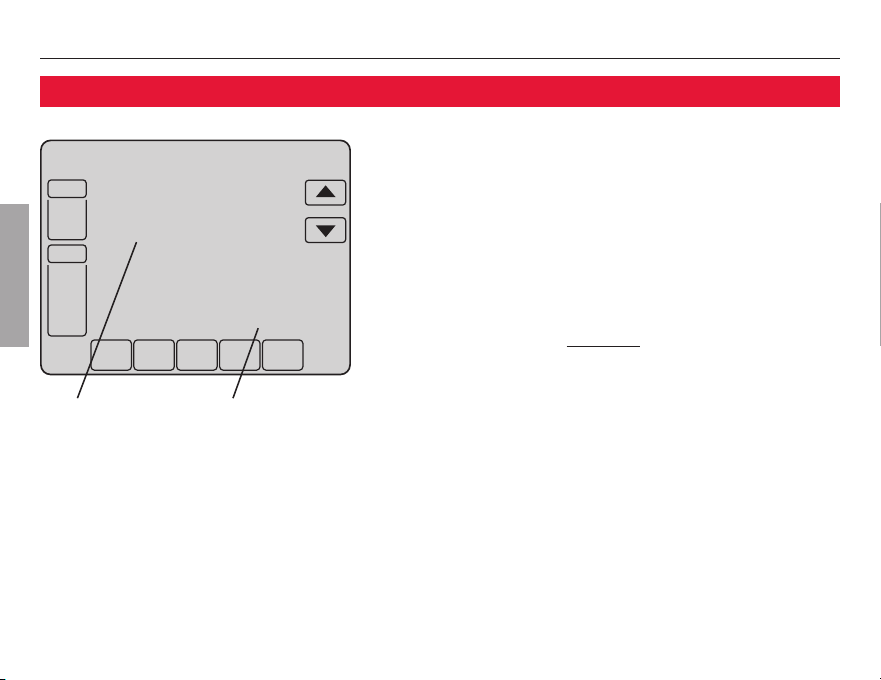
Screen lock
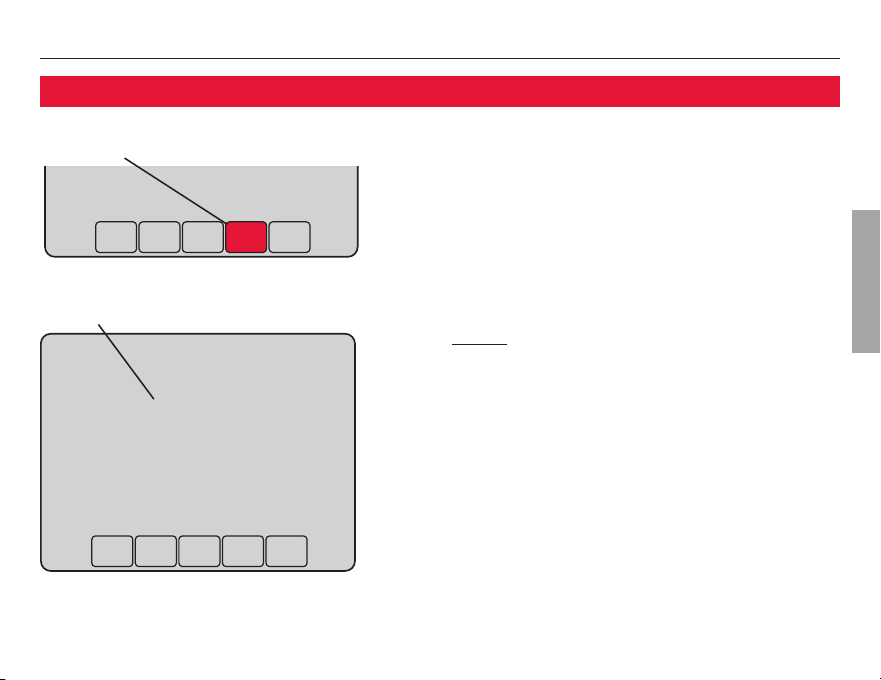
To prevent tampering, the screen can be par-
tially or fully locked.
When partially locked, the screen displays
SCREEN LOCKED for several seconds if a locked
key is pressed. To unlock the screen, press any
unlocked key while SCREEN LOCKED appears on
the screen.
When the screen is fully locked, no keys
function. To lock or unlock the screen, see
advanced function 0670 on page 25.
See advanced function
0670 (page 25) for
screen lock options
VisionPRO
®
TH8000 Series
17
69-1894EFS—03
ENGLISH
SCHED HOLD CLOCK SCREEN MORE
PM
6:00
M29358
OK TO
CLEAN
SCREEN
30
M29359
Screen cleaning
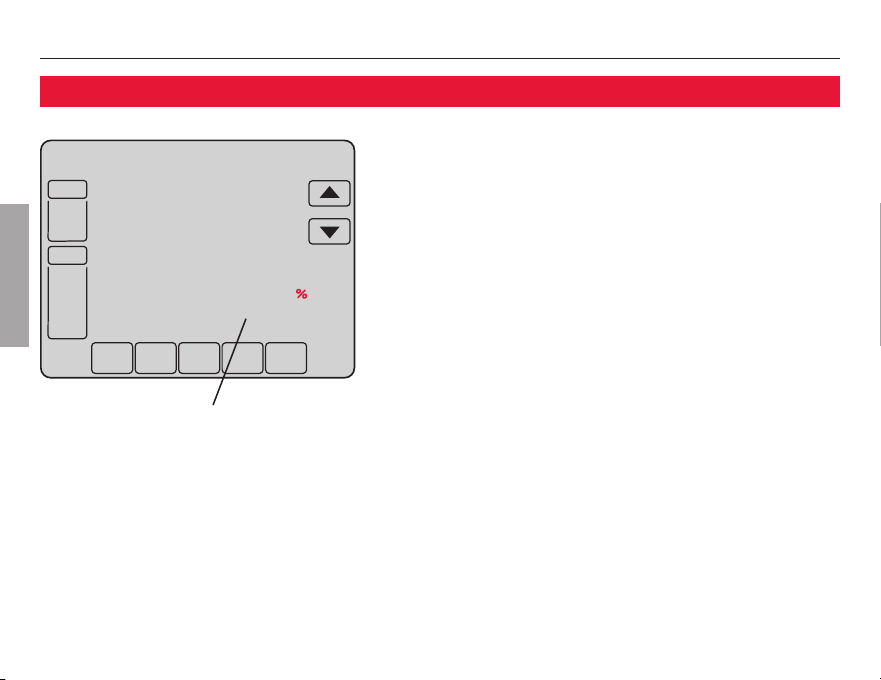
Press SCREEN to lock the screen for cleaning.
The screen will remain locked for 30 seconds
so you can clean the screen without changing
any settings.
After 30 seconds, press DONE to resume normal
operation, or press SCREEN again if you require
more time for cleaning.
Note: Do not spray any liquid directly on the
thermostat. Spray liquids onto a cloth, then use
the damp cloth to clean the screen. Use water or
household glass cleaner. Avoid abrasive cleansers.
Press SCREEN
Screen lock timer (30 seconds)
Operating Manual
18
About your new thermostat
69-1894EFS—03
ENGLISH
SCHED HOLD CLOCK SCREEN MORE
WED
PM
FAN
AUTO
SYSTEM
HEAT
Following
Schedule
Inside
Set To
Humidity
70
6:00
70
43
M29360
Humidity level display (select models)
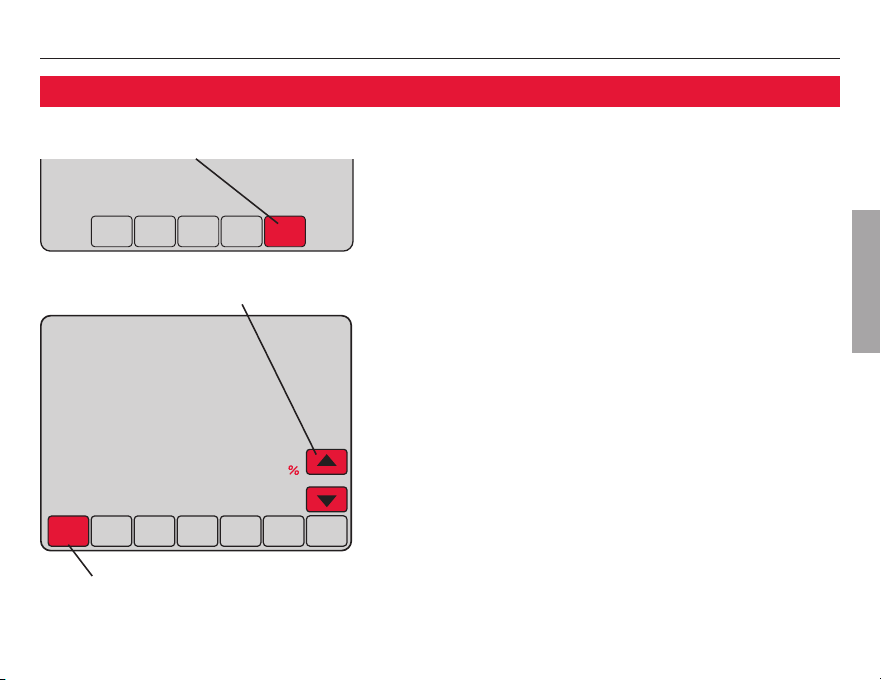
Select models can display the current indoor
humidity level.
(If an optional outdoor sensor is installed,
the outdoor temperature is shown instead of
the humidity level. Press MORE to display the
humidity level.)
Indoor humidity level
VisionPRO
®
TH8000 Series
19
About your new thermostat
69-1894EFS—03
ENGLISH
SCHED HOLD CLOCK SCREEN MORE
PM
6:00
M29361
DONE CANCEL
DEHUMIDIFIER
Inside
Humidity
52
45
M29362
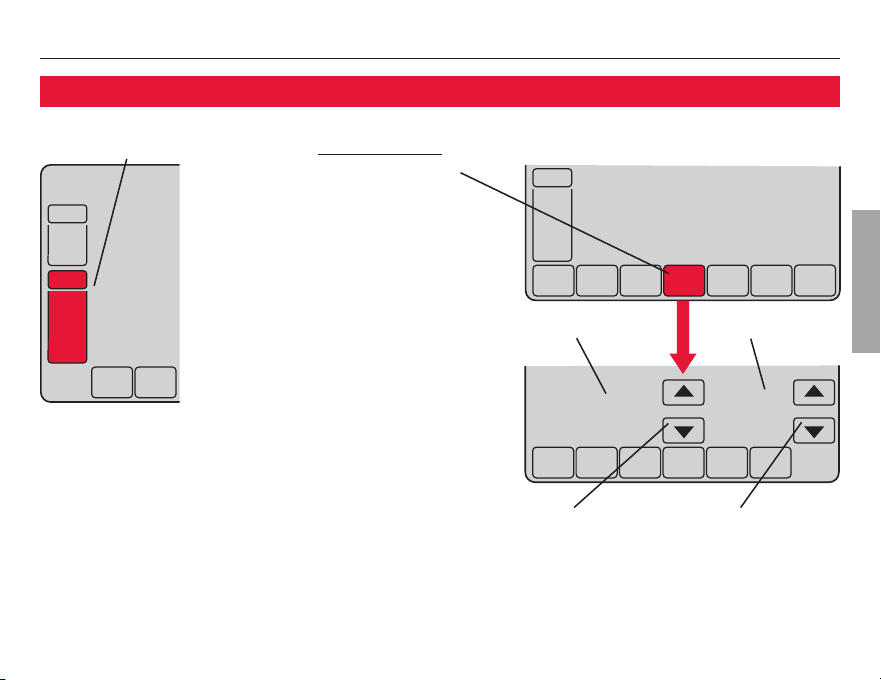
Dehumidification control (select models)
Select models allow you to decrease summer
humidity.
The thermostat monitors humidity. When
humidity increases, the thermostat runs the air
conditioner longer to reduce humidity (up to
´l&)03;=396'330-2+8)14)6%896)7)88-2+ª¯
Press MORE until the humidity screen is dis-
played, then press
Vor W to set the desired
humidity level.
Press DONE837%:)%2()<-83646)77CANCEL to
)<-8;-8,3987%:-2+',%2+)7¯
Press MORE until humidity is displayed
Press to set desired humidity
6)77837%:)§)<-8
Operating Manual
20
About your new thermostat
69-1894EFS—03
ENGLISH
M29364
M29363
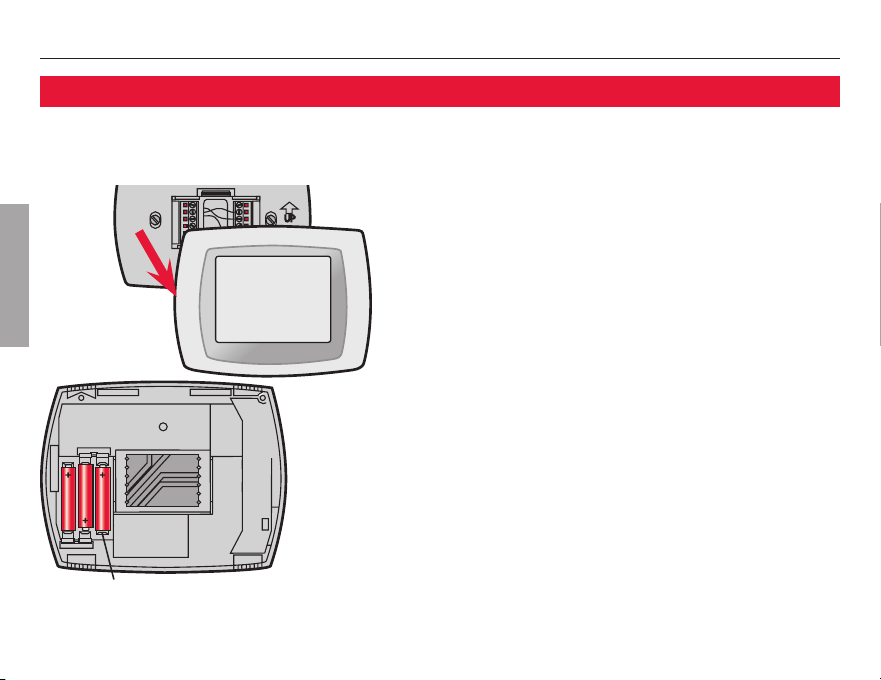
Battery replacement
Batteries are optional (to provide backup
power) if your thermostat was wired to run on
AC power when installed.
Install fresh batteries immediately when the
LO BATT warning begins flashing. The warn-
ing flashes about 30 days before batteries are
depleted.
:)2-*8,);%62-2+(3)7238%44)%6=39
should replace batteries once a year, or before
leaving home for more than a month.
Grasp thermostat and pull to remove
fom wallplate
Insert 3 fresh AAA alkaline batteries
VisionPRO
®
TH8000 Series
21
About your new thermostat
69-1894EFS—03
ENGLISH
DONE CANCEL
AM
6:01
SYSTEM
HEAT
DONE
0120
20
M29366
SCHED HOLD
TUE
AM
Inside
6:01
70
FAN
AUTO
SYSTEM
HEAT
M29365
Advanced functions
2. Press and hold
blank center key
until the display
changes.
1. Press SYSTEM.
Press
V/Wto
select function
Function Setting
Press V/Wto
change setting
3. Change settings as
required (see pages
22-25).
4. Press DONE83)<-8§
save changes.

Operating Manual
22
About your new thermostat
69-1894EFS—03
ENGLISH
Advanced functions
Year setting (first two digits)
Function
0120
Press V/W83',%2+)8,)*-6788;3(-+-873*8,)=)%6»
48-327»
20 = Year 20<<
21 = Year 21<<
Year setting (second two digits)
Function
0130
Press V/W83',%2+)8,)0%788;3(-+-873*8,)=)%6»
48-327»
01 - 99 (i.e., 2001 - 2099)
Month setting
Function
0140
Press V/W83',%2+)8,)'966)281328,»
48-327»
1 - 12 ©-¯)¯%29%6=®)')1&)6ª
Date setting
Function
0150
Press V/W83',%2+)8,)'966)28(%8)»
48-327» 1 - 31

VisionPRO
®
TH8000 Series
23
69-1894EFS—03
ENGLISH
Advanced functions
Program schedule on/off
Function
0160
Press V/W8389628,)463+6%17',)(90)32363**»
48-327»
0 Program schedule is off. Thermostat is non-programmable.
4 Program schedule is on (7-day programmable).
Temperature format (°F/°C)
Function
0320
Press V/W837)88,)8)14)6%896)(-740%=*361%8»
48-327»
0 Fahrenheit
1 Celsius
Daylight savings time on/off
Function
0330
The thermostat is pre-programmed to automatically adjust to daylight savings time.
Press V/W837)0)'8%2348-32»
48-327»
0 **»3%(.9781)28*36(%=0-+,87%:-2+78-1)
1 2»983®',%2+)83(%=0-+,87%:-2+78-1)©8,639+,³±±·%2(*36%6)%78,%8
do not use the new 2007 DST calendar)
2 2»983®',%2+)83(%=0-+,87%:-2+78-1)©³±±¸%2(&)=32(*36%6)%78,%8
use the new 2007 DST calendar)

Operating Manual
24
About your new thermostat
69-1894EFS—03
ENGLISH
Advanced functions
Furnace filter change reminder
Function
0500
This feature displays an alert to remind you to change the furnace filter.
Press V/W837)88,)()7-6)(6)1-2()6-28)6:%0»
48-327»
0 Off (no reminder to change furnace filter)
1 Reminder after 10-day run time (about 1 month)
2 Reminder after 30-day run time (about 3 months)
3 Reminder after 60-day run time (about 6 months)
4 Reminder after 90-day run time (about 9 months)
5 Reminder after 120-day run time (about 1 year)
6 Reminder after 365-day run time (about 3 years)
Humidifier pad change reminder
Function
0510
This feature displays an alert to remind you to change the humidifier pad.
Press V/W837)88,)()7-6)(-28)6:%0»
48-327»
0 Off (no reminder to change humidifier pad)
1 Reminder after 3 months
2 Reminder after 6 months
3 Reminder after 1 year
Note: Press RESET
to cancel the alert
Note: Press RESET
to cancel the alert

VisionPRO
®
TH8000 Series
25
69-1894EFS—03
ENGLISH
Advanced functions
UV lamp change reminder
Function
0520
This feature displays an alert to remind you to change the ultraviolet lamp.
Press V/W837)88,)()7-6)(-28)6:%0»
48-327»
0 Off (no reminder to change UV lamp)
1 Reminder after 1 year
Program schedule periods
Function
0540
Press V/W837)88,)291&)63*463+6%14)6-3(7»
48-327»
2 Two program periods (Wake, Sleep)
4 Four program periods (Wake, Leave, Return, Sleep)
Clock format
Function
0640
Press V/W837)88,)'03'/(-740%=*361%8»
48-327»
12 ²³®,396'03'/©-¯)¯L´»´±41Zª
24 ³µ®,396'03'/©-¯)¯L²¶»´±Zª
Screen lock
Function
0670
Press V/W83',337)%7'6))203'/7)88-2+©7))4%+)²·ª»
48-327»
0 Screen is unlocked (fully functional)
1 00*92'8-32703'/)()<')488)14)6%896)'3286307%2(CANCEL key
2 Screen is fully locked
Note: Press RESET
to cancel the alert

Operating Manual
26
69-1894EFS—03
ENGLISH
If you have difficulty with your thermostat, please try the following suggestions.
Most problems can be corrected quickly and easily.
Display is blank
W ,)'/'-6'9-8&6)%/)6%2(6)7)8-*2)')77%6=¯
W %/)796)43;)67;-8',%8,)%8-2+§'330-2+7=78)1-732¯
W %/)796)*962%')(336-7'037)(7)'96)0=¯
W *8,)61378%8-7&%88)6=43;)6)(1%/)796)*6)7,%0/%0-2)
batteries are correctly installed (see page 20).
No response to
key presses (or
temperature will
not change)
W ,)'/831%/)796)8,)8,)61378%8-723803'/)(©7))4%+)³¶ª¯
%/)796),)%8-2+%2('330-2+8)14)6%896)7%6)7)883%'')48%&0)6%2+)7»
W )%8»µ±l83º±l©µ¯¶l83´³lª
W 330»¶±l83ººl©²±l83´¸lª
Backlight is dim
W *8,)61378%8-7&%88)6=43;)6)(1%/)796)*6)7,%0/%0-2)
batteries are correctly installed (see page 20).
W *8,)61378%8-743;)6)(%(-1(-740%=-72361%0¯,)&%'/0-+,8
remains on at a low level, and brightens when a key is pressed.
In case of difficulty
VisionPRO
®
TH8000 Series
27
69-1894EFS—03
ENGLISH
In case of difficulty
Heating or
cooling system
does not respond
W 6)77SYSTEM to set system to Heat. Make sure the temperature is set
higher than the Inside temperature.
W 6)77SYSTEM to set system to Cool. Make sure the temperature is set
lower than the Inside temperature.
W ,)'/'-6'9-8&6)%/)6%2(6)7)8-*2)')77%6=¯
W %/)796)43;)67;-8',%8,)%8-2+§'330-2+7=78)1-732¯
W %/)796)*962%')(336-7'037)(7)'96)0=¯
W *L%-8Z-7(-740%=)(8,)'3146)77364638)'8-328-1)6-732¯%-8
5 minutes for the system to restart safely, without damaging the
compressor (see page 15).
Display shows
Fan Auto and On
or Auto and Circ
at the same time
W ,-7-72361%034)6%8-32¯983-2(-'%8)78,)8,)61378%8-7*3003;-2+8,)
programmed fan setting. If Auto and On is shown, the fan is scheduled
for “On” during this period (see page 7).
Operating Manual
28
69-1894EFS—03
ENGLISH
SCHED HOLD CLOCK SCREEN MORE
WED
AM
Following
Schedule
Inside
Outside
Set To
70
6:01
70
43
FAN
AUTO
SYSTEM
HEAT
M29367
Optional remote sensors (select models)
If an outdoor sensor is installed, the current
outdoor temperature is displayed.
If an indoor remote sensor is installed, the dis-
play shows the indoor temperature at the loca-
tion of the sensor. (The internal sensor in the
thermostat is disabled.)
If more than one indoor sensor is installed, the
display shows an average of temperature read-
ings from all sensors.
Inside Outside
temperature temperature

VisionPRO
®
TH8000 Series
29
69-1894EFS—03
ENGLISH
5-year limited warranty
32)=;)00;%66%2878,-7463(9'8)<'09(-2+&%88)6=83&)*6))*631()*)'87-28,);36/1%27,-4361%8)6-%0792()62361%097)
and service, for a period of five (5) years from the date of purchase by the consumer. If at any time during the warranty period
the product is determined to be defective or malfunctions, Honeywell shall repair or replace it (at Honeywell’s option).
If the product is defective,
(i) return it, with a bill of sale or other dated proof of purchase, to the place from which you purchased it; or
(ii) call Honeywell Customer Care at 1-800-468-1502. Customer Care will make the determination whether the product should be
6)8962)(838,)*3003;-2+%((6)77»32)=;)00)896233(73'/µ²±®´¹·±²¹¹¶39+0%76¯¯30()2%00)=¶¶µ³³
or whether a replacement product can be sent to you.
This warranty does not cover removal or reinstallation costs. This warranty shall not apply if it is shown by Honeywell that the
defect or malfunction was caused by damage which occurred while the product was in the possession of a consumer.
32)=;)00¨7730)6)74327-&-0-8=7,%00&)836)4%-6366)40%')8,)463(9'8;-8,-28,)8)61778%8)(%&3:)¯
¯31)78%8)7(3238%003;8,))<'097-32360-1-8%8-323*-2'-()28%036'327)59)28-%0(%1%+)773
this limitation may not apply to you.
¯
®¯31)78%8)7(3238%003;0-1-8%8-32732,3;032+%2
implied warranty lasts, so the above limitation may not apply to you.
This warranty gives you specific legal rights, and you may have other rights which vary from state to state.
If you have any questions concerning this warranty, please write Honeywell Customer Relations, 1985 Douglas Dr, Golden
Valley, MN 55422 or call 1-800-468-1502. In Canada, write Retail Products ON15-02H, Honeywell Limited/Honeywell Limitée, 35
Dynamic Drive, Toronto, Ontario M1V4Z9.

Honeywell International Inc.
1985 Douglas Drive North
Golden Valley, MN 55422
,884»°°=396,31)¯,32)=;)00¯'31
Honeywell Limited-Honeywell Limitée
35 Dynamic Drive
Toronto, Ontario M1V 4Z9
® U.S. Registered Trademark.
© 2011 Honeywell International Inc.
US Patent No. 6595430, D509151; other patents pending
·º®²¹ºµÊ±´¯¯):¯±´®²²
Printed in U.S.A.
Automation and Control Solutions