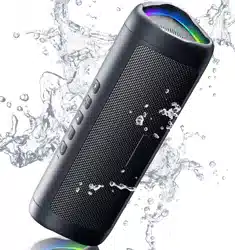
X-Go Quick-Start Guide Portable Bluetooth Speaker
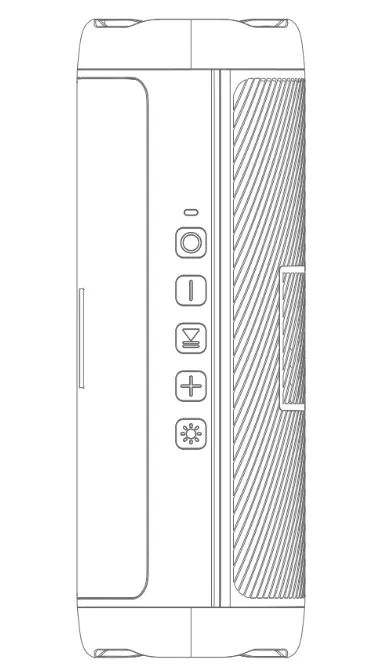
What's Included
Portable Bluetooth Speaker ............x1
Portable Rope ............x1
Type C Charging Cable ............x1
Quick-Start Guide ............x1
 |
|
 |
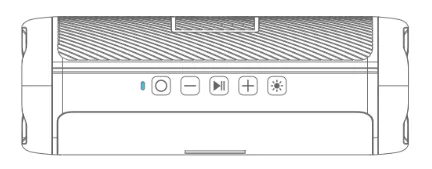
Power On/Off |
Press and hold for 2 seconds |
 |
Volume Up |
Short press |
 |
Volume Down |
Short press |
 |
PreviousTrack |
Long press |
|
Next Track |
Long press |
 |
Play/Pause |
Short press |
 |
Enable/Disable Colorful Light |
Short press |
 |
|
Answer/End A Call |
Short press |
|
Reject A Call |
Double Click |
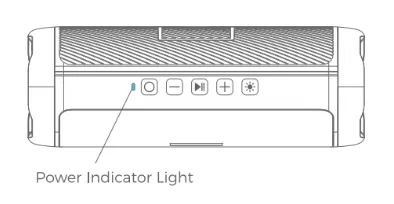
Power Indicator
| indicator |
state |
condition |
 |
red light |
on |
During charging |
| turns off |
Fully charged |
 |
blue light |
flash slow |
Bluetooth paired |
| flash fast |
Awaiting Bluetooth pairing |
| stays on |
TWS mode paired |
Specifications
Specifications are subject to change without notice.
| Input |
5V 1A |
| Playtime (varies by volume level and content) |
Up to 24 Hours
(30% volume)
|
| Bluetooth Version |
BT5.3 |
| Range |
66ft/20m |
| Waterproof Rating |
IPX5 |
| Size |
20.00x7.00x7.15 cm/ 7.87x2.81x2.75 inch |
| Net Weight |
1.05lb/16.75oz/475g |
Bluetooth pairing
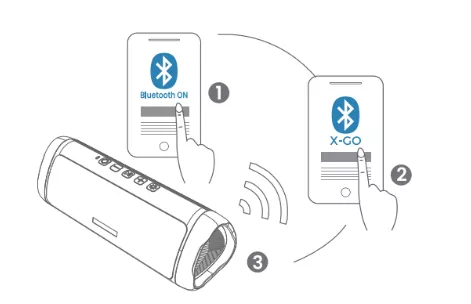
- Bluetooth indicator flashes blue quickly indicating the speaker is waiting for pairing.
- Open the Bluetooth Setting on your cellphone/devica, search and select X-GO to pair.
- Bluetooth indicator will flash blue slowly after paired.
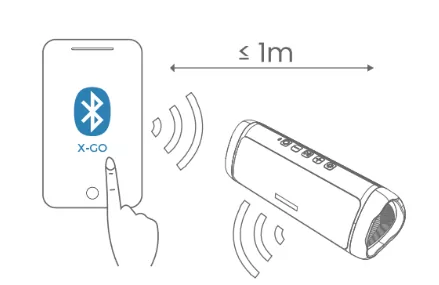
- When turned on, X-GO will automatically connect to the last connected device if available.
If not, X-GO will enter pairing mode.
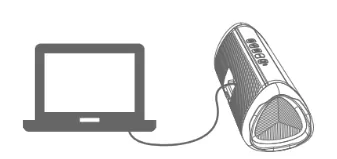
Connecting a non-Bluetooth audio device with the 3.5mm cable (AUX cable not included)
- Make sure your X-Go battery has enough power and turn on the Bluetooth speaker.
- Plug one end of the cable into your device's headphone jack and the blue light becomes staying on Insert the other end into X-Go.
- Turn on your X-Go Bluetooth speaker and you can start playing music.
Note: When the audio cable is plugged into the speaker, the Bluetooth function will not be available.
Pairing two speakers to create a stereo pair (TWS mode)
You can pair two X-Go together to create left and right channels and enjoy stereo sound.
- Turn on both speakers. Their light bar will flash, indicating they are ready to pair.
- Press and hold the button of one speaker until you hear a beep, then you will hear a prompt tone, indicating the two speakers are paired successfully. Do not turn on your phone's Bluetooth function before the pairing is successful.
- Turn on your device's Bluetooth and tap "X-Go", it will automatically connect one of the speakers. When the pairing is completed, you can enjoy wireless stereo sound from both speakers.
Note:
- Before pairing two speakers together, please make sure that the two speakers are not connected to other devices via Bluetooth. If one of them is connected to another device, they will fail to pair with each other.
- Please note that both speakers can control the volume.
- For a better listening experience, please put the speakers within 50 feet of each other. To achieve the best result, place the speakers in an open area without barriers.
Reset Your Speaker
If your speaker is stuck:
Step 1: Remove the charging cable and 3.5mm audio cable, if connected.
Step 2: Press and hold power button for 8 second, then release the power button.
Step 3: The speaker has now been reset and you can turn it on.
Wireless Hands-free Phone Call Function
Hands-free functions are only available for Bluetooth-enabled smartphones.
Short press button to answer an incoming call.
Short press again to end the call.
Double-click the button to reject an incoming call.
Safety precautions
- Do not charge by a water source or in the rain to prevent electric shock.
- Please follow the instructions for all operations and use.
- Do not damage the cable, especially at the connector.
- Unplug the USB charging cable when it is not in use or during a thunderstorm.
- Please keep the speaker away from heat sources (including all equipment that generates heat), such as stoves.
- Do not disassemble the speaker.
- Use officially certified chargers and cables (UL, CSA, VDE, CCC).
- If you have any questions, please contact our customer service team.
FCC statement
This device complies with Part 15 of the FCC rules. Operation is subjected to the following two conditions: (1) this device may not cause harmful interference, and (2) this device must accept any interference received, including interference that may cause undesired operation.
Changes or modifications not expressly approved by the party responsible for compliance could void your authority to operate the equipment.
FCC Radiation Exposure Statement
The equipment complies with FCC/IC RSS-102 radiation exposure limits set forth for an uncontrolled environment.
FCC VOC
This equipment has been tested and found to comply with the limits for a Class B digital device, pursuant to Part 15 of the FCC Rules. These limits are designed to provide reasonable protection against harmful interference in a residential installation. This equipment generates, uses and can radiate radio frequency energy and, if not installed and used in accordance with the instructions, may cause harmful interference to radio communications. However, there is no guarantee that interference will not occur in a particular installation. If this equipment does cause harmful interference to radio or television reception, which can be determined by turning the equipment off and on, the user is encouraged to try to correct the interference by one or more of the following measures:
- Reorient or relocate the receiving antenna.
- Increase the separation between the equipment and receiver.
- Connect the equipment into an outlet on a circuit different from that to which the receiver is connected.
- Consult the dealer or an experienced radio/TV technician for help.
After-Sales Service Tel: 1(970)364-2868
After Sales Email: [email protected]