USER MANUAL
Dishwasher
Model:
KoolMore Dishwasher
KM-DW1852-PR

CONTENTS
Please carefully read this manual before using the dishwasher, it will help you
use and maintain the dishwasher properly .
SAFTEY ...............................................................................1
FEATURES............................................................................2
OPERATION..........................................................................3
OPERATING THE DISHWASHER.............................................5
USER MAINTANANCE...........................................................9
TROUBLESHOOTING............................................................11
WARRENTY.........................................................................14

WARNING
For your safety, please follow the information in this manual to minimize the risk of fire, explo-
sion, electric shock, and to help prevent property damage or personal injury.
Proper installation
Please install your dishwasher properly, follow the installation guide.
• Water supply inlet temperature should be between 120° and 140°.
• Dispose of the discarded appliance and packing material properly.
• The dishwasher must be properly grounded, or it can result in a risk of electric shock.
• If there is any damage to the Dishwasher, please contact your Dealer, do not attempt to
repair or replace any part by yourself.
Basic precaution before use
• Read all instructions before using the dishwasher.
• The manual does not cover every possible condition and situation that may occur.
• Use the dishwasher only for intended function as described in this manual.
When loading items to be washed:
• Load sharp items and knives so that they are not likely to damage the door seal and tub.
• Load sharp items and knives with the handles up to reduce the risk of injury.
▪ Do not wash plastic items unless they are marked dishwasher safe, if not marked, check
with manufacturer for recommendation, items that are not dishwasher safe may melt and
create a potential fire hazard.
▪ If the dishwasher drains in to a food disposer, make sure disposer is completely empty
before running dishwasher.
▪ Do not tamper with controls.
▪ Do not operate your dishwasher unless all enclosure panels are in the proper place.
▪ Do not abuse, sit, or stand on the door or racks of the dishwasher.
▪ Under certain conditions, hydrogen gas may be produced in a hot water system that has
not been used for two weeks or more. HYDROGEN GAS IS EXPLOSIVE. If the hot water
system has not been used for such a period, before using dishwasher, turn on all hot
water faucets and let water flow from each for several minutes. This will release any
accumulated hydrogen gas. Hydrogen gas is flammable. Do not smoke or use an open
flame during this time.
▪ Do not store or use combustible materials, gasoline or other flammable vapors and
liquids in the vicinity of this or any other appliance.
▪ Use only detergents or rinse agents recommended for use in a dishwasher and keep them
out of the reach of children.
▪ Keep young children and infants away from dishwasher when it is operating.
▪ Do not use the dishwasher if it has a damaged power line or plug, and do not plug the
dishwasher into a damaged outlet. Failure to observe these instructions may result in
electrical shock.
▪ Remove the door to the washing compartment when removing an old dishwasher from
service or discarding it.
SAFTEY
1
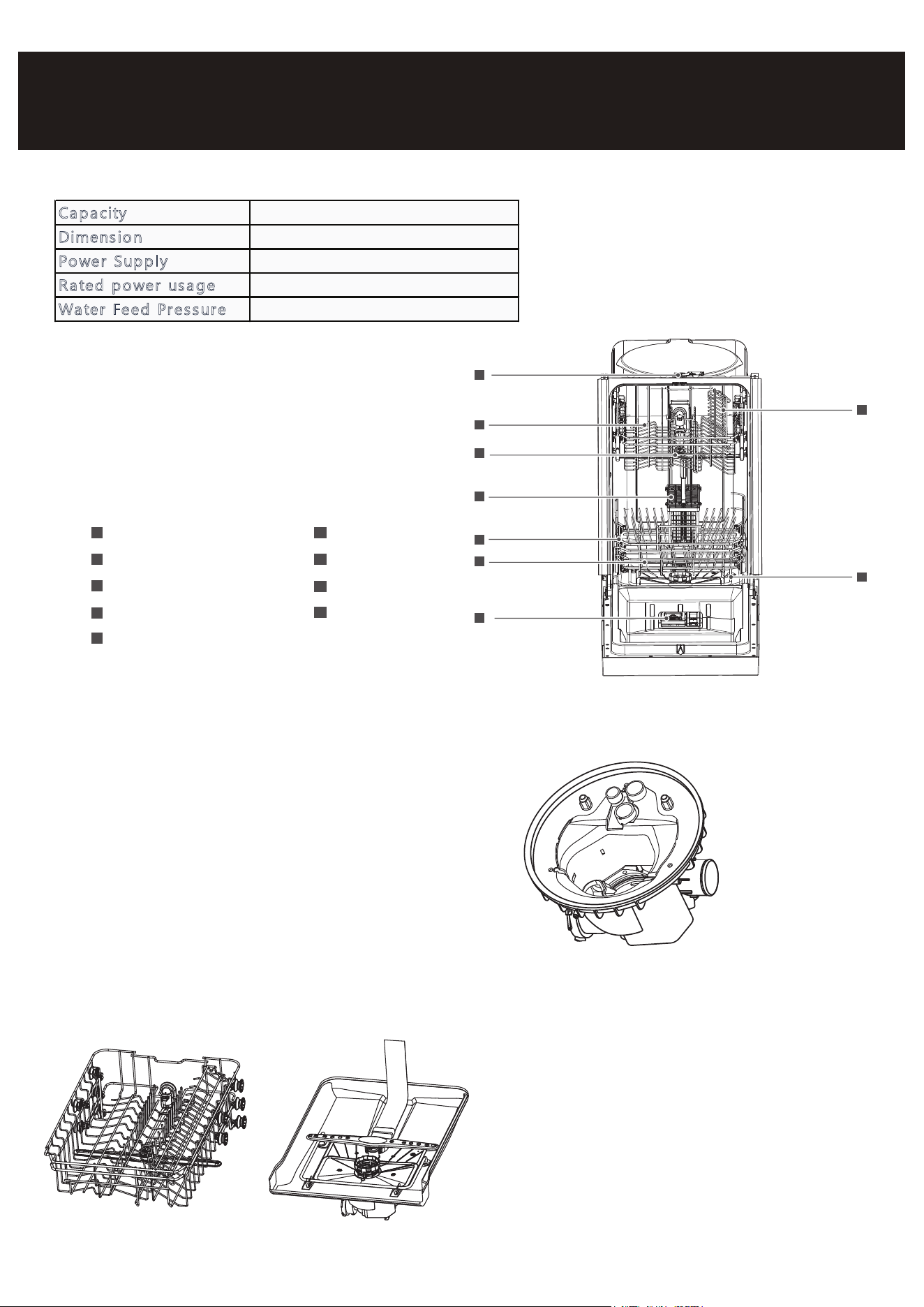
1 Lock
Upper Basket2
Upper Spray Arm3
Cutlery Basket4
Lower Basket5
6 Lower Spray Arm
Rinse Aid Dispenser7
Cup Shelf8
9 Heating Element
8
3
6
5
4
2
7
9
1
比例 1.000
Your dishwasher has a multiple Filter System.
In the System there are three mesh filters.
It can separate soiled water and clean water in
different chambers.
The multiple filter system helps your
dishwasher to get better performance
with less water and less energy.
Filter System
FEATURES
Capacity 8 place settings
D
imension 17.6 x 21.7 x 32.4 inches (W x D x H)
P
ower Supp ly 120volts, 60Hz
R
ated po wer usa ge Wash motor: 100W, Heater: 700W
W
ater Feed Pressur e 5.8 ~ 14.5 psi (0.04 ~ 0.1 MPa)
Smart Wash System
Your dishwasher is equipped with a Smart Wash
System. When you place a partial load of lightly soiled
dishes in the machine, it will automatically run a cycle
similar to a short wash. On the other hand, if you load
it with heavily soiled dishes, the machine will initiate a
heavy wash cycle. This system has the capability to
determine the most appropriate wash cycle for the
type of dishes inside, ensuring efficient cleaning every
time.
2
W
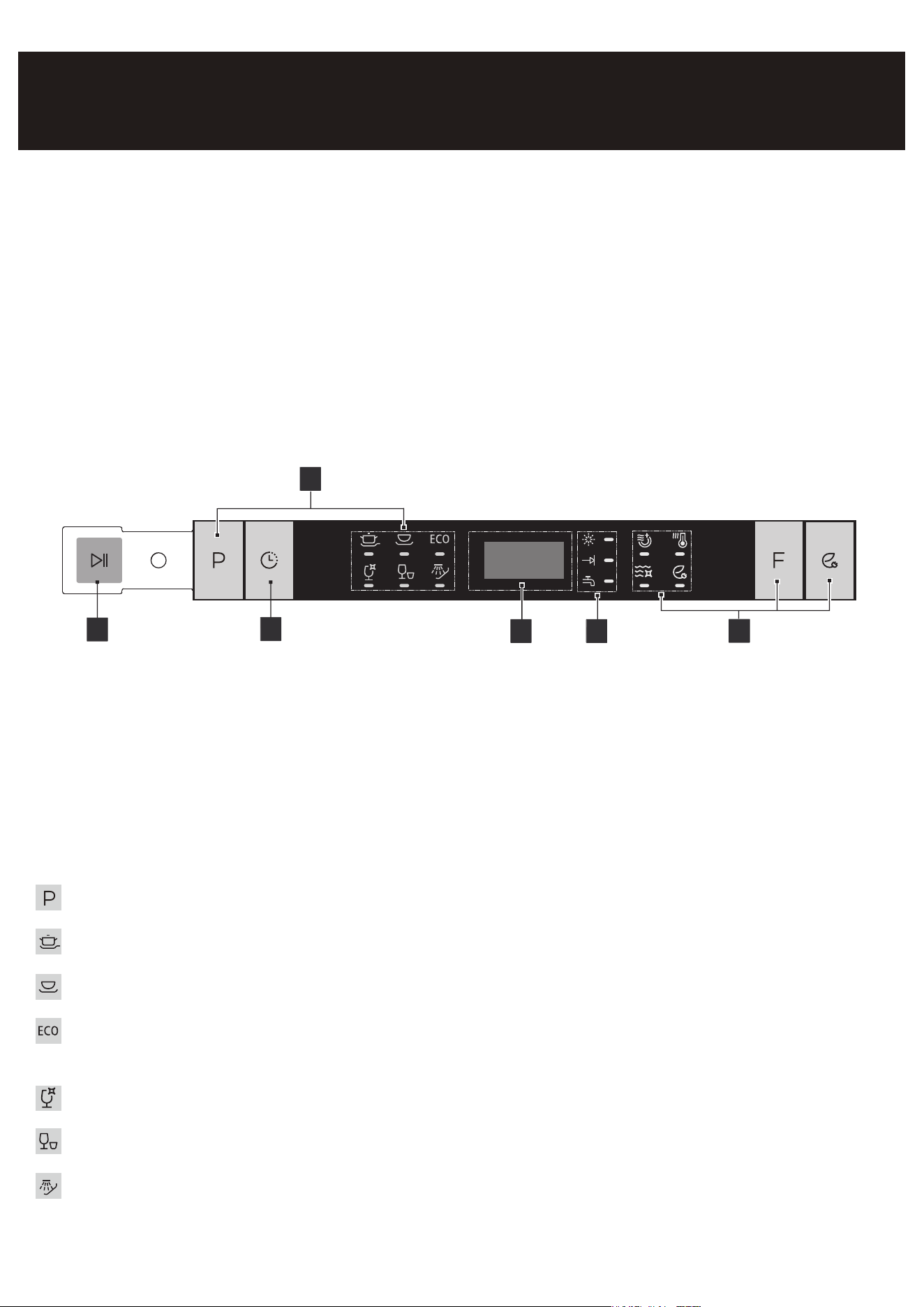
Control Panel
1
3
2
4 5
6
OPERATION
1. Start/Cancel
Open the door to select the desired cycle and options, touch the Start/Cancel button and close
the door within 4 seconds to start the cycle or begin the delayed countdown. If you open the
door and touch Start/Cancel to cancel and reset, the program during the cycle, 3 seconds the
door and dishwasher will start at 90 second drain.
2. Wash Cycle Selections
Program Button: push to select the program, corresponding to water with the lighted.
Heavy: This cycle is for hard-to-clean, heavily soiled dishes, pots, pans, and dishes.
Normal: This is standard program. It is for regularly soiled dinner dishes or silverware.
ECO: It is suitable for economically soiled tableware and it's the most efficient program in terms
of its combined energy and water consumptions for that type of tableware.
Glass: For lightly soiled such as glasses, crystal and fine china.
Rapid: A shorter wash for lightly soiled dishes that do not need drying.
Rinse: Use for rinsing dishes glasses and silverware that will not be wash right away.
Getting Started
1. Load the dishwasher (See Dish Preparation and Loading sections).
2. Add detergent (See Filling the detergent dispenser).
3. Add rinse aid (See Filling the rinse aid dispenser).
4. Select desired CYCLE (See Cycle Chart).
5. Select desired OPTIONS (See Control Panel). The indicator light above the pad will glow when
selected.
6. Run the hot water faucet nearest the dishwasher until the water is hot, then turn it off.
7. To start, press Start/Cancel (See Control Panel). Then close door.
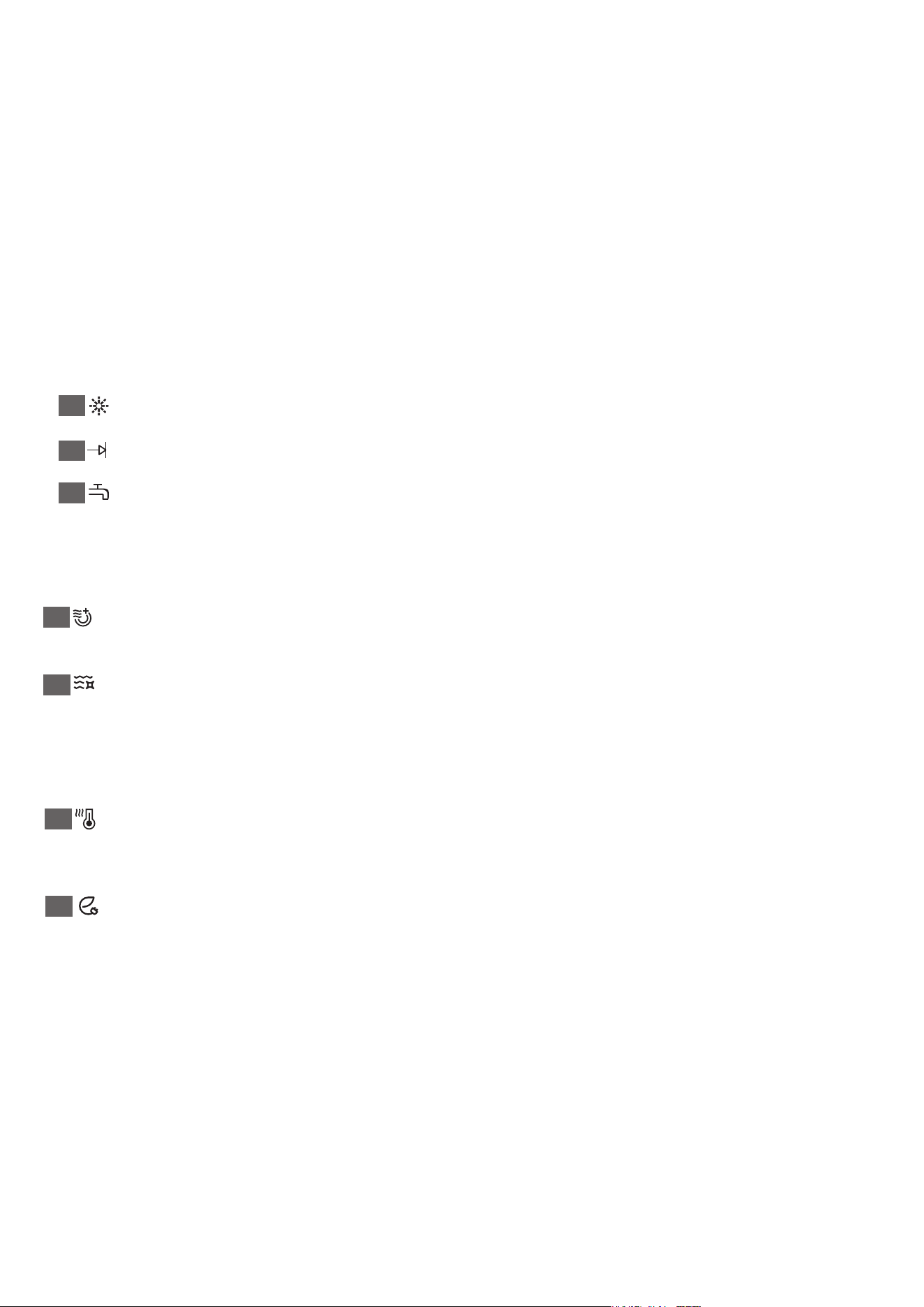
Rinse: Rinse detergent need to be refilled
Program end
Water failure, faucet is not open
6. Options
Heating Dry: When the 'Heating Dry' function is selected, the heater will work during the
drying process. NOTE: The 'Heating Dry' option is not available with "Rinse" cycles.
Sanitize: When the 'Sanitize' function is selected, the temperature of water will be main-
tained at max 158 (70℃ ) max. The max temperature may not be reached if the incoming water
temperature is not correct. Certified residential dishwashers are not intended for licensed food
establishments. NOTE: The 'Sanitize' option is available with "Heavy" and "Normal" and 'ECO'
cycles.
Hi Temp: When the 'Hi Temp wash' function is selected, the temperature of the water will be
maintained at 608 (140℃ ). NOTE: The 'Hi Temp option is available with the "Heavy" "Normal"
"ECO" and "Glass" cycles.
Energy Save: When the 'Energy Save' function is selected, energy consumption will be
reduced during washing process. NOTE: The 'Hi Temp option is available with "Heavy" and
"Normal" cycles.
3. Delay
To delay the start of a selected cycle, press the Delay start pad until the desired delay time
shows in the LED display. You can delay the start for 1 to 24 hours. To cancel the delay, press
the Start/Cancel pad for 3-5 seconds.
4. Display window
This display will read the hours and minutes of the running cycle, delay hours and error codes
etc.
5. Status Indicators
3
1. Start/Cancel
Open the door to select the desired cycle and options, touch the Start/Cancel button and close
the door within 4 seconds to start the cycle or begin the delayed countdown. If you open the
door and touch Start/Cancel to cancel and reset, the program during the cycle, 3 seconds the
door and dishwasher will start at 90 second drain.
2. Wash Cycle Selections
Program Button: push to select the program, corresponding to water with the lighted.
Heavy: This cycle is for hard-to-clean, heavily soiled dishes, pots, pans, and dishes.
Normal: This is standard program. It is for regularly soiled dinner dishes or silverware.
ECO: It is suitable for economically soiled tableware and it's the most efficient program in terms
of its combined energy and water consumptions for that type of tableware.
Glass: For lightly soiled such as glasses, crystal and fine china.
Rapid: A shorter wash for lightly soiled dishes that do not need drying.
Rinse: Use for rinsing dishes glasses and silverware that will not be wash right away.
Rinse: Rinse detergent need to be refilled
Program end
Water failure, faucet is not open
6. Options
Heating Dry: When the 'Heating Dry' function is selected, the heater will work during the
drying process. NOTE: The 'Heating Dry' option is not available with "Rinse" cycles.
Sanitize: When the 'Sanitize' function is selected, the temperature of water will be main-
tained at max 158 (70℃ ) max. The max temperature may not be reached if the incoming water
temperature is not correct. Certified residential dishwashers are not intended for licensed food
establishments. NOTE: The 'Sanitize' option is available with "Heavy" and "Normal" and 'ECO'
cycles.
Hi Temp: When the 'Hi Temp wash' function is selected, the temperature of the water will be
maintained at 608 (140℃ ). NOTE: The 'Hi Temp option is available with the "Heavy" "Normal"
"ECO" and "Glass" cycles.
Energy Save: When the 'Energy Save' function is selected, energy consumption will be
reduced during washing process. NOTE: The 'Hi Temp option is available with "Heavy" and
"Normal" cycles.
3. Delay
To delay the start of a selected cycle, press the Delay start pad until the desired delay time
shows in the LED display. You can delay the start for 1 to 24 hours. To cancel the delay, press
the Start/Cancel pad for 3-5 seconds.
4. Display window
This display will read the hours and minutes of the running cycle, delay hours and error codes
etc.
5. Status Indicators
4
Status Window
H:01-H:24
If the Delay Start option is selected, the
number of delay start hours shows in the
status window.
2:25-0:00
After the machine starts operation, the
remaining time of the selected cycle will be
shown in the window.
Error indication
In certain situations which are critical to the
machines function and safe operation, the
control shall shut down and indicate an error
code (See Error Codes on page 13).
If Error codes are displayed, contact the
dealer or services. They will be able to provide
assistance in troubleshooting the problem
and or locate authorized service technician if
needed.
OPERATING THE DISHWASHER
NOTE
The remaining time could suddenly increase or drop several minutes. This means the Smart
Sensor has checked the soil level and determined if additional water fills are needed or if water
fills can be deleted.
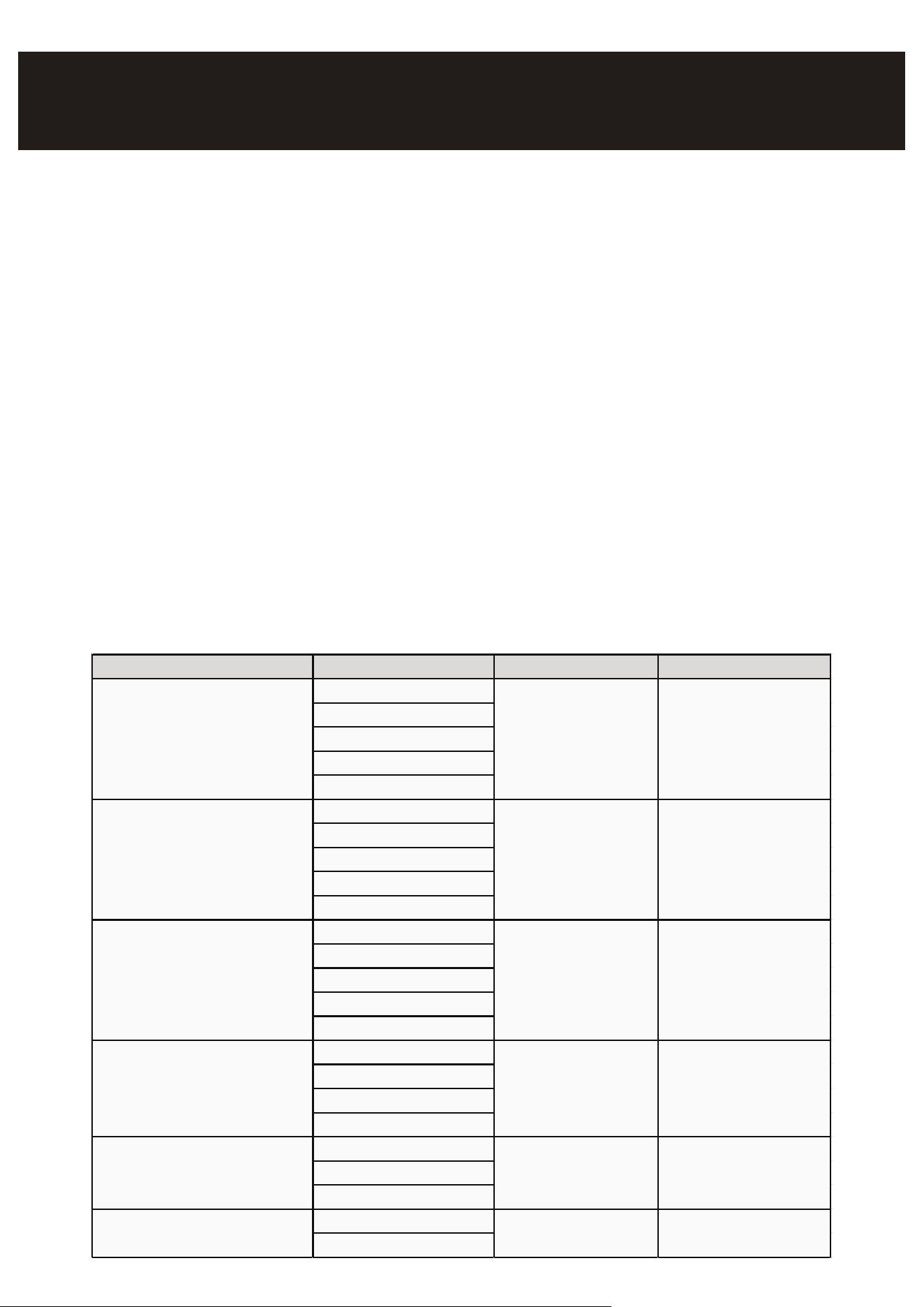
Program Description of Cycle Water (L/G) Cycle time (min)
Heavy Pre Wash 19L/5.2G 155
Main Wash (60
℃
)
Rinse (68
℃
)
Rinse (with Sanitize68
℃
)
Drying
NORMAL Pre Wash 9.5-18.5L/ 105-135
Main Wash (50-55
℃
) 2.5-4.9G
Rinse (58-60
℃
)
Rinse (with Sanitize68
℃
)
Drying
ECO Pre Wash 15L/4.1G 105
Main Wash (45-50
℃
)
Rinse (50-55
℃
)
Rinse (with Sanitize68
℃
)
Drying
Glass Pre Wash 15.5L/4.1G 95
Main Wash (45-50
℃
)
Rinse (50-55
℃
)
Drying
Rapid Pre Wash 12.5L/3.3G 60
Main Wash (55
℃
)
Rinse (55
℃
)
Rinse Pre Wash 6.7L/1.8G 20
Main Wash
5
Make sure the loaded dishes do
not interfere with the rotation of
the middle spray arm, which is
located at the bottom of the upper
basket. (Check this by rotating the
middle spray arm by hand.)
Large items should be placed
along the edge so they do not
interfere with the middle spray
arm rotation, and make sure
they not prevent the detergent
dispenser from opening.
Large items should be turned so
that the inside faces downward,
and make sure these items
do not interfere with the lower
spray arm rotation.
8 place setting
Dish Preparation
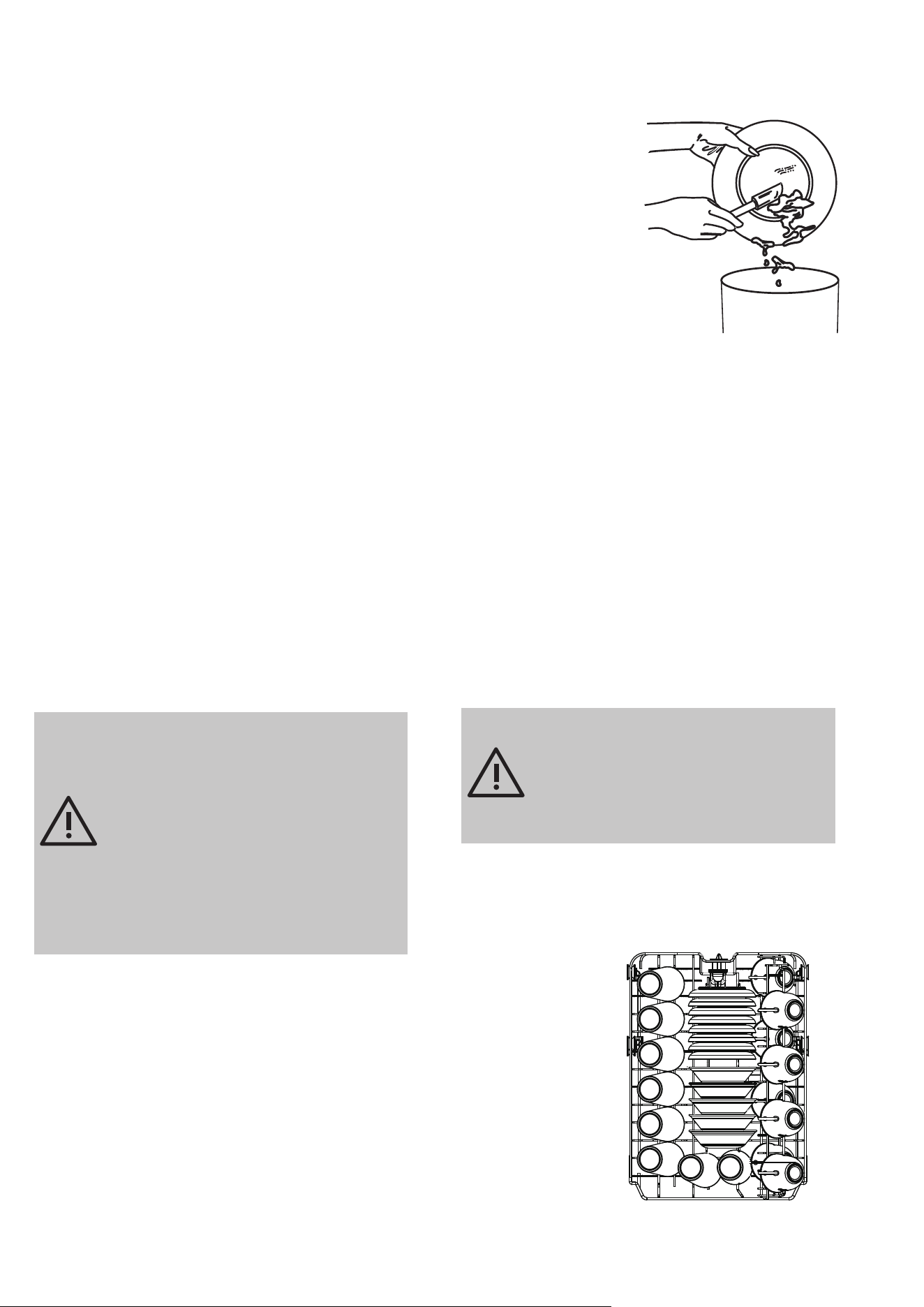
Scrape away large pieces of food, bones, pits, toothpicks, etc. The
continuously ltered wash system will remove the remaining food
particles. Burned-onfoods should be loosened before loading.
Empty liquids from glasses and cups. Foods such as mustard,
mayonnaise, vinegar, lemon juice and tomato based products may
cause discoloration of stainless steel and plastics if allowed to sit
for a long period of time. Unless the dishwasher is to be operated
at once it is best to rinse o these food soils. If the dishwasher
drains into a food disposer, be sure disposer is completely empty
before starting dishwasher.
Loading the Upper Basket
The upper basket is designed for cups, glasses, small plates, bowls and plastic items marked dishwash-
er safe etc. For best results, place the bowls, cups, glasses, sauce pans with soiled surface facing down
or toward the center. Tilt slightly for better drainage.
Loading the Bottom Basket
The bottom basket is designed to load plates, soup bowls, plates, saucers and cookware. The adjust-
able basket space will allow you to load items with a maximum height of 11 inches.
The fold-down tines in the bottom basket make it easy to load those extra large and hard-to-t items.
The tines may be left up for normal use or folded down for more exible loading. Fold down for more
space to load large pots or pans.
Loading the Lower Basket
The lower basket has been especially designed for dinner
dishes, soup bowls, plates, pots, lids, casserole dishes, and
plates.
Load large items such as pans and pots into the dishwasher so
their open sides face downwards. We recommend loading cups,
stemware, and small plates into the upper basket.
See the recommended loading patterns below.
Loading the Upper Basket
The upper basket has been designed for small plates, mugs,
glasses, and plastic items marked “dishwasher safe”. Load your
plates into the dishwasher in two half rows, so that the front of
each plate faces the back of the plate in front of it, and the open
sides of the plates at the center of the dishwasher face each
other. See the illustrations below.
Make sure the loaded dishes do not interfere with the rotation of
the nozzle which is located at the bottom of the upper basket.
(Check this by rotating the nozzle by hand.)
When loading dishes, pull the upper basket out sufficiently so
you can load it without striking the counter.
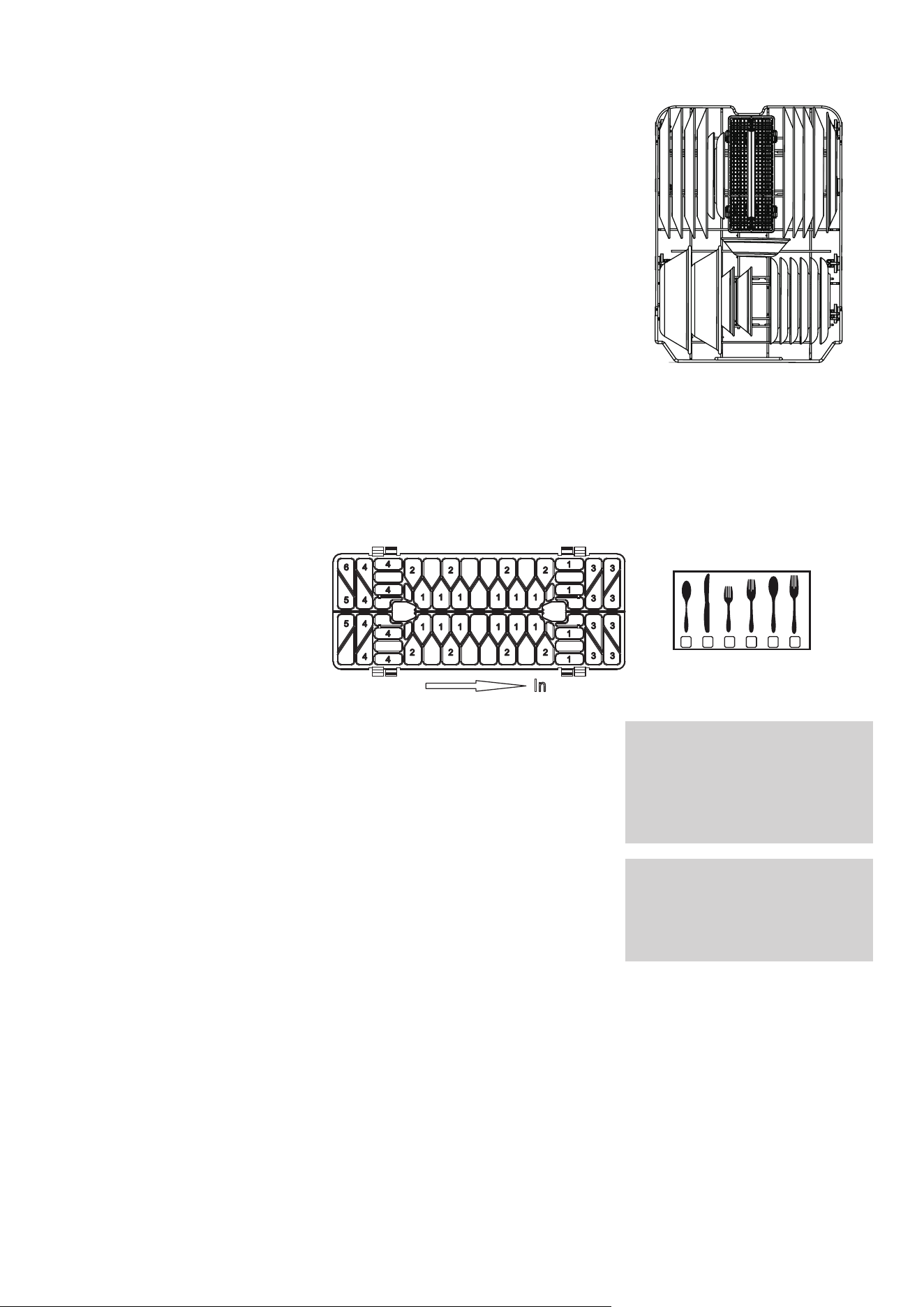
Loading the Silverware Basket
The silverware basket can be divided into three separate mod-
ules that can be used in both upper and lower racks:
1. Spoons
2. Knives
3. Salad forks
4. Forks
5. Large spoons
6. Large forks
Adding A Dish
To add or remove items after wash cycle starts:
1. Open door slightly and wait a few seconds until wash action
stops before completely opening.
2. Add the item.
3. Close the door firmly to latch within 4 secs, then cycle will
automatically resume.
Filling the rinse aid dispenser
Rinse aid greatly improves drying and reduces water spots and filming. Without rinse aid your
dishes and dishwasher interior will have excessive moisture.
The Heated Dry option will not perform as well without rinse aid. The rinse aid dispenser, located
next to the Detergent cup, automatically releases a measured amount of rinse aid during the last
rinse.
If the rinse aid is low, the Rinse Aid light is illuminated at the beginning and end of the cycle
indicating that it is time to refill.
6
8 place setting
1 32 6444 5
46
45
4
4
5
4
4
4
4
1 1 1 1 1 1
1 1 1 1 1 1
1
1
1
1
2 2 2 2
2 2 2 2
33
33
33
33
In
Loading the Lower Basket
The lower basket has been especially designed for dinner
dishes, soup bowls, plates, pots, lids, casserole dishes, and
plates.
Load large items such as pans and pots into the dishwasher so
their open sides face downwards. We recommend loading cups,
stemware, and small plates into the upper basket.
See the recommended loading patterns below.
Loading the Upper Basket
The upper basket has been designed for small plates, mugs,
glasses, and plastic items marked “dishwasher safe”. Load your
plates into the dishwasher in two half rows, so that the front of
each plate faces the back of the plate in front of it, and the open
sides of the plates at the center of the dishwasher face each
other. See the illustrations below.
Make sure the loaded dishes do not interfere with the rotation of
the nozzle which is located at the bottom of the upper basket.
(Check this by rotating the nozzle by hand.)
When loading dishes, pull the upper basket out sufficiently so
you can load it without striking the counter.
Loading the Silverware Basket
The silverware basket can be divided into three separate mod-
ules that can be used in both upper and lower racks:
1. Spoons
2. Knives
3. Salad forks
4. Forks
5. Large spoons
6. Large forks
Adding A Dish
To add or remove items after wash cycle starts:
1. Open door slightly and wait a few seconds until wash action
stops before completely opening.
2. Add the item.
3. Close the door firmly to latch within 4 secs, then cycle will
automatically resume.
Filling the rinse aid dispenser
Rinse aid greatly improves drying and reduces water spots and filming. Without rinse aid your
dishes and dishwasher interior will have excessive moisture.
The Heated Dry option will not perform as well without rinse aid. The rinse aid dispenser, located
next to the Detergent cup, automatically releases a measured amount of rinse aid during the last
rinse.
If the rinse aid is low, the Rinse Aid light is illuminated at the beginning and end of the cycle
indicating that it is time to refill.
WARNING
Do not let item extend though bottom.
Be sure nothing protrudes through bottom
of the basket or rack to block the lower
spray arm.
CAUTION
TO AVOID BURN INJURY: Slightly open
door and wait until spray arms and wash
action stop. Hot water may splash out of
dishwasher. Failure to do so may result in
injury.
7
Filling the rinse aid dispenser
Your dishwasher is designed to use a liquid rinse aid. The use of rinse greatly improves drying
performance after the final rinse. Do not use a solid or bar-type rinse aid. Under normal conditions,
the rinse aid will last approximately one month. It is best to keep it full, but do not overfill.
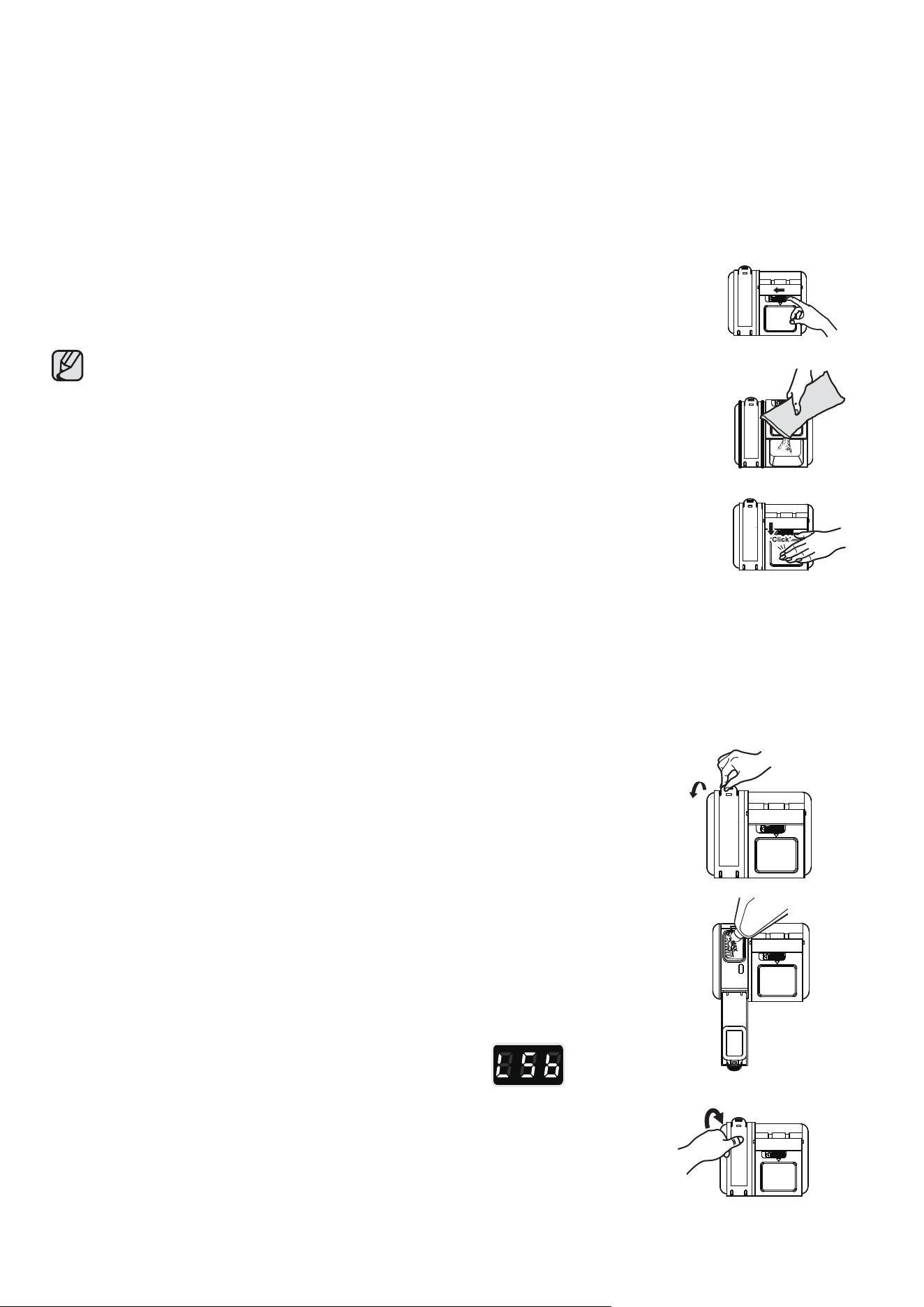
Filling the detergent dispenser
1. Open the detergent dispenser cap by pushing the detergent dispenser
release catch.
The flap is always open at the end of a dishwashing cycle.
2. Add the recommended amount of detergent to the main wash
detergent compartment.
3. Close the flap and then pressing it down.
Filling the rinse aid reservoir
Your dishwasher has been designed to use liquid rinse aid only. Using a powdered
rinse aid will clog the reservoir opening and cause the dishwasher to malfunction.
Rinse aid improves the drying performance of the dishwasher.
• Do not add regular detergent to the rinse aid reservoir.
1. Remove the rinse aid reservoir cap by rotating it counterclockwise.
2. Fill the rinse aid reservoir with rinse aid.
• Use the viewing port when lling the rinse aid reservoir.
• Do not ll the reservoir above the full level indicator. Excess rinse aid can over
ow during the wash cycle.
3. Add the rinse aid if the LED screen shows "Lsb".
rinse aid left.
Close the rinse aid reservoir cap by rotating it clockwise.
8
Open
USER MAINTENANCE
Keeping your dishwasher clean improves its performance, reduces unnecessary repairs, and
lengthens its life.
CLEANING THE EXTERIOR
It's best to clean spills on the outside of your dishwasher as they occur. Use a soft, damp cloth on
the control panel to gently wipe away spills and dust. Do not use benzine, wax, thinner, chlorine
bleach, or alcohol. These materials may discolor the inner walls and cause stains. Do not clean the
dishwasher by sprinkling water over it and avoid letting water come into contact with any of the
electrical parts.
If your dishwasher has a stainless steel door panel, you can clean it with a stainless steel cleaner for
Home Appliances or a similar product using a clean, soft cloth.
CLEANING THE INTERIOR
Clean the interior of your dishwasher periodically to remove any dirt or food particles. Wipe the
inside of the dishwasher and the inner part of the door with a wet dishcloth. We recommend filling
the detergent dispenser with dish detergent, and then running the dishwasher empty periodically
using either the Normal or Express 60 cycle with the sanitize option. This will keep your dishwasher
clean.
If white spots and odor are still present in your dishwasher, run the Normal cycle with the dishwasher
empty and without detergent until it flushes. Then, interrupt the cycle and put an 8 ounce cup of
white vinegar into the lower basket. Close the dishwasher and let the cycle finish.
• Do not remove the tub front seal (the long rubber seal enclosing the opening of the dishwasher).
• Do not touch the HEATING ELEMENT during or immediately after use.
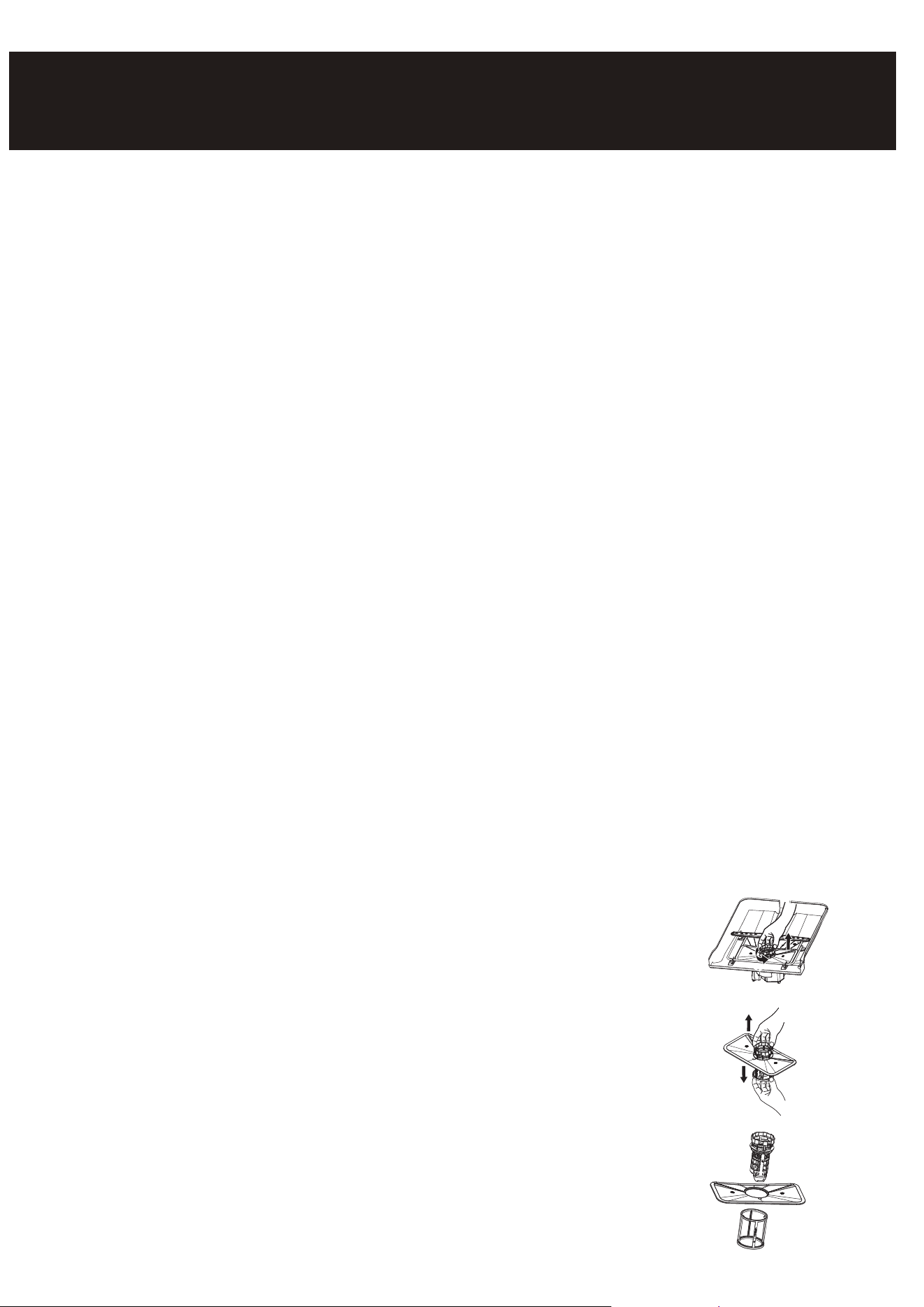
CLEANING THE FILTERS
1. Turn off the dishwasher.
2. Rotate the filter insert counterclockwise to unfasten and then detach
the filter insert.
3. Remove the fine filter (flat, rectangular).
9
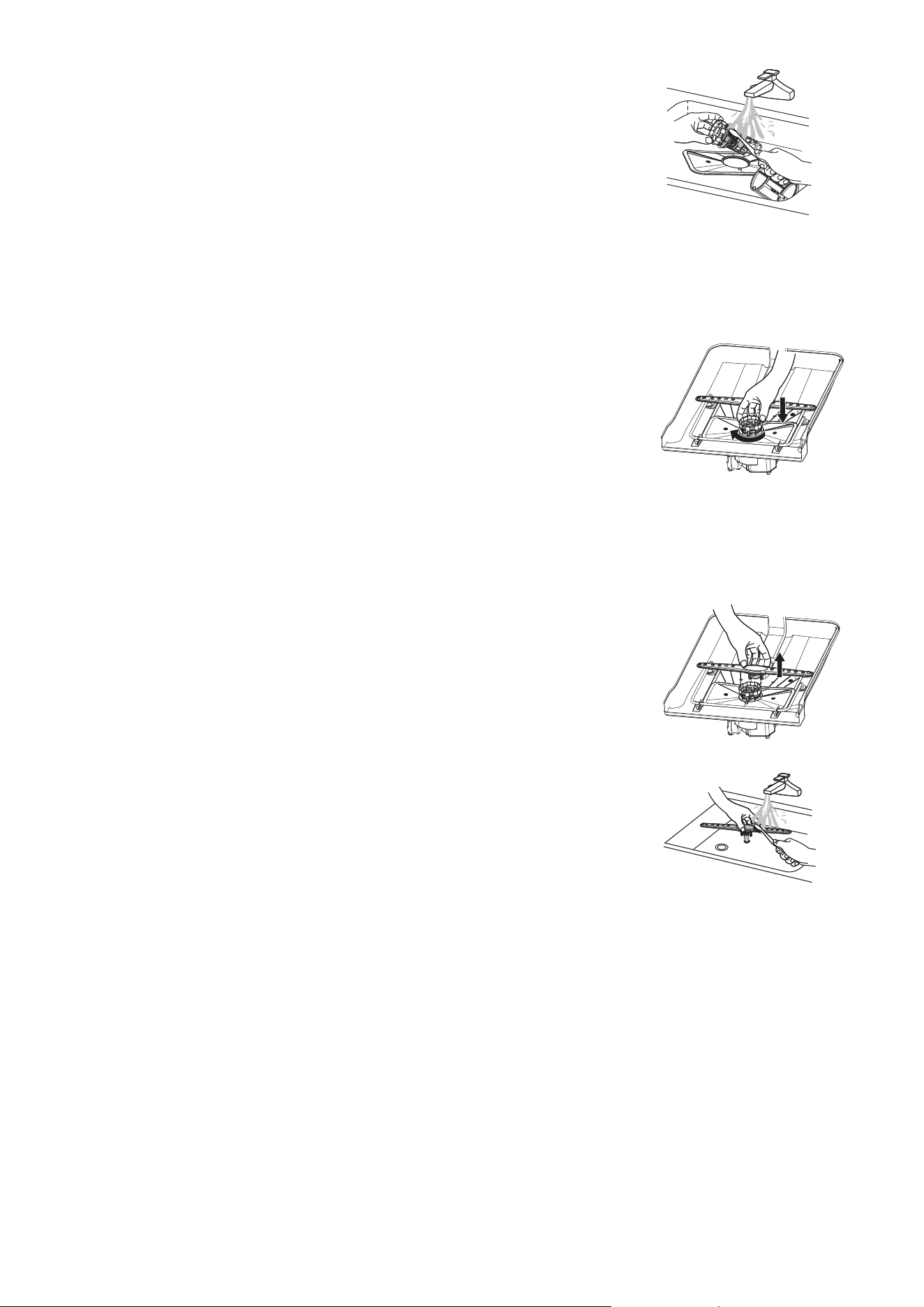
4. Remove any dirt or other remains from the filters, and then rinse
them under running water.
5. Reassemble the filters in the reverse order of the disassembly, replace the filter insert, and
rotate clockwise to the close arrow.
CAUTION: If the filter insert is not closed properly, its performance will be decreased.
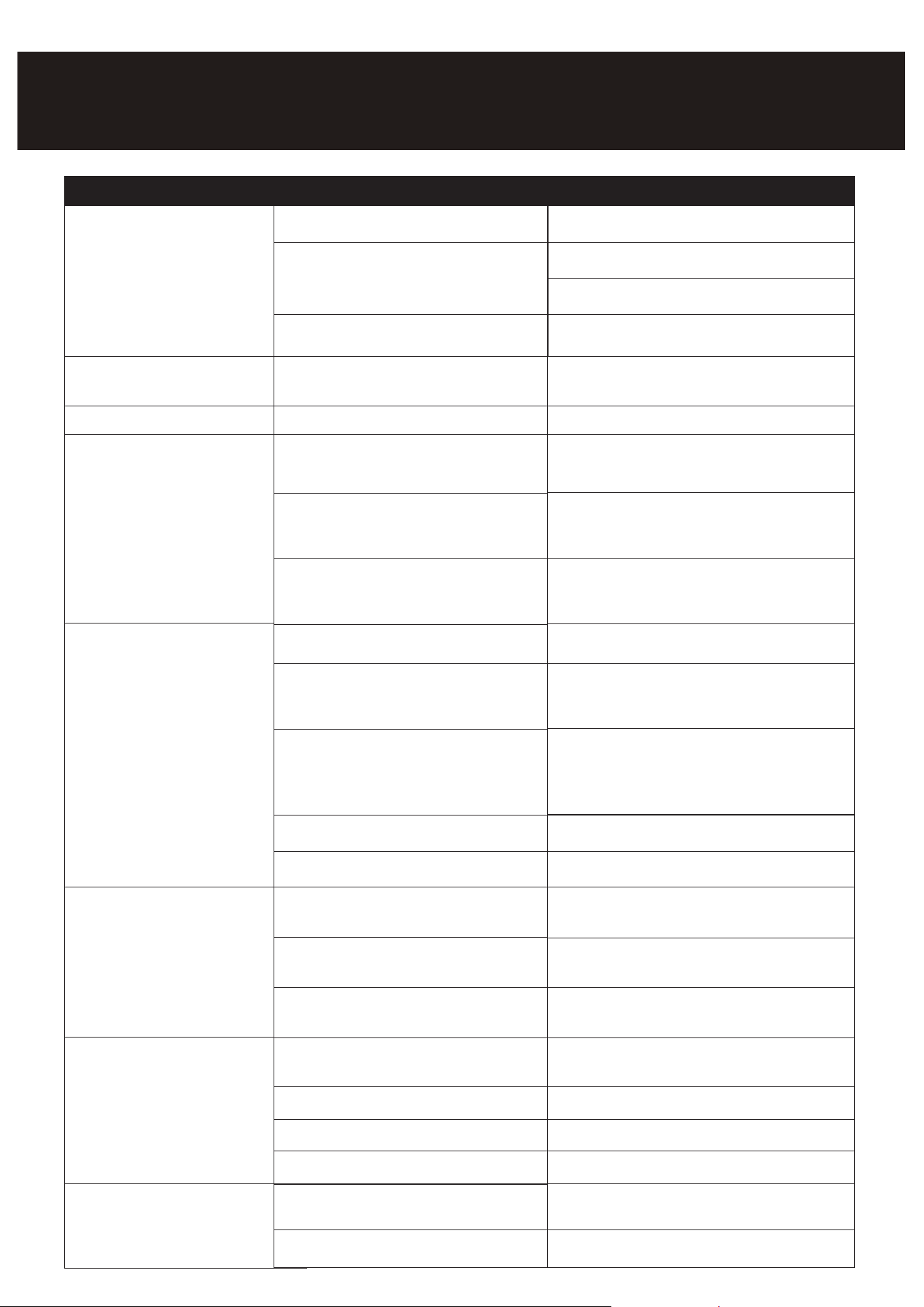
CLEANING THE NOZZLES
If your dishwasher does not seem to be cleaning adequately or the nozzles seem clogged, you can
clean each of the nozzles. When removing the nozzles, take care as they may break.
Lower nozzle
1. Check whether the nozzle holes are clogged by food particles.
2. If cleaning is needed, remove the nozzle by pulling it upwards.
3. Clean the nozzle, and then push it back into place.
4. Check whether the nozzle is engaged correctly by rotating it by hand.
10
1
Etching
Using too much detergent Use less detergent if you have soft water
Lower the inlet water temperature
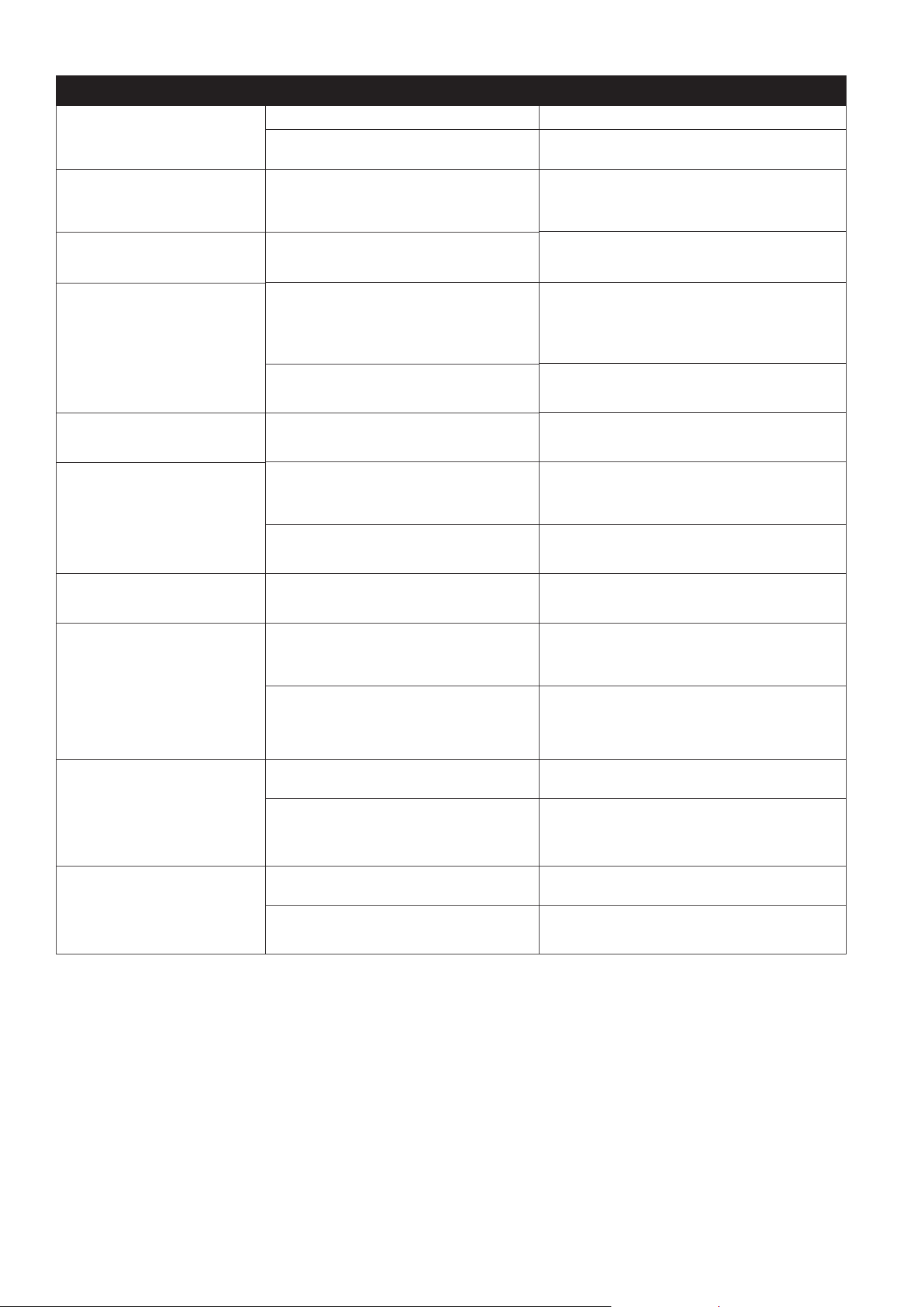
Problem
Dishwasher won't start
Dishwasher beeps at the end of
the cycle
Rinse Aid light on
Dishwasher operates too long
Dishes are not clean enough
Dishes not drying enough
Spots and filming on dishes
Possible cause
Power supply or power line is not connected
LED screen shows “Lsb”
The dishwasher is connected to cold water
Water pressure is temporarily low
Detergent dispenser is empty
Water hardness is too high
Dishwasher won't start
Child Lock acti
vated
(selected models)
It indicates the wash cycle finished, the
dishwasher will beep
The cycle time will vary due to the soil
The sanitize option is selected
The inlet water temperature is low
Dishes are loaded too close together
improper use of detergent
The selected cycle is not suitable for food
soil condition
Spay arms is blocked by some items
Improper loading of dishes
The cycle you chose did not included the
drying
Improper loading of dishes
Old rinse aid is used
Rinse dispenser empty
Add rinse aid
Check the dishwasher, make sure it is properly
connected to the hot w
ater supply
Fill rinse aid dispenser or increase the amount of
rinse aid.
For extremely hard water install a water softener
Deactivate the child lock, refer to child lock
section in this manual
When heavy soil is detected, the auto, normal,
pots&pan cycle will automatically increase the
cycle time
When sanitize option is selected, the cycle time
will be increase to meet the sanitized temperature
request
Load the dishes again as the manual
Add detergent depending on the water hardness
and the cycle you chose. Use fresh detergent
Make sure the dishwasher is connected t
o the hot
water supply
Try not use your dishwasher when hot water is
being used elsewhere in the house
Choose anther cycle for longer washing time
Make sure the spay arm is rotated freely
Load the dishes again as the manual instructs.
Choose the proper cycle with drying
Load the dishes again as the manual indicates
Use fresh rinse aid
Add rinse aid to the dispenser
Delay Start option has been selected
Check and connect the power supply
Shut the door completely make sure it is latched
Refer to Delay Start section in this manual to reset
Use you dishwasher when the water pressure is
normal
Solution
The inlet water temperature exceeds 158
TROUBLESHOOTING
11
Problem Possible cause
Detergent left in dispenser cup
Detergent may be too old
Spray arm is blocked
Use fresh detergent
Load the dishes, making sure the spray arms
are not blocked
Detergent dispenser will not
shut
Improper operation of the detergent cover
Add the detergent and rinse aid as indicated by
the manual
Water remains in the
dishwasher
Previous cycle has not finished or has been
interrupted
Select the proper cycle explained in the manual
Dishwasher does not
drain properly
Drain is clogged
Check the air gap if you have one. Make sure the
disposer is empty i
f the dishwasher is connected
to the disposer
Drain hose is kinked
Make sure the drain hose is properly connected
to the sink
Suds in the tub
Improper detergent is used
Make sure to use only the automatic dishwasher
detergent
Dishwasher leaks
Excessive suds caused by using the
improper detergent
Make sure to use only the proper dishwasher
detergent
Dishwasher is not level Level the dishwasher
Black or gray marks on dishes
Aluminum utensils have rubbed
against dishes
Stained tub interior
Coffee and tea soil
Using an approved spot cleaner to remove the
soil
Red
dish stain
Some tomato-based foods will cause this, use of
the rinse only cycle right after loading this will
decrease the staining
Noises
Detergent cup opening\ Drain pump sound
This is normal
A hard object has entered the wash module.
When the object is ground up, the sound
should stop
If the noise persists after a complete cycle, call
for service.
Dishwasher won't fill
Water valve is turn off
Check if the water valve is turn on
Door latch may not be properly seated
Make sure the door is closed
Solution
Use a mild abrasive cleaner to eliminate
those marks.
12
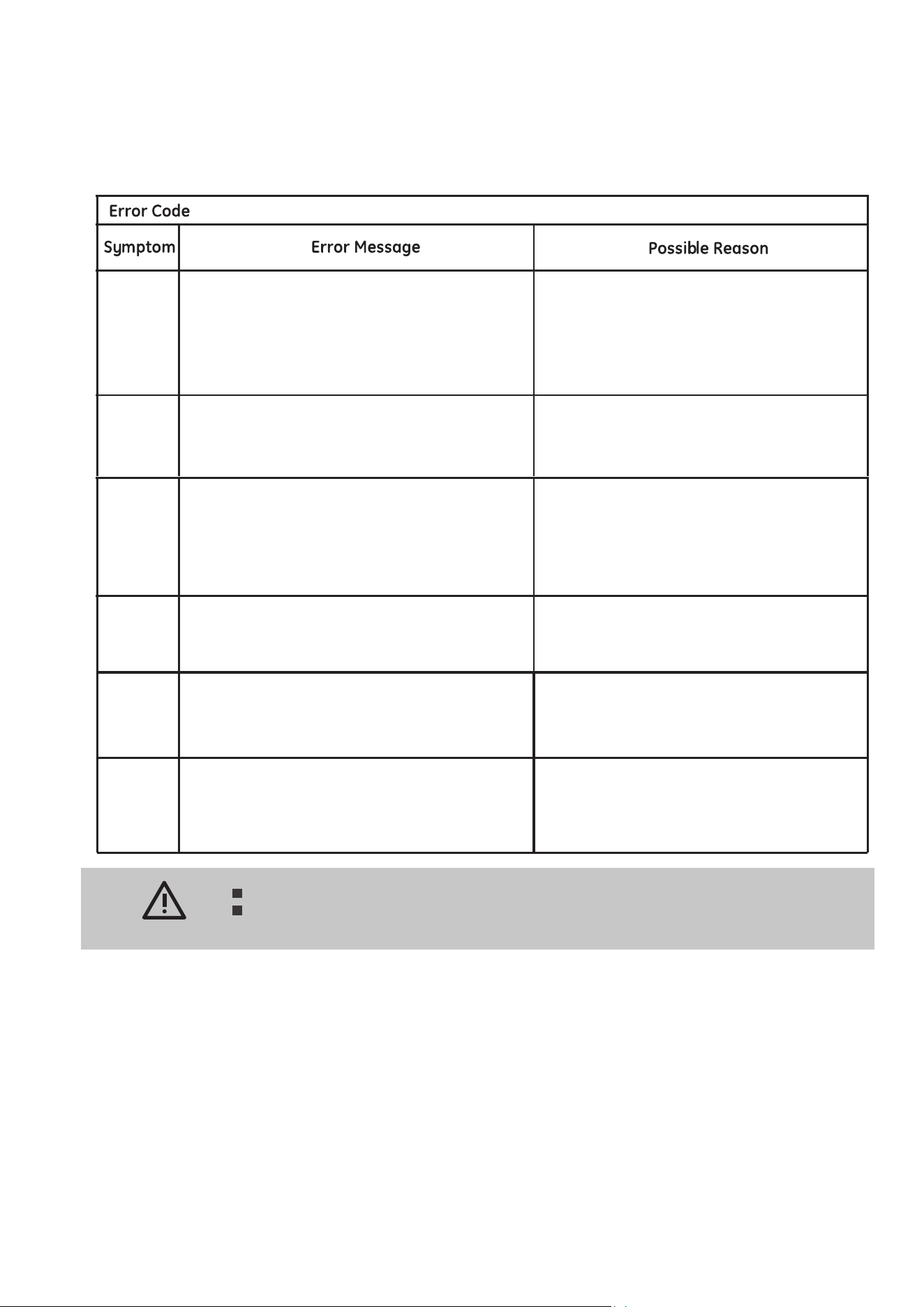
When some malfunctions come on, the appliance will display error codes to warn you:
If overflow occurs, turn off the main water supply before calling a service.
If there is water in the base pan because of an overfill or small leak, the water
should be removed before restarting the dishwasher.
WARNING
during the water inlet step, if the flow meter
can't detect the defined water after 4
minutes, the dishwasher will warning for E1.
1. check the water supply
2. check the inlet valve
3. check the inlet
4. check the flowmetre
5. check the pressure switch
6. check the drain
7. check the PCB
(only appeared in the factory mode)
when the temperature cant reached the defined value
after 90 minutes, the dishwasher will warning for E3.
1. check the heater
2. check the thermistor
3. check the PCB
the water flood into the bottom and result in the
detective switch moves, the dishwasher will warning
for E4.
1. check the use of the detergent
2. check whether the appliance is level
3. check the micro-switch
4. check the drain pump
5. check the amount of the filled water
6. find where leakage is
(only appeared in the factory mode)
E6 - thermal sensor cut.
E7 - thermal sensor short.
1. check the inlet water temperature
2. check the thermistor
3. check the PCB
E1
E3
E4
E6
E7
E9
Ed
If pushing one buttom for more than 30s, the
dishwasher will warning for E9
Buttom sticks,warning resovlved when
releasing the buttom
If the Dashboard detect communication data is
abnormal for more than 30s, the dishwasher
will warning for Ed
communication data abnormal, warning
resovlved when communicate data return
to normal.
Error Codes
13

LIMITED WARRANTY
Koolmore Supply, Inc. extends a limited warranty to the original purchaser, guaranteeing that this Koolmore
product is free from manufacturing defects in material or workmanship for one year from the date of
purchase.
Should you discover any such defect within the warranty period, Koolmore Supply, Inc., reserves the right to
repair or replace the product without charge, or to cover the cost of replacement parts and repair labor needed
to correct defects present at the time of purchase or resulting from regular usage, when the appliance has been
installed, operated, and maintained as per the instructions provided.
At its sole discretion, Koolmore Supply Inc. may decide to replace the product. In such an event, your replace-
ment appliance will carry the warranty for the remaining term of the original unit's warranty period.
This warranty is valid exclusively to the original purchaser of the product and only applicable within the United
States. The warranty commences from the date of original consumer purchase. Proof of the original purchase
date will be required to obtain service under this warranty.
Under this limited warranty, your sole and exclusive remedy will be product repair, as outlined above. All
services must be provided by a Koolmore-designated service company.
To claim warranty or request repair service:
Email suppor[email protected]. Please include your name, address, phone number, warranty repair request,
and a copy of your proof of purchase receipt. Alternatively, visit koolmore.com and use the contact us page. A
Koolmore customer service representative will promptly arrange service for your appliance.
We thank you for choosing Koolmore.
WARRANTY EXCLUSIONS
This limited warranty will not cover:
1. Failure of the product to perform during power failures or interruptions,
or due to inadequate electrical service.
2. Damage incurred during transportation or handling.
3. Damage caused by accidents, vermin, lightning, winds, fire, floods, or acts of God.
4. Damage resulting from accidents, alterations, misuse, abuse, improper installation, repair, or mainte-
nance. This includes using any external device that alters or converts the voltage or frequency of
electricity.
5. Unauthorized product modifications, repairs by unauthorized centers, or use of non-approved
replacement parts.
6. Abnormal cleaning and maintenance not aligned with the user's manual.
7. Use of incompatible accessories or components.
8. Any costs associated with repairs or replacements under these excluded circumstances shall be the
responsibility of the consumer.
WARRANTY