
EN
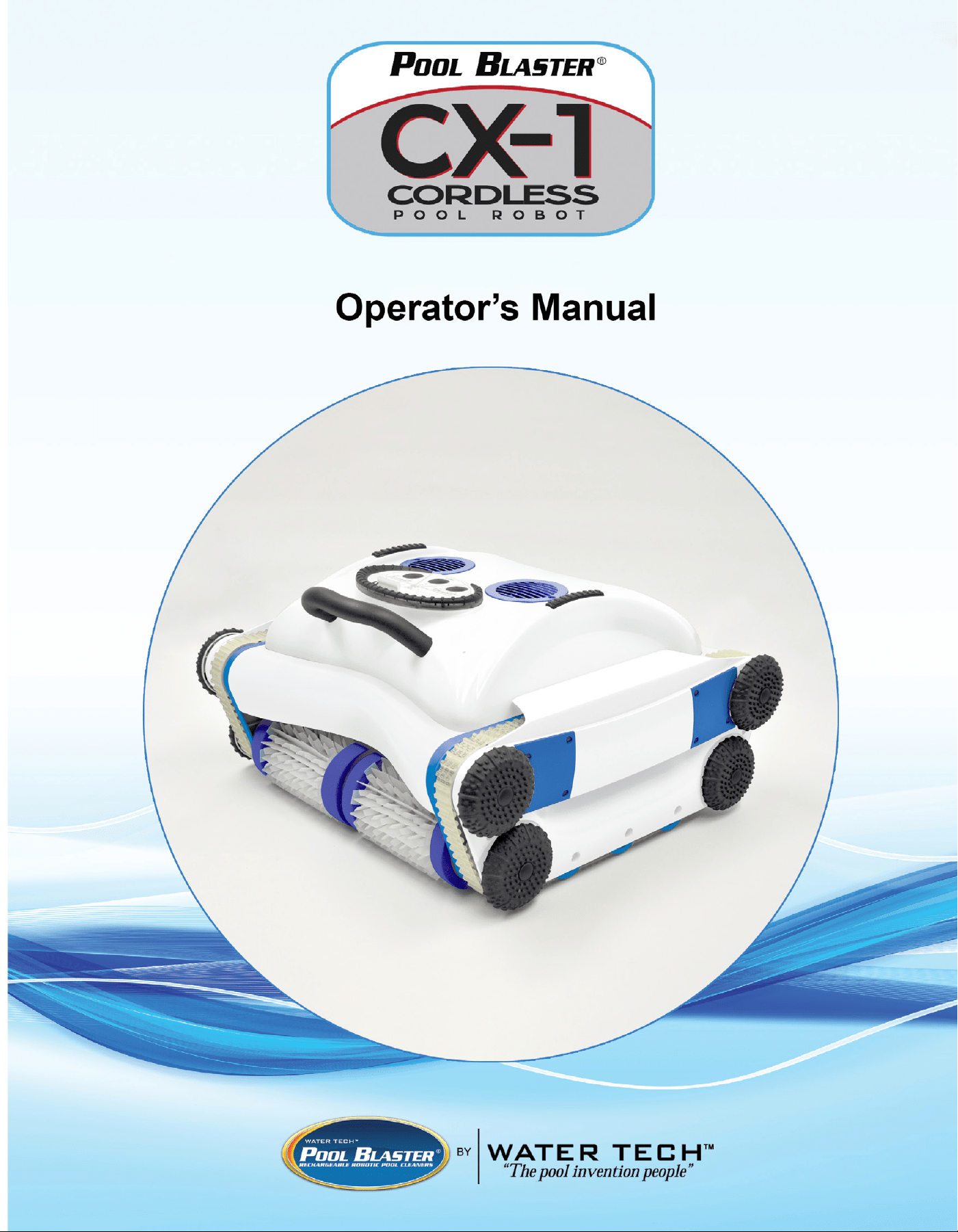
OPERATOR’S MANUAL
1
Contents
1. WARNINGS & CAUTIONS......................................................................
2. PACKAGE CONTENTS...........................................................................
3. SPECIFICATIONS....................................................................................
4. KNOWING YOUR UNIT...........................................................................
5. KNOWING THE CONTROL PANEL / Smart Features..........................
a. Select Cleaning Cycle........................................................................
b. Weekly Mode Running Schedule / Select Cleaning Mode.............
6. PREPARE THE CLEANER FOR USE.....................................................
a. Charging..............................................................................................
b. Filter Bag Mounting...........................................................................
7. START CLEANING..................................................................................
8. RETRIEVAL AFTER USE.......................................................................
9. OWNER PERFORMED MAINTENANCE................................................
a. Cleaning the Filter Bag......................................................................
b. Check the Filter Screen.....................................................................
c. Cleaning Bottom Cover.....................................................................
d. Long Term Storage............................................................................
10. CX-1 Calibration Procedure................................................................
11. CX-1 Troubleshooting..........................................................................
12. CX-1 FAQs.............................................................................................
2
3
4
5
6
7
8
9
9
11
13
14
15
15
15
16
17
18
20
21
Dear Valued Water Tech Customer,
Thank you for choosing Water Tech’s innovative new swimming pool
cleaner, the CX-1. The CX-1 has been designed to be completely “user
friendly” beginning with its “Hands-Free” launch into your pool. Simply
place the cleaner at poolside, press one button and the CX-1 will climb
into the pool by itself and get to work.
CX-1 VIP CUSTOMER SERVICE
Tel: 732-967-9888 EXT. 250
Email: [email protected]
2
IMPORTANT SAFETY INSTRUCTIONS
Save these instructions
This appliance can be used by children aged from 12 years and
above and persons with reduced physical, sensory or mental
capabilities or lack of experience and knowledge if they have
been given supervision or instruction concerning use of the
appliance in a safe way and understand the hazards involved.
Children shall not play with the appliance. Cleaning and user
maintenance shall not be made by children without supervision.
1. This product contains Li-Ion batteries. Do NOT abuse this product. If you suspect any damage to the batteries, do
NOT attempt to charge the robot, contact Water Tech Customer Service.
2. Do NOT store the CX-1 near heat or an open ame.
3. Do not attempt to charge, use, or store the CX-1 at temperatures above 113°F (45°C) or below 41°F (5°C).
4. Warning: For the purpose of recharging the battery, use only the LC2920-6S2P charger provided with this
appliance. Using any charger other than the one provided, will cause damage and possible injury. Always charge
the unit inside a dry, sheltered area.
5. Place the charger in a shaded dry area during both charging and storage. Keep away from direct sunlight
and liquids.
6. Maintain a minimum distance of 3.5m (11.5ft.) from the edge of the pool when recharging the batteries of the
cleaner.
7. Before operation, unplug the charging cable from the control box.
8. Unit is NOT intended for COMMERCIAL USE. Unit is NOT intended for OPENING A POOL or for use in
outdoor fountains, garden ponds and similar places.
9. Do not enter the pool while the pool cleaner is in the pool; even if the cleaner is in “Sleep Mode” it is not safe to
enter the pool.
10. Ensure the electrical outlet used for charging is protected by a ground fault circuit interrupter (GFCI) or an earth
leakage interrupter (ELI). DO NOT use an extension cord or power strip.
11. The pool cleaner must be charged for 1.5 - 2.5 hours before long term storage.
12. The sole purpose of this product is for use as a robotic pool cleaner as described in this manual; any modications
or other use will VOID the warranty.
13. Do not allow children to use, touch, or play near or around the unit and the charger.
14. Do not use if the unit or charger is damaged in any way.
15. MAKE SURE the robotic pool cleaner is unplugged from its power supply and turned o before opening the unit
or performing any other maintenance.
16. It is recommended that you clean your lter and check the impeller to make sure it is free and clear of debris after
every use.
17. Disconnect the charger from the outlet when not in use.
18. This appliance contains batteries that are only replaceable by skilled persons.
19. Pollution of the liquid could occur due to leakage of lubricants.
20. If your robotic pool cleaner is not working as it should or has been dropped or damaged in any way, contact Water
Tech Customer Service.
21. Save these instructions. Refer to them frequently. Provide these instructions to others who may use the product.
Before using your CX-1, please read the following warnings
and read carefully through this Operator Manual.
3
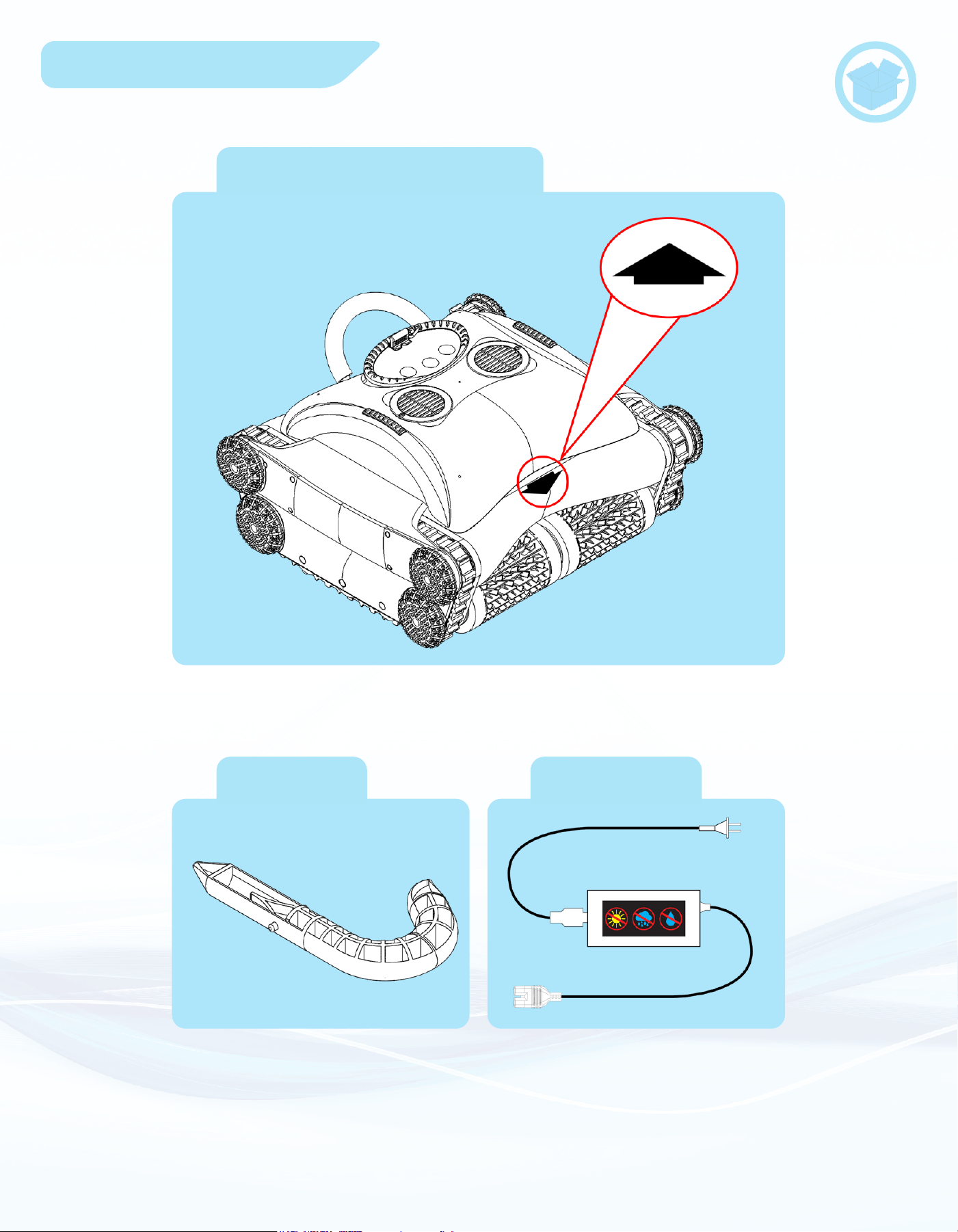
Package Contents
Pool Blaster CX-1
Hook
Charger
* The hook attaches to your
standard size pool pole to help you
retrieve the unit from your pool.

4
Specications
Cleaning Coverage (sq. ft./hr.).................3542 sq. ft./hr.
Minimal Operation Depth........................................16 in.
Maximum Operation Depth.....................................15 ft.
Run Time.................................................Up to 4 Hours.
Charging Time................................................6-8 Hours.
Cleaning Width.......................................................18.0”.
Suction Power...................................Up to 7200 gal. /hr.
Unit Size..........................................19.85 x 18.0 x 11.0”.
Unit Weight...........................................................21 lbs.
Shipping Weight...................................................27 lbs.
Retrieval Hook Adapter............................................Yes.
Warranty.............................................................2 years.
CX-1 Specications
Charger Specications
AC-DC CHARGER:
• Input: 100-240AC Volts
50-60Hz
60W
1.5A
•Output: 29V
2.0A
Battery Specications
Battery type..............................................Li-Ion.
Battery Conguration................................6S4P.
5
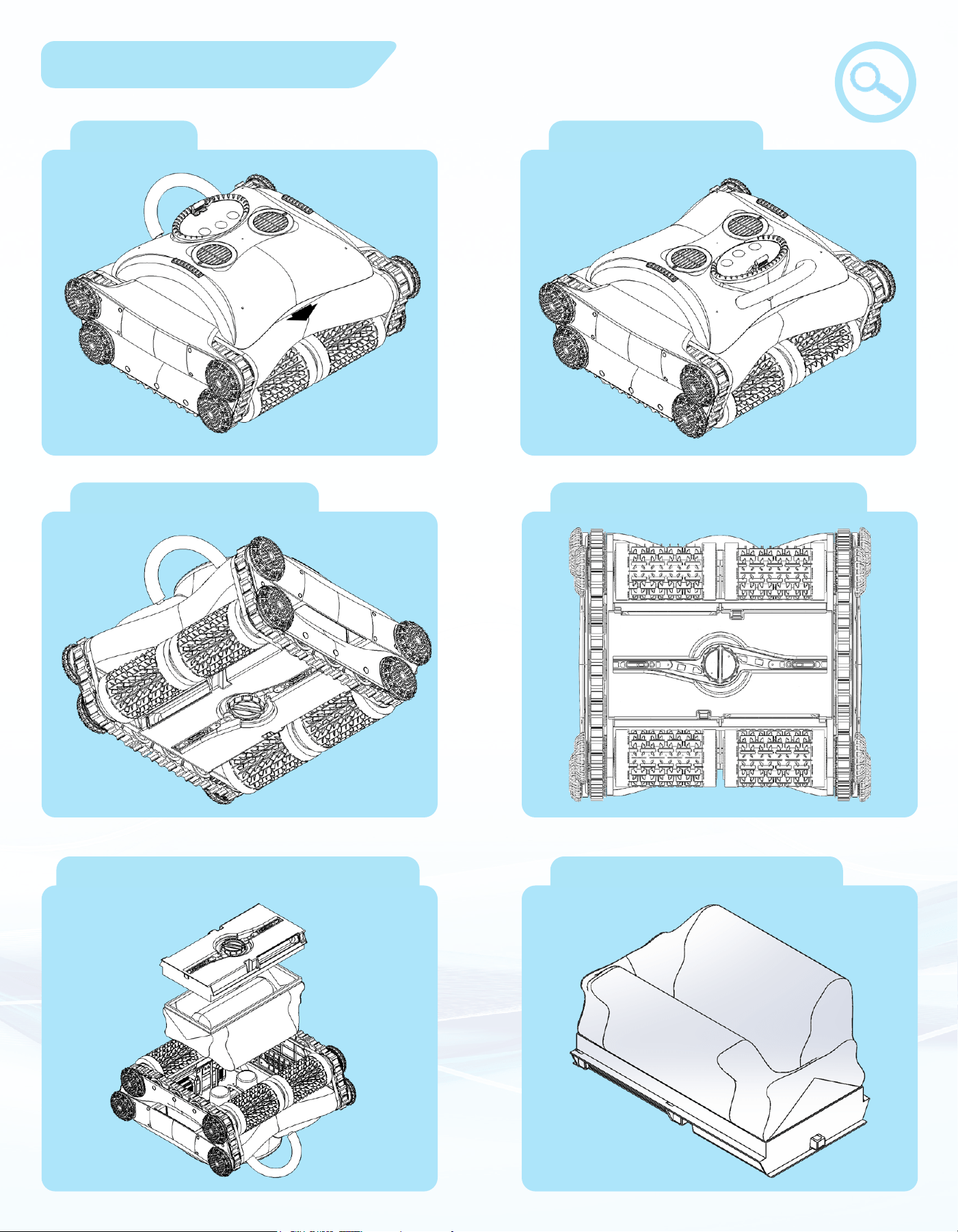
Knowing Your Unit
Full Unit
Full Unit - Rear
Full Unit - Bottom
Bottom - Cover Closed
Bottom - Filter Bag - Cover Filter Bag with Cover
*
6
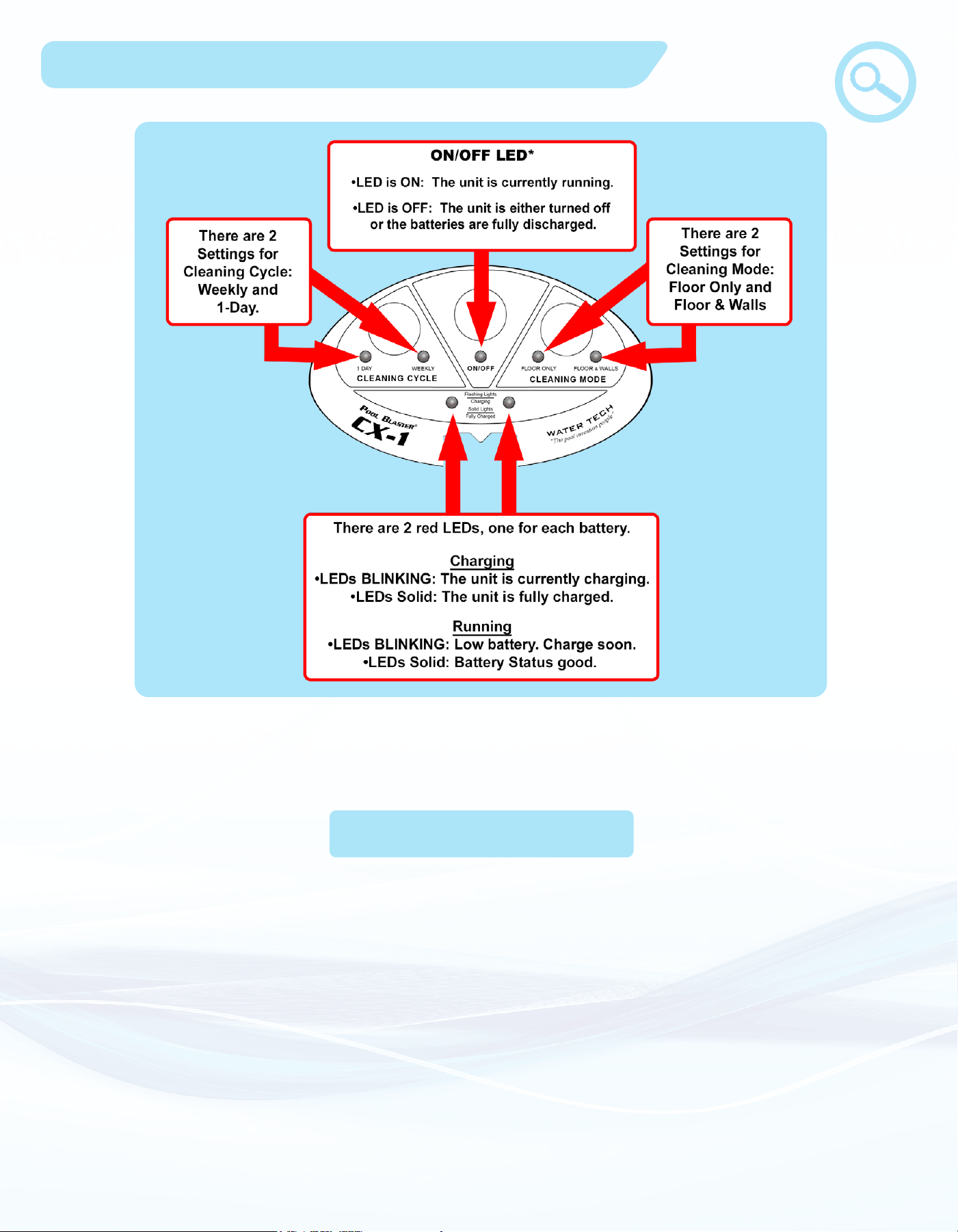
Knowing The Control Panel
On the next page, you will nd more detail on how each mode and cycle works.
*Note: When your CX-1 is in sleep mode, only the Battery LEDs (and ON/OFF LED for “Weekly”
Mode) will stay ON.
No matter which modes are chosen, these smart features are included into the software:
• Upside-down: The CX-1 is fully capable of detecting when it is upside-down and can then reorient itself
to continue cleaning. It also has a feature where, if it cannot ip itself over (such as if it is stuck on an
obstacle or too full of heavy debris), it will shut itself OFF to avoid wasting energy from the batteries.
When this happens, you can ip over your CX-1 and it will start cleaning again.
• Out of water: The CX-1 can detect when it is in or out of water and will avoid wasting energy when it is
out of the water. It will also drive itself back into the water, which is especially useful for beach style
pools or pools with steps. If the CX-1 is out of water for too long, it will shut itself down (with the LEDs
still ON). To continue operation you must turn it OFF and ON again.
• Cleaning Path: The CX-1 is programmed with a completely unique cleaning path that will t any non-
commercial size, shape, and style of pool.
Smart Features
7
You can program the CX-1 to run for 2 hours or in intervals over a week long period.
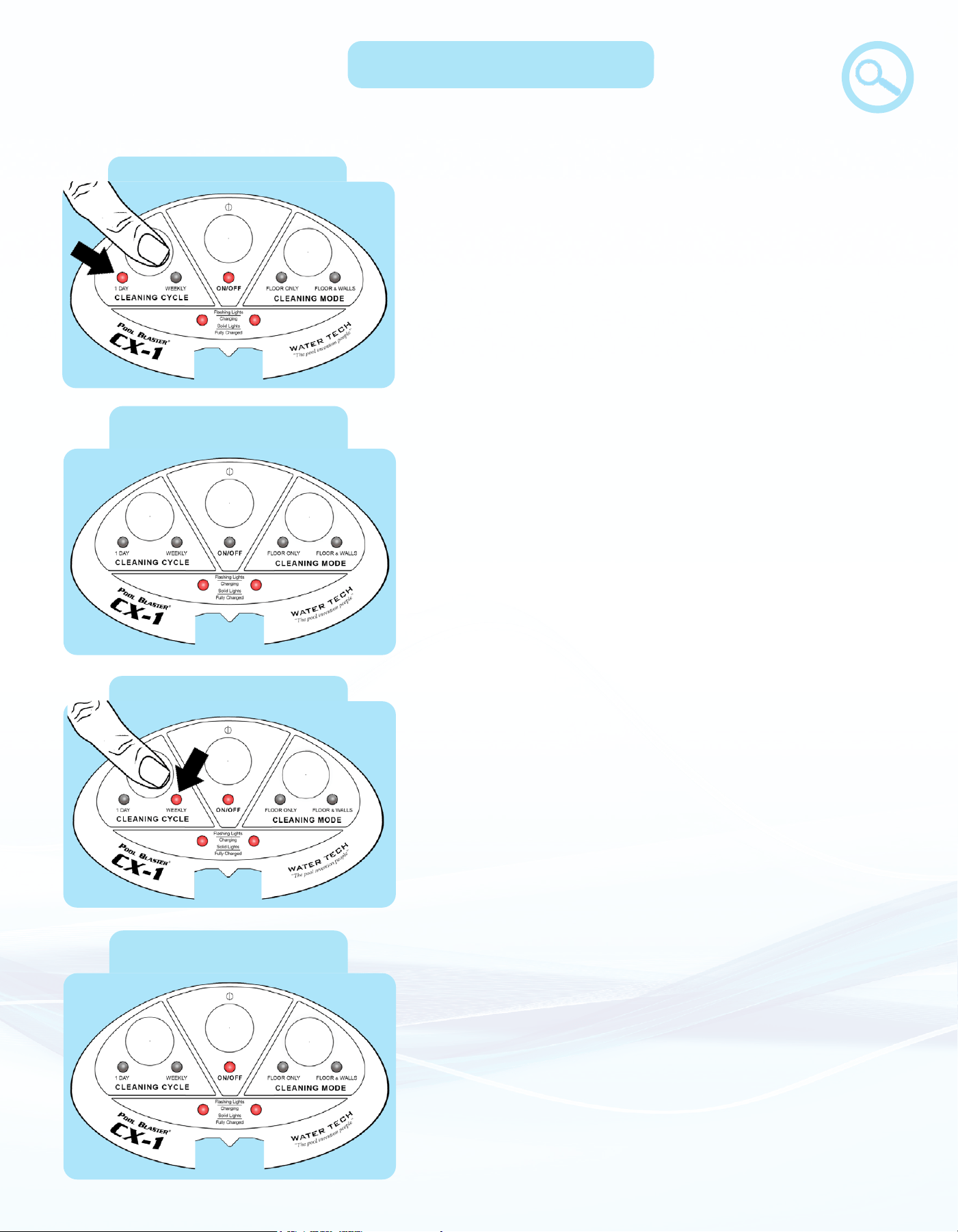
a. Select Cleaning Cycle
1-Day Cleaning Cycle
• 1-Day: The CX-1 will run continuously for up to 2
hours and then go into sleep mode. If 2 hours is not
enough, you can wake the robot from the sleep mode
to start another 2-hour cycle. The robot can run for
two “1-Day” cycles on a single charge. This mode is
most eective for thorough cleaning of a dirty pool.
Weekly Cleaning Cycle
• In “1-Day” Sleep mode the ON/OFF LED is o and
both battery LEDs stay on. The robot will not wake
from this “Sleep” mode until you turn the robot OFF
and ON (or press the “Cleaning Cycle” button). It is
recommended to turn the robot OFF if you do not
intend on using it again immediately.
Sleeping during 1-Day
Cleaning Cycle
Sleeping during Weekly
Cleaning Cycle
• When in Weekly Sleep mode, both Cleaning Mode and
Cleaning Cycle LEDs will turn o. Only the ON/OFF
LED and the battery LEDs will stay on for the entire
time that the robot is in sleep mode. You can leave the
CX-1 in your pool while it’s in sleep mode. If you take
your CX-1 out of the pool, make sure you place it facing
the pool so it can drive itself back in when it wakes up.
• Weekly: The CX-1 will run on a schedule (illustrated
on next page) that will end after 7 days, at which point
the battery will be fully discharged. This mode is most
eective for maintaining a clean pool as it will clean
the debris that slowly accumulates throughout the
week.
Floor Only Mode
8
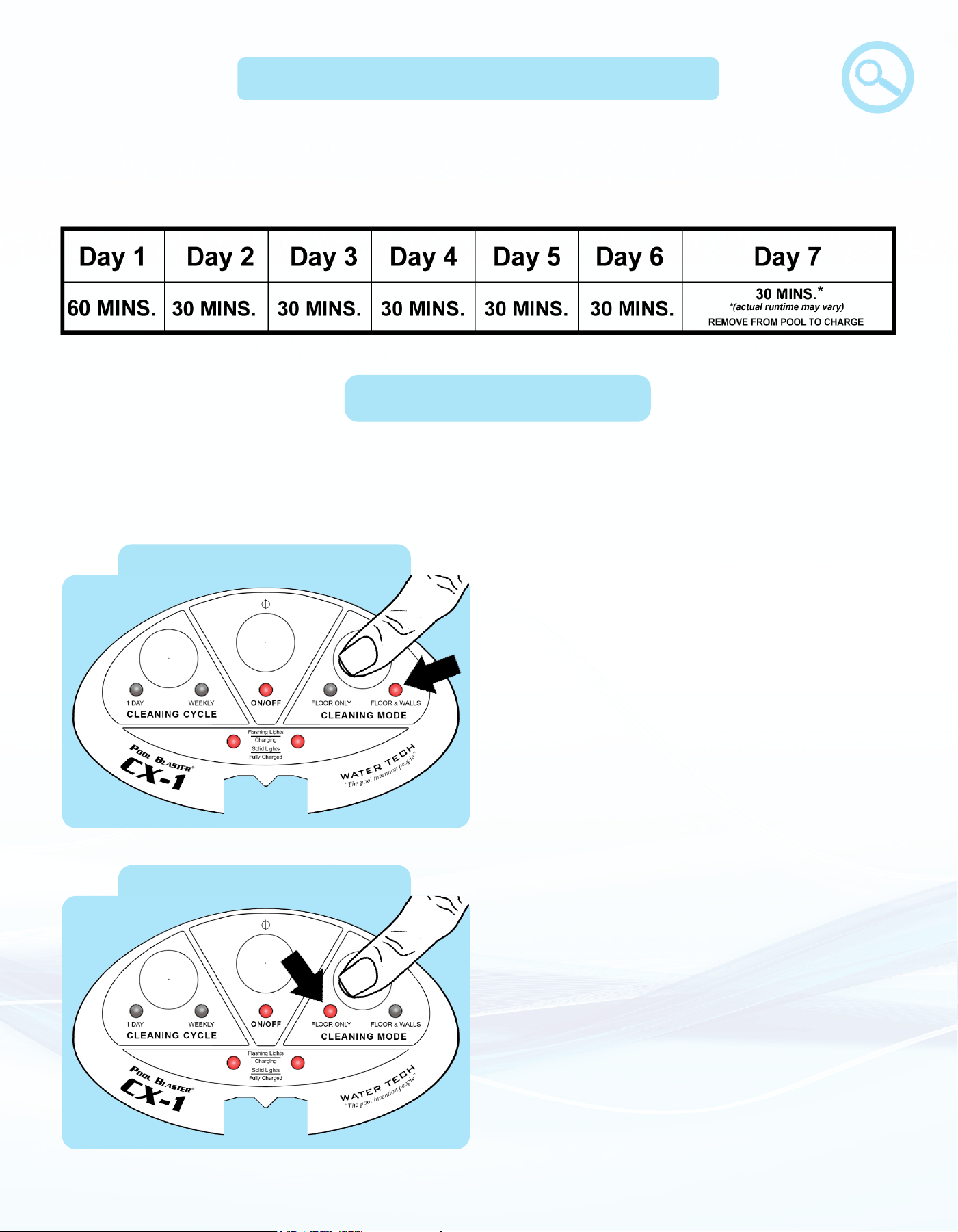
b. Select Cleaning Mode
• Cleaning Modes: The CX-1 is equipped with tilt sensors to help achieve the customer’s
desired cleaning mode.
• Floor & Walls – The CX-1 will clean the
oors and climb the walls, enabling the
CX-1 to scrub the waterline.
Floor & Walls Mode
• Floor Only – The CX-1 will stay on the
oor, picking up debris and scrubbing
scum. It will partially climb the walls
enough for it to clean the hard to reach
edges along the bottom of some pools.
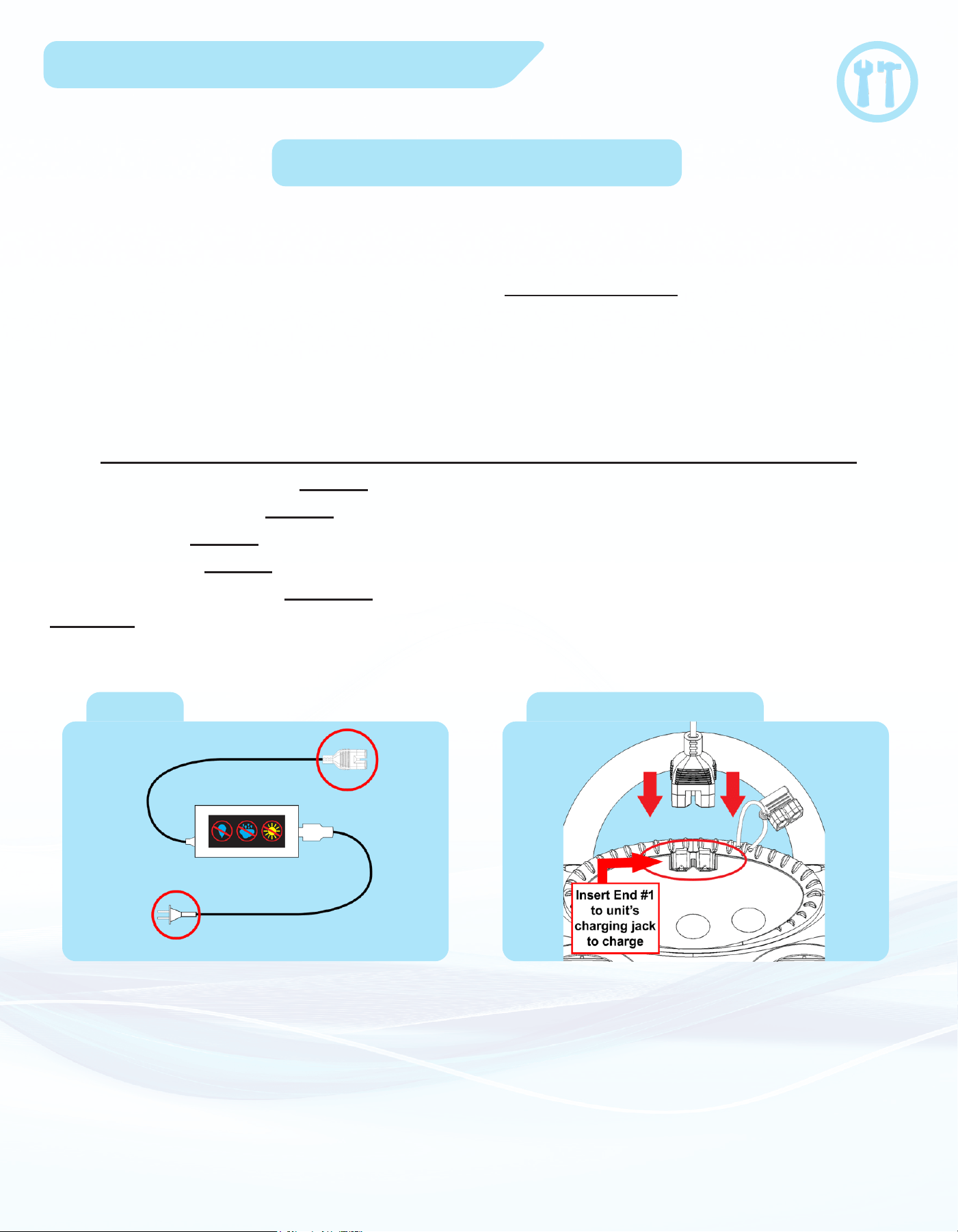
Weekly cycle runs your robot every day for a full week. Starting from when you rst turn it
on, the robot will clean approximately 60 minutes. Then at the same time every day for the
remainder of the week, the robot will run for approximately 30 minutes.
Weekly Cycle Running Schedule
9
Prepare the Cleaner for Use
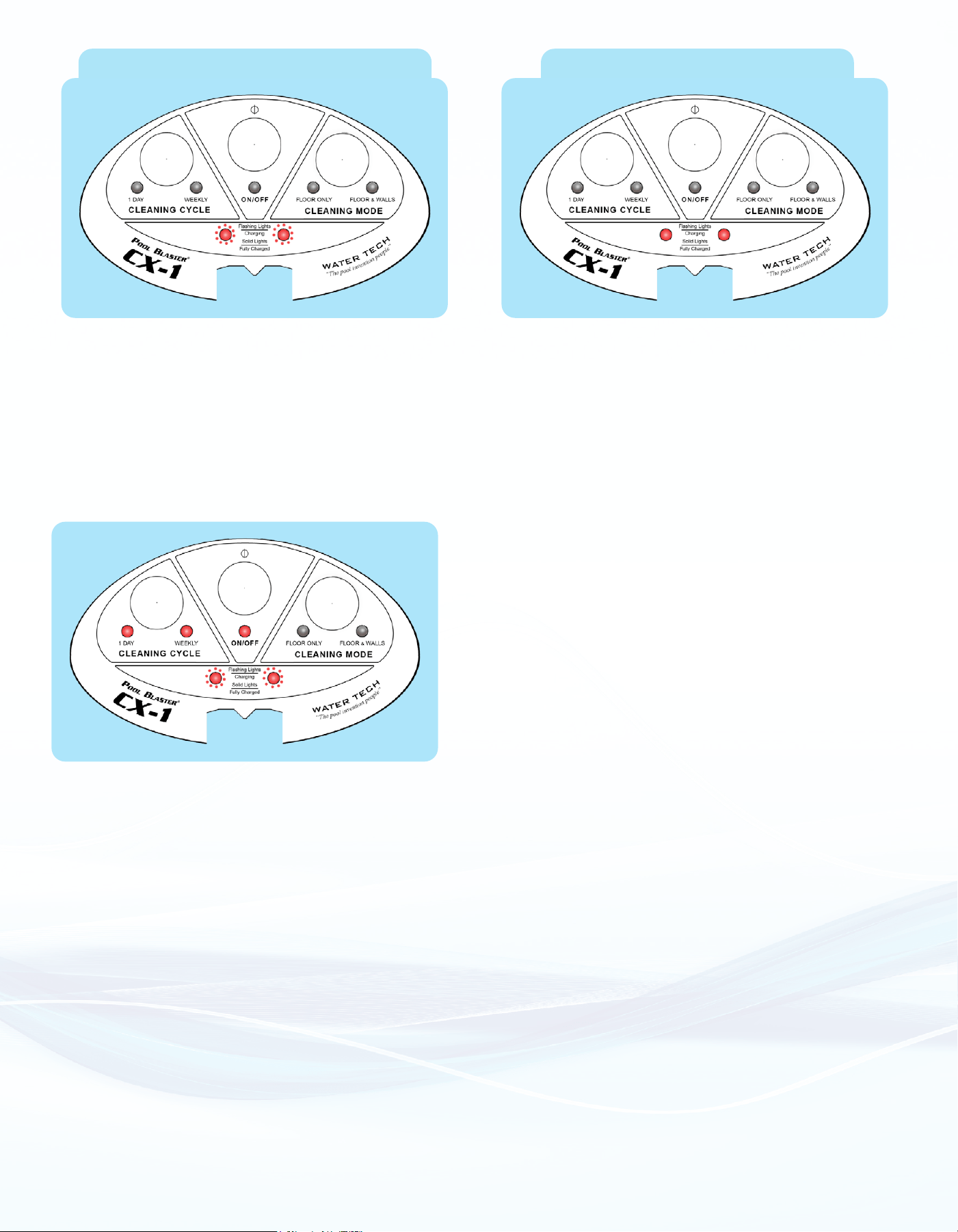
a. Charging your cleaner
• End #1: To unit’s charging jack.
• End #2: To an Indoor Grounded
Residential power source.
Make sure there is no water present on
the pins of the Unit’s charging jack.
CHARGING TIME: 6-8 HOURS
Be sure to charge in a dry, shaded area.
1.
2.
(The CX-1 will not run when the charger is plugged in).
The robot cannot be charged while in the pool. But the robot can be charged immediately after removing from the pool. Just
make sure that the pins of the robot’s charging jack are dry before plugging in the charger.
Charger
Unit’s Charging Jack
DO NOT attempt to charge the CX-1 at temperatures above 113°F (45°C) or below 41°F (5°C).
DO NOT use extension cord or power strip.
DO NOT expose charger to water or direct sunlight.
DO NOT leave unit plugged into charger for extended periods of time.
DO NOT leave unit plugged into charger during long term storage.
ONLY USE the charger that came with the unit.
MAINTAIN a minimum distance of 3.5m (11.5ft) from the edge of the pool when recharging the batteries.
10
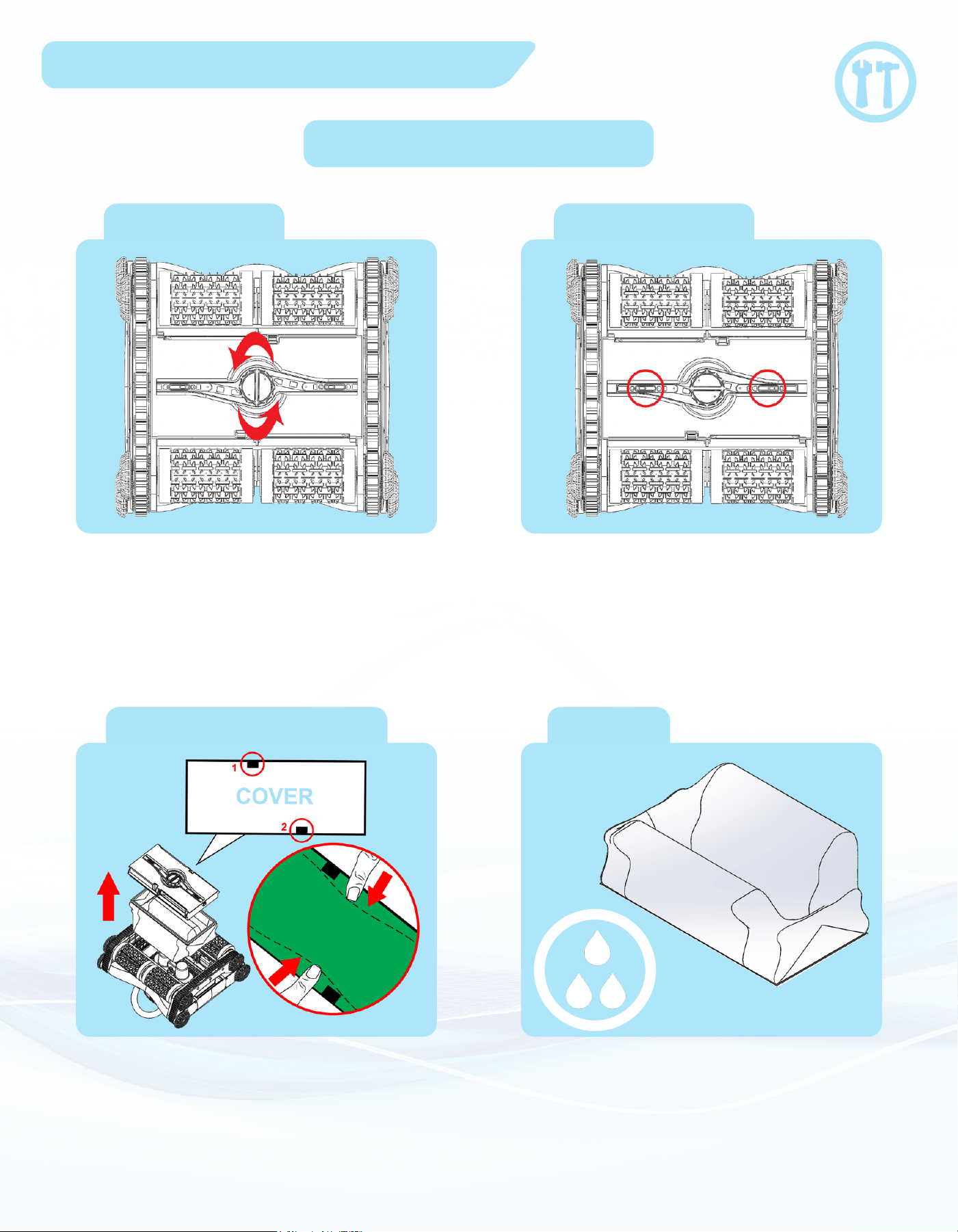
If the CX-1 is charging with the Power (ON/OFF)
Button turned ON, the “1-Day”, “Weekly”, and “ON/
OFF” LEDs will be ON (as shown on the left). The
CX-1 will not be able to operate until the Power (ON/
OFF) Button is turned OFF and then back ON. If
you notice these LEDs are ON during charging, it
is recommended that you turn the Power (ON/OFF)
Button OFF.
*This is a safety feature to ensure that the CX-1 does not
turn itself ON while charging or shortly after unplugging
the charger.
Battery Packs Charging (Flashing)
Battery Packs Charged (Solid)
If one or both LEDs are not ashing or do not turn solid, contact Water Tech Customer Service.
As both battery packs are charging,
the LEDs (shown above) will ash.
Once a battery pack is fully charged, its
LED will turn solid. It is common for 1 LED to
turn solid before the other.
11
Prepare the Cleaner for Use
b. Filter Bag mounting
Closed Cover
Unlocked Cover
Filter Bag & Cover (Out)
Filter Bag
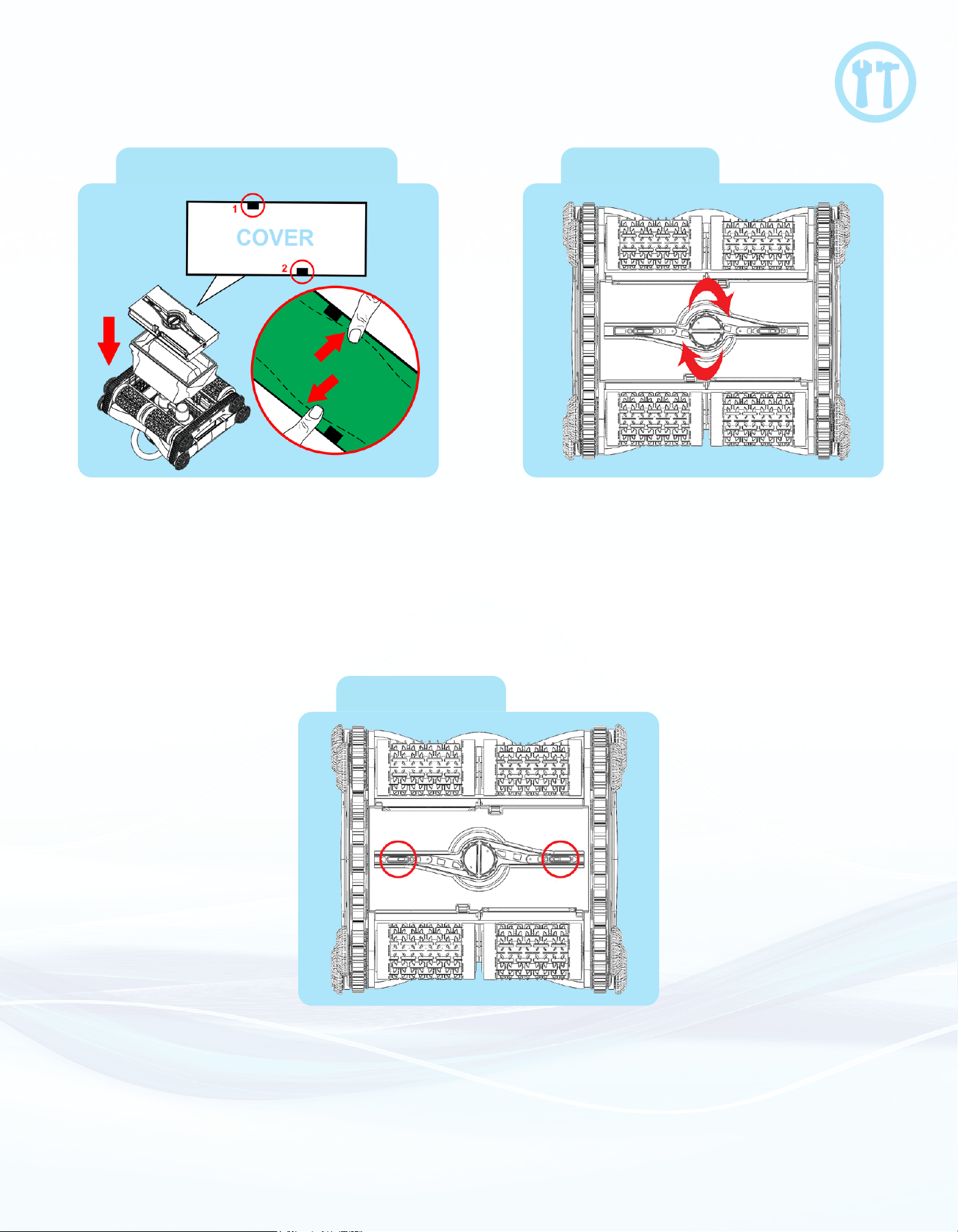
To remove the Filter Bag, ip the CX-1
upside-down and turn the knob on the
bottom counter-clockwise.
You will feel the knob “snap” as the lock
is undone. Note that the locks will move
inwards. This means the cover
is unlocked.
Pull out the entire bottom cover. The lter
bag will be locked by the locking tabs
inside the cover (Illustrated above as #1
and #2). To remove the lter bag, carefully
push the lter bag out of the locking tabs.
Remove the bag and rinse out with a
hose or in a sink.
12
Filter Bag & Cover (In)
Lock Cover
Closed Cover
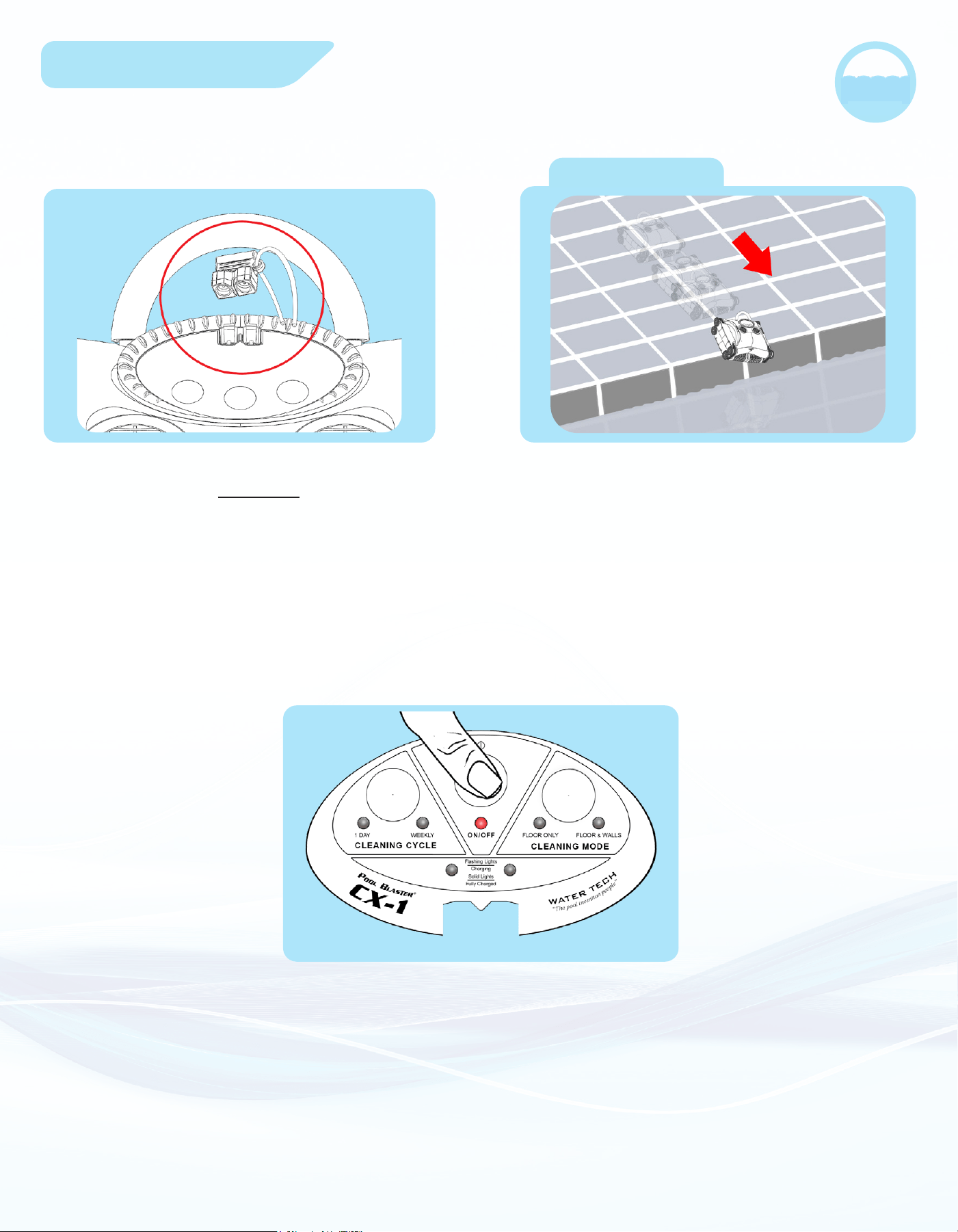
Re-insert the lter bag with the cover on
top. Make sure you lock the bag under
the two locking tabs (Illustrated above as
#1 and #2). Then, insert bag into unit as
you lower the cover into place.
Turn the knob clock-wise to lock the
cover. You will hear a “snap” again as the
cover locks.
The locking tabs will move outwards.
This means the cover is locked.
13
Start Cleaning
Aim at the pool
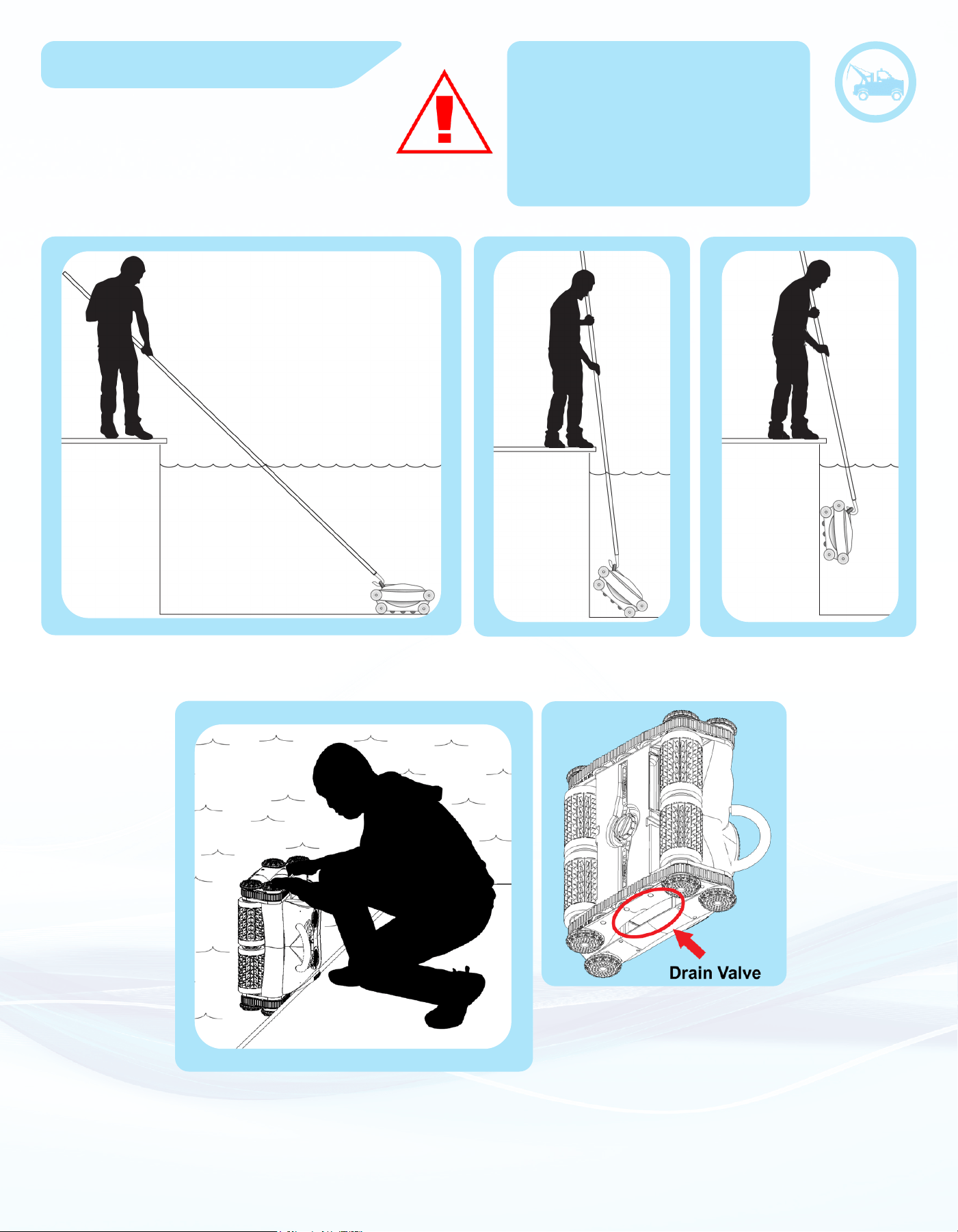
Aim the CX-1 at the pool (place robot roughly
3 ft. from the edge of the pool).
For above ground pools, drop the robot in the pool after
selecting your desired settings
Push the ON/OFF button and select your
desired Cleaning Cycle and Cleaning Mode.
When the CX-1 is done charging, it’s
important that you DO NOT submerge the
CX-1 in water without replacing the rubber
plug covering the charging jack. Failure to
follow this step could damage your unit.
(After the robot is turned on, you will have 10 seconds to
select your desired Cleaning Mode and Cleaning Cycle
shown on Page 7-8)
14
Retrieval After Use
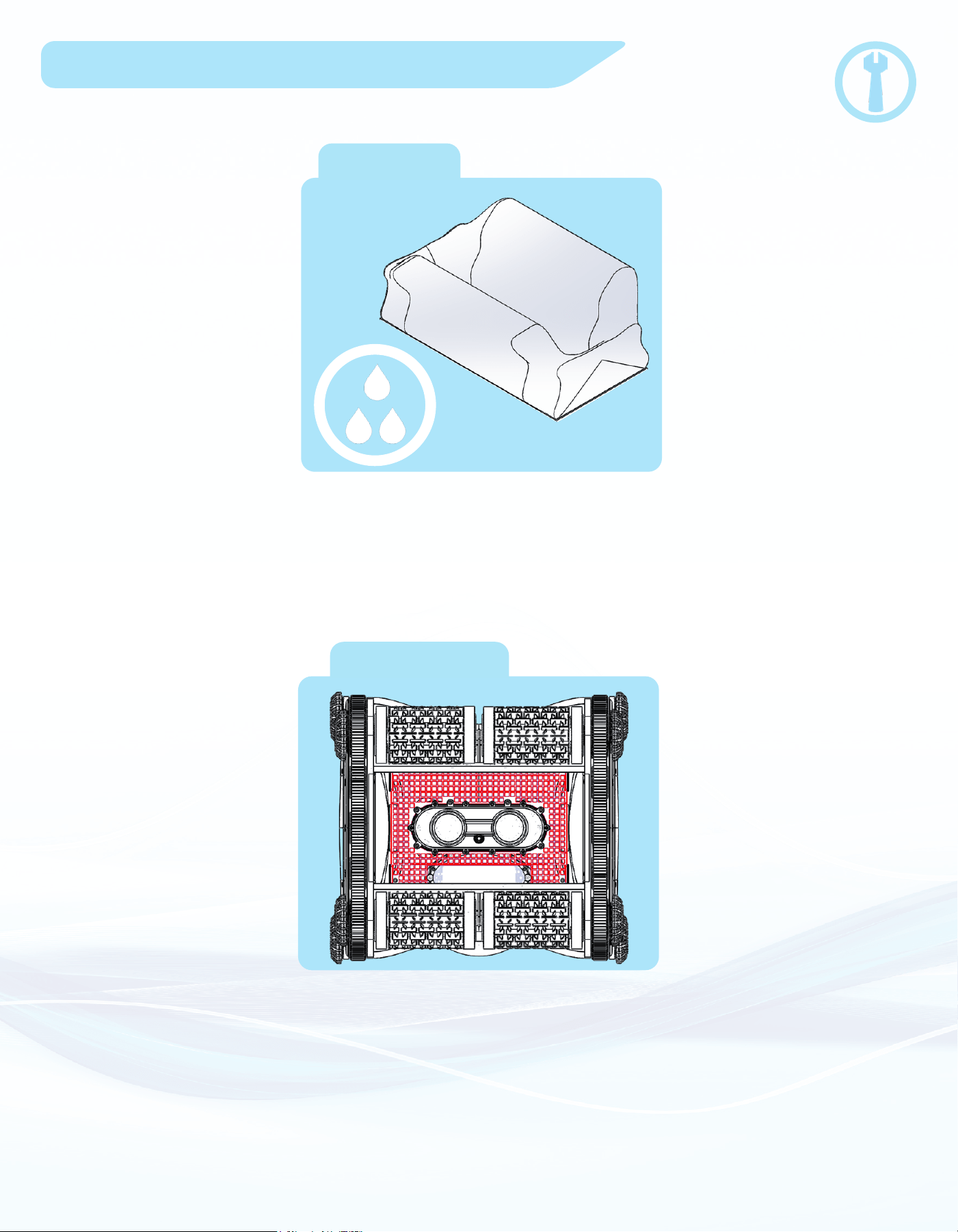
Rest the CX-1 on the edge of the pool to allow water to drain from the
drain valve. Turn the power switch OFF when removing from pool, even
if the batteries are fully discharged.
Do not enter the pool when the
pool cleaner in the pool.
Lift the CX-1 to the surface using a slow, steady pulling
motion. Remember, the CX-1 is heavy while full of water.
Warning! Risk of Drowning!
NOT a life saving device. Never allow
children or persons who cannot swim to
use this product. This product is designed
to be used around a residential swimming
pool and a person who cannot swim can
drown if they accidentally fall into the pool
while using or retrieving this product.
15
Owner Performed Maintenance
a. Filter Bag
Always remove and clean the lter bag
after every use. Do not store the unit with
a dirty lter.
b. Filter Screen
Check the lter screen (Highlighted in
red above) for any debris that may have
escaped the lter bag. It is recommended
to occasionally clean the inside of the
unit with a hose.
16
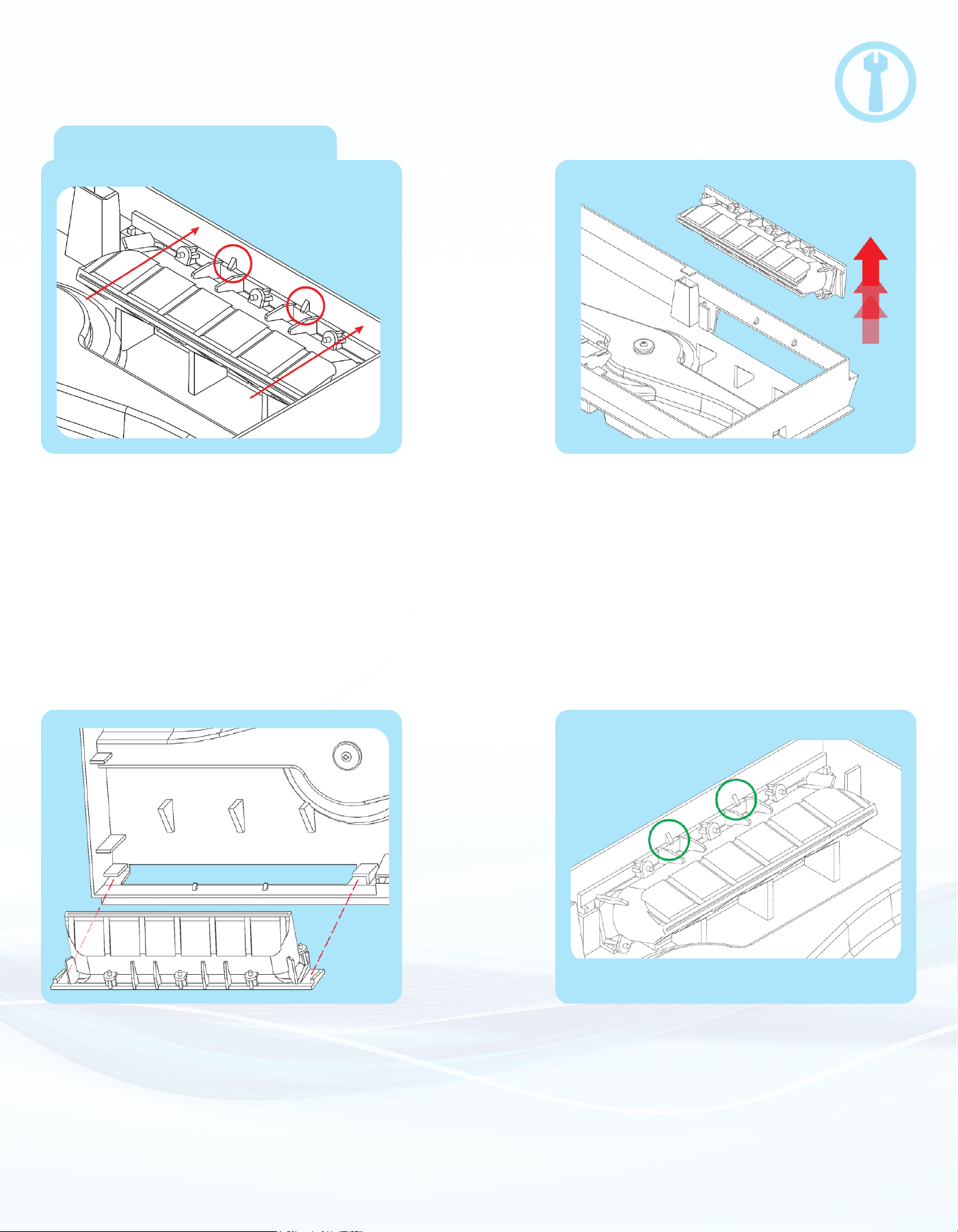
3. Align the valve mounts with the
bottom cover and press down
into place.
4. Press until triangular tabs snap back
over valve mounts.
c. Cleaning bottom cover
1. Press outward on the bottom cover so
the valve mount can t around triangular
tabs (shown circled above).
2. While still pressing outward, lift the
valve mount up and out of the bottom
cover. Rinse out the valve mounts and
bottom cover.
17
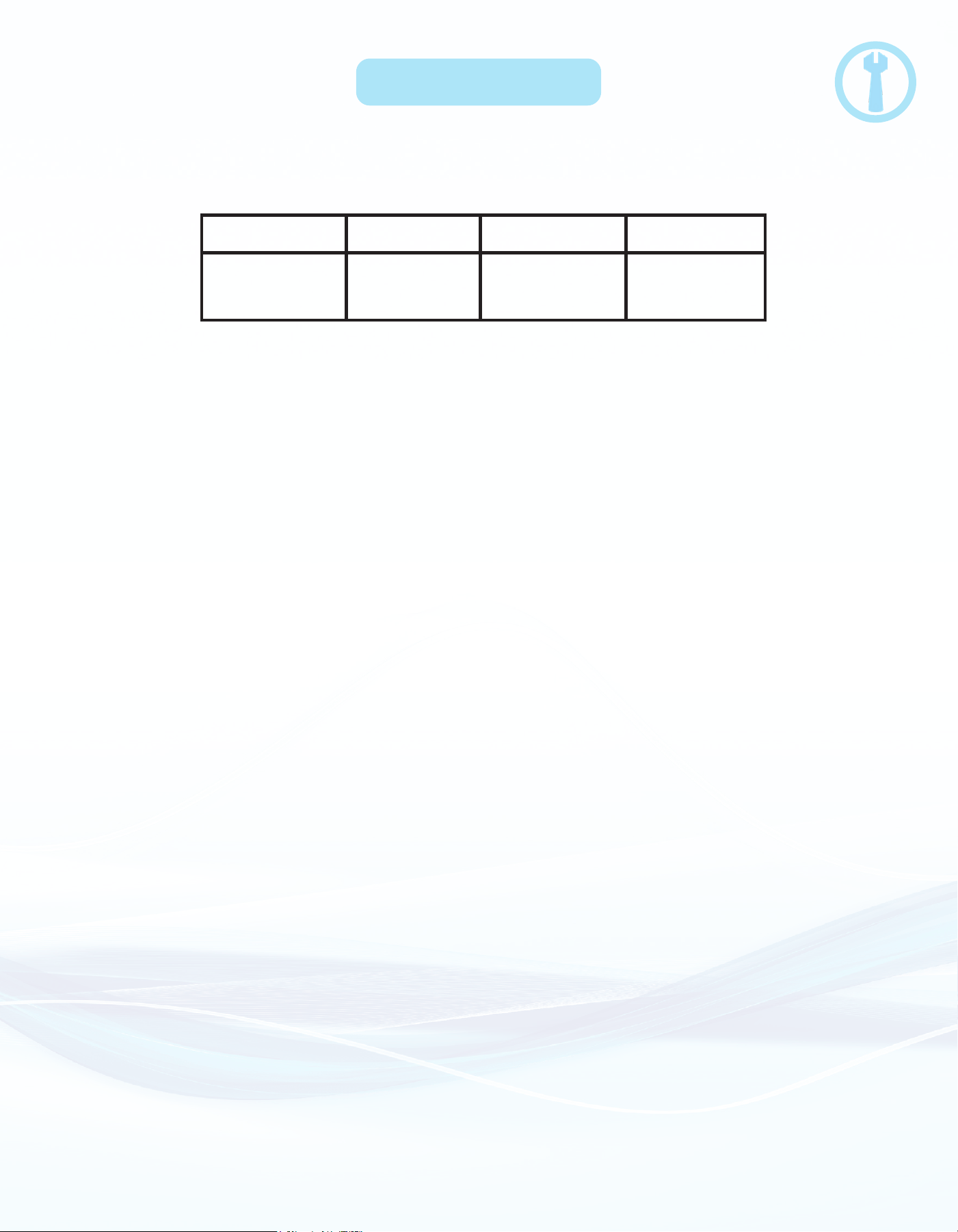
d. Long Term Storage
3 Months
Number of Months
to be Stored
Number of Hours
to be Charged
Charge for
1.5 hours
Charge for
2 hours
Charge for
2.5 hours
6 Months 9 Months
• Do not store the CX-1 at temperatures above 113°F (45°C) or below 41°F (5°C).
• After 9 months of storage, charge the batteries for 2 hours every 6 months.
• Always store your CX-1 in a warm, dry, indoor shelter.
• Don’t leave the CX-1 plugged into the charger.
• At the start of the next season, charge the robot and make sure BOTH BATTERY LEDs
start ashing while charging.
If one or both LEDs are not ashing, contact Water Tech Customer Service.
• Before long term storage, run the CX-1 until the batteries are fully discharged. Then use the chart
below to charge the batteries the appropriate amount before storing.
18
Only follow the instructions below if instructed to by Water Tech or the
Troubleshooting / FAQs section.
Make sure that the batteries are FULLY CHARGED and the unit is
OUT OF WATER before calibrating.
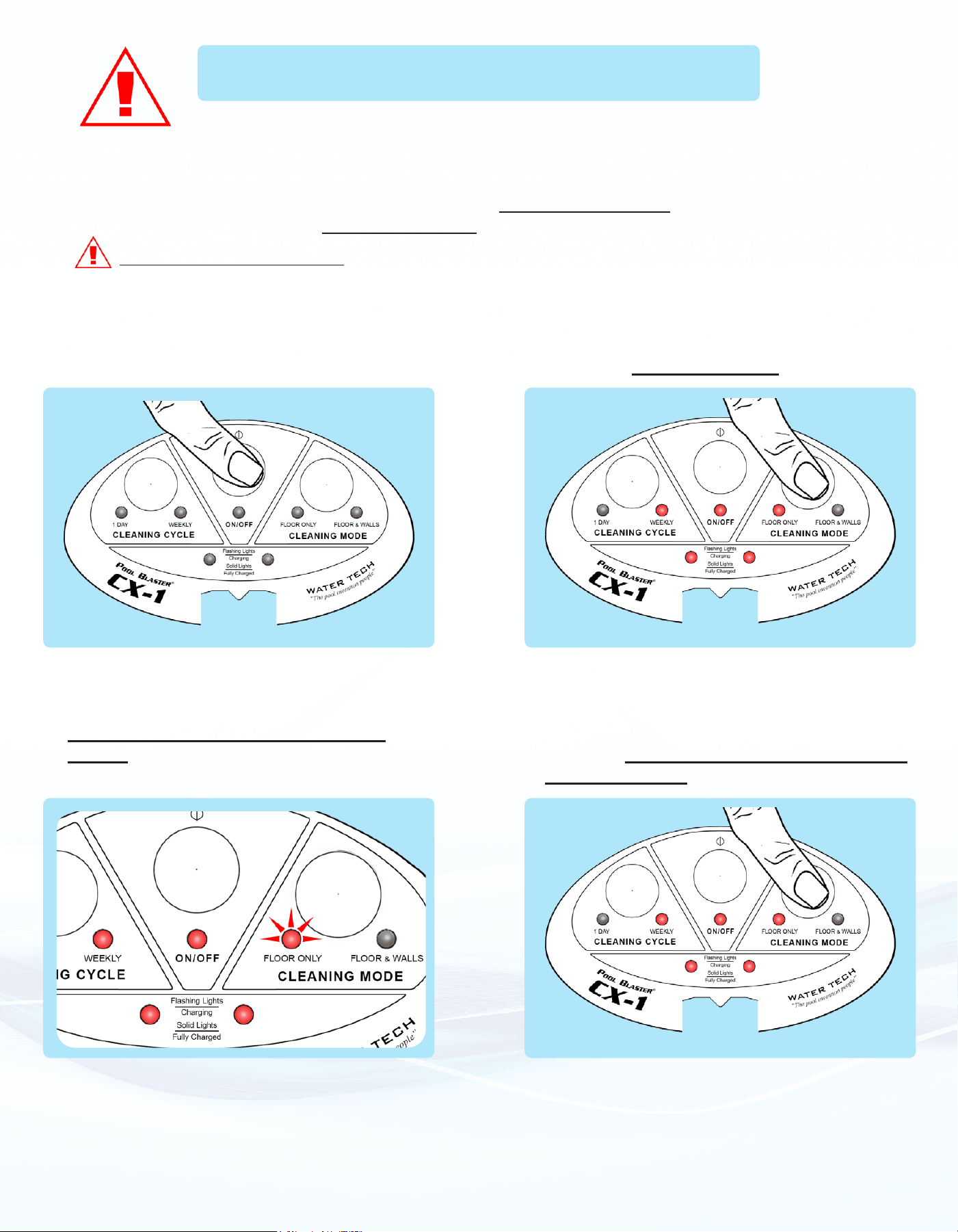
Calibration Procedure: Read all instructions before attempting to calibrate robot.
CX-1 Calibration Procedure
1. Turn ON the robot.
3. The “Floor Only” LED light will ash
rapidly to indicate proper entry.
2. Within 5 seconds of turning the robot ON,
press the “Cleaning Mode” button 5 times.
x 5
4. Wait for the “Floor Only” LED to stop
ashing, then press the “Cleaning Mode”
button one time.
x 1
19
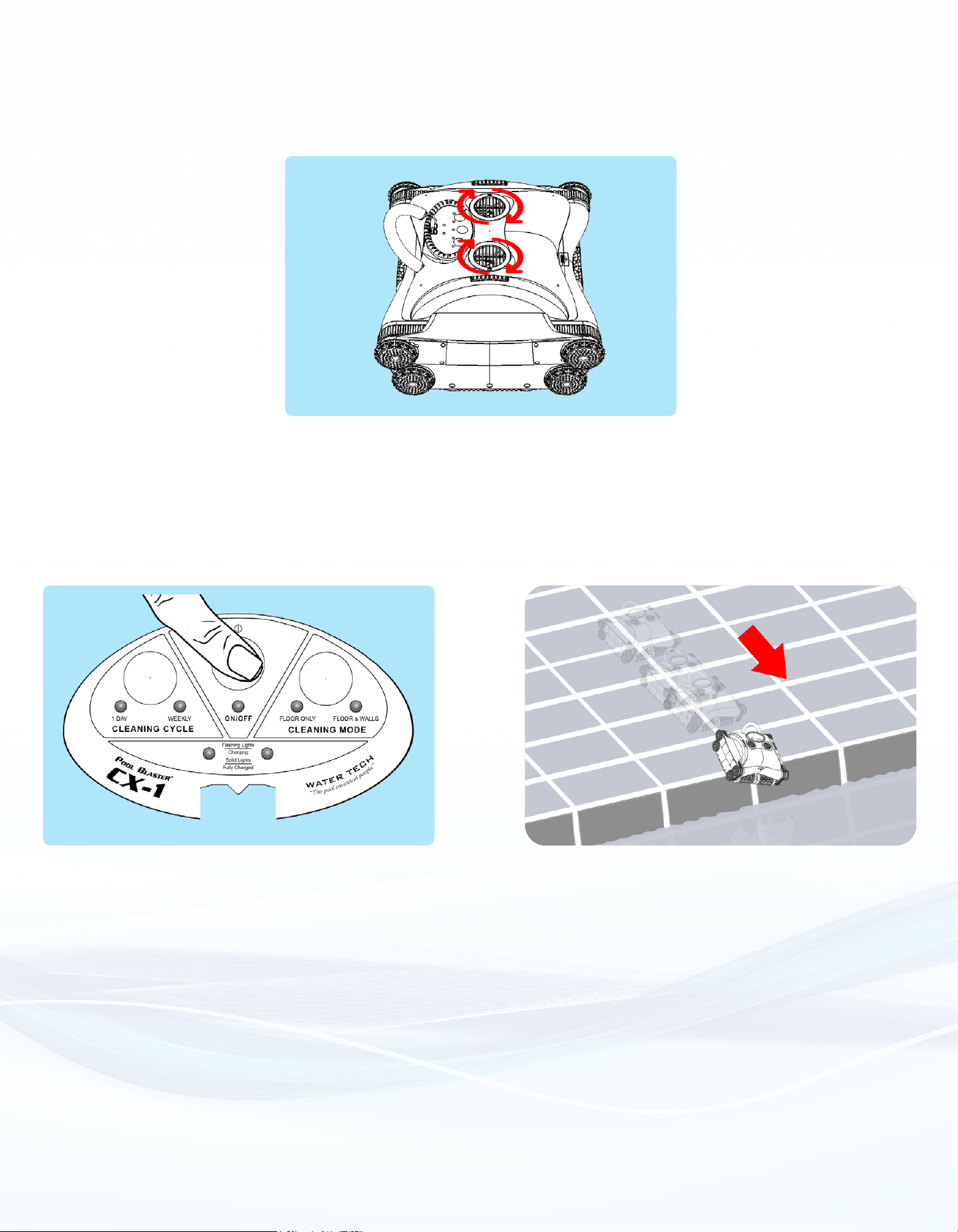
6. Once the pump turns OFF, the robot has been calibrated. It is now OK to turn the
robot OFF or place it by the pool and it will automatically turn ON within 5 seconds.
(Turning robot OFF) (Aiming robot at pool)
(For above ground pools, drop the robot in)
5. The pump will turn ON immediately after
pressing the button.
a. If the pump does not turn ON. Turn
the robot OFF and try again.

?
20
CX-1 Troubleshooting
• The robot is getting stuck on the main drain of my pool.
1. The robot should be able to free itself from the main drain after a couple of minutes.
2. If your robot cannot free itself or is consistently getting stuck:
• Do NOT purchase an aftermarket solution, and do NOT return your robot.
• Water Tech is willing to provide a free part that may help prevent this issue. Please contact
Water Tech Customer Service to receive a free part.
• “Floor Only” LED is ashing rapidly, and the robot is not moving.
1. Robot may need calibration. Follow the instructions on page 18 for calibration.
2. If the problem persists, contact Water Tech Customer Service.
• LED’s are ashing erratically and/or not changing properly after pressing buttons.
1. Contact Water Tech Customer Service regarding a “Control Box” issue.
2. Do NOT attempt to charge batteries or use the cleaner.
• If:
1. One or both battery LEDs are not turning on during use.
2. One or both battery LEDs are not turning on during charging.
3. One or both battery LEDs are not turning solid during charging.
4. One or both battery LEDs are ashing immediately after a full charge.
• Contact Water Tech Customer Service regarding a “Battery” issue.
• Robot NOT Moving, power is ON, (and not in sleep mode).
1. Robot may need calibration.
• See page 18 for calibration instructions.
2. If the problem persists, contact Water Tech Customer Service regarding a “Control Box” issue.
• Robot keeps cleaning after day 7 of the “Weekly” cycle.
1. Robot may need calibration.
• See page 18 for calibration instructions.
2. If the problem persists, contact Water Tech Customer Service regarding a “Control Box” issue.
• One or both pump propellers are not spinning, or one or both track belts are not moving.
1. Contact Water Tech Customer Service regarding a “Replacement Motor”.
• Robot appears to be slowing down.
1. Rinse / clean out the inside of the robot.
2. Check alignment of brushes.
• Rotate Brushes. The brushes, track belt and outer wheels should rotate in sync.
3. If the problem persists, contact Water Tech Customer Service regarding a “Drive Motor” issue.
• Robot appears to be losing suction.
1. Clean out the lter bag.
2. Use a hose to rinse out the inside of the robot. Check the “Screen” for any debris, as shown in
page 15 in the manual.
3. Robot may need calibration.
• See page 18 for calibration instructions.
4. If the problem persists, contact Water Tech Customer Service regarding a “Replacement Motor”.

?
21
CX-1 FAQs
• Robot is driving away during charging.
• Contact Water Tech Customer Service regarding a “Control Box” issue.
• Robot is not moving and “1-Day”, “Weekly”, “ON/OFF”, and Battery LEDs are all ON:
1. Turn the robot OFF and ON again using the Power (ON/OFF) Button.
2. Refer to page 10 for more information.
3. If problem persists, contact Water Tech Customer Service regarding a “Control Box” issue.
• Robot appears to be driving in circles or driving back and forth over the same area.
1. Robot may need calibration.
• See page 18 for calibration instructions.
2. If the problem persists, contact Water Tech Customer Service regarding a “Control Box” or “ Pump
Motor” issue.
• Robot is stuck upside-down in pool.
1. Flip the robot over – it should start back up immediately.
2. Batteries may be fully discharged and the robot will not turn back ON.
3. If the problem persists, clean out the lter bag and rinse the inside of the robot.
4. Otherwise contact Water Tech Customer Service regarding a “Control Box” issue.
• Robot is not covering the entire pool.
1. Try using dierent launch points: the robot has a tendency to spend more time in the deep end of
most pools. We recommend launching the robot in the shallow end.
• Filter Bag is not staying secure to bottom cover during use.
• Clean out the lter bag and bottom cover thoroughly.
• If the problem persists, contact Water Tech Customer Service regarding a “Replacement Bottom Cover”.
• Robot is driving around with the pump turned OFF.
• It is perfectly normal if this happens just after the robot falls o a wall.
• If this issue occurs more frequently, the robot may need calibration, See page 18 for instructions
• If the problem persists, contact Water Tech Customer Service regarding a “Control Box” or “Pump
Motor” issue.
• Can I leave the robot in the pool?
• Yes, the robot can stay in the pool for up to 7 days, even with the battery fully depleted. Do NOT enter
the pool while the pool cleaner is in the pool.
• Can I leave the robot on the charger?
• Yes, the robot can stay plugged into the charger for up to 7 days. However, the robot MUST be
CX-1 Troubleshooting

?
22
charged in a DRY, SHADED AREA. Leaving the charger in water or direct sunlight WILL
damage the charger and VOID the warranty.
• Can I remove the robot before it has nished a full cycle?
• Yes, the robot can be removed from the pool at any time. Please remember to turn the robot OFF
when removing from the pool, or leave it facing the pool when in “sleep mode”.
• How do I remove the robot from the pool?
• The CX-1 includes a hook which can be mounted to any standard pool pole. Use the hook to pick the
robot up by the rubber handle. Refer to page 14 of the manual for more information.
• Can I unplug the charger before the robot is fully charged?
• Yes, just note that the runtime will be decreased.
• Why won’t it clean my carpet?
• Because your robot is a water ltering machine for pools.
• Can I charge the robot in the pool?
• No, absolutely not! ALWAYS remove the robot from the pool and charge in a DRY, SHADED AREA.
• Can I charge the robot immediately after taking it out of the pool?
• Yes, just make sure the pins of the unit’s charging jack are dry.
• Charge the robot in a dry, shaded location.
• Can I turn the robot ON while charging?
• No, the robot has safety features to prevent it from turning ON while charging. If the robot does turn
ON during charging, contact Water Tech Customer Service.
• DO NOT ATTEMPT TO SUBMERGE THE ROBOT IN WATER WHILE IT IS CHARGING!
• How do I know if the robot is fully charged?
• The two lights for the batteries will ash while charging and stay ON when fully charged.
• A full charge will take roughly 6-8 hours.
• How do I know if the battery is fully discharged?
• When all lights are OFF, the robot is fully discharged.
• There are 2 lights blinking on the robot, what is wrong?
• When the 2 lights for the batteries are blinking, the battery power is low. Refer to page 6 for
familiarization with the Control Panel.
• Why is the robot climbing the walls in oor only mode?
• When in oor only mode, the CX-1 will climb the walls just enough to go parallel with the wall. This
helps the robot better reach debris along the edge of the oor and wall.
• How often should I clean the lter?
• Clean the lter after every use or more frequently as needed when you notice one of the following:
• Diculty picking up debris.
• Diculty ipping over when upside-down.
• Clouds or small debris coming from the exhaust.
CX-1 FAQs

?
23
• I put the robot in “Weekly” Cycle and now only 3 lights are ON, why is that?
• When in “Weekly” Cycle the robot will clean once a day for 7 days. When it is not cleaning, the robot
is in “Sleep Mode” which is indicated by the 3 lights. See Pages 7-8 of manual for more information
on “Weekly Cleaning Cycle”.
• I put the robot in “1-Day” Cycle and now only the Battery Lights are ON, why is that?
• When in “1-Day” Cycle, the robot will clean for 2-hours and then enter “Sleep” mode indicated by the
light display. The robot will not wake itself from this “Sleep” mode. You must manually start the robot
to begin the 2nd 2-hour cycle. See page 7 of the manual for more information.
• I nished charging my robot and now it won’t start, all the LEDs except for “Cleaning
Mode” are ON.
• This a safety feature to prevent the robot from starting accidentally.
• Turn the robot OFF and back ON using the Power (ON/OFF) Button.
• Refer to page 10 for more information.
• If this problem continues to occur, contact Water Tech Customer Service.
• How does the CX-1 drive itself into the pool?
• Place the robot with the FORWARD arrow pointing TOWARDS the pool. When the robot turns ON, it
will drive forward over the edge and into the pool.
• THIS FEATURE DOES NOT WORK FOR ABOVE GROUND POOLS!
• What happens if I do not cover the charging jack with the rubber plug?
• The charging jack could interfere with the software of the robot and cause strange behavior.
• Slow discharge of the batteries will occur and shorten the run time.
• The charging pins will corrode and reduce the life of the robot.
• How do I store my robot for the winter?
• Charge your robot for 1.5 to 2.5 hours before winter storage. Make sure the robot is stored in a warm,
dry, indoor shelter. See page 17 for more information on long term storage.
• Can I run the robot without the lter bag?
• No, not intended for use without a lter.
• Unltered debris may jam or obstruct the impeller and/or integral components.
• Can I leave the robot out in the rain?
• If the charger is NOT connected to the robot, it is safe to leave out in the rain. It is safe to leave out
in the rain. However, lightning strikes could severely damage the electronics. Do NOT leave out in
lightning storm. Do NOT use if you suspect any damage due to lightning.
• Charge the robot in a dry, shaded location.
• My robot is falling o the wall, is this normal?
• Yes, when the robot reaches the surface, it is designed to fall o the wall rather than drive back down.
• This saves energy, and the robot reorients itself after submerging.
• Can I use my robot to clean a commercial / olympic size pool?
• Please be aware, runtime on fully charged battery packs may not be sucient for
commercial / olympic sized pools.
CX-1 FAQs

?
24
• Can I open the pool with my CX-1?
• The CX-1 is not intended for cleaning a pool just after opening.
• Once the pool has been properly cleaned after opening, it is safe to use the CX-1.
• If my robot is in sleep mode and I clean my bag, what will happen?
• When the robot is in sleep mode, it is safe to remove it from the pool. After cleaning the lter bag, the
robot can be placed pool side and it will drive itself back into the pool when it wakes up. Please note
that impeller maintenance should NOT be done when the robot is in sleep mode.
• What happens if I store my unit when fully charged?
• Li-Ion batteries are not meant to be stored for long periods of time at full charge. This can cause the
battery to lose capacity which results in lower runtime of the robot.
CX-1 FAQs

25
Notes

26
Notes
CX-1 VIP CUSTOMER SERVICE
Tel: 732-967-9888 EXT. 250
Email: [email protected]
10 Alvin Ct., Suite 111
East Brunswick, NJ 08816 - USA
Tel: 732-967-9888 US, Canada & International
Fax: 732-967-0070 US & International
www.WaterTechCorp.com
Rev.: 3312022
Register at www.watertechcorp.com/register