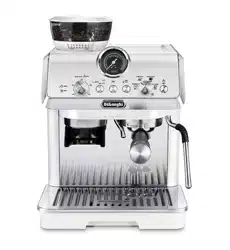
EC9255
COFFEE MAKER
Instructions for use
2
B4B3
B2
B1
B5 B6 B7 B8 B9
De’Longhi Appliances s.r.l.
Via L. Seitz, 47 31100 Treviso - ITALY
Tel. +39 0422 4131
5413218631/04.15
Decalcicante per macchine da caè
Descaler for coee machines
Détartrant pour machines à café
Entkalker für Kaeemaschinen
C4
C3
C5
C1
C2
C6
SoftBalls
C7*
C10
C8 C9
C12*C11
EN
page 4
3
A1
A2
A3 A4
A7
A5
2 1
3
4
5
67
8
FIN
E
ESRA
OC
A6
A8
A14
A16
A17
A19
A15
A9
A18
A10
A11
A12
A13
4
Before using the appliance, always read the safety warnings.
This appliance shall not be used by children.
Keep the appliance and its cord out of reach
of children.
1. DESCRIPTION
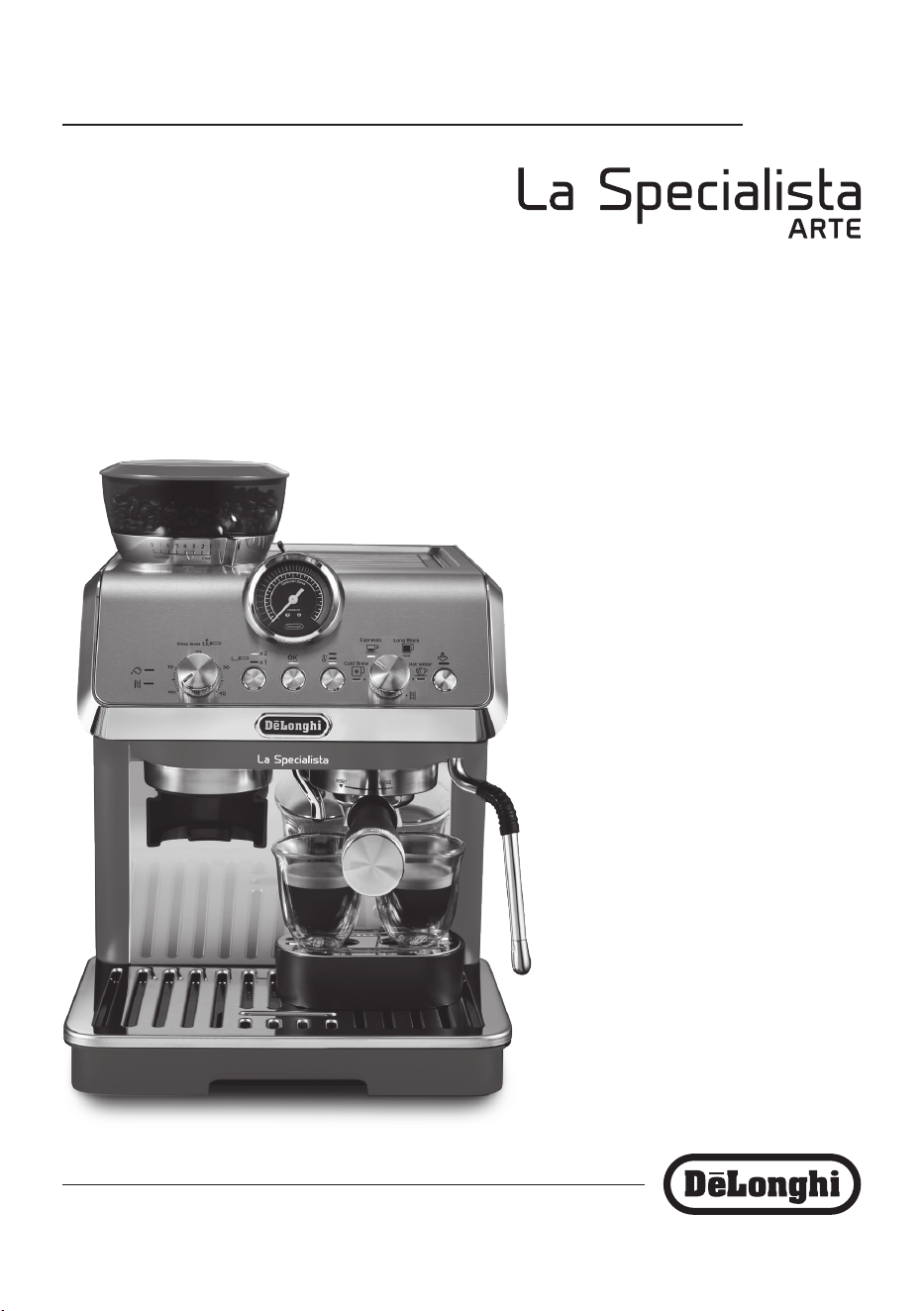
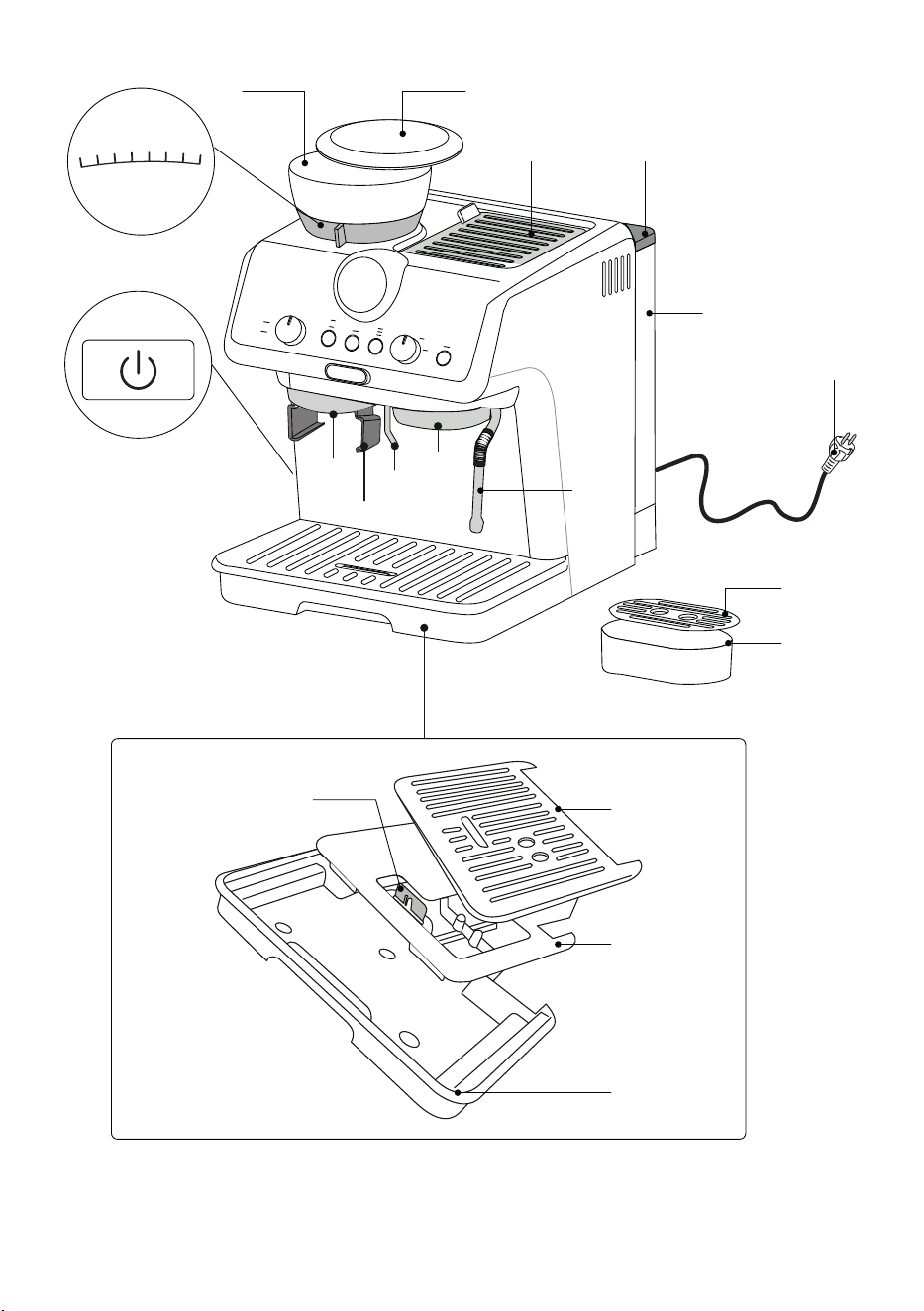
1.1 Description of appliance - A
A1. Main switch
A2. Grinding level selector (ne to coarse)
A3. Beans container
A4. Beans container lid
A5. Accessory holder lid
A6. Water tank lid
A7. Water tank
A8. Power cord
A9. Steam wand
A10. Coee outlet
A11. Hot water spout
A12. Portalter holder
A13. Coee grinder outlet
A14. Small cup grille support
A15. Small cup grille
A16. Mug or cup tray
A17. Mug or cup tray support
A18. Water level indicator
A19. Drip tray
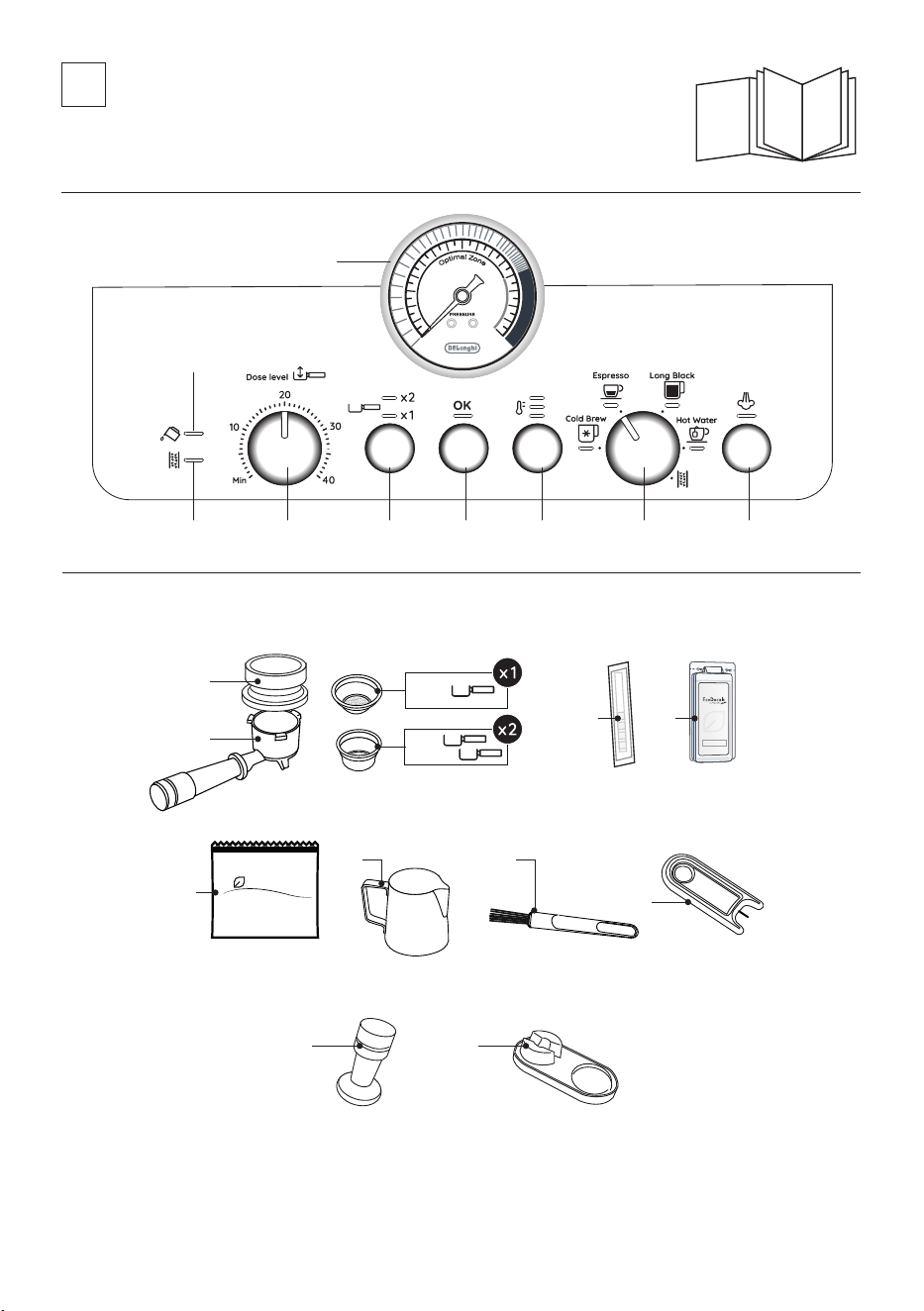
1.2 Description of control panel - B
B1. Pressure gauge
B2. No water light
B3. Descale light
B4. Coee dose dial
B5. 1 or 2-cups selection button
B6. OK button: to deliver the drink/conrm
B7. Coee Temperature button
B8. Mode selector dial:
• Cold Brew
• Espresso
• Long Black
• Hot water
• Descaling
B9. Steam button: to deliver steam
1.3 Description of accessories - C
C1. Portalter
C2. Dosing&Tamping Guide
C3. 1-cup coee lter
C4. 2-cups coee lter
C5. “Water hardness test “ indicator paper
C6. Descaler
C7. Softballs (* some models only)
C8. Milk pitcher
C9. Cleaning brush
C10. Cleaning needle for steam nozzle
C11. Tamper
C12. Tamping Mat (* some models only)
1.4 Recommended optional cleaning accessories
Visit Delonghi.com for more information.
Cleaner
EAN: 8004399333307
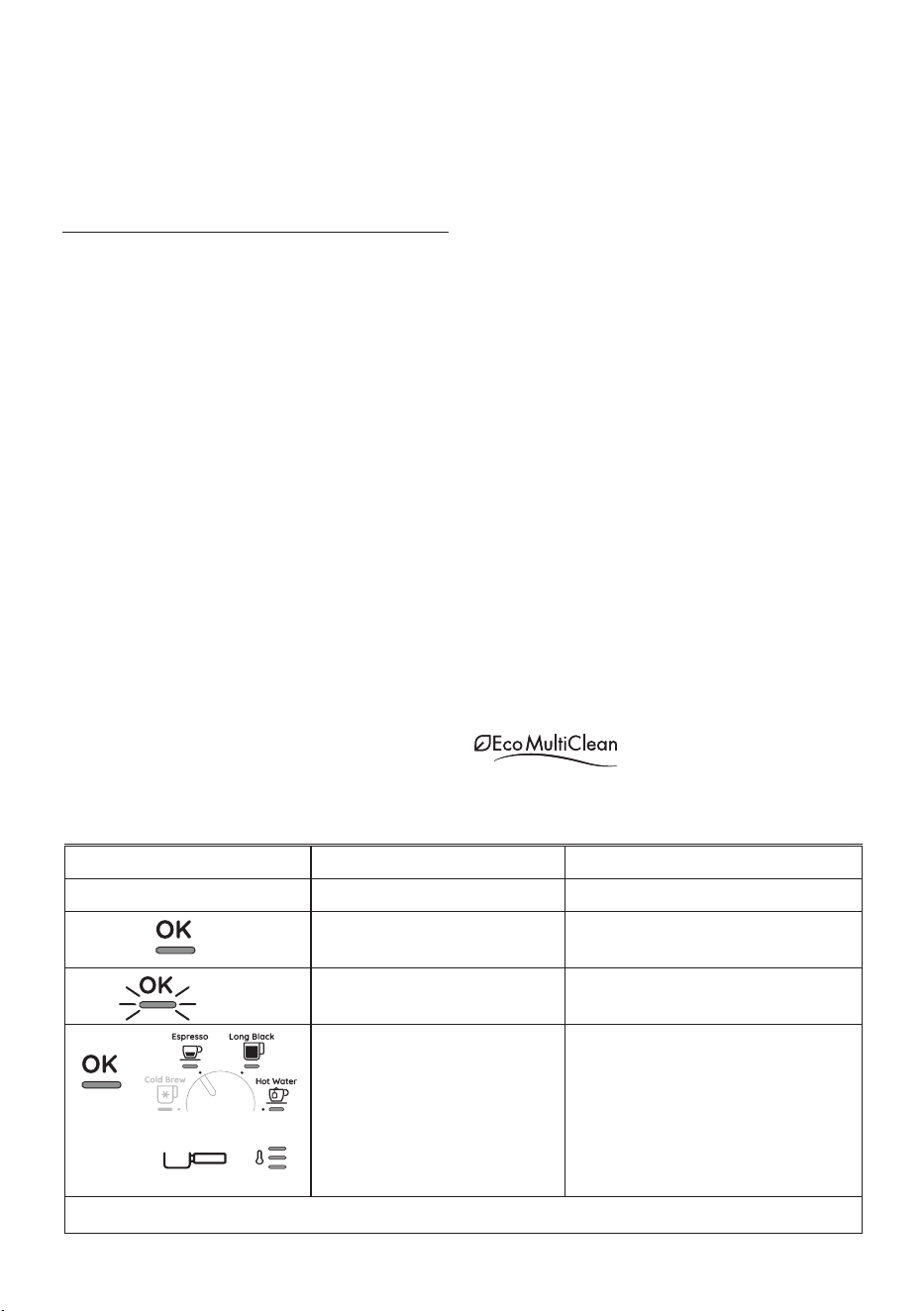
2. EXPLANATION OF LIGHTS
LIGHTS EXPLANATION OF LIGHTS OPERATION
All the lights ash briey Turning the machine on Self-diagnosis
On
The appliance is being turned on for the rst
time and the water circuit must be lled
Proceed as described in the Quick start guide.
Flashing
The machine is warming up
Wait until the ideal delivery temperature has
been reached
+
On
(The indicators and
show the respective selections)
The machine is ready to use Prepare the machine, select the desired drink and
press OK to start delivery
…
→
White
5
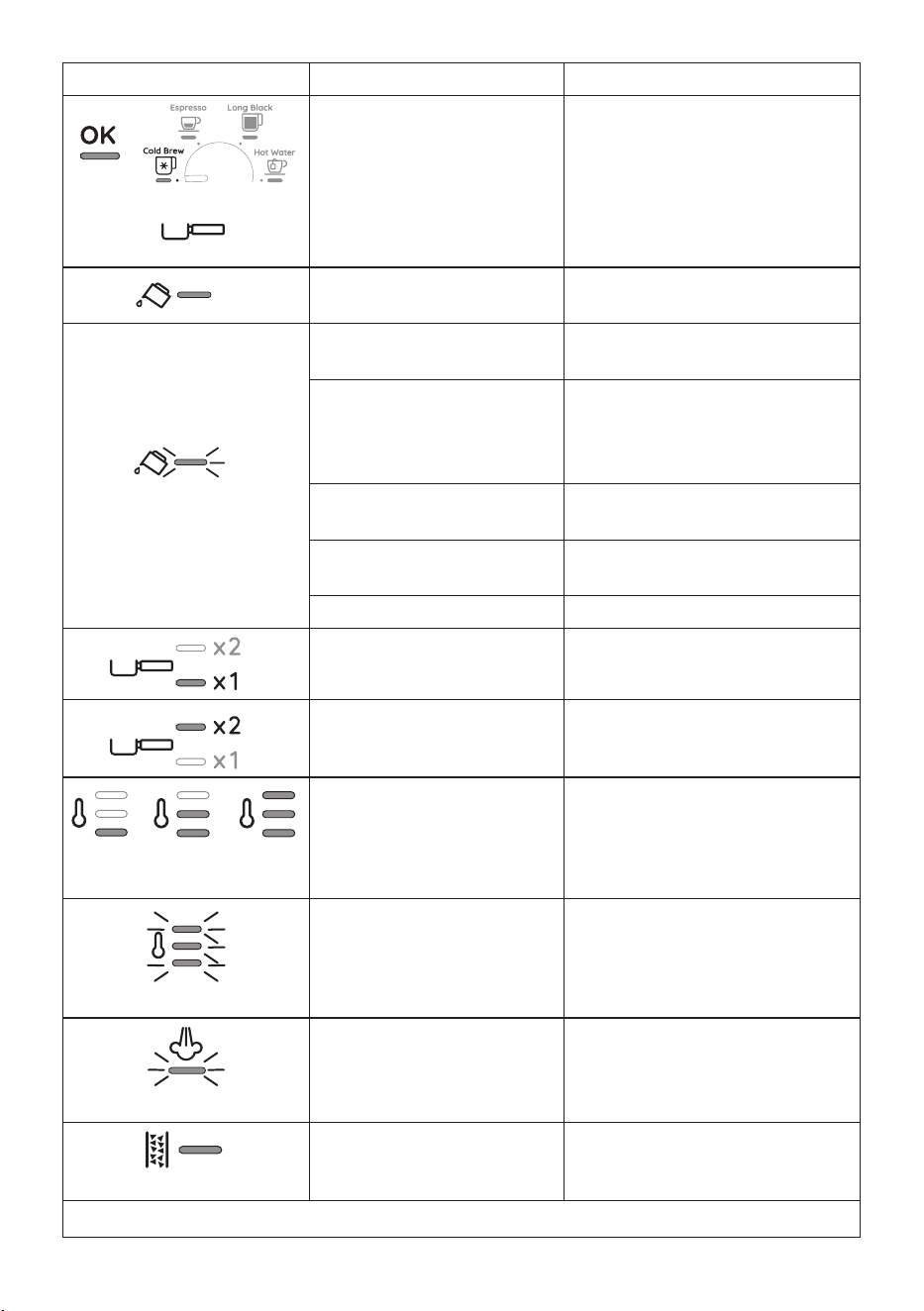
LIGHTS EXPLANATION OF LIGHTS OPERATION
+
On
(The indicator shows the
current selection
The machine is ready to deliver Cold Brew Prepare the machine and press OK to start delivery
On
Insucient water in tank (A7) or water
tank not inserted correctly
Fill the tank or extract the tank and put it back
correctly
Flashing
You are trying to deliver a drink but
water tank (A7) is empty
Fill the tank
Because the beans are too nely
ground, the coee is delivered too
slowly or not at all
Remove the portalter (C1) and repeat the
operations to make the coee, bearing in mind
the instruction given in the quick start guide
relative to the grinding section
The lter (C3) or (C4) is blocked Clean as described in section “5. Cleaning and
maintenance”.
The tank (A7) has been inserted incorrectly
and the valves on the bottom are not open
Press the tank down lightly to open the valves
on the bottom
Scale in the water circuit Descale as described in section “9. Descaling”
On
1-dose drink is selected All the process (from grinding to delivery) is
setted for preparing 1 cup
On
2-doses drinks are selected All the process (from grinding to delivery) is
setted for preparing 2 cups
MIN MED MAX
On
Choose 1 of the 3 temperatures
available
See Quick Guide for tips.
Flashing
General alarm Turn the machine o and wait 10 minutes
before turning on again. If the problem con-
tinues, contact customer services.
Flashing
Steam function is selected and running In a few seconds the appliance starts steam
delivery
On - red
Descaling must be performed Descale the appliance as described in section
“9. Descaling”
…
→
Blue
6
+
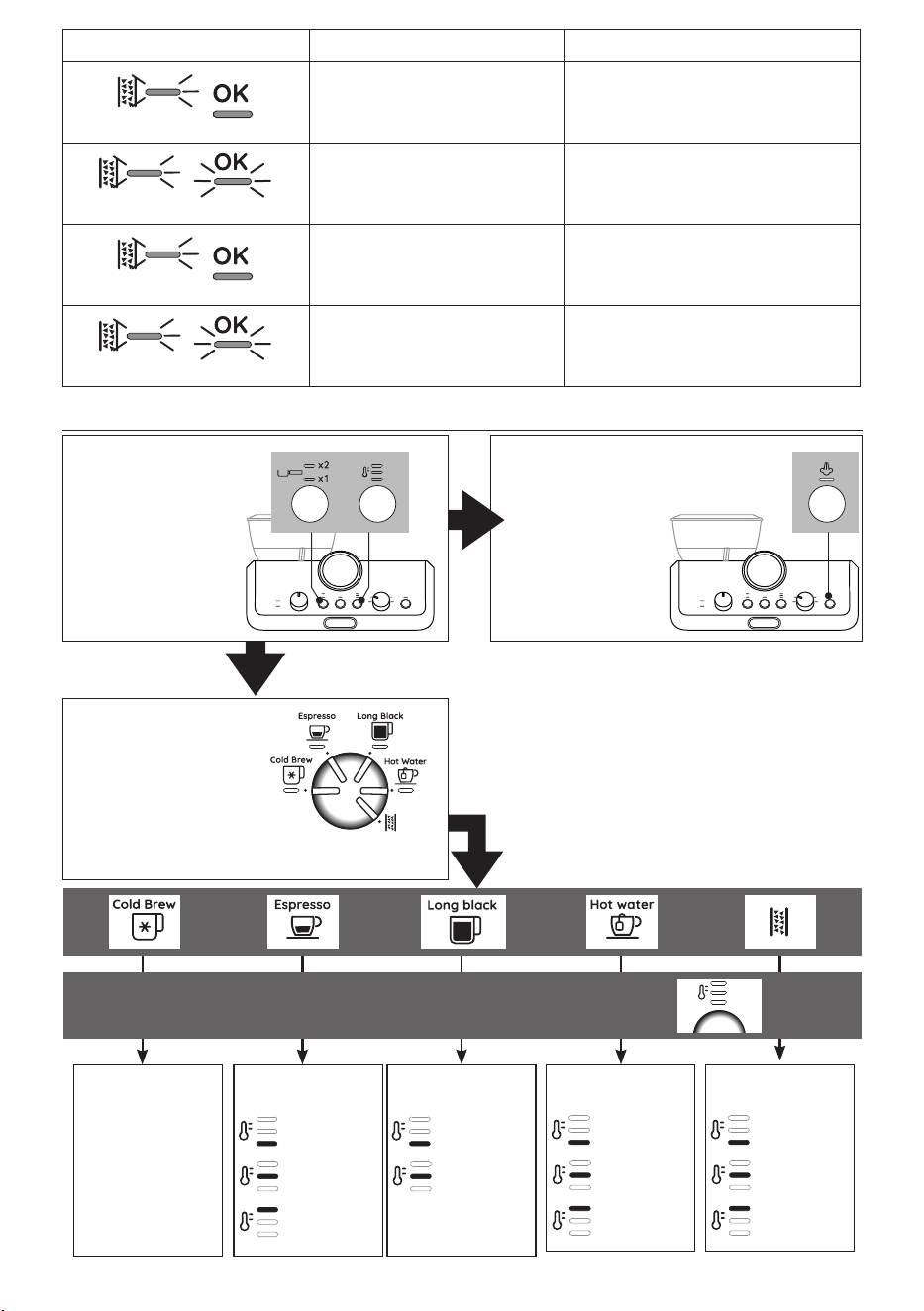
Press both buttons (B5)
and (B7) for 3 seconds to
enter setting menu
Keep pressed steam but-
ton (B9) for 3 seconds
Enter the setting
menu
Reset to default
values
➡ 9 minutes
➡ 1,5 hours
➡ 3 hours
Auto o
➡soft
➡
medium
➡
hard
Water hardness
➡No
➡
1 sec
➡
2 sec
Pre-infusion
delay
For Servicing Purposes
Only (see par. “10.1
How to read the
statistics”)
Statistics
➡1
st
range
➡ 2
nd
range
Extra grinding
adjustment
Press the temperature button:
the light corresponding to the corrent setting ashes.
Press the temperature button again to change the setting:
Turn the knob (B8)
to select the position
corresponding to the
function to set
Select the setting
x3 sec
LIGHTS EXPLANATION OF LIGHTS OPERATION
Flashing - On
Descaling is selected Press OK (B6) to run descaling cycle or turn the
selection knot to the drink desired
Flashing
Descaling proceeds. The machine deliv-
ers descaling solution
Proceed by completing the descaling cycle
(see “9. Descaling”)
Flashing - On
The rst phase of the descaling cycle
is complete. You now need to proceed
with rinsing.
Press OK to start rinsing.
Flashing
The machine proceeds with the rinsing
phase to complete the descaling cycle.
Proceed by completing the descaling cycle
(see “12. Descaling”)
3. MENÙ SETTINGS
Red
White
Red
Blue
Red
Blue
…
→
Red
White
7
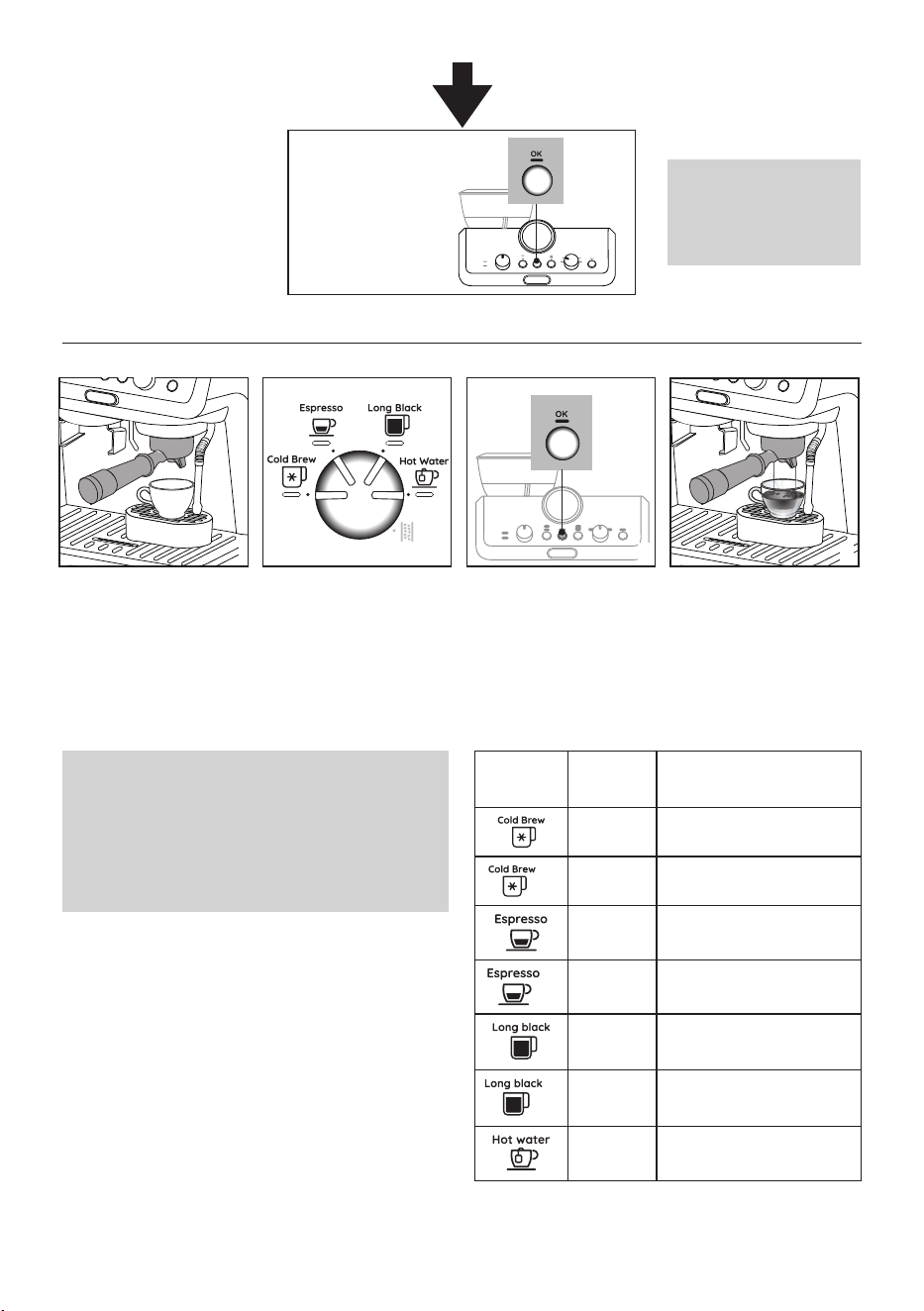
Press the OK (B6) button
to conrm.
Save new
settings:
Please note:
The appliance automatically
exits the menù setting after 30
seconds of inactivity
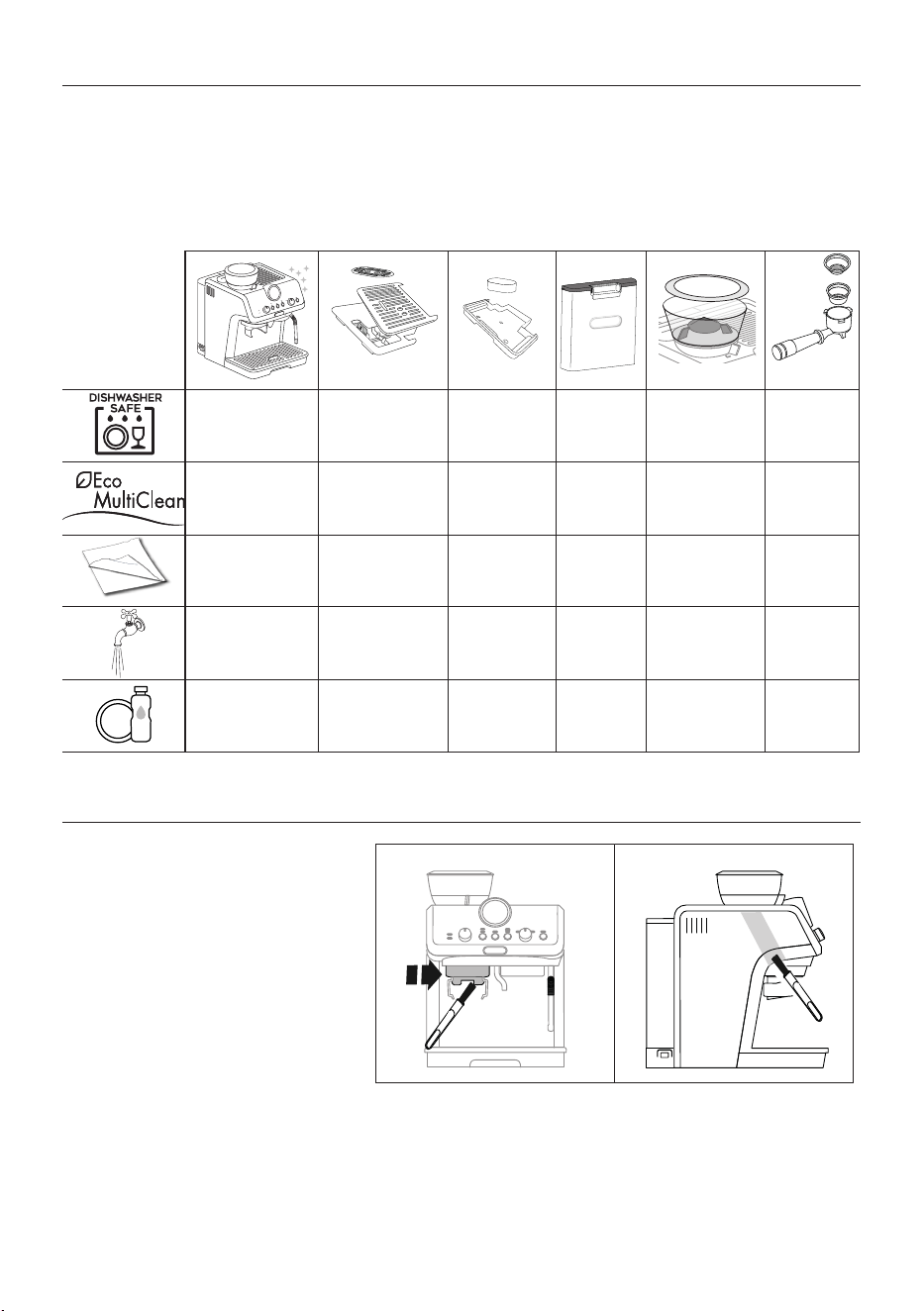
4. CUSTOMISING THE QUANTITY OF DRINKS
1. Prepare the appliance to
deliver the drink you want
to make. Prepare the coee
dose and attach the por-
talter (C1) to the coee
outlet (A10).
2. Turn the dial (B8) to
select the drink to be
programmed.
3. Keep pressed for at least
3 seconds OK button (B6)
until the light relative to
the drink to programme
ashes. Delivery starts.
4. Once reached the desired
quantity in cup, press
the OK button again. The
quantity is programmed.
Please note:
• You can programme drinks quantities, but not steam.
• Programming changes the quantity of the drinks, but not
the amount of coee ground.
• “X2” drinks can be programmed separately.
1 2 3 4
Selectable
Drink
Default
quantity
Programmable quantity
110 ml from 90 to 130 ml
X2
180 ml from 160 to 220 ml
35 ml from 25 to 90 ml
X2
70 ml from 50 to 180 ml
100 ml • water: from 25 to 120 ml
• espresso: from 25 to 60 ml
X2
200 ml • water: from 50 to 240 ml
• espresso: from 50 to 120 ml
250 ml from 65 to 300ml
8
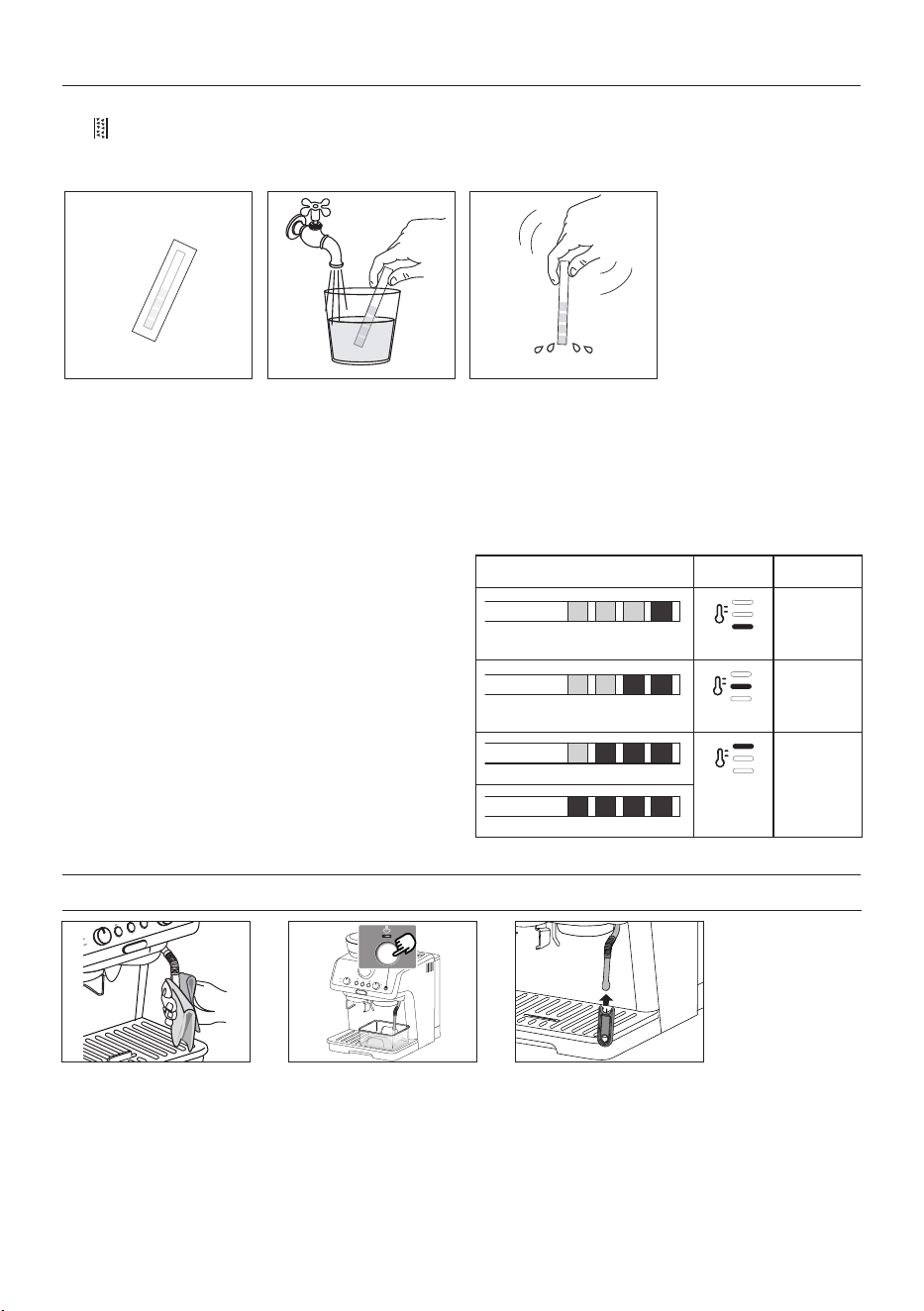
5. CLEANING AND MAINTENANCE
Important!
• Do not use solvents, abrasive detergents or alcohol to clean the coee machine.
• Do not use metal objects to remove encrustations or coee deposits as they could scratch metal or plastic surfaces.
• If the appliance is not used for more than a week, before using it again, we recommend you perform a rinse cycle.
Danger!
• While cleaning, never immerse the coee maker in water. It is an electrical appliance.
• Before cleaning the outside of the appliance, turn it o, unplug from the mains socket and allow to cool.
✕
✓
✕ ✕ ✕ ✕
✓
✕
✓
✕ ✕ ✕
✓
✕
✓
✕
✓
✕
✕
✓ ✓ ✓
✕
✓
✕
✓ ✓ ✓
✕
✓
6. CLEANING THE GRINDER
1. Clean the attachment area with the brush
(C9);
2. Use the brush to clean the coee funnel.
1 2
9
7. WATER HARDNESS
7.1 Water hardness
The descale light (B3) comes on after a period of time established according to water hardness. The machine can also be pro-
grammed according to the actual hardness of the water supply in the various regions, in which case descaling may be required less
frequently.
1. Remove the “TOTAL HARD-
NESS TEST” indicator paper
(C5) from its pack.
2. Immerse the paper
completely in a glass of
water for one second.
3. Remove the paper from
the water and shake
lightly.
4. Set the appliance as indi-
cated in section “3. Menù
settings”.
After about a minute, 1, 2, 3, or 4 red squares form, depending
on the hardness of the water. Each square corresponds to one
level.
Total Hardness Test result Button Level
1
soft water
2
medium
water
3
hard or
very hard
water
8. CLEANING THE STEAM NOZZLE
1. After every use, remove
with a soft damp cloth
any milk residues from
the steam wand (A9) and
the nozzle.
2. Use the steam for a deeper
cleaning.
3. To maintain the better
usability of the nozzle,
when clogged, use the
Cleaning Tool (C10) for
opening the hole.
1 2 3
1 2 3
10
A
B
A
B
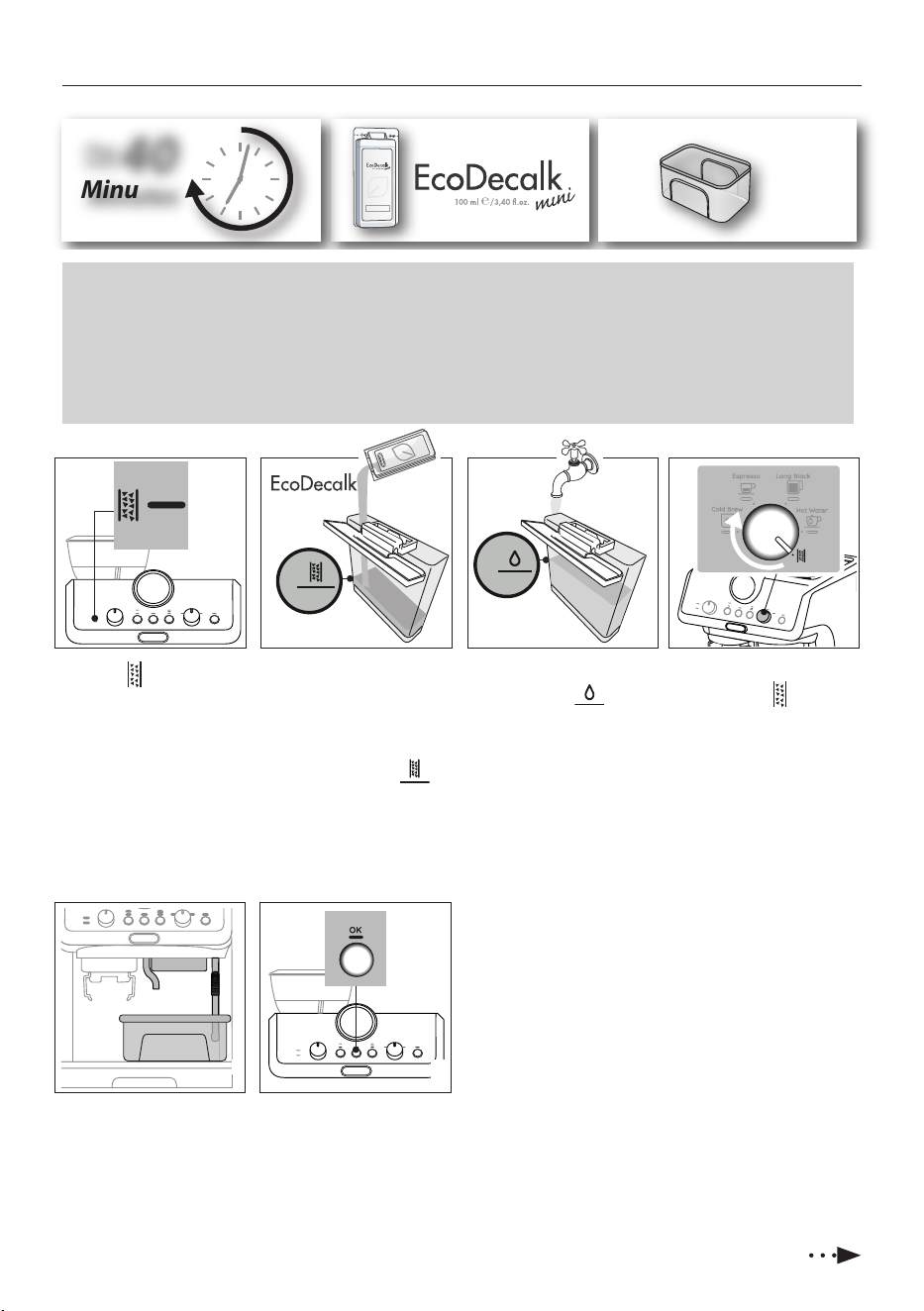
9. DESCALING
1. (IF PRESENT, REMOVE
THE WATER SOFTENER
DEVICE).
Pour the des-
caler into the tank (A7)
up to the level A
marked inside the tank
(equal to one 100ml
packet).
2. A
dd water (1 liter) up
to t
he level B .
Then put the water tank
back in the appliance.
3. Turn the mode selector
dial (B8) to : the desca-
ling light (B3) ashes.
4. Make sure the portalter is
not attached and position a
recipient under the coee
outlet (A10), hot water
spout (A11) and steam
wand (A9).
5. Keep pressed for at least
3 seconds the OK
button:
the OK light begins to
ash; descaling starts.
Please note
• Before use, read the instructions and the labelling on the descaler pack.
• It is important to use De’Longhi descaler only. Using unsuitable descaler and/or performing descaling incorrectly may result
in faults not covered by the manufacturer’s guarantee.
• Descaler could damage delicate surfaces. If the product is accidentally spilt, dry immediately.
4
1
5
2 3
RED
40
Minutes
De’Longhi Appliances s.r.l.
Via L. Seitz, 47 31100 Treviso - ITALY
Tel. +39 0422 4131
5413218631/04.15
Decalcificante per macchine da caffè
Descaler for coffee machines
Détartrant pour machines à café
Entkalker für Kaffeemaschinen
2 L
Please note
• In case you start the descaling cycle by mistake, you can press the OK button
for 10 seconds; the rinsing cycle can not be stopped (from step 9).
6. The descale programme starts and the descaler liquid
comes out of the steam wand and coee outlet. The des-
cale programme removes limescale deposits from inside
the appliance by automatically performing a series of
rinses and pauses until the tank is empty.
Delivery stops and the OK light turns to blu. This indicates
that it is necessary to proceed with rinsing: see next page.
When the light (B3) comes
on, it is time to proceed descal-
ing the machine. The descaling
cycle can be run in any moment.
11
MAX
MAX
MAX
MAX
MAX
MAX
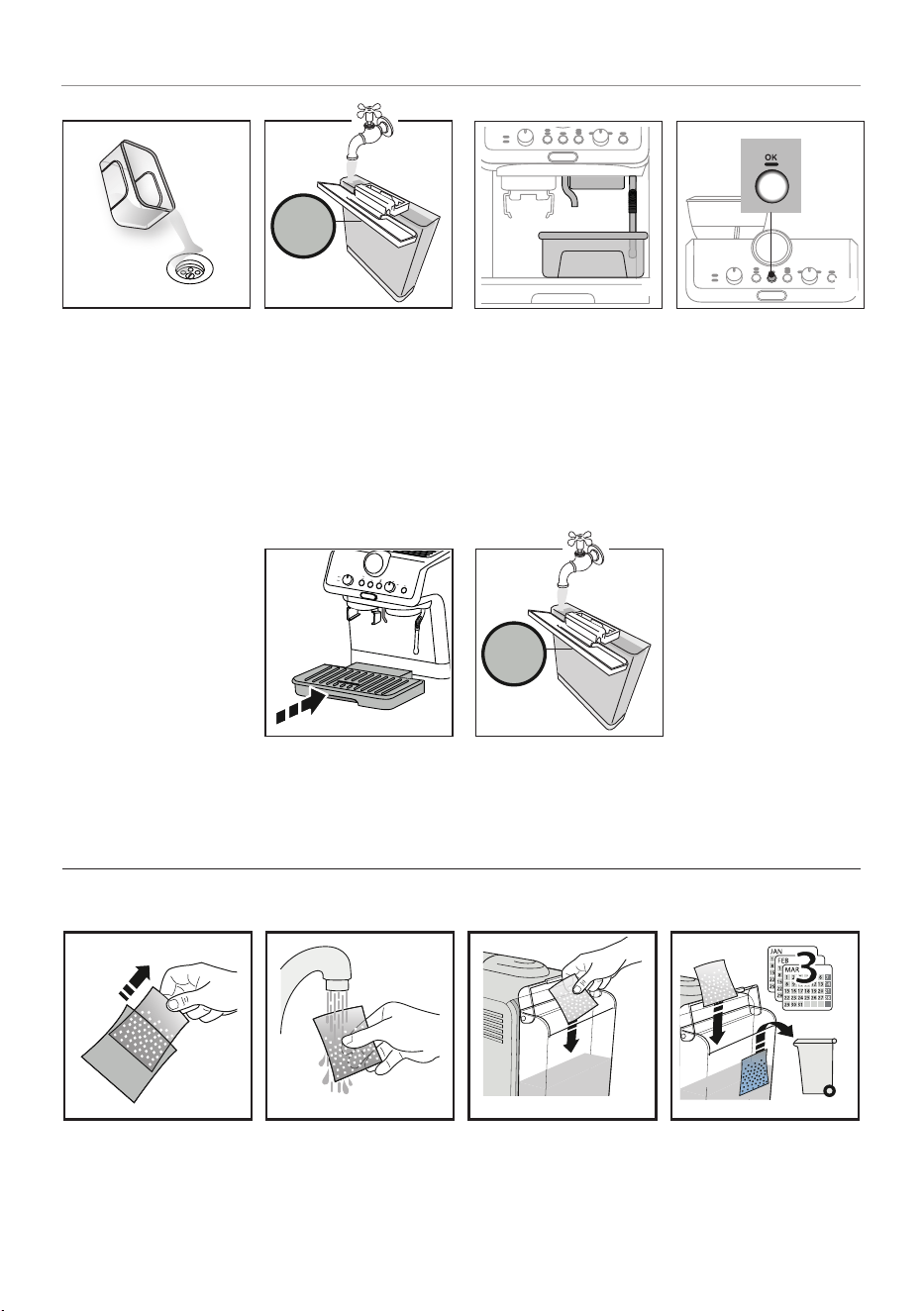
DESCALING
7
7. Empty the recipient used
to collect the descaler
solution and replace it
empty.
8. Remove the water tank,
empty any residues of
descaler solution, rinse
with running water and
ll with fresh water up
to the MAX level. Put the
tank back in its housing.
9. Position a recipient
under the coee outlet,
hot water spout and
steam wand.
11. When rinsing is complete,
delivery stops and the
appliance prepares to be
used again:
12. Empty the recipients used
to collect the rinse water.
13. Extract and empty the drip
tray (A19), then put back in
the appliance.
8 9 10
13
Now the appliance is ready to
use.
14
14. Empty, rinse, then ll the
water tank with fresh
water and replace it.
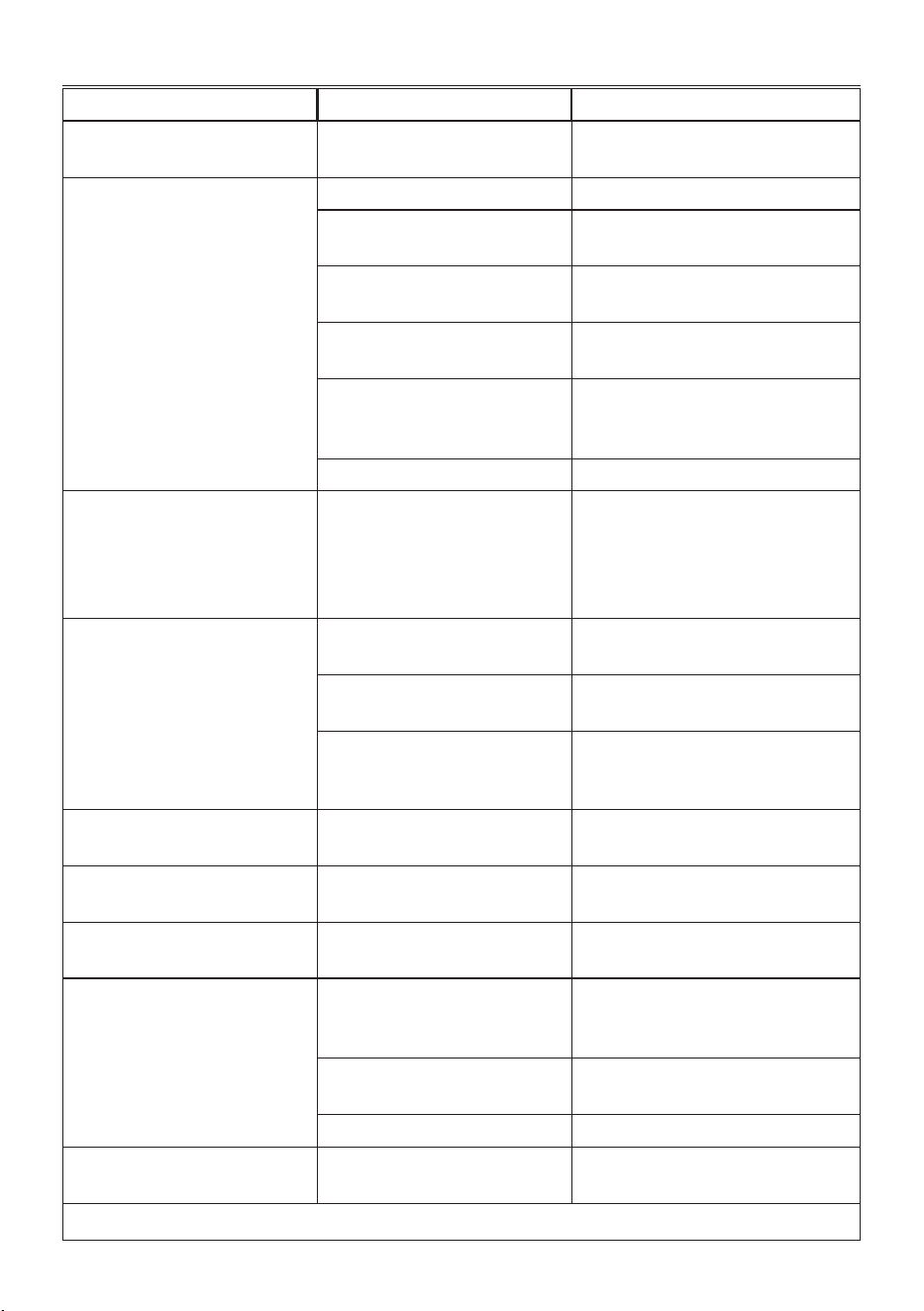
11. USING THE SOFTBALLS (*SOME MODELS ONLY)
Softballs is an innovative system that extends the life of the machine, without altering the sensory properties of the water, guaran-
teeing consistenly creamy and aromatic coee.
1 2 3 4
1. Extract the Softballs bag
from the packaging.
2. Rinse with tap water the
Softballs bag.
3. Deep the bag into the
water tank (A7).
4. Change the Softballs
every 3 months.
10. Press the
OK button:
rinsing starts.
12
10. TROUBLESHOOTING
PROBLEM CAUSE SOLUTION
There is water in the drip tray (A19) It is normal: due to the internal water
circuits operations
Regularly empty and clean the drip tray
No espresso coee is delivered No water in the tank (A7) Fill the tank
Only the OK light (B6) is on to indicate
that the coee or steam circuit is empty
Press the button corresponding to the
OK
light to ll the circuit
The coee lter (C3) or (C4) is blocked Rinse the lters under abundant running
water.
Coee grind too ne or too much coee Adjust coee dose and grinding (refer to
Quick Guide)
The tank (A7) has been inserted
incorrectly and the valves on the
bottom are not open
Press the tank down lightly to open the
valves on the bottom
Scale in the water circuit Descale as described in section “9. Descaling”
The portalter (C1) cannot be attached
to the appliance
The ground coee has not been pressed
or is too much
Repeat grinding with new settings. Reduce
the powder quantity: check if the lter (sin-
gle or double lter) is the same size as the
selector of grinding quantity (2x (B5) select-
ed or not)
The espresso coee drips from the
edges of the portalter (C1) rather than
the holes
The portalter is inserted incorrectly Attach the portalter correctly and rotate
rmly as far as it will go
The espresso boiler gasket has lost
elasticity or is dirty
Have the espresso boiler gasket replaced by
Customer Services
The coee lter is clogged • Rinse the lters under abundant running
water.
• Reduce the grinding thickness
The coee crema is too light (delivered
from the spout too fast)
The appliance settings need reviewing Refer to Quick Guide for suggestions
The coee crema is too dark (delivered
from the spout too slowly)
The appliance settings need reviewing Refer to Quick Guide for suggestions
The coee is cold A Cold Brew has been delivered
Keep in mind that the “OK” blue light corre-
sponds to the selection of “Cold Brew”
The Cold Brew is warm A hot coee has been delivered before
Cold Brew
It is recommended to deliver a “Cold Brew”
for a few seconds to make a cool rinse before
preparing the drink
The water in the water tank is not fresh
Empty the water tank and ll it with fresh
water
No ice in the glass
Add 3-4 ice cubes as suggested for Cold Brew
At the end of descaling, the appliance
requests a further rinse
During the rinse cycle, the water tank
(A7) has not been lled to the MAX level
Complete the rinse cycle from point (8) of sec-
tion “9. Descaling”
…
→
13
PROBLEM CAUSE SOLUTION
The appliance does not grind the coee There is foreign matter that cannot be
ground in the coee grinder
Turn the grinder selector (A2) to 8, vacum all
the beans and particles in the beans container
(A3). If the problem persists, address to Cus-
tomer Service Centre.
If you want to change the type of coee You must remove all the beans present
in the machine
• Empty the beans container (A3) (if nec-
essary, operate the coee mill without
beans or use a vacuum cleaner to re-
move any remaining beans)
• Attach the portalter (C1) and operate
the coee mill a number of times with-
out beans to free the grinder. Attach the
portalter to the outlet of the grinder
(A13). Push the portalter to start
grinding: it stops automatically. Repeat
until the lter is empty
• Place the new coee in the beans
container
• If the amount of coee ground is not
enough to reach the perfect dose, pro-
ceed setting the appliance as for the
rst use
After grinding, the coee lter is empty The coee grinder funnel is clogged
See section “6. Cleaning the grinder”.
After grinding, the ground coee in the
lter (C3) or (C4) does not reach the
“perfect dose”
The quantity of ground coee needs
adjusting
Adjust the quantity of coee with the dial
(B4). If the dial is already in the max. position,
select the second range of grinding adjust-
ment (see “3. Menù settings”- “Extra grinding
adjustment”).
You are using the 2 cup lter (C4) Make sure the 2X light is on
Over time the burrs wear down
Address to a Customer Service Centre to
change burrs.
10.1 How to read the statistics
When you contact the Customer Service Centre, the statistics info
could be useful. Please follow this procedure:
• Enter the menù by pressing both buttons (B5) and (B7) for
3 seconds;
• Turn the knob (B8) to select “Cold Brew” position;
• Press the temperature button (B7);
• Once entered in the menu select the desired data rotating
the function knob according to the next chart:
Knob position Counter
Total count of Cold drinks
Total count of Hot drinks
…
→
Knob position Counter
Total count of Steam preparations
Total count of Descalings
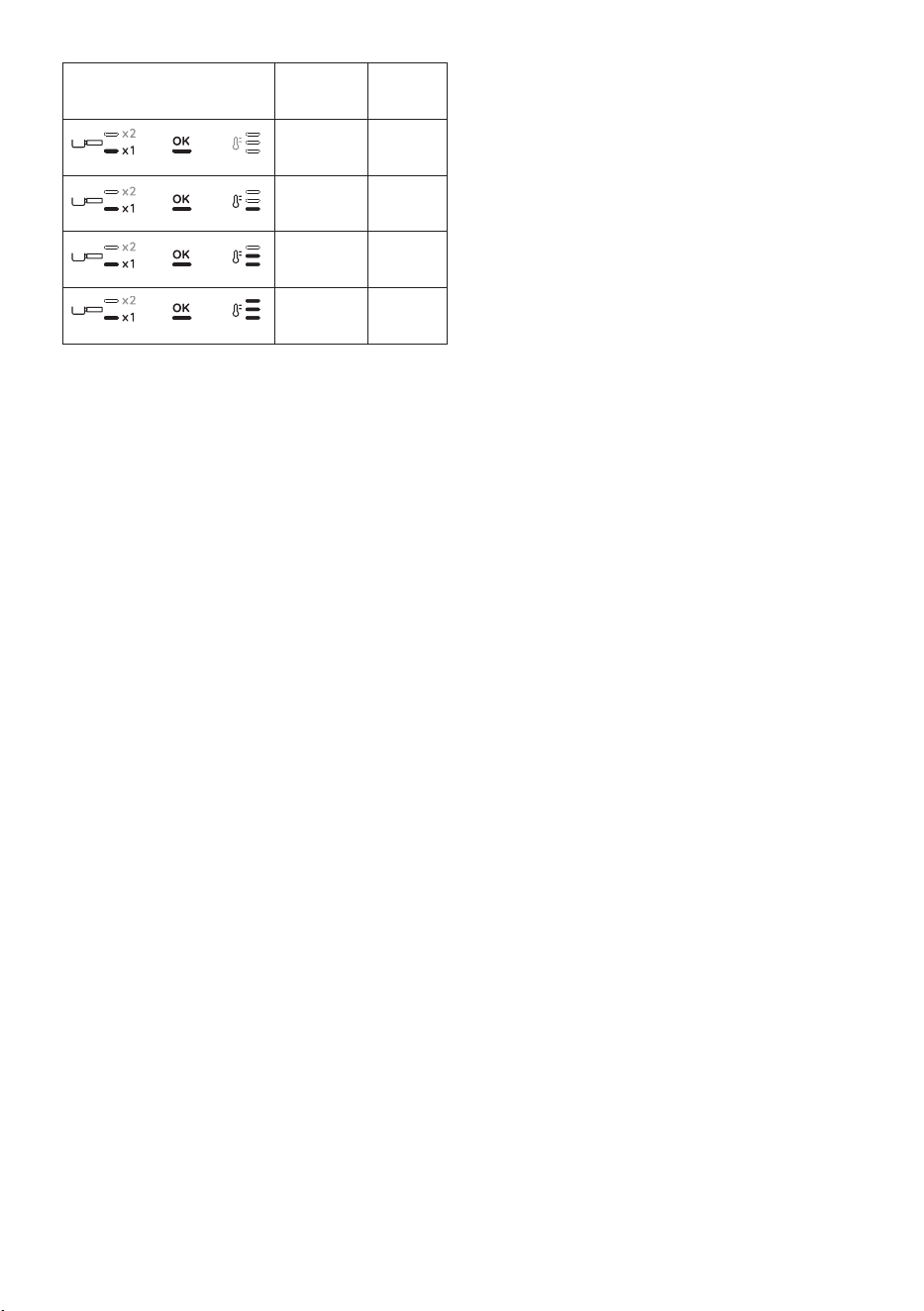
• Check the lights corresponding to , , to read the
statistics:
Lights on control panel Beverage
count
Descale
count
Up to 100 Up to 1
Between
100 - 1000
Between
2 - 10
…
→
14
Lights on control panel Beverage
count
Descale
count
Between
1000 - 3000
Between
10 - 30
Between
3000 - 6000
Between
30 - 60
Between
6000 - 11000
Between
60 - 110
More than
11000
More
than 110
• After 30 seconds of inoperation, the machine automatically
exits from the menu setting and it is ready to use.

De’Longhi Appliances via Seitz, 47 31100 Treviso Italia www.delonghi.com
57132C8203_00_1022