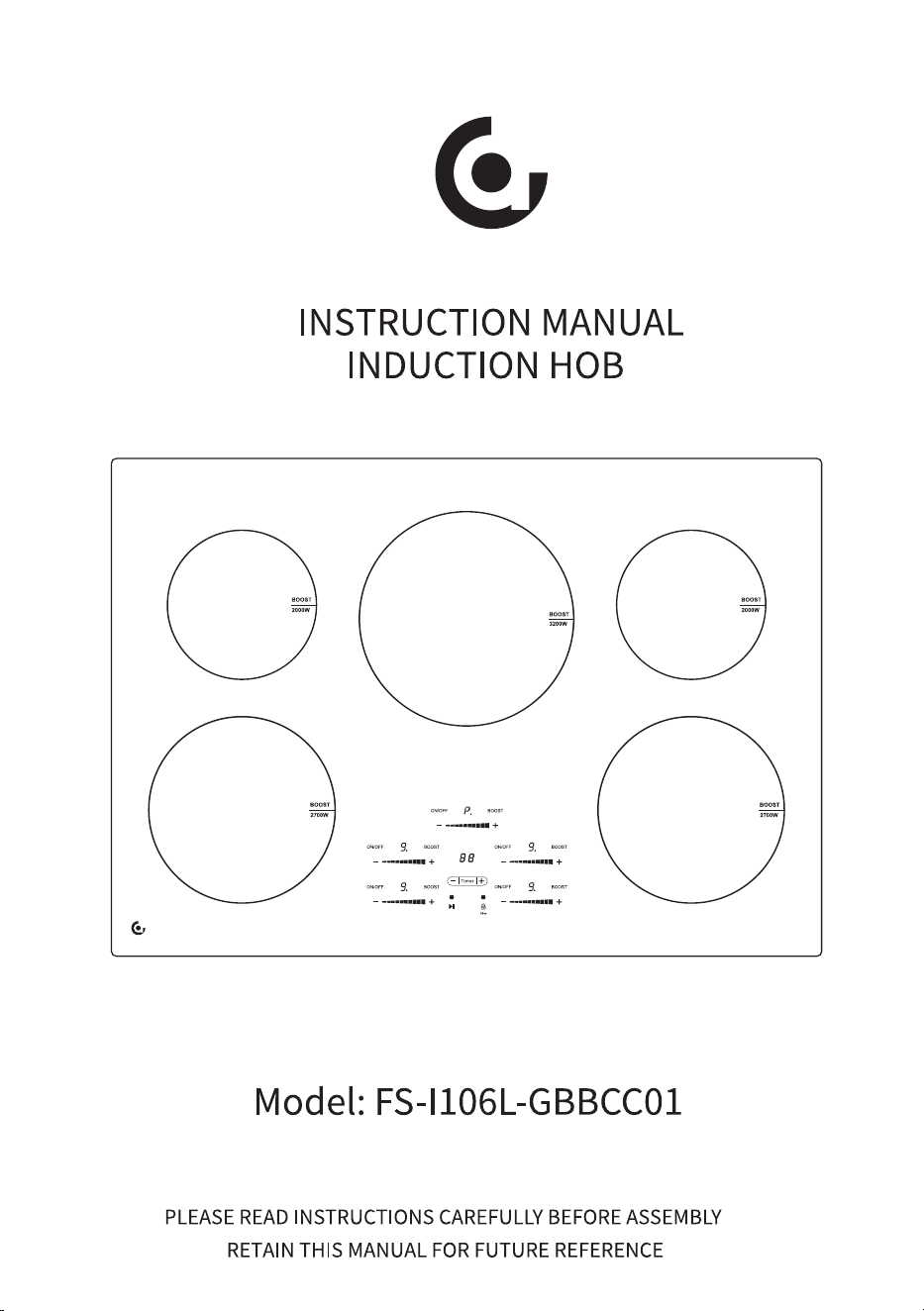
MODEL: FS-I106L-GBBCC01
ATTACH THE CLAMPS TO THE METAL TO
THE METAL BASE OF THE COOKTOP.
There are holes on the 4 sides of the
metal of the metal base through which
you can fit the brackets.
2.17inch
��.�� inch
��.�� inch
��.�� inch
��.�� inch

General safety regulations
Technical Specification
Installation
Cleaning and maintenance
Trouble Shooting
Warranty
1
3
4
7
13
14
16
Cooktop Features
9
Using the Induction cooktop
8
Before using your new induction hob
MADE IN CHINA
Contact:Emily Tel:+1(838)910 8317 E-Mail:[email protected]
Manufacturer: Shunde Qingzhou Wanbang Trading Co., Ltd.
Address: ROOM 3605, BUILDING 18, VANKE JINYU RIVERSIDE PLAZA, NO.13
DESHENG MIDDLE ROAD, DALIANG STREET, SHUNDE DISTRICT, FOSHAN CITY,
GUANGDONG PROVINCE, CHINA
Chapter I. Precautions for Safe Use
1
2
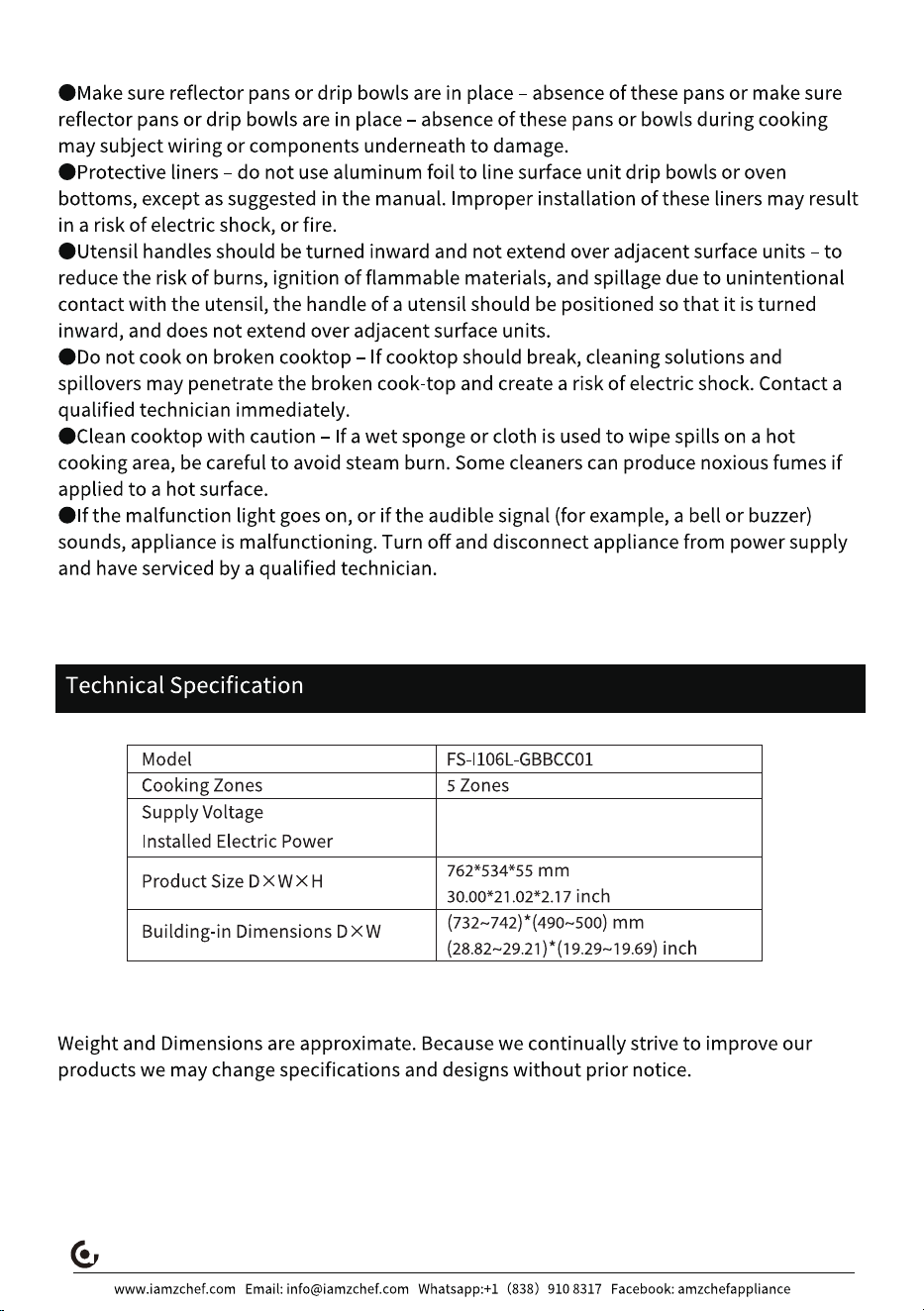
AC ���V~ ��Hz �����W
AC ���V~ ��Hz ����W
3
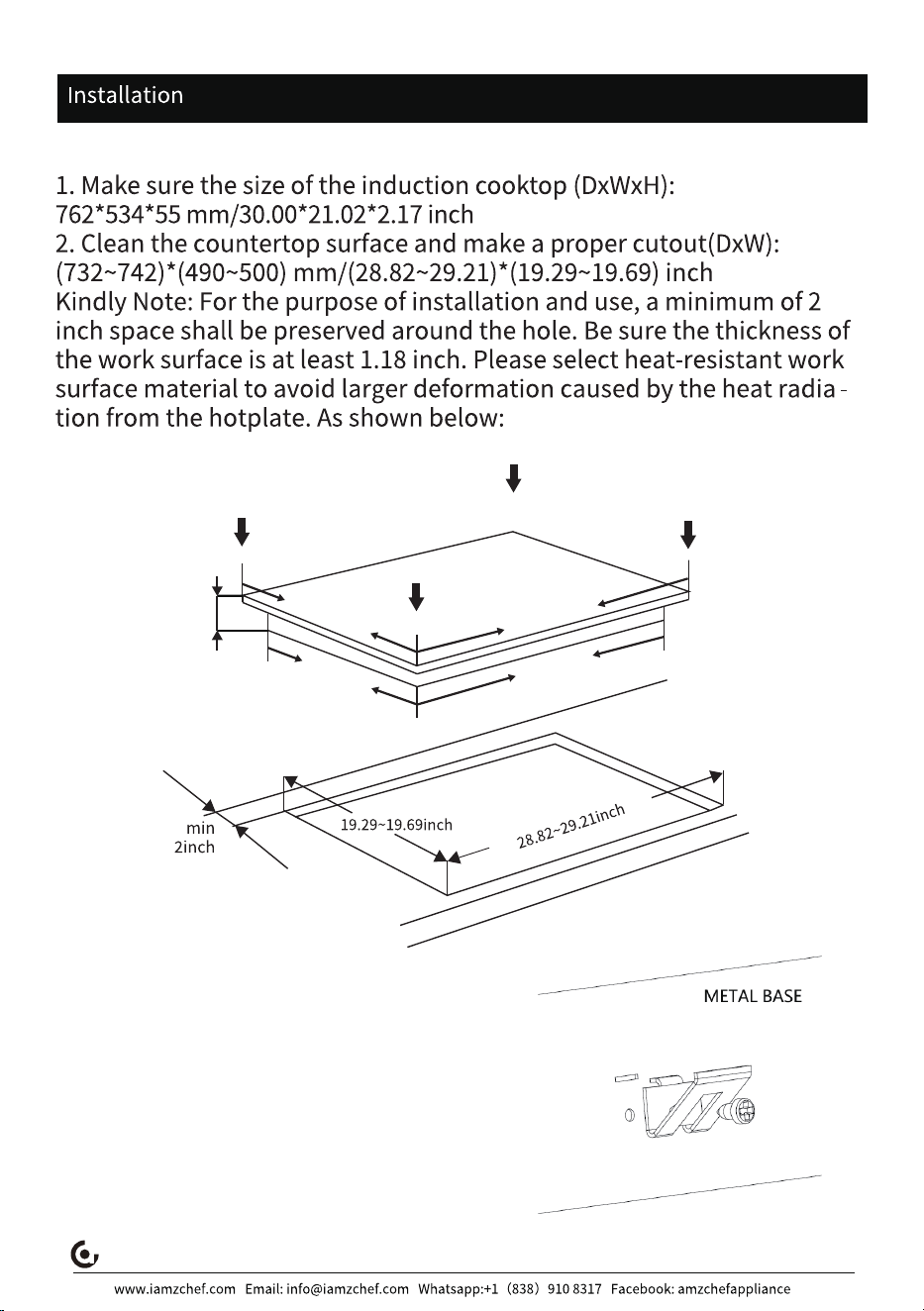
ATTACH THE CLAMPS TO THE METAL TO
THE METAL BASE OF THE COOKTOP.
There are holes on the 4 sides of the
metal of the metal base through which
you can fit the brackets.
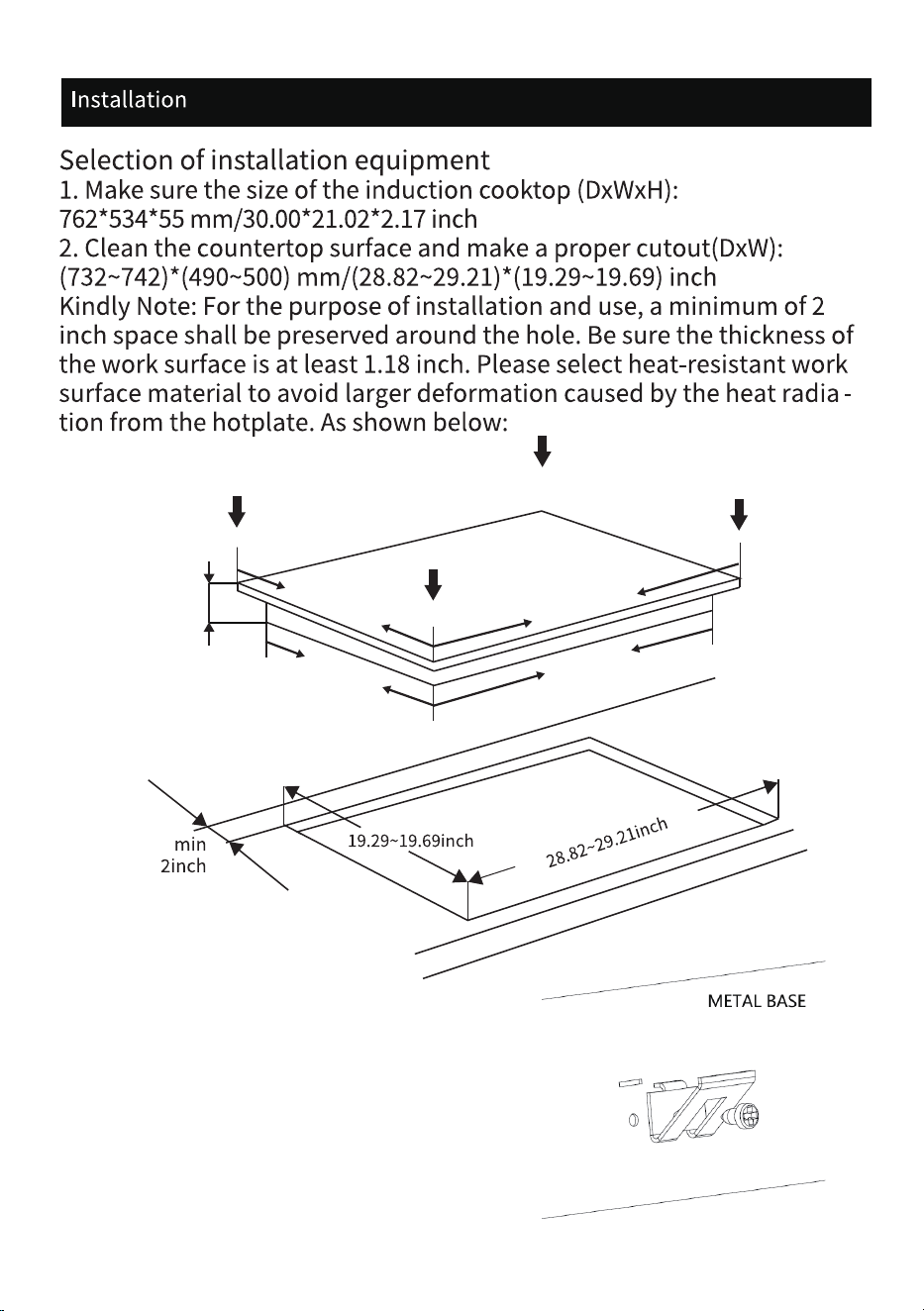
2.17inch
��.�� inch
��.�� inch
��.�� inch
��.�� inch
Selection of installation equipment
4
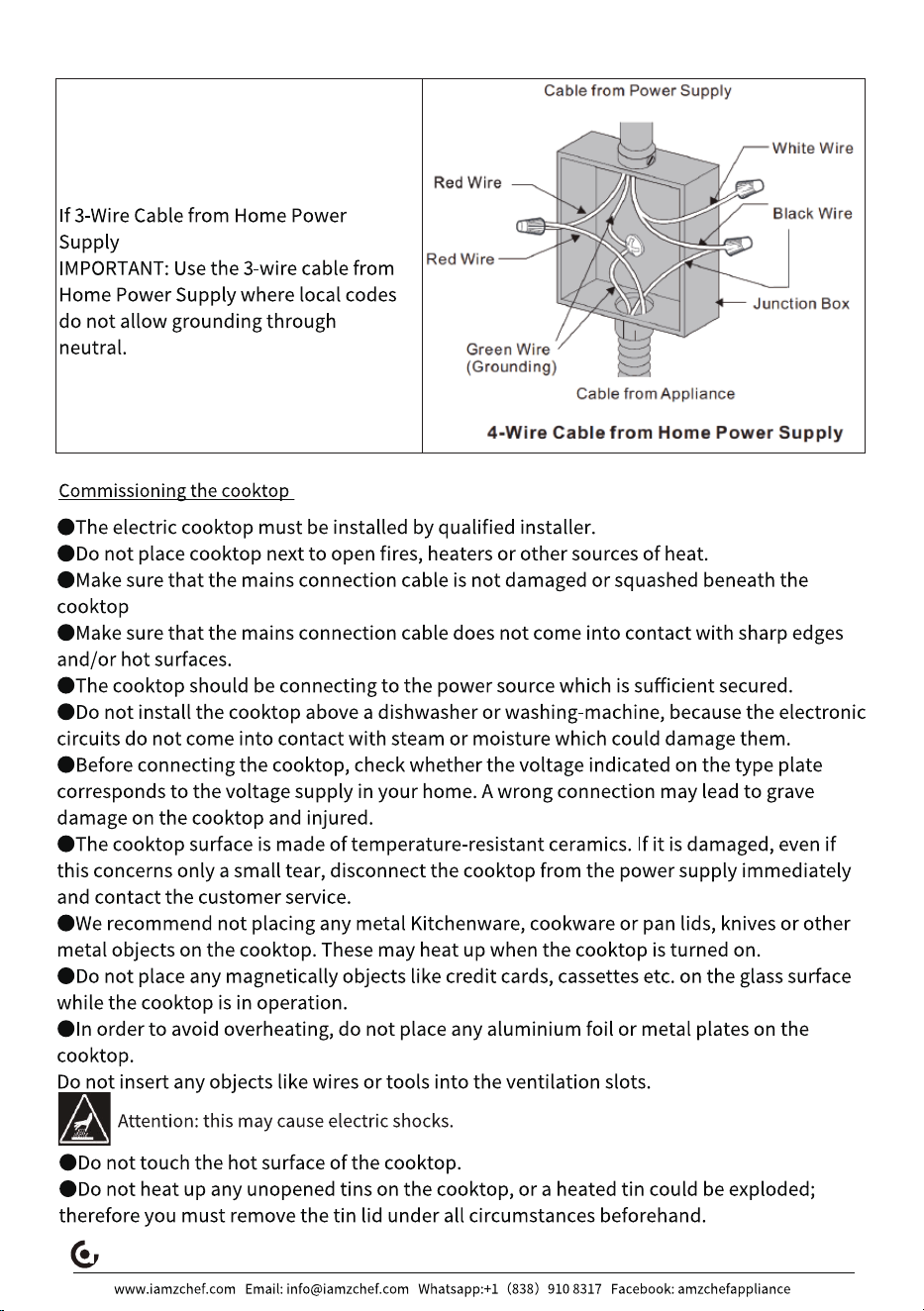
Wiring Instructions
cooktop
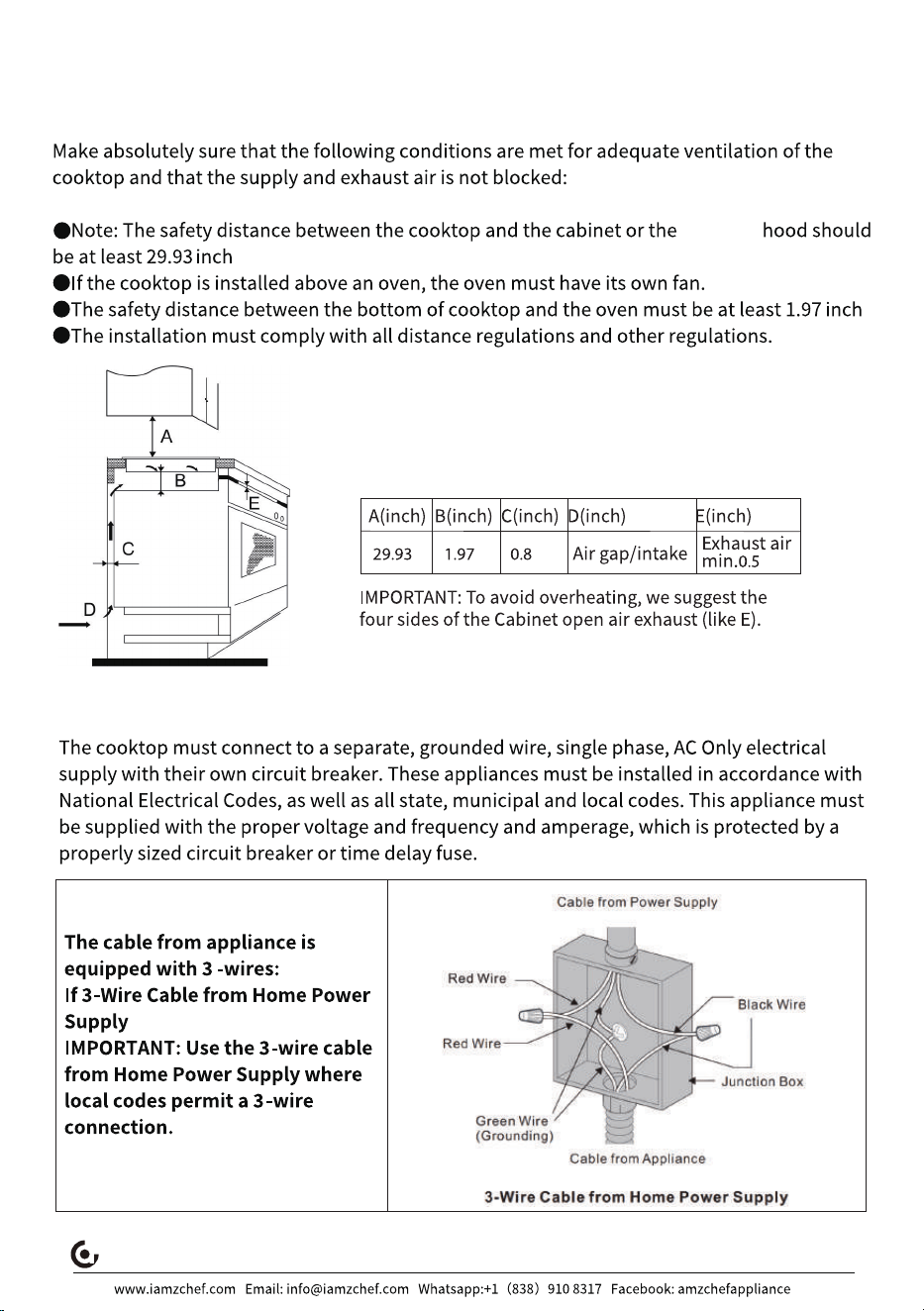
Ventilation and safety distances
5
6
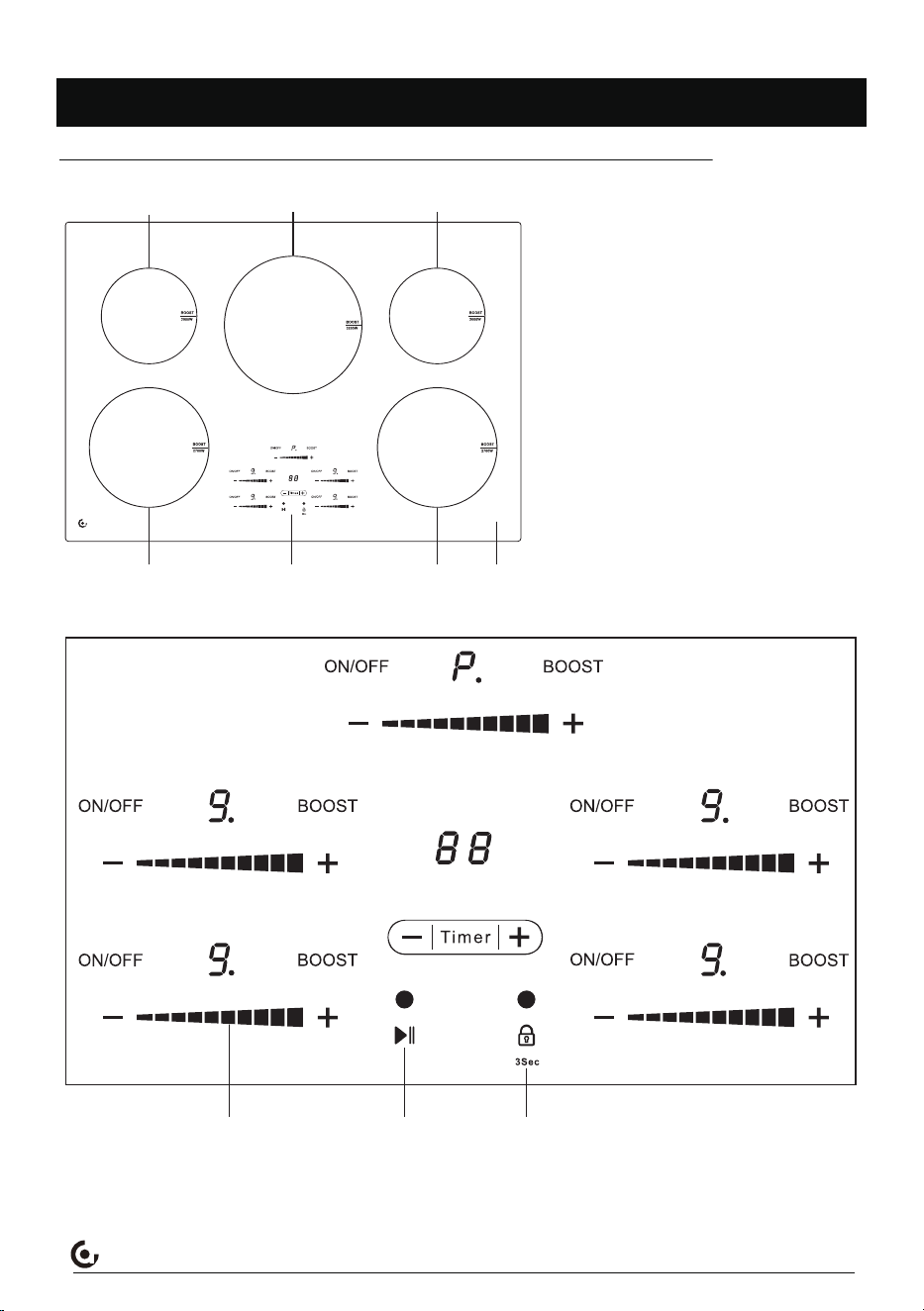
Cooktop Features
Throughout this manual, features and appearance may vary from your model.
www.iamzchef.com Email: [email protected] Whatsapp:+1(838)910 8317 Facebook: amzchefappliance
①
⑥
②
③
④
⑤⑦
① 2000W
② 3200W
③ 2000W
④ 2700W
⑤ 2700W
⑥ Ceramic Glass
⑦ Control Panel
Slider control Pause button
Safety lock
7
Before using your new induction hob
www.iamzchef.com Email: [email protected] Whatsapp:+1(838)910 8317 Facebook: amzchefappliance
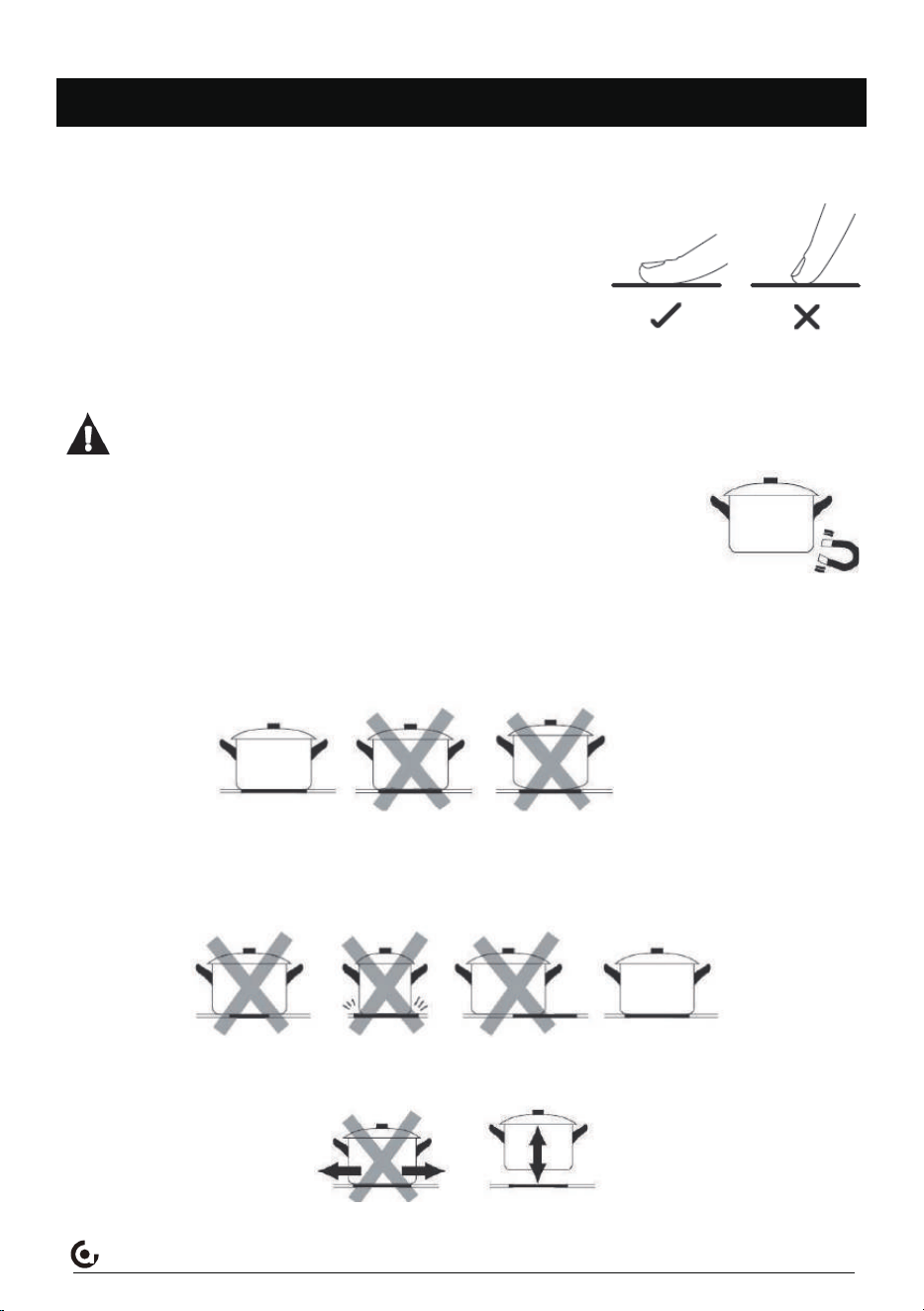
The sensor buttons respond to touch, so you do not need to
press them.
Touch the sensors with the bottom side of your top phalanx
but not with your fingertip (see figure below).
You will hear a beep after each effective input.
Always keep the touch control clean and dry. Cooking
utensils and cloths should not cover the touch control. A thin
water film may already complicate operating the sensors.
Only use cookware with a base suitable for induction cooking. Look for the induction
symbol on the packaging or on the bottom of the pan.
You can check whether your cookware is suitable by carrying out a
magnet test. Move a magnet towards the base of the pan. If it is attract-
ed, the pan is suitable for induction.
If you do not have a magnet:
1. Put some water in the pan you want to check.
2. If does not flash in the display and the water is heating, the pan is suitable.
Do not use cookware with jagged edges or a curved base.
Make sure that the base of your pan is smooth, sits flat against the glass, and is the same size as
the cooking zone. Use pans whose diameter is as large as the graphic of the zone selected.
Using a pot a slightly wider energy will be used at its maximum efficiency. If you use smaller pot
efficiency could be less than expected. Always centre your pan on thecooking zne.
Always lift pans off the induction cooktop - do not slide, or they may scratch the glass.
Choosing the right cookware
Using the Touch Controls
8
www.iamzchef.com Email: [email protected] Whatsapp:+1(838)910 8317 Facebook: amzchefappliance
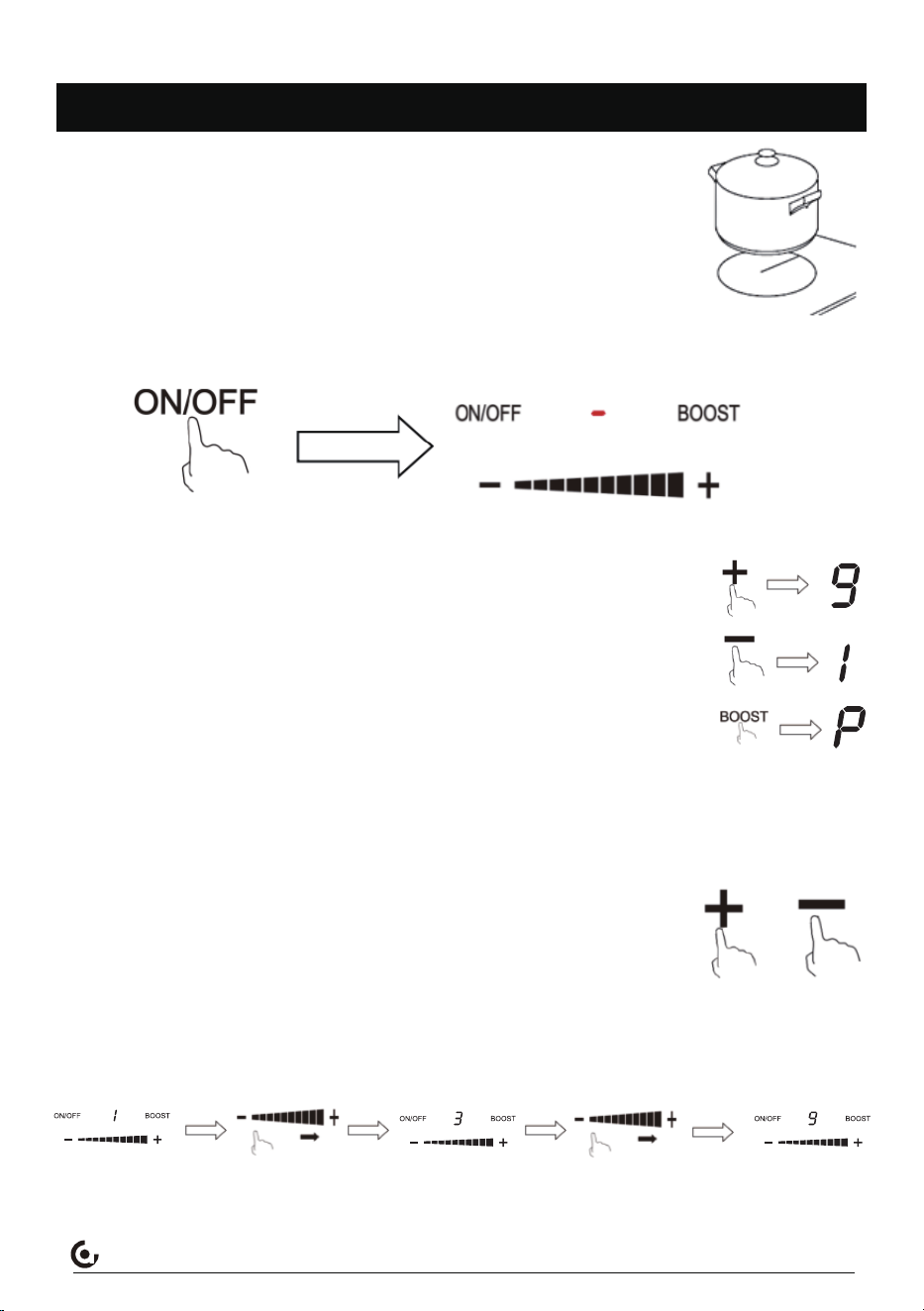
How to Start?
1.When the power cord is successfully connected, the induction cooktop
will emit a beep sound once, the display screen will flash once.The
appliance is in stand-by mode now
2.Place a cookware on the desired cooking zone. Always keep the
bottom of the cookware as well as the cooking zone clean and dry.
Using the Induction cooktop
3.Touch the ON/OFF button of selected cooking zone,the display indicates -.
4.Set the power level with the + or - or Boost button.
When you touch + button, the display will show 9 representing the
default working power is level 9.
When you touch - button, the display will show 1 representing the default
working power is level 1.
When you touch Boost button, the display will show P representing the
working power is highest.
a. When you do not set a power level within half minute, the appliance will switch off
automatically. You have to start at step 3 again.
b.You can change the power level at any time during the cooking process.
・You can change the power level by pressing the "+" or "-" button.
・You can change the power level with the slider bar.
Each burner has its own compact and sensitive little slider for adjusting the power, you
can slide it once from left to right to adjust the power in � steps, or three times if you
want to adjust from the lowest power [level�] to the highest power [level�].
X�
9
www.iamzchef.com Email: [email protected] Whatsapp:+1(838)910 8317 Facebook: amzchefappliance
How to stop cooking?
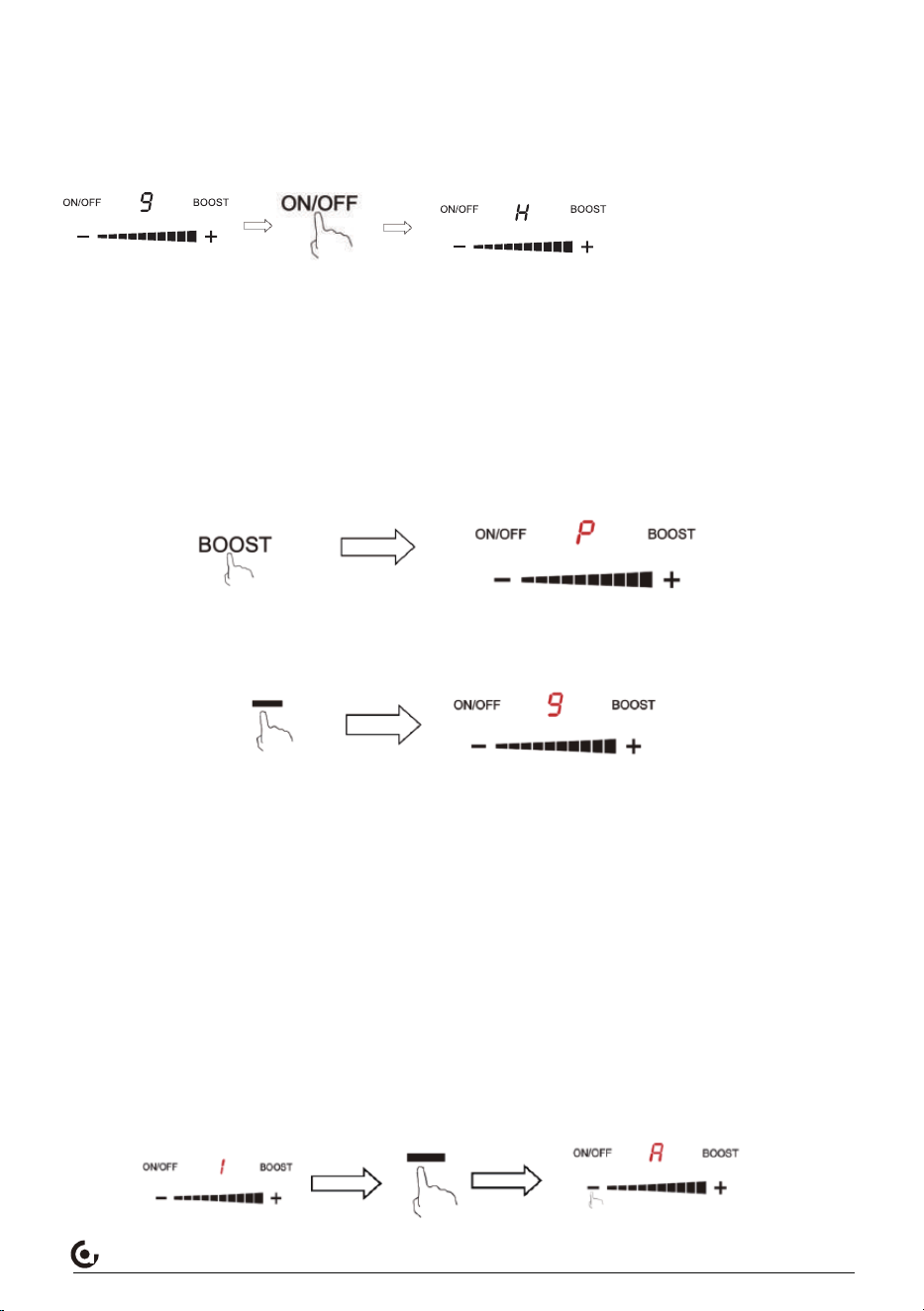
Under working status, press ON/OF button of selected cooking zone , the selected zone
would stop heating.
Beware of hot surfaces
When the surface temperature exceeds 55°C/131℉ an "H" will be displayed indicating that
the cooking zone is too hot to touch.It will disappear when the surface has cooled down to a
safe temperature. It can also be used as an energy saving function if you want to heat further
pans, use the hotplate that is still hot.
BOOST function
During the working, once you press the button Boost, the working power would change to
highest
When the unit works with BOOST status, press - button, the working power would revert to
level 9; if you don’t do any operation, the working power also will revert to level 9 automati-
cally after 10 minutes .
Warm Function
To keep food warm, you could use the left front zone (zone 4) or left rear zone (zone 5) .
During the working, adjust the working level to 1 first, then press - button, the display will
show A representing the unit works with warm mode.
Melt Function
This function could be used on the right rear zone(zone 1) or right front zone(zone 3). During
the working, adjust the working level to 1 first, then press - button, the display will show A
representing the unit works with melt mode. This function could defrost the food.
Simmer Function
This function could be used on the middle zone(zone 2) . During the working, adjust the
working level to 1 first, then press - button, the display will show A representing the unit
works with simmer mode.
10
www.iamzchef.com Email: [email protected] Whatsapp:+1(838)910 8317 Facebook: amzchefappliance
Timer Function
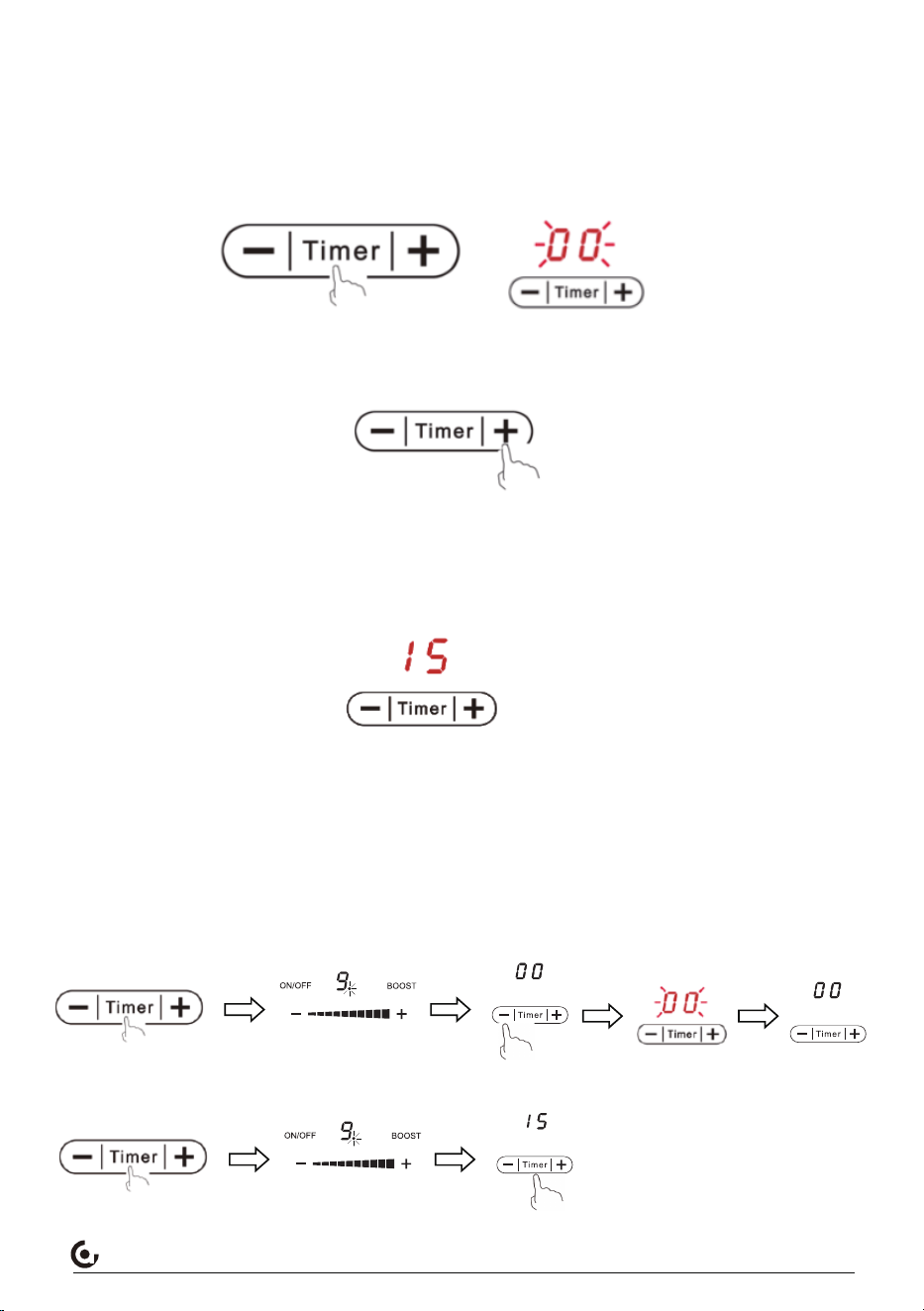
You can program a cooking time between 1 and 99 minutes after setting the power.
1.Press the Timer button
-The corresponding indicator light of selected working zone flashes
- ”00” (default time) appears in the display
2. Set the desired time using the + and - button .
-Touch +/- button once to increase/decrease the time by 1 minute.
-Hold +/- button to increase/decrease the time by 10 minutes.
3.When finished the setting, the count-down of the set time starts. The display indicates the
remaining time. The timer indicator flashes for 5 seconds. As soon as the selected cooking
time of the burner of your choice has elapsed, the burner of relevant cooking zone beeps and
then switches off automatically.
When more burners work together, the time of display showed is the shortest remaining
time among all timers.
4.During cooking with timer mode, you could press Timer button ,and choose the relevant
working zone(corresponding indicator light flashes), then the display would show the
remained working time of selected zone.
5.During cooking, you can cancel the timer at any time.
・Press the timer button first, and choose the relevant working zone(corresponding
indicator light flashes) , then press - or + button to adjust the display time to 00, the
timer indicator flashes for 5 seconds, timer of relevant cooking zone is canceled.
・Hold the Timer button for 3 seconds, all zones’ timer will be canceled.
3S
11
Timer Function
You can program a cooking time between 1 and 99 minutes after setting the power.
1.Press the Timer button
-The corresponding indicator light of selected working zone flashes
- ”00” (default time) appears in the display
2. Set the desired time using the + and - button .
-Touch +/- button once to increase/decrease the time by 1 minute.
-Hold +/- button to increase/decrease the time by 10 minutes.
3.When finished the setting, the count-down of the set time starts. The display indicates the
remaining time. The timer indicator flashes for 5 seconds. As soon as the selected cooking
time of the burner of your choice has elapsed, the burner of relevant cooking zone beeps and
then switches off automatically.
When more burners work together, the time of display showed is the shortest remaining
time among all timers.
4.During cooking with timer mode, you could press Timer button ,and choose the relevant
working zone(corresponding indicator light flashes), then the display would show the
remained working time of selected zone.
5.During cooking, you can cancel the timer at any time.
www.iamzchef.com Email: [email protected] Whatsapp:+1(838)910 8317 Facebook: amzchefappliance
How to use the safety lock funtion
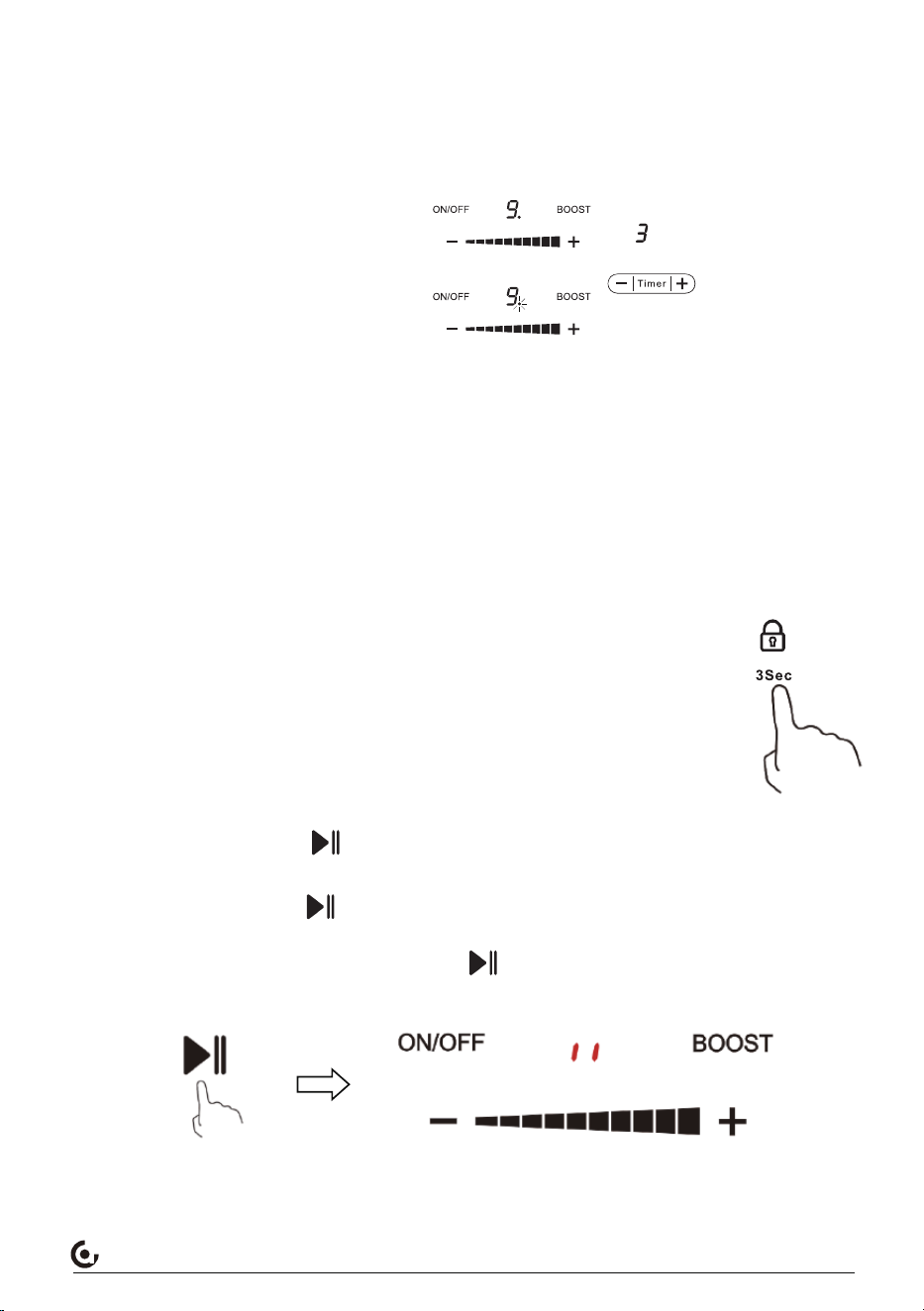
To prevent accidental changes to a selection, especially by children, you can lock the
buttons on the control panel of the burner of your choice(except for the On/Off button).
To lock the button, hold the lock button for 3 seconds, the buzzer beeps
once, the indicator light comes
on. The hob will then no longer react to changes.
To unlock the button, hold the lock button for 3 seconds, the buzzer beeps
once,the indicator light is
off, you can proceed operation as normal
Pause function
1.During cooking, press the " " button,all burners’ heating will pause, the indicator
light comes on,the code ‖ appears in relevant LED display.
2.Under Pause state, press " " button,all burners will resume to work,the indicator light
is off, all burners will revert to previous working status.
3.During Pause status, When you do not press " " button within 10 minutes, the
appliance will switch off automatically.
Setting the timer to turn more than one cooking zone o
Ee.g. zone 1# setting time of 3 minutes, zone 2# setting time of 6 minutes, the timer indica-
tor shows “3”.
NOTE: The flashing red dot next to power level indicator means the timer indicator is
showing time of the heating zone.
If you want to check the set time of other heating zone, touch the heating zone selection
control. The timer will indicate its set time.
(set to 6 minutes)
(set to 3 minutes)
12
www.iamzchef.com Email: [email protected] Whatsapp:+1(838)910 8317 Facebook: amzchefappliance
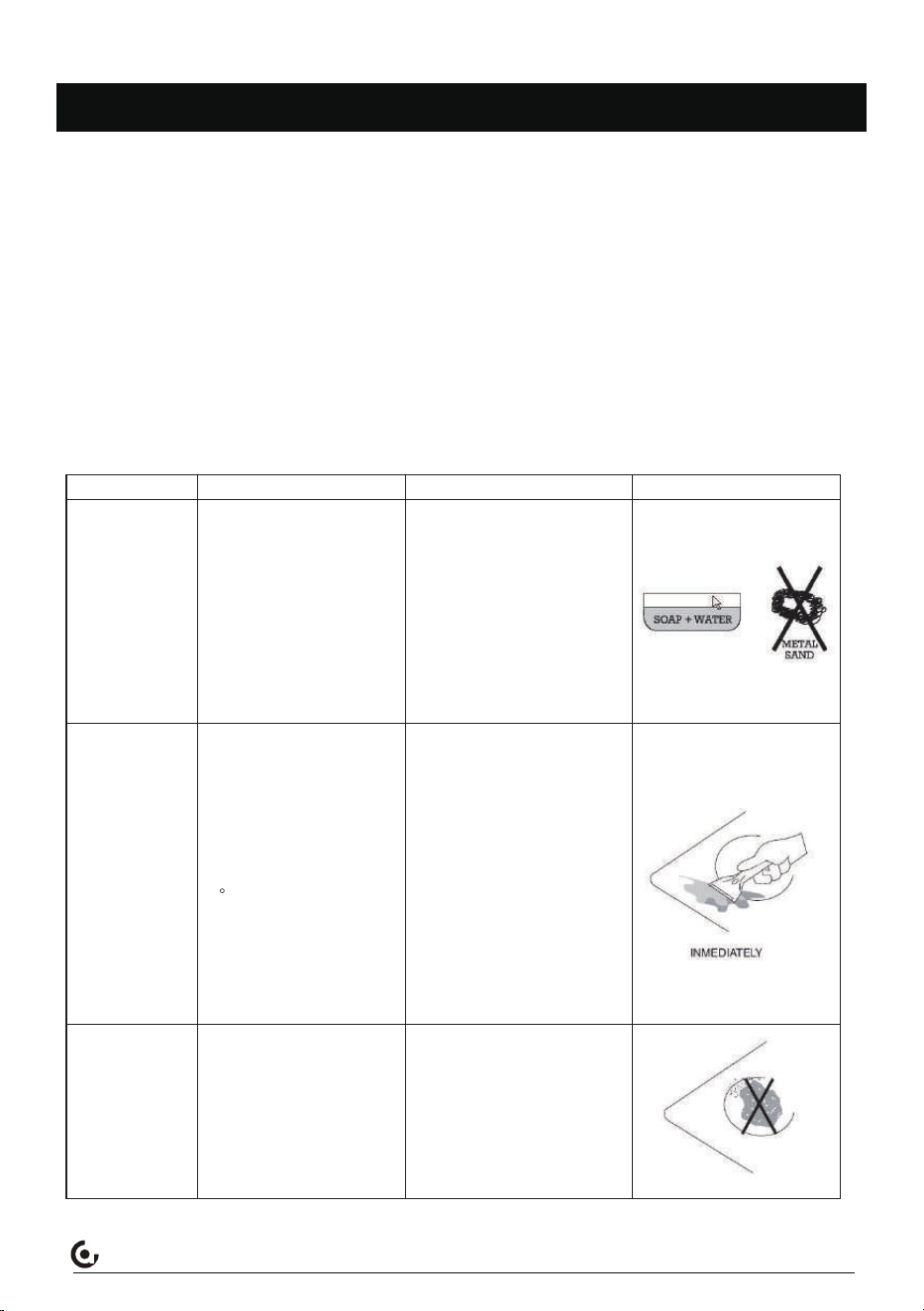
Cleaning and maintenance
●Disconnect plug and wait until the unit is cooled down completely.
●If the pots/pans are used without being cleaned, discoloration or cooked on stains may
occur.
●Do not use benzene, thinner, scrubbing brush or polishing powder to clean the cooktop.
●Do not use any flammable, acid alkaline materials or substances near the cooktop, as this
may reduce the service life of the cooktop and lead to deflagration when the cooktop is
turned on.
●Clean the radiant glass surface frequently, when it is cool. Please use dish washing soapy
water and wet cloth to wipe the surface of cooktop.
●Please Use vacuum cleaner to suck up dust from intake and exhaust vent.
●Never run water over the unit because it may cause a malfunction.
Everyday soiling
on glass
(fingerprnts,
marks, stains left
by food or non-
sugary spillovers
on the glass)
1.Switchh the power to the
cooktop off.
2.Apply a cooktop cleaner while
the glass is still warm (but not
hot!)
3.Rinse and wipe dry with a
clean cloth or paper towel.
4.Switch the power to the
cooktop back on.
What? How? Important!
•When the power to the cooktop is
switched off,there will be no ‘hot
surface’indication but the cooking
zone may still be hot!Take extreme
care.
•Heavy-duty scoures,some nylon
scourers and harsh/abrasive
cleaning agents may scratch the
glass. Always read the label to
ccheck if your cleaner or scourer is
suitable.
•Never leave cleaning residue on
the cooktop: the glass may become
stained.
Boilovers, melts,
and hot sugary
spills on the glass
Remove these immediately with
a fish slice,palette knife or razor
blade scraper suitable for
Induction glass cooktops,but
beware of hot cooking zone
surfaces:
1.Switch the power to the
cooktop off at the wall.
2.Hold the blade or utensil at a
30 angle and scrape the soiling
or spill to a cool area of the
cooktop.
3.Clean the soiling or spill up
with a dish cloth or paper towel.
4.Follow steps 2 to 4 for
Everyday soiling on glass above.
•Remove stains left by melts and
sugary food or spillovers as soon as
possible. If left to cool on the glass,
they may be difficult to remove or
even permanently damage the glass
surface.
•Cut hazard:when the safety cover
is retracted, the blade in a scraper is
razor-sharp. Use with extreme care
and always store safely and out of
reach of chil dren.
Spill overs on the
touch controls
1.Switch the power to the
cooktop off.
2.Soak up the spill
3.Wipe the touch control area
with a clean damp sponge or
cloth.
4.Wipe the area completely dry
with a paper towel.
5.Switch the power to the
cooktop back on.
•The cooktop may beep and turn
itself off, and the touch controls may
not function while there is liquid on
them. Make sure you wipe the touch
control area dry before turning the
cooktop back on.
13
www.iamzchef.com Email: [email protected] Whatsapp:+1(838)910 8317 Facebook: amzchefappliance
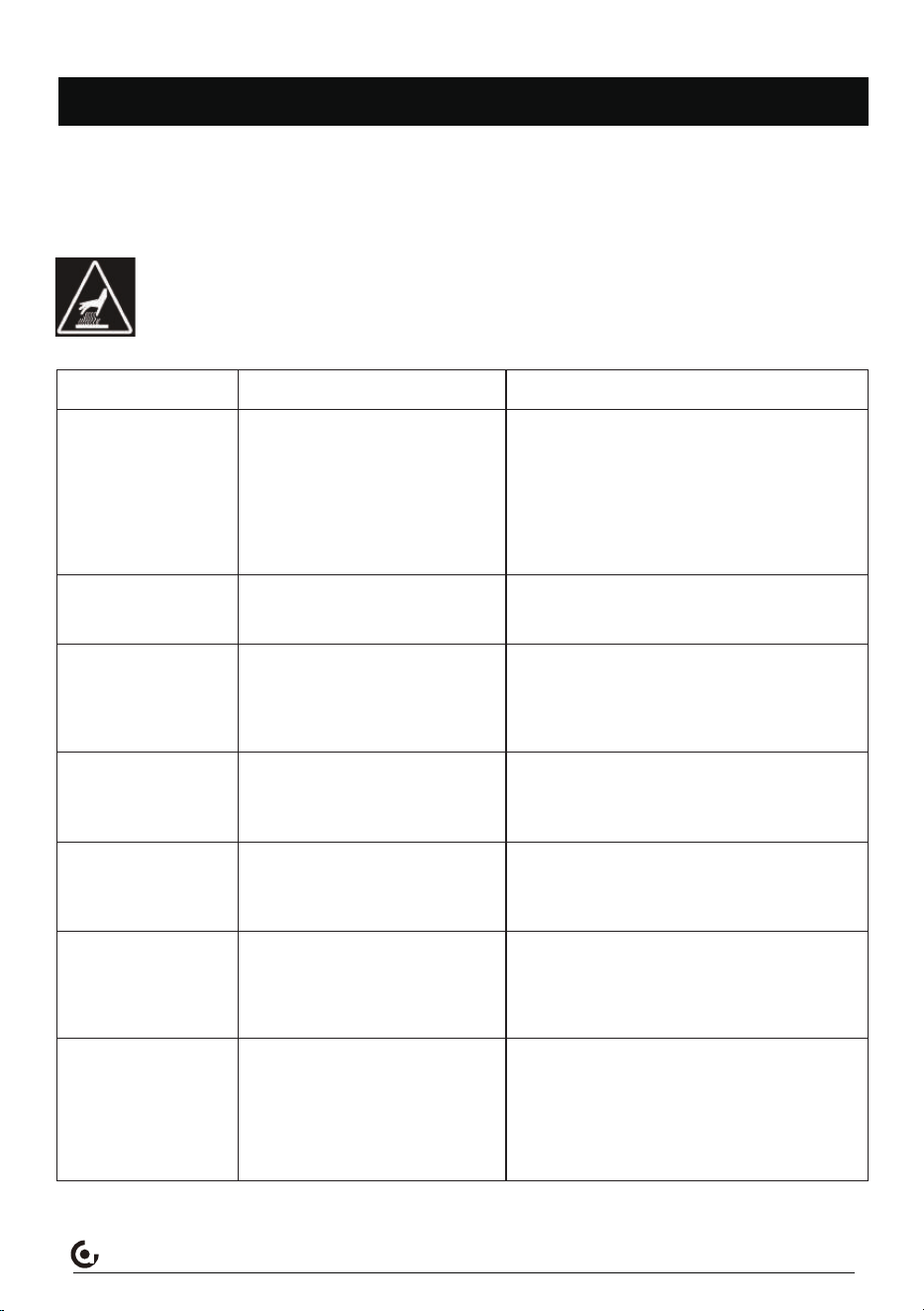
Trouble Shooting
If you encounter a problem, it often will merely be something minor. Before you call custom-
er service, review the charts on the following pages first and you may not to call for service. If
an error occurs in the control operation, a fault code will flash in the display .Record the error
code and call for service.
CAUTION! Repairs should only be done by an authorized servicer. Improper
repair of your appliance may result in risk of serious physical injury or
Problem Possible causes What to do
The hob cannot be
turned on.
The touch controls
are unresporalve.
The touch controls
are difficult to
operate.
The glass is being
stratched.
Some pans make
cracking or clicking
noises.
This may be caused by the
construction of your cookware
(layers of different metals
vibrating differently).
Make sure the touch control area is
dry and use the ball of your finger
when touching the controls.
The controls are locked.
There may be a slight film of
water over the controls or you
may be using the tip of your
finger when touching the
controls.
Unlock the controls, See section
`Using your induction cooktop`for
instructions.
No power.
Make sure the hob is
connedted to the power supply
and that it is switched on.
Check whether there is a power
outage in your home or area. If
you `we chcked everything and the
problem persists, call a qualified
technician.
Rough-edged cookware.
Unsuitable, abrasive scourer
or cleaning procucts being
used.
Use cookware with flat and smooth
bases.See `Choosing the right
cookware`.
See `Care and cleaning`.
This is narmal for cookware and
does not indicate a fault.
The induction hob
makes a low
humming noise when
used on
a high heat setting.
Fan noise coming
from the induction
hob.
This is caused by the
technology of induction
cooking.
This is normal, but the noise
should quieten down or disappear
completely when you decrease the
heat setting.
A cooling fan built into your
induction hob has come on to
prevent the electronics from
overheating. It may continue
to run even after you’ve
umed the induction hob off.
This is narmal and needs no action.
Do not switch the power to the
induction hob off at the wall while
the fan is running.
14
www.iamzchef.com Email: [email protected] Whatsapp:+1(838)910 8317 Facebook: amzchefappliance
Pans do not become
hot and appears in
the display.
The induction hob or
a cooking zone has
turned itself off
unexpectedly, a tone
sounds and an error
code is displayed
(typically alternating
with one or two
digits in the cooking
timer display).
The induction hob cannot
detect the pan because it is
not suitable for induction
cooking.
The induction hob cannot
detect the pan because it is
too small for the cooking zone
or not properly centred on it.
Use cookware suitable for induction
cooking. See section `Choosing the
right cookware`.
Centre the pan and make sure that
its base matches the size of the
cooking zone.
Technical fault.
Please note down the error
letters and numbers, switch
the power to the induction hob
off at the wall, and contact a
qualified technician.
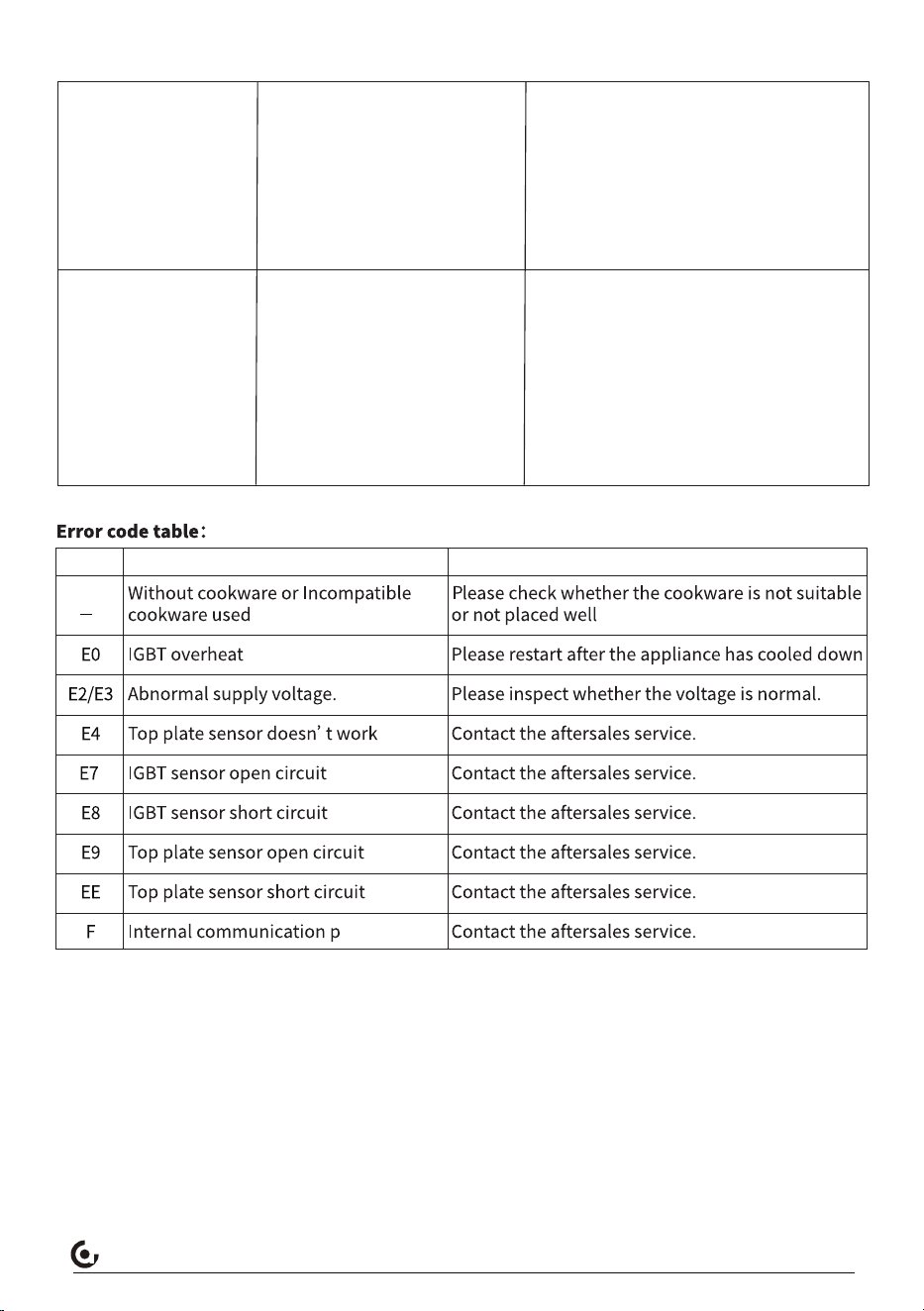
Code Possible causes Measures
*Lightning surge voltage protection: When heating the induction cooktop, use a standard lightning
surge generator and apply a 1.2/50 µ s lightning surge voltage of 1200V. Test in any phase for 10
consecutive minutes. The induction cooktop can heat normally without damaging the circuit.
*Anti interference performance: When the electromagnetic furnace is working, it can withstand the
interference of 1200V fast transient pulse group (IEC6100-4-4-2004 ), and the electromagnetic
furnace can heat normally without crashing, stopping, resetting, and circuit damage.
*Overcurrent protection: When the working current exceeds the set value, the circuit automatically
adjusts and the constant input current is within the safe range. When there is a short circuit in the
main circuit and overcurrent occurs, the fuse is used for fuse protection.
15
U
www.iamzchef.com Email: [email protected] Whatsapp:+1(838)910 8317 Facebook: amzchefappliancewww.iamzchef.com Email: [email protected] Whatsapp:+1(838)910 8317 Facebook: amzchefappliance
16