Operating
Manual
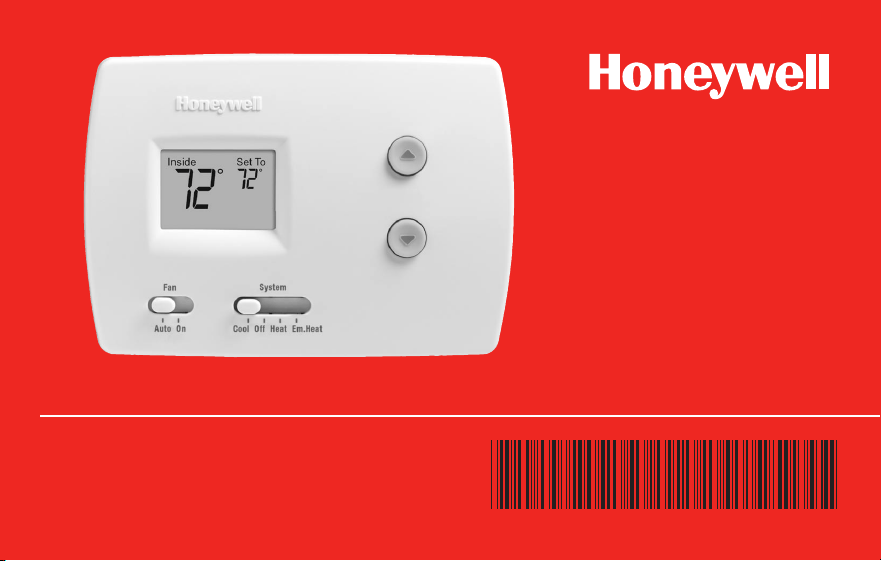
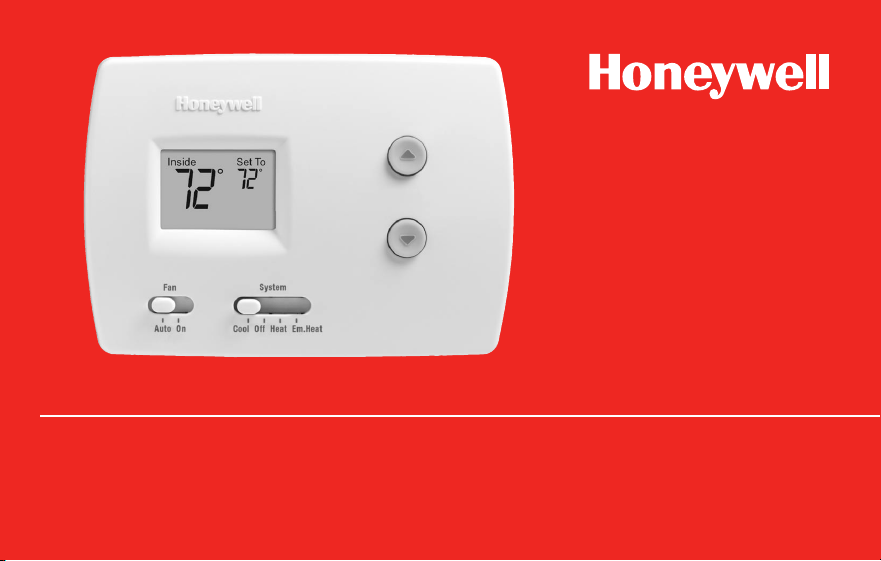
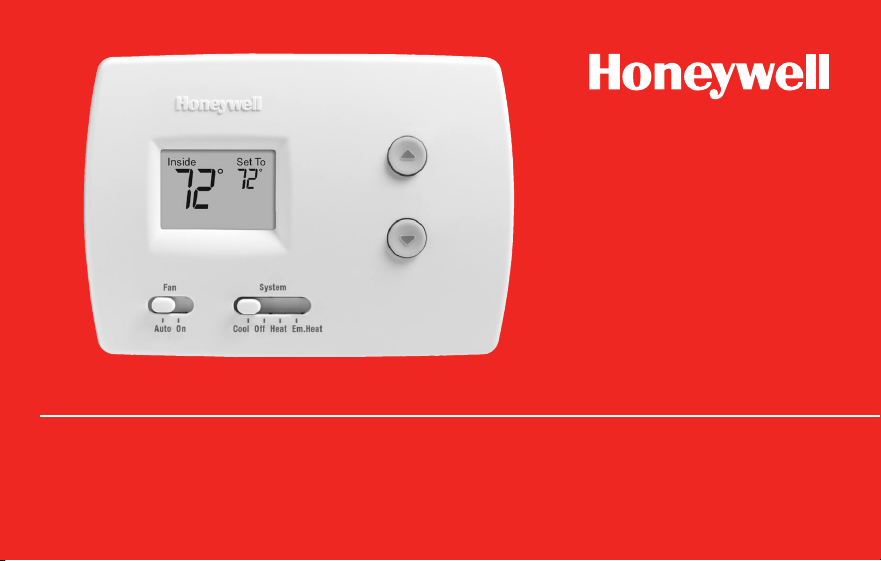
RTH3100C
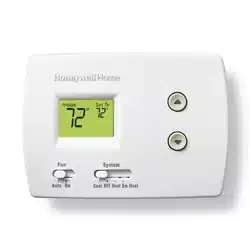
Heat Pump Non-Programmable Digital Thermostat
69-2339EFS-01

Read and save these instructions.
® U.S. Registered Trademark. Patents pending.
Copyright © 2009 Honeywell International Inc. All rights reserved.
Need Help?
For assistance with this product please visit http://DIYthermostats.honeywell.com
or call Honeywell Customer Care toll-free at 1-800-468-1502
RTH3100C
1 69-2339EFS—01
About your new thermostat
Thermostat features ...................................2
Quick reference to controls .......................3
Quick reference to display ........................4
Thermostat Operation
System switch (Heat/Cool) ........................5
Fan switch (Auto/On) .................................6
Temperature controls ................................. 7
Compressor protection ..............................8
Appendices
Battery replacement ..................................9
In case of difficulty...................................10
Customer assistance ............................... 12
Accessories ..............................................12
1-year limited warranty ............................13
Table of contents
Operating Manual
69-2339EFS—01 2
Congratulations on the purchase of your new Honeywell thermostat. It has been
designed to give you many years of reliable service and easy-to-use, push-button
climate control.
Features
• One-touchtemperaturecontrols
• Large,clearbacklitdisplayiseasytoread,eveninthedark
• Switchablefancontrol(autoorcontinuousfan)
• Displaysbothroomtemperatureandtemperaturesetting
• Built-incompressorprotection
About your new thermostat
RTH3100C
3 69-2339EFS—01
About your new thermostat
M29558
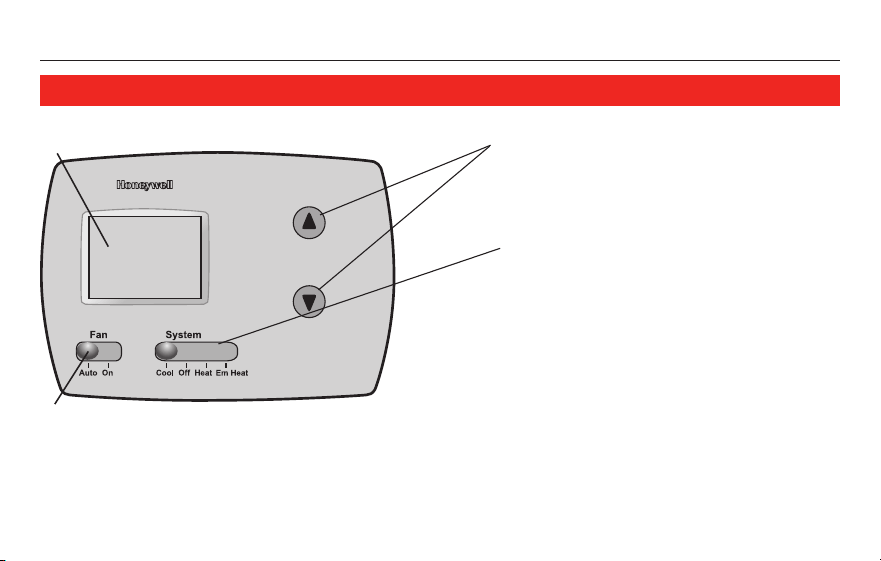
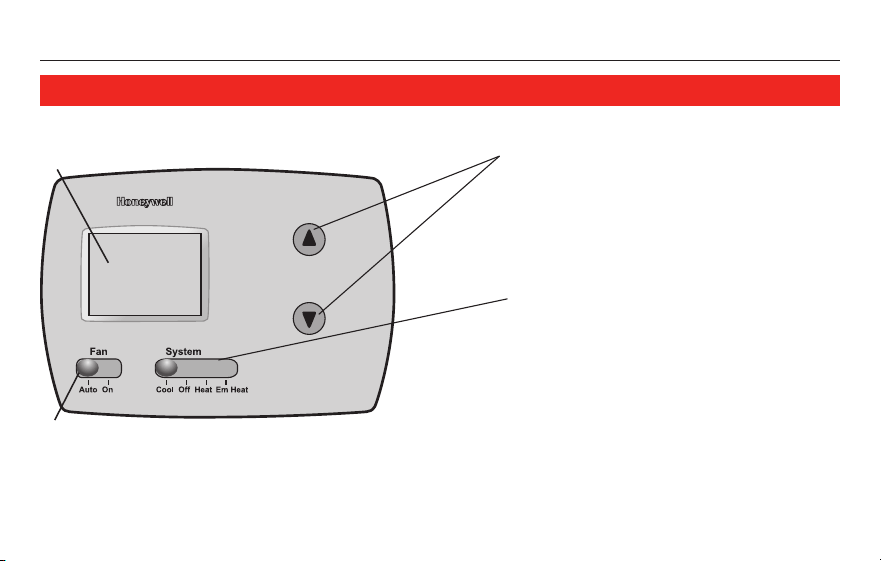
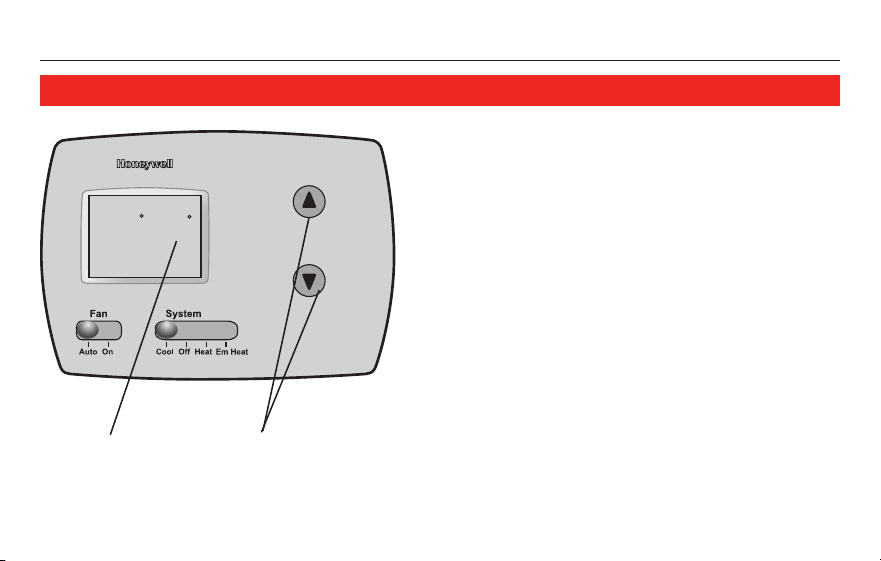
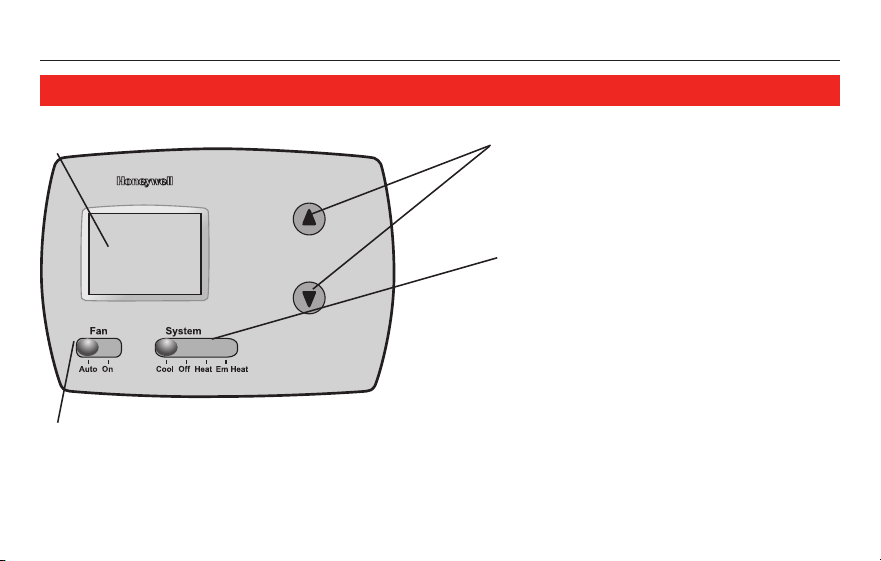
Temperature adjustment
Press to adjust temperature
settings.
Fan Switch (see page 6)
On: Fan runs continuously.
Auto: Fan runs only when
heating or cooling system is on.
Quick reference to controls
System switch (see page 5)
• Cool: Cooling system control.
• Off: All systems off.
• Heat: Heating system control.
• Em Heat: Emergency & Auxiliary
Heat control. Compressor is
locked out.
Digital display screen
Operating Manual
69-2339EFS—01 4
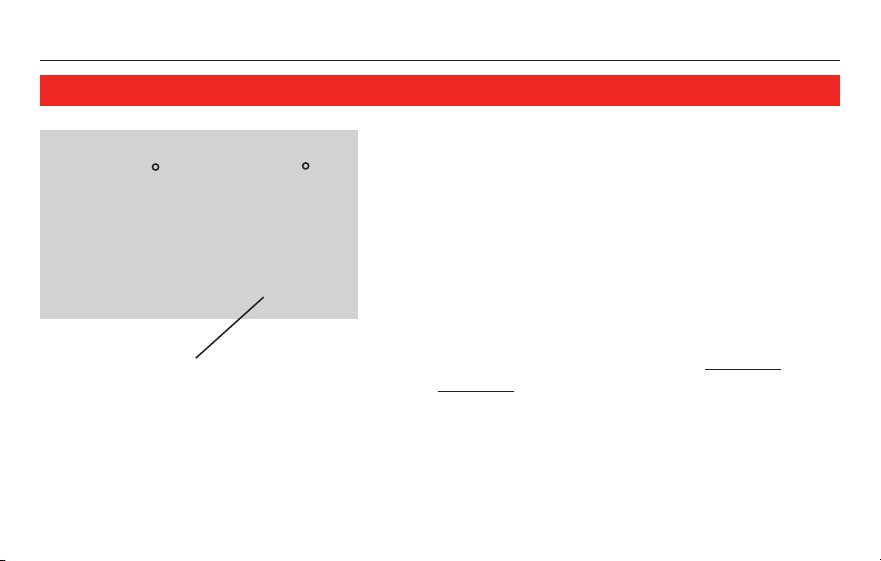
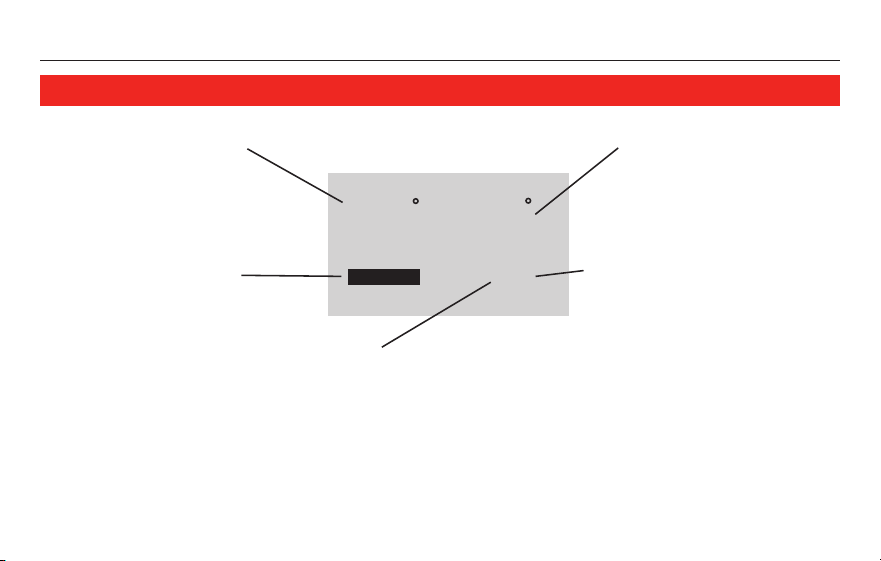
Heat On
Set ToInside
75
75
Replace Batt
M29559
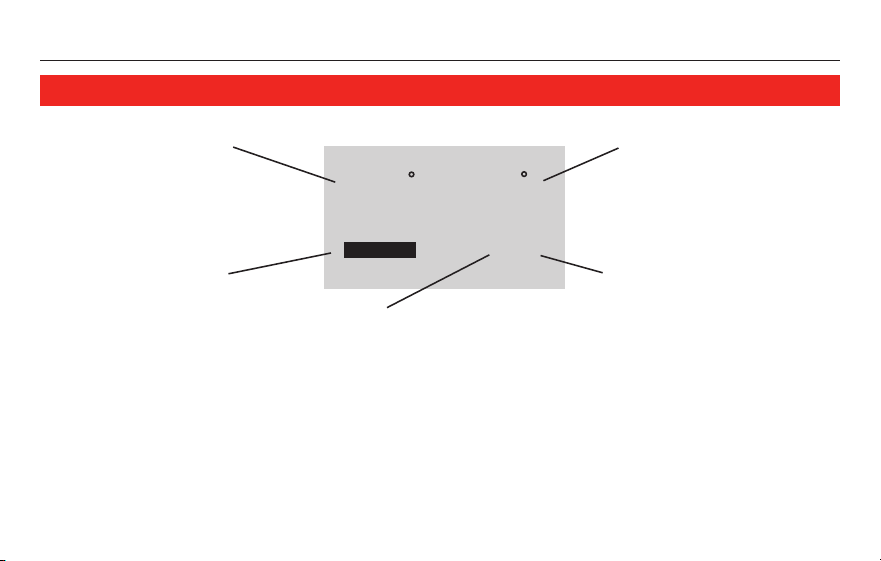
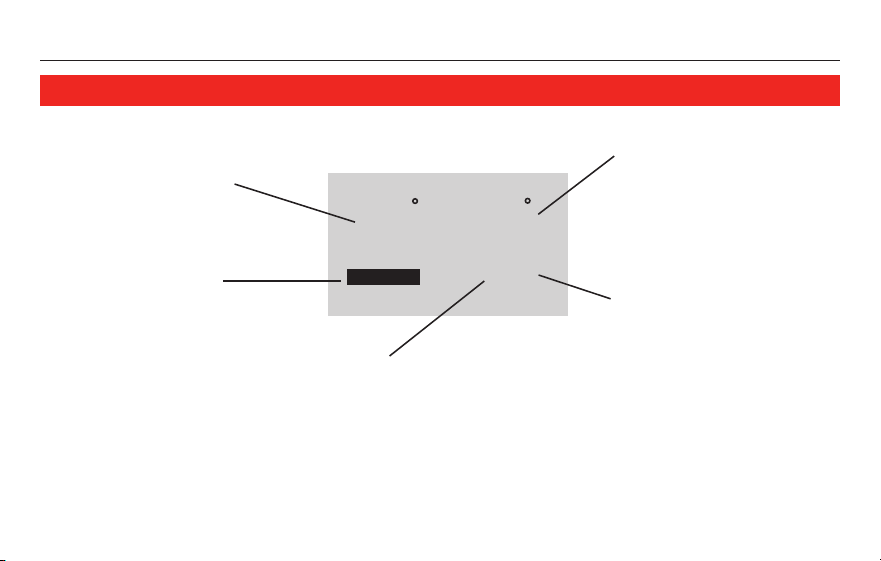
System Status
•Cool On: Cooling system is on.
•Heat On: Heating system is on.
•Em: Emergency heat is on.
•Aux: Auxiliary heat is on.
Quick reference to display screen
Current inside temperature
Temperature setting
If flashing, compressor
protection is engaged
(see page 8).
Low battery warning
RTH3100C
5 69-2339EFS—01
M29558
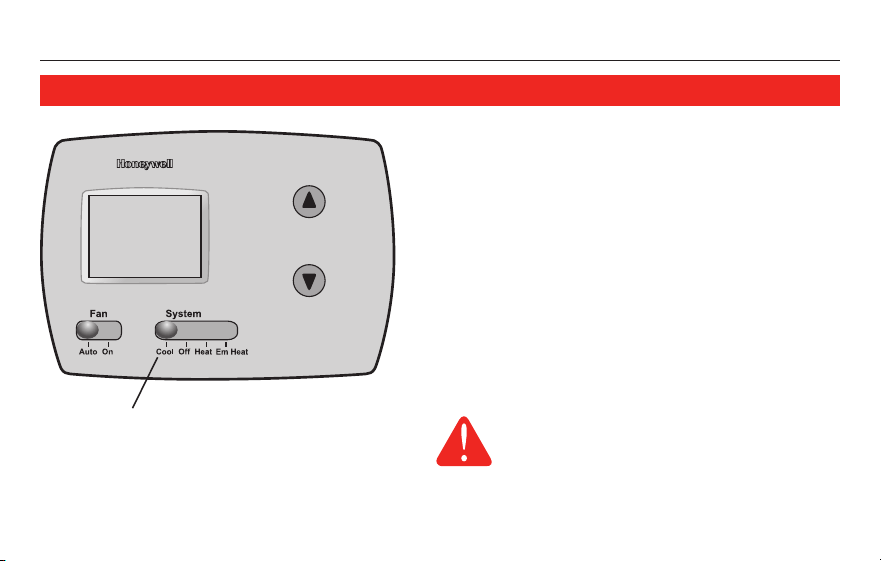
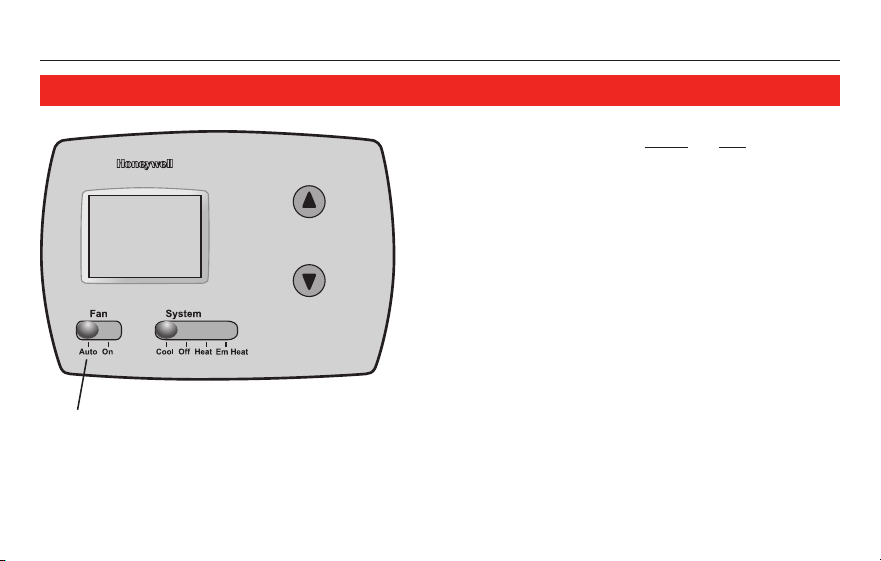
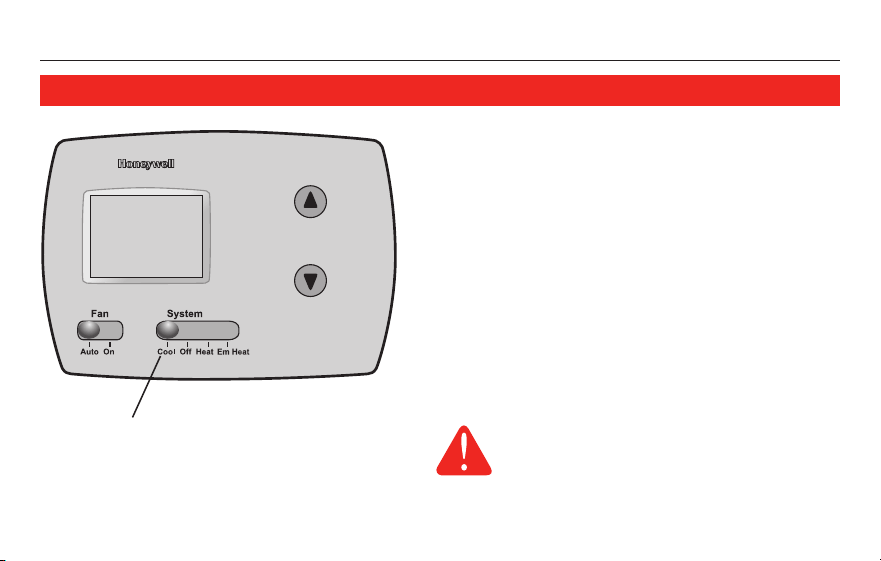
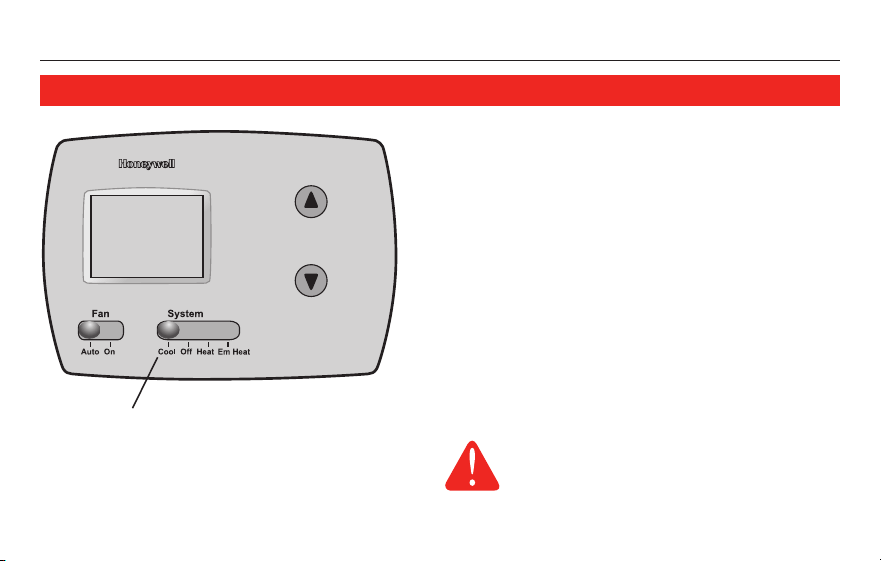
The SYSTEM switch can be set to control
your heating or cooling system, depending
on the season.
• Cool: Cooling system control.
• Off: All systems are off.
• Heat: Heating system control.
• Em Heat: Emergency & Auxiliary Heat
control. Compressor is locked out.
System switch
Set SYSTEM switch to control the
heating or cooling system.
CAUTION: EQUIPMENT DAMAGE
HAZARD. Do not operate cooling
system when outdoor temperature
is below 50°F (10°C).
Operating Manual
69-2339EFS—01 6
M29558
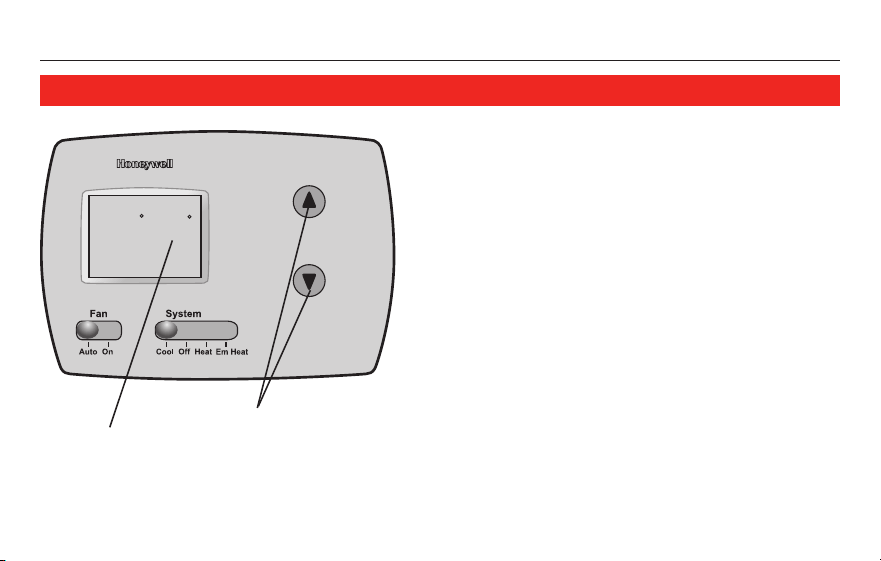
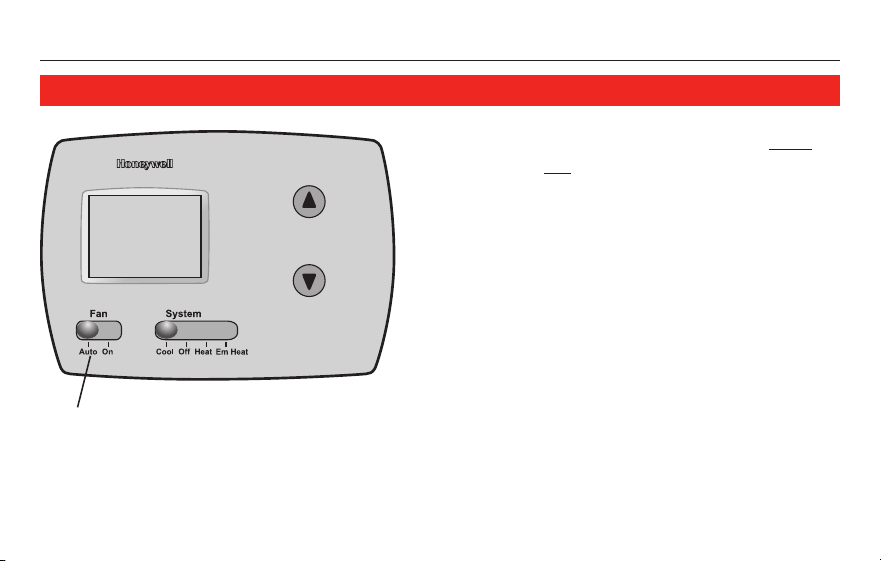
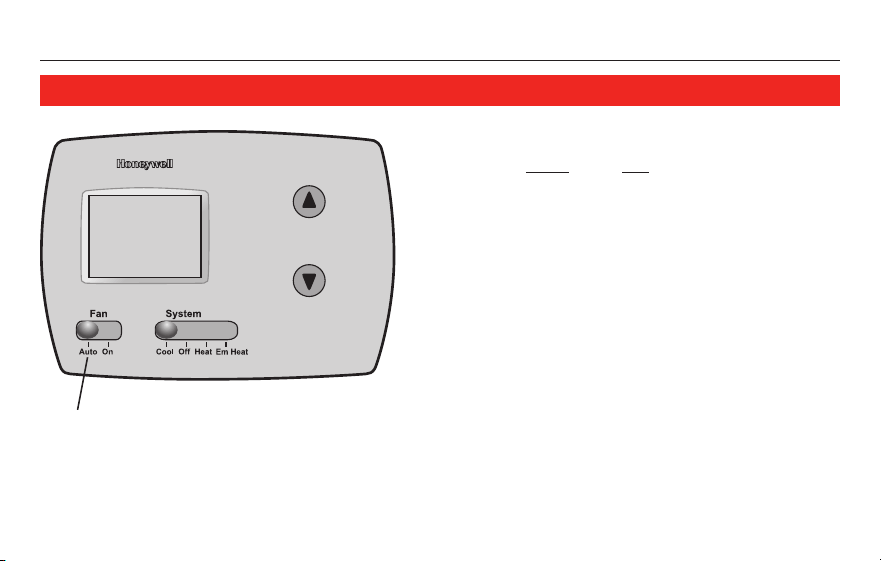
Fan switch
Set the FAN switch to Auto or On.
In “Auto” mode (the most commonly used
setting), the fan runs only when the heat-
ing or cooling system is on.
If set to “On,” the fan runs continuously.
Set FAN switch to choose whether the fan
runs continuously or only as needed.
RTH3100C
7 69-2339EFS—01
About your new thermostat
M29560
Cool On
Set To
78
Inside
75
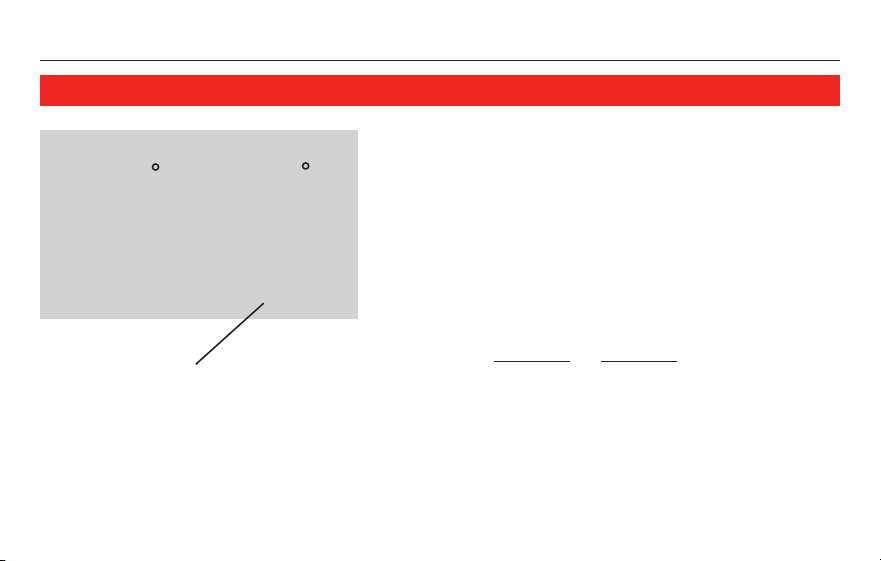
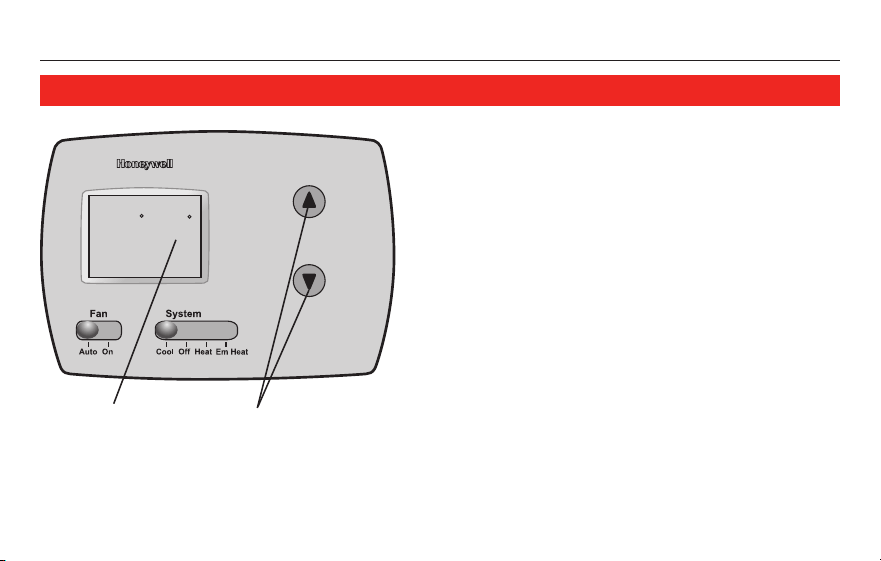
Temperature controls
Press the temperature adjustment
buttons until the temperature you want
is displayed in the upper right portion of
the screen.
Note: Make sure the SYSTEM switch is set
to the system you want to control (Heat or
Cool).
Desired
temperature
Temperature
adjustment buttons
Operating Manual
69-2339EFS—01 8
Cool On
Set ToInside
75
75
M29561
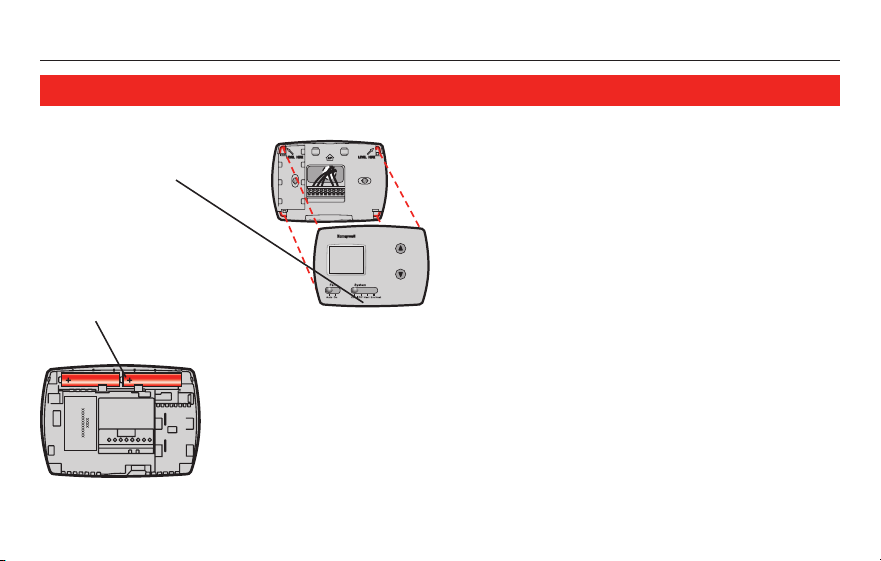
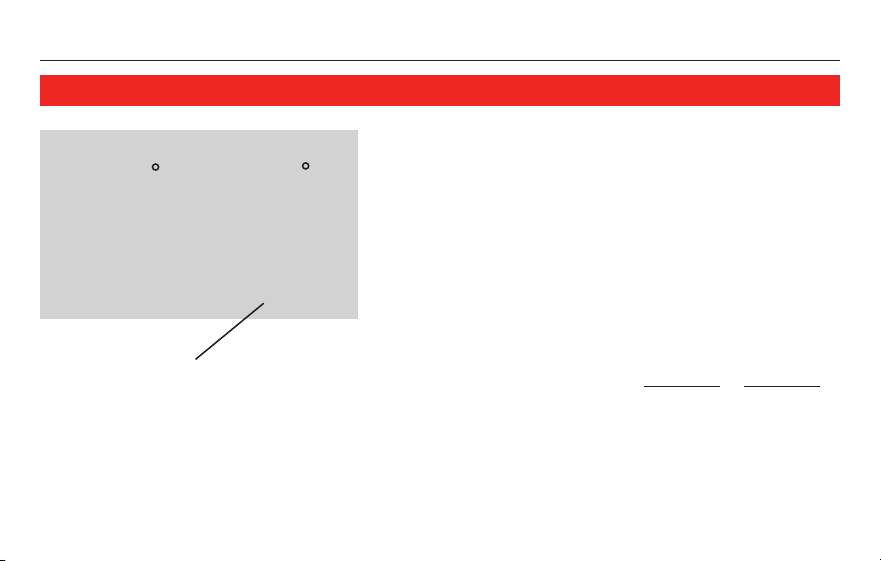
This feature helps prevent damage to the
compressor in your air conditioning or heat
pump system.
Damage can occur if the compressor is
restarted too soon after shutdown. This fea-
ture forces the compressor to wait for a few
minutes before restarting.
During the wait time, the display will flash the
message Cool On or Heat On. When the safe
wait time has elapsed, the message stops
flashing and the compressor turns on.
Message flashes until safe restart
time has elapsed.
Built-in compressor protection
RTH3100C
9 69-2339EFS—01
M29563
M29562
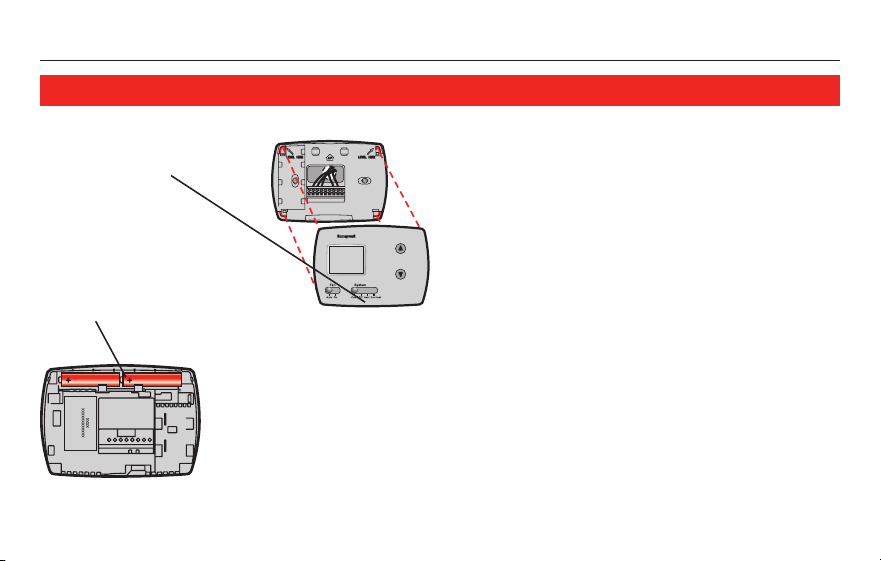
Batteries are optional if your ther-
mostat was wired for AC power
when installed. Install fresh batteries
immediately when the REPLACE BATT
warning begins flashing.
Even if the warning does not
appear, you should replace batteries
once a year, or before leaving home
for more than a month.
Batteries provide backup power
to the display during power inter-
ruptions. All settings are perma-
nently stored in memory, and do not
require battery power.
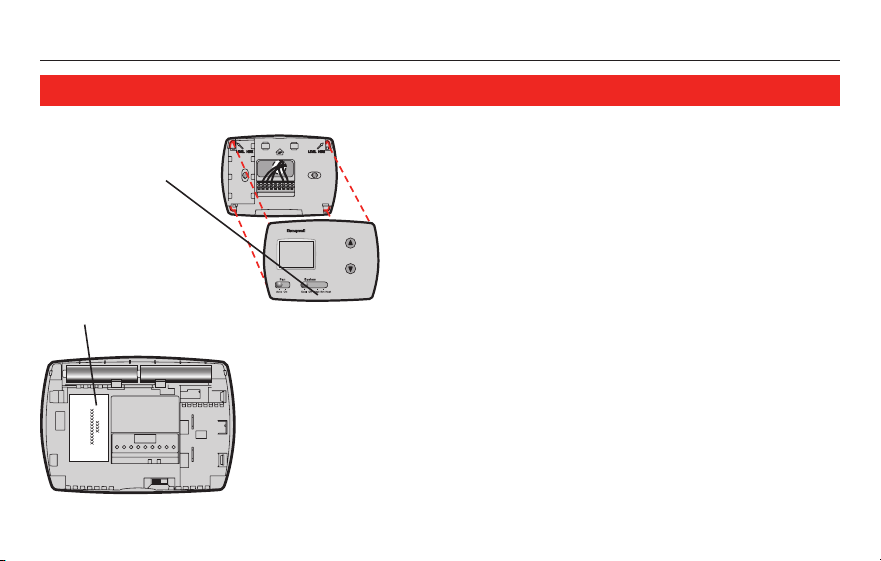
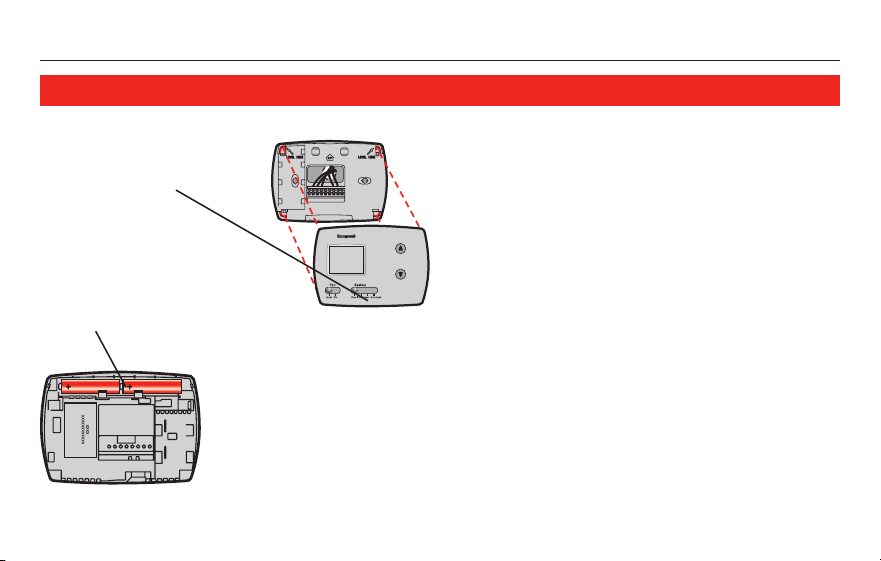
Pull at bottom to
remove thermostat
from wallplate.
Turn thermostat over,
insert fresh AA alkaline
batteries, then reinstall
thermostat.
Battery replacement
Operating Manual
69-2339EFS—01 10
If you have difficulty with your thermostat, please try the following suggestions.
Most problems can be corrected quickly and easily.
Display is blank • Checkcircuitbreakerandresetifnecessary.
• Makesurepowerswitchatheating&coolingsystemison.
• Makesurefurnacedoorisclosedsecurely.
• MakesurefreshAAalkalinebatteriesarecorrectlyinstalled(seepage9).
Heating or
cooling system
does not respond
• SetsystemswitchtoHeat (see page 5). Make sure the temperature is
set higher than the Inside temperature.
• SetsystemswitchtoCool (see page 5). Make sure the temperature is
set lower than the Inside temperature.
• Checkcircuitbreakerandresetifnecessary.
• Makesurepowerswitchatheating&coolingsystemison.
• Makesurefurnacedoorisclosedsecurely.
• Wait5minutesforthesystemtorespond.
In case of difficulty
RTH3100C
11 69-2339EFS—01
Temperature
settings do not
change
Make sure heating and cooling temperatures are set to acceptable ranges:
• Heat:40°to90°F(4.5°to32°C).
• Cool:50°to99°F(10°to37°C).
“Cool On” or
“Heat On” is
flashing
• Compressor protection feature is engaged. Wait 5 minutes for the system
to restart safely, without damage to the compressor (see page 8).
“Heat On” is not
displayed
• Set the System switch to Heat, and set the temperature level above the
current room temperature (see page 7).
“Cool On” is not
displayed
• Set the System switch to Cool, and set the temperature level below the
current room temperature (see page 7).
In case of difficulty
Operating Manual
69-2339EFS—01 12
M29564
M29562
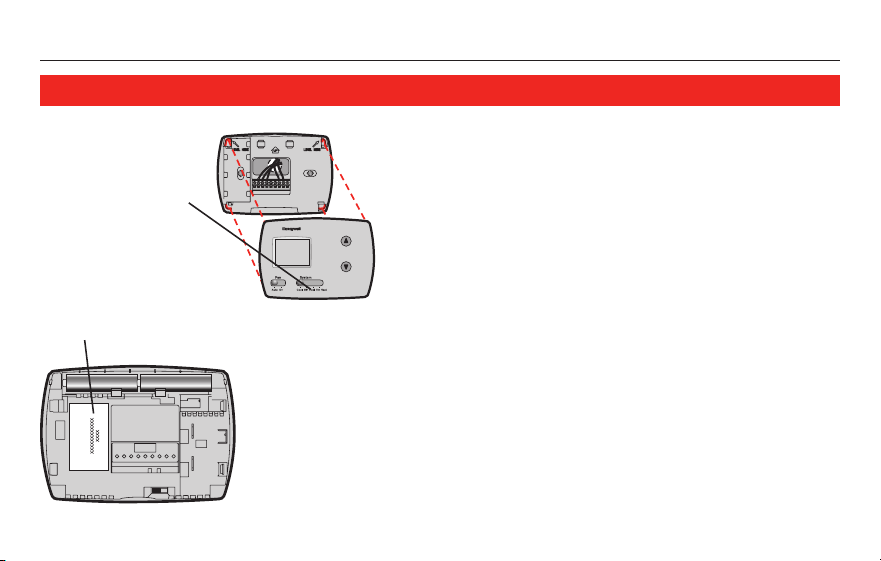
For assistance with this product, please visit
http://DIYthermostats.honeywell.com.
Or call Honeywell Customer Care toll-free at
1-800-468-1502.
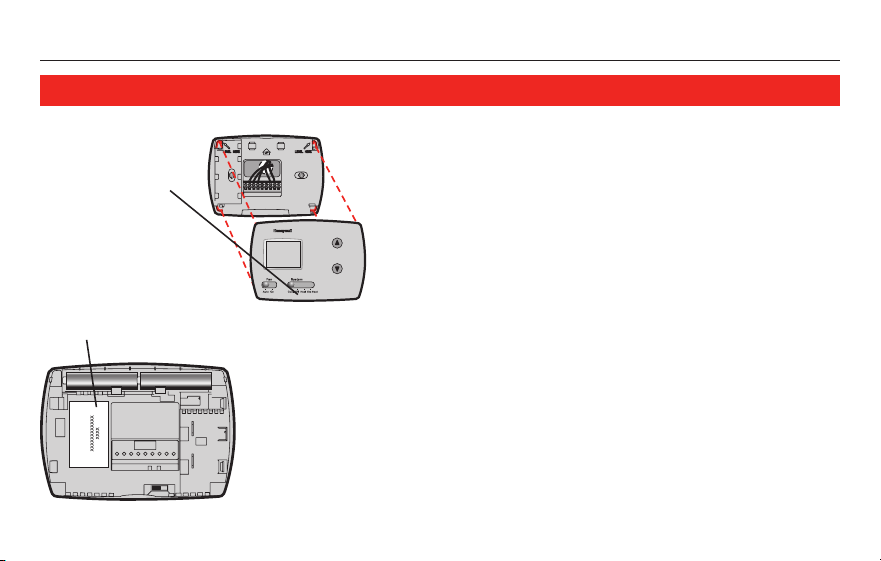
To save time, please note your model number
and date code before calling.
Accessories/replacement parts
To order, please call Honeywell Customer
Care toll-free at 1-800-468-1502.
Cover plate* ...................Part No. 50002883-001
*Use to cover marks left by old thermostats.
Customer assistance
Turn thermostat over
to find model number
and date code.
Pull at bottom to
remove thermostat
from wallplate.
RTH3100C
13 69-2339EFS—01
Honeywell warrants this product, excluding battery, to be free from defects in the workmanship or materials, under normal use
and service, for a period of one (1) year from the date of purchase by the consumer. If at any time during the warranty period the
product is determined to be defective or malfunctions, Honeywell shall repair or replace it (at Honeywell’s option).
If the product is defective,
(i) return it, with a bill of sale or other dated proof of purchase, to the place from which you purchased it; or
(ii) call Honeywell Customer Care at 1-800-468-1502. Customer Care will make the determination whether the product should be
returned to the following address: Honeywell Return Goods, Dock 4 MN10-3860, 1885 Douglas Dr. N., Golden Valley, MN 55422,
or whether a replacement product can be sent to you.
This warranty does not cover removal or reinstallation costs. This warranty shall not apply if it is shown by Honeywell that the
defect or malfunction was caused by damage which occurred while the product was in the possession of a consumer.
Honeywell’ssoleresponsibilityshallbetorepairorreplacetheproductwithinthetermsstatedabove.HONEYWELLSHALL
NOTBELIABLEFORANYLOSSORDAMAGEOFANYKIND,INCLUDINGANYINCIDENTALORCONSEQUENTIALDAMAGES
RESULTING,DIRECTLYORINDIRECTLY,FROMANYBREACHOFANYWARRANTY,EXPRESSORIMPLIED,ORANYOTHER
FAILUREOFTHISPRODUCT.Somestatesdonotallowtheexclusionorlimitationofincidentalorconsequentialdamages,so
this limitation may not apply to you.
THISWARRANTYISTHEONLYEXPRESSWARRANTYHONEYWELLMAKESONTHISPRODUCT.THEDURATIONOFANY
IMPLIEDWARRANTIES,INCLUDINGTHEWARRANTIESOFMERCHANTABILITYANDFITNESSFORAPARTICULARPURPOSE,
ISHEREBYLIMITEDTOTHEONE-YEARDURATIONOFTHISWARRANTY.Somestatesdonotallowlimitationsonhowlongan
implied warranty lasts, so the above limitation may not apply to you.
This warranty gives you specific legal rights, and you may have other rights which vary from state to state.
If you have any questions concerning this warranty, please write Honeywell Customer Relations, 1985 Douglas Dr., Golden
Valley,MN55422orcall1-800-468-1502.InCanada,writeRetailProductsON15-02H,HoneywellLimited/HoneywellLimitée,35
Dynamic Drive, Toronto, Ontario M1V4Z9.
1-year limited warranty

Honeywell International Inc.
1985 Douglas Drive North
Golden Valley, MN 55422
http://DIYthermostats.honeywell.com
HoneywellLimited-HoneywellLimitée
35 Dynamic Drive
Toronto, Ontario M1V 4Z9
® U.S. Registered Trademark.
Copyright © 2009 Honeywell International Inc.
69-2339EFS—01 M.S. 07-09
Automation and Control Solutions
Printed in U.S.A. on recycled
paper containing at least 10%
post-consumer paper fibers.
Mode
d’emploi
RTH3100C
Thermostatnumériquenonprogrammable-thermopompe
Lire et conserver ces instructions.
Besoin d’aide?
Pour obtenir de l’assistance au sujet de ce produit, consulter le
http://DIYthermostats.honeywell.com outéléphonersansfraisauCentrede
service à la clientèle de Honeywell au 1 800 468-1502
®MarquedéposéeauxÉ.-U.Brevetseninstance.
©2009HoneywellInternationalInc.Tousdroitsréservés.
RTH3100C
1 69-2339EFS—01
À propos du thermostat
Caractéristiquesduthermostat ................2
Consultation rapide des commandes ....... 3
Consultationrapidedel’écran .................. 4
Fonctionnement
Sélectionnerleréglagedu
système (Heat/Cool) ..................................5
Sélectionnerleréglagede
la soufflante (Auto/On) ...............................6
Réglagedelatempérature ........................7
Protectionducompresseurintégrée ........8
Appendices
Remplacement des piles ...........................9
Encasdedifficulté ..................................10
Services à la clientèle ...............................12
Accessoires ..............................................12
Garantielimitée ........................................13
Table des matières
Mode d’emploi
69-2339EFS—01 2
Félicitationspourl’achatdevotrenouveauthermostatHoneywell.Ilaétéconçu
pourvousoffrirdenombreusesannéesdefonctionnementfiableetderéglage
d’ambiance au moyen de simple commandes à boutons-poussoirs.
Caractéristiques
• Commandesdetempératureàtoucheunique
• Grandécrantransparentetrétroéclairé,facileàliremêmedanslenoir
• Réglagedeventilateur(fonctionnementautomatiqueoucontinu)
• Afficheàlafoislatempératureambianteetlatempératureprogrammée
• Protectionducompresseurintégrée
À propos du thermostat
RTH3100C
3 69-2339EFS—01
M29558
Consultation rapide des commandes
Touches de température
Appuyerpourréglerlatempérature.
Commutateur Fan (voir page 6)
On : Leventilateurfonctionnesansinterruption.
Auto :Leventilateurfonctionneseulementquand
le système est en marche.
Commutateur System (voir page 5)
• Cool :Réglagedusystème
de climatisation.
• Off : Tous les systèmes sont
arrêtés.
• Heat :Réglagedusystème
de chauffage.
• Em Heat :Réglageduchauffage
auxiliaireetd’urgence.Le
compresseurestverrouillé.
Écran d’affichage numérique
Mode d’emploi
69-2339EFS—01 4
Heat On
Set ToInside
75
75
Replace Batt
M29559
État du système
• Cool On : Système de climatisation en marche.
•Heat On : Système de chauffage en marche.
•Em : Chauffage d’urgence en marche.
•Aux : Chauffage auxiliaire en marche.
Température intérieure actuelle
Réglage de température
Un clignotement indique
que la protection du
compresseur est activée
(voir page 8).
Indicateur de
faiblesse des piles
Consultation rapide de l’écran
RTH3100C
5 69-2339EFS—01
M29558
Commutateur du système
LecommutateurSYSTEMpeutêtreconfiguré
pourréglervotresystèmedechauffageoude
climatisation, selon la saison.
• Cool :Réglagedusystèmede
climatisation.
• Off :Touslessystèmessontarrêtés.
• Heat :Réglagedusystèmedechauffage.
• Em Heat :Réglageduchauffageauxiliaire
etd’urgence.Lecompresseurest
verrouillé.
Positionnement du commutateur
SYSTEMpourréglerlechauffageou
la climatisation.
MISE EN GARDE : RISQUE
D’ENDOMMAGEMENT DU
MATÉRIEL. No inicie el sistema de
enfriamiento cuando la temperatura
exterior sea inferior a los 50 °F (10 °C).
Mode d’emploi
69-2339EFS—01 6
M29558
Commutateur de ventilateur
Placer le commutateur FAN à Auto
ou à On.
En mode « Auto » (mode usuel), le
ventilateur fonctionne seulement
quand le système de chauffage ou
de climatisation est en marche.
À la position « On », le ventilateur
fonctionne sans interruption.
Pour choisir de faire fonctionner le FAN
continuellement ou au besoin.
RTH3100C
7 69-2339EFS—01
M29560
Cool On
Set To
78
Inside
75
Commandes de température
Appuyersurlestouchesderéglagedela
températurejusqu’àcequelatempérature
désirées’affichedanslapartiesupérieure
droitedel’écran.
Remarque : S’assurer que le commutateur
SYSTEM estréglésurlesystèmequevous
souhaitez (chauffage ou climatisation).
Température
désirée
Touchesderéglage
delatempérature
Mode d’emploi
69-2339EFS—01 8
Cool On
Set ToInside
75
75
M29561
Cettefonctionpermetdeprévenirles
dommages au compresseur du système de
climatisation ou de la thermopompe.
Des dommages peuvent survenir si on
redémarrelecompresseurtroprapidement
aprèsuneinterruption.Lafonction
contraint le compresseur à attendre
quelquesminutesavantderedémarrer.
Durant l’attente, le message Cool On ou
Heat Onclignoteraàl’écran.Lorsquele
tempsdeprotectionseraécoulé,le
message cessera de clignoter et le
compresseurdémarrera.
Lemessageclignotejusqu’àce
quevouspuissiezredémarrerle
systèmeentoutesécurité.
Protection du compresseur intégrée
RTH3100C
9 69-2339EFS—01
M29563
M29562
Remplacement des piles
L’emploidespilesestoptionnelsi
lethermostatestbranchésurle
courant alternatif. Installer des piles
neuves aussitôt que l’avertissement
REPLACE BATT se met à clignoter.
Mêmesil’avertissementn’apparaît
pas, il faut remplacer les piles une fois
parannée,ouavantuneabsencede
plus d’un mois.
Lespilesalimententl’écranlorsdes
pannesdecourant.Touslesréglages
sontintégrésdefaçonpermanente
àlamémoire,ilsnenécessitentpas
d’alimentation par les piles.
Tirer le thermostat
par le bas pour
ledétacherdela
plaque murale.
Retourner le thermo-
stat,insérerlespiles
alcalines AA neuves,
puisréinstallerle
thermostat.
Mode d’emploi
69-2339EFS—01 10
En cas de problème
Sivouséprouvezdesdifficultés,nousvousproposonsd’essayerlessolutions
suivantes.Laplupartdesproblèmespeuventêtrecorrigésrapidementetfacilement.
L’écran est vide • Vérifierledisjoncteuretréinitialisersinécessaire.
• S’assurerquel’interrupteurd’alimentationdusystèmedechauffageet
de climatisation est en marche.
• S’assurerquelaportedusystèmedechauffageestbienfermée.
• S’assurerquelespilesalcalinesAAontétébieninstallées(voirpage9).
Le système de
chauffage ou de
climatisation ne
fonctionne pas
• RéglerlecommutateurdusystèmeàHeat (voir page 5). S’assurer que
latempératurerégléeestsupérieureàlatempératureintérieure.
• RéglerlecommutateurdusystèmeàCool (voir page 5). S’assurer que
latempératurerégléeestinférieureàlatempératureintérieure.
• Vérifierledisjoncteuretréinitialisersinécessaire.
• S’assurerquel’interrupteurd’alimentationdusystèmedechauffageet
de climatisation est en marche.
• S’assurerquelaportedusystèmedechauffageestbienfermée.
• Attendre5minutesquelesystèmesemetteenmarche.
RTH3100C
11 69-2339EFS—01
En cas de problème
Les réglages de
la température
ne changent pas
S’assurerqueleréglagedestempératuresdechauffageetdeclimatisationest
acceptable :
• Heat:4,5°à32°C(40°à90°F).
• Cool:10°à37°C(50°à99°F).
Les mentions
« Cool On » ou
« Heat On »
clignotent
• Lafonctiondeprotectionducompresseurestactivée.Attendre5minutes
quelesystèmeredémarreentoutesécurité,sansendommagerle
compresseur (voir page 8).
La mention
« Heat On »
n’apparaît pas
• RéglerlecommutateuràHeatet,latempératureau-dessus de la
températureambiante(voirpage7).
La mention
« Cool On »
n’apparaît pas
• RéglerlecommutateuràCoolet,latempératuresouslatempérature
ambiante (voir page 7).
Mode d’emploi
69-2339EFS—01 12
M29564
M29562
Assistance à la clientèle
Regarder au dos
du thermostat
pourconnaîtrele
numérodemodèle
et le code dateur.
Tirer le thermostat
par le bas pour
ledétacherdela
plaque murale.
Pour obtenir de l’aide avec ce produit, veuillez
consulter le site
http://DIYthermostats.honeywell.com.
OutéléphonersansfraisauCentredeserviceà
la clientèle de Honeywell au 1 800 468-1502.
Pourgagnerdutemps,écrirelenumérode
modèle et le code dateur avant d’appeler.
Accessoires/pièces de rechange
Pour commander, adressez-vous au Service à la
clientèle de Honeywell en composant sans frais
le 1 800 468-1502.
Couvercle de plaque* ...... No de pièce 50002883-001
*Sertàmasquerlesmarqueslaisséesparl’ancien
thermostat.
RTH3100C
13 69-2339EFS—01
Garantie limitée d’un an
Honeywellgarantitceproduit,àl’exceptiondespiles,contretoutdéfautdepièceoudemain-d’oeuvre,durantunepérioded’un(1)an
àpartirdeladated’achatsileproduitestutiliséetentretenuconvenablement.Si,àn’importequelmomentdelapériodedegarantie,
leproduitestdéfectueux,Honeywelllerépareraouleremplacera(àsadiscrétion).
Encasdedéfectuositéduproduit,
(i)leretourner,aveclereçud’achatouuneautrepreuved’achatdatée,àl’endroitoùilaétéacheté,ou
(ii)téléphonerauCentredeserviceàlaclientèledeHoneywellau1800468-1502.LeCentredécideraalorss’ilfautretournerle
produit à l’adresse suivante : Honeywell Return Goods, Dock 4 MN10-3860, 1885 Douglas Dr. N., Golden Valley, MN 55422, ou s’il
vous fera parvenir un produit de remplacement.
Cettegarantienecouvrepaslesfraisdedémontageoud’installation.LagarantieseraannuléesiHoneywellprouvequela
défectuositéaétécauséepardesdommagesapparusalorsqueleclientétaitenpossessionduproduit.
Laresponsabilitéd’Honeywellselimiteàlaréparationouauremplacementduproduitselonlestermesénoncés.HONEYWELL
NEPEUTÊTRETENUERESPONSABLEDEPERTEOUDOMMAGEDETOUTESSORTES,INCLUANTLESDOMMAGES
ACCIDENTELSOUCONSÉCUTIFSRÉSULTANT,DIRECTEMENTOUINDIRECTEMENT,DETOUTMANQUEMENTÀN’IMPORTE
QUELLEGARANTIE,EXPRESSEOUIMPLICITE,OUDETOUTEAUTREDÉFAILLANCEDUPRODUIT.CertainsÉtatsouprovinces
nepermettentpasl’exclusionoularestrictiondesdommagesaccidentelsouconsécutifs,cetterestrictionpourraitdoncnepas
s’appliquer.
CETTEGARANTIEESTLASEULEGARANTIEEXPRESSEQUEHONEYWELLOFFREPOURCEPRODUIT.LADURÉEDETOUTE
GARANTIEIMPLICITE,INCLUANTLESGARANTIESDEQUALITÉMARCHANDEOUD’ADAPTATIONÀUNEUTILISATION
PARTICULIÈRE,ESTLIMITÉEPARLESPRÉSENTESÀLAPÉRIODED’UNEANNÉEDELAPRÉSENTEGARANTIE.CertainsÉtats
ouprovincesnepermettentaucunerestrictionsurladuréed’unegarantieimplicite,larestrictionci-dessuspourraitdoncnepas
s’appliquer.
Laprésentegarantievousconfèredesdroitsjuridiquesspécifiques,etvouspourriezégalementjouird’autresdroitsselonvotre
Étatouprovince.
Pourtoutequestionausujetdelagarantie,écrireauBureauderelationsaveclesclientsdeHoneywellàl’adressesuivante:
1985DouglasDr.,GoldenValley,MN55422outéléphonerau1800468-1502.AuCanada,écrireàl’adresse:RetailProducts
ON15-02H,HoneywellLimited/HoneywellLimitée,35DynamicDrive,Toronto,OntarioM1V4Z9.

Honeywell International Inc.
1985 Douglas Drive North
Golden Valley, MN 55422
http://DIYthermostats.honeywell.com
HoneywellLimited-HoneywellLimitée
35 Dynamic Drive
Toronto, Ontario M1V 4Z9
®MarquedéposéeauxÉ.-U.
© 2009 Honeywell International Inc.
69-2339EFS—01 M.S. 07-09
Solutions de régulation et d’automatisation
ImpriméauxÉ.-U.surdupapierrecyclé
contenant au moins 10 % de fibres de
papierrecycléesaprèsconsommation.
Manual de
funcionamiento
RTH3100C
Termostato digital no programable para bomba de calor

Lea y conserve estas instrucciones.
® Marca registrada de los EE. UU. Patentes en trámite.
Copyright © 2009, Honeywell International Inc. Todos los derechos reservados.
¿Necesita ayuda?
Para obtener asistencia relacionada con este producto, visite
http://DIYthermostats.honeywell.com o llame gratis al servicio de atención al
cliente de Honeywell, al 1-800-468-1502
RTH3100C
1 69-2339EFS—01
Acerca del termostato nuevo
Características del termostato .................2
Referencia rápida a los controles ............3
Referencia rápida al indicador ..................4
Funcionamiento del termostato
Interruptor del sistema
(Heat/Cool) ...............................................5
Interruptor del ventilador
(Auto/On) ..................................................6
Controles de temperatura .......................7
Protección del compresor ......................8
Apéndice
Reemplazo de la batería ............................9
En caso de dificultad ...............................10
Servicio de atención al cliente ................12
Accesorios ................................................12
Garantía limitada ......................................13
Indice
Manual de funcionamiento
69-2339EFS—01 2
Felicitaciones por la compra del nuevo termostato Honeywell. Está diseñado para
brindarle muchos años de servicio confiable y para ser fácil de usar mediante
un botón para controlar la temperatura.
Características
• Controlesdetemperaturaconunbotón
• Lapantallagrandeeiluminadaesfácildeleer,aunenlaoscuridad
• Controldelventiladorintercambiable(ventiladorcontinuooautomático)
• Muestralatemperaturaambienteylosajustesdetemperatura
• Proteccióndelcompresorintegrada
Acerca del termostato nuevo
RTH3100C
About your new thermostat
3 69-2339EFS—01
M29558
Botones de temperatura
Presiónelos para regular los ajustes
de la temperatura.
Interruptor del ventilador (fan): (vea la página 6)
On: El ventilador funciona sin interrupción.
Auto: El ventilador funciona sólo cuando el sistema
de calefacción o enfriamiento está encendido.
Referencia rápida a los controles
Interruptor del sistema (system)
(vea la página 5)
• Cool: Control del sistema
de enfriamiento.
• Off: Todos los sistemas están
apagados.
• Heat: Control del sistema
de calefacción.
• Em Heat:Controlestérmicosde
emergencia y auxiliar.
El compresor está bloqueado.
Pantalla digital
Manual de funcionamiento
69-2339EFS—01 4
Heat On
Set ToInside
75
75
Replace Batt
M29559
Estado del sistema
•Cool On: El sistema de enfriamiento está encendido.
•Heat On: El sistema de calefacción está encendido.
•Em: El sistema de calefacción está encendido.
•Aux: El sistema de calefacción auxiliar está encendido.
Referencia rápida a la pantalla del indicador
Temperatura interna actual
Ajuste de temperatura
Si titila, la protección del
compresor está funcionando
(vea la página 8).
Aviso de batería baja
RTH3100C
5 69-2339EFS—01
M29558
El interruptor del SYSTEM (sistema) puede pro-
gramarse para controlar el sistema de calefac-
ción o enfriamiento, según la temporada.
• Cool: Control del sistema de
enfriamiento.
• Off: Todos los sistemas están apagados.
• Heat: Control del sistema de
calefacción.
• Em Heat:Controlestérmicosde
emergencia y auxiliar. El compresor
está bloqueado.
Interruptor del sistema
Fije el interruptor del SYSTEM
(sistema) para controlar el sistema
de calefacción y enfriamiento.
PRECAUCION: PELIGRO DE DAÑO
EN EL EQUIPO. No inicie el sistema
de enfriamiento cuando la temperatura
exterior sea inferior a los 50 °F (10 °C).
Manual de funcionamiento
69-2339EFS—01 6
M29558
Interruptor del ventilador
Fije el interruptor del FAN (ventilador)
en Auto o en On.
En el modo “Auto” (el ajuste más
utilizado), el ventilador sólo funciona
cuando el sistema de calefacción o
enfriamiento está encendido.
Si se fija en “On”, el ventilador
funciona sin interrupción.
Fije el interruptor del FAN (ventilador) para
elegir si el ventilador funcionará sin inte
rrupción o sólo cuando sea necesario.
RTH3100C
About your new thermostat
7 69-2339EFS—01
M29560
Cool On
Set To
78
Inside
75
Controles de temperatura
Presione los botones de ajuste de temper-
atura hasta que aparezca la temperatura
que desee en la parte superior derecha de
la pantalla.
Nota: Asegúrese de que el interruptor
del SYSTEM (sistema) se haya fijado en el
sistema que desea controlar (Heat o Cool).
Temperatura
deseada
Botones de ajuste de
temperatura
Manual de funcionamiento
69-2339EFS—01 8
Cool On
Set ToInside
75
75
M29561
Esta característica ayuda a prevenir
daños en el compresor del aire acondi-
cionado o del sistema de bomba de calor.
El compresor puede dañarse si se vuelve
ainiciarinmediatamentedespuésdel
apagado. Esta característica hace que el
compresor demore unos minutos antes
de volver a iniciarse.
Durante el tiempo de espera, el indicador
mostrará el mensaje Cool On o Heat On.
Cuando haya terminado el tiempo de
espera seguro, el mensaje deja de titilar y
se enciende el compresor.
El mensaje titilará hasta que el
tiempo de reinicio seguro haya
finalizado.
Protección del compresor integrada
RTH3100C
9 69-2339EFS—01
M29563
M29562
Lasbateríassonopcionalessisu
termostato fue conectado para
energía CA cuando fue instalado.
Instale baterías nuevas de inmedi-
ato cuando el aviso REPLACE BATT
comience a titilar.
Aunque el aviso no aparezca,
deberá reemplazar las baterías una
vez por año o antes de abandonar el
hogar por más de un mes.
Lasbateríasbrindanenergíade
emergencia a la pantalla durante las
interrupciones de energía.Todos los
ajustes se almacenan de manera
permanente en la memoria y no
requieren energía de la batería.
Sujete y jale
para extraer el
termostato.
Voltee el termostato,
inserte las baterías
alcalinas AA nuevas,
luego, vuelva a instalar
el termostato.
Reemplazo de la batería
Manual de funcionamiento
69-2339EFS—01 10
Si tiene dificultades con el termostato, intente seguir las sugerencias que se indican a
continuación.Lamayoríadelosproblemaspuedencorregirserápidayfácilmente.
El indicador está
en blanco
• Controleelinterruptordecircuitoy,siesnecesario,reinícielo.
• Asegúresedequeelinterruptordeenergíadelsistemadecalefaccióny
enfriamientoestéencendido.
• Asegúresedequelapuertadelsistemadecalefacciónestébiencerrada.
• AsegúresedequelasbateríasalcalinasAAnuevasesténcorrectamente
instaladas (vea la página 9).
El sistema de
calefacción o
enfriamiento no
responde
• FijeelinterruptordelsistemaenHeat (vea la página 5). Asegúrese de que
la temperatura sea más alta que la temperatura interna.
• FijeelinterruptordelsistemaenCool (vea la página 5). Asegúrese de que
la temperatura sea más baja que la temperatura interna.
• Controleelinterruptordecircuitoy,siesnecesario,reinícielo.
• Asegúresedequeelinterruptordeenergíadelsistemadecalefaccióny
enfriamientoestéencendido.
• Asegúresedequelapuertadelsistemadecalefacciónestébiencerrada.
• Espere5minutosparaquerespondaelsistema.
En caso de dificultad
RTH3100C
11 69-2339EFS—01
Los ajustes de
la temperatura
no cambian
Asegúresedequelastemperaturasdecalefacciónyenfriamientoesténdentro
de los rangos aceptables:
• Heat:de40°Fa90°F(de4,5°Ca32°C).
• Cool:de50°Fa99°F(de10°Ca37°C).
El mensaje
“Cool On” o
“Heat On” titila
• Lafuncióndeproteccióndelcompresorestáfuncionando.Espere5
minutos para que el sistema se vuelva a iniciar de forma segura, sin
dañar el compresor (vea la página 8).
No aparece
el mensaje
“Heat On”
• Fije el interruptor del sistema en Heat y el nivel de temperatura
por encima de la temperatura ambiente actual (vea la página 7).
No aparece el
mensaje
“Cool On”
• Fije el interruptor del sistema en Cool y el nivel de temperatura debajo
de la temperatura ambiente actual (vea la página 7).
En caso de dificultad
Manual de funcionamiento
69-2339EFS—01 12
M29564
M29562
Para obtener asistencia relacionada con
este producto, visite
http://DIYthermostats.honeywell.com.
O llame gratis al servicio de atención al
cliente de Honeywell, al 1-800-468-1502.
Para ahorrar tiempo, anote el número de mod-
elo y el código de fecha antes de llamar.
Accesorios y piezas de repuesto
Para hacer el pedido, comuníquese con el
número gratuito del servicio de atención al
cliente de Honeywell, llamando al
1-800-468-1502.
Placa protectora* ...... Pieza N.º 50002883-001
*Úselo para cubrir las marcas que dejan los
termostatos viejos.
Servicio de atención al cliente
Voltee el termostato
para encontrar el
número de modelo y
el código de fecha.
Hale de la parte
inferior para quitar
el termostato de la
placa para pared.
RTH3100C
13 69-2339EFS—01
Honeywell garantiza por un período de un (1) año, a partir de la fecha de la compra realizada por el consumidor, que este producto,
sin incluir las baterías, no presentará defectos en los materiales ni en lo referente a la mano de obra, en condiciones normales de uso
y de servicio. Si en cualquier momento, durante el período de vigencia de la garantía, se determina que el producto es defectuoso o
que funciona mal, Honeywell lo reparará o lo reemplazará (a elección de Honeywell).
Si el producto tiene defectos:
(i)devuélvaloallugardondelocompró,acompañadodelafacturadecompraodeotrapruebadecompraqueincluyalafecha;o
(ii) llame al servicio de atención al cliente de Honeywell, al 1-800-468-1502. El servicio de atención al cliente determinará si el
producto debe devolverse a la siguiente dirección: Honeywell Return Goods, Dock 4 MN10-3860, 1885 Douglas Dr. N., Golden
Valley, MN 55422; o si se le enviará un producto de reemplazo.
Esta garantía no cubre los costos de desinstalación y reinstalación. Esta garantía no será válida si se demuestra que el defecto
o el mal funcionamiento se deben a un daño que ocurrió cuando el producto estaba en posesión del consumidor.
LaúnicaresponsabilidaddeHoneywellseráladerepararoreemplazarelproductodeacuerdoconlostérminosaquíestableci-
dos.HONEYWELLNOSERARESPONSABLEDENINGUNAPERDIDANIDENINGUNDAÑODENINGUNTIPO,INCLUIDOSLOS
DAÑOSCAUSALESOINCIDENTALESQUERESULTEN,DIRECTAOINDIRECTAMENTE,DELINCUMPLIMIENTODECUALQUIER
GARANTIA,EXPRESAOIMPLICITA,ODECUALQUIEROTRAFALLADEESTEPRODUCTO.Algunosestadosnopermitenla
exclusión o la limitación de los daños causales o incidentales, por lo tanto, es posible que la limitación no se aplique en su caso.
ESTAESLAUNICAGARANTIAEXPRESAQUEHONEYWELLRECONOCESOBREESTEPRODUCTO.LADURACIONDE
CUALQUIERGARANTIAIMPLICITA,INCLUIDASLASGARANTIASDEAPTITUDEIDONEIDADPARAUNFINDETERMINADO,
QUEDA,PORELPRESENTE,LIMITADAALADURACIONDEUNAÑODEESTAGARANTIA.Algunosestadosnopermitenlimitacio-
nes en cuanto a la duración de las garantías implícitas, por lo tanto, es posible que la limitación anterior no se aplique en su caso.
Esta garantía le brinda derechos específicos, y usted puede tener otros derechos que varían para cada estado.
Si tiene preguntas acerca de esta garantía, escriba a Honeywell Customer Relations, 1985 Douglas Dr., Golden Valley, MN 55422,
ollameal1-800-468-1502.EnelCanadá,escribaaRetailProductsON15-02H,HoneywellLimited/HoneywellLimitée,35
Dynamic Drive, Toronto, Ontario M1V4Z9.
Garantía limitada de 1 año

Honeywell International Inc.
1985 Douglas Drive North
Golden Valley, MN 55422
http://DIYthermostats.honeywell.com
HoneywellLimited-HoneywellLimitée
35 Dynamic Drive
Toronto, Ontario M1V 4Z9
® Marca registrada de los EE. UU.
© 2009, Honeywell Internacional Inc.
69-2339EFS—01 M.S. 07-09
Soluciones de control y automatización
Impreso en los EE. UU. en papel
reciclado que contiene al menos un
10% de fibras de papel reciclable.