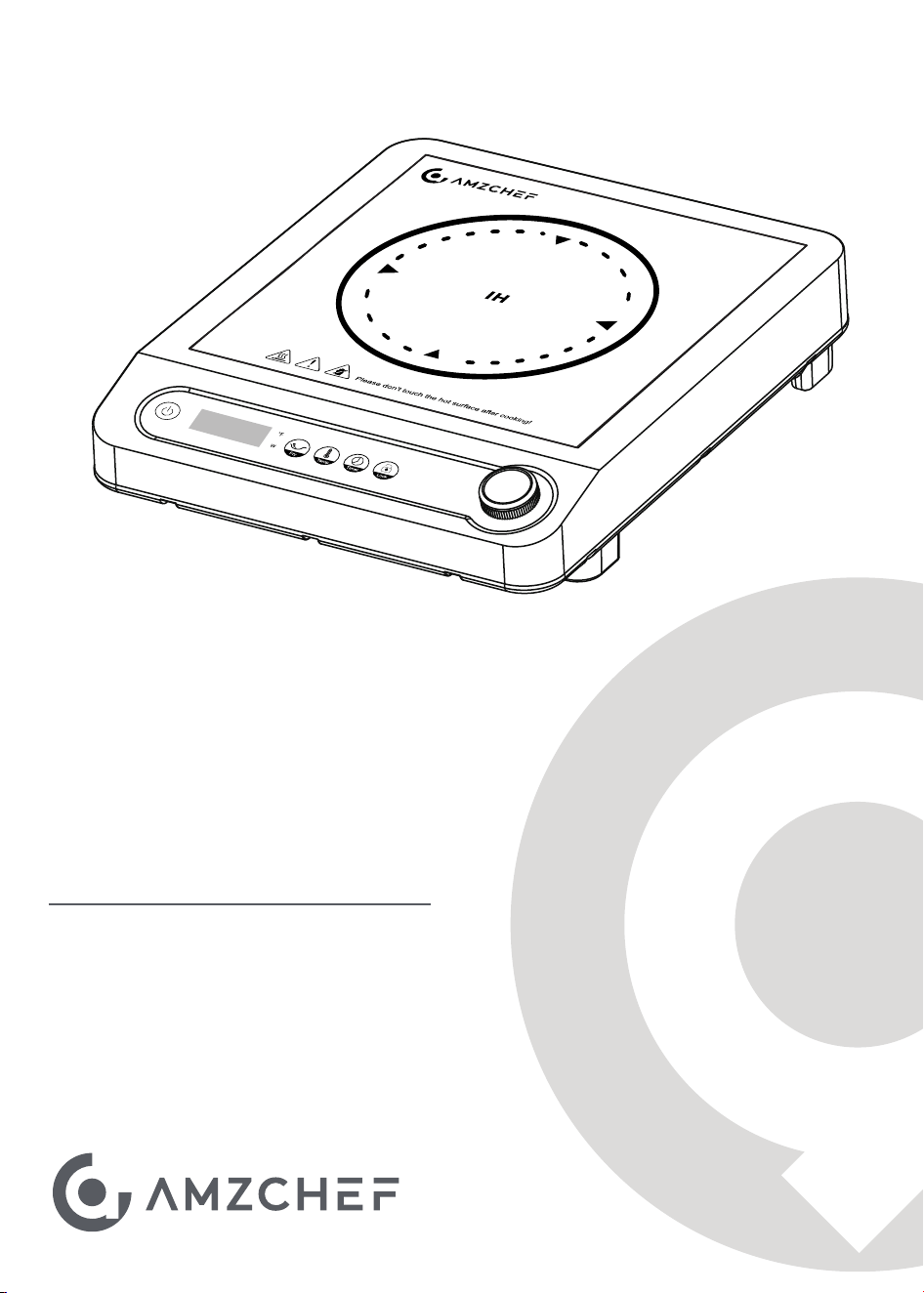
Brand: amzchef
Model: HL-PC4
110-120V~ 60Hz 1800W
USER
MANUAL
Commercial Induction Cooktop

Welcome to the Amzchef Family!
Cheers to you for owning a new Amzchef product!
We are devoted to making high-quality kitchen, home, and personal
care products for all our customers. As a respected manufacturer, all our
products adhere to rigorous standard, safety, and functionality.
We are dedicated to offering exceptional customer service, which is why
we provide a 1-year warranty on this product to guarantee your
satisfaction for years to come.
If you have questions or need assistance, please get in touch with us
via our website: www.iamzchef.com, or email: [email protected].
Problem + order number + a photo or a video attached in the email
would help us solve the problem better and faster.
Your thoughts and suggestions matter to us, so please don't hesitate to
email them at [email protected].
The Amzchef Team
PLEASE READ INSTRUCTIONS CAREFULLY BEFORE ASSEMBLY
RETAIN THIS MANUAL FOR FUTURE REFERENCE
Table of contents
Safety Precautions
Hints & Tips
Getting to Know Your Appliance
Setting the Appliance
Timer
Cleaning & Care
Troubleshooting
Error Codes
Technical Specification
1
2
3
4
5
6
6
7
8
9
9
Safety Precautions
Please read this manual carefully. Please keep the instruction and installation manual as well as
the appliance certificate in a safe place for later use or for subsequent owners.
■
This appliance is intended for use up to a maximum height of 2000 meters above sea level.
■
Do not use covers. These can cause accidents, due to overheating, catching fire or materials
shattering, for example. Do not use inappropriate child safety shields or hob guards. These can
cause accidents.
■
Hot oil and fat can ignite very quickly. Never leave hot fat or oil unattended. Never use water to
put out burning oil or fat. Unplug the appliance. Extinguish flames carefully using a lid, fire
blanket or something similar.
■
The hotplate becomes very hot. Never place combustible items on the hotplate.
■
The appliance gets hot. Do not keep combustible objects or aerosol cans around it.
Risk of fire!
■
This appliance may be used by children over the age of 8 years old and by persons with
reduced physical, sensory or mental capabilities or by persons with a lack of experience or
knowledge if they are supervised or instructed by a person responsible for their safety how to
use the appliance safely and have understood the associated hazards.
■
Warnings and important instructions appearing in this guide are not meant to cover all possible
conditions and situations that may occur. Common sense, caution, and care must be exercised
when installing, maintaining, or operating your appliance.
Induction Cooking
Child Lock
Note: We advise that you exercise caution using or standing near an induction
cooktop while it is in operation, if you wear a pacemaker or a similar medical
device. Consult your doctor or the device manufacturer concerning its conformity
or any possible incompatibilities.
After unpacking the appliance, ensure there is no visible damage. If it has been damaged during
transit, DO NOT USE, contact where you buy immediately.
■
This appliance is intended for private domestic use only. The appliance must only be used for
the preparation of food and beverages. The cooking process must be supervised. A short cooking
process must be supervised without interruption. Only use the appliance in enclosed spaces.
1
■
Incorrect repairs are dangerous. Repairs may only be carried out by trained engineers. If the
appliance is faulty, unplug the mains plug or switch off the fuse in the fuse box. Contact the
after-sales service.
■
Do not use any high-pressure cleaners or steam cleaners, which can result in an electric shock.
■
A defective appliance may cause electric shock. Never switch on a defective appliance. Unplug
the appliance from the mains or switch off the circuit breaker in the fuse box. Contact the
after-sales service.
■
Cracks or fractures in the glass ceramic may cause electric shocks. Switch off the circuit
breaker in the fuse box. Contact the after-sales service.
Risk of electric shock!
Risk of burns!
■
Saucepans may suddenly jump due to liquid between the pan base and the hotplate. Always
keep the hotplate and saucepan bases dry.
Risk of injury!
■
Rough pot and pan bases scratch the ceramic.
■
Avoid
boiling pots dry. This may cause damage.
■
Never place hot pots or pans on the control panel, the display area or the surround. This may
cause damage.
■
Damage can occur if hard or pointed objects fall on the appliance.
■
Aluminium foil and plastic containers melt on hot hotplate. Oven protective foil is not suitable
for your appliance.
Causes of damage
The following table provides an overview of the most frequent kinds of damage:
Overview
Damage
Stains
Scratches
Discoloration
Blisters
Cause
Food Spills
Unsuitable cleaning agents
Salt, sugar and sand
Rough pot and pan bases
scratch the ceramic
Unsuitable cleaning agents
Pan abrasion (e.g. aluminium)
Sugar, food with a high
sugar content
Action
Remove spills immediately with a glass scraper.
Only use cleaning agents that are suitable for ceramic.
Do not use the hob as a work surface or storage space.
Check your cookware.
Only use cleaning agents that are suitable for ceramic.
Lift the pots and pans when moving them.
Remove spills immediately with a glass scraper.
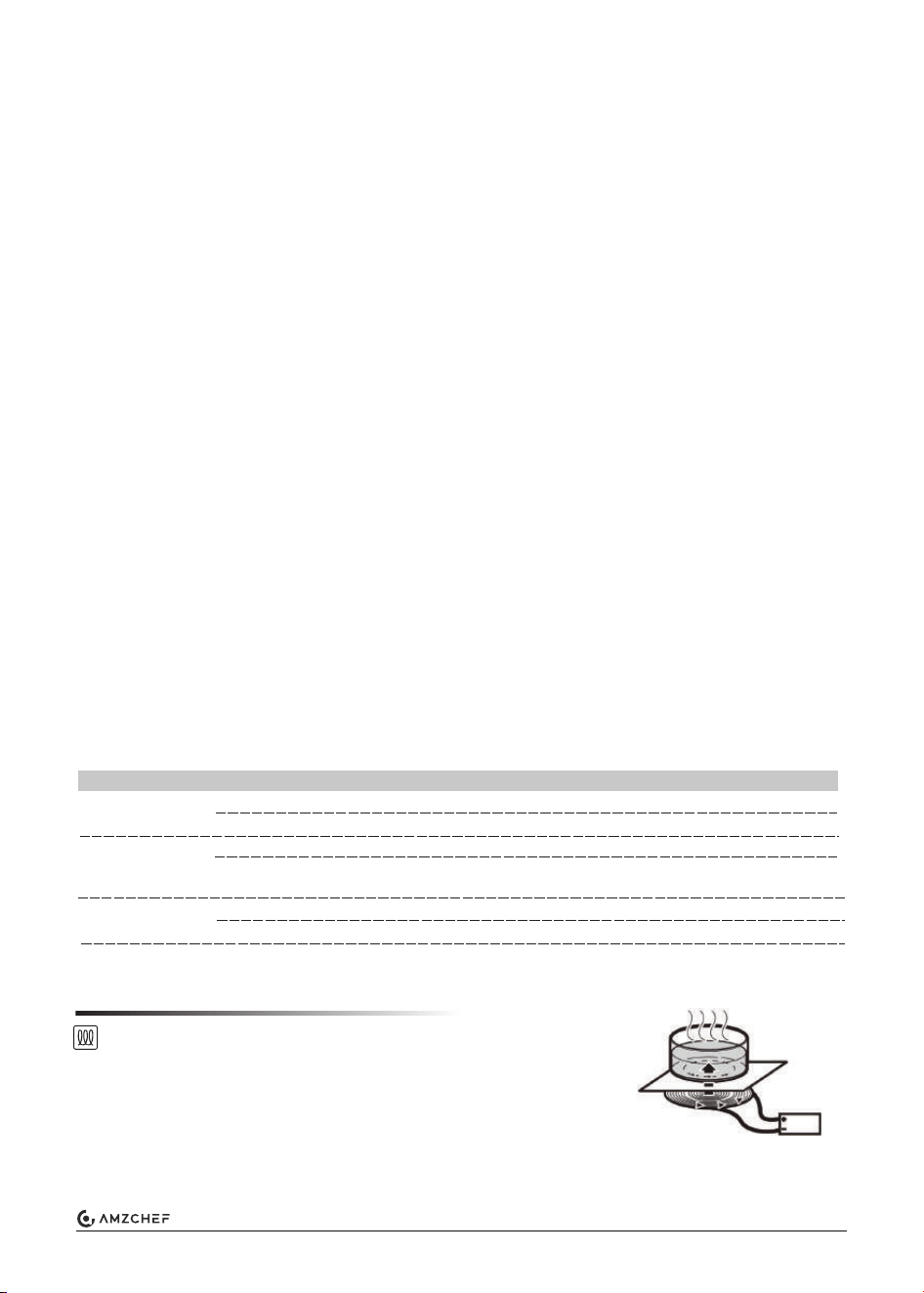
Induction Cooking
Induction cooking is very different from traditional cooking methods, as
heat builds up directly in the item of cookware by electromagnetic
vibrations.
■ Electromagnetic fields can affect electronic circuits and interfere with
portable radios and phones.
■ Do not put magnetically active objects (e.g. credit cards, computer diskettes, cassettes) on or near
the ceramic glass surface while one or more induction cooking zones are in use.
■
The hotplate and surrounding area (particularly the hob surround, if fitted) become very hot.
Never touch hot surfaces. Keep children at a safe distance.
■
The hotplate heats up but the display does not work. Switch off the circuit breaker in the fuse
box. Contact the after-sales service.
■
Metal objects on the hotplate quickly become very hot. Never place metal objects (such as
knives, forks, spoons and lids) on the hotplate.
■
Never placing metal objects with a diameter or length of less than 3” on the hotplate.
2
Hints & Tips
■
Use pots and pans with even bases. Uneven bases increase energy consumption.
■
The diameter of pot and pan bases should be the same size as the hotplate. In particular, small
saucepans on the hotplate cause energy losses.
■
Use a small saucepan for small quantities. A larger, less full saucepan requires a lot of energy.
■
Cook with only a little water. This will save energy. Vitamins and minerals in vegetables are
preserved.
Note: cookware manufacturers often indicate the upper diameter of the
saucepan. This is usually bigger than the diameter of the base of the pan.
Note: Proper cookware on an operating induction cooking zone will heat up very
quickly. If an empty piece of cookware is left on an operating induction cooking
zone, the rapid change in temperature may warp or damage the cookware.
■
Always place suitable lids on saucepans. When cooking without a lid, considerably more
energy is required. Use a heat-resistant glass lid to easily view the inside without lifting it.
Cookware
Cookware material
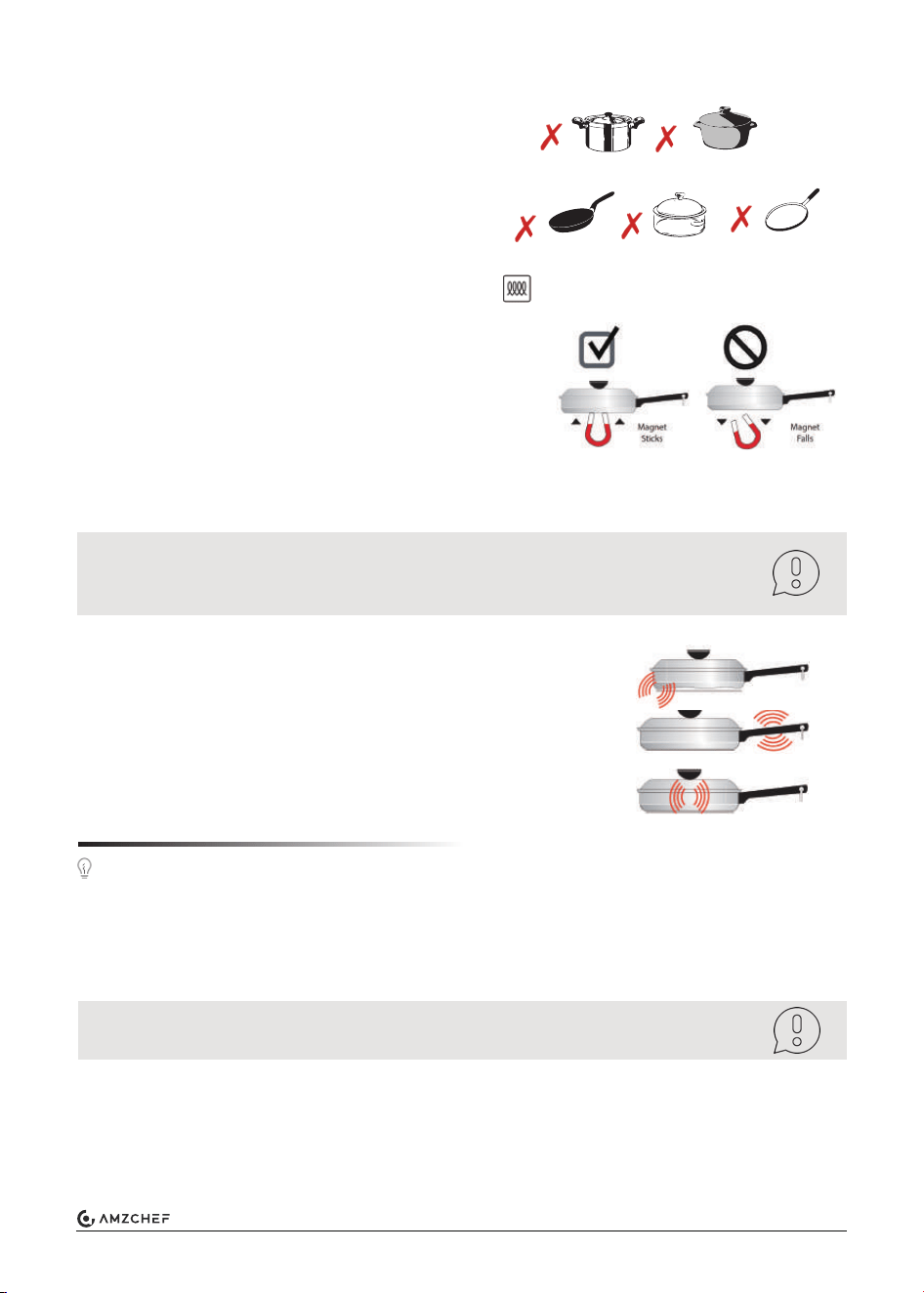
The magnet test
Never use pans made from common thin steel, glass,
earthenware, copper and aluminium.
Only use ferromagnetic cookware for induction cooking,
such as:
■ Cookware made from enameled steel
■ Cookware made from cast iron
■ Special induction-compatible cookware made from
stainless steel
Cookware sold as induction-ready will often have a symbol printed on the bottom by the
manufacturer.
To see if a piece of cookware will work on your appliance, try to
stick a magnet to it.
If the magnet clings firmly to the bottom of the cookware, it will
work on your appliance. If the magnet clings weakly or not at
all, the cookware will not heat up on your appliance.
Sounds
The magnetic field over the induction cooking zone may cause cookware to
vibrate, creating a buzzing or humming noise.
You may also hear a fan that cools the electronics inside the appliance.
Below sounds are not unusual, especially at high settings:
■ Cookware that is not perfectly flat on the bottom may vibrate slightly
against the cooking zone.
■ A loose handle may vibrate in its socket.
■ Multi-material cookware may allow small vibrations in its structure.
Absence of pan or unsuitable size
If no pan is placed on the hotplate, or if it is made of unsuitable material or is not the correct size, the
error code “Pot” will show on the display. Place a suitable pan on the hotplate to stop the flashing. If this
takes more than 30 seconds, the hotplate will switch off automatically.
(Sounds are less likely to occur with heavier, higher quality cookware.)
Glass
Concave base
Aluminium
Ceramic
Copper
3
■
Always cover as large an area of the hotplate as possible with your saucepan.
■
Switch to a lower heat setting in good time.
■
Select a suitable ongoing cooking setting. You will waste energy by using an ongoing cooking
setting which is too high.
■
Use the residual heat of the hotplate. For longer cooking times, you can switch the appliance
off 5-10 minutes before the end of the cooking time.
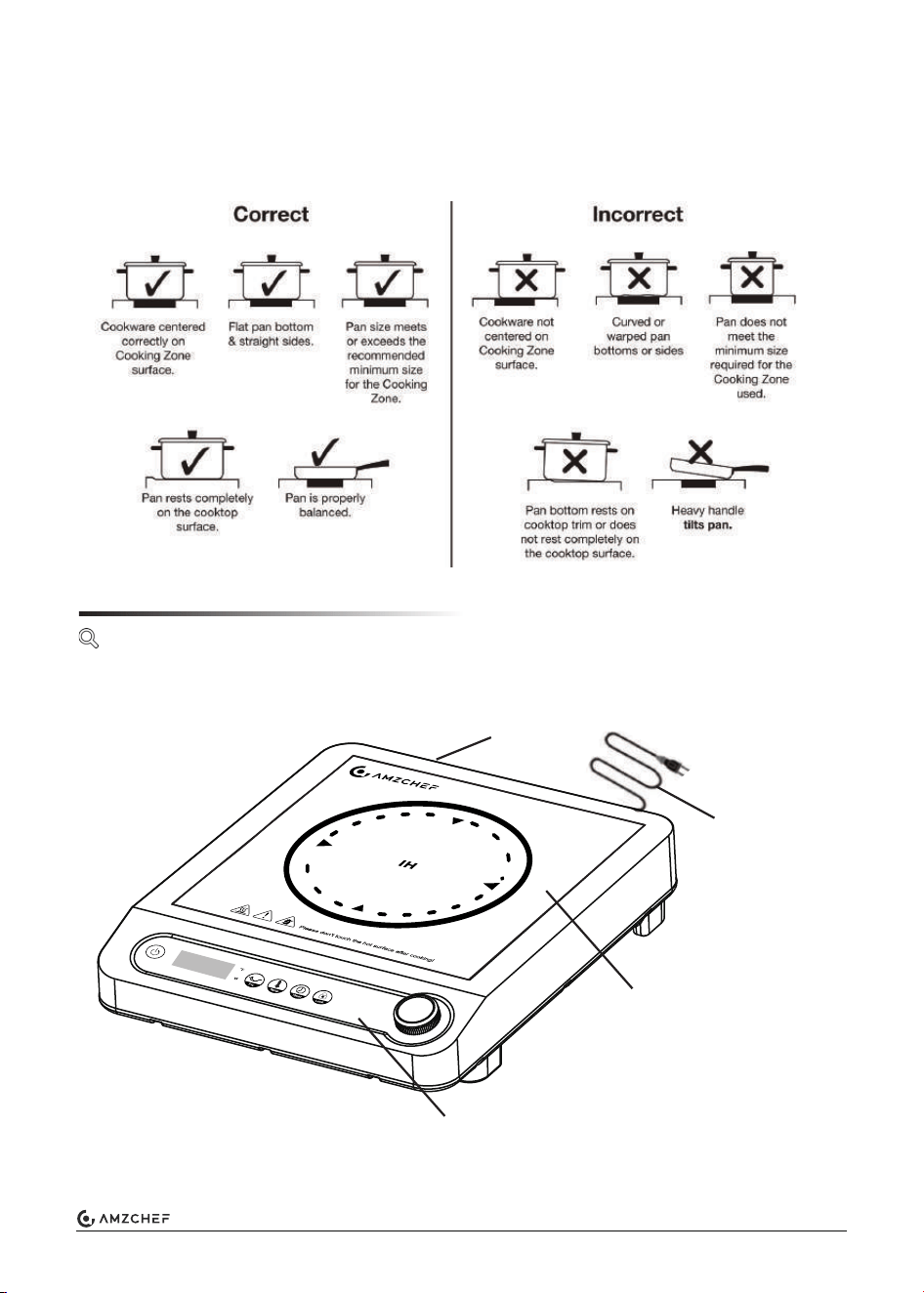
Getting to Know Your Appliance
Control Panel
Ceramic Plate
Exhaust Vent
Power Cord
4
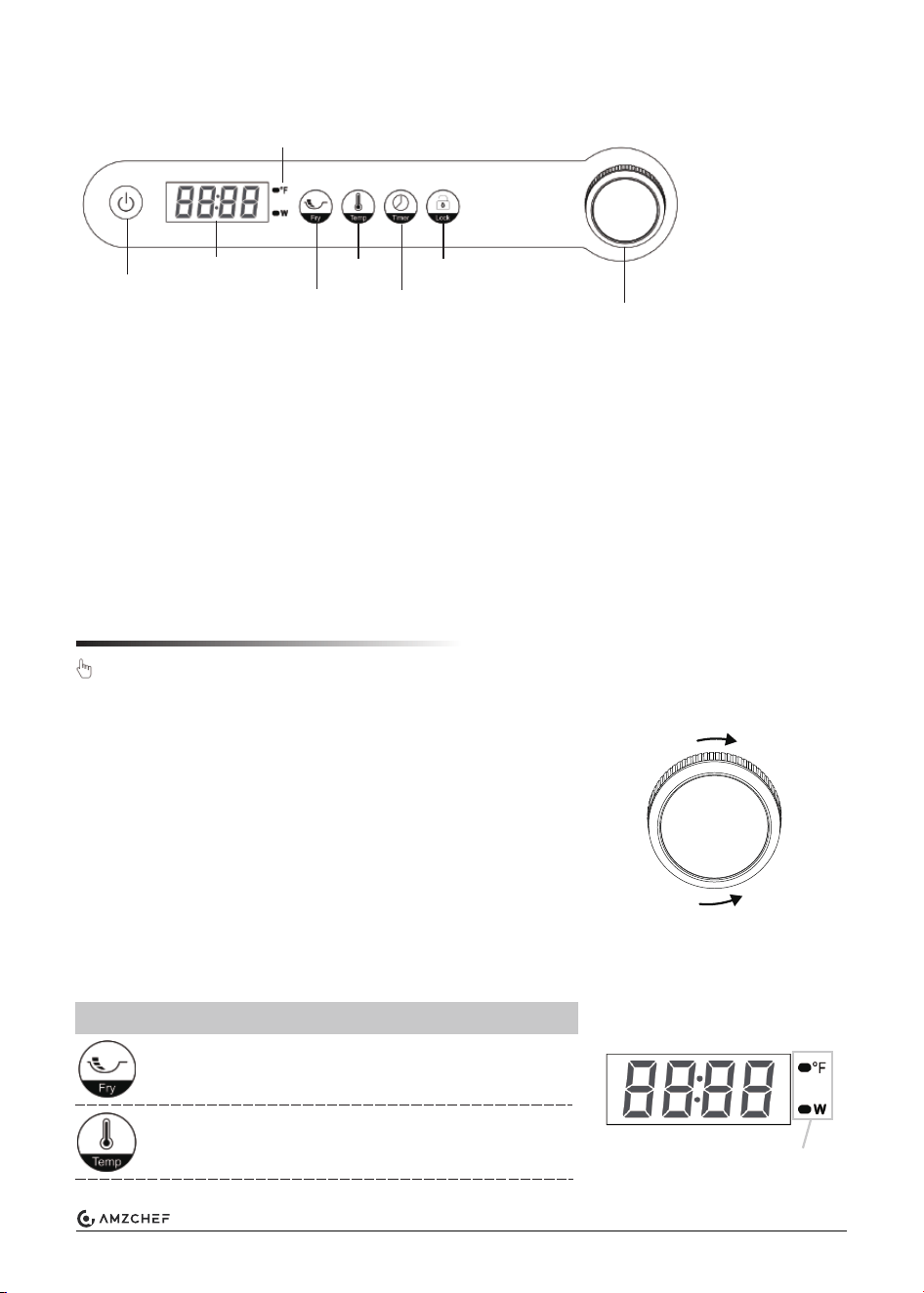
Fry button
ICON NAME
FUNCTION
Press to enter Watt mode
Watt range: 100W ~ 1800W
Temp. button
Press to enter Temp. mode
Temperature range: 140°F ~ 465°F
Detection of small articles
Setting the Appliance
This part provides instructions on how to set the appliance.
Operating instruction
When an unsuitable size or non-magnetic pan (e.g. aluminium), or some other small item (e.g.
knife, fork, key) has been left on the induction hotplate, an error code “Pot” will appear.
A pot or pan with at least a 4.72" bottom diameter is necessary.
Control panel
Cooking modes
Residual heat indicator
Equipped with a temperature sensor, the appliance can monitor internal temperatures and will
automatically cease operation if they exceed safe levels.
Over-temperature protection
1. Press the ON/OFF button to switch on the appliance.
2. Press Fry or Temp. button to select a cooking mode. The
display will show the current heat setting.
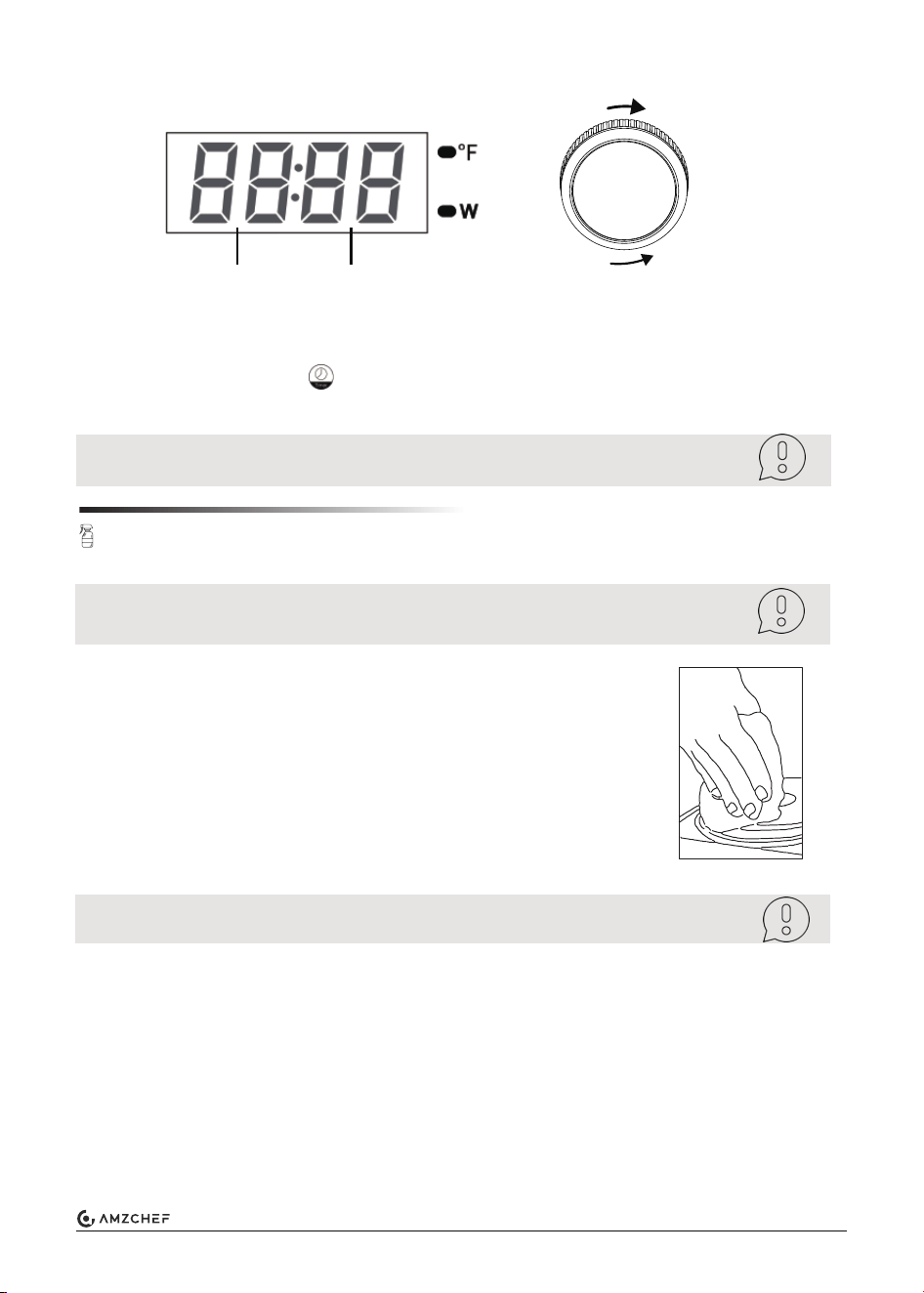
3. Then set the preferred heat level by rotating the knob.
Rotate it clockwise to increase the heat level
Rotate it anti-clockwise to decrease the heat level
(see figure)
4. After cooking, press the ON/OFF button to switch off.
The code ”Hot” will show on the display if the hotplate is too
hot to touch.
ON/OFF
BUTTON
Fry
Cooking mode
indicators
Display
Temp.
Lock
Timer
Power/Timer Knob
Once the surface temperature exceeds 60℃ / 140℉, the display will show “Hot”, signaling that
the surface is still too hot to touch.
It may be used, for example, to keep a small meal warm or to melt cooking chocolate. The display
remains lit until the hotplate has cooled sufficiently.
Clockwise to increase
Anti-clockwise to decrease
Cooking mode indicator
5
Note: If you don’t choose a heat setting within 30 seconds, the appliance will
automatically switch off.
Note:
- Even if the control panel is locked, the ON/OFF button remains active.
You can thus switch it off at any time in an emergency.
- If you lock the appliance and turn it off, remember to unlock it first before using.
To lock the controls: Touch and hold the lock button for 3 seconds. The buzzer beeps
once. The child lock indicator will show a red dot and the function is activated.
To unlock the controls: Touch and hold the lock button for 3 seconds. The buzzer beeps
once and the red dot will disappear, the function is deactivated.
Lock and unlock the control panel
Child Lock
You can lock the control panel to prevent unintended use (e.g., by children accidentally switching
on the cooking zone).
If the error code “Pot” appears on the cooking zone display
The cooktop has an automatic recognition system for suitable cookware. If no cookware suitable for
induction is detected on a cooking zone, this is indicated by the code “Pot” on the corresponding
cooking zone display.
Setting the timer
Timer
Use the timer to set the cooking time.
1. After setting the heat level, press timer button, the display will flash.
2. Now you can set the timer.
Rotate the knob clockwise to increase the time
Rotate the knob anti-clockwise to decrease the time
Timing range: 1 minute - 3 hours
3. After 4 seconds without further input, the set time is accepted. As the countdown initiates,
the timer display shows the remaining time and the heat level in turn.
4. An audible signal sounds and the hotplate will be switched off when the specified time has
elapsed. The code “Hot” appears if the surface is too hot.
- If a specific cooking temperature is not required, we suggest using watt mode. To quickly bring a
pot of water to boil, use a higher watt level setting. Similarly, for milk heating, sauce cooking and
others, the temp. mode is also applicable.
- For frying or sautéing food, temp. mode is preferred because the built-in micro-processor
monitors and regulates cookware to the preset temperature.
Note: If you want to change the set time after setting the timer, start again with
the first step.
■
The cookware used is not suitable for induction.
■
The cookware was not placed on the selected cooking zone.
■
The cookware was not placed in the middle of the cooking zone.
■
The cookware is too small.
To select cookware that is suitable for induction cooking, see section Induction Cooking.
6
■
Special care should be taken when removing hot substances to avoid permanent damage to
the glass surface.
■
Sugary spillovers (such as jellies, fudge, candy, and syrups) or melted plastics can cause
pitting of the surface of your appliance (not covered by the warranty) unless the spill is removed
while still hot. Special care should be taken when removing hot substances.
Damage from Sugary Spills and Melted Plastic
Note: Before cleaning, be sure the controls are turned OFF and the
surface is cool.
Note: Do not use other abrasive cleaners and/or wire wool etc., as they may
scratch the ceramic glass surface.
Cleaning & Care
The information in this section provides help on how best to care for your hob.
Note: Make sure to power off the appliance when you're done using it.
Canceling the timer
Daily use
■
To remove fingerprints and food stains, apply a vitro-ceramic glass
cleaner, ensuring thoroughly rinse and wipe dry.
■
For spills on the glass surface, use a suitable utensil to remove the
spill, but beware of the hot cooking zone. Wipe clean with a cloth or
paper towel.
■
If soils remain, carefully scrape soils with a metal razor blade
scraper, holding scraper at a 30-degree angle to the surface.
Remove loosened soils with hob cleaning cream and buff the surface
clean.
To cancel the timer, hold the timer button for 2 seconds.
You can also cancel the timer by choosing the cooking mode again.
Clockwise to increase
Anti-clockwise to decrease
Hour
Minute
7
This may be caused by
the construction of your
cookware (layers of
different metals vibrating
differently).
This is normal for cookware and does not
indicate a fault.
The appliance makes
a low humming noise
when used in a high
heat setting.
This is caused by the
technology of induction
cooking.
This is normal, but the noise should
quieten down or disappear when you
decrease the heat setting.
The appliance or a
cooking zone has
turned itself off
unexpectedly, a
tone sounds and an
error code is
displayed.
Technical fault.
(typically alternating with
one or two digits in the
display).
Please note down the error letters and
numbers, switch it off, and contact
a qualified technician.
A cooling fan built into
your appliance has
come on to prevent the
electronics from
overheating. It may
continue to run even
after you’ve turned
it off.
This is normal and needs no action.
Do not switch the power off while
the fan is running.
Troubleshooting
Problem Possible causes What to do
The appliance cannot
be turned on.
No power.
Make sure the appliance is connected to the
power supply and that it is switched on.
Check whether there is a power outage
in your home or area. If you’ve checked
everything and the problem persists, call
a qualified technician.
The touch controls
are difficult to
operate.
There may be a slight
film of water over the
controls or you may be
using the finger tip when
touching the controls.
Make sure the touch control area is dry
and use the finger pad when touching the
controls.
The glass is being
scratched.
Cookware with
rough-edge, unsuitable
abrasive scourer or
cleaning products is
used.
Use pots and pans with even bases.
Always lift cookware off the surface instead
of sliding it.
Use cookware with flat and smooth
bases. See section Cleaning & Care.
The controls
are unresponsive.
The controls are locked.
Unlock the controls. See section Child
Lock for instructions.
Some pans make
cracking or clicking
noises.
Fan noise coming
from inside.
8
Weight and Dimensions may vary due to improvement. We may change specifications and
designs without prior notice.
Technical Specification
MADE IN CHINA
Manufacturers: Zhongshan Hanlin Electrical Appliances Co., Ltd.
Contact:
Emily
Tel:
+1 (838) 910 8317
E-Mail:
110-120V~ 60Hz
Model
Supply Voltage
Installed Electric Power
HL-PC4
1800W
If an abnormality comes up, the appliance will enter the protective state automatically and display
the corresponding protective codes:
Error Codes
Code Possible causes Measures
Temperature detector failure
Over-temperature
The surface is too hot
Contact after-sales service.
Contact after-sales service.
E2
Pot
Hot
E4
E5
E6
E7
E8
Circuit failure
Internal communication failure
The above is the judgment and inspection of common failures.
Please do not attempt to disassemble the unit yourself to prevent any potential dangers or
damage to the appliance.
Pan do not become
hot and the error
code “Pot” appears
in the display.
The pan is made of
unsuitable material,
wrong size, too small, or
not correctly centered
on the hotplate.
Center the pan. For additional information,
see section Induction Cooking.
Add.: B Zone, No. 20, East Shangheng Street, Suicheng Village, Dongfeng Town, Zhongshan,
Guangdong 528425
Wait for cooling and restart it later.
Wait for cooling.
Place the correct pan.
Check section Induction Cooking for details.
The material, size or position
of the pot does not meet the
heating requirements
The voltage is too low
The voltage is too high
Check the voltage. If persists, contact
after-sales service.
Check the voltage. If persists, contact
after-sales service.
Restart the appliance. If persists,
contact after-sales service.
9
1
1
10