Form No. 3469-720 Rev B
Flex-Force Power System
®
60V 750 CFM Leaf Blower
Model No. 51826 —Serial No. 324000000 and Up
Model No. 51826T —Serial No. 324000000 and Up
Register at www .T oro.com.
Original Instructions (EN)
*3469-720*
For assistance, please see
www .T oro.com/support
for instructional videos or
contact your Authorized
Service Dealer before
returning this product.
W ARNING
CALIFORNIA
Proposition 65 W arning
The power cord on this product contains lead, a chemical
known to the State of California to cause birth defects or
other reproductive harm. W ash hands after handling.
Use of this product may cause exposure to chemicals
known to the State of California to cause cancer , birth
defects, or other reproductive harm.
Introduction
This blower is intended to be used by residential homeowners to move
leaf-like debris as needed outdoors. It is designed to use Flex-Force
™
60V
lithium-ion battery packs. These battery packs are designed to be charged
only by Flex-Force 60V lithium-ion battery chargers. Using these products
for purposes other than their intended use could prove dangerous to you
and bystanders.
Model 51826T does not include a battery or a charger .
Read this information carefully to learn how to operate and maintain
your product properly and to avoid injury and product damage. Y ou are
responsible for operating the product properly and safely .
© 2024—The T oro®
Company
81 1 1 L yndale A venue
South
Bloomington, MN
55420
Register at
www .T oro.com.
Original Instructions
(EN)
Printed in V ietnam
All Rights Reserved
*3469-720*
V isit www .T oro.com for more information, including safety tips, training
materials, accessory information, help nding a dealer , or to register your
product.
Whenever you need service, genuine T oro parts, or additional information,
contact an Authorized Service Dealer or T oro Customer Service and have
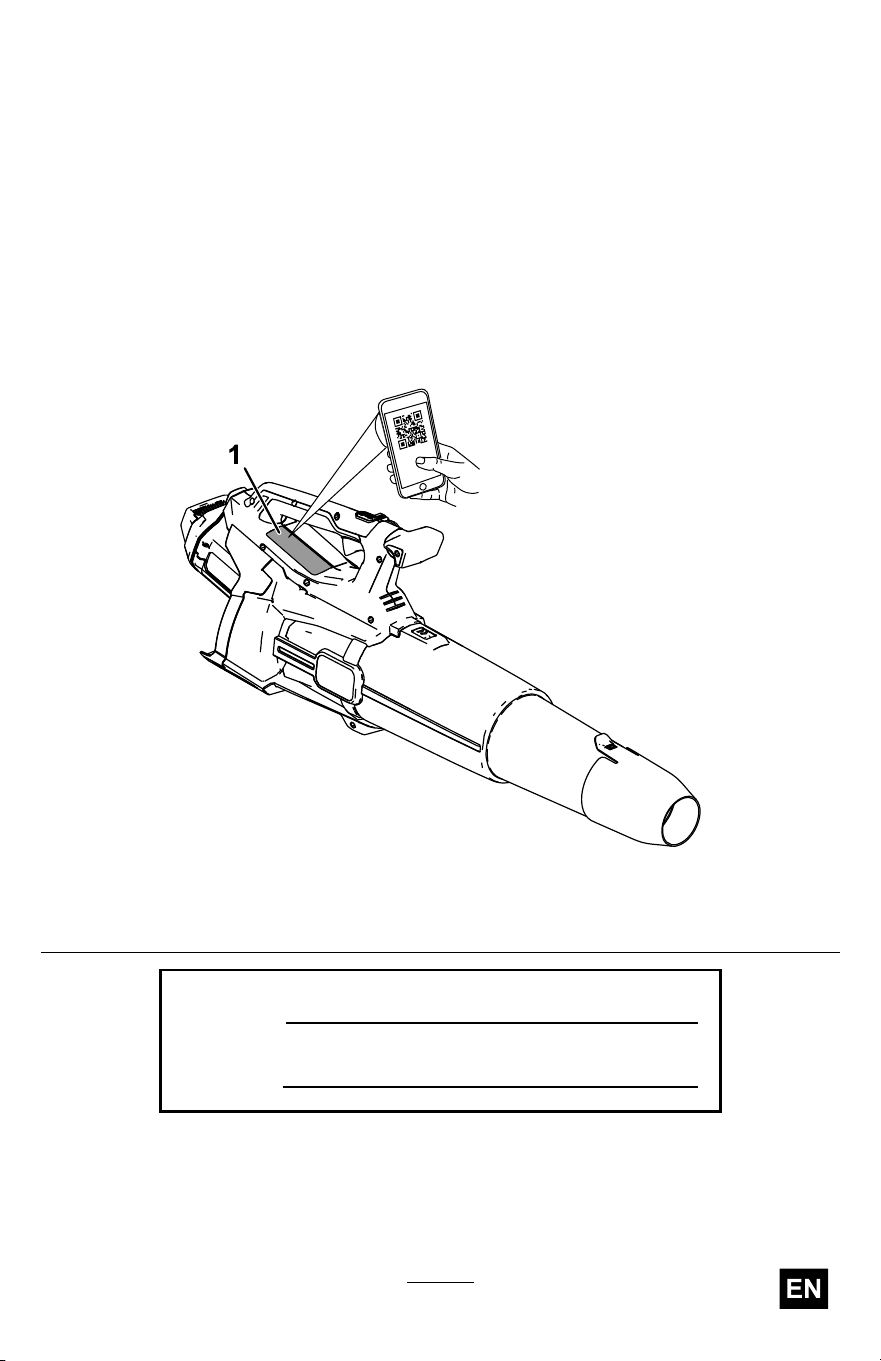
the model and serial numbers of your product ready . Figure 1 identies
the location of the model and serial numbers on the product. W rite the
numbers in the space provided.
Important: W ith your mobile device, you can scan the QR code (if
equipped) on the serial number plate to access warranty , parts, and
other product information.
g506817
Figure 1
1. Model and serial number location.
Model No.
Serial No.
3

Safety-Alert Symbol
The safety-alert symbol ( Figure 2 ) shown in this manual and on the
machine identies important safety messages that you must follow to
prevent accidents.
g000502
Figure 2
Safety-alert symbol
The safety-alert symbol appears above information that alerts you to
unsafe actions or situations and is followed by the word DANGER ,
W ARNING , or CAUTION .
DANGER indicates an imminently hazardous situation which, if not
avoided, will result in death or serious injury .
W ARNING indicates a potentially hazardous situation which, if not
avoided, could result in death or serious injury .
CAUTION indicates a potentially hazardous situation which, if not avoided,
may result in minor or moderate injury .
This manual uses two other words to highlight information. Important calls
attention to special mechanical information and Note emphasizes general
information worthy of special attention.
4

Safety
W ARNING
Read all safety warnings, instructions, illustrations and
specications provided with this machine.
Failure to follow all instructions listed below may result in
electric shock, re and/or serious injury .
Save all warnings and instructions for future reference.
The term “machine” in all the warnings refers to your mains-operated
(corded) machine or battery-operated (cordless) machine.
I. W ork area safety
1. Keep work area clean and well lit. Cluttered or dark areas invite
accidents.
2. Do not operate machines in explosive atmospheres, such as in
the presence of ammable liquids, gases, or dust. Machines
create sparks which may ignite the dust or fumes.
3. Keep children and bystanders away while operating a machine.
Distractions can cause you to lose control.
II. Electrical safety
1. Machine plugs must match the outlet. Never modify the plug in
any way . Do not use any adapter plugs with earthed (grounded)
machines. Unmodied plugs and matching outlets will reduce risk of
electric shock.
2. A void body contact with earthed or grounded surfaces, such as
pipes, radiators, ranges and refrigerators. There is an increased
risk of electric shock if your body is earthed or grounded.
3. Do not expose machines to rain or wet conditions. W ater
entering a machine will increase the risk of electric shock.
4. Do not abuse the cord. Never use the cord for carrying, pulling
or unplugging the machine. Keep cord away from heat, oil,
sharp edges or moving parts. Damaged or entangled cords
increase the risk of electric shock.
5

5. When operating a machine outdoors, use an extension cord
suitable for outdoor use. Use of a cord suitable for outdoor use
reduces the risk of electric shock.
6. If operating a machine in a damp location is unavoidable, use a
residual current device (RCD) protected supply . Use of an RCD
reduces the risk of electric shock.
III. Personal safety
1. Stay alert, watch what you are doing and use common sense
when operating a machine. Do not use a machine while you are
tired or under the inuence of drugs, alcohol, or medication.
A moment of inattention while operating machines may result in
serious personal injury .
2. Use personal protective equipment. Always wear eye
protection. Protective equipment such as a dust mask, non-skid
safety shoes, hard hat, or hearing protection used for appropriate
conditions reduces personal injuries.
3. Prevent unintentional starting. Ensure the switch is in the
O FF -position before connecting to power source and/or battery
pack, picking up or carrying the tool. Carrying machines with your
nger on the switch or energizing machines that have the switch
on invites accidents.
4. Remove any adjusting key or wrench before turning the
machine on. A wrench or a key left attached to a rotating part of the
machine may result in personal injury .
5. Do not overreach. Keep proper footing and balance at all times.
This enables better control of the machine in unexpected situations.
6. Dress properly . Do not wear loose clothing or jewelry . Keep
your hair and clothing away from moving parts. Loose clothes,
jewelry , or long hair can be caught in moving parts.
7. If devices are provided for the connection of dust extraction and
collection facilities, ensure these are connected and properly
used. Use of dust collection can reduce dust-related hazards.
8. Do not let familiarity gained from frequent use of tools allow
you to become complacent and ignore tool safety principles. A
careless action can cause severe injury within a fraction of a second.
6

IV . Machine use and care
1. Do not force the machine. Use the correct machine for your
application. The correct machine will do the job better and safer at
the rate for which it was designed.
2. Do not use the machine if the switch does not turn it on and off.
Any machine that cannot be controlled with the switch is dangerous
and must be repaired.
3. Disconnect the plug from the power source and/or remove the
battery pack, if detachable, from the machine before making
any adjustments, changing accessories, or storing machines.
Such preventive safety measures reduce the risk of starting the
machine accidentally .
4. Store idle machines out of the reach of children and do not
allow persons unfamiliar with the machine or these instructions
to operate the machine. Machines are dangerous in the hands
of untrained users.
5. Maintain machines and accessories. Check for misalignment
or binding of moving parts, breakage of parts, and any other
condition that may affect the machine’ s operation. If damaged,
have the machine repaired before use. Many accidents are
caused by poorly maintained machines.
6. Keep cutting tools sharp and clean. Properly maintained cutting
tools with sharp cutting edges are less likely to bind and are easier
to control.
7. Use the machine, accessories, and tool bits etc. in accordance
with these instructions, taking into account the working
conditions and the work to be performed. Use of the machine for
operations different from those intended could result in a hazardous
situation.
8. Keep handles and grasping surfaces dry , clean and free from oil
and grease. Slippery handles and grasping surfaces do not allow for
safe handling and control of the tool in unexpected situations.
7

V . Battery tool use and care
1. Recharge only with the charger specied by the manufacturer .
A charger that is suitable for one type of battery pack may create a
risk of re when used with another battery pack.
2. Use machines only with specically designated battery packs.
Use of any other battery packs may create a risk of injury and re.
3. When battery pack is not in use, keep it away from other metal
objects, like paper clips, coins, keys, nails, screws or other
small metal objects, that can make a connection from one
terminal to another . Shorting the battery terminals together may
cause burns or a re.
4. Under abusive conditions, liquid may be ejected from the
battery; avoid contact. If contact accidentally occurs, ush with
water . If liquid contacts eyes, additionally seek medical help.
Liquid ejected from the battery may cause irritation or burns.
5. Do not use a battery pack or tool that is damaged or modied.
Damaged or modied batteries may exhibit unpredictable behavior
resulting in re, explosion or risk of injury .
6. Do not expose a battery pack or tool to re or excessive
temperature. Exposure to re or temperature above 130 °C (265
°F) may cause explosion.
7. Follow all charging instructions and do not charge the battery
pack or tool outside the temperature range specied in the
instructions. Charging improperly or at temperatures outside the
specied range may damage the battery and increase the risk of re.
VI. Service
1. Have your machine serviced by a qualied repair person using
only identical replacement parts. This will ensure that the safety of
the machine is maintained.
2. Never service damaged battery packs. Service of battery packs
should only be performed by the manufacturer or authorized service
providers.
8

VII. Blower safety
1. Do not use the machine in bad weather conditions, especially
when there is a risk of lightning. This decreases the risk of being
struck by lightning.
2. W ear eye protection and ear protection. Adequate protective
equipment will reduce the risk of personal injury .
3. While operating the machine, always wear non-slip and
protective footwear . Do not operate the machine when barefoot
or wearing open sandals. This reduces the risk of injury to the feet.
4. Do not wear loose tting clothing or articles such as scarves,
strings, chains, ties, etc., that could get drawn into the air inlets.
T ie back or cover long hair to make sure it does not get drawn
into the air inlets. If any of these items are drawn into the air inlets,
it can increase the risk of personal injury .
5. Keep bystanders away while operating the machine. Thrown
debris can increase the risk of personal injury .
6. Never point the blower nozzle in the direction of people or pets
or in the direction of windows. Use extra caution when blowing
debris near solid objects, such as trees, automobiles and walls
that can cause debris to ricochet. Thrown objects can damage
property and increase the risk of personal injury .
7. Do not use the machine to blow anything that is burning or
smoking, such as cigarettes, matches or hot ashes. These
ignition sources may increase the risk of re.
8. Do not touch the fan while still in motion. T urn off the machine
and wait until the fan stops before removing any part that may
give access to the fan. This reduces the risk of injury from moving
parts.
9. When clearing jammed material or servicing the machine, make
sure the power switch is off. Unexpected starting of the machine
while clearing jammed material or servicing may result in serious
personal injury .
9
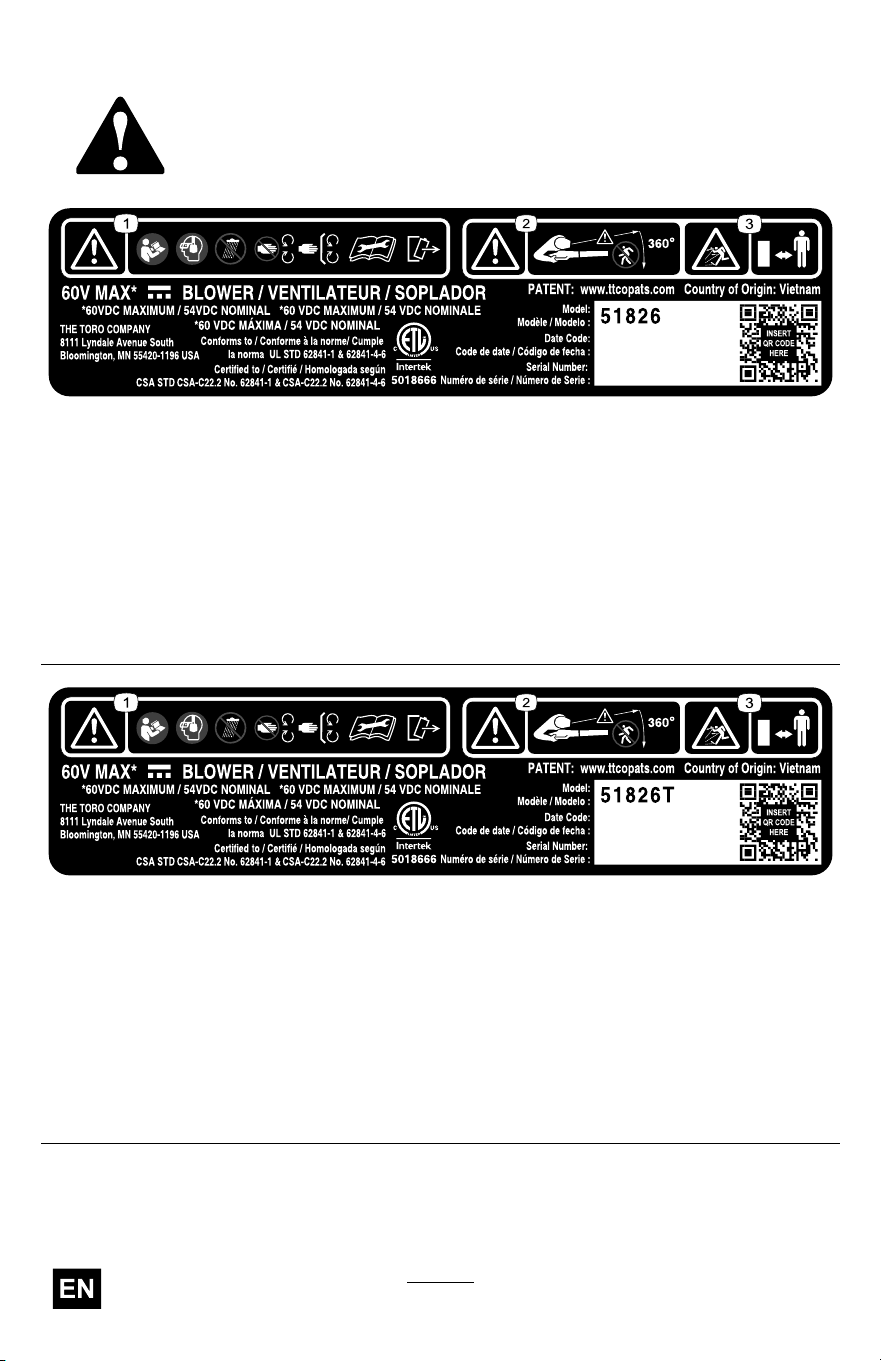
Safety and Instructional Decals
Safety decals and instructions are easily visible to the
operator and are located near any area of potential
danger . Replace any decal that is damaged or missing.
decal161-7085
161-7085
1. W arning—read the Operator ’ s Manual ;
wear eye and ear protection; do not
expose to rain; stay away from moving
parts; keep all guards and shields in
place; remove the battery pack before
performing maintenance.
3. Thrown object hazard—keep
bystanders away .
2. W arning—keep bystanders away from
the machine in all directions.
decal161-7086
161-7086
1. W arning—read the Operator ’ s Manual ;
wear eye and ear protection; do not
expose to rain; stay away from moving
parts; keep all guards and shields in
place; remove the battery pack before
performing maintenance.
3. Thrown object hazard—keep
bystanders away .
2. W arning—keep bystanders away from
the machine in all directions.
10
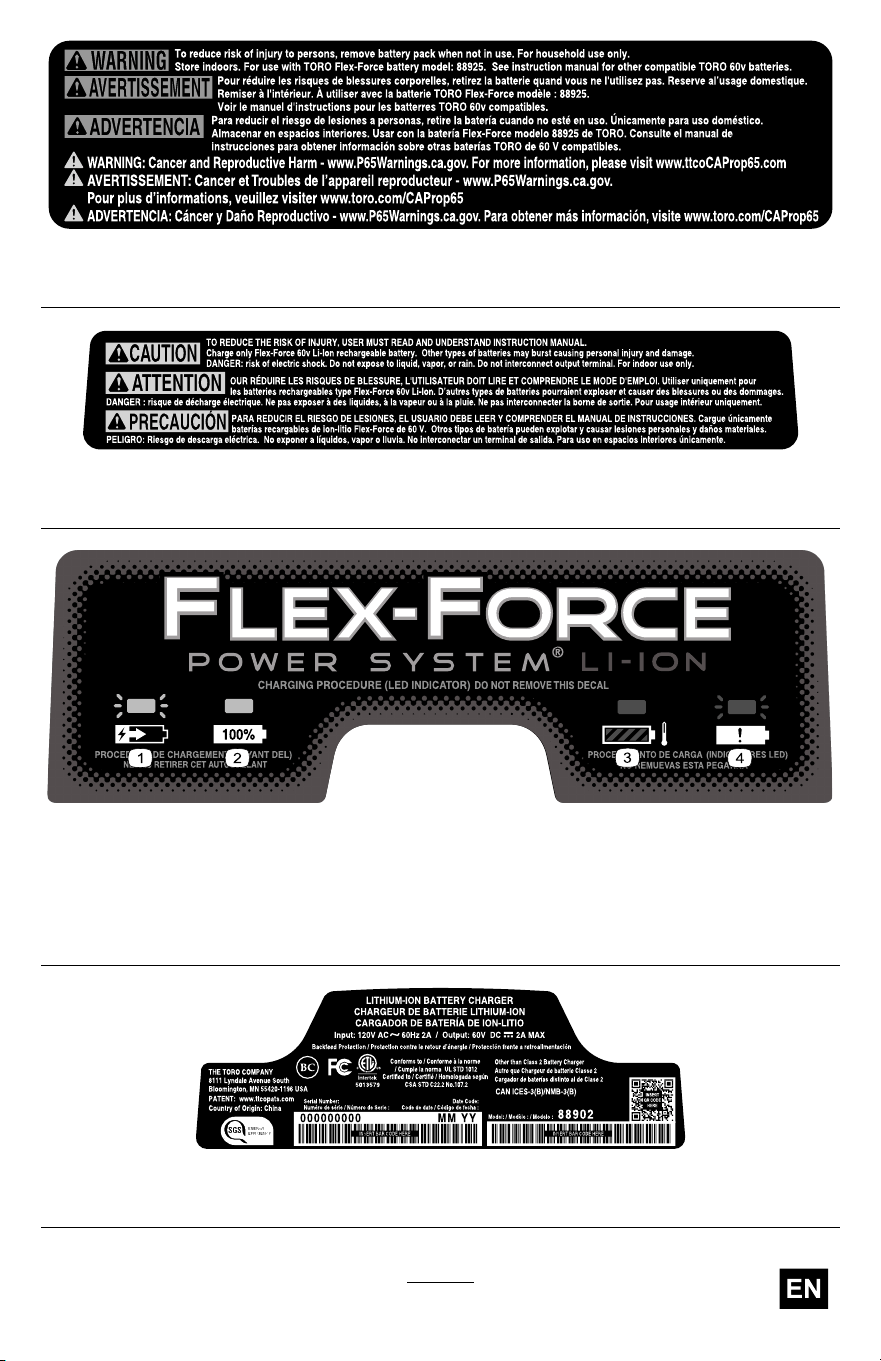
decal161-7051
161-7051
decal161-3788
161-3788
decal161-3775
161-3775
1. The battery pack is charging. 3. The battery pack is over or under the
appropriate temperature range.
2. The battery pack is fully charged. 4. Battery pack charging fault
decal161-3774
161-3774
1 1
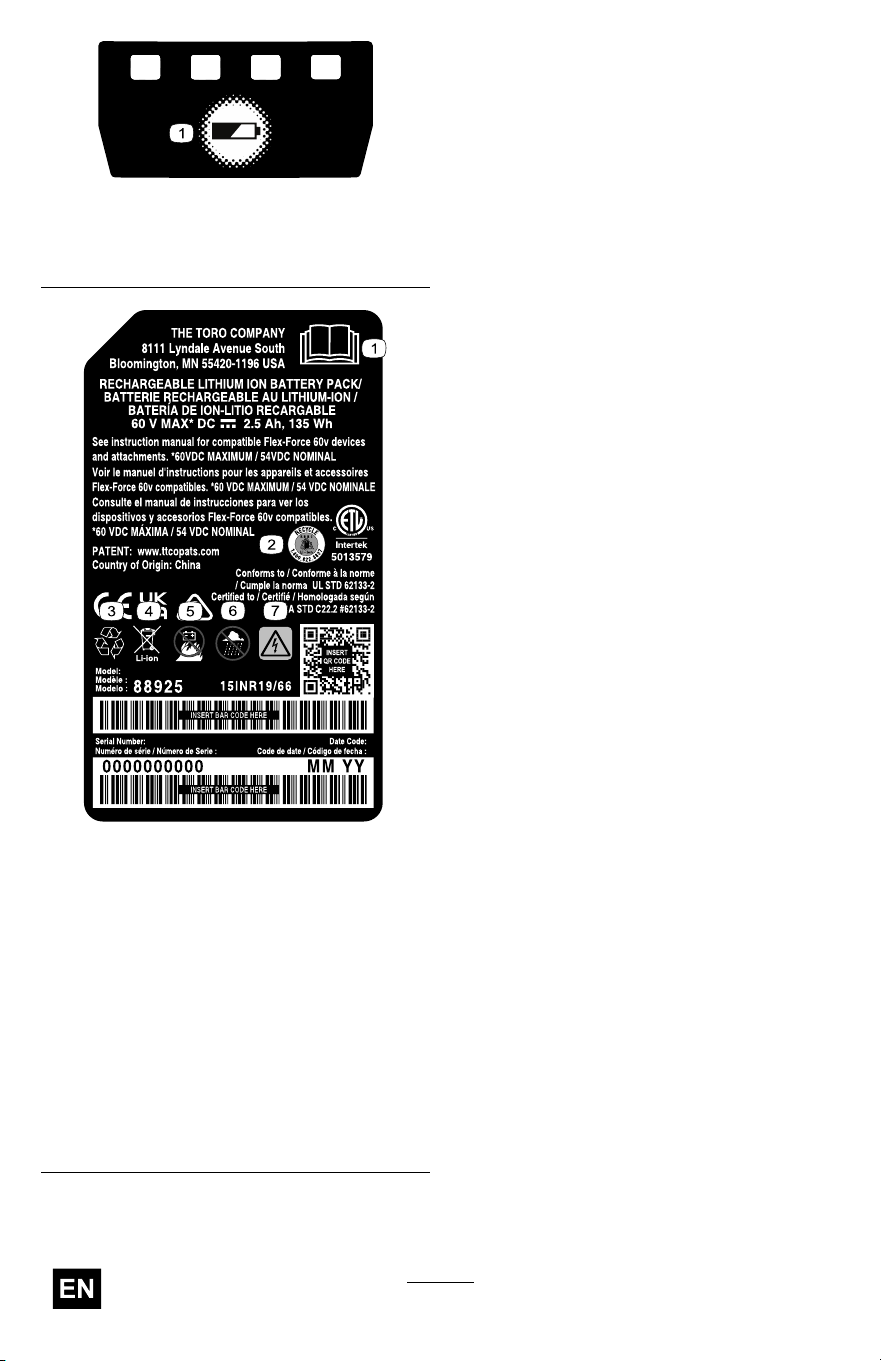
decal161-3764
161-3764
1. Battery charge status
decal145-8287
145-8287
1. Read the
Operator ’ s
Manual .
5. Keep away
from open re
or ames
2. Call2Recycle
®
battery
recycling
program
6. Do not expose
to rain
3. Recycle the
battery
7. Electrical shock
hazard
4. Do not dispose
improperly
12
Setup
Important: The battery pack is not fully charged when you purchase
it. Before using the tool for the rst time, refer to Charging the
Battery Pack ( page 21 ) .
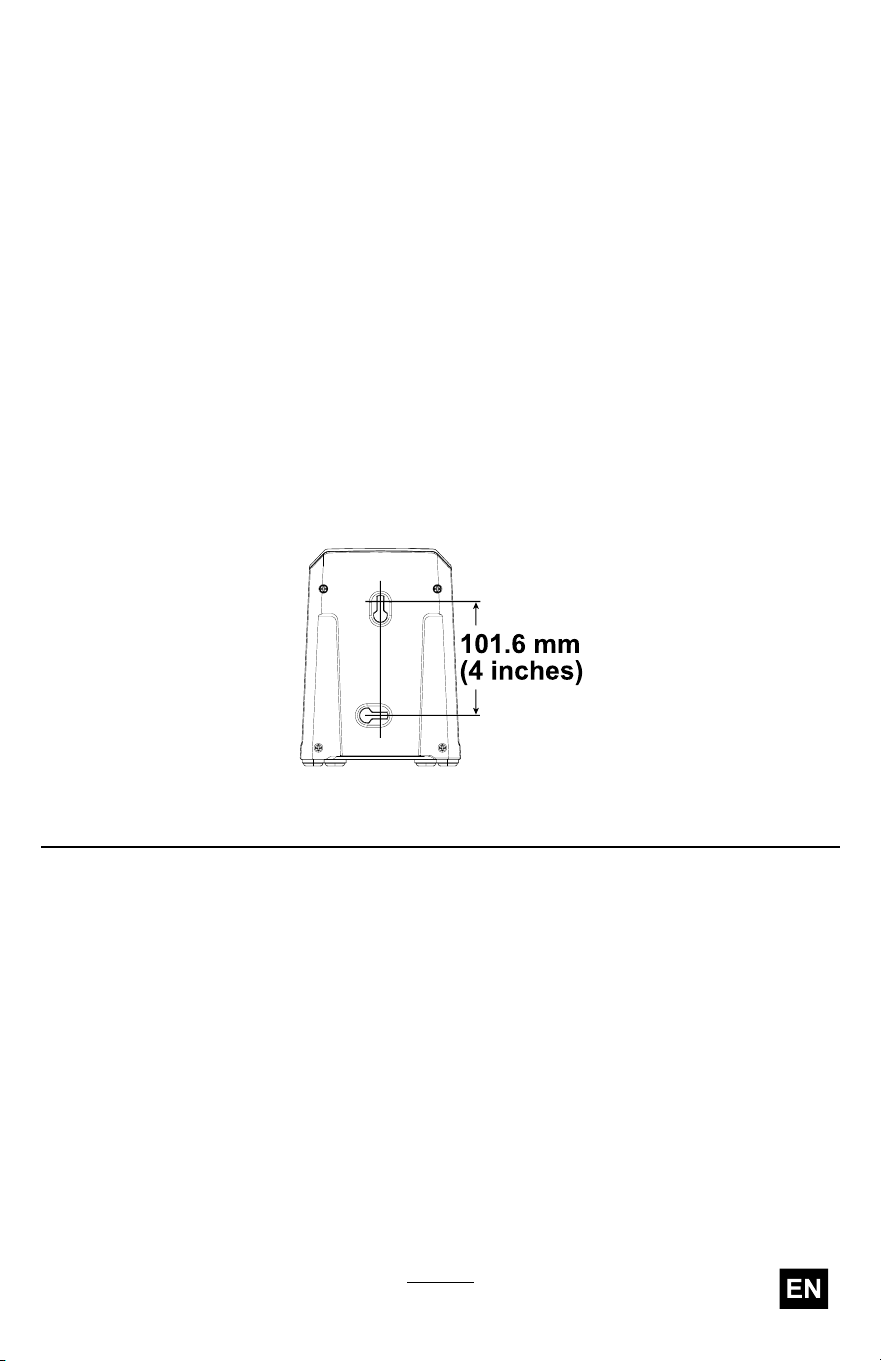
Mounting the Battery Charger (Optional)
If desired, mount the battery charger securely on a wall using the
wall-mount key holes on the back of the charger .
Mount it indoors (such as a garage or other dry place), near a power
outlet, and out of the reach of children.
Refer to Figure 3 for assistance in mounting the charger .
Slide the charger over the appropriately positioned hardware to secure the
charger in place (hardware not included).
g290534
Figure 3
13
Assembling the Blower
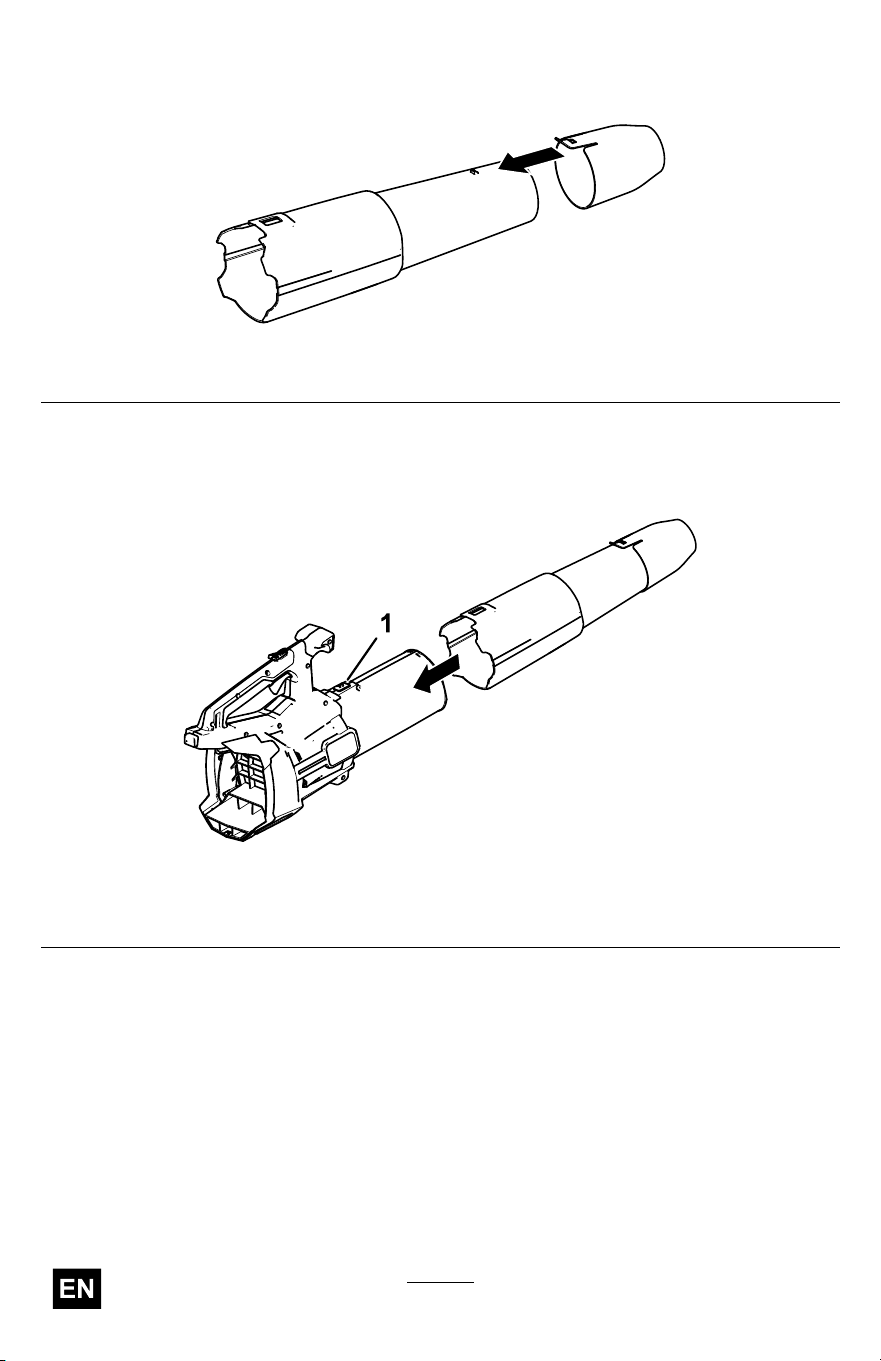
1. Install the blower nozzle to the blower tube.
g472735
Figure 4
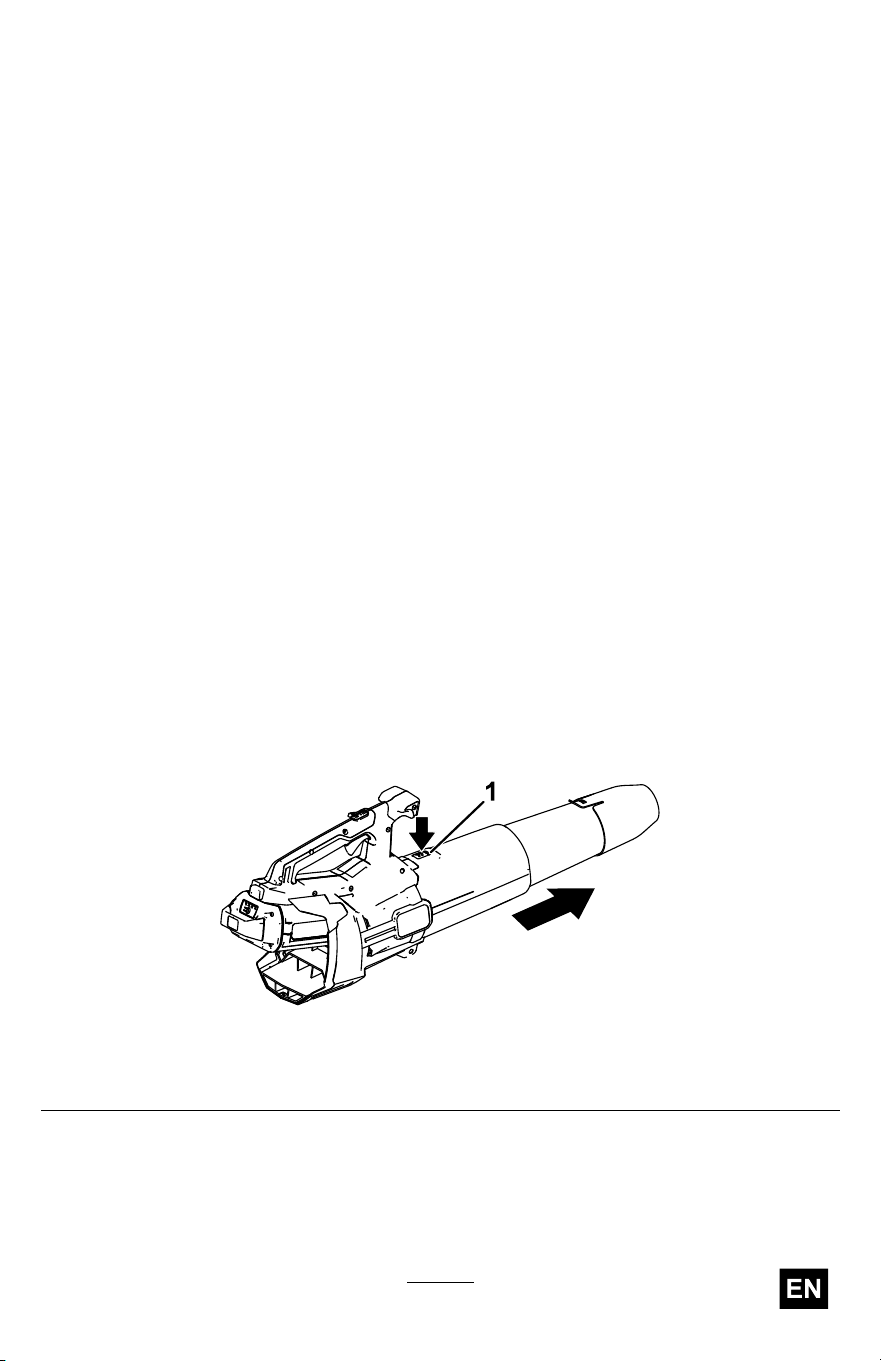
2. Slide the blower tube onto the blower housing. Y ou may need to
press down on the tube latch for the blower tube to lock into place
( Figure 5 ).
g472734
Figure 5
1. T ube latch
Note: The blower can also be operated without the nozzle, or with
the blower tube removed completely .
14
Product Overview
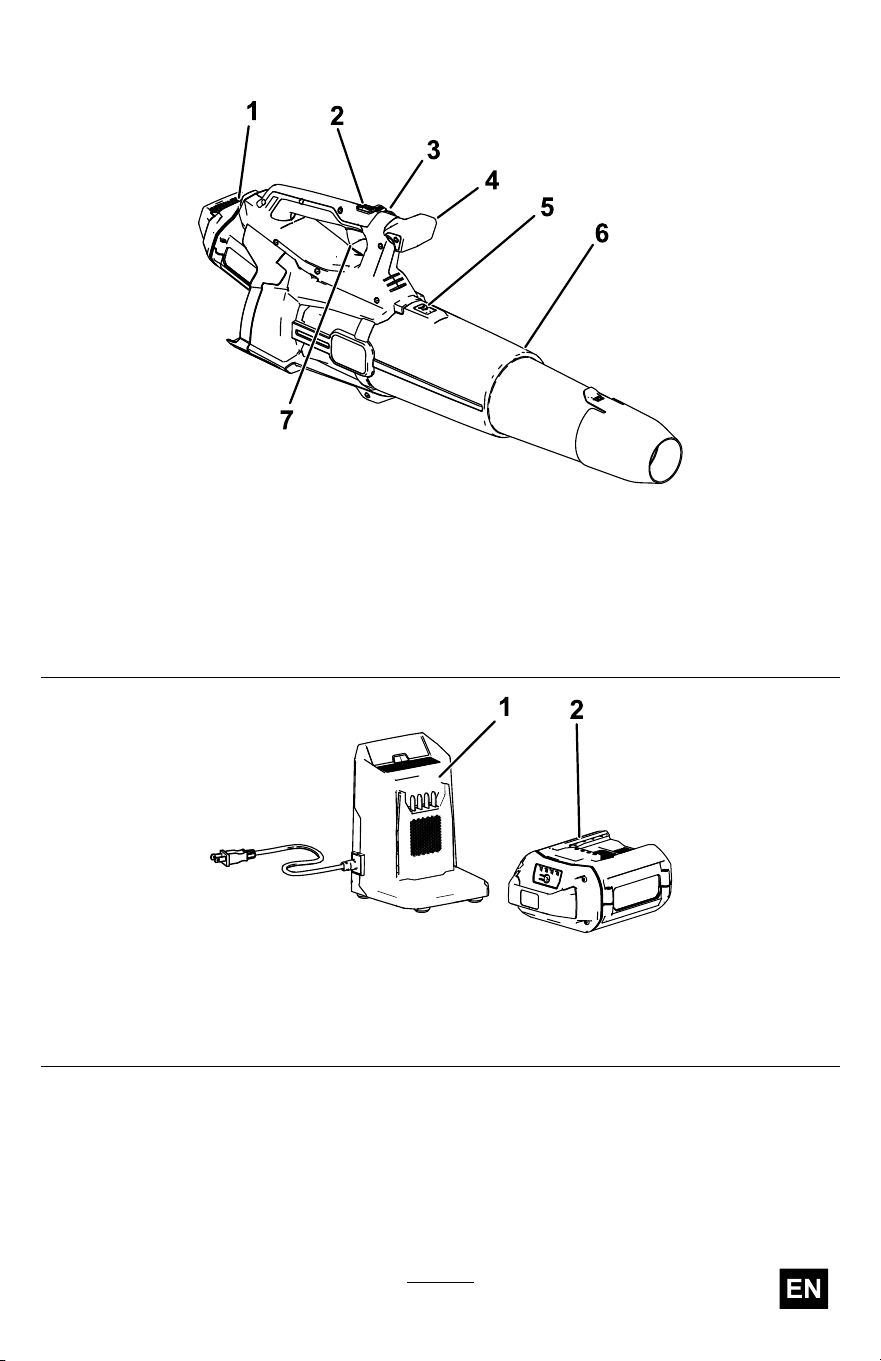
g506818
Figure 6
1. Battery and battery cavity 5. Blower tube latch
2. T urbo boost button 6. Blower tube
3. Speed lock
7. V ariable-speed trigger
4. Handle knob
g362427
Figure 7
1. Battery charger Model 88902 (included
with Model 51826)
2. Battery pack Model 88925 (included
with Model 51826)
15

Specications
Model 51826, 51826T
Rated V oltage
60V DC maximum, 54 VDC nominal usage
Charger T ype
Flex-Force 60V lithium-ion chargers
Battery T ype Flex-Force 60V lithum-ion batteries
Appropriate T emperature Ranges
Charge/ store the battery pack at 5°C (41°F) to 40°C (104°F)*
Use the battery pack at
-30°C (-22°F) to 49°C (120°F)
Use the blower at
0°C (32°F) to 49°C (120°F)
*Charging time will increase if you do not charge the battery within this
range.
Store the tool, battery pack, and battery charger in an enclosed clean,
dry area.
Attachments/Accessories
A selection of T oro approved attachments and accessories is available for
use with the machine to enhance and expand its capabilities. Contact
your Authorized Service Dealer or authorized T oro distributor or go to
www .T oro.com for a list of all approved attachments and accessories.
T o ensure optimum performance and continued safety certication of the
machine, use only genuine T oro replacement parts and accessories.
Replacement parts and accessories made by other manufacturers could
be dangerous.
16
Operation
W ARNING
The blower can throw debris, possibly causing serious
personal injury to you or bystanders.
• Do not blow hard objects, such as nails or bolts.
• Do not operate the blower near bystanders or pets.
• Be careful of blowing direction (i.e., blow away from
bystanders, windows, automobiles, etc.). Only use as much
speed as required.
• Use extra care when cleaning debris from stairs or other
tight areas.
Starting the Blower
Important: Use the battery pack only in temperatures that are within
the appropriate range; refer to Specications ( page 16 ) .
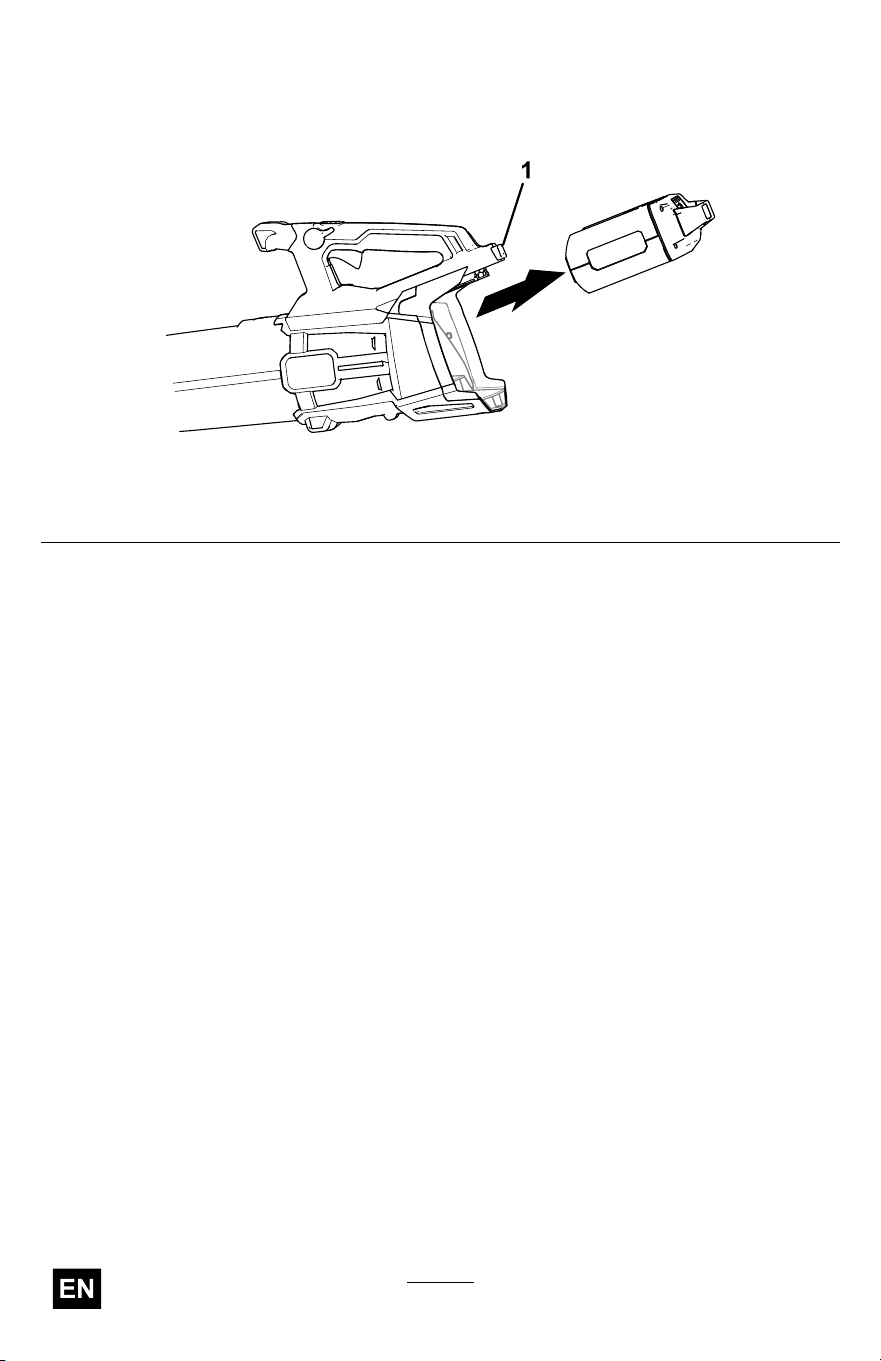
1. Ensure that the vents on the blower are clear of any dust and debris.
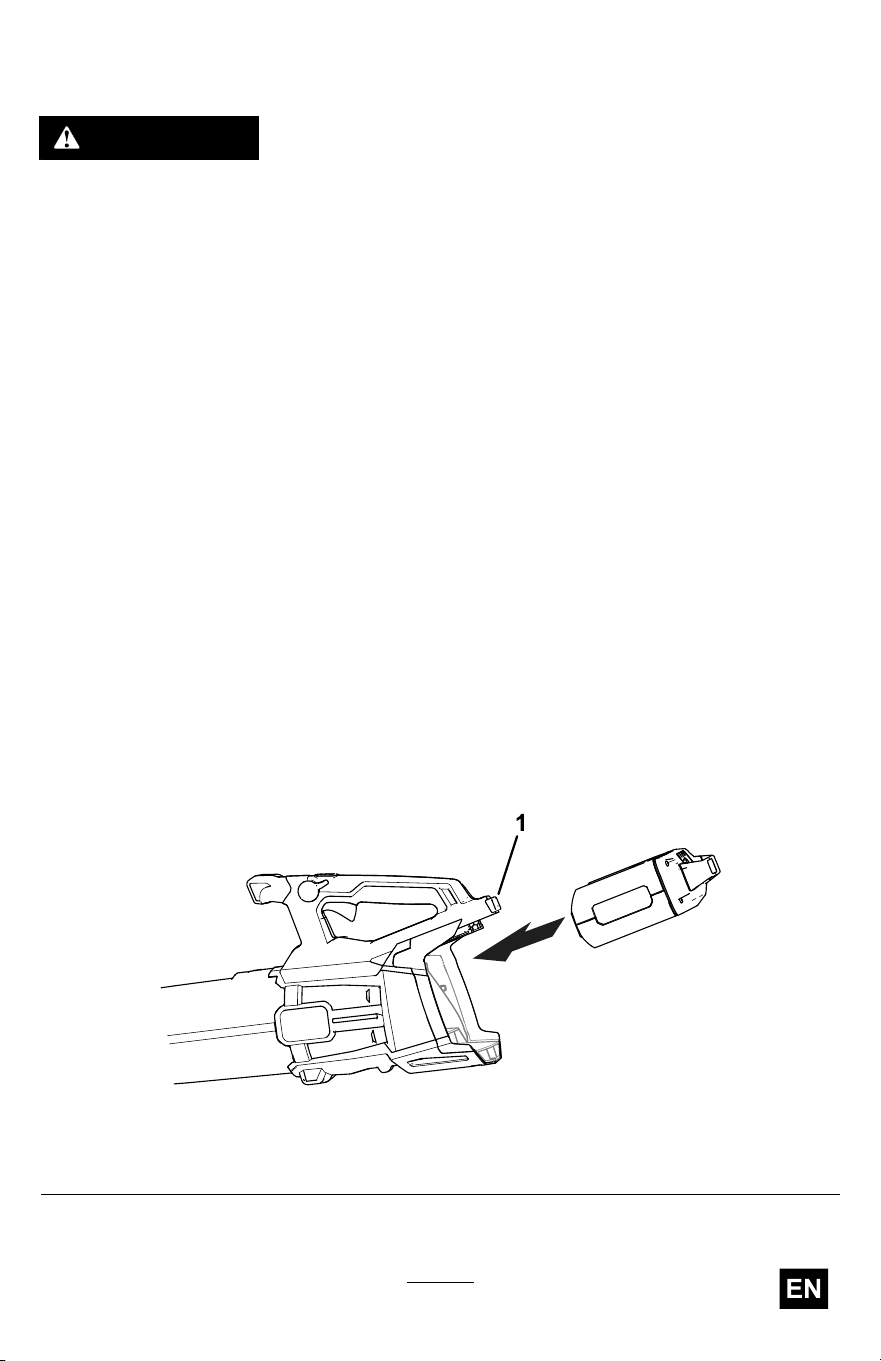
2. Align the cavity on the battery pack with the tongue in the handle
housing ( Figure 8 ).
3. Grasp the handle, and push the battery pack into the handle until the
latch locks into place ( Figure 8 ).
g506820
Figure 8
1. Battery latch
17
Adjusting the Air Speed of the Blower
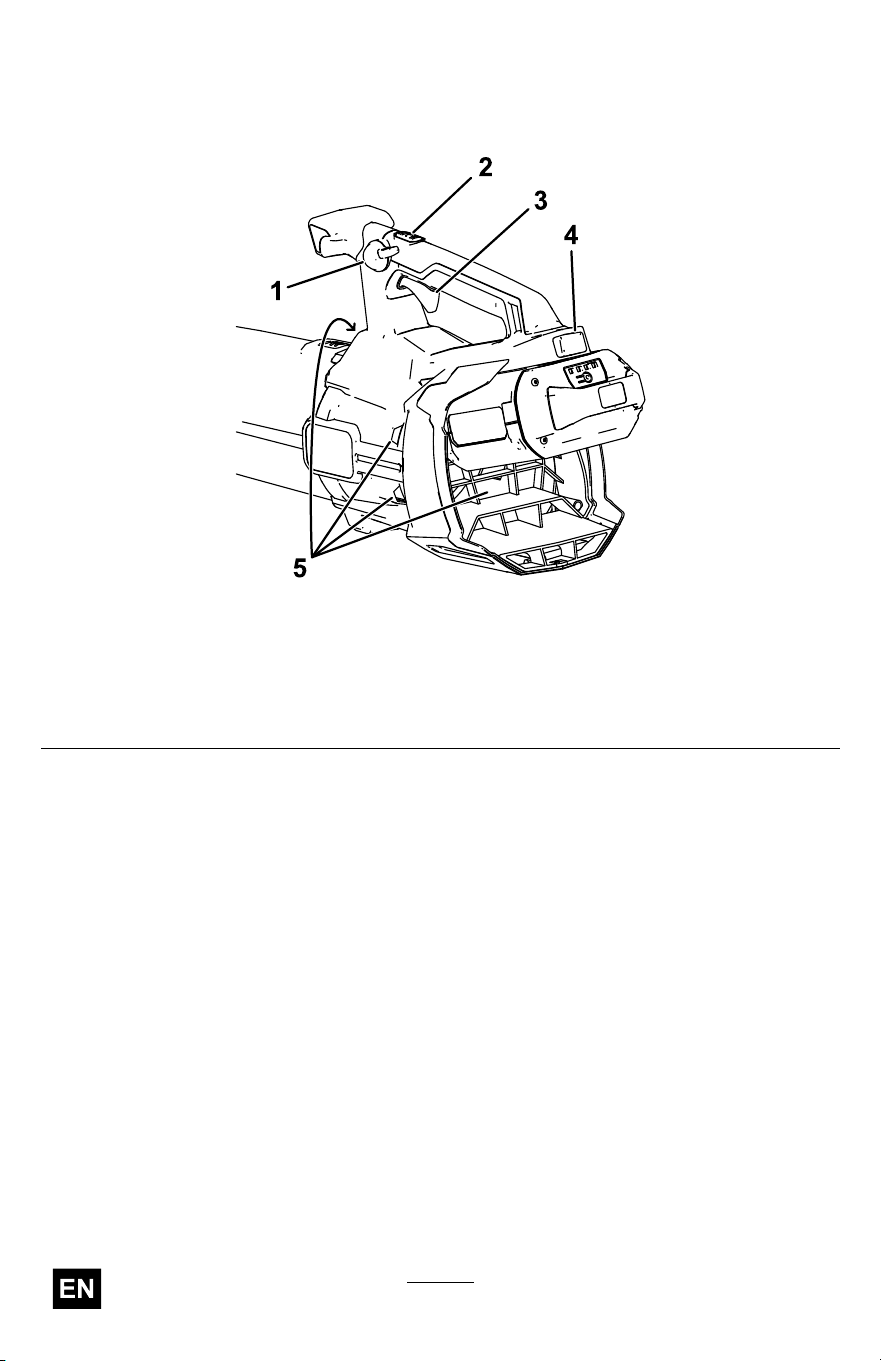
T o adjust the air speed as you blow , use the variable-speed trigger ( Figure
9 ).
T o maintain the current air speed, engage the speed lock ( Figure 9 ).
T o achieve maximum performance, depress the variable-speed trigger ,
then press the turbo boost button to turn boost on ( Figure 9 ).
T o turn boost of f, press the turbo boost button again or completely release
the variable speed trigger .
Shutting Off the Blower
T o shut of f the blower , disengage the speed lock (if in use) and release the
variable-speed trigger ( Figure 9 ).
Important: After stopping the blower , do not leave the speed lock
engaged with the battery pack in the blower .
Whenever you are not using the blower or are transporting the blower to
or from the work area, remove the battery pack.
Removing the Blower T ube
Press down on the tab latch to separate the blower tube from the blower
( Figure 10 ).
g472738
Figure 10
1. T ube latch
19
Charging the Battery Pack
Important: The battery pack is not fully charged when you purchase
it. Before using the tool for the rst time, place the battery pack in
the charger and charge it until the LED display indicates the battery
pack is fully charged. Read all safety precautions.
Important: Charge the battery pack only in temperatures that are
within the appropriate range; refer to Specications ( page 16 ) .
Note: At any time, press the battery-charge-indicator button on the
battery pack to display the current charge (LED indicators).
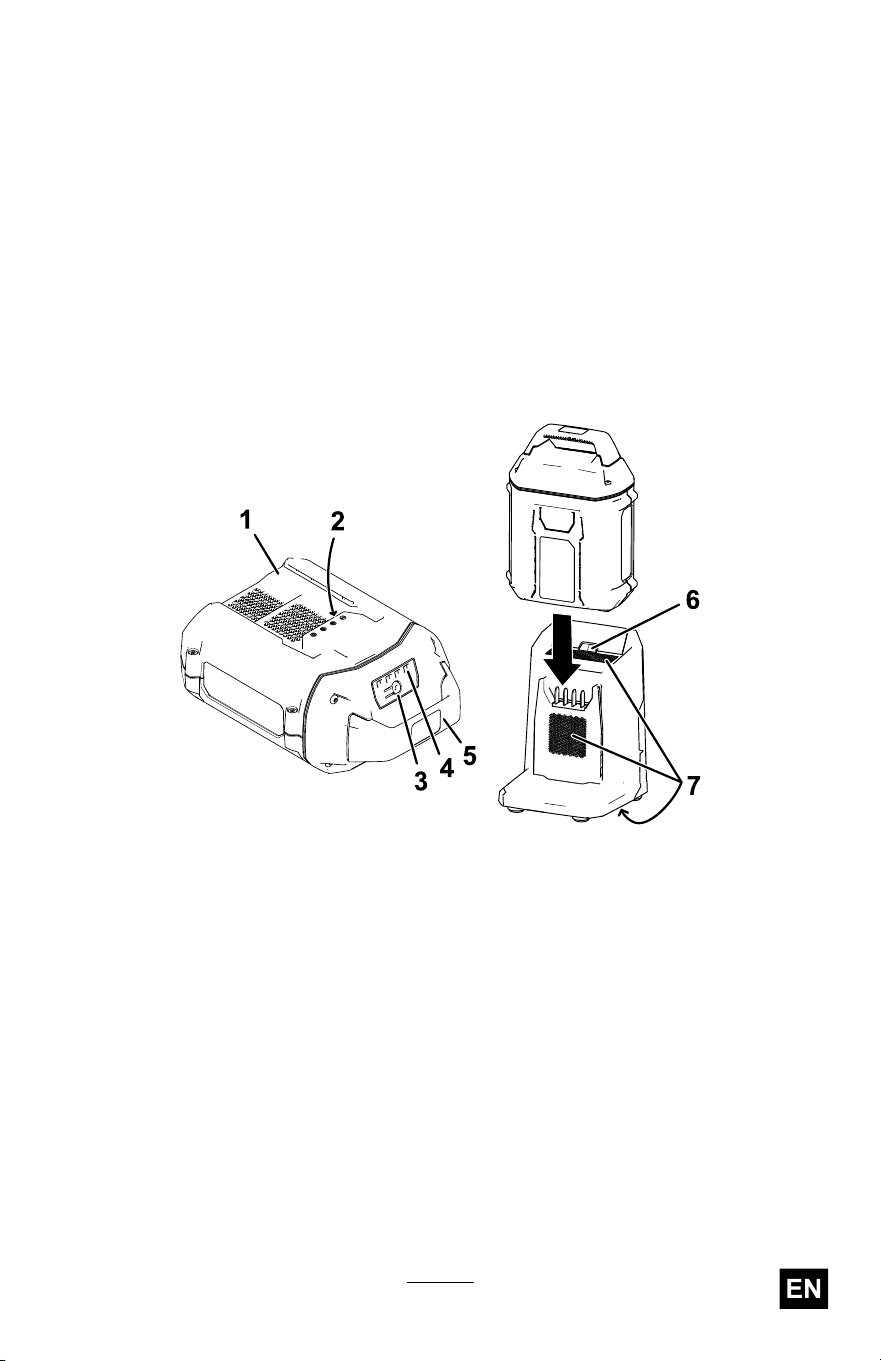
1. Ensure that the vents and charging terminals on the battery pack
and charger are clear of any dust and debris.
g473274
Figure 12
1. Battery-pack cavity 5. Handle
2. Battery-pack terminals
6. Charger LED indicator light
3. Battery-charge-indicator button
7. Charger venting areas
4. LED indicators (current charge)
2. Line up the cavity in the battery pack ( Figure 12 ) with the tongue
on the charger .
3. Slide the battery pack into the charger until it is fully seated ( Figure
12 ).
4. T o remove the battery pack, slide the battery backward out of the
charger .
21

5. Refer to the following table to interpret the LED indicator light on
the battery charger .
Indicator
light
Indicates
Of f
No battery pack inserted
Green
blinking
Battery pack is charging
Green
Battery pack is charged
Red
Battery pack and/or battery charger is over or under the appropriate
temperature range
Red blinking
Battery pack charging fault*
*Refer to T roubleshooting ( page 24 ) for more information.
Important: The battery pack can be left on the charger for short
periods between uses.
If the battery pack will not be used for longer periods, remove the
battery pack from the charger; refer to Storage ( page 23 ) .
22

Storage
Important: Store the machine, battery pack, and charger only
in temperatures that are within the appropriate range; refer to
Specications ( page 16 ) .
Important: If you are storing the machine for a year or longer ,
remove the battery pack from the machine and charge the battery
pack until 1 or 2 LED indicators turn green on the battery . Do not
store a fully charged or fully depleted battery . When you are ready to
use the machine again, charge the battery pack until the left indicator
light turns green on the charger or all 4 LED indicators turn green
on the battery .
• Disconnect the machine from the power supply (i.e., remove the
battery pack) and check for damage after use.
• Clean all foreign material from the machine.
• Do not store the machine or charger with the battery pack installed.
• When not in use, store the machine, battery pack, and battery charger
out of the reach of children.
• Keep the machine, battery pack, and battery charger away from
corrosive agents such as garden chemicals and de-icing salts.
• T o reduce the risk of serious personal injury , do not store the battery
pack outside or in vehicles.
• Store the machine, battery pack, and battery charger in an enclosed
clean, dry area.
23
T roubleshooting
Perform only the steps described in these instructions. All further
inspection, maintenance, and repair work must be performed by an
authorized service center or a similarly qualied specialist if you cannot
solve the problem yourself.
Always remove the battery from the tool when troubleshooting, inspecting,
maintaining, or cleaning the tool.
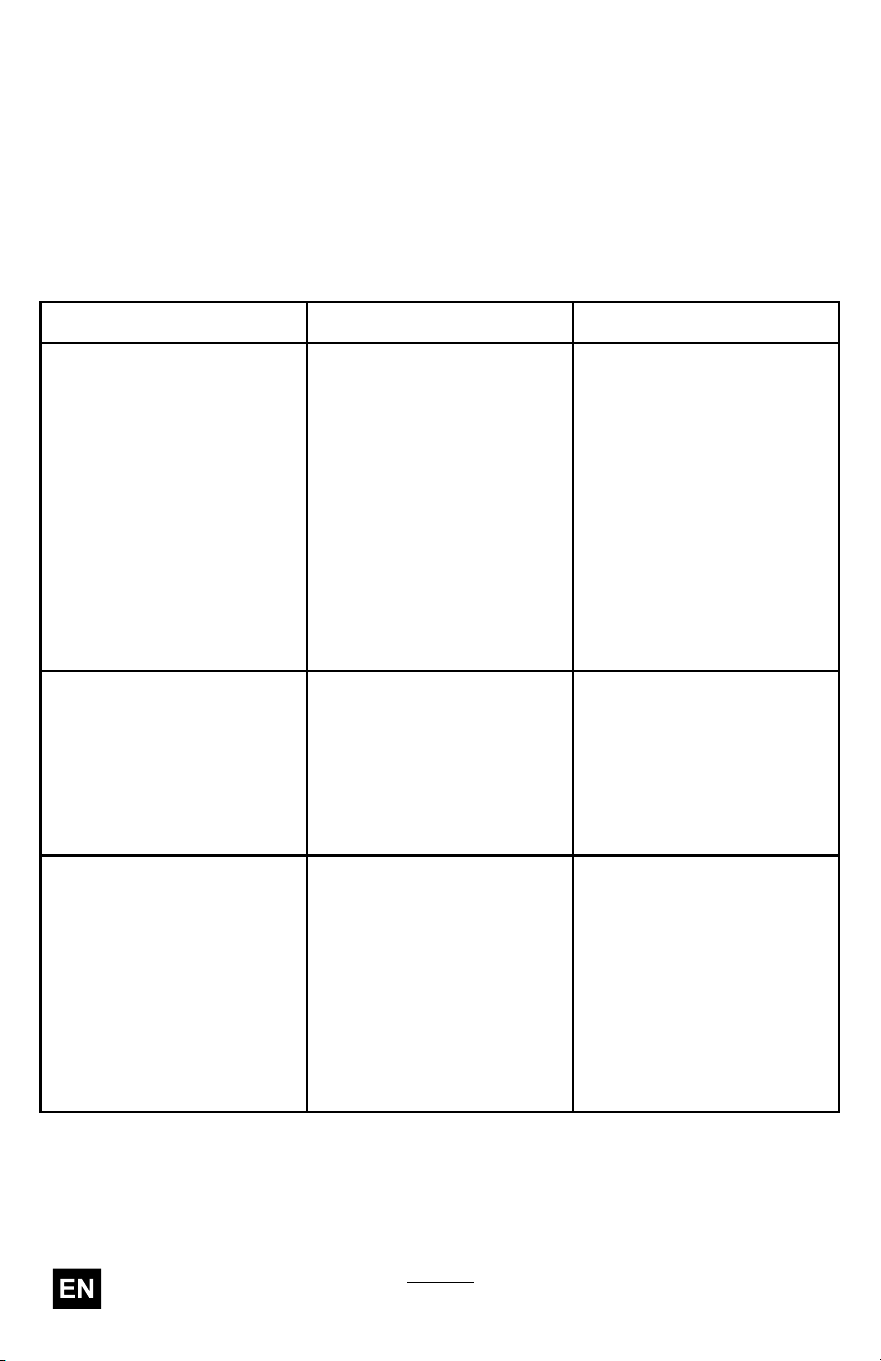
Problem
Possible Cause Corrective Action
1. The battery is not fully
installed in the tool.
1. Remove and then
replace the battery into
the tool, making sure
that it is fully installed
and latched.
2. The battery pack is not
charged.
2. Remove the battery
pack from the tool and
charge it.
3. The battery pack is
damaged.
3. Replace the battery
pack.
The tool does not start.
4. There is another
electrical problem with
the tool.
4. Contact an Authorized
Service Dealer .
1. The battery pack charge
capacity is too low .
1. Remove the battery
pack from the tool and
fully charge the battery
pack.
The tool does not reach full
power .
2. The air vents are
blocked.
2. Remove the battery
pack from the tool and
clean the air vents.
1. There is moisture on
the leads of the battery
pack.
1. Allow the battery pack
to dry or wipe it dry .
2. The battery is not fully
installed in the tool.
2. Remove and then
replace the battery in
the tool, ensuring that
it is fully installed and
latched.
The tool does not run or
does not run continuously .
3. The battery pack is low
on charge.
3. Charge the battery
pack.
24
Problem
Possible Cause Corrective Action
The battery pack loses
charge quickly .
1. The battery pack is over
or under the appropriate
temperature range.
1. Move the battery pack
to a place where it is
dry and the temperature
is between 5°C (41°F)
and 40°C (104°F).
1. The battery charger
is over or under
the appropriate
temperature range.
1. Unplug the battery
charger and move it to
a place where it is dry
and the temperature
is between 5°C (41°F)
and 40°C (104°F).
The battery charger is not
working.
2. The outlet that the
battery charger is
plugged into does not
have power .
2. Contact your licensed
electrician to repair the
outlet.
The LED indicator light on
the battery charger is red.
1. The battery charger
and/or battery pack
is over or under
the appropriate
temperature range.
1. Unplug the battery
charger and move the
battery charger and
battery pack to a place
where it is dry and the
temperature is between
5°C (41°F) and 40°C
(104°F).
1. There is an error in
the communication
between the battery
pack and the charger .
1. Remove the battery
pack from the battery
charger , unplug the
battery charger from
the outlet, and wait
10 seconds. Plug the
battery charger into the
outlet again and place
the battery pack on the
battery charger . If the
LED indicator light on
the battery charger is
still blinking red, repeat
this procedure again.
If the LED indicator
light on the battery
charger is still blinking
red after 2 attempts,
properly dispose of the
battery pack at a battery
recycling facility .
The LED indicator light
on the battery charger is
blinking red.
2. The battery pack is
weak.
2. Properly dispose of the
battery pack at a battery
recycling facility .
25

Notes:

California Proposition 65 W arning Information
What is this warning?
Y ou may see a product for sale that has a warning label like the following:
W ARNING: Cancer and Reproductive
Harm—www .p65W arnings.ca.gov .
What is Prop 65?
Prop 65 applies to any company operating in California, selling products in California, or manufacturing products
that may be sold in or brought into California. It mandates that the Governor of California maintain and publish a
list of chemicals known to cause cancer , birth defects, and/or other reproductive harm. The list, which is updated
annually , includes hundreds of chemicals found in many everyday items. The purpose of Prop 65 is to inform the
public about exposure to these chemicals.
Prop 65 does not ban the sale of products containing these chemicals but instead requires warnings on any product,
product packaging, or literature with the product. Moreover , a Prop 65 warning does not mean that a product is in
violation of any product safety standards or requirements. In fact, the California government has claried that
a Prop 65 warning “is not the same as a regulatory decision that a product is ‘safe’ or ‘unsafe.’” Many of these
chemicals have been used in everyday products for years without documented harm. For more information, go
to https://oag.ca.gov/prop65/faqs-view-all .
A Prop 65 warning means that a company has either (1) evaluated the exposure and has concluded that it exceeds
the “no signicant risk level”; or (2) has chosen to provide a warning based on its understanding about the presence
of a listed chemical without attempting to evaluate the exposure.
Does this law apply everywhere?
Prop 65 warnings are required under California law only . These warnings are seen throughout California in a wide
range of settings, including but not limited to restaurants, grocery stores, hotels, schools, and hospitals, and on a
wide variety of products. Additionally , some online and mail order retailers provide Prop 65 warnings on their
websites or in catalogs.
How do the California warnings compare to federal limits?
Prop 65 standards are often more stringent than federal and international standards. There are various substances
that require a Prop 65 warning at levels that are far lower than federal action limits. For example, the Prop 65
standard for warnings for lead is 0.5 μg/day , which is well below the federal and international standards.
Why don’t all similar products carry the warning?
• Products sold in California require Prop 65 labelling while similar products sold elsewhere do not.
• A company involved in a Prop 65 lawsuit reaching a settlement may be required to use Prop 65 warnings for its
products, but other companies making similar products may have no such requirement.
• The enforcement of Prop 65 is inconsistent.
• Companies may elect not to provide warnings because they conclude that they are not required to do so
under Prop 65; a lack of warnings for a product does not mean that the product is free of listed chemicals
at similar levels.
Why does T oro include this warning?
T oro has chosen to provide consumers with as much information as possible so that they can make informed
decisions about the products they buy and use. T oro provides warnings in certain cases based on its knowledge of
the presence of one or more listed chemicals without evaluating the level of exposure, as not all the listed chemicals
provide exposure limit requirements. While the exposure from T oro products may be negligible or well within the “no
signicant risk” range, out of an abundance of caution, T oro has elected to provide the Prop 65 warnings. Moreover , if
T oro does not provide these warnings, it could be sued by the State of California or by private parties seeking to
enforce Prop 65 and subject to substantial penalties.
Rev