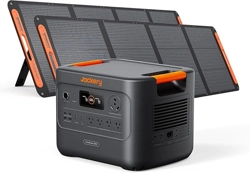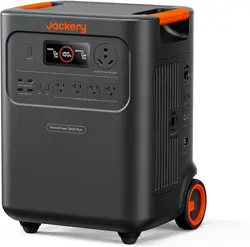
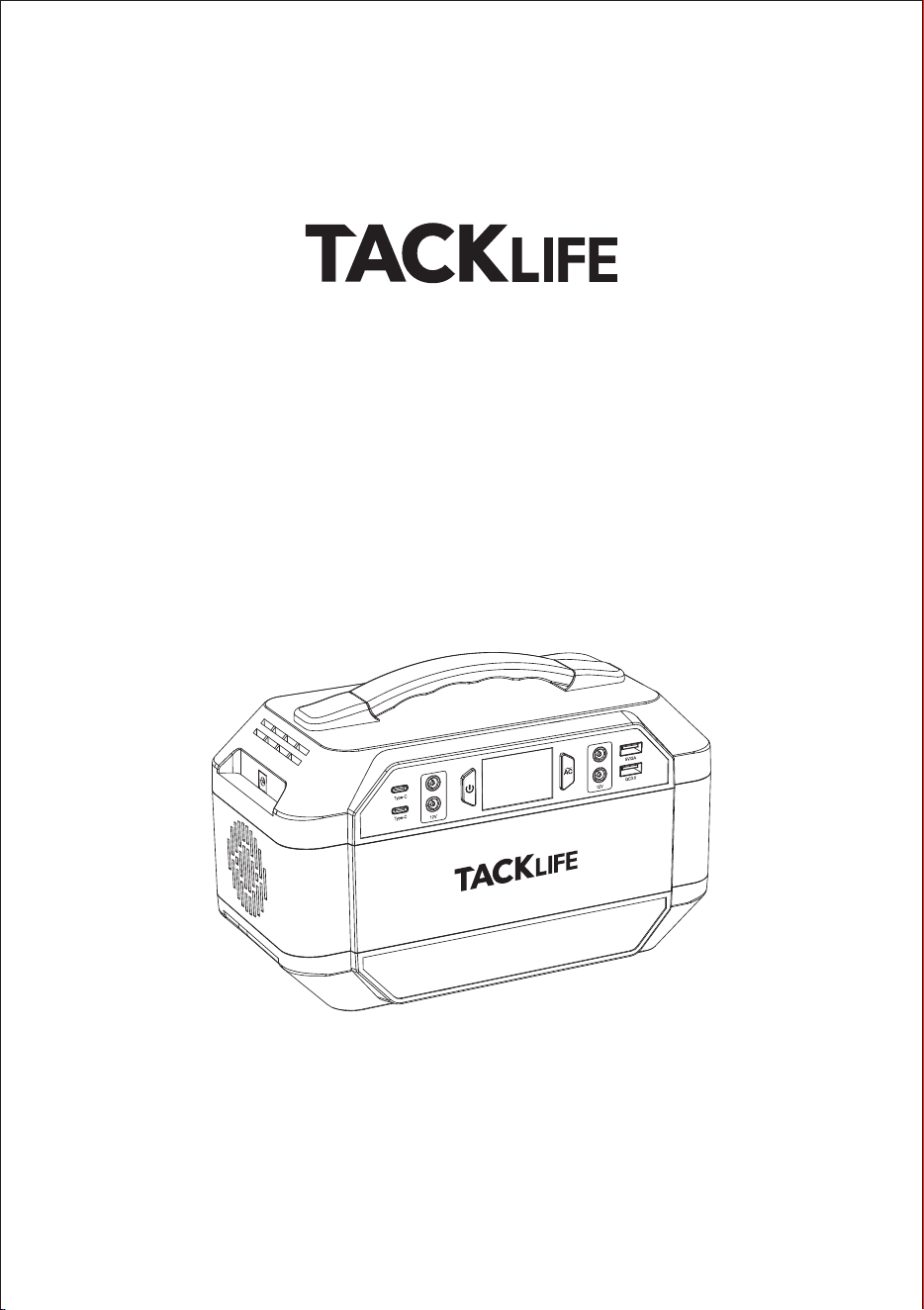
Portable power station
User Manual
Model:P30

English
日本語
01-12
13-23
Contents

- 01 -
SAFETY INSTRUCTION
PRODUCT INTRODUCTION
I.Function overview
II.LED DISPLAY
III.LED battery symbol
IV.Packing list
USER GUIDE
I.Charge for this product
II. Power supply for other devices
III. Attention
FREQUENTLY ASKED QUESTIONS
TROUBLE SHOOTING
TECHNICAL SPECIFICATION
CAUTION
WARRANTY
CONTACT US
02
02
03
03
04
05
06
08
09
10
11
11
12
12
English
SAFETY INSTRUCTION
Please read this manual before use and follow its guidance and keep it for
future reference. Please pay attention to high temperature of the device
which may happen during charging and long time use. Please fully charge the
product before storage and charge it at least every 3 months. This is not toy,
please keep it away from children.
Note: This power station provides a pure sine wave output, which means its
AC output is the same as home AC output, making it almost compatible with
all the AC equipment in your home. This power station inverter can emergent
supply power to almost any appliance in your home that is less than
300W.This product is for emergency use only and should not be used to
replace regular household AC output.
PRODUCT INTRODUCTION
I. Function overview
- 02 -
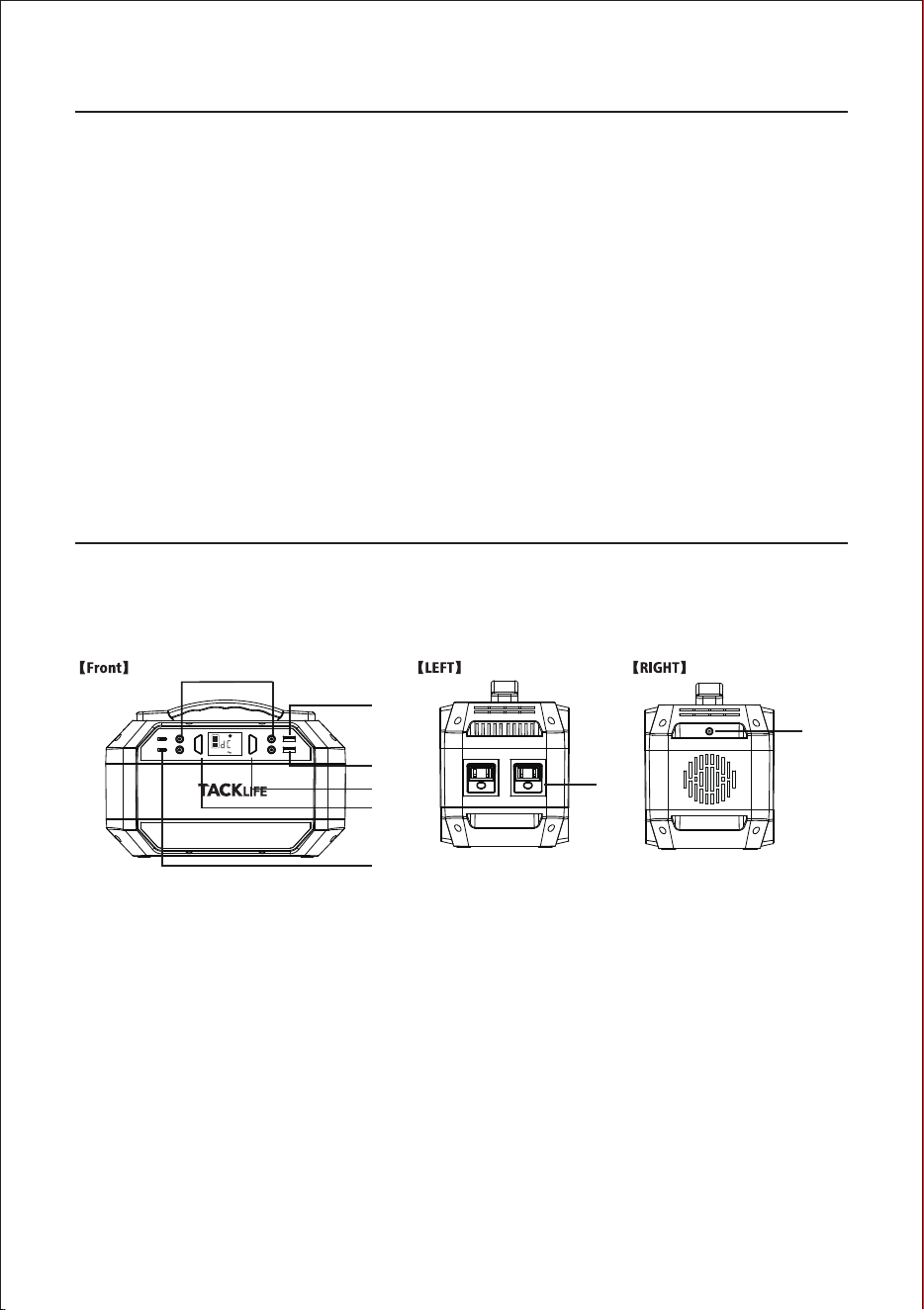
①
②
③
④
⑤
⑥
⑦
⑧
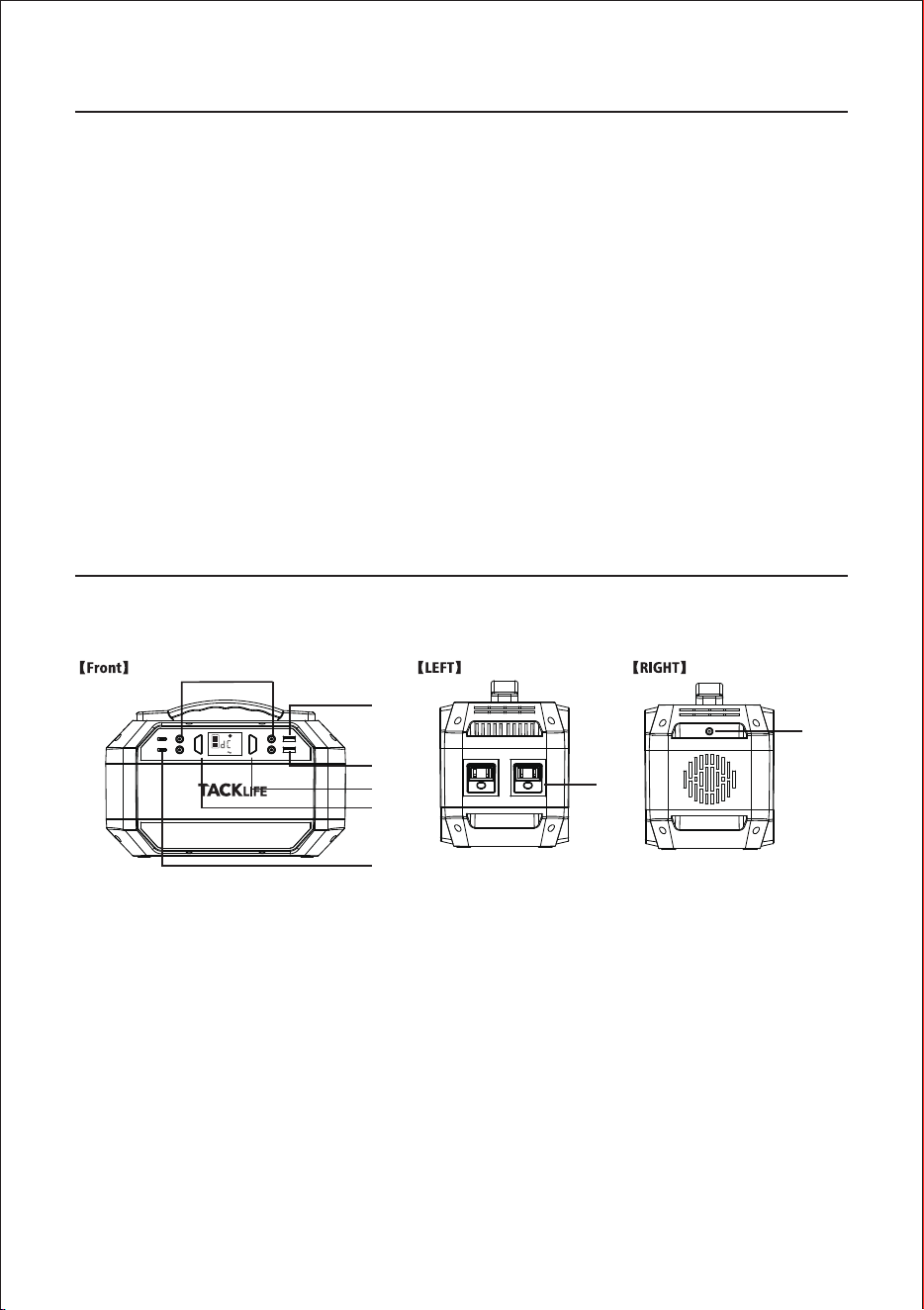
DC Output 9~12.6V/10A(Port 5521)
USB Output 5V/2A
USB 5V-9V 2A QC 3.0
AC/DC Switch Button
Power On/Off Button
Type-C output port 5V~9V/2A QC 3.0
AC Output 300W.
Input 60W (Port:5525)
①
②
③
⑦
⑧
④
⑤
⑥
USB
TYP-C
5V
DC OUTPUT

II. LED DISPLAY
Note: The product photo, accessories and user interface are all for reference only.
The real product may be different due to product upgrade, please refer to real
product.
III. LED battery symbol
The LED Battery Display indicates the Battery level. There are 5 segments of
the battery, approximating 20%-40%-60%-80%-100% capacity. During using,
segments will disappear from the display, indicating the remaining capacity.
If there is only one battery segment, please charge the product immediately
to avoid affecting the use. When charging it, you will notice a battery
segment blinking with 1 second interval. This indicates the current charge
status. Once is fully charged, all battery segments will be lit and remain solid.
Then you can unplug the power cord.
Note: When power switch on and in DC mode, the product will automatically
shut down after 15 seconds if no use; but when in AC mode, the product will
not automatically shut down if no use. In order to save the electricity of the
product, please remembers to turn off the power button after using it.
①
②
③
USB Output
Type-C Output
DC Output
④
⑤
⑥
AC/DC Mode
AC Output
Battery Level
- 03 -
USB
Type-c
12V Output
①
②
③
④
⑤
⑥
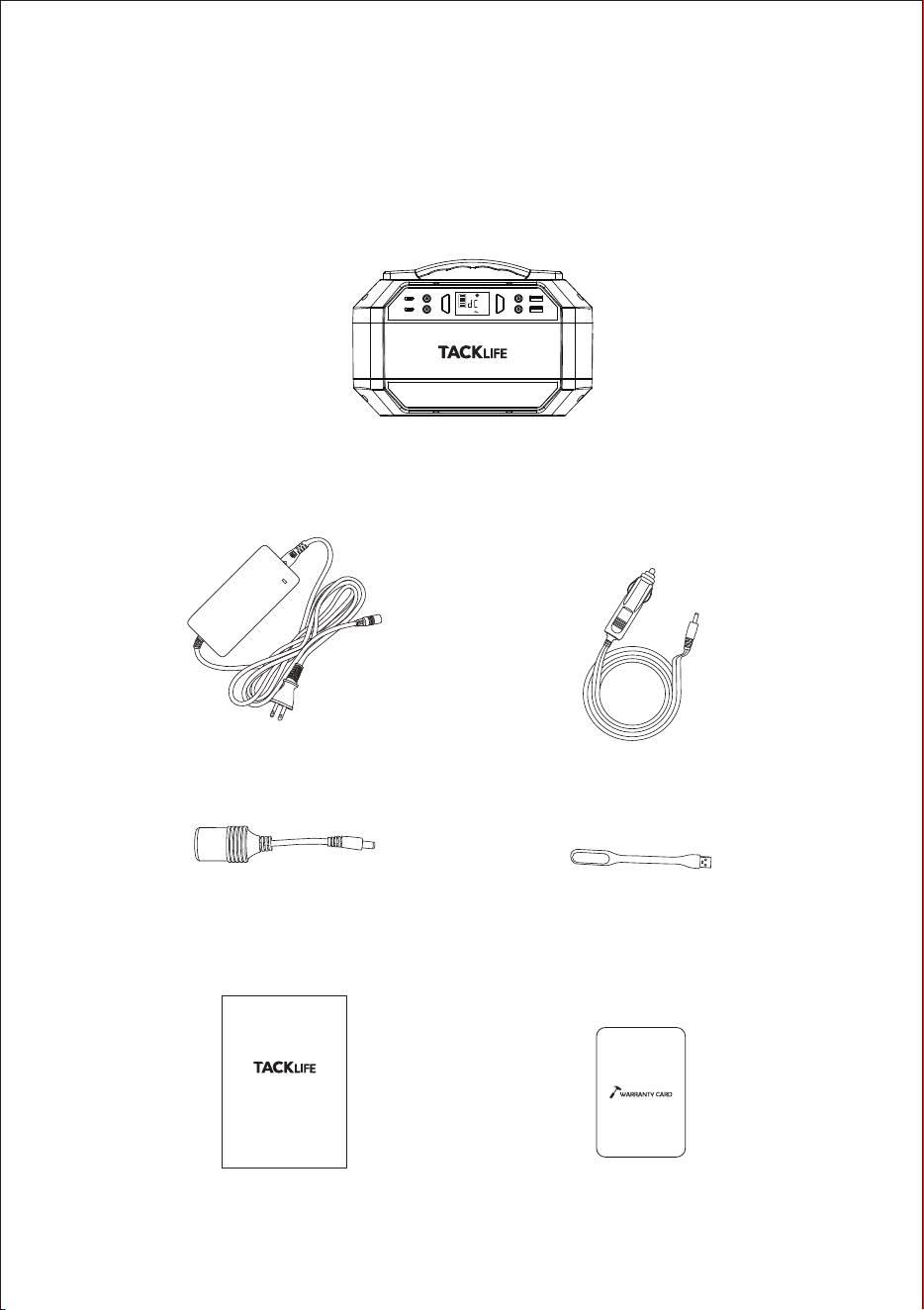
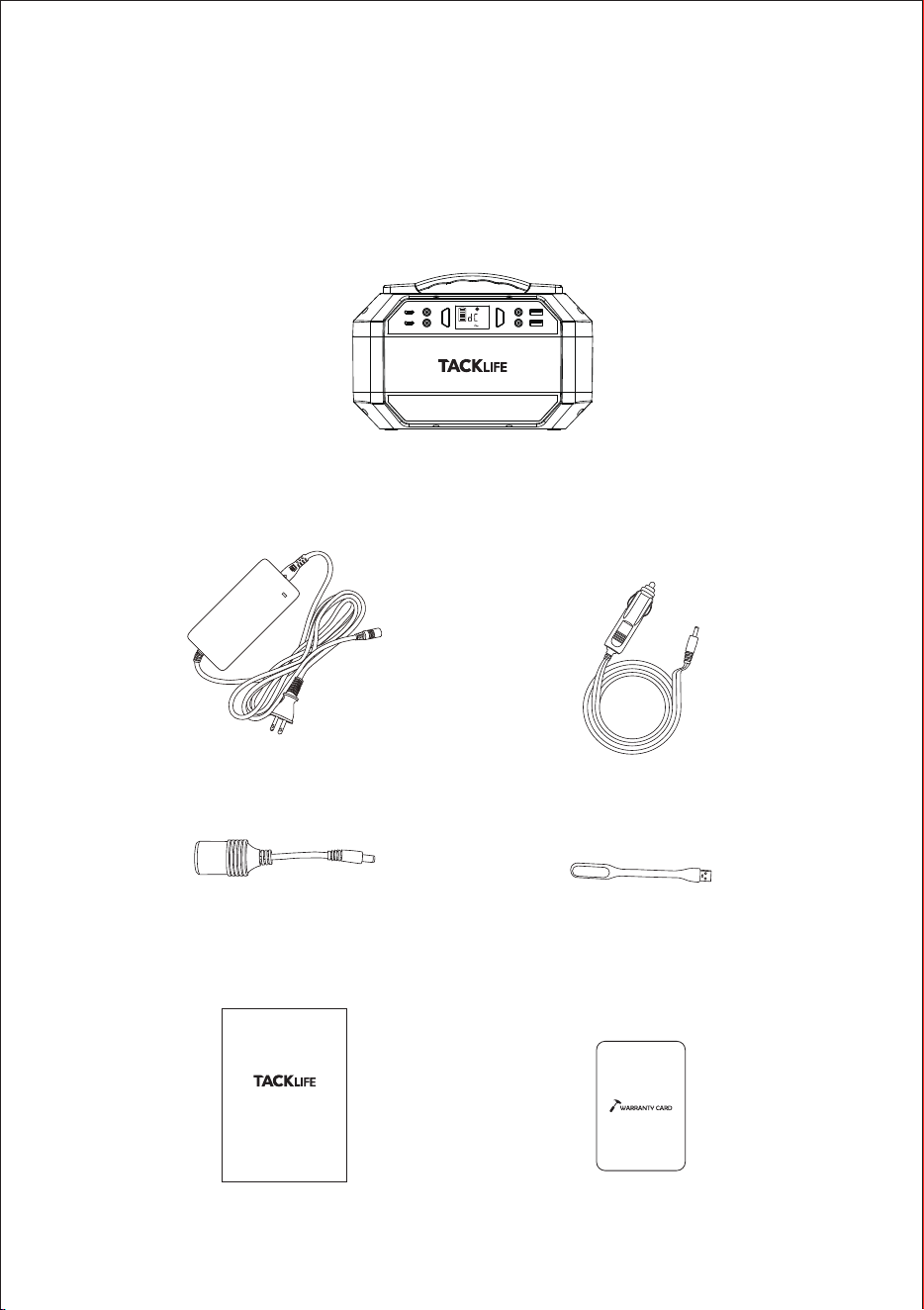
IV. Packing list
Before opening the parcel, please check whether the parcel is damaged. If
the product is damaged during delivery or any accessories are missed,
please contact with the seller customer service (Email:support@autotack-
life.com). The items you shall get in the parcel:
II. LED DISPLAY
Note: The product photo, accessories and user interface are all for reference only.
The real product may be different due to product upgrade, please refer to real
product.
III. LED battery symbol
The LED Battery Display indicates the Battery level. There are 5 segments of
the battery, approximating 20%-40%-60%-80%-100% capacity. During using,
segments will disappear from the display, indicating the remaining capacity.
If there is only one battery segment, please charge the product immediately
to avoid affecting the use. When charging it, you will notice a battery
segment blinking with 1 second interval. This indicates the current charge
status. Once is fully charged, all battery segments will be lit and remain solid.
Then you can unplug the power cord.
Note: When power switch on and in DC mode, the product will automatically
shut down after 15 seconds if no use; but when in AC mode, the product will
not automatically shut down if no use. In order to save the electricity of the
product, please remembers to turn off the power button after using it.
- 04 -
IV. Packing list
Before opening the parcel, please check whether the parcel is damaged. If
the product is damaged during delivery or any accessories are missed,
please contact with the seller customer service (Email:support@autotack-
life.com). The items you shall get in the parcel:
Cigarette Charging Cable
User Manual
PORTABLE POWER STATION
User Manual
Warranty Card
Ac Wall Charger
P30 Portable Power Station
USB
TYP-C
5V
DC OUTPUT
Cigarette Lighter Adaptor USB LED
2.
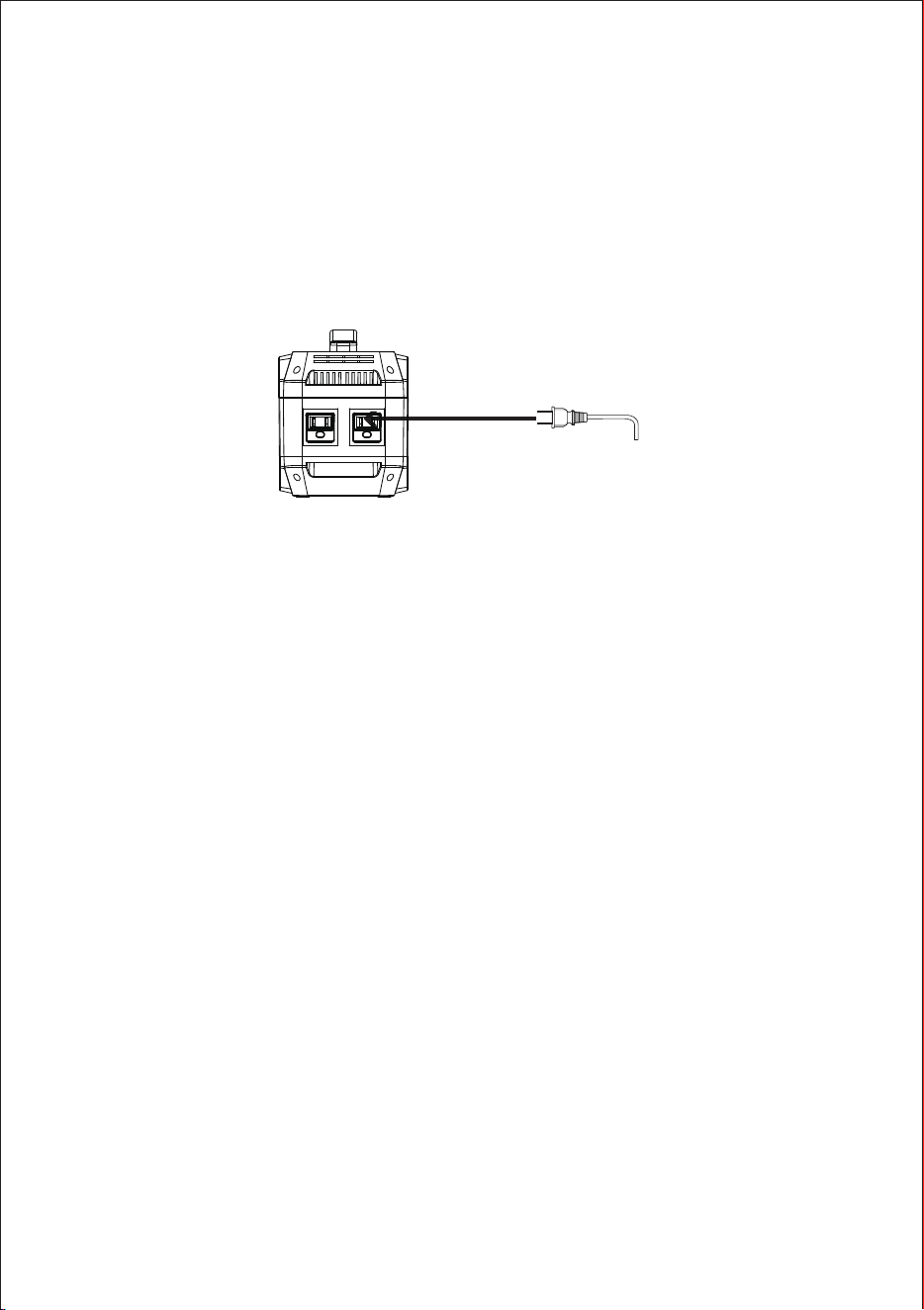
AC Output Port
1.
2.
3.
Note:
If the DC output occurs short-circuited or the external device power exceeds
the output power of the product (load greater than 300W), the unit will shut
down automatically for protection itself. Please remove the device, then you
can press the power switch to reactivate the product.
power and remember to recharge the product in time.
If the DC output occurs short-circuited or the external device power exceeds
the output power of the product (load greater than 120W), the unit will shut
down automatically for protection itself. Please remove the device, then you
can press the power switch to reactivate the product.
Please turn on the power button and then press AC button to switch to AC
mode.
Connect the load devices to the portable power station to get power supply.
Turn off the product when the external devices are fully charged or there is
no load. Press the Power On/Off button to shut down the device.
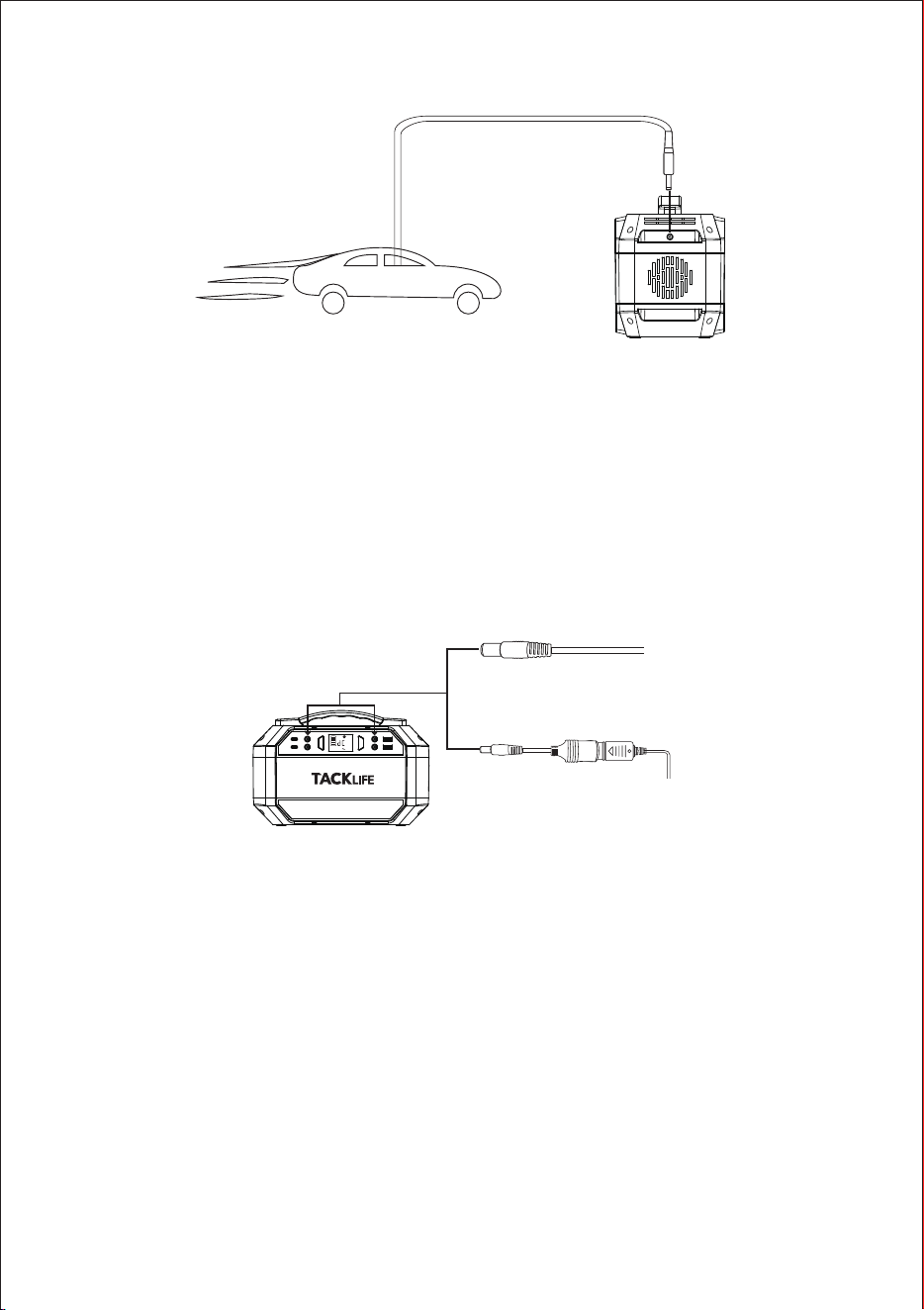
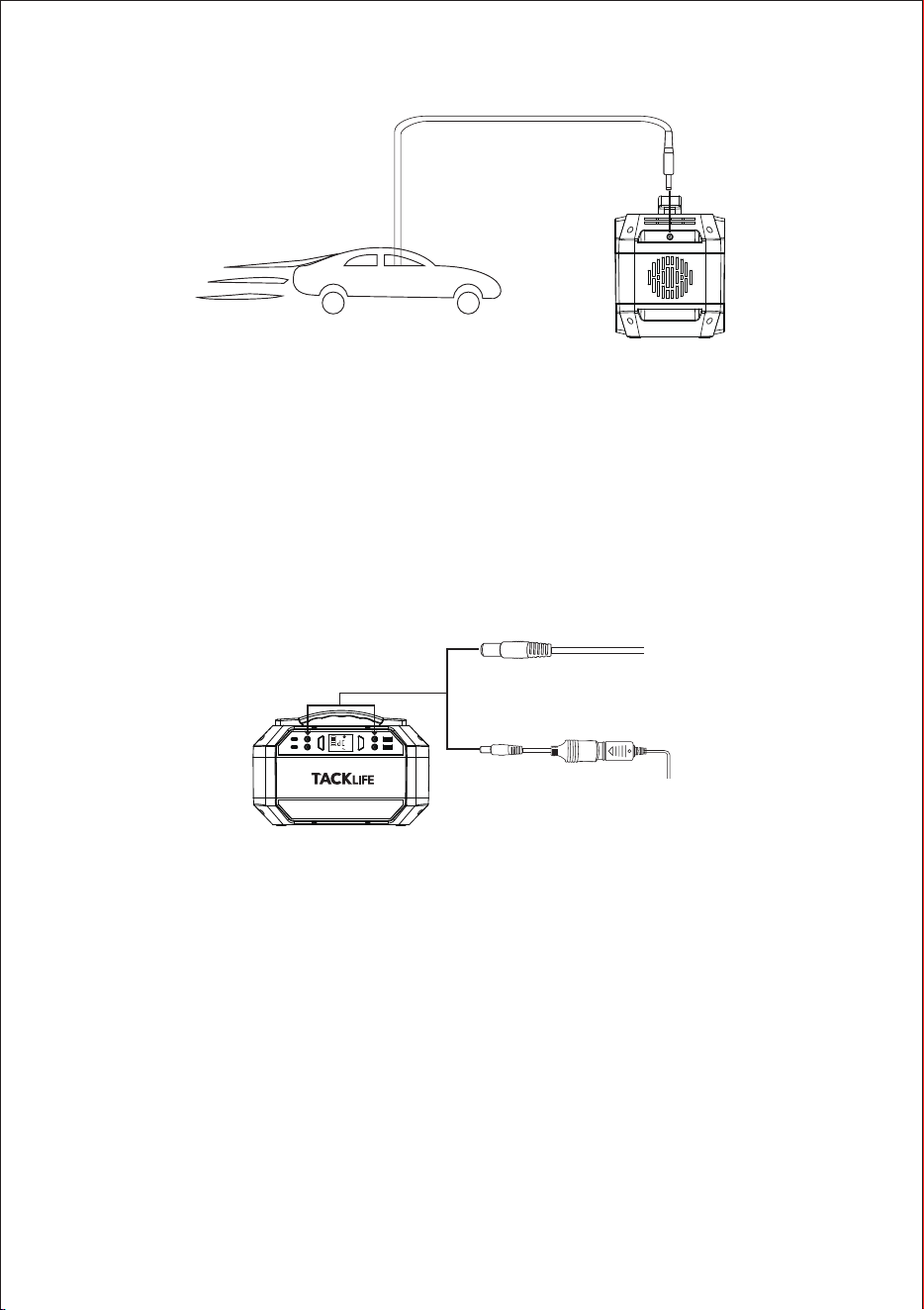
Charge with car charger
1.
2.
Note: You can use only 12V vehicles to charge the portable power station and
24V vehicle is not supported and charge the device only after the vehicle started.
II. Power supply for other devices
1.
2.
Note:
1.
Connect your portable power station with the cigarette charging cable. You
can know the charging status from the LED battery symbol.
When the battery is fully charged, the battery icon will be full and bright.
Remove the charger after fully charged.
Please make sure that the interface of your device is 12V DC (Port: 5521).
Otherwise, it cannot be connected to the DC output interface of this power
station. If the device cannot be directly connected, please purchase the corre-
sponding adapter.
If your device can be powered from the car charger, then it can also be
powered from this power station by connecting the cigarette lighter adapter.
The voltage of the power station will drop with the capacity drop. The DC
output voltage of this product has a working range of 9~12.6V, and the
maximum output current is 10A. If your connected DC 12V device does
not have regulated voltage function, it may not work properly when the
voltage of this power station drops. Please keep the product has enough
USER GUIDE
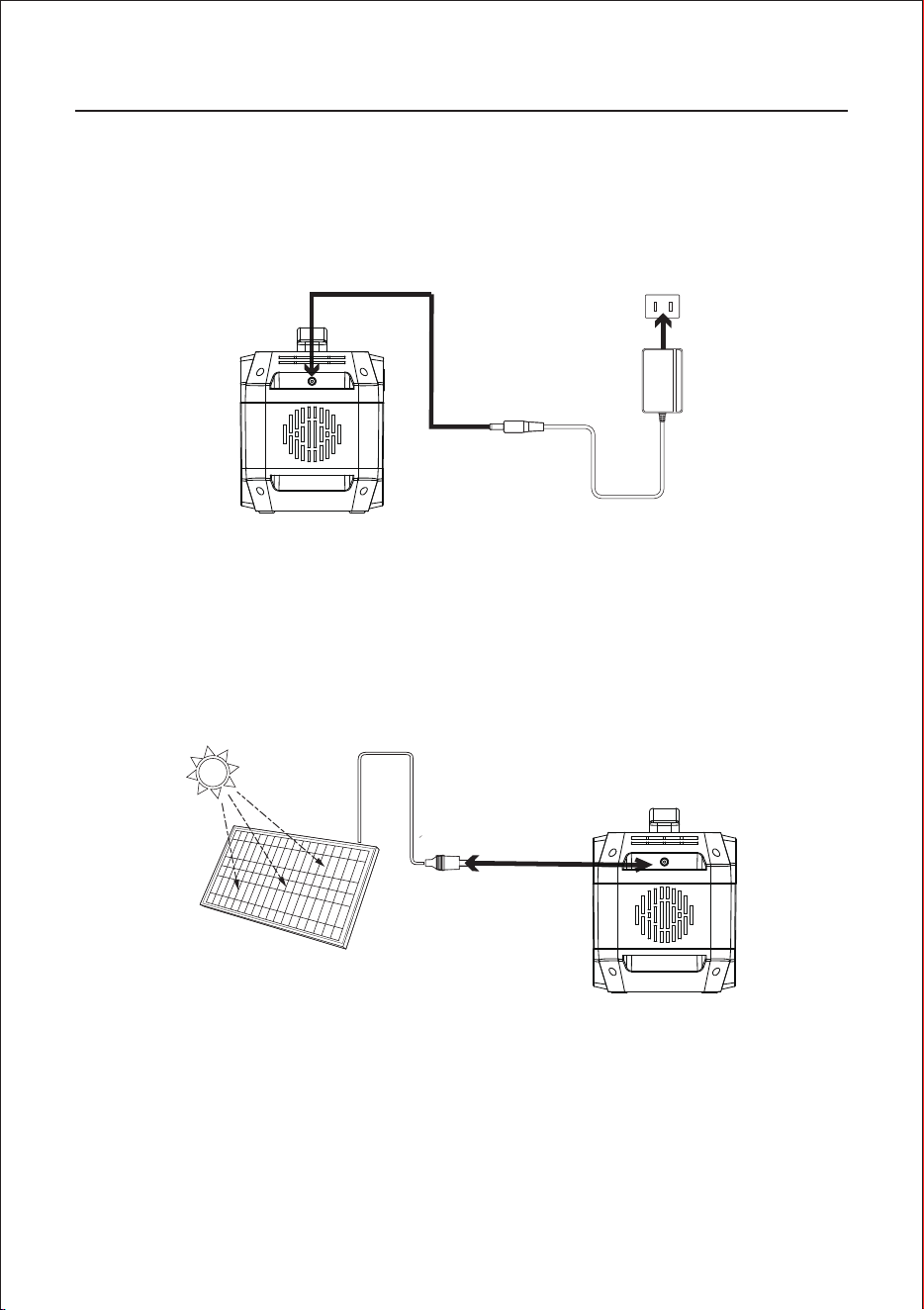
I. Charge for this product
Note: Please charge the product before the first use.
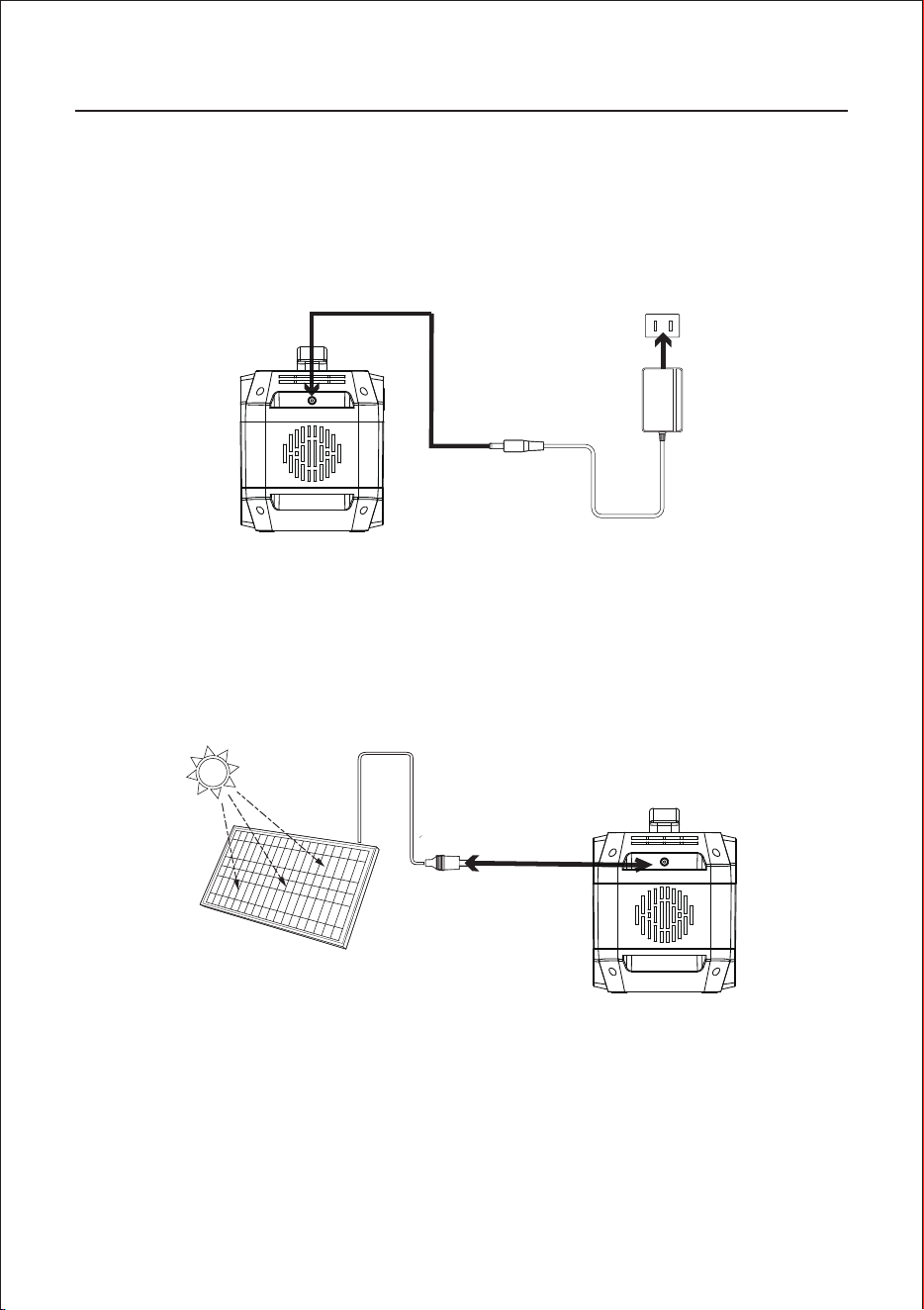
Charge with AC wall adapter
1.
2.
Charge with solar panel
1.
2.
3.
Connect your device with the AC wall charger. You can know the charging
status from the LED battery symbol.
When the battery is fully charged, the battery icon will be full and bright.
Remove the charger after fully charged.
Place your solar panel where it can get as much direct sunlight as possible.
Connect the solar panel by solar charging cable, then insert into the product
charging input port. You can know the charging status from the LED battery
symbol.
When the battery is fully charged, the battery icon will be full and bright.
Remove the charger after fully charged.
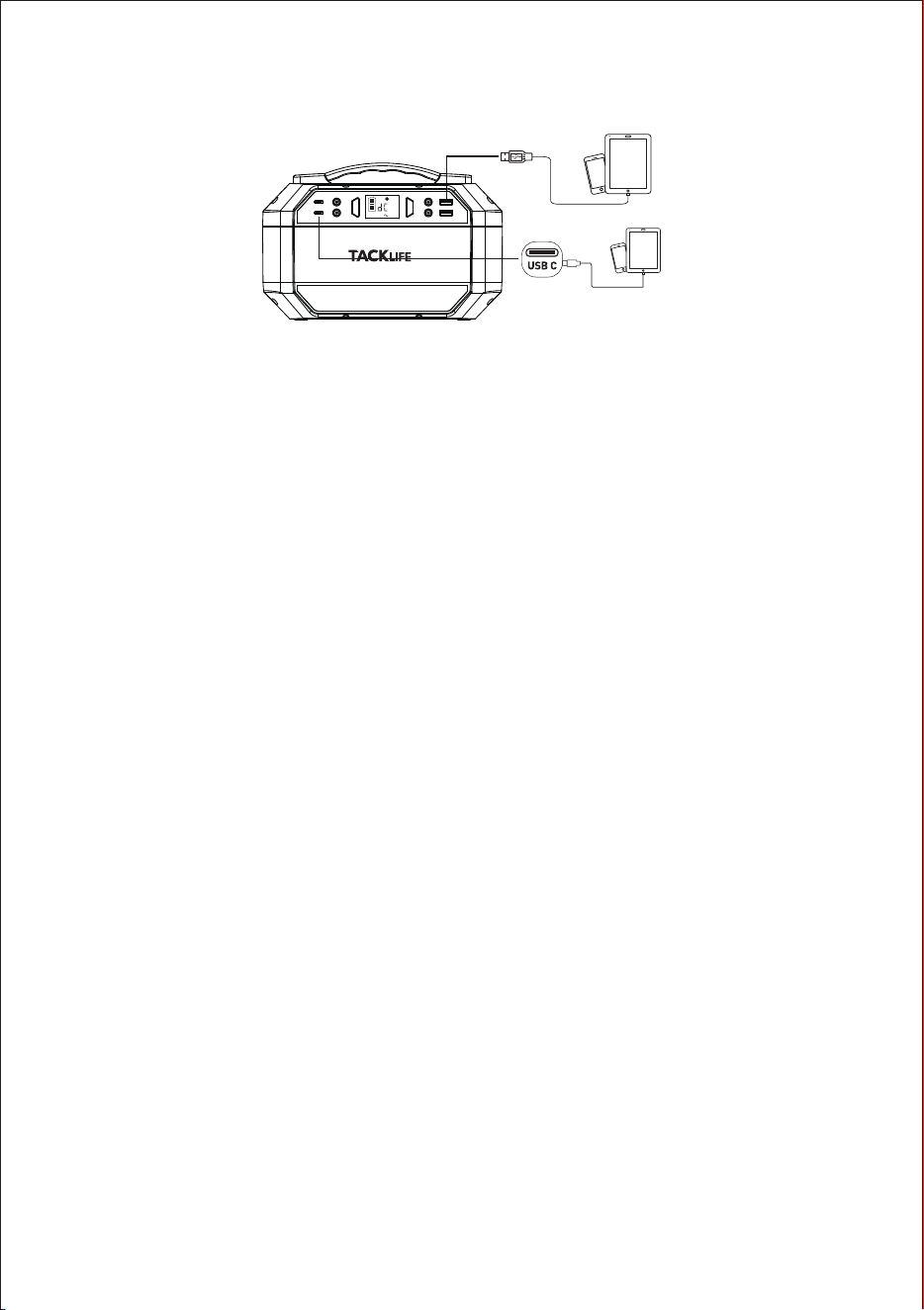
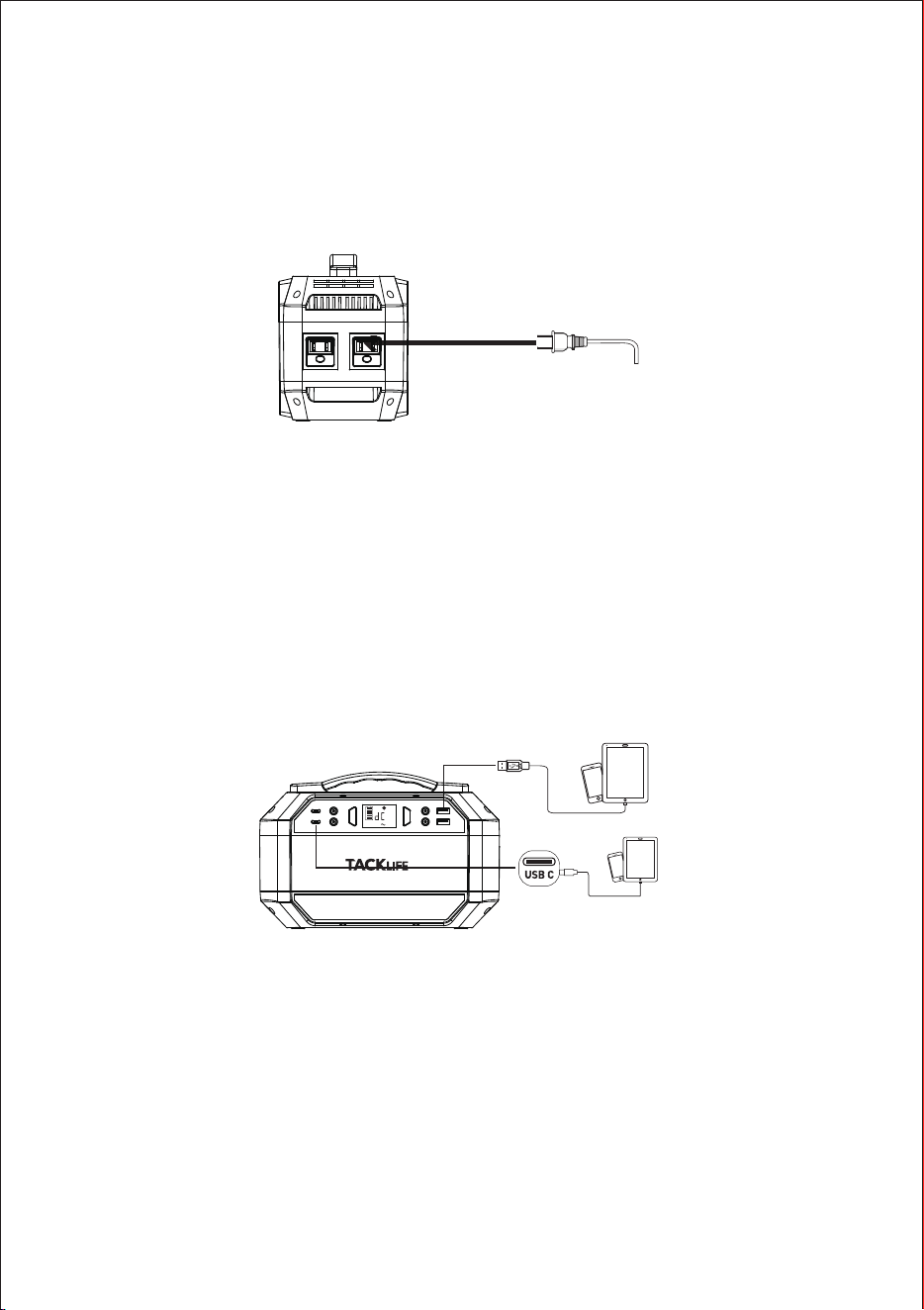
USB/Type-C Output Port:
Please turn on the power button and then connect the load devices to the porta-
ble power station by USB cable to get power supply.
Note: 1. Some smart devices, such as Bluetooth headsets and LED light, require
very little current when charging. This current may be less than 150mA. So this
power station may not detect external current and cannot power devices
2.This product has quick charge 3.0 technology, supports 5V-9V/2A max output,
can be used to charge mobile phones, tablets and other UBS devices that also
support quicking charging. The actual charging voltage and current are related
to your USB smart device.
Note: When the product is overloaded or short-circuited, please remove the
load device and press the power switch to reactivate the product.
III. Attention:
a)
b)
c)
d)
It is recommended to use the product at 10 ° C ~ 30 ° C;
In order to avoid interference, please try to stay away from the TV, radio, etc
when charging this unit
Please switch off all power buttons before storage.
In order to extend the life of the product (lithium battery), it is best to fully
charge the product once at least once every 3months.
FREQUENTLY ASKED QUESTIONS
How to know whether your devices are compatible with this product?
Please check your devices' technical specifications. As long as the load
devices specification parameters are less than or equal to this product
parameters, then they are compatible.
Can it charge and discharge simultaneously?
If you use USB/TAPE-C/DC output, it can charge and discharge simultane-
ously; If you use AC output, it cannot charge and discharge simultaneously
Note: In order to preserve battery lifespan, It is not recommended to
charge and discharge at the same time
Can it be charged by using 2 solar panels in series? And What is the range
of voltage?
Yes, you can charge the product by using two solar panels in series or in
parallel. The voltage range of the solar panels should be 13~22V, but the
current is not limited.
How to extend the using time of CPAP?
1.
2.
Can it be used at low temperatures? Are there any influences?
The working temperature of the product is -10 °C ~ 40 °C. When the ambi-
ent temperature is lower than -10 °C, it cannot discharge.
Generally, the CPAP machine support AC and DC input. It is recommend-
ed to use the 9-12V DC output port to power the CPAP to extend the using
time.
Recommend to turn off its humidifier, heater, and set a lower pressure.
- 05 -
AC Socket
2.
AC Output Port
1.
2.
3.
Note:
If the DC output occurs short-circuited or the external device power exceeds
the output power of the product (load greater than 300W), the unit will shut
down automatically for protection itself. Please remove the device, then you
can press the power switch to reactivate the product.
power and remember to recharge the product in time.
If the DC output occurs short-circuited or the external device power exceeds
the output power of the product (load greater than 120W), the unit will shut
down automatically for protection itself. Please remove the device, then you
can press the power switch to reactivate the product.
Please turn on the power button and then press AC button to switch to AC
mode.
Connect the load devices to the portable power station to get power supply.
Turn off the product when the external devices are fully charged or there is
no load. Press the Power On/Off button to shut down the device.
Charge with car charger
1.
2.
Note: You can use only 12V vehicles to charge the portable power station and
24V vehicle is not supported and charge the device only after the vehicle started.
II. Power supply for other devices
1.
2.
Note:
1.
Connect your portable power station with the cigarette charging cable. You
can know the charging status from the LED battery symbol.
When the battery is fully charged, the battery icon will be full and bright.
Remove the charger after fully charged.
Please make sure that the interface of your device is 12V DC (Port: 5521).
Otherwise, it cannot be connected to the DC output interface of this power
station. If the device cannot be directly connected, please purchase the corre-
sponding adapter.
If your device can be powered from the car charger, then it can also be
powered from this power station by connecting the cigarette lighter adapter.
The voltage of the power station will drop with the capacity drop. The DC
output voltage of this product has a working range of 9~12.6V, and the
maximum output current is 10A. If your connected DC 12V device does
not have regulated voltage function, it may not work properly when the
voltage of this power station drops. Please keep the product has enough
USER GUIDE
I. Charge for this product
Note: Please charge the product before the first use.
Charge with AC wall adapter
1.
2.
Charge with solar panel
1.
2.
3.
Connect your device with the AC wall charger. You can know the charging
status from the LED battery symbol.
When the battery is fully charged, the battery icon will be full and bright.
Remove the charger after fully charged.
Place your solar panel where it can get as much direct sunlight as possible.
Connect the solar panel by solar charging cable, then insert into the product
charging input port. You can know the charging status from the LED battery
symbol.
When the battery is fully charged, the battery icon will be full and bright.
Remove the charger after fully charged.
USB/Type-C Output Port:
Please turn on the power button and then connect the load devices to the porta-
ble power station by USB cable to get power supply.
Note: 1. Some smart devices, such as Bluetooth headsets and LED light, require
very little current when charging. This current may be less than 150mA. So this
power station may not detect external current and cannot power devices
2.This product has quick charge 3.0 technology, supports 5V-9V/2A max output,
can be used to charge mobile phones, tablets and other UBS devices that also
support quicking charging. The actual charging voltage and current are related
to your USB smart device.
Note: When the product is overloaded or short-circuited, please remove the
load device and press the power switch to reactivate the product.
III. Attention:
a)
b)
c)
d)
It is recommended to use the product at 10 ° C ~ 30 ° C;
In order to avoid interference, please try to stay away from the TV, radio, etc
when charging this unit
Please switch off all power buttons before storage.
In order to extend the life of the product (lithium battery), it is best to fully
charge the product once at least once every 3months.
FREQUENTLY ASKED QUESTIONS
How to know whether your devices are compatible with this product?
Please check your devices' technical specifications. As long as the load
devices specification parameters are less than or equal to this product
parameters, then they are compatible.
Can it charge and discharge simultaneously?
If you use USB/TAPE-C/DC output, it can charge and discharge simultane-
ously; If you use AC output, it cannot charge and discharge simultaneously
Note: In order to preserve battery lifespan, It is not recommended to
charge and discharge at the same time
Can it be charged by using 2 solar panels in series? And What is the range
of voltage?
Yes, you can charge the product by using two solar panels in series or in
parallel. The voltage range of the solar panels should be 13~22V, but the
current is not limited.
How to extend the using time of CPAP?
1.
2.
Can it be used at low temperatures? Are there any influences?
The working temperature of the product is -10 °C ~ 40 °C. When the ambi-
ent temperature is lower than -10 °C, it cannot discharge.
Generally, the CPAP machine support AC and DC input. It is recommend-
ed to use the 9-12V DC output port to power the CPAP to extend the using
time.
Recommend to turn off its humidifier, heater, and set a lower pressure.
- 06 -
USB
TYP-C
5V
DC OUTPUT
2.
AC Output Port
1.
2.
3.
Note:
If the DC output occurs short-circuited or the external device power exceeds
the output power of the product (load greater than 300W), the unit will shut
down automatically for protection itself. Please remove the device, then you
can press the power switch to reactivate the product.
power and remember to recharge the product in time.
If the DC output occurs short-circuited or the external device power exceeds
the output power of the product (load greater than 120W), the unit will shut
down automatically for protection itself. Please remove the device, then you
can press the power switch to reactivate the product.
Please turn on the power button and then press AC button to switch to AC
mode.
Connect the load devices to the portable power station to get power supply.
Turn off the product when the external devices are fully charged or there is
no load. Press the Power On/Off button to shut down the device.
Charge with car charger
1.
2.
Note: You can use only 12V vehicles to charge the portable power station and
24V vehicle is not supported and charge the device only after the vehicle started.
II. Power supply for other devices
1.
2.
Note:
1.
Connect your portable power station with the cigarette charging cable. You
can know the charging status from the LED battery symbol.
When the battery is fully charged, the battery icon will be full and bright.
Remove the charger after fully charged.
Please make sure that the interface of your device is 12V DC (Port: 5521).
Otherwise, it cannot be connected to the DC output interface of this power
station. If the device cannot be directly connected, please purchase the corre-
sponding adapter.
If your device can be powered from the car charger, then it can also be
powered from this power station by connecting the cigarette lighter adapter.
The voltage of the power station will drop with the capacity drop. The DC
output voltage of this product has a working range of 9~12.6V, and the
maximum output current is 10A. If your connected DC 12V device does
not have regulated voltage function, it may not work properly when the
voltage of this power station drops. Please keep the product has enough
USER GUIDE
I. Charge for this product
Note: Please charge the product before the first use.
Charge with AC wall adapter
1.
2.
Charge with solar panel
1.
2.
3.
Connect your device with the AC wall charger. You can know the charging
status from the LED battery symbol.
When the battery is fully charged, the battery icon will be full and bright.
Remove the charger after fully charged.
Place your solar panel where it can get as much direct sunlight as possible.
Connect the solar panel by solar charging cable, then insert into the product
charging input port. You can know the charging status from the LED battery
symbol.
When the battery is fully charged, the battery icon will be full and bright.
Remove the charger after fully charged.
USB/Type-C Output Port:
Please turn on the power button and then connect the load devices to the porta-
ble power station by USB cable to get power supply.
Note: 1. Some smart devices, such as Bluetooth headsets and LED light, require
very little current when charging. This current may be less than 150mA. So this
power station may not detect external current and cannot power devices
2.This product has quick charge 3.0 technology, supports 5V-9V/2A max output,
can be used to charge mobile phones, tablets and other UBS devices that also
support quicking charging. The actual charging voltage and current are related
to your USB smart device.
Note: When the product is overloaded or short-circuited, please remove the
load device and press the power switch to reactivate the product.
III. Attention:
a)
b)
c)
d)
It is recommended to use the product at 10 ° C ~ 30 ° C;
In order to avoid interference, please try to stay away from the TV, radio, etc
when charging this unit
Please switch off all power buttons before storage.
In order to extend the life of the product (lithium battery), it is best to fully
charge the product once at least once every 3months.
FREQUENTLY ASKED QUESTIONS
How to know whether your devices are compatible with this product?
Please check your devices' technical specifications. As long as the load
devices specification parameters are less than or equal to this product
parameters, then they are compatible.
Can it charge and discharge simultaneously?
If you use USB/TAPE-C/DC output, it can charge and discharge simultane-
ously; If you use AC output, it cannot charge and discharge simultaneously
Note: In order to preserve battery lifespan, It is not recommended to
charge and discharge at the same time
Can it be charged by using 2 solar panels in series? And What is the range
of voltage?
Yes, you can charge the product by using two solar panels in series or in
parallel. The voltage range of the solar panels should be 13~22V, but the
current is not limited.
How to extend the using time of CPAP?
1.
2.
Can it be used at low temperatures? Are there any influences?
The working temperature of the product is -10 °C ~ 40 °C. When the ambi-
ent temperature is lower than -10 °C, it cannot discharge.
Generally, the CPAP machine support AC and DC input. It is recommend-
ed to use the 9-12V DC output port to power the CPAP to extend the using
time.
Recommend to turn off its humidifier, heater, and set a lower pressure.
- 07 -
2.
AC Output Port
1.
2.
3.
Note:
If the DC output occurs short-circuited or the external device power exceeds
the output power of the product (load greater than 300W), the unit will shut
down automatically for protection itself. Please remove the device, then you
can press the power switch to reactivate the product.
power and remember to recharge the product in time.
If the DC output occurs short-circuited or the external device power exceeds
the output power of the product (load greater than 120W), the unit will shut
down automatically for protection itself. Please remove the device, then you
can press the power switch to reactivate the product.
Please turn on the power button and then press AC button to switch to AC
mode.
Connect the load devices to the portable power station to get power supply.
Turn off the product when the external devices are fully charged or there is
no load. Press the Power On/Off button to shut down the device.
Charge with car charger
1.
2.
Note: You can use only 12V vehicles to charge the portable power station and
24V vehicle is not supported and charge the device only after the vehicle started.
II. Power supply for other devices
1.
2.
Note:
1.
Connect your portable power station with the cigarette charging cable. You
can know the charging status from the LED battery symbol.
When the battery is fully charged, the battery icon will be full and bright.
Remove the charger after fully charged.
Please make sure that the interface of your device is 12V DC (Port: 5521).
Otherwise, it cannot be connected to the DC output interface of this power
station. If the device cannot be directly connected, please purchase the corre-
sponding adapter.
If your device can be powered from the car charger, then it can also be
powered from this power station by connecting the cigarette lighter adapter.
The voltage of the power station will drop with the capacity drop. The DC
output voltage of this product has a working range of 9~12.6V, and the
maximum output current is 10A. If your connected DC 12V device does
not have regulated voltage function, it may not work properly when the
voltage of this power station drops. Please keep the product has enough
USER GUIDE
I. Charge for this product
Note: Please charge the product before the first use.
Charge with AC wall adapter
1.
2.
Charge with solar panel
1.
2.
3.
Connect your device with the AC wall charger. You can know the charging
status from the LED battery symbol.
When the battery is fully charged, the battery icon will be full and bright.
Remove the charger after fully charged.
Place your solar panel where it can get as much direct sunlight as possible.
Connect the solar panel by solar charging cable, then insert into the product
charging input port. You can know the charging status from the LED battery
symbol.
When the battery is fully charged, the battery icon will be full and bright.
Remove the charger after fully charged.
USB/Type-C Output Port:
Please turn on the power button and then connect the load devices to the porta-
ble power station by USB cable to get power supply.
Note: 1. Some smart devices, such as Bluetooth headsets and LED light, require
very little current when charging. This current may be less than 150mA. So this
power station may not detect external current and cannot power devices
2.This product has quick charge 3.0 technology, supports 5V-9V/2A max output,
can be used to charge mobile phones, tablets and other UBS devices that also
support quicking charging. The actual charging voltage and current are related
to your USB smart device.
Note: When the product is overloaded or short-circuited, please remove the
load device and press the power switch to reactivate the product.
III. Attention:
a)
b)
c)
d)
It is recommended to use the product at 10 ° C ~ 30 ° C;
In order to avoid interference, please try to stay away from the TV, radio, etc
when charging this unit
Please switch off all power buttons before storage.
In order to extend the life of the product (lithium battery), it is best to fully
charge the product once at least once every 3months.
FREQUENTLY ASKED QUESTIONS
How to know whether your devices are compatible with this product?
Please check your devices' technical specifications. As long as the load
devices specification parameters are less than or equal to this product
parameters, then they are compatible.
Can it charge and discharge simultaneously?
If you use USB/TAPE-C/DC output, it can charge and discharge simultane-
ously; If you use AC output, it cannot charge and discharge simultaneously
Note: In order to preserve battery lifespan, It is not recommended to
charge and discharge at the same time
Can it be charged by using 2 solar panels in series? And What is the range
of voltage?
Yes, you can charge the product by using two solar panels in series or in
parallel. The voltage range of the solar panels should be 13~22V, but the
current is not limited.
How to extend the using time of CPAP?
1.
2.
Can it be used at low temperatures? Are there any influences?
The working temperature of the product is -10 °C ~ 40 °C. When the ambi-
ent temperature is lower than -10 °C, it cannot discharge.
Generally, the CPAP machine support AC and DC input. It is recommend-
ed to use the 9-12V DC output port to power the CPAP to extend the using
time.
Recommend to turn off its humidifier, heater, and set a lower pressure.
- 08 -
USB
TYP-C
5V
DC OUTPUT

2.
AC Output Port
1.
2.
3.
Note:
If the DC output occurs short-circuited or the external device power exceeds
the output power of the product (load greater than 300W), the unit will shut
down automatically for protection itself. Please remove the device, then you
can press the power switch to reactivate the product.
power and remember to recharge the product in time.
If the DC output occurs short-circuited or the external device power exceeds
the output power of the product (load greater than 120W), the unit will shut
down automatically for protection itself. Please remove the device, then you
can press the power switch to reactivate the product.
Please turn on the power button and then press AC button to switch to AC
mode.
Connect the load devices to the portable power station to get power supply.
Turn off the product when the external devices are fully charged or there is
no load. Press the Power On/Off button to shut down the device.
Charge with car charger
1.
2.
Note: You can use only 12V vehicles to charge the portable power station and
24V vehicle is not supported and charge the device only after the vehicle started.
II. Power supply for other devices
1.
2.
Note:
1.
Connect your portable power station with the cigarette charging cable. You
can know the charging status from the LED battery symbol.
When the battery is fully charged, the battery icon will be full and bright.
Remove the charger after fully charged.
Please make sure that the interface of your device is 12V DC (Port: 5521).
Otherwise, it cannot be connected to the DC output interface of this power
station. If the device cannot be directly connected, please purchase the corre-
sponding adapter.
If your device can be powered from the car charger, then it can also be
powered from this power station by connecting the cigarette lighter adapter.
The voltage of the power station will drop with the capacity drop. The DC
output voltage of this product has a working range of 9~12.6V, and the
maximum output current is 10A. If your connected DC 12V device does
not have regulated voltage function, it may not work properly when the
voltage of this power station drops. Please keep the product has enough
USER GUIDE
I. Charge for this product
Note: Please charge the product before the first use.
Charge with AC wall adapter
1.
2.
Charge with solar panel
1.
2.
3.
Connect your device with the AC wall charger. You can know the charging
status from the LED battery symbol.
When the battery is fully charged, the battery icon will be full and bright.
Remove the charger after fully charged.
Place your solar panel where it can get as much direct sunlight as possible.
Connect the solar panel by solar charging cable, then insert into the product
charging input port. You can know the charging status from the LED battery
symbol.
When the battery is fully charged, the battery icon will be full and bright.
Remove the charger after fully charged.
USB/Type-C Output Port:
Please turn on the power button and then connect the load devices to the porta-
ble power station by USB cable to get power supply.
Note: 1. Some smart devices, such as Bluetooth headsets and LED light, require
very little current when charging. This current may be less than 150mA. So this
power station may not detect external current and cannot power devices
2.This product has quick charge 3.0 technology, supports 5V-9V/2A max output,
can be used to charge mobile phones, tablets and other UBS devices that also
support quicking charging. The actual charging voltage and current are related
to your USB smart device.
Note: When the product is overloaded or short-circuited, please remove the
load device and press the power switch to reactivate the product.
III. Attention:
a)
b)
c)
d)
It is recommended to use the product at 10 ° C ~ 30 ° C;
In order to avoid interference, please try to stay away from the TV, radio, etc
when charging this unit
Please switch off all power buttons before storage.
In order to extend the life of the product (lithium battery), it is best to fully
charge the product once at least once every 3months.
FREQUENTLY ASKED QUESTIONS
How to know whether your devices are compatible with this product?
Please check your devices' technical specifications. As long as the load
devices specification parameters are less than or equal to this product
parameters, then they are compatible.
Can it charge and discharge simultaneously?
If you use USB/TAPE-C/DC output, it can charge and discharge simultane-
ously; If you use AC output, it cannot charge and discharge simultaneously
Note: In order to preserve battery lifespan, It is not recommended to
charge and discharge at the same time
Can it be charged by using 2 solar panels in series? And What is the range
of voltage?
Yes, you can charge the product by using two solar panels in series or in
parallel. The voltage range of the solar panels should be 13~22V, but the
current is not limited.
How to extend the using time of CPAP?
1.
2.
Can it be used at low temperatures? Are there any influences?
The working temperature of the product is -10 °C ~ 40 °C. When the ambi-
ent temperature is lower than -10 °C, it cannot discharge.
Generally, the CPAP machine support AC and DC input. It is recommend-
ed to use the 9-12V DC output port to power the CPAP to extend the using
time.
Recommend to turn off its humidifier, heater, and set a lower pressure.
- 09 -

TROUBLE SHOOTING
- 10 -
Product Protection Description
Error
code
1
2
Port
USB
Output
DC
Output
3
AC
Output
Cause Protection Description
Over-current
protection
Short-circuit
protection
Under-voltage
protection
Over-current
protection
Short-circuit
protection
Under-voltage
protection
When the USB external load
devices current is too large,
the USB output port will be in
an intermittent output state.
Remove overload devices,
then USB output will become
normal automatically after 3s
When the USB Output occurs
Short-circuit, the USB output
port will be in an intermittent
output state.
Remove overload devices,
then USB output will become
normal automatically after 3s
After the product is fully
discharged, it will enter the
shutdown state.
Recharging product then you
can use it
When the the DC port
external devices is overload-
ed, the "DC" symbol on the
LED display will off
Remove overload devices and
switch off power button.Then
switch on power button, the
"DC" symbol on the LED
display will on and DC output
become normal
When the the DC port occurs
Short-circuit,the "DC" symbol
on the LED display will off
Remove overload devices and
switch off power button.Then
switch on power button, the
"DC" symbol on the LED
display will on and DC output
become normal
After the product is fully
discharged, it will enter the
shutdown state.
Recharging product then you
can use it
Overload
protection
When the the AC port external
devices is overloaded, the
"AC" symbol on the LED
display will off and jump to
the "DC" symbol. No AC
output
Remove overload devices and
then press AC/DC switch
button to enter AC mode
Short-circuit
protection
When the the AC port occurs
Short-circuit, the "AC" symbol
on the LED display will off
and jump to the "DC"
symbol. No AC output
Remove overload devices and
then press AC/DC switch
button to enter AC mode
Over tempera-
ture protection
When the the AC port
external devices is overload-
ed, the "AC" symbol on the
LED display will off and jump
to the "DC" symbol. No AC
output
Cool down the product and
then press AC/DC switch
button to enter AC mode
Under-voltage
protection
After the product is fully
discharged, it will enter the
shutdown state.
After the product is fully
discharged, it will enter the
shutdown state. Recharging
product then you can use it
Operating guidelines

j)
k)
l)
m)
n)
o)
WARRANTY
Our company provides 24 months warranty to our customers from the date
of purchase.
CONTACT US
For any inquiries or comment concerning our products, please contact with
us ([email protected]) and we will respond as soon as possible.
TECHNICAL SPECIFICATION
CAUTION
a)
b)
c)
d)
e)
f)
g)
h)
i)
Avoid the product short-circuit. And please avoid storing it together with
metal objects such as coins, jewelry, keys, etc;
Do not heat the unit or throw it into a fire, water or other liquids. Avoid high
temperature and direct sunlight;
Do not place the unit in a highly humid, dusty environment;
Do not collide or disassemble the device;
Do not drop product, place heavy objects on the product or strike the prod-
uct strongly;
Keep this product away from children;
Do not cover the product with towels, clothing, etc. during use;
This product may heat when charging. Please do not worry, this is normal;
Do not charge the product over the time;
- 11 -
Battery Capacity
Dimensions
Net Weight
Battery Material
Input
Charging Time
USB Output
DC Output
AC Output
Electricity Indicator
Operating Temperature
Cycle life
299Wh(26950mAh/11.1V;80850mAh/3.7V)
256x130x167mm
Around 4.3Kg
High-quality Lithium-ion Cell
15V/4A
About 8~10 hours
1 X USB 5V/2A Output
1 X USB 5V~9V/2A QUICK Charge 3.0 Output
2 X typ-c 5V~9V/2A QUICK Charge 3.0 Output
4x DC Output(Port 5521):9~12.6V/10A(12A Max)
Continuous Output Power: 300W Peak output:600W
LED Display
-10℃-40℃
>500 Times
Please disconnect it from the power station in time when your device is fully
charged;
Please dispose the scrapped products as required, and do not dispose the
built-in battery as domestic waste to avoid explosion and pollution;
The product is only used for emergency power supply, and It is not a substi-
tute for DC power or AC power for household appliances or digital products;
Use this product normally and correctly to avoid getting an electric shock;
Be sure to send deserted electronics, batteries, and packaging materials to a
dedicated collection point;
This device has a built-in non-removable rechargeable battery. Do not
attempt to remove the battery to avoid damaging the device.

j)
k)
l)
m)
n)
o)
WARRANTY
Our company provides 24 months warranty to our customers from the date
of purchase.
CONTACT US
For any inquiries or comment concerning our products, please contact with
us ([email protected]) and we will respond as soon as possible.
TECHNICAL SPECIFICATION
CAUTION
a)
b)
c)
d)
e)
f)
g)
h)
i)
Avoid the product short-circuit. And please avoid storing it together with
metal objects such as coins, jewelry, keys, etc;
Do not heat the unit or throw it into a fire, water or other liquids. Avoid high
temperature and direct sunlight;
Do not place the unit in a highly humid, dusty environment;
Do not collide or disassemble the device;
Do not drop product, place heavy objects on the product or strike the prod-
uct strongly;
Keep this product away from children;
Do not cover the product with towels, clothing, etc. during use;
This product may heat when charging. Please do not worry, this is normal;
Do not charge the product over the time;
- 12 -
Please disconnect it from the power station in time when your device is fully
charged;
Please dispose the scrapped products as required, and do not dispose the
built-in battery as domestic waste to avoid explosion and pollution;
The product is only used for emergency power supply, and It is not a substi-
tute for DC power or AC power for household appliances or digital products;
Use this product normally and correctly to avoid getting an electric shock;
Be sure to send deserted electronics, batteries, and packaging materials to a
dedicated collection point;
This device has a built-in non-removable rechargeable battery. Do not
attempt to remove the battery to avoid damaging the device.

- 13 -
安全指導
製品概要
I.製品本体
II.LEDディスプレイ
III.バッテリーディスプレイ
IV.梱包品の確認
ユーザーガイド
I.充電方法
II.出力説明
III.製品使用上の注意
よくある 質 問
問題解決
仕様
製品の安全性とメンテナンス
保証
アフターサービス
14
14
15
15
16
17
18
20
10
20
21
22
22
23
日本語
安全指導
使用する前にこのマニュアルを読み、ガイダンスに従ってください。今後の参考のた
めにこのユーザーマニュアルを保管してください。 充電中や長時間の使用中にデ
バイスの高温に注意してください。 保管する前に製品を完全に充電し、少なくとも3
か月に一回満充電してください。製品を子供から遠ざけてください。
注:この電源は、正弦波出力を提供します。つまり、家庭用ACと同じAC電力を出力で
きます。それが提供する電力は、AC電源を使用する家庭内のすべての300W未満の
電気機器とほぼ互換性があります。
この製品は非常用電源なので、通常の家庭用ACの代わりに使用することはできま
せん。長期間使用する場合は、必ず電源仕様規範に従って使用してください。
製品概要
I.製品本体
- 14 -
①
②
③
④
⑤
⑥
⑦
⑧
DC出力9-12.6V/10A(Port:5521)
USB出力5V/2A
USB出力5V-9V2AQC3.0
AC/DC転換スイッチ
メイン電源スイッチ
Type-C出力5V~9V/2AQC3.0
AC出力300W
60W入力(Port:5525)
①
②
③
⑦
⑧
④
⑤
⑥
USB
TYP-C
5V
DC OUTPUT

IV.梱包品の確認
本製品の梱包開封する前、梱包に破損が無いことをご確認ください。
梱包開封後、製品に外観上破損が無いこと、または付属品が全て揃っていることを
ご確認ください。付属品は下記のリストの内容です。付属品に漏れ、間違い等があ
る場合は、お買い上げのセーラーにご連絡ください。(メールアドレス
II.LEDディスプレイ
注:製品の写真、アクセサリー、ユーザーインターフェイスはすべて参照専用です。
実際の製品は、製品のアップグレードにより異なる場合があります。実際の製品を
参照してください。
III.バッテリーディスプレイ:
バッテリー電力は5つのレベルに分かれており、約20%〜40%〜60%〜80%〜
100%で、使用中はバッテリー電力が減少するため、バッテリー表示も段階的に減
少します。 電力レベルが1つの場合、使用に影響を与えないように、製品をすぐに
充電してください。充電中は、ディスプレイでバッテリーが点滅します。つまり、充電
中であることを意味します。バッテリーが完全に充電されると、バッテリーは完全な
状態を表示して点滅を停止し、電源を抜くことができます。
注:製品の電源スイッチDCモードをオンにした後、この製品を使用しない場合、15
秒後に自動的にシャットダウンします。もしACモードなら、製品を使用しない場合、
製品は自動的にシャットダウンしません。 消費者の使用に影響を与えないように、
使用後は電源ボタンをオフにしてください。
①
②
③
USB出力
Type-C出力
DC出力
④
⑤
⑥
AC/DCモード
AC出力
電池残量表示
- 15 -
USB
Type-c
12V Output
①
②
③
④
⑤
⑥
IV.梱包品の確認
本製品の梱包開封する前、梱包に破損が無いことをご確認ください。
梱包開封後、製品に外観上破損が無いこと、または付属品が全て揃っていることを
ご確認ください。付属品は下記のリストの内容です。付属品に漏れ、間違い等があ
る場合は、お買い上げのセーラーにご連絡ください。(メールアドレス
シガーアダプター
ユーザーマニュアル
PORTABLE POWER STATION
User Manual
保証書
AC充電アダプター
P30ポータブル電源
USB
TYP-C
5V
DC OUTPUT
シガーライターソケット USBLED
II.LEDディスプレイ
注:製品の写真、アクセサリー、ユーザーインターフェイスはすべて参照専用です。
実際の製品は、製品のアップグレードにより異なる場合があります。実際の製品を
参照してください。
III.バッテリーディスプレイ:
バッテリー電力は5つのレベルに分かれており、約20%〜40%〜60%〜80%〜
100%で、使用中はバッテリー電力が減少するため、バッテリー表示も段階的に減
少します。 電力レベルが1つの場合、使用に影響を与えないように、製品をすぐに
充電してください。充電中は、ディスプレイでバッテリーが点滅します。つまり、充電
中であることを意味します。バッテリーが完全に充電されると、バッテリーは完全な
状態を表示して点滅を停止し、電源を抜くことができます。
注:製品の電源スイッチDCモードをオンにした後、この製品を使用しない場合、15
秒後に自動的にシャットダウンします。もしACモードなら、製品を使用しない場合、
製品は自動的にシャットダウンしません。 消費者の使用に影響を与えないように、
使用後は電源ボタンをオフにしてください。
- 16 -
2.
AC出力
電源ボタンスイッチをオンにし、AC / DCスイッチボタンを押して製品をACモードに
してから、負荷電器のACプラグを製品のACコンセントに差し込み、電力を供給でき
ます。製品への電源供給が終了したら、電源を切ってください。
注:AC出力が短絡している場合、または負荷電力が製品の出力電力(300Wを超える
負荷)を超える場合、ポータブル電源は保護のために自動的にシャットダウンします。
負荷を取り除いた後、電源スイッチを押して製品を再起動します。
USBとType-c出力
最初に製品の電源スイッチボタンをオンにし、電源デバイスによって製品のUSBイン
ターフェイスに接続されたUSBケーブルを接続して、デバイスに電力を供給できます。
注:1. BluetoothヘッドセットやLEDライトなど、充電電流は非常に小さくて、この電流
は150mA未満である可能性があります。この製品により、このタイプの充電電流が検
出可能な値より低くなる場合がありますので、USB出力は電力を供給できません。
2.この製品は、急速充電3.0出力テクノロジーをサポートし、5V-9V/2Amax出力をサ
ポートしますので、急速充電3.0テクノロジーもサポートする携帯電話やタブレットな
どのスマートUSBデバイスを使用できます。 実際の充電電圧と電流は、実際のUSBス
マートデバイスに関連しています。
シガーアダプター充電
付属するシガーアダプターを使用し、車の12Vシガレットライターシートに接続して、
製品を充電します。LED画面のバッテリーインジケーターが点灯および点滅したら、
製品は動作しています。 すべての電源インジケータが点灯し、点滅が停止したら、製
品は完全に充電されています。
注:カーバッテリーの自然放電を防ぐために、この充電方法はカーエンジンが作動し
ている場合にのみ使用でき、さらにこの製品は12V充電のみをサポートします。
II.出力説明
1.
2.
注:
1.
ユーザーガイド
I.充電方法
注意: 初めて使用前に満充電してください。付属するのACアダプターで充電してく
ださい。
ACアダプターで充電
本製品に付属しているAC充電アダプタで家庭のACソケットに接続します。付属し
ているDCコネクタはDC入力インターフェイスに接続して、製品を充電します。バッ
テリーアイコンが点灯します。製品が完全に充電され、バッテリーアイコンが完全
に点灯します。電源が完全に充電されたら、充電器を取り外してください。
ソーラーパネル充電
直射日光が強い場所にソーラーパネルを置き、ソーラーパネルの出力を本製品の
充電入力に接続します。本製品の電源インジケータが点灯および点滅している場
合は、製品が正常に充電されていることを意味します。 すべてのバッテリーインジ
ケータが点灯し、点滅が停止したら、製品は完全に充電されています。
3.注:製品が過負荷または短絡保護されている場合、負荷を取り外し、電源スイッチ
を押して製品を再起動してください。
III.製品使用上の注意:
a)
b)
c)
d)
よくある 質 問
デバイスがこの製品に適しているかどうかをどのように知っていますか
ユーザーマニュアルに記載されているデバイスの使用電力を確認してください。機
器の動作電力がユーザーマニュアルに記載されているデバイスの使用電力を超え
ないでください。
充電と放電を同時にサポートしますか
充電中にポータブル電源USB/TAPE-C/DC出力は出力できます。AC出力は同時に
出力できない。
バッテリーの寿命をよりよく保護するために、充電と放電を同時使用することはお
勧めしません。
2つのソーラーパネルを直列に接続してポータブル電源を充電できますか
は い 、で き ま す 。
でもソーラー入力の電圧は13Vより大きく、22Vを超えないでください。電流は無制
限です。(製品には4AMAX電流のみを必要とする充電管理モジュールがあります)
CPAPの使用時間を延長する方法は?
一般に、CPAPマシンにはACおよびDC入力の2つのモードがありますが、9-12V DC
(ポート:5521)出力ポートを使用することをお勧めします。CPAPをサポートする時
間はわずかに長くなります
第二に、加湿器/ヒーターをオフにし、CPAPがより長く機能するように低い圧力に
設定することをお勧めします。
この製品を低温で使用できますか?
製品の動作温度は-10°C〜40°Cです。周囲温度が-10°Cより低い場合、バッテリーは
放電されず、製品は保護されます。
- 17 -
AC Socket
2.
AC出力
電源ボタンスイッチをオンにし、AC / DCスイッチボタンを押して製品をACモードに
してから、負荷電器のACプラグを製品のACコンセントに差し込み、電力を供給でき
ます。製品への電源供給が終了したら、電源を切ってください。
注:AC出力が短絡している場合、または負荷電力が製品の出力電力(300Wを超える
負荷)を超える場合、ポータブル電源は保護のために自動的にシャットダウンします。
負荷を取り除いた後、電源スイッチを押して製品を再起動します。
USBとType-c出力
最初に製品の電源スイッチボタンをオンにし、電源デバイスによって製品のUSBイン
ターフェイスに接続されたUSBケーブルを接続して、デバイスに電力を供給できます。
注:1. BluetoothヘッドセットやLEDライトなど、充電電流は非常に小さくて、この電流
は150mA未満である可能性があります。この製品により、このタイプの充電電流が検
出可能な値より低くなる場合がありますので、USB出力は電力を供給できません。
2.この製品は、急速充電3.0出力テクノロジーをサポートし、5V-9V/2Amax出力をサ
ポートしますので、急速充電3.0テクノロジーもサポートする携帯電話やタブレットな
どのスマートUSBデバイスを使用できます。 実際の充電電圧と電流は、実際のUSBス
マートデバイスに関連しています。
DC出力が短絡した場合、または出力が高すぎる場合(負荷が120Wを超える場
合 )、製品は保護のためにシャットダウンします。負荷を取り除いた後、電源スイッ
チを押して製品を再起動できます。
シガーアダプター充電
付属するシガーアダプターを使用し、車の12Vシガレットライターシートに接続して、
製品を充電します。LED画面のバッテリーインジケーターが点灯および点滅したら、
製品は動作しています。 すべての電源インジケータが点灯し、点滅が停止したら、製
品は完全に充電されています。
注:カーバッテリーの自然放電を防ぐために、この充電方法はカーエンジンが作動し
ている場合にのみ使用でき、さらにこの製品は12V充電のみをサポートします。
II.出力説明
1.
2.
注:
1.
充電するデバイスのインターフェースがDC(ポート:5521)、12V電圧ですかどうか
を確認してください。そうではない場合、このマシンのDC出力インターフェースに
接続できません。直接接続できない場合は、対応するアダプターを購入して製品
を接続できます。
もし電器はシガーソケットをサポートしている場合は、製品の標準のシガーライタ
ーアダプターを使用して、電源を供給できます。
バッテリーは化学物質なので、電圧は容量の低下とともに低下します。この製品
のDC出力電圧の動作範囲は9〜12.6Vで、最大出力電流は10Aです。もし接続され
たDC12V電器は電圧調整がない、本製品のDC端子の電圧が内蔵バッテリー電圧
で低下した場合、電器が正常に動作する可能性がありますので、バッテリーを取り
外して機械を適時に充電してください。
ユーザーガイド
I.充電方法
注意: 初めて使用前に満充電してください。付属するのACアダプターで充電してく
ださい。
ACアダプターで充電
本製品に付属しているAC充電アダプタで家庭のACソケットに接続します。付属し
ているDCコネクタはDC入力インターフェイスに接続して、製品を充電します。バッ
テリーアイコンが点灯します。製品が完全に充電され、バッテリーアイコンが完全
に点灯します。電源が完全に充電されたら、充電器を取り外してください。
ソーラーパネル充電
直射日光が強い場所にソーラーパネルを置き、ソーラーパネルの出力を本製品の
充電入力に接続します。本製品の電源インジケータが点灯および点滅している場
合は、製品が正常に充電されていることを意味します。 すべてのバッテリーインジ
ケータが点灯し、点滅が停止したら、製品は完全に充電されています。
3.注:製品が過負荷または短絡保護されている場合、負荷を取り外し、電源スイッチ
を押して製品を再起動してください。
III.製品使用上の注意:
a)
b)
c)
d)
よくある 質 問
デバイスがこの製品に適しているかどうかをどのように知っていますか
ユーザーマニュアルに記載されているデバイスの使用電力を確認してください。機
器の動作電力がユーザーマニュアルに記載されているデバイスの使用電力を超え
ないでください。
充電と放電を同時にサポートしますか
充電中にポータブル電源USB/TAPE-C/DC出力は出力できます。AC出力は同時に
出力できない。
バッテリーの寿命をよりよく保護するために、充電と放電を同時使用することはお
勧めしません。
2つのソーラーパネルを直列に接続してポータブル電源を充電できますか
は い 、で き ま す 。
でもソーラー入力の電圧は13Vより大きく、22Vを超えないでください。電流は無制
限です。(製品には4AMAX電流のみを必要とする充電管理モジュールがあります)
CPAPの使用時間を延長する方法は?
一般に、CPAPマシンにはACおよびDC入力の2つのモードがありますが、9-12V DC
(ポート:5521)出力ポートを使用することをお勧めします。CPAPをサポートする時
間はわずかに長くなります
第二に、加湿器/ヒーターをオフにし、CPAPがより長く機能するように低い圧力に
設定することをお勧めします。
この製品を低温で使用できますか?
製品の動作温度は-10°C〜40°Cです。周囲温度が-10°Cより低い場合、バッテリーは
放電されず、製品は保護されます。
- 18 -
製品を10°C〜30°Cで使用することをお勧めします。
充電するときは、干渉を避けるため、テレビ、ラジオ、その他の機器に近づかない
ようにしてください。
製品が長期間使用されていない場合は、ケーブルを外して再度保管します。
製品(リチウム電池)の寿命を延ばすために、3か月に1回充電するのが最善です。
USB
TYP-C
5V
DC OUTPUT
2.
AC出力
電源ボタンスイッチをオンにし、AC / DCスイッチボタンを押して製品をACモードに
してから、負荷電器のACプラグを製品のACコンセントに差し込み、電力を供給でき
ます。製品への電源供給が終了したら、電源を切ってください。
注:AC出力が短絡している場合、または負荷電力が製品の出力電力(300Wを超える
負荷)を超える場合、ポータブル電源は保護のために自動的にシャットダウンします。
負荷を取り除いた後、電源スイッチを押して製品を再起動します。
USBとType-c出力
最初に製品の電源スイッチボタンをオンにし、電源デバイスによって製品のUSBイン
ターフェイスに接続されたUSBケーブルを接続して、デバイスに電力を供給できます。
注:1. BluetoothヘッドセットやLEDライトなど、充電電流は非常に小さくて、この電流
は150mA未満である可能性があります。この製品により、このタイプの充電電流が検
出可能な値より低くなる場合がありますので、USB出力は電力を供給できません。
2.この製品は、急速充電3.0出力テクノロジーをサポートし、5V-9V/2Amax出力をサ
ポートしますので、急速充電3.0テクノロジーもサポートする携帯電話やタブレットな
どのスマートUSBデバイスを使用できます。 実際の充電電圧と電流は、実際のUSBス
マートデバイスに関連しています。
DC出力が短絡した場合、または出力が高すぎる場合(負荷が120Wを超える場
合 )、製品は保護のためにシャットダウンします。負荷を取り除いた後、電源スイッ
チを押して製品を再起動できます。
シガーアダプター充電
付属するシガーアダプターを使用し、車の12Vシガレットライターシートに接続して、
製品を充電します。LED画面のバッテリーインジケーターが点灯および点滅したら、
製品は動作しています。 すべての電源インジケータが点灯し、点滅が停止したら、製
品は完全に充電されています。
注:カーバッテリーの自然放電を防ぐために、この充電方法はカーエンジンが作動し
ている場合にのみ使用でき、さらにこの製品は12V充電のみをサポートします。
II.出力説明
1.
2.
注:
1.
充電するデバイスのインターフェースがDC(ポート:5521)、12V電圧ですかどうか
を確認してください。そうではない場合、このマシンのDC出力インターフェースに
接続できません。直接接続できない場合は、対応するアダプターを購入して製品
を接続できます。
もし電器はシガーソケットをサポートしている場合は、製品の標準のシガーライタ
ーアダプターを使用して、電源を供給できます。
バッテリーは化学物質なので、電圧は容量の低下とともに低下します。この製品
のDC出力電圧の動作範囲は9〜12.6Vで、最大出力電流は10Aです。もし接続され
たDC12V電器は電圧調整がない、本製品のDC端子の電圧が内蔵バッテリー電圧
で低下した場合、電器が正常に動作する可能性がありますので、バッテリーを取り
外して機械を適時に充電してください。
ユーザーガイド
I.充電方法
注意: 初めて使用前に満充電してください。付属するのACアダプターで充電してく
ださい。
ACアダプターで充電
本製品に付属しているAC充電アダプタで家庭のACソケットに接続します。付属し
ているDCコネクタはDC入力インターフェイスに接続して、製品を充電します。バッ
テリーアイコンが点灯します。製品が完全に充電され、バッテリーアイコンが完全
に点灯します。電源が完全に充電されたら、充電器を取り外してください。
ソーラーパネル充電
直射日光が強い場所にソーラーパネルを置き、ソーラーパネルの出力を本製品の
充電入力に接続します。本製品の電源インジケータが点灯および点滅している場
合は、製品が正常に充電されていることを意味します。 すべてのバッテリーインジ
ケータが点灯し、点滅が停止したら、製品は完全に充電されています。
3.注:製品が過負荷または短絡保護されている場合、負荷を取り外し、電源スイッチ
を押して製品を再起動してください。
III.製品使用上の注意:
a)
b)
c)
d)
よくある 質 問
デバイスがこの製品に適しているかどうかをどのように知っていますか
ユーザーマニュアルに記載されているデバイスの使用電力を確認してください。機
器の動作電力がユーザーマニュアルに記載されているデバイスの使用電力を超え
ないでください。
充電と放電を同時にサポートしますか
充電中にポータブル電源USB/TAPE-C/DC出力は出力できます。AC出力は同時に
出力できない。
バッテリーの寿命をよりよく保護するために、充電と放電を同時使用することはお
勧めしません。
2つのソーラーパネルを直列に接続してポータブル電源を充電できますか
は い 、で き ま す 。
でもソーラー入力の電圧は13Vより大きく、22Vを超えないでください。電流は無制
限です。(製品には4AMAX電流のみを必要とする充電管理モジュールがあります)
CPAPの使用時間を延長する方法は?
一般に、CPAPマシンにはACおよびDC入力の2つのモードがありますが、9-12V DC
(ポート:5521)出力ポートを使用することをお勧めします。CPAPをサポートする時
間はわずかに長くなります
第二に、加湿器/ヒーターをオフにし、CPAPがより長く機能するように低い圧力に
設定することをお勧めします。
この製品を低温で使用できますか?
製品の動作温度は-10°C〜40°Cです。周囲温度が-10°Cより低い場合、バッテリーは
放電されず、製品は保護されます。
- 19 -
製品を10°C〜30°Cで使用することをお勧めします。
充電するときは、干渉を避けるため、テレビ、ラジオ、その他の機器に近づかない
ようにしてください。
製品が長期間使用されていない場合は、ケーブルを外して再度保管します。
製品(リチウム電池)の寿命を延ばすために、3か月に1回充電するのが最善です。
USB
TYP-C
5V
DC OUTPUT

2.
AC出力
電源ボタンスイッチをオンにし、AC / DCスイッチボタンを押して製品をACモードに
してから、負荷電器のACプラグを製品のACコンセントに差し込み、電力を供給でき
ます。製品への電源供給が終了したら、電源を切ってください。
注:AC出力が短絡している場合、または負荷電力が製品の出力電力(300Wを超える
負荷)を超える場合、ポータブル電源は保護のために自動的にシャットダウンします。
負荷を取り除いた後、電源スイッチを押して製品を再起動します。
USBとType-c出力
最初に製品の電源スイッチボタンをオンにし、電源デバイスによって製品のUSBイン
ターフェイスに接続されたUSBケーブルを接続して、デバイスに電力を供給できます。
注:1. BluetoothヘッドセットやLEDライトなど、充電電流は非常に小さくて、この電流
は150mA未満である可能性があります。この製品により、このタイプの充電電流が検
出可能な値より低くなる場合がありますので、USB出力は電力を供給できません。
2.この製品は、急速充電3.0出力テクノロジーをサポートし、5V-9V/2Amax出力をサ
ポートしますので、急速充電3.0テクノロジーもサポートする携帯電話やタブレットな
どのスマートUSBデバイスを使用できます。 実際の充電電圧と電流は、実際のUSBス
マートデバイスに関連しています。
DC出力が短絡した場合、または出力が高すぎる場合(負荷が120Wを超える場
合 )、製品は保護のためにシャットダウンします。負荷を取り除いた後、電源スイッ
チを押して製品を再起動できます。
シガーアダプター充電
付属するシガーアダプターを使用し、車の12Vシガレットライターシートに接続して、
製品を充電します。LED画面のバッテリーインジケーターが点灯および点滅したら、
製品は動作しています。 すべての電源インジケータが点灯し、点滅が停止したら、製
品は完全に充電されています。
注:カーバッテリーの自然放電を防ぐために、この充電方法はカーエンジンが作動し
ている場合にのみ使用でき、さらにこの製品は12V充電のみをサポートします。
II.出力説明
1.
2.
注:
1.
充電するデバイスのインターフェースがDC(ポート:5521)、12V電圧ですかどうか
を確認してください。そうではない場合、このマシンのDC出力インターフェースに
接続できません。直接接続できない場合は、対応するアダプターを購入して製品
を接続できます。
もし電器はシガーソケットをサポートしている場合は、製品の標準のシガーライタ
ーアダプターを使用して、電源を供給できます。
バッテリーは化学物質なので、電圧は容量の低下とともに低下します。この製品
のDC出力電圧の動作範囲は9〜12.6Vで、最大出力電流は10Aです。もし接続され
たDC12V電器は電圧調整がない、本製品のDC端子の電圧が内蔵バッテリー電圧
で低下した場合、電器が正常に動作する可能性がありますので、バッテリーを取り
外して機械を適時に充電してください。
ユーザーガイド
I.充電方法
注意: 初めて使用前に満充電してください。付属するのACアダプターで充電してく
ださい。
ACアダプターで充電
本製品に付属しているAC充電アダプタで家庭のACソケットに接続します。付属し
ているDCコネクタはDC入力インターフェイスに接続して、製品を充電します。バッ
テリーアイコンが点灯します。製品が完全に充電され、バッテリーアイコンが完全
に点灯します。電源が完全に充電されたら、充電器を取り外してください。
ソーラーパネル充電
直射日光が強い場所にソーラーパネルを置き、ソーラーパネルの出力を本製品の
充電入力に接続します。本製品の電源インジケータが点灯および点滅している場
合は、製品が正常に充電されていることを意味します。 すべてのバッテリーインジ
ケータが点灯し、点滅が停止したら、製品は完全に充電されています。
3.注:製品が過負荷または短絡保護されている場合、負荷を取り外し、電源スイッチ
を押して製品を再起動してください。
III.製品使用上の注意:
a)
b)
c)
d)
よくある 質 問
デバイスがこの製品に適しているかどうかをどのように知っていますか
ユーザーマニュアルに記載されているデバイスの使用電力を確認してください。機
器の動作電力がユーザーマニュアルに記載されているデバイスの使用電力を超え
ないでください。
充電と放電を同時にサポートしますか
充電中にポータブル電源USB/TAPE-C/DC出力は出力できます。AC出力は同時に
出力できない。
バッテリーの寿命をよりよく保護するために、充電と放電を同時使用することはお
勧めしません。
2つのソーラーパネルを直列に接続してポータブル電源を充電できますか
は い 、で き ま す 。
でもソーラー入力の電圧は13Vより大きく、22Vを超えないでください。電流は無制
限です。(製品には4AMAX電流のみを必要とする充電管理モジュールがあります)
CPAPの使用時間を延長する方法は?
一般に、CPAPマシンにはACおよびDC入力の2つのモードがありますが、9-12V DC
(ポート:5521)出力ポートを使用することをお勧めします。CPAPをサポートする時
間はわずかに長くなります
第二に、加湿器/ヒーターをオフにし、CPAPがより長く機能するように低い圧力に
設定することをお勧めします。
この製品を低温で使用できますか?
製品の動作温度は-10°C〜40°Cです。周囲温度が-10°Cより低い場合、バッテリーは
放電されず、製品は保護されます。
- 20 -
製品を10°C〜30°Cで使用することをお勧めします。
充電するときは、干渉を避けるため、テレビ、ラジオ、その他の機器に近づかない
ようにしてください。
製品が長期間使用されていない場合は、ケーブルを外して再度保管します。
製品(リチウム電池)の寿命を延ばすために、3か月に1回充電するのが最善です。

2.
AC出力
電源ボタンスイッチをオンにし、AC / DCスイッチボタンを押して製品をACモードに
してから、負荷電器のACプラグを製品のACコンセントに差し込み、電力を供給でき
ます。製品への電源供給が終了したら、電源を切ってください。
注:AC出力が短絡している場合、または負荷電力が製品の出力電力(300Wを超える
負荷)を超える場合、ポータブル電源は保護のために自動的にシャットダウンします。
負荷を取り除いた後、電源スイッチを押して製品を再起動します。
USBとType-c出力
最初に製品の電源スイッチボタンをオンにし、電源デバイスによって製品のUSBイン
ターフェイスに接続されたUSBケーブルを接続して、デバイスに電力を供給できます。
注:1. BluetoothヘッドセットやLEDライトなど、充電電流は非常に小さくて、この電流
は150mA未満である可能性があります。この製品により、このタイプの充電電流が検
出可能な値より低くなる場合がありますので、USB出力は電力を供給できません。
2.この製品は、急速充電3.0出力テクノロジーをサポートし、5V-9V/2Amax出力をサ
ポートしますので、急速充電3.0テクノロジーもサポートする携帯電話やタブレットな
どのスマートUSBデバイスを使用できます。 実際の充電電圧と電流は、実際のUSBス
マートデバイスに関連しています。
シガーアダプター充電
付属するシガーアダプターを使用し、車の12Vシガレットライターシートに接続して、
製品を充電します。LED画面のバッテリーインジケーターが点灯および点滅したら、
製品は動作しています。 すべての電源インジケータが点灯し、点滅が停止したら、製
品は完全に充電されています。
注:カーバッテリーの自然放電を防ぐために、この充電方法はカーエンジンが作動し
ている場合にのみ使用でき、さらにこの製品は12V充電のみをサポートします。
II.出力説明
1.
2.
注:
1.
ユーザーガイド
I.充電方法
注意: 初めて使用前に満充電してください。付属するのACアダプターで充電してく
ださい。
ACアダプターで充電
本製品に付属しているAC充電アダプタで家庭のACソケットに接続します。付属し
ているDCコネクタはDC入力インターフェイスに接続して、製品を充電します。バッ
テリーアイコンが点灯します。製品が完全に充電され、バッテリーアイコンが完全
に点灯します。電源が完全に充電されたら、充電器を取り外してください。
ソーラーパネル充電
直射日光が強い場所にソーラーパネルを置き、ソーラーパネルの出力を本製品の
充電入力に接続します。本製品の電源インジケータが点灯および点滅している場
合は、製品が正常に充電されていることを意味します。 すべてのバッテリーインジ
ケータが点灯し、点滅が停止したら、製品は完全に充電されています。
3.注:製品が過負荷または短絡保護されている場合、負荷を取り外し、電源スイッチ
を押して製品を再起動してください。
III.製品使用上の注意:
a)
b)
c)
d)
よくある 質 問
デバイスがこの製品に適しているかどうかをどのように知っていますか
ユーザーマニュアルに記載されているデバイスの使用電力を確認してください。機
器の動作電力がユーザーマニュアルに記載されているデバイスの使用電力を超え
ないでください。
充電と放電を同時にサポートしますか
充電中にポータブル電源USB/TAPE-C/DC出力は出力できます。AC出力は同時に
出力できない。
バッテリーの寿命をよりよく保護するために、充電と放電を同時使用することはお
勧めしません。
2つのソーラーパネルを直列に接続してポータブル電源を充電できますか
は い 、で き ま す 。
でもソーラー入力の電圧は13Vより大きく、22Vを超えないでください。電流は無制
限です。(製品には4AMAX電流のみを必要とする充電管理モジュールがあります)
CPAPの使用時間を延長する方法は?
一般に、CPAPマシンにはACおよびDC入力の2つのモードがありますが、9-12V DC
(ポート:5521)出力ポートを使用することをお勧めします。CPAPをサポートする時
間はわずかに長くなります
第二に、加湿器/ヒーターをオフにし、CPAPがより長く機能するように低い圧力に
設定することをお勧めします。
この製品を低温で使用できますか?
製品の動作温度は-10°C〜40°Cです。周囲温度が-10°Cより低い場合、バッテリーは
放電されず、製品は保護されます。
問題解決
- 21 -
製品保護現象の説明
順番
1
2
ポート
USB
出力
DC出力
3
AC出力
保護項目 保護現象
過電流保護
短絡保護
低電圧保護
過電流保護
短絡保護
低電圧保護
USB負荷デバイスが過充電され
ると、USB出力ポートは自動回復
保護された断続的な出力状態
になります。
過剰な負荷が解放された後、3
秒で出力を自動的に復元します
USBが短絡すると、USB出力ポー
トは自動回復保護された断続的
な出力状態になります。
短絡負荷が解放された後、3秒
で出力を自動的に復元します
製品が完全に放電されたと、製
品はパワーダウン状態になりま
す。
フル充電後使用する
DCポート負荷が大きすぎる場
合、ディスプレイDCアイコンは
オフになります。
過剰な負荷を取り出し、電源ボタ
ンをオフにした後、電源ボタンを
オンにする。ディスプレイのDCア
イコンがオンになり、DCポート
が出力を再開します。
DCポートが短絡すると、ディス
プレイDCアイコンがオフになり
ます。
過剰な負荷を取り出し、電源ボタ
ンをオフにした後、電源ボタンを
オンにする。ディスプレイのDCア
イコンがオンになり、DCポート
が出力を再開します。
製品が放電されると、製品はパ
ワーダウン状態になります。
充電後も使い続ける
過負荷
保護
ACローダーが過負荷になると、
画面上のACがdCにジャンプし、
ACアイコンがオフになり、ACに
出力がなくなります。
AC過負荷を解除した後、AC/
DCコンバータボタンをもう一度
押して、ACモード出力を再開し
ます。
短絡保護 ACローダーが過負荷になると、
画面上のACがdCにジャンプし、
ACアイコンがオフになり、ACに
出力がなくなります。
AC過負荷を解除した後、AC/
DCコンバータボタンをもう一度
押して、ACモード出力を再開し
ます。
過熱保護 ACローダーが過負荷になると、
画面上のACがdCにジャンプし、
ACアイコンがオフになり、ACに
出力がなくなります。
製品が冷めたら、ACボタンをも
う一度押して出力を再開します。
低電圧保護 製品が放電されると、製品はパ
ワーダウン状態になります。
充電後も使い続ける
处理方法

k)
l)
m)
n)
o)
保証
当社は、購入日からお客様に24か月の保証を提供します。
アフターサービス
当社製品に関するお問い合わせやコメントについては、当社までご連絡ください(
仕様
製品の安全性とメンテナンス
a)
b)
c)
d)
e)
f)
g)
h)
i)
j)
製品を短絡させないでください。 この製品をコイン、鍵などの金属物と一緒に
保管しないでください。
製品を加熱したり、火、水、その他の液体、高温、直射日光にさらさないでくださ
い。
製品を高湿度でほこりの多い環境に置かないでください。
この製品を変更または分解しないでください。
落としたり、重い物を置いたり、製品を強く叩いたりしないでください。
この製品を子供から遠ざけてください。
使用中は、製品をタオル、衣類などで覆わないでください。
充電中、この製品は高温になる場合があります。これは正常です。
製品の充電に必要な時間を超えないでください。
フル充電したら、電源を製品から切断してください。
- 22 -
バッテリー容量
寸法(LWH)
重量
バッテリータイプ
充電
充電時間
USB出力
DC電力(MAX)
AC電力
バッテリーインジケーター
作業温度
サイクル寿命
299Wh(26950mAh/11.1V;80850mAh/3.7V)
256x130x167mm
約4.3Kg
リチウム
アダプター:DC15V/4A
DC15V8~10時間
1XUSB5V/2A出力
1XUSB5V~9V/2AQUICKCharge3.0出力
2Xtyp-c5V~9V/2AQUICKCharge3.0出力
4x5521DC出力:9~12.6V/10A(12AMax全部)
AC定格パワー:300W,ACピークパワー:600W
LEDディスプレイ
-10℃-40℃
>500回
規則に応じて廃棄された製品を処分し、爆発や汚染を避けるために、内蔵バッ
テリーを家庭廃棄物として処分しないでください。
この製品は非常用電源にのみ使用され、家電製品やデジタル製品などのDC電
源またはAC電源の代替品ではありません。
感電を避けるため、製品を規則応じて使用してください。
使用済みの電子製品、バッテリー、梱包材は必ず特別な回収場所に送ってくだ
さい。
このデバイスには、取り外しできない充電式バッテリーが内蔵されています。 デ
バイスの損傷を防ぐために、バッテリーを取り外そうとしないでください。

k)
l)
m)
n)
o)
保証
当社は、購入日からお客様に24か月の保証を提供します。
アフターサービス
当社製品に関するお問い合わせやコメントについては、当社までご連絡ください(
[email protected])。できるだけ早く対応いたします。
仕様
製品の安全性とメンテナンス
a)
b)
c)
d)
e)
f)
g)
h)
i)
j)
製品を短絡させないでください。 この製品をコイン、鍵などの金属物と一緒に
保管しないでください。
製品を加熱したり、火、水、その他の液体、高温、直射日光にさらさないでくださ
い。
製品を高湿度でほこりの多い環境に置かないでください。
この製品を変更または分解しないでください。
落としたり、重い物を置いたり、製品を強く叩いたりしないでください。
この製品を子供から遠ざけてください。
使用中は、製品をタオル、衣類などで覆わないでください。
充電中、この製品は高温になる場合があります。これは正常です。
製品の充電に必要な時間を超えないでください。
フル充電したら、電源を製品から切断してください。
- 23 -
規則に応じて廃棄された製品を処分し、爆発や汚染を避けるために、内蔵バッ
テリーを家庭廃棄物として処分しないでください。
この製品は非常用電源にのみ使用され、家電製品やデジタル製品などのDC電
源またはAC電源の代替品ではありません。
感電を避けるため、製品を規則応じて使用してください。
使用済みの電子製品、バッテリー、梱包材は必ず特別な回収場所に送ってくだ
さい。
このデバイスには、取り外しできない充電式バッテリーが内蔵されています。 デ
バイスの損傷を防ぐために、バッテリーを取り外そうとしないでください。

Shenzhen Take Tools Co., Ltd.
Web: www.tacklifetools.com
Facebook:www.facebook.com/Tacklife.US/
E-mail: [email protected]
ADD: No.B714, Niulanqian Building, Minzhi Road,
Longhua District, Shenzhen, Guangdong, China 518000