
NO. F087-880
ISSUED: JUL. 9, 2012
REVISED: APR. 25, 2014
SERVICE MANUAL
HOSHIZAKI
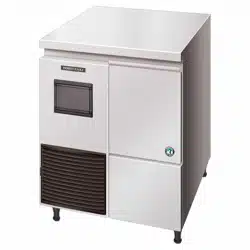
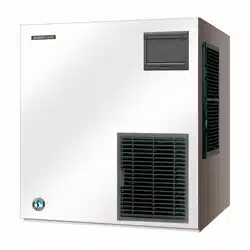
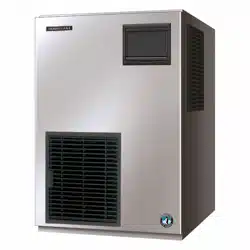
MODULAR ICE MAKER
MODEL
FM-300AKE-HC
FM-300AKE-HCN
FM-480AKE-HC
FM-480AKE-HCN

i
CONTENTS PAGE
I. SPECIFICATIONS -------------------------------------------------------------------------------------- 1
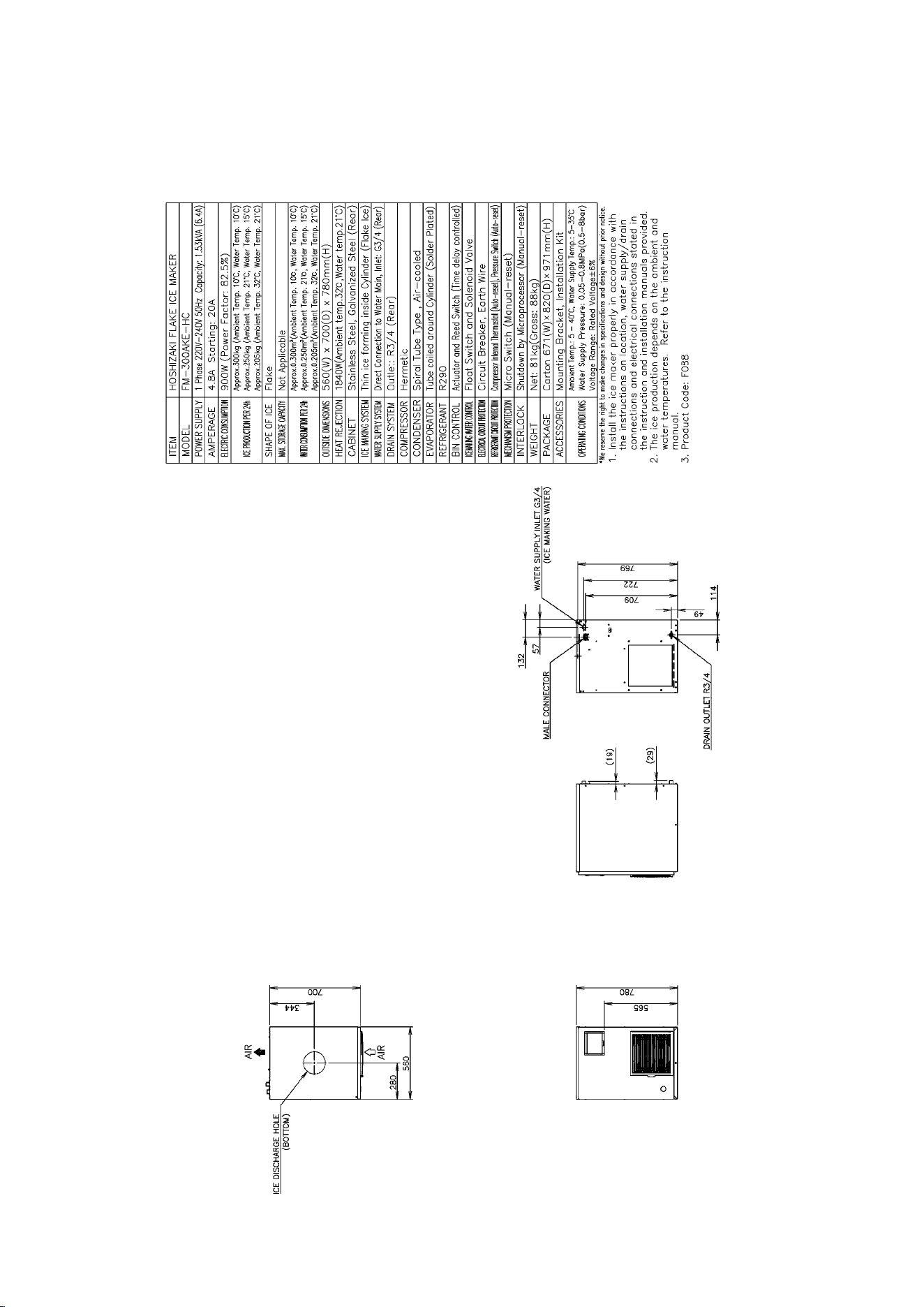
1. DIMENSIONS/SPECIFICATIONS ----------------------------------------------------------------- 1
[a] FM-300AKE-HC (Auxiliary code: D-0 or earlier)-------------------------------------------- 1
[b] FM-300AKE-HC (Auxiliary code: D-1 or later) ---------------------------------------------- 2
[c] FM-300AKE-HCN (Auxiliary code: D-0 or earlier)------------------------------------------ 3
[d] FM-300AKE-HCN (Auxiliary code: D-1 or later) -------------------------------------------- 4
[e] FM-480AKE-HC (Auxiliary code: D-0 or earlier) ------------------------------------------ 5
[f] FM-480AKE-HC (Auxiliary code: D-1 or later)----------------------------------------------- 6
[g] FM-480AKE-HCN (Auxiliary code: D-0 or earlier)------------------------------------------ 7
[h] FM-480AKE-HCN (Auxiliary code: D-1 or later) -------------------------------------------- 8
2. CONSTRUCTION -------------------------------------------------------------------------------------- 9
[a] FM-300AKE-HC(N) (Auxiliary code: D-0 or earlier)---------------------------------------- 9
[b] FM-480AKE-HC(N) (Auxiliary code: D-0 or earlier)---------------------------------------10
[c] FM-300, 480AKE-HC(N) (Auxiliary code: D-1 or earlier) --------------------------------11
II. MAINTENANCE AND CLEANING INSTRUCTIONS-----------------------------------------12
1. EXTRUDING HEAD (UPPER BEARING), HOUSING (LOWER BEARING) -----------12
2. MECHANICAL SEAL ---------------------------------------------------------------------------------12
3. GEAR MOTOR-----------------------------------------------------------------------------------------13
4. CONDENSER (AIR-COOLED MODEL ONLY) ------------------------------------------------13
5. AIR FILTER (AIR-COOLED MODEL ONLY) ---------------------------------------------------13
6. CONTROL WATER VALVE ------------------------------------------------------------------------14
7. CLEANING OF WATER SYSTEM ----------------------------------------------------------------15
III. TECHNICAL INFORMATION----------------------------------------------------------------------17
1. WATER CIRCUIT AND REFRIGERANT CIRCUIT -------------------------------------------17
2. WIRING DIAGRAM -----------------------------------------------------------------------------------18
[a] WIRING DIAGRAM-------------------------------------------------------------------------------18
[b] CONTROL BOX LAYOUT ----------------------------------------------------------------------22
3. ICEMAKING MECHANISM -------------------------------------------------------------------------23
[a] EVAPORATOR (CASING)----------------------------------------------------------------------24
[b] AUGER ----------------------------------------------------------------------------------------------24
[c] EXTRUDING HEAD (BEARING)--------------------------------------------------------------24
[d] HOUSING-------------------------------------------------------------------------------------------24
[e] MECHANICAL SEAL-----------------------------------------------------------------------------24
[f] COUPLING (SPLINE JOINT) -------------------------------------------------------------------24
[g] GEAR MOTOR ------------------------------------------------------------------------------------24
[h] BELT HEATER ------------------------------------------------------------------------------------25
[i] REMOVABLE FLANGE --------------------------------------------------------------------------25
[j] SEALING BOLT ------------------------------------------------------------------------------------25
[k] BIN CONTROL SWITCH (Auxiliary code: D-0 or earlier) -------------------------------26
[l] BIN CONTROL SWITCH (Auxiliary code: D-1 or later)-----------------------------------26
[m] CHUTE SWITCH (Auxiliary code: D-0 or earlier)-----------------------------------------28
[n] SPOUT, SPOUT COVER (Auxiliary code: D-0 or earlier)-------------------------------28
4. ELECTRIC CIRCUIT ---------------------------------------------------------------------------------29
[a] BASIC OPERATION -----------------------------------------------------------------------------29

ii
[b] TIMING CHART -----------------------------------------------------------------------------------30
5. OPERATION BOARD --------------------------------------------------------------------------------31
[a] OPERATION BUTTONS ------------------------------------------------------------------------31
[b] SETTING MODEL NUMBER-------------------------------------------------------------------31
[c] DISPLAYING COMPRESSOR OPERATING HOURS, CYCLE TIME, MODEL
NUMBER AND SOFTWARE VERSION -----------------------------------------------------32
[d] DISPLAYING ERROR LOG --------------------------------------------------------------------34
[e] RESETTING ERROR LOG---------------------------------------------------------------------35
[f] RESETTING COMPRESSOR OPERATING HOURS ------------------------------------35
[g] REDUCING COMPRESSOR STARTING TIME-------------------------------------------36
6. PROTECTORS ----------------------------------------------------------------------------------------36
[a] INDICATION ---------------------------------------------------------------------------------------36
7. ERROR CODES---------------------------------------------------------------------------------------37
8. PERFORMANCE DATA -----------------------------------------------------------------------------31
[a] FM-300AKE-HC -----------------------------------------------------------------------------------39
[b] FM-300AKE-HCN ---------------------------------------------------------------------------------40
[c] FM-480AKE-HC -----------------------------------------------------------------------------------41
[d] FM-480AKE-HCN ---------------------------------------------------------------------------------42
IV. SERVICE DIAGNOSIS -----------------------------------------------------------------------------43
1. NO ICE PRODUCTION------------------------------------------------------------------------------43
2. LOW ICE PRODUCTION----------------------------------------------------------------------------45
3. OTHERS-------------------------------------------------------------------------------------------------45
V. REMOVAL AND REPLACEMENT OF COMPONENTS-------------------------------------47
1. REFRIGERATION CIRCUIT------------------------------------------------------------------------47
[a] APPLICABLE PARTS----------------------------------------------------------------------------47
2. EVAPORATOR ASSEMBLY -----------------------------------------------------------------------47
3. CONTROL WATER VALVE ------------------------------------------------------------------------49
4. FLUSH WATER VALVE -----------------------------------------------------------------------------49
5. CONTROLLER BOARD -----------------------------------------------------------------------------50
[a] MODIFICATION -----------------------------------------------------------------------------------50
[b] REPLACEMENT ----------------------------------------------------------------------------------50
1
I. SPECIFICATIONS
1. DIMENSIONS/SPECIFICATIONS
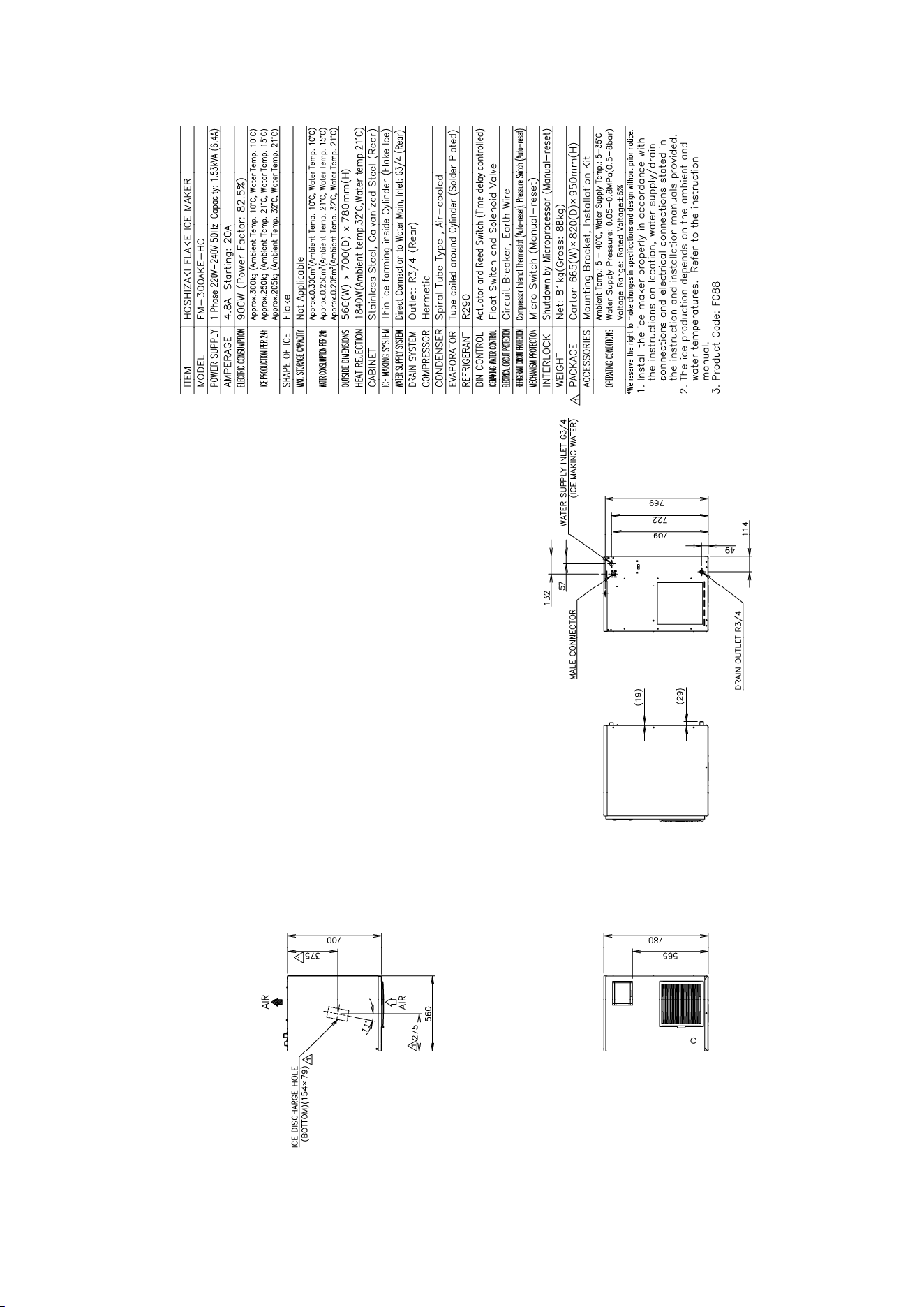
[a] FM-300AKE-HC (Auxiliary code: D-0 or earlier)
2
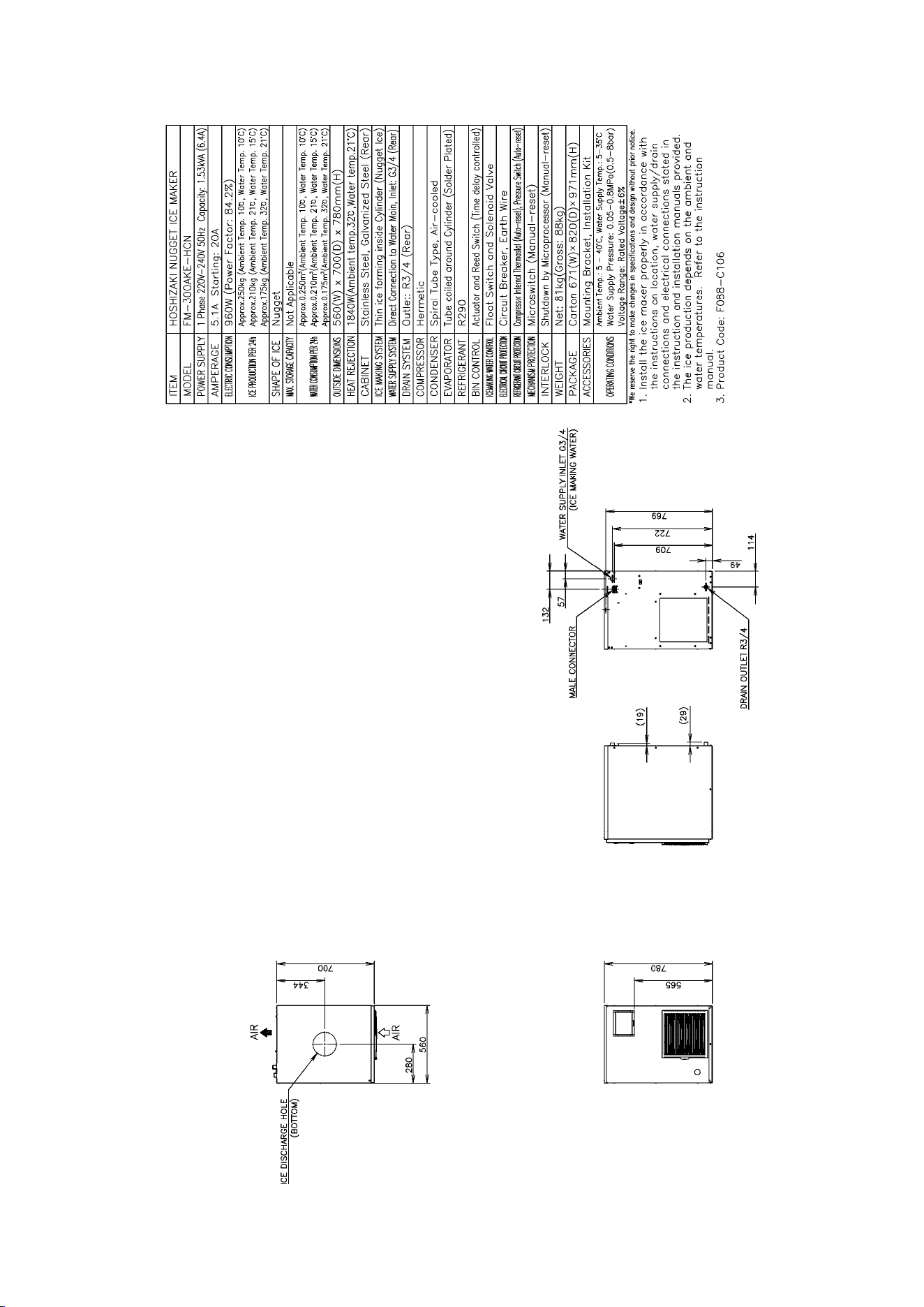
[b] FM-300AKE-HC (Auxiliary code: D-1 or later)
3
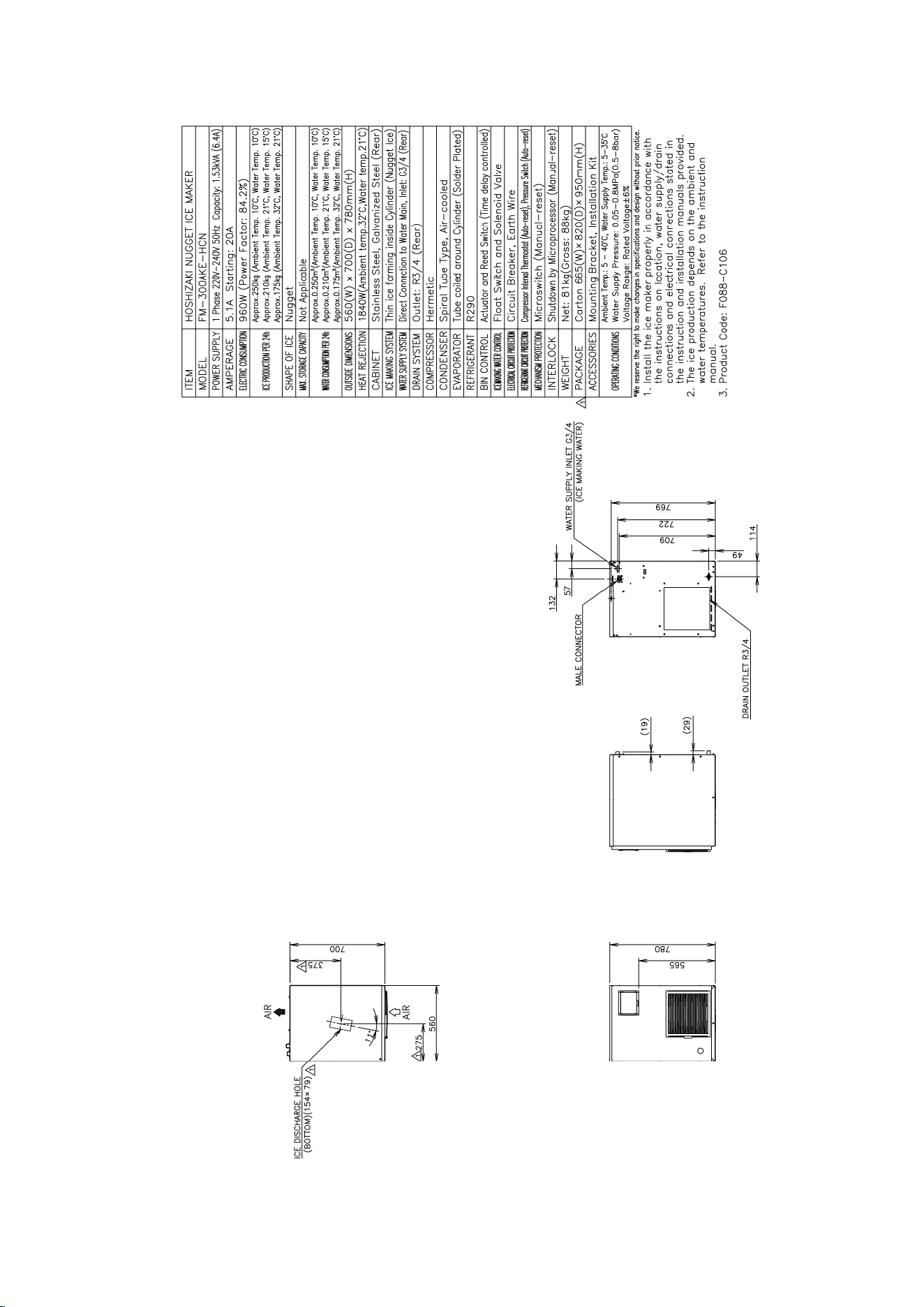
[c] FM-300AKE-HCN (Auxiliary code: D-0 or earlier)
4
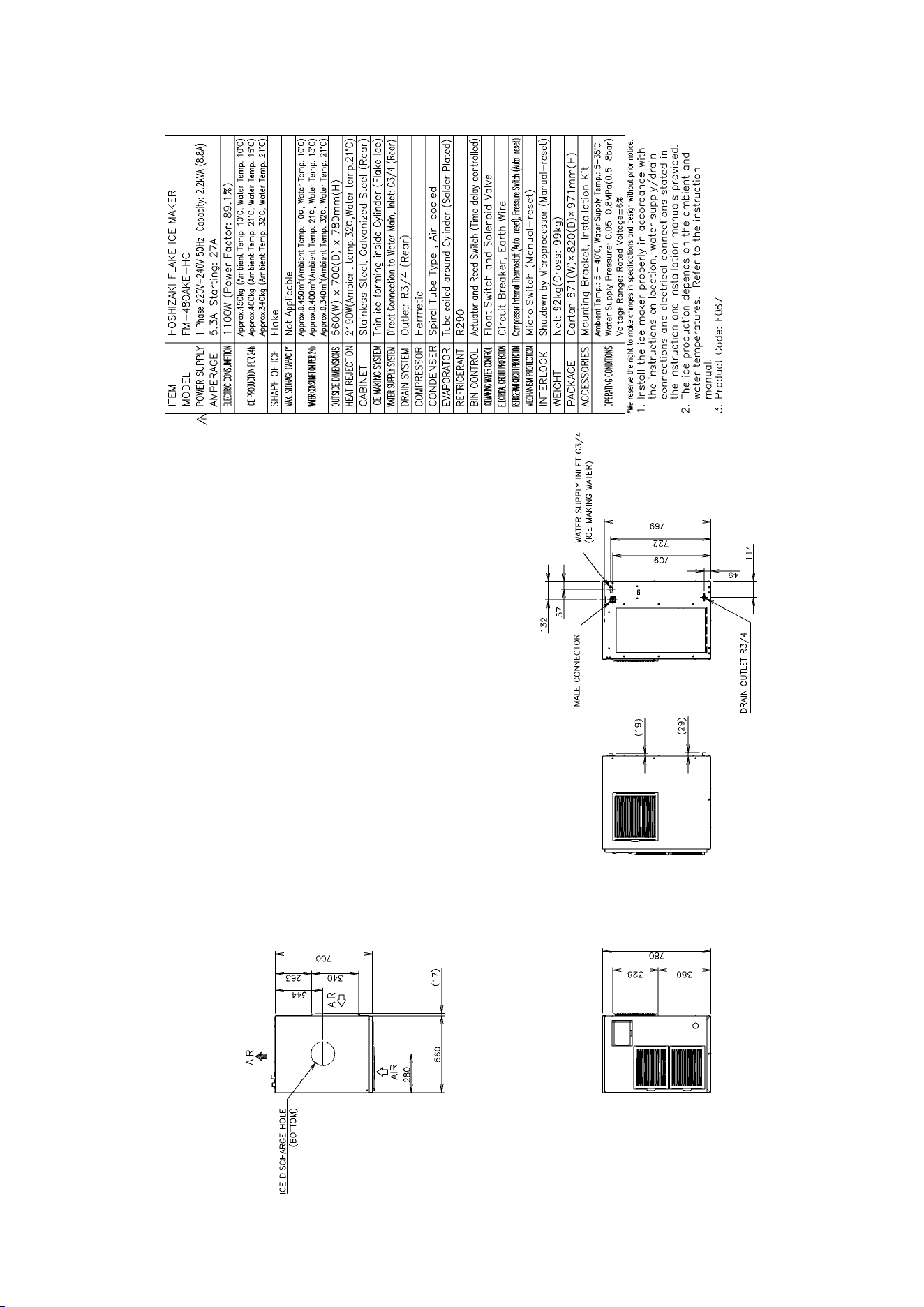
[d] FM-300AKE-HCN (Auxiliary code: D-1 or later)
5
[e] FM-480AKE-HC (Auxiliary code: D-0 or earlier)
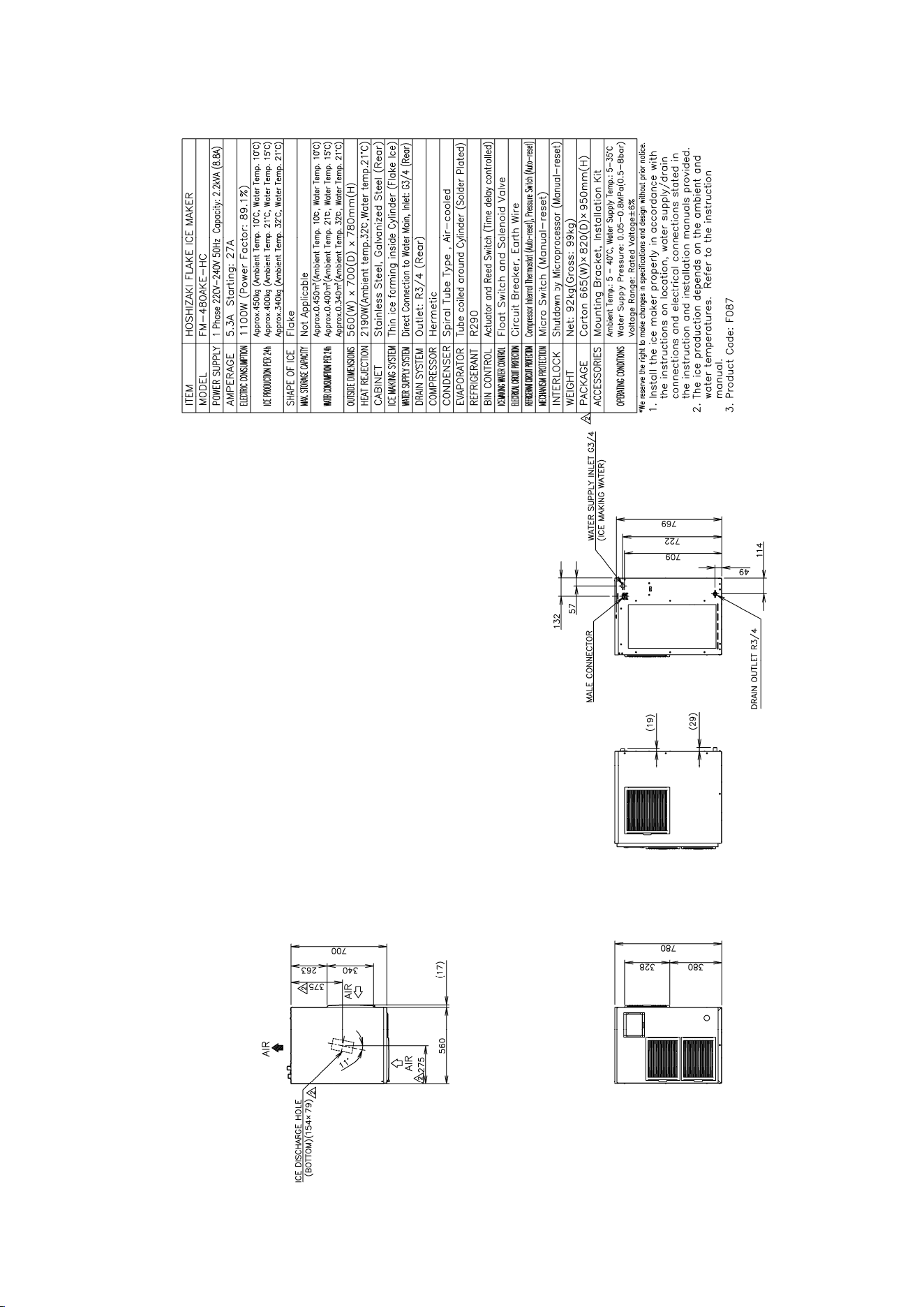
6
[f] FM-480AKE-HC (Auxiliary code: D-1 or later)
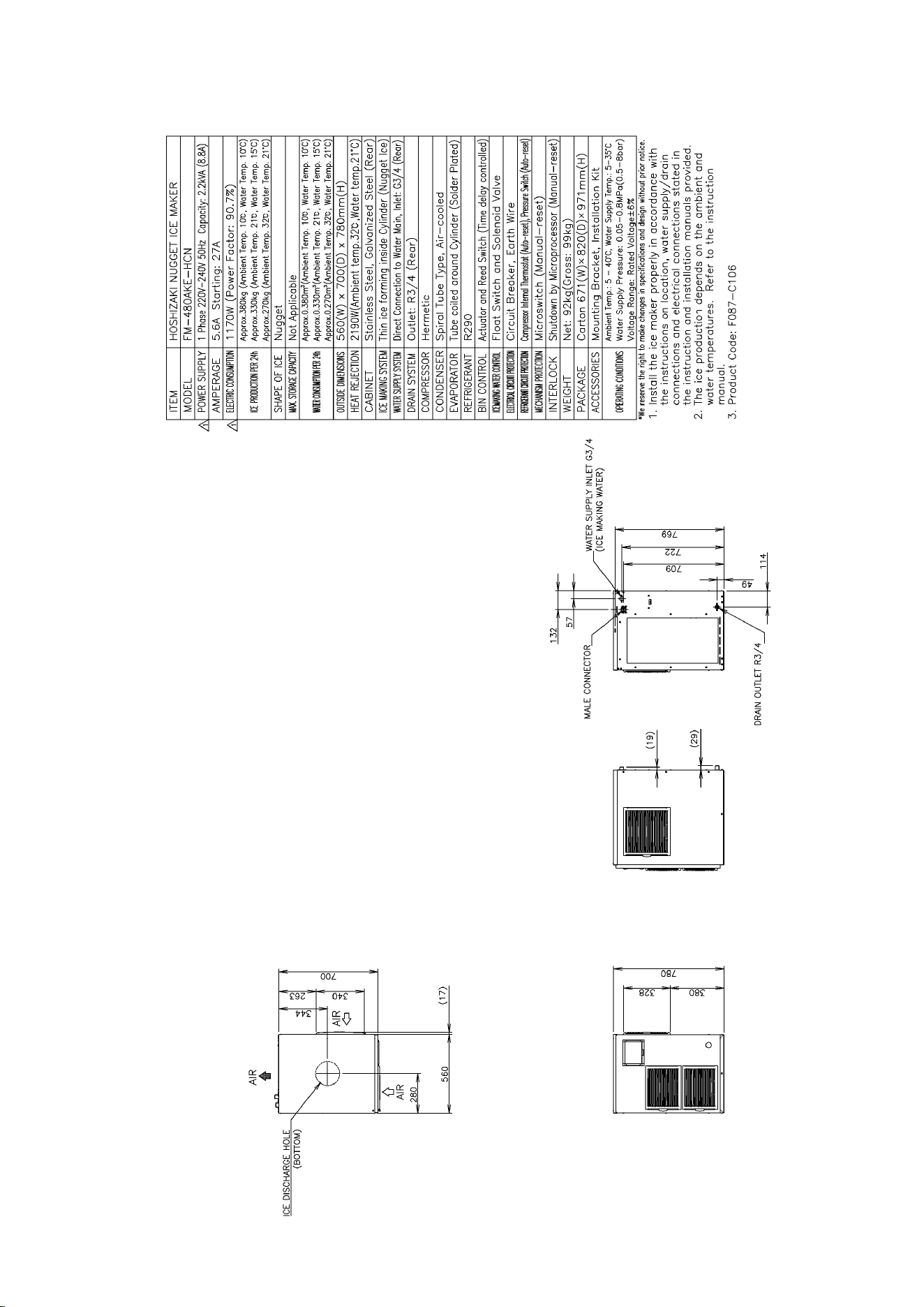
7
[g] FM-480AKE-HCN (Auxiliary code: D-0 or earlier)
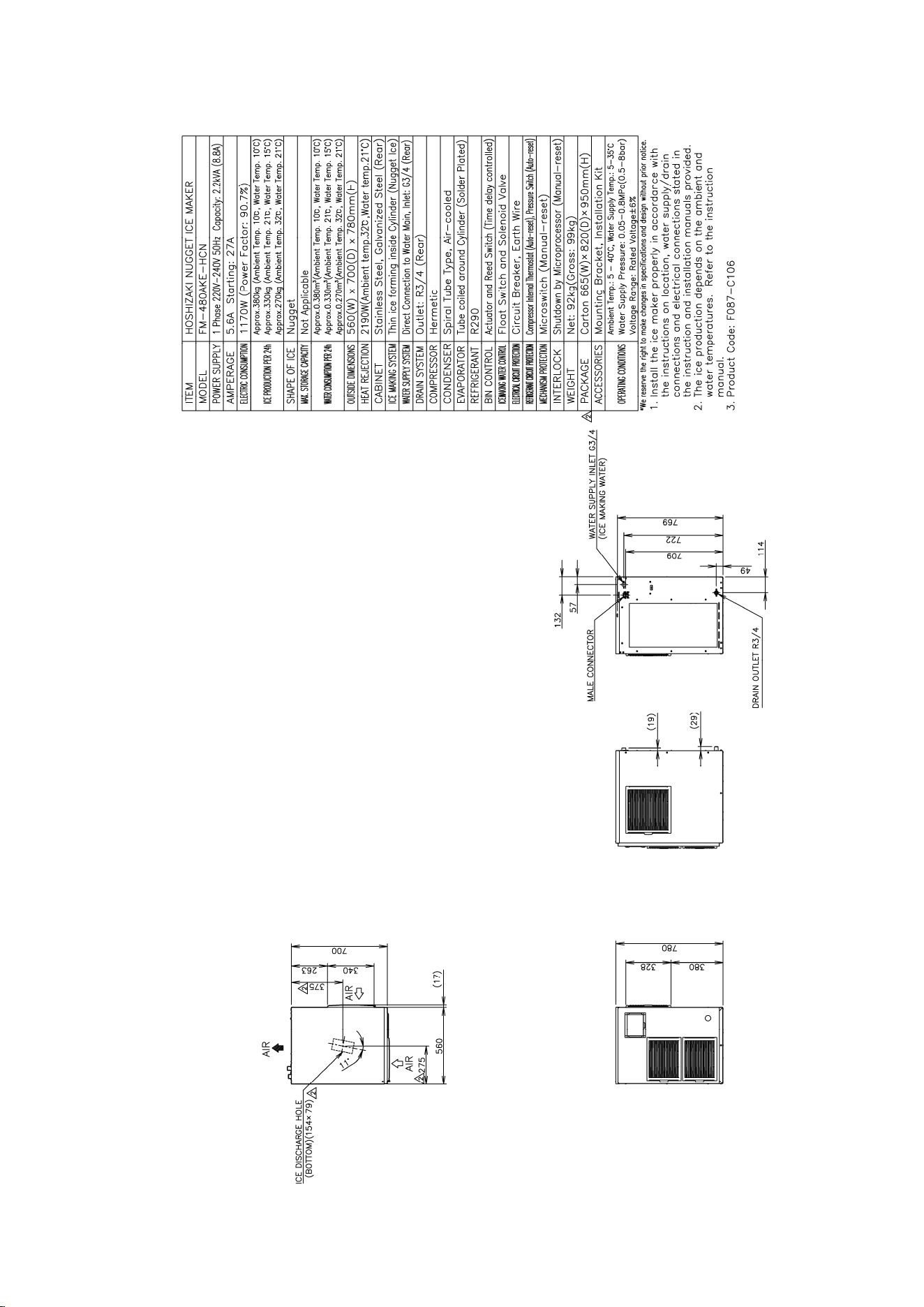
8
[h] FM-480AKE-HCN (Auxiliary code: D-1 or later)
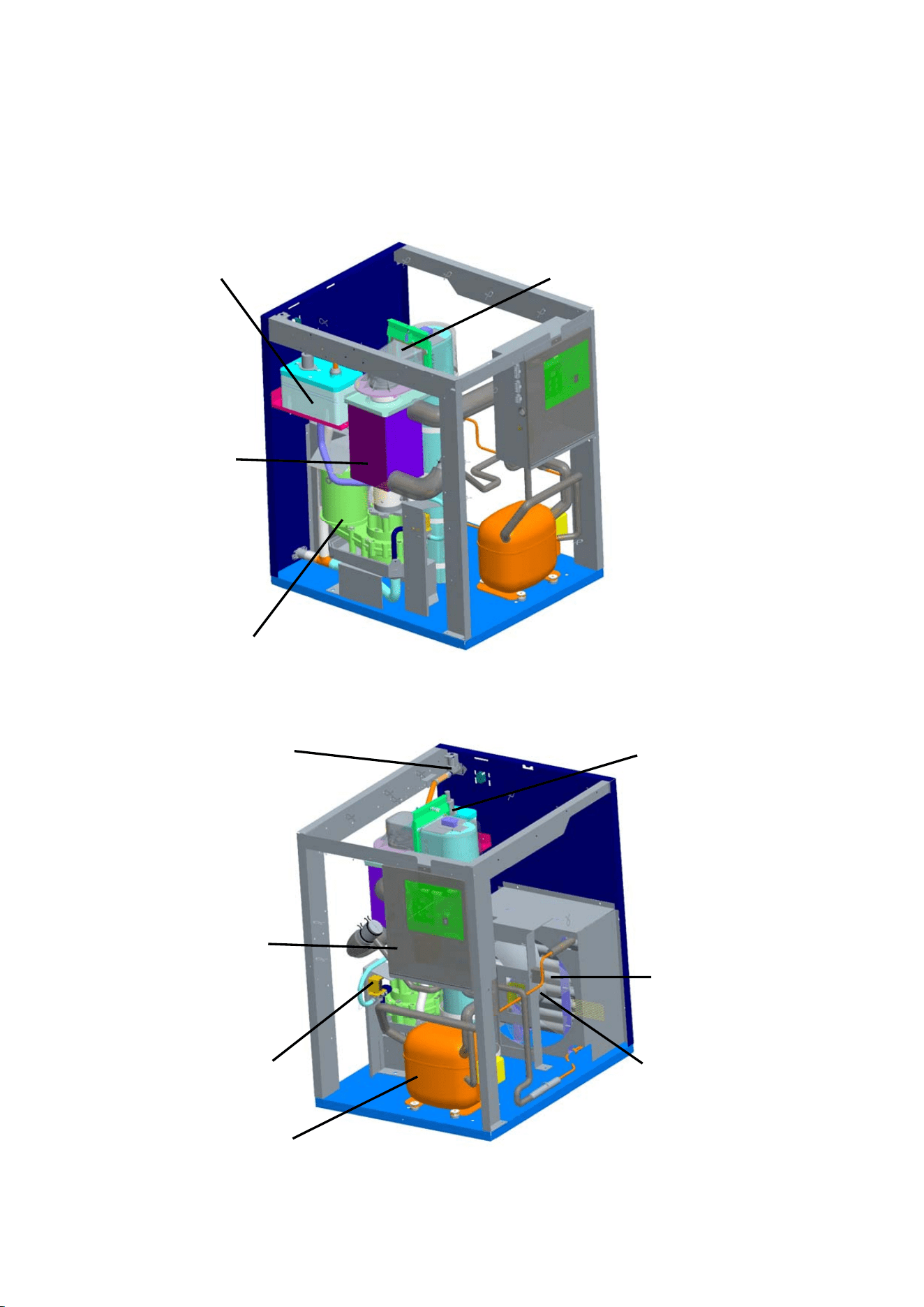
9
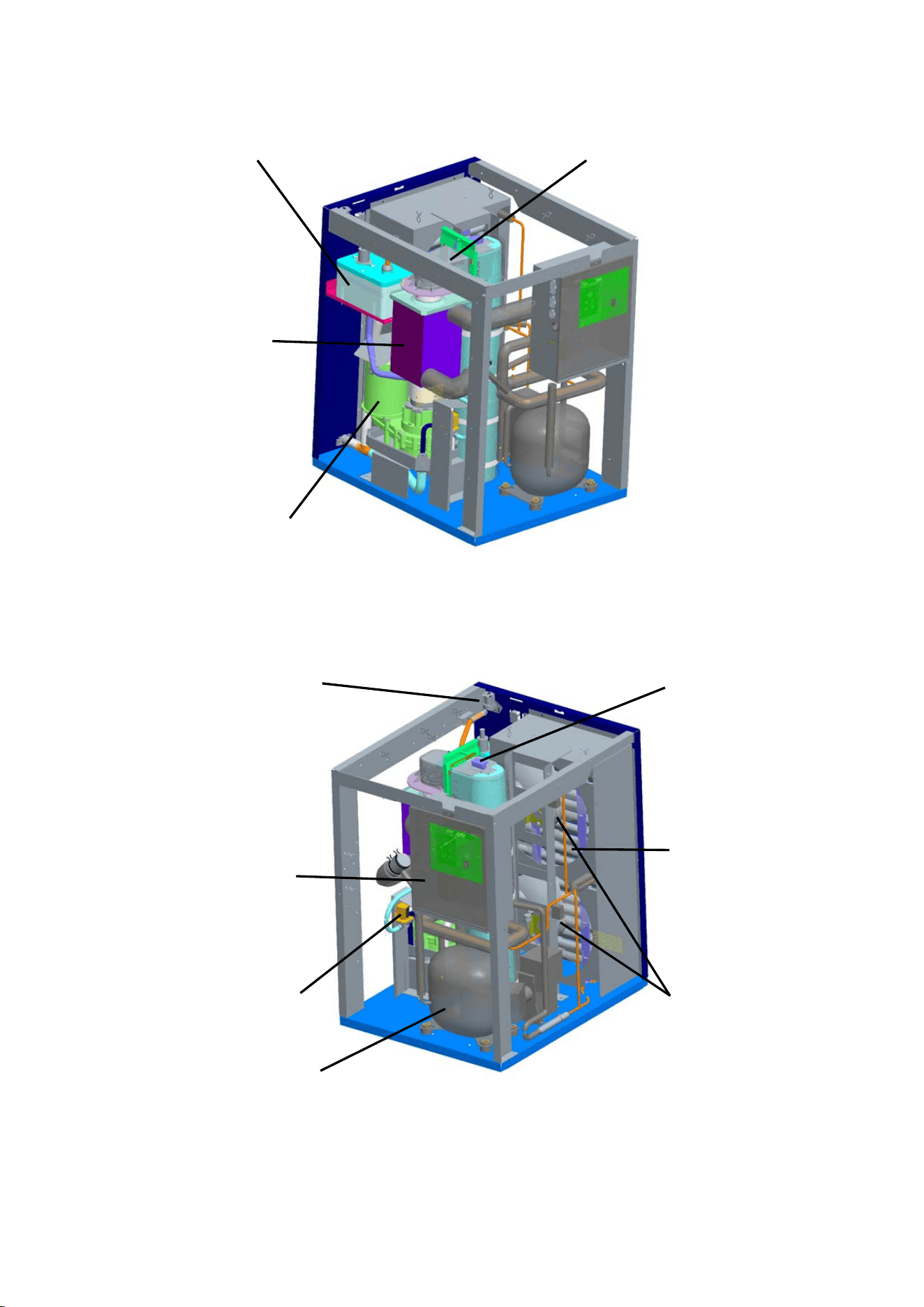
Spout
Reservoir
Evaporator
Gear Motor
2. CONSTRUCTION
[a] FM-300AKE-HC(N) (Auxiliary code: D-0 or earlier)
Compressor
Fan Motor
Air-Cooled Condenser
Flush Water Valve
Control Box
Control Water Valve
Bin Control Switch
10
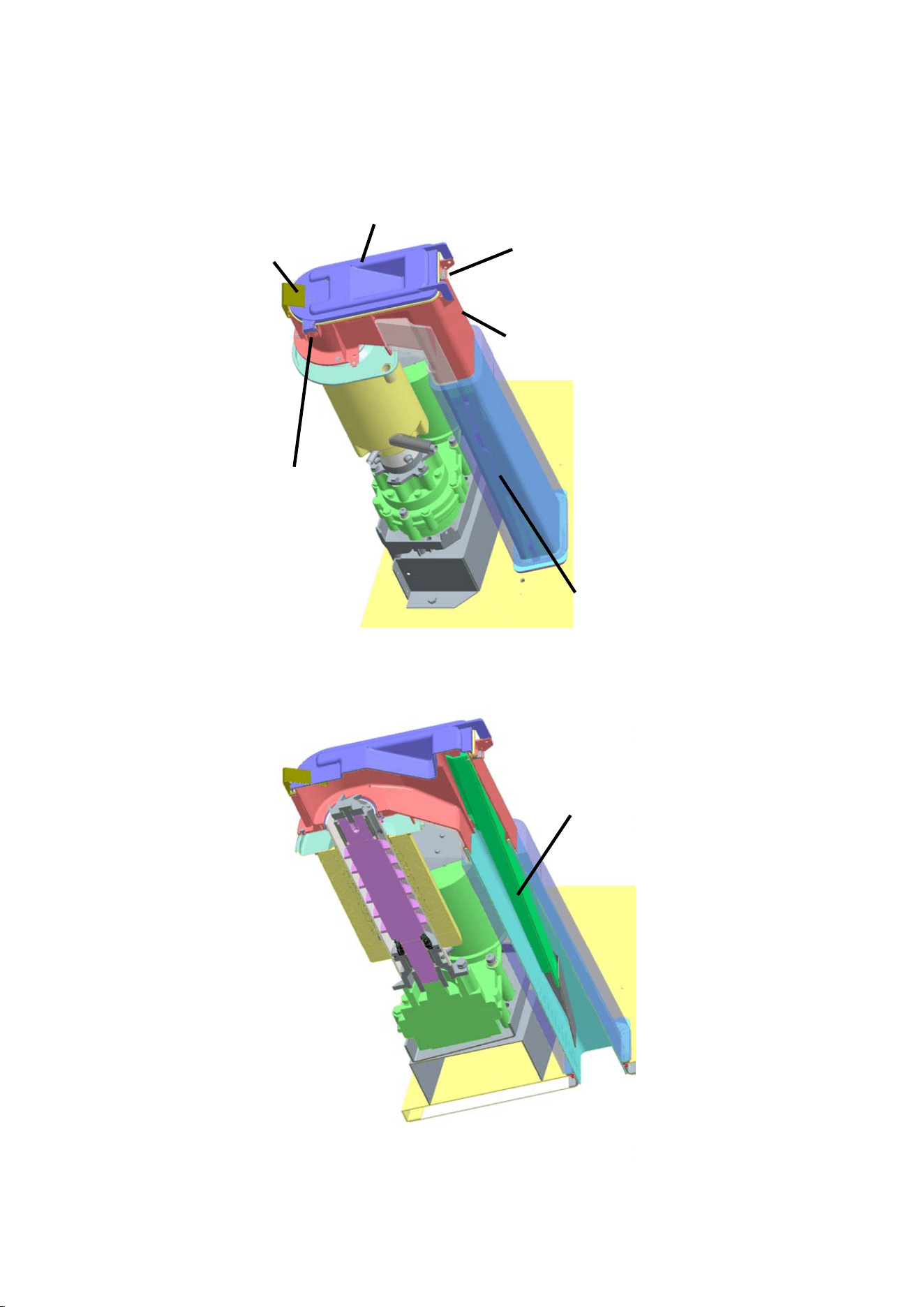
[b] FM-480AKE-HC(N) (Auxiliary code: D-0 or earlier)
Reservoir
Evaporator
Gear Motor
Spout
Control Water Valve
Control Box
Flush Water Valve
Compressor
Bin Control Switch
Air-Cooled Condenser
Fan Motor
11
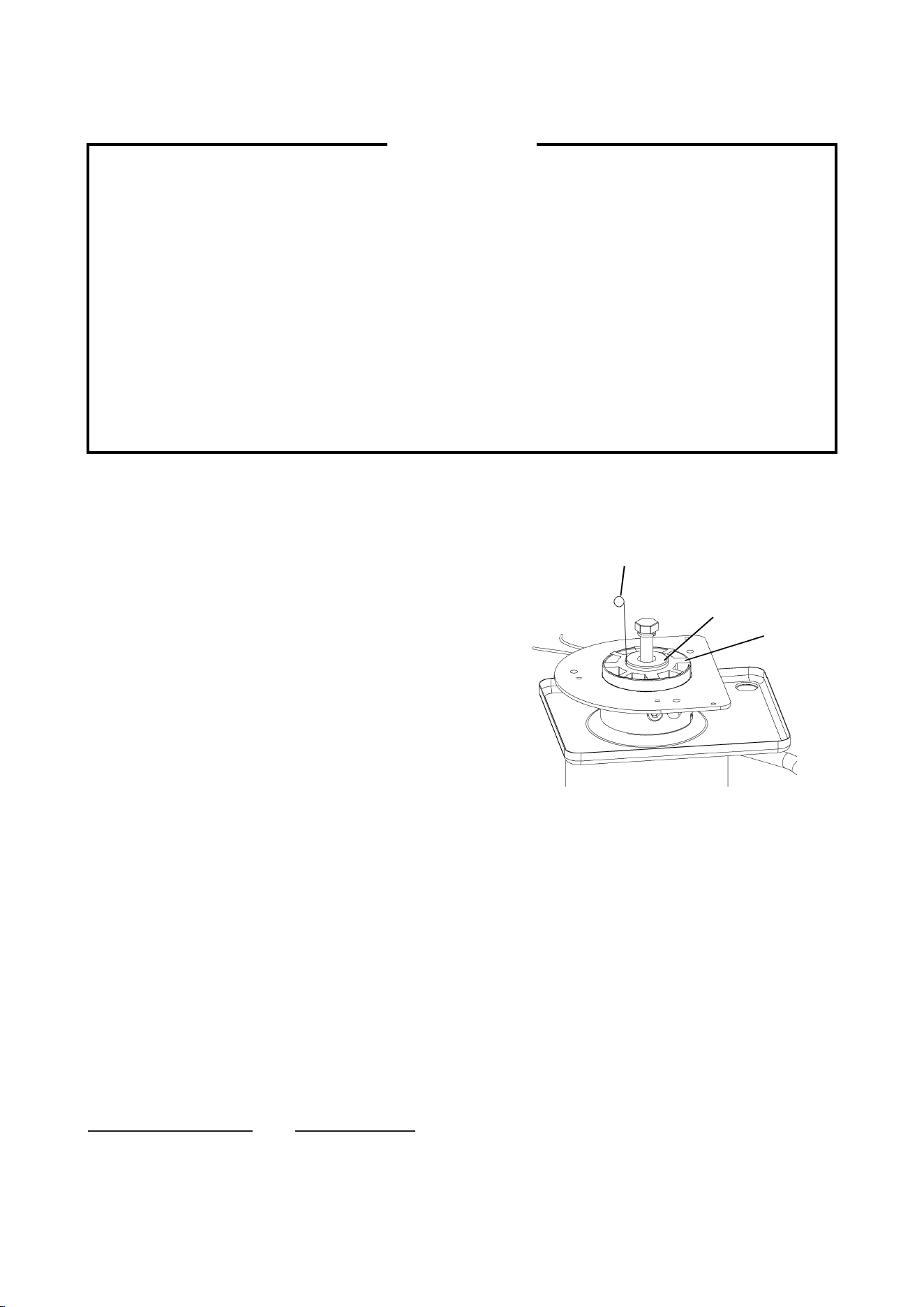
[c] FM-300AKE-HC(N), FM-480AKE-HC(N) (Auxiliary code: D-1 or later)
See [a] or [b] for the entire construction.
Spout
Reed Switch
(Bin Control)
S
p
out Cove
r
Spring
Reed Switch
(Spout Sw)
Chute
Actuator
12
II. MAINTENANCE AND CLEANING INSTRUCTIONS
IMPORTANT
1. This icemaker must be maintained individually, referring to the instruction manual
and labels provided with the icemaker.
2. To achieve optimum icemaker performance, the following parts need periodic
inspection and maintenance:
Extruding head (upper bearing)
Housing (lower bearing)
Mechanical seal
These parts should be inspected after two years from installation or 10,000 hours of
operation, whichever comes first, and once a year thereafter. Their service life,
however, depends on water quality and environment. More frequent inspection and
maintenance are recommended in bad or severe water conditions.
1. EXTRUDING HEAD (UPPER BEARING), HOUSING (LOWER BEARING)
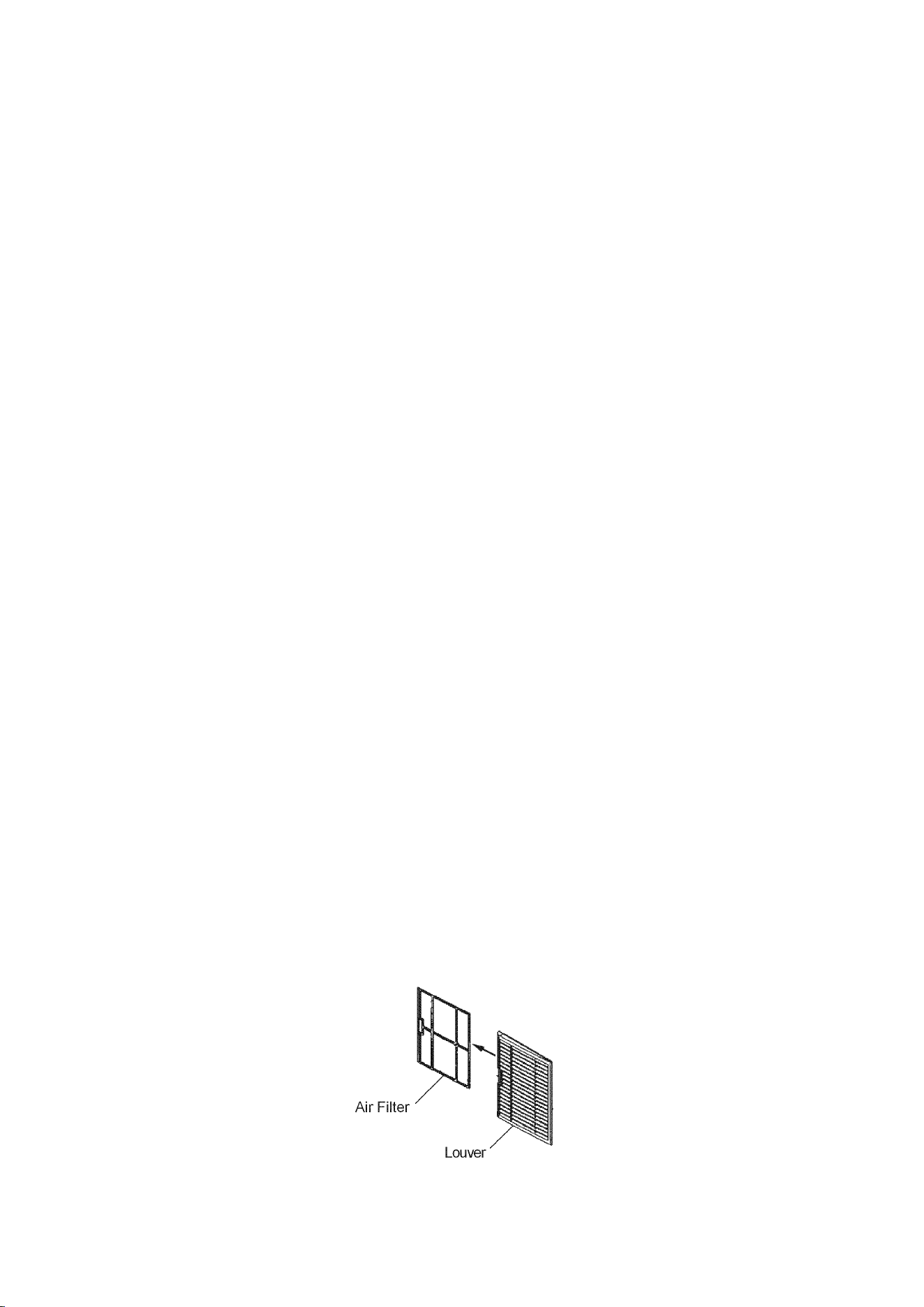
These parts should be replaced if a diametrical gap
of more than 0.5 mm is found when at least three
spots are checked by changing the direction of the
auger on each bearing.
It depends on the water quality and conditions, but
normally the bearings should be checked for wear
after a total of 8,000 - 10,000 hour operation from
installation date.
Note: The clearance between the auger blades
and the evaporator interior is 0.4 - 0.5 mm. If
the bearings and rotating parts are worn out
to create a larger clearance, the evaporator
interior may be damaged. (The diameters
differ by 0.8 - 1.0 mm.)
If the auger surfaces against which the bearings contact are no longer smooth or
show any burrs or abrasions during the above inspection, replace the auger. The
sealing bolt must be tightened equally to torque of 784N·cm±10%.
2. MECHANICAL SEAL
The mechanical seal prevents water leaks from between the auger and the housing bearing
and gradually wears out to reduce its watertightness. Check the amount of water leakage
from the drain pipe located at the side of the gear case to determine the necessity of
replacement.
Total operation time Water leakage
3,000 hours 0.1 mL/h
10,000 hours 0.5 mL/h
For reference only
(May differ from actual design)
Auger
0.5 mm Round Stock
or Pin Gauge
Extruding
Head
13
Attach the mechanical seal with its floating sheet facing the housing. After replacement,
there should be no water leakage from the mating surface.
Note: The water leakage will exceed the above amount with scale/dirt build up or damage
on the mating surface. Replace the mechanical seal when the water leakage exceeds
0.5 mL/h.
3. GEAR MOTOR
After the following hours of operation, check the gear motor for excessive noise caused by
increased torque or deterioration of mechanical parts.
Bearing, gear and other mechanical parts: 10,000 hours
Oil seal: 5 years
Note: When the output shaft oil seal is exposed to a large amount of water at one time,
water may enter the gear case. Always drain the water circuit before removing the
auger for service.
4. CONDENSER
Check the condenser once a year, and clean if required by using a brush or vacuum cleaner.
More frequent cleaning may be required depending on the location of the icemaker.
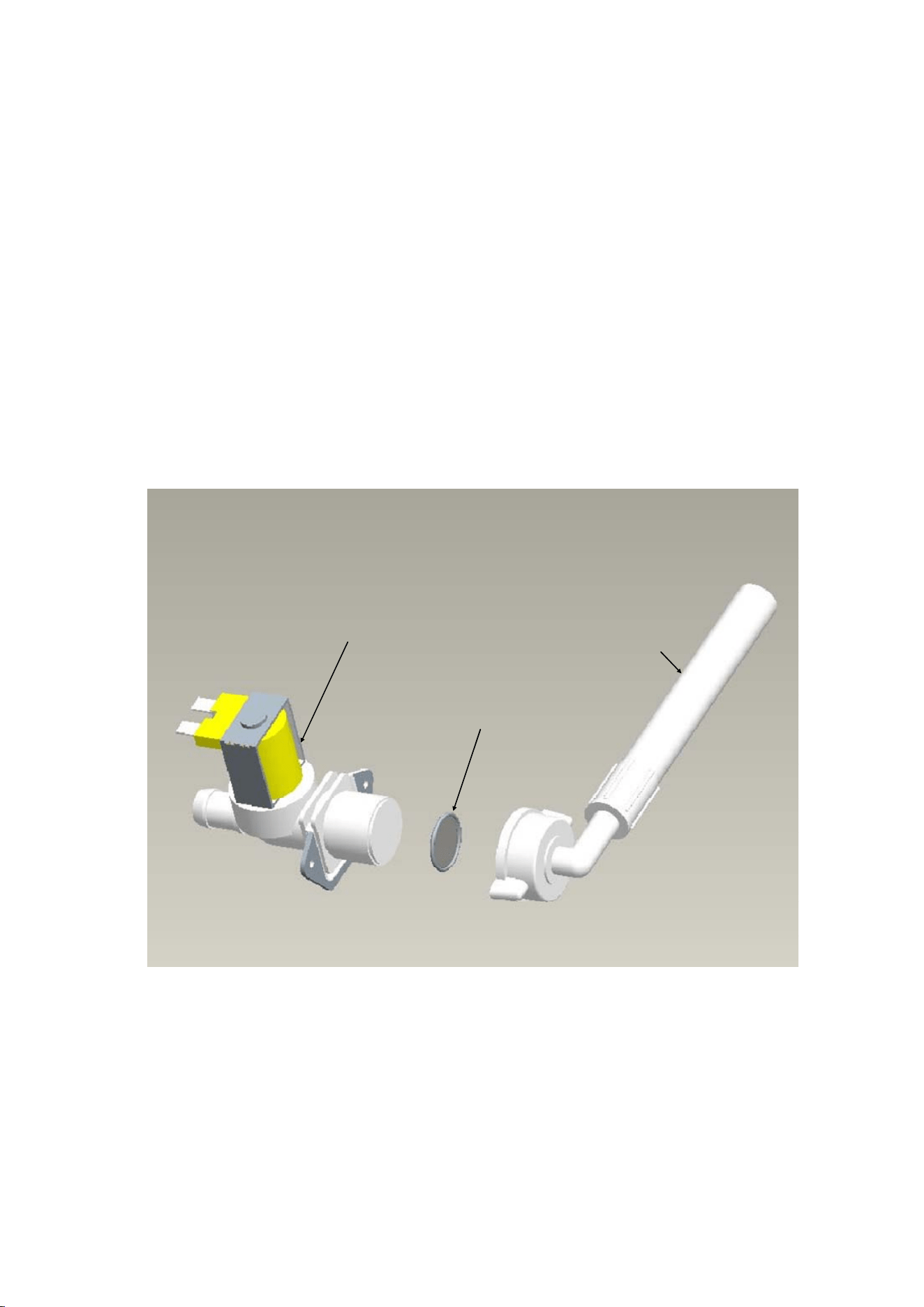
5. AIR FILTER
Plastic mesh air filters remove dirt or dust from the air, and keep the condenser from getting
clogged. If the filters get clogged, the icemaker’s performance will be reduced. Remove and
clean the air filters at least twice per month:
1) Slide the air filter off the louver.
2) Clean the air filter by using a vacuum cleaner. When severely clogged, use warm water
and a neutral cleaner to wash the air filter.
3) Rinse and dry the air filter thoroughly, and place it in position.
14
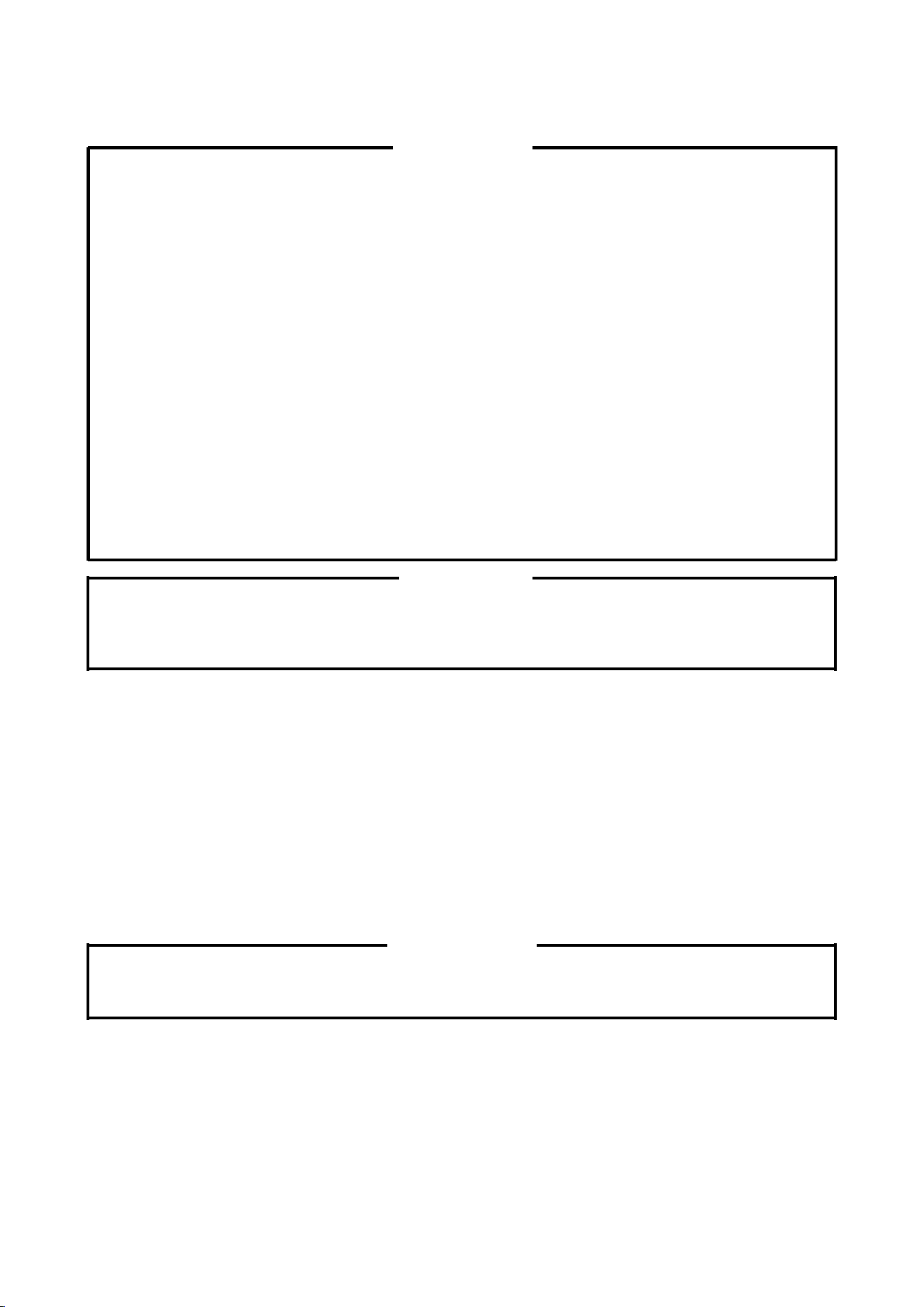
6. CONTROL WATER VALVE
1) Disconnect the power source.
2) Close the water supply tap.
3) Disconnect the inlet hose from the water valve.
4) Clean the filter packing using a brush.
5) Replace the filter packing and inlet hose in their correct positions.
6) Open the water supply tap.
7) Connect the power source.
8) Check for leaks.
Inlet Hose
Filter Packing
Control Water Valve
15
7. CLEANING OF WATER SYSTEM
WARNING
1. HOSHIZAKI recommends cleaning this unit at least twice a year. More frequent
cleaning, however, may be required in some existing water conditions.
2. Do not touch the operation switch with damp hands.
3. Always wear rubber gloves, eye protectors, apron, etc. for safe handling of the
cleaner and sanitiser.
4. Use the cleaners and sanitisers recommended by Hoshizaki. Contact your local
Hoshizaki office for further details. (The instructions below give an example of
those recommended cleaners and sanitisers.)
5. Never mix cleaning and sanitising solutions in an attempt to shorten cleaning time.
6. Wipe off any splashed or spilt cleaner/sanitiser immediately.
7. Do not use any ammonia type cleaners on any part of the icemaker.
CAUTION
Do not use ice produced with cleaning and sanitizing solutions. Be sure none remains
in the storage bin on completion of cleaning.
<STEP 1>
Dilute the solutions with water as follows:
Cleaning solution: “Nickel-Safe Ice Machine Cleaner” by The Rectorseal Corporation or
similar. Prepare approximately 3 L of solution as directed on the
container.
Sanitising solution: 30 mL of 5.25% sodium hypochlorite with 7.6 L of water or the
Hoshizaki recommended sanitiser as directed on the container.
IMPORTANT
For safety and maximum effectiveness, use the solutions immediately after dilution.
<STEP 2>
Use the cleaning solution to remove lime deposits in the water system.
1) Open the plastic access flap on the front panel.
2) Press the stop button to activate the flush cycle (approx. 10 minutes).

16
3) Remove all ice from the storage bin to avoid contamination by the cleaner.
4) Unplug the icemaker. Remove the top and front panels.
5) Remove the cover of the reservoir. Remove any loose debris or scale.
6) Carefully fill the reservoir with the solution to the overflow point. If necessary, use a small
brush to clean the inside of the reservoir.
7) Refit the reservoir cover.
8) Check that the operation switch is in the “ON” position.
9) Refit the front and top panels.
10) Allow the icemaker to stand for about 10 minutes, then plug in the icemaker to make ice
with the solution.
11) With the water supply tap open, allow the machine to continue icemaking for a further 20
minutes. Open the access flap and press the stop button.
12) Allow time for the gear motor to stop and the water system to drain.
13) Allow the icemaker to make ice for approximately 10 minutes.
14) Pour warm water into the storage bin to melt any ice down the drain.
Note: 1. If the machine has heavy deposits of scale, repeat the complete cleaning
procedure.
2. Do not increase the proportion of cleaning solution to shorten cleaning times, as
this may lock the auger when completing item 10).
<STEP 3>
Note: Sanitising should always be completed after cleaning or alternately as an individual
procedure if conditions exist to make it necessary.
Use 2.8 litres of the sanitising solution to sanitise the icemaker.
15) Follow items 1) to 14) to complete sanitisation of the water system.
17
III. TECHNICAL INFORMATION
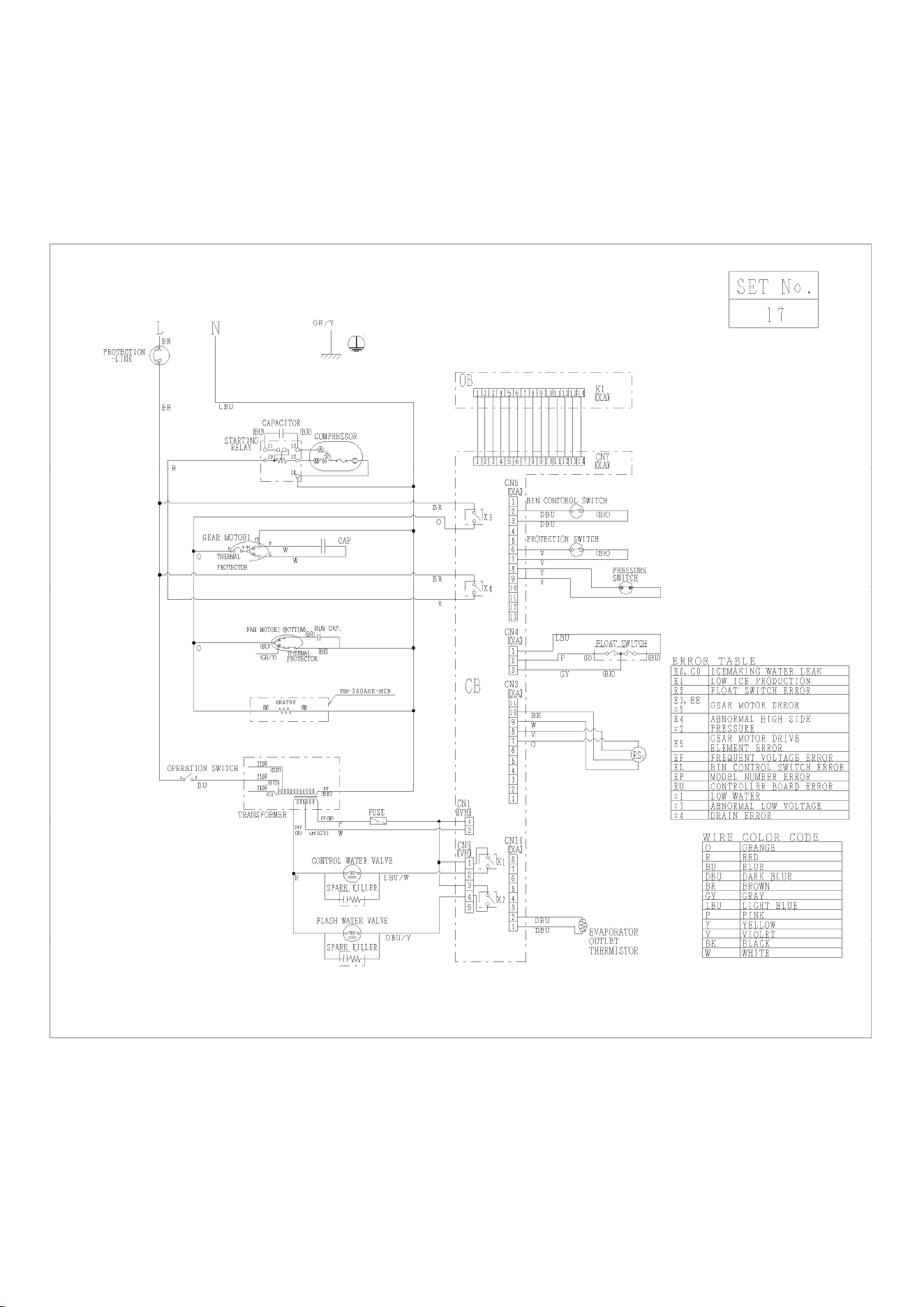
1. WATER CIRCUIT AND REFRIGERANT CIRCUIT
Pressure Switch
Cut-out 2.26 + 0.15/0 MPa
Cut-in 1.57 ± 0.15 MPa
* FM-480AKE-HC(N) only
400 mm
18
2. WIRING DIAGRAM
[a] WIRING DIAGRAM
FM-300AKE-HC(N) (Auxiliary code: D-0 or earlier)
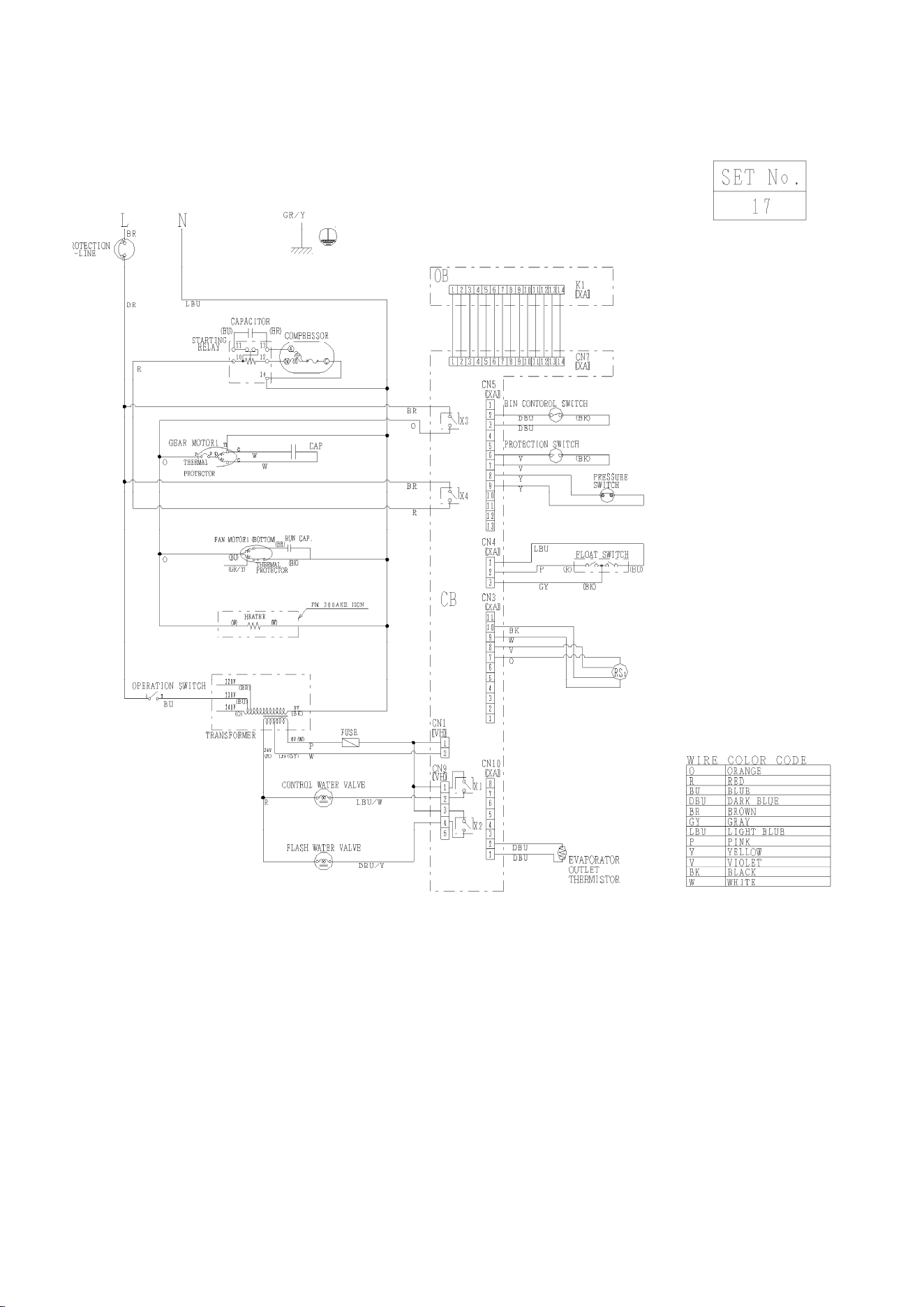
19
FM-300AKE-HC(N) (Auxiliary code: D-1 or later)
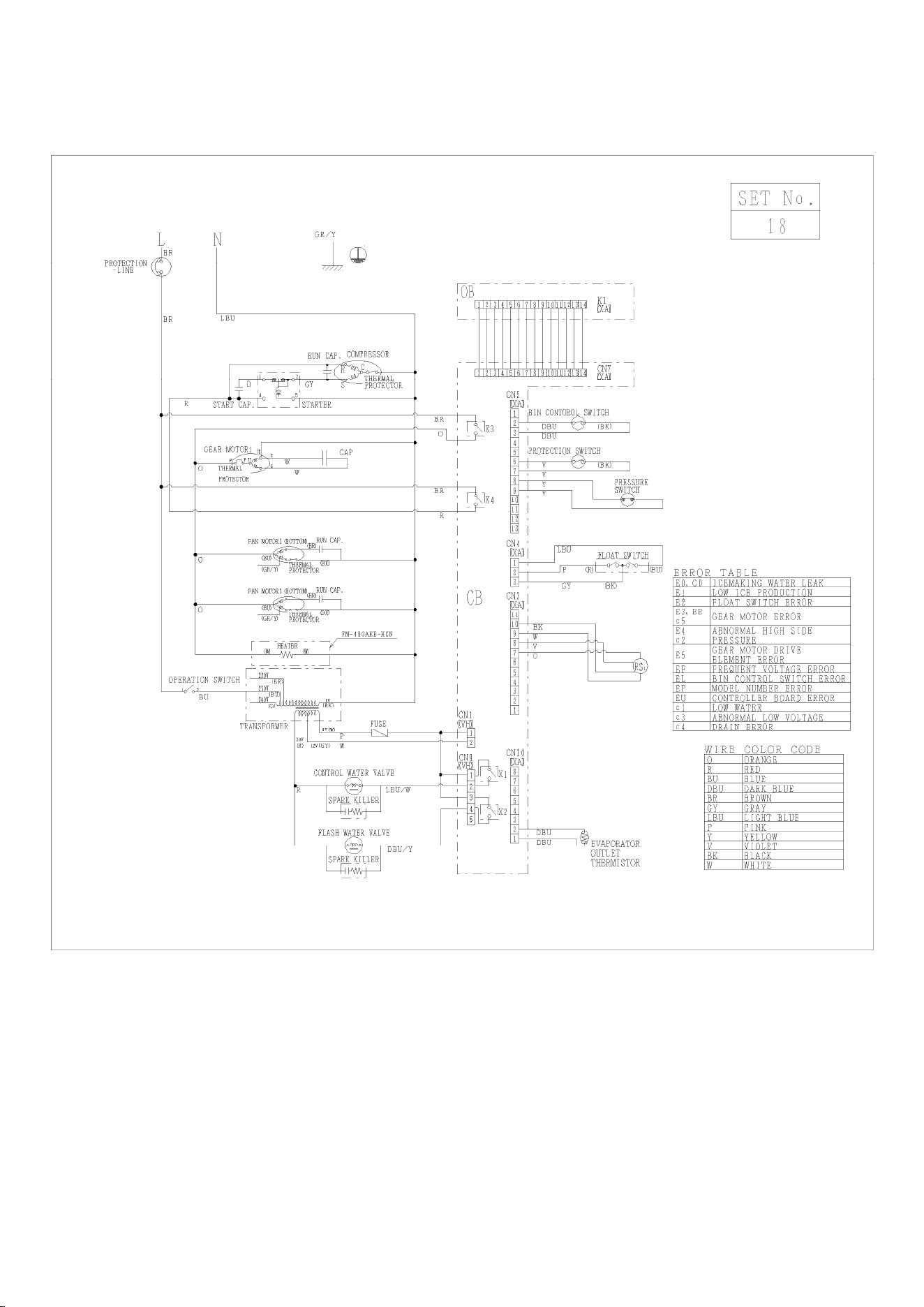
20
FM-480AKE-HC(N) (Auxiliary code: D-0 or earlier)
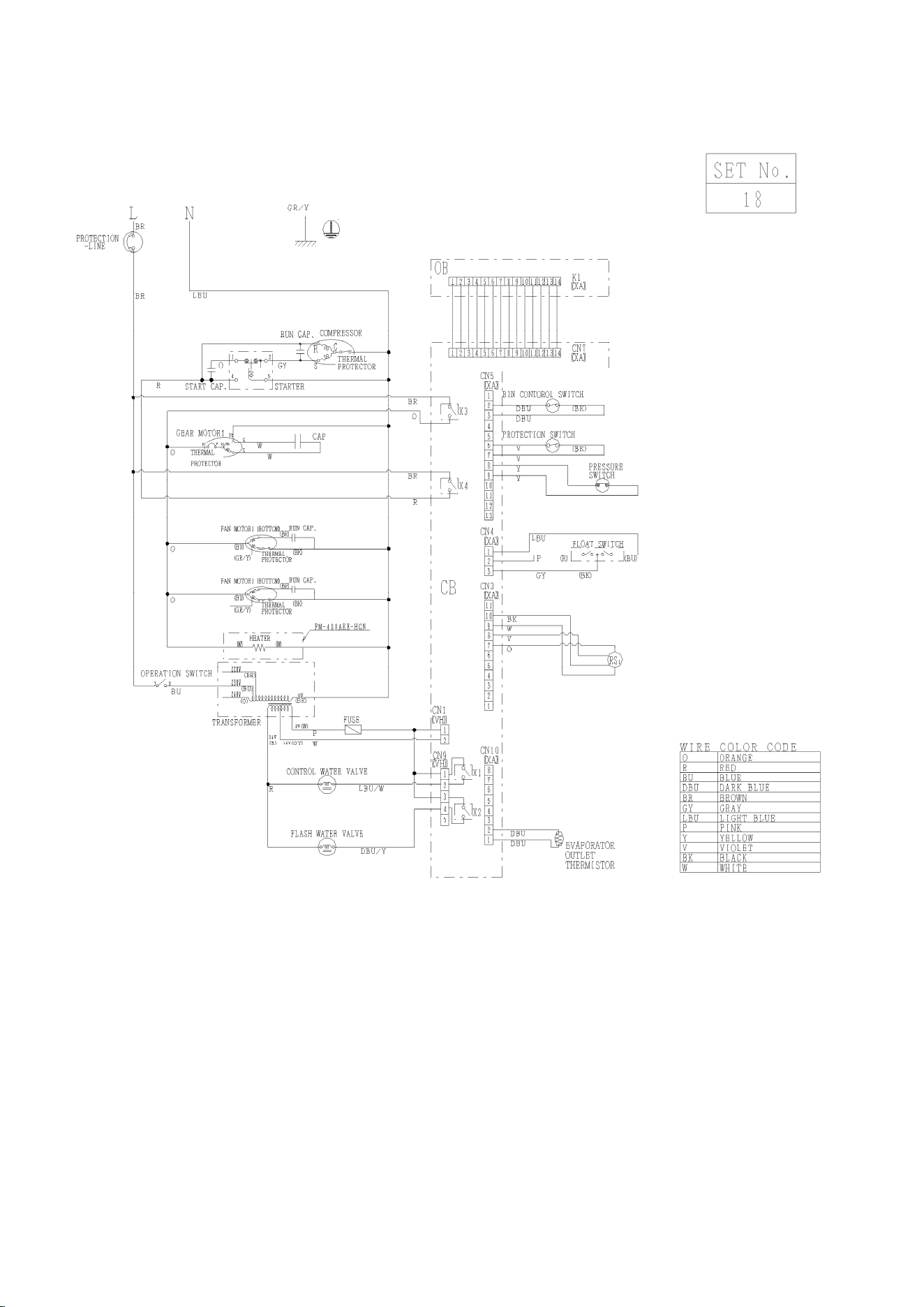
21
FM-480AKE-HC(N) (Auxiliary code: D-1 or later)
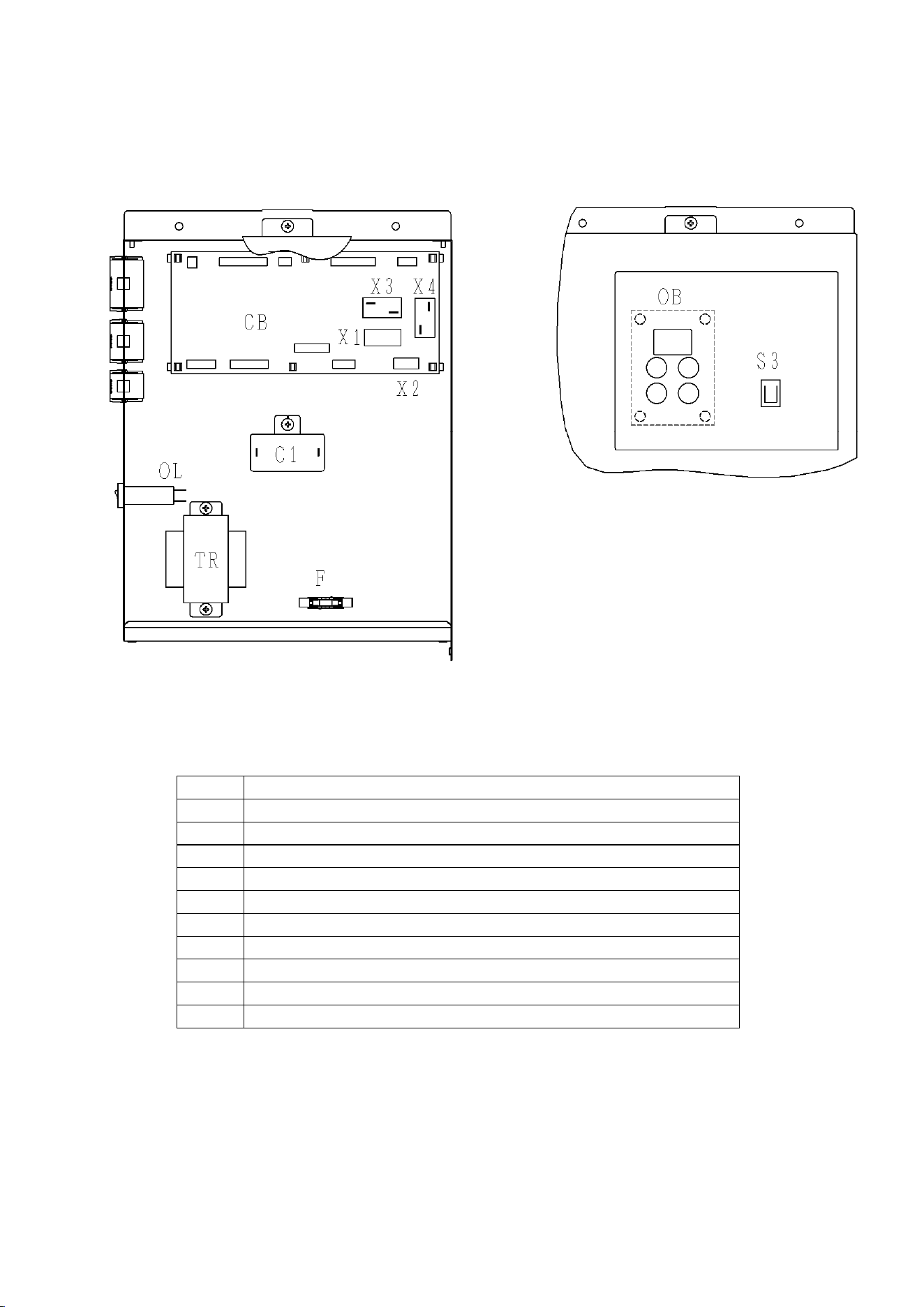
22
[b] CONTROL BOX LAYOUT
FM-300AKE-HC(N), FM-480AKE-HC(N)
CB CONTROLLER BOARD-MAIN
OB CONTROLLER BOARD-OPERATION
X1 POWER RELAY (CONTROL WATER VALVE, ON BOARD)
X2 POWER RELAY (FLUSH WATER VALVE, ON BOARD)
X3 POWER RELAY (GEAR MOTOR, ON BOARD)
X4 POWER RELAY (COMPRESSOR, ON BOARD)
S3 OPERATION SWITCH
OL CIRCUIT PROTECTOR (10A: 300AKE-HC / 20A: 480AKE-HC)
C1 CAPACITOR (GM1)
F FUSE 3.15A
TR TRANSFORMER
23
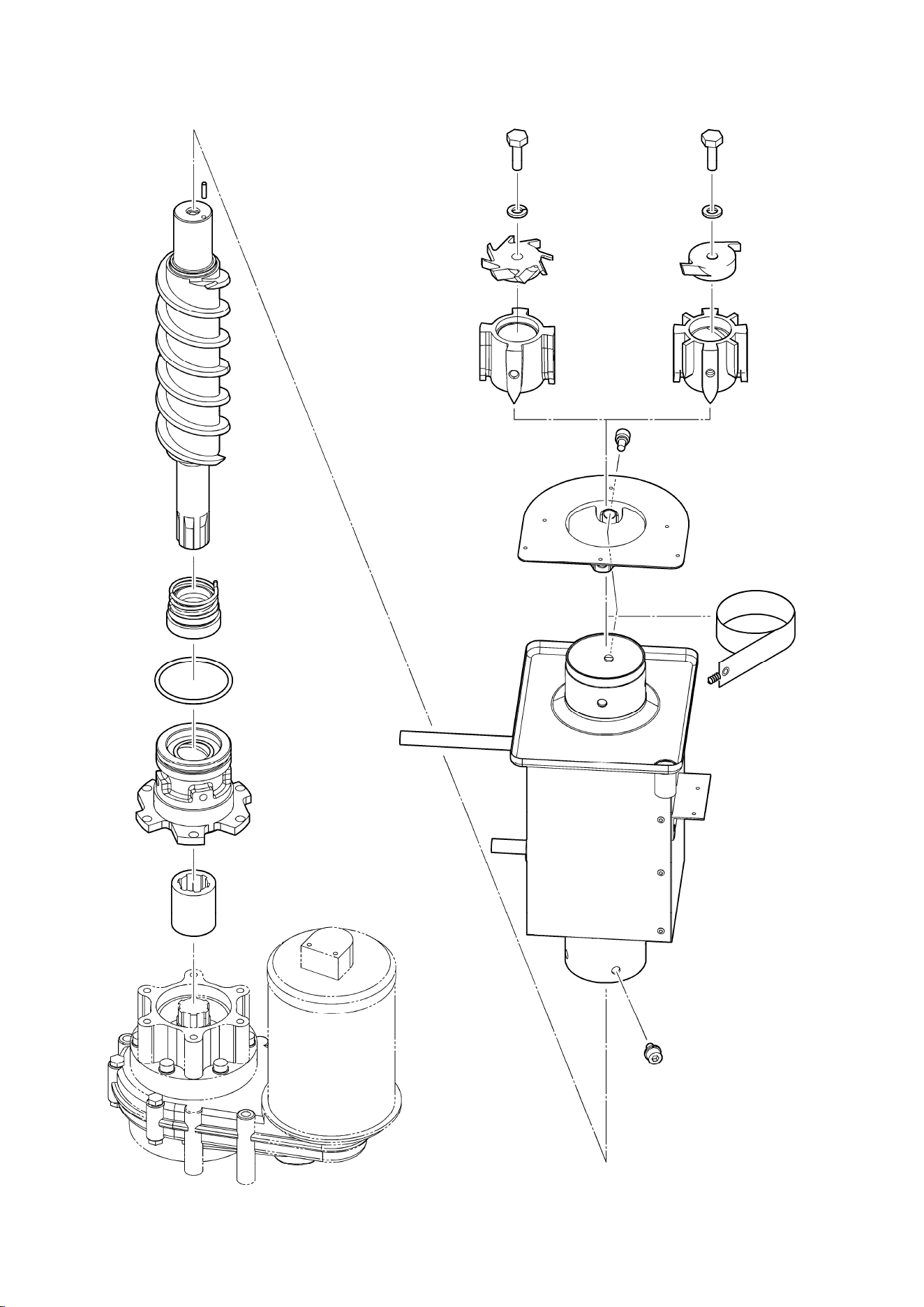
3. ICEMAKING MECHANISM
Flake Type Nugget Type
Screw
Bolt
Spring
Washe
r
Cutte
r
Sealing Bolt
Flange
Belt Heater
(provided for
some models)
Evaporator
Coupling
Housing
O-ring
Mechanical Seal
Auger
Pin
Gear Moto
r
Screw
Extruding
Head
Screw
Bolt
Spring
Washe
r
Cutte
r
Extruding
Head

24
[a] EVAPORATOR (CASING)
The evaporator consists of a stainless steel icemaking cylinder coiled with a refrigeration
pipe and wrapped together with a polyurethane foam insulation material. Water coming from
the inlet into the evaporator will be frozen into ice. The ice spout is located on top of the
evaporator.
[b] AUGER
The stainless steel auger is supported by the upper and lower bearings of the evaporator
and slowly rotated by the gear motor, while scraping off the ice forming on the inner wall of
the cylinder and pushing up to the ice spout.
[c] EXTRUDING HEAD (BEARING)
The stainless steel extruding head is provided with a press-fit plastic bearing inside and fixed
on top of the evaporator. The extruding head functions as the auger bearing and
compresses the sherbet ice carried up by the auger into a column shape with the path
resistance.
[d] HOUSING
The cast bronze housing is provided with a press-fit plastic bearing inside and fixed on the
bottom of the evaporator for connection with the gear motor.
[e] MECHANICAL SEAL
The mechanical seal on the lower auger bearing prevents icemaking water leaks into the
evaporator. The mating surfaces are made of ceramic and carbon.
[f] COUPLING (SPLINE JOINT)
The auger bottom and gear motor output shaft are splined and connected with the spline
joint.
[g] GEAR MOTOR
The gear motor consists of a 200W 1 phase 240V or 80W 1 phase 220 - 240 / 220V drive
motor integrated with a decelerator and provided with a built-in auto-reset thermal protector.
When the thermal protector trips, the controller board will stop the gear motor. The thermal
protector trips when the gear motor mechanism is overloaded or when excessively high or
low voltage is applied on the gear motor. The electrical capacity must be increased if a large
current flows through the surrounding equipment.
25
[h] BELT HEATER (provided on some models)
The belt heater is provided to reduce the load of ice passing the extruding head during a
freeze cycle and to prevent vapor lock during a flush cycle.
[i] REMOVABLE FLANGE
The flange used to be welded on the evaporator to fix the spout. But sometimes the
extruding head applies excessive load on the evaporator to compress ice, resulting in
breaking the welded joints. To avoid the load, the flange has been changed to a separate
part to be secured together with the extruding head by using sealing bolts.
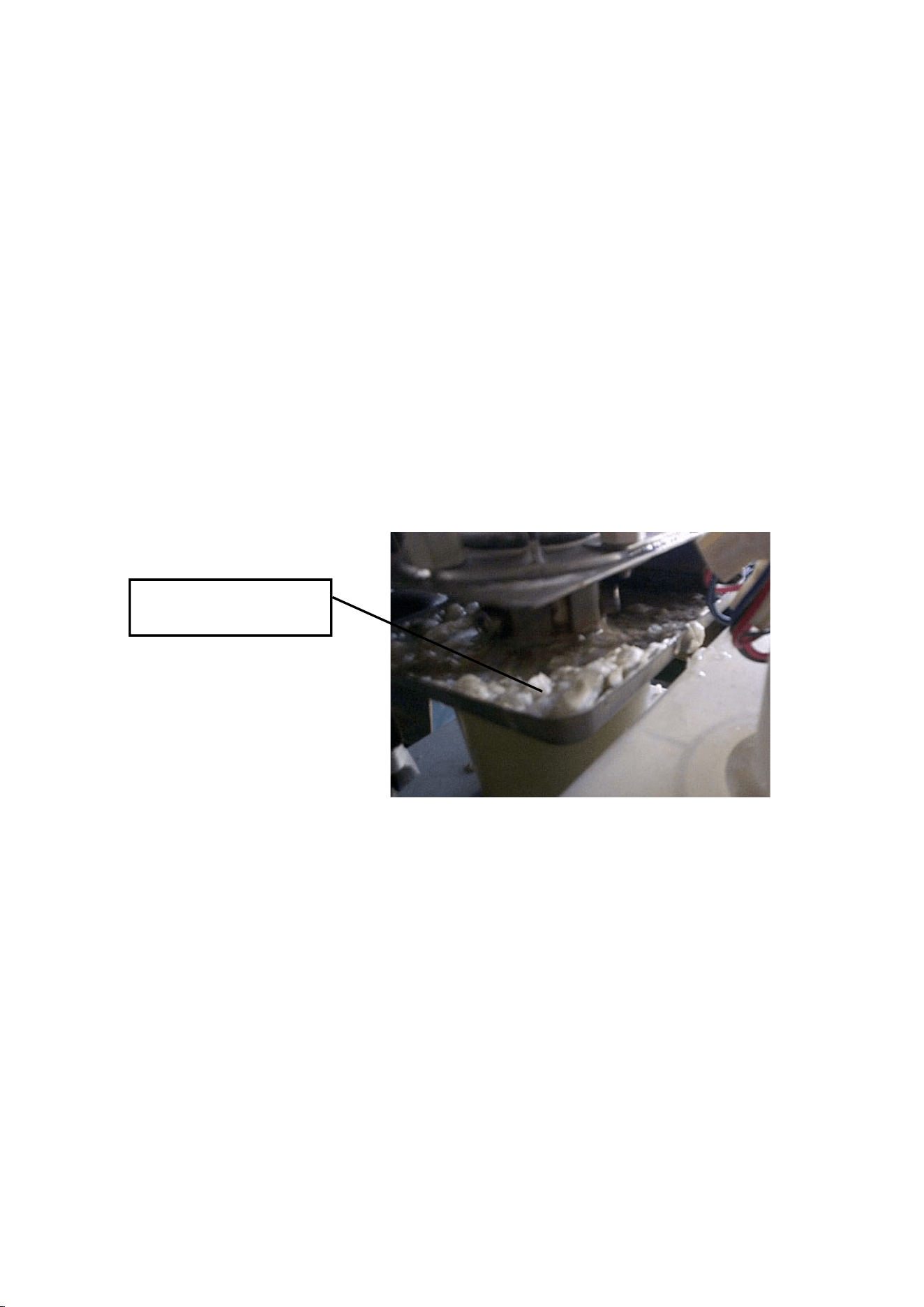
[j] SEALING BOLT
Sometimes the icemaking operation may produce white solids on the drip pan. They are
deposits of silica and calcium contents in the icemaking water leaking from the sealing bolt.
The bolt is provided with retaining and sealing functions, which may be reduced by the load
and vibration during a freeze cycle. Do not reuse a removed sealing bolt.
Solids deposited from
sealing bolt
26
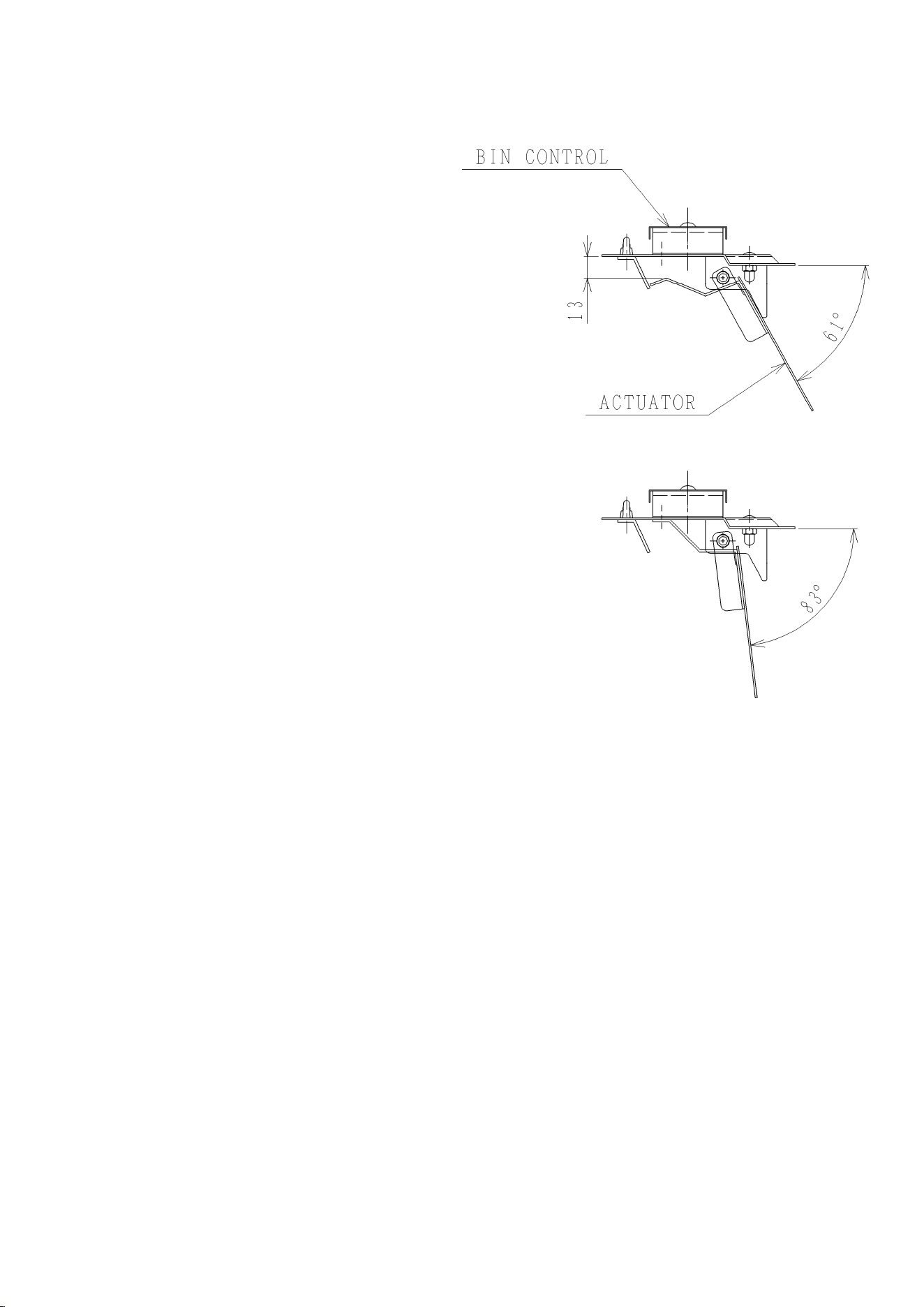
[k] BIN CONTROL SWITCH (Auxiliary code: D-0 or earlier)
The bin control switch is composed of a
proximity switch and actuator. When the
chute fills up, ice will push up the actuator
on top of the chute to switch off the
proximity switch. After 7 seconds, the
controller board will stop the gear motor
and compressor at the same time. When
ice is used, the actuator will return to the
original position to switch on the proximity
switch. The gear motor will restart in 7
seconds, and the compressor in 5 minutes.
When the bin control switch seems to have
malfunctioned, check the dimensions of the
actuator as well as the operation of the
proximity switch. Also, if the chute switch or
the gear motor circuit protector has
operated for some unidentified reason, be
sure to check the actuator for proper
dimensions.
1) Remove the bin control switch from the
chute.
2) Move the actuator to the maximum
operation angle as shown below (top).
Check that the actuator is about 13 mm
away from the barrier. If not, replace the
whole bin control switch assembly.
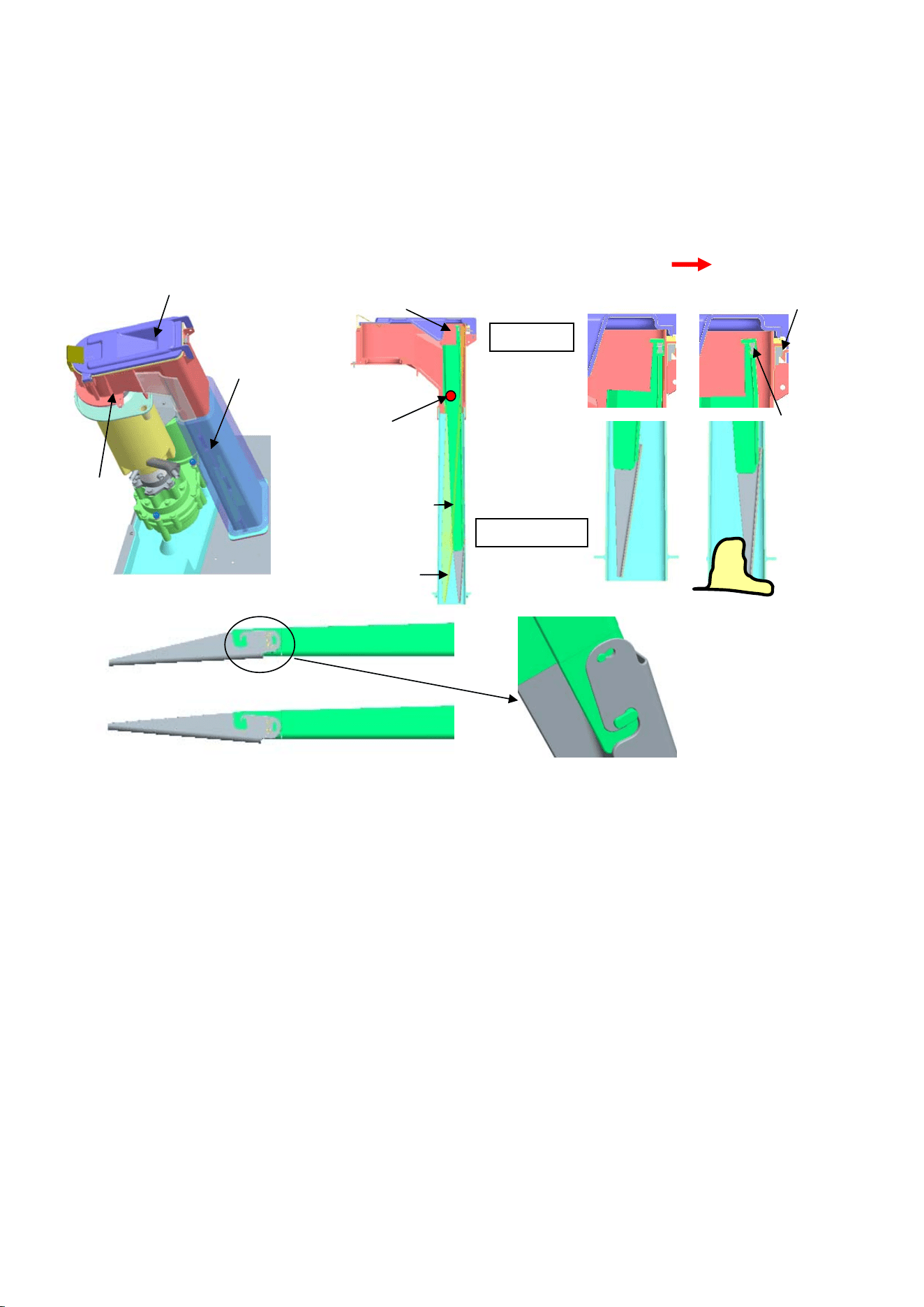
[l] BIN CONTROL SWITCH (Auxiliary code: D-1 or later)
The bin control switch is composed of a reed switch attached to the spout and an actuator
(ice detector) provided inside the spout and chute.
The bin control switch operates as follows:
1. Ice reaches up to the ice detector.
2. Ice pushes and moves the ice detector.
3. The actuator magnet shifts and departs from the reed switch
4. The reed switch turns off.
5. The icemaking operation stops.
Heavy soil inside the spout or chute may cause ice to get stuck. Dirty actuator hinge may
disturb the movement of actuator. Check the cleanness of spout, chute, and actuator at
periodic inspection or periodic part replacement. Wipe clean any notably dirty part.
27
The ice detector is different for flake icemaker and nugget icemaker. If incorrect detector is
attached, the bin control function will not work. If the icemaking operation continues, the
abnormal stop switch trips and the unit stops with an error. Be sure to attach the proper ice
detector. The actuator is composed of two components bonded. The letters “C” and “F” are
stamped on the fitting part. The type of icemaker can be distinguished by boss fitting
position.
Flake
Nugget
Spout
Spout Cover
Chute
Actuator
Actuator Hinge
Actuator
Ice Detector
Icemaking Bin Control
F
C
Magnet
Ice Detector
Magnet
Reed Switch
Boss fitting position
C: Nugget
F: Flake
Ice
Actuator Magnet
28
Microswitch
Band
Chute
Spout
Microswitch
Band
Chute
Spout
[m] CHUTE SWITCH (Auxiliary code: D-0 or earlier)
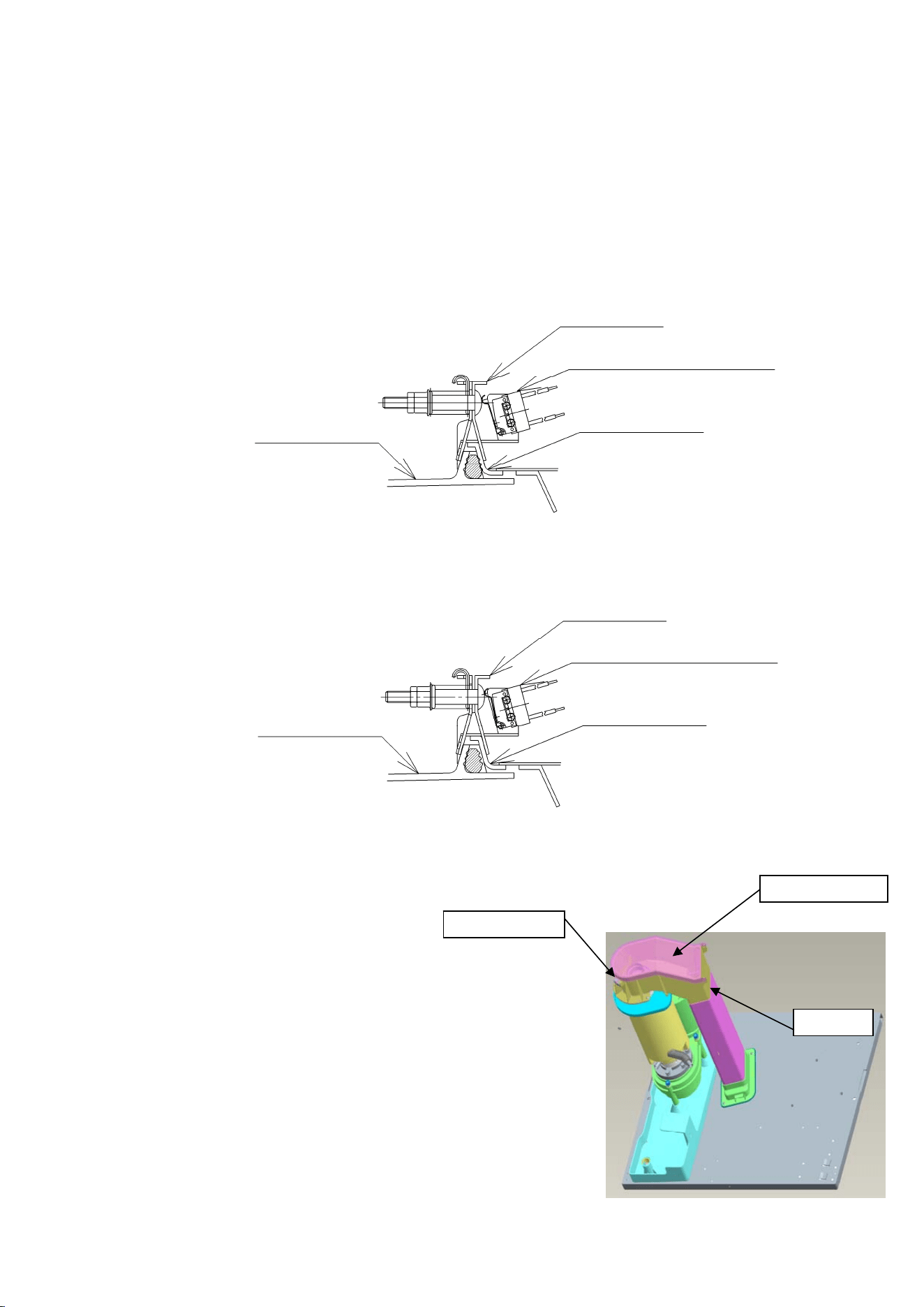
The chute switch consists of a microswitch and a band securing the spout and chute. When
the bin control switch breaks down, the band opens and presses the button on the
microswitch (contacts open) to stop the icemaker (error code: EL).
To restart the icemaker, remove ice from the spout and chute, and move the operation
switch to the “STOP” position, then to the “RUN” position.
Normal Condition
Abnormal Condition
(Band moves and presses microswitch)
[n] SPOUT, SPOUT COVER (Auxiliary code: D-1 or later)
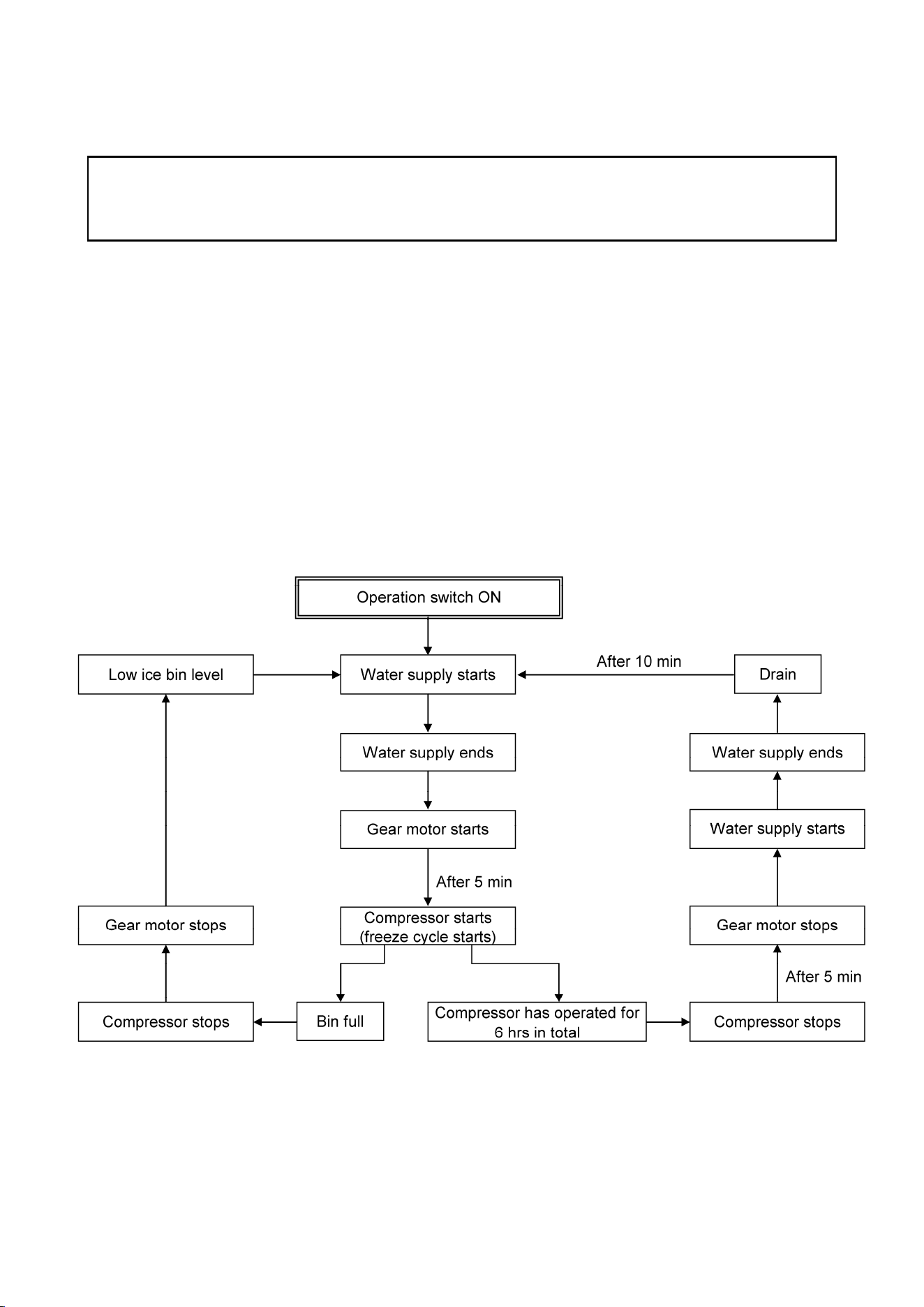
The spout and spout cover are connected
to the evaporator casing with a removable
flange. These are the passage to deliver
ice formed inside the evaporator casing
into the chute. The spout is provided with
a reed switch, ant the spout cover with a
magnet. If the bin control switch goes
wrong and fails to stop icemaking
operation with the bin full, ice pushes up
the spout cover, and the magnet gets
away from the reed switch to stop the unit.
Reed Switch
Spout Cover
Spout
29
4. ELECTRIC CIRCUIT
CAUTION
Reassemble all the components as they were after servicing the unit according to a
service call.
[a] BASIC OPERATION
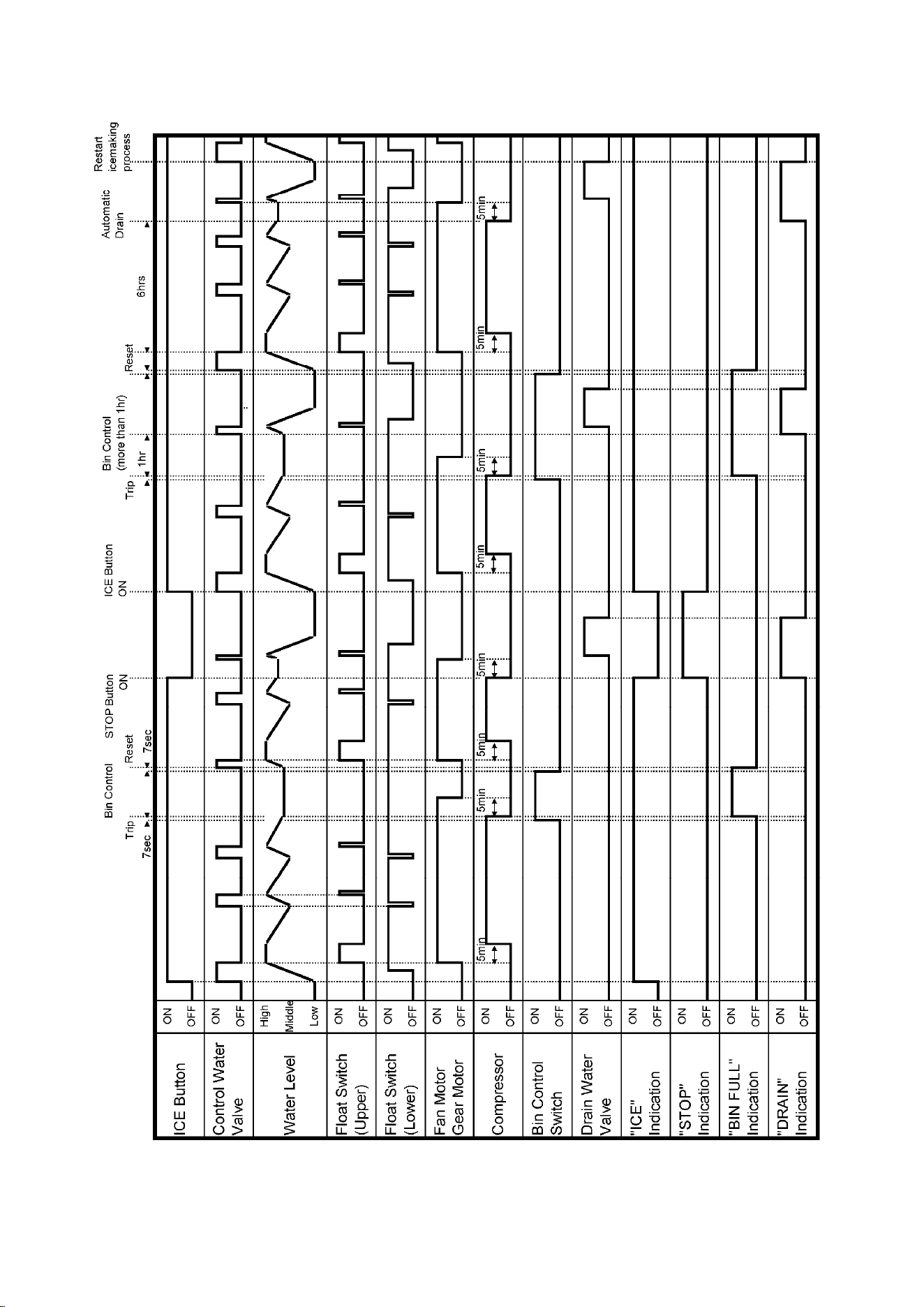
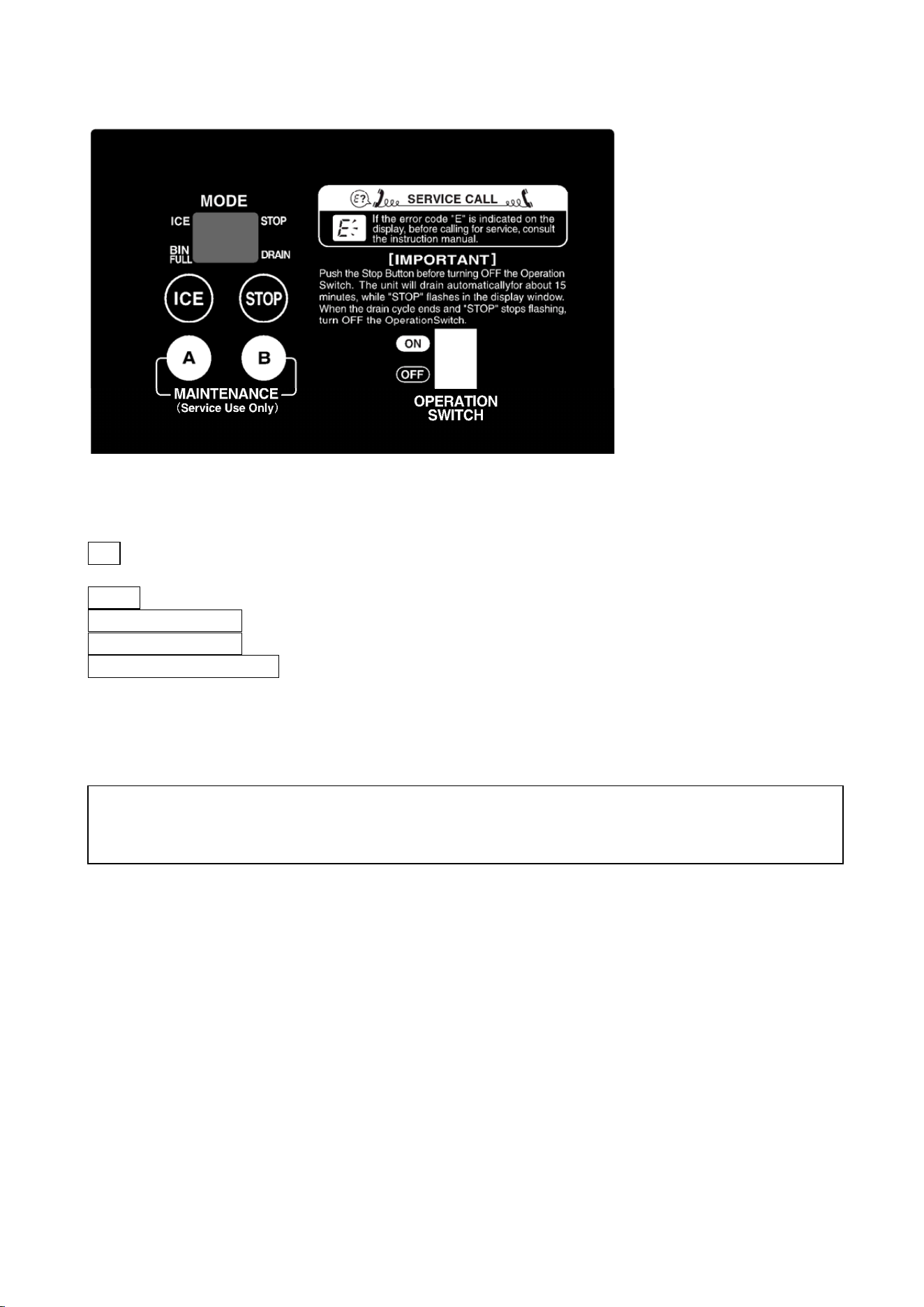
The icemaker starts water supply when the operation switch is moved to the “ON” position.
On completion of water supply, the gear motor starts immediately. After 5 minutes the
compressor starts to begin icemaking operation.
In normal operation, the icemaker shuts down when the storage bin fills up to trip the bin
control switch or the stop button is pressed. When the compressor operates for 6 hours in
total and continuously for more than 10 minutes, the icemaker supplies water until the
reservoir fills up and starts a drain cycle. After 10 minutes the icemaker automatically starts
water supply and resumes icemaking operation.
30
[b] TIMING CHART
31
5. OPERATION BOARD
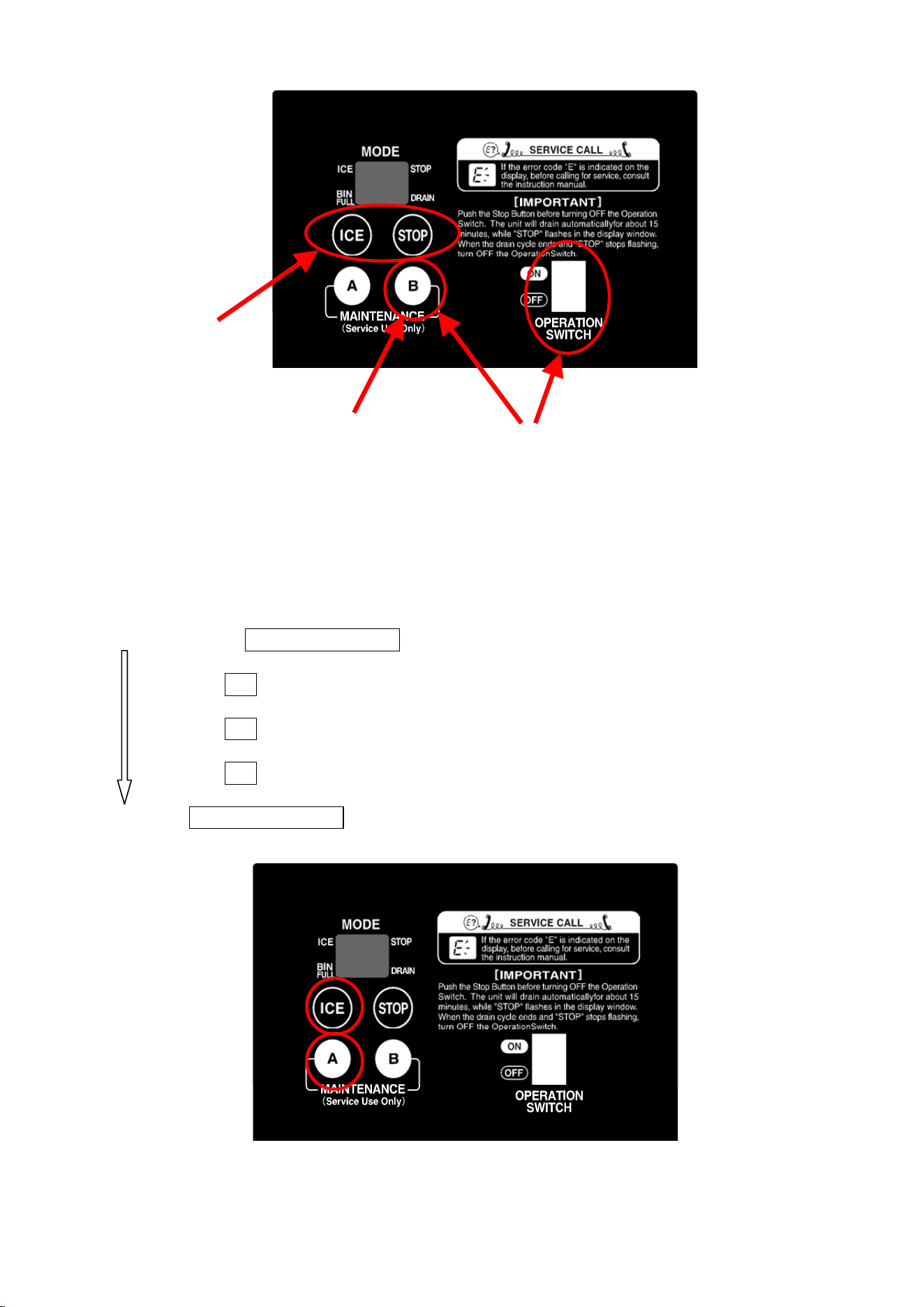
[a] OPERATION BUTTONS
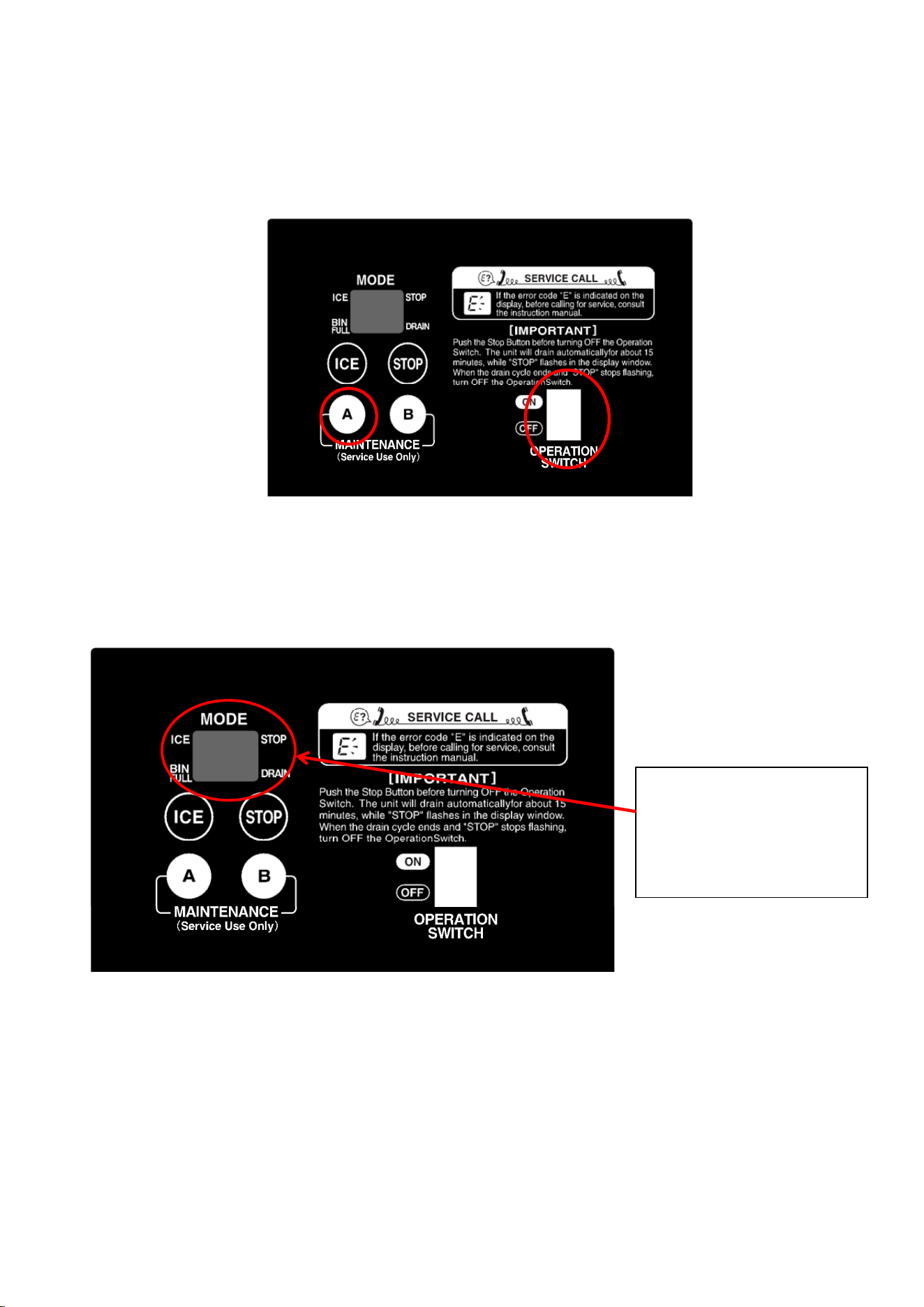
ICE = When pressed in the STOP mode, the unit is supplied with water and starts icemaking
operation.
STOP = When pressed in the ICE mode, the unit stops icemaking operation and drains.
MAINTENANCE A = Used for various maintenance operations.
MAINTENANCE B = Used for model code setting.
OPERATION SWITCH = Power supply for the icemaker. Move it to the “OFF” position to
shut down the unit for a long time.
[b] SETTING MODEL NUMBER
1) Press and hold the maintenance B button, and move the operation switch to the “ON”
position.
2) When the display shows “99”, release the maintenance B button.
3) Press the stop button to increase the number, or press the ice button to decrease the
number until it matches the model number on the wiring label.
4) Press the maintenance B button to complete the setting and start icemaking operation in
the ice mode.
5) To check the model number, see next page.
The model number must be set at the time of replacement of the controller board. Check
the model number specified on the wiring label. Improper setting may result in failure or
inoperability.
32
[c] DISPLAYING COMPRESSOR OPERATING HOURS, CYCLE TIME, MODEL
NUMBER AND SOFTWARE VERSION
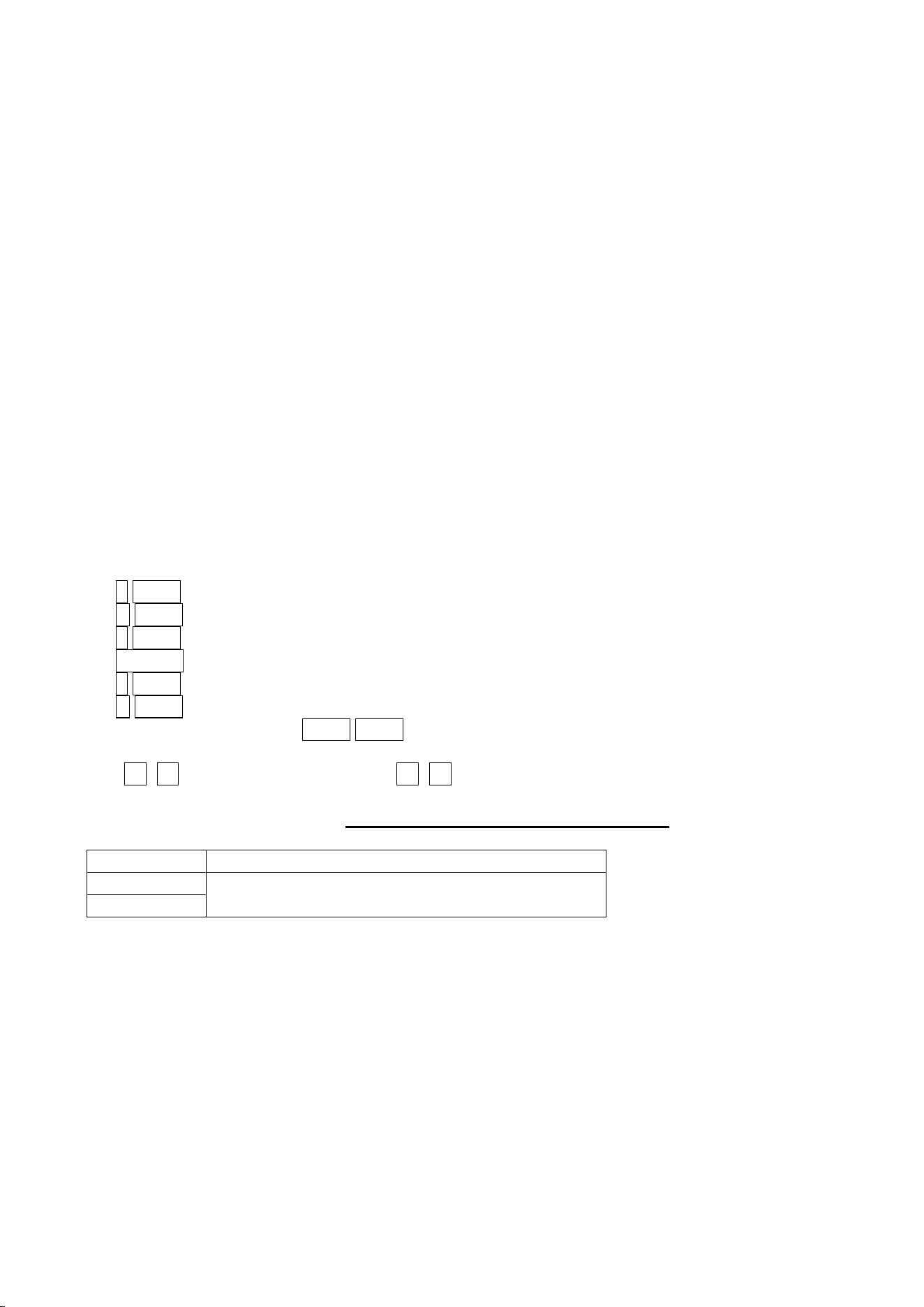
Press and hold the maintenance A button, and press the ice button. The display shows the
following items one by one every time the ice button is pressed.
This function is available in the ice or stop mode.
Press and hold MAINTENANCE A
Compressor operating hours on display -------- a)
Press ICE
Cycle time on display ---------------------------------- b)
Press ICE
Model number on display----------------------------- c)
Press ICE
Software version on display ------------------------- d)
Release MAINTENANCE A
1)
3)
2) 4)
33
Note:
1. The display shows the next item if the ice button is pressed before one item appears in
the display.
2. The display mode is cancelled if the maintenance A button is released.
3. The software version is displayed repeatedly while the maintenance A button is pressed.
Release the maintenance A button to cancel the display mode.
a) Compressor Operating Hours
The display shows the compressor operating hours in six digits divided into three parts (2
digits for 2 seconds each time).
Then, “- -“ appears in the display (to show the end of the compressor operating hours display
mode).
e.g. 3527 hours = “00”, “35”, “27”, “- -“
b) Cycle Time
The display shows the cycle time in four digits divided into two parts (first minutes then
seconds, for 2 seconds each time) from the latest record (5 records at maximum).
Then, “- -“ appears in the display (to show the end of the cycle time display mode).
If no cycle time is recorded, the display shows “- -“ only.
Minutes are indicated as follows:
o 0 to 9 = 0 to 9 minutes
A 0 to 9 = 10 to 19 minutes
b 0 to 9 = 20 to 29 minutes
D-0 to 9 = 30 to 39 minutes
d 0 to 9 = 40 to 49 minutes
E 0 to 9 = 50 to 59 minutes
Seconds are indicated as 0 to 5 0 to 9.
e.g. o9 48 = 9 minutes 48 seconds b7 36 = 27 minutes 36 seconds
By using the freeze cycle time, approximate ice production capacity
can be calculated.
Series Approximate ice production capacity (kg/d)
FM-300
FM-480
60,000 / cycle time (sec)
This is just an approximate capacity. The actual capacity depends on ambient temperature,
water temperature, voltage and frequency.
For accurate measurement, use a container to receive ice actually produced for 10 minutes,
measure its weight, and calculate ice production per day. Repeat this three times to figure
out the average.
c) Model Number
The display shows two digits.
e.g. FM-480AKE-HC(N) = “18”
d) Software Version
34
The display shows the software version in six digits/symbols divided into three parts.
e.g. Ver. 9-3-6 = “09”, “-3”, “-6”
The indication is repeated until the maintenance A button is released.
[d] DISPLAYING ERROR LOG
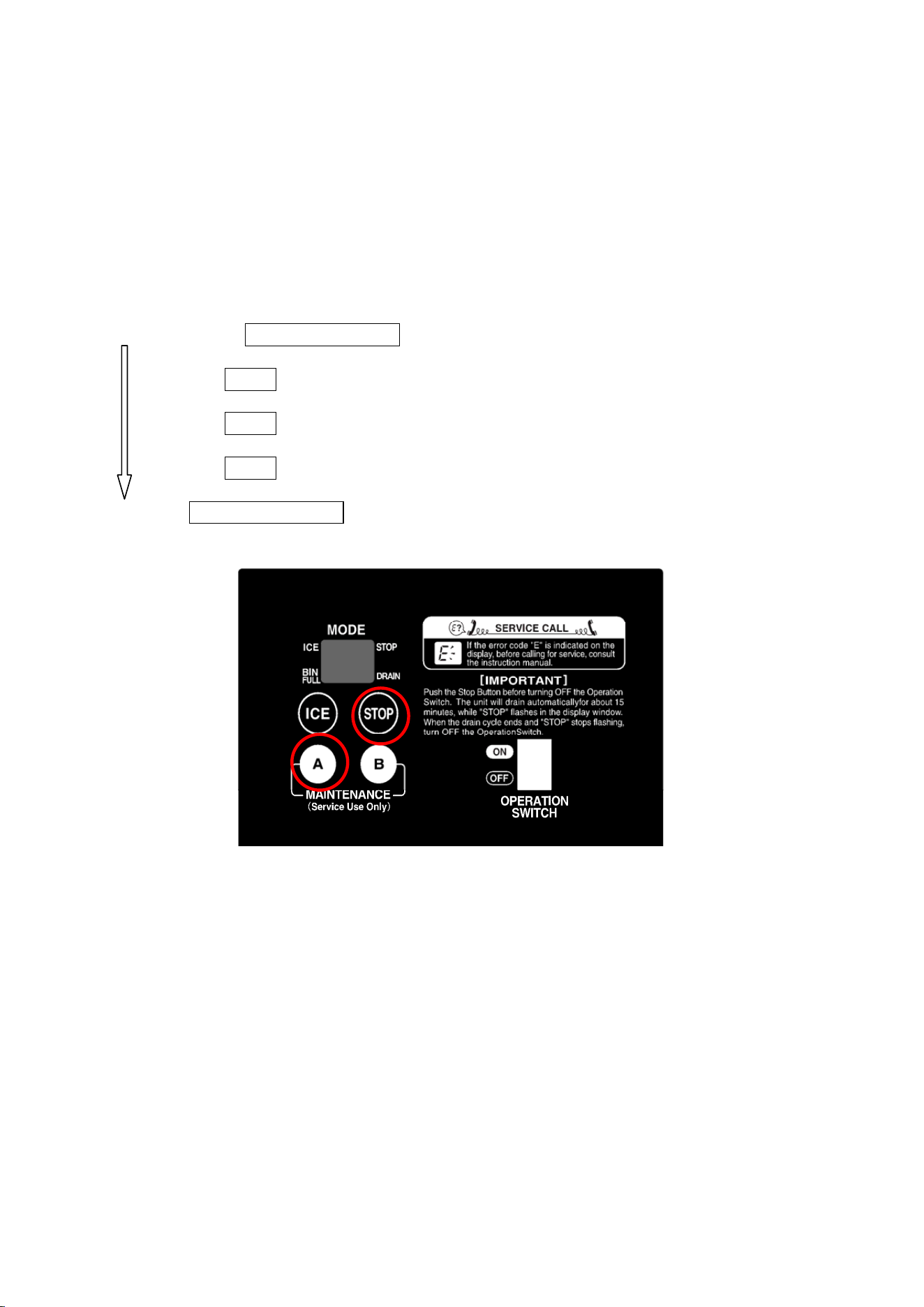
Press and hold the maintenance A button, and press the stop button. The display shows the
following items one by one every time the stop button is pressed.
This function is available in the ice or stop mode.
Press and hold MAINTENANCE A
Compressor operating hours on display -------- [c] a)
Press STOP
Error log on display (8 records at maximum)
Press STOP
“- -“ on display (end of error log display mode)
Press STOP
Ongoing error on display
Release MAINTENANCE A
Note:
1. The display does not show the ongoing error even if the stop button is pressed while the
error log is in the display. To display the ongoing error, press the stop button while “- -“ is
in the display to show the end of the error log display mode
35
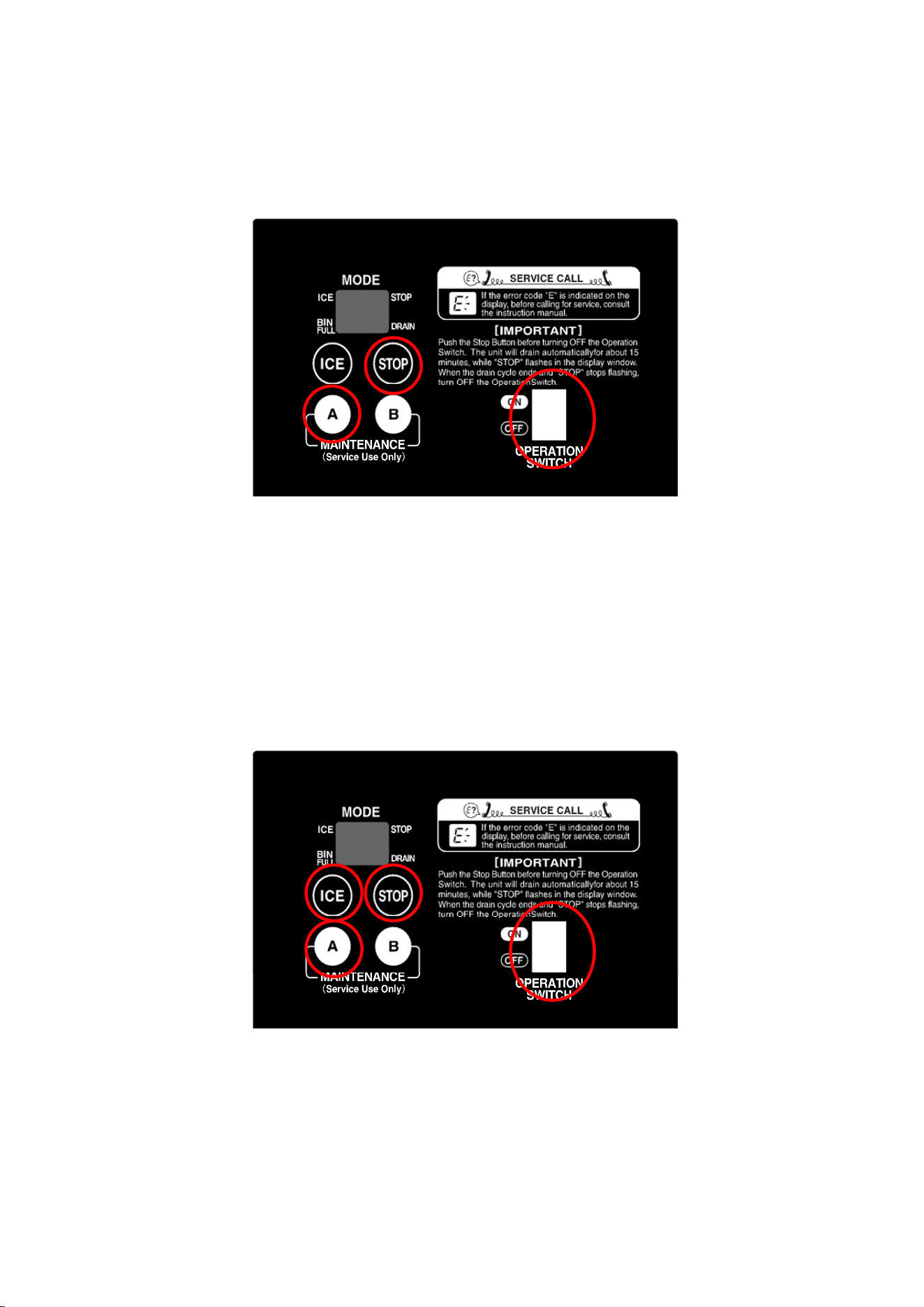
[e] RESETTING ERROR LOG
With the operation switch in the “OFF” position, press and hold the stop and maintenance A
buttons. Move the operation switch to the “ON” position. Release the buttons when the
display shows the ice mode. Now the error log is reset. Do not reset more than necessary.
[f] RESETTING COMPRESSOR OPERATING HOURS
With the power switch turned off, press and hold the ice, stop and maintenance A buttons.
Move the operation switch to the “ON” position. Release the buttons when the display shows
the ice mode. Now the compressor operating hours are reset.
When the compressor starts in 15 seconds after the water supply cycle ends, the error log is
not set to be updated. After resetting the compressor operating hours, move the operation
switch to the “OFF” position, turn off the power switch, and turn it back on.
36
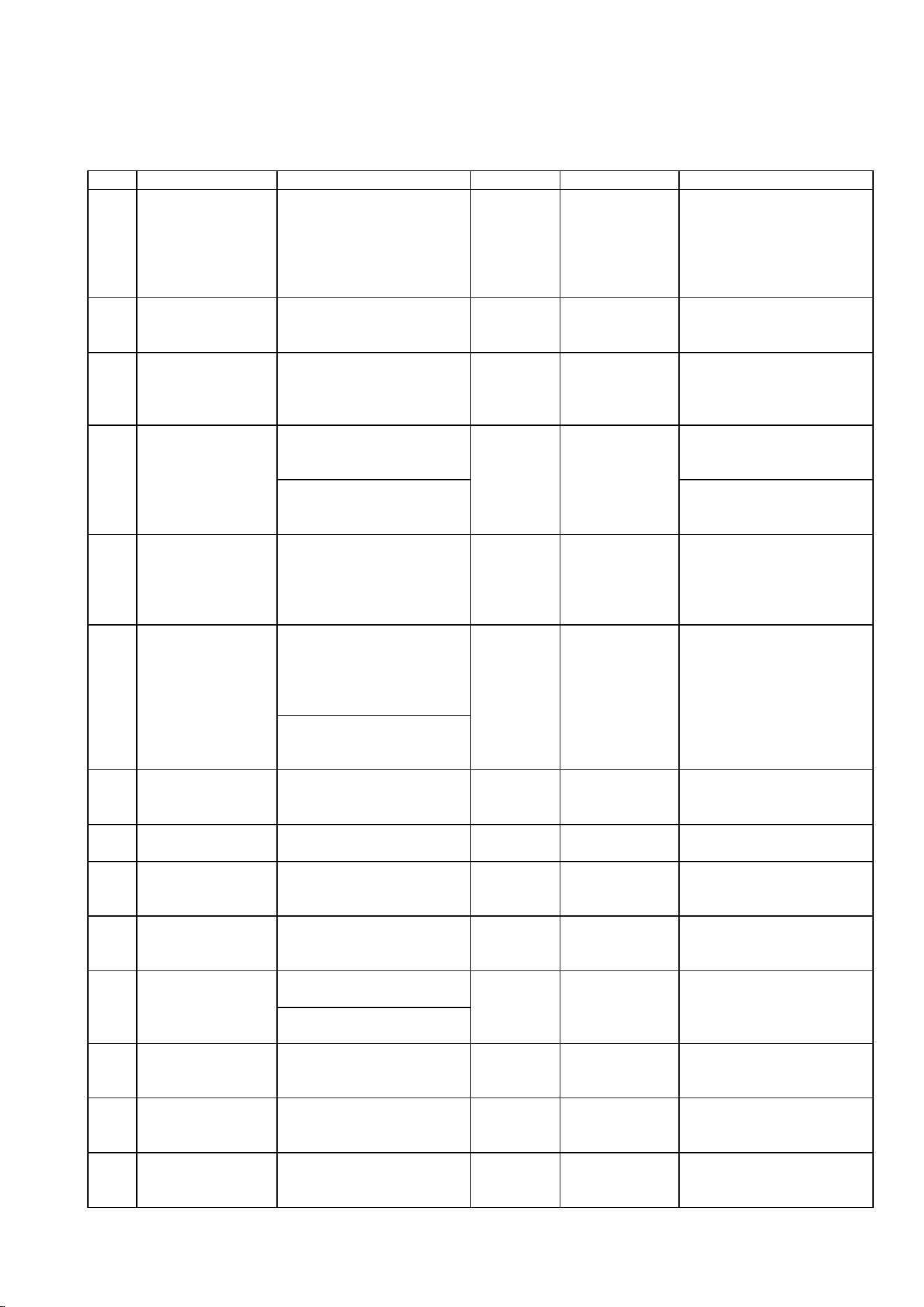
When an error occurs, “E_”
or ”c_” will appear in the
display. Some of the “c_”
errors are not displayed
and must be checked by
the error log.
[g] REDUCING COMPRESSOR STARTING TIME
With the power switch turned off, press and hold the maintenance A button. Move the
operation switch to the “ON” position. Release the button when the display shows the ice
mode.
The compressor starts in 30 seconds after the water supply cycle ends
6. PROTECTORS
[a] INDICATION
When an operational error occurs, “E_” will appear and blink in the display on the operation
board, and the icemaker will stop. When a service call is received, ask the user to check
which error code is in the display. Then, see the error code table in “7. ERROR CODES” to
locate the cause.
37
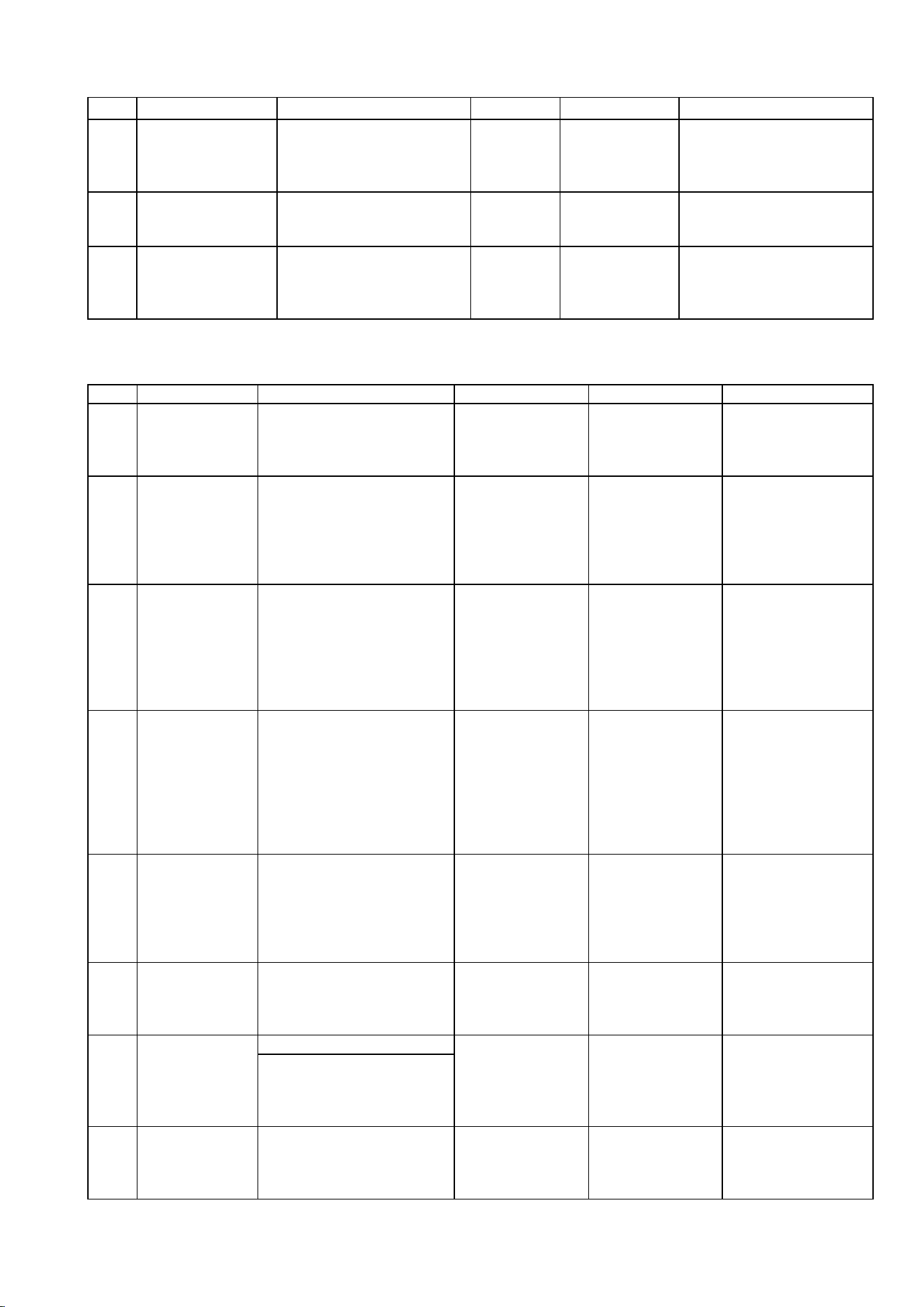
7. ERROR CODES
Interlock Errors
Code Error Condition Operation Reset Check/Repair
E0
Icemaking Water
Leak
c0 error occurs 2 times in
a row.
Whole unit
stops.
Power supply,
Turn OFF -
Turn ON
Water leak from water
circuit (reservoir, inlet
hose, outlet hose, hose
joint, mechanical seal,
flush water valve), float
switch
E1
Low Ice
Production
Icemaking cycle takes too
long.
Whole unit
stops.
Power supply,
Turn OFF -
Turn ON
Gas leak, control water
valve not closing, vapor
lock, freeze, float switch
E2
Float Switch Error
With flush water valve
OFF, float switch trips at
both upper and lower float
levels for 2 seconds.
Whole unit
stops.
Power supply,
Turn OFF -
Turn ON
Float switch
Gear motor is ON with
rotation sensor or current
sensor circuit open.
Rotation sensor, current
sensor
E3
Gear Motor Error
or Gear Motor
Sensor Circuit
Open
Gear motor relay is ON
with gear motor protective
circuit detector OFF.
Whole unit
stops.
Power supply,
Turn OFF -
Turn ON
Gear motor protective
circuit (TPO, overload,
etc.), gear motor relay
E4
Abnormal High
Side Pressure
c2 error occurs 5 times in
1 hour of compressor
operation.
E4 blinks. N/A
Fan motor, cooling water
circuit, refrigeration
circuit, condenser
clogged, water supply,
installation conditions
Gear motor is OFF on
controller board while
rotation sensor signals
gear motor rotation or
current flows.
E5
Gear Motor Drive
Element Error
Gear motor relay is OFF
with gear motor protective
circuit detector ON.
Whole unit
stops.
Power supply,
Turn OFF -
Turn ON
Miswiring, gear motor
magnet switch or relay
Replace controller board.
E8
Discharge Pipe
Temperature
Error
Discharge pipe
thermostat is OFF.
Whole unit
stops.
Power supply,
Turn OFF -
Turn ON
Gas leak, compressor
cooling fan failure
EA
Water Thermistor
Circuit Open
Water thermistor circuit is
open.
EA blinks. N/A Water thermistor
Eb
Condenser
Thermistor Circuit
Open
Condenser thermistor
circuit is open.
Whole unit
stops.
Power supply,
Turn OFF -
Turn ON
Condenser thermistor
EC
Evaporator Outlet
Thermistor Circuit
Open
Evaporator outlet
thermistor circuit is open.
Whole unit
stops.
Power supply,
Turn OFF -
Turn ON
Evaporator outlet
thermistor
Rotation sensor detects
reversing.
EE
Gear Motor Error
c5 error occurs 5 times.
Whole unit
stops.
Power supply,
Turn OFF -
Turn ON
Gear motor locked,
hunting or overloaded,
supply voltage, high
ambient temperature
EF
Abnormal Low
Voltage
c3 error occurs 3 times in
24 hours.
Whole unit
stops.
Power supply,
Turn OFF -
Turn ON
Supply voltage
EH
Discharge Pipe
Thermistor Circuit
Open
Discharge pipe thermistor
circuit is open.
EH blinks. N/A Discharge pipe thermistor
EL
Bin Control
Switch Error
Bin control protective
switch trips.
Whole unit
stops.
Power supply,
Turn OFF -
Turn ON
Bin control switch
38
Code Error Condition Operation Reset Check/Repair
En
Low Voltage
Sensing
Transformer
Circuit Open
Low voltage sensing
transformer circuit is
open.
Whole unit
stops.
Power supply,
Turn OFF -
Turn ON
Low voltage sensing
Transformer
EU
Controller Board
Error
Controller board IC fails.
Whole unit
stops.
Power supply,
Turn OFF -
Turn ON
Replace controller board.
None
Electric Leak
Short Circuit
Electric leak or
overcurrent.
Whole unit
stops.
Power supply,
Turn OFF -
Turn ON
Replace fuse
Electric leak, fuse
Non-Interlock Errors
Code Error Condition Operation Reset Check/Repair
CM
Time
“- -”
Microcomputer
Read/Write
Error
Microcomputer fails to
read/write properly.
Memory circuit
not available.
Replace
controller board.
Error records and
compressor
operating hours not
available on display
c0
Icemaking
Water Leak
After initial water supply,
float switch trips at lower
float level within 5 minutes
after gear motor starts and
before compressor starts.
Whole unit stops.
Flush water
valve turns ON
for 1 second,
then turns OFF.
Unit restarts.
Error record only.
Water leak from
water circuit
(reservoir, hoses,
mechanical seal,
flush water valve),
float switch
c1
Low Water
Water supply continues for
more than 90 seconds, or
float switch trips at lower
float level and does not
reset for more than 60
seconds after water
supply.
Whole unit stops
until reservoir fills
up. Only control
water valve
operates
intermittently for
5 minutes.
Automatically
resets after
reservoir fills up.
Water supply
interruption, control
water valve not
opening, flush
water valve not
closing, float
switch, water leak
c2
Abnormal High
Side Pressure
Pressure switch stays
OFF for 5 seconds or
condenser thermistor
reads higher than set point
for 5 seconds.
Whole unit stops.
Automatically
resets after
pressure switch
turns ON or
condenser
thermistor reads
lower than set
point.
Condenser
clogged, cooling
water circuit,
refrigeration circuit
c3
Abnormal Low
Voltage
Voltage stays below
setting for more than 1
second with compressor
ON and control water
valve OFF.
Whole unit stops.
Automatically
resets after
voltage stays
above reset
setting for 2
minutes.
Supply voltage
c4
Drain Error
Float switch trips at upper
float level in 10 minutes
after flush water valve
turns ON.
N/A Error record only.
Flush water valve
not opening, control
water valve not
closing
Rotation rate reduces.
c5
Gear Motor
Error
While gear motor is
running, voltage detection
signal is not input to
controller board.
Whole unit stops.
Automatically
resets after 30
minutes.
Gear motor
overloaded
c7
Evaporator
Outlet
Temperature
Decrease
Evaporator outlet
temperature decreases.
Indication only.
Automatically
resets.
Evaporator inside
not clean, extruding
head not clean,
heater circuit open
39
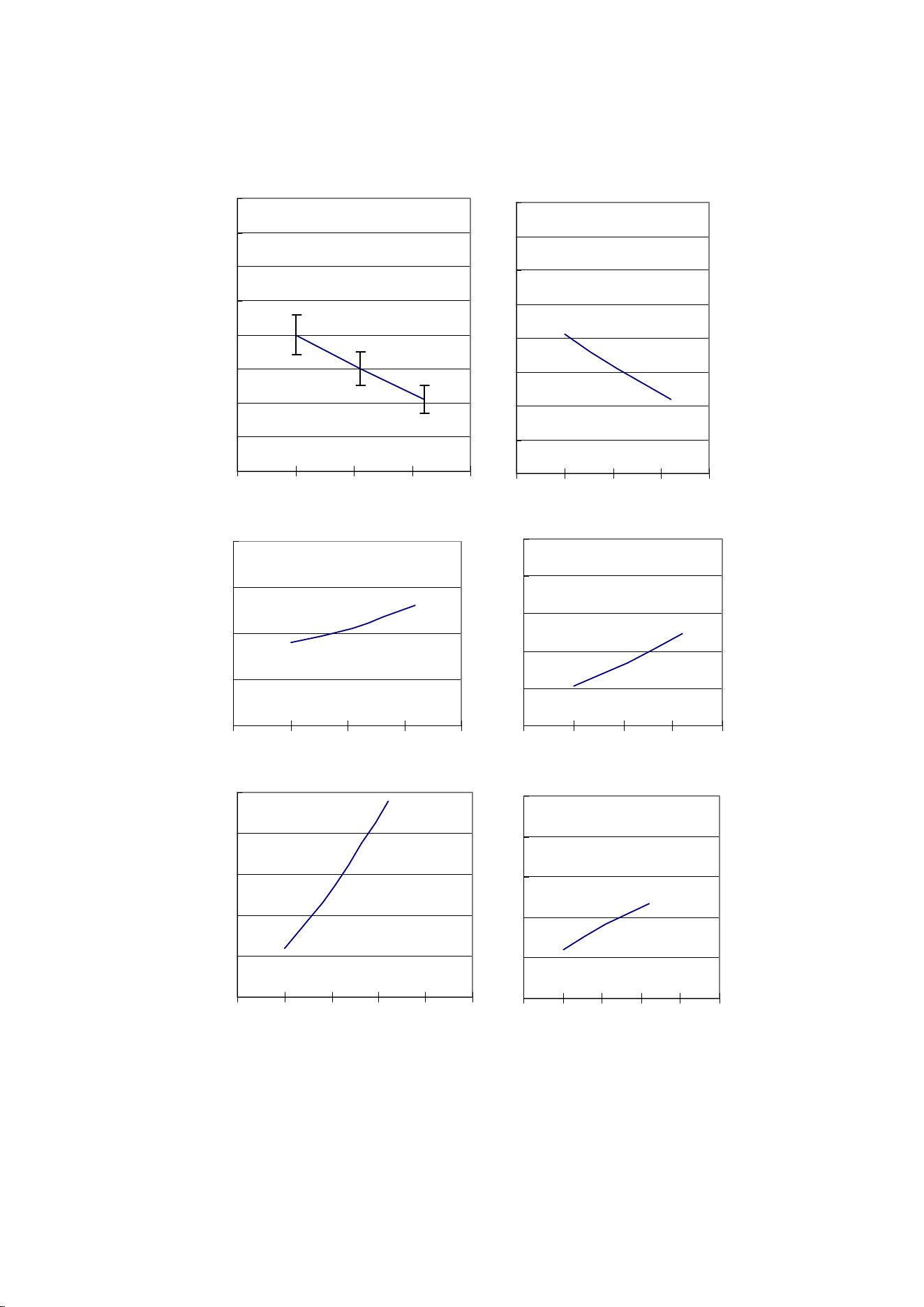
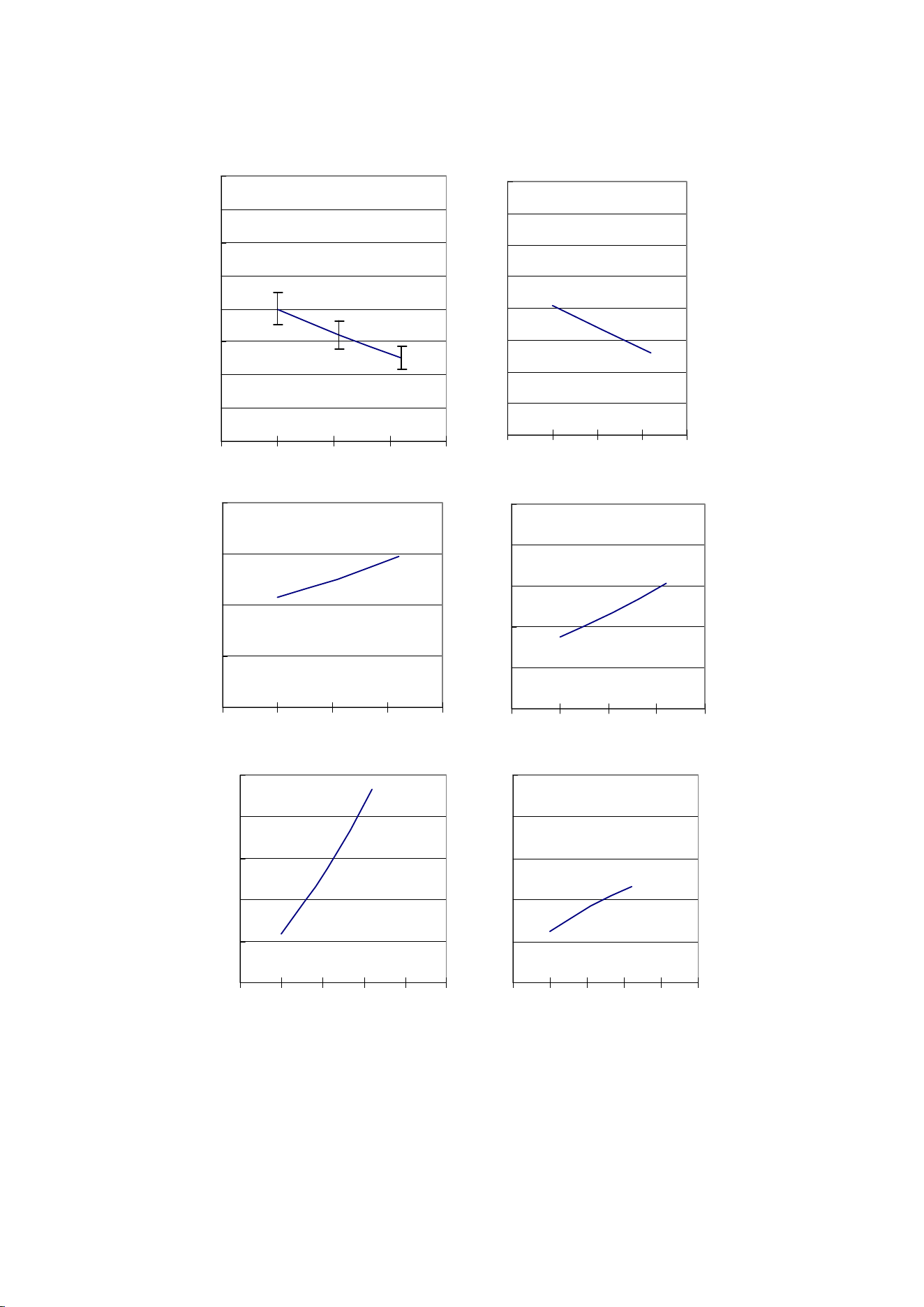
8. PERFORMANCE DATA
[a] FM-300AKE-HC
100
150
200
250
300
350
400
450
500
0 10203040
Ice Production Capacity
[
kg/day
]
0.1
0.15
0.2
0.25
0.3
0.35
0.4
0.45
0.5
0 10203040
Water Consumption
[
m³/day
]
3.5
4
4.5
5
5.5
0 10203040
Amperage
[
A
]
17
19
21
23
25
27
0 10203040
Wattage
[
kWh/day
]
700
900
1100
1300
1500
1700
0 1020304050
Head Pressure
[
kPa
]
200
220
240
260
280
300
0 1020304050
Suction Pressure
[
kPa
]
The horizontal axis shows the ambient temperature.
It refers to the data of at/wt=10/10, 21/15, 32/21.
40
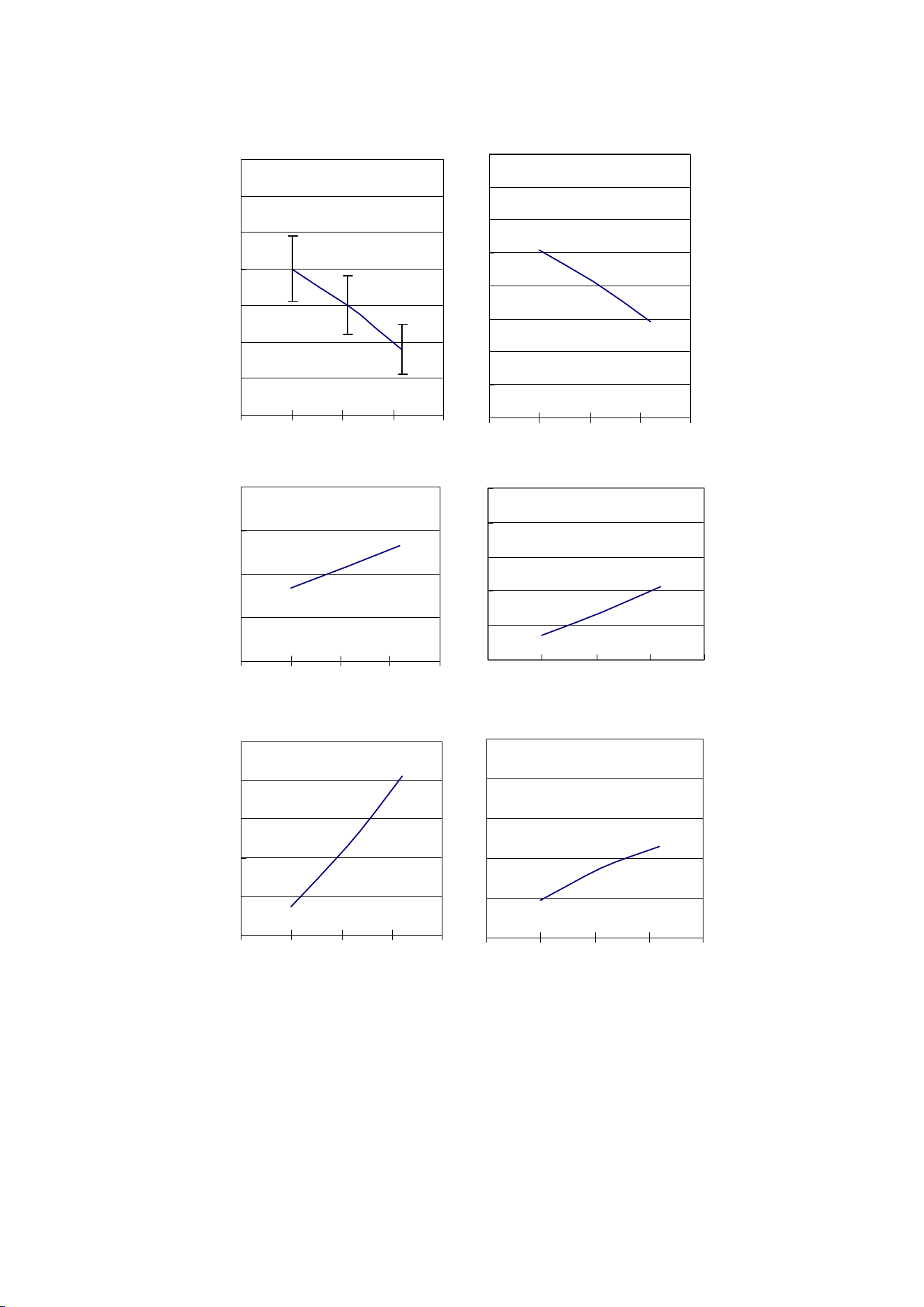
[b] FM-300AKE-HCN
50
100
150
200
250
300
350
400
450
0 10203040
Ice Production Capacity
[
kg/day
]
0.05
0.1
0.15
0.2
0.25
0.3
0.35
0.4
0.45
0 10203040
Water Consumption
[
m³/day
]
3.5
4
4.5
5
5.5
0 10203040
Amperage
[
A
]
17
19
21
23
25
27
0 10203040
Wattage
[
kWh/day
]
700
900
1100
1300
1500
1700
0 1020304050
Head Pressure
[
kPa
]
200
220
240
260
280
300
0 1020304050
Suction Pressure
[
kPa
]
The horizontal axis shows the ambient temperature.
It refers to the data of at/wt=10/10, 21/15, 32/21.
41
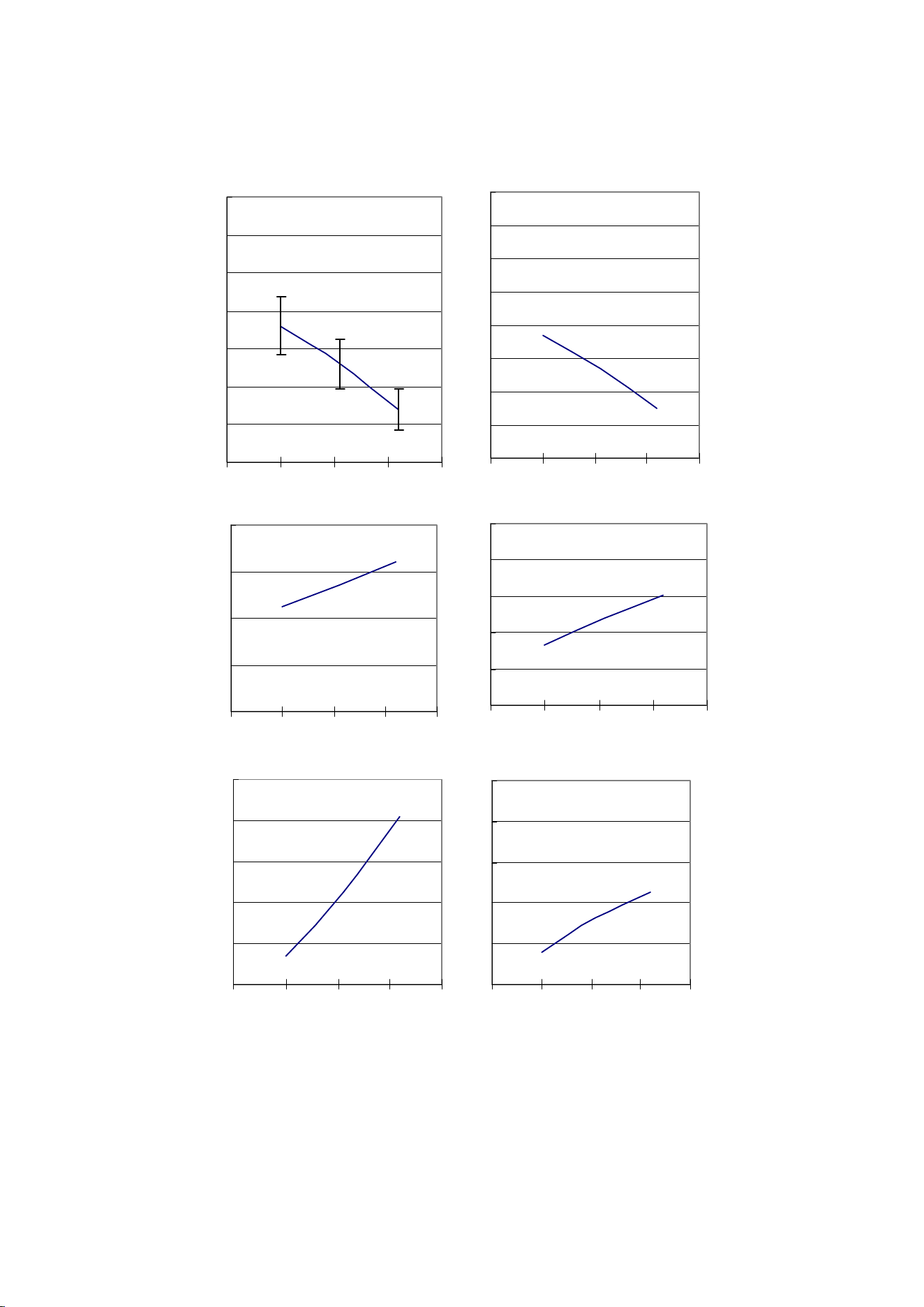
[c] FM-480AKE-HC
250
300
350
400
450
500
550
600
0 10203040
Ice Production Capacity
[
kg/day
]
4
4.5
5
5.5
6
010203040
Amperage
[
A
]
700
900
1100
1300
1500
1700
0 10203040
Head Pressure
[
kPa
]
150
170
190
210
230
250
010203040
Suction Pressure
[
kPa
]
0.2
0.25
0.3
0.35
0.4
0.45
0.5
0.55
0.6
0 10203040
Water Consumption
[
m³/day
]
22
24
26
28
30
32
0 10203040
Wattage
[
kWh/day
]
The horizontal axis shows the ambient temperature.
It refers to the data of at/wt=10/10, 21/15, 32/21.
42
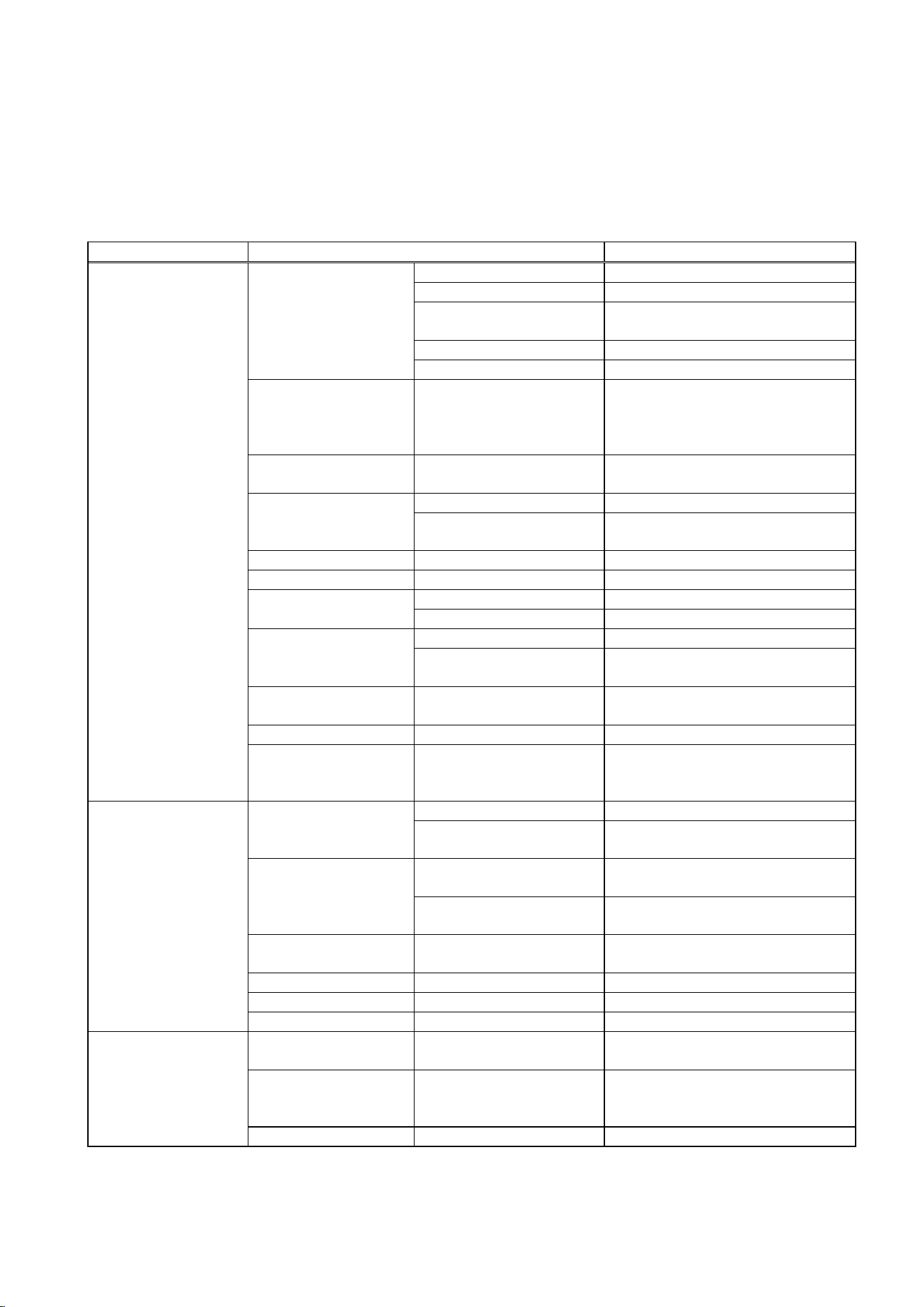
[d] FM-480AKE-HCN
4
4.5
5
5.5
6
0 10203040
Amperage
[
A
]
200
250
300
350
400
450
500
550
0 10203040
Ice Production Capacity
[
kg/day
]
22
24
26
28
30
32
0 10203040
Wattage
[
kWh/day
]
700
900
1100
1300
1500
1700
010203040
Head Pressure
[
kPa
]
150
170
190
210
230
250
0 10203040
Suction Pressure
[
kPa
]
0.2
0.25
0.3
0.35
0.4
0.45
0.5
0.55
0.6
010203040
Water Consumption
[
m³/day
]
The horizontal axis shows the ambient temperature.
It refers to the data of at/wt=10/10, 21/15, 32/21.
43
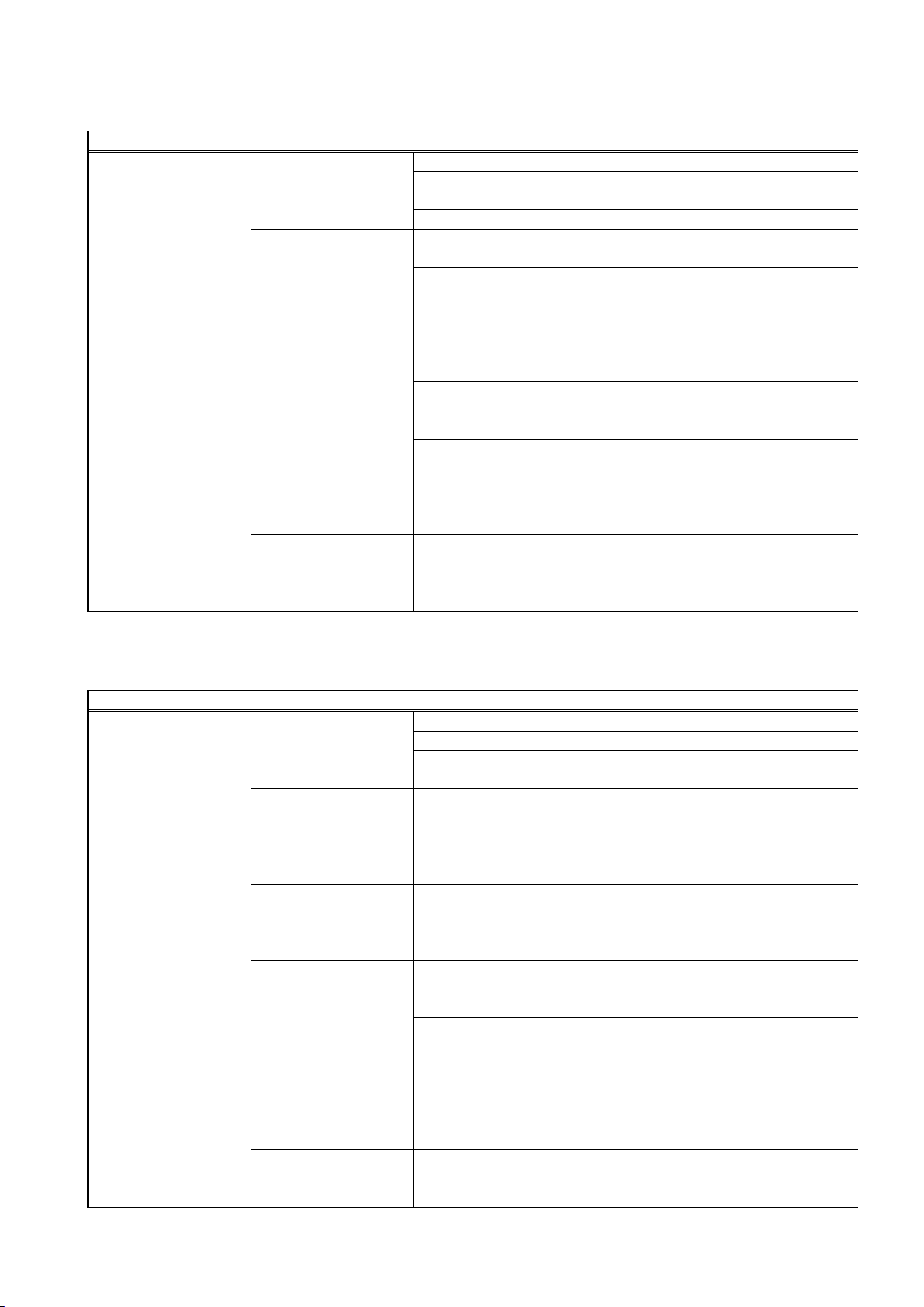
IV. SERVICE DIAGNOSIS
Display error records by operating the operation board (see “III. 5. [d] DISPLAYING ERROR
LOG”). Check for a possible cause and service the unit.
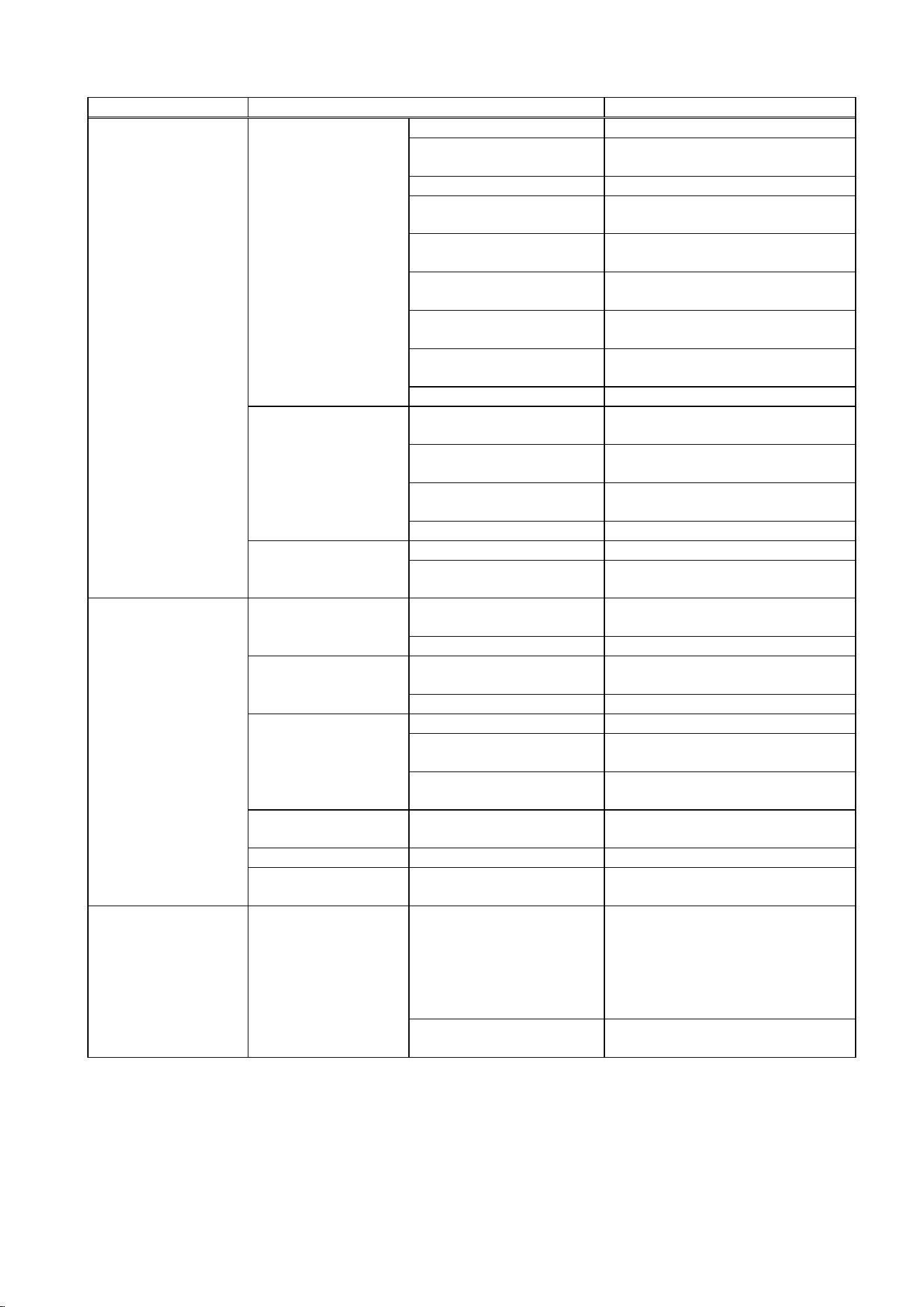
1. NO ICE PRODUCTION
PROBLEM POSSIBLE CAUSE REMEDY
1. OFF position. 1. Move to ON position.
2. Loose connections. 2. Tighten.
3. Bad contacts. 3. Check for continuity and
replace.
4. Blown fuse. 4. Replace.
a) Power supply
5. Voltage too low. 5. Get recommended voltage.
b) Fuse 1. Blown out. No
indication on
operation board.
1. Locate and resolve the cause
of short circuit (ex. control
water valve, flush water
valve), and replace.
c) Transformer
receptacle
1. Disconnected. 1. Connect.
1. OFF position. 1. Move to ON position. d) Operation switch
2. Bad contacts. 2. Check for continuity and
replace.
e) Transformer 1. Coil winding opened. 1. Replace.
f) Water valve 1. Coil winding opened. 1. Replace.
1. Closed. 1. Open. g) Water supply tap
2. Water failure. 2. Wait till water is supplied.
1. Disconnected. 1. Connect. h) Plug and
receptacle (control
box)
2. Terminal out of plug
or receptacle.
2. Insert terminal back in
position.
i) Reed switch
(spout)
1. Tripped. 1. See 1 - [3] - a).
j) Overload protector 1. Tripped. 2. Reset.
[1] The icemaker
will not start.
k) Model number 1. Incorrect. 2. Set correct number. See “III. 5.
[b] SETTING MODEL
NUMBER”.
1. Contacts fused. 1. Replace controller board. a) Water control
relay (controller
board)
2. Coil winding opened. 2. Replace controller board.
1. Bad contacts. 1. Check for continuity and
replace.
b) Float switch
2. Float does not move
freely.
2. Clean or replace.
c) Flush water valve 1. Valve seat clogged
and water leaking.
1. Clean or replace.
d) Hoses 1. Disconnected. 1. Connect.
e) Mechanical seal 1. Water leaks. 1. Replace.
[2] Water does not
stop, and the
icemaker will not
start.
f) Reservoir 1. Cracked. 1. Replace.
a) Bin control 1. Bad contacts. 1. Check for continuity and
replace.
b) Gear motor
protector (thermal
breaker)
1. Tripped. 1. Find out the cause, resolve it,
and press reset button on
motor protector.
[3] Water has been
supplied, but the
icemaker will not
start.
c) Controller board 1. Defective. 1. Replace.
44
PROBLEM POSSIBLE CAUSE REMEDY
1. Dirty condenser fins. 1. Clean.
2. Ambient temperature
too warm.
2. Check for recommended
temperature.
3. Fan not rotating. 3. Replace.
4. Condenser water
pressure too low or off.
4. Check and get recommended
pressure.
5. Water regulating valve
clogged.
5. Clean.
6. Refrigerant
overcharged.
6. Recharge.
7. Refrigerant line or
components plugged.
7. Clean and replace drier.
8. Bad contacts. 8. Check for continuity and
replace.
d) Pressure switch,
condenser
thermistor
9. Loose connections. 9. Tighten.
1. Ambient temperature
too warm.
1. Check for recommended
temperature.
2. Compressor cooling
fan motor defective.
2. Replace.
3. Bad contacts. 3. Check for continuity and
replace.
e) Thermostat
(water-cooled
model)
4. Loose connections. 4. Tighten.
1. Coil winding opened. 1. Replace.
[3] (Continued)
f) Gear motor
protect relay
2. Bad contacts. 2. Check for continuity and
replace.
1. Bad contacts. 1. Check for continuity and
replace controller board.
a) X4 relay
(controller board)
2. Coil winding opened. 2. Replace controller board.
1. Bad contacts. 1. Check for continuity and
replace X6 relay.
b) X6 relay
2. Coil winding opened. 2. Replace X6 relay.
1. Loose connections. 1. Tighten.
2. Motor winding opened
or earthed.
2. Replace.
b) Compressor
3. Motor protector
tripped.
3. Find out the cause of overheat
or overcurrent.
c) Power supply 1. Circuit ampacity too
low.
1. Install a larger-sized
conductor.
d) Controller board 1. Defective. 1. Replace
[4] Gear motor
starts, but
compressor will
not start or
operates
intermittently.
e) Start capacitor or
run capacitor
1. Defective. 1. Replace
1. Gas leaks. 1. Check for leaks with a leak
detector. Reweld leak, replace
drier and charge with
refrigerant. The amount of
refrigerant is marked on
nameplate or label.
[5] Gear motor and
compressor
start, but no ice
is produced.
a) Refrigerant line
2. Refrigerant line
clogged.
2. Replace the clogged
component.
45
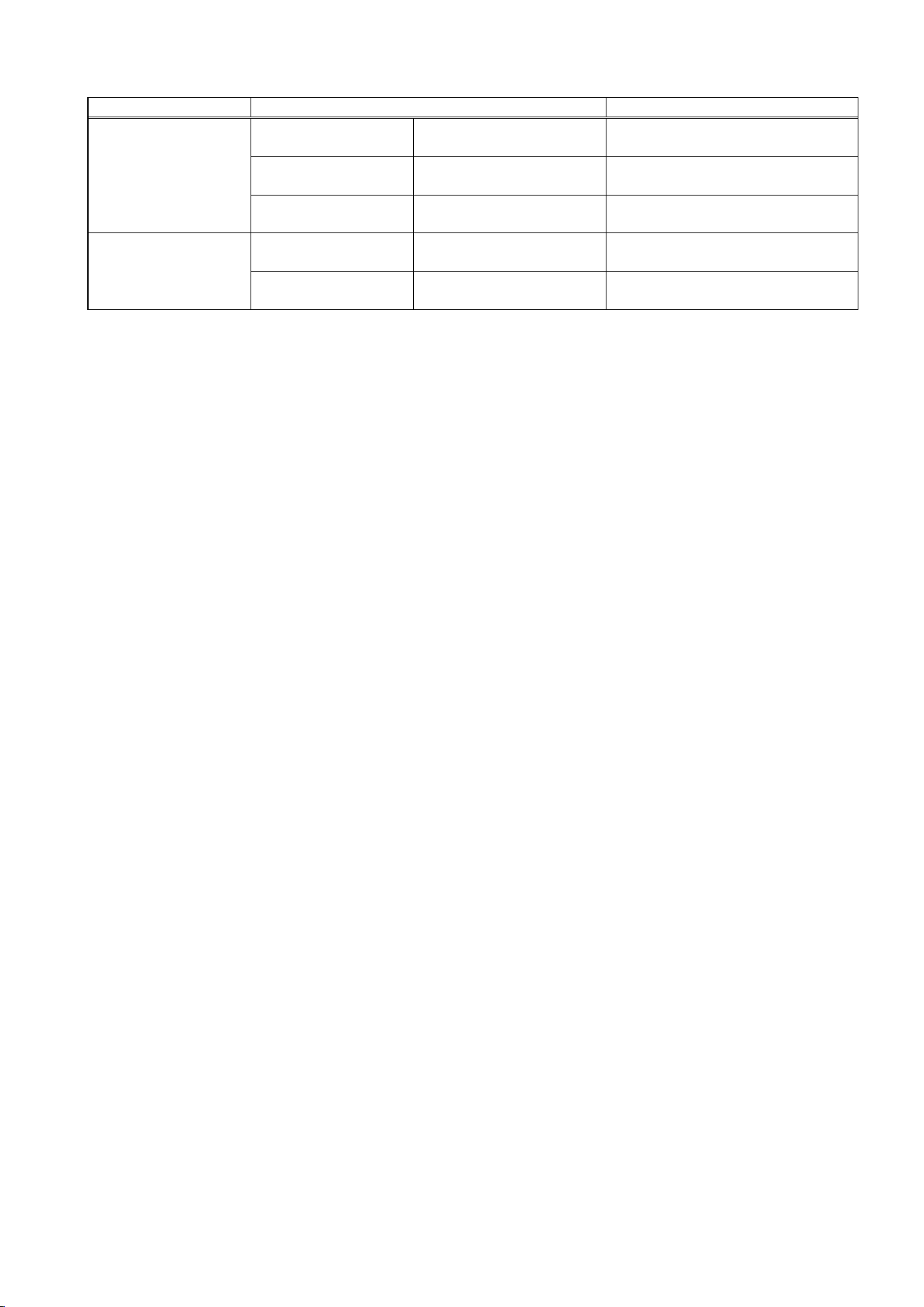
2. LOW ICE PRODUCTION
PROBLEM POSSIBLE CAUSE REMEDY
1. Gas leaks. 1. See 1 - [5] - a).
2. Refrigerant line
clogged.
2. Replace the clogged
component.
a) Refrigerant line
3. Overcharged. 3. Recharge.
1. Dirty air filter or
condenser.
1. Clean.
2. Ambient or condenser
water temperature too
warm.
2. Check for recommended
temperature.
3. Condenser water
pressure too low or
off.
3. Check and get recommended
pressure.
4. Fan rotating too slow. 4. Replace.
5. Water regulating
valve clogged.
5. Clean.
6. Bad ventilation. 6. Remove anything blocking
vents.
b) High-side
pressure too high
7. Less than specified
clearance at rear,
sides and top.
7. Allow proper clearance for
ventilation.
c) Expansion valve
(not adjustable)
1. Low-side pressure
exceeding the limit.
1. Replace.
[1] Low ice
production
d) Evaporator 1. Evaporator pipe
crushed.
1. Replace.
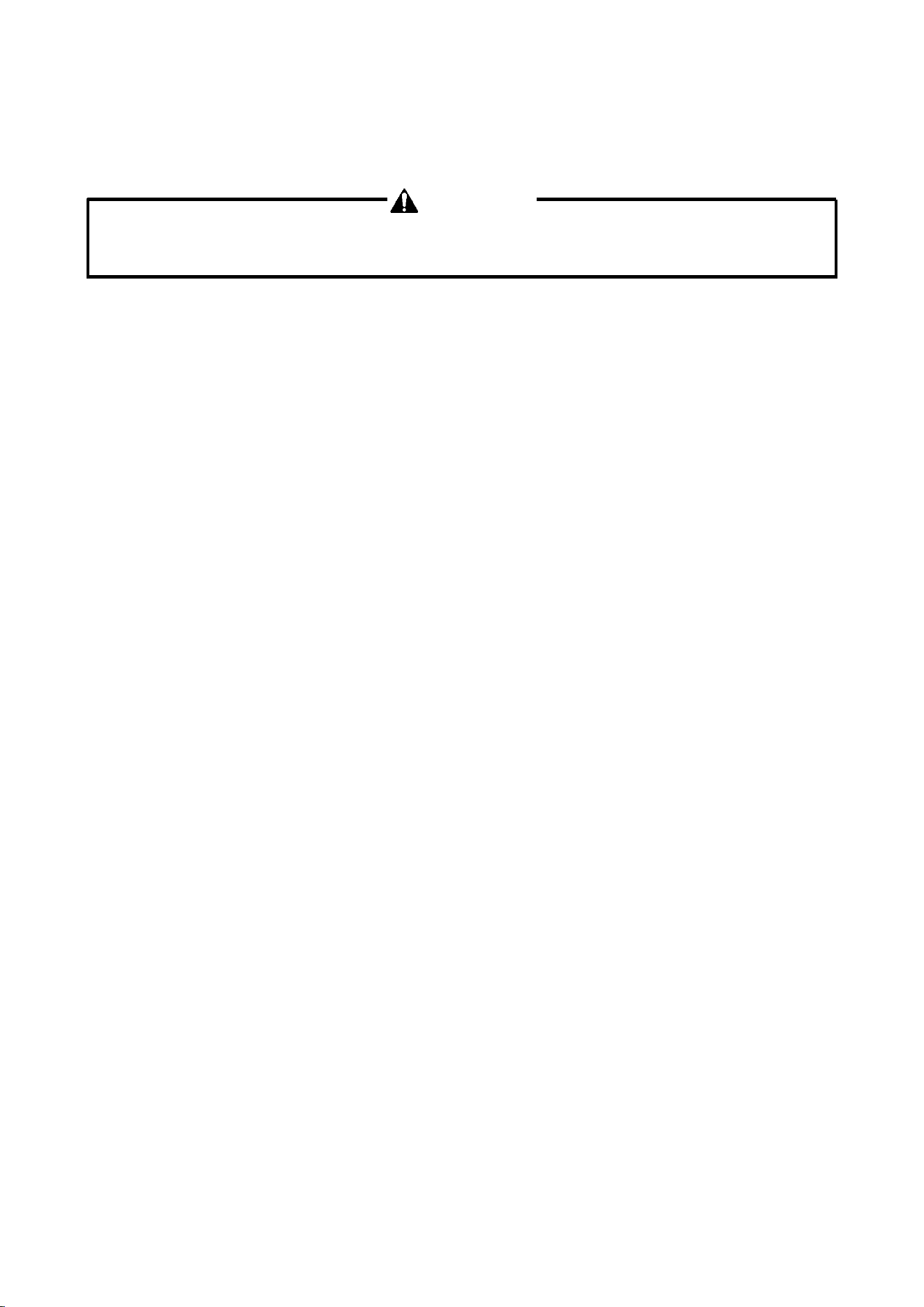
3. OTHERS
PROBLEM POSSIBLE CAUSE REMEDY
1. Bearing worn out. 1. Replace.
2. Fan blade deformed. 2. Replace fan blade.
a) Fan motor
(condenser unit)
3. Fan blade does not
move freely.
3. Replace.
1. Bearings worn out, or
cylinder valve
defective.
1. Replace. b) Compressor
2. Mounting pad out of
position.
2. Reinstall.
c) Refrigerant lines 1. Rub or touch lines or
other surfaces.
1. Replace.
d) Gear motor (ice
making)
1. Bearing or gear
wear/damage.
1. Replace.
1. Low-side pressure too
low.
1. See if expansion valve bulb is
mounted properly, and replace
the valve if necessary.
e) Evaporator
2. Scale on inside wall of
freezing cylinder.
2. Remove auger. Use a solution
of lime removing cleaner to
clean periodically. If water is
found to surpass the following
levels, install a conditioner.
Hardness 50 ppm
Silica 30 ppm
f) Heater 1. Defective. 1. Replace.
[1] Abnormal noise
g) CPR (condenser
unit)
1. Internal leaks. 1. Replace.
46
PROBLEM POSSIBLE CAUSE REMEDY
a) Water supply 1. Water pressure too
high.
1. Install a pressure reducing
valve.
b) Water valve 1. Diaphragm does not
close.
1. Clean or replace.
[2] Overflow from
reservoir (Water
does not stop.)
c) Float switch 1. Bad contacts. 1. Check for continuity and
replace.
a) Power supply
voltage
1. Too high or too low. 1. Connect the unit to a power
supply of proper voltage.
[3] Gear motor
protector
operates
frequently.
b) Evaporator assy 1. Bearings or auger
worn out.
1. Replace bearing or auger.
47
V. REMOVAL AND REPLACEMENT OF COMPONENTS
1. REFRIGERATION CIRCUIT
WARNING
This machine contains flammable refrigerant. Do not attempt to break into the refrigerant
circuit unless qualified, competent and authorised to do so.
If any component of the refrigeration circuit requires removal or replacement, please contact
the manufacturer:
HOSHIZAKI EUROPE LIMITED
Telford 70 Stafford Park 7, Telford, Shropshire TF3 3BQ UK
Tel: +44 (0)1952-291777
Fax: +44 (0)1952-292777
[a] APPLICABLE PARTS
Refrigerant (R290)
Compressor
Evaporator Casing
Air-cooled Condenser
Drier
Thermal Expansion Valve (with MOP)
2. EVAPORATOR ASSEMBLY
See the exploded view under “III. 3. ICEMAKING MECHANISM”.
1) Push the stop button to drain the water in the evaporator.
2) Disconnect the power source.
3) Remove the panels.
4) Remove the three thumbscrews, and take off the spout from the evaporator.
5) Remove the bin control switch.
6) Remove the spout gasket at the top of the evaporator.
CUTTER
7) Remove the bolt and lift off the cutter.

48
BELT HEATER
8) Detach the spring, and remove the belt heater.
EXTRUDING HEAD
9) Remove the sealing bolts, and lift off the extruding head.
10) Check the bearing inside the extruding head. If it is worn out or scratched, replace the
bearing.
Note: Replacing the bearing needs a fitting tool. If it is not available, replace the whole
extruding head.
AUGER
11) Lift out the auger. Check the top and bottom areas in contact with the bearings. If the
surface is scratched or pitted, replace the auger. Check the blade edge of the auger. If it
is scratched or worn where it has contacted the evaporator, replace it.
EVAPORATOR
If the evaporator requires removal or replacement, please contact the manufacturer.
HOUSING AND MECHANICAL SEAL
12) The mechanical seal consists of two parts. One part rotates with the auger, the other is
static and is fitted into a top recess in the housing. If the contact surfaces of these two
parts become worn or scratched, the mechanical seal may leak water and should be
replaced.
13) Remove the O-ring on the top outer edge of the housing.
14) Remove the four bolts and lift the housing clear of the gear motor. Check the bearing
inside the housing. If it is worn or scratched, replace it using a fitting tool. Carefully ease
out the lower part of the mechanical seal before replacing the bearing.
Note: If a fitting tool is not available, replace the whole lower housing complete with
bearing.
GEAR MOTOR
15) Cut the connectors.
16) Remove the three socket head cap screws securing the gear motor.
17) Assemble the removed parts in the reverse order of which they were removed.
49
WARNING
Be careful not to scratch the surface of the O-ring, or it may cause water leaks. Handle
the mechanical seal with care not to scratch nor to contaminate its contact surface.
18) Refit the panels in their correct position.
19) Connect the power source.
3. CONTROL WATER VALVE
1) Disconnect the power source.
2) Close the water supply tap.
3) Remove the panels.
4) Disconnect the terminals from the control water valve.
5) Remove the cover - reservoir Inlet from the control water valve.
6) Loosen the fitting nut on the control water valve Inlets, and remove the control water
valve. Do not lose the packings inside the fitting nut.
7) Install the new control water valve.
8) Assemble the removed parts in the reverse order of which they were removed.
9) Open the water supply tap.
10) Connect the power source.
11) Check for water leaks.
12) Refit the panels in their correct position.
4. FLUSH WATER VALVE
1) Push the stop button, and after 5 minutes disconnect the power source.
2) Close the water supply tap.
3) Remove the panels.
4) Remove the clamp and disconnect the hose from the flush water valve.
Note: Water may still remain inside the evaporator. Be sure to drain the water into the
drain pan.
50
5) Disconnect the terminals from the flush water valve.
6) Remove the flush water valve from the bracket.
7) Remove the drain pipe from the flush water valve.
8) Connect the drain pipe to the new flush water valve, and place the valve in position.
9) Connect the hose to the flush water valve, and secure it with the clamp.
10) Pour water into the reservoir, and check for water leaks on the flush water valve.
11) Open the water supply tap.
12) Connect the power source.
13) Check for water leaks.
14) Push the stop button, and make sure water is flushing.
15) Push the ice button.
16) Refit the panels in their correct position.
5. CONTROLLER BOARD
IMPORTANT
A single type controller board is supplied as a service board. Some modifications and
adjustment will be required to fit the icemaker models. Do not repair any parts and
electronic devices on the controller board in the field. Replace the whole board with a
new service board.
[a] MODIFICATION
1) Check that the service board package includes:
Controller board 1 pc. Instruction sheet 1 pc.
2) Modify the service board referring to the instruction sheet attached (Set the model
number according to "III. 5. [b] SETTING MODEL NUMBER").
[b] REPLACEMENT
1) Disconnect the power source.
2) Remove the front panel.
3) Remove screws and the control box cover.

51
4) Disconnect the connectors and board support from the controller board.
5) Remove the controller board from the control box.
6) Install the new controller board and reassemble the control box in the reverse order of the
removal procedure.
7) Replace the front panel in its correct position.
8) Connect the power source.