QUICK
START
GUIDE
Schnellstartanleitung
Guide De Démarrage Rapide
Guida Rapida
Guía De Inicio Rápido
Przewodnik Szybkiego Startu
Snelle Startgids
Snabbstartsguide
Panduan Memulai Cepat

ENGLISH
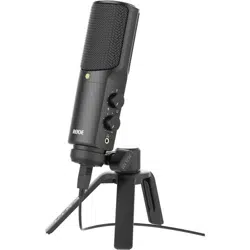
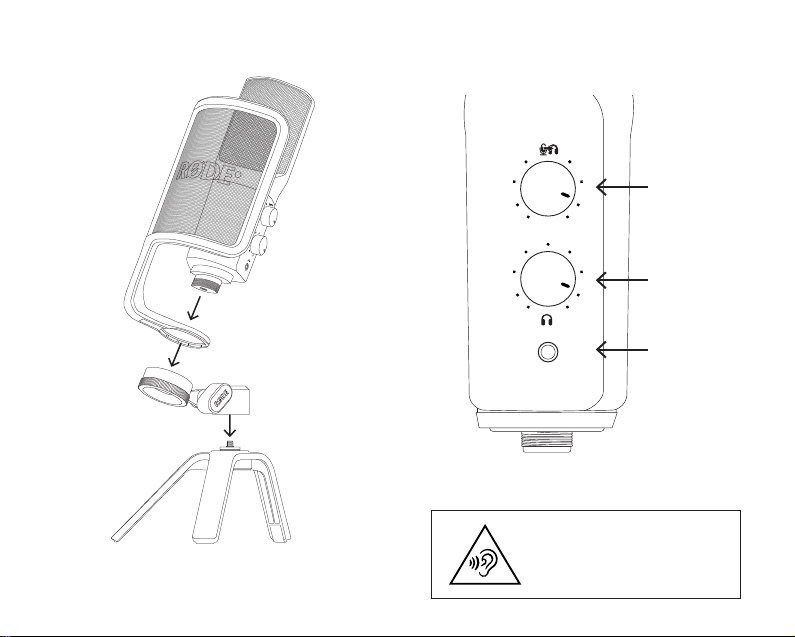
1. Place the ring of the pop lter around the base
of your NT-USB+
2. Screw the thread on the base of your NT-USB+
into the ring mount until the microphone and
pop lter are secure
3. Screw the included tripod into the other
side of the ring mount and position it so the
microphone can sit stably on your desk
4. Connect the included USB cable into the
underside of the NT-USB+ to connect it to your
computer, tablet or phone
5. Ensure the upper knob is turned up halfway, and
the lower knob is fully counterclockwise
6. Connect headphones to the 3.5mm output
beneath the knobs, then slowly increase the
lower knob until you can comfortably hear your
voice
7. Adjust the upper knob to balance the volume
of your voice and audio coming from your
computer, tablet or phone
Download RØDE Central to apply processing,
change settings and update your rmware
rode.com/apps/rode-central
GERMAN
1. Platzieren Sie den Ring des Pop-Filters um die
Basis Ihres NT-USB+.
2. Schrauben Sie das Gewinde an der Basis Ihres
NT-USB+ in die Ringhalterung, bis das Mikrofon
und der Pop-Filter sicher befestigt sind.
3. Schrauben Sie das mitgelieferte Stativ auf
die andere Seite der Ringhalterung und
positionieren Sie es so, dass das Mikrofon stabil
auf Ihrem Schreibtisch stehen kann.
4. Schließen Sie das mitgelieferte USB-Kabel an
die Unterseite des NT-USB+ an, um es mit Ihrem
Computer, Tablet oder Telefon zu verbinden.
5. Stellen Sie sicher, dass der obere Knopf auf
halber Höhe steht und der untere Knopf
vollständig gegen den Uhrzeigersinn gedreht ist.
6. Schließen Sie Kopfhörer an den 3,5-mm-
Ausgang unterhalb der Regler an und erhöhen
Sie dann langsam den unteren Knopf, bis Sie
Ihre Stimme bequem hören können.
7. Passen Sie den oberen Knopf an, um die
Lautstärke Ihrer Stimme und des Audios
von Ihrem Computer, Tablet oder Telefon
auszubalancieren.
Laden Sie RØDE Central herunter, um
Verarbeitungen anzuwenden, Einstellungen zu
ändern und Ihre Firmware zu aktualisieren:
rode.com/apps/rode-central
FRENCH
1. Placez l’anneau du ltre anti-pop autour de la
base de votre NT-USB+.
2. Vissez le letage à la base de votre NT-USB+
dans le support de l’anneau jusqu’à ce que le
microphone et le ltre anti-pop soient bien xés.

3. Vissez le trépied inclus de l’autre côté du
support de l’anneau et positionnez-le de
manière à ce que le microphone puisse reposer
solidement sur votre bureau.
4. Connectez le câble USB inclus à la partie
inférieure du NT-USB+ pour le connecter à votre
ordinateur, tablette ou téléphone.
5. Assurez-vous que le bouton supérieur est tourné
à mi-hauteur et que le bouton inférieur est
complètement dans le sens inverse des aiguilles
d’une montre.
6. Connectez des écouteurs à la sortie 3,5 mm
sous les boutons, puis augmentez lentement le
bouton inférieur jusqu’à ce que vous puissiez
entendre confortablement votre voix.
7. Ajustez le bouton supérieur pour équilibrer le
volume de votre voix et de l’audio provenant de
votre ordinateur, tablette ou téléphone.
Téléchargez RØDE Central pour appliquer des
traitements, changer les paramètres et mettre à jour
votre rmware:
rode.com/apps/rode-central
ITALIAN
1. Posiziona l’anello del ltro anti-pop alla base del
tuo NT-USB+.
2. Avvita il letto alla base del tuo NT-USB+ nella
staffa dell’anello no a quando il microfono e il
ltro anti-pop sono sicuramente ssi.
3. Avvita il treppiede incluso dall’altro lato della
staffa dell’anello e posizionalo in modo che
il microfono possa stare stabilmente sul tuo
tavolo.
4. Collega il cavo USB incluso alla parte inferiore
del NT-USB+ per collegarlo al tuo computer,
tablet o telefono.
5. Assicurati che la manopola superiore sia
alzata a metà e che la manopola inferiore sia
completamente in senso antiorario.
6. Collega le cufe all’uscita da 3,5 mm sotto le
manopole, quindi alza lentamente la manopola
inferiore no a sentire comodamente la tua
voce.
7. Regola la manopola superiore per bilanciare il
volume della tua voce e dell’audio proveniente
dal tuo computer, tablet o telefono.
Scarica RØDE Central per applicare elaborazioni,
cambiare le impostazioni e aggiornare il rmware:
rode.com/apps/rode-central
SPANISH
1. Coloca el anillo del ltro antipop alrededor de la
base de tu NT-USB+.
2. Enrosca el hilo en la base de tu NT-USB+ en el
soporte del anillo hasta que el micrófono y el
ltro antipop estén seguros.
3. Enrosca el trípode incluido en el otro lado
del soporte del anillo y posiciónalo para que
el micrófono pueda estar estable sobre tu
escritorio.

4. Conecta el cable USB incluido en la parte
inferior del NT-USB+ para conectarlo a tu
ordenador, tablet o teléfono.
5. Asegúrate de que la perilla superior esté
girada a la mitad y la perilla inferior esté
completamente en sentido contrario a las agujas
del reloj.
6. Conecta auriculares a la salida de 3,5 mm
debajo de las perillas, luego aumenta
lentamente la perilla inferior hasta que puedas
escuchar cómodamente tu voz.
7. Ajusta la perilla superior para equilibrar el
volumen de tu voz y el audio proveniente de tu
ordenador, tablet o teléfono.
Descarga RØDE Central para aplicar
procesamientos, cambiar ajustes y actualizar tu
rmware: rode.com/apps/rode-central
POLISH
1. Umieść pierścień ltra przeciwwstrząsowego
wokół podstawy swojego NT-USB+.
2. Wkręć gwint na podstawie swojego NT-
USB+ w uchwyt pierścienia, aż mikrofon i ltr
przeciwwstrząsowy będą pewnie zamocowane.
3. Wkręć dołączony trójnóg na drugą stronę
uchwytu pierścienia i ustaw go tak, aby mikrofon
mógł stabilnie stać na biurku.
4. Podłącz dołączony kabel USB do dolnej części
NT-USB+, aby połączyć go z komputerem,
tabletem lub telefonem.
5. Upewnij się, że górna gałka jest obrócona do
połowy, a dolna gałka jest w pełni przeciwnie do
ruchu wskazówek zegara.
6. Podłącz słuchawki do wyjścia 3,5 mm poniżej
gałek, a następnie stopniowo zwiększaj dolną
gałkę, aż wyraźnie usłyszysz swoje głos.
7. Dostosuj górną gałkę, aby zrównoważyć
głośność swojego głosu i dźwięku
pochodzącego z komputera, tabletu lub
telefonu.
Pobierz RØDE Central, aby zastosować
przetwarzanie, zmienić ustawienia i zaktualizować
oprogramowanie: rode.com/apps/rode-central
DUTCH
1. Plaats de ring van de poplter rond de basis van
je NT-USB+.
2. Schroef de schroefdraad aan de basis van je NT-
USB+ in de ringhouder totdat de microfoon en
poplter stevig vastzitten.
3. Schroef het meegeleverde statief aan de andere
kant van de ringhouder en positioneer het zodat
de microfoon stabiel op je bureau kan staan.
4. Sluit de meegeleverde USB-kabel aan op
de onderkant van de NT-USB+ om deze te
verbinden met je computer, tablet of telefoon.
5. Zorg ervoor dat de bovenste knop halverwege
staat en de onderste knop volledig tegen de
klok in.
6. Sluit koptelefoon aan op de 3,5 mm-uitgang

onder de knoppen en verhoog dan langzaam
de onderste knop totdat je je stem comfortabel
kunt horen.
7. Pas de bovenste knop aan om het volume van
je stem en audio van je computer, tablet of
telefoon in balans te brengen.
Download RØDE Central om verwerking toe te
passen, instellingen te wijzigen en je rmware bij te
werken: rode.com/apps/rode-central
SWEDISH
1. Placera poplterringen runt basen av din NT-
USB+.
2. Skruva tråden i basen av din NT-USB+ i
ringfästet tills mikrofonen och popltret sitter
säkert.
3. Skruva det medföljande stativet i den andra
sidan av ringfästet och positionera det så att
mikrofonen kan stå stadigt på ditt skrivbord.
4. Anslut den medföljande USB-kabeln till
undersidan av NT-USB+ för att ansluta den till
din dator, surfplatta eller telefon.
5. Se till att den övre knoppen är vriden upp till
hälften, och den nedre knoppen är helt moturs.
6. Anslut hörlurar till 3,5 mm-uttaget under
knopparna och öka sedan långsamt den nedre
knoppen tills du bekvämt kan höra din röst.
7. Justera den övre knoppen för att balansera
volymen på din röst och ljudet från din dator,
surfplatta eller telefon.
Ladda ner RØDE Central för att tillämpa bearbetning
på USB-ljud och uppdatera din rmware: rode.com/
apps/rode-central
INDONESIAN
1. Letakkan cincin penyaring pop di sekitar dasar
NT-USB+ Anda.
2. Putar ulir pada dasar NT-USB+ Anda ke dalam
pasak cincin hingga mikrofon dan penyaring
pop aman.
3. Pasang tripod yang disertakan ke sisi lain dari
pasak cincin dan posisikan sehingga mikrofon
dapat duduk stabil di meja Anda.
4. Sambungkan kabel USB yang disertakan
ke bagian bawah NT-USB untuk
menghubungkannya ke komputer, tablet, atau
ponsel Anda.
5. Pastikan knob atas diatur setengah putaran,
dan knob bawah sepenuhnya berlawanan arah
jarum jam.
6. Sambungkan headphone ke output 3,5 mm di
bawah knob, kemudian perlahan tingkatkan
knob bawah hingga Anda dapat mendengar
suara Anda dengan nyaman.
7. Sesuaikan knob atas untuk menyeimbangkan
volume suara Anda dan audio yang berasal dari
komputer, tablet, atau ponsel Anda.
Unduh RØDE Central untuk menerapkan
pemrosesan, mengubah pengaturan, dan
memperbarui rmware Anda rode.com/apps/rode-
central
NORTH AMERICA
This device complies with Part 15 of the FCC
Rules. Operation is subject to the following two
conditions: (1) this device may not cause harmful
interference, and (2) this device must accept any
interference received, including interference that
may cause undesired operation.
Please note that changes or modications of this
product is not expressly approved by the party
responsible for compliance could void the user’s
authority to operate the equipment.
NOTE: This equipment has been tested and
found to comply with the limits for a Class
B digital device, pursuant to Part 15 of the
FCC Rules. These limits are designed to
provide reasonable protection against harmful
interference in a residential installation. This
equipment generates, uses and can radiate radio
frequency energy and, if not installed and used
in accordance with the instructions, may cause
harmful interference to radio communications.
However, there is no guarantee that interference
will not occur in a particular installation.
If this equipment does cause harmful
interference to radio or television reception,
which can be determined by turning the
equipment off and on, the user is encouraged to
try to correct the interference by one or more of
the following measures:
-- Reorient or relocate the receiving antenna
-- Increase the separation between the
equipment and receiver
-- Connect the equipment into an outlet on a
circuit different from that to which the receiver is
connected
-- Consult the dealer or an experienced radio/TV
technician for help
CAN ICES-3 (B) / NMB-3 (B)
USA
SOUTH KOREA
ID: R-R-R72-NT-USBPLUS;
Company Name: RØDE Microphones
Model: NT-USB+
Country of Origin: Australia
JAPAN
This is a product of VCCI Class B Compliance
POWER
USB 5V 100mA
Monitor Mix
Audio Level
Headphone
Output
To prevent possible hearing
damage, do not listen at
high volume levels for long
periods.
SCAN FOR MORE INFO
RØDE Microphones:
107 Carnarvon St, Silverwater NSW 2128, Australia
Authorised UK Representative:
RØDE UK, Unit A, 23-25 Sunbeam Rd, London
NW10 6JP, United Kingdom
Authorised EU Representative:
RØDE EU, Neukirchner Str. 18, 65510 Hünstetten,
Germany
View the user guide to learn more
Sehen Sie sich das Benutzerhandbuch an,
um mehr zu erfahren
Consultez le guide de l’utilisateur pour en savoir plus
Consulta la guida per l’utente per saperne di più
Consulte la guía del usuario para
obtener más información
Zapoznaj się z przewodnikiem użytkownika,
aby dowiedzieć się więcej
Bekijk de gebruikershandleiding voor meer informatie
Se användarhandboken för att lära dig mer
Lihat panduan pengguna untuk mempelajari lebih lanju
t
rode.com
0927-0829-02-09