Schnellstartanleitung
Guide De Démarrage Rapide
Guida Rapida
Guía De Inicio Rápido
Przewodnik Szybkiego Startu
Snelle Startgids
Snabbstartsguide
Panduan Memulai Cepat
QUICK
START
GUIDE

ENGLISH
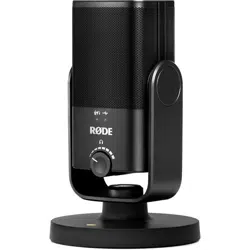
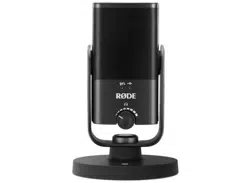
1. Place the NT-USB Mini’s swivel mount into its
magnetic desk stand
OR
Remove the plug at the base of the swivel arm
to reveal a mounting thread for desk stands,
studio arms and tripods
2. Connect the included USB cable to your
computer and to the back of the NT-USB Mini
3. Select The NT-USB Mini as the audio input and
output device on your computer
4. Connect your headphones to the 3.5mm output
on the back of the NT-USB Mini
5. Adjust the NT-USB Mini’s knob to increase or
decrease headphone monitoring volume
6. Press the NT-USB Mini’s knob to enable or
disable zero-latency monitoring
Download RØDE Central to apply processing,
change settings and update your rmware
rode.com/apps/rode-central
GERMAN
1. Setzen Sie die Schwenkhalterung des NT-USB
Mini in den magnetischen Tischständer ein
ODER
Entfernen Sie den Stecker am Fuß des
Schwenkarms, um ein Montagegewinde
für Tischständer, Studiostative und Stative
freizulegen
2. Schließen Sie das mitgelieferte USB-Kabel an
Ihren Computer und an die Rückseite des NT-
USB Mini an
3. Wählen Sie den NT-USB Mini als Audioeingabe-
und -ausgabegerät auf Ihrem Computer aus
4. Schließen Sie Ihre Kopfhörer an den 3,5-mm-
Ausgang auf der Rückseite des NT-USB Mini an
5. Passen Sie den Regler des NT-USB Mini an, um
die Lautstärke der Kopfhörerüberwachung zu
erhöhen oder zu verringern
6. Drücken Sie den Regler des NT-USB Mini, um
die Echtzeitüberwachung mit null Latenz zu
aktivieren oder zu deaktivieren
Laden Sie RØDE Central herunter, um Verarbeitung
anzuwenden, Einstellungen zu ändern und Ihre
Firmware zu aktualisieren rode.com/apps/rode-
central
FRENCH
1. Placez le support pivotant du NT-USB Mini dans
son support de bureau magnétique
OU
Retirez le bouchon à la base du bras pivotant
pour révéler un letage de montage pour
supports de bureau, bras de studio et trépieds
2. Connectez le câble USB inclus à votre ordinateur
et à l’arrière du NT-USB Mini
3. Sélectionnez le NT-USB Mini comme
périphérique d’entrée et de sortie audio sur
votre ordinateur
4. Connectez vos écouteurs à la sortie 3,5 mm à

l’arrière du NT-USB Mini
5. Ajustez le bouton du NT-USB Mini pour
augmenter ou diminuer le volume de
surveillance des écouteurs
6. Appuyez sur le bouton du NT-USB Mini pour
activer ou désactiver la surveillance sans latence
Téléchargez RØDE Central pour appliquer un
traitement, modier les paramètres et mettre à jour
votre rmware rode.com/apps/rode-central
ITALIAN
1. Posizionare il supporto girevole del NT-USB Mini
nel suo supporto da tavolo magnetico
OPPURE
Rimuovere il tappo alla base del braccio girevole
per rivelare un letto di montaggio per supporti
da tavolo, bracci da studio e treppiedi
2. Collegare il cavo USB incluso al computer e alla
parte posteriore del NT-USB Mini
3. Selezionare il NT-USB Mini come dispositivo di
input e output audio sul computer
4. Collegare le cufe all’uscita da 3,5 mm sul retro
del NT-USB Mini
5. Regolare la manopola del NT-USB Mini
per aumentare o diminuire il volume di
monitoraggio delle cufe
6. Premere la manopola del NT-USB Mini per
abilitare o disabilitare il monitoraggio senza
latenza
Scarica RØDE Central per applicare elaborazioni,
modicare impostazioni e aggiornare il rmware
rode.com/apps/rode-central
SPANISH
1. Coloque el soporte giratorio del NT-USB Mini en
su soporte de escritorio magnético
O
Quite el tapón en la base del brazo giratorio
para revelar un hilo de montaje para soportes de
escritorio, brazos de estudio y trípodes
2. Conecte el cable USB incluido a su computadora
y a la parte trasera del NT-USB Mini
3. Seleccione el NT-USB Mini como dispositivo de
entrada y salida de audio en su computadora
4. Conecte sus auriculares a la salida de 3,5 mm en
la parte trasera del NT-USB Mini
5. Ajuste la perilla del NT-USB Mini para aumentar
o disminuir el volumen de monitoreo de
auriculares
6. Presione la perilla del NT-USB Mini para habilitar
o deshabilitar el monitoreo de latencia cero
Descargue RØDE Central para aplicar
procesamiento, cambiar conguraciones y actualizar
su rmware rode.com/apps/rode-central

POLISH
1. Umieść uchwyt obrotowy NT-USB Mini w jego
magnetycznym stojaku na biurko
LUB
Usuń wtyk u podstawy ramienia obrotowego,
aby odsłonić gwint montażowy dla stojaków
biurkowych, ramion studyjnych i statywów
2. Podłącz dołączony kabel USB do komputera i do
tyłu NT-USB Mini
3. Wybierz NT-USB Mini jako urządzenie wejściowe
i wyjściowe audio na komputerze
4. Podłącz słuchawki do wyjścia 3,5 mm z tyłu
NT-USB Mini
5. Dostosuj pokrętło NT-USB Mini, aby zwiększyć
lub zmniejszyć głośność monitorowania
słuchawek
6. Naciśnij pokrętło NT-USB Mini, aby włączyć lub
wyłączyć monitorowanie bez opóźnień
Pobierz RØDE Central, aby zastosować
przetwarzanie, zmienić ustawienia i zaktualizować
oprogramowanie układowe rode.com/apps/rode-
central
DUTCH
1. Plaats de zwenkbeugel van de NT-USB Mini in
zijn magnetische bureaustandaard
OF
Verwijder de plug aan de basis van de zwenkarm
om een montagegat bloot te leggen voor
bureaustandaarden, studiobruggen en statieven
2. Sluit de meegeleverde USB-kabel aan op uw
computer en op de achterkant van de NT-USB
Mini
3. Selecteer de NT-USB Mini als het audio-invoer-
en -uitvoerapparaat op uw computer
4. Sluit uw hoofdtelefoon aan op de 3,5 mm-
uitgang aan de achterkant van de NT-USB Mini
5. Pas de knop van de NT-USB Mini aan om het
volume van de hoofdtelefoonmonitoring te
verhogen of te verlagen
6. Druk op de knop van de NT-USB Mini om
nul-latency-monitoring in te schakelen of uit te
schakelen
Download RØDE Central om verwerking toe te
passen, instellingen te wijzigen en uw rmware bij te
werken rode.com/apps/rode-central
SWEDISH
1. Placera NT-USB Minis svängbara fäste i dess
magnetiska skrivbordsställ
ELLER
Ta bort pluggen längst ner på svängarmen
för att avslöja ett monteringsgäng för
skrivbordsställ, studioarmar och stativ
2. Anslut den medföljande USB-kabeln till din
dator och till baksidan av NT-USB Mini
3. Välj NT-USB Mini som ljudin- och
utmatningsenhet på din dator
4. Anslut dina hörlurar till 3,5 mm-uttaget på
baksidan av NT-USB Mini

5. Justera NT-USB Minis ratt för att öka eller minska
volymen för hörlursövervakning
6. Tryck på NT-USB Minis ratt för att aktivera eller
inaktivera övervakning utan fördröjning
Ladda ner RØDE Central för att tillämpa
bearbetning, ändra inställningar och uppdatera din
rmware rode.com/apps/rode-central
INDONESIAN
1. Letakkan penyangga berputar NT-USB Mini ke
dalam stan meja magnetiknya
ATAU
Hapus penutup di bagian dasar lengan berputar
untuk mengungkap benang pemasangan untuk
stan meja, lengan studio, dan tripod
2. Hubungkan kabel USB yang disertakan ke
komputer Anda dan ke bagian belakang NT-USB
Mini
3. Pilih NT-USB Mini sebagai perangkat masukan
dan keluaran audio di komputer Anda
4. Sambungkan headphone Anda ke output 3,5
mm di bagian belakang NT-USB Mini
5. Sesuaikan knob NT-USB Mini untuk menambah
atau mengurangi volume pemantauan
headphone
6. Tekan knob NT-USB Mini untuk mengaktifkan
atau menonaktifkan pemantauan tanpa latensi
nol
Unduh RØDE Central untuk menerapkan
pemrosesan, mengubah pengaturan, dan
memperbarui rmware Anda rode.com/apps/rode-
central
North America
This device complies with Part 15 of the FCC
Rules. Operation is subject to the following two
conditions: (1) this device may not cause harmful
interference, and (2) this device must accept any
interference received, including interference that
may cause undesired operation.
Please note that changes or modications of this
product is not expressly approved by the party
responsible for compliance could void the user’s
authority to operate the equipment.
NOTE: This equipment has been tested and
found to comply with the limits for a Class
B digital device, pursuant to Part 15 of the
FCC Rules. These limits are designed to
provide reasonable protection against harmful
interference in a residential installation. This
equipment generates, uses and can radiate radio
frequency energy and, if not installed and used
in accordance with the instructions, may cause
harmful interference to radio communications.
However, there is no guarantee that interference
will not occur in a particular installation.
If this equipment does cause harmful
interference to radio or television reception,
which can be determined by turning the
equipment off and on, the user is encouraged to
try to correct the interference by one or more of
the following measures:
-- Reorient or relocate the receiving antenna.
-- Increase the separation between the
equipment and receiver.
-- Connect the equipment into an outlet on a
circuit different from that to which the receiver is
connected.
-- Consult the dealer or an experienced radio/TV
technician for help.
CAN ICES-003 (B) / NMB-003 (B)
USA
SOUTH KOREA
ID: R-R-R72-NTUSBMINI
Company Name: RØDE Microphones
Model: NT-USB Mini
Country of Origin: Australia
POWER
5Vdc, 0.5A
To prevent possible hearing
damage, do not listen at high
volume levels for long periods.
RØDE Microphones:
107 Carnarvon St, Silverwater NSW 2128, Australia
Authorised UK Representative:
RØDE UK, Unit A, 23-25 Sunbeam Rd, London
NW10 6JP, United Kingdom
Authorised EU Representative:
RØDE EU, Neukirchner Str. 18, 65510 Hünstetten,
Germany
SCAN FOR MORE INFO
View the user guide to learn more
Sehen Sie sich das Benutzerhandbuch an,
um mehr zu erfahren
Consultez le guide de l’utilisateur pour en savoir plus
Consulta la guida per l’utente per saperne di più
Consulte la guía del usuario para
obtener más información
Zapoznaj się z przewodnikiem użytkownika,
aby dowiedzieć się więcej
Bekijk de gebruikershandleiding voor meer informatie
Se användarhandboken för att lära dig mer
Lihat panduan pengguna untuk mempelajari lebih lanju
t

Blank Page
Leere Seite
Page Blanche
Pagina Vuota
Pa’gina en Blanco
Pusta Strona
Lege Pagina
Tom Sida
Halaman Kosong
Blank Page
Leere Seite
Page Blanche
Pagina Vuota
Pa’gina en Blanco
Pusta Strona
Lege Pagina
Tom Sida
Halaman Kosong

rode.com
0927-0843-02-01