ninjakitchen.co.uk
HB150UK
Series
INSTRUCTIONS
Blender &
Soup Maker

1 2ninjakitchen . co.ukninjakitchen . co.uk
CONTENTS
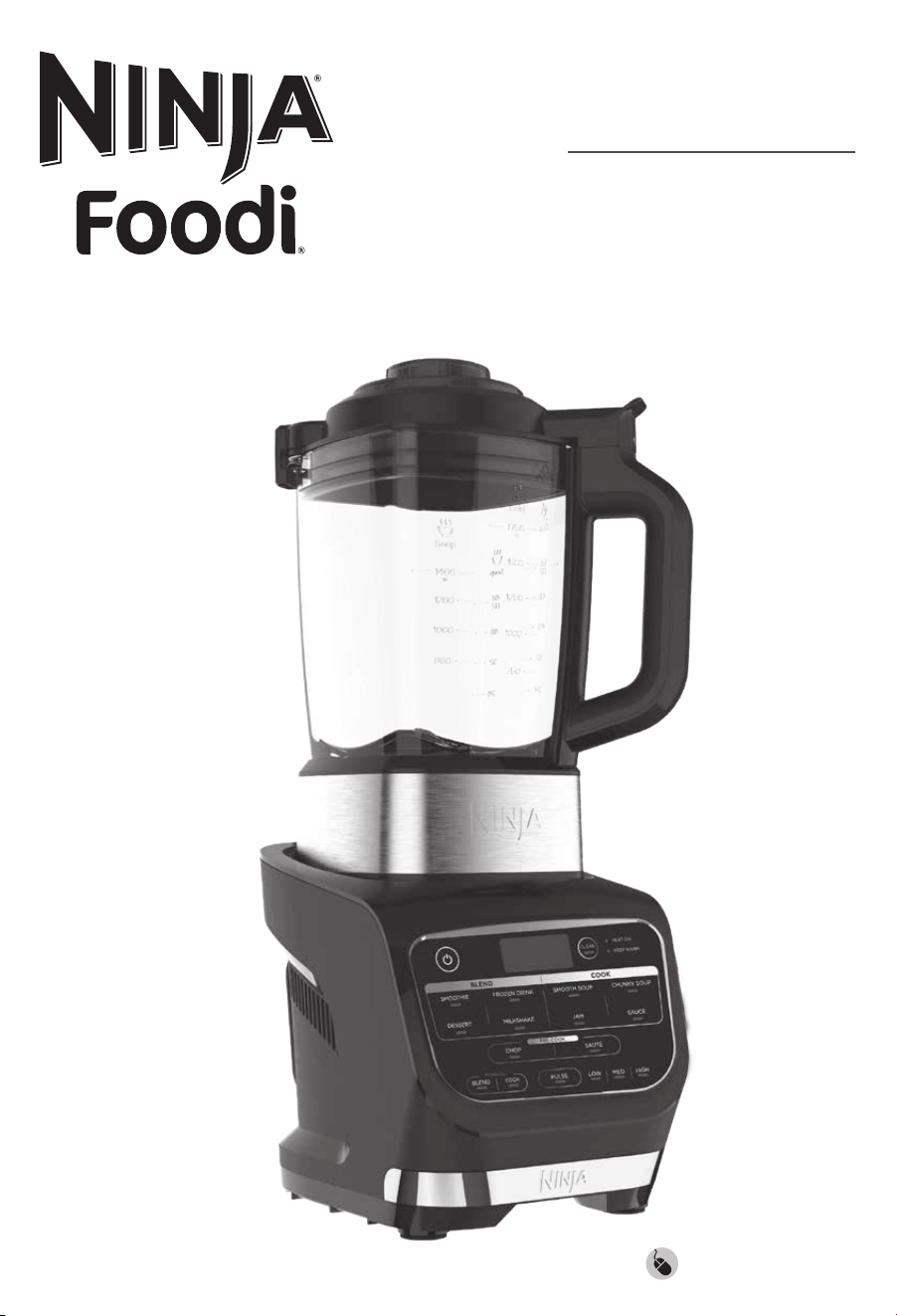
THANK YOU
for purchasing the Ninja
®
Foodi® Blender & Soup Maker
Product Registration � � � � � � � � � � � � � � � � � � � � � � � � � � � � � � � � � � � � � � � � � � � � � � � � � 1
Important Safety Instructions � � � � � � � � � � � � � � � � � � � � � � � � � � � � � � � � � � � � � � � � �3
Parts � � � � � � � � � � � � � � � � � � � � � � � � � � � � � � � � � � � � � � � � � � � � � � � � � � � � � � � � � � � � � � �5
Features � � � � � � � � � � � � � � � � � � � � � � � � � � � � � � � � � � � � � � � � � � � � � � � � � � � � � � � � � � � �6
Auto-iQ® Programs . . . . . . . . . . . . . . . . . . . . . . . . . . . . . . . . . . . . . . . . . . . . . . . . . . . . . 6
MANUAL Settings . . . . . . . . . . . . . . . . . . . . . . . . . . . . . . . . . . . . . . . . . . . . . . . . . . . . . . 6
Before First Use � � � � � � � � � � � � � � � � � � � � � � � � � � � � � � � � � � � � � � � � � � � � � � � � � � � �7
Handling the Blender Jug � � � � � � � � � � � � � � � � � � � � � � � � � � � � � � � � � � � � � � � � � � � �8
Getting started with your Blender & Soup Maker � � � � � � � � � � � � � � � � � � � � � � � �9
Assembly .............................................................9
Auto-iQ Programs ......................................................10
Manual Cook ...........................................................10
Manual Blend ..........................................................10
Care & Maintenance � � � � � � � � � � � � � � � � � � � � � � � � � � � � � � � � � � � � � � � � � � � � � � � � � 11
Cleaning . . . . . . . . . . . . . . . . . . . . . . . . . . . . . . . . . . . . . . . . . . . . . . . . . . . . . . . . . . . . . . 11
Storing . . . . . . . . . . . . . . . . . . . . . . . . . . . . . . . . . . . . . . . . . . . . . . . . . . . . . . . . . . . . . . . . 11
Resetting the Motor . . . . . . . . . . . . . . . . . . . . . . . . . . . . . . . . . . . . . . . . . . . . . . . . . . . . 11
Ordering Replacement Parts . . . . . . . . . . . . . . . . . . . . . . . . . . . . . . . . . . . . . . . . . . . . 11
Display Screen & Error Messages � � � � � � � � � � � � � � � � � � � � � � � � � � � � � � � � � � � � � 12
Troubleshooting Guide � � � � � � � � � � � � � � � � � � � � � � � � � � � � � � � � � � � � � � � � � � � � � � 13
PLEASE READ CAREFULLY AND
KEEP FOR FUTURE REFERENCE�
These instructions are designed to help
youget a complete understanding of
your new Ninja® Blender & Soup Maker
TECHNICAL SPECIFICATIONS
Voltage: 220-240V~ 50-60Hz
Watts: 1000W
GUARANTEE: This product is unconditionally
guaranteed for one year against all defects of
workmanship and materials. This guarantee
does not aect your statutory rights. If this
product proves unsatisfactory please contact
our customer service department.
RECORD THIS INFORMATION
Model Number: ��������������������
Serial Number: ���������������������
Date of Purchase: �������������������
(Keep receipt)
Store of Purchase: ������������������
REGISTER YOUR PURCHASE
ninjakitchen.co.uk/registerguarantee
Scan QR code using mobile device
This marking indicates that this product should not be disposed with other
household waste. To prevent possible harm to the environment or human
health from uncontrolled waste disposal, recycle it responsibly to promote the
sustainable reuse of material sources. To return your used device, please use
the return and collection systems or contact the retailer where this product
was purchased. They can take this product for environmental safe recycling.

3 4ninjakitchen . co.ukninjakitchen . co.uk
1 Read all instructions prior to using the
appliance and its accessories.
2 Carefully observe and practice all warnings
and instructions. This unit contains
electrical connections, moving parts, and
heating elements that potentially present
risk to the user.
3 Take your time and exercise care during
unpacking and appliance setup.
4 Take inventory of all contents to ensure
you have all parts needed to properly and
safely operate your appliance.
5 Blades are sharp. Handle carefully.
6 Turn the appliance OFF, then unplug the
appliance from the socket when not in use,
before assembling or disassembling parts,
and before cleaning. To unplug, grasp the
plug by the body and pull from the socket.
NEVER unplug by grasping and pulling the
flexible cord.
7 Wash all parts that may contact food
before use. Follow washing instructions
covered in this instruction manual.
8 To protect against the risk of electric shock,
DO NOT submerge the appliance or allow
the power cord to contact any form
of liquid.
9 DO NOT use this appliance outdoors.
It is designed for indoor household use only.
10 DO NOT operate any appliance with
a damaged cord or plug, or after the
appliance malfunctions or is dropped
or damaged in any manner. This appliance
has no user-serviceable parts. If damaged,
contact SharkNinja for servicing.
11 This appliance has important markings on
the plug blade. The entire supply cord is
not suitable for replacement. If damaged,
please contact SharkNinja for service.
12 Extension cords should not be used
with this appliance.
13 DO NOT allow children to operate this
appliance or use as a toy. Close supervision
is necessary when any appliance is used
near children.
14 This appliance is not intended to be used
by people with reduced physical, sensory,
or mental capabilities, or lack of experience
and knowledge, unless they have been
given supervision or instruction concerning
use of the appliance by a person
responsible for their safety.
15 Cleaning and user maintenance shall not
be carried out by children.
16 Keep the appliance and its cord out of
reach of children.
17 Before each use, inspect blade assemblies
for damage. If a blade is bent or damage is
suspected, contact SharkNinja to arrange
for replacement.
18 DO NOT attempt to sharpen blades.
19 DO NOT let cord hang over edge of table
or worktop or touch hot surfaces.
20 DO NOT allow the unit or the cord to
contact hot surfaces, including stoves and
other heating appliances.
21 DO NOT place on or near a hot gas or
electric burner or in a heated oven.
22 A LWAYS use the appliance on a dry and
level surface.
23 Keep hands, hair, and clothing out of the
container when loading and operating.
24 ONLY use attachments and accessories
that are provided with the product or are
recommended by SharkNinja. The use of
attachments, including canning jars, not
recommended or sold by SharkNinja may
cause fire, electric shock, or injury.
25 The appliance is only to be used with
the stand provided.
26 During operation and handling of the
appliance, avoid contact with moving parts.
27 DO NOT operate the appliance with an
empty container.
28 DO NOT fill containers past the max
fill or max liquid lines.
29 DO NOT microwave any containers or
accessories provided with the appliance.
30 Before operation, ensure all utensils are
removed from containers. Failure to
remove utensils can cause containers to
shatter and potentially result in personal
injury and property damage.
31 Keep hands and utensils out of container
while blending to reduce the risk of severe
injury to persons or damage to the blender.
A rubber scraper or spatula may be used
but must be used ONLY when the blender
is not running.
32 NEVER operate the appliance without lids
and caps in place. DO NOT attempt to
defeat the interlock mechanism. Ensure
the container and lid are properly installed
before operation.
33 DO NOT expose the containers and
accessories to extreme temperature
changes. They may experience damage.
34 NEVER leave the appliance unattended
while in use.
35 A LWAYS operate blender with cover
in place.
36 Be careful if hot liquid is poured into the
blender as it can be ejected out of the
appliance due to a sudden streaming.
37 Allow to cool before assembling or
disassembling parts and before
cleaning appliance.
38 DO NOT grasp the sides of the pitcher
after hot blending or cooking. The
surface of the pitcher is hot during and
after operation. Surfaces are hot during
and after operation. To prevent burns or
personal injury, A LWAYS use protective
hot pads or insulated oven mitts and use
available handles and knobs.
39 If you find unmixed ingredients sticking to
the sides of the pitcher, stop the appliance,
remove the lid, and use a rubber scraper
or spatula to dislodge ingredients. NEVER
insert your hands into the pitcher, as
you may contact one of the blades and
experience a laceration.
40 DO NOT attempt to remove the container
and lid from the motor base while the
motor is still spinning. Allow the appliance
to come to a complete stop before
removing the lid and pitcher.
41 If the appliance overheats, a thermal
switch will activate and temporarily
disable the motor. To reset, unplug
the appliance and allow it to cool
for approximately 15 minutes before
using again.
42 The maximum wattage rating for this
appliance is based on the configuration
of the high speed bottom blade and glass
pitcher blender. Other configurations may
draw less power or current.
43 Turn o the appliance and unplug the
motor base before cleaning.
IMPORTANT SAFETY INSTRUCTIONS
PLEASE READ CAREFULLY BEFORE USE • FOR HOUSEHOLD USE ONLY
WARNING
To reduce the risk of injury, fire, electrical shock or property damage,
basic safety precautions must always be followed, including the following
numbered warnings and subsequent instructions�
Extreme caution must be used when moving an appliance containing hot
oil or other hot liquids�
Do not use appliance for other than intended use�
SAVE THESE INSTRUCTIONS
Indicates to read and review instructions to understand operation and use of product.
Indicates the presence of a hazard that can cause personal injury, death or
substantial property damage if the warning included with this symbol is ignored.
Take care to avoid contact with hot surface. Always use hand protection to avoid burns.
For indoor and household use only.
ninjakitchen . co.ukninjakitchen . co.uk 65
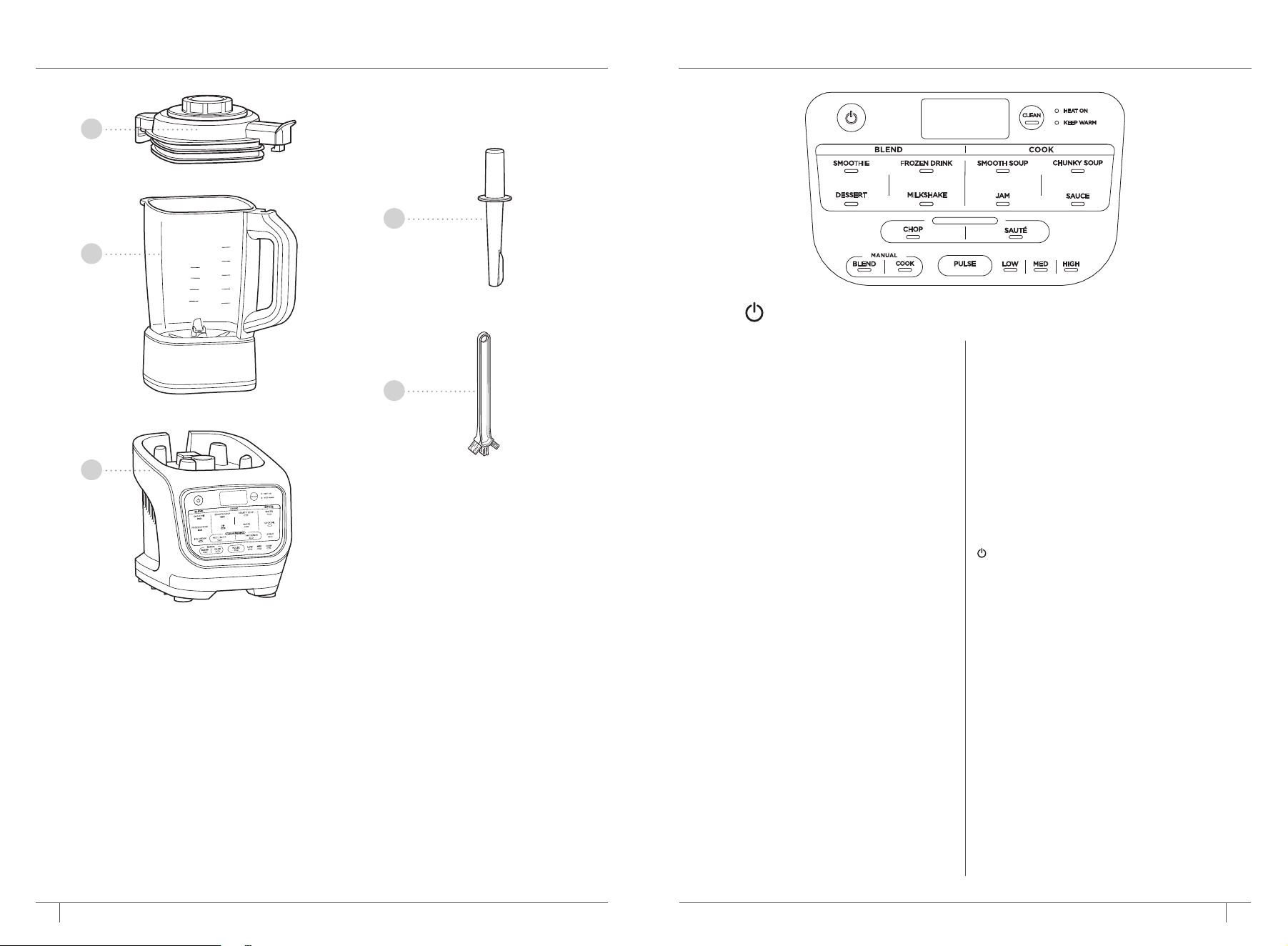
PARTS
A Jug Lid with Removable Centre Cap
B 1.7L Glass Jug with Built-in Heating Element
C Motor Base
(power cord not shown)
D Tamper
E Cleaning Brush
FEATURES
MANUAL SETTINGS:
BLEND
Select BLEND then choose your speed
setting. LOW, MED and HIGH will run for
60 seconds or until manually stopped.
COOK
Select COOK, then choose either
LOW, MED or HIGH temperature.
The setting will run for 60 minutes
or until manually stopped.
OTHER FEATURES:
POWER BUTTON
Use to turn the unit on or o.
CLEAN
Combines heat and rapid pulses to remove
stuck-on messes.
HEAT ON
Light will turn on when you have selected
a program or function that uses heat.
KEEP WARM
Light will turn on after cooking and the
unit will keep contents warm for up to
60 minutes.
AUTO-iQ
®
PROGRAMS:
Features intelligent programs that combine
unique pulsing, blending, pausing, and
heating patterns that do the work for you.
SMOOTHIE
Combine your favourite fresh or frozen
ingredients, liquids and powders.
DESSERT
Use your favourite frozen fruit and dairy
to make sorbets and frozen treats.
FROZEN DRINK
Crush ice and frozen fruit into restaurant
style frozen drinks.
MILKSHAKE
Blend milks and your favourite flavours
for a frothy milkshake.
SMOOTH SOUP
Cook and blend your favourite smooth soups.
CHUNKY SOUP
Create homemade soup with more texture.
JAM
Make your own fruit jams with texture
or strain afterwards for a smooth result.
SAUCE
Create sweet or savoury sauces and fondues.
CHOP
Quickly chop up ingredients before making
soups, sauces and dips.
SAUTE
Unlock more flavour by quickly cooking
onions, garlic, spices and more before
making a homemade soup, sauce or dip.
B
C
A
E
D
PRE-COOK
The power symbol should be used to turn your appliance on or o.
7 8ninjakitchen.co.ukninjakitchen.co.uk
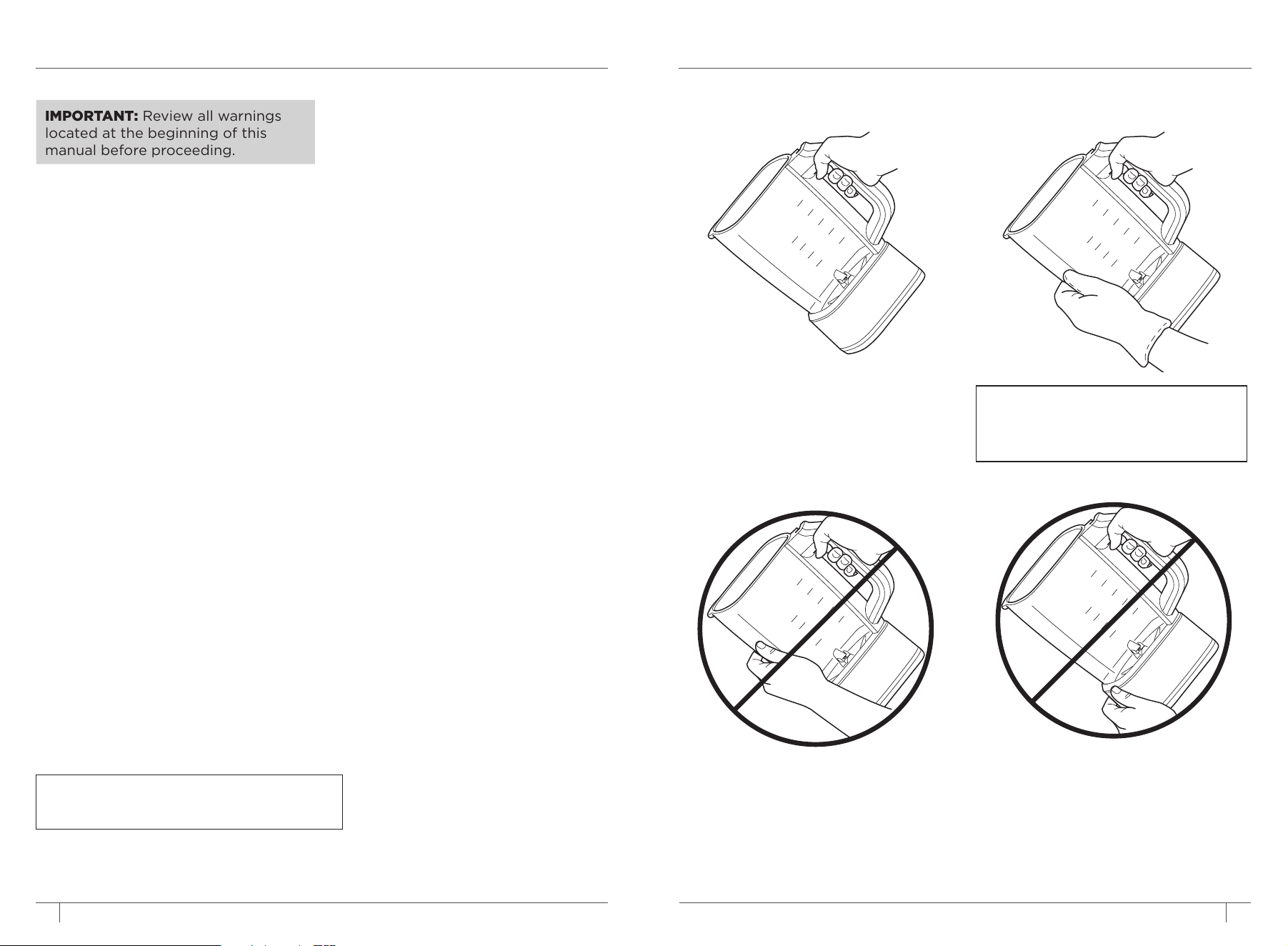
BEFORE FIRST USE HANDLING THE BLENDER JUG
LIFTING AND POURING FROM
THE JUG
IMPORTANT: Review all warnings
located at the beginning of this
manual before proceeding.
DO NOT grasp the underside of the jug
after hot blending or cooking. The surface
of the jug is hot during and after operation.
Surfaces are hot during and after operation.
To prevent burns or personal injury, ALWAYS
use protective hot pads or insulated oven
mitts and use available handles and knobs.
DO NOT grasp the sides of the jug after
hot blending or cooking. The surface of
the jug is hot during and after operation.
Surfaces are hot during and after operation.
To prevent burns or personal injury, ALWAYS
use protective hot pads or insulated oven
mitts and use available handles and knobs.
Firmly grasp the handle with one hand
and carefully pour out ingredients.
NOTE: If jug feels too heavy in one
hand, use a protective mitt or glove
and
support the jug weight with your
other hand.
1 Remove all packaging material and labels
from the appliance. Separate all parts
from each other.
2
Wash the jug, lid, and accessories in warm,
soapy water using a dishwashing utensil
with a handle to avoid direct contact
with the blades. DO NOT submerge the
jug when washing.
3 Thoroughly rinse and air-dry all parts
NOTE:
Follow cleaning instructions on page 12
very carefully.
NOTE:
DO NOT submerge the
jug when washing.
9 10ninjakitchen.co.ukninjakitchen.co.uk
PRE-COOK
PRE-COOK
GETTING STARTED WITH
YOUR BLENDER & SOUP MAKER
IMPORTANT: Review all warnings
before proceeding.
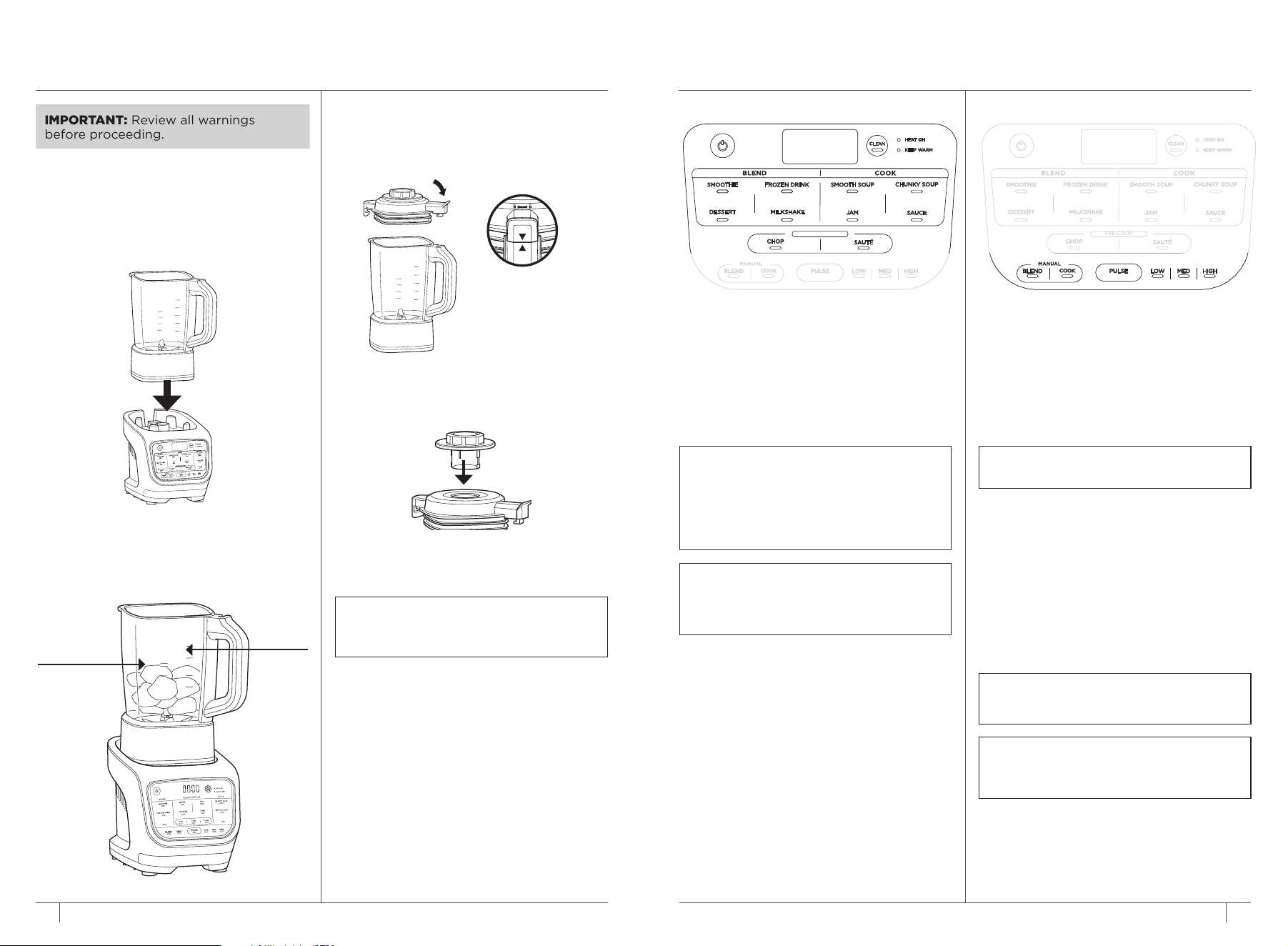
ASSEMBLY
1 Plug in motor base and place on a clean,
dry, level surface such as a worktop or table.
2 Lower the jug onto the motor base,
aligning the handle to the arrow on
the front right corner of the base.
3
Add ingredients, making sure not to exceed
the max fill lines on the side of the jug. In
COOK modes, DO NOT exceed the level
labelled HOT in BLEND mode, DO NOT
exceed the level labelled COLD.
Cold line
(1.7L)
Soup line
(1.4L)
6 To remove the lid from the jug, rotate the
lid anti-clockwise out of the lock position
and lift up.
NOTE: After heated programs, steam may
release as the lid is removed. Keep hands
on the outer tabs and lift directly up.
4 To install the lid on the lid on the jug, place
the lid tab to the right of the handle. Press
the lid down until it is secure. Rotate the
tab clockwise so the arrow on the lid tab
aligns with the arrow on the jug handle.
5 Secure the centre cap by placing it down
into the lid and twisting clockwise until it
clicks into place.
MANUAL SETTINGS
MANUAL BLEND
Manual Blend speeds give you ultimate
control over your blend.
1 To begin, press the Power button.
2 Choose BLEND to unlock speed options.
3 Select LOW, MED, HIGH, or PULSE to
begin blending.
MANUAL COOK
Manual Cook settings puts the control in
your hands.
1 To begin, press the Power button.
2 Choose COOK to unlock temperature options.
3 Select LOW, MED, or HIGH to begin cooking.
4 Timer will count up to 60 seconds or until
manually stopped.
NOTE: You can press PULSE during Manual
Cook mode to gently stir ingredients.
NOTE: The unit will beep 3 times to alert
you the that the program is going to stir
ingredients. Make sure center cap is secure
during use.
NOTE: For best results, quickly PULSE
ingredients periodically during cooking to
distribute heat and promote even cooking.
NOTE:
The Pulse setting will run only
when the PULSE button is pressed.
AUTO-IQ
®
PROGRAMS
1 To begin, press the Power button.
2 Press the program of your choice
from the BLEND, COOK or
PRE-COOK sections.
3 The Heat On light will turn on if
the selected program uses heat.
TIP: When making thicker recipes such
as ice creams and dips, use the tamper
to push ingredients towars the blades.
Tamper should only be used when lid is
attached to jug. Remove center cap and
replace with tamper.
PRE-COOK
PRE-COOK

11 ninjakitchen.co.ukninjakitchen.co.uk 1211 12
CARE & MAINTENANCE ERROR MESSAGES
CLEANING
Wait for all parts to cool before cleaning.
Separate all parts.
Hand-Washing
Wash the jug, lid, and tamper with warm,
soapy water. Use the included cleaning
brush to avoid direct contact with the
blades.
Dishwasher
The lid, centre cap and tamper are
dishwasher safe.
Motor Base
Press the power button to turn o the
unit, then unplug the motor base. Wipe
motor base with a clean, damp cloth.
CLEAN
A combination of heat and rapid pulses
easily removes residue from the nonstick
coating in minutes
1
Fill jug with 700ml of water and 2 small
drops of washing up liquid.
2 Place the lid on the jug and ensure it is
properly closed.
3 Press CLEAN.
4 When the program is complete, discard
the water and thoroughly rinse the jug.
TIPS FOR BEST CLEANING RESULTS:
1
Give the jug a quick rinse before running
the CLEAN program.
2
Run the CLEAN program immediately
after use.
STORING
Store the unit upright with the lid secured
on the jug.
RESETTING THE MOTOR
This unit features a unique safety system
that prevents damage to the motor by
temporarily disabling the motor if it begins
to overheat. Should this occur, follow the
reset procedure below.
1 Unplug the unit from the socket.
2 Allow the unit to cool for approximately
15 minutes before using.
IMPORTANT: Ensure that maximum
capacities are not exceeded. This is the
most typical cause of appliance overload.
ORDERING REPLACEMENT PARTS
To order additional parts and attachments,
visit ninjakitchen.co.uk
NOTE: DO NOT stack items on top of the
unit. Store any remaining attachments
alongside the unit or in a cabinet where they
will not be damaged or create a hazard.
NOTE:
DO NOT submerge the blender
jug. Submerging will damage the
integrated heating element.
NOTE:
DO NOT wash the blender jug
in the dishwasher. Dishwashing will
damage the integrated heating element.
NOTE: DO NOT attempt to remove
the jug while the blender is running.
Wait for the blades to stop spinning
before removing the jug.
DISPLAY SCREEN MESSAGES
“Lid”
The lid is not assembled correctly. Be sure
the lid is on the jug and locked in place
before running a program.
“JAr”
The jug is properly attached to the base.
Be sure the jug is secured in the base
before selecting a program.
“---” Blinking
You are attempting to run a program
too many times in a row. For your safety,
certain programs may be run only 2
consecutive times.
ERROR MESSAGES
“E01” or “E02”
Remove and reinstall the jug. If that does not
solve the issue, contact Customer Service.
So we may better assist you, please register
your product online at
registeryourninja.com
and have the product on hand when you call.

13 14
ninjakitchen.co.uk
ninjakitchen.co.uk
TROUBLESHOOTING GUIDE NOTES
WARNING: To reduce the risk of shock and unintended operation,
turn power o and unplug unit before troubleshooting�
Unit doesn’t turn on�
• Make sure unit is plugged in.
• Display will light up with usable programs once connected to power. Jug and lid
must be engaged to select a program.
Lid is stuck on jug�
• The lid is removed by rotating from the handle anti-clockwise and then lifting up.
My jug will not assemble to the base�
• Make sure the Ninja® logo is facing forwards before placing the jug directly onto
the blender base. If the jug is still not fully attached, rotate the metal coupling
under the jug to help align it to the base.
Cannot change time or temperature settings on Auto-iQ® programs�
• All programs were developed by culinary experts to deliver the perfect balance
of heating, stirring, and blending patterns to give perfect results, so you do not
have to set the time or temperature.
• To select a specific temperature, use the Manual COOK setting instead of an
Auto-iQ program.
Program has paused�
• If the lid was removed while running a program or while in a Manual mode, the cooking
or blending function will pause. Replace the lid and push the program button again to
continue from where the time left o.
Why does the blender sometimes count up and other times count down?
• Auto-iQ programs are timed to finish on their own when they are complete, so the
clock counts down until the program has finished. When using Manual modes, the
clock will count up from 0 until the auto shuto time is reached or the button for
the current setting is pressed again.
Jug still has residue after running the CLEAN program�
• Try running the CLEAN program a second time. You may also hand-wash
the jug using the included cleaning brush, which is specifically designed to clean
those hard-to-reach areas.
The control panel returns to home display�
• The control panel is designed to return to standby mode when left inactive for
3 minutes. If you have taken longer than 3 minutes to choose a function, or if
the program has finished, the unit will return to standby mode.
Why does the unit beep during Auto-iQ Programs?
• We’ve incorporated a stir alert within all Auto-iQ programs to let you know the unit
is about to stir. The alert is 3 beeps followed by a 2-second pause before each stir.

Illustrations may dier from actual product. We are constantly striving to improve our products,
therefore the specifications contained herein are subject to change withoutnotice.
AUTO-IQ, FOODI and NINJA are registered trademarks of SharkNinja Operating LLC.
© 2021 SharkNinja Operating LLC
HB150UK�IB�MP�210719�Mv1
PRINTED IN CHINA
VISIT US ONLINE AT:
ninjakitchen.co.uk
Or follow us on any of our social media pages:
@ninjakitchenuk
SharkNinja Europe Limited
3150 Century Way
Thorpe Park, Leeds
LS15 8ZB, UK
ninjakitchen�co�uk
SharkNinja Germany GmbH,
c/o Regus Management GmbH
Excellent Business Center 10
+11/Stock Westhafenplatz 1,
60327 Frankfurt am Main,
Germany
ninjakitchen�eu