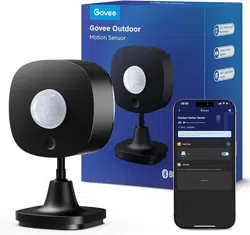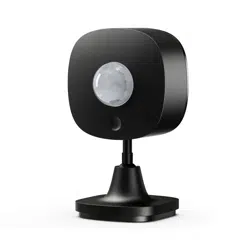

Govee Outdoor Motion Sensor
Model: H5129
User Manual

English 01
Deutsch 11
Français 22
Español 32
Italiano 43
01
English
1.
2.
3.
4.
It is recommended to install it vertically more than
3ft away from the ground to avoid static electricity to
make sure it works properly instead of being falsely
triggered.
The lens should not directly face to large pendular
objects or objects that can easily be made pendular.
The significant swings of large objects can cause
sudden changes in airflow within the detected area
resulting in false triggering.
The lens is used for helping the probe capture
signals from a larger area. There can’t be any fog or
grease on it. The lens can not be blocked by other
objects which may prevent the probe from sensing
any body movements.
The product performance is affected by the ambient
temperature, body type, thickness of clothing,
walking speed, walking direction and other factors.
When the ambient temperature is low, the
detectable distance is long. When the ambient
temperature is high, the sensitivity of the probe will
decline, and the detectable distance will be
shortened. This is a normal phenomenon and can be
adjusted through the product sensitivity settings.
CAUTION:
The Govee Outdoor Motion Sensor is an intelligent
monitoring device with a built-in infrared temperature
probe, a precision circuit, and a Fresnel lens. Its 120°
large viewing angle enables efficient monitoring of
body movements. With Bluetooth technology, the
sensor communicates with Govee's unique distributed
gateway, realizing multiple functions such as group
control, safety alerts, etc. by using the detected
movement as a condition to trigger automation. The
IP65 waterproof rating makes it suitable for various
outdoor environments. Its crafty design makes it easy
to be fixed on different outdoor surfaces. It can
provide you not only with efficient safety monitoring,
but also a more intelligent and convenient experience.
Introduction
Included in the Box
Item
Outdoor Motion Sensor
Battery
Screwdriver
Screw & Expansion Cube
User Manual
Quantity
1
2
1
2
1
02
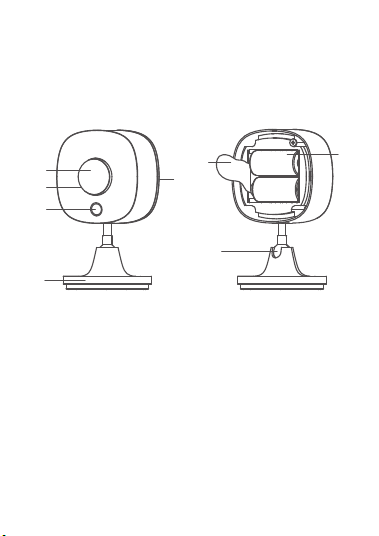
a.
b.
c.
d.
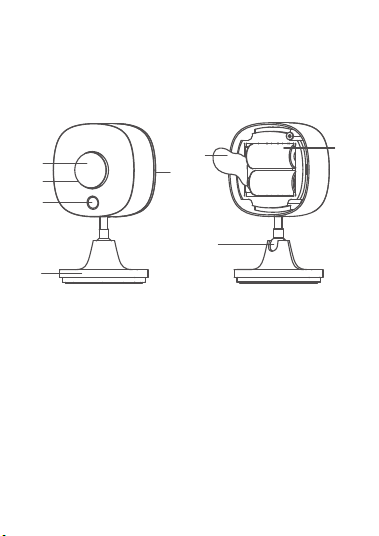
Sensor Lens
Indicator Light
Function Button
Bottom Cover
e.
f.
g.
h.
Universal Ball Joint
Base
Battery
Insulation Sheet
a
b
d
c
f
e
g
h
Part Names
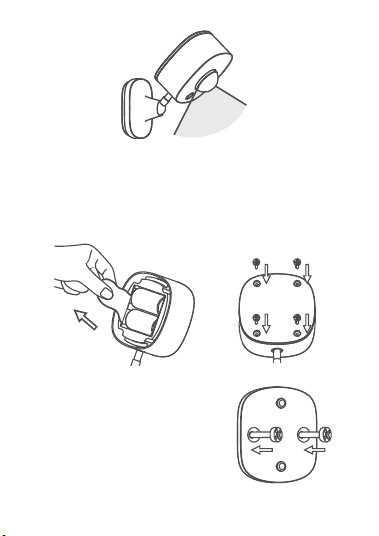
The expansive 120° large viewing angle of the outdoor
motion sensor enables efficient monitoring of body
movements. With Bluetooth technology, the sensor
communicates with Govee's unique distributed
gateway, realizing multiple functions such as group
control, safety alerts, etc. by using the detected
movement as a condition to trigger automation.
Functions
03
120°
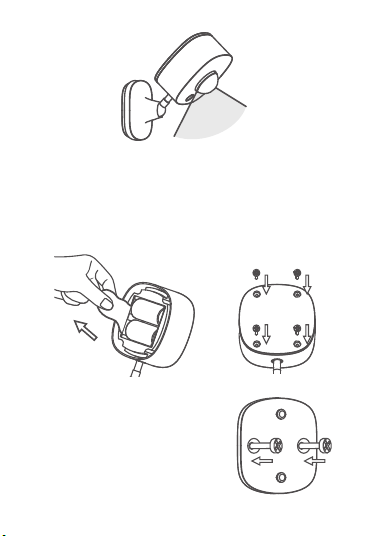
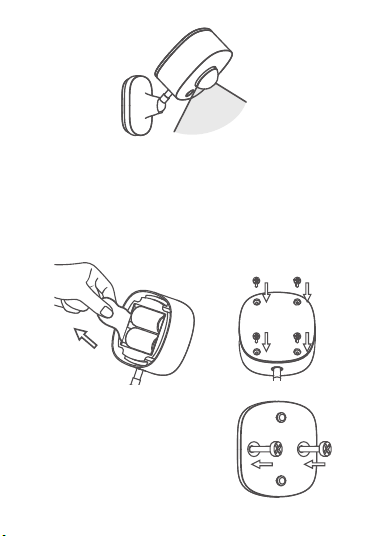
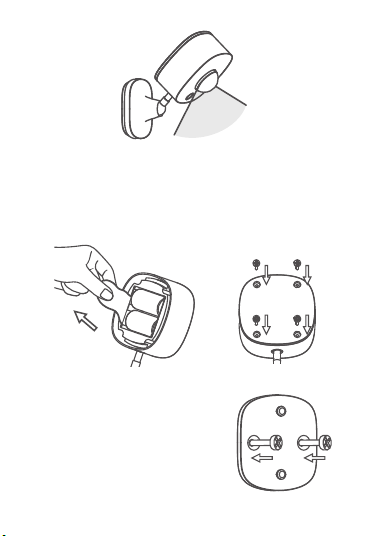
1. Open the packaging. Remove the bottom cover and
pull out the insulation sheet. Then, put the bottom
cover back into place. Firmly fix the cover with the
provided screws.
Getting Started
2. Determine the installation
location. Make sure there
aren’t any obstacles in the
surrounding area. Fix the
base with screws.
04
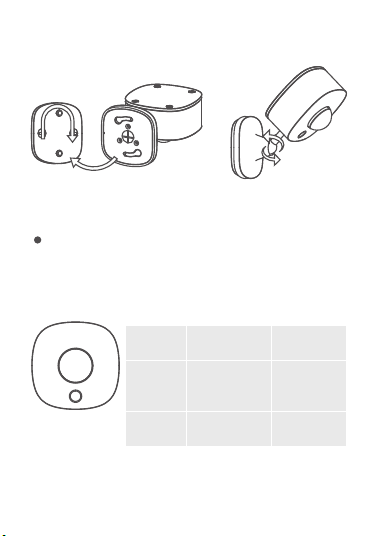
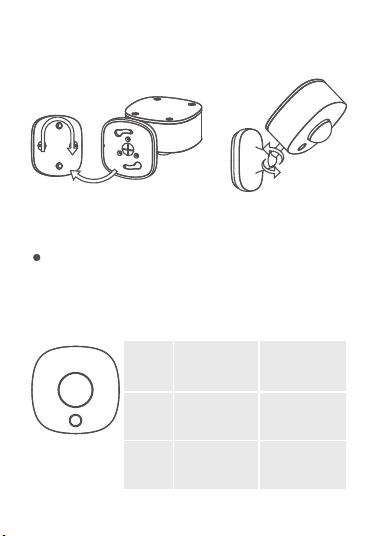
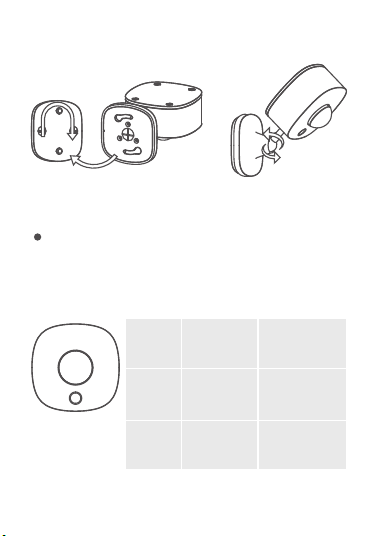
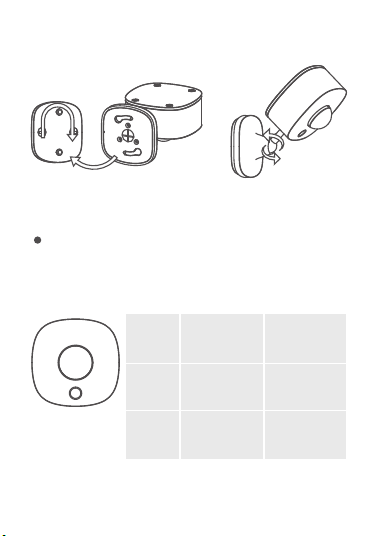
4. The installation is completed.
Note:
In order to prevent the detected area from being
blocked, please target the lens at the detected area
accurately.
3. Attach the sensor to the base and rotate clockwise
to fix it onto the base by aligning the holes on the
base first.
Action Press and
hold for 3s
Single press
Indicator
Status
Flashes Red /
Working
Status
During the
Bluetooth
Broadcasting
Network
Inspection
Function Button
05
Press and hold the function button for 3 seconds.
When the indicator light flashes slowly, it means
that the device has entered the Bluetooth
Broadcast Mode. Please follow the in-app
instructions to complete pairing. During the pairing,
make sure the node devices at your home have
been authorized in Gateway in your app.
The installation is completed.
1.
2.
3.
Turn on your smartphone’s Bluetooth.
Open Govee Home App, tap the “+” icon in the top
right corner and search for “H5129.”
4. Effective Communication Distance Verification: After
completing the pairing, verify the effective
communication distance in the app.
Downloading Govee Home App
To download Govee Home App, scan the QR code or
search for “Govee” in the Apple App Store® (iOS) or
Google Play Store (Android).
Pairing with Govee Home App
How can I make sub-devices automati-
cally turn off after being triggered by
the outdoor motion sensor?
06

Set “Turn on the device” in Instant Execution and add a
“Turn off the device” command in Delayed Execution,
and set a specific time that you wish it to turn off. You
will achieve automatic control for the best experience.
Troubleshooting
The troubleshooting section below is for solving
frequently asked questions for the motion sensor. If your
problem persists, please contact Customer Support.
Govee Home App is being continually updated and
its features do expand.
Note:
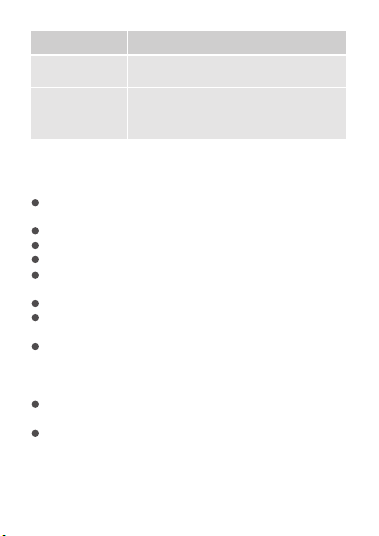
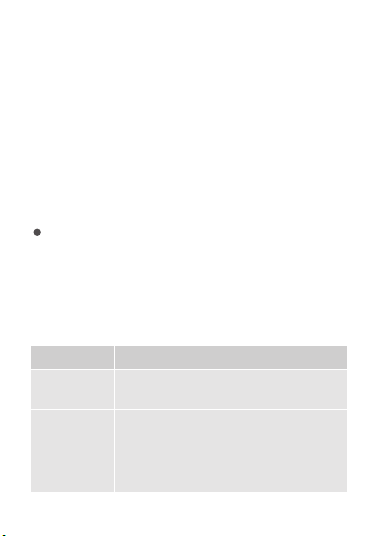
Problem
The indicator
light is off.
The sensor
cannot detect
any movements.
1. Replace with a new battery.
2. Contact Customer Support.
Possible Solution
1.
2.
3.
4.
5.
Check the device’s battery and
make sure it is fully charged.
Open the app and make sure the
device and the distributed
gateway are within the effective
communication distance.
Make sure no obstacles stand in
front of the probe within the
detection area.
Contact Customer Support.
Increase the sensitivity.
07
Problem Possible Solution
For App & Connectivity
1. Cannot connect to Govee Home App.
Make sure your smartphone is powered on and is
not connected with other Bluetooth devices.
Enable the smartphone’s Location Services.
Try connecting with another smartphone.
Make sure your app is updated to the latest version.
Make sure you connect to your Wi-Fi router’s 2.4GHz
network and that the network is working correctly.
Make sure the Wi-Fi password you entered is correct.
Shorten the distance between the sensor,
distributed gateway, and the smartphone.
Make sure your sensor and the distributed gateway
are located away from appliances that produce
electromagnetic radiation (e.g. microwave ovens,
refrigerators, etc.)
If you are using a VPN, try turning it off and then
connecting the sensor.
Disable portal authentication for your Wi-Fi network.
If portal authentication is enabled, this sensor will
not be able to access your Wi-Fi network, and setup
will fail. Portal authentication means that you need
False triggering
often happens.
Decrease the sensitivity.
Low battery
alert from the
app.
Replace the battery.
08
2. Cannot find the device on Bluetooth Device Nearby
page of the app.
The sensor may be connected with another
smartphone. Disconnect it from the other
smartphone first.
3. The sensor is offline.
Make sure the sensor is plugged in and powered on,
then refresh the “Device” page in Govee Home App
by swiping down on the screen.
Make sure your router is connected to the internet,
and your smartphone’s network connection is
working.
If the Wi-Fi password has been changed, the sensor
will automatically go offline. Try connecting it to the
network again.
Delete the offline sensor from Govee Home App,
then add and reconfigure the sensor again in the
app.
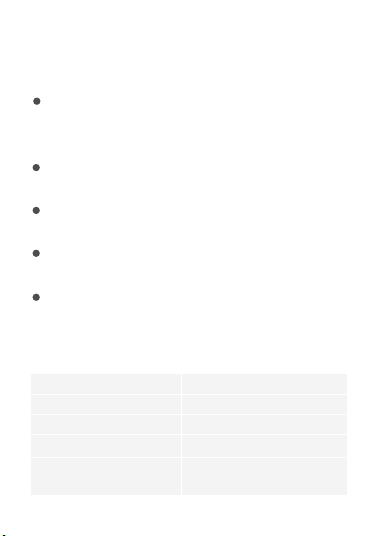
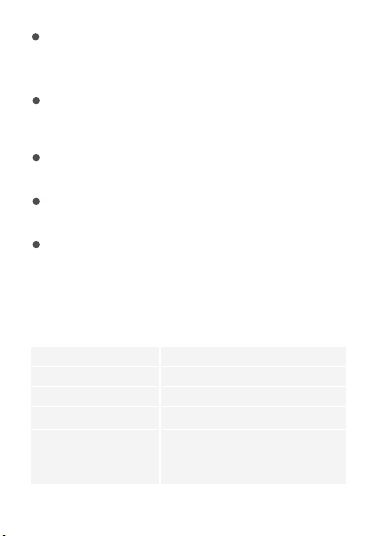
H5129Model Name
CR123APower Supply
6V 4mAPower Input
-20°C to 45°C/-4°F to 113°F
Working Temperature
55m/180ft (No obstacles)
Bluetooth
Communication Distance
Specifications
to sign in to your Wi-Fi network through a web page
before you can use the Internet.
09
Appendix
After-Sales Service
Warranty: 12-Month Limited Warranty
Support: Lifetime Technical Support
Email: [email protected]
Official Website: www.govee.com
@Govee
@Govee
@Goveeofficial
@Govee
10
Deutsch
11
ACHTUNG:
1.
2.
3.
4.
Es wird empfohlen, es vertikal mehr als dreiFuß vom
Boden entfernt zu installieren, um statische
Elektrizität zu vermeiden und sicherzustellen, dass
es richtig funktioniert und nicht fälschlicherweise
ausgelöst wird.
Das Objektiv sollte nicht direkt auf große pendelnde
Objekte oder auf Objekte gerichtet sein, die leicht
zum Pendeln gebracht werden können. Die starken
Schwankungen großer Objekte können plötzliche
Änderungen des Luftstroms im erfassten Bereich
verursachen, was zu Fehlauslösungen führt.
Die Linse wird verwendet, um der Sonde dabei zu
helfen, Signale aus einem größeren Bereich zu
erfassen. Sie darf nicht beschlagen oder fettig sein.
Die Linse darf nicht durch andere Gegenstände
blockiert werden, die verhindern könnten, dass die
Sonde Körperbewegungen erfasst.
Die Leistung des Produkts wird von der
Umgebungstemperatur, dem Körpertyp, der Dicke
der Kleidung, der Gehgeschwindigkeit, der
Gehrichtung und anderen Faktoren beeinflusst.
Wenn die Umgebungstemperatur niedrig ist, ist die
Erkennungsweite groß. Bei hohen Umgebungstem-
peraturen nimmt die Empfindlichkeit der Sonde ab,
und die Erkennungsweite verkürzt sich. Dies ist ein
normales Phänomen und kann über die
Empfindlichkeitseinstellungen des Produkts
angepasst werden.
Der Govee Außen-Bewegungssensor ist ein intelligentes
Überwachungsgerät mit einem eingebauten
Infrarot-Temperaturfühler, einer Präzisionsschaltung und
einer Fresnel-Linse. Sein großer Betrachtungswinkel von
120° ermöglicht eine effiziente Überwachung von
Körperbewegungen. Dank Bluetooth-Technologie
kommuniziert der Sensor mit dem einzigartigen
dezentralen Gateway von Govee und realisiert mehrere
Funktionen wie Gruppensteuerung, Sicherheitswarnun-
gen usw., indem er die erkannte Bewegung als
Bedingung für die Auslösung der Automatisierung
verwendet. Dank der Wasserdichtheitsklasse IP65 ist er
für verschiedene Außenbereiche geeignet. Das raffinierte
Design ermöglicht eine einfache Befestigung an
verschiedenen Außenflächen. Es kann Ihnen nicht nur
eine effiziente Sicherheitsüberwachung bereitstellen,
sondern auch eine intelligentere und bequemere
Erfahrung.
Einführung
In der Box enthalten
Artikel
Außenbewegungsmelder
Batterie
Schraubenzieher
Schrauben- und Erweiterungswürfel
Benutzerhandbuch
Menge
1
2
1
2
1
12
a
b
d
c
f
e
g
h
a.
b.
c.
d.
Sensorlinse
Kontrollleuchte
Funktionstaste
Untere Abdeckung
e.
f.
g.
h.
Universal-Kugelgelenk
Basis
Batterie
Isolierfolie
Bauteilnamen
Der große Blickwinkel von 120° des Außen-Bewegungs-
sensors ermöglicht eine effiziente Überwachung von
Körperbewegungen. Dank Bluetooth-Technologie
kommuniziert der Sensor mit dem einzigartigen
dezentralen Gateway von Govee und realisiert
mehrere Funktionen wie Gruppensteuerung,
Sicherheitswarnungen usw., indem er die erkannte
Bewegung als Bedingung für die Auslösung der
Automatisierung verwendet.
Funktionen
13
120°
1. Öffnen Sie die Verpackung. Entfernen Sie die untere
Abdeckung und ziehen Sie die Isolierfolie heraus.
Anschließend bringen Sie die untere Abdeckung
wieder an. Befestigen Sie die Abdeckung fest mit
den bereitgestellten Schrauben.
2. Legen Sie den Installationsort
fest. Stellen Sie sicher, dass
sich in der Umgebung keine
Hindernisse befinden.
Befestigen Sie die Basis mit
den Schrauben.
Erste Schritte
14
Action 3Sekunden
lang gedrückt
halten
Einmaliges
Drücken
Netzwerküb
erprüfung
3. Bringen Sie den Sensor an der Basis an und drehen
Sie ihn im Uhrzeigersinn, um ihn an der Basis zu
befestigen, indem Sie zuerst die Löcher an der Basis
ausrichten.
4. Die Installation ist abgeschlossen.
Hinweis:
Um zu verhindern, dass der erkannte Bereich
blockiert wird, richten Sie das Objektiv bitte genau
auf den erkannten Bereich.
An-
zeiges-
tatus
Blinkt rot /
Arbeit-
sstatus
Während der
Bluetooth
Übertragung
Funktionstaste
15
Die Installation ist abgeschlossen.
Herunterladen der Govee Home-App
Um die Govee Home-App herunterzuladen, scannen
Sie den QR-Code ein oder suchen Sie im Apple App
Store® (iOS) oder im Google Play Store (Android) nach
„Govee“.
1.
2.
3.
4.
Schalten Sie Bluetooth auf Ihrem Smartphone ein.
Öffnen Sie die Govee Home-App, tippen Sie auf das
Symbol „+“ oben rechts und suchen Sie nach
„H5129“.
Halten Sie die Funktionstaste 3 Sekunden lang
gedrückt, um die Kopplung zu starten. Befolgen Sie
die In-App-Anweisungen, um die Kopplung
abzuschließen. Achten Sie bei der Kopplung darauf,
dass die Knotengeräte bei Ihnen zu Hause im
Gateway in Ihrer App autorisiert wurden.
Überprüfung der effektiven Kommunikationsentfer-
nung: Nachdem Sie die Kopplung abgeschlossen
haben, überprüfen Sie die effektive Kommunikation-
sentfernung in der App.
Kopplung Ihres Geräts mit der Govee
Home-App
16

Wie kann ich dafür sorgen, dass sich
Untergeräte automatisch ausschalten,
nachdem sie durch den Außenbewe-
gungssensor ausgelöst wurden?
Stellen Sie „Gerät einschalten“ in „Instant Execution“
ein, fügen Sie einen Befehl „Gerät ausschalten“ in
„Delayed Execution“ hinzu und legen Sie eine
bestimmte Zeit fest, zu der das Gerät ausgeschaltet
werden soll. So erzielen Sie eine automatische
Steuerung für ein optimales Erlebnis.
Die Govee Home-App wird ständig aktualisiert und
ihre Funktionen werden erweitert.
Hinweis:
Problembehebung
Der folgende Abschnitt zur Fehlerbehebung dient zur
Beantwortung häufig gestellter Fragen zum
Bewegungssensor. Wenn Ihr Problem weiterhin
besteht, wenden Sie sich bitte an die Kundenbetreu-
ung.
17

Problem
Die
Kontrollleuchte
ist ausgeschaltet.
Der Sensor kann
keine
Bewegungen
erkennen.
1. Durch eine neue Batterie ersetzen.
2. Wenden Sie sich an die
Kundenbetreuung.
Warnung bei
niedrigem
Batteriestand
über die App.
Ersetzen Sie die Batterie.
Es kommt häufig
zu Fehlauslösun-
gen.
Verringern Sie die Empfindlichkeit.
Mögliche Lösung
1.
2.
3.
4.
5.
Überprüfen Sie die Batterie des
Geräts und stellen Sie sicher, dass
sie vollständig aufgeladen ist.
Öffnen Sie die App und stellen Sie
sicher, dass sich das Gerät und
das verteilte Gateway innerhalb
der effektiven Kommunikations-
distanz befinden.
Stellen Sie sicher, dass sich im
Erfassungsbereich keine
Hindernisse vor der Sonde
befinden.
Wenden Sie sich an die
Kundenbetreuung.
Erhöhen Sie die Empfindlichkeit.
Für App und Konnektivität
1. Verbindung zur Govee Home-App nicht möglich.
18
Stellen Sie sicher, dass Ihr Smartphone eingeschaltet
und nicht mit anderen Bluetooth-Geräten verbunden
ist.
Aktivieren Sie die Standortdienste des Smartphones.
Versuchen Sie, sich mit einem anderen Smartphone
zu verbinden.
Stellen Sie sicher, dass Ihre App auf die neueste
Version aktualisiert ist.
Stellen Sie sicher, dass Sie sich mit dem
2,4-GHz-Netzwerk Ihres WLAN- Routers verbinden
und dass das Netzwerk ordnungsgemäß funktioniert.
Stellen Sie sicher, dass das von Ihnen eingegebene
WLAN-Passwort korrekt ist.
Verkürzen Sie den Abstand zwischen Sensor,
verteiltem Gateway und Smartphone.
Stellen Sie sicher, dass sich Ihr Sensor und das
verteilte Gateway nicht in der Nähe von Geräten
befinden, die elektromagnetische Strahlung erzeugen
(z. B. Mikrowellengeräte, Kühlschränke usw.)
Wenn Sie ein VPN verwenden, schalten Sie es aus und
verbinden Sie dann den Sensor.
Deaktivieren Sie die Portal Authentifizierung für Ihr
WLAN Netzwerk. Wenn die Portal-Authentifizierung
aktiviert ist, kann dieser Sensor nicht auf Ihr
WLAN-Netzwerk zugreifen und die Einrichtung schlägt
fehl. Portal-Authentifizierung bedeutet, dass Sie sich
über eine Webseite bei Ihrem WLAN-Netzwerk
anmelden müssen, bevor Sie das Internet nutzen
können.
2. Das Gerät kann auf der App-Seite „Bluetooth-Gerät
in der Nähe“ nicht gefundenwerden.
19
Der Sensor kann mit einem anderen Smartphone
verbunden werden. Trennen Sie ihn zuerst vom
anderen Smartphone.
3. Der Sensor ist offline.
Vergewissern Sie sich, dass der Sensor eingesteckt
und eingeschaltet ist, und aktualisieren Sie dann die
Seite "Gerät" in der Govee Home App, indem Sie auf
dem Bildschirm nach unten wischen.
Stellen Sie sicher, dass Ihr Router mit dem Internet
verbunden ist und die Netzwerkverbindung Ihres
Smartphones funktioniert.
Wenn das WLAN Passwort geändert wurde, geht der
Sensor automatisch offline. Versuchen Sie, ihn
erneut mit dem Netzwerk zu verbinden.
Löschen Sie den Offline Sensor aus der Govee
Home-App, fügen Sie dann den Sensor hinzu und
konfigurieren Sie ihn erneut in der App.
H5129
Modellname
CR123AStromversorgung
6 V 4 mAStromeingang
-20 °C bis 45 °C/-4 °F bis 113 °F
Betriebstemperatur
55 m/180 ft (Keine Hindernisse)
Bluetooth
Kommunikationsent-
fernung
Technische Daten
20
Anhang
Kundendienst
Garantie: 12-monatige beschränkte Garantie
Unterstützung: Lebenslange technische Unterstützung
E-Mail: [email protected]
Offizielle Website: www.govee.com
@Govee @Govee
@Goveeofficial@Govee
21
Français
22
ATTENTION:
Il est recommandé de l’installer verticalement à plus
de 3 pieds du sol pour éviter toute électricité
statique et s’assurer qu’il fonctionne correctement
sans se déclencher accidentellement.
La lentille ne doit pas faire face directement à des
objets pendulaires de grande taille ou à des objets
qui peuvent facilement être rendus pendulaires. Les
oscillations importantes des objets de grande taille
peuvent provoquer des changements soudains dans
le flux d’air à l’intérieur de la zone détectée, ce qui
entraîne des déclenchements intempestifs.
La lentille permet à la sonde de capter des signaux
provenant d’une zone plus large. Il ne doit pas y
avoir de brouillard ou de graisse sur la lentille La
lentille ne doit pas être obstruée par d’autres objets
qui pourraient empêcher la sonde de détecter les
mouvements du corps.
Les performances du produit sont affectées par la
température ambiante, le type de corps, l’épaisseur
des vêtements, la vitesse de marche, la direction de
la marche et d’autres facteurs. Lorsque la
température ambiante est basse, la distance de
détection est longue. Lorsque la température
ambiante est élevée, la sensibilité de la sonde
diminue et la distance de détection se réduit. Il s’agit
d’un phénomène normal qui peut être réglé par le
biais des paramètres de sensibilité du produit.
1.
2.
3.
4.
Le capteur de mouvement extérieur Govee est un
dispositif de surveillance intelligent doté d'une sonde de
température infrarouge intégrée, d'un circuit de
précision et d'une lentille de Fresnel. Son grand angle de
vision de 120° permet un suivi efficace des mouvements
du corps. Grâce à la technologie Bluetooth, le capteur
communique avec la passerelle distribuée unique de
Govee, réalisant de multiples fonctions telles que le
contrôle de groupe, les alertes de sécurité, etc. en
utilisant le mouvement détecté comme condition pour
déclencher l'automatisation. L'indice d'étanchéité IP65 le
rend adapté à divers environnements extérieurs. Son
design astucieux permet de le fixer facilement sur
différentes surfaces extérieures. Il peut vous offrir non
seulement une surveillance efficace de la sécurité, mais
également une expérience plus intelligente et plus
pratique.
Introduction
Contenu de la boîte
Article
Capteur de mouvement extérieur
Batterie
Tournevis
Vis et cube d'expansion
Manuel d'utilisation
Quantité
1
2
1
2
1
23
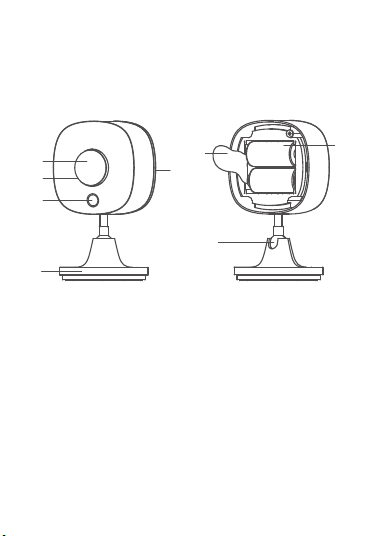
a
b
d
c
f
e
g
h
a.
b.
c.
d.
Lentille du capteur
Voyant lumineux
Bouton de fonction
Couvercle inférieur
e.
f.
g.
h.
Joint à rotule universelle
Base
Batterie
Feuille d'isolation
Noms de pièces
Le grand angle de vision de 120° du capteur de
mouvement extérieur permet une surveillance efficace
des mouvements du corps. Grâce à la technologie
Bluetooth, le capteur communique avec la passerelle
distribuée unique de Govee, réalisant de multiples
fonctions telles que le contrôle de groupe, les alertes
de sécurité, etc. en utilisant le mouvement détecté
comme condition pour déclencher l'automatisation.
Fonctions
24
120°
1. Ouvrez l'emballage. Retirez le couvercle inférieur et
retirez la feuille isolante. Ensuite, remettez le
couvercle inférieur en place. Fixez fermement le
couvercle à l'aide des vis fournies.
2. Déterminez l'emplacement de
l'installation. Assurez-vous qu'il
n'y a aucun obstacle dans les
environs. Fixez la base à l'aide
des vis.
Démarrage
25
/
3. Fixez le capteur à la base et tournez dans le sens
horaire pour le fixer sur la base en alignant d'abord
les trous de la base.
4. L'installation est terminée.
Remarque :
Afin d’éviter que la zone détectée ne soit bloquée, il
convient de cibler précisément l’objectif sur la zone
détectée.
Indica-
teur
d’état
Clignote en
rouge
État de
fonction
nement
Pendant la
diffusion
Bluetooth
Bouton de fonction
Action Appuyez
longuement
pendant 3s
Une seule
pression
Test de
réseau
26
L'installation est terminée.
Téléchargement de l'Application Govee
Home
Pour télécharger l'application Govee Home, scannez le
code QR ou recherchez «Govee» sur Apple App
Store® (iOS) ou sur Google Play Store (Android).
1.
2.
3.
4.
Activez le Bluetooth de votre smartphone.
Ouvrez l'application Govee Home, appuyez sur l'icône
«+» dans le coin supérieur droit et recherchez «
H5129».
Appuyez sur le bouton de fonction et maintenez-le
enfoncé pendant 3secondes pour démarrer le
couplage. Terminez le couplage en suivant les
instructions de l'application. Lors du couplage,
assurez-vous que les appareils nœuds de votre
domicile ont été autorisés dans Passerelle dans votre
application.
Vérification de la bonne distance de communication:
Une fois le couplage terminé, vérifiez la distance de
communication effective dans l'application.
Association à l'Application Govee Home
27
Association à l'Application Govee Home
Sélectionnez «Allumer l’appareil» dans Exécution
instantanée et ajoutez une commande «Éteindre
l’appareil» dans Exécution différée, et définissez une
heure précise à laquelle vous souhaitez qu’il s’éteigne.
Vous obtiendrez une commande automatique pour la
meilleure expérience.
Comment puis-je éteindre automatique-
ment les appareils secondaires après
qu’ils ont été déclenchés par le capteur
de mouvement extérieur?
L'Application Govee Home est continuellement mise
à jour et ses fonctionnalités s'étendent.
Remarque:
Dépannage
La section de dépannage ci-dessous sert à résoudre les
questions fréquemment posées concernant le capteur
de mouvement. Si votre problème persiste, veuillez
contacter le service clients.
Problème
Le voyant
est éteint.
Le capteur ne
peut détecter
aucun
mouvement.
1. Remplacez-la par une nouvelle batterie.
2. Contactez l'assistance clientèle.
Solution probable
1.
2.
Vérifiez la batterie de l'appareil et
assurez- vous qu'elle est
complètement chargée.
Ouvrez l'application et assurez-vous
que l'appareil et la passerelle
distribuée se trouvent à distance de
communication effective.
Assurez-vous qu'aucun obstacle ne
se trouve devant la sonde dans la
zone de détection.
Contactez l'assistance clientèle.
Augmentez la sensibilité.
28
Problème Solution probable
3.
4.
5.
Vérifiez la batterie de l'appareil et
assurez- vous qu'elle est
complètement chargée.
Ouvrez l'application et assurez-vous
que l'appareil et la passerelle
Alerte de
batterie faible
depuis
l'application.
Remplacez la batterie.
Des faux
déclenche-
ments se
produisent
souvent.
Diminuez la sensibilité.
distribuée se trouvent à distance de
communication effective.
Assurez-vous qu'aucun obstacle ne
se trouve devant la sonde dans la
zone de détection.
Contactez l'assistance clientèle.
Augmentez la sensibilité.
Pour l'application et la connectivité
1. Impossible de se connecter à l’application Govee
Home.
Assurez-vous que votre smartphone est allumé et
qu'il n'est connecté à aucun autre appareil Bluetooth.
Activez les services de localisation de votre
smartphone.
Essayez de vous connecter avec un autre
smartphone.
Assurez-vous de disposer de la dernière version de
votre application.
Assurez-vous que vous vous connectez au réseau2,4
GHz de votre routeur Wi-Fi et que le réseau
fonctionne correctement.
29
Assurez-vous que le mot de passe Wi-Fi que vous
avez saisi est correct.
Réduisez la distance entre le capteur, la passerelle
distribuée et le smartphone.
Assurez-vous que votre capteur et la passerelle
distribuée sont situés loin des appareils qui émettent
des radiations électromagnétiques (ex: micro-ondes,
réfrigérateurs, etc.)
Si vous utilisez un VPN, essayez de le désactiver puis
de connecter le capteur.
Désactivez le portail d'authentification de votre
réseau Wi-Fi. Ce capteur
ne pourra pas accéder à
votre réseau Wi-Fi et la configuration échouera si le
portail d'authentification est activé. Un portail
d'authentification signifie que vous devez vous
connecter à votre réseau Wi-Fi à travers une page
web avant de pouvoir accéder à Internet.
2. Impossible de trouver l'appareil sur la page Appareil
Bluetooth à proximité de l'application.
Le capteur pourrait être connecté à un autre
smartphone. Déconnectez-le d'abord de l'autre
smartphone.
3. Le capteur est hors ligne.
Assurez-vous que le capteur est branché et allumé,
puis actualisez la page «Appareil» dans l'application
Govee Home en faisant glisser l'écran vers le bas.
Assurez-vous que le routeur est connecté à Internet
et que la connexion réseau de votre smartphone
fonctionne.
Le capteur se déconnectera automatiquement si
vous modifiez le mot de passe du Wi-Fi. Essayez de
le reconnecter au réseau.
30
Supprimez le capteur hors ligne de l'application
Govee Home, puis ajoutez et configurez à nouveau
le capteur dans l'application.
Nom du modèle
Alimentation
Entrée d'alimentation
Température de
fonctionnement
H5129
CR123A
6V 4mA
-20°C à 45°C/-4°F à 113°F
55m/180pieds
(sans obstacles)
Distance de communica-
tion Bluetooth
Caractéristiques techniques
Annexe
Service après-vente
Garantie: Garantie limitée 12 mois
Assistance: Assistance technique à vie
E-mail: [email protected]
Site Internet officiel: www.govee.com
@Govee
@Govee
@Goveeofficial
@Govee
31
Español
32
1.
2.
3.
4.
Se recomienda instalar el producto verticalmente a
más de 1 metro del suelo para evitar la electricidad
estática y asegurarse así de que funcione
correctamente y no se produzcan falsos positivos.
La lente no debe mirar directamente a grandes
objetos pendulares u objetos que puedan pendular
con facilidad. El balanceo de objetos grandes puede
causar cambios repentinos en el flujo de aire dentro
del área detectada, lo que puede resultar en una
activación involuntaria.
El objetivo de la lente es ayudar a la sonda a
capturar señales de un área mayor. Asegúrese de
que no haya niebla ni suciedad en la lente.
Asegúrese de que la lente no quede bloqueada por
otros objetos que puedan impedir que la sonda
detecte los movimientos del cuerpo.
El rendimiento del producto se ve afectado por la
temperatura ambiente, el tipo de cuerpo, el grosor
de la ropa, la velocidad al caminar, la dirección al
caminar y otros factores. Cuando la temperatura
ambiente es baja, la distancia de detección es
mayor. Cuando la temperatura ambiente es alta, la
sensibilidad de la sonda disminuye y la distancia de
detección será menor. Se trata de un fenómeno
normal y se puede ajustar a través de la
configuración de sensibilidad del producto.
PRECAUCIÓN:
El sensor de movimiento para exteriores de Govee es
un dispositivo de control inteligente con un sensor de
temperatura infrarrojo incorporado, un circuito de
precisión y una lente de Fresnel. Su gran ángulo de
visión de 120° permite un seguimiento efectivo de los
movimientos corporales. Con la tecnología Bluetooth, el
sensor se comunica con la puerta de enlace exclusiva de
Govee, lo que permite realizar múltiples funciones como
control de grupo, alertas de seguridad, etc., utilizando el
movimiento detectado como condición para activar la
automatización. La clasificación de resistencia al agua
IP65 lo hace adecuado para diversos entornos al aire
libre. Su ingenioso diseño facilita su instalación en
diferentes superficies exteriores. No solo ofrece un
control de seguridad eficiente, sino también una
experiencia más inteligente y adecuada.
Introducción
Contenido de la caja
Artículo
Sensor de movimiento para exteriores
Pila
Destornillador
Tornillo y tubo de expansión
Manual del usuario
Cantidad
1
2
1
2
1
33
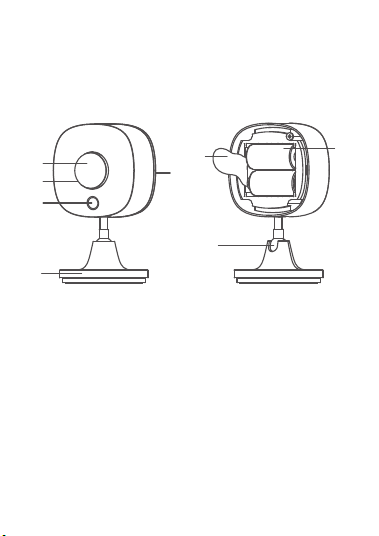
a
b
d
c
f
e
g
h
a.
b.
c.
d.
Lente del sensor
Luz indicadora
Botón de función
Cobertura inferior
e.
f.
g.
h.
Rótula Universal
Base
Pila
Lámina de aislamiento
Nombres de las partes
El amplio ángulo de visión de 120° del sensor de
movimiento para exteriores permite un seguimiento
eficiente de los movimientos corporales. Con la
tecnología Bluetooth, el sensor se comunica con la
puerta de enlace exclusiva de Govee, lo que permite
realizar múltiples funciones como control de grupo,
alertas de seguridad, etc., utilizando el movimiento
detectado como condición para activar la
automatización.
Funciones
34
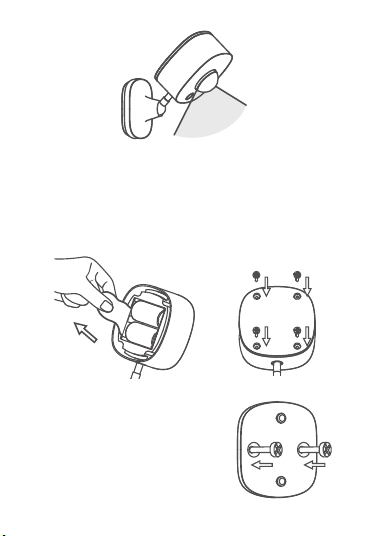
120°
1. Abra el paquete. Retire la cobertura inferior y
extraiga la lámina de aislamiento. Luego, vuelva a
colocar la cobertura inferior. Fije firmemente la
cobertura con los tornillos proporcionados.
2. Determine la ubicación de la
instalación. Asegúrese de que
no haya obstáculos en los
alrededores. Fije la base con
tornillos.
Guía de inicio
35
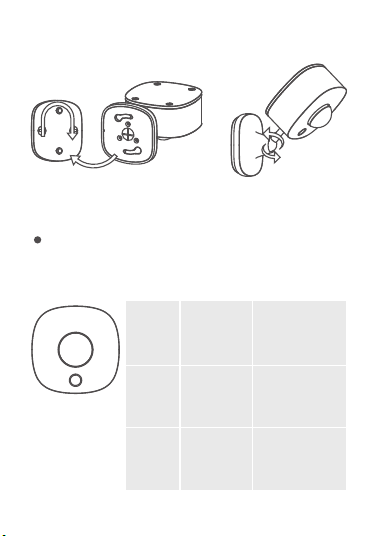
3. Conecte el sensor a la base y gírelo en el sentido de
las agujas del reloj para fijarlo, alineando primero
los orificios de la base.
4. Instalación completada.
Nota:
Para evitar que el área detectada fue bloqueado,
apunte la lente al área detectada con precisión.
Estado
del
indica-
dor
Parpadeo
rojo
/
Estado
activo
Durante el
estado de
radio de
Bluetooth
Botón de función
Acción Mantener
pulsado
durante 3
segundos
Pulsar una sola
vez
Inspección
de red
36
Instalación completada.
Cómo descargar la aplicación Govee Home
Para descargar la aplicación Govee Home, escanee el
código QR o busque "Govee" en la App Store® de
Apple (iOS) o en Google Play Store (Android).
1.
2.
3.
4.
Active el Bluetooth de su smartphone.
Abra la aplicación Govee Home, toque el icono “+”
situado en la esquina superior derecha y busque
“H5129”.
Mantenga pulsado el botón de función durante 3
segundos para iniciar el emparejamiento. Siga las
instrucciones de la aplicación para completar el
emparejamiento. Durante el emparejamiento,
asegúrese de que los dispositivos de nodo de su
hogar estén autorizados en la página Puerta de
enlace en la aplicación.
Verificación de la distancia efectiva en las
comunicaciones: Después de completar el
emparejamiento, compruebe la distancia de
comunicación efectiva en la aplicación.
Emparejar con la aplicación Govee Home
37

¿Cómo puedo hacer que los subdispositi-
vos se apaguen automáticamente
después que los active el sensor de
movimiento exterior?
Cómo descargar la aplicación Govee Home
Configure "Encender dispositivo" en Ejecución
instantánea y añade un comando de "Apagar el
dispositivo" en Ejecución programada, y establezca la
hora específica a la que quiere que se apague.
Conseguirá un control automatizado para disfrutar de la
mejor experiencia.
La aplicación Govee Home está en constante
actualización y cada vez cuenta con más
características.
Nota:
Solución de problemas
En esta sección de resolución de problemas se
muestran los casos más frecuentes relacionados con el
sensor de movimiento. Si el problema persiste, contacte
con el servicio de atención al cliente.
38
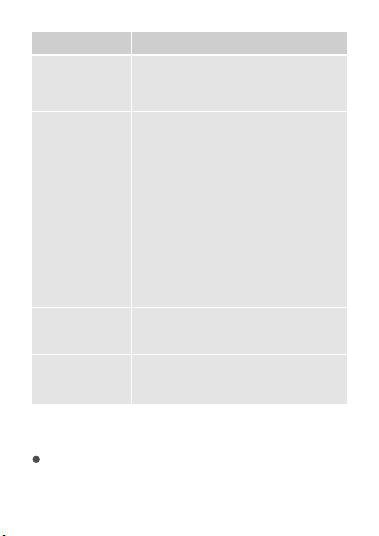
Problema
La luz
indicadora está
apagada.
El sensor no
puede detectar
movimientos.
1. Sustituya la pila con una nueva.
2. Ponte en contacto con el servicio
de atención al cliente.
Alerta de batería
baja de la
aplicación.
Reemplaza la batería.
A menudo se
producen falsos
positivos.
Disminuir la sensibilidad.
Posible solución
1.
2.
3.
4.
5.
Compruebe la batería del
dispositivo y asegúrese de que
está completamente cargada.
Abra la aplicación y compruebe
que el dispositivo y la puerta de
enlace se encuentren dentro del
rango de comunicación efectiva.
Compruebe que no haya
obstáculos delante del sensor
dentro del área de detección.
Ponte en contacto con el servicio
de atención al cliente.
Aumentar la sensibilidad.
Para la aplicación y la conexión
1. No se puede conectar a la aplicación Govee Home.
Compruebe que su smartphone esté encendido y
que no esté conectado con otros dispositivos
mediante Bluetooth.
39
Habilite el servicio de ubicación del smartphone.
Pruebe a conectarse con otro smartphone.
Compruebe que la aplicación ha actualizado a la
última versión.
Compruebe la conexión al Wi-Fi del rúter 2,4GHz y la
red funciona correctamente.
Asegúrese de que ha introducido correctamente la
contraseña del Wi-Fi.
Acorte la distancia entre el sensor, la puerta de
enlace distribuida y el smartphone.
Asegúrese de que su sensor y la puerta de enlace
distribuida estén ubicados lejos de
electrodomésticos que produzcan radiación
electromagnética (p. ej., hornos de microondas,
refrigeradores, etc.)
Si está utilizando una VPN, intente apagarla y luego
conecte el sensor.
Deshabilite el portal de autenticación de la red Wi-Fi.
Si la autenticación del portal está habilitada, este
sensor no podrá acceder a su red Wi-Fi y la
configuración fallará. Un portal de autenticación es
una página web a la que debe acceder para
registrarse en la red Wi-Fi antes de usar internet.
2. No se encuentra el dispositivo en la página
Dispositivos Bluetooth cercanos de la aplicación.
El sensor puede estar conectado con otro
smartphone. Desconéctelo primero de otro
smartphone y inténtelo de nuevo.
40
3. El sensor está desconectado.
Asegúrese de que el sensor esté enchufado y
encendido, luego actualice la página "Dispositivos"
en la aplicación Govee Home deslizando el dedo
hacia abajo en la pantalla.
Compruebe que el rúter tiene conexión a internet y
que la conexión a la red de su smartphone funcione
correctamente.
Si se ha cambiado la contraseña de Wi-Fi, el sensor
se desconectará automáticamente. Pruebe a
conectarlo de nuevo a la red.
Elimine el sensor fuera de línea de la aplicación
Govee Home, luego añada el sensor otra vez y
reconfigure el sensor en la aplicación.
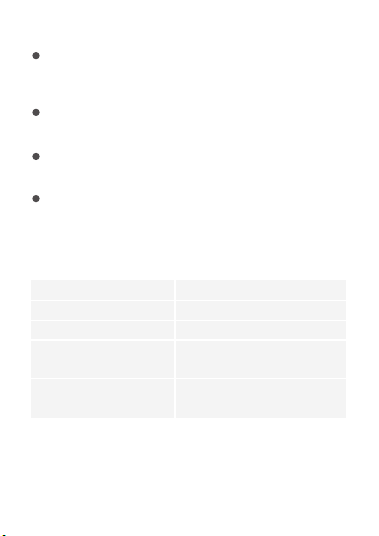
H5129Modelo
CR123AFuente de alimentación
6V 4mAPotencia absorbida
De -20 a 45 ºC/de -4 a 113 ºF
Temperatura de
funcionamiento
55m/180ft (sin obstáculos)El rango efectivo
de Bluetooth
Especificaciones
41
Apéndice
Servicio post-venta
Garantía: Garantía limitada de 12 meses
Asistencia: Asistencia técnica de por vida
Correo electrónico: [email protected]
Página web oficial: www.govee.com
@Govee @Govee @Goveeofficial@Govee
42
Italiano
43
ATTENZIONE:
1.
2.
3.
4.
Si consiglia di installarlo in verticale a più di un metro
di distanza dal suolo per evitare l'elettricità statica e
assicurarsi che funzioni correttamente invece di
essere attivato erroneamente.
L'obiettivo non deve essere rivolto direttamente
verso grandi oggetti pendolari o oggetti che possono
essere facilmente resi pendolari. Le oscillazioni
significative di oggetti di grandi dimensioni possono
causare improvvisi cambiamenti nel flusso d'aria
all'interno dell'area rilevata, con conseguenti false
attivazioni.
L'obiettivo viene utilizzato per aiutare la sonda a
catturare i segnali da un'area più ampia. Non può
esserci nebbia o grasso su di esso. L'obiettivo non
può essere bloccato da altri oggetti che potrebbero
impedire alla sonda di rilevare eventuali movimenti
del corpo.
Le prestazioni del prodotto sono influenzate dalla
temperatura ambiente, dal tipo di corporatura, dallo
spessore degli indumenti, dalla velocità di
camminata, dalla direzione di camminata e da altri
fattori. Quando la temperatura ambiente è bassa, la
distanza rilevabile è lunga. Quando la temperatura
ambiente è elevata, la sensibilità della sonda
diminuisce e la distanza rilevabile si riduce. Questo è
un fenomeno normale e può essere regolato tramite
le impostazioni di sensibilità del prodotto.
Il Sensore di movimento esterno Govee è un dispositivo
di monitoraggio intelligente con una sonda di
temperatura a infrarossi integrata, un circuito di
precisione e una lente di Fresnel. L'ampio angolo di
visione di 120° consente un monitoraggio efficiente dei
movimenti del corpo. Con la tecnologia Bluetooth, il
sensore comunica con l'esclusivo gateway distribuito di
Govee, realizzando molteplici funzioni come controllo di
gruppo, avvisi di sicurezza, ecc. utilizzando il movimento
rilevato come condizione per attivare l'automazione. Il
grado di impermeabilità IP65 lo rende adatto a vari
ambienti esterni. Il suo design intelligente lo rende facile
da fissare su diverse superfici esterne. Questo sensore
può fornirti non solo un efficiente monitoraggio della
sicurezza, ma anche un'esperienza più intelligente e
conveniente.
Introduzione
Incluso nella confezione
Articolo
Sensore di movimento esterno
Batteria
Cacciavite
Vite e cubo di espansione
Manuale utente
Quantità
1
2
1
2
1
44
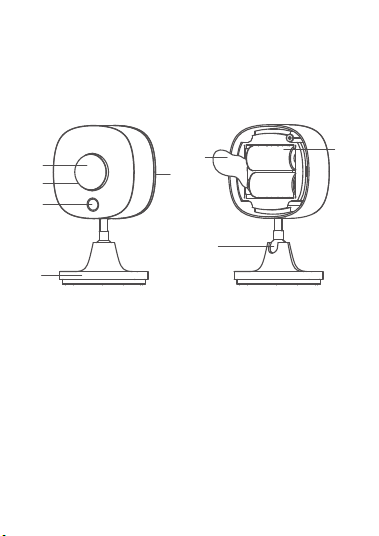
a
b
d
c
f
e
g
h
a.
b.
c.
d.
Obiettivo del sensore
Spia luminosa
Pulsante funzione
Copertura inferiore
e.
f.
g.
h.
Giunto sferico universale
Base
Batteria
Foglio isolante
Nomi delle parti
L'ampio angolo di visione di 120° del sensore di
movimento esterno consente un monitoraggio
efficiente dei movimenti del corpo. Con la tecnologia
Bluetooth, il sensore comunica con l'esclusivo gateway
distribuito di Govee, realizzando molteplici funzioni
come controllo di gruppo, avvisi di sicurezza, ecc.
utilizzando il movimento rilevato come condizione per
attivare l'automazione.
Funzioni
45
120°
1. Apri la confezione. Rimuovi il coperchio inferiore ed
estrai il foglio isolante. Quindi, rimetti a posto il
coperchio inferiore. Fissa saldamente il coperchio
con le viti in dotazione.
2. Determina la posizione di
installazione. Assicurati
che non ci siano ostacoli
nell'area circostante. Fissa
la base con le viti.
Iniziare
46
/
3. Collega il sensore alla base e ruota in senso orario
per fissarlo sulla base allineando prima i fori sulla
base.
4. L'installazione è completata.
Nota:
Per evitare che l'area rilevata venga bloccata,
puntare accuratamente l'obiettivo sulla stessa.
Indica-
tore
Stato
Luce rossa
lampeggiante
Stato di
lavoro
Durante la
trasmissione
Bluetooth
Pulsante funzione
Azione Tenere
premuto per
3 secondi
Pressione
singola
Test di
connessione
47
L'installazione è completata.
Download dell'app Govee Home
Per scaricare l'app Govee Home, eseguire la scansione
del codice QR o cercare "Govee" nell'Apple App Store®
(iOS) o nel Google Play Store (Android).
1.
2.
3.
4.
Attiva il Bluetooth del tuo smartphone.
Apri l'app Govee Home, tocca l'icona "+" nell'angolo
in alto a destra e cerca "H5129".
Tieni premuto il pulsante funzione per 3 secondi per
avviare l'associazione. Completa l'associazione
seguendo le istruzioni nell'app. Durante
l'associazione, assicurati che i dispositivi del nodo di
casa tua siano stati autorizzati in Gateway nella tua
app.
Verifica della distanza di comunicazione efficace:
Dopo aver completato l'associazione, verifica
nell'app l'effettiva distanza di comunicazione.
Associazione con l'app Govee Home
48
Come posso fare in modo che i
dispositivi secondari si spengano
automaticamente dopo essere stati
attivati dal sensore di movimento
esterno?
L'app Govee Home viene continuamente aggiornata
e le sue funzionalità si espandono.
Nota:
Imposta "Accendi il dispositivo" in Esecuzione
istantanea e aggiungi un comando "Spegni il
dispositivo" in Esecuzione ritardata e imposta un'ora
specifica in cui desideri che si spenga. Otterrai il
controllo automatico per un' esperienza migliore.
Risoluzione dei problemi
La sezione di risoluzione dei problemi riportata di
seguito serve a risolvere le domande frequenti relative
al sensore di movimento. Se il problema persiste,
contatta l'assistenza clienti.
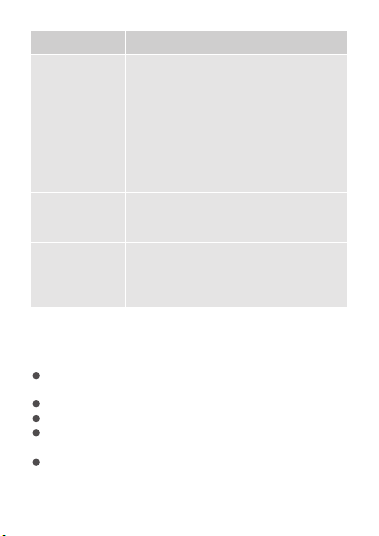
Problema
La spia è
spenta.
Il sensore non
è in grado di
rilevare alcun
movimento.
1. Sostituire con una nuova batteria.
2. Contatta l'assistenza clienti.
Possibile soluzione
1. Controlla la batteria del dispositivo
e assicurati che sia completamente
carica.
49
Problema
Spesso si
verificano
attivazioni
false.
Ridurre la sensibilità.
Avviso di
batteria scarica
dall'app.
Sostituire la batteria.
Possibile soluzione
2.
3.
4.
5.
Apri l'app e assicurati che il
dispositivo e il gateway distribuito
si trovino entro la distanza di
comunicazione effettiva.
Assicurati che non vi siano ostacoli
davanti alla sonda all'interno
dell'area di rilevamento.
Contatta l'assistenza clienti.
Aumentare la sensibilità.
Per app e connettività
1. Impossibile connettersi all'app Govee Home.
Assicurati che lo smartphone sia acceso e non sia
connesso ad altri dispositivi Bluetooth.
Abilita i servizi di localizzazione dello smartphone.
Prova a connetterti con un altro smartphone.
Assicurati che la tua app sia aggiornata all'ultima
versione.
Assicurati di connetterti alla rete a 2,4 GHz del tuo
router Wi-Fi e che la rete funzioni correttamente.
50
Assicurati che la password Wi-Fi inserita sia corretta.
Accorcia la distanza tra il sensore, il gateway
distribuito e lo smartphone.
Assicurati che il tuo sensore e il gateway distribuito
siano posizionati lontano da apparecchiature che
producono radiazioni elettromagnetiche (ad esempio
forni a microonde, frigoriferi, ecc.)
Se stai utilizzando una VPN, prova a disattivarla e
quindi a connettere il sensore.
Disabilita l'autenticazione del portale per la tua rete
Wi-Fi. Se l'autenticazione del portale è abilitata,
questo sensore non sarà in grado di accedere alla tua
rete Wi-Fi e la configurazione non andrà a buon fine.
L'autenticazione del portale significa che è necessario
accedere alla rete Wi-Fi tramite una pagina Web
prima di poter utilizzare Internet.
2. Impossibile trovare il dispositivo nella pagina
Dispositivo Bluetooth nelle vicinanze dell'app.
Il sensore può essere connesso con un altro
smartphone. Disconnettilo prima dall'altro
smartphone.
3. Il sensore è offline.
Assicurati che il sensore sia collegato e acceso,
quindi aggiorna la pagina "Dispositivo" nell'app
Govee Home scorrendo verso il basso sullo
schermo.
Assicurati che il tuo router sia connesso a Internet e
che la connessione di rete del tuo smartphone
funzioni.
51
Se la password Wi-Fi è stata modificata, il sensore
andrà automaticamente offline. Prova a connetterlo
di nuovo alla rete.
Elimina il sensore offline dall'app Govee Home,
quindi aggiungi e riconfigura nuovamente il sensore
nell'app.
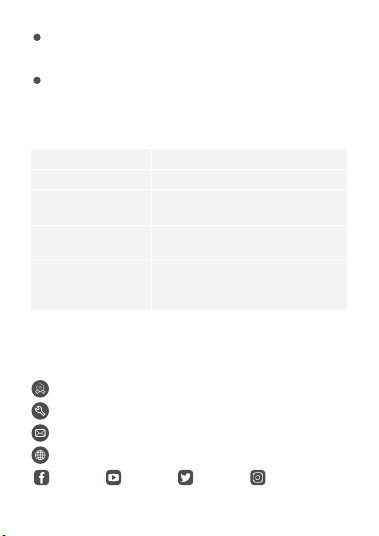
H5129
Nome modello
CR123AAlimentazione
6 V 4 mAIngresso
alimentazione
Da -20°C a 45°C/da -4°F a 113°F
Temperatura
di lavoro
55 m/180 piedi (nessun ostacolo)Distanza di
comunicazione
Bluetooth
Specifiche
Appendice
Assistenza post-vendita
Garanzia: Garanzia limitata di 12 mesi
Assistenza: Assistenza tecnica a vita
Email: [email protected]
Sito Web ufficiale: www.govee.com
@Govee
@Govee
@Goveeofficial
@Govee
52

This device complies with Part 15 of the FCC Rules and
Industry Canada licence-exempt RSS standard(s).
Operation is subject to the following two conditions:
(1) This device may not cause harmful interference,
and (2) This device must accept any interference
received, including interference that may
cause undesired operation.
Warning: Changes or modifications not expressly
approved by the party responsible for compliance
could void the user's authority to operate the
equipment.
Le présent appareil est conforme aux CNR d'Industrie
Canada applicables aux appareils radio exempts de
licence. L'exploitation est autorisée aux deux
conditions suivantes :
(1) l'appareil nedoit pas produire de brouillage, et
(2) l'utilisateur de l'appareil doit accepter tout
brouillage radioélectrique subi, même si le brouillage
est susceptible d'en compromettre le fonctionnement.
NOTE: This equipment has been tested and found to
comply with the limits for a Class B digital device,
pursuant to Part 15 of the FCC Rules.
These limits are designed to provide reasonable
protection against harmful interference in a residential
installation. This equipment generates uses and can
radiate radio frequency energy and, if not installed and
used in accordance with the instructions, may cause
harmful interference to radio communications.
FCC and ISED Canada Statement

This Class B digital apparatus complies with Canadian
ICES-003.
Cet appareil numérique de la classe B est conforme à
la norme NMB-003 du Canada.
FCC and IC Radiation Exposure Statement
This equipment complies with FCC and IC radiation
exposure limits set forth for an uncontrolled
environment. This equipment should be installed and
operated with minimum distance 20cm between the
radiator & your body.
Lors de l'utilisation du produit, maintenez une distance
de 20 cm du corps afin de vous conformer aux
However, there is no guarantee that interference will
not occur in a particular installation. If this equipment
does cause harmful interference to radio or television
reception, which can be determined by turning the
equipment off and on, the user is encouraged to try to
correct the interference by one or more of the
following measures:
1.Reorient or relocate the receiving antenna.
2.Increase the separation between the equipment and
receiver.
3.Connect the equipment into an outlet on a circuit
different from that to which the receiver is connected.
4.Consult the dealer or an experienced radio/TV
technician for help.

exigences en matière d'exposition RF.
ThetrademarkGoveehasbeenauthorisedto
ShenzhenQianyanTechnologyLTD.
Copyright©2021ShenzhenQianyanTechnologyLTD.
AllRightsReserved.
Responsibleparty:
Name:GOVEEMOMENTS(US)TRADINGLIMITED
Address:2501ChathamRdSuiteRSpringfieldIL62704
Email:certifi[email protected]
Contactinformation:https://www.govee.com/support