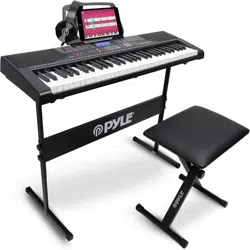
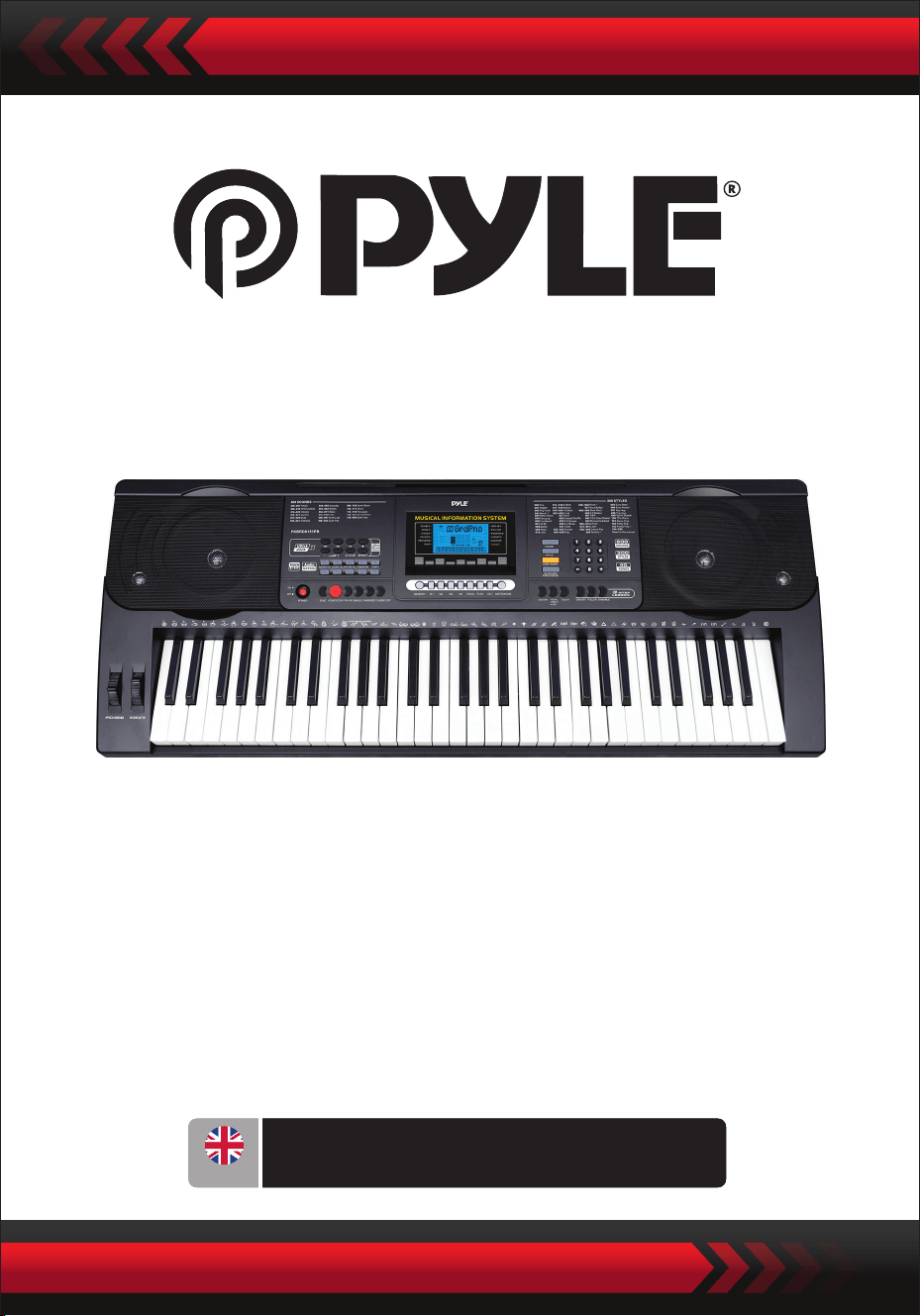
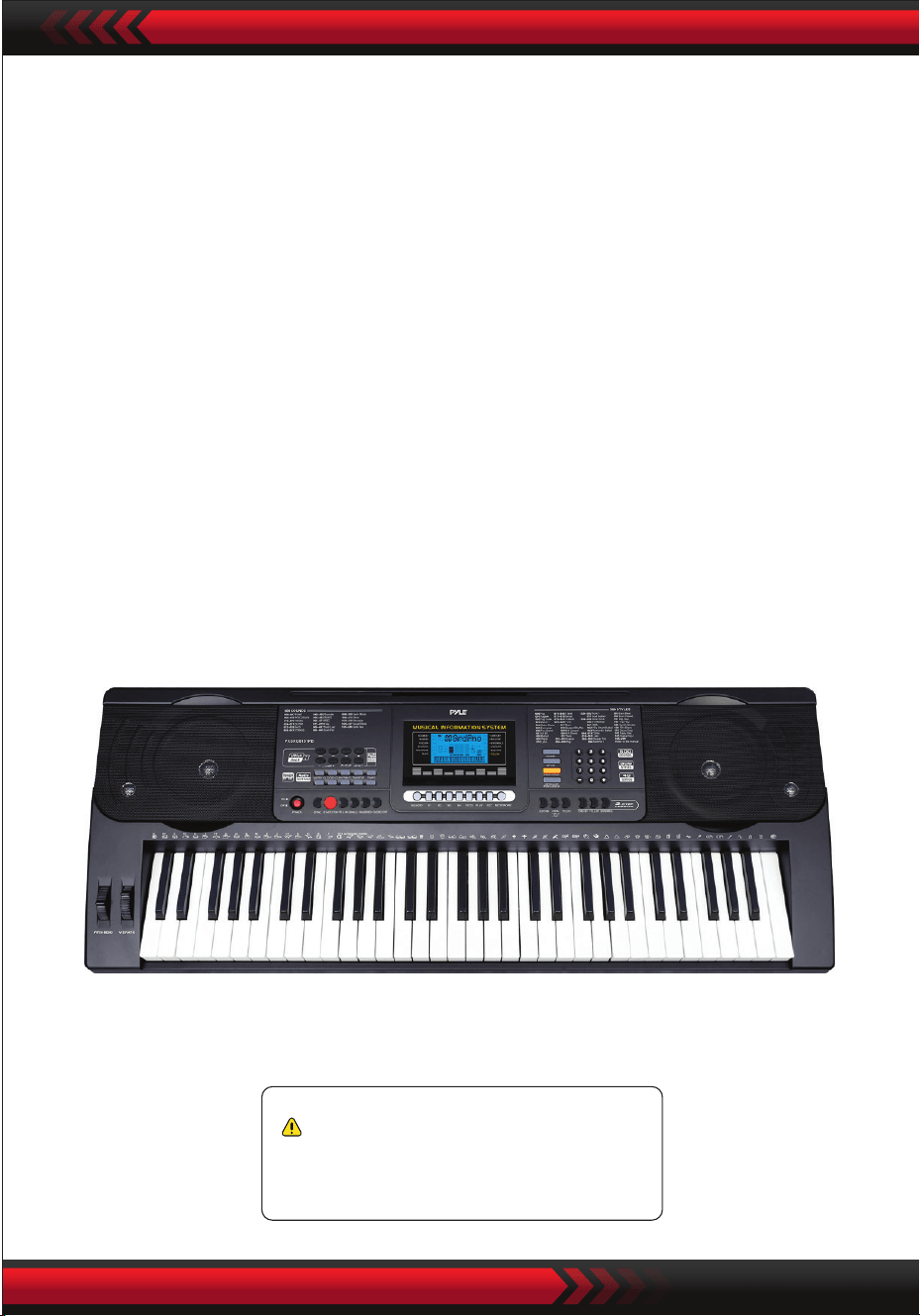
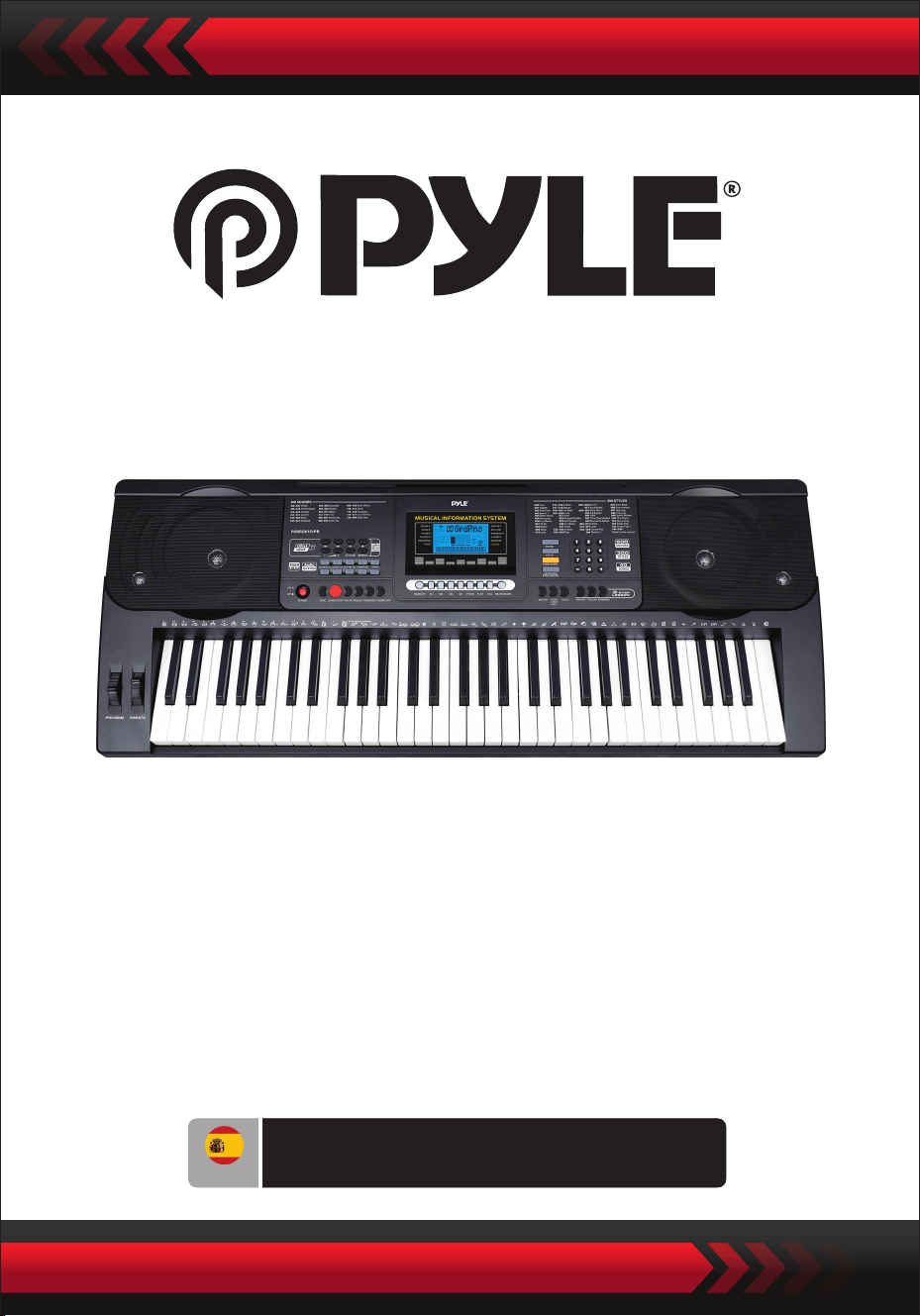
Digital Musical Karaoke Keyboard
PKBRD6151PB
Portable Electronic Piano Keyboard
with Water-Resistant Bag (61 Keys),
Keyboard Stool & Keyboard Stand
ENG
USER GUIDE
www.PyleUSA.com
2
Please keep this manual in a safe and handy place for future reference
Use the specied power adapter, and immediately replace damaged adapter if any.
Do not disassemble the instrument, nor modify internal parts. If it malfunctions,
discontinue the use immediately and have it repaired by professional serviceman.
Before connecting the instrument to other devices, turn o all the power supplies.
Do not play the instrument at the maximum volume or to an uncomfortable extent
for a long time.
Keep the parts of the instrument o heat source, for overheat may cause damage.
Prevent liquid, dust, particles and other foreign matters from entering the instrument
to cause corrosion of the instrument or short-circuit of its components.
Pull the plug before cleaning the instrument.
Do not insert or pull the plug with wet hands.
Use dry and soft cloth to clean the instrument. Do not use paint, alcohol or other
chemical solvents to wipe the instrument so as to avoid damage to the instrument
surface.
Turn o the power supply and pull the plug after playing or in no-service condition
for a long time.
To reduce the risk of re or electric shock, do not expose this apparatus to rain or
moisture. The apparatus shall not be exposed to dripping or splashing and that no
objects lled with liquids, such as vases, shall be placed on the apparatus.
Maximum Operating Tamperature: 40°C / 104°F
Direct plug-in adaptor is used as disconnect device, the disconnect device shall
remain readily operable.
Do not install this equipment in a conned space such as a book case or similar unit,
and remain a well ventilation conditions. The ventilation should not be impeded
by covering the ventilation openings with items such as newspaper, table-cloths,
curtains etc.
Warning: Excessive sound pressure from earphones and headphones can cause
hearing loss.
The label location is on the bottom of the apparatus.
The apparatus shall not be exposed to dripping or splashing and that no objects
lled with liquids, such as vases, shall not be placed on apparatus.
The direct plug-in adapter is used as disconnect device, the disconnect device
shall remain readily operable.
•
•
•
•
•
•
•
•
•
•
•
•
•
•
•
•
•
WARNING!
PLEASE READ CAREFULLY BEFORE PROCEEDING
www.PyleUSA.com
3
•
I. Control Panel and Extension Ports
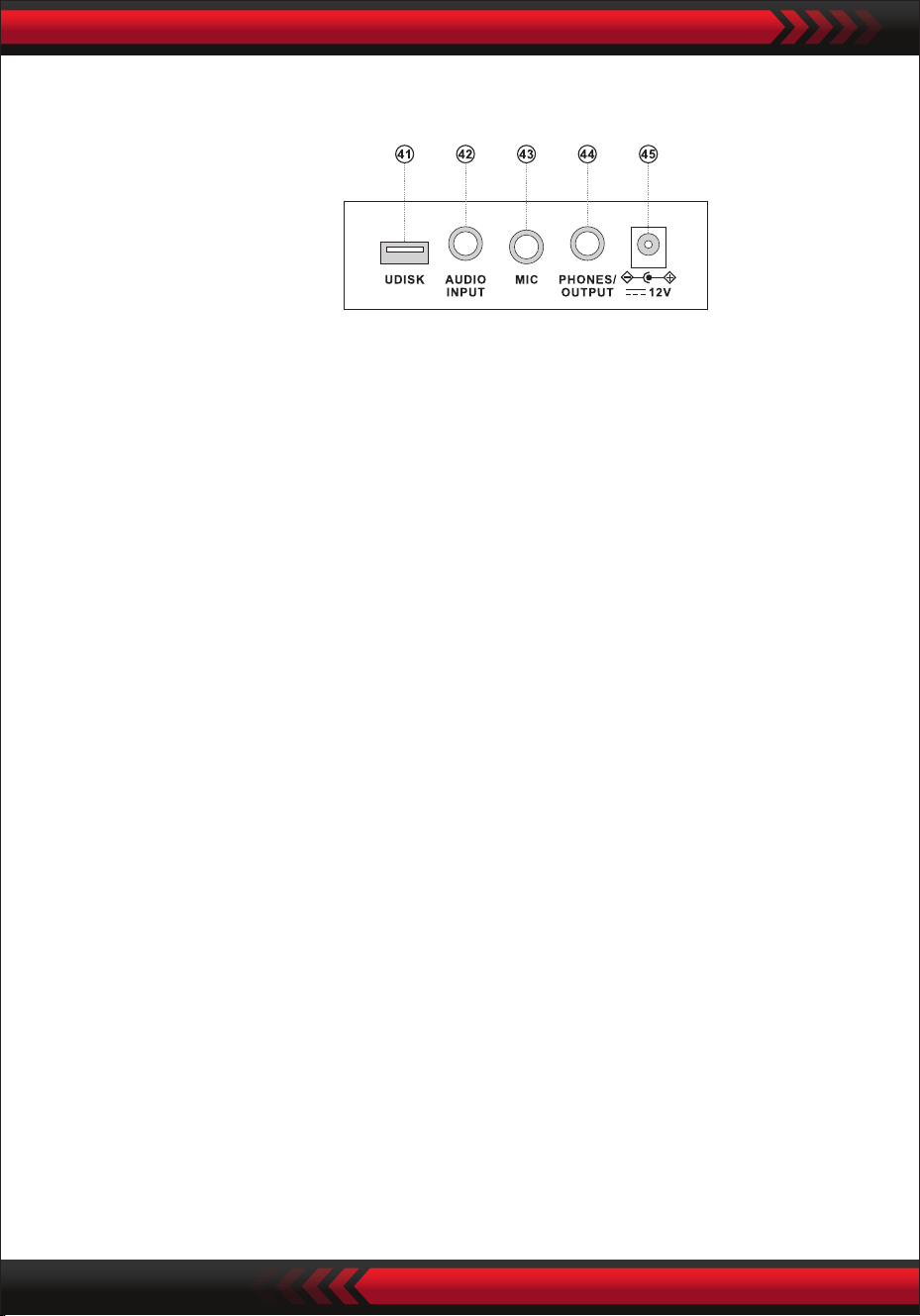
FRONT CONTROL PANEL
This marking indicates that this product should not be disposed with other
household wastes throughout the EU.
To prevent possible harm to the environment or human health from
uncontrolled waste disposal, recycle it responsibly to promote the sustainable
reuse of material resources. To return your used device, please use the return
and collection systems or contact the retailer where the product was purchased.
They can take this product for environmental safe recycling.
9 MP3 volume control
10 Previous
11 Next
12 Play/Pause
13 Stop
14 Enter order/Random/
Single playing modes
15 Sound Eect
USB Music Player
1 Speaker
2 LCD display
3 Power Switch
4 Master Volume
5 Chord volume
6 Rhythm volume
7 Transpose
8 Tempo
16 Keyboard Percussion
17 Demo Song
18 Style
19 Sound
20 Numbers
21 Sync
22 Start/Stop
23 Fill In
24 Single
25 Fingered
26 Chord O
27 Status memory
28 Program
29 Null Play
30 Record
31 Metronome
32 Sustain
33 Dual/Split/O
34 Touch
35 One Key
36 Follow
37 Ensemble
38 PitchBend
39 Vibrato
40 Chord Keyboard
This marking indicates that this product should not be disposed with other
household wastes throughout the EU.
To prevent possible harm to the environment or human health from
uncontrolled waste disposal, recycle it responsibly to promote the sustainable
reuse of material resources. To return your used device, please use the return
and collection systems or contact the retailer where the product was purchased.
They can take this product for environmental safe recycling.
www.PyleUSA.com
4
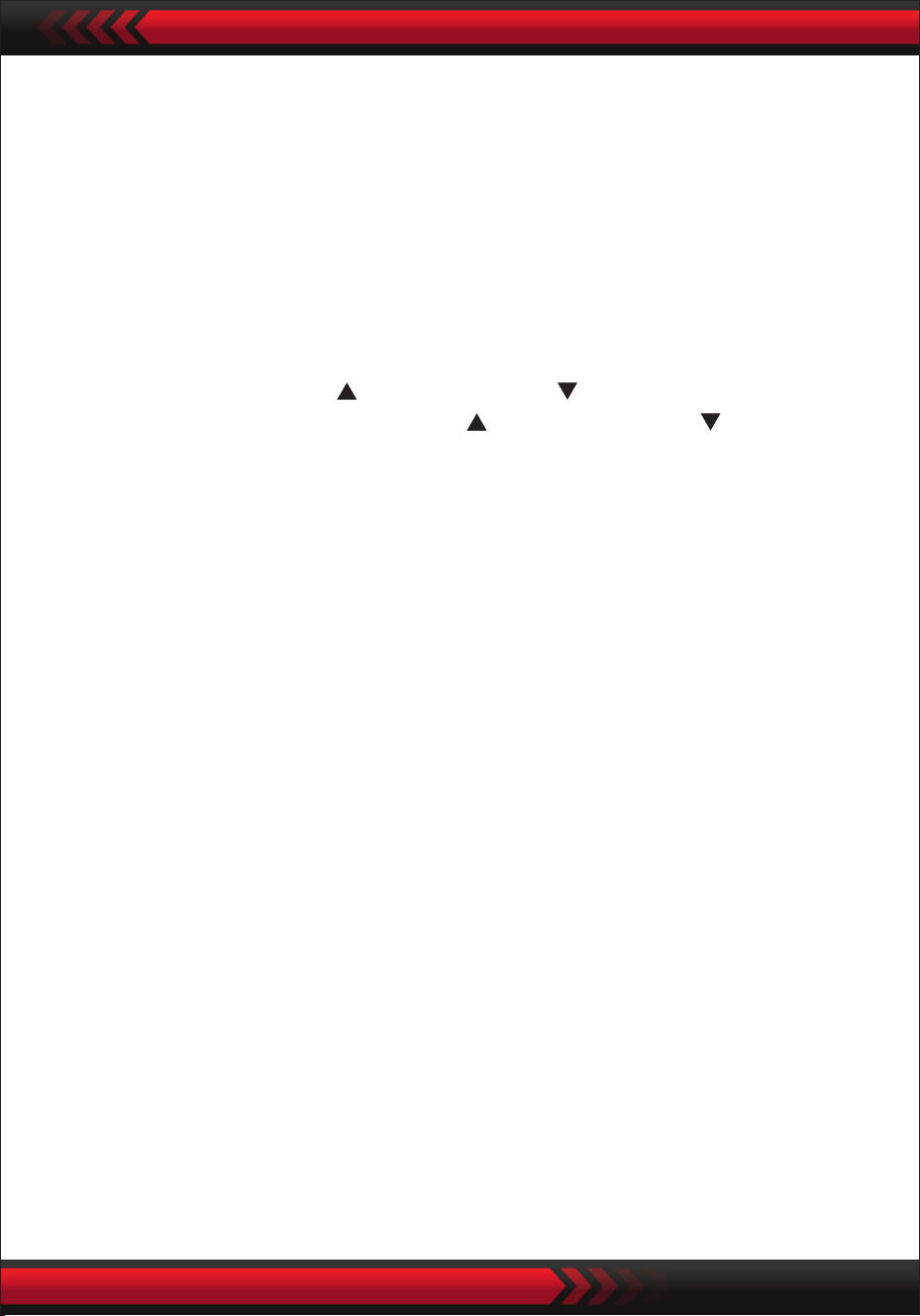
REAR PANEL
AUDIO INPUT
The electronic keyboard has the stereo audio input function, and audio signals of
mobile phones, MP3 players, computers and the like can be input into the electronic
keyboard system to be played. At rst, turn o the power supply of the electronic
keyboard, insert one end of the audio cable into the output port of an audio device,
insert the other end into the AUDIO INPUT interface on the back of the electronic
keyboard, and then turn on the power supply of the electronic keyboard.
• Audio Output: Turn o the power supply of the electronic keyboard and external
sound equipment, then insert one end of the audio cable into the PHONES/OUTPUT
interface for audio output on the back of the electronic keyboard and insert the
other end into the audio input interface of the sound equipment.
• Headphone Connection: Insert the headphone plug into the PHONES/OUTPUT
interface on the back of the electronic keyboard, then the speaker of the electronic
keyboard will be disconnected automatically, and the inuence on others can be
avoided during playing.
Attention! Do not keep the highest volume in a long time when the headphone is
used, so as to avoid hearing losses.
AUDIO OUTPUT HEADPHONE CONNECTION
USING AC/DC POWER SUPPLY ADAPTOR
The AC/DC power supply adaptor must be the one designated for the instrument.
Please connect one side to the power supply socket on the back-panel and the
other to the city-power network. (Please notice the input voltage should be the
same as that of the power network.)
II. Preparations before Playing
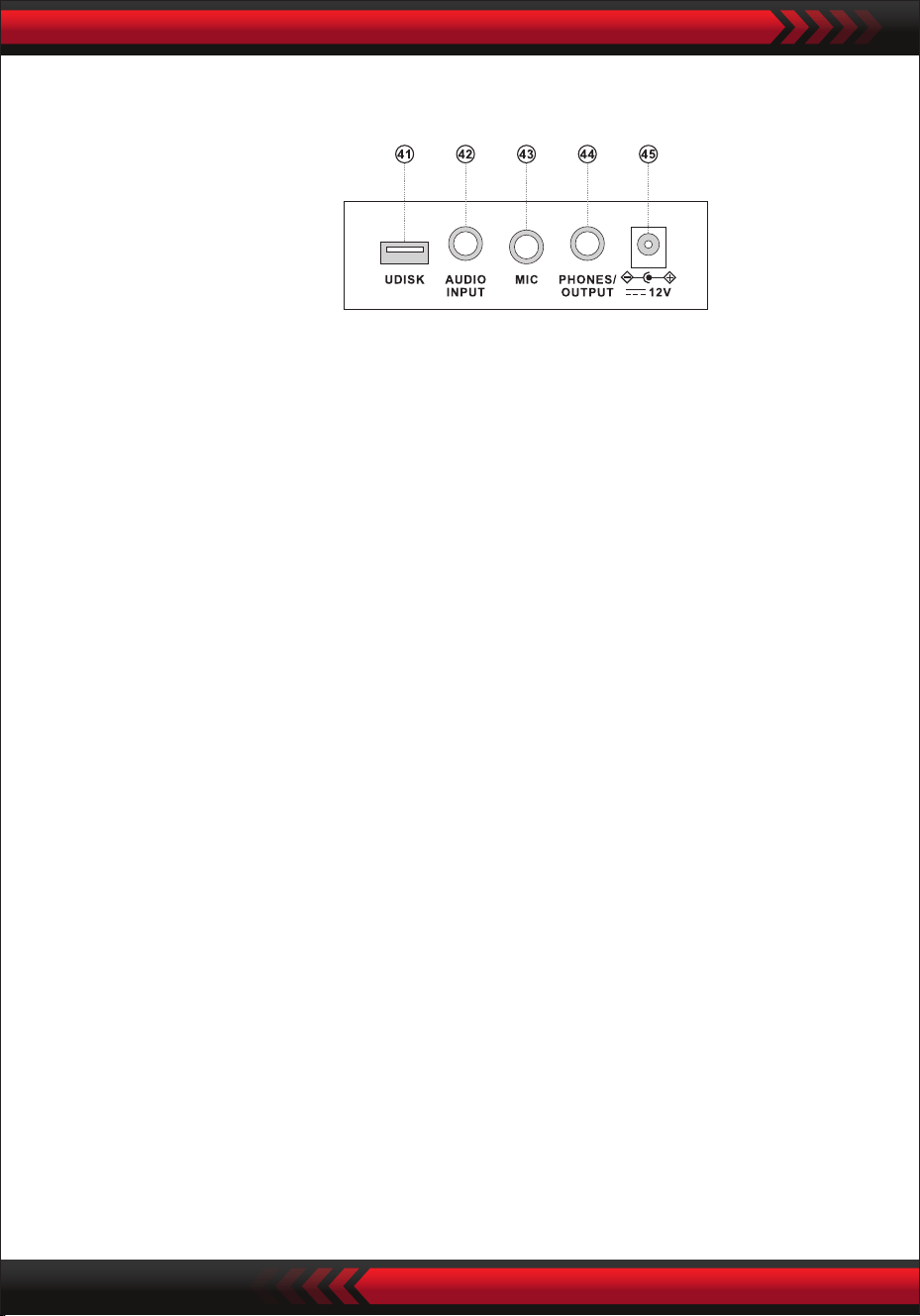
41 USB PORT FOR PLAYING MUSIC
(Flash drive not included)
42 AUDIO INPUT
43 MIC INPUT
44 PHONES/OUTPUT
45 DC UV IN JACK
www.PyleUSA.com
5
Press the key "Master Volume " or "Master Volume " to increase or decrease the
master volume. When the "Master Volume " and "Master Volume " are pressed at
the same time, the master volume is recovered to the default preset value.
The style volume and chord volume can be controlled simultaneously by the master
volume.
Sound Selection
Keyboard Percussions
Demo Songs
Master Volume Adjustment
Press the [Power] button with the back light on, the LCD display shows some
information of the present timbre, tempo, etc.
III. Basic Method of Performance
Insert the plug of the microphone into the microphone jack of the keyboard and
you can enjoy playing and singing.
Microphone input (not included)
The electronic keyboard contains 600 sounds, from "000" to "599". When the power
supply is turned on, the sound selection function is enabled automatically, and the
screen displays "SOUND"; otherwise, the sound selection function can be enabled
by pressing the key "SOUND". The startup default "000" refers to the piano sound,
other sound can be selected by pressing the corresponding sound numbers via
number keys or pressing "+" or "-".
Press the key "Keyboard Percussion" to enable the keyboard percussion function.
Then the corresponding percussion sound can be uttered when the keyboard is
played. Press the "Keyboard Percussion" again to disable the keyboard percussion
function.
The electronic keyboard contains 40 demo songs for teaching, from "000" to "039".
When the key "Demonstration Song" is pressed, all demonstration songs will be
played sequentially.
During playback, another demo song can be selected by pressing the correspond-
ing number via number keys or pressing "+" or "-" and then the selected demo song
will be played cyclically.
www.PyleUSA.com
6
1. Start Style
Press the [Start/Stop] button to start the accompaniment style.
When the style has not yet started, press the key "Syn", and then the metronome
on the screen ashes. When any key in the chord keyboard zone (Key 1-19 from
the left) is played, the style accompaniment will start synchronously.
2. Fill In
In the state of style, press the [Fill in] button, a piece of intermezzo can be lled in
automatically.
3. Stop the Accompaniment
Press the [Start/Stop] button, the accompaniment style quits at once.
IV. Auto-Style
STYLE SELECTION
STYLE CONTROL
METRONOME
The electronic keyboard contains 300 styles, from "000" to "299". The startup
default is "000". Press the key "Style" to enable the rhythm selection function, and
then the screen displays "STYL''. Another style can be selected by pressing the
"STYLE". Another style can be selected by pressing the corresponding style number
in number keys or pressing "+" or "-".
The metronome contains four tempos, 114, 2/4, 3/4 and 4/4, respectively. When the
key "Metronome" is pressed continuously, four tempos can be selected in sequence.
Playing of any tempo can be stopped when the key "Metronome" is pressed again.
TEMPO ADJUSTMENT
Press the [Tempo ] / [Tempo ] button, the tempo of the style can be quickened or
slowed. Apply the both at the same time, the tempo turns back to the present one.
ADJUSTMENT OF RHYTHM VOLUME
Press the key "Style Volume " or "Style Volume " to increase or decrease the
style volume. When the two keys are pressed simultaneously, the style volume can
be recovered to the default preset value.
www.PyleUSA.com
7
V. Auto-Bass Chord
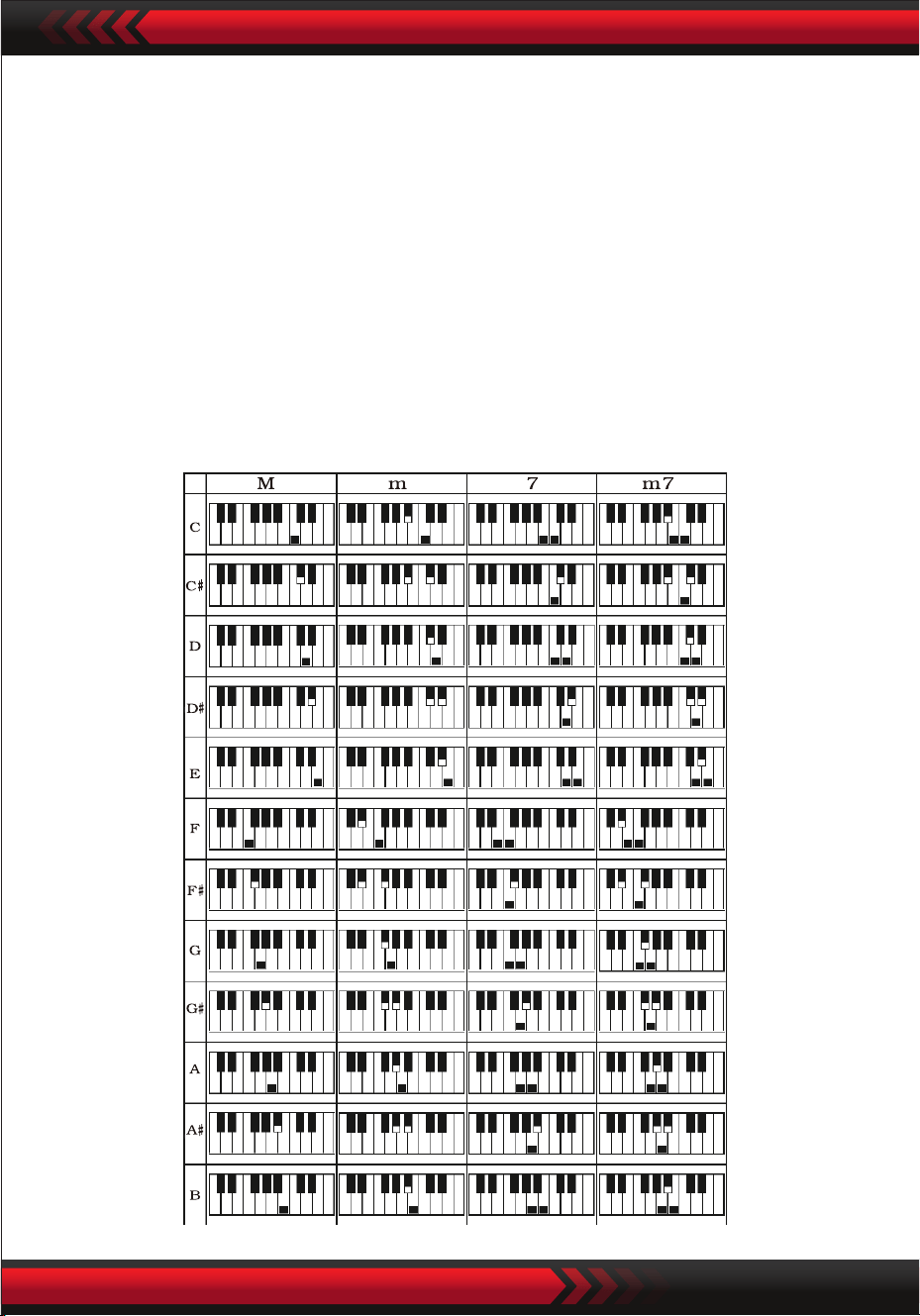
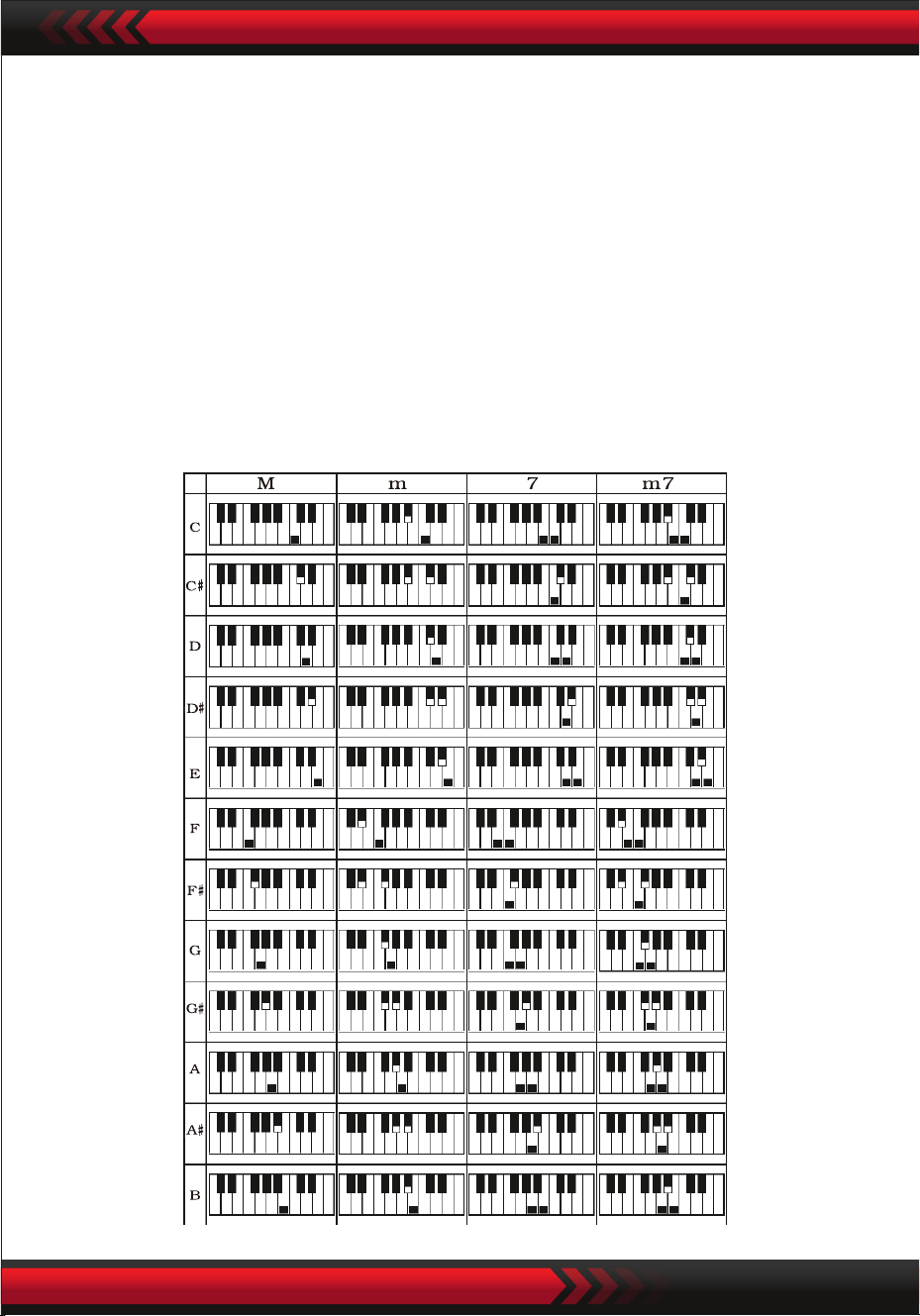
SINGLE FINGER CHORD
Press the key "Single Finger Chord" to enable the chord function, and the screen
displays "Single". When the style starts, automatic chord accompaniment can be
performed in the chord keyboard zone (Key 1-19 from the left) according to the
ngering method of single nger chord. When the style has not yet started, chord
accompaniment can be performed manually.
Press the key "Single Finger Chord" or "Chord OFF" to disable the chord function,
and the "Single" on the screen disappears.
Single-nger Chord Scales
www.PyleUSA.com
8
FINGERED CHORD
TRANSPOSING FUNCTION
The transposing function can help you to play music of other tunes in the C-tune
ngering method. When the key "Transpose " is pressed, the sound of the whole
keyboard will decrease by half-tone (minor second), and the C-tune sound of the
keyboard is changed into B-tune sound. When the key ''Transpose " is pressed, the
sound of the whole keyboard will increase by half-tone (minor second), and the
C-tune sound of the keyboard is changed into #C-tune sound or bD-tune sound.
When the key ''Transpose " is pressed twice, Tune C is changed into Tune bB.
When the key ''Transpose " is pressed ve times, Tune C is changed into Tune F.
When the key ''Transpose " and ''Transpose " are pressed at the same time, the
sound is recovered to Tune C "00". The level can be adjusted from "-6" to "+6" by
pressing the key ''Transpose " or ''Transpose ".
VI. Eect Control
ADJUSTMENT OF CHORD VOLUME
Press the key "Chord Volume " or "Chord Volume " to increase or decrease the
chord volume. When the two keys are pressed simultaneously, the chord volume can
be recovered to the default preset value.
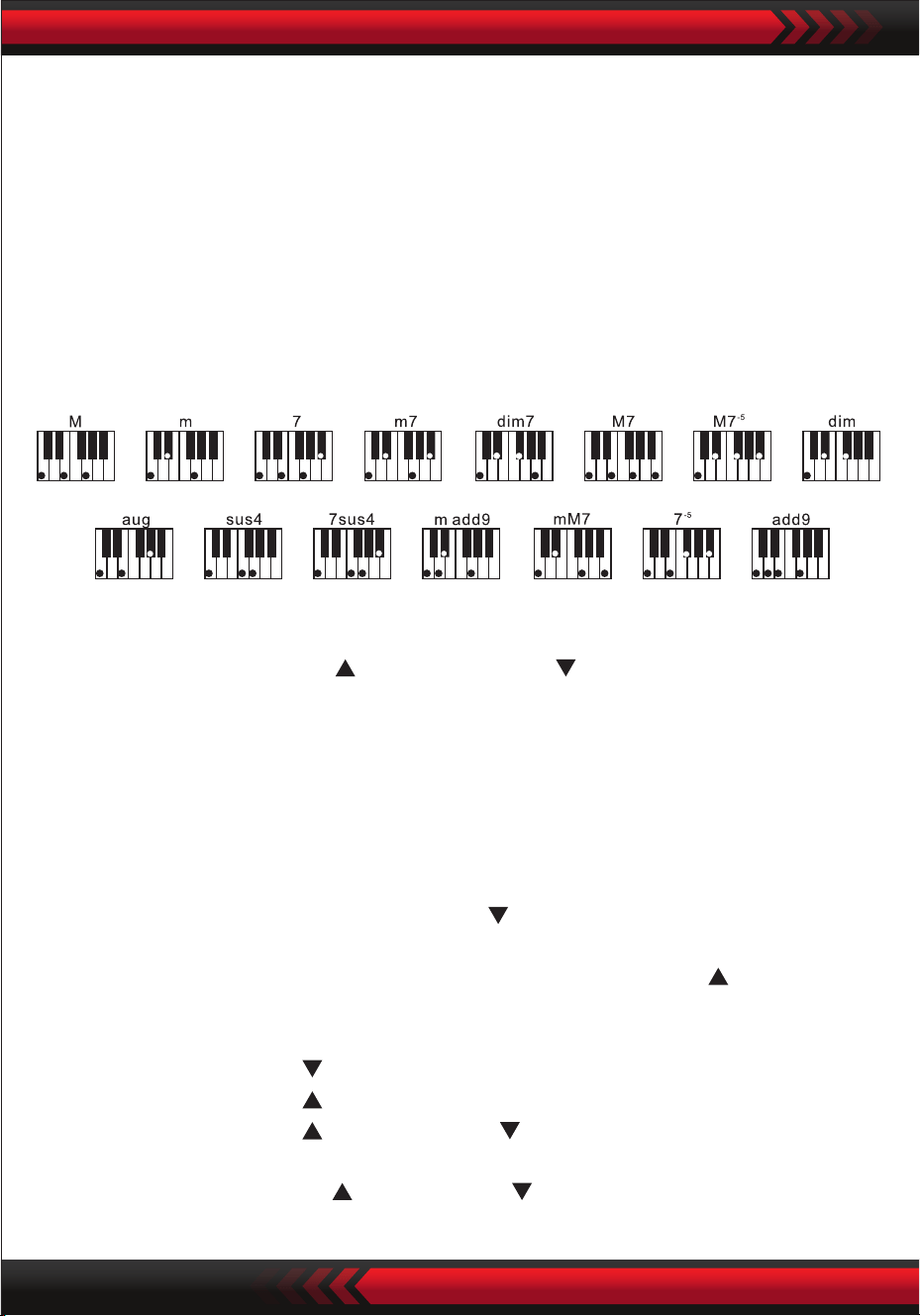
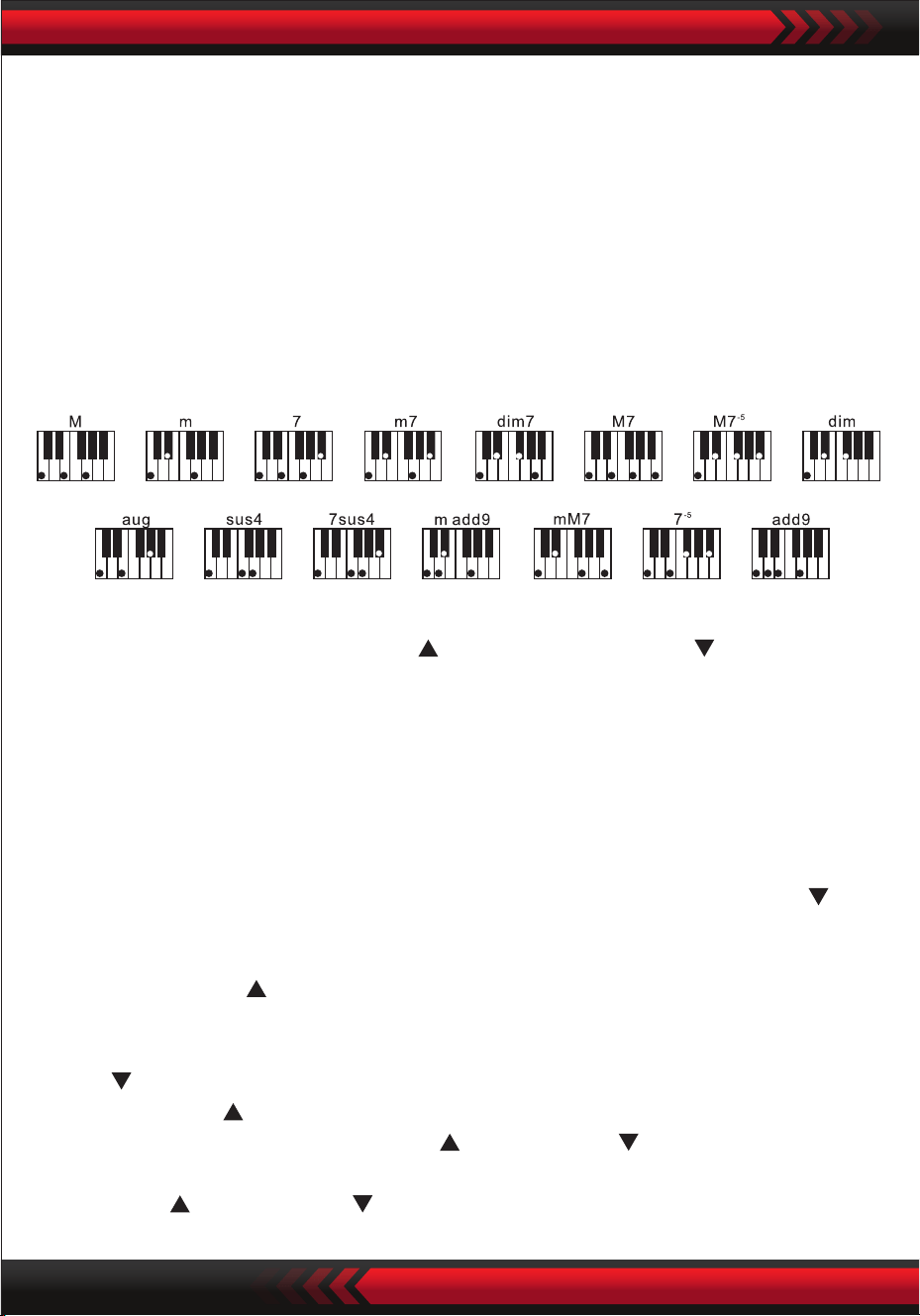
Fingered Chord Scales
Press the key "Fingered Chord" to enable the chord function, and the screen displays
"Finger''. When the style starts, automatic chord accompaniment can be performed
in the chord keyboard zone (Key 1-19 from the left) according to the ngering
method of ngered chord. When the style has not yet started, chord accompaniment
can be performed manually.
Press the key ''Fingered Chord" or "Chord OFF" to disable the chord function, and
the "Finger''on the screen disappears.

www.PyleUSA.com
9
SUSTAIN
Press the [Sustain] button with "SUS" appearing on the display, the sound of the
keystrokes takes on a sustain eect. Press the button again with "SUS" disappearing,
the function quits.
DOUBLE SOUNDS & KEYBOARD SPLITTING FUNCTION
Press the "Dual/Split/O" key to turn on or turn o.
Double Tones keyboard splitting function in turn.
KEYBOARD SPLITTING FUNCTION
When the "Keyboard Split" function is on, and the upper part of the screen displays
"Split". Then the 24 keys on the left of the electronic keyboard are separated from
the original keyboard, and the pitch of the left keyboard zone is increased by zone
DOUBLE SOUNDS
When the "DUAL" is on, the screen displays "double", and the overlapping eects of
two sounds can be produced during playing of the electonic keyboard.
After the double-sound function is enabled, sound 1 and sound 2 can be switched
by pressing the key "Sound" so as to select the required sound, and the screen will
correspondingly display "SOUND1" or "SOUND2".
VIBRATO
When "Vibrato" is in the downward lowest position, the vibrato function will be
disabled. When "Vibrato" is rolled up, the vibrato function will be enabled, and the
screen will display "VIB". Using the vibrato function, vibrato eects can be added to
the playing tone. The vibrato can be increased or decreased to be disabled by rolling
the "Vibrato" up or down.
PITCH BEND
The pitch bend can add smooth pitch changes to notes played by the keyboard.
The pitch can be increased by rolling up the pitch bend and decreased by rolling
down the pitch bend. After being released, the pitch bend will automatically return
to the center, and the pitch of the keyboard will recover the standard status.

www.PyleUSA.com
10
is decreased by octave to be identical to the pitch of the left keyboard zone.
The tone of the right keyboard zone can be selected as needed, and dierent sounds
can be played by the left keyboard zone and right keboard zone. When the key
"Keyboard Split" is pressed again, the screen displays "O" and the keyboard
splitting function is disabled.
TOUCH
Press the [Touch] button to turn on or o the touch function. The default at the time
of startup is ON. The screen will display "Touch". This function can help to enrich
musical expression and correctly reect the force you apply on each note. The larger
the force is during performance, the louder the sound is. When this function is turned
o, the same sound can be uttered regardless of your force in the performance.
RECORDING
When the key "Record" is pressed, the recording function is enabled, the screen
displays "Record", and then the played notes will be saved.
The recorded notes will be cleared automatically when recording is performed again
or the electronic keyboard is turned o.
STOP RECORDING
When the memory is full of notes, and the word "Record" on the screen disappears,
recording will stop automatically. During the recording process, the key "Play" can
be pressed to stop recording and play the recorded notes.
When the key "Recording" is pressed again, the recording function will be disabled,
and the recorded notes will be cleared automatically.
PLAYBACK OF RECORDED NOTES
The recorded notes can be played by directly pressing the key "Play" during the
recording process. Playback of the recorded notes can be stopped by pressing the
key "Play" again during the playing process.
VII Recording Function

www.PyleUSA.com
11
VIII. Style Programming
IX. Status Memory Function
STYLE PROGRAMMING
When the key "Program" is pressed, the style programming function is enabled, the
screen displays "Program" and a set of style melody can be programmed by playing
the corresponding percussion of the keyboard.
* The programmed style will be automatically cleared when programming is
performed again or the electronic keyboard is turned o.
STOP PROGRAMMING
When 32 percussions are recorded and the word "Program" on the screen disappears,
programming will stop automatically. During the programming process, the key "Play"
can be pressed to stop programming and play the programmed style.
When the key "Program" is pressed again, the programming function will be disabled,
and the programmed data will be cleared automatically.
PROGRAMMED STYLE PLAYBACK
During style programming, the programmed style can be played by directly pressing
the key "Play". Playback of the programmed style can be stopped by pressing the
key "Play" again during the playing process.
Using the status memory function, the sound, style, tempo and other parameters to
be set during playing can be saved. The electronic keyboard is equipped with four
status memories, which can be exibly called at any time during playing.
STORAGE OF STATUS MEMORY
Set the sound, style, and tempo according to playing needs, and then press the key
"Status Memory" and one of "M1" to "M4" to save the current working status.

www.PyleUSA.com
12
CALLING OF STATUS MEMORY
When one of "M1" to "M4" is pressed during playing, data in the memory key can be
called to replace the current status.
No power failure protection is provided for the saved contents. When the electronic
keyboard is turned on again after power failure, the saved contents will disappear.
The intelligent teaching function is divided into three steps to guide the Ieamer to
gradually learn to play the electronic keyboard. The Ieamer should exercise in the rst
step "One Key" to get familiar with the melody and style of the song, followed by
the second step "Follow" for correct playing of the song and then the third step
"Ensemble" to freely ensemble with others at last via ensemble exercise.
TEACHING 1: ONE KEY
When the key "One Key" is pressed, the one-key teaching function is enabled, and
the screen displays "Step 1". You can select the song to be learned by pressing the
number key or pressing "+" or "-". One-key teaching is applied for the song duration
exercise, with no requirements for the pitch and correctness. Improper playing of
keys is allowed. The electronic keyboard plays correct notes in case of errors, but the
cursor in the keyboard zone of the screen shows the key corresponding to the
correct note. The one-key teaching function can be disabled by pressing the key
"One Key" again.
TEACHING 2: FOLLOW
When the key "Follow" is pressed, the Follow teaching function is enabled, and the
screen displays "Step 2".
You can select the song to be learned by pressing the number key or pressing "+" or
"-". In this mode, you can play the demonstration song, and the cursor in the
keyboard zone of the screen will guide you to play correctly.
When an error is made during playing, the melody of the song will be stopped until
you correct the error.
The Follow teaching function can be disabled by pressing the key "Follow" again.
X. Intelligent Teaching Function
www.PyleUSA.com
13
TEACHING 3: ENSEMBLE
When the key "Ensemble" is pressed, the Ensemble teaching function is enabled, and
the screen displays "Step 3". You can select the song to be learned by pressing the
number key or pressing "+" or "-".
The Ensemble teaching is applied for correct and comprehensive learning of the
song duration and notes.
The keynote will be shielded by the electronic keyboard for ensemble.
You should play the correct notes within the song duration.
If you fail to play within 3 seconds, the electronic keyboard will automatically play
the keynote, and the keyboard zone of the screen will display the correct note and
tempo.
The Ensemble teaching function can be disabled by pressing the key "Ensemble" again.
XI. USB Music Player
Insert the USB, and the electronic keyboard supports the maximum 32G memory and
common MP3-forrnat les.
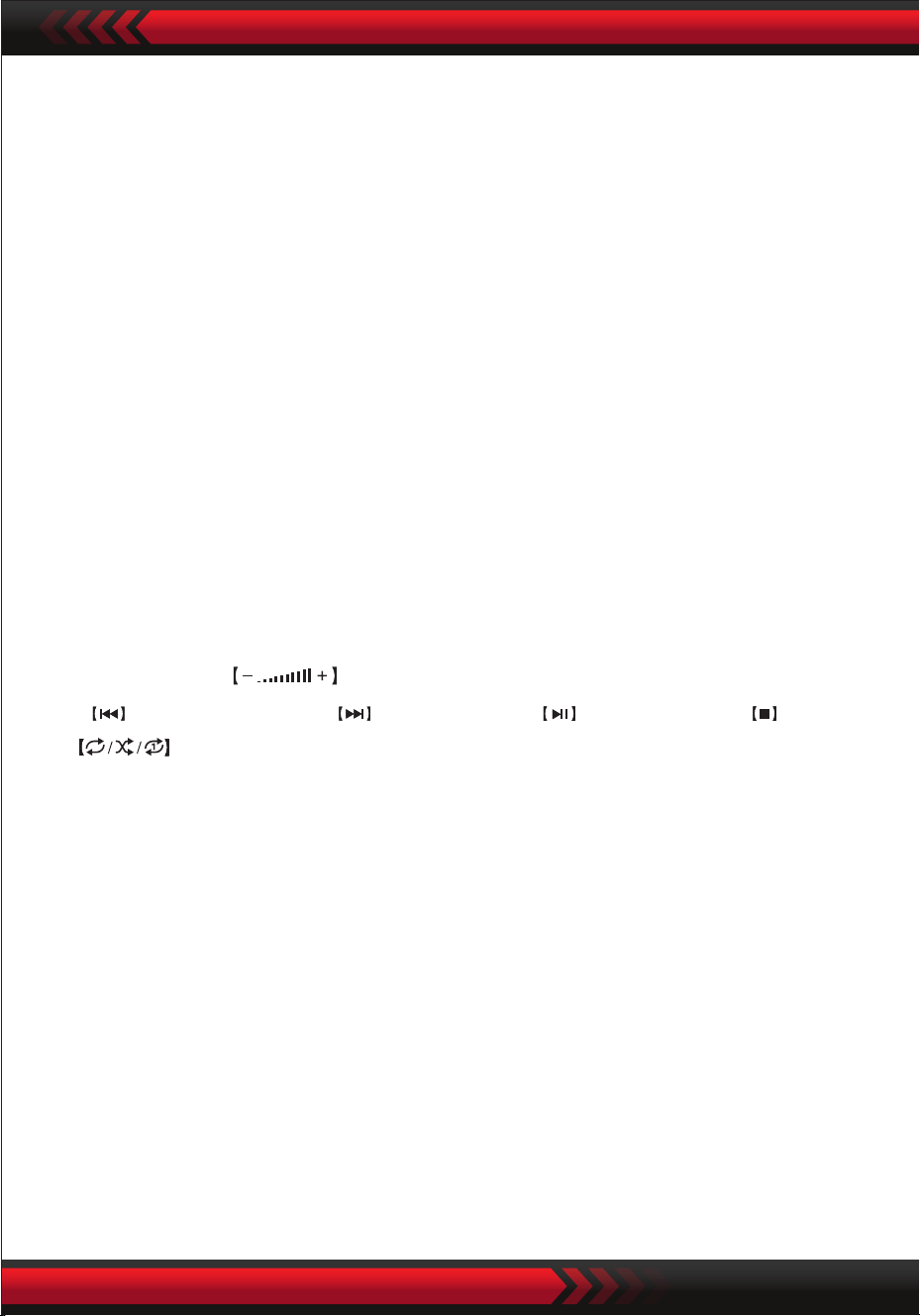
Press the key "MP3 " to adjust the volume.
Press to play the previous, to play the next, to play/suspend, to stop,
and to enter order, random and smgle playmg modes.
Press [Sound Eect] button to adjust the sound eect modes.
What’s in the Box:
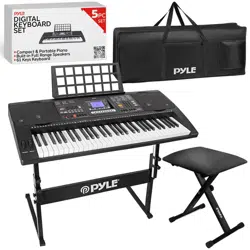
• Digital Musical Karaoke Keyboard
• Book Rack
• Adapter
• Power Plug
• Keyboard Stand
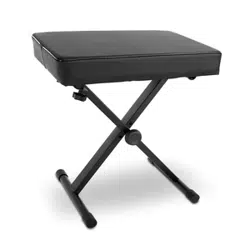
• Keyboard Stool
• Waterproof Bag
www.PyleUSA.com
14
5
4
3
1 2
3
2
4
5
2
5 5
3
4
1
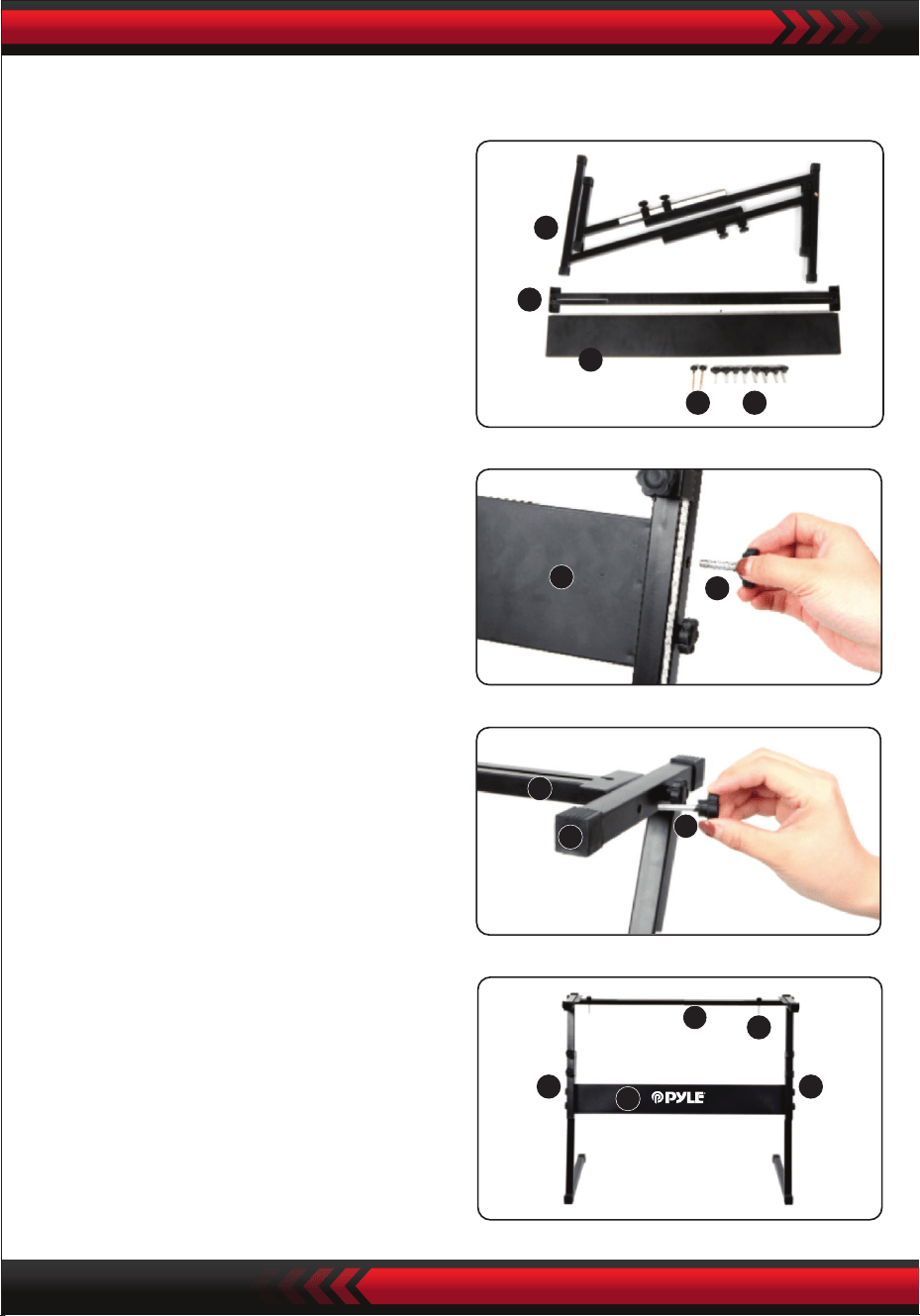
3. Take the No. 2 screw and the No. 4
stand to the top of the No. 5 stand
and tighten.
Keyboard Stand Assembly
2. Second, take the No. 2 screw and the
No. 3 support plate, x them to the
two support brackets of No. 5 and
tighten them separately.
4. The installation is complete, the
longest No. 1 screw is used to x the
keyboard on the stand.
1. First, prepare all the assembly parts

www.PyleUSA.com
15
Appendix
000 Acoustic Grand Piano
001 Bright Acoustic Piano
002 Electric Grand Piano
003 Honky-tonk Piano
004 Rhodes Piano
005 Chorused Piano
006 Harpsichord 1
007 Clavichord
008 Celesta 1
009 Glockenspie 1
010 Music box 1
011 Vibraphone 1
012 Marimba 1
013 Xylophone 1
014 Tubular Bell1
015 Dulcimer 1
016 Drawbar Organ
017 Percussive Organ
018 Rock Organ 1
019 Church Organ 1
020 Reed Organ 1
021 Accordion 1
022 Harmonica 1
023 Tango Accordion
024 Acoustic Guitar (nylon)
025 Acoustic Guitar (steel)
026 Electric Guitar (jazz)
027 Electric Guitar (clean)
028 Electric Guitar (muted)
029 Overdriven Guitar
030 Distortion Guitar
031 Guitar Harmonics
032 Acoustic Bass 1
033 Electric Bass (nger)
034 Electric Bass (pick)
035 Fretless Bass 1
036 Slap Bass 1
037 Slap Bass 2
038 Synth Bass 1
039 Synth Bass 2
040 Violin 1
041 Viola 1
042 Cello 1
043 Contrabass 1
044 Tremolo Strings 1
045 Pizzicato Strings 1
046 Orchestral Harp
047 Timpani
048 String Ensemble 1
049 String Ensemble 2
050 Synth Strings 1
051 Synth Strings 2
052 Choir Aahs 1
053 Voice Oohs
054 Synth Voice
055 Orchestra Hit
056 Trumpet 1
057 Trombone 1
058 Tubal
059 Muted Trumpet 1
060 French Hom 1
061 Brass Section 1
062 Synth Brass 1
063 Synth Brass 2
064 Soprano Sax 1
065 Alto Sax 1
066 Tenor Sax 1
067 Baritone Sax 1
068 Oboe 1
069 English Horn 1
070 Bassoon 1
071 Clarinet 1
072 Piccolo 1
073 Flute 1
074 Recorder 1
075 Pan Flute 1
076 Bottle Blow 1
077 Shakuhachi1
078 Whistle 1
079 Ocarina 1
080 Lead 1 (square)
081 Lead 2 (sawtooth)
082 Lead 3 (calliope lead)
083 Lead 4 (chi lead)
084 Lead 5 (charang)
085 Lead 6 (voice)
086 Lead 7 (fths)
087 Lead 8 (bass+lead)
088 Pad 1(new age)
089 Pad 2 (warm)
090 Pad 3 (polysynth)
091 Pad 4 (choir)
092 Pad 5 (bowed)
093 Pad 6 (metallic)
094 Pad 7 (balo)
095 Pad 8 (sweep)
096 FX 1 (rain)
097 FX 2 (soundtrack)
098 FX 3 (crystal)
099 FX 4 (atmosphere)
100 FX 5 (brightness)
101 FX 6 (goblins)
102 FX 7 (echoes)
103 FX 8 (sci-)
104 Sitar
105 Banjo
106 Shamisen
107 Koto
108 Kruimba
109 Bagpipe
110 Fiddle
111 Shanai
112 Tinkle Bell
113 Agogo
114 Steel Drums
115 Woodblock
116 Talko Drum
117 Melodic Tom
118 Synth Drum
119 Reverse Cymbal
120 Guitar Fret Noise
121 Breath Noise
122 Seashore
123 Bird Tweet
124 Telephone Ring
125 Helicopter
126 Applause
127 Gunshot
128 Stereo Grand Piano
129 Stereo Bright Piano
130 Grand Piano
131 Classic Piano
132 Rock Piano
133 Stereo Mellow Piano
134 Bright Piano
135 Modern Piano

www.PyleUSA.com
16
Sounds
136 La Piano
137 Dance Piano
138 Mell0W Piano
139 Strings Piano
140 Piano Pad
141 Synth-Str. Piano
142 Choir Piano
143 Honky-Tonk
144 2 Octave Piano
145 1 Octave Piano
146 Eiec.Grand Piano
147 E.Grand 80
148 Modern E.G.Piano
149 Harpsichord 2
150 Harpsichord 3
151 Coupled Harpsichord
152 Harpsichord & Strings
153 Elec.Piano 1
154 Elec.Piano 2
155 Fm Elec.Piano 1
156 Fm Elec.Piano 2
157 60's Elec.Piano 1
158 60's Elec.Piano 2
159 Dyno Elec.Piano 1
160 Dyno Elec.Piano 2
161 Mellow E.Piano
162 Pop Elec.Piano
163 Chorus Ep 1
164 Chorus Ep 2
165 Tremolo E.Piano
166 Modern E.Piano
167 Soft E.Piano
168 Strings E.Piano 1
169 Strings E.Piano 2
170 Synth-Str.E.Piano 1
171 Synth-Str.E.Piano 2
172 E.Piano Pad 1
173 E.Piano Pad 2
174 Clean E.Piano
175 Harpsichord E.Piano
176 Clavi 1
177 Clavi 2
178 Soft Clavi
179 Detune Clavi
180 Sequence Clavi
181 Clavi&Drawbar
182 Chorus Clavi
183 Vibraphone 2
184 Vibraphone 3
185 Soft Vibraphone
186 Chorus Vibraphone
187 Marimba 2
188 Soft Marimba
189 Celesta 2
190 Bright Celesta
191 Glockenspiel 2
192 Glockenspiel Pad 1
193 Music Box 2
194 Music Box 3
195 Xylophone 2
196 Tubular Bell 2
197 Dulcimer 2
198 Drawbar Organ 1
199 Drawbar Organ 2
200 Drawbar Organ 3
201 Drawbar Organ 4
202 Drawbar Organ 5
203 Perc.Organ 1
204 Perc.Organ 2
205 Pere.Organ 3
206 Elec.Organ 1
207 Elec.Organ 2
208 Elec.Organ 3
209 Jazz Organ 1
210 Jazz Organ 2
211 Jazz Organ3
212 Rock Organ 2
213 Rock Organ 3
214 Rock Organ 4
215 70's Organ
216 Fall Drawbar
217 Rotary Organ 1
218 Rotary Organ 2
219 Rotary Organ 3
220 Tremolo Organ
221 Click Organ
222 S'organ
223 Organ Pad 1
224 Organ Pad 2
225 Sequence Organ
226 Church Organ 2
227 Church Organ 3
228 Chapel Organ
229 Pipe Organ 1
230 Pipe Organ 2
231 Theater Organ
232 Organ & Harpsichord
233 Pipe Organ Pad
234 Reed Organ 2
235 Accordion 2
236 Accordion 3
237 Accordion 4
238 Accordion 5
239 Octave Accordion
240 Bandoneon 1
241 Bandoneon 2
242 Octave Bandoneon
243 Bandoneon Solo
244 Bandoneon & Violin
245 Harmonica 2
246 Harmonica 3
247 Harmonica 4
248 Nylon Str.Guitor 1
249 Nylon Str.Guitor 2
250 Steel Str.Guitar 1
251 Steel Str.Guitar 2
252 Steel Str.Guitar 3
253 12 Str.Guitar
319 Picked Bass M
320 Trance Bass M
321 Saw Synth-Bass M
322 Square Synth-Bass M
323 Violin 2
324 Slow Violin
325 Viola 2
326 Cello2
327 Slow Cello
328 Contrabass 2
329 Violin Section
330 Cello Section
331 Volin & Cello
332 String Quartet
333 Pizzicato Strings 2
334 Octave Pizzicato
335 Harp 1
336 Harp 2
337 Chorus Harp
338 Strings
339 String Ensemble 3
340 String Ensemble 4
341 String Ensemble 5
342 Slow Strings 1
343 Slow Strings 2
344 Wide Strings
345 Chamber 1
346 Chamber 2
347 Octave Strings 1
348 Octave Strings 2
349 Strings Sfz
350 Tremolo Strings 2
351 Harp & Strings
352 Flute & Strings
353 Orchestra Strings
354 Synth-Strings 1
355 Synth-Strings 2
356 Synth-Strings 3
357 70's Synth-Str.1
358 70's Synth-Str.2
359 80's Synth-Str.1
360 80's Synth-Str.2
361 Fast Synth-Strings
362 Slow Synth-Strings
363 Octave Syneh-Strings 1
364 Octave Syneh-Strings 2
365 Choir Aahs 2
366 Choirs 1
367 Choirs 2
368 Choir Strings
369 Strings Voice
370 Choius Choir
371 Slow Choir
372 Choirs Ensemble 1
373 Choirs Ensemble 2
374 Voice Doo
375 Voice Uuh
376 Synth-Voice 1
377 Synth-Voice 2
378 Synth-Voice 3
379 Voice Ensemble 1
380 Voice Ensemble 2
381 Voice Ensemble 3
382 Synyh-Voice Pad
383 Chorus Synth-Voice
254 Steel Gt+Strum.Noise 1
255 Steel Gt+Strum.Noise 2
256 Steel Gt Harmonics
257 Chorus Steel Gt
258 Jazz Guitar 1
259 Jazz Guitar 2
260 Oct Jazz Guitar
261 Clean Guitar1
262 Clean Guitar 2
263 Clean Guitar 3
264 Clean Guitar 4
265 Chorus Clean Guitar
266 Mute Guitar 1
267 Mute Guitar 2
268 Crunch Elec.Guitar
269 Overdrive Gt 1
270 Overdrive Gt 2
271 Distortion Gt 1
272 Distortion Gt 2
273 Distortion Gt 3
274 Distortion Gt 4
275 Power Dist.Gt
276 Rhythm Dist.Gt
277 Feedback Gt
278 Dist.Gt & Bass
279 Steel Gt + Strum.Noise M 1
280 Steel Gt + Strum.Noise M 2
281 Clean Guitar M
282 Crunch Elec.Guitar M 1
283 Crunch Elec.Guitar M 2
284 Distortion Gt M
285 Acoustic Bass 2
286 Acoustic Bass 3
287 Ride Bass
288 Fingered Bass 1
289 Fingered Bass 2
290 Fingered Bass 3
291 Fingered Bass 4
292 Rhythm Fingered Bass
293 Mellow Fingered Bass
294 Picked Bass 1
295 Picked Bass 2
296 Picked Bass 3
297 Rhythm Picked Bass
298 Fretless Bass 2
299 Fretless Bass 3
300 Slap Bass 1
301 Slap Bass 2
302 Doubled Strings Bass
303 Synth-Bass 1
304 Synth-Bass 2
305 Synth-Bass 3
306 Synth-Bass 4
307 Saw Synth-Bass
308 Souare Synth-Bass
309 Digi Roch Bass
310 Trance Bass
311 Sine Bass
312 Bass & Kick
313 Vocoder Bass
314 Soul Synth-Bass
315 Clavi Bass
316 Organ Bass
317 Fingered Bass M1
318 Fingered Bass M 2

www.PyleUSA.com
17
Style
384 Orchesyra Hit 1
385 Orchesyra Hit 2
386 Orchesyra Hit 3
387 Orchesyra Hit 4
388 Trumpet 2
389 Trumpet 3
390 Trumpet 4
391 Mellow Trumpet 2
392 Velo.Trumpet
393 Trumpet Sfz
394 Mute Trumpet 3
395 Trombone 2
396 Trombone 3
397 Mellow Trombone
398 Velo.Trombone
399 Trombone Section
400 Jazz Trombone
401 Trumpet & Trombone
402 Tuba 2
403 Tuba 3
404 French Horn 2
405 French Horn Solo
406 French Horn Section
407 Octave French Horn
408 Horn Orchestra
409 Stereo Brass
410 Brass
411 Brass Section 2
412 Brass Section 3
413 Brass Section 4
414 Mellow Brass
415 Hard Brass
416 Brass Sfz
417 Brass & Strings
418 Brass & Sax
419 Synth Brass 3
420 Synth Brass 4
421 Synth Brass 5
422 Synth Brass 6
423 Warm Synth-Brass
424 80's Synth-Brass
425 Analog Synth-Brass 1
426 Analog Synth-Brass 2
427 Trance Brass
428 Synth-Brass Pad
429 Octave Synth-Brass
430 Synth-Brass Sfz
431 Alto Sax 2
432 Alto Sax 3
433 Breathy Alto Sax1
434 Breathy Alto Sax2
435 Tenor Sax 2
436 Tenor Sax 3
437 Breathy Tenor Sax 1
438 Breathy Tenor Sax 2
439 Soprano Sax 2
440 Soprano Sax 3
441 Breathy S.Sax
442 Baritone Sax 2
443 Baritone Sax 3
444 Soft A.Sax
445 Hard A.Sax
446 Solo A.Sax
447 Soft T.Sax
448 Solo T.Sax
449 T.Saxys
450 A.Saxys
431 Sax Section
432 Sax Section Sfz
453 Clarinet 2
454 Velo.Clarinet
455 Bass.Clarinet
456 Jazz.Clarinet
457 Oboe 2
458 Solo Oboe
459 English Horn 2
460 Bassoon 2
461 Flute 2
462 Flute 3
463 Jazz Flute
464 Pure Flute
465 Soft Flute
466 Piccolo 2
467 Piccolo 3
468 Pipe Section 1
469 Pipe Section 2
470 Flute & Oboe
471 Recorder 2
472 Recorder 3
473 Pan Flute 2
474 Pan Flute 3
475 Bottle Blow 2
476 Whistle 2
477 OcaRina 2
478 Shakuhachi 2
479 Square Lead 1
480 Square Lead 2
481 Square Lead 3
482 Square Lead 4
483 Saw Lead 1
484 Saw Lead 2
485 Saw Lead 3
486 Mellow Sawlead
487 Square Pulse Lead
488 Sequence Saw 1
489 Sequence Saw 2
490 Sequence Sine
491 Sine Lead
492 Velo.Sine Lead
493 Ss Lead
494 Slow Square Lead
495 Slow Square Pulse
496 Sequence Square
497 Sequence Pulse 1
498 Sequence Pulse 2
499 Slow Sawlead
500 Pulse Sawlead
501 Slow Saw Pulse
502 Trance Lead
503 Callope 1
504 Callope 2
505 Vent Lead
506 Vent Synth
507 Pure Lead
508 Pipe Lead
509 Sequence Lead
510 Chiff Lead
511 Drop Lead
512 Ep Lead
513 Voice Lead 1
514 Voice Lead 2
515 Vox Lead 1
516 Vox Lead 2
517 Distortion Lead
518 Charang
519 Octave Charang
520 Pluck Lead 1
521 Pluck Lead 2
522 Gt Synth Lead
523 Church Lead
524 Double Voice Lead
525 Voice Choir Lead
526 Ep & Voice Lead
527 Synth Voice Lead
528 Fifth Lead
529 Fifth Saw Lead
530 Fifth Square Lead
531 Fourth Lead
532 Seventh Sequence
533 Fifth Sequence
534 Basst+Lead
535 Bass+Saw Lead
536 Synth-Bass+Lead
537 Reed Lead
538 Fret Lead
539 Fantasy 1
540 Fantasy 2
541 New Age
542 New Age Pad
543 Warm Vox
544 Thick Pad
545 Warm Pad
546 Sine Pad
547 Soft Pad
548 Horn Pad
549 Old Tape Pad
550 Polysynth 1
551 Polysynth 2
552 Polysynth Pad 1
553 Polysynth Pad 2
554 Poly Saw
555 Space Choir
556 Heaven
557 Space Strings Pad
558 Chiff Choir
559 Star Voice
560 Square Pad
561 Bowed Pad
562 Glass Pad
563 Bottle Pad
564 Tine Pad
565 Ethnic Pad
566 Soft Metal Pad
567 Hard Metal Pad
568 Chorus Pad
569 Halo Pad 1
570 Halo Pad 2
571 Organ Choir Pad
572 Sweep Choir
573 Sweep Pad
574 Clavi Pad 2
575 Rain Drop 1
576 Rain Drop 2
577 Wood Pad
578 Space Voice
579 Sound Track 1
580 Sound Track 2
581 Rave
582 Soft Crystal
583 Crystal
584 Christmas Bell
585 Glockenspiel Chime
586 Vibraphone Bell
587 Choral Bell
588 Synth-Nakket
589 Celesta Pad
590 Atmosphere
591 Nylon Gt & Ep
592 Steel Pad
593 Bright Bell Pad
594 Brightness 1
595 Brightness 2
596 Goblin
597 Echo Voice
598 Echo Pad
599 Echo Drop

www.PyleUSA.com
18
Style
000 Pop
001 Ragtim
002 Pop Funk
003 March 1
004 Retro Disco
005 Easy pop
006 "Fox March"
007 48 Bit
008 Ballad
009 Waltz
010 Latin
011 8 Beat Pop 1
012 8 Beat Pop 2
013 8 Beat Uptempo
014 8 Beat Standard
015 8 Beat Medium
016 8 Beat Ballad
017 Epic Ballad
018 Piano Ballad
019 16 Beat Pop 1
020 16 Beat Shuffle 1
021 16 Beat Shuffle 2
022 16 Beat Ballad 1
023 16 Beat Ballad 2
024 16 Beat Ballad 3
025 Funk 1
026 Funk 2
027 Soul
028 Gospel Shuffle
029 6-8 Gospel
030 4-4 Blues
031 Twist
032 Fusion 1
033 Funky Fusion 1
034 50's Pop
035 Cool Pop
036 Groovy Pop
037 60's Vintage Pop
038 80's Pop
039 Folk Rock 1
040 Pop Rock 1
041 Pop Rock 2
042 8 Beat Rock Balld
043 16 Beat Rock Bld
044 Hard Rock 1
045 Rock Shuffle 1
046 6-8 Hvy Rock
047 US-Rock
048 16 Beat Rock
049 Rock 1
050 Rock 2
051 60's Rock
052 Standard Rock
053 Brit Rock Pop
054 60's Vintage Rock
055 Chart Rock Shfl
056 60's Pop Rock
057 Soul Ballad
058 Slow Rock 1
059 Slow Rock 2
060 6-8 Ballad
061 R&B
062 70's Chart Ballad
063 Romantic Ballad
064 China 1
065 China 2
066 China 3
067 China 4
068 China 5
069 China 6
070 China 7
071 China 8
072 China 9
073 China 10
074 Bossa Nova 1
075 Bossa Nova 2
076 Bossa Nova 3
077 Salsa
078 Samba 1
079 Mambo 1
080 Beguine
081 Merengue
082 Bolero Lento
083 Espagnole
084 Cajun
085 Reggae 12 Beat 1
086 Pop Reggae 1
087 Pop Mambo
088 Latin Party Pop
089 New Age 1
090 New Age 2
091 Bluse Mambo
092 Dance Pop 1
093 Dance Pop 2
094 Techno 1
095 Euro Beat
096 Euro House
097 Hip Hop
098 Trip Hop
099 Synth Boogie
100 70's Disco
101 Disco Trop
102 Party Pop
103 Polka Pop 1
104 Boogie
105 Swing
106 Big Band Swing
107 Big Band Balld
108 Jazz Quartet
109 Dixieland
110 CoolJazz
111 Jazz Ballad
112 BBQ uickstep
113 Bluegrass 1
114 Bluegrass 2
115 Country 2-4
116 8 Beat Country
117 Country Rock
118 Cwhy Boogie
119 Cntry Ballad
120 Cnutry Shuffle
121 Country Waltz
122 Jazz Waltz
123 HullyGully
124 March 2
125 March 3
126 6-8 March
127 Polka
128 PopWaltz
129 Cha Cha Cha
130 Rhumba
131 Pasodoble
132 TangoCont
133 Foxtrot 1
134 Jive 1
135 Stndrd Waltz
136 German Waltz
137 Vienn Waltz
138 Musette Waltz
139 Rock'n Roll 1
140 Rock'n Roll 2
141 Straight Rock
142 Jazz Rock 1
143 Fast Gospe
144 Folk Rock 2
145 Rock Billy
146 Rock Boogie
147 Rock Cha Cha
148 Rock Classica 1
149 Rock Shuffle 2
150 Rock Pop
151 Skiffle
152 Funk Pop Rock
153 Contemp Rock
154 Acoustic Rock
155 80's Rock
156 LA Shuffle
157 Jive 2
158 Samba 2
159 Samba 3
160 Schlager Rock 1
161 Schlager Rock 2
162 Carnival
163 Organ Samba
164 Reel
165 Foxtrot 2
166 Foxtrot 3
167 Club Pop
168 16 Beat Pop 2
169 8 Beat Pop 3
170 8 Beat Soul 1
171 8 Beat Rock
172 Rap Pop
173 60's Soul
174 70's Soul
175 Funk Shuffl
176 Fusion Shuffl
177 Classic 8 Beat
178 Vintage Gtr Pop
179 Schlager Italia
180 8 Beat Soft
181 8 Beat Heat
182 8 Beat Soul 2
183 Guitar Ballad
184 8 Beat Pop 4
185 Polka Pop 2
186 Polka Pop 3
187 16Beat 1
188 16Beat 2
189 16Beat 3
190 Pop Ballad 1
191 Pop Ballad 2
192 Funky Pop
193 Hip Hop Pop
194 Soul Shuffle
195 Slow Soul
196 8 Beat Adria
197 Classic Piano
198 Unplugged
199 Pop Ballad 3
200 Pop New Age
201 8 Beat Modern
202 Country Ballad
203 Love Song
204 Modern Country Pop
205 Electro Pop
206 Acoustic Ballad
207 Piano Ballad
208 R&B Ballad
209 Rock Ballad 1
210 Slow & Easy
211 Analog Ballad
212 Calypso
213 GuadDance
214 Reggae 12 Beat 2
215 Reggae 16 Beat
216 Bossa Nova 4
217 Mambo 2
218 Mambo 3
219 Bolero
220 Cumbia 1
221 Latin Rock
222 Disco Latin
223 Tijuana
224 Reggae
225 Cumbia 2
226 Parranda
227 Carnival 2
228 Samba Rio
229 Pop Reggae 2
230 Techno 2
231 Techno 3
232 Funky Disco
233 Saturday Night
234 Club Latin
235 Disco Chocolate
236 Disco Fox
237 Disco Funk
238 Disco Hands
239 Disco Party
240 Disco Samba
241 UK Pop
242 Club Dance
243 Country 1
244 Country 2
245 Finger Pickin
246 Country Brothers
247 New Country
248 Easy Country
249 70's Chart Cutry
250 Hoedown
251 Country Shuffle
252 Ober Polka
253 Polka Pop 4
254 Blue Grass 1
255 Blue Grass 2
256 Blue Grass 3
257 USA March
258 Hully Gully
259 Big Band Shuffle 1
260 Big Band Shuffle 2
261 Big Band Shuffle 3
262 Fast Band 1
263 Fast Band 2
264 Cat Groove
265 Dixie Jazz
266 Medium Jazz
267 16 Beat Shuffle
268 British Pop
269 8 Beat 1
270 8 Beat 2
271 8 Beat 3
272 8 Beat 4
273 Heart Beat
274 Organ Ballad
275 Hard Rock 2
276 Street Pop
277 Soft Fusion
278 West End
279 Baroque
280 Funky Fusion 2
281 Game Show
282 Fusion 2
283 Funk 3
284 Rock 3
285 Rock 4
286 Rock Classic 2
287 Rock Shffle 1
288 Rock Shffle 2
289 Jazz Rock 2
290 Soft Rock
291 Cowboy Rock
292 Rock Ballad 2
293 Rock Ballad 3
294 Rock Ballad 4
295 E-Ballad
296 80's EP Ballad
297 80's Boy Band
298 90's Cool Ballad
299 Alp Ballad1

www.PyleUSA.com
19
Features:
• 2-in-1 Karaoke Keyboard: Play & Sing-Along!
• Compact & Portable Musical Piano
• Simple Electronic Plug-in Operation
• Portable Piano
• Built-in Full Range Stereo Speakers
• Connect & Stream Audio from External Devices
• Can Connect to Speaker and Play Sound
• Multiple Preset Selectable Keyboard Sound, Tone & Rhythm Styles
• Digital LCD Display
• Adjustable Volume Control
• Record & Playback Mode
• 61 Keys Keyboard Percussion Function
• Basic control: Master Volume / Accom Volume /Chord Volume/ Tempo Control
• Rhythm Programming Function / Record & Playback
• Auto Chord Function: Single Chord / Fingered Chord
• Pitch Bend / Vibrato / Sustain / Touch Sensing Function
• Teaching Functions: One-key/Follow/Assemble
• USB Jack / Mic Jack
• Perfect for Home Theater Living Room Performances
• Fun for Kids of All Ages: Children & Adults

www.PyleUSA.com
20
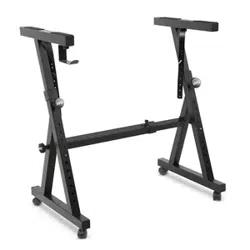
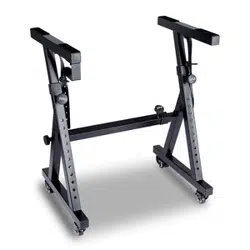
Keyboard Stand Specs:
• Baked Varnish
• Detachable Function
• Construction Material: Iron + ABS
• Length: 31.5'' -inches - (80cm)
• Width: 8.3'' -inches - (21cm)
• Height: 57.5~67.5 cm
• Weight: 1.75 kg
• Bearing: 15 kg
Keyboard Stool Specs:
• Construction Material: PU Leather, Iron, Sponge
• Baked Varnish
• Folding Function
• Length: 15.75'' -inches - (40cm)
• Width: 11.81'' -inches - (30cm)
• Height: 17.32'' / 18.9'' / 20.1'' -inches - (44 / 48 / 51 cm)
• Weight: 2.2 kg
www.PyleUSA.com
21
California Prop 65 Warning
WARNING:
This product contains Butyl benzyl phthalate (BBP) which is
known to the state of California to cause cancer birth defects
and other reproductive harm. Do not ingest.
For more info go to: www.P65warnings.ca.gov
Spécications techniques:
• 61 Keyboard Keys
• 600 Sounds / 300 Styles
• 40 Demonstration Songs: One/All
• Audio Interface: Aux (3.5mm) Input Jack / Mic Input / USB input
• Max Sound Level: Up to 110 dB
• USB/Power Cable Length: 3.9’ ft. - (119cm)
• Construction Material: Engineered ABS
• Power Supply: DC 12V / AC adaptor
• Piano Dimensions (L x W x H):
36.6’’ x 11.97’’ x 3.7’’ -inches - (93 x 30.4 x 9.3 cm)

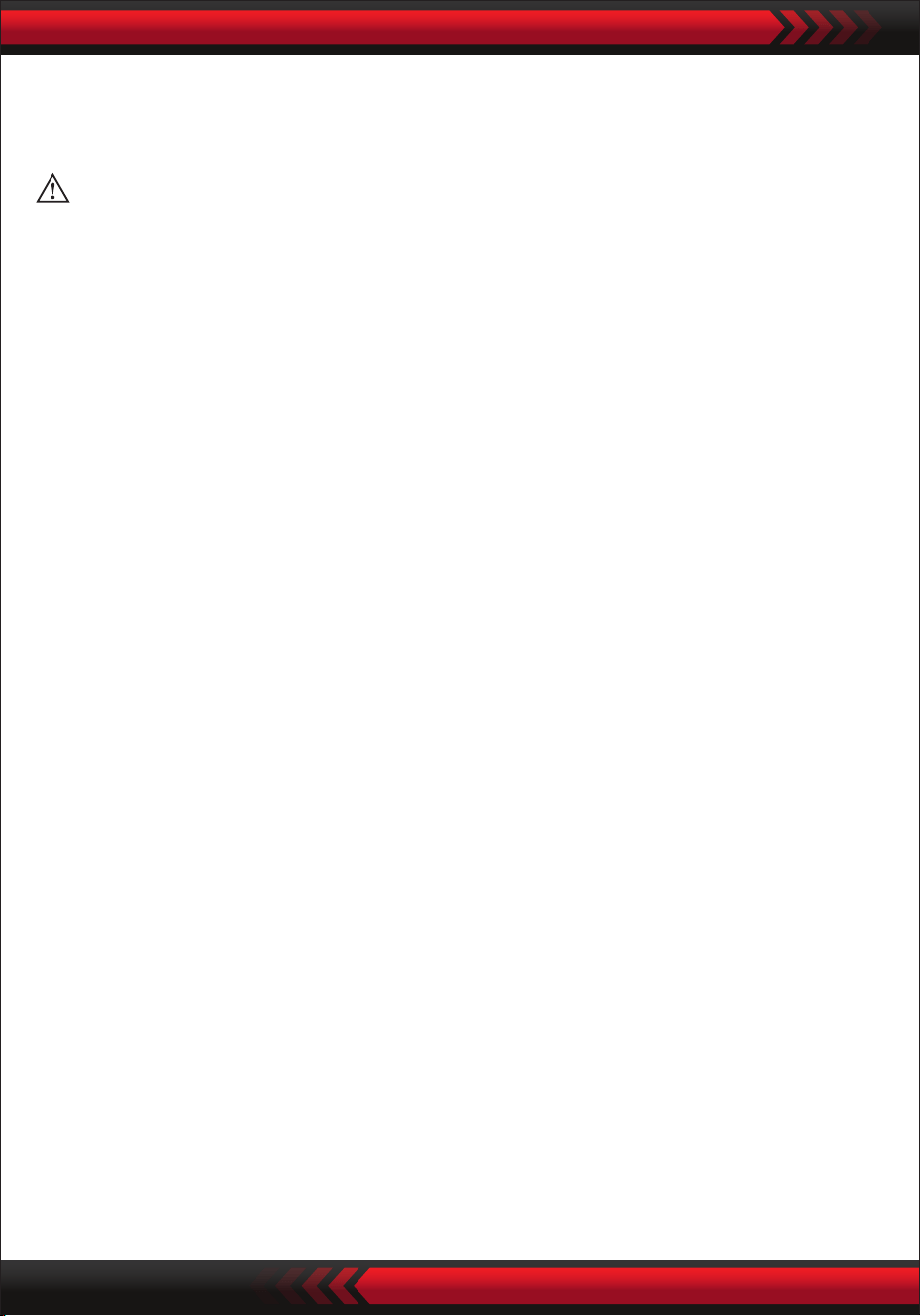
Teclado musical digital para karaoke
PKBRD6151PB
Teclado de piano electrónico portátil
con bolsa resistente al agua (61 teclas),
taburete de teclado y soporte de teclado
GUÍA DEL USUARIO
SPA
www.PyleUSA.com
2
Guarde este manual en un lugar seguro y a mano para futuras consultas
Se debe utilizar un adaptador de corriente dedicado y, en caso de daños en el adaptador,
deberá reemplazarlo inmediatamente
No desarme ni haga modicación alguna en la estructura interior. En caso de cualquier
anomalía funcional durante su uso, deje de utilizarlo y envíe el teclado inmediatamente a
profesionales para que reciba mantenimiento.
Al conectar el teclado a otro dispositivo, asegúrese de que tanto el teclado como el
dispositivo que se va a conectar estén apagados antes de la conexión.
No gire y mantenga el volumen al máximo o en un grado incómodo durante mucho
tiempo cuando esté tocando.
Mantenga el teclado alejado de toda fuente de calor para proteger sus piezas de daños.
Evite que entren líquidos, polvo, partículas pequeñas y otras materias extrañas en la
carcasa del teclado, lo que puede provocar un cortocircuito en el elemento.
Desconecte el enchufe antes de limpiar el teclado y no lo saque con las manos mojadas.
Utilice un paño seco y suave para limpiar el teclado. No se debe utilizar pintura, alcohol u
otros disolventes químicos para la limpieza, ya que pueden dañar la supercie del teclado.
Desconecte el enchufe después de tocar o cuando el teclado no se utilice durante mucho
tiempo.
Para reducir el riesgo de incendio o descarga eléctrica, no exponga este aparato a la
lluvia ni a la humedad. El aparato no debe exponerse a goteos o salpicaduras y no se
deben colocar objetos llenos de líquidos, como jarrones, sobre el aparato.
Máxima temperatura operativa: 40º( / 104ºF
El adaptador de conexión directa se utiliza como dispositivo de desconexión, el
dispositivo de desconexión debe permanecer fácilmente operable.
No instale este equipo en un espacio connado, como una estantería para libros o una
unidad similar, y permanezca en condiciones de ventilación adecuadas. La ventilación
no debe verse obstaculizada cubriendo las aberturas de ventilación con elementos
como periódicos, manteles, cortinas, etc.
Advertencia: La presión sonora excesiva de los auriculares puede causar pérdida de
audición.
La ubicación de la etiqueta está en la parte inferior del aparato.
El aparato no debe exponerse a goteos o salpicaduras y no debe colocarse ningún objeto
lleno de líquidos, como jarrones, sobre el aparato.
El adaptador de conexión directa se utiliza como dispositivo de desconexión, el
dispositivo de desconexión debe permanecer fácilmente operable.
•
•
•
•
•
•
•
•
•
•
•
•
•
•
•
•
•
Advertencia!
POR FAVOR, LEA ATENTAMENTE ANTES DE CONTINUAR
www.PyleUSA.com
3
•
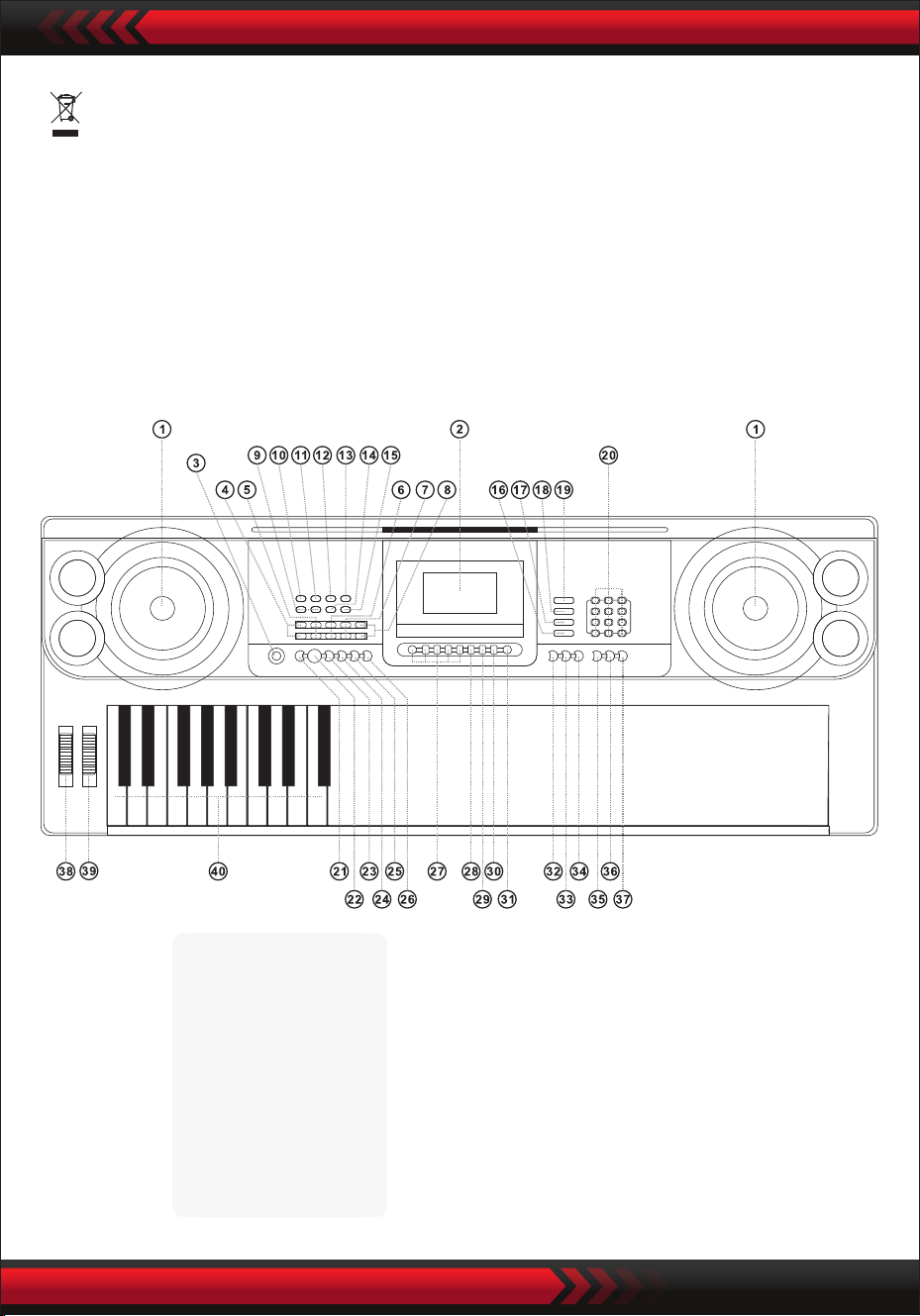
I. Panel de control y puertos de extensión
PANEL DE CONTROL FRONTAL
Esta marca indica que este producto no debe desecharse con otros
residuos domésticos en todos los Estados Unidos.
Para evitar posibles daños al medio ambiente o a la salud humana por la
eliminación incontrolada de residuos, recíclelos de forma responsable para
promover la reutilización sostenible de los recursos materiales.
Para devolver su dispositivo usado, utilice los sistemas de devolución y
recogida o póngase en contacto con el minorista donde compró el producto.
1 Altavoz
2 Pantalla LCD
3 Interruptor
4 Volumen Central
5 Chord volume
6 Volumen de Ritmo
7 Transpos
8 Tempo
16 Teclado de Percusión
17 Canción Demo
18 Estilo
19 Sonido
20 Números
21 Sinc.
22 Iniciar/Detener
23 Rellenar
24 Single
25 Con dedos
26 Acorde desactivado
27 Estado de la
memoria
28 Programar
29 Null Play
30 Grabar
31 Metrónomo
32 Sostener
33 Dual/Dividido/Desactivado
34 Toque
35 One Key
36 Seguir
37 Ensamble
38 PitchBend
39 Vibrato
40 Teclado de acordes
9 MP3 control de volumen
10 Anterior
11 Siguiente
12 Reproducir/Pausa
13 Detener
14 Introducir orden/Aleatorio/mo-
dos de rep. individuales
15 Efecto de sonido
USB Reproductor de música
www.PyleUSA.com
4
PANEL TRASERO
ENTRADA DE AUDIO
El teclado electrónico tiene la función de entrada de audio estéreo, y las señales de
audio de teléfonos móviles, reproductores de MP3, computadoras y similares se
pueden ingresar en el sistema de teclado electrónico para reproducirse. Al principio,
apague la fuente de alimentación del teclado electrónico, inserte un extremo del
cable de audio en el puerto de salida de un dispositivo de audio, inserte el otro
extremo en la interfaz ENTRADA DE AUDIO en la parte posterior del teclado
electrónico y luego encienda la fuente de alimentación del teclado electrónico.
• Salida de audio: Apague la fuente de alimentación del teclado electrónico y
del equipo de sonido externo, luego inserte un extremo del cable de audio en la
interfaz PHONES / OUTPUT para la salida de audio en la parte posterior del
teclado electrónico e inserte el otro extremo en la interfaz de entrada de audio
del equipo de sonido.
• Conexión de auriculares: coloque el enchufe de los auriculares en la interfaz
PHONES / OUTPUT en la parte posterior del teclado electrónico, luego el altavoz
del teclado electrónico se desconectará automáticamente y se evitará la inuencia
en otros durante la reproducción.
¡Atención! No mantenga el volumen más alto durante mucho tiempo cuando se
utilicen los auriculares, para evitar pérdidas auditivas.
CONEXIÓN DE AURICULARES CON SALIDA DE AUDIO
USO DEL ADAPTADOR DE FUENTE DE ALIMENTACIÓN DE CA/CC
El adaptador de fuente de alimentación CA/CC debe ser el designado para el
instrumento. Conecte un lado a la toma de corriente en el panel posterior y el otro a
la red eléctrica de la ciudad. (Tenga en cuenta que el voltaje de entrada debe ser el
mismo que el de la red eléctrica)
II. Preparativos antes de tocar
41 PUERTO USB PARA REPRODUCIR MÚSICA
(Unidad ash no incluida)
42 ENTRADA DE AUDIO
43 ENTRADA DE MICRÓFONO
44 AUDIFONOS/SALIDA
45 DC UV EN JACK
SELECCIÓN DE SONIDO
PERCUSIONES DE TECLADO
CANCIONES DE DEMOSTRACIÓN
Presione el botón [Encendido-Power ] con la luz de fondo encendida, la pantalla
LCD muestra información sobre el timbre actual, el tempo, etc.
III. Método básico de ejecución
Inserte el enchufe del micrófono en el conector del micrófono del teclado y podrá
disfrutar tocando y cantando.
ENTRADA DE MICRÓFONO (no incluida)
www.PyleUSA.com
5
Presione la tecla "Master Volume ”. o "Master Volume " para aumentar o disminuir
el volumen maestro. Cuando se presiona el "Master Volume ” y el “Master
Volume ” Al mismo tiempo, el volumen maestro se recupera al valor
preestablecido. El volumen del estilo y de los acordes pueden ser controlados
simultáneamente por el volumen maestro.
AJUSTE DE VOLUMEN MAESTRO
El teclado electrónico contiene 600 sonidos, desde "000" hasta "599". Cuando se
enciende la fuente de alimentación, la función de selección de sonido se habilita
automáticamente y la pantalla muestra "SONIDO"; de lo contrario, la función de
selección de sonido se puede activar pulsando la tecla "SONIDO". El inicio
predeterminado "000" se reere al sonido del piano, se puede seleccionar otro
sonido presionando los números de sonido correspondientes a través de las teclas
numéricas o presionando "+" o "-".
Presione la tecla "Percusión de teclado (Keyboard Percussion)" para habilitar la
función de percusión de teclado. A continuación, se puede emitir el sonido de
percusión correspondiente cuando se toca el teclado. Presione "Percusión de
teclado" nuevamente para deshabilitar la función de percusión de teclado.
El teclado electrónico contiene 40 canciones de demostración para la enseñanza,
desde "000" hasta "039". Cuando se presiona la tecla "Canción de demostración",
todas las canciones de demostración se reproducirán secuencialmente.
Durante la reproducción, se puede seleccionar otra canción de demostración
presionando el número correspondiente a través de las teclas numéricas o
presionando "+" o "-" y luego la canción de demostración seleccionada se reprodu-
cirá cíclicamente

Presione la tecla "Estilo de volumen " o "Volumen de estilo " para aumentar o
disminuir el volumen del estilo. Cuando se presionan las dos teclas simultánea-
mente, el volumen del estilo se puede recuperar al valor preestablecido
predeterminado.
AJUSTE DE TEMPO
Pulse el botón [Tempo ] / [Tempo ], el tempo del estilo se puede acelerar o
ralentizar. Aplica los dos al mismo tiempo, el tempo vuelve al actual.
www.PyleUSA.com
6
1. Estilo de inicio
Pulse el botón [Start/Stop] para iniciar el estilo de acompañamiento.
Cuando el estilo aún no haya comenzado, presione la tecla "Syn" y luego el
metrónomo en la pantalla parpadeará. Cuando se toca cualquier tecla en la zona
del teclado de acordes (Tecla 1-19 desde la izquierda), el acompañamiento de
estilo comenzará de forma sincronizada.
2. Rellenar
En el estado del estilo, presione el botón [Rellenar (Fill In)], una pieza de
intermezzo se puede completar automáticamente.
3. Detener el acompañamiento
Pulse el botón [Start/Stop], y el estilo de acompañamiento se cierra de inmediato.
IV. Estilo automático
SELECCIÓN DE ESTILO
CONTROL DE ESTILO
METRÓNOMO
El teclado electrónico contiene 300 estilos, desde "000" hasta "299". El valor prede-
terminado de inicio es "000". Presione la tecla "Estilo" para habilitar la función de
selección de ritmo, y luego la pantalla muestra "STYL". Se puede seleccionar otro
estilo pulsando el botón "ESTILO". Se puede seleccionar otro estilo pulsando el
número de estilo correspondiente en las teclas numéricas o pulsando "+" o "-".
El metrónomo contiene cuatro tempos, 114, 2/4, 3/4 y 4/4, respectivamente.
Cuando se presiona continuamente la tecla "Metrónomo", se pueden seleccionar
cuatro tempos en secuencia. La ejecución de cualquier tempo se puede detener
cuando se vuelve a pulsar la tecla "Metrónomo"
AJUSTE DEL VOLUMEN DEL RITMO
www.PyleUSA.com
7
V. Acorde de bajo automático
ACORDE DE UN SOLO DEDO
Presione la tecla "Single Finger Chord" para habilitar la función de acorde y la pantalla
mostrará "Single". Cuando el estilo comienza, el acompañamiento automático de acordes
se puede realizar en la zona del teclado de acordes (Tecla 1-19 desde la izquierda) de
acuerdo con el método de digitación del acorde de un solo dedo. Cuando el estilo aún
no ha comenzado, el acompañamiento de acordes se puede realizar manualmente.
Presione la tecla "Single Finger Chord" o "Chord OFF" para desactivar la función de
acordes, y el "Single" en la pantalla desaparece.
Escalas de acordes de un solo dedo
ACORDES DE DEDO
VI. Control de efectos
AJUSTE DEL VOLUMEN DE LOS ACORDES
Presione la tecla "Volumen del acorde )." o " Volumen del acorde " para aumentar
o disminuir el volumen del acorde. Cuando se presionan las dos teclas simultánea-
mente, el volumen del acorde se puede recuperar al valor preestablecido predeter-
minado.
Escalas de acordes con dedos
Presione la tecla "Acorde con dedos" para habilitar la función de acorde y la pantalla
mostrará "Dedo". Cuando el estilo comienza, el acompañamiento automático de
acordes se puede realizar en la zona del teclado de acordes (Tecla 1-19 desde la
izquierda) de acuerdo con el método de digitación del acorde con los dedos. Cuando
el estilo aún no ha comenzado, el acompañamiento de acordes se puede realizar
manualmente.
Presione la tecla "Acorde con dedos" o "Acorde apagado" para deshabilitar la
función de acorde y el "Dedo" en la pantalla desaparece.
www.PyleUSA.com
8
FUNCIÓN DE TRANSPOSICIÓN
La función de transposición puede ayudarlo a reproducir música de otras melodías
en el método de digitación e-tune. Cuando se presiona la tecla "Transponer ", el
sonido de todo el teclado disminuirá en medio tono (segundo menor) y el sonido
de la sintonía C del teclado se cambiará a sonido de sintonía B. Cuando se presiona
la tecla "Transponer ” , el sonido de todo el teclado aumentará en un semitono
(segundo menor) y el el sonido de sintonía C del teclado se convierte en sonido de
sintonía #C o sonido de sintonía bD. Cuando se presiona dos veces la tecla "Tran-
sponer ", la melodía C se cambia a la melodía bB. Cuando se pulsa cinco veces la
tecla "Transponer ", la anación C se convierte en la anación F. Cuando se pulsan
al mismo tiempo las teclas "Transponer “ y "Transponer ”, el sonido se recupera
a la melodía C "00". El nivel se puede ajustar de "-6" a "+6" pulsando la tecla
"Transponer " o "Transponer ".

www.PyleUSA.com
9
SOSTENER
Presione el botón [Sostener] y "SUS" aparecerá en la pantalla, el sonido
de las pulsaciones de teclas adquiere un efecto de sostenido. Presione el botón
nuevamente y "SUS" desaparecerá, cerrando la función.
DOBLE SONIDO Y FUNCIÓN DE DIVISIÓN DEL TECLADO
Presione la tecla "Dual / Split / O" para encender o apagar.
Entrará la función de división del teclado de tonos dobles.
FUNCIÓN DE DIVISIÓN DEL TECLADO (KEYBOARD SPLIT)
Cuando la función "Teclado dividido" está activada y la parte superior de la
pantalla muestra "Split". Luego, las 24 teclas a la izquierda del teclado electrónico
se separan del teclado original y el tono de la zona izquierda del teclado aumenta
por zona
SONIDOS DOBLES
Cuando el "DUAL" está activado, la pantalla muestra "double" y se pueden produ-
cir los efectos de superposición de dos sonidos durante la reproducción del teclado
electrónico.
Una vez activada la función de doble sonido, el sonido 1 y el sonido 2 se pueden
cambiar pulsando la tecla "Sonido" para seleccionar el sonido deseado, y la
pantalla mostrará correspondientemente "SOUND1" o "SOUND2".
VIBRATO
Cuando "Vibrato" está en la posición más baja, la función de vibrato se desactivará.
Cuando se gira hacia arriba "Vibrato", se habilitará la función de vibrato y la
pantalla mostrará "VIB". Con la función de vibrato se pueden agregar efectos de
vibrato al tono de reproducción. El vibrato se puede aumentar o disminuir y, para
desactivarlo, gire el "Vibrato" hacia arriba o hacia abajo.
PORTAMENTO
La inexión de tono puede agregar cambios de tono suaves a las notas tocadas por
el teclado. El tono se puede aumentar girando hacia arriba la inexión de tono y se
disminuye girando hacia abajo la inexión de tono. Después de ser liberado, la
inexión de tono volverá automáticamente al centro y el tono del teclado recuper-
ará el estado estándar.

www.PyleUSA.com
10
se reduce en octava para que sea idéntico al tono de la zona izquierda del teclado.
El tono de la zona derecha del teclado se puede seleccionar según sea necesario, y
se pueden reproducir diferentes sonidos en la zona izquierda y en la derecha.
Cuando se vuelve a pulsar la tecla "División del teclado", la pantalla muestra "OFF"
y la función de división del teclado se desactiva
TOQUE
Pulse el botón [Touch] para activar o desactivar la función táctil. El valor predeter-
minado en el momento del inicio es ON. La pantalla mostrará "Touch". Esta función
puede ayudar a enriquecer la expresión musical y reejar correctamente la fuerza
que aplicas en cada nota. Cuanto mayor sea la fuerza durante la actuación, más
fuerte será el sonido. Cuando esta función está desactivada, se puede emitir el
mismo sonido independientemente de la fuerza que se efectúe en la interpretación.
GRABACIÓN
Cuando se presiona la tecla "Record", se habilita la función de grabación, la pantalla
muestra "Grabar" y luego se guardarán las notas tocadas.
Las notas grabadas se borrarán automáticamente cuando se vuelva a realizar la
grabación o se apague el teclado electrónico.
DETENER LA GRABACIÓN
Cuando la memoria esté llena de notas y la palabra "Grabar" desaparece de la
pantalla, la grabación se detendrá automáticamente. Se puede presionar la tecla
"Reproducir" durante el proceso de grabación para detener la grabación y r
eproducir las notas grabadas.
Cuando se vuelva a pulsar la tecla "Grabación", la función de grabación se desacti-
vará y las notas grabadas se borrarán automáticamente.
REPRODUCCIÓN DE NOTAS GRABADAS
Las notas grabadas se pueden reproducir pulsando directamente la tecla
"Reproducir" durante el proceso de grabación. La reproducción de las notas
grabadas se puede detener pulsando la tecla "Reproducir" de nuevo durante el
proceso de reproducción.
VII Función de grabación

www.PyleUSA.com
11
VIII. Programación de estilo
IX. Función de memoria del estado
PROGRAMACIÓN DE ESTILO
Cuando se presiona la tecla "Programa", se habilita la función de programación de
estilo, la pantalla muestra "Programa" y se puede programar un conjunto de
melodías de estilo tocando la percusión correspondiente del teclado.
* El estilo programado se borrará automáticamente cuando se programe
o el teclado electrónico se apaga.
DEJAR DE PROGRAMAR
Cuando se graban 32 percusiones y desaparece la palabra "Programa" de la pantalla,
la programación se detendrá automáticamente. Se puede presionar la tecla "Play"
durante el proceso de programación para detener la programación y reproducir el
estilo programado.
Cuando se vuelva a presionar la tecla "Programa", la función de programación se
desactivará y los datos programados se borrarán automáticamente.
REPRODUCCIÓN DE ESTILO PROGRAMADO
Durante la programación de estilos, el estilo programado se puede reproducir
presionando directamente la tecla "Reproducir". La reproducción del estilo
programado se puede detener pulsando la tecla "Reproducir" de nuevo durante el
proceso de reproducción.
Con la función de memoria de estado, se puede guardar el sonido, el estilo, el
tempo y otros parámetros que se establecerán durante la reproducción. El teclado
electrónico está equipado con cuatro memorias de estado, que se pueden llamar de
forma exible en cualquier momento durante la reproducción.
ALMACENAMIENTO DE LA MEMORIA DE ESTADO
Establezca el sonido, el estilo y el tempo de acuerdo con las necesidades de
reproducción y, a continuación, presione la tecla "Memoria de estado" y uno de
"M1" a "M4" para guardar el estado de funcionamiento actual.

www.PyleUSA.com
12
ACCEDER LA MEMORIA DE ESTADO
Cuando se presiona una tecla de "M1" a "M4" durante la reproducción, se pueden
llamar los datos de la tecla de memoria para reemplazar el estado actual.
No se proporciona protección contra cortes de energía para los contenidos guarda-
dos. Cuando el teclado electrónico se vuelve a encender después de un corte de
energía, el contenido guardado desaparece.
La función de enseñanza inteligente se divide en tres pasos para guiar al alumno
para que aprenda gradualmente a tocar el teclado electrónico. El alumno debe
ejercitar en el primer paso "One Key " para familiarizarse con la melodía y el estilo
de la canción, seguido del segundo paso "Seguir" para la correcta ejecución de la
canción y luego el tercer paso "Ensamble" para formar libremente con otros por
n a través del ejercicio de conjunto.
ENSEÑANZA 1: ONE KEY
Cuando se presiona la tecla "One Key", se habilita la función de enseñanza de una
tecla y la pantalla muestra el "Paso 1". Puede seleccionar la canción que desea
aprender presionando la tecla numérica o presionando "+" o "-". La enseñanza de
One Key se aplica para el ejercicio de duración de la canción, sin requisitos para el
tono y la corrección. Se permite tocar correctamente las teclas. El teclado electróni-
co reproduce las notas correctas en caso de errores, pero el cursor en la zona del
teclado de la pantalla muestra la tecla correspondiente a la nota correcta. La función
de enseñanza de una tecla se puede desactivar pulsando de nuevo la tecla "One
Key".
ENSEÑANZA 2: SIGUIENDO
Cuando se presiona la tecla "Seguir", se habilita la función de enseñanza Seguir y
la pantalla muestra "Paso 2".
Puede seleccionar la canción que desea aprender presionando la tecla numérica o
presionando "+" o "-". En este modo, puede reproducir la canción de demostración y
el cursor en la zona del teclado de la pantalla lo guiará para tocar correctamente.
Cuando se comete un error durante la reproducción, la melodía de la canción se
detendrá hasta que corrija el error.
La función de enseñanza Follow se puede desactivar pulsando de nuevo la tecla
"Seguir".
X. Función de aprendizaje inteligente
ENSEÑANZA 3: ENSAMBLE
Cuando se presiona la tecla "Ensemble", se habilita la función de enseñanza Ensem-
ble y la pantalla muestra "Step 3". Puede seleccionar la canción que desea aprender
presionando la tecla numérica o presionando "+" o "-".
La enseñanza de Ensemble se aplica para el aprendizaje correcto y comprensivo de
la duración y las notas de la canción.
La nota estará protegida por el teclado electrónico cuando esta función esté
activada. Debe tocar las notas correctas dentro de la duración exacta de la canción.
Si no puede tocar dentro de los 3 segundos siguientes, el teclado electrónico tocará
automáticamente la nota clave y la zona del teclado de la pantalla mostrará la nota
y el tempo correctos.
La función de enseñanza Ensemble se puede desactivar pulsando de nuevo la tecla
"Ensemble"
XI. Reproductor de música USB
El teclado electrónico admite la memoria máxima de 32 G y archivos MP3 comunes.
Presione la tecla "MP3 " para ajustar el volumen.
Presione para reproducer el anterior, para reproducir el siguiente, to
play/suspend, para detener, y para ingresar a los modos RANDOM
SINGLE Y ORDER.
Pulse el botón [Efecto de sonido] para ajustar los modos de efecto de sonido.
¿Qué hay en la caja?:
• Teclado musical digital de karaoke
• Estante para libros
• Adaptador
• Enchufe de alimentación
• Soporte para teclado
• Taburete de teclado
• Bolsa impermeable
www.PyleUSA.com
13
www.PyleUSA.com
14
5
4
3
1 2
3
2
4
5
2
5 5
3
4
1
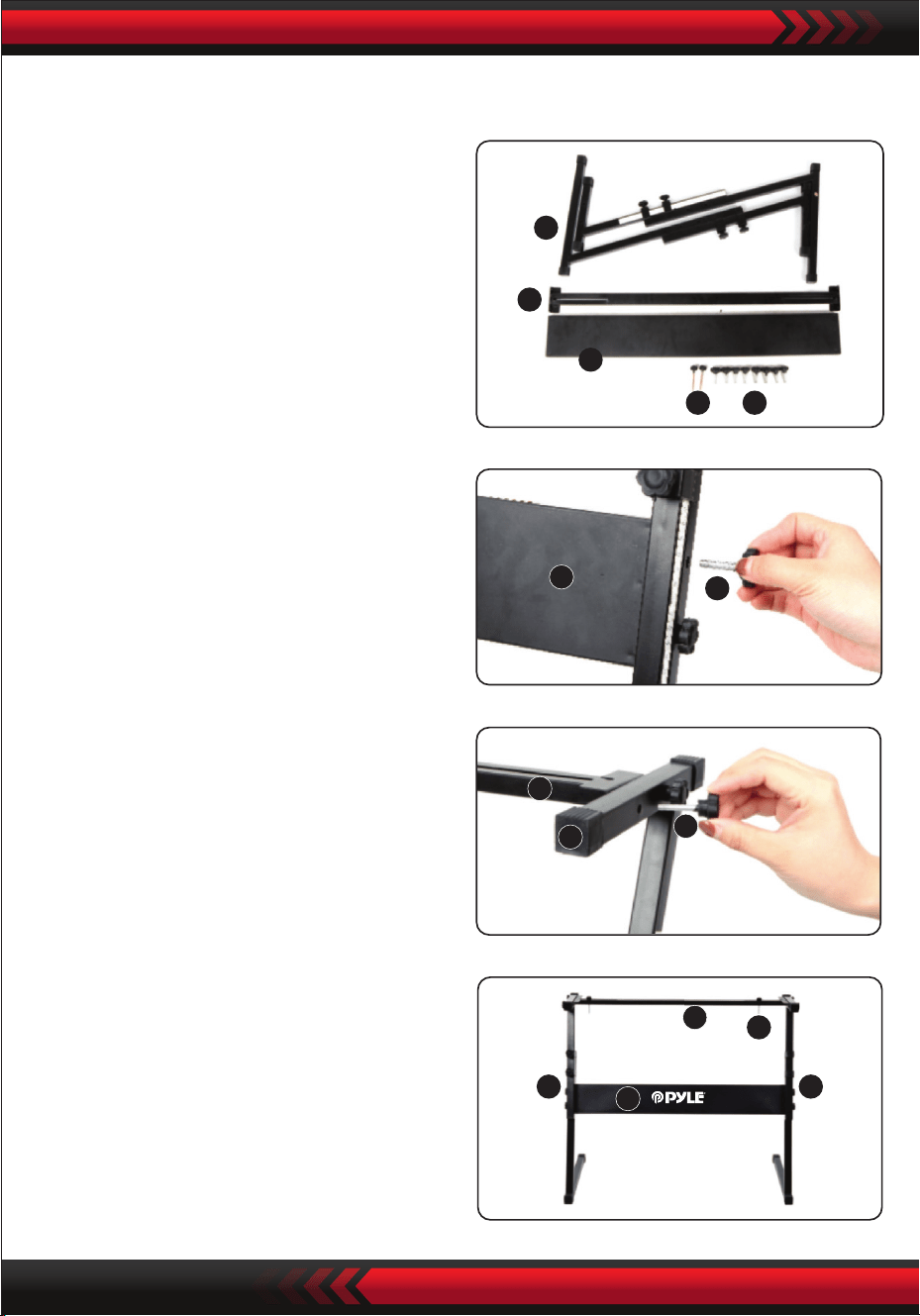
3. Tome el No. 2 tornillo y el tornillo No. 4
en la parte superior del No. S stand o
y apriete.
ARMADO DEL SOPORTE DEL TECLADO
2. En segundo lugar, tome el No. 2
tornillo y el tornillo No. 3 placa de
soporte, fíjelos a los dos soportes de
soporte del No. 5 y apriételos por
separado.
4. La instalación está completa, el tornillo
más largo, No. 1 es el que se usa para
jar el teclado al soporte.
1. Primero, prepare todas las piezas
de ensamblaje

www.PyleUSA.com
15
Apéndice
000 gran piano acústico
001 Piano acústico brillante
002 Piano de cola eléctrico
003 Piano Honky-tonk
004 Piano Rhodes
005 coro de piano
006 Clavicémbalo 1
007 Clavicordio
008 Celesta 1
009 Glockenspie 1
01O Caja de música 1
011 Vibráfono 1
012 Marimba 1
013 Xilófono 1
014 campana tubular
015 Salterio 1
016 Órgano de barra de tiro
017 Órgano de percusión
018 Órgano de rock 1
019 Órgano de iglesia 1
020 Órgano de lengüeta 1
021 Acordión 1
022 Armonica 1
023 Tango con acordion
024 Guitarra acústica (nylon)
025 Guitarra acústica (acero)
026 Guitarra eléctrica (jazz)
027 Guitarra eléctrica (limpia)
028 Guitarra eléctrica (silenciada)
029 Guitarra saturada
030 guitarra distorsionada
031 Armónicos de guitarra
032 Bajo acústico 1
033 Bajo eléctrico (dedos)
034 Bajo eléctrico (pick)
035 Bajo sin trastes 1
036 bajo con golpe 1
037 bajo con golpe 2
038 Bajo sintetizado 1
039 bajo sintetizado 2
040 Violin 1
041 Viola 1
042 violonchelo 1
043 Contrabass 1
044 Cuerdas de trémolo 1
045 Cuerdas de pizzicato 1
046 Arpa orquestal
047 Tímpano
048 Ensamble de cuerdas 1
049 Ensamble de cuerdas 2
050 cuerdas con sintetizador 1
051 cuerdas con sintetizador 2
052 coro de “ahh” 1
053 voz de “ohhh”
054 voz con sintetizador
055 Orquesta
056 Trumpet 1
057 Trombón 1
058 Tuba
059 Trompeta con sordina 1
060 auta francesa 1
061 selección de metales 1
062 Sintetizador de metales 1
063 Sintetizador de metales 2
064 saxo soprano 1
065 saxo alto 1
066 saxo tenor 1
067 Saxo barítono 1
068 Oboe 1
069 Corno inglés 1
070 Bassoon 1
071 Clarineet 1
072 Piccolo 1
073 Flauta 1
074 Grabadora 1
075 Flauta de Pan 1
076 soplado en botella 1
077 Shakuhachil
078 silbido 1
079 Ocarina 1
080 solo 1 cuadrado)
081 solo 2 (sierra)
082 solo 3 (calliope)
083 solo 4 (chi)
084 solo 5 (charanga)
085 solo 6 (voz)
086 solo 7 (quinta)
087 solo 8 (bajo y solo)
088 Pad 1(new age)
089 Pad 2 cálido)
090 Pad 3 (polisintético)
091 Pad 4 (coro)
092 Pad 5 (inclinado)
093 Pad 6 (metálico)
094 Pad 7 (balo)
095 Pad 8 (barrido)
096 FX 1 (lluvia)
097 FX 2 (banda sonora)
098 FX 3 (crista1)
099 FX 4 (atmósfera)
100 FX 5 (brillo)
101 FX 6 (duendes)
102 FX 7 (echoes)
103 FX 8 (sci-)
104 Sítara
105 Banjo
106 Shamisen
107 Koto
108 Kruimba
109 gaita
11O violín
111 Shanai
112 campanitas
113 Agogo
114 tambores de acero
115 caja de madera
116 tambor Talko
117 Tom melódico
118 Tambor sintetizador
119 Platillo inverso
120 Ruido de trastes de guitarra
121 respiración
122 olas
123 pájaro
124 Timbre telefónico
125 Helicóptero
126 Aplauso
127 Disparo
128 Piano de cola estéreo
129 Piano estéreo brillante
130 Piano de cola
131 Piano Clásico
132 Rock en Piano
133 Piano suave en estereo
134 Piano brillante
135 Piano Moderno

www.PyleUSA.com
16
Sonidos
136 Piano De LA
137 Piano para Bailar
138 Piano Suave
139 Piano de Cuerdas
140 Almohadilla de Piano
141 Piano Sintetizado
142 Coro de Piano
143 Honky-Tonk
144 2 Octava de Piano
145 1 Octava de Piano
146 Eiec.Grand Piano
147 E.Grand 80
148 Modero E.G.Piano
149 Clavicémbalo 2
150 Clavicémbalo 3
151 Clavicémbalo Acoplado
152 Clavicémbalo y Cuerdas
153 Piano Eléctrico 1
154 Piano Eléctrico 2
155 Piano Eléctrico Fm 1
156 Piano Eléctrico Fm 2
157 Piano Eléctrico 60's 1
158 Piano Eléctrico 60's 2
159 Piano Eléctico Dyno 1
160 Piano Eléctrico Dyno 2
161 Piano Eléctrico Suave
162 Piano Eléctrico Pop
163 Coro Ep 1
164 Coro Ep 2
165 Piano Trémolo E.
166 Piano Moderado
167 Piano Suave
168 Piano de Cuerdas E 1
169 Strings E.Piano 2
170 Piaano de Cuerdas sint.1
171 Piaano de Cuerdas sint.2
172 E.Piano Pad 1
173 E.Piano Pad 2
174 Piano Claro
175 Clavicémbalo E.Piano
176 Clavi 1
177 Clavi 2
178 Clavi Suave
179 Clavi Desafinado
180 Secuencia Clavi
181 Clavi&Drawbar
182 Coro de Clavi
183 Vibráfono 2
184 Vibráfono 3
185 Vibráfono Suave
186 Coro de Vibráfono
187 Marimba 2
188 Marimba Suave
189 Celesta 2
190 Celesta Brillante
191 Glockenspiel 2
192 Glockenspiel Pad 1
193 Caja de Música 2
194 Caja de Música 3
195 Xilófono 2
196 Campana Tubular 2
197 Salterio 2
198 Órgano de Barra de Tiro 1
199 Órgano de Barra de Tiro 2
200 Órgano de Barra de Tiro 3
201 Órgano de Barra de Tiro 4
202 Órgano de Barra de Tiro 5
203 Organo Perc 1
204 Organo Perc 2
205 Organo Perc 3
206 Organo Elec. 1
207 Organo Elec. 2
208 Organo Elec. 3
209 Organo de Jazz 1
210 Organo de Jazz 2
211 Organo de Jazz 3
212 Órgano de Rock 2
213 Órgano de Rock 3
214 Órgano de Rock 3
215 Organo de Los 70's
216 Barra de Tiro Completa
217 Organo Rotativo 1
218 Organo Rotativo 2
219 Organo Rotativo 3
220 Órgano Trémulo
221 Organo de Clic
222 Órgano de S
223 Organ Pad 1
224 Organ Pad 2
225 Sequence Organ
226 Church Organ 2
227 Church Organ 3
228 Chapel Organ
229 Órgano de Tubos 1
230 Órgano de Tubos 2
231 Órgano de Teatro
232 Órgano y Clavicémbalo
233 Almohadilla de Crgano de Tubos
234 Órgano de Lengüeta 2
235 Acordeón 2
236 Acordeón 3
237 Acordeón 4
238 Acordeón 5
239 Octavo de Acordeón
240 Bandoneón 1
241 Bandoneón 2
242 Octavo de Bandoneón
243 Bandoneon Solo
244 Bandoneon y Violin
245 Armonica 2
246 Armonica 3
247 Armonica 4
248 Guitarra de Nylon 1
249 Guitarra de Nylon 2
250 Guitarra de Acero 1
251 Guitarra de Acero 2
252 Guitarra de Acero 3
253 12 Guitarra Sint.
319 Bajo Fuerte M
320 Bajo de Trance M
321 Bajo de Sintetizador M
322 Bajo de Sintetizador Cuadrado M
323 Violín 2
324 Violín Lento
325 Viola 2
326 Violonchelo 2
327 Violonchelo Lento
328 Contrabajo 2
329 Sección de Violines
330 Sección de Violonchelo
331 Volin y Violonchelo
332 Cuarteto de Cuerda
333 Cuerdas de Pizzicato 2
334 Octavo de Pizzicato
335 Arpa 1
336 Arpa 2
337 Coro de Arpa
338 Cuerdas
339 Ensamble de Cuerdas 3
340 Ensamble de Cuerdas 4
341 Ensamble de Cuerdas 5
342 Cuerdas Lentas 1
343 Cuerdas Lentas 2
344 Cuerdas anchas
345 Cámara 1
346 Cámara 2
347 Octava de Cuerdas 1
348 Octava de Cuerdas 2
349 Cuerdas Sfz
350 Cuerdas de Trémolo 2
351 Arpa y Cuerdas
352 Flauta y Cuerdas
353 Cuerdas de Orquesta
354 Cuerdas de Sintetizador 1
355 Cuerdas de Sintetizador 2
356 Cuerdas de Sintetizador 3
357 Cuerdas Sint. 70's. 1
358 Cuerdas Sint. 70´s. 2
359 Cuerdas Sint 80´s. 1
360 Cuerdas Sint. 80´s. 2
361 Cuerdas de Sint. Rápidas
362 Cuerdas de Sint Lentas
363 Cuerdas de Octava Sint. 1
364 Cuerdas de Octava Sint. 2
365 Coro de “Ahh” 2
366 Coros 1
367 Coros 2
368 Coro de Cuerdas
369 Voz de Cuerdas
370 Coro Energético
371 Coro Lento
372 Ensamble de Coros 1
373 Ensamble de Coros 2
374 Voz Doo
375 Voz Uuh
376 Voz de Sintetizador 1
377 Voz de Sintetizador 2
378 Voz de Sintetizador 3
379 Ensamble de Voces 1
380 Ensamble de Voces 2
381 Ensamble de Voces 3
382 Pad de Voz Sintetizada
383 Coro de Voz Sintetizada
254 Ruido de Acero y Rasgado 1
255 Ruido de Acero y Rasgado 2
256 Armónicos Gt de Acero
257 Coro de Metales Gt
258 Guitarra de Jazz 1
259 Guitarra de Jazz 2
260 Guitarra de Jazz
261 Guitarra Limpia 1
262 Guitarra Limpia 2
263 Guitarra Limpia 3
264 Guitarra Limpia 4
265 Coro de Guitarra Clara
266 Guitarra con Sordina l
267 Guitarra con Sordina 2
268 Crunch de Guitarra Eléctrica
269 Overdrive Gt l
270 Overdrive Gt 2
271 Distorsión Gt l
272 Distosión Gt 2
273 Distorsión Gt 3
274 Distorsión Gt 4
275 Poder Distorsionado.Gt
276 Ritmo Distorsionado.Gt
277 Feedback Gt
278 Distorsión y Bajo
279 Ruido de Acero y Ritmo M 1
280 Ruido de Acero y Ritmo M 2
281 Guitarra Limpia M
282 Crunch de Guitarra Elect M 1
283 Crunch de Guitarra Elect. M 2
284 Distorsión Gt M
285 Bajo Acústico 2
286 Bajo Acústico 3
287 Bajo Montado
288 Bajo con Dedos 1
289 Bajo con Dedos 2
290 Bajo con Dedos 3
291 Bajo con Dedos 4
292 Bajo con Dedos Rítmicos
293 Bajo de Dedos Suaves
294 Bajo Punteado l
295 Bajo Punteado 2
296 Bajo Punteado 3
297 Bajo Punteado Rítmico
298 Bajo sin Trastes 2
299 Bajo sin Trastes 3
300 Bajo de Golpe 1
301 Bajo de Golpe 2
302 Bajo de Cuerdas Dobles
303 Bajo de Sint. l
304 Bajo de Sint. 2
305 Bajo de Sint. 3
306 Bajo de Sint. 4
307 Bajo de Sint. Serrado
308 Bajo de Sintetizador Cuadrado
309 Bajo Digi Roch
310 Bajo de Trance
311 Bajo Sinusoidal
312 Bajo y Bombo
313 Bajo de Voceador
314 Bajo de Sintetizador Soul
315 Bajo de Clarinete
316 Bajo de Órgano
317 Bajo con Dedos M l
318 Bajo con Dedos M 2

www.PyleUSA.com
17
Style
384 Orchesyra Hit 1
385 Orchesyra Hit 2
386 Orchesyra Hit 3
387 Orchesyra Hit 4
388 Trumpet 2
389 Trumpet 3
390 Trumpet 4
391 Mellow Trumpet 2
392 Velo.Trumpet
393 Trumpet Sfz
394 Trompeta con Sordina 3
395 Trombón 2
396 Trombón 3
397 Trombón Suave
398 Trombón Bajo
399 Sección de Trombón
400 Trombón de Jazz
401 Trompeta y Trombón
402 Tuba 2
403 Tuba 3
404 Corno Frances 2
405 Solo de corno francés
406 Sección de Corno Francés
407 Octavas de Corno Francés
408 Orquesta de Trompetas
409 Bajo en Estéreo
410 Bajo
411 Sección de Bajos 2
412 Sección de Bajos 3
413 Sección de Bajos 4
414 Bajo Suave
415 Bajo Fuerte
416 Bajo Sfz
417 Bajo y Cuerdas
418 Metales y Saxo
419 Bajo de Sintetizador 3
420 Bajo de Sintetizador 4
421 Bajo de Sintetizador 5
422 Bajo de Sintetizador 6
423 Sintetizador Cálido, bajo
424 Bajo de Sintetizador de los 80
425 Bajo Análogo de Sint. 1
426 Bajo Análogo de Sint. 2
427 Bajo de Trance
428 Pad de Bajo de Sintetizador
429 Octavo de Bajo de Sint.
430 Bajo de Sintetizador sfz
431 Sax Alto 2
432 Sax Alto 3
433 Sax Alto ligero 1
434 Sax Alto ligero 2
435 Sax Tenor 2
436 Sax Tenor 3
437 Sax Tenor ligero 1
438 Sax Tenor lligero 2
439 Sax Soprano 2
440 Sax Soprano 3
441 Breathy S.Sax
442 Sax Barítono 2
443 Sax Barítono 3
444 Sax Suave
445 Sax Fuerte
446 Solo de Sax
447 Sax Fuerte
448 Solo de Sax
449 T.Saxys
450 A.Saxys
451 Sax Section
452 Sax Section Sfz
453 Clarinet 2
454 Velo.Clarinet
455 Bass.Clarinet
456 Jazz.Clarine
457 Oboe 2
458 Solo Oboe
459 Cuerno Inglés 2
460 Basón 2
461 Flauta 2
462 Flauta 3
463 Flauta de Jazz
464 Flauta Pura
465 Flauta Suave
466 Piccolo 2
467 Piccolo 3
468 Sección de Gaitas 1
469 Sección de Flautas 2
470 Flauta y Oboe
471 Grabadora 2
472 Grabadora 3
473 Flauta Pan 2
474 Flauta de Pan 3
475 Soplado en Botella 2
476 Whistle 2
477 OcaRina 2
478 Shakuhachi 2
479 Solo de Cuadro 1
480 Solo de Cuadro 2
481 Solo de Cuadro 3
482 Solo de Cuadro 4
483 Solo Serrado 1
484 Solo Serrado 2
485 Solo Serrado 3
486 Solo Serrado Suave
487 Solo de Pulso de Cuadro
488 Secuencia de Sierra1
489 Secuencia de Sierra 2
490 Secuencia Sinusoidal
491 Solo Sinusoidal
492 Solo de Velosin
493 Solo de Ss
494 Solo Lento de Cuadro
495 Pulso Lento de Cuadro
496 Secuencia de Cuadro
497 Secuencia de Pulso 1
498 Secuencia de Pulso 2
499 Solo de Sierra Lento
500 Solo de Pulso de Sierra
501 Pulso Lento de Sierra
502 Solo de Trance
503 Callope 1
504 Callope 2
505 Solo de Vent
506 Sintetizador Vent
507 Solo Puro
508 Solo de Gaita
509 Solo en Secuencia
5I0 Solo de Chiff
511 Solo de Gota
512 Solo Ep
513 Líder de Voz 1
514 Líder de Voz 2
515 Solo de Voz 1
516 Solo de Voz 2
517 Solo Distorsionado
518 Charanga
519 Octavo de Charanga
520 Solo de Pellizcado 1
521 Solo de Pellizcado 2
522 Solo con Sintetizador
523 Solo de Iglesia
524 Solo de Doble Voz
525 Solo de Coro de Voz
526 Solo de Voz y Ep
527 Eco Solo de Voz de Sintetizador
528 Solo de Quinto
529 Solo de Quinto Serrado
530 Solo de Quinto Cuadrado
531 Solo de Cuarto
532 Séptima Secuencia
533 Quinta Secuencia
534 Solo de Bajo
535 Solo de Bajo y Serrado
536 Solo de Bajo de Sintetizador
537 Solo de Organo
538 Solo de Traste
539 Fantasia 1
540 Fantasia 2
541 Nueva Era
542 Almohadilla de la Nueva Era
543 Vox Cálida
544 Almohadilla Gruesa
545 Almohadilla Cálida
546 Almohadilla Sinusoidal
547 Almohadilla Blanda
548 Almohadilla de Trompeta
549 Almohadilla de Cinta Vieja
550 Polisintetizador 1
551 Polisintetizador 2
552 Almohadilla de Polisintetizador 1
553 Almohadilla de Polisintetizador 2
554 Sierra Polisitnetizada
555 Coro Espacial
556 Heaven
557 Almohadilla de Cuerdas Espaciales
558 Coro de Chiff
559 Voz Estelar
560 Almohadilla Cuadrada
561 Almohadilla Arqueada
562 Almohadilla de Vidrio
563 Almohadilla de púas
564 Almohadilla de Botella
565 Almohadilla Étnica
566 Almohadilla de Metal Blando
567 Almohadilla de Metal Duro
568 Almohadilla de Coro
569 Almohadilla de Halo 1
570 Almohadilla de Halo 2
571 Almohadilla de Coro de Órgano
572 Coro de Barrido
573 Almohadilla de Barrido
574 Almohadilla Clavi 2
575 Gota de lluvia 1
576 Gota de lluvia 2
577 Almohadilla de Madera
578 Voz Espacial
579 Banda sonora 1
580 Banda sonora 2
581 Rave
582 Cristal suave
583 Cristal
584 Campana de Navidad
585 Campana Glockenspiel
586 Campana de Vibráfono
587 Coro de Campanas
588 Sintetizador-Nakket
589 Almohadilla Celesta
590 Atmosphere
591 Nylon Gt& Ep
592 Almohadilla de Acero
593 Almohadilla de Campana
Brillante
594 Brillo 1
595 Brillo 2
596 Duende
597 Voz en Eco
598 Teclado de Eco
599 Eco de Gota

www.PyleUSA.com
18
Style
000 Pop
001 Ragtim
002 Pop Funk
003 Marcha 1
004 Retro Disco
005 Pop sencillo
006 “Marcha Fox”
007 48 Bit
008 Balada
009 Waltz
010 Latino
011 8 Ritmo Popular 1
012 8 Ritmo Popular 2
013 8 Ritmo Acelerado
014 8 Ritmo Estándar
015 8 Ritmo Medio
016 8 Ritmo Balada
017 Balada Épica
018 Balada Piano
019 16 Ritmo Pop 1
020 16 Ritmo Arrastre 1
021 16 Ritmo Arrastre 2
022 16 Ritmo Balada 1
023 16 Ritmo Balada 2
024 16 Ritmo Balada 3
025 Funk 1
026 Funk 2
027 Soul
028 Gospel
029 6-8 Gospel
030 4-4 Blues
031 Twist
032 Fusion 1
033 Fusion Funky 1
034 50's Pop
035 Pop Moderno
036 Pop Groovy
037 Pop Vintage 60's
038 Pop 80's
039 Rock Folk 1
040 Rock Pop 1
041 Rock Pop 2
042 8 Ritmo Balada Rock
043 16 Ritmo de Cock
044 Hard Rock 1
045 Rock Shuffle 1
046 6-8 Hvy Rock
047 US-Rock
048 16 Ritmo Rock
049 Rock 1
050 Rock 2
051 Rock de Los 60
052 Rock Estándar
053 Rock Británico
054 Rock Vintage 60
055 Éxitos del Rock
056 Rock Pop de Los 60
057 Baladas Soul
058 Rock Suave 1
059 Rock Suave 2
060 6-8 Baladas
061 R&B
062 Baladas de Los 70'
063 Baladas Románticas
064 China 1
065 China 2
066 China 3
067 China 4
068 China 5
069 China 6
070 China 7
071 China 8
072 China 9
073 China 10
074 Bossa Nova 1
075 Bossa Nova 2
076 Bossa Nova 3
077 Salsa
078 Samba 1
079 Mambo 1
080 Beguin
081 Merengue
082 Bolero Lento
083 Español
084 Cajun
085 Reggae 12 Ritmo 1
086 Reggae Pop 1
087 Mambo Pop
088 Pop Fiesta Latina
089 Nueva era 1
090 Nueva Era 2
091 Blues y Mambo
092 Pop Bailable 1
093 Pop Bailable 2
094 Tecno 1
095 Ritmo Europeo
096 Ambiente Europeo
097 Hip Hop
098 Trip Hop
099 Boogie Sintetiz
100 Disco de Los 70
101 Disco Trop
102 fiesta Pop
103 Polka Pop 1
104 Boogie
105 Swing
106 Swing con Banda
107 Balada con Banda
108 Cuarteto de Jazz
109 Dixieland
110 Jazz Relajado
111 Balada de Jazz
112 BBQuickstep
113 Bluegrass 1
114 Bluegrass 2
115 Country 2-4
116 8 Ritmo Country
117 Rock Country
118 Cwhy Boogie
119 Balada Cntry
120 Shuffle Cntry
121 Waltz Country
122 Waltz Jazz
123 HullyGully
124 Marcha 2
125 Marcha 3
126 6-8 Marcha
127 Polka
128 PopWaltz
129 Cha Cha Cha
130 Rumba
131 Pasodoble
132 TangoCont
133 Foxtrot 1
134 Jive 1
135 Waltz Estándar
136 Waltz Alemán
137 Waltz Vienés
138 Waltz Musette
139 Rock'n Roll 1
140 Rock'n Roll 2
141 Puro Rock
142 Jazz Rock 1
143 Gospel Animado
144 Rock Folk 2
145 Rock Billy
146 Rock Boogie
147 Rock Cha Cha
148 Rock Clásico 1
149 Rock Shuffle 2
150 Rock Pop
151 Skiffie
152 Rock Funk Pop
153 Rock Contemporaneo
154 Rock Acústico
155 Rock de Los 80
156 Shuffle de LA
157 Jive 2
158 Samba 2
159 Samba 3
160 Rock Schlager 1
161 Rock Schlager 2
162 Carnaval
163 Samba con Órgano
164 Reel
165 Foxtrot 2
166 Foxtrot 3
167 Club Pop
168 16 RitmoPop 2
169 8 Ritmo Pop 3
170 8 Ritmo Soul 1
171 8 RitmoRock
172 Rap Pop
173 Soul de los 60
174 Soul de los 70
175 Funk Shuffle
176 Fusion Shuffle
177 Ritmo Clásico 8
178 Pop Vintage Gtr
179 Schlager Italia
180 8 Ritmo Suave
181 8 Ritmo Heat
182 8 Ritmo Soul 2
183 Balada en Guitarra
184 8 ritmo Pop 4
185 Polka Pop 2
186 Polka Pop 3
187 16 Ritmo 1
188 16 ritmot 2
189 16 Ritmo 3
190 Balada Pop 1
191 Balada Pop 2
192 Funky Pop
193 Hip Hop Pop
194 Soul Shuffle
195 Soul Lento
196 8 Ritmo Adria
197 Piano Clásico
198 Unplugged
199 Baladas Pop 3
200 Nueva Era Pop
201 8 Ritmo Moderno
202 Baladas Country
203 Canciones de Amor
204 Pop Country Moderno
205 Electro Pop
206 Balada Acústica
207 Baladas En Piano
208 Balada R&B
209 Balada de Rock 1
210 Lento y Fácil
211 Balada Análoga
212 Calypso
213 Guadbailable
214 Reggae 12 Beat 2
215 Reggae 16 Beat
216 Bossa Nova 4
217 Mambo 2
218 Mambo3
219 Bolero
220 Cumbia 1
221 Rock Latino
222 Disco Latino
223 Tijuana
224 Reggae
225 Cumbia 2
226 Parranda
227 Carnaval 2
228 Samba Rio
229 Pop Reggae 2
230 Tecno 2
231 Tecno 3
232 Funky Disco
233 Saturday Night
234 Club Latino
235 Disco Chocolate
236 Disco Fox
237 Disco Funk
238 Disco Hands
239 Disco Party
240 Disco Samba
241 Pop del Reino Unido
242 Club de Baile
243 Country 1
244 Country 2
245 Cuerda Pellizcada
246 Country Brothers
247 Country Nuevo
248 Country Suave
249 Country de Los 70
250 Hoedown
251 Shuffle Country
252 Polka Ober
253 Polka Pop 4
254 Blue Grass 1
255 Blue Grass 2
256 Blue Grass 3
257 Marcha de los EU
258 Hully Gully
259 Big Band Shuffle 1
260 Big Band Shuffle 2
261 Big Band Shuffle 3
262 Banda Rápida l
263 Banda Rápída 2
264 Cat Groove
265 Dixie Jazz
266 Jazz Medio
267 16 ritmo Shuffle
268 Pop Británico
269 8 Ritmo l
270 8 Ritmo 2
271 8 Ritmo 3
272 8 Ritmo 4
273 Latido de Corazón
274 Baladas en Órgano
275 Rock Fuerte 2
276 Populares
277 Fusión Suave
278 West End
279 Barroco
280 Fusión Funky 2
281 Show Garue
282 Fusion 2
283 Funk 3
284 Rock 3
285 Rock 4
286 Rock Clásico 2
287 Rock Shffle 1
288 Rock Shffle 2
289 Rock Jazz 2
290 Rock Suave
291 Cowboy Rock
292 Baladas de Rock 2
293 Baladas de Rock 3
294 Baladas de Rock 4
295 Baladas E
296 Baladas EP de los 90
297 Bandas de Chicos de Los 80
298 Baladas de Los 90
299 Baladas de Los Alpes

www.PyleUSA.com
19
Características:
• Teclado de karaoke 2 en 1: toca y canta
• Piano musical compacto y portátil
• Sencillo de utilizar. Conecte y listo.
• Piano portátil
• Altavoces estéreo de rango completo incorporados
• Conecte y transmita audio desde dispositivos externos
• Se puede conectar al altavoz y reproducir sonido
• Múltiples estilos de sonido, tono y ritmo de teclado seleccionables preestablecidos
• Pantalla LCD digital
• Control de volumen ajustable
• Modo de grabación y reproducción
• Función de percusión del teclado de 61 teclas
• Control básico: volume master / volumen Accom / Volumen de cuerdas / control
Tempo
• Función de programación rítmica / grabación y reproducción
• Función de acorde automático: acorde único / acorde con los dedos
• Función de detección de inexión de tono / vibrato / sostener / tacto
• Funciones de enseñanza: Una tecla/Seguir/Ensamble
• Conector USB / Conector de micrófono
• Perfecto para actuaciones de cine en casa en la sala de estar
• Diversión para niños de todas las edades y adultos

www.PyleUSA.com
20
Especicaciones del soporte del teclado:
• Barniz horneado
• Función desmontable
• Material de construcción: hierro+ ABS
• Longitud: 31.5" -pulgadas - (80cm)
• Ancho: 8.3" -pulgadas - (21cm)
• Altura: 57,5 ~ 67,5 cm
• Peso: 1,75 kg
• Rodamiento: 15 kg
Especicaciones del taburete de teclado:
• Material de construcción: cuero PU, hierro, esponja
• Barniz horneado
• Función de plegado
• Longitud: 15.75" -pulgadas - (40cm)
• Ancho: 11.81" -pulgadas - (30cm)
• Altura: 17.32" / 18.9" / 20.1" -pulgadas - (44 / 48 / 51 cm)
• Peso: 2,2 kg
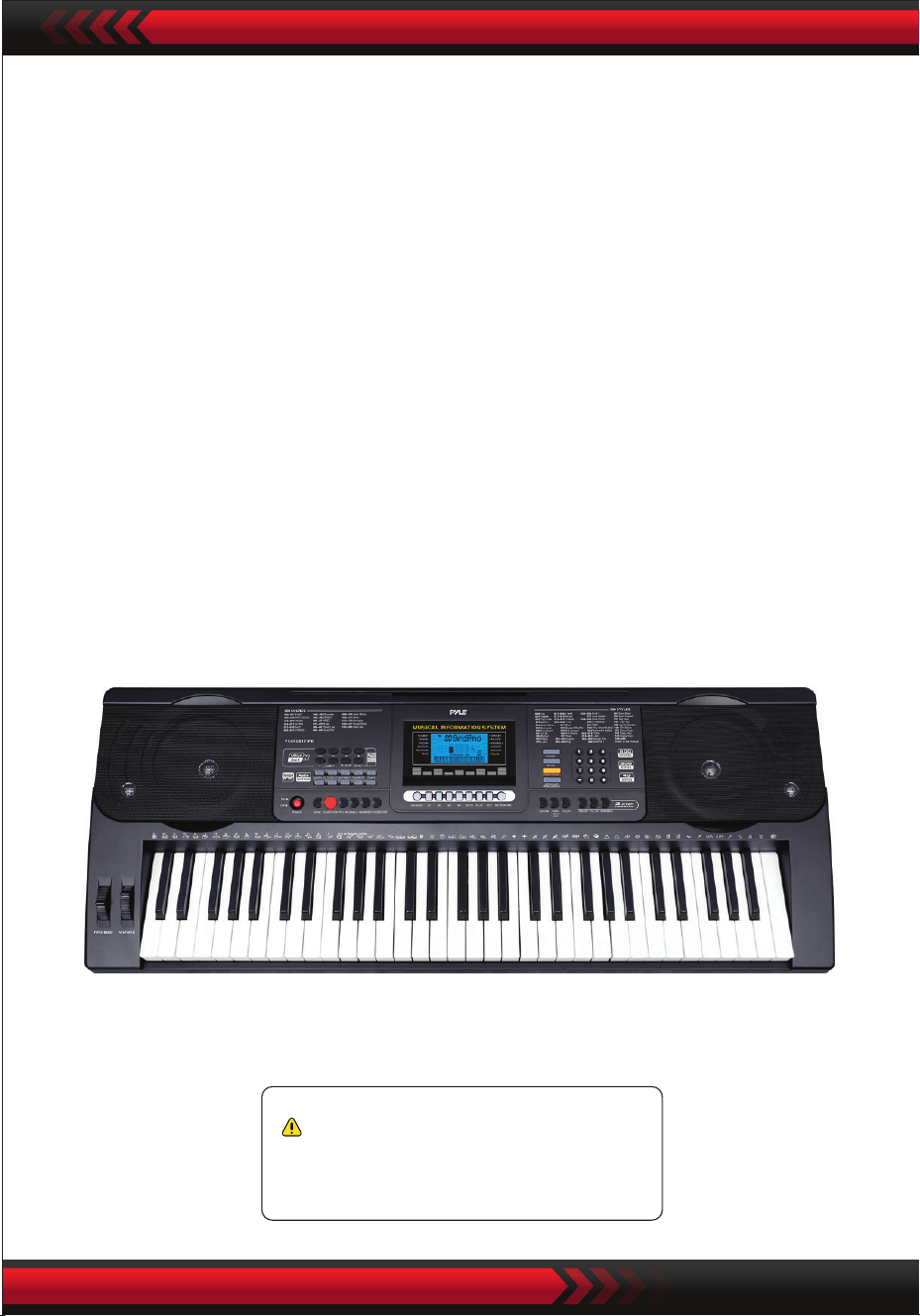
www.PyleUSA.com
21
Advertencia de la Proposición 65 de California
ADVERTENCIA:
Este producto contiene ftalato de bencilo de butilo (BBP), que el
estado de California reconoce como causante de cáncer,
defectos congénitos y otros daños reproductivos. No ingerir.
Para obtener más información , visite: www.P65warnlngs.ca.gov
• 61 teclas
• 600 sonidos/ 300 estilos
• 40 canciones de demostración: One/AII
• Interfaz de audio: conector de entrada auxiliar (3,5 mm) / entrada de micrófono /
entrada USB
• ¡Nivel máximo de sonido!: Hasta 11O dB
• Longitud del cable USB/alimentación: 3.9' pies - (119cm)
• Material de construcción: ABS de ingeniería
• Fuente de alimentación: DC 12V / AC
• Dimensiones del piano (largo x ancho x alto):
36.6 "x 11.97 "x 3.7" -pulgadas - (93 x 30.4 x 9.3 cm)

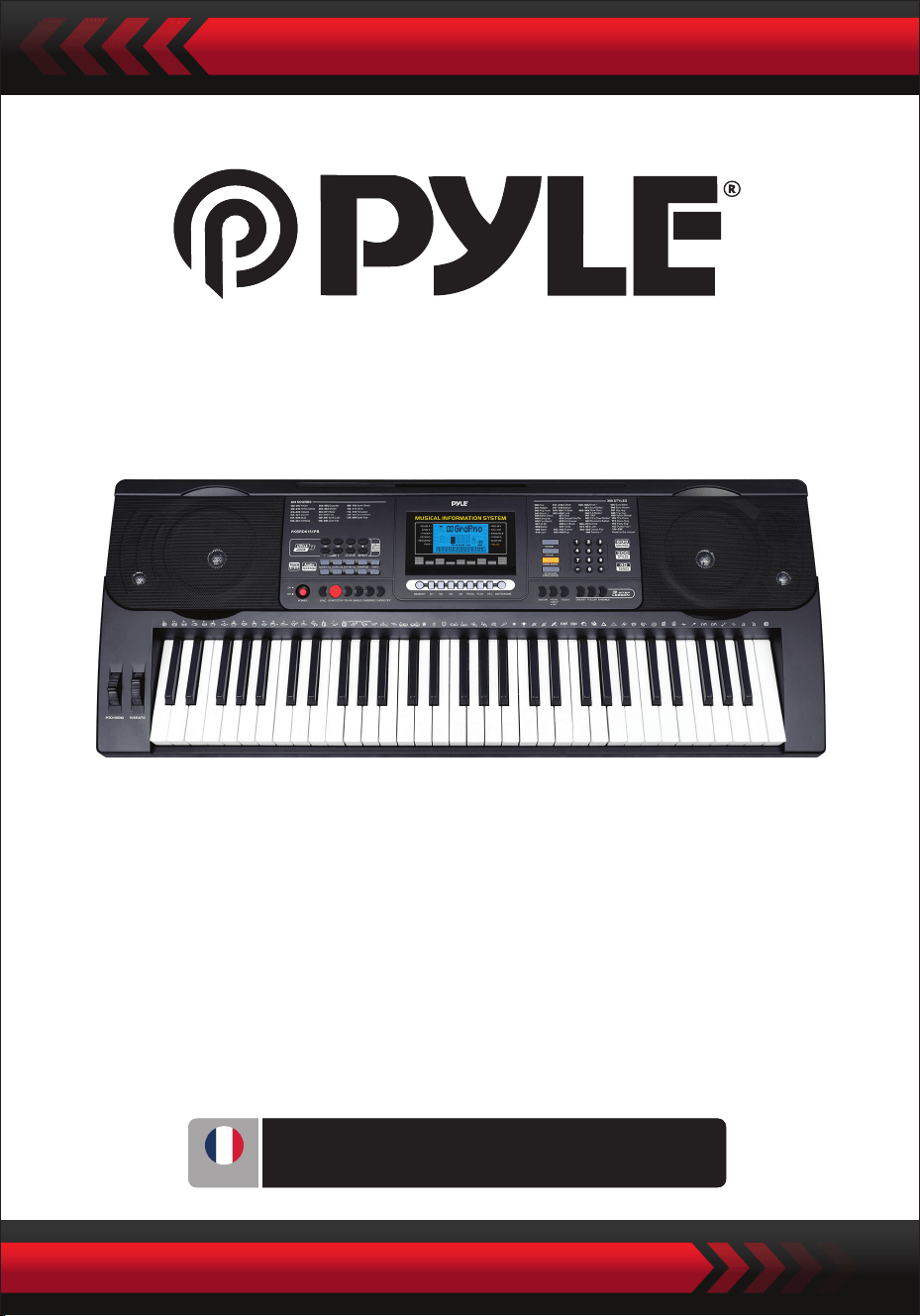
Clavier de Piano Électronique Portable avec
Housse Résistante à l'Eau (61 Touches),
Tabouret de Clavier & Support de Clavier
Clavier Karaoke Musical Numérique
PKBRD6151PB
GUIDE D'UTILISATION
FRE
www.PyleUSA.com
2
Veuillez conserver ce manuel dans un endroit sûr et pratique pour
référence future
Utilisez l'adaptateur secteur spécié et remplacez immédiatement tout adaptateur
endommagé.
Ne démontez pas l'instrument ni ne modiez ses pièces internes. En cas de
dysfonctionnement, cessez immédiatement toute utilisation et faites-le réparer par un
professionnel qualié.
Avant de connecter l'instrument à d'autres appareils, éteignez toutes les alimentations
électriques.
Ne jouez pas de l'instrument au volume maximum ou à un niveau inconfortable pendant
une longue période.
Éloignez les parties de l'instrument de toute source de chaleur, car la surchaue peut
causer des dommages.
Empêchez les liquides, la poussière, les particules et autres éléments étrangers de pénétrer
dans l'instrument pour éviter la corrosion ou les courts-circuits de ses composants.
Débranchez la prise avant de nettoyer l'instrument.
Ne branchez ni débranchez la prise avec des mains mouillées.
Utilisez un chion sec et doux pour nettoyer l'instrument. N'utilisez pas de peinture,
d'alcool ou d'autres solvants chimiques pour essuyer la surface de l'instrument an
d'éviter tout dommage.
Éteignez l'alimentation électrique et débranchez la prise après avoir joué ou en cas de
non-utilisation prolongée.
Pour réduire le risque d'incendie ou de choc électrique, ne exposez pas cet appareil à la
pluie ou à l'humidité. L'appareil ne doit pas être exposé à des gouttes ou des éclaboussures
et aucun objet rempli de liquide, tel que des vases, ne doit être placé sur l'appareil.
Température de fonctionnement maximale : 40 °C / 104 °F
L'adaptateur enchable direct est utilisé comme dispositif de déconnexion, qui doit rester
facilement utilisable.
N'installez pas cet équipement dans un espace conné tel qu'une bibliothèque ou une
unité similaire et maintenez des conditions de ventilation adéquates. La ventilation ne
doit pas être obstruée en recouvrant les ouvertures de ventilation avec des objets tels
que des journaux, des nappes, des rideaux, etc.
Avertissement : une pression sonore excessive des écouteurs peut causer une perte
auditive.
L'emplacement de l'étiquette se trouve sous l'appareil.
L'appareil ne doit pas être exposé à des gouttes ou des éclaboussures et aucun objet
rempli de liquide, tel que des vases, ne doit pas être placé sur l'appareil.
L'adaptateur enchable direct est utilisé comme dispositif de déconnexion, qui doit
rester facilement utilisable.
•
•
•
•
•
•
•
•
•
•
•
•
•
•
•
•
•
AVERTISSEMENT!
VEUILLEZ LIRE ATTENTIVEMENT AVANT DE CONTINUER
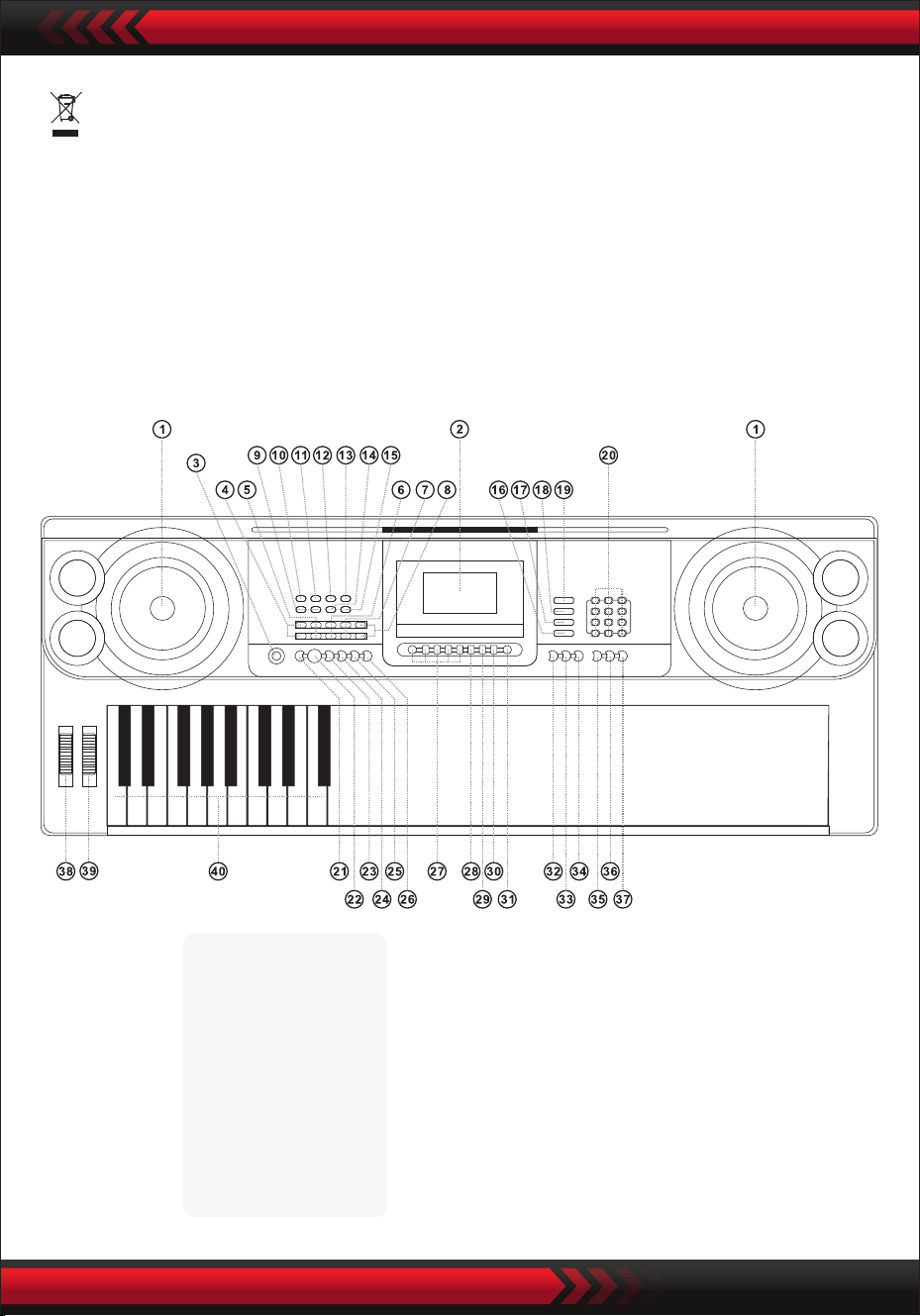
www.PyleUSA.com
3
•
I. Panneau de Contrôle et Ports d'Extension
PANNEAU DE COMMANDE AVANT
Ce marquage indique que ce produit ne doit pas être jeté avec les autres déchets
ménagers dans l'ensemble de l'UE.
Pour éviter tout dommage potentiel à l'environnement ou à la santé humaine dû à
une élimination des déchets non contrôlée, recyclez-le de manière responsable pour
promouvoir la réutilisation durable des ressources matérielles. Pour retourner votre
appareil usagé, veuillez utiliser les systèmes de retour et de collecte ou contacter le
détaillant où le produit a été acheté. Ils peuvent reprendre ce produit pour un
recyclage respectueux de l'environnement.
9 Contrôle de volume MP3
10 Précédent
11 Suivant
12 Lecture/Pause
13 Arrêt
14 Mode Ordre/Aléatoire/
Lecture Unique
15 Eet sonore
Lecteur de Musique USB
1 Haut-parleur
2 Écran LCD
3 Bouton d'alimen-
tation
4 Volume principal
5 Volume des accords
6 Volume du rythme
7 Transpose
8 Tempo
16 Percussions de clavier
17 Chanson de démonstra-
tion
18 Style
19 Son
20 Numéros
21 Synchronisation
22 Démarrer/Arrêter
23 Remplissage
25 Doigté
26 Accord désactivé
27 Mémoire d'état
28 Programme
29 Lecture Nulle
30 Enregistrement
31 Métronome
32 Sustain
33 Double/Split/Désactivé
34 Toucher
35 Une touche
36 Suivre
37 Ensemble
38 Courbe de ton
39 Vibrato
40 Clavier d'accords
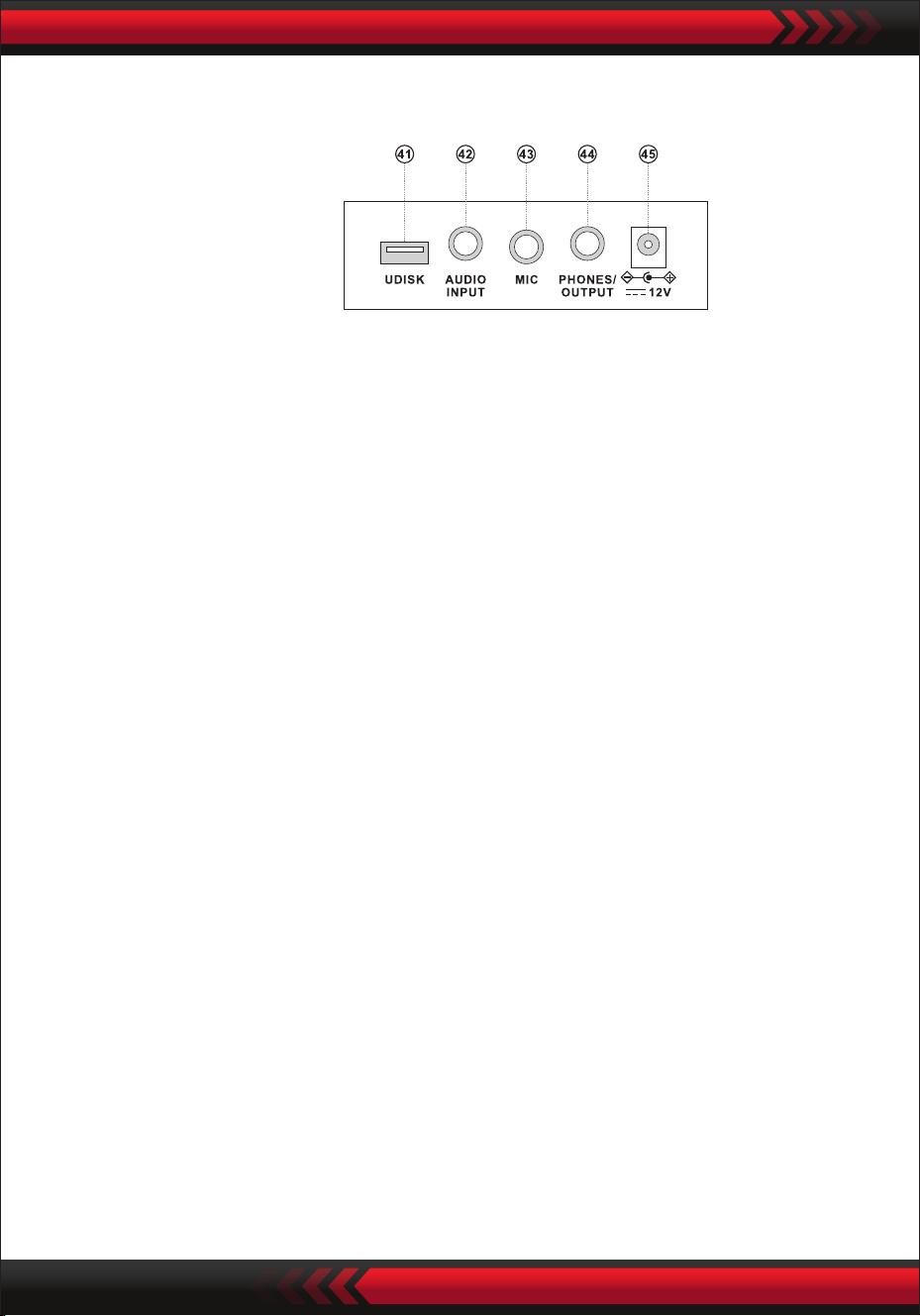
www.PyleUSA.com
4
PANNEAU ARRIÈRE
ENTRÉE AUDIO
Le clavier électronique dispose d'une fonction d'entrée audio stéréo, permettant
d'entrer des signaux audio de téléphones mobiles, lecteurs MP3, ordinateurs, etc.,
dans le système du clavier électronique pour les reproduire. Tout d'abord, éteignez
l'alimentation du clavier électronique, insérez une extrémité du câble audio dans le
port de sortie d'un appareil audio, l'autre extrémité dans l'interface AUDIO INPUT à
l'arrière du clavier électronique, puis rallumez l'alimentation du clavier électronique.
• Sortie audio : Éteignez l'alimentation du clavier électronique et de l'équipement
audio externe, puis insérez une extrémité du câble audio dans l'interface
PHONES/OUTPUT pour la sortie audio à l'arrière du clavier électronique, et l'autre
extrémité dans l'interface d'entrée audio de l'équipement audio.
• Connexion de casque : Insérez la prise du casque dans l'interface PHONES/
OUTPUT à l'arrière du clavier électronique, puis le haut-parleur du clavier
électronique se déconnectera automatiquement, évitant ainsi toute nuisance
sonore pour les autres pendant la lecture.
Attention ! Ne maintenez pas le volume au maximum pendant une longue
période lorsque le casque est utilisé, an d'éviter les pertes auditives.
CONNEXION DE SORTIE AUDIO CASQUE
UTILISATION DE L'ADAPTATEUR D'ALIMENTATION AC/DC
L'adaptateur d'alimentation AC/DC doit être celui désigné pour l'instrument.
Veuillez connecter un côté à la prise d'alimentation à l'arrière du panneau, et l'autre
au réseau électrique de la ville. (Veuillez noter que la tension d'entrée doit être la
même que celle du réseau électrique.)
II. Préparatifs avant de jouer
41 PORT USB POUR LECTURE DE MUSIQUE
(Lecteur ash non inclus)
42 ENTRÉE AUDIO
43 ENTRÉE MICRO
44 ÉCOUTEURS/SORTIE
45 ENTRÉE DE COURANT DCUV
Appuyez sur les touches "Volume Principal " ou "Volume Principal " pour
augmenter ou diminuer le volume principal. Lorsque les touches "Volume Principal
'' et "Volume Principal " sont pressées simultanément, le volume principal
revient à la valeur prédénie par défaut.
Le volume du style et le volume des accords peuvent être contrôlés simultanément
par le volume principal.
SÉLECTION DE SON
PERCUSSIONS DE CLAVIER
CHANSONS DE DÉMONSTRATION
Le clavier électronique contient 600 sons, de "000" à "599". Lorsque l'alimentation
est allumée, la fonction de sélection de son est activée automatiquement, et l'écran
ache "SON"; sinon, la fonction de sélection de son peut être activée en appuyant
sur la touche "SON". La valeur de démarrage par défaut "000" correspond au son du
piano ; d'autres sons peuvent être sélectionnés en appuyant sur les numéros
correspondants via les touches numériques ou en appuyant sur "+" ou "-".
Appuyez sur la touche "Percussions de Clavier" pour activer la fonction des percus-
sions de clavier. Ensuite, le son de percussion correspondant peut être émis lorsque
le clavier est joué. Appuyez à nouveau sur "Percussions de Clavier" pour désactiver
la fonction des percussions de clavier.
Le clavier électronique contient 40 chansons de démonstration pour l'enseigne-
ment, de "000" à "039". Lorsque la touche "Chanson de Démo" est pressée, toutes
les chansons de démonstration seront jouées séquentiellement.
Pendant la lecture, une autre chanson de démonstration peut être sélectionnée en
appuyant sur le numéro correspondant via les touches numériques ou en appuyant
sur "+" ou "-", puis la chanson de démonstration sélectionnée sera lue en boucle.
AJUSTEMENT DU VOLUME PRINCIPAL
Appuyez sur le bouton [Power] avec le rétroéclairage allumé, l'écran LCD ache
des informations sur le timbre actuel, le tempo, etc.
III. Méthode de base de performance
Insérez la che du microphone dans la prise microphone du clavier et vous pourrez
proter du jeu et du chant.
ENTRÉE MICROPHONE (non inclus)
www.PyleUSA.com
5

1. Démarrer le Style
Appuyez sur le bouton [Démarrer/Arrêter] pour démarrer le style
d'accompagnement.
Lorsque le style n'a pas encore commencé, appuyez sur la touche "Syn", puis le
métronome
2. Intermède
En étant dans l'état du style, appuyez sur le bouton [Intermède], un intermède
peut être automatiquement inséré.
3. Arrêter l'accompagnement
Appuyez sur le bouton [Démarrer/Arrêter], le style d'accompagnement se
termine immédiatement.
IV. Style Automatique
SÉLECTION DE STYLE
CONTRÔLE DE STYLE
MÉTRONOME
Le clavier électronique contient 300 styles, de "000" à "299". La valeur de démarrage
par défaut est "000". Appuyez sur la touche "Style" pour activer la fonction de
sélection de rythme, puis l'écran ache "RYTHME". Un autre style peut être
sélectionné en appuyant sur "STYLE". Un autre style peut être sélectionné en
appuyant sur le numéro de style correspondant dans les touches numériques ou
en appuyant sur "+" ou "-".
Le métronome contient quatre tempos, 114, 2/4, 3/4 et 4/4 respectivement. Lorsque
la touche "Métronome" est pressée en continu, quatre tempos peuvent être s
électionnés en séquence. La lecture de n'importe quel tempo peut être arrêtée en
appuyant à nouveau sur la touche "Métronome".
www.PyleUSA.com
6
AJUSTEMENT DU TEMPO
Appuyez sur les touches [Tempo ] / [Tempo ], le tempo du style peut être
accéléré ou ralenti. En appliquant les deux en même temps, le tempo revient à
celui actuel.
AJUSTEMENT DU VOLUME DU RYTHME
Appuyez sur la touche "Volume du Rythme " ou "Volume du Rythme " pour
augmenter ou diminuer le volume du style. Lorsque les deux touches sont pressées
simultanément, le volume du style peut être rétabli à la valeur prédénie par défaut.
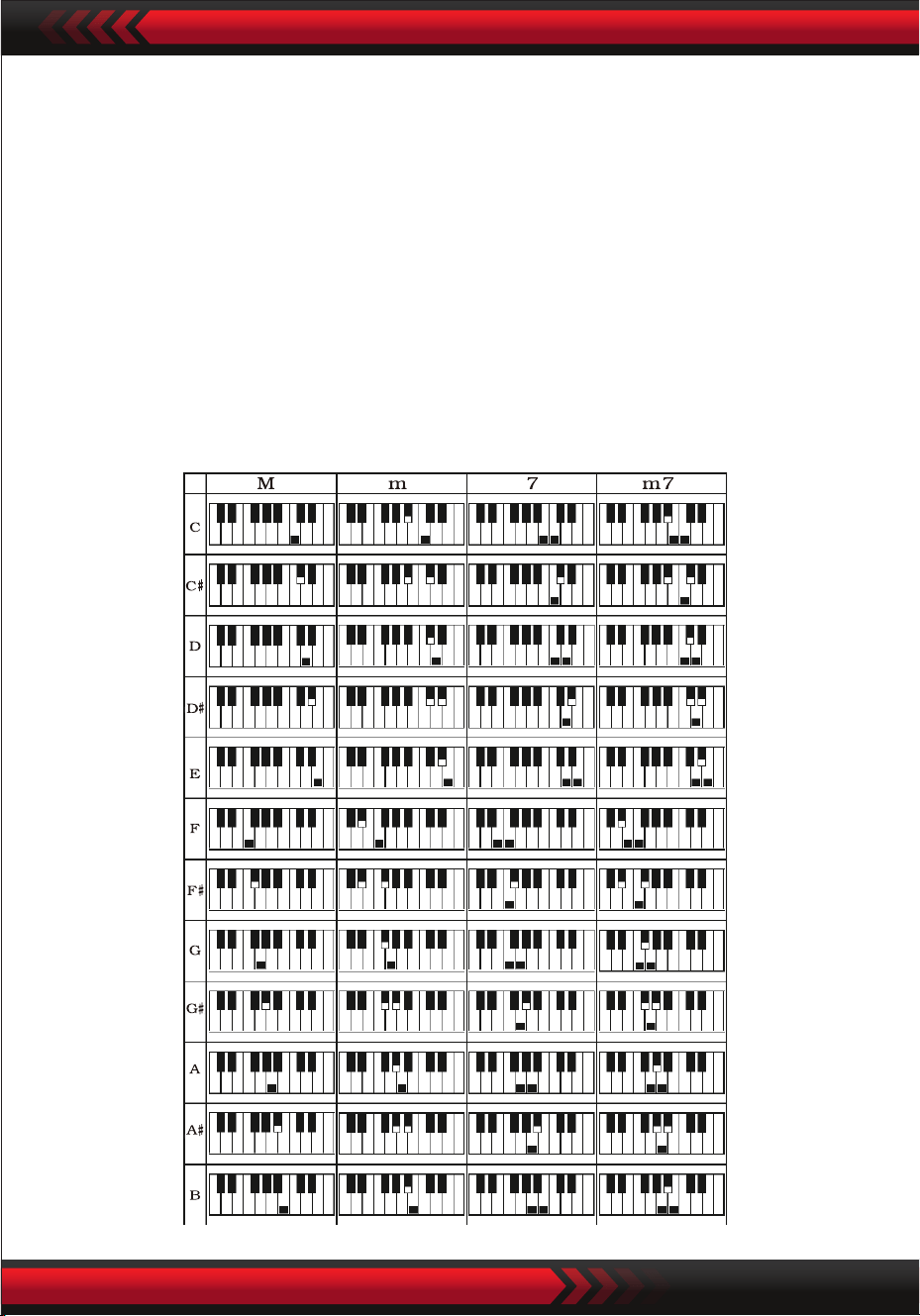
www.PyleUSA.com
7
V. Auto-Bass Chord
ACCORD D'UN SEUL DOIGT
Appuyez sur la touche "Accord d'un Seul Doigt" pour activer la fonction d'accord,
et l'écran ache "Seul". Lorsque le style démarre, un accompagnement d'accords
automatiques peut être joué dans la zone du clavier d'accords (Touches 1 à 19 de
gauche) selon la méthode de doigté de l'accord d'un seul doigt. Lorsque le style n'a
pas encore commencé, l'accompagnement d'accords peut être joué manuellement.
Appuyez sur la touche "Accord d'un Seul Doigt" ou "Accord OFF" pour désactiver
la fonction d'accord, et le "Seul" à l'écran disparaît.
Échelles d'Accords d'Un Seul Doigt
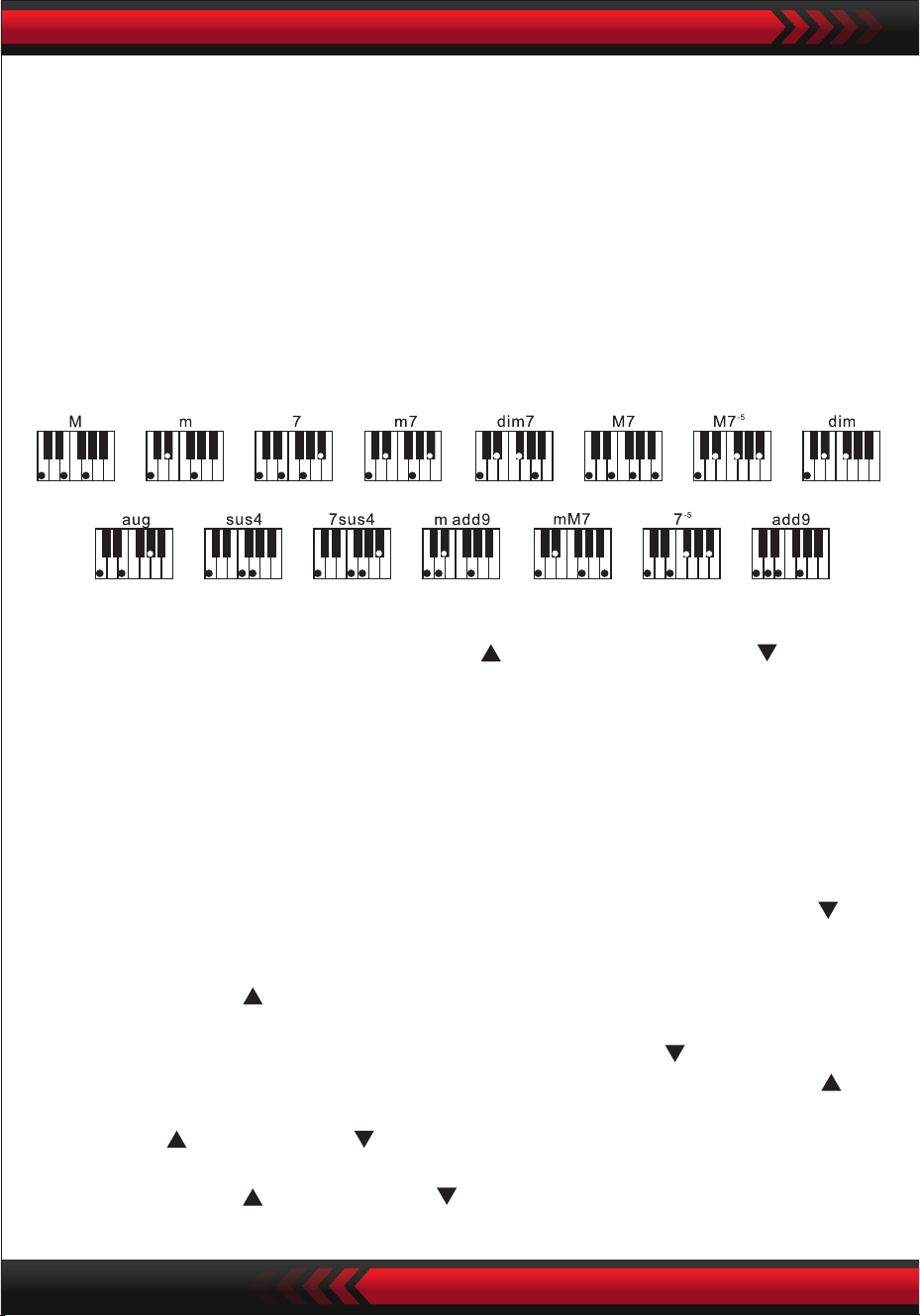
ACCORD DOIGTÉ
FONCTION DE TRANSPOSITION
La fonction de transposition peut vous aider à jouer de la musique d'autres tonalités
selon la méthode de doigté en tonalité de Do. Lorsque la touche "Transposer "
est pressée, le son de l'ensemble du clavier baisse d'un demi-ton (seconde mineure),
et le son en tonalité de Do du clavier est changé en son en tonalité de Si. Lorsque la
touche "Transposer " est pressée, le son de l'ensemble du clavier augmente d'un
demi-ton (seconde mineure), et le son en tonalité de Do du clavier est changé en
son en tonalité de #Do ou bRe. Lorsque la touche "Transposer " est pressée deux
fois, la tonalité Do est changée en tonalité bSi. Lorsque la touche "Transposer "
est pressée cinq fois, la tonalité Do est changée en tonalité Fa. Lorsque les touches
"Transposer " et "Transposer " sont pressées simultanément, le son est rétabli
en tonalité de Do "00". Le niveau peut être ajusté de "-6" à "+6" en appuyant sur la
touche "Transposer " ou "Transposer ".
VI. Contrôle des Eets
Échelles d'Accords Doigtés
Appuyez sur la touche "Finger Chord" pour activer la fonction d'accord, et l'écran
ache "Finger". Lorsque le style démarre, un accompagnement d'accords automa-
tiques peut être joué dans la zone du clavier d'accords (Touches 1 à 19 de gauche)
selon la méthode de doigté de l'accord doigté. Lorsque le style n'a pas encore com-
mencé, l'accompagnement d'accords peut être joué manuellement.
Appuyez sur la touche "Finger Chord" ou "Chord OFF" pour désactiver la fonction
d'accord, et le "Finger" à l'écran disparaît.
www.PyleUSA.com
8
AJUSTEMENT DU VOLUME DES ACCORDS
Appuyez sur la touche "Volume des Accords " ou "Volume des Accords " pour
augmenter ou diminuer le volume des accords. Lorsque les deux touches sont
pressées simultanément, le volume des accords peut être rétabli à la valeur
prédénie par défaut.

www.PyleUSA.com
9
SUSTAIN
Appuyez sur le bouton [Sustain] avec "SUS" qui apparaît à l'écran, le son des frappes
prend un eet de sustain. Appuyez à nouveau sur le bouton avec "SUS" qui
disparaît, la fonction s'arrête.
DOUBLES SONS & FONCTION DE DIVISION DU CLAVIER
Appuyez sur la touche "Double/Split/O" pour activer ou désactiver la fonction.
Fonction de division du clavier en doubles tons à tour de rôle.
FONCTION DE DIVISION DU CLAVIER
Lorsque la fonction "Division du Clavier" est activée, la partie supérieure de l'écran
ache "Split". Les 24 touches à gauche du clavier électronique sont séparées du
clavier d'origine, et la hauteur de tonalité de la zone du clavier de gauche est
DOUBLES SONS
Lorsque "DOUBLE" est activé, l'écran ache "double", et des eets de superposition
de deux sons peuvent être produits pendant le jeu du clavier électronique.
Après avoir activé la fonction de double son, le son 1 et le son 2 peuvent être
sélectionnés en appuyant sur la touche "Son" an de choisir le son requis, et l'écran
achera respectivement "SON1" ou "SON2".
VIBRATO
Lorsque "Vibrato" est en position la plus basse, la fonction de vibrato est désactivée.
Lorsque "Vibrato" est augmenté, la fonction de vibrato est activée, et l'écran ache
"VIB". En utilisant la fonction de vibrato, des eets de vibrato peuvent être ajoutés
au ton joué. Le vibrato peut être augmenté ou diminué pour être désactivé en
faisant glisser "Vibrato" vers le haut ou vers le bas.
PITCH BEND
Le pitch bend peut ajouter des changements de hauteur doux aux notes jouées par
le clavier. La hauteur peut être augmentée en faisant glisser vers le haut le pitch
bend et diminuée en faisant glisser vers le bas le pitch bend. Après avoir été relâché,
le pitch bend reviendra automatiquement au centre, et le pitch du clavier retrouvera
son état standard.

www.PyleUSA.com
10
augmentée par octave ou diminuée par octave pour être identique à la hauteur de
la zone du clavier de droite.
Le son de la zone du clavier de droite peut être sélectionné selon les besoins, et
diérents sons peuvent être joués par la zone du clavier de gauche et celle de
droite. Lorsque la touche "Division du Clavier" est pressée à nouveau, l'écran
ache "O" et la fonction de division du clavier est désactivée.splitting function is
disabled.
TOUCHER
Appuyez sur le bouton [Toucher] pour activer ou désactiver la fonction de toucher.
Par défaut au démarrage, la fonction est activée. L'écran achera "Toucher". Cette
fonction peut aider à enrichir l'expression musicale et reéter correctement la force
que vous appliquez à chaque note. Plus la force est grande pendant l'exécution,
plus le son est fort. Lorsque cette fonction est désactivée, le même son peut être
produit indépendamment de la force appliquée pendant l'exécution.
ENREGISTREMENT
Lorsque la touche "Enregistrement" est pressée, la fonction d'enregistrement est
activée, l'écran ache "Enregistrement", et ensuite les notes jouées seront
sauvegardées.
Les notes enregistrées seront eacées automatiquement lorsqu'un nouvel enregis-
trement est eectué ou lorsque le clavier électronique est éteint.
ARRÊT DE L'ENREGISTREMENT
Lorsque la mémoire est pleine de notes et que le mot "Enregistrement" disparaît
de l'écran, l'enregistrement s'arrête automatiquement. Pendant le processus d'en-
registrement, la touche "Lecture" peut être pressée pour arrêter l'enregistrement et
lire les notes enregistrées.
Lorsque la touche "Enregistrement" est à nouveau pressée, la fonction d'enregis-
trement sera désactivée, et les notes enregistrées seront eacées automatiquement.
LECTURE DES NOTES ENREGISTRÉES
Les notes enregistrées peuvent être lues en appuyant directement sur la touche
"Lecture" pendant le processus d'enregistrement. La lecture des notes enregistrées
peut être arrêtée en appuyant à nouveau sur la touche "Lecture" pendant le proces-
sus de lecture.
VII Fonction d'enregistrement

www.PyleUSA.com
11
VIII. Programmation de Style
IX. Fonction de Mémoire d'État
PROGRAMMATION DE STYLE
Lorsque la touche "Programmation" est pressée, la fonction de programmation de
style est activée, l'écran ache "Programmation", et un ensemble de mélodies de
style peut être programmé en jouant les percussions correspondantes du clavier.
* Le style programmé sera automatiquement eacé lorsqu'une nouvelle program-
mation est eectuée ou lorsque le clavier électronique est éteint.
ARRÊT DE LA PROGRAMMATION
Lorsque 32 percussions sont enregistrées et que le mot "Programmation" disparaît
de l'écran, la programmation s'arrête automatiquement. Pendant le processus de
programmation, la touche "Lecture" peut être pressée pour arrêter la programmation
et jouer le style programmé.
Lorsque la touche "Programmation" est à nouveau pressée, la fonction de
programmation sera désactivée, et les données programmées seront eacées
automatiquement.
LECTURE DU STYLE PROGRAMMÉ
Pendant la programmation de style, le style programmé peut être joué en appuyant
directement sur la touche "Lecture". La lecture du style programmé peut être
arrêtée en appuyant à nouveau sur la touche "Lecture" pendant le processus de
lecture.
En utilisant la fonction de mémoire d'état, le son, le style, le tempo et d'autres
paramètres à dénir pendant la lecture peuvent être sauvegardés. Le clavier
électronique est équipé de quatre mémoires d'état, qui peuvent être appelées de
manière exible à tout moment pendant la lecture.
ENREGISTREMENT DE LA MÉMOIRE D'ÉTAT
Réglez le son, le style et le tempo selon les besoins de la lecture, puis appuyez sur la
touche "Mémoire d'État" et l'une des touches "M1" à "M4" pour sauvegarder l'état
de travail actuel.

www.PyleUSA.com
12
APPEL DE LA MÉMOIRE D'ÉTAT
Lorsque l'une des touches "M1" à "M4" est pressée pendant la lecture, les données
de la touche de mémoire peuvent être appelées pour remplacer l'état actuel.
Aucune protection contre les pannes de courant n'est prévue pour les contenus
sauvegardés. Lorsque le clavier électronique est rallumé après une panne de
courant, les contenus sauvegardés disparaîtront.
La fonction d'enseignement intelligent est divisée en trois étapes pour guider
l'apprenant à apprendre progressivement à jouer du clavier électronique.
L'apprenant doit s'exercer dans la première étape "Une Touche" pour se familiariser
avec la mélodie et le style de la chanson, suivie de la deuxième étape "Suivre" pour
jouer correctement la chanson, puis la troisième étape "Ensemble" pour s'entraîner
à jouer librement avec d'autres via des exercices d'ensemble.
ENSEIGNEMENT 1 : UNE TOUCHE
Lorsque la touche "Une Touche" est pressée, la fonction d'enseignement d'une
seule touche est activée, et l'écran ache "Étape 1". Vous pouvez sélectionner la
chanson à apprendre en appuyant sur la touche numérique ou en appuyant sur "+"
ou "-" Une enseignement à une touche est appliqué pour l'exercice de durée de la
chanson, sans exigence de tonalité et de justesse. Il est permis de jouer incorrecte-
ment les touches. Le clavier électronique joue les notes correctes en cas d'erreur,
mais le curseur dans la zone du clavier de l'écran montre la touche correspondant à
la note correcte. La fonction d'enseignement à une touche peut être désactivée en
appuyant à nouveau sur la touche "Une Touche".
ENSEIGNEMENT 2 : SUIVRE
Lorsque la touche "Suivre" est pressée, la fonction d'enseignement de suivi est
activée, et l'écran ache "Étape 2".
Vous pouvez sélectionner la chanson à apprendre en appuyant sur la touche
numérique ou en appuyant sur "+" ou "-". Dans ce mode, vous pouvez jouer la chanson
de démonstration, et le curseur dans la zone du clavier de l'écran vous guidera pour
jouer correctement.
En cas d'erreur pendant la lecture, la mélodie de la chanson s'arrêtera jusqu'à ce que
vous corrigiez l'erreur.
La fonction d'enseignement de suivi peut être désactivée en appuyant à nouveau
sur la touche "Suivre".
X. Fonction d'Enseignement Intelligent
XI. Lecteur de musique USB
Insérez la clé USB, et le clavier électronique prend en charge une mémoire maximale
de 32 Go et les chiers au format MP3 courants
Appuyez sur la touche "MP3 " pour ajuster le volume.
Appuyez sur pour lire le morceau précédent, to pour lire le morceau précédent
,
pour jouer/suspendre, pour arrêter, et pour entrer dans les modes de
lecture ordonnée, aléatoire et individuelle.
Appuyez sur le bouton [Eet sonore] pour ajuster les modes d'eet sonore.
ENSEIGNEMENT 3 : ENSEMBLE
Lorsque la touche "Ensemble" est pressée, la fonction d'enseignement d'ensemble
est activée, et l'écran ache "Étape 3". Vous pouvez sélectionner la chanson à
apprendre en appuyant sur la touche numérique ou en appuyant sur "+" ou "-"
L'enseignement d'ensemble est appliqué pour apprendre correctement et
globalement la durée et les notes de la chanson.
La note principale sera masquée par le clavier électronique pour l'ensemble.
Vous devez jouer les bonnes notes dans la durée de la chanson.
Si vous ne parvenez pas à jouer dans les 3 secondes, le clavier électronique jouera
automatiquement la note principale, et la zone du clavier de l'écran achera la note
correcte et le tempo.
La fonction d'enseignement d'ensemble peut être désactivée en appuyant à nouveau
sur la touche "Ensemble".
Contenu de la boîte:
• Clavier karaoké numérique
• Support de livre
• Adaptateur
• Prise de courant
• Support pour clavier
• Tabouret pour clavier
• Sac étanche
www.PyleUSA.com
13
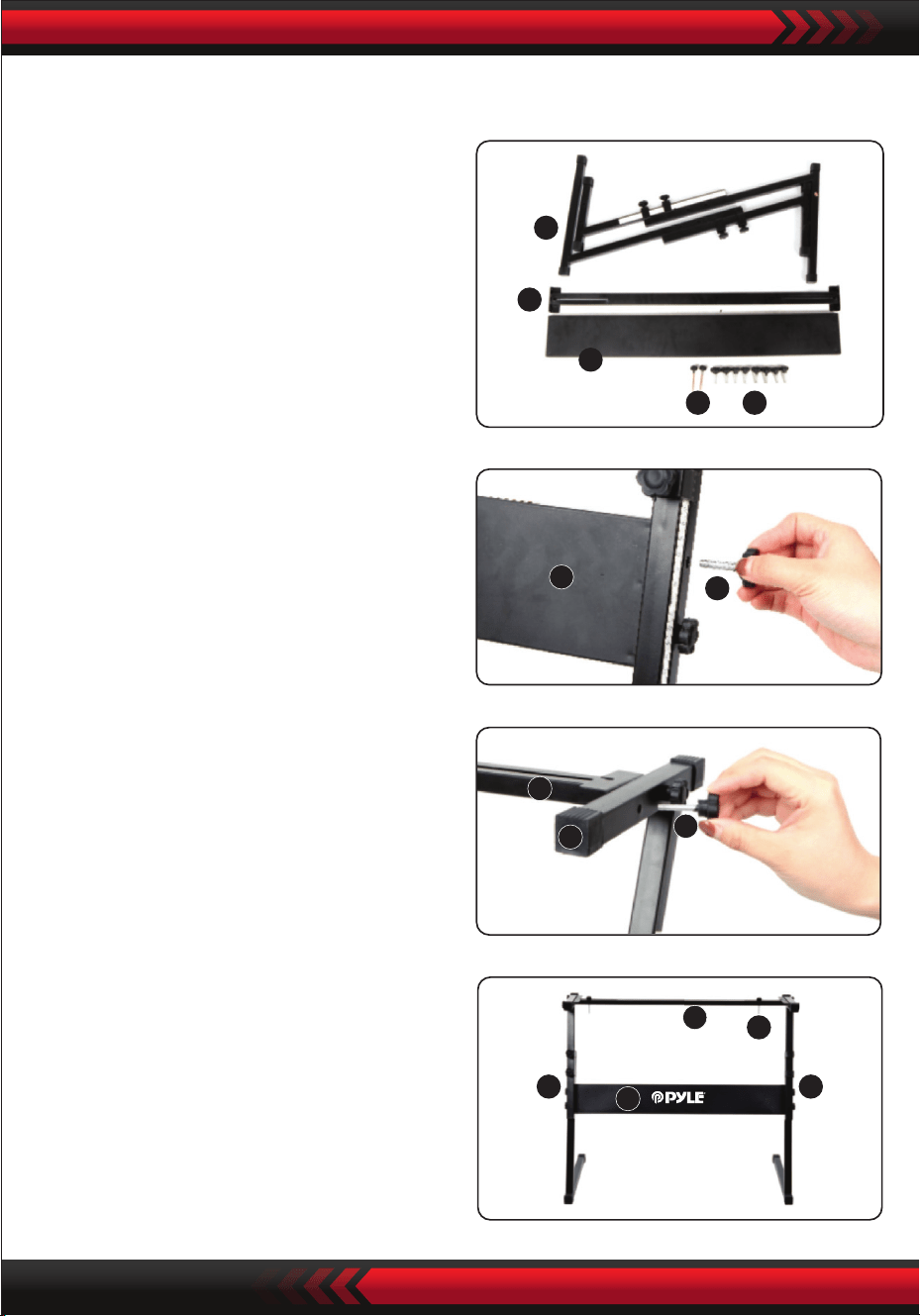
www.PyleUSA.com
14
5
4
3
1 2
3
2
4
5
2
5 5
3
4
1
3. Prenez la vis n°2 et le support n°4
vers le haut du support n°5 et serrez.
Montage du support de clavier
2. Ensuite, prenez la vis n°2 et la plaque
de support n°3, xez-les aux deux
supports du support n°5 et serrez-les
séparément.
4. L'installation est terminée, la vis n°1
la plus longue est utilisée pour xer
le clavier sur le support.
1. Tout d'abord, préparez toutes les
pièces pour l'assemblage.

Appendice
www.PyleUSA.com
15
000 Piano à queue acoustique
001 Piano acoustique lumineux
002 Piano à queue électrique
003 Piano honky-tonk
004 Piano Rhodes
005 Piano avec chorus
006 Clavecin 1
007 Clavicorde
008 Célesta 1
009 Glockenspiel 1
010 Boîte à musique 1
011 Vibraphone 1
012 Marimba 1
013 Xylophone 1
014 Cloches tubulaires
015 Dulcimer 1
016 Orgue à tirants
017 Orgue percussif
018 Orgue rock 1
019 Orgue d'église 1
020 Orgue à anche 1
021 Accordéon 1
022 Harmonica 1
023 Accordéon tango
024 Guitare acoustique (nylon)
025 Guitare acoustique (acier)
026 Guitare électrique (jazz)
027 Guitare électrique (claire)
028 Guitare électrique (étouée)
029 Guitare saturée
030 Guitare distorsionnée
031 Harmoniques de guitare
032 Basse acoustique 1
033 Basse électrique (pincée)
034 Basse électrique (médiator)
035 Basse fretless 1
036 Basse slap 1
037 Basse slap 2
038 Basse synthé 1
039 Basse synthé 2
040 Violon 1
041 Alto 1
042 Violoncelle 1
043 Contrebasse 1
044 Cordes tremolo 1
045 Cordes pizzicato 1
046 Harpe orchestrale
047 Timbales
048 Ensemble à cordes 1
049 Ensemble à cordes 2
050 Cordes synthétiques 1
051 Cordes synthétiques 2
052 Chœurs aahs
053 Voix oohs
054 Voix synthétique
055 Orchestre percutant
056 Trompette 1
057 Trombone 1
058 Tuba 1
059 Trompette étouée 1
060 Cor français 1
061 Section de cuivres 1
062 Cuivres synthétiques 1
063 Cuivres synthétiques 2
064 Saxophone soprano 1
065 Saxophone alto 1
066 Saxophone ténor 1
067 Saxophone baryton 1
068 Hautbois 1
069 Cor anglais 1
070 Basson 1
071 Clarinette 1
072 Piccolo 1
073 Flûte traversière 1
074 Flûte à bec 1
075 Flûte de Pan 1
076 Soue dans une bouteille 1
077 Shakuhachi 1
078 Siet 1
079 Ocarina 1
080 Lead 1 (carré)
081 Lead 2 (dent-de-scie)
082 Lead 3 (son de calliope)
083 Lead 4 (son chion)
084 Lead 5 (son charang)
085 Lead 6 (voix)
086 Lead 7 (quintes)
087 Lead 8 (basse + lead)
088 Pad 1 (new age)
089 Pad 2 (chaleureux)
090 Pad 3 (polysynthé)
091 Pad 4 (chœur)
092 Pad 5 (à cordes)
093 Pad 6 (métallique)
094 Pad 7 (balo)
095 Pad 8 (sweep)
096 FX1 (pluie)
097 FX 2 (bande son)
098 FX 3 (cristal)
099 FX 4 (atmosphère)
100 FX 5 (luminosité)
101 FX 6 (gobelins)
102 FX 7 (échos)
103 FX 8 (sci-)
104 Sitar
105 Banjo
106 Shamisen
107 Koto
108 Kruimba
109 Cornemuse
110 Violon folklorique
111 Shanai
112 Clochette
113 Agogo
114 Steel drums
115 Bloc de bois
116 Tambour taiko
117 Tom mélodique
118 Batterie synthé
119 Cymbale inversée
120 Bruit de frette de guitare
121 Bruit de respiration
122 Bord de mer
123 Gazouillis d'oiseaux
124 Sonnerie de téléphone
125 Hélicoptère
126 Applaudissements
127 Coup de feu
128 Piano à queue stéréo
129 Piano lumineux stéréo
130 Piano à queue
131 Piano classique
132 Piano rock
133 Piano doux stéréo
134 Piano lumineux
135 Piano moderne

www.PyleUSA.com
16
Sounds
136 La Piano
137 Dance Piano
138 Mell0W Piano
139 Strings Piano
140 Piano Pad
141 Synth-Str. Piano
142 Choir Piano
143 Honky-Tonk
144 2 Octave Piano
145 1 Octave Piano
146 Eiec.Grand Piano
147 E.Grand 80
148 Modern E.G.Piano
149 Harpsichord 2
150 Harpsichord 3
151 Coupled Harpsichord
152 Harpsichord & Strings
153 Elec.Piano 1
154 Elec.Piano 2
155 Fm Elec.Piano 1
156 Fm Elec.Piano 2
157 60's Elec.Piano 1
158 60's Elec.Piano 2
159 Dyno Elec.Piano 1
160 Dyno Elec.Piano 2
161 Mellow E.Piano
162 Pop Elec.Piano
163 Chorus Ep 1
164 Chorus Ep 2
165 Tremolo E.Piano
166 Modern E.Piano
167 Soft E.Piano
168 Strings E.Piano 1
169 Strings E.Piano 2
170 Synth-Str.E.Piano 1
171 Synth-Str.E.Piano 2
172 E.Piano Pad 1
173 E.Piano Pad 2
174 Clean E.Piano
175 Harpsichord E.Piano
176 Clavi 1
177 Clavi 2
178 Soft Clavi
179 Detune Clavi
180 Sequence Clavi
181 Clavi&Drawbar
182 Chorus Clavi
183 Vibraphone 2
184 Vibraphone 3
185 Soft Vibraphone
186 Chorus Vibraphone
187 Marimba 2
188 Soft Marimba
189 Celesta 2
190 Bright Celesta
191 Glockenspiel 2
192 Glockenspiel Pad 1
193 Music Box 2
194 Music Box 3
195 Xylophone 2
196 Tubular Bell 2
197 Dulcimer 2
198 Drawbar Organ 1
199 Drawbar Organ 2
200 Drawbar Organ 3
201 Drawbar Organ 4
202 Drawbar Organ 5
203 Perc.Organ 1
204 Perc.Organ 2
205 Pere.Organ 3
206 Elec.Organ 1
207 Elec.Organ 2
208 Elec.Organ 3
209 Jazz Organ 1
210 Jazz Organ 2
211 Jazz Organ3
212 Rock Organ 2
213 Rock Organ 3
214 Rock Organ 4
215 70's Organ
216 Fall Drawbar
217 Rotary Organ 1
218 Rotary Organ 2
219 Rotary Organ 3
220 Tremolo Organ
221 Click Organ
222 S'organ
223 Organ Pad 1
224 Organ Pad 2
225 Sequence Organ
226 Church Organ 2
227 Church Organ 3
228 Chapel Organ
229 Pipe Organ 1
230 Pipe Organ 2
231 Theater Organ
232 Organ & Harpsichord
233 Pipe Organ Pad
234 Reed Organ 2
235 Accordion 2
236 Accordion 3
237 Accordion 4
238 Accordion 5
239 Octave Accordion
240 Bandoneon 1
241 Bandoneon 2
242 Octave Bandoneon
243 Bandoneon Solo
244 Bandoneon & Violin
245 Harmonica 2
246 Harmonica 3
247 Harmonica 4
248 Nylon Str.Guitor 1
249 Nylon Str.Guitor 2
250 Steel Str.Guitar 1
251 Steel Str.Guitar 2
252 Steel Str.Guitar 3
253 12 Str.Guitar
319 Picked Bass M
320 Trance Bass M
321 Saw Synth-Bass M
322 Square Synth-Bass M
323 Violin 2
324 Slow Violin
325 Viola 2
326 Cello2
327 Slow Cello
328 Contrabass 2
329 Violin Section
330 Cello Section
331 Volin & Cello
332 String Quartet
333 Pizzicato Strings 2
334 Octave Pizzicato
335 Harp 1
336 Harp 2
337 Chorus Harp
338 Strings
339 String Ensemble 3
340 String Ensemble 4
341 String Ensemble 5
342 Slow Strings 1
343 Slow Strings 2
344 Wide Strings
345 Chamber 1
346 Chamber 2
347 Octave Strings 1
348 Octave Strings 2
349 Strings Sfz
350 Tremolo Strings 2
351 Harp & Strings
352 Flute & Strings
353 Orchestra Strings
354 Synth-Strings 1
355 Synth-Strings 2
356 Synth-Strings 3
357 70's Synth-Str.1
358 70's Synth-Str.2
359 80's Synth-Str.1
360 80's Synth-Str.2
361 Fast Synth-Strings
362 Slow Synth-Strings
363 Octave Syneh-Strings 1
364 Octave Syneh-Strings 2
365 Choir Aahs 2
366 Choirs 1
367 Choirs 2
368 Choir Strings
369 Strings Voice
370 Choius Choir
371 Slow Choir
372 Choirs Ensemble 1
373 Choirs Ensemble 2
374 Voice Doo
375 Voice Uuh
376 Synth-Voice 1
377 Synth-Voice 2
378 Synth-Voice 3
379 Voice Ensemble 1
380 Voice Ensemble 2
381 Voice Ensemble 3
382 Synyh-Voice Pad
383 Chorus Synth-Voice
254 Steel Gt+Strum.Noise 1
255 Steel Gt+Strum.Noise 2
256 Steel Gt Harmonics
257 Chorus Steel Gt
258 Jazz Guitar 1
259 Jazz Guitar 2
260 Oct Jazz Guitar
261 Clean Guitar1
262 Clean Guitar 2
263 Clean Guitar 3
264 Clean Guitar 4
265 Chorus Clean Guitar
266 Mute Guitar 1
267 Mute Guitar 2
268 Crunch Elec.Guitar
269 Overdrive Gt 1
270 Overdrive Gt 2
271 Distortion Gt 1
272 Distortion Gt 2
273 Distortion Gt 3
274 Distortion Gt 4
275 Power Dist.Gt
276 Rhythm Dist.Gt
277 Feedback Gt
278 Dist.Gt & Bass
279 Steel Gt + Strum.Noise M 1
280 Steel Gt + Strum.Noise M 2
281 Clean Guitar M
282 Crunch Elec.Guitar M 1
283 Crunch Elec.Guitar M 2
284 Distortion Gt M
285 Acoustic Bass 2
286 Acoustic Bass 3
287 Ride Bass
288 Fingered Bass 1
289 Fingered Bass 2
290 Fingered Bass 3
291 Fingered Bass 4
292 Rhythm Fingered Bass
293 Mellow Fingered Bass
294 Picked Bass 1
295 Picked Bass 2
296 Picked Bass 3
297 Rhythm Picked Bass
298 Fretless Bass 2
299 Fretless Bass 3
300 Slap Bass 1
301 Slap Bass 2
302 Doubled Strings Bass
303 Synth-Bass 1
304 Synth-Bass 2
305 Synth-Bass 3
306 Synth-Bass 4
307 Saw Synth-Bass
308 Souare Synth-Bass
309 Digi Roch Bass
310 Trance Bass
311 Sine Bass
312 Bass & Kick
313 Vocoder Bass
314 Soul Synth-Bass
315 Clavi Bass
316 Organ Bass
317 Fingered Bass M1
318 Fingered Bass M 2

www.PyleUSA.com
17
Style
384 Orchesyra Hit 1
385 Orchesyra Hit 2
386 Orchesyra Hit 3
387 Orchesyra Hit 4
388 Trumpet 2
389 Trumpet 3
390 Trumpet 4
391 Mellow Trumpet 2
392 Velo.Trumpet
393 Trumpet Sfz
394 Mute Trumpet 3
395 Trombone 2
396 Trombone 3
397 Mellow Trombone
398 Velo.Trombone
399 Trombone Section
400 Jazz Trombone
401 Trumpet & Trombone
402 Tuba 2
403 Tuba 3
404 French Horn 2
405 French Horn Solo
406 French Horn Section
407 Octave French Horn
408 Horn Orchestra
409 Stereo Brass
410 Brass
411 Brass Section 2
412 Brass Section 3
413 Brass Section 4
414 Mellow Brass
415 Hard Brass
416 Brass Sfz
417 Brass & Strings
418 Brass & Sax
419 Synth Brass 3
420 Synth Brass 4
421 Synth Brass 5
422 Synth Brass 6
423 Warm Synth-Brass
424 80's Synth-Brass
425 Analog Synth-Brass 1
426 Analog Synth-Brass 2
427 Trance Brass
428 Synth-Brass Pad
429 Octave Synth-Brass
430 Synth-Brass Sfz
431 Alto Sax 2
432 Alto Sax 3
433 Breathy Alto Sax1
434 Breathy Alto Sax2
435 Tenor Sax 2
436 Tenor Sax 3
437 Breathy Tenor Sax 1
438 Breathy Tenor Sax 2
439 Soprano Sax 2
440 Soprano Sax 3
441 Breathy S.Sax
442 Baritone Sax 2
443 Baritone Sax 3
444 Soft A.Sax
445 Hard A.Sax
446 Solo A.Sax
447 Soft T.Sax
448 Solo T.Sax
449 T.Saxys
450 A.Saxys
451 Sax Section
452 Sax Section Sfz
453 Clarinet 2
454 Velo.Clarinet
455 Bass.Clarinet
456 Jazz.Clarinet
457 Oboe 2
458 Solo Oboe
459 English Horn 2
460 Bassoon 2
461 Flute 2
462 Flute 3
463 Jazz Flute
464 Pure Flute
465 Soft Flute
466 Piccolo 2
467 Piccolo 3
468 Pipe Section 1
469 Pipe Section 2
470 Flute & Oboe
471 Recorder 2
472 Recorder 3
473 Pan Flute 2
474 Pan Flute 3
475 Bottle Blow 2
476 Whistle 2
477 OcaRina 2
478 Shakuhachi 2
479 Square Lead 1
480 Square Lead 2
481 Square Lead 3
482 Square Lead 4
483 Saw Lead 1
484 Saw Lead 2
485 Saw Lead 3
486 Mellow Sawlead
487 Square Pulse Lead
488 Sequence Saw 1
489 Sequence Saw 2
490 Sequence Sine
491 Sine Lead
492 Velo.Sine Lead
493 Ss Lead
494 Slow Square Lead
495 Slow Square Pulse
496 Sequence Square
497 Sequence Pulse 1
498 Sequence Pulse 2
499 Slow Sawlead
500 Pulse Sawlead
501 Slow Saw Pulse
502 Trance Lead
503 Callope 1
504 Callope 2
505 Vent Lead
506 Vent Synth
507 Pure Lead
508 Pipe Lead
509 Sequence Lead
510 Chiff Lead
511 Drop Lead
512 Ep Lead
513 Voice Lead 1
514 Voice Lead 2
515 Vox Lead 1
516 Vox Lead 2
517 Distortion Lead
518 Charang
519 Octave Charang
520 Pluck Lead 1
521 Pluck Lead 2
522 Gt Synth Lead
523 Church Lead
524 Double Voice Lead
525 Voice Choir Lead
526 Ep & Voice Lead
527 Synth Voice Lead
528 Fifth Lead
529 Fifth Saw Lead
530 Fifth Square Lead
531 Fourth Lead
532 Seventh Sequence
533 Fifth Sequence
534 Basst+Lead
535 Bass+Saw Lead
536 Synth-Bass+Lead
537 Reed Lead
538 Fret Lead
539 Fantasy 1
540 Fantasy 2
541 New Age
542 New Age Pad
543 Warm Vox
544 Thick Pad
545 Warm Pad
546 Sine Pad
547 Soft Pad
548 Horn Pad
549 Old Tape Pad
550 Polysynth 1
551 Polysynth 2
552 Polysynth Pad 1
553 Polysynth Pad 2
554 Poly Saw
555 Space Choir
556 Heaven
557 Space Strings Pad
558 Chiff Choir
559 Star Voice
560 Square Pad
561 Bowed Pad
562 Glass Pad
563 Bottle Pad
564 Tine Pad
565 Ethnic Pad
566 Soft Metal Pad
567 Hard Metal Pad
568 Chorus Pad
569 Halo Pad 1
570 Halo Pad 2
571 Organ Choir Pad
572 Sweep Choir
573 Sweep Pad
574 Clavi Pad 2
575 Rain Drop 1
576 Rain Drop 2
577 Wood Pad
578 Space Voice
579 Sound Track 1
580 Sound Track 2
581 Rave
582 Soft Crystal
583 Crystal
584 Christmas Bell
585 Glockenspiel Chime
586 Vibraphone Bell
587 Choral Bell
588 Synth-Nakket
589 Celesta Pad
590 Atmosphere
591 Nylon Gt & Ep
592 Steel Pad
593 Bright Bell Pad
594 Brightness 1
595 Brightness 2
596 Goblin
597 Echo Voice
598 Echo Pad
599 Echo Drop

www.PyleUSA.com
18
Style
000 Pop
001 Ragtim
002 Pop Funk
003 March 1
004 Retro Disco
005 Easy pop
006 "Fox March"
007 48 Bit
008 Ballad
009 Waltz
010 Latin
011 8 Beat Pop 1
012 8 Beat Pop 2
013 8 Beat Uptempo
014 8 Beat Standard
015 8 Beat Medium
016 8 Beat Ballad
017 Epic Ballad
018 Piano Ballad
019 16 Beat Pop 1
020 16 Beat Shuffle 1
021 16 Beat Shuffle 2
022 16 Beat Ballad 1
023 16 Beat Ballad 2
024 16 Beat Ballad 3
025 Funk 1
026 Funk 2
027 Soul
028 Gospel Shuffle
029 6-8 Gospel
030 4-4 Blues
031 Twist
032 Fusion 1
033 Funky Fusion 1
034 50's Pop
035 Cool Pop
036 Groovy Pop
037 60's Vintage Pop
038 80's Pop
039 Folk Rock 1
040 Pop Rock 1
041 Pop Rock 2
042 8 Beat Rock Balld
043 16 Beat Rock Bld
044 Hard Rock 1
045 Rock Shuffle 1
046 6-8 Hvy Rock
047 US-Rock
048 16 Beat Rock
049 Rock 1
050 Rock 2
051 60's Rock
052 Standard Rock
053 Brit Rock Pop
054 60's Vintage Rock
055 Chart Rock Shfl
056 60's Pop Rock
057 Soul Ballad
058 Slow Rock 1
059 Slow Rock 2
060 6-8 Ballad
061 R&B
062 70's Chart Ballad
063 Romantic Ballad
064 China 1
065 China 2
066 China 3
067 China 4
068 China 5
069 China 6
070 China 7
071 China 8
072 China 9
073 China 10
074 Bossa Nova 1
075 Bossa Nova 2
076 Bossa Nova 3
077 Salsa
078 Samba 1
079 Mambo 1
080 Beguine
081 Merengue
082 Bolero Lento
083 Espagnole
084 Cajun
085 Reggae 12 Beat 1
086 Pop Reggae 1
087 Pop Mambo
088 Latin Party Pop
089 New Age 1
090 New Age 2
091 Bluse Mambo
092 Dance Pop 1
093 Dance Pop 2
094 Techno 1
095 Euro Beat
096 Euro House
097 Hip Hop
098 Trip Hop
099 Synth Boogie
100 70's Disco
101 Disco Trop
102 Party Pop
103 Polka Pop 1
104 Boogie
105 Swing
106 Big Band Swing
107 Big Band Balld
108 Jazz Quartet
109 Dixieland
110 CoolJazz
111 Jazz Ballad
112 BBQ uickstep
113 Bluegrass 1
114 Bluegrass 2
115 Country 2-4
116 8 Beat Country
117 Country Rock
118 Cwhy Boogie
119 Cntry Ballad
120 Cnutry Shuffle
121 Country Waltz
122 Jazz Waltz
123 HullyGully
124 March 2
125 March 3
126 6-8 March
127 Polka
128 PopWaltz
129 Cha Cha Cha
130 Rhumba
131 Pasodoble
132 TangoCont
133 Foxtrot 1
134 Jive 1
135 Stndrd Waltz
136 German Waltz
137 Vienn Waltz
138 Musette Waltz
139 Rock'n Roll 1
140 Rock'n Roll 2
141 Straight Rock
142 Jazz Rock 1
143 Fast Gospe
144 Folk Rock 2
145 Rock Billy
146 Rock Boogie
147 Rock Cha Cha
148 Rock Classica 1
149 Rock Shuffle 2
150 Rock Pop
151 Skiffle
152 Funk Pop Rock
153 Contemp Rock
154 Acoustic Rock
155 80's Rock
156 LA Shuffle
157 Jive 2
158 Samba 2
159 Samba 3
160 Schlager Rock 1
161 Schlager Rock 2
162 Carnival
163 Organ Samba
164 Reel
165 Foxtrot 2
166 Foxtrot 3
167 Club Pop
168 16 Beat Pop 2
169 8 Beat Pop 3
170 8 Beat Soul 1
171 8 Beat Rock
172 Rap Pop
173 60's Soul
174 70's Soul
175 Funk Shuffl
176 Fusion Shuffl
177 Classic 8 Beat
178 Vintage Gtr Pop
179 Schlager Italia
180 8 Beat Soft
181 8 Beat Heat
182 8 Beat Soul 2
183 Guitar Ballad
184 8 Beat Pop 4
185 Polka Pop 2
186 Polka Pop 3
187 16Beat 1
188 16Beat 2
189 16Beat 3
190 Pop Ballad 1
191 Pop Ballad 2
192 Funky Pop
193 Hip Hop Pop
194 Soul Shuffle
195 Slow Soul
196 8 Beat Adria
197 Classic Piano
198 Unplugged
199 Pop Ballad 3
200 Pop New Age
201 8 Beat Modern
202 Country Ballad
203 Love Song
204 Modern Country Pop
205 Electro Pop
206 Acoustic Ballad
207 Piano Ballad
208 R&B Ballad
209 Rock Ballad 1
210 Slow & Easy
211 Analog Ballad
212 Calypso
213 GuadDance
214 Reggae 12 Beat 2
215 Reggae 16 Beat
216 Bossa Nova 4
217 Mambo 2
218 Mambo 3
219 Bolero
220 Cumbia 1
221 Latin Rock
222 Disco Latin
223 Tijuana
224 Reggae
225 Cumbia 2
226 Parranda
227 Carnival 2
228 Samba Rio
229 Pop Reggae 2
230 Techno 2
231 Techno 3
232 Funky Disco
233 Saturday Night
234 Club Latin
235 Disco Chocolate
236 Disco Fox
237 Disco Funk
238 Disco Hands
239 Disco Party
240 Disco Samba
241 UK Pop
242 Club Dance
243 Country 1
244 Country 2
245 Finger Pickin
246 Country Brothers
247 New Country
248 Easy Country
249 70's Chart Cutry
250 Hoedown
251 Country Shuffle
252 Ober Polka
253 Polka Pop 4
254 Blue Grass 1
255 Blue Grass 2
256 Blue Grass 3
257 USA March
258 Hully Gully
259 Big Band Shuffle 1
260 Big Band Shuffle 2
261 Big Band Shuffle 3
262 Fast Band 1
263 Fast Band 2
264 Cat Groove
265 Dixie Jazz
266 Medium Jazz
267 16 Beat Shuffle
268 British Pop
269 8 Beat 1
270 8 Beat 2
271 8 Beat 3
272 8 Beat 4
273 Heart Beat
274 Organ Ballad
275 Hard Rock 2
276 Street Pop
277 Soft Fusion
278 West End
279 Baroque
280 Funky Fusion 2
281 Game Show
282 Fusion 2
283 Funk 3
284 Rock 3
285 Rock 4
286 Rock Classic 2
287 Rock Shffle 1
288 Rock Shffle 2
289 Jazz Rock 2
290 Soft Rock
291 Cowboy Rock
292 Rock Ballad 2
293 Rock Ballad 3
294 Rock Ballad 4
295 E-Ballad
296 80's EP Ballad
297 80's Boy Band
298 90's Cool Ballad
299 Alp Ballad1

www.PyleUSA.com
19
Fonctionnalités :
• Clavier karaoké 2-en-1 : Jouez et chantez en même temps !
• Piano musical compact et portable
• Fonctionnement électronique simple avec branchement pratique
• Piano portable
• Haut-parleurs stéréo intégrés à gamme complète
• Connexion et diusion audio depuis des appareils externes
• Peut se connecter à un haut-parleur pour diuser du son
• Plusieurs sons de clavier préréglés, styles de tonalité et de rythme sélectionnables
• Écran LCD numérique
• Contrôle de volume réglable
• Mode enregistrement et lecture
• Fonction de percussion clavier à 61 touches
• Contrôle basique : volume principal / volume d'accompagnement / volume
d'accord / contrôle de tempo
• Fonction de programmation de rythme / enregistrement et lecture
• Fonction d'accord automatique : accord simple / accord doigté
• Courbe de hauteur / Vibrato / Sustain / Fonction de détection tactile
• Fonctions d'apprentissage : Une touche / Suivre / Ensemble
• Prises USB / Microphone
• Parfait pour les performances dans un salon de home cinéma
• Amusant pour les enfants de tous âges : enfants et adultes

www.PyleUSA.com
20
Spécications du support de clavier:
• Vernis cuit au four
• Fonction détachable
• Matériau de construction : Fer + ABS
• Longueur : 31.5'' -pouces - (80cm)
• Largeur : 8.3'' -pouces - (21cm)
• Hauteur : 57,5 à 67,5 cm
• Poids : 1,75 kg
• Capacité de charge : 15 kg
Spécications du tabouret de clavier:
• Matériau de construction : Cuir PU, Fer, Éponge
• Vernis cuit au four
• Fonction pliable
• Longueur : 15.75'' -pouces - (40cm)
• Largeur : 11.81'' -pouces - (30cm)
• Hauteur: 17.32'' / 18.9'' / 20.1'' -pouces - (44 / 48 / 51 cm)
• Poids: 2,2 kg
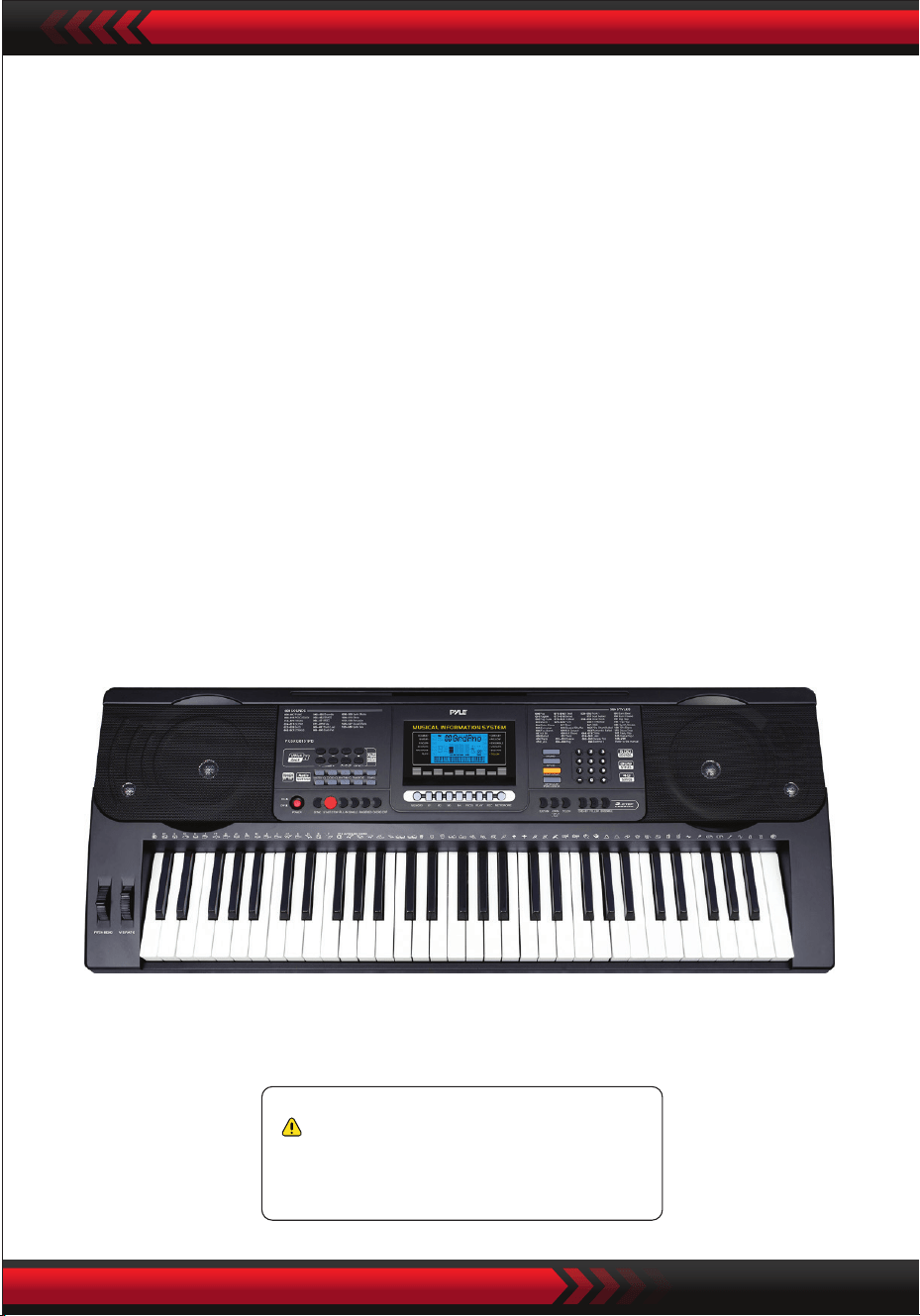
www.PyleUSA.com
21
Spécications techniques:
• 61 touches de clavier
• 600 sons / 300 styles
• 40 chansons de démonstration : Une/Toutes
• Interface audio : Prise d'entrée Aux (3,5 mm) / Entrée micro / Entrée USB
• Niveau sonore maximal : Jusqu'à 110 dB
• Longueur du câble USB / d'alimentation: 3.9’ pieds. - (119cm)
• Matériau de construction : ABS conçu
• Alimentation : DC 12V / Adaptateur secteur
•Dimensions du piano (Lxlx H) :
36.6’’ x 11.97’’ x 3.7’’ -pouces - (93 x 30.4 x 9.3 cm)
Avertissement Proposition 65 de Californie
AVERTISSEMENT:
Ce produit contient du phtalate de butyl benzyle (BBP) connu
de l'État de Californie pour causer le cancer, des anomalies
congénitales et d'autres dommages à la reproduction. Ne pas
ingérer.
Pour plus d'informations, consultez : www.P65warning.ca.gov

Tastiera musicale digitale per karaoke
PKBRD6151PB
Tastiera elettronica portatile con custodia
resistente all'acqua (61 tasti),
sgabello e supporto per tastiera
MANUALE UTENTE
ITA
www.PyleUSA.com
2
Conservare il presente manuale in un luogo sicuro e a portata di mano per
future consultazioni.
Utilizzare l'adattatore di alimentazione in dotazione e sostituire immediatamente l'adatta-
tore nel momento in cui fosse danneggiato.
Non smontare lo strumento e non modicarne le parti interne. In caso di malfunzionamento,
interrompere immediatamente l'uso e farlo riparare da un tecnico professionista.
Prima di collegare lo strumento ad altri dispositivi, spegnere tutte le alimentazioni.
Non suonare lo strumento al massimo volume o a un livello elevato per troppo tempo.
Tenere le parti dello strumento lontano da fonti di calore, perché il surriscaldamento può
causare danni.
Evitare che liquidi, polvere, particelle e altri corpi estranei entrino nello strumento perché
potrebbero causare la corrosione dello strumento o il cortocircuito dei suoi componenti.
Estrarre la spina prima di pulire lo strumento.
Non inserire o estrarre la spina con le mani bagnate.
Per pulire lo strumento, utilizzare un panno asciutto e morbido. Non utilizzare vernici, alcol o
altri solventi chimici, per evitare di danneggiare la supercie.
Spegnere l'alimentazione e staccare la spina dopo aver suonato o in condizioni di inattività
per lungo tempo.
Per ridurre il rischio di incendio o di scosse elettriche, non esporre l'apparecchio alla pioggia
o all'umidità. L'apparecchio non deve essere esposto a gocciolamenti o spruzzi e non si
devono appoggiare sull'apparecchio oggetti pieni di liquidi, come ad esempio vasi.
Massima temperatura di funzionamento: 40°C/ 104°F
Se come dispositivo di disconnessione si utilizza un adattatore diretto, il dispositivo di
disconnessione dovrà rimanere prontamente azionabile.
Non installare questa apparecchiatura in uno spazio ristretto, come una libreria o un'unità
simile, e mantenere una buona ventilazione. La ventilazione non deve essere ostacolata
coprendo le aperture con oggetti come giornali, tovaglie, tende, ecc,
Attenzione: L'eccessiva pressione sonora di auricolari e cue può causare la perdita
dell'udito.
L'etichetta si trova sul fondo dell'apparecchio.
L'apparecchio non deve essere esposto a sgocciolamenti o spruzzi e non deve essere
appoggiato su oggetti pieni di liquidi, come ad esempio vasi non devono essere collocati
sull'apparecchio.
Se l'adattatore a innesto diretto viene utilizzato come dispositivo di disconnessione, il
dispositivo di disconnessione deve rimanere facilmente azionabile.
ATTENZIONE!
LEGGERE ATTENTAMENTE PRIMA DI PROSEGUIRE
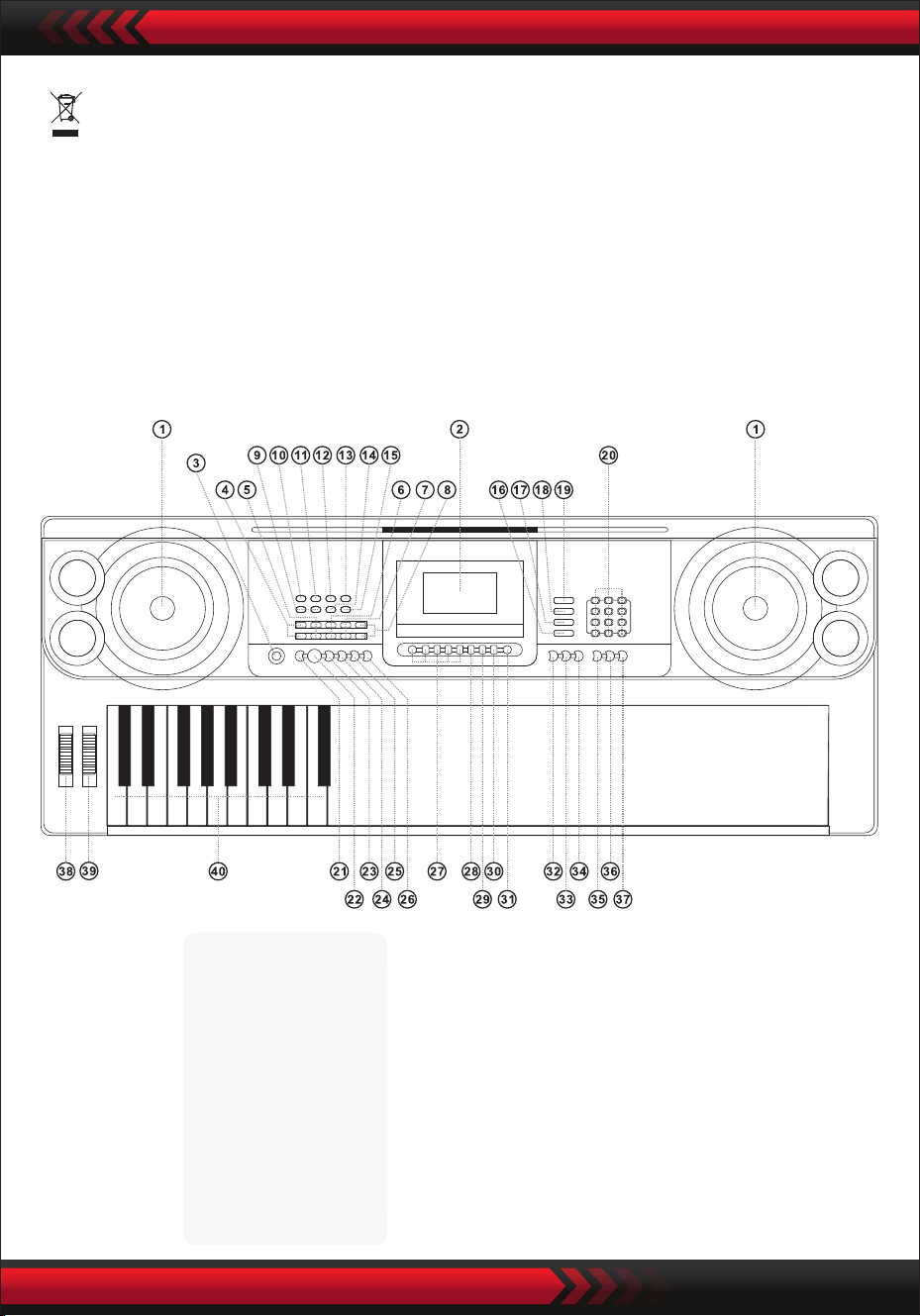
www.PyleUSA.com
3
•
I. Pannello di controllo e porte di espansione
PANNELLO DI CONTROLLO ANTERIORE
Questo marchio indica che questo prodotto non deve essere smaltito
insieme ad altri riuti domestici in tutta l'UE.
Per evitare possibili danni all'ambiente o alla salute umana derivanti da uno
smaltimento incontrollato dei riuti, riciclarlo in modo responsabile per
promuovere il riutilizzo sostenibile delle risorse materiali. Per restituire il
dispositivo usato, utilizzare i sistemi di restituzione e raccolta o contattare il
rivenditore presso il quale è stato acquistato il prodotto.
9 Controllo volume MP3
10 Precedente
11 Successiva
12 Riproduzione/Pausa
13 Stop
14 Inserisci ordine/Random/
Modalità di riproduzione
singola
15 Eetto sonoro
USB MusicPlayer
1 Altoparlante
2 LCD display
3 Interruttore di
alimentazione
4 Volume Principale
5 Volume dei brani
6 Volume del ritmo
7 Trasposizione
8 Tempo
16 Tastiera percussione
17 Canzone demo
18 Stile
19 Suono
20 Numeri
21 Sincronizzazione
22 Avvio/Stop
23 Riempimento
24 Single
25 Diteggiatura
26 Accordo
disattivato
27 Memoria di stato
28 Programma
29 Riproduzione
nulla
30 Registrazione
31 Metronomo
34 Tocco
35 Un tasto
36 Segui
37 Ensemble
38 PitchBend
39 Vibrato
40 Tastiera accordi
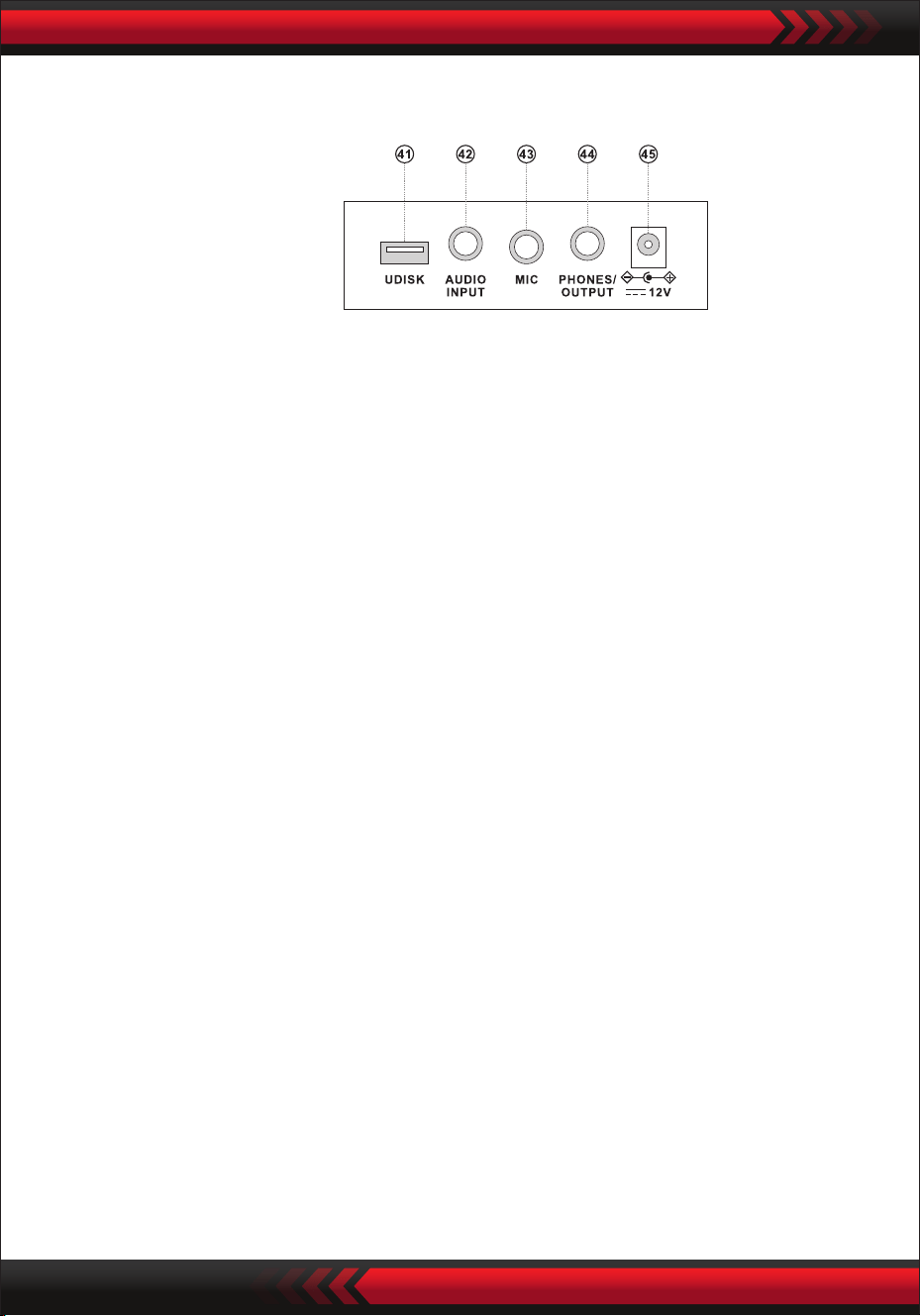
www.PyleUSA.com
4
PANNELLO POSTERIORE
INGRESSO AUDIO
La tastiera elettronica dispone della funzione di ingresso audio stereo e i segnali
audio di telefoni cellulari, lettori MP3, computer e simili possono essere immessi
nella tastiera elettronica per essere riprodotti. Per prima cosa, spegnere
l'alimentazione della tastiera elettronica, inserire un'estremità del cavo audio nella
porta di uscita di un dispositivo audio, inserire l'altra estremità nell'interfaccia
AUDIO INPUT sul retro della tastiera elettronica e quindi accendere l'alimentazione.
• Uscita audio: Spegnere l'alimentazione della tastiera elettronica e dell'apparecchia-
tura audio esterna, quindi inserire un'estremità del cavo audio nel connettore
PHONES/OUTPUT per l'uscita audio sul retro della tastiera elettronica e inserire
l'altra estremità nell'interfaccia di ingresso audio dell'apparecchiatura sonora.
• Collegamento delle cue: Inserire lo spinotto della cua nell'interfaccia
PHONES/OUTPUT sul retro della tastiera elettronica, quindi l'altoparlante della
tastiera elettronica verrà automaticamente scollegato e si eviterà di infastidire gli
altri durante l'esecuzione.
Attenzione! Non tenere il volume al massimo per un periodo di tempo prolungato
quando si usano le cue, per evitare perdita di udito.
USCITA AUDIO COLLEGAMENTO CUFFIE
UUTILIZZO DELL'ADATTATORE DI ALIMENTAZIONE AC/DC
L'adattatore di alimentazione CA/CC deve essere quello previsto per lo strumento.
Collegare un lato alla presa di alimentazione sul pannello posteriore e l'altro alla rete
elettrica. (Si noti che la tensione di ingresso deve essere uguale a quella della rete
elettrica.)
II. Prima dell’utilizzo
41 PORTA USB PER LA RIPRODUZIONE
DI MUSICA (unità ash non inclusa)
42 INGRESSO AUDIO
43 INGRESSO MICROFONO
44 TELEFONI/USCITA
45 INGRESSO DCUV
www.PyleUSA.com
5
SELEZIONE DEI SUONI
PERCUSSIONI CON LA TASTIERA
CANZONI DEMO
Premere il tasto "Volume master " o "Volume master " per aumentare o
diminuire il volume principale. Se i tasti "Volume master " e "Volume master "
vengono premuti contemporaneamente, il volume viene riportato al valore
predenito.
Il volume dello stile e il volume degli accordi possono essere controllati contempo-
raneamente dal volume principale.
REGOLAZIONE DEL VOLUME PRINCIPALE
Premendo il pulsante [Power] con la retroilluminazione accesa, il display LCD
mostra alcune informazioni sul timbro attuale, il tempo, ecc.
III. Metodo base di esecuzione
Inserire lo spinotto del microfono nella presa microfonica della tastiera e potrete
divertirvi a suonare e cantare.
INGRESSO MICROFONO (non incluso)
La tastiera elettronica contiene 600 suoni, da "000" a "599". Quando si accende
l'alimentazione, la funzione di selezione dei suoni viene attivata automaticamente
sullo schermo appare la scritta "SOUND"; altrimenti, la funzione di selezione del
suono può essere attivata premendo il tasto "SOUND". L'impostazione predenita
"000" si riferisce al suono del pianoforte, altri suoni possono essere selezionati
premendo i numeri corrispondenti tramite i tasti numerici o premendo i tasti
"+" o "-".
Premere il tasto "Keyboard Percussion" per attivare la funzione di percussione della
tastiera. Il suono della percussione corrispondente sarà emesso da ogni tasto
quando si suona la tastiera. Premere nuovamente il tasto "Keyboard Percussion"
per disattivare la funzione.
La tastiera elettronica contiene 40 brani dimostrativi per l'insegnamento, da "000"
a "039". Quando si preme il tasto "Canzone demo", tutte le canzoni dimostrative
vengono riprodotte in sequenza.
Durante la riproduzione, è possibile selezionare un altro brano demo premendo il
numero corrispondente tramite i tasti numerici o premendo "+" o "-"; il brano
dimostrativo selezionato verrà quindi riprodotto ciclicamente.
1. Avvio dello Stile
Premere il pulsante [Start/Stop] per avviare lo stile di accompagnamento.
Quando lo stile non è ancora iniziato, premere il tasto "Syn", quindi il metronomo
sullo schermo lampeggia. Quando si suona un tasto qualsiasi nella zona degli
accordi (tasto 1-19 da sinistra), l'accompagnamento dello stile si avvia in modo
2. Inserimento
Nello stato di stile, premendo il tasto [Fill in], è possibile riempire
automaticamente un pezzo di intermezzo.
3. Arresto
Premendo il pulsante [Start/Stop], lo stile di accompagnamento si interrompe
immediatamente.
IV. Stile automatico
SELEZIONE DEGLI STILI
CONTROLLO DELLO STILE
METRONOMO
La tastiera elettronica contiene 300 stili, da "000" a "299". All'avvio è impostata su
"000". Premere il tasto "Stile" per attivare la funzione di selezione del ritmo, quindi
sullo schermo verrà visualizzato "STYL". È possibile selezionare un altro stile
premendo il tasto "STYLE" oppure premendo il numero di stile corrispondente nei
tasti numerici oppure premendo "+" o "-".
Il metronomo contiene quattro tempi, rispettivamente 114, 2/4, 3/4 e 4/4. Premen-
do continuamente il tasto "Metronomo", è possibile selezionare i quattro tempi in
sequenza. L'esecuzione di qualsiasi tempo può essere interrotta premendo nuova-
mente il tasto "Metronomo".
REGOLAZIONE DEL TEMPO
Premendo il tasto [Tempo ] / [Tempo ], è possibile accelerare o rallentare il
tempo. Applicando entrambi i tasti contemporaneamente, il tempo torna a quello
attuale.
REGOLAZIONE DEL VOLUME DEL RITMO
Premere il tasto "Volume stile " o "Volume stile " per aumentare o diminuire il
volume dello stile. Premendo contemporaneamente i due tasti, il volume dello
stile può essere riportato al valore predenito.
www.PyleUSA.com
6
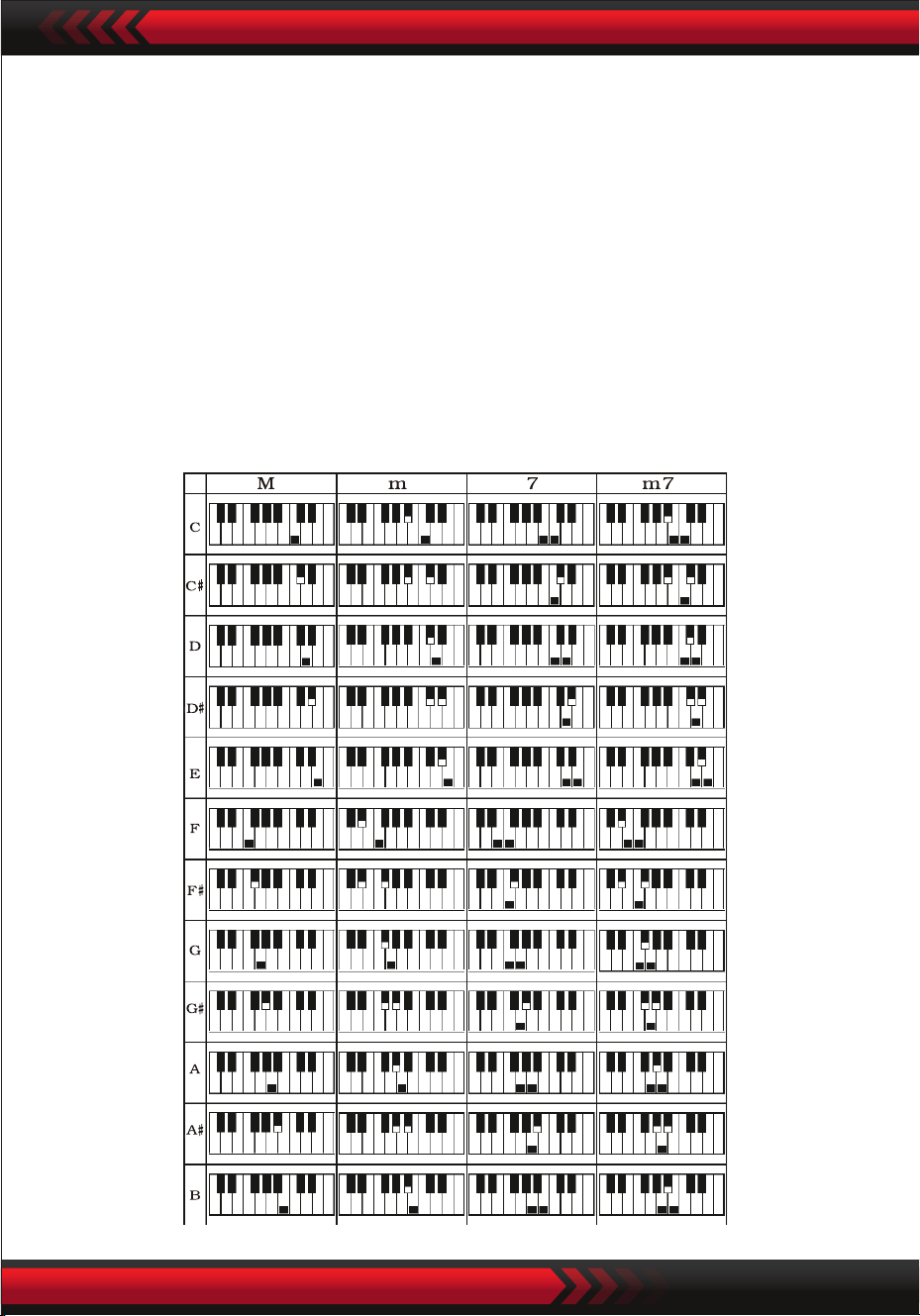
www.PyleUSA.com
7
V. Accordo automatico del basso
ACCORDO CON UN SOLO DITO
Premere il tasto "Single Finger Chord" per attivare la funzione di accordo e sullo
schermo viene visualizzato "Single". All'avvio dello stile, è possibile eseguire
l'accompagnamento automatico degli accordi nella zona degli accordi (tasto 1-19
da sinistra) in base al metodo di diteggiatura dell'accordo a dita singole.
Quando lo stile non è ancora iniziato, l'accompagnamento degli accordi può essere
eseguito manualmente.
Premere il tasto "Single Finger Chord" o "Chord OFF" per disattivare la funzione di
accordo, e la scritta "Single" scompare dallo schermo.
Scale di accordi a un dito
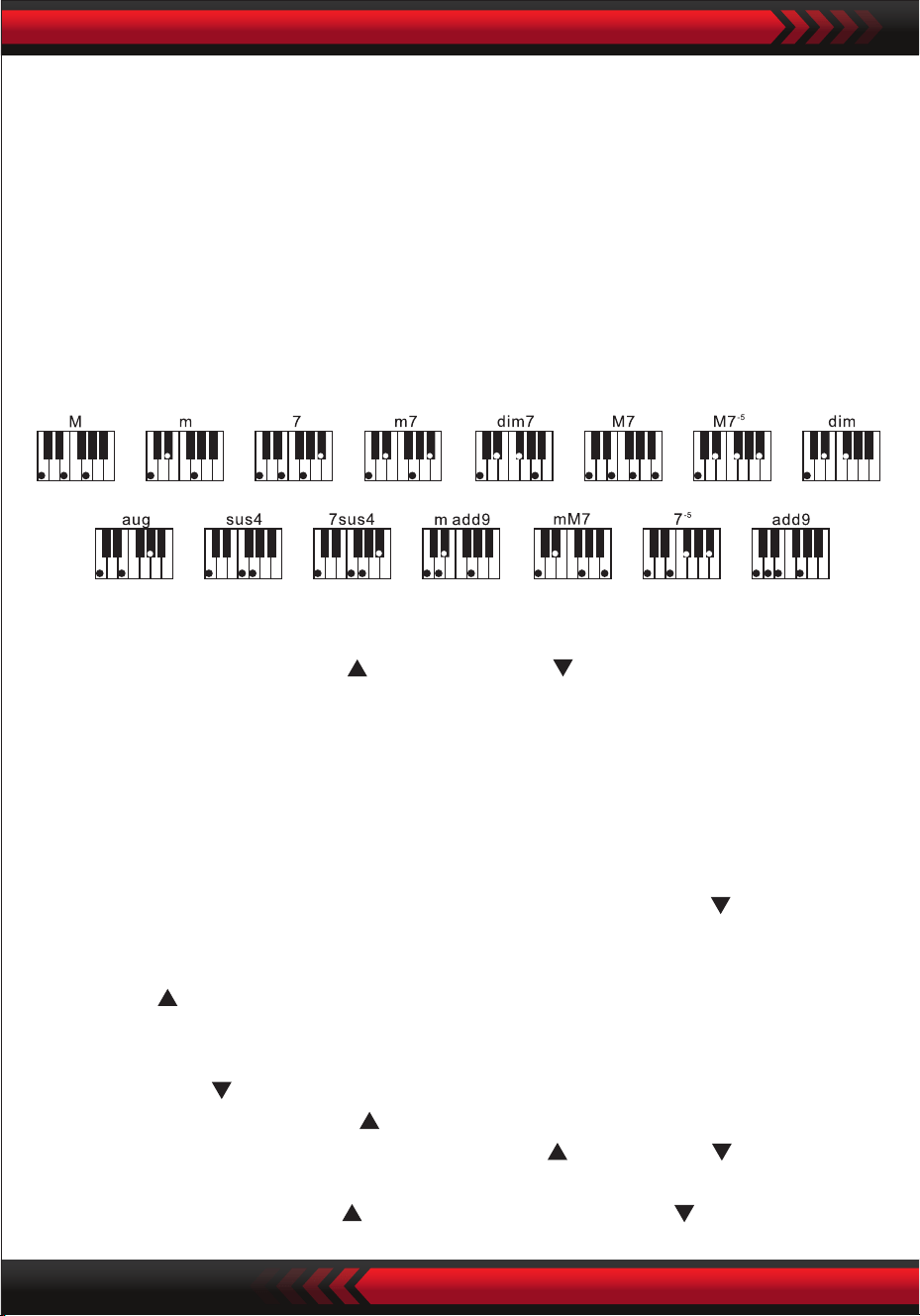
DITEGGIATURA
FUNZIONE DI TRASPOSIZIONE
VI. Controllo Eetti
Scala di diteggiatura
Premere il tasto "Fingered Chord" per abilitare la funzione di accordo, e sullo scher-
mo viene visualizzato "Finger". All'avvio dello stile, è possibile eseguire l'accom-
pagnamento automatico degli accordi nella zona degli accordi (tasto 1-19 da sinistra)
in base al metodo di diteggiatura degli accordi. Quando lo stile non è ancora stato
avviato, l'accompagnamento degli accordi può essere eseguito manualmente.
Premere il tasto "Fingered Chord" o "Chord OFF" per disattivare la funzione di
accordo e la scritta "Finger" sullo schermo scompare.
www.PyleUSA.com
8
REGOLAZIONE DEL VOLUME DEGLI ACCORDI
Premere i tasti “Chord Volume " o “Chord Volume " per aumentare o diminuire
il volume. Premendo contemporaneamente i due tasti, il volume degli accordi può
essere ripristinato al valore predenito.
La funzione di trasposizione può aiutare a suonare musica di altre melodie con il
metodo di diteggiatura in Do. Quando si preme il tasto "Transpose ", il suono
dell'intera tastiera diminuisce di mezzo tono (secondo minore) e il suono della
tastiera in tonalità C viene trasformato in suono B. Quando si preme il tasto
"Transpose ", il suono dell'intera tastiera aumenta di mezzo tono (seconda minore)
e il suono della tastiera in tonalità C sarà trasformato in suono B. Il suono intonato C
della tastiera viene trasformato in suono intonato #C o bD. Premendo due volte il
tasto "Transpose ", il tono C viene trasformato in tono bB. Quando si preme
cinque volte il tasto "Transpose ", il tono C viene modicato in tono F. Quando si
premono contemporaneamente i tasti "Transpose " e "Transpose ", il suono
viene ripristinato alla sintonia C "00". Il livello può essere regolato da "-6" a "+6"
premendo il tasto "Transpose ". premendo il tasto "Transpose ".

www.PyleUSA.com
9
SOSTEGNO
Se si preme il pulsante [Sustain] e sul display appare "SUS", il suono della pressione
dei tasti assume l’eetto. Premere di nuovo il pulsante per disattivare. Quando "SUS"
scompare, la funzione si interrompe.
SUONI DOPPI E FUNZIONE DI DIVISIONE DELLA TASTIERA
Premere il tasto "Dual/Split/O" per attivare o disattivare la funzione.
La funzione di sdoppiamento dei toni della tastiera può essere attivata o disattivata.
FUNZIONE DI SUDDIVISIONE DELLA TASTIERA
Quando la funzione "Keybord split" è attiva, nella parte superiore dello schermo
viene visualizzata la scritta "Split". I 24 tasti a sinistra della tastiera elettronica
vengono separati dalla tastiera originale e l'intonazione della zona sinistra della
tastiera viene aumentata a zone
SUONI DOPPI
Quando l'opzione "DUAL" è attivata, sullo schermo viene visualizzato "double" e gli
eetti di sovrapposizione di due suoni possono essere prodotti durante l'esecuzione
della tastiera elettronica
Dopo l'attivazione della funzione di doppio suono, è possibile commutare il suono 1
e il suono 2 premendo il tasto "Sound" in modo da selezionare il suono desiderato e
lo schermo visualizzerà di conseguenza "SOUND1" o "SOUND2"
VIBRATO
Quando "Vibrato" si trova nella posizione più bassa, la funzione di vibrato viene
disattivata. Quando "Vibrato" è verso l'alto, la funzione vibrato viene attivata e lo
schermo visualizza "VIB". Utilizzando la funzione vibrato, è possibile aggiungere
eetti di vibrato al tono di riproduzione. Il vibrato può essere aumentato o diminui-
to no ad essere disattivato facendo scorrere "Vibrato" verso l'alto o verso il basso.
PITCH BEND
Il pitch bend consente di modicare in modo uniforme l'intonazione delle note
suonate dalla tastiera.
L'intonazione può essere aumentata aumentando il pitch bend e diminuita diminu-
endo il pitch bend. Dopo essere stato rilasciato, il pitch bend tornerà automatica-
mente al centro e l'intonazione della nota tornerà allo stato prefenito.

www.PyleUSA.com
10
e viene diminuito di un'ottava per essere identico alla tonalità della zona sinistra
della tastiera. La tonalità della zona della tastiera destra può essere selezionata a
seconda delle esigenze, e suoni diversi possono essere riprodotti dalla zona della
tastiera sinistra e dalla zona della tastiera destra. Quando si preme nuovamente il
tasto "Keyboard Split", lo schermo visualizza "O" e la funzione di suddivisione
della tastiera viene disattivata.
TOCCO
Premere il tasto [Touch] per attivare o disattivare la funzione touch. L'impostazione
predenita al momento dell'avvio è ON. Sullo schermo viene visualizzato "Touch".
Questa funzione può contribuire ad arricchire l'espressione musicale e riettere
correttamente la forza applicata a ciascuna nota. Maggiore è la forza applicata
durante l'esecuzione, più forte sarà il suono. Quando questa funzione è disattivata, è
possibile emettere lo stesso suono indipendentemente dalla forza esercitata duran-
te l'esecuzione.
REGISTRAZIONE
Quando si preme il tasto "Record", la funzione di registrazione viene attivata, lo
schermo visualizza "Record" e quindi le note riprodotte vengono salvate.
Le note registrate vengono cancellate automaticamente quando si esegue nuova-
mente la registrazione o si spegne la tastiera elettronica.
ARRESTO DELLA REGISTRAZIONE
Quando la memoria è piena di note e la scritta "Record" sullo schermo scompare, la
registrazione si interrompe automaticamente. Durante il processo di registrazione, il
tasto "Play" può essere può essere premuto per interrompere la registrazione e
riprodurre le note registrate.
Quando si preme nuovamente il tasto "Recording", la funzione di registrazione
viene disattivata, e le note registrate verranno cancellate automaticamente.
RIPRODUZIONE DELLE NOTE REGISTRATE
Le note registrate possono essere riprodotte premendo direttamente con il tasto
"Play" durante il processo di registrazione. La riproduzione delle note registrate può
essere interrotta premendo nuovamente il tasto "Play".
VII Funzioni di registrazione

www.PyleUSA.com
11
VIII. Stile di programmazione
IX. Stato Funzione della memoria
PROGRAMMAZIONE DELLO STILE
Quando si preme il tasto "Program", viene attivata la funzione di programmazione
dello stile. Sullo schermo viene visualizzato "Program e si possono suonare una
serie di melodie preimpostate suonando i corrispondenti tasti della tastiera.
* Lo stile programmato viene automaticamente cancellato quando si esegue
nuovamente la programmazione o si spegne la tastiera elettronica.
INTERRUZIONE DELLA PROGRAMMAZIONE
Quando vengono registrati 32 tocchi e la scritta "Program" sullo schermo scompare,
la programmazione si interrompe automaticamente. Durante il processo di
programmazione, è possibile premere il tasto "Play" per interrompere la program-
mazione e riprodurre lo stile programmato. Quando si preme nuovamente il tasto
"Program", la funzione di programmazione viene disattivata e i dati programmati
vengono cancellati automaticamente.
RIPRODUZIONE DELLO STILE PROGRAMMATO
Durante la programmazione, lo stile programmato può essere riprodotto premendo
direttamente il tasto "Play". La riproduzione dello stile programmato può essere
interrotta premendo nuovamente il tasto "Play".
Utilizzando la funzione di memoria, è possibile salvare il suono, lo stile, il tempo e
altri parametri da impostare durante la riproduzione. La tastiera elettronica è dotata
di quattro slot di memorie, che possono essere richiamate in qualsiasi momento
durante l'esecuzione.
SALVATAGGIO
Impostare il suono, lo stile e il tempo in base alle esigenze di riproduzione, quindi
premere il tasto "Status Memory" e uno dei tasti da "M1" a "M4" per salvare il
lavoro corrente.

www.PyleUSA.com
12
CONTENUTI SALVATI
Quando si preme uno dei tasti da "M1" a "M4" durante la riproduzione, è possibile
richiamare i dati salvati per sostituire lo stato attuale.
I contenuti salvati non sono protetti da interruzioni di corrente. Quando la tastiera
elettronica quando la tastiera elettronica viene riaccesa dopo un'interruzione di
corrente, i contenuti salvati scompaiono.
La funzione di autoapprendimento è suddivisa in tre fasi per guidare l'allievo ad
imparare gradualmente a suonare la tastiera elettronica. L’allievo deve esercitarsi
prima con "One Key" per familiarizzare con la melodia e lo stile del brano, quindi
con "Follow" per suonare correttamente il brano e poi il terzo passo "Ensemble" per
suonare liberamente insieme agli altri, inne tramite l'esercizio di ensemble.
AUTOAPPRENDIMENTO 1: ONE KEY
Quando si preme il tasto "One Key", viene attivata la funzione di apprendimento a
un tasto e sullo schermo viene visualizzato "Step 1". È possibile selezionare il brano
da apprendere premendo il tasto o premendo "+" o "-". L'insegnamento con un solo
tasto viene applicato per la durata del brano senza requisiti di intonazione e corret-
tezza. È consentito suonare i tasti in modo improprio. La tastiera elettronica ripro-
duce le note corrette in caso di errori, ma il cursore mostra nello schermo il tasto
corrispondente alla nota corretta. La funzione di insegnamento a un tasto può
essere disattivata premendo nuovamente il tasto "One Key".
AUTOAPPRENDIMENTO 2: FOLLOW
Quando si preme il tasto "Follow", si attiva la funzione di apprendimento Follow e la
schermata visualizza "Step 2".
È possibile selezionare il brano da imparare premendo il tasto numerico o premendo
"+" o "-". In questa modalità, è possibile riprodurre il brano dimostrativo ed il cursore
nello schermo guiderà l'utente a suonare correttamente.
Se si commette un errore durante l'esecuzione, la melodia del brano viene interrotta
nché non si corregge l'errore.
La funzione di insegnamento Follow può essere disattivata premendo nuovamente
il tasto "Follow".
X. Funzione di autoapprendimento
Contenuto della confezione:
• Tastiera musicale digitale per karaoke
• Leggio
• Adattatore
• Spina di alimentazione
• Supporto per tastiera
• Sgabello per tastiera
• Borsa impermeabile
www.PyleUSA.com
13
XI. Riproduzione musicale USB
Inserendo l'USB, la tastiera elettronica supporta una memoria massima di 32 G e i
più comuni le MP3-fornat.
Premere il tasto "MP3 " per regolare il volume.
Premere per riprodurre il precedente, riprodurre il successivo,
riprodurre/sospendere, per fermare, e per accedere alle modalità di
riproduzione ordinata, e casuale.
AUTOAPPRENDIMENTO 3: ENSEMBLE
Quando si preme il tasto "Ensemble", viene attivata la funzione di insegnamento
Ensemble e sullo schermo viene visualizzato "Step 3" È possibile selezionare il
brano da imparare premendo il tasto o premendo "+" o "-".
L'insegnamento di gruppo viene applicato per un apprendimento corretto e
completo della durata e delle note del brano.
La tastiera elettronica protegge la nota chiave per l'ensemble.
È necessario suonare le note corrette entro la durata del brano.
Se inizia a suonare entro 3 secondi, la tastiera elettronica riprodurrà
automaticamente la nota chiave e sullo schermo verranno visualizzati la nota ed
il tempo corretti.
La funzione di insegnamento Ensemble può essere disattivata premendo nuovamente
il tasto "Ensemble".
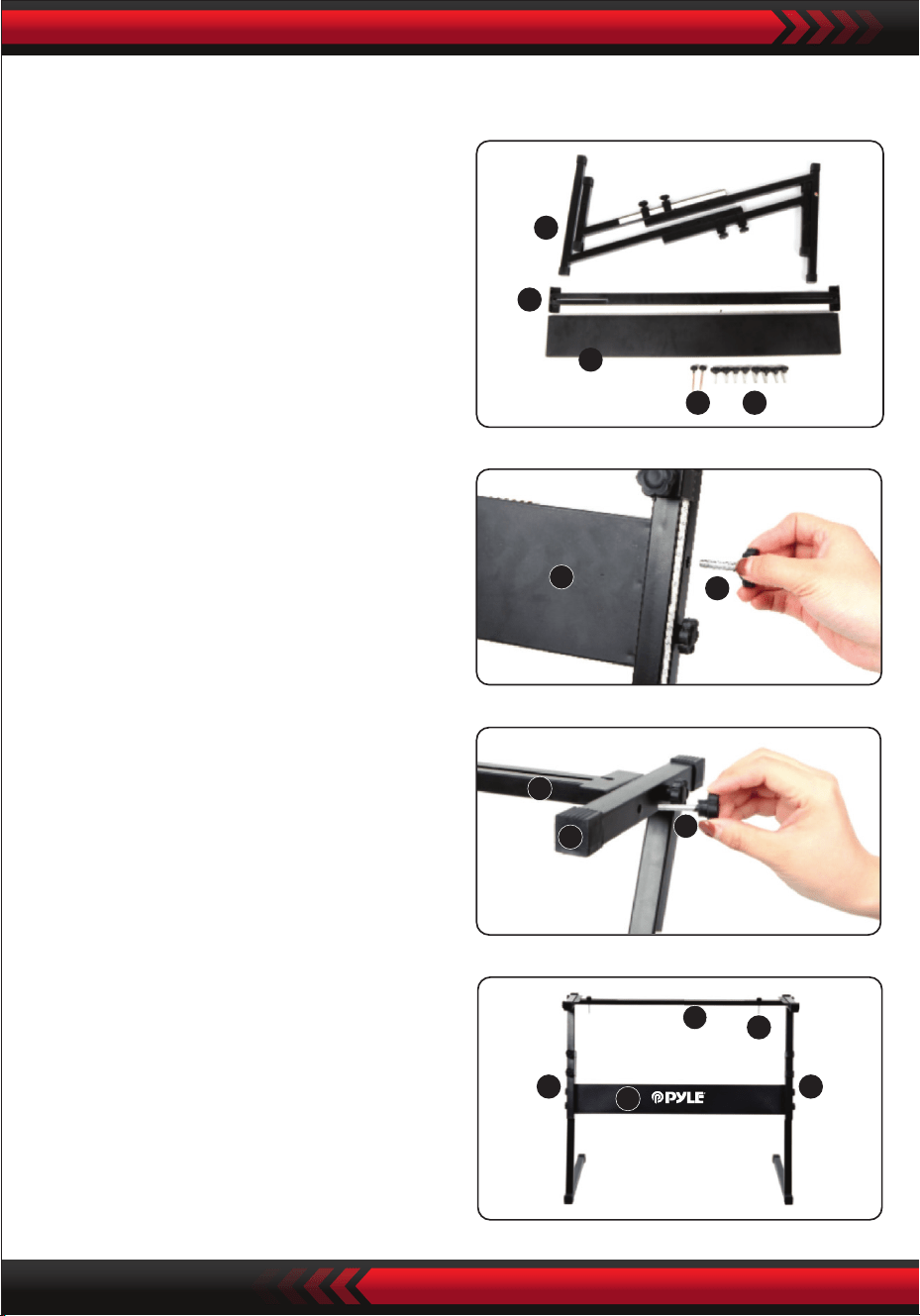
www.PyleUSA.com
14
5
4
3
1 2
3
2
4
5
2
5 5
3
4
1
3. Prendere la vite n. 2 e il supporto
n. 4 in cima al supporto n. 5 e serrare.
Montaggio del supporto per tastiera
2. In secondo luogo, prendere la vite
n. 2 e la piastra di supporto n. 3,
ssarle alle due stae di supporto
del n. 5 e serrarle separatamente.
4. L'installazione è completa, la vite
n. 1 più lunga per ssare la tastiera
al supporto.
1. Preparare tutte le parti da assemblare

www.PyleUSA.com
15
Appendice
000 Acoustic Grand Piano
001 Bright Acoustic Piano
002 Electric Grand Piano
003 Honky-tonk Piano
004 Rhodes Piano
005 Chorused Piano
006 Harpsichord 1
007 Clavichord
008 Celesta 1
009 Glockenspie 1
010 Music box 1
011 Vibraphone 1
012 Marimba 1
013 Xylophone 1
014 Tubular Bell1
015 Dulcimer 1
016 Drawbar Organ
017 Percussive Organ
018 Rock Organ 1
019 Church Organ 1
020 Reed Organ 1
021 Accordion 1
022 Harmonica 1
023 Tango Accordion
024 Acoustic Guitar (nylon)
025 Acoustic Guitar (steel)
026 Electric Guitar (jazz)
027 Electric Guitar (clean)
028 Electric Guitar (muted)
029 Overdriven Guitar
030 Distortion Guitar
031 Guitar Harmonics
032 Acoustic Bass 1
033 Electric Bass (nger)
034 Electric Bass (pick)
035 Fretless Bass 1
036 Slap Bass 1
037 Slap Bass 2
038 Synth Bass 1
039 Synth Bass 2
040 Violino 1
041 Viola 1
042 Cello 1
043 Contrabass 1
044 Tremolo Strings 1
045 Pizzicato Strings 1
046 Orchestral Harp
047 Timpani
048 String Ensemble 1
049 String Ensemble 2
050 Synth Strings 1
051 Synth Strings 2
052 Choir Aahs 1
053 Voice Oohs
054 Synth Voice
055 Orchestra Hit
056 Trumpet 1
057 Trombone 1
058 Tubal
059 Muted Trumpet 1
060 French Hom 1
061 Brass Section 1
062 Synth Brass 1
063 Synth Brass 2
064 Soprano Sax 1
065 Alto Sax 1
066 Tenor Sax 1
067 Baritone Sax 1
068 Oboe 1
069 English Horn 1
070 Bassoon 1
071 Clarinetto 1
072 Piccolo 1
073 Flauto 1
074 Flauto dolce 1
075 Flauto di Pan 1
076 Soo di bottiglia 1
077 Shakuhachi1
078 Fischietto 1
079 Ocarina 1
080 Piombo 1 (quadrato)
081 Piombo 2 (dente di sega)
082 Piombo 3 (piombo calliope)
083 Piombo 4 (piombo chi)
084 Piombo 5 (charang)
085 Piombo 6 (voce)
086 Lead 7 (quinta)
087 Lead 8 (basso+piombo)
088 Pad 1 (new age)
089 Pad 2 (caldo)
090 Pad 3 (polisynth)
091 Pad 4 (coro)
092 Pad 5 (arco)
093 Pad 6 (metallico)
094 Pad 7 (balo)
095 Pad 8 (sweep)
096 FX 1 (pioggia)
097 FX 2 (colonna sonora)
098 FX 3 (cristallo)
099 FX 4 (atmosfera)
100 FX5 (luminosità)
101 FX 6 (folletti)
102 FX7 (eco)
103 FX 8 (fantascienza)
104 Sitar
105 Banjo
106 Shamisen
107 Koto
108 Kruimba
109 Zampogna
110 Violoncello
111 Shanai
112 Campana tintinnante
113 Agogo
114 Tamburi d'acciaio
115 Tamburo di legno
116 Tamburo Talko
117 MelodicTom
118 Tamburo sintetico
119 Piatto inverso
120 Rumore di tasti di chitarra
121 Rumore del respiro
122 Spiaggia
123 Cinguettio di uccello
124 Squillo di telefono
125 Elicottero
126 Applausi
127 Colpo di pistola
128 Pianoforte a coda stereo
129 Pianoforte brillante stereo
130 Pianoforte a coda
131 Pianoforte classico
132 Pianoforte rock
133 Pianoforte dolce stereo
134 Pianoforte brillante
135 Pianoforte moderno

www.PyleUSA.com
16
Suoni
136 La Piano
137 Dance Piano
138 Pianoforte dolce
139 Pianoforte a corde
140 Piano Pad
141 Synth-Str. Piano
142 Choir Piano
143 Honky-Tonk
144 Piano 2 Ottave
145 Piano 1 Ottava
146 Eiec.Grand Piano
147 E.Grand 80
148 Modern E.G.Piano
149 Clavicembalo 2
150 Clavicembalo 3
151 Coppia di clavicembali
152 Clavicembalo e archi
153 Elec.Piano 1
154 Elec.Piano 2
155 Fm Elec.Piano 1
156 Fm Elec.Piano 2
157 60's Elec.Piano 1
158 60's Elec.Piano 2
159 Dyno Elec.Piano 1
160 Dyno Elec.Piano 2
161 Mellow E.Piano
162 Pop Elec.Piano
163 Coro 1
164 Coro 2
165 Tremolo E.Piano
166 Modern E.Piano
167 Soft E.Piano
168 Archi e Piano 1
169 Archi e Piano 2
170 Archi e Piano 1 Sint.
171 Archi e Piano 2 Sint
172 Pianoforte elettrico Pad 1
173 Pianoforte elettrico Pad 2
174 Clean E.Piano
175 Clavicembalo ePiano
176 Clavicembalo 1
177 Clavicembalo 2
178 Clavicembalo dolce
179 Clavicembalo melodico
180 Sequenze di Clavicembalo
181 Clavicembalo e Timone
182 Coro Clavicembalo
183 Vibrafono 2
184 Vibrafono 3
185 Vibrafono Soft
186 Vibrafono a coro
187 Marimba 2
188 Marimba morbida
189 Celesta 2
190 Celesta brillante
191 Glockenspiel 2
192 Glockenspiel Pad 1
193 Music Box 2
194 Music Box 3
195 Xilofono 2
196 Campana tubolare 2
197 Dulcimer 2
198 Organo a timone 1
199 Organo a timone 2
200 Organo a timone 3
201 Organo a timone 4
202 Organo a timone 5
203 Organo a percussione 1
204 Organo a percussione 2
205 Organo a percussione 3
206 Organo elettrico 1
207 Organo 2
208 Organo elettrico 3
209 Organo Jazz 1
210 Organo Jazz 2
211 Organo Jazz 3
212 Organo Rock 2
213 Organo Rock 3
214 Organo Rock 4
215 Organo anni '70
216 Timone completo
217 Organo rotante 1
218 Organo rotante 2
219 Organo rotante 3
220 Organo Tremolo
221 Organo a click
222 Organo 8
223 Organo Pad 1
224 Organo Pad 2
225 Organo a sequenza
226 Organo da chiesa 2
227 Organo da chiesa 3
228 Organo a cappella
229 Organo a canne 1
230 Organo a canne 2
231 Organo da teatro
232 Organo e clavicembalo
233 Organo a canne
234 Organo a canne 2
235 Fisarmonica 2
236 Fisarmonica 3
237 Fisarmonica 4
238 Fisarmonica 5
239 Fisarmonica a ottave
240 Bandoneon 1
241 Bandoneon 2
242 Bandoneon di ottava
243 Bandoneon Solo
244 Bandoneon e violino
245 Armonica 2
246 Armonica 3
247 Armonica 4
248 Strumento di nylon 1
249 Chitarra a corde di nylon 2
250 Chitarra a corde d'acciaio 1
251 Chitarra a corde d'acciaio 2
252 Chitarra a corde d'acciaio 3
253 Chitarra a 12 corde
319 Basso scelto M
320 Basso Trance M
321 Basso sintetizzato Sega M
322 Basso sintetizzato quadrato M
323 Violino 2
324 Violino lento
325 Viola 2
326 Violoncello 2
327 Violoncello lento
328 Contrabbasso 2
329 Sezione violino
330 Sezione violoncello
331 Violino e violoncello
332 Quartetto d'archi
333 Archi Pizzicati 2
334 Ottava Pizzicato
335 Arpa 1
336 Arpa 2
337 Arpa a coro
338 Archi
339 Ensemble di archi 3
340 Ensemble di archi 4
341 Ensemble di archi 5
342 Archi lenti 1
343 Corde lente 2
344 Archi larghi
345 Camera 1
346 Camera 2
347 Corde d'ottava 1
348 Corde d'ottava 2
349 Corde Sfz
350 Corde Tremolo 2
351 Arpa e archi
352 Flauto e archi
353 Corde d'orchestra
354 Corde sintetiche 1
355 Corde sintetiche 2
356 Sintetizzatori 3
357 Sintetizzatori anni '70 1
358 Sintetizzatori anni '70 - 2
359 Sintesi anni '80 1
360 Sintetizzatori anni '80 2
361 Sintesi veloce
362 Sintetizzatori lenti
363 Ottava Syneh-Stringhe 1
364 Canto in ottava Syneh 2
365 Coro Aahs 2
366 Cori 1
367 Cori 2
368 Coro Corde
369 Corde Voce
370 Coro Coro
371 Coro lento
372 Coro Ensemble 1
373 Cori Ensemble 2
374 Voce Doo
375 Voce Uuh
376 Voce sintetica 1
377 Voce sintetica 2
378 Voce sintetica 3
379 Ensemble di voci 1
380 Ensemble di voci 2
381 Ensemble di voci 3
382 Voce sintetizzata Pad
383 Voce coro sintetizzata
254 Chitarra d'acciaio e rumore strumentale 1
255 Chitarra d'acciaio e rumore strumentale 2
256 Chitarra d’acciaio e armoniche
257 Chitarra d’acciaio e Cori
258 Chitarra Jazz 1
259 Chitarra Jazz 2
260 Chitarra Jazz Ottava
261 Chitarra pulita 1
262 Chitarra pulita 2
263 Chitarra pulita 3
264 Chitarra pulita 4
265 Chitarra pulita e cori
266 Chitarra muta 1
267 Chitarra muta 2
268 Chitarra elettrica crunch
269 Overdrive Chitarra 1
270 Overdrive Chitarra 2
271 Distorsione Chitarra 1
272 Distorsione Chitarra 2
273 Distorsione Chitarra 3
274 Distorsione Chitarra 4
275 Chitarra potente
276 Chitarra ritmata
277 Feedback Chitarra
278 Chitarra distorta e Basso
279 Chitarra d'acciaio e rumore strumentale M 1
280 Chitarra d'acciaio e rumore strumentale M 2
281 Clean Guitar M
282 Chitarra elettrica Crunch M 1
283 Chitarra elettrica Crunch M 2
284 Chitarra distorsione M
285 Basso acustico 2
286 Basso acustico 3
287 Basso Ride
288 Basso diteggiato 1
289 Basso diteggiato 2
290 Basso diteggiato 3
291 Basso diteggiato 4
292 Basso diteggiato ritmico
293 Basso diteggiato pastoso
294 Basso a plettro 1
295 Basso a plettro 2
296 Basso a plettro 3
297 Basso a plettro ritmico
298 Basso Fretless 2
299 Basso fretless 3
300 Slap Bass 1
301 Slap Bass 2
302 Basso a corde raddoppiate
303 Basso sintetizzato 1
304 Basso sintetizzato 2
305 Basso sintetizzato 3
306 Basso sintetizzato 4
307 Saw Basso sintetizzato
308 Souare Basso sintetizzato
309 Basso Rock digitale
310 Trance Bass
311 Sine Bass
312 Basso & Kick
313 Vocoder Basso
314 Soul Synth Bass
315 Clavicembalo e Basso
316 Organo e Basso
317 Basso diteggiato M 1
318 Basso diteggiato M 2

www.PyleUSA.com
17
Stile
384 Orchesyra Hit 1
385 Orchesyra Colpo 2
386 Orchesyra Colpo 3
387 Orchesyra Hit 4
388 Tromba 2
389 Tromba 3
390 Tromba 4
391 Tromba 2
392 Tromba Velo.Trumpet
393 Tromba Sfz
394 Tromba muta 3
395 Trombone 2
396 Trombone 3
397 Trombone pastoso
398 Trombone Velo.Trombone
399 Sezione Trombone
400 Trombone Jazz
401 Tromba e trombone
402 Tuba 2
403 Tuba 3
404 Corno francese 2
405 Corno francese solo
406 Sezione Corno Francese
407Corno francese a ottava
408 Orchestra di corni
409 Ottone stereo
410 Ottone
411 Sezione Ottoni 2
412 Ottone Sezione 3
413 Sezione Ottoni 4
414 Ottone morbido
415 Ottone duro
416 Ottone Sfz
417 Ottone e archi
418 Ottone e sax
419 Ottone sintetico 3
420 Ottone sintetico 4
421 Ottone sintetico 5
422 Ottone sintetico 6
423 Ottone sintetico caldo
424 Ottone sintetico anni '80
425 Sintetizzatore analogico 1
426 Sintetizzatore analogico 2
427 Ottone Trance
428 Sintetizzatore Pad
429 Sintetizzatore d'ottava
430 Sintetizzatore Sfz
431 Sax contralto 2
432 Sax contralto 3
433 Sax contralto respirante1
434 Sax contralto respirato2
435 Sax tenore 2
436 Sax tenore 3
437 Sax tenore 1 respirato
438 Sax tenore respirato 2
439 Sax soprano 2
440 Sax Soprano 3
441 Sax respirato
442 Sax baritono 2
443 Sax baritono 3
444 Sassofono A.morbido
445 Sax A.duro
446 Solo A.Sax
447 Sax T.morbido
448 Solo T.Sax
449 T.Saxys
450 A.Saxys
451 Sezione Sax
452 Sezione Sax Sfz
453 Clarinetto 2
454 Velo.Clarinetto
455 Clarinetto basso
456 Clarinetto.Jazz
457 Oboe 2
458 Oboe solista
459 Corno inglese 2
460 Fagotto 2
461 Flauto 2
462 Flauto 3
463 Flauto jazz
464 Flauto puro
465 Flauto dolce
466 Piccolo 2
467 Ottavino 3
468 Sezione di canne 1
469 Sezione a canne 2
470 Flauto e Oboe
471 Flauto dolce 2
472 Flauto dolce 3
473 Flauto di Pan 2
474 Flauto di Pan 3
475 Soffio a bottiglia 2
476 Fischietto 2
477 OcaRina 2
478 Shakuhachi 2
479 Piombo quadrato 1
480 Piombo quadrato 2
481 Piombo quadrato 3
482 Piombo quadrato 4
483 Sega 1
484 Sega 2
485 Piombo a sega 3
486 Piombo a sega pastoso
487 Piombo quadrato a impulsi
488 Sega in sequenza 1
489 Sega in sequenza 2
490 Sequenza sinusoidale
491 Sine Lead
492 Cavo Velo.Sine
493 Piombo Ss
494 Piombo quadrato lento
495 Impulso quadrato lento
496 Quadrato di sequenza
497 Impulso di sequenza 1
498 Impulso di sequenza 2
499 Seghetto lento
500 Impulso Seghetto
501 Impulso lento a sega
502 Piombo Trance
503 Callope 1
504 Callope 2
505 Piombo Vent
506 Sintesi di ventilazione
507 Piombo puro
508 Piombo a tubo
509 Piombo di sequenza
510 Piombo Chiff
511 Piombo a goccia
512 Piombo Ep
513 Piombo voce 1
514 Voce Lead 2
515 Voce 1
516 Lead Vox 2
517 Piombo a distorsione
518 Charang
519 Charang in ottava
520 Lead Pluck 1
521 Piombo Pluck 2
522 Piombo sintetizzatore Gt
523 Piombo da chiesa
524 Piombo a doppia voce
525 Lead del coro di voci
526 Piombo Ep e voce
527 Voce sintetica
528 Quinta voce
529 Quinta Sega
530 Quinta voce quadrata
531 Quarto Lead
532 Settima sequenza
533 Quinta sequenza
534 Basso+Piombo
535 Basso+Leggerezza di sega
536 Synth-Basso+Leggere
537 Piombo ad ancia
538 Piombo del tasto
539 Fantasia 1
540 Fantasia 2
541 New Age
542 Pad New Age
543 Vox caldo
544 Pad spesso
545 Pad caldo
546 Sine Pad
547 Pad morbido
548 Pad di corno
549 Pad del vecchio nastro
550 Polisintesi 1
551 Polisintesi 2
552 Pad polisintetico 1
553 Pad polisintetico 2
554 Sega polivalente
555 Coro spaziale
556 Cielo
557 Pad archi spaziali
558 Coro Chiff
559 Voce stellare
560 Pad quadrato
561 Pad ad arco
562 Pad di vetro
563 Tampone a bottiglia
564 Tine Pad
565 Tampone etnico
566 Tampone in metallo morbido
567 Pad in metallo duro
568 Coro Pad
569 Pad Halo 1
570 Pad Halo 2
571 Pad del coro d'organo
572 Coro Sweep
573 Pad Sweep
574 Clavi Pad 2
575 Goccia di pioggia 1
576 Goccia di pioggia 2
577 Pad Legno
578 Voce spaziale
579 Traccia sonora 1
580 Traccia sonora 2
581 Rave
582 Cristallo morbido
583 Cristallo
584 Campana di Natale
585 Suono di glockenspiel
586 Campana vibrafono
587 Campana corale
588 Synth-Nakket
589 Pad Celesta
590 Atmosfera
591 Nylon Gt & Ep
592 Pad in acciaio
593 Campana Luminosa Pad
594 Luminosità 1
595 Luminosità 2
596 Folletto
597 Voce dell'eco
598 Pad eco
599 Goccia d'eco

www.PyleUSA.com
18
Stile
000 Pop
001 Ragtim
002 Pop Funk
003 Marzo 1
004 Disco retrò
005 Easy pop
006 Marcia della volpe
007 48 Bit
008 Ballata
009 Valzer
010 Latino
011 8 Beat Pop 1
012 8 Beat Pop 2
013 8 Beat Uptempo
014 8 Beat Standard
015 8 Beat Medium
016 Ballata a 8 battiti
017 Ballata epica
018 Ballata con pianoforte
019 16 Beat Pop 1
020 16 Beat Shuffle 1
021 16 Beat Shuffle 2
022 16 Beat Ballad 1
023 16 Beat Ballad 2
024 16 Beat Ballad 3
025 Funk 1
026 Funk 2
027 Anima
028 Gospel Shuffle
029 6-8 Gospel
030 4-4 Blues
031 Twist
032 Fusion 1
033 Funky Fusion 1
034 Pop anni '50
035 Cool Pop
036 Pop groovy
037 Pop vintage anni '60
038 Pop anni '80
039 Folk Rock 1
040 Pop Rock 1
041 Pop Rock 2
042 8 Beat Rock Balld
043 16 Beat Rock Bld
044 Hard Rock 1
045 Rock Shuffle 1
046 6-8 Rock duro
047 US-Rock
048 16 Beat Rock
049 Rock 1
050 Rock 2
051 Rock anni 60
052 Rock standard
053 Brit Rock Pop
054 Rock vintage anni '60
055 Rock da classifica Shfl
056 Pop Rock anni '60
057 Ballata dell'anima
058 Slow Rock 1
059 Slow Rock 2
060 6-8 Ballata
061 R&B
062 Ballata da classifica anni '70
063 Ballata romantica
064 Cina 1
065 Cina 2
066 Cina 3
067 Cina 4
068 Cina 5
069 Cina 6
070 Cina 7
071 Cina 8
072 Cina 9
073 Cina 10
074 Bossa Nova 1
075 Bossa Nova 2
076 Bossa Nova 3
077 Salsa
078 Samba 1
079 Mambo 1
080 Beguine
081 Merengue
082 Bolero Lento
083 Espagnole
084 Cajun
085 Reggae 12 Beat 1
086 Pop Reggae 1
087 Pop Mambo
088 Party Pop Latino
089 New Age 1
090 New Age 2
091 Bluse Mambo
092 Dance Pop 1
093 Dance Pop 2
094 Techno 1
095 Euro Beat
096 Euro House
097 Hip Hop
098 Trip Hop
099 Synth Boogie
100 Disco 70's
101 Disco Trop
102 Party Pop
103 Polka Pop 1
104 Boogie
105 Swing
106 Big Band Swing
107 Big Band Balld
108 Quartetto Jazz
109 Dixieland
110 CoolJazz
111 Jazz Ballad
112 BBQ uickstep
113 Bluegrass 1
114 Bluegrass 2
115 Paese 2-4
116 8 Beat Country
117 Country Rock
118 Cwby Boogie
119 Ballata country
120 Cntry Shuffle
121 Valzer country
122 Valzer Jazz
123 HullyGully
124 02-mar
125 03-mar
126 6-8 marzo
127 Polka
128 PopWaltz
129 Cha Cha Cha
130 Rhumba
131 Pasodoble
132 TangoCont
133 Foxtrot 1
134 Jive 1
135 Valzer del Nord
136 Valzer tedesco
137 Valzer viennese
138 Valzer Musette
139 Rock'n Roll 1
140 Rock'n Roll 2
141 Rock dritto
142 Jazz Rock 1
143 Gospe veloce
144 Folk Rock 2
145 Rock Billy
146 Rock Boogie
147 Rock Cha Cha
148 Rock Classica 1
149 Rock Shuffle 2
150 Rock Pop
151 Skiffle
152 Funk Pop Rock
153 Rock contemporaneo
154 Rock acustico
155 Rock anni '80
156 LA Shuffle
157 Jive 2
158 Samba 2
159 Samba 3
160 Schlager Rock 1
161 Schlager Rock 2
162 Carnevale
163 Organo Samba
164 Reel
165 Foxtrot 2
166 Foxtrot 3
167 Club Pop
168 16 Beat Pop 2
169 8 Beat Pop 3
170 8 Beat Soul 1
171 8 Beat Rock
172 Rap Pop
173 Soul anni '60
174 Soul anni '70
175 Funk Shuffl
176 Fusion Shuffl
177 Classico 8 Beat
178 Vintage Gtr Pop
179 Schlager Italia
180 8 Beat Soft
181 8 Beat Heat
182 8 Beat Soul 2
183 Chitarra Ballata
184 8 Beat Pop 4
185 Polka Pop 2
186 Polka Pop 3
187 16Beat 1
188 16Beat 2
189 16Beat 3
190 Ballata pop 1
191 Ballata pop 2
192 Funky Pop
193 Hip Hop Pop
194 Anima Shuffle
195 Anima lenta
196 8 Beat Adria
197 Pianoforte classico
198 Unplugged
199 Ballata pop 3
200 Pop New Age
201 8 Beat Moderno
202 Ballata country
203 Canzone d'amore
204 Pop country moderno
205 Elettro Pop
206 Ballata acustica
207 Ballata al pianoforte
208 Ballata R&B
209 Ballata rock 1
210 Lenta e facile
211 Ballata analogica
212 Calypso
213 GuadDance
214 Reggae 12 Beat 2
215 Reggae 16 Beat
216 Bossa Nova 4
217 Mambo 2
218 Mambo 3
219 Bolero
220 Cumbia 1
221 Rock latino
222 Disco Latin
223 Tijuana
224 Reggae
225 Cumbia 2
226 Parranda
227 Carnevale 2
228 Samba Rio
229 Pop Reggae 2
230 Techno 2
231 Techno 3
232 Disco Funky
233 Sabato sera
234 Club Latin
235 Discoteca Chocolate
236 Disco Fox
237 Discoteca Funk
238 Disco Hands
239 Disco Party
240 Disco Samba
241 UK Pop
242 Club Dance
243 Paese 1
244 Country 2
245 Finger Pickin
246 Fratelli country
247 New Country
248 Easy Country
249 Country da classifica anni '70
250 Hoedown
251 Country Shuffle
252 Ober Polka
253 Polka Pop 4
254 Erba blu 1
255 Erba blu 2
256 Blue Grass 3
257 Marzo USA
258 Hully Gully
259 Big Band Shuffle 1
260 Big Band Shuffle 2
261 Big Band Shuffle 3
262 Banda veloce 1
263 Banda veloce 2
264 Cat Groove
265 Dixie Jazz
266 Jazz medio
267 16 Beat Shuffle
268 Pop britannico
269 8 Beat 1
270 8 Beat2
271 8 Beat3
272 8 Beat 4
273 Battito del cuore
274 Ballata d'organo
275 Hard Rock 2
276 Street Pop
277 Soft Fusion
278 West End
279 Barocco
280 Funky Fusion 2
281 Game Show
282 Fusion 2
283 Funk 3
284 Rock3
285 Rock 4
286 Rock Classico 2
287 Rock Shffle 1
288 Rock Shffle 2
289 Jazz Rock 2
290 Rock soft
291 Rock da cowboy
292 Rock Ballad 2
293 Ballata rock 3
294 Ballata rock 4
295 Ballata elettronica
296 Ballata EP anni '80
297 Boy Band anni '80
298 Ballata cool anni '90
299 Ballata alpina

www.PyleUSA.com
19
Caratteristiche:
• Tastiera Karaoke 2 in 1: Suona e canta!
• Pianoforte musicale compatto e portatile
• Funzionamento elettronico plug-in semplice
• Pianoforte portatile
• Altoparlanti stereo integrati
• Collegamento e streaming audio da dispositivi esterni
• Possibilità di collegarsi all'altoparlante e riprodurre il suono
• Più stili di suoni, toni e ritmi della tastiera selezionabili e preimpostati
• Display LCD digitale
• Controllo del volume regolabile
• Modalità di registrazione e riproduzione
• 61 tasti funzione percussione
• Controllo di base: Volume principale / Volume di accompagnamento / Volume
degli accordi / Controllo del tempo
• Funzione di programmazione ritmica / Registrazione e riproduzione
• Funzione di accordo automatico: Accordo singolo / Accordo a dita
• Funzione Pitch Bend / Vibrato / Sustain / Touch Sensing
• Funzioni di insegnamento: Tasto unico/Seguire/Assemblare
• Presa USB / Presa microfono
• Perfetto per le esibizioni nel salotto di casa
• Divertimento per bambini di tutte le età: Bambini e adulti

www.PyleUSA.com
20
Caratteristiche del supporto tastiera:
• Vernice cotta
• Funzione staccabile
• Materiale di costruzione: Ferro + ABS
• Lunghezza: 31.5'' -pollici - (80cm)
• Larghezza: 8.3'' -pollici - (21cm)
• Altezza: 57,5~67,5 cm
• Peso: 1,75 kg
• Supporto: 15 kg
Speciche sgabello:
• Materiale di costruzione: Pelle PU, ferro, spugna
• Vernice cotta
• Pieghevole
• Lunghezza: 15.75'' -pollici - (40cm)
• Larghezza: 11.81'' -pollici - (30cm)
• e Altezza: 17.32'' / 18.9'' / 20.1'' -pollici - (44 / 48 / 51 cm)
• Peso: 2,2 kg
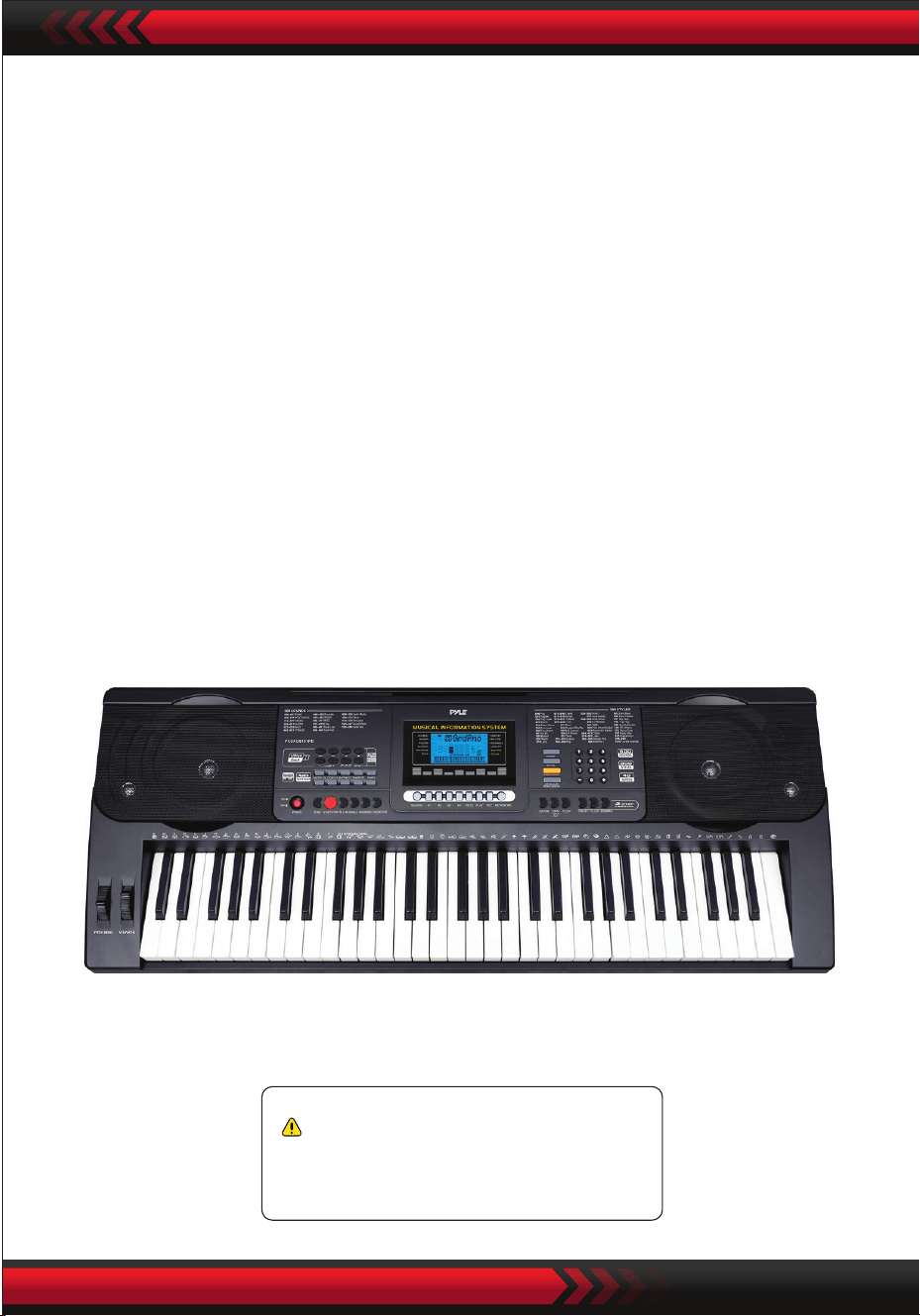
www.PyleUSA.com
21
Avvertenza California Prop 65
ATTENZIONE:
Questo prodotto contiene BBT (Benzyl butyl phthalate)
che è noto in California per causare cancro, difetti di
nascita e altri problemi riproduttivi.
Non ingerire.
Per maggiori informazioni visita www.P65warnings.ca.gov
Speciche tecniche:
• 61 tasti
• 600 Suoni / 300 Stili
• 40 Canzoni demo: Una / Tutte
• Interfaccia audio: Aux (3.5 mm) Ingresso Jack / Ingresso Microfono / Ingresso USB
• Livello volume massimo: no a 110 dB
• Lunghezza cavo USB / Cavo alimentazione: 3.9’ piedi. - (119cm)
• Materiale di costruzione: ABS ingegnerizzato
• Alimentazione: DC 12 V / Adattatore AC
• Dimensioni tastiera (L x L x A) :
36.6’’ x 11.97’’ x 3.7’’ -pollici - (93 x 30.4 x 9.3 cm)93 x 30 x 9 cm

Digitales Musik-Keyboard für Karaoke
PKBRD6151PB
BENUTZERHANDBUCH
GER
Tragbares elektronisches Keyboard mit
wasserfestem Gehäuse (61 Tasten), Hocker
und Keyboardständer
www.PyleUSA.com
2
Bewahren Sie dieses Handbuch an einem sicheren Ort auf und halten Sie es zum
Nachschlagen gribereit.
Verwenden Sie nur das mitgelieferte Netzteil und tauschen Sie es sofort aus, wenn es
beschädigt ist.
Zerlegen Sie das Gerät nicht und nehmen Sie keine Veränderungen an den inneren Teilen
vor. Im Falle einer Funktionsstörung stellen Sie den Betrieb sofort ein und lassen Sie das
Gerät von einem Fachmann reparieren. Bevor Sie das Instrument an andere Geräte
anschließen, schalten Sie alle Stromversorgungen aus.
Spielen Sie das Instrument nicht zu lange mit maximaler Lautstärke oder einem hohen
Pegel.
Halten Sie Teile des Instruments von Wärmequellen fern, da eine Überhitzung zu Schäden
führen kann.
Vermeiden Sie das Eindringen von Flüssigkeiten, Staub, Partikeln und anderen
Fremdkörpern in das Instrument.
Sie könnten das Gerät korrodieren lassen oder seine Bauteile kurzschließen.
Ziehen Sie den Stecker heraus, bevor Sie das Gerät reinigen.
Stecken oder ziehen Sie den Stecker nicht mit nassen Händen.
Verwenden Sie zum Reinigen des Geräts ein trockenes, weiches Tuch. Verwenden Sie
keine Farbe, Alkohol oder andere chemische Lösungsmittel, um die Oberäche nicht zu
beschädigen.
Schalten Sie das Gerät nach dem Spielen oder bei längerer Nichtbenutzung aus und
ziehen Sie den Netzstecker.
Um die Gefahr eines Brandes oder elektrischen Schlages zu verringern, setzen Sie das Gerät
nicht Regen oder Feuchtigkeit aus. Das Gerät darf keinen Tropfen oder Spritzern ausgesetzt
werden, und mit Flüssigkeiten gefüllte Gegenstände, wie z. B. Vasen, dürfen
nicht auf das Gerät gestellt werden.
Maximale Betriebstemperatur: 40°C/ 104°F
Wenn ein Direktadapter als Trennvorrichtung verwendet wird, muss die Trennvorrichtung
leicht bedienbar bleiben.
Stellen Sie das Gerät nicht in einem engen Raum auf, wie z. B. in einem Bücherregal oder
ähnlichem, und sorgen Sie für eine gute Belüftung. Die Belüftung sollte nicht durch
Abdecken von Önungen mit Gegenständen wie Zeitungen, Tischdecken, Vorhängen usw.
behindert werden,
Warnung: Übermäßiger Schalldruck von Ohr- und Kopfhörern kann zu Gehörschäden
führen.
Das Etikett bendet sich auf der Unterseite des Geräts.
Das Gerät darf keinen Tropfen oder Spritzern ausgesetzt werden, und mit Flüssigkeit
gefüllte Gegenstände, wie z. B. Vasen, dürfen nicht auf das Gerät gestellt werden.
Wenn der Direktsteckadapter als Trennvorrichtung verwendet wird, muss die
Trennvorrichtung leicht bedienbar bleiben.
•
•
•
•
•
•
•
•
•
•
•
•
•
•
•
•
•
WARNUNG!
SORGFÄLTIG LESEN, BEVOR SIE FORTFAHREN
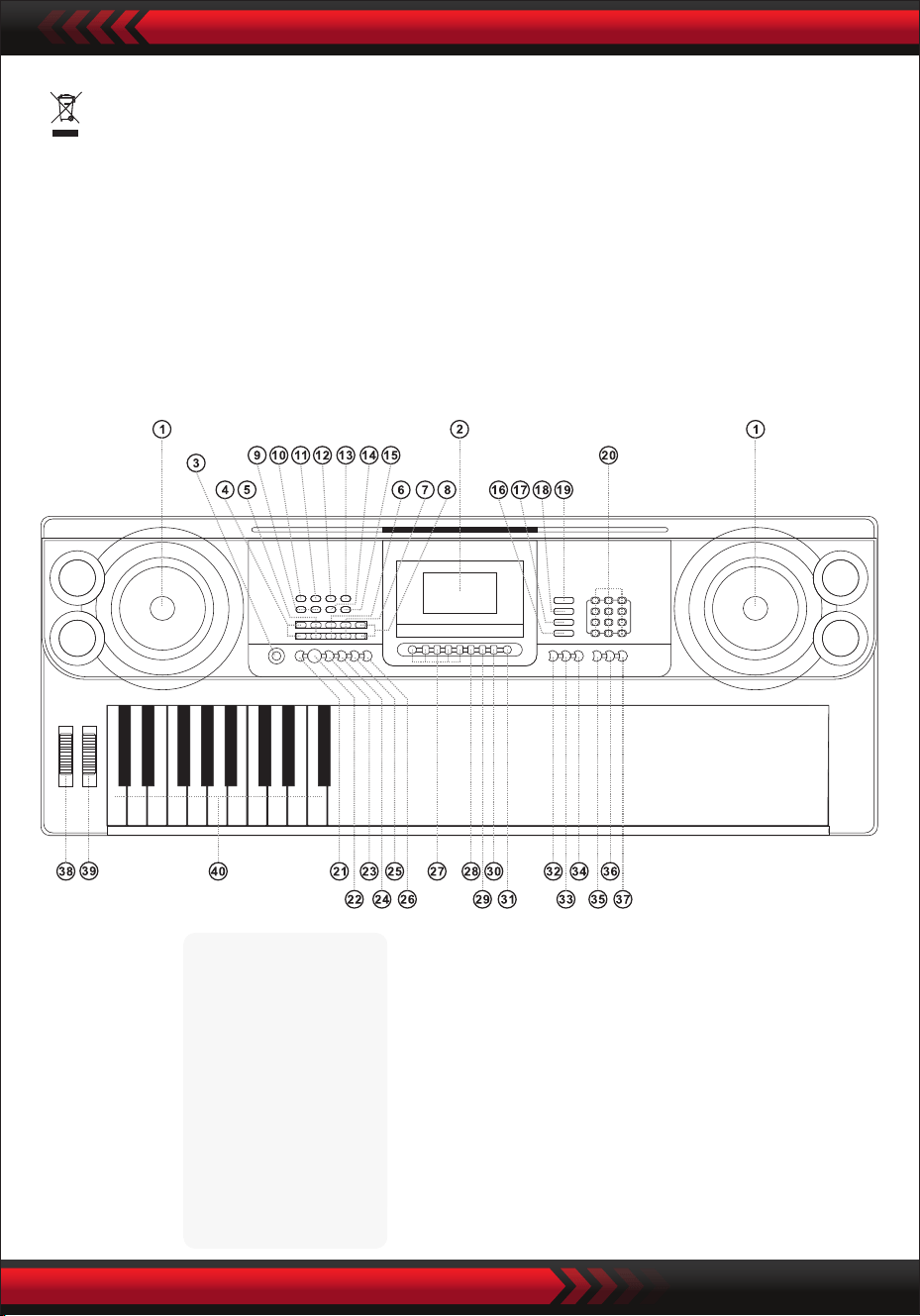
www.PyleUSA.com
3
•
I. Bedienfeld und Erweiterungsanschlüsse
VORDERES BEDIENFELD
Dieses Zeichen weist darauf hin, dass dieses Produkt in der gesamten EU nicht
zusammen mit anderen Haushaltsabfällen entsorgt werden darf.
Um mögliche Schäden für die Umwelt oder die menschliche Gesundheit durch
unkontrollierte Abfallentsorgung zu vermeiden, recyceln Sie verantwortungsbewusst,
um die nachhaltige Wiederverwendung von Materialressourcen zu fördern. Um Ihr
Altgerät zurückzugeben, nutzen Sie die Rückgabe- und Sammelsysteme oder wenden
Sie sich an den Händler, bei dem Sie das Produkt gekauft haben. Das Produkt kann auf
umweltverträgliche Weise recycelt werden.
9 MP3-Lautstärkeregler
10 Vorherige
11 Weiter
12 Wiedergabe/Pause
13 Stopp
14 Einfügereihenfolge/
Zufallswiedergabe/
Einzelwiedergabemodus
15 Toneekt
USB-Musikplayer
1 Lautsprecher
2 LCD-Anzeige
3 Netzschalter
4 Hauptlautstärke
5 Spurlautstärke
6 Rhythmus-
Lautstärke
7 Transposition
8 Tempo
16 Keyboard-Schlagzeug
17 Demo-Song
18 Stil
19 Ton
20 Ziern
21 Synchronisierung
22 Start/Stopp
23 Füllen
24 Einzeln
25 Fingersatz
26 Deaktivierter
Akkord
27 Statusspeicher
28 Programm
29 Wiedergabe null
30 Aufnahme
31 Metronom
32 Rückwärtslauf
34 Anschlagen
35 Eine Taste
36 Folgen
37 Ensemble
38 Pitch Bend
39 Vibrato
40 Akkordtastatur
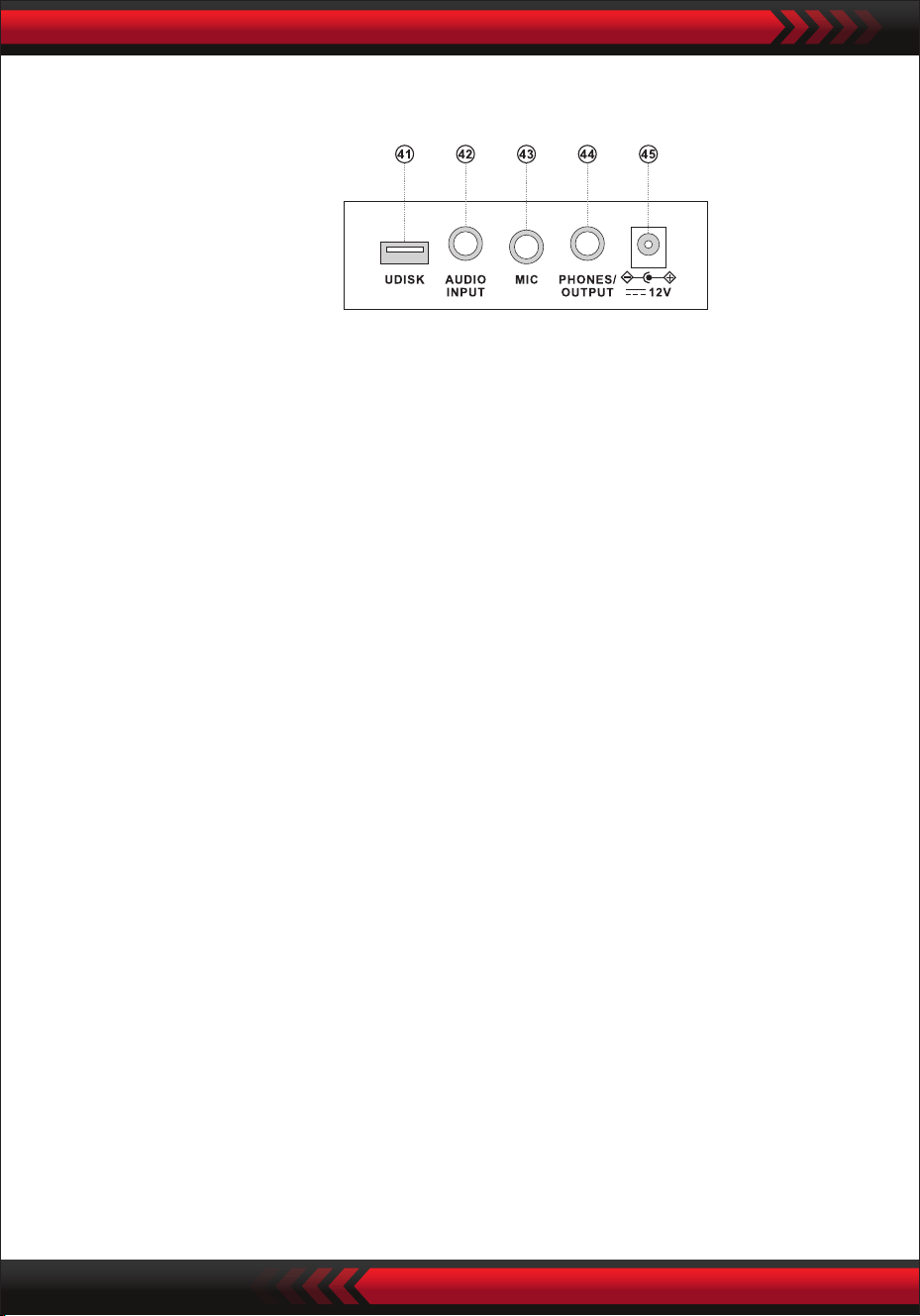
www.PyleUSA.com
4
HINTERES BEDIENFELD
AUDIO-EINGANG
Das elektronische Keyboard enthält eine Stereo-Audioeingangsfunktion, über die
Audiosignale von Mobiltelefonen, MP3-Playern, Computern usw. in das
elektronische Keyboard eingespeist und wiedergegeben werden können.
Schalten Sie zunächst die Stromversorgung des elektronischen Keyboards aus,
stecken Sie ein Ende des Audiokabels in den Ausgang eines Audiogeräts, stecken
Sie das andere Ende in die AUDIO INPUT-Schnittstelle auf der Rückseite des
elektronischen Keyboards und schalten Sie dann die Stromversorgung ein.
• Audioausgang: Schalten Sie die Stromversorgung des elektronischen Keyboards
und des externen Audiogeräts aus, stecken Sie dann ein Ende des Audiokabels in
die PHONES/OUTPUT-Buchse für den Audioausgang auf der Rückseite des
elektronischen Keyboards und stecken Sie das andere Ende in die Audioein-
gangsschnittstelle des Audiogeräts.
• Anschluss von Kopfhörern: Stecken Sie den Kopfhörerstecker in die PHONES/
OUTPUT-Schnittstelle auf der Rückseite des elektronischen Keyboards, dann wird
der Lautsprecher des elektronischen Keyboards automatisch abgeschaltet und Sie
verhindern, dass andere beim Spielen gestört werden.
ACHTUNG! Stellen Sie die Lautstärke nicht über einen längeren Zeitraum auf
Maximum, wenn Sie Kopfhörer verwenden, um Gehörschäden zu vermeiden.
AUDIOAUSGANG KOPFHÖRERANSCHLUSS
VERWENDUNG DES NETZTEILS/STROMADAPTERS
Der AC/DC-Netzadapter muss für das Gerät bestimmt sein.
Verbinden Sie eine Seite mit der Netzbuchse auf der Rückseite des Geräts und die
andere Seite mit dem Stromnetz. (Beachten Sie, dass die Eingangsspannung mit der
Netzspannung übereinstimmen muss).
II. Vor dem Gebrauch
41 USB-ANSCHLUSS FÜR MUSIKWIEDERGABE
(ash drive nicht enthalten)
42 AUDIO-EINGANG
43 MIKROFONEINGANG
44 TELEFON/AUSGANG
45 DCUV-EINGANG
AUSWAHL DER KLÄNGE
KEYBOARD-SCHLAGZEUG
DEMO-SONGS
Wenn Sie die [Power]-Taste bei eingeschalteter Hintergrundbeleuchtung drücken,
zeigt das LCD-Display einige Informationen über die aktuelle Klangfarbe, das
Tempo usw. an.
III. Grundlegende Methode der Wiedergabe
Stecken Sie den Mikrofonstecker in die Mikrofonbuchse des Keyboards und Sie
können spielen und singen.
MIKROFON-EINGANG (nicht im Lieferumfang enthalten)
www.PyleUSA.com
5
Drücken Sie die "Master Volume "- oder "Master Volume "-Taste, um die
Master-Lautstärke zu erhöhen oder zu verringern. Wenn die Tasten
"Master Volume " und "Master Volume " gleichzeitig gedrückt werden, wird die
Lautstärke auf den Standardwert zurückgesetzt.
Die Stil-Lautstärke und die Akkord-Lautstärke können gleichzeitig über die
Master-Lautstärke geregelt werden.
EINSTELLUNG DER GESAMTLAUTSTÄRKE
Das elektronische Keyboard enthält 600 Klänge, von "000" bis "599". Beim
Einschalten des Geräts wird die Klangauswahlfunktion automatisch aktiviert und
"SOUND" erscheint auf dem Display; andernfalls kann die Klangauswahlfunktion
durch Drücken der Taste "SOUND" aktiviert werden. Die Voreinstellung "000"
bezieht sich auf den Klavierklang, andere Klänge können durch Drücken der
entsprechenden Zahlen über die Zierntasten oder durch Drücken der Tasten "+"
oder "-" ausgewählt werden.
Drücken Sie die Taste "Keyboard Percussion", um die Keyboard Percussion-Funk-
tion zu aktivieren. Der entsprechende Percussion-Sound wird beim Spielen auf der
Tastatur von jeder Taste ausgegeben. Drücken Sie die "Keyboard Percussion"-Taste
erneut, um die Funktion zu deaktivieren.
Das elektronische Keyboard enthält 40 Demo-Songs für den Unterricht, von '000'
bis '039'.
Wenn die Taste "Demo Song" gedrückt wird, werden alle Demo-Songs nachein-
ander abgespielt.
Während der Wiedergabe kann ein anderer Demosong durch Drücken der
entsprechenden Nummer mit den Zierntasten oder durch Drücken von "+" oder "-"
ausgewählt werden; der ausgewählte Demosong wird dann zyklisch wiedergege-
ben.

1. Starten des Stils
Drücken Sie die [Start/Stop]-Taste, um den zugehörigen Stil zu starten.
Wenn der Stil noch nicht begonnen hat, drücken Sie die 'Syn'-Taste, dann blinkt
das Metronom auf dem Bildschirm. Wenn Sie eine beliebige Taste im
Akkordbereich (Taste 1-19 von links) spielen, startet die Stilbegleitung synchron.
2. Einfügen
Wenn Sie im Stilstatus die Taste [Fill in] drücken, wird automatisch ein
Zwischenspiel eingefügt.
Anhalten
Durch Drücken der [Start/Stop]-Taste wird der Begleitungsstil sofort beendet.
IV. Automatischer Stil
AUSWAHL DES STILS
STEUERUNG DES STILS
METRONOM
Die elektronische Tastatur enthält 300 Stile, von "000" bis "299". Beim Einschalten
ist es auf "000" eingestellt. Drücken Sie die Taste "Style", um die Rhythmusauswahl-
funktion zu aktivieren, dann wird "STYLE" auf dem Bildschirm angezeigt. Ein
anderer Stil kann durch Drücken der Taste "STYLE" oder durch Drücken der
entsprechenden Stilnummer in den Zierntasten oder durch Drücken von "+" oder
"-" gewählt werden.
Das Metronom enthält vier Tempos: 114, 2/4, 3/4 bzw. 4/4. Durch kontinuierliches
Drücken der Taste "Metronome" können die vier Tempos nacheinander ausgewählt
werden. Die Wiedergabe eines beliebigen Tempos kann durch erneutes Drücken der
"Metronome"-Taste unterbrochen werden.
TEMPO-EINSTELLUNG
Durch Drücken der Taste [Tempo ] / [Tempo ] können Sie das Tempo beschleuni-
gen oder verlangsamen. Wenn Sie beide Tasten gleichzeitig drücken, kehrt das
Tempo auf das aktuelle Tempo zurück.
EINSTELLEN DER TEMPOLAUTSTÄRKE
Drücken Sie die Taste "Style Volume " oder "Style Volume ", um die Lautstärke des
Stils zu erhöhen oder zu verringern. Durch gleichzeitiges Drücken beider Tasten
kann die Stil-Lautstärke auf den Standardwert zurückgesetzt werden.
www.PyleUSA.com
6
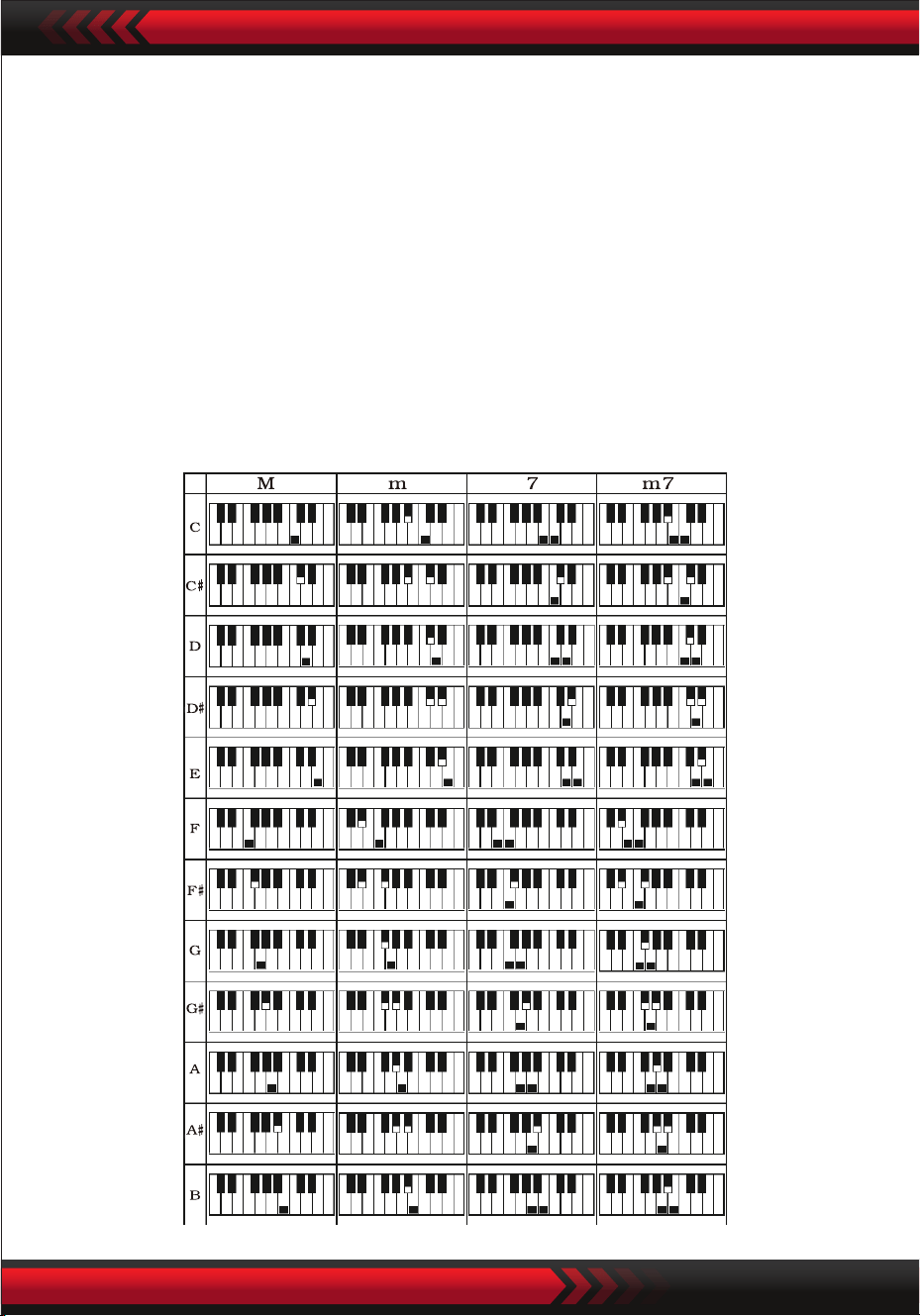
www.PyleUSA.com
7
V. Automatischer Bass-Akkord
EIN-FINGER-AKKORD
Drücken Sie die Taste 'Single Finger Chord', um die Akkordfunktion zu aktivieren,
und 'Single' wird auf dem Bildschirm angezeigt. Wenn der Stil beginnt, können Sie
die automatische Akkordbegleitung in der Akkordzone (Taste 1-19 von links) gemäß
der Ein-Finger-Akkord-Grimethode ausführen.
Wenn der Stil noch nicht begonnen hat, kann die Akkordbegleitung manuell
ausgeführt werden.
Drücken Sie die Taste "Single Finger Chord" oder "Chord OFF", um die Akkordfunk-
tion zu deaktivieren, und die Anzeige "Single" verschwindet vom Bildschirm.
Ein-Finger-Akkord-Skalen
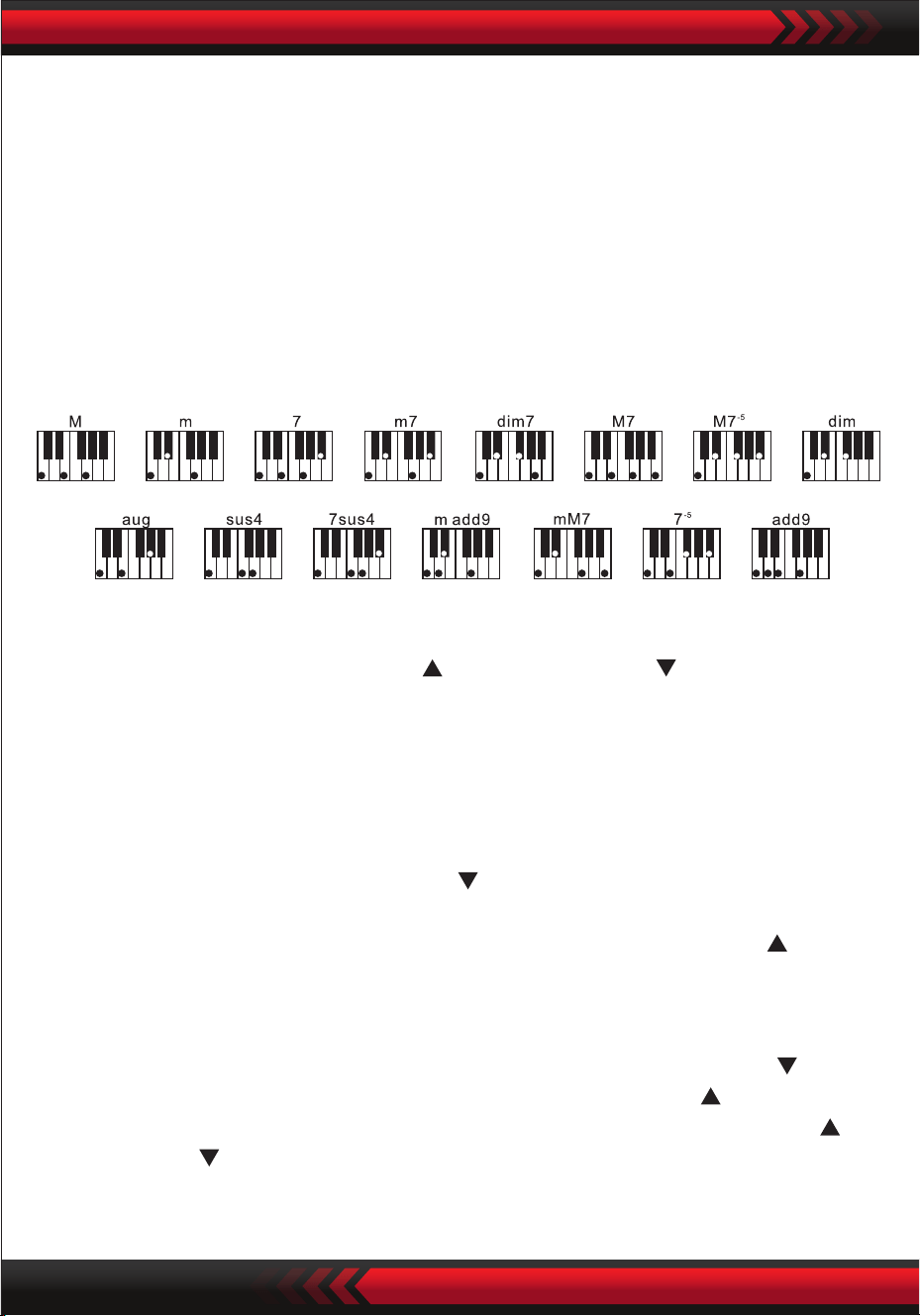
FINGERING
VI. Steuerung der Eekte
EINSTELLEN DER AKKORDLAUTSTÄRKE
Drücken Sie die Tasten "Chord Volume " oder "Chord Volume ", um die Lautstärke
zu erhöhen oder zu verringern.
Durch gleichzeitiges Drücken beider Tasten kann die Akkordlautstärke auf den
Fingerskala
Drücken Sie die Taste "Fingered Chord", um die Akkordfunktion zu aktivieren, und
"Finger" erscheint auf dem Bildschirm. Wenn der Stil startet, kann die automatische
Akkordbegleitung in der Akkordzone (Taste 1-19 von links) entsprechend der
Akkordgrimethode ausgeführt werden. Wenn der Stil noch nicht begonnen hat,
kann die Akkordbegleitung manuell ausgeführt werden.
Drücken Sie die Taste "Fingered Chord" oder "Chord OFF", um die Akkordfunktion
zu deaktivieren und der "Finger" auf dem Bildschirm verschwindet.
www.PyleUSA.com
8
TRANSPONIERUNGSFUNKTION
Die Transpositionsfunktion kann Ihnen helfen, andere Melodien mit der C-Griweise
zu spielen. Wenn Sie die Taste "Transpose " drücken, wird der Klang der gesamten
Tastatur um einen Halbton (kleine Sekunde) abgesenkt und der Klang der Tastatur
in der Tonart C in den Klang B umgewandelt. Wenn die Taste "Transpose "
gedrückt wird, erhöht sich der Klang der gesamten Tastatur um einen halben Ton
(kleine Sekunde), und der Klang der Tastatur in der Tonart C wird in einen Klang B
umgewandelt. Der Klang der Taste C auf der Tastatur wird in den Klang der Taste #C
oder bD umgewandelt. Durch zweimaliges Drücken der Taste "Transpose " wird
der Ton C in einen Ton bB umgewandelt. Wenn Sie die 'Transpose '-Taste fünfmal
drücken, wird der C-Ton in einen F-Ton geändert. Wenn die Tasten "Transpose "
und "Transpose " gleichzeitig gedrückt werden, wird der Ton auf den C-Ton "00"
zurückgesetzt. Der Pegel kann durch Drücken der "Transpose"-Taste von "-6" bis
"+6" eingestellt werden.

www.PyleUSA.com
9
SUSTAIN
Wenn die [Sustain]-Taste gedrückt wird und "SUS" auf dem Display erscheint, wird
der Klang beim Drücken der Tasten erzeugt. Drücken Sie die Taste erneut, um sie zu
deaktivieren. Wenn "SUS" verschwindet, wird die Funktion beendet.
DUAL-SOUNDS UND KEYBOARD-SPLIT-FUNKTION
Drücken Sie die Taste 'Dual/Split/O',
um die Funktion zu aktivieren oder zu deaktivieren.
KEYBORD-SPLIT-FUNKTION
Wenn die "Keybord-Split"-Funktion aktiviert ist, wird "Split" am oberen Rand des
Bildschirms angezeigt. Die 24 Tasten auf der linken Seite der elektronischen Tastatur
werden von der Originaltastatur getrennt und die Tonhöhe der linken Tastaturzone
DUAL TONES
Wenn die "DUAL"-Option aktiviert ist, wird "double" auf dem Bildschirm angezeigt
und die Eekte der Überlagerung zweier Klänge können beim Spielen auf der
elektronischen Tastatur erzeugt werden. Nach dem Aktivieren der Doppelklang-
funktion können Sie zwischen Klang 1 und Klang 2 umschalten, indem Sie die Taste
"Sound" drücken, um den gewünschten Klang auszuwählen; auf dem Display wird
entsprechend "SOUND 1" oder "SOUND2" angezeigt.
VIBRATO
Wenn "Vibrato" in der untersten Position steht, ist die Vibrato-Funktion ausges-
chaltet. Wenn "Vibrato" nach oben zeigt, ist die Vibrato-Funktion aktiviert und auf
dem Display erscheint "VIB". Mit der Vibrato-Funktion können dem wiedergege-
benen Ton Vibrato-Eekte hinzugefügt werden. Das Vibrato kann durch Verschieben
von 'Vibrato' nach oben oder unten verstärkt oder abgeschaltet werden.
PITCH BEND
Mit der Tonhöhenbeugung kann die Tonhöhe der auf der Tastatur gespielten Noten
gleichmäßig verändert werden. Die Tonhöhe kann durch Erhöhen der Tonhöhen-
beugung erhöht und durch Verringern der Tonhöhenbeugung verringert werden.
Nach dem Loslassen kehrt die Tonhöhenbeugung automatisch in die Mitte zurück
und die Tonhöhe der Note kehrt zu ihrem vordenierten Zustand zurück.

www.PyleUSA.com
10
wird zonenweise erhöht und um eine Oktave verringert, um mit der Tonhöhe der
linken Tastaturzone identisch zu sein.
Die Tonhöhe der rechten Tastaturzone kann nach Bedarf gewählt werden, und es
können unterschiedliche Klänge von der linken und rechten Tastaturzone gespielt
werden. Wenn Sie die Taste "Keyboard Split" erneut drücken, wird auf dem Display
"O" angezeigt und die Keyboard Split-Funktion ist deaktiviert.
TOUCH
Drücken Sie die [Touch]-Taste, um die Touch-Funktion zu aktivieren oder zu deaktiv-
ieren. Die Standardeinstellung beim Einschalten ist EIN. "Touch" wird auf dem
Bildschirm angezeigt. Diese Funktion kann dazu beitragen, den musikalischen
Ausdruck zu verbessern und die auf jede Note ausgeübte Kraft korrekt wiederzuge-
ben. Je größer die Kraft ist, die während des Spiels ausgeübt wird, desto lauter ist
der Klang. Wenn diese Funktion deaktiviert ist, kann unabhängig von der Kraft, die
während des Spielens aufgebracht wird, der gleiche Klang erzeugt werden.
AUFNAHME
Wenn die Taste "Record" gedrückt wird, wird die Aufnahmefunktion aktiviert, auf
dem Bildschirm wird "Record" angezeigt und dann werden die gespielten Noten
gespeichert.
Die aufgenommenen Noten werden automatisch gelöscht, wenn die Aufnahme
erneut durchgeführt oder die elektronische Tastatur ausgeschaltet wird.
STOPPEN DER AUFNAHME
Wenn der Speicher voll ist und die Anzeige "Record" auf dem Display verschwindet,
wird die Aufnahme automatisch gestoppt. Während der Aufnahme kann die
"Play"-Taste gedrückt werden, um die Aufnahme zu stoppen und die aufgenomme-
nen Noten abzuspielen.
Wenn die Taste "Record" erneut gedrückt wird, wird die Aufnahmefunktion deaktiv-
iert, und die aufgenommenen Noten werden automatisch gelöscht.
WIEDERGABE VON AUFGENOMMENEN NOTEN
Aufgenommene Noten können durch direktes Drücken der "Play"-Taste während
des Aufnahmevorgangs wiedergegeben werden. Die Wiedergabe von aufgenom-
menen Noten kann durch erneutes Drücken der 'Play'-Taste unterbrochen werden.
VII Aufnahmefunktionen

www.PyleUSA.com
11
VIII. Programmierstil
IX. Status Speicherfunktion
PROGRAMMIERSTIL
Wenn die Taste "Program" gedrückt wird, wird die Stilprogrammierungsfunktion
aktiviert. "Program" wird auf dem Bildschirm angezeigt und eine Reihe von vorein-
gestellten Melodien kann durch Anschlagen der entsprechenden Tasten auf der
Tastatur gespielt werden.
* Der programmierte Stil wird automatisch gelöscht, wenn die Programmierung
erneut durchgeführt oder die elektronische Tastatur ausgeschaltet wird.
UNTERBRECHUNG DER PROGRAMMIERUNG
Wenn 32 Berührungen aufgezeichnet sind und die Anzeige "Program" auf dem
Bildschirm verschwindet, wird die Programmierung automatisch beendet. Während
des Programmiervorgangs kann die "Play"-Taste gedrückt werden, um die
Programmierung zu unterbrechen und den programmierten Stil abzuspielen. Wird
die Taste "Program" erneut gedrückt, wird die Programmierfunktion deaktiviert und
die programmierten Daten werden automatisch gelöscht.
ABSPIELEN DES PROGRAMMIERTEN STILS
Während der Programmierung kann der programmierte Stil durch direktes Drücken
der 'Play'-Taste wiedergegeben werden. Das Abspielen des programmierten Stils
kann durch erneutes Drücken der 'Play'-Taste unterbrochen werden.
Mit der Memory-Funktion können Sie den Sound, den Stil, das Tempo und andere
Parameter, die während der Wiedergabe eingestellt werden sollen, speichern. Das
elektronische Keyboard ist mit vier Speicherplätzen ausgestattet, die während der
Wiedergabe jederzeit abgerufen werden können.
SPEICHERN
Stellen Sie den Klang, den Stil und das Tempo entsprechend den Wiedergabean-
forderungen ein und drücken Sie dann die Taste "Status Memory" und eine der
Tasten "M1" bis "M4", um die aktuelle Arbeit zu speichern.

www.PyleUSA.com
12
GESPEICHERTE INHALTE
Wenn eine der Tasten "M1" bis "M4" während der Wiedergabe gedrückt wird,
können gespeicherte Daten abgerufen werden, um den aktuellen Status zu
ersetzen.
Gespeicherte Inhalte sind nicht gegen Stromausfälle geschützt. Wenn das
elektronische Keyboard nach einem Stromausfall wieder eingeschaltet wird, werden
die gespeicherten Inhalte gelöscht.
Die Selbstlernfunktion ist in drei Schritte unterteilt, um den Lernenden anzuleiten,
das Spielen des elektronischen Keyboards schrittweise zu erlernen. Der Lernende
sollte zuerst mit "One Key" üben, um sich mit der Melodie und dem Stil des Liedes
vertraut zu machen, dann mit "Follow", um das Lied richtig zu spielen, und dann im
dritten Schritt "Ensemble", um frei mit anderen zusammen zu spielen, schließlich
durch die Ensemble-Übung.
SELBSTLERNEN 1: EINE TASTE
Wenn die Taste "One Key" gedrückt wird, wird die Ein-Tasten-Lernfunktion aktiviert
und "Step1" wird auf dem Bildschirm angezeigt. Sie können den zu lernenden Song
durch Drücken der Taste oder durch Drücken von "+" oder "-" auswählen. Das
Ein-Tasten-Lernen wird für die Dauer des Liedes ohne Anforderungen an Intonation
und Korrektheit angewendet. Es ist zulässig, die Tasten falsch zu spielen. Die
elektronische Tastatur spielt im Falle eines Fehlers die richtigen Noten, aber der
Cursor zeigt die der richtigen Note entsprechende Taste auf dem Bildschirm an. Die
Ein-Tasten-Lernfunktion kann durch erneutes Drücken der Taste 'One Key' wieder
deaktiviert werden.
TEACHING 2: FOLGEN
Wenn Sie die Taste "Follow" drücken, wird die Lernfunktion "Follow" aktiviert und
auf dem Bildschirm wird "Step 2" angezeigt.
Sie können den zu lernenden Titel durch Drücken der Zierntaste oder durch Drücken
von "+" oder "-" auswählen. In diesem Modus können Sie den Demonstrationstitel
abspielen, und der Cursor auf dem Bildschirm zeigt Ihnen, wie Sie ihn richtig abspielen.
Wenn beim Spielen ein Fehler gemacht wird, wird die Melodie des Liedes unterbro-
chen, bis der Fehler behoben ist.
Die Follow-Teaching-Funktion kann durch erneutes Drücken der "Follow"-Taste
wieder deaktiviert werden.
X. Teach-Funktion
TEACHING 3: ENSEMBLE
Wenn die Taste "Ensemble" gedrückt wird, wird die Ensemble-Lernfunktion aktiviert
und "Step 3" wird auf dem Bildschirm angezeigt Sie können das zu lernende Lied
durch Drücken der Taste oder durch Drücken von "+" oder "-" auswählen.
Die Ensemble-Lernfunktion wird zum korrekten und vollständigen Erlernen der
Dauer und der Noten des Liedes angewendet. Die elektronische Tastatur schützt den
Grundton für das Ensemble.
Sie müssen die richtigen Noten innerhalb der Dauer des Liedes spielen.
Wenn Sie innerhalb von 3 Sekunden mit dem Spielen beginnen, spielt die
elektronische Tastatur automatisch den Grundton, und die richtige Note und das
richtige Tempo werden auf dem Bildschirm angezeigt. Die Ensemble-Lernfunktion
kann durch erneutes Drücken der "Ensemble"-Taste ausgeschaltet werden.
XI. USB-Musikwiedergabe
Durch Einstecken des USB-Steckers unterstützt das elektronische Keyboard einen
maximalen Speicher von 32 G und die gängigsten MP3-Fornat-Dateien.
Drücken Sie die Taste "MP3 ",um die Lautstärke einzustellen.
Drücken Sie zum Abspielen des vorherige, zum Abspielen des nächsten
zum Abspielen/Pausieren, zum Anhalten, und zum Aufrufen des
Sortier- und Zufallswiedergabemodus. Drücken Sie die Taste [Soundeekt], um die
Soundeekt-Modi einzustellen.
Lieferumfang:
• Digitales Karaoke-Musik-Keyboard
• Notenständer
• Adapter
• Netzstecker
• Keyboard-Ständer
• Keyboard-Hocker
• Wasserdichte Tasche
www.PyleUSA.com
13
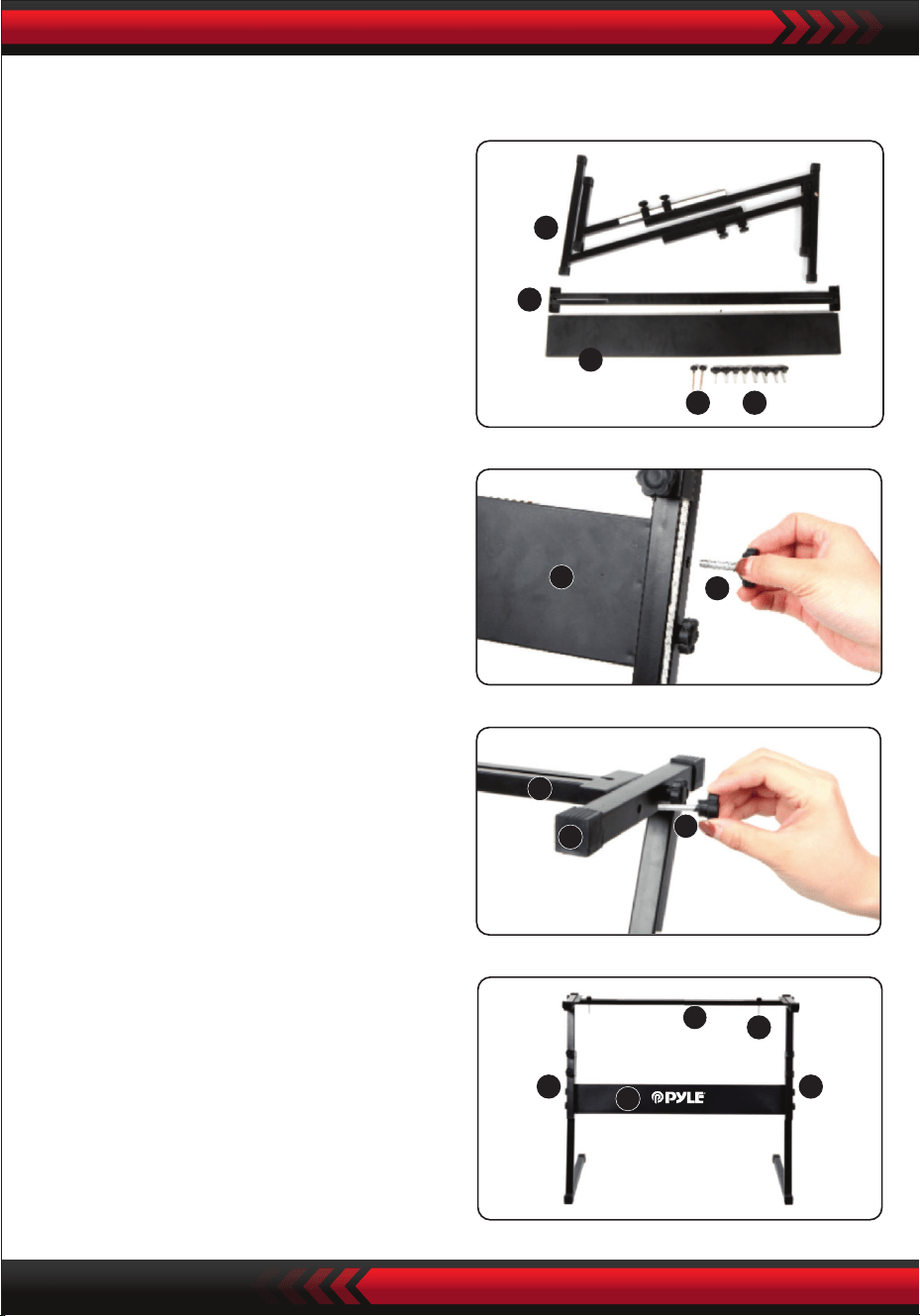
www.PyleUSA.com
14
5
4
3
1 2
3
2
4
5
2
5 5
3
4
1
3. etzen Sie die Schraube Nr. 2 und den
Bügel Nr. 4 oben auf den Bügel Nr. 5
und ziehen Sie sie fest.
Montage des Keyboardständers
2. Nehmen Sie die Schraube Nr. 2 und
die Stützplatte Nr. 3, befestigen Sie
sie an den beiden Stützwinkeln von
Nr. 5 und ziehen Sie sie separat fest.
4. Die Installation ist abgeschlossen,
die Schraube Nr. 1 länger anziehen,
um die Tastatur an der Halterung
zu befestigen.
1. Bereiten Sie alle Teile für die
Montage vor.

www.PyleUSA.com
15
Anhang
000 Akustik-Flügel
001 Helles akustisches Klavier
002 Electric Grand Piano
003 Honky-Tonk-Klavier
004 Rhodes-Klavier
005 Chorus-Klavier
006 Cembalo 1
007 Clavichord
008 Celesta 1
009 Glockenspielautomaten 1
010 Spieldose 1
011 Vibraphon 1
012 Marimba 1
013 Xylophon 1
014 Röhrenglocke1
015 Hackbrett 1
016 Zugriegel-Orgel
017 Schlagwerk Orgel
018 Felsenorgel 1
019 Kirchenorgel 1
020 Drehorgel 1
021 Akkordeon 1
022 Mundharmonika 1
023 Tango-Akkordeon
024 Akustische Gitarre (Nylon)
025 Akustische Gitarre (Stahl)
026 E-Gitarre (Jazz)
027 E-Gitarre (clean)
028 E-Gitarre (gedämpft)
029 Übersteuerte Gitarre
030 Verzerrte Gitarre
031 Harmonische Gitarre
032 Akustischer Bass 1
033 E-Bass (Finger)
034 E-Bass (Plektrum)
035 Fretless-Bass 1
036 Slap-Bass 1
037 Slap-Bass 2
038 Synth-Bass 1
039 Synthesizer-Bass 2
040 Geige 1
041 Bratsche 1
042 Cello 1
043 Kontrabass 1
044 Tremolo Streicher 1
045 Pizzicato-Streicher 1
046 Orchesterharfe
047 Pauke
048 Streicherensemble 1
049 Streicherensemble 2
050 Synth-Streicher 1
051 Synth-Streicher 2
052 Chor Aahs 1
053 Stimme Oohs
054 Synth Stimme
055 Orchester-Schlag
056 Trompete 1
057 Posaune 1
058 Tubal
059 Gedämpfte Trompete 1
060 Französisch Hom 1
061 Blechbläsergruppe 1
062 Synth-Blechbläser 1
063 Synth-Blechbläser 2
064 Sopransaxophon 1
065 Altsaxophon 1
066 Tenorsaxophon 1
067 Baritonsaxophon 1
068 Oboe 1
069 Englisch Horn 1
070 Fagott 1
071 Klarinette 1
072 Piccoloöte 1
073 Queröte 1
074 Blocköte 1
075 Panöte 1
076 Flaschenöte 1
077 Shakuhachi1
078 Pfeife 1
079 Okarina 1
080 Blei 1 (quadratisch)
081 Blei 2 (Sägezahn)
082 Leitung 3 (Calliope-Leitung)
083 Blei 4 (Chi-Blei)
084 Blei 5 (Charang)
085 Blei 6 (Stimme)
086 Lead 7 (Quinte)
087 Lead 8 (Bass+Lead)
088 Pad 1 (Neuzeit)
089 Pad 2 (warm)
090 Pad 3 (Polysynth)
091 Pad 4 (Chor)
092 Pad 5 (Arco)
093 Pad 6 (metallisch)
094 Pad 7 (Balo)
095 Pad 8 (Sweep)
096 FX 1 (Regen)
097 FX 2 (Tonspur)
098 FX 3 (Kristall)
099 FX 4 (Atmosphäre)
100 FX 5 (Helligkeit)
101 FX 6 (Sprites)
102 FX7 (Echo)
103 FX 8 (Science-Fiction)
104 Sitar
105 Banjo
106 Shamisen
107 Koto
108 Kruimba
109 Dudelsack
110 Cello
111 Shanai
112 Jingle Bell
113 Agogo
114 Stahltrommeln
115 Holztrommel
116 Talko-Trommel
117 MelodischeTrommel
118 Synthetische Trommel
119 Rückwärtszimbel
120 Gitarren-Tastengeräusch
121 Atemgeräusch
122 Strand
123 Vogelgezwitscher
124 Telefonklingeln
125 Hubschrauber
126 Applaus
127 Gewehrschuss
128 Stereo-Flügel
129 Brillantes Stereo-Klavier
130 Flügel
131 Klassisches Klavier
132 Rock-Klavier
133 Süßes Stereo-Klavier
134 Brillantes Klavier
135 Modernes Klavier

www.PyleUSA.com
16
Klänge
136 La Piano
137 Tanz-Piano
138 Weiches Klavier
139 Streicherklavier
140 Klavier-Pad
141 Synth-Str. Klavier
142 Chor-Piano
143 Honky-Tonk
144 Klavier 2 Oktaven
145 Piano 1 Oktave
146 Eiec.Grand Piano
147 E.Grand 80
148 Modernes E.G.Piano
149 Cembalo 2
150 Cembalo 3
151 Cembalo-Paar
152 Cembalo und Streicher
153 Elektronisches Klavier 1
154 Elektronisches Klavier 2
155 Fm E-Piano 1
156 Fm E-Piano 2
157 60er Jahre E-Piano 1
158 60er Jahre E-Piano 2
159 Dyno E-Piano 1
160 Dyno E-Piano 2
161 Mellow E.Piano
162 Pop E.Piano
163 Chor 1
164 Chor 2
165 Tremolo E.Piano
166 Modernes E.Piano
167 Weiches E.Piano
168 Streicher und Klavier 1
169 Streicher und Klavier 2
170 Streicher und Klavier 1 Sint.
171 Streicher und Klavier 2 Sint.
172 E-Piano-Pad 1
173 E-Piano-Pad 2
174 Sauberes E.Piano
175 Cembalo und Klavier
176 Cembalo 1
177 Cembalo 2
178 Süßes Cembalo
179 Melodisches Cembalo
180 Cembalosequenzen
181 Cembalo und Ruder
182 Cembalo-Chor
183 Vibraphon 2
184 Vibraphon 3
185 Weiches Vibraphon
186 Chor-Vibraphon
187 Marimba 2
188 Weiches Marimbaphon
189 Celesta 2
190 Helle Celesta
191 Glockenspiel 2
192 Glockenspiel-Pad 1
193 Spieldose 2
194 Spieldose 3
195 Xylophon 2
196 Röhrenglocke 2
197 Hackbrett 2
198 Helm-Orgel 1
199 Helm-Orgel 2
200 Helm-Orgel 3
201 Helm-Orgel 4
202 Helm-Orgel 5
203 Perkussionsorgel 1
204 Perkussionsorgel 2
205 Perkussionsorgel 3
206 Elektrische Orgel 1
207 Orgel 2
208 Elektrische Orgel 3
209 Jazz-Orgel 1
210 Jazz-Orgel 2
211 Jazz-Orgel 3
212 Rockorgel 2
213 Felsenorgel 3
214 Rock-Orgel 4
215 70er Jahre Orgel
216 Voller Zugriegel
217 Drehorgel 1
218 Drehorgel 2
219 Drehorgel 3
220 Tremolo-Orgel
221 Klick-Orgel
222 Orgel 8
223 Orgel-Pad 1
224 Orgel-Pad 2
225 Sequenz-Orgel
226 Kirchenorgel 2
227 Kirchenorgel 3
228 Kapellenorgel
229 Pfeifenorgel 1
230 Pfeifenorgel 2
231 Theaterorgel
232 Orgel und Cembalo
233 Pfeifenorgel
234 Pfeifenorgel 2
235 Akkordeon 2
236 Akkordeon 3
237 Akkordeon 4
238 Akkordeon 5
239 Oktav-Akkordeon
240 Bandoneon 1
241 Bandoneon 2
242 Oktav-Bandoneon
243 Bandoneon Solo
244 Bandoneon und Geige
245 Mundharmonika 2
246 Mundharmonika 3
247 Mundharmonika 4
248 Nylon-Instrument 1
249 Nylonsaiten-Gitarre 2
250 Stahlsaitengitarre 1
251 Stahlsaitengitarre 2
252 Stahlsaitengitarre 3
253 12-saitige Gitarre
319 Gegriffener Bass M
320 Trance-Bass M
321 Synthesizer-Bass M
322 Synthesizer-Bass quadratisch M
323 Geige 2
324 Langsame Violine
325 Bratsche 2
326 Violoncello 2
327 Langsames Cello
328 Kontrabass 2
329 Geigengruppe
330 Cello-Gruppe
331 Violine und Cello
332 Streichquartett
333 Pizzicato Streicher 2
334 Pizzicato-Achtel
335 Harfe 1
336 Harfe 2
337 Chortharfe
338 Streicher
339 Streicherensemble 3
340 Streicherensemble 4
341 Streicherensemble 5
342 Langsame Streicher 1
343 Langsame Streicher 2
344 Breite Streicher
345 Kammer 1
346 Kammer 2
347 Oktavsaiten 1
348 Oktavsaiten 2
349 Sfz-Saiten
350 Tremolo-Saiten 2
351 Harfe und Streicher
352 Flöte und Streicher
353 Orchesterstreicher
354 Synthetische Streicher 1
355 Synthetische Streicher 2
356 Synthesizer 3
357 70er Jahre Synthesizer 1
358 1970er Synthesizer 2
359 1980er Synthesizer 1
360 80er Jahre Synthesizer 2
361 Schneller Synthesizer
362 Langsame Synthesizer
363 Syneh Oktavstreicher 1
364 Syneh-Oktav-Gesang 2
365 Aahs-Chor 2
366 Chöre 1
367 Chöre 2
368 Chor Streicher
369 Stimme Streicher
370 Chor
371 Langsamer Chor
372 Chor Ensemble 1
373 Chor Ensemble 2
374 Doo Stimme
375 Uuh Stimme
376 Synthetische Stimme 1
377 Synthetische Stimme 2
378 Synthetische Stimme 3
379 Stimme Ensemble 1
380 Stimme Ensemble 2
381 Stimme Ensemble 3
382 Synthesestimme Pad
383 Synthetische Chorstimme
254 Stahlgitarre und Geräuschinstrument 1
255 Stahlgitarre und Instrumentalgeräusche 2
256 Stahlgitarre und Harmonik
257 Stahlgitarre und Chöre
258 Jazz-Gitarre 1
259 Jazz-Gitarre 2
260 Jazzgitarre Oktave
261 Saubere Gitarre 1
262 Saubere Gitarre 2
263 Saubere Gitarre 3
264 Saubere Gitarre 4
265 Saubere Gitarre und Hintergrundgesang
266 Gedämpfte Gitarre 1
267 Gedämpfte Gitarre 2
268 E-Gitarre Crunch
269 Overdrive Gitarre 1
270 Übersteuerte Gitarre 2
271 Distortion Gitarre 1
272 Verzerrung Gitarre 2
273 Verzerrung Gitarre 3
274 Verzerrte Gitarre 4
275 Kraftvolle Gitarre
276 Rhythmus-Gitarre
277 Feedback-Gitarre
278 Verzerrte Gitarre und Bass
279 Stahlgitarre und Instrumentalgeräusche M 1
280 Stahlgitarre und Instrumentalgeräusche M 2
281 Saubere Gitarre M
282 E-Gitarre Crunch M 1
283 E-Gitarre Crunch M 2
284 Distortion Gitarre M
285 Akustische Bassgitarre 2
286 Akustische Bassgitarre 3
287 Ride-Bass
288 Fingled Bass 1
289 Gezupfter Bass 2
290 Gegriffener Bass 3
291 Gegriffener Bass 4
292 Rhythmischer gegriffener Bass
293 Weicher gegriffener Bass
294 Gegriffener Bass 1
295 Gegriffener Bass 2
296 Gegriffener Bass 3
297 Rhythmischer Bass mit Griffbrettern
298 Fretless-Bass 2
299 Fretless-Bass 3
300 Slap-Bass 1
301 Slap-Bass 2
302 Doppelsaiten-Bass
303 Synthesizer-Bass 1
304 Synthesizer-Bass 2
305 Synthesizer-Bass 3
306 Synthesizer-Bass 4
307 Säge-Synthesizer-Bass
308 Souare Synthesizer-Bass
309 Digitaler Rock-Bass
310 Trance-Bass
311 Sinus-Bass
312 Bass & Kick
313 Vocoder-Bass
314 Soul-Synth-Bass
315 Cembalo & Bass
316 Orgel & Bass
317 Bass gegriffen M 1
318 Gegriffener Bass M 2

www.PyleUSA.com
17
Stil
384 Orchesyra Hit 1
385 Orchesyra Treffer 2
386 Orchesyra Treffer 3
387 Orchesyra Hit 4
388 Trompete 2
389 Trompete 3
390 Trompete 4
391 Trompete 2
392 Velo.Trompete
393 Sfz Trompete
394 Gedämpfte Trompete 3
395 Posaune 2
396 Posaune 3
397 Sanfte Posaune
398 Velo.Posaune
399 Posaunengruppe
400 Jazz-Posaune
401 Trompete und Posaune
402 Tuba 2
403 Tuba 3
404 Waldhorn 2
405 Waldhorn Solo
406 Waldhorn-Sektion
407 Französisches Oktavhorn
408 Horn-Orchester
409 Stereo Blechbläser
410 Blechbläser
411 Blechbläser Sektion 2
412 Blechbläser Sektion 3
413 Blechbläsersektion 4
414 Messing weich
415 Hartmessing
416 Blechbläser Sfz
417 Blechbläser und Streicher
418 Blechbläser und Saxophon
419 Synthetische Blechbläser 3
420 Synthetische Blechbläser 4
421 Synthetische Blechbläser 5
422 Synthetische Blechbläser 6
423 Synthetische Blechbläser warm
424 Synthetische Blechbläser 80s
425 Analoger Synthesizer 1
426 Analoger Synthesizer 2
427 Blechbläser Trance
428 Pad-Synthesizer
429 Oktav-Synthesizer
430 Sfz-Synthesizer
431 Altsaxophon 2
432 Altsaxophon 3
433 Atmendes Altsaxophon1
434 Atmendes Altsaxophon 2
435 Saxophon Tenor 2
436 Tenorsaxophon 3
437 Saxophon Tenor 1 geatmet
438 Geatmetes Tenorsaxophon 2
439 Saxophon Sopran 2
440 Saxophon Sopran 3
441 Saxophon respirato
442 Saxophon Bariton 2
443 Saxophon Bariton 3
444 Saxophon A.weich
445 Saxophon A.hart
446 Solo A.Sax
447 Saxophon T.weich
448 Nur T.Saxophon
449 T.Saxys
450 A.Saxys
451 Saxophon Sektion
452 Sfz. Saxophonabteilung
453 Klarinette 2
454 Velo.Klarinette
455 Bassklarinette
456 Klarinette.Jazz
457 Oboe 2
458 Oboe Solist
459 Englischhorn 2
460 Fagott 2
461 Flöte 2
462 Querflöte 3
463 Jazz-Flöte
464 Reine Querflöte
465 Blockflöte
466 Piccoloflöte 2
467 Piccoloflöte 3
468 Rohrblatt Abschnitt 1
469 Rohrblattgruppe 2
470 Flöte und Oboe
471 Blockflöte 2
472 Blockflöte 3
473 Panflöte 2
474 Panflöte 3
475 Flaschenflöte 2
476 Trillerpfeife 2
477 Gänsepfeife 2
478 Shakuhachi 2
479 Vierkantmine 1
480 Vierkantmine 2
481 Quadratische Leitung 3
482 Vierkantmine 4
483 Säge 1
484 Säge 2
485 Sägeblei 3
486 Pastöses Sägekabel
487 Impulsviereckiges Blei
488 Sequenzsäge 1
489 Säge Sequenz 2
490 Sinusleitung
491 Sinusleitung
492 Sinusleitung
493 Sinus Steigung
494 Langsame quadratische Steigung
495 Langsame Rechteckleitung
496 Sequenz Rechteck
497 Sequenz-Impuls 1
498 Sequenz Impuls 2
499 Langsame Stichsäge
500 Sägeimpuls
501 Langsamer Sägeimpuls
502 Blei-Trance
503 Kallop 1
504 Kallope 2
505 Bleiventil
506 Entlüftung Synthese
507 Reines Blei
508 Rohrleitung führen
509 Sequenzblei
510 Chiff-Lead
511 Tropfenblei
512 Leitung Ep
513 Element Blei 1
514 Lead Stimme 2
515 Stimme 1
516 Lead Vox 2
517 Lead Verzerrung
518 Charang
519 Oktave Charang
520 Lead Zupfen 1
521 Lead Zupfen 2
522 Gt Synthesizer Blei
523 Kirche Lead
524 Doppelstimmige Leitung
525 Stimme Chorleitung
526 Ep und Stimme Lead
527 Synthetisierte Stimme
528 Fünfte Stimme
529 Fifth Voice (Fünfte Stimme)
530 Fifth Square Voice
531 Vierter Lead
532 Siebte Sequenz
533 Fünfte Sequenz
534 Bass+Lead
535 Synth-Bass+Leitung
536 Synth-Bass+Leitung
537 Rohrblatt-Lead
538 Tasten-Lead
539 Fantasie 1
540 Fantasie 2
541 Neues Zeitalter
542 New-Age-Pad
543 Warme Vox
544 Dickes Pad
545 Warmes Pad
546 Sinus-Pad
547 Weiches Pad
548 Horn-Pad
549 Altes Tonband-Pad
550 Polysynthese 1
551 Polysynthese 2
552 Polysynthetisches Kissen 1
553 Polysynthetische Unterlage 2
554 Mehrzweck-Säge
555 Weltraum-Chor
556 Himmel
557 Weltraum-Bogen-Pad
558 Chiff-Chor
559 Stern-Stimme
560 Quadratisches Pad
561 Bogen-Pad
562 Glas-Pad
563 Flaschen-Pad
564 Zinken-Pad
565 Ethnisches Pad
566 Weiches Metall-Pad
567 Hartes Metall-Pad
568 Chorus-Pad
569 Halo-Pad 1
570 Halo 2 Pad
571 Orgel-Chor-Pad
572 Chor-Sweep
573 Wobbel-Pad
574 Clavi-Pad 2
575 Regentropfen 1
576 Regentropfen 2
577 Holz-Pad
578 Weltraum-Stimme
579 Tonspur 1
580 Tonspur 2
581 Rave
582 Weicher Kristall
583 Kristall
584 Weihnachtsglocke
585 Glockenspiel-Klang
586 Vibraphon-Glocke
587 Chorglocke
588 Synth-Nakke
589 Celesta-Pad
590 Atmosphärisch
591 Nylon Gt & Ep
592 Stahl-Pad
593 Leuchtglocken-Pad
594 Helligkeit 1
595 Helligkeit 2
596 Kobold
597 Echo Stimme
598 Echo-Pad
599 Echo Tropfen

www.PyleUSA.com
18
Stil
000 Pop
001 Ragtim
002 Pop-Funk
003 März 1
004 Retro-Disco
005 Leichter Pop
006 Fuchsmarsch
007 48 Bit
008 Ballade
009 Walzer
010 Lateinisch
011 8-Takt-Pop 1
012 8-Takt-Pop 2
013 8 Beat Uptempo
014 8 Beat Standard
015 8 Beat Mittel
016 8 Beat Ballade
017 Epische Ballade
018 Ballade mit Klavier
019 16 Beat Pop 1
020 16 Beat Shuffle 1
021 16 Beat Zufallsgenerator 2
022 16 Beat Ballade 1
023 16 Beat Ballade 2
024 16 Beat Ballade 3
025 Funk 1
026 Funk 2
027 Soul
028 Gospel Shuffle
029 6-8 Gospel
030 4-4 Blues
031 Twist
032 Fusion 1
033 Funky Fusion 1
034 50er Jahre Pop
035 Cooler Pop
036 Grooviger Pop
037 60er-Jahre-Vintage-Pop
038 80er Jahre Pop
039 Folk Rock 1
040 Pop-Rock 1
041 Pop-Rock 2
042 8 Beat Rock Balld
043 16 Beat Rock Bld
044 Harter Rock 1
045 Rock Shuffle 1
046 6-8 Harter Rock
047 US-Rock
048 16 Beat-Rock
049 Felsen 1
050 Rock 2
051 60er-Rock
052 Standard-Rock
053 Brit Rock Pop
054 60er Jahre Vintage-Rock
055 Shfl Chart-Rock
056 60er Jahre Pop-Rock
057 Soul Ballade
058 Langsamer Rock 1
059 Langsamer Rock 2
060 6-8 Ballade
061 R&B
062 70er Jahre Chart-Ballade
063 Romantische Ballade
064 China 1
065 China 2
066 China 3
067 China 4
068 China 5
069 China 6
070 China 7
071 China 8
072 China 9
073 China 10
074 Bossa Nova 1
075 Bossa Nova 2
076 Bossa Nova 3
077 Salsa
078 Samba 1
079 Mambo 1
080 Beguine
081 Merengue
082 Bolero Lento
083 Espagnole
084 Cajun
085 Reggae 12 Beat 1
086 Pop Reggae 1
087 Pop Mambo
088 Latin Pop Party
089 Neues Zeitalter 1
090 Neues Zeitalter 2
091 Bluse Mambo
092 Tanz Pop 1
093 Tanz-Pop 2
094 Techno 1
095 Euro Beat
096 Euro Haus
097 Hip Hop
098 Trip Hop
099 Synth Boogie
100 70er Jahre Disco
101 Disco Trop
102 Party-Pop
103 Polka Pop 1
104 Boogie
105 Swing
106 Big Band Swing
107 Big Band Balld
108 Jazz-Quartett
109 Dixieland
110 CoolJazz
111 Jazz-Ballade
112 BBQ uickstep
113 Bluegrass 1
114 Bluegrass 2
115 Country 2-4
116 8 Beat Country
117 Country-Rock
118 Cwby Boogie
119 Country Ballade
120 Cntry Shuffle
121 Country-Walzer
122 Jazz-Walzer
123 HullyGully
124 02-Mär
125 03-Mär
126 Mär 6-8
127 Polka
128 PopWalzer
129 Cha Cha
130 Rhumba
131 Pasodoble
132 TangoCont
133 Foxtrott 1
134 Jive 1
135 Nordischer Walzer
136 Deutscher Walzer
137 Wiener Walzer
138 Musette-Walzer
139 Rock'n Roll 1
140 Rock 'n' Roll 2
141 Gerader Rock
142 Jazz-Rock 1
143 Schnelle Gospe
144 Folk-Rock 2
145 Rock Billy
146 Rock Boogie
147 Rock Cha Cha
148 Klassischer Rock 1
149 Rock Shuffle 2
150 Rock Pop
151 Skiffle
152 Funk-Pop-Rock
153 Zeitgenössischer Rock
154 Akustik-Rock
155 80er Jahre Rock
156 LA Shuffle
157 Jive 2
158 Samba 2
159 Samba 3
160 Schlager Rock 1
161 Schlager Rock 2
162 Karneval
163 Samba Orgel
164 Reel
165 Foxtrott 2
166 Foxtrott 3
167 Club-Pop
168 16-Takt-Pop 2
169 8-Takt-Pop 3
170 8 Beat Soul 1
171 8 Beat Rock
172 Rap-Pop
173 60er-Jahre-Soul
174 70er Jahre Soul
175 Funk Shuffl
176 Fusion Shuffl
177 Klassischer 8 Beat
178 Vintage Gtr Pop
179 Schlager Italien
180 8 Beat Sanft
181 8 Beat Wärme
182 8 Beat Seele 2
183 Ballade Gitarre
184 8 Beat Pop 4
185 Polka Pop 2
186 Polka Pop 3
187 16Beat 1
188 16Beat 2
189 16Beat 3
190 Pop Ballade 1
191 Pop-Ballade 2
192 Funky Pop
193 Hip-Hop-Pop
194 Soul Shuffle
195 Langsamer Soul
196 8 Beat Adria
197 Klassisches Klavier
198 Unplugged
199 Pop-Ballade 3
200 Neues Zeitalter Pop
201 8 Moderner Beat
202 Country-Ballade
203 Liebeslied
204 Moderner Country-Pop
205 Elektro-Pop
206 Akustische Ballade
207 Piano-Ballade
208 R&B Ballade
209 Rock-Ballade 1
210 Langsam und leicht
211 Analoge Ballade
212 Calypso
213 GuadDance
214 Reggae 12 Beat 2
215 Reggae 16 Beat
216 Bossa Nova 4
217 Mambo 2
218 Mambo 3
219 Bolero
220 Kumbia 1
221 Latin Rock
222 Disco Latein
223 Tijuana
224 Reggae
225 Kumbia 2
226 Parranda
227 Karneval 2
228 Samba Rio
229 Pop-Reggae 2
230 Techno 2
231 Techno 3
232 Funky Disco
233 Samstag Nacht
234 Latin Club
235 Disco-Schokolade
236 Disco Fuchs
237 Disco Funk
238 Disco Hands
239 Disco Party
240 Disco Samba
241 UK Pop
242 Club Dance
243 Land 1
244 Landhaus 2
245 Fingerpicking
246 Country Brüder
247 Neues Land
248 Leichtes Land
249 70er-Jahre-Chart-Country
250 Hoedown
251 Country Shuffle
252 Ober-Polka
253 Polka Pop 4
254 Blaues Gras 1
255 Blaues Gras 2
256 Blaues Gras 3
257 März USA
258 Hully Gully
259 Big Band Shuffle 1
260 Big Band Shuffle 2
261 Big Band Shuffle 3
262 Schnelles Band 1
263 Schnelles Band 2
264 Katzen-Groove
265 Dixie Jazz
266 Mittlerer Jazz
267 16 Beat Shuffle
268 Britischer Pop
269 8 Beat 1
270 8 Beat2
271 8 Beat3
272 8 Beat 4
273 Herzklopfen
274 Orgel-Ballade
275 Harter Rock 2
276 Straßen-Pop
277 Sanfte Fusion
278 Westend
279 Barock
280 Funky Fusion 2
281 Spielshow
282 Fusion 2
283 Funk 3
284 Rock 3
285 Rock 4
286 Klassischer Rock 2
287 Rock Shffle 1
288 Rock-Schlagzeug 2
289 Jazz-Rock 2
290 Sanfter Rock
291 Cowboy-Rock
292 Rock-Ballade 2
293 Rock-Ballade 3
294 Rock-Ballade 4
295 Elektronische Ballade
296 80er Jahre EP Ballade
297 80er Jahre Boyband
298 90er Jahre coole Ballade
299 Alpenländische Ballade

www.PyleUSA.com
19
Merkmale:
• 2-in-1 Karaoke-Keyboard: Spielen und singen!
• Kompaktes und tragbares Musikpiano
• Einfacher elektronischer Plug-in-Betrieb
• Tragbares Klavier
• Eingebaute Stereo-Lautsprecher
• Anschluss und Übertragung von Audiosignalen von externen Geräten
• Anschluss an den Lautsprecher und Wiedergabe des Klangs
• Mehrere wählbare und voreingestellte Stile von Keyboard-Klängen, Tönen und
Rhythmen
• Digitale LCD-Anzeige
• Einstellbare Lautstärkeregelung
• Aufnahme- und Wiedergabemodus
• 61 Schlagzeug-Funktionstasten
• Grundlegende Steuerung: Hauptlautstärke / Begleitungslautstärke / Akkordlaut-
stärke / Temporegler
• Rhythmusprogrammierfunktion / Aufnahme und Wiedergabe
• Automatische Akkordfunktion: Einzelakkorde / Fingerakkorde
• Pitch Bend / Vibrato / Sustain / Touch Sensing Funktion
• Lernfunktionen: Single Key / Follow / Ensemble
• USB-Anschluss / Mikrofonanschluss
• Perfekt für Auftritte im Wohnzimmer
• Spielspaß für alle Altersgruppen: Kinder und Erwachsene

www.PyleUSA.com
20
Merkmale des Keyboardständers:
• Eingebrannte Farbe
• Abnehmbare Funktion
• Material der Konstruktion: Eisen + ABS
• Länge: 31.5'' -zoll - (80cm)
• Breite: 8.3'' -zoll - (21cm)
• Höhe: 57,5~67,5 cm
• Gewicht: 1,75 kg
• Tragfähigkeit: 15 kg
Merkmale des Hockers:
• Material der Konstruktion: PU-Leder, Eisen, Schwamm
• Einbrennlackierung
• Zusammenklappbar
• Länge: 15.75'' -zoll - (40cm)
• Breite: 11.81'' -zoll - (30cm)
• Höhe: 17.32'' / 18.9'' / 20.1'' -zoll - (44 / 48 / 51 cm)
• Gewicht: 2,2 kg
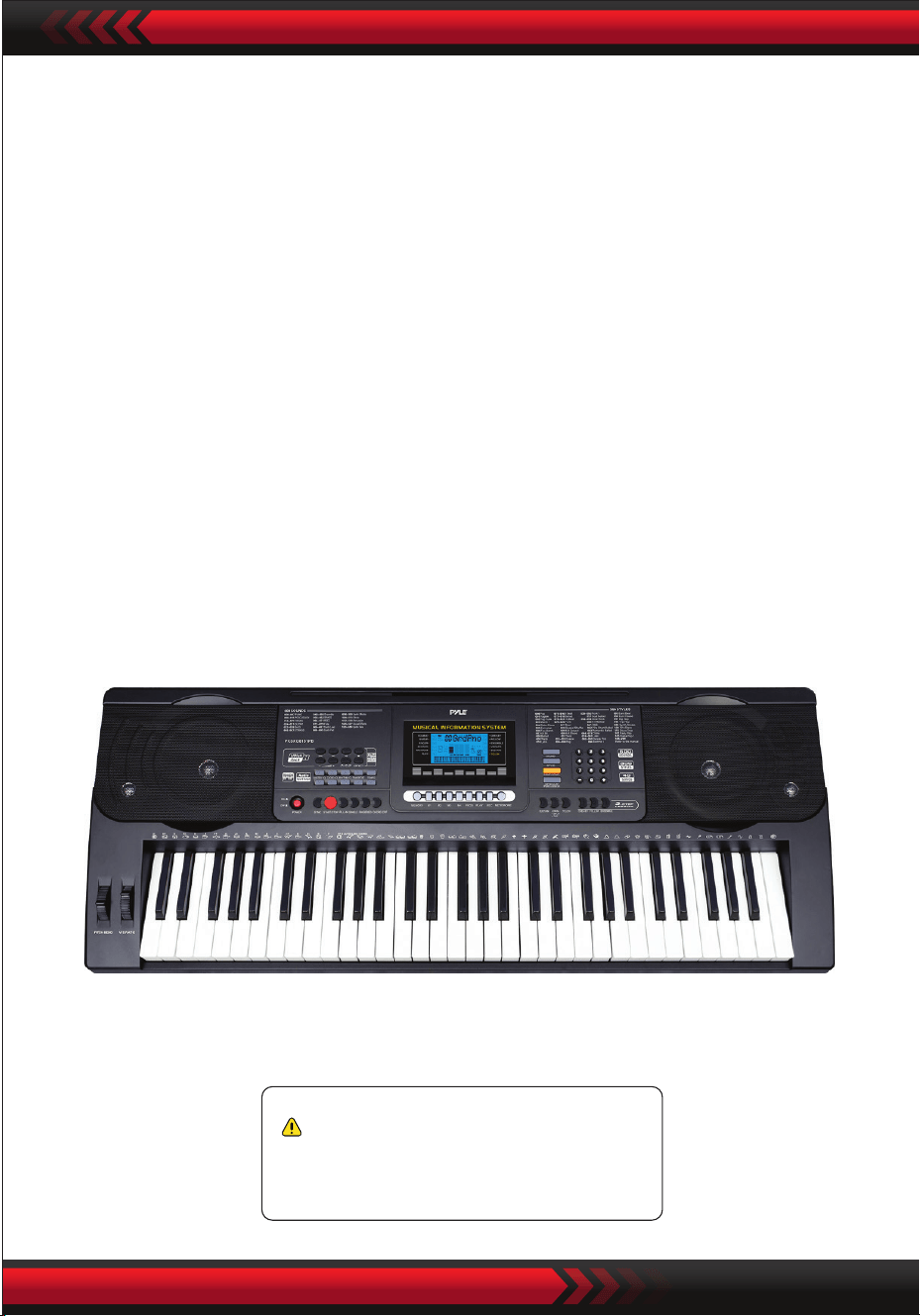
www.PyleUSA.com
21
Kalifornische Prop 65 Warnung
WARNUNG:
Dieses Produkt enthält BBT (Benzylbutylphthalat), das in Kalifornien
als krebserregend, geburtsschädigend und fortpflanzungsgefähr-
dend bekannt ist. Nicht verschlucken.
Für weitere Informationen besuchen Sie www.P65warnings.ca.gov
Technische Daten:
• 61 Tasten
• 600 Klänge / 300 Stile
• 40 Demo-Songs: Einer / Alle
• Audio Interface: Aux (3,5 mm) Klinkeneingang / Mikrofoneingang / USB-Eingang
• Maximaler Lautstärkepegel: bis zu 110 dB
• USB-Kabel / Netzkabel Länge: 3.9’ Füße. - (119cm)
• Baumaterial: Technisches ABS
• Stromversorgung: DC 12 V / AC-Adapter
• Abmessungen der Tastatur (B x L x H) :
36.6’’ x 11.97’’ x 3.7’’ -zoll - (93 x 30.4 x 9.3 cm)

Cyfrowy keyboard muzyczny do karaoke
PKBRD6151PB
Przenośny keyboard elektroniczny
z wodoodporną obudową (61 klawiszy),
taboretem i stojakiem na keyboard
INSTRUKCJA OBSŁUGI
POL
www.PyleUSA.com
2
Przechowuj niniejszą instrukcję w bezpiecznym miejscu i w zasięgu ręki, aby móc z niej
skorzystać w przyszłości.
Używaj dostarczonego zasilacza i natychmiast wymień go na nowy, jeśli jest uszkodzony.
Nie demontuj urządzenia ani nie modykuj jego wewnętrznych części. W przypadku usterki natychmi-
ast przerwij korzystanie z urządzenia i oddaj je do naprawy profesjonalnemu technikowi.
Przed podłączeniem urządzenia do innych urządzeń wyłącz wszystkie źródła zasilania.
Nie graj na instrumencie z maksymalną głośnością lub wysokim poziomem głośności przez zbyt długi
czas.
Trzymaj części instrumentu z dala od źródeł ciepła, ponieważ przegrzanie może spowodować uszko-
dzenie.
Zapobiegaj przedostawaniu się do wnętrza urządzenia płynów, kurzu, cząstek stałych i innych ciał
obcych, ponieważ mogą one spowodować korozję urządzenia lub zwarcie jego elementów.
Wyciągnij wtyczkę przed czyszczeniem urządzenia.
Nie wkładaj ani nie wyciągaj wtyczki mokrymi rękami.
Do czyszczenia urządzenia używaj suchej, miękkiej szmatki. Nie używaj farby, alkoholu ani innych
rozpuszczalników chemicznych, aby uniknąć uszkodzenia powierzchni.
Wyłącz zasilanie i wyjmij wtyczkę z gniazdka po zakończeniu gry lub gdy urządzenie nie jest używane
przez dłuższy czas.
Aby zmniejszyć ryzyko pożaru lub porażenia prądem, nie wystawiaj urządzenia na działanie deszczu
lub wilgoci. Urządzenie nie może być narażone na kapanie lub zachlapanie, a przedmioty wypełnione
płynami, takie jak wazony, nie mogą być umieszczane na urządzeniu.
Maksymalna temperatura pracy: 40°C/ 104°F
Jeśli jako urządzenie odłączające używany jest bezpośredni adapter, urządzenie odłączające musi być
łatwo dostępne.
Nie instaluj tego urządzenia w ograniczonej przestrzeni, takiej jak regał na książki lub podobne
urządzenie, i utrzymuj dobrą wentylację. Wentylacja nie może być utrudniona przez zakrywanie
otworów przedmiotami takimi jak gazety, obrusy, zasłony itp,
Ostrzeżenie: Nadmierne ciśnienie akustyczne emitowane przez słuchawki może spowodować utratę
słuchu.
Etykieta znajduje się na spodzie urządzenia.
Urządzenie nie może być narażone na kapanie lub zachlapanie, a przedmioty wypełnione płynami,
takie jak wazony, nie mogą być umieszczane na urządzeniu.
Jeśli bezpośredni adapter wtykowy jest używany jako urządzenie odłączające, urządzenie odłączające
musi być łatwe w obsłudze.
•
•
•
•
•
•
•
•
•
•
•
•
•
•
•
•
•
UWAGA!
PRZECZYTAJ UWAŻNIE PRZED KONTYNUOWANIEM
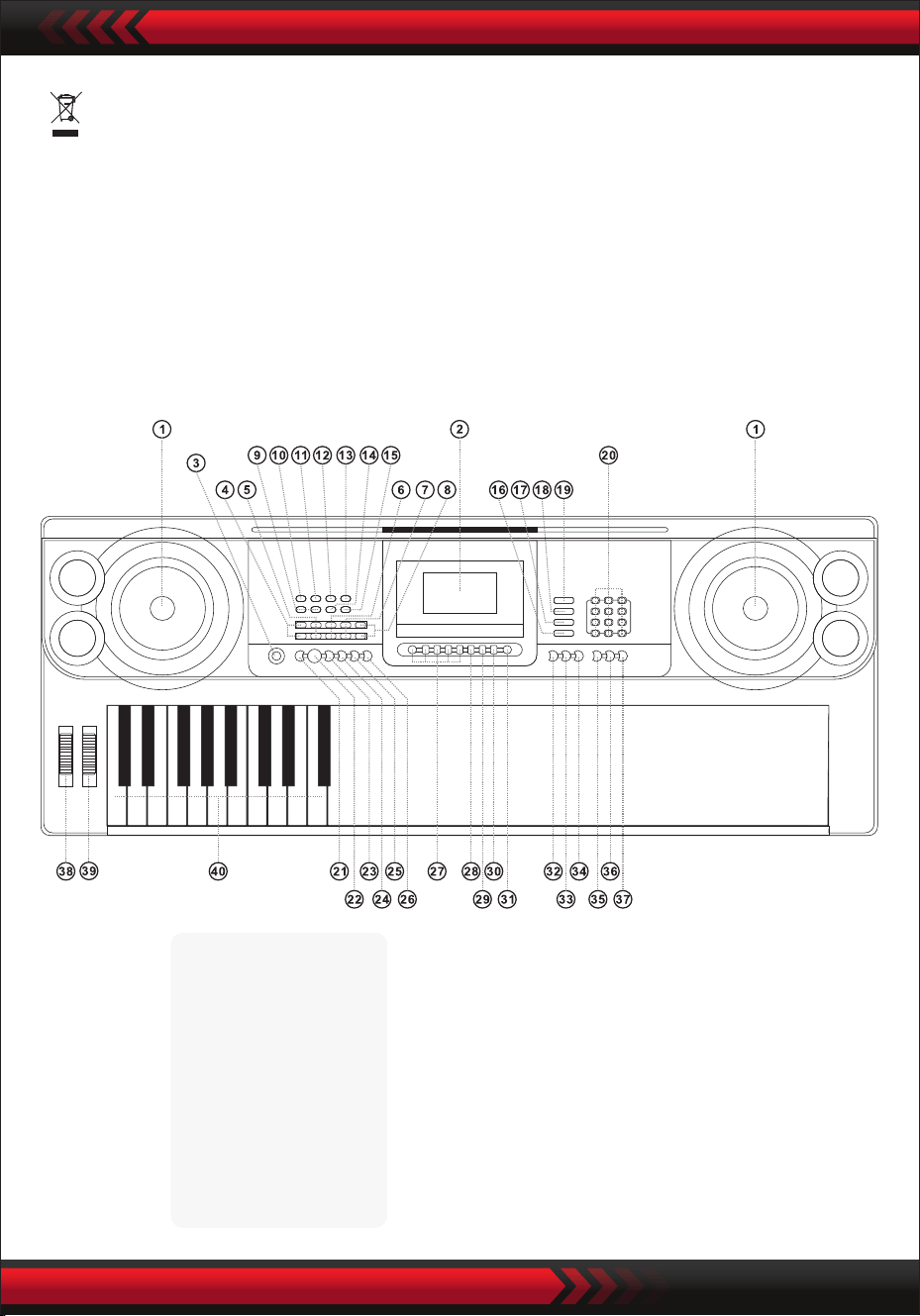
www.PyleUSA.com
3
•
I. Panel sterowania i porty rozszerzeń
PRZEDNI PANEL STEROWANIA
Ten znak oznacza, że tego produktu nie wolno wyrzucać razem z innymi
odpadami domowymi na terenie UE.
Aby uniknąć możliwych szkód dla środowiska lub zdrowia ludzkiego wynikających z
niekontrolowanej utylizacji odpadów. Niekontrolowane usuwanie odpadów, poddaj
je recyklingowi w sposób odpowiedzialny, aby promować zrównoważone ponowne
wykorzystanie zasobów materialnych. Aby zwrócić zużyte urządzenie, skorzystaj z
systemów zwrotu i zbiórki lub skontaktuj się ze sprzedawcą, u którego zakupiono
produkt.Produkt może zostać poddany recyklingowi w sposób bezpieczny dla
środowiska.
9 Regulacja głośności MP3
10 Poprzedni
11 Następny
12 Odtwarzanie/Pauza
13 Stop
14 Kolejność wstawiania/
Tryb odtwarzania losowego/
pojedynczego
15 Efekt dźwiękowy
Odtwarzacz muzyczny USB
1 Głośnik
2 Wyświetlacz LCD
3 Przełącznik
zasilania
4 Głośność główna
5 Głośność ścieżki
6 Głośność rytmu
7 Transpozycja
8 Tempo
16 Klawiatura perkusyjna
17 Utwór demonstracyjny
18 Styl
19 Dźwięk
20 Numery
21 Synchronizacja
22 Start/Stop
23 Wypełnienie
24 Pojedynczy
25 Palcowanie
26 Dezaktywowany
akord
27 Pamięć stanu
28 Program
29 Brak odtwarzania
30 Nagrywanie
31 Metronom
32 Podkład
34 Dotknij
35 Jeden przycisk
36 Śledź
37 Ensemble
38 PitchBend
39 Vibrato
40 Klawiatura akordów
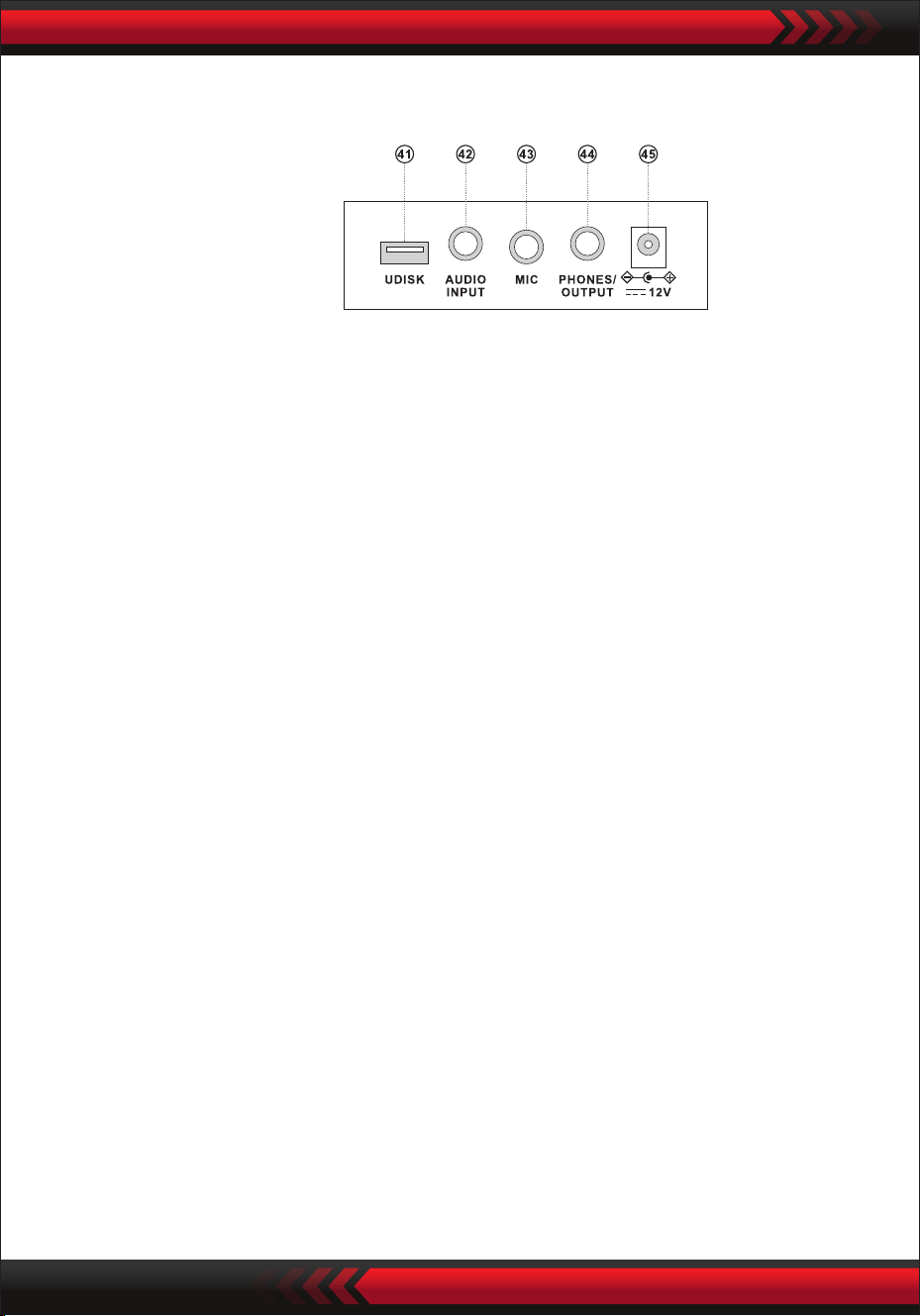
www.PyleUSA.com
4
PANEL TYLNY
WEJŚCIE AUDIO
Klawiatura elektroniczna posiada funkcję wejścia audio stereo, a sygnały audio z
telefonów komórkowych, odtwarzaczy MP3, komputerów itp. mogą być przesyłane
do klawiatury elektronicznej w celu odtwarzania.
Najpierw wyłącz zasilanie klawiatury elektronicznej, włóż jeden koniec kabla audio
do portu wyjściowego urządzenia audio, włóż drugi koniec do interfejsu AUDIO
INPUT z tyłu klawiatury elektronicznej, a następnie włącz zasilanie.
• Wyjście audio: Wyłącz zasilanie klawiatury elektronicznej i zewnętrznego sprzętu
audio, a następnie podłącz jeden koniec kabla audio do złącza PHONES/OUTPUT
wyjścia audio z tyłu klawiatury elektronicznej, a drugi koniec do złącza wejściowego
audio sprzętu audio.
• Złącze słuchawkowe: Podłącz wtyczkę słuchawek do złącza PHONES/OUTPUT
z tyłu klawiatury elektronicznej, a głośnik klawiatury elektronicznej zostanie
automatycznie odłączony i unikniesz przeszkadzania innym podczas gry.
Uwaga! Nie ustawiaj maksymalnej głośności przez dłuższy czas podczas korzysta-
nia ze słuchawek, aby uniknąć utraty słuchu.
WYJŚCIE AUDIO ZŁĄCZE SŁUCHAWKOWE
KORZYSTANIE Z ZASILACZA AC/DC
Zasilacz AC/DC musi być zasilaczem przeznaczonym dla urządzenia.
Podłącz jedną stronę do gniazda zasilania na tylnym panelu, a drugą do sieci
elektrycznej. (Zwróć uwagę, że napięcie wejściowe musi być takie samo jak napięcie
sieciowe.)
II. Przed użyciem
41 PORT USB DO ODTWARZANIA MUZYKI
(pendrive nie wchodzi w skład zestawu)
42 WEJŚCIE AUDIO
43 WEJŚCIE MIKROFONOWE
44 TELEFON/WYJŚCIE
45 WEJŚCIE DCUV
Naciśnij przycisk "Głośność główna " lub "Głośność główna ", aby zwiększyć
lub zmniejszyć głośność główną. Jeśli przyciski "Master Volume " i
"Master Volume " zostaną naciśnięte jednocześnie, głośność zostanie
zresetowana do wartości domyślnej.
Głośnością stylu i głośnością akordu można sterować jednocześnie z poziomu
głośności głównej.
www.PyleUSA.com
5
WYBÓR DŹWIĘKU
PERKUSJA KLAWISZOWA
PIOSENKI DEMO
GŁÓWNY REGULATOR GŁOŚNOŚCI
Po naciśnięciu przycisku [Power] przy włączonym podświetleniu, na wyświetlaczu
LCD pojawią się informacje o aktualnej barwie dźwięku, tempie itp.
III. Podstawowa metoda gry
Podłącz wtyczkę mikrofonu do gniazda mikrofonowego klawiatury i możesz
cieszyć się graniem i śpiewaniem.
WEJŚCIE MIKROFONOWE (brak w zestawie)
Klawiatura elektroniczna zawiera 600 dźwięków, od "000" do "599". Po włączeniu
zasilania funkcja wyboru dźwięku jest aktywowana automatycznie, a na ekranie
pojawia się "SOUND"; w przeciwnym razie funkcję wyboru dźwięku można akty-
wować, naciskając przycisk "SOUND". Domyślne ustawienie "000" odnosi się do
dźwięku fortepianu, inne dźwięki można wybrać, naciskając odpowiednie cyfry za
pomocą klawiszy numerycznych lub naciskając klawisze "+" lub "-".
Naciśnij przycisk "Keyboard Percussion" (Perkusja klawiatury), aby włączyć funkcję
perkusji klawiatury. Odpowiedni dźwięk perkusji będzie emitowany z każdego
klawisza podczas grania na klawiaturze. Naciśnij ponownie przycisk "Keyboard
Percussion", aby wyłączyć tę funkcję.
Klawiatura elektroniczna zawiera 40 ścieżek demonstracyjnych do nauki, od "000"
do "039". Po naciśnięciu przycisku "Demo Song" wszystkie utwory demo są
odtwarzane w kolejności.
During playback, another demo song can be selected by pressing the correspond-
ing number via number keys or pressing "+" or "-" and then the selected demo
song will be played cyclically.

www.PyleUSA.com
6
1. Uruchamianie stylu
Naciśnij przycisk [Start/Stop], aby rozpocząć styl akompaniamentu.
Jeśli styl nie został jeszcze uruchomiony, naciśnij przycisk "Syn", a metronom na
ekranie zacznie migać. Gdy zagrasz dowolny klawisz w obszarze akordów
(klawisz 1-19 od lewej), styl akompaniamentu rozpocznie się synchronicznie.
2. Wejście
W stanie stylu naciśnięcie przycisku [Fill in] powoduje automatyczne wypełnienie
utworu przerywnikowego.
3. Zatrzymanie
Naciśnięcie przycisku [Start/Stop] powoduje natychmiastowe zatrzymanie stylu
akompaniamentu.
IV. Styl automatyczny
WYBÓR STYLÓW
KONTROLA STYLU
METRONOMIA
Klawiatura elektroniczna zawiera 300 stylów, od "000" do "299". Podczas
uruchamiania jest on ustawiony na "000". Naciśnij przycisk "STYLE", aby aktywować
funkcję wyboru rytmu, a następnie na ekranie zostanie wyświetlony komunikat
"STYL". Inny styl można wybrać, naciskając przycisk "STYLE" lub naciskając
odpowiedni numer stylu na przyciskach numerycznych lub naciskając "+" lub "-".
Metronom zawiera cztery tempa, odpowiednio 1/4, 2/4, 3/4 i 4/4. Poprzez ciągłe
naciskanie przycisku "Metronom" można wybrać kolejno cztery tempa.
Wykonywanie dowolnego tempa można przerwać poprzez ponowne naciśnięcie
przycisku "Metronom".
Naciskając przycisk [Tempo ] / [Tempo ], możesz przyspieszyć lub spowolnić
utwór. Jednoczesne naciśnięcie obu przycisków powoduje przywrócenie
bieżącego tempa.
USTAWIENIE CZASU
Naciśnij przycisk "Style Volume " lub "Style Volume ", aby zwiększyć lub
zmniejszyć głośność stylu. Jednoczesne naciśnięcie obu przycisków umożliwia
zresetowanie głośności stylu do wartości domyślnej.
REGULACJA GŁOŚNOŚCI RYTMU
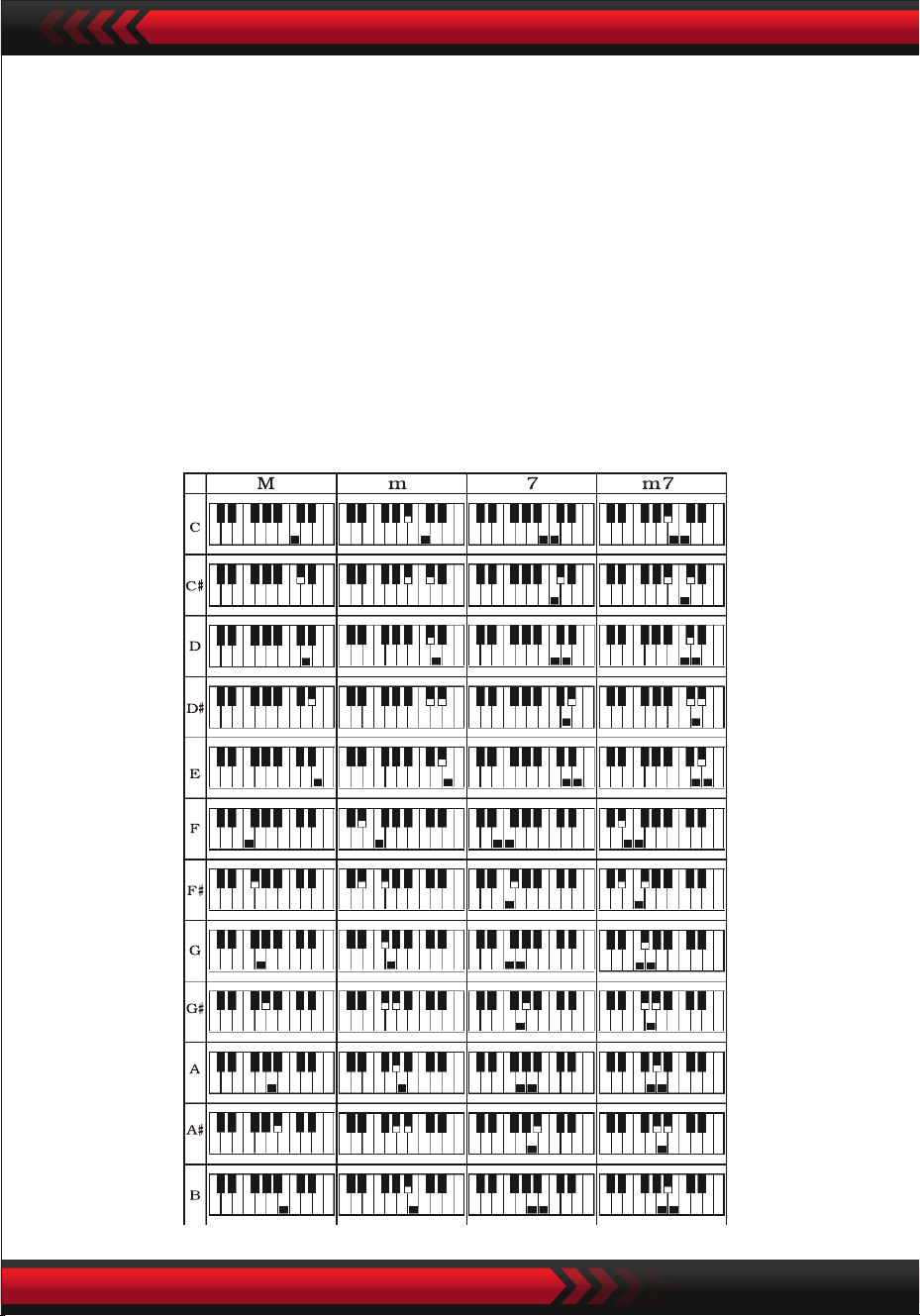
www.PyleUSA.com
7
V. Automatyczny akord basowy
AKORD NA JEDEN PALEC
Naciśnij przycisk "Single Finger Chord", aby włączyć funkcję akordu, a na ekranie
zostanie wyświetlony komunikat "Single". Po rozpoczęciu stylu automatyczny
akompaniament akordowy może być wykonywany w stree akordów (przycisk
1-19 od lewej) zgodnie z metodą palcowania akordów jednym palcem.
Jeśli styl nie został jeszcze uruchomiony, akompaniament akordowy można
wykonać ręcznie.
Naciśnij przycisk "Single Finger Chord" lub "Chord OFF", aby wyłączyć funkcję
akordów, a napis "Single" zniknie z ekranu.
Skale akordów na jeden palec
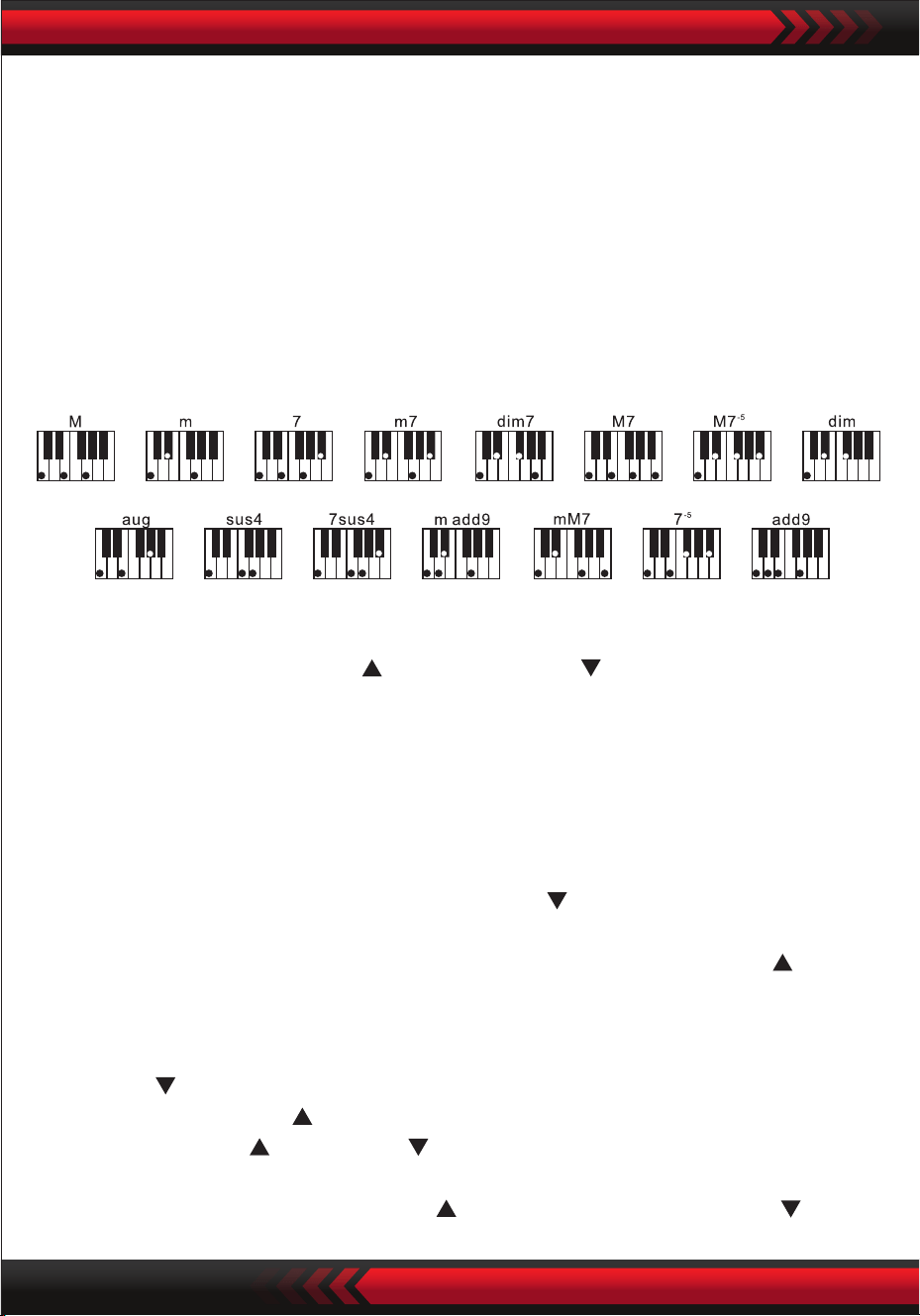
AKORD PALCAMI
FUNKCJA TRANSPOZYCJI
VI. Kontrola efektów
REGULACJA GŁOŚNOŚCI AKORDU
Naciśnij przycisk "Chord Volume " lub "Chord Volume ", aby zwiększyć lub
zmniejszyć głośność.Naciskając oba przyciski jednocześnie, możesz zresetować
głośność akordu do wartości domyślnej.
Skala akordów palcami
Naciśnij przycisk "Fingered Chord", aby włączyć funkcję akordu, a na ekranie zosta-
nie wyświetlony komunikat "Finger". Po uruchomieniu stylu automatyczny akompa-
niament akordowy może być wykonywany w stree akordów (przycisk 1-19 od lewej)
zgodnie z metodą palcowania akordów. Gdy styl nie został jeszcze uruchomiony,
akompaniament akordowy można wykonać ręcznie.
Naciśnij przycisk "Fingered Chord" lub "Chord OFF", aby wyłączyć funkcję akordów,
a wskaźnik "Finger" na ekranie zniknie.
www.PyleUSA.com
8
Funkcja transpozycji może pomóc Ci w odtwarzaniu muzyki innych melodii metodą
palcowania C. Po naciśnięciu przycisku "Transpose " dźwięk całej klawiatury
zostanie zmniejszony o pół tonu (sekunda molowa), a dźwięk klawiatury w tonacji C
zostanie przekształcony w dźwięk B. Po naciśnięciu przycisku "Transpose " dźwięk
całej klawiatury zwiększy się o pół tonu (sekunda molowa), a dźwięk klawiatury w
tonacji C zostanie przekształcony w dźwięk B. Dźwięk klawiatury w tonacji C
zostanie przekształcony w dźwięk #C lub bD.Po dwukrotnym naciśnięciu przycisku
‘’Transpose ’’ dźwięk C zostanie przekształcony w dźwięk bB.Pięciokrotne naciśnię-
cie przycisku "Transpose " spowoduje przekształcenie dźwięku C w dźwięk F. Gdy
przyciski "Transpose " i "Transpose " zostaną naciśnięte jednocześnie, ton
zostanie zresetowany do tonu C "00". Poziom można regulować w zakresie od "-6"
do "+6", naciskając przycisk "Transpose ". naciskając przycisk "Transpose ".

www.PyleUSA.com
9
WSPARCIE
Jeśli przycisk [Sustain] zostanie naciśnięty, a na wyświetlaczu pojawi się "SUS",
dźwięk naciśnięcia przycisków zostanie włączony. Naciśnij przycisk ponownie, aby
wyłączyć funkcję. Gdy "SUS" zniknie, funkcja zostanie wyłączona.
PODWÓJNE DŹWIĘKI I FUNKCJA PODZIAŁU KLAWIATURY
Naciśnij przycisk "Dual/Split/O", aby włączyć lub wyłączyć funkcję.
Funkcję podziału tonów klawiatury można włączyć lub wyłączyć.
FUNKCJA PODZIAŁU KLAWIATURY
Gdy funkcja "Keybord split" jest aktywna, w górnej części ekranu wyświetlany jest
komunikat "Split". 24 klawisze po lewej stronie klawiatury elektronicznej są oddziel-
ane od oryginalnej klawiatury, a wysokość dźwięku lewej strefy klawiatury jest
PODWÓJNY DŹWIĘK
Po włączeniu opcji "DUAL" na ekranie wyświetlany jest napis "double", a podczas
gry na klawiaturze elektronicznej można uzyskać nakładające się efekty dwóch
dźwięków.
Po aktywowaniu funkcji podwójnego dźwięku, dźwięk 1 i dźwięk 2 można
przełączać, naciskając przycisk "Sound", aby wybrać żądany dźwięk, a na ekranie
pojawi się odpowiednio "SOUND1" lub "SOUND2".
WIBRACJA
Gdy opcja "Vibrato" znajduje się w najniższym położeniu, funkcja vibrato jest
wyłączona. Gdy opcja "Vibrato" znajduje się w najwyższym położeniu, funkcja
vibrato jest włączona, a na ekranie wyświetlany jest komunikat "VIB". Za pomocą
funkcji vibrato można dodawać efekty vibrato do odtwarzanego dźwięku. Vibrato
można zwiększyć lub zmniejszyć, przesuwając "Vibrato" w górę lub w dół.
PITCH BEND
Funkcja pitch bend umożliwia równomierną zmianę wysokości dźwięków odtwar-
zanych przez klawiaturę.Wysokość dźwięku można zwiększyć, zwiększając wartość
pitch bend i zmniejszyć, zmniejszając wartość pitch bend. Po zwolnieniu zagięcie
wysokości dźwięku automatycznie powróci do środka, a wysokość dźwięku powróci
do wcześniej zdeniowanego stanu.

www.PyleUSA.com
10
i jest obniżany o oktawę, aby był identyczny z wysokością lewej strefy klawiatury.
Klawisz prawej strefy klawiatury może być wybrany zgodnie z wymaganiami, a
różne dźwięki mogą być odtwarzane z lewej i prawej strefy klawiatury. Po
ponownym naciśnięciu przycisku "Keyboard Split" na ekranie zostanie
wyświetlony komunikat "O", a funkcja podziału klawiatury zostanie wyłączona.
DOTYK
Naciśnij przycisk [Touch], aby włączyć lub wyłączyć funkcję dotykową. Domyślnym
ustawieniem podczas uruchamiania jest ON. Na ekranie wyświetlany jest komunikat
"Touch". Funkcja ta może pomóc wzbogacić ekspresję muzyczną i prawidłowo
odzwierciedlić siłę przyłożoną do każdej nuty. Im większa siła przyłożona podczas
odtwarzania, tym głośniejszy będzie dźwięk. Gdy funkcja ta jest wyłączona, ten sam
dźwięk może być odtwarzany niezależnie od siły użytej podczas odtwarzania.
NAGRYWANIE
Po naciśnięciu przycisku "Record" funkcja nagrywania jest aktywowana, na ekranie
wyświetlany jest komunikat "Record", a następnie odtwarzane nuty są zapisywane.
Nagrane nuty są automatycznie usuwane po ponownym wykonaniu nagrywania
lub wyłączeniu klawiatury elektronicznej.
ZATRZYMYWANIE NAGRYWANIA
Gdy pamięć zostanie zapełniona notatkami i zniknie komunikat "Record" na ekra-
nie, nagrywanie zostanie automatycznie zatrzymane. Podczas procesu nagrywania
można nacisnąć przycisk "Play", aby zatrzymać nagrywanie i odtworzyć nagrane
nuty.
Po ponownym naciśnięciu przycisku "Recording" funkcja nagrywania zostanie
wyłączona, a nagrane notatki zostaną automatycznie usunięte.
ODTWARZANIE NAGRANYCH NOTATEK
Nagrane notatki mogą być odtwarzane poprzez bezpośrednie naciśnięcie przycisku
"Play" podczas procesu nagrywania. Odtwarzanie nagranych notatek można
przerwać poprzez ponowne naciśnięcie przycisku "Play".
VII Funkcje nagrywania

www.PyleUSA.com
11
VIII. Styl programowani
IX. Funkcja zapamiętywania
STYL PROGRAMOWANIA
Po naciśnięciu przycisku "Program" aktywowana jest funkcja programowania stylu.
‘’Program’’jest wyświetlany na ekranie, a serię zaprogramowanych melodii można
odtworzyć, naciskając odpowiednie klawisze na klawiaturze.
* Zaprogramowany styl jest automatycznie usuwany po ponownym zapro-
gramowaniu lub wyłączeniu klawiatury elektronicznej.
PRZERWANIE PROGRAMOWANIA
Po zarejestrowaniu 32 dotknięć i zniknięciu komunikatu "Program" na ekranie
programowanie zostanie automatycznie zatrzymane.
Podczas procesu programowania można nacisnąć przycisk "Play", aby przerwać
programowanie i odtworzyć zaprogramowany styl. Po ponownym naciśnięciu przycis-
ku "Program" funkcja programowania zostanie wyłączona, a zaprogramowane dane
zostaną automatycznie usunięte.automatically.
REPRODUKCJA ZAPROGRAMOWANEGO STYLU
Podczas programowania zaprogramowany styl można odtworzyć, naciskając
bezpośrednio przycisk "Play". Odtwarzanie zaprogramowanego stylu można
przerwać, naciskając ponownie przycisk "Play".
Korzystając z funkcji pamięci, dźwięk, styl, tempo i inne parametry mogą być
zapisywane i ustawiane podczas odtwarzania. Klawiatura elektroniczna posiada
cztery gniazda pamięci, które można przywołać w dowolnym momencie podczas
odtwarzania.
PRZECHOWYWANIE ZAPAMIĘTANYCH UTWORÓW
Ustaw dźwięk, styl i tempo zgodnie z wymaganiami odtwarzania, a następnie
naciśnij przycisk "Status Memory" i jeden z przycisków "M1" do "M4", aby zapisać
bieżącą pracę.

www.PyleUSA.com
12
ZAPISANE UTWORY
Po naciśnięciu jednego z przycisków "M1" do "M4" podczas odtwarzania, zapisane
dane mogą zostać przywołane w celu zastąpienia bieżącego stanu.
Zapisane dane nie są chronione przed awarią zasilania. Gdy klawiatura elektron-
iczna zostanie ponownie włączona po awarii zasilania, zapisana zawartość zniknie.
Funkcja samouczenia się jest podzielona na trzy etapy, aby poprowadzić ucznia do
stopniowej nauki gry na klawiaturze elektronicznej. Uczeń musi najpierw ćwiczyć z
"One Key", aby zapoznać się z melodią i stylem utworu, następnie z "Follow", aby
poprawnie zagrać utwór, a następnie trzeci krok "Ensemble", aby swobodnie grać
razem z innymi, w końcu poprzez ćwiczenie zespołowe.
KROK 1: ONE KEY
Po naciśnięciu przycisku "One Key" aktywowana zostanie funkcja nauki za pomocą
jednego przycisku, a na ekranie wyświetlony zostanie komunikat "Step 1". Utwór do
nauki można wybrać, naciskając przycisk lub naciskając "+" lub "-". Nauka za pomocą
jednego klawisza jest stosowana przez cały czas trwania utworu bez żadnych
wymagań dotyczących intonacji i poprawności. Dopuszczalna jest nieprawidłowa
gra na klawiszach. W przypadku błędów klawiatura elektroniczna odtwarza praw-
idłowe nuty, ale kursor pokazuje na ekranie klawisz odpowiadający prawidłowej
nucie. Funkcję uczenia za pomocą jednego klawisza można wyłączyć, naciskając
ponownie przycisk "One Key".
KROK 2: FOLLOW
Po naciśnięciu przycisku "Follow" funkcja nauki Follow zostanie aktywowana, a na
ekranie zostanie wyświetlony komunikat "Step 2".
Możesz wybrać utwór do nauki, naciskając przycisk numeryczny lub naciskając "+" lub
"-". W tym trybie możesz odtwarzać utwór demonstracyjny, a kursor na ekranie
poprowadzi Cię do jego prawidłowego odtworzenia.
Jeśli podczas odtwarzania zostanie popełniony błąd, melodia utworu zostanie
przerwana do momentu skorygowania błędu.
Funkcję nauki "Follow" można wyłączyć, naciskając ponownie przycisk "Follow".
X. Funkcja samouczenia
XI. Odtwarzanie muzyki przez USB
Po włożeniu USB klawiatura elektroniczna obsługuje maksymalną pamięć 32 G i
najpopularniejsze pliki w formacie MP3.
Naciśnij "MP3 ", aby wyregulować głośność.
Naciśnij aby odtworzyć poprzedni, aby odtworzyć następny, aby
odtworzyć/pauzować, aby zatrzymać i , aby uzyskać dostęp do trybów
sortowania i odtwarzania losowego.
Naciśnij przycisk [Sound eect], aby dostosować tryby efektów dźwiękowych.
www.PyleUSA.com
13
KROK 3: ESSEMBLE
Po naciśnięciu przycisku "Ensemble" funkcja nauki Ensemble zostanie aktywowana,
a na ekranie zostanie wyświetlony komunikat "Step 3". Możesz wybrać utwór do
nauki, naciskając przycisk lub naciskając "+" lub "-".
Uczenie zespołowe jest stosowane w celu poprawnego i pełnego nauczenia się
czasu trwania i nut utworu. Klawiatura elektroniczna chroni nuty kluczowe dla
zespołu.
Musisz grać prawidłowe nuty w czasie trwania utworu.
Jeśli zaczniesz grać w ciągu 3 sekund, klawiatura elektroniczna automatycznie
odtworzy kluczową nutę, a prawidłowa nuta i tempo zostaną wyświetlone na
ekranie.
Funkcję uczenia zespołu można wyłączyć, naciskając ponownie przycisk "Ensemble".
Zawartość opakowania:
• Cyfrowy keyboard muzyczny do karaoke
• Statyw muzyczny
• Adapter
• Wtyczka zasilania
• Podstawka pod keyboard
• Stołek do keyboardu
• Wodoodporna torba
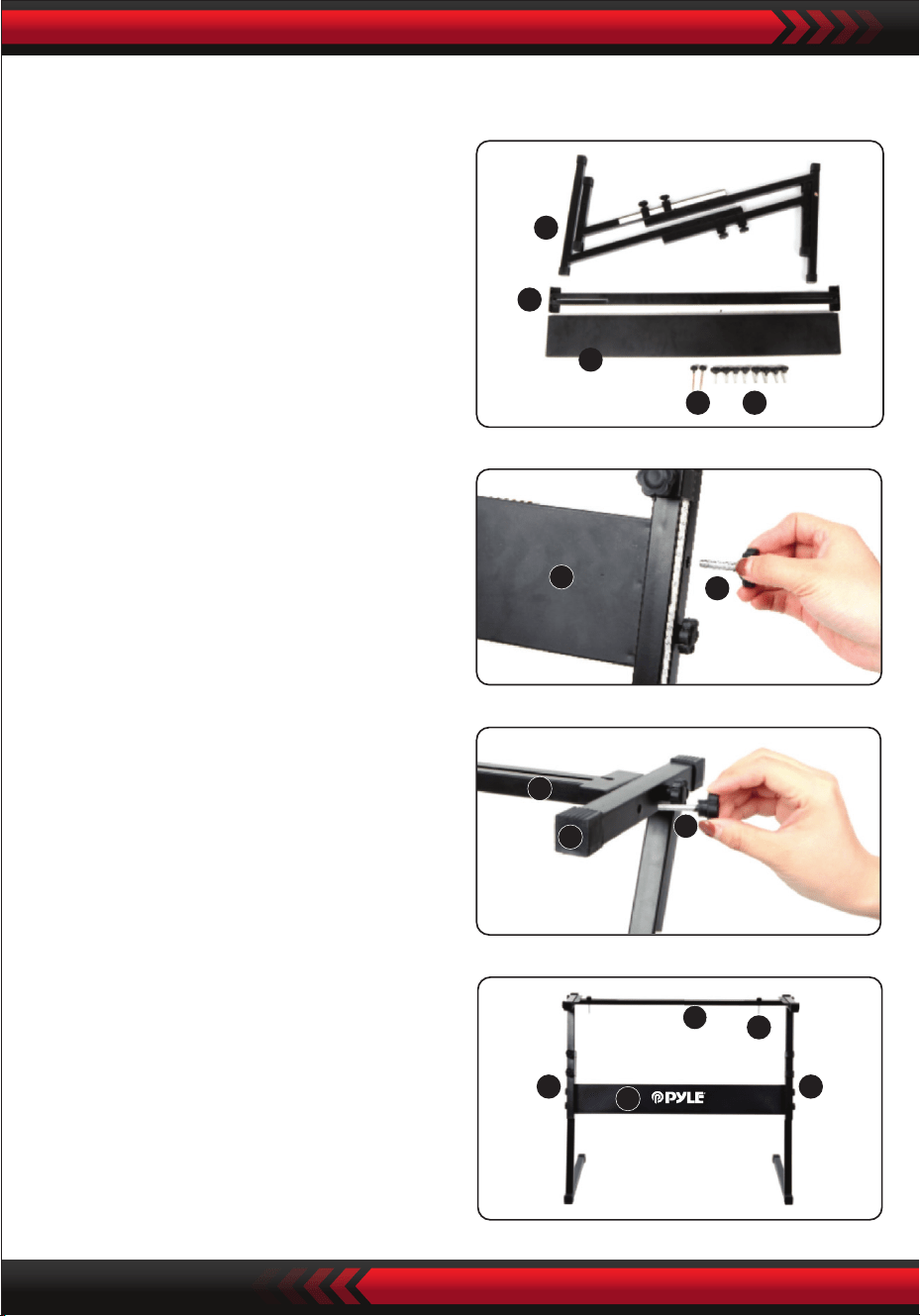
www.PyleUSA.com
14
5
4
3
1 2
3
2
4
5
2
5 5
3
4
1
3. Umieść śrubę nr 2 i płytkę podporową
nr 4 na wsporniku nr 5 i dokręć je.
Montaż uchwytu klawiatury
2. Po drugie, weź śrubę nr 2 i płytkę
podporową nr 3, przymocuj je do
dwóch wsporników nr 5 i dokręć je
oddzielnie.
4. Instalacja jest zakończona, przykręć
śrubę nr 1 dłużej, aby przymocować
klawiaturę do wspornika.
1. Przygotuj wszystkie części do
montażu.

www.PyleUSA.com
15
Dodatki
000 Akustyczny fortepian
001 Jasny fortepian akustyczny
002 Fortepian elektryczny
003 Fortepian Honky-tonk
004 Pianino Rhodes
005 Fortepian z chórem
006 Klawesyn 1
007 Klawikord
008 Celesta 1
009 Glockenspie 1
010 Pozytywka 1
011 Wibrafon 1
012 Marimba 1
013 Ksylofon 1
014 Dzwonek rurowy 1
015 Cymbały 1
016 Organy dyszlowe
017 Organy perkusyjne
018 Organy rockowe 1
019 Organy kościelne 1
020 Organy stroikowe 1
021 Akordeon 1
022 Harmonijka ustna 1
023 Akordeon tangowy
024 Gitara akustyczna (nylonowa)
025 Gitara akustyczna (stalowa)
026 Gitara elektryczna (jazz)
027 Gitara elektryczna (czysta)
028 Gitara elektryczna (wyciszona)
029 Gitara przesterowana
030 Gitara przesterowana
031 Gitara harmoniczna
032 Bas akustyczny 1
033 Bas elektryczny (palcowy)
Dodatek
034 Gitara basowa elektryczna
(chwyt)
035 Fretless Bass 1
036 Slap Bass 1
037 Slap Bass 2
038 Synth Bass 1
039 Synth Bass 2
040 Skrzypce 1
041 Altówka 1
042 Wiolonczela 1
043 Kontrabas 1
044 Struny tremolo 1
045 Struny pizzicato 1
046 Harfa orkiestrowa
047 Timpani
048 Zespół smyczkowy 1
049 Zespół smyczkowy 2
050 Synth Strings 1
051 Synth Strings 2
052 Chór Aahs 1
053 Voice Oohs
054 Synth Voice
055 Uderzenie orkiestry
056 Trąbka 1
057 Puzon 1
058 Tubal
059 Wyciszona trąbka 1
060 French Hom 1
061 Sekcja dęta 1
062 Synth Brass 1
063 Synth Brass 2
064 Saksofon sopranowy 1
065 Saksofon altowy 1
066 Saksofon tenorowy 1
067 Saksofon barytonowy 1
068 Obój 1
069 Róg angielski 1
070 Fagot 1
071 Klarnet 1
072 Piccolo 1
073 Flauto 1
074 Rejestrator 1
075 Flet poprzeczny 1
076 Flet butelkowy 1
077 Shakuhachi 1
078 Gwizdek 1
079 Okaryna 1
080 Ołów 1 (kwadratowy)
081 Ołów 2 (piłokształtny)
082 Ołów 3 (ołów kalliope)
083 Ołów 4 (chi lead)
084 Ołów 5 (charang)
085 Ołów 6 (głos)
086 Lead 7 (kwinta)
087 Lead 8 (bass+lead)
088 Pad 1 (new age)
089 Pad 2 (ciepły)
090 Pad 3 (polysynth)
091 Pad 4 (chór)
092 Pad 5 (arco)
093 Pad 6 (metaliczny)
094 Pad 7 (Balo)
095 Pad 8 (Sweep)
096 FX 1 (deszcz)
097 FX 2 (ścieżka dźwiękowa)
098 FX 3 (kryształ)
099 FX 4 (atmosfera)
100 FX 5 (jasność)
101 FX 6 (sprite'y)
102 FX7 (echo)
103 FX 8 (science ction)
104 Sitar
105 Banjo
106 Shamisen
107 Koto
108 Kruimba
109 Dudy
110 Wiolonczela
111 Shanai
112 Jingle Bell
113 Agogo
114 Bębny stalowe
115 Bęben drewniany
116 Bęben Talko
117 MelodicTom
118 Bęben syntetyczny
119 Odwrócony talerz
120 Szum klucza gitarowego
121 Szum oddechu
122 Plaża
123 Ćwierkanie ptaków
124 Dzwonek telefonu
125 Helikopter
126 Oklaski
127 Wystrzał z pistoletu
128 Fortepian stereo
129 Wspaniały fortepian stereo
130 Fortepian
131 Fortepian klasyczny
132 Pianino rockowe
133 Słodki fortepian stereo
134 Genialny fortepian
135 Nowoczesne pianino

www.PyleUSA.com
16
Dźwięki
136 La Piano
137 Dance Piano
138 Fortepian smyczkowy
139 Pianino smyczkowe
140 Piano Pad
141 Pianino syntezatorowe
142 Pianino chóralne
143 Honky-Tonk
144 Fortepian 2 oktawy
145 Pianino 1 oktawa
146 Eiec.Grand Piano
147 E.Grand 80
148 Modern E.G.Piano
149 Klawesyn 2
150 Klawesyn 3
151 Para klawesynów
152 Klawesyn i smyczki
153 Fortepian elektryczny 1
154 Elec.Piano 2
155 Fm Elec.Floor 1
156 Fm Elec.Piano 2
157 60's Elec.Piano 1
158 60's Elec.Piano 2
159 Dyno Elec.Piano 1
160 Dyno Elec.Piano 2
161 Mellow E.Piano
162 Pop Elec.Piano
163 Chór 1
164 Chór 2
165 Tremolo E.Piano
166 Modern E.Piano
167 Soft E.Piano
168 Struny i fortepian 1
169 Smyczki i fortepian 2
170 Struny i fortepian 1 Sint.
171 Struny i fortepian 2 Sint
172 Pianino elektryczne Pad 1
173 Pianino elektryczne Pad 2
174 Czysty fortepian elektryczny
175 Klawesyn i fortepian
176 Klawesyn 1
177 Klawesyn 2
178 Słodki klawesyn
179 Klawesyn melodyczny
180 Sekwencje klawesynowe
181 Klawesyn i ster
182 Chór klawesynowy
183 Wibrafon 2
184 Wibrafon 3
185 Wibrafon miękki
186 Wibrafon chóralny
187 Marimba 2
188 Marimba miękka
189 Celesta 2
190 Celesta jasna
191 Glockenspiel 2
192 Glockenspiel Pad 1
193 Pozytywka 2
194 Pozytywka 3
195 Ksylofon 2
196 Dzwonki rurowe 2
197 Cymbały 2
198 Organy hełmowe 1
199 Organy hełmowe 2
200 Organy sterowe 3
201 Ster organowy 4
202 Ster organowy 5
203 Organy perkusyjne 1
204 Organy perkusyjne 2
205 Organy perkusyjne 3
206 Organy elektryczne 1
207 Organy 2
208 Organy elektryczne 3
209 Organy jazzowe 1
210 Organy jazzowe 2
211 Organy jazzowe 3
212 Organy rockowe 2
213 Organy rockowe 3
214 Organy rockowe 4
215 Organy lat 70-tych
216 Pełny dyszel
217 Organy obrotowe 1
218 Organy obrotowe 2
219 Organy obrotowe 3
220 Organy tremolo
221 Organy klikające
222 Organ 8
223 Organ Pad 1
224 Pad organowy 2
225 Organy sekwencyjne
226 Organy kościelne 2
227 Organy kościelne 3
228 Organy kaplicy
229 Organy piszczałkowe 1
230 Organy piszczałkowe 2
231 Organy teatralne
232 Organy i klawesyn
233 Organy piszczałkowe
234 Organy piszczałkowe 2
235 Akordeon 2
236 Akordeon 3
237 Akordeon 4
238 Akordeon 5
239 Akordeon oktawowy
240 Bandoneon 1
241 Bandoneon 2
242 Bandoneon oktawowy
243 Bandoneon solo
244 Bandoneon i skrzypce
245 Harmonijka 2
246 Harmonijka 3
247 Harmonijka 4
248 Instrument nylonowy 1
249 Gitara nylonowa strunowa 2
250 Gitara ze strunami stalowymi 1
251 Gitara ze strunami stalowymi 2
252 Gitara ze strunami stalowymi 3
253 Gitara 12-strunowa
319 Fingered Bass M
320 Trance Bass M
321 Syntezator basowy M
322 Syntezator basowy kwadratowy M
323 Violin 2
324 Wolne skrzypce
325 Altówka 2
326 Wiolonczela 2
327 Wolna wiolonczela
328 Kontrabas 2
329 Sekcja skrzypiec
330 Sekcja wiolonczel
331 Skrzypce i wiolonczela
332 Kwartet smyczkowy
333 Smyczki pizzicato 2
334 Ósemka pizzicato
335 Harfa 1
336 Harfa 2
337 Harfa chóralna
338 Struny
339 Zespół smyczkowy 3
340 Zespół smyczkowy 4
341 Zespół smyczkowy 5
342 Slow Strings 1
343 Slow Strings 2
344 Szerokie smyczki
345 Chamber 1
346 Kamera 2
347 Struny oktawowe 1
348 Struny oktawowe 2
349 Struny Sfz
350 Struny tremolo 2
351 Harfa i smyczki
352 Flet i smyczki
353 Struny orkiestrowe
354 Struny syntetyczne 1
355 Struny syntetyczne 2
356 Syntezator 3
357 Syntezatory z lat 70.
358 Syntezatory z lat 70-tych 2
359 Syntezatory z lat 80-tych 1
360 Syntezatory z lat 80-tych 2
361 Szybka synteza
362 Wolne syntezatory
363 Śpiew oktawy Syneh 1
364 Śpiew oktawy Syneh 2
365 Chór Aahs 2
366 Chóry 1
367 Chóry 2
368 Struny chóru
369 Struny głosowe
370 Chór
371 Chór powolny
372 Zespół chóralny 1
373 Zespół chóralny 2
374 Doo Voice
375 Uuh Voice
376 Głos syntetyczny 1
377 Głos syntetyczny 2
378 Głos syntetyczny 3
379 Voice Ensemble 1
380 Voice Ensemble 2
381 Voice Ensemble 3
382 Syntetyzowany głos Pad
383 Syntetyzowany głos chóru
254 Gitara stalowa i instrument szumowy 1
255 Gitara stalowa i instrumentalny hałas 2
256 Gitara stalowa i harmonia
257 Gitara stalowa i chóry
258 Gitara jazzowa 1
259 Gitara jazzowa 2
260 Oktawa gitary jazzowej
261 Gitara czysta 1
262 Gitara czysta 2
263 Gitara czysta 3
264 Czysta gitara 4
265 Czysta gitara i podkład wokalny
266 Wyciszona gitara 1
267 Wyciszona gitara 2
268 Gitara elektryczna crunch
269 Gitara przesterowana 1
270 Gitara przesterowana 2
271 Distortion Guitar 1
272 Distortion Guitar 2
273 Distortion Guitar 3
274 Gitara z przesterem 4
275 Gitara Powerful
276 Gitara rytmiczna
277 Gitara ze sprzężeniem zwrotnym
278 Zniekształcona gitara i bas
279 Gitara stalowa i hałas instrumentalny M 1
280 Gitara stalowa i hałas instrumentalny M 2
281 Czysta gitara M
282 Gitara elektryczna Crunch M 1
283 Gitara elektryczna Crunch M 2
284 Distortion Guitar M
285 Akustyczna gitara basowa 2
286 Akustyczna gitara basowa 3
287 Ride bass
288 Fingled bass 1
289 Fingled bass 2
290 Fingled bass 3
291 Fingling bass 4
292 Rytmiczny bas z palcami
293 Bas łagodny palcowany
294 Fretted bass 1
295 Fretted bass 2
296 Fretted bass 3
297 Rytmiczny bas bezprogowy
298 Fretless bass 2
299 Kontrabas bezprogowy 3
300 Slap Bass 1
301 Slap Bass 2
302 Double String Bass
303 Syntezator basowy 1
304 Syntezator basowy 2
305 Syntezator basowy 3
306 Syntezator basowy 4
307 Syntezator basowy Saw
308 Syntezowany bas Souare
309 Cyfrowy bas rockowy
310 Trance Bass
311 Bas sinusoidalny
312 Bass & Kick
313 Vocoder Bass
314 Soul Synth Bass
315 Klawesyn i bas
316 Organy i bas
317 Bass fingered M 1
318 Fingered Bass M 2

Styl
www.PyleUSA.com
17
384 Orchesyra Hit 1
385 Orchesyra Hit 2
386 Orchesyra Hit 3
387 Orchesyra Hit 4
388 Trąbka 2
389 Trąbka 3
390 Trąbka 4
391 Trąbka 2
392 Velo.Trumpet
393 Trąbka Sfz
394 Wyciszona trąbka 3
395 Puzon 2
396 Puzon 3
397 Puzon łagodny
398 Puzon Velo
399 Sekcja puzonu
400 Puzon jazzowy
401 Trąbka i puzon
402 Tuba 2
403 Tuba 3
404 Róg francuski 2
405 Solo waltorni
406 Sekcja waltorni
407 Róg francuski oktawowy
408 Orkiestra rogów
409 Stereo Brass
410 Dęte
411 Sekcja dęta 2
412 Sekcja instrumentów dętych blaszanych 3
413 Mosiądz Sekcja 4
414 Mosiądz miękki
415 Mosiądz twardy
416 Dęte Sfz
417 Dęte blaszane i smyczkowe
418 Dęte i saksofon
419 Synthetic Brass 3
420 Syntetyczny mosiądz 4
421 Dęte syntetyczne 5
422 Dęte syntetyczne 6
423 Syntetyczny mosiądz ciepły
424 Syntetyczny mosiądz 80s
425 Syntezator analogowy 1
426 Syntezator analogowy 2
427 Brass Trance
428 Syntezator padów
429 Syntezator oktawowy
430 Syntezator Sfz
431 Saksofon altowy 2
432 Alto Sax 3
433 Oddychający saksofon altowy1
434 Oddychający saksofon altowy2
435 Saksofon tenorowy 2
436 Saksofon tenorowy 3
437 Saksofon tenorowy 1 z oddechem
438 Saksofon tenorowy 2 z oddechem
439 Saksofon sopranowy 2
440 Saksofon sopranowy 3
441 Sax respirato
442 Saksofon barytonowy 2
443 Saksofon barytonowy 3
444 Sax A.soft
445 Sax A.hard
446 Solo A.Sax
447 Sax T.soft
448 Tylko T.Sax
449 T.Saxys
450 A.Saxys
451 Sekcja Sax
452 Sekcja Sax Sfz
453 Klarnet 2
454 Velo.Clarinet
455 Klarnet basowy
456 Klarnet jazzowy
457 Obój 2
458 Obój solista
459 Róg angielski 2
460 Fagot 2
461 Flet 2
462 Flet 3
463 Flet jazzowy
464 Flet czysty
465 Magnetofon
466 Piccolo 2
467 Piccolo 3
468 Sekcja stroików 1
469 Sekcja stroików 2
470 Flet i obój
471 Rejestrator 2
472 Rejestrator 3
473 Flet poprzeczny 2
474 Flet poprzeczny 3
475 Flet butelkowy 2
476 Gwizdek 2
477 Gwizdek gęsi 2
478 Shakuhachi 2
479 Ołów kwadratowy 1
480 Ołów kwadratowy 2
481 Ołów kwadratowy 3
482 Ołów kwadratowy 4
483 Piła 1
484 Piła 2
485 Piła ołowiowa 3
486 Przewód piły pastylkowej
487 Przewód kwadratowy impulsowy
488 Piła sekwencyjna 1
489 Piła sekwencyjna 2
490 Ołów sinusoidalny
491 Ołów sinusoidalny
492 Przewód sinusoidalny
493 Ss Lead
494 Powolny przebieg kwadratowy
495 Ołów wolnokwadratowy
496 Sekwencja kwadratowa
497 Impuls sekwencyjny 1
498 Impuls sekwencyjny 2
499 Powolna wyrzynarka
500 Impuls piły
501 Powolny impuls piły
502 Lead Trance
503 Callope 1
504 Callope 2
505 Lead Vent
506 Synteza wentylacji
507 Czysty ołów
508 Przewód rurowy
509 Przewód sekwencji
510 Chiff Lead
511 Drop Lead
512 Ołów Ep
513 Ołów pozycji 1
514 Lead Item 2
515 Voice 1
516 Lead Vox 2
517 Lead Distortion
518 Charang
519 Oktawa Charang
520 Lead Pluck 1
521 Lead Pluck 2
522 Gt Synthesiser Lead
523 Ołów kościelny
524 Ołów dwugłosowy
525 Prowadzenie chóru głosowego
526 Ep i Voice Lead
527 Syntezator głosu
528 Piąty głos
529 Piąty głos
530 Piąty głos kwadratowy
531 Czwarty Lead
532 Sekwencja siódma
533 Sekwencja piąta
534 Bass+Lead
535 Synth-Bass+Lead
536 Synth Bass+Lead
537 Reed Lead
538 Key Lead
539 Fantazja 1
540 Fantasia 2
541 New Age
542 Pad New Age
543 Ciepły wokal
544 Gruby pad
545 Ciepły pad
546 Sinus Pad
547 Miękki pad
548 Klakson
549 Pad starej taśmy
550 Polisynteza 1
551 Polisynteza 2
552 Podkładka polisyntetyczna 1
553 Podkładka polisyntetyczna 2
554 Piła uniwersalna
555 Chór kosmiczny
556 Niebo
557 Space Pad Strings
558 Chór Chiff
559 Star Voice
560 Kwadratowy pad
561 Pad łukowy
562 Podkładka szklana
563 Podkładka pod butelkę
564 Podkładka z zębami
565 Podkładka etniczna
566 Podkładka z miękkiego metalu
567 Podkładka Hard Metal
568 Pad Chorus
569 Pad Halo 1
570 Pad Halo 2
571 Pad chóru organowego
572 Chór Sweep
573 Pad Sweep
574 Clavi Pad 2
575 Raindrop 1
576 Raindrop 2
577 Wooden Pad
578 Space Voice
579 Ścieżka dźwiękowa 1
580 Ścieżka dźwiękowa 2
581 Rave
582 Miękki kryształ
583 Kryształ
584 Dzwonek świąteczny
585 Glockenspiel sound
586 Dzwonek wibrafonu
587 Dzwonek chóralny
588 Synth-Nakket
589 Celesta Pad
590 Atmosphere
591 Nylon Gt & Ep
592 Steel Pad
593 Podkładka Luminous Bell
594 Jasność 1
595 Jasność 2
596 Leprechaun
597 Głos echa
598 Echo Pad
599 Echo drop

www.PyleUSA.com
18
Styl
000 Pop
001 Ragtim
002 Pop Funk
003 March 1
004 Retro Disco
005 Easy Pop
006 Fox March
007 48 Bit
008 Ballada
009 Walc
010 Latin
011 8 Beat Pop 1
012 8 Beat Pop 2
013 8 Beat Uptempo
014 8 Beat Standard
015 8 Beat Medium
016 8 Beat Ballad
017 Epic Ballad
018 Ballada z fortepianem
019 16 Beat Pop 1
020 16 Beat Shuffle 1
021 16 Beat Shuffle 2
022 16 Beat Ballad 1
023 16 Beat Ballad 2
024 16 Beat Ballad 3
025 Funk 1
026 Funk 2
027 Anima
028 Gospel Shuffle
029 6-8 Gospel
030 4-4 Blues
031 Twist
032 Fusion 1
033 Funky Fusion 1
034 50s Pop
035 Cool Pop
036 Groovy Pop
037 Vintage 60s pop
038 80s Pop
039 Folk Rock 1
040 Pop Rock 1
041 Pop Rock 2
042 8 Beat Rock Balld
043 16 Beat Rock Bld
044 Hard Rock 1
045 Rock Shuffle 1
046 6-8 Hard Rock
047 US-Rock
048 16 Beat Rock
049 Rock 1
050 Rock 2
051 60s Rock
052 Standardowy rock
053 Brit Rock Pop
054 60s vintage rock
055 Rock z list przebojów
056 Pop Rock z lat 60
057 Soul Ballad
058 Slow Rock 1
059 Slow Rock 2
060 6-8 Ballada
061 R&B
062 Ballada z list przebojów lat 70
063 Romantyczna ballada
064 China 1
065 China 2
066 China 3
067 China 4
068 Chiny 5
069 Chiny 6
070 Chiny 7
071 Chiny 8
072 Chiny 9
073 Chiny 10
074 Bossa Nova 1
075 Bossa Nova 2
076 Bossa Nova 3
077 Salsa
078 Samba 1
079 Mambo 1
080 Beguine
081 Merengue
082 Bolero Lento
083 Espagnole
084 Cajun
085 Reggae 12 Beat 1
086 Pop Reggae 1
087 Pop Mambo
088 Latin Pop Party
089 New Age 1
090 New Age 2
091 Bluse Mambo
092 Dance Pop 1
093 Dance Pop 2
094 Techno 1
095 Euro Beat
096 Euro House
097 Hip Hop
098 Trip Hop
099 Synth Boogie
100 70's Disco
101 Disco Trop
102 Party Pop
103 Polka Pop 1
104 Boogie
105 Swing
106 Big Band Swing
107 Big Band Balld
108 Kwartet jazzowy
109 Dixieland
110 CoolJazz
111 Ballada jazzowa
112 BBQ uickstep
113 Bluegrass 1
114 Bluegrass 2
115 Country 2-4
116 8 Beat Country
117 Country Rock
118 Cwby Boogie
119 Ballata country
120 Country Shuffle
121 Valzer country
122 Valzer Jazz
123 HullyGully
124 02-mar
125 03-mar
126 6-8 marzo
127 Polka
128 PopWaltz
129 Cha Cha Cha
130 Rhumba
131 Pasodoble
132 TangoCont
133 Foxtrot 1
134 Jive 1
135 Walc północny
136 Walc niemiecki
137 Walc wiedeński
138 Walc Musette
139 Rock'n Roll 1
140 Rock'n Roll 2
141 Prosty rock
142 Jazz Rock 1
143 Fast Gospe
144 Folk Rock 2
145 Rock Billy
146 Rock Boogie
147 Rock Cha Cha
148 Classic Rock 1
149 Rock Shuffle 2
150 Rock Pop
151 Skiffle
152 Funk Pop Rock
153 Rock współczesny
154 Rock akustyczny
155 Rock lat 80.
156 LA Shuffle
157 Jive 2
158 Samba 2
159 Samba 3
160 Schlager Rock 1
161 Schlager rock 2
162 Carnevale
163 Organo Samba
164 Reel
165 Foxtrot 2
166 Foxtrot 3
167 Club Pop
168 16 Beat Pop 2
169 8 Beat Pop 3
170 8 Beat Soul 1
171 8 Beat Rock
172 Rap Pop
173 Soul lat sześćdziesiątych
174 Soul lat 70
175 Funk Shuffl
176 Fusion Shuffl
177 Classic 8 Beat
178 Vintage Gtr Pop
179 Schlager Italy
180 8 Beat Soft
181 8 Beat Heat
182 8 Beat Soul 2
183 Ballad Guitar
184 8 Beat Pop 4
185 Polka Pop 2
186 Polka Pop 3
187 16Beat 1
188 16Beat 2
189 16Beat 3
190 Pop Ballad 1
191 Pop Ballad 2
192 Funky Pop
193 Hip Hop Pop
194 Soul Shuffle
195 Slow Soul
196 8 Beat Adria
197 Klasyczny fortepian
198 Unplugged
199 Pop Ballad 3
200 New Age Pop
201 8 Modern Beat
202 Country Ballad
203 Love Song
204 Modern Country Pop
205 Electro Pop
206 Ballada akustyczna
207 Ballada fortepianowa
208 Ballada R&B
209 Ballada rockowa 1
210 Slow and Easy
211 Ballada analogowa
212 Calypso
213 GuadDance
214 Reggae 12 Beat 2
215 Reggae 16 Beat
216 Bossa Nova 4
217 Mambo 2
218 Mambo 3
219 Bolero
220 Cumbia 1
221 Latin Rock
222 Disco Latin
223 Tijuana
224 Reggae
225 Cumbia 2
226 Parranda
227 Karnawał 2
228 Samba Rio
229 Pop Reggae 2
230 Techno 2
231 Techno 3
232 Funky Disco
233 Saturday Night
234 Latin Club
235 Disco Chocolate
236 Disco Fox
237 Disco Funk
238 Disco Hands
239 Disco Party
240 Disco Samba
241 UK Pop
242 Club Dance
243 Country 1
244 Country 2
245 Finger Pickin
246 Country Brothers
247 New Country
248 Easy Country
249 70s Chart Country
250 Hoedown
251 Country Shuffle
252 Ober Polka
253 Polka Pop 4
254 Blue Grass 1
255 Blue Grass 2
256 Blue Grass 3
257 March USA
258 Hully Gully
259 Big Band Shuffle 1
260 Big Band Shuffle 2
261 Big Band Shuffle 3
262 Fast Band 1
263 Fast Band 2
264 Cat Groove
265 Dixie Jazz
266 Średni jazz
267 16 Beat Shuffle
268 Brytyjski pop
269 8 Beat 1
270 8 Beat2
271 8 Beat3
272 8 Beat 4
273 Heartbeat
274 Ballada organowa
275 Hard Rock 2
276 Street Pop
277 Soft Fusion
278 West End
279 Baroque
280 Funky Fusion 2
281 Game Show
282 Fusion 2
283 Funk 3
284 Rock 3
285 Rock 4
286 Classic Rock 2
287 Rock Shffle 1
288 Rock Shffle 2
289 Jazz Rock 2
290 Soft Rock
291 Cowboy Rock
292 Ballada rockowa 2
293 Ballada rockowa 3
294 Ballada rockowa 4
295 Ballada elektroniczna
296 Ballada EP z lat 80.
297 Chłopięcy zespół z lat 80.
298 Cool Ballad z lat 90
299 Ballada alpejska

www.PyleUSA.com
19
Cechy:
• Klawiatura karaoke 2 w 1: graj i śpiewaj!
• Kompaktowe i przenośne pianino muzyczne
• Prosta obsługa elektroniczna typu plug-in
• Przenośne pianino
• Wbudowane głośniki stereo
• Podłącz i przesyłaj dźwięk z urządzeń zewnętrznych
• Podłącz do głośnika i odtwarzaj dźwięk
• Wiele wybieranych i wstępnie ustawionych stylów dźwięków klawiatury, tonów i
rytmów
• Cyfrowy wyświetlacz LCD
• Regulowana kontrola głośności
• Tryby nagrywania i odtwarzania
• 61 perkusyjnych klawiszy funkcyjnych
• Podstawowa kontrola: głośność główna / głośność akompaniamentu / głośność
akordu / kontrola tempa
Funkcja programowania rytmu / Nagrywanie i odtwarzanie
• Automatyczna funkcja akordów: akord pojedynczy / akord palcowy
• Funkcja Pitch Bend / Vibrato / Sustain / Touch Sensing
• Funkcje nauczania: Pojedynczy klawisz / Podążaj / Złóż
• Gniazdo USB / Gniazdo mikrofonowe
• Idealny do występów w salonie
• Zabawa dla dzieci w każdym wieku: dzieci i dorośli

www.PyleUSA.com
20
Funkcje podstawki pod klawiaturę:
• Wypiekany lakier
• Funkcja odłączania
• Materiał konstrukcyjny: żelazo + ABS
• Długość: 31.5'' -cale - (80cm)
• Szerokość: 8.3'' -cale - (21cm)
• Wysokość: 57,5~67,5 cm
• Waga: 1,75 kg
• Wsparcie: 15 kg
Specykacja stołka:
• Materiał wykonania: skóra PU, żelazo, gąbka
• Wypiekany lakier
• Składany
• Długość: 15.75'' -cale - (40 cm)
• Szerokość: 11.81'' -cale - (30cm)
• i wysokość: 17.32'' / 18.9'' / 20.1'' -cale - (44 / 48 / 51 cm)
• Waga: 2,2 kg
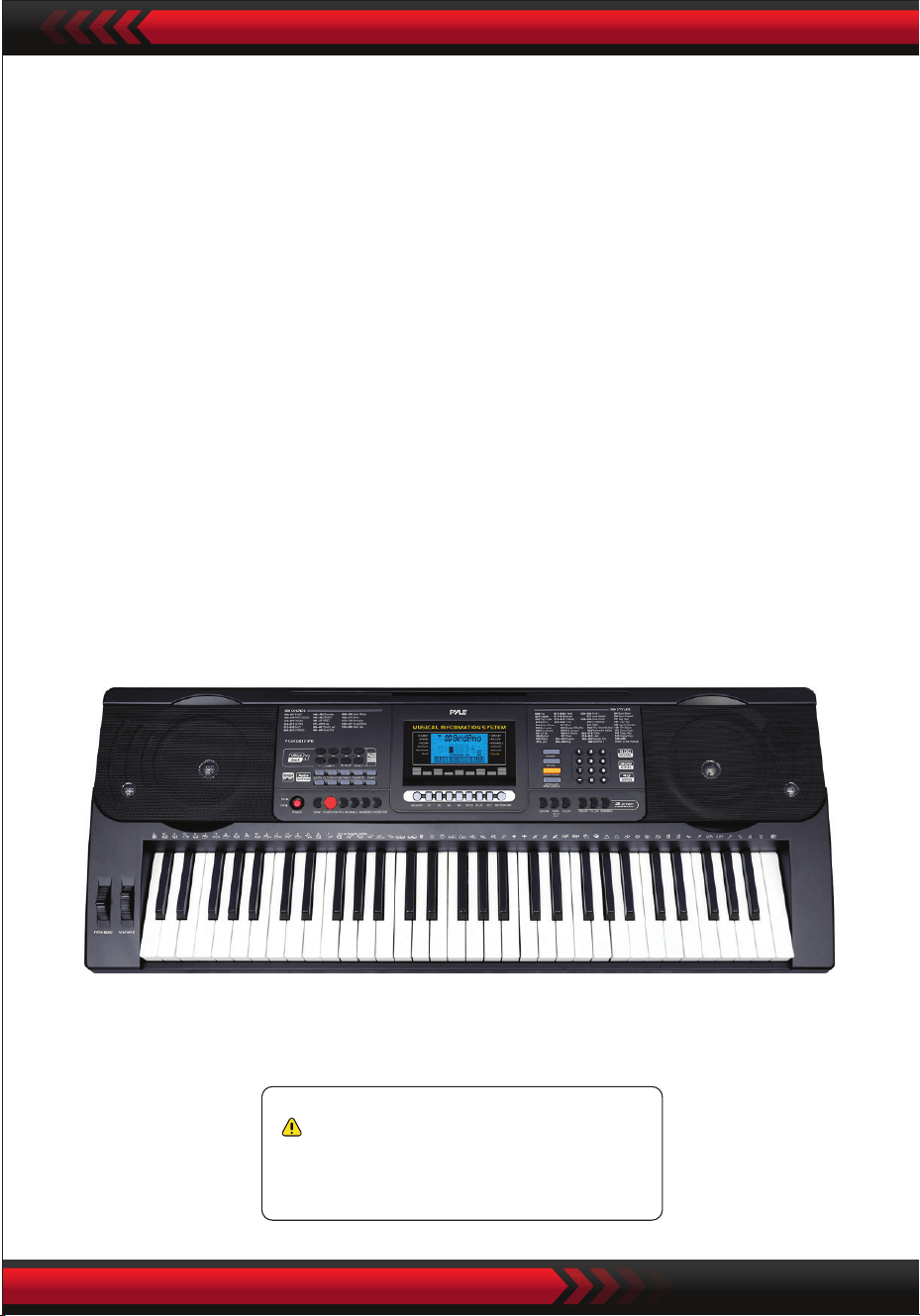
www.PyleUSA.com
21
Ostrzeżenie California Prop 65
OSTRZEŻENIE:
OSTRZEŻENIE: Ten produkt zawiera BBT (ftalan benzylu-butylu), o
którym w Kalifornii wiadomo, że powoduje raka, wady
wrodzone i inne problemy związane z rozrodczością. Niepołykaj.
Aby uzyskać więcej informacji,
odwiedź stronę www.P65warnings.ca.gov
Dane techniczne:
• 61 klawiszy
• 600 dźwięków / 300 stylów
• 40 utworów demonstracyjnych: jeden / wszystkie
• Interfejs audio: wejście Aux (3,5 mm) Jack / wejście mikrofonowe / wejście USB
• Maksymalny poziom głośności: do 110 dB
• Długość kabla USB / kabla zasilającego: 3.9’ stóp. - (119cm)
• Materiał konstrukcyjny: ABS
• Zasilanie: DC 12 V / zasilacz sieciowy
• Wymiary klawiatury (szer. x dł. x wys.) :
36.6’’ x 11.97’’ x 3.7’’ -cale - (93 x 30.4 x 9.3 cm)

Karaoke için dijital müzik klavyesi
PKBRD6151PB
Suya dayanıklı kılıf (61 tuş),
tabure ve klavye standı ile
taşınabilir elektronik klavye
KULLANICI KILAVUZU
TUR
www.PyleUSA.com
2
Bu kılavuzu ileride başvurmak üzere güvenli bir yerde ve kolayca
ulaşabileceğiniz bir yerde saklayın.
Birlikte verilen güç adaptörünü kullanın ve hasar görmüşse adaptörü hemen
değiştirin.
Cihazı sökmeyin veya iç parçalarında değişiklik yapmayın. Arıza durumunda,
derhal kullanmayı bırakın ve profesyonel bir teknisyene tamir ettirin.
Cihazı diğer cihazlara bağlamadan önce tüm güç kaynaklarını kapatın.
Enstrümanı maksimum ses seviyesinde veya yüksek seviyede çok uzun süre
çalmayın.
Aşırı ısınma hasara neden olabileceğinden, cihaz parçalarını ısı kaynaklarından
uzak tutun.
Sıvıların, tozun, parçacıkların ve diğer yabancı nesnelerin enstrümana girmesini
önleyin, çünkü bunlar çünkü bunlar cihazın korozyona uğramasına veya
bileşenlerinin kısa devre yapmasına neden olabilir.
Cihazı temizlemeden önce şi çekin.
Fişi ıslak ellerle takmayın veya çekmeyin.
Cihazı temizlemek için kuru, yumuşak bir bez kullanın. Yüzeye zarar vermemek
için boya, alkol veya diğer kimyasal çözücüler kullanmayın.
Çaldıktan sonra veya uzun süre kullanılmayacaksa gücü kapatın ve elektrik şini
çekin.
Yangın veya elektrik çarpması riskini azaltmak için cihazı yağmura veya neme
maruz bırakmayın. Ünite damlama veya sıçramaya maruz bırakılmamalı ve vazo
gibi içi sıvı dolu nesneler ünitenin üzerine yerleştirilmemelidir.
Maksimum çalışma sıcaklığı: 40°C/ 104°F
Bağlantı kesme cihazı olarak doğrudan bir adaptör kullanılıyorsa, bağlantı kesme
cihazı kolayca çalıştırılabilir durumda kalmalıdır.
Bu ekipmanı kitaplık veya benzeri bir ünite gibi kapalı bir alana kurmayın ve iyi
bir havalandırma sağlayın. Açıklıklar gazete, masa örtüsü, perde vb. nesnelerle
kapatılarak havalandırma engellenmemelidir,
Dikkat: Kulaklıklardan ve kulaklıklardan gelen aşırı ses basıncı işitme kaybına
neden olabilir.
Etiket cihazın alt kısmında yer almaktadır.
Cihaz damlama veya sıçramaya maruz bırakılmamalı ve vazo gibi sıvı dolu
nesneler cihazın üzerine yerleştirilmemelidir.
Doğrudan ş adaptörü bağlantı kesme cihazı olarak kullanılıyorsa, bağlantı
kesme cihazı kolayca çalıştırılabilir durumda kalmalıdır.
DİKKAT!
DEVAM ETMEDEN ÖNCE DİKKATLİCE OKUYUN
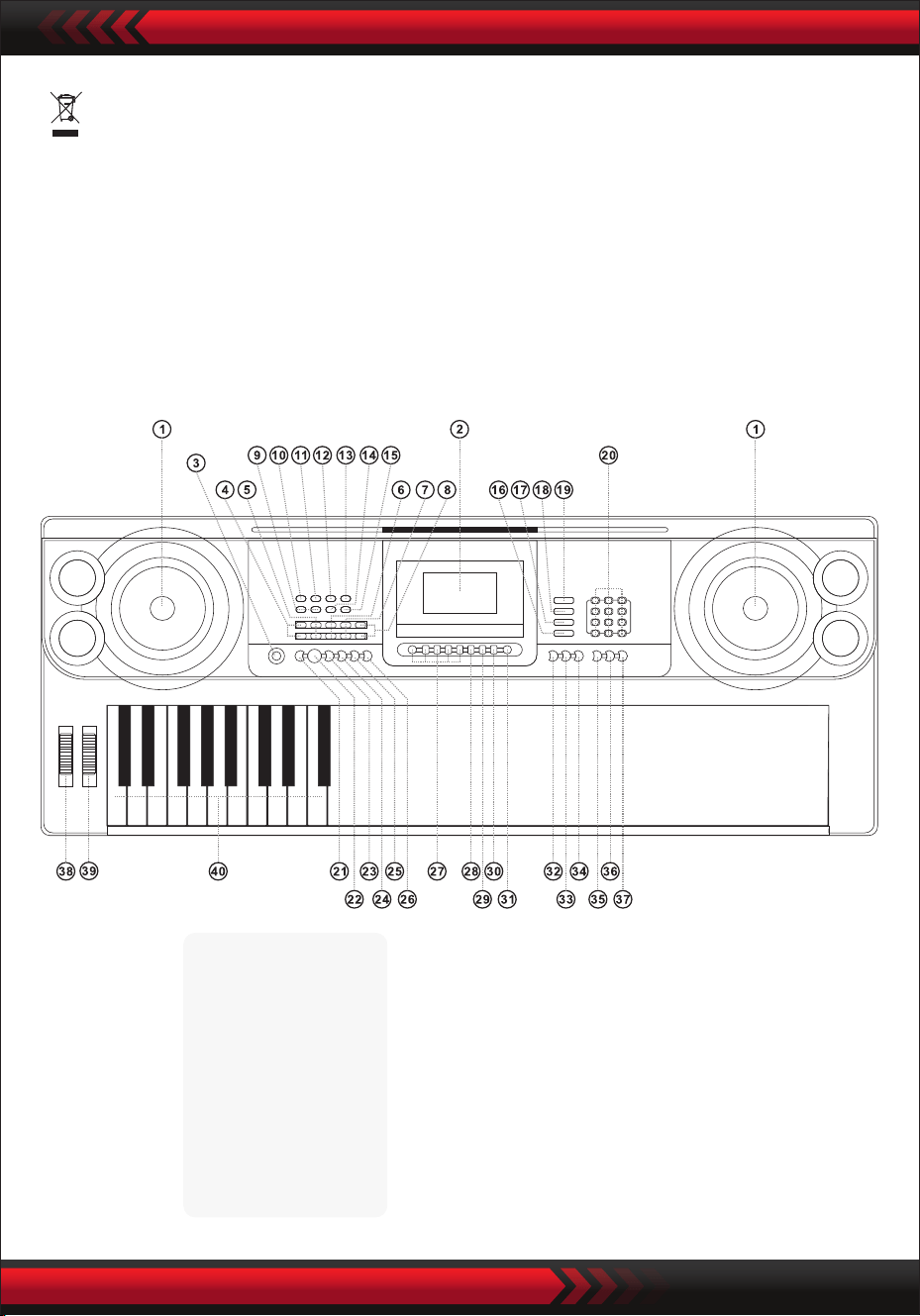
www.PyleUSA.com
3
•
I. Kontrol paneli ve genişletme portları
ÖN KONTROL PANELI
Bu işaret, bu ürünün AB genelinde diğer evsel atıklarla birlikte atılmaması
gerektiğini gösterir.
Kontrolsüz atık bertarafından kaynaklanan çevreye veya insan sağlığına olası
zararları önlemek için kontrolsüz atık bertarafı, malzeme kaynaklarının
sürdürülebilir yeniden kullanımını teşvik etmek için sorumlu bir şekilde geri
dönüştürün. Kullanılmış cihazınızı iade etmek için iade ve toplama sistemlerini
kullanın veya ürünü satın aldığınız perakendeciyle iletişime geçin.
9 MP3 ses seviyesi kontrolü
10 Önceki
11 Sonraki
12 Oynat/Duraklat
13 Durdurma
14 Ekleme Sırası/Rastgele/
Tekli Oynatma Modu
15 Ses efekti
USB MusicPlayer
1 Hoparlör
2 LCD ekran
3 Güç anahtarı
4 Ana hacim
5 Parça Ses Seviyesi
6 Ritim Sesi
7 Transpozisyon
8 Tempo
16 Perküsyon klavyesi
17 Demo şarkı
18 Stil
19 Ses
20 Sayılar
21 Senkronizasyon
22 Başlat/Durdur
23 Dolgu
24 Tekli
25 Parmaklar
26 Devre Dışı
Bırakılmış Akor
27 Durum Belleği
28 Program
29 Oynatma null
30 Kayıt
31 Metronom
32 Destek
34 Dokunun
35 Bir Anahtar
36 Takip edin
37 Topluluk
38 PitchBend
39 Vibrato
40 Akor Klavye
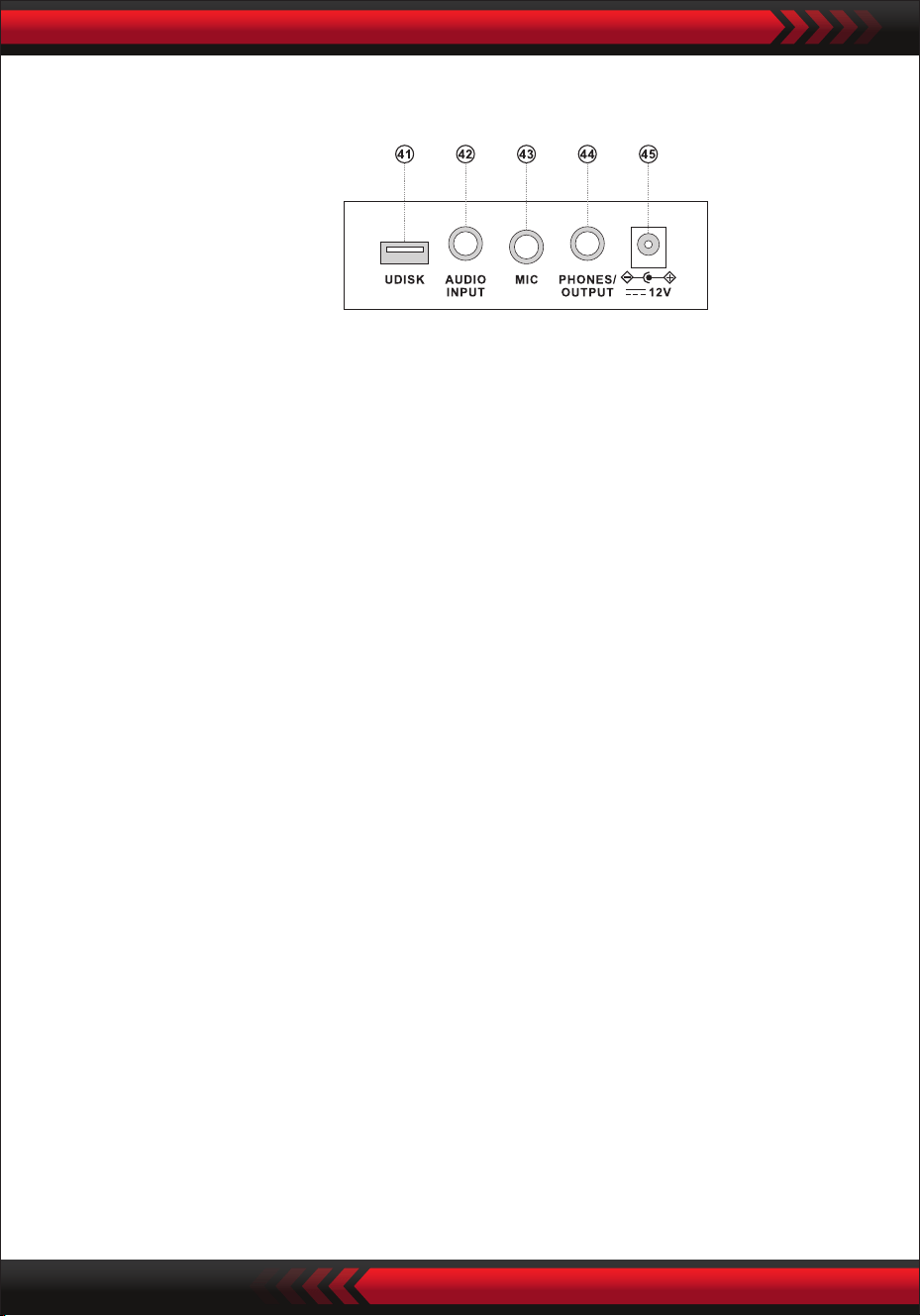
www.PyleUSA.com
4
ARKA PANEL
SES GİRİŞİ
Elektronik klavyenin stereo ses girişi işlevi vardır ve cep telefonları, MP3 çalarlar,
bilgisayarlar ve benzerlerinden gelen ses sinyalleri çalınmak üzere elektronik
klavyeye beslenebilir. Öncelikle, elektronik klavyenin gücünü kapatın, ses
kablosunun bir ucunu bir ses cihazının çıkış portuna takın, diğer ucunu elektronik
klavyenin arkasındaki SES GİRİŞİ arayüzüne takın ve ardından gücü açın.
• Ses çıkış: Elektronik klavyenin ve harici ses ekipmanının gücünü kapatın, ardından
ses kablosunun bir ucunu elektronik klavyenin arkasındaki ses çıkışı için
FONLAR/ÇIKIŞ konektörüne takın ve diğer ucunu ses ekipmanının ses giriş
arayüzüne takın.
• Kulaklıkların bağlanması: Kulaklık şini elektronik klavyenin arkasındaki
FONLAR/ÇIKIŞ arayüzüne takın, ardından elektronik klavyenin hoparlörünün
bağlantısı otomatik olarak kesilecek ve çalarken başkalarını rahatsız etmekten
kaçınacaksınız.
Dikkat! İşitme kaybını önlemek için kulaklık kullanırken ses seviyesini uzun süre
maksimumda tutmayın.
SES ÇIKIŞI KULAKLIK BAĞLANTISI
AC/DC GÜÇ ADAPTÖRÜNÜ KULLANMA
AC/DC güç adaptörü cihaz için tasarlanan adaptör olmalıdır.
Bir tarafı arka paneldeki güç soketine ve diğer tarafı şebekeye bağlayın.
(Giriş voltajının şebeke voltajı ile aynı olması gerektiğini unutmayın).
II. Kullanmadan önce
41 MÜZIK ÇALMAK IÇIN USB BAĞLANTI NOKTASI
(ash sürücü dahil değildir)
42 SES GİRİŞİ
43 MIKROFON GIRIŞI
44 TELEFON/ÇIKIŞ
45 DCUV GİRİŞİ
www.PyleUSA.com
5
SES SEÇIMI
KLAVYE PERKÜSYONU
DEMO ŞARKILAR
Ana ses seviyesini artırmak veya azaltmak için "Ana Ses Seviyesi " veya "Ana Ses
Seviyesi " düğmesine basın. "Ana Ses " ve "Ana Ses " düğmelerine aynı anda
basılırsa, ses seviyesi varsayılan değere sıfırlanır.
Stil ses seviyesi ve akor ses seviyesi aynı anda ana ses seviyesinden kontrol edilebilir.
ANA SES AYARI
Arka ışık açıkken [Güç] düğmesine basıldığında, LCD ekran mevcut tını, tempo vb.
hakkında bazı bilgiler gösterir.
III. Temel performans yöntemi
Mikrofon şini klavyenin mikrofon soketine takın ve çalmanın ve şarkı söylemenin
keyni çıkarın.
MİKROFON GİRİŞİ (dahil değildir)
Elektronik klavye "000" ile "599" arasında 600 ses içerir. Güç açıldığında, ses seçim
işlevi otomatik olarak etkinleştirilir ve ekranda 'SOUND' görünür; aksi takdirde, ses
seçim işlevi 'SOUND' tuşuna basılarak etkinleştirilebilir. Varsayılan ayar "000" piyano
sesini ifade eder, diğer sesler sayı tuşları aracılığıyla ilgili sayılara basılarak veya "+"
veya "-" tuşlarına basılarak seçilebilir.
Klavye perküsyon işlevini etkinleştirmek için "Klavye Perküsyonu" tuşuna basın.
Klavye çalınırken her tuştan ilgili perküsyon sesi çıkacaktır. İşlevi devre dışı bırakmak
için "Klavye Perküsyonu" düğmesine tekrar basın.
Elektronik klavye, öğretim için "000" ile "039" arasında 40 demo şarkı içerir.
"Demo Şarkı" tuşuna basıldığında, tüm demo şarkılar sırayla çalınır.
Oynatma sırasında, sayı düğmelerini kullanarak ilgili sayıya basarak veya '+' veya '-'
düğmesine basarak başka bir demo parçası seçilebilir; seçilen demo parçası daha
sonra döngüsel olarak çalınacaktır.

Stil ses seviyesini artırmak veya azaltmak için "Stil Ses Seviyesi " veya
"Stil Ses Seviyesi " düğmesine basın. Her iki düğmeye aynı anda basarak stil ses
seviyesi varsayılan değere sıfırlanabilir.
www.PyleUSA.com
6
1. Stili Başlatmak
Eşlik eden stili başlatmak için [Başlat/Durdur] düğmesine basın.
Stil henüz başlamadığında, "Syn" düğmesine basın, ardından ekrandaki
metronom yanıp söner. Akor alanındaki herhangi bir tuşu çaldığınızda
(soldan 1-19 tuşları), stil eşliği eşzamanlı olarak başlar.
2. Giriş
Stil durumunda, [Doldur] düğmesine basıldığında otomatik olarak bir ara parça
doldurulur.
3. Durdur
[Başlat/Durdur] düğmesine basıldığında, eşlik stili hemen durur.
IV. Otomatik stil
STIL SEÇME
STİLİN KONTROL EDİLMESİ
METRONOME
Elektronik klavye '000' ile '299' arasında 300 stil içerir. Başlangıçta "000" olarak
ayarlanır. Ritim seçme işlevini etkinleştirmek için 'Style' düğmesine basın, ardından
ekranda 'STYL' görüntülenecektir. "STYLE" düğmesine basarak veya sayı
düğmelerindeki ilgili stil numarasına basarak veya "+" veya "-" düğmesine basarak
başka bir stil seçilebilir.
Metronom sırasıyla 114, 2/4, 3/4 ve 4/4 olmak üzere dört tempo içerir. 'Metronom'
düğmesine sürekli basarak, dört tempo sırayla seçilebilir.
Herhangi bir temponun performansı 'Metronom' düğmesine tekrar basılarak
kesilebilir.
[Tempo ] / [Tempo ] düğmesine basarak tempoyu hızlandırabilir veya
yavaşlatabilirsiniz. Her iki düğmeyi aynı anda uyguladığınızda, tempo geçerli
tempoya döner.
TEMPO AYARI
TEMPO SES DÜZEYİNİN AYARLANMASI
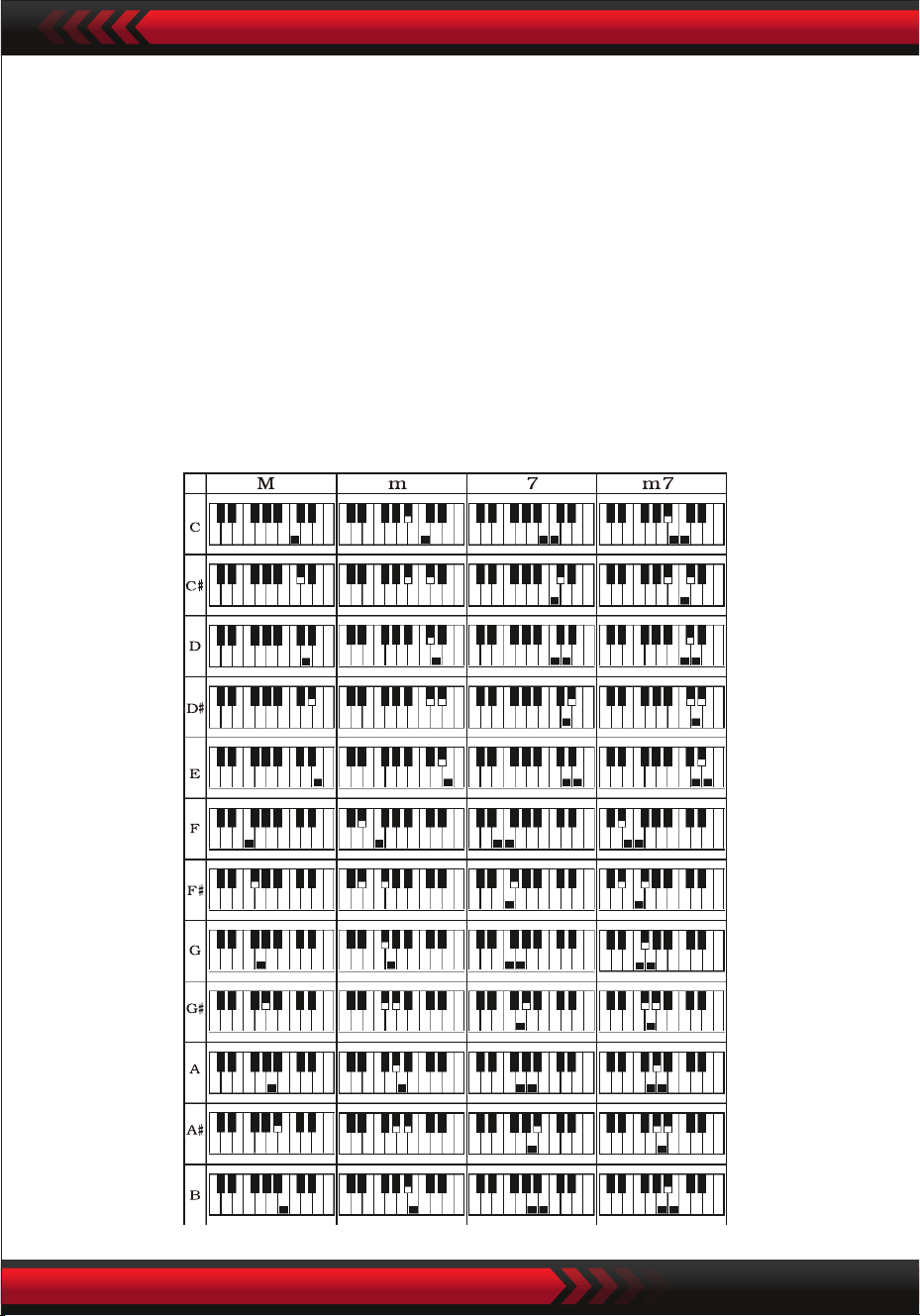
www.PyleUSA.com
7
V. Otomatik bas akoru
TEK PARMAK AKORU
Akor işlevini etkinleştirmek için 'Tek Parmak Akor' düğmesine basın ve ekranda
'Tek' görüntülenir. Stil başladığında, tek parmak akor parmaklama yöntemine göre
akor bölgesinde (soldan 1-19 düğmesi) otomatik akor eşliği gerçekleştirebilirsiniz.
Stil henüz başlamadığında, akor eşliği manuel olarak gerçekleştirilebilir.
Akor fonksiyonunu devre dışı bırakmak için "Tek Parmak Akor" veya "Akor KAPALI"
düğmesine basın ve "Tek" ekrandan kaybolur.
Tek Parmak Akor Dizileri
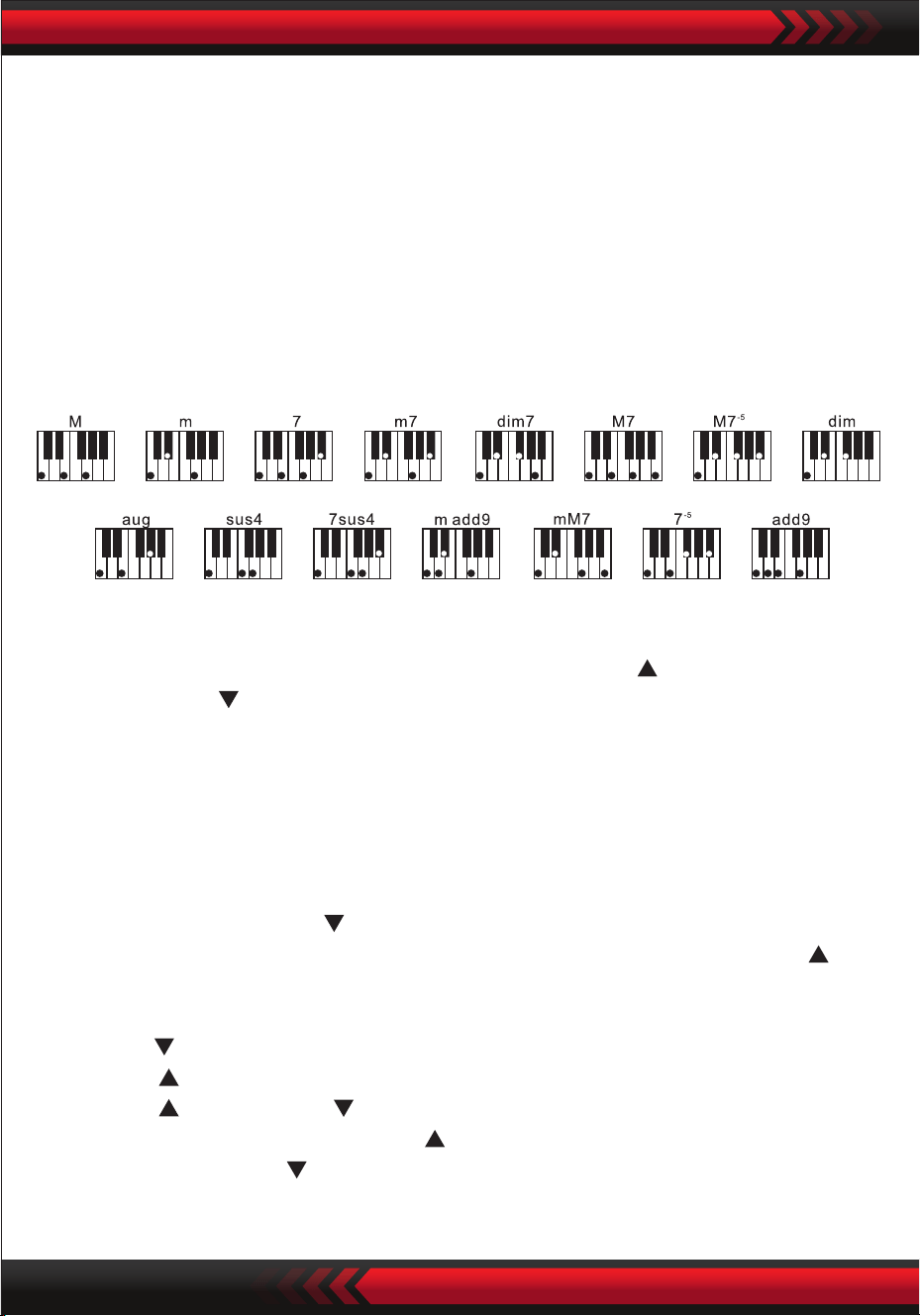
TRANSPOZISYON FONKSIYONU
VI. Etkilerin kontrolü
AKOR SES DÜZEYINI AYARLAMA
Ses seviyesini artırmak veya azaltmak için "Akor Ses Seviyesi " veya
"Akor Ses Seviyesi " düğmelerine basın.
Her iki düğmeye aynı anda basarak akor ses seviyesi varsayılan değere sıfırlanabilir.
www.PyleUSA.com
8
Transpoze işlevi, C parmak yöntemiyle diğer melodilerin müziklerini çalmanıza
yardımcı olabilir. "Transpose " tuşuna basıldığında, tüm klavyenin sesi yarım ton
(minör saniye) azalır ve C tuşundaki klavye sesi B sesine dönüşür. "Transpose "
tuşuna basıldığında, tüm klavyenin sesi yarım ton (minör saniye) artar ve C
tuşundaki klavye sesi B sesine dönüşür.
"Transpoze " tuşuna iki kez basıldığında, C sesi bB sesine dönüştürülür.
"Transpoze " tuşuna beş kez basıldığında, C tonu F tonuna dönüştürülür.
"Transpose " ve "Transpose " tuşlarına aynı anda basıldığında, ton "00" C
tonuna geri döner. Seviye, "Transpoze " tuşuna basılarak "-6" ile "+6" arasında
ayarlanabilir. "Transpoze " tuşuna basarak.
PARMAKLI AKOR
Parmak Skalası
Akor işlevini etkinleştirmek için 'Parmaklı Akor' düğmesine basın ve ekranda
'Parmak' görüntülenir. Stil başlatıldığında, akor parmaklama yöntemine göre akor
bölgesinde (soldan 1-19 düğmesi) otomatik akor eşliği gerçekleştirilebilir. Stil henüz
başlamadığında, akor eşliği manuel olarak gerçekleştirilebilir.
Akor işlevini devre dışı bırakmak için "Parmaklı Akor" veya "Akor KAPALI"
düğmesine basın ve ekrandaki "Parmak" kaybolur.

www.PyleUSA.com
9
SÜRDÜRMEK
[Sürdürmek] düğmesine basılırsa ve ekranda "SUS" görünürse, tuşlara basma sesi
etkili olur. Kapatmak için düğmeye tekrar basın. "SUS" kaybolduğunda, işlev durur.
ÇİFT SESLER VE KLAVYE BÖLME FONKSİYONU
Fonksiyonu açmak veya kapatmak için "Çift/Bölme/Kapalı" düğmesine basın.
Klavye tonu bölme işlevi açılabilir veya kapatılabilir.
TUŞ KORDONU BÖLME FONKSIYONU
" Tuş takımı bölme" işlevi etkin olduğunda, ekranın üst kısmında "Bölme"
görüntülenir. Elektronik klavyenin solundaki 24 tuş orijinal klavyeden ayrılır ve
klavyenin sol bölgesinin perdesi
ÇİFT SESLER.
" ÇİFT " seçeneği etkinleştirildiğinde, ekranda " çift" görüntülenir ve elektronik
klavye çalınırken iki sesin üst üste binme efektleri üretilebilir.
ses 1 ve ses 2, istenen sesi seçmek için "Ses" tuşuna basılarak değiştirilebilir ve
ekranda buna göre "SES1" veya "SES2" görüntülenir.
VIBRATO
"Vibrato" en düşük konumdayken, vibrato işlevi kapatılır. "Vibrato" yukarıdayken,
vibrato işlevi etkinleştirilir ve ekranda "VIB" görüntülenir. Vibrato fonksiyonu
kullanılarak, çalma tonuna vibrato efektleri eklenebilir. Vibrato, "Vibrato" yukarı veya
aşağı kaydırılarak artırılabilir veya azaltılabilir.
PERDE BÜKME
Perde bükümü, klavye tarafından çalınan notaların perdesini eşit olarak
değiştirmenize olanak tanır.
Perde, perde bükümü artırılarak yükseltilebilir ve perde bükümü azaltılarak
düşürülebilir. Serbest bırakıldıktan sonra, perde bükümü otomatik olarak merkeze

www.PyleUSA.com
10
ve sol klavye bölgesinin perdesi ile aynı olacak şekilde bir oktav azaltılır.
Sağ klavye bölgesinin tuşu gerektiği gibi seçilebilir ve sol ve sağ klavye
bölgelerinden farklı sesler çalınabilir. 'Klavye Bölme' düğmesine tekrar
basıldığında, ekranda 'Kapalı' görüntülenir ve klavye bölme işlevi devre dışı
bırakılır.
DOKUNMA
Dokunma işlevini etkinleştirmek veya devre dışı bırakmak için [Dokunma] düğmes-
ine basın. Başlangıçta varsayılan ayar AÇIK'tır. Ekranda 'Dokun' görüntülenir. Bu
işlev müzikal ifadeyi geliştirmeye ve her notaya uygulanan kuvveti doğru şekilde
yansıtmaya yardımcı olabilir. Performans sırasında uygulanan kuvvet ne kadar
büyük olursa, ses o kadar yüksek olacaktır. Bu işlev devre dışı bırakıldığında,
performans sırasında uygulanan kuvvetten bağımsız olarak aynı ses üretilebilir.
KAYIT
"Kayıt" düğmesine basıldığında, kayıt işlevi etkinleştirilir, ekranda "Kayıt"
görüntülenir ve ardından çalınan notalar kaydedilir.
Kayıt tekrar yapıldığında veya elektronik klavye kapatıldığında kaydedilen
notalar otomatik olarak silinir.
KAYDI DURDURMA
Hafıza notalarla dolduğunda ve ekrandaki 'Kayıt' kaybolduğunda, kayıt otomatik
olarak durur. Kayıt işlemi sırasında, kaydı durdurmak ve kaydedilen notları
oynatmak için 'Oynat' düğmesine basılabilir.
'Kayıt' düğmesine tekrar basıldığında, kayıt işlevi devre dışı bırakılır ve kaydedilen
notlar otomatik olarak silinir.
KAYDEDILEN NOTLARIN OYNATILMASI
Kaydedilen notlar, kayıt işlemi sırasında doğrudan "Oynat" düğmesine basılarak
oynatılabilir. Kaydedilen notaların çalınması 'Oynat' düğmesine tekrar basılarak
durdurulabilir.
VII Kayıt fonksiyonları

www.PyleUSA.com
11
VIII. Programlama stili
IX. Durum Bellek Fonksiyonu
PROGRAMLAMA STILI
"Program" düğmesine basıldığında, stil programlama işlevi etkinleştirilir.
"Program" ekranda görüntülenir ve klavye üzerindeki ilgili tuşlar çalınarak bir dizi
önceden ayarlanmış melodi çalınabilir.
* Programlanan stil, programlama tekrar yapıldığında veya elektronik klavye
kapatıldığında otomatik olarak silinir.
PROGRAMLAMAYA ARA VERME
32 dokunuş kaydedildiğinde ve ekrandaki 'Program' kelimesi kaybolduğunda,
programlama otomatik olarak kesilir. Programlama işlemi sırasında, programlamayı
kesmek ve programlanan stili oynatmak için 'Oynat' düğmesine basılabilir. 'Program'
düğmesine tekrar basıldığında, programlama işlevi devre dışı bırakılır ve programla-
nan veriler otomatik olarak silinir.
PROGRAMLANAN STİLİN OYNATILMASI
Programlama sırasında, programlanan stil doğrudan 'Oynat' düğmesine basılarak
oynatılabilir. Programlanan stilin oynatılması 'Oynat' düğmesine tekrar basılarak
durdurulabilir.
Hafıza fonksiyonunu kullanarak, çalma sırasında ayarlanacak ses, stil, tempo ve
diğer parametreleri kaydedebilirsiniz. Elektronik klavye, çalma sırasında herhangi
bir zamanda geri çağrılabilen dört bellek yuvası ile donatılmıştır.
KAYDET
Sesi, stili ve tempoyu çalma gereksinimlerine göre ayarlayın, ardından mevcut
çalışmayı kaydetmek için 'Durum Hafızası' düğmesine ve 'M1' ila 'M4'
düğmelerinden birine basın.

www.PyleUSA.com
12
KAYDEDİLEN İÇERİKLER
Oynatma sırasında "M1" ila "M4" düğmelerinden birine basıldığında, kaydedilen
veriler mevcut durumun yerini almak üzere geri çağrılabilir.
Kaydedilen içerikler güç kesintisine karşı korunmaz. Bir güç kesintisinden sonra
elektronik klavye tekrar açıldığında, kaydedilen içerikler kaybolur.
Kendi kendine öğrenme fonksiyonu, öğrencinin elektronik klavyeyi nasıl çalacağını
kademeli olarak öğrenmesine rehberlik etmek için üç adıma ayrılmıştır. Öğrenci
önce şarkının melodisine ve stiline aşina olmak için 'Tek Tuş' ile, ardından şarkıyı
doğru çalmak için 'Takip Et' ile ve daha sonra üçüncü adım olan başkalarıyla birlikte
serbestçe çalmak için 'Topluluk' ile pratik yapmalıdır.
TEK TUŞLA ÖĞRETIM
'Tek Tuş' düğmesine basıldığında, tek tuşla öğrenme işlevi etkinleştirilir ve ekranda
'Adım 1' görüntülenir. Öğretilecek şarkı tuşa basılarak veya "+" veya "-" tuşlarına
basılarak seçilebilir. Tek tuşla öğrenme, entonasyon ve doğruluk için herhangi bir
gereklilik olmaksızın şarkının süresi boyunca uygulanır. Tuşların yanlış çalınmasına
izin verilir. Elektronik klavye hata durumunda doğru notaları çalar, ancak imleç
ekranda doğru notaya karşılık gelen tuşu gösterir. Tek tuşla öğretme işlevi,
'Tek Tuş' tuşuna tekrar basılarak devre dışı bırakılabilir.
ÖĞRETİM ADIMI 2: TAKİP ET
'Takip' tuşuna basıldığında, Takip öğrenme işlevi etkinleştirilir ve ekranda
'Adım 2' görüntülenir.
Öğrenilecek parçayı sayı tuşuna basarak veya "+" ya da "-" tuşlarına basarak
seçebilirsiniz. Bu modda, tanıtım şarkısını çalabilirsiniz ve ekrandaki imleç doğru
şekilde çalmanız için size yol gösterecektir.
Çalma sırasında bir hata yapılırsa, hata düzeltilene kadar şarkının melodisi kesilir.
Takip öğretme işlevi 'Takip' düğmesine tekrar basılarak devre dışı bırakılabilir.
X. Öğretme İşlevi
XI. USB müzik oynatma
www.PyleUSA.com
13
USB takıldığında, elektronik klavye maksimum 32 G hafızayı ve en yaygın MP3-fornat
dosyalarını destekler.
Ses seviyesini ayarlamak için 'MP3 ' düğmesine basın.
Önceki çalmak için , sonraki çalmak için , çalmak/duraklatmak için ,
durdurmak için ve sıralı ve rastgele çalma modlarına erişmek için
düğmesine basın.
Ses efekti modlarını ayarlamak için [Ses Efekti] düğmesine basın.
ÖĞRETİM ADIMI 3: TOPLULUK
"Topluluk" düğmesine basıldığında, Topluluk öğretme işlevi etkinleştirilir ve ekranda
"Adım 3" görüntülenir Düğmeye basarak veya "+" veya "-" düğmesine basarak
öğrenilecek şarkıyı seçebilirsiniz.
Şarkının süresinin ve notalarının doğru ve tam öğrenilmesi için Topluluk öğretimi
uygulanır. Elektronik klavye ensemble için anahtar notayı korur.
Şarkı süresi içinde doğru notaları çalmalısınız.
You should play the correct notes within the song duration.
Eğer 3 saniye içinde çalmaya başlarsanız, elektronik klavye otomatik olarak anahtar
notayı çalacak ve doğru nota ve tempo ekranda görüntülenecektir.
Topluluk öğretme fonksiyonu ' “Topluluk” düğmesine tekrar basılarak kapatılabilir.
Paket İçeriği:
• Karaoke için dijital müzik klavyesi
• Müzik standı
• Adaptör
• Elektrik şi
• Klavye standı
• Klavye taburesi
• Su geçirmez çanta
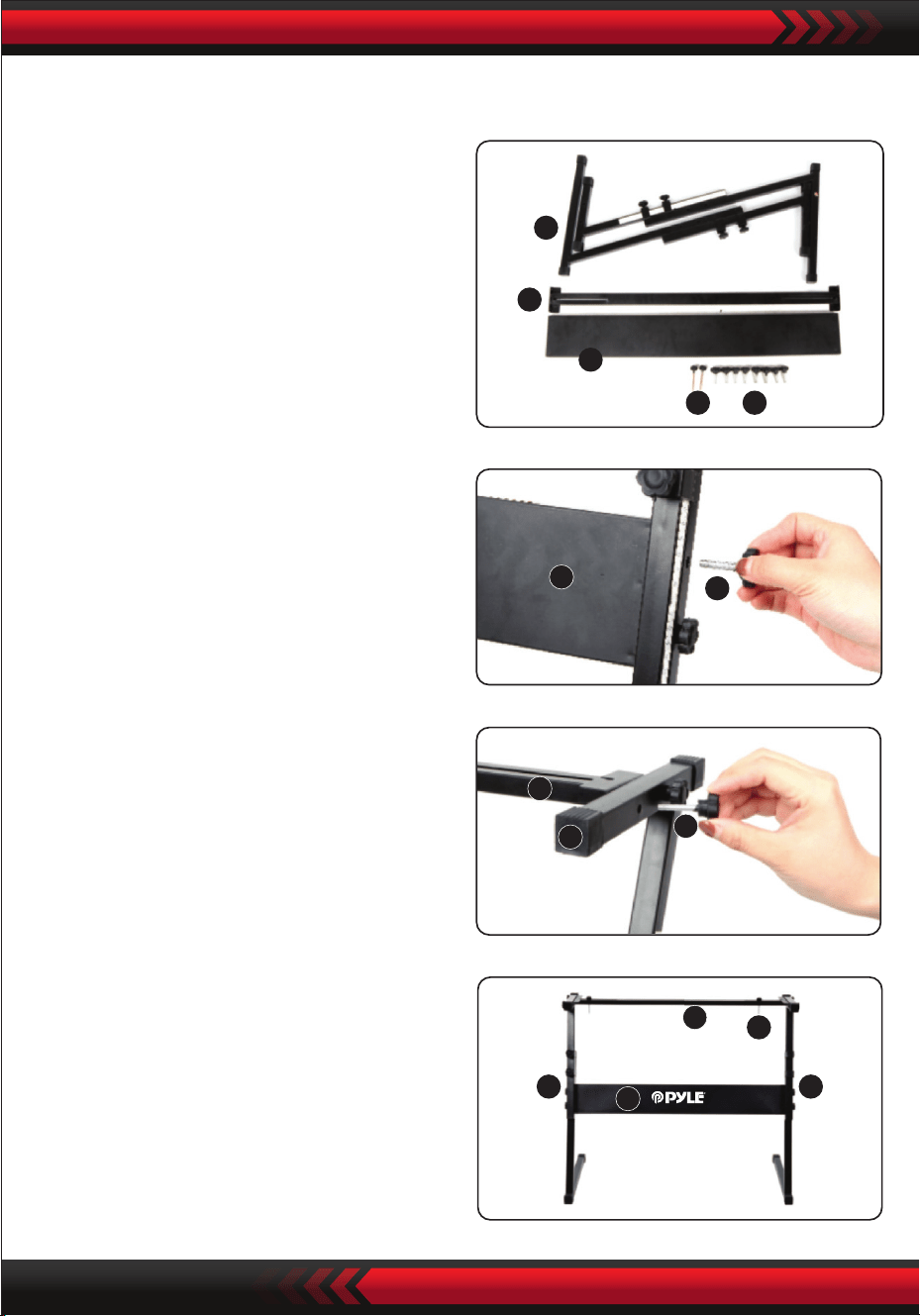
www.PyleUSA.com
14
5
4
3
1 2
3
2
4
5
2
5 5
3
4
1
3. 2 numaralı vidayı ve 4 numaralı
destek plakasını 5 numaralı destek
braketinin üstüne alın ve sıkın.
Klavye tutucunun montajı
2. İkinci olarak, 2 no.lu vidayı ve 3 no.lu
destek plakasını alın, bunları 5 no.lu
iki destek braketine takın ve ayrı ayrı
sıkın.
4. Kurulum tamamlanmıştır, klavyeyi
brakete sabitlemek için 1 numaralı
vidayı daha uzun süre vidalayın.
1. Tüm parçaları montaj için hazırlayın.

www.PyleUSA.com
15
Ekler
000 Akustik Kuyruklu Piyano
001 Parlak Akustik Piyano
002 Elektrikli Kuyruklu Piyano
003 Honky-tonk Piyano
004 Rhodes Piyano
005 Korolu Piyano
006 Harpsichord 1
007 Klavikord
008 Celesta 1
009 Glockenspie 1
010 Müzik kutusu 1
011 Vibrafon 1
012 Marimba 1
013 Ksilofon 1
014 Borulu Çan1
015 Dulcimer 1
016 Çeki Demiri Org
017 Vurmalı Org
018 Rock Org 1
019 Kilise Orgu 1
020 Kamış Org 1
021 Akordeon 1
022 Mızıka 1
023 Tango Akordeon
024 Akustik Gitar (naylon)
025 Akustik Gitar (çelik)
026 Elektro Gitar (caz)
027 Elektro Gitar (temiz)
028 Elektro Gitar (sessiz)
029 Overdriven Gitar
030 Distortion Gitar
031 Gitar Harmonikleri
032 Akustik Bas 1
033 Elektro Bas (parmak)
034 Elektrikli Bas (pick)
035 Perdesiz Bas 1
036 Tokat Bas 1
037 Tokat Bas 2
038 Synth Bass 1
039 Synth Bass 2
040 Violino 1
041 Viola 1
042 Çello 1
043 Kontrbas 1
044 Tremolo Telleri 1
045 Pizzicato Yaylılar 1
046 Orkestral Arp
047 Timpani
048 Yaylı Çalgılar Topluluğu 1
049 Yaylı Çalgılar Topluluğu 2
050 Synth Strings 1
051 Synth Strings 2
052 Koro Aahs 1
053 Sesli Oohs
054 Sentetik Ses
055 Orkestra Hit
056 Trompet 1
057 Trombon 1
058 Tubal
059 Sessiz Trompet 1
060 Fransızca Hom 1
061 Pirinç Bölüm 1
062 Synth Brass 1
063 Synth Brass 2
064 Soprano Saksafon 1
065 Alto Saksafon 1
066 Tenor Saksafon 1
067 Bariton Saksafon 1
068 Obua 1
069 İngiliz Kornosu 1
070 Fagot 1
071 Klarnet 1
072 Piccolo 1
073 Flüt 1
074 Kayıt Cihazı 1
075 Pan üt 1
076 Şişe Flüt 1
077 Shakuhachi1
078 Düdük 1
079 Ocarina 1
080 Kurşun 1 (kare)
081 Kurşun 2 (testere dişi)
082 Kurşun 3 (kalyop ucu)
083 Lead 4 (chi lead)
084 Kurşun 5 (charang)
085 Kurşun 6 (ses)
086 Kurşun 7 (beşinci)
087 Kurşun 8 (bas+kurşun)
088 Ped 1 (yeni çağ)
089 Ped 2 (sıcak)
090 Pad 3 (polysynth)
091 Ped 4 (koro)
092 Ped 5 (arco)
093 Ped 6 (metalik)
094 Pad 7 (Balo)
095 Ped 8 (Süpürme)
096 FX 1 (yağmur)
097 FX 2 (lm müziği)
098 FX 3 (kristal)
099 FX 4 (atmosfer)
100 FX 5 (parlaklık)
101 FX 6 (sprite'lar)
102 FX 7 (yankı)
103 FX 8 (bilim kurgu)
104 Sitar
105 Banjo
106 Shamisen
107 Koto
108 Kruimba
109 Gayda
110 Çello
111 Shanai
112 Jingle Bell
113 Agogo
114 Çelik Davul
115 Ahşap Davul
116 Talko Drum
117 MelodicTom
118 Sentetik Tambur
119 Ters zil
120 Gitar Tuşu Gürültüsü
121 Nefes sesi
122 Plaj
123 Kuş cıvıltısı
124 Telefon çalıyor
125 Helikopter
126 Alkışlar
127 Silah Atışı
128 Stereo kuyruklu piyano
129 Mükemmel stereo piyano
130 Kuyruklu piyano
131 Klasik Piyano
132 Rock piyano
133 Sweet Stereo Piyano
134 Parlak piyano
135 Modern piyano

www.PyleUSA.com
16
Sesler
136 La Piano
137 Dans Piyanosu
138 Yumuşak Piyano
139 Telli Piyano
140 Piyano Pedi
141 Synth-Str. Piyano
142 Koro Piyanosu
143 Honky-Tonk
144 Piyano 2 Oktav
145 Piyano 1 Oktav
146 Eiec.Kuyruklu Piyano
147 E.Grand 80
148 Modern E.G.Piano
149 Harpsichord 2
150 Harpsichord 3
151 Çift Klavsen
152 Klavsen ve Yaylılar
153 Elektro Piyano 1
154 Elektro Piyano 2
155 Fm Elec.Piano 1
156 Fm Elec.Piano 2
157 60'lar Elektro Piyano 1
158 60'lar Elektro Piyano 2
159 Dyno Elec.Piano 1
160 Dyno Elec.Piano 2
161 Mellow E.Piano
162 Pop Elec.Piano
163 Koro 1
164 Koro 2
165 Tremolo E.Piyano
166 Modern E.Piyano
167 Yumuşak E.Piyano
168 Yaylılar ve Piyano 1
169 Yaylılar ve Piyano 2
170 Yaylı Çalgılar ve Piyano 1 Sint.
171 Yaylı Çalgılar ve Piyano 2 Sint
172 Elektrikli Piyano Pedi 1
173 Elektrikli Piyano Pedi 2
174 Temiz E.Piyano
175 Klavsen ve Piyano
176 Harpsichord 1
177 Harpsichord 2
178 Sweet Harpsichord
179 Melodik Klavsen
180 Klavsen Dizisi
181 Harpsikord ve Dümen
182 Klavsen Korosu
183 Vibrafon 2
184 Vibrafon 3
185 Yumuşak Vibrafon
186 Koro Vibrafonu
187 Marimba 2
188 Yumuşak Marimba
189 Celesta 2
190 Parlak Celesta
191 Glockenspiel 2
192 Glockenspiel Pad 1
193 Müzik Kutusu 2
194 Müzik Kutusu 3
195 Ksilofon 2
196 Borulu Çan 2
197 Santur 2
198 Dümen Organı 1
199 Dümen Organı 2
200 Dümen Organı 3
201 Dümen Organı 4
202 Dümen Organı 5
203 Perküsyon Org 1
204 Perküsyon Org 2
205 Vurmalı Org 3
206 Elektrikli Org 1
207 Organ 2
208 Elektrikli Org 3
209 Caz Org 1
210 Caz Org 2
211 Caz Org 3
212 Rock Org 2
213 Rock Org 3
214 Rock Org 4
215 70'ler Org
216 Tam çeki demiri
217 Rotary Organ 1
218 Rotary Organ 2
219 Rotary Organ 3
220 Tremolo Org
221 Tıklama organı
222 Organ 8
223 Organ Pedi 1
224 Organ Pedi 2
225 Sıra Organ
226 Kilise Orgu 2
227 Kilise Orgu 3
228 Şapel orgu
229 Boru Org 1
230 Boru orgu 2
231 Tiyatro orgu
232 Org ve klavsen
233 Boru orgu
234 Boru Org 2
235 Akordeon 2
236 Akordeon 3
237 Akordeon 4
238 Akordeon 5
239 Oktav Akordeon
240 Bandoneon 1
241 Bandoneon 2
242 Oktav Bandoneon
243 Bandoneon Solo
244 Bandoneon ve Keman
245 Mızıka 2
246 Mızıka 3
247 Mızıka 4
248 Naylon Enstrüman 1
249 Naylon Telli Gitar 2
250 Çelik Telli Gitar 1
251 Çelik Telli Gitar 2
252 Çelik Telli Gitar 3
253 12 Telli Gitar
319 Parmaklı Bas M
320 Trance Bass M
321 Sentezlenmiş Bas M
322 Sentezlenmiş Bas Kare M
323 Keman 2
324 Yavaş Keman
325 Viola 2
326 Viyolonsel 2
327 Yavaş viyolonsel
328 Kontrbas 2
329 Keman bölümü
330 Viyolonsel bölümü
331 Keman ve Viyolonsel
332 Yaylı Çalgılar Dörtlüsü
333 Pizzicato Yaylılar 2
334 Pizzicato Sekizli
335 Arp 1
336 Arp 2
337 Koro Arpı
338 Strings
339 Yaylı Çalgılar Topluluğu 3
340 Yaylı Çalgılar Topluluğu 4
341 Yaylı Çalgılar Topluluğu 5
342 Yavaş Dizeler 1
343 Yavaş Dizeler 2
344 Geniş Teller
345 Oda 1
346 Oda 2
347 Oktav Dizeleri 1
348 Oktav Dizeleri 2
349 Sfz Telleri
350 Tremolo Telleri 2
351 Arp ve teller
352 Flüt ve Yaylılar
353 Orkestra yaylıları
354 Sentetik Teller 1
355 Sentezlenmiş dizeler 2
356 Sentezleyici 3
357 70'lerin sentezleyicileri 1
358 1970'lerin sentezleyicileri 2
359 1980'lerin sentezleyicileri 1
360 80'lerin Sentezleyicileri 2
361 Hızlı sentez
362 Yavaş sentezleyiciler
363 Syneh Oktav Dizeleri 1
364 Syneh oktav ilahisi 2
365 Aahs Korosu 2
366 Korolar 1
367 Korolar 2
368 Koro Telleri
369 Ses Dizeleri
370 Koro
371 Yavaş Koro
372 Koro Topluluğu 1
373 Koro Topluluğu 2
374 Doo Voice
375 Uuh Ses
376 Sentetik Ses 1
377 Sentetik ses 2
378 Sentetik ses 3
379 Ses Topluluğu 1
380 Ses Topluluğu 2
381 Ses Topluluğu 3
382 Sentezlenmiş ses pedi
383 Sentezlenmiş Koro Sesi
254 Çelik Gitar ve Gürültü Enstrümanı 1
255 Çelik Gitar ve Enstrümantal Gürültü 2
256 Çelik Gitar ve Armoni
257 Çelik Gitar ve Korolar
258 Caz Gitar 1
259 Caz Gitar 2
260 Caz Gitar Oktavı
261 Temiz gitar 1
262 Temiz gitar 2
263 Temiz gitar 3
264 Temiz gitar 4
265 Temiz gitar ve geri vokaller
266 Sessiz gitar 1
267 Sessiz gitar 2
268 Elektro gitar crunch
269 Overdrive Gitar 1
270 Overdrive Gitar 2
271 Distortion Gitar 1
272 Distortion Gitar 2
273 Distortion Gitar 3
274 Distortion Gitar 4
275 Güçlü Gitar
276 Ritim gitar
277 Geri Beslemeli Gitar
278 Distorsiyonlu Gitar ve Bas
279 Çelik Gitar ve Enstrümantal Gürültü M 1
280 Çelik Gitar ve Enstrümantal Gürültü M 2
281 Temiz Gitar M
282 Elektro Gitar Crunch M 1
283 Elektro Gitar Crunch M 2
284 Distortion Gitar M
285 Akustik Bas Gitar 2
286 Akustik Bas Gitar 3
287 Ride bas
288 Fingled levreği 1
289 Fingled bass 2
290 Fingled levrek 3
291 Fingling bas 4
292 Ritmik parmaklı bas
293 F parmaklı yumuşak bas
294 Perdeli bas 1
295 Perdeli bas 2
296 Perdeli bas 3
297 Ritmik Perdeli Bas
298 Perdesiz bas 2
299 Perdesiz bas 3
300 Tokat Bas 1
301 Slap Bass 2
302 Çift Telli Bas
303 Sentezlenmiş Bas 1
304 Sentezlenmiş bas 2
305 Sentezlenmiş Bas 3
306 Sentezlenmiş Bas 4
307 Testere Sentezli Bas
308 Souare Sentezlenmiş Bas
309 Dijital Rock Bas
310 Trance Bas
311 Sine Bas
312 Bas & Kick
313 Vokoder Bas
314 Soul Synth Bas
315 Klavsen & Bas
316 Org & Bas
317 Bas parmaklı M 1
318 Parmaklı Bas M 2

www.PyleUSA.com
17
Stil
384 Orchesyra Hit 1
385 Orchesyra Hit 2
386 Orchesyra Hit 3
387 Orchesyra Hit 4
388 Trumpet 2
389 Trumpet 3
390 Trumpet 4
391 Mellow Trumpet 2
392 Velo.Trumpet
393 Trumpet Sfz
394 Mute Trumpet 3
395 Trombone 2
396 Trombone 3
397 Mellow Trombone
398 Velo.Trombone
399 Trombone Section
400 Jazz Trombone
401 Trumpet & Trombone
402 Tuba 2
403 Tuba 3
404 French Horn 2
405 French Horn Solo
406 French Horn Section
407 Octave French Horn
408 Horn Orchestra
409 Stereo Brass
410 Brass
411 Brass Section 2
412 Brass Section 3
413 Brass Section 4
414 Mellow Brass
415 Hard Brass
416 Brass Sfz
417 Brass & Strings
418 Brass & Sax
419 Synth Brass 3
420 Synth Brass 4
421 Synth Brass 5
422 Synth Brass 6
423 Warm Synth-Brass
424 80's Synth-Brass
425 Analog Synth-Brass 1
426 Analog Synth-Brass 2
427 Trance Brass
428 Synth-Brass Pad
429 Octave Synth-Brass
430 Synth-Brass Sfz
431 Alto Sax 2
432 Alto Sax 3
433 Breathy Alto Sax1
434 Breathy Alto Sax2
435 Tenor Sax 2
436 Tenor Sax 3
437 Breathy Tenor Sax 1
438 Breathy Tenor Sax 2
439 Soprano Sax 2
440 Soprano Sax 3
441 Breathy S.Sax
442 Baritone Sax 2
443 Baritone Sax 3
444 Soft A.Sax
445 Hard A.Sax
446 Solo A.Sax
447 Soft T.Sax
448 Solo T.Sax
449 T.Saxys
450 A.Saxys
451 Sax Section
452 Sax Section Sfz
453 Clarinet 2
454 Velo.Clarinet
455 Bass.Clarinet
456 Jazz.Clarinet
457 Oboe 2
458 Solo Oboe
459 English Horn 2
460 Bassoon 2
461 Flute 2
462 Flute 3
463 Jazz Flute
464 Pure Flute
465 Soft Flute
466 Piccolo 2
467 Piccolo 3
468 Pipe Section 1
469 Pipe Section 2
470 Flute & Oboe
471 Recorder 2
472 Recorder 3
473 Pan Flute 2
474 Pan Flute 3
475 Bottle Blow 2
476 Whistle 2
477 OcaRina 2
478 Shakuhachi 2
479 Square Lead 1
480 Square Lead 2
481 Square Lead 3
482 Square Lead 4
483 Saw Lead 1
484 Saw Lead 2
485 Saw Lead 3
486 Mellow Sawlead
487 Square Pulse Lead
488 Sequence Saw 1
489 Sequence Saw 2
490 Sequence Sine
491 Sine Lead
492 Velo.Sine Lead
493 Ss Lead
494 Slow Square Lead
495 Slow Square Pulse
496 Sequence Square
497 Sequence Pulse 1
498 Sequence Pulse 2
499 Slow Sawlead
500 Pulse Sawlead
501 Slow Saw Pulse
502 Trance Lead
503 Callope 1
504 Callope 2
505 Vent Lead
506 Vent Synth
507 Pure Lead
508 Pipe Lead
509 Sequence Lead
510 Chiff Lead
511 Drop Lead
512 Ep Lead
513 Voice Lead 1
514 Voice Lead 2
515 Vox Lead 1
516 Vox Lead 2
517 Distortion Lead
518 Charang
519 Octave Charang
520 Pluck Lead 1
521 Pluck Lead 2
522 Gt Synth Lead
523 Church Lead
524 Double Voice Lead
525 Voice Choir Lead
526 Ep & Voice Lead
527 Synth Voice Lead
528 Fifth Lead
529 Fifth Saw Lead
530 Fifth Square Lead
531 Fourth Lead
532 Seventh Sequence
533 Fifth Sequence
534 Basst+Lead
535 Bass+Saw Lead
536 Synth-Bass+Lead
537 Reed Lead
538 Fret Lead
539 Fantasy 1
540 Fantasy 2
541 New Age
542 New Age Pad
543 Warm Vox
544 Thick Pad
545 Warm Pad
546 Sine Pad
547 Soft Pad
548 Horn Pad
549 Old Tape Pad
550 Polysynth 1
551 Polysynth 2
552 Polysynth Pad 1
553 Polysynth Pad 2
554 Poly Saw
555 Space Choir
556 Heaven
557 Space Strings Pad
558 Chiff Choir
559 Star Voice
560 Square Pad
561 Bowed Pad
562 Glass Pad
563 Bottle Pad
564 Tine Pad
565 Ethnic Pad
566 Soft Metal Pad
567 Hard Metal Pad
568 Chorus Pad
569 Halo Pad 1
570 Halo Pad 2
571 Organ Choir Pad
572 Sweep Choir
573 Sweep Pad
574 Clavi Pad 2
575 Rain Drop 1
576 Rain Drop 2
577 Wood Pad
578 Space Voice
579 Sound Track 1
580 Sound Track 2
581 Rave
582 Soft Crystal
583 Crystal
584 Christmas Bell
585 Glockenspiel Chime
586 Vibraphone Bell
587 Choral Bell
588 Synth-Nakket
589 Celesta Pad
590 Atmosphere
591 Nylon Gt & Ep
592 Steel Pad
593 Bright Bell Pad
594 Brightness 1
595 Brightness 2
596 Goblin
597 Echo Voice
598 Echo Pad
599 Echo Drop

www.PyleUSA.com
18
Stil
000 Nüfus
001 Ragtim
002 Pop Funk
003 Mart 1
004 Retro Disko
005 Kolay pop
006 Tilki Yürüyüşü
007 48 Bit
008 Balad
009 Waltz
010 Latince
011 8 Beat Pop 1
012 8 Beat Pop 2
013 8 Beat Uptempo
014 8 Vuruş Standardı
015 8 Vuruş Orta
016 8 Beat Ballad
017 Destansı Balad
018 Piyanolu balad
019 16 Beat Pop 1
020 16 Beat Shuffle 1
021 16 Beat Shuffle 2
022 16 Beat Ballad 1
023 16 Beat Ballad 2
024 16 Beat Ballad 3
025 Funk 1
026 Funk 2
027 Anima
028 Gospel Shuffle
029 6-8 Müjde
030 4-4 Blues
031 Twist
032 Füzyon 1
033 Funky Fusion 1
034 50'ler Pop
035 Cool Pop
036 Groovy Pop
037 Vintage 60'lar pop
038 80'ler Pop
039 Folk Rock 1
040 Pop Rock 1
041 Pop Rock 2
042 8 Beat Rock Balld
043 16 Beat Rock Bld
044 Hard Rock 1
045 Rock Shuffle 1
046 6-8 Hard Rock
047 ABD-Rock
048 16 Beat Rock
049 Kaya 1
050 Kaya 2
051 60'lar Kayası
052 Standart Kaya
053 Brit Rock Pop
054 60'lar Vintage Rock
055 Shfl chart rock
056 60'lar Pop Rock
057 Soul Ballad
058 Slow Rock 1
059 Slow Rock 2
060 6-8 Balad
061 R&B
062 70'lerin liste baladı
063 Romantik balad
064 Çin 1
065 Çin 2
066 Çin 3
067 Çin 4
068 Çin 5
069 Çin 6
070 Çin 7
071 Çin 8
072 Çin 9
073 Çin 10
074 Bossa Nova 1
075 Bossa Nova 2
076 Bossa Nova 3
077 Salsa
078 Samba 1
079 Mambo 1
080 Beguine
081 Merengue
082 Bolero Lento
083 Espagnole
084 Cajun
085 Reggae 12 Beat 1
086 Pop Reggae 1
087 Pop Mambo
088 Latin Pop Partisi
089 Yeni Çağ 1
090 Yeni Çağ 2
091 Mambo Bluzlar
092 Dans Pop 1
093 Dans Pop 2
094 Tekno 1
095 Euro Beat
096 Euro House
097 Hip Hop
098 Trip Hop
099 Synth Boogie
100 70'ler Diskosu
101 Disko Trop
102 Parti Pop
103 Polka Pop 1
104 Boogie
105 Salıncak
106 Big Band Swing
107 Big Band Balld
108 Caz Dörtlüsü
109 Dixieland
110 CoolJazz
111 Caz Baladı
112 BBQ uickstep
113 Bluegrass 1
114 Bluegrass 2
115 Ülke 2-4
116 8 Beat Country
117 Country Rock
118 Cwby Boogie
119 Country Ballad
120 Cntry Shuffle
121 Country Waltz
122 Caz Valsi
123 HullyGully
124 02-Mar
125 03-Mar
126 Mart 6-8
127 Polka
128 PopWaltz
129 Cha Cha
130 Rhumba
131 Pasodoble
132 TangoCont
133 Foxtrot 1
134 Jive 1
135 Kuzey Valsi
136 Alman Valsi
137 Viyana Valsi
138 Musette Waltz
139 Rock'n Roll 1
140 Rock'n Roll 2
141 Düz Kaya
142 Caz Rock 1
143 Hızlı Gospe
144 Folk Rock 2
145 Rock Billy
146 Rock Boogie
147 Rock Cha Cha
148 Klasik Rock 1
149 Rock Shuffle 2
150 Rock Pop
151 Skiffle
152 Funk Pop Rock
153 Çağdaş Rock
154 Akustik Rock
155 80'ler Rock
156 LA Shuffle
157 Jive 2
158 Samba 2
159 Samba 3
160 Schlager Rock 1
161 Schlager Rock 2
162 Karnaval
163 Samba Org
164 Makara
165 Foxtrot 2
166 Foxtrot 3
167 Kulüp Pop
168 16 Beat Pop 2
169 8 Beat Pop 3
170 8 Beat Soul 1
171 8 Beat Rock
172 Rap Pop
173 60'lar Soul
174 70'ler Soul
175 Funk Shuffl
176 Fusion Shuffl
177 Klasik 8 Vuruş
178 Vintage Gtr Pop
179 Schlager İtalya
180 8 Yumuşak Vuruş
181 8 Sıcağı Yen
182 8 Beat Soul 2
183 Ballad Gitar
184 8 Beat Pop 4
185 Polka Pop 2
186 Polka Pop 3
187 16Beat 1
188 16Beat 2
189 16Beat 3
190 Pop Ballad 1
191 Pop Ballad 2
192 Funky Pop
193 Hip Hop Pop
194 Soul Shuffle
195 Yavaş Ruh
196 8 Beat Adria
197 Klasik Piyano
198 Unplugged
199 Pop Ballad 3
200 Yeni Çağ Pop
201 8 Modern Beat
202 Country Ballad
203 Aşk Şarkısı
204 Modern Country Pop
205 Elektro Pop
206 Akustik Balad
207 Piyano Baladı
208 R&B Baladı
209 Rock Baladı 1
210 Yavaş ve Kolay
211 Analog Balad
212 Calypso
213 GuadDance
214 Reggae 12 Beat 2
215 Reggae 16 Beat
216 Bossa Nova 4
217 Mambo 2
218 Mambo 3
219 Bolero
220 Cumbia 1
221 Latin Rock
222 Disko Latin
223 Tijuana
224 Reggae
225 Cumbia 2
226 Parranda
227 Karnaval 2
228 Samba Rio
229 Pop Reggae 2
230 Tekno 2
231 Techno 3
232 Funky Disko
233 Cumartesi Gecesi
234 Latin Kulübü
235 Disko Çikolata
236 Disko Tilkisi
237 Disko Funk
238 Disko Elleri
239 Disko Partisi
240 Disko Samba
241 Birleşik Krallık Pop
242 Kulüp Dansı
243 Paese 1
244 Ülke 2
245 Finger Pickin
246 Fratelli ülkesi
247 Yeni Ülke
248 Easy Country
249 Country da classifica anni '70
250 Hoedown
251 Country Shuffle
252 Ober Polka
253 Polka Pop 4
254 Erba blu 1
255 Erba blu 2
256 Mavi Çimen 3
257 Marzo ABD
258 Hully Gully
259 Big Band Shuffle 1
260 Big Band Shuffle 2
261 Big Band Shuffle 3
262 Banda veloce 1
263 Banda veloce 2
264 Cat Groove
265 Dixie Jazz
266 Jazz medio
267 16 Vuruş Karıştırma
268 Pop britannico
269 8 Vuruş 1
270 8 Beat2
271 8 Beat3
272 8 Beat 4
273 Battito del cuore
274 Ballata d'organo
275 Hard Rock 2
276 Sokak Pop
277 Yumuşak Füzyon
278 West End
279 Barocco
280 Funky Fusion 2
281 Oyun Gösterisi
282 Fusion 2
283 Funk 3
284 Kaya 3
285 Rock 4
286 Klasik Rock 2
287 Rock Shffle 1
288 Rock Shffle 2
289 Jazz Rock 2
290 Yumuşak Rock
291 Kovboy Kayası
292 Rock Ballad 2
293 Rock Ballad 3
294 Rock Ballad 4
295 Elektronik balad
296 80'ler EP Ballad
297 80'lerin erkek grubu
298 90'ların Cool Baladı
299 Alp baladı

www.PyleUSA.com
19
Özellikler:
• 2'si 1 arada Karaoke klavye: Çalın ve şarkı söyleyin!
• Kompakt ve taşınabilir müzikal piyano
• Basit tak-çıkar elektronik çalışma
• Taşınabilir piyano
• Entegre stereo hoparlörler
• Harici cihazlardan ses bağlantısı ve akışı
• Hoparlöre bağlanma ve ses çalma imkanı
• Çoklu seçilebilir ve önceden ayarlanmış klavye sesleri, tonları ve ritimleri stilleri
• Dijital LCD ekran
• Ayarlanabilir ses kontrolü
• Kayıt ve oynatma modları
• 61 perküsyon fonksiyon tuşu
• Temel kontrol: Ana ses seviyesi / Eşlik ses seviyesi / Akor ses seviyesi / Tempo
kontrolü
• Ritim programlama fonksiyonu / Kayıt ve oynatma
• Otomatik akor fonksiyonu: Tek akor / Parmak akoru
• Pitch Bend / Vibrato / Sustain / Dokunma Algılama fonksiyonu
• Öğretme fonksiyonları: Tek tuş / Takip et / Birleştir
• USB soketi / Mikrofon soketi
• Oturma odasındaki performanslar için mükemmel

www.PyleUSA.com
20
Klavye standı özellikleri:
• Fırınlanmış vernik
• Sökülebilir fonksiyon
• Yapı malzemesi: Demir + ABS
• Uzunluk: 31.5'' -inches - (80cm)
• Genişlik: 8.3'' -inches - (21cm)
• Yükseklik: 57,5~67,5 cm
• Ağırlık: 1,75 kg
• Destek: 15 kg
Tabure özellikleri:
• Yapı malzemesi: PU deri, demir, sünger
• Fırınlanmış vernik
• Katlanabilir
• Uzunluk: 15.75'' -inches - (40cm)
• Genişlik: 11.81'' -inches - (30cm)
• Yükseklik: 17.32'' / 18.9'' / 20.1'' -inches - (44 / 48 / 51 cm)
• Ağırlık: 2,2 kg
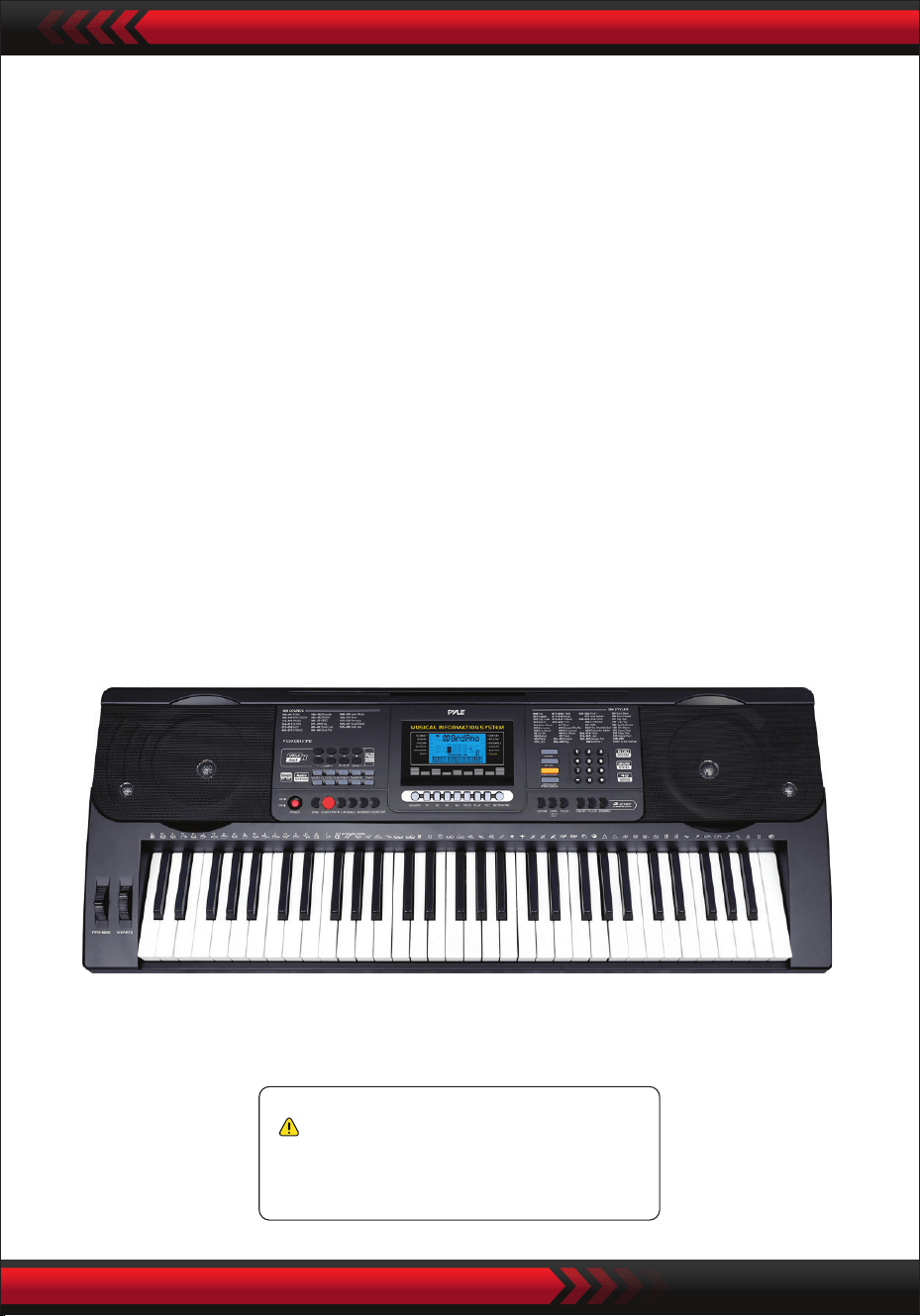
www.PyleUSA.com
21
Kaliforniya Prop 65 Uyarısı
DİKKAT:
Bu ürün, Kaliforniya Eyaleti tarafından kansere, doğum
kusurlarına ve diğer üreme zararlarına neden olduğu bilinen
kurşun ve kadmiyum içerir. Yutmayın.
Daha fazla bilgi için bkz: www.P65warnings.ca.gov
Teknik Özellikler:
• 61 tuş
• 600 Ses / 300 Stil
• 40 Demo Şarkı: Biri / Hepsi
• Ses arayüzü: Aux (3,5 mm) Jak girişi / Mikrofon girişi / USB girişi
• Maksimum ses seviyesi: 110 dB'ye kadar
• USB kablo uzunluğu / Güç kablosu: 3.9’ ft. - (119cm)
• Yapı malzemesi: işlenmiş ABS
• Güç kaynağı: DC 12 V / AC adaptör
• Klavye boyutları (G x U x Y):
36.6’’ x 11.97’’ x 3.7’’ -inches - (93 x 30.4 x 9.3 cm)
Questions or Comments
We are here to help!
Phone: 1 · 718 · 535 · 1800
PyleUSA.com/ContactUs