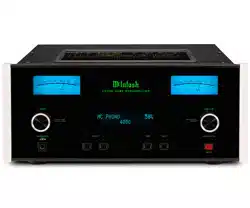
McIntosh Laboratory, Inc. 2 Chambers Street Binghamton, New York 13903-2699 Phone: 607-723-3512 www.mcintoshlabs.com
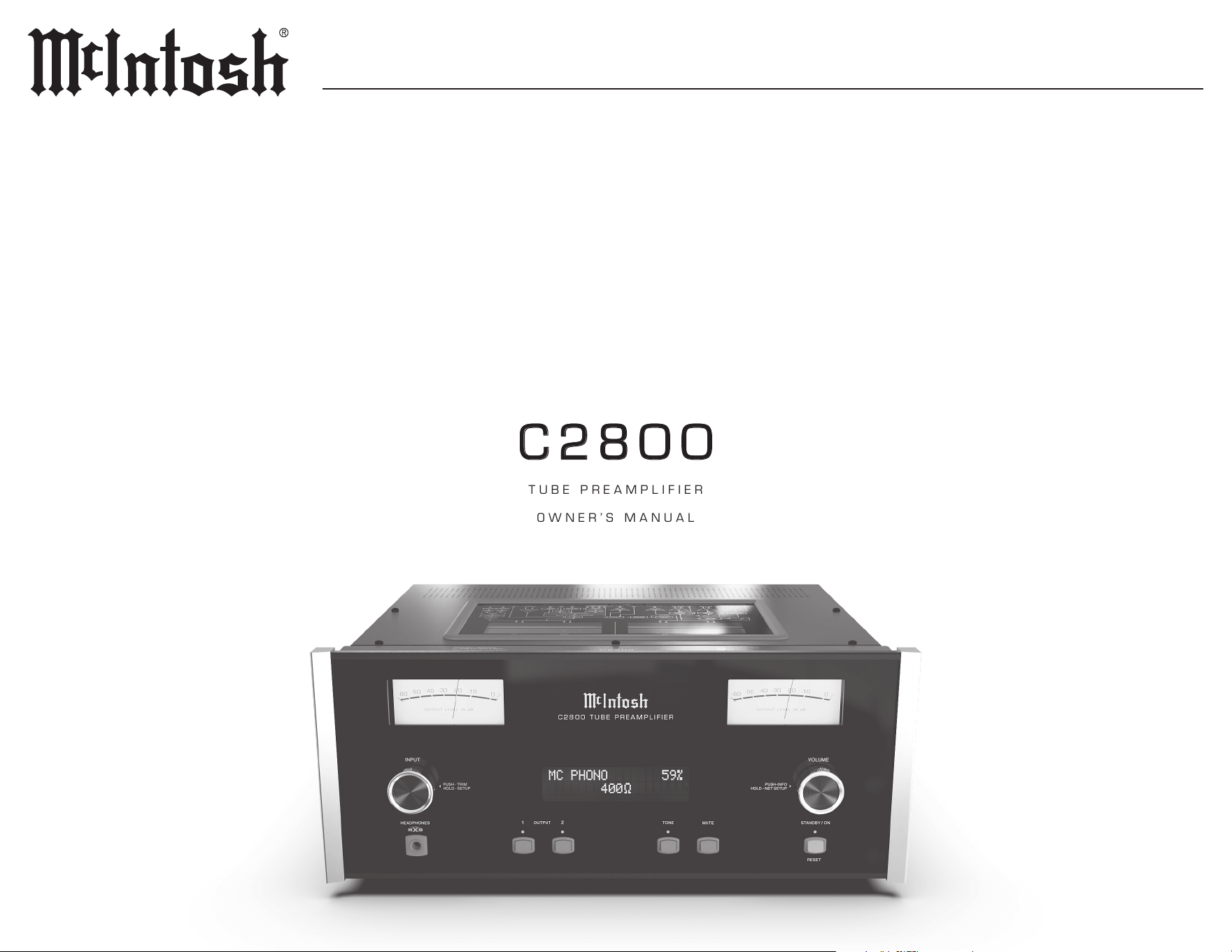
C2800C2800
TUBE PREAMPLIFIER
OWNER’S MANUAL
2
Trademark and License Information
The McIntosh C2800 incorporates copyright
protected technology that is protected by U.S.
patents and other intellectual property rights. The
C2800 uses the following technologies:
Trademark License Information
ASIO is a trademark and software
of Steinberg Media Technologies
GmbH
Manufactured under license
from Dolby Laboratories. Dolby,
Dolby Audio, and the double-D
symbol are trademarks of Dolby
Laboratories.
For DTS patents, see http://patents.
dts.com. Manufactured under
license from DTS, Inc. DTS, the
Symbol, DTS and the Symbol
together, and Digital Surround
are registered trademarks and/
or trademarks of DTS, Inc. in
the United States and/or other
countries. DTS, Inc. All Rights
Reserved.
HIGH-DEFINITION MULTIMEDIA INTERFACE
TM
The terms HDMI, HDMI
High-Denition Multimedia
Interface, and the HDMI Logo
are trademarks or registered
trademarks of HDMI Licensing
Administrator, Inc.
Thank You from all of us at McIntosh
You have invested in a precision instrument that
will provide you with many years of enjoyment.
Please take a few moments to familiarize yourself
with the features and instructions to get the
maximum performance from your equipment.
If you need further technical assistance, please
contact your dealer who may be more familiar with
your particular setup including other brands. You
can also contact McIntosh with additional questions
or in the unlikely event of needing service.
McIntosh Laboratory, Inc.
2 Chambers Street
Binghamton, New York 13903
Technical Assistance (607) 723-3512
Fax (607) 724-0549
Customer Service (607) 723-3515
Fax (607) 723-1917
Email support@mcintoshlabs.com
Website www.mcintoshlabs.com
Please Take A Moment
For future reference, you can write down your
serial number and purchase information here. We
can identify your purchase from this information if
the occasion should arise:
Serial Number: __________________________
Purchase Date: ___________________________
Dealer Name: ___________________________
Table of Contents
General Information .. .. .. .. .. .. .. .. .. .. 3
Connector and Cable Information.. .. .. .. .. 3
Performance Features.. .. .. .. .. .. .. .. .. .. 4
Dimensions .. .. .. .. .. .. .. .. .. .. .. .. .. .. 5
Installation .. .. .. .. .. .. .. .. .. .. .. .. .. .. 5
Front Panel Knobs and Buttons.. .. .. .. .. .. 6
Inputs .. .. .. .. .. .. .. .. .. .. .. .. .. .. .. .. 7
Outputs.. .. .. .. .. .. .. .. .. .. .. .. .. .. .. .. 7
How to use the Remote Control .. .. .. .. .. .. 9
Setup Menus . .. .. .. .. .. .. .. .. .. .. .. .. ..10
Digital Setup Menu .. .. .. .. .. .. .. .. .. .12-13
Inputs Setup Menu .. .. .. .. .. .. .. .. .. .. ..13
Outputs Setup Menu .. .. .. .. .. .. .. .. .. ..14
Triggers Setup Menu .. .. .. .. .. .. .. .. .. ..15
Data Out Setup Menu .. .. .. .. .. .. .. .. .. ..15
External Control Setup Menu. .. .. .. .. .. ..16
System Configurations .. .. .. .. .. .. .. .. ..17
Connecting Components.. .. .. .. .. .. .. .. .. 17
Network Information Menu .. .. .. .. .. .. ..18
Trim Functions Menu .. .. .. .. .. .. .. .. .18-19
Equalizer Controls .. .. .. .. .. .. .. .. .. .. ..19
How to Operate the C2800 .. .. .. .. .. .. 20-21
Specifications .. .. .. .. .. .. .. .. .. .. .. .. ..22
Packing Instructions .. .. .. .. .. .. .. .. .. ..23
Parts List .. .. .. .. .. .. .. .. .. .. .. .. .. .. ..23
Safety First
Please read the safety instructions included in a
separate document called Important Additional
Operation Information Guide.

3
C2800
Connector and Cable Information
XLR Connectors
Pin conguration for the XLR Balanced Input
and Output Connector. Refer to the diagrams for
connections:
PIN 1: Shield/Ground
PIN 2: + Input/Output
PIN 3: - Input/Output
Power Control and Trigger Connectors
The C2800 Power Control Out,
Trigger and PASSTHRU Output
Jacks send Power On/Off Signals (+12
volt/0 volt) when connected to other
Components. An additional connec
-
tion is for controlling McIntosh Power Ampliers
Output Meters. A 3.5mm stereo mini phone plug is
used for connection to the Power Control (Trigger)
and PASSTHRU Output.
Note: The Six Foot Cables are available from the McIntosh Parts
Department. Part No. 170202.
Data Port Connectors
The C2800 Data Out Ports send
Remote Control Signals to Source
Components. A 3.5mm stereo mini
phone plug is used for connection.
IR IN Port Connectors
The IR IN Port also uses a 3.5mm
stereo mini phone plug and allows
the connection of other brand IR
Receivers to the C2800.
RS232 Data Port Cable
The RS232-C Data Cable is a 3.5mm stereo mini
phone plug used to connect
to external third party
controllers.
Data
Signal
N/C
Data
Ground
PIN 2 PIN 1
PIN 3
PIN 1
PIN 2
PIN 3
General Information
Power
Control
Meter
Illumination
Control
Ground
Main, Triggers 1-4
and PAS ST HRU
7. For additional information on the C2800
and other McIntosh Products please visit the
McIntosh website at www.mcintoshlabs.com.
IR Data
Control
Ground
N/C
1. Do not apply AC Power to the C2800 and other
Component(s) until they are connected to the
C2800 so operational malfunctioning does not
occur.
2. Balanced and Unbalanced Inputs and Outputs
can be mixed. For example, you may connect
signal sources to Unbalanced Inputs and send
signals from the Balanced Outputs. You can
also use Balanced and Unbalanced Outputs
simultaneously, connected to different Power
Ampliers.
3. The C2800 internal Digital to Analog Converter
Circuitry is designed to decode PCM, DSD and
DTS Digital Signals. The Coaxial and Optical
Digital Audio Inputs are for PCM Digital
Signals, Dolby Signals and DTS Signals. The
C2800 also decodes USB and HDMI (ARC)
Digital Signals. Other Digital Audio Signal
Format Types will cause the Audio Outputs of
the C2800 to be muted.
4. The McIntosh C2800 is factory congured for
immediate use. It can also be customized to
complement the components making up your
system. Refer to the Setup Menu described on
page 11.
5. The Remote Control Supplied with the C2800
Preamplier is capable of operating other
components. For additional information go to
www.mcintoshlabs.com.
6. The IR Input is congured for non-McIntosh
IR sensors such as a Xantech Model HL85BK
Kit. Use a Connection Block such as a Xantech
Model ZC21 when two or more IR sensors need
to be connected to the C2800. The signal from a
connected External IR Sensor will have priority
over the signal from the Front Panel IR Sensor.
C2800 TXD Out
Data being transmitted
C2800 RXD In
Data being received
Ground
Introduction
The McIntosh C2800 Tube Preamplier is one of
the nest Preampliers ever created with connec
-
tions for both analog and digital sources. The
C2800 Outputs have the ability to drive multiple
Power Ampliers. The C2800 reproduction is
sonically transparent and absolutely accurate.
The McIntosh Sound is “The Sound of the Music
Itself.”

4
Performance Features
• Electromagnetic Input Switching with
Level Trim Adjustment
Digital Logic Circuits drive Electromagnetic
Switches on all Inputs and operating functions for
reliable, noiseless, distortion-free switching. The
Analog Inputs can be matched in level, preventing
abrupt changes in volume levels.
• Phono Inputs with Adjustable Gain
The C2800 has two precision Phono Preamplier
Circuits. They have the ability to be congured for
Moving Coil or Moving Magnet Cartridges. The
close tolerance resistors and capacitors used in the
RIAA Correction Equalization Circuitry provide
an extremely at frequency response.
• Selectable Phono Cartridge Loading
Adjustable Capacitance and Resistance Loading
are available for both Moving Coil and Moving
Magnet Phono Cartridges. Capacitance Loading
is selectable from values of 50 picofarads to 400
picofarads. Resistance Loading is selectable from
values of 25 ohms to 47,000 ohms.
• Digital Audio Inputs
The Digital Inputs decode PCM and DSD Signals
from external sources. Coaxial, Optical and HDMI
Inputs process Digital Signals up to 192kHz
with 24-Bit resolution. The Digital MCT Input
Circuitry directly decodes SACD/CD signals from
an external Transport component. The USB Input
for streaming audio processes Digital Signals up
to 384kHz with 32Bit resolution, decodes up to
DSD512 Digital Signals and DXD 24Bit with a
sampling rate up to 384kHz.
• Vacuum Tube Phono Amplication
The C2800 utilizes vacuum tube amplication
circuitry for the phono inputs and preamplier
section. The circuits use the latest designs
providing the lowest possible noise and distortion.
• PASSTHRU Mode
The Automatic PASSTHRU Mode allows the
C2800 to become part of a Home Theater
Multichannel Sound System.
• Remote Control with External Sensor Input
The Remote Control provides control of the
C2800 operating functions and McIntosh Source
Components connected to it. Enjoy your McIntosh
System from another room in your home by
connecting an external sensor.
• Power Control Output and Trigger Assignment
A Power Control connection for convenient
Turn-On of McIntosh Power Ampliers, Source
Components and Accessories is included. The
Power Control Trigger Outputs may be assigned to
activate when a given Input/Output is selected.
• Special Power Supply
Fully regulated Power Supplies and a special
R-Core Power Transformer ensure stable, noise-
free operation even though the power line varies.
• Glass Front Panel with LED Illumination
The famous McIntosh Glass Front Panel is evenly
Illuminated by multiple extra long life Light
Emitting Diodes (LEDs) arranged with a special
orientation. The pristine beauty of the C2800 will
be retained for many years.
• Bi-Amp Outputs
Built-in Adjustable Highpass and Lowpass Outputs
for bi-amping your speaker system.
HXD
®
is a registered trademark of McIntosh Laboratory, Inc.
• Balanced Inputs
The Balanced Inputs allow the connection of a
source component using long cable lengths without
a loss in sound quality.
• Precision Tracking VOLUME Knob
Volume levels are controlled by a Precision
Balanced Digitally Controlled Attenuator System
with an Encoder Rotary Control. This assures a
0.1dB tracking accuracy between channels. There
are 214 individual 0.5dB volume level steps with
no noise as the volume level is changed.
• Variable Rate Volume and Balance Controls
The C2800 Preamplier’s Volume and Balance
Control Circuitry provides an ideal rate of change
with control rotation.
• Electronic Tone Controls with Bypass
Electronic bass and treble circuitry allow volume
level adjustments for low and high frequencies in
precise one Decibel steps. The C2800 remembers
the tone control circuitry bypass option for each
input.
• HXD
®
for Headphones
The C2800 Headphone Crossfeed Director
Circuitry (HXD
®
) improves the sound localization
for Headphone Listening. HXD
TM
restores the
directionality component of the spatial sound stage
normally heard with loudspeaker listening.
• Alphanumeric Fluorescent Display
The Front Panel Information Display indicates
the Source Selection, Volume/Balance Levels and
Setup Menu Selections. The display intensity is
adjustable.
5
C2800
Dimensions
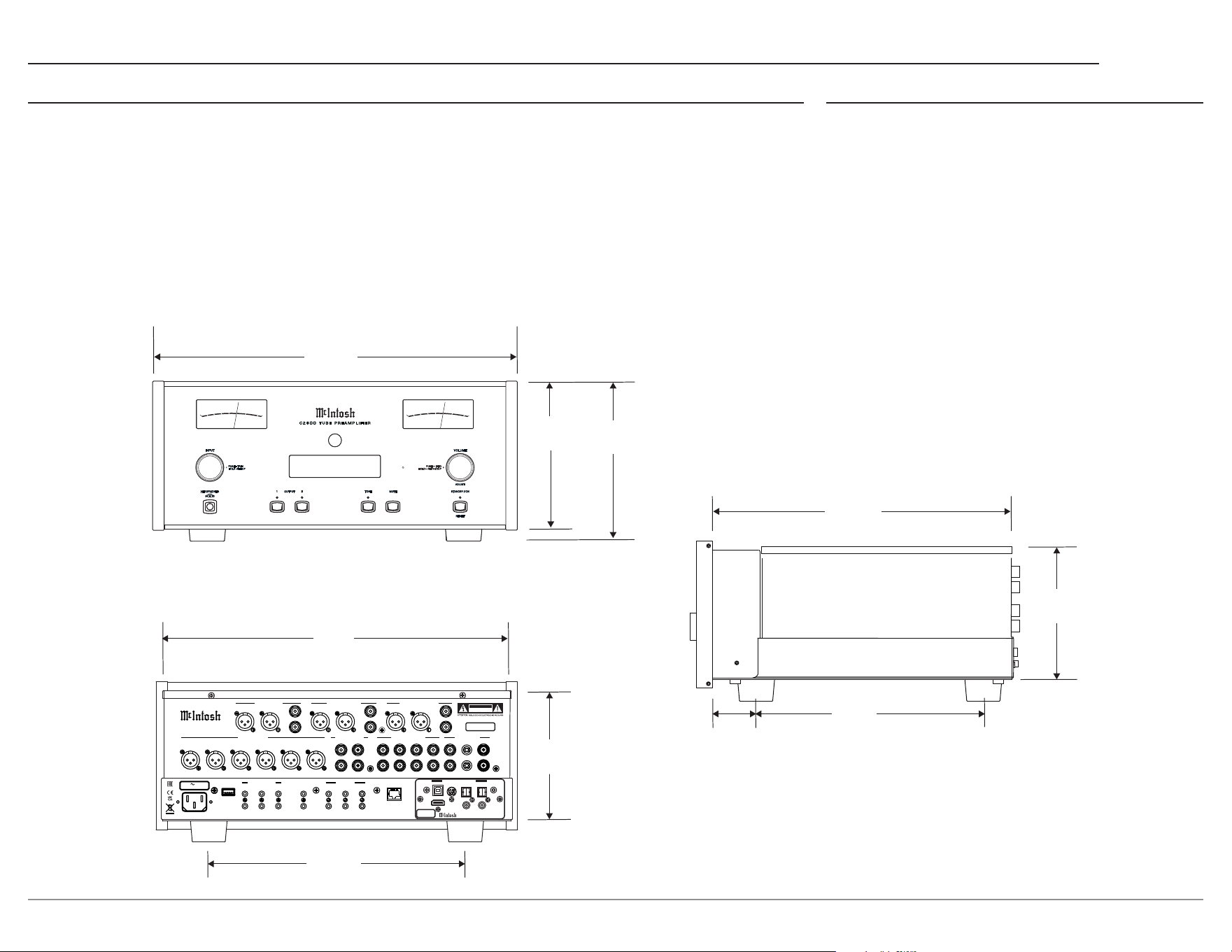
The following dimensions can assist in determining the best location for your C2800. There is additional
information on the next page pertaining to installing the C2800 into cabinets.
A Note on Placement:
It is important to keep your McIntosh unit out of direct sunlight and only use appropriate gentle cleaners
because the Organic Anodize can become discolored over time.
While most products will maintain their classic dark features for their lifetime, some situations can
accelerate discoloration. The most pervasive culprit is UV light, especially light directly from the sun, or
high intensity spotlights. Even high intensity short-term exposure can result in discoloration.
Chemicals can also alter the nish of the Anodize. Aggressive cleaners will take their toll over time and
actually etch away the Anodize nish.
Installation
The C2800 should be installed upright on its four
feet. Adequate ventilation is important and will aid
in a long trouble-free life of the C2800. You must
ensure proper airow by allowing at least 3 inches
(7.6cm) above the unit and 3 inches (7.6cm) for
the front, rear and sides. Do not remove the feet to
ensure adequate airow beneath the C2800. There
must be openings for cool air to enter (below) and
warm air to escape (above) the C2800.
17 1⁄2”
44.5 cm
7 1⁄8”
18.1 cm
13 1⁄4”
33.7 cm
17 1⁄8”
43.5 cm
7 5⁄8”
19.4 cm
INSIDE DIMENSION
6 5⁄16”
16 cm
HEAD PHONES
INPU T
VOLU ME
STANDB Y ON/
RESE T
+3
0
-10
-60
OU TP UT L EV EL I N d B
-50
-40
-30
-20
+3
0
-10
-60
OU TP UT L EV EL I N d B
-50
-40
-30
-20
+3
0
-10
-60
OU TP UT L EV EL I N d B
-50
-40
-30
-20
+3
0
-10
-60
OU TP UT L EV EL I N d B
-50
-40
-30
-20
PUSH - TR IM
HOLD - SE TUP
PUSH IN FO–
HOLD – NE T SETUP
OUTP UT
MUTE
1 2
TONE
USB 29%
DSD512
ADJUS T
C 2 8 0 0 T U B E P R E A M P L I F I E R
120V 50/60Hz
75 WATTS
MAIN
TRIG 1
TRIG 3
PASSTHRU
TRIG 2
TRIG 4
IR IN
RS232
EXTERNAL CONTROL DATA PORTS
5
3
1
6
4
2
SERVICE
PORT
NETWORK
CONTROL / UPDATE
ONLY
POWER CONTROL
2
GND
L
R
BAL R BAL L BAL R BAL L
L
R
BAL R BAL L
L
R
L
R
1 42
3
1
L
R
UNBAL UNBAL UNBAL
McINTOSH LABORATORY, INC. BINGHAMTON, NY
HANDCRAFTED IN USA WITH US AND IMPORTED PARTS
C2 80 0 T UB E PR EA MP L I F IE R
SERIAL
NUMBER
BALANCED INPUTS PROCESSOR LOOP
MAIN / HIGH PASS OUTPUT 1 / LOW PASS
OUTPUT 2 (SUBWOOFER)
UNBALANCED INPUTS
PHONO INPUTS
1R 1L 2R 2L 3R 3L
CAUTION
RISK OF ELECTRIC SHOCK
DO NOT OPEN
SEND
RETURN
HDMI (ARC)
DA2 DIGITAL AUDIO MODULE
USB AUDIO
COAX 2
COAX 1
MCT
OPTICAL 2 OPTICAL 1
DIGITAL AUDIO INPUTS
SERIAL
NUMBER
14 1⁄2”
36.8 cm
10 9⁄16”
26.8 cm
6 1⁄2”
16.5 cm
1
15⁄16”
4.9 cm
6
HEADPHONES
INPUT
VOLUME
STANDBY ON/
RESET
+3
0
-10
-60
O U T P U T L E VE L I N d B
-50
-40
-30
-20
+3
0
-10
-60
O U T P U T L E VE L I N d B
-50
-40
-30
-20
+3
0
-10
-60
O U T P U T L E VE L I N d B
-50
-40
-30
-20
+3
0
-10
-60
O U T P U T L E VE L I N d B
-50
-40
-30
-20
PUSH - TRIM
HOLD - SETUP
PUSH INFO–
HOLD – NET SETUP
OUTPUT
MUTE
1 2
TONE
USB 29%
DSD512
C 2 8 0 0 T U B E P R E A M P L I F I E R
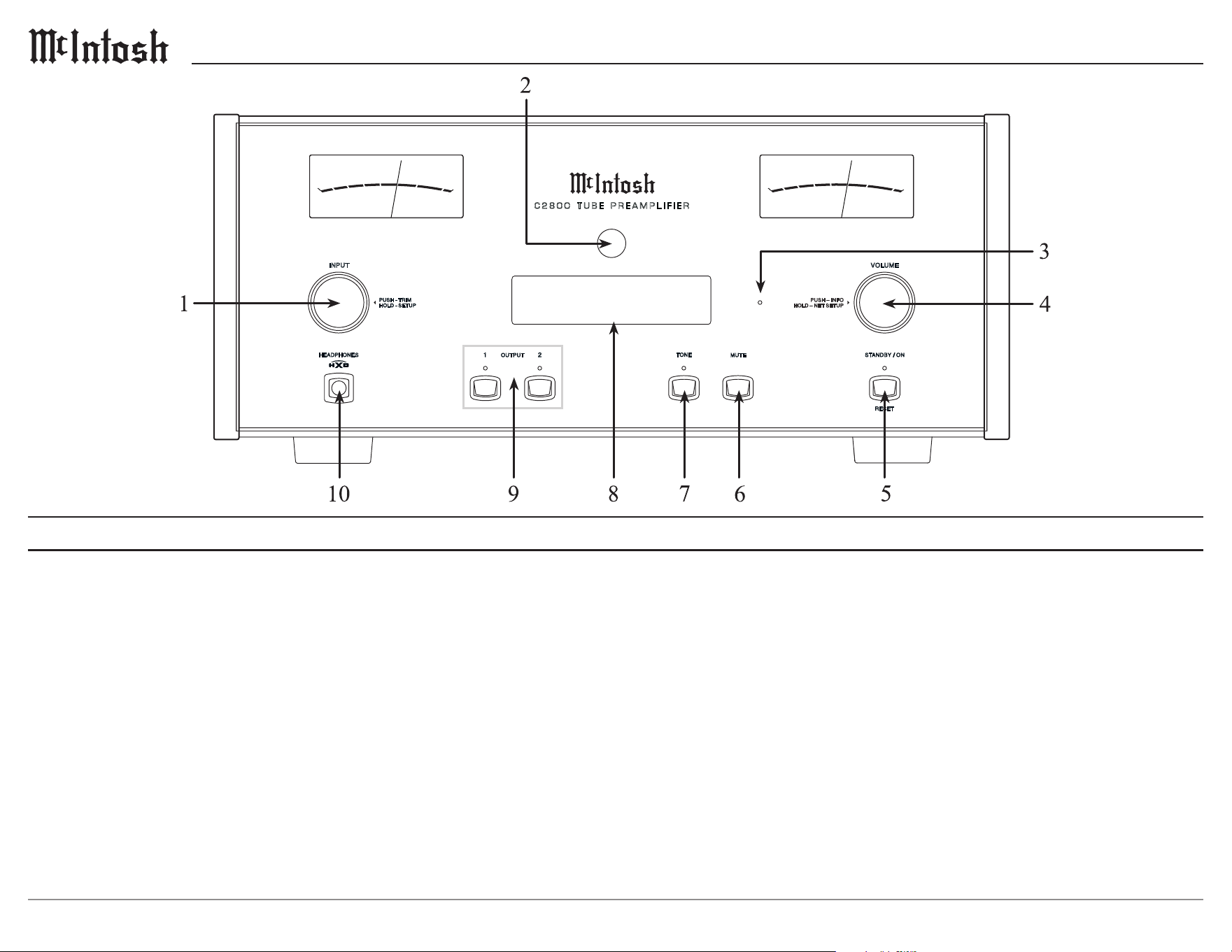
1. INPUT Knob is used to select a source for
listening and recording. The knob is also used for
menu navigation.
2. IR Sensor receives commands from a Remote
Control.
3. Network Status LED provides NET connection
status.
4. VOLUME Knob allows adjustment of the
listening level for both channels, Trim Mode
Adjustments, and various SETUP Functions.
5. STANDBY/ON Button with indicator switches
the C2800 ON or OFF (Standby) and resets the
microprocessors.
6. MUTE Button mutes the audio from the
loudspeakers and Headphones.
7. TONE Button allows the user to select whether
or not the tone circuit is engaged. In the Off mode,
the tone controls are bypassed and the audio signal
is unaltered. In the On mode, the audio signal can
be adjusted via the Trim Mode.
8. Information Display indicates the Sources,
Volume, other Audio Settings, Operational
Functions and Setup Menu Settings
9. OUTPUT 1 and 2 Buttons with indicators switch
the Preamplier Outputs 1 and 2 On or Off.
10. HEADPHONES Connection to use with low
impedance dynamic headphones for private
listening.
Front Panel Knobs and Buttons
7
C2800
120V 50/60Hz
75 WATTS
MAIN
TRIG 1
TRIG 3
PASSTHRU
TRIG 2
TRIG 4
IR IN
RS232
EXTERNAL CONTROL DATA PORTS
5
3
1
6
4
2
SERVICE
PORT
NETWORK
CONTROL / UPDATE
ONLY
POWER CONTROL
2
GND
L
R
BAL R BAL L BAL R BAL L
L
R
BAL R BAL L
L
R
L
R
1 42
3
1
L
R
UNBAL UNBAL UNBAL
McINTOSH LABORATORY, INC. BINGHAMTON, NY
HANDCRAFTED IN USA WITH US AND IMPORTED PARTS
C2 8 0 0 T UB E P R E A MP L I FIE R
SERIAL
NUMBER
BALANCED INPUTS PROCESSOR LOOP
MAIN / HIGH PASS OUTPUT 1 / LOW PASS
OUTPUT 2 (SUBWOOFER)
UNBALANCED INPUTS
PHONO INPUTS
1R 1L 2R 2L 3R 3L
CAUTION
RISK OF ELECTRIC SHOCK
DO NOT OPEN
SEND
RETURN
HDMI (ARC)
DA2 DIGITAL AUDIO MODULE
USB AUDIO
COAX 2
COAX 1
MCT
OPTICAL 2 OPTICAL 1
DIGITAL AUDIO INPUTS
SERIAL
NUMBER
Outputs
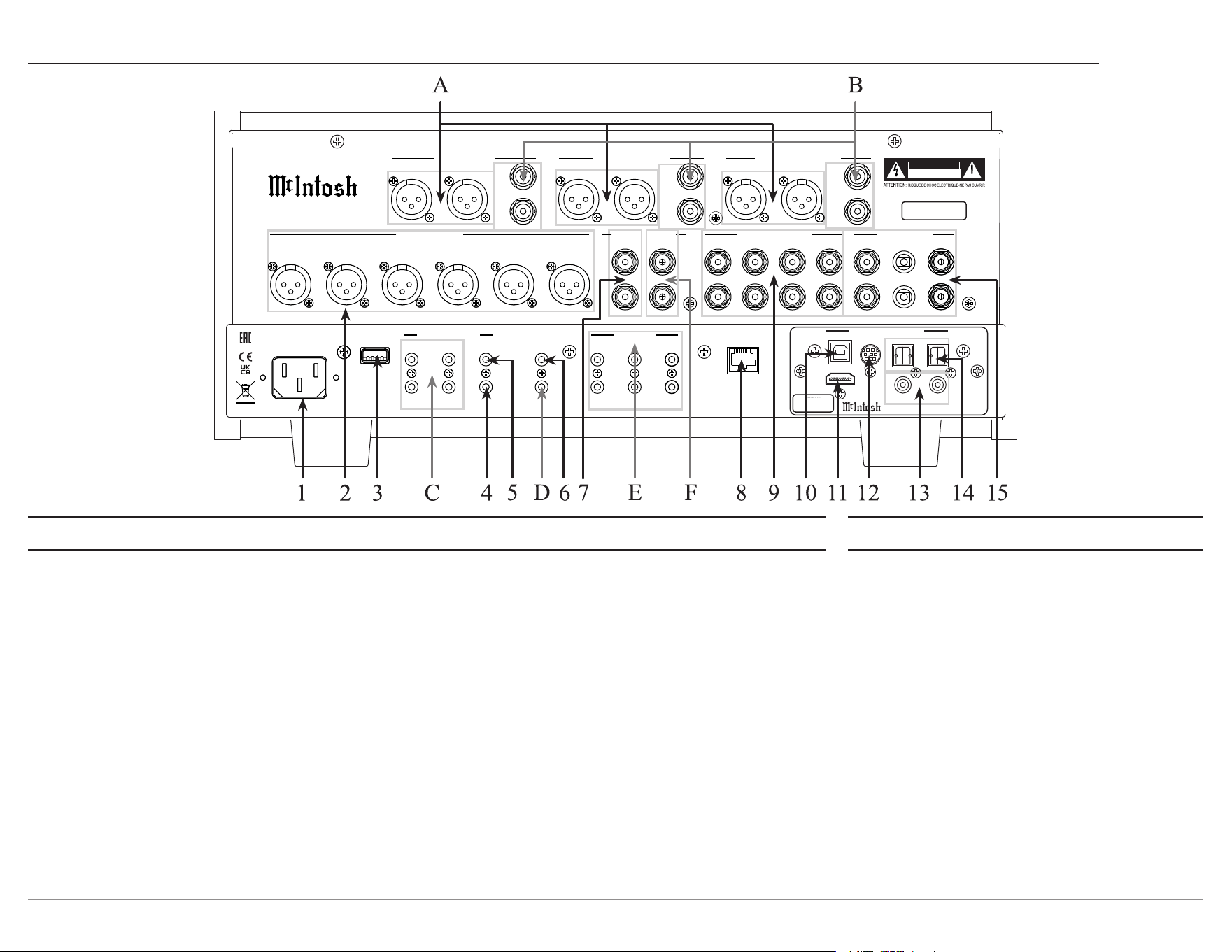
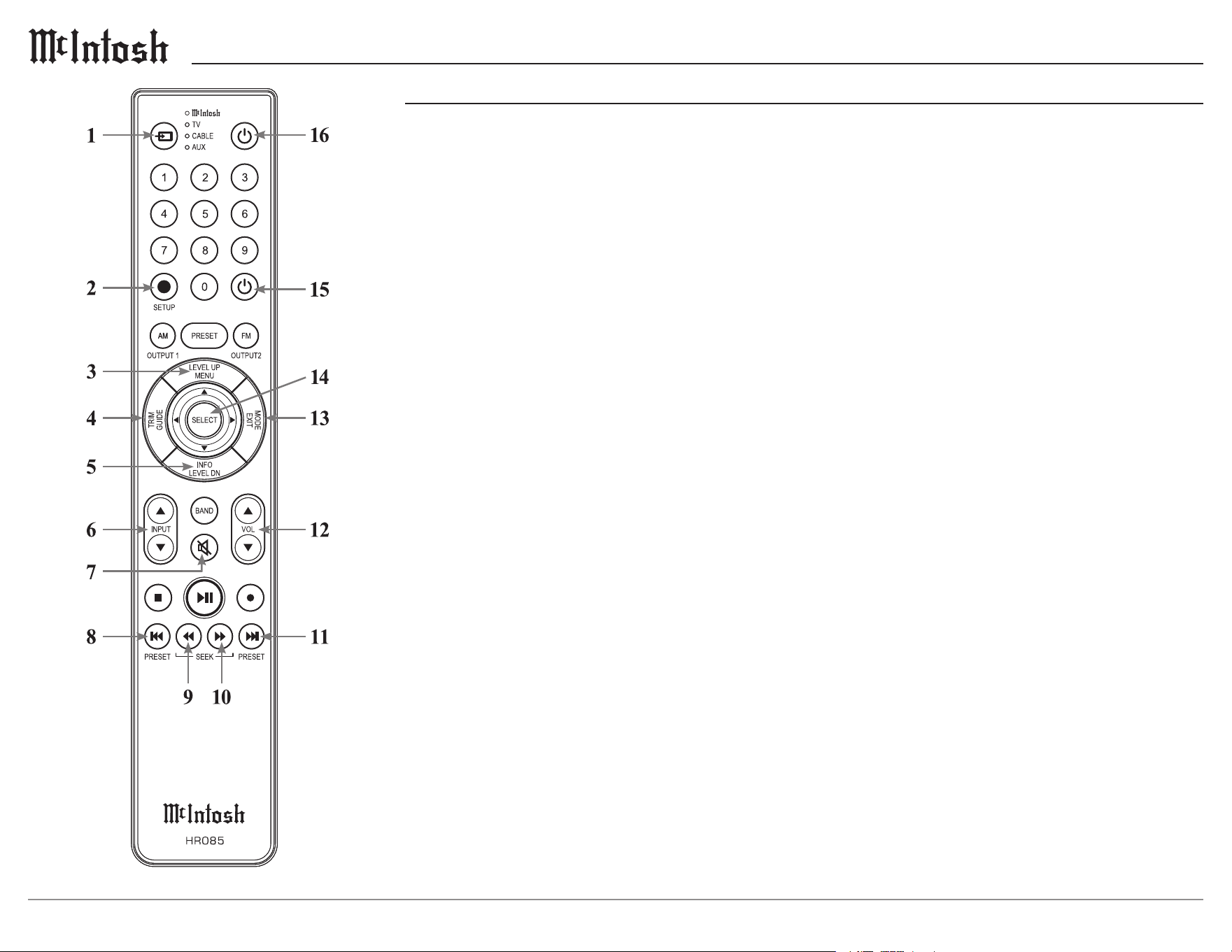
A. BALanced Outputs each use an XLR
connector cable for a balanced output signal.
B. UNBALanced Outputs use an RCA connector
cable for an unbalanced output signal.
C. POWER CONTROL TRIG (1 thru 4) send
On/Off signals to other McIntosh components.
D. RS232 Connector communicates with external
control devices using a 3.5mm stereo mini
phone plug cable.
E. DATA PORTS retransmit remote control
signals to source components.
F. PROCESSOR LOOP SEND jack delivers
audio to an external equalizer or room
correction processor.
Inputs
1. AC Input uses a power cord to connect to an AC Outlet.
2. BALANCED INPUTS (1 thru 3) accept high-level
program source signals.
3. SERVICE USB is a USB Type-A port used for service
purposes only.
4. POWER CONTROL PASSTHRU receives On/Off
signals from an Audio/Video Processor.
5. POWER CONTROL MAIN sends On/Off signals to
a McIntosh Component when the C2800 Preamplier is
switched On/Off.
6. IR IN accepts an external IR receiver using a 3.5mm stereo
mini phone plug cable.
7. PROCESSOR LOOP RETURN receives audio from an
external equalizer or room correction processor.
8. NETWORK for a wired internet connection via ethernet.
9. UNBALANCED INPUTS (1 thru 4) accept high-level
program source signals.
10. USB AUDIO Input is a USB Type-B connector used to
connect the C2800 to a computer to stream digital audio.
11. HDMI (ARC) Input connects with a compatible ARC TV
using an HDMI cable to share control and digital audio
connectivity.
Note: The HDMI ARC functionality of the C2800 is only compatible
with ARC TVs. Other devices like DVD and Blu-ray players
will not work.
12. MCT Input transfers signals from McIntosh
products with an MCT connector and is required for
SACD audio.
13. COAX Inputs (1 and 2) accept coaxial cables for
digital signals.
14. OPTICAL Inputs (1 and 2) accept optical
connections for digital signals.
15. PHONO Inputs (Right and Left channels) accept
signals from a Phono Cartridge.
8
Navigating the Remote Control
Remote Control Batteries
The HR085 Remote Control included with the
C2800 is powered by two AAA batteries (not
included). To insert or remove batteries, open
the battery compartment by removing the cover
located on the back of the remote control. To
open, pull the clasp located just above the opening
downward.
Additional Discrete Commands
Additional discrete commands for external
control systems are available:
• BAL 1, 2, 3
• UNBAL 1, 2, 3, 4
• PHONO 1, 2
• COAX 1, 2
• OPT 1, 2
• USB
• MCT
• HDMI
• Power (Cycle)
These additional commands can be accessed
using an optional McIntosh HR093 Service
Remote Control. A list of these commands as
well as Pronto Hex Codes can be found in the
C2800 Pronto Hex Codes document located in the
Download section of the C2800 product informa
-
tion at
www.mcintoshlabs.com
You can also contact McIntosh Technical
Assistance or your dealer for more information.
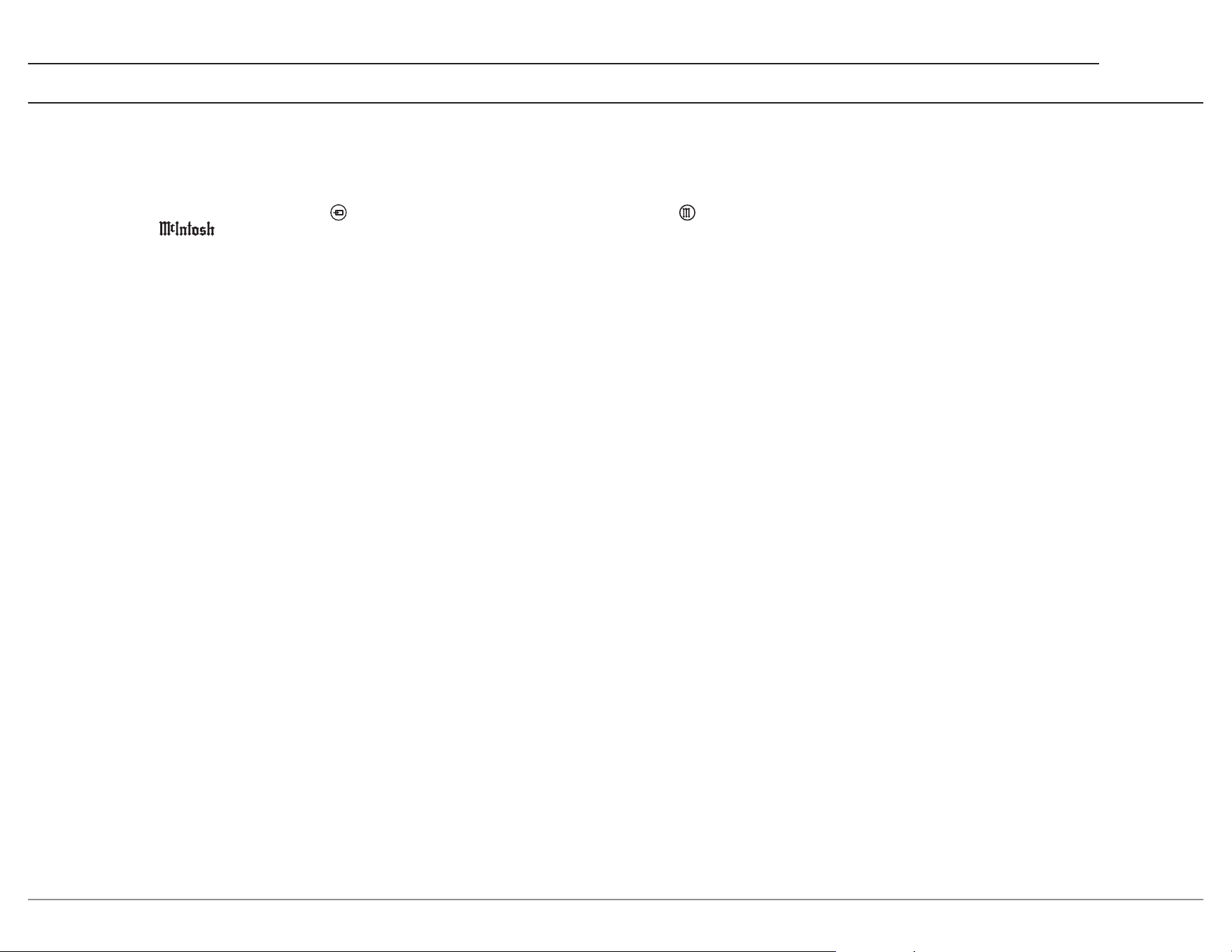
1. Switch Device: Select different devices for remote
operation. Selected device is indicated by the LED
indicator.
2. Setup Button: Used to enter Setup Menu.
3. Level Up/Menu: Adjusts Trim Functions settings.
Accesses menu on compatible devices.
4. Trim/Guide: Enters Trim Functions menu. Opens
guide on compatible devices.
5. Info/Level Down: Adjusts Trim Functions
settings. Accesses info on compatible devices.
6. Input: Changes and selects different inputs.
7. Mute: Mutes audio playback.
8. Previous/Previous Preset: Return to your previ
-
ous media selection.
9. Fast Reverse/Seek Down: Navigate backwards
through the current active media using this button.
10. Fast Forward/Seek Up: Navigate forward
through the current active media using this button.
11. Next/Next Preset: Jump to your next media
selection or navigate to the next tuner preset.
12. Volume: Used to adjust the volume.
13. Mode/Exit: This will exit the Trim Functions
menu. It will also display information or certain
options.
14. Select: Selects the highlighted option.
15. Power Off: Turns off the selected device shown
by the LED.
16. Power On: Turns on the selected device shown by
the LED.
Note: The HR085 Remote Control has buttons used to control
multiple devices. Buttons whose function are not described are
for use with other McIntosh products.
For more information, refer to the HR085 Owner's Manual on
the McIntosh website at www.mcintoshlabs.com.
9
C2800
The supplied C2800 Remote Control (HR085)
is capable of directly controlling the functions
of contemporary McIntosh Source Components
connected to the C2800 via the Data Ports.
Notes: 1. If at any time the C2800 seems unresponsive to the
HR085 Remote Control Commands, press the DEVICE
Button to select first.
2. For additional information on using the HR085 Remote
Control with the McIntosh Model, please refer to the “How
to Operate” starting on page 20.
3. For additional information on assigning the Data Ports,
refer to “Data Ports” on page 13.
Trim
Press the TRIM Button until the desired Trim
function (Balance, Trim Level, etc.) appears on the
C2800 Front Panel Display, then press the LEVEL
Up or Down Button to adjust the Trim setting.
Note: Press the TRIM Button to recall the last Trim function
selected. For additional information on using the Trim
Functions refer to pages 18-19.
Output Selection
Press the BLUE (Setup) Button followed by the
AM (Output 1) or FM (Output 2) Button, to control
the Rear Panel Audio OUTPUTS 1, 2 (ON or OFF)
and Power Control TRIG 1 / TRIG 2.
Note: For additional information on assigning the Outputs (1 and
2) and Power Control Triggers (1 and 2) refer to page 3.
How to use the Remote Control
The supplied HR085 Remote Control is capable of
directly controlling the functions of contemporary
Source Components connected to the C2800 via
the Data Ports.
Note: If at any time the C2800 seems unresponsive to HR085
Remote Control Commands press the
Button first.
Mute
Press the MUTE Button to mute the audio in all
outputs except the SEND OUTPUT. The word
MUTE will appear on the Front Panel Information
Display. To un-mute the audio, press the MUTE
Button again.
Disc, Server and Tape Functions
Use these buttons to operate a DVD Player, CD
Player, CD Changer, Music Server or Recorder.
Numbered Buttons
Press Buttons 0 through 9 to access tuner station
presets, tracks on discs or selections on a Music
Server.
Disc and Track
Use the AM (disc) and FM (track) Buttons when a
Disc Player or Music Server is being used.
Tuner But tons
Press the AM or FM Button to select the desired
broadcast band. Press and release the Channel Up
p or Down q Button to seek the next available
station. Press and hold a Channel Up p or Down
q Button to seek continuously from station to
station.
Volume
Press the Up p or Down q VOLUME Button to
raise or lower the listening volume level.
Note: The Record Signals present at REC OUTPUTS are not
affected by volume changes.
Pause
Press the Pause Button to perform various
functions on a variety of McIntosh Components. It
will also pause the playing of a disc or tape player.
Trim
Press the TRIM Button until the desired Trim
function (Balance, Trim Level, etc.) appears on
the Front Panel Information display, then press the
LEVEL Up p or Down q Button to adjust the
Trim setting.
Note: Press the TRIM Button to recall the last Trim Function
selected. For additional information on the Trim Functions
refer to pages 18 and 19.
Amplier Selection
Press the BLUE (Setup) Button followed by the
AM (Output 1) or FM (Output 2) Button, to control
the rear panel Audio OUTPUTS 1, 2 (ON or
OFF) and Power Control OUTPUT 1 / OUTPUT
2. These OUTPUTS provide signals to a Power
Amplier or other accessory component.
10
Setup Menus
The Setup Menus are listed below.
• System
• Digital
• Inputs
• Outputs
• Triggers
• Data Out
• External Control
How to Navigate the Setup Menus
Your McIntosh C2800 has been factory congured
for default operating settings that will allow
immediate enjoyment of superb audio without
the need for further adjustments. If you wish to
make changes to the factory default settings, a
Setup Menu is provided to customize the operating
settings using the Front Panel Information Display.
Note: If the C2800 is currently On, proceed to step 2.
1. Press and hold in the INPUT Knob until the
Front Panel Information Display indicates
SETUP: Menu Select
< System >
2. Rotate the INPUT Knob to select any of the
available submenus.
3. To enter the selected submenu, press and hold
the INPUT Knob.
4. Rotate the INPUT knob to navigate available
options in the selected submenu.
5. Rotate the VOLUME knob to change the
selected option’s value.
6. To exit from the Setup Menu, or any of the
submenus, press the INPUT Knob.
Update
By default, the C2800 will periodically check for
updates. To disable automatic updates, perform the
following steps:
1. Use the INPUT Knob to enter the System Setup
Menu.
2. Rotate the input until the following appears on
the Information Display.
System: < Update >
Automatic >
3. Rotate the VOLUME Knob to until the follow-
ing appears on the Information Display.
System: < Update >
< Manual (Hold Input)
4. To check for a Firmware update in Manual
mode, hold the INPUT Knob. After a few
seconds, the Information Display will indicate
that a check is being performed. If an update is
found, it will be deployed immediately.
5. Exit the System Setup Menu by pressing the
INPUT Knob.
System Setup Menu
Settings Options
Product Information _._._
Update Check for Update
Passthru Off
Auto Off Enabled, Disabled
Power Save Enabled, Disabled
Restore Defaults Default Settings
Factory Reset Default Settings
Product Information
Specic identifying information for the C2800,
including the System Firmware Version, can be
found on the Product Information page of the
System Setup Menu. This rmware effects the
main circuitry and can be identied by opening the
System Setup Menu. To update, see the following
section.
11
C2800
Passthru
When the C2800 is part of a Home Theater or
Multichannel Audio System, the Right and Left
Front Channels from an Audio/Video Processor
or Surround Decoder can “Passthru” the C2800
and onto its associated Power Amplier(s). The
Passthru setting allows selection of the specied
C2800 Input to be used for the Right and Left
Front Channels. In the example below, the Right
and Left Front Channels from the Audio/Video
Processor will be connected to the BALanced 2
Input Connectors on the C2800. Refer to pages 7
for additional connection information.
Note: The Phono and Digital Inputs are not assignable as a
Passthru Input.
1. Use the INPUT Knob to enter the System Setup
Menu.
2. Rotate the INPUT Knob until the following
appears on the Information Display.
System: < Passthru >
Off >
3. Rotate the VOLUME Knob to select “BAL 2”
Input.
System: < Passthru >
< BAL 2 >
4. Exit the System Setup Menu by pressing the
INPUT Knob.
System Setup Menu (continued)
Auto Off
The C2800 incorporates an Auto Off feature,
which automatically places the Preamplier into
the Standby/Off Mode. This occurs approximately
30 minutes after there has been an absence of user
activity (includes changes to any of the Operation
Functions such as source selection, volume adjust
-
ment, etc.) or absence of an audio signal. This
feature is turned on by default but can be disabled
in the System Setup Menu.
Power Save
Disabled: The network connection will remain
active during standby. May also reduce wake up
time.
Enabled: The network connection will be lost in
standby. The unit can be turned on by IR remote
control, power control, RS232, or by pressing the
front panel STANDBY/ON Button.
Restore Defaults
To reset all the adjustable settings (Setup and Trim
Settings) to the factory default values, perform the
following steps:
1. Select the Defaults option in the System
Setup Menu. The following should be on the
Information Display.
System: < Defaults >
Hold INPUT to Reset
3. Press and hold in the INPUT Knob until the
following appears on the Information Display,
then release the INPUT Knob.
System: < Defaults >
In Progress!
System: < Defaults >
Completed!
4. Press the front panel STANDBY/ON Button to
switch the C2800 on.
Factory Reset
To reset all adjustable settings and clear all network
information, select Factory Reset and follow the
same process as above.
12
Digital Setup Menu
Settings Options
DA Firmware Version
DA Update
OPT 1 Gain 0dB to +15dB in 1dB intervals
OPT 2 Gain 0dB to +15dB in 1dB intervals
HDMI Gain 0dB to +15dB in 1dB intervals
HDMI Lip Synchronize Mode Manual, Automatic
HDMI CEC Power Disabled, Enabled
HDMI CEC Volume Disabled, Enabled
DA Firmware Version
The C2800 functionality is controlled by internal
software that is know as Firmware. The Firmware
Number for the Digital Audio Circuitry of the
C2800, and can be viewed by following the steps
below:
1. Press and hold the INPUT Knob to enter the
Setup Menu.
2. Rotate the INPUT Knob until the Front Panel
Information Display indicates
SETUP: Menu Select
< Digital >
3. Press and hold the INPUT Knob to open the
Digital Setup Menu and the Information Display
will show the DA Firmware version.
DA Update
This option is for service purposes only.
Digital Gain
The C2800 offers Digital Gain Adjustments for
the HDMI, OPTICAL 1 (OPT 1) and OPTICAL
2 (OPT 2) Inputs. The change in gain of a specic
Digital Input, will produce a change in playback
volume of the music. To change the gain for the
HDMI Input perform the following steps:
1. Use the INPUT Knob to enter the Digital Setup
Menu.
2. Rotate the INPUT Knob until the following
appears on the Information Display.
Digital: < HDMI (ARC) >
+15dB
3. The gain can be adjusted in 1dB Gain steps by
rotating the VOLUME Knob counterclockwise
to reduce the gain downwards from +15 dB all
the way to 0dB.
4. To adjust other Gain values, rotate the INPUT
Knob to select OPT 1 or OPT 2 and the gain is
adjustable in 1dB Gain steps. 0 dB is the default
setting for Optical 1 and Optical 2.
Digital: < OPT 1 >
0 dB
5. The gain can be increased by rotating VOLUME
Knob clockwise to increase the gain from 0 dB
with an increase all the way up to +15 dB or
+8dB from 0 dB.
Digital: < OPT 1 >
+ 15 dB
Digital: < OPT 2 >
+ 8 dB
HDMI (ARC) CEC Power
The C2800 HDMI Input Connector has (ARC)
Audio Return Channel Circuitry, allowing the
Audio Selection and Control Command of HDMI
TV/Monitor Devices. By default the HDMI Input is
congured to accept Power commands via CEC.
To prevent the CEC Power Control of the C2800,
simply change HDMI CEC Power from On to Off.
Digital: < CEC Power >
< Enabled
Digital: CEC Power
Disabled >
HDMI (ARC) CEC Volume
To change the Consumer Electronics Control
(CEC) of the volume, perform the following steps:
1. Use the INPUT Knob to enter the Digital Setup
Menu.
2. Rotate the INPUT Knob until the following
appears on the Information Display.
Digital: < CEC Volume
< Enabled
3. To deactivate the Consumer Electronics Control
(CEC), rotate the VOLUME Knob until the
following appears on the Information Display.
Digital: < CEC Volume
Disabled >
13
C2800
HDMI (ARC) Lip Sync Mode
The C2800 HDMI Input Connector (ARC), also
has another control function. When listening and
viewing a TV/Monitor HDMI Input Signal, the
ARC circuitry provides a synchronized Video
and Audio TV/Monitor Signal. To switch Off the
AUTO Synchronised Video and Audio TV/Monitor
Signal, perform the following steps:
1. Use the INPUT Knob to enter the Digital Setup
Menu.
2. Rotate the INPUT Knob until the following
appears on the Information Display.
Digital: < Lip Sync >
< Auto
3. To manually congure the lip sync delay, rotate
the VOLUME Knob until the following appears
on the Information Display.
Digital: < Lip Sync >
Manual >
4. The delay time can then be adjusted from the
Trim Menu when the HDMI (ARC) Input is
selected.
Inputs Setup Menu
Setting Options
BAL 1-3 On/Name, Off
UNBAL 1-4 On/Name, Off
PHONO 1, 2 On/Name, Off
COAX 1, 2 On/Name, Off
OPT 1, 2 On/Name, Off
USB On/Name, Off
MCT On/Name, Off
HDMI(ARC) On/Name, Off
Hold the INPUT Knob to open the Inputs Setup
Menu and from there, the following changes can be
made:
SETUP: Menu Select
< Inputs >
On/Name: The selected input will be functioning
as normal. Hold in the INPUT Knob to enter the
menu to rename the input*.
Off: The selected input will be deactivated and
will no longer be selectable from the main display
during normal use. Change this setting back to “On
/Name” to make it selectable again.
*Naming Inputs: While in the selected input’s
submenu, use the INPUT Knob to navigate to the
input with the name you’d like to change (and turn
it On using the VOLUME Knob if it isn’t already)
so that the display says “Inputs: [ input name ]
On/Name” and hold the INPUT Knob to begin
renaming. The character you are currently adjust
-
ing will be blinking. Rotate the INPUT Knob to
select which character you want to change and use
the VOLUME Knob to change the character.
Digital Setup Menu (continued)
14
Dual Mono
Output 2 can be congured as either a stereo
or mono output. These connections can feed an
additional full range amplier and speaker system,
or can feed a single mono subwoofer or 2 separate
Left/Right (stereo) subwoofers.
Headphones
The C2800 Default Setting for using Headphones
is to automatically mute all the Output Connectors
when the Headphone Cable Plug is inserted into the
C2800 Front Panel HEADPHONES Jack. There
are two available settings:
Mute All Outputs
Mute No Outputs
1. Rotate the INPUT Knob until the following
appears on the Information Display.
Outputs: < HEADPHONES
Mute All Outputs >
2. Rotate the VOLUME Knob to change the
current HEADPHONES setting.
Outputs: < HEADPHONES
< Mute No Outputs
3. Exit the Outputs Setup Menu by pressing the
INPUT Knob.
+6
+4
+2
0
-2
-4
-6
-8
-10
-12
-14
-16
-18
-20
-22
-24
-26
Decibels
20 30 50 100 200 300 500 1k 2k 3k 5k 10k 20k
Frequency (Hz)
High Pass Response
(Low Cut)
Low Pass Response
(High Cut)
150Hz 350Hz
CROSSOVER POIN TS
900Hz
Combined Response
(Ful l Range)
Outputs Setup Menu
The Outputs Setup Menu provides the ability to
change how the C2800 Output 1, Output 2 and
Headphones function.
Output Mode
The Outputs on the C2800 can be independently
congured to operate in one of several modes.
• Switched (Default) - The Output is set to allow
toggling by using the Front Panel OUTPUT 1
and 2 Buttons, or by using the OUTPUT 1 and
2 Buttons on the Remote Control.
• Unswitched - The Output is set to On, and
toggling is disabled.
• Bi-Amped (Fixed) - This mode is a variant of
Unswitched that is exclusive to Output 1 and
enables the Bi-Amp Circuitry in Fixed Mode.
• Bi-Amped (Split) - This mode is the same as
Bi-Amped (Fixed) but Bi-Amp Circuitry is in
Split Mode.
Output Trim Level
Adjusts the level of Output 1 relative to the Main
Output. This setting is always active, and is useful
for bi-amping.
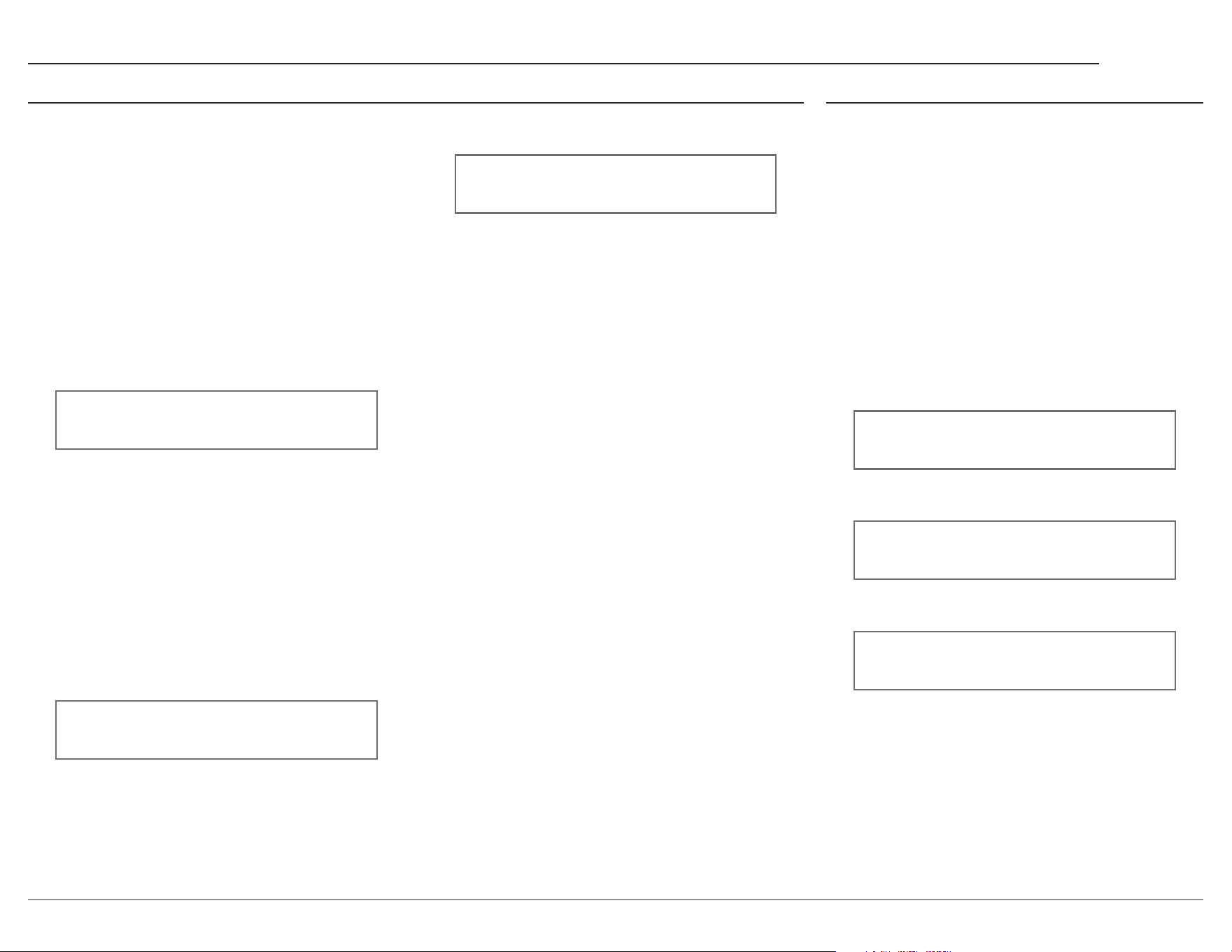
Bi-Amp Circuitry
The C2800 has internal, adjustable crossover. The
C2800’s crossover tailors the output frequency
range of each amplier section to the attached
loudspeaker. In Fixed Mode, simply set the
Center to the loudspeaker’s Crossover Point, then
frequencies above the Crossover Point will be
sent to the MAIN Output and frequencies below
the Crossover Point will be sent to Output 1. In
Split Mode, the lter’s corner frequencies can be
independently congured. As an example, the
High Pass Outputs could be sent to a vacuum tube
amplier, and the Low Pass Outputs could be sent
to a solid-state amplier. This adjustable crossover
allows you to optimize the performance of your
ampliers to your speaker’s specications and
to your listening preferences. A direct feed can
also be connected to each amplier section, thus
bypassing the internal crossover.
Settings Options
Output Mode Switched, Unswitched,
Bi-Amped (Fixed),
Bi-Amped (Split)
Output Trim Level
(only Output 1)
-6.0dB to +3.0dB
in 0.5dB intervals
Bi-Amp Center Frequency
(only Fixed Mode)
150Hz, 350Hz, 900Hz
Bi-Amp High Pass
Frequency (only Split Mode)
Bypass, 50Hz, 100Hz,
250Hz
Bi-Amp Low Pass
Frequency (only Split Mode)
600Hz, 1200Hz, 3000Hz
Dual Mono (Output 2) Off, On
Headphones Mute All Outputs, Mute No
Outputs
15
C2800
Triggers Setup Menu Data Out Setup Menu
Data Port Connections between the C2800 and
a McIntosh Source Component allow for basic
function control of the source component using
the C2800 supplied HR085 Remote Control. By
default, all of the four Data Ports are set to send
the same Data to the selected source. To dedicate
a given Data Port for only one source component
(example, source component connected to the BAL
1 Input will be assigned to Data Port 1) perform the
following Steps:
1. Use the INPUT Knob to enter the Data Out
Setup Menu.
2. Rotate the INPUT Knob until the following
appears on the Information Display.
SETUP: Menu Select
< Data Out >
3. Press and hold in the INPUT Knob until the
following appears on the Display.
Data Out: PORT 1 >
All Data >
4. Rotate the VOLUME Knob to select “BAL 1”
Input.
Data Out: PORT 1 >
< BAL 1 >
5. In a similar manner, perform steps 3 and 4 to
assign any additional Data Ports.
6. Exit the Data Out Setup Menu by pressing the
INPUT Knob.
The C2800 has four Power Control Triggers
Connections. When the C2800 Is On, the Triggers
are either activated or deactivated. Trigger 1, 2,
3 and 4 settings can be assigned to one of the
available Outputs, or any combination of Inputs.
These settings will control the operational power
to the components connected to the various C2800
Trigger Output Connectors. Perform the following
steps to setup the Trigger:
1. Use the INPUT Knob to enter the Data Out
Setup Menu.
2. Rotate the INPUT Knob until the following
appears on the Information Display.
SETUP: Menu Select
< Triggers >
3. Press and hold in the INPUT Knob to select the
Triggers Menu.
4. Rotate the INPUT Knob to select between
TRIGGER 1, TRIGGER 2, TRIGGER 3, or
TRIGGER 4.
5. Rotate the VOLUME Knob to change the
selected Trigger’s assignment.
6. If “Input” is selected as in the image to follow,
the Trigger will be congured according to
the Inputs that are enable in the corresponding
submenu.
Triggers: TRIG 1 >
< Input (Hold INPUT)
7. To change the Trigger’s Input conguration,
press and hold in the INPUT Knob.
8. Rotate the INPUT Knob to navigate the set of
Inputs.
9. Rotate the VOLUME Knob to enable / disable
the selected Input as in the following image.
Triggers: TRIG 1 >
< BAL 1 > : Off
10. Repeat steps 4-9 to congure any of the other
Triggers.
11. Exit the Triggers Setup Menu by pressing
the INPUT Knob a couple times.
16
External Control Setup Menu
RS232 Baud Rate
The C2800 may be remotely controlled from other
equipment connected to the Rear Panel RS232
Jack. The speed at which the C2800 communicates
(8 bit, no parity and 1 stop bit) with other equip-
ment is adjustable from 9,600 bits per second to
115,200 bits per second. To change from the default
speed of 115,200 bits per second, perform the
following steps:
1. Use the INPUT Knob to enter the External
Control Setup Menu.
2. Rotate the INPUT Knob until the following
appears on the Information Display.
Ext Ctrl: < RS232 >
< 115200 Baud
3. Rotate the VOLUME Knob to select the desired
Baud Rate Speed.
4. Exit the External Control Setup Menu by press
-
ing the INPUT Knob.
Settings Options
Front IR Enabled, Disabled
RS232 Baud Rate 115200 Baud
IR Codes Normal, Alternate
IR Codes
The Remote Control included with the C2800
utilizes the NORMAL McIntosh Control Codes.
The Second Set of Control Codes the C2800 will
respond to is referred to as the ALTERNATE
Codes. The Alternate Codes are used when the
C2800 is used in the same location as another
McIntosh Preamplier and/or A/V Processor. This
will prevent the Remote Control from affecting
the operation of both units at the same time. To
activate the Remote Control ALTERNATE Codes
perform the following steps:
1. Use the INPUT Knob to enter the External
Control Setup Menu.
2. Rotate the INPUT Knob until the following
appears on the Information Display.
Ext Ctrl: < IR Codes
< Normal
3. Rotate the VOLUME Knob to the Alternate
Codes.
Ext Ctrl: < IR Codes
Alternate >
4. It is now necessary to change the HR085 Remote
Control over to the Alternate Codes. Information
on the HR085 Remote Control is available for
download from the McIntosh website.
5. Exit the External Control Setup Menu by press
-
ing the INPUT Knob.
Front IR
The C2800 Front Panel Sensor, which receives
the signals from the HR085 Remote Control, can
be switched off to prevent interference when an
external IR Sensor is connected. To de-activate the
Front Panel IR Sensor perform the following steps:
1. Use the INPUT Knob to enter the External
Control Setup Menu.
2. Rotate the INPUT Knob until the following
appears on the Information Display.
Ext Ctrl: Front IR >
< Enabled
3. Rotate the VOLUME Knob to select “Disabled”.
Ext Ctrl: Front IR >
Disabled >
4. Exit the External Control Setup Menu by press-
ing the INPUT Knob.
17
C2800
Connecting Components
The C2800 has the ability to automatically switch power On/Off to Source Components via the Power
Control connections. The Data Port Connections allow for the remote operation of basic functions using
the C2800 Remote Control HR085. With an external sensor connected to the C2800, remote control
operation of the system is possible from another room and/or when the C2800 is located in a cabinet with
the doors closed.
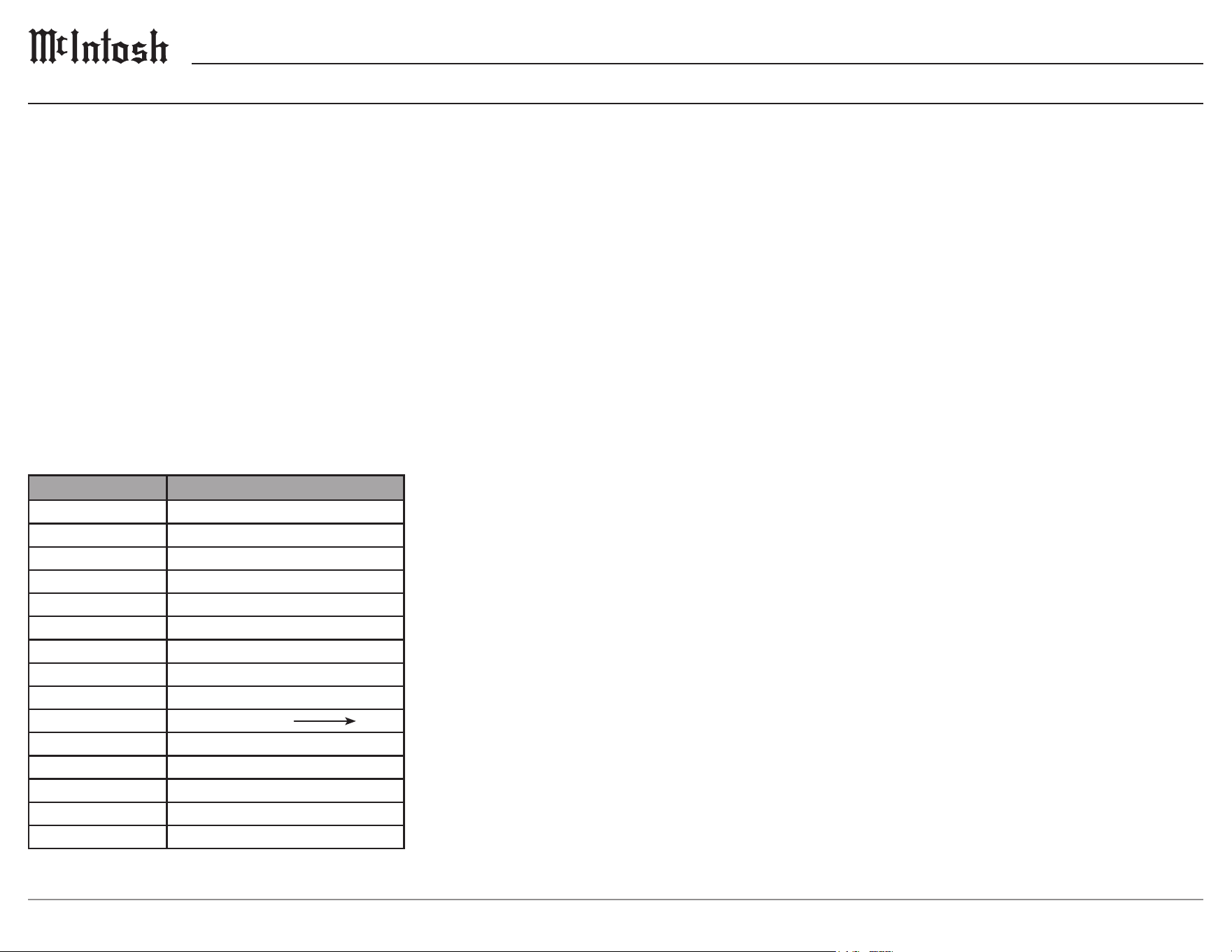
System Conguration
Shown below are two typical system congura-
tions. Your system may vary from this, however
the actual components would be connected in a
similar manner.
Note: The preamplifier or power amplifier may be connected to
the C2800 balanced or unbalanced outputs.
IR
REMOTE
CONTROL
AUDIO
SOURCES
C2800 TUBE
PREAMPLIFIER
POWER
AMP
(
FULL RANGE)
ANALOG OR
DIGITAL
AUDIO
POWER
CONTROL
VARIABLE ANALOG AUDIO
POWER CONTROL
RS232 / NETWORK
CONTROL SYSTEM
DATA
MAIN
SPEAKER
IR
REMOTE
CONTROL
AUDIO
SOURCES
POWER
AMP
(
LOW PASS)
ANALOG OR
DIGITAL
AUDIO
POWER
CONTROL
VARIABLE ANALOG AUDIO
POWER CONTROL
RS232 / NETWORK
CONTROL SYSTEM
DATA
POWER
AMP
(HIGH PASS)
VARIABLE ANALOG AUDIO
POWER CONTROL
VARIABLE ANALOG AUDIO
POWER CONTROL
SPEAKER
POWERED
SUBWOOFER
(OPTIONAL)
C55 AUDIO
PREAMPLIFIER
MAIN
OUT 1
OUT 2
Example 1
Example 2
18
Balance
Listening balance varies with different program
sources, room acoustics and listening positions
relative to the loudspeakers. Use the Balance (Trim
Function) as needed to achieve approximately
equal listening volume levels in each loudspeaker.
The Front Panel Display indicates the Balance
changes are from 0 to 50 dB. After approximately
4 seconds the Information Display returns to
indicate the Source Selection and Volume Level. To
verify the Balance setting without changing it, use
the TRIM Button and select Balance.
Input Trim Level
Source Components can have slightly different
volume levels resulting in the need to readjust the
C2800 VOLUME Knob when switching between
different sources. The C2800 allows the adjustment
of levels for each of the Source Inputs for the same
relative volume.
Mono/Stereo Mode
By default, the Stereo Mode is active for all
Input Sources however, any Input Source may
be assigned to the Mono Mode of operation. To
change Stereo Mode to Mono for a given Input
Source, perform the same type of steps by using
the Front Panel Controls or the Remote Control
Pushbuttons as done for TONE CONTROL
Settings:
Note: The audio signal present at the SEND FIXED OUT Jacks is
affected by the Stereo/Mono setting.
Processor Loop
Connects or disconnects an external equalizer or
room correction processor.
The Trim Settings are stored in memory indepen
-
dently for each Input Source Selected, except the
Meter Illumination and Display Brightness settings
of On or Off, which are the same for all inputs.
How to Select and Adjust Trim Functions
1. Press the Front Panel INPUT Knob to open the
Trim Menu.
2. Rotate it to select the desired Trim Function.
3. Rotate the VOLUME Knob to change the setting.
Note: the Remote Control TRIM Button together with the LEVEL
UP / LEVEL DN Button may also be used to access and
change Trim Functions.
Approximately 5 seconds after making any
changes, the Information Display will return to
indicate the Source Selection and Volume Level.
Trim Functions Menu Options
Settings Options
Balance L, Center, R
Input Trim -6dB to +6dB in 1dB intervals
Tone Control On, Off
Bass Off, -12dB to 12dB in dB intervals
Treble Off, -12dB to 12dB in dB intervals
Mono/Stereo Mode Stereo, Mono
Processor Loop On, Off
Meter Lights On, Off
Tube Lights On, Off
Brightness 4 Levels from Dim Bright
Phono Capacitance 50pF to 400pF in 50pF increments
Phono Resistance
25, 50, 100, 200, 400, 1k, 47k Ω
Phono Gain 40dB to 64dB in 6dB intervals
Lip Sync Delay 0 to 150ms in 10ms intervals
HXD Mode* On, Off
Note: HXD Mode will only appear if headphones are plugged in.
Trim Functions Menu
Meter Illumination
The Meter Illumination of McIntosh Power
Ampliers, when connected to the C2800, may
be switched On or Off. If using non-McIntosh
components see page 21.
Information Display Illumination
The brightness level of the Front Panel Information
Display can be adjusted. It has 4 levels that vary
from dim to bright.
Phono Adjustments
First select the Phono 1 or Phono 2 Input then
press and rotate the INPUT Control to display the
active type of load setting for the phono cartridge
selected.
Phono Capacitance
Rotate the INPUT Control to select desired
Capacitance.
The available settings are: 50pF, 100pF, 150pF,
200pF, 250pF, 300pF, 350pF, and 400pF.
Phono Resistance
Rotate the INPUT Control to select desired
Resistance.
The available settings are: 25Ω, 50Ω, 100Ω, 200Ω,
400Ω, 1KΩ, and 47kΩ.
Phono Gain
Rotate the INPUT Control to select desired Gain.
The available settings are 40db, 46db, 52db, 58db,
and 64db.
19
C2800
Lip Sync Delay
When the Lip Sync Mode is set to Manual, and
when the HDMI Input is selected, the Trim menu
will allow the HDMI Audio Lip Sync Delay to be
adjusted from 0 to 150ms in 10ms intervals.
HXD Mode
When headphones are connected to the C2800
Front Panel Jack, an additional TRIM function
becomes available. McIntosh’s HXD brings the
acoustical depth and spatiality of music normally
heard with loudspeakers, to your headphones.
Note: The Headphone Output is optimized for impedances
ranging from 100 to 600 ohms.
Trim Functions Menu (continued) Tone Control
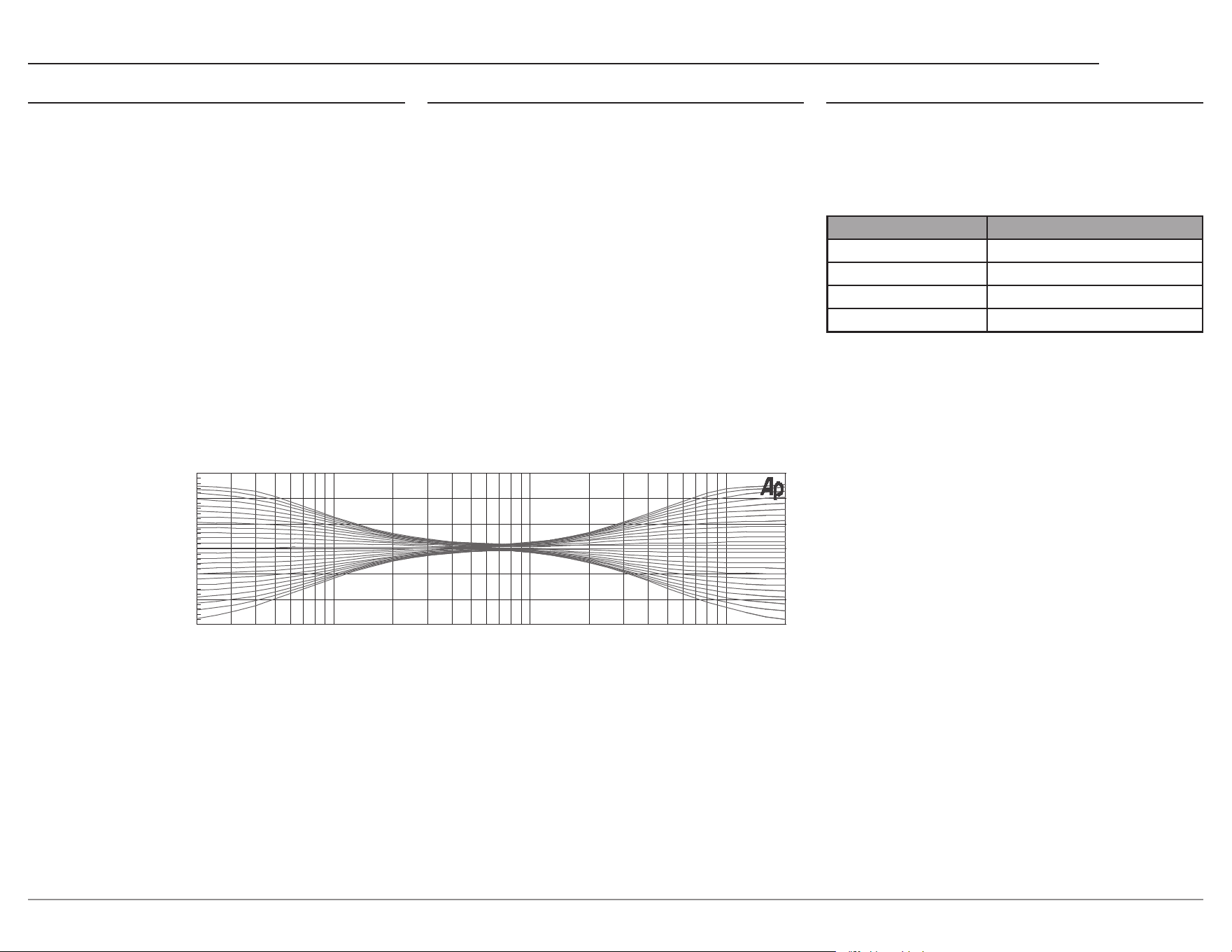
With the Tone Controls are On, the Treble and Bass
Trim Settings may be adjusted for the currently
selected input source. The TONE LED indicator
will be illuminated. When the Tone Controls are
Off, the previous settings for Treble and Bass are
bypassed from the signal path.
Note: the audio signal present at the SEND FIXED OUT Jacks is
unaffected by the TONE settings.
Bass
The intensity of the low frequencies in the music
can be increased or decreased by using the Trim
Select and Trim Adjust controls.
Treble
The intensity of the high frequencies in the music
can be increased or decreased by using the Trim
Select and Trim Adjust Control.
20 20k50 100 200 500 1k 2k 5k 10k
0
+6
-6
+12
-12
dB
Hz
Network Information Menu
The Network Information Menu lists information
about network connection. Press the VOLUME
Knob to open the Network Information Menu.
Navigate between settings using the INPUT Knob.
The chart below details all of the available settings.
Settings Options
Connection Type Displays Connection Type
IP Address Displays IP Address
Ethernet MAC Address Displays Ethernet MAC Address
Wi-Fi MAC Address Displays Wi-Fi MAC Address
McIntosh Connect App
Press and hold the VOLUME Knob to put the
C2800 into Network Setup Mode. The NETwork
Status LED will blink–indicating that network
settings can be congured from the McIntosh
Connect App.
Note: The C2800 will exit Network Setup Mode if put into
Standby.
20
Power On and Off
The Red LED above the STANDBY/ON Button
lights to indicate the C2800 is in Standby mode.
To switch ON the C2800, press the STANDBY/
ON Button on the Front Panel or the (Power -
Green) Button on the Remote Control. The C2800
will go through a brief startup initialization with
the Front Panel Information Display indicating
the last used source and volume setting. This is
followed by the volume setting indication starting
at zero and then increasing to the last used volume
setting.
BAL 1 15%
To switch OFF the C2800 press the STANDBY/
ON Button on the Front Panel or the (Power - Red)
OFF Button on the Remote Control.
Note: For an explanation of the Remote Control Button functions,
refer to page 8.
Source Selection
Rotate the INPUT Control to select the desired
source or press the INPUT Upp or Downq
Button on the Remote Control.
PHONO 2 37%
50pF 200Ω
VOLUME Knob
Rotate the Front Panel VOLUME Knob or use the
VOLUME Upp or Downq Buttons on the Remote
Control for the desired listening level.
How to Operate the C2800
Mute
Press the MUTE Button, on the C2800 Front Panel
or on the Remote Control, to Mute the Audio
in all outputs (Main, Output 1, Output 2 and
Headphones) except the SEND FIXED OUT. The
Front Panel Information Display will indicate the
Source Name and the word MUTE in place of the
actual volume setting.
BAL 1 MUTE
Pressing the Mute Button a second time or adjust-
ing the VOLUME Knob (either the Front Panel or
Remote Control) will unmute the C2800.
Output 1 and 2
Press the Front Panel OUTPUT 1 or OUTPUT 2
Button or use the Remote Control and press the
SETUP/BLUE Button followed by the OUTPUT
1 or OUTPUT 2 Button, to send audio to separate
Power Ampliers connected to the rear panel
OUTPUT 1 or 2 Jacks. It also activates the
POWER CONTROL TRIGger 1 or 2 Jacks on the
rear panel of the C2800. To stop the Audio and
Power Control Signals from going to the separate
Power Ampliers, press the same Button(s) a
second time.
Passthru
Refer to Passthru Information in the C2800 Setup
Section on page 14 to activate the function and
select the desired Input on the C2800.
The C2800 will automatically turn On and switch
to the previously setup Passthru Input when the
McIntosh A/V Processor or Multichannel Surround
Decoder is turned-on. The Audio Preamplier
Front Panel Alphanumeric Display will indicate
“PASST H RU ”.
The C2800 OUTPUT 1 and 2 are active when in
the Passthru Mode. The other Front Panel Controls
and Buttons are deactivated as long as the Passthru
Mode is active.
Headphone Jack
Connect a pair of dynamic headphones to the
Headphones Jack with a 1/4” (0.635cm) stereo
phone type plug for private listening. The default
setting is for all of the Power Amplier Output
Connections (1 and 2) to automatically mute.
How To Make a Recording
1. Select the desired signal source you wish to
record by using the Front Panel INPUT Control
or using the INPUT UP / DOWN Button on the
Remote Control.
2. Adjust the record level using the recorder level
control and proceed with the recording process.
3. Listen to the playback of the program source
just recorded by selecting the Input Source
connected to the recorder component output.
21
C2800
Digital Inputs
When a Digital Input on the C2800 is selected,
the Front Panel Information Display indicates
the sample rate or audio format when a signal is
present.
During the time there is no Digital Signal present
the display will indicate “______”.
MCT Input
When playing a multi-layer SACD, select the stereo
(SACD) or CD layer. The multi-channel layer will
not reproduce sound.
Optical
The two Optical Inputs allow digital sources to be
connected to the C2800 using TOSLINK cables
also known as “optical audio cables.” The optical
inputs can handle high resolution digital audio up
to 192kHz/24-bit. The C2800 DAC will process
standard format S/PDIF PCM signals and Dolby
Digital and DTS bitstreams. Unsupported formats
can result in strange and/or unpleasant sounds.
Coaxial
The two Digital Coaxial Inputs allow digital
sources to be connected to the C2800 using
Digital Audio RCA Coaxial cables. The COAX
inputs can handle high-resolution digital audio
up to 192kHz/24-bit. The C2800 DAC will
process standard format S/PDIF PCM signals and
Dolby Digital and DTS bitstreams. Remember,
unsupported formats can result in strange and/or
unpleasant sounds.
HDMI ARC
The HDMI ARC (Audio Return Channel) allows
you to use your entire audio system to play the
sound from your TV.
How to Operate the C2800 (continued)
Troubleshooting
Reset of Microprocessors
In the unlikely event the controls of the C2800 stop
functioning, the microprocessors can be reset by
performing the following:
1. Press and hold in the STANDBY/ON Button
until the LED above the STANDBY/ON Button
illumination is extinguished. Then release the
STANDBY/ON Button.
2. To switch the C2800 back On, press the
STANDBY/ON Button.
Note: This can be performed with the C2800 On or in the Standby
Mode.
Meter Lights
Meter lights in Power Amps and Source units have
the ability to be turned On and Off by the C2800.
But sometimes if a non-McIntosh unit is used, the
Meter lighting circuit is defeated and the lights are
always Off.
To remedy this, place a 173419 Trigger Adapter
Cable in-line with the normal 170202 Power
Control cable.
This Adapter leaves the ring terminal uncon
-
nected, which allows the meter lights to remain
illuminated.
Notes:• Ensure you are connected to the TV’s HDMI input
port that is labeled “ARC”.
•
Your TV’s setup menu and settings may need to be
adjusted before sound is heard.
•
When the C2800 is set to the HDMI input, the
unit will automatically turn On and Off with the TV.
The front display will show “Entering HDMI
Standby Mode” when turning Off.
•
Multi-channel formats will be down mixed to a
2-channel output.
Audio formats supported by HDMI ARC:
• PCM (2 channel)
• Dolby Digital (up to 5.1 channel)
• DTS Digital Surround (up to 5.1 channel)
USB Audio
The USB Audio Input of the C2800 provides
the capability to receive music/sound in a digital
format from a connected computer.
Software Requirements
Apple
®
computers with OS-10.6.8 are able to
communicate with the C2800 without any installa
-
tions necessary.
For Windows-based computers (PC), Windows 7
(Service Pack 1) or later is required. The correct
McIntosh USB Audio driver must be installed for
the PC to communicate with the C2800.
To install the McIntosh USB driver for Windows-
based computers download the latest driver from
the McIntosh website.
The driver can be found in the Downloads section
of the webpage under Software Updates. Choose
the DA2 Digital Audio Module: McIntosh USB
Audio Windows Driver. You may select this driver
in many third-party applications such as JRiver
Media Center.
The C2800’s display will show the sampling rate or
bit rate for the USB Audio Input.
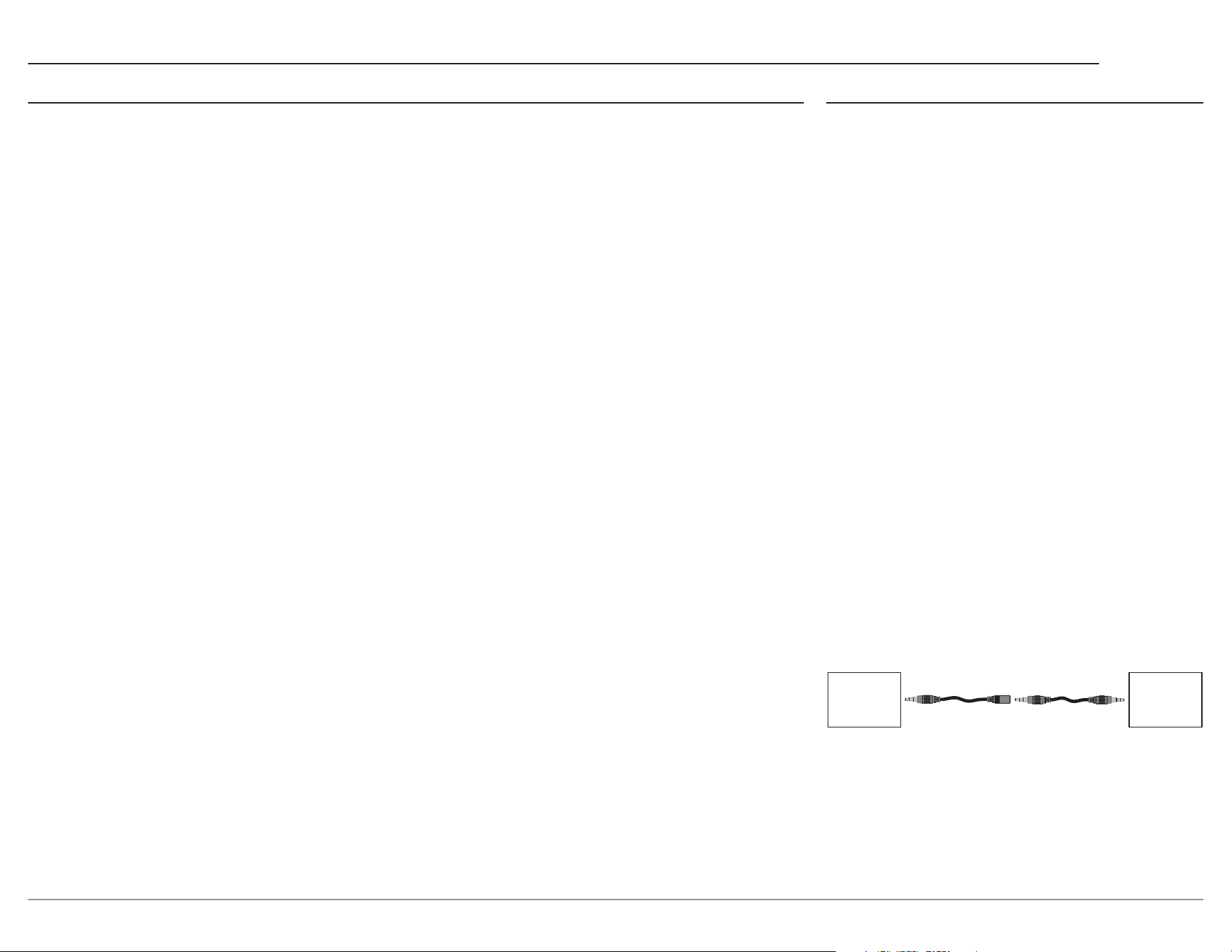
Non-McIntosh
Product
McIntosh
Product
M – F
Adapter Cable
M – M
Stereo Cable
173419 170202
TRIGGER OUT
POWER CONTROL IN
TRIGGER IN
PASS THRU IN
System Connection Example

22
Specications
Note: all measurements with EQ filters and output filters bypassed.
Frequency Response
+0, -0.5dB from 20Hz to 20,000Hz
Total Harmonic Distortion
0.08% from 20Hz to 20,000Hz
Rated Output
2.5V Unbalanced, 5V Balanced (Main)
450mV (Fixed Output)
Maximum Voltage Output
8V RMS Unbalanced, 16V RMS Balanced
Sensitivity (for rated output)
High Level, 450mV Unbalanced, 900mV Balanced
Phono MM, 4.5mV
Phono MC, 0.45mV
Signal To Noise Ratio (A-Weighted)
High Level - 100dB (Below rated output)
MM Phono - 75dB (Below 5mV input)
MC Phono - 75dB (Below 0.5mV input)
Input Impedance
High Level 22K ohms Unbalanced
44k ohms Balanced
Phono 1, 2 (MM and MC)
25, 50, 100, 200, 400, 1k or 47k ohms
50 to 400pF in 50pF steps
Maximum Input Signal
High Level, 5V Unbalanced, 10V Balanced
Phono MM, 80mV
Phono MC, 8mV
Voltage Gain
High Level to Fixed Output: 0dB
High Level to Main Output: 15dB
Phono 1, 2 (MM and MC) Selectable 40dB, 46dB,
52dB, 58dB, or 64dB
Output Impedance
100 ohms Unbalanced
200 ohms Balanced
Headphone Load Impedance
100 ohms to 600 ohms
Digital Input Sample Rates
Coaxial: PCM -16Bit, 24Bit - 44.1kHz to 192kHz
Optical: PCM - 16Bit, 24Bit - 44.1kHz to 192kHz
USB: PCM - 16Bit, 24Bit, 32Bit - 44.1kHz to
384kHz
MCT: PCM, SACD, -16Bit, 24Bit - 44.1kHz to
192kHz
DXD - DXD352.8kHz, DXD384kHz
DSD - DSD64, DSD128, DSD256, DSD512
HDMI: PCM 24bit, 44.1kHz - 192kHz
DTS
Dolby Digital
Tube Complement
4 Tubes: 3-12AX7A and 1-12AT7
Power Control and Trigger Output
12VDC, 25mA
Power Requirements
Field AC Voltage conversion of the C2800 is not
possible. The C2800 is factory congured for one
of the following AC Voltages:
100 Volts, 50/60Hz at 75 watts
110 Volts, 50/60Hz at 75 watts
120 Volts, 50/60Hz at 75 watts
220 Volts, 50/60Hz at 75 watts
230 Volts, 50/60Hz at 75 watts
240 Volts, 50/60Hz at 75 watts
Standby Power, less than 0.5 watts
Note: Refer to the rear panel of the C2800 for the correct voltage.
Overall Dimensions
Width is 17 1/2 inches (44.4cm)
Height is 7 5/8 inches (19.4cm) including feet
Depth is 18 inches (45.72cm) including the Front
Panel, Knobs and Cables
Weight
28 pounds (12.5 kg) net, 43.5 pounds (19.7 kg) in
shipping carton
Shipping Carton Dimensions
Width is 27 inches (68.6cm)
Height is 12 inches (30.5cm)
Depth is 25 inches (63.5cm)
Trademarks of McIntosh Laboratory, Inc.:
The following are Registered Trademarks of McIntosh Laboratory, Inc. in multiple jurisdictions around the world: the written McIntosh
logo; the McIntosh Globe logo; the Mc logo; Power Guard; Power Guard Screen Grid Sensor; Power Guard SGS; Sentry Monitor; LD/HP;
Dynamic Power Manager; the 4DPM8 logo; HXD; the HDX logo; Behind The Sound; Legendary Performance.
The following are Trademarks of McIntosh Laboratory, Inc. in multiple jurisdictions around the world: Autoformer; Solid Cinch; McIntosh
Monogrammed Heatsinks; Hybrid Drive; DualView; TripleView; Made of Sound.
The foregoing trademarks, registered and otherwise, are not to be used, reproduced, or registered in any way without the express written
permission of McIntosh Laboratory, Inc.
23
C2800
Packing Instructions Parts List
Quantity Part Number Description
1 033888 Shipping carton only
4 034670 End cap
1 033697 Inside carton only
1 034414 Top pad (foam)
1 034576 Bottom pad
4 017937 Plastic foot
4 400159 #10-32 x 3/4” screw
4 404080 #10-7/16” Flat washer
( )
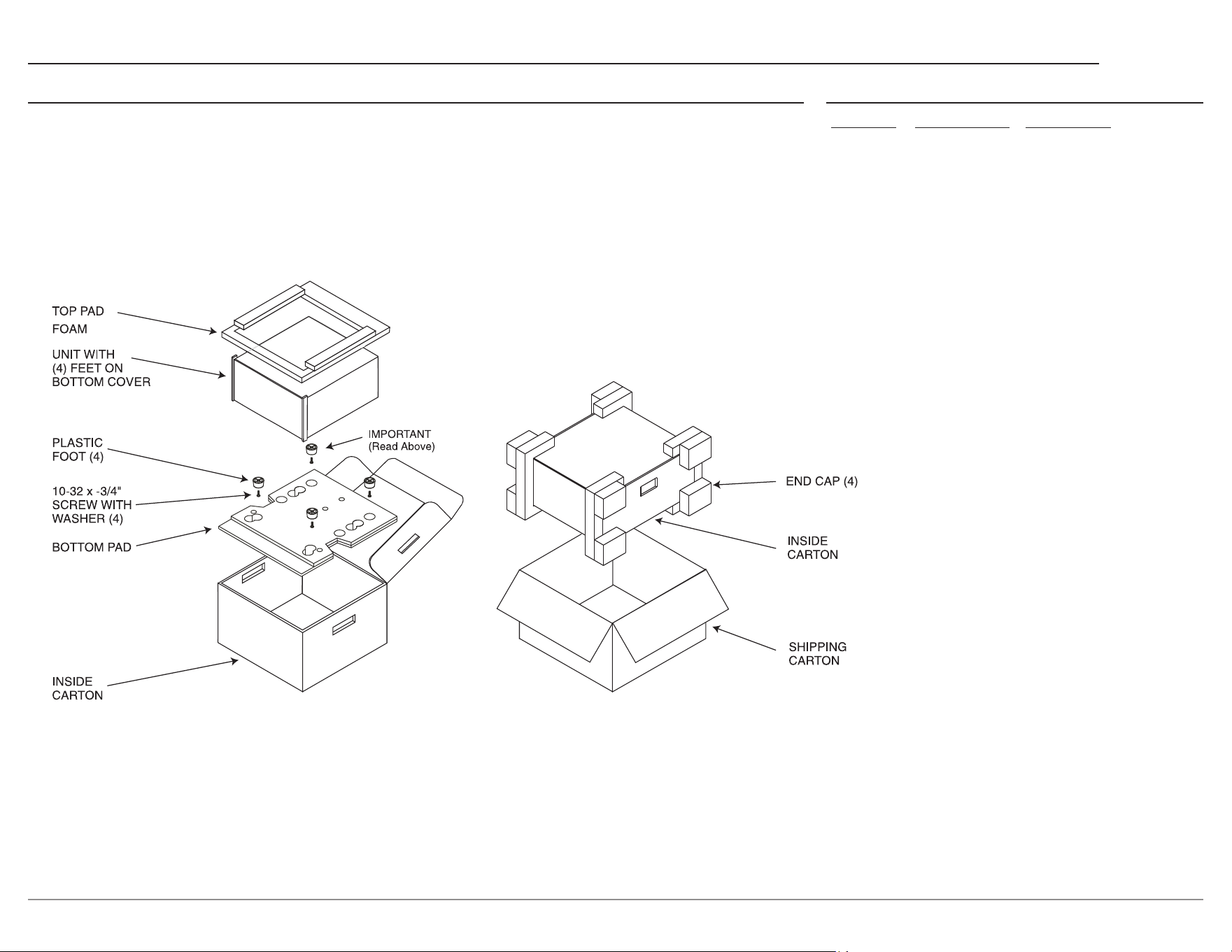
In the event it is necessary to repack the equip-
ment for shipment, the equipment must be packed
exactly as shown below. It is very important that
the four plastic feet are attached to the bottom
of the equipment. This will ensure the proper
equipment location on the bottom pad. Failure
to do this will result in shipping damage.
Use the original shipping carton and interior parts
only if they are all in good serviceable condition.
If a shipping carton or any of the interior part(s)
are needed, please call or write Customer Service
Department of McIntosh Laboratory. Refer to
page 2. Please see the Part List for the correct part
numbers.

© 2023 McIntosh Laboratory, Inc.
McIntosh Part No. 24124100
The continuous improvement of its products is the policy of McIntosh Laboratory Incorporated
who reserve the right to improve design without notice. The C2800 is designed to employ
non-McIntosh-provided services some of which require separate customer subscriptions and
some of which do not, as part of the Product’s functionality. Because McIntosh cannot control
the providers of such services or the services themselves, the owner of the Product therefore
assumes all risks related to the use of services provided by anyone other than McIntosh itself.
McIntosh cannot and does not warrant against, and shall have no liability of any kind for any
of the following that are attributable to non- McIntosh providers or services: (i) interruption,
discontinuance, or other unsatisfactory performance of service; (ii) reduced Product function-
ality that is so attributable; or (iii) any other loss or damage of any kind that is so attributable.
Printed in the U.S.A.
McIntosh Laboratory, Inc.
2 Chambers Street
Binghamton, NY 13903
www.mcintoshlabs.com