BEDIENUNGSANLEITUNG
emmi®-dent
Platinum CAM
Emmi Ultrasonic GmbH
Gerauer Strasse 34
D-64546 Mörfelden-Walldorf
Tel: +49 (0)6105 - 40 67 94
Email: info@emmi-dent.de
MIT100%
ULTRASCHALL

emmi®-dent - Das Original für innovative
Zahnreinigung!
Entdecken Sie mit der emmi®-dent Platinum CAM, wie Sie mit
unserem innovativen Kameraaufsatz tiefere Einblicke in Ihren
Mundraum erhalten – ganz wie ein Zahnarzt! Identifizieren Sie
gezielt Problemstellen und putzen Sie dort gründlicher für eine
optimale Mundhygiene!
Lieferumfang
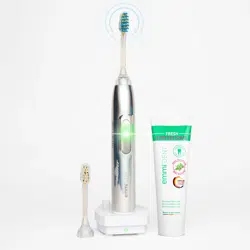
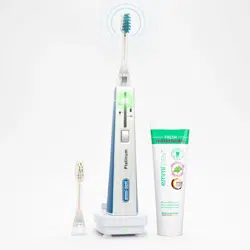
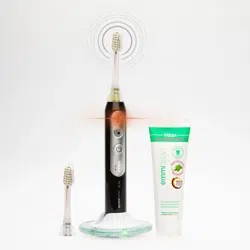
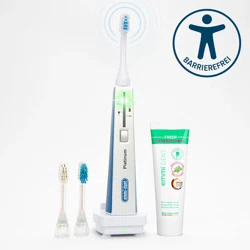
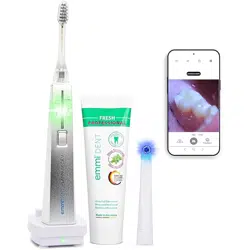
• emmi®-dent Platinum CAM (Handteil)
• emmi®-dent Ultraschallaufsatz
• emmi®-dent Ultraschallzahncreme
• emmi®-dent 100-240V Ladestation
• emmi®CAM Aufsatz
Die emmi®CAM ist nur mit der emmi-dent Platinum CAM
verwendbar!
Erste Schritte
1. Auspacken und Aufladen
Entfernen Sie die Ultraschallzahnbürste und das Zubehör
vorsichtig aus der Verpackung.
Setzen Sie die Ultraschallzahnbürste auf die Ladestation.
Schließen Sie die Ladestation an eine Steckdose an und lassen
Sie die Zahnbürste vollständig aufladen
(ca. 24 Stunden vor dem ersten Gebrauch).
Blaues Licht: Die Ultraschallzahnbürste ist auf der Ladestation.
Schwaches blaues Licht: Die Ultraschallzahnbürste vollständig
geladen

2. Ein- und Ausschalten
Einschalten:
Gerät durch Tastendruck (für ca. 1 Sekunde)
einschalten. Für das Ausschalten des Vibrationsmotor und des
Signaltons halten Sie bitte die An/Aus Taste für ca. 10 Sekun-
den gedrückt. Die LED leuchtet viermal rot. Um den Vibrations-
motor und den Signalton wieder einzuschalten, halten Sie bitte
erneut die An/Aus Taste für ca. 10 Sekunden gedrückt.
Die LED leuchtet viermal grün. Die grüne LED der
Betriebsanzeige leuchtet. Der Akku-Ladestand wird durch zwei
weitere grün blinkende LEDs angezeigt. Weiterhin ist eine
Vibration zu spüren, die eine zusätzliche Funktionsmeldung
für den Benutzer darstellt.
Ausschalten/Automatisches Ausschalten:
Gerät durch Tastendruck (für ca. 1 Sekunde) ausschalten.
Eine automatische Abschaltung erfolgt nach ca. 6 Minuten
(Akku Save Funktion). Des Weiteren verfügt das Gerät über ein
elektronische Aufsatzerkennung. Wenn kein, ein falscher oder
defekter Ultraschallaufsatz aufgesteckt wurde, schaltet sich
das Gerät automatisch ab, die untere grüne LED erlischt und
die rote LED blinkt. Stecken Sie beim Transport den
Bürstenaufsatz nicht auf, so kann das Gerät nicht
versehentlich eingeschaltet werden (Travel Safe Funktion).
Ersatzaufsätze
Bitte die Ultraschallaufsätze alle 3 Monate wechseln.
Nach dieser Dauer schwächt sich die Fähigkeit der Borsten,
den Ultraschall zu 100% zu übertragen ab und ein optimales
Zahnpflegeergebnis ist nicht mehr gewährleistet.
Zahnpasta leer?
Aufsteckbürsten
aufgebraucht?
LED Anzeige
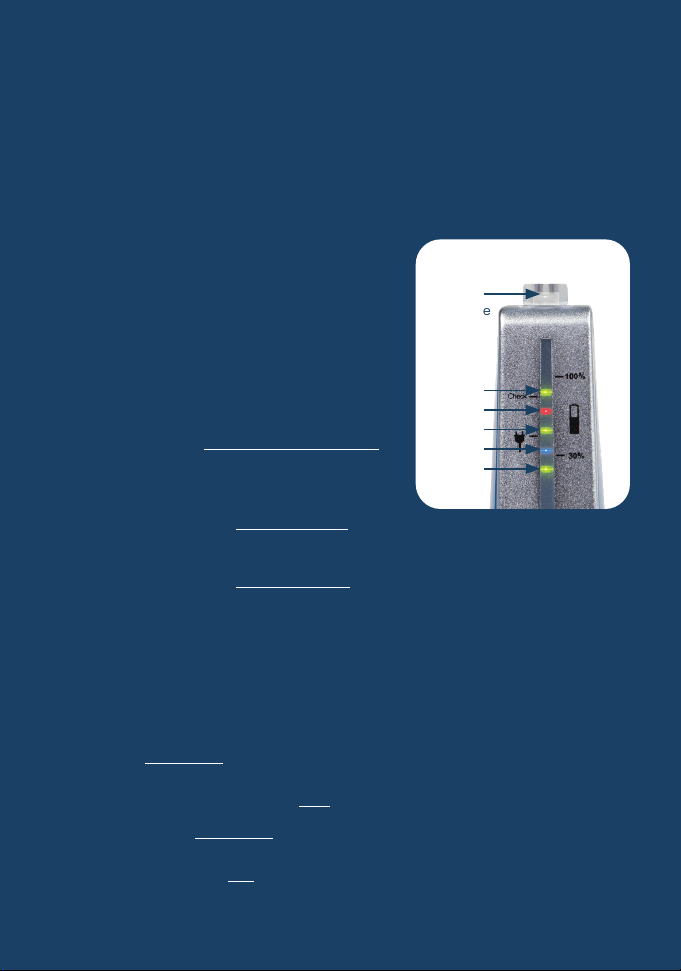
Die Funktionen der LEDs:
a) Ladekontrollfunktion LED 2
Blaue LED: emmi®-dent ist auf der Ladestation
Hellblaues Licht: emmi®-dent im Ladevorgang
Schwaches blaues Licht: emmi®-dent
ist vollständig geladen
b) Batterie-Zustand
(LED 1, LED 3a, LED 5 & LED 3b)
Die drei grünen LEDs (und die weiße
LED am Bürstenkopf) werden beim
Putzvorgang in Art eines Lauflichts
verwendet.
Ist die Batterie vollständig geladen,
leuchten LEDs wie folgt:
LED 1, LED 3a, LED 5 + LED 3b
Ist die Batterie ca. 1/3 entladen,
leuchtet der Reihe nach: LED 1, LED 3a + LED 3b
Ist die Batterie ca. 2/3 entladen, leuchtet nur noch: LED 1
c) „Dringend aufladen“-Anzeige
Ist die Batterie stark entladen, blinkt nach dem Putzvorgang
die LED 4 einige Male rot. Bitte emmi®-dent aufladen.
d) Umschaltung von Vibration und akustischem Signal
(außer emmi®-dent Platinum Care)
Wird die An-Taste der emmi®-dent ca. 10 Sekunden lang
gedrückt, blinkt die LED 2 rot und die Vibration sowie das
akustische Signal werden ausgeschaltet.
Halten Sie die An-Taste für ca. 10 Sekunden gedrückt und es
blinkt die LED 2 grün auf, so werden die Vibration sowie das
akustische Signal eingeschaltet.
LED 3b
(ab Mitte
2022)
LED 5
LED 4
LED 3a
LED 2
LED 1

Gebrauchsanweisung emmi®CAM
1. emmi®-App herunterladen
Laden Sie die emmi® App aus dem
App-Store oder Google-Store herunter.
Tägliche Anwendung
1. Die Borsten des Ultraschallaufsatzes kurz unter fließendem
Wasser befeuchten.
2. Tragen Sie die Menge von ca. einer doppelten Erbsengröße
emmi®-dent Ultraschall Zahncreme auf die Borsten des
Ultraschallaufsatzes auf. Nur die Verwendung der
emmi®-dent Ultraschall Zahncreme garantiert die Wirkung
des Original 100% emmi®-dent Ultraschalls.
3. Schalten Sie das Gerät ein und verteilen Sie die Ultraschall
Zahncreme gleichmäßig auf die Innen- und Außenseiten
sowie auf die Kauflächen der Zähne.
4. Die Borsten des Ultraschallaufsatzes erfassen, je nach
Größe der Zähne, jeweils 2 – 3 Zähne. Jetzt die Borsten von
innen, außen und von oben (Kaufläche) leicht, ohne Druck
und bewegungslos für jeweils ca. 6 Sekunden an die Zähne
halten. Die längere Verweildauer ist unbedenklich, da die
emmi®-dent Platinum mit weichem Ultraschall arbeitet.
Nach Abschluss der Zahnreinigung, bei eingeschaltetem
Gerät, mit den Borsten einige Male über die Zähne fahren,
um abgelöste aber noch vorhandene Verschmutzungen zu
entfernen. Anschließend den Mund mit Wasser oder
Mundspülung ausspülen.
5. Nach Abschluss der Zahnreinigung, die Borsten und das
Handteil unter fließendem Wasser abspülen.
Gerät ausschalten und Handteil leicht abtrocknen.
Sie können das Gerät mit aufgestecktem Ultraschallaufsatz
jetzt wieder auf die Ladestation stellen.
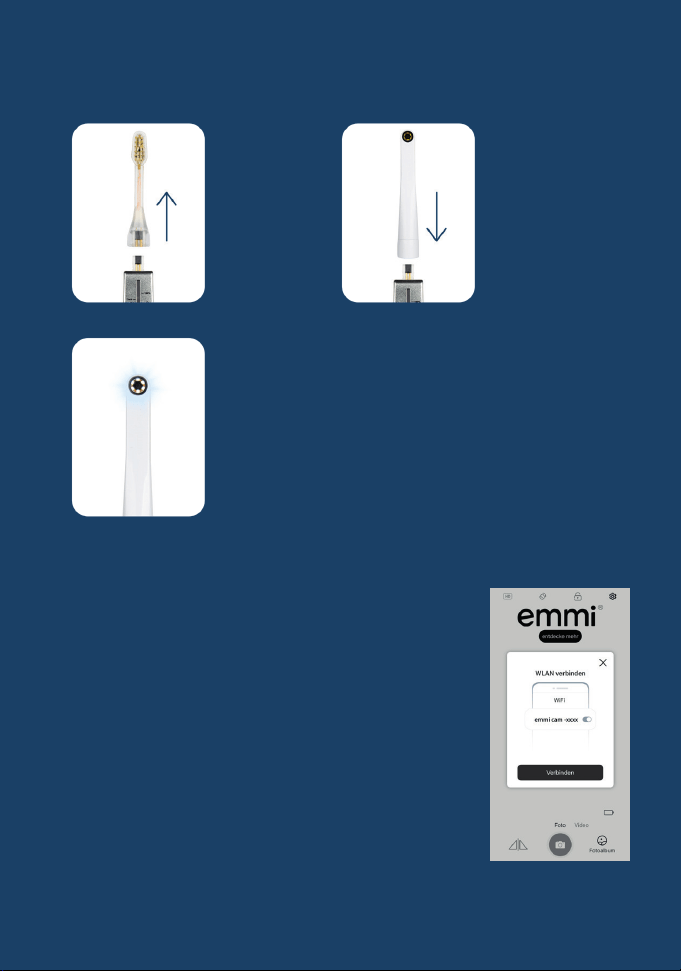
2. Kameraaufsatz anbringen:
3. WLAN-Verbindung herstellen:
Öffnen Sie die emmi®-App auf Ihrem
Smartphone und folgen Sie der Aufforderung,
den Kameraaufsatz mit WLAN zu verbinden.
Wenn keine Aufforderung kommt, gehen Sie
eigenständig in den Einstellungen Ihres
Smartphones zu den Einstellungen und
wählen WLAN aus.
Suchen Sie das WLAN-Signal
„emmi camera-XXXX“ und verbinden
Sie Ihr Smartphone damit.
Kehren Sie zur emmi®-App zurück -
das Kamerabild wird angezeigt.
1.)
Entfernen
Sie den
emmi®-dent
Ultraschall-
Bürstenkopf.
2.)
Stecken Sie den
emmi®CAM
Aufsatz auf die
emmi®-dent
Platinum CAM.
3.)
Sobald der emmi®CAM
Aufsatz aufgesteckt ist,
leuchten die Lichter
um die Kamera
automatisch auf.
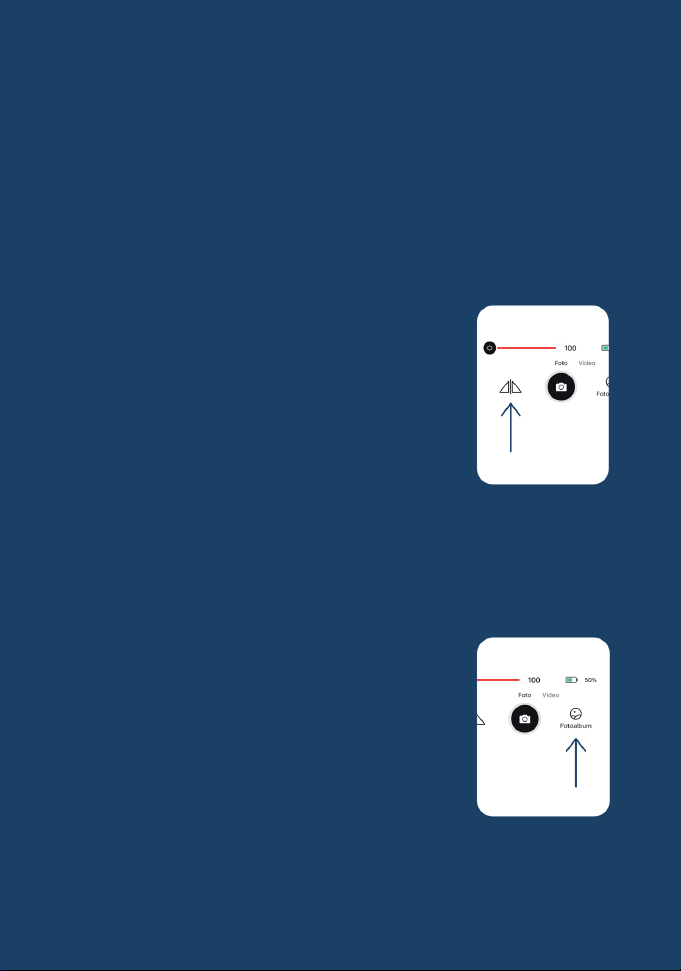
Funktionen der emmi®-App
Bild- und Videoaufnahmen:
Nehmen Sie Bilder und Videos Ihres Mundraums auf,
die in der emmi®-App gespeichert werden können.
Lichtanpassung:
Stellen Sie die Helligkeit des Bildes mit einem Regler (0-100%)
ein, um optimale Aufnahmen zu garantieren.
Spieglungsfunktion:
Auf dieser Taste kann man das Bild spiegeln.
Hinweise
• Achten Sie darauf, den emmi®CAM Aufsatz nach jedem
Gebrauch zu entfernen, um die Batterielebensdauer Ihrer
emmi®-dent Platinum CAM zu maximieren.
• Die aufgenommenen Bilder können im
Fotoalbum der emmi®-App heruntergeladen
werden.
Viel Spaß beim Entdecken Ihrer
Mundgesundheit mit der emmi®CAM!

Garantieleistungen
Garantiedauer:
Ihre Ultraschallzahnbürste hat eine Garantie von 2 Jahren ab
Kaufdatum.
Garantieumfang:
Diese Garantie deckt Material- und Verarbeitungsfehler am
Gerät ab.
Nicht abgedeckt:
Normale Abnutzung, Schäden durch unsachgemäßen
Gebrauch, Unfälle, Modifikationen oder nicht autorisierte
Reparaturen sind von der Garantie ausgeschlossen.
Garantieleistungen:
Im Garantiefall bieten wir Reparatur bzw. Austausch des
Geräts an.
Voraussetzungen für die Inanspruchnahme:
Um die Garantie in Anspruch zu nehmen, bewahren Sie bitte
den Kaufbeleg auf und kontaktieren Sie bitte unseren Kunden-
service.
Rechte des Verbrauchers:
Diese Garantie beschränkt nicht Ihre gesetzlichen Rechte,
sondern ergänzt diese.
Emmi Ultrasonic GmbH • Gerauer Straße 34
64546 Mörfelden-Walldorf • Germany
Tel. +49 (0)6105 40 67 94
•
Fax +49 (0)6105 40 67 81
www.emmi-dent.de • [email protected]
(§6Abs.3,ElekroG)
© Copyright emmi EMAG AG. Alle Rechte vorbehalten. Hergestellt in Deutschland/EU. Der Inhalt
dieser Betriebsanleitung unterliegt dem Urheberrecht. Die Betriebsanleitung darf weder ganz noch
auszugsweise vervielfältigt werden. Änderungen, Kürzungen, Erweiterungen und Ergänzungen sowie
die Veröffentlichung oder Übersetzung durch Dritte bedürfen der vorherigen schriftlichen
Zustimmung der emmi EMAG AG.
INSTRUCTION MANUAL
Emmi Ultrasonic GmbH
Gerauer Strasse 34
64546 Moerfelden-Walldorf
Germany
Tel: +49 (0)6105 - 40 67 94
Email: info@emmi-dent.de
with100%
ULTRASONIC
emmi®-dent
Platinum CAM

emmi®-dent - The original for innovative tooth
cleaning!
With the emmi®-dent Platinum CAM, discover how you can use
our innovative camera attachment to gain a deeper insight
into your oral cavity - just like a dentist! Identify specific
problem areas and brush them more thoroughly for optimum
oral hygiene!
Scope of delivery
• emmi®-dent Platinum CAM (Hand piece)
• emmi®-dent Ultrasonic attachment
• emmi®-dent Ultrasonic toothpaste
• emmi®-dent 100-240V charging station
• emmi®CAM attachment
The emmi®CAM can only be used with the emmi-dent
Platinum CAM!
First steps
1. unpacking and charging
Carefully remove the ultrasonic toothbrush and accessories
from the packaging. Place the ultrasonic toothbrush on the
charging station. Connect the charging station to a power
socket and allow the toothbrush to charge fully
(approx. 24 hours before first use).
Blue lightt: The ultrasonic toothbrush is on the charging
station.
Low blue light: The ultrasonic toothbrush fully charged.

2. switch on and off
Switch on:
Switch on the device by pressing the button (for approx. 1
second). To switch off the vibration motor and the signal tone,
press and hold the On/Off button for approx. 10 seconds.
The LED lights up red four times. To switch the vibration motor
and the signal tone back on, press and hold the On/Off button
again for approx. 10 seconds and the LED will light up green
four times. The green LED of the operating indicator lights up.
The battery charge level is indicated by two further green
flashing LEDs. A vibration can also be felt, which is an additio-
nal function message for the user.
Switch off/automatic switch off:
Switch off the appliance by pressing the button (for approx.
1 second). The appliance switches off automatically after
approx. 6 minutes (battery save function). The appliance also
has an electronic attachment recognition system. If no, an
incorrect or defective ultrasonic attachment is inserted,
the appliance switches off automatically, the lower green LED
goes out and the red LED flashes. If you do not attach the
brush attachment during transport, the appliance cannot be
switched on accidentally (Travel Safe function).
Replacement attachments
Please change the ultrasonic attachments every 3 months.
After this period, the ability of the bristles to transmit 100% of
the ultrasound weakens and optimum dental care results are
no longer guaranteed.
Toothpaste empty?
Used up your
brushes?
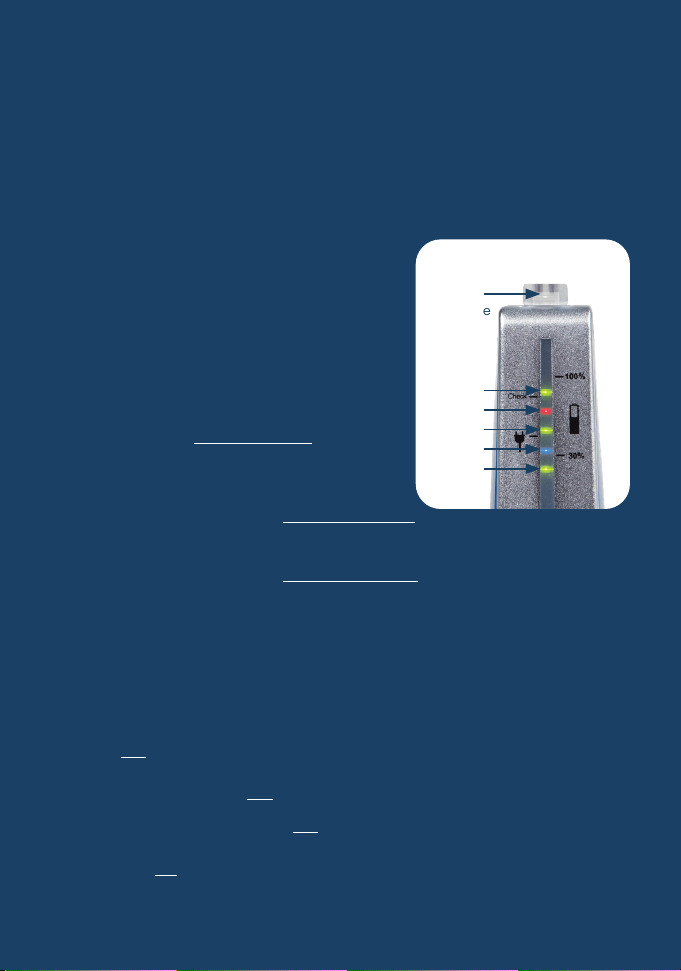
LED display
The functions of the LEDs:
a) Charging control function LED 2
BlueLED: emmi®-dent is on the charging station
Light blue light: emmi®-dent in the charging process
Low blue light: emmi®-dent is fully
charged
b) Battery status
(LED 1, LED 3a, LED 5 & LED 3b)
The three green LEDs (and the white
LED on the brush head) are used as
a running light during the cleaning
process.
Is the battery fully charged,
LEDs light up as follows:
LED 1, LED 3a, LED 5 + LED 3b
If the battery is approx. 1/3 discharged,
lights up one after the other: LED 1, LED 3a + LED 3b
If the battery is approx. 2/3 discharged, it only lights up: LED 1
c) ‘Charge urgently’ display
If the battery is severely discharged, LED 4 flashes red several
times after the cleaning process. Please recharge emmi®-dent.
d) Switching between vibration and acoustic signal
(except emmi®-dent Platinum Care)
If the On button on the emmi®-dent is pressed for approx. 10
seconds, LED 2 flashes red and the vibration and acoustic
signal are switched off.
If you press and hold the On button for approx. 10 seconds
and LED 2 flashes green, the vibration and acoustic signal are
switched on.
LED 3b
(ab Mitte
2022)
LED 5
LED 4
LED 3a
LED 2
LED 1

Instruction manual emmi®CAM
1. Download the emmi® app
Download the emmi® app from the
App Store or Google Store.
Daily use
1. Briefly moisten the bristles of the ultrasonic attachment
under running water.
2. Apply a quantity of approx. twice the size of a pea of
emmi®-dent ultrasonic toothpaste to the bristles of
the ultrasonic attachment. Only the use of emmi®-dent
ultrasonic toothpaste guarantees the effect of the original
100% emmi®-dent ultrasound.
3. Switch on the appliance and spread the ultrasonic
toothpaste evenly on the inside and outside of the teeth as
well as on the chewing surfaces.
4. depending on the size of the teeth, the bristles of the
ultrasonic attachment will each pick up 2 - 3 teeth.
Now hold the bristles lightly on the teeth from the inside,
outside and top (occlusal surface) for approx. 6 seconds
each, without applying pressure and without moving.
The longer dwell time is harmless, as the emmi®-dent
Platinum works with soft ultrasound. After completing the
tooth cleaning, with the device switched on, run the bristles
over the teeth a few times to remove any loosened but
remaining dirt. Then rinse the mouth with water or
mouthwash.
5. When you have finished cleaning your teeth, rinse the
bristles and the handpiece under running water.
Switch off the appliance and gently dry the handpiece.
You can now place the appliance back on the charging
station with the ultrasonic attachment attached.
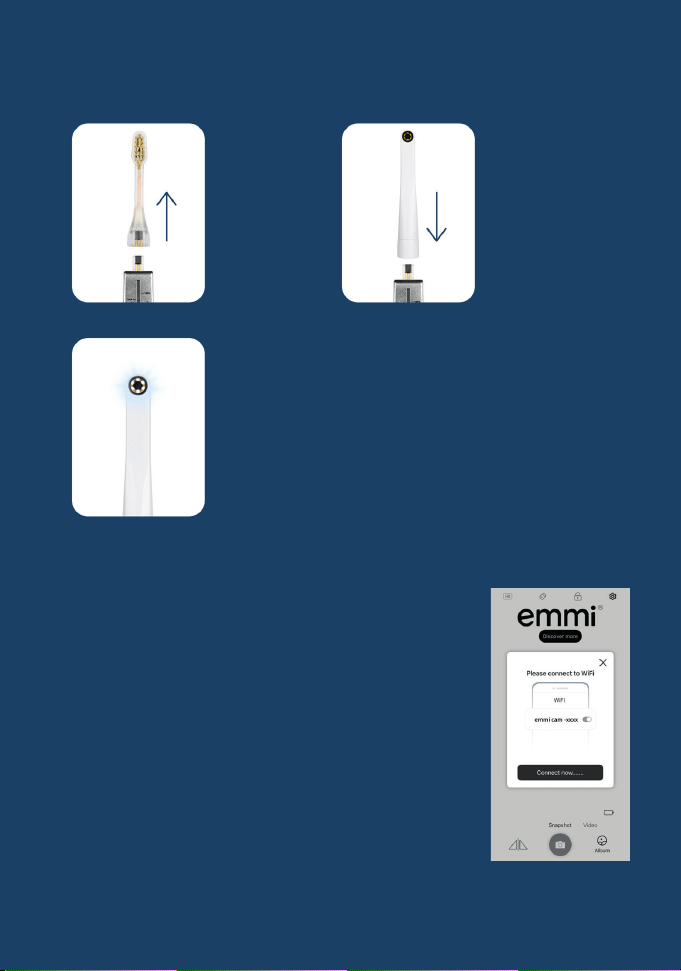
2. mount the camera attachment:
3. set up the WLAN connection:
Open the emmi® app on your smartphone
and follow the prompt to connect the
camera attachment to Wi-Fi. If you are not
prompted to do so, go to the settings on
your smartphone and select Wi-Fi.
Search for the Wi-Fi signal
‘emmi cam-XXXX’ and connect
your smartphone to it.
Return to the emmi® app -
the camera image is displayed.
1.)
Remove the
emmi®-dent
ultrasonic
brush head.
2.)
Mount the
emmi®CAM
attachment
on the
emmi®-dent
Platinum CAM.
3.)
As soon as the emmi®CAM
attachment is attached,
the lights around the camera
light up automatically.
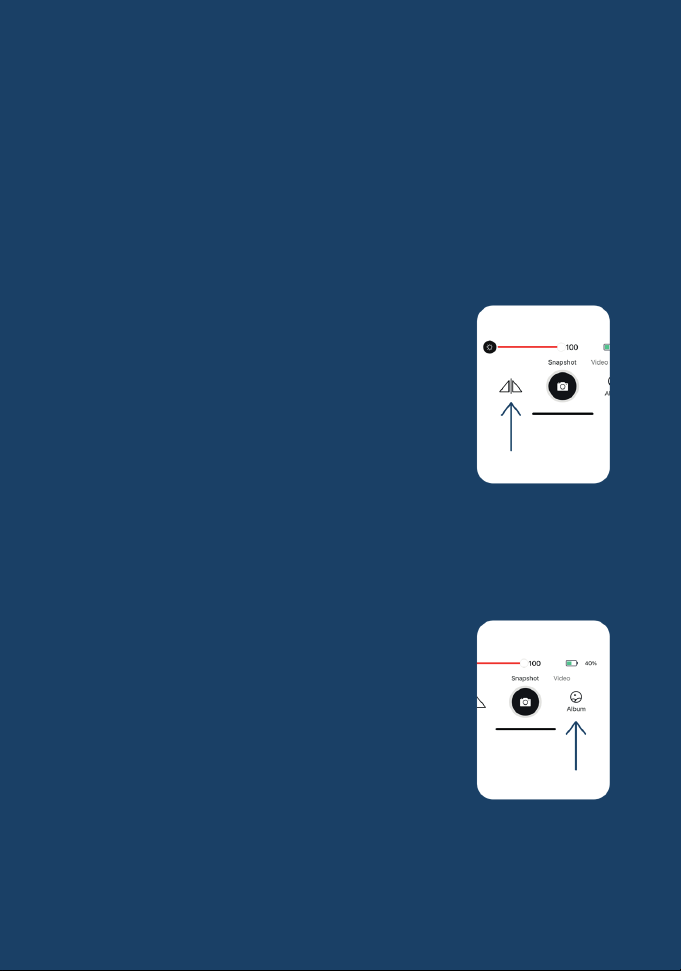
Functions of the emmi® app
Image and video recordings:
Take pictures and videos of your mouth that can be saved in
the emmi® app.
Light adaptation:
Adjust the brightness of the image with a slider (0-100%) to
guarantee optimum images.
Mirror function:
This button can be used to mirror the image.
Notes
• Make sure to remove the emmi®CAM attachment after
each use to maximise the battery life of your emmi®-dent
Platinum CAM.
• The pictures can be downloaded from the
photo album in the emmi® app.
Have fun discovering your oral
health with the emmi®CAM!

Warranty services
Warranty period:
Your ultrasonic toothbrush is guaranteed for 2 years from the
date of purchase.
Scope of guarantee:
This warranty covers material and manufacturing defects on
the device.
Not covered:
Normal wear and tear, damage caused by improper use,
accidents, modifications or unauthorised repairs are excluded
from the warranty.
Warranty services:
In the event of a warranty claim, we offer to repair or replace
the appliance.
Prerequisites for utilisation:
To make a warranty claim, please keep the proof of purchase
and contact our customer service.
Rights of the consumer:
This guarantee does not limit your statutory rights, but
supplements them.
Emmi Ultrasonic GmbH • Gerauer Strasse 34
64546 Moerfelden-Walldorf • Germany
Tel. +49 (0)6105 40 67 94
•
Fax +49 (0)6105 40 67 81
www.emmi-dent.com • [email protected]
© Copyright emmi EMAG AG. All rights reserved. Manufactured in Germany/EU. The contents of
these operating instructions are subject to copyright. The operating instructions may not be co-
pied in whole or in part. Modifications, abridgements, extensions and supplements as well as any
publication or translation by third parties require the prior written consent of emmi EMAG AG.