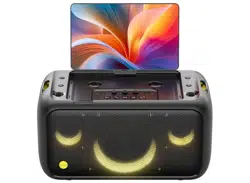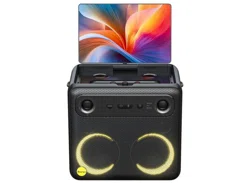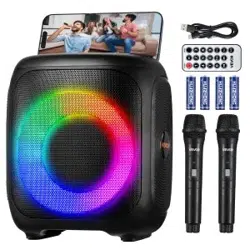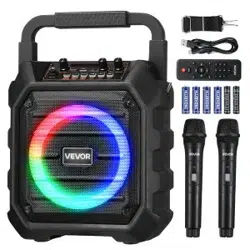
Model No: EP20
Portable Speaker With Microphone
User Manual
ES: Manual de usuario
DE: Benutzerhandbuch
IT: Manuale d'uso
EN: User Manual
FR: Manuel de'Utilisateur
Safety Instructions
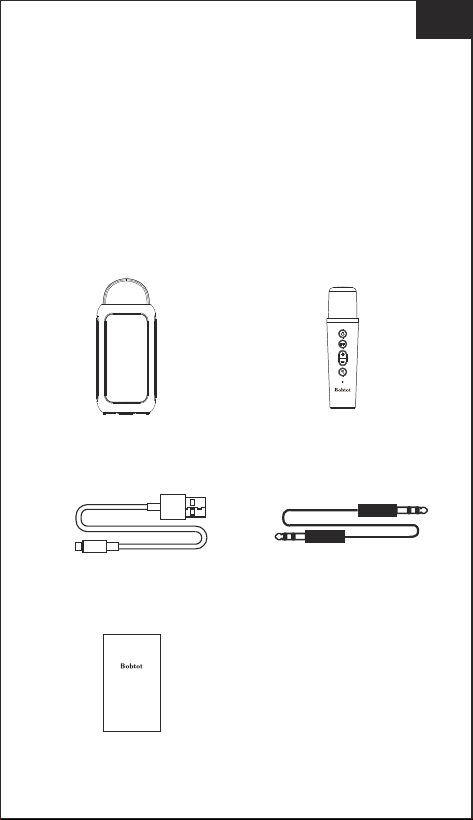
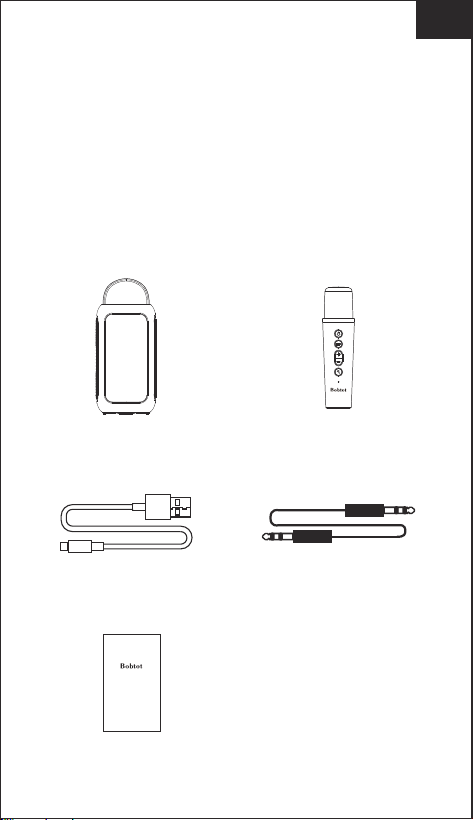
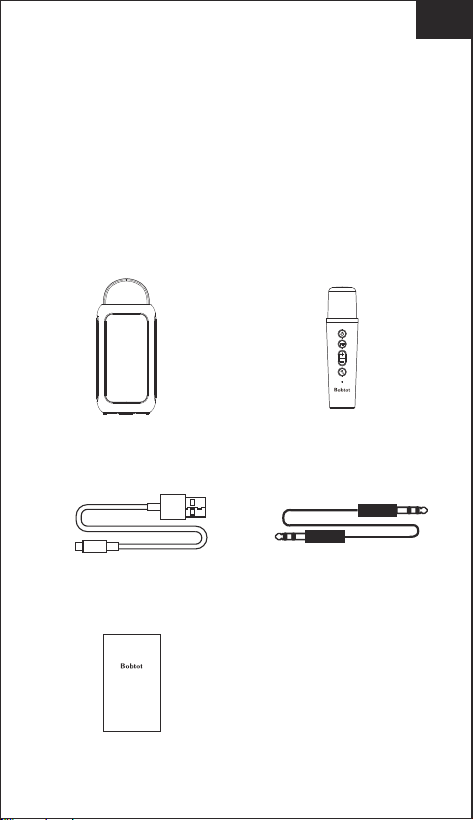
What's in the box
1. Avoid dropping.
2. Do not disassemble.
3. Avoid extreme temperatures.
4. Use original or certified cables.
5. Do not use any corrosive cleaner/oil to clean.
6. Do not use the device outdoors during thunderstorms.
7. Do not expose batteries to high heat as direct sun light,
fire and Etc.
EN
Model No: EP20
Portable Speaker With Microphone
User Manual
ES: Manual de usuario
DE: Benutzerhandbuch
IT: Manuale d'uso
EN: User Manual FR: Manuel de'Utilisateur
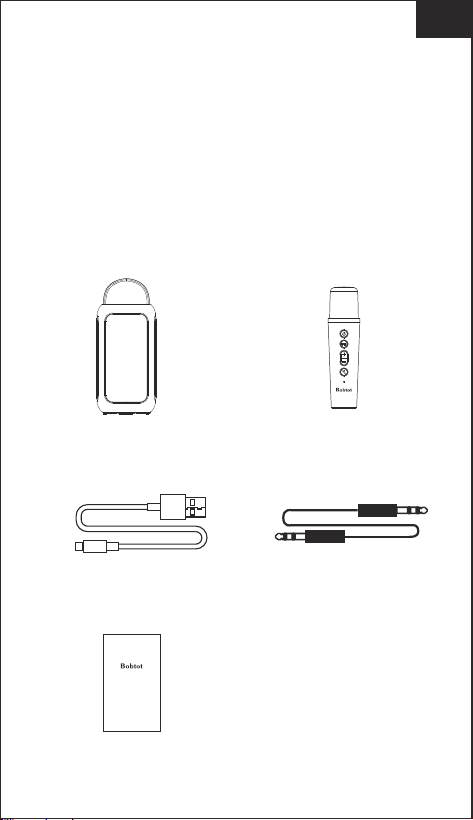
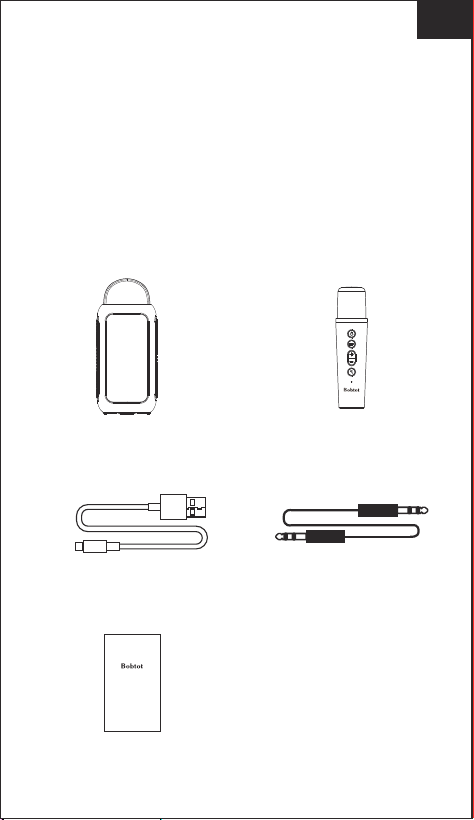
EP20 Karaoke Speaker
USB Type-C Charging Cable
3.5mm AUX Audio Cable
User Manual
Wireless Microphone
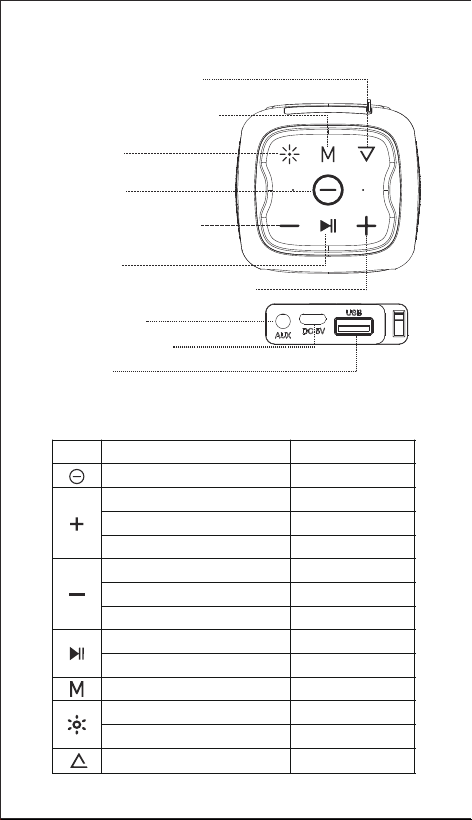
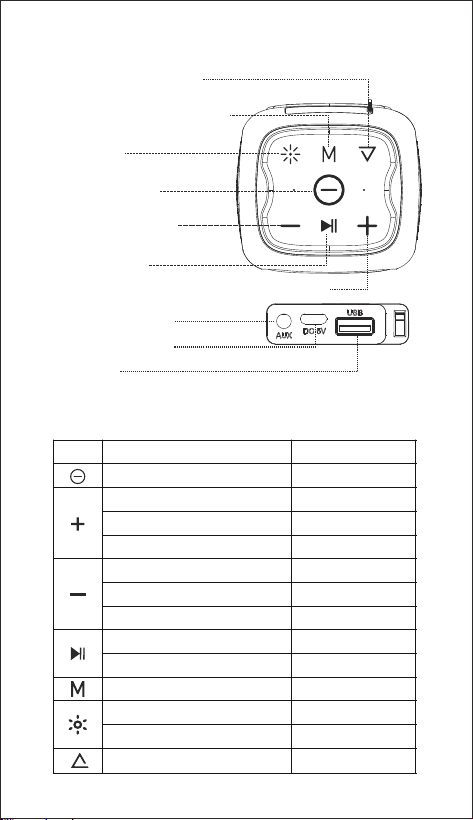
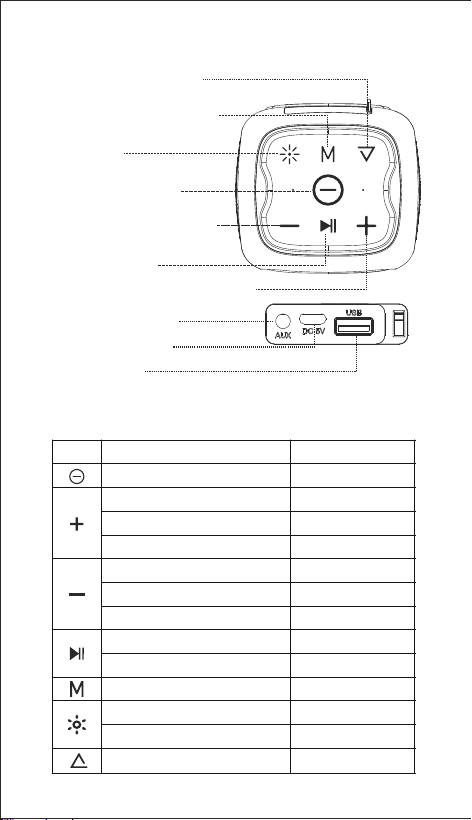
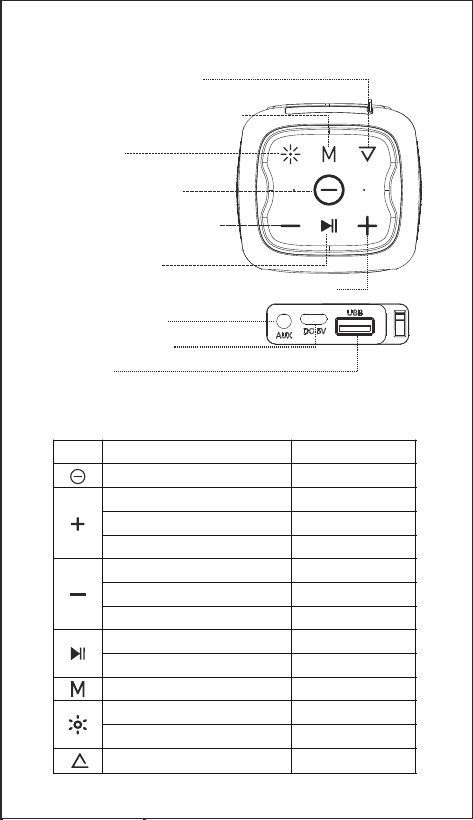
Buttons Overview
Button Function
Function Operation
Volume up
Volume down
Next song
Previous song
Next FM Station
Previous FM Station
Long press
Long press
Long press
Long press
Long press
Long press
Long press
Play/Pause
Disconnect BT
Button
Power on/off
Short press
Short press
Short press
Short press
Short press
Short press
EN
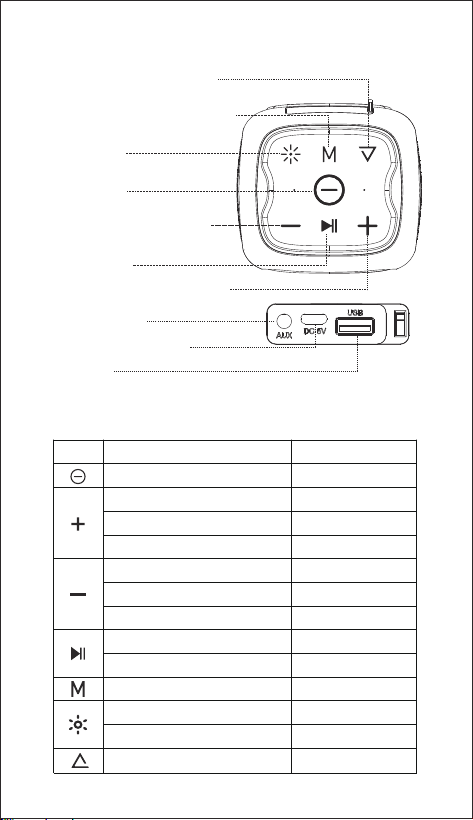
Light show
Turn off the light
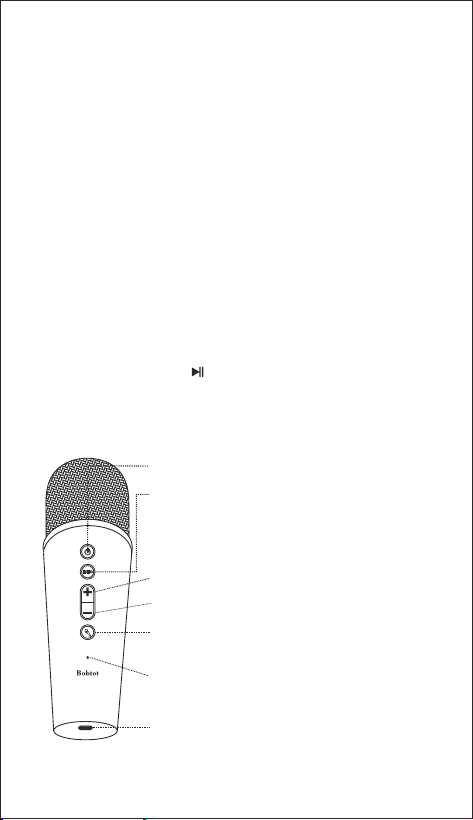
BT/USB/AUX/FM
Power on/off
Volume Down/PreviousSong
/Previous FM Station
Play/Pause
Volume Up/Next Song/ Next FM Station
LED Button
Mode Button ( BT/AUX/USB/FM)
EQ Button(Indoor / Outdoor)
Indoor & Outdoor Mode
3.5mm AUX port
Type-C Charging Jack
USB Port
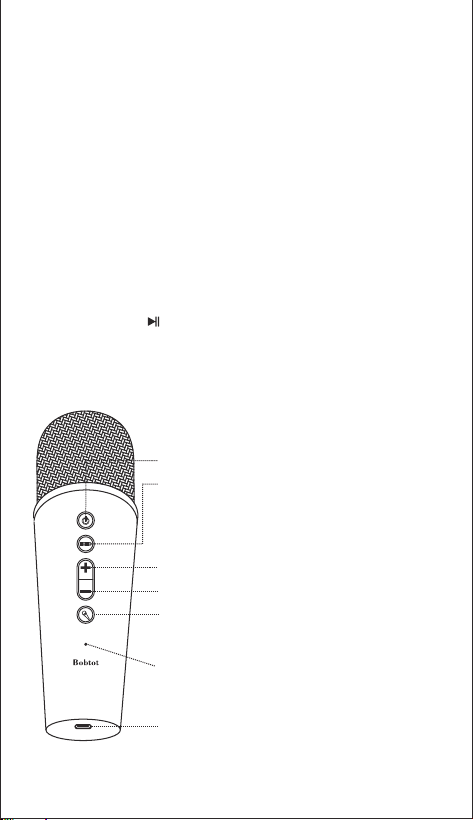
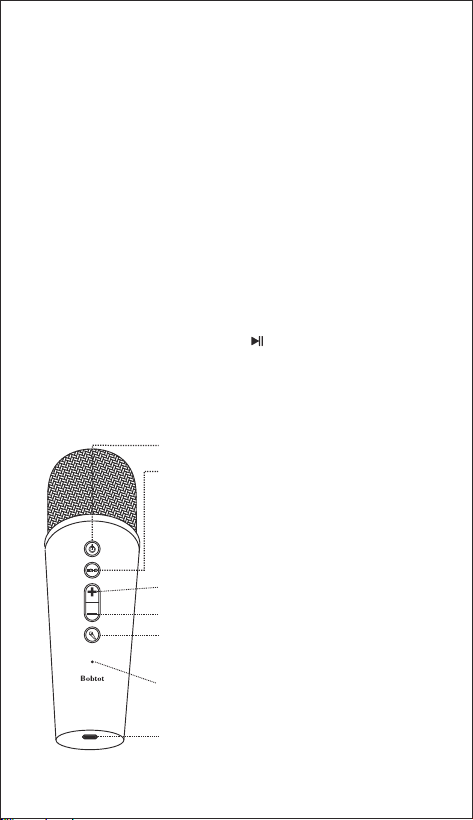
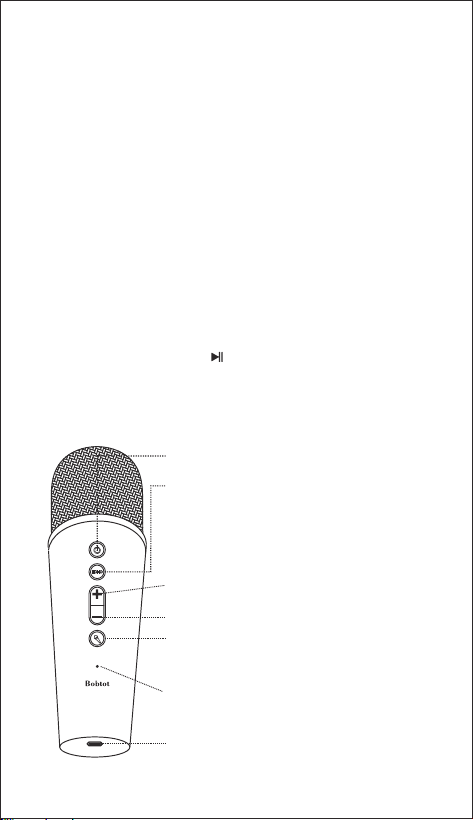
How to use the wireless microphone
1. Long press the "POWER" button to enter BT pairing mode.
2. Find " Bobtot EP20 " speaker on the BT list of your phone or tablet,
and click to connect.
3. It's successfully connected to your smart device if you hear prompt sound,
and the indicator light is solid blue.
How to use the speaker
Wireless Pairing
Plug AUX or USB flash drive into the speaker, it will automatically play.
When using one of the connection ways, please make sure the other source
is disconnected.
AUX/USB
1. Plug the 3.5mm Audio cable into the speaker, just straighten the other end,
it's as an external antenna and improve signal.
2. Press the " M " button on the speaker to enter FM radio mode.
3. Long press the " " button to automatically search out all the FM radio
stations that can be received.
FM
USB Type-C charging port (DC 5V)
Status & Charging Indicator
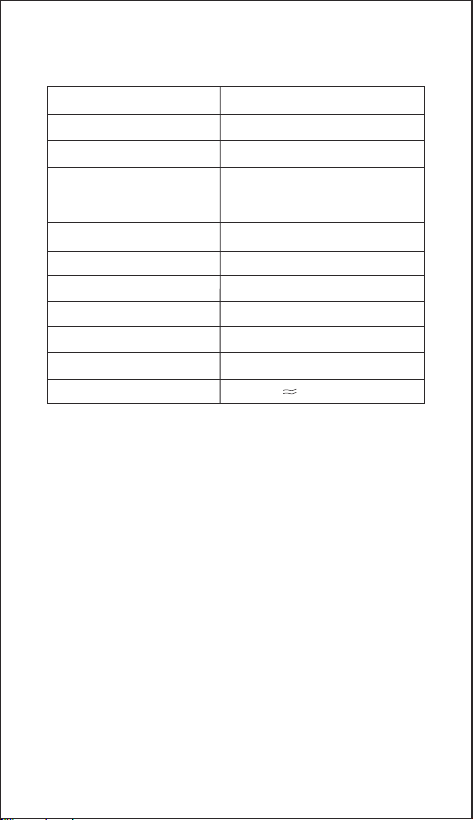
Mic Volume - : Short press
Magic Sound : Short press
( Monster/Baby/Female/Male/Original Voice)
Mic Volume + : Short press
ECHO: Short press
- when hear the prompt sound of " ECHO Volume",
then short press " +" or " - " to adjust the ECHO volume.
- when hear the prompt sound of "Microphone Volume",
then short press "+" or " -“ to adjust the microphone volume.
Power on/off: Long press
If the speaker does not work properly, you may reset it by inserting needle
to AUX jack to press and hold the button for approximately 2 seconds until
the speaker powers off, and then powers on again.
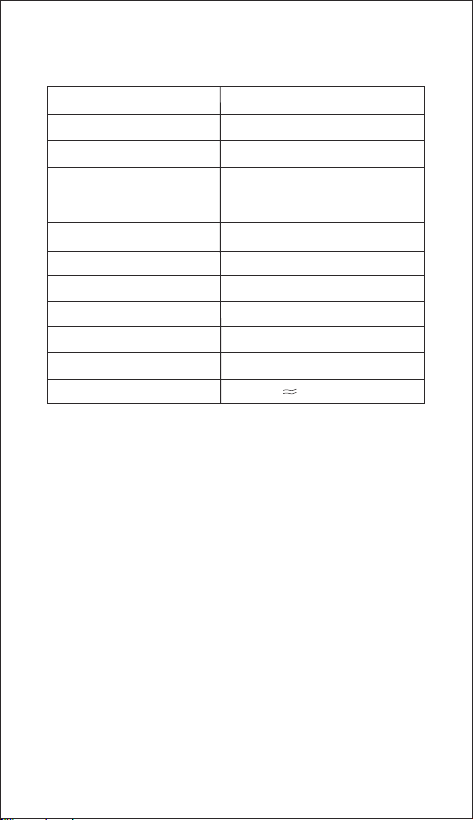
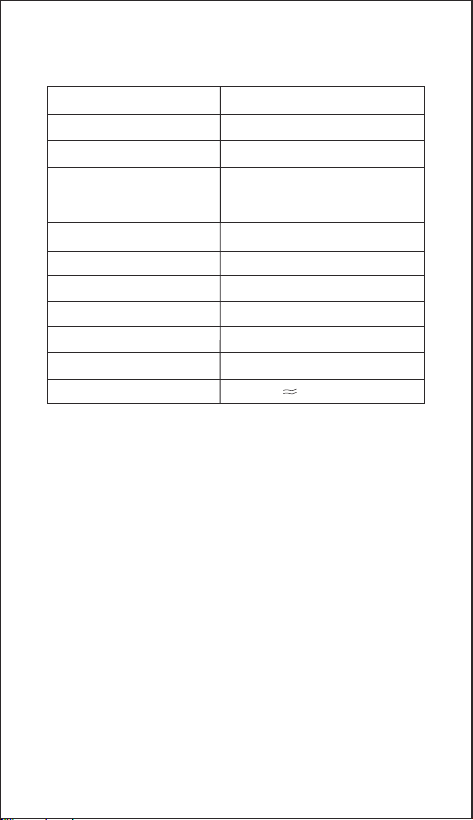
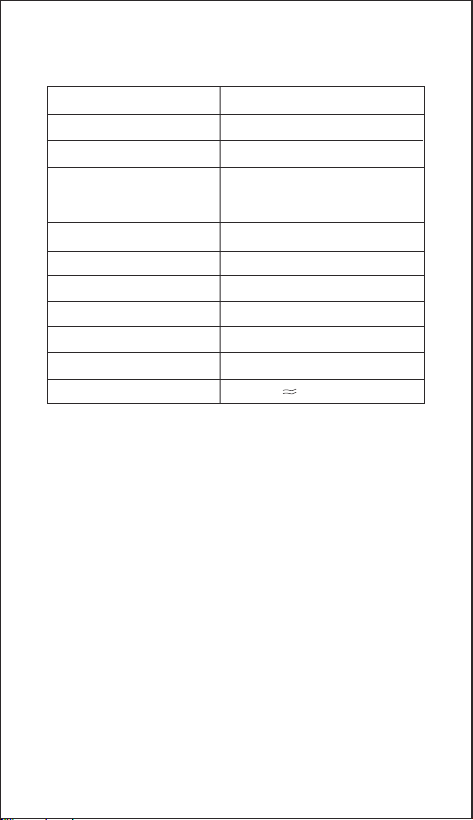
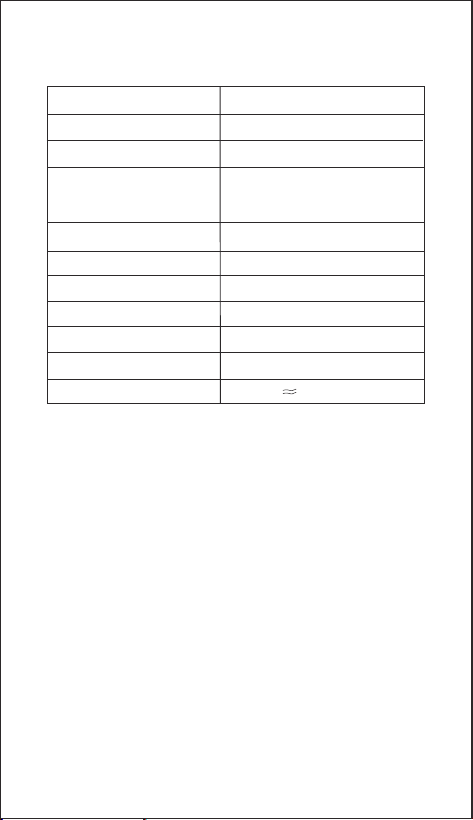
Specifications
Reset your device to factory setting
BT version
5.3
Range 33ft/10m
Audio output 20W
Play time (varies by volume
level and content)
Up to 10 hours
Charging time 4.5 hours
Waterproof rating IPX6
Input
Impedance 4Ω
Frequency response 100 Hz-18 KHz
Size 105x97x237mm/4.13x3.82 x9.33 in
Weight
1138g/2.51 lb
DC 5 V

FCC Statement
Any changes or modifications not expressly approved by the party
responsible for compliance could void the user s authority to operate
the equipment.
This device complies with Part 15 of the FCC Rules.
Operation is subject to the following two conditions:
(1) this device may not cause harmful interference, and
(2) this device must accept any interference received,including interference
that may cause undesired operation.
Note: This equipment has been tested and found to comply with the limits
for a Class B digital device, pursuant to Part 15 of the FCC Rules.
These limits are designed to provide reasonable protection against harmful
interference in a residential installation.
This equipment generates, uses, and can radiate radio frequency energy,
and if not installed and used in accordance with the instructions,
may cause harmful interference to radio communications. However,
there is no guarantee that interference will not occur in a particular installation.
If this equipment does cause harmful interference to radio or television
reception, which can be determined by turning the equipment off and on,
the user is encouraged to try to correct the interference by one or more of
the following measures:
– Reorient or relocate the receiving antenna.
– Increase the separation between the equipment and receiver.
– Connect the equipment into an outlet on a circuit different from that to
which the receiver is connected.
– Consult the dealer or an experienced radio/TV technician for help.
The device has been evaluated to meet general RF exposure requirement.
The device can be used in portable exposure condition without restriction.
FR
Contenu de la boîte
Model No: EP20
Portable Speaker With Microphone
User Manual
ES: Manual de usuario
DE: Benutzerhandbuch
IT: Manuale d'uso
EN: User Manual FR: Manuel de'Utilisateur
EP20 Enceinte Karaoké
Câble de charge USB Type-C
Câble audio AUX 3,5 mm
Manuel de'Utilisateur
Microphone sans fil
Consignes de sécurité
1. Évitez de le faire tomber.
2. Ne le démontez pas.
3. Évitez les températures extrêmes.
4. Utilisez des câbles d'origine ou certifiés.
5. N'utilisez pas de nettoyant/huile corrosif pour nettoyer.
6. N'utilisez pas l'appareil à l'extérieur pendant les orages.
7. N'exposez pas les piles à une chaleur élevée comme la lumière
directe du soleil, le feu, etc.
FR
Aperçu des boutons
Fonction des boutons
Fonction Fonctionnement
Augmentation du volume
Baisser le volume
Chanson suivante
Morceau précédent
Station FM suivante
Station FM précédente
Appui long
Appui long
Appui long
Appui long
Appui long
Appui long
Appui long
Lecture/Pause
Déconnecter BT
Bouton
Marche/arrêt
Appui court
Appui court
Appui court
Appui court
Appui court
Appui court
Éclairage
Éteindre la lumière
BT/USB/AUX/FM
Marche/arrêt
Réduction du volume/chanson
précédente/station FM précédente
Lecture/Pause
Augmentation du volume/chanson
suivante/station FM suivante
Bouton DEL
Bouton de mode (BT/AUX/USB/FM)
Bouton EQ (intérieur / extérieur)
Mode intérieur et extérieur
Port AUX 3,5 mm
Prise de charge de type C
Port USB
Comment utiliser le microphone sans fil
1. appuyez longuement sur le bouton « POWER » pour entrer dans le mode
d'appairage BT.
2 Trouver l'enceinte « Bobtot EP20 » dans la liste BT de votre téléphone
ou tablette, et cliquer pour la connecter.
3. la connexion à votre appareil intelligent est réussie si vous entendez un
son rapide et si le voyant lumineux est bleu fixe.
Comment utiliser le haut-parleur
Appairage sans fil
Branchez un lecteur flash AUX ou USB dans le haut-parleur, il jouera
automatiquement. Lorsque vous utilisez l'un des modes de connexion,
assurez-vous que l'autre source est déconnectée.
AUX/USB
1. branchez le câble audio de 3,5 mm dans le haut-parleur, redressez
simplement l'autre extrémité, cela sert d'antenne externe et améliore le signal.
2. appuyez sur le bouton « M » du haut-parleur pour passer en mode radio FM.
3. appuyez longuement sur le bouton « » pour rechercher
automatiquement toutes les stations de radio FM pouvant être reçues.
FM
Port de charge USB Type-C (DC 5V)
Indicateur d'état et de charge
Mic Volume - : Appui court
Son magique : Appui court
( Monster/Baby/Female/Male/Original Voice))
Mic Volume + : Appui court
ECHO : Appui court
-Lorsque vous entendez le message « Volume ECHO »,
appuyez brièvement sur « + » ou « - » pour régler le
volume de l'ECHO,puis appuyez brièvement sur
« + » ou « - » pour régler le volume de l'ECHO.
-Lorsque vous entendez le message
« Volume du microphone », appuyez brièvement sur
« + » ou « - » pour régler le volume du microphone.
Mise en marche/arrêt : Appui long
If the speaker does not work properly, you may reset it by inserting needle
to AUX jack to press and hold the button for approximately 2 seconds until
the speaker powers off, and then powers on again.
Caractéristiques techniques
Réinitialiser votre appareil aux
paramètres d'usine
Version BT
5.3
Portée 33ft/10m
Sortie audio 20W
Durée de lecture (varie en
fonction du volume et du
contenu)
Jusqu'à 10 heures
Temps de charge 4.5 heures
Indice d'étanchéité IPX6
Entrée
Impédance 4Ω
Réponse en fréquence 100 Hz-18 KHz
Taille 105x97x237mm/4.13x3.82 x9.33 in
Poids
1138g/2.51 lb
DC 5 V
ES
Instrucciones de seguridad
Contenido de la caja
1. Evite las caídas.
2. No desmontar.
3. Evite las temperaturas extremas.
4. Utilice cables originales o certificados.
5. No utilice ningún limpiador/aceite corrosivo para limpiar.
6. No utilice el dispositivo al aire libre durante tormentas eléctricas.
7. No exponga las pilas a altas temperaturas como luz solar directa, fuego, etc.
Model No: EP20
Portable Speaker With Microphone
User Manual
ES: Manual de usuario
DE: Benutzerhandbuch
IT: Manuale d'uso
EN: User Manual FR: Manuel de'Utilisateur
EP20 Altavoz Karaoke
Cable de carga USB tipo C
Cable de audio AUX de 3,5 mm
Manual de usuario
Micrófono inalámbrico
ES
Resumen de botones
Botón Función
Función Funcionamiento
Subir volumen
Bajar volumen
Siguiente canción
Canción anterior
Siguiente emisora FM
Emisora FM anterior
Pulsación larga
Pulsación larga
Pulsación larga
Pulsación larga
Pulsación larga
Pulsación larga
Pulsación larga
Reproducir/Pausa
Desconectar BT
Botón
Encendido/apagado
Pulsación corta
Pulsación corta
Pulsación corta
Pulsación corta
Pulsación corta
Pulsación corta
Mostrar luz
Apagar la luz
BT/USB/AUX/FM
Encendido/Apagado
Bajar volumen/Anterior
canción/Anterior emisora FM
Reproducir/Pausa
Subir volumen/Siguiente canción/Siguiente emisora FM
Botón LED
Botón de modo (BT/AUX/USB/FM)
Botón EQ (Interior / Exterior)
Modo interior y exterior
Puerto AUX de 3,5 mm
Toma de carga Tipo-C
Puerto USB
Cómo utilizar el micrófono inalámbrico
1.Mantenga pulsado el botón «POWER» para entrar en el modo de
emparejamiento BT.
2.Busque el altavoz «Bobtot EP20» en la lista BT de su teléfono o tableta
y haga clic para conectarlo.
3.Se habrá conectado correctamente a su dispositivo inteligente si escucha
un sonido y la luz indicadora se ilumina en azul.
Cómo utilizar el altavoz
Emparejamiento inalámbrico
Conecta una unidad AUX o USB al altavoz y se reproducirá automáticamente.
Cuando utilice una de las formas de conexión, asegúrese de que la otra fuente
está desconectada.
AUX/USB
1.Conecte el cable de audio de 3,5 mm en el altavoz, sólo tiene que enderezar
el otro extremo, es como una antena externa y mejorar la señal.
2.Pulse el botón « M » en el altavoz para entrar en el modo de radio FM.
3.Mantenga pulsado el botón « » para buscar automáticamente todas
las emisoras de radio FM que se pueden recibir.
FM
Puerto de carga USB Tipo-C (DC 5V)
Indicador de estado y carga
Volumen del Micrófono - : Pulsación corta
Sonido mágico : Pulsación corta
( Monstruo/Bebé/Femenino/Masculino/Voz original)
Volumen del Micrófono + : Pulsación corta
ECHO: Pulsación corta
-cuando oiga el sonido de aviso de «Volumen ECHO»,
pulse brevemente « + » o « - » para ajustar el volumen
del ECO.
-Cuando oiga el mensaje «Volumen Micrófono», pulse
brevemente «+» o «-» para ajustar el volumen del
micrófono.
Encendido/apagado: Pulsación larga
Si el altavoz no funciona correctamente, puede restablecerlo insertando la
aguja a la toma AUX para mantener pulsado el botón durante aproximadamente
2 segundos hasta que el altavoz se apague y vuelva a encenderse.
Especificaciones
Restablecer el dispositivo a los
valores de fábrica
Versión BT
5.3
Alcance 33ft/10m
Salida de audio 20W
Tiempo de reproducción
(varía según el nivel de
volumen y el contenido)
Hasta 10 horas
Tiempo de carga 4.5 horas
Resistencia al agua IPX6
Entrada
Impedancia 4Ω
Respuesta en frecuencia 100 Hz-18 KHz
Tamaño 105x97x237mm/4.13x3.82 x9.33 in
Peso
1138g/2.51 lb
DC 5 V
DE
Sicherheitshinweise
Der Inhalt der Box
1. Vermeiden Sie das Fallenlassen.
2. Nicht demontieren.
3. Vermeiden Sie extreme Temperaturen.
4. Verwenden Sie originale oder zertifizierte Kabel.
5. Verwenden Sie keine ätzenden Reinigungsmittel/Öle zur Reinigung.
6. Verwenden Sie das Gerät bei Gewitter nicht im Freien.
7. Setzen Sie die Batterien nicht großer Hitze aus, wie z.B. direktem
Sonnenlicht, Feuer oder Ähnlichem.
Model No: EP20
Portable Speaker With Microphone
User Manual
ES: Manual de usuario
DE: Benutzerhandbuch
IT: Manuale d'uso
EN: User Manual FR: Manuel de'Utilisateur
EP20 Karaoke-Lautsprecher
USB Typ-C-Ladekabel
3,5 mm AUX-Audiokabel
Benutzerhandbuch
Drahtloses Mikrofon
DE
Schaltflächen Übersicht
Schaltfläche Funktion
Funktion Bedienung
Lauter
Lautstärke runter
Nächster Song
Vorheriger Titel
Nächster FM-Sender
Vorheriger FM-Sender
Langes drücken
Langes drücken
Langes drücken
Langes drücken
Langes drücken
Langes drücken
Langes drücken
Wiedergabe/Pause
Trennen von BT
Schaltfläche
Einschalten/Ausschalten
Kurz drücken
Kurz drücken
Kurz drücken
Kurz drücken
Kurz drücken
Kurz drücken
Lichtshow
Ausschalten des Lichts
BT/USB/AUX/FM
Einschalten/Ausschalten
Lautstärke verringern/Vorheriger
Titel/Vorheriger FM-Sender
Wiedergabe/Pause
Lauter/Nächster Titel/Nächster FM-Sender
LED-Taste
Modus-Taste (BT/AUX/USB/FM)
EQ-Taste (Innen/Außen)
Innen- und Außenmodus
3,5-mm-AUX-Anschluss
TTyp-C-Ladebuchse
USB-Anschluss
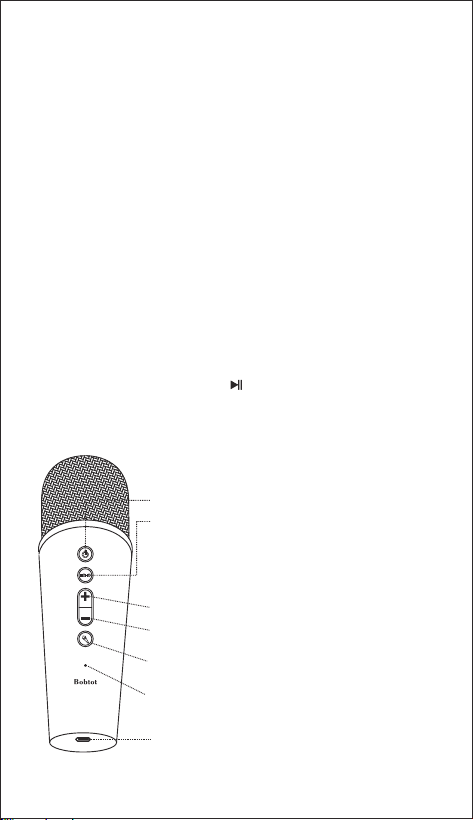
So verwenden Sie das drahtlose Mikrofon
1. drücken Sie lange auf die “POWER”-Taste, um den BT-Kopplungsmodus
zu aktivieren.
2. Suchen Sie den Lautsprecher “Bobtot EP20” in der BT-Liste Ihres
Telefons oder Tablets und klicken Sie auf „Verbinden“.
3. Die Verbindung zu Ihrem Smart-Gerät ist erfolgreich, wenn Sie einen
Signalton hören und die Anzeigeleuchte blau leuchtet.
So verwenden Sie den Lautsprecher
Drahtloses Pairing
Schließen Sie einen AUX- oder USB-Stick an den Lautsprecher an, und die
Wiedergabe erfolgt automatisch. Wenn Sie eine der Verbindungsarten
verwenden, stellen Sie bitte sicher, dass die andere Quelle nicht
angeschlossen ist.
AUX/USB
1.Stecken Sie das 3,5-mm-Audiokabel in den Lautsprecher, richten Sie das
andere Ende gerade aus, es dient als externe Antenne und verbessert das
Signal.
2. drücken Sie die Taste “ M ” am Lautsprecher, um den FM-Radiomodus zu
aktivieren.
3. drücken Sie lange auf die Taste “ ”, um automatisch nach allen
UKW-Radiosendern zu suchen, die empfangen werden können.
FM
USB Typ-C Ladeanschluss (DC 5V)
Status- und Ladeanzeige
Mikrofonlautstärke - : Kurz drücken
Magischer Ton : Kurz drücken
( Monster/Baby/Frau/Mann/Originalstimme)
Mikrofonlautstärke + : Kurz drücken
ECHO: Kurz drücken
-wenn Sie die Aufforderung “ECHO-Lautstärke” hören,
dann kurz “+” oder “ -” drücken, um die ECHO-Lautstärke
einzustellen.
-Wenn Sie den Aufforderungston “Mikrofonlautstärke” hören,
drücken Sie kurz „+“ oder „-“, um die Mikrofonlautstärke
einzustellen.
Einschalten/Ausschalten: Lang drücken ECHO: Kurz drücken
Setzen Sie Ihr Gerät auf die Werkseinstellungen zurück Wenn der Lautsprecher
nicht richtig funktioniert, können Sie ihn zurücksetzen, indem Sie eine Nadel
in die AUX-Buchse stecken und die Taste etwa 2 Sekunden lang gedrückt halten,
bis der Lautsprecher sich ausschaltet und dann wieder einschaltet.
Spezifikationen
Ihr Gerät auf die Werkseinstellungen
zurücksetzen
BT-Version
5.3
Reichweite 33ft/10m
Audio-Ausgang 20W
Spielzeit (variiert je nach
Lautstärke und Inhalt)
Bis zu 10 Stunden
Aufladezeit 4.5 Stunden
Wasserdichtigkeit IPX6
Eingang
Impedanz 4Ω
Frequenzgang 100 Hz-18 KHz
Größe 105x97x237mm/4.13x3.82 x9.33 in
Gewicht
1138g/2.51 lb
DC 5 V
IT
Istruzioni per la sicurezza
Cosa c'è nella scatola
1. Evitare di farlo cadere.
2. Non smontare.
3. Evitare temperature estreme.
4. Utilizzare cavi originali o certificati.
5. Non utilizzare detergenti/olio corrosivi per la pulizia.
6. Non utilizzare il dispositivo all'aperto durante i temporali.
7. Non esporre le batterie a calore elevato, come la luce diretta del sole,
il fuoco, ecc.
Model No: EP20
Portable Speaker With Microphone
User Manual
ES: Manual de usuario
DE: Benutzerhandbuch
IT: Manuale d'uso
EN: User Manual FR: Manuel de'Utilisateur
Altoparlante Karaoke EP20
Cavo di ricarica USB Type-C
Cavo audio AUX da 3,5 mm
Manuale d'uso
Microfono senza fili
IT
Panoramica dei pulsanti
Funzione del pulsante
Funzione Funzionamento
Volume su
Volume giù
Canzone successiva
Canzone precedente
Stazione FM successiva
Stazione FM precedente
Pressione lunga
Pressione lunga
Pressione lunga
Pressione lunga
Pressione lunga
Pressione lunga
Pressione lunga
Riproduzione/Pausa
Disconnetti BT
Pulsante
Accensione/spegnimento
Pressione breve
Pressione breve
Pressione breve
Pressione breve
Pressione breve
Pressione breve
Mostra luce
Spegnere la luce
BT/USB/AUX/FM
Accensione/spegnimento
Volume giù/Canzone precedente
/Stazione FM precedente
Riproduzione/Pausa
Volume su/Canzone successiva/Stazione FM successiva
Pulsante LED
Pulsante modalità (BT/AUX/USB/FM)
Pulsante EQ (interno/esterno)
Modalità interna ed esterna
Porta AUX da 3,5 mm
Jack di ricarica Type-C
Porta USB
Come utilizzare il microfono wireless
1.Premere a lungo il pulsante “POWER” per accedere alla modalità di
accoppiamento BT.
2.Individuare il diffusore “Bobtot EP20” nell'elenco BT del telefono o
del tablet e fare clic per collegarlo.
3. La connessione al dispositivo smart è avvenuta correttamente se si sente
un segnale acustico e la spia luminosa è blu fissa.
Come utilizzare il diffusore
Accoppiamento wireless
Se si collega un'unità flash AUX o USB al diffusore, la riproduzione avverrà
automaticamente. Quando si utilizza una delle modalità di connessione,
assicurarsi che l'altra sorgente sia scollegata.
AUX/USB
1.Inserire il cavo audio da 3,5 mm nell'altoparlante e raddrizzare l'altra
estremità per ottenere un'antenna esterna e migliorare il segnale.
2.Premere il pulsante “ M ” sul diffusore per accedere alla modalità radio FM.
3.Premere a lungo il tasto “ ” per ricercare automaticamente tutte le
stazioni radio FM ricevibili.
FM
Porta di ricarica USB Tipo-C (DC 5V)
Indicatore di stato e di carica
Volume microfono - : premere brevemente
Suono magico: premere brevemente
( Mostro/Bambino/Femmina/Uomo/Voce Originale)
Volume microfono + : premere brevemente
ECHO: Pressione breve
-quando si sente il suono di “Volume ECHO”,quindi premere
brevemente “ +” o “ - ” per regolare il volume ECHO.
-Quando si sente il segnale acustico di “Volume microfono”,
premere brevemente “+” o “-” per regolare il volume del
microfono.
Accensione/spegnimento: Pressione prolungata
Se l'altoparlante non funziona correttamente, è possibile ripristinarlo inserendo
l'ago al jack AUX e tenere premuto il pulsante per circa 2 secondi finché il
diffusore non si spegne e si riaccende. l'altoparlante si spegne e si riaccende.
Specifiche tecniche
Ripristino delle impostazioni di
fabbrica del dispositivo
Versione BT
5.3
Gamma 33ft/10m
Uscita audio 20W
Tempo di riproduzione
(varia in base al livello del
volume e al contenuto)
Fino a 10 ore
Tempo di ricarica 4.5 ore
Grado di impermeabilità IPX6
Ingresso
Impedenza 4Ω
Risposta in frequenza 100 Hz-18 KHz
Dimensioni 105x97x237mm/4.13x3.82 x9.33 pollici
Peso
1138g/2.51 lb
DC 5 V
18 Months Warranty
Life-time & Timely Technical Support
www.bobtot.net
© Bobtot // Features and specifications are subject to change and or improvement without notice.
Made in China