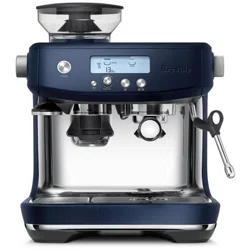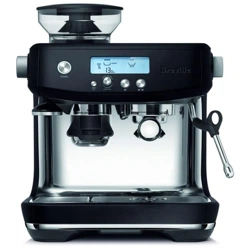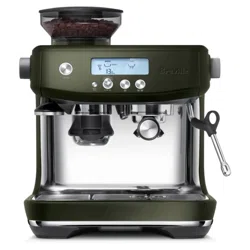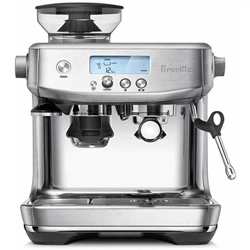
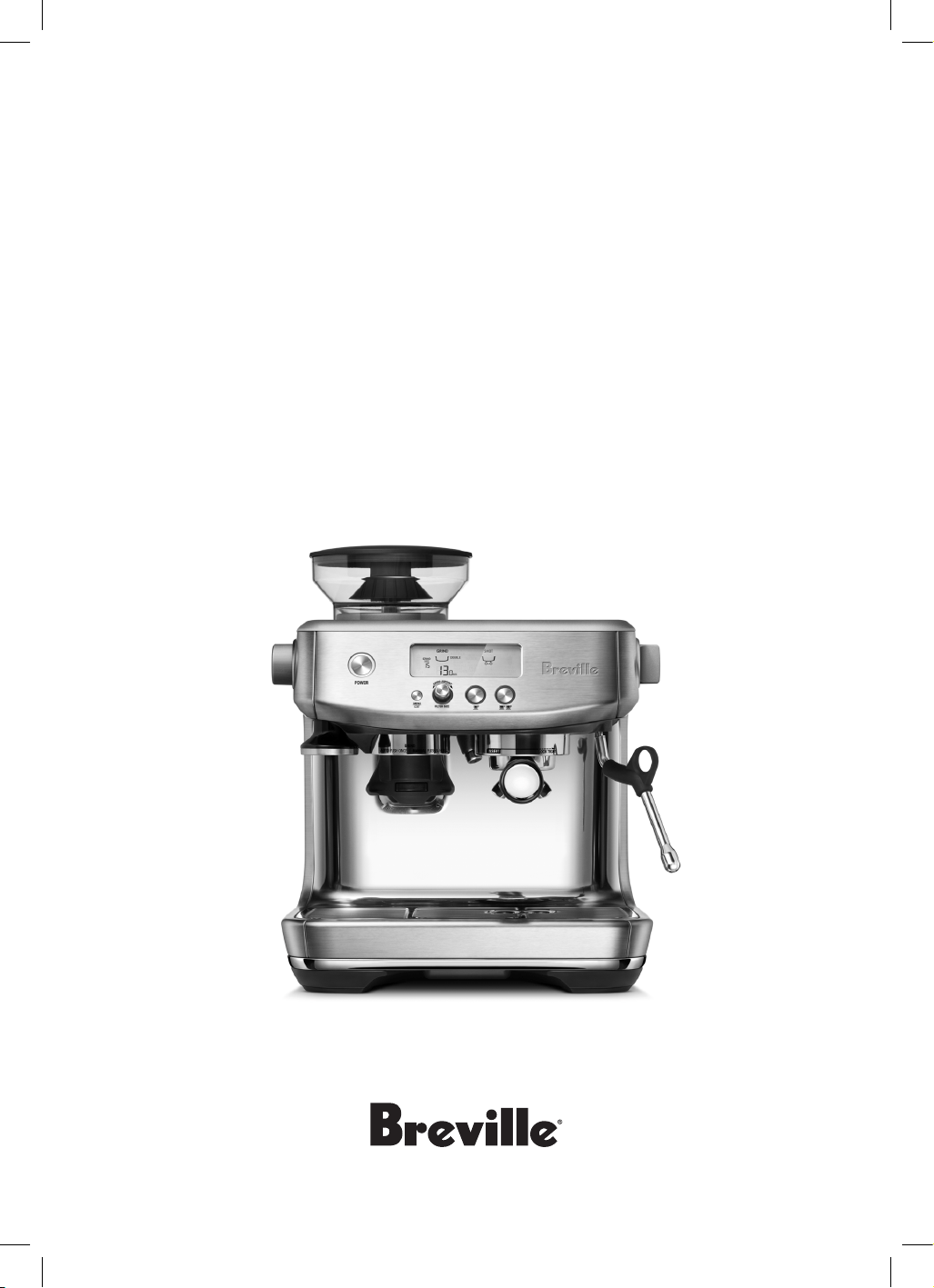
the Barista Pro
™
Instruction Book - BES878

2
BREVILLE
RECOMMENDS
SAFETY FIRST
At Breville we are very safety
conscious. We design and
manufacture consumer
products with the safety of you,
our valued customer, foremost
in mind. In addition we ask
that you exercise a degree of
care when using any electrical
appliance and adhere to the
following precautions.
IMPORTANT
SAFEGUARDS
READ ALL
INSTRUCTIONS BEFORE
USE AND SAVE FOR
FUTURE REFERENCE
• Carefully read all
instructions before
operating and save for
future reference.
• Remove any packaging
material and promotional
labels or stickers before
using the Barista Pro™ for
the first time.
• To eliminate a choking
hazard for young children,
remove and safely discard
the protective cover fitted
to the power plug of this
appliance.
• Do not place the product
near the edge of a bench
or table during operation.
Ensure the surface is level,
clean and free of water
and other substances.
• Do not use the product on
a sink drain board.
• Do not operate the
appliance if it is in an
2 Breville Recommends
Safety First
8 Components
10 Features
11 Assembly
12 Functions
18 Tips
23 Care & Cleaning
27 Troubleshooting
Contents

3
enclosed space, or within
a cupboard.
• Do not let the cord hang
over the edge of a bench
or table, or become
knotted. Keep away from
hot gas or electric burner,
or where it could touch a
heated oven.
• This appliance can
be used by children
aged from 8 years and
above if they have been
given supervision or
instruction concerning
use of the appliance in a
safe way and understand
the hazards involved.
Cleaning and user
maintenance shall not be
carried out by children
unless they are aged
from 8 years and above
and supervised. Keep the
appliance and its cord out
of reach of children aged
less than 8 years.
• Children shall not play
with the appliance.
• Appliances can be used
by persons with reduced
physical, sensory or
mental capabilities or
lack of experience and
knowledge if they have
been given supervision
or instruction concerning
use of the appliance in a
safe way and understand
the hazards involved.
• Children shall not play
with the appliance.
• Regularly inspect the
supply cord, plug and
actual appliance for
any damage. If found
damaged in any way,
immediately cease use of
the appliance and return
the entire appliance to
the nearest authorised
Breville Service Centre for
examination, replacement
or repair.
• Keep the appliance and
accessories clean. Follow
the cleaning instructions
provided in this book.
Any procedure not listed
in this instruction booklet
should be performed at
an authorised Breville
Service Centre.

4
The installation of
a residual current
device (safety switch)
is recommended to
provide additional safety
protection when using
electrical appliances.
It is advisable that a
safety switch with a rated
residual operating
current not exceeding
30mA be installed in
the electrical circuit
supplying the appliance.
See your electrician for
professional advice.
• Potential injury from
misuse.
• Heating element surface
is subject to residual heat
after use.
SPECIFIC
INSTRUCTIONS
FOR BES878
• This appliance is
recommended for
household use only.
Do not use this appliance
for any purpose other
than its intended use.
Do not use in moving
vehicles or boats. Do
not use outdoors.
• If the appliance is to be:
− left unattended
− cleaned
− moved
− assembled; or
− stored;
always switch off the
espresso machine by
pressing the Power button
to OFF, switch off at the
power outlet and unplug.
• Ensure the product is
properly assembled
before first use.
• Do not use any other
liquid apart from cold
mains/town water. We
do not recommend the
use of highly filtered,
de-mineralised or distilled
water as this may affect
the taste of the coffee and
how the espresso machine
is designed to function.
• Ensure the portafilter
is firmly inserted and
secured into the group

5
head before starting an
extraction. Never remove
the portafilter during the
extraction process.
• Do not touch hot surfaces.
Allow the product to cool
down before moving or
cleaning any parts.
• Use caution after milk
texturing as the ‘Auto
Purge’ function may
purge hot steam when the
steam wand is lowered.
• Use caution when
operating machine as
metal surfaces are liable to
get hot during use.
• Use caution when using
the descale feature as hot
steam may be released.
Before descaling, ensure
drip tray is empty and
inserted. Refer to the
‘Care & Cleaning’ section
for future instructions.
WARNING
Do not immerse power
cord, power plug or
appliance in water or
any other liquid.
SPECIFIC
INSTRUCTIONS
FOR WATER
FILTER
• Filter cartridge should
be kept out of reach of
children.
• Store filter cartridges in a
dry place in the original
packaging.
• Protect cartridges from
heat and direct sunlight.
• Do not use damaged
filter cartridges.
• Do not open filter
cartridges.
• If you are absent for a
prolonged period of time,
empty the water tank and
replace the cartridge.
FOR HOUSEHOLD USE ONLY
SAVE THESE INSTRUCTIONS
6
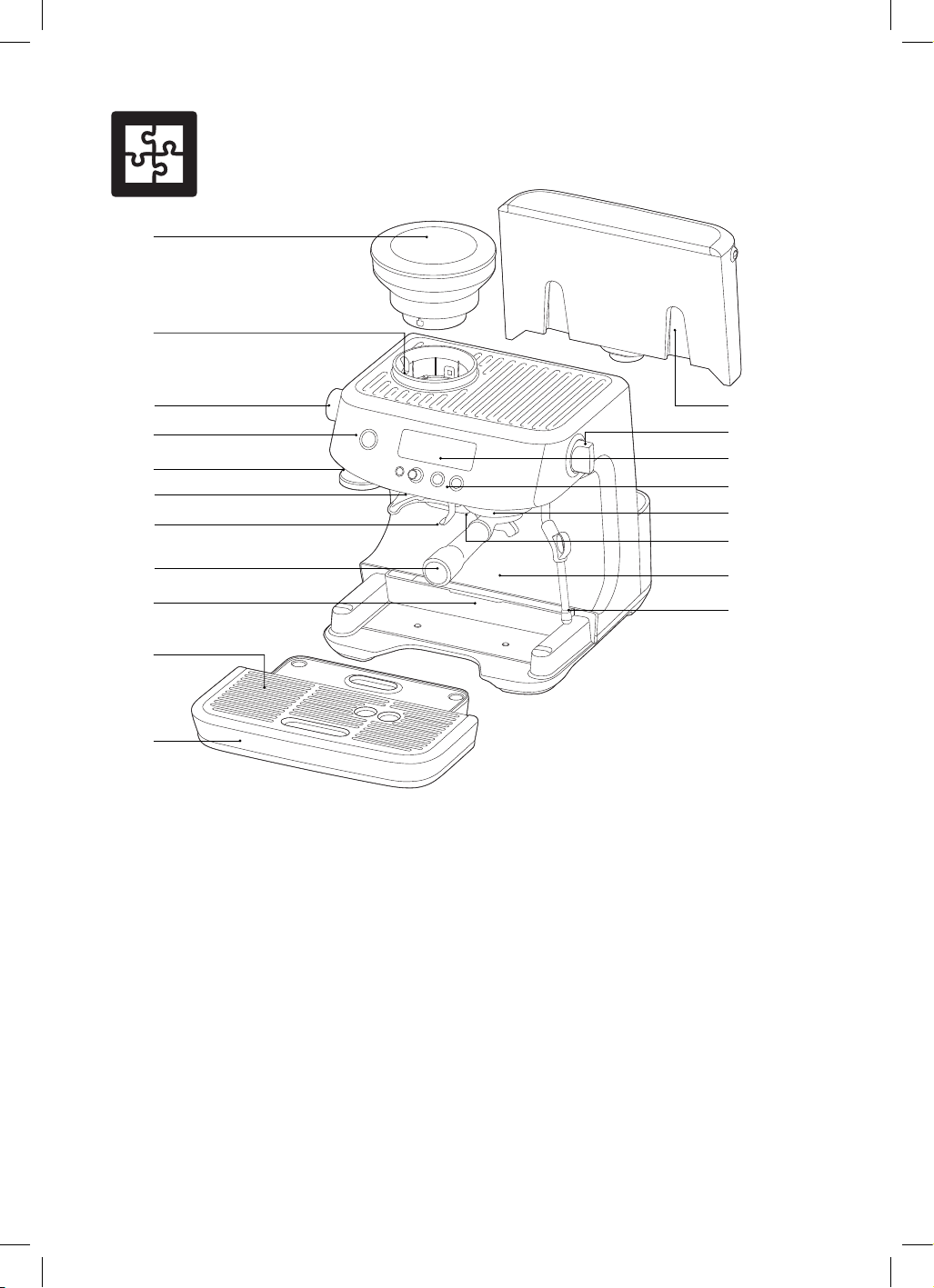
Components
A. 250g bean hopper
With locking system for easy removal, storage
and transfer of coffee beans.
B. Integrated conical burr grinder
C. GRIND SIZE selector
30 espresso grind settings from fine
to coarse.
D. POWER button
E. Integrated removable 54mm tamper
F. Grinder outlet
G. Grinding cradle
H. 54mm stainless steel portafilter
With commercial style spouts.
I. Storage tray (located behind drip tray)
For storage of accessories.
J. Removable drip tray grid
K. Removable drip tray
With tray full indicator.
L. 2L removable water tank
With replaceable water filters
to reduce scale and impurities.
M. Steam dial
Selector control for steam and hot water.
N. LCD display
With grinding and extracting
progress animations.
O. Control panel
With MENU, GRIND AMOUNT/ FILTER
SIZE, 1 CUP and 2 CUP buttons.
P. Group head
Q. Dedicated hot water outlet
For making long blacks and
pre-heating cups.
R. Extra-tall cup clearance
S. 360° swivel steam wand
Easily adjusts to the perfect position
for texturing milk.
A
B
J
E
O
P
Q
L
M
N
R
S
D
I
K
C
F
G
H
7
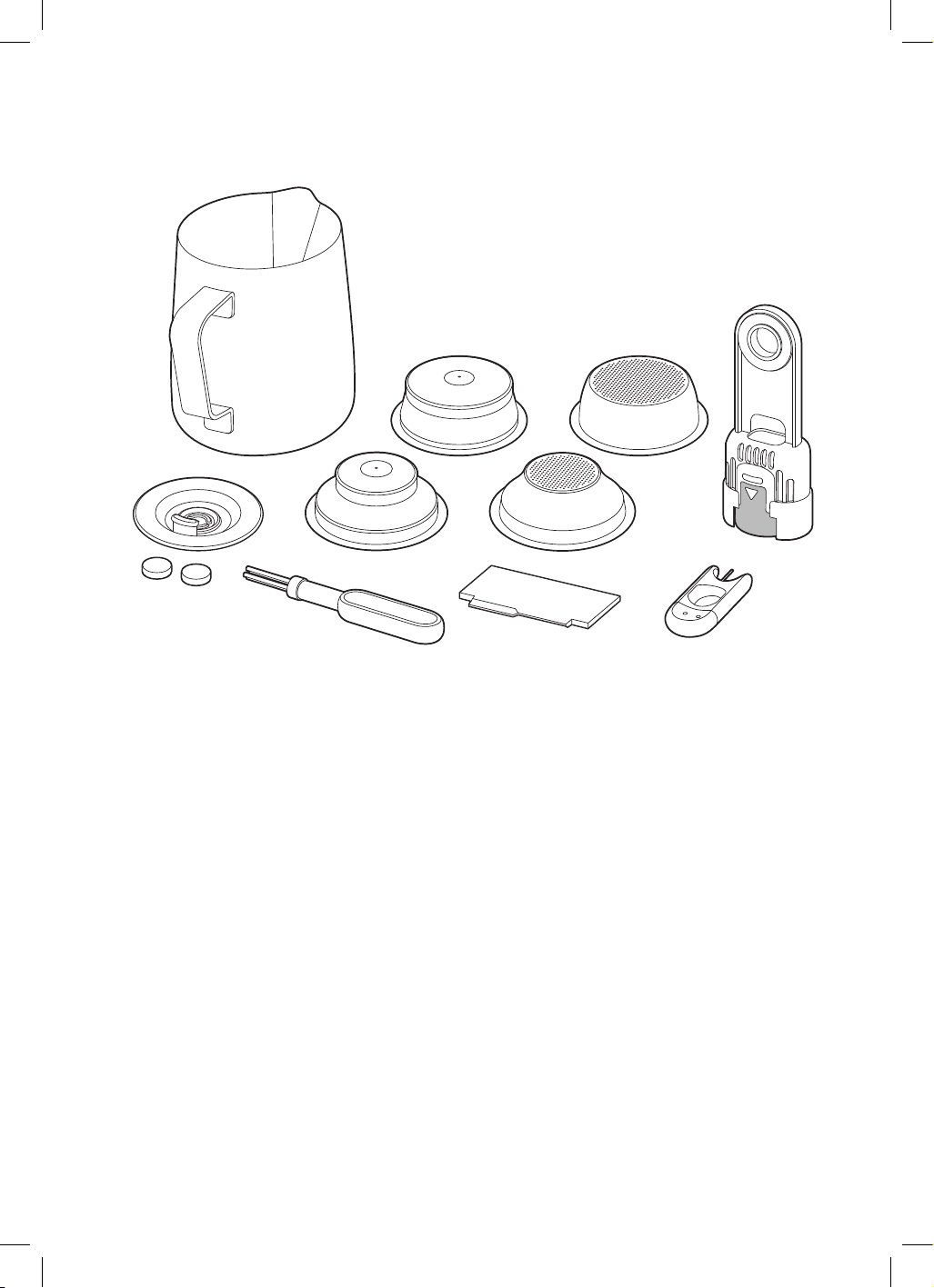
ACCESSORIES
1. Stainless steel milk jug
With MIN and MAX markings.
2. Dual wall filter baskets (1 cup & 2 cup)
Use with pre-ground coffee.
3. Single wall filter baskets (1 cup & 2 cup)
Use when grinding fresh whole coffee beans.
4. Water filter and filter holder
All parts of the Barista Pro™
that come into contact with coffee,
water and milk are BPA Free.
1
6
5
7 8
9
2 3
4
5. Cleaning disc
6. Cleaning tablets
7. Cleaning brush
8. The Razor™ precision dose trimming tool
9. Steam wand and filter basket cleaning tool

8
THERMOJET™ HEATING SYSTEM
Innovative heating system achieves ideal
extraction temperature in 3 seconds.
INTEGRATED CONICAL BURR
GRINDER
Stainless steel conical burrs maximise
ground coffee surface area for a full espresso
flavour. Upper and lower burrs are removable
for cleaning.
ADJUSTABLE GRIND SIZE
30 espresso grind settings from fine to coarse
for optimal extraction.
ADJUSTABLE GRIND AMOUNT
Adjust the amount of fresh ground coffee
dosed into the filter basket to suit the fineness
or coarseness of the grind.
AUTOMATIC DOSING
The grinder will dispense the required
amount of ground coffee for a single or double
cup dose.
HANDS FREE GRINDING
Auto stop for hands free grinding directly into
the portafilter.
THE RAZOR™ DOSE TRIMMING TOOL
Patented twist blade trims down the puck
to the right level for precision dosing and a
consistent extraction.
ADJUSTABLE SHOT TEMPERATURE
CONTROL
For optimum coffee flavour.
PID TEMPERATURE CONTROL
Electronic PID temperature control for
increased temperature stability.
INSTANT HOT WATER
Dedicated hot water outlet for making
Long Blacks and pre-heating cups.
LOW PRESSURE PRE-INFUSION
Applies low water pressure at the start
of the extraction to gently expand grinds
for an even extraction.
VOLUMETRIC CONTROL
Pre-set 1 & 2 cup volumes, manual over-ride
or programmable shot volumes.
DRY PUCK FEATURE
Removes excess water from the ground coffee
in the filter basket after extraction for easy
disposal of the coffee puck.
LARGE DRIP TRAY
With more usable workspace.
Barista Pro
TM
Features
9
Assembly
BEFORE FIRST USE
Machine Preparation
Remove and discard all labels and packaging
materials attached to your espresso machine.
Ensure you have removed all parts and
accessories before discarding the packaging.
Remove the packaging and the plastics
bags containing the water filter and water
filter holder.
Clean the water tank, portafilter, filter baskets,
milk jug and drip tray using warm water and a
gentle dish washing liquid. Rinse well, then dry
thoroughly before reassembling.
INSTALLING THE WATER FILTER
• Remove the water filter and water filter holder
from the plastic bag.
• Soak the filter in cold water for 5 minutes.
• Wash the filter holder with cold water.
• Set the reminder for next month of
replacement. We recommend to replace the
filter after 2 months.
• Insert the filter into the filter holder.
• Install the assembled filter holder in the water
tank, ensuring it is clicked into place.
• Fill the water tank with cold water before
sliding back into position on the back of the
machine and locking into place.
• Refer to Care & Cleaning on page 18 for
further instruction on installing the filter.
NOTE
DO NOT use highly filtered, demineralised or
distilled water in this machine. This may affect
the taste of the coffee.
NOTE
For replacement water filters, visit the Breville
webpage or contact Breville Customer Service.
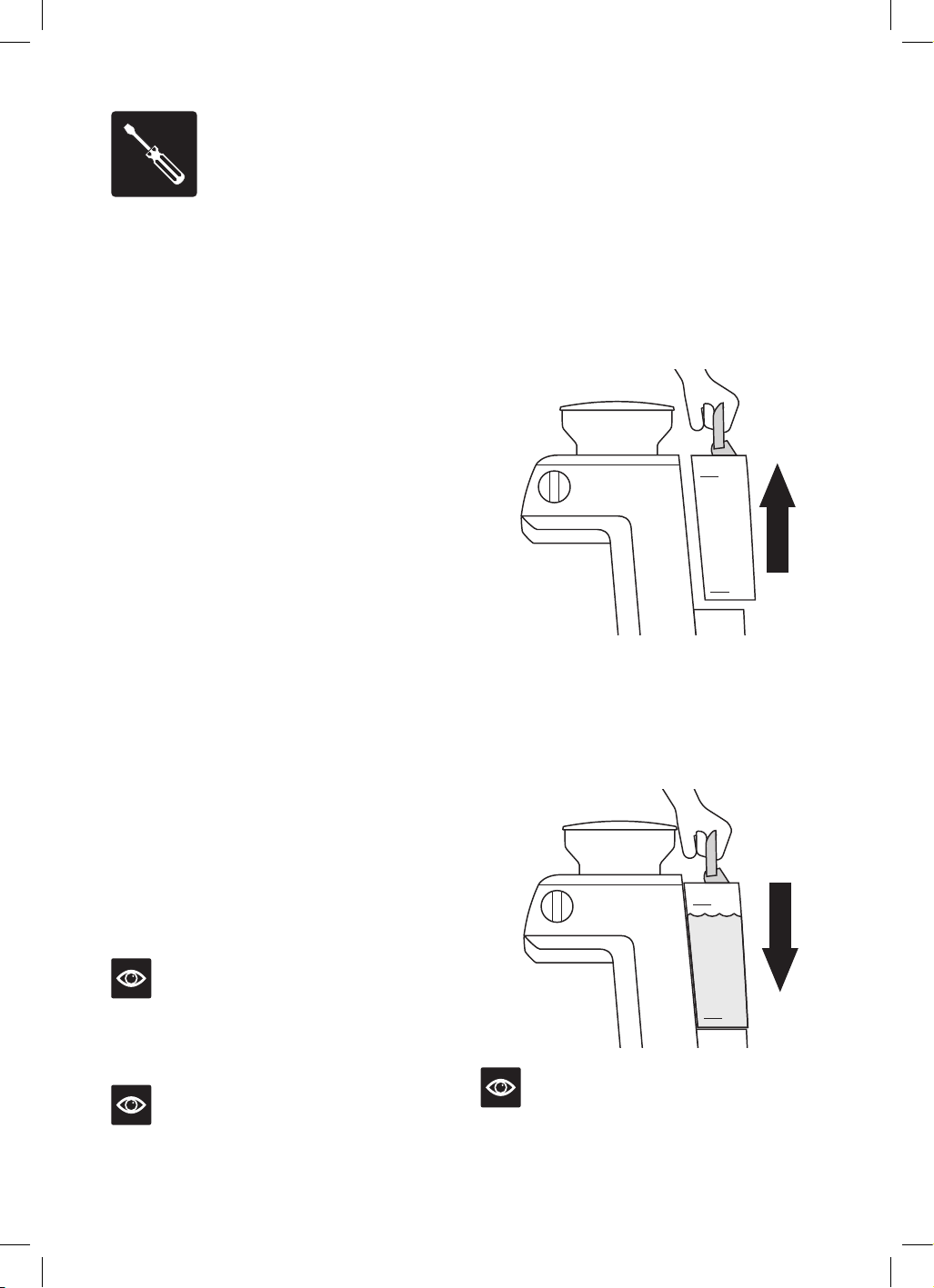
FILLING THE WATER TANK
• Ensure the water filter is securely fitted
inside the water tank.
• Use the handle at the top of the water
tank to assist in lifting it up and away
from the machine.
Refer to Instruction Book for more information.
Contact the Breville Customer Service Centre
for further assistance.
AUS 1300 139 798
NZ 0800 273 845
www.Breville.com.au
INSTALL
WATER
FILTER
2
Rinse filter and
mesh
2 43 6
Replace water tankAssemble Set date + 2 months Install filter in tank
5
Soak for
5 minutes
Replace water filter
every 2 months or
60 tank refills
1
MAX
MIN
MAX
MIN
MAX
MIN
• Fill the water tank with cold potable tap
water to below the MAX marking indicated
on the side of the water tank.
• Replace the water tank back on the machine,
pressing down to ensure that it is properly
positioned and attached to the machine.
Refer to Instruction Book for more information.
Contact the Breville Customer Service Centre
for further assistance.
AUS 1300 139 798
NZ 0800 273 845
www.Breville.com.au
INSTALL
WATER
FILTER
2
Rinse filter and
mesh
2 43 6
Replace water tankAssemble Set date + 2 months Install filter in tank
5
Soak for
5 minutes
Replace water filter
every 2 months or
60 tank refills
1
MAX
MIN
MAX
MIN
MAX
MIN
NOTE
Replace the water daily. The water tank should be
filled with fresh, cold tap water before each use.
10
Assembly
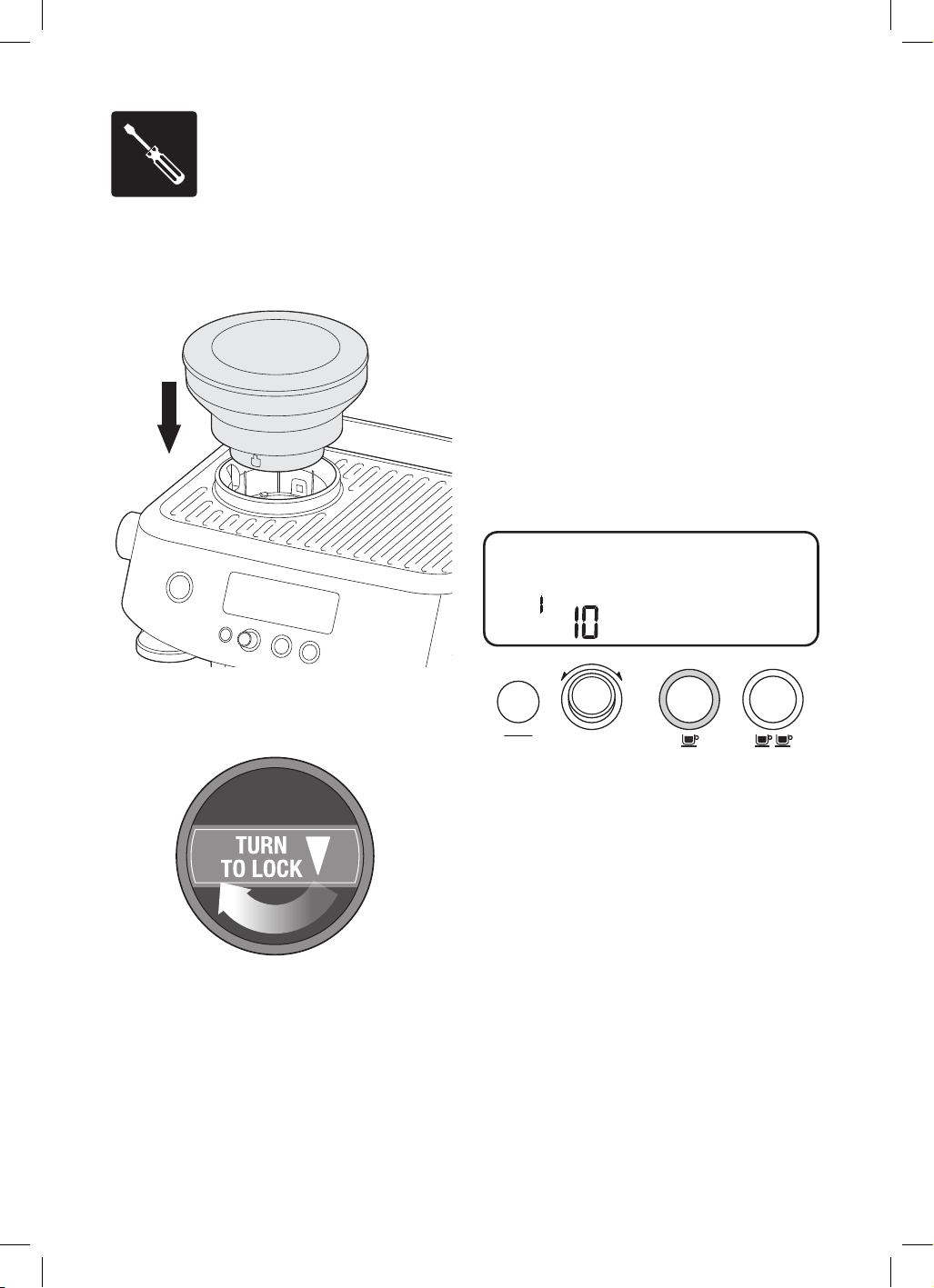
ATTACHING THE HOPPER
Insert the bean hopper into position on top
of the machine.
Turn the dial to lock the hopper into place.
Fill with fresh coffee beans.
FIRST USE CYCLE
A first use cycle must be completed before
the initial use of the machine. The first use
cycle rinses the machine and primes the
heating system.
1. Fill the water tank.
2. Ensure machine is fully assembled with
the bean hopper, drip tray and water tank
securely attached to the machine.
3. Press the POWER button. The machine will
beep and go into FIRST CYCLE mode.
4. The LCD will display FLUSH and the 1 CUP
button will be illuminated.
PRE-INFUSE
SHOT
STEAM
SEC
AMOUNT
MANUAL
PAUSED
HOT
WATER
FLUSH
RESET
DEFAULTS
DESCALE
IN
PROGRESS
FILL
TANK
GRIND
DOUBLE
SINGLE
LOCK
HOPPER
GRIND
SIZE
SHOT TEMP
FASTER
POUR
SLOWER
POUR
CUSTOM
HOTTER
COOLER
CUSTOM
FILTER SIZE
MENU
EXIT
G
R
I
N
D
A
M
O
U
N
T
5. Press the 1 CUP button. The LCD will show
a count down for the remaining time of the
first use cycle.
6. Once complete, the machine will go into
READY mode.
11
Functions
TURNING OFF THE MACHINE
To turn the machine off, press the POWER
button. Alternatively, the machine has auto-off,
if it is not used for 30 minutes.
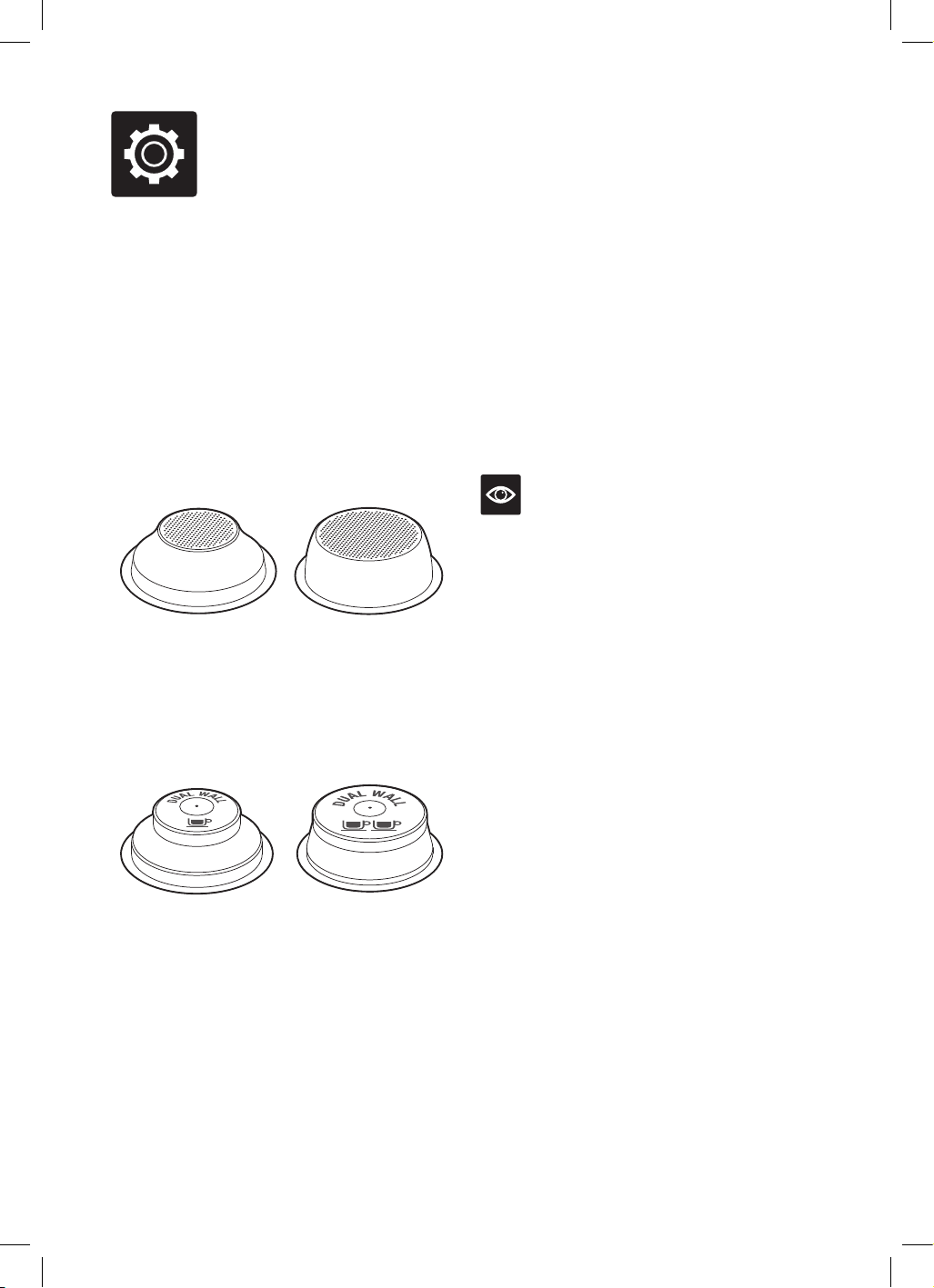
FILTER BASKETS
This machine includes 4 filter baskets; 2 x
Single Wall and 2 x Dual Wall.
Single Wall filter baskets should be used when
grinding fresh whole coffee beans. They allow
you to experiment with grind, dose and tamp
to create a more balanced espresso.
1 CUP 2 CUP
Dual Wall filter baskets should be used when
using pre-ground coffee. They regulate the
pressure and help to optimise the extraction
regardless of the grind, dose and tamp pressure
or freshness.
1 CUP 2 CUP
Regardless of whether you use Single Wall or
Dual Wall filters baskets, use the 1 CUP basket
when brewing a single cup and the 2 CUP
basket when brewing two cups or a stronger
single cup or mug.
You will need to adjust the grind amount and
size if switching from a single to a double basket,
or vice versa.
The provided filter baskets are designed for:
1 CUP basket = approx. 8 – 10g
2 CUP basket = approx. 19 – 22g
NOTE
You may need to experiment with how much
coffee is dosed into the filter basket or how long
the grinder needs to run to achieve the correct
dose. For example; when using a finer espresso
grind with the Single Wall filter baskets, you may
need to increase the grind amount to ensure the
filter basket is correctly dosed.
12
THE GRIND
When grinding coffee beans, the grind size
should be fine, but not too fine. The grind size
will affect the rate at which water flows through
the ground coffee in the filter basket and the
taste of the espresso.
If the grind is too fine (looks like powder
and feels like flour when rubbed between
the fingers), the water will not flow through
the coffee, even when under pressure. The
resulting espresso will be OVER EXTRACTED,
dark in colour and bitter in flavour.
If the grind is too coarse, the water will flow
through the ground coffee in the filter basket
too quickly. The resulting espresso will be
UNDER EXTRACTED and lacking in colour
and flavour.
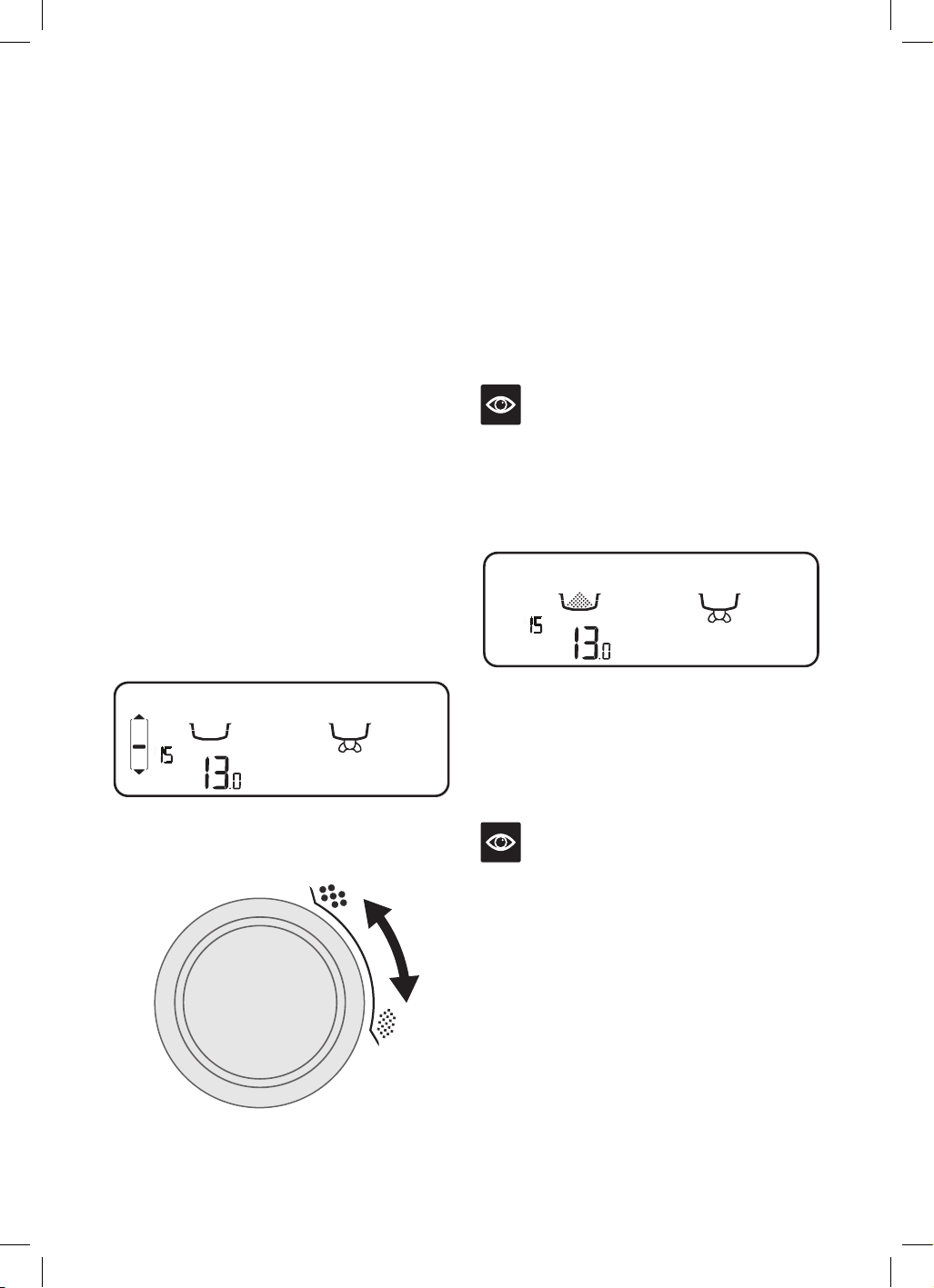
SETTING THE GRIND SIZE
This machine has 30 grind settings to select
from, with the size selected displayed on the
LCD screen. The default grind size is 15.
When adjusting the grind size, a bar will
display on the LCD indicating a faster or
slower pour.
PRE-INFUSE
SHOT
STEAM
SEC
AMOUNT
MANUAL
PAUSED
HOT
WATER
FLUSH
RESET
DEFAULTS
DESCALE
IN
PROGRESS
FILL
TANK
GRIND
DOUBLE
SINGLE
LOCK
HOPPER
GRIND
SIZE
SHOT TEMP
FASTER
POUR
SLOWER
POUR
CUSTOM
HOTTER
COOLER
CUSTOM
Use the GRIND SIZE selector on the left side
of the machine to adjust the grind size.
FINER
COARSER
DOSING THE COFFEE
• Fill the hopper with fresh coffee beans.
• Insert the required filter basket into the
portafilter.
• Place the portafilter into the grinding cradle.
• If required, press the FILTER SIZE button to
select the filter basket size; Single or Double.
• If required, turn the GRIND AMOUNT dial
to change the grind time; clockwise
to increase the time and anti-clockwise
to decrease.
NOTE
The default grind times are 9.5 seconds for a
1 cup filter and 13 seconds for a 2 cup filter.
• Press and release the portafilter to activate
the automatic dosing. The LCD will show the
filter basket filling.
PRE-INFUSE
SHOT
STEAM
AMOUNT
MANUAL
PAUSED
HOT
WATER
FLUSH
RESET
DEFAULTS
DESCALE
IN
PROGRESS
FILL
TANK
GRIND
DOUBLE
SINGLE
LOCK
HOPPER
SHOT TEMP
FASTER
POUR
SLOWER
POUR
CUSTOM
HOTTER
COOLER
CUSTOM
SEC
GRIND
SIZE
• If you need to pause the grinding function,
press and release the portafilter. The LCD
will show PAUSED, it will remain paused for
10 seconds before returning to READY mode.
• Press and release the portafilter to
resume grinding.
NOTE
It is normal for the portafilter to appear
overfilled with ground coffee.
MANUAL DOSING
To manually dose the coffee, press and hold
the portafilter in the grinding cradle until the
desired amount of ground coffee has been
dosed. To stop grinding, release the portafilter.
The timer will count up, displaying the
grind time.
13
TAMPING THE GROUND COFFEE
• Remove the portafilter from the
grinding cradle.
• Tap the portafilter several timers to
collapse and distribute the coffee evenly
in the filter basket.
• Using the tamper, tamp down firmly
(approx. 15-20kg of pressure). The amount of
pressure is not as important as the consistent
pressure every time.
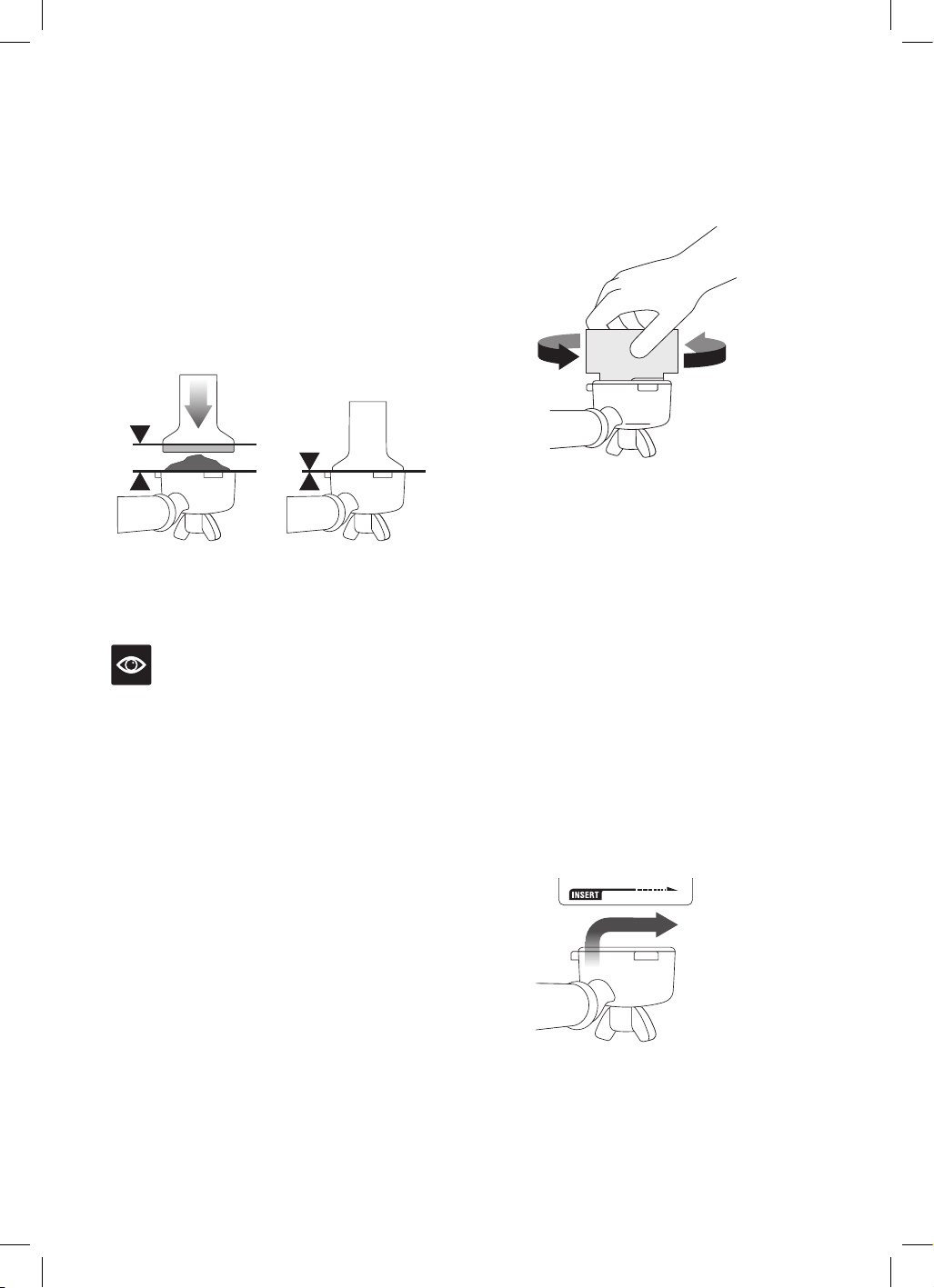
• As a guide, the top edge of the cap on the
tamper should be level with the top of the filter
basket AFTER the coffee has been tamped.
NOTE
We recommend quality 100% Arabica beans
with a ‘Roasted On’ date stamped on the bags,
not a ‘Best Before’ or ‘Use By’ date. Coffee beans
are best consumed between 5 – 20 days after
the ‘Roasted On’ date. Stale coffee may pour too
quickly from the portafilter and taste bitter and
watery.
TRIMMING THE DOSE
The Razor™ precision dose trimming tool allows
you to trim the puck to the right level for a
consistent extraction.
• Insert the Razor™ dose trimming tool into the
filter basket until the shoulders of the tool rest
on the rim of the basket. The blade of the dose
trimming tool should penetrate the surface of
the tamped coffee.
• Rotate the Razor™ dose trimming tool back
and forth while holding the portafilter on
an angle over a knock box to trim off excess
coffee grinds. Your filter basket is now dosed
with the correct amount of coffee.
• Wipe excess coffee from the rim of the filter
basket to ensure a proper seal is achieved in
the group head.
PURGING THE GROUP HEAD
Before placing the portafilter into the group
head, run a short flow of water through the
group head by pressing the 1 CUP button.
This will stabilise the temperature prior to
extraction and preheat the portafilter for a
consistent shot temperature.
INSERTING THE PORTAFILTER
Place the portafilter underneath the group head
so that the handle is aligned with the INSERT
position. Insert the portafilter into the group
head and rotate the handle towards the centre
until firm resistance is felt.
LOCK TIGHT
14
EXTRACTING ESPRESSO
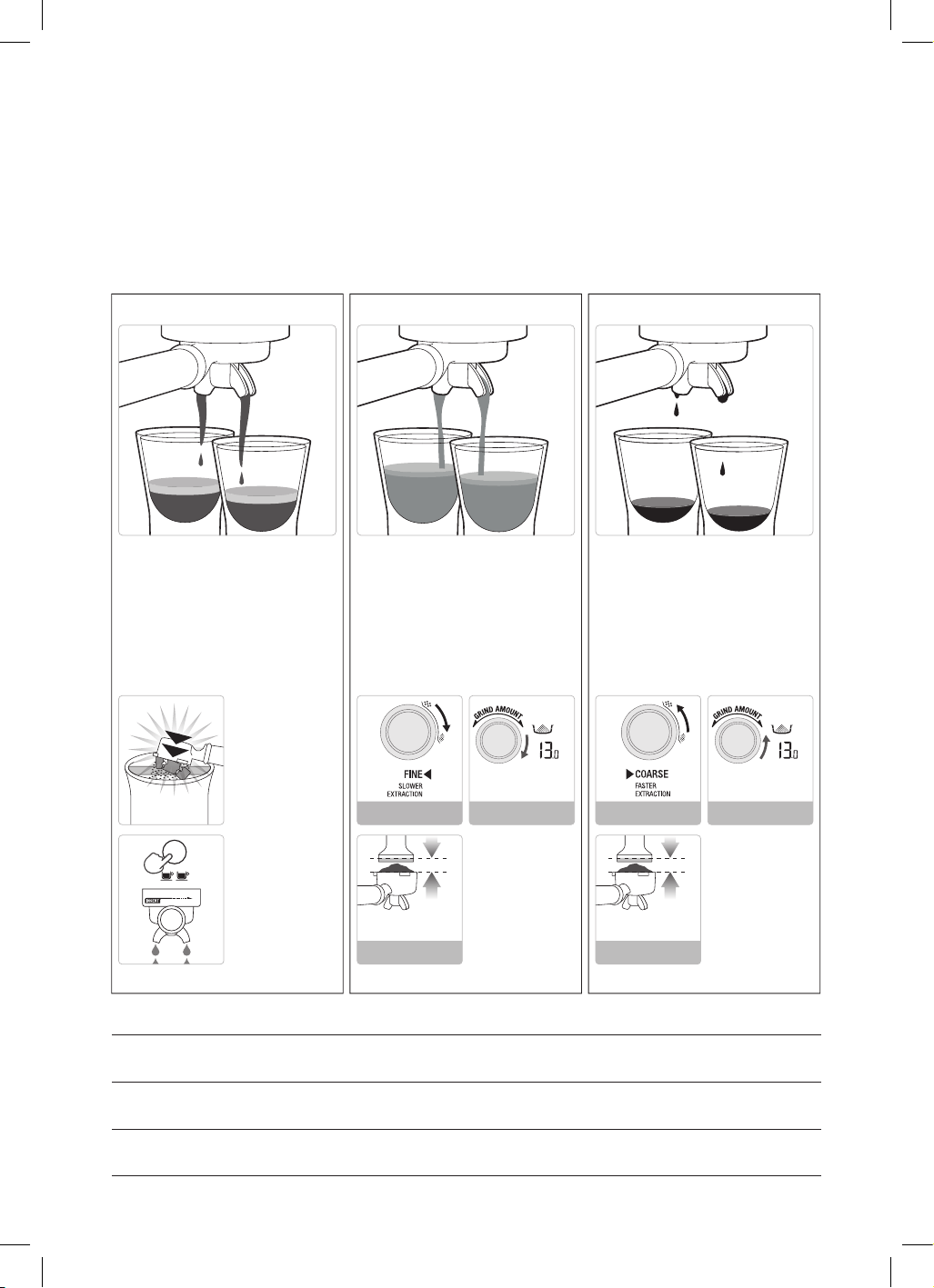
• As a guide the espresso will start to flow after 8–10 seconds (infusion time) and should be the
consistency of dripping honey.
• If the espresso starts to flow after less than 6 seconds, you have either under dosed the filter
basket and /or the grind is too coarse. This is an UNDER EXTRACTED shot.
• If the espresso starts to drip but doesn’t flow after 15 seconds, the grind is too fine. This is an
OVER EXTRACTED shot.
• Flow starts after 8-12 secs
• Flow slow like warm honey
• Crema is golden brown with a ne
mousse texture
• Espresso is dark brown
SOLUTIONS SOLUTIONS
Tamp using 15-20kgs
of pressure. The top
edge of metal cap on the
tamper should be level
with the top of the lter
basket AFTER tamping.
Trim the puck to the
right level using the
Razor
™
precision dose
trimming tool.
• Flow starts after 1-7 secs
• Flow fast like water
• Crema is thin and pale
• Espresso is pale brown
• Tastes bitter/sharp, weak and watery
• Flow starts after 13 secs
• Flow drips or not at all
• Crema is dark and spotty
• Espresso is very dark brown
• Tastes bitter and burnt
REMOVE USED
GRINDS
Used grinds will form
a coffee 'puck'. If the
puck is wet, refer to
the 'Under Extraction'
section.
RINSE FILTER
BASKET
Keep the lter basket
clean to prevent
blockages. Without
ground coffee in the lter
basket, lock the
portalter into the
machine and run hot
water through.
AFTER EXTRACTION
CORRECT EXTRACTION UNDER EXTRACTION OVER EXTRACTION
Tamp using 15-20kgs
of pressure. The top
edge of metal cap on the
tamper should be level
with the top of the lter
basket AFTER tamping.
Trim the puck to the
right level using the
Razor
™
precision dose
trimming tool.
ALWAYS TAMP TO LINE
Adjust & re-test
Adjust & re-test
DECREASE
GRIND AMOUNT
ALWAYS TAMP TO LINE
Adjust & re-test
Adjust & re-test
INCREASE
GRIND AMOUNT
Adjust & re-testAdjust & re-test
LOCK TIGHT
SEC
GRIND
DOUBLE
SEC
GRIND
DOUBLE
GRIND GRIND DOSE TAMP
OVER EXTRATED
BITTER • ASTRINGENT
Too fine
Too much
Use razor to trim
Too heavy
BALANCED
Optimum
8–10g (1 cup)
19–22g (2 cup)
15–20kg
UNDER EXTRACTED
UNDERDEVELOPED • SOUR
Too coarse
Too little
Increase dose & use razor to trim
Too light
15
PRE-PROGRAMMED SHOT VOLUME –
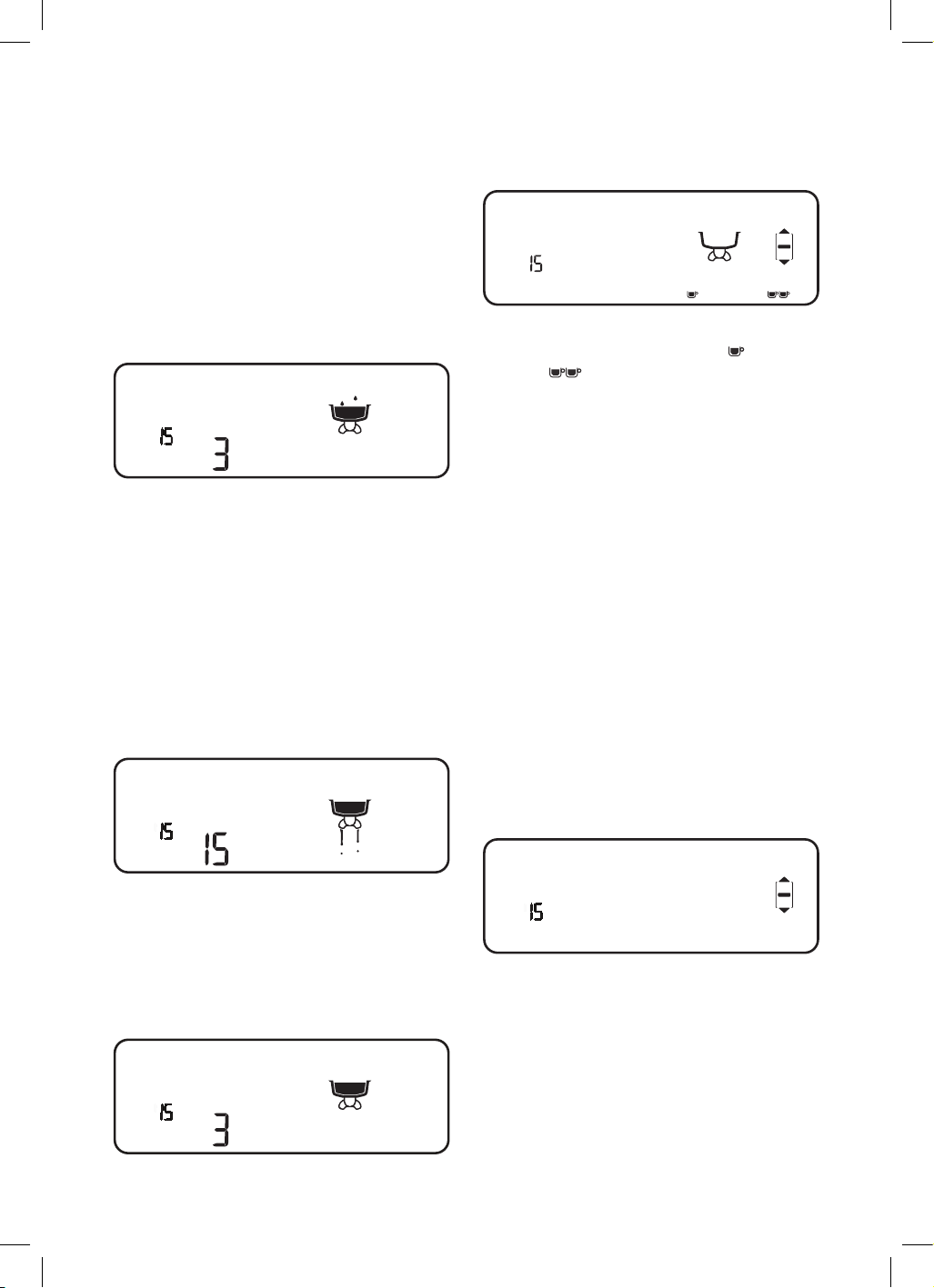
1 CUP
Press the 1 CUP button once, the button will
flash, indicating that it has been selected. The
LCD will display PRE-INFUSE and the shot
clock will start counting up. Once pre-infusion
is complete, the shot will start extracting. A
pre-set single espresso volume of approx.
30ml will be extracted. The machine will
automatically stop once the pre-set volume has
been extracted.
PRE-INFUSE
SHOT
STEAM
SEC
AMOUNT
MANUAL
PAUSED
HOT
WATER
FLUSH
RESET
DEFAULTS
DESCALE
IN
PROGRESS
FILL
TANK
GRIND
DOUBLE
SINGLE
LOCK
HOPPER
SHOT TEMP
FASTER
POUR
SLOWER
POUR
CUSTOM
HOTTER
COOLER
CUSTOM
GRIND
SIZE
PRE-PROGRAMMED SHOT VOLUME –
2 CUP
Press the 2 CUP button once, the button will
flash, indicating that it has been selected and
the LCD will display PRE-INFUSE and the shot
clock will start counting up. Once pre-infusion
is complete, the shot will start extracting. A
pre-set double espresso volume of approx.
60ml will be extracted. The machine will
automatically stop once the pre-set volume
has been extracted.
PRE-INFUSE
SHOT
STEAM
SEC
AMOUNT
MANUAL
PAUSED
HOT
WATER
FLUSH
RESET
DEFAULTS
DESCALE
IN
PROGRESS
FILL
TANK
GRIND
DOUBLE
SINGLE
LOCK
HOPPER
SHOT TEMP
FASTER
POUR
SLOWER
POUR
CUSTOM
HOTTER
COOLER
CUSTOM
GRIND
SIZE
MANUAL PRE-INFUSION &
EXTRACTION
Press and hold the 1 CUP or 2 CUP button
for the desired pre-infusion time. Release the
button to commence the extraction. Press the
flashing button to stop the extraction.
PRE-INFUSE
SHOT
STEAM
SEC
AMOUNT
MANUAL
PAUSED
HOT
WATER
FLUSH
RESET
DEFAULTS
DESCALE
IN
PROGRESS
FILL
TANK
GRIND
DOUBLE
SINGLE
LOCK
HOPPER
GRIND
SIZE
SHOT TEMP
FASTER
POUR
SLOWER
POUR
CUSTOM
HOTTER
COOLER
CUSTOM
GRIND
SIZE
PROGRAMMING ESPRESSO SHOT
• Press the MENU button to enter the main
menu.
PRE-INFUSE
SHOT
STEAM
SEC
AMOUNT
MANUAL
PAUSED
HOT
WATER
FLUSH
RESET
DEFAULTS
DESCALE
IN
PROGRESS
FILL
TANK
GRIND
DOUBLE
SINGLE
LOCK
HOPPER
SHOT TEMP
FASTER
POUR
SLOWER
POUR
CUSTOM
HOTTER
COOLER
CUSTOM
GRIND
SIZE
• Use the GRIND AMOUNT dial to navigate
through the menu to the custom
or
custom
. To select, press the dial.
• Press the desired CUP button to start the
default pre-infusion. To customise the
pre-infusion, press and hold the same CUP
button for the desired pre-infusion time.
Release the button to commence
the extraction.
• To stop the extraction at the desired level,
press the CUP button. The LCD and CUP
button will stop flashing and the machine
will beep to indicate that the custom setting
has been remembered. The machine will then
return to READY mode. The custom setting
can now be activated by pressing the desired
CUP button selected.
ADJUSTING SHOT TEMPERATURE
• Press the MENU button to enter the main
menu.
• Use the GRIND AMOUNT dial to navigate
the menu and press to select SHOT TEMP.
PRE-INFUSE
SHOT
STEAM
SEC
AMOUNT
MANUAL
PAUSED
HOT
WATER
FLUSH
RESET
DEFAULTS
DESCALE
IN
PROGRESS
FILL
TANK
GRIND
DOUBLE
SINGLE
LOCK
HOPPER
GRIND
SIZE
SHOT TEMP
FASTER
POUR
SLOWER
POUR
CUSTOM
HOTTER
COOLER
CUSTOM
GRIND
SIZE
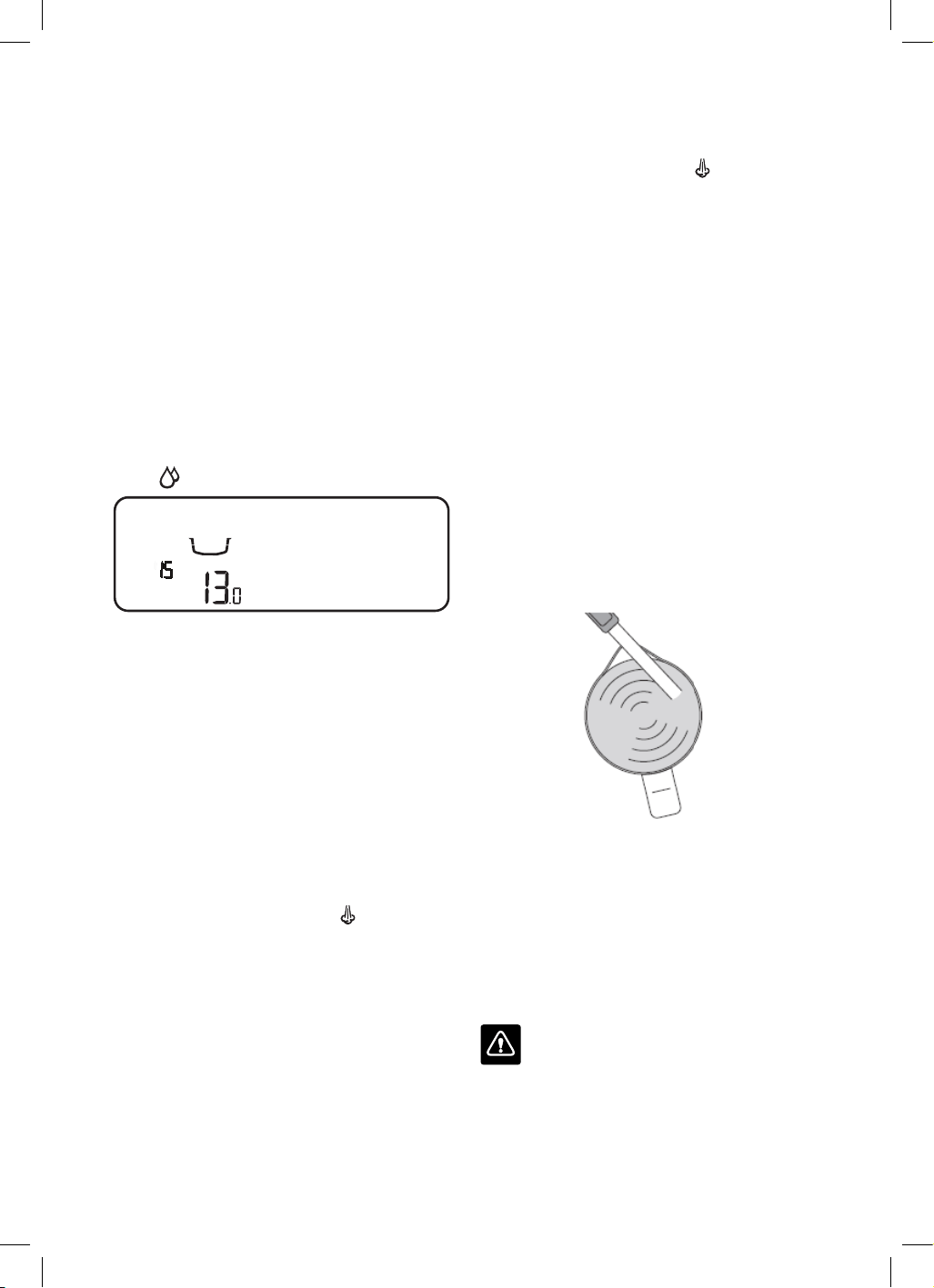
• Use the GRIND AMOUNT dial to increase or
decrease the shot temperature as displayed
on the LCD.
• Press the dial to confirm the desired
temperature. The machine will return to
READY mode.
16
RESETTING TO DEFAULTS
• Press the MENU button to enter the main
menu.
• Use the GRIND AMOUNT dial to navigate
the menu and select RESET DEFAULTS.
• The machine will beep.
• The GRIND AMOUNT, FILTER SIZE, SHOT
TEMP, 1 CUP and 2 CUP SHOT settings will
all return to the default settings. The machine
will return to READY mode.
USING HOT WATER OUTLET
The hot water function can be used to pre-heat
cups or to add hot water manually.
To activate the hot water, turn the STEAM
dial to
.
PRE-INFUSE
SHOT
STEAM
SEC
AMOUNT
MANUAL
PAUSED
HOT
WATER
FLUSH
RESET
DEFAULTS
DESCALE
IN
PROGRESS
FILL
TANK
GRIND
DOUBLE
SINGLE
LOCK
HOPPER
SHOT TEMP
FASTER
POUR
SLOWER
POUR
CUSTOM
HOTTER
COOLER
CUSTOM
GRIND
SIZE
• The LCD will show that HOT WATER has
been activated.
• To stop the hot water, turn the dial back to the
centre, vertical position.
• The hot water will stop after 60 seconds, but
the dial must be turned back manually to the
standby position.
TEXTURING MILK
It is recommended to momentarily purge the
steam wand prior to texturing milk.
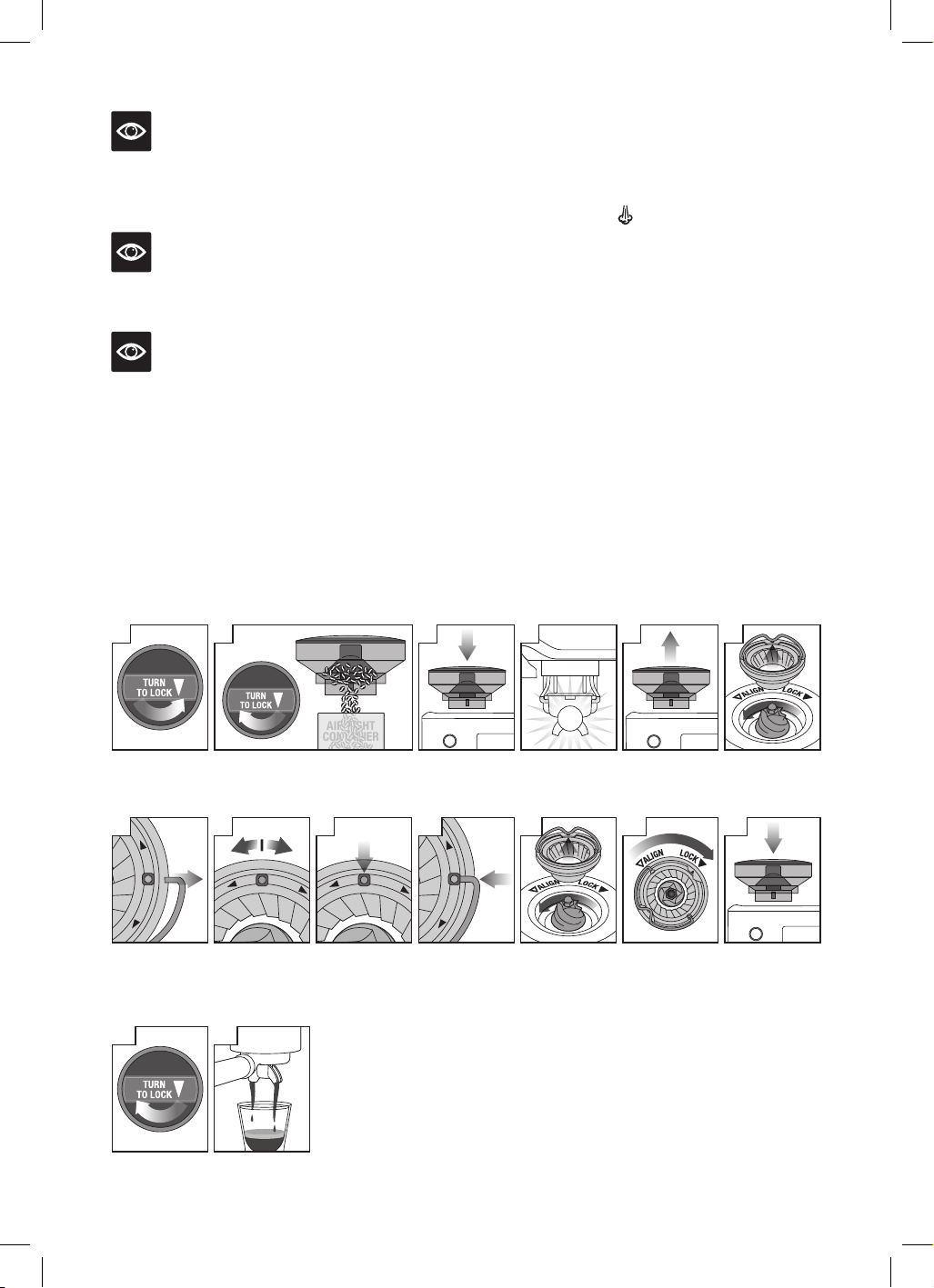
Position the steam wand over the drip tray
and turn the STEAM dial to the
. The LCD
will display STEAM when activated. Turn the
STEAM dial back to a vertical position to
stop steaming.
Different brands and types of milk and milk
alternatives will texture differently.
• Start with fresh cold milk.
• Fill the milk jug to between the MIN and
MAX markings.
• Lift the steam wand and insert into the milk
jug with the steam wand tip 1-2cm below the
surface of the milk, close to the right-hand
side of the jug at a 3 o’clock position.
• Turn the STEAM dial to the
.
• Keep the steam wand tip just under the
surface of the milk until the milk is
spinning clockwise, producing a vortex
(whirlpool effect).
• With the milk spinning, slowly lower the jug.
This will bring the steam wand tip to the
surface of the milk and start to introduce
air into the milk.
• Gently break the surface of the milk with the
tip to get the milk spinning fast enough.
• Keep the steam wand tip at or slightly
below the surface, continuing to maintain
the vortex. Texture the milk until sufficient
volume is obtained.
• Lift the jug to lower the tip beneath the
surface but keep the vortex spinning.
The milk is at the correct temperature
(60-65°C) when the jug is hot to touch.
• Once the desired temperature has been
achieved, turn the STEAM dial back to the
vertical position.
• Remove the steam wand from the milk jug.
• Wipe the steam wand with a clean, damp
cloth. Then return to lowered position
over the drip tray.
CAUTION: BURN HAZARD
Pressurised steam can still be released,
even after machine has been switched off.
Children must always be supervised.
17
ADJUSTING CONICAL BURRS
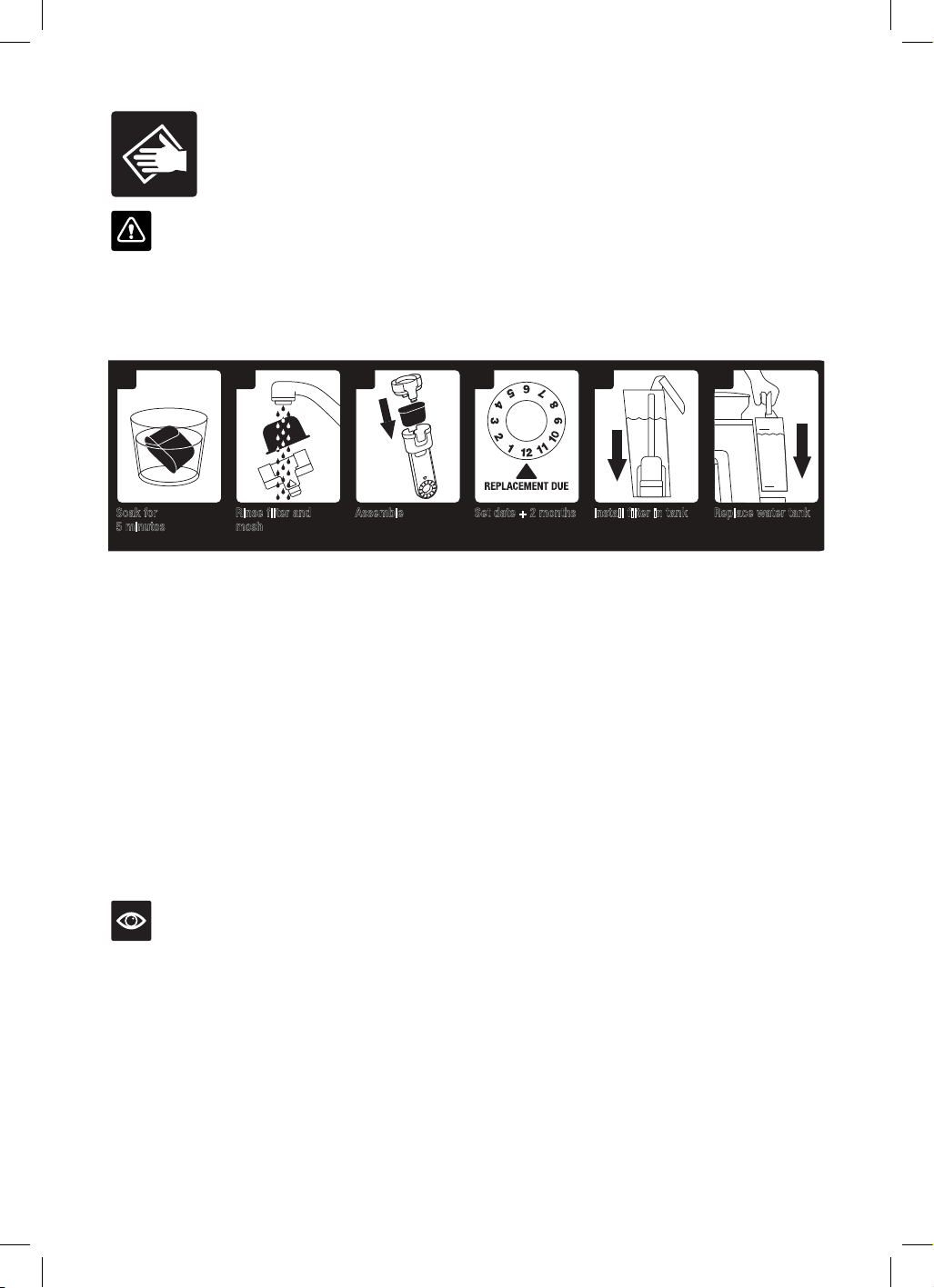
Some types of coffee may require a wider grind range to achieve an ideal extraction or brew.
A feature of your Barista Pro™ is the ability to extend this range with an adjustable upper burr. We
recommend making only one adjustment at a time.
6
77
F
I
N
E
C
O
A
R
S
E
4
PUSH
2
AIR TIGHT
CONTAINER
53
13
15
88
F
I
N
E
C
O
A
R
S
E
9
F
I
N
E
C
O
A
R
S
E
4
5
6
7
8
10
F
I
N
E
C
O
A
R
S
E
11 12
Lock upper burr
Hold hopper over container & turn
dial to release beans into container
Align hopper
into position
Run grinder
until empty
Remove hopperUnlock hopper
Move adjustable
top burr, 1 number,
coarser or finer
Remove wire
handle from both
sides of the burr
Align the number
with the handle
opening
Remove upper
burr
Insert wire
handle from both
sides of the burr
Push upper burr
firmly into
position
Align hopper
into position
Lock hopper Check your
extraction
14
1
NOTE
Ensure the STEAM dial is in the vertical
position before removing the steam wand from
the milk jug.
NOTE
When the machine creates steam, a pumping
noise can be heard. This is normal operation.
NOTE
Use only the supplied stainless steel milk jug to
froth milk using this machine. The use of other
containers may lead to dangerous conditions.
STEAM WAND PURGING
After texturing milk, it is recommended to
purge the steam wand. With the steam wand
positioned over the drip tray and turn the
STEAM dial to the
, and allow the machine to
purge. Turn the STEAM dial back to a vertical
position to stop steaming.
18
Care & Cleaning
CAUTION:
To prevent damage to the appliance, do not use alkaline cleaning agents when cleaning, use a soft
cloth and mild detergent.
REPLACING THE WATER FILTER
INSTALL
WATER
FILTER
2
Rinse filter and
mesh
2 43 6
Replace water tankAssemble Set date + 2 months Install filter in tank
5
Soak for
5 minutes
Replace water filter
every 2 months or
60 tank refills
1
MAX
MIN
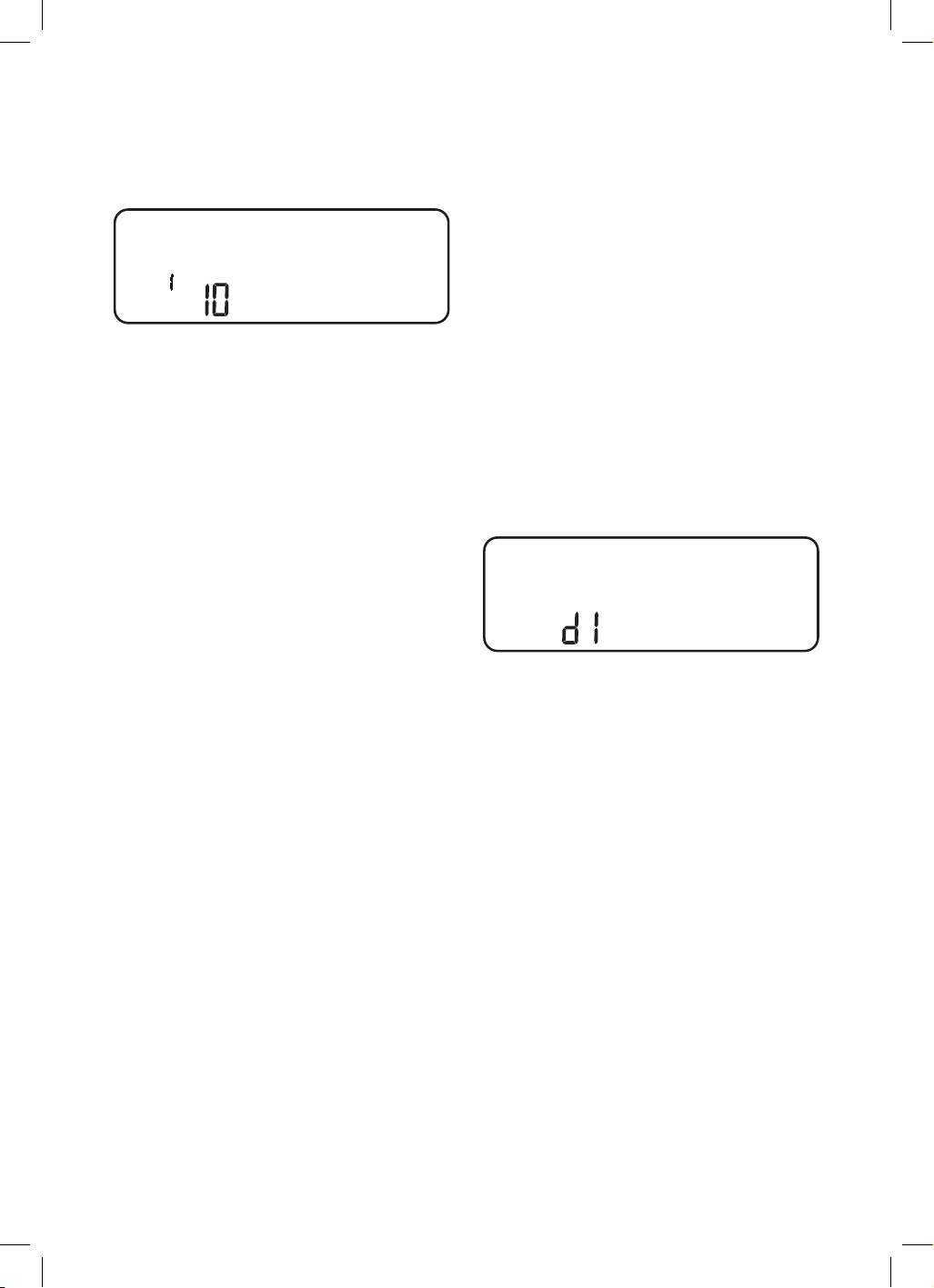
The water filter provided helps to prevent scale build up which over time can affect the
performance of your machine. Replacing the water filter every 2 months will reduce the need to
de-scale the machine.
If you live in a hard water area, we recommend changing the water filter more frequently.
• Remove the water filter from the plastic bag.
• Soak the filter in cold water for 5 minutes.
• Rinse the filter and mesh under cold running water.
• Set the reminder for the next month of replacement. We recommend replacing the
filter after 2 months.
• Insert the filter into the filter holder.
• Install the assembled filter holder in the water tank, ensuring it is locked into place.
• Fill the water tank with cold water before sliding back into position on the back of the
machine and locking into place.
NOTE
Replacement water filters can be purchased from the Breville website or by
contacting Breville customer service.
19
FLUSH CLEANING CYCLE
The LCD will display a FLUSH alert when a
cleaning cycle is required. The cleaning cycle is
separate from descaling.
PRE-INFUSE
SHOT
STEAM
SEC
AMOUNT
MANUAL
PAUSED
HOT
WATER
FLUSH
RESET
DEFAULTS
DESCALE
IN
PROGRESS
FILL
TANK
GRIND
DOUBLE
SINGLE
LOCK
HOPPER
GRIND
SIZE
SHOT TEMP
FASTER
POUR
SLOWER
POUR
CUSTOM
HOTTER
COOLER
CUSTOM
FILTER SIZE
MENU
EXIT
G
R
I
N
D
A
M
O
U
N
T
1. Insert the cleaning disc into the filter basket
in the portafilter.
2. Place a cleaning tablet on top of the
cleaning disc.
3. Lock the portafilter into the group head.
4. Empty the drip tray and replace onto the
machine.
5. Fill the water tank to the MAX line then
reattach to the machine.
6. Press the MENU button to enter the
main menu.
7. Use the GRIND AMOUNT dial to navigate
the menu to FLUSH, then press to select.
The 1 CUP button will illuminate.
8. Press the 1 CUP button to start the cleaning
cycle. The remaining time for the cleaning
cycle will be displayed on the LCD.
9. Once the cleaning cycle is complete, the
machine will beep and return to READY
mode. If any of the cleaning tablet remains
in the cleaning disc, repeat the cycle.
10. Empty and rinse the portafilter, cleaning
disc and drip tray.
DESCALING
After regular use, hard water can cause
mineral build up in and on many of the inner
functioning components, reducing the brewing
flow, brewing temperature, power of the
machine, and the taste of the espresso.
The LCD will display a DESCALE alert, when
a descaling cycle is required.
1. Empty the drip tray and reattach to the
machine. Remove the water tank from the
machine and remove the filter from the
water tank.
2. Fill the water tank to the DESCALE line
indicated and add the descaling agent
to the water. Reattach the water tank to
the machine.
3. Press the MENU button to enter the main
menu. Use the GRIND AMOUNT dial to
navigate the menu to DESCALE, then press
to select. The 1 CUP button will illuminate.
4. Press the 1 CUP button to start the
descaling cycle. The descale cycle cleans in
3 stages; coffee, hot water and steam. After
each stage is complete, the machine will
beep . The STEAM DIAL must be manually
turned to the HOT WATER and STEAM
position when indicated on the LCD.
PRE-INFUSE
SHOT
STEAM
SEC
AMOUNT
MANUAL
PAUSED
HOT
WATER
FLUSH
RESET
DEFAULTS
DESCALE
IN
PROGRESS
FILL
TANK
GRIND
DOUBLE
SINGLE
LOCK
HOPPER
GRIND
SIZE
SHOT TEMP
FASTER
POUR
SLOWER
POUR
CUSTOM
HOTTER
COOLER
CUSTOM
5. Once the descale cycle is complete, the
machine needs to complete a rinse cycle.
The 1 CUP button will illuminate. As with
the descale cycle, the STEAM DIAL must
be manually turned to correct position
when indicated on the LCD.
6. Remove and empty the drip tray then
replace onto the machine. Empty any
remaining descaling liquid from the water
tank, then fill the water tank to the MAX
line and reattached to the machine.
7. Press the 1 CUP button to commence the
rinse cycle. The rinse cycle is also 3 stages.
The LCD will show which stage it is up to.
After each stage, the machine will beep.
8. Once the rinse cycle is complete,
the machine will beep and return to
READY mode.
9. Remove and rinse the drip tray and
water tank. Dry thoroughly before
replacing them on the machine.
20
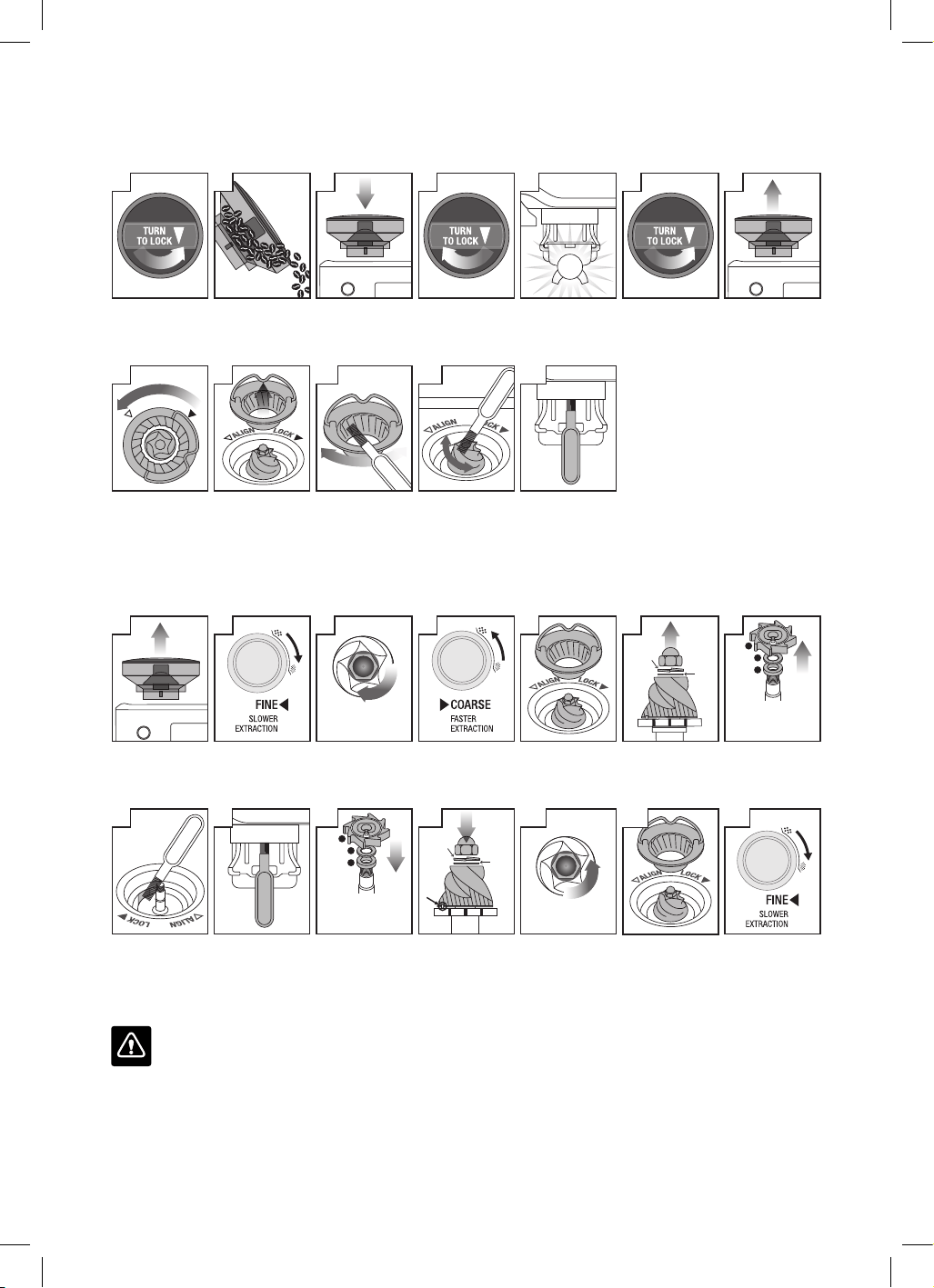
CLEANING THE CONICAL BURR GRINDER
This grinder cleaning cycle removes oil build-up on the burrs which can impede performance.
Unlock hopper
Empty hopper Replace hopper Lock hopper Run grinder
empty
Unlock hopper Remove hopper
Remove top burr
Unlock top burr
Clean top burr
with brush
Clean lower
burr with brush
Clean chute
with brush
12
3 75
PUSH
2
11109988
L
O
C
K
A
L
I
G
N
41 6
ADVANCED CLEANING FOR THE CONICAL BURR GRINDER
This step is only required if there is a blockage between the grinding burrs and the grinder outlet.
Remove hopper
Set GRIND SIZE
to 1 (finest)
Use 10mm socket.
Rotate clockwise to
loosen the nut only
Set GRIND SIZE
to 30 (coarsest)
Unlock & remove
top burr
Remove nut, spring
& flat washer.
Carefully remove
lower burr
Remove grind fan
& washers
using long-nose
pliers
Insert & lock top
burr
Set GRIND SIZE
to 15. Replace &
lock hopper
Clean chute
with brush
Unblock the grinds
exit chute using the
brush or a pipe
cleaner
Insert washers &
grind fan using
long-nose pliers
Insert lower burr
(drive pin &
cavity to align).
Insert flat washer
& spring washer
Rotate counter-
clockwise to
tighten nut
12
TIGHTEN NUT
5
13 14
1 3
LOOSEN NUT
6
SPRING
WASHER
FLAT
WASHER
7
1. GRIND FAN
2. METAL WASHER
3. FELT WASHER
3
2
1
88 99 10
1.
FELT WASHER
2. METAL WASHER
3.
GRIND FAN
1
2
3
11
SPRING
WASHER
FLAT
WASHER
42
WARNING
Care should be taken as the grinder burrs are extremely sharp.
21
CLEANING THE STEAM WAND
• The steam wand should always be cleaned
after texturing milk. Wipe the steam wand
with a damp cloth.
• After use, it is recommended to purge the
steam wand for a couple of seconds, to clear
any remaining milk. With the steam wand
positioned down over the drip tray, turn the
STEAM dial to
for a couple of seconds
allow the machine to create steam for a
couple of seconds before turning it back to
the vertical position.
• If the steam tip hole becomes blocked, it
will reduce frothing performance. Use the
provided steam wand cleaning tool to clear
the opening.
• If the steam wand is still blocked, use the
spanner in the middle of the steam wand
cleaning tool to unscrew the tip. Soak the tip
in hot water before using the cleaning tool
to unblock again. Replace the tip back on the
steam wand, using the tool.
CLEANING THE FILTER BASKETS
AND PORTAFILTER
• The filter baskets and portafilter should be
rinsed under hot water immediately after use
to remove all residual coffee oils.
• If any of the holes in the filter basket become
blocked, use the pin on the end of the
provided cleaning tool to unblock the holes.
• If the holes remain blocked, dissolve a
cleaning tablet in hot water and soak filter
basket and portafilter in solution for approx.
20 minutes. Rinse thoroughly.
CLEANING THE GROUP HEAD
• The group head interior and shower screen
should be wiped with a damp cloth after use
to remove any ground coffee particles.
• Periodically purge the machine. Place an
empty filter basket and portafilter into the
group head. Press the 1 CUP button and run
a short flow of water to rinse out any residual
coffee. Press the 1 CUP button again to stop
the hot water. Remove the portafilter and
rinse thoroughly.
CLEANING THE DRIP TRAY
• The drip tray should be removed, emptied
and cleaned at regular intervals, particularly
when the drip tray full indicator is showing
EMPTY ME!
• Remove the drip tray from the machine and
separate the parts. The EMPTY ME! indicator
can also be removed from the drip tray by
pulling upwards to release the side latches.
Wash all parts in warm soapy water with a
soft cloth. Rinse and dry thoroughly before
reassembling and attaching to the machine.
• The storage tray (located behind the drip
tray) can be removed and cleaned with a soft,
damp cloth.
NOTE
All parts should be cleaned by hand using
warm water and a gentle dish washing liquid.
Do not use abrasive cleansers, pads or cloths
which can scratch the surface. Do not clean any
of the parts or accessories in the dishwasher.
WARNING
Do not immerse the power cord, power plug or
appliance in water or any other liquid.
CLEANING THE OUTER HOUSING
Wipe the outer housing with a soft, damp cloth
and then polish with a soft, dry cloth.
STORING YOUR MACHINE
Before storing, press the POWER button to
turn the machine off then turn off and remove
the plug from the power outlet. Remove unused
beans from the hopper, clean the grinder (see
page 18), empty the water tank and the drip
tray. Ensure the machine is cool, clean and dry.
Place accessories in the storage tray.
Store the machine upright and do not store
anything on top.
ERROR MODE
If your machine displays on the LCD,
contact Breville Customer Service.
22
Troubleshooting
PROBLEM POSSIBLE CAUSES EASY SOLUTION
Water does not flow
from the group head.
No hot water.
Water tank is empty. Fill tank.
Water tank is not fully inserted and
locked into position.
Push water tank down completely to
lock into place.
Machine needs to be descaled.
Perform descale cycle.
Coffee is ground too finely and/
or too much coffee in filter basket
and/or over tamping and/or filter
basket is blocked.
See below, ‘Espresso only drips from the
portafilter spouts or not at all’.
Espresso only drips
from the portafilter
spouts or not at all.
Coffee is ground too finely. Use slightly coarser grind.
Refer to ‘Setting the Grind Size’, page 12
and ‘Over Extraction’, page 14.
Too much coffee in the filter basket. Lower dose of coffee.
Refer to ‘Dosing’, page 12 and
‘Over Extraction’, page 14.
After tamping, trim the coffee dose
using the Razor™ dose trimming tool.
Coffee tamped too firmly. Tamp between or 15–20kg of pressure.
Water tank is empty. Fill tank.
Water tank is not fully inserted and
locked into position.
Push water tank down completely to
lock into place.
The filter basket may be blocked. Use the pin on the end of the provided
cleaning tool to unblock the hole(s).
If the hole(s) remain blocked, dissolve
a cleaning tablet in hot water and
soak filter basket and portafilter in
solution for approx. 20 minutes.
Rinse thoroughly.
Machine needs to be descaled.
Perform descale cycle.
Water doesn't come
through (the machine
makes loud noise).
Water tank is empty or water level
is below MIN.
Fill tank.
23
PROBLEM POSSIBLE CAUSES EASY SOLUTION
Espresso runs out
too quickly.
Coffee is ground too coarsely. Use slightly finer grind.
Refer to ‘Setting the Grind Size’, page 12
and ‘Under Extraction’, page 14.
Not enough coffee in the filter
basket.
Increase dose of coffee.
Refer to ‘Dosing’, page 12 and ‘Under
Extraction’, page 14. Tamp then use the
Razor™ dose trimming tool to trim off
excess coffee.
Coffee tamped too lightly. Tamp between or 15–20kg of pressure.
Espresso runs out around
the edge of the portafilter.
Portafilter not inserted
in the group head correctly.
Ensure portafilter is completely inserted
and rotated until resistance is felt.
There are coffee grounds around
the filter basket rim.
Clean excess coffee from the rim of the
filter basket to ensure a proper seal in
group head.
Too much coffee in the filter basket. Lower dose of coffee.
Refer to ‘Dosing’, page 14.
After tamping, trim the coffee dose
using the Razor™ dose trimming tool.
No steam. Machine has not reached operating
temperature.
Allow time for the machine to reach
operating temperature.
Water tank is empty. Fill tank.
Water tank is not fully inserted and
locked into position.
Push water tank down completely
to lock into place.
Machine needs to be descaled.
Perform descale cycle.
Steam wand is blocked. Refer to ‘Cleaning the Steam Wand’,
page 21.
Pulsing/pumping sound
while extracting espresso
or steaming milk.
The machine is carrying out the
normal operation of the pump.
No action required as this is the normal
operation of the machine.
Water tank is empty. Fill tank.
Water tank is not fully inserted and
locked into position.
Push water tank down completely to
lock into place.
24
PROBLEM POSSIBLE CAUSES EASY SOLUTION
Coffee not hot enough. Cups not pre-heated. Rinse cups under hot water outlet.
Portafilter not pre-heated. Rinse portafilter under hot water outlet.
Dry thoroughly.
Milk not hot enough
(if making a cappuccino
or latté etc).
Texture milk for a longer period of time.
Water temperature needs
to be adjusted.
Increase the brew temperature refer to
'Adjusting Shot Temperature' page 15.
No crema. Coffee tamped too lightly. Tamp betweens or 15–20kg of pressure.
Coffee is ground too coarsely. Use slightly finer grind.
Refer to ‘Setting the Grind Size’, page 12
and ‘Under Extraction’, page 14.
Coffee beans or pre-ground coffee
are not fresh.
If grinding fresh whole coffee beans,
use freshly roasted coffee beans with
a ‘Roasted On’ date and consume
between 5–20 days after that date.
If using pre-ground coffee, use within
a week of grinding.
The filter basket may
be blocked.
Use the pin on the end of the provided
cleaning tool to unblock the hole(s).
If the hole(s) remain blocked, dissolve
a cleaning tablet in hot water and
soak filter basket and portafilter in
solution for approx. 20 minutes.
Rinse thoroughly.
Single Wall filter baskets are being
used with pre-ground coffee.
Ensure you use Dual Wall filter baskets
with pre-ground coffee.
Water leaking Water tank is not fully inserted and
locked into position.
Push water tank down completely to
lock into place.
25
PROBLEM POSSIBLE CAUSES EASY SOLUTION
Machine is on but
ceases to operate.
The safety thermal-cut out may
have activated due to the pump or
grinder overheating.
Press the POWER button to switch the
machine off and unplug from the power
outlet. Allow to cool for about
30–60 minutes.
If problem persists, call Breville
Support.
No ground coffee
coming from grinder.
No coffee beans in hopper. Filler hopper with fresh coffee beans.
Blocked grinder chamber or chute. Clean and clear grinder chamber
and chute. Refer to ‘Advanced Cleaning
for the Conical Burr Grinder’, page 20.
Water / moisture in grinder
chamber and chute.
Clean and clear grinder chamber and
chute. Refer to ‘Advanced Cleaning
for the Conical Burr Grinder’, page 20.
Ensure burrs are thoroughly dry before
re-assembling. It is possible to use a
hair dryer to blow air into the grinder
chamber.
Too much/too little
ground coffee is
being delivered to
the filter basket.
Grind amount settings are incorrect
for particular grind size.
Use the grind duration button to
increase or decrease the grind
amount. Refer to ‘Dosing’, page 12 and
‘Extraction Guide’, page 14.
Too much/too little
espresso is being
delivered to the cup.
Grind amount and/or grind size
settings and/or shot volumes
require adjustment.
Adjust the grind amount and/or grind
size settings. Refer to ‘Setting the Grind
Size’, page 12, ‘Dosing’, page 12 and
‘Extraction Guide’, page 14.
Grinder is making
a loud noise.
Blockage or foreign object
in grinder.
Remove hopper, check for debris or
blockage. If necessary, clean and clear
grinder chamber and chute. Refer to
‘Cleaning the Conical Burr Grinder’,
page 20.

26
Notes

27
Notes

Australian Customers
Phone:
1300 139 798
Web: www.breville.com
New Zealand Customers
Phone:
0800 273 845
Web: www.breville.com
Breville Customer Service Centre
Breville, the Breville logo, Barista Pro, ThermoJet, the Razor and Master Every Moment
are trademarks of Breville Pty Ltd ("Breville"). A.B.N. 98 000 092 928.
Copyright Breville Pty. Ltd. 2018.
Due to continued product improvement, the products illustrated/photographed
in this brochure may vary slightly from the actual product.
BES878 ANZ E18