(Front)
(Back)
User Guide
(Cover)
Getting Started Location of Controls
READ ALL INSTRUCTIONS CAREFULLY
BEFORE USE AND KEEP THIS MANUAL
Questions & Support
If you have any questions or problems concerning this
product, please visit our website at SouthernTelecom.com
and click on Product Support.
In the Box
• OLID1087 - UV-C Sanitizer (x1)
• Power Cable (x1)
• User Manual (x1)
Important Safety Instructions
• This product is NOT a toy, keep away from children and pets.
• Only use the device according to the instructions in this manual.
Never use the device for anything other than its intended
purpose.
• This device is NOT a substitute for proper medical equipment or
attention.
• ONLY use the supplied power cable.
• Do not open this product or attempt to repair the unit yourself
should it not be working. Doing so risks fire, shock or injury.
• The device contains an safety feature that powers it off
automatically when the cover is opened. Do NOT disable this
safety feature. Never allow UV-C light to shine in eyes or on skin.
• When not in use, the device should be stored in a dry, cool
location, away from sources of water or heat.
• It is recommended that the device be covered to protect it from
exposure to dust if it will not be in use for a long period of time.
• Do not expose device or power cable to extreme temperatures
(heat or cold), open flames, humid or wet conditions.
• Do not submerge in water. Do not use in a location where the
device or power cable could fall into liquid.
• Unplug the power cable when not in use.
• Do not pull the power cable to disconnect, or use the cable as a
handle.
• Do not use if device or power cable is damaged. If device or
power cable is damaged, it MUST be serviced or replaced by the
manufacturer or its service agent before using again.
Setting Up
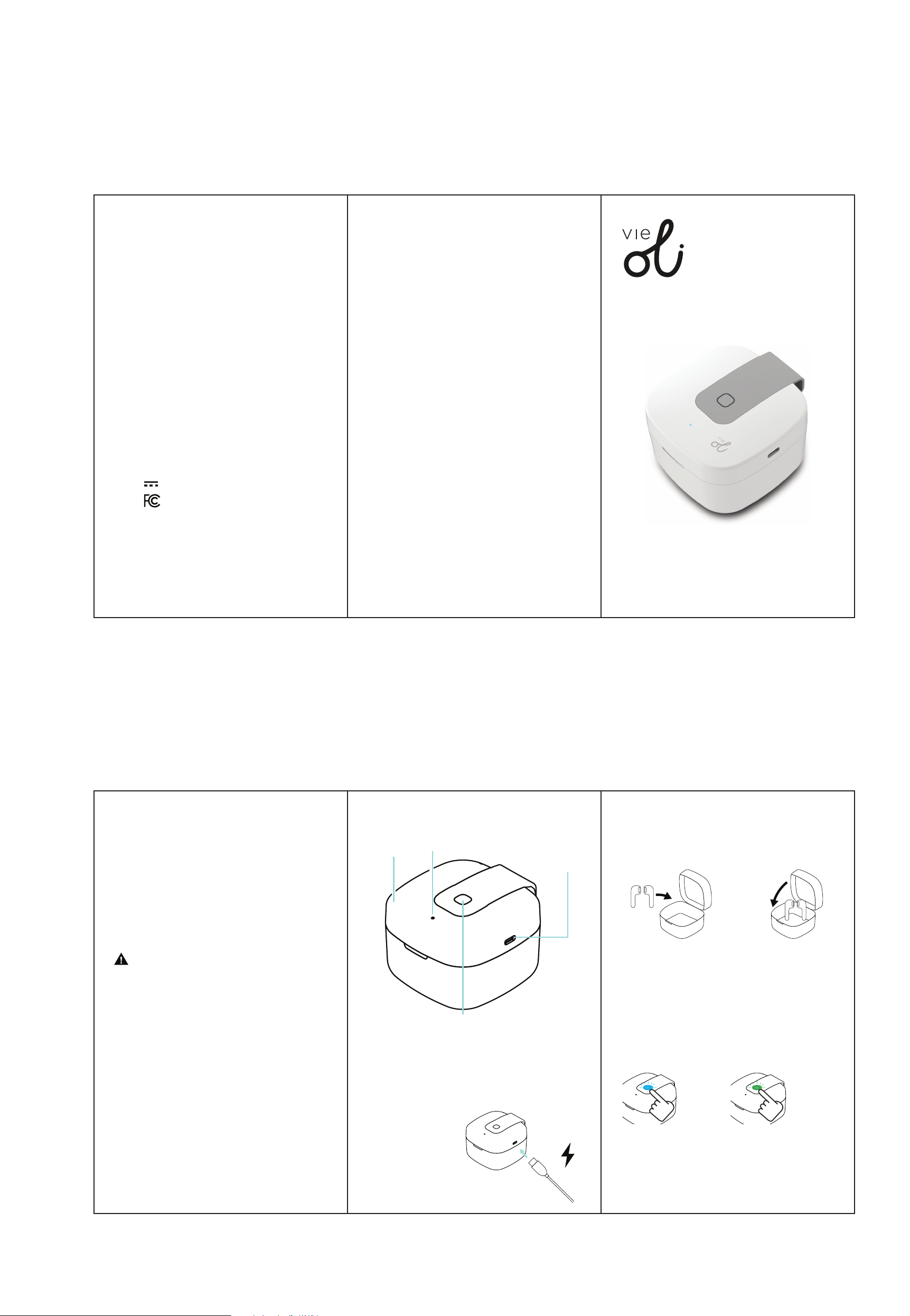
Place the UV sanitizer on a flat, solid, stable surface.
Plug the small connector of the included USB power cable
into the power port on the right of the sanitizer.
Plug the large connector into a USB power
source such as the USB port
on a computer, or a 5V/1.5A
USB adapter (not included)
and plug into a wall outlet.
Setting Up (Cont’d)
Set up the sanitizer & connect to power. Open the cover of
the sanitizer from the front, and place the device you would
like to clean inside of the sanitizer. Close the lid.
Cover
Legal Information
FCC Information
This device complies with Part 15 of the FCC Rules.
Caution: Any changes or modifications not expressly approved could void
the user's authority to operate the equipment.
Note: This equipment has been tested and found to comply with the limits
for a Class B digital device, pursuant to part 15 of the FCC Rules. These
limits are designed to provide reasonable protection against harmful inter-
ference in a residential installation. This equipment generates, uses and can
radiate radio frequency energy and, if not installed and used in accordance
with the instructions, may cause harmful interference to radio communications.
However, there is no guarantee that interference will not occur in a particular
installation. If this equipment does cause harmful interference to radio or
television reception, which can be determined by turning the equipment
off and on, the user is encouraged to try to correct the interference by one
or more of the following measures:
-- Reorient or relocate the receiving antenna.
-- Increase the separation between the equipment and receiver.
-- Connect the equipment into an outlet on a circuit different from that to
which the receiver is connected.
-- Consult the dealer or an experienced radio/TV technician for help.
This device complies with Part 15 of the FCC Rules. Operation is subject to
the following two conditions: (1) This device may not cause harmful inter-
ference, and (2) this device must accept any interference received, including
interference that may cause undesired operation.
Radiation Exposure Information
This device has been evaluated to meet general RF exposure requirements.
The device can be used in portable exposure conditions without restriction.
Rating Label Definitions
Direct Current
This symbol represents FCC Declaration
of Conformity and compliance.
[Power] Button:
1x Press: Fast Sanitize (90s)
2x Press: Deep Sanitize (5m)
USB Type-C
Power Port
LED
Indicator
1 2
Using the UV Sanitizer
The UV sanitizer has two sanitization modes: Fast Sanitize
mode and Deep Sanitize mode.
• Press the [Power] button once (1x) to Fast Sanitize
• Press the [Power] button twice (2x) to Deep Sanitize.
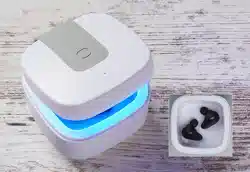
• When Fast Sanitize mode is activated, the LED indicator on
the lid of the sanitizer will turn BLUE, and the sanitizer will
sterilize for the next 90 seconds. When it is finished, the
LED indicator will flash BLUE 3 times then will turn off.
• When Deep Sanitize mode is activated, the LED indicator
on the lid of the sanitizer will turn GREEN, and the sanitizer
will sterilize for the next 5 minutes. When it is finished, the
LED indicator will flash GREEN 3 times then will turn off.
Once the UV sanitizer is completely finished sanitizing, open
the lid, flip your device over, and repeat the sanitization again
for other side of your device.
Caution: This device is designed to limit human & animal
exposure to UV-C light, as it is harmful to skin and eyes. This
device is equipped with a safety feature that automatically
shuts the UV-C light OFF when the lid is opened.
Printed in China/Designed in the U.S.
v1.05/2020
Instruction Manual
OLID1087
UV-C Sanitizer
Portable Case
All product names, trademarks, and registered trademarks are property of their respective
owners. All company, product, and service names used in this document are for
identification purposes only. Use of these names, trademarks, and brands does not imply
endorsement.
Warranty Information
Territory: United States/Canada
LIMITED WARRANTY TO ORIGINAL CONSUMER
This product (including any accessories included in the original
packaging) as supplied and distributed new by an authorized retailer is
warranted by Southern Telecom, Inc. to the original consumer
purchaser against defects in materials and workmanship
(“Warranty”) as follows:
To obtain warranty service:
• Visit our website at www.southerntelecom.com
• Click on Product Support
• Select the Brand of your device
• Select Service Request and fill out the form to begin your inquiry
Your product will be repaired or replaced, at our option, for the same or
similar model of equal value if examination by the service center
determines this product is defective. Products received damaged as a
result of shipping will require you to file a claim with the carrier.
Warranty service not provided
This warranty does not cover damage resulting from accident, misuse, abuse, improper
installation or operation, lack of reasonable care, unauthorized modification including
software modifications such as the installation of custom firmware. This warranty is
voided in the event any unauthorized person opens, alters or repairs this product. All
products being returned to the authorized service center for repair must be suitably
packaged.
NO WARRANTIES, WHETHER EXPRESS OR IMPLIED, INCLUDING, BUT NOT LIMITED TO,
ANY IMPLIED WARRANTIES OF MERCHANTABILITY OR FITNESS FOR A PARTICULAR
PURPOSE, OTHER THAN THOSE EXPRESSLY DESCRIBED ABOVE SHALL APPLY.
DISTRIBUTOR FURTHER DISCLAIMS ALL WARRANTIES AFTER THE EXPRESS
WARRANTY PERIOD STATED ABOVE. NO OTHER EXPRESS WARRANTY OR
GUARANTY GIVEN BY ANY PERSON, FIRM OR ENTITY WITH RESPECT TO THE
PRODUCT SHALL BE BINDING ON DISTRIBUTOR. REPAIR, REPLACEMENT, OR
REFUND OF THE ORIGINAL PURCHASE PRICE - AT DISTRIBUTOR’S SOLE DISCRETION
ARE THE EXCLUSIVE REMEDIES OF THE CONSUMER. IN NO EVENT WILL DISTRIBUTOR
OR ITS MANUFACTURERS BE LIABLE FOR ANY INCIDENTAL, DIRECT, INDIRECT,
SPECIAL, PUNITIVE OR CONSEQUENTIAL DAMAGES (SUCH AS, BUT NOT LIMITED TO,
DAMAGES FOR LOSS OF PROFITS, BUSINESS, SAVINGS, DATA OR RECORDS) CAUSED
BY THE USE, MISUSE OR INABILITY TO USE THE PRODUCT. EXCEPT AS STATED
HEREIN, NO OTHER WARRANTIES SHALL APPLY. NOTWITHSTANDING THE OREGOING,
CONSUMER’S RECOVERY AGAINST DISTRIBUTOR SHALL NOT EXCEED THE PURCHASE
PRICE OF THE PRODUCT SOLD BY DISTRIBUTOR. THIS WARRANTY SHALL NOT EXTEND
TO ANYONE OTHER THAN THE ORIGINAL CONSUMER WHO PURCHASED THE
PRODUCT AND IS NOT TRANSFERABLE.
Some countries, states or provinces do not allow the exclusion or limitation of incidental or
consequential damages or allow limitations on warranties, so limitation or exclusions may
not apply to you. This warranty gives you specific legal rights, and you may have other
rights that vary from state to state or province to province. Contact your authorized
retailer to determine if another warranty applies.
1x Press
90 Seconds
Fast Sanitize
2x Press
5 minutes (300s)
Deep Sanitize