ENGLISH
2 3
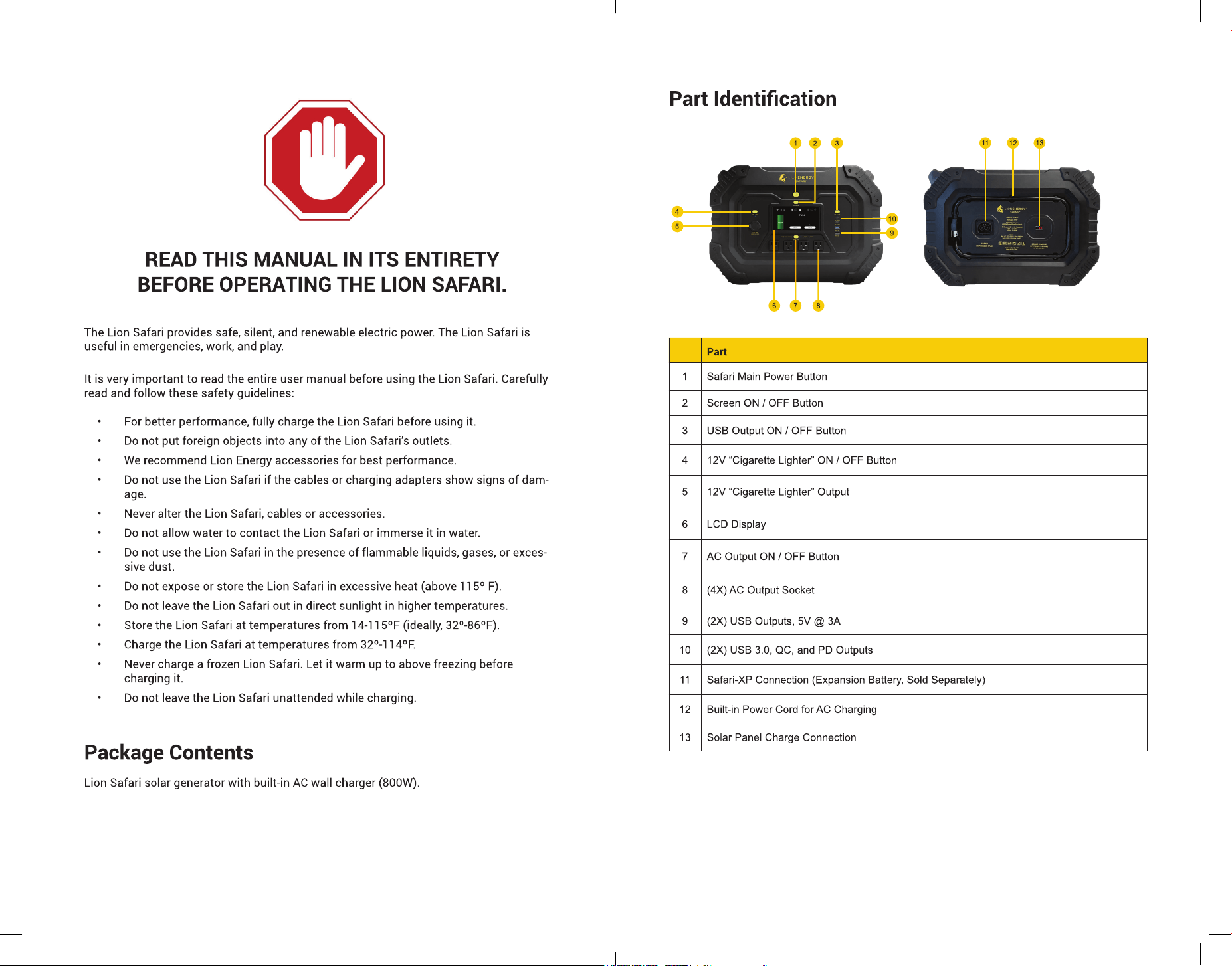
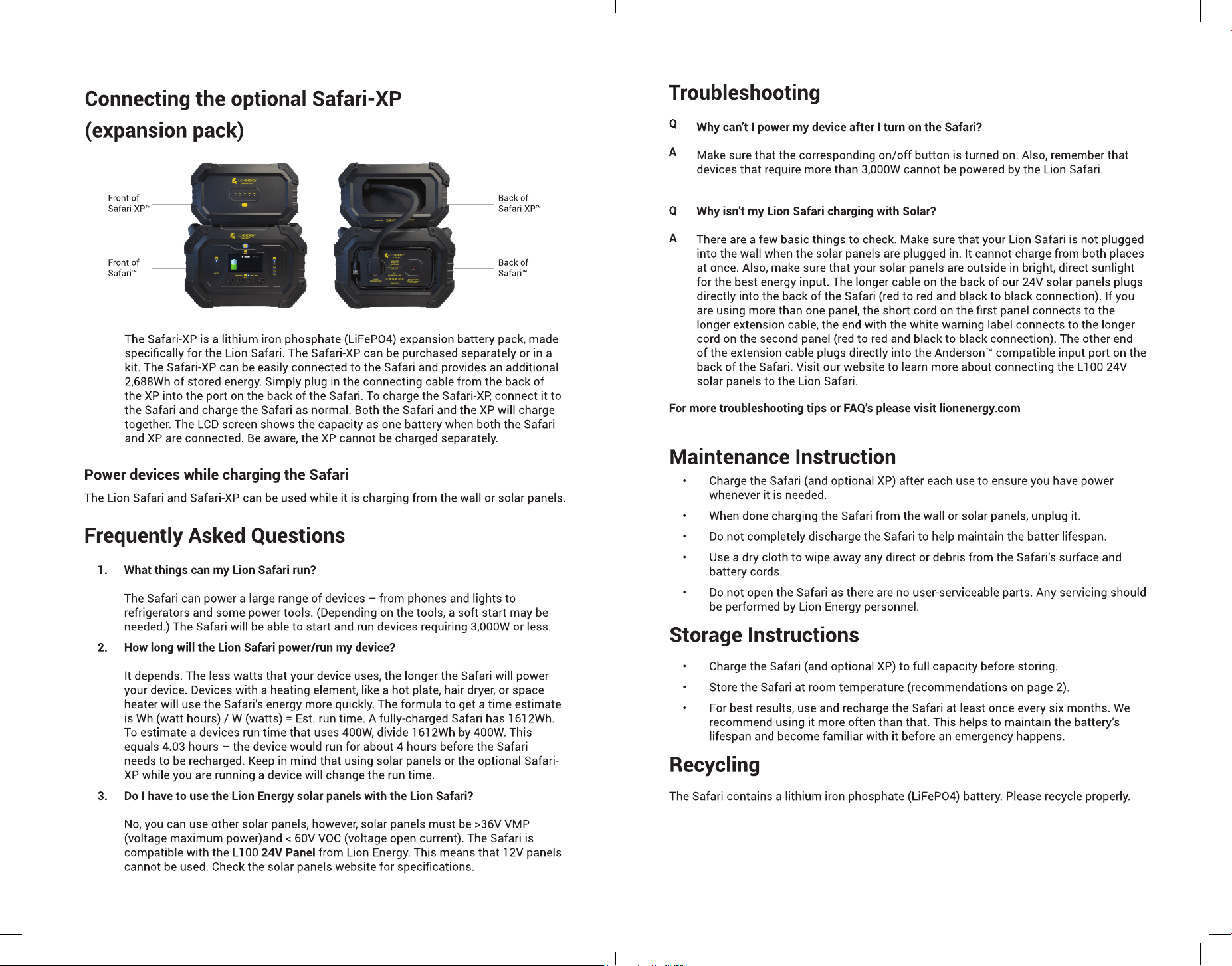
Part
1 Safari Main Power Button
2 Screen ON / OFF Button
3 USB Output ON / OFF Button
4 12V “Cigarette Lighter” ON / OFF Button
5 12V “Cigarette Lighter” Output
6 LCD Display
7 AC Output ON / OFF Button
8 (4X) AC Output Socket
9 (2X) USB Outputs, 5V @ 3A
10 (2X) USB 3.0, QC, and PD Outputs
11 Safari-XP Connection (Expansion Battery, Sold Separately)
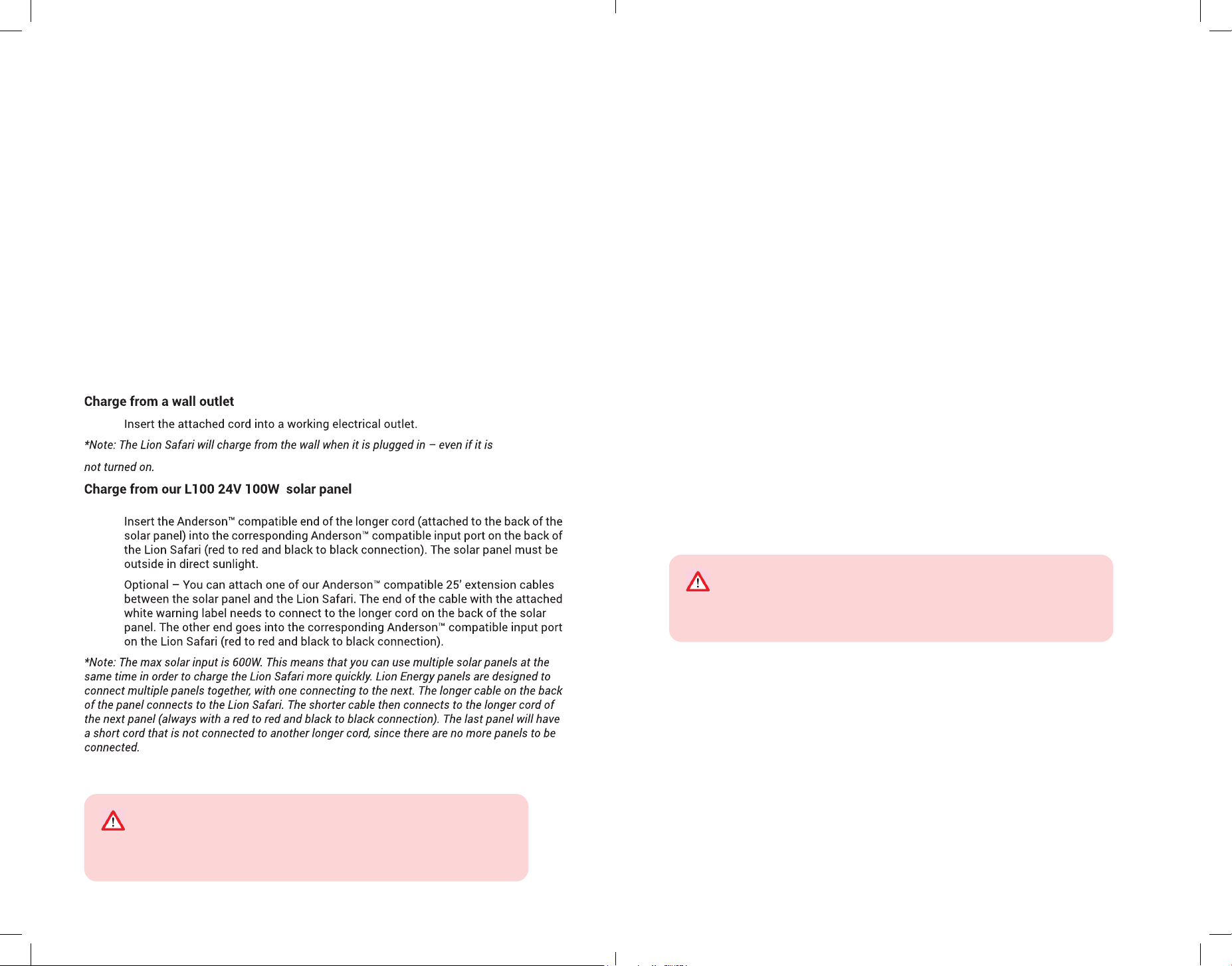
12 Built-in Power Cord for AC Charging
13 Solar Panel Charge Connection
ENGLISH
4 5
How to Use the Power Unit
1. Press and hold the Main Power Button to turn the Lion Safari on. The display will
light up.
2. Press the USB, 12V, or AC on/off button to turn the corresponding outlets on. The
Lion Safari will supply power to those specic outlets.
3. Press the USB, 12V, or AC on/off button to turn the corresponding outlets off.
*When you stop needing or using power, turn off the corresponding on/off button to
conserve energy in the Lion Safari.
The maximum continuous power output is 3,000W. If device power requirements
exceed 3,000W, do not connect the device to this power unit.
Maximum AC Power Output
How to charge the Lion Safari
Change the display mode
By default, once the main power is on the display is always on. To conserve power
and place the display into “always-off” mode, press-and-hold the Screen button for ve
seconds. Press the Screen button again for ve seconds to return to “always-on” mode.
Charge many types of devices
The Safari can power many types of devices, such as lights, mobile phones, laptops, and
radios. The total number of devices that the Safari can support depends on the energy
consumption of each device. Energy consumption is measured in watts (W). The Safari
can supply power to multiple devices that require a total of 3,000W of energy or less.
Power supply duration
The duration of power supply depends on the energy consumption or watt usage of all
connected devices. Lower total energy consumption will permit the power unit to supply
power for more time. Here is a guideline for estimating the run time of a device: Watt
Hours / Watts = Estimated Run Time. For example, if the device you want to power uses
36W and the power unit has 832Wh then the estimated run time would be 832 / 36 = 23.1
hours. The main display also shows how long the device(s) you are charging will take to
charge and how much energy is in the Safari.
Power devices while charging the Lion Safari
The Lion Safari and Safari-XP (sold separately) can be used while it is charging from the
wall or solar panels.
Automatic shutoff
When all connected devices are no longer drawing power, the Safari will automatically turn
off to conserve energy. NOTE: To turn the Safari back on, press the main power button twice.
The Lion Safari includes over-voltage, low-voltage overload, short circuit, and over-
temperature protections. It also has built-in visual and audio alarms. Waiting or shutting
the Lion Safari off and then back on again will resolve most errors. The overload circuitry
will protect against damage to the Lion Safari and will also serve as a safety measure for
anyone using the Lion Safari.
* Anderson™ is a registered trademark of the Anderson Power Products
This Safari supplies power at 102-130V/45-65Hz. Consider this when
connecting any devices to this power unit.
Voltage Specications Vary by Country
ENGLISH
6 7
ENGLISH
8 9
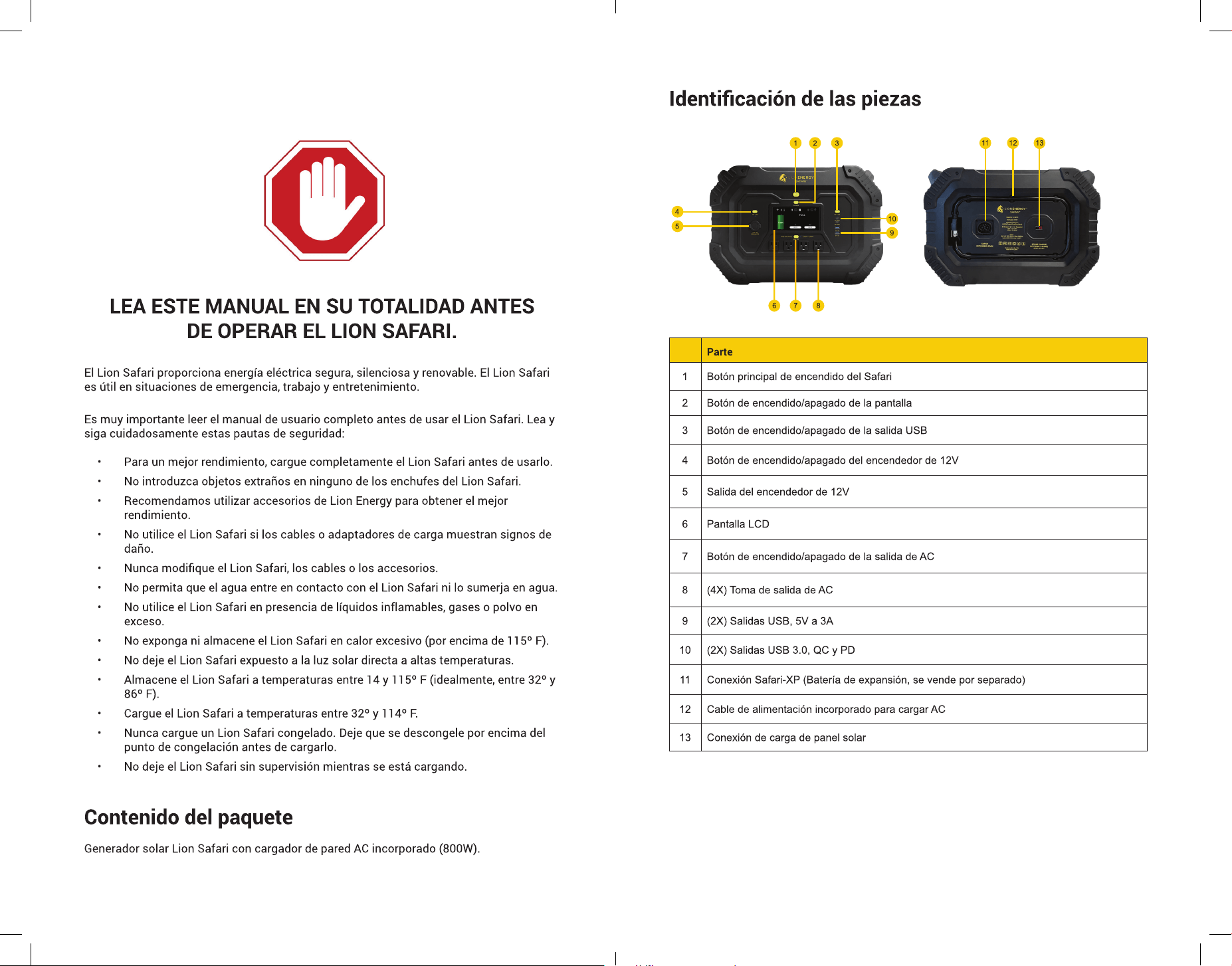
AC Output
Parameters
Rated Power / Surge 3,000W / 6,000W
Efciency > 88%
Output wave Pure sine wave
Battery Parameters
Battery type Lithium Iron Phosphate (LiFePO4)
Maximum capacity 1,612Wh
Safari XP Capacity
(Sold Separately)
2,688Wh
Battery Charge Times
Safari AC / Solar ~2.3 hours / ~2.7 hours
Safari + XP AC / Solar ~6 hours / ~7.1 hours
Solar Charge
Parameters
Maximum charge power 600W max
Solar panel charge range
24 - 60VDC, solar panel
must be >36VMP <60VOC
Maximum charge current 25A
Solar charger type MPPT
AC Charge Input
Parameters
Maximum charge power 800W
Charge voltage range 102 - 130VAC
Charge frequency range 45 - 65Hz
DC output Parameters
DC output voltage 12VDC regulated
12V or socket 15A regulated
USB-A (2) 5V, 3A / 9V, 2A / 12V, 1.5A (each)
USB-C (2) 60W, PD 60W / QC 3.0 (each)
Life Cycles
Safari 3,500+
Safari-XP (sold separately) 3,500+
Service Address
Lion Energy
Address: 735 S. Auto Mall Drive Ste 200
American Fork, UT 84003
lionenergy.com
Email: info@lionenergy.com
Tel: 1-385-375-8191
ESPAÑOL
10
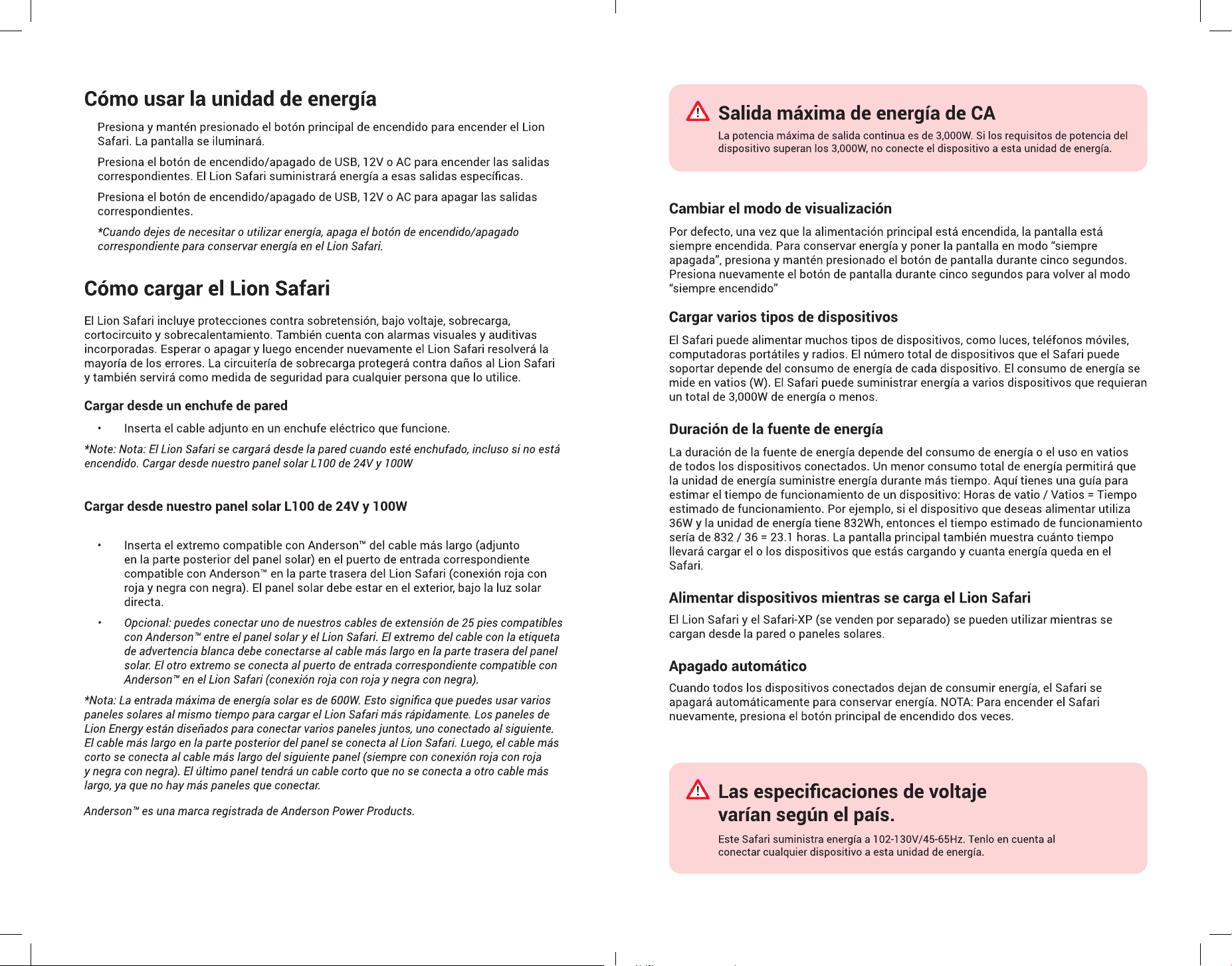
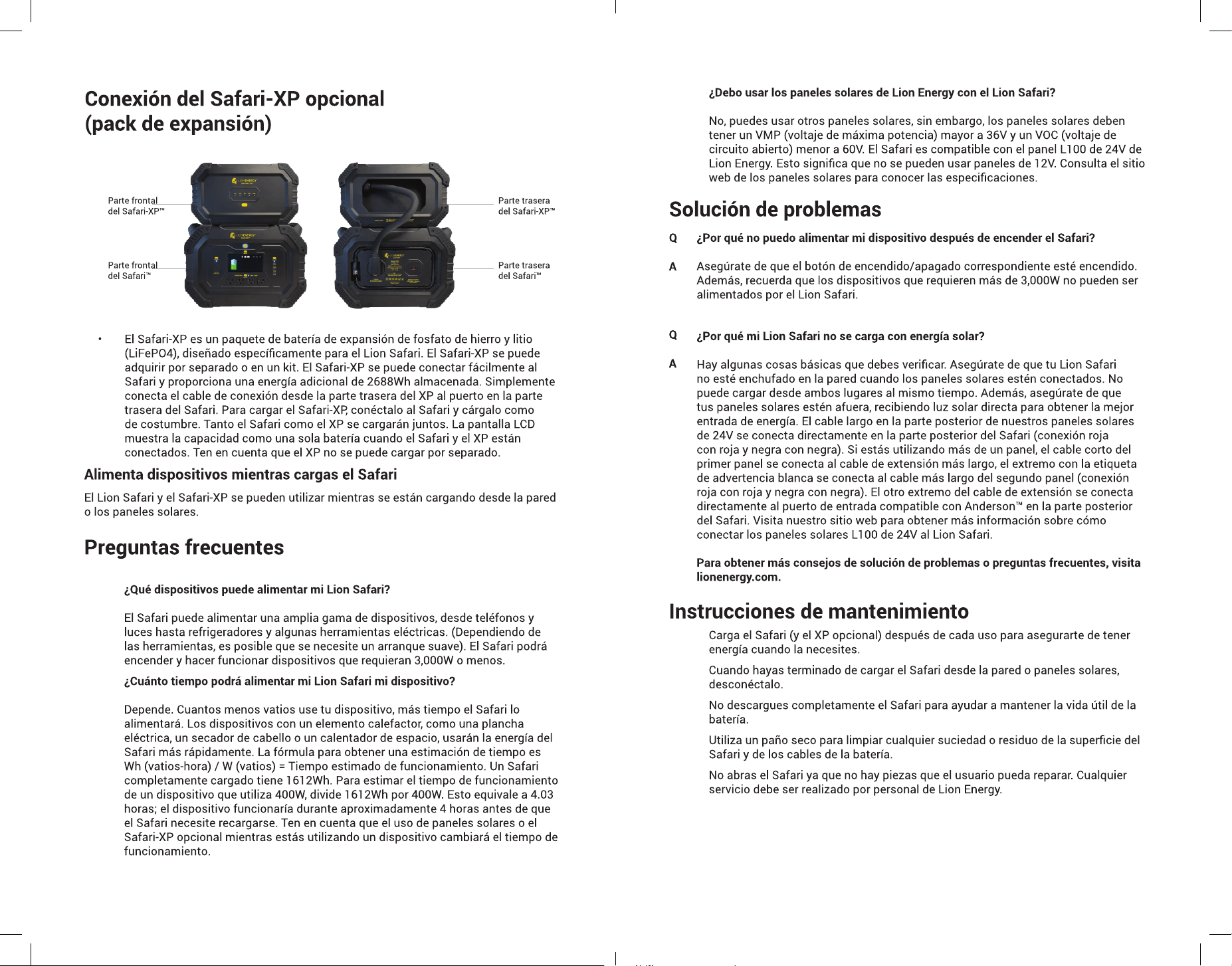
Parte
1 Botón principal de encendido del Safari
2 Botón de encendido/apagado de la pantalla
3 Botón de encendido/apagado de la salida USB
4 Botón de encendido/apagado del encendedor de 12V
5 Salida del encendedor de 12V
6 Pantalla LCD
7 Botón de encendido/apagado de la salida de AC
8 (4X) Toma de salida de AC
9 (2X) Salidas USB, 5V a 3A
10 (2X) Salidas USB 3.0, QC y PD
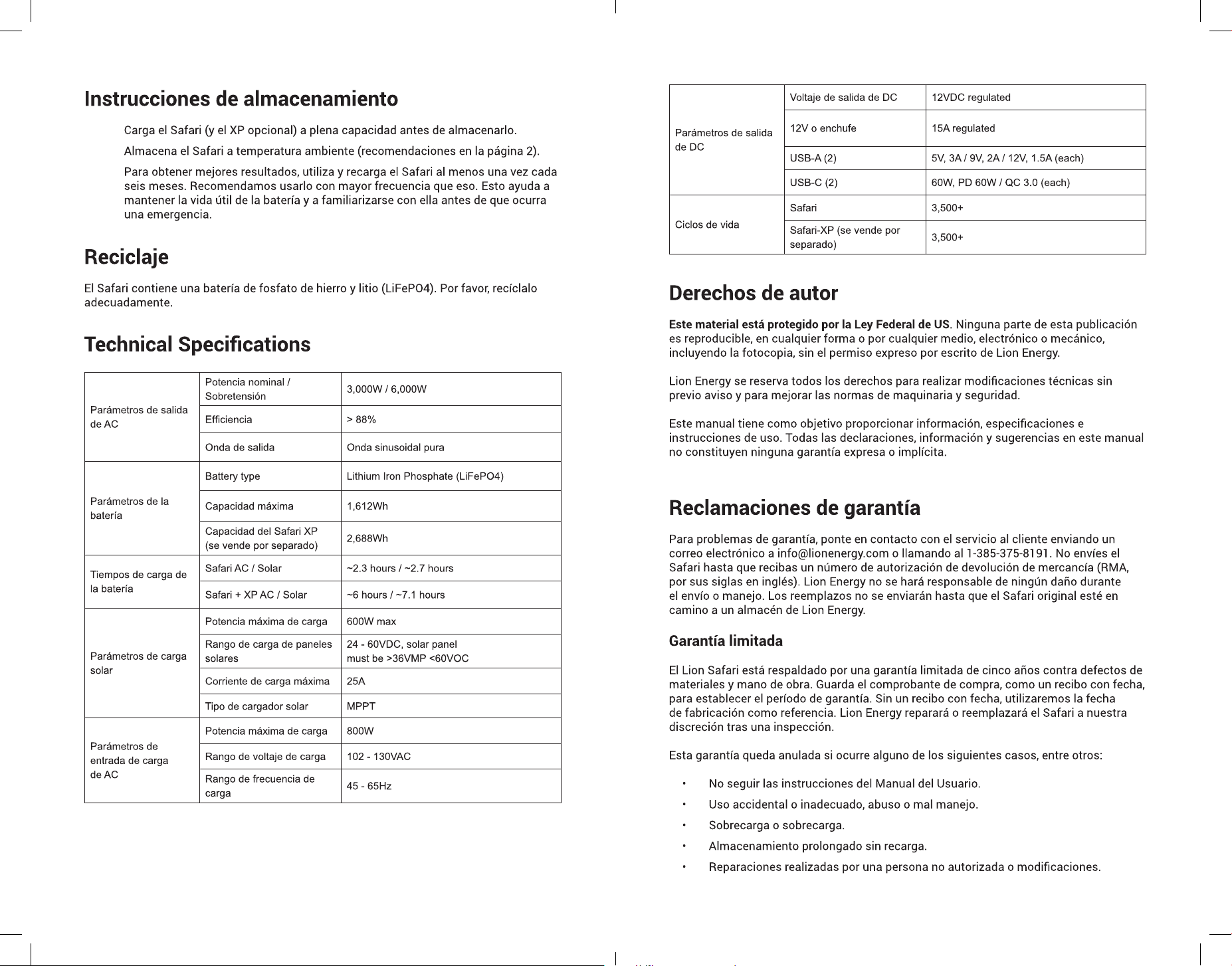
11 Conexión Safari-XP (Batería de expansión, se vende por separado)
12 Cable de alimentación incorporado para cargar AC
13 Conexión de carga de panel solar
ESPAÑOL
12
ESPAÑOL
14
ESPAÑOL
16
Parámetros de salida
de AC
Potencia nominal /
Sobretensión
3,000W / 6,000W
Efciencia > 88%
Onda de salida Onda sinusoidal pura
Parámetros de la
batería
Battery type Lithium Iron Phosphate (LiFePO4)
Capacidad máxima 1,612Wh
Capacidad del Safari XP
(se vende por separado)
2,688Wh
Tiempos de carga de
la batería
Safari AC / Solar ~2.3 hours / ~2.7 hours
Safari + XP AC / Solar ~6 hours / ~7.1 hours
Parámetros de carga
solar
Potencia máxima de carga 600W max
Rango de carga de paneles
solares
24 - 60VDC, solar panel
must be >36VMP <60VOC
Corriente de carga máxima 25A
Tipo de cargador solar MPPT
Parámetros de
entrada de carga
de AC
Potencia máxima de carga 800W
Rango de voltaje de carga 102 - 130VAC
Rango de frecuencia de
carga
45 - 65Hz
Parámetros de salida
de DC
Voltaje de salida de DC 12VDC regulated
12V o enchufe 15A regulated
USB-A (2) 5V, 3A / 9V, 2A / 12V, 1.5A (each)
USB-C (2) 60W, PD 60W / QC 3.0 (each)
Ciclos de vida
Safari 3,500+
Safari-XP (se vende por
separado)
3,500+
FRANÇAIS
18
FRANÇAIS
20
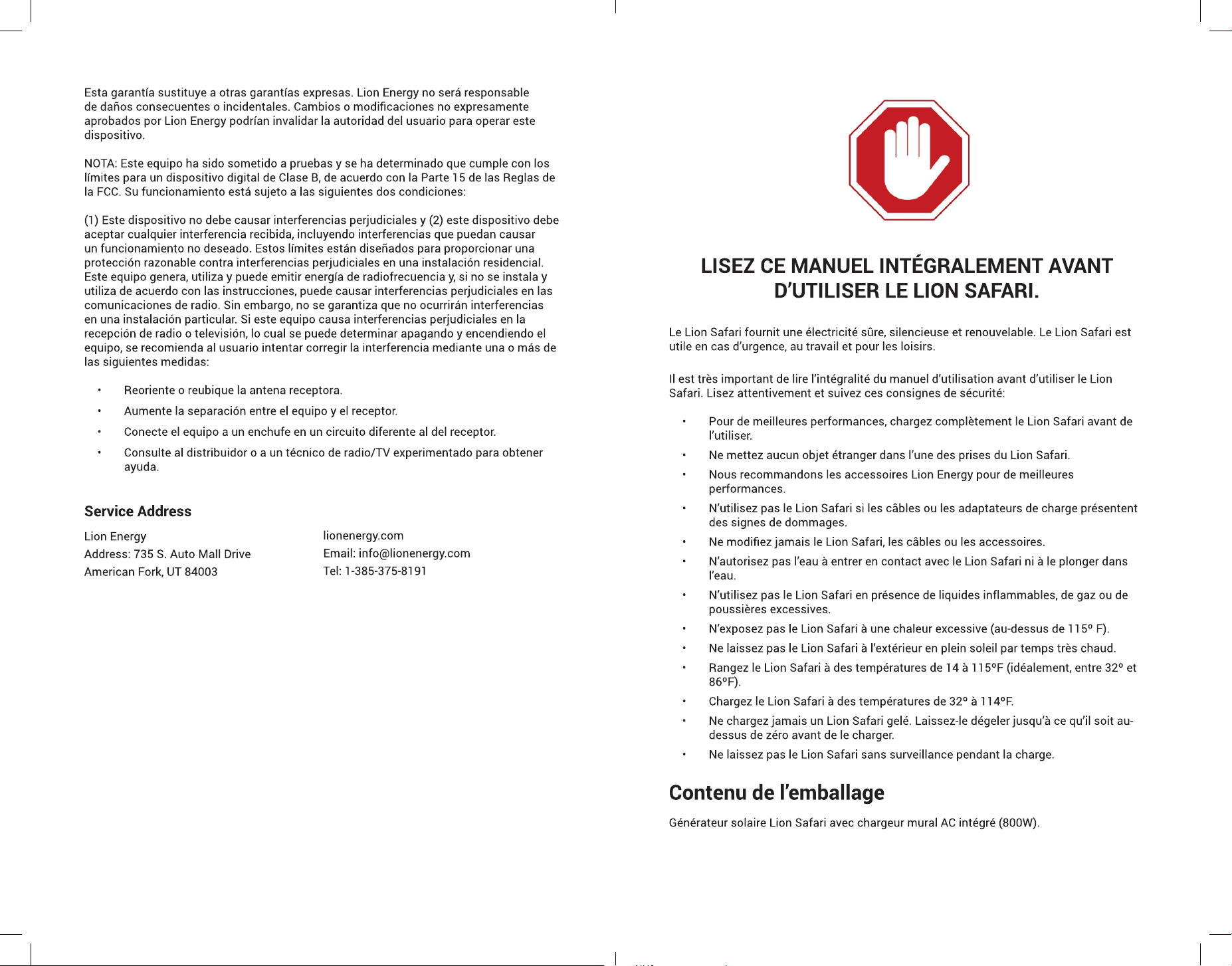
Part
1 Bouton principal d'alimentation Safari
2 Bouton d'allumage / extinction de l'écran
3 Bouton de mise en marche / arrêt de la sortie USB
4 Bouton de mise en marche / arrêt 12V 'Allume-cigare'
5 Sortie 12V 'Allume-cigare'
6 Afchage LCD
7 Bouton de mise en marche / arrêt de la sortie AC
8 (4X) Prises de sortie AC
9 (2X) Sorties USB, 5V @ 3A
10 (2X) Sorties USB 3.0, QC et PD
11 Connexion Safari-XP (batterie d'extension, vendue séparément)
12 Cordon d'alimentation intégré pour la charge AC
13 Connexion de charge du panneau solaire
FRANÇAIS
22
FRANÇAIS
24
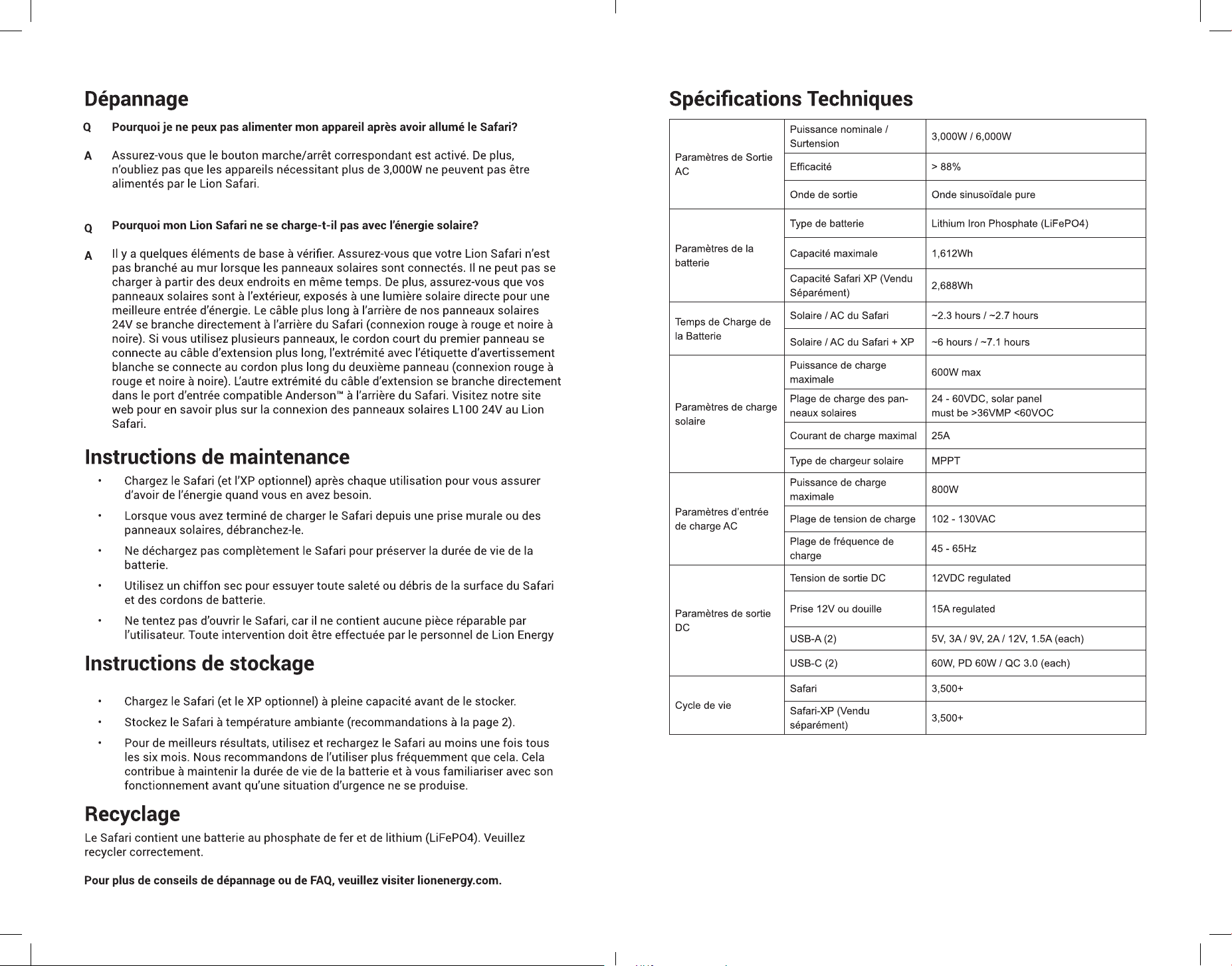
Paramètres de Sortie
AC
Puissance nominale /
Surtension
3,000W / 6,000W
Efcacité > 88%
Onde de sortie Onde sinusoïdale pure
Paramètres de la
batterie
Type de batterie Lithium Iron Phosphate (LiFePO4)
Capacité maximale 1,612Wh
Capacité Safari XP (Vendu
Séparément)
2,688Wh
Temps de Charge de
la Batterie
Solaire / AC du Safari ~2.3 hours / ~2.7 hours
Solaire / AC du Safari + XP ~6 hours / ~7.1 hours
Paramètres de charge
solaire
Puissance de charge
maximale
600W max
Plage de charge des pan-
neaux solaires
24 - 60VDC, solar panel
must be >36VMP <60VOC
Courant de charge maximal 25A
Type de chargeur solaire MPPT
Paramètres d’entrée
de charge AC
Puissance de charge
maximale
800W
Plage de tension de charge 102 - 130VAC
Plage de fréquence de
charge
45 - 65Hz
Paramètres de sortie
DC
Tension de sortie DC 12VDC regulated
Prise 12V ou douille 15A regulated
USB-A (2) 5V, 3A / 9V, 2A / 12V, 1.5A (each)
USB-C (2) 60W, PD 60W / QC 3.0 (each)
Cycle de vie
Safari 3,500+
Safari-XP (Vendu
séparément)
3,500+
FRANÇAIS
26
28