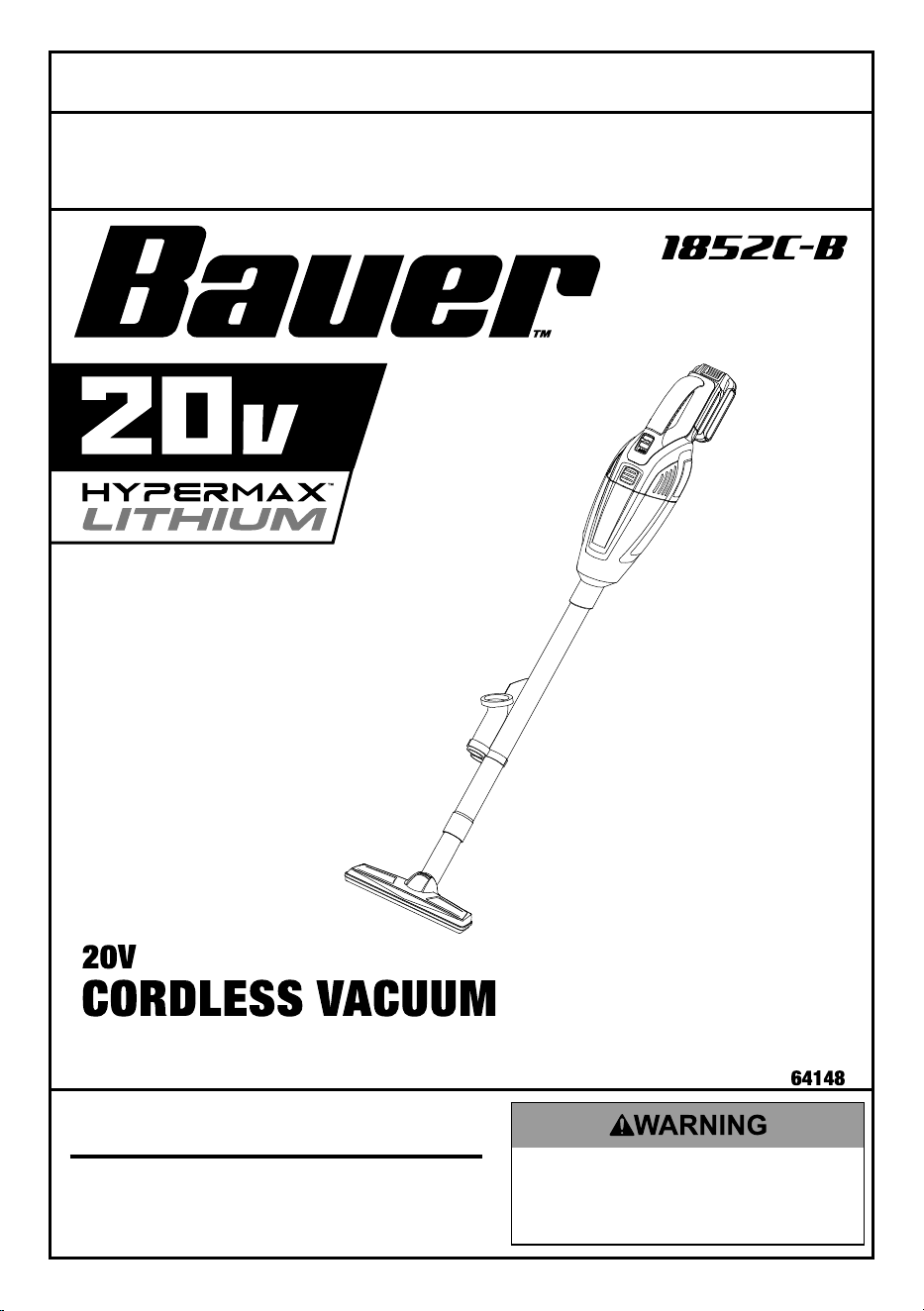
Visit our website at: http://www.harborfreight.com
Email our technical support at: [email protected]
Owner’s Manual & Safety Instructions
Save This Manual Keep this manual for the safety warnings and precautions, assembly,
operating, inspection, maintenance and cleaning procedures. Write the product’s serial number in the
back of the manual near the assembly diagram (or month and year of purchase if product has no number).
Keep this manual and the receipt in a safe and dry place for future reference. 19b
When unpacking, make sure that the product is intact
and undamaged. If any parts are missing or broken,
please call 1-888-866-5797 as soon as possible.
Copyright
©
2018 by Harbor Freight Tools
®
. All rights reserved.
No portion of this manual or any artwork contained herein may be reproduced in
any shape or form without the express written consent of Harbor Freight Tools.
Diagrams within this manual may not be drawn proportionally. Due to continuing
improvements, actual product may differ slightly from the product described herein.
To ols required for assembly and se rv ic e m ay n ot b e i nc lu de d .
Read this material before using this product.
Failure to do so can result in serious injury.
SAVE THIS MANUAL.
Page 2 For technical questions, please call 1-888-866-5797. Item 64148
SaFEty OpEratiOn MaintEnancESEtup
table of contents
Safety ......................................................... 2
Specifications ............................................ 4
Setup ......................................................... 4
Operation .................................................... 6
Maintenance ............................................... 7
Parts List and Diagram ............................. 10
Warranty .................................................... 12
WarninG SyMBOLS anD DEFinitiOnS
This is the safety alert symbol. It is used to alert you to potential
personal injury hazards. Obey all safety messages that
follow this symbol to avoid possible injury or death.
Indicates a hazardous situation which, if not avoided,
will result in death or serious injury.
Indicates a hazardous situation which, if not avoided,
could result in death or serious injury.
Indicates a hazardous situation which, if not avoided,
could result in minor or moderate injury.
Addresses practices not related to personal injury.
instructions pertaining to a risk of Fire, Electric Shock, or injury to persons
iMpOrtant SaFEty inStructiOnS
When using an electrical appliance, basic precautions should always be followed, including the following:
rEaD aLL inStructiOnS BEFOrE uSinG tHiS appLiancE
to reduce the risk of fire, electric shock, or injury:
1. Do not leave appliance when Battery Pack
is connected. Remove Battery Pack when
not in use and before servicing.
2. Do not use outdoors or on wet surfaces.
3. Do not allow to be used as a toy. Close attention
is necessary when used by or near children.
4. Use only as described in this manual. Use only
manufacturer’s recommended attachments.
5. Do not use with damaged Battery Pack.
If appliance is not working as it should, has been
dropped, damaged, left outdoors, or dropped
into water, return it to a service center.
6. Do not handle appliance with wet hands.
7. Do not put any object into openings. Do not use
with any opening blocked; keep free of dust, lint,
hair, and anything that may reduce air flow.
8. Keep hair, loose clothing, fingers, and all parts
of body away from openings and moving parts.
9. Turn off all controls before removing Battery Pack.
10. Use extra care when cleaning on stairs.
11. Do not use to pick up flammable or
combustible liquids, such as gasoline, or
use in areas where they may be present.
12. Do not pick up anything that is burning
or smoking, such as cigarettes,
matches, or hot ashes.
13. Do not use without dust bag
and/or filters in place.
14. FOR HOUSEHOLD USE ONLY.
Page 3For technical questions, please call 1-888-866-5797.Item 64148
SaFEtyOpEratiOnMaintEnancE SEtup
15. Stay alert, watch what you are doing and use
common sense when operating an appliance.
Do not use an appliance while you are tired or
under the influence of drugs, alcohol or medication.
A moment of inattention while operating
appliances may result in serious personal injury.
16. Maintain labels and nameplates
on the appliance. These carry important safety
information. If unreadable or missing, contact
Harbor Freight Tools for a replacement.
17. People with pacemakers should consult their
physician(s) before use. Electromagnetic fields in
close proximity to heart pacemaker could cause
pacemaker interference or pacemaker failure.
18. The warnings, precautions, and instructions
discussed in this instruction manual cannot cover all
possible conditions and situations that may occur.
It must be understood by the operator that
common sense and caution are factors
which cannot be built into this product,
but must be supplied by the operator.
19. Battery appliance use and care
a. prevent unintentional starting. Ensure the
switch is in the off-position before connecting
to battery pack, picking up or carrying the
appliance. Carrying the appliance with your
finger on the switch or energizing appliance
that have the switch on invites accidents.
b. recharge only with the charger specified by
the manufacturer. A charger that is suitable
for one type of battery pack may create a risk
of fire when used with another battery pack.
c. use appliances only with specifically
designated battery packs. Use of any other
battery packs may create a risk of injury and fire.
d. When battery pack is not in use, keep
it away from other metal objects, like
paper clips, coins, keys, nails, screws
or other small metal objects, that can
make a connection from one terminal
to another. Shorting the battery terminals
together may cause burns or a fire.
e. under abusive conditions, liquid may be
ejected from the battery; avoid contact.
If contact accidentally occurs, flush with water.
If liquid contacts eyes, additionally seek
medical help. Liquid ejected from the
battery may cause irritation or burns.
f. Do not use a battery pack or appliance that
is damaged or modified. Damaged or modified
batteries may exhibit unpredictable behavior
resulting in fire, explosion or risk of injury.
g. Do not expose a battery pack or appliance
to fire or excessive temperature.
Exposure to fire or temperature above
265°F may cause explosion.
h. Follow all charging instructions and do
not charge the battery pack or appliance
outside of the temperature range specified
in the instructions. Charging improperly or at
temperatures outside of the specified range may
damage the battery and increase the risk of fire.
i. Have servicing performed by a qualified
repair person using only identical
replacement parts. This will ensure that
the safety of the product is maintained.
j. Do not modify or attempt to repair the
appliance or the battery pack except as
indicated in the instructions for use and care.
k. The battery Charger gets hot during
use. The Charger’s heat can build up
to unsafe levels and create a fire
hazard if it does not receive adequate
ventilation, due to an electrical fault, or if it is
used in a hot environment. Do not place the
Charger on a flammable surface. Do not
obstruct any vents on the Charger.
Especially avoid placing the charger on
carpets and rugs; they are not only
flammable, but they also obstruct vents
under the charger. Place the Charger on a
stable, solid, nonflammable surface (such as a
stable metal workbench or concrete floor) at
least 1 foot away from all flammable objects,
such as drapes or walls. Keep a fire
extinguisher and a smoke detector in the area.
Frequently monitor the Charger and
Battery Pack while charging.
Page 4 For technical questions, please call 1-888-866-5797. Item 64148
SaFEty OpEratiOn MaintEnancESEtup
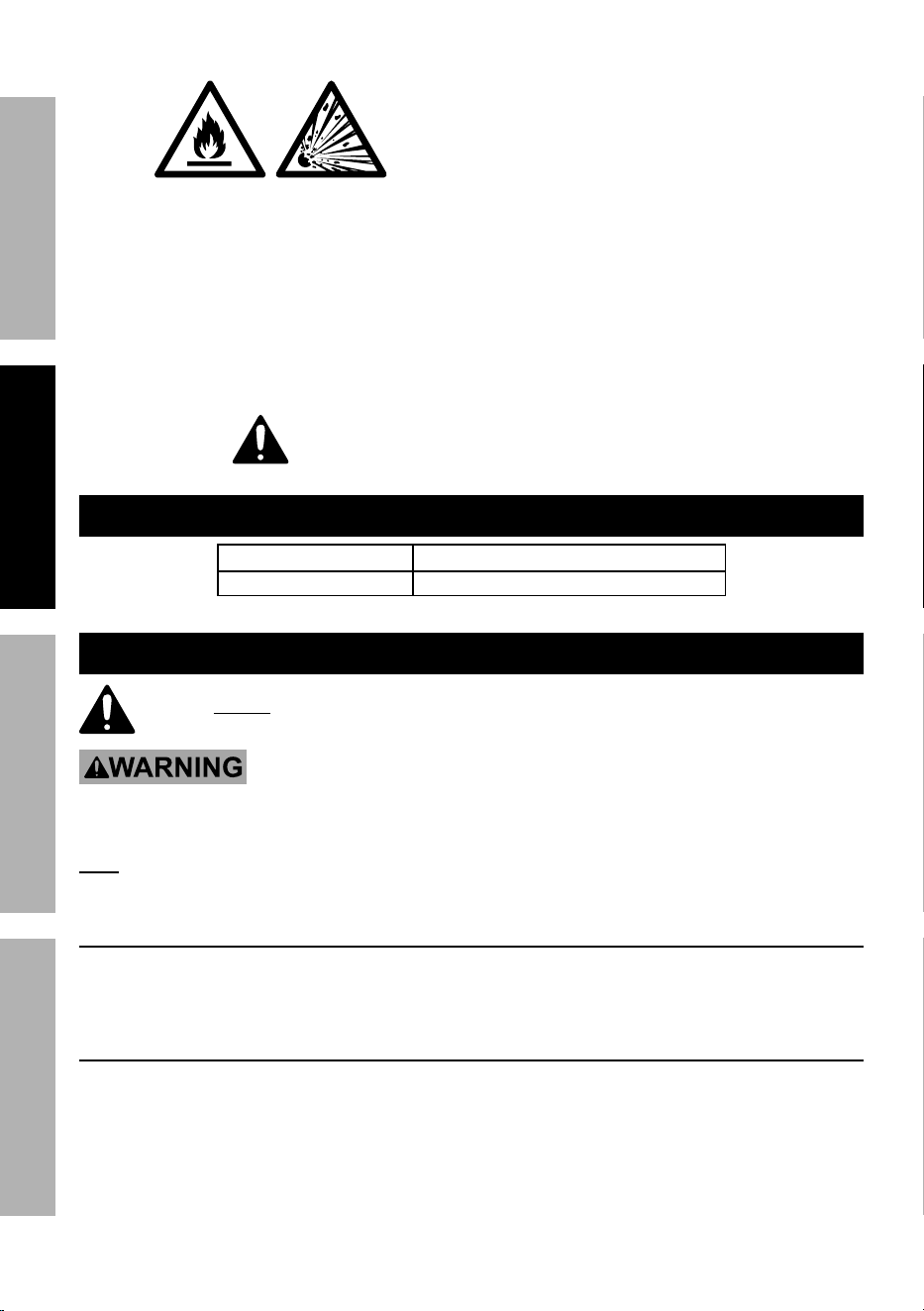
20. Lithium Battery Safety Warnings
LitHiuM BattEriES StOrE
a LarGE aMOunt OF EnErGy anD
WiLL VEnt FirE Or EXpLODE
iF MiStrEatED:
a. Keep Battery pack dry.
b. DO nOt DO any OF tHE FOLLOWinG
tO tHE BattEry pacK:
• Open,
• Drop,
• Short-circuit,
• puncture,
• incinerate, or
• Expose to temperatures
greater than 265°F.
c. Charge Battery Pack only according
to its Charger’s instructions.
d. Inspect Battery Pack before every use;
do not use or charge if damaged.
e. Li-ion BattEry MuSt BE rEcycLED
Or DiSpOSED OF prOpErLy.
SaVE tHESE inStructiOnS
Specifications
Battery Type Bauer 20V Li-ion (sold separately)
Flow Rate 210 CFM
Setup - Before use:
read the EntirE iMpOrtant SaFEty inFOrMatiOn section at the beginning of this
manual including all text under subheadings therein before set up or use of this product.
tO prEVEnt SEriOuS inJury FrOM acciDEntaL OpEratiOn:
turn the power Switch of the appliance off and remove Battery pack
before performing any procedure in this section.
note: For additional information regarding the parts listed in the following pages,
refer to the Assembly Diagram near the end of this manual.
installation
1. Remove any stored parts from
the Dust Cup before use.
2. Use of the Extension tube is optional. The
Crevice Nozzle, Brush Nozzle, and Floor Brush
may be connected directly to the Dust Cup.
charging Battery pack
Refer to Charger′s manual for instructions.
Page 5For technical questions, please call 1-888-866-5797.Item 64148
SaFEtyOpEratiOnMaintEnancE SEtup
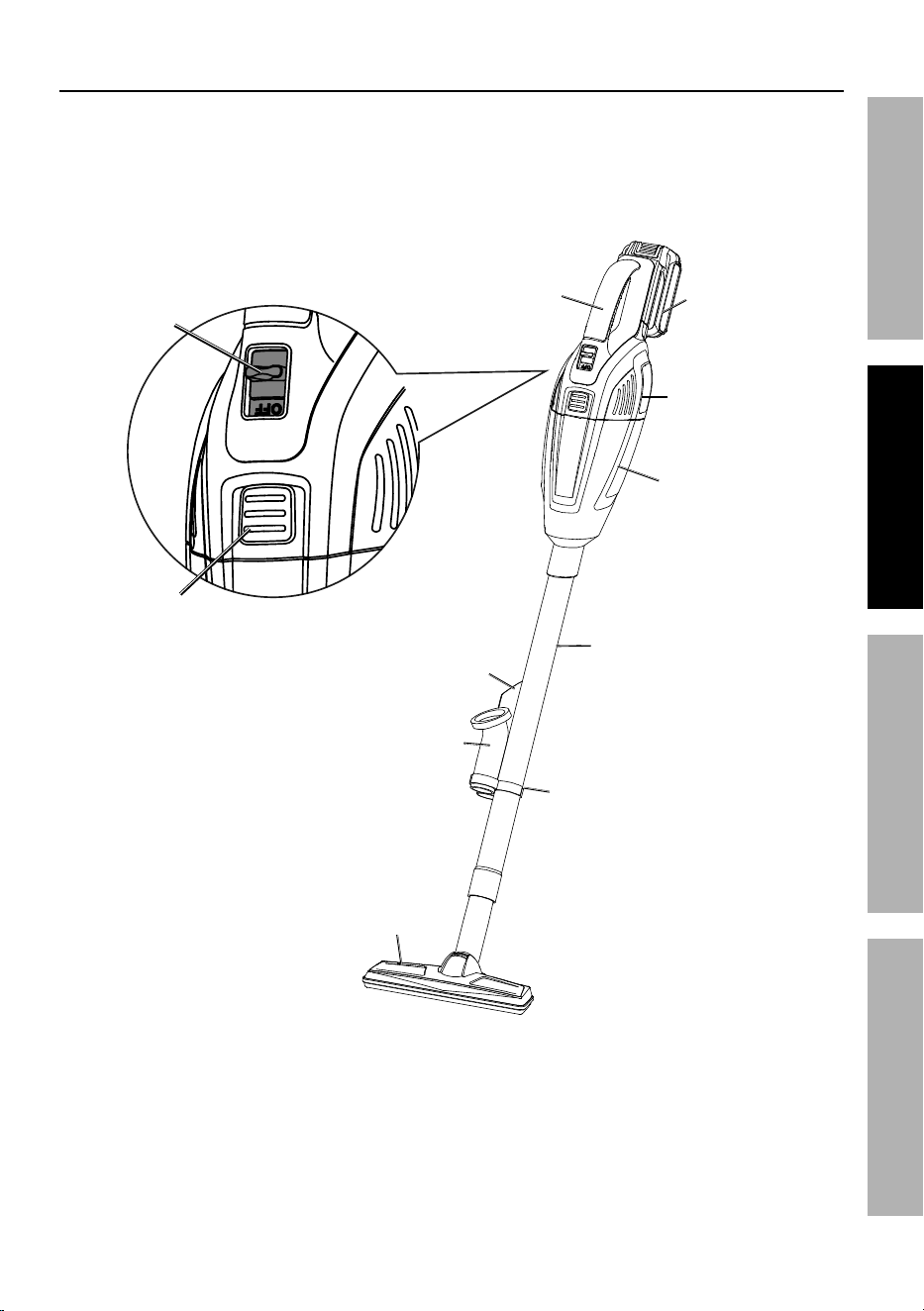
Functions
On/Off Switch
Handle
Battery pack
(sold separately)
Motor Housing
Dust cup
Extension tube
crevice nozzle
Brush nozzle
accessory Holder
Floor Brush
release Button
Page 6 For technical questions, please call 1-888-866-5797. Item 64148
SaFEty OpEratiOn MaintEnancESEtup
Operating instructions
read the EntirE iMpOrtant SaFEty inFOrMatiOn section at the beginning of this
manual including all text under subheadings therein before set up or use of this product.
Vacuum Operation
tO prEVEnt SEriOuS inJury FrOM acciDEntaL OpEratiOn:
turn the Switch off and remove the Battery pack.
1. Make sure the Filter is installed and
assembled correctly in the Dust Cup.
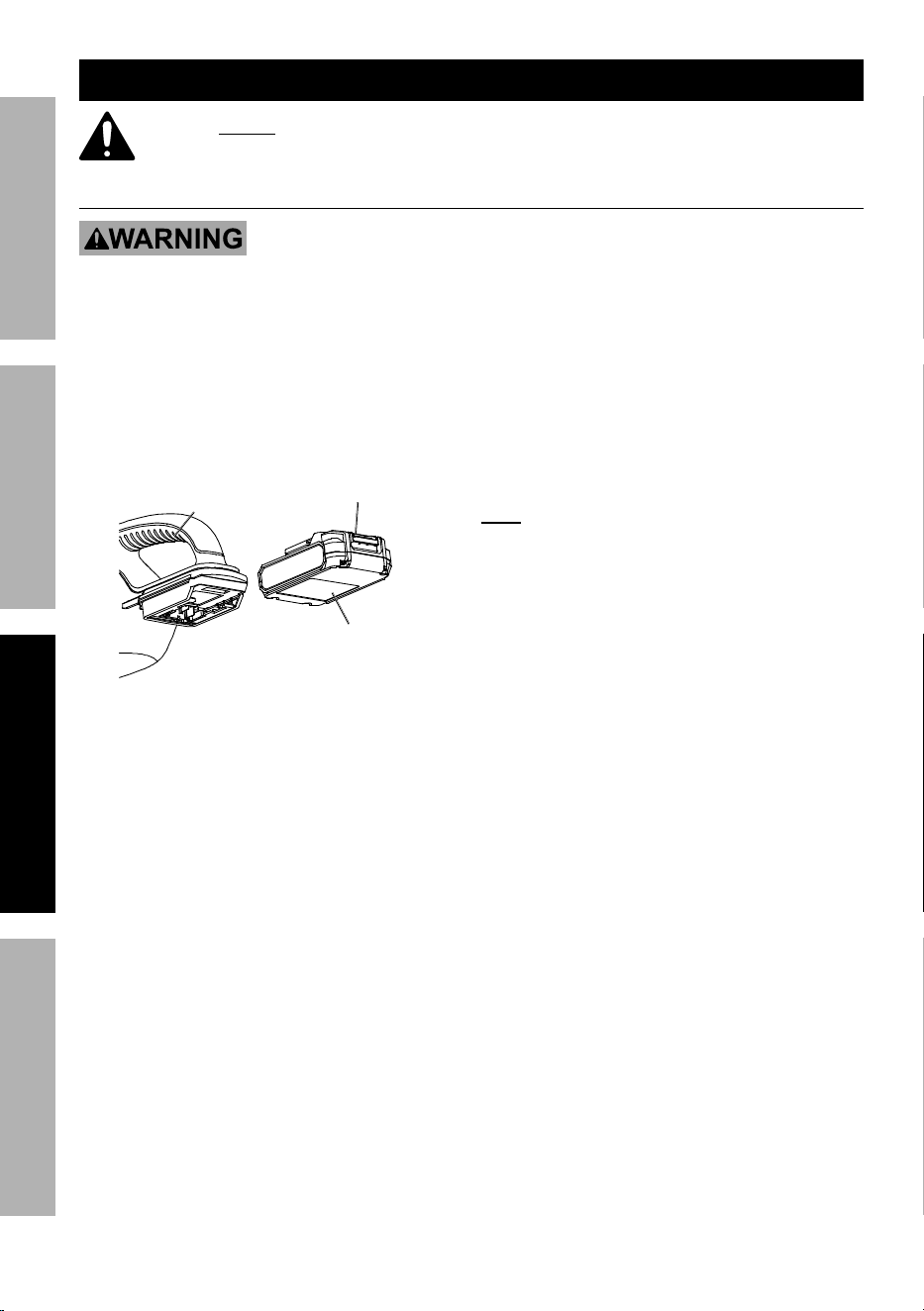
2. Install the Battery Pack:
Using gentle force, slide the Battery Pack
into Motor Housing so that the Battery
Lock Button latches it in place.
Battery pack
Motor Housing
Battery Lock
Button
Figure a
3. Attach the desired accessory (Crevice
Nozzle, Brush Nozzle, or Floor
Brush) to the end of Dust Cup.
4. Optionally, slide the Extension Tube onto
the Dust Cup first and then the accessory
to the end of the Extension Tube.
5. Turn on the Vacuum by moving the
On/Off Switch to the ON position.
note: The Vacuum is equipped with an automatic
shut-off. If the Vacuum shuts itself off while you
are using it, follow steps in Troubleshooting.
6. To prevent accidents, turn off the Vacuum by
moving the On/Off switch to the OFF position
and remove Battery Pack after use. Clean
Filter and Dust Cup. Clean external surfaces
of the tool with clean and dry cloth. Store
the tool indoors out of children′s reach.
Page 7For technical questions, please call 1-888-866-5797.Item 64148
SaFEtyOpEratiOnMaintEnancE SEtup
user-Maintenance and Storage
procedures not specifically explained in this manual must
be performed only by a qualified technician.
tO prEVEnt SEriOuS inJury FrOM acciDEntaL OpEratiOn:
turn the power Switch of the appliance off and disconnect the Battery
pack before performing any procedure in this section.
tO prEVEnt SEriOuS inJury FrOM appLiancE FaiLurE:
Do not use damaged equipment. if abnormal noise or vibration
occurs, have the problem corrected before further use.
cleaning, Maintenance, and Lubrication
1. BEFOrE EacH uSE, inspect the
general condition of the appliance. Check for:
• loose hardware,
• misalignment or binding of moving parts,
• cracked or broken parts,
• clogged ventilation holes,
• dirty filter,
• damaged electrical wiring, and
• any other condition that may
affect its safe operation.
2. Only use an undamaged filter. Replace
a damaged filter immediately.
3. aFtEr uSE, wipe external surfaces
of the appliance with clean cloth.
a. Use a moist cloth to clean the
vacuum cleaner′s housing.
b. Use a dry cloth to clean battery contacts.
4. Store in an indoor dry area out of reach of children.
5. All parts are permanently lubricated.
Do not use additional lubrication.
6. aFtEr EacH uSE, empty and clean
the Dust Cup and Filter (see cleaning
Dust cup and Filter on page 8),
7. Li-ion BattEry MuSt BE rEcycLED Or
DiSpOSED OF prOpErLy.
Do not short, incinerate or open battery.
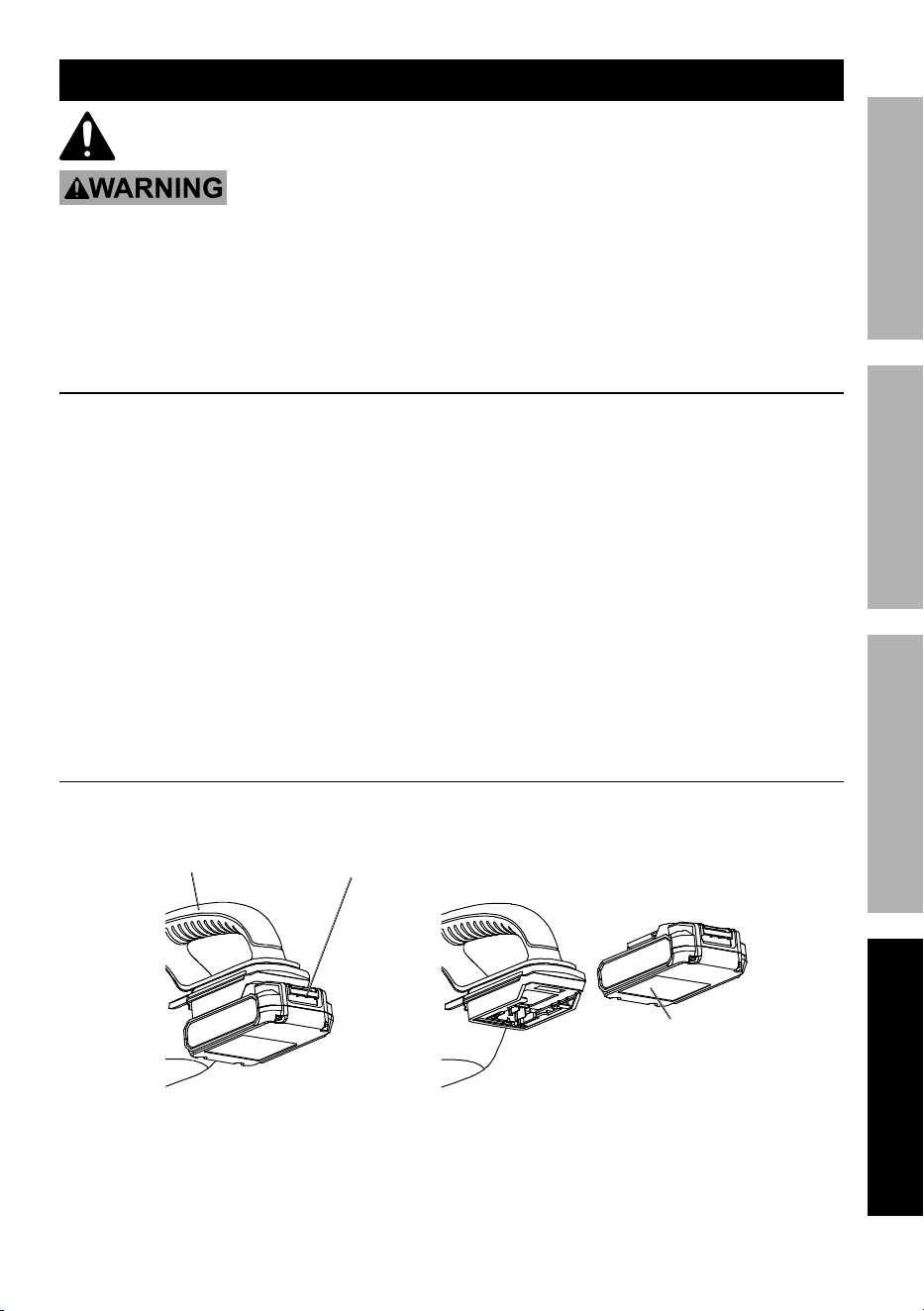
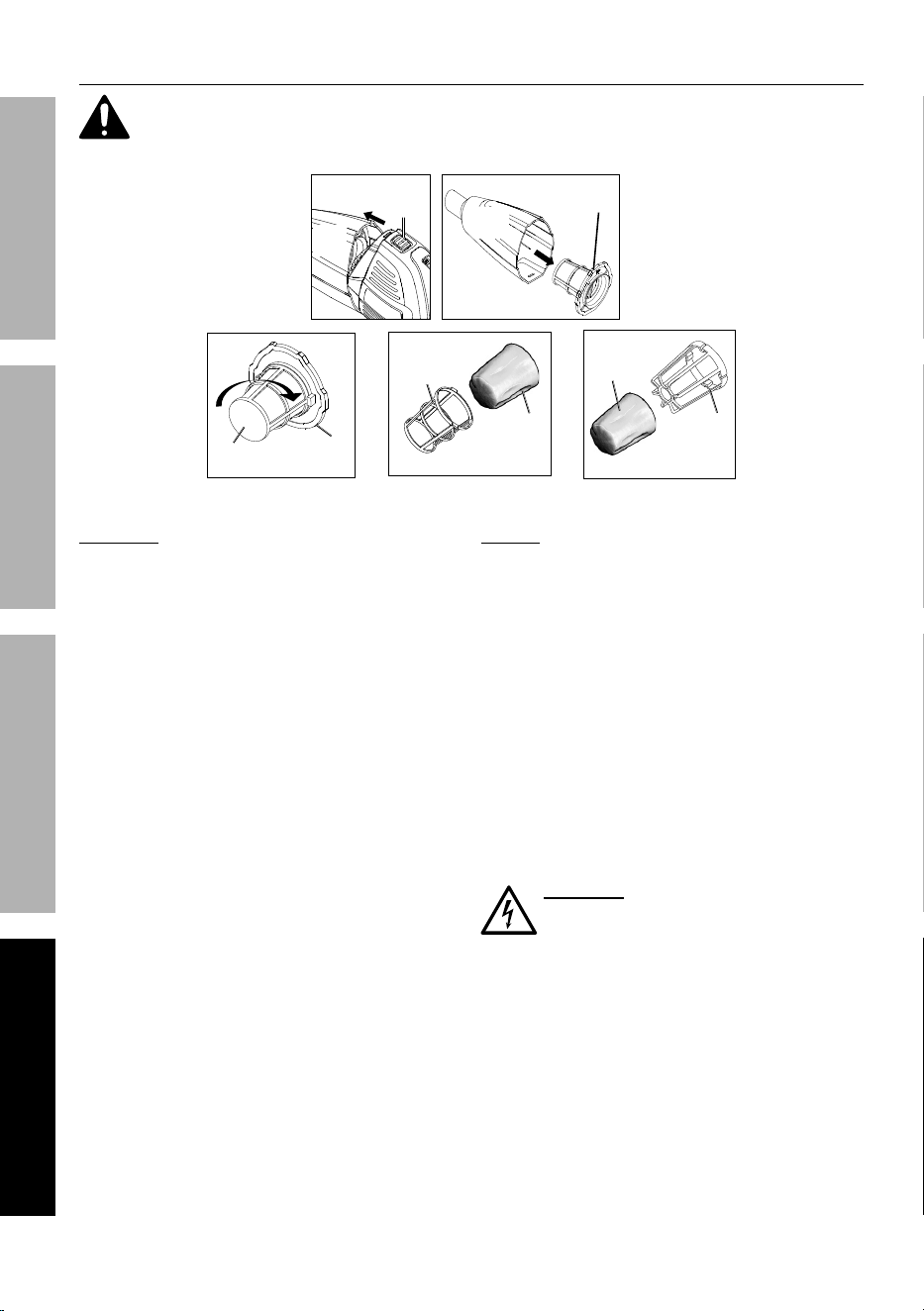
removing Battery pack
Press down on the Battery Lock Button and pull Battery Pack out.
Battery Lock
Button
Battery
pack
Motor
Housing
Figure B
Page 8 For technical questions, please call 1-888-866-5797. Item 64148
SaFEty OpEratiOn MaintEnancESEtup
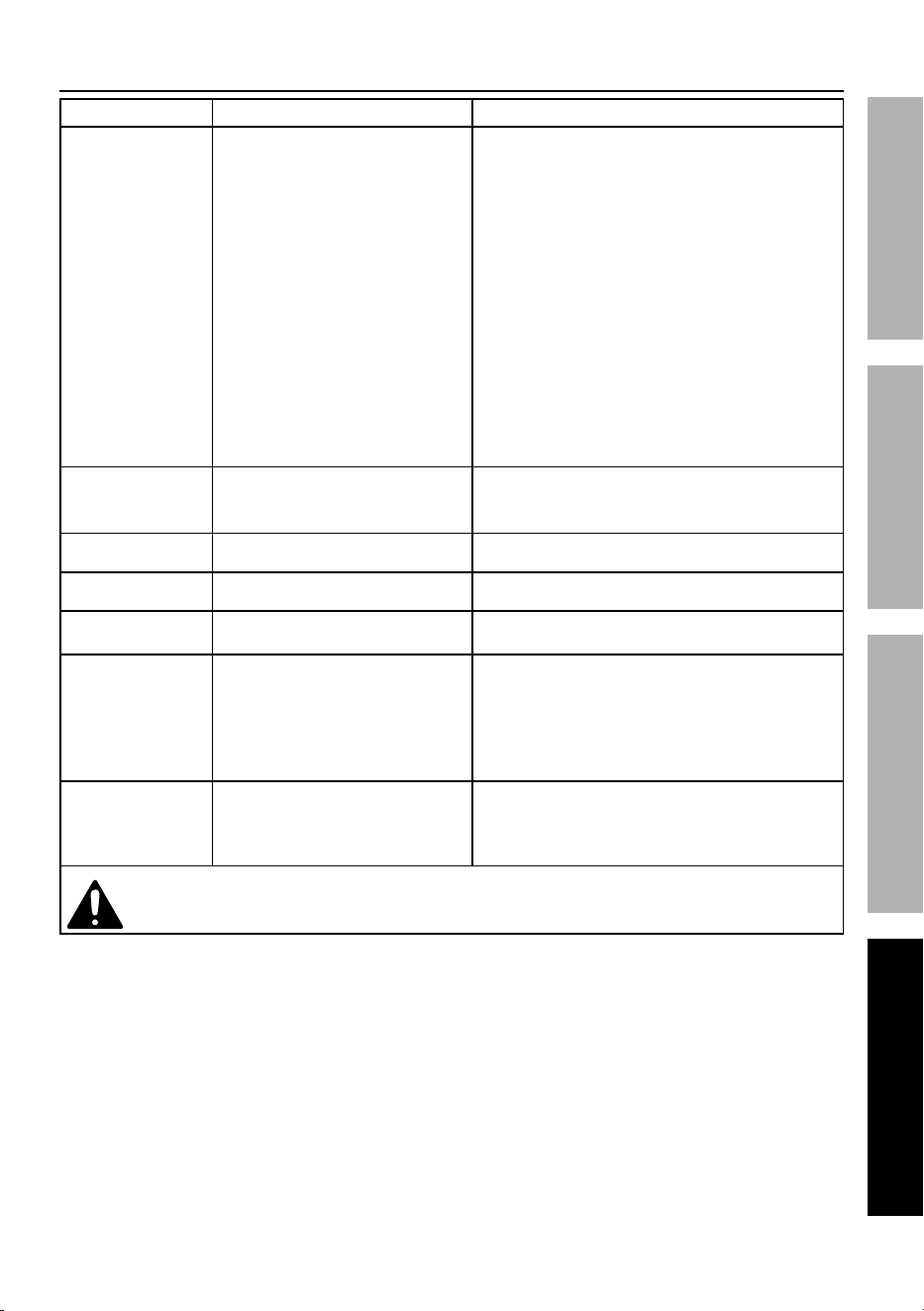
cleaning Dust cup and Filter
to ensure proper operation, clean the Dust cup and cloth Filter regularly. Damaged
Filters should be replaced. Disconnect Battery pack before cleaning Vacuum.
Dust
cup
release
Button
Filter
assembly
Filter
cover
Filter
Seal
Filter
cover
cloth
Filter
cloth
Filter
Filter
Basket
Dust
cup
Figure c
DuSt cup:
1. Press the Release Button to separate the
Dust Cup from the Motor Housing.
2. Remove the Filter Assembly from the Dust Cup.
3. Shake the Dust Cup over a waste bin and, if
dirty, wipe it with a moist clean cloth. Allow
it to dry before reassembling the Vacuum.
4. Empty the Filter contents into a waste bin.
5. Inspect and, if needed, clean the Filter
by following steps 3-10 in FiLtEr.
6. Insert the clean Filter Assembly into the
Dust Cup and reattach the Motor Housing
to the Dust Cup by pressing them together
until the Release Button engages.
FiLtEr:
1. Press the Release Button to separate the
Dust Cup from the Motor Housing.
2. Remove the Filter Assembly from the Dust Cup.
3. Remove the Filter Cover from the Filter Seal
by twisting them apart as shown in Figure C.
4. Remove the Cloth Filter along with its Filter Basket
from the Filter Cover and clean with a soft brush.
5. If needed, the Cloth Filter and Filter Basket can be
separated, and washed in mild soap and water.
6. Rinse all soap and dust out thoroughly.
7. allow the cloth Filter to dry for at
least one day before reinstalling.
WarninG! installing a wet cloth Filter
will increase the risk of electric shock
and may damage the vacuum.
8. To reinstall the Filter, insert the Filter Basket
into the Cloth Filter and then both items into
the Filter Cover. Be sure the Cloth Filter
covers the Filter Cover completely.
9. Attach the Filter Seal to the Filter Cover by twisting
them together as shown in Figure C. The Filler
Seal should be on snug but do not over-tighten.
10. Insert the clean Filter Assembly into the
Dust Cup and reattach the Motor Housing
to the Dust Cup by pressing them together
until the Release Button engages.
Page 9For technical questions, please call 1-888-866-5797.Item 64148
SaFEtyOpEratiOnMaintEnancE SEtup
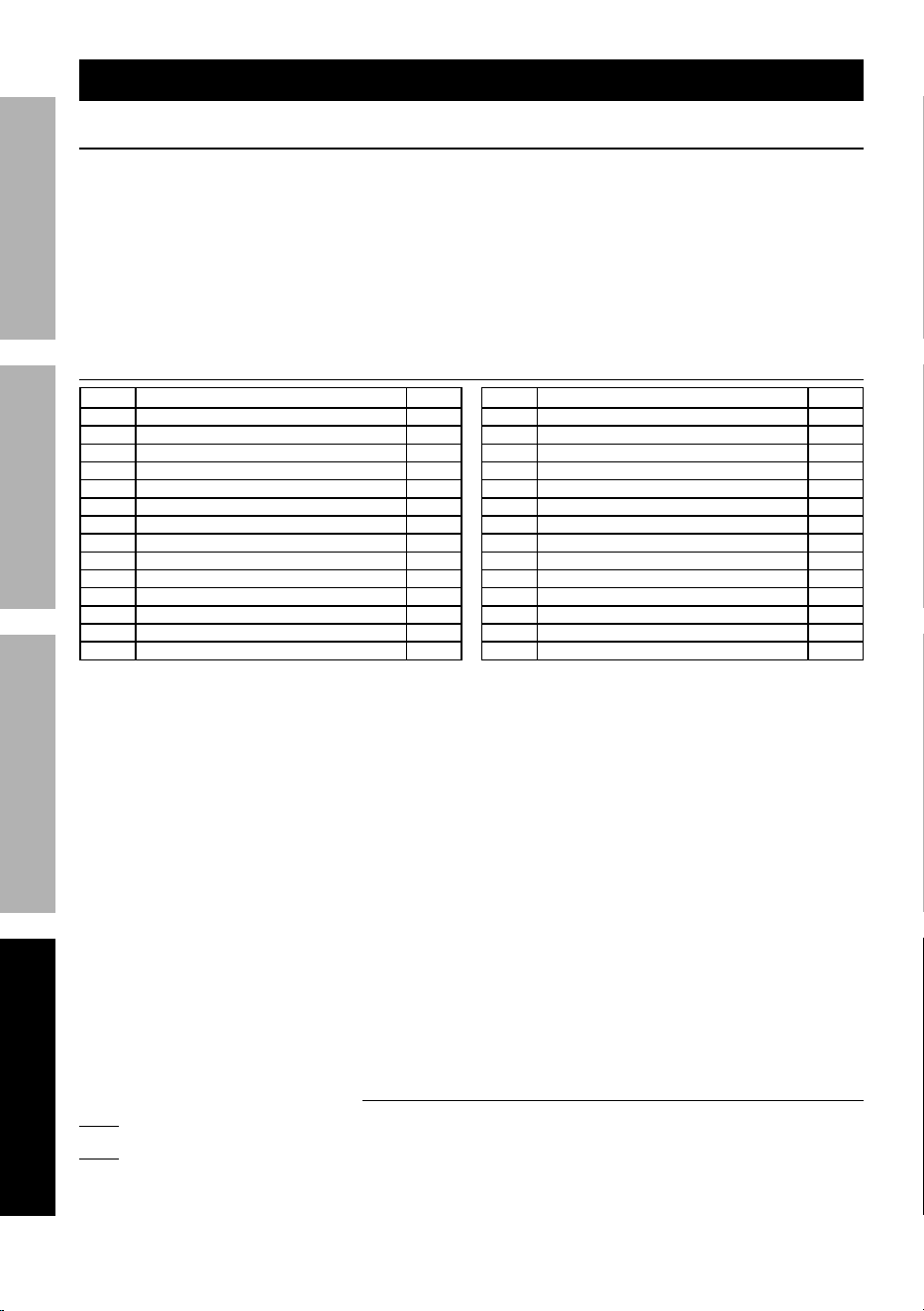
troubleshooting
problem possible causes Likely Solutions
Tool will not start. 1. Battery Pack not properly
connected.
2. Dust Cup not locked to Motor
Housing.
3. Switch not fully in ON position.
4. Battery Pack not properly
charged.
5. Battery Pack burnt-out.
6. Internal damage or wear. (Motor
or Switch, for example.)
1. Remove Battery Pack to make sure there are
no obstructions and the battery contacts are
clean. Reinsert the Battery Pack according to
its shape (it should only fit one way) and press
firmly until the Battery Pack locks in place.
2. Press Release Button. Pull Dust Cup and
Motor Housing apart slightly then press them
back together until you hear the Release Button
engage (click) locking the two pieces together.
3. Push the On/Off switch fully to the On position.
4. Make sure the Charger is connected and
operating properly. Give enough time for
Battery Pack to recharge properly.
5. Dispose of old Battery Pack
properly or recycle. Replace Battery Pack.
6. Have technician service tool.
Tool operates slowly. 1. Forcing tool to work too fast.
2. Low charge on Battery Pack.
3. Dirty Filter.
1. Allow tool to work at its own rate.
2. Recharge Battery Pack.
3. Clean Filter and Dust Cup.
Performance
decreases over time.
Motor worn or damaged. Have qualified technician replace motor.
Excessive noise
or rattling.
Internal damage or wear. (Motor
or bearings, for example.)
Have technician service tool.
Low suction. 1. Dirty Filter.
2. Low charge on Battery Pack.
1. Clean Filter and Dust Cup.
2. Recharge Battery Pack.
Turns itself off. 1. Dirty Filter.
2. Damaged Battery Pack.
3. Blocked Motor Housing vents.
4. Damaged Motor.
1. Clean Filter and Dust Cup.
2. Dispose of old Battery Pack
properly or recycle. Replace Battery Pack.
3. Using a dry clean cloth, wipe
Motor Housing vents clean.
4. Have technician service tool.
Overheating. 1. Forcing tool to work too fast.
2. Blocked Motor Housing vents.
3. Clogged Filter.
1. Allow tool to work at its own rate.
2. Using a dry clean cloth, wipe
Motor Housing vents clean.
3. Clean Filter and Dust Cup.
Follow all safety precautions whenever diagnosing or servicing the tool.
Disconnect Battery pack before service.
Page 10 For technical questions, please call 1-888-866-5797. Item 64148
SaFEty OpEratiOn MaintEnancESEtup
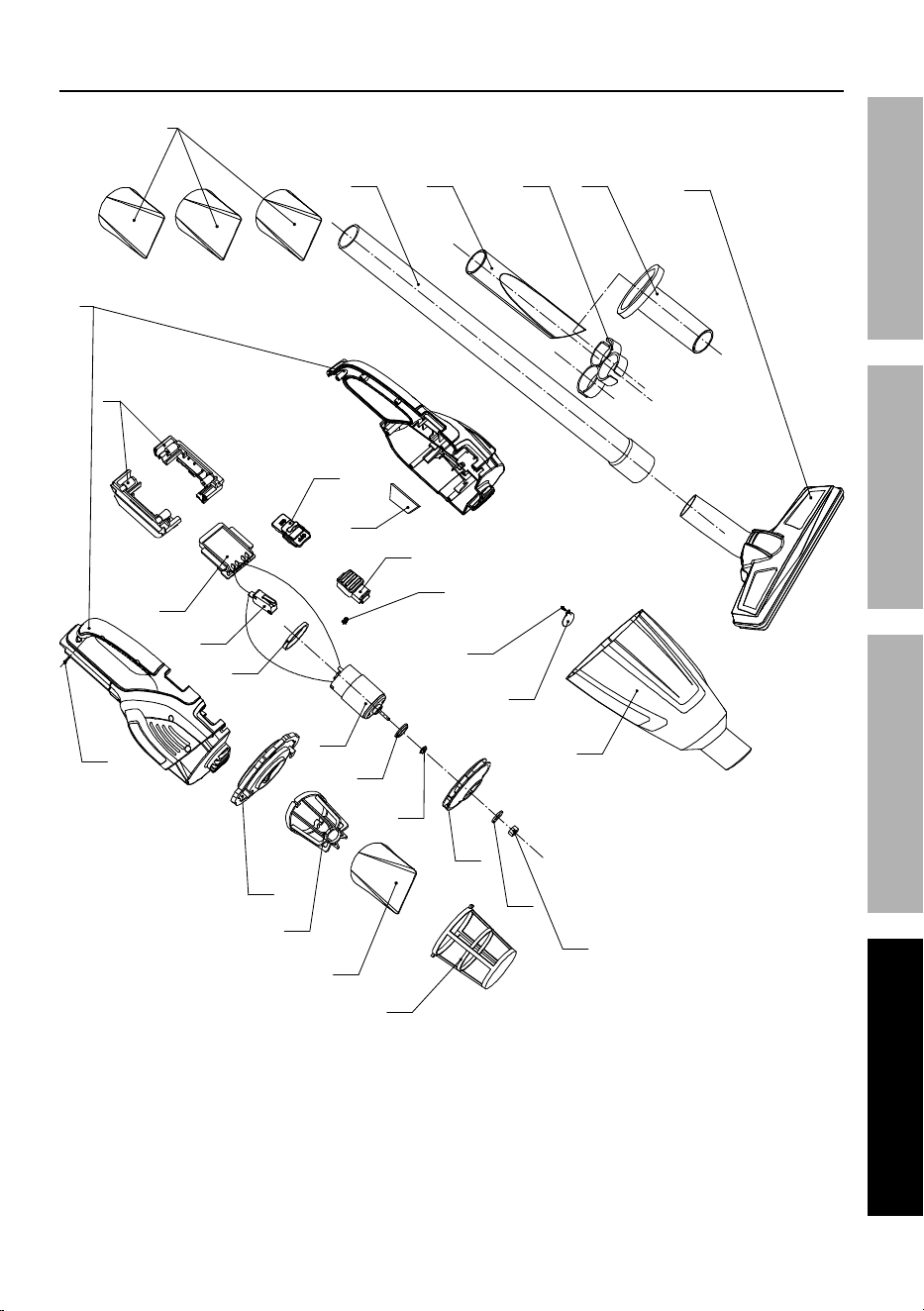
part List and Diagram
parts List
part Description Qty
1 Screw 12
2 Motor Housing 1
3 Filer Seal 1
4 Filter Basket 1
5 Filter 4
6 Filter Cover 1
7 Nut 1
8 Gasket 1
9 Fan 1
10 Fan Connector 1
11 Motor Rubber Ring 1 1
12 Motor 1
13 Motor Rubber Ring 2 1
14 Switch 1
part Description Qty
15 PCB 1
16 Battery Enclosure 1
17 Switch Cover 1
18 Air Outlet Sponge 1
19 Release Button 1
20 Release Button Spring 1
21 Screw and Washer Set 1
22 Air Inlet Ring 1
23 Dust Cup 1
24 Extension Tube 1
25 Crevice Nozzle 1
26 Accessory Holder 1
27 Brush Nozzle 1
28 Floor Brush 1
record product’s Serial number Here:
note: If product has no serial number, record month and year of purchase instead.
note: Some parts are listed and shown for illustration purposes only,
and are not available individually as replacement parts.
pLEaSE rEaD tHE FOLLOWinG carEFuLLy
THE MANUFACTURER AND/OR DISTRIBUTOR HAS PROVIDED THE PARTS LIST AND ASSEMBLY DIAGRAM
IN THIS MANUAL AS A REFERENCE TOOL ONLY. NEITHER THE MANUFACTURER OR DISTRIBUTOR
MAKES ANY REPRESENTATION OR WARRANTY OF ANY KIND TO THE BUYER THAT HE OR SHE IS
QUALIFIED TO MAKE ANY REPAIRS TO THE PRODUCT, OR THAT HE OR SHE IS QUALIFIED TO REPLACE
ANY PARTS OF THE PRODUCT. IN FACT, THE MANUFACTURER AND/OR DISTRIBUTOR EXPRESSLY
STATES THAT ALL REPAIRS AND PARTS REPLACEMENTS SHOULD BE UNDERTAKEN BY CERTIFIED AND
LICENSED TECHNICIANS, AND NOT BY THE BUYER. THE BUYER ASSUMES ALL RISK AND LIABILITY
ARISING OUT OF HIS OR HER REPAIRS TO THE ORIGINAL PRODUCT OR REPLACEMENT PARTS
THERETO, OR ARISING OUT OF HIS OR HER INSTALLATION OF REPLACEMENT PARTS THERETO.
Page 11For technical questions, please call 1-888-866-5797.Item 64148
SaFEtyOpEratiOnMaintEnancE SEtup
assembly Diagram
2
16
17
18
19
20
21
22
23
24 25
5
26 27
28
10
12
11
8
9
7
1
5
6
4
3
14
13
15

Limited 90 Day Warranty
Harbor Freight Tools Co. makes every effort to assure that its products meet high quality and durability
standards, and warrants to the original purchaser that this product is free from defects in materials
and workmanship for the period of 90 days from the date of purchase. This warranty does not apply to
damage due directly or indirectly, to misuse, abuse, negligence or accidents, repairs or alterations outside
our facilities, criminal activity, improper installation, normal wear and tear, or to lack of maintenance.
We shall in no event be liable for death, injuries to persons or property, or for incidental, contingent,
special or consequential damages arising from the use of our product. Some states do not allow the
exclusion or limitation of incidental or consequential damages, so the above limitation of exclusion
may not apply to you. THIS WARRANTY IS EXPRESSLY IN LIEU OF ALL OTHER WARRANTIES,
EXPRESS OR IMPLIED, INCLUDING THE WARRANTIES OF MERCHANTABILITY AND FITNESS.
To take advantage of this warranty, the product or part must be returned to us with transportation charges
prepaid. Proof of purchase date and an explanation of the complaint must accompany the merchandise.
If our inspection verifies the defect, we will either repair or replace the product at our election or we may
elect to refund the purchase price if we cannot readily and quickly provide you with a replacement. We will
return repaired products at our expense, but if we determine there is no defect, or that the defect resulted
from causes not within the scope of our warranty, then you must bear the cost of returning the product.
This warranty gives you specific legal rights and you may also have other rights which vary from state to state.
26541 agoura road • calabasas, ca 91302 • 1-888-866-5797
